

85 messages · Page 1 of 1 (latest)
 gaunt island
Keyword: INSPIRED! This is no where near the perfection of SuperVillain but I took some textures/fonts and made this my own! Lots more to come.. loving this!
gaunt island
gaunt island
 ruby elk
I used to think that UI was so cool years ago!
gaunt island
@keen widget introduced me and I immediately fell in love.. hahah
gaunt island


 cunning wagon
ffs the moment I'm somewhat happy with my UI this guy shows up with another banger 😅
gaunt island

 gaunt island
what's the combat bg?!
 knotty cave
 gaunt island
ooooooh my
knotty cave
You can do this easily with a Weakaura. Don’t know what the ! means.
gaunt island
Aggro indicator!
gaunt island
knotty cave
You can do this easily with a Weakaura. Don’t know what the ! means.


combat icon instead...?!
 keen widget
Should just pop up to start the fight
gaunt island
Would be cool to have it like BOOM LAND right in the middle with smoke
keen widget
LOL FUCK YEAH!!
gaunt island
 ‼️
‼️
knotty cave
It gets better and better and more and more like a comic.
 still marlin
It looks really cool!
gaunt island

Quick glimpse at a SuperVillain edit I put together with textures/icons/statusbars from SVUI's Curseforge download. Edited with ElvUI, Eltruism, mMedia Tags, and JiberishUI. Used some Weakauras as well for some of the icons!
#worldofwarcraft #elvui #supervillain
gaunt island
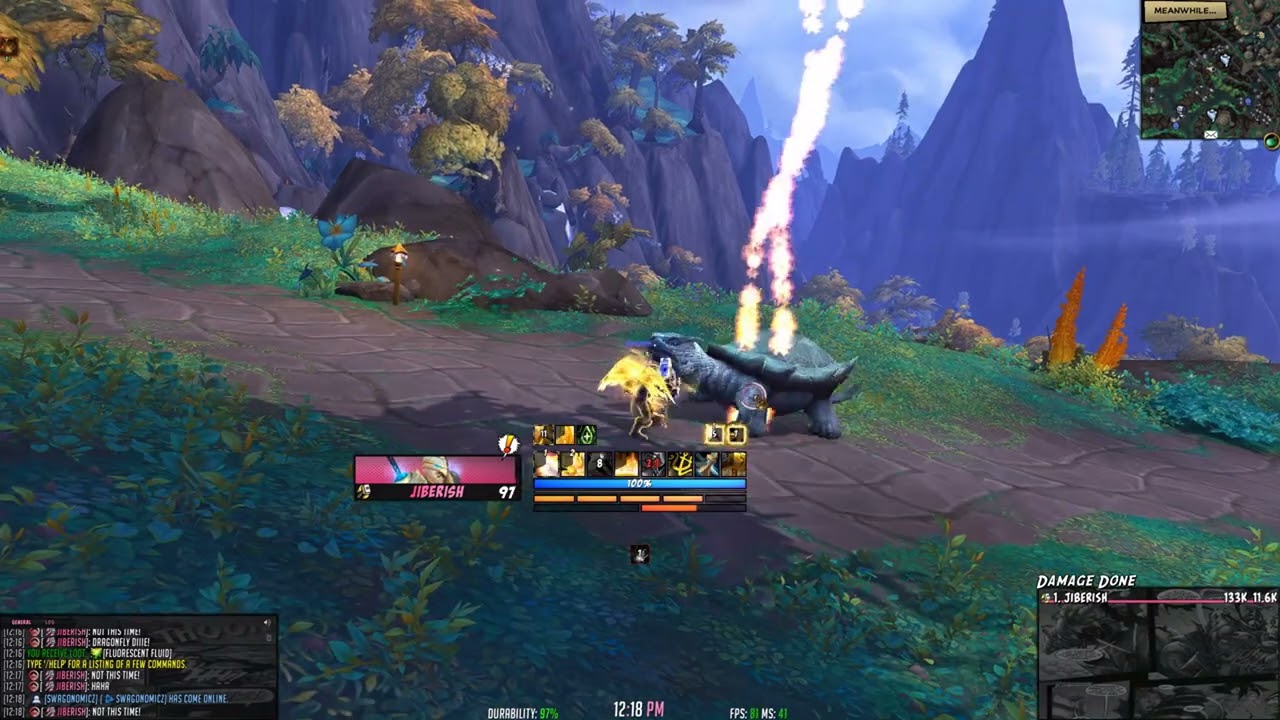
Quick random edit on the popular and discontinued SuperVillain edit! I downloaded the SuperVillainUI off curseforge https://www.curseforge.com/wow/addons/supervillain-ui and applied some of the textures/icons/fonts! Won't be sharing this publicly but just a WORK OF LOOOVE for the SuperVillain UI! #worldofwarcraft #elvui
gaunt island
gaunt island
Thanks to Blinkii on the randomization weakauras for saying/responses when entering and leaving combat! Coming along niiiiicely
knotty cave
gaunt island
Maybe change the font of the damage text.
gaunt island
Ya needs to be a bit more… BAM!! With like italic looks..
The ALERT text might be good - in SVUI package
 eager cedar
@gaunt island It took me a while to finish this message as I went through several napkins wiping my keyboard from drooling over this UI. Where's the wago to copy this? 😭
eager cedar
@stable patio Any idea if this profile was released to use?
Tried to download SVUI, but running it on it's own didn't work nor with ElvUI enabled also 😦
knotty cave
eager cedar
Tried to download SVUI, but running it on it's own didn't work nor with ElvUI en...
It’s not SVUI it is a profile for ElvUi with lots of custom media and Weakauras.
eager cedar
@stable patio <3. I'm trying to add the art, but in this video for retail it shows SharedMedia_MyMedia while as WOTLK doesn't have that folder. They only have the below.

Maybe textures
I just don't know which folder to throw these .blp files in 😭
gaunt island
You need to download the addon “SharedMedia” and then read the instructions in the SharedMedia folder!
You create the SharedMedia_MyMedia folder yourself!
eager cedar
The BOOM looks amazing and the font ofc.
eager cedar
What's the .ttf you're using in this one? I am going to try to find it on google so I can add it to Miks Scrolling Text? I love your weak aura's for '!' and 'vs'
Thanks in advance if you're able to share those Weak Aura's or the name of .ttf
gaunt island
All the fonts and art/images (like the ! And vs) is from SuperVillain UI! Can download it off curse and pull all his files
Here’s a quick video from Trenchy on SharedMedia
eager cedar
@gaunt island ❤️ I have to find the patience to learn how to do the art work portion with Media ++. I tried Google searching for a Media ++ download, but couldn't find anything.
knotty cave
@gaunt island you shouldlink each Addon, so they don’t need to search and get same results, like you.
Link for SVUI, Sharedmedia and so on.
 fresh crest
gaunt island
fresh crest
gaunt island
Also, you can point people to the #676577155227844618 channel. Some really good resources there (including a step-by-step on SharedMedia).
gaunt island
eager cedar
<@217823721279193089> ❤️ I have to find the patience to learn how to do the art ...
I will DM you tomorrow!!
eager cedar
Thank you so much for the DM. I did it the same way you did and the prompt shows it added it, but it's not an option on ElvUI D:

I put it in background as that's where it was located in the SuperVillainUI Core.

The font worked, but not the artwork
Figured it out - everything goes in StatusBar. Trying to figure out how to add the art to the panel itself 😛
@gaunt island
 gaunt island
yes Status Bar! Glad you got it!! 8)

In the Panel Texture area, start it w/ Interface then into the location
Interface/AddOns/SharedMedia_MyMedia/statusbar/Art6
eager cedar
Thank you! Going to figure out how to do the 'vs' and the '!' next :).
eager cedar
Is this '!' in the package? D:
eager cedar
 gaunt island
NIIIICE!! Yes I think it’s in the Alert folder - I will check when I’m back home
 frigid fractal
How did you get the quest tracker to be class color?
 rough crow
I like it
eager cedar
If I wanted to add this and chat boxes over head to this.. how would I go about it as well as targeting bar (x, diamond, star, etc.)?
 gaunt island
The talking head is controlled by blizzard - I’m not sure what you mean by adding it to target bar x diamond??
eager cedar
@gaunt island there are some people with elvui that have a built in bar to their UI that has the raid target icons. I didn't known if that was an option within ElvUI. The chat box overhead that I am referring to is I think also in ElvUI but I can't find it lol
 bitter zenith
The target marker bar is available through windtools. (Also MRT has it as well)
