#🤝│community-troubleshooting
1 messages · Page 98 of 1
 viral monolith
 proper falcon
@fiery iron Can't change in game or his monitor?
 fiery iron
@fiery iron Can't change in game or his monitor? in game
proper falcon
@viral monolith Have you verified game files?
proper falcon
@fiery iron Does your friend have any launchoptions?
@viral monolith Do you have an active anti-virus? Try temporarily turning it off
 quick chasm
@vagrant fox The team are aware of the issue and are investigating the cause. Some players have reported that disabling HPET has helped them with this issue. You can see the steps on how to disable HPET in the thread below.
https://www.reddit.com/r/PUBATTLEGROUNDS/comments/84qa6p/psa_disable_hpet_to_fix_startup_crashes/

reddit
I was one of unlucky few who were completly unable to play after recent patch - game always crashed after startup logo. To my supprise, i was able...
@viral monolith try the above as well as going through the troubleshooting steps here https://forums.playbattlegrounds.com/topic/181292-read-me-first-troubleshooting-steps/

PLAYERUNKNOWN'S BATTLEGROUNDS Forums
Hi Players,
The steps below list the most common fixes with known errors, bugs, and general weirdness. Before trying any of these please check ...
Ok, Thanks alot!
 fiery mortar
@tribal flicker Since your pretty active in this channel. Can you forward this to the Admins? These servers are always in the waiting list and they never start. Can they remove them from the list or deactivate them? Or just have some sort of code where if it doesn't start within a specific time period, the server gets deactivated. https://cdn.discordapp.com/attachments/284721478291685376/424026572077400078/Screenshot_193.png
viral monolith
i'm having a problem since i can't get into the lobby
everytime i get in it crashes
nothing helped that you sent me
with this problem
viral monolith
when will the test servers be back up ?
 tough harbor
when theres something to test maybe idk
 main vapor
Is the abuse of map glitches (see-through rocks and being able to go through a rock on one side and not the other) bannable?
 vagrant fox
tough harbor
vagrant fox
tough harbor
maybe bannable for limited time @main vapor . they shouldnt be banned permanently. not too strong of an offend.
main vapor
Okay
 keen hornet
I saw the HPET fix above, is there anything to keep an eye on performance-wise if disabling that does end up fixing my crashing issues?
 zealous anchor
disabling HPET in theory increases performance
not sure what it does but disabling it netted me an extra 10 fps on PUBG
keen hornet
Well that's comforting to hear, thanks ^^
 ionic olive
Can someone help me, I keep getting a [25] Client not responding error, i've tried deleting all pubg files and redownloading, still crashes
 quartz nacelle
Unreal Engine is exiting due to D3D device being lost. FUCK PUBG
 regal field
i met an clearly hacker in this server
it's @viral monolith i saved the replay
aimlock and wallhacks
lmao
keen hornet
There's a link in the channel immediately under this one for where you can report someone.
regal field
2 lazy to report
keen hornet
<_< then why bother complaining? Same amount of typing to less effect.
regal field
lol you can report for me 😉
zealous anchor
lmao
keen hornet
I think you're trying to kill someone's reputation.
zealous anchor
are you the kinda person who dies to a hacker in-game but doesnt report them cuz "nothing will happen"
quartz nacelle
@zealous anchor I AM IN NEED OF HELP
zealous anchor
good
so, you're getting a D3D crash correct?
does this happen when the game is starting or during gameplay
quartz nacelle
both
regal field
i just reportet him throu the replay function
zealous anchor
what are your specs?
quartz nacelle
Lenovo Y410p
quartz nacelle
I have actually underclocked my gpu
zealous anchor
hmm
can you try reverting to stock?
some old forum threads are saying thats the issue
quartz nacelle
reverting to stock crashes more often, so i have underclocked
 errant epoch
Any support staff in here? I already posted before, but forgot to check up on it, and can't find the post anymore
I purchased 2 crates the other day, one where I also used a key, and when I tried opening them, I got a message saying it took longer than expected to open them, afterwards they were gone, and I never received any loot from them
zealous anchor
check your inventory for new items
 tribal flicker
^
tribal flicker
If you successfully verified you got nothing, our customer support can see what you got and help.
zealous anchor
thats a lot of links
tribal flicker
 rocky crow
Anyone else having fps problems in the main menu after the update? It doesn't affect the gameplay at all, and I get really good fps in-game, but it's still kinda annoying to browse the menus with under 5 frames per second
errant epoch
Hmm I don't recognize any new items, is there a way too sort the items, so I can see what the newest things I've gotten in my inventory?
 golden edge
its been 4 days and still no hotfix for those having crash in the loading screen, jesus.
disabling hpet doesnt work for me, i cant literally play the GAME!
quartz nacelle
SAME
vagrant fox
same!!!
viral monolith
Please help
Thats a link for what i see
And it doesnt load properlt
Properly
 trail bobcat
My game crashed in the loading screen
 vestal sinew
vagrant fox
vestal sinew
vagrant fox
yianis same!
errant epoch
SR26 LF1, it's lit in here
 sudden karma
!invite
 regal vaporBOT
Invite URL for Discord: https://discord.gg/battlegrounds
 regal ravine
@tribal flicker @oblique zodiac was trolling our game
tough harbor
still a lot of crashes hmm i wonder why 🤔
keen hornet
Is there anyway to force a client update? Since that rollback on Tuesday I have been entirely unable to play the game. I tried that HPET fix and went through all of the troubleshooting steps that StevetheHappy posted but I can't get the game past matchmaking.
Worst part is bugfix submission also crashes and burns so I'm not even sure how to feed you guys data <_<
tough harbor
damn that sucks dude. if only we know how to fix it ourselves
keen hornet
I mean it is what it is just hoping someone can point me in the right direction.
golden edge
@keen hornet same here, but apparently devs dont give a single fuck.
keen hornet
Yes they do; dev work takes time. Not to say I'm not upset that I can't play the game I want to play but I doubt they sit around 24/7/365. Not fair to them to say that.
golden edge
its been 4 days, there is no announcement for that. hopefully they adress the issue and fix it asap.
 languid stream
Why does the f’n game crash so much?
 storm elbow
Okay, so the crashing while going to matchmaking is still not fixed. Why an untested update was pushed into live servers so quickly is beyond comprehension but it is what it is. The thing I don't understand is the crash report system ALSO crashes for most people so how can the devs possibly know how to fix the issue?
This is what I get when I try to send the crash report:
Fatal error!
Unhandled Exception: EXCEPTION_ACCESS_VIOLATION reading address 0x00000000
TslGame.exe!0x00000000D228427F
TslGame.exe!0x00000000D2284893
TslGame.exe!0x00000000D22349CA
TslGame.exe!0x00000000D3749651
TslGame.exe!0x00000000D3D01C6B
TslGame.exe!0x00000000D39BBBE2
TslGame.exe!0x00000000D29F990A
TslGame.exe!0x00000000D2AF584B
TslGame.exe!0x00000000D375DA24
TslGame.exe!0x00000000D3BA8CFA
TslGame.exe!0x00000000D391BF11
TslGame.exe!0x00000000D392815B
TslGame.exe!0x00000000D3928A39
TslGame.exe!0x00000000D392D53F
TslGame.exe!0x00000000D392CEC4
TslGame.exe!0x00000000D392D490
TslGame.exe!0x00000000D3A9242B
TslGame.exe!0x00000000D3A927F0
TslGame.exe!0x00000000D4A256E8
TslGame.exe!0x00000000D23F56CD
TslGame.exe!0x00000000D2C1A253
TslGame.exe!0x00000000D3A3572D
TslGame.exe!0x00000000D3990CB7
TslGame.exe!0x00000000D2139B47
TslGame.exe!0x00000000D21330EC
TslGame.exe!0x00000000D213314A
TslGame.exe!0x00000000D213A47B
TslGame.exe!0x00000000D4B47997
KERNEL32.DLL!0x00000000DE9713D2
ntdll.dll!0x00000000E04254E4
ntdll.dll!0x00000000E04254E4
I'm more than willing to supply any staff member with any bit of information possible. I'm pretty handy to have around. So if any staff or dev needs info just ask
languid stream
If every player is crashing as often as I am, I’d say that at least some are making it through.
I likely crash somewhere between 15-40 times per day.
storm elbow
I haven't been able to play one single game since the update
Along with thousands of others reportably
 bright crystal
Anyone know why I cant play on OC region?
I used to be able to and the past couple weeks i havent been able to find a game.
help.. plez
viral monolith
hey guys
My sound conked out
I'm not able to hear anything in PUBG
I tested my sound using a speaker test website, and it worked
any ideas?
I;
I'm going to eat really fast, so brb
viral monolith
@ocean shard Has anyone encountered this issue of the audio not working?
 blazing monolith
how can I get my friend in this server?
 merry sky
squad fpp not working SA server
tough harbor
we need solutions
 primal nebula
My audio not working in mobile..
 tropic sonnet
heyooo
can someone explain to me how to find a squad, i understand there's tabs, but if someone could run the terminology by me i'd really appreciate
 frank gyro
 lime tree
can anyone help me to fix battleye: client not responding. it keep showing after update
i tried reinstall game but no result
 waxen gale
!invite
regal vaporBOT
Invite URL for Discord: https://discord.gg/battlegrounds
 teal zenith
how can i check ping to the server? i keep getting killed behind wall
 tribal gyro
Any solution for battleye don’t repond?
proper falcon
@tribal gyro try verifying game files
@viral monolith personal preference imo, AUG does more damage afaik
tribal gyro
already done nothing change
proper falcon
 viral monolith
Still no fix for me, ive tried everything
And no one on this servers given me useful help
proper falcon
!forums
regal vaporBOT
Link to the forums: http://forums.playbattlegrounds.com
PLAYERUNKNOWN'S BATTLEGROUNDS Forums
proper falcon
@viral monolith try looking around on the forums ^^
viral monolith
I have
proper falcon
Oh, I'll take a better look when I'm on pc
 tidal wolf
since the last patch, my game crashes after every damn match
tough harbor
@sojov#5051 can't really check ping. but thats a feature that a lot of people have been asking for.
@viral monolith personal preference. some say aug the best. personally i feel more comfy with m416
and to those who keeps crashing, please be patient. im sure hte devs are doing something about it. i hope
 mental lagoon
game gets stuck on black screen with white pubg logo after every game
 mighty oasis
SKS, and i assume also the mini, don't contribute to the trigonometry involved achievement. Is that intended?
viral monolith
I keep getting the Aug when have a m4 makes me wanna die
tough harbor
haha talk about luck
 untold knot
hello im trying to build my rank and i got stuck in the game twice in a row in different spot
first my car just dropped down from bridge and exploded total glitch / around 30 ppl alive
2nd i got stuck in a rock with 20 people alive, i took screenshot this time
please fix this issues i will attach photo so u can see it clear
otherwise pubg is a great game, just add some ranks like fortnite has. thhanks for the game and help
stucked
 fluid ermine
storm elbow
fluid ermine
storm elbow
Welcome to the crash club @fluid ermine! Make yourself nice and comfy. You're going to be here for a while
fluid ermine
Done already.
fluid ermine
GPU Driver is really new tho 🤔
fluid ermine
I am about to as I just ran a test on a few other games to make sure it wasn't just PUBG.
Rocket League nearly crashed and got the same coloring.
storm elbow
Yeah most likely gpu
fluid ermine
if it's much more than driver, I'm going to be surprised, cause it's less than a year old 🤔
Gigabyte Radeon RX 580 - got it for free on warranty of my old AMD gfx from three years ago
I reset my driver, and I could launch it now, @storm elbow 🤔
storm elbow
@fluid ermine we really enjoyed having you in the crash club... You will be missed...
😢
 tribal wyvern
rip
 umbral night
that kinda pixelation is usually a sign of physichal damage to graphic chip or the "pathways" (dont remember whats the correct name", most likely due to heat
 sterile gate
i need help with a crash. idk why this happens but when i open the game its like a 50/50 chance of me getting in the game. i can load into the game somtimes and somtimes not. anyone help? i also verified integrety but still didnt work and i reinstalled game and deleted all files
 honest flax
@sterile gate is that loading the game or joining a game? I had an issue where the client would lock up entering a game (at the ... loading screen) and also client locking up the PC. Upgraded by GFX drivers and both problems went away.
sterile gate
@honest flax Its loading into the game.
 timid elbow
I don't think this is supposed to happen....the plane distorting the ocean....
storm elbow
Looks cool though
tidal wolf
goddamnit, stupid threeseater needs fixing!!!
tidal wolf
launches like a falcon rocket for no reason. 😂
viral monolith
Untill most recent update
 lucid pivot
wth is happening with maps and matchmaking lol
10 matches straight into session for our team, everytime the old map
storm elbow
@viral monolith same... We shall both become the presidents of the Crash Club
vagrant fox
omg fucking crash game
viral monolith
Actually
Its not a crash
it freezes on the loading screen
With the lvl 3 helm guy
No text
Or anything
No crash report
even reinstalled game
storm elbow
Oh, so then I will be sole president of the crash club and you are the sole president of the freezing club
 upper shoal
Game stuck on start matchmaking on live server, anyone know a fix?
storm elbow
How does your RAM look while this is happening?
viral monolith
Who mine?
upper shoal
me?
viral monolith
xD
storm elbow
Ahhhh
viral monolith
Idk
I will check
Ik how]
Ik how*
I have 32 gb of ram
Tho
So it shouldn't be that xD
upper shoal
when you reinstall the game ahhhh, did you delete the old battleye save?
storm elbow
Oh well that shouldn't be it XD
viral monolith
Yeah
upper shoal
what GPU?
viral monolith
I will check my gpu and cpu and everything when it loads
upper shoal
NW, Slow replies found a game
viral monolith
Apperantly Having a pic of a lvl 3 helmet guy with music uses 99% of gpu...
Bottom left "usage %99%
storm elbow
Try removing your gpu drivers and reinstalling them
viral monolith
kk
viral monolith
Oh ok
storm elbow
My task manager doesn't show my gpu usage so I never know what it is
upper shoal
not on windows 10?
storm elbow
nah, windows 8.1 because win 10 is trash
 bleak cape
storm elbow
bleak cape
storm elbow
I love how you also felt the need to type it in all caps
 plain stratus
Faulting application name: bad_module_info, version: 0.0.0.0, time stamp: 0x00000000
Faulting module name: unknown, version: 0.0.0.0, time stamp: 0x00000000
Exception code: 0x00000000
Fault offset: 0x0000000000000000
Faulting process id: 0x1324
Faulting application start time: 0x01d3be19261f5ad2
Faulting application path: bad_module_info
Faulting module path: unknown
Report Id: 97c3fdf7-a3fb-4875-b521-d3cac8b3b2e7
Faulting package full name:
Faulting package-relative application ID:
2nd time today
never got any error before patch
storm elbow
in your opinion
viral monolith
i have an issue with my mouse cursor
it appears in game and i cannot move the screen when i play
can someone help me fix it?
 shadow sail
Did they remove zeroing for iron sights???
storm elbow
I didn't know it ever existed...
I thought it was static at 50-100m unless you are using an 8x scope
I think it used to be on the 4x but I never zero unless the target is 500m+ away
shadow sail
You could previously zero on irons, I had it set to my scroll wheel and it was useful and now my controls for the scroll wheel have switched back to weapon switch
Also 4x could never zero, only 8x and 15x and irons
storm elbow
Like I said, I hardly ever zero so I would have never noticed if it was on the 4x in the past or not. But I've never heard of it being on iron sights
shadow sail
Well Long shots with the win is going to be much harder now
 hushed prawn
Hey can you join squad room 11 Blindsniper keeps following me lobby to lobby
vagrant fox
game crashed nice
storm elbow
I'd like to welcome the newest member of the Crash Club, @vagrant fox !! 👏 👏 👏
storm elbow
depends on your crash type
vagrant fox
storm elbow
mine is the crash while entering matchmaking that a lot of others have been experiencing since the patch
vagrant fox
and me
storm elbow
paired with the crash reporter also crashing so they can't even get the crash report
DUDE
PUT YOUR DISCORD ON DARK MODE
WTF IS WRONG WITH YOU
jk
if you like it like that it's fine
you are murdering your eyes but you do you
 autumn depot
Can PUBG please stop crashing.. Thanks dad. Its very annoying lol.
 crisp pollen
Has the bug where the 3-seater randomly jumps in the air been fixed yet?
zealous anchor
@crisp pollen marked for next patch
 hallow hearth
out of video memory trying to allocate a texture, 4-5 times in one house or so... wtf?
hour*
 trail geode
GPU?
hallow hearth
1080ti and 16gig ram
 subtle sage
game crashed for the second time in the same exact way, when i get back into the game i cant oick anyhting up or shoot my weapon. ive died twice today to the same issue
bright crystal
How the hell can I connect to OC servers...
Its so annoying.
I wanna play with my friends but it just cant find a match. Third person finds a match instantly on OC but first person is a nope...
golden edge
devs are just too lazy lol
bright crystal
Thx helps alot...
mental lagoon
why do i get stuck on the loading screen after every match now, i have to restart the game every time.
vagrant fox
ty admin for help nice
languid stream
There are a hundred things about this game that are annoying no-brainers. I play FPP North America EVERY DAMN TIME. Why the f’ can’t I set that as a default so I don’t have to select it every time? Stupid!
zealous anchor
that's on the known issues list to be fixed next patch
languid stream
If o were paid by the crash report, I coulda paid for this game for you and myself just today.
At $0.05 / crash
zealous anchor
ooookay, taking that as a "just here to complain"
we need to get a #complaining channel so people like you get out of #🤝│community-troubleshooting
languid stream
Been here once or a hundred times before
languid stream
Okay. Why would you like?
languid stream
All the time. And no, not that I have seen.
zealous anchor
what exactly happened at the time of the crash
languid stream
This most recent one, I was picking up ammo
zealous anchor
did the game just close and go to the error reporter?
languid stream
Yes
zealous anchor
hmm
that is a bizzare crash
can you go into your game files and find the crash log?
zealous anchor
professional opinion: you have some random edge-case error i'd like to know about
never once heard of a random crash that just closes and goes to the reported
usually its bad_module_info or crash on the loading screen
languid stream
Are the logs in the steam directory?
zealous anchor
should be
wait no
C:\Users<user>\AppData\Local\TslGame\Saved\Logs
or C:\Users<user>\AppData\Local\TslGame\Saved\Crashes
languid stream
There are a lot of them in “crashes”
zealous anchor
find the most recent one
storm elbow
it's useless
languid stream
I just sent you all of them
 devout chasm
keeps crashing on desert map. nothing seems to be the same, this time i was just dropping in. last time i was running to circle.
languid stream
Ya. That’s a symptom...
subtle sage
i have the same issue dang
devout chasm
it's bogus. shouldn't crash just doing regular ass shit like running to circle
and that it's not even crashing when similar things happen it's totally random
languid stream
That’s a symptom of a really shitty game
devout chasm
guess i'll go play something else
languid stream
That’s why I’ve been doing lately.
devout chasm
it's wild that this is literally the only game that crashes for me, ever, and it does it so often.
languid stream
It’s PUBG.
zealous anchor
huh
i'm reading the crash dump
and it's mentioning multiple errors in RAM
have you installed new RAM sticks / slotted new ram recently?
@languid stream
languid stream
My ram should be fine. In fact I ran memtest just a a couple weeks ago
zealous anchor
ok
languid stream
I can run one again to be aure
languid stream
I can test that too though I don’t crash in anything else
zealous anchor
ok
languid stream
Stabby
zealous anchor
it may be possible that PUBG being a game that has to render a whole big map, is exposing an issue in VRAM
zealous anchor
Quick question, what other games do you play?
anything that would have a big map in VRAM like PUBG?
languid stream
Pubg most but bf1, CSgo, division, a little Fortnite
Arma 3 though I haven’t played that much in a while.
I don’t think Fortnite maps are as large in file size though I have never looked into it
languid stream
How much do pubg maps use?
languid stream
Video mem test found nothing. Running memtest now
zealous anchor
crashing on launch or in-game?
sterile gate
On launch
zealous anchor
zealous anchor
That should fix the startup crash @sterile gate
sterile gate
Okay
Thanks B.B. ❤️
I’ll try it
I haven’t tried it but it’s weird because sometimes it lets me in sometimes it doesnt
@zealous anchor
zealous anchor
yeah, that is pretty accurately the issue
storm elbow
@zealous anchor what are you using to read the crash logs?
zealous anchor
a combination of windbg and bluescreenview
sterile gate
Wow 😮
 dull escarp
Has anyone else had serious stuttering issues in the last week or so?
storm elbow
Alright
sterile gate
No
storm elbow
Notepad++ won't work for reading them will it?
sterile gate
So what is bcd and cmd
storm elbow
Cmd is your command prompt
sterile gate
How do I run cmd as administrators
 viscid ivy
it says im not authorized
 knotty reef
When you find it, right click on it and run as adminstrator
sterile gate
@zealous anchor how do i do the reddit thing
how do i do this?
what is BIOS and how do i get to it?
storm elbow
most new systems use UEFI (I probably totally srewed up those letters) instead of BiOS but the ways of getting to it vary depending on your motherboard
sterile gate
how do i open it?
storm elbow
I'm currently installing the Windows SDK so can read these damn .dmp files and figure these crashes out for myself since I can't send them to PUBG devs via the broken crash reporter
golden edge
@storm elbow hey, fixing the corrupt WMI stopped me from crashing on the loading screen. just in case you're not aware of it
for those crashing on the loading, i tried it and fixed the problem (if you're willing to do this tho) https://www.reddit.com/r/PUBATTLEGROUNDS/comments/84hyv2/crash_fix_pubg_process_has_crashed/
what i did to fix the crash is,
- disable hpet
- run this script
storm elbow
@golden edge that fixes the start-up crash but not the crash going into matchmaking that many others like me have
golden edge
@storm elbow nah, mine was not the startup crash
mine kept crashing on the loading screen
storm elbow
I'll try it I guess and let you know
golden edge
haven't been able to play the game for 5 days and this script instantly fixed the problem
 cedar ruin
what does LFS mean?
golden edge
i dont know how it actually works tho, i was super triggered at devs so i just gave it a try
keen hornet
Has there been any acknowledgement that they are looking at the matchmaking crash?
I sent in a ticket yesterday but I hadn't seen anything quite yet.
zealous anchor
they've acknowledged that it exists and they're looking into it now
keen hornet
good enough for me, thanks for relaying that
storm elbow
sorry numbers guy but I ain't downloading that
golden edge
i know thats the smartest choice here.
sterile gate
how do i change my PUBG name
sterile gate
i hope they add changeing names
golden edge
i dont know why it takes this much time
storm elbow
well
here's the issue:
FAILURE_ID_HASH_STRING: um:invalid_pointer_write_c0000005_tslgame.exe!unknown_error_in_process
 hasty ice
Any ideas on Black Screen between rounds???
timid elbow
gotta love network lag in the boxing arena....instantly get shot in the head by anyone
 hot hornet
Is it possible to take someone else's username who is not active more than a year?
 dry mason
Is it just me or is pubg being really laggy and slow ever since the update
tribal flicker
No @hot hornet
dry mason
Hey @tribal flicker why is pubg kinda laggy and slow lately and it says its been reconnecting a lot due to server things since the update
 past cloak
Shot registration is completely gone.
viral monolith
crashing on launch ? here are the steps to correct
PSA: Disable HPET to fix startup crashes introduced with recent patch
self.PUBATTLEGROUNDS
submitted 2 days ago by MDSExpro
I was one of unlucky few who were completly unable to play after recent patch - game always crashed after startup logo. To my supprise, i was able to fix it by... disabling High Performance Timer.
How to do it:
Launch CMD as an Administrator
Disable BCD entry for HPET - bcdedit /set useplatformclock false
Restart
On boot, go to BIOS / UEFI and disable HPET here as well (not required on some platforms)
Credit goes to heroes from PUGB forum: link
past cloak
Crashing at launch and after match.
viral monolith
same do above it seemed to have worked for me
Honestly none of us should ever have to enter our cmd to correct issues from a game. i'm still trying to figure out how pubg is the game of the year . smfh
and this is why dare i say it .......... ffffffffortniiite is winning. blah that was hard to say .
next year is the last i heard
 sonic raptor
testservers are under maintenance?
 tiny fiber
 hot matrix
HELP...
Since the new update i have been loading slower into the servers and most of the times both me and my friends game crashes! Is there anything wrong on my side og the server side?
viral monolith
For all those people who run the game at 30 to 40 fps even though they tried all methods from youtube and stuff. Well.. I found this program called "Razor Cortex"
It pauses all unnecessary processes and allows you to get a few more frames. I got like a 5 ~ 10 fps boost. And you'll know 30 to 40 is a big difference. So yeah... try it out
for anyone else.. it's sort of not needed but if you want a few more frames.. maybe
@nova lion well, if you want more frames.. 😛
 primal sleet
Why the fuck did I get booted off of a game for running fucking vmware on my machine
I need the vms for my work
The fuck is this shit
Seriously fucking mad
ionic olive
Haha try having your account bugged and unable to play for a week straight, only able to play on friend's account
primal sleet
@ionic olive how the fuck
Fucking dumbasses incapable of making a fucking handshake and encrypting traffic
Sorry but I just booted from an amazing game
AND I AM REALLY MAD
quick chasm
@primal sleet vmware was blocked by BattlEye because some of it features allowed people to cheat
to play the game you will have to have it closed
quick chasm
And cursing at devs is going to get you banned from this server.
primal sleet
Do I have to shut down every single android vm
Its a hypervisor god damn it
I could run esxi and cheat as much as want without you seeing its being ran
This is honestly just dumb
 lament hollow
@quick chasm can the game be more optimized becuse i play pubg on very low (everything is on very low) and i play other games on high with smooth 90 fps
pubg runs on 50 fps
😕
primal sleet
@quick chasm could you at least tell me if these 3 are gonna get me kicked
Or only the main process
Since these wont shut off without me uninstalling vmware
 coarse junco
these are ok, they are running on my pc too
ionic olive
@quick chasm I keep getting a [25] Client not responding error when I play on my own account, I tried to redownload pubg by deleting all files, but I play perfectly fine on a different account
quick chasm
What are your pc specs and ingame settings @lament hollow
lament hollow
@quick chasm everything is on very low
and 8GB ram
i know i need an better GPU but the are overpriced now
quick chasm
@ionic olive do you login on a different account on your computer and play without getting that error?
@lament hollow try upping view distance, textures and anti aliasing to medium
post processing to low
rest on v.low
and play on fullscreen + vsync on to get a smooth picture
lament hollow
ok thx
@quick chasm 1 more thing the motor bugs hard if you pick it up i died yesterday becuse the motor got spawned in to me
quick chasm
Yeah the team are aware of issues with motorbikes
we have forwarded the issues, they are being investigated
lament hollow
oke nice
storm elbow
CT guys are actually talking!
🍿
Any update on the crashes after matchmaking loading screen @quick chasm ?
besides the ussual copy/pasta fixes that don't work
ionic olive
@quick chasm Yeah, I logged in a different account on the same computer and didn't crash, minutes after I crashed earlier. But apparantly I just tried to play my own account and it didn't crash for once, it could be just a coincidence but i'll PM you if I get the same problem on my own account
quick chasm
Since the crash is inconsistent, you would have to test playing on a different account for at least a whole day and see if you do not crash at all in order to be able to claim that the crashing only happens on your account
ionic olive
Well, I crashed for about a week straight on my own account, and my friend who doesn't crash tried to use my account and got the same error, which led me to try a different account
I played about 7-8 games without crashing just earlier on a different account
Just tried to use my own account for 1 game and didn't crash, it's weird
quick chasm
@storm elbow It's still being investigated. The crash affects a minority of players and it is hard to find the pattern when it "randomly" affects players with all sorts of hardware, regardless of it being high end or low end
I've never experienced that crash, and have bought and installed the game on my younger brothers computer that I have built and he has not experienced any crashes
our hardware is different
storm elbow
my crash.dmp's showed a consistant pointer_error
ionic olive
@quick chasm I just got the client not responding error on my own account, it's highly probable it's a problem with my account
 foggy python
@quick chasm wow what a good big brother
 lofty elk
Hello I a experiencing a constant crash since I had turned on the PC yesterday and I have no idea what's causing it and could use help. I have tried everything I could find online. I think it was the update and when I restored prior to it it did work for a few seconds but began crashing again. Desperate here 😦
 dreamy vine
What can I do, when I encounter the problem "failed to initialize steam"? Rebooted the steam client already, doesn't work. :/ *fixed - running steam as administrator worked out
 sand roost
the game itself is still really good, the amount of hackers using no recoil is spoiling the fun though
 quartz sapphire
^
 worn aspen
 pallid sundial
if i die in duo or squad and if i want to spectate my teammates my game is stuck. (i can't do anything then)
sterile gate
 balmy cedar
Vaulting is not working properly most of times, Gents
 upbeat python
This has happened twice today. tri bike just flipping for no good reason! Am I not understanding something here? https://youtu.be/dy6dBvXdVPQ
balmy cedar
@upbeat python you ran over banana, buddy.
storm elbow
plays xfiles theme
upbeat python
@balmy cedar But shouldn't this say "Banana" then? 😛
viral monolith
@tribal flicker i thought you guys fixed your game.. https://youtu.be/UFXFlfwp3OU
 signal elk
upbeat python
signal elk
upbeat python
@signal elk I had that yesterday too.
 spark kraken
anyone else's mic not working in the lobby?
works everywhere else but not in the lobby
viral monolith
is it normal for pubg to crash once in a while? cuz i clicked the windows key and it crashed idk why.
spark kraken
yeah it happens every once and while
ive never had it happen while im in game though
its always exiting
viral monolith
yeah same
 wheat ocean
PUBG PLS Optimize the server to be less laggy
 calm current
how can i join a custom game?
devout chasm
game is crashing on desert map
no rhyme or reason. fun looting game tho i guess
the open door mechanic is A1 most of the time but lots of crashes, anyone else?
storm elbow
I tried a good ol' ipconfig/flushdns just for the hell of it but no luck
Still got this in the crash report:
FAILURE_ID_HASH_STRING: um:invalid_pointer_write_c0000005_tslgame.exe!unknown_error_in_process
tough harbor
weird how my dying laptop could launch the game without any crashes
but yeah 10 fps in main menu so..
what is it
 fickle cave
lmao
 kind spindle
WHAT???
dull escarp
Couldn't talk to or hear my team last game. I checked that chat was unmuted and i was in the team channel. The mic icon wasn't appearing next to my name and I double checked my ptt. Any ideas?
 limpid edge
Where do i download the server hosting software?
viral monolith
im getting like 30fps max on 720p 100 screen scale
and it looks horrible..
ive like done soo much to get higher
but like..
max im getting is 2fps boist
boost*
 nova lion
lol i play in 720p with 90 screen scale
surprisingly i can actully spot enemies quite easily still
nova lion
yep except aa on medium
viral monolith
....
nova lion
get like 50-60 fps the first match
viral monolith
aa just blurs my screen soo much
:P
i find aa on very low good
its sharp
although it looks bad
nova lion
i just see jagged edges with aa on low and for some reason setting it on low or very low doesn't even make an fps difference
 feral pagoda
https://gyazo.com/52966f09eadf52442cc89a65206af0a4 Why i get this update?
@ocean shard
tough harbor
12.3gb update? did you update your game before or not
storm elbow
O_o
limpid edge
@weary warren where do i find the server hosting software?
 weary warren
There is no server hosting software
@feral pagoda We haven't pushed a large update since last week, you must have missed it.
limpid edge
😮
Why not? Also any suggestions on how ine would be able to host an inhouse game for ~15 people
weary warren
Because custom games access is only available to PUBG partners, large communities, and esports organisations.
 prime sandal
still cant apply partnership
viral monolith
@nova lion you have save my life with your settings
viral monolith
good shit
@nova lion woah
although I did up my resolution to 1366.
seems to have not a big difference
i'm testing a few more settings
sooo... yay
the fact that grass is shown 100m around you is soo op
ionic olive
I seem to have a problem with my account, I keep getting a [25] Client not responding error on my own account, but play fine right after when using a different account
I've played for a full day and there seems to be no crash, but I crash after minutes in a match in my own account
 umbral ocean
does anybody know how to apply for pubg partnership??
 keen bobcat
I am also interested where to apply for the new Community CGAprogram ?
@quick chasm mind helping us out?
quick chasm

Two new programs will open applications Monday, March 19th at 12pm PST. For more information on the Influencer Tryout Program and the Community CGA Program (and to apply Monday) please see our Forums: https://t.co/P5iQjPcXT4
Likes
264

 Twitter
It is not open yet! (: Patienceeeee 🍻
follow the PUBG Partners twitter for the relevant information
storm elbow
Also check the forum often to stay updated too. It has stuff that doesn't go out on Twitter plus the Twitter feeds from all of the official pubg accounts
wheat ocean
why does my first game i load in very late but doesn't happen in the second and third ?
zealous anchor
is the game on an HDD?
crisp pollen
Sometimes at those appartment buildings in Erangel, if I jump out on the 2nd floor through the window at the stairs, that window doesn't break. But if I jump back in it does break.
I've had this a few times now, but I've never had this at any other window in the game. Has anyone else experienced this window not breaking since recently?
tribal gyro
hey i still get battleye client not responding any other solution?
crisp pollen
@tribal gyro tried a reboot?
ionic olive
^ Doesn't work, I still have that problem even after redownloading PUBG many times
What worked for me, as strange as it sounds is to use a different account
crisp pollen
Different account? You mean buy a new copy of the game?
ionic olive
Well yeah, but I didn't buy a new copy, my brother had one he didn't use
Also, devs please help, I still get the [25] Client not responding error on my account, any solutions?
regal vaporBOT
Invite URL for Discord: https://discord.gg/battlegrounds
storm elbow
@weary warren You are a God! That fix you posted in the forums for the crashing while going into matchmaking worked like a charm!
quick chasm
Glad it worked
 ebon ledge
Do the devs even take tickets for game bans?
Does anyone use adaware and malwarebytes?
storm elbow
I use malwarebytes
But that's all I'm going to say about it cuz last time I talked about something I use that was third-party i got kicked 😄
viral monolith
@thorn urchin keeps joining and leaving spamming mic
crisp pollen
Lolwut
 north moon
somehow my cursor is shown in the game and i have to click and drag to be able to move around... like on a mobile device
tribal gyro
@crisp pollen yes
 tranquil spindle
https://www.youtube.com/watch?v=W7TS5Nz4ZVg&feature=youtu.be ... region lock?
 neon pasture
Hi guys
I got banned for too many complaints of suspected use of illegal software (= aka salty idiots reporting) and I was wondering when does the ban end
It says I'm banned untill March 20th, but it's March 20th already.
 cold nova
So no more family share seriously?
 olive root
!invite
regal vaporBOT
Invite URL for Discord: https://discord.gg/battlegrounds
storm elbow
@cold nova no because cheaters were exploiting it as a bypass method
keen hornet
@storm elbow hey frenzy do you have a link to the forum post you were referencing for that crash?
keen hornet
thanks ^^
storm elbow
Don't worry. I will still hold the office of President of the Crash Club until the next election
keen hornet
well here's to hoping I can hand in my membership card for now 😅
storm elbow
lol
keen hornet
darn, no dice...
storm elbow
Is it crashing going into matchmaking or at startup?
keen hornet
Into matchmaking
keen hornet
it takes me to the logo screen where it would have the three loading dots and crashes there
storm elbow
Yeah, that's what mine was doing too
keen hornet
It also crashes the reporting tool too so I can't even send in info.
storm elbow
Did you click "start on both of those things?
I had the same issue there too
with the reporting tool
keen hornet
The service was already started and running so I stopped them and started the service from scratch to be sure.
I know you're not staff but do you have a rough idea of what their customer service response time is?
storm elbow
No I don't sadly
tribal flicker
A day or two I imagine
every ticket is looked at by a real person, so it takes time.
keen hornet
It's alright, I just dunno if I should start to be less patient as it's been three days since I put the ticket in without acknowledgement.
storm elbow
A legitimate tag of one of the blue guys ussually gets answered within 24 hours. But don't overdo it
keen hornet
Yeah I figured it was and I know their player base dwarfs their staff team so I understand that it will take time
Oh are they okay to ping?
I wasn't sure what the status on that was
storm elbow
only for important inqueries
tribal flicker
I dont believe they are available right now
storm elbow
yeah, wait till one has a green dot
keen hornet
Alright, are they mostly US staff? If so I'll wait till office hours tomorrow.
tribal flicker
Some are US but blue names have different jobs like partnership programs and what not.
storm elbow
When I was a Sr. Admin on another server, there was nothing I hated more than being pinged while my red or orange dot was up
keen hornet
Gotcha, I think I saw RoboDanjal working on this issue with someone else so I'll probably keep my eyes peeled for them.
storm elbow
Robo and Steve are good support peeps
keen hornet
Heh, yeah I know the feeling. I'm a mod on one of the larger Pokemon Discords so things can get crazy when you're busy 😓
Gotcha I'll keep that in mind. Thanks for the info
Also thanks to you too Adam for the clarification.
storm elbow
Adam is best mod
tribal flicker
Yea Steve and Dan are cool guys, they can try to help you. But they are EU.
 clever turret
Guys on the mobile version is there a way to distinguish teammates from enemies?
 ocean shard
Please use the help button in-game for support or https://twitter.com/PUBGMobile

PLAYERUNKNOWN'S BATTLEGROUNDS goes mobile - the original Battle Royale game is now available on your device! https://goo.gl/eWzunM
Tweets
13
Followers
3434
Twitter
 void basin
Am I been banned?
clever turret
How do I get numbers to appear on teammates. Went into squads and duos and had no way of distinguishing teammate from enemy other than the map which showed approximately where they are
This is on mobile btw
ocean shard
@clever turret Hey Richie, please see my message above for PUBG Mobile support
clever turret
@ocean shard where would that button be? sorry new
 nova briar
is there a eta for pubg mobile in UK
ocean shard
@clever turret thats ok, its a small button at the top right I believe
@nova briar https://twitter.com/PUBGMobile/status/975958059427119105

If PUBG Mobile is not yet available in your country, don't worry! We are currently working on bringing the game to your country. Soon, PUBG Mobile will be available to everyone!
Likes
126
Twitter
 past sigil
My PUBG client is crashing, yesterday was ok. i5 4460 8gb 750Ti 2gb.
viral monolith
is there a way I can get the old pubg map player icons?
with the circle..
I find the new one a bit.. uncomfortable
past sigil
Crashing when starts red zone, starts match(downloading)
@viral monolith old pubg player map icons when u re in duo or squad?
viral monolith
I mean like the old icons where there's the sort of arrow thing with a circle around it
past sigil
For what u need icons?)
viral monolith
no..
I'm not a fan of the new ones
(new as in the current one)
(even though it's not really that new)
past sigil
U can change icons in game?
past sigil
U cant change icons and other textures... But im not sure for 100%, maybe u can receive ban
viral monolith
true dat
viral monolith
@nova lion seems like I'm getting 34 fps and sudden drops down to 24
..
I wonder why..
viral monolith
i think my rating is around the perfect level so that i rarely run into cheaters
tough harbor
optimal level
nova lion
@viral monolith probs due to heating no doubt
 keen sand
is the ios version available yet in the UK? can't find it
 cedar dune
What is the download size of pubg on steam ?
quick chasm
@celest canyon please contact https://twitter.com/PUBGMobile for assistance
PLAYERUNKNOWN'S BATTLEGROUNDS goes mobile - the original Battle Royale game is now available on your device! https://goo.gl/eWzunM
Tweets
16
Followers
3974
Twitter
viral monolith
@nova lion yup overheating was the problem
feral pagoda
@quick chasm When it will comes to europe!
quick chasm
It is out in Europe..i played a game recently
 gritty violet
Hey anyone in here who can help out with some game crashing stuff?
quick chasm
When is your game crashing?
gritty violet
In loading screen
This is the message i get
it started right after the march update
gritty violet
when i try to load into a match
quick chasm
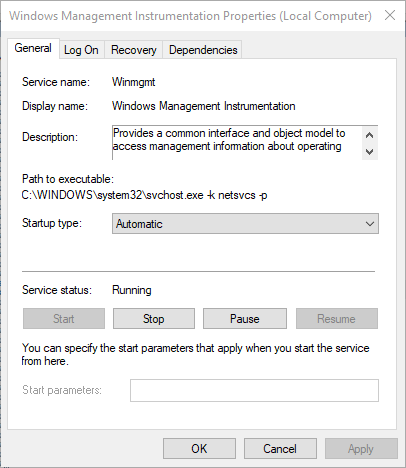
Start these two services on your PC
-Security Center
-Windows Management Instrumentation
press windows key + R
enter "services.msc"
Right click on the service -> Properties
Set startup type to Automatic
Start the service under "Service status"
gritty violet
Ill give it a go, and return when i know if it works
 gritty violet
Alright
meanwhile ill give you a list of things i've already tried
List of Things i already tried.
- Confirm Cache in steam
- Reinstall game
- Changing the virtual memory
- Cleaning my pc for useless crap to gain more hard disk capacity
- Turning off antivirus
- Running as administrator
- Installing all new drivers to my graphics driver (both automatically and manually installed)
So my OS is windows 7, meaning i dont have windows security center
@quick chasm It actually worked, thanks alot! ❤ 😘
quick chasm
awesome!
storm elbow
Yeah, that has been the best fix so far
keen hornet
@quick chasm I'm not sure if you have time, but I am having the same issue mentioned where the game crashes when attempting matchmaking. Both of the services you mentioned were enabled and running (I stopped and started the service manually to ensure they were running properly) and it did not change the crashing.
I haven't been able to play since that roughly 9GB patch last week if that's a helpful frame of reference.
 hollow laurel
Hey guys, anyone having any issues launching the PUBG mobile app? When I launch mine the entire screen starts flickering non stop, becomes hot and hangs and I have to force restart it. I'm using iphone 6S on iOS 9.0.2
quick chasm
@hollow laurel please contact https://twitter.com/PUBGMobile for assistance
PLAYERUNKNOWN'S BATTLEGROUNDS goes mobile - the original Battle Royale game is now available on your device! https://goo.gl/eWzunM
Tweets
16
Followers
4680
Twitter
 wintry tendon
Anybody getting connection failed on reconnect?
 patent lintel
I AM STILL STUCK! TWO PLAYERS HAVE PASSED THROUGH ME! FIX THIS BLUE HOLE
BTW I'm in Water treatment
HELP!!
IM STILL ALIVE!
 grizzled remnant
Hello, Why can't l play pubg mobile I've downloaded app. There will be a cent background and so will it remain or a cent then pubg logo than it is from the off that normal?
 tawny stone
is test servers down?
ebon ledge
How long does it take for customer ticket support to reply. Been waiting a whole day
storm elbow
2-4 days reportably
I suspect they get a lot
and it takes a while to get through them
tough harbor
dayum 1080ti should go 4k high no problem
 timid valve
ebon ledge
timid valve
ebon ledge
Temp ban then the 24hr support ticket is basically useless and they don't even bother answering those then, really stupid of them to add that then.
 nova garden
what is SR?
 subtle imp
sniper rifle
 dense frigate
theres so much lag on NA servers right now, my squad and i can barely play, rubber banding out of cover, downstairs, through doors, etc. items not getting picked up, shots that apparently werent fired from our weapons from replay/deathcam even though we clearly did.
past cloak
^^^
 late pivot
NO FOOTSTEPS HEARD ON THESE ROCKS
nova lion
yes. you can't hear footsteps in this part (my player position)
late pivot
SERIOUS SOUND ISSUES THROUGHOUT THE GAME CURRENTLY
viral monolith
Bro looks like you need a newer version of windows lol
I think that’s the problem
@gritty violet
Also what do pills and energy drinks do for me in game
 desert viper
Anyone help me with something about PUBG mobile plz
quick chasm
Hi, we do not offer help for the mobile game, it was made by Tencent. Follow the info about where to get help from within the app @desert viper
late pivot
@viral monolith NOPE, WINDOWS FULLY UP TO DATE, AND I'M NOT THE ONLY ONE SUFFERING THE STRANGE SOUND GLITCHES.
tough harbor
@coral kettle reshade is indeed disallowed since it alters with game files.
viral monolith
I need help my cursor is on screen while i'm playing and sometimes it just stops moving my character in pubg
the cursor is also moving around onscreen
 velvet kraken
I really need help, Everytime I try to start a game I get to the black screen with the Pubg Logo, then it crashes after about 10 seconds, I discovered this yesterday, I would really appriciate some help, Pubg is my favourite game and I really want to keep playing it. Thanks
 fossil ether
tough harbor
fossil ether
tough harbor
not a lot of people in test server atm is the most logical conclusion. try other server and modes. tpp mostly idk
storm elbow
@velvet kraken Start these two services on your PC
-Security Center
-Windows Management Instrumentation
press windows key + R
enter "services.msc"
Right click on the service -> Properties
Set startup type to Automatic
Start the service under "Service status"
viral monolith
hey would i be able to speak to a moderator or up. about a hack that i have found. pm me if you want to speak about it
zealous anchor
what server?
 spiral raft
EU
tough harbor
dont you have a 1080ti rtfl?
 knotty mist
 gentle forum
Don't make me cry @mossy silo
 desert sinew
Why are my settings resetting every damn time I restart the game????
zealous anchor
go to your config folder, change your settings file off of read-only
viral monolith
@RptrBptst#6614 chill with the caps
 languid rampart
is there a connectivity problem going on right now ?
zealous anchor
what region
languid rampart
eu
 worthy pollen
spiral raft
worthy pollen
spiral raft
I am having an issue with PUBG
there is an annoying delay
I play on EU
Is anyone having this?
 leaden badger
stuck in rocks
plain stratus
I still have servers are busy omfg...
 valid zodiac
@leaden badger try nading yourself,so you'd get a jump and be revived later on
 frozen summit
when you guys gonna hot patch fhe freaking three seaters
 subtle sparrow
Where can I get the Invite link?
viral monolith
Im using reshade
but never uninstalled it
i think its stuck on my gam
game
😄
 final meadow
!discord
regal vaporBOT
Invite URL for Discord: https://discord.gg/battlegrounds
viral monolith
how can i learn things about community event
making an event
my fucking game stutters every time i go to quickly aim at someone. why tho? i turned off paging file.
tough harbor
happens :/
 celest canyon
130 fps never felt soo good :)
 acoustic dust
my friend felt it too
 gentle brook
can anybody tell me what is fpp and tpp?
 south jolt
first person and third person
 muted crypt
anyone else having issues opening the game?
my game gets past the bluehole logo and to the menu opening but crashes and freezes at that point
i am hoping this is a bug , i just bought the game today
 hot skiff
nop
sorry
The game just gave me the classic message "Servers are to busy at the moment" after ending a match
maybe your problem is the PC specs and not a game problem
gentle brook
@south joltthankss
 winged charm
 chrome flower
cant connect
 stray kite
servers down?
storm elbow
check the twitter
hot skiff
i recieved an update
 crude mortar
Be nice if they shared that in their updates thread here too... Thanks for the info Frenzy
 zenith gyro
 livid tendon
there is maintenance? I dont see an announcement anywhere about it
 radiant robin
I'm having connection issues, too @zenith gyro
If there was maintenance, wouldn't they announce it?
 civic hound
Will they fix the loading screen stuck issue?
radiant robin
I can't get into the live servers or the test servers. On the live servers, it keeps saying "Reconnect" even after I click it or restart lobby and on the test servers, it says "Failed to initialize Steam"
 candid wind
@muted crypt the servers are down right now
 prime badge
When are they gonna be up?
candid wind
3 hours
prime badge
Damn, lol
muted crypt
@candid wind thank you but i am thinking my pc in tomorrow for diagnostics its fucked
 stark ravine
FreakyDeakyy please ban him
 final eagle
anyone having connecting issues?
 sharp flume
@ocean shard the game isnt connecting
@high wave
@here
anyone else having issues?
languid rampart
are the servers down ?
the game isnt connecting for me either
eu servers
this is after this 24 mb update
 limpid nymph
it seem that both r down
languid rampart
oh well
 void portal
viral monolith
void portal
viral monolith
FIX RIGHT NOW PLS
 dense jewel
Wasnt that sent yesterdday?
 white night
Hello, today I installed PUBG Mobile, but says that it is not compatible with my LG K10 my cell phone, would you like to know if and bug or soon it will leave for the LG K10 ?? Thanks for listening
@ocean shard Help me Please
@ocean shard Help me Please
@neat scaffold Help me please
 inland horizon
Is it just me or are the servers busy, it says they have been busy for about an hour now
inland horizon
Oh wow ok thanks
 lone aurora
@white night pubg mobile is against bots not players just fyi
 lilac pasture
Is it working for anyone yet? I was told it would take 3 hours.
 astral wharf
@lone aurora proof?
lone aurora
google it
 placid basalt
i keep getting this but i dont have an update anywhere
nevermind i verified my game files and got it to work
velvet kraken
I really need help, Everytime I try to start a game I get to the black screen with the Pubg Logo, then it crashes after about 10 seconds, I discovered this yesterday, I would really appriciate some help, Pubg is my favourite game and I really want to keep playing it. Thanks
 random crane
try verifying game install
velvet kraken
Done
velvet kraken
I did that
random crane
so it didn't help?
velvet kraken
Nope
random crane
try a full uninstall and reinstall maybe
velvet kraken
Yep.
random crane
is there a message with the crash or does it just close
velvet kraken
The crash thing pops up
This
This pops up
@storm elbow That did not work, but thanks anyway
 azure drum
Every time i try to play the test servers it says "an error occurred" after everything i click. this started after 1.0 ive tried to play on multiple computers and no success
random crane
hm
 soft jacinth
what is the 2xAR even thing?
 royal nova




 golden hawk
what
dense jewel
anyone still haveing trouble connecting?
proper falcon
@royal nova Verify game files
Maybe try restarting steam to make sure you have updated the latest patch 
tough harbor
@soft jacinth the server will spawn double the amount of assault rifles than normal to make looting faster and easier for 8 man squad
soft jacinth
Anyone else getting battleeye blocking other game EXEs that aren't even running?
get the error on PUBG launch
weary warren
@velvet kraken Try this:
Setting Affinity for TSLgame.exe process
Open Task Manager > Details
Launch game
Tab out of the game and navigate to Details > TSLgame.exe > Set affinity > disable all CPU cores except CPU 0
Tab back in the game, the game will load in without crashing, then you can go back to Details in Task Manager and enable all CPU cores again on the TSLgame.exe
(this must be done quickly after launching, otherwise the crash will occur as normal)
Disabling HPET (High Precision Event Timer)
Launch CMD as an Administrator
Disable BCD entry for HPET - bcdedit /set useplatformclock false
Restart
On Boot, go to BIOS/UEFI and disable HPET there as well (not required/possible on some motherboards)
 glad plank
So my friend has an issue - his BP is at N/A on the test server, any thoughts?
and he cannot join me in game
@weary warren
weary warren
what's his in game name?
glad plank
His name is Aerdorn
glad plank
Strange
 ripe rivet
i see a bug
glad plank
Oh
weary warren
tell him to refresh lobby