#🤝│community-troubleshooting
1 messages · Page 72 of 1
 thorn lava
 undone echo
Help. Has anyone gotten this error?
 wintry ledge
i get that to
 marble horizon
i was wondering if i could talk to a moderator in a dm?
 hallow burrow
after the update that forced shaddows i cant play at a resonable fps (over 50 is reasonable but im getting 5 - 0)
i usted to get a solid 60
 halcyon epoch
That update made my fps go up and made the game much more stable without tab lag
Thats weird
hallow burrow
i have a 1060 and rx550 both have bad proformance
 charred apex
how do i unvitre someone to this server?
 gloomy vector
@unreal flame Is it still effecting your game? Mine hasn't changed.
 unreal flame
I went to other things for a few hours and now it's back to normal, but I'll post again if that changes.
 patent minnow

Steam Community: PLAYERUNKNOWN'S BATTLEGROUNDS. textures not loaded in?
been having this since game came out
help

Steam Community: PLAYERUNKNOWN'S BATTLEGROUNDS.

Steam Community: PLAYERUNKNOWN'S BATTLEGROUNDS. textures not loaded in?
its my friend having the issue
unreal flame
And the game has crashed for the first time for me
 pallid wave
are servers down ???
 weary warren
They should be up, are they still down for you @pallid wave ?
 teal shell
weary warren
teal shell
weary warren
@unreal flame @gloomy vector What ISP are you both with?
Are you both connected in college/uni halls?
gloomy vector
@weary warren Mine is working now. I am connected to a college internet.
I live in a dorm so there is no other option.
weary warren
It will be your college blocking it at points
gloomy vector
Weird how it hasn't happened before. But it's working now.
weary warren
Sweet, they may have been messing around with the IP blocking
unreal flame
Most modern colleges don't block gaming sites or anything that's not intentionally malicious
I'm connected from a home network
But from what I know the only sites colleges tend to block nowadays is sites that are either illegal or are the ones that purposefully mess with computers (aka ones that crash browsers on purpose)
My issue fixed itself rather fast but I have been having internet issues lately
 errant heron
anyone have a fix for network lag detected?
 tranquil tree
How can i get a DMM shirt ? How to buy from DMM ?
 acoustic cradle
how can i fix it ?
weary warren
@acoustic cradle Have you restarted steam?
 frigid eagle
Hey, I have a similar issue as @upbeat field and @shut pier :
https://images-ext-1.discordapp.net/external/0px_XvZyy7Ziy34dFdc9LZWxLTbWUIpkYsR1OFcplas/https/i.imgur.com/3Q2kPCar.jpg?width=1214&height=683
I bought the game yesterday, so I can't tell if it's related to the new update or not
Here's my config :
GTX970M
12GB of RAM
Intel Core i5-6300HQ
This is really annoying, I can't find any information on it besides the fact that it may be related to my internet connection.
I live in a school campus so I cannot do anything about it. Plus I have to use a VPN so that I can play any online games.
 acoustic cradle
@weary warren I've restarted. but nothing change
 misty torrent
hello
i keep getting
22:22:51: [INFO] Blocked loading of file: "C:\Windows\System32\wow64win.dll".
22:26:55: [INFO] Blocked loading of file: "C:\Windows\SysWOW64\winmm.dll".
22:26:55: [INFO] Blocked loading of file: "C:\Windows\SysWOW64\api-ms-win-downlevel-advapi32-l2-1-0.dll".
Help
 fair yacht
eu down
 maiden oracle
hello, server closed for everyone?
 clear moss
 hasty beacon
@crystal shuttle proof
 solar prawn
Anyone else getting random battleye file blocks?
Battleye keeps blocking uxtheme.dll
 north iron
I guess Reshade 'dxgi.dll' is blocked again, lol.
solar prawn
It's a server issue, for me it's uxtheme.dll and gameux.dll
It was happening the last time servers went down
 gusty plover
Ummm the auto matchmaking is automatically matchmaking me in a game when in a group....
north iron
Nevermind..
 viral monolith
still down?
north iron
Yup..
viral monolith
SlashSlash#9663 mic spamming and MSG spamming
 proud pelican
 safe crypt
No one can mate
 mild sierra
I made at Wednesday in Solo a Chicken Dinner and its not in my statics what i can do
I got pictures
people..
Statistics*
 wintry terrace
is there a way to change name ? have it since pre alpha lol
 feral jolt
@wintry terrace you can ask a mod nicely
wintry terrace
just had my answer, its been 1 year now .. a bit long
errant heron
they need to fix this network lag detected shit
so the issue that i keep getting with network lag detected, it happens after 5 minutes of gameplay, everytime
it never goes above or below 5 minutes of gameplay when this happens
 quick tapir
@acoustic cradle I haved the same issue. PUBG isnt updating
Any ideas as to how to force PUBG to update
 upbeat field
i HAVE A FIX FOR THE BLACK SKYBOX ISSUE!
I just disabled my VPN and it started working normally
im guessing its something to do with the connection
 final goblet
so i just tried to do an appearance change, the first time i clicked OK it didnt seem to do anything so i clicked it again and poof -3000 coins
tried to refresh UI but that didnt help
 formal skiff
well tq pubg thanks a lot for ruining my game, server down at the middle of the game all the guy at my squad are experiencing the same thing
just got a groza for the third time since it's released
 grand saddle
servers died?
@arctic stream @weary warren servers possibly down
says offline in top left, then when i go alt tab and back in i get a message about wrong version... but there's no reason as im up to date
 loud siren
They been going down down a lot recwntly
grand saddle
sucks
weary warren
@grand saddle Not getting any other reports of it being down.
 vital anchor
When does the new season start?
errant heron
i get the connection lost every 5 minutes
 crystal wave
My name got switched to #unknown and i couldnt see my stats for around 10 mins
Do you guys know what it was?
 fallow estuary
i need help, i keep getting internet connection lost
2 days in a row
and always when the blue zone is coming in about 2 mi
admin pls fix
 viral monolith
Can we update our PUBG name in game?
 coarse junco
There may be the ability to change your ingame nickname at some point in the future, but for the time being, please let this be a lesson on considering the consequences of your actions before you make a decision.
 tiny jasper
why cant we team up no Freinds list
patent minnow
eͤ
 hallow bolt
 spare dagger
I just won a match, but did not count the victory and the title appeared as "#unknown", can you please help me? @hasty snow ?
 rose hornet
@dusty talon I changed my charecter and now I have negative BP and all of my currency has just been adding up (started at 2500 and now is at 2000) can I get some help?
 solar flint
12:45:09: [INFO] Blocked loading of file: "C:\Program Files (x86)\Steam\steamapps\common\PUBG\TslGame\Binaries\Win64\d3d9.dll".
Niceeeeee.....
 inland needle
Has anyone encountered this before? "[INFO] Blocked loading of file: "D:\Steam\steamapps\common\PUBG\TslGame\Binaries\Win64\dxgi.dll".
 warm star
oh yes
connection closed problem AGAIN
me and my squad got connection closed
anyone got the same issue
 tribal blade
yep me
 leaden badger
so what's with battleeye and reshade ? NFO] Blocked loading of file: "C:\Program Files (x86)\Steam\steamapps\common\PUBG\TslGame\Binaries\Win64\dxgi.dll".
 arctic bison
Is reshade unusable now?
 raw crater
Seems to be blocked again. Happened a few times
 visual owl
connection closed here aswell
 gray mauve
Constantly getting 'connection closed' and unable to invite any friends.
 stoic hound
god dammit just as I get a chance to play this week
 small totem
servers too buys for friends & me
 proven rose
@leaden badger I have the same issue did you fix it?
leaden badger
renamed it for now. only had luma sharpen and technicolor enabled
I had had mixed results with launching, getting the prompt, clicking ok, and then quickly relaunching the game again but it wasn't working this morning
 jolly oracle
two cheaters in two matches in a row, fresh as fuck accounts. what the hell 😡
viral monolith
Does anyone have the same issue? I have this for 5 hours :((
fallow estuary
@viral monolith try to refresh the game ui
coarse junco
see the message in #207019048607678464 for that
 lime garnet
what can i do to reconnect back to a game that has started?
it keeps showing the connection failed screen
 topaz rain
Why is the server up for some but not everyone?
 full adder
reshade doesn't work
warm star
hopefully next update will reduce the volum of the rain
it's load
@lime garnet if you didnt see the broken play, i mean if you didnt spawn you will never get into the game it gonna keep showing the failed to connect
 prime basalt
battleye not installing for anyone else?
just launches a window and tells me it cant install
have verified
 bronze walrus
our whole squad experienced RAM errors 
 shadow ridge
feral jolt
shadow ridge
feral jolt
@shadow ridge first go here to look for players #287779430548635658
Then you can join a room with them or not
 dull heart
How come i'm not recieving any BP
halcyon epoch
Because youre in a custom game
dull heart
Asia "solo"
halcyon epoch
Where are you from
 oak venture
lf1m room2
fallow estuary
@weary warren im sorry to interupt u but i need to report a bug, So when im playing it works fine untill the redzone start exploding at 2.53 minutes left untill the first blue circle comes. I get Internet lag detected and cannot play. When i leave the game to reconnect the game crashes. this have been like this since thursday and im not the only 1 that need this help. I tried to contact you but you didnt read it and contact me back so know i have to tag you.
weary warren
Hi @fallow estuary, apologies if you have tried to contact me but I haven't seen it. Although I just had a quick check and couldn't find any other messages from you
Please report this bug on the forums: https://forums.playbattlegrounds.com/forum/54-client-crashing/
viral monolith
Guys
I need fucking help
rn
I was playing pubg all day and fucking rebooted my pc to play again now it says crash report
error failed
arctic bison
whats the crash reproit
 oblique roost
Hey guys, I need a bit of help with my game. When I have the game in fullscreen windowed (which I use above all else) I literally get 1 fps, whereas if I have the game in actual fullscreen I get a full 60. Has anyone had this problem before? I'm just curious as to what could be causing such a thing. A friend suggested it may have been because I have dual monitors, but upon disabling the secondary it did nothing to resolve my issue.
 viral flint
i need help im trying to launch my game and im getting a crash report everytime and i have no idea what is wrong.
i also feel like i never get a reply when asking for game help here
 lone meadow
I keep getting this issue when launching the game. Ive tried reinstalling the game, restarting the game, computer and wifi, flushing dns and changing to Google DNS. Any help?
 mossy glacier
Any way to check packet loss? the hit registration has been awful.
rose hornet
@viral monolith I have negative BP, can anyone help me.
 modest lava
How long does it take for a mod or w/e to reply in forums? I sent a report like almost 3 days ago
north iron
What type of a report? A hacker report?
You have to imagine all the reports they receive. Their done in order. So, yours wwill get taken care of after the ones aherad of yours.
 bleak fulcrum
Is ReShade currently working with PUBG? Or is the anticheat or whatever blocking it again?
 grizzled mango
north iron
grizzled mango
north iron
@bleak fulcrum BE can block it, but you'll need to just try to keep loading your game. It will eventually not block it and your game will load normally with ReShade.
@grizzled mango What is it that you need exactly?
dull heart
So is PUBG dying? for the past few days their server has gone dark. I can't even invite my squadmates.
bleak fulcrum
Lol pubg is not dying by a long shot. Just probably some server issues due to the huge growth and high numbers. Havent heart official word though. Havent had any issues personally either
north iron
There was some issues with the game servers the past couple days. They have since been resolved.
dull heart
Yep, Resolved.
dull heart
Even if i can get connected I still can't matchmake in solo or invite friends. 
bleak fulcrum
Check your firewall and stuff.
 calm sand
does anyone else have to re-selecty matchmaking settings each match or just me? That's annoying AF
north iron
Yes.
It's an Engine Code bug. You have to manually select the desired region each match you play.
 forest burrow
Im not getting in the game. Can someone help me theres just Connection closed
lone meadow
Pretty sure theyre doing maintanence
north iron
@forest burrow Update: The server maintenance is extended until 3:45PM KST/11:45PM PST/8:45 CEST due to some complications. Apologies for the inconvenience
Which is in 5mins.
lone meadow
hopefully i dont have the same frozen loading bug
forest burrow
Thanks for the help ^^
north iron
You're welcome! 😃
 uncut wyvern
hello, how to you send an invite to this discord?
 sage dagger
forest burrow
sage dagger
forest burrow
Rip i still cant connect
north iron
Uhh
The server maintenance will end soon at 5PM KST / 1PM PST / 10AM CEST. We apologize for the inconvenience.
Which means it will be down for another hour approximately.
@uncut wyvern
!invite
 regal vaporBOT
Invite URL for Discord: https://discord.gg/battlegrounds
uncut wyvern
!invite
regal vaporBOT
Invite URL for Discord: https://discord.gg/battlegrounds
forest burrow
Actually after i started my computer again it works now^^
But thanks for the help anyways
 steel edge
servers are still fucked right?
steel edge
😦
 manic frost
yeah seems that way
 kindred mirage
cant connect ay
north iron
Announcement did say server maintenance was over right? Lol
kindred mirage
yeah man
north iron
It's ok. Probably just feeding through.
north iron
Well, it happens.. That's typical 😃
 novel igloo
cant invite people for squad game says servers are too busy wow
north iron
That's reshade.
You just have to keep launching your game over and over until it works.
Else delete reshade, or rename that folder.
I guess we're only allowed to do solos?
!invite
regal vaporBOT
Invite URL for Discord: https://discord.gg/battlegrounds
 sour marlin
what is this
north iron
Just keep relaunching the game over and over and it wiwll eventually load.
However be wwarned.. You can only play solo
viral monolith
why?
north iron
I have tried inviting people for the past hr+ since the maintence was over, and it keeps telling me " Server too busy "
 prime vigil
Why is it only solo?
lone meadow
anyone know how to fix this? ive tried reinstalling, restarting, flushing dns, netsh winsock reset, verifying steam files and Google DNS, all with no luck
viral monolith
if anyone has problems with reshade, what i did was i completly uinstalled reshade and installed it again and it worked
viral flint
i need help im trying to launch my game and im getting a crash report everytime and i have no idea what is wrong.
i also feel like i never get a reply when asking for game help here
solar flint
@viral flint Crash could be caused by many things, best to report it to developers instead of asking for help here
north iron
4 wins in a roll.. I hope it's recording XD
 snow warren
I just got into a game and my character changed from asian to normal white male and my name changed to #unknown
 frozen root
you are the player unknown. this is now your battleground
give us servers plz cookie
snow warren
lol
viral flint
@solar flint ive reported it all 12 times i tried launching after trying every method
 harsh sorrel
when reconnecting connection failed
viral monolith
How do you actually fix the network lag detected thing? I've tried like everything.
viral monolith
do you guys know about leaderboards issue? my games doesnt cout since yesterday
 mild lichen
Hello! is there a admin that i can talk to please?
mild lichen
appreciated but its about my friend receiving a ban for a coincedental reason
pretty much what happened is that my friend was meant to send a discord link to my other friend but accidentally sent it in this server then proceeded to send it again but accidentally went in the same server (this one) he understands that one of the rules is no spamming but it wasnt intentional.
coarse junco
may i have the name of your friend? (with the numbers at the end)?
viral monolith
Once again, how do you actually fix the network lag detected thing? I've tried legit everything and I have a good connection.
viral monolith
I have
coarse junco
@marsh yoke the ban is in review now
@viral monolith this sounds like a issue with your routing, does the problem still exists with a vpn?
coarse junco
no, never been on the pubg subreddit
mild lichen
oh ... ok thanks for the help though appreciated
viral monolith
Alright. I hope this gets fixed asap. It seems like almost everyone has this issue.
mild lichen
@coarse junco kage would like you too message him pirvately
coarse junco
he can do that if he wants to
 desert viper
 viscid garnet
(toomanylogin) only here?
 zenith cobalt
same here
gusty plover
too many logins what the hell
 frank jetty
same o/
warm star
servers issue 2-4 times per day
viscid garnet
now is this,help plz
desert viper
lol
 shut pier
unknown login error(TooManyLogin) EU
warm star
only 1300000 in game now
 strange onyx
Servers are down
 grim grove
 mortal sky
unknown login error(TooManyLogin) NA
viscid garnet
now is connection closed error,holy shit
 sour coyote
you guys getting that too?
warm star
dude this game pissed me off, especially when you die by accident like the car kill you or the motocycle and you are about to start a new game then "connection closed"
desert viper
they are to focused on getting the game out for console thats what am annoyed at
 naive fern
shut pier
naive fern
shut pier
resetting servers has not resolved login error 
desert viper
yeah true @shut pier
viral monolith
 desert viper
 soft lily
XD
 valid light
hey idk if anyone ever posted a fix for this, but 5 minutes into every match, the Network Lag Detected screen pops up and my game freezes indefinitely. it's only in game and only for me, because all my squadmates still play and my discord and everything still works fine. i have to alt+f4 and then reconnect, but then it'll do it again after another 5 minutes or so
how do i fix this?
i have allowed pubg's exe in my firewall and everything
viral monolith
I think i have been unfairly banned, can i get help somewhere?
@coarse junco :))) You know who i am probs :((((
coarse junco
banned from the game?
viral monolith
yes
coarse junco
see that post if you think your ban was wrong: https://forums.playbattlegrounds.com/topic/35993-process-to-appeal-a-ban/
PLAYERUNKNOWN'S BATTLEGROUNDS Forums
ALL APPEALS SUBMITTED WILL ONLY BE VISIBLE BY FORUM ADMINISTRATORS
Please login or register an account to gain permission to submit an appeal.


If ...
Idc about getting unbanned, i just want to know why
@viral monolith please papa tell me am i blue?
coarse junco
i don't have access to that information, file an appeal and they can help you
viral monolith
I was running a HWID spoofer right before i opened the game, because i am banned on another game.
i have a feeling it was a software on my pc
 frosty basalt
a friend of mine has the problem of "failed to install battleye server" or something like that
we already tried deleting the battleye folder and verifying the integrity of the game files
coarse junco
@viral monolith that might have triggered the ban. for further information file an appeal
https://forums.playbattlegrounds.com/topic/4469-connectionsteamlaunch-issues-a-comprehensive-guide/ try starting the game directly via steam and try the steps in the link i posted @frosty basalt
PLAYERUNKNOWN'S BATTLEGROUNDS Forums
Update: If you are having an issue connecting to the servers please note what type of connection you are accessing from. (Ie: Home, Work, Universit...
frosty basalt
thanks we'll try
coarse junco
take a look at step 13 form that post
viral monolith
@coarse junco Bastian generally hate me i think
frosty basalt
@coarse junco we tried exactly that and the service didn't start. error code 1053 or something, he's currently restarting his pc
well that also didn't help, he's trying to install a hotfix for the error code 1053 now (service didn't respond in a timely fashion)
he fixed it by reinstalling battleye which I thought he had already tried. At least it's fixed now :')
coarse junco
good to know
 marble trench
my game keeps freezing randomly then fixing itself
i litterally just lost a game because of it
h e l p
 cosmic lynx
Here we go... Has anyone been able to find a proper fix to the "marshmellow render" at every game start? I bought this game friday and i haven't been able to play a game without this glitch yet... I've been looking online everywhere, still haven't found a solution yet... Please help?
For reference, my specs are:
Intel I5 3300 @ 3.00Ghz Processor
8GB Ram
Nvidea GeForce GTX 660 TI
72000 RPM SATA 3 hd (75 free gb)
Windows 10
I know my graphics card is kind of outdated, but it still shouldn't have any problems running PUBG, so my guess is that the problem isn't it, since it runs GTA V on high/ultra @ 50-80 fps...
 glad grail
i5-6600k
Nvidia GTX 1050 Ti
8GB Ram
same here
is it gonna get fixed or what
300h playing like this
cosmic lynx
this needs a fix ASAP...
glad grail
yeah
 misty arrow
I have a similar build, and only experience that issue occasionally. Only differences are that I'm using a 2nd generation i5 2500 at 3.3Ghz, and 16GB of DDR2 Kingston RAM.
It is certainly there, though. And once you get stuck in the ground/walk through a wall, your match is as good as ruined...
 wind forum
@cosmic lynx
i have it too
use razer cortex
and defrag PUBG
also that 660 ti aint up to date
 white mantle
playing the game on an ssd fixes most rendering issues
i tested it on my 4tb hdd for a few games and got that issue
wind forum
"get an SSD" is not a valid fix
white mantle
my cpu is an i7 6700k and gtx 970 gpu for comparison sake
yeah i know that but it fixes it for now😛
cosmic lynx
I'll try it @wind forum ... And guys, i know my pc isn't exactly up to date with today's specs, but here everything is so godamned expensive... I do want to enhance my setup, but no can do atm...
coarse junco
if you have 8 gigs of ram now, yes it can help with loadingtimes and stutters
 wraith bear
Alright, thank you, I also have the game on an ssd if that helps out
As I have heard that helps with load times
coarse junco
it does for sure
wraith bear
Alright, thanks
 topaz gazelle
how do you fix melted buildings
running a hdd and 8gb of ram
literally cant loot for first 2-3 minutes
 grizzled dagger
@topaz gazelle i had this problem. got another 8g of ram and it fixed it
not sure if there's another fix but that worked for me.
now the game runs nice and smooth.
wind forum
They know I think
 remote harness
hey
umm
if i want someone to help me who do i ask?
my game is kinda fucked
anyone thats on the dev team or something?
@neat scaffold
idk if this is normal
\
 coral kettle
wtf
remote harness
yeah
 misty lintel
Same here..
 formal stag
Connection hub is dead
dull heart
Server dying is so common i'm not even surprised
misty lintel
Think PUBG is growing to fast 😄
steel edge
yea indeed
dull heart
they need to add mooooooooooreeee servers
formal stag
Getting new error now.. "too many logins"
misty lintel
me2
dull heart
me3
formal stag
Connected now
misty lintel
works now
formal stag
Servers too busy when inviting though
steel edge
okay, thanks guys
steel edge
guess everyone is trying to invite someone now
 fleet tangle
anyone had problems with shadowplay highlights? i have the overlay indicator saying its on but it doesnt save any clips
 digital crow
I have an issue that is not very common (haven't seen widespread mention of it). I have made a thread with very thorough detail.
https://forums.playbattlegrounds.com/topic/77053-lag-hoping-for-a-solution-questions-devscommunity/
Really hoping for a solution....
PLAYERUNKNOWN'S BATTLEGROUNDS Forums
Okay so I'll start off by saying I play on Oceania server. Although my lag issues extend to all servers.
How I would describe the lag:


- Pre-game ...
@tranquil badgersSoul#9596 Uh, that's really odd. Have you been editing files anywhere?
viral monolith
Is there any application to become a mod on the discord? And can someone explain the info the the PUBG partnership?
 worldly blade
Nice programming, COULD have won that game.
And no you can not jump onto that roof from the truck thingy, tried it for ~2 mins
weary warren
@worldly blade Do you require help with something?
viral monolith
@weary warren can you answer my question?
weary warren
There are no applications for getting mod on this server, we select people who we feel are helpful.
PUBG partnership information can be found on the website
 agile copper
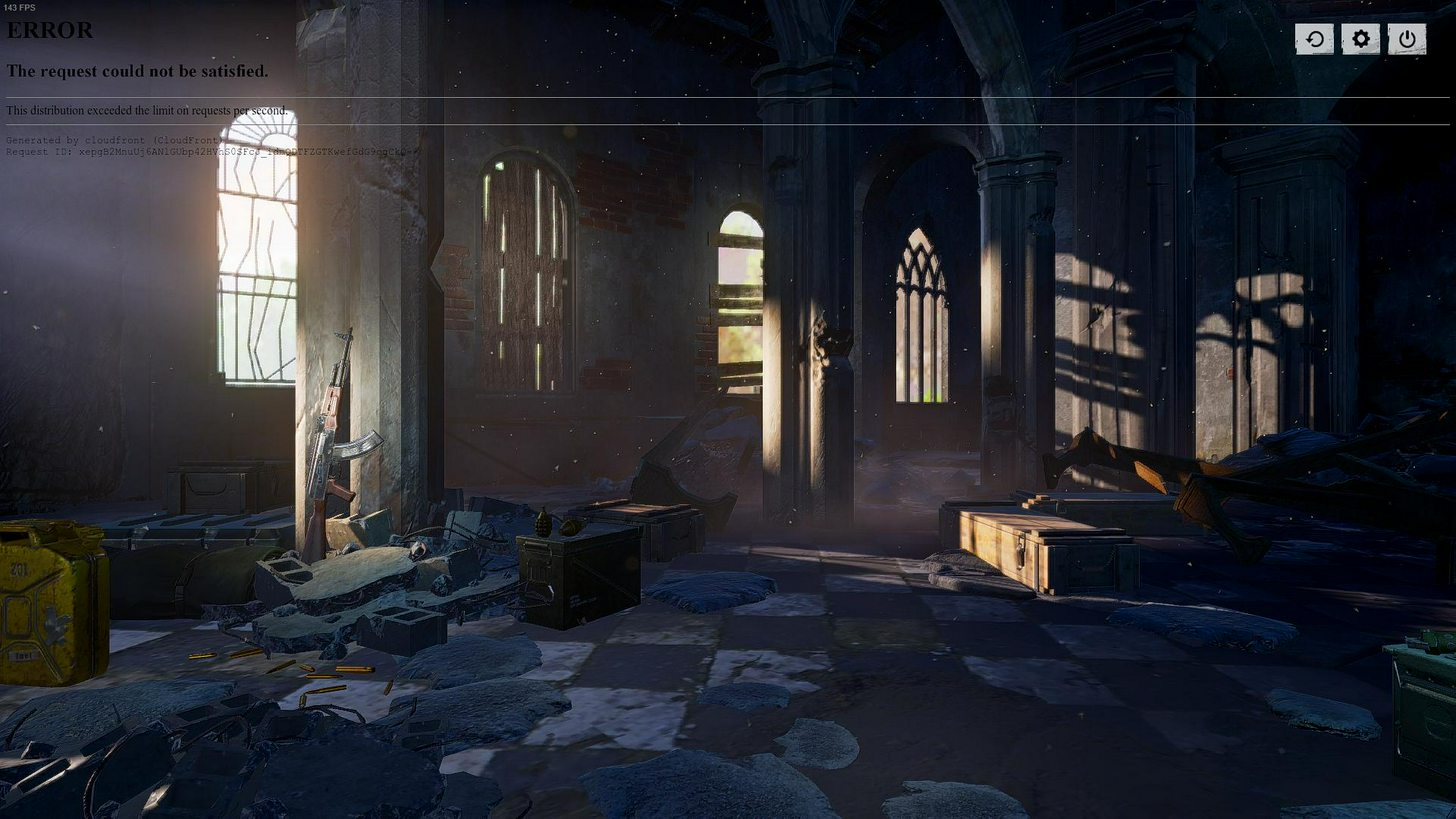
Anyone else not able to get in? Says error, the request could not be satisfied. This distribution exceeded the limit on requests per second
north iron
It's a current error everyone is experencing. You'll need to be patient and wait for them to fix the issue.
agile copper
Is it just me or has this game been horribly buggy the last few days
 nova lion
Yeah I guess everyone's getting that error
 thorny notch

 undone totem
 silver marsh

 hot plaza
@undone totem I am having the same issue
 flint vigil
i have the same excact problem^^^
silver marsh
omg
undone totem
R.I.P
flint vigil
i refreshed it and after awhile the loading thing came uo in the right cornes
hot plaza
Wait they allow reshade right?
weary warren

 hot plaza
sheeit
 proud quail
servers down?
proud quail
there is always somting 😦
hot plaza
Yep
warm star
me too
warm star
it's everyday bro it's everyday bro
proud quail
everyday same exuse sorry we working on it lol
 crimson wedge
 celest summit
IT MAKES ME SICK+#
hasty beacon
#sick
proud quail
hot plaza
It seems like they were messing with changing with the font and broke something
north iron
Everyone is just going to have to be patient.
hot plaza
The play button looks weird to me
north iron
The UI is having issues. So, sometimes you'll get a different UI screen trying to load, the play button be there, etc.
hot plaza
Ah ok
north iron
Yes.
north iron
Although that same issue is a bug for some others in the past. It's right now related directly to the connectivity UI loading issue which is currently in the works of being resolved.
north iron
Lol.
flint vigil
Yes my friend had it in th epast but it got fixed by a patch
proud quail
ok.
flint vigil
hope its just the same issue i have so theyre fixing it
north iron
Well, I smiled for you 😃
proud quail
^^ i see. nice to watch that.
north iron
😃
proud quail
we have to play with our selfs now 😦 instad of playing pubg.
hasty beacon
stop playing around with the text dammit
hot plaza
lol
coarse junco
they are not playing around with something, there are connection issues while loading the menu. They are working on it
 molten saddle
Hey is something worng
 tacit mason
if i reload same thing
 timber cairn
hasty beacon
timber cairn
hasty beacon
so a connection issue does this ?
coarse junco
guys. posting the same thin as a message above you doesn't speed it up
molten saddle
I had a meeting with pubg at 7:30
north iron
molten saddle
I'm going to be so late
hasty beacon
with the whole strange font
molten saddle
I'm supposed to be killing and chillin by 7:30
proud quail
going back to play with my self.
north iron
Hello, Brycetron.
proud quail
nevver seen that lol
north iron
It's going to be random stuff for everyone.
proud quail
would like to see a naked lady there.
molten saddle
aahahaha
north iron
I'll work on getting Top50 when it comes sback online 😃
north iron
LOL
proud quail
hope pubg has made some backups.
hasty beacon
you're slowly getting there >
flint vigil
@north iron so that would mean you are a pro, top 50 where?
valid light
unrelated to the current UI problem, if anyone has had some issues with getting Network Lag Detected every 2 minutes in a game like i used to, it could be your router
PLAYERUNKNOWN's Battlegrounds (or PUBG) recently updated their game about 3-4 days ago. For what seems like 98% of the playerbase, everything is fine but for a small minority, the game has become completely unplayable due to a "Network lag detected" error which forces the player to quit the game. It...
proud quail
its back
north iron
I play EU for fun no offense or AS.
proud quail
but no bp for some reason lol
north iron
Lol.
hasty beacon
the font just got smaller and harder to see, go back
north iron
That's still with the same current issue @hasty beacon
proud quail
nvm its back to shit.
solar flint
I love it when I cant play a game half the time! 😄
north iron
2 words..
solar flint
2017 and we cant even play a game at least 6 hours a day because its broken
north iron
[ EARLY ACCESS ]
solar flint
And please, do not use the 'EA' excuse
north iron
Early Access/Beta - Expect Performance issues, bugs and any other problems that may cause issues for you.
solar flint
Doesnt include 'expect not to be able to play the game because its broken'
Hey we're Bluehole and we can't even make a menu that works! 😄
north iron
Menu has worked just fine for hundreds of your other games? So.. Let's just calm down! Lol.
proud quail
ok dad.
solar flint
No, I won't calm down. I paid $30 for a game that is broken, and do not say 'well its ea blah blah blah', because EA is no excuse for this atrocity of a game
vital anchor
Can you add a SWE channel? there is plenty of Swedish ppl here
north iron
Actually, EA is the only and logical excuse.
proud quail
@solar flint if you can do better make a game. would love to buy it,
north iron
EA as-well as BETA is speifically designed to allow individuals to play the game prior to full release so that they can gain information regarding bugs/glitches etc so they can be dealt with accordingly and resolved for the full release.
solar flint
@proud quail What, so i cant make a game, therefore i cant complain about any other games?
L-o-g-ic
north iron
So, technically.. We're guinea pigs
 gleaming vector
Hey Renegade, take a break, Go for a walk and see how you feel when you come back. Don't keep being a critic here. You're not helping anything.
north iron
If you do not understand how to make a game or programming or what it even takes to ensure stability. Then, really no..
 ivory condor
Question: Is it true that there won't be any more free crates once the game is out? I like those, makes me sad to think in the future I'm forced to buy keys for any crate
 dry terrace
any idea how to fix this?
proud quail
game is out?
hasty beacon
yeah @solar flint take a chill pill man
coarse junco
@sand dust try verifying the gamefiles on steam
solar flint
@north iron I know that 99.9% arent as broken as this, and that 99.9% of those games dont have even half the funding of this game
north iron
@ivory condor I am not sure I have ever read anywhere that there will not be any free creates at the release of the official non-ea version. However, if that is to be true it makes sense that those wwhich who participated in the EA for allowing Bluehole to stablize the game to have the access to that makes sense.
@solar flint Funding means NOTHING when it comes to getting everything right in the coding.. I'm sorry you're upset but nothing you're going to say will change anything nor will it even speed up the process of the situation. I would advise to just calm down and be patient or rant elsewhere.
ivory condor
I am referring to this: https://i.redd.it/z7sjytczirbz.png
Not sure if this was really playerunknown or anything, but maybe one of you knows
north iron
Was those comments made on this discord? If so.. It's the real one.
solar flint
@ivory condor That was PU himself who said that
ivory condor
I see, I hope he changes his mind about it then. Maybe there could be both "free" earnable crates and paid crates side by side in the future post-launch as well
viral monolith
just woke up whats broke now?
proud quail
your pc
north iron
However, as I stated previously. It does make sense.. The individuals which whom had bought the game during the Early Access to have gained the ability to have these cosmetics prior to official release is a good thing.
dry terrace
@coarse junco , still same issue after validating
north iron
Whats your issue @sand dust
dry terrace
ivory condor
I get what you mean, but with Overwatch being so successful with crates people can earn and open just by playing it feels bad going back to paid only crates you know 😄
proud quail
it says you have to cook better.
north iron
@sand dust have you tried locating that file, deleting it. Then running the verify integrity of the game?
proud quail
yo food taste like noting
north iron
Oh, I'm sorry, lol!
Give me 1 second, @sand dust
Delete your 'Engine' folder ans then verify.
 raven dove
dry terrace
raven dove
dry terrace
@north iron , ok, lemme try 😃
proud quail
call 911.
north iron
proud quail
our engineering team is working on a fix who are they?
north iron
People 😄
north iron
Whilst you're doing that @sand dust I am currently researching your issue. I would like to know which GPU [Graphics Card] you have.
dry terrace
his radeon hd4850 iceq4
tried deleting engine folder and then validating again, but still same problem 😦
north iron
Correct me if I am wrong, but the 4800 series does that even support DX11?
Do you mind checking for me?
viral monolith
can i get a invite for this discord
north iron
Try this Zero..
viral monolith
invite link
coarse junco
!invite
regal vaporBOT
Invite URL for Discord: https://discord.gg/battlegrounds
north iron
Go into your Set Launch Potions and put in this command; -sm4
Potions? LOL
Options*
or -d3d10
dry terrace
not working 😦
north iron
Well, PUBG only runs on DX11. Therefore, you need a card that supports Direct X 11.
dry terrace
damn it
north iron
However...
I do have a turn off back on method that has fixed this for some reason with others. However, it involves reinstalling the game.
If you're interested
north iron
Uninstall PUBG > Close STEAM > Delete the entire PUBG folder > Restart Computer > Launch STEAM as Administrator > Reinstall PUBG > Launch directly from STEAM Library./
However, if this does not wrok as an FYI. PUBG runs on DX11. Therefore, you'll need to upgrade your GPU.
proud quail
@north iron no people dont read.
north iron
I do apologize! Happy gaming! 😃
proud quail
yes its really entertainment @north iron
lol
yes really sexy.
nock nock who there? nobody.
proud quail
you could drink yo pee.
north iron
Yes. It goes Chew Chew.
north iron
I do believe that is called; Being ran over by a train.
proud quail
ye im not from country where we speak english ^^
gleaming vector
(Not a #🤝│community-troubleshooting topic)
flint vigil
@north iron are you a streamer?
north iron
I stream, yes.
flint vigil
very cool
north iron
Streaming now, but UI issues so I am not playing.
flint vigil
welp, i wanna play aswell, gonna wait it out
silver marsh
silver marsh
oh thx xD
viral monolith
its working
north iron
You're much welcome!
 balmy cedar
nova lion
balmy cedar
nova lion
Yeah same
north iron
It's working for others because of the constant loading/reloading
 normal bear
It's just staying on the loading screen now
flint vigil
mine is working now
silver marsh
working now xD
north iron
Apparently it is working, but only for solos.
viral monolith
your stream stops alot @north iron
flint vigil
@north iron if i remember correctly you said that if someone was stcuk on loading screen with white text in the top corner that will be fixed with this menu fix?
my friend has the problem, he had it once before but it got fixed. it came back today
north iron
Yes, I mentioned that the issue currently can be related to the UI. However, it is also a known bug.
@flint vigil
@Miguel It can happen to some people based off their computer. As many others never have the issue. However, it will appear stopped when I minimize.
viral monolith
Do I have a problem if it takes a while for building textures to load
north iron
yES.
 crisp spoke
just got oneshot by AWM with lvl 3 body armor and it didnt showed it was a headshot also i was full life. this should not be possible right?
 simple rampart
Hello! I come from a fourm-ts community with over 700+ members, and we are looking for access to custom games. @viral monolith
viral monolith
not the right place kid
xDDD
DUO RM 22 NA
OOPS
question
doesnt pubg have esport?
like esl
or smth
crisp spoke
not really
they did an invitational at gamescom
but that was the inly official event that i know from
 tacit pelican
hey do any one have some tips for the stuck on loading screen bug?
north iron
Have you checked the forums?
@simple rampart Having Custom Game servers you have to be a partner with PUBG. You can followw this link. https://www.playbattlegrounds.com/partners.pu You may also go to the forums and contact them directly as I believe the application process is closed.
solar flint
Wtf now the game is telling me I need dx11 all of the sudden

Been running the game fine 500 hours now all of the sudden this
 raven fog
ey, does anyone know how to pick standard server? i play EU, but every new round it sets the standard server to AS..
 gleaming vector
Dude. You're wearing me out with your constant negativity, criticism, and just plain rudeness. Stop or take a hike.
 icy mortar
can someone help me???
gleaming vector
What's up @icy mortar
icy mortar
When i start my game in the home screen i cant click anythin except for the 3 buttons in the top right corner
gleaming vector
@icy mortar Try validating your game files in Steam.
icy mortar
Let me try that
solar flint
Just stating a fact, are you denying there are things wrong with the game? I'm not trying to be rude, but I am really pissed off right now because this is the 2nd issue today that is preventing me playing the game
gleaming vector
You're always pissed and spewing vitriol in here @solar flint, it gets old. That's all I ever see from you.
north iron
@raven fog It's an Engine Code bug. Their currently working on fixing it. As for now.. You'll needd to manually select your desired region prior to each match.
frank jetty
free_cheese you click in the refres button ?
frank jetty
dam idk then XD
north iron
@proper cargoNine I gave you the ONLY logical explination and expressed apologetically. However, you do not wish you view it due to your own perspectives. So, I am sorry but not having patience in these stages of the game is not going to ever help any situation which might rise for you.
raven fog
Thanks @north iron.
north iron
You're welcome, Kime! 😃
icy mortar
sure
north iron
So, is everything displayed for you normally?
icy mortar
yes
north iron
Have you tried changing the resolution or swwitching from Windows Fullscreen to Fullscreen or Vise versa?
icy mortar
yes
north iron
Hmm.. That typically fixes the issue... >.>
north iron
Try this..
Delete; GameUserSettings.ini and Engine.ini, then verify integrity of the game.
north iron
Okay.. Do you have any controllers plugged into your computer?
icy mortar
no
frank jetty
reinstal ? 😛
frank jetty
try close any other game providers ... origin etc
frank jetty
dam
north iron
researching
icy mortar
xD
north iron
You have a 32 or 64bit system?
icy mortar
64
north iron
Have you tried reinstalling Microsoft Visual C++ 2010 SP1?
north iron
Try deleting the entire Engine folder, then verifying integrity of game again.
(Ensure game is closed everytime you do these things...)
icy mortar
was just blind xD
north iron
😃
 snow coyote
thats usually a bad hard drive
that happened to me alot when i had a corrupt hard drive
coarse junco
it's normal when you delete that folder
north iron
@icy mortar Follow the verification of integrity and get them back 😃
You just deled the entire Engine folder so..
Oh.. XuluniX said it.
icy mortar
and how do i do that
north iron
By Verifying Integrity of the game.
icy mortar
again?
north iron

did it retreive all the files?
You're confusing me. So, humor me and do it again for my sake, lol.
icy mortar
nvm it succeeded
north iron
Lol. 😃
icy mortar
so now llaunch game??
icy mortar
still doesnt work :||||
north iron
Okay.
Close STEAM and the game.
Run STEAM as Administrator.
Then launch the game directly from the STEAM library. (Not from Desktop, nor from rightclicking on the STEAM system tray icon)
icy mortar
i always launch my games from library
north iron
Did you try it with STEAM running as admin?
icy mortar
it just doesnt load at all there
north iron
I figured as much.
Okay.
Close the game.
Do you have anything in your Set L:aunch Options?
icy mortar
nothing
north iron
add; -sm4
Then try to run it.
If it didnt work try remove that and try
-d3d10
And try to run it
icy mortar
nope
 north token
Can anyone confirm weather there is skill based matchmaking in the game? Like if im top 5K will i only be in a match with people around that rank?
coarse junco
yes, ELO-based matchmaking is used if enougth players are available
north token
hmm ok thanks!
icy mortar
i guess my game is just dead
north iron
Hmm..
Last resort since all the options I can come up wwith and all the ones on the wweb hasnt fixedd your issue..
Wait..
You runing GeForce Experience?\
north iron
Is it running>?
north iron
Try it.
icy mortar
what
north iron
Uninstall PUBG > Close STEAM > Delete the entire PUBG folder > Restart Computer > Launch STEAM as Administrator > Reinstall PUBG > Launch directly from STEAM Library./
icy mortar
nice stream xD
 supple bone
I need some help with very slow loading textures, anyone got a fix?
supple bone
Hello @north iron
north iron
Have you tried; https://forums.playbattlegrounds.com/topic/36676-read-first-common-fixes-template-for-map-graphics-bug-report/
PLAYERUNKNOWN'S BATTLEGROUNDS Forums
Hi Players,
Please take a moment to read through this post and attempt all troubleshooting method so we can attempt to help solve your issues with the...
@north iron Thanks for trying to help but I have tried all of these and I am above the minumum requirements
 violet hare
Do you have it installed on an HDD or SSD?
north iron
@supple bone ^ As Json asked. Also can you elaborate or show a picture as to what you mean exactly by textures not loading properly?
supple bone
Kinda like that
And I can't run either and t takes like 7mins to load
And I am planning on moving it ot an SSD
strange onyx
do you have an 5400rpm or 7200rpm HDD?
north iron
Your GPU is not adequiate enough.
supple bone
And I got a Seagate Barracuda HDD 3tb
strange onyx
if you want to enjoy the game with other apps open you should increase your RAM amount
north iron
Although it's above standards that 2gb VRAM is horrible for this game in general.
supple bone
Yeah
north iron
However, moving it to an SSD can help this issue due to the speeds of the SSD. I would advise upgrading the GPU.
supple bone
I am planning on upgrading the fak out of it
 uneven ermine
ummmmm
 pastel anvil
hmm
uneven ermine
-50 seconds
uneven ermine
the teammate reviving him crashed at 0.1 seconds
 modern dust
http://plays.tv/video/592b674c9bc6753cce/screen-shaking can anyone explain this? This is shit just won't stop happening to me.

It's whenever I get hit whilst Ads'ing
wind forum
Resolution?
modern dust
But it can be waaaay more evident then that, it's like my screen near flips 180
frank jetty
@uneven ermine that already happen to me too
strange onyx
screen is shaking while getting head shoted
modern dust
And I'm running at 1366 x 768
frank jetty
until 100 sec the my mate disconect and i insta die xD
modern dust
@strange onyx It never used to do that to me, at all
strange onyx
when did you played last time?
strange onyx
I mean if you had a break for few months
modern dust
Happened then, but took a 3 - 4 months break before that
But I've kept up with the P notes, nothing ever mentioned legit near flipping my screen
strange onyx
I can't remember if screen shaking was introduced recently
 gusty aspen
is raw input disable by default? even when in windowed mode?
modern dust
Yep
gusty aspen
ty ❤
modern dust
Far as I know anyways @gusty aspen
If it has been, that shit needs to be taken out and reworked. Cause it is nasuating af
strange onyx
also, Hint: never go on the Cat-walk while people are in the military base. Easy target
gusty aspen
oh, sorry i mean enable. so it´s disabled?
gusty aspen
hahahaha ty ❤
 wild abyss
Guys my friend got a problem with pubg, she turned on the pubg and instead of that the pubg is closing automaticaly. Any ideas why?
Antivirus turned off, local files checked and there are the newest drivers.
frank jetty
any error on screen ?
wild abyss
Nope
frank jetty
verify files in steam
wild abyss
Look up, already said that files are checked.
wild abyss
Easy :D. But ty for the help.
violet hare
Are they using Razer Cortex?
viral monolith
need 1 duo rm 11 na
 humble isle
can I get my nickname change to "YoungFritz" to match my username on PUBG
 twin basin
@coarse junco can you come to me? dude following us around harassing us and making fun of peoples voices and trolling.
@gleaming vector can you come to my channel squad room 2?
viral monolith
Is there a way to change graphics in the game files?
frank jetty
i think its not allowed mekajira
north iron
@viral monolith You can but it's at your own risk.
viral monolith
how do i fix lag
im scared to actually play pubg cause it crashes my pc when i play it sometimes
wind forum
well first of all
what are you rspecs
your specs
and what settings are you playing at
include ram, hdd, resolution, hdd speed and size and everything else you can think of
also if it crashes your pc thats an overheating problem
@viral monolith
viral monolith
how do i check my hard drive speed


 viral monolith
i got it from best buy
viral monolith
tower
wind forum
look at the back of your pc, are there any numbers?
wind forum
do you know how much it cost?
viral monolith
631$
wind forum

Dell
All new gaming desktop featuring powerful AMD RyZen processors, VR-ready graphics, optional LED lighting and a meticulous design for optimal cooling.
this?
viral monolith
ok
viral monolith
nope it lags forever and ever