#🤝│community-troubleshooting
1 messages · Page 67 of 1
 gleaming vector
There have been some issues with ISPs blocking the traffic.
NP @main ore hope that helped.
 flint vigil
Ye, can you translate the Vpn fix to a person that is not that known with computers
how do we connect to a VPN@gleaming vector
gleaming vector
Do a wee bit of googling... Something like TunnelBear or Windscribe have free options that you can try.
It's pretty simple once you get with one of those places... They'll walk you through it.
flint vigil
Ok, il check it out, aprecciate the help
gleaming vector
Yep, np
 wise turtle
Can anyone solve my issue ?
Ive been banging my head for so long
But i cant find a fix for this
Game was running fine few days agao
Ago*
Now idk what to do
Can anyone help?
Ive tried eveything
@weary warren
@gleaming vector
gleaming vector
Verify game files? Reinstall? Check that Antivirus isn't blocking the game?
Verify that Battleye is running?
 weary warren
@wise turtle https://forums.playbattlegrounds.com/topic/4469-connectionsteamlaunch-issues-a-comprehensive-guide/
PLAYERUNKNOWN'S BATTLEGROUNDS Forums
Update: If you are having an issue connecting to the servers please note what type of connection you are accessing from. (Ie: Home, Work, Universit...
wise turtle
Tried this @weary warren
@gleaming vector did that
I have done dns thingy
Gave direct access of pubg and beservice to my firewall
I dont have a third party software
Restarted my router
Verified the game cache everytime
Reinstalled
weary warren
You tried every single fix on that page?
wise turtle
Till 11 yes
Till the dns i remember because @coarse junco told me to read that forum
And apply 8 and 11
I did all what he said
I even tried to add you on steam @weary warren thought maybe u could help out.. but i understand
weary warren
Did you look into 12?
wise turtle
I am not the only one getting this glitch
They're are many players getting this glitch
 cinder cloud
That issue is mostly related to ISP blocking routes AFAIK
wise turtle
My game has been running fine since the launch
And this issue has happened twice
And ive noticed a glitch as well
As i launch my game from steam
Running it as an administrator
My battleEye doesnt launch
My game starts straightawaya
@violet hare helped me alot and said try using CCleaner and removin duplicate rules in my firewall .. i did that and also changed my monitor reso from 1600x900 to 800x600 and then launched my game
It did work but now it has happened again
weary warren
@wise turtle Your battleye doesn't launch?
weary warren
Look at point 13
PLAYERUNKNOWN'S BATTLEGROUNDS Forums
Update: If you are having an issue connecting to the servers please note what type of connection you are accessing from. (Ie: Home, Work, Universit...
wise turtle
Ok
I'll give it a look
So 12 and 13 righth
As soon as i do this .. i'll get back to you @weary warren
weary warren
This is a ISP issue.
 warm star
sup, i recommand to check the AFK channel if it works, because ALOT of players in the voice chat stay AFK for hours
flint vigil
i tried number 13, didnt work, will this be fixed in a patch or so? @weary warren
wise turtle
@weary warren tried aint working
flint vigil
yep, pretty much tired everything, nothing is working
cinder cloud
@flint vigil Point 13 isn't related to the game more so to the users pc
flint vigil
i understand that, point is that me and my friend has tried everything slightest related to fixing this bug and nothing is working
so my one question, and wich has always been my question is this taken care of and being fixed in a patch?
cinder cloud
It isn't likely a thing they can fix.
wise turtle
My isp isnt blocking pubg
flint vigil
so we wasted like 25 bucks on a game we cant play?
wise turtle
Because i have been playing for 500 hours on this game
flint vigil
happend to my firend after 70 hours
cinder cloud
@wise turtle Just because you've played before doesn't mean somethings cant go wrong now
flint vigil
@weary warren any idea if the bug is gettin gfixed in any kind of way?
wise turtle
Yea same question rob
cinder cloud
If its related to BattlEye you'd have to ask them
However the stuck on loading front thing is usually Firewall/ISP related
flint vigil
yep, would be wierd if that is related to battleEye
wise turtle
So what do you want me to do dementrox?
wise turtle
I have given direct access to pubg and battleeye through firewall
Yup i want an answer too
Cause not me.. many players just go google or see youtube.. people are stuck on this loading screen
Mind ya'll MANY players are stuck on loading screen
flint vigil
^^^^
cinder cloud
To me it feels like it can be related to your current OS. but recommending to reinstall Windows is kinda meh for an answer
wise turtle
Cmon now pal
flint vigil
ye ye, alot of things recomended. i really dont think anything will help anymore, all i wann aknow is this getting FIXED?
wise turtle
Because i've got this issue like twice in 2 months
First it happened in august
And now in september
cinder cloud
@flint vigil Unless they find a way to reproduce the problem its a difficult one to fix
And they prob need to find the point whats causing it to happen
cinder cloud
As an User you cant change the routes your ISP has decided for your traffic to take.
flint vigil
Sorry for asking, not the most Computer smart, Can you do nothing with th ISP problem?
wise turtle
Like you mean to say.. all the other players that have submitted that they are getting this prob have the same isp issue?
Like i said my game was running fine few days ago
I understand errors can happen
cinder cloud
Routes can change on 1 days notice
flint vigil
So there is litteraly nothing i/we can do to fix this problem
cinder cloud
wise turtle
Thats what i think they're trying to tell us
cinder cloud
what happens if you test that
 hollow fjord
When i try to get into game it comes up with this message - "wrong match state pre login: inProgress"
flint vigil
So yes or no, can it be fixed?
wise turtle
Now u mean to say i have to change my isp to see if this isp change fixes my game???
Thats not an answer
cinder cloud
I asked both of you to test this site http://www.cloudping.info/
flint vigil
i did
wise turtle
I did
cinder cloud
What were the results?
flint vigil
in all of Europe i get under 100 ping, (im living in Europe) rest of the world over 100 in ping
or ms
whatever
cinder cloud
But it can connect to every one of them?
flint vigil
Danny, where you from
wise turtle
I am in India for now
cinder cloud
You can also run a WireShark test but thats more of a computer advanced thing
flint vigil
but what will this help
wise turtle
@weary warren do you have a fix for this mate?
flint vigil
in possibly fixing bug
wise turtle
What do you suggest us to do? @weary warren
weary warren
The issue here is that this isn't on our end.
The menu screen is webbased and it is being blocked on your end.
flint vigil
any idea how its being blocked?
 silk lark
Question - Server always defaults back to AS when i get out of a match, anyway to stop that?
flint vigil
ceasar said something about ISP being blocked or smth in east coast Usa
@silk lark its a common bug, they are fixing it
silk lark
kewl np then.
flint vigil
yep, done
cinder cloud
tracert front.battlegroundsgame.com
flint vigil
well il have to tell this to my friend afterwards if it fixes it, he has the not i fortuanatly
silk lark
yes
cinder cloud
that command will actually run the route
flint vigil
il wait to dannys response if it works
flint vigil
and thank you alot DementroX for atleast rying to help
cinder cloud
No problem.
wise turtle
I am trying it now DementroX
What do you think will happen?
I mean what does this do?
cinder cloud
it should say tracing route to *****
some address it will say
if it can reach that then the route is fine
 lavish hazel
@weary warren https://gyazo.com/2e198800384a2ca478c41c4a634b8d29 i can't click on my screen as in i cant click i agree or exit only the top 3 buttons
 cinder cloud
Can you make a screenshot and pm me? @wise turtle
wise turtle
What is is supposed to do lol
cinder cloud
Its capturing the route
 violet hare
@wise turtle Basically, you should be seeing the route of your request and the "jumps" it takes to get to the final destination (PUBG website)
wise turtle
So i just restarted my pc and router
And it says loading now
I did this yesterday as well
And game loads up after pc and router restart
Jesus
This glitch is driving me nits
cinder cloud
Well some countries give u another ip when the router is reset
flint vigil
so Danny is the game working?
cinder cloud
Might swap routes aswell
wise turtle
Yea i restarted my router/broadband and pc before doing the trace thigy
flint vigil
so what i should tell my freidn to do is?
wise turtle
Yea tell him maybe
But i did this router restart thingy yesterday aswell and game loads after i restart my pc and router/broadband
And loads up in a sec
Like always
flint vigil
So do the w+r thingie then restart pc and router and then it will work?
wise turtle
Idk mate
I said i didnt do the win + r key yesterday
I just restarted modem and pc
And it loaded
Up
violet hare
If they're able to hit the main menu page (http://front.battlegroundsgame.com/index.html) and see the error about versions, then it's not their ISP or a routing issue
wise turtle
Few minutes back just started pc and launched pubg didnt load up..
flint vigil
so basically wverytime you wanna play Pubg you have to restart modem and restart pc to play
flint vigil
@violet hare i didnt come to the main menu stopped as it said something about my steam
violet hare
That's fine. That's as far as it can go without loading it from the game.
Well, from Steam
flint vigil
okay
@cinder cloud the thing where you windows+r has that something to do with fixing the bug or to see how far you can reach or smth, i dunno
wise turtle
😂
violet hare
@flint vigil That just tells you how far your request makes it. So, it tells you if you can reach the site
flint vigil
ah ok fine
wise turtle
This glitch driving me nuts
flint vigil
haha me to, i dont even have it
violet hare
Try fixing it 😛
flint vigil
my friend, and he is even worse than me at computer stuff so i do all this shit for him
@violet hare pretty much tried everything possible, nothing working
violet hare
Yea, this is one of the more difficult issues to pinpoint
wise turtle
😦
flint vigil
but its saddening to see that the Pubg team cant do much with this bug, pretty much just a waste of money at this point
violet hare
Yea, I don't blame you
flint vigil
will any new patches miracualasly fix this problem or is it impossible
getting desperate
 ember frost
where do we report game breaking bugs
violet hare
PLAYERUNKNOWN'S BATTLEGROUNDS Forums
Encountered a bug or issue? Here's your spot. Remember to include whatever details you can
wise turtle
Lol
flint vigil
DannyS haha
violet hare
Ah, yea, I've seen that happen with rocks/hills, too
wise turtle
So @violet hare u saw that my isp isnt blocking
violet hare
Correct
 viral monolith
How are people able to create custom games? I cannot create custom games only join them?
wise turtle
Please tell that to Robo
violet hare
I'm sure he's watching 😛
 flint vigil
To play the game again, he will basically have to refund the game, buy it again and will it work again?
ember frost
lol this forum aint working
violet hare
@flint vigil What country is he playing from?
flint vigil
Norway
its wierd, he live like 1 km away from me
he got the problem luckily i ddidnt
violet hare
Share your luck with him 😛
flint vigil
well its kinda hard
but im still frusturated, NO FIX FOR THIS?
damn, im getting angry
violet hare
Well, right now we either know something is blocking the endpoint from being accessed from your guys' clients, or the server is not responding
Just because this issue has no obvious fix
And not enough information to help say what's going on
I wouldn't be hesitant to say it's server side, because it very well could be. If it is, then we're in the hands of the PUBG gods. It it's not, then we somehow need to get creative
wise turtle
And nobody can help as well
 bleak imp
FWIW, you can go into your terminal and dump your dns cache => ipconfig /dnsflush
Should prevent the need to reboot pc/router.
Otherwise, you can't expect them to provide a fix, for something they have no control over.
This was determined to be a problem provided by your ISP.
violet hare
They might have control over it, it's just no one knows. Could honestly be an issue on AWS, but people are using ISP issues as the main scapegoat. Shouldn't rule out all possibilities
bleak imp
From the outside looking in, it's really easy to say 'might'.. as the developer, they've got a lot more insight and reasoning to make such a determination. I'm not disagreeing with you, but might is the equivalent of highly unlikely.
violet hare
I'm just saying it shouldn't be ruled out 😛 Without seeing the logs, I can't be completely sure
bleak imp
I've worked with AWS for a while now, and I can't see a reason for them to be the 'cause' on such a small edge case instance.
violet hare
I've worked with AWS, too
bleak imp
Two people.. probably a lot more.. but still.
violet hare
And I've been a developer for far too long to know that strange things happen that you would never expect
bleak imp
Oui no disagreeing there..
violet hare
I would say it's more likely client side, too, because, as you said, it's not widespread (for what we know). Looking through the logs might be useful, if they have good logging
bleak imp
You probably know all too well, that, that particular IF.. is a big one.
violet hare
lol
bleak imp
Last startup I was at was like 'Logs? GG'
violet hare
That sounds like chaos
violet hare
Another possible issue would be that it has to do with BattlEye (which has already been stated). When BattlEye is started via starting PUBG, an argument is set called LobbyUrl, which is set to front.battlegroundsgame.com/index.html for live. Like I've said before, if you're able to access that site via a browser (Google Chrome, Internet Explorer, etc.) on the same machine you use to play PUBG and get the error about Steam versions, then your ISP is most likely not the problem. If BattlEye does not start, or, if for some reason LobbyUrl is not set upon starting BattlEye, then you'll most likely not be able to get past loading. For those who are having the issue, when you start PUBG and you get stuck on loading, check if the BattlEye service is running while you're running PUBG. If it's not, then follow #13 from this thread to manually start BattlEye: https://forums.playbattlegrounds.com/topic/4469-connectionsteamlaunch-issues-a-comprehensive-guide/?tab=comments#comment-19309
That thread also shows you how to check if the service is running (screenshots are for Windows 10, but it's basically the same for other Windows versions).
That would be the first thing I would check if you're running into issues. If the service is running, then it might help to run ipconfig /dnsflush and start up PUBG to see if that works. I might even recommend doing ipconfig /dnsflush; steam steam://run/578080, since that will flush your DNS and it should start PUBG right after that. In order to do so, hit Win+R on your keyboard, type in cmd, hit enter, copy and paste either of those commands (whichever you prefer) into the command prompt window, and hit enter.
PLAYERUNKNOWN'S BATTLEGROUNDS Forums
Update: If you are having an issue connecting to the servers please note what type of connection you are accessing from. (Ie: Home, Work, Universit...
There's other solutions beyond that, and many are posted in the thread, but I feel like those would be the more plausible causes.
 cinder portal
What about when u start PUBG and u don't even load battle eye
Or the game lol?
I checked task manager it's just sitting at the bottom
And disappears after 5 secs
violet hare
BattlEye?
violet hare
Look at #14 in the guide, too. That's a fix for when BattlEye crashes at launch
#15 if that does not work
violet hare
You might not see an error if BE crashes. Having it "disappear" from task managers sounds like the process crashed
 desert willow
my friends can hear me and each other through ingame voice, but i cant hear them and i cant see their mics activating, what could be doing this?
viral monolith
hiya
 hollow elm
I can't get the shaders to actually populate in the field
And I've confirmed the directory is correct
viral monolith
click the + call it pubgreshade or something and hit enter
then select that version and make sure all the boxes are checked
hollow elm
Yeah, I had a profile called "PUBG"
I guess I can try again, but I don't see why it wouldn't have been selected
Yeah, it was selected by default
viral monolith
me neither but if not try reinstalling reshade
hollow elm
After I created it
Do you have to uninstall to reinstall?
Or can it overwrite?
I went to the directory and the files were there, too
rip
viral monolith
just redownload from reshade.me and run it again make sure to select all the stuff you need, if it doesnt work then im confused
hollow elm
Yeah
I'll try, ty man
The re-install worked @viral monolith , it's becaause the stupid tutorial I had followed during the first install told me to "Uncheck All" in the install
For the various shaders
Dunno why
viral monolith
ahh well that will be it, just make sure to only check the ones you want when you're in game
if you have all of them it might look a little crazy @hollow elm
hollow elm
Right, hehe
viral monolith
Is there something like a 3d visualization of the map?
like the height and low parts of it?
 nocturne osprey
viral monolith
nocturne osprey
viral monolith
ping me in case you know a 3d heightmap visualization
 regal vaporBOT
If you wish to report a player please follow the instructions here: http://forums.playbattlegrounds.com/forum/35-report-a-player/
PLAYERUNKNOWN'S BATTLEGROUNDS Forums
If you wish to report a player or appeal a ban please read the instructions inside.
gleaming vector
• We welcome constructive criticism but have zero tolerance for aggressive or entitled demands.
 tacit pelican
can someone help me plz 😄
 digital idol
I got banned for using ReShade...
tacit pelican
viral monolith
@weary warren ?
weary warren
@digital idol No you didn't, no-one is banned for ReShade
@viral monolith There is no official 3D visualization
tacit pelican
thanks for hepling btw
digital idol
Then what else would cause it?
weary warren
@digital idol Breaking RoC
PLAYERUNKNOWN'S BATTLEGROUNDS Forums
ALL APPEALS SUBMITTED WILL ONLY BE VISIBLE BY FORUM ADMINISTRATORS
Please login or register an account to gain permission to submit an appeal.


If ...
Oh ok..
Was interested in your map design. Not playing the game but I like how you placed hills.
Anything else that might give a good overview of the overall map?
weary warren
@tacit pelican https://forums.playbattlegrounds.com/topic/4469-connectionsteamlaunch-issues-a-comprehensive-guide/
PLAYERUNKNOWN'S BATTLEGROUNDS Forums
Update: If you are having an issue connecting to the servers please note what type of connection you are accessing from. (Ie: Home, Work, Universit...
viral monolith
Or any insight into the development at all, like how much more dynamics the game could handle?
flint vigil
@weary warren Basslemur is my friend, me and him have tried like absolutely everything, nothing working
hes the one ive been trying to help
weary warren
He probably shouldn't spam in here then.
digital idol
@weary warren I've submitted that already, and was told to contact BattlEye
weary warren
@digital idol Then you need to contact battleye
flint vigil
Kinda just want help since he used own money to buy the game and he cant play it
digital idol
I have. Over a week ago, and haven't had a response yet.
viral monolith
@weary warren Do you have a developer section like at all?:0
flint vigil
@weary warren in the link you posted that is there to help people, it says you arer working on it. does this realt eto the loading screen bug aswell?
tacit pelican
sry
violet hare
@flint vigil I've posted that guide in here several times, mainly just because there's so many reasons someone could be getting that issue, and that guide has a lot of possible fixes detailed out
flint vigil
ye i know, thanku for helping aswell
violet hare
👍 Hope you guys can find a fix
flint vigil
Thank you. hoping for some kind of update or something
tacit pelican
TY 😄
 hollow spear
Hello, I got a question about ''Partnership''. Can someone from the support send me a PM?
violet hare
A note on the CCleaner solution from the guide: CCleaner was recently breached (https://www.howtogeek.com/326742/ccleaner-was-hacked-what-you-need-to-know/). Just a heads up
tacit pelican
Hey
gleaming vector
@hollow spear The PUBG Partner applications are currently closed.
viral monolith
hey is this the place to report a member that was being abusive in the discord
that would be the next text channel down
wait nvm
here i guess
violet hare
As according to #📋│welcome-and-rules, you should PM a mod about anyone breaking the rules. Give 'em something to do 😛
viral monolith
i add the mods nothing happens
i pm em and i get this our message could not be delivered because you don't share a server with the recipient or you disabled direct messages on your shared server, recipient is only accepting direct messages from friends, or you were blocked by the recipie
anyways SpukyRL#4641 he joins general calls me a gay ass fg and a stupid n word then leaves
 rare fractal
anyone with high end builds getting shit frames?
cinder cloud
Me
rare fractal
what video card and cpu do you have?
cinder cloud
1080 TI i7 6700k
violet hare
If your FPS is less after the recent update, it might help to do a full reinstall of the game (at least, it did for me)
rare fractal
yeah, ive got a r5 1600 and a 1080 and whenever i look at cities my frames drop like a motherfucker
rare fractal
well i shouldn't say my computer, its my friends that i built for him. on my pc which is a i5 7600k and 1070, i can run it on high settings 80fps consistantly
just doesnt make sense to me why a lower tier build would run the game better
rare fractal
yep
rare fractal
16gb ram at 2666, and a 1tb HDD and a m.2 ssd where pubg is installed on
ive troubleshooted the fuck out of it
cinder cloud
is it a NVME drive?
rare fractal
you mean like it would go on a PCIE spot? no it goes in the m.2

Samsung Electronics America
Discover the latest features and innovations available in the SSD 960 EVO M.2 250GB. Find the perfect Memory & Storage for you!
this
@viral monolith maybe you could help me out?
cinder cloud
have you installed the NVME driver?
violet hare
I have the same SSD. No issues with it concerning PUBG
rare fractal
i dont think i have the driver, do you @violet hare ?
violet hare
I can't remember. Currently at work, so I can't check
rare fractal
properly as in
cinder cloud
wasnt hitting the correct speeds etc
rare fractal
nvme driver or samsung magician?
and you think that would be the cause of the fps issue?
cause i use a 1tb hdd and thats what i have pubg on and it runs fine
rare fractal
ive talked to other people about ryzen and they said their frames are fine
rare fractal
my friend?
cinder cloud
yes
rare fractal
spawn island he will get like 45-60 fps if he looks at the crowd and like 60-80 if hes not. when he parachutes in, his frames drop to like 30fps for a moment and get back up. whenever he runs around towns he gets like 60-70fps but if hes outside of on and looks towards it he gets 35-45
and that seems to be pretty linear between all settings, from very low to ultra
maybe some variation, but very little if anyt
any?*
cinder cloud
and whats the resolution?
rare fractal
1920x1080
cinder cloud
Screen scale on 100?
rare fractal
i ran dishonored 2 on max settings with obs running and he got max frames being like 120 and it didnt lose a single frame at all from there so i dont think its a hardware performance issue
yep
violet hare
I would say a fresh installation would be a good idea. I've had a similar issue of frames dropping after the latest update, and then they would be consistently at the lower fps with 1 to 2 frames difference. Reinstalled, and I hit 60+ again (don't know the max, since I only have a 60hz monitor 🙁)
rare fractal
already did that
violet hare
Also, make sure drivers are up to date
rare fractal
done
rare fractal
would those not be deleted if i unistalled the game
violet hare
No, they'll stick around
cinder cloud
Usually they contain some old settings that you cant edit ingame
so that might be messing stuff up
violet hare
Keep in mind your settings will be set to default
 amber patrol
Can someone help me? My game crashes after "BLUEHOLE" splashscreen
cinder cloud
@amber patrol Any crash messages?
violet hare
Are you using something like Razer Cortex (or anything not Steam) to start the game?
violet hare
I literally just had an issue last night with Cortex. I closed it out, and just started the game from Steam
rare fractal
@cinder cloud any other ideas if that doesnt work?
amber patrol
It worked! Thanks @violet hare
violet hare
😄 No problem!
Razer Cortex works, but if you try to use some other things alongside it (like streaming software), you might start seeing issues
rare fractal
cpu goes up to like %35 and gpu to 99% if hes using ultra settings but like 66-65% if hes using very low
but the same issue occurs at very low
and yes v-sync is turned off
in game and in nvidia control panel
rare fractal
dont know, sorry he lives 4 hours away and i just left his house and got back to mine and im trying to troubleshoot it for him still
rare fractal
what makes you think its physx? @cinder cloud
viral monolith
if i edit the config files for better and more competitive perfomance , is there a chance i can get perma banned?
violet hare
Perma banned? Not sure, but it could get you temp banned
cinder cloud
depends what changes u are making
viral monolith
setting to improve perfomance and visibility in general
violet hare
^ Because of that, I just don't touch those files. I'd rather wait for them to optimize the game
If you haven't looked into Reshade, I might recommend that. As far as performance improvements, there's not much you can do
viral monolith
i have a problem with battleye and reshade
cinder cloud
Note that any Reshade option that does some sharpening does hurt the performance a little bit
viral monolith
the game doesnt launches if reshare is installed
gleaming vector
If you can't do it in the game options then you shouldn't be changing it. If you're changing settings to give yourself an unfair advantage over players that don't make these changes then you're breaking the RoC which states
Do not cheat: do not use third party programs, macros, client-side hacks, edited game files or anything else that may give you an unfair advantage in the game. This includes promoting or posting links to websites that provide or promote cheats or hacks.
cinder cloud
@viral monolith Rename dxgi.dll to dxgi2.dll
start the game
quit the game
rename it back
and start the game again
should work
violet hare
^
cinder cloud
The recent statment ive found about .ini files is "No, editing any game files to gain an unfair advantage is against the Rules of Conduct. This includes changing any game configuration files to result in changes that cannot be made via the in-game settings menu."
viral monolith
i want to change the engine file to be more specific , i can send you a screenshot with the changes i wanna make so you can tell me if i should or not
rare fractal
@cinder cloud GEFORCE GAME READY DRIVER 385.41 WHQL
gleaming vector
That... That's what I just said Dementro...
cinder cloud
@gleaming vector Oh sorry was looking for the statement didnt see you posted something
😬
viral monolith
ok ill leave is as it is
 rare fractal
oh and geforce experience wants to set his settings to the lowest possible
gleaming vector
I never trust geforce to optimize my games...
cinder cloud
can u tell him to download a program called GPU-z
and send a screenshot of the first screen when it opens
rare fractal
whats the diiference between that and cpu z
cinder cloud
just send me the entire picture alot easier
rare fractal
will do whenever i hear back from him
cinder cloud
Did you build his pc?
rare fractal
yeah
cinder cloud
Kinda dumb question but is the GPU in the top slot
rare fractal
yep
gleaming vector
👆 Very valid 16x vs 8x
rare fractal
and with frame issues
rare fractal
but it ran dishonored 2 on max setting flawlessly
cinder cloud
The only current problem i have with PUBG is the lack of settings
alot of stuff is just bulked under Post Processing
rare fractal
this whole issue just doesnt make sense to me
amber patrol
@gleaming vector Reshader is allowed... PUBG posted on twitter saying it was..
right?
rare fractal
@cinder cloud hey i was just looking at gpuz on my own system and i was just stress testing my pc and under the power consumption section, the TDP percentage went up to 99%, does that mean i would need a better psu?
gleaming vector
I don't know that they have explicitly said that it was allowed, but neither have they worked to prevent it, or said that it wasn't allowed.
amber patrol

 gleaming vector
Well there you go!
rare fractal
?
violet hare
@gleaming vector Also, RoboDanjal said earlier today that "ReShade doesn't trigger a BE ban."
violet hare
Ah, dang. You know everything, don't ya?
violet hare
But... Monday...
gleaming vector
Exactly.
amber patrol
I mean reshader only makes the game look better
cinder cloud
@fallen lily Known bug they are working on it.
violet hare
@fallen lily ^^ It just defaults your region. You can still manually change it
 fallen lily
@violet hare @cinder cloud Ty
cinder cloud
No problem. @fallen lily
 violet spoke
why is my server selection always auto-reset to asia?
I live in Canada
it seems silly that the game suggests I should play on the Asian servers
violet hare
Look at the previous messages
 oblique roost
Are players in this server not allowed to change their nick? I'd like to update mine so it matches my IGN
violet hare
Politely ask the mods to change your nickname
oblique roost
Is there any one in particular I should tag/dm?
 analog bear
Everyime my game match, I get freezed wit the "Do you want to exit the match" notification! PLEASE HELP THIS IS ANNOYING! I have to restart game every match ends. Please help me @viral monolith
 strange onyx
http://prntscr.com/gmth05 something is broken boyz
 gleaming vector
@oblique roost What would you like your nick to be?
oblique roost
@gleaming vector I would like it to be Irivixi please 😃

 gleaming vector
hehe np. Enjoy!
violet hare
Sneaky sneaky Cease
cinder cloud
Damm @gleaming vector , Back at it again with the white vans!
 karmic locust
hmmmmm so i just cant hear anyone in this discord?
cause the other 15 channels im in i can hear everyone :'c
 burnt gale
wondering how I can get more FPS
cinder cloud
@burnt gale Upgrade pc, wait for optimizations
burnt gale
I guess I could lower graphics settings
it's particularly bad when I engage someone in a fight
cinder cloud
Yeah character models seem to cost alot of FPS for some reason
burnt gale
there we go, 120 FPS
😄
I think having it in windowed fullscreen was also bad for FPS
cinder cloud
it usually is
as in borderless you render Desktop + Game
instead of just the Game
 wraith bear
 solar prawn
Is there any way to switch that shit?
2 hours in pubg and I've already rekt myself like 3 times by accidentally queueing for high ping servers
violet spoke
its a bug
 tiny jasper
What dose Wrong match state pre- login inprogressmean 8 matches now
 south portal
!invite
regal vaporBOT
Invite URL for Discord: https://discord.gg/battlegrounds
amber patrol
I'm having issues with PUBG..
Some games I have 50-70fps
Others im stuck on 20-30
What might be causing this?
viral monolith
Maybe you have rendering problems
When you're in places with alot of buildings trees and stuff you have fps drop
And when you're in some field with nothing you have 50 70
?
 light minnow
Is there any way or any official info on PUBG scaling? Looking for measurements on door height/width and garage door height and width to get a headstart on modding.
south portal
!invite
regal vaporBOT
Invite URL for Discord: https://discord.gg/battlegrounds
 feral jolt
Anyone knows when test servers are supposed to be live ?
 frank sparrow
This patch will be deployed to the Test Servers on September 19th KST, and to the Live Servers if everything is stable.
http://steamcommunity.com/games/578080/announcements/detail/2888353806322845017

PLAYERUNKNOWN'S BATTLEGROUNDS - PLAYERUNKNOWN'S BATTLEGROUNDS is a last-man-standing shooter being developed with community feedback. Starting with nothing, players must fight to locate weapons and supplies in a battle to be the lone survivor. This realistic, high tension game is set on a massive 8x8 km island with a level of detail that showcases Unreal Engine 4's capabilities. PLAYERUNKNOWN aka Brendan Greene, is a pioneer of the Battle Royale genre. As the creator of the Battle Royale game-mode found in the ARMA series and H1Z1 : King of the Kill, Greene is co-developing the game with veteran team at Bluehole to create the most diverse and robust Battle Royale experience to dateNot Just a Game. This is BATTLE ROYALE
Nothing else has been announced
light minnow
@viral monolith Is there anyway or anyone to contact to get official scaling that pubg uses for doors/houses? Trying to find info on size of doors (width and height) as well as garages. Looking to get a headstart on modding and creating buildings/objects.
 stuck osprey
everytime i try to search for a new game it searches for and different region even if i played a game just before in the other region
 tepid fox
I found something that you the devs may want to fix and fix soon. Mousewheel up/down can be used as a secondary fire button allowing you to spam pretty fast. I tested it with burst on the M16.
feral jolt
Is anyone able to log into NA test server ? I'm in the main menu waiting for matching
tepid fox
I haven't tried yet.
 tough cairn
Looking for some help. For a couple of my first few games after launching i get a problem with textures where buildings look like clay and i am unable to interact with them for about a minute or 2 until they actually load. Any fix?
Specs:
I7-7700HQ 4 core 2.8GHz
Gtx 1050
8GB Ram
1tb 5400rpm hdd
tepid fox
Asia FPP solo - 2 person game.
 hasty beacon
@tepid fox visit the forums and make a report > https://forums.playbattlegrounds.com/topic/36083-reporting-a-teamer/
PLAYERUNKNOWN'S BATTLEGROUNDS Forums
ALL REPORTS SUBMITTED WILL ONLY BE VISIBLE BY FORUM ADMINISTRATORS
Please login or register an account to gain permission to submit a report.


Team...
No
Not teaming
There were literally 2 players in the game.
Me and one other player
And I still lost.
hasty beacon
ahh so after you went on the plane 2 players right
tepid fox
Yes.
hasty beacon
haha easiest chicken dinner
tepid fox
Not even just on the plane.
hasty beacon
maybe not enough players wwre joining at the time
tepid fox
On the island it was just the two of us.
then on the plane.
Yeah, I died to the blue after trying to flank him.
So, I don't know what happend there but yeah, 2 players in game.
It was fun though.
Like 1 on 1's should be a thing because that was fun as hell.
Okay that time I was the only one on the island and I finally got me a chicken dinner.
Asia FPP Solo is messed up on the test.
So that's two chicken dinners because Asia servers aren't adding people?
4 or 5 games now, no people?
 tame knoll
is the forced post processing still a thing?
 slender mist
Yes
tame knoll
is there any news about if they are going to revert it or keep it?
 stiff quarry
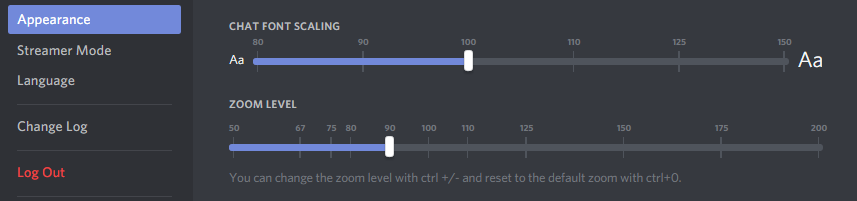
Does anyone know how to fix the numbers getting cut off on squads? (I can see duo room names, but squads, beside no. 1 is cut off)
It's slightly annoying having to count every room all the time.
Changing the window size doesn't fix it and there doesn't seem to be a slider for that box
Any thoughts, anyone?
I'd really like to fix this.
 stiff quarry
Oh, that's probably a new feature, didn't know that existed xD
That only changed the chat font
Rooms are still same size
Even zoom doesn't fix
Yeah neither of those fix this
@quick chasm
 quick chasm
hmm, what is your monitor resolution?
can you not stretch your client a bit?
that doesnt help either
stiff quarry
Nah.
It's 1440x900
I know I know, I need an upgrade
But for now this is all I have
quick chasm
That could be the reason why then
Ive put in a request for the room name change to fit the users with lower resolutions, i cannot promise that it will get changed though
stiff quarry
Thanks for the effort~
 candid marlin
@eternal lake @frank moon @rancid verge @lofty briar @quick chasm
this guy █▀█ █▄█ ▀█▀#5614 was spamming us in squad 5 and also kept spamming us with messages
please kick/ban him
quick chasm
@candid marlin can you provide me with proof, in dm?
 hybrid rapids
It looks like my UI is not showing up correctly, and idk how to fix it
https://steamuserimages-a.akamaihd.net/ugc/867363518991288571/3F53D9E1B47D008DA6CF2A9035C9EC2B8FE33A49/?interpolation=lanczos-none&output-format=jpeg&output-quality=95&fit=inside|1024:819&composite-to%3D*%2C*|1024%3A819&background-color=black

Those wardrobe items on the right
And I can't scroll it
quick chasm
@hybrid rapids What is your ingame resolution
Looks like everything is zoomed in alot
Try changing it to something higher
hybrid rapids
It's "fullscreen windowed" which has no resolution setting.
Apperantly, only windowed mode works fine, while just fullscreen makes everything weird and stretched.
Can it be that my screen isn't wide? 1280*1024
 spark walrus
yep, that's it
flint vigil
@quiet grove , might remember me, i was the one complaining about my friend couldt load the game and it was just stuck on loading screen, so we tried updating the new patch at testserver wit low excpetasions, but to our suprise the game now runs and we can play. NO more stcuk in loading screen
Is the TestServers playable at all times?
 sweet pagoda
flint vigil
sweet pagoda
flint vigil
Having problem with matching in testservers, think this is just becaues its low traffic since the new patch isnt that big?
violet hare
Just long matchmaking times?
flint vigil
ye, pretty long, haven tbeen able to launch a duo game, only on single
violet hare
Yea, probably is low player count
flint vigil
wold think so
 junior mortar
Does anyone here familiar using the ethernet cable? My pc doesnt detect the cable. Can someone help me from DM? Thanks!
 agile copper
I can'tn get past the early access warning screen, anyone else have this problem? I can use the three buttons at the top (refresh UI, settings, exit) but nothing happens when I hit i understand. 😦
 reef holly
What is this shit bro?
 balmy gale
@agile copper have you tried unplugging it and plugging it back in?
 prisma lantern
Cant MM as squad
gleaming vector
Region? @hoary spade @prisma lantern
 hoary spade
eu
 wintry geode
EU down?
violet hare
Yep
wintry geode
AS it is
 bronze walrus
Is reporting players here effective or should I go use the board?
gleaming vector
!report
regal vaporBOT
If you wish to report a player please follow the instructions here: http://forums.playbattlegrounds.com/forum/35-report-a-player/
PLAYERUNKNOWN'S BATTLEGROUNDS Forums
If you wish to report a player or appeal a ban please read the instructions inside.
bronze walrus
aye did report it
 primal hawk
i cant get my game to start.. just comes up with a report crash screen
bronze walrus
just got killed by the same hacker 3 lobbies in a row
 bronze walrus
verify game files via steam
 glossy relic
My PUBG says it's not installed... I've got 425 hours, definetley files are there.
primal hawk
restart steam maybe?
 coarse junco
restart steam, if the files are still there, steam will verify them instead of downloading them again
viral monolith
Still having the issue where randomly whilst playing PUBG my PC restarts
which is really weird as within the first 10 minutes of playing today my PC restarted, but I played upwards of 6 games yesterday with no issue
ran multiple stress test softwares, ran 3 different temp checkers, all within normal range
and it only happens with PUBG
I have tried verifying files on Steam and only now I am attempting to reinstall the game
glossy relic
Yeah I'm downloading and installing... agian
But I didn't uninstall first so, this could be a mess.
Restarted, verified. Did nothing
My partition in steam even says it's not installed.
But I see the game files
viral monolith
I have made a post on the official forums, I just hope it will give me some insight or help as towards fixing this
glossy relic
Now I can't get reshade to work again... : (
I think I figured it out... It redownloaded it to a second drive.
viral monolith
Guys i really want to get better i can aim and everthing but i dont know how i should hold my keyboard. this is my first shooting game -Thanks
 calm gate
Hey guys! When you jump on a roof, chances are that the weapons are loading in too slowly. Despite my settings on being pretty high and every other texture loading without a problem.
Is this a serverside thing or any possible way to fix it? It's frustrating when you are the first one to land on a roof just to see no weapons for a few seconds.
appreciated
glossy relic
Milage seems to vary for everyone
viral monolith
Need some optimization
plox
I have a GeForce GTX 950 PNY Edition 2GB OC'd, AMD Athlon II X4 640 @ 3.0 GHz, and 8GB RAM
used to have 16 but somehow 8 fried
gleaming vector
That system is really on the low end of what will run this game...
gleaming vector
Both Processor and GPU
gleaming vector
You could try setting everything to Very Low and then trying to bump the Textures up to Med and see if that gets you anywhere.
viral monolith
Eh
violet hare
Also change resolution if that doesn't help
viral monolith
I had everything on Very Low and got 10 fps
My processor is so old
It needs to be higher graphics
Because I have a CPU bottleneck
17%
Would Low and Med textures work?
 night whale
@viral monolith Check for driver updates on your graphics card. And check the temp, is things getting too hot?
viral monolith
use 2 different temp checkers and both had normal results, and my drivers are up to date @night whale
night whale
So nothing crashes, just reboots?
viral monolith
yup
night whale
In most cases that is either driver or hw related. (or just heat because bad fan, bad heatpipe connection)
pubg uses UE4, so there should't really be any custom stuff in pubg that would reboot a pc since UE4 is so widely used.
violet hare
I would guess heat, as well
night whale
strange
viral monolith
the thing is that it only happnes in PUBG
no other game i play has this issue
I also ran stress tests too
night whale
pubg isn't that optimized. so it might stress the system differently.
viral monolith
also
night whale
But yeah. Don't have a silver bullet for that one.
viral monolith
I have owned the game since launch
and it happened within these last 2 weeks
also in Event Viewer the error is a Kernel 41 Power error
night whale
If cpu and gpu at full load makes your psu unstable.
viral monolith
but if it was faulty, why is it only with PUBG that it causes a reboot
night whale
Not faulty. Just not capable of having both the cpu and gpu at 100% at the same time.
viral monolith
also it is inconsistent too, as I played upwards of 6 games yesterday, and it crashed within 10 minutes of launching it today
when I played yesterday I had 0 issues
then today within 10 minutes my PC restarted
violet hare
PLAYERUNKNOWN'S BATTLEGROUNDS Forums
Hello ...
... my pc did twice a reboot by itself while playing battlegrounds (first happened 3 days ago, second happend one hour ago).


-there is n...
".. 200 hours later, still without a single reboot (two reboots within the first 40 hours with my old corsair cx PSU), so i got these reboots fixed by a new better PSU"
viral monolith
do you reckon that was a faulty PSU or not a powerful enough one for that guy
myself, I have a 700W PSU and if it was faulty surely it wouldnt be limited to just PUBG
violet hare
He probably didn't have a quality PSU
night whale
that is one and the same really. A faulty psu can be one that just doesn't deliver at the peak it needs to deliver. It power drops in stability.
Not saying it is certainly the psu. But if I would guess I would try to verify that it's not the psu first.
violet hare
Yep ^^ Personally, I wouldn't want to replace a PSU just because of one game. But hey, maybe an upgrade would be nice
viral monolith
that was my thought process at first
but then how would you explain how one day it is fine, then the next it restarts after 10 minutes
night whale
Try to verify it first. Find something that stresses both gpu and cpu at the same time. Something that can stress the psu by pulling a lot of power.
violet hare
Hardware is finicky. It can work fine one day, but not so great another
More RNG than PUBG
night whale
The patch might have made the game more cpu intensive. use more cores. So now it uses all cores instead of just 3-4?
Just checked last match. pubg is using all cores quite well now. So the cpu has enough to do on all cores.
viral monolith
I saw alot of people recommending to add a lauch option for it on steam to use all cores
night whale
Those are old stuff. Probably not needed anymore.
There was a lot of guides for a lot of stuff before. Most is patched away or not needed anymore.
night whale
I don't know if there are any PSU tests. but you kinda want to stress cpu, gpu, hdd, etc at the same time.
To force the system to draw as much power as possible.
IF it's the psu then that should crash it.
And if not, then the search continues. But I do find it weird you cannot crash it any other way, or in any other game. Though most games tend to be GPU bound, so they don't use the rest of the system that much.
viral monolith
I guess I could try playing other "intense" games to see how it goes
night whale
What is the brand of the PSU btw?
coarse junco
If it is the psu, just a straight stress test might not show the problem. Some bad/failing PSUs tend to have problems with fast changing loads. So it might crash during a lag but not on a stress test
night whale
viral monolith
🤔
night whale
All I can say it's probably not software related to anything with pubg.
viral monolith
the only thing that I can think of to test now is other intensive games, like Witcher 3 ME:A GTA V or Dishonored 2
viral monolith
not sure
night whale
Maybe run a cpu benchmark at the same time 😃
viral monolith
I am just spitballing here
running a CPU benchmark whilst running a game sounds like a recipe for disaster
night whale
it should just work if the system is stable
Btw. does it insta reboot. Or bluescreen, or freezes?
insta reboot or just turn off is usually power related. freeze or bluescreen is usually driver or gfx stuff.
night whale
It should be your psu. I'd say it could be the motherboard or ram. But I find that much less likely.
That's around the same time as a fair share of optimizations.
So cpu/gpu usage probably changed.
viral monolith
well I just reinstalled the game in the low hope of it fixing anything, gonna spend an hour or so tomorrow cleaning out my entire Rig checking Thermal paste etc, and hope I can get some results
night whale
Do you have many hdd's?
viral monolith
only 1
night whale

Tom's Hardware
In order to know whether a PSU is the source of problem in a problematic system, one can try swapping the PSU. However, is there a way to test the PSU without swapping them? I only got one PSU.
You can try that. Monitor the voltage while playing pubg
You might see something
viral monolith
does that software keep results after a crash xD
viral monolith
I could perhaps do that, just land in the middle of nowhere and watch the results
night whale
You can probably get it to stay on-top and play windowed.
I would start with that. Anyway, time for bed. Good luck 😃
viral monolith
thnaks for the help
prisma lantern
My region keeps resetting to asia instead of my selected EU at the end of every game. Getting pretty annoying now.
tame knoll
!invite
regal vaporBOT
Invite URL for Discord: https://discord.gg/battlegrounds
viral monolith
so in PUBG it auto puts me in Solo AU queue, but I live in eastern US and I have to manually Select NA servers, any fix?
Getting extreemly annoying
calm gate
@viral monolith Wesley Snipes - gestern um 23:06 Uhr
Hey guys! When you jump on a roof, chances are that the weapons are loading in too slowly. Despite my settings on being pretty high and every other texture loading without a problem.
Is this a serverside thing or any possible way to fix it? It's frustrating when you are the first one to land on a roof just to see no weapons for a few seconds.
appreciated
viral monolith
What is the bullshit with it automatcially selecting asian servers every time
im not in asia
or fucking located near it
i dont want to play in the trash servers with trash players
gleaming vector
It's a known bug. They're working on it.
Be less whiny and abrasive.
• Show respect to everyone on this server, no matter their role.
• We welcome constructive criticism but have zero tolerance for aggressive or entitled demands. ```@calm gate Is likely serverside
 drowsy panther
@calm gate yeah i never see guns till i land
at which pooint they load in for everyone and people land right on guns
viral monolith
Sick they add 10 things and create 100 of problems
great testing you have going on
drowsy panther
hit detection is still dodgy too'
 gilded ravine
how do i invite someone to this server
gleaming vector
Check #📯│general-announcements
 weary quarry
FFS @nocturne oasis WHY U DO DIS TO ME ;_;
 compact pawn

anyone else getting this?
I've tried running steam as admin, clearing download cache, rebooting pc
 gusty hornet
evac, try right click on the game, properties, local files, verify integrity ..., could help 😄
 gusty plover
PUBG IS DOWN NOOOOOOO
gleaming vector
Need help @upbeat dock?
tepid fox
Please make it so you can't use mouse-wheel up or down for firing.
And that doesn't have to be a macro that's something in game that can give players an advantage.
 thorn lava
says the weekly patch is completed, yet still cannot get in
 vapid oxide
gusty hornet
vapid oxide
gusty hornet
seems to be working again
 rough sorrel
For some reason EVERY time i press play it say's matchmaking then auto cancel's. I cannot enter a game at all
viral monolith
or that one time you get into a game
https://puu.sh/xE6nO/69a083b450.jpg
This happens
 rough sorrel
after trying for like 5 min, i type this here and try again then it let me in -.-
 urban cipher
Getting a lot of matching cancelledc right now, anyone else?
 keen prism
I'm not able to get in matches too @urban cipher
rough sorrel
Anyone having bad lag on the servers as well?
 winged barn
keen prism
winged barn
keen prism
i can only get into 3rd person games
 knotty panther
Anyone get client crash in lobby only with "Bad Service Version <patch number> ?
junior mortar
Does using the ReShade affects the fps?
 ivory root
"cancel" button doenst work like ever when tryin to cancle a match plz thnx
 barren furnace
Anybody know why in game I can't hear but can talk to people ?
 next crown
 mossy vessel
Just some constructive critizism. You should allow crouch/jump keybind until you release vaulting. cheers
viral monolith
weird graphics glitch im having
wintry geode
Have you fixed the leaderboards yet?
 idle goblet
hellu
i ned halp wit texturs
for mai pubge
please halp
mai texturs do not load in until lik 2-4 mins
 north iron
PLAYERUNKNOWN'S BATTLEGROUNDS Forums
Hi Players,
Please take a moment to read through this post and attempt all troubleshooting method so we can attempt to help solve your issues with you...
ohk
north iron
@barren furnace
Closing STEAM > Uninstall PUBG > Go into STEAM Folder > DELETE The entire PUBG Folder > Restart computer > Run STEAM as Administrator > Reinstall PUBG
Once it's installed. Go into your STEAM Folder. Locate 'Tslgame.exe' > Right-Click > Run as Administrator
idle goblet
didnt work
north iron
You was able to do all those steps, including fresh installation of the game and drivers in 3 mins? Hmm..
 torn star
I just die to red zone in a house. Is this normal?
 clever shale
Whats up with the small 47.9mb update
north iron
Check their Twitter @clever shale
@torn star If you're near the celling, or windows. Yes, you can be dropped/killed.
clever shale
@north iron Theres nothing on their twitter
torn star
I see. Thanks
north iron
You're welcome!
warm star
@nocturne osprey is saying shit on the voice chat rasist and insult everyone in the voice chat ! can you just kick him pleas @weary warren
 dense sandal
what is this 49mb update ?
north iron
There is no released notes on the small update. Therefore, there is no answer. I'm sure if PUBG wanted to tell anyone the answer they would have posted. Although, I am certain it's nothing concerning. @dense sandal
north iron
Stuck? As in the game?
 spiral bough
yep
north iron
You can try closing the game through TaskManager, then reloading the game up.
It typically will unstuck you.
north iron
Sometimes, if it's a convient place. Having a teammate pull a car up to you to get in, or being downed can work.
I understand what you mean..
Closing the game through TaskManager, then reloading the game.
north iron
Rip.
Well, for suture reference. When you're stuck. Closing the game through TaskManager and relaucnhing the game, and reconnecting to the game wil force your guy out.
I've personally sacrificed my rank attempting this to ensure it works.
viral monolith
yo does someone know the song at 3:20 https://www.youtube.com/watch?v=V-9mXTP6CAc

Like or subscribe ( goo.gl/vKTGUJ ) if you'd like to see more of these videos
song at 3:20 ?
help pls feelsbad
north iron
Why not use Google Music match? @viral monolith
@keen sundial , PUBG has not released any information on the use for it. Therefore, I would suggest not using it.
 keen sundial
thanks was considering testing it but not like u cant really work out the info it gives by your self 😃
north iron
Well, Sammie had posted on Twitter that it was not against the rules at the moment, but Aug 11.
Considering it does tell you how long before you need to run to make it in the circle from your location and such. I would not recommend using it. Things like this gives you an advantage, and therefore in the rules states it's considered a cheat.
So, until clarified by Bluehole themselves. I would stay away from it.
keen sundial
it allso looks like it tells where good loot is this is definatly cheating
it needs to be adressed
north iron
Actrually, the 'good loot' is just based off of experience. You can find replicated maps all over the internet. It's not technically telling you in what house the loots at. It's giving you popular spots where there is a tendancey to have good loot, or an abundance amount of it.
keen sundial
would be nice to know @viral monolith stand/ view on it
well not so sure it does maybe it just the map that was released with high loot spawn areas marked
north iron
That's what it is.
Consider Sammie does Anti-Cheat.
And she made this post..

I would have to say you're ok to use it for now, but I would stay up-to-date with it incase their minds change.
keen sundial
ok well think ill give it a miss
north iron
You're much welcome! Happy Fragging! 😃
 late nacelle
Why is server down
 opaque crypt
South east asia server down
late nacelle
No the game is down
gleaming vector
SEA servers down, got that. Down how? Connection closed? What message is it giving you?
opaque crypt
Can not click ready and connection close
gleaming vector
So you're in the lobby normally, but can't get into games?
dense sandal
Connection closed at menu
gleaming vector
Gotcha, any regions besides SEA?
opaque crypt
Yes , when refeesh it connection close
 gaunt lagoon
yeah getting connection closed also on just logging back into game
it takes a bit of refreshes but it does connect but still has been doing it for a bit
 opaque thicket
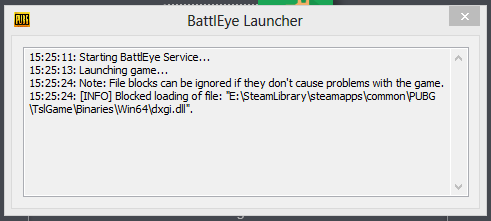
battleye blocks dxgi.dll?
 opaque thicket
yup
 simple glen
@viral monolith @community_team
 feral eagle
violet hare
feral eagle
violet hare
@simple glen Not that big of an issue to ping the team. This should hopefully fix your issue:
- Rename
dxgi.dllto anything else (such asdxgi1.dll) - Launch PUBG
- Rename the file back to
dxgi.dll - Restart PUBG
 shut pier
Connection closed EU
gaunt lagoon
yeah along with connection closed alot of people are getting battleye launcher problems
simple glen
okay will try that, thanks for the help @violet hare !
 ancient kraken
connection closed OC
gaunt lagoon
if you keep refreshing it will connect eventually but good luck with getting a party going cuz that wont work
simple glen
worked, thanks!
opaque thicket
didn't work for me, i get the same problem after i rename the file back to dxgi.dll
simple glen
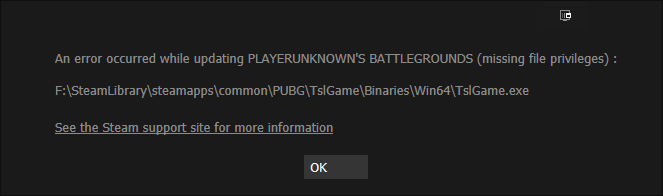
problem now is i get the 'connection closed'
 vernal oar


 simple glen
oh alright
 weak mantle
@simple glen do you have reshade installed?
I was getting the same error and deleted all the dx files in that folder along with the reshade files and it lets me back in now
servers do seem to be down though, cant invite friends or join a game
 verbal oracle
same problem here
gleaming vector
Alright, can confirm that the server issues have been reported to the devs and they are addressing it now.
opaque thicket
lol I can't play this game without reshade it looks so grey
verbal oracle
what does reshade do exactly ?
north iron
It creates more color, sharpness, vibrance, etc..
viral monolith
Hey
north iron
Reshade has a ton of options to choose from during the installation process. However, there is particular ones that are better/prefered for PUBG.
Hello!
verbal oracle
Alright i'll check it out, thanks