#Glitchy Wiiflow, USB flash drives not being recognized in games loaders and more

36 messages · Page 1 of 1 (latest)

queen patrol
#

hey, can somebody help me?

I was downloading Just Dance 2 to put on my SD card and play on Wiiflow, but for some extreme bizarre reason, when I went to play it, it wouldn't load at all and it would reboot the Wii menu, the channel banner of the game was all buggy, the 3D cover of the game wouldn't download and the Wiiflow just started to crash or lag sometimes. and now, Wiiflow doesn't open anymore since then, it stays on the boot loading screen and no more.

i tried reinstalling cIOS - which was outdated, i updated today - or reinstalling Wiiflow by getting newer or older versions, but it stays stuck at the boot loading screen.

this is not something with my SD card, because i've been using it for two years almost and i didn't have problem with it. the same for my wii.

that's the second problem i've been testifying on my Wii, the first one is flash drives not being recognized, NONE of my various USB flashes had been recognized in USB Loader GX or Wiiflow (Homebrew Channel does recognize it, though.)

can someone solve this crazy thing? i would be greatful! thx.

queen patrol
#

well, Wiiflow just loaded now after what seemed an eternity and...jeez.

(yes, this is the Wiiflow menu, or what it used to be)

marsh tartan
#

Hmm it is

#

Interesting

queen patrol
velvet current
#

Uhm

#

Try usbloadergx

#

Wait

#

Did you try both usb ports?

#

And have it formatted correctly as FAT32

#

Only one usb port works on wii for usbloaders

#

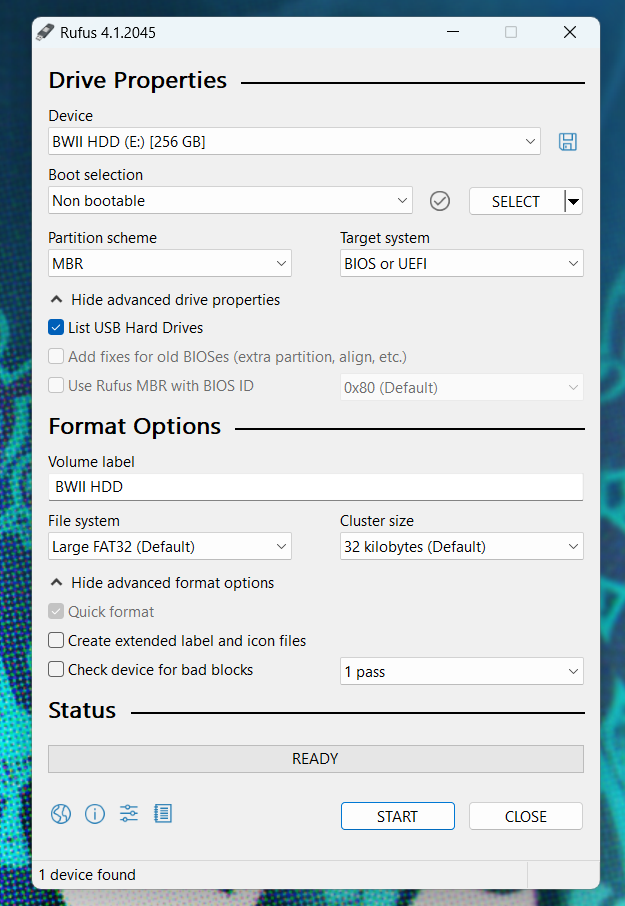
You can use Rufus on a Windows machine to easily format an external hard drive or SD card for use with your Wii.

⚠️ Formatting a drive will delete all data on the drive. Backup any essential data on a drive before proceeding with the formatting process.

  1. Download and install Rufus to your machine: https://rufus.ie
  • Most people will want the Standard Windows x64 version.
  1. Launch Rufus.
  2. Click Show advanced drive properties.
  3. Check the box next to List USB Hard Drives.
  4. In the Device dropdown, select the SD or USB drive you'd like to use with the Wii.
  5. In the Boot selection dropdown, select Non bootable.
  6. In the Partition scheme dropdown, select MBR.
  7. In the Volume label text field, enter a name for your drive. Be creative.
  8. In the File system dropdown, select FAT32 or Large FAT32
  9. In the Cluster size dropdown, select 32 kilobytes.
  10. Click Show advanced format options
  11. Make sure Quick format is checked.
  12. Uncheck Create extended label and icon files
  13. Click Start to begin the format process.

Here is a screenshot of what your settings should look like:
https://i.imgur.com/YvYy0k2.png

#

Try this

#

And then follow this guide to add your games to the usb

queen patrol
#

and i did follow this guide before.

velvet current
#

Uh, faulty usb drive? Have you tried the sd card with USBLoaderGX @queen patrol

queen patrol
#

i'll try format the sd card, bc i didn't format it for years since i got it so...

velvet current
#

@queen patrol could it be a bad rom?

#

it also could be a failing sd

#

with the way that wiiflow was being like that

#

because uh, that aint very normal

queen patrol
#

i'll try to change it to a new one

queen patrol
#

update here

#

i did buy a new SD card, a Sandisk Ultra 32GB SDHC card

#

i formatted it correctly

#

and it still gave the same problem

#

so it's not the SD card itself, neither the place where you plug the SD card into the Wii because it is recognizing the SD

#

it's probably something with my softmod?

velvet current
#

Weird..

#

You try USBLoadergx?