Hi! Im currently trying to use YAWMModMii edition to continue setting up Riiconnect, but its not showing up on my screen and whenever I try to access my internal SD card it just gives me a Exception (DSI) occured error. My SD card is formatted in FAT32 (originally a 64GB), and I double checked the files and they seem fine. Is there a solution?
#YAWMModMii not showing up on homebrew channel
41 messages · Page 1 of 1 (latest)
 wispy hare
wispy hare
wispy hare
Thing is I havent installed anything else? And my wii is struggling to read my SD card fsr
I tried to install bootmii on it as well and its not detecting it
@blissful saddle
 blissful saddle
wispy hare
Thing is I havent installed anything else? And my wii is struggling to read my S...
blissful saddle
wispy hare
Thing is I havent installed anything else? And my wii is struggling to read my S...
The reason why I asked this question was because I wanted to see whether this was just a YAWMModMii issue. Load another app and let me know if you have trouble using it.
wispy hare
alright, will do
blissful saddle
wispy hare
alright, will do
Ping me once you get the result. I have some ideas depending on what result you get.
wispy hare
@blissful saddle okay so tried another app, doesnt show up either and still gives me the exception (DSI) error when i try to access the internal SD card
An issue with my memory card im thinking? Not too sure though
 winged estuary
wispy hare
Hi! Im currently trying to use YAWMModMii edition to continue setting up Riiconn...
winged estuary
wispy hare
Hi! Im currently trying to use YAWMModMii edition to continue setting up Riiconn...
What did you use to format the SD
blissful saddle
wispy hare
<@596459491411755214> okay so tried another app, doesnt show up either and still...
Very sorry I forgot to reply! Does your SD card have a slider? Make sure your sd card shows like this.

If it's on the bottom, it's usually locked. The Wii will still show the apps, but it can't access them. It makes sense since the Wii only has read privileges when it must have write privileges as well. If the slider is on the bottom then it does not have write privileges.
I know this seems silly but you don't know how many people need this solution lol. Let me know if this helped you.
blissful saddle
winged estuary
What did you use to format the SD
I think I've used ridgecrop before and it's worked but I'm not totally sure.
winged estuary
wispy hare
http://ridgecrop.co.uk/index.htm?guiformat.htm
Try Rufus
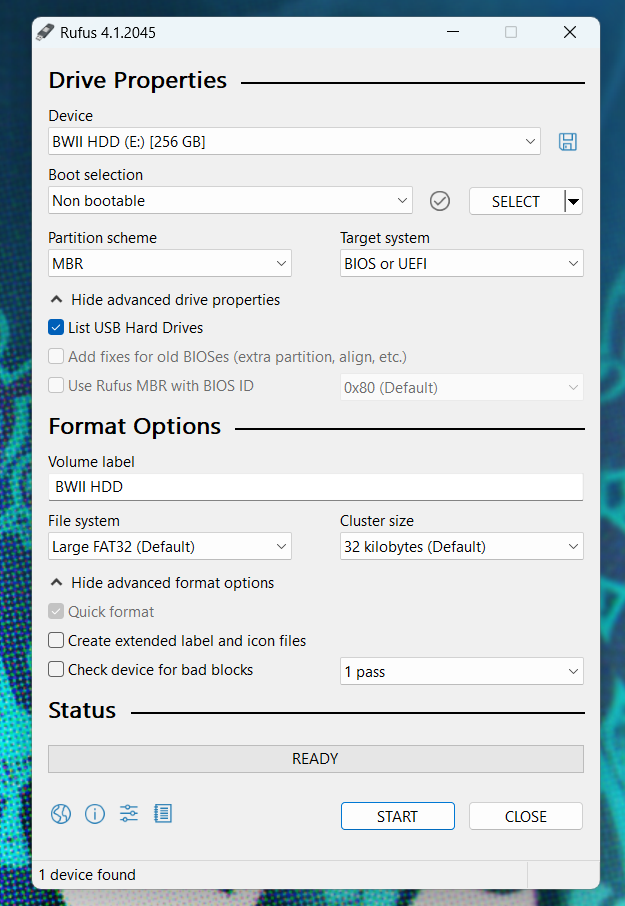
You can use Rufus on a Windows machine to easily format an external hard drive or SD card for use with your Wii.
⚠️ Formatting a drive will delete all data on the drive. Backup any essential data on a drive before proceeding with the formatting process.
- Download and install Rufus to your machine: https://rufus.ie
- Most people will want the Standard Windows x64 version.
- Launch Rufus.
- Click
Show advanced drive properties. - Check the box next to
List USB Hard Drives. - In the
Devicedropdown, select the SD or USB drive you'd like to use with the Wii. - In the
Boot selectiondropdown, selectNon bootable. - In the
Partition schemedropdown, selectMBR. - In the
Volume labeltext field, enter a name for your drive. Be creative. - In the
File systemdropdown, selectFAT32orLarge FAT32 - In the
Cluster sizedropdown, select32 kilobytes. - Click
Show advanced format options - Make sure
Quick formatis checked. - Uncheck
Create extended label and icon files - Click Start to begin the format process.
Here is a screenshot of what your settings should look like:
https://i.imgur.com/YvYy0k2.png
 winged estuary
blissful saddle
I think I've used ridgecrop before and it's worked but I'm not totally sure.
winged estuary
blissful saddle
I think I've used ridgecrop before and it's worked but I'm not totally sure.
Usually does except it doesn’t account for MBR or GPT
blissful saddle
winged estuary
Try Rufus
You can use Rufus on a Windows machine to easily format an external...
I've used Rufus before- isn't it used for USB Booting? I used it last month to Install Ubuntu.
wispy hare
blissful saddle
I know this seems silly but you don't know how many people need this solution lo...
checked, inserted it inside the wii with the switch in the correct positon. so its not that ig?
winged estuary
Normally yes
blissful saddle
wispy hare
checked, inserted it inside the wii with the switch in the correct positon. so i...
Guess not. Try Rufus. Player knows more than I do.
winged estuary
wispy hare
checked, inserted it inside the wii with the switch in the correct positon. so i...
If the slider is loose sometimes it will lock itself when you put it in the Wii
wispy hare
this is a brand new SD card i bought a bit ago
winged estuary
Also make sure your apps are structured properly
blissful saddle
winged estuary
Also make sure your apps are structured properly
It seems like the apps are showing if he's able to open them.
winged estuary
blissful saddle
It seems like the apps are showing if he's able to open them.
He said they are not visible
blissful saddle
Oh
blissful saddle
winged estuary
Usually does except it doesn’t account for MBR or GPT
Lol. I searched for GPT and ChatGPT came up, had a feeling it would. Have a feeling that's not what you're talking about.
winged estuary
blissful saddle
Lol. I searched for GPT and ChatGPT came up, had a feeling it would. Have a feel...
GPT is a partition style that isn’t supported by the Wii
Only MBR is
blissful saddle
Ah
wispy hare
winged estuary
Try Rufus
You can use Rufus on a Windows machine to easily format an external...
alright formatting it using rufus rn, will try to throw everything back on after and see what happens
ohh

ignore the volume label LOL
WAIT NVM think i got it

 winged estuary
wispy hare
ohh
winged estuary
wispy hare
ohh
Truly a poopshitter moment