#Homebrew problems
35 messages · Page 1 of 1 (latest)
 lucid fable
 abstract kayak
lucid fable
you need to install apps
abstract kayak
lucid fable
you need to install apps
I'm sorry, but which ones? And how? Thanks a lot in advance
 last vale
Depends on what you want. You have the homebrew channel, now you are able to install whatever homebrew you want to use by just putting whatever homebrew you want in the "apps" folder on your SD card
lucid fable
abstract kayak
I'm sorry, but which ones? And how? Thanks a lot in advance
go start with osc: https://oscwii.org
Official website for the Open Shop Channel open source homebrew apps repository.
 dusk fossil
also priiloader if not already installed
abstract kayak
last vale
Depends on what you want. You have the homebrew channel, now you are able to ins...
Well, yes, but, as detailed in my first question, I do not have a working SD card, nor does the homebrew channel itself work (yet)
dusk fossil
abstract kayak
Well, yes, but, as detailed in my first question, I do not have a working SD car...
is the SD card formatted fat32 with an MBR partition style and 32KB cluster size?
abstract kayak
I know about those apps, but before I can run them, I have to get the homebrew channel working
dusk fossil
abstract kayak
I know about those apps, but before I can run them, I have to get the homebrew c...
is the homebrew channel already installed on the wii?
abstract kayak
dusk fossil
is the homebrew channel already installed on the wii?
Yes, I installed it using str2hax, later bluebomber.
dusk fossil
why did you use bluebomber
dusk fossil
abstract kayak
Yes, I installed it using str2hax, later bluebomber.
does it open?
abstract kayak
dusk fossil
why did you use bluebomber
Wanted to try it as a last ditch debugging attempt
abstract kayak
dusk fossil
does it open?
As detailed in my post, the homebrew channel does open, the menu with, for example turning of the console and returning to the home menu, and it connects to the internet, but the gecko icon just does nothing, and it never fully opens
dusk fossil
so basically it’s just a blank blue screen right?
 abstract kayak
Okay, will try once I get home. As I said, the SD situation is weird. I tried 3 SD cards a 64gb one, a 32gb one, and a 2gb one from my 3ds. None worked. It is even weirder, since none of them read on any of my devices (except for the 2 gb one on the 3ds, but nowhere else). I tried 3 laptops and one external reader. With all, none of the SD cards even showed up
I genuinely can't think of anything I'm doing wrong with the SDs lol. Before this, SD card reading worked pretty well
Idk, but could the SD card be replaced by a USB drive?
dusk fossil
abstract kayak
Idk, but could the SD card be replaced by a USB drive?
yes
as long as it is a hdd and not a flash drive
you can always try reformatting one of your sd cards
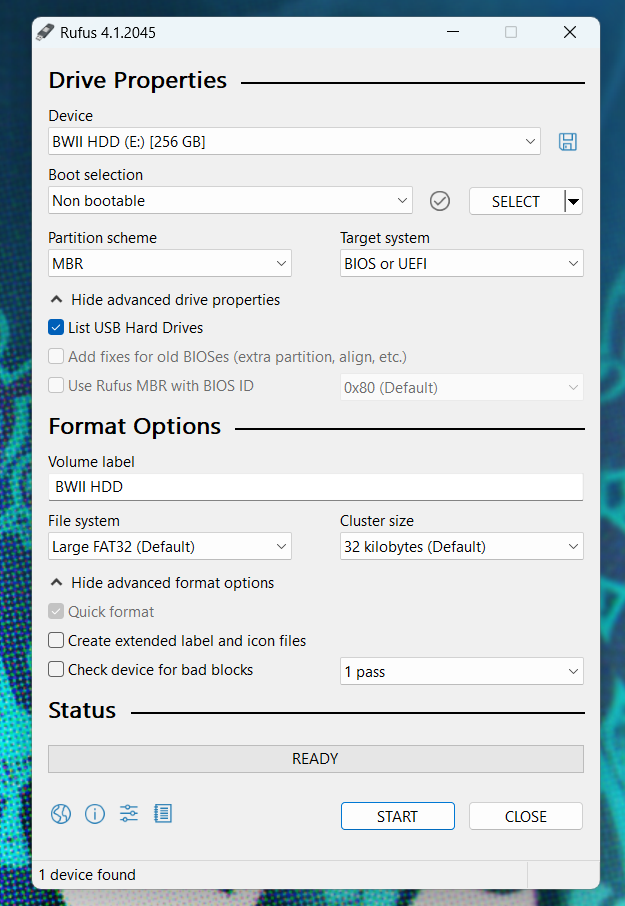
You can use Rufus on a Windows machine to easily format an external hard drive or SD card for use with your Wii.
⚠️ Formatting a drive will delete all data on the drive. Backup any essential data on a drive before proceeding with the formatting process.
- Download and install Rufus to your machine: https://rufus.ie
- Most people will want the Standard Windows x64 version.
- Launch Rufus.
- Click
Show advanced drive properties. - Check the box next to
List USB Hard Drives. - In the
Devicedropdown, select the SD or USB drive you'd like to use with the Wii. - In the
Boot selectiondropdown, selectNon bootable. - In the
Partition schemedropdown, selectMBR. - In the
Volume labeltext field, enter a name for your drive. Be creative. - In the
File systemdropdown, selectFAT32orLarge FAT32 - In the
Cluster sizedropdown, select32 kilobytes. - Click
Show advanced format options - Make sure
Quick formatis checked. - Uncheck
Create extended label and icon files - Click Start to begin the format process.
Here is a screenshot of what your settings should look like:
https://i.imgur.com/YvYy0k2.png
 abstract kayak
dusk fossil
you can always try reformatting one of your sd cards
abstract kayak
dusk fossil
you can always try reformatting one of your sd cards
The SD cards don't even show up on ANY of my machines
Idk why
dusk fossil
abstract kayak
The SD cards don't even show up on ANY of my machines
hm
are you using a usb to sd card reader on your pc?
abstract kayak
That was the 1st thing k tried. Didn't work. Then, I tried 3 whole laptops with an SD card reader, and none of them read any of the SD cards
dusk fossil
it could be the sd card reader fucking it up maybe
abstract kayak
I stopped trying it on there with the last SD, and it still did nothing. Also, one of the SDs works exclusively on my 3ds, but NOTHING else