#Homebrew but did not add BootMii
63 messages · Page 1 of 1 (latest)
 limpid hazel
 naive finch
limpid hazel
I used the Str2hax but when the options came up to add homebrew and BootMii I di...
naive finch
limpid hazel
I used the Str2hax but when the options came up to add homebrew and BootMii I di...
You can try letterbomb if you want https://Wii.guide/letterbomb
Just move the private folder and the boot.elf to the root of the SD
limpid hazel
Ty giving a go now
limpid hazel
@naive finch im not seeing how to send the files to root on the sd card when copying. Does that mean just put them on the sd card or am I missing something? Thanks for the help!
naive finch
limpid hazel
<@470071316452737025> im not seeing how to send the files to root on the sd card...
So you should have gotten a letterbomb folder
limpid hazel
naive finch
Just move the private folder and the boot.elf to the root of the SD
Does root mean just pasting into the sd card or is that something from properties. I extracted the files and reviewed the readme
 tulip forum
 limpid hazel
Ty will update if this is successful!
naive finch
You can delete the text files they are basically useless
limpid hazel
Ty will update if this is successful!
naive finch
Tbh though I’m guessing why str2hax didn’t work a second time is because you forgot to re change the dns again
limpid hazel
That was it. The message one didn't work. But I added it now. I am not understanding how to use the bootmii from the guide and when I open homebrew I see the options back about exit and shut down. Do I add roms to the sd from my PC I will start looking at some YouTube vids in the meantime on the process. To add wii and Snes games
 keen salmon
limpid hazel
That was it. The message one didn't work. But I added it now. I am not understan...
keen salmon
limpid hazel
That was it. The message one didn't work. But I added it now. I am not understan...
you still have a little bit more to do
you installed bootmii?
limpid hazel
To the sd from the pony options menu but it isn't showing on homebrew.
keen salmon
limpid hazel
To the sd from the pony options menu but it isn't showing on homebrew.
bootmii isn't showing?
keen salmon
limpid hazel
To the sd from the pony options menu but it isn't showing on homebrew.
okay, here do this
- Get the Hackmii installer here: https://bootmii.org/download/ Extract the .zip file, copy the HackMii Installer folder to your
appsfolder. You can make a folder calledappsif it does not exist already. Then run the HackMii Installer via the homebrew channel to install Bootmii to IOS and boot2 if you can. - After installing Bootmii, follow this guide to use Bootmii to create a NAND backup: https://wii.guide/bootmii
limpid hazel
Sweet I have bootmii now will continue following steps on guide
Hmmm says not enough space, free space 35mb but my sd card was blank.
keen salmon
do you have multiple partitions?
limpid hazel
Not that I know, i might be dumb though I formatted the sd earlier and could have fucked it up. I'm going to put it back into PC and are format. When it formats I think it leaves space for the sd os maybe that's the issue?
keen salmon
limpid hazel
Not that I know, i might be dumb though I formatted the sd earlier and could hav...
okay, wait
plug the sd card into your pc and open disk management
then send screenshot

 keen salmon
yeah, you a 2 partitions
limpid hazel
I deleted the partition from there do I need to reformat the disk?
keen salmon
yes, You can use Rufus (https://rufus.ie/) on a Windows machine to easily format an external hard drive and SD cards for use with your Wii.
You need these settings:
- Turn on List USB Hard Drives under Advanced drive properties, and select the correct device at the top
- Boot selection: Non bootable
- Partition scheme: MBR
- File System: FAT32 / Large FAT32
You may also want to turn off Create extended label and icon files, found under Advanced formatting options, as to avoid your hard drive getting plagued by the Rufus icon (it's harmless)
Rufus is a small application that creates bootable USB drives, which can then be used to install or run Microsoft Windows, Linux or DOS. In just a few minutes, and with very few clicks, Rufus can help you run a new Operating System on your computer...
limpid hazel
Did that, launched homebrew and launched bootmii and now screen is black
Non-responsive
keen salmon
did you backup the sd card before reformatting
limpid hazel
It was a brand new sd so no worries on it
tulip forum
limpid hazel
Did that, launched homebrew and launched bootmii and now screen is black
You launched bootmii?
You need files for it
limpid hazel
Okay I just wanted to check before powercycle wii
Will reinstall bootmii👍thx
Working now! Man you don't know how much I appreciate this. Where were you when I was trying to make retro pie on a raspberry 6 years ago. I can still only figure out how to get doom on that 😂
keen salmon
limpid hazel
Working now! Man you don't know how much I appreciate this. Where were you when ...
dope, now make a NAND backup
limpid hazel
Made the hand and backup. Installed and configured preloader. Installed and config d2x installer. Now can I play games off a USB?
Are these the correct format? As well as these,
keen salmon
-DON'T link website, you'll be breaking the rule 13 of the sever
Thank you boss I read through them bit apparently didn't process that one. I followed the guide to put USB loader gx on my USB Drive, then made a folder in root titled wad to put my games onto. I will start on the manager now👍 assuming this all works out are y'all part of the wiiguide website and is there a patron or something that supports all the work y'all do keeping these old systems useful?
keen salmon
limpid hazel
Thank you boss I read through them bit apparently didn't process that one. I fol...
For games file it like this:
💾usb:
┣ 📂wbfs
 ┃ ┣ 📂GameName [gameID]
 ┃ ┃ ┗ 📜gameid.wbfs
 ┃ ┗ 📂GameName [gameID] --This example is for *split* wbfs files, if you are on ntfs or your game is smaller than 4gb, ignore it
 ┃   ┣ 📜gameid.wbfs
 ┃   ┗ 📜gameid.wbf1
 ┗ 📂games
   ┣ 📂GameName [gameID]
   ┃ ┗ 📜game.iso --note: this is LITERALLY game.iso, not the name of the game, or the game id, just game
   ┗ 📂GameName [gameID] --This example is for multi disc games
     ┣ 📜game.iso
     ┗ 📜disc2.iso
Note: the WBFS folder is for WII GAMES ONLY and the Games folder is for GAMECUBE GAMES ONLY
get the game IDs here: https://www.gametdb.com
or you can just use any of the programs found on this page, as an easier alternative: https://wii.guide/wiibackupmanager
naive finch
limpid hazel
Thank you boss I read through them bit apparently didn't process that one. I fol...

RiiConnect24
RiiConnect24 is an alternative provider for the now-defunct WiiConnect24 service, designed to allow communication between Nintendo Wii™ consoles via the net.
keen salmon
limpid hazel
Thank you boss I read through them bit apparently didn't process that one. I fol...
And then When installing homebrew applications on your SD Card or USB drive, your folder structure should look like this:
💾 sd or usb:
┣ 📂 apps
┃ ┣ 📂 AppName1
┃ ┃ ┣ 📄 boot.dol / boot.elf
┃ ┃ ┣ 📄 icon.png
┃ ┃ ┗ 📄 meta.xml
┃ ┗ 📂AppName2
┃ ┃ ┣ 📄 boot.dol / boot.elf
┃ ┃ ┣ 📄 icon.png
┃ ┃ ┗ 📄 meta.xml
AppName1 and AppName2 are placeholder names.
Do not nest multiple apps folders inside the apps folder itself.
naive finch
naive finch
https://rc24.xyz/donation.html
If you donate you get a role in the server
keen salmon
@limpid hazel also USB Loader GX has official Forwader Channels. You can install them to the Wii System Menu using a wad manager like Wii Mod Lite:
-Only install forwarders meant for your system.
Put WAD files in a folder called WAD on the root of your SD or USB.
Then install it using a wad manager like Wii Mod Lite:
https://wii.guide/wiimodlite
After you install a WAD file using a WAD manager, you can delete it from your WAD folder. They're installed to the Wii's system memory so there's no reason to keep it on your SD/USB.
limpid hazel
Okay, I gotta dumb this down for myself, I appreciate the patience. So I added USB loader gx to my USB Drive but it does not show in homebrew. Should it?
Can I put USB loader gx and the manager plus games on the wii sd card?
naive finch
limpid hazel
Okay, I gotta dumb this down for myself, I appreciate the patience. So I added U...
Press 1 and select usb
limpid hazel
Oh got ya. Usb is not selectable. I want to just try and put the loader and manager and games on the sd for now. If this works I will get a sad or had USB.
Ssd*
naive finch
limpid hazel
Oh got ya. Usb is not selectable. I want to just try and put the loader and mana...
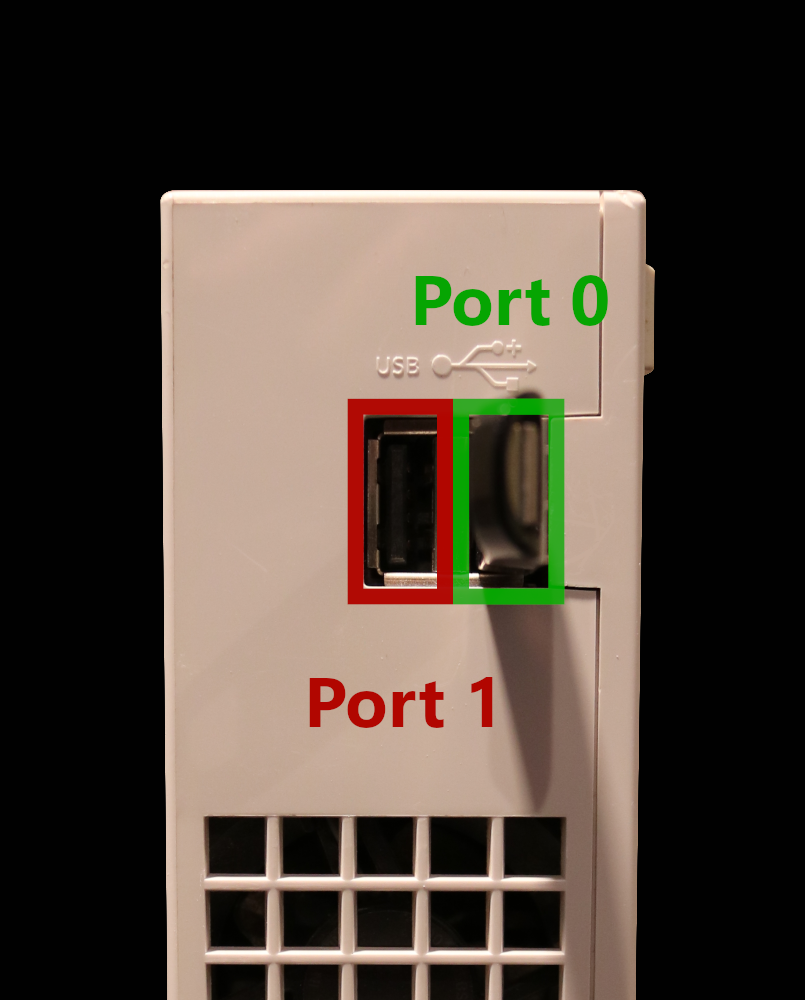
Probably means the format is wrong. It needs to be FAT32 MBR
Also it needs to go in port 0 https://i.imgur.com/zNrAp5o.png

 keen salmon
@limpid hazel you're all set?
limpid hazel
Yeah looking pretty good, only issues im having is games is snes9xgx don't save and the Wii home icon for snes9xgx just black screens but other wise couldn't be happier!
tulip forum
limpid hazel
Yeah looking pretty good, only issues im having is games is snes9xgx don't save ...
why are ou using snes9xgx