#Hi idk why but my Wii refuses to read my hard drive or acknowledge its existence at all
41 messages · Page 1 of 1 (latest)
 dusky prawn
 ebon leaf
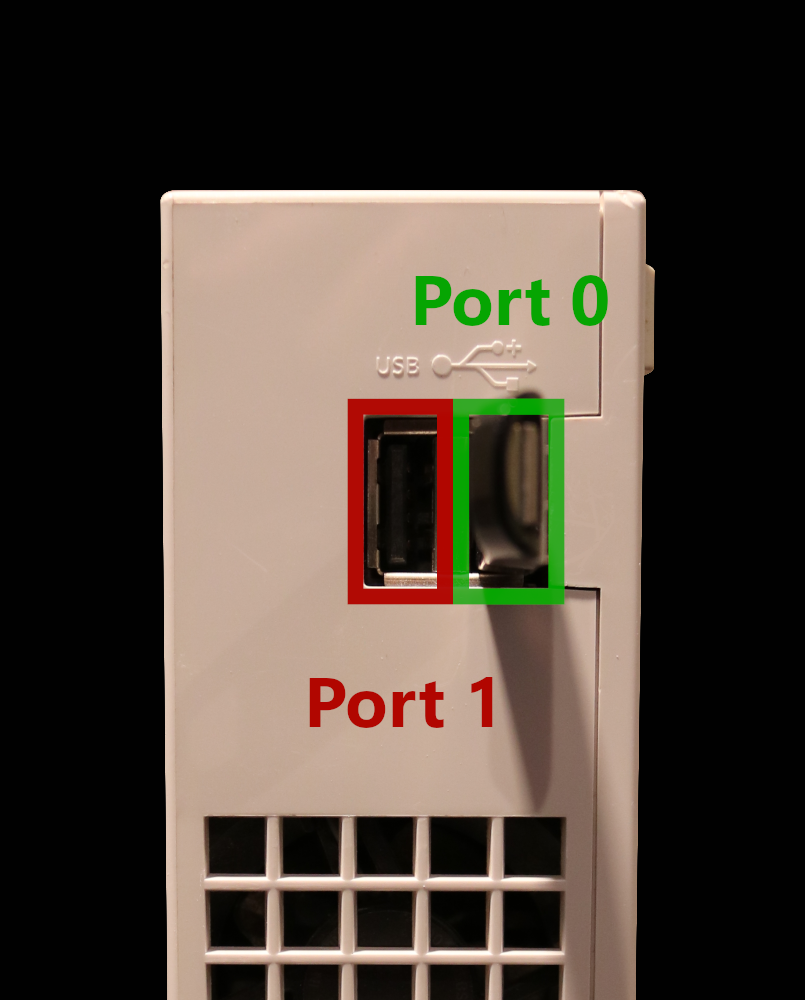
Make sure your Drive is plugged into Port 0 like in this image https://i.imgur.com/zNrAp5o.png
 dusky prawn
in usb loader i set it to both ports but ok
dusky prawn
k
ebon leaf
and are u using flash drive or hdd
dusky prawn
1.8 tb hard drive formatted to fat 32
ebon leaf
is it fat32 and MBR?
if you dont know what that is
Check if the partition style is MBR: https://www.howtogeek.com/245610/how-to-check-if-a-disk-uses-gpt-or-mbr-and-how-to-convert-between-the-two/
dusky prawn
its probably that i just right clicked it and pressed format
ebon leaf
dusky prawn
its probably that i just right clicked it and pressed format
what if its exfat
just check it
because you definetly need a 3rd party software to do that
dusky prawn
 dusky prawn
ebon leaf
because you definetly need a 3rd party software to do that
dusky prawn
ebon leaf
because you definetly need a 3rd party software to do that
ye i did download a thing off google
bcause windows is annoying
ebon leaf
dusky prawn
ok
ebon leaf
ebon leaf
Check if the partition style is MBR: <https://www.howtogeek.com/245610/how-to-ch...
^
dusky prawn
im copying the contents of the drive so i dont loose anything

ill do that straight after
dusky prawn
its still only at 30% lmao
dusky prawn
ebon leaf
^
ill ping u when it finnishes and i do this
ebon leaf
sure
ebon leaf
its really that slow?
 odd gust
ebon leaf
its really that slow?
odd gust
ebon leaf
its really that slow?
Or they have the entire Nintendo game collection
ebon leaf
odd gust
Or they have the entire Nintendo game collection
dude theres no way
ok then do it

 ebon leaf
fat32, mbr
dusky prawn
It’s fat. 32
ebon leaf
Format your USB drive: The drive should be 2tb or smaller, formatted to MBR and have a single primary FAT32 partition with 32kb (32768) or 64kb (65536) cluster/allocation unit size. Double check the partition style is MBR: https://www.howtogeek.com/245610/how-to-check-if-a-disk-uses-gpt-or-mbr-and-how-to-convert-between-the-two/
Drive is 64gb or less: Format it to FAT32 with 32kb (32,768 bytes) cluster / allocation unit size. Drive is larger than 64gb: Format it to FAT32 with 64kb (65,536 bytes) cluster / allocation unit size. If the drive is larger than 32GB, you will need third party software like GUIFormat or Wii Backup Manager to format your drive to FAT32 Wii Backup Manager: https://wii.guide/wiibackupmanager GUIFormat: http://ridgecrop.co.uk/index.htm?guiformat.htm
dusky prawn
Thx
dusky prawn
ebon leaf
Format your USB drive: The drive should be 2tb or smaller, formatted to MBR and ...
The minimum space I can have is 8 mb and according to Google I need 0.064 so ummmm um a bit confused
odd gust
dusky prawn
The minimum space I can have is 8 mb and according to Google I need 0.064 so umm...
Confused about what?