#technical-chat
4 messages · Page 46 of 1
 shy vessel
 austere canopy
hey guys guess what i just got to work
 gray fog
What?
 blissful sequoia

austere canopy
what i did was downloaded DXVK: https://github.com/doitsujin/dxvk/releases
(you'll need 7zip or winrar)
and i put the dx11.dll and dxgi.dll from the x64 folder into the (foxholedirectory)/War/Binaries/Win64 folder

GitHub
Vulkan-based implementation of D3D9, D3D10 and D3D11 for Linux / Wine - doitsujin/dxvk
and that made the game start with out downgrading my drivers
blissful sequoia
does it actually work in game? beyond the menu?
austere canopy
yea
works perfectly
no issues
@gray fog
i played it for 3 hours last night on Linux with DXVK with no problems, and it works on windows
so i figured i'd use dxvk on windows
and it worked
blissful sequoia
very cool, i wonder if a mod could pin that
i did see it described before i think, over a week ago
austere canopy
i'm not supprised, there are other linux users in the chat
yea it was talked about 9 months* ago
blissful sequoia
hmm no more recently i think?
austere canopy
i searched
blissful sequoia
anyway it should get pinned until the fix comes in
 ruby island
so essentially you are translating the calls to valkan and displaying it that way which would probably work without issues due to linux working fine as far as i can tell
why go through all that trouble to go up one version
19.12.1 works fine
austere canopy
if you already have the latest drivers you can just copy 2 files instead of spending the next hour downgrading drivers
ruby island
it certainly doesnt take an hour
austere canopy
i'm just saying
ruby island
i did it in less then 5 minutes
austere canopy
still copying the files?
ruby island
just select clean install on amd
austere canopy
eaiser
ruby island
no need for ddu
you would probably be subject to any issues that appear here

Proton and Steam Play game reports for playing Windows games on Linux
austere canopy
it just says runs flawlessly great expeirence works well and then a bunch of platinums
some people just run really old verrsions of linux that never worked with DXVK in the first place
ruby island
there is probably a hit to performance as it has to translate calls
 terse flume
im having problems with the intel toggle for my map in game
austere canopy
IF YOU ARE HAVING ISSUES WITH AMD GPUS, YOU HAVE TWO OPTIONS:
-
Install DXVK
Download https://github.com/doitsujin/dxvk/releases/download/v1.5/dxvk-1.5.tar.gz (which came from https://github.com/doitsujin/dxvk/releases)
Extract the .tar.gz using WinRAR or 7Zip
Copy the dxgi.dll and dx11.dll from the x64 folder.
Go to your Foxhole directory
Paste the files in War/Binaries/Win64
Start the game. -
Downgrade your drivers:
You'll need to download the older 19.12.1 drivers and install them from the AMD website. You might have to use DDU to remove the old drivers, but some people have had luck with just selecting "Clean Install" when installing them. You may encounter issues with other games.
there
if a mod could pin that or something that'd be great
ruby island
i dont think you would encounter any issues with other games
in fact downgrading might fix other games as well
austere canopy
if you have a 5700XT you could cause there was a bunch of other issues
and it doesn't matter anyways, downgrading drivers always has a chance to break things
ruby island
12.1 has improvements with 5700
and there isnt really a benefit to use 12.2
from what i have seen
ruby island
well imma try installing the drivers directly instead of installing the redon software with it
that might be a third option
austere canopy
i'm playing logi with DXVK fix no problems so far
ruby island
hmmmm so directly installing drivers still causes the fatal error meaning its nothing to do with the redon app
and purely to do with the drivers them selves
ruby island
no it could have been caused with the plenty of features and the revamp they did to the redon app
austere canopy
no not really
that's not how that works, the app just has a transparent background it doesn't seem to hook into anything
ruby island
like anti lag that starts when you go into a game
austere canopy
that's a driver feature, the app just manages it
ruby island
no need to get condescending about it
 versed helm
Thanks for helping me get the game to work @inner basin too bad the game's terrible lol.
austere canopy
what do you mean it's terrible
 spark void
I play Post Scriptum and I"ve been having issues with the latest radeon 5700xt drivers
Probably gonna downgrade to make it all work again
versed helm
@austere canopy the game's bad
austere canopy
you could try the dxvk trick @spark void
ruby island
@spark void its best to downgrade to 19.12.1 as anything above that seems to have a lot of issues
and be sure to do a clean install as the drivers seem to not be fully uninstalled if its a regular install when downgrading
gray fog
@austere canopy how stable are the 19.12.1 drivers?
 inner basin
@terse flume Still having problems?
terse flume
@inner basin it comes and goes
gray fog
So I changed my drivers to the ones suggested in #technical-read-first⚠ ... And I'm still getting the error message, reinstalled again but same result... Kinda getting a bit stuck here guys...
OHHHHH
NVM
I LOVE YOU GUYS THANK YOU FOR THE HELP
inner basin
@gray fog What did you do?
gray fog
Rolled back my drivers, booted up game and it wouldn't work. Reinstalled and checked the file integrity on steam. Then restarted my computer, then ran the game, then it worked. Or at least it works for now.
 timid schooner
I have a push to talk problem with Discord. While being ingame i cant push to talk at all
terse flume
What key did you set push to talk to?
timid schooner
t, mousebuttons, different.... a lot of different ones
terse flume
T is the in-game non-squad push to talk, unless you changed it.
You may want to set the Discord key to another letter, number, etc., Discord sometimes has issues interfacing with Foxhole so the less conflicts you have the better.
ruby island
downgrade your drivers to 19.12.1 @neat girder
make sure to clean install
otherwise IT WILL NOT WORK
i have seen so many people not clean install ands it took them multiple installs of the driver to work
 neat girder
I did nothing of the sort and simply did the DXVK download, and it worked
@ruby island
ruby island
hmmm ok then
i would recommend downgrading your drivers as 12.2 seems to break a few other games
and in general has lots of issues
 robust girder
need some help
So my mate accidentaly switched to the wrong team after I bought the game for him
he is lvl 2 now, is there any way he would be able to switch back to my team ?
terse flume
Think this would go here, is there any way to get rid of the motion blur without lowering the post processing option? I don't want to lose any other effects that may be tied into it, but can't stand the motion blur
 dusk bobcat
in need of help, im having a problem when launching the game, it seem to be loading then remains on black screen then the error pops up "The UE4-war game has crashed.
help with this would be much appreciated, thank you
ruby island
@dusk bobcat downgrade your graphics drivers to 19.12.1 (https://www.amd.com/en/support/kb/release-notes/rn-rad-win-19-12-1) and make sure to do a clean install of the drivers as not doing so would cause it to possibly have the same effect
dusk bobcat
do i need do uninstall the current version first before intalling 19.12.1 cus im on 19.12.3 atm
ruby island
no the clean install will handle uninstalling for you
dusk bobcat
ok thanks so much this has helped a lot, really appreciate this
ruby island
yeet
 pulsar trellis
Wish I could play this game
ruby island
@pulsar trellis is there a issue with the game launching?
pulsar trellis
Well, yes indeed
ruby island
well i cant read minds so cant really help without some context
pulsar trellis
Been 3 months since I started trying to solve this x)
When I launch the game, I only get a black screen for a few seconds, then the game crashes
I have no error message or crash log
ruby island
hmmmm what graphics card do you have
pulsar trellis
Mx250
Nvidia
But its probably a connexion issue as when I launch the game while offline,there is no black screen thing
ruby island
well there shouldnt be any incompatibles try this https://discordapp.com/channels/203512636556574720/551236268004999168/551237611381981214
pulsar trellis
I don't have a "saved" file ://
ruby island
hmmmm try this
Download https://github.com/doitsujin/dxvk/releases/download/v1.5/dxvk-1.5.tar.gz (which came from https://github.com/doitsujin/dxvk/releases)
Extract the .tar.gz using WinRAR or 7Zip
Copy the dxgi.dll and dx11.dll from the x64 folder.
Go to your Foxhole directory
Paste the files in War/Binaries/Win64
Start the game.
do you actually go to the main screen or just nothing at all
you did say something about offline but i dont see how that plays into a black screen
 gray prism
so Just updated my graphics drivers for AMD
and its saying that I get a Fatal error for foxhole everytime I try and start it up
ruby island
@gray prism you have to options to either downgrade your gpu drivers to 19.12.1 which is recommended as the newer drivers seem to have lots of issues or to convert the calls to directx to vulkan using dxvk
gray prism
Hm ok
ruby island
heres the drivers for 19.12.1 make sure to do a clean install
or theres a chance it will not work
or if you want here is the instructions for the dxvk way
Download https://github.com/doitsujin/dxvk/releases/download/v1.5/dxvk-1.5.tar.gz (which came from https://github.com/doitsujin/dxvk/releases)
Extract the .tar.gz using WinRAR or 7Zip
Copy the dxgi.dll and dx11.dll from the x64 folder.
Go to your Foxhole directory
Paste the files in War/Binaries/Win64
Start the game.
inner basin
@robust girder You get a free faction switch if you are below level 5 :) Tell them to check the upper right hand corner after clicking "Play" in the main menu
robust girder
@inner basin thats the thing, he was in the right faction at the beginning
but he doesnt have too many braincells
so he accidentally switched xD
 robust girder
It seems so yep
i did that for him
but it came up with a message saying family sharing
or something to do with that
inner basin
@robust girder At any point in this war... did you family share the game with your friend?
robust girder
never
inner basin
When did your friend buy Foxhole?
inner basin
Can you open up a new mod mail
robust girder
sure
inner basin
Seems the mod that dealt with you before closed it pre-emptively
robust girder
1 min
inner basin
Thanks 😄 I'll get this solved for ya
terse flume
Any advice on the game giving me a fatal error instantly upon launch on steam?
 keen swift
I have to ask: why every time I get close to the border the game lags horribly? Even at the lowest settings. It gets to the point where I get kicked from the server because of the freezes and lag spikes.
blissful sequoia
because it is loading the adjoining region
it has them both loaded at once, is my understanding
or at least part of it...
keen swift
is there a way to improve, or rather avoid that from happening?... Logi can be stressful enough as it is
blissful sequoia
how is your video card? do you have SSD?
 half summit
Does anybody know why I am getting a Fatal Error when I start the game?
half summit
Nevermind I got it fixed
terse flume
@half summit how? I have the same problem
half summit
you have an amd vid card right?
terse flume
yes
half summit
Alright
Here's a solution that one of the guys said earlier
You have to downgrade your amd card to this update
All you have to do is download this and then restart pc
terse flume
k thx men
terse flume
dont know why, but I'm still getting the error. I downloaded it and restart my PC but it doesnt worked.
ruby island
@terse flume you need to do a clean install of 12.1
terse flume
oh I'm stupid 😂
ruby island
ya files seem to be left over when doing as regular install
and it would take multiple installs of the driver to work
but a clean install will ensure the drivers are properly removed first
keen swift
@blissful sequoia Video card: AMD RX 580, 4VRam iirc (so I'd say pretty decent). No ssd tho
ruby island
@keen swift what you can try doing is defragging the hard drive foxhole is on that would help improve performance
I would use the open source version of ultradefrag rather then relying on windows defrag
keen swift
I'll try that out then, much appreciate it!
blissful sequoia
uhhh i heard the new amd drivers give 20% performance boost? but then they crash with foxhole
ssd might make a big difference in loading times, yah defrag could get you close to that, and perhaps using vulkan wrappers for directx might allow you to use the newest drivers
ruby island
It's 12% and it's not a gpu issue
Also that's for the 5700 lineup not the 580
I use a 480 on everything high with no issues what so ever on 12.1
blissful sequoia
thing is, windows default defragments
ruby island
And a 580 would be more powerful
blissful sequoia
so hes probably already defragmented...
ruby island
Could be but windows does a bad job at defragmenting
blissful sequoia
... i mean the other defragmenters squeeze out marginal differences in speed
and the expense of taking much longer to run
ruby island
Actually ultra defrag is faster the windows defragmenter
And does a better job from what I can tell
blissful sequoia
hm maybe, i havent defragged in a decade
ruby island
Well NTFS is flawed by design and needs to be defragmented all the time
blissful sequoia
well only for magnetic drives
ruby island
In comparison ext 4 never gets fragmented
ruby island
2 % in 6 years ya
blissful sequoia
and ext2/3/4 are ... as old and crippled (if not more) than ntfs
blissful sequoia
yah but it does a lot less
ruby island
Like what
blissful sequoia
no encryption, compression, meta file structures, corruption issues; it does have good performance but ugh i cant imagine still being on ext4 when you have options
ntfs sucks but theres little choice on windows
and fragmentation is irrelevant on ssd, so ...
ruby island
You use lvm for encryption never seen a case of corruption compression is possible barely gets fragmented
blissful sequoia
yes i know these things are possible, but theyre not part of ext4
ruby island
Encryption isn't apart of ntfs
blissful sequoia
yes it is
ruby island
That's bit locker
blissful sequoia
no theres a separate encryption suite thats been around for decades
ruby island
Compression isn't there but you would use zfs for that
blissful sequoia
I would use zfs for all of it
ruby island
And most normal people don't need full partition compression
It slows down performance
blissful sequoia
It burns cpu, I'm not sure it slows peformance, the cpu should be able to decompress faster than the disk can read
ruby island
Yes let's say you are running a game that's using most your cpu then you open a file and your game tanks because it has to decompress
Or general slowness of the pc
blissful sequoia
Which game uses all of your cpu?
blissful sequoia
I've never seen a game peg my mediocre cpu
ruby island
I have
And that's not the point the point is it will peg your cpu decompressing
Load a map pegged cpu
For normal users compression isn't needed and shouldn't be done on a partition or a disk
blissful sequoia
For normal users fragmentation is not an issue either
blissful sequoia
Then I'll say the same about compression
ruby island
Huh there is a huge difference between fragmentation and compression
Fragmentation makes the disk have longer access times
And in general slows down loading
blissful sequoia
But nobody has fragmented disks anymore
And it doesn't slow performance for ssd
ruby island
I did a week ago 26%
It's hampered performance
And SSD have the equivalent of trim
That helps with Performance
blissful sequoia
I'm just telling you Defrag runs in the background for most users with magnetic drives and they don't have fragmentation. And who is still using magnetic drives anyway
ruby island
Lots of people have you looked at a 1tb SSD recently
blissful sequoia
Yeah I have
ruby island
Have you seen the outrageous price
blissful sequoia
Outrageous? Like 30% more and it's much faster and more durable
ruby island
HDD are designed for mass storage where performance isn't needed
$200
Compared to $40
For 1tb
blissful sequoia
You're cherry picking
ruby island
No that's the prices of a quality SSD and hdd
ruby island
1tb and 4tb
Look at the difference
Now how would you store a entire steam library with 1tb
blissful sequoia
Compression 😂
blissful sequoia
Yeah but he can't even load other regions without being disconnected, that hard drive is awesome
ruby island
I am not going on pay $300 to store that when I can pay $100 for double that
blissful sequoia
Again you're cherry picking
ruby island
I have foxhole on my HDD has no issues what so ever with loading
blissful sequoia
I can find much cheaper ssd faster than the 5400 rpm drive you posted
ruby island
To store 2tb or data on a SSD it would be $300+ compare that to a HDD
You wou need 2 of those
Look at the price /gb
Look at the difference
And the ssd is the lowest you can get one for the end of 2019
$200 to store 2tb compared to $100 on hdd
I used the highest price to gb for hdd
On that chart
So that would be less as the capacity increases
So for a 2tb hard drive it would be $66 compared to $200
 jolly jasper
My friend desyncs and has to restart the game every time he crosses the border between regions. What's up with that?
keen swift
who would say I'd spark a discussion about SSD and HDD
ruby island
@jolly jasper probably slow HDD performance
Or just server lag idk at this point
As 2 people seem to be having the same issue now
blissful sequoia
i wonder if modifying the steam setting max allowed ping woudl allow people to stay connected better as they load regions
ruby island
That's for the server browser
Not in game
And that wouldn't apply to foxhole as there is no server browser
And ping is only used when testing reachability of a host
And is not involved when a connection has been made
Presuming foxhole uses UDP the client would get a constant stream of information
That could be corrupt as UDP is limited with checking corrupt information
If you have a poor quality connection the packets could be more corrupt then usual causing the client to believe you are somewhere else when the server says you are in a different place causing the server to reset your location
 upbeat charm
Someone know why I can´t active the Vsync?
blissful sequoia
only in full screen
upbeat charm
oh okey, thank you
 white meteor
Hey fellas, every time I click play I keep getting an error stating "Failed to download profile[1]. Please try again." Maybe I'm just blind but I can't seem to find anything on the topic on the game's support page.
blissful sequoia
try restarting steam
white meteor
Just tried that fix again. No luck.
blissful sequoia
well its a network issue, so perhaps your antivirus, your firewall, or your router
and its related to ...steam or a steam handoff
white meteor
Oh shoot, yeah you're right. My new antivirus is fairly aggressive. Let me check that
blissful sequoia
you already restarted your computer and everything?
white meteor
Looks like it was blocking it..lets see. Just made an exception...
Yep, that was the problem. I didn't suspect that due to if it was being blocked by the antivirus, the game wouldn't launch at all. Thanks Derp, really appreciate it.
 ripe hare
Hi all, I've been having issues with not being able to hear other players and none of the fixes in the read first category seem to work. Any word on when a fix for this is coming?
I've just started playing again after a long break and never had this issue if that helps.
blissful sequoia
voicemeeter hack always works
its been over a year with audio problems, dont expect a fix
you may try disabling and re-enabling the audio device in the device manager of windows, i have heard reports of it working but nothing clearly confirming it as a fix
terse flume
Well each time I try to play a message pops up saying "Failed to download profile[1]. Please try again. If the issue persist, visit our support page, I cannot find any help for this error on the technical read first, maybe it's because I just can't find it or there's no answer
Tried restarting, verifying the integrity of the game files and nothing
ruby island
a antivirus is probably blocking the connection
blissful sequoia
ah we were going to get there eventually 
ruby island
why even have the dev branch public when its completely useless you cant test new features
blissful sequoia
its available sometimes
terse flume
how do I improve fps
no matter the graphics settings, I usually get like 25-30 fps
I have an AMD graphics card from like 2017 and I got my computer the day before Christmas, if that helps
also I'm a computer noob so
blissful sequoia
resolution scale slider
find it in the graphics settings for foxhole
do you know what card you got? like a model number?
terse flume
lemme think
AMD A10-9620P
@blissful sequoia
I'm not 100% sure and I'll check tomorrow, but I think this is it
blissful sequoia
hmm so its the cpu and video ...
so the compute is fine, its good, but the graphics are not particularly strong
resolution scale is your best bet, but it will only get you so far without a better video card
terse flume
I'm new to computers so it might some settings I need to poke at
blissful sequoia
give it a try and see if you like the quality vs speed tradeoff
its in the foxhole graphics settings - resolution scale
terse flume
I've got 8gb of ram so a better graphics card might help
@blissful sequoia any other tips?
blissful sequoia
not particularly, that one is pretty big if all your other settings are already at low
or if its a desktop computer you can buy a video card on ebay for about $50 and install it yourself pretty easily
terse flume
K
There's no measurable fps difference between ultra high and low settings in foxhole for some reason, so idk
is ny gpu just that shit?
ruby island
means its a cpu bottleneck
terse flume
@ruby island how do I fix that
blissful sequoia
the cpu is fine
its just an APU, so onboard graphics, pretty weak
just needs an extra video card (assuming its not a laptop)
ruby island
no if there is no difference between graphics settings that means a cpu bottleneck
terse flume
it is a laptop
the case isn't super thin tho, so I could probably cram something in there
blissful sequoia
nah you wont be able to change the video card
ruby island
you dont have a dedicated gpu
terse flume
fuck
ruby island
and its shit intel graphics
blissful sequoia
put everything on low and lower the resolution scale slider
terse flume
I have some screwdrivers around here somewhere so tomorrow I'll take off the bottom to confirm my new suspicions that I am indeed the owner of a shit laptop
blissful sequoia
nah you dont need to take it apart
ruby island
its shit
blissful sequoia
its just not a laptop specific to gaming, it may be ok enough
jesus @ruby island why you trying to make somebody feel bad about their new computer
terse flume
it's got 8gb of ram tho, why would you make it unable to run shit requiring less at a reasonable speed
ruby island
its just facts
terse flume
thanks hp
ruby island
8gb of ram is the norm
blissful sequoia
it just doesnt have hardware for great graphics performance
blissful sequoia
most people who dont play intense games dont need that
terse flume
this fucker lags on hoi4
blissful sequoia
yah in general laptops are not great for gaming
ruby island
unless you pay upwards of $1000
terse flume
aaaaaaaaaaaaaaaaah
what if I created some sort of frankencomputer with 13.25gb of ram using all of my laptops combined
terse flume
my oldest one is from 2001, posesses 1.25gb of ram, and can run zoo tycoon and only zoo tycoon
ruby island
not even roblox
blissful sequoia
ok
 minor roost
hey guys my friend just bought the game and he accidentally joined the wrong faction, now when he goes to switch it says family share accounts must join same faction, its not a family share account
 arctic talon
@minor roost your friend can direct message @coarse trail to ask mods to unlock his faction
 long junco
Hey guys. After an indefinite time in the game, I catch a crash with an error. Before this, the screen turns gray.
blissful sequoia
if youve got an nvidia card, i suggest updating drivers, and monitoring your GPU heat
terse flume
^ i had the same problem, turn down your system clock and watch the heat
 lament oriole
Suddenly with this recent war VOIP is broken for me, it's constantly choppy both when other people talk and when I speak, refreshing and reconnecting doesn't help, doesn't happen outside of Foxhole, did everything relating to VOIP in #technical-read-first⚠
 rotund spire
yea i keep getting voice chat error over and over again
terse flume
What a stable game! Fucking waste of money, this was.
 mellow jackal
Heya, had a problem for a while now. When switching from one map to another (using the map border travel) my screen freezes. I DO hear sounds from the new map and I DO hear players talking, but my screen is still stuck on the previous map. This has sadly stopped me from doing a lot of the fun Logi stuff, so any help would be greatly appreciated. Thanks in advance!
ruby island
@terse flume it's in early access what do your expect
A full polsished game
If you were sorry to disappoint you but it's not supposed to be
You should read the early access warning in steam
You are paying for the game with knowledge hat they are and will be bugs
The game is more then qualified to be in early access if you want a game that shouldn't be go to day of dragons that game shouldn't be in early access and the devs are just asset flipping a game that you do absolutely nothing in
@mellow jackal maybe validate your game
mellow jackal
Thanks, I tried that but sadly no improvement hahaha
ruby island
Does it happen when travelling to a specific region or any
Make sure your gpu drivers are up to date unless you have a and card in which cause you would use 19.12.1
And try taking the game out of full screen when travelling
And see if it has the same result
mellow jackal
Any map. Ill try these suggestions, thanks<4
ruby island
You are going to have to remind me of your issue I forget
 rapid hearth
Servers down???
 wispy bobcat
Guys are there any other reasons ,then the antivirus/anti-malware program, why I can't see my steam name in the game?
wispy bobcat
Do you know what should I do to fix it?
blissful sequoia
do you think thats the problem?
you could try deleting the Foxhole directory in %localappdata%
wispy bobcat
Are you sure that it's there, I can't find it
blissful sequoia
it should be...
wispy bobcat
K,I'll try figuring sth out,thanks a lot for your help tho
terse flume
@ruby island, the game crashes on launch without fail, its not me being impatient with a early access game it is just me expecting the game i perchased to work
blissful sequoia
amd video card?
ruby island
hmmm
terse flume
Ati
blissful sequoia
ya use the vkdx thing, right?
dxvk
that sounds like the better answer honestly
blissful sequoia
need dx11 support, 2016 should include that but who knows
blissful sequoia
it should but maybe its very old
ruby island
dx11 was 2010
blissful sequoia
but the cards didnt all adopt it that same year
so im guessing anything 2012+ has dx11 support in most ways
terse flume
Aight you wanna know my driver?
ruby island
umm ig
terse flume
You asked
ruby island
if you can get the model that would be great
terse flume
Amd radeon rx 5700 xt
terse flume
O
ruby island
ya so either downgrade your driver
blissful sequoia
so he can use the dxvk patch then
ruby island
or use the dxvk trick
terse flume
Enlighten me
ruby island
i would downgrade your driver tho it seems to have lots of issues
blissful sequoia
it has issues? 🤔 bummer
ruby island
lots
blissful sequoia
i thought you said it worked
ruby island
huh
blissful sequoia
dxvk
blissful sequoia
theres too much pain in the ass downgrading drivers, i would use the dxvk trick, myself
ruby island
and should be downgraded anyways
you could but any ue4 game will be broken
and there are other issues
since it was a massive change
the bugs must be fixed
anyways up to you i sent the link to the driver that works
terse flume
Do you think this error woth crashing will be fixed any time soon?
ruby island
here the dxvk way
Extract the .tar.gz using WinRAR or 7Zip
Copy the dxgi.dll and dx11.dll from the x64 folder.
Go to your Foxhole directory
Paste the files in War/Binaries/Win64
Start the game.```probably not
its going to take a while to get to amd
also if you are doing the driver way make sure to clean install
 tepid wren
The dxvk way, im not very pc savvy, can this effect my pc in any negative way?
blissful sequoia
if youre not pc savvy its probably better to do the dxvk one than the driver rollback
i think its safer
inner basin
@wispy bobcat You're not supposed to see your own name floating above your head
 pulsar anchor
lol
ruby island
its easier to just rollback the driver as it has lots of issues any way
austere canopy
the DXVK fix has no chance of destroying anything
the driver fix can in some very specific cases brick your windows install
i have had this problem in the past (like 2 weeks ago) and i would recommend the DXVK fix as it works just as well as it should
also protip DO NOT USE DXVK ON DESTINY 2
destiny 2's anti cheat will ban you for like anything
ruby island
ya because technically its modifying how the game works
and never ever in my life have a seen a bricked pc
bricked means no bios
there is no chance if it just straight up failing to install and "brick" as you so call it your pc
any game with a anti cheat never use the dxvk trick
in general you shouldnt be using it as its designed for oses that dont have directx and must use vulkan
wispy bobcat
@inner basin I thought so but then I've read this on foxhole's website `I can't see my steam name.
This is a really good indicator that something is preventing the game from communicating with Steam.
Likely you have some anti-virus/anti-malware/or other third party software blocking the game's access. Please do a thorough check with installed programs, and whitelist Foxhole, or disable the software. `
 lusty geode
well i have an issue
everytime i launch the game i get a black screen and the a thing pops up and says game crashed
ruby island
amd card?
lusty geode
yea
lusty geode
ah ok
lusty geode
idk i just updated my drivers yesterday so ill wait until an update is made
ruby island
there wont be for a few months at the very least
you can use the dxvk trick
but i dont recommend it
but if you want
Extract the .tar.gz using WinRAR or 7Zip
Copy the dxgi.dll and dx11.dll from the x64 folder.
Go to your Foxhole directory
Paste the files in War/Binaries/Win64
Start the game.``` stone pagoda
wrong chat
inner basin
@wispy bobcat no that’s completely normal. If you watch Foxhole videos you will notice that the recorded does not have a name above their character
In fact I don’t know why that question exists on the site XD
wispy bobcat
I see,thanks you helped me a lot
mellow jackal
@ruby island Hey i tried all fixes multiple times, checked graphics card and stuff (got an NVIDIA) but everything is fine. still the freeze after map travels. Anyone else maybe have a fix?
ruby island
so windows and nvidia drivers are up to date and you tried it out of full screen when travelling
jolly jasper
I'm playing with a group of five, and one of us desyncs EVERY SINGLE TIME he crosses region border as a passenger in a vehicle. On his screen he's on loading screen with connection errors, but on our screens his character is in game and even responds to his inputs.
ruby island
kinda sounds like the same issue do they get stuck in a black screen
and if error show what does it say
 hexed plover
Only thing I did was install the game :C
if someone could help with that it would be apreciated
blissful sequoia
possibly your antivirus, firewall, or router, also potentially your DNS server, and there is a pinned message about how to change DNS server
hexed plover
aight
inner basin
speaking of dxvk fix...

Lutris Forums
Good friends, finally after some time without being able to play Battlefield V for Linux, this week I was using lutris-4.21, I was having fun when my anti-cheat, FairFight, blew me out of the game, so I was banned. As I was not using any cheating, I think the anti-cheat consi...
 tidal spoke
So I bought this 2 weeks ago and I have racked up 80+ hours. Playing the game this afternoon there were some graphic issue when I looked at fuel trucks but nothing else. I left the game and tried to relaunch. I am now unable to launch the game without the following fatal error screen. I have no issues with any other steam games. I have checked drivers etc. All help welcome.
terse flume
Did you make sure to read #technical-read-first⚠?
If you did, throw me your computer specs.
 real warren
Fix your fuking servers you tight arse
tidal spoke
@terse flume Apologies, on the previous 'Read-first' tab it directed me straight to 'technical-chat' I did not see the 'technical-read-first'. I do have AMD so I shall investigate that first. Cheers!
terse flume
Yea that's probably the issue, there's probably a fix that's been discussed around here. Good luck.
tidal spoke
@terse flume Deleting the AMD software seems to have sorted it. Thanks again!
terse flume
No problem. Enjoy the game!
ruby island
@inner basin yes dxvk will be picked up by any anti virus meaning that at any point in the future if foxhole implements a anti cheat people still on the dxvk trick will be caught for modifing game files
 subtle jungle
Hello, my brother has problem "war service connection failed. error: connectionfailed-could not initialize connection" its been like that for him for half a year allready, worked fine before tho, he havent changed pc or provider since time when game worked fine for him
we tried all the #technical-read-first⚠ stuff, tried changing dns, he is on live branch
game isnt blocked by firewall/antivirus/router
we reinstalled game, restarted pc/steam/router
we can see each other in game, voice chat works
when he opens deployment map there is no faction colored zones & no deploy points
any ideas how to fix this?
 slate grove
I have a question every time I aim any weapon my character either faces the other direction or spins can anyone help?
terse flume
Could be a glitch or desync, try leaving the game, restarting Steam and logging back in.
slate grove
Ill try restarting steam
ripe hare
Is there no way to opt out of this Vivox bs? I've tried everything but voice chat doesn't work at all and it's getting frustrating not being able to hear other players.
 delicate maple
Cant hear mics or use my own mic. I have tried the reconnect, switiching speakers and mics, and even reinstalling game. I get "Voice Chat Error [6] 3-5025" when i open the game. any ideas?
terse flume
@subtle jungle @delicate maple have you guys tried to verify in-game files via steam?
subtle jungle
@terse flume yes, i did, all files checked, also i said that i reinstalled game, it would fix same problem.
 faint blade
Is it only Foxhole with this problem @ruby elk
 ruby elk
yes
faint blade
Hmm
faint blade
There is also #technical-read-first⚠ if you want to see maybe someone had the same problem
I know it sonds silly but you can try validating game files on Steam
Sometimes it does help
ruby elk
the problem is with game (for example after the sound disappear i still hear pings from discord
faint blade
And if all that failed I thin you should be allowed to ask a dev or something
ruby elk
ok
i left all my items on watergate hope nobody gets em xdd
i think the problem might be alt-tabing to discord when loading region but im not sure
but that dont explain why i also lost sounds during game when not loading
faint blade
Not sure, but for me alt tab and unplugging headphones usually breaks sounds
ruby elk
ok now what the
faint blade
What you can try with alt tab is play in windowed mode
ruby elk
game crashed
faint blade
Like fullscreen windowed mode
ruby elk
when deployibg
faint blade
Error message?
faint blade
What was the error message
ruby elk
typing from phone
faint blade
On the screen
ruby elk
it crashed pc its restrting
faint blade
Yes when PC crash usually you see a message
ruby elk
wtf wait now its bback on t9 game
faint blade
Wat
faint blade
Did your PC crash or not
ruby elk
it looked like it restarted but its back to game
i saw the "power on" light turn off so it mush have done sth
no idea ik its weird
faint blade
Did your screen turn off and on for a short period?
ruby elk
yes
faint blade
Yes sometimes that happens, can be drivers updating
ruby elk
and LED keyboard too
faint blade
Yeah usually when drivers update that happens. If it's very rarely and not every time you don't have to worry
faint blade

faint blade
Did you alt tab?
faint blade
Well then. Like a said first try validating game files, if you can reinstall. Sometimes it helps. If nothing works maybe a dev or mod can help you out more
ruby elk
i just wanna play
faint blade
Then play
ruby elk
but w sound
faint blade
Then do what I've said. No other option..
ruby elk
i dont see that helping honestly
faint blade
Well what did you expect? Everyone's going to tell you that
If you don't even try then don't complain
ruby elk
ok but i had previous experiences w steam file veryfying and it rarely does anything
faint blade
But on the rare occasion it does help
faint blade
Hmm
 thick mural
I can not load containers by crane, what could be the problem?
terse flume
@thick mural Make sure the vehicle is unlocked and that you're not trying to set it on something too close to the crane.
thick mural
I cannot load containers by crane; I still can’t refuel, build and repair vehicles, what could be the problem? Have I been banned for something?
I can’t build tricks, the character does not work with a hammer
the crane doesn't even lift containers
thick mural
the problem was solved by itself, I don’t know how
ruby elk
i think someone might have reported you for troll building (im not saying you did that) cause it looks simliar to temporary ban on weapons if you friedny-fire too much
tho idk
thick mural
only once there was a friendly fire and once crushed by a machine
in any case, the problem is gone, sorry for bothering
ruby elk
idk probably few peoples (wrongfuly) reported u idk
good your problem got solved, mine didnt
ruby island
@ruby elk so do you have any game sound or its vanishes after alt tabbing
faint blade
@ruby island if I recall correctly it wasn't bound to alt tabbing, more of a random thing
ruby island
Possible corrupt files when it hits a certain sounds it stops or somehow the sound device gets disconnected where windows doesn't recognize it for a sec and the game audio dies
faint blade
I told him to verify game files
ruby island
Discord is proactive in recovering sound after a device disconnect
Would explain why they here pings
Not games tho you have to restart for games
faint blade
But he loses audio for a long time not just a sec
ruby island
Like all sound
ruby island
Loose connection a surge on the circuit breaker your PC is plugged in to
Might be other reasons
faint blade
Ehh idk, I think he said only Foxhole had that problem
When it's just with a single game I rarely point to hardware issues
@ruby elk
ruby island
Maybe just windows doesn't like the game having sound
faint blade
Lol
ruby island
Possibly need to validate windows files
My friend had a problem like that with a game before it's because his headphones had a loose connection and it got disconnected for a sec then he had to restart the game
It's super annoying
faint blade
Yep that's what I was telling him. Every time I unplug my headphones with Foxhole I have to restart the game
ruby island
Yup because you can't select the output device of normal sounds and the game falls back to the new default device but doesn't actively switch back when the device is remarked default unless the device currently being used is disconnected or disabled
Wonder if that issue would exist on pulse audio for Linux
Probably not because Linux
ruby elk
@faint blade @ruby island as i said above i verified files, no problem found. most often i loose sounds: after leaving home island and joining map. sometimes on home island itself, or when changing region
headphones arent problem
i use windows 10
pc is good
most often, after i join region from home island, for short time i have normal sounds,but then last sound is extended for like half second, then no more eounds
ruby island
Try opening up cmd in admin and run this DISM /Online /Cleanup-Image /RestoreHealth
ruby elk
the problem is ONLY foxhole
ruby island
Maybe something broken about windows tho idk
ruby elk
TF2, Gta5, other games, youtube work fine
ruby island
Only thing I can think of
ruby elk
btw what that command does
?
also i play on windowed fulscreen cause its more stable when alt tabbing
ruby island
That command validates windows files
faint blade
It also might just be a problem with UE4 and his system configuration @ruby island
All possible at this point
ruby elk
i realized i can hear voice chat when at this weird state
tho it was laggy (idk if cuz of that persons mic or my problem)
also that command is still doing its thing
ruby island
Once the command is done restart
ruby elk
its 7%
ruby island
Try playing out of full screen mode
ruby island
That's what you have always played in
ruby island
Well then try full screen
ruby elk
i said i tired
ruby island
Same result
ruby elk
yep. actually even worse
ruby island
What graphics card
ruby island
Integrated graphics?
ruby elk
nooo
ruby island
Updated graphics drivers?
ruby elk
yep
ruby island
Updated windows
ruby elk
yes
ruby island
Any yellow warnings signs in device manager
ruby elk
nopr
im there often
CPU Intel Core i5
Windows is 64bit ofc
8067 RAM and 1024 VRAM
ruby island
Yes but it might be conflicting with ue4
ruby island
Unreal engine 4 that's what foxhole uses
ruby island
I have seen conflicts like that with old GPUs
That hasent really been reported
Because it's a unpopular configuration
ruby island
Hmmmm
ruby elk
and nothing rly changed
ruby island
Did it breaker after the trench update
ruby elk
idk
faint blade
Bro the gpu is no problem
faint blade
I played with an gtx 560Ti which is 8-10 years old
ruby island
Well I thought that the GPU was older then I realized
ruby island
Are you using the built in speakers or headphones
ruby island
Does it happen with built in
ruby elk
headphones aint problem
ruby island
And does it use a external dac
ruby island
Yes but I have seen external DACs screw up audio at weird times
ruby island
Digital audio converter
ruby elk
i dunno really
ruby island
Bascually a usb plugin
ruby island
Does it just plug directly into your laptop
ruby island
Hmmm
ruby island
If that fails try built in and see if it does the same result
ruby island
Well what is troubleshooting without trying stuff
ruby island
Once the command fully finished like you can see the command line again restart
It will tell you
ruby elk
it dont do anything
ruby island
100% means like 90%
ruby elk
it turns screen on and off
ruby island
Hmmm
ruby island
Just let it do its thing
ruby island
No I doubt that
ruby elk
well it did
ruby island
Has the command fully finished
ruby island
Can you see where you typecommands
ruby island
Ok windows doesn't know how to do progress bars at all
That means there was some corruption that it is currently fixing
ruby island
It's probably getting the whql drivers
From Windows update
But if it found corruption it would replace the drivers
ruby island
That's drivers that have been tested approved and pushed to windows update ready to download to matching hardware ids
ruby island
But windows could find corruption in the windows store drivers
ruby elk
stopped blinking like 3 mind ago and just sith there
ruby island
So can you type in the command line or no
ruby elk
nope
faint blade
rip
ruby elk
want to see windows 3.11 on virtualbox xd
ruby island
I want to see windows dos
Open up task manager and go to performance check your disk
It's probably pinned
ruby elk
wait second
ruby island
And see if is pinned
ruby island
What's in polish
ruby elk
task menagrr
ruby island
Sure?
ruby elk
ait there is some of this
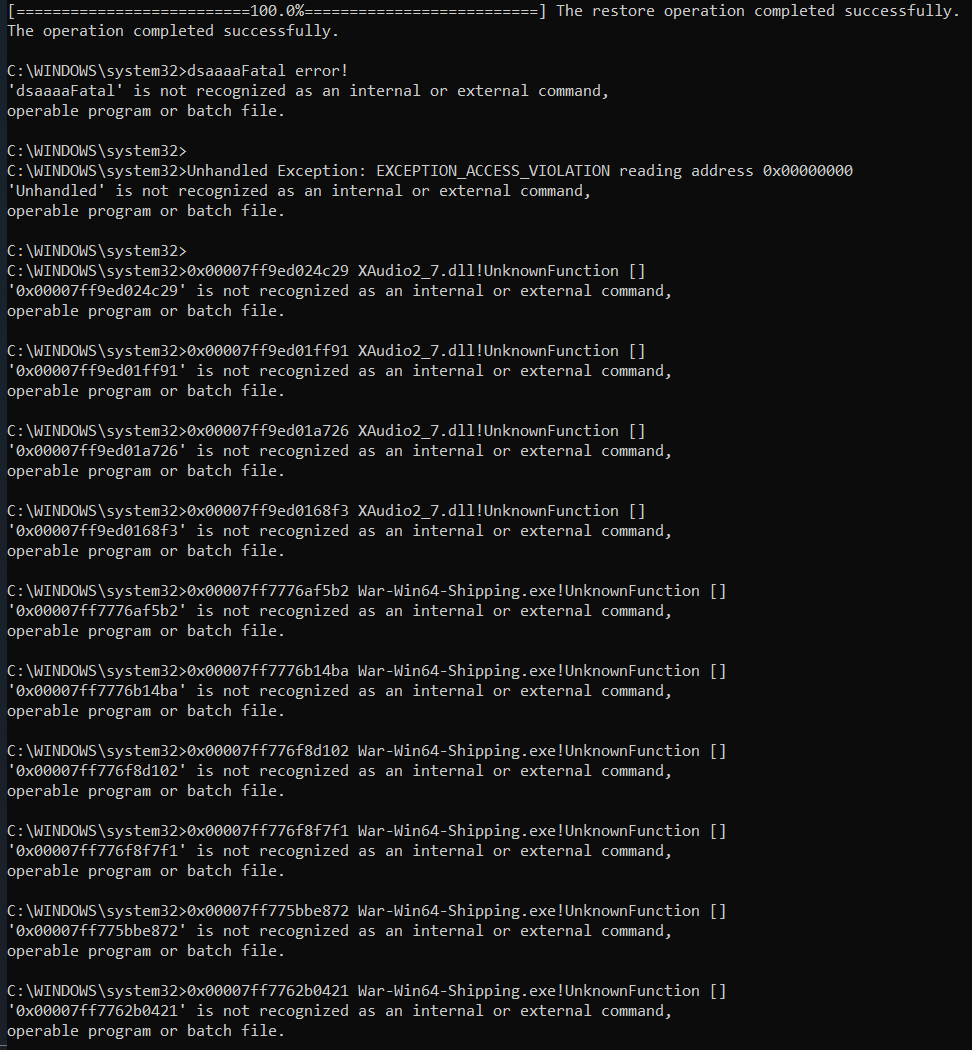


btw when loading it copied some of the progress bars
so thats why at the end its saying bullshit
faint blade
now that looks odd
ruby elk
i mean
ruby island
Access violations
ruby elk
?
ruby island
Why did you spam enter
ruby elk
where
 soft rapids
Pls help
ruby elk
so....
ruby island
Restart your pc
faint blade
@soft rapids close game, restart steam
soft rapids
Jestem z polski
ruby elk
me @ @ruby island?
ruby island
Yes
Those errors are strange
Seems like that game is getting access violations when accessing sound dlls
That command should have solved it tho
Probably corrupt DLLs that ue4 accesses
soft rapids
so how to fix it
ruby island
Close your game restart steam validate launch game
ruby elk
wait im back
ruby island
Make sure you don't have a antovirus blocking the connection
ruby elk
ok so listen - when i minimalised CMD and brought it bck, the progress bar copied and made thease errors at end
second - i dont thint its acces violation cause
ruby island
Well that command should have fixed the corrupt DLLs
ruby elk
all sounds work
BUT
only in home island
(it sometimes crash even there but not always)
ruby island
Did you try after restarting
ruby elk
wait i just tell u what happensed before
soft rapids
I restarted the game and the same thing happens
ruby island
@ruby elk but did you try to play the game after
soft rapids
@ruby elk Yes
ruby elk
i try now
ruby island
Do you have an antivirus @soft rapids
ruby elk
@soft rapids yes means home or public?
faint blade
@soft rapids Also restart Steam...
soft rapids
I don't use anti-virus
ruby elk
have the game worked before or never
ruby elk
me or him?
soft rapids
restartowalem steam i restartowalem komputer i nic a korzystam z wifi domowego
ruby elk
he says he restarted steam and whole pc but nothing
działało ci wcześniej czy nigdy nie działało foxhole?
soft rapids
gra wczesniej dzialala ale duzo wywalalo komunikatow time out
the game previously worked but a lot of time out messages "time out"
ruby elk
czekaj bo sam mam problem i musze zobaczecz cy dziala xd
czy ty lub ktos na innym komputerze pobiera coś np. film lub gre?
soft rapids
A to jakiś problem
ruby elk
to spowolnia internet
bo jak mialewwczesniej time-outy to znaczy ze internet nie jest najszybszy
ruby elk
mozliwe nwm
jak miales wtedy juz provlemy to m9ze
@ruby island there is still problem
after joining region after few secounds sounds got turned off except voice chat
ruby island
You might need to go a step further in the DISM command and pull directly from downloaded sources due to the nature of corruption
ruby elk
????
ruby island
ok so you will need to download a fresh copy of the windows 10 iso
ruby elk
dude rly
faint blade
lolz
ruby elk
i think its games problem
faint blade
at this point back up your shit
faint blade
and just reinstall
faint blade
i would say so too
ruby island
no need to backup the corruption was probably too much for online to fix
you need a downloaded iso to fix this
ruby elk
AT HOME ISLAND IT WORKS FINE so its not system error
faint blade
the os thing is bs imo, it would have affected different games otherwise
ruby elk
if it was system error it wouldnt work at all
faint blade
access violation, dude you didn't even test it against UE4. what you're saying means there is a general access violation to which all games making use of sounds would result in the same issue
ruby island
not all games use xaudio
ruby elk
why the home island works
faint blade
@ruby elk you have any other game that runs on UE4??
ruby island
that i do not know but i see the access violations as well as war shipping in the same errors
ruby elk
what producents use ue4
faint blade
fortnite XD
ruby elk
no im not gay sorry
ruby island
lol
faint blade
satisfactory I know
ruby elk
cities skylines?
faint blade
Rocket league ?
ruby elk
dont have
ruby island
ruby island
war shipping is foxhole
xaudio is the library
and its getting access violation
meaning that xaudio is probably corrupt
and the online dism didnt work due to its being to large of a download
ruby elk
i dont think i have other ue4 games
ruby island
to fix off of internet
 faint blade
yesssss
ruby island
no but you are going to need to download a fresh copy of the windows 10 iso