#technical-chat
4 messages · Page 41 of 1
 blissful sequoia
 late blade
Hello anyone on that can help me with an error I am getting when trying to start Foxhole?
 subtle jetty
So what type of files is most convenient to save my recordings as, typical mp.4?
late blade
Since the first day I installed the game I get this Shard error #1 and it won't let the game start. I am able to play the other games like this Heros & Generals and the Warthunder but not Foxhole
blissful sequoia
shard error is firewall problems, or router, or DNS server
DNS server fix is a pinned message in here - firewall or router is case-by-case
late blade
Oh man why can't these problems be easy I have run the verification and all was good I have tried to start the game after turning off my antivirus but to no avail
I just played some Warthunder not a problem
I will look into it more when I get back from dinner :) thank you for replying I hope I can get foxhole working
 feral ether
so ive just been playing with huzzah in stonecradle and im not sure what is happening.. but huzzah is muted somehow.. i just spoke to him but now i cant hear him at all.
feral ether
everyone seems to be muted for me, not sure what to do..
blissful sequoia
check the pinned messages
or maybe you just set your voice device to the wrong one
feral ether
i can see the icons of people speaking, i can hear vehicles and people building stuff, but not hear anyone..
it worked perfectly half an hour ago.
blissful sequoia
try recoinnecting it then
 hoary pier
Can I please help ?
I have problem with game luncher. When i trying login to server i see text
"Filied to donwload profile[1]. Plese try again. If the issue persists, Visit our support page."
Ofc i was traing press button many times -did not help.
Game is already reinstall, anoder games from Steam working.
blissful sequoia
usually restarting steam fixes it
blissful sequoia
possibly your antivirus then?
hoary pier
Not is already uninstall after this problem.
blissful sequoia
oof.
hoary pier
Im reinstaling all steam. lets see 😃
blissful sequoia
try deleting the settings directory maybe - it's located in %localappdata% and find the foxhole directory and delete it
it should recreate when you run it again
maybe the settings directory for foxhole is screwed up
hoary pier
Ok
hoary pier
Ech.. still problem. I did like you recomended. Any ideas?
 inner basin
reset router perhaps?
hoary pier
already reset. not working 😃 😦
subtle jetty
How do I turn off streamer mode on discord, I don't stream
feral ether
Turn it off on the top, should be a big purple line going across the top.
subtle jetty
permanently forever
feral ether
ah.. depends if you use streaming software, discord automaticly detects that and turns on streamer-mode.
subtle jetty
And I cant turn this off?
inner basin
Just turn off the setting that auto detects OBS studio in Discord @subtle jetty
 winter zodiac
admin / mod thingy online atm ?
 terse flume
Any idea?
blissful sequoia
verify game files or reinstall
using steam...
looks like you have file corruption on some game content file
blissful sequoia
lets see if it works, first...
terse flume
it's downloading now 1.8 Gb slow connection....you now.... 😬 😬
blissful sequoia
ooof, verifying files would have only downloaded the broken ones
terse flume
it said "1 file corrupted"
terse flume
yea 😅
inner basin
Yeah it's the .pak file
 polar marlin
well, people manage to break the encryption sometimes
that's how you get teleporting satchels
inner basin
the pak is not encrypted
 glad dune
says live , restarting steam now
didnt work
😦
i also verified game file already
im going to try and reinstall
inner basin
disable antivirus if you have it
 tough rain
HELP
Game used to run great, but now it's barely playable
i really enjoy the gameplay i played, but at this rate with all the problems i experienced i might just ask for a refund
 hollow heron
What kind of probelms are you expiriencing? @tough rain
 pearl kayak
is it a FPS problem or a connection problem
blissful sequoia
FPS it sounds like, he says ~20 fps in the lobby
its a 1050, he was trying to play at ultra.
i recommended ultra is too high for a 1050
 silk umbra
Has anyone ever encountered an issue where if you click one of the "Announcement" blocks when foxhole starts up, the game closes, then when you try running the game again it "Can not start" ?
blissful sequoia
not sure if it closes - the windows for it disappears?
silk umbra
I was swapping screen so when Foxhole was in the startup screen with all those announcemt things and such, when you click the box it closes the game and brings up the browser.
I noticed that this being the second time this happen I should point out that if this is ever done it seems to crash the game, or rather it will not run.
blissful sequoia
hmm, it sounds like it fails to open your browsers, maybe its crashing
i havent experienced it because i never click those links. but you can avoid clicking them too, the announcements are posted in the #announcements and https://www.foxholegame.com/
foxhole
silk umbra
Well it was an accidental click. I don't know how to run the game again though
It will not run anymore
Last time I had to reinstall the game
I get a promp that says "Couldn't start: 'C:[insert steam file location]' War CreateProcess() returned 2."
blissful sequoia
you had to reinstall? woaw.
so open the task manager, it's running in the background somewhere, find it and kill it, or just restart your computer
and if that doesn't work find and delete the Foxhole directory in %localappdata%
silk umbra
Tried to verify the game files also, (Although I did this before with the same result) It's telling me an error occurred while updating foxhole (Corrupt content files) C:[steam path]\Win64War-Win64-Shipping.exe
And it's stuck in a loop
Thank you for the attempt of assistance; I'll have to re-install it to get it working like before. If it happens again I'll just see if I can send a message to someone.
blissful sequoia
it's not running in the background?
blissful sequoia
Hmm... yea maybe just verify install files, might be faster than a reinstall - i wonder if antivirus is having an influence on the exe file
silk umbra
I did verify, it caused a loop of error in which the game was stuck verifying and updating and error.
My antivirus would alert me if there was an issue which it has not.
silk umbra
Apperently reinstalling the game did not resolve the issue
It's telling me that the content file is locked
 unborn wedge
Whenever my headphones unplug, the game crashes. Any known reason why?
blissful sequoia
probably the sound device. maybe even related to vivox
@silk umbra i suspect your antivirus is in play
if its not microsoft security essentials, then i think it might be causing your locked content file
however you can try deleting that configuration folder again
it has probably become read-only
terse flume
can anyone here with a good AMD card attest to how foxhole runs on it?
 brazen panther
Radeon RX 570 here, runs fine
brazen panther
1080p, as far as I remember I do
I don't think there's been any dips, though I'll boot up the game on tutorial island and check if that's fine
stable, smooth 60+ fps on tutorial island
no hiccups
terse flume
what about in frontline combat?
with like particle effects flying everywhere and stuff
you notice any dips then?
brazen panther
I don't remember any dips
As far as I'm aware, no issues
the only issue I can say is that the foliage/shadows under trees can be wonky sometimes
but apparently that's a game-wide bug, everyone experiences that
terse flume
yeah that is gamewide
devs have said before that it drives them mad but they don't know how to fix it
brazen panther
but yeah, I didn't experience any issues with an RX 570
so it should have plenty of power for Foxhole
terse flume
sweet ty
 spice pasture
inner basin
spice pasture
inner basin
- Restart Steam
- Check to make sure you are not on a beta build within Steam properties of Foxhole
- Check to make sure the shard at the top left (or right) of main menu says "Live"
@spice pasture
inner basin
Yep that's why 😄
 cunning sapphire
Can i change the bind for zooming the map? Scrollwheel broke
cunning sapphire
Yes you can

 viscid tangle
already have followed the instructions in #technical-read-first⚠
 slim girder
¯_(ツ)_/¯
viscid tangle
nothing fixed
slim girder
out of my league then
 sly mortar
Which ones did you do
viscid tangle
vivox files, so far
sly mortar
Try the DNS one next
viscid tangle
I'm not going to do the DNS because our internet provider is fucky
sly mortar
Then the SIP ALG test would be the next step
viscid tangle
@sly mortar SIP ALG is true
viscid tangle
wheeee
sly mortar
Alright
Access your router control panel
(the website one, probably like 10.0.0.1 or something)
sly mortar
Alright, on the main menu go to "Advanced" and then "WAN Setup"
sly mortar
And the router
But wait like 5 minutes on the router restart
It possibly won't apply correct if you restart too fast / don't restart
Routers are fucking idiotic sometimes
viscid tangle
roger
viscid tangle
restarted everything, fingers crossed
viscid tangle
@sly mortar mission failed
sly mortar
AAAAAAA
Alright
Next step is for you to change the PC's DNS. If you can't do that, then as far as I'm concerned you're likely fucked.
viscid tangle
I love foxhole's VC
it's so fun
it really works wonders
COUGH
alright, I'll see if I can change the DNS
no guarantees though
viscid tangle
and if I can and it's still not fixed can I petition @hot oak to get the devs to finally move off of vivox
@sly mortar alright, changed DNS to 8.8.8.8 and 8.8.4.4 as recommended
@sly mortar
after changing DNS
sly mortar
Try clicking reconnect in the voice menu
Then try the highest pin in this channel from me
sly mortar
top fucking kek
You may have to click that repeatedly
Not sure it will be fixed forever
 blissful sequoia
i thought our conclusion was that the voip is using an encrypted protocol and the router can't detect ALG or not
8-6-0, I heard somebody say disabling their sound device and re-enabling it (sometimes a couple times) fixes the 8-6-0, someone on reddit said so
cunning sapphire
Having my sound Device disconnected causes 8-6-0 for me sometimes
 dull vigil
Why has my R key stopped working ....for that last few days I have middlemouse button issue I sorted that by using my nr 6 key on the gamers mouse thunb key for that but now I cannot reload my weapons.?????
 earnest cargo
Gonna just have to test it that card is dx10 so its a gamble whether it will work as foxhole is dx11.
 dull girder
I'm getting a voice chat Error when I try to talk in game...Please help
nvm it seems to be working now just had to restart thanks
 tribal bear
 quaint rampart
hey i've been having two major problems recently. 1. my game audio randomly turns off midgame, sometimes the audio last 10 minutes, sometimes an hour but it will just randomly turn silent and i have to exit the game to get audio back and 2. whenever i hear anyone using voice chat its extremely choppy and i hear about evry other syllable so i can't undertand anyone most of the time. I already tired the thing where you delete the vivox core file, verify game integrity, and restart my computer but that didn't work
blissful sequoia
check the #1 pinned message in this room
quaint rampart
oh sorry, ill go to bugreport
quaint rampart
yeah
blissful sequoia
oh im sorry, it's the #2
there's a new #1 i didnt know about. read the second pinned message
@quaint rampart
 kind socket
'cant load shard info' played foxhole for ages never had this before, now whenever i click play it just says 'loading....' for ages then 'cant load shard info'
ive reset pc, allowed 433 or 443 through firewall port etc
verified game files
 plucky nova
Is it the border crossing or the menu bug? @kind socket
kind socket
menu
i press play on the main main menu and i cant get into game
failed to load shard]
going for uninstall/reinstall now
okay fixed
 karmic whale
Starting the Game
A Error appears:
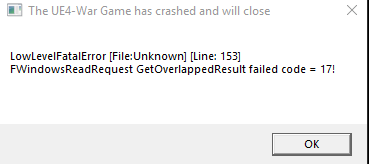
I like the type of the Error...."LowLevelFatalError"
Low Level Fatal....^^
@hot oak some idea?
polar marlin
did you try google
 hot oak
@karmic whale Yeah thats a common crash for UE4 not just our game. Do the usual steps. Verify cache. Update all drivers. Try deleting the foxhole folder in appdata and reinstall
karmic whale
Ok ty
polar marlin
most of the info we from tech get is from ark survival and fortnite forums
sacrifice the neighbours cat
blissful sequoia
thank god everyone is using the same engine
subtle jetty
Does anyone use Kdenlive?
subtle jetty
trying to figure out why it chews up all of my ram, using 12gb
blissful sequoia
maybe it uses that much - is it crashing or anything?
subtle jetty
Crashed itself once and lags the shit out of my computer, cpu usage is about 58% disk is 40% and memory is 90-98%
blissful sequoia
oh that sounds bad, mine isnt usually over 15%
maybe there is a corrupt data/media file, have you verified game files or reinstalled (if your bandwidth allows it)?
or perhaps deleting the Foxhole directory in %localappdata% to clear the config files
subtle jetty
Kdenlive is the problem not foxhole lol
When rendering videos to edit does it chew up ram?
subtle jetty
It's a 43m flv file
blissful sequoia
yea thats compressed AF, it has to decompress it into RAM to work with the frames
 spark storm
I use Kdenlive, and yeah chews quite a lot, rolling with 32gb and it's still "full" cause of all the editing software and stuff :D
blissful sequoia
i do my editing with scripts in ffmpeg, and it uses almost no ram but its incredibly hard to make small edits...
spark storm
I do use matroska instead of flv
blissful sequoia
flv has its advantages...
spark storm
Yeah it does
blissful sequoia
but outputting in h264 is sooooo 2012
spark storm
If I was streaming as well I'd probably go with flv too
But honestly I don't even know what's "the best" nowdays, I just have old habits
blissful sequoia
i find best is vp9 + vorbis in webm container
h265 + aac + mkv is a good format for offline videos
but that was back before i had discord nitro, so now its just AVI 
spark storm
Mm, I kinda do nothing more than just buffer of X minutes like 5min and then when something happens press button to save it later on cut out random crap and pile them up as youtube video or such
Tho I guess I haven't made video in year or something soon :D
I lied, youtube says 5 months
blissful sequoia
yeah I do the same, but then sometimes I'm trying to fit a clip into 8MB
 frail iron
hi i got a little problem. Im streaming the last 3 days and it works well for my machine and bandtwith. Now i got a problem. When im in homeregion everything works fine, but when i log to any region, i am jumping forward every 2 secs while running. as if i whould have a bad ping or packet loss.
normaly i whould say that this is my upload bandtwith, but it worked yesterday and i didnt change anything. lowering the resolution doesnt fix it. even at 240p i have that effect, but its not that frequent. what could it be?
im using xsplit
blissful sequoia
is it like that when you arent streaming it?
 woeful wagon
Emm there is a thing, in terms of graphics everytime I turn the shadows to medium the game starts to get the fps as worst as never and also the camera starts shaking without control, there is any way to fix that?
subtle jetty
@spark storm Okie so when my videos transition from clip to clip my audio stutters hard
pretty much everything
subtle jetty
Or if anyone else has any ideas
blissful sequoia
the final rendered video has stutter?
blissful sequoia
like preview?
subtle jetty
nvm fixed it
spark storm
Hmm, if you're previewing high resolution stuff with weak cpu this happens as it can't do it real time and you should use proxy files
e.g. 1440p or 4k then you'd use proxy files that are 720p or lower just to see what's happening on lower resolution as it's easier to process, do the edits and after apply on final high resolution footage
Might be something else too, like you said you fixed it, but that just comes in mind as first :D
frail iron
no then it is fine
frail iron
@blissful sequoia
its not like that when i just record or in homeregion, but it is like that when i stream on 240p or 360p. my normal res is 720p
 spark storm
What's the problem?
You mean it's so pixelrated or something?
You need to increase the bandwith that goes int' the "resolution container" like your flow is too small
frail iron
post from yesterday^^
hi i got a little problem. Im streaming the last 3 days and it works well for my machine and bandtwith. Now i got a problem. When im in homeregion everything works fine, but when i log to any region, i am jumping forward every 2 secs while running. as if i whould have a bad ping or packet loss.
normaly i whould say that this is my upload bandtwith, but it worked yesterday and i didnt change anything. lowering the resolution doesnt fix it. even at 240p i have that effect, but its not that frequent. what could it be?
im using xsplit
spark storm
Lets see
I'd say it's the internet, like whatkind setting you're using? I haven't ever used xsplit and don't know how good it is, I'd recommend obs :D
brazen panther
Could be processor
frail iron
yeah that was my next step. ill try if obs has the same problems. everybody says its better
spark storm
Could be
brazen panther
Basically, when video is recorded by Xsplit or whatever, it still needs to be compressed and sent out
BE AWARE THOUGH
spark storm
Yeah obs is great tbh, xsplit might be fine too, hard to say when I havent used it
frail iron
yes could be processor, but i dont get how it worked 3 days and now it doesnt^^
brazen panther
Some modern NVIDIA and AMD graphics cards are capable of processing video for streaming themselves
Instead of making the processor do it
But you do have to enable it in your software
spark storm
yea nvec is great
frail iron
960 nvidea
brazen panther
I assume
That's older than one I had
not older
newer
And the one I had supproted NVENC
spark storm
yea it's new enough to support it
brazen panther
 spark storm
Hard to say on xsplit :D
brazen panther
I didn't read the article, but it could be what you're looking for
spark storm
That probably helps
frail iron
nice thx
brazen panther
There are more things I'd like to ask
"jumping forward when running"
Is that the stream skipping, or is that your game struggling, or what?
frail iron
the game. looks like bad connection
brazen panther
Could be many things, unfortunately
Looks like you'll have to try many different things
frail iron
maybe the upload is interfeering with the game
frail iron
yes
brazen panther
This doesn't happen without XSplit, right?
frail iron
as soon as i start stream it happens
brazen panther
I'd try streaming on Steam
as in, not permanently
But just to check if Twitch/Xsplit has anything with it
If the issue is gone, then you know that it's not the entire process/concept of streaming
That breaks the game for you
frail iron
ok good call
ok it happens on steam streaming too, but not every 2 secs its like every 5
frail iron
hmm yes
 grave adder
When I attempt to play the game it jitters from place to place & I can't stop it
blissful sequoia
some people say its because the shadow detail is too high in the graphics settings, try lower
 sterile hornet
I keep getting voice chat error |8| 6-0
The pined stuff is confusing
I don’t understand what to do
Is there a vid or something
blissful sequoia
no there is no video from us, anyway, maybe there is one on youtube or something
I have heard disabling sound device and re-enabling it fixes the 8-6-0 error, thats what I've heard but don't have confirmation
i bet the vivox thing would work too
sterile hornet
I just tryed that
It did not work
Wait am I supposed to restart my computer after I validate my files
blissful sequoia
i dont think so, it never hurts but probably not needed
#2 pinned message is the one youre looking at?
sterile hornet
I’ll try Disabling and re-enabling sound While the game is launched
blissful sequoia
like the sound control panel -> disable the device and re-enable it, thats what i've heard, anyway...
sterile hornet
It worked
subtle jetty
@spark storm That would probably make my program a lot more smoother to use, thanks for tip.
The preview of the video was lagging but when I rendered them they were fine; most likely my computer is slow.
 long blaze
can anyone tell me how to get rid of fps drops ?
 nimble mauve
Download more RAM
Jk thoa it's either the server or your Internet connection
@long blaze ^
woeful wagon
Emm there is a thing, in terms of graphics everytime I turn the shadows to medium the game starts to get the fps as worst as never and also the camera starts shaking without control, there is any way to fix that?
blissful sequoia
we don't know a fix - have heard that complaint multiple times
woeful wagon
Thats sad but thanks! 😄
blissful sequoia
if you figure anything out, please let us know
subtle jetty
I use OBS studio to record gameplay footage on a 1920x1080 screen but run the game at 1600x900, should my output resolution be set to 1600x900?
 round linden
hi
I'm on ubuntu and I'm trying to get the game run through proton/wine
I can't launch through proton - it either gives "DX11 feature level 10.0 required" error (all versions except last one) or doesn't launch at all (proton 4.11)
And when I launch through wine it loads fine, but I can't play because (with the help of lutris) I get this error
https://i.imgur.com/OLkcE3E.png
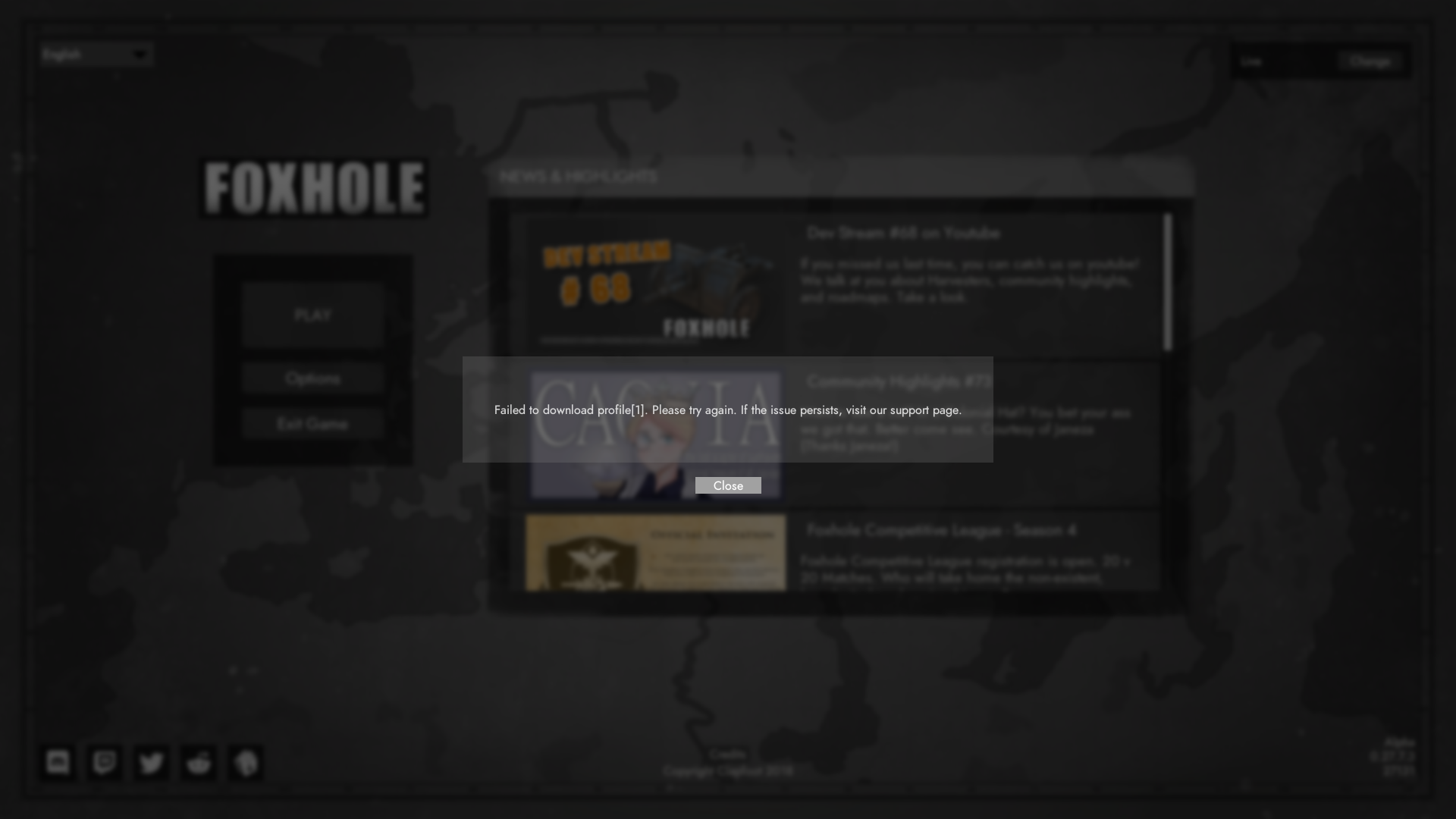
Nvidia
drivers are updated
 short breach
sorry to be so negative, but linux distros will never be 100% stable for gaming because 90% of all games are made with windows in mind, making it so that you have to run some sort of virtualization, which is imperfect
what you could do is find a copy of windows and dual-boot your system
you probably dont have to pay for it either, especially if you had a windows laptop in the past
OR
find a different distro of linux that runs better with proton/wine
and dual-boot it for gaming purposes
round linden
idk, I see tons of players reporting the game as working with wine/proton
I'm here to see if anyone here has any experience in that
short breach
yes, but normally its intermittent disasters that cause issues that dont get reported
just the fact that it works is great
but there is also a VAST difference in features from one linux distro to the next
which means that one can be geared to be almost perfect for ANY gaming
but if you just pick one off the shelf without looking at compatibility, it can cause issues
round linden
i'm noob at linux, but isn't difference between distros is like difference between windows versions? i mean that it's not easy to change and you need a reformatting
you're implying that I can change them as gloves
short breach
yes, it is different, and i can say from experience that a program that works well in windows 7 may not work at all in windows 8 or 10
you CAN change them like gloves
get a different drive, or grab unused space on your current one, and install another distro on that
you CAN (but not recommended to) install that alternate distro or windows on a USB flash drive
blissful sequoia
Yes not easy to change them. They have differences in culture, documentation, how willing they are to break software dependencies for new versions of packages, where they store configurations and which software packages they include by default
I've done Foxhole in proton, it works great, but I had to use the proprietary video drivers not the open source ones, and I struggled to get those to work on all versions of my Linux distro
Because the game needs dx11 support
spark storm
I'm using proprietary drivers as well, and proton 4.2-9, works great on arch linux. Other than my PC cpu cooler breaking and making me dismantle the whole gaming PC.. but that's another issue :D
And you can't just run through wine cause it needs the steam connection, that's how your account / profile is identified.
terse flume
Just bought the game and I keep get connection to server timed out every 5-10 mins, it just wont let me play and I've checked my net and it isn't the issue.
blissful sequoia
sounds like a firewall problem
terse flume
Why would that be the issue? Before launching the game I already allowed access through my firewall and after the first timeout I even turned it off x.x
blissful sequoia
oh, hm, then maybe not
terse flume
Now it just times me out after selecting a spawn location from main base
blissful sequoia
sorry, it sounded like one with the consistent timeouts, but i dont have other ideas if thats not the problem
oh when you go to change maps it times out?
terse flume
Yes
blissful sequoia
i guess it could be the DNS server, but those problems largely seem gone now
when it changes regions it actually connects to a different server, so theres lots of stuff that can break that
glad dune
is anyone else getting the error "Failed to download profile 1"?
Could someone please help me, ive been getting this error for weeks now and havent been able to play the game
glad dune
@hot oak
 arctic talon
@glad dune try restarting steam, thats what usually helps me with the issue
arctic talon
<@&521124241395941396> ^
 mystic storm
cant get in game everytime i launch it just a black screen and doesnt load
 minor sluice
@mystic storm did you verify files?
mystic storm
ill do that
minor sluice
yeah do so
 torn rampart
@glad dune well for one I don’t think tagging devs gets you anywhere, and for two when do you get this error
 frank zealot
@glad dune Make sure the firewall isn't blocking your connection path with the game. It might also be caused because of some antivirus software blocking outgoing/incoming packages.
glad dune
i get this error when i click play on the main menu
frank zealot
Try disabling firewall/antivirus and try logging in. Make sure don't have anything else running in the background too, heavy internet usage also causes the game not to login
glad dune
and i already have my firewall set to accept foxhole
frank zealot
What is your version info at the bottom left and which shard are you on at top right?
frank zealot
Let me double check if that's the live build
glad dune
@torn rampart i appologize, on the foxhole support page says to message KFC not to tag him in technical chat my bad
glad dune
yea maybe even months now havent been able to play at all
i tried verifying files, unistalling the game reinstalling it
frank zealot
Alright the shard seems to be the live one, I think it's a internet issue
torn rampart
Did you try completely removing it?
frank zealot
You said you checked firewall, do you have any sort of antivirus software installed?
torn rampart
Like, uninstalling, going into appdata and where ever it was stored and deleted everything?
Related to foxhole/clapfoot of course
glad dune
havent done that nero
torn rampart
I’d try it
frank zealot
Is it possible for you to use another internet service such as your mobile internet just to check if it's your own internet is causing the problem?
frank zealot
Gotcha
frank zealot
I see, that means there's a problem with your modem/router
glad dune
ive played foxhole on my wifi for a while before this started happening
torn rampart
Well at least @frank zealot knows what they are doing lmao
frank zealot
I'd suggest taking a look into this list and doing the modem related ones https://discordapp.com/channels/203512636556574720/374272127953666048/497631515316846602
- Restart internet Modem and/or Router; May be a good idea to perform #3 after
- Verify all ports used by Steam are open on modem/mouter firewall as well as any 3rd party firewall hardware: https://support.steampowered.com/kb_article.php?ref=8571-GLVN-8711 ; Follow #4
- On Wi-Fi? Try using a physical (ethernet) connection instead
- On Wi-Fi? Try moving physically closer to the modem/router providing the wireless internet
- On Ethernet? Reseat the ethernet cable on both sides; perform #4 as well as #3
Article "Required Ports for Steam"
If this isn't the case, something might be blocking your incoming/outcoming packages in your PC. Have you installed any sort of programs that might interfere with your internet connection lately?
frank zealot
Btw @inner basin anything else to add on foxhole working on mobile hotspot but not on actual modem?
 languid thistleBOT
BladeRikWr is AFK: Preparing for University move in - 3 hours ago
frank zealot
@glad dune You can actually try using proxy for your connection
One second
Sorry, DNS

Google Developers
Just change IPV4 DNS to 8.8.8.8 and 8.8.4.4
glad dune
this is kinda chinese to me
frank zealot
@glad dune It's quite easy, just watch this video after 2:20 mark

Want better-quality and more FREE educational tech content, Support me on Patreon and get some great rewards! https://www.patreon.com/TechMeSpot How To Chang...
frank zealot
@glad dune You managed to get it working?
 reef lichen
Don't forget Cloudflares DNS, 1.1.1.1 and 1.0.0.1, they claim they're faster and more private than Google's DNS
 cold hill
Hi i have a problem were im getting something that says "failed to download profile[1]" I was wondering if you could help
blissful sequoia
usually restarting steam fixes that
otherwise it could be your firewall or antivirus
 vital basalt
when i get failed to download profile (because i lost connection for few seconds) i always keep pressing until it works
 oak forge
For some reason something keeps messing with my mic's volume level
cold hill
I turned of my fire wall then restarted my computer and that didn’t work
cunning sapphire
Have you checked that you have opted out of all betas and in top right you got live selected? @cold hill
cold hill
Yes
I’ve in uninstalled and reinstalled it
No dice
Could it be blocked through the router?
blissful sequoia
yes
cold hill
fixed the problem
there is a bug with a thing called my circle which was blocking it even in unrestricted mode.
blissful sequoia
my circle? firewall?
oh on the router
each foxhole region is a different server so its weird
 rotund lava
AAAAAAAAAAHHHHHh
help
help help ehelp
it won't go away
it just sits there(edited)
taking up space
i can;t deltet
help
i need help\
pls
the file detele
it won't go away
 clear tinsel
is there a bug what u cant hear speaking voice?İ can hear all voice except speaking voice since new patch?i am sick of that.it is realy bothering me.when will you fix if there 🙂
or did i broke something:)realy i dont kno
 past pilot
After I got out of a destroyed AC I couldn’t open any of my menus?? I could still use PTT but couldn’t pick anything up or open inv etc.
 ruby elk
 onyx mango
I can't understand anyone because the voice cuts out while they are talking,then It the voice comes back in very short time and it cuts again .
 tiny rampart
My game sometimes crash whole internet in my computer :/ can you help me?
blissful sequoia
lightning strike
 old lantern
when will it get fixed?
blissful sequoia
🤷
 drifting ocean
GAME OVER MAN GAME OVER
blissful sequoia
y'all chose the wrong faction if you like playing
 hasty flame
naw warden best faction cuz u get to win and not be loser collies
terse flume
I cant switch my faction to warden even new war started
My account is not Family share account .
but sign keep show me "Family share accounts must join the same faction"
arctic talon
@terse flume DM @coarse trail, the mods should be able to help u
terse flume
ty
 robust vine
Not able to see #updates or #announcements anyone know why
blissful sequoia
they have different icons, the megaphone icon instead of #. no idea what that means
arctic talon
@robust vine try updating the discord?
blissful sequoia
tom said it was a bug he couldnt see on mobile, too. yea maybe a restart of the app
arctic talon
i had similar problem before, and it was fixed after i updated the app
robust vine
Nailed it, works now thanks
arctic talon

robust vine
Yeah I havent updated for like 6months
 spice shuttle
When clicking into home region, my game runs for 5 - 10 seconds, then crashes with the following error message. Any thoughts? My computer meets the minumum requirements, and I tested on a computer that does not meet the requirements and it still worked (just laggy).
blissful sequoia
there is not much info in that error message. perhaps there is a log file in the %localappdata%\Foxhole directory there is a crashes folder I think with more detailed logs (sometimes)
but perhaps a new update mangled your config files or data, you might try a reinstall including deleting the %localappdata%\Foxhole config directory also
spice shuttle
Great thanks, I will try both
spice shuttle
No luck, I have the logs. Should I post here or handle this thru private message?
blissful sequoia
yea if you can post them here its better because more people can see them
polar marlin
preferably as "upload file" rather than a wall of text
then again, it's been a while since last message
 broken pilot
can u die instantly from bleeding out
cunning sapphire
yes, but ask these kinds of qustions in #386353469776330762
spice shuttle
When clicking into home region, my game runs for 5 - 10 seconds, then freezes. Any thoughts? My computer meets the minumum requirements, and I tested on a computer that does not meet the requirements and it still worked (just laggy). The memory looks like it keeps resetting, going from 1 GB to 4 GB to 6GB, then back to 1 GB to 4 GB to 6GB, cycle keeps repeating. I attached the log file, please help, thanks!
War2 log is from the crash folder
blissful sequoia
i dont seen any crashes in either log .. hmmm
spice shuttle
Yea I can still alt + tab out of the game, but the game itself freezes
spice shuttle
Nope the screen freezes after 5 - 10 seconds and never moves after
blissful sequoia
hmm could it be a firewall or antivirus thing? maybe the signature of the file has changed since the last update and its triggering something
its odd that it happens after 5-10s during a region change, so it's obviously loading the map data fine
but that is when it's switching servers, so thats why im suspicious of a firewall/antivirus
And I wonder if it would be any easier to see if there's an error message popup if it's in windowed mode
 potent granite
<@&521124241395941396>
I can player for a few minutes and then I get, "Failed to download shard" [Error: 1]
blissful sequoia
i think the failed to download shard thing is also firewall or antivirus
spice shuttle
yes i got something simliar
with firewall/anti virus removed and windowed mode
the RAM keeps going crazy, 1 to 4 to 6, constantly repeating
blissful sequoia
you should probably file a bug report, flume. no error messages, reinstall doesnt work, this is nearly impossible to troubleshoot
spice shuttle
cool thanks, i appreciate your help
 gaunt verge
Hi, I'm having the following error message after I choose a faction and click "deploy", ""Lost Connection to Server. Please try again. If the problem persists please try refreshing the server lists." I played the game about 3 weeks ago before the recent update also. How to fix and play please?
blissful sequoia
check antivirus or firewall software
gaunt verge
Only have windows Defender; made sure Foxhole app was being allowed through the Firewall and even turned off the Firewall on all types of connections for good measure. Same Error when I try to deploy, "Lost Connection to Server. Please try again. If the problem persists please try refreshing the server lists."
blissful sequoia
hmm are you on the Live branch? not devbranch or FCL?
that might be why
or you might be pegged to a specific version, like the last version
gaunt verge
I am on the Live Branch, and I just tried switching to the FCL and it still didn't work.
The error message comes after I hit play , choose a side, and I click "deploy" on the screen where it shows casualties on each side during the war.
I also just tried uninstalling/reinstall and no effect either.
blissful sequoia
you can also try deleting the config directory which is the Foxhole directory in %localappdata%
gaunt verge
As for the version it says "Alpha 0.28.10.2 27500" in the bottom right corner of the main menu screen
will try that now
Ok I deleted the "config" folder I found in Appdata>Local>Foxhole>Saved>Config
unfortuntaltey this also did not resolve the issue; Same Error when I try to deploy, "Lost Connection to Server. Please try again. If the problem persists please try refreshing the server lists."
blissful sequoia
hmmm...
in the steam properties for the games, the beta tab - is it selected to any version besides none?
really reaching here...
it could also be your router - with some sort of parental safety feature or protection mechanism
gaunt verge
says, "none - opt out of all beta programs" in the beta properties tab
blissful sequoia
ok thats the right one... jeez
i suspect maybe the router then
if youre wondering how could it change - well they change servers sometimes, so if its at a new location maybe its being flagged now
gaunt verge
will restarting it work? I was able to play a few weeks ago
blissful sequoia
im not sure, i would suspect a weird router setting
i suppose you could test it by using a free vpn like tunnelbear
if youre able to connect through a VPN then the problem is 80% your router
or a test with mobile tether or w/e
gaunt verge
gotcha; I'll see about doing such a test. Gonna restart the router first just becuase that seems so much less effort lol.
blissful sequoia
ok, fair
gaunt verge
Oh mobile tether I do all the time; 1 sec
Ok it worked and I was able to log in with the Mobile-Tether internet connection
Guess that confirms what you said that it was the router xD
Thank you for the help!! I guess I can call the router company to see if they know what the issue is; thanks again!
blissful sequoia
if you have the router password, log in and poke around
see if you see anything for parental guards, something obvious
gaunt verge
Will do; if I find the particular setting that is responsible I will report it back here
blissful sequoia
ok, feel free to check before you flip switches
i suspect it will be something like parental guard tho
something about internet safety...
 craggy trench
does any one have issies with sound? i cant hear anything
blissful sequoia
you cant hear voices either?
 deep spruce
I'm having trouble with my voice being choppy when I use the push to talk. mic settings are fine and work elsewhere (discord, etc.) When the game is running my windows toolbar has the windows microphone icon on it flashing on and off, which seems to coincide with the choppiness of my voice to other players.
blissful sequoia
check the #2 pinned message in this room - see if it's that problem
potent granite
I keep crashing about once every 10 minutes and getting the following message
Fatal Error: [File:Unknown][Line:200]
Unreal Engine is exiting due to D3D Device Being Lost.
(Error:0x887A0006-'Hung')
blissful sequoia
hmmm perhaps the same problem darius had
incompatible driver + unreal engine; his solution was rolling back to older drivers
also possibly heat issues - have you checked that?
deep spruce
@blissful sequoia my DNS was already set to Google's addresses to fix another game, so that's not it. I also checked my drivers, and which devices the game used, and checked the steam voice settings. Still can't be understood by other players.
thanks for your help so far
blissful sequoia
what? no not the DNS - the one about vivox
and voicemeeter
its a pretty common problem
from 6/23/19
deep spruce
Thanks. I'll try it tomorrow. I didn't realize that was a fix. Seems a workaround though. If voicemeter can fix it, they should be able to fix Foxhole using the same methods.
blissful sequoia
yes it works
yea i think several people have filed bug reports
feel free to add one tho, maybe they can identify which hardware causes the problem and get one to test and fix it up shrug
i think it is very low priority
terse flume
okay i have a problem. i start the game but it wont start. it says im in game but there is nothing else
 trim atlas
Anything new about, figuring out Intel hd graphics problems?
terse flume
could my problem be my firewall?
trim atlas
maybe or virus-scan
terse flume
im verifying the game catch in steam and i also disabled both foxhole things in my firewall
 dull patio
Hey can anyone tell me why my settings keep reverting back to default when i start the game?
blissful sequoia
changing your steam name?
possible your antivirus has flagged the directory and made it read only
can try deleting it to let it be recreated by deleting the Foxhole directory in %localappdata%
dull patio
Yeah the latter worked
Can you also tell me to change the resolution do i just hit apply or do i need to apply and log?
blissful sequoia
just apply i think
but you cannot change resolution in windowed fullscreen, or windowed - it has to be fullscreen for that
you can change the resolution scale though, which is the slider
dull patio
Right right ok thanks brother
blissful sequoia
yep
 tidal prairie
so i have a problem. Every time i try to play the game it says failed to download profile
blissful sequoia
have you restarted steam yet?
tidal prairie
ill try that
tidal prairie
it didnt work
blissful sequoia
could be firewall or antivirus then
blissful sequoia
well we think windows defender works fine
but if you have a different one you can try disabling it to see if that corrects your problem
sometimes antiviruses include a firewall, but the windows one works fine if thats all you have
blissful sequoia
well because they dont share any specifics in that error, i can only give you ideas of what could be wrong
if its not steam, and youve already restarted computer, if its not the antivirus or a firewall software, then it could be your router or your internet provider
tidal prairie
ok
blissful sequoia
you can test the network with a VPN like tunnelbear or a mobile tether
if it doesnt work through those - then its something wrong with your computer. if it does work through another network then the problem is your router or your internet provider
tidal prairie
ok
 buoyant mason
Has anyone got any ideas about how to fix the "Connection to server timed out" problem when traveling between map regions?
I've tried a bunch of things (reinstalling, defragging, etc.) from the pins and other messages in here about the same problem
blissful sequoia
it's a network problem
i'm always suspicious of antivirus or antivirus that comes with a firewall
and if not that - then your router might be the cause, or internet provider, or DNS server
oh, also, are you on the Live shard?
buoyant mason
yes, I'm on the live shard
running windows defender/windows firewall for antivirus
blissful sequoia
ok then i am suspicious of router/ISP
you can test that with VPN like tunnelbear or mobile tether
does the error happen every time for you? will you know if its solved right away?
also the DNS server - you tried google? (8.8.8.8)
buoyant mason
btw I tried the link you posted near the "how to install" pin (https://s3.amazonaws.com/clapfoot-test-bucket/test.json)
how do you test that?
sometimes it works fine, most of the time I get the error
when I don't get the error I can play without problems (did logi for like 6 hours yesterday) but got kicked when I tried to move a truck to a new region
blissful sequoia
oh that link is no good anymore
buoyant mason
oh ok
blissful sequoia
uhh there is a pinned message about changing the DNS server
DNS server converts domain names into IP address - sometimes the servers give the wrong address for whatever reason
but we know google's dns server works for foxhole
so you change it to 8.8.8.8 on your computer, check the pinned message for more specific details
buoyant mason
oh okay! I'll try that
i figured it was not applicable since my voice works fine once I'm in
blissful sequoia
i suspect a vpn will work for you in either case
as long as it's not some piece of software on your computer causing it..
buoyant mason
thanks @blissful sequoia tried the DNS thing but it didn't work
borrowed my roommate's laptop (similar specs to mine), installed Foxhole and was still getting the same problem
gonna try VPN
buoyant mason
and connection timed out, bleh
rotund lava
whos awake?
spark storm
You do need to include ALT as well
cunning sapphire
For some reason left shift does not work for me
And I have to use the right one
Thanks @spark storm
spark storm
That's odd, at least it works! :D
 high epoch
What is the app that helps targeting
spark storm
Aimbot.exe?
Or do you perhaps mean this?
http://www.foxhole-arty.com/
A simple artillery distance and azimuth calculator
 pallid glen
lmao i love how Moxie immediately suggest aimbot
 little bronze
<@&521124241395941396> looking for some help with voip not working for me
 clear grove
@little bronze it's better to just state your problem then to first ask for help
little bronze
@clear grove Voip not activiting with PTT, tried the DNS & other fix in the links provided but no avail. Headset is hyperx cloud. Issue seems to be the mic icon not appearing over the head which means I cannot transmit.
issue is very vague so just looking for some known solutions to fixing voip
little bronze
solved it
 lavish token
any idea why the foxhole process would start but not the application >?
torn rampart
@lavish token I’ve had that happen a few times, sometimes restarting the pc helps, other times I can wait it out, it’s weird
 junior basin

 wintry parrot
I'm working, what's going on?
terse flume
This player has been having voice chat issues for 700 of his 900 hours in game. i set down to help him for the last few hours however nothing is working.
wintry parrot
What have you tried so far?
terse flume
we tried, checking all the ingame settings and sliders, clearing the steam cache, updating the headset driver, disabling all other audio devices, checking steam voice settings, and deleting the VivoxCoreLibrary
and reinstalling the game
and verifying the files changing the DNS
sly mortar
@terse flume Okay, the last thing you haven't tried is the second to top pin in this channel
It's a workaround for a number of bugs which we don't know the solution to, and works most of the time
terse flume
dxdiag
junior basin
 tall magnet
Used to play this game and stopped playing for like 6 months. Came back to this, don't really know how to fix it. I tried some of the solutions but nothing really helped
Checked my antivirus as well -- its not restricting anything from Foxhole.
I'll run the game using a vpn and see if it's just my internet provider.
sly mortar
@tall magnet Try restarting steam fully
 leaden star
Does anyone know why someone's game would consistantly stutter regardless what graphics setting it has then randomly and/or whenever manually closed, it gives you something called a Fatal Error?
leaden star
leaden star
A Side note, When I validate files I get 1 damaged file in the report.
 proud dagger
@leaden star went through everything in pinned messages just checking
leaden star
Even when I re-enter the game after the file validation it is still suffering this Error
Thats fine
 fluid iris
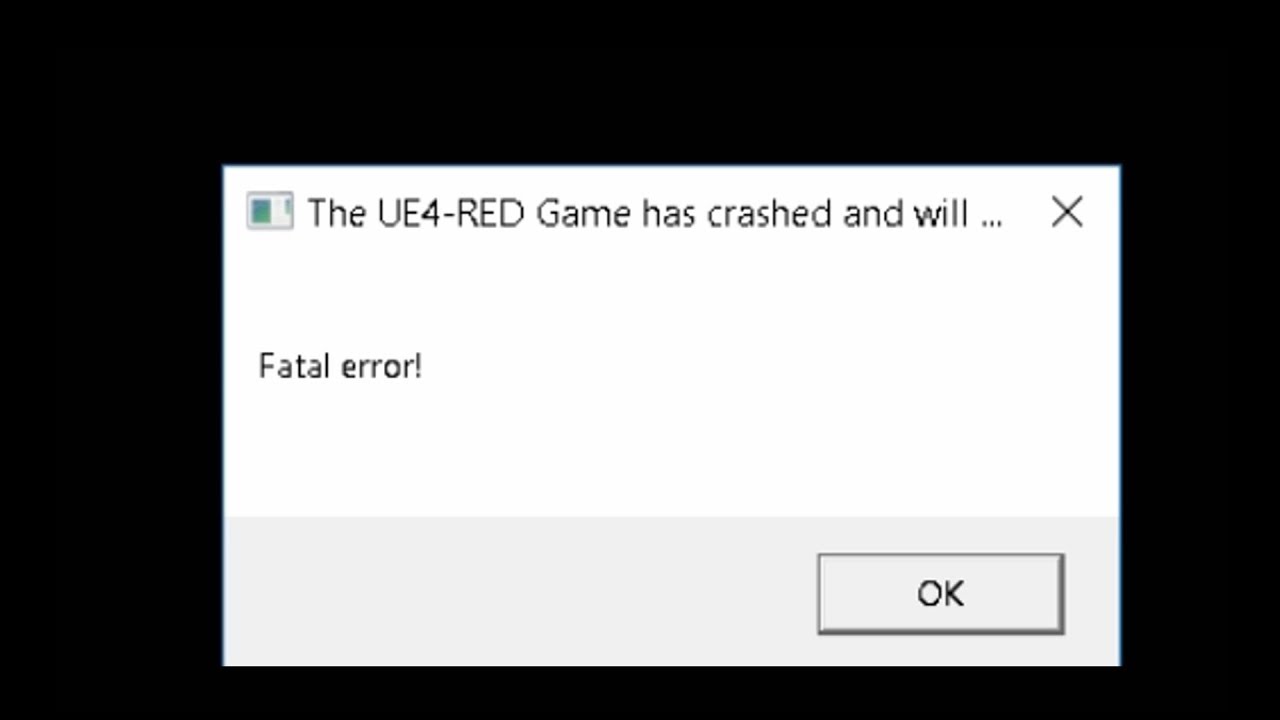
I'm hoping this gets fixed soon....thanks to the steam community for figuring out how to fix this! ARC System Works, please update the game where this doesn'...
leaden star
It does the excat same thing D:
leaden star
As far as I know I shouldn't have any overclocking programs on my PC
I've never downloaded any overclocking stuff
I guess my best chance is to delete the App data
fluid iris
I would wait until the devs respond
leaden star
Okay
fluid iris
(you let them know right?)
 ionic sundial
Yeah I'm starting to get the Fatal error message while playing too
And I don't even have a proper graphics card, mine is integrated in my machine
fluid iris
@terse flume this is the third person I know of in 2 days that's starting to get "fatal error ue4" messages. Sorry for the ping. This is just in case this suddenly affects a bunch of people and you guys can do something about it.
 willow shuttle
My micro is glitched in game, actually the whole voice is, everyone sound like: he..llo im a sol.... di.... er
 opaque crown
when i load my game up
its blackscreen
my friend is telling me that
im not sure what to do for him i am tech support
but i havnt ran into this
<@&521124241395941396>
sly mortar
Has he tried verifying the files
sly mortar
Please do
torn rampart
@opaque crown yeah it does that to me all of the time, just takes its sweet time lol
 robust zenith
terse flume
robust zenith
terse flume
so do the devs noticed the HUD missing after border travel?
cunning sapphire
Yes, altough they probably apreciate more info on reproducing it
A dev reacted to your bugreport
subtle jetty
Looking for a new video editing software, something free preferably
Currently reviewing Filmora and Davinci 16.
Any opinions?
 pallid tangle
do you want to make advanced things ?
 maiden minnow
I have a question to the support page?
pallid glen
Filmora sucks, get Lightworks
I tried to do cuts in a video with Filmora, it took me an hour to snip he individual parts from the original video and paste them back into one
maiden minnow
During the course of yesterday and today, my game has been telling me that it failed to download my profile and idk why.
cunning sapphire
After restarting steam next step is checking that you are out of all betas and on the live shard
 fair pawn
but i'm an alpha male, what are you suggesting?
ionic sundial
I want to turn down my resolution scale so that the game runs easier on my computer, but the change never takes effect after hitting "back" from the graphics menu
Ok wtf it suddenly worked
subtle jetty
currently looking at Shotcut, gonna try it out. I tried davinci but I had problems with installation
 nimble kindle
I have a friend who is having problems with foxhole, after 5 minutes the notebook monitor turns off. GPU temperature before switching off was 79 °. This problem only occurs with foxhole. The other games run normally
subtle jetty
@pallid tangle semi advanced yeah, I wanna use a lot of effects and want them all built into the software
@pallid glen I'll check out light works if I dont like shotcut
subtle jetty
It has a bunch of built in effects like shake transition, title clips and reverse play?
pallid glen
that, and audacity because my snowball black ice sucks big ass
subtle jetty
Hmm I dont wanna have to get a program to go with another program xD
pallid glen
lol
i use audacity for sound processing
if you need sound processing inside a video editor, go pay for one
but if youre just doing straight video shit, go for lightworks alone
subtle jetty
Pshh sound processing, nah y'all can listen to my poopy recordings, they work well enough
pallid tangle
@subtle jetty i use shotcut
subtle jetty
Can I incessantly bother you about my questions rather than google them?
Also what's your youtube I wanna see 😄
pallid tangle
It's free and you have (at least for me) enough feature
Hmm i posted some video on the FOD so
Mmmh i your vidéo and i think you want to make some more advanced things than i thought
Maybe shotcut won't be enought 🤔
subtle jetty
I am trying it right now, I use mostly simple features but I want things like animated text and pan and zoom , shake effect transitions
Okay so what do I render my video resolution as if I play the game on a 19x10 monitor using 16x9 resolution?
pallid tangle
mmmh in shotcup you don't have a smooth zoom btw, (yeah it miss me too)
i don't know about the video resolution :x
robust vine
I have had a lot of issues with voip lately. People cant understand me, they say its choppy. Sometimes I hear people choppy as well. Discord chat is fine no issues. Any way to fix?
 minor wolf
I always hear people so choppy
robust vine
Its really annoying on a multiplayer game
 idle shuttle
Hoping the opposite team had as many disconnects as we did
Maybe next year they'll have fixed this probably not.
late blade
Hello anyone on who can help me figure out how to fix a Shard Error I keep getting when I try to start the game?
I installed the game about a month ago and still cannot get into the game keeps giving me a Shard Loading error when I try to start it
robust vine
Bump for Voip fix
sly mortar
@late blade Sorry for the late response, try restarting steam or verifying files.
@robust vine Uhhh, try reinstalling the vivox files (in pinned messages)
robust vine
Thank you @sly mortar
robust vine
My game has started crashing the past few days. It comes up with an error that says something like no more video memory. Failed to find terrain image or something like that. Never had my game crash so much. Could my gpu be craping out? Its a gtx970 4gb mem.
Or maybe a bad driver? I will try and update it later
sly mortar
@robust vine probably a driver issue
 sullen plover
hello, Im having "connection issues" almost everytime I travel (change maps) in a border. I have to restart the game to make it work again
robust vine
I am having the same issues Roklo, never had them until yesterday and today
what happened in the last 2 days that has screwed up border travel for me
game crashed again
ionic sundial
I consistently get the "Connection to server has timed out" message when border traveling. My location is not saved, so when I reenter the war, I am forced to spawn at a star and lose all items (many radios lost this way). Occasionally, when reentering the war, I instantly get the "Connection to server has timed out" as well. There is also a chance for the game to experience a "Fatal Error" and crash when border travelling.
However, when the game crashes and I restart it, my location and items are saved.
willow shuttle
when there will be a VOIP fix? i just cant communicate in game and this suck
robust vine
@willow shuttle look through the pinned messages. There is one by Icanari for a vivox file fix.
It worked for my voip problem at least
deep spruce
None of the pinned suggestions fix my VoIP issues. I've tried them all. Game needs SERIOUS help with the VOIP. I've mostly stopped playing because of it.
terse flume
What would it take to add more factions to the game? Like coding wise would it be difficult or easy?
I am just interested in the coding bit for now 🙂
sly mortar
@terse flume Complete rebuild most likely as far as I know. (The dead harvest thing is really janky from what I remember)
minor wolf
Copy paste factions and change some parameters
terse flume
That is oof.
mystic storm
im having troubles getting into the devbranch so sad,it says try refresing the server all over again
arctic talon
@mystic storm did u download the devbranch version of the game from steam and then selected devbranch start from upper right corner in game, before clicking play?
arctic talon
np
 modest fiber
terse flume
modest fiber
terse flume
whenever my camera is faced away from my shadow (like so) i get a consistent 60fps
but when i have it oriented so that my guy overlaps my shadow, my fps gets cut in half to 30
any tips?
terse flume
No idea what is causing the issues, I am having the same problem.
terse flume
well i know that certain maps caused a bit of a hiccup
terse flume
also i just recently bought an RX 570 8gb and i still struggle to reach 60 fps consistently
is this game more heavy on the CPU than GPU?
blissful sequoia
Turn down shadows
polar marlin
shadows in any game will murder your fps
terse flume
but i want to play with shadows 
vital basalt
Guys any new solutions for the laggy I game voice? Are devs aware of it?
blissful sequoia
They don't care. Check the pinned message here there is a hack for it
subtle jetty
I like shadows
Sun rises east so warden shadows gave away their positions
Pretty common to see for collies
subtle jetty
Also what is a good software for cutting out images and making them transparent?
 vivid mist
I've not been able to log in due to an error saying "Can't Download profile one". I was playing fine for hours and my game crashed so I alt-f4'd out and steam went into some kind of auto-verification from what I can guess since it didnt download anything just mess around with disc space. I've tried reinstalling it already
terse flume
@vivid mist that's a fairly common bug, as far as fixing it goes i'm not really sure
vivid mist
Huh Ive never seen it after 400 hours
terse flume
usually i get it from time to time but i usually just close the pop-up box and click play a couple times; that usually fixes it for me
unplugging/replugging my internet cable in my PC has also worked
 silver vale
I have the same problem as Dyre, tried everything once now to move on to multiples
terse flume
same issue as Dyre and Rasputin here, 1 successful launch out of 20 attempts, also did the steam local file verification and uninstall/reinstall
servers are probably finnicky with the new update i'd say
or it's a steam server issue
cuz apparently a good handfull of people are experiencing it
probably good for the devs to know about it before the war starts
 heavy shuttle
Same problem here
 native birch
We're looking into the issue, thanks for the reports guys.
vivid mist
Alright good to know I'm not alone
terse flume
 prisma thistle
REEEEEEEEEEEEEEEE
terse flume
@prisma thistle they working on this
prisma thistle
I'm still trying to get in regardless. Glad to see I am not the only one
 bleak plinth
seems pretty steamwide rn, mordhau servers are down too
terse flume
update download only came it a 3MB/s on a gigabit fiber connection, could indeed be steam
if it's steam then we just gomna wait steam working on it
prisma thistle
I was having issues connecting to Gears of war 5 servers last night too
native birch
We're still looking into it, it's an extremely critical issue as a lot of people can't connect right now. Thanks for your patience 😄
terse flume
no worries Phil, glad it is happening today rather than tomorrow 😉
native birch
hehe you're completely right
native birch
We've deployed a fix, please try to rejoin
terse flume
Worked for me, actually loaded faster than i've ever seen it
nimble mauve
oof
 drifting bloom
Just a question. Wasn't it supposed we could change faction and the end/beginning of a war? Or it just changed. Thank you!
drifting bloom
Thank you! 🙂
 tacit mist
pls help
tacit mist
alright thanks
 zinc trail
@lethal sentinel did it just fix on its own?
 lethal sentinel
yeah i just had to witch shard
 topaz shadow
can i get a help?
my problem is i can hear and talk on the voice chat buts its like this sp...ea...k l....i...k...e th....i....s
blissful sequoia
read 2nd pinned message in this channel
 stiff spoke
So dumb question, how can I make sure my mouse doesn't leave the game in fullscreen borderless? Was working fine, then it just started leaving to other monitors.
feral ether
is it normal for trucks to go below ground then re-appear as you "jump/fall" from a 2-3 meter hight mountain-cliff?
bleak plinth
?modmail
languid thistleBOT
Contacting Mods via Mod Mail
Do you require Moderator assistance? Please send a Direct Message to the Mod Mail bot with your issue. The Mod Mail bot (located on the members list) will relay everything with the Mod Team and they will assist you as soon as possible.

 sharp dirge
Any fix for this besides switching shards? i tried and still nothing
inner basin
@sharp dirge make sure you are not on a beta build (within steam settings)
sharp dirge
yeah i checked that even verified files
inner basin
Have a look at the network related pins in #technical-read-first⚠ @sharp dirge
sharp dirge
Still having the same issue. Did all the network fixes even though my internet is perfectly fine. Still getting the Failure to download profile error.
I did see this was a big problem a few days ago from posts above but i guess it wasnt fully fixed
robust vine
@sharp dirge did you run the devbranch? Make sure you go back to opt out, and change server version to "live" at the top right on the title screen
sharp dirge
Yes it’s on Live. And I’m automatically opt’d out of all Betas
 barren onyx


 severe sparrow
Hi guys, I have a problem: Since a couple of weeks I can only hardly understand others Viocechat, and my mic seems to not really go through.
robust vine
@severe sparrow look at the pinned post regarding the Vivox fix.
 oblique bridge
guys my game keeps losing connection, any solutions?
terse flume
How can I reduce clientside lag?
in terms of fps, there’s not much you can do beside lower your setting and down resolution
polar marlin
stay away from bushes
inner basin
@oblique bridge Have you looked at the network related solutions in #technical-read-first⚠
@stable egret
👋
 stable egret
Hey
i have a problem with my mic in foxhole, people are saying it is lagging/cutting off my voice (so they cannot understand me/hear me)
i have try a few things myself and the #technical-read-first⚠, but it is still not working.
any ideas
blissful sequoia
2nd pinned message in this channel explains the only hack
terse flume
have you tried testing your mic in audacity or something? it could be a hardware issue
blissful sequoia
its not. its vivox.
terse flume
friggin vivox
stable egret
@blissful sequoia Thx for the message it save my day and Foxhole gameplay 👌 😁
blissful sequoia
yea 🙏 Sir
 stray grove
anyone else experiencing freezes since patch when aiming ?
stable egret
you mean like full game freezes or?
stray grove
yeah just for a sec
stable egret
not in this War, no
 hushed wigeon
When i do logistics and try to switch regions while doing that the game stucks on a screen which says (trying to reconnect 1/10) but after waiting a couple minutes i can talk, punch walk and do other stuff but the only problem is that screen is stuck and i can see nothing
how to fix that 😦
terse flume
it's happened to me before; if you're outside your car try pressing e to go back to the region you came from, then try again
terse flume
if you're close enough to the border you can spam E and it'll take you
if you've wondered off though then you may have to relog
terse flume
i'm not sure
hushed wigeon
so any solutions guys?
blissful sequoia
thats a crash bug.
i think most of us have experienced it, although not every time
 buoyant olive
any one have a solution to VOIP skipping and lagging? I tried the DNS fix but it didnt work
basically the bug lets people transmit to me but with weird pauses interjected that make it difficult to understand what people are saying.
blissful sequoia
read 2nd pinned message. maybe scream at devs its been a bug for ... at least 8 months
i think icanari said longer.
idle shuttle
Hmmm I know the population count per region was a problem but is there really no way to see number of players per side?
inner basin
The devs removed per faction counts
buoyant olive
keeps people from figuring out where the big surprise attack is going to be
 topaz horizon
is there a way to get unstuck?
languid thistleBOT
Contacting Mods via Mod Mail
Do you require Moderator assistance? Please send a Direct Message to the Mod Mail bot with your issue. The Mod Mail bot (located on the members list) will relay everything with the Mod Team and they will assist you as soon as possible.
topaz horizon
tks
languid thistleBOT
Contacting Mods via Mod Mail
Do you require Moderator assistance? Please send a Direct Message to the Mod Mail bot with your issue. The Mod Mail bot (located on the members list) will relay everything with the Mod Team and they will assist you as soon as possible.
 glacial linden
Anybody else having frequent disconnections tonight?
 nimble scroll
I bought the Foxhole game yesterday, but since I installed it I have been having trouble connecting to the servers, often suffering from connection timed-out and fatal error.
I have no problem connecting to other game servers like War Thunder and Counter Strike.
sharp dirge
Still having the same issue... and before any of you say "Switch it to Live" It's on Live.
terse flume
i'm not sure... it seems though that connection issues are plentiful these past hours though
sharp dirge
i just bought this game like 4-5 days ago and this happens everytime
Might as well just request a refund if i can't even play it
terse flume
@native birch anything going on with the servers?
native birch
nope, they seem fine. if anyone's having issues, i'd recommend looking through the pinned messages
sharp dirge
There are no Pinned messages about the Failed to download profile. I've uninstalled the game, there are no network related issues. I've verified the files. What else is there to do
nimble scroll
I bought the Foxhole game yesterday, but since I installed it I have been having trouble connecting to the servers, often suffering from connection timed-out and fatal error./2
Anyone can help me with this ? I really want to play this game...
inner basin
@nimble scroll 👋
Did you check the network-related issues message in #technical-read-first⚠ ?
@sharp dirge Make sure you are not on a beta build of the game, such as DevBranch
blissful sequoia
80% of the time the solution to failed to download profile is just restart steam, otherwise its network problems e.g. firewall or internet provider
sharp dirge
@inner basin I’m automatically Opt’d out of all Betas on steam. It’s a fresh instal of the game right after purchasing it
nimble scroll
Yes I've checked @inner basin