#technical-chat
4 messages · Page 32 of 1
 terse flume
 sly mortar
Well, if you don't do anything to fix it you're going to have to wait
Changes for Voice Chat are currently not a priority.
sly mortar
And either way, it's a connection issue. Cause currently unknown.
 fallow skiff
I was under the impression that most people get voip for free
sly mortar
They do
And a fair few VPNs are free
At least for the amount / time you need to use it to test.
fallow skiff
bruh I'm not exactly thrilled to get some sketchy ass VPN
terse flume
If your country has cheap mobile internet best solution is go mobile tethering
fallow skiff
This is America
fallow skiff
That's a first world problem
sly mortar
^ It would really help
We don't know why the issue is happening, so this would help with possibly finding a solution.
fallow skiff
Never used VPN so I don't know what this stuff is
sly mortar
TunnelBear: Secure VPN Service
Really simple VPN to browse the web privately & securely. Unblock websites around the world with applications for Mac, PC, iOS, Android & Chrome.
fallow skiff
500mb sounds like an hour lol
sly mortar
Alright, we're trying to test. I doubt you'll have to run it for an hour.
terse flume
Close to around 5 to 6 if you run only foxhole
No discord
Huh
👀
I guess it worked
fallow skiff
what
im bayonetting collies
voip still is broken
anyways im trying the vpn
downloading tunnelbear
terse flume
😑
fallow skiff
dont @ me
terse flume

terse flume
So is it still choppy
terse flume
You can ask someone to talk
terse flume
I am out of ideas
@blissful sequoia can you help this guy
and what good is tech wizards role if they never help
I never see them responding
 slim girder
 scarlet elbow
Why
terse flume
Pinging tech wizards is the most fun you can get
 gritty sparrow
That's vaguely threatening
fallow skiff
this is t e c h y r e l a t e d
i @ you because this is important not only to me but to the others who have this problem
I'm sure we all want it solved
 blissful sequoia
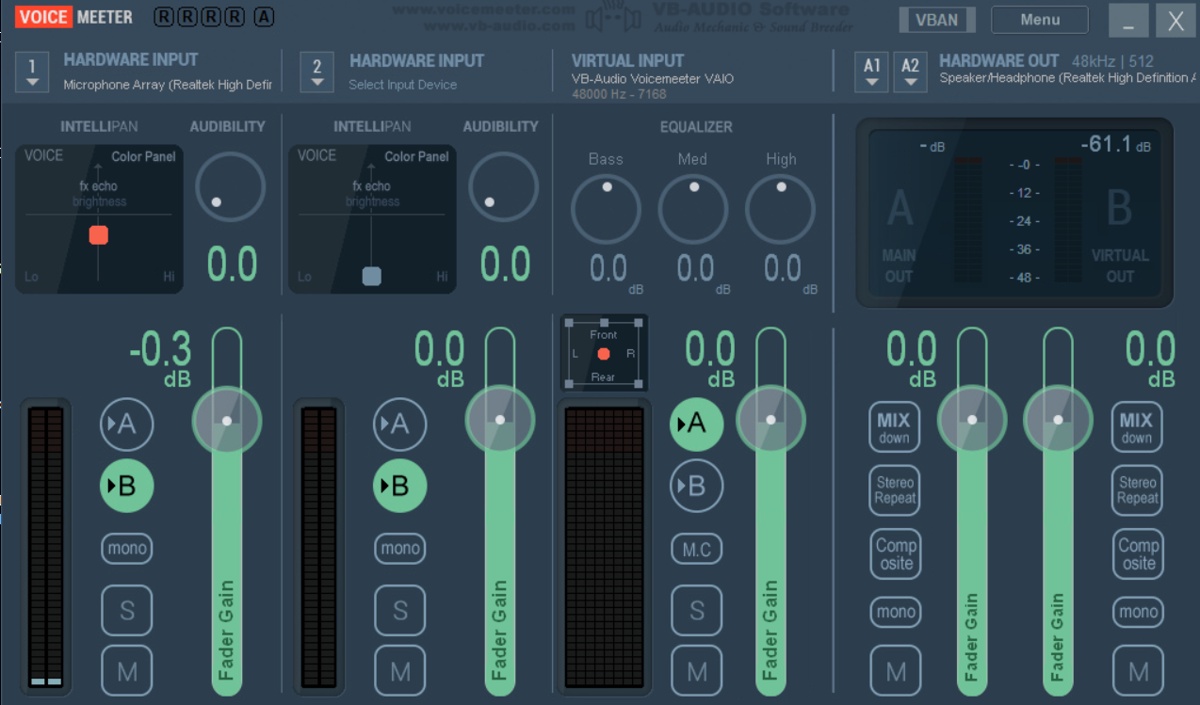
try voicemeeter
see if its the mic
it really seems like a network problem which is why people dont have a lot of recommendations
testing it on any other network connection would also help determine it
blissful sequoia
i think maybe we had something like this before - i theorized a firewall constantly disconnecting the voice after 1s might reconnect, and kind of give that effect
blissful sequoia
have you tried with windows firewall disabled?
voicemeeter is a virtual sound card, you can route your regular audio through it and its at least guaranteed to have a compatible audio interface with foxhole
some people have odd mic troubles
fallow skiff
I'll try it
blissful sequoia
its free, so its an easy test
blissful sequoia
you already set up voicemeeter?
blissful sequoia
oh lol ok
fallow skiff
never heard of voicemeeter
blissful sequoia
if you have a different antivirus program it might have a separate firewall, like avast or norton or something
blissful sequoia
ok should be straight forward then
ok
you already tried with mobile network or some other internet connection?
fallow skiff
Yeah, ive tried 2 different internets (is that a word) and VPN
blissful sequoia
ok
fallow skiff
I cant use mobile networks due to bad reception
terse flume
Hey u didn't do the tether
blissful sequoia
they could both be bad connections i guess
sly mortar
What's the connection speeds?
sly mortar

Speedtest.net
Test your Internet connection bandwidth to locations around the world with this interactive broadband speed test from Ookla
blissful sequoia
theres like 3 people complaining about it suddenly not working
so unless their internet speeds all dropped
blissful sequoia
hmm yea id try voicemeeter
fallow skiff
ping 12?
sly mortar
12ms
blissful sequoia
wow
sly mortar
That's high
fallow skiff
not bad
blissful sequoia
i live in a city, i get like 35ms minimum
sly mortar
So for that close of a connection? It's pretty slow.
blissful sequoia
i think icanari was more interested in how much bandwidth
terse flume
Or it is also fvked up
blissful sequoia
but anything with latency that low is high speed
blissful sequoia
we suspect the sip alg is meaningless
because theyre using encrypted SIP
routers shouldnt be able to use ALGs on that
terse flume
Oh kk
blissful sequoia
but yea i suppose if youre really looking for answers its worth testing
id be doing the voicemeeter test next, myself
blissful sequoia
VoiceMeeter Virtual Audio Device Mixer by V.Burel
fallow skiff
its telling me i have a new audio device
gonna reboot and go from there
alright
no idea what i do with this panel i have open
gonna need some g u i d a n c e
blissful sequoia
lol
go to your windows sound control panel, the old one from windows 7 please, and set the default devices to voicemeeter
in the recording and the playback tab
blissful sequoia
equalizers look right to you? make sure you select the A and B stuff right so you dont get echo
fallow skiff
not worried about my quality
fallow skiff
how do i mix the sound with it, it mutes my game audio so i only hear myself
blissful sequoia
It's the A and B buttons
Probably set mic to B
And regular audio out only comes from A channel, I might have it backwards
There's only 3 permutations possible
yea, so virtual out should be the B channel, virtual input should be A channel I think
fallow skiff
All I got is hardware
blissful sequoia
the green/blue circles that say A and B
fallow skiff
Yeah
fallow skiff
I got hardware in x2, virtual in, hardware out
blissful sequoia
screen shot
fallow skiff
blissful sequoia
yep looks right to be, I would unselect that B on the 2nd hardware input
just in case it adds white noise, but i doubt it will
fallow skiff
well there's another problem
blissful sequoia
if you play music on the computer you should hear it, and see the A channel activating
fallow skiff
i dont hear game audio
blissful sequoia
and if you tap the mic you should see only the B virtual out activating
blissful sequoia
ok, so check that your windows sound control panel is set to voicemeeter as the default playback device
and the default communciation device, too...
and then make sure you selected the right mic for hardware input #1, you may have more options than you first saw
fallow skiff
recording?
blissful sequoia
playback
fallow skiff
got that
fallow skiff
ok got it
blissful sequoia
not the mic #1, mic #1 is fine
fallow skiff
hardwarre output is fine
blissful sequoia
the column on the far right of voicemeeter, you might have more output options than you think
oh
i would say open up a youtube video to see if you have audio before you try foxhole
fallow skiff
yep, did that and it worked
blissful sequoia
or the windows volume ding
oh ok, so in foxhole there is a voice setting, make sure its set to the right voice input and output
they should be on voicemeeter
fallow skiff
ok, doing that now
blissful sequoia
and in theory it should work...
fallow skiff
Success!
blissful sequoia
audio or audio and voice both?
fallow skiff
Both
blissful sequoia
no more choppy?
fallow skiff
Nope
blissful sequoia
sigh
fallow skiff
Talking with a 501st guy loud and clear
blissful sequoia
so now you have to play the game with voicemeeter now
you wont have sound unless the program is running or you set your default devices back to normal (you dont have to uninstall it)
this suggests to me the audio drivers are broken or foxhole hates them
blissful sequoia
so you can try to freshen the audio drivers or you can live with voicemeeter
or you can just buy an external sound card for cheap
sly mortar
Voicemeeter will automatically start
blissful sequoia
i dont think it runs as a system service, so theres no sound until you login i think?
sly mortar
Voicemeeter?
blissful sequoia
thought someone complained about that
sly mortar
You have to check a setting
blissful sequoia
oh thats available huh? hmm nice
sly mortar
Menu >> System Tray (Run At Startup)
blissful sequoia
oh but ... system tray..
blissful sequoia
before login?
sly mortar
Before logging in to the computer?
blissful sequoia
yeah
sly mortar
I've never had a problem with it
blissful sequoia
no its not a problem
thats pretty minor
if thats even true, maybe its not what i think
its a very good piece of software
sly mortar
Yup.
blissful sequoia
@sharp vector voicemeeter is your answer, read scrollback
 pastel walrus
Ok how can I blast high quality sovjet choir music while marching down the enemy ?
terse flume
well id tell you but im not too sure on how respected it is to do that within to community
although its pretty dang ass funny when you see somone running in with a shotgun blasting the barney song
 proud dagger
Wulfgang too
terse flume
@pastel walrus you need a soundboard of your chosing or a player, and the common way to do it is to use a virtual audio cable and input the soundboard into that and set the default microphone in game as the audio cable
you cannot talk using that method
however you can use Auto hotkey to set up a hotkey to switch audio channels
without needing to go into the menu
im also pretty sure theres programs that can also do that
because not all of us own mixers
lol
you could just path both your microphone AND soundboard into the one virtual audio cable
and have a hotkey to keep your mic muted when youre using the soundboard
some soundboards come with the ability to auto activate ingame push to talk keys aswell
combining alot of these methods you can get a pretty effective and non earrape setup going on
rather than being that one kid putting a mic up to a $20 walmart speaker on 100% volume
pastel walrus
Thanks
 minor junco
I just reinstalled Foxhole, it goes to a black screen for 10 seconds and then crashes whenever I click Play
terse flume
Did you try the resolution fix @minor junco
minor junco
Doesn’t work
blissful sequoia
im so sick of soviet choirs or german marching bands
if i hear another im gonna shoot the person
@minor junco might take a full reinstall, that 1st pinned message
minor junco
Tried that
blissful sequoia
i cant really think of anything else ... hmm
terse flume
😑
pastel walrus
Reinstall windows
sly mortar
@minor junco Updated graphics drivers?
 minor sluice
 stone canyon
derpyguy, run the installer in c:\programm files (x86)\steam\steamapps\common\foxhole\engine\extra until it finishes
and then install the C:\programm files (x86)\steam\steamapps\common_shared\ files
stone canyon
it got a clip on the backside you know ?
 haughty perch
Losing connectin to the server. Connection to foxhole is impossible. Someone have the same problem ?
sly mortar
Uh, not really @amber kite
 amber kite
Oh well
Atleast i cleaned my pc
Applied new paste
Now itll get a new psu
I swear if it dosent run now ill throw it at thw scrapyard
Or just stwnrly stare at it till it boota
stone canyon
u don't think your motherboard is broken ?
stone canyon
well looks to me like part of your mainboard ist sticking to your power socket
amber kite
Wat
stone canyon
the black pin on your power socket ?
amber kite
Idk fam
I che ked the 24 pin on a older psu
And the same one is missing
So idk whats up with that really
amber kite
I think it used to be used for 5 v in the past
Got removed when 20+4 started appering prolly
 green totem
hi , is there any solution to get rid of the laggy / choppy audio coms ?
its hard to understand / hear what people are talking 😦
blissful sequoia
@amber kite you pulled the pin out of your power connector - push it back in if youre going to reuse that connector
youre not supposed to pull them out by the cables
lol
@green totem route it through voicemeeter, it's a sound driver problem I think
routing through a virtual interface like voicemeeter fixes it
 proven solar
I tried all the steps on the support page and the network issues in the the discord but I'm still getting the no home regions found error
blissful sequoia
can you try with mobile tethering to rule out your internet connection?
 cunning stag
I've been having trouble with the in-game voice chat going in and out. I've followed the steps of deleting and redownloading VivoxCoreLibrary multiple times with no avail. I also found that SIP ALG was enabled on my router. I disabled it, performed the same VivoxCoreLibrary steps, but still having trouble. Any suggestions?
sly mortar
@cunning stag Try downloading a program called Voicemeeter
cunning stag
@sly mortar what do I need to do once its' downloaded?
sly mortar

Set it up so it looks like that, and set it as the default recording and playback devices.
blissful sequoia
hey @cunning stag could you please share your sound card model and driver version?
We have had like 7-8 of these people in the last week, something has changed badly in the last patch
this is legit a bug now
cunning stag
it seems that way. It was fine until recently. Is there a good place to send or post the DxDiag?
blissful sequoia
i dont need an entire dxdiag actually
just the sound portion, Icanari is right that voicemeeter will solve your problem, but the devs need to actually fix this one
but they will probably need to know the model and driver to even test it
i wouldnt be surprised if it was somethin weird like a mismatch of mic/speaker sample rates 44100 vs 48000
or 22050 or somethin on the mic, i dunno
no that wouldnt happen, hmm
cunning stag
I'm using a Logitech G430 Gaming headset with driver version 8.98.201.0, which seems to be up to date
Usually the Logitech Gaming Software 9.02.65 is also running
ya know, i'm going to see if the speakers have the same issue
blissful sequoia
oh good idea
cunning stag
speakers have the same trouble. Voicemeeter does seem to fix it though, running the headset through the it
amber kite
@blissful sequoia nah derp the pin got completly removed well the whole cable when 20+4 appered i googled it
blissful sequoia
oh good
amber kite
Its here bois
I like the packaging
I hate the cables tho...
Idk how to plug them in
Tf is this
Modular shite
This s not the usual lego for adulta
@blissful sequoia halp
It aint fiting in my case either omegalul
terse flume
lol
well
its pretty obv where each cable needs to go in the psu
and then all you do is find the ones your, cpu, gpu, hardrive/ssd need
24 pin is the easiest
you should have some 8pin cables your cpu socket needs an 8pin and your gpu should either need a 6,8 or 6x6 or 8x8
if its a 6 there should be cable where there are 6x2 pins
amber kite
Nah mine is pcie power
amber kite
Just a 1050 ti
terse flume
standard?
terse flume
lul yeah
terse flume
cpu slot is usually an 8pin
ive only ever seen one different which was two 8 pins
lol
terse flume
just make sure everything is in and that your psu is actually on
xd
common mistakes
terse flume
does it stay on
amber kite
Who?
terse flume
like does it keep running now instead of trying then shutting down
amber kite
Nah same as beforw
No post beep
But like
Now when i tuen the psu off
It clicks after 5 secs or so
Tf
terse flume
relays turning off
terse flume
it doesnt blow out your power anymore im guessing
amber kite
Nah
It has weird property now
When i turn it off
And dont wait foe thw relay
My pc turns on e e
terse flume
sounds like your old psu didnt have any protection in it then
thats just because the capcitors and stuff havent discharged
terse flume
if you have any IT places around id reccomend taking your system somewhere to make sure it hasnt killed anything more than the mb
dont take it to a corporate one just a private place
amber kite
Now im trying different ram setups
Its out
Still didny run
Imagine my hdd is fucked
And it dosent find the mbr e.e
terse flume
nah
if your hdd is fucked
when you start your pc
it would boot to bios
and wouldnt find a boot drive
terse flume
youll probably need to take it to a place and see if you get get help finding what is wrong with it
it makes it hard to trouble shoot because it is posting and throwing codes when parts are missing
zzzzzzzzz
googles goddamn tracking services
now all im getting is adverts of psus and mbs
terse flume
this is why its a pain in the ass to deal with when parts fail,
i had my new cpu sitting around for 4 months before i put it in
 torn gull
?
terse flume
how do i fix this aaaaaaaaaa : ((((((((
I havent even played foxhole since before i got my new pc
cause i always have had this problem
blissful sequoia
check the pinned messages, try the DNS fix
could also be your firewall or antivirus
it could also be an old version of the game steam is not updating
 inner basin
@blissful sequoia I love you so much boy
blissful sequoia
?
inner basin
for being helpful
blissful sequoia
oh, we will see if its helpful...
 blissful sequoia
it may be worth trying the 1st pin, the full reinstall if you haven't already.
Or if you could test it with a mobile tether just to make sure it's not a routing problem
terse flume
Yes mobile tether
 meager gazelle
Is there a way to lock the mouse to the fullscreen region when foxhole is in focus on a 2-monitor setup? When aiming towards my second monitor I have to be careful not to click off screen, changing focus to my desktop. Currently I turn off my second monitor when heading to the frontline, turning it back on when I plan on spending time in the backlines.
 tame tiger
My audio is wrong somehow.. I dont know how to discribe it but it keeps cutting every second and it sounds pretty bad.
amber kite
@blissful sequoia well i gave up hit me with the 250 usd budget mobo +cpu+coller+ram
tame tiger
Now the sound is completly gone. No its not because of my headset. Everything works fine exepct for foxhole
Any solutions? Please..
tame tiger
Maybe i should say that i didnt have that sound problem at the beginning
I just appeared at some point and its getting worse
I will reinstall Foxhole now and tell you if that helped. But i would still like any other solutions you might now
blissful sequoia
@amber kite mobo is fried? can you acquire used parts? it should be very inexpensive to find a replacement board
amber kite
Eh if the mobos fried
I migth aswell upgrade
Now that i got a 750 w psu
Maybe ill get a replacment just so i can give it to my parents later
Who knows
blissful sequoia
i imagine a replacement board is about half of the price of that power supply
its not really an expensive repair if you can find one...
@meager gazelle full screen should lock it to one window - maybe fullscreen windowed mode does not
@tame tiger route your audio through voicemeeter and the problem will probably go away
terse flume
I tried a fresh reinstallation of foxhole following the first pinned message and i still got no home region found @blissful sequoia
blissful sequoia
so the first thing it does, as far as i know, is download a list of servers from a web page
so you would need DNS working, then be able to connect to the amazon aws server (https) connection, and download the server list, then talk to the servers
so if we are sure its not a DNS problem, because you tried the DNS fix, and you confirm fresh install makes no difference
i think that just leaves the network routing, the easiest test is a mobile phone tether and turning off your windows firewall
if it connects, then the problem is your firewall or your home router
if it does not connect, then it must be something else...
a VPN might also be a good test, if you have access to a VPN instead of a mobile phone connection
but i do not know another way to track the problem down without testing some other internet connection route
Oh, also check the properties for foxhole in steam and make sure all the betas are disabled, @terse flume, just in case you turned one of those on a long time ago
terse flume
there are none selected
how do i try a phone tether
is that where i use my phones internet for my computer?
blissful sequoia
yes
terse flume
ok
uhh I use ethernet so i dont know how I would connect to my phone unless i use a hotspot
blissful sequoia
wifi
uhh
you can plug in a usb cable probably
youve never done a hot spot before?
terse flume
I have
but not in a long time
If it makes any sense the last time I used a hotspot was before I had this computer and before I had the computer before this computer
I also have network discovery on but Its not finding my hotspot on my phone/router internet
blissful sequoia
some people would rather just buy a month for privateinternetaccess VPN or whatever to test if they dont have a phone
phone is free tho if you dont get charged for the small amount of data for a test
 cunning sapphire
Getting voice chat error [8] 6-0 when trying to speak and error [2] 2-5006 when trying to reconnect. Pretty sure it is an error with my headset but to confirm
 quaint creek
?warden
 kind condor
?warden
blissful sequoia
terse flume
Not a headset problem
It's a connection issue
Try reverify vivox files , DNS , mobile tether or VPN.
For steps
blissful sequoia
have we asked anyone of these vivox 8 - 6 0 people to try voicemeeter? i for one am tired of explaining it
i think maybe that is the one that is labeled push to talk error? maybe its actually a mic issue
terse flume
I don't think so
Because
I used to have this issue
And it was resolved by changing my internet
I did research and since I am using Ethernet, apparently I cannot connect to mobile phone tether or router internet
does anyone know if foxhole requires some other kind of connection (other than ethernet) to connect?
blissful sequoia
hmm yea youre right so i guess its a confirmed network problem, chigga
nothing special required, Cup
terse flume
Use a vpn
Like tunnel bear
It's free
Just to check it's the connection or your vivox is messed up
can i hab link
blissful sequoia
maybe try tunnelbear.com lol
terse flume

 glass lake
o7 S! I´ve got a Soundbug if i get in a Truck , Jeep , or any else Veh. it starts when Moving like a background scrachting "Frp Frp Frp Frp in an 0,2 -0,5 sec repeating. ist louder than the normal Driving sound. When i stop or get out the Veh. its Over. Sometimes it Stays when ill walk away from the Veh. Any knowlege about that there is a Problem ? - it is even when i go nearby an Factory or Refinery who is in Production - when ill move far from theses buildings it gone its Gone also if i put down the SFX Soundbar. Reinstalled the game and Checkts my Sound device with no effect.
terse flume
Or it may be the speakers
Have you tried different headset
Russ
Try using a vpn
Like tunnelbear
It's free
@distant harness
 hot oak
@glass lake Have you tried verifying the cache on steam?
meager gazelle
@blissful sequoia Fullscreen nor Windowed Fullscreen lock the mouse into the fullscreen region. I believe Windowed Borderless is the setting that would normally serve this purpose.

 dark minnow
multiple monitors wont lock usually
blissful sequoia
well i guess the easy answer is turn it off when you play the game? windows key + P
im very used to full screen locking the mouse exclusively, but maybe thats specific to each game
 dusk lodge
Is foxhole down at the moment?
terse flume
my mouse does get locked to the game while in multimonitor mode
im guessing there is a setting unticked in your windows settings somewhere
blissful sequoia
what about for windowed fullscreen, @terse flume? same?
blissful sequoia
hmm thats what i would expect
i must admit i havent used a dual screen on my home desktop in half a decade
proven solar
My wifi connection is causing problems, like not letting me join a team and receiving the no home regions found error. How can I fix it ?
blissful sequoia
you could change the channel its using, perhaps. have you tried it pluged in - just to make sure its only the wireless part thats a problem
 distant harness
@terse flume I never knew audio could cause issues, my laptop has a broken headphone jack, which won't let me plug anything in as the device is never detected by the computer. Could that cause issues? (though i've had this problem persistently scince dec. 2018, as shown in a bug report on steam i filed a long time ago)
and back then my headphone jack wasen't broken, and my issue still persisted. However oddly, the game let me in for 2 wars back in feb and april.
glass lake
@hot oak S! My sound bug is located. It is the ACER DOLBY AUDIO Tool - if i want to use Foxhole in Dolby Mode it is Not working. It Switch on and off and Produce these crack Sounds.
proud dagger
i need help
right now after so long i am now only receiving the voice error
and also when i try to speak using voice
the mic does not appear and no one can hear me
however it does say i am connected to teh local channel
 arctic talon
@proud dagger try the "fixing vivox voice files" from pinned messages
deleting the vivox folder and verifying files afterwards
 hot brook
Is there a way to turn voice chat microphone sensitivity up? I love this game but the microphone sensitivity is insanely low
amber kite
@blissful sequoia hold my hand while i insert the cpu fam
 dim salmon
@hot brook i guess you can change input/output in game options in related tab
blissful sequoia
switched to AMD, coowkies?
terse flume
amd is much better on low end
especially since intel basically kicked hyperthreading
blissful sequoia
oh nvm it was amd before
@amber kite hopefully not hooking that up to the old power supply
pastel walrus
AMD has so much more value for 99% of gamers. Dont see any point ever buying an intel cpu right now, unless you want to spend a lot of money for nothing.
Especially considering mobo prices. You almost always get a much better value there too. Intel got kicked in the balls really well by the Ryzen series and they are not doing a good job retaining this part of the market.
But still so many swear by intel too much, that cult is dying slowly thankfully and we will get a nice cpu market thanks to amd being very relevent again.
Wish this would happen to GPU more too.
blissful sequoia
Gamers is their only market then
And laptops
im generally unimpressed with everything in the AMD ecosystem except the processors
 austere galleon
@shut ruin can you make the description for the categories 50% smaller
 slow sorrel
Having a ISSUE with VOip unable to transmit in Foxhole. i can receive just not send, before you say anything VOip worked last patch, it works in ever other game/ program, I have checked my settings. they are ALL setup correctly.
blissful sequoia
route your audio through voicemeeter (freeware) and it should work, something borked with foxhole and some % of mics
amber kite
@blissful sequoia
Cough
Win 8.1 dont like r5 260p
Halp
Fuck man
I got no usb wtf
To throw a copy of win 10 on it
amber kite
I might be rwtarded
But omehow the adapter turned itself off
Time to get a bootleg copy of win 10
amber kite
Nah cheap chinaware of win 10 is good enough
 barren hamlet
For some unknown reason, from yesterday I cant hear people talking in voice chat it started from yesterday
barren hamlet
Did not work, it was working 2 days ago, but from yesterday I cannot hear voice chat and only voice chat I only see the speaker Icon on top of people
terse flume
Can they hear you
barren hamlet
ok
terse flume
Right click on the volume and open settings
barren hamlet
I am in the settings
barren hamlet
There isnt much to do in here though
terse flume
Not this one
barren hamlet
You mean this one
terse flume
Yes
barren hamlet
The problem is not related to system, its related to Ingame voice options
I can assure you that
blissful sequoia
its also possible to set voice output device directly in foxhole settings
its probably set to the speakers instead of headset
barren hamlet
BUt its set to default
blissful sequoia
or some digital output thats going to black hole
blissful sequoia
default + default communication device
oh what, voicemeeter?
are you using it?
barren hamlet
BUt it is working fine, if I unplug the headphones it will switch to the normal speakers
barren hamlet
Its an in game only issue, I think it has to do with the voice options in game
barren hamlet
ok did it
terse flume
Can u check now
barren hamlet
Same thing
barren hamlet
Well today windows 10 did and auto update to version 1803
terse flume
Right click the headset and disable it
barren hamlet
ok, done it
terse flume
Now speaker is the main device
barren hamlet
Yes
terse flume
Set it to both defaults
terse flume
@blissful sequoia
barren hamlet
Maybe it does have something to do with the game
just to be safe here is the ingame options
terse flume
Turn on
barren hamlet
Ok its on
barren hamlet
oh it worked
terse flume
Cool
barren hamlet
But what is the relation between Mic and what I can hear
barren hamlet
So I turned it off again and the problem is back, so it is the reason for the problem, propably the windows update turned it off
terse flume
Might be
blissful sequoia
that is probably the wrong output device
 haughty brook
hi
blissful sequoia
theres probably 2 that look similar
realtek has like ... so many stupid outputs
blissful sequoia
uh oh do we need indonesian tech support?
haughty brook
spel are you
terse flume
@haughty brook use Google translate
distant harness
still having the no home regions available bug
terse flume
<@&521124241395941396> why you guys never help
blissful sequoia
@distant harness have you tried a VPN?
distant harness
no, dont have one on my pc
 plucky bluff
I have the role for cool color
terse flume
Here comes a whole stream of angry dudes
blissful sequoia
whats the free vpn, chigg?
terse flume
Tunnelbear
blissful sequoia
please try tunnelbear, @distant harness so we can determine if the network is the problem
god i wish the devs would help us out
with the network and voice shit
its such a disaster ...
we have to consult with chicken entrails and tea leaves every time we want to figure out the root cause of the failure to connect
all based on the flawwed notion that obscurity is security
 proud schooner
I mean, there's a checklist in #technical-read-first⚠
Networking issues aren't as simple as glancing at it and going "lmao that's the issue"
Troubleshooting is a thing for a reason.
terse flume
distant harness
i dont believe its a networking problem
proud schooner
Specifically the list here: https://discordapp.com/channels/203512636556574720/551236268004999168/551239621598773249
If you're getting ho home regions available, that's 99.9% a networking related issue.
Please try the steps in that list in the order provided. It's the fastest way to troubleshoot it.
distant harness
well i've went through the 14 steps already
i said that earlier in bug report, a day or two ago
proud schooner
Mind going to http://fast.com and running a test, and when it's complete, sharing the results?
How fast is your download speed? In seconds, FAST.com's simple Internet speed test will estimate your ISP speed.
(hit show more info when it's done as well)
distant harness
93 mbps
proud schooner
What country are you in?
distant harness
just changed to 110 afterward, america
proud schooner
Under show more info, what's the loaded ping?
distant harness
206
distant harness
yea
proud schooner
I'd recommend trying to connect physically to your router to see if that corrects it. It's one of the steps.
As at least a way to eliminate that as an issue.
distant harness
ill retry it
proud schooner
After connecting physically, I would re-run the test as well to see if it improved the ping
proud schooner
Do you have a modem+router combination or do you have a router separate from your modem
distant harness
seperate
proud schooner
How many devices do you have on the network? More than 5?
distant harness
yea
proud schooner
Are they currently in use?
distant harness
11-12 but only 2 are in use
proud schooner
Hm
Does your modem happen to have multiple ethernet outputs that you could plug into?
Skipping the router basically
distant harness
i dont believe so
proud schooner
Have you already restarted the router (unplug, wait for 30 seconds, plug back in)?
And if not,
distant harness
tried it yesterday, could do it again though (couldnt hurt)
one sec ganna do that
proud schooner
I'd do both the modem and router. Unplug router, then unplug modem. Wait 30 seconds, plug modem in, wait a bit more, plug in router, restart computer.
Your ping is unusually high is what I'm getting at.
proud schooner
VPN isn't the answer here.
terse flume
But it generally solves these issues
proud schooner
That's not how networking works.
terse flume
But if he comes back ask him to try mobile tether
proud schooner

blissful sequoia
if you arent willing to test the vpn we will never know if its a networking problem
we have definitely seen people unable to route to the servers with a VPN
proud schooner
Mates, whilst I appreciate you chiming in, we already have a possible culprit. There's a reason why troubleshooting goes through a particular process.
proud schooner
If the issue is a local issue, a VPN changing external routing won't correct it. It would still be a networking issue.
proud schooner
Again, that's not how networking works. VPN could bypass the issue depending on where the issue lies. But if it's a local network issue, again, it most likely won't correct it.
blissful sequoia
its probably more likely a software firewall but it helps to determine, ya know?
proud schooner
High network ping as a whole indicates a furthe rissue.
Again, it's literally my career.
blissful sequoia
networking?
proud schooner
Yes.
 winter quarry
Neat
blissful sequoia
so what we find is in rare cases there is a broken route to wherever the game and/or voice servers are
especially out of brazil ... sigh
winter quarry
How does one get the Colonial role?
blissful sequoia
what sucks is trying every other possible technical solution when its just a route problem we cant fix
proud schooner
Check #information at the bottom @winter quarry
proud schooner
Ye, so routing issues -
blissful sequoia
its routing on the ISPs side, not local network usually
distant harness
i think i found it out
proud schooner
If this were international, I would typically point at bad routing first
distant harness
a new firmware update came out
blissful sequoia
whenever its a local problem its almost always a firewall/antivirus so local that its that specific computer
proud schooner
Ah for the modem or router?
distant harness
both
distant harness
(its not on the list so it wasent exactly first to check)
blissful sequoia
new firmware is pretty common, reminds me i should update mine
distant harness
might want to add that to list,
blissful sequoia
i really doubt new firmware will fix anything a restart wouldnt
proud schooner
But yeah, because it's a local North American connection, with decent internet connection (above 50mbps), seeing high ping on other services (fast.com for example) indicates either a local ISP issue, or a local network issue.
blissful sequoia
ive seen routing problems (to the voice servers only) from north america, sir
proud schooner
Routing could be an issue if it's from the ISP to a larger ISP hub,
blissful sequoia
i know what youre saying, its xnot likely
terse flume
A mobile tether clears all
blissful sequoia
and its not, but its really hard to pinpoint it without that test
terse flume
😄
proud schooner
but the best thing to do then wouldn't be to slap a VPN on. It's a bandaid fix to a further issue. The best thing to do then would be to call their ISP and tell them about the bad performance, have them check routing and signal degredation
distant harness
kinda wish the router/modem woulda pinged me it needed an update, but it didnt
blissful sequoia
it also tests through the local router
proud schooner
Yeah most ISPs will send an email about modems, but routers are notoriously bad about firmware
blissful sequoia
so it can help determine if thats the problem as well
proud schooner
Particularly Netgear if you have a netgear router
Discord for example got boned by a bad netgear firmware
proud schooner
It completely destroyed people's ability to connect because it would wreck packets completely.
There was a bug bounty for it that I sat down and tested all netgear routers I had access to over the course of a month
blissful sequoia
like SOHO routers?
distant harness
well ima see if that fixed my issue one sec
blissful sequoia
god how much easier this would be if we could just use ICMP and talk to the server and see
proud schooner
Mostly residential
SOHO thankfully don't get firmware updates as often
Had an order of 100 access points come in with 70% DOA due to bad firmware once. That was a fun time.
blissful sequoia
all that being said im 90% sure firmware wont fix his problem
unless it resets ... all of his default settings and it was a hangup there
distant harness
well im not sure yet, im ganna figure it out tho
once steam decides it wants to work
proud schooner
The issue with firmware, is if it's sitting in memory, it can cause local network issues. Or, if it's a firmware update to fix a bad firmware, etc
proud schooner
No, but Foxhole would by a symptom of the issue
Games and services have less of a tolerance than say, VOIP
Voice connections are inherently designed to be low-risk, whereas they have a higher tolerance for issues
proud schooner
Steam authentication for example
blissful sequoia
hmm
blissful sequoia
it would work sometimes tho
blissful sequoia
he has packet loss? i thought it was just low latency
proud schooner
And ping?
blissful sequoia
other steam games, work, right, @distant harness?
distant harness
every single other steam game
proud schooner
hm
blissful sequoia
looks to sir for answers
proud schooner
- Set Max Pings settings in the Steam client: Go to Steam >> Settings >> In Game. Go to the dropdown box labelled In-Game Server browser: Max pings/minute and set to 500. Perform #1
Give that a shot
distant harness
i did that already, its set to 500
proud schooner
Try 5000
blissful sequoia
lol
proud schooner
Basically increasing the tolerance for Steam auth
proud schooner

distant harness
(theres a reason i went to discord for this, im stumped)
proud schooner
Try connecting directly to the modem with your computer physically
And then try fast.com again
distant harness
one sec
proud schooner
It may not work at all depending on the modem since it's designed to have a router, but worth a shot
proud schooner

Have him try fast.com too
To see if he gets a different ping result
You can also give it a shot on mobile as well
terse flume
Do the mobile
proud schooner
rough
terse flume
Do it
proud schooner
Okay so it's likely a network-wide issue
Yeah I'd test direct connect to the modem. It'll help eliminate the router as an issue if it work
You already tried setting DNS to 8.8.8.8 or 1.1.1.1?
distant harness
alright but still gatta wait for his league game
proud schooner

proud schooner
f
terse flume
Hey Russ your game version
distant harness
?
distant harness
lemme checm
terse flume
Oops bottom right
distant harness
mobile method?
distant harness
and how do i do that?
distant harness
ios
distant harness
nop
terse flume
Nvm then
distant harness
any other ideas?
distant harness
vpn still says no home region found
(thats why im so dang lost on this, i have no clue how to fix it)
terse flume
Did you click on connect on tunnelber😄
distant harness
yes
terse flume
Restart steam then
distant harness
i restarted the entire computer and steam afterward, same result
distant harness
my antivirus flagged tunnelbear and deleted it :/
(before you ask foxhole is whitelisted)
blissful sequoia
which antivirus?
distant harness
windows defender
distant harness
it says it is