#technical-chat
4 messages · Page 24 of 1
 sly mortar
 blissful sequoia
oh thats so useful
 gritty token
But If it isn't resolving the IP Address, that points to DNS not picking it up
blissful sequoia
thats all i was asking him for yesterday lol
sly mortar
@celest aurora Could your reset your DNS settings so that it uses your ISP's?
blissful sequoia
aws is regional
he will likely get a different IP
but the page should look the same
blissful sequoia
have you run an ipconfig /flushdns on the command line?
 celest aurora
Have now. Nothing
blissful sequoia
or if you are using chrome, i suggest trying another browser because chrome is downright obnoxious about caching DNS entries
blissful sequoia
its funny, if we knew the DNS of the actual server list you could just make a manual entry and force it
oh ok
i mean i guess you could make a manual entry for s3.amazonaws.com in c:\windows\system32\drivers\etc\hosts file
celest aurora
please god no
sly mortar
mhm hmm
celest aurora
This is where I set this up and forget about it and it breaks in 8 months time and I have to spend hours finding what I did
blissful sequoia
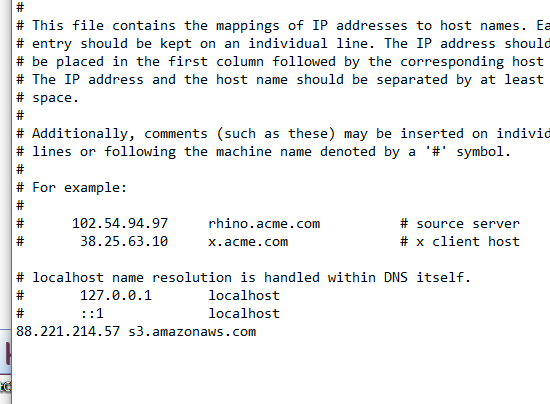
open notepad as administrator, open c:\Windows\System32\Drivers\Etc\hosts and add entry "88.221.214.57 s3.amazonaws.com" and save
leave it open so you can delete the line and save it later if it starts to work
celest aurora
Yeah?
blissful sequoia
hopefully their server list that comes back is IPs and not DNSs
celest aurora
 celest aurora
 blissful sequoia
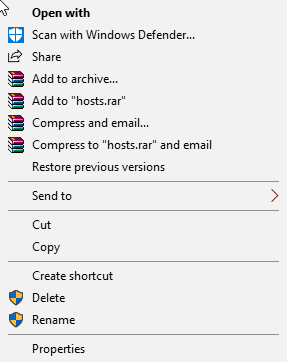
uhh hit start button, type notepad, the shortcut that comes up right click
blissful sequoia
i kind of secretly suspect they have their own foxhole subdomain on the dns... but at least the web page should come up
nah doesnt need a flush
hosts file beats everything ... even beats tank
celest aurora
Now?
celest aurora
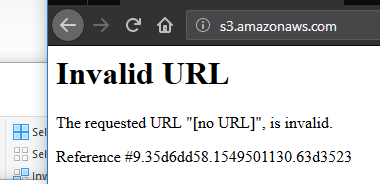
I get invalid url now
blissful sequoia
https://s3.amazonaws.com/clapfoot-test-bucket/test.json says invalid url?
celest aurora
 blissful sequoia
it doesnt have the full address
celest aurora
 sly mortar
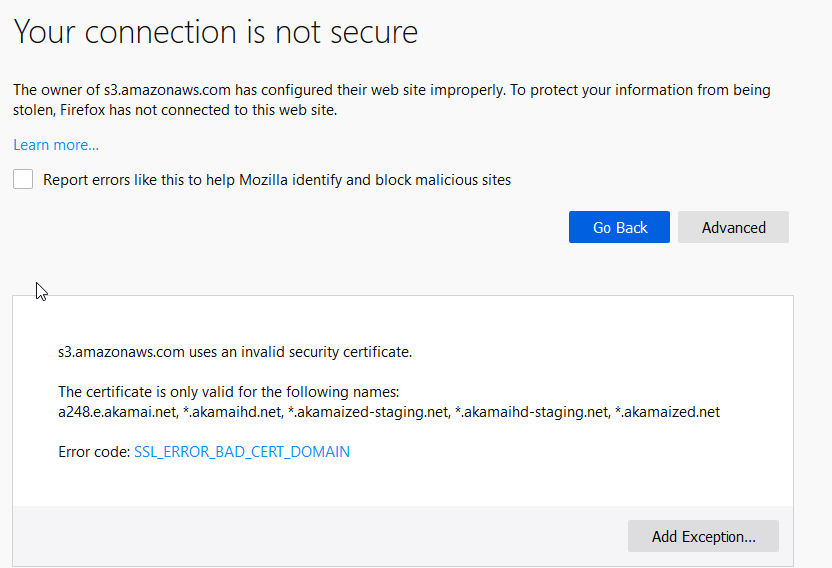
Fucking SSL
blissful sequoia
akamai??
celest aurora
Yes....?
blissful sequoia
look at that
man in the middle attack
someone is pushing their own SSL certs
as if they are amazon
sly mortar
sigh
blissful sequoia
did we give the wrong IP address?
hold on
please change IP in hosts file to 52.119.164.244 @celest aurora
maybe that one was some other service
sly mortar
just to make sure
If it doesn't work and has the same issue... time to clean certs
sigh
celest aurora
I get the exact same thing
blissful sequoia
oh boy...
sly mortar
Oh... great...
blissful sequoia
some program or router is intercepting your traffic
sly mortar
This is going to be... interesting
blissful sequoia
so all certificates look bad because theyre coming from another source
celest aurora
Is this specific to me?
blissful sequoia
he shouldnt be able to access any https site, right?
i think its specific to you, maybe...
sly mortar
Try accessing this

Skill up and manage your Discord server with automations, commands and awesome plugins!
blissful sequoia
or maybe everyone got their routers hacked at the same time
sly mortar
because I randomly had that open, and it's HTTPs
celest aurora
Hangs
blissful sequoia
aha!!!
celest aurora
can't i just https google?
blissful sequoia
yea
celest aurora
Google is fine
blissful sequoia
maybe theyll pass google through legit heheh
blissful sequoia
dns name is encrypted too tho so hmm...
he went to https://www.google.com/ i think
Search the world's information, including webpages, images, videos and more. Google has many special features to help you find exactly what you're looking for.
and it was fine
blissful sequoia
but your other https certificates are being intercepted
sly mortar
Because I've fucked my own cert up and had that happen
blissful sequoia
so now to figure out why...
sly mortar
My guess is man in the middle
blissful sequoia
definitely, but from where
sly mortar
@celest aurora Are you port forwarding anything on your router?
blissful sequoia
do you use a proxy software, @celest aurora
celest aurora
- But let me check get it up
sly mortar
Stop portforwarding it. You shouldn't have to
celest aurora
Will a man in a middle care about local ip differences, or I guess all traffic coming from my global adress?
celest aurora
Well fuck.
blissful sequoia
it could be on his local PC only
celest aurora
Not sure I want to post a pic of my table here.
gritty token
Nah do not
celest aurora
We have rules open
sly mortar
Don't
blissful sequoia
im not sure its an open rules problem...
sly mortar
No, wait
I have a discord which can do screensharing if we need it
a server which can
not a call
blissful sequoia
ok so ... lets figure out where it is then
do you have another computer to test with on the same network, @celest aurora? a mobile phone or laptop or something?
sly mortar
^
gritty token
Why not run a tracert?
blissful sequoia
what would it tell us?
sly mortar
The main problem with this is that there are so many fucking man in the middle attacks
gritty token
Should that tell you if you hit someone else?
sly mortar
It might?
celest aurora
I can grab one.
sly mortar
I know man in the middle attacks can get around them though
blissful sequoia
we know he gets internet traffic/routing
sly mortar
@celest aurora Please do so
blissful sequoia
we can only assume its the correct gateway
his ISP and not some proxy software...
sly mortar
That will determine whether it is PC based, or router based effectively
blissful sequoia
oh i guess the tracert would determine that
gritty token
Yes yes, but wouldn't a man in the middle mean that someone else public IP pulls up?
You can arin.net that shit
sly mortar
Maybe?
blissful sequoia
no
sly mortar
I remember hearing about man in the middles which didn't
gritty token
wait i think what i wrote made no sense
blissful sequoia
he has the right IP
sly mortar
Wrong cert
blissful sequoia
but the traffic is intercepted, so https connection fails to amazon
and then this other server answers the request to aws.amazon.com but says its a different server
gritty token
Yeah so if you send a traffic request out via tracert, it should give you each hop on the way
sly mortar
Doubt it
blissful sequoia
please try 52.216.9.253
celest aurora
I have a macbook.
sly mortar
Try that
blissful sequoia
i gave him the ip address for aws.amazon.com not s3.amazonaws.com
definitely wrong.
gritty token
lol someones going to hate you
blissful sequoia
thats ok... they wont notice
gritty token
jk of course
blissful sequoia
you wouldnt believe how many chinese IP addresses try to hack me every day
gritty token
You aren't flooding their domain
blissful sequoia
i would say chinese but i doubt even half of them are chinese people
gritty token
Dude wireshark is scary to pull up sometimes lol
You see all the random people pinging you
blissful sequoia
random pinging and port scanning is unnerving, but attempts to log in to your router or ssh servers is ugly
blissful sequoia
when i used to live on dial up people on broadband could ping flood me out of existance 😦
now i have the fiber...
connection timed...
ok so not man in the middle, you can be relieved
it sounds like routing to amazon is not working. traceroute might be useful now
sly mortar
I mean.. then why isn't it working to other places
blissful sequoia
i say might, because most routes involve routers that dont respond so its hard to know where it dies
i dont know - have you never had a piece of the internet go dark for you before?
he should be able to ping 52.216.9.253 or s3.amazonaws.com and if he cant, makes me think its ...borked
celest aurora
I can't ping that IP
blissful sequoia
so either your firewall blocks outgoing ping (unlikely), youre blocking incoming ping responses from that specific address (unlikely) or the route between you and amazon is dead
again, it would really help if you could test that URL from another computer
celest aurora
I have
celest aurora
timed out
blissful sequoia
you already reset your router?
blissful sequoia
and you can ping other ips and get pong sometimes, right?
celest aurora
ye
blissful sequoia
really sounds like the internet is broken
or your ISP has a bad route
what options does that give you ... if its true hmm ...
waiting it out, or using a VPN
or contacting ISP and complaining
celest aurora
its 1am. Not hanging on the phone for an hour to explain this to some non-tech to wait again to get connected to a real tech
blissful sequoia
1am ... brazil?
celest aurora
uk
blissful sequoia
hmm
blissful sequoia
{
"title": "test",
"test1": false
}
and of course the green lock and stuff
if youve got a mobile phone and take it off wifi you can probably see it
gritty token
Lol i work for a VoIP company as a tech rep
So i know that feeling XD
Call in and get someone who knows nothing thennnn you get to me
sly mortar
after 8 hours
celest aurora
^^^
gritty token
more like 8 tries
blissful sequoia
is there a password i can give to let them know ive already tried restarting it and stuff?
as a troubleshooter, i hate when people wont try the obvious thing theyve already tried because i dont trust them
so i just do it for the tech support people anyway but i HATE it
celest aurora
Im only a hobbyist with pc's. But explaining even basic tech issues to normals is brain numbing
gritty token
Lol i know that feeling XD
blissful sequoia
car analogies work wonders
gritty token
^^^^^^^^^^^^^^^^^^^^^^^^^^^^^^^^^^^^^^^^^^^^^^^^^^
^^^^^^^^^^^^^^^
^^^^^^^^^^^^^^^^^^^^^^^^^^^^^^^
Holy shit yes
blissful sequoia
ok so the router is like your clutch. oh you drive an automatic? oh you dont drive. hm...
celest aurora
hahah
gritty token
It works soooo well
sly mortar
and then you have the people who only use bikes because they're "green focused"
blissful sequoia
green focused = 2nd DUI
sly mortar
Wait
celest aurora
I don't know cars well enough to use them in analogies
gritty token
but you can get a DUI on a bike ;D
sly mortar
Can you get a drunk driving ticket when biking?
blissful sequoia
you can get a DUI on a freakin horse!!
gritty token
You can get a DUI on a damn scooter
sly mortar
Eh, true
blissful sequoia
test on mobile network, test tomorrow, etc
i think its routing problem
sorry for giving you that wrong IP and making a scary haxor thing
gritty token
I would also try seeing if you have the same issue outside of your house
blissful sequoia
if its a routing problem by the ISP it usually will be self corrected in time...
celest aurora
what like, stand outside with my laptap yeah? 
blissful sequoia
find an open wifi somewhere
got a neighbor with one?
mobile hotspot would probably work too
celest aurora
Im joking ofc
gritty token
but who REALLY has friends D:
 lament ember
hey guys, everytime i try to travel to a different area on the map it loads for a good 5 minutes then crashes saying "connection to server timed out"
celest aurora
Anyways, thanks for the help guys, I appreciate the effort. Guess Im just going to have to wait for this to blow over.
lament ember
is there a solution to this
sly mortar
@lament ember Have you restarted steam?
gritty token
@celest aurora , best of luck, reach back out for more help if needed
sly mortar
^
celest aurora
Cheers
gritty token
Cheers!
blissful sequoia
are you in the UK too, @lament ember maybe you guys have the same ISP
lament ember
nah im USA
blissful sequoia
when it loads does it go to black or just show the loading screen?
oh hey
@lament ember go here https://s3.amazonaws.com/clapfoot-test-bucket/test.json does that page come up for you?
lament ember
it laods for a bit then it goes back to the main menu
blissful sequoia
@lament ember were you able to load that link? do you see the test page?
lament ember
yeah
blissful sequoia
ok so your DNS works then, probably...
you may want to do a reinstall, including deleting files that get left behind in the steam commonapps and in your appdata/local
blissful sequoia
yea thats right
lament ember
oh alright
blissful sequoia
if you do the reinstall, youve got to delete those hanging files...
lament ember
i restarted steam and it still timed out so im gonna try that
blissful sequoia
hopefully someone can help out, im about to take a break
particularly the %appdata%\..\local\foxhole directory should be nuked
lament ember
thanks for the help
blissful sequoia
and the one in program files x86 -> steam -> commonapps -> foxhole
that one too
then reinstall it
you will have to reset settings, of course 😦
lament ember
how do i get to appdata?
sly mortar
Type %appdata% into your windows search bar
lament ember
idk why how i got tech wizard role lol
sly mortar
You clicked on the computer emoji in #information
lament ember
is that for windows 10?
sly mortar
What windows do you have?
lament ember
windows 10
sly mortar
Then yeah, it will work
blissful sequoia
you can copy and paste the appdata folder as i typed it, with the .. also
dunno why but appdata leads to roaming folder by default, not local
blissful sequoia
isnt roaming like ... for active directory accounts? nobody in a home environment is doing that
unless roaming means something else i dont understand
its the user's documents and settings that are migrated to different machines across a network
sly mortar
That's correct
sly mortar
That's about all I can tell you without knowing the reason your cert is fucked up
blissful sequoia
cert is fine
that was my bad, i gave him wrong IP
he cant connect to the right server at all, routing problem or something
feel pretty confident pia should fix that
sly mortar
Oh
blissful sequoia
and you can play your alt now too 
 buoyant valley
sly mortar
buoyant valley
sly mortar
@coarse shoal try restarting steam, restarting PC, if that doesn’t work ping tech wizards, I have to do stuff
 coarse shoal
K
 worn forge
new usb, anyone knows what this is about
blissful sequoia
@worn forge looks corrupt AF
format that sucker
do a full format too, not quick, make sure its not full of bad sectors
worn forge
is it possible that i has been used before?
blissful sequoia
possibly, but that is not what youre seeing
unless you can identify some common language in there, i cant
worn forge
not really i can't either
blissful sequoia
its an in tact file table pointing at a bunch of nonsense
i would say maybe somebody passed a very powerful magnet over it but ... nope
i would just format it and see if its cleaned up
worn forge
what if it didn't have anything in it and someone passed a magnet by it would the same thing happen?
or does it must have something in the usb
sly mortar
@worn forge formar it, you should be fine afterword
That’s just a bunch of random characters
worn forge
but why would it happen if it's supposed to be brand new?
sly mortar
Because maybe they fucked up installing stuff
Who made the drive?
Because a lot of companies put “drivers” on them
And info files and stuff like that
And uh, those aren’t actual file types... they’re more just corrupted bytes which the computer is trying to make sense of
gritty token
thats a lot of stuff for a new usb
sly mortar
That’s why I’m thinking it was a fucked up install of that stuff, and it just got converted to random bytes
gritty token
I would just go buy a new one and return that one. That could be a multitude of things
blissful sequoia
its possible it was used and they scrambled/ciphered it but didnt get the FAT
or part of it...
blissful sequoia
@celest aurora did VPN get you reconnected, btw?
@lament ember did reinstall ever fix your problem?
 minor junco
@blissful sequoia
minor junco
zzz it's fine
blissful sequoia
kind of glad, but it means your ISP routing is borked
at least you have a solution tho
 unkempt drift
I am getting the "Lost connection to server" error, everytime I try to join a faction. Any fixes?
 sterile dew
Hello i have a little problem because i started to play Foxhole again recently but i joined the wardens and all my irl friends are playing in the colonial faction
is there any way to change faction exceptionnaly maybe please?
<@&213133977681264640>
 languid thistleBOT
Reporting via Mod Mail
Do you require Moderator assistance? Please send a Direct Message to the Mod Mail bot with your issue. The Mod Mail bot (located on the members list) will relay everything with the Mod Team and they will assist you as soon as possible.
 sterile dew
Ok thank you and sorry didn't knew that
 vivid pulsar
No worries.
 plain karma
@vivid pulsar 
sterile dew
Ok i followed the procedure but when it ask me for my steam ID i don't receive answer
is it ok?
Nevermind it's ok
 quasi nebula
Hey guys, im having an annoying problem with foxhole. It was disconnecting all the time for like an week, and now it is crashing all the time. I cant even play.
Does anyone knows if these are known bugs?
 nimble mauve
Any errors that pop up when it crashes?
quasi nebula
Yea, it does. Once it said it was script error, and other was texture.
But it goes kinda like this, and the notebook gets so slow that we cant take prints and most of the time it crashes the explorer, so we have to reset
 jagged summit
I am having an issue where game audio comes through my headphones, and voice chat audio comes through my monitor. What should I do?
nimble mauve
Hold on agrel let me help william
@willgo to audio settings and disable all playback devices except for your desired audio output
@jagged summit
quasi nebula
I have time
nimble mauve
@quasi nebula take a screen shot of the error
Sry for slow response I only have one hand atm
jagged summit
@nimble mauve Okay, now I cannot hear the voice chat at all
quasi nebula
Also, do u know how discord works? My microphone only works in the web discord.
nimble mauve
Go to settings on discord
nimble mauve
And then voice and audio then set the input device to your current device
@jagged summit no problem
@quasi nebula I'm free now
quasi nebula
Hey, do u know how the audio in discord app works?
Ive done everything, it doesnt reconize my microphone
quasi nebula
?
nimble mauve
There's a button in the audio and voice that says test
That allows you to hear your microphone
quasi nebula
Yea, that doesnt work in discord.
On the windows it works.
And in the discord via internet, but thats it. On the app it doesnt reconize at all
sly mortar
Try reinstalling discord
nimble mauve
You sure? It just might be a reader problem
quasi nebula
Nope
And ive tried that already. Even tried to download again
from the website and still... It doesnt recognize
nimble mauve
What is you Mico inputs available
nimble mauve
Yes like an input for any microphone
quasi nebula
Its an single input that i had to buy an extension to put both audio and mic
Otherwise i can only use one
quasi nebula
Allright
 runic peak
I have a question of slightly vital importance, does anyone know where foxhole stores the high quality screenshots you take when you press "v"?
sly mortar
C:\Users\[USERNAME]\AppData\Local\Foxhole\Saved\Screenshots\WindowsNoEditor @runic peak
runic peak
Thank you!!!
 flint warren
smn help me plz. Before prevous updates foxhole had loaded quickly on my pc, but now i need to wait about 2-3 mins with black screen and after choosing side foxhole throws me in the main menu with the message about lost connection. The most interesting thing is that foxhole sometimes connect me to the WC and i can play, but i need to close and open the game 3-5 times
I`ve already done all the steps in guide in this channel but nothing changes. And i have already reinstall foxhole
what should i do?
blissful sequoia
reinstall game should fix
you probably didnt ... totally reinstall
In steam, uninstall, then delete C:\Program Files (x86)\Steam\steamapps\common\Foxhole and %appdata%\..\local\Foxhole folders, then reinstall
i had the same bug and that solved it for me. i also heard audio while in the black screen...
quasi nebula
Im having almost the same problem as that guy
But it disconected all the time
Then i reinstaled the game and now it wont even connect to the war.
I took an print.
Yea, something went wrong with the print. But it said it failed to download Shard, error 1 and that an refresh would solve and it didint.
Im almost an week without being able to play.
blissful sequoia
oh hmm shard ...
well the black screen thing i suspect is your install
but some people are having general network issues...
quasi nebula
Well, ive tried adding an firewall exception
but i keep having connection to the server timed out
I even managed to log in to Endless Shores, but the second i got in, i lost connection.
blissful sequoia
do you use a VPN?
quasi nebula
No. I dont even know what that is.
blissful sequoia
do you see this test page come up? https://s3.amazonaws.com/clapfoot-test-bucket/test.json
I think you will, but its an easy test
sly mortar
Could you paste it here?
quasi nebula
JSON
{
"title": "test",
"test1": false
}
sly mortar
Alright. You're good for that one.
blissful sequoia
yep ok that means your dns server is working
so youre getting the right server list ... but then you cant connect to them
honestly, i still think its a re-install issue
but youve got to clean out the directories
and if its not that it might be a routing issue ...
quasi nebula
Ok, what directories should i clean?
blissful sequoia
how do you pin something you said earlier in discord?
 brave lotus
You Cant
sly mortar
You mean the link?
blissful sequoia
yea
brave lotus
Have To Ask
sly mortar
Go to the 3 little dots on the right side of the message, and click "Copy Link"
C:\Users\...\AppData\Local\Foxhole
blissful sequoia
In steam, uninstall, then delete C:\Program Files (x86)\Steam\steamapps\common\Foxhole and %appdata%\..\local\Foxhole folders, then reinstall
quasi nebula
ok
sly mortar
How to Correctly Reinstall Foxhole
- Uninstall through Steam.
- Delete the Foxhole file in your
steamapps\commondirectory. - Delete the Foxhole folder in
C:\Users\[USERNAME]\AppData\Local - Restart your computer
- Reinstall Foxhole.
blissful sequoia
i dont see a developer mode...
boy i sure hate windows programs always hiding stuff in weird unexpected hidden directories
android is the superior OS...
sly mortar
...
blissful sequoia
well it is...
sly mortar
burn
blissful sequoia
the gui is great, all the benefit of linux, and ya know, programs are very self contained
easy to sandbox and secure but also easy to install and remove
blissful sequoia
oh right yea its not a good gaming OS
quasi nebula
Step 3 doesnt exist here
blissful sequoia
its just absurd that someone has to track down these files to properly uninstall
sly mortar
It's the Foxhole folder in Local
blissful sequoia
go to %appdata%\..\local and you will find it
sly mortar
Not the one inside the foxhole folder, I copied the wrong link
quasi nebula
I will see if i can find the app data
blissful sequoia
copy and paste "%appdata%\..\local"
sly mortar
^
blissful sequoia
nuke the foxhole dir
 coral cosmos
@hot oak can you help us we are glitch between 2 rock in our gunboat
sly mortar
It's in modmail. Please wait for a moderator to respond.
 terse flume
peepee
terse flume
I dont under Cortana, I have a speech impediment
terse flume
its the circle thing?
 upper creek
ye
terse flume
dont have it on
upper creek
click "search"
upper creek
from there type sound
terse flume
done
upper creek
you wanna click "Sound; control panel"
terse flume
done
upper creek
you get a window that looks somewhat like this?
terse flume
yees
upper creek
go to the recording tab
you should see some listings, they do not have to be this one
screech or tap the mic or something
one of the green bars on the right should light up
upper creek
click on the one that you hear
terse flume
there
upper creek
uncheck the "Listen to this device" box then click apply
terse flume
i think the update check that box
lol, thank
i have one more problem but you cant help me with it
upper creek
I use that option when I play music over mic so I know what im playing
terse flume
but DJs dont hear their self?
 rustic pier
@terse flume they do
 stray apex


 blissful sequoia
@quasi nebula did reinstall fix your problem?
 grim lance
anybody else having an issue with the new community news channel? It constantly shows me the red ping even after I read it...
quasi nebula
@blissful sequoia No. I had internet issues, had to change the modem, and still im having both microphone problems with Discord AND the game disconencts all the time.
disconects*
The tech just left here, its all in order, so its not the modem.
blissful sequoia
is it worth paying for a month of a VPN to see if that fixes it?
would kind of narrow it down being your ISP
quasi nebula
No way
blissful sequoia
constant game disconnects sure makes me wonder if you have this problem on your network otherwise
blissful sequoia
lol
quasi nebula
Hey, an Wife and Kid are expensive lol
Especially the wife lol
Is there any other way to discover that without paying a sub on a VPN?
blissful sequoia
drag your computer to another network and test it there...
you could try pinging other sites and see if part of the packets are being lost/dropped
quasi nebula
ok, how do i do the second option?
@blissful sequoia Ok, i think i found an free VPN
Would that help?
blissful sequoia
yeah
might as well try it, it might be slow, but at least you can test the disconnects
its odd tho if the tech tested the modem ... would have guessed theyd check signal quality
quasi nebula
Well, he checked everything, its all there and working. The other modem was faulty
This one seems to be fine
But then the error persists
blissful sequoia
whaaat the other modem was faulty?
but stuff still doesnt work ... sure seems ... suspicious
like maybe it was another problem other than the modem
i have heard cable modem installers (the vets) always replace the co-ax connector in the wall because they go faulty often
it MIGHT be worth trying the modem on another coax socket in your home, possibly.
quasi nebula
I mean, everything works fine, except voice connection to Discord and Foxhole.
And Discord can get my mic signal trough the firefox, but not on the desktop add
The other modem was all round broken. Even internet wasnt connecting.
Hence the 2 days i was without internet.
"i have heard cable modem installers (the vets) always replace the co-ax connector in the wall because they go faulty often"
Everything that had to be replaced was replaced today, including the phone cable and etc
And i wont be able to do much right now because im not fine. Im passing out for lack of food. Im waiting for my wife to get back with something for me to eat. But until there i cant think straight
blissful sequoia
mic issues are usually pretty easy to deal with
but if its just a disconnecting discord issue thats harder
quasi nebula
Well, the discord works fine, its just the mic. I can hear everyone, but it doesnt recognize my mic
It even says so
blissful sequoia
can you screen shot your sound control panel recording tab for us sometime
sly mortar
Because you might be able to force your mic through an intermediary program which discord recognizes.
quasi nebula
Yes, all the other programs are working fine. Except Discord and Foxhole
sly mortar
K
quasi nebula
And again, discord works fine on the internet. It can recognize my mic
But not the bloody app
sly mortar
Hmm
Might be able to push mic into Voicemeeter, then voicemeeter to Discord
that might work
sly mortar
Nope
Let me check how much mine uses
(and mine is the more complicated version)
0.7% CPU, 27mb RAM
quasi nebula
All right, sweet. As soon as my food arrives i will start with the VPN and voicemeeter
then gonna try again
sly mortar
https://www.vb-audio.com/Voicemeeter/ Use this version. The others are considerably more complicated, but if you want to be able to do more than this you can use Voicemeeter Banana.
VoiceMeeter Virtual Audio Device Mixer by V.Burel
I don't suggest using their most complicated one, Voicemeeter Potato, because it just released and has a fuckton of options
quasi nebula
Thanks
grim lance
@dim salmon nope didnt work
 dim salmon
@grim lance ctrl+r to reboot discord maybe?
grim lance
I am currently on my phone. I havent checked yet if Discord on PC has the same problem
 merry root
Having issues with reconnecting to voice chat. keep losing connection. Any suggestions?
quasi nebula
Ok, im back. How do i set a VPN?
blissful sequoia
but not the app?!
did you install discord through windows store?
you must enable microphone for it, if so
they call it "app permissions", there is a mic setting
Find out how to change the privacy settings for the camera on Windows 10.
does not apply to foxhole...
sly mortar
Send me a picture of it
quasi nebula
Man, i miss fucking radio.
blissful sequoia
its called podcasts now
quasi nebula
sly mortar
alright
quasi nebula
😐
sly mortar
Did you set the VB stuff as default?
blissful sequoia
confirmed windows 10 tho
i bet his discord doesnt work with any mics cause it has no permissions
quasi nebula
And i have no idea what to do with permissions... Also, doesnt make sense to me
sly mortar
TLDR Windows is really dumb and didn't give correct perms
blissful sequoia
i put a link
theyre just being safe, so hackers dont record your audio without you knowing
start -> settings -> privacy -> microphone
might want to double check that
quasi nebula
Yea
It didnt had any permission
To apps using my mic
And if microsoft really wants to be safe and etc, they would allow me to get rid of Cortana.
blissful sequoia
was discord in the list?
quasi nebula
didint appeared
blissful sequoia
oh ok you must have downloaded it from their site, not the windows store
quasi nebula
Yea
sly mortar
Oh no, microsoft wouldn't let you remove cortana. That would mean that they couldn't steal all your data.
Try running discord in Administrator
quasi nebula
Im already doing that.
And yea, Microsoft must know even the color of my wife's panties by this point.
blissful sequoia
your screen shot didnt include an anime desktop background
starting to doubt you have this "wife"...
quasi nebula
" https://freevpn.me/ " how do i use this?
Anonymous free vpn service to keep you safe online, unblock websites and download torrents. Free offshore vpn server(s) supporting OpenVPN and PPTP.
blissful sequoia
youd set up a new vpn connection using pptp
sly mortar
Painfully
blissful sequoia
and plug in those settings
sly mortar
mhm hmm
blissful sequoia
i doubt discord is a network issue
quasi nebula
I dont even see the settings on their server
blissful sequoia
thats your silly mic, and a screen shot of your sound control panel from windows might help
quasi nebula
Ok, do i donwload discord again?
blissful sequoia
nah
its so comical to me, free vpn, secure, safe, no tracking, super free, encrypted, no spying, free, free, free
quasi nebula
Well, my windows is in portuguese
blissful sequoia
so theyre super secure, they dont spy/track you, and theyre free? this is making insanely good sense
very skeptical!
quasi nebula
Im already being spyed anyway. Im just trying to make foxhole works
blissful sequoia
i guarantee its tracked
quasi nebula
Or at least figuring out what is wrong.
Then if i really needs an VPN i pay for one
Man, what an nightmare
Its in portuguese, but the info should be in the same place
im going to try voice meeter again
blissful sequoia
oh uhh
can you just do start -> "control panel" -> sound
the old windows 7 sound control panel is more useful
the one that has a bunch of tabs in it
it will list every device, so we can see if its defaulted to the wrong one
quasi nebula
wait, the discord seems to be able to register my mic
going to test it
but im getting too much fucking noise
ok, its gone
but i still hear in the background an faint noise of washing machine
blissful sequoia
sound control panel ...
quasi nebula
It then resets everything, night lights, and etc
sly mortar
👀
blissful sequoia
whaaa
quasi nebula
Even the tool bar goes dark then pops up back again and the control panel is gone
sly mortar
This is a bigger issue then
blissful sequoia
thats a problem...
quasi nebula
So... Cant use it
sly mortar
Uh
blissful sequoia
maybe the sfc thing would fix that up
sly mortar
Do you have a windows OEM discord by any chance?
blissful sequoia
is that in the pinned messages?
quasi nebula
I dont know
I just went there in their site and downloaded it
" Download discord" done
blissful sequoia
just to fix his windows...
https://www.windowscentral.com/how-use-sfc-command-utility-fix-system-files-windows-10 might repair your control panel, not sure

Windows Central
In this guide, we'll walk you through the process to use the SFC command-line utility on Windows 10 to repair corrupted or missing system files.
blissful sequoia
its basically running command prompt as admin and running "sfc /scannow"
it checks windows system libraries and replaces them if theyve been modified
quasi nebula
ok
blissful sequoia
another dude in your clan, raposa, was also having network routing trouble
he bought a month of PIA as a VPN to test and it worked for him
but that was to make his vivox stable, and maybe server connection issues
wait was it raposa? ... was that another problem?
quasi nebula
ok, running
blissful sequoia
i remember it because i was thinking brazilian ISPs are funky and arent routing right
quasi nebula
Yea, it was Raposa. (It means fox)
blissful sequoia
and it was true for him at least
quasi nebula
Yea, companies here are an mess.
sly mortar
It worked for him
quasi nebula
Well, im going to try the spy vpn
and see if that works
as soon as i figure out how to make that work
blissful sequoia
figure out mic first
that issue shouldnt cost you any money to fix
so if you cant even access your sound control panel - how do you even set the default sound device?
or the default mic
sly mortar
I'd say doing the sfc\scannow is your best bet
quasi nebula
12% now
blissful sequoia
@quasi nebula please try this, run command line, type "control mmsys.cpl sounds"
maybe that will pull up your panel directly
quasi nebula
Now or do i wait for the SFC?
blissful sequoia
you can do it now
sly mortar
If that doesn't work we have you go farther into the rabbit hole
quasi nebula
i open another prompt?
blissful sequoia
can we also see the second tab on that? alt + print screen will take a screen shot of just 1 window
i want to see the recording tab
quasi nebula
brb
baby woke
ok, im back
what second tab?
oh
ok
ok, ive done some things here on voice meeter
going to see if it works
restarting discord
blissful sequoia
so its only 1 device (without soundmeter), interesting ...
it really should have picked it up easily
quasi nebula
Derp, could u please join an voice channel
blissful sequoia
perhaps the volume is just very low?
quasi nebula
just to see if u can hear me?
blissful sequoia
sorry i cant at the moment
quasi nebula
hmm
going to see if i can find an channel, brb
all right, the voice meeter solved the problem
now i just have to tune it
my problem right now with the tuner is that he is sending me the microfone audio right back at me
With eco and everything
blissful sequoia
well Icanari is the soundmeeter expert
quasi nebula
Yea. But now the problem is the disconnecting
I cant play because it loses connection to the server
Sfc still running tough
80%
blissful sequoia
it sure seems like a lot of brazilians having trouble connecting to foxhole servers or keeping stable connections
sfc is to fix the general windows problems, dunno if it will affect the network...
quasi nebula
Everyone else is making it. Im the only one in the clan having this problem.
And im getting all 15mb, so it should be able to connect
blissful sequoia
have you already tried the DNS change that is posted in the pinned messages?
blissful sequoia
yea changing DNS server to google or other, 8.8.8.8 instead of default ISP dns server
check the pinned messages, theres instructions on changing DNS server
quasi nebula
hmm, i tried to put into google earlier today
when the tech guy was here
and the default too
Didint helped me
ok, i have the modem opened here
8.8.8.8 right?
quasi nebula
well, i have the router link on my cellphone
blissful sequoia
oh
quasi nebula
so i can change right now
blissful sequoia
well if you change it in the router, save the old one
write it down so you can change it back if you want to
quasi nebula
too late, its all 0000 nw
blissful sequoia
google's DNS servers are 8.8.8.8 and 8.8.4.4
quasi nebula
it all went to shit when i put to default
ok, gonna do it
hmm
something went wrong with the password
ok, going have to do on the pc then
how do i do it?
blissful sequoia
do you see the pinned messages for this channel? its the first one
I don't know how to link stuff in the web version of discord
blissful sequoia

NDTV Gadgets 360
Changing your DNS server is quite easy and it could help you open websites faster.
quasi nebula
And SFC didnt found any violation of integrity
blissful sequoia
oh its hard without control panel
quasi nebula
So yea. There is that
sly mortar
You can't really without the control panel
blissful sequoia
command line "control ncpa.cpl"
quasi nebula
So there is wifi, vpn
and etc, can i do it from here?
nothing happened.
wait
Yea, it went
did a little crash then it opened
I can see wifi
ok, done it. Changed the DNS
Now what?
blissful sequoia
try to connect
if foxhole still down, then its not a DNS problem
in which case, vpn is the next test i would do
if vpn also has trouble disconnecting then it might be network probs
quasi nebula
Yea, i used an vpn and still disconnected
Leo said to disable both anti-virus and firewall
but i dont know how to disable the firewall without the control panel
blissful sequoia
is it wireless?
quasi nebula
Yes
blissful sequoia
its possible your wireless signal is giving you trouble!
is it possible for you to try it wired in? do you have a cable long enough?
quasi nebula
Yea, i can try tomorrow, taking the notebook to the other room
I cant now because the baby is sleeping there
and i gtg
cya and thanks
blissful sequoia
yea try that tomorrow, it might be worth changing the wifi channel, there might be something else conflicting with the frequency range youre using
if it works stable on wired, might help track down your prob
gritty token
Some routers can actually auto detect channels usually well, if that is the problem then i would look up channels for the wireless band you on are on (2.4 or 5g). If possible, set your laptop to a channel seperate from the other devices. Also check and see what people say online about which channels are used less.
quasi nebula
@blissful sequoia Ok, i did it, nothing changed. I managed to get in Caecus Island in the first try on the both ocasions i've tested and one time i didint even managed to get to the war an in the other as soon as i entered, i got disconnected.
blissful sequoia
do you have less trouble going to the other regions?
the continental ones?
when you tested the wired network, you turned off the wireless on your laptop? if both are active it might still use wireless
blissful sequoia
how do you know?
blissful sequoia
hmm...
im not sure i totally trust it
if you have 2 connections i suspect it keeps using the first one for traffic
sly mortar
Win10 supposedly always uses Wired over Wireless
quasi nebula
Now what do we do?
blissful sequoia
so he can see the dns, sometimes he connects, but always disconnects ... hmm
always disconnects at start? or random?
quasi nebula
Yea, says the connection to the server times out
2 weeks ago it disconnected almost always for 3-4 times
Then in the 5th try i would be able to play for hours
Now i cant even get in.
blissful sequoia
trying to determine if you are ever able to load a map
it sounds like you are...
i have had more trouble with loading islands than other regions
quasi nebula
When i do log in, the camera is on the character, like it was really close, on the belt, i can see the canteen in the screen, then disconnects.
blissful sequoia
and you tried a vpn already? and it still disconnected?
quasi nebula
Except on the Carcus Island. There it loads and i can move around and etc
Yea, tried vpn and still had the same trouble
Connection to the server timed out
Even tough i just managed to log in
It would still kick me out of the server
Caecus*
Idk, maybe one of the devs knows what is going on?
blissful sequoia
Icanari, any ideas of any other way he could test his connection for a little while?
just to rule out dropped packets or whatever
quasi nebula
I mean, its their codes and servers. Maybe something is getting incompatible here
blissful sequoia
you already did the full uninstall and delete and reinstall several days ago, right?
quasi nebula
Yea
blissful sequoia
theres 2 small things in the pinned list
setting your laptop to performance power mode (battery saving mode can lower power to some devices sometimes)
and also something in steam, steam -> settings -> in game -> in game server browser -> max pings per second = 500
sly mortar
quasi nebula
hmm
blissful sequoia
the problem is specific to your network or your laptop, so we are trying to figure out which
the laptop is suspicious because of all the things that dont work
if it were mine, i would have erased/reset it clean because i need the control panel
and that would make me SO mad
quasi nebula
Well
That to me is the last resort.
Because not only i would have to download everything back, but do an backup and put everything back and etc
And that fucking sucks. I would rather take an injection in the eye than have to go trough all that trouble.
blissful sequoia
raposa would have done it lol
quasi nebula
(And i did took an injection in the eye once, actually in both eyes, so i know what im saying)
blissful sequoia
just to get voice working
quasi nebula
Yea, im not him lol
blissful sequoia
it must have been upgraded from windows 7? is that why nothing works right?
that upgrade was ... not smooth
quasi nebula
"setting your laptop to performance power mode (battery saving mode can lower power to some devices sometimes) ""
Did not found anything talking about this
blissful sequoia
well you could try the power mode and setting the steam max pings
quasi nebula
but im going to steam now
blissful sequoia
the power mode is ... uhh lol power control panel
quasi nebula
Not really, i bought it with windows 10
blissful sequoia
command prompt -> "control powercfg.cpl" might load up the poer config
startup repair doesnt seem to do ... much
quasi nebula
Maximum pings per seconds is automatic (5000) do i still lower it to 500?
blissful sequoia
yea
sly mortar
Yeah
quasi nebula
ok
blissful sequoia
lol 5000 pings per second wow
sly mortar
@blissful sequoia Yeah, true, but still. It works sometimes
quasi nebula
ok, done it
sly mortar
Yeah, that's steam's default
blissful sequoia
@sly mortar yea its definitely saved my ass before
blissful sequoia
you know things are bad when youre looking up how to use fixboot lol
blissful sequoia
but i've gotten quite good with [boot] partitions
agrael, yea balanced is a power saving mode, use performance
quasi nebula
ok
blissful sequoia
power config is actually something i have to adjust on my computer
default amd runs at 90% and it will cause my computer to blue screen of death...
turn it off, its never crashed in years now
thats a nightmare problem.
quasi nebula
Ok, done it