#technical-chat
4 messages · Page 23 of 1
 blissful sequoia
sip alg problem that appears after an hour of use? seems unlikely.
possibly random chance or second, new problem
 buoyant valley
okay so clean reinstall didnt work
general PC reboot, router unplug, etc
and SIP
so what now :T
blissful sequoia
i kind of think that SIP helped actually
if you reconnect see how long it stays connected
its getting late for me, so we might have to pick up with fresh ideas tomorrow, but i imagine it will stay connected again for a long time
buoyant valley
when I click to reconnect it goes back instantly and stays on good quality until the next intermittent DC
blissful sequoia
like 5 minutes again?
buoyant valley
not sure, i just reconnected so I have to keep testing to see how long it takes
blissful sequoia
might be other possible related router settings we could look at
i cant tell if alg is just like ... a port forward similar to uPnP, thats what it looks like on my mikrotik router
buoyant valley
can like
Icanari forward stuff like this to the devs?
or does he know someone in the team that could, whichever works
 sly mortar
I can forward it
blissful sequoia
well they have the bugreport channel; but it seems like an already known problem
sly mortar
Especially just because we aren't official bug fixers
And they've extended literally 0 support to people who have consistently done it
blissful sequoia
they always fix my probs right away
but this would be hard for them to repeat in the lab so they could fix it
buoyant valley
reads humax manual again
blissful sequoia
well see how long the voice stays connected, maybe it was a fluke
or possibly another router up the line is messing with those sip ports, ill try to read about how alg works
buoyant valley
ooh, it just died again
blissful sequoia
you could turn off those other ALGs in that list as well...
sly mortar
FTP: Data transfer
And I can't remember what the rest do
But I can say that they are fucking important
blissful sequoia
oh jeez this is all udp stuff for sharing port ranges huh
sly mortar
Pretty much
blissful sequoia
my god whos still using ftp...
sly mortar
Servers
blissful sequoia
jeez that sounds so awful
blissful sequoia
why! thats insane
sly mortar
It took me 43 hours
The database doesn't accept data from any other format
For some fucking reason
blissful sequoia
that is punishing
blissful sequoia
is ftp smart enough to resume?
blissful sequoia
my whole experience of ftp is like 50% of ftp links just never start downloading
udp transfer protocol, unbelieveable.
sly mortar
Well, imagine uploading on an FTP link
 wheat latch
@blissful sequoia vivox servers are not in our control. they are blocked in some countries as well. they also do maintenance occasionally. also, can you elaborate what you're thinking regarding the dns test?
 gritty token
yo whats going on lol
Also want to say, SIP ALG can take over at any point
It can start messing stuff up DAYS later
sly mortar
Well, we turned it off
And then the thing stopped working again
and why doesn't your pin say how to fix SIP ALG
gritty token
It is different for every router
sly mortar

gritty token
some you cant even turn off...
It is on but no where does it say it is on
It also has different names
gritty token
@buoyant valley what brand of router?
sly mortar
Humex is the router
sly mortar
Brazil
buoyant valley
Humax yes
 buoyant valley
I posted it in #bug-reports if you wanna check what I've done so far
gritty token
Do you get any error codes?*
oh shit
Also do this for me
open Command Prompt and type this in
ping google.com -4 -t
Let it run and check for latency (high ping time in ms)
gritty token
Also, to nullify region blocking, do you have a VPN?
buoyant valley
No, sir
gritty token
Are the 3 other friends in the same town?
gritty token
Hmmmmmmmmmmmmmmmmmm
I know a lot of UBGE does not have this problem from what i know
I saw the pic
buoyant valley
I did not have it neither, before this VoIP change.
But I haven't played in a few months so
gritty token
How tech savvy are you?
sly mortar
He was doing pretty well last night
gritty token
Have you used wireshark before?
gritty token
One thing i may reccomend is figuring out the public IP address of either Foxhole or the Vivox core server.
sly mortar
Here's all the foxhole addresses from netstat
  TCP    10.0.0.118:60798       74.201.103.217:443     ESTABLISHED     7416
  TCP    10.0.0.118:60821       52.206.162.68:80       CLOSE_WAIT      7416
  TCP    10.0.0.118:60828       52.217.0.133:443       CLOSE_WAIT      7416
  TCP    10.0.0.118:60829       52.2.74.143:443        CLOSE_WAIT      7416
TCP 10.0.0.118:60830 52.204.148.218:443 CLOSE_WAIT 7416```Top 2 are the important ones
gritty token
Wait let me check.
buoyant valley
Do you agree with me when I say it's really weird that the game simply fails to automatically reconnect me when but still does so instantly when I manually do so?
gritty token
Yeah it can be a multitude of things though
Port 80 and 443 are HTTP and HTTPS, i think there are more ip address
buoyant valley
I am extremely uhh not knowledgeable in the matter but if I can manually reconnect, then a band-aid fix would to force the game system to automatically push me back online properly
sly mortar
I can try again
gritty token
I have my laptop at work, let me see if i can find the vivox ip address
gritty token
I have wireshark ;D
sly mortar
That would do it
gritty token
It will take me a minute to run this test.
I will need to wait for my lunch break
Which is 4 hours from now lol
buoyant valley
I've found something interesting to report
I had Radmin(a VPN thingy) installed but it was never in action.
I just unninstalled it tho, maybe.
sly mortar
  TCP    10.0.0.118:51837       52.216.99.133:443      CLOSE_WAIT      19812
  TCP    10.0.0.118:51838       52.216.99.133:443      CLOSE_WAIT      19812
  TCP    10.0.0.118:51839       74.201.103.217:443     ESTABLISHED     19812
  TCP    10.0.0.118:51841       52.216.99.133:443      CLOSE_WAIT      19812
  TCP    10.0.0.118:51842       52.216.99.133:443      CLOSE_WAIT      19812
  TCP    10.0.0.118:51843       52.216.99.133:443      CLOSE_WAIT      19812
  TCP    10.0.0.118:51844       52.216.99.133:443      CLOSE_WAIT      19812
  TCP    10.0.0.118:51845       52.216.99.133:443      CLOSE_WAIT      19812
  TCP    10.0.0.118:51846       52.216.99.133:443      CLOSE_WAIT      19812
  TCP    10.0.0.118:51847       52.216.99.133:443      CLOSE_WAIT      19812
  TCP    10.0.0.118:51848       52.216.99.133:443      CLOSE_WAIT      19812
  TCP    10.0.0.118:51849       52.216.99.133:443      CLOSE_WAIT      19812
  TCP    10.0.0.118:51850       52.216.99.133:443      CLOSE_WAIT      19812
  TCP    10.0.0.118:51851       52.216.99.133:443      CLOSE_WAIT      19812
  TCP    10.0.0.118:51852       52.216.99.133:443      CLOSE_WAIT      19812
  TCP    10.0.0.118:51853       52.216.99.133:443      CLOSE_WAIT      19812
TCP 10.0.0.118:51854 52.216.99.133:443 CLOSE_WAIT 19812```Apparently there are more connections this time

Wait
Why are they all to the same place
gritty token
close_wait is most likely the IP address changed
established is current connections
buoyant valley
Long shot but could Hamachi make vivox bitch at me?
buoyant valley
I used services.msc to make it only manually executable tho
gritty token
Do you have any anti-virus?
buoyant valley
Meaning it only operates when I tell it to
gritty token
That is something i forgot
buoyant valley
No, only Malwarebytes.
gritty token
oo
check and see if that may be the issue if you havent
may be doing packet inspection
buoyant valley
hmmm
opens malwarebytes
Not sure if you're familiar with Malwarebytes but uh I couldn't find anything close to what you described
gritty token
oh
buoyant valley
And even if I did, it's most likely a premium only feature which I do not have
gritty token
just have it stop running
just dont go to any fishy websites in the mean time
and see if that works?
also did you apply the DNS change to your router also?
I have a feeling it is changing your PCs DNS
buoyant valley
to my router? no, only through properties
gritty token
Sorry if i am repeating things too D:
Try applying the 8.8.8.8 and 8.8.4.4 to the router DNS table.
Youd need to set it as a static DNS
buoyant valley
reads humax manual for the third time
I found... this
but it only gives me this
buoyant valley
Oh okay just making sure
gritty token
You are fine haha
gritty token
wait do you have two routers?
buoyant valley
no, only one router here
gritty token
or a static IP
buoyant valley
not sure about the second question
gritty token
hmmm that is weird there is a WAN bridge
Give me a minute
On page 5, do you see the same info?
in what you have\
buoyant valley
You mean Basic Information or WAN?
gritty token
WAN
gritty token
damn
gritty token
think i found the ip address for right now
162.254.193.46
Uses port 4380 which is stream related
buoyant valley
Okay so I have this HGB10R-02 here. It connects to stuff outside. That's the actual router that feeds my house and only that provides internet. It's connected to my PC through a cable and all.
But there's an old ass PC around here which uses that internet as well, tho it's kinda
connected to a device that kinda looks like an old ass router, which is connected to my actual router described above
gritty token
So does it go, old ass router -> newer router -> your computer?
buoyant valley
No no, my computer is outside pole > new router > my computer
buoyant valley
Oh okay good
phew
So why the hell does it have a bridge
At this rate I'm gonna befriend the entirety of tech support
gritty token
Someone probably bridge the old router to the new one
but because you are not connected to the old one, it doesnt matter in this case.
buoyant valley
Then I can 100% assure you there are no other routers here
buoyant valley
I will
gritty token
See if it returns back fine
buoyant valley
is it like ping 162.254.193.46 -4 -t?
buoyant valley
high ping?
buoyant valley
waits
buoyant valley
👀
gritty token
i think i found it
buoyant valley
it's so puzzling, like why does the Operation Voice Channel remain stable all the time if it's supposedly the same thing
 spark storm
You can have bridged connection and nonbridged connection on router at the same time
gritty token
Yes
buoyant valley
Time limit reached
gritty token
yeah timed out
that was an AWS server
Try 74.201.103.49
That i think is the vivox server
Damn the are closed to pings
buoyant valley

spark storm
modmail
 languid thistleBOT
Reporting via Mod Mail
Do you require Moderator assistance? Please send a Direct Message to the Mod Mail bot with your issue. The Mod Mail bot (located on the members list) will relay everything with the Mod Team and they will assist you as soon as possible.
 buoyant valley
yeah talk to a mod through @coarse trail
gritty token
And raposa... I gtg and get back to work lol
 jovial frost
ah ok
buoyant valley
okay @gritty token feel free to mention or DM me, whichever you prefer
gritty token
Ill mention you!
I try to keep troubleshooting here so other can see if it helps them
buoyant valley
I've even sent an email to Foxhole at this point
Vivox is hell
Have a good day at work
spark storm
So it would seem
I haven't had any troubles with it and it seems to work well, but I've seen many complaining about it
"nooba: vivox servers are not in our control. they are blocked in some countries as well." I guess that would explain some things :D
gritty token
Yeah but if it is intermittenet, i don't think it would be a block
has to be something else...
but see ya man!
blissful sequoia
@wheat latch for people who have trouble connecting to a region when they start the game, if we could be sure their DNS server can properly resolve AWS domains (in the same region) then we could skip the DNS test
and also you probably know the dns of the vivox server also to test with?
@buoyant valley , your sip alg test still says true, right?
buoyant valley
uh
lemme check
i just restarted my PC again cause I uninstalled Radmin
yeah it still says True
router panel still saying SIP is turned off
gritty token
wait
It dawned on me
@buoyant valley , is the router provided by your interner service provider
Or do you have another box that is
buoyant valley
yes they give it to us here
in other words, yes my internet provider gives me its router
and upon contract termination they take it away with em again
blissful sequoia
he said only one router in the house
i suspected it was behind another router too, not sure...
also upon reading about alg it seems totally unnecessary when you have nat
like, even for ftp and stuff
im wondering if there is a port forward on the router to 51000 or whatever port it is...
maybe looking like the sip alg is still on... not sure
@buoyant valley have you tried turning the SIP on and off again in the router?
gritty token
SIP ALG is only useful if you have a Private Branch Exchange (PBX) for VoIP traffic to phones lol
For some reason, it is turned on by default. If SIP ALG is ruining SIP traffic, it means that UDP is used instead of TLS
I work in VoIP telecom lol
blissful sequoia
well mine was on as well and i have no troubles with sip or vivox
blissful sequoia
felt really strong that was raposa's problem, and then finding it on in the router was also convincing
but it still reported being on, and he continued to have troubles
gritty token
Well here is another kicker
Some routers, even though you turn SIP ALG off, still has it on
blissful sequoia
😮
gritty token
Some routers you can't even find SIP ALG as an option to turn off, but it will have a drop rule for SIP traffic
D:
blissful sequoia
maybe its one of those...
gritty token
SIP ALG is a broad umbrella for packet header changes
blissful sequoia
why does everyone default it on?
assumign you have pbx equipment?
here is his router manual: https://www.net.com.br/documento/2018/07/24/user-manual-for-hgb10r-02-1374091901758.pdf
perhaps sip is one of the allowed services...
or maybe adding a port range to the port triggering section
hmm its only 5060 and 5061, hmm ...
could it help him if he gave himself a DHCP reservation and then forwarded port 5060 and 5061 over udp to his pc?
if the router is funky, is that the solution?
buoyant valley
ah hello
gritty token
Well
The IP address for Vivox / Foxhole should change
Security reasons for that
So setting a static port forward wouldn't work in this situation
And yes, most routers have it on by default, VoIP is fairly new so it will take a second before manufacturers realize how dumb they are.
blissful sequoia
i mean forward incoming port 5060 and 5061 to his pc
so instead of relying on nat to handle it, force it?
blissful sequoia
@buoyant valley have time to try that?
gritty token
Under the assumption the telemetry doesn't change ports for outgoing / incoming
Also
blissful sequoia
i would imagine its a random port for outgoing ...
and its expecting incoming on those ports
blissful sequoia
hes on windows i believe
blissful sequoia
his problem is that he is disconnected from vivox after random amount of time
but not op channel, only local voice
blissful sequoia
weve seen <5 minutes, 17 minutes, and about 1 hour
blissful sequoia
yea i know lol
could be, some of the routers suggest setting a timeout to 300 becuase its default lower on some
but i couldnt find anything about that in his manual to adjust
gritty token
oof
blissful sequoia
he went over an hour after the SIP change tho in his router
sly mortar
^
gritty token
I have seen issues with UDP timeout but it is usually like a static time like 60 seconds
blissful sequoia
it seemed like it had solved it, but then back to 5 minute timesouts again after an hour of working
gritty token
Hm............
buoyant valley
huh what
blissful sequoia
he also said 5 of his brazilian friends have similar problems
gritty token
Yeah I saw that
blissful sequoia
raposa i theorize a port forward might get that sip alg tool to finally report false
gritty token
Check the #bug-reports
blissful sequoia
oh i didnt read that i should
gritty token
It is possible it may fix.
SIP ALG modifiys incoming packet headers, so if we can catch them before SIP ALG then we may be good.
blissful sequoia
@buoyant valley are you able to access your router and try this?
buoyant valley
try what sir
gritty token
"i mean forward incoming port 5060 and 5061 to his pc
so instead of relying on nat to handle it, force it?"
blissful sequoia
advanced setup -> lan -> you need to add a reservation for your PC in that list
so you could pick anything in that 192.168.0.x range besides 1 and 254
it's the "add entry" button
buoyant valley
ok ok hold on I am booting up the router panel
blissful sequoia
and then the second part is under advanced setup -> nat -> virtual servers, you need to add 2 entries in there, both pointing to that 192.168.0.x address you just reserved, 1 for port 5060 and one for port 5061, and both of them are UDP
buoyant valley
ok so is this the correct area?
blissful sequoia
you can do ipconfig /all in command line to find your mac address on that ethernet card
it says Physical Address ..... :
gritty token
Looking into some other things rn too
gritty token
Alright
Another thing which is way more of a security risk but is possible to check to see if SIP ALG is the issue is by bypassing the routers firewall all together through a DMZ. The only problem is this allows ALL traffic to your computer (if we DMZ to your computer) and does not filter anything bad. So the longer you are in DMZ the worse of you are from a security stand point.
\
I would say it is a last ditch effor and I would lock down your computers firewall if you do so
sly mortar
Uh
blissful sequoia
yea i thought about that too lol
gritty token
It would by pass the ALG
blissful sequoia
but his windows pc probably has its own firewall
sly mortar
I don't think that would help really
blissful sequoia
so its not like totally exposed
sly mortar
Yeah, but PC firewalls are shit
sly mortar
I wouldn't trust my PC firewall to stop a packet
gritty token
But, it may give us an idea of if it is his router or something else
blissful sequoia
pc firewalls are ... just as good if not better than a hardware one
sly mortar
Noooope
blissful sequoia
but yea the windows firewall is not the tighest default config
oh totally, hardware firewalls such garbage
that giant bot net 1-2 years ago lol ... SOHO routers
gritty token
soho routers.............
sly mortar
We don't talk about those
blissful sequoia
this year's exploit is cisco routers
buoyant valley
gentlemen please
buoyant valley
i did a thing
sly mortar
^
gritty token

buoyant valley
blissful sequoia
you dont have to worry about the ip addresses raposa they are private
nobody can get into your computers with that address
blissful sequoia
nope not even them
buoyant valley
okay so..
blissful sequoia
that address will only take them to their own local network
blissful sequoia
thats ok
buoyant valley
brazilians
buoyant valley
should I run the SIP test?
ok
still saying TRUE
shouldn't the firewall thingy appear before the cmd results?
cause it's showing up after the cmd test
not sure if that matters
buoyant valley
and uhm I think I've found a way to reproduce the bug
blissful sequoia
ok if that didnt fix it, you can remove the virtual servers
id leave the reservation if i were you though
buoyant valley
it seems to happen only after I start alt tabbing
blissful sequoia
its nice to have a reliable ip address heh
buoyant valley
yeah i'm gonna leave it there sir
but yeah it seems to start acting up after alt tabbing
buoyant valley
7
blissful sequoia
lol.
buoyant valley
Master race obviously
buoyant valley
Service pack 1
blissful sequoia
i was thinking it disconnects from being idle, ive seen that be an issue with SIP
blissful sequoia
but your op chat never disconnects so ...
gritty token
Make sure your machine is up to date lol
blissful sequoia
service pack ... 1??
buoyant valley
uhm well
blissful sequoia
wasnt gold the original release?
buoyant valley
I'm pretty sure it's not fully updated
gritty token
Update it fully lol
buoyant valley
<.<
gritty token
I though SP1 was, not sure lol
gritty token
Dont tell me
blissful sequoia
i was definitely on windows 7 before SP1 came out
gritty token
Go activate your damn windows
buoyant valley
it's activated!
gritty token
that might be why this is all happening >_>
blissful sequoia
is there a SP2 tho? i probably left before that
buoyant valley
I am not that dumb >.>
blissful sequoia
this really seems like network troubles to me, not specific to his computer
gritty token
You'd be surprised lol
buoyant valley
well, let's say there's a window KB update that fixes stuff
I find it and install it
buoyant valley
no, but I only upgrade what's needed
blissful sequoia
@buoyant valley are your friends playing foxhole from your place? can any of them test?
just want to test another computer on the same network
gritty token
Oh yeah, dont update EVERYTHING just what is needed to keep windows security and such up to date.
buoyant valley
I have about 2 friends playing now but they don't do the englishios
and they're not really up to troubleshooting lmao
blissful sequoia
no prob, can you see if they get the disconnect using vivox on your network?
buoyant valley
they live at different provinces!
buoyant valley
like, kilometers away
gritty token
Yeah not happening lol
I may even advise seeing if you have problems at other places
Like a coffee shop or internet cafe
Also, if we say anything that makes 0 sense or you need more of an explantion, do not hesitate to ask
We say nerd words most the time
blissful sequoia
if they disconnect while using your network, raposa, then its the network not your PC
sly mortar
 random oar
Foxhole says I got the "voice chat error [8] 6-0" @sly mortar
sly mortar
Yes
So try the link I posted
Click it, and it will take you to the message which will help
buoyant valley
Well I'm back and my house energy died so yay router and PC restart agaisnt my will
random oar
@sly mortar so I launched the game, I don't get the error message but the Voip is not responding, shall I reinstall the game from the ground up?
gritty token
Yeah go ahead and re-install @random oar
random oar
ok
gritty token
did that work out?
buoyant valley
those emojis
sly mortar


buoyant valley
so @sly mortar you said you were working on a diff solution?
or was it someone else
sly mortar
Wasn't me
buoyant valley
oh yeah
@gritty token boi
Oh btw
You said you might peripherally fix my issues in the next update
With all that info you've gathered the past 2 days, are you more certain it's gonna help now?
buoyant valley
Oh so even after knowing more about my issue it's still 50/50 huh
sly mortar
Yeah
buoyant valley
Well I'll pray then
sly mortar
Mostly because we have no clue what is going into the update
Vivox might get updated, Vivox might not get updated
Who knows
buoyant valley
Well all I can hope for is visibility
Make sure the devs know vivox is fucking some ppl's experience
buoyant valley
Oh geez 😱
sly mortar
The reason 95% of people have come through this chat in the last 4 months has been Vivox
buoyant valley
I've been thinking about a band-aid method
Apparently this disconnect only happens when I tab out
So if I keep my game in window mode, would that fool the system into thinking I'm active all the time?
I got the feeling it doesn't work like that but ehhh
sly mortar
Maybe, but I doubt it
blissful sequoia
have you selected the option to keep voice working when not in focus, @buoyant valley
so when you alt tab you should still hear voices, i dont believe its on by default
buoyant valley
yes it is on
blissful sequoia
have you tried with it off yet?
blissful sequoia
hm ok
its perhaps worth doing the DMZ test with the router, when its not in use
just to check if you can get false for the sip alg test...
gritty token
but remember
That has it's risks and we have warned you before hand 😄
May be worth waiting...
blissful sequoia
not like a lot of risk ...
buoyant valley
buoyant valley
I manually reconnected but hey there's an error now
sly mortar
Alright
buoyant valley
Well, I've already tried that earlier
sly mortar
Do it again
sly mortar
Vivox is really fucking special
buoyant valley
Alriiight I did exactly as instructed
Oh great now Steam is being a bitch to connect my friends list again
Icanari could this Steam setting cause any issue?
I remember it making my server browsing in Ark and Squad sloppy when using different values
buoyant valley
Oof
sly mortar
That's mainly for steam matchmaking, and I don't think foxhole uses that anymore
blissful sequoia
hmm lots of complaints about that one...
buoyant valley
oh by the way
I did the thing you suggested
but it happened again
and now I'm consistently getting this error instead of being left wondering
blissful sequoia
well its probably the sip alg
do the DMZ test...
did you remove the virtual servers in the router already, @buoyant valley?
blissful sequoia
if it were me, i would try with the DMZ setting pointed to my IP, and if i passed the alg test, i would try foxhole, and if it fixed it i would replace the router or look for a firmware update
buoyant valley
well I was really frustrated with this issue
but now I am kinda done with it
I'll pick the coward path and wait for the devs to fix it or vivox to get their shit together, whichever comes first
sly mortar
Oops
buoyant valley
😢
blissful sequoia
youll get desperate enough to try the dmz...
 worn forge
i have same error
i posted it in bugreport, i'll repost it here instead
LowLevelFatalError [File:Unknown] [Line: 826]
Rendering thread exception:
LowLevelFatalError [File:Unknown] [Line: 200]
Unreal Engine is exiting due to D3D device being lost. (Error: 0x887A0006 - 'HUNG')
0x00007ffd2609a388 KERNELBASE.dll!UnknownFunction []
0x00007ff632b491cb War-Win64-Shipping.exe!UnknownFunction []
0x00007ff632b18ab8 War-Win64-Shipping.exe!UnknownFunction []
0x00007ff632fa6ce4 War-Win64-Shipping.exe!UnknownFunction []
0x00007ff632fa7b0a War-Win64-Shipping.exe!UnknownFunction []
0x00007ff632fa802c War-Win64-Shipping.exe!UnknownFunction []
0x00007ff632f9f696 War-Win64-Shipping.exe!UnknownFunction []
0x00007ff6333aa87a War-Win64-Shipping.exe!UnknownFunction []
0x00007ff6333a8611 War-Win64-Shipping.exe!UnknownFunction []
0x00007ff63350a207 War-Win64-Shipping.exe!UnknownFunction []
0x00007ff63350ba30 War-Win64-Shipping.exe!UnknownFunction []
0x00007ff632a8fa71 War-Win64-Shipping.exe!UnknownFunction []
0x00007ff6333c78c2 War-Win64-Shipping.exe!UnknownFunction []
0x00007ff6333c7948 War-Win64-Shipping.exe!UnknownFunction []
0x00007ff632b92387 War-Win64-Shipping.exe!UnknownFunction []
0x00007ff632b8fa97 War-Win64-Shipping.exe!UnknownFunction []
0x00007ffd26e73034 KERNEL32.DLL!UnknownFunction []
0x00007ffd29993691 ntdll.dll!UnknownFunction []
 silver panther
<@&521124241395941396> help @worn forge pls
worn forge
dankeschon
spark storm
Are you using laptop?
I need to go sleep but if you're
https://answers.unrealengine.com/questions/670166/unreal-engine-is-exiting-due-to-d3d-device-being-l-8.html
check what RAKESH KAMAARA wrote
worn forge
I'm not
spark storm
Then there's this https://unreal-engine-issues.herokuapp.com/issue/UE-42280
There's the "some affected users.." part
I'm too tired to troubleshoot tho, hopefully someone else wakes up and gives better answers for you
worn forge
Thanks Moxie
and now this happened, on mowas2. Just as a pvp match launched and opened game crashed. Nice.
i believe there was no mod included thus i don't know what could be the problem
could it be cause it was 4v4?
spark storm
I believe it's related to your gpu
Basically, it detects if your GPU is hung up and if it passes a certain amount of time Windows will automatically reset the GPU resulting in the crash. This is done to prevent a freeze forcing a hard reboot of the system.
worn forge
so what can i do
spark storm
There was some things you could change in registery and try it out, but since I haven't really fully troubleshooted it might be all for nothing
If you want to try I can guide you quickly in priv convo
and you can try foxhole again see if it helps
worn forge
Yep i wouldn't mind
spark storm
It's not long process, basicly just change some dwords in regedit under the gpu drivers
If it doesn't work, just yell here and some other tech wizard will help you out
spark storm
Case solved and closed!
worn forge
Fixed.
 meager pasture
im having trouble downloading
paused and say content file locked
was playing then it crashed and now it will not redownload
or run
why is this happening
 halcyon mulch
Where did you download it from?
meager pasture
it ok i reported it to steam they might refund it or something
random oar
@gritty token Hey there, so I reinstall overnight but I still can't talk nor receive voip
gritty token
Do you have windows 10?
random oar
yes I do
gritty token
No errors correct?
random oar
er, error [8] 6-0 if I'm correct
gritty token
Try this Fixing Vivox Voice Files
- Close Steam and Foxhole
- Go to C:\Program Files (x86)\Steam\steamapps\common\Foxhole\War\Plugins\VivoxCoreUE4Plugin\Source\ThirdParty
- Delete VivoxCoreLibrary
- Reopen Steam, and verify the game files.
- Restart your computer.
random oar
@gritty token Unfortunalty I did that yesterday, the next step was reinstall the game, which I did last night
random oar
in the voice option? yes
gritty token
Then idk where it is because my pin is gone but there is a permissions tab for foxhole and using your mic
In win10 it is usually off, i can't remember where it is..
random oar
hum... lemme check
gritty token
I am on a win7 machine or id try to help D:
look for app permissions or just permissions
random oar
i use a headset, but now that I mention it , the headset doesn't appear in the menu in voice option
yet I can hear the rest of the game just fine
random oar
yeah still searching
quick question in the foxhole parameters (option/voice) voice in the background should be activated right? @gritty token
gritty token
worth turning it on!
random oar
it is, just checking
@gritty token Yeah I got it to work!!! I windows disactivated my mic for some reason
thanks for your help and your patience (press F1 to commend player ^^)
(PS voice in back should be activated)
 sterile hornet
I had the issue ware no one can hear me and I can’t hear anyone voice chat is on
gritty token
Please read above and see if that helps.
If not please check pins, then if that doesnt help, message back here 😄
 indigo jasper
Oh
I just have terrible frames in the game
 terse flume
is the game offline right now ? I keep getting the message that the connection to the server was lost.
 hushed tinsel
You connected to steam all good?
 lavish token
<@&521124241395941396>
 snow carbon
yes?
sly mortar
@lavish token try the second pin
lavish token
1st time it happened in 1000h
indigo jasper
where is it?
 plucky bluff
new feature of .21
keep logging in
lavish token
second ?
snow carbon
@lavish token what happened?
indigo jasper
sorry but what is
persistant war?
sly mortar
Yes, go to pinned messages, and find “troubleshooting network related issues”
snow carbon
@lavish token is your steam online?
lavish token
do i miss an update , ?
sly mortar
@lavish token Yes, go to pinned messages, and find “troubleshooting network related issues”
sly mortar
Make sure steam is working, restart your steam, restart your PC
gritty token
Yeah, connection to the servers is weird
@sly mortar , i am pretty sure deleting some files then reinstalling fixed this issue 80% of the time now
I dont know where the pin is, but we need to make one if we dont have one
gritty token
If you find it, i can make it, but i think that is the solution to Dada's problem
lavish token
so i go in installation folder delete some shit, run verify game integrety and redownload shit
sly mortar
Yes. Uh, there is one in app data, and another in app data/local
So pretty much uninstall through steam, then delete everything with clapfoot or foxhole in the name before reinstalling
lavish token
ok
gritty token
What most likely happened is something got chached that isn't allowing you in, deleting it usually allows for you to get back in
lavish token
looks like steam uninstall removes foxhole from /roaming but not from /local in appdata
gritty token
Yeah that needs a good ol purgin
gritty token
Verify the files
If that does not work, I have a few questions for the next set of troubelshooting
who is your Internet Service provider, do you live in a dorm or anywhere were YOU do not directly pay for internet access (EX... Apartment WiFi or public wifi)
lavish token
naa
i did reset my modem
cause discord vc was not working properly for us based servers
im in france
isp is orange
stop everything
isp is the problem not the game
downdetector.fr
Problèmes et pannes du réseau Orange. Vous êtes bloqué? Pas de réseau mobile? Vous trouverez ici tous les problèmes
gritty token
There we go!
Had a feeling it may be network after we tried all that
Thats why i said 80% 😄
once your ISP gets their stuff together, see if it works, if not, please just come back here and we will help!
lavish token
thx
 graceful frigate
Ok so my Foxhole says persistent war is unavailable
 cosmic elk
you cant log into the war
ok, what have you tried doing?
restarted steam, cleared cache, etc?
graceful frigate
Yeah I have tried restarting Foxhole, Steam and PC
But I can see the events still
sly mortar
Restart steam, restart PC, uninstall and delete all related files
Then restart and reinstall
graceful frigate
Oooooffff
gritty token
All Foxhole related files
graceful frigate
So delete Foxhole
gritty token
It sometimes caches bad info and that usually works
I would delete after uninstalling via steam
graceful frigate
And then reinstall
gritty token
Reinstall then verify
graceful frigate
Hang on whattt
gritty token
Okay ill write it out
Uninstall Foxhole (via steam), delete all Foxhole related files you can find, then reinstall foxhole, then verify game
graceful frigate
Also there’s an error I think saying failed to download shared info
gritty token
May be network, but id try the deleting files first
graceful frigate
Ok
gritty token
@graceful frigate , was it working before, also do you live in a dorm?
graceful frigate
Yes it was working before, I was playing yesterday and no I live in a nice cosy house 😂
So yeah it’s really weird @gritty token
graceful frigate
@gritty token it’s working now, thanks for you help
hushed tinsel
I wonder what’s up with living in a dorm because that’s probably going to be me in a year
blissful sequoia
lots of foot fungus i hear
lavish token
all good on my side now
 obtuse berry
im having a problem keeps saying persistent war unavailable as well as on the bottom it says failed to download shard info
<@&521124241395941396>
plucky bluff
 vital pebble
@obtuse berry it's a bug, just keep logging in apparently. Sorry for inconvience
obtuse berry
ok thnx
logged in about 10-15 times nothing is changing same message is still popping up
 cursive furnace
REEEEEEE
obtuse berry
bought the game yesterday been having this bug since then never got a chance to play it actually
still no luck
tried reinstalling already
blissful sequoia
try changing your DNS servers, detailed in the pinned messages...
might be DNS issue, might be steam needs to be restarted
hushed tinsel
I still wasn’t given a serious answer smh
 celest aurora
Yo, Glad to see somebody else is having the same issue
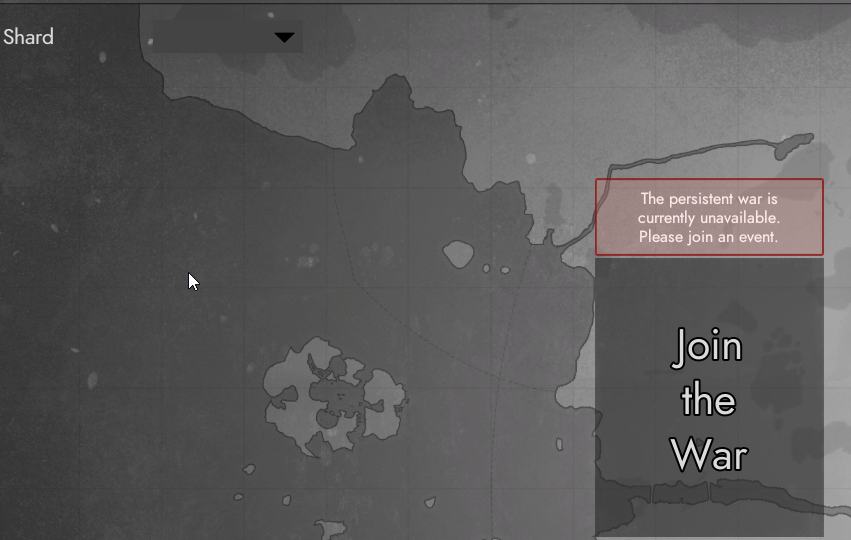


Literally just started today
So far I have: Restarted steam, computer and router. re-installed foxhole twice. Opened 443 on PC firewall, and router port forwarding.
Any help would be greatly appreciated.
sly mortar
Uninstall the game through steam
celest aurora
I have, no change.
sly mortar
Then go to Appdata, and Appdata/local, and delete any file which has Clapfoot or Foxhole in the name
Then restart your PC
And then reinstall
celest aurora
@sly mortar No change at all.
celest aurora
I have my router set up with both of those dns options in it.
If it couldn't connect on one, it would side step to open dns
Failed to download shad info Error: 1 - Anybody else have any ideas?
 nimble mauve
What seems to be the problem
blissful sequoia
devs wont share connect details with us, so we dont have much to test with. if you already did the DNS then check your clocks, and if those are right maybe file a bug report
gritty token
Well, then lets see how this goes lol
blissful sequoia
i asked nooba for a test DNS but he says it was unrelated to vivox so ... he didnt
gritty token
DNS is huge lol
blissful sequoia
because this hasnt been a problem for like 6 months, right?
gritty token
It is the reason voicechat works
Yeahhhhh but we have been getting a larger influx recently
blissful sequoia
well he meant the vivox dns is different than the server list on aws/ec2
but he didnt share either
so that was a big fat nothing
blissful sequoia
i figure if they are using S3 or EC2, they can give us a test DNS in the same region
and the dns servers might treat them similar, for the purpose of our testing
gritty token
Well I did also find out Vivox passes VoIP traffic via TLS
blissful sequoia
but if the devs would just share the DNS with us it could save so much debug time
gritty token
Which complicated my digging
blissful sequoia
5061 then?
gritty token
Wait
Yes
I was just about to say
Maybe making sure TLS ports are open
That might be big
Instead of the standard UDP ports
or both
blissful sequoia
it hasnt helped anyone lol
gritty token
I will also say this from what i know from work. TLS fixes a lot of SIP ALG and Router compatability issues due to encrypted traffic
Well damn
sly mortar
Nobody has tried it
blissful sequoia
i think the voice problems might just be SIP + bad routers
gritty token
Ill do more investigation as the time goes on, I have been trying to break down the packets being sent from Vivox via wireshark
blissful sequoia
oh like force tls?
gritty token
Well it was what my laptop was sending back and forth to Vivox
blissful sequoia
seems like that would have to be in the foxhole code to use tls
blissful sequoia
i mean their side of the vivox library
gritty token
Fixes a lot of problems
sly mortar
No, Foxhole is using TLS VOIP
blissful sequoia
when they specify the vivox server to connect to or w/e, i have no idea how it works...
sly mortar
It's part of the Vivox connection
blissful sequoia
so it should work without any alg problems is what youre saying?
sly mortar
Nope
blissful sequoia
the alg/sip thing is a red herring?
gritty token
Idk if people are switching to UDP at any point if TLS fails.
UDP and SIP ALG = bad
gritty token
Yes but TLS is the main thing here
Not that it isnt using UDP
If TLS is off then the router inspects the packets
blissful sequoia
but its on, right?
sly mortar
By default, maybe?
blissful sequoia
do you think it falls back to unencrypted when 5061 is closed?
gritty token
Yes TLS from what I gathered is on for me
sly mortar
TLS should be on
sly mortar
But if it isn't, I don't know what it would default to
Wouldn't surprise me if Vivox didn't allow unencrypted packets
blissful sequoia
wonder if there is SIP details we could test...
gritty token
UDP would be standard for VoIP
blissful sequoia
like with another sip application
blissful sequoia
if the devs gave them to us, and we had somebody with the problem repeat it in another SIP application
gritty token
If i could read the Sip messages from peoples comptuer to vivox i would fix soooo much shit
I dont think so
sly mortar
Because TLS is the new version of SSL effectively
blissful sequoia
SSL broken and compromised but hey, lots of web servers still using it
sly mortar
Well duh
gritty token
SSL is ancient
sly mortar
Webservers and "staying updated" don't normally go in the same sentence
blissful sequoia
im definitely older than SSL lol
gritty token
Im older than TLS ;D
So what I am going to try to do is find a way to break down the Packets from Vivox and see if i can find anything useful for troubleshooting
Of course I have no means to break encryption or just don't feel like trying.
celest aurora
So, nothing else to go on to fix this failed to download shard errror 1?
gritty token
Sorry we were discussing a pressing matter D:
Let me read up and see what I can offer
sly mortar
What do you see here? https://s3.amazonaws.com/clapfoot-test-bucket/test.json
Just as a test?
This might not work anymore, but it also might
So..
gritty token
They probably closed the HTTP port for it.
But]
Since it doesn't seem related to the game at this point because you followed the deleting the cached files in the foxhole directory then it must be network related
Are you in a dorm or anywhere with supplied internet
sly mortar
I still have access to that file
celest aurora
I own the line to the house.
gritty token
What is your ISP?
celest aurora
orange home
sly mortar
Who?
celest aurora
uk#
sly mortar
Ah
celest aurora
google and open dns
sly mortar
But wait, the test bucket isn't loading.. so uh.. DNS is my guess
gritty token
One thing I may reccomend with DNS change is applying it the router
celest aurora
I did the router first
celest aurora
I thought router always takes precedent.
gritty token
Yes it does
It will ignore what you applied to the IPV4 properties in windows
With DNS it is the highest upstream device has priority for setting DNS
This just started happening right?
celest aurora
Today
gritty token
Also Windows 10?
celest aurora
Yes
gritty token
Do you have anti-virus?
sly mortar
Windows defender... hmm...
celest aurora
Yeah, I've got all that on my router rules
gritty token
Do you as well in windows defender?
In the case of ports blocked its the furthest down stream device
celest aurora
I haven't activly checked it. But I haven't made any changes or updates within the last 24 hours.
gritty token
May be worth trying
Actually
Those URLs
Run a CMD prompt ping test and see if any come back without resolving their Public IP
As well as the windows defender thing
but i gtg, i am at work and have slacked off enough lol
celest aurora
akamaihd.net doesn't find host
gritty token
@sly mortar , can you try to help him, i have to go D:
Let me check that
Interesting
I just pinged it from my work computer and it resolved the IP 88.221.214.57
sly mortar
Okay...
Does your ISP offer a DNS service?
Or are you forced to use google / opendns?
gritty token
He changed it to google / open dns
celest aurora
i can ping that IP and it works
blissful sequoia
@sly mortar the test bucket is still up?!
sly mortar
Yes
gritty token
God no i gotta go D:
blissful sequoia
i thought he took it down
gritty token
I can't