#technical-chat
4 messages · Page 13 of 1
 blissful sequoia
blissful sequoia
blissful sequoia
@wheat latch any theories why he would be able to load a skirmish but not the war?
he was able to join the FCL server
 wheat latch
yeah shard info is hosted on amazon s3. if he can't reach that then his client will only let him join event servers
blissful sequoia
oh those fcl servers dont use shard info?
 valid schooner
It's not the same
wheat latch
russia was blocking s3 at some point, but it should be ok now. so not sure why he's not able to retrieve it
 vital elm
but ping is ok with amazon s3
blissful sequoia
is the s3 connection https or http?
blissful sequoia
is your date set right, allander?
vital elm
on PC?
blissful sequoia
yep, that can affect SSL certificate verification
wheat latch
oh good point
vital elm
sure it's ok
valid schooner
Where are you from Allander?
vital elm
Russia.)
valid schooner
Gotcha
blissful sequoia
dunno if you can share the exact shard file link with him nooba, maybe he could test it in his browser and see if he can get it
wheat latch
your time zone is set correctly?
vital elm
yes
valid schooner
If he can get to Amazon, theoretically he's good to go.
vital elm
auto synchro in windows)
blissful sequoia
yea theoretically if he can see an https://s3.amazon.com/ link then he'd be able to get it...
blissful sequoia
I've seen some nutty DNS hijackers before though, some only hijack the DNS sometimes
vital elm
https://s3.amazon.com/ - doesnt open in browser
blissful sequoia
yea it would need more to the link, Allander
valid schooner
It shouldnt
vital elm
ok
blissful sequoia
theres nothing at https://s3.amazon.com/, it's a file hosting service so they dont have a home page
valid schooner
Are you wired or wireless currently?
vital elm
wired
valid schooner
How many other devices are in your network?
vital elm
1 router = 1 pc wired + 2 iphones + 1 android pad
valid schooner
Okay darn. Was going to suggest trying another machine to isolate your computer or not.
blissful sequoia
yea that's an interesting idea
vital elm
hm
valid schooner
Tough call
vital elm
I'll try on laptop tomorrow
valid schooner
Great idea. Just to see if you can see anything different
vital elm
though I can try it now
valid schooner
Then we will know if it's your network or your computer and go from there.
blissful sequoia
Laptop doesn't also have Avast does it? Could theoretically be the same issue on both machines if they're configured the same, but if one works it would be helpful
valid schooner
Well we would still isolate the possibilities regatdless.
vital elm
but I can delete it
vital elm
k
valid schooner
Leave it until you try
blissful sequoia
If they both fail with the same error, it won't help narrow down network vs computer then. But if it works it woul eliminate your router from being a problem
valid schooner
Troubleshooting is like a check list to hone in on where the problem lies.
wheat latch
@vital elm can you see this file? https://s3.amazonaws.com/clapfoot-test-bucket/test.json
valid schooner
I dont know why I'm here. I left community helper days ago LOL
vital elm
{
"title": "test",
"test1": false
}
valid schooner
Ooooooo
blissful sequoia
Hmm ... really didn't expect that to work for him lol
vital elm
^_^
wheat latch
yeah that's really weird.. hm
blissful sequoia
it's a green lock on the page and everything? no red https warnings?
valid schooner
Would that confirm its past your demarcation point Nooba? 😂
vital elm
no, everything is ok
wheat latch
@vital elm and the game never worked for you correct? this isn't a new issue
vital elm
I never tried it before
I've bought it long time ago but tried to play today with my friend
vital elm
in Russia too
valid schooner
Cool
blissful sequoia
Could it be the steam destination ports then... could try telnet to test those perhaps
vital elm
1750 km away from me
 dim salmon
@vital elm Which region of country you are?
vital elm
I've changed in steam to moscow - no
valid schooner
Russia
vital elm
Yekaterinburg
valid schooner
Oh rip
dim salmon
Hmm
vital elm
Urals
valid schooner
Thanks allander
vital elm
)))
wheat latch
is your friend from same region? is he able to play?
vital elm
another region but his playing right now
dim salmon
@vital elm Where is friend from?
vital elm
Moscow
valid schooner
Once you load it up on your laptop we will at least confirm if it's your computer or not.
wheat latch
are you able to test by connecting through phone tether internet? just to see?
vital elm
I'll try it on laptop
valid schooner
Try it normal first
vital elm
sec
valid schooner
Just to make sure
 vale aurora
This is what good tech support looks like
valid schooner
LOL I'm putting in a ticket for it at work.
dim salmon
RU/ENG support, lmao
valid schooner
Have you tried laptop?
vital elm
not yet - downloading
dim salmon
Ты используешь Wi-fI?
wheat latch
ok let me us know.
valid schooner
Okay so it could be that software maybe or something bigger
vital elm
ПК без вайфая, подключил проводом к телефону, инет проводной вырубил - остался только через телефон. Нифига.
dim salmon
🤔
valid schooner
If none of this trying works, I'd say try getting rid of that anti virus software on one of them to see if it changes.
dim salmon
Мб в проводном и проблема?
valid schooner
Prob wont but, gotta know for sure
dim salmon
Если не отображаются новости, значит проблема с подключением
Возможно, что интернет не оплачен?
vital elm
@dim salmon The Ninja CH погоди, на ноутбук еще качается (туда через вафлю), на стационаре только провод есть, но я его отключил и воткнул через телефон.
valid schooner
Lol I'd assume he paid for his internet lol
dim salmon
Hmmm
vital elm
even the gym is paid))
dim salmon
Try to change IP somehow
valid schooner
It's your pc
vital elm
damn...
valid schooner
Sad day
But at least we know where to go from here
Kind of
They both are running the same software?
Anti virus firewall
wheat latch
try backing up your hosts file and try with clean one
do you have windows firewall active? it might allow chrome but not allow foxhole
vital elm
hosts
valid schooner
Unfortunately I have irl work tech support to attend to. I'll be back
vital elm
I've deleted everything and it's worked...
valid schooner
Its working?
wheat latch
so it works now? that's good
vital elm
this is "pizdets, nahuy, bleat" (c) Elizabeth Olsen
vital elm
@dim salmon The Ninja CH да, появились новости, появился список шардов
wheat latch
ok great! have fun!
valid schooner
@vital elm HAPPY BIRTHDAY!!!!! And have fun brethren!! 
blissful sequoia
so it was the hosts file?
 inner basin
Woohooo!
 vivid pulsar
No worries. Best of luck to your journey to Lt!
 trim flower
salute
 granite lake
Border Weathered / Endless D1, jumped with 2 more half-trucks, mine is falling to abyss
inner basin
Post this to #bug-reports @granite lake
 rugged narwhal
what's your resolution set to?
 hollow sun
Foxhole is not registering my mic pls help
I've been trying to turn on and off the voice chat, reset defaults, etc
not helping
 sly mortar
@cloud arrow Go to Go to C:\Users\YOURUSERNAME\AppData\Local\Foxhole\Saved\Config\WindowsNoEditor
Open GameUserSettings.ini
Change the resolution sizes so they look like this ResolutionSizeX=1920 ResolutionSizeY=1080 LastUserConfirmedResolutionSizeX=1920 LastUserConfirmedResolutionSizeY=1080 PreferredFullscreenMode=0 AudioQualityLevel=0 FrameRateLimit=0.000000 DesiredScreenWidth=1920 DesiredScreenHeight=1080
hollow sun
@sly mortar any info for my problem?
sly mortar
uuh
hollow sun
And I also can't hear anyone's voice chats
sly mortar
Check your windows defaults
rugged narwhal
Voice chat disconnects you sometimes. Only way to fix it is by relogging or changing regions. You can lose voice chat if your internet blips for a moment
and sometimes relogging/changing regions doesn't always fix it :/
hollow sun
Not that
it's just not registering at all
Im holding down the vc button but there's no vc icon on my head and I also can't hear other ppl's vc. Everything in the game is set to default and voice options all on
can anyone help me at all?
I just tried reinstalling the game. still doesnt work
hollow sun
This is the most helpful technical chat I've ever seen :P
sly mortar
The voice errors are difficult
Because of Vivox
They provide almost no documentation or error support for their services
 young hare
Keeps saying lost connecting to the server try again
Same issue as Gal
Only recently happening, haven't updated or changed anything
Meh seems like it was a steam issue
restarted steam and everything worked
@hot wadi maybe try the same thing?
sly mortar
@hot wadi Check the "Troubleshooting Network Related Issues" pin
 hot wadi
will do thanks
 violet schooner
I have accidentally disconnected my mic and now its not working. I fixed it last time but I forgot how >.<
help
violet schooner
they are active
Its not recording tho
thats kind of the problem. its active and everything its just not recording
young hare
You using windows?
violet schooner
yeah
valid schooner
so in the recording tab, your mic doesn't show activity?
young hare
Just open it and test if its recording outside of foxhole
violet schooner
its not working all over the board. discord, windows, any other VOIP
young hare
Hij
violet schooner
yeah sunchips
young hare
rth
violet schooner
yep
valid schooner
have you rebooted?
violet schooner
nope
valid schooner
id try that after everything is plugged in and made sure all was active and set to default, ive blue screened when i unplugged my mics audio interface
if reboot doesnt help we go from there
violet schooner
but but
valid schooner
But unplugging can confuse it
violet schooner
I dont want to rebooot
valid schooner
^
violet schooner
I didnt have to with my old headset
valid schooner
well, sometimes it doesnt always react the same
youre in a different world now
welcome to the future
where you need to reboot everytime the computer breaks lulz
if reboot doesnt work, you can personally yell at me
valid schooner
something tells me yuo dont have ssd and you're dreading how long it takes to boot
And he is back online
patiently waits
valid schooner
walks out of the room
valid schooner
peeks back into the room, looks around, shakes head and walks back out
 valid schooner
Lemme buy and install an ssd 4 u
violet schooner
❤
while youre at it, I have around 1tb of shit on my PC that I dont even know exists
violet schooner
are you prepared to ship overseas?
valid schooner
fuck to the yes
violet schooner
as much as I appreciate it. I think I am going to pass >.<
valid schooner
I love you. And best believe you know i'm serious. Lemme know if you change your mind love.
violet schooner
I love you too but it aint full right to have someone buy me an SSD and have him send it overseas >.<
valid schooner
We all live on the same rock. You're my brethren, my neighbor. Money is temporary, family is forever.
violet schooner
I love you
inner basin
@hollow sun
using windows 10, go to privacy -> Microphone -> allow apps to use your microphone. courtesy of @Africandave#5602
inner basin
No Foxhole logo?
valid schooner
I do not either, but do not have issues
 desert river
does it work in other applications?
 vapid verge
yup... it's only in foxhole
inner basin
@vapid verge Hey there! If you're running Windows 10, try going to Settings, then Privacy -> Microphone -> and allow Foxhole to use your microphone
 cosmic elk
hmm
this
valid schooner
Skan 4 vyruses
inner basin
Lmao those textures ain't loading
@cosmic elk Try verifying your files, there might be a texture missing

 gusty jasper
<@&282920218462912512> Yo dudes, got a guy who can't see any servers. Do we know of a fix?
dim salmon
@gusty jasper where is he from?
gusty jasper
Not sure... not anywhere that speaks English as their primary language I don't think 😅
Let me find out
Turkey @dim salmon
Nope, Cyprus
gusty jasper
👌
 sour ridge
@gusty jasper or that his antivirus doesn’t block the connection
 gleaming hull
ı can join to game fastly mode, but when ever ı search game server list, game can not be found.
ı closed antivirus shield and ı get off to pc's firewall so ı restarted to my pc and problem is not solving.
ı dont think about my vpn ı tried that different ways 😄 so what should ı do ?
someone help guys this is important
 proud dagger
<@&282920218462912512> if ye folks can help or @proud schooner to help this guy , would be appreciated
 merry tangle
Berk you can try verifying integrity of the files. if that doesn't work it's probably about your ports
inner basin
Please do not Browse Servers. Instead, Join the War
merry tangle
It's turkish mate we have a letter "ı"
inner basin
Browse Servers are a thing of the past 😄
gleaming hull
ı fix the game but still continues
inner basin
Ah, thanks for the insight @merry tangle
@gleaming hull are you clicking Join the War?
inner basin
uhh 👍
merry tangle
Önemli değil 😃
proud dagger
yeah blade let walerion deal with this for now
gleaming hull
lan olum ingilizcem çok iyi değil
merry tangle
I got this covered Blade! 🍻
gleaming hull
niye demediniz 😄
merry tangle
Yeni baktım bende ondan daha önce yazamadım
Join War yapınca oyuna bağlanabiliyor musun?
merry tangle
O zaman tamamdır 👍
merry tangle
Server listesi sadece özel eventler olduğunda açılıyor
gleaming hull
he anladım aga
steamden ekleşelim
oyun arkadaşı lazım bana
sorun olmaz değil mi
?
merry tangle
Olmaz tabii ekleyebilirsin Discord profilimde ekli steam'im
İyi Eğlenceler
Problem Solved! 🍻
proud dagger
well that was fast
proud dagger
yeah seems like it
 wooden basalt
 prisma kayak
Where is the template for bug report
vale aurora
@prisma kayak Pinned messages in #bug-reports
 lament flume
I cant hear local voice chat... i dont know how to restart the game
proud dagger
@lament flume try logging out and log back in again
lament flume
i did that, nothing happened
proud dagger
hmm
exit the game entirely?
does it show any error when u try speaking?
are u able to speak but cannot hear others?
lament flume
i cannot hear others
merry tangle
Hmm
If it's not a hardware problem (I assume you can hear youtube videos and such), Logging off and logging in usually solves it.
 light mesa
I’ve gotten multiple reports of this, it seems to fix itself after a bit of time
merry tangle
Did you check the settings in-game?
lament flume
i checked the settings, everything seems normal
light mesa
Unfortunately I don’t know of any other fix
lament flume
and its not hardware since i hear youtube vids
also i doesn't say local voice error but i can't hear others
merry tangle
Do you have a chance to try another device for audio?
By the way is it only for vocal communication or does it includes in game ambiance sounds too?
lament flume
its only local voice chat and operations, the game itself is fine
merry tangle
Oh it might be related to your ports then
lament flume
hmmmmm
merry tangle
Article "Required Ports for Steam"
I know the article might be too technical but I am also a newb when it comes down to ports
lament flume
Me too, im a newb in port too :3
merry tangle
We might need @proud schooner the magician here
 marble rivet
Nvm, fuck what was it
lament flume
I put my output to speakers and put steam to run as administrator, turns out it worked, i can hear local voice chat and ops, IM NOT DEAF AGAIN!!!
 thorn rover
👏
marble rivet
Oh volume
 tight ice
Hey there, has anyone run into an issue where their client will crash on trying to join the war? I get a message that says Out of memory trying to allocate a texture! But it doesn't happen all the time. Sometimes its follow immediately by a bluescreen, though.
sly mortar
@lament flume You have to allow foxhole access to your speakers. Running steam as admin does that in a around about way
@tight ice Could you run dxdiag? And then post an image of the "Display 1" tab
light mesa
@tight ice open Foxhole in a window and have task manager open, you should be able to see what’s going on with your RAM
sly mortar
@light mesa I don't think it's RAM, I think it's VRAM
valid schooner
@tight ice What kind of video card, GPU, or Graphics Processor do you have on your computer?
tight ice
Nvidia GTX 970M, I can try the other suggestions in a sec
Interestingly when it did bluescreen both the Nvidia and integrated gpu suddenly dropped to 0% before the error
valid schooner
Have you ensure the drivers are up to date on that badboy?
And do you know how much memory that card has?
tight ice
I can check when I get home
valid schooner
Sweetness let me know, we will figure it out.
 regal wyvern
someone can help me with team switch mid-game? I've played yesterday in colonials, but my friends choose wardens today. It could be very pleasing to accompany them in battle. Is there a chance?
 blazing prairie
I don't think you can switch mid game.
inner basin
Hey there @regal wyvern , you can request a faction switch by DMing @coarse trail . First, locate the related pinned message in #344873396850655235 to find out how to faction switch, then DM the bot.
Keep in mind, if you have played on one side for some time, they may not let you join the other team. This is to prevent spies and griefing.
tight ice
I think the issue might've resolved itself but I'll ping you if it happens again.
hollow sun
Same case, can't use vc and can't hear other's local vc
no fix?
it's been 2 weeks for me already
re-installing the game does not work
blissful sequoia
did you set your mic to the right device in the audio settings? did you run steam as administrator?
itse been a common problem
hollow sun
yes
but it should not have been a problem with my hearing
the game sounds is fine
every sounds is fine
I just can't hear nor use the vc
that's all
blissful sequoia
yea i know the VC sound is a different setting
some people dont use the same speakers for voice chat as game sound, so its an option you can switch
i couldnt hear anyone when i started on this patch either, but just changing the voice chat options under the sound fixed it for me
 stiff dagger
I am having problems join the current WC
I have not suffered this problem ever before, playing other online game (War Thunder and CoH2) I am not suffering any connection problems
I can connect to the Home Island with relative ease but when I attempt to join the WC I am unable to join
t will kick me back to the title screen saying server timed out
I have tried reinstalling the game, I have completely reset m own internet router if somehow that was causing problems
inner basin
@slate fiber Please use the Join the War button instead of Browse Servers. Servers are a thing of the past now
 slate fiber
@inner basin ok, thanks, so there are only the war servers now adays?
So no smaller battles you can join?
valid schooner
Anything referring to the main war will be found in Join the War as Blade mentioned.
Browse servers is meant for events and other non-war related instances.
sly mortar
When I get home I’ll add that to the connection problems pin, and get a mod to re pin it
inner basin
@sly mortar Just edit it
 cloud arrow
Anyone?
vale aurora
<@&282920218462912512> This poor soul requires assistance ^ Would help. But I'm not a technical person xD
 upper crag
6-0 I believe is just a disconnected from voice so just restart game.
cloud arrow
Tried, didn't help
 rustic trail
Verify your game files @cloud arrow
cloud arrow
How to do that?
stiff dagger
not to be rude but anyone have any ideas on my problem up ^?
vale aurora
If you don't get an answer, remember you can ping the community helpers for assistance. Some of them may be able to help or point out someone who can
 sacred crown
@cloud arrow right click the game's name in your steam library open properties, there should be a button called verify game files. Press that
@stiff dagger seems like a server connection issue. I am not familar with those, Maybe @wheat latch can help?
In the mean time, are your drivers all up to date?
Are you using any vpns or working through anything that can block certain network connections?
wheat latch
@stiff dagger do you have a firewall? Try turning it off temporarily
Were you ever able to connect?
light mesa
@cloud arrow is your voice chat working or not? We’ve gotten multiple reports of voice chat not working, if we could associate that with an error code that would really help
stiff dagger
@wheat latch yes I was occasionally but after 10-20 mins my game would get high ping and kick me off, I would not be able to rejoin after that, or at least for the WC, I would be able to connect to the home island but it would be laggy for me
wheat latch
@stiff dagger what's your ping to North America? Say somewhere like Chicago?
Can you also do a packet drop test
stiff dagger
On phone atm
But my normal ping is anywhere from 50 to 140 , it tends to jump around a bit
For US servers anyway
light mesa
Try Speedtest.net as well
 wide orbit
@stiff dagger Does restarting your computer fix the issue? I had a similar problem and was able to resolve it, might be able to help
stiff dagger
Unfortunately not as this has been a problem since the start of last war, but never had a problem before that, like I doubt it was the update but thats when it started happening
sly mortar
@stiff dagger Have you tried the stuff on the Troubleshooting Network-Related Issues pin?
wide orbit
My issue was related to my ethernet card. Foxhole was the only game that would lagg like this and everything else internet related worked fine. Replacing my ethernet card made the game magically work again
It was cheap too @ 50 bucks. I'm not saying this is for sure your problem but that fixed it for me
cloud arrow
Are the game servers down atm?
Well, that's odd.. now I got into game but after playing like 5minutes it gave me a fatal error and closed the game
 atomic cipher
11 fatals now
atomic cipher
I am getting a fatal error every 5 mins or so
wheat latch
I think we're pushing out a fix for that by tomorrow morning
@atomic cipher we just pushed a new fix. Please verify local files to trigger update.
atomic cipher
Thank you been working well since update!
 fleet schooner
My voice channel just broke it said error I tried lock off and on again but it still silent
sly mortar
@fleet schooner Which error?
fleet schooner
I cant remember sorry
fleet schooner
ok I try exit game then open it up and it seem to work Thnka for the tip though
cloud arrow
Voice chat error 2-5003 and now 2-5044..
inner basin
@cloud arrow Does it result in you not being able to voice chat? If so, try restarting Foxhole first. If that does not solve it, then verify your game files through Steam.
inner basin
Many errors with the new VIVOX voice engine...
Unfortunately I do not know many workarounds for this problem, short of restarting your computer, or re-connecting your mic back in
cloud arrow
Had the same issue last week, verifying helped.. I'll try restarting
 hollow burrow
hey is the server down or something?
inner basin
No why? @hollow burrow
inner basin
What does the error message say exactly?
hollow burrow
huh?
cant take screnshots too apparantley
i tried joining an hour ago too had the same problem
inner basin
It doesn't let you join the Home Regions?
Huh
Try the steps listed in the pinned messages of this channel then
hollow burrow
restarting steam seems to have helped
 terse flume
when I start the game I am faced whit this on my screen. I have not been able to play the game for 5 months
 inner basin
Have you attempted the steps in the pinned messages of this channel? @terse flume
Also, look in the top left corner of the game menu. It should say Shard: Live. What does yours say?
terse flume
hold up

it does not say anything, and when I click it up, it does not show live
and I do not think I followed the pin message
a it was my fire wall thank you
terse flume
Hi im having a problem with getting stuck in a loop installing windows visual c+++ 2015
I open the game it tells me to install it and a UE4 installer installs it.
I close that window open the game again only for it to tell me that i need to install this, where in the UE4 installer now uninstalls it.
inner basin
<@&282920218462912512> can somebody give this guy the link to the FAQ on the foxhole website, it has a solution for this problem but I'm kinda busy rn
light mesa
Foxhole - Persistent War MMO
Foxhole is a massively multiplayer game where you will work with hundreds of players to shape the outcome of a persistent online war.
inner basin
@terse flume
sly mortar
@inner basin I also stuck that one in the pinned messages FYI
 frail schooner
can anyone help me on this? I have DX 11 installed
sly mortar
ALRIGHT, so, first of all, try verifying your files through steam
frail schooner
I did that. I installed all windows updates as some hits from google suggested
i tried bunch of launch options
2 tbh
sly mortar
Alright, one of the pins in the channel is called Microsoft Visual C++ 2015 or DirectX runtime are missing. Possibly try those things
frail schooner
thanks for the reply. But unfortunately it did not help
If it gives any insight this is my current gpu NVIDIA GeForce 7025 / NVIDIA nForce 630a. While i was not sure that it even runs dx11 i checked and it says that it does. This gpu is only temporal solution after the great IT crisis of 2018
blissful sequoia
the geforce 7025 only has directx 9.0 features, even if you have 11 installed
thats a really old card, onboard video might be (probably is) better heh
sly mortar
@frail schooner Then I would try updating your graphics drivers, if that doesn't work, see if your CPU has integrated graphics which will run the game. If neither of those things work you're probably going to need to get a new card
frail schooner
yea i figured i need a better one
blissful sequoia
even a powerful card from that era wouldnt be capable
the good news is you can find a better one really easily and inexpensively, shouldnt be hard to find something better than that
hopefully newer than 2006...
sly mortar
I'm guessing you could get DX11 to run on your GPU, I managed to get it to run on an ~10 year old laptop, but it was very janky and ran like a one legged bunny
blissful sequoia
he already has directx 11, but the card will not support shader features beyond dx9 no matter what you do
blissful sequoia
no it cant
im fairly certain of this
it just does not have the hardware to do the integrated shader model, no matter what software drivers you use
sly mortar
Eh
blissful sequoia
there was a big transition from dx9 to 10, i remember it like it was yesterday...
inner basin
flashbacks
 wet cave
hey there
im having an issue
basically ill get on foxhole
and there's no games
and war is unavailable
any help?
light mesa
@wet cave Screenshot?
blissful sequoia
join the conquest - dont use the events list
sly mortar
@tranquil forge Just had a massive crashout for a lot of people
 tranquil forge
@sly mortar yea we noticed. Any details about the crash?
 lavish mango
Said something about Unreal Engine
 main moss
^
vale aurora
Guess Unreal Engine decided to crash to get a break
tranquil forge
please send crash dumps to foxhole@clapfootgames.com
sly mortar
Do you want dxdiag as well?
tranquil forge
no. just crash dumps thanks
sly mortar
C:\Users\USERNAME\AppData\Local\Foxhole\Saved\Crashes
thorn rover
How to access crash dumps; C:\Users\USERNAME\AppData\Local\Foxhole\Saved\Crashes
@sly mortar Your work is appreciated
sly mortar
that's already pinned like 4 times
thorn rover
Needs more pins
sly mortar
it's also formatted really shittily
thorn rover
Ha
sly mortar
Hmm, I'll fix it
 floral herald
Do you guys need the xml
thorn rover
Just the crash dumps
sly mortar
I believe they want the folder
floral herald
Okay, the folder, got it
tranquil forge
For anyone who just experienced a crash, please follow these instructions to send su your crash information. It will help us track down the issue https://steamcommunity.com/app/505460/discussions/1/1470840994975712881/
thorn rover
floral herald
Done and done
 jovial lake
What the fuck is voice chat error 6-0
IT has happened twice now and it happens on a dime
For literally no reason
thorn rover
Yeah the new voice chat has been buggy, just re-launch the game or verify the game files
jovial lake
;;;;----;;;;
I was literally in the middle of talking and having a fun time with some guys and it just cuts out
The old system had more bugs but never just stopped working
Worst that happened was the fast talking whenever there was server lag
light mesa
If it means anything, I’ve had some people that have this problem tell me they get the 6-0 error and others don’t
rustic trail
I've had issues with It tbh but restarting always seems to fix it as a last resort
terse flume
i cant talk or hear and my voice chat isnt disabled
plz help i hear my friends i in discord but no one in game
i can hear the game volume tho
dim salmon
@terse flume i can only suggest you to reboot client
blissful sequoia
change your voice sound input and output in the settings
you probably have the wrong sound device selected for them
vivid pulsar
@terse flume Send a PM to @coarse trail. Be sure to include your Steam ID.
 languid thistleBOT
Steam Profile URL
Visit your Steam Profile and copy the URL of the page at the top;
https://i.imgur.com/uyY1Q6m.gif
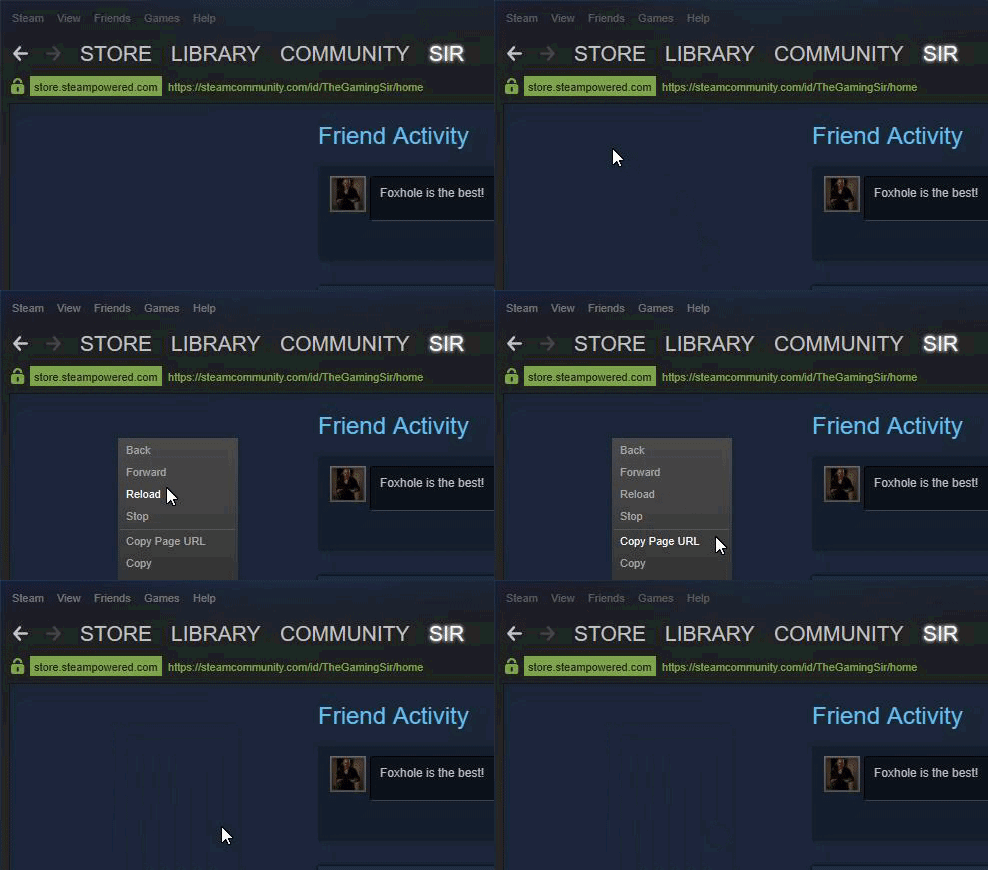
OR right-click within your Steam Profile and select "Copy page URL";
https://i.imgur.com/SwVrDll.gif
Steam64ID
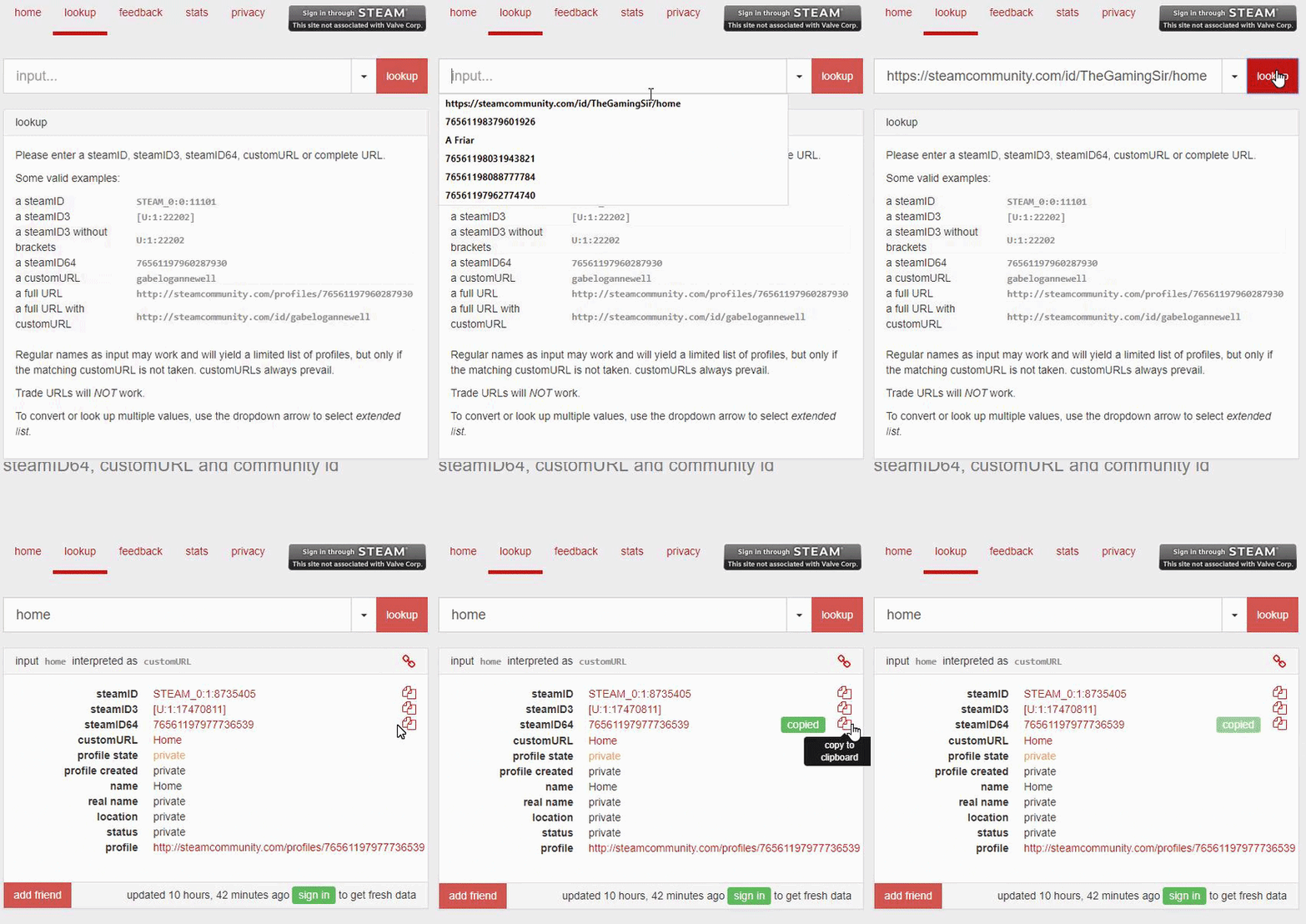
Use the Steam Profile URL to get your steamID by pasting your URL into the Lookup tool here: https://steamid.io/lookup and copy the steamID64
https://i.imgur.com/0OGXI5j.gif

 brave lotus
 tardy elm
is anyone else having connection issues?
 versed gull
not on
terse flume
No not really
 fickle slate
is anybody else experiencing "Voice chat Error 6-0"?
I have multiple people in game who have the same problem, yet conventional methods seems to bring no solution
sly mortar
@fickle slate restarting the game normally fixes that
fickle slate
I have indeed restarted the game multiple times, yet it does not fix it
sly mortar
Then try restarting steam, and running it as administrator
sly mortar
Try restarting your pc then, and if that doesn’t work try allowing foxhole specifically to use your mic
fickle slate
Ok
fickle slate
@sly mortar Thanks for all the help, problem is fixed now, it was my antivirus blocking voice channels apparently
sly mortar
@fickle slate yeah, the new voice engine is... fun.. to troubleshoot
fickle slate
@sly mortar That's one way of putting it haha
sly mortar
@terse flume Try running steam in administrator mode, and if that doesn't work
- make sure your antivirus isn't fucking with your mic
- Make sure Foxhole is allowed to use your mic in windows settings
 serene dust
got a mate playing first time,every time he tries to laod between zones the server refuses him, any known fix/.
 grizzled lily
Cant hear anybody in voice chat and nobody hear me. (Steam as admin, Foxhole as admin, antivirus is disabled, lots of reboot)
 dense nest
@tranquil forge And can somebody explain why collies have more men , tanks field arty , are still able to climb on top of factories ?
wtf is this BS
while we have no FA and no tanks
cuz i have a really hard time explaining to my ppl why should we even play
 torn ravine
Anyone find a fix for this voice error 60 crap? Rebooted multiple times. Antivirus off. Reset my playback and recording devices. It was working fine last night but I can't get voice to work at all now
dense nest
Its down for everybody
torn ravine
I found a small fix maybe. I turned on a playback and recording device I don't use and just used the one I intended
Ok nevermind it broke again. Its hit or miss with above method
sly mortar
@torn ravine Vivox itself may be having trouble right now
 crystal wraith
@tranquil forge Can the dev explain why half the structure can be climb on the colonial side and not on the warden side?
sly mortar
Please make sure you specify a specific location you believe to be broken, and forward it to @hot oak @crystal wraith
terse flume
Help me my pc ran into problems and needs to restart after that automatic repair opens up and it cant fix it.
Its some kermel boot trap
 ivory python
Reported this a few months back, but I hoped with patches etc it'd fix. My setting's don't persist between sessions and it's really annoying, is this a known thing?
terse flume
Hi im having a problem with getting stuck in a loop installing windows visual c+++ 2015
I open the game it tells me to install it and a UE4 installer installs it.
I close that window open the game again only for it to tell me that i need to install this, where in the UE4 installer now uninstalls it.
I got help for this once with being linked to the FAQ which doesnt at all bring this up.
proud dagger
@terse flume try checking pinned messages
And try the solutions there
If it still does not work
Ping <@&282920218462912512>
rustic trail
OWO
merry tangle
Pong
terse flume
Yeah still not working i tried all of the solutions.
proud dagger
@proud schooner u there?
 proud schooner
@terse flume Hey mate - could you grab a few screenshots showing the process/error?
?tags how2
languid thistleBOT
Tags
how2factionunlock, how2steamid, how2pushtomute, how2systeminfo, how2contactmods, how2clanrecruitment, how2techsupport, how2bugreport, how2suggest
Use "?tag name" to show a tag
proud schooner
?tag how2systeminfo
languid thistleBOT
Your System's Info
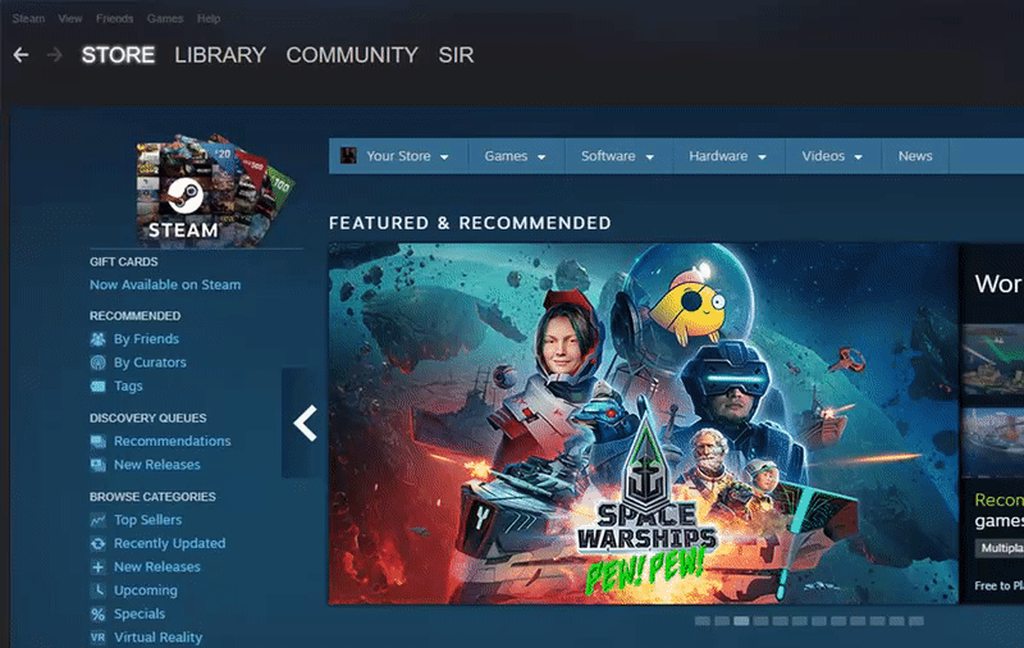
Within the Steam client: Help > System Information
Right-click and select "Copy all text to clipboard" and paste it wherever you need to share it. This is likely greater than 2,000 characters, so you may need to break it up into two or three messages for Discord.
You can also select specifically what you would like to share and right-click, select "Copy" to get only a small piece of information.
 proud schooner
And could you grab your system info with this (particularly what Windows you're using)
(And I apologize if I don't respond right away, currently out)
terse flume
Ah
Computer Information:
Manufacturer: ASUSTeK COMPUTER INC.
Model: G20BM
Form Factor: Desktop
No Touch Input Detected
Processor Information:
CPU Vendor: AuthenticAMD
CPU Brand: AMD FX(tm)-770K Quad Core Processor
CPU Family: 0x15
CPU Model: 0x30
CPU Stepping: 0x1
CPU Type: 0x0
Speed: 3491 Mhz
4 logical processors
2 physical processors
HyperThreading: Supported
FCMOV: Supported
SSE2: Supported
SSE3: Supported
SSSE3: Supported
SSE4a: Supported
SSE41: Supported
SSE42: Supported
AES: Supported
AVX: Supported
CMPXCHG16B: Supported
LAHF/SAHF: Supported
PrefetchW: Unsupported
Operating System Version:
Windows 8.1 (64 bit)
NTFS: Supported
Crypto Provider Codes: Supported 311 0x0 0x0 0x0
Video Card:
Driver: AMD Radeon (TM) R9 200 Series
DirectX Driver Name: aticfx32.dll
Driver Version: 22.19.162.4
DirectX Driver Version: 22.19.162.4
Driver Date: 4 24 2017
OpenGL Version: 4.5
Desktop Color Depth: 32 bits per pixel
Monitor Refresh Rate: 59 Hz
DirectX Card: AMD Radeon (TM) R9 200 Series
VendorID: 0x1002
DeviceID: 0x6811
Revision Not Detected
Number of Monitors: 1
Number of Logical Video Cards: 1
No SLI or Crossfire Detected
Primary Display Resolution: 1920 x 1080
Desktop Resolution: 1920 x 1080
Primary Display Size: 20.08" x 11.42" (23.07" diag)
51.0cm x 29.0cm (58.6cm diag)
Primary Bus Type Not Detected
Primary VRAM: -2048 MB
Supported MSAA Modes: 2x 4x 8x
 dusky snow
I have a problem i can't hear other over voice chat or use voice chat myself. I didn't try operation voice chat but local doesn't work and i have no idea how to fix this
 rapid bone
whenever i try to teleport across borders/regions i keep getting server connection lost. my internet connection is stable and fine (have had no net issues with any other game or whatever) and im still connected to all my apps (like skype discord etc). im on fast net so its really frustrating to see that message over and over. what can i do??????? its only me!!!
: (
terse flume
hey i have a problem every time i load into the game i cant move
terse flume
My pc turns on after 10 seconds it restarts it goes again and again help
blissful sequoia
sounds like its trying to update and failing, id probably go into the recovery mode and roll back to previous version
atomic cipher
Constant Fatal errors...again
 drifting ocean
inquiry: does Foxhole use Amazon AWS for game infrastructure ?
 random hollow
Can´t hear anyone and mic doesn´t work inside foxhole. "Voice chat connection lost" "Error 6-0"
sly mortar
@random hollow Try verifying your files, if that doesn't work, try running steam as administrator
random hollow
still getting the error. It´s strange that the voice chat works for the first 30 seconds, then it suddenly stops working.
Errors are: 2-5045 and 6-0
 elder pecan
hi guys my problem is ''failed to find servers''. Thank you for your helps now
sly mortar
@elder pecan Please check the pinned message for Toubleshooting Network Related Issues
 proud rune
Umbral appears to be offline. Couldn't transfer inventory or interact with resource nodes. Went to home region and now get "Lost connection to Server. Please try again." when selecting Umbral
 modern loom
<@&448665379196108815>
proud rune
Heartlands also unjoinable, Westgate appears okay
 plain karma
Developers have been notified. They are investigating
 molten swan
@random hollow hey bud did you find the solution to your problem i have the same chat error wondering if you fixed it somehow
sly mortar
fucking Vivox
Uh
Try making sure your anti virus isn't blocking foxhole from accessing your mic / speakers @molten swan
proud rune
sly mortar
Lol
Wait
They're having to reboot the entire cluster
Whew
@tranquil forge Thanks for coming on such short notice!
tranquil forge
Thank you guys for reporting this so quickly. Seriously, our worst nightmare is the servers going down so the fast reaction is appreciated.
We figured out the problem already and we already know how this can be prevented in the future
sly mortar
Yeah, we kinda started annoying the mod team
Trust me, FOD can produce enough salt to get your guys' attention
not sure that's a good thing
tranquil forge
in this case it is 🙂
sly mortar

random hollow
@molten swan No bud. Still getting the error 😦
blissful sequoia
hopefully same problem as mooring last night
grizzled lily
Voice Chat Error 3-5029 and 6-0 - cant hear anyone
dim salmon
@grizzled lily Reboot client
 grizzled nymph
WHY is VC down 😭
 night wasp
VC is down in WE
 compact niche
I got kicked twice times in minutes
Kick mean lost conenction
Probably because of streaming at same times
dim salmon
@compact niche Try to ask someone who is streamer too, maybe they will find out what is the problem
 twilit wigeon
there ever going to be a tech support role?
dim salmon
@twilit wigeon Nice idea tho
twilit wigeon
it would be easier to assist people with issues
dim salmon
@twilit wigeon anyway, CH role imply it, but there's not many ppl who's good in tech assistant
twilit wigeon
Community helper doesn't imply they can help with technical issues. If i was to look at the role of a community helper from a professional standpoint, I would assume they're there to assist with general questions about the game or community.
 wintry trench
Is local voice working yet? Noticed yesterday only operations voice comms worked but not local
 elder sundial
 wicked rampart
Imo, the tech support role is useless. How will people know the role exists? Will we say to look at pinned messages? The steps for troubling shooting are already there. We already try our best to keep them updated ASAP.
 tired robin
twilit wigeon
tired robin
twilit wigeon
Take it elsewhere
dim salmon
@tired robin please, inform us throught the @coarse trail and we'll try to help ya
wet cave
hey, i've been trying to get into foxhole and succeeding but when i enter the menu it shows no available games
any help?
this zombie event sounds too cool to miss
dim salmon
@wet cave Don't worry, update will come in 18 hours
 sharp phoenix
WHAT THE HECK IS THIS I AM IN FIRST PERSON??
Confused?
now I knwo why this is not a first person game!
sharp phoenix
Im in the waist view
Im just in the lobby and alt tabbed back in
After doing school work.
thorn rover
Yeah this happens after the lobby resets it seems, just logging out should fix it
 brittle crater
hey gamers i cant hear other people over voicechat but i can still hear other sounds from the game
 wild ridge
Hello can you help me with switching factions. I joined false one by fault
?
I want to play with my friends
sly mortar
?tag how2factionunlock @wild ridge
languid thistleBOT
Faction Unlock
When joining a war, you will be locked to the faction you selected for the remainder of that war (until the conclusion of that Conquest). If you inadvertently select the wrong faction, you can request a Moderator to unlock your faction. Please note that this is not a guarantee a Moderator will unlock your faction, and if you do get unlocked, you will be locked to the faction you select for the remainder of the war.
To request a faction unlock, please see #344873396850655235 and provide the following:
• Username
• Faction Locked To
• Reason for Request
• Your steamID or Steam profile URL
Be sure to tag @Game Mods when making the unlock request!
Need help finding your steamID or profile URL? Use ?tag steamid for a how-to
sly mortar
?tag how2contactmods
languid thistleBOT
Reporting via Mod Mail
Do you require Moderator assistance? Please send a Direct Message to the Mod Mail bot with your issue. The Mod Mail bot (located on the members list) will relay everything with the Mod Team and they will assist you as soon as possible.
https://i.imgur.com/YlCOfCs.png
In the event that Mod Mail is down, please contact a Mod via #mod-report .
 compact niche
@sharp phoenix Remind me of playing Zelda on N64 haha
 elfin linden
I require assistance
whenever I try to talk in game I get the error message "voice chat error 6-0" its been going on for a while, it got resolved for a little bit then came back, message me if you have any questions or possible solutions, thanks.
inner basin
@elfin linden Try restarting Foxhole, if that doesn't work then the error lies in the VIVOX voice engine
elfin linden
I have uninstalled, verified the game files, and restarted my computer and still nothing
merry tangle
Hello fellas
young hare
I lag 500x more worse in Dead Harvest than normal game.
This is 99% Attributed to my absolutely terrible computer.
I do wonder what exactly makes me lag more in this mode?
Is it the high number of "things" concentrated in a small area?
I also have a weird issue when lagging where my aim locks onto two things back and forth rapidly, making firing impossible
modern loom
yeah i lag hard in dead harvest at the end of rounds when everyone is massed up at the church, it's unplayably bad
 nimble wing
i havent played foxhole in a while. cant seem to hear players voice talking. What's goin on?
elfin linden
Are you getting a voice chat error?
versed gull
@young hare Me too have bad lag than usual on my craptop. Usually it does fine on a battle but in this smaller map it lags hard.
it really comes in at the iris while avoiding the island decreases the lag
not sure if the engine is holding it that well
 queen heart
anybody fixed this ?
or this?
i can see 2 server or sometimes i can't see any server.
vivid pulsar
@queen heart Are you clicking "Join War" or "Browse Servers?"
To join, you need to select Join War instead and head on over to a travel tent, which is to the right of the Home Region Town Hall.
wicked rampart
@nimble wing Check your inputs and outputs in Voice settings in-game. Lots of people had the same issue when they came back
sacred crown
@queen heart yeah, after main menu you need to click join war.
 unreal axle
need assistance, i can not hear any local voice chat , less alone operation or team voice chat. In Option, l had enabled local voice background. The thing is, i can hear game music, game sound just fine. Just no voice chat.
sly mortar
@unreal axle first of all, go to the voice chat settings and make sure everything is correct
unreal axle
i just uninstall and reinstalled 30 mins ago m8
unreal axle
ccleaner and shioot to cleared catch all that log too
sly mortar
Make sure your anti virus isn’t blocking the program from audio
And try running steam as administrator
sly mortar
Windows defender is idiotic
Check
Windows defender is what you use if you want actual programs to be randomly blocked, and to be infected with everything
sly mortar
Yeah. Those are the only things I know to do for troubleshooting, do idk
unreal axle
where do i find check or fix fkn Vivox file
This is why i had stopped playing this game for past 2-3 months
after they put in Vivox i can not do VC anymore
can i ping devs to help me with this ? @sly mortar
unreal axle
@tranquil forge pls help
sly mortar
@unreal axle I don’t think they can fix it
I think maybe next update, but I don’t think that their systems are set up for it
 wet arrow
Hey guys i have legion y520 laptop and its an i7 gtx1050 2gb 8gb ram laptop.I havent played for a month and now when i try to join the war i get a promp saying to lower my setting(i used to play on high all the time witha good fps) or lags (with 10-20 fps all the time).Any1 can help?
 dark minnow
@queen heart did you ever find a fix? im having same issue
tried both from the tent and events from main menu
 thin urchin
Hi Team. I have got an Error several month ago, which kept me from playing foxhole since then and is somehow connected to my GPU (GeForce GTX 970M) which doesn't get along with how the Unreal Engine uses DirectX11. Its the same Error like discribed here for a different UE4-Game: https://forums.focus-home.com/topic/6715/lowlevelfatalerror). It's causes the game crashs directly when trying to start it.
- Now I did found a partly solution in the Internet. If I force Foxhole using DirectX12 by setting -DX12 as starting option, I can start it normaly and navigate in the menu. But if I want to join the war, it crashs now directly when it is finished loading the map, with following error:
https://up.picr.de/34183803bz.png
The solution, I found in the internet just says, it's an DX12 issue, so deactivate the -DX12. But I cannot do this, cause of the previous discribed error. Maybe you have another option for me?

Focus Home Interactive - Official Forums
Hey.., The UE4-SpaceHulkGame Game has crashed and will close. LowLevelFatalError [File:E:/P4ROOT/ue4/Engine/Source/Runtime/Windows/D3D11RHI/Private/D3D1 1Util.cpp] [Line:227] Result failed at E:/P4ROOT/ue4/Engine/Source/Runtime/Windows/D3D11RHI/Private/D3...
 inner basin
@thin urchin Make sure your Windows OS is updated
Also, verify the game files through Steam
thin urchin
I just checked the Win10 updates again and verified the game files.
 spice smelt
When will Mac OS support arrive?
inner basin
Probably when this game comes out of EA, my guess
They are more concerned with finishing this game I presume. I also possess no knowledge on how hard it is to provide Mac compatibility. @spice smelt
Have you tried Wine? Only heard about that from my Mac friend
sly mortar
@inner basin I don't know if they've actually said anything about planned Mac Compat, I hope they do it though
spice smelt
I think I should buy parallels for foxhole. thanks for answers
terse flume
i wanna join the event but i cant join the servers. https://gyazo.com/2576be4524f7b8366818b3d2b7d95937
 dim salmon
@terse flume try to do it through home island
terse flume
tryed, it says connection lost with server.
dim salmon
@terse flume That mean, that you might have connection issues. Try to reboot your device/router
terse flume
Will try
 clear tinsel
İs there any discount at halloween steam sale
 plucky bluff
 eternal summit
hi i play jahreintr server and my nickname iZmiRya 3-5 people from our team met the enemy and trolled the game. I killed the enemies. My team voted to kick me. 12 hours ban ....
my team is constantly voting. they don't like me
voting system makes sense, but sometimes malicious
 dreamy urchin
heloo .I've played on some servers before with no problem at all but now ı can't join the servers.when ı click to join ı am waiting a few seconds then ı saw a message 'lost connection server.Please try again' on the screen but my friends can join easly
Could you help me
 snow meteor
@dreamy urchin try restarting foxhole, if that doesnt work restart steam
 gritty delta
when i enter the game all sounds are gone what can ı do?
 raw wolf
2) Select sound
3) Click first tab
4) Check if you can see your active speakers there
5) Try setting it to default device by simply pressing on it and selecting "Make default"
6) If already set to default jump to point 8.
7) Try restarting discord app and foxhole and check if it works
Also you can try these. Maybe it'll help or maybe not.
clear tinsel
Can some help?When i have vs c++ 2015.i get this problem.it cant see my c++..when i searched on net i saw same problem on other gamer.but no any solution
same problem .on this topic https://steamcommunity.com/app/505460/discussions/1/355043117512587501/
 inner basin
@clear tinsel check the pinned message of this channel pertaining to the C++ runtime error.
thin urchin
Seems like no idea, how to go arround my issue with the DX12 ?
merry tangle
I got a guy who can see only two servers in Browse Events
It happened too many fellas from Turkey. Do any of you lovely fellas have an idea what might be the problem?
inner basin
It must be a problem connecting to Steam. I'm sure the devs use the steam servers
It is a strange problem however. Because they can see some servers, but not all
@thin urchin Hey mate, sorry about that. The error code you are getting when running with no modifications is 8876017C correct?
Something like, LowLevelFatalError...Result failed ?
thin urchin
yes that is correct
inner basin
Also, if you wouldn't mind sending me a DXdiag report, if you trust me
thin urchin
of course. How I can send it?
inner basin
I'm trying to see myself... one minute
Run dxdiag then click "save all information..." on the bottom right
DM me the .txt file then
Then I can try to see the problem...
merry tangle
So blade is the person to go when I had troubles. Noted
sly mortar
Just put it in technical chat and someone will be along to help
(Probably blade or I)
inner basin
@sly mortar is my trusty sidekick partner in support
sly mortar
@inner basin REEEEEE
 ember linden
anyone having issue with not hearing anyone in voice chat. Only the in-game sound is working
 rotund flint
@snow meteor seriously do you know or not
 dense cloak
hey guys how do i change my faction ?
terse flume
U need to contact Mod Mail for that @dense cloak
 exotic frigate
Hi am join wrong faction my friend tell me late for me his play Warden
merry tangle
@coarse trail DM this @exotic frigate
 vocal yew
cant fine Reconect option
inner basin
Your input/output devices seem weird @vocal yew
Anyway, make sure the game is updated.
to 0.18.16.3
snow meteor
know what?
violet schooner
so, my mouse wont move. its stuck on the bottom of my screen. I can left click and right click tho
ive tried replugging it
 rapid idol
did you look at the sensor?
rapid idol
hahahha
violet schooner
this was inside the sensor
violet schooner
I am in my room alone. xD
although my desk is falling a bit apart where my mouse is. probably a piece of top wood that broke lose and found its way in
the sensor was shining right through it too. I had to look twice to find it xD
rapid idol
glad you fix it 🙂
 jagged dirge
hey yeah uh
inner basin
nice work! @rapid idol
 quiet oar
i need quick help
my friends getting this error, "0xc00007b"
when he tries to launch the game
 tribal fable
@quiet oar Has he tried to verify the game cache already and do what is described within the pinned messaged?
 feral lark
dont suppose its possible to get faction switched when someones got a minute? Did a skirmish this morning as a warden forgot that would lock me into warden for the war too
sly mortar
?tag how2factionunlock @feral lark
 west islandBOT
Faction Unlock
When joining a war, you will be locked to the faction you selected for the remainder of that war (until the conclusion of that Conquest). If you inadvertently select the wrong faction, you can request a Moderator to unlock your faction. Please note that this is not a guarantee a Moderator will unlock your faction, and if you do get unlocked, you will be locked to the faction you select for the remainder of the war.
To request a faction unlock, please see #344873396850655235 and provide the following:
• Username
• Faction Locked To
• Reason for Request
• Your steamID or Steam profile URL
Be sure to tag @Game Mods when making the unlock request!
Need help finding your steamID or profile URL? Use ?tag steamid for a how-to
sly mortar
send it to modmail
 tall pendant
what is the player cap for joining map?
inner basin
@tall pendant the cap is I think 140 for the skirmish maps now
For World Conquest, the limit is determined by the player imbalance
Please ask any future questions in #386353469776330762
 storm cave
Hi, my graphic cart burn down yesterday and new will be delivery in next week.
So to do not waste weekend I turn on first time Intel graphic cart from my processor i7 7700K and these game barely work on low details. Is this integrated cart so crap or I need to install better drivers or do some magic in bios? Or this game just need better graphic card 😃
 dawn spruce
any way to fix that I can't hear voice chat?
light mesa
@dawn spruce Go to settings>voice and click reconnect
 thick fiber
Hi, I have a chat problem. Team chat and Squad chat are not visible.
sly mortar
@thick fiber Are you playing the extra life event?
thick fiber
I don't understand what you mean, but I have the same problem on the offical server and on the private server.
u can see the chat
@sly mortar
inner basin
@thick fiber Those tabs are experimental according to an Update blog.
If you click the operation tab, then only operation messages will be displayed.
Team, All, and Squad chat are visible in "All" tab
thick fiber
Ok thank you
 rugged aurora
Hi guys, i was playing foxhole last time 3 months ago, now after updates there's just black screen and not responding app. Any tips?
Tried reinstalling, same issue
inner basin
@rugged aurora There is a pinned message in this channel detailing how to fix the Black Screen startup issue.
Scroll down the pinned messages until you see it
rugged aurora
thank you
inner basin
@rugged aurora did it solve your issue?
rugged aurora
i'll try the solution when i'll be at home
inner basin
Update your video card drivers to the latest update @rugged aurora
And you're sure you saved the file before exiting, right?
rugged aurora
Yeah im not stupid 😄
I doubt that it's drivers issue since rest of the games are working just fine
gonna try it anyway
rugged aurora
@inner basin still nothing
inner basin
The "not responding" app part is weird though
Maybe the game is trying to draw but somehow can't? It's not throwing any Unreal Engine errors at you though
sly mortar
What grapohics card do you have?
inner basin
hope it's not an oldie lol
 void shuttle


 rugged aurora
@inner basin Nvidia geforce 940m
it might be not the best, but the game worked smoothly at low graphics 😄
@sly mortar
sour ridge
@rugged aurora the not responding is indeed weird.
Did you recently updated your OS ?
On a more demanding game I would of suggested to allocate more ressources to it but foxhole isn’t very heavy...
rugged aurora
Nope.. no changes recently
my OS is windows 7 ultimate but that should be compatible
i literally wish for some error to pop up but that's just black not responding app
as for details
sometimes when i launch game, the window with not responding app doesn't even appear although there's active process in task manager (foxhole.exe stuff)
 violet thorn
hi, i have problem with game. Launch is normal, i click join to war, i choose my side of conflict, game loading to first camp and after 3 seconds the game freeze. In task manager, process of game have status "not responding". I played today few hours, issue began when i clicked "return to home" for change map. I reinstaled game two times, reinstaled graphic drivers. Problem remained. Any ideas for solution?
dim salmon
@violet thorn Check pinned messages in #technical-chat and try to use some of the offered ways
 coarse shoal
@violet thorn can you post your parts
your computer specs
could be a problem there
violet thorn
i5 4460 radeon r9 290 and 8gb ddr3, i played over 50 hours before problem appear...
coarse shoal
few things I would do
one is clear cache
sorry, verify cache
second, go to the proccess from task manager and set the priority to high (the foxhole app)
third, i would revert to the driver before your current driver
 gritty token
@rugged aurora One thing to keep in mind is that Win 7 is not being updated after January, but I found this that may point to the problem: "Prior versions of Windows, including Windows 7 and Windows 8.1, have limited support when running on new processors and chipsets from manufacturers like Intel, AMD, NVidia, and Qualcomm. For more information, see the Microsoft Lifecycle FAQ. A device may not be able to run prior versions of Windows if the device hardware is incompatible, lacks current drivers, or is otherwise outside the original equipment manufacturer’s (OEM) support period." Now I haven't had any issues with my Win 7 Computer, I7-4790K, 16GB Ram and GTX 970. So it may be something simple but at some point more problems may arrise 😄
coarse shoal
I have a GTX 1050 ti and a i5 7300hq for my laptop, i5 7600k and a GTX 1080 ti for desktop.
its so nice to have the full gpu performance of a product in your laptop
rugged aurora
@smoky steppe Yeah but according to what you've said game shouldn't work from the very beginning. I had about 30 hours played , everything was working just fine. There was no hardware changes or driver updates that could affect PC performance. I believe this is related to compability in recent patches.
gritty token
Very possible, it is most likely the driver for the specific hardware is having issues.
Have you tried updating it? @rugged aurora
rugged aurora
@gritty token yeah it's updated
gritty token
Hmm. And I assume you arent maxed on ram when it stops responding?
Also have you tried redownloading?
rugged aurora
Tried reinstalling, deleting manually appdata folder in steam and /user
there is no hope
gritty token
Because if that is not the case, and you have attempted to try the above recommendations then it has to be something with your specific hardware... sounds like a issue with the game reading the driver
rugged aurora
why would it be a issue with this particular game, other games are working correctly
gritty token
Drivers are the way the hardware talks to the operating system, likewise (at least I assume), the game also has the same idea when it comes to talking to the OS to get your CPU, GPU... etc to talk to the game. So since it is game specific, it must be that the updates they did caused a bug with your specific hardware/drivers.
gritty token
If not, not sure who to send it to but if you tried everything here to fix the issue, it may be worthy of a bug report. If that is the case, go to #bug-reports and be very specific about the problem. They will need to know all your hardware, driver versions and that
Also if you do that, be wary that you may need to connect to the mobo to actually see the screen again. Uninstalling your gpus drivers may make the GPU unusable until they are back on the computer
rugged aurora
@sour ridge told that he's going to pass this to dev, i'm waiting for feedback atm
gritty token
Okay cool. Yeah it is something that may be unfixable from your end and they will need to fix
I'm sorry for the bug man :(
rugged aurora
You shouldn't be ;P
gritty token
Well I'm here to try to help as much as I can in my power and ability :D
Also, may be worth using an older driver to see if you can play @rugged aurora
rugged aurora
Game wasn't working on both old driver and updated one
sour ridge
@gritty token if u have any idea feel free , i ran out of ideas on my side ^^
gritty token
Haha I've tried myself.
Looks hardware specific
Driver isnt communicating to game properly.
sour ridge
but why now? he said there was no change in hard or software
gritty token
The update could have bugged one of them in terms of the game communicating to it. If old and new doesn't work, it has to be that the new update screwed the driver for some reason.
Also going to try to hang here more to help out! This is where I excel hahaha
One last thing I will mention, usually (I could be VERY wrong) when development teams release products or updates, they expect a certain amount of failures like this. They usually can predict how many machines will be affected but sometimes they just don't know and that could have been the case. This update could have been known that issues would come up or that they really had no idea.
That is the beauty of bugs lol
rugged aurora
Reinstalled drivers aaaaaaaaaaaand nothing happened besides that i lost 30 minutes
gritty token
Yeah... it is something that the Devs will need to get back to you about, or who ever is passing the message.
Sounds Hardware specific to me.
inner basin
@gritty token I'd really appreciate that. Could use an extra techie here haha ♥
@rugged aurora Have you tried fully uninstalling the drivers using DDU?
gritty token
@inner basin Np lol, I am a tech rep for my company, troubleshooting is all i do. Also love computers and know alot about them, so i may be of assistance here! Gotta help the community when i can 😄
 velvet elk
I'm still unable to hear anyone speak since .17 patch. Has anyone found a fix yet? I've done it all to try and fix it on my end, and there are a number of others with the same issue. Thanks
vivid pulsar
@velvet elk Clapfoot released a new patch to help resolve that. When you're in the game try the following steps: Esc -> Options -> Voice -> Reconnect. This should fix the voice error you're seeing in chat.
light mesa
Please let us know if that doesn’t work for you. We suspect there is another separate issue with voice chat.
velvet elk
Just tried it and it doesn't work sadly.
sly mortar
@velvet elk Then make sure
1. Your antivirus isn't blocking the program
2. Your firewall isn't blocking the program
3. Try running steam in administrator mode
4. Try reinstalling your audio drivers
5. Try reinstalling foxhole```
(if you've already done all this than ignore me)