#technical-chat
4 messages · Page 10 of 1
 inner basin
 sly mortar
Ye, 750ti's are comparable to some modern cards still
Not on paper, but they run games surprisingly well
 raw wolf
That's why I wanted to stick to it... These cards are cheap here where i live

 bold cliff
@dire brook this is the best place to ask about technical things.
 dire brook
thanks
inner basin
@raw wolf for $100 you could probably get a 1050 
 terse flume
My game randomly crashed, and now I can't open Steam's menu.
I have no idea what to do since my computer is a T-34 engine
I havent experienced any crashes since last year
this is pretty unusual
do I have to restart PC or restart Steam?
@inner basin
seems like gotta restart the pc
 slim girder
ye try that
 strange smelt
what do I do when I join a faction and says no home region located
sly mortar
@strange smelt Restart steam
 glass sky
after 30-60 secs in game i got message "server conection time out", after reconnect it happens again
checked my internet and it look fine
and again but this time it took much longer
and again
and again (unplayable)
now after death im in god mode (can fly)
after changing intenet provider seems to be ok

 analog prism
I cant seem to be able to connect the official website.
inner basin
@analog prism Are you on Chrome? Disable all extensions because they might be interfering. How is your firewall set up? By a third party anti-virus or by Windows?
What other sites are you able to connect to?
 south robin
no home regions found 😦
i cant play the game for the past two days, same issue
how can i fix it?
heeeelp
 proud dagger
@south robin pinned messages
There’s some solutions u can try
<@&282920218462912512> help this man if he comes back confused
south robin
Im listening
proud dagger
@south robin I mean have u checked pinned messages ?
south robin
i havent, but i looked all around steam discussion boards, reddit and etc, same problem, no solution
proud dagger
Check the pinned messages in this channel then
And try all the solutions
If further confused
Ping the @ community helpers
south robin
where are the pinned messages good lad?
proud dagger
If u are on PC
Look at the top right corner
U can see a pin
click on it and u can see the pinned messages of this channel
south robin
thank you guys
but it didnt worked 😦
i tried everything
it was a good run : (
i could play the game for the past two weeks perfectly but just after the new update i cant, i will miss foxhole
 plain karma
@south robin when our tech gurus are online, they'll get back to you. sorry for the inconvenience.
 old garden
This happened to me too, doesnt matter where i look or what i do, nothing helps
havent been able to play for a good 4 days
inner basin
@old garden Try disabling your router's firewall, and your anti-virus completely
south robin
its so unfair right? @old garden
old garden
yep
it happend to me before the war started, fixed itself for a few days, then happend again
south robin
same with me
old garden
So there are 2 programs that im allowing through my firewall. Foxhole, and foxhole4.12.2-0+++UE4+Release4.16:15526
old garden
you should have windows firewall
south robin
disabled
inner basin
Networks are very picky
Have you tried changing your DNS
(honestly I don't know if it does anything, but any step might help)
I use Quad8's DNS: 8.8.8.8
old garden
To list a few things ive tried, Not all, because that would be too long: Restart computer, Restart steam, Run Foxhole as admin, Close all other programs except foxhole, Reinstall, Change settings
why is this even a bug
inner basin
It's not, just that networks can be picky sometimes
I'm gonna have a look around Steam settings...
inner basin
Well you didn't mention that
old garden
no, foxhole is the ONLY program thats done this
inner basin
But if most people are playing fine, I'm not sure if that would qualify as a bug
inner basin
Networks are complicated, I'm telling you
old garden
and i hope the devs have this bug on the to-do list
inner basin
set your max pings/minute to the minimum
old garden
Ok i get networks are complicated, but why is that this is a foxhole thing
old garden
so do u work for clapfoot or
inner basin
Did you set your server pings to the minimum
old garden
is this like a community thingy
inner basin
Nah, I'm just a player like you 😛
old garden
Oh, well props to u for actively trying to help people, not even as a job
also yes i did the pings things
inner basin
Like, restart your computer
old garden
i have man
next ill restart my router which is annoying but since its dynamic it might fix the problem
well ive clicked join colonials and its been doing the 3 dots loading screen for 3 minutes
inner basin
Would you say that's better than No Home Regions Found? 
Alright you might want to revert your pings/minute setting then
I've got something else to try
proud dagger
@inner basin tech support man dun dun dunnn~
old garden
reverted, restarted, no hoe regions found
old garden
dont let me keep u up
inner basin
lol its 2 AM here
Once you've done that open up command prompt as an admin
Make sure you run it as administrator
Now do these steps
ipconfig /release
ipconfig /renew
ipconfig /flushdns
One at a time
old garden
g'night and danke for trying to help
 valid schooner
@old garden were you able to resolve your issue?
valid schooner
Do you have another computer in your home that you could at least try to load foxhole on to isolate if it your computer or network related
sly mortar
Connection issues are so fucking complicated
valid schooner
Its all about isolation when it comes to troubleshootjng
So many angles to approach an issue
sly mortar
Oh, did you make sure the steam ports were open on your router?
old garden
Ok, for seeminly no reason its decided to work
valid schooner
wipes hands together My work is done here. Lol jk I'm glad it's working, sometimes time is the greatest remedy. If anything more comes up you can ping me personally
old garden
Alrighty, thanks for........... your help?
inner basin
: (
plain karma
lol
slim girder
for some reason lately my pc has been getting a bright pink screen when i open and alt tab out of a game
sometimes it doesnt happen
but sometimes it does
 silk hedge
for some reason my mic doesn't work in game, can anyone help me
slim girder
@silk hedge. Is your headset muted
ik its not for foxhole... but this happens sometimes when i play games, sometimes it covers the whole screen, sometimes it happens for a second nd stops, but this is new
sly mortar
Check if they are up to date
slim girder
oh uhh how to check
sly mortar
is it an nvidia card?
slim girder
i beelive so
sly mortar
Actually, lets find out what card you have first
Go into your search bar, and type "dxdiag"
slim girder
i did
slim girder
sly mortar
Alright, this may help, download this, https://www.nvidia.com/en-us/geforce/geforce-experience/
NVIDIA
Automatically updates your drivers and optimal playable settings. Share your game wins with ShadowPlay. GeForce Experience lets you do it all.
This is the nvidia driver gateway
Among other thigs
slim girder
 thanks
sly mortar
@hasty zealot Check the top pinned message
Do that stuff, if it doesn't work, then keep trying
 hasty zealot
i have tried it all it happens randomly some days no issues other its like this all night and its weird because i can join warden
and the timer will start to tick down
but cant join col
its almost like thats the game saying cols are full
if i go on early early i can get on normally
but late at night or peak time nope
terse flume
Is there a way you guys can fix the latency issues with the reaching trail server?
Building is being a pain, you get 2 out 3 hammer hits only, and the hole map is laggy
 abstract summit
I can confirm that. Trying to shoot is also a pain. Everyonhe is lagging
 winged kestrel
Can someone help me with this one? I tried restarting the game, steam, and my pc but I still got this message
winged kestrel
Disregard this one. I reinstalled foxhole and that did the trick. I can access foxhole again
silk hedge
<@&282920218462912512> can someone provide me a server link for the discord app?
 upper crag
@silk hedge Discord.gg/foxhole
 flat kelp
what about the lag we never had before ?????????????
sly mortar
@flat kelp Remember that they are completely rebuilding their netcode right now, so that is the main reason
flat kelp
the can do that on a different server so the affects are less
sly mortar
@flat kelp Netcode is strange and difficult to work with, the lag will go away in a few days to a week
flat kelp
i'm a netwerk manger my self i now how it works i build servers and keep them running if i do changes i have to make sure their is no lag
 crude shard
The game is telling me when i click "browse events" that it "failed to find servers. Please restart Steam and also verify you have the latest version of the game" I restarted my steam and game and i think its the latest version, my friend who just bought the game is having the same problem
sly mortar
@crude shard Don't click join events, there aren't any running right now, click "Join War"
crude shard
Alright
sly mortar
And then choose between either faction according to your preference, and then it will put you into a spawn island
Once there, find the tents with crossed sword banners on them, those can be used to travel to the currently running skirmishes
sly mortar

terse flume
Yo when i choose to spawn at home base why i cant spawn at FOB anymore?
 tired echo
@terse flume You've done enough shooting for today
terse flume
Not enough
tired echo
stop its getting out of hand, you can't keep getting away with it
terse flume
Just wait few weeks i will be in news again
tired echo
I thought you were already back
terse flume
Shhh or ill pick your school next
tired echo
come back sam i miss you
hasty zealot
need help have tryed reinstalling flushing dns and releaseing and newing ip changing dns re inatlling and rebooting everything still get
but can play on wardens np
only col is giving me the issue
tired echo
your internet cookies do not indicate you have a socialist degenerate tendency so you are not allowed to pick col, sorry only for top level progressives
 vivid pulsar
@winged kestrel I know you said you reinstalled Foxhole and that fixed it, but next time please look at your Shard in the upper left. Make sure it says "Live" next time and it should work.
winged kestrel
I also tried changing the settings on the shard but there were no list when i click on it
vivid pulsar
Really? Were you trying to play the normal game or were you testing the devbranch?
winged kestrel
normal game
vivid pulsar
I see. I guess reinstalling is the solution for that, then.
winged kestrel
i didn't even change the shard settings for the previous play
 upbeat marlin
Damn, pretty big letdown doing the entire 12 on the list and the game still isn't working. RIP No Home Regions.
inner basin
@upbeat marlin You got placed into a queue? But you got the No Home Regions Found message still?
upbeat marlin
No queue. Just No Home Regions Found.
inner basin
oh
I thought when you said "entire 12" i thought you meant a queue
Try renewing your IP
give me a minute to get instructions
upbeat marlin
/ipconfig renew right
inner basin
Launch command prompt as an ADMINISTRATOR
Then type these in and perform these actions one at a time:
ipconfig /renew
ipconfig /flushdns```ah yeah alright
Didn't seem to resolve anything.
Interestingly, although probably not useful: If I run the win64-shipping.exe as admin I get "No Home Regions Found" almost instantly. There's practically no delay.
upbeat marlin
What the fuck, first time I try playing Wardens it works. This feels more like a feature than a bug now.
 sick coyote
What is going on with the foxhole server? More reload bug, more "jittering" bugs and more ppl absorbing bullets in range and getting blood spray animation with 0 damage to them (in range). This is currently the worst I have seen in all WCs....
sly mortar
@sick coyote They are redoing their netcode right now, so just bear with it
sick coyote
I‘ll try. 😃 Thanks.
 edgy field
Hello Guys
i'm new in this server
can someone tell me how did i join?
i have joined automatically

 snow meteor
what do you mean? i dont think joining automatically is a thing
 graceful rapids
Game crashes everytime i try to spawn in Cal. Passage
Already sent a crash email to clapfoot, just wondering if this happened before and there was a fix
snow meteor
never seen that but <@&282920218462912512> can help
 primal basalt
no idee sorry!
 wooden basalt
@graceful rapids could try verifying and reinstalling if nothing else works for the time being.
graceful rapids
Alright gotcha
inner basin
@graceful rapids Make sure your graphics card drivers are up to date
What kind of error are you receiving? Fatal error? D3D device being lost?
inner basin
@graceful rapids Callahan's has snow falling around the map, right?
I was wondering if maybe it was the snow that was causing your game to crash
snow meteor
weathered has snow
graceful rapids
Somehow a 1.5 gig file failed to validate so i'm gonna reinstall and see how it goes
inner basin
👍
graceful rapids
Fixed after reinstall
valid schooner
awesome, glad to hear breathren
 limpid briar
I keep getting connection lost when trying to travel, I only just installed the game
limpid briar
Nah I wasn't able to play
 fast light
Optimize the game. My computer is hot, i5 and 8g memory
 ornate yoke
anyone have issues with foxhole still running after exit? according to steam its still running yet I cant find any process that is
inner basin
@ornate yoke Idk usually a quick look at Task Manager solves it, but if not, just restart the computer
ornate yoke
exiting steam stops it
 oblique gate
hello everyone. can i get some assistance here. im getting the LowLevelFatalError problem whenever i launch the game. it says
[file:C:dev_release\Engine\Source\Runtime\CoreUObject\Private\UObject\LinkerLoad.cpp][Line: 3292] Texture2D/Game/textures/Structures/Tank01A.Tank01A: Serial size mismatch: Got -634, Expected 3528 i checked all my drivers and i dont run overclocking apps so whats up? any help would be awesome!
proud dagger
@oblique gate give me a sec
<@&282920218462912512> anyone have any idea to help this man is gladly appreciated 😃
 silent herald
@oblique gate I found this, hope it helps
https://steamcommunity.com/app/505460/discussions/0/133256959370472161/
 oblique gate
Okay i figured it out. Turns out i had a corrupt file that didnt get detected the first time i tried to verify the game. I had to uninstall and install it into my other hardrive and verify. No doubt this is because of the issues im having with my Hard drive. Anyways thanks for the help guys!
proud dagger
@oblique gate glad u figured it out
 toxic pendant
can we remove the Alpha build Tag its blocking the numbers on the binoculars when I have to get coordinates in the corner, or maybe change its location
inner basin
@toxic pendant That would belong in #game-feedback-archive 😄
inner basin
@lavish mango check Windows settings under Display
 junior whale
Hello I have a friend who keeps getting fatal error from the game, can I send crash logs here ? 😦
inner basin
Crash logs won't be useful here @junior whale
Can you tell me what kind of Fatal Error he is receiving? Is it D3D device being lost?
 hidden sand
my curser gets stuck while im in a logi truck accessing a refinery
inner basin
@hidden sand That would be more appropriate for #bug-reports , but in that case, pressing Esc usually works
 cosmic oasis
Hello i'm a french new players and i can't have acces to any servers can you help me please
 willow sluice
i don't know why, but every single time i try to join the game, i have to retry my connection to the server 3 or 4 times, i have connections and it isnt bad either, but the game forces me to retry for a connection multiple times until i can actually get into the game
cosmic oasis
the game just say no home region found how i can't change that
inner basin
Hello @willow sluice @cosmic oasis ! Please follow the steps listed in our Pinned Messages for network related issues!
terse flume
if someone could give other solutions to Ybonek, he already tried all the stuff in the pinned message but its not working
cosmic oasis
thanks
inner basin
@cosmic oasis Please try renewing your IP
Launch command prompt as an Administrator
Then type these in and perform these actions one at a time:
ipconfig /renew
ipconfig /flushdns```@terse flume Please follow the steps listed in the pinned messages in this channel.
Following that, try renewing your IP by following the steps I posted just above this message ^
terse flume
thanks 😃
terse flume
same not working 😦 i try everything
willow sluice
@inner basin yea i have gone through the steps in the pinned messages, what i meant was i would rather not restart steam/computer every single time i want to play, at this point it happens every time
inner basin
@terse flume Are you sure you've done port forwarding?
Anyhow, sometimes network problems are just really finicky. Some players have been able to get back online a couple days after, without them changing anything on their end
 lucid canopy
How do i deal the constant lag spikes?
i can receive up to 34Mbps with my current modem, but still, I cant drive a truck without hitting trees and people, nor can i go on the front line because i suddenly teleport too close to the enemy.
proud dagger
@terse flume
Over here
Read pinned messages and try the solutions
If the problem still happens
Ping the <@&282920218462912512>
terse flume
Thank you for the help ! 😃
terse flume
Oh the problem still there, i also tried to insult my computer in English and in French, but the game still telling me "No home region"..

proud dagger
@terse flume restart
Uninstall redownload
Have u tried all the solutions in pinned messages ?
willow sluice
lol
terse flume

 cursive stream
Have you tried turning it off and on again?
sly mortar
@tacit furnace What is the error message it is giving you?
 tacit furnace
already fixed, just needed to restart the game
sly mortar
Yeah, that's the normal fix
tacit furnace
shoud figure this out by my self...
 ripe summit
My game crashes when I try to travel. How can I fix it?
 naive rover
idk if this is a known issue or not but i just wanted to report that for whatever reason my game takes a very long time to start up now(something like 2 minutes even) compared to how it used to instantly start up without any delay
 pearl talon
hey. i recently installed foxhole but when i run it no sound comes from the game. i`ve already verified files and restarted my pc
 low lion
south robin
low lion
south robin
Same question, its been my issue since i bought the game, i havent played for weeks, same message, no home regions found 😦
 hot rampart
strange glitch i can get into locked tanks
sly mortar
@valid schooner What, you turning into the bugreport version of modmail?
south robin
@valid schooner no home regions found and also at the server search it says, failed to join steam servers, restart and try again, i have no problem playing other games online, just this one, i dont know what to do
i already, restarted my pc, uninstalled and installed again foxhole, check internet connections, firewall, etc, cant fix it
sly mortar
@south robin First thing I would do is check the top pinned message, it has other fixes. Also, are you in Russia or China?
valid schooner
@sly mortar just try to help these folks when they are availbable
inner basin
@valid schooner comes in to replace me just in time for the start of school 👍
@low lion Please attempt the fixes posted in the pinned messages of this channel
glass sky
Am i only one getting message "no home regions found"?
inner basin
@glass sky Look at the pinned messages of this channel for help for that problem
 austere mountain
Not sure if this is fixable or not, or if its just a bug, but my chat is not working
I press enter and the chat bar pops up, but im not allowed to type anything
I tried restarting foxhole, im gonna reboot now too
problem fixed
 true bone
My game has been crashing a lot today
Never has happened before
Fatal Error it's called
proud dagger
@true bone try to check pinned messages and try possible solutions
If not ping <@&282920218462912512>
valid schooner
@true bone PM me when you are available
inner basin
@tribal cave fixed?
 thick field
help pls
 vale aurora
@inner basin Another poor soul needs your helpful technical expertise.^
sly mortar
@thick field Try
2. Make sure your graphics drivers are updated```@thick field any luck with the suggestions above?
true bone
@valid schooner I am just reinstalling the game and see if that helps or not.
valid schooner
Alright hopefully that gets you somewhere, if not keep in touch
 tribal cave
Nope
thick field
@valid schooner @sly mortar not working
ripe summit
Reinstalling the game doesn't fix that problem, I've tried it
inner basin
@thick field Can you tell me what graphics card you have? And which driver you have installed currently?
@ripe summit There is no context to your sentence, so I don't know what problem you're having
@tribal cave Can you @ me next time you reply back? I get back faster that way. So, you're still having the laptop in a Startup Repair loop?
thick field
@inner basin
 patent tide
i changed my voice chat hotkey and now i dont make any sound
how to fix
<@&282920218462912512>
 dim salmon
Have you tried to set defaults?
patent tide
just did, didn;t work
 viscid notch
Umm..so I haven't played foxhole for a while...After all the updates, when I tried to play it, the game just crashed. It says "The UE4-War Game has crashed and will close"
+Fatal Error on the description
sly mortar
@viscid notch Try verifying your files and updating your graphics driver
inner basin
@thick field If the crashes started happening recently, you may want to try and rollback your graphics card to another driver
Although, your version was released August 1. Have you played Foxhole anytime after that date without crashes?
@patent tide you still need help bud?
thick field
@inner basin a week ago I play without problem
inner basin
hmm @tribal cave what OS?
I don't wanna brush you off, but try googling your problems first. That's what I do 99% of the time
@thick field hmmm have there been any other system changes since then? Like a program being installed?
Try to re-install Foxhole
thick field
ok
 glossy trellis
Foxhole stops responding and eventually crashes for me when I try to join a region. I can join the Home Region fine, but can't get further than that.
Steam also has a tendency to stop responding and then crash.
glossy trellis
Ping me
patent tide
@inner basin no, am about to uninstall and reinstall
patent tide
@inner basin nope, mic still not working
tribal cave
@inner basin Windows 8.1 Acer
 random cedar
Any tips on improving peformace on potaoes? Ones that not involve messing eith graph setting pls, which i already done
 agile wasp
set priority to high maybe? or above normal.
and sometimes windowed fullscreen is slower than fullscreen or the other way around
@random cedar
random cedar
Never thought id say this in my life but thanks FBI, ill try those
 rugged aurora
take your time, im not going anywhere
inner basin
@rugged aurora uhh sorry. Try the steps in the pinned messages
 main wave
Is the game still playable if you are banned?
 thorn rover
No
main wave
Welp what a waste of 20$
main wave
Theres like no way to practice or do anthing?!
thorn rover
Until your ban expires, no.
main wave
Well shouldnt all players get to play for what they pay?
sly mortar
It's most likely only an hour
main wave
Yeah 1 hour but this is truly a great game its just that last time I got kicked it was a random
so now I waited 24hrs
Will there ever be other servers? cause 1 server with all the rules seems like a rip off
sly mortar
@main wave There are actually 9 servers, but they are stitched together into one massive war. Every once and a while there are event servers running, but not that often
main wave
Okay thank you for the information
What if someone comes over with all their friends and decides to kick everyone in a server? Could such an event be possible?
sly mortar
Yes
main wave
exactly than that is a problem no?
sly mortar
If you want to appeal your ban, send a PM to @coarse trail With why you were banned, what you were doing, etc, and the mods will help you
Considering that it takes around 20 vote kicks to kick someone if they werent killing their own team or griefing, and you can only give out 1 per hour, it isn't really a problem
You also only have 3 votekicks per day
snow meteor
wait arent perma bans only by mods?
 wise oasis
Devs are the only ones that issue perma bans.*
*or mods with their permission.
tribal cave
This shows up for less than 2-3 seconds
Running it in safe mode didn’t change anything
sly mortar
@tribal cave Do you have backups ?please say you do
sly mortar
@tribal cave Well, did you have anything on the computer you really cared about?
 sharp oasis
Cookies. 😭
sly mortar
@tribal cave Because you may need to do a reinstall of windows. It should keep the old files if you do if they are on your C drive, but that is about the only thing I can think of to fix that
tribal cave
I can’t access my files
It’s in a loop of these images
When I turn in my laptop ^
Then a couple of minutes later it now says “auto repairing”
Then
After that ^ laptop restarts back to the beggining
sly mortar
@tribal cave Does it just keep repeating it? Because during disk defragmentation it's normal for it to restart some
sly mortar
You can if you reinstall windows
That's a factory reset
Deletes everything
Under advanced options there might be a choice to save files
Or you can "refresh system"
tribal cave
sly mortar
Which should save files
sly mortar
Try startup repair maybe
sly mortar
You may want to try taking your HDD into a pc repair shop if there are any nearby
Or taking the laptop in
If you want to save your files that is
Normally costs something like US $100 for them to copy the hard drive
tribal cave
What
I only care about the photos in it
That’s less than 1.5gb
That’s all I need
And the folder full of blushes
sly mortar
@tribal cave Saving stuff from HDDs is complicated if the system doesn't have the same windows bitlocker code
tribal cave
Darn
 serene ice
what you could do is get a 2.5hdd caddy, take out your drive yourself and plug it into another computer, browse your hardrive as an external and take off the files that you want to keep
+tried booting in safe mode?
 halcyon osprey
A real adhoc thing you could do is usb boot windows 10 and grab stuff that way
Don't know if you can still do that though
sly mortar
@serene ice They tried safe mode, didn't work, but that would pobably work
Unless the drive itself is fucked of course
tribal cave
Safe mode didn’t work
 heavy vigil
Why not looking for a server? How to solve the problem? Please help me.
thorn rover
@heavy vigil There’s no servers anymore, Click “Join War”
heavy vigil
@thorn rover Okay, thx.
thorn rover
Anytime
 plucky bluff
@tribal cave assuming everything will go well
- Ask a friend to get you a Linux Ubuntu installer.
- Boot it up and choose "test linux" or something like that.
- Insert a pendrive or something
- You should be able to access "windows" files with linux file manager.
- Get your files out, do whatever you want.
If you can't do either of those bcs "it won't boot or something" well rip. if you can't boot trial try installing, you'll probably format the whole hard drive and allocate everything back to windows anyway once you reinstall the os
sly mortar
Reinstalling windows (I've had to do it multiple times) normally saves all the files on your C drive, it will wipe any other drives though
It's also much easier if you installed windows yourself, not if its a prebought computer because then you have the copy of windows which was used
 cursive surge
@tribal cave If it's doing that disk repair over and over, it's a symptom of a bad HDD. Basically you have bad sectors where Windows has stored files to be used in the booting of your OS. Your best bet to get the data is either the external enclosure as above (though this is not a guarantee because your HDD is failing), the Linux boot disc (again, not a guarantee), or having a computer repair shop do a data recovery.
Source: I own and run a computer repair shop :P
Normally we run a Linux utility that does a forensic grade recovery, but it's not easy to set up and requires both a Linux install on another computer and a HDD of larger size than the one you're recovering.
 junior bough
#technical-chat
I've deleted the game and later was trying to reinstall it. After installing i was unable to start the game - game crashs.
After verifying game files Steam says that 1 file was corrupt and starts downloading file of 1.3GB. While game is been updated/verified Disc is been used for 100%, causing other programs to freeze every few minutes.
After file been downloaded and installed by Steam, game keeps crashing. Sometime it's game's (not windows) "Fatal Error", sometime it's "UE4 low level error", once i was able to start a game but it crashed with game's "Fatal error" when i joined faction home region and then tried to join skirmish region.
This was happening yesterday (untill i somehow was lucky to game been installed properly and play it without crashes) and keeps happening today (after i deleted the game and tried to reinstall it).
Most annoying is 100% Disc usage that freezes the whole system (process can take up to 30minutes). I think it's not OK
plucky bluff
So: 1,3gb file is .pak of the game which is basically whole game files file, 100% disc usage is caused by Steam itself, and i'm sure there's probably a youtube tutorial on that matter. For Fatal error and UE4 error check pinned message with link for common problems. @junior bough
no idea how the file got corrupted tho
glass sky
After i get out of my truck it went above me. Now i can get in or take stuff out of truck. There are nothing near to truck.
after respawn truck is ok (on ground)
plucky bluff
@glass sky yeah it's a common bug that occurs in different states, ur client shows different state of vehicles, ask some1 to get in to ur truck or run away 100-200m from it and run back
glass sky
found bug while upgrading town hall from tier 1 to tier 2. it was 50/50 so i started upgrade with CV, but didnt have bmats, so "blue town hall tier 2" dissapeared. After i put bmats in CV i got massage "garrison size is too small" (now its 0/50).
sorry should put it in bugreport
 hollow heron
<@&448665379196108815> The greatmarch server massive lag
sly mortar
The netcode will be updated in the next update (hopefully). This should help the lag, but on another note. The mods can't do anything. You will have to wait for monday for anything to happen most likely @hollow heron
 proud schooner
@hollow heron Lag for just you or everyone?
hollow heron
everyone was teleporting all over the place
sly mortar
That might just be you though
I'll hop on and check Sir
But their servers were starting to have trouble toward the end of the war, so it might be everyone
proud schooner
That had to deal more on the networking side though with the host.
At least as far as I know.
sly mortar
@proud schooner I'm not getting any lag, server feels like smooth butter
proud schooner
Yeh same.
@hollow heron It's likely that it was only lag on your end - your client could have perceived everyone else to be teleporting. If you notice it and notice others complaining about it though, let us know
 crude locust
we need collies on reaching trail to start!4444!!!!!!
 proper vector
Hi, can't connect to the servers. tried many things already. Help ?
This is what i get when i try to connect.
sharp oasis
Your home got nuked. 
south robin
@proper vector same, you already fix it?
inner basin
@proper vector hey there bud. Try the steps in the pinned messages of this channel
@south robin also ^
 twilit wigeon
@proud schooner lag wasn't just on his end last night. server booted several out last night, twice and lag was intense at several times causing rubber band effects
believe at one point server booted everyone
proud schooner
Oh nice
proud schooner
same
I'll send it up to the powers that be
Was this also on Great March?
Or a different server
twilit wigeon
yeah, happened around 0300-0400 EST last night on Great March
if you check chat logs you can see people talking about all the orange text from logging in
for a specific time on that mass crash
proud schooner
Noice
I appreciate the extra details
Could be something with the host then, but I let the powers that be know about it
twilit wigeon
yeah, i know how that goes lol
hopefully it's not reoccurring
check around 0320-0325 EST time frame. it's when another player in my group disconnected also
 tough lark
Hi, I'm having a repeated issue were my game just times out of the server, but my internet is completely fine? Is there maybe an issue with my game? Thanks for any help.
proud dagger
@tough lark check pinned messages
For possible solutions
And try not to run too many things at once
Or alt tab too many times
tough lark
Cool thanks for the help!
 vital pebble
Im having a problem where ever since I've changed my name on Steam the tutorial keeps coming up for me when I enter foxhole and my settings don't seem to save
 opal wind
@community I'm having problems with keyboard input in the game. Mostly with the menu and text chat
Already tried the "Set Default" thing btw
Something is just constantly scrolling up on the options menu and I can't use text chat because of it.
terse flume
I get "No home regions found"whenever I try to select a faction.
Any suggestions?
Restarted the game, it seems to be connecting at first but still getting the same error.
 white tartan
Same
terse flume
<@&282920218462912512> Please?
white tartan
I saw reference to fix but cannot find..?
 fathom hamlet
played around 1 h and suddenly
Fatal error!
Unhandled Exception: EXCEPTION_ACCESS_VIOLATION reading address 0x3f7b2429
War-Win64-Shipping.exe!0x0000000045709F20
War-Win64-Shipping.exe!0x000000004440CAAB
War-Win64-Shipping.exe!0x00000000444B4CA3
War-Win64-Shipping.exe!0x00000000444B5406
War-Win64-Shipping.exe!0x000000004445EF65
War-Win64-Shipping.exe!0x0000000044456EC3
War-Win64-Shipping.exe!0x0000000045BE025E
War-Win64-Shipping.exe!0x0000000045964FDE
War-Win64-Shipping.exe!0x00000000458A7195
War-Win64-Shipping.exe!0x0000000044348BBF
War-Win64-Shipping.exe!0x000000004434251C
War-Win64-Shipping.exe!0x000000004434258A
War-Win64-Shipping.exe!0x00000000443493F0
War-Win64-Shipping.exe!0x0000000046952227
KERNEL32.DLL!0x00000000C64D3034
ntdll.dll!0x00000000C73F1431
ntdll.dll!0x00000000C73F1431
this is my "screenshot" print srcreen key
game files verify didnt find anything
bold cliff
Oh man
Peasant, @terse flume have you tried restarting your game? Whenever I get this issue, putting some time in between logins usually fixes it for me.
terse flume
Wait, its loading!
bold cliff
@fathom hamlet you might need to verify your game files. Let me do some googling real quick.
@terse flume good!
terse flume
Ok, I'm in the game. Everything seems to be wroking now.
Thanks everyone for suggestions.
 rustic trail
👌👍
fathom hamlet
friend said bad "memory address" stuff , for sure not my hardver problem, its never happened before
bold cliff
@fathom hamlet have you tried playing other games? Does the issue only happen when you play foxhole or for any game?
opal wind
I'm a idiot, gamepad was the issue. Disconnected it and it stopped my problem. Didn't think the analog stick was that tilted.
inner basin
@opal wind Glad you were able to self-diagnose your problem! 👍
@white tartan You still need help?
 hollow sun
uhm hi I need some help
inner basin
😄
hollow sun
So for some reason whenever I turn on Foxhole, I'll get a 3s buzz of static sound, then all the sounds on my computer stops, including game sounds
then all of the sounds will work again, except for Foxhole sounds
It kept happening
inner basin
make sure enhancements are disabled
 quartz tundra
So we get a new voice chat provider, and all of a sudden I can hear voices after death.
Is this intentional?
 pseudo grail
Hello
My game has started lagging. I have only noticed it in Foxhole. Nothing on my set up has changed as far as I know from when I had seamless connection and Ultra level graphics. I will rubberband now and get a blue buffering icon next to mouse.
I only have Foxhole, Steam, and Discord running.
Any thoughts?
@ intelligent person
inner basin
@quartz tundra that's a bug
@hollow sun sorry for not responding
Try switching your driver to the Generic Windows audio driver
@pseudo grail I read "blue suffering icon"
Try to restart your computer and your router please
pseudo grail
I will give it a shot. And yea....I am suffering.
pseudo grail
Done and logging back in. @inner basin
inner basin
Tell me how it goes! @pseudo grail
pseudo grail
Seems good for now. Cant really test it because its random, but no issues for 5 minutes.
hopefully, turn it off and turn it back on was not the fix because then I am a grandma
inner basin
no worries
terse flume
Downloaded some update of 30.5 mb, tried to play as Warden, I was at lobby island, I chose Great March map and it was loading and suddenly the screen turned red and my laptop restarted.
I was playing 6 hours ago, I played for 4 hours straight as Warden in Reaching Trail with no problems at all so the first update of around 600 mb was okay for me
 cedar kestrel
sly mortar
cedar kestrel
sly mortar
What do you mean?
sly mortar
Are getting kicked?
 idle apex
Hey, I am getting SEVERE perfomance inshues. less than 1 fps. givven my iv'e never run the game on this pc before, but given the stats it seems this should not be happing. who can help?
as soon as i luanch the game my entire pc begins to suffer.
sly mortar
Could you upload the display tab?
idle apex
set the graphics settings to medium and i'm now up to 4 fps when still
sly mortar
Could you upload the display tab of the diagnostic?
sly mortar
I don't know, hmm, It looks like your specs are good enough, so that isn't the problem. @inner basin You mind helping this guy? This has gotten a bit more technical than I can do
idle apex
this computer did sit unused for amout 2years. and it seems to have lower perfomance overall now than it had when i left it. but i have not had this kind of problem with othergames si nce i started using it agin about a week ago
sly mortar
Hmm, maybe try a factory reset
Because the harddrive might be slowed down or something like that
sly mortar
The ram might also not be fast enough, but I'm not sure
I would wait until @inner basin Can get back to you because he knows more than I do
idle apex
Yeah, i'm not ready to trysomething that drstic yet.
might be prudent to check for pudates on my dsipaly drivers?
sly mortar
yes
Heavily yes
Of course, it's AMD, so I don't know if there are any updates, but it's worth checking
idle apex
if there is one divice manager should pick it up automaticly?
idle apex
looks like it's dowlaoding something
so I don't know if this indicates a succseful update or not?
sly mortar
Um, I'd say maybe?
idle apex
this now happens when atmepting to boot foxhole
sly mortar
Let me try and find a version
Fun thing! That card is one of AMD's legacy systems, so they don't update it's drivers
Do you have 64 bit windows @idle apex?
nvm
You're going to want to find "Windows 7 - 64-Bit Edition"
Then download Radeon Software Crimson Edition Beta
However, before you do this you need to manually uninstall the Catalyst graphics drivers you just uninstalled
idle apex
k so installt he catlyist found in the same folder then the crimson?
sly mortar
Did you delete catalyst?
idle apex
i'ver only manual instlled drivers once before that time i had create a folder that had multiple files in int an direct dive manger to the folder, but this is and exe so sould i just run the exe?
idle apex
all i did was tell dvice manger to search for updates
sly mortar
Yeah, but because this is a "beta update", device manager wont find it
However, it is the latest update for your card, and the one the program says you need
idle apex
k this is what i'm looking at now
sould i click unstiall or do in need to some how direct it to unstill catyluis specifly?
sly mortar
Uninstall should work
Unless AMD highly fucked it up, it will work
Then just run the Crimson Edition exe to reinstall
idle apex
also wont unistalling the deriver mean my display will no longer funtion and i will be SOL?
sly mortar
Let me check if your processor can run graphics, it should be able to though
Yep, your processor should be able to handle graphics
idle apex
yeah i'll atlest have to change my monsitor over to the board port but i guess that's no biggie\
sly mortar
Also, what resolution is your screen?
sly mortar
How old / how big?
idle apex
here we go
24" Wide 1920 x 1080 LED TN
sly mortar
yeah
You have a card which is probably not able to render that many frames effectively
Might*
It might not be enough
idle apex
Well I previously have run games on this monitor with this pc that where much more demanding than foxhole.
Never been able to get much more than 30 fps but I've not had a problem like this before on any game.
sly mortar
Huh
idle apex
after drive update, the problem still perist
sly mortar
Yeah, not sure what to say. It might just be the game, or something like that. @inner basin Knows more about it and may be able to help you. @inner basin You should really help this guy
idle apex
ok well thank your for your asitance
sick coyote
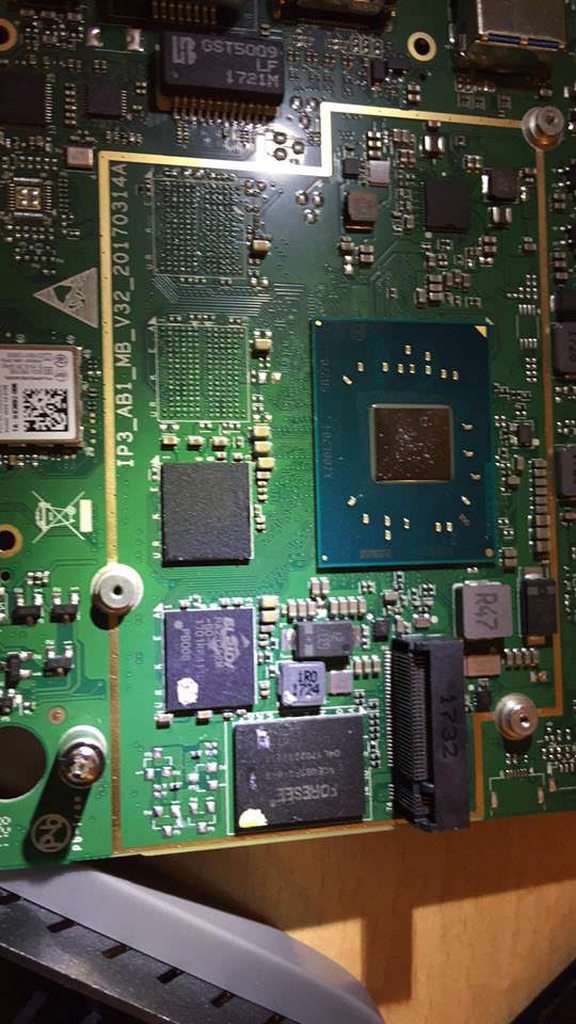
Hi, I am looking for somebody to help me locate the harddisk ("Festplatte" in German, the place you store data) of my mini pc. It broke down and I am to send it back to get my money back BUT I'm allowed to remove the harddisk. Since this is not a normal PC and I have no clues on which of those chips is the HDD I thought maybe I'll ask for help here: https://imgur.com/a/CKwgb42 (It's the Beelink AP34 with a Celeron N3450 processor, 4 GB ram and 57.5 GB (HDD), my guess it would be a 64GB HDD overall.
 sly mortar
@sick coyote Is it an SSD or hard drive?
Also, that picture isn't very helpful
If it's an HDD, it will probably be ~3x5 inches
sick coyote
that is the whole pc
sly mortar
bullshit
plucky bluff
^
sly mortar
Because there is no hard drive in that picture
sick coyote
Beelink M1 Mini PC RAM 6GB ROM 64GB Intel Apollo Lake N3450 Intel HD Graphics 500 HDMI VGA Output 1000Mbps/LAN 2.4G+5.8G Wifi Mini Fanlness Computer - Kostenloser Versand ab 29€. Jetzt bei Amazon.de bestellen!
that is the "newer version" of mine.
stop beeing condescending if you have no clue. please.
plucky bluff
Oh
sly mortar
There is no harddrive in that picture
sick coyote
the "memory" whatever the right translation is...
sly mortar
RAM?
sick coyote
no
sly mortar
Or the storage?
sick coyote
where you install stuff on like windows..normal PC i have m.2 SSD and a normal SSD
old PCs have HDD:
sly mortar
Because the version you showed uses a m.2 2242 SSD
sick coyote
I am looking for the chip that is the equivalent of that
plucky bluff
Just give the model name of your pc like that bo6xdg32ll
sly mortar
The one in your picture... I'm not sure
I would guess a memory card
Like an SD card
sick coyote
that mini pc is the updated one... I used the pc you see in the picture. There is nothing more. My data is on one of those chips and I need to remove the right one.
sly mortar
Try taking that metal plate off if it won't damage anything ( the circled one)
Looks like an SD / SSD holder
Also, is there anything on the back of the board?
sick coyote
you want me to remove an empty slot?
sly mortar
Then it's not removable, sorry
sick coyote
the is no external stuff...it is on the board you see
sly mortar
If it's shown / hardwired onto the board it isn't removable
plucky bluff
This is explained motherboard of another pc
sick coyote
ofc it is... i have the tools just needed to know the right chip but you guys assume stuff 😉
plucky bluff
Look for a black chip in i guess
sick coyote
and mine doesnt have an ssd
so that is useless... let me see if I can identify the other things maybe that leaves me with one
plucky bluff
But that grey thing is most likely what you're lookig for
sly mortar
Do you see the little square with 2 black wires plugging from it into the case?
plucky bluff
No nvm
sly mortar
Can you get me a close up of what it says?
plucky bluff
That grey box is not it
sick coyote
the only cables are the "sound" and "wifi antenna"
sly mortar
The circled item
Can I get a close up of that
It's the correct size and shape for an eMMC storage
sick coyote
that is the wifi antenna and described as such
sly mortar
Alright
sick coyote
it has to be one close to the cpu I guess... some will be RAM and the other probably what I am looking for....
sly mortar
It would most likely be somewhere that the case had a heat pad
Because eMMC produced heat
It's about the size of a postage stamp (24 mm × 32 mm × 1.4 mm)
sick coyote
none of the chips is as large as a post stamp ;)=
sly mortar
Then it's either under a heat shield, or it's not using eMMC and I have no idea what it's using
sick coyote
what you see was all under a passiv cooler.
sly mortar
Yes
Which had heat pad to connect it to it
It would probably be where one of those connected
sick coyote
the passive cooler had 3 "pads" one was on cpu and 2 other things...
i jsut whish they would fucking mark this stuff with usefull information
why not just write 64GB somewhere
sly mortar
It might have a "sandisk" or "siemans AG" symbol on it
 plucky bluff
Oh
sly mortar
@sick coyote Alright, just found a higher quality image online, it's under that piece of metal I believe
sick coyote
that is remover in the other pics. That yellow piece is the speaker
and they used a double sided sticky thing to fix it. I removed that in those other pictures already
below that is one of the chips that I am assuming as well
i narrowed it down to 3 possible chips and if I assume correctly than 2 of those are identical and both are ram
 vestal spire
What can i do about the No home region found that keeps popping up when i try to join foxhole
ps. this didnt happen a few days ago so this is resent
sly mortar
@vestal spire Check the pinned messages, they have the most common fixes
@sick coyote I think, it's the circled item, even with a high res image it;s tiny
Either that or it's the larger one directly above
sick coyote
i tend the larger one above as well... the marked one is identical to the one below it
sly mortar
Then it's RAM
sick coyote
same markings so I assume that is ram
which leaves the bigger one marked "Foresee" ..
vestal spire
@sly mortar tnx that helped
sly mortar
Yup
sick coyote
i bet they will look a little dumb if they want to check the pc but I got it in writing from amazon that i am aloowed to remove it 😉
sly mortar
That's to protect your data, but they may send it back to you
 viral granite
k so I started as col and I tried to make faction switch to warden which made me switch to warden but unable to join skirmsih with error of faction change unable, which again made it unable for me to switch back to col giving me faction switch unable befor even joining home base not I cant join anything
sly mortar
Alright, so, please find you steam ID, and then message it to @coarse trail
?tag how2factionunlock
 languid thistleBOT
Faction Unlock
When joining a war, you will be locked to the faction you selected for the remainder of that war (until the conclusion of that Conquest). If you inadvertently select the wrong faction, you can request a Moderator to unlock your faction. Please note that this is not a guarantee a Moderator will unlock your faction, and if you do get unlocked, you will be locked to the faction you select for the remainder of the war.
To request a faction unlock, please see #344873396850655235 and provide the following:
• Username
• Faction Locked To
• Reason for Request
• Your steamID or Steam profile URL
Be sure to tag @Game Mods when making the unlock request!
Need help finding your steamID or profile URL? Use ?tag steamid for a how-to
sick coyote
that mini pc saved me a lot of money... power is expensive in Germany. Instead of running my gaming pc to stream I ran that sucker.
viral granite
why even give option to switch faction if you can't do it
sly mortar
No I know, but a mini PC from a different company
sick coyote
it would have been amortized in under 1.5 y. Yes i woll not buy it agian...
sly mortar
@viral granite Because you can, for 6 minutes, so you can leave if you accidentally join
No, I mean a newer version of the same one
sick coyote
we'll see.. I have 2 year warranty in EU... worst case I have to do what I just did every time it dies...
sly mortar
An intel nuc (https://www.intel.com/content/www/us/en/products/boards-kits/nuc.html) is probably the most efficient right now

Intel
Intel's innovation in cloud computing, data center, Internet of Things, and PC solutions is powering the smart and connected digital world we live in.
3 year warranty
viral granite
k why to give option to change faction after 6 min
sly mortar
You can only change factions for the first 6 minutes until it locks you, then the game locks you to 1 faction. However, during skirmishes you can ask the mods to be switched factions
viral granite
well it did not lock me
sick coyote
It is to keep preventing people from getting intel and than returning to their faction.
sly mortar
^
sick coyote
but mods are really nice and if you made a bad choice and the WC is not going they will probably help you switch.
viral granite
how can I be locked from choosing col side before I join homebase where I can join multiple skirmeshes
it makes no sense
sick coyote
and sometimes stuff happens that is buggy. If you are unhappy where you are just direct message mod-mail
that will put you into contact with a mod that is available to help you.
viral granite
f
 high olive
gents i need help regarding opening the game
after the message with c++ installatin
Ue installs
and it stays in the Modify setup window
halp plox
 subtle narwhal
Hey guys! Iv got no voice chat at all in Foxhole and some others are having the same issue. Any solution to the issue? Tried closing Discord completely, resetting settings to default and nothing fixed it yet? <@&282920218462912512> <@&213133977681264640>
 grand silo
Did it happen when you spawned in, or traveled from server to server?
Oh. In Discord?
subtle narwhal
No no in game I cant hear operation or local chat in game and cannot chat in either
Yet the mic is working on stream and in discord
grand silo
It's a weird bug. Try exiting and coming back. That, or if it is easier, try traveling to another map, and back
 grand silo
The bug happens every so often
Well, I think it resets if you die, and respawn
But why would I encourage suicide?
grand silo

subtle narwhal
Haha restarting game worked and I am back in the fight! Switch it on and off always the best advice hahahahaha
 dire ruin
Make sure you check your voice options too, that the input and output devices are correct
 velvet elk
Hello, I can not get my voip to work since the patch. I have done everything I can think of and just did a fresh install
I even hooked up my headset and thats not getting voip either. All other sound works fine.
To be clear, I am unable to hear others locally or in operations. I do not use a mic.
 sharp oasis
@velvet elk look in your options menu under "voice".
high olive
i wrote here already but no one anwsered me nevertheless i dont give up so i ask again
when i open foxhole i get an error that says that i need microsoft c++ runtime
thats all
and i cant figure out what is causing the error
i press install c++ but it frezzes in the modify setup tab
inner basin
@high olive poor you, nobody helped since this morning?!?
@idle apex hello good sir, sorry for the wait
So I hear you are having graphics problems?
@high olive that actually is a problem listed on the Foxhole website's FAQ, check there
 coarse cloud
I got an issue
I am trying to connect since 4hrs ago
I uninstaled the game, I check the integrity of the files, I get out of steam and relogin like 10 times
But I keep getting this
When I try to join
inner basin
@coarse cloud Try the steps listed in the pinned messages of this channl
I am heading off to bed soon'
coarse cloud
I already tryed all of those
I got the firewall off, no antivirus, steamping 500, restarted everything lots of times, even reinstalled the game
just fowarded all the ports so deepweb people can get all my creditcard information uploaded to the deep web gonna try
then
inner basin
<@&282920218462912512> this man needs help. Usually I would help, but I'm off to bed and it's late
coarse cloud
After fowarding all the ports open, I am still getting the no home regions found.
I played yesterday
not sure what changed, but the update 81
 late mulch
You are sure you are playing on the current version of the game?
late mulch
Hi
late mulch
<@&282920218462912512> what is current game version?
thorn rover
He's on the right version
coarse cloud
yup
my pc is so unprotected right now that it might be safer to have a sing telling: "please assault my harddrive"
late mulch
@proud schooner @hot oak do either of you have any idea? Sorry for the ping btw
proud schooner
Well, portforwarding all ports will break things more than help.
coarse cloud
ok putting them on steam
proud schooner
Where are you located physically in the world?
coarse cloud
Mexico
proud schooner
Can you run a rest on http://fast.com
How fast is your download speed? In seconds, FAST.com's simple Internet speed test will estimate your ISP speed.
late mulch
@proud schooner
proud schooner
@coarse cloud Can you hit the more information for me
proud schooner
hmm ping isn't too bad, but the upload speed is pretty low. If this is a laptop, I'd try using Ethernet just to be sure. Past that, I recommend shutting down everything and starting up, and closing any program that starts up automatically - you would want to check the taskbar bottom right corner to make sure of this. See steps 3 and 4.
I wouldn't even open Discord when performing this test as well.
proud schooner
Good plan.
coarse cloud
is using the interney
proud schooner
Let us know how it goes
late mulch
@coarse cloud sorry for the inconvenience
terse flume
Another person helped
late mulch
Thanks @proud schooner
proud schooner
 worth a shot. Problem with the nature of this issue is it's networking related, which is the most annoying to troubleshoot. And that's coming from someone who is a network engineer by trade
coarse cloud
lol.mp3
proud schooner
I wonder if I should create a role that people who want to help with technical issues could get
I dunno, I'll have to ask around if it's something people are interested in
terse flume
That would be good idea
proud schooner
I've considered it on and off.
late mulch
Something like the bug hunter?
proud schooner
Yeh basically
terse flume
Ooo cool name
proud schooner
Like, Bug Hunter serves one purpose,
but this would be solely for technically inclined people or for those who have a nack for troubleshooting
terse flume
Also found a bug and put it on bug report if you have the time to look at it
proud schooner
I'll take a glance, but KFC will see it when he does another pass
terse flume
Alright
coarse cloud
@proud schooner I reboot the pc, let the modem turned off 10 minutes, cut the wifi and only let ethernet pass...
It still giving me the "no home region found" and when I chosse the other side, it tells me that I cannot swich. Wich is not a problem
Im going to bed now
proud schooner
Ahh that's a shame. When you're wanting to continue figuring out what's going on, stop on by
coarse cloud
sure, tomorrow, im to tired now
glossy trellis
My game says the persistent war is unavailable in the red box above "Join the War"
I've tried restarting Steam and the machine and waiting it out to see if it was a connection issue, nothing worked
I'm fairly sure it's something wrong with a Steam connection since it doesn't load my username into the Profile, but I don't know where to go from here.
vale aurora
Try pinging the community helpers. One of them might be able to help ya
proud schooner
@glossy trellis I'd try verifying the integrity of game files first
glossy trellis
I don't know what to look for in the game files, but I did uninstall and reinstall the game
Problem persists
I highly suspect it is a problem with Steam, as the Profile information is still not displayed
 primal ember
if pressing ok it will multiple the number of the word "War" but witll not launch
proud dagger
<@&282920218462912512> anyone with any idea ?
@primal ember normally the game launches via War
Same goes with me
primal ember
i did updated the game about 10 min ago, didn't try before
primal ember
i didn't enter them
game did
if i press ok it will multiple the number of the word "War" see here
tried to restart steam , didn't work
primal ember
nop
 upper creek
@proud schooner get down here
glossy trellis
I'm convinced this is a problem preventing the game and Steam from communicating since the Profile information cannot be accessed. I've gone through the list of programs that can interfere with Steam and I'm relatively certain that my anti-virus is not interfering.
<@&282920218462912512>
 steel hearth
I don't know if this is the place to leave this question but is there any problem with the local voice chat?
I have the default "T" for it and add the "Y" for the new operations voice chat
I can't hear and speak on Local voice
i have the push to talk sfx on and when i press T i can hear it so it's not the keyboard
the voice icon does not appear above me also