#technical-chat
4 messages · Page 7 of 1
 neat heron
 lofty sedge
im assuming its cos of the mic blasters that every1 has their volume on low whilst mines at a reasonable level resulting in me being low to every1
its like 1cm from my lips
and its a good mic
neat heron
Alright so that rules that out
 raw herald
Why do only half of my hammer/sledgehammer hits register?
 late mulch
Can sometimes be lag from the server @raw herald
 plain karma
^
Server lag is usually what happens.
sometimes, your connection to the server may affect this issue as well.
 slate wasp
any help with "no home regions found"?
 terse flume
Im experiencing only sledgehamer hit register bug since today, its a huge problem, everything else is ok as always.
 vivid pulsar
@terse flume That's just server lag. Sometimes hammer strikes don't register, and it usually comes in the form of every other hit not registering.
terse flume
@vivid pulsar ok, I'll try to release mouse button and click then, mb it will send updated information and stop the lag, cuz as I can understand now it happens due to some predictions on the server (lag compensation FTW)
vivid pulsar
👌
 half tendon
I'm unable to join the WC. "Ho home region found" after clicking choosing a side to play on
 muted dune
Same I was kicked out due to server time out now get no home region found
Back in now
raw herald
snave86 is experiencing the same problem. I can confirm he is in the 0.12 version, the one everyone is using and the Shard is LIVE.
@lyric path
muted dune
Ive just gone through and deleted the foxhole file in appdata/local/ and reinstalled it
hoping that fixes it all together
It did not fix it.
 tawny patrol
Hey i was wondering if you guys could buf the normal punch a lil cuz if you try to punch an enemy u miss 80% of the time..
 dapper island
terse flume
dapper island
terse flume
@tawny patrol heavily depends on your connection. I was hit twice in a row and died, no way I can repeat it with my poor connection.
 earnest gorge
 pastel veldt
 supple magnet
 analog sphinx
Getting FPS laggs since the update yesterday, all my settings are as they were previously
 sly mortar
@analog sphinx It is likely the new trees, I don't think they are as optimized
analog sphinx
Are you having these laggs too? Any solution to that? i cant even move my char properly at times. I fear to even drive the vehicles fearing where i will land with them or whom i will run over with them @sly mortar
sly mortar
@analog sphinx I don't get them because my PC is capable of more than handling foxhole, but I have been hearing complaints that the new trees have been affecting processing
However, Markfoot said they shouldn't, so idk
analog sphinx
Well they clearly are, since this was not a issue before
analog sphinx
@tranquil forge
 cosmic mortar
Hey @terse flume , try turning down your settings
analog sphinx
^ dont know who that guy is, but my settings are already low
 minor junco
Turn down resolution?
 sand eagle
So basically everytime I play Foxhole, my internet dies
Everytime I open it and join WC, after some minutes my internet connection stops working
It wont get fixed until I leave the game
Any help_
 inland owl
@sand eagle disable fire wall? Whenever I have a internet problem with any game that's my first move
muted dune
@sand eagle you may be taking more bandwidth than your router can supply are you on DSL or Fiber?
sand eagle
@muted dune Fiber
muted dune
Is anyone else using the internet and how close are you to the router? as well as do you have any repeaters or extenders?
I was having this issue as well I just changed the channel for my router and It fixed it
but I work IT irl so yeah
Im off for the night tho be back tomorrow
 mint heart
I get the same 'no home region found' error like many other people
I keep trying to reconnect but i've done so 20 times now to now avail, does anybody have a fix for this?
 proud dagger
@mint heart my advice is to check pinned messages to try any of the things first to see if it works
mint heart
@proud dagger Thanks for the redirect. I have tried all those things and none of them helped
However, either by sheer coincedence or an actual fix, changing my resolution from windowed fullscreen to fullscreen allowed me to connect in one go
Could be something you may want to add to the list
 old flicker
I have a tri monitor setup and when I play the game and move my mouse to the edge of the screen my mouse leaves the game. This is extremely frustrating when aiming and doing other tasks and is one of the reasons I took a break. I'm wondering if they have a way to lock my mouse into the game without using third party sources such asmouse trapper and/or if this is a bug related problem do to the fact it doesn't happen to any other game I play. If it's not a bug does anyone have a fix that I can use on my end, (Preferably not uninstalling due to my slow DL) That is all.
dapper island
Double Monitor here, never had any issues like that on my end
plain karma
Might need to install a 3rd party software.
Lemme check in with a friend of mine
His friend had a problem with that.
plain karma
"Dual monitors" v 2.6
sly mortar
@old flicker I have 2 monitors and so far I haven't found a fix for it. My current temporary fix is to just not use the connecting side of the screen
 dusty sky
Use dual monitors. Ive used it before. It locks your cursor to the screen you want when your in game
 pearl forge
Alright I'm sorry but this is ****ing bullshit
So first off, there's a guy trolling, and there's no "Trolling" report to make in-game
Secondly
I was 'automatically' forced to switch factions
So any help..?
Alright Sweet I'm already back into Warden again...
Sorry I'm up in 'laps' right now because of the troller...
terse flume
@pearl forge report troll to #344873396850655235
pearl forge
Oh alright thank you!
 peak sapphire
i don't know if this is the right place, but on farranac coast, you can climb jade cove and get an advantage to either the wardens or colonials depending on who you are
 bold cliff
ay has anyone had the problem where their foxhole game suddenly runs incredibly slowly? i have a decent rig, runs it on ultra in a non combat area perfectly, high or medium in heavy fighting zones with high pop. suddenly earlier the game is running at like 20fps and idk why. i restarted my com and its still like this. task manager doesnt show anything abnormal
vivid pulsar
@bold cliff What sort of CPU and GPU are you rocking? Might need to update drivers. Also, check the heat radiating from your rig when you're in those intensive environments.
 gentle heath
Test
 granite patrol
 timid arrow
it's a bug you might have to restart the game to fix it
 unkempt verge
I want you to remove the rotting function from the game. Because there are no people who repair buildings!!!!!!!!
vivid pulsar
@unkempt verge Decay's a pretty necessary mechanic to keep maps from becoming endless fortresses of FOBs and defenses. Not only that, I'm sure it's hard enough for the servers to support all of those assets during these long-lived wars. If you've got an idea for altering the decay effect, head over to #406130138334625799 or #game-feedback-archive.
 hallow pecan
 bright elk
i have a problem where when loading up the new update, the update screen does not display the time it will be ready. So, I cannot play. I have tried restarting my pc and it kinda works now. It displays the time but only sometimes, flickering on and off. Also, it displays random times, from 2 days to 16 hours to 4 minutes. It updates slowly, but I want it to just update and be done with it. Any ways that I can download the update quickly?
sly mortar
@bright elk That's steam, probably your internet is doing something
Not much we can do about it
sly mortar
Are you getting a specific error message?
 rose dove
how long does it take to reinstall
sly mortar
It's only a 3 gb download
rose dove
ok
sly mortar
What is your internet speed?
rose dove
idk
but this PC is crap
im changing out the memory card
for a bigger one then chaning the prahics
 west geode
hey, i launched up Foxhole and was looking for servers, but none show. I restarted steam and checked file integrity. Nothing seems to work. Am i doing somethin wrong?
west geode
i checked both, no servers are showing
late mulch
Have you tried to join the conquest?
west geode
conquest?
late mulch
Are you new to foxhole?
late mulch
Ah.
west geode
for like 4 hrs or so
late mulch
Things have changed a bit
So first off, make sure you are on the most current version of foxhole
west geode
i believe so....
late mulch
Next, once you have loaded the game, press play game. It will come up with 2 things join conquest and browse servers
west geode
yes
late mulch
Click join conquest
west geode
i think its listed as join war
west geode
ok
west geode
did that
late mulch
To the right of the town hall, there is a tent with swords i believe
west geode
yep
late mulch
Go up to that, and there will be 9 maps. The ones flashing show where there is a major front
late mulch
There will be others owned by the opposite side and others owned by you
Not anymore. You can walk to the border of most all maps and teleport to another map
west geode
oh ok thanks
west geode
thanks, i appreciate it
late mulch
Yep!
 snow meteor
i feel happy after this conversation 😃
late mulch
😄 @snow meteor
 grand silo
@terse flume let's talk here
vivid pulsar
Yep. Let us know if restarting steam doesn't work.
terse flume
still can not find server
vivid pulsar
Is it the "No Home region found" error?
terse flume
failed to find servers
vivid pulsar
Do you know how to verify the integrity of your game files?
terse flume
how
vivid pulsar
@terse flume Right click on Foxhole in your steam library and select "Properties," then go to the "Local Files" tab and click on this box.
terse flume
grand silo
Hmm
vivid pulsar
All files successfully validated?
vivid pulsar
What country are you located in?
proud dagger
is your game pre alpha
terse flume
turkish
proud dagger
have u actually bought the game @terse flume
terse flume
yes I bought
proud dagger
hm
grand silo
Hmm
proud dagger
@proud schooner since ye online, mind helping?
terse flume
I played on the servers I played and I said I am an entrepreneur today
grand silo
Could be the war is almost over and servers are not available?
vivid pulsar
I'd try using a VPN if possible.
proud dagger
Turks normally have no problems
terse flume
how to play multiplayer
proud dagger
go to the tents located at your right when u spawn in
vivid pulsar
@terse flume Make sure you hit "Join the War" after clicking "PLAY" at the home screen.
Looks like you went to browse events instead.
Then select a faction and head over to a travel tent to transport yourself to a region.
 vivid pulsar
I'll be back to troubleshoot in a minute. Need to grab fast food at 3AM 
grand silo
@terse flume did you restart your computer and try again?
terse flume
I've lost connection a few minutes ago and cant reconnect: "No home regions found"
grand silo
@terse flume did everything work okay?
vivid pulsar
@grand silo I assume everything worked for him lol. He looked like he went to the Browse Events menu instead of clicking Join the War.
 dim salmon
@terse flume Read rules of this chat pls.
 karmic whale
Game Restartet and its still there
vivid pulsar
👌
 proud rune
Vehicles were acting weird while I was in Farranac, assests like FoBs were not loading in either
vivid pulsar
@proud rune I'd suggest verifying the integrity of your files. Right click on Foxhole in your steam library and select "Properties," then go to the "Local Files" tab and click on this box.
Then restart Steam, then try connecting once more. If all of that doesn't work, tag me and we'll delve further into this. 👌
 proud schooner
There are known issues with server connectivity at the moment. The Dev team has been alerted.
 tepid ingot
which chat is bot chat
proud dagger
@tepid ingot there is no bot chat or music chat sadly 😅
tepid ingot
oh it just deletes
proud dagger
well if u mean that, then nvm
yes it does that
well problem solved
don't worry our bots are sophisticated
tepid ingot
i am instantly green
proud dagger
yes
tepid ingot
thank you darkling you were helpful... for a warden
 peak heart
Hey, I have a HUGE issue with the game right now, whenever I try to travel from lobby island I get the "no friendly towns" message and immediatelly get huge lag and get sent back to menu afterwards, I tried relogging (multiple times) restarted Steam, rebooted router, no matter what I do I just can't seem to get into the game
same thing happens if I try to open World Map (lag)
proud dagger
@peak heart have u tried all the solutions in pinned messages
peak heart
not all of them yet, will report when I try every single one
vivid pulsar
@peak heart Do note that the servers have been experiencing intermittent connectivity issues. Staff knows, but they haven't issued an ETA on a fix action - if at all.
 bold lily
@vivid pulsar I am experiencing "Lost connection to Server. Please try again." Constantly. Is this related to the server issues or could it be on my end. I saw that this issue was fixed for most people a bit ago. I have restarted steam as administrator and my computer. No internet issues otherwise.
sly mortar
@bold lily if possible, try restarting your router
 elder geyser
I seem to have run into a problem where I accidently set the resolution high which caused Foxhole to flash almost like I would switch to desktop and then back while in that state I can't really do anything. Any way to fix that ?
I amma try to launch in -windowed
Nope
 still temple
have you tried turning it off and on again redownloading?
elder geyser
Well I did but nooope
still temple
or maybe there is a setting file which you can reset
most games which can be modded have one
so maybe here too?
elder geyser
Gotta check that
vivid pulsar
@bold lily If you're running any sort of security suites or software, that could restrict connection to the server. Try adding the War.exe (Example path: D:\SteamLibrary\steamapps\common\Foxhole) to your antivirus exception list. Ensure that your firewall has all of the necessary permissions as well.
Right click on the War.exe and see if you can execute that as an administrator as well.
If nothing like that works, give your computer a reboot by entering the following commend into Windows Powershell: "shutdown r/ t/ 0" and give that a shot.
Tag me again if that you still can't connect. I'm at work right now, so apologies if I don't respond promptly!
elder geyser
Yea game is still stuck at a high resolution and I can't fix that because when I get into the game it zooms in imensely and screws my pc over, forcing it to desktop and then back to the game rapidly where I have to restart the pc entirely
I can't seem to change it from the config either or try to use a launch setting
sly mortar
@elder geyser Have you tried a reinstall?
elder geyser
Yea I tried that aswell
sly mortar
Hmmm
Let me try to do something
Okay
Raeden
You're going to want to go to appdata
AppData > Local > Foxhole > Saved > Config > WindowsNoEditor
Then find "GameUserSettings" (Any text editor can open it, use notepad)
elder geyser
I tried that I changed it to the usual resolution but nothing happened
elder geyser
Launch option didn't seem to do either
sly mortar
Okay, change all the numbers to what I have there, restart steam, and see if it works
elder geyser
Steam isn't started yet soo lemme do that quick
Lemme first send the picture
A bit weird screenshot
sly mortar
Yeah, change the top parts to what I have
sly mortar
You're welcome
I'll make a guide for this sometime
I've noticed this happening to a bunch of people
Fixing Resolution Settings if the Game cannot be opened
Go to
AppData > Local > Foxhole > Saved > Config > WindowsNoEditor > GameUserSettings
Open GameUserSettings with notepad, and change the top 10 lines to look like this, however, if you have a smaller monitor, change the resolution to your monitor's size.
ResolutionSizeX=1920
ResolutionSizeY=1080
LastUserConfirmedResolutionSizeX=1920
LastUserConfirmedResolutionSizeY=1080
PreferredFullscreenMode=0
AudioQualityLevel=0
FrameRateLimit=0.000000
DesiredScreenWidth=1920
DesiredScreenHeight=1080```

After this is changed, save the file, close it, and fully restart steam.@proud schooner Here's a guide for resolution changing, could it get a pin?
proud schooner
Nope
 inner basin
oof
proud schooner
Unless I get @hot oak 's blessing.
Frankly, it involves the alteration of game files.
sly mortar
Hmm, well it's the only option if you have the problem that raeden did
proud schooner
The best thing to do is to reset the game cache, clear the folder (after backing it up), and then verify the game files, which will make the game regenerate the settings file.
proud schooner
Lemme look.
Right.
Which, if the game settings folder was deleted,
and then verified,
Steam would just download and create a new one.
With the default, not the broken resolution which was incorrectly set within the game itself.
sly mortar
Okay
proud schooner
IF it becomes a good solution though, we can pin it, but it is important to always back things up.
elder geyser
Well it was used before
I first did it over a Reddit post
But my PC didn't see to have saved it
 teal girder
can somebody help me with this ?
dim salmon
@teal girder Check pinned msg.
vivid pulsar
@teal girder Look in the upper left. Ensure that your Shard is "Live" instead of blank.
 uneven cliff
hey, i jsut wanted to give yall a thumbs up on widescreen support, i totaly approve your totaly amazing way of locking Horizontal field of view instead of vertical
https://i.imgur.com/VO0eKcS.jpg
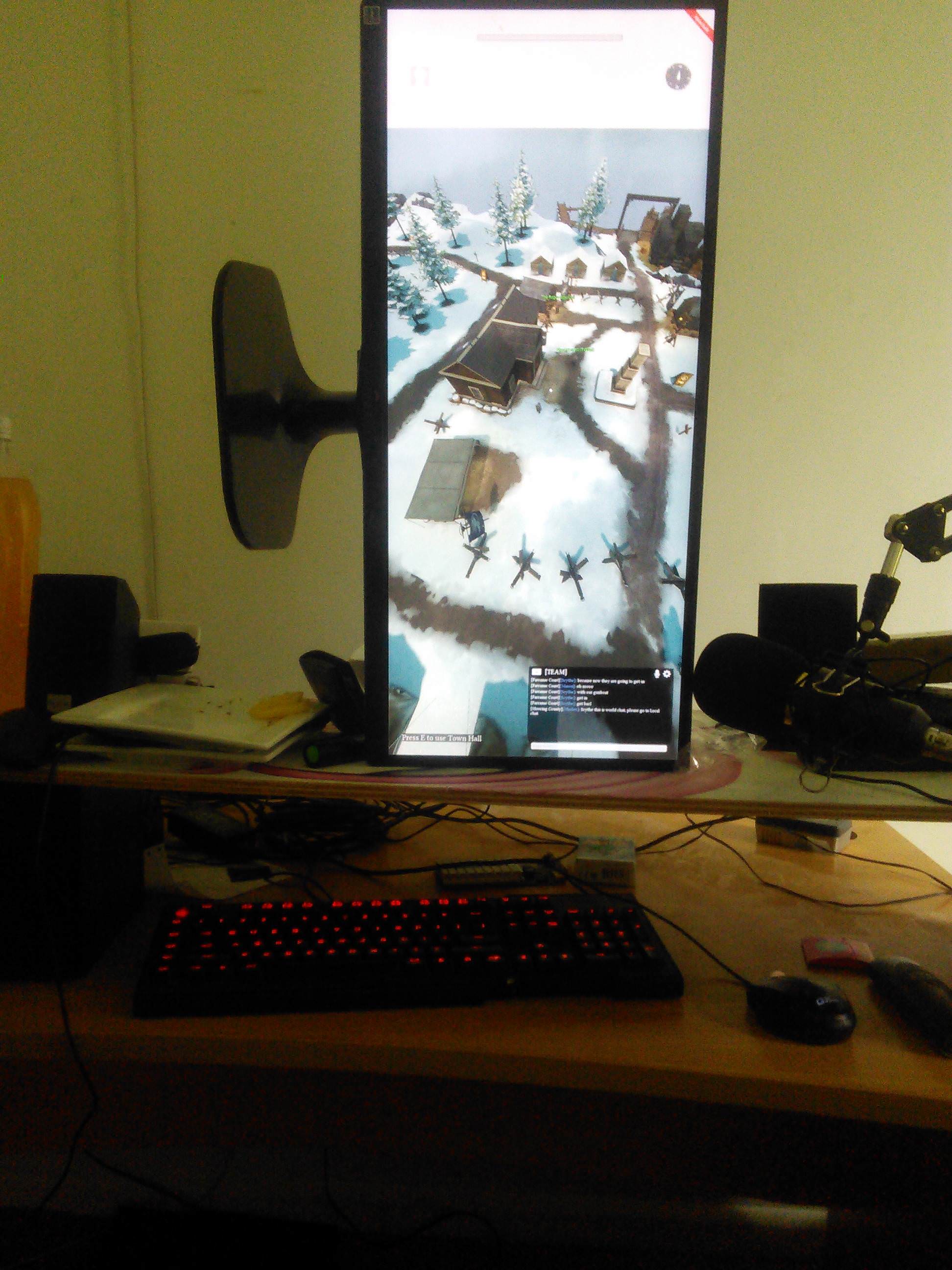
you can get abserd thignslike this, ... but yeah tbbh its beter to lock vertical resolution, and then no matter what width your screen is you dont get cut off, like, having to play 1260x1024 o get a reasonable realestate doesnt seem right
all images areinthe same postion reletively
https://i.imgur.com/sn6hf9e.jpg
https://i.imgur.com/NQ4hMEb.jpg
https://i.imgur.com/TL5ePC7.jpg
https://i.imgur.com/O1kuYYI.jpg
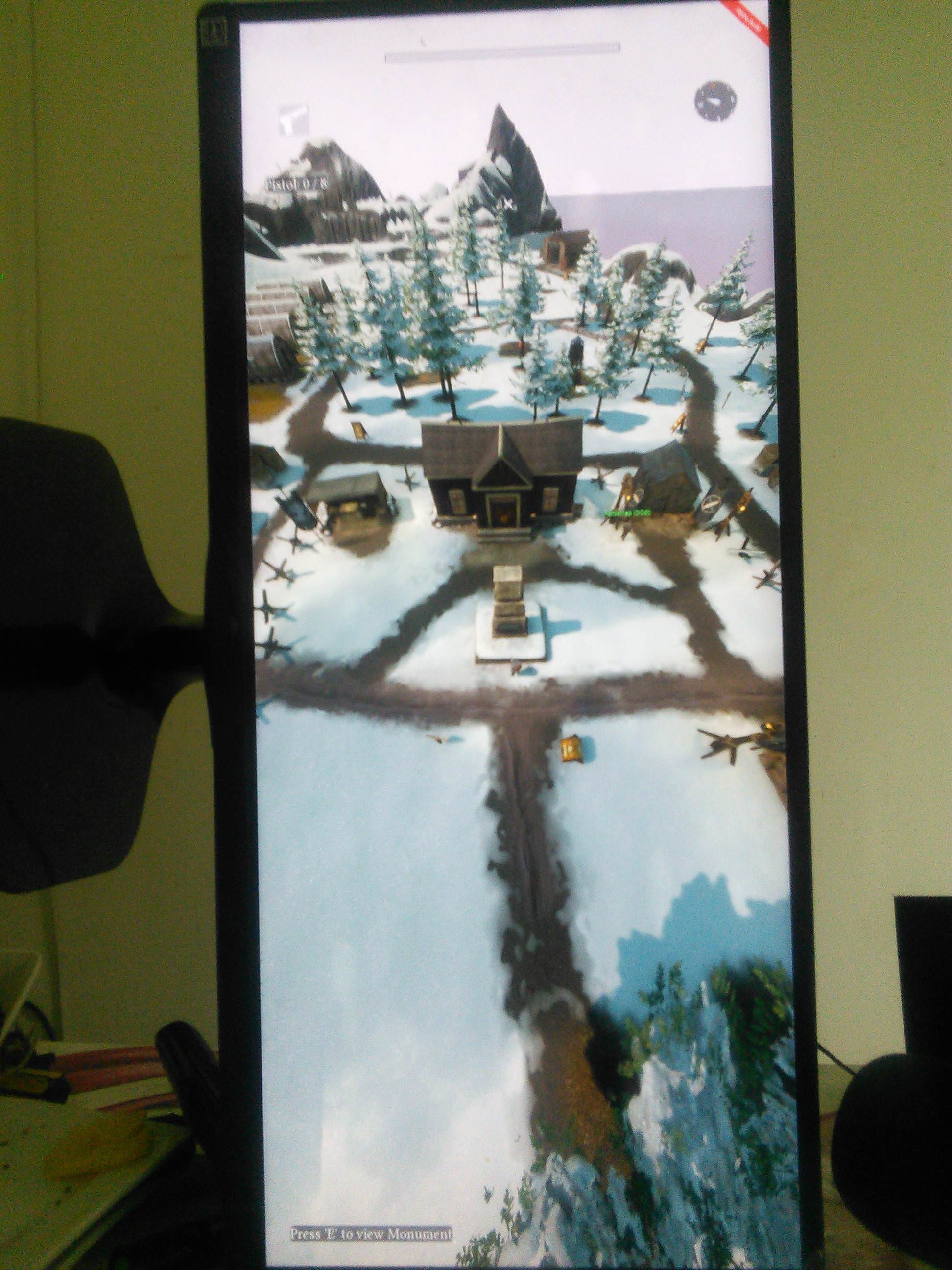
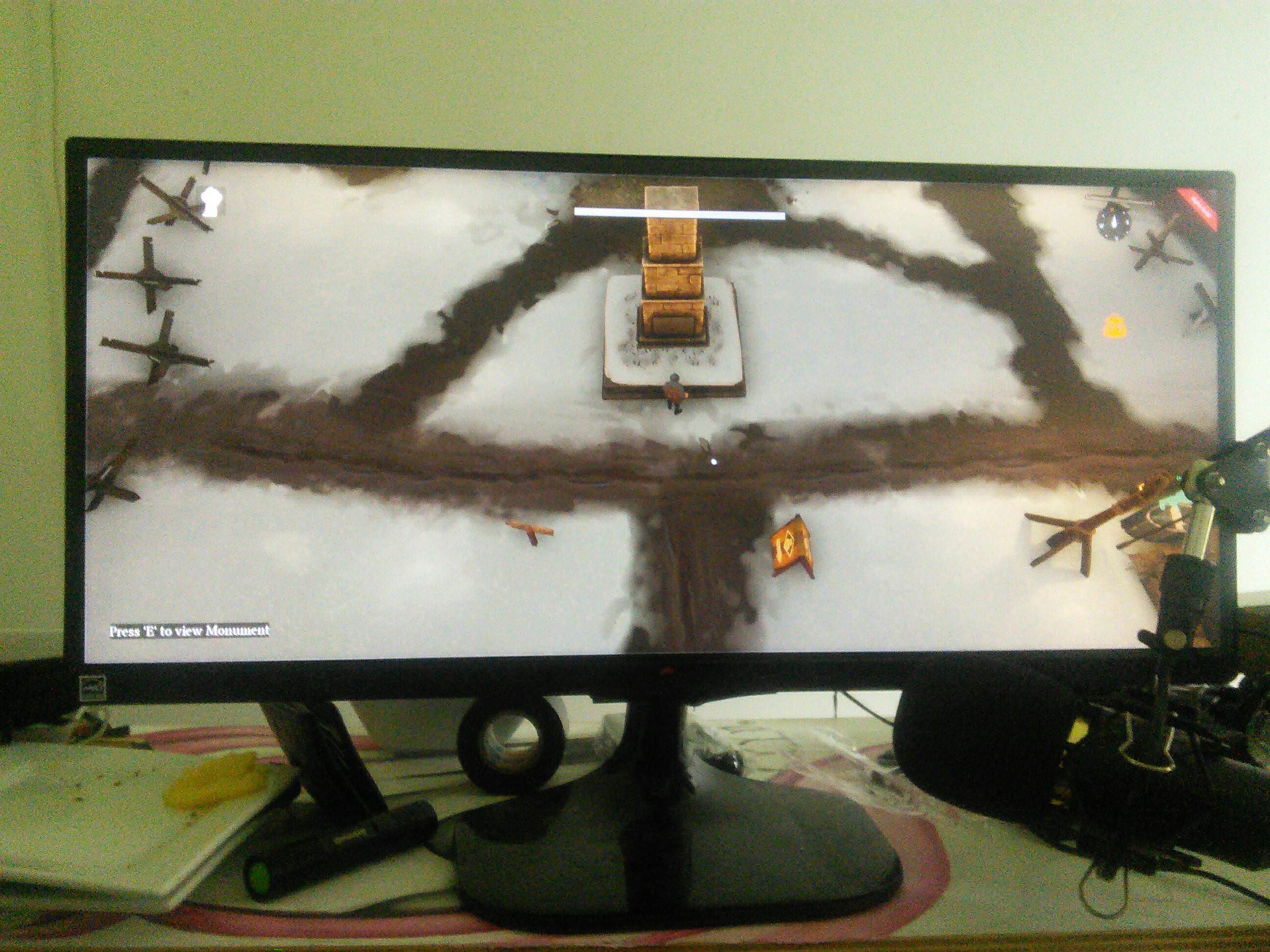
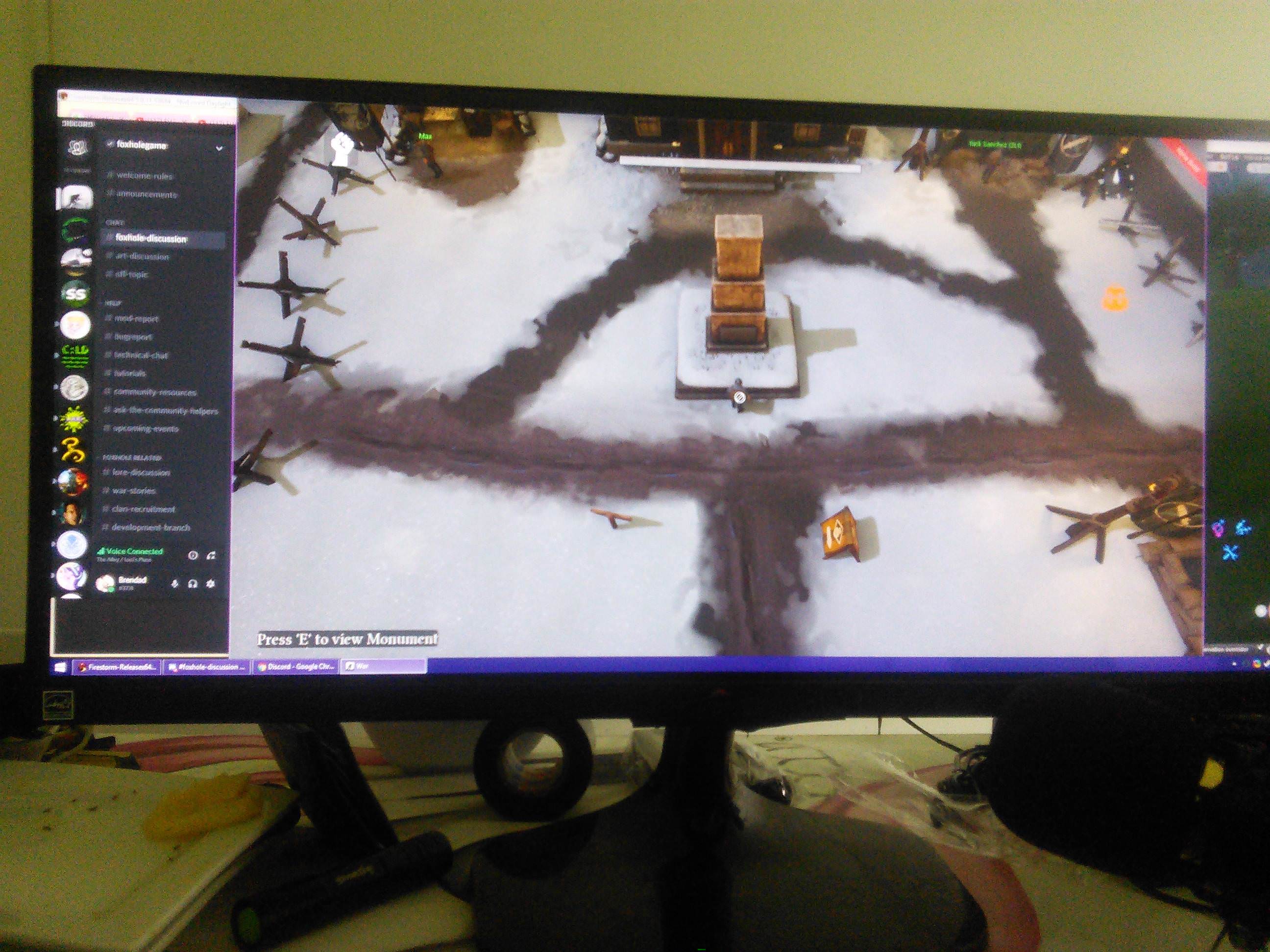
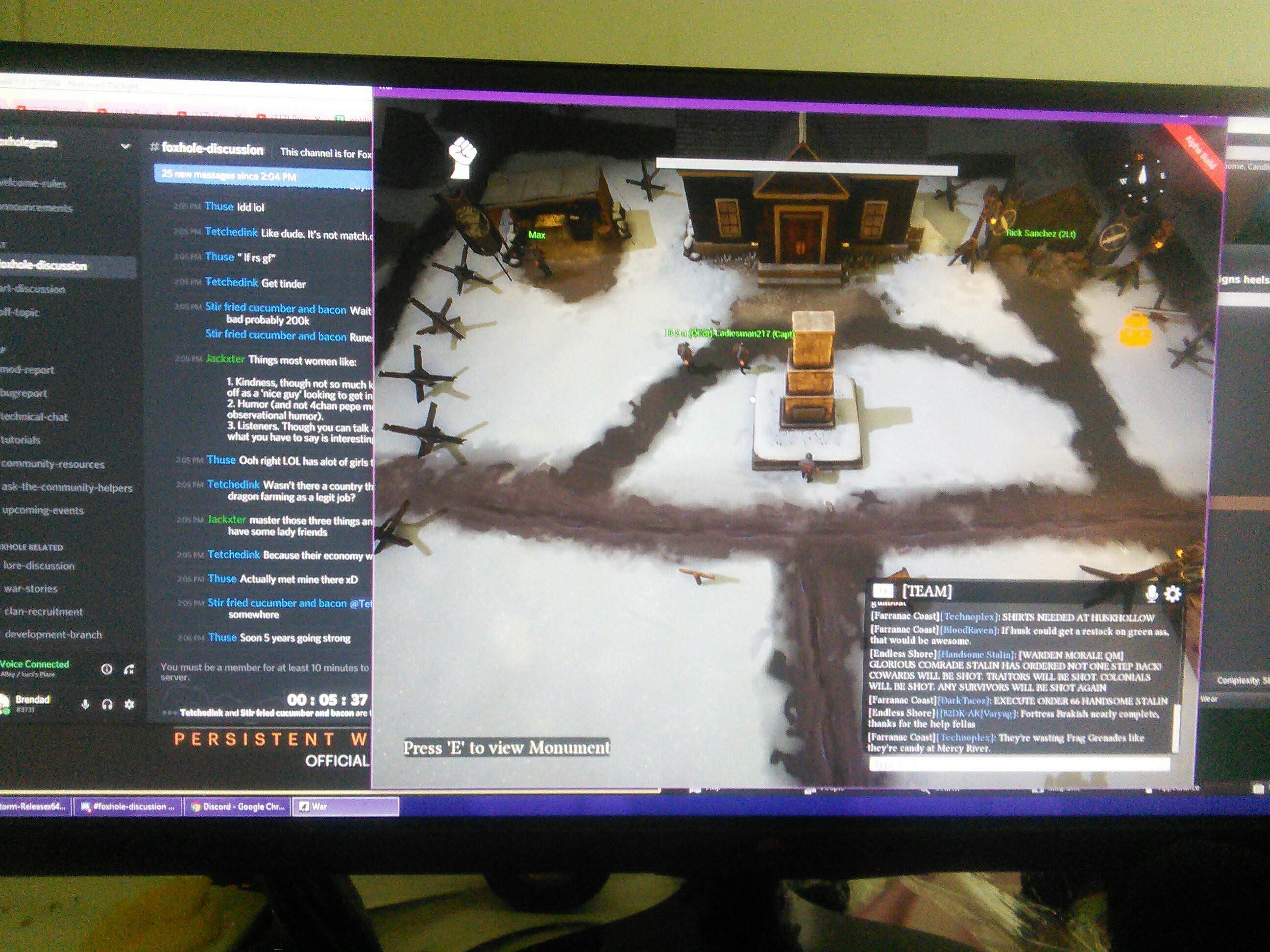
like even playign 1600x1024 instead of 1920x1080 gives you so much mroe viewing space
late mulch
hm
uneven cliff
also , are the bounding boxes for the boats a square, as i watchese these dudes 'hit' the others boat with invisible corners XD
https://i.imgur.com/pS7Q1MG.png
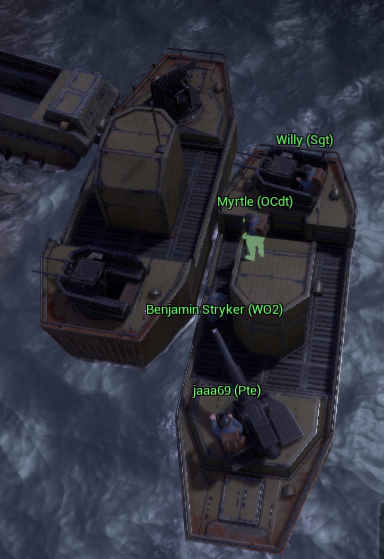 uneven cliff
i was a bit late withte snapshot, but rpetty muchthe frotn corner hits witht he rear corner as if both ships were boxes
 gray prism
hey, for some reason like some of my hammer hits arent registering when building
anyway to fix this?
\
dim salmon
@gray prism probably connection issues
vivid pulsar
@gray prism Sync issues with the server. It's an annoying thing but hopefully its being worked on.
timid arrow
could also be the terrain if you are too high relative to the thing you are building
terse flume
nah, its just desync, same for me while scrapping/repairing, anything
 delicate reef
does anyone know how to restart steam, I try to exit it using the menu but there is no restart and I cant play foxhole arrgh!
delicate reef
I am unable to find any servers on Foxhole. I have restarted cpu, steam, reinstalled the game, checked ports, etc. Still nothing..
terse flume
so It might be something with network etc. What is ur region?
inner basin
@delicate reef Have you disabled all antivirus/anti-anything programs?
vivid pulsar
@delicate reef Restarting steam is as easy as ending the service through Task Manager and then starting it up again.
 meager mauve
let me check
meager mauve
none of the things isnt working ima just wait till beta then
sly mortar
@meager mauve What is the response the game is giving you?
plain karma
try checking the pinned messages if you haven't.
usually restarting steam client works, make sure the your Anti-virus doesnt block it as well.
let us know if you've tried this and it hasn't worked.
you may also ping @community helpers for immediate assistance.
meager mauve
Steam client didnt work anti virus too also reseting internet didnt
plain karma
have you gone through all of the steps in the pinned messages?
 nimble rapids
When I use binocs I can only see 80m out but other people can seem to look as far as 150. Why is my view distance low?
 wary tundra
use the corners
minor junco
Max distance is 120m, use your top right corner
 prime quarry
you can go further by doing it in an elevated aarea
 pallid nebula
how did you get the idea that other people can see 150 mt with binos?
 winter marsh
here is porno
dim salmon
@proud dagger Clean that, pls
nimble rapids
@pallid nebula I was doing field artillery and spotter was sometimes giving distances 140-150
 lavish basin
Can i turn on Vsync somewhere else, beacuse i can't turn it on ingame?
pallid nebula
@nimble rapids if the spotter stands somewhere between arty and target that is possible. if you stand 75 meters to arty and 75 meters to target you can cover the 150 meters between them. but if the spotter stands next to your arty then it should be the corner view.
peak heart
Forward spotting, young padawan, Jedi master scarface must teach you that
analog sphinx
@nimble rapids There is also a setting ingame, it says View Distance. Set it to Ultra, ur problem will be solved by this.
 lavish mango
https://cdn.discordapp.com/attachments/449061230393688074/454295928271274004/dx11___foxhole_by_pooggie-dcdpwcp.png One of my clan members @half dove is having this problem for some reason, he already has DX11 though, anyone know how to fix it?

 royal isle
is there a way to make it so when you alt tab out, the game doesn't mute?
lavish mango
Oh nvm he fixed it

 upbeat inlet
no
it happened 3 times just now when I joined the warden home region
waiting for WC to start
proud dagger
@upbeat inlet try looking at the pinned messages here
upbeat inlet
I restarted my pc and it seems ok now
proud dagger
ah tht usually fixes it
inner basin
restarts fix everything 👌
 thin urchin
I did send this already via Email, but maybe someone of the comminty has the same issue suddenly to. After playing Foxhole for several month without any problem, suddenly it crashes while startup with LowLevelFatalError. It looks a little bit similar to the D3D Error, postet in this thread several times, but is somehow different. I don't know what I did to suddenly cause this error. Maybe it was the latest Win10 update.
inner basin
🤔
Has to deal with graphics
@thin urchin
D3D11 deals with DirectX runtime
Maybe try re-installing Foxhole?
vivid pulsar
That's what I would do.
That, or reinstall the DirectX framework.

Microsoft Download Center
This download provides the DirectX end-user redistributable that developers can include with their product.
inner basin
It's already bundled with the steam download of Foxhole
Path: C:\Program Files (x86)\Steam\steamapps\common\Foxhole\_CommonRedist\DirectX\Jun2010
You wanna look for DXSETUP.exe @thin urchin
vivid pulsar
Had a feeling it might've been. Trust but verify.
inner basin
for once I actually helped someone; and nobody refuted my advice
thin urchin
Thanks for your advices. But I tried already all the obvious and recommended stuff. I re-installed foxhole two times, I reinstalled directX and VC_Redist. I tried compatibility mode. I don't use GPU overclock (at least as I know) and I tried to at some commands in the start up, like in some threaded recommended. Nothing solved my problem.
 sage hill
so i came here from a link on the Steam discussions for Fortified, but not sure where i should ask this question?
sage hill
i'm trying to play fortified
sage hill
yeah it's why i'm confused, one of the devs posted to join this discord
inner basin
We help anybody ❤
sage hill
but every time i try to play fortified, it opens up SteamVR and is unplayable
and with my cable managment i don't want to have to root around under my desk to unplug the headset :p
inner basin
Oh so you have a VR headset
sage hill
yeah, not been a problem before, and with a 2 year old game i didn't think it'd be a problem either
inner basin
 slim girder
this game is like 3 years old
inner basin
This is an example game, but do you get these options? @sage hill
I don't have SteamVR, so bear with me here. I don't know what opening up steamVR entails
Is it just opening the game in VR mode?
sage hill
no, just play, and it automatically opens in VR mode
inner basin
Have you looked around in the game's Properties tab?
sage hill
yeah nothing in there, it's like steam is detecting it as a VR title, and it's not, but there's no way to tell Steam it isn't
inner basin
fortified isn't even VR 
sage hill
i know
inner basin
wait
sage hill
and the menu is cut off and out of focus, so can't even choose an option in the menu
inner basin
Edit Steam Controller Configuration... ?
I don't have that
Is the VR Headset... being detected as a controller?
sage hill
no, that's my xbox one controller plugged in
inner basin
what am I thinking, it comes with the 2 controller wands
inner basin
What about Steam > Settings?
Is there any extra options in the sidebar that I don't have, that you have?
sage hill
there's an option in there about launching non VR titles in Steam Desktop Game Theater, but that's only if SteamVR is already running, and it's not when i try to launch fortified
and that's per game
and no, my steam settings look identical
inner basin
oh that's for using VR in non-VR games
slim girder
yes
 robust nacelle
can i switch to colonials?(have locked to wardens) due to my friend locked to colonials already and i want to balance the game
slim girder
yes just ask <@&213133977681264640>
inner basin
Um please use #344873396850655235
sage hill
oh well, was hoping one of the devs might have an idea, i've posted in the discussions anyway
inner basin
hop on over to #344873396850655235 Israel
Yeah sorry I couldn't be of much help @sage hill
I don't have a VR headset so I really don't have experience with it
sage hill
yeah it's new to me too, only had it a month or so
ah, just found another post from September last year with the same problem, and no response, apparently it still does it if you do unplug the headset
"I've found that this bug has something to do with the Unreal Engine. Apparantly the developer has to disable support for VR if it's not being used. At least that's my take on some info on a UE4 forum."
oh well
inner basin
lol @sage hill no, I saw that too, that person was trying to use Unreal Engine. It shouldn't apply to you launching a game
sage hill
no, this is in the fortified technical discussion forum, as fortified uses the unreal engine
inner basin
oh weird
vivid pulsar
@thin urchin Check your GPU drivers as well. Ensure they're up to date. If in doubt, I'd uninstall the GPU settings engine and reinstall then update the drivers after that.
thin urchin
I updated the GPU driver via device manager. What is the GPU settings engine, you are talking about?
vivid pulsar
Do you use AMD or Nvidia?
thin urchin
Nvidia
I see.. the Nvidia toll
I already thought about changing the configuration for Foxhole using this tool. but since I am not sure what exactly cause this error, I am afraid, I could make it worse
Nvidia tool i mean
vivid pulsar
Aha. I'll look into it some. I've never used Nvidia before, since I'm an AMD fanboy.
thin urchin
What is really strange, that it happened so sudden. I was playing foxhole for several month, 200h on Steam, without any problem. And now suddenly I have this crash. The last thing I did before, was playing Fallout 4 and trying out some new mods. But I doubt somehow that this could effect Foxhole.
sage hill
found a fix for the fortified VR thing btw
Go into your Game Folder... for example D:\Steam\steamapps\common\Fortified\Engine\Binaries\ThirdParty ...then delete the OpenVR Folder.
and it works for me
inner basin
nice! Glad you were able to solve it @sage hill
thin urchin
I don't have the Geforce Experience App. Do you think I should install it?
thin urchin
GTX 970M
 outer jacinth
Playing like usual
45 fps stable like always on ultra
After 5 minutes of playing (even with no shooting or anything) it drops down to 15
I tried veryfying cache and everything just out of no where my fps drops after a little while of playing
thin urchin
Win 10
outer jacinth
I'm on win 10 but it worked fine before
inner basin
Oh no he was replying to me @outer jacinth
thin urchin
Vladdy, sounds a little bit like a temporary memory issue. have you checked space and fragmentation on you main hard disk?
inner basin
@thin urchin 64-bit?
thin urchin
yes
inner basin
And when did you start getting the crash?
rolling back to a previous driver may help
thin urchin
it started two or three days ago
inner basin
😃 It may have been the driver then
Navigate here: https://www.geforce.com/drivers
Download the latest GeForce drivers to enhance your pc gaming experience and run apps faster. Automatically scan your PC or search the driver database for compatible GPU drivers.
thin urchin
maybe with the driver from 5th of june according to your list
inner basin
Then choose the settings appropiate to you, and download Version 397.93!
(the one before June 5th, yep)
Wait @outer jacinth you were overclocking?
I just did that to my AMD 2400g and its pretty sad
Not worth it if you don't have extra/better cooling
@thin urchin how's it going?
thin urchin
download just finished. Installation started
thin urchin
clean install? I did choose the option new installation.
which also set back the settings to default
thin urchin
I just finished. but the errors still apears. Maybe I should roll back more?
inner basin
Same error?
thin urchin
yes
thin urchin
yes
inner basin
@thin urchin please TAG me for further messages. I'll be on my Xbox and I won't get notifications unless you TAG me.
thin urchin
ok
Thank you for your help 😃 I tell you when I finished the installation
@inner basin I did install the Version from th march. Again a clean install. But unfortunatelly the error stays the same. You think I need to resart the laptop or reinstall foxhole after I re-installed the GPU driver?
thin urchin
@[BLD] BladeRikWr unfortunatelly still no success. I will search for more ideas tomorrow in the internet. Thanks so far. It was a good trial.
inner basin
Sorry to hear that @thin urchin I wish you best luck on your troubleshooting
 sharp lagoon
I am getting No Home Regions Found? What does it mean and what can I do? (Warden)
inner basin
That's a network problem
sharp lagoon
My network is perfect
sharp lagoon
Working on everything else
 inland verge
Nah I agree, never saw a game before so annoying on network side. Depends on your setup, but fyi ( no other choices unless vpn ) I just try multiple times until it works, sadly you have to do this manually instead of it being done automatically. Maybe you could try to spam connect too, it may work. You can also try the pinned messages solutions, it may solve this issue, as he said.
 teal lodge
.0333+321.. 0
 viscid tangle
devbranch
viscid tangle
should automatically update
 craggy solstice
server is bad
 austere galleon
can we like hit delete on those current skirmish queues.... i legit just drove home from my grandmas, now i cant play :/
proud schooner
@austere galleon are you stuck in a queue?
austere galleon
i played another game and got in eventually 😛
i cant wait for new skirmish update bc so many times i have played at my GMA's, then logged off, drove home, logged in, queue..... im sure others have dealt with this
 blissful sequoia
I'm trying out the devbranch, but the devbranch alone gives me awful in-game frame rates. I have the newest drivers, and the .13 branch works great. Even if I drop the graphics quality low enough to get ~30 fps my soldier still moves in slow motion. Anyone else reported anything similar? I'm hoping this isn't going to ambush me when it's out of development branch
plain karma
@blissful sequoia try submitting that in #devbranch-bugs
and the devs will look at it in a few hours. (currently sleeping devs)
also by any chance
did you set it at your dedicated GPU
could be some funky configuration
blissful sequoia
I only have the 1 video card, it's a really simple config. But the weird slow motion suggests something else going on... I'm afraid to tell the devs about such a vague bug of hey this branch is super slow
plain karma
which region are you in?
blissful sequoia
Was just hoping I wasn't special and someone else had it too
It happens for every region but I'll join callahans
 proud schooner
Also if you don't mind sharing your system specs
?sysinfo
Oh, what was that command again..
plain karma
lol
blissful sequoia
Uh it's ...some ryzen ... 5 and a geforce 670
plain karma
• Start
• Dxdiag
blissful sequoia
foxhole is rolling at 10% cpu, nothin out of the ordinary
 languid thistleBOT
Your System's Info
Within the Steam client: Help > System Information
Right-click and select "Copy all text to clipboard" and paste it wherever you need to share it. This is likely greater than 2,000 characters, so you may need to break it up into two or three messages for Discord.
You can also select specifically what you would like to share and right-click, select "Copy" to get only a small piece of information.
 plain karma
think again
blissful sequoia
memory 30%, nothing weird. all that stuff would stand out
proud schooner
It may be that Dev branch has different settings than the base settings (I'm not sure if changing branches keeps the settings or not). Maybe clear the game cache as well with the dev branch downloaded, then tune your in-game settings
blissful sequoia
I'm afraid we won't find anything unusual about my setup, perhaps the video card is older than a lot of peoples but that's about it, and if I switch to the .13 branch it works just fine
I'll wait till release, then other people will have answers for it; I'm certain I won't be alone on this
proud schooner
Yeh it may be worth keeping an eye on. Let us know though.
@hot oak can you check with the team to see if there are any engine related updates or anything that would affect performance in this manner in 0.14?
austere galleon
in queue again for skirmish :/ D:
 hot oak
@blissful sequoia what map? Or is this happening on all of them?
austere galleon
Any way we could have 1 skirmish server and up player count/remove queue for the next 6days 😛 the queue makes me go craaazy sometimes, and like to see 6 collies v 0 wardens with us having all towns in the other skirmish is just eh 😛
 oak trench
Servers fail to load
Says restart steam or update the game
but I have the game updated to the latest version
inner basin
can you send pics? Not sure what you're talking about
 inner basin
Are you in Offline Mode?
oak trench
no
inner basin
Also, you can easily take a screenshot by using Windows Key + Shift + S
It copies it to the clipboard, where you can then paste it into Discord
oak trench
Im gonna try verifiying the integrity of the files
 thorn rover
Have you tried restarting steam
thorn rover
Ok
thorn rover
Give me a second
oak trench
and restarted steam
thorn rover
Do you happen to have any firewalls blocking the game
thorn rover
Check your anti virus
Ok
Have you just tried clicking “Join the War” instead of Browse Events
oak trench
join the war works
inner basin
😮
thorn rover
Now go to the tents
oak trench
ok
thorn rover
In the Home region, that’s how you play
oak trench
ty
thorn rover
No problem
oak trench
its been a while since i played
thorn rover
It’s fine
thorn rover
👍
 bright wing
The game has changed a lot since I played. Why is joining a game not in the menu. 😛
inner basin
Yes, the game has changed a lot haha @bright wing
If you need help, just ask in #foxhole-discussion or #386353469776330762
bright wing
Why is there still no option to remap the drop item button lel
ALTGR does not work and some people are left handed
Feels bad
@inner basin Game isnt as dead as I thought, gonna start playing again. 😃
wary tundra
None
 lament nest
well then none servers show up
wary tundra
must be network issue
lament nest
how
wary tundra
<@&282920218462912512> get the hell over here
 jagged rain
?
 upper creek
Reporting
jagged rain
Hi
wary tundra
this guy needs help
lament nest
.-.
 mellow lodge
Who summoned us ?
lament nest
the demon
wary tundra
ey, I aint a CH, so it ain't my job.
jagged rain
thats the right one
upper creek
do you want to be on devbranch or Live war? @wary tundra
lament nest
please restart steam and also verify you have the last version
upper creek
is the shard on live?
inner basin
@lament nest ... ok listen Itz
You click Play
Then you click Join the War
Don't Browse Events there's none of that around anymore
inner basin
Ah ok!
mellow lodge
yes it's called home region ^^
inner basin
That is the Home Region!
mellow lodge
and from this place you can access to the war ^^
inner basin
There should be 3 tents around the Town Hall!
2 of them should allow you to join a skirmish! @lament nest
lament nest
dont make me do the turtorial
inner basin
I really need to update the wiki
vivid pulsar
There is no tutorial, sadly.
mellow lodge
let's move to #foxhole-discussion if they're is no more technical problem please guys
wary tundra
the nonexistient tutorial? kek'd
lament nest
lel
inner basin
All good Itzlion?
lament nest
this is to much confusion
just to join a server
to much steps
remove all of those things
upper creek
the confusion is what the problem is
vivid pulsar
@lament nest Just run to this Tent and press E.
inner basin
We solved it.
wary tundra
Laz for CH
upper creek
he thought the home region was a map
lament nest
to much crap between play and getting in a server
upper creek
Its really not much
lament nest
its more then any other game i own
inner basin
gamers being lazy huh
wary tundra
it's nothing compared to the time people spend in this game per session
bright wing
Is it normal for the fps to be locked to 62?
inner basin
There is an fps lock, yes. @bright wing
However, there is a Steam Guide somewhere that shows you how to unlock FPS.

 long pier
so because this is driving me livid
my computer is shutting itself off whilst im playing
and then restarts itself it aint the drivers for one
hot oak
@long pier Sorry im a little busy right now but if you're still experiencing the problem in a few hours give me a ping (or voice chat me. You know me fam)
long pier
eyyyyy @hot oak
took a small break
my computer has been faulty later however ive been playing heavier games lately
so this shuld not be such a suprise
ill play now and see if it still occurs
meager mauve
https://gyazo.com/16254bdfbf0df5eedb972126ad1da85d https://gyazo.com/b1d39c697a7294ad6189b41f640c9434 still happening (did all the internet related things in ping ill try uninstalling and changing it into a different driver if it will work)

 plain karma
<@&282920218462912512>. maybe there are other alternatives? for helping this fella above me
vivid pulsar
@meager mauve Make sure your Shard is set to "Live."
See the tab in the upper left?
meager mauve
Ok
Ill do it.....4 hours from now after I reinstalled it because i tried uninstall:install
vivid pulsar
That should fix it. If you were part of the Devbranch and tested, the shard settings might've reset if you swapped back to the normal version.
Just tag me in here later if that doesn't work and we'll move on from there.
meager mauve
Got it
meager mauve
@vivid pulsar weird i cant seem to click it the shard when i first click it it shows a black thing and dissapears after that it doesnt want to open again
meddling with the option
inner basin
You got it all sorted out? @meager mauve
vivid pulsar
Then ensure that you're opted out of all of the betas.
 vivid pulsar
These options aren't showing when you click on the box?
vivid pulsar
👌
meager mauve
https://gyazo.com/b90308332e717146e2801806f162e0ff i was spamming it at the time btw
 vivid pulsar
You just reinstalled, right?
vivid pulsar
If that's the case, give your computer a quick reboot and try launching Foxhole then.
vivid pulsar
Anything?
meager mauve
nope
actualy
foxhole,stellaris(multiplayer version) and fortnite i cant seem to get access to multiplayer
vivid pulsar
Is this only affecting your games, or can is it affecting web browsers and other applications?
meager mauve
uninstalling avast didnt work
 vale aurora
Jesus what is happening to you xD Don't think I've heard of that happening to anyone before
meager mauve
eh not rly brother can still play roblox in this computer and stellaris without mods are working normaly fortnite i cant play because of connectivity issues (idk why)
cannot access the shard thing thats weird
aaaaaaaaa i still wont be able to play
also i played before they split the join the war and events
just a quick note
if it affects
@vivid pulsar ?
vivid pulsar
Sorry for the delay, I'm at work rn.
Have you tried any of those troubleshooting steps in the Pinned Messages related to networking issues?
vivid pulsar
Give it a shot.
You could also run dxdiag to see if there are any driver or system issues.
meager mauve
nvidia first of all
checked dxdiag no problem exept sound
brb somhow forgot to update
nvidia driver
proud dagger
@meager mauve ah try that
did u also check the pinned messages in here for the possible solutions?
vale aurora
Besides performing an exorcism on his computer. I think so xD
sly mortar
@meager mauve it sounds like it’s the ports for steam, there is a guide of how to fix it in the pinned messages
vivid pulsar
Yeah.
Make sure Foxhole is allowed through your home network in Firewall settings as well.
meager mauve
still downloading invidia btw
vivid pulsar
You may or may not need to open your NAT type as well. If you'd like to try, I can walk you through the steps.
vivid pulsar
Network Address Translation.
An open NAT type makes it far easier for you to connect to game servers and the like.

(Guide) How to Fix OPEN NAT Your PC for All Games Help TinyGamer grow and subscribe to the channel! Thanks everyone. YouTube: http://youtube.com/ItsTinyGamer...
This is an excellent video for it.
The address for accessing your router or modem should be the same address as your Default Gateway. This address can be found by entering the command "ipconfig /all" in CMD Prompt or Windows Powershell.
So it could be something like https://192.168.0.1
meager mauve
grrrr internet flopping on me brb
vivid pulsar
No worries. Take your time.
 unkempt parcel
Hello, I'm not sure that I should write this problem here but I don't know what can be better place. I have a problem with starting foxhole. I have problem with microsoft visual C++2015. Every time when I try to play I get:
"The following components are required to run this program:
microsoft visual C++2015
Would you like to install them
Yes No"
When I click yes it is going to "Ue4 prerequities(x64)" I'm installing it and then I try to run it getting me again to this and I can unistall it.
I know that many people have this problem and I can find fix of this problem on foxhole sites but everywhere where I was looking it was for windows 7 or 10 and I have 8.1. And really I search internet, I was on reddit, on steam chats, I was unistalling game, I was looking for windows updates but it doesn't work. I will be really thankfull if somebody can help me.
 oak walrus
It kept saying to me
I lost connection to the server
or my connection is timed out
wtf is this I havent even play it yet
oak walrus
its not my internet tho since I managed to get it connected
but now I got kicked or smtg
and I cant reconnect
eventhough my internet is connected with my laptop
and no my graphics are okay and my laptop has no issue
Is this a bug? if it is please update it
I'm getting frustrated for buying a game that I cant play
 foggy cloak
@hot oak
oak walrus
Please I am begging all of you to help me...
foggy cloak
im trying to summon one of the devs
oak walrus
I'm sorry if Im rude but...im just frustrated :(
foggy cloak
dont worry mate it isd frustrating
can u take a screenshot tho?
it will probly help
oak walrus
sure mate
foggy cloak
tag community helpers
it will probly speed things up´
sry im unable to help you more D:
hot oak
@unkempt parcel There's a post on our technical section of the website with this error. Try running through the steps here:
Foxhole - Persistent War MMO
Foxhole is a massively multiplayer game where you will work with hundreds of players to shape the outcome of a persistent online war.
About halfway down
oak walrus
well I just joined
for the first time
im surprised
but I got kicked for...joining another faction or smtg
is it normal tho for a glitch like that to be happening?
like I cant connect etc
foggy cloak
@oak walrus ^
thorn rover
@oak walrus Do you mind giving us Screenshots
oak walrus
my steam id is hazzahhaziq
i have a robb stark as my profile picture
sure guys hold on
I honestly forgot how to screenshot
thorn rover
PrintScreen if you have that Key, and paste
thorn rover
Weird
foggy cloak
properties - betas
oak walrus
here
oak walrus
.___.
I'm really hoping....this could be fixed guys
I really want my friends to play it
vale aurora
Wonder if Krazy knows what to do or whether it's indeed a new bug.
foggy cloak
did you try again?
did u manage to get in?
sorry buddy my computer skills are fairly limited
foggy cloak
feel free to use modmail so mods can see it and help yo, the more detailed info u can provide the better
oak walrus
well
I have joined it
and um
I cant go anywhere except sitting in the base
everytime I clicked on the location
it said lost server connection
yet I can talk with other users
this is by far the weirdest bugs Ive ever had
foggy cloak
wich side youre in?
foggy cloak
did u got in?
vale aurora
What location are you clicking on exactly? You're trying to go to skirmish right?
oak walrus
yeah
and yeah
but the match wont start for shit fam
I give up
i'll wait till you guys fix it
foggy cloak
you just got in an empty skirmish
foggy cloak
hahah war hasn't started
foggy cloak
skirmishes are up
oarbraker island probly has a lot of ppl
and reaching trail
the other one is empty
vale aurora
Might be ques for Oarbreaker
oak walrus
YES PLEASE
oak walrus
and now how am I supposed to return to the map?
oak walrus
hey dude
join my map
we need one more player to start
it's a new offensive or smtg idk
foggy cloak
kk
foggy cloak
yeah im here
terse flume
hello guys, ive trouble to find any servers.... tried to open all ports and verfied the game. is there any kind of solution?
thorn rover
@terse flume May you show a screenshot
terse flume



 meager mauve
welp that didnt work since the webpage is isnt letting me get into it
 hallow ravine
my monitor resolution is 1680 to 1050 and I changed it to 1920 to 1080 now I have a black screen at startup and writes that out of range
 frank zealot
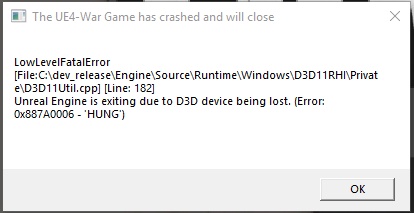
LowLevelFatalError [File:C:\dev_release\Engine\Source\Runtime\Windows\D3D11RHI\Private\D3D11Util.cpp] [Line: 233]
Result failed
at C:\dev_release\Engine\Source\Runtime\Windows\D3D11RHI\Private\D3D11Query.cpp:134
with error DXGI_ERROR_DEVICE_REMOVED DXGI_ERROR_DEVICE_HUNG
Just had this error, what's up?
sly mortar
I think DirectX thinks that your graphics card was removed @frank zealot Which is confusing. Because if it was, it wouldn't be showing that message
plain karma
you should probably get the crash logs, and send it to casey (cos he's usually the one messaging me about those when I report a crash)
C:\Users\user\AppData\Local\Foxhole\Saved\Config\CrashReportClient
I think?
 boreal mirage
crash server не могу играть пишет failed to find server/что делать?
 naive jackal
what 3D modeling software do they use?
 fathom fiber
My game is too laggy
minor junco
Turn down resolution in options
thorn rover
@gentle ocean It's "Join War" , Skirmishes don't appear in the server browser
minor junco
Click “shard” in the top left and click live
If that doesn’t work might be a connection prob
 gentle ocean
the shard menu is not working
gentle ocean
just not pop up
thorn rover
hm.
minor junco
That’s odd
thorn rover
Do you happen to have any antivirus that's blocking the game
vale aurora
Pretty sure that's not the first time this has happened to someone too.
gentle ocean
my antivirus is off right now...
thorn rover
Hm, yeah, can you check if you're opt out of any betas
gentle ocean
i just bought the game
thorn rover
Alright
vale aurora
Don't remember sadly. Might have been mentioned in here though.
minor junco
Restart modem is the best thing to do prob
thorn rover
Yeah
Seems to be a internet thing, if that doesn't work; uninstall and reinstall; maybe restart your pc
vale aurora
Looks like Samurader was the one who was having similar trouble.
thorn rover
Yeah I read up a little and saw that as well
vale aurora
No. It normally shows it.
But if you're able to play then that's what matters for now. Could just be a weird issue it's having right now. Might come back next time you launch the game.
gentle ocean
i'm not able to play
vale aurora
Still showing the same thing?
gentle ocean
yes
vale aurora
I'd say it's some kind of internet connection issue then. Since the news isn't being displayed it would make sense.
gentle ocean
it seems that foxhole is not connecting to the internet
vale aurora
Hmm. Very odd. What have you tried so far to fix it?
gentle ocean
aaa
wait wait wait
done
it was the firewall
even closed, comodo was blocking the game
i don't know how
Note: closing comodo firewall doesn't solve the problem
vale aurora
So wait. The issue was the firewall blocking it. But turning it off still hasn't solved the issue?
 near rampart
im trying to log but its saying no home region founds
sly mortar
@near rampart Restart steam, if that doesn't work your computer, and if that doesn't work restart steam, your computer, and your router
 marble sail
i have a new mic and it doesnt work in game? works fine in discord but not in game despite having it set to default. any ideas on how to fix this
inner basin
Did you plug in the mic before starting Foxhole? @marble sail @tame tide
marble sail
yup
marble sail
yup