#community-support
1 messages · Page 31 of 1
 maiden surge
 turbid smelt
I have a question, can dyno (free version) remove a specific role if there is another? I have a bot (not dyno) that can give a role (role A) when you react. Users can have another role (role B), can dyno instantly remove role A if a user has role B?
idk if make sense
maiden surge
turbid smelt
I have a question, can dyno (free version) remove a specific role if there is an...
I think so, if it is on the same reaction role look for in the options section of the module. Click the ? for more info (if this isn't what you meant just ignore me)

 main lantern
what is this bro
 maiden surge
main lantern
what is this bro
maiden surge
main lantern
what is this bro
Try refreshing or attempting to authorize again. It's on discords side not dynos
maiden surge
Check the status page see if they know about it
 maiden surge
main lantern
I didn't understand much
maiden surge
main lantern
I didn't understand much
It might be your VPN, have you tried without it?
main lantern
Discord is blocked in Türkiye.
I have to use a VPN.
I'll try changing the region via VPN and try again
No, it wasn't anything.
It hasn't changed
maiden surge
Idk, it's on discords side not Dyno's, they wouldn't be able to help much. You might just not have enough signal to connect with a VPN
main lantern
Okay, thanks for your support.
 jovial reef
Guys i make apple form but when they apple for unmute but the unmute option not coming

 granite skiff
@ everyone can still use slash commands form admin bots
I’ve tried everything at this point, no idea why it is still allowing @ everyone role to run slash commands.
I made sure that:
- The bots themselves only have Mods allowed to run commands on the bots’ dashboards
- Perms at @ everyone level are OFF for application & slash commands
- Perms at Category & Channel level are OFF for application & slash commands
- Settings > Integrations > Bots > Configured these settings to only allow certain channels & roles to run commands
All of this, and it still isn’t working. Any help would be so appreciated.


 sharp widget
granite skiff
@ everyone can still use slash commands form admin bots
I’ve tried everything a...
sharp widget
granite skiff
@ everyone can still use slash commands form admin bots
I’ve tried everything a...
Wrong server...? This is Dyno.
granite skiff
It is doing it for Dyno as well, same problem
sharp widget
I would need to see your permissions for Dyno, not for a different bot

 sharp widget
You are allowing commands for everyone, and in the bots channel.
For every command.
granite skiff
Even if I change it back it’s the same, I’ve done it both ways
One sec I’ll show you


Perms for @ everyone:

 sharp widget
So, that's not application commands. That's them just pinging the bot and using commands that way.
 strong sonnetBOT
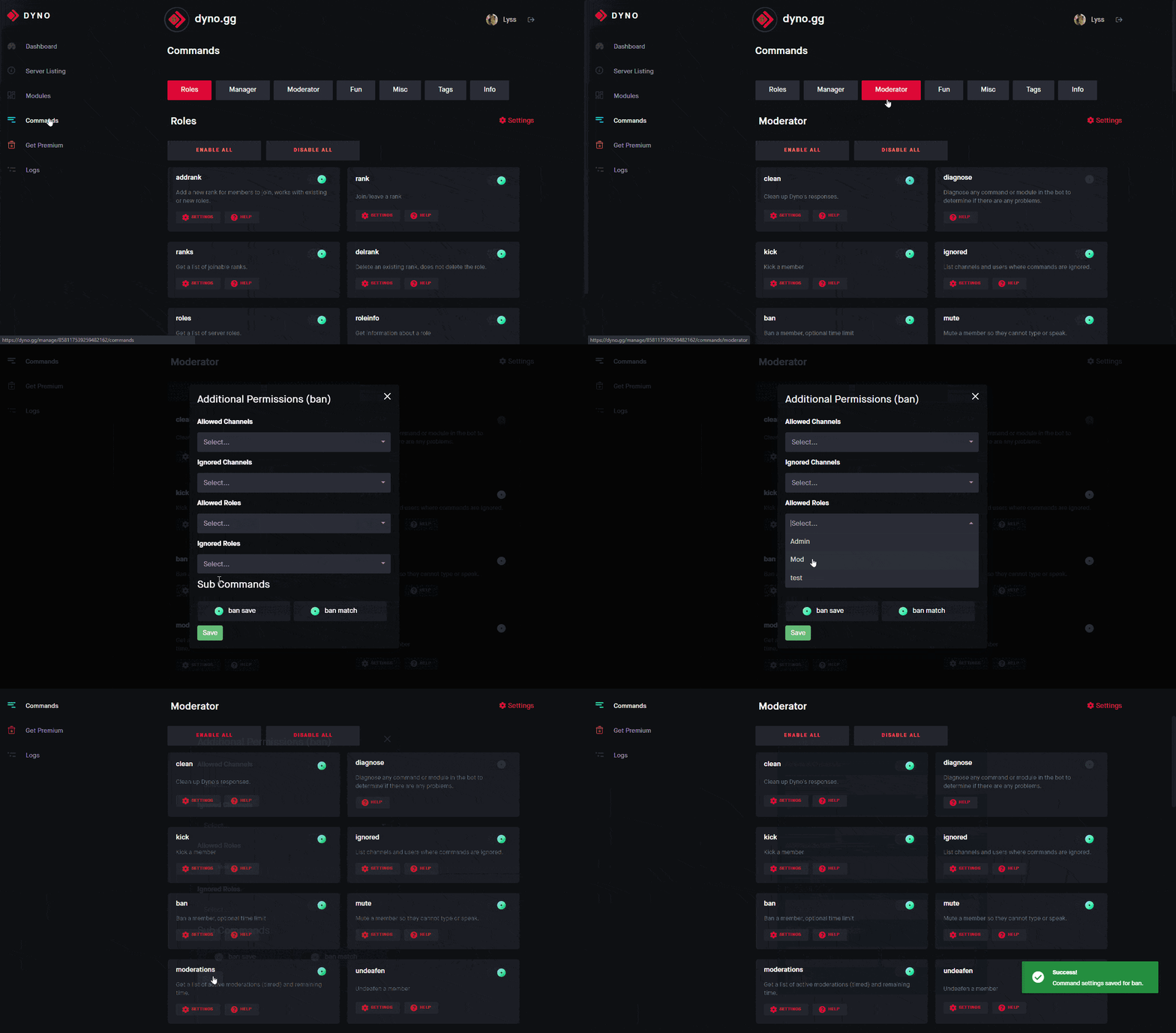
Command Settings 
This guide will show you how to limit certain commands/modules to specific roles or channels.
- Head to https://dyno.gg/account, login if necessary, and select your server.
- Click on the Commands tab.
- Navigate to the command/module(s) you want to limit, and click the
 Settings button.
 - Choose the roles or channels you want to limit the command to in the Allowed Roles box.
Note: You only need to select either Allowed or Disabled. Setting allowed roles will automatically disable all other roles.
 sharp widget
See this.
granite skiff
Ohhh I have to do this for each command?
I thought it would suppress it bc I have application commands off, and btw, it will also run slash commands too
I know this is another bot but it does this for dyno too
 sharp widget
You can't disable the help command, so that will always happen
Application commands are not prefix commands, two very different things
Nor are application commands slash commands
granite skiff
I know but if you read the app permissions it says “Allow members to use commands, including slash commands and context menu commands.”
Even then, I went into integrations and set it so only certain roles should be allowed to run application commands.
sharp widget
Dyno doesn't even have application commands, so what I would do is limit your commands above. You can limit the defaults by hitting the red cog settings button.
granite skiff
So do this for every single command? Theres no way to basically turn off slash and mention commands for @ everyone and/or in specific channels?
Thanks for your help just wanna understand bc it may help me with other bots
sharp widget
You don't need to do it for every command, you'll see a ⚙️ icon near the top of each section, that's defaults.
granite skiff
sharp widget
You don't need to do it for every command, you'll see a ⚙️ icon near the top of ...
Oh thank you so much!
 manic iglooBOT
granite skiff
Oh thank you so much!
sharp widget
manic iglooBOT
granite skiff
Oh thank you so much!
sharp widget
No prob!
 cosmic gale
I have this on… I thought it was meant to give the role automatically upon members joining. That doesn’t seem to be the case could someone let me know how to fix that or if it’s possible to do so for the guest role please.

 supple orchid
cosmic gale
I have this on… I thought it was meant to give the role automatically upon membe...
supple orchid
cosmic gale
I have this on… I thought it was meant to give the role automatically upon membe...
It should work. Can you run ?diagnose addrole & show me the results please
 supple orchid
Does the bot have permissions above the bot?
manic iglooBOT
supple orchid
See above ^
cosmic gale
Thank you!!
supple orchid
No problem!
 lilac ivy
i cant figure out a problem but the site does NOT let me click anything
sharp widget
What are you trying to do...?
 digital plume
sharp widget
What are you trying to do...?
digital plume
sharp widget
What are you trying to do...?
can you help me?
lilac ivy
il wait lol
sharp widget
Depends on what's going on
I can help both of you
Just need to know what the issue is
lilac ivy
alr
digital plume
i just dont know what to do
lilac ivy
sharp widget
Just need to know what the issue is
inside the site to adjust dyno, i cannot click anything
literally
sharp widget
Clear cookies/Cache, try on incognito/different browser
Wdym @digital plume You need to explain what you are trying todo
sharp widget
Good
digital plume
how do i know if it works
 manic iglooBOT
sharp widget
manic iglooBOT
sharp widget
Np Cuii
sharp widget
digital plume
how do i know if it works
How do you know what works? You haven't explained anything yet
 modest drum
why does everything have serverpage

 main leaf
modest drum
why does everything have serverpage
main leaf
modest drum
why does everything have serverpage
Just refresh the page, it’s known and being looked into
modest drum
main leaf
Just refresh the page, it’s known and being looked into
ok ty
manic iglooBOT
modest drum
ok ty
 minor ermine
Please fix this for me
 sharp widget
minor ermine
Please fix this for me
sharp widget
minor ermine
Please fix this for me
It is a 30m to 1hr block, this is due to you either refreshing a lot, or doing too many actions in a quick succession.
minor ermine
sharp widget
It is a 30m to 1hr block, this is due to you either refreshing a lot, or doing t...
Its been like this for 6 days
I visited the site quite mant times while i was figuring out how to set up custom bot
sharp widget
On my end I see no block from your userID to our service. If you are using a VPN, or some weird browser, then that could be why, but I would try to contact your ISP to see if they may be able to assist
minor ermine
sharp widget
On my end I see no block from your userID to our service. If you are using a VPN...
No i am using google and no vpn
sharp widget
Would try to contact your ISP/Use a different device
minor ermine
sharp widget
Would try to contact your ISP/Use a different device
Well i can give it a shot using my pc but please try to fix the issue (why its happening on phone too)
sharp widget
On my end of the spectrum, I see no issues when it comes to your account
 wanton wren
Hi guys, do you have any idea why I can't look on page 5 and beyond in moderation logs? - I tried other browser and also another admin tried it and nothing worked. Any clues?
main leaf
wanton wren
Hi guys, do you have any idea why I can't look on page 5 and beyond in moderatio...
You have a warning or case that exceeds character limits more then likely, need to find and edit / remove
wanton wren
main leaf
You have a warning or case that exceeds character limits more then likely, need ...
Mb bcs that warning is written in czech
čřťůšbž etc etc
cases
 tranquil wigeon
I need a get a dyno bot
wanton wren
main leaf
You have a warning or case that exceeds character limits more then likely, need ...
do you have any idea how to remove it? when I have 991 cases of modlogs and when the case when it stops and next page won't show up is 592?
 sturdy vortex
I got banned from a server and im hearing to appeal to the ban dyno will send me an appeal option right under the banned message but I dont have an appeal option.
sharp widget
wanton wren
do you have any idea how to remove it? when I have 991 cases of modlogs and when...
What happens when you guys try?
sharp widget
sturdy vortex
I got banned from a server and im hearing to appeal to the ban dyno will send me...
See this.
strong sonnetBOT
Dyno is simply a service used to moderate users, and as such, Dyno Staff cannot help you with moderation issues from other servers. If you believed you were mistakenly banned or there was another issue, you must attempt to contact the staff of the server where you were banned. You can ask a friend to do this on your behalf or see if the server has any other social media. If the server has a Dyno appeal form set up, the link would have been DMed to you when you were banned.
 hardy estuary
@strong sonnet how can i be unban in a server
sharp widget
hardy estuary
<@1432026891832922306> how can i be unban in a server
Read the message right above you.
Do not bring outside drama here. You will be moderated and quite possibly removed.
 plain hornet
They're using the server to bother me in DMs as well
strong sonnetBOT
✅ redlegendyt2016 met Dave's Hammer
plain hornet
Thanks
 true pike
i have seen servers use dyno for some kind of spin with different answers a moderator can create, but i cant find the comand
sharp widget
I'm not sure what you mean?
true pike
like, you make dyno say something for example i create one where i name it hello for example and when members with permission to use it, use the comand hello dyno will send a message i created for that command
manic iglooBOT
true pike
tysm
 mortal kite
strong sonnet
mortal kite
strong sonnet
😭
 buoyant lotus
hm
wanton wren
sharp widget
What happens when you guys try?
Table is trying to load and it goes into gray colour
 tawdry shoal
Hello, where can I learn to code Dyno custom commands fully, I hope that it doesn't requires to learn real coding.
 opaque flume
I recommend checking out https://docs.dyno.gg/en/modules/customcommands and #support > Custom commands
Dyno
The Custom Commands module allows you to create your very own Dyno commands! Your commands can also run regular Dyno commands, as well as use advanced variables.
tawdry shoal
opaque flume
I recommend checking out https://docs.dyno.gg/en/modules/customcommands and <#99...
Okie! Tysm.
manic iglooBOT
tawdry shoal
Okie! Tysm.
opaque flume
Let us know if you have any questions.
 fair grove
Hi i need help. How do i set up command to auto delete message history of last 24 hours if someone is banned by bot
 obsidian hollow
Hey could any one help me to get unban from a server.. cause I didn't do anything. Just my account was hacked and in result I got ban from a offical bgmi server.
supple orchid
obsidian hollow
Hey could any one help me to get unban from a server.. cause I didn't do anythin...
We do not do unbans from other servers
supple orchid
fair grove
Hi i need help. How do i set up command to auto delete message history of last 2...
Discord should automatically do it, if not. It’s something on discord side. Dyno doesn’t do it
fair grove
supple orchid
Discord should automatically do it, if not. It’s something on discord side. Dyno...
Ye discord have it default "previous 24 hour" but somehow in the server i m in it got changed to "dont delete any" can you help me with fixing that?
supple orchid
fair grove
Ye discord have it default "previous 24 hour" but somehow in the server i m in i...
Unfortunately, we can only help with modules within Dyno. Anything outside of Dyno we cannot help with
fair grove
Ok thanks for your time🙂
supple orchid
No problem :)
obsidian hollow
supple orchid
We do not do unbans from other servers
But my account was hacked and it sended some video of Mr beast promotion. I don't do anything. Then why I am facing the issue
supple orchid
Yes but that’s up to the server moderators discretion to determine wether to unban, not ours
obsidian hollow
How to connect them help me with that
supple orchid
You might have a link to appeal on the ban message. If not, you’ll have to try find a moderator from that server
 supple orchid
You’ll have to figure out to how to contact them, we cannot help as it’s outside of Dyno
 supple orchid
Because you’re banned from the server
obsidian hollow
Ohk
 pseudo niche
Is there still no way for Dyno to catch users spamming the same thing across multiple channels? We've been using an automod regex to try and catch most of them, but they are getting creative with how they use similar foreign characters to send the message. Specifically referring to the check my bio scams, and mr beast image scams.
supple orchid
pseudo niche
Is there still no way for Dyno to catch users spamming the same thing across mul...
Unfortunately not, you can catch “check my bio” with Automod. You can remove picture permissions from all users (excluding mods & higher) to fix the mr beast scams but that’s all we can do
pseudo niche
supple orchid
Unfortunately not, you can catch “check my bio” with Automod. You can remove pic...
We've been using automod, but they keep changing it to various foreign characters that look similar to the English words. We've had to constantly update the regex for it.
 little radish
they’ll always be 1 step ahead
supple orchid
pseudo niche
We've been using automod, but they keep changing it to various foreign character...
There’s nothing we can do against that
 covert wren
can a cc send a dm to a user and apply a role?
for a blacklist cc
 distant monolith
covert wren
can a cc send a dm to a user and apply a role?
for a blacklist cc
distant monolith
covert wren
can a cc send a dm to a user and apply a role?
for a blacklist cc
{dm:$1.user.id}
{!role $1.user.id +roleid}
dm message here```thank you so much!
manic iglooBOT
covert wren
thank you so much!
 frigid vortex
I'm trying to figure out how, to get dyno to role someone with a specific role, in this case it's (high comamnd), without needing a administrative permission role.
 lyric cipher
I am having a issue where (lets say) I add a role to the user, instead of the bot saying "User had this role added" It says the user has been timed out for XX:XX. help 😭
main leaf
lyric cipher
I am having a issue where (lets say) I add a role to the user, instead of the bo...
Can you please provide what exactly you are doing as this is not actually possible without some sorts of alteration or modification in some way
lyric cipher
main leaf
Can you please provide what exactly you are doing as this is not actually possib...
So this guy got hacked so we timed him out for 5 days, and I added a role named "Under Investigation" but when I did, it kept telling me that "User has been timed out for XX..." it also does it randomly
sharp widget
Can you show this? Because that's just not how it works
lyric cipher
Yeah, give me 1 second
When I said that message, I added the role to him and thats when I knew something was off


I also checked with server staff and no one has touched his timeout
 sharp widget
That's just a log is all that is, and if you are using the role command by itself without a custom command, then it would never do that. Also, it does look like you are using an altered client and we physically can not guarantee support or anything when it comes to that.
manic iglooBOT
 opaque star
How do I make it so mods can only timeout and kick and only admins can timeout, kick and ban

Like the category is so broad
strong sonnetBOT
Command Settings
This guide will show you how to limit certain commands/modules to specific roles or channels.
- Head to https://dyno.gg/account, login if necessary, and select your server.
- Click on the Commands tab.
- Navigate to the command/module(s) you want to limit, and click the Settings button.
- Choose the roles or channels you want to limit the command to in the Allowed Roles box.
Note: You only need to select either Allowed or Disabled. Setting allowed roles will automatically disable all other roles.
 glad drum
opaque star
glad drum
opaque star
Why use commands for that when Discord has it in-built?
 sullen garnet
How do I make it so people can role themself higher role than what they are
distant monolith
sullen garnet
How do I make it so people can role themself higher role than what they are
Hi, you can use reaction roles or custom commands for that
sullen garnet
Sorry I meant so they can’t
distant monolith
what are you trying to do?
sullen garnet
So my moderators can’t have perms to role themself owner or something
distant monolith
you can just move Dyno's role below owner role, then Dyno can no longer manage that role
sullen garnet
distant monolith
you can just move Dyno's role below owner role, then Dyno can no longer manage t...
ohh tysm
distant monolith
np
 humble thicket
How to get rid of my bots messages in dms I got spammed
 silk charm
Hey.
I have a issue.
So, our members can, use ?purge but they don't have the mod role or have any perms.
supple orchid
humble thicket
How to get rid of my bots messages in dms I got spammed
You can’t
supple orchid
silk charm
So, our members can, use ?purge but they don't have the mod role or have any per...
It will be a problem with your modules permissions, go to dashboard > Modules > Moderator & check permissions
supple orchid
Will be either under all commands or just the purge module
 verbal compass
Has anyone else ever had their role reactions spammed? The log channel is just filled with out of order, out of date messages like this

No way DDоS is word filtered out 💀
verbal compass
verbal compass
Has anyone else ever had their role reactions spammed? The log channel is just f...
Jesus Christ

 rigid portal
verbal compass
Has anyone else ever had their role reactions spammed? The log channel is just f...
rigid portal
verbal compass
Has anyone else ever had their role reactions spammed? The log channel is just f...
Check the audit logs for that user. I assume the user pressed the reaction role button multiple times
verbal compass
rigid portal
Check the audit logs for that user. I assume the user pressed the reaction role ...
Yep, that indeed seems to be the case, audit logs has entries about updating roles for that user up until they were banned from the server. I assume there's no way to stop the log flood until Dyno is done actually logging every single role update? Is there any way to counteract this in the future?
rigid portal
verbal compass
Yep, that indeed seems to be the case, audit logs has entries about updating rol...
Do you mean somehing like Dyno logging User was removed from the example role x20 instead of logging 20 separete events? Dyno is coded to log every event atm
verbal compass
rigid portal
Do you mean somehing like Dyno logging **User was removed from the `example` rol...
Concatenation of "identical" events would be a good fix for this, I suppose. I was thinking more like "drop every update for given user ID", but that's probably not available
rigid portal
No thats not available atm. If you have ideas for future features, use the form link in #feature-requests pinned messages
verbal compass
rigid portal
No thats not available atm. If you have ideas for future features, use the form ...
Thanks
manic iglooBOT
verbal compass
Thanks
 radiant narwhal
Everyone help me please
How I can fix my atlas I can’t grind my iphone 24hours it always delta out after 5hours
rigid portal
radiant narwhal
How I can fix my atlas I can’t grind my iphone 24hours it always delta out after...
This is a support server for Dyno. We cant help you with that unfortunately
 rigid portal
As I explained, this is a support server for @civic fossil. It has nothing to do with your phone
 tiny sleet
strong sonnetBOT
tiny sleet
strong sonnetBOT
Invite Dyno with this link! 
https://dyno.gg/invite
 celest jackal
rigid portal
As I explained, this is a support server for <@155149108183695360>. It has nothi...
celest jackal
rigid portal
As I explained, this is a support server for <@155149108183695360>. It has nothi...
Hello,
In allowed invites, does it whitelist the whole server or only that specific invite.
A server can have multiple invite limks
 chrome lantern
Hey just a curious question. So a lot of spam bots / hacked accounts, what they tend to do is spam a server with images, but they do it in every channel they have access to.
I feel like in the past not only have I suggested this but some other people suggest this too, that it needs to be able to detect quick spam through multiple channels. Is there some kind of limitation? I just feel like this is something kind of really needed and I am surprised the bot can't do this.
Just want to know if there is a good reason for this? D;
The most notorious scam that's been going around of this is that Mr.Beast image scam.
lyric cipher
chrome lantern
Hey just a curious question. So a lot of spam bots / hacked accounts, what they ...
If you use softban, I believe it deletes all the images, and removes them from the server (like a kick)
 dusk hearth
How can I know in which servers are this bot using in ?
 brittle jetty
dusk hearth
How can I know in which servers are this bot using in ?
brittle jetty
dusk hearth
How can I know in which servers are this bot using in ?
You can view your mutual servers or the list of servers on the Dyno dashboard.
-# ℹ️ This includes servers you don't have access to manage.
brittle jetty
celest jackal
Hello,
In allowed invites, does it whitelist the whole server or only that speci...
If you block all invite links but set allowed links, it whitelists only that link and blocks all others.
celest jackal
brittle jetty
If you block all invite links but set allowed links, it whitelists only that lin...
Ok, Because in my server, there are different invite links so I was just curious
 winter hatch
how do i make it so dyno auto sends a message but then deletes the previous one when a new one is posted?
and also how do i make it so dyno responds to a message but auto deletes it after a few seconds instead of staying
brittle jetty
That is not possible unfortunately.
strong sonnetBOT
Have a feature request?
We’d love to hear your ideas! To submit a feature request, please use the following form: https://dyno.gg/form/e88e2317
Check out the https://discord.com/channels/203039963636301824/541098873779781684 channel to view others' requests and upvote features you'd like to see in Dyno!
 graceful pivot
My server listing is bugged, The name and icon are just the defaults on the listing even though they aren't on discord. I checked the public listing too and it still wont show the right name and icon. It just shows "kingdempa's server" and the icon is the default icon dyno gives servers without one.
 manic iglooBOT
 dapper juniper
Enable Wildcard?
 sullen saffron
I left my own server and I lost my permissions, now I can't use dyno or assign my role. How do I do that?
dapper juniper
Can i keep ignored channels & roles empty?
brittle jetty
dapper juniper
Can i keep ignored channels & roles empty?
Yes. Allowed channels automatically ignore all others.
brittle jetty
sullen saffron
I left my own server and I lost my permissions, now I can't use dyno or assign m...
I'm not sure what you mean by that. Could you please elaborate?
dapper juniper
brittle jetty
Yes. Allowed channels automatically ignore all others.
Does {*} need to be in every message sent for it to react?
brittle jetty
No. The {*} term will react to any message sent in the channel
sullen saffron
brittle jetty
I'm not sure what you mean by that. Could you please elaborate?
Not surprised
dapper juniper
brittle jetty
No. The `{*}` term will react to any message sent in the channel
Lemme try, thank you!
manic iglooBOT
dapper juniper
Lemme try, thank you!
dapper juniper
brittle jetty
No. The `{*}` term will react to any message sent in the channel
Wildcard selected or unselected?
brittle jetty
It doesn't affect the filter; you can use whichever.
dapper juniper
brittle jetty
It doesn't affect the filter; you can use whichever.
What does it do?
strong sonnetBOT
Wildcard means that Dyno will respond if the keyword or phrase appears anywhere in the message. So for example if the trigger was cat dyno would respond to "I like cats".
This applies to various modules including autoresponder and automod.
Note: This would also mean Dyno would respond to category, so be careful when adding certain phrases.
https://i.imgur.com/T7QkrFx.png

 brittle jetty
Yup!
sullen saffron
brittle jetty
I'm not sure what you mean by that. Could you please elaborate?
So I created my server on another account, added dyno and removed commands for the @ role. Then I joined my alt with perms, left the server by accident and now I just can't use dyno, not sure if there's a fix to it or if I have to live with it.
And I lost my account stuff to the main
brittle jetty
We're unable to assist with claiming back your other account or the Dyno dashboard.
sullen saffron
Fair
 shy stream
Hi friends! Just needing a little help, I'm currently running the comand
{!role {user} 12th Gen KC}
But it just gives me the role instead of the person I ping.
Ideally it would look like this
Me: ?Verified @ dave

Dave then recieves the role.```

What small command am I missing?Small update, learned about $1
However I am getting this issue!
My code is
User: $1 | ID: $1.id
{!role {$1} Enlisted}
so I know $1 is being pulled, but it's not finding the user or something?
 sharp widget
shy stream
Small update, learned about $1
However I am getting this issue!
My code is
`...
sharp widget
shy stream
Small update, learned about $1
However I am getting this issue!
My code is
`...
where did you figure out this code?
shy stream
sharp widget
where did you figure out this code?

The User: $1 | ID: $1.id was just me checking that it was seeing what I was saying
sharp widget
You have it close, but don't put $1 in brackets. Also, should use roleid not role name
 sharp widget
Yeah
shy stream
sharp widget
Yeah
Do I have to change it? Or is simply {!role $1 961137317635035166}
sharp widget
Depends, do you want it to toggle on command or be strictly give
shy stream
Strictly give
sharp widget
Add a plus right before the 9
sharp widget
No prob
manic iglooBOT
shy stream
sharp widget
No prob
One last thing!
Im having it add like 12 roles, however it only gave 3 then stopped.
{!role $1 +961137317635035166}
{!role $1 +1165554839154085948}
{!role $1 +1214657107853451274}
{!role $1 +983819770090627122}
{!role $1 +1083883730587889705}
{!role $1 +967811193370734592}
{!role $1 +960048772069617665}
{!role $1 +961139252798816326}
{!role $1 +1218442927383253033}
{!role $1 +1455430747572797614}
{!role $1 -1060075727439003738}
is it a, you need to have premium thing?
 manic iglooBOT
 opaque torrent
how do i check the tickets i made?
 opaque torrent
 split beacon
is this how i check my tickets?
split beacon
opaque torrent
is this how i check my tickets?
No
split beacon
split beacon
Refreshing seems to have fixed the problem. I wonder what caused it.
distant monolith
shy stream
One last thing!
Im having it add like 12 roles, however it only gave 3 then sto...
you can run a command only up to 3 times in a custom command, use this instead 
{!role $1 +961137317635035166, +1165554839154085948, +1214657107853451274, +983819770090627122, +1083883730587889705, +967811193370734592, +960048772069617665, +961139252798816326, +1218442927383253033, +1455430747572797614, -1060075727439003738}```You have earned my second cookie
🍪
Thank you!
distant monolith
np
 livid thistle
Good day everyone - I'm struggling a bit.
I'd like to set up Dyno to delete the past 3 messages from one user across one server and kick that user if said user writes in ONE designated channel (i.e. fly-trap channel for the bots).
I have not found anything so far, yet I'm not into Dyno well enough, maybe one of you can guide me - if Dyno is capable of doing so - to what I should do to get to my goal 🙂
Thanks in Advance
rigid portal
Just to clarify, do you want Dyno to remove a specific users last 3 messages across every channel?
livid thistle
Yes, that's correct - but only when that user sends a message in one specific channel
rigid portal
livid thistle
Yes, that's correct - but only when that user sends a message in one specific ch...
Thats not possible im afraid
livid thistle
Good to know I am not blind then 😂 Thanks for the support, appreciate it!
 unborn talon
Help me

 lyric cipher
unborn talon
Help me
lyric cipher
unborn talon
Help me
What specifically do you need help with?
unborn talon
lyric cipher
What specifically do you need help with?
See the screenshots the words are not correct
 cloud merlin
I have the Dyno Custom for $11.99, but for some reason, it tells me to upgrade to Standard plan, when selecting the Levels Module, however the Premium Modules, such as Kick, TikTok and YouTube, work just fine. What seems to be the issue?
rigid portal
unborn talon
See the screenshots the words are not correct
Refreshing the page usually solves it
rigid portal
cloud merlin
I have the Dyno Custom for $11.99, but for some reason, it tells me to upgrade t...
Hi, I'll have a look at it. Can you send the server ID please?
cloud merlin
rigid portal
Hi, I'll have a look at it. Can you send the server ID please?
813883176769290241
rigid portal
Can you show me the premium page on the dashboard?
cloud merlin
rigid portal
Can you show me the premium page on the dashboard?
This? I can access modules marked as "Premium", but not modules marked as "Standard".
 rigid portal
No I meant this premium page https://dyno.gg/account/servers/premium
 rigid portal
Give me a minute
rigid portal
cloud merlin
Does it still say 0 if you refresh the page?
 signal holly
i cant log into the dashbord
 fading rune
signal holly
i cant log into the dashbord
fading rune
signal holly
i cant log into the dashbord
You will need to be more specific than that
 slate quail
Can someone help me
slate quail
fading rune
You will need to be more specific than that
Can you help
fading rune
slate quail
Can you help
- You need to state your issue
- You do not need to ping individual people, you can just ask
slate quail
If I put a link in the feedback forum will it work in the message for people to click


@fading rune
fading rune
Yes.
manic iglooBOT
slate quail
<@449245847767482379> thank you
slate quail
What’s that
slate quail
manic igloo
@fading rune what is this for
Bro dark
Why are you not anser
@rigid portal can you help
fading rune
There is an info button below the message.
And again, stop pinging individual staff members, you receive help as soon as someone is able to answer.
slate quail
Why are you be sassy
slate quail
fading rune
And again, stop pinging individual staff members, you receive help as soon as so...
I need help with thing and you left after saying yes
fading rune
Staff here is a volunteer. We are not in this channel 24/7, and only 1 minute passed since you asked and I responded.
slate quail
fading rune
Staff here is a volunteer. We are not in this channel 24/7, and only 1 minute pa...
Bro can you help me
slate quail
I have more
fading rune
If you have another question, again, just ask.
slate quail
fading rune
If you have another question, again, just ask.
Can I ping someone in it
Like I do tho
This
@cosmic widget
@fading rune
Can I do that
Why is bro keep leaving
fading rune
You can, but it won't actually ping the person.
fading rune
No. It's how embeds work.
slate quail
Ok well thank you because I am mad now
lyric cipher
Cause not everyone is on 24/7
slate quail
So I am mad
lyric cipher
slate quail
I am
Ok? Doesn't mean everyone still is on 24/7.
slate quail
Guys I need help
slate quail
lyric cipher
Ok, go ahead
So on my account that got hacked it’s logged into dyno dashboard and I’m trying to log in to this account so I log out in dash board then I hit log in then it automatically logs me into my hacked account. And I can’t switch to this one
@lyric cipher
Bro help
You said you will help
slate quail
Why is bro take so long
lyric cipher
Do you want a answer or no
slate quail
Yes
lyric cipher
Be patient, I am typing out bro 😭
slate quail
Can you is type faster because I need help
 buoyant plume
If you keep doing this you're gonna get muted, this is your last warning to be patient and understanding
slate quail
Why
lyric cipher
Dyno dashboard is known for doing this, so what I would do is either click on "Not Me" when it pops up, or log onto your hacked account and disable Dyno.
buoyant plume
That has been explained already, more than once
slate quail
That’s my first warning not last
slate quail
lyric cipher
Dyno dashboard is known for doing this, so what I would do is either click on "N...
It goes to fast to click not me and it just logs me in on its own
slate quail
lyric cipher
Dyno dashboard is known for doing this, so what I would do is either click on "N...
I can’t log to my hacked account it changed password
lyric cipher
1 sec
lyric cipher
slate quail
I can’t log to my hacked account it changed password
So then your last option is to try your best to click "Not Me"
lyric cipher
?tag discordlogin
strong sonnetBOT
 Make sure you are logged into the right account
If you find yourself logged into the wrong account follow these steps:
Copy and paste this link in your browser: https://discord.com/channels/@me
- Go to your discord settings at the bottom left of the screen with the ⚙️ icon.
- Select Log Out to log out of the discord account.
Head to: https://dyno.gg/logout to logout of the account at dyno.gg
- After you follow these steps log into both discord and dyno.gg with the correct account.
slate quail
@buoyant plume are you owner
slate quail
strong sonnet
<:DynoBlitz:958814293556621392> **Make sure you are logged into the right accoun...
What’s this
lyric cipher
slate quail
What’s this
Hopefully something to help you
slate quail
I don’t want to read it all
lyric cipher
.
 zenith oak
 slate quail
That’s is not a dog bro
That looks like T. rex
Mixed with Tiger
It is cute
@lyric cipher help me bro
I need help still
lyric cipher
Ok, ask your question and I will try to see if I can help
slate quail
Bro I already ask question
lyric cipher
I already answered it then unless you are talking about another one
slate quail
Bro you did not help because I still need help
lyric cipher
With what...
lyric cipher
I don't think I am going to answer that
slate quail
lyric cipher
I don't think I am going to answer that
Bro why
I need help
@fading gulch can you help me
This guy is refuse to help
So on my account that got hacked it’s logged into dyno dashboard and I’m trying to log in to this account so I log out in dash board then I hit log in then it automatically logs me into my hacked account. And I can’t switch to this one
 remote wraith
Halo
lyric cipher
If you can't do that, then I suggest going here https://discord.com/channels/203039963636301824/991748447046729858
strong sonnetBOT
Make sure you are logged into the right account
If you find yourself logged into the wrong account follow these steps:
Copy and paste this link in your browser: https://discord.com/channels/@me
- Go to your discord settings at the bottom left of the screen with the ⚙️ icon.
- Select Log Out to log out of the discord account.
Head to: https://dyno.gg/logout to logout of the account at dyno.gg
- After you follow these steps log into both discord and dyno.gg with the correct account.
rigid portal
slate quail
So on my account that got hacked it’s logged into dyno dashboard and I’m trying ...
@slate quail follow the steps above to solve it
slate quail
What steps
rigid portal
Look at Dynos message
mortal kite
if i make a command called ?ban and disable the real ban command will the custom ban work
rigid portal
mortal kite
if i make a command called ?ban and disable the real ban command will the custom...
No. You have to name the custom comand somthing else
 hazy tree
is action log the thing that allows u to see deleted msgs
 undone siren
Why can't I select ignored channels and allowed roles in this menu ?
 lyric cipher
undone siren
Why can't I select ignored channels and allowed roles in this menu ?
lyric cipher
undone siren
Why can't I select ignored channels and allowed roles in this menu ?
Did you refresh?
lyric cipher
So its working now, correct?
 sacred sandal
I was trying to make a reaction role on my own server, but after setting it up, when we click on the reaction it gives this error. What should I do?
 lyric cipher
sacred sandal
I was trying to make a reaction role on my own server, but after setting it up, ...
lyric cipher
sacred sandal
I was trying to make a reaction role on my own server, but after setting it up, ...
Put the bot above the role
So go to roles and put your bot role above any roles you want the bot to give out
 tall ruin
it’s not working
lyric cipher
The bot I am assuming?
 strong sonnetBOT
❌ No tag prefix found.
lyric cipher
wow
tall ruin
yeah
lyric cipher
Try doing slash command maybe?
tall ruin
nvm works now
 mint garnet
Hi, does the /members to check how many members in a role command actually works? It always shows no members
distant monolith
mint garnet
Hi, does the /members to check how many members in a role command actually works...
Due to how Dyno now caches users, this command no longer functions properly. The command may not output the correct list of members.
 silk blaze
hello, if a member sends a message/image that violates discord TOS, then the message gets deleted by discord itself after the message was reported, is that deletion of message/image logged by the bot like a normal message would be?
dapper juniper
How Do I Create Two Separate Automated Reactions, Different Channel Needs To Automatically React To An Embed DYNO is Hoisted Above It But I Can’t Have Two {*} Any Help?
 supple orchid
silk blaze
hello, if a member sends a message/image that violates discord TOS, then the mes...
supple orchid
silk blaze
hello, if a member sends a message/image that violates discord TOS, then the mes...
Yeah it would be
silk blaze
interesting indeed, a massage was deleted "apparently" but there is no log of it
supple orchid
Dyno should always log the image / message deleted
silk blaze
i see, thank you for the info!
silk blaze
supple orchid
Dyno should always log the image / message deleted
whats weird is, the message was infact deleted, but there is no log of it
maybe dyno was down during that time?
supple orchid
dapper juniper
**How Do I Create Two Separate Automated Reactions, Different Channel Needs To A...
#support > Auto responder
supple orchid
silk blaze
whats weird is, the message was infact deleted, but there is no log of it
It should’ve done, sometimes Dyno can miss some messages but it’s rare
silk blaze
was it possible dyno was off, sometime during 26th april ?
thats the only possibilty I can think of
supple orchid
Not that we know of, it wasn’t posted in #dyno-status. Dyno probably missed it which is rare but does occasionally happen
silk blaze
oh well, it seems it might be that rare case of dyno missing something
supple orchid
Yeah, it happens sometimes
silk blaze
supple orchid
Yeah, it happens sometimes
say, if this is off

and discord deleted messages in bulk
then it wouldn't be logged?

supple orchid
It wouldn’t no, the module needs to be enabled
silk blaze
oh, so this might be the issue

 waxen arrow
@civic fossil
 hybrid wadi
How do i add the avatar of the member who left the server in announcement embed
supple orchid
hybrid wadi
How do i add the avatar of the member who left the server in announcement embed
Dashboard > Action Log, at the top enable “show avatar on join/leave”. I’ll attach a screenshot below
 hybrid wadi
supple orchid
Dashboard > Action Log, at the top enable “show avatar on join/leave”. I’ll atta...
hybrid wadi
supple orchid
Dashboard > Action Log, at the top enable “show avatar on join/leave”. I’ll atta...
Would that {avatar} in thumbnail work
 supple orchid
hybrid wadi
Would that {avatar} in thumbnail work
supple orchid
hybrid wadi
Would that {avatar} in thumbnail work
It should do, yes
hybrid wadi
Okay thanks
manic iglooBOT
supple orchid
Thanks 
fading rune
@winter hatch Hey there. Wanted to let you know the caps slider issue was fixed if you want to test.
 acoustic musk
is there a way where when i make a custom command like ?verify it gives the member the role i want but also removes another role at the same time?
brittle jetty
acoustic musk
is there a way where when i make a custom command like ?verify it gives the memb...
Hi there! Yes, this is possible with custom commands.
acoustic musk
brittle jetty
Hi there! Yes, this is possible with custom commands.
hi how can i do it
brittle jetty
You can add multiple roles to be toggled in one command. For example:
{!role $1 +roleID, -roleID}
acoustic musk
brittle jetty
You can add multiple roles to be toggled in one command. For example:
```{!role ...
thank you so much
manic iglooBOT
acoustic musk
thank you so much
brittle jetty
The {!role $1 +roleID, -roleID} should not be modified (except replacing roleID with the role IDs). You can change the name of the custom command to change how you'd run it.
acoustic musk
brittle jetty
The `{!role $1 +roleID, -roleID}` should not be modified (except replacing `role...
okay thank you so much and thank you for replying fast
winter hatch
fading rune
<@1071385900719820851> Hey there. Wanted to let you know the caps slider issue w...
ty
 vast acorn
Is the “fast message spam” rule in the automod not working for anyone else? I tried it with my alt it didn’t react.

 rapid raft
dyno keeps sending audit log messages in my general chat i checked all of his settings on dynos dashboard and there didnt seem like to be any issue, if anyone knows how to handle this i would really appreciate if someone could tell me how to fix it

 fading rune
rapid raft
dyno keeps sending audit log messages in my general chat i checked all of his se...
fading rune
rapid raft
dyno keeps sending audit log messages in my general chat i checked all of his se...
Action log module > log channel
 fading rune
rapid raft
fading rune
rapid raft
And what do you have at the top
rapid raft
 fading rune
You just changed it just now?
rapid raft
fading rune
You just changed it just now?
no i disabled select all channels
it was like this the whole time
but still isnt working
fading rune
whats your server id
 proper ridge
Hiee i got banned from build a zoo from using an alr account but i removed the main one and still can't join help
fading rune
proper ridge
Hiee i got banned from build a zoo from using an alr account but i removed the m...
We do not handle moderations from other servers.
fading rune
rapid raft
where do i get that
Your dashboard url has a bunch of numbers, its that one
Well the ID is indeed correct
Can you go to the channel settings and delete Dyno's webhook
fading rune
Glad it works now
 obsidian wind
so im trying to set up the autoresponder to respond to every message sent by a role and i got it working. but when i try to set it to respond with the Ant Emoji it doesnt work, every other emoji works fine. just not 🐜
 regal jewel
obsidian wind
so im trying to set up the autoresponder to respond to every message sent by a r...
regal jewel
obsidian wind
so im trying to set up the autoresponder to respond to every message sent by a r...
does the emoji save correctly on the dashboard?
 copper marsh
Is it possible to set it up to send a message when someone tag a person?
vast acorn
Yes I am sure through custom commands you can copy their @ as the trigger
copper marsh
vast acorn
Yes I am sure through custom commands you can copy their @ as the trigger
Ok will try it out thanks
manic iglooBOT
copper marsh
Ok will try it out thanks
obsidian wind
regal jewel
does the emoji save correctly on the dashboard?
No, most of the emojis don’t save visually display correctly on the dash
regal jewel
obsidian wind
No, most of the emojis don’t save visually display correctly on the dash
due to some issues with chromium based browsers, some emotes are not showing. firefox usually works tho 😄
 vagrant relic
Hello, is anyone else not able to get their messages to Starboard with Dyno? Despite the message reaching all the requirements to? My members did, yet Dyno didn't even put the message in there. It worked a few days ago. Nothing's changed since then. I confirmed that it was working as intended a few days ago. I'm assuming it's down or something rn, since idk why it would break randomly today when it was working just fine before. I used /star to view the message's stats, and it said...
"Starboard Info
Star Count: 3
Deleted from Starboard? No
first users to star this message
@MesharBaldiBP
@Robloxnoob
@Valentinexus
@DarkSky
@unrecovery3"
So it says only 3 stars are there, but shows 5 usernames. The message itself, has 5 stars.
obsidian wind
regal jewel
due to some issues with chromium based browsers, some emotes are not showing. fi...
The issue isn’t the emoji not properly previewing on my browser. It’s that that dyno doesnt react with said emoji in the discord app when set. But does with other emojis
 twin fox
hello,how can i get an appeal for a ban on a discord server
vast acorn
twin fox
hello,how can i get an appeal for a ban on a discord server
Dyno support doesn’t help with personal server moderation, you need to talk with the server owner/mod about it this is only Dyno bot support
 tawny spruce
I just set up the custom dm command
but it keeps saying user not found when i do it for @ -everyone
vast acorn
i dont know if you can Mass DM people like that it will likely get flagged for suspicious bot like behavior
tawny spruce
vast acorn
i dont know if you can Mass DM people like that it will likely get flagged for s...
i’m pretty sure we can, dyno does that for many servers
sharp widget
You can't. Against discord tos
vast acorn
if you are taling about the welcome message its different
sharp widget
That still only gets sent for one user and can't retroactively be used to send out messages
 brittle quest
any way to increase the upper time limit we can use on the temprole command?
need to be able to temprole for a year for something 🙂
sharp widget
There is not
sharp widget
What?
 tired spoke
What?
sharp widget
No idea what you mean by what you posted. This is Dyno Support.
regal jewel
obsidian wind
The issue isn’t the emoji not properly previewing on my browser. It’s that that ...
ah i see, could you pass me the server id please
sharp widget
(being helped in additional)
 next portal
How do I receive messages from Dyno through my DM?
regal jewel
could you please elaborate?
next portal
regal jewel
could you please elaborate?
Well, I made a request in a game; Dyno was supposed to send me a DM explaining how the request would work.
regal jewel
could you show me what you mean
 crisp granite
Can I restrict what roles can be given with ?role or /addrole
fading rune
crisp granite
Can I restrict what roles can be given with ?role or /addrole
You can not.
Only by moving Dyno's role below the roles you don't want it to manage.
brittle quest
sharp widget
There is not
Thanks, no worries
manic iglooBOT
brittle quest
Thanks, no worries
sharp widget
Please.dont jump channels
 agile comet
Is anyone here from among us server?
main leaf
agile comet
Is anyone here from among us server?
Hi, we can only assist with dyno and dyno related issues, we cannot assist with outside server issues.
agile comet
main leaf
Hi, we can only assist with dyno and dyno related issues, we cannot assist with ...
Ok ok
tired spoke
@sharp widget @sharp widget
sharp widget
Yes...?
 mild island
Is it possible to make a custom command that always gives/removes certain roles, but also assigns additional roles based on an argument?
I’m setting this up for a military group enlistment system. The idea is:
When the command is used on someone, it always:
- Removes an “awaiting enlistment” role
- Gives a “conscript” role
Then, depending on the argument used, it also assigns: - A regiment role
- A depot role
- A platoon role
I have a command that removes the “awaiting enlistment” role and gives the “conscript” role, but I can’t get it to assign the extra roles based on the argument.
For example:
/enlist @user 1line2platoon
Would:
- Remove “awaiting enlistment”
- Give “conscript”
- Give "1st Line Infantry Regiment"
- Give "1st Line Infantry Regiment Depot"
- Give "2nd Platoon of the 1st Line Infantry Regiment"
Is this possible with one command, or would I need a different setup?
 hearty anvil
Can anyone tell me how can I set up anti-bad word and anti-spam modules??
Where can I just set up 2 modules??
lyric cipher
hearty anvil
Can anyone tell me how can I set up anti-bad word and anti-spam modules??
Yes! So first you go to the modules page and click on Automod, then create a rule, from there, you can name that module and select what you want it to do, so bad word, or spam. Then once you enter the words you don't want, you can select what you want the bot to do for that message. Then you can select what channels you want the bot to effect, so on and so on. Hope this answers your question!


 hearty anvil
lyric cipher
Yes! So first you go to the modules page and click on Automod, then create a rul...
hearty anvil
lyric cipher
Yes! So first you go to the modules page and click on Automod, then create a rul...
Thanks!!
lyric cipher
hearty anvil
Thanks!!
Yep!
 onyx stream
How to add own mute role in dyno@lyric cipher
lyric cipher
?tag mute roles
strong sonnetBOT
A user has the "Muted" role but they can still talk!
This is an issue with your channel permissions.
Go to the channel(s) they can still type in and go to Channel Settings -> Permissions
In the  channel your permissions should be as follows:
For All roles except the Muted role Send Messages 

For Muted role Send Messages 
If it's a  private channel your permissions should be as follows:
For the Member role or Access role Send Messages View Channel 
For Muted role Send Messages
For @everyone role Send Messages View Channel
Note: If you wish to leave your channel permissions as they are, you can enable the "Remove Roles When Muted" setting under the "Moderation" module settings on the web dashboard to have Dyno remove the user's roles when muting them.
onyx stream
lyric cipher
?tag mute roles
In dashboard
supple orchid
onyx stream
How to add own mute role in dyno<@1320936241600004197>
There’s a document on it -> https://docs.dyno.gg/en/modules/moderation
Dyno
The Moderation module allows you to use any Moderator command and also allows you to set up things such as Moderation Log Channels, Protected/Moderator Roles, and certain options which will change how the module works.
 exotic solar
Can someone help me how to get dynk 😔
distant monolith
mild island
Is it possible to make a custom command that always gives/removes certain roles,...
Hi, you could create a role menu
{choose:announce {channel} Select a set of roles:

`1.` regiment role
`2.` depot role
`3.` platoon role
To give a set of roles, use `{prefix}cmd [user] [option_number]`.}
{choose1:role $1.user.id -awaiting enlistment, +conscript, +regiment role}
{choose2:role $1.user.id -awaiting enlistment, +conscript, +depot role}
{choose3:role $1.user.id -awaiting enlistment, +conscript, +platoon role}
{!{choice$0+}}```Invite Dyno with this link!
https://dyno.gg/invite
distant monolith
@exotic solar 
 woeful kernel
Can anyone tell me why this command would only run the remove role part and not the add role part?


 opaque flume
woeful kernel
Can anyone tell me why this command would only run the remove role part and not ...
opaque flume
woeful kernel
Can anyone tell me why this command would only run the remove role part and not ...
I would try using role IDs
Also can you move Dyno's role down all the way, save it. move it back up, save it then try
onyx stream
supple orchid
There’s a document on it -> https://docs.dyno.gg/en/modules/moderation
Not working
onyx stream
@opaque flume how to make muted role using dyno
opaque flume
onyx stream
<@749895975694499930> how to make muted role using dyno
In the moderation module you should see an option called Use discord timeouts for mute
Make sure it's disabled and then mute someone
Dyno will create the role automatically and if you want to change its name here's the guide:
strong sonnetBOT
How 2 Change Muted Role
If you would like Dyno to use an existing role for mute:
1. Delete the current Muted role used by Dyno.
2. Rename the role you want Dyno to use to Muted.
3. Mute a user.
4. Dyno should now use the existing Muted role.
5. You can now rename the existing role back to the original name.
 keen rock
How to use automod for several mentions in a row? I tried using the mentions cooldown rule but it ended up muting users who replied to other messages
woeful kernel
opaque flume
I would try using role IDs
Sorry Im new to this bot 1st time using it. What do you mean by this?
keen rock
woeful kernel
Sorry Im new to this bot 1st time using it. What do you mean by this?
you must have developer mode activated, if you right click a role you'll see the ID option

Quick tutorial On How to Find Role ID for discord
vast acorn
keen rock
How to use automod for several mentions in a row? I tried using the mentions coo...
there is an automod rule for spam tagging people try that
mild island
distant monolith
Hi, you could create a role menu <:that:336064031402098699>
```
{choose:announce...
Is that reaction roles?
keen rock
vast acorn
there is an automod rule for spam tagging people try that
any of these?
 vast acorn
keen rock
any of these?
vast acorn
keen rock
any of these?
there is a Mass Mention one that is what i use
distant monolith
mild island
Is that reaction roles?
that's a custom command, that’s what you asked for
mild island
distant monolith
that's a custom command, that’s what you asked for
Okay good thank you, I saw choose and thought it meant it was a reaction role
manic iglooBOT
mild island
Okay good thank you, I saw choose and thought it meant it was a reaction role
distant monolith
mild island
Okay good thank you, I saw choose and thought it meant it was a reaction role
np, if you need help with customisation feel free to ping me
distant monolith
woeful kernel
Sorry Im new to this bot 1st time using it. What do you mean by this?
fyi you can also use a single role command to add and remove roles -> {!role $1 +roleid, -roleid}
mild island
distant monolith
np, if you need help with customisation feel free to ping me
Can I replace the numbers for the choices with words or phrases?
distant monolith
mild island
Can I replace the numbers for the choices with words or phrases?
no sry, that doesn't work
vagrant relic
vagrant relic
Hello, is anyone else not able to get their messages to Starboard with Dyno? Des...
Starboard is working again! I didn't have to change anything a new message just reached the requirements and it got put in the channel!
woeful kernel
distant monolith
fyi you can also use a single role command to add and remove roles -> {!role $1 ...
Ok cool so do I add in the role Id after the + and - so it knows which roles to add and remove?
distant monolith
woeful kernel
Ok cool so do I add in the role Id after the + and - so it knows which roles to ...
exactly
ant without +/- infront it will toggle
woeful kernel
distant monolith
exactly
Ok so I did that and now it is returning an error saying could not find user
distant monolith
woeful kernel
Ok so I did that and now it is returning an error saying could not find user
show me your command please
woeful kernel
 distant monolith
woeful kernel
distant monolith
woeful kernel
looks fine
 wet jungle
anyone know how to change the command for mute
like for example instead of mute it would be shut
?shut
woeful kernel
distant monolith
looks fine
Does it make a difference if the required role is the same as one I am wanting to remove? What I am trying to accomplish is members receive a role when the "purchase" it. Which gives them access to a channel where they can submit their twitch information to be put on a bot. After they do that they run this command to replace the role that gave them access and gives them a different role that shows they are "boosted"
distant monolith
woeful kernel
Does it make a difference if the required role is the same as one I am wanting t...
should work
how are you using the command
 lost horizon
anyone know how to get back into a server i got banned from? i tried to appeal and they did not like it and it wont let me appeal again.
 hasty kite
If your appeal was denied then there is no way back in.
vast acorn
lost horizon
anyone know how to get back into a server i got banned from? i tried to appeal a...
That’s not up to dyno the server has to do something if you got banned it’s up to them not the bot support team
lost horizon
thats not what i wanted to hear 💔
woeful kernel
distant monolith
how are you using the command
In what way do you mean? like how are they activating the command?
 subtle sigil
same bro, they make a bot to ban people but don't have the authority to unban. make a bot who can unban us @lost horizon
sharp widget
subtle sigil
same bro, they make a bot to ban people but don't have the authority to unban. m...
That's like saying because you got arrested for stealing from like Walmart they should be the ones to get you out of jail.
Were simply a service and like any service, including discord itself, we are not responsible for you getting unbanned.
And, if we did, it'd be a violation of tos since it'd be assisting in ban evasion.
subtle sigil
its the internet and based on opinions of others
sharp widget
Exactly my point?
subtle sigil
You're absolutely right
hasty kite
That would defeat the entire purpose of being able to ban people from servers if anyone could simply unban
subtle sigil
its supposed to be supported like this and people get interviewed. like the justice system
vast acorn
and there is probably a valid reason for the action, they cant just do it (while they can, there can be a reason)
subtle sigil
court if you will
hasty kite
That’s not how discord works. Anyone can ban for any reason they wish
sharp widget
Or for no reason
subtle sigil
based off of one story yes
vast acorn
also why are we in #community-support
sharp widget
If we have an issue with it, staff will intervene.
With this, if staff is answering, there is no reason to jump in either
subtle sigil
I wanted help getting unbanned for a false ban but your of no help becuase you provide a one way service. thats why
sharp widget
As does every other moderation bot on discord as we physically have to per discord terms.
Otherwise, we risk being taken down.
I highly suggest you read discord terms, which you agreed to by signing up for the platform.
Anyways, there's no more point in this discussion as we have answered you correctly and within the terms set by Discord itself.
If you have an issue with it, you can escalate that up to Discord.
woeful kernel
distant monolith
should work
nevermind I got it to work Thank you!
manic iglooBOT
woeful kernel
nevermind I got it to work Thank you!
 safe tulip
what's the deal with the different colors of dyno
I've seen a blue one, green, orange and a pride one
what's the difference
hasty kite
When you subscribe to premium, you can choose the color of your bot.
safe tulip
oh ok
got banned from a server by orange dyno and I closed the chat. now i can't see the message anymore
hasty kite
@desert quest
safe tulip
oh, I was wrong
yellow dyno
hasty kite
@waxen tapir
safe tulip
thanks
woeful kernel
New question? Sorry Is there a way to add a timer that removes a role after a period of time?
strong sonnetBOT
**Command:** ?temprole
Aliases: ?undefined
Description: Assign/unassign a role that persists for a limited time.
Cooldown: 5 seconds
Usage:
?temprole [user] [time] [role], [optional reason]
Example:
?temprole @NoobLance 1d Birthday, Happy Birthday
 fading gulch
@woeful kernel Check this out!
brittle jetty
woeful kernel
Seconds, Minutes, Days?
Yup! You can't really set a temprole for seconds though
woeful kernel
brittle jetty
Yup! You can't really set a temprole for seconds though
not even for testing?
brittle jetty
You can set it for 1-3 minutes for testing
woeful kernel
brittle jetty
You can set it for 1-3 minutes for testing
This is what I have does this look right? I changed the time to 1m
 brittle jetty
You don't need to include the brackets in [user] or [role]. You also need to make sure you add a closing brace for {!temprole}.
If you want to give a role to a specified user, you can use $1 in place of [user].
woeful kernel
Id like to give the role to the person who used the command
brittle jetty
You can use {user} then (with curly braces)!
woeful kernel
For some reason its not giving the roles it is sendind the code in their DM
brittle jetty
What do you mean by that?
woeful kernel
brittle jetty
What do you mean by that?
 brittle jetty
You don't need brackets around the duration.
woeful kernel
brittle jetty
You don't need brackets around the duration.
Its still sending the same message but without the brackets lol I am so confused
brittle jetty
Can you show me a screenshot of the full custom command?
woeful kernel
 brittle jetty
Your temprole isn't properly set up. It should be {!temprole {user} 1m ROLE_ID}.
You also don't need the additional option to DM the current user since you already have that enabled.
woeful kernel
ok do the role id #s go after ROLE_ID inside the brackets?
brittle jetty
Replace ROLE_ID with the numbers.
woeful kernel

Sorry and thank you for all your help I am so new to this bot and I am learning how to understand it
brittle jetty
Yes, that appears correct now
woeful kernel
brittle jetty
Yes, that appears correct now
It works except for the timer part. The member still has the roles after 1m
sacred sandal
how do i fix this?

I want to edit the reaction roles I created, but it's giving me this error.
tawdry shoal
sacred sandal
how do i fix this?
Hey, Dyno often glitches when you set the Dashboard's written language into another one.
I suggest you to change the written language in the dashboard, and restart the tab.
-# Go with English, because I believe that's the default written language Dyno's dashboard has.
 devout nexus
how do i setup where people get role from my server then dyno will send message from people's dm
sacred sandal
tawdry shoal
Hey, Dyno often glitches when you set the Dashboard's written language into anot...
How do I change the language of the control panel?
vast acorn
devout nexus
how do i setup where people get role from my server then dyno will send message ...
A welcome message?
devout nexus
vast acorn
A welcome message?
idk if that is samething or not
but if someone got blacklisted from tickets channel in my support server and dyno will send a message like "you've been blacklisted for {reason}" in DMs
@vast acorn
vast acorn
Idk how to do that
main leaf
Everyone on staff / support are volunteers, sometimes, it can take a sec to get a reply, especially when a majority of support are within the US who are just getting up for the day or in the middle of a work day, I am sure they thank you for your understanding
 flat hearth
Hey, main account got suspended and I cant just wait it out. I need to assign my other account admin. Problem is dyno signed me out from the website (why does it do this, wick never does this).
I need to assign myself a role with administrative perms.
main leaf
flat hearth
Hey, main account got suspended and I cant just wait it out. I need to assign my...
Not possible, sorry that would be a significant security risk
flat hearth
main leaf
Not possible, sorry that would be a significant security risk
I understand. However, I need an exception to be made.
 topaz lily
hey?
flat hearth
main leaf
Not possible, sorry that would be a significant security risk
TLDR - I have everything set for dyno. I am the owner, I have everything. The problem is dyno logged me out and at the same time my discord account got suspended. I do not have time to wait 2+ weeks before a server falls to chaos. I need manual interfierance or login.
fading rune
topaz lily
i try to join it says your not a discord member
You're not part of the server the giveaway is from.
fading rune
flat hearth
TLDR - I have everything set for dyno. I am the owner, I have everything. The pr...
We can't help you with that.
flat hearth
fading rune
We can't help you with that.
Your website signed me out before I could manage my server. Im pretty sure help is owed.
and I cant re-sign in because my account is currently suspended thanks to discord's jank auto-moderation
fading rune
And as stated, we can't help you. You can't sign in if your account is suspended.
We can't do anything about that.
flat hearth
fading rune
And as stated, we can't help you. You can't sign in if your account is suspended...
I was signed in before. Why does your website constantly refresh the session.
hasty kite
flat hearth
I was signed in before. Why does your website constantly refresh the session.
If a discord account gets suspended, discord automatically logs out of linked applications.
flat hearth
hasty kite
If a discord account gets suspended, discord automatically logs out of linked ap...
didnt sign me out of wick and carlbot just saying
sharp widget
It's not something we can at all help with. When we get the notice from discord, we automatically take action to ensure we are completely within the terms.
 silver lance
@fading rune^^
sharp widget
Someone will help you in that thread whenever they get a moment. As was stated, we are all volunteers so patience is needed. Thanks for understanding
 civic herald
Hello I was looking for this since I’m having a similar issue.
Wouldn’t that be going against the whole point of locking channels?
I have it set so that once you verify and get the verified role, you can talk in certain channels so the send message in channels is turned on for that role.
Unless I can have a verified role and not give them the permission to send messages in text channels.
Would they still be able to text even if it isn’t turned on?
the role itself has text channel permissions on but in the specific channel it isnt ticked for that role and they can still talk


 shy yoke
Dyno's support is good, but we have to remember that everyone has personal lives outside of Discord too...
supple orchid
civic herald
the role itself has text channel permissions on but in the specific channel it i...
Using the ?lock command it should change the permissions for you meaning the role(s) cannot talk in the channel
civic herald
supple orchid
Using the `?lock` command it should change the permissions for you meaning the r...
But they can still talk
 manic iglooBOT
 trail bridge
Why the commands appear disabled even tho some of them are enabled and can be used?
 fading gulch
trail bridge
Why the commands appear disabled even tho some of them are enabled and can be us...
fading gulch
trail bridge
Why the commands appear disabled even tho some of them are enabled and can be us...
Try a hard refresh (ctrl + shift + r)
trail bridge
fading gulch
Try a hard refresh (ctrl + shift + r)
its the same
 river topaz

fading gulch
trail bridge
its the same
Can you send a screenshot of the response for ?diagnose clean
 fading gulch
trail bridge
fading gulch
trail bridge
I’m going to check with the team and get back to you, let me know if any issues arise.
river topaz
trail bridge
Why the commands appear disabled even tho some of them are enabled and can be us...
is it only in one server
river topaz
cooked shit
trail bridge
but only the moderator module
river topaz
lemme check if it's only possible for u or if it's a bug for everyone
@civic fossil
 river topaz
bruh
manic iglooBOT
 forest helm
 analog nimbus
How to set up dyno moderation logs
analog nimbus
How to set up dyno moderation logs
^
hasty kite
@river topaz Do not say stuff like that here or be rude to other members
forest helm
Dyno only caches the last 10 messages for the free version
and the This limit is increased to the last 100 messages per channel for the Premium Version @pallid trench
 stray ruin
i dont expect a solution, but is anyone else having issues with the moderation log on the dashboard? im not able to get it to load the second page of entries, and its ONLY on the moderation logs
 balmy quail
all day i have tried to set it so Dyno will react to a custom emoji with another custom emoji, same as I have done before and it just not working. is anyone else facing the same issue? are the emojis too new?
balmy quail
balmy quail
all day i have tried to set it so Dyno will react to a custom emoji with another...
I kept pressing space next to emoji paste and didn't notice. Nvm. All good!
strong sonnetBOT
Dyno is simply a service used to moderate users, and as such, Dyno Staff cannot help you with moderation issues from other servers. If you believed you were mistakenly banned or there was another issue, you must attempt to contact the staff of the server where you were banned. You can ask a friend to do this on your behalf or see if the server has any other social media. If the server has a Dyno appeal form set up, the link would have been DMed to you when you were banned.
main leaf
^ please read this
stray ruin
message recieved, ill mind my own business
sharp widget
Ellis, as was clearly stated by the bot, we do not control other servers moderations, this includes how they handle bans. And do not bypass our filters.
No. We can not do anything about it.
sharp widget
strong sonnet
Dyno is simply a service used to moderate users, and as such, Dyno Staff cannot ...
This clearly states that
That's not how it works. You clicked on a link and that's honestly not anyone's fault except for yours.
So, unless there is something we can actually help you with, please don't chat in this channel anymore. Thank you.
And you clicked on a fake link, not one from us or any other official bot.
No problem.
stray ruin
apologies for stepping in. had to remind myself i was in someone elses space
 solid bane
sharp widget
So, unless there is something we can actually help you with, please don't chat i...
solid bane
sharp widget
So, unless there is something we can actually help you with, please don't chat i...
Okay, sorry for bothering but I was trying to use the link again to explain better.
solid bane
sharp widget
No problem.
❤️❤️
solid bane
stray ruin
apologies for stepping in. had to remind myself i was in someone elses space
And I am sorry for coming busting with frustration. I just didnt know what to do.
stray ruin
update on the moderation log bit
theres been zero change
2 hours of just... spinning gears
 bleak girder
What the command to show you how long somebody’s mute is left again
brittle jetty
bleak girder
What the command to show you how long somebody’s mute is left again
You can run ?moderations to view remaining moderation times.
bleak girder
brittle jetty
You can run `?moderations` to view remaining moderation times.
Thanks I forgot
manic iglooBOT
bleak girder
Thanks I forgot
stray ruin
update on the update
brittle jetty
Please stick to your support thread; someone will help you when available.
stray ruin
text commands to pull moderation logs also appear to be broken and are returning an error
bleak girder
stray ruin
update on the update
This is community support mate it isn’t for the update of dyno
stray ruin
bleak girder
This is community support mate it isn’t for the update of dyno
i was giving an update on my issue. not asking for updates on dyno. thanks though
bleak girder
stray ruin
i was giving an update on my issue. not asking for updates on dyno. thanks thoug...
No prob
stray ruin
brittle jetty
Please stick to your support thread; someone will help you when available.
im merely wanting to know if im the only person running in to this problem or not
 limpid crown
brittle jetty
limpid crown
limpid crown
brittle jetty
limpid crown
The server staff haven't reviewed your appeal yet then.
limpid crown
brittle jetty
The server staff haven't reviewed your appeal yet then.
got it,When will they be able to process my appeal?
They took less than 5 minutes from when I joined the group to when they made the wrong decision. As a result, after I pointed out that Discord believed I had no evidence of violation, they dragged their feet on my appeal for several days without ever processing it, which caused me a lot of trouble.
This is a letter from Discord confirming that I did not violate the community guidelines after they reviewed my appeal.

The letter was sent in Traditional Chinese and translated into English as follows:
Dear,

Regarding your request (#1498901105286053908), we have reviewed your content and determined that it did not violate our Community Guidelines. We have removed this violation from your account.

We are constantly working to improve our processes. Thank you for your patience and contributions to the community.
Servers are allowed to moderate however they deem fit, so there's not anything we can do to help you. Appeals are handled by that server and not through us.
limpid crown
sharp widget
Servers are allowed to moderate however they deem fit, so there's not anything w...
Okay, actually I wanted to ask if it would affect the fact that I wasn't on the same server as Dyno bot when I filed the appeal, and if so, would that affect the information I receive from Dyno?
I was wondering why my appeal was still pending, and that's why I urgently joined this group.
To avoid the possibility that I didn't receive any messages because we didn't share any groups.
sharp widget
You wouldn't be notified of the results, but you could still check the appeal status by going back to that link.
limpid crown
sharp widget
You wouldn't be *notified* of the results, but you could still check the appeal ...
Understood, thank you for your explanation.
manic iglooBOT
limpid crown
Understood, thank you for your explanation.
sharp widget
Not a problem.
vast acorn
Hey I was wondering if there is a way that I can make dyno set all channel slow mode to 10 seconds in a single command
sharp widget
There is not.
vast acorn
Ok thank you
 vital plover
Is it possible to have a custom command that creates a brand new role?
tawdry shoal
vital plover
Is it possible to have a custom command that creates a brand new role?
Hey there,
Dyno does offer this feature. What you have to do is use the slash command /addrole or use the prefix command ?addrole [rolename] [hex] [hoist].
Picture for assistance:
 sharp widget
vital plover
Is it possible to have a custom command that creates a brand new role?
sharp widget
vital plover
Is it possible to have a custom command that creates a brand new role?
Yes, you can. You can do {!addrole name colorname/hex hoist} type of thing.
tawdry shoal
sharp widget
Yes, you can. You can do {!addrole name colorname/hex hoist} type of thing.
B-b-but I said that already
sharp widget
tawdry shoal
B-b-but I said that already
You said the command version, not the custom command version which is what they specifically asked for.
tawdry shoal
sharp widget
You said the command version, not the custom command version which is what they ...
Okie, mb for the ping
vital plover
Thanks
manic iglooBOT
 finite ruin
How do i get dyno on my server ( the free dyno)
 fading jay
Hello, for some reason whenever I save some roles in the commands page for moderation and management they keep on getting reset
fading jay
finite ruin
How do i get dyno on my server ( the free dyno)
Search up Dyno discord and there will be a link there
finite ruin
fading jay
Search up Dyno discord and there will be a link there
Thx
manic iglooBOT
finite ruin
Thx
 final sapphire
Hi
I want to setup a trial mod role
And I want dyno to take away the role trial mod after 14 days
Is that possible?
buoyant plume
You can use the temprole command for that
Dyno
Assign/unassign a role for a limited time that persists if the user leaves and rejoins.
?temprole
strong sonnetBOT
**Command:** ?temprole
Aliases: ?undefined
Description: Assign/unassign a role that persists for a limited time.
Cooldown: 5 seconds
Usage:
?temprole [user] [time] [role], [optional reason]
Example:
?temprole @NoobLance 1d Birthday, Happy Birthday
tawdry shoal
Can we make a custom commands where Dyno assigns a role for a temporary of time BUT when the period of time ends, dyno sends an alert in the staff channel where it is set to send the message in, and gives us the options to decline and accept, if we press accept the user gets the specified role, if we decline, the user is gonna get the temporary role taken away, and neither they get the role I am talking about.
 ashen abyss
heyy im having a problem with the bot
I ended up using ?role in but I can't cancel the command, how do I do it?
strong sonnetBOT
**Command:** ?role cancel
Description: Cancel current role assignment
Cooldown: 5 seconds
Usage:
?role cancel
Example:
?role cancel
 vast lagoon
hihi so, I’m trying to make a server for the first time and I want to make those kinda verification channels where you have to enter a specific word to get access to the whole server…I tried and failed. Can anyone help?
supple orchid
vast lagoon
hihi so, I’m trying to make a server for the first time and I want to make those...
Hey, you can use Reaction roles to do that. You can see how to set it up in #support > Reaction Roles
vast lagoon
supple orchid
Hey, you can use Reaction roles to do that. You can see how to set it up in <#99...
alright, thanks!
manic iglooBOT
vast lagoon
alright, thanks!
supple orchid
No problem :)
woeful kernel
How does the reputation point thing work? I really like that and would like to know if I can incorporate that into the mee6 economy system to automatically give extra tokens for being thanked?
supple orchid
woeful kernel
How does the reputation point thing work? I really like that and would like to k...
Reputation System
Thank someone in support channels and they'll automatically earn reputation points!
How it works:
- Use phrases like "thanks" or "thank you" when replying to or mentioning someone
- You have 1 minute to undo mistakes
Note: Opt in to keep seeing reputation notifications after this one, otherwise detection continues but you won't be notified.
You can opt in or out at any time using the </rep notifications:1464029654645080287> command and give reputation manually using the </rep give:1464029654645080287> command.
Unfortunately. We cannot help with incorporating it into the MEE6 economy
woeful kernel
supple orchid
## Reputation System
Thank someone in support channels and they'll automatically...
I was more wondering how to set something like that up and if I can have it run a command every time someone gets thanked
supple orchid
You’ll have to ask a support staff about that. I’ll let them take over as Im not sure it’s something that is possible
woeful kernel
supple orchid
You’ll have to ask a support staff about that. I’ll let them take over as Im not...
Alrighty thank you anyways
manic iglooBOT
woeful kernel
Alrighty thank you anyways
trail bridge
trail bridge
Why the commands appear disabled even tho some of them are enabled and can be us...
Still not fixed, any updates?
rigid portal
trail bridge
Still not fixed, any updates?
Hi, have you tried clearing your browser cache? Could you also give me the server ID?
trail bridge
rigid portal
Hi, have you tried clearing your browser cache? Could you also give me the serve...
Yes, already did.
1137103140496351352
rigid portal
trail bridge
Yes, already did.
1137103140496351352
Thanks, give me a moment too look into your issue
trail bridge
rigid portal
Thanks, give me a moment too look into your issue
For Custom Commands if $1 is not specified can i make it return an error? currently if its not specified it takes undefined and it mutes that user as example
rigid portal
trail bridge
For Custom Commands if $1 is not specified can i make it return an error? curren...
You can add requiered arguments under Advanced options in the custm command
trail bridge
rigid portal
You can add requiered arguments under Advanced options in the custm command
Thanks
manic iglooBOT
trail bridge
Thanks
 vestal current
Hi
I'm new to DC and bots on it
I have a question
Can I delete messages that he sends?
lyric cipher
vestal current
Can I delete messages that he sends?
When you say "he" do you mean the bot?
graceful pivot
is there a list of recommended links to whitelist or a recommended blacklist for slurs?
graceful pivot
vestal current
Can I delete messages that he sends?
You can delete messages from any member/bot including dyno as long as you have the manage messages permission and your role is above the dyno role but server owners can delete anyone's messages regardless.
manic iglooBOT
vestal current
I meant the bot
Okay
Also
How can I again open the bot because I don't have him now In my priv messages.
Sorry if I'm taking a lot of your time
 empty spire
Hey, I have a problem with the Bot and its Moderation commands. Today, I had 2 new Staff Members and they went rogue. I tried to mute and kick them with dyno, but it said '' That user is a mod/admin, I can't do that.'' Is there a fix?
P.S. Bot role was the highest role
empty spire
vestal current
How can I again open the bot because I don't have him now In my priv messages.
Did you add the bot to a server already?
main leaf
empty spire
Hey, I have a problem with the Bot and its Moderation commands. Today, I had 2 n...
No, sadly, if they are marked as moderator or admin dyno will not be able to moderate them, you will have to manually remove them
empty spire
main leaf
No, sadly, if they are marked as moderator or admin dyno will not be able to mod...
But how can I remove them from the Dyno system, so that the bot can do something?
sharp widget
You have to remove their role that has the moderator, either on the dashboard or by just removing them from that role.
fading jay
Hello, for some reason whenever I save some roles in the commands page for moderation and management they keep on getting reset
sharp widget
Show what you mean
empty spire
sharp widget
You have to remove their role that has the moderator, either on the dashboard or...
Is there a way to keep their roles on the discord, but I can moderate them with dyno?
sharp widget
If they are a mod/admin no.
vestal current
empty spire
Did you add the bot to a server already?
No I only need to delete the messages from my private messages, and I could figure it out on myself but I need access to the bot private because I closed the priv with him.
Ps. Sorry for my English and maybe it's kinda stupid question.
sharp widget
If you remove the mod role from the moderator spot and give them just that power, then yes
empty spire
How can I remove them from the Dashboard?
( Sorry, I know I am slow )
this is what I see, just the manager roles
 sharp widget
Moderation tab and then remove the role from there. But, does the role have admin?
empty spire
sharp widget
Moderation tab and then remove the role from there. But, does the role have admi...
No, only the High roles, Server manager and the owner
sharp widget
vestal current
No I only need to delete the messages from my private messages, and I could figu...
You can not delete someone else's messages in dms
 buoyant raven
Why I can’t touch anything here, it is just not working to me
 sharp widget
Then you already filled it oug
vestal current
sharp widget
You can not delete someone else's messages in dms
So I can't delete them on my prive?
sharp widget
empty spire
No, only the High roles, Server manager and the owner
See what I said about where to go then
Correct Mali.
empty spire
sharp widget
See what I said about where to go then
 sharp widget
Yes, remove the role from there
buoyant raven
Damn I’m waiting for my Appeal review 5 days😭
empty spire
sharp widget
Yes, remove the role from there
Okay, can they still kick and mute, etc. with Dyno then?
sharp widget
No. Not if you remove them
empty spire
sharp widget
No. Not if you remove them
ok
strong sonnetBOT
Command Settings
This guide will show you how to limit certain commands/modules to specific roles or channels.
- Head to https://dyno.gg/account, login if necessary, and select your server.
- Click on the Commands tab.
- Navigate to the command/module(s) you want to limit, and click the Settings button.
- Choose the roles or channels you want to limit the command to in the Allowed Roles box.
Note: You only need to select either Allowed or Disabled. Setting allowed roles will automatically disable all other roles.
sharp widget
buoyant raven
Damn I’m waiting for my Appeal review 5 days😭
We don't control that process sorry.
empty spire
@sharp widget Thanks very much
manic iglooBOT
empty spire
<@192827905963851776> Thanks very much
buoyant raven
sharp widget
We don't control that process sorry.
Ye I understand, it’s just super annoying cuz the reason of ban is n-word, that wasn’t even sent
Btw if I my appeal will get an answer dyno will let me know?
sharp widget
If you opted into that and share a server with dyno
buoyant raven
O I don’t remember if I did
vestal current
What do I do to bot messaging me in prive. Sorry I'm new to all of it?
sharp widget
You could block it if you don't want any messages from it, but you will not be able to interact with it.
vestal current
If I block him, could I unblock him back if I need to do so?
sharp widget
You can yes, but it may take several days for it to respond to you after unblocking.
sharp widget
You as well.
manic iglooBOT
 neon stream
Hello folks - Looking for a bot to prevent new Discord accounts from joining my server (SPAMMERS) - I'm interested in Dyno, but not interested in paying monthly for anything. Is there a lifetime package I can purchase instead (hates monthly bills)
sharp widget
There is no lifetime package, sorry.
neon stream
Thats what I saw - thank you 🙁
manic iglooBOT
sharp widget
No problem.
manic iglooBOT
empty spire
Quick question: I think about getting Dyno Premium, but I wanted to ask if it is worth the price and wich features I would be getting
hasty kite
Only you can decide if the features are worth it for you. But you can see what premium features you get on the premium page. https://dyno.gg/premium

Dyno offers a powerful community bot and a place to advertise your server, easy and free.
empty spire
hasty kite
Only you can decide if the features are worth it for you. But you can see what p...
Okay, I think I will go with Standard, because I don't need twitch and youtube and everything with social media. I also don't need own bot status and own avatar, etc.
But in the Option for 8 dollars, what does it mean with Kick integration? Can't it kick members already?
hasty kite
Kick as in the streaming service
empty spire
hasty kite
Kick as in the streaming service
Oh, Okay, thanks!
Hello again, what can I do with the normal Bot, if I have the other bot?
 somber cairn
hi all, anyone know where I can find icons like this to use in roles? (the coloured squares)
 main leaf
somber cairn
hi all, anyone know where I can find icons like this to use in roles? (the colou...
main leaf
somber cairn
hi all, anyone know where I can find icons like this to use in roles? (the colou...
Hi, unfortunately we are not able to assist with non-dyno related topics here, you can try googling icons however feel free to utilize #general
vast acorn
@mods
 eternal egret
vast acorn
@mods
eternal egret
vast acorn
@mods
Did you need help?
vast acorn
eternal egret
Did you need help?
No there was spam
eternal egret
Ah okay
vital plover
Can I make a custom command that bans/unbans a user?
vital plover
Is it possible with a custom command tho
lyric cipher
?tag custom command
strong sonnetBOT
❌ No tag custom found.
sharp widget
vital plover
Can I make a custom command that bans/unbans a user?
Yes, you can. You can do {!ban $1 reason/$2+} and like {!unban $1 reason/$2+}
vital plover
sharp widget
Yes, you can. You can do `{!ban $1 reason/$2+}` and like `{!unban $1 reason/$2+}...
Is there a way to make it a set userid?
sharp widget
Replace the $1 with the userID
strong sonnetBOT
Custom Command Arguments
You can use words provided after the command name ("arguments") by using the $N variable. To use this, you must replace N with the number of the word you want to use ($1 for the first word after the command, $2 for the second, and so on). If you want to use an entire phrase, you can add a + to the variable. For example: $1+ will return the first word and everything after it (so all arguments provided), $2+ will take the second word and everything after it, and so on.
Example:
Name: slap
Command:
You slapped $1 with $2+
Usage: ?slap Joe a fish
What Dyno responds with: You slapped Joe with a fish
$1 represents the first argument (Joe) in the command.
$2+ represents all the arguments after the first one in the command call (a fish) since Joe is the first argument)
Notes: Do not include $1 or any variation in the command name and be sure to only use lowercase letters.
https://i.imgur.com/8tbNIaU.png
 manic iglooBOT
main leaf
manic iglooBOT
main leaf
please state what exactly you need help with and someone can answer
 light patio
main leaf
please state what exactly you need help with and someone can answer
light patio
main leaf
please state what exactly you need help with and someone can answer
@main leaf
@main leaf
Yoo
𝓦𝓦
sharp widget
You need to actually be more specific with what's going on without pinging for support as stated.
light patio
Ok can you help me
tawdry shoal
light patio
Ok can you help me
Please state that what exactly is the problem you are facing with AutoMod.
@light patio
light patio
tawdry shoal
Please state that what exactly is the problem you are facing with AutoMod.
The thing for user {user} this thing for welcome
And AUTOMOD
Spam mute
Family friendly
Crtle c V
tawdry shoal
light patio
The thing for user {user} this thing for welcome
And AUTOMOD
Spam mute
Fa...
If you are not able to explain your problem correctly, can you please make it correct or understandable through an AI?
light patio
tawdry shoal
If you are not able to explain your problem correctly, can you please make it co...
ALR
light patio
tawdry shoal
If you are not able to explain your problem correctly, can you please make it co...
Hi, I need help with my Dyno setup.
I’m having two main issues:
-
The welcome message isn’t notifying new users. It either doesn’t send properly or doesn’t ping the user at all.
-
Auto Moderation isn’t working. I already set up banned words and anti-spam, but users are not getting timed out when they send bad words or spam messages.
I double-checked the settings, and everything seems enabled, but it still doesn’t work.
Could you please help me figure out what might be wrong?
W CHATGPT 🥹🥹🥹
tawdry shoal
light patio
Hi, I need help with my Dyno setup.
I’m having two main issues:
1) The welcome...
Ok, I understand it now, can you please take a screenshot of the “welcome” module, and also take a screenshot of its settings so that I can see what's wrong.
light patio
tawdry shoal
Ok, I understand it now, can you please take a screenshot of the “welcome” modul...
Okie
tawdry shoal
light patio
W CHATGPT 🥹🥹🥹
Gemini Better 💀
light patio

 light patio
tawdry shoal
Gemini Better 💀
light patio
tawdry shoal
Gemini Better 💀
No IT'S NOT IT KEEP GENEREATING ME LOGO THAT ARE SHIT
Grox is sigma
 tawdry shoal
@light patio
I see the problem, you stated that the welcome message is not pinging the user who is entering the server, you see that “<@USER>” change it to “{user}”
light patio
I can give you the role and send the server in DM because am in mobile
light patio
tawdry shoal
<@1496850290601754728>
I see the problem, you stated that the welcome message i...
Oh ok how abt the auto
tawdry shoal
light patio
Oh ok how abt the auto
Screenshot that also, and send it here.
light patio
tawdry shoal
Screenshot that also, and send it here.
Ok
tawdry shoal
I see McFlurry typing 💀
light patio
tawdry shoal
I see McFlurry typing 💀
 tawdry shoal
light patio
https://tenor.com/view/flight-flight-not-laughing-flightreacts-flight-reacts-fli...
tawdry shoal
light patio
https://tenor.com/view/flight-flight-not-laughing-flightreacts-flight-reacts-fli...
Who is this
I mean let's come to the point
 tawdry shoal
light patio
tawdry shoal
light patio
YOU DID NOT HAVE TO SHOW THE BAD WORDS IN HERE
light patio
tawdry shoal
YOU DID NOT HAVE TO SHOW THE BAD WORDS IN HERE
Bro like my brain is sleeping
I don't know how to move my eye
tawdry shoal
light patio
Bro like my brain is sleeping
Anyways, I don't see anything which is wrong in there. The automod should be working.
strong sonnetBOT
Support Warning
Do not accept unofficial requests to join your server.
Only Dyno <@&355054563931324420> Members are allowed to join servers for support. You should only give elevated permissions to official support members, anyone else you give permissions to could potentially do irreversible damage to your server!
manic iglooBOT

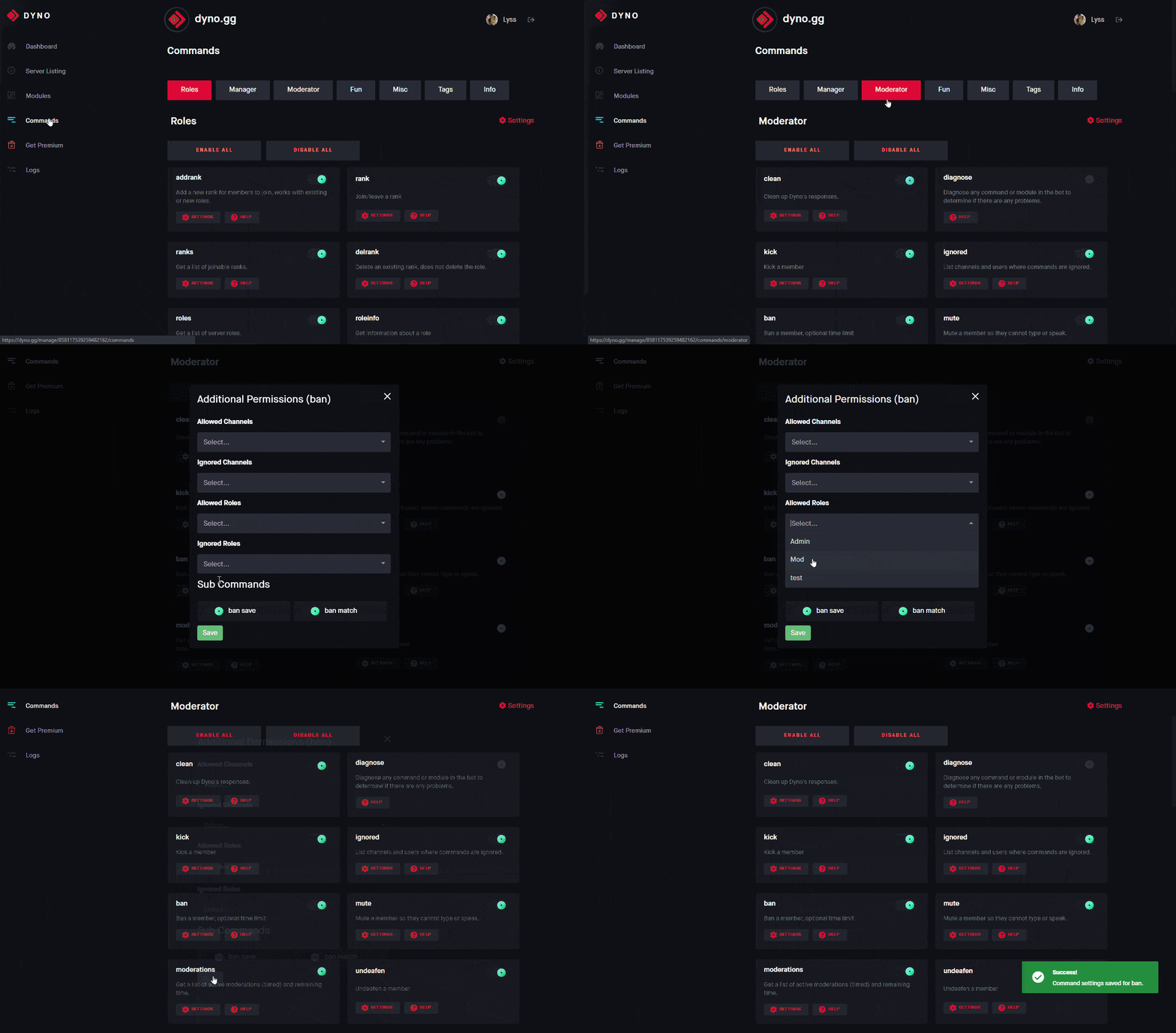


 ionic wind
If I disable the "preserve messages on ban" option, will the bot ask how many messages it should delete?
rigid portal
ionic wind
If I disable the "preserve messages on ban" option, will the bot ask how many me...
It will not
 sly niche
Hi! I am from Brazil
ionic wind
rigid portal
It will not
How much will it delete then?
rigid portal
ionic wind
How much will it delete then?
All messages from the last 7 days. You can use ?ban save to preserve the users messages in the server
ionic wind
rigid portal
All messages from the last 7 days. You can use `?ban save` to preserve the users...
Thanks
manic iglooBOT
ionic wind
Thanks
 raven sorrel
I need help

This happens every time
Idk how to fix it
I have my email and phone number registered
opaque flume
raven sorrel
you're logged into other account which isn't verified
strong sonnetBOT
Make sure you are logged into the right account
If you find yourself logged into the wrong account follow these steps:
Copy and paste this link in your browser: https://discord.com/channels/@me
- Go to your discord settings at the bottom left of the screen with the ⚙️ icon.
- Select Log Out to log out of the discord account.
Head to: https://dyno.gg/logout to logout of the account at dyno.gg
- After you follow these steps log into both discord and dyno.gg with the correct account.