#community-support
1 messages · Page 27 of 1
 noble blade
 hasty kite
noble blade
How do I claim a cp giveaway for cod mobile?
hasty kite
noble blade
How do I claim a cp giveaway for cod mobile?
You would have to contact staff in the server that is running the giveaway
 frozen hinge
Our approve\reject buttons are still not working on our ban appeals in our server
It's been a couple of days now
 hollow matrix
hasty kite
You would have to contact staff in the server that is running the giveaway
hollow matrix
hasty kite
You would have to contact staff in the server that is running the giveaway
Can u help
 mortal kite
how do i code a custom command that will mute a user thats not myted for 1m, and change a user thats muted for longer to 1m aswell
mortal kite
hollow matrix
How do I gave my mod perms to use dyno only for mute and stuff
you need to go in the dashboard, find the mute command and only allow your staff role to use it
hollow matrix
mortal kite
you need to go in the dashboard, find the mute command and only allow your staff...
I searched mute it doesn't work
mortal kite
hollow matrix
I searched mute it doesn't work
its in command -> moderator
 distant monolith
mortal kite
how do i code a custom command that will mute a user thats not myted for 1m, and...
distant monolith
mortal kite
how do i code a custom command that will mute a user thats not myted for 1m, and...
[!mute $1+}
{!duration $1+}
mortal kite
distant monolith
[!mute $1+}
{!duration $1+}
oki ty
 manic iglooBOT
mortal kite
oki ty
distant monolith
manic iglooBOT
mortal kite
oki ty
distant monolith
np
manic iglooBOT
mortal kite
hollow matrix
I opened the moderator tab
scroll down
4th one middle row
there should be a command called mute
go in settings -> allowed roles
mortal kite
distant monolith
[!mute $1+}
{!duration $1+}
So its like this right
[!mute $1 UNBLOCKED $2+}
{!duration $1 1m}

distant monolith
{!mute $1+} - usage: ?commandname @user time reason(optional)
{!duration $1+} - usage: ?commandname @case-ID time
hollow matrix
 hollow matrix
distant monolith
{!mute $1+} - usage: ?commandname @user time reason(optional)
{!duration $1...
hollow matrix
distant monolith
{!mute $1+} - usage: ?commandname @user time reason(optional)
{!duration $1...
See this
mortal kite
distant monolith
{!mute $1+} - usage: ?commandname @user time reason(optional)
{!duration $1...
oki
hollow matrix
mortal kite
oki
Can we ping staff?
distant monolith
check channel description
and here is a guide for your case #community-support message
mortal kite
distant monolith
{!mute $1+} - usage: ?commandname @user time reason(optional)
{!duration $1...
what if im tryna code the unblock command (un - jail role) that is used on everyone and i cant put a case id to change the duration
distant monolith
mortal kite
what if im tryna code the unblock command (un - jail role) that is used on every...
you cant mute a role or everyone, only users
mortal kite
ah alr
distant monolith
if im right then you can run the mute command up to 3 times in a singel custom command, then you can mute 3 users
mortal kite
thx
distant monolith
np
hollow matrix
manic igloo
Did this but they are still not able to use the cmds
mortal kite
hollow matrix
Did this but they are still not able to use the cmds
did u enable module
mortal kite
oh ye how do i log in custom commands, (with announce) User of the command, target of the command, and reason of the command ($2+)
distant monolith
mortal kite
oh ye how do i log in custom commands, (with announce) User of the command, targ...
{!announce channel-ID Moderator: {user}
User: $1.user.mention
Time: $2
Reason: $3+}
mortal kite
distant monolith
{!announce channel-ID Moderator: {user}
User: $1.user.mention
Time: $2
Reason: $...
oki ty
distant monolith
mortal kite
oki ty
np
 paper geode
Why i can't put 0 in the duration?
 paper geode
distant monolith
ban for example if im not wrong
paper geode
distant monolith
ban for example if im not wrong
Oh
It doesn't include add role?
Sorry, im not good at english
distant monolith
paper geode
It doesn't include add role?
if it doesnt work then it's not possible to make it permanent
distant monolith
paper geode
Sorry, im not good at english
you can also ask in your nativ language in #support-non-english next time if you want
paper geode
distant monolith
if it doesnt work then it's not possible to make it permanent
Oh, Alright thank you for your help
manic iglooBOT
paper geode
Oh, Alright thank you for your help
distant monolith
paper geode
Oh, Alright thank you for your help
you're welcome
mortal kite
distant monolith
np
oh ye why does it say couldn’t find that channel, is it something wrong with the code? Dyno have access and perm to see / send messages
 paper geode
distant monolith
you can also ask in your nativ language in <#395821762669051904> next time if yo...
paper geode
distant monolith
you can also ask in your nativ language in <#395821762669051904> next time if yo...
Thank you
distant monolith
mortal kite
oh ye why does it say couldn’t find that channel, is it something wrong with the...
your announce message starts with a line break? (no idea why so many users doing the same mistake)
mortal kite
distant monolith
your announce message starts with a line break? (no idea why so many users doing...
What is a line break ;-;
distant monolith
line 1
line2
line3
...
distant monolith
and make sure you are using the correct channel id
mortal kite
distant monolith
and make sure you are using the correct channel id
why does it still show cant find channel :3


 distant monolith
mortal kite
why does it still show cant find channel :3
distant monolith
mortal kite
why does it still show cant find channel :3
does Dyno have permission to read/send messages in that channel?
 distant monolith
try ?annouonce 1479789537277509713 test in your server and see if it works
mortal kite
oki
distant monolith
and does ?ping work in #1479789537277509713 ?
mortal kite
distant monolith
and does `?ping` work in <#1479789537277509713> ?
lemme find where to enable announce…
mortal kite
distant monolith
and does `?ping` work in <#1479789537277509713> ?
and ye ping works
distant monolith
mortal kite
lemme find where to enable announce…
just run ?command announce in your server
 strong sonnetBOT
**Command:** ?command
Description: Enable/disable a command.
Cooldown: 5 seconds
Usage:
?command [command name]
Example:
?command cat
mortal kite
oki
strong sonnetBOT
**Command:** ?module
Description: Enable/disable a module.
Cooldown: 5 seconds
Usage:
?module [module name]
Example:
?module Fun
distant monolith
@mortal kite 
mortal kite
distant monolith
<@1412095934447485082> <:this:336064002465595392>
alr ?announce works
:P
distant monolith
and with ?diagnose you can check the current settings
strong sonnetBOT
**Command:** ?diagnose
Description: Diagnose any command or module in the bot to determine if there are any problems.
Cooldown: 5 seconds
Usage:
?diagnose [command or module]
Example:
?diagnose mute
?diagnose announcements
?diagnose moderation
?diagnose ban
?diagnose custom commands
mortal kite
oki
distant monolith
mortal kite
alr ?announce works
then your cc should also work now
mortal kite
distant monolith
then your cc should also work now
I wanna tweak

 distant monolith
you cant diagnose your own cc's
that user is a mod or has a protected role?
something is still wrong in your command if it cant find the channel
mortal kite
distant monolith
that user is a mod or has a protected role?
The dm works, the annouce part doesnt
lemme try on a non staff role
paper geode
How APPEAL Form Work?
 manic iglooBOT
mortal kite
distant monolith
something is still wrong in your command if it cant find the channel
manic iglooBOT
mortal kite
distant monolith
something is still wrong in your command if it cant find the channel
work on a non staff, the only part thats not working is the announce part
distant monolith
mention the channel in your server like this

and before you send it add a backslash in front like this

result shoud look like this
[#community-suggestions](/guild/203039963636301824/channel/1028716041418846338/)
mortal kite
distant monolith
result shoud look like this <:that:336064031402098699>
\<#1028716041418846338>
Do i need to put <channel id> in that announce command or some


there that fixed
it
<channel id>
gotta add the <>
distant monolith
no, ID only shoud be enough
distant monolith
strange but ok
manic iglooBOT
distant monolith
distant monolith
mortal kite
ty for help
you're welcome
@mortal kite as you can see here it's working fine with channel ID only
 mortal kite
distant monolith
<@1412095934447485082> as you can see here it's working fine with channel ID onl...
mortal kite
distant monolith
<@1412095934447485082> as you can see here it's working fine with channel ID onl...
eh idk, but it worke after i plugged in <# CHANNEL ID>😭
distant monolith
both should work i think
mortal kite
well atleast its fixed :>
distant monolith
exactly
 sage mist
I thought I cancelled my premium membership, and left the server. I got a notification that I was automatically added back to the server as I have a paid subscription via patroen or something. How do I find this and cancel?
 nova jacinth
Hello, im getting confused. Im trying to setup a autorespond so that what the trigger is sent in a message, it sends links to certain channels, but I did the {#channel} and replaced "channel" with the channel name I want to link, and its still not linking it
distant monolith
sage mist
I thought I cancelled my premium membership, and left the server. I got a notifi...
please create a post at #1028319963703951481 or ask in #premium
distant monolith
nova jacinth
Hello, im getting confused. Im trying to setup a autorespond so that what the tr...
autoresponder can respond in the same channel only
for a channel mention you need the following format <#channel-ID>
nova jacinth
distant monolith
for a channel mention you need the following format `<#channel-ID>`
So for example (ima use random numbers for an ID)
<#channel-384884838282282> ?
distant monolith
for #community-support for example it would be [#community-support](/guild/203039963636301824/channel/240777175802839040/)
nova jacinth
distant monolith
for <#240777175802839040> for example it would be \<#240777175802839040>
So just like that?
distant monolith
yes?
distant monolith
nova jacinth
Okay ty lol
you're welcome
mortal kite
how does the temprole in custom command work? Is it like this
 distant monolith
mortal kite
how does the temprole in custom command work? Is it like this
distant monolith
mortal kite
how does the temprole in custom command work? Is it like this
looks fine, should work
 distant monolith
 river topaz
{!role $1.user.id +MUTED}
distant monolith
i would use the roleID instead of name
like {!role $1.user.id +511630375890714625} for example
manic iglooBOT
distant monolith
river topaz
Thanks
you're welcome
river topaz
distant monolith
like {!role $1.user.id +511630375890714625} for example
Btw
How to make it like this
1 sec
distant monolith
wdym?


 manic iglooBOT
river topaz
manic iglooBOT
river topaz
No no
I'm not talking about this
Im saying how to make the bot respond with the "target"
Like use.id
Or
distant monolith
you mean how to get the role ID ?
distant monolith
to display the jailed user in the message you can use the following variables and {user} mentions the user who executed the command
$1.user.nick
$1.user.name
$1.user.username
$1.user.mention
I would use $1.user.name
let me know if this is not what you are looking for
river topaz
Yeah yeah thanks
But
What if I want the command
To work on all
$1.user.mention
$1.user.username
$1.user.nick
I want it to work with all these possibilities
distant monolith
you can also add the all to your command
river topaz
In one command?
distant monolith
but it doesn't matter if you mention the user or use the users ID to run the command, both should work
river topaz
Idk how to make it work with all these possibilities,like idk if it should be in one custom command or each one seperatly
river topaz
distant monolith
but it doesn't matter if you mention the user or use the users ID to run the com...
So if I put $1.user.mention
Can I use the username instead 💀
distant monolith
Dyno will mention the jailed user
river topaz
Ok
river topaz
distant monolith
Dyno will mention the jailed user
I want my ?jail command to be smart enough to accept any type of reference (mention, user ID, username) and then tell i in the response exactly what reference i used.
Like this

It works with the user
And works with the uid
 distant monolith
i would recommend using ID or mention the user, otherwise there is a possibility that you may block another user.
river topaz
distant monolith
i would recommend using ID or mention the user, otherwise there is a possibility...
Yeah that's what I want
But how to do it work with them
distant monolith
should work already
show me your custom command please
you can use ?cc show jail in your server and send a screenshot of Dynos response
river topaz
Ok
 smoky parrot
Yo sup
river topaz
 smoky parrot
Hello
distant monolith
ah, you have to use $1.user.mention
smoky parrot
Hello?
distant monolith
smoky parrot
Hello
Hi, this is a support channel. Please ask your question if you need help with Dyno, otherwise please head to #general for general chat, thank you
distant monolith
distant monolith
ah, you have to use $1.user.mention
@river topaz and replace "MUTED" with the roleID of the muted role
river topaz
distant monolith
ah, you have to use $1.user.mention
Is it possible to add multiple references at the same time ?
river topaz
distant monolith
<@1381008677301129257> and replace "MUTED" with the roleID of the muted role
Alright alright
distant monolith
references?
river topaz
I mean there's a server that works in it most of the variables
$1.user.name
$1.user.username
$1.user.mention
distant monolith
river topaz
oh wait, $1.user.id is correct for the command, but not for the message Dyno should send. There you have to user $1.user.mention then Dyno will mention the user
?cc show jail unfortunately doesn't show the embed you created
if you want me to check then you have to head to the website and screenshot your embed setup
distant monolith
river topaz
I mean there's a server that works in it most of the variables
$1.user.name
$1...
for the input you only need $1.user.id, then it doesn't matter what you use to run the command
river topaz
distant monolith
for the input you only need $1.user.id, then it doesn't matter what you use to r...
Oooo
Thanks
distant monolith
the other stuff is needed only in your embed message
river topaz
That's what I wanted
river topaz
distant monolith
the other stuff is needed only in your embed message
Okok
distant monolith
for the output, u know what i mean
manic iglooBOT
river topaz
distant monolith
for the output, u know what i mean
Yeah
distant monolith
distant monolith
river topaz
Yeah
just add them all to your embed message, run the command and afterwards remove the stuff you dont want there
distant monolith
river topaz
U helped me very much
I'm glad I could help
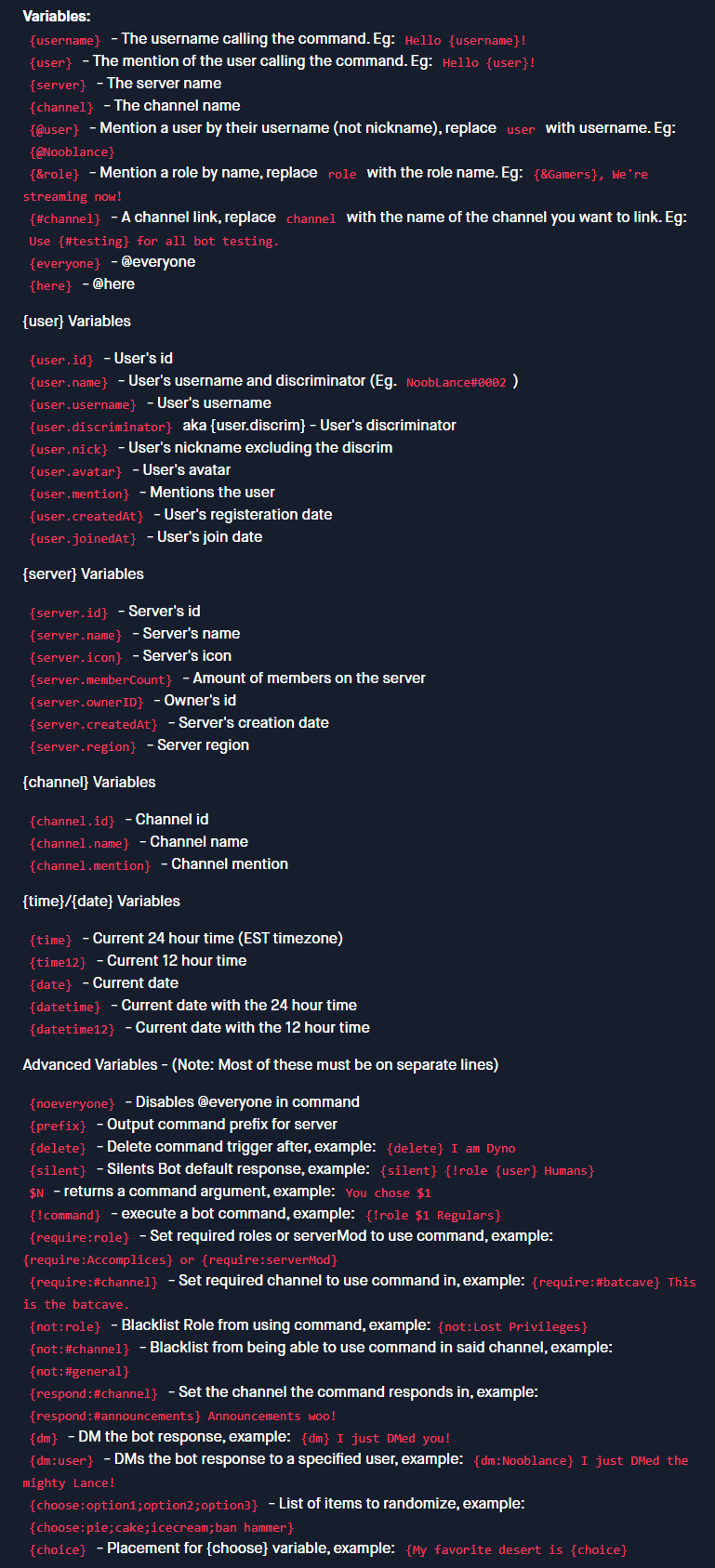 distant monolith
@river topaz
 river topaz
Btw is it possible to make this embed instead of
:dynoSuccess: Added role MUTED to shin.m1
 distant monolith
river topaz
Btw is it possible to make this embed instead of
:dynoSuccess: Added role `MUTE...
distant monolith
river topaz
Btw is it possible to make this embed instead of
:dynoSuccess: Added role `MUTE...
!dynoSuccess Added role MUTED to $1.user.name
river topaz
distant monolith
\<:dynoSuccess:696561641227288639> Added role `MUTED` to $1.user.name
I mean the embed that is in the ss above
Lemme explain it
distant monolith
$1.user.mention has been jailed by {user}
river topaz
distant monolith
$1.user.mention has been jailed by {user}
Will it work as embed
distant monolith
yes
distant monolith
np
manic iglooBOT
 rancid quail
feel like im being stupid, but why isnt the bot deleting the messages?

 strong sonnetBOT
Automod ignores Moderators 
- Dyno Moderators are users with a role added with the ?addmod command or on the Dashboard.
- Dyno Managers include users with a role added to Manager Roles on the Dashboard, all users that have the Administrator permission in Discord, and the owner of the server who always has all permissions.
distant monolith
@rancid quail
rancid quail
ah 
manic iglooBOT
manic iglooBOT
 buoyant plume
@river topaz please stop repeatedly giving rep for no reason
river topaz
buoyant plume
<@1381008677301129257> please stop repeatedly giving rep for no reason
Nah not for no reason
He helped me
I asked him many questions
And he answered it all
I felt like hell crashout out on me
So I'm trying to pay him in different way
river topaz
buoyant plume
<@1381008677301129257> please stop repeatedly giving rep for no reason
Js blacklist me bc I can't stop ts 
Nvm
buoyant plume
The one rep was enough, and you don't need to worry about that, everyone helping here is doing so because they want to 
river topaz
e
Btw
Ur bio looks clean
And I want to ask some questions

Is it possible to make The embed gets sent to #jail-logs
While
The normal text confirmation message gets sent in the same channel where the ?jail command was used
For some reason both the embed and the normal text confirmation is being sent to #jail-logs


 marsh acorn
Why can admin members give each other owner roles with "?role add"
 fading rune
marsh acorn
Why can admin members give each other owner roles with "?role add"
fading rune
marsh acorn
Why can admin members give each other owner roles with "?role add"
You should place Dyno below sensitive roles or roles you don't want it to manage.
marsh acorn
fading rune
You should place Dyno below sensitive roles or roles you don't want it to manage...
nah i fixed it, some dumbo admin allowed the "?role add" cmd without me knowing
thanks tho
 granite skiff
Hey I’m having trouble with the purge bots function. I already made sure the role for bots was set.

 brittle jetty
granite skiff
Hey I’m having trouble with the purge bots function. I already made sure the rol...
brittle jetty
granite skiff
Hey I’m having trouble with the purge bots function. I already made sure the rol...
Can you show me what happens when you run the command?

 wide fiber
Is there a better way to get updates in our server than following #dyno-status because despite being an announcement channel, basically no updates are being published in there - last one was september
hasty kite
There is not, major updates are posted within that channel
wide fiber
but not published 😅
hasty kite
Ahh, im not sure why they arent published
wide fiber
even before september it was rare for one to come through. I know it's not just this one instance either, all the servers I'm in that follow that channel is the same
 hasty kite
Oh i misread, I thought it was the dyno updates channel you mentioned
It is decided internally by the team which status updates are published. Normally only major outages are actually published
wide fiber
ah idk if the updates channel is being published fine, I don't follow that channel anywhere 😅
wide fiber
hasty kite
It is decided internally by the team which status updates are published. Normall...
But there's been multiple instances where we've suddenly had issues with no explanation only to eventually find out it's just the bot being down
If I follow a status channel, I want to know about status changes 😅
hasty kite
yea, unfortunately I have no say in what gets published and what doesn't
wide fiber
that's... really really frustrating that there's no way to get actual updates on the status without having to be in here
hasty kite
I just know smaller outages generally aren't published as many times it can take hours for discord to push out the update to all servers, and the problem most likely has already been fixed.
wide fiber
is there any way to webhook the status page on the website? (ping me if anyone has a solution pls 😅)
 zinc spoke
Is there a way to show the nickname of a user when they leave a server? Using {user} and {username} just seem to default to their discord name.
 minor zephyr
how do i make it where a person who joins my sever has to react to the rules before they can talk in any chats
zinc spoke
minor zephyr
how do i make it where a person who joins my sever has to react to the rules bef...
This is native to Discord now: https://support.discord.com/hc/en-us/articles/1500000466882-Rules-Screening-FAQ
Discord
Joining a community server can be extremely overwhelming and confusing. It's common to have to go through a series of convoluted steps that take you from channels to channels before you can partici...
minor zephyr
thank you
manic iglooBOT
 cerulean flax
Is it possible to make it so Dyno doesn't log ?warns etc in a certain channel?
fading rune
cerulean flax
Is it possible to make it so Dyno doesn't log ?warns etc in a certain channel?
Don't set a moderation log channel.
If you mean only excluding warn logs, that's not possible.
cerulean flax
fading rune
Don't set a moderation log channel.
Right, I want it to log all moderations, just not from a specific channel.
Is that possible?
like if i used ?warn in a highrank channel and i didnt want moderators to see it as they have access to modlogs..
fading rune
Moderations don't depend on a channel, so not really.
manic iglooBOT
 torpid flicker
Hello, I'd like to set up a custom command where it shows a user's warns, notes, and modlogs all together, but the attached screenshot below is all the command does and displays no info; individually running the commands show information though; any possible reason?

This is the current custom command setup
 brittle jetty
torpid flicker
This is the current custom command setup
brittle jetty
torpid flicker
This is the current custom command setup
Hi there! You need to include a user for the commands. For example:
{!warnings {user}}
{!modlogs {user}}
Ah I see, thank you very much!
manic iglooBOT
torpid flicker
Ah I see, thank you very much!
torpid flicker
Sorry, I dunno if I'm still missing something completely, but it just displays like this even though I've added test notes to the user
 brittle jetty
Are you trying to run on yourself or on someone else?
torpid flicker
Another user but it's just my alt
brittle jetty
Ah, got it. You'll use this custom command then!
{!warnings $1.user.id}
{!modlogs $1.user.id}```Tysm!  I've been trying to fix the command for so long
brittle jetty
Of course, glad I could help 🙂
river topaz
Is it possible to make The embed gets sent to #jail-logs
While
The normal text confirmation message gets sent in the same channel where the ?jail command was used
For some reason both the embed and the normal text confirmation is being sent to #jail-logs

 fading rune
river topaz
Is it possible to make The embed gets sent to #jail-logs
While
The normal text ...
fading rune
river topaz
Is it possible to make The embed gets sent to #jail-logs
While
The normal text ...
Make the command respond to the jail log channel and use {!announce {channel} $1.user.mention has been jailed by {user} } to send the message in the channel the command was ran
river topaz
e thanks
manic iglooBOT
river topaz
Did it reset?
river topaz
Oh
fading rune
Please do not use commands here.
river topaz
Every certain amount of rep points u get a big point or something like that right?
river topaz
fading rune
Please do not use commands here.
Uhm

 split sage
hello i was wondering if dyno can ban/kick anyone if they select a certain role?
paper geode
Hello what is lockdown command do?
 prime belfry
Hello.
Auto-role is still not working? I think I may have to cut my subscription:/
Sorry reaction roles*
brittle jetty
prime belfry
Sorry reaction roles*
Could you show me reaction role settings
brittle jetty
paper geode
Hello what is lockdown command do?
The lockdown command can be used to quickly lock (i.e., prevent users from sending messages) in channels marked for lockdown
You can set lockdown channels in the Moderation module
brittle jetty
split sage
hello i was wondering if dyno can ban/kick anyone if they select a certain role?
Unfortunately that is not possible with Dyno 🙁
-# 💡 Have an awesome feature idea? Suggest it now!
prime belfry
brittle jetty
Could you show me reaction role settings
From what I've read
We are supposed to redo them since an update from discord (?)
But
Because now you have 3 tier subscription
I was only Standard not New* Premium so I can't do what I was able to do before it seems.
brittle jetty
prime belfry
From what I've read
We are supposed to redo them since an update from discord (?...
Standard subscriptions have access to unlimited reaction roles. I'm not exactly sure what you mean by:
We are supposed to redo them since an update from discord (?)
Could you please elaborate on what you mean?
prime belfry
@brittle jetty see here for reaction roles not being unlimited
#1481601198963560581 message
brittle jetty
Would you like to continue in your premium thread or here?
Whichever is more convenient for you 🙂
prime belfry
As you wish but I canceled my subscription :/
I did not read everything
In my case
It has been months with this option not working when people click to have a role
brittle jetty
That was referring to upgrading from a normal bot to a premium bot
prime belfry
I see
brittle jetty
Could I have your server ID please?
prime belfry
268746893452902410
brittle jetty
Well, since you canceled your subscription, we aren't able to help with the error you got. If you do want unlimited reaction roles, you can upgrade and we'll help you if you get the error again
prime belfry
No
I just want them to work
Nothing has been working for months concerning reaction roles:/
I think we were supposed to have an update here and then I forgot
And now we have new members so the issue is coming back
When members try to apply a role it just says that it failed
brittle jetty
What avatar does the reaction role bot have?
prime belfry
It does indeed seem the Dyno premium bot is missing from the discord
This one is the normal one?
So maybe I've missed an update asking us to reput it on the serv?

My bad then if that's the issue, I don't know why the Premium is missing.
Sorry for the inconvenience
brittle jetty
Yeah, that could’ve caused Dyno to throw the error when attempting to add more reaction roles
 broken sage
Hello, about automessage, if i set it to saturday, the bot will auto message that message every saturday right ?
 prime belfry
brittle jetty
Yeah, that could’ve caused Dyno to throw the error when attempting to add more r...
prime belfry
brittle jetty
Yeah, that could’ve caused Dyno to throw the error when attempting to add more r...
How to invite the premium bot for the 10 days I have under standard?
Thank you.
Wait what
prime belfry
Oh I can't give
#.#
@brittle jetty I have to ping you and say thank you maybe ?
No xd
prime belfry
broken sage
Hello, about automessage, if i set it to saturday, the bot will auto message tha...
Interval
You made it as repeat every 1hour on the screen
From Saturday, every 1 hour
broken sage
prime belfry
Interval
but like, i want to make auto message only on certain day. can the bot do that ?
prime belfry
broken sage
but like, i want to make auto message only on certain day. can the bot do that ?
You have to calculate in terms of hours
168 hours in one week
broken sage
ah okay ty
brittle jetty
prime belfry
How to invite the premium bot for the 10 days I have under standard?
Thank you.
You should be able to activate the server on the premium page and then invite the bot of your choice
 silk adder
brittle jetty
silk adder
brittle jetty
You can invite Dyno at https://dyno.gg/invite

Dyno offers a powerful community bot and a place to advertise your server, easy and free.
prime belfry
brittle jetty
You should be able to activate the server on the premium page and then invite th...
I did the invite but I guess I have to redo everything because it may be linked to nothing for the reaction role (still not working)
It's okay I don't want to bother you more with this.
Thank you again
brittle jetty
You can clone and resend the reaction roles. Let us know if you need assistance; we're here to help!
hasty kite
You get a special role
 opal basin
hasty kite
You get a special role
opal basin
hasty kite
You get a special role
is that all
hasty kite
Yes
opal basin
..
 daring birch

 versed gale
does starboard work for forum channels
 lapis talon
Hi guys, how i can How can I make my bot react to any message sent through a specific channel?
 left spoke
Hello! So I have had some issues with Dyno recently. My users or mods have not been able to use /role add. I have searched up on ChatGPT, Copilot and a lot more and they all say that it is a paywall so i have to pay so that my mods can have access to the command /role add. My mods do not have administrator permission with their role but they have manage roles permission but I still want them to have access to /role add, can anybody help?
/role add used to work like a charm but now it seems like it has disappeared.
 ionic lily
does anyone know why i cant manage this?
 buoyant plume
Because it's a core Dyno command, it cannot be managed/disabled
buoyant plume
left spoke
Hello! So I have had some issues with Dyno recently. My users or mods have not b...
Don't use AI for stuff like that (or in general rather), it's always garbage and misleading. What's the error they're getting when they use the command
left spoke
buoyant plume
Don't use AI for stuff like that (or in general rather), it's always garbage and...
Well /role add does not even show up for them when they type it in
buoyant plume
Does the prefix command work?
left spoke
Yes
manic iglooBOT
buoyant plume
In that case you can follow these instructions
left spoke
Okay thx
 vast mantle
Hello what do i do if i got banned from a server and dyno bot was supposed to send me a automated message to appeal the ban but i didn't get anything
 rancid hatch
how do i get dyno to auto remove a role from someone when they get a different role
like for example if they join in with unverified but then they get the verified role how do i make it remove the unverified role?
vast mantle
@buoyant plume
ionic lily
buoyant plume
Because it's a core Dyno command, it cannot be managed/disabled
i cant even control what roles can use it and what cant?
hasty kite
@fluid zephyr please only chat here if you need support with Dyno
 somber portal
@buoyant plume @gray oriole @sharp widget @hasty kite please help me please reply my message
hasty kite
Please don’t ping staff for support. Ask your questions and someone will help when available.
somber portal
hasty kite
Please don’t ping staff for support. Ask your questions and someone will help wh...
Please please listen 🙏 to my message
@buoyant plume @gray oriole @sharp widget @hasty kite please help me please reply my message
@regal jewel
@dapper ember
hasty kite
Stop with the pings. Just ask your question
somber portal
@rain forge
somber portal
hasty kite
Stop with the pings. Just ask your question
How to create dyno coustom command like my role name is speakaccess whenever I type ?speakaccess and mention user so it will give users to speakaccess role and the user have already have speak access so it will remove speakaccess form the user
How to do this
I try 20 + time but It will not working 😭
Please help in make command
@hasty kite
hasty kite
Someone will help when they are available. Please have patience
somber portal
hasty kite
Someone will help when they are available. Please have patience
Please you give me
Command
For performe this operation
Please
@hasty kite
strong sonnetBOT
✅ dc._.kingdom was smacked with a mute spoon
 marsh vortex
anyone else getting this rn all the sudden??

nvm its back up idk why i was getting that
river topaz
somber portal
<@102527528383565824>
Is bro possibly dumb?
He already told u to stop spam pinging him
hasty kite
river topaz
He already told u to stop spam pinging him
Please don’t make comments here
 knotty hill
So erm.. i kinda need help with the bot it doesn’t like adding roles to people who have reacted to the message and it does have perms to be able to give people roles
 uncut gull
How to resend appeal? I got rejected an appeal💀
 grand aurora
uncut gull
How to resend appeal? I got rejected an appeal💀
grand aurora
uncut gull
How to resend appeal? I got rejected an appeal💀
According to the docs seems like it's a custom value:
Enforce Submission Cooldown | Allows you to select a submission cooldown, which will limit users to filling out the form once every x days.
 obsidian yoke
manic iglooBOT
obsidian yoke
manic iglooBOT
 inland shore
Wanna create a detection system with dyno, if someone says a specific phrase dyno deletes that phrase and alerts to moderators
 velvet anchor
hi, looking for something very specific:
i want a message / embed that displays all members of a certain role, updating in regular intervals
 warped wasp
Hello
velvet anchor
would be awesome if someone knew a way, thx : )
 nocturne ore
Hi, I'm having issues getting it to assign roles with emoji reactions. I gave it the message ID, and the emojis I want it to use, but it isn't working. Any help would be appreciated
Haha, figured it out, thanks to the post above!
 river lodge
Howdy folks. In "Custom Commands"; you can set nicknames (i.e. {!setnick $1 Recruit $2}
Is there a way for this command to respect spaces? If I use John Smith1, it'll only take John for example.
 sharp widget
inland shore
Wanna create a detection system with dyno, if someone says a specific phrase dyn...
sharp widget
inland shore
Wanna create a detection system with dyno, if someone says a specific phrase dyn...
Specific phrase part is doable, but that alert one not really
sharp widget
velvet anchor
hi, looking for something very specific:
i want a message / embed that displays ...
Not possible with dyno
sharp widget
river lodge
Howdy folks. In "Custom Commands"; you can set nicknames (i.e. `{!setnick $1 Rec...
Add a + after the $1
velvet anchor
sharp widget
Not possible with dyno
do you have any alternative in mind?
sharp widget
We do not rec bots sorry
river lodge
sharp widget
Add a + after the $1
So,
{!setnick $1 Recruit $2+}
works?
sharp widget
Yep
river lodge
Bless you!
 outer tundra
Yall question
Is there a way to be able to make it to where dyno makes a specific link, if you send it to someone then they skip your verification process and get member role after that
As the link is through dyno, and when you use the link dyno senses it and vouches the person who invited someone else and that person
brittle jetty
outer tundra
As the link is through dyno, and when you use the link dyno senses it and vouche...
Dyno cannot create invite links, and since Dyno doesn't really have a verification system (you can use reaction roles or a custom command as "verification" instead), Dyno isn't able to automatically whitelist people.
outer tundra
brittle jetty
Dyno cannot create invite links, and since Dyno doesn't really have a verificati...
Ahhhhh oof
outer tundra
brittle jetty
Dyno cannot create invite links, and since Dyno doesn't really have a verificati...
Ok ty for the info!
manic iglooBOT
outer tundra
Ok ty for the info!
brittle jetty
Of course!
 vivid elm
 finite needle
hello I am having a issue with a user in my server who was not banned and when they went to join it gave them this message, would you know how to fix that?

 sonic remnant
 raven isle
guys can anyone help with autoroles module , the thing is i have setup the permissions and all the necessary things that the module requires properly but its not working for me
fading rune
finite needle
hello I am having a issue with a user in my server who was not banned and when t...
The user has an alt that's also banned or something similar. This is not a Dyno issue.
manic iglooBOT
finite needle
fading rune
The user has an alt that's also banned or something similar. This is not a Dyno ...
ah ok, ty
fading rune
 wise sedge
with a different bot
wise sedge
with a different bot
You were already told we do not recommend other bots here.
 hushed oak
hello so im trying to use the role in command but it doesnt work. Im trying with the non premium and premium bot but after the countdown it applies the roles to zero people, i have tried executing it with a prefix and with a /
Does anyone have any clue why this is? and if yes the debug?
 proper moth
autoroles occasionally break for a couple of servers I’m in
 buoyant dune
How do I make a reaction role
 next wagon
Hey, quick question. Is months an option when inputting duration? Or do I need to convert it to days
 dire peak
How I can setup mute role without discord timeout
 regal jewel
dire peak
How I can setup mute role without discord timeout
regal jewel
dire peak
How I can setup mute role without discord timeout
yes ofc please see below
manic iglooBOT
regal jewel
just ensure in the moderation module the "Use Discord timeouts for mutes" is unselected
 grave sail
@regal jewel buddy can i buy yearly subscription ???
regal jewel
grave sail
<@558378363832762419> buddy can i buy yearly subscription ???
yes ofc, head to https://dyno.gg/premium and when selecting your plan, at the top, there is a toggle button to toggle monthly billing or annual billing
please refrain from pinging for support in the future
dire peak
regal jewel
just ensure in the moderation module the "Use Discord timeouts for mutes" is uns...
Ok thanks
manic iglooBOT
dire peak
Ok thanks
regal jewel
dire peak
Ok thanks
Np, feel free to let me know if you have any issues
 vagrant summit
Hey my account got hacked and shared some inappropriate links and I was banned from official game community like wuthering waves, and trickedge , and if I message someone some of them are delivering and others are not delivery I appealed and give authority to the appeal what should I do?
brittle jetty
vagrant summit
Hey my account got hacked and shared some inappropriate links and I was banned f...
If you've already appealed, then you'll have to wait for the server staff to review your appeal.
vagrant summit
Will I ever be unbande from the servers?
brittle jetty
We don't know; that choice is at the discretion of the server. We're simply the service they use and thus cannot help with moderation issues.
vagrant summit
Oo
vagrant summit
brittle jetty
If you've already appealed, then you'll have to wait for the server staff to rev...
How much time it takes genarelly?
brittle jetty
We wouldn't know. It depends on the staff in that server.
vagrant summit
brittle jetty
We wouldn't know. It depends on the staff in that server.
Oo thanks....
manic iglooBOT
vagrant summit
Oo thanks....
brittle jetty
Of course
 summer oak
Having some issues setting up temp-roles for custom commands; They get added to the user, but are then not removed after the specified time. Dyno role is above the role it gives.
 merry ibex
I'm trying to make a custom command but it won't show up when I do /command to check if it was enabled or disabledand the bot doesn't recognize the command even though the command has all the right regulations and the right prefix
Plz help I'm new and confused
regal jewel
summer oak
Having some issues setting up temp-roles for custom commands; They get added to ...
does the base ?temprole command work as expected? is the issue only present in a custom command?
summer oak
The issue is, is that it grants the temporary role, but it doesn't remove it after the specified time period. It sticks it to the user
regal jewel
merry ibex
I'm trying to make a custom command but it won't show up when I do /command to c...
custom commands are not registered on the guild as native discord slash command, they are prefix commands
merry ibex
regal jewel
custom commands are not registered on the guild as native discord slash command,...
oh okay
well I made my prefix / so what should i do
Is there a way to change the prefix?
regal jewel
summer oak
The issue is, is that it grants the temporary role, but it doesn't remove it aft...
i understand the issue, my question is; is the issue with the role not being removed only on a custom command using the temprole command variable. or are you seeing the issue with the base temprole command as well
if you are able to, test out the base temprole command and let me know if the issue is still present
summer oak
Will test; Ill be back
regal jewel
merry ibex
oh okay
well I made my prefix / so what should i do
Is there a way to change the...
you should still be able to send the prefix command with / however it may cause issues if other bots have the same slash command names
you can change the prefix for the server on the dashboard at https://dyno.gg/account or you can simply use the
/prefixcommand
regal jewel
summer oak
Will test; Ill be back
np 😄
@summer oak after testing please respond in the thread that you opened and i will continue support there
in future please refrain from cross-posting
merry ibex
regal jewel
you should still be able to send the prefix command with `/` however it may caus...
I don't have any other bots on the server
I changed the prefix but it still doesn't work
Do you need it in the name of the command or somerhing?
regal jewel
merry ibex
I don't have any other bots on the server
I changed the prefix but it still doe...
can you show me how the custom command is set up and how you tried executing it in discord
merry ibex
My prefix is • so I tried to do •fact

 regal jewel
merry ibex
My prefix is • so I tried to do •fact
regal jewel
merry ibex
My prefix is • so I tried to do •fact
if you want the bot to chose one of the options in the command, then under the {choose:} options add the {choice} var
see below for more info
manic iglooBOT
regal jewel
merry ibex
yes it is working now thanks
np glad you got it working 😄
fading rune
There is currently an issue with timed moderations that has already been reported.
summer oak
fading rune
There is currently an issue with timed moderations that has already been reporte...
How long is the eta on a fix for such problems usually
fading rune
We don't have ETAs.
summer oak
fading rune
We don't have ETAs.
I mean like what to expect; a day, week, few hours
 stark zephyr
Hello, I'm having trouble getting nicknames, images, etc. to show up. Instead, I get numbers or something else. Could someone help?
 brittle jetty
stark zephyr
Hello, I'm having trouble getting nicknames, images, etc. to show up. Instead, I...
brittle jetty
stark zephyr
Hello, I'm having trouble getting nicknames, images, etc. to show up. Instead, I...
Hi there, what part of the embed is that?
For example, the footer, field, title, etc.
 calm locust
fading rune
There is currently an issue with timed moderations that has already been reporte...
calm locust
fading rune
There is currently an issue with timed moderations that has already been reporte...
Which means dyno wont take away mute role when somebody Is expected to be unmuted?
stark zephyr
brittle jetty
For example, the footer, field, title, etc.
wait
this is footer @brittle jetty
brittle jetty
Due to how Discord embeds work, formatting doesn't work in footers. You'll have to put the formatting in the description of the embed
-# ℹ️ This is a Discord limitation and there are no workarounds.
brittle jetty
Of course!
 strong moth
fading rune
You mean you have a question?
strong moth
fading rune
You mean you have a question?
How do I make a command in which it sends a warning to a member and at the same time gives a mute?
regal jewel
hey @summer oak just wanted to drop and and see if the issue you was having with the temprole command is still persisting. the service was restarted so it should be back to normal now
strong moth
strong moth
How do I make a command in which it sends a warning to a member and at the same ...
@fading rune
fading rune
strong moth
How do I make a command in which it sends a warning to a member and at the same ...
You can create a custom command with the content:
{!warn $1 $3+}
{!mute $1 $2 $3+}
Then you'd use it like: ?myCommand @user time reason
strong moth
fading rune
You can create a custom command with the content:
```
{!warn $1 $3+}
{!mute $1 $...
It would be like this, I give the command (! Strike2 [id]:$) , the member receives a warning in Dm, 24-hour mute and a position
fading rune
strong moth
It would be like this, I give the command (! Strike2 [id]:$) , the member receiv...
{!warn $1 $2+}
{!mute $1 24h $2+}
Then you'd use it like: ?myCommand @user reason
 latent bough
Every time I try to open my server I have dyno in it does this and I can’t get to reaction roles at all
brittle jetty
latent bough
Every time I try to open my server I have dyno in it does this and I can’t get t...
Hi there. Can you run ?whois in that server and show me a screenshot of the result?
strong moth
fading rune
```
{!warn $1 $2+}
{!mute $1 24h $2+}
```
Then you'd use it like: `?myCommand @...
And the role?
latent bough
brittle jetty
Hi there. Can you run `?whois` in that server and show me a screenshot of the re...
The question mark won’t work for me so I did the slash it won’t let me access where I need to get to change that
 brittle jetty
Can you try a different browser?
latent bough
brittle jetty
Can you try a different browser?
Wym?
strong moth
fading rune
```
{!warn $1 $2+}
{!mute $1 24h $2+}
```
Then you'd use it like: `?myCommand @...
And the role, my bro?
fading rune
strong moth
And the role, my bro?
{!role $1 +ROLE_NAME_OR_ID_HERE}
Please be patient.
strong moth
fading rune
`{!role $1 +ROLE_NAME_OR_ID_HERE}`
Thanks
manic iglooBOT
strong moth
Thanks
strong moth
So what would the whole command be like?
fading rune
fading rune
`{!role $1 +ROLE_NAME_OR_ID_HERE}`
You just add this at the bottom of what you already had
strong moth
fading rune
You just add this at the bottom of what you already had
Would there be any way to simplify the command? Like I give it? Strike2 ID reason?
It’s the first time when I use Dyno
fading rune
strong moth
Would there be any way to simplify the command? Like I give it? Strike2 ID reaso...
Thats what it already does?
?myCommand @user reason
 slow elbow
Hey, how do I create a custom command where It gives someone a role?
strong moth
slow elbow
Hey, how do I create a custom command where It gives someone a role?
!role [user.id] +/-[role]
latent bough
Yall can someone continue helping me I don’t wanna sound impatient but the person who was helping kinda disappeared 😭😭
slow elbow
strong moth
!role [user.id] +/-[role]
Can you elaborate?
slow elbow
strong moth
!role [user.id] +/-[role]
No {}?
strong moth
slow elbow
No {}?
Or this, you choose
strong moth
fading rune
`?myCommand @user reason`
Like this?
 summer oak
regal jewel
hey <@767866428488417281> just wanted to drop and and see if the issue you was h...
summer oak
regal jewel
hey <@767866428488417281> just wanted to drop and and see if the issue you was h...
thanks, will test it out.
manic iglooBOT
summer oak
thanks, will test it out.
summer oak
auto rep hmm
regal jewel
summer oak
thanks, will test it out.
np let me know if there are any issues
 brittle jetty
latent bough
Wym?
brittle jetty
latent bough
Wym?
Can you try accessing the dashboard on a different browser, device, or on incognito?
brittle jetty
slow elbow
Like this?
Make sure there's no space between the + and the role name
slow elbow
brittle jetty
Make sure there's no space between the `+` and the role name
Okay
But what about the special command
It doesn’t give the role when I do that
The disable module on custom commands is on, should I turn it off?
brittle jetty
strong moth
Like this?
That is incorrect. You'd need to use
{!mute $1 24h}
{!role $1 +roleID1, +roleID2}
-# Modify as needed. Do not use AI to troubleshoot Dyno custom commands; AI is far too inaccurate.
brittle jetty
slow elbow
The disable module on custom commands is on, should I turn it off?
Yes, make sure the module is enabled.
latent bough
brittle jetty
Can you try accessing the dashboard on a different browser, device, or on incog...
Went on incognito mode plus a different browser and neither worked, I don’t have another device available to me currently
fading rune
strong moth
Like this?
Thats not what I provided you
strong moth
fading rune
Thats not what I provided you
Can you make all the Command and show me?
brittle jetty
slow elbow
It doesn’t worm
Can you show me how you're running the command?
latent bough
latent bough
Went on incognito mode plus a different browser and neither worked, I don’t have...
Incognito mode doesn’t even load just keeps me at the same thing
fading rune
strong moth
Can you make all the Command and show me?
Agent already replied you here #community-support message
brittle jetty
slow elbow
?toxskeys @{ping}
Can you run ?diagnose customcommands and show me the result?
slow elbow
brittle jetty
Can you run `?diagnose customcommands` and show me the result?
Adding on to the cmd?
Or just by itself
brittle jetty
No, just run it in the channel
brittle jetty
Run it in your channel and show a screenshot of the result
brittle jetty
latent bough
Incognito mode doesn’t even load just keeps me at the same thing
Got it. What's the server ID?
 latent bough
brittle jetty
Got it. What's the server ID?
latent bough
brittle jetty
Got it. What's the server ID?
1481754662431359078
slow elbow
I think the prefix changed
brittle jetty
Try using your server prefix
strong moth
brittle jetty
That is incorrect. You'd need to use
```{!warn $1 [reason]}
{!mute $1 24h}
{!ro...
Like this?
 brittle jetty
You need to remove the !strike1 [user.id] [reason], add a reason to {!warn $1}, and delete the role next to each ID in the third command.
If you want to be able to specify a reason every time, you can use {!warn $1 $2+}.
strong moth
brittle jetty
You need to remove the `!strike1 [user.id] [reason]`, add a reason to `{!warn $1...
 brittle jetty
To specify a user, you have to use Dyno arguments. Your entire command should look like this:
{!mute $1 24h}
{!role $1 +1451572869308874786}
Can you try clearing your cache/cookies for the website and try again?
strong moth
brittle jetty
To specify a user, you have to use Dyno arguments. Your entire command should lo...
Like this?
 latent bough
brittle jetty
Can you try clearing your cache/cookies for the website and try again?
latent bough
brittle jetty
Can you try clearing your cache/cookies for the website and try again?
Did it, nothing changed
brittle jetty
strong moth
Like this?
No, please use the exact example I gave you here. #community-support message
You do not need to include !strike1 [user.id] since Dyno will only output that as text.
strong moth
brittle jetty
No, please use the exact example I gave you here. https://discord.com/channels/2...
Finally?


 vast dagger
How do I use the tags
summer oak
regal jewel
np let me know if there are any issues
I just tested it out, and the issue seems to persist
edit* it worked, a variable was written wrong
strong moth
strong moth
Finally?
@brittle jetty
regal jewel
summer oak
I just tested it out, and the issue seems to persist
edit* it worked, a variable...
awesome glad to hear its working
regal jewel
vast dagger
How do I use the tags
see below
manic iglooBOT
vast dagger
regal jewel
see below
Ty
manic iglooBOT
vast dagger
Ty
brittle jetty
strong moth
Finally?
The role ID is duplicated twice. You only need one, like so:
{!role $1 +1451572869308874786}
-# Please don't ping for support and be patient.
brittle jetty
 sly pewter
anytime I go to save it
sly pewter
anytime I go to save it
Can you show me what the tags look like?
strong moth
brittle jetty
The role ID is duplicated twice. You only need one, like so:
```{!role $1 +14515...
Like this?
 brittle jetty
Command Usage: ?cc-name @user [reason]
Example: ?strike1 @agents Bananas are good
Notes:
- Replace
cc-namewith the name of the custom command. - Do not include the brackets
[]in the custom command. - Use your server prefix.
strong moth
brittle jetty
**Command Usage**: `?cc-name @user [reason]`
**Example**: `?strike1 @agents Bana...
This is the All Command?
 brittle jetty
No, you would run this in a channel on Discord.
-# Do not include this in the custom command Command box.
strong moth
brittle jetty
No, you would run this in a channel on Discord.
-# Do **not** include this in t...
Oh
strong moth
brittle jetty
No, you would run this in a channel on Discord.
-# Do **not** include this in t...
Can I ask other question?
brittle jetty
Sure
strong moth
brittle jetty
Sure
How can I make my warn make this?
The style
 brittle jetty
You can press Add/Edit Embed to create an embed with a message.
sly pewter
brittle jetty
Can you show me what the tags look like?
I figured out that its just not allowing me to edit the ones I make through discord on the dashboard, and the downside with that is I cant add ones via dashboard to categories.
So its kind of annoying and I cant use the category feature and have multiple lined tags
strong moth
brittle jetty
You can press `Add/Edit Embed` to create an embed with a message.
I’ts correct?
 brittle jetty
Here's an example of what the embed could look like:
```User: $1.user.mention ($1.user.id)
Reason: $2+
Type: Warn, Mute (24h)
[other stuff]
-# Modify as needed.How do I put dyno as a higher role?
strong moth
brittle jetty
Here's an example of what the embed could look like:
```**User:** $1.user.mentio...

And this part?
strong moth
vast dagger
How do I put dyno as a higher role?
Just reorganize the roles
vast dagger
It’s my first time man can you help me with that please?
strong moth
vast dagger
It’s my first time man can you help me with that please?
My server i’ts in Portuguese, have problem? The guide i’ts the same
vast dagger
I’m English


 vast dagger
Ty
strong moth
strong moth
@brittle jetty
brittle jetty
strong moth
And this part?
I'm not sure what you're trying to do.
-# Again, no need to ping.
strong moth
brittle jetty
I'm not sure what you're trying to do.
-# Again, no need to ping.
What I mention the author of the warn
brittle jetty
You would use {user}.
strong moth
-# Sorry for the ping
strong moth
brittle jetty
You would use `{user}`.
Ok
It’s gonna be like this?
The User: mentioned the user have received the warn and your ID, the Reason: i’ts the reason for received the warn and the By: i’ts the staff who sent the warn
 brittle jetty
Yes, that is correct.
strong moth
brittle jetty
Yes, that is correct.
Ok, thanks
manic iglooBOT
strong moth
Ok, thanks
fading rune
@strong moth Please stop pinging for support.
And actually state what's not working.
vast dagger
Guys like I did the ?tag ban thing but it just says like “ban the user” it didn’t ban him from the server or sum
How do I do that
?
fading rune
vast dagger
Guys like I did the ?tag ban thing but it just says like “ban the user” it didn’...
The command is ?ban not ?tag ban
strong sonnetBOT
**Command:** ?ban
Description: Ban a member, optional time limit
Cooldown: 3 seconds
Usage:
?ban [user] [limit] [reason]
?ban save [user] [limit] [reason]
?ban noappeal [user] [limit] [reason]
Example:
?ban bean making bugs
?ban save gin 2d needs to calm down
?ban noappeal piguy dont come back
brittle jetty
You can view a list of commands on the dashboard > Commands, or by checking out our docs: https://docs.dyno.gg
Dyno
This documentation provides information on each Dyno module/command, including the description, usage, and examples.
brittle jetty
Is there something specific you need to talk about?
 sharp edge
Yea im banned in one of my games for an 1 single emoji dif first mistake ive made didnt send me a warning message like " hey this message was removed because it could be seen as something else" no i was just instantly banned when I got back to my computer
strong sonnetBOT
Dyno is simply a service used to moderate users, and as such, Dyno Staff cannot help you with moderation issues from other servers. If you believed you were mistakenly banned or there was another issue, you must attempt to contact the staff of the server where you were banned. You can ask a friend to do this on your behalf or see if the server has any other social media. If the server has a Dyno appeal form set up, the link would have been DMed to you when you were banned.
brittle jetty
@sharp edge see this
regal jewel
sharp edge
Im just really confused 😢😭 I jus got back on here like a month ago
we are not the server that banned you therefore we cannot help you. many servers on discord use dyno to moderate members in their server. if you have been banned you must find a way to reach out to the staff of the server that banned you. there is no further support we can provide
 lyric bramble
so if I banned someone outside my server using their ID, would they be DMed a "you were banned from x server, click here to appeal" assuming I have that turned on
bc dyno is basically in every major discord so the possibility of that happening in which the user I ban shares a server with dyno is almost guranteed
 rotund cosmos
hey, is it possible to create reputation commands with dyno?
through custom commands etc
kindly @ me for reply :)
distant monolith
rotund cosmos
hey, is it possible to create reputation commands with dyno?
unfortunately that's not possible with Dyno
distant monolith
lyric bramble
so if I banned someone outside my server using their ID, would they be DMed a "y...
no, they don't even receive the default ban message "You were warned in server for reason"
 ivory cove
just a question i been trying to down the ALL CAPS auto-mod module to 45% or low but when ever i save and refresh it go back to 70% is it a bug ?

 umbral quarry
I was banned on the server, and Dyno just gave me a reason without a link to an appeal, but I remember there was an appeal button somewhere. Can you tell me where it is usually located?
distant monolith
umbral quarry
I was banned on the server, and Dyno just gave me a reason without a link to an ...
if there is no appeal button in Dynos dm then they didnt enable the appeal feature
manic iglooBOT
 kindred geyser
My welcome module is enabled, but when users join the discord "dyno" doesnt post the welcome message.
 distant monolith
kindred geyser
My welcome module is enabled, but when users join the discord "dyno" doesnt post...
distant monolith
kindred geyser
My welcome module is enabled, but when users join the discord "dyno" doesnt post...
check your image links in your embed
kindred geyser
distant monolith
check your image links in your embed
I have no image links
distant monolith
are you testing with a user? Dyno ignores bots
kindred geyser
distant monolith
are you testing with a user? Dyno ignores bots
Yes, testing with a user.
distant monolith
please run ?diagnose announcements and show me Dynos response
kindred geyser
distant monolith
could you please show me your whole setup?
kindred geyser
Oh wait, its fixed now. It just took some time to "work". Super sorry!
distant monolith
np, im glad its working
kindred geyser
Ty
distant monolith
kindred geyser
Ty
you're welcome
manic iglooBOT
distant monolith
kindred geyser
distant monolith
<:DaveHeart:633177486980546565>
One question, when configing the channel variable in my embed message. Do i put {#channel}, but change "channel" with the exact name of the channel?
distant monolith
kindred geyser
One question, when configing the channel variable in my embed message. Do i put ...
i recommend using discords format <#channelid>
kindred geyser
Ah, okay, tysm!
distant monolith
kindred geyser
Ah, okay, tysm!
but if you want to use Dynos variable

it's at the very bottom of the announcements website
-# oops, ur using the welcome module
strong moth
How do I show an embed visible only to the staff after a warning is sent?
brittle jetty
strong moth
How do I show an embed visible only to the staff after a warning is sent?
You cannot make messages visible only to certain roles on Discord. You would have to send the embed to a staff-only channel.
strong moth
brittle jetty
You cannot make messages visible only to certain roles on Discord. You would hav...
Yes, i think i’ts this
strong sonnetBOT
If you need help with Dyno, please ask a question or state a problem.
fading rune
@teal condor Please do not ping staff for support.
If you have a question, just ask.
fading rune
You need the custom premium plan to change the picture.
 teal condor
ok thanks
manic iglooBOT
fading rune
For features, pricing and options please see: https://dyno.gg/premium
Dyno offers a powerful community bot and a place to advertise your server, easy and free.
 ornate oriole
Any idea why Autoroles is not working? The bot has full perms and is all the way at the top of the roles list
stark zephyr
Hi, is it possible to create a button in Dyno Bot to randomly select questions I have set, and with each click the question changes?
fading rune
stark zephyr
Hi, is it possible to create a button in Dyno Bot to randomly select questions I...
A button? No. A command? Yes.
stark zephyr
fading rune
A button? No. A command? Yes.
and then after using the command the question is drawn ?
fading rune
stark zephyr
and then after using the command the question is drawn ?
Yes, you can set questions and dyno can randomly choose one.
stark zephyr
fading rune
Yes, you can set questions and dyno can randomly choose one.
Can i know how ?
manic iglooBOT
stark zephyr
@fading rune thanks. Have good day!
manic iglooBOT
stark zephyr
<@449245847767482379> thanks. Have good day!
mortal kite
how do i make it that when someone join the bot ping them in a channel and delete the ping
fading rune
mortal kite
how do i make it that when someone join the bot ping them in a channel and delet...
That's not possible with Dyno.
mortal kite
fading rune
That's not possible with Dyno.
alr ty
manic iglooBOT
mortal kite
alr ty
fading rune
?giveaway reroll MESSAGE_ID
The giveaway ID is the message ID of the giveaway posted by dyno.
 late briar
I cant find it.
strong sonnetBOT
Check out this page to learn how to easily copy IDs in Discord.
You can also use Dyno to collect some IDs using the following commands:
?roleinfo - Role ID
?serverinfo Server ID
?whois - User ID
fading rune
To get the message ID, you can simply copy the message link
Then the message ID is the last bunch of numbers at the end of the link after the last /
late briar
Thanks.
manic iglooBOT
 fading rune
I said the message link of Dyno.
Not the giveaway link.
Go to the message Dyno posted, right click, copy message link.
late briar
Got it.
strong moth
How can I register a warn? Being visible only by the staff, in the message have to content the person Who gave, to whom and his message
strong sonnetBOT
**Command:** ?warn
Description: Warn a member
Cooldown: 3 seconds
Usage:
?warn [user] (reason)
Example:
?warn @NoobLance Stop posting lewd images
torpid flicker
With the way the custom command is set up at the moment, would this automatically give the reason for the action (listed below) every time the command is run?
(I don't have any accounts to test the softban with)

 proven ruin
how can I check if dyno can message me?I submitted a ban appeal for a server but idk if the bot can message me
stark zephyr
Does anyone know how to make such a proposal system?
 fading rune
torpid flicker
With the way the custom command is set up at the moment, would this automaticall...
fading rune
torpid flicker
With the way the custom command is set up at the moment, would this automaticall...
Yes, but you need to switch {user.id} with $1, {user.id} is the user running the command
fading rune
proven ruin
how can I check if dyno can message me?I submitted a ban appeal for a server but...
By staying in this server you can assure yourself you will be able to get DMed.
proven ruin
okay
torpid flicker
fading rune
Yes, but you need to switch `{user.id}` with `$1`, `{user.id}` is the user runni...
Ah I see, thank you; just put {!softban $1 Reason]?
fading rune
Yeah
torpid flicker
thanks
fading rune
stark zephyr
Does anyone know how to make such a proposal system?
You can create a form and set the submissions channel, make it add reactions and create a thread.
For information on how to do so #support > Forms > 1.
torpid flicker
@fading rune Sorry to bother, is it $1.user.id or just $1? Just putting $1 wouldn't do anything, no?
fading rune
torpid flicker
<@449245847767482379> Sorry to bother, is it $1.user.id or just $1? Just putting...
Its indifferent
torpid flicker

strong moth
How can I register a warn? Being visible only by the staff, in the message have to content the person Who gave, to whom and his message
torpid flicker
strong moth
How can I register a warn? Being visible only by the staff, in the message have ...
the /warn ?warn command
?warn UID Reason
strong moth
torpid flicker
the /warn ?warn command
My question is how do i make the warn register in a Private channel only acessible to the staff
???
torpid flicker
strong moth
My question is how do i make the warn register in a Private channel only acessib...
Just run the warn in a staff-only channel and in the moderation module, have all moderation commands send into a different staff-only channel
strong moth
torpid flicker
Just run the warn in a staff-only channel and in the moderation module, have all...
How I made this?
I’ts in portuguese, but don’t have to traduce
 tranquil kite
When i mute like ”?mute [user] [time]” it's always minutes even if i write seconds or hours
torpid flicker
strong moth
How I made this?
It looks fine to me, but if that isn't the channel you want logs to go to, open the "Moderation" module and change the "Log Channel" to whatever channel you want logs to go to
torpid flicker
tranquil kite
When i mute like ”?mute [user] [time]” it's always minutes even if i write secon...
#s for seconds, #m for minutes, #h for hours, #d for days
tranquil kite
torpid flicker
#s for seconds, #m for minutes, #h for hours, #d for days
thx
manic iglooBOT
tranquil kite
thx
strong moth
torpid flicker
It looks fine to me, but if that isn't the channel you want logs to go to, open ...
I have a custom Command for warn
torpid flicker
strong moth
I have a custom Command for warn
You don't need a custom command to warn users though ❔
strong moth
torpid flicker
You don't need a custom command to warn users though ❔
No, but i create
Because i don’t want all the Moderation logs in the channel, only the warns
 old basin
Is it possible, within a command like this, to run the command and change the users name to a specific format?

 grave mason
When i update to a premium DYNO account - do i need to kick the other DYNO?
fading rune
grave mason
When i update to a premium DYNO account - do i need to kick the other DYNO?
It is recommended to keep it but not necessary.
grave mason
fading rune
It is recommended to keep it but not necessary.
Much appreciated.
grave mason
I am having trouble with Autorole - For some reason it stopped working yesterday. I have removed and readded the requirements, but they still won't function.
 cloud kindle
That isnt normal right?
 fading rune
cloud kindle
That isnt normal right?
fading rune
cloud kindle
That isnt normal right?
That means Dyno's role is too low.
 tawdry shoal
Can we create an embed sort off guideline panel from dyno?
There would a drop-down, people click on it and choose their appropriate questions and dyno sends and empheral message showing the answer.
For example, I have provided an image!
 manic iglooBOT
late briar
manic iglooBOT
late briar
How can I count the invites of the players in my server
distant monolith
old basin
Is it possible, within a command like this, to run the command and change the us...
what format do you want?
 crude roost
hi so I want to automate softban the bot/hacked account that go spamming around lately, these setting should be all I need right since i don't see an option for softban anywhere?
 wide fiber
Anyone know how to link to id:customize in the welcome message?
 sinful flint
wide fiber
Anyone know how to link to <id:customize> in the welcome message?
sinful flint
wide fiber
Anyone know how to link to <id:customize> in the welcome message?
<#channel id>
wide fiber
id:customize has no channelID
The URL for it is just https://discord.com/channels/<serverID>/customize-community
sinful flint
dont think you can add it to the welcome messgage
wide fiber
That's spectacularly unhelpful if that's the case
 hot basin
question
if in a discord server
a mod muted me using dyno
but didnt specify a time
am i just permanently muted?
tawdry shoal
@wide fiber
They are just spreading misinfo.
If you want to include that in your message, you have to type "id:customize.". (Copy the message for seeing what actually is written.)

 fallen wolf
hot basin
question
if in a discord server
a mod muted me using dyno
but didnt specify a ti...
fallen wolf
hot basin
question
if in a discord server
a mod muted me using dyno
but didnt specify a ti...
Yes. Mutes without durations are indefinite until someone uses the ?unmute command.
 shrewd night
Question. How long does a ban appeal takes?
sharp widget
Depends on the server, we would have no idea here tho
hot basin
fallen wolf
Yes. Mutes without durations are indefinite until someone uses the ?unmute comma...
fuhhhh
i was muted on the r/skyrim discord
like the official one
they said !mute (me)
and i dont have a way to contact any moderators
 sullen acorn
Excuse the inconvenience, do you know how to make Dyno show all deleted messages for a person or in general, or what command to use?
Excuse my bad English, I speak Spanish
fallen wolf
sullen acorn
Excuse the inconvenience, do you know how to make Dyno show all deleted messages...
Hola, Dyno no tiene un comando específico para esta función. Sin embargo, puedes habilitar los registros de eliminación de mensajes mediante el módulo "Registros de acciones" en el panel web. Esto te permitirá llevar un registro de los mensajes eliminados desde el momento en que actives esta función.
-# Hello, Dyno does not have a command for this exact feature. However, you can enable message deletion logs using the "Action Logs" module in the web dashboard. This will allow you to keep track of deleted messages starting from when you enable this logging.
sullen acorn
Muchas gracias
fallen wolf
de nada
 long lava
Dyno Just started assigning a role to all users (role is a button activated role); something going on?
long lava
long lava
Dyno Just started assigning a role to all users (role is a button activated role...
Might just be re-assigning the role to users that already had it
 gentle bay
Why am I continually being welcomed by Dyno for multiple servers
 clear mist
Here we go


I have put dyno in quarantine for the same reason
I’ve been told that sapphire is also having some issues, is this a discord issue?


575 pings
It’s pinging people who have been in the server for years
clear mist
clear mist
I have put dyno in quarantine for the same reason
Ive placed dyno in quarantine, if there is any response or update on what’s going on can I please get an @
It seems like I wasn’t the only person to experience this #community-support message
Thanks in advance
Potentially an issue on discords end?


This also happened the other day but I didn’t think anything of it because it was resolved after a few minutes but it happened with far more people
Sorry random info dump that yall might not need


 rigid portal
No worries @clear mist. Seems like its an issue on discords end
rigid portal
gentle bay
Why am I continually being welcomed by Dyno for multiple servers
I'm assuming its also multiple welcome messages per server. Discord is having some issues now it seems
clear mist
rigid portal
No worries <@1067220560972628058>. Seems like its an issue on discords end
I see it, I started going on a little rabbit hole over this because I was about to just make my own commands for everything because I thought it was dyno bugging out 😂
Nothing appeared on the status page at the time I looked so I didn’t think much of it
gentle bay
rigid portal
I'm assuming its also multiple welcome messages per server. Discord is having so...
Yes
 charred radish
curious if theres a way to know how many times a specific custom command was used on a specific user. and also how many times someone used a specific custom command
 clever dawn
guys
my server keeps getting raided and i have no idea what to do
ive purged the messages and lockdown all channels but thats what i did the last time and the bot came back
honestly what do i do
fading rune
charred radish
curious if theres a way to know how many times a specific custom command was use...
There is no way to do that.
brittle jetty
clever dawn
my server keeps getting raided and i have no idea what to do
Hi there, we are unable to assist with server raids. You can read this Discord article for useful raid prevention tips.
regal jewel
long lava
Dyno Just started assigning a role to all users (role is a button activated role...
was the ?role all command executed?
you can check in the logs on the dashboard
long lava
regal jewel
was the `?role all` command executed?
Nope. It's not happening anymore, so I assume it's related to whatever was happening with the welcome message to others
The role in question was an autorole, so if dyno thought people were joining, then it makes sense.
vast dagger
I have a question guys like how do I see how many times someone invited someone in my server and they joined
brittle jetty
That is a Discord feature and we cannot help with that. Feel free to check out the Discord Support center.
vast dagger
Okay thanks
gentle bay
clear mist
I’ve been told that sapphire is also having some issues, is this a discord issue...
Carl and ProBot too
clear mist
Yeah I’ll just let wick do his thing
 lime sonnet
Hello. I own 7 custom servers , and have dyno premium in one. My question is , do I need to purchase dyno premium for every server? Or can I simply add the bot to each server ?
Thanks.
 plucky gulch
How I find my uid no please help
fallen wolf
lime sonnet
Hello. I own 7 custom servers , and have dyno premium in one. My question is , d...
Hello, the Dyno Premium subscription applies to an individual server. However, I don't know if that also applies to the "Custom" Premium tier.
fallen wolf
plucky gulch
How I find my uid no please help
You can find your user ID using Dyno's ?whois command or using Discord's developer mode option.
?whois @plucky gulch
strong sonnetBOT

 vipjhon
@plucky gulch
Joined
Tue, Mar 17, 2026 3:14 AM
Registered
Thu, Mar 12, 2026 7:55 AM
Roles [0]
None
ID: 1481561191909298218
·
 plucky gulch
fallen wolf
You can find your user ID using Dyno's `?whois` command or using Discord's devel...
plucky gulch
fallen wolf
You can find your user ID using Dyno's `?whois` command or using Discord's devel...
Thanks
manic iglooBOT
plucky gulch
Thanks
 left nimbus
anyone know why its saying that when i run this command? (custom commands)
{require:serverMod}
{delete}
{!role remove $1 • Clan Member}
❌ Clan Role Removed
Officer: {user.mention}
User: $1
Server: {server.name}
Time: {datetime}

jhyl is just my alt to test
distant monolith
left nimbus
anyone know why its saying that when i run this command? (custom commands)
{requ...
use roleid instead or rolename
left nimbus
distant monolith
use roleid instead or rolename
ok ty
manic iglooBOT
left nimbus
ok ty
distant monolith
left nimbus
ok ty
you're wlcome
 verbal vortex
Is it possible to setup no link automod like those who don't have gif perms there all links will be deleted including the allowed links
 lime sonnet
fallen wolf
Hello, the Dyno Premium subscription applies to an individual server. However, I...
lime sonnet
fallen wolf
Hello, the Dyno Premium subscription applies to an individual server. However, I...
Copy so if I understand correctly , the “custom “ tier would per se allow for more than one server ? But 100% every server would need a separate premium dyno I’m assuming .
 turbid saffron
Does anyone here have any idea why Dynobot won't let me add any more reaction roles?
I was trying to add a reaction role for a new timezone and I keep getting an error no matter what I try to do differently.
tawdry shoal
Thx
 glad rover
Does anybody know how the referral link works? Currently having trouble with my giveaway. The giveaway has a few role reqs to join and referral entry is on so they gotta join the server first... the problem is when someone invites or joins via referral link the other person still doesnt get an extra entry
 low latch
lime sonnet
Copy so if I understand correctly , the “custom “ tier would per se allow for mo...
low latch
lime sonnet
Copy so if I understand correctly , the “custom “ tier would per se allow for mo...
Custom applies for one server only.
plucky gulch
7 days ban mean i got unban in after 7 day's
lime sonnet
low latch
Custom applies for one server only.
So I have to effectively get premium for all separate servers I am assuming ?
(It’s a financial question hence I am asking the community )
lime sonnet
plucky gulch
7 days ban mean i got unban in after 7 day's
Huh
regal jewel
plucky gulch
I got ban and reminder is 7days
If you was banned for 7 days then yes you will be unbanned after that time has elapsed. Please see below
strong sonnetBOT
Dyno is simply a service used to moderate users, and as such, Dyno Staff cannot help you with moderation issues from other servers. If you believed you were mistakenly banned or there was another issue, you must attempt to contact the staff of the server where you were banned. You can ask a friend to do this on your behalf or see if the server has any other social media. If the server has a Dyno appeal form set up, the link would have been DMed to you when you were banned.
regal jewel
lime sonnet
So I have to effectively get premium for all separate servers I am assuming ?
If you want a custom Dyno bot in multiple servers without purchasing multiple subs then yes that’s possible. You would just need to activate to servers you want as premium under the custom sub for a small fee each month
 livid sigil
how to see wat the command is for reaction roles
distant monolith
livid sigil
how to see wat the command is for reaction roles
there are no commands for reaction roles, you have to setup them on the website
livid sigil
ye but how do i do the cmd
distant monolith
what command?
livid sigil
 manic iglooBOT
 blazing citrus
@mods
cant check the members list (to see who has a mod role) and i wont risk mentioning naveed
@regal jewel
(sorry for the mention)
livid sigil
Doesnt tell me wat command i use tho
distant monolith
livid sigil
Doesnt tell me wat command i use tho
i told you there is no command, i dont know what you mean sorry
livid sigil
how i use it then
distant monolith
you set it up and your users can react or press a button to get a role
thats "Reaction-Roles"
if you want to create a command then you have to use the custom commands module
manic iglooBOT
tranquil kite
i want dyno to automatically react to any image sent in a specific channel, but it's kinda forcing me to write text that will trigger the reaction
livid sigil
is it possible to do
!role (specific role) other role
manic iglooBOT
tranquil kite
Thanks
distant monolith
livid sigil
is it possible to do
!role (specific role) other role
looks like the ?role in command, check that
manic iglooBOT
strong sonnetBOT
**Command:** ?role in
Description: Toggle a role for all members in a role
Cooldown: 5 seconds
Usage:
?role in [in role], [role]
Example:
?role in Support, Team
 spring swan
Would someone be able to help me set up a custom command at all by chance?
 stable mango

 distant monolith
spring swan
Would someone be able to help me set up a custom command at all by chance?
distant monolith
spring swan
Would someone be able to help me set up a custom command at all by chance?
sure
distant monolith
livid sigil
can i mass kick people
no
spring swan
distant monolith
sure
Is it possible to have a custom command that generates when a user receives a specific role?
Basically when a user receives a specific role I want Dyno to pop a message in a specific channel that goes smth like welcome to the server @user
distant monolith
spring swan
Is it possible to have a custom command that generates when a user receives a sp...
just enter the message into the command field below the role command, enable the silent option to disable Dynos default command response and select the response channel in the settings below the command field
at the end your command should look like this
{!role $1.user.id +roleid}
Congrats $1.user.mention, you got the whatever role!```Thank you SOOO much but I must warn you I will probably need further help and will be back lmao
distant monolith
spring swan
Thank you SOOO much but I must warn you I will probably need further help and wi...
np, im happy to help
spring swan
distant monolith
np, im happy to help
Is there a way to have it triggered to do it automatically that when someone receives the role that the message will pop up?
distant monolith
spring swan
Is there a way to have it triggered to do it automatically that when someone rec...
if you run the command Dyno will send the message
thats the only way to trigger the message
spring swan
Okay, thanks so much! I think I found another bot that will do it automatically for me when someone gets the role it will trigger the event that I'd like although I do really appreciate your time and help. Thank you!!!
distant monolith
you're welcome
manic iglooBOT
 west sandal
Is there a way to track when certain people join your roblox game and ping a certain role and also send a link to the game.
lime sonnet
regal jewel
If you want a custom Dyno bot in multiple servers without purchasing multiple su...
Wouldn’t it be more cost effective to just get premium for all servers rather than a monthly fee ?
 stray garden
We've added a dyno forum for us to verify new people and apply for certian roles. When some people try and complete it (only on mobile iOS as far as I can tell), they get this message. Is there any tips on how to fix this? Had a hard time googling this issue
 stray garden
We've added a dyno forum for us to verify new people and apply for certian roles...
stray garden
stray garden
We've added a dyno forum for us to verify new people and apply for certian roles...
The problem with "just verify your account" is there is no options shown after for them to do so. If there is a link that would let them, that would help for us to add to the message with the forum link to fix it
brittle jetty
stray garden
We've added a dyno forum for us to verify new people and apply for certian roles...
Hi there, this is a Discord issue. Feel free to give this Discord article a read, but if users are having issues with verifying, they should reach out to Discord Support.
stray garden
brittle jetty
Hi there, this is a Discord issue. Feel free to give [this Discord article](<htt...
Rog, ty
manic iglooBOT
stray garden
Rog, ty
brittle jetty
Of course!
 final escarp
Hey quick question before I was able to do 4 reaction now when try cloning says reached max
@brittle jetty
brittle jetty
final escarp
<@1060726460136030238>
Hi there, with the normal Dyno there is a max of 3 reaction roles.
-#  Upgrade to Dyno Premium for limitless modules or learn more about Dyno Premium's benefits...
-# Please don't ping for support in the future.
final escarp
brittle jetty
Hi there, with the normal Dyno there is a max of 3 reaction roles.
-# <:DynoBra...
Is that something new? Previously was able to do up to 4
brittle jetty
The limit has always been 3 reaction roles.
final escarp
brittle jetty
The limit has always been 3 reaction roles.
Actually been 4 I have previous tickets here on support when setting up but ok no worries thanks
regal jewel
lime sonnet
Wouldn’t it be more cost effective to just get premium for all servers rather th...
well from a consumers standpoint its more beneficial 
lime sonnet
regal jewel
well from a consumers standpoint its more beneficial <a:shruganimated:4219956223...
copy - this is what i needed to hear
regal jewel
lime sonnet
copy - this is what i needed to hear
also for confirmation there wont be any discord bots that offer a single premium plan for all servers you are in, this wouldn't make any logical sense from a business point of view. in case you were looking around for that
lime sonnet
regal jewel
also for confirmation there wont be any discord bots that offer a single premium...
appreciated.
 somber cairn
hi all, i really want to add the ability to gain level xp through voice chat activity & also just wondering what the cmd is to add level xp to a user?
brittle jetty
somber cairn
hi all, i really want to add the ability to gain level xp through voice chat act...
Hi there, currently there is no way to gain XP via VCs. You can add XP on the server dashboard but there's no command yet.
-# Levels is a new module and our developers are looking for ways to improve it! Please share your ideas in #feature-requests 🙂
 waxen glade
oop 🥲
 pure edge
@gray oriole
waxen glade
is there a way to see the status or anything for suggestions? Saw a suggestion about logging of forwarded messages but it was from a long time ago so not sure if it's still being looked at
brittle jetty
Our developer look at all the suggestions put in #feature-requests but there is no status on when any of them would be implemented.
waxen glade
aii
is it fine to make a new duplicate or is that too much lol
i think opens a pretty big gap in terms of moderation since you don't even see that there was a message
 viral coyote
O
 lofty shuttle
We have two levels of moderators.
Level 1 moderators can only use the warn and mute commands.
Level 2 moderators can use warn, mute, kick, ban, and unban commands.
How can I do this?
tawdry shoal
lofty shuttle
We have two levels of moderators.
Level 1 moderators can only use the warn and ...
Head to Dyno's Dashboard -> Commands -> You can set specific commands which only people on specific roles can use.
somber cairn
how do i make a feature request?
distant monolith
somber cairn
how do i make a feature request?
rigid portal
lofty shuttle
We have two levels of moderators.
Level 1 moderators can only use the warn and ...
Answered elsewhere
dire peak
How I can turn off afk mod in Dyno
distant monolith
dire peak
How I can turn off afk mod in Dyno
?module AFK
strong sonnetBOT
**Command:** ?module
Description: Enable/disable a module.
Cooldown: 5 seconds
Usage:
?module [module name]
Example:
?module Fun
dire peak
Ok thanks
 glacial vault
guys I need assistance with the emoji reactions
is there a way Dyno can block some specific emojis, so they can't be used to react messages?
like, blacklisting specific emojis
distant monolith
glacial vault
is there a way Dyno can block some specific emojis, so they can't be used to rea...
no sorry
 silent aurora
How can i add info to a ticket i already sent?
fading rune
silent aurora
How can i add info to a ticket i already sent?
We don't have a tickets system.
silent aurora
Appeal, sorry
fading rune
You were already answered in your thread.
 heady flint
 distant monolith
did you add any links to the embed?
distant monolith
is the module enabled?
heady flint
yes
distant monolith
please run ?diagnose autoresponder and show me Dynos response