

1 messages · Page 7 of 1
 kind reef
 autumn roost
Bruhh dude <@1144911562205835274>
autumn roost
Bruhh dude <@1144911562205835274>
use this command
{!role $1 +ROLE NAME}
autumn roost
kind reef
use this command
`{!role $1 +ROLE NAME}`
For dyno??
kind reef
make a custom command
 vivid pebble
Hello. I need help with Appeal Forms
We are trying to edit the appeal form on our server, but Dyno tells us it's not allowed.
The person trying to edit it in dyno.gg has administrator permissions, so they should be able to do anything. But Dyno just forbids them to edit it.
Any idea why this happens/how to fix?
autumn roost
kind reef
make a custom command
At dashboard custom commands
kind reef
custom comamnd module
vivid pebble
 autumn roost
But it's not nessary dude in other server's they are jus creating a Muted role and it's blindly take it
kind reef
they give it mannualy
autumn roost
Don't need this much process Ig
kind reef
make the role and take its permission to talk anywhere and give it mannualy to members
autumn roost
kind reef
make the role and take its permission to talk anywhere and give it mannualy to m...
If I wana give the role manually then I'll not come here right dude
I want auto role for dyno mute bruhh
kind reef
autorole gives / removes the role
i use
{!role $1 +ROLE NAME}
{mention($1)}
kind reef
ye?
please tell me with what help you need
what?
so make it im not going to do it
im not doing it.
 spark crag
Hi! I'm trying to make it so that if someone types the word Type (and maybe some others), they will get a response. It appears that it only sends this message if the exact phrase is said though, can I not have it so it detects the trigger within a sentence? or do I need to make 10 triggers and write 10 different phrases?

This is what I've done so far but if someone were to make any little typo it won't work

 hidden bison
It keeps saying this even though it’s been enabled and disabled, kicked from the server and reinvited back

It won’t stop saying that
spark crag
hidden bison
It keeps saying this even though it’s been enabled and disabled, kicked from the...
Disabled and enabled via dyno or discord? As discord has its own afk thing so maybe it means that too?
 coarse oar
hello community I am setting up the reaction verification roles with Dyno. Upon testing it I get this error shown in the screenshot. Can anyone explain what this means please?
Basically this role is the verified role for the community members - getting it will give someone access to the general community section for members interaction.
The steps I take are - disabled all the channels for the @everyone role except one channel called WELCOME
This role reaction is not working. Is this a Premium feature now? Or is it an issue with my setup?
 kind reef
move the dynos role above all roles
coarse oar
kind reef
move the dynos role above all roles
okay, from the SERVER SETTINGS?
coarse oar
kind reef
wdym
OMG! You are a legend ser. Thanks a lot it worked like magic
kind reef
your welcome
coarse oar
kind reef
just move the dynos role above all roles
This is the 2nd server I have set up by myself but in the first time, the server owner was the one that created the roles and added the Bots and left it for me to setup other things. I didn't know that the positions of the Bot matters. Thanks a lot again 🫡
kind reef
your welcome 
spark crag
hidden bison
discord has its own afk command?
It’s not a command but a setting in overview

never mind it's not related
Hi?
 waxen junco
Hey
 visual swan
hey quick question
is it possible to do a role remove with a reason attached
similar to how kicks/bans/mutes work?
 main leaf
visual swan
is it possible to do a role remove with a reason attached
main leaf
visual swan
is it possible to do a role remove with a reason attached
You could create a custom command that does that
 hard pilot
what should I add to my custom ban command , so people that get banned will get dmed?
 manic iglooBOT
hard pilot
manic igloo
manic iglooBOT
hard pilot
manic igloo
ok thx
visual swan
main leaf
You could create a custom command that does that
would that be a premium feature though? i havent checked my dashboard in a while
main leaf
Custom Commands are not a premium feature
 warped plover
Is there a way to transfer my legacy custom bot to another server?
 fading rune
warped plover
Is there a way to transfer my legacy custom bot to another server?
fading rune
warped plover
Is there a way to transfer my legacy custom bot to another server?
legacy custom bot?
warped plover
fading rune
legacy custom bot?
yes.
 fading rune
You can manage your subscription under the premium tab and change the server.
warped plover
fading rune
You can manage your subscription under the premium tab and change the server.
its already on a server and has been for a long time... oddly under premium it says on 0 servers

There used to be a tab on the dashboard for ''custom bots'' but i cant find it anymore
fading rune
Are you logged into the account that manages the premium sub?
warped plover
fading rune
Are you logged into the account that manages the premium sub?
yes
fading rune
whats the id of the premium server?
warped plover
fading rune
whats the id of the premium server?
1212107584677347368
Could have sworn i transfered the account months ago.. hmm. I am the owner of the server... does it show the bot under my old discord account?
fading rune
They user paying for the sub is inc0gnito.
(997939486409359371)
warped plover
fading rune
They user paying for the sub is inc0gnito.
(997939486409359371)
ahh.. my old account.. is there a way to transfer things? I thought i had
fading rune
warped plover
ahh.. my old account.. is there a way to transfer things? I thought i had
You'd have to contact us through our modmail @woeful whale to do it.
warped plover
fading rune
You'd have to contact us through our modmail <@174603896990203905> to do it.
ok thank you.
I still have access to that account so should be ok for now
 shut forge
Can someone help me with this?

 whole fieldBOT
It is recommended that Dyno has the Administrator permission.
Removing Administrator means that not only will you need to ensure the "Dyno" role has proper permissions, you will also have to ensure that Dyno has the correct permissions for every channel he has access in to ensure commands work correctly.
If you still choose to ignore that and remove Administrator, ensure Dyno always has these permissions:

View Channel
Send Messages
Send Messages in Threads
Create Public Threads
Create Private Threads
Manage Messages
Manage Threads
Read Message History
Manage Webhooks
Embed Links
Manage Nicknames
Kick Members
Ban Members
Timeout Members
Manage Roles
Manage Channels
Manage Permissions
main leaf
Can you double check this
shut forge
@main leaf did i do this right?

 slender jetty
Hello,
Would it be possible for Dyno to make an in-server form with questions and responses, leading to automatically giving the user a specific role after the form?
 fading gulch
spark crag
Hi! I'm trying to make it so that if someone types the word **Type** (and maybe ...
fading gulch
spark crag
Hi! I'm trying to make it so that if someone types the word **Type** (and maybe ...
All you need to do is enable wildcard, this will only trigger if a message is i cant type
My personal suggestion is to make a filter that is t type and enable wildcard. That way the following will trigger this autoresponder:
i cant type
i can't type
cant type
can't type
Very much so! Check this detailed guide below to setup your form, and at the end press on Submission Options and select your roles to add to the submitter!
 manic iglooBOT
slender jetty
fading gulch
Very much so! Check this detailed guide below to setup your form, and at the end...
manic iglooBOT
slender jetty
fading gulch
Very much so! Check this detailed guide below to setup your form, and at the end...
Thank you!
fading gulch
Of course!
 carmine canyon
Is there a way to blacklist people in advance? So if someone joins with a specific servername or changes his name to that said servername ban this person
fading gulch
carmine canyon
Is there a way to blacklist people in advance? So if someone joins with a specif...
Yes there is! The module is autoban, here's a more detailed explanation about it.
manic iglooBOT
carmine canyon
fading gulch
Yes there is! The module is `autoban`, here's a more detailed explanation about ...
Ty!
fading gulch
You're welcome!
 plain valley
@whole field
 graceful plinth
Hello! I was wondering how i could give a user a role for a set time, and have it automatically removed after that time is up.
main leaf
?help temprole
whole fieldBOT
Description: Toggle a temprole on a user.
Cooldown: 5 seconds
Usage:
?temprole toggle [user] [time] [role], [optional reason]
Example:
?temprole toggle @NoobLance 1d Birthday, Happy Birthday
main leaf
@graceful plinth ^
 teal bane
Any idea on how to add a reaction role for timezones with Dyno? I already checked out https://discord.com/channels/203039963636301824/991748447046729858 but I still don't really understand
manic iglooBOT
 reef imp
is there a certain way to exclude appeal forms with certain ban commands?
 limpid mist
How to make it auto respond with every massage any member send it say something
@main leaf
kind reef
limpid mist
How to make it auto respond with every massage any member send it say something
autoresponder module
limpid mist
Idk how to do it
graceful plinth
main leaf
<@758076879977840744> ^
i tried that, but it doesn’t remove the role after
 winter dew
Hey there, I’m trying to make embeds with dyno.gg and I’m wondering how can I make the image on the top, and the title under the image?
fading rune
winter dew
Hey there, I’m trying to make embeds with dyno.gg and I’m wondering how can I ma...
That's not possible.
You'd have to create two embeds.
 plain merlin
what permission i need to have to edit the bot from dashboard
kind reef
plain merlin
what permission i need to have to edit the bot from dashboard
administrator
plain merlin
only?
kind reef
i think ye
plain merlin
cuz i got manage servers it doesnt work
kind reef
u need manage server perm or admin to add or access the dashboard
 shrewd night
guys i made myself afk but it doesnt nickname me afk
fading rune
plain merlin
cuz i got manage servers it doesnt work
You need either Administrator permissions or a role that was added as a manager role on the dashboard.
whole fieldBOT
 Bot Managers
Dyno Managers have access to the dashboard at https://dyno.gg/, can create/delete custom commands and can use all commands regardless of any other settings or special permissions.
The server owner and any user or role with the Administrator permission are always considered Dyno Managers, thus you can't remove those roles.
If you do not wish to give a user admin perms in order to access the dashboard, you can add Manager Roles manually through the dashboard under Dashboard General Settings. They are considered Dyno Managers and can access the web dashboard. https://i.imgur.com/nEeoBEV.png
Manager Roles can only be edited by those with the Administrator permission. Only give these permissions to those you trust.
fading rune
shrewd night
guys i made myself afk but it doesnt nickname me afk
Are you the server owner
winter dew
fading rune
You'd have to create two embeds.
Ok
shrewd night
fading rune
Are you the server owner
yeah
fading rune
shrewd night
yeah
Bots can't change the owner's nickname
shrewd night
fading rune
Bots can't change the owner's nickname
bruh seriously. then why is the bot made?😭😭even in other server bot doesnt nickname afk when i do afk becoz i m staff member
fading rune
shrewd night
bruh seriously. then why is the bot made?😭😭even in other server bot doesnt nic...
It's a discord limitation... it should work for anyone else assuming Dyno is above the user's highest role and has proper permissions.
shrewd night
fading rune
It's a discord limitation... it should work for anyone else assuming Dyno is abo...
ok thx bye cya
carmine canyon
I have a question. The people joining my server get the role "Visitor" automatically assigned tho them which makes them only see the verify channel. In this channel they have to click on an icon to get the Member role. The problem is after that the Visitor role still remains. How can I set it up so that the visitor role automatically gets removed when someone has the member role?
winter dew
fading rune
That's not possible.
But how do I make the image on the top, do I put “large image” or “thumbnail image?”
@fading rune
fading rune
winter dew
But how do I make the image on the top, do I put “large image” or “thumbnail ima...
You put the image in the Image field.
winter dew
Ok thanks.
plain merlin
fading rune
You need either Administrator permissions or a role that was added as a manager ...
she gave me the manager role in dashboard, but still nothing
fading rune
plain merlin
she gave me the manager role in dashboard, but still nothing
Run ?whois in the server and show me what it says
 waxen plank
is it possible to run multiple {!role all} instances in a custom command
when i tried to do multiple it just did the 1st one, and no the rest
 valid creek
yooo
anyone able to help me
i cant configure dyno on my server i click on it and it just acts like i refreshed the page
@opaque flume @brittle jetty
graceful plinth
Hello! I was wondering how i could give a user a role for a set time, and have it automatically removed after that time is up. I used temprole, however it didn’t remove the role after the time was up.
 hasty kite
valid creek
<@749895975694499930> <@1060726460136030238>
hasty kite
valid creek
<@749895975694499930> <@1060726460136030238>
Please dont ping staff for support. Someone will help when available.
fading gulch
waxen plank
is it possible to run multiple {!role all} instances in a custom command
when i...
Negative, Dyno can only do one mass role at a time, custom commands will not be a work around.
waxen plank
fading gulch
Negative, Dyno can only do one mass role at a time, custom commands will not be ...
is there a way to add a delay in between actions
fading gulch
In custom commands? There is not.
 verbal zinc

valid creek
hasty kite
Please dont ping staff for support. Someone will help when available.
okay sorry, just need help asap and i cant find anything on web other than a reddit post linking me to a support server
 half remnant
Is it possible to get a ranking of most active moderators? i know i can get the modstats on individual ones, but it would be useful to get that in a ranked list.
kind reef
half remnant
Is it possible to get a ranking of most active moderators? i know i can get the ...
no i think
no its not possible
half remnant
OK, thank you for the swift answer.
 next plaza
anyone have their automessage get deleted in control panel?
main leaf
next plaza
anyone have their automessage get deleted in control panel?
Only way of this happening is if it wasn't saved or someone deleted it you can check the dashboard logs.
next plaza
Only I have access and no it was just gone I remade it seems to work I know there have been lot's of issues with automessage breaking never seen it delete though. 
main leaf
You should still have access to the dashboard logs, glad you got it fixed.
next plaza
Yeah I do there was nothing in logs odd but ok lol 
 tender wagon
How do I add the dyno bot to my server
fading rune
tender wagon
How do I add the dyno bot to my server

Dyno offers a powerful community bot and a place to advertise your server, easy and free.
 real yoke
Are yall still looking for available support team members?
main leaf
real yoke
Are yall still looking for available support team members?
Please run ?tag staffroles in #commands
 quasi seal


 sharp widget
Wrong server?
 fierce river
I have a werid issue where someone tries to complete a form and after completing the form an error shows up saying that only a member of that server can submit a form. This person was definitely a part of the server. Could someone help me?
Also starboard is not working for me.
Is Starboard Premium?
winter dew
How do you enable this when someone pings me they get this message it’s with dyno.
 manic iglooBOT
 pulsar furnace
🤔
 edgy folio
Is there a way to get the bot to auto delete for admins server owners too?
 tame shoal
Hello! Couldn't find anything in the wiki regarding this so if I could get some insight here it would be appreciated: do warnings fall off after a certain amount of time or is there a way to set that up?
main leaf
tame shoal
Hello! Couldn't find anything in the wiki regarding this so if I could get some ...
Warnings are permanent.
tame shoal
main leaf
Warnings are permanent.
Gotcha, thank you!
graceful plinth
Apologies if this qualifies as spam, but I didn’t have a answer, and i have nowhere else to ask
I was wondering how i could give a user a role for a set time, and have it automatically removed after that time is up. I used temprole, however it didn’t remove the role after the time was up.
kind reef
graceful plinth
Apologies if this qualifies as spam, but I didn’t have a answer, and i have nowh...
autoroles module
main leaf
graceful plinth
Apologies if this qualifies as spam, but I didn’t have a answer, and i have nowh...
Can you test something real quick? using a timed mute on a user can you see if it expires and removes the mute role?
spark crag
fading gulch
My personal suggestion is to make a filter that is `t type` and enable wildcard....
This still means they have to type exactly those phrases though right? It doesn't just look for the word "type"?
shrewd night
Hello
Mod logs not work
Also kick command not available for moderator roles, now showing up
 regal jewel
hey @shrewd night was your mod logs working before or have you just set it up? also could you show me the configuration for the kick command on the dashboard
shrewd night
regal jewel
hey <@456226577798135808> was your mod logs working before or have you just set ...
Ah, sorry.
It already resovled, i forgot to write that my issue already resovled.
regal jewel
spark crag
This still means they have to type exactly those phrases though right? It doesn'...
if you enable the wildcard option the bot will trigger the response as long as the word "Type" is detected in any part of the message, so: i want to type will trigger the response
regal jewel
shrewd night
Ah, sorry.
It already resovled, i forgot to write that my issue already resovled...
np glad to hear the issue is fixed :]
spark crag
regal jewel
if you enable the wildcard option the bot will trigger the response as long as t...
Yeah I did toggle that, I’ll try that again… do I need multiple triggers too?
regal jewel
graceful plinth
Apologies if this qualifies as spam, but I didn’t have a answer, and i have nowh...
hey do you want the role to be added when the user join with a delay so its removed after a certain amount of time. or do you just want to be able to add a role onto a user in the server that is temporary?
regal jewel
spark crag
Yeah I did toggle that, I’ll try that again… do I need multiple triggers too?
no just one trigger called "type" and enable wildcard
 vital whale
hey everyone! anyone else having issuues with autoresponder embeds not showing images specifically on mobile devices?
 brittle jetty
Answered elsewhere.
vital whale
thank you @brittle jetty
graceful plinth
regal jewel
hey do you want the role to be added when the user join with a delay so its remo...
the second one
 fading lagoon
Why can't I ban people with dyno when I have the manager role and also my role is set as a moderator at dashboard?
 static blade
How do I check my ban appeals status that I submitted
 pallid turret
I want to include in my custom command for dyno to chat in a channel with a predetermined message
Is this possible
 opaque flume
static blade
How do I check my ban appeals status that I submitted
opaque flume
static blade
How do I check my ban appeals status that I submitted
you cannot unfortunately
opaque flume
fading lagoon
Why can't I ban people with dyno when I have the manager role and also my role i...
what happens when you try to ban someone?
opaque flume
pallid turret
I want to include in my custom command for dyno to chat in a channel with a pred...
show me your current custom command please
fading lagoon
opaque flume
what happens when you try to ban someone?
the command doesnt even show up
pallid turret
opaque flume
show me your current custom command please
{!role $1 +Mercenary, +Verified,}
/announce {1401925704408629289} Welcome $1 to Mercenary Hub!
Check out the following channels to start your journey in Kanemaru
{1267167405608669275} For paid upcoming events!
{1307254546845663263} For giveaways and theatre giveaways
{1238438982384226385} To find all existing theatres of Kanemaru
{1367831559192707082} For proof that all events and miscs are being paid!
regal jewel
graceful plinth
the second one
then yes you were originally correct in thinking ?temprole would be the solution for this. but you advised dyno is not removing the role from the user when you use this correct?
regal jewel
pallid turret
{!role $1 +Mercenary, +Verified,}
/announce {1401925704408629289} Welcome $1 to ...
if you wish dyno to send a predetermined message in a cc then use the {!announce CHANNEL MESSAGE} variable. you have used the incorrect format here
regal jewel
fading lagoon
doesnt work
was the command previously working ok?
fading lagoon
regal jewel
was the command previously working ok?
No, it never worked how it should
I just didn't have to use ban
And btw even kick or warn doesnt work
no moderation commands
But they are on
regal jewel
do you have access to the servers dashboard?
fading lagoon
regal jewel
do you have access to the servers dashboard?
Ýes
regal jewel
fading lagoon
Ýes
can you show me the configuration of the ban, kick and warn command
 candid wing
I have the appeals set up from long time ago and I forgot where to change the message of who to ping, where do I change that?
brittle jetty
candid wing
I have the appeals set up from long time ago and I forgot where to change the me...
You can do that in the Forms module
candid wing
brittle jetty
You can do that in the **Forms** module
Ty
regal jewel
fading lagoon
there is an allowed roles set, can you confirm you have that role
fading gulch
spark crag
This still means they have to type exactly those phrases though right? It doesn'...
Correct.
 haughty galleon
Does anyone know the custom command input so I can put it in a channel so when new members join they can type in their game name and it will change their name on the discord server to match and then will verify the user so they can see all the channels
 silent stream
Is it not possible to select a forum channel for "allowed channels"?

 spring flint
i'm attempting to create a command where it removes a specific role without having to write 3 diff commands for each role, anyone know what to change?

 manic iglooBOT
spring flint
manic iglooBOT
spring flint
@main leaf it still doesn't work, dyno is above the mentioned roles, I'm using the right brackets ( {} ) yet can't figure out why, it's supposed to be a 2 line command, for the delwarn and the role to remove a given warning (the warn role has no spaces in it, so it's Warning1)
originally it looks like this, but I can't figure out what's causing the issue, I've tried numerous brackets, with and without dots, yet it cannot detect the given role I've stated in the previous message

And because we got 3 different warning roles, I wanna know if there's a way to bypass making 3 separate commands for each role
main leaf
spring flint
originally it looks like this, but I can't figure out what's causing the issue, ...
Just follow the guide above {!role $1 -ROLE -ROLE -ROLE}
role.name isn't a thing when it comes to changing roles in a cc
spring flint
main leaf
Just follow the guide above {!role $1 -ROLE -ROLE -ROLE}
role.name isn't a thin...
I thought it is when reading the docs 
spring flint
main leaf
Just follow the guide above {!role $1 -ROLE -ROLE -ROLE}
role.name isn't a thin...
So I attempted both these version, it still keeps giving me an error (3rd picture)


 main leaf
You need to replace ROLE with the role you want, and for the delwarn the only thing that can do is delete a warning it cannot do role functions. Your command needs to look like
{!role +Role}
{!delwarn}
{!role -role, -role, -role}
spring flint
main leaf
You need to replace ROLE with the role you want, and for the delwarn the only th...
So if I were to delete only one warning role instead of 3, I'd need to create more than one custom command?
If for example someone had 2 warnings, warning1 and warning2, I can't do it through one command, but instead I'd need to create 2, if you're getting what I'm saying
 still parcel
How do I make custom command which gives roles like
.room @user
Should give the user the club role and send a message saying
"@user" can now enter the room
still parcel
still parcel
How do I make custom command which gives roles like
.room @user
Should give th...
The role is already created in the server btw @main leaf
main leaf
Please do not ping for support.
still parcel
main leaf
Please do not ping for support.
Sorry, I thought I could because of your name
My bad
manic iglooBOT
still parcel
manic igloo
Hey I got this
But I also want the bot to send a confirmation message
That's the only thing that confused me
main leaf
Type your message within the command box
main leaf
No please see above
still parcel
main leaf
That will add it to yourself.
Uhm
.room @user
I need the command to add it to the person mentioned
What variable
main leaf
manic igloo
You can find that information here.
still parcel
main leaf
You can find that information here.
$1?
Please just drop a yes or no for now as my network is really slow
main leaf
Yes try that and see.
still parcel
main leaf
Yes try that and see.
Thank you very much for your help, also please do not be shy to reach out if you need help. Your about me scares me
fading lagoon
regal jewel
there is an allowed roles set, can you confirm you have that role
Wheer?
spring flint
main leaf
Use args and provide the roleid / name
worked, thanks 👍
Btw can you clean a modlogs somehow

Was testing on this one guy but the cases stayed there even though I've removed all his warns
main leaf
Modlogs are meant to be permanent.
spring flint
Oh 
 silent oracle
sup
anyone else have the same bug as me when banning a user or softban their messages stays instead of getting deleted
In the meantime going to search far and wide in this discord server so pls ping me
main leaf
silent oracle
sup
anyone else have the same bug as me when banning a user or softban their mes...
Can you check you don't have this enabled?
 silent oracle
main leaf
Can you check you don't have this enabled?
silent oracle
main leaf
Can you check you don't have this enabled?
hm good call let me check
silent oracle
main leaf
Can you check you don't have this enabled?
seems it was on will test later
silent oracle
main leaf
Can you check you don't have this enabled?
alr testing done
this did the trick
main leaf
silent oracle
alr testing done
this did the trick
Glad that fixed it.
kind reef
role create, role delete, role update action log doesnt work
 sweet quest
How can I check the status of my appeal?
main leaf
sweet quest
How can I check the status of my appeal?
Go back using the same appeal link you were sent.
 mental swallow
Hello! I was wondering how long Dyno's custom message to someone lasts for before disappearing if they were to say a word/phrase that's considered banned and if it's possible to adjust the duration on how long said custom message lasts before it goes away.
main leaf
mental swallow
Hello! I was wondering how long Dyno's custom message to someone lasts for befor...
That is not customizable, sorry for the inconvenience. Iirc its 5-10 secs
mental swallow
It's okay, no worries at all! I was just mainly curious. I appreciate the response regardless 
 shut compass
Can someone explain what I did wrong, help would be appreciated. Command is supposed to remove a role from a specific user


 main leaf
Remove the {} from the $1
 undone grove
how can I get rid of these messages?
 fading rune
undone grove
how can I get rid of these messages?
fading rune
undone grove
how can I get rid of these messages?
That's not Dyno. That is Discord.
For help with Discord contact support at https://dis,gd/support
undone grove
fading rune
That's not Dyno. That is Discord.
For help with Discord contact support at https...
thank you! 😄
 blazing ruin
How do I get Dyno to show the case number for moderation commands?
I can't remember how to get logs to send like this
 fading rune
blazing ruin
I can't remember how to get logs to send like this
fading rune
blazing ruin
I can't remember how to get logs to send like this
You set moderation logs on the Moderation module.
blazing ruin
fading rune
You set moderation logs on the Moderation module.
How do I do that specifically? Cuz I can't find it
fading rune
Dashboard > Moderation module
Then you will see a dropdown to set a mod logs channel.
blazing ruin
fading rune
Then you will see a dropdown to set a mod logs channel.
Thanks
regal jewel
fading lagoon
Wheer?
here

 storm glacier
I have dyno set up to give 2 roles with autorole but it's only giving one. Anyone have any idea why that would be?
 plucky condor
So we've noticed a big increase in scams which are just messages linking 3 or 4 images with the images containing the scam. Obviously, we can't just block everyone from sending images, so we're thinking to leave a channel open at the bottom of the channel list telling people to not post in there, then automatically kick anyone who sends a message in it while also deleting any recent messages from them. Only problem is, I can't find anything in Dyno which lets me do that. Does anyone have any ideas? Maybe some other way to deal with those scams, or maybe another bot which can do what I want?
 wild ingot
The sight isn’t letting me manage’ my servers
main leaf
wild ingot
The sight isn’t letting me manage’ my servers
Can you elaborate?
wild ingot
Basically I click on my server it loads then it just bam. Goes back to the same page
Happens with multiple devices
 lost crystal
I dont really understand how I can set a role that everyone that joins will receive
main leaf
wild ingot
Basically I click on my server it loads then it just bam. Goes back to the same ...
Is it your own server or owned by someone else?
main leaf
wild ingot
But even my own servers do it
Can you show me exactly what it does when you click on a personally owned one?
manic iglooBOT
lost crystal
Thanks
wild ingot
It’s now working on my servers but not for the server I don’t own
main leaf
plucky condor
So we've noticed a big increase in scams which are just messages linking 3 or 4 ...
Dyno cannot do what you are asking, nor do we recommend other bots here.
But you can block it using the automod, block .jpg
main leaf
wild ingot
It’s now working on my servers but not for the server I don’t own
Then you don't have access to manage those servers.
whole fieldBOT
Bot Managers
Dyno Managers have access to the dashboard at https://dyno.gg/, can create/delete custom commands and can use all commands regardless of any other settings or special permissions.
The server owner and any user or role with the Administrator permission are always considered Dyno Managers, thus you can't remove those roles.
If you do not wish to give a user admin perms in order to access the dashboard, you can add Manager Roles manually through the dashboard under Dashboard General Settings. They are considered Dyno Managers and can access the web dashboard. https://i.imgur.com/nEeoBEV.png
Manager Roles can only be edited by those with the Administrator permission. Only give these permissions to those you trust.
wild ingot
Tyyy
still parcel
Whenever I ban someone with a reason it says
member was banned
Instead of
member was banned | reason
Uhm
Anyone here.
?
main leaf
still parcel
Whenever I ban someone with a reason it says
`member was banned`
Instead of
`me...
Head over to your moderation module and ensure you have respond with reason is on
still parcel
main leaf
Head over to your moderation module and ensure you have respond with reason is o...
Done 😄
still parcel
main leaf
Head over to your moderation module and ensure you have respond with reason is o...
Another question btw, I made a custom command with !role and added an embed option
But it does not respond with the embed
In fact it responded with "Added role to user"
still parcel
still parcel
In fact it responded with "Added role to user"
So I turned on silent command after this
still parcel
main leaf
Head over to your moderation module and ensure you have respond with reason is o...
You here?
 mental birch
Hii, Im trying to make a command module which drops an embedded on run, soo I need to ping a specific user at the same time with the embedded,
I need to define the user like ?command @user before running so that specific user will be mentioned, Is that possible??
Also how can I setup a selection box as an output for a command
 honest flicker
does anyone know how to make dyno send a message in dms to the user that just joined
 sinful flint
honest flicker
does anyone know how to make dyno send a message in dms to the user that just jo...
sinful flint
honest flicker
does anyone know how to make dyno send a message in dms to the user that just jo...
On the welcome module, under channel options there it a box to check to send dm
fading lagoon
regal jewel
there is an allowed roles set, can you confirm you have that role
Ye I do have that role
still parcel
still parcel
Another question btw, I made a custom command with !role and added an embed opti...
@opaque flume
opaque flume
still parcel
<@749895975694499930>
Try adding an space/line break in the Command section, then save your changes and test the command again
 void gate
why this isn't changing the nick
 blazing ruin
Why can't I find the afk module anymore
manic iglooBOT
 rotund reef
is it possible to make Dyno delete a message after replying? If I set it to auto delete, it doesn't see the message if there is any text in it

 eternal egret
blazing ruin
Why can't I find the afk module anymore
eternal egret
blazing ruin
Why can't I find the afk module anymore
It still exists

It hasn't gone away
eternal egret
blazing ruin
When I search for it it doesn't show up
What if you try refreshing
eternal egret
manic igloo
@void gate
 distant monolith
it seems to be not visible at the mobile website
blazing ruin
eternal egret
What if you try refreshing
Nothing, it doesn't show it still
eternal egret
distant monolith
it seems to be not visible at the mobile website
this @blazing ruin
blazing ruin
eternal egret
this <@763524780501631008>
I bet it's a bug causing it to not show up on mobile
eternal egret

distant monolith
rotund reef
is it possible to make Dyno delete a message after replying? If I set it to auto...
no, autoresponder cant delete messages
rotund reef
distant monolith
no, autoresponder cant delete messages
I got that. What about autodelete? Can it be set up to delete a message even if there is some other text in it?
distant monolith
rotund reef
I got that. What about autodelete? Can it be set up to delete a message even if ...
Auto Delete allows you to make Dyno delete any message sent into a specific channel that doesn’t match the specified filters https://docs.dyno.gg/en/modules/autodelete#filters
rotund reef
distant monolith
Auto Delete allows you to make Dyno delete any message sent into a specific chan...
oh, sorry, i didn't see another filter, tysm
distant monolith
yw
regal jewel
fading lagoon
Ye I do have that role
can you show me what happens if you run *ban
fading lagoon
regal jewel
can you show me what happens if you run `*ban`
the prefix is set to ''?'' but / doesnt work either

 regal jewel
fading lagoon
the prefix is set to ''?'' but / doesnt work either
regal jewel
fading lagoon
the prefix is set to ''?'' but / doesnt work either
can you run ?ignored and check there are no channels, users or roles ignored in the server
fading lagoon
regal jewel
can you run `?ignored` and check there are no channels, users or roles ignored i...
No response

Idk what's wrong with it..
And we have Dyno in other servers and I can't use those commands either
And the owner can use those commands
 daring island

 regal jewel
fading lagoon
And the owner can use those commands
regal jewel
fading lagoon
And the owner can use those commands
try running ?diagnose ignored and show me the result. also could you run ?w on yourself and show the response
regal jewel
daring island
hey could you confirm that dynos role is above the role you are trying to grant in the custom command?
fading lagoon
regal jewel
try running `?diagnose ignored` and show me the result. also could you run `?w` ...
 daring island
regal jewel
hey could you confirm that dynos role is above the role you are trying to grant ...
daring island
regal jewel
hey could you confirm that dynos role is above the role you are trying to grant ...
oh w8
regal jewel
fading lagoon
do you have administrator permissions in this server?
eternal egret
Of course 
fading lagoon
regal jewel
do you have administrator permissions in this server?
Ye
regal jewel
fading lagoon
Ye
does the bot respond to any command at all? if it is only specific commands like the ones you have shown me:
fading lagoon
regal jewel
does the bot respond to any command at all? if it is only specific commands like...

 hot vortex
fading lagoon
hot vortex
fading lagoon
Hi bro I Shuld fill a form for pudgy party
This form on dyno platform
But I give a eror
I want register to this sit
But resive eror to me
Eror is this:
You are not a member of the pudgy penguins discord server
Only discord server member can fill out this form
What I am doing now????
Pudgy Party, our new mobile game, is now live on the Apple App Store and Google Play Store, globally.
Download it here: https://bit.ly/pudgyparty
To celebrate the early Pudgy Party Gamers, we're distributing a commemorative Soulbound Token. Submit your wallet below to opt in for the Early to the Party Soulbound Token. Make sure to download ...
fading lagoon
hot vortex
Hi bro I Shuld fill a form for pudgy party
This form on dyno platform
But I gi...
Don't ask me
But probably you should join their discord server
And I'm not clicking that link
hot vortex
fading lagoon
Don't ask me
I am joined this discord
And they tell me you help me
fading lagoon
hot vortex
I am joined this discord
And they tell me you help me
I can't help, I'm not community support
eternal egret
hot vortex
Hi bro I Shuld fill a form for pudgy party
This form on dyno platform
But I gi...
I'd recommend you ask the staff members who setup this form
To figure out what the issue is
brittle jetty
Hi there, I don't believe that is possible with Dyno. Also, custom commands cannot be named default Dyno commands
shut compass
brittle jetty
Hi there, I don't believe that is possible with Dyno. Also, custom commands cann...
Make sense.
regal jewel
fading lagoon
can you confirm the prefix by running @dyno prefix
just to ensure it hasnt been changed in error
regal jewel
hot vortex
Hi bro I Shuld fill a form for pudgy party
This form on dyno platform
But I gi...
are you 100% sure you are in the server the form originates from? either that or check you are logged into the correct account on the dyno website
edit: apologies didnt know someone had already replied
 rigid forge
hello. i need help when adding a reaction role. everytime i click save on dyno.gg it keeps saying "error something went wrong"
if anyone is willing so help a bro out id appreciate it
regal jewel
rigid forge
hello. i need help when adding a reaction role. everytime i click save on dyno.g...
hey can you show me the error?
rigid forge
want me to screen share w u?
it doesnt say anything else it just pops up and disappears, not clickable
regal jewel
just send a screenshot of there error here 😄
regal jewel
 hardy crypt
Are you able to set up other peoples afk's
hardy crypt
Are you able to set up other peoples afk's
you cannot enforce an afk status on another member im afraid
regal jewel
rigid forge
can you confirm that dynos role is above the roles you have inputted in the reaction role module
rigid forge
i fixed it
apparently the problem was that my buddy did it before and had dyno pro. i dont so i had to 'clone" and make a new one
regal jewel
ahh it see that explains the error, glad you got it sorted 😄
hardy crypt
regal jewel
you cannot enforce an afk status on another member im afraid
Dang, thank you!
 floral tundra
Dyno offers a powerful community bot and a place to advertise your server, easy and free.
main leaf
floral tundra
https://dyno.gg/commands
Hi do you need assistance?
 stoic musk
Hello! For some reason my moderators can't use the dyno bot to /mute but I can but when they type out the slash command it doesnt show up. I don't remember doing anything to that command so im confused. How do I fix it?
opaque flume
stoic musk
Hello! For some reason my moderators can't use the dyno bot to /mute but I can b...
What happens if they try to sue the prefix command?
 heady cliff
hi guys, I need help with dyno logging
dyno logged messages from an open threads but it won't log private threads though I invited dyno in it
 fading dustBOT
#000000
0, 0, 0

 sinful kayak
heady cliff
dyno logged messages from an open threads but it won't log private threads thoug...
sinful kayak
heady cliff
dyno logged messages from an open threads but it won't log private threads thoug...
This is kind of the same issue I'm having. But my issue happens on occasion. Did you make sure it has the same permissions in the channel/thread?
heady cliff
sinful kayak
This is kind of the same issue I'm having. But my issue happens on occasion. D...
I found the answer
dyno doesn't log private threads
sinful kayak
heady cliff
dyno doesn't log private threads
Aha! Thanks for finding it!
heady cliff
sinful kayak
Aha! Thanks for finding it!
please update me if you find a solution for this too
sinful kayak
heady cliff
please update me if you find a solution for this too
Will do man!
stoic musk
opaque flume
What happens if they try to sue the prefix command?
sue?? im confused
sinful kayak
stoic musk
sue?? im confused
I think he means "use".
stoic musk
oops
stoic musk
opaque flume
What happens if they try to sue the prefix command?
yk when you type the / and all the bots and their commands show up? When they type /mute nothing for the dyno bot shows up but since im the owner when I type it stuff comes up obviously but I don't understand how to fix it so they can use the command too. I don't remember disabling anything😭😭
sinful kayak
stoic musk
yk when you type the / and all the bots and their commands show up? When they ty...
As far as I know, I think you may need to make sure that your other Mods have permission to use it.
When I first setup Dyno online, I think there was a box on the main page where you had to define the Roles of who could use the Bot, like in terms of Moderation.
sinful kayak
stoic musk
yk when you type the / and all the bots and their commands show up? When they ty...
You can do whatever you want because you're the owner.
stoic musk
sinful kayak
As far as I know, I think you may need to make sure that your other Mods have pe...
where do I find that and how do I set it up?
sinful kayak
stoic musk
where do I find that and how do I set it up?
Let me pull it up, one sec.
sinful kayak
stoic musk
where do I find that and how do I set it up?
You go to Dyno.gg and log into your account. Click on the server that you're admin of.
 storm solar
hey has anyone had an issue where the bot mysteriously removed itself from your server?
nothing in the command log in the dash and upon re inviting the dash was still intact
sinful kayak
stoic musk
where do I find that and how do I set it up?
Under "Bot Settings" you will find "Manager Roles". You can set it there.
sinful kayak
storm solar
hey has anyone had an issue where the bot mysteriously removed itself from your ...
I think for me it disappeared once. But I found out that it was offline momentarily while it was doing an update.
storm solar
sinful kayak
I think for me it disappeared once. But I found out that it was offline momenta...
it left the server?
this happened like 2 days ago btw not sure if it happened to anyone else
sinful kayak
storm solar
it left the server?
It went to join the other "offline" users for a bit.
storm solar
sinful kayak
It went to join the other "offline" users for a bit.
yeah it completely left my server i only noticed because it showed up in my leave log

no one kicked it or anything
sinful kayak
storm solar
no one kicked it or anything
What does your Audit Log say?
It might say in there about why it left or who kicked it/removed it.
sinful kayak
storm solar
it didnt
Nothing in the Audit Logs??? I mean its in Server Settings down below.
storm solar
sinful kayak
Nothing in the Audit Logs??? I mean its in Server Settings down below.
are you talking about the dash audit log or the server audit log? because neither lol
sinful kayak
storm solar
are you talking about the dash audit log or the server audit log? because neithe...
I don't think it'd be in dash Audit Log. But a lot of times something will show up in the Server Audit Logs.
main leaf
storm solar
are you talking about the dash audit log or the server audit log? because neithe...
Hey, was it free or premium dyno?
storm solar
main leaf
Hey, was it free or premium dyno?
free, i recently downgraded from premium but that was like 3-4 weeks ago
actually i wonder if it was the premium one? and i didnt have the free one in the server still
that would make sense but the timing was off so i didnt think of it
i also didnt even realize they were two diff bots when i discontinued the premium haha thats on me then
main leaf
In some cases it can take the premium a day or so to leave after the ending of the subscription, it can be another bot if you chose another bot. Was your premium the standard blue?
storm solar
ummmm i think so
either way i think i solved my mystery and it was likely the premium bot that left
thank you : )
sinful kayak
If you're free for a bit, maybe you can help me with my issue @main leaf ?
I had posted about it a few days ago.
main leaf
What was your issue?
sinful kayak
I'm a mod for a server of which we're using Dyno for logging purposes. And I know its been over 6.5 years since it was posted that "Deleted messages not being logged is a known issue", however this is exactly what I'm experiencing about 10% of the time.
So my questions are:
whole fieldBOT
🗑️ **Message Deletion Logs **
sinful kayak
Because I was actually considering going for Premium Dyno on a few servers if that would fix the "blank messages" that show up in the log.
I mean people don't really talk too fast in the server to begin with.
Sometimes I have noticed a blank message come up in the logs, and it would be because someone used an emote from the server. And then they would undo that emote. But other times it would log that stuff for others.
opaque flume
stoic musk
yk when you type the / and all the bots and their commands show up? When they ty...
I know that, but we have two types of commands. Slash ones and prefix ones, which are executed by the ?
I was asking you if Dyno responds to those commands
sinful kayak
Or they would delete that emote message.
main leaf
sinful kayak
Sometimes I have noticed a blank message come up in the logs, and it would be be...
The only thing that should hinder the log is the message being outside of the cache. I am personally unaware of any other reasoning for it not to log.
sinful kayak
main leaf
The only thing that should hinder the log is the message being outside of the ca...
Ok, I may test out Premium Dyno for a bit to see if it makes a difference.
sinful kayak
main leaf
The only thing that should hinder the log is the message being outside of the ca...
Thanks for the great feedback & support!
 autumn elm
How to prevent this type of encoded links from server?
 main leaf
autumn elm
How to prevent this type of encoded links from server?
main leaf
autumn elm
How to prevent this type of encoded links from server?
If you know a pattern you can use that. But dyno doesn't really have support outside of that.
autumn elm
main leaf
If you know a pattern you can use that. But dyno doesn't really have support out...
How
manic iglooBOT
 forest pond
how to create an cmd like this
?sanction (user) reason: noob (example)
(its basically ?warn but better)
dyno reply in the channel where the cmd was ran: ✅ @moderator name | ive sanctioned {user} for the following reason: (reason here)
and it dms the user who was sanctioned (warned) with a custom message and the reason of the sanction
@main leaf
distant monolith
forest pond
how to create an cmd like this
?sanction (user) reason: noob (example)
(its ...
{dm:$1.user.id}
You got sanctioned for $2+
{!announce {channel}  {user} | ive sanctioned $1.user.mention for the following reason: $2+}```oh-
thanks!
distant monolith
np
forest pond
@distant monolith tho i want that the cmd dms the user by saying smth custom
distant monolith
forest pond
<@337598196656242689> tho i want that the cmd dms the user by saying smth custom
thats what it does
?sanction [user] [reason]
forest pond
oh
forest pond
distant monolith
thats what it does
i tried doing jy on myself but dyno wont respond indms
distant monolith
make sure your dm's are open
 tepid cosmos
If the bot is down why is this chat this open
 reef barn
Because people might need to talk about it.
 ocean oak
The bot is down?
reef barn
Yeah, the Bot is down.
ocean oak
It doesnt respond when we the the modlogs command
reef barn
And yeah, the site is down too.
tepid cosmos
But if the bot is down there lock the channel
 unborn comet
Maybe they don't know yet, cos I think it only happened recently.
But it is down, that's why it's grayed out.

 willow sentinel
Thank u I thought my server was having issues 🥲
 karmic plover
Dyno's down?
unborn comet
karmic plover
Dyno's down?
Please use your eyes, and see the above message 🙂
 weak dragon
lmfao
willow sentinel
lol
 unborn bronze
It looks like the dashboard is not accessible, either.
weak dragon
who unplugged it, or forgot to pay for hosting 
unborn comet
Yes, it's the website that crashed I think, so nothing can go through there, which is why the bot go yeet
 left gazelle
Guessing its down?
left gazelle
unborn comet
When did people lose the innate ability to read 5 messages above?
To lazy sowy
weak dragon
unborn comet
When did people lose the innate ability to read 5 messages above?
the world we live in 🙁
critical thinking is no more
 languid dove
unborn comet
When did people lose the innate ability to read 5 messages above?
languid dove
unborn comet
When did people lose the innate ability to read 5 messages above?
i dont have time
i need to read the forms
weak dragon
the fun part about the "no time" argument, is it takes more time to type a message than just read whats literally right in front of you
 sonic condor
Hopefully it isn't too much of an issue and it can be fixed quickly.
unborn comet
weak dragon
the fun part about the "no time" argument, is it takes more time to type a messa...
Literally exactly this!
languid dove
sonic condor
Hopefully it isn't too much of an issue and it can be fixed quickly.
i hope so
hasty kite
Good morning. I have gone ahead and reported this to the team.
 rough slate
hasty kite
Good morning. I have gone ahead and reported this to the team.
rough slate
hasty kite
Good morning. I have gone ahead and reported this to the team.
Pls I need to do some stuff T-T
ocean oak
 shy tree
he dead
shy tree
he dead
The meteor arrived in his dimension
 heavy vault
What’s that one command that’s used to check what a command does or what roles are able to use it
 solid crater
Love some are in Reds... and slowly going green/normalizing....
https://dyno.gg/status

 real hinge
Dynoooo
eternal egret
 terse wigeon
yo
im looking in custom commands rn and i was wondering if there is a way to delete channels using a custon dyno command
 stiff sinew
Why prefix don't work?
terse wigeon
also i wanna know if there is a way to use multible commands in one
smth like giving 2 roles to someone with one command
 earnest karma
terse wigeon
yo
im looking in custom commands rn and i was wondering if there is a way to del...
earnest karma
terse wigeon
yo
im looking in custom commands rn and i was wondering if there is a way to del...
None.
manic iglooBOT
solid crater
So.... weather check on moderation command?
 eternal egret
solid crater
So.... weather check on moderation command?
eternal egret
solid crater
So.... weather check on moderation command?
Use slash command for now, that still works
solid crater
eternal egret
Use slash command for now, that still works
Have to undo this, aye?

 dreamy viper
solid crater
Have to undo this, aye?
dreamy viper
solid crater
Have to undo this, aye?
nah it’s a whole issue rn prefix cmds aren’t active, nothing you can do abt it until they’re back online
solid crater
dreamy viper
nah it’s a whole issue rn prefix cmds aren’t active, nothing you can do abt it u...
Yeah OK.
Yeah, I miss out on the @eternal egret mention slash command. 
 solid crater
eternal egret
Warn is one of them
solid crater
eternal egret
Warn is one of them
Yeah so have to configure I guess.... Warn isn't in for my server's end.

probably missed something during the set-up like year 2022
eternal egret
solid crater
Yeah so have to configure I guess.... Warn isn't in for my server's end.
Oh then I reckon you'd have to make adjustments
 plain edge
is dyno down?
whole fieldBOT
plain edge
whole field
your helpful when i already checked those 😭
Anyways Dyno isnt responding it responds to some of my commands but some of them arent working.
 rough slate
Prefix not working
plain edge
so slash commands are working fine?
solid crater
plain edge
Anyways Dyno isnt responding it responds to some of my commands but some of them...
use the built-in or slash commands
rough slate
plain edge
so slash commands are working fine?
Yeh
eternal egret
rough slate
Prefix not working
Use slash commands for now
eternal egret
plain edge
so slash commands are working fine?
Yes
eternal egret
I was telling that to the other person
solid crater
My server's slash commands is lacking on my end so... RIP. Have to configure it somewhere.
plain edge
I have most of my server on custom commands
rough slate
plain edge
I have most of my server on custom commands
Same
plain edge
eternal egret
I was telling that to the other person
Is there a reason that it is happening?
eternal egret
I don't know the reason currently, but hopefully dyno will recover soon
Keep this support only
 shell basin
Oh ok
rough slate
shell basin
Oh ok
Tuff
plain edge
fr
eternal egret
Well all we can do is wait right now so please be patient and hopefully it'll be back up and running again
dreamy viper
realistically it’ll probably be back soon
dreamy viper
eternal egret
Well all we can do is wait right now so please be patient and hopefully it'll be...
ty for all of your help btw, I know ur not a mod or anything but it’s appreciated ❤️❤️
rough slate
dreamy viper
ty for all of your help btw, I know ur not a mod or anything but it’s appreciate...
Same
eternal egret
Of course
 little robin
hi! just wanted to confirm, the / prefix commands ARE still working 😊. i was able to /warn instead of ?warn just now
 ionic wind
The !role command in a custom command is not working
plain edge
ionic wind
The !role command in a custom command is not working
Some custom commands arent working.
ionic wind
plain edge
Some custom commands arent working.
So it's an outage?
plain edge
ionic wind
So it's an outage?
Its not an outage, please try using / (command) instead
ionic wind
The point of the custom command was giving the users only the perms to give that role.
plain edge
Some servers are having problems with ? (prefix) commands, ?hello (custom) commands
plain edge
ionic wind
The point of the custom command was giving the users only the perms to give that...
As I had just stated, custom commands are currently not working besides a few.
ionic wind
plain edge
As I had just stated, custom commands are currently not working besides a few.
Alright thanks
plain edge
ionic wind
Alright thanks
No problem I would recommend trying to use the built in / commands.
 amber ore
thank goodness. I thought something was broken in my server. the custom prefix wasn’t working
 jade lintel
plain edge
No problem I would recommend trying to use the built in `/` commands.
jade lintel
plain edge
No problem I would recommend trying to use the built in `/` commands.
those commands are disabled for the server i moderate in
plain edge
jade lintel
those commands are disabled for the server i moderate in
Damn lol
ionic wind
jade lintel
those commands are disabled for the server i moderate in
Same here
shrewd night
Hello, I created a discord server and we added custom reaction roles but new members are getting this error message when trying to select them. I have ensured that dyno is above the roles visually but it is still not working. any ideas?

 calm bobcat
I wanna report someone
eternal egret
calm bobcat
I wanna report someone
Already answered
fading rune
shrewd night
Hello, I created a discord server and we added custom reaction roles but new mem...
You have added Allowed roles in the reaction role settings. Remove them.
 rich falcon
I need to create a bot for a waiting room, so people get sent there first and then either admin or own can accept then before they go into or see any other channels
brittle jetty
rich falcon
I need to create a bot for a waiting room, so people get sent there first and th...
You can make a custom command for that by granting a role
Would you like to see how?
rich falcon
brittle jetty
Would you like to see how?
Yes please 🙏
brittle jetty
Here's an example of someone granting themself access to other channels. You should have a role that grants permission for verified users to see channels.
{require:#channel-id}``` bleak bane
Hey, I’m a Premium user and wanted to ask, if I want AutoMod to mute anyone sending the same exact message across multiple channels, is that possible? It doesn’t seem to be working for that case right now.
 sly void
hello!!!
I was trying to pre-ban someone in a server I help moderate, but it's currently saying the user ID is invalid? I asked for the ID to be re-copied and re-sent to me in case anything was wrong or erased the first time, yet the same error occured.
I've used dyno for pre-bans successfully before, so I don't know what exactly could be causing the issue...
 main leaf
Can you show the ID
sly void
1371175145179316324
It should have been copied directly from the "copy user ID" button.
main leaf
sly void
It should have been copied directly from the "copy user ID" button.
Sorry for the wait, the ID provided leads to an invalid user, or simply the user does not exist.
sly void
its alright!
I'll have to ask the server leader about it, see what I can do to find the correct user ID
thank you for the help!!!
 stiff ether
a module isn’t working fsr
main leaf
stiff ether
a module isn’t working fsr
Can you explain?
stiff ether
well I spent about 30 minutes trying to figure out how to auto assign roles to new members and after I figured it out I saw that the module didn’t work and that new members weren’t assigned the desired role
manic iglooBOT
 next relic
Hello
I have a problem
If a member has the perms to "Manage Roles", he can take a higher role than his current role by commands, so what is the solution?
 north valley
next relic
If a member has the perms to "Manage Roles", he can take a higher role than his ...
north valley
next relic
If a member has the perms to "Manage Roles", he can take a higher role than his ...
...
@next relic You need help, right?
next relic
north valley
<@616357377838678027> You need help, right?
Yes
north valley
@next relic Is there anything else?
next relic
north valley
<@616357377838678027> Is there anything else?
I'll give you an example
sharp widget
@north valley Please refrain from using AI to give support.
next relic
My roles:
Dyno
Founder
Admin
Anyone who has an admin rank can give themselves a founder role.
How is this?
sharp widget
Because you have Dyno over sensitive roles, we recommend you place it below sensitive roles as our system allows any role under the Dyno role to be roled
next relic
sharp widget
Because you have Dyno over sensitive roles, we recommend you place it below sens...
Suggest that the developers modify this.
sharp widget
It will not be changed, sorry.
north valley
Can I ask how to become an employee here?
main leaf
north valley
Can I ask how to become an employee here?
You can run ?tag staffroles in #commands
north valley
I have run it, and now I will be active in the community about providing support.
 tight rover
What this mean
 north valley
tight rover
What this mean
north valley
tight rover
What this mean
What are you using, what package
tight rover
north valley
What are you using, what package
I`m doing Appeals
north valley
tight rover
I`m doing Appeals
I don't have access but thanks for using the support system. I'm @north valley hope someone will come and help you soon.
tight rover
... I`m making Appeals for my server not doing a Appeal in the Server
regal jewel
tight rover
What this mean
forbidden errors are usually bot related, please ensure dyno has all the correct permissions
tight rover
regal jewel
forbidden errors are usually bot related, please ensure dyno has all the correct...
It does
regal jewel
what action is causing this error?
tight rover
regal jewel
what action is causing this error?
The Description
north valley
@tight rover Please specify
tight rover
regal jewel
what action is causing this error?

 north valley
Thank you for waiting, please wait user@regal jewel
tight rover
When did u become Staff?
north valley
tight rover
When did u become Staff?
I don't know, but I will still support you and one of the staff is supporting you so I have no right to interfere
regal jewel
tight rover
in your server could you please run ?diagnose forms and ?w @dyno and show me the result please
tight rover
regal jewel
in your server could you please run `?diagnose forms` and `?w @dyno` and show me...
 north valley
Hi, can I add some bots from this server to my server?
whole fieldBOT
Can I invite all these Dynos??
Dynos available for public use are:
@civic fossil at https://dyno.gg/invite @zenith oak
  @fading dust
  @gilded latch
 @young coyote
  @rough citrus
  @desert quest
 @tame lion
  @waxen tapir
All other Dynos you see in this server are Staff Only and for internal purposes. You cannot have them in your server.
distant monolith
@north valley 
north valley
Ok, thank you
north valley
 main leaf
north valley
main leaf
north valley
If you are using a translator please disable it and refresh
north valley
main leaf
If you are using a translator please disable it and refresh
I do not use a translator; I have refreshed the page multiple times.
main leaf
Try on another browser.
north valley
main leaf
Try on another browser.
I used a different browser and it didn't work.
north valley
I went into incognito mode but it didn't work. I'm trying to access Reaction Roles
@main leaf
main leaf
And what browsers have you tried
north valley
main leaf
And what browsers have you tried
I have tried coccoc, chorme, Microsoft, Rex for browsers
north valley
main leaf
Any ad blockers or extensions?
I don't have any.
main leaf
Can you load into any other module?,
north valley
main leaf
Can you load into any other module?,
Yes, I can.
Only that module I can not access
main leaf
I have passed this along, please allow us a moment to look into this.
north valley
Okay, you can support me when the results come out.
I need this soon, I still need to install the server
main leaf
All of our support is volunteers and they will get to it the moment they can, thanks for understanding!
regal jewel
tight rover
could you try using an incognito tab or aother browser and let me know if that fixes the issue
 sterile schooner
What the
I got unbanned dm from dyno 1 hour ago and
When I try to enter the server, I still can't
rich falcon
brittle jetty
Here's an example of someone granting themself access to other channels. You sho...
Do you have a step by step on how to do this?
 nimble igloo
Does anyone know if Dyno has a feature that lets us block newly created accounts from joining? I swore ive seen it somewhere, i just cant remember where.
sinful flint
nimble igloo
Does anyone know if Dyno has a feature that lets us block newly created accounts...
autoban module
nimble igloo
sinful flint
autoban module
thanks i found it now. im just blind apparently 😄
sinful flint
nimble igloo
thanks i found it now. im just blind apparently 😄
all good 😂 happens to the best of us
nimble igloo
sinful flint
all good 😂 happens to the best of us
question though, it says i can enable "DM to member". Does it give them a banappeal if banappeals are enabled? And how long does the ban stay, if not?
sinful flint
nimble igloo
question though, it says i can enable "DM to member". Does it give them a banapp...
If it has appeals set up it will DM them and bans are permanent with auto ban
shrewd night
hello, i need help
sinful flint
shrewd night
hello, i need help
What’s up?
regal jewel
sterile schooner
When I try to enter the server, I still can't
this is not something we can help with im afraid. likelihood is the link inputted into the form for when an appeal is approved has expired. my suggestion would be to ask a friend to let the admins of the server know so they can update it
 void thunder
north valley
I used a different browser and it didn't work.
void thunder
north valley
I used a different browser and it didn't work.
have you tried google chrome?
firefox, opera
edge
void thunder
shrewd night
hello, i need help
?
shrewd night
I would like to know if there is any way to delete the messages from the dyno bot in my discord DM, it is full of spam and I would like to delete them, how do I do it?
nimble igloo
sinful flint
If it has appeals set up it will DM them and bans are permanent with auto ban
ok sweet, cos i do have ban appeals on. At least then they get a shot to appeal and give a reason why we should unban 🙂
main leaf
@north valley hey, can you check if its working now?
void thunder
shrewd night
I would like to know if there is any way to delete the messages from the dyno bo...
the best you can do is to mark them as seen
shrewd night
okay, thanks for the help
void thunder
shrewd night
okay, thanks for the help
sure np
sinful flint
nimble igloo
ok sweet, cos i do have ban appeals on. At least then they get a shot to appeal ...
Absolutely!
 opaque badge
Is there a dyno with the discrim of 902
main leaf
opaque badge
Is there a dyno with the discrim of 902
Dyno#9026
@tame lion
opaque badge
main leaf
Dyno#9026
<@470723667303727125>
Thanks
 raven willow
hi there! how can i categorize my tags? i am able to create categories and tags, but can't seem to find a way to categorize the tags
 leaden geode
hey so im trying to make autoroles but they absolutely refuse to work and i cant really figure out what im doing wrong

 manic iglooBOT
main leaf
leaden geode
and has every permission that i can give it
manic iglooBOT
main leaf
leaden geode
and has every permission that i can give it
Can you run ?whois on your dyno and show what is says.
On your dyno please.
?whois @dyno
leaden geode
main leaf
`?whois @dyno`
 main leaf
Alright and can you show me dynos role position?
main leaf
Alright and how are you testing it?
ionic wind
In the auto responder module, can I make it trigger for every message in a channel? I know how to set it to a channel only but how do I set every message?
leaden geode
main leaf
Alright and how are you testing it?
my alt account is joining and leaving repeatedly
main leaf
ionic wind
In the auto responder module, can I make it trigger for every message in a chann...
Use the trigger {*} note the trigger can only be used once, so you can't use it for multiple responses
main leaf
leaden geode
my alt account is joining and leaving repeatedly
Alright, please give me a moment to look into this. :)
leaden geode
🫡
ionic wind
main leaf
Use the trigger `{*}` note the trigger can only be used once, so you can't use i...
Thanks
Also, is there a way to not have it trigger in threads inside the channels?
main leaf
ionic wind
Thanks
Also, is there a way to not have it trigger in threads inside the channe...
Unfortunately not as threads are seen as part of the channel.
main leaf
leaden geode
🫡
Can you please delete it and remake it?
leaden geode
main leaf
Can you please delete it and remake it?
the role or the module
main leaf
The module, your current setup, delete it off the dashboard then remake it.
leaden geode
main leaf
The module, your current setup, delete it off the dashboard then remake it.
i disabled it, removed the thing inside of it, enabled it and added it back but it still refuses to work
main leaf
alright one moment
leaden geode
removed the role itself and tried with a new one but it still wont work
@main leaf it fixed itself somehow
thanks for help
kind reef
I’m trying to set up a reaction role where when someone reacts, they get the Verified role and lose the Unverified role at the same time.
Is there a way to do this directly in Dyno, or do I need a workaround?
main leaf
Not plausible with the reaction roles, you can create a custom command for it however
kind reef
okay thanks
brittle jetty
rich falcon
Do you have a step by step on how to do this?
Of course!
Command box (change the names to match your server) agile wagon
Got a question, does the response command work for dyno?
This should send the message to that channel right? It only sends the message in which the command was ran in.
{respond: <#CHANNELID>}
This is a test.
brittle jetty
agile wagon
Got a question, does the response command work for dyno?
This should send the m...
It needs to be like {respond:#channel} (example: {respond:#203039963636301824})
agile wagon
Appreciate it!
brittle jetty
No problem!
agile wagon
Also is there a way to change the dyno logo and name or no?
Completely understand if not able to.
brittle jetty
agile wagon
Also is there a way to change the dyno logo and name or no?
You can make a custom logo with our custom subscription or choose from a Premium logo for any other subscription. As for the name, you can always add a bot nickname for the server
agile wagon
brittle jetty
You can make a custom logo with our custom subscription or choose from a Premium...
Ah okay, was hoping it was free lol.
raven willow
raven willow
hi there! how can i categorize my tags? i am able to create categories and tags,...
anyone knows?
main leaf
?help tag
whole fieldBOT
Description: Edit a tag
Cooldown: 5 seconds
Usage:
?tag edit (optional category) [tag name] [content]
Example:
?tag edit how2invite Invite Dyno to your server at https://dyno.gg/invite
main leaf
@raven willow ^
raven willow
main leaf
<@874356997108150292> ^
ah thank you! my question is how to categorize them
since i can create the categories but can't categorize the tags
main leaf
Yes, you categorize them as you create them, iirc there is not a command or method to move them into categories.
 pine schooner
how do i get the bot to execute these as announcements and not commands so that i don't have this little extra wording above the commands?
 main leaf
pine schooner
how do i get the bot to execute these as announcements and not commands so that ...
main leaf
pine schooner
how do i get the bot to execute these as announcements and not commands so that ...
What module are you using to post these?
north valley
@main leaf My error is still not fixed
I went to that empty site and it still shows up
Please check your system again.
pine schooner
main leaf
What module are you using to post these?
Custom commands
I can’t find anything else. But I know there is one there because a previous admin of mine used them
main leaf
pine schooner
Custom commands
Please show your command setup.
main leaf
north valley
<@1078755315379609640> My error is still not fixed
I have passed along you are still dealing with this.
north valley
I am wondering why I can't access that module and another module.
pine schooner
main leaf
Please show your command setup.


 main leaf
Remove the DISCORDRULES from the command box.
main leaf
Ah right, yes, could you use the, message embedder instead? That will allow you to just post the rules without all the extras.
pine schooner
I would have to check this out when I get back to my computer. Thank you!
main leaf
pine schooner
I would have to check this out when I get back to my computer. Thank you!
Another thing I was just informed you can simply add a space or blank line to the command box and it will work
pine schooner
I will try this real quick
pine schooner
main leaf
Another thing I was just informed you can simply add a space or blank line to th...
This worked! Thank you!
 normal kelp
sir I need work
fading rune
normal kelp
sir I need work
I don't think you're in the correct server?
normal kelp
plz guide me a correct server plz @fading rune
fading rune
normal kelp
plz guide me a correct server plz <@449245847767482379>
I don't know what you're looking for but this isn't a jobs server. Use Google to find what you're looking for.
normal kelp
I am a master cg and all skill osrs google do not guide me @fading rune
i need cg and all skill order @fading rune
fading rune
normal kelp
i need cg and all skill order <@449245847767482379>
You're in the wrong server.
normal kelp
ok bro thanks
whole fieldBOT
 Make sure you are logged into the right account
If you find yourself logged into the wrong account follow these steps:
Copy and paste this link in your browser: https://discord.com/channels/@me
- Go to your discord settings at the bottom left of the screen with the ⚙️ icon.
- Select Log Out to log out of the discord account.
Head to: https://dyno.gg/logout to logout of the account at dyno.gg
- After you follow these steps log into both discord and dyno.gg with the correct account.
opaque badge
Is there a dyno bot with the id of 161660517914509312, checking if if’s https://docs.dyno.gg/en/custompremium or otherwise
A fully hosted custom Dyno Premium. Everything you get from Dyno Premium plus your own fully customizable bot!
north valley
opaque badge
Is there a dyno bot with the id of 161660517914509312, checking if if’s https://...
please wait for me some time, i will help you
north valley
opaque badge
Is there a dyno bot with the id of 161660517914509312, checking if if’s https://...
hi i checked and bot in our server doesn't have any such id and if you have purchased Premium then the id of bot will not change and only add feature maybe you have been scammed or fake
Do you have any further questions?
opaque badge
north valley
hi i checked and bot in our server doesn't have any such id and if you have purc...
They do, say you changed the look you would. And I’m asking if it’s a custom branded Dyno bot
 tame lionBOT
Can I invite all these Dynos??
Dynos available for public use are:
@civic fossil at https://dyno.gg/invite@zenith oak @fading dust @gilded latch@young coyote @rough citrus @desert quest@tame lion @waxen tapirAll other Dynos you see in this server are Staff Only and for internal purposes. You cannot have them in your server.
north valley
opaque badge
They do, say you changed the look you would. And I’m asking if it’s a custom bra...
Okay, I'll answer your question.
north valley
tame lion
**Can I invite all these Dynos??**
Dynos available for public use are:
- Invite...
You can invite public Dyno or premium/custom Dyno if paid, but cannot use staff-only Dyno
Hello, how can I help you?
opaque badge
north valley
Hello, how can I help you?
It’s a scam messsaafe
north valley
opaque badge
It’s a scam messsaafe
Okay, thanks for reporting this user. I'll call one of the team members over.
@normal sinew <@&855930136637603852>
Sorry to ping but there is a scammer
Sorry, please no advertising
@normal sinew
 raw wadi
Auto mod kese set kare jese koi link share kere to mute hojaye
opaque badge
raw wadi
Auto mod kese set kare jese koi link share kere to mute hojaye
#support-non-english
 steep leaf
Is there a way to have a custom response DM'd to a user?
manic iglooBOT
steep leaf
@earnest karma Thanks. So, if I wanted to create a character approval command, I'd put
{dm:$1}
$2+
And then the main body of the response?
 sacred ruin
Hii!! I'm trying to create a trigger that sends a custom message in a channel when someone gets a role, is not a reaction or a join role. Is there a way to do this?
fading rune
sacred ruin
Hii!! I'm trying to create a trigger that sends a custom message in a channel wh...
Not with dyno.
Theres no way to trigger a response when someone receives a role.
Only when a text is said.
steep leaf
fading rune
Only when a text is said.
So if one uses the custom trigger, how do we get the response to send to a specific channel?
If that's even possible
fading rune
steep leaf
So if one uses the custom trigger, how do we get the response to send to a speci...
Response is sent into the same channel the trigger was said, not possible to change that.
steep leaf
fading rune
Response is sent into the same channel the trigger was said, not possible to cha...
👍
steep leaf
steep leaf
<@773166859599478824> Thanks. So, if I wanted to create a character approval com...
@fading rune you able to confirm or deny this?
Just after some clarification on Valerie's answer
fading rune
$2+ is the message you typed in the command, if you have a pre-set message (eg an embed) you dont need that
The example shows ?dm @user message here
steep leaf
fading rune
The example shows `?dm @user message here`
Okay I think I understand. So if you have a custom message, substitute that for the $2+
fading rune
Correct.
I mean you can combine it if you want the user to provide some text, like a reason.
{dm:$1}
You were given a verbal warning because of: $2+
?dm @user not very cool attitude
steep leaf
fading rune
```
{dm:$1}
You were given a verbal warning because of: $2+
```
`?dm @user not ...
So how do I set a message for the $2+?
fading rune
steep leaf
So how do I set a message for the $2+?
$2+ becomes what the user typed when they ran the command.
Its called arguments.
$2+ becomes not very cool attitude when the user runs the command.
steep leaf
Oooh! So like, if the trigger was approved, the $2+ would become approved?
whole fieldBOT
Custom Command Arguments
You can use words provided after the command name ("arguments") by using the $N variable. To use this, you must replace N with the number of the word you want to use ($1 for the first word after the command, $2 for the second, and so on). If you want to use an entire phrase, you can add a + to the variable. For example: $1+ will return the first word and everything after it (so all arguments provided), $2+ will take the second word and everything after it, and so on.
Example:
Name: slap
Command:
You slapped $1 with $2+
Usage: ?slap Joe a fish
What Dyno responds with: You slapped Joe with a fish
$1 represents the first argument (Joe) in the command.
$2+ represents all the arguments after the first one in the command call (a fish) since Joe is the first argument)
Notes: Do not include $1 or any variation in the command name and be sure to only use lowercase letters.
https://i.imgur.com/8tbNIaU.png
 rich latch
how do i make it permanent for add role? why can i not make this permanent lol

do i need premium or something
 umbral jacinth
If I have dyno premium is there a way to copy another one of my servers and paste it into another?
sinful flint
umbral jacinth
If I have dyno premium is there a way to copy another one of my servers and past...
like all the channels etc or what do you mean?
sinful flint
umbral jacinth
Yes
you can create a server template, it will copy over the following:
 sinful flint
when you buy premium, it's only for one server. You have to buy premium for each server
umbral jacinth
Yes
I bought it for this server
It says it’s active on dyno page
But the bots not even in the server
Just regular dyno
sinful flint
Can you send a screenshot of the members in the server that should have premium dyno?
umbral jacinth
Huh?
sinful flint
member list sorry
 stuck sigil
Hey i need some help.
With dyno i have created an auto response message to a trigger, in the response message i have set it to ping here but it doesnt actually ping. how can i resolve this?
sinful flint
umbral jacinth
What do you want me to ss
The member list of your server that has dyno premium in it
umbral jacinth
It doesn’t have premium in it
When I try to add it I get an error

I’ve tried everything
And the real staff aren’t getting back to me about a refund
sinful flint
umbral jacinth
And the real staff aren’t getting back to me about a refund
They are probably all busy, I’m sure they’ll get back to you as soon as they can.
hasty kite
sinful flint
They are probably all busy, I’m sure they’ll get back to you as soon as they can...
This is correct. All our staff are volunteers. It may take a bit longer to receive a reply regarding a refund as the team that is able to handle that is quite small, however they will reply as soon as possible
sinful flint
umbral jacinth
Ya hopefully
They will always answer
hasty kite
Please state your issue and someone will help when available.
 wild igloo
There was a fraud committed on one of the servers, of which I was the victim. The whole point is to find out who banned me using the Dyno bot. The admins of that server can't see in the audit log who did it, but it's very important to find out. Can anyone help?
sinful flint
There is nothing that can be done here I believe, it will have to be something the server who banned you will have to try find out.. this is just a support server for the dyno bot. It doesn’t hold any information for servers using the bot
wild igloo
sinful flint
There is nothing that can be done here I believe, it will have to be something t...
But can any of the admins/developers see exactly who was using the bot when he sent that ban command?
Or it's impossible?
sinful flint
wild igloo
But can any of the admins/developers see exactly who was using the bot when he s...
As far as I’m aware I don’t think they can
wild igloo
Hmm it wouldn't hurt to find out
 buoyant plume
The server's admins can see from the logs in the dashboard. This isn't something we're gonna help you with
wild igloo
buoyant plume
The server's admins can see from the logs in the dashboard. This isn't something...
You sure server's admins can see who banned using Dyno bot?
buoyant plume
wild igloo
Ty
kind reef
2 accounts joined the same time is it a raid and the yjoined instantly like at the same is it a raid or no the ysaid they joined from tiktok (yes i use tiktok to advert) they look sus to me and i wanna know what should i do cuz this is my first time seeing something like this.
someone made enw invite and invited them i dont know who
 wooden radish
question where do I go to appeal a ban? I made a terrible mistake
I was banned from warden
sinful flint
kind reef
2 accounts joined the same time is it a raid and the yjoined instantly like at t...
From my experience, it could be genuine people who made new accounts wanting to join your server. Bit if you are concerned, and don’t want to take a chance the ban then. You can monitor them and see if they act suspicious then decide. It’s really up to you on how you want to play it.
sinful flint
wooden radish
I was banned from warden
Warden here? Or another server?
kind reef
i paused invites and i will see thanks tho
wooden radish
sinful flint
Warden here? Or another server?
another server
because you guys are Dyno so i joined trying to see if i could speak to higher ups
sinful flint
wooden radish
because you guys are Dyno so i joined trying to see if i could speak to higher u...
This is only a support server for dyno. They don’t deal with bans from other servers. Only way would be to appeal it from the server you were banned from. This is a support for the bot, not all server that use it.
wooden radish
how do i get back into that server they banned me, I'm too educated on the whole idea of asking to be unbanned
sinful flint
wooden radish
how do i get back into that server they banned me, I'm too educated on the whole...
You’ll have to appeal it, and see if they let you back in
 languid lance
any way to fix this error?
 wooden radish
sinful flint
You’ll have to appeal it, and see if they let you back in
wooden radish
sinful flint
You’ll have to appeal it, and see if they let you back in
okay will do
sinful flint
languid lance
any way to fix this error?
Have you set it so people can react to messages in that channel?
languid lance
Not sure which permission that is, but in terms of reactions, all roles can react with existing reactions/buttons, even if the permission for new reactions isn't on.
languid lance
languid lance
any way to fix this error?
Anyone that joins automatically gets a members role which gives them access to a private channel, where this question is. They then react with either button and gain access to another private channel where there is a support multipanel in their chosen preferred language.

 sick schooner
I'm getting an error with creating a reaction role. Could I get some help please?
sinful flint
languid lance
Anyone that joins automatically gets a members role which gives them access to a...
I know but in the discord permissions for the members role, is the permission for react to messages enabled? And also for the members role in that specific channel
It looks good on the dyno side, might be to do with the discord server permissions
sinful flint
sick schooner
I'm getting an error with creating a reaction role. Could I get some help please...
Can you send a screenshot of the error?
sick schooner
 sick schooner
sinful flint
Can you send a screenshot of the error?
sick schooner
sinful flint
Can you send a screenshot of the error?
I have everything filled out properly, and I have another one created no issue
fading rune
sick schooner
Re-login into the dashboard.
languid lance
sinful flint
I know but in the discord permissions for the members role, is the permission fo...
it has the same settings as the actual ticket channel where i have been running tests, i could use the buttons perfectly fine in that one but not here
used reaction button in the other channel, this one is not accessible by the members role, but rather the specific role that will be assigned by the role reaction button.
 sick schooner
fading rune
Re-login into the dashboard.
sick schooner
fading rune
Re-login into the dashboard.
Fixed, thank you
languid lance
have fixed it to now give the role, just removed members role from allowed roles. it assigns the role but doesnt give access to the channel which for which th role has permission to view. any ideas?
fading rune
languid lance
have fixed it to now give the role, just removed members role from allowed roles...
Sounds like an issue with your channel permissions.
languid lance
when viewing the server as the role i am trying to assign, i can see the channel, but otherwise, no.
 smoky obsidian
Just asking but how do I get Dyno to say a certain quote when someone says something?
kind reef
smoky obsidian
Just asking but how do I get Dyno to say a certain quote when someone says somet...
autoresponder module
smoky obsidian
How do I get Dyno to say something when someone says a certain quote?
(sorry for saying it again but just don’t understand)
smoky obsidian
kind reef
autoresponder module
Just looked into the wiki and saw it, ty
kind reef
smoky obsidian
Just looked into the wiki and saw it, ty
your welcome
 arctic wasp
for some reason on my server, i have dyno enabled to send welcome messages (with embed and text) to my general channel, but its not sending the message when users join. Is there some known things that would cause this to happen?
main leaf
arctic wasp
for some reason on my server, i have dyno enabled to send welcome messages (with...
How are you testing it?
arctic wasp
having another account (of mine) join through an invite link
i figured it out, i had a link in the title url, which i want, but i think i automod out links, is there a way i can have the bot allowed to send the link while leave it disabled for others
removing the link let me send it
fixed it, for some reason adding https:// to the link in the title url (i.e. google.com instead of https://google.com) caused the bot not to send the message, in case future people have this problem
main leaf
arctic wasp
fixed it, for some reason adding https:// to the link in the title url (i.e. goo...
Sorry for the delay glad you figured it out!
main leaf
 willow lance
How do you make a button like that in <#991748447046729858>
willow lance
How do you make a button like that in <#991748447046729858>
Not possible with dyno! That is a bot made specifically for the server!
willow lance
main leaf
Not possible with dyno! That is a bot made specifically for the server!
Ohh alright!!
 sullen canyon
Is there a way i can Change the cooldown for the Commands? Ban,Kick,Warn
brittle jetty
sullen canyon
Is there a way i can Change the cooldown for the Commands? Ban,Kick,Warn
No, sorry. You could make a custom command to have a little more flexibility with cooldowns if you want
 dusk gorge
Hey i have one problem! Grow a garden official server banned me from their server so how can i get unban ? Pls help me out !!
whole fieldBOT
Dyno is simply a service used to moderate users, and as such, Dyno Staff cannot help you with moderation issues from other servers. If you believed you were mistakenly banned or there was another issue, you must attempt to contact the staff of the server where you were banned. You can ask a friend to do this on your behalf or see if the server has any other social media. If the server has a Dyno appeal form set up, the link would have been DMed to you when you were banned.
main leaf
@dusk gorge ^
main leaf
whole field
Dyno is simply a service used to moderate users, and as such, Dyno Staff cannot ...
Read what the bot said
dusk gorge
main leaf
Read what the bot said
Ok
 uncut anvil
Looking for info on bots and how to get on a group. Is this the right discord for this? If not I apologize
main leaf
uncut anvil
Looking for info on bots and how to get on a group. Is this the right discord fo...
Can you elaborate on what you mean by get on a group?
This server is specifically for the bot Dyno.
 quasi magnet
can you check other warnings of a user and not just the first 10?
sinful flint
 left wren
Is this bot free?
left wren
Is this bot free?
Yes it is.
left wren
How to add in server
sinful flint
left wren
How to add in server
signin, pick what server you want to add to, then add it
left wren
Ok I am on mobile idk why I can add
sinful flint
Should be the saem as adding on pc, try the steps above that i have suggested
quasi magnet
left wren
Ok I am on mobile idk why I can add
 sinful flint
Did you try adding it through thr website?
quasi magnet
left wren
Can u add it to my server plz
no
quasi magnet
left wren
Like going from profile
do you have perms to add the bot
 undone kettle
I am trying to cancel my premium subscription however pressing the button to cancel is not having any effect
sharp widget
Please dm @woeful whale for any payment related issues
undone kettle
Thanks
regal jewel
left wren
I am owner
if you want to add dyno to your server head over to https://dyno.gg/premium and you can add the bot there 😄
the free option is at the bottom
 jagged lion
I got banned from the server for joking
 bright atlas
jagged lion
I got banned from the server for joking
bright atlas
jagged lion
I got banned from the server for joking
What server?
jagged lion
bright atlas
What server?
Friends
 gritty grove
Rn I’m trying to summit an appeal but it just showed me a white screen
gritty grove
gritty grove
Rn I’m trying to summit an appeal but it just showed me a white screen
Hey, I'm trying to appeal but what does this mean?

 soft imp
GM guy's
gritty grove
Hey
bright atlas
jagged lion
Friends
Dyno cannot help you if you got banned from another server
gritty grove
Oh
jagged lion
bright atlas
Dyno cannot help you if you got banned from another server
But Dyno banned me
bright atlas
gritty grove
Hey, I'm trying to appeal but what does this mean?
It shows you can appeal in 1 day
bright atlas
jagged lion
But Dyno banned me
Is it from this this server?
jagged lion
bright atlas
Is it from this this server?
Yeah
soft imp

jagged lion
bright atlas
It shows you can appeal in 1 day
Mine shows 7 days
gritty grove
bright atlas
It shows you can appeal in 1 day
But it said that I can’t appeal yet so like do I wait or
jagged lion
 bright atlas
gritty grove
But it said that I can’t appeal yet so like do I wait or
bright atlas
gritty grove
But it said that I can’t appeal yet so like do I wait or
Yes you have to wait
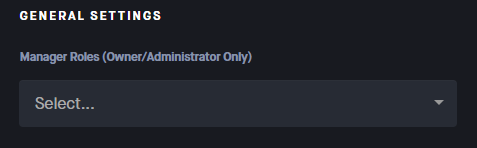


 naive walrus

 novel hemlock




 astral jetty

