#Microstutter + No VSync after Patch

1 messages · Page 1 of 1 (latest)

desert karma
#

Note that I'm using DXVK 64bit.

After the patch, the game has faint stutters when beginning combat, opening the map and other such things, things I've had no issues with before. Additionally, VSync doesn't work. I can turn it on ingame and reload the graphics (by turning bloom off and on usually works), but VSync will still be disabled, aka my FPS won't be locked to 60. Even switching Framerate or to Windowed and back does not work.

The game played so nice and smooth before.

shy cloud
#

Same issue here, no vsync. I can change my framerate but it is still unplayable.

desert karma
desert karma
#

It's most notable when I open the Inventory btw
There's like a third of a second freeze when I do

#

That definetely wasn't there before

dull echo
#

what's your dxvk.conf? for me the best setting so far was

d3d9.maxFrameLatency = 1
d3d9.tearFree = True
dxgi.maxFrameLatency = 1
dxgi.tearFree = True

desert karma
#

Though I have updates
If I don't use NVidia Control Panel for VSync, the ingame VSync does make the game run smooth
The unfortunate thing though is that although the stutter is gone, the FPS does take a hit

I could not play at 60FPS on the Promenade in Nar Shaddaa

#

And even other areas of NS struggled

#

Where do I find these?

desert karma
#

Okay but now warzones run worse...

desert karma
#

Could be that the 16 man warzone vs 14 or 12 man made a huge difference.
Flashpoint ran above 60 FPS

What really matters to me is if ops going to run at 60+

dull echo
#

you could try increasing maxFrameLatency but iirc the higher the value the worse input lag is, like having vsync on

#

there are more settings like buffer that I haven't tried changing

#

dxvk.hud = fps,frametimes,compiler,scale=1.0 helps to see what's happening

desert karma
#

I don't think increasing the maxFrameLatency makes a difference because all things considered, my latency always hovers between 5ms and 15ms and I don't think it can get it any lower
Though you can tell it's trying, which is good

#

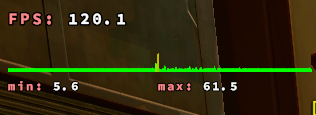
I also have a spike like this whenever I open the map

#

Which I find super interesting

dull echo
#

the relationship between these settings is too much for my head like you have to understand rendering stuff

#

that min max latency there it's the frametimes and it changes depending on your max fps too but I'm not sure what's the relation to maxFrameLatency because it talks about queues

#

if you ever find out better settings please let me know because like you said when there's like 16 or more people it starts to get bad

#

I have nameplates enabled tho

desert karma
#

We have the FPS and the frametime graph and the latency
FPS is your average frames per second
The frametime graph shows the time between individual frames

We want the FPS to be equal to the monitor's refresh rate or above
But we also want the frametime to be equal, because otherwise it'll be stuttery or jarring

DXVK with the low render latency and Tearfree seems to fix frametime for the most part but it still has issues

dull echo
#

did wz and ops performance improved for you now that you have most of the cache or still a lot of stutters? and did you noticed any difference while using latency = 5 (the other message I missed)?

#

I just can't play without "=1" the input lag is so high it's like you're trying to turn a ship