#avatar-dynamics
1 messages · Page 15 of 1
 tacit stirrup
parameters of all my avatars in the project got reset wtf x.x
is that because of the new sdk and the way i upgraded or wut
 jolly crane
is that just a PC avatar you're trying to upload to quest...?
 toxic dawn
jolly crane
is that just a PC avatar you're trying to upload to quest...?
toxic dawn
jolly crane
is that just a PC avatar you're trying to upload to quest...?
It's a quest version of a pc avatar
 halcyon vault
tacit stirrup
is that because of the new sdk and the way i upgraded or wut
halcyon vault
tacit stirrup
is that because of the new sdk and the way i upgraded or wut
did unity crash/close when you were upgrading?
toxic dawn
halcyon vault
the transforms is the number of objects the components are acting on
Will it affect the looks of the avatar if I were to remove a few bones?
tacit stirrup
halcyon vault
did unity crash/close when you were upgrading?
don't think so, but now that I think about it I uploaded few avatars yesterday and didn't get any parameter red errors in the SDK.
I used the 2 tools on gumroad by Fluff / Cam (for phys bones convert / editing) and that's the only thing I can think of I did since then
I didn't mess with the sdk since then
sdk upgrade was like 2-3 days ago and yesterday i uploaded fine with no parameter errors so they must've been good then
halcyon vault
toxic dawn
Will it affect the looks of the avatar if I were to remove a few bones?
In unity, yes. The mesh that is weighted to those bones, if it has nothing else to follow, will stretch to the world origin. Can get very ugly. You'll need to reduce the bones in blender then
 pearl hull
So I updated my avatar with Phys Bone component. It works great. But when somebody grabs it it twitches around. Somebody know a solution?
 dry panther
Might happen if you animate that bone
 abstract pivot
i've been trying to animate the gravity slider and the max angle slider but it does not seem to work in game. when i test it inside unity i can see the sliders changing value but nothing happen visualy in unity or in game. Am i missing something?
pearl hull
dry panther
Might happen if you animate that bone
Its not animated
dry panther
Since clos beta. Grabbing was not always smooth. Is there a constraints in there?
pearl hull
Nope. On this object and child objects is only the phys bone component
 bright bolt
can someone explain how physbones on the same asset behaves differently on 2 different avatars

see how one looks like it has 5 bones and the other only 2, it behaves that way in game too
jolly crane
bright bolt
see how one looks like it has 5 bones and the other only 2, it behaves that way ...
no, they both have the same amount of bones
the difference is the curve applied on the Radius
bright bolt
only the upper half of it bends on the right one
bright bolt
the scales are different, they have to be in order to be the right size, just avatar weirdness
also
i did not know you could click on that curve i thought it was just a visual representation
thanks for mentioning that
the converter applied some weird settings by default, and they aren't even the same on the same asset used on different avatars
can be fine on one and wrong on another
 fringe iron
So im wanting to make a certain receiver a toggle, as it goes with a specific toggle prop. So I dont always want it on to where someone can summon the prop at any time. Is this possible?
I have a helmet that has open/close animations when you hit the helmet. I dont want to accidentally summon the helmet any time I put my finger up to my head
 upper raven
at least on closed beta when you hid a receiver then toggled it back on it wouldn't work, but that was when it was on beta
fringe iron
Yeah thats been my issue as well
 lyric compass
I've added physbones to a hat which is deformable and works fine normally when attached to my head bone. But as you know head bones are not visible in first person, only in mirrors. So what I've done is using a parent constraint to move the hat to my head. Now the problem is that when the constraint is active the physbones cease to function. Does anyone know if this is working as intended or something else I'm missing?
 elfin pier
anybody know how to move grab physbones during unity run mode? i need to test em but don't remember how
fringe iron
use the scene/game view and drag them with your mouse!
elfin pier
is there a way to see the bones as you do so, like vrchat's debug thingy?
fringe iron
well, not in game mode I dont think
You can by making sure gizmos are on in playmode on your scene!
if youre looking for something like this!

oh wait nvm you can! just make sure gizmos are on
 bright bolt
lyric compass
I've added physbones to a hat which is deformable and works fine normally when a...
bright bolt
lyric compass
I've added physbones to a hat which is deformable and works fine normally when a...
is the "Is Animated" option on the physbone turned on?
it's off by default (unless converted from a dynamic bone) and you probably need it on
bright bolt
lyric compass
I've added physbones to a hat which is deformable and works fine normally when a...
also keep in mind there is a problem with constraints in that it syncs over the network slowly so every time you move around everyone else will see your hat floating a meter behind you following you around
 spark mist
Hello, I just recently changed to PhysBone from Dynamic Bone and its working in Unity but when I tested it out in game, all my animations drops fps and I cant see any of my animations working. Can anyone help me out which caused this and how to fix it?
 torn tendon
if an avatar already has physbones while importing do i still need to add dynamic bones?
lyric compass
bright bolt
also keep in mind there is a problem with constraints in that it syncs over the ...
Ahh thank you. Animation not being checked was it, but yeah that is a major issue.
bright bolt
you would think they could just be handled locally, like the dynamic bone/physbone calculations
still not sure what the difference between Stiffness and Immobile is
elfin pier
fringe iron
oh wait nvm you can! just make sure gizmos are on
thanks!!
fringe iron
np!
halcyon vault
bright bolt
also keep in mind there is a problem with constraints in that it syncs over the ...
Do you have any recent evidence of this?
I haven't had any issue with constraints lagging behind for months, local or remote
fringe iron
ive had receiver lag, if that counts
takes awhile for me poking another users receivers for them to activate
bright bolt
last time was maybe a month or two ago? people don't use them a lot
i use rotation constraints to reduce the number of dynamic bones, but latency isn't really noticeable for my use case
 versed tartan
Hey I'm having a bit of an issue with my physbones. This is the hair before:

This is the hair after.

What would be causing this?
 cursive hull
do you have a collider on the head/nearby bone?
cursive hull
could also get rid of the collider entirely, and use angle limits instead
cursive hull
In the physbone component(s), look for the Limits field
 exotic sluice
angle limits are so good bruh
cursive hull
there's Angle, Hinge, and Polar iirc - you can get a better explanation of them here c:
https://docs.vrchat.com/docs/physbones
exotic sluice
why have colliders when you have angle limits doing the job you need already?
 simple elk
Could end up having more components with that , depends on how its set up (8 max on quest)
exotic sluice
much more performant too
bright bolt
simple elk
Could end up having more components with that , depends on how its set up (8 max...
4 for quest fallback
and 6 is the effective limit, since below medium rating you're automatically perfblocked by most
for fallbacks, the limit is too low to be very useful
with 6 bones and 32 transforms you can do a lot, 4 and 16 you have to sacrifice a lot
finally got the physbones on my main avatar looking good, takes a lot of trial and error
dynamic bones wasn't any easier, i just had to relearn everything i learned from that
versed tartan
Anybody got any settings they like for hair for phys bones
 short narwhal

 potent rivet
hey is it possible to add bones to an armature in unity? i'm trying to set up physbones on an avi and it doesn't want to work, i think it's because of the bones
bright bolt
versed tartan
Anybody got any settings they like for hair for phys bones
hold on
 remote ferry
short narwhal
https://i.gyazo.com/11c924198005bad847966b939fff2f2b.png
remote ferry
short narwhal
https://i.gyazo.com/11c924198005bad847966b939fff2f2b.png
Sippbox?
short narwhal
remote ferry
Sippbox?
yup
bright bolt
versed tartan
Anybody got any settings they like for hair for phys bones
you can try this (increase pull if you feel it's flowing in the air for too long and if you want it stiffer increase stiffness, hair comes in all types lol)

it didn't need a very complicated setup to look good imo
 formal raven
question
can i have more than one controller on an avatar, not like not the avatar itself
lets say i wanna spawn a button, can i put a controller on that button rather than flood my avatars controller layers
simple elk
no it all goes through your descriptor
 steel thistle
There can be animator in children objects. But you cannot control animator parameter in the children objects.
formal raven
wait so if i wanted a controller that had paramiters that reacted to the contacts would that work?
not menu based
steel thistle
formal raven
wait so if i wanted a controller that had paramiters that reacted to the contact...
It doesn't. Parameter still goes to avatar animator
formal raven
ahh damn
was hoping to make an interactable button with the new contact/senders without having to add even more layers to my avatar controller
is oki
 idle crescent
Hey guys do you know why the new SDK with the avatar dynamics doubled my projects size? It used to be 900mb and now its 1.8gb
This is only by importing the new SDK over the old one. Deleting the library folder and let it regenerate did not help in any way, it came back to the original size, and it happened on multiple projects i have
 toxic birch
is there a way to disable grabbing of your own dynamic bones
steel thistle
idle crescent
Hey guys do you know why the new SDK with the avatar dynamics doubled my project...
Could be some extra dependencies the sdk installed when you imported the new sdk.
idle crescent
So.. is it fixable? Was it intended?
Idk of any additional dependencies it requires..
Because it never happened with previous SDK updates..
steel thistle
Supposedly it's intended
idle crescent
Did it happen to you too?
steel thistle
My project is too big to be bother to check😂
steel thistle
 cursive hull
It's intended yes, the new SDK requires the Burst and Mathematics packages, which it auto-imports
steel thistle
The two extra dependencies
idle crescent
Oh.. so it will stay like this
Thats nearly an additional GB for each project.
Guess I will have to save my projects without library folder
Or buy a new hard drive/ssd 😅
simple elk
🤷 have its own drive
 idle crescent
Hehe yeah no escape from that
Thanks for pointing that out, at least i know now that it will stay like this
 iron badge
On my avatar, I have a secondary object with its own Animator, which is set up with parameters. I've put a VRC Contact Receiver on the object. But it looks like there is no way for that Contact Receiver to reference an animator other than the Playable Layers on the base avatar, is that correct?
simple elk
all parameters goes from your av , only worlds can do its own controller
iron badge
Sure, the object is a child of the avatar though, so I assumed there would be some way to use its controller. Ah well, I've thought of a way around it, it'll just take longer.
Thanks
 mellow citrus
simple elk
🤷 have its own drive
mellow citrus
simple elk
🤷 have its own drive
woooooooowwwww...thanks VRC -_-
I just noticed this for my project too.
 fallow owl
Is there a new component for the SDK? Because I'm trying to find one for my avatar but I'm not sure which is the one
short narwhal
VRChat
Avatar Dynamics is a new suite of features aimed at creating fun and interesting interactions between avatars. Understandably, these are some powerful features, so there’s a lot to cover here! The two primary features of Avatar Dynamics are PhysBones and Contacts. These features are governed by the ...
fallow owl
Like, I have the new DB sdk but I can't find it for when I make a fresh avatar
I'm trying to put the new sdk in a sdk2 avatar that I wanna test to see if it works
 rapid lantern
I apologize if this has already been discussed, but is anyone else having issues with their avatar's hair being stuck like this? This is posed like this, it just loads in like so and whenever you try to reset those hair pieces, they spring back up like this
 fallow owl
Ohhh nevermind I found the descriptor!
 craggy pewter
rapid lantern
I apologize if this has already been discussed, but is anyone else having issues...
craggy pewter
rapid lantern
I apologize if this has already been discussed, but is anyone else having issues...
Maybe try some gravity settings?
mellow citrus
rapid lantern
I apologize if this has already been discussed, but is anyone else having issues...
it's how vrc converts the dynamic bones. nothing can be done about it unless you fix it in unity(which could take forever because physbones be buggy). For now, you can turn physbones off in safety settings, but this change is local to you.
craggy pewter
Also I just read the documentation on PhysBones, seems like a pretty good replacement for dynamic bones. I'm an avatar creator so I wanna test the limits of it. About to update one of my avatars with it
mellow citrus
craggy pewter
Also I just read the documentation on PhysBones, seems like a pretty good replac...
good luck.
craggy pewter
Oh dont worry, it can be as complex as ever and ill figure it out, I do some crazy cool things with avatars already, like 3 years or so experience making them now
rapid lantern
mellow citrus
it's how vrc converts the dynamic bones. nothing can be done about it unless you...
Ahhhh that sucks a bit, it's an old 2.0 avatar and I've been using forever now. Sad to see it get broken from the update
mellow citrus
rapid lantern
Ahhhh that sucks a bit, it's an old 2.0 avatar and I've been using forever now. ...
even using a recent sdk, you would need to redo the avatar descriptor and toggles and stuff because 2.0 and 3.0 are very different.
There is an auto convert in unity in the sdk, but you would have to go into play mode and see what you need to fix.
craggy pewter
rapid lantern
Ahhhh that sucks a bit, it's an old 2.0 avatar and I've been using forever now. ...
I noticed a ton of my avatars are broken in various ways after the update, most notably, my avatars with dynamic bones on the tongues that normally enable with an expression only are always enabled now,
fallow owl
I had that issue too with the tongue thing
craggy pewter
3.0 ones I quit sdk 2 when 3 came out but yeah I think the update broke some stuff
fallow owl
Yeah some of my avatars including some favorited public ones are broken ahh
craggy pewter
fallow owl
I had that issue too with the tongue thing
Yeah last night I checked and legit all my avatars with dynamics on the tongues are acting weird now like that, kinda annoying XD I have hundreds of broken avatars now
mellow citrus
fallow owl
Yeah some of my avatars including some favorited public ones are broken ahh
yep! nearly all of them.
craggy pewter
And one of my avatars hair acts like its in zero gravity and like its blowing in the wind all the time now after the update
fallow owl
That suckss because I don't think some of the creators are gonna update them :(
lyric compass
Some strangeness with animated physbones not following parented constraints in-game. Works correctly in Unity. Any clues what's going on here? Appreciate the help
craggy pewter
lyric compass
Some strangeness with animated physbones not following parented constraints in-g...
Thats so odd
Oh
Try to unlock the constraint and reposition it again then lock it again, it might have its origin spot broken so its jumping over there, weird if it works in unity still though
halcyon vault
I'll be the weird one, idm.
That avatar, that voice, I love it
mellow citrus
fallow owl
That suckss because I don't think some of the creators are gonna update them :(
definitely not older avatars. and creators have like a lot of uploads.. i mean... like me, i dont really see the point in fixing them tbh.
craggy pewter
fallow owl
That suckss because I don't think some of the creators are gonna update them :(
Yeah sadly not. Even some of my SUPER optimised avatars have weirdness happening from the update on the dynamic bones
fallow owl
Awww yeah :(
Thank god some of my sdk2 ones that I really like are still functioning
Because I have no idea how to convert their anims and everything over into a sdk3 format
craggy pewter
Im glad that it wasn't just me with the tongue issue and dynamic bones in general. Last night I was like why tf are all my main avatars acting so weird now XD
Its like this update forces everyone to convert to physbones instead, thats why im learning about it and playing around with it now
 short bone
The Phyc Bone component is still bussy. My breasts are broken. One of the avatars, it just vanished for nothing, and hand colliding is not working.
lyric compass
craggy pewter
Try to unlock the constraint and reposition it again then lock it again, it migh...
Hmm, what do you mean by unlocking and locking the constraint? Also thanks @halcyon vault! It's the avatar for my Neon Divide RP character.
 craggy pewter
One of mine had zero g breasts XD I was annoyed
mellow citrus
craggy pewter
Its like this update forces everyone to convert to physbones instead, thats why ...
it does force the conversion. unless everyone has physbones turned off, theyre gonna be there no matter what.
It would have been better to keep dynamic bones and let people decide whether they want to add physbones or not.
craggy pewter
lyric compass
Hmm, what do you mean by unlocking and locking the constraint? Also thanks <@151...
Like unchecking IsActive, on the constraint and position it again the reactivating it
short bone
I think component is still bugged, and sometimes it thinks it's Ignore Transform.
craggy pewter
mellow citrus
it does force the conversion. unless everyone has physbones turned off, theyre g...
Dang yeah I 100% agree with that, a lot of people dont know how to use unity as well and probably have some payed avatars they cant update now
mellow citrus
craggy pewter
Dang yeah I 100% agree with that, a lot of people dont know how to use unity as ...
yeah.. now i have to go through the avatars i'm selling and update them myself.
 hollow burrow
I know a few people have stated this, but the SDK is not working for me. I keep seeing "reload SDK" at the top. Any solutions found? I have the correct SDK, correct unity version. I deleted the SDK completely, reloaded it. Deleted unity and reinstalled. No pumpkin tools. Reloaded/updated the "mathematics" package, which is what it says theres an error with. After all that, it worked once then stopped working.
craggy pewter
I'm so used to dynamic bones, learning how to use this systems gonna be annoying, ahhhhh I have so many avatar to fix now lol
It does seem to work better than dynamic bones but both should be supported
 harsh copper
has the VRC team mentioned of they want to make physbone component parameters animatable?
mellow citrus
hollow burrow
I know a few people have stated this, but the SDK is not working for me. I keep ...
did you try an empty project and then import the sdk?
hollow burrow
mellow citrus
did you try an empty project and then import the sdk?
Yep. No dice.
craggy pewter
hollow burrow
I know a few people have stated this, but the SDK is not working for me. I keep ...
Oh maybe people are fixing the issues by updating the SDK that the avatar is useing and then maybe dynamic will work again, never thought of that. Maybe our avatars just need an SDK update
Instead of setting physbones up on them
short bone
And PB colliders have another problem: sucking effect.
craggy pewter
short bone
And PB colliders have another problem: sucking effect.
Ooooof
lyric compass
craggy pewter
Like unchecking IsActive, on the constraint and position it again the reactivati...
Ah yeah that doesn't seem to make any difference. I resume debugging
short bone
If you bring very near, it flipped over and can go in. It's not same as well developed DB.
craggy pewter
hollow burrow
I know a few people have stated this, but the SDK is not working for me. I keep ...
Also to answer this, you might just have to reload the project. Sometimes when I change the SDK the editor windows for it break or bug out, usually reopening the project fixes it
dry panther
lyric compass
Some strangeness with animated physbones not following parented constraints in-g...
have the parent of the hat have the constraint. don't put both on the same
hollow burrow
craggy pewter
Also to answer this, you might just have to reload the project. Sometimes when I...
Tried that 😦
hollow burrow
craggy pewter
Any console errors?
 lyric compass
dry panther
have the parent of the hat have the constraint. don't put both on the same
lyric compass
dry panther
have the parent of the hat have the constraint. don't put both on the same
So you gotta unpack the prefab and place it in an empty game object?
craggy pewter
hollow burrow
Poiomi shouldn't have errors thats odd, you might need to reimport that. Maybe poiomi referances scripts from the old vrchat sdk
Another thing you can try is to right click and reimport everything
halcyon vault
"already contains a definition for" usually is given when there are 2 of the same file in the project; they fight each other
craggy pewter
That poiomi error seems like you have more than one poiomi in your project since its saying that the namespace is used already
 gritty valley
If im making a finger sender, do I need all of this or can i just do "Finger Index L"
 craggy pewter
Id say just fully delete poiomi from your project and reimport it and then restart the project again @hollow burrow. See if that works
hollow burrow
craggy pewter
Id say just fully delete poiomi from your project and reimport it and then resta...
Thank you! I'll attempt it.
short bone
Oke i have feeling the SDK conversion tool DB to PB is not well adjusted. It's broken at one avatar in breasts with possible extreme values.
halcyon vault
gritty valley
If im making a finger sender, do I need all of this or can i just do "Finger Ind...
Finger Index is both hands, as is Finger which is all fingers on both hands. If you just want it on the left index then you only need the last one
gritty valley
halcyon vault
`Finger Index` is both hands, as is `Finger` which is all fingers on both hands....
im just asking if the finger, finger l, and finger index, are redundant
dry panther
lyric compass
So you gotta unpack the prefab and place it in an empty game object?
just have one empty object as a parent for the constraint
 supple spindle
So when people move my avatar’s hair, it just stays there. How can I change this other than resetting my avatar?
dry panther
should work better Ithink
mellow citrus
short bone
Oke i have feeling the SDK conversion tool DB to PB is not well adjusted. It's b...
the autoconversion has been kinda bad for every avatar i've updated thus far.
halcyon vault
gritty valley
im just asking if the finger, finger l, and finger index, are redundant
Even without the edit it still answered this
gritty valley
halcyon vault
Even without the edit it still answered this
thx
halcyon vault
supple spindle
So when people move my avatar’s hair, it just *stays* there. How can I change th...
If they're posing it grab the chain and let go, it'll return to its rest. Else you have no Pull so it'll never return to rest. You can disable Posing on the component so people can't 'freeze' it
supple spindle
thank u!!
craggy pewter
Make sure that you have the same parameters in your avatars parameters as your FX layers parameters. Also double check that all your parameters are typed the exact same since its case sensitive. I have put a lowercase where there was supposed to be an upper case which will make it not work. Also how are you testing it in unity? I recommend the avatar emulator you can get, its open source and basically lets you test things as if you were in-game in unity, I can get the link if you need.
Ill post it anyway in case others might wanna use it. Its a lot better than jumping back and fourth since you can watch all your animator layers in action to see whats not working, great for fixing issues like that

GitHub
Emulator for VRChat's Avatars 3.0 system, built on the Unity PlayableGraph API - GitHub - lyuma/Av3Emulator: Emulator for VRChat's Avatars 3.0 system, built on the Unity PlayableGraph API
Just the parameters, so lets say I have a boolean that changes my hair color called HairChange. I would have to make sure its spelled exactly like that on the FX layer parameter and the vrchat parameter
And np
lyric compass
dry panther
just have one empty object as a parent for the constraint
Made another empty container that I put the constraint and the physbones on instead. But the they're still offcenter ingame. Works fine in unity however.
 craggy pewter
oh!
craggy pewter
lyric compass
Made another empty container that I put the constraint and the physbones on inst...
Where is that Const_HatHand? If its on your avatar root thats why its not working, you wanna have it on your wrist bone so it follows it. My guess is that its on your avatar root so the hat is going to where your t-posed hand is instead of your in-game hands location
lyric compass
craggy pewter
Where is that Const_HatHand? If its on your avatar root thats why its not workin...
 craggy pewter
Hm not that then
dry panther
lyric compass
Made another empty container that I put the constraint and the physbones on inst...
No put the constraint on the first and the physbone on the child
lyric compass
dry panther
No put the constraint on the first and the physbone on the child
Tried that too now, but they're still offset ingame.
craggy pewter
Thats odd. Maybe try that avatar emulator and see if something is getting stuck somewhere in your functions. Unity doesn't read vrchat scripts like the game does, so best way to troubleshoot would be to use the emulator and watch how all the layers are effected when changing vaules, then you can pinpoint the issue
Or the debug menu on the avatar in vrchat but the emulators easier
To use the emulator you put it on your avatar main object and then you can choose the FX layer to debug and watch everything react when changing functions, tahts how I fix all my issues with avatars
Some stuff can break with a simple exit time value being bad on a layer, so being able to visualize all the animator layers working is the best way to find issues
You could try an avatar parameter driver on the layer with the blend tree. This lets your animator layers change other parameters while doing their own execution
And I get that, but I just mean its the best way to debug things like this, you could always remove it after finding the issue if needed
no a parameter driver is a vrchat script you put on a animator state that will change a avatars parameter while doing whatever it was designed for. Like I could have a boolean again to change hair color and make it so that when I do that it also drives another boolean on the avatar that changes the hairstyle too for example
hahaha yeah if only
Avatars will keep getting more complex
We just gotta try to keep up with it haha
dry panther
oh well
craggy pewter
Yeah just like a hue shift
What is the animation animating? Is it animating settings on a script because I dont think thats possible. Keep in mind I haven't started useing physbones yet so im not sure what that stretch does or where it comes from
Ahh gotcha missed that sorry
Documentation says the parameter is "_Stretch" remember these are case sensitive and hard coded for vrchat to look for those case sensitive parameters, might just have to change those
It might work simply by renaming that to _Stretch
I dont see one for gravity though
And you renamed them on the animator parameters and also the avatars parameters?
Maybe the script values cannot be animated, even though vrchat literally has parameters for it
Do you have IsAnimated checked on the physbone script?
Well you do 100% need the case sensitive parameters which you changed back so first set those to the hard coded ones, and you probably also need that IsAnimated checked. Other than that I dont think im gonna be much help clearly. But I do recommend trying the emulator to find your issue if its been causing this much issues for you and if you've spent this much time on it
 cedar maple
wait whaaatttt
then how the heck did the avatar in the avatar dynamics testing world do it
 crimson haven
Is anyone else's contact receiver broken? might just be a me problem but it was working just fine awhile ago and now my parameter in the animation controller doesn't listen to the one on the receiver and they are labeled the exact same thing 😢
cedar maple
there was an avatar with a string of bones attached to its hand that were all adjustable through the menu
i'm confused why that would actually be a thing
well if its intended then i hope it can be changed in the future, but if its a bug then i hope it gets fixed XD
remote ferry
Its more or less possible yeah
I mean
I guess it depends on exactly what you want to do
 bronze siren
cedar maple
there was an avatar with a string of bones attached to its hand that were all ad...
bronze siren
cedar maple
there was an avatar with a string of bones attached to its hand that were all ad...
https://github.com/naqtn/PhysBonesTK Fairly certain this is the repo for it

GitHub
PhysBonesTK is in-game tuning system for VRChat Avatar Dynamics PhysBones - GitHub - naqtn/PhysBonesTK: PhysBonesTK is in-game tuning system for VRChat Avatar Dynamics PhysBones
I'm currently trying to figure out the same thing
I'd really like to change gravity on one of my physbones through an animation
cedar maple
We would need a whole separate system to do that? That doesn't seem right or intuitive at all lol
bronze siren
I have no idea
I'm just digging through that persons repo trying to figure out how they did it
cedar maple
Well thank you for sharing I can check this out
Yeah if you figure out I'd love to know
Yeah it was in the beta
It was one of the first things I tested when the beta went live
bronze siren
it still works on current release though
cedar maple
Yeah the avatar still works
bronze siren
it's all happening through animations
 cedar maple
Well that's to be expected
 wide nexus
Hello, I tried to rig my avatar but none of the physics bone to be interactable. No matter what setting I do in vr and in unity. I am using ik2.0 beta
cedar maple
You mean like nobody can touch them?
simple elk
using any radius?
wide nexus
 simple elk
0 radius
if there is none, its impossible to touch, shows up as white lines if you enable debug in vrchat
gritty valley
crimson haven
Is anyone else's contact receiver broken? might just be a me problem but it was ...
u get it fixed?
 iron tulip
So my friends leaf, on his head, doesnt want to move. Why?
we've tried to mess with all the settings
and left it natural
it works with dynamic bones, just not phys
 crimson haven
gritty valley
u get it fixed?
crimson haven
gritty valley
u get it fixed?
yes and no, but mainly no. For some reason the parameter doesn't want to change when the animation controller is not in the controller slot of the avatar. when I take it out, all the parameters that I created stop existing but for some reason it works perfectly fine when testing in game but it never wants to be published because of the "missing parameters".
gritty valley
what animation controller, the FX layer?
bronze siren
bronze siren
@cedar maple ^
so we can do it
but I'm guessing this means a bit more of a complex animation layer
That's probably what's happening in this animation layer
 crimson haven
gritty valley
what animation controller, the FX layer?
crimson haven
gritty valley
what animation controller, the FX layer?
yea its in the fx layer but it stops when its not in the unity animator viewer controller slot.
bronze siren
'Apply trigger'
I'm guessing a parameter driver is just a parameter control you can do as a component
not sure
gritty valley
@crimson haven oh you put the same controller from your fx layer into the animator controller
torn tendon
So they say tails can be grabbable..
Would that mean other parts are grabbable 👀
I'm asking for a friend & it's an education related question is all.
for science
crimson haven
anything with a bone is grabbable pretty much
wide nexus
torn tendon
So they say tails can be grabbable..
Would that mean other parts are grabbable �...
my breast is being grabbed yes
gritty valley
@crimson haven i have the problem where the animation plays but it only plays for like half of a second then stops and doesnt come back until i re-enter the receiver
but the receiver is on constant so idk why its doing that
crimson haven
do you have a transition condition to your empty state that says the parameter needs to be below 1 to go to it?
cedar maple
bronze siren
That's probably what's happening in this animation layer
I feel like this is gonna be less "optimized" than if they just allowed us to do it in the first place lol
bronze siren
cedar maple
I feel like this is gonna be less "optimized" than if they just allowed us to do...
I think it's a limitation
gritty valley
crimson haven
do you have a transition condition to your empty state that says the parameter n...
i have it set up as theres the on and off animation with a true/false transition between them
true to on false to off
bronze siren
That prefab/repo is toggling on/off the physbone component every time a parameter changes through animation layers, probably because it's quite a lot more complex to have those settings be realtime
cedar maple
yeah i read it and it makes sense
its just weird to me
i wonder if it was an oversight or an actual limitation
bronze siren
a little of both if I had to guess tbh
cedar maple
cus this new bone system seems so amazing and optimized, i dont think having a little animation to change a property mid game would be that bad
it wasnt on dyn bones at least
bronze siren
dyn bones were single threaded
it gets more complicated communicating things between threads
the thread would need to listen for any changes to the physics properties, and then adapt
from a technical perspective, I could understand it, idk
gritty valley
it's a bool also @crimson haven
bronze siren
we can still do it, so
I could change the gravity of my tail whenever I get headpats
I'm happy tbh 😄
cedar maple
well the hecking phys bones positions arent even synced up properly as they are lol
friends and i were noticing a bunch of things were in different places over the last few days
😔
well this is mildly disappointing
i'm sure it'll all get better over time
i just keep encountering these things where "oh that didnt happen on dynamic bones" and such
makes me sadd
torn tendon
This is more a question about a concept than anything else, but would it be possible to make some sort of grappling hook with physbones? Like, the tip have a function that can attach to a world collider and then pull the rest of the avatar up somehow?
I'd just love if I could upgrade my clawshots...
 burnt kraken
Anyone know world that have avatars with the new physics bone update I’m looking for some
 craggy warren
Hay does anyone know how the angles for phys bones well? I’m trying to make a butterfly knife and I got 2 parts working but the main handle keeps acting like it’s weighted on ether the left or right side instead of being able to rotate to which side the knife is at. Could anyone help?
 zealous python
can somebody help me? I want to make a avatar dynamics thing where you can push my nose and squish it- but like, have it be a proximity thing like that one example avatar where you can squish their head
 prisma current
General question, how would you go about "resetting" a PhysBone? As in stopping it from being a PhysBone and having reset to the bone's default position
Even with 'Is Animated' enabled the bone seems to ignore the fact that it's being told to go to a certain angle with an animation
 lunar kraken
@prisma current It's not possible to animate a physbone's settings, what I did was create two physbones, one will reset the position, just turn on immobilize to 1, and disable grab/pose, enable it when you want it to reset, disable the interactable one.
 ivory thicket
How would i go on about turning off a physbone.
I have a breast plate and when i have that one i would like thy physbones to disable.
I tried using the Enabled property in the animation, but when using it in-game, i was running into some problems
lunar kraken
@ivory thicket That does work, seems like it wasn't actually disabled.
Disabling the object or the component works.
ivory thicket
lunar kraken
<@163394191420948480> That does work, seems like it wasn't actually disabled.
the problem i was running into, the physbones got stuck in a position and stayed in it when they got disabled
lunar kraken
You can fix that with what I said above.
"It's not possible to animate a physbone's settings, what I did was create two physbones, one will reset the position, just turn on immobilize to 1, and disable grab/pose, enable it when you want it to reset, disable the interactable one. "
ivory thicket
lunar kraken
You can fix that with what I said above.
shouldn't this just work and not need a fix? 🤔
ivory thicket
lunar kraken
Tell that to the developers lol.
ik ik, just saying lol
harsh copper
bronze siren
I could change the gravity of my tail whenever I get headpats
can we? I am trying to change the gravity of my bones with a radial but without continuously enabling and disabling the component it doesnt update.
and doing that completely ruins the look because the bones go back to their default position
 grizzled copper
Just quick question,
Even Avatar Perf rank itself be "Quest Very Poor", and if PhysBone limit be within "Quest Poor",
Is PhysBone going to work in this case?
steel thistle
grizzled copper
Just quick question,
Even Avatar Perf rank itself be "Quest Very Poor", and if P...
Yes it works
grizzled copper
steel thistle
Yes it works
ahh thank you for confirming. I'm questioning myself whole day. xD
bronze siren
harsh copper
can we? I am trying to change the gravity of my bones with a radial but without ...
that's the only way it's going to work sadly
harsh copper
bronze siren
that's the only way it's going to work sadly
thats absolutely awful
they need to allows us to update the parameters in real time
bronze siren
Personally I think it's just a limitation, sadly, but in the grand scheme of things we have quite a lot to play with now :3
 errant notch
Why is everyone all of the sudden trying to edit settings in real time? Nobody did that with Dynamic Bones before
harsh copper
errant notch
Why is everyone all of the sudden trying to edit settings in real time? Nobody d...
a lot of people did that lol
just no one complained because it actually worked
now all of the people that did it have no way of doing it anymore
errant notch
Many people said it didn't work
errant notch
Well I mean... I'll leave that answer up to interpretation
cedar maple
https://vrchat.canny.io/avatar-dynamics-reports-and-feedback/p/phys-bones-cannot-be-animated-with-an-animation-in-game
@bronze siren @twin niche I dont have too high hopes of this happening but i made a canny post about the whole situation if you'd like to vote on it
 harsh copper
cheers
cedar maple
errant notch
Why is everyone all of the sudden trying to edit settings in real time? Nobody d...
i used that on my hair for changing length and for my avatars ears to change their amount of wobbliness when a shapekey changed them, and i had friends use that for other things too, i promise you its not new
lunar kraken
I'm having a weird issue with one project where none of the default collision tags are working (head, handl) The avatar colliders are fine.
 rough meteor
hey quick question dose anyone know how to replace the default avatar contact senders with your own ones?
lunar kraken
Just add additional ones.
rough meteor
so is there no way to get rid of the default ones?
lunar kraken
You can disable the colliders.
prisma current
lunar kraken
<@252168366050115586> It's not possible to animate a physbone's settings, what I...
As in, duplicate the bone (and everything attached to it), and just toggle which set is visible? 'Cause I have no wiggle room for stuff like that before my avatar stops being 'Good'
lunar kraken
prisma current
As in, duplicate the bone (and everything attached to it), and just toggle which...
Yes unfortunately.
harsh copper
lunar kraken
Yes unfortunately.
no you dont need to do this
or wait.
okay
if I am understanding what you want
than just disabling and enabling the component should work
rough meteor
nvm figured it out
prisma current
harsh copper
than just disabling and enabling the component should work
Any time I disable the component the PhysBone just freezes where it last was instead of re-centering
cedar maple
i mean were they not synced in dynamic bones?
 rustic oracle
cedar maple
https://vrchat.canny.io/avatar-dynamics-reports-and-feedback/p/phys-bones-cannot...
rustic oracle
cedar maple
https://vrchat.canny.io/avatar-dynamics-reports-and-feedback/p/phys-bones-cannot...
https://feedback.vrchat.com/avatar-dynamics-reports-and-feedback/p/1181-gravity-does-not-change-with-animation
This one has it marked as Tracked. So maybe we will get something. From my testing all the on/off options on it like 'Allow Grabbing' work, everything else does not animate.
cedar maple
right right
that is the same issue
we'll just have to see
i'm just getting sad thinking about it now lol
rustic oracle
Maybe we get an option for it. Like you can mark those with bone transforms to mark those you animate settings.
cedar maple
cus if it never gets fixed then i'm gonna be going for years with a fucked up tail lol
rustic oracle
It's been only a few days. Give it some time.
cedar maple
yeyeye i know
these guys got tons of stuff they gotta prioritize XD i'm very well aware
thankfully now that they do own phys bones and can change it in any way, changes can actually happen which is awesome
rustic oracle
Though its good that there seem to be no major issues.
harsh copper
rustic oracle
It's been only a few days. Give it some time.
you see the problem with the VRC devs is that if an issue isnt fixed very quickly after being discovered, it will probably be in the game for a year before it gets fixed.
I dont want to sound mean, but I have observed this in this game way too many times
prisma current
prisma current
General question, how would you go about "resetting" a PhysBone? As in stopping ...
What makes this issue worse is I managed to make this work before, I just 'optimized' the animations and now I don't know what I did to get it all to function anymore
And it still works on the full upload of the avatar, just not the local testing one
harsh copper
add colliders to the tails and assign the colliders of the opposite tail to the physbone script of a tail
rustic oracle
It's still the weekend. I assume we can guess more how it goes by wether or not things change in the coming week.
harsh copper
you can, but I think just 3 colliders over other bone should work
they dont need to be 100% accurate, just so they dont clip trough each other
rustic oracle
All we can do is upvote the issues on the canny for now. And yell at Tupper (which doesn't make things go faster, but it makes me feel better.).
 hearty kraken
Hey there, is it possible to make "attachable" objects to other people with Avatar Dynamics? For example I place a shelf with hats and everyone can take and put it on their head (or leg?? xd)
 thorny isle
hearty kraken
Hey there, is it possible to make "attachable" objects to other people with Avat...
thorny isle
hearty kraken
Hey there, is it possible to make "attachable" objects to other people with Avat...
I do not know how myself, but it is doable. I’ve seen people do similar in game, but have been told it’s pretty complicated.
hearty kraken
But Im talkin about avatar SDK, not a world one
hearty kraken
thorny isle
I do not know how myself, but it is doable. I’ve seen people do similar in game,...
Yeah I've seen today something like that but it was attached to a whole capsule iirc
Still an option but still no idea how to do even that, only tricky-dumby ideas comes in my head 🤔
 agile bronze
I'm sure this has been asked plenty of times - is there a way to make your head/foot/torso default colliders collide with other players like your hands can?
simple elk
nope, people would definatly never abuse that if it was possible
 twin niche
This is what Peak Performance looks like /s
Medium ranked

works well enough, tho...
https://cdn.discordapp.com/attachments/890773069055029289/967938098044489778/Unity_llvEB6ta0o.gif

 small radish
I'm having a bit of trouble getting this animation to stop playing
 rain walrus
with physbones, it seems that bone physics won’t work if the bones are too smol. does anyone no how big the bones have to be?
small radish
yeah the animation is freezing onto it idk
it continues to play even after it should stop
I feel like this is a pretty simple fix
some value I'm missing somewhere
small radish
rain walrus
with physbones, it seems that bone physics won’t work if the bones are too smol....
did you put the root into the root area
they won't work at all if that's not there
rain walrus
i tested. Physbone only works if i increase the size of the bone. smol bones won’t work it seems
small radish
how small is your avatar lmao
rain walrus
not thattt smoll. 4 feet tall. the bones im trying to add phys to are rlly tiny tho bc it’s for a keychain charm on her
su it seems the only way I can fixy is by making the key chain bigger.. Which seems silly
small radish
lol
rain walrus
i hope devs fix
simple elk
bones thats 10mm or smaller have issues , or very close to others
rain walrus
yah. seems that’s it. dynamic bones worked fine thos. idk if i should w8 for devs to fix or just figure out something else
simple elk
Id merge, you gonna be waiting awhile
rain walrus
i would but it’s 3 chain links with 1 bone for each. merging wouldn’t work right. ill prolly just make it bigger
simple elk
Had one earlier with 15 bones on his tongue 🔨
rain walrus
i could see that making sense if it was a rlly looooong tongue lol 👅
 lean shale
i have a thicc roxy with jiggle physics
 languid glade
How do I make it where I can grab a sword in my back and it toggles on the sword and when I put it back in my back it toggles off?
 wise hinge
languid glade
How do I make it where I can grab a sword in my back and it toggles on the sword...
wise hinge
languid glade
How do I make it where I can grab a sword in my back and it toggles on the sword...
I can tell you how your just going to have to give me a minute I asked that same question too, but it was in open beta and now a lot of things have changed
languid glade
alright take your time
 ancient holly
thats a av3 question rather than dynamics
wise hinge
its using av3 dynamics


that is basically it, if you need help then respond @languid glade
cedar maple
So does anyone know how i can make it so when someone makes contact with my reciever, instead of it just playing one animation, it'll have a chance to pick a random animation?
i'm trying to figure out how to set it up but i'm starting to think it may not be possible, as the controller only plays one animation and will ignore the other two in my case

 thin latch
how do i stop long hair from clipping through the torso? i gave the hair colliders but it still seems to clip through things
cedar maple
this is how i have it set up now (probably wrong but it works for one sound
languid glade
wise hinge
The value has numbers instead of a checkmark
cedar maple
thin latch
how do i stop long hair from clipping through the torso? i gave the hair collide...
did you put the collider on the torso and make sure you dragged that bone its connected to into your "colliders" tab in the bone component?
languid glade
nvm im not on the right sdk version
thin latch
cedar maple
did you put the collider on the torso and make sure you dragged that bone its co...
i havent, am i supposed to add coliders specifically on the torso bones? i was expecting the colliders listed on the avatar descriptor here to automatically collide with the hair
 cedar maple
ahhh i see what youre thinking
no, for you, you'd have to put a collider on your avatars chest/spine bones
thin latch
ohh okay, thank you!
cedar maple
ye good luck
languid glade
wise hinge
Where can I find the receiver?
wise hinge
add a game object them click "add component" then search for "Receiver"
 jade gust
small radish
I'm having a bit of trouble getting this animation to stop playing
jade gust
small radish
I'm having a bit of trouble getting this animation to stop playing
Have you tried other interruption sources on the transition?
Also, how do you get the contacts to actually trigger in unity?
My contactReceiver works ingame, and I created an empty GameObject with a ContactSender with a matching Collision Tag in unity, however unity is not recognising it at all
languid glade
wise hinge
The value thing in receiver is not showing up when I type my parameter
thorny isle
languid glade
The value thing in receiver is not showing up when I type my parameter
removed when they added bool and int support to contacts
there’s a canny to add value property back
it’s 0-1 int, 0.0-1.0 float, or false-true bool rn
 velvet geyser
hello , um can anyone help me out . when ever i have receiver on my nose that have dynamics, it don't move . do you guys have any idea how fix it?
 sudden urchin
Do you have enough children bones under it to move?
velvet geyser
i still haven't figure out how children bones work or how it means.
thorny isle
languid glade
So how would it work? Do I just do (Parameter name) 1 or
add your parameter to your animator and that’s it
bool, int, or float
should just work from my understanding
jade gust
how do I test out contacts in unity directly?
The docs say that you can do it, but now how to do it.
My contact works in vrchat, but I don't want to have to get in vr everytime I make a change to it just to test it
 mellow shadow
how do i make my hair have gravity to it without my model's hair laying flat?
jade gust
mellow shadow
how do i make my hair have gravity to it without my model's hair laying flat?
I think that's what the Gravity Falloff slider is for
mellow shadow
jade gust
I think that's what the Gravity Falloff slider is for
yea but that renders the gravity useless
jade gust
only in the default pos I think
check pinned message. There is a part in the video explaining gravity etc
mellow shadow
yea and im swinging the head around and it renders the gravity useless
yea i watched that video already but i'll double check
 summer jungle
what do i do i know only have 2 parent objects with the vrcphysbone?
 jolly crane
summer jungle
what do i do i know only have 2 parent objects with the vrcphysbone?
jolly crane
summer jungle
what do i do i know only have 2 parent objects with the vrcphysbone?
you should merge bones to reduce the total amount of phys bone transforms
summer jungle
how do i do that?
jolly crane
best way is using the CATS blender plugin
summer jungle
is there a way to do it in unity? (i dont like blender)
jolly crane
no, Unity is not a substitute for a 3D modeling program, it's a game engine
what you can do for now is reduce the amount of things you have phys bones on
and/or add some bones to the "Ignore transforms" list to stop them from having physics
 willow sand
Guys are the excludes (ignore transforms) broken ingame ? Because even though it works in unity, my ingame armature is 100% fucked up and the head is dragging behind like it is animated by a phys bone
jolly crane
willow sand
Guys are the excludes (ignore transforms) broken ingame ? Because even though it...
did you add a physbone component to any humanoid bone?
if so, don't
put them on empty gameobjects instead
or on non humanoid bones
for example, if your hair has a common root bone, put it on there
not on the head bone
willow sand
jolly crane
not on the head bone
wow ok. that would mean a big amount of extra work ... because I have no hair parent. -___-
I will try it.
It should be possible to define a list of root transforms
Otherwise you are forced to use dozens of phys bone components - one for every hair bone
Also I have so many PB components then, I hit the limit and be very poor ... :(
jolly crane
then create a hair root bone
 pearl loom
is it possible to make an object grabbable without having bones on it?
 clever echo
(I'm experienced enough in unity for vrc, so don't go easy on me). I want to make something were if a hand touches the feet colliders, it triggers an animation I have. How do I even start?

 wary burrow
willow sand
wow ok. that would mean a big amount of extra work ... because I have no hair pa...
wary burrow
willow sand
wow ok. that would mean a big amount of extra work ... because I have no hair pa...
You could just create an empty game object parented to the head and drag the roots of all your hair bones into that game object; don’t even have to touch blender
Though doing it that way is hella destructive
But it works :)
rain walrus
My avi is done and rddy for upload. all of my hair bone chains are connected to the head. can i add a bone after the head to connect the hair chains to then just replace the fbx in my unity project and everything is good? or will adding a new bone break the project?
 lament lintel
Unity keeps showing this, imported the new SDK multiple times and reimported it

 cedar maple
clever echo
(I'm experienced enough in unity for vrc, so don't go easy on me). I want to...
cedar maple
clever echo
(I'm experienced enough in unity for vrc, so don't go easy on me). I want to...
You need to put a receiver component on the foot with a parameter specified in the animation controller, and set it to have contact tags with hands or fingers. That way IF something with those tags (everyone's hands by default in this case) enters that area, that parameter will be set to 1 (on) so whatever in the animation controller uses that parameter looking for it to be set to ON, will activate
You can test that too, just put an empty game object in your scene, give it a sender component, and make sure it has the same contact tag (hands or fingers) and you can touch them in play mode (you do need to make sure your fx controller is plugged into your avatars animator component, same way as if you were recording an animation)
jade gust
cedar maple
You can test that too, just put an empty game object in your scene, give it a se...
this explains why it didn't work with GestureManager. Thanks a lot. Been asking on several discords with no answers for this :)
clever echo
cedar maple
You need to put a receiver component on the foot with a parameter specified in t...
Is the parameter just called Foot L or something?
cedar maple
oh
you can name that parameter whatever you'd like
that parameter is only for giving it a property in the controller
clever echo
cedar maple
You can test that too, just put an empty game object in your scene, give it a se...
Thank you so much
tacit stirrup
anyone encountered a spazzing physbone chain and found out what it could be?
(not colliders btw)
cedar maple
i for example have a bell that makes noise when you hit it, set up much the same way, my parameters are named "Jingle", so when Sender touches Receiver, receiver has its parameter set to "jingle" which activates "jingle" in my controller, hence activating my animation
and i think so?
you can probably do that yeah
though if that doesnt work, you'd simply make a second set of parameters, layers, and sender/reciever
cedar maple
tacit stirrup
anyone encountered a spazzing physbone chain and found out what it could be?
(no...
mine was happening i THINK because the first few bones had small radius, i made them bigger and they worked better, still jiggled a bit
i also turned "immobilize" to 0 and that got rid of it entirely (though it caused a slew of other problems for my use case)
clever echo
And it seems any phsybones are like recievers as well
summer jungle
is there a way to not have quest users not lag with the new bones?
other then just getting rid of them?
 snow marlin
quest users dont really lag with the new bones?
they put low limits in it for this very reason
tacit stirrup
cedar maple
mine was happening i THINK because the first few bones had small radius, i made ...
i tried, the chains work fine until i move the avatar in a little fast speed, the chain lifts upwards and starts twitching
so weird
cedar maple
yeah idk man i was having lotta issues too lol
took me two days to "fix" my avatars tail
 honest inlet
is there going to be a fix for small dynamic bones not working when converting them to physbones?
sudden urchin
Low priority, won't be fixed for a while.
Just merge your bone chain down some.
 crimson mist
How would i set up angle limits to stop my chest from moving when walking forward/backward?
I saw the freeze axis' option was removed since the beta
 neat yoke


I have a timer that uses the VRC Avatar Parameter driver and sets the value from 0 to 4 then loops back if my high five physbone toggle is on.
I even plugged the int timer value into the expressions menu to sync up the chances of getting a "critical high five"
the video shows my friend slapping my hand and the values are desynced, as shown by him saying "crit" when I don't see one
why is this not working?
 onyx vapor
Im having an issue where 2 particular bones will just not stretch no matter what Max Stretch value I assign them. They can be grabbed and rotated fine, but trying to stretch them has no affect. Are there any common reasons why this might happen that I could check for?
(other bones like my hair/tail are able to be stretched fine when i increase their max stretch number)
thorny isle
onyx vapor
Im having an issue where 2 particular bones will just not stretch no matter what...
If they don’t have an endpoint or child, try setting Multi Child Type to First.
onyx vapor
Does not have an endpoint, it has an empty game object I added previously to make the DBs work correctly. I also tried adding an end position but that did not have any effect.
Changing teh Multi Child Type to First also did not allow it to be stretched
if i look at the scene view when i test grabbing it, i can see the collider get bigger as i try to stretch it - but thats it
ok so for context this is a tongue bone which is the direct child of a head bone (not the avatar head). If i add the phys bone to the head and set that as the root transform and then set an endpoint position - i can then grab and stretch the tongue
but this makes the while head get grabbed and rotated (although only the tongue is stretched).
cedar maple
onyx vapor
Im having an issue where 2 particular bones will just not stretch no matter what...
common issues could be that the bones are physically small (known bug), or radius is 0
its a tongue tho so its probably small bone
onyx vapor
radius isnt 0, but it is a small bone
cedar maple
my tongue bone as well as many others are broken right now
onyx vapor
is there a unity-workaround ?
rain walrus
my bones won’t work if their length is under 17mm. I had to make those bones longer in blender
onyx vapor
hmm, alright ill assume my problem is due to this bug and move on for now xD thanks
rain walrus
yah i hope they fix soons
 ember zenith
Hey is there any way to animate physbone scaling over an animation? I want to scale the collider radius
it doesn't seem to be working though
 hot relic
hi i saw the one example avatar with the squishy head can adjust its vertical position without playspace mover, how can i add that function to my avi?
craggy pewter
Whys my avatar like following my head and wobbling??? Confusion
Idk ill add final ik to it and try that, maybe the locomotion fix by wetcat is bugged now
 blazing flint
If i have an object with a single bone of it’s own on my avatar with weight set to max on every vert for it’s mesh and attach a static physbone with a parent constraint could that be picked up by myself and others as though it were a pickup object from world?
I would think so but not sure
craggy pewter
Yeah when I turn my head my whole avatars body moves..?? Anyone ran into this after setting physbones up?
dry panther
hot relic
hi i saw the one example avatar with the squishy head can adjust its vertical po...
I made that one. Was not that great and the files are not compatible with the public SDK. It's a bone that get stretch and the parameter from it is use in a motion time animation state. Weird setup.
hot relic
ah ok, i just found gogo loco and joined ur discord
torn tendon
yo good job at ruining dynamic bones bruh none of my avatars bones work as they should now the hair sticks up a lil bit.
 rigid pasture
is there a suggestion channel? because we REALLY need a setting to make it so OTHER people only CANT pose your dynamics.
unless theres a way to do it somehow with toggles?
i want to be able to pose my dynamics and not have other people grab them every 2 seconds
 peak sage
Maybe you can check islocal and animate the property. I don't know if this will cause posing to desync or not though.
torn tendon
rigid pasture
i want to be able to pose my dynamics and not have other people grab them every ...
just report the vrchat moderators bro the ywant yo uto get raped bro
 errant carbon
rigid pasture
is there a suggestion channel? because we REALLY need a setting to make it so OT...
errant carbon
rigid pasture
is there a suggestion channel? because we REALLY need a setting to make it so OT...
I did this with a toggle.
pearl loom
heya! so I have a boop receiver on my nose, but of course when your index finger leaves the receiver it cancels the animation and particle effect, how do let the animation finish even after the finger leaves the receiver?
torn tendon
Does anyone know how to get the physic bones to work on the live? I got them to work on beta but now they won't work.
I can't get them to animate in game where they move like before
 jolly crypt
hey is it me or are the "on enter" contact triggers incredibly inconsistent for others
cedar maple
pearl loom
heya! so I have a boop receiver on my nose, but of course when your index finge...
i believe if you set the receiver to "on entry" instead of "constant" it should be what you're looking for?
pearl loom
yes! that makes sense thanks!
 tough bane
so is the quest jiggle bones a custom thing i have to install from VRC? or is it the ones from the store?
ping me if you know
jolly crane
tough bane
so is the quest jiggle bones a custom thing i have to install from VRC? or is it...
it's literally just part of the SDK
use the latest avatars 3.0 SDK and add a Phys bone component the same way you would add any other component
tough bane
ah gotcha its an updated shk
 woeful tangle
I am completely unable to opt into the open beta branch for quest 2 and it annoys me.
jolly crane
woeful tangle
I am completely unable to opt into the open beta branch for quest 2 and it annoy...
why would you need to? AD is live now
 fathom wagon
Slight issue XD
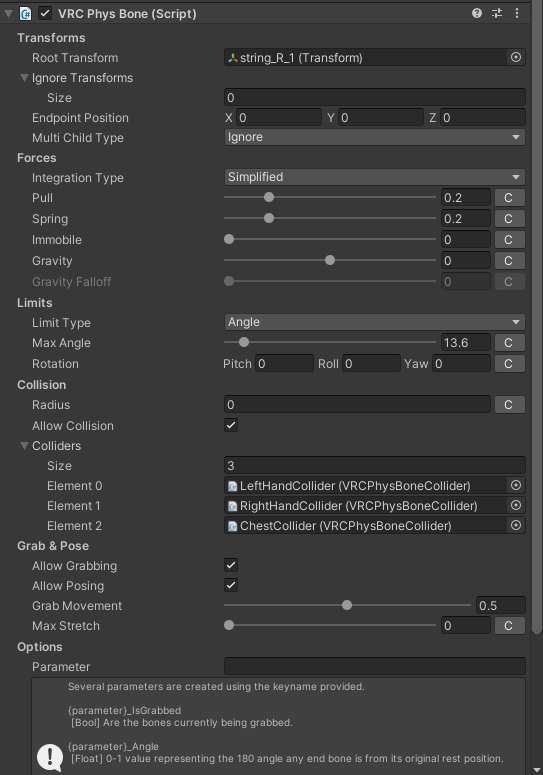
Here is my phys bone on a hoodie string
it moves just fine
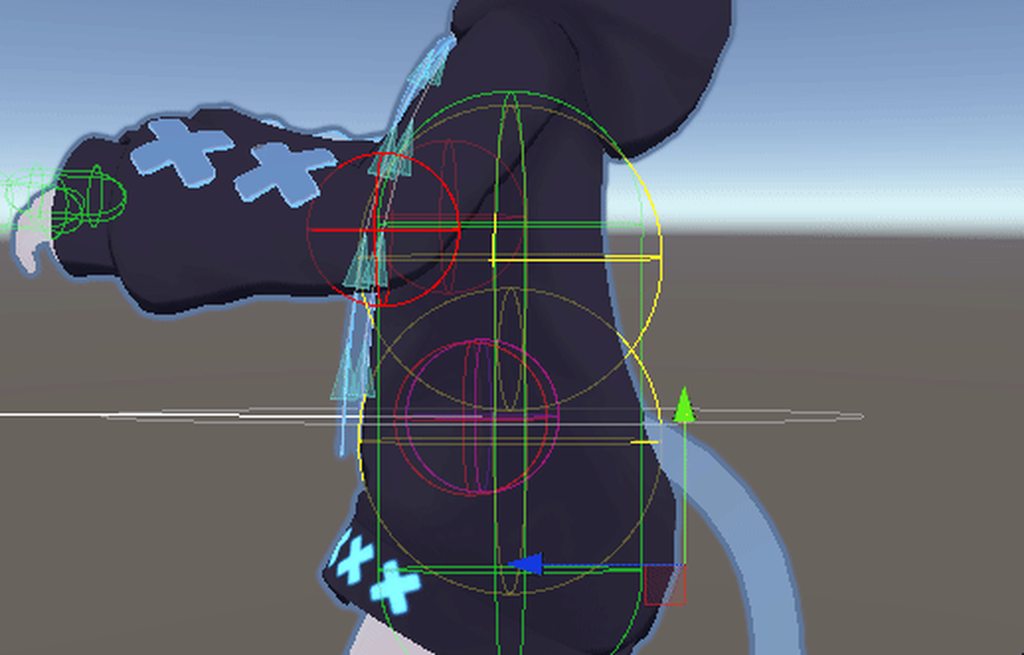
I have a chest collider
to avoid the bone entering my chest
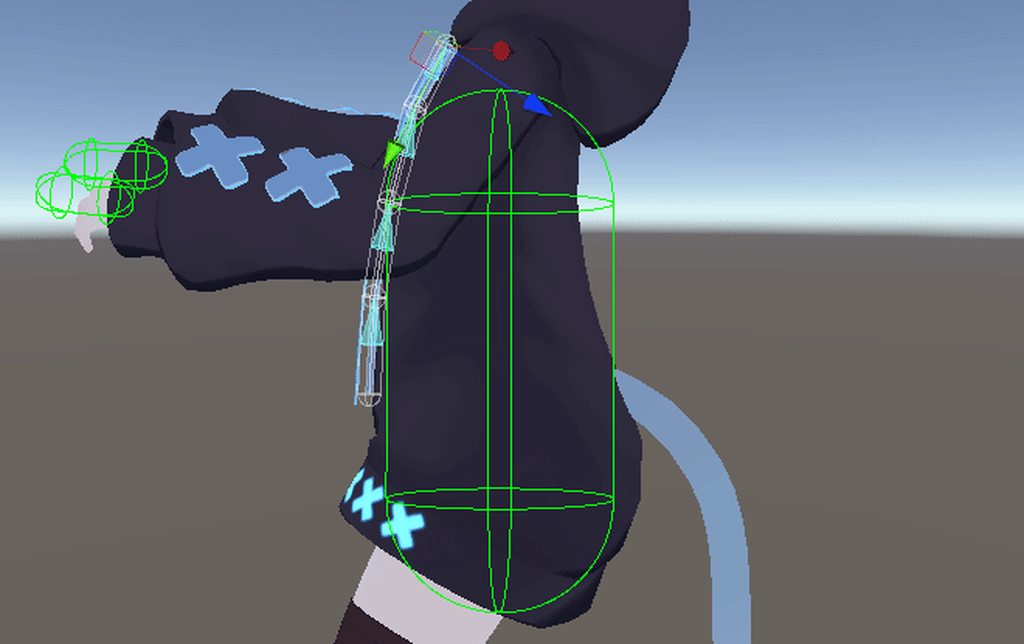
it looks like this

 fathom wagon
 simple elk


 steel thistle
fathom wagon
https://i.imgur.com/7VifZXq.gif
steel thistle
fathom wagon
https://i.imgur.com/7VifZXq.gif
You sure that the strings didn't go to the side of body?
fathom wagon
steel thistle
You sure that the strings didn't go to the side of body?
Thank you for the literal change of perspective XD
 terse rose
Wait why don't you just limit the movement towards the body?
fathom wagon
terse rose
Wait why don't you just limit the movement towards the body?
how?
terse rose
By using the limits tab?
 terse rose
angle should be fine
terse rose
idk move the values and see where the movement cone moves
 modern island
fathom wagon
modern island
fathom wagon
Set the max angle to whatever value you want and then make the pitch the max angle but negative. So if you have a max angle of 45, you’d have a pitch of -45
You can very easily avoid colliders if you want to prevent clipping with PhysBones, which makes things look the same, and makes your avatars rank better as no colliders.
 hollow spear
idk why, got 2 seperate physbones components, and 1 converted from dynamic bones, but still both of them dosnt have any grabbable bones..
modern island
Do they have a radius?
fathom wagon
modern island
Set the max angle to whatever value you want and then make the pitch the max ang...
yeah I like the new system
seems alot more fleshed out
and feature rich
im just a slow learner
modern island
It is a little strange at first, however once you get the hang of it, it’s quite nice.
 void skiff
also the extra documentation for the new system is nice
modern island
It’s also nice for it to be as tightly knit into VRChat as it is
hollow spear
here are the settings, i see my coat moving around but its just not grabbable and i dont see any blue points ingame
 fathom wagon
void skiff
also the extra documentation for the new system is nice
fathom wagon
void skiff
also the extra documentation for the new system is nice
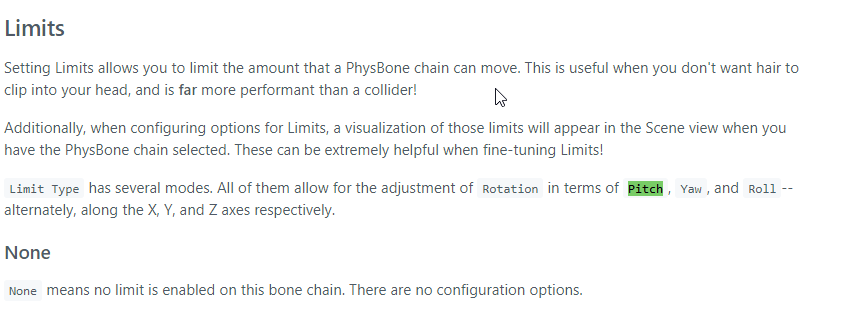
yes, yes it is
Ive discovered documentation and Ctrl+F are good pals to have when learning
hollow spear
u mean radius under collision?
hollow spear
good?
 simple elk
white line = ungrabable
steel thistle
Definitely too large
void skiff
you want the balls to be as close to the actual size of the thing you want to be grabbable as possible, within reason
obviously it's not possible to be super accurate unless the thing is spherical
hollow spear
imagine grabbing the whole armature and every part of your face
 hollow spear
289 bones
void skiff
upload that then watch and laugh as your entire avatar is just a ragdoll
hollow spear
originally made this edit to use the character for animation purposes thats why so many bones
just having the script on drops my fps from 60 to like 5..
 fathom wagon
Thank you very much for helping me sort the issue XD, the dynamic to PhysBone auto converter was a bit wonky for me/I needed to learn the new system eventually and it was quiet fun. The support channels are POG, keep up the good work ^-^
hollow spear
even with radius it doesnt show any grabbable bones..
steel thistle
hollow spear
even with radius it doesnt show any grabbable bones..
What does it show?
 steel thistle
hollow spear
steel thistle
hollow spear
Did you put Armature as a root bone as you shown before?
One physbones component can affect only up to 256 transforms. You said you had more than that number so physbone won't going to work for you
hollow spear
ah restrictions
willow sand
jolly crane
then create a hair root bone
But it behaves completely different when tested in unity and tested in-game. It's just a plain bug
steel thistle
hollow spear
ah restrictions
You don't want to put armature as root physbones in the first place
hollow spear
works fine if i selectcroot as normal


 snow spire
Is the Contact Receiver Parameter always set too bool?
can it be set to Int or Float?

 crimson berry
snow spire
Is the Contact Receiver Parameter always set too bool?
can it be set to Int or F...
crimson berry
snow spire
Is the Contact Receiver Parameter always set too bool?
can it be set to Int or F...
read the documentation .
 snow spire
Uhh the thing is since I want it to be Int, is it ok to use the same Parameter on these?
 crimson berry
snow spire
Uhh the thing is since I want it to be Int, is it ok to use the same Parameter o...
crimson berry
snow spire
Uhh the thing is since I want it to be Int, is it ok to use the same Parameter o...
yes you can use same parameter
snow spire
Ok
simple elk
av3 emulator updated so it can do int/bools now
was waiting for that so i can update the jukebox float mess
 sacred heath
Is colliders ruduntant if I have Allow collision on?
aka if I have a physbone collider on the arm for example will it collide with everything that is set to allow collision?
simple elk
Still need em, those are for others to interact stuff with your av , if you need something on your av to collide, you need collider
sacred heath
I have colliders
I am just wondering if you have to specify colliders for all the physbones?
Or will they collide wiht all colliders if I set it to allow collision?
 noble tapir
What exactly does "Local Only" do on the Contact Receiver?
It says "Limit this contact to work only on the local client"
Is this referring to the person in the avatar or just a person activating the contact in question?
Because I'm looking for a way to have an animation play on only my end when someone contacts a part of my avatar
crimson berry
noble tapir
What exactly does "Local Only" do on the Contact Receiver?
It says "Limit this c...
only seen by you
other players wont see if it receives anything
noble tapir
Alrighty good, that's what I'm looking for then, thanks a mill ^^
languid glade
thorny isle
should just work from my understanding
It doesnt. i tried my contact in vrchat and its not working
void skiff
do phys bones just automatically collide with the colliders built into the avatar descriptor, or do i need to define that manually somehow?
 pastel flame
void skiff
do phys bones just automatically collide with the colliders built into the avata...
pastel flame
void skiff
do phys bones just automatically collide with the colliders built into the avata...
They do not. You will need to check the "Allow Collision" box and set a radius
void skiff
pastel flame
They do not. You will need to check the "Allow Collision" box and set a radius
ah i see, i should have read the tooltip for allow collision more carefully.
pastel flame
All good. I also made that mistake lol
void skiff
it would be kinda nice to be able to allow your own colliders to interact with your bones locally, but not other players for specific bones.
small radish
jade gust
Have you tried other interruption sources on the transition?
For some reason, when the animation was switched to constant instead of (not proximity, but the other option that I forgot) it did not work. I put it together and it works, but the blinking blendshape is used by onather animation so it doesn't close it's eyes
So rip
 lyric mulch
i have sync issues with Senders and recivers! can someone help me?
small radish
Exit times
lyric mulch
it all set to 0 for me
lyric mulch
They have sounds to
small radish
The sounds have to have like no silence at the start of them
lyric mulch
u mean start on awake?
small radish
No like the sound file, if there's a bit of silence before the actual sound it will play that too
So the sound will come in late
lyric mulch
No! its not problem with the sound
so, aam if i am equiping a weapon! they cant see it in my hand! but i can see it
small radish
So it works for you just fine no one else can see it though?
small radish
Yeah get like a short video idk
lyric mulch
i need u in vrchat for that
small radish
You don't have obs or anything?
small radish
Ok that's a very good video recording software
simple elk
screentogif , super small & easy
lyric mulch
It not the point if it works for me
simple elk
it has 'gif' in its name, but it does mp4 too
small radish
And you can't hear anything
 lyric mulch
rice equip box?
lyric mulch
Bascily it goes there if rifle is equiped
and stays on that state
only continues if rifle is unequiped
small radish
Does it start with the rifle off
lyric mulch
No
small radish
You don't need the RifleUnequip box at all it makes things slow
small radish
You want to start with the rifle off, so in the unity scene, you should toggle it off too. I think that's why only you can see it
The orange box is basically the same thing as the UnequipRifle box so you can put the transition to it going to to orange instead so there's only 2 boxes. It will probably get rid of the sync issue
simple elk
0 delay? try 0.2~ , had synch issues with contacts when it was instant , also same as other person - you really dont need that first state
 bronze tree
i cant seem to make my tongue move at all with the new phys bones, does anyone know why?
simple elk
they are tiny?
bronze tree
yea it is small
bronze tree
aaa okey thanks !!
simple elk
Can get this is too if i scale my av down to 0.6 of orginal size
lyric mulch
simple elk
0 delay? try 0.2~ , had synch issues with contacts when it was instant , also sa...

?
u mean exit time?
simple elk
transition
sacred heath
Do you have to specify colliders for all the physbones?
Or will they collide wiht all colliders if I set it to allow collision?
pastel flame
sacred heath
Do you have to specify colliders for all the physbones?
Or will they collide wih...
You have to set a radius
sacred heath
I have done that
that is not my wuestion
If I make a collider will that collider the included for the option "allow collissions"
 silent lava
since we cannot put physbones on humanoid bones. is the go to way to just create an empty gameobject under the humanoid bone and throw in the bones that need a root?
pastel flame
My misunderstanding. Physbones will only collide with contact senders and bone colliders.
They won't collide with each other unless one of those are used
They will also collide with the default body colliders as well
 quiet fog
simple elk
https://feedback.vrchat.com/open-beta/p/1187-small-bones-no-longer-move-at-all-w...
quiet fog
simple elk
https://feedback.vrchat.com/open-beta/p/1187-small-bones-no-longer-move-at-all-w...
If the bone is the only bone in the chain then you need to set an end distance as unity can't tell where bones end unless a bone is attached to it's end
 lofty walrus
@tropic thorn you previously asked me to post my avatar ID in the canny. Are you talking about the one unity provides when you upload? I thought that shouldn't be shared in public. Just looking for clarification - willing to provide anything I can to assist
steel thistle
lofty walrus
<@104791031479820288> you previously asked me to post my avatar ID in the canny....
You can create a replication avatar without any of your private asset, then use that avatar ID.
 sudden depot
Anyone know how to fix a slight problem where when a quest user messes with my physbones like grabbing them, sometimes it works and sometimes it doesn't? Ears kinda of work, they don't follow their hand though and the tail never works correctly unless it's another PC user.
lofty walrus
steel thistle
You can create a replication avatar without any of your private asset, then use ...
isn't the avatar itself your private asset?
steel thistle
lofty walrus
isn't the avatar itself your private asset?
That pretty much depends on your decision
lofty walrus
steel thistle
That pretty much depends on your decision
Thats a nice catch22 lol
steel thistle
So if you create a new avatar, and the assets you put into your avatar are applicable to publication, it's your choice if you want the avatar itself to be public or not.
thorny isle
lofty walrus
<@104791031479820288> you previously asked me to post my avatar ID in the canny....
avatarid isnt really private, it shows on the website when viewing selected avatar and in the OSC json config
lofty walrus
thorny isle
avatarid isnt really private, it shows on the website when viewing selected avat...
This is true... it's very easy to rip. I'd rather not make it any easier though ;p
thorny isle
upload a dummy avatar specifically for the canny if you feel it makes your avatar vulnerable 
lofty walrus
I'll most likely try to work on giving him the info on the side to pass onto the devs
torn tendon
Where do i access the physbones stuff in unity not seeing it anywhere.
lofty walrus
add components > search for "phys" - should pop up
torn tendon
All i see is "raycaster" with that. nothing about phys bones
toxic dawn
Do you need colliders for people to grab parts of ur avatar?
If so, how do I make the collider grabbable?
torn tendon
is there a new sdk?
toxic dawn
torn tendon
is there a new sdk?
yes
lofty walrus
toxic dawn
Do you need colliders for people to grab parts of ur avatar?
did you download the new sdk?
toxic dawn
lofty walrus
did you download the new sdk?
yed
lofty walrus
then should be there -
 toxic dawn
So if I were to put the physbone collider on like the end of a tail
do i just need to activate the grabbable feature
torn tendon
where do i get it? not seeing it on any of the sites
toxic dawn
then it should work?
toxic dawn
torn tendon
where do i get it? not seeing it on any of the sites
on the official vrchat site
type: Vrchat SDK
or smth
lofty walrus
torn tendon
where do i get it? not seeing it on any of the sites
log into vrchat.com and its under downloads
torn tendon
already did that its leading me back to this discord and the #open-beta-info Channel but there isnt a link that channel for a download
let me see
lofty walrus
toxic dawn
do i just need to activate the grabbable feature
all physbones are grabbable by default

so once you place it anywhere, it can be grabbed
torn tendon
Its only giving me the sdk3 option...?
steel thistle
torn tendon
Its only giving me the sdk3 option...?
It's a part of the sdk3 now
lofty walrus
torn tendon
Its only giving me the sdk3 option...?
you want this one
 steel thistle
lofty walrus
all physbones are grabbable by default
steel thistle
lofty walrus
all physbones are grabbable by default
Also set collision radius too
toxic dawn
lofty walrus
all physbones are grabbable by default
oki dokii thx
torn tendon
steel thistle
It's a part of the sdk3 now
Thank you. I was under the impression it was a seperate file.
toxic dawn
ill test it out
torn tendon
Are we still using the 2019.4.31f1 unity project handler?
toxic dawn
ye
torn tendon
thanks :3
toxic dawn
lofty walrus
all physbones are grabbable by default
I cant seem to grab the tail even if I added the phsybone collider?
lofty walrus
You mentioned adding it to the end bone before I think. Add it to the beginning - exlcude any other bones you dont want to use. Also, set the collision radius
torn tendon
from what i saw there should be a cone that shows the limit of your moveablity. if its not showing a cone then its gonna be a static bone
lofty walrus
torn tendon
from what i saw there should be a cone that shows the limit of your moveablity. ...
Thats part of the "limitations" drop down
they are off by default
VRChat
PhysBones is a set of components that lets you add secondary motion to avatars, permitting you to add motion to things like hair, tails, ears, clothing, and more! Using these well will make your avatar seem more dynamic and real. PhysBones is a replacement for Dynamic Bones. While both systems share...
toxic dawn
lofty walrus
You mentioned adding it to the end bone before I think. Add it to the beginning ...
On average, for a tail, how much do people usually put for collision?
torn tendon
lofty walrus
Thats part of the "limitations" drop down
what he said. im about to get my hands on this. just going off educated guesses XD
lofty walrus
toxic dawn
On average, for a tail, how much do people usually put for collision?
typically, the thickness of the tail/limb or whatever suits their purpose
toxic dawn
lofty walrus
typically, the thickness of the tail/limb or whatever suits their purpose
Under collision is there supposed to be a radius?
torn tendon
toxic dawn
On average, for a tail, how much do people usually put for collision?
My friend usually put 3-5 bones in it. depending on the length.
lofty walrus
toxic dawn
Under collision is there supposed to be a radius?
VRChat
PhysBones is a set of components that lets you add secondary motion to avatars, permitting you to add motion to things like hair, tails, ears, clothing, and more! Using these well will make your avatar seem more dynamic and real. PhysBones is a replacement for Dynamic Bones. While both systems share...
toxic dawn
lofty walrus
typically, the thickness of the tail/limb or whatever suits their purpose
I cant seem to get the grabbing and pulling to work?
I added some colliders on the tail, turned on the grabbing and pulling, tested it in the play mode
they didnt seem to want to move
torn tendon
So, I have a Hair Root Transform where I placed a Phys Bone script, but it's not showing up at all neither working... could it be because of the way the avatar is made? I also tried to put the same script on each children of the Hair Root Transform, still same results... any idea?

could it be because of the way the script is being setup?
simple elk
Try end point
 gray talon
Someone heard of the issue that A bone With a Endpoint Position bends towards the position of the Collider Defined under Colliders?
when activly changing the colliders it activly changes the direction of the bone pointing towards the position of the collider defined
torn tendon
simple elk
Try end point
So trying end point did show up the PBs however, they have no effect on the hair what so ever...
 dusty rapids
are the phys bone colliders able to collide with the bones on other avatars or just yours?
torn tendon
Actually they seem to be moving a tiny bit with a lot of force, here is how the script look like see image below should I change a certain value in here?

 vestal hearth
torn tendon
Actually they seem to be moving a tiny bit with a lot of force, here is how the ...
vestal hearth
torn tendon
Actually they seem to be moving a tiny bit with a lot of force, here is how the ...
turn immobile most of the way down. turn spring way down until it’s lower then pull. turn pull up a bit.
torn tendon
vestal hearth
turn immobile most of the way down. turn spring way down until it’s lower then p...
Alright, at least it's moving right now with a normal amount of force, thanks!
vestal hearth
torn tendon
Alright, at least it's moving right now with a normal amount of force, thanks!
no problem
 opaque wasp
I made this little sketch of what I feel is how all the different physbone values interact with the bone in advanced mode. Haven't verified any of this, but it's just guessing
 snow marlin
opaque wasp
I made this little sketch of what I _feel_ is how all the different physbone val...
snow marlin
opaque wasp
I made this little sketch of what I _feel_ is how all the different physbone val...
very interesting showcase
even if it isnt like that it feels well explained, better than the docs at least lol
 inner notch
@valid timber quick question, how many contacts does your keyboard prefab have?
 modern quest

 sinful badger
is this actually the new menu? Or is this a glitch? Cause if this is the new menu istg..
 lofty walrus
something doesnt look right there
sinful badger
Yeah thats what i was thinking
 valid timber
inner notch
<@166771169259814912> quick question, how many contacts does your keyboard prefa...
valid timber
inner notch
<@166771169259814912> quick question, how many contacts does your keyboard prefa...
I think it’s 60
inner notch
rad thanks for the response
 swift sentinel
click
lofty walrus
sinful badger
Yeah thats what i was thinking
do you have everyting expanded?
 sinful badger
Yeah, but like I think its cause I reimported stuff cause poi wasnt working
I just wasnt sure
if they updated it
 limpid nymph
sinful badger
is this actually the new menu? Or is this a glitch? Cause if this is the new men...
limpid nymph
sinful badger
is this actually the new menu? Or is this a glitch? Cause if this is the new men...
I had that issue too, it was when I reinported the new SDK
I think reopening unity fixed it?
 mellow hawk
opaque wasp
I made this little sketch of what I _feel_ is how all the different physbone val...
mellow hawk
opaque wasp
I made this little sketch of what I _feel_ is how all the different physbone val...
I kinda wanna make a clean version of this diagram, Lol. It explains it really well.
lofty walrus
sinful badger
Yeah, but like I think its cause I reimported stuff cause poi wasnt working
def re-import. I'm not seeing that edit option for your view
 snow marlin
sinful badger
is this actually the new menu? Or is this a glitch? Cause if this is the new men...
snow marlin
sinful badger
is this actually the new menu? Or is this a glitch? Cause if this is the new men...
that thing is borked af lol
sinful badger
glad it wasnt an update LOL
opaque wasp
mellow hawk
I kinda wanna make a clean version of this diagram, Lol. It explains it really w...
Might do one in TikZ/LaTeX
mellow hawk
Fair enough, do you mind if I take a crack at it in illustrator?
opaque wasp
Go ahead!
mellow hawk

pearl hull
What is the effect of the curve from Max Stretch?
opaque wasp
pearl hull
What is the effect of the curve from Max Stretch?
How much each bone can stretch independently
pearl hull
How can I edit this curve that for example the last bone doesnt get stretched at all? Because its like from 0.0 to 1.0
pearl hull
opaque wasp
How much each bone can stretch independently
Or do u mean something else


 cerulean agate
I updated my Avatars 3.0 Emulator to fix some issues with physbone parameter type conversion and AAP/animated animator parameters. Available on Booth and Github:
https://lyuma.booth.pm/items/3480610
or
https://github.com/lyuma/Av3Emulator/releases

Lyuma's Avatars 3.0 Emulator: ### About the Avatar 3.0 Emulator: This is an emulator for Avatars 3.0 reimplemented in the unity editor on top the the unity PlayableGraph API, using the AnimationControllerPlayable and AnimationLayerMixerPlayable APIs. Lyuma's emulator is designed to accurately

GitHub
Emulator for VRChat's Avatars 3.0 system, built on the Unity PlayableGraph API - lyuma/Av3Emulator
snow marlin
Amazing
blazing flint
So yesterday i added a single bone with full control of the mesh for a guitar fbx which then was added to my avatar within the VrLabs world constraint, using the guitar with a single physbone with pickup setup when dropping the constraint into the world space others were able to grab and manipulate the angle but it’s root was still anchored to the constraint that was dropped so not possible to move from this position. Is there some way to unparent the object from it’s constraint container on drop so the object can be freely moved around?
 proper venture
where are the parameters for receivers set? I have a parameter in my FX layer, but my reciever object is giving an error that the parameter isn't found so I assume I have to set that up somewhere else?
blazing flint
Just thought of this, would it be possible to unfreeze the position on the parent constraint after dropping and unlocking the constraint?
Avatar Descriptor/Playable Layers/VRCParams
When defining a param that will be used in a menu you need to have it both in the animator controller and the vrcParams.
proper venture
weird, I have it set in the params menu too and I still get that error
blazing flint
It is case sensitive btw
prisma current
prisma current
General question, how would you go about "resetting" a PhysBone? As in stopping ...
For anyone needing to do this in the future: if the PhysBone you're trying to freeze is just a single bone, it needs an extra bone at the end of it with any vertices assigned to it (in my case I just added an extra bone to the end and a assigned it a single floating vertex in Blender). Then I added its rotation (with arbitrary settings) to the animation alongside the main bone's rotation. Only then did the "Is Animated" option work for freezing the main bone in my situation
This workaround is of course only necessary if the bone you're trying to freeze is the only one being affected by the PhysBone component. Long chains (tails, ears, etc.) work out of the box
proper venture
nope, not a case issue
 wispy kiln
Hello, for some reason, one my phys bone stay partially stuck in a position (no pose) after grabbing it, any idea why ? Also it become impossible to grab if max stretch is at 0
 gentle hazel
I have an animation to extend my tongue and halfway through it enables the PhysBones script.
Problem is, that as soon as the Script gets enabled, the animation doesnt 'work' anymore.
The tongue just stops extending at whatever point the script got enabled at, and will also only retract once the script is disabled.
"Is Animated" is enabled, yes.
Ive played around with all settings within the script itself and nothing changed.
When i keep the Script off during the whole animation, the tongue extends perfectly fine.
Anyone got any ideas on a fix?
(ping pls)
torn tendon
Standard Colliders can collide with all PBs without by default right?
Is this too much for a collusion radius?
 wispy kiln
torn tendon
Is this too much for a collusion radius?
wispy kiln
torn tendon
Is this too much for a collusion radius?
Don't make the collider constant
make a decreasing curve so it follow the shape of the ears
snow marlin
Question: Any way to put the collider behind the phys bone?
snow marlin
wispy kiln
make a decreasing curve so it follow the shape of the ears
Oh thats fancy, didnt notice you could curve the colliders
lofty walrus
wispy kiln
make a decreasing curve so it follow the shape of the ears
Know of a diagram or video that would properly represent what curves look like in relations to the bone movement?
like "when the curve does this.... the bone does this"
wispy kiln
lofty walrus
Know of a diagram or video that would properly represent what curves look like i...
It just a multiplier, the vertical axis represent how the multiplier and the vertical axis the position, so the most left point is how much your value is gonna apply at the start and the right most is how it's gonna apply at the end. I don't know a video no.
torn tendon
wispy kiln
Don't make the collider constant
?
wispy kiln
torn tendon
?
Use a curve on the radius
Click the C button
So you can do triangle shape like this
 lofty walrus
wispy kiln
It just a multiplier, the vertical axis represent how the multiplier and the ver...
lofty walrus
wispy kiln
It just a multiplier, the vertical axis represent how the multiplier and the ver...
Sorry, I'm a visual type. That doesn't help me in the slightest lol
simple elk

The Avatar Dynamics update recently dropped for VRChat, and with it brings the highly anticipated replacement for dynamic bones, PhysBones! With Physbones, you can apply secondary motion to parts of your avatar, such as hair or skirts, making avatars much more dynamic! This tutorial will show you how to properly use the VRC PhysBone component.
...
wispy kiln
Oh, voila i guess
torn tendon
Is there already a tutorial on how to grab an item (from back for example) and put it back?
 vapid sapphire
i have a chain that works completely fine until you try to grab it making it spazz out for some reason. anyone know why?
opaque wasp
vapid sapphire
i have a chain that works completely fine until you try to grab it making it spa...
What are your physbone settings?
vapid sapphire
opaque wasp
What are your physbone settings?
 torn tendon
do you know if there are any tools to help auto port the dynamics to physbones??
simple elk
Already is one in sdk?
torn tendon
i didnt see it
simple elk
when you try to build it will tell you auto convert
it does requires you have dynamic bones in project
torn tendon
oh i see
opaque wasp
vapid sapphire
Can you try without stiffness?
vapid sapphire
sure
opaque wasp
Back on dynamic bones, stiffness also sometimes caused issues with colliders, making them spazz out
It's better to lower momentum, increase pull and use limits instead
vapid sapphire
hmm. still spazzing out
opaque wasp
Does reducing grab movement help?
vapid sapphire
could not being able to see the radius settings area in the editor be part of the reason?
opaque wasp
Is it colliding with something while you grab it?
vapid sapphire
should not be as it does the same when turning off collissions
maybe its the bones idk
 vague lotus
How do you see the dynamics on unity I don’t realy know how it shows you to see it move
 vague grotto
vague lotus
How do you see the dynamics on unity I don’t realy know how it shows you to see ...
vague grotto
vague lotus
How do you see the dynamics on unity I don’t realy know how it shows you to see ...
press the play button at the top of your unity and move your avatar
 vague grotto
[⏵] in the middle at the top
 ancient isle
I'm having a problem with my nargacuga when an animation is supposed to push the tongue out. When phys bones are enabled on the tongue, the animation can not move the tongue to make it stick out. The translational movement in the animation is being ignored. "Is Animated" is enabled on the phys bone script.
Rotational animation is working on phys bones on the ears just fine. It's just translational movement that seems to be broken.
Comparing notes with others, this seems to be happening on many avatars that stick out their tongues. Some of them work and some of them do not. It seems like a bug, and it's unclear what exactly triggers it.
 grave rover
yo, btw, i've seen a lot of people do this in their showcases for phys bones, how can you grab phys bones with your mouse while in unity?
 jovial copper
grave rover
yo, btw, i've seen a lot of people do this in their showcases for phys bones, ho...
jovial copper
grave rover
yo, btw, i've seen a lot of people do this in their showcases for phys bones, ho...
Playmodus -> GameTab 🙂
grave rover
tysm! >:D
 red carbon
hi! im intrested in knowing how to attach an object to another player, ive seen some examples but there is no public prefab or explanation on how its made, any ideas on how to do it?
blazing flint
torn tendon
do you know if there are any tools to help auto port the dynamics to physbones??
You can also manually convert using the vrcsdk tool at the top there is an option in there, like without having to launch build to convert on build
blazing flint
red carbon
hi! im intrested in knowing how to attach an object to another player, ive seen ...
I second this question
torn tendon
blazing flint
You can also manually convert using the vrcsdk tool at the top there is an optio...
it just messed up the dynamics on one of my avatars so bad and i still cant get a good grasp on physbones just yet
simple elk
Autoconvert, then tweak them after, there some things you dont want - is animated / posable can also be annoying since everyone are gonna lock your stuff in place
blazing flint
Yeah there are some things between both that don’t line up when converting. You’ll want to adjust them yourself after converting
torn tendon
My issue is that the physbones are now part of a dress
cedar maple
Hey! Does anyone here have any general understanding of Avatar Parameter Drivers? I'm looking to randomize a parameter for something Avatar Dynamics related! The goal is to have the sender touch the receiver and make it play a random animation. Thank you~
lament lintel
So my stuff was working and I reimported the SDK since the full physbone settings weren't using and now errors like this are popping up "Assets/VRCSDK/SDK3A/Editor/PhysBoneMigration.cs(294,18): error CS1061: 'VRCPhysBone' does not contain a definition for 'freezeAxis' and no accessible extension method 'freezeAxis' accepting a first argument of type 'VRCPhysBone' could be found (are you missing a using directive or an assembly reference?)"
cedar maple
i think thats fine
phys bone does not have freeze axis i think thats one you can ignore


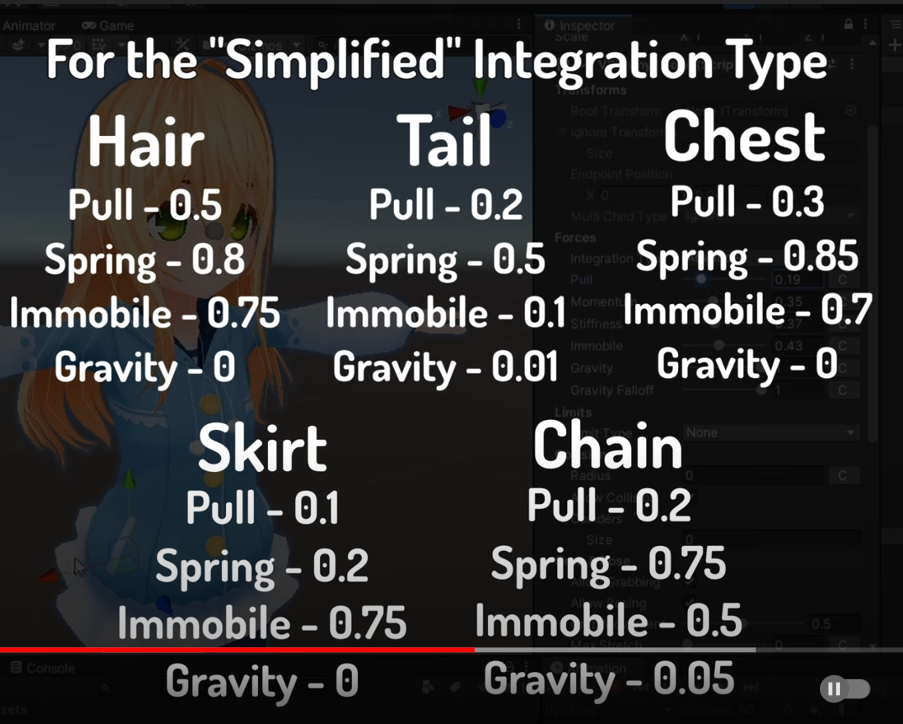


 torn tendon
When doing Collision Tags (i.e. a nose collision check with someones finger)
Whats the rule of thumb for tags? Like how does that work? What is probably the best list of things i could put in as tags that would cover most possible interactions.
torn tendon
torn tendon
When doing Collision Tags (i.e. a nose collision check with someones finger)
Wh...
So far i have Hand, Finger, Index, and Foot.
Basically just trying to make it so that when someone touches my nose with an appendage it causes a dynamic interaction.
lament lintel
lament lintel
So my stuff was working and I reimported the SDK since the full physbone setting...
fixed it by deleting the dynamic bones stuff in the sdk and phys. one migration and etc
torn tendon
lament lintel
fixed it by deleting the dynamic bones stuff in the sdk and phys. one migration ...
Yes! you do not want dynamic bones and phys bones in the same object. Learned that one the hard way.
simple elk
Wont break anything, if you have old pumkin it will complain
lament lintel
torn tendon
Yes! you do not want dynamic bones and phys bones in the same object. Learned th...
oof, not sure if my physbones are working anymore though, will have to check on VRC
wait, deleted all that then reimported the sdk for the physbones to work. unity is weird
torn tendon
lament lintel
it does though h
okay i know this is unrelated to your topic beforehand but you legit just saved me ridiculous hours of work trying to figure out physbones
 zenith jetty
Is it possible for particles to hit contacts if they have a layer with the same name?
 little owl
no
 pastel token
why not
little owl
because avatar dynamics physics is completely separate from unity physics
pastel token
but what if the partical components had senders and recievers on it
instead of relying on particle collisions and unity things
little owl
that's not how any of this works
pastel token
like i mean adding it onto the particle gameobject not the components. sorry my wording is wierd
mellow hawk
opaque wasp
I made this little sketch of what I _feel_ is how all the different physbone val...
A cleaned-up version of the sketch.
 opaque wasp
mellow hawk
A cleaned-up version of the sketch.
opaque wasp
mellow hawk
A cleaned-up version of the sketch.
Ohh nice!
opaque wasp
mellow hawk
A cleaned-up version of the sketch.
Mind if I post on twitter? with credits of course c:
snow marlin
mellow hawk
A cleaned-up version of the sketch.
derection
opaque wasp
oof
torn tendon
shpell
craggy warren
Hay is it possible to use dynamic bones like hinge joints and have their weighted side relative to the position to another object?
mellow hawk
mellow hawk
A cleaned-up version of the sketch.
Fix the typos lol
 pastel token
craggy warren
Hay is it possible to use dynamic bones like hinge joints and have their weighte...
pastel token
craggy warren
Hay is it possible to use dynamic bones like hinge joints and have their weighte...
there is a hinge option in the phybone component, you can change the angle it rotates or if it rotates on a certain axis. As for the postiton im not really sure what you mean by weighted side, but depending on what you want to accomplish I would look into rotation constraints, parent constraints, or aim constraints.
craggy warren
pastel token
there is a hinge option in the phybone component, you can change the angle it ro...
I posted a video of what I wanted to accomplish in avatar help. I can’t send it here for some reason. And what are aim constraints?
 candid ginkgo
Got the 1-meter sniffer going. :v
 lament lintel
torn tendon
okay i know this is unrelated to your topic beforehand but you legit just saved ...
lament lintel
torn tendon
okay i know this is unrelated to your topic beforehand but you legit just saved ...
All good lol, it really does work via trial and error and others doing it
pastel token
craggy warren
I posted a video of what I wanted to accomplish in avatar help. I can’t send it ...
an aim constraint is basically just this item will face a thing. its how the two handed weapons are made.
 stoic quartz
i want to grab my hat so i can stick it on others places but when i grab it it will rotate and not follow my hand . what can i do to fix it?
 pastel token
craggy warren
I posted a video of what I wanted to accomplish in avatar help. I can’t send it ...
pastel token
craggy warren
I posted a video of what I wanted to accomplish in avatar help. I can’t send it ...
i just watched your video and i believe you would have to rig it a certain way. like have a grab bone which has no weighting on the mesh>handle weighted to handel>blade 1 and 2 after that.
if you created a bone going to the left maybe recheck to see if its parented to the main grab bone
 fading otter
Say, anyone know how a bow and arrow would work for ad
simple elk
String will, arrow would be particle if you want it to travel
 pure jackal
What are some decent starting values for a whip using physbones?
craggy warren
pastel token
if you created a bone going to the left maybe recheck to see if its parented to ...
I think that’s what I’m doing, since the parent order is the main handle, blade then second handle. I tried adding a horizontal bone to it so it can spin but then there’s the issue it only spins while one side is weight instead of the blade or other handle deciding the weighted side which is what I’m trying to figure out. Do you think it’s possible?
clever echo
cedar maple
You need to put a receiver component on the foot with a parameter specified in t...
I've tried and it still is not working for me. The parmeter I used is called feet. The tags are the hands

 lone geyser
Is there a way to grab physbones within unity like if grabbing them ingame?
clever echo
