#udon-networking
1 messages · Page 12 of 1
 frank fjord
 cold laurel
As this can cause the cars to clip into the ground if the road suddenly has an incline.
frank fjord
A lot of this conceptually makes sense but I've spent a literal week trying to implement it and not getting very far so clearly I am not understanding some of the nitty gritty
cold laurel
frank fjord
And yeah obviously latency means you can do smoothing and whatnot. It's the spec...
What
frank fjord
?
cold laurel
Latency is in part caused by the speed of light being pretty fast but not fast enough, and the speed servers are able to relay messages.
You need to measure this.
frank fjord
Oh, misunderstanding
I was replying to this. I presumed you were saying that "latency" was what was "allowing" their systems to tolerate larger errors or less precise predictions
and that, by this, you meant that their systems were artificially waiting longer to collect more data and smooth it out
cold laurel
That would be the case of purely interpolation based systems.
frank fjord
I'm aware that messages take time to travel. I've been using that message travel time (from OnDeserialization result) as the measure of how far into the future to extrapolate the data received
cold laurel
Yes
frank fjord
I may not be doing that in a refined enough way, of course. Lots of things I could be doing in a naive way.
cold laurel
frank fjord
I'm aware that messages take time to travel. I've been using that message travel...
Afaik that number isn't quite right btw.
frank fjord
But, that doesn't change what I'm talking about regarding how 'precise' the final extrapolation estimates are, with and without acceleration/acceleration RoC as part of the calculus
frank fjord
cold laurel
Afaik that number isn't quite right btw.
I'm starting to suspect this as well, and I think this is what I'm gonna test today.
I've been trusting receiveTime - sendTime a lot
Maybe that's unwise >.<
cold laurel
frank fjord
I've been trusting receiveTime - sendTime a lot
iirc @pallid shore found a work-around for this a while ago
frank fjord
👀
 pallid shore
sendTime is the time when the package get sent out, but you need the frame time because that is the time of where the position of your object is. If you use sendTime you introduce an error depending on how long the frame takes and when the networking happens in that frame. That can be a few milliseconds and that makes any interpolation or extrapolation appear jittery.
For my snapshot interpolation I calculate the delta time between the last snapshot and current and sync it with the position data. The receiving clients then calculate the delta time with sendTime and by subtracting those two values you can find the error. This works well for me and I get smooth interpolation.
    public override void OnPreSerialization()
    {
        double time = Time.unscaledTimeAsDouble;
        deltaTimeToLastSnapshot = (time - lastSnapshotTime);
        lastSnapshotTime = time;
        ....
    }

    private bool TryToAddSnapshot(float time) //time = sendTime
    {
        double lastSnapshotTime = snapshotTime[GetPreviousSnapshotID(nextSnapshotToFill)];

        double delta = time - lastSnapshotTime;
        double error = delta - deltaTimeToLastSnapshot;
        ....
    }
Hmm. I'm understanding some of this, but not all of this.
So the tl;dr is that SendTime (ignoring the fact that it's from the recipient's frame or reference) is referring to a time in the middle of a given frame that may not match OnPreSerialization() for the sender, which would be the part of the frame you're getting your data to send.
So in addition to the data, you're calculating some extra time value to send along with the serialization. However this time value is calculated, it needs to be... "un"-calculated, essentially, on the other end, because the recipient only has Receive Time - Send Time to go off of which, again, are from their own time frame of reference...
I'm not reeeeally understanding how you're doing that, though 🤔
frank fjord
pallid shore
```C#
public override void OnPreSerialization()
{
double time ...
I can see that on PreSerialization you're calculating how long since the last PreSerialization and storing it as a double. I presume that this delay since last PreSerialization is then synced with the rest of the payload.
I do not understand the context of this TryToAddSnapshot method, though.
Or where "snapshotTime[]" or "GetPreviousSnapshotID()" are coming from/what they accomplish
I guess... TryToAddSnapshot is being run as part of the deserialization process? You're storing an array of previous deserialization result sendTimes? Then delta is the local calculation for how much time YOU think has passed since the last serialization, and error is the difference between that local calculation, and the delta time variable that the sender synced over the network to you...?
If so, I guess I'm wondering 1) how many sendTime timestamps are being saved in that array (if I have that right?), and why you need an array instead of just a 'last value' ... and 2) what are you then using that final calculated error value for?
cold laurel
frank fjord
I do not understand the context of this TryToAddSnapshot method, though.
Quap is making use of something called snapshot interpolation
https://gafferongames.com/post/snapshot_interpolation/

Gaffer On Games
Hello readers, I’m no longer posting new content on gafferongames.com
Please check out my new blog at mas-bandwidth.com! Introduction Hi, I’m Glenn Fiedler and welcome to Networked Physics.
In the previous article we networked a physics simulation using deterministic lockstep. Now, in this article we’re going to network the same simulation with ...
 restive cliff
I tried but to get a good result I wanted the processing power of Udon 2 first so that the client can simulate the vehicle's physics into the future for elevation changes of the road
frank fjord
yeah udon processing power is something I immediately start to worry about when thinking about storing a buffer of snapshots... >.<
maybe that concern is overblown though
Having said that
restive cliff
I don't think that will have as much as a performance impact as simulating my physics
frank fjord
I presume I don't NEED to do full-on start to finish snapshot interpolation, just to reap the benefits of a more accurate sub-frame-based send time
pallid shore
Sorry, this is just example code I copied from my system to show how I implemented it. You need to implement it in your system in a way that works for you.
TryToAddSnapshot is part of the deserialization.
The delta in TryToAddSnapshot is the same time as the delta in OnPreSerialization but because it uses sendTime it contains the error. By sending the frame based delta with the position data we can calculate the error and fix the time.
I hold around 1 - 2 snapshots in the array, but it dynamically adjusts the simulation time to achieve a smooth interpolation regardless of ping or package loss. So the array can hold more or less depending on network conditions.
Udon is plenty fast enough to do snapshot interpolation. You will run in networking limitation before you notice any performance limitations from udon. I use it to sync 16 vehicles and it works on quest with out any problems.
frank fjord
damn, okay, wouldn't have expected that.
What about perceived latency?
Ironically I'm doing exactly the thing that that GafferOnGames article lambasts, and trying to use extrapolation to reduce the effect of network latency to the user... :S
It's very hard to reconcile going in the opposite direction and increasing the delay between the sender and the receiver from an already pretty harsh 200-400ms to something more like 600-800ms
I guess realistically perceived latency is going to occur anyways though with any of the other systems I'm exploring using to smooth out network updates...
cold laurel
frank fjord
Ironically I'm doing exactly the thing that that GafferOnGames article lambasts,...
Well, the article says to "just sync at 10Hz lol" which is unfortunately unreasonable in the context of UdonSync.
frank fjord
... fair x'D
pallid shore
I have the system set to try to stay around 50ms + ping time in the past. With a bad ping of 200ms we simulate around 300 - 500ms in the past. The system already extrapolates quite a bit.
With better interpolation between the extrapolated snapshot and the next snapshot you could get the simulation time closer to real time.
With VRChat's networking you will never be able to achieve perfect synchronization because the most you can send is around 10hz of snapshots, for comparison Counter Strike send snapshots at 64hz.
frank fjord
yeah I know it can't be perfect, just want it to not be super super late...
pallid shore
You can see my snapshot interpolation working in the world 'Jetski Rush'. It's not perfect but it's pretty good I think.
frank fjord
Ah, I played Jetski Rush the other day. Nifty.
The issue is that my use case involves a singular shared vehicle that all players cooperatively pilot (or take turns piloting). So like
you know, when you see a different player on a different vehicle jitter a little, it's whatever
but when you're stuck to that vehicle too, jitter hurts a lot
pallid shore
You could just not allow it to jitter. If the position difference from one snapshot to another is to big you could just interpolate that smoothly.
We tested our system with two player jetskis and had no problems
frank fjord
Oh, to be clear, I'm not saying that as to imply that snapshot interpolation will somehow have jitter where what I'm doing won't
What I'm doing definitely has jitter
and it's stressing me out lmfao
Anyhow. I said I was going to test my basic networking again and see if I could figure out what underlying issues have to do with the serialization/deserialization step, before trying to figure out my smoothing solution's issues. It's been very hard to get my brain in the game again today, this project is bullying me so hard and I'm just tired lmfao.
pallid shore
Yeah, networking can be real bully! I hope you find a solution you are happy with!
cold laurel
Maybe you could try PID for smoothing along with snapshot interpolation where you insert a speculative extrapolated snapshot as the newest snapshot?
Then when you get the next serialization you replace the speculative snapshot with the received one. Then extrapolate the next and so forth.
frank fjord
pallid shore
```C#
public override void OnPreSerialization()
{
double time ...
One quick clarification about this. The remote client running "delta = time - lastSnapshotTime" ...
Time is deserialization sendTime. Is "lastSnapshotTime" ALSO just measured in deserialization sendTime? Or is the last snapshot time a "corrected" value that's been adjusted with the error calculation?
I'm just trying to grok the variables and for whatever reason I cannot wrap my head around what is happening specifically in this local delta calculation
frank fjord
cold laurel
Then when you get the next serialization you replace the speculative snapshot wi...
This is a clever thought, I like that.
I need to figure out what it would actually mean to implement snapshot interp for my system though 🤔
pallid shore
This might help understand it better. lastSnapshotTime is the time with out the error.
    private bool TryToAddSnapshot(float time)
    {
        if (!isReady) return false;


        double lastSnapshotTime = this.snapshotTime[GetPreviousSnapshotID(nextSnapshotToFill)];

        double delta = time - lastSnapshotTime;
        double error = delta - deltaTimeToLastSnapshot;


        if (error > 0.01f || error < -0.01f) error = 0;
        double newTime = time - error;


        snapshotPosition[nextSnapshotToFill] = positon;
        snapshotTime[nextSnapshotToFill] = newTime;
        snapshotRotation[nextSnapshotToFill] = rotation;
        snapshotVelocity[nextSnapshotToFill] = velocity;
    }
I guess the gist is that every time you get a network update, you update your list of snapshots organized by time, somehow plot a hermite spline along those snapshots, figure out how long in the past you need to 'start,' and then begin running that spline every frame to get your current state target... until you get a new network update to refresh that whole system?
cold laurel
pallid shore
This might help understand it better. lastSnapshotTime is the time with out the...
This is roughly how you're calling that method right?
public override void OnDeserialization(DeserializationResult result)
{
    TryToAddSnapshot(result.sendTime);
}
Yes!
frank fjord
waaaait...
so based on this
lastSnapshotTime first gets set to snapshotTime[x] where x is the index of last frame's snapshotTime value.
... but then you're doing this delta calculation: sendTime - lastSnapshotTime from above
Error is the difference between that delta, and the network serialized delta from the owner.
newTime is sendTime - error
And then newTime goes into snapshotTime[]...
That means that when you populate lastSnapshotTime based on snapshotTime[x] NEXT time...
the value your getting IS a value that's been corrected for error
frank fjord
pallid shore
This might help understand it better. lastSnapshotTime is the time with out the...
Maybe semantically that's what you were saying. By "without the error" you meant "corrected by subtracting out the error?"
I originally read that to mean "without having corrected for error"
pallid shore
Yes sorry, it's the corrected time
frank fjord
okay, okay
I guess, logically, that makes sense. Dunno why it was SO hard to wrap my tiny little brain around that lmfao
frank fjord
pallid shore
This might help understand it better. lastSnapshotTime is the time with out the...
I presume from these snapshot arrays for position, rotation, and velocity... you then plot a series of hermite splines? With t values based on the snapshotTime array?
I'm curious though, if your local simulation is kinematic - and I figure it would have to be, wouldn't it? if you're running through the interpolation every frame - why would you need/use velocity snapshots? Since the positional changes every frame would mean you're not really... USING velocity to move the objects... right?
cold laurel
frank fjord
I'm curious though, if your local simulation is kinematic - and I figure it woul...
Because the velocity is the hermite spline's tangent.
Think of the velocity as a bezier handle in a curve
pallid shore
Mhm and we need the velocity for gameplay things
frank fjord
Oh, okay. So it's not 3 hermite splines
it's 2
one for position (which also needs velocity data)
cold laurel
it's just one
frank fjord
and one for rotation, which... I guess doesn't need angular velocity because you're doing something else aren't you--
cold laurel
Doing Hermite for quaternions is very hard
pallid shore
Rotation is just Quaternion.SlerpUnclamped
frank fjord
ah okay
In my case, rotation only happens on a single axis: the vessel can rotate/thrust about its yaw, and no other axis.
Still, I'll try without doing an interpolation for that, at first
it'd be nice not to have to
cold laurel
then you can absolutely do hermite for rotation
You just need to make sure you handle wrapping correctly
frank fjord
@cold laurel you mentioned that the representation of cubic bezier curves and cubic hermite splines was either the same, or very close to the same. Any chance you have pseudocode on hand for what that looks like?
frank fjord
cold laurel
You just need to make sure you handle wrapping correctly
yeah I've run into this, frustratingly, more times than I care to admit
cold laurel
frank fjord
<@470981561089654794> you mentioned that the representation of cubic bezier curv...
It's two different representations of the same concept
cold laurel
frank fjord
<@470981561089654794> you mentioned that the representation of cubic bezier curv...
I do actually!
frank fjord
continuity on multiple derivatives, right?
cold laurel
just one
frank fjord
or in this case, just the velocity--
right
we're just gonna cross our fingers that that's enough for human perception at this scale
cold laurel
You'll really only run into issues if you have vehicles that can accelerate really quickly.
frank fjord
... is that why they're both "representations" of the same concept? They wouldn't be, anymore, if the hermite spline was continuous on all derivatives?
The airship can't accelerate "really" quickly, but... it also doesn't have constant acceleration. Its acceleration also has acceleration.
cold laurel
Hermite spline is NOT continuous on all derivatives.
cold laurel
It only has C1 continuity
frank fjord
clearly it's been more than a week since I watched >.<
 frank fjord
This is a lerp of two lerps, yes?
cold laurel
6 lerps
frank fjord
oh-
okay yeah I see it
I think I have this recollection that someone's code - maybe it was Guribo's vehicle sync, or MMMaellon's light sync - using a "herminte spline" which was a lerp of two lerps.
but I guess that would not be continuous on the first derivative
cold laurel
frank fjord
... is that why they're both "representations" of the same concept? They wouldn'...
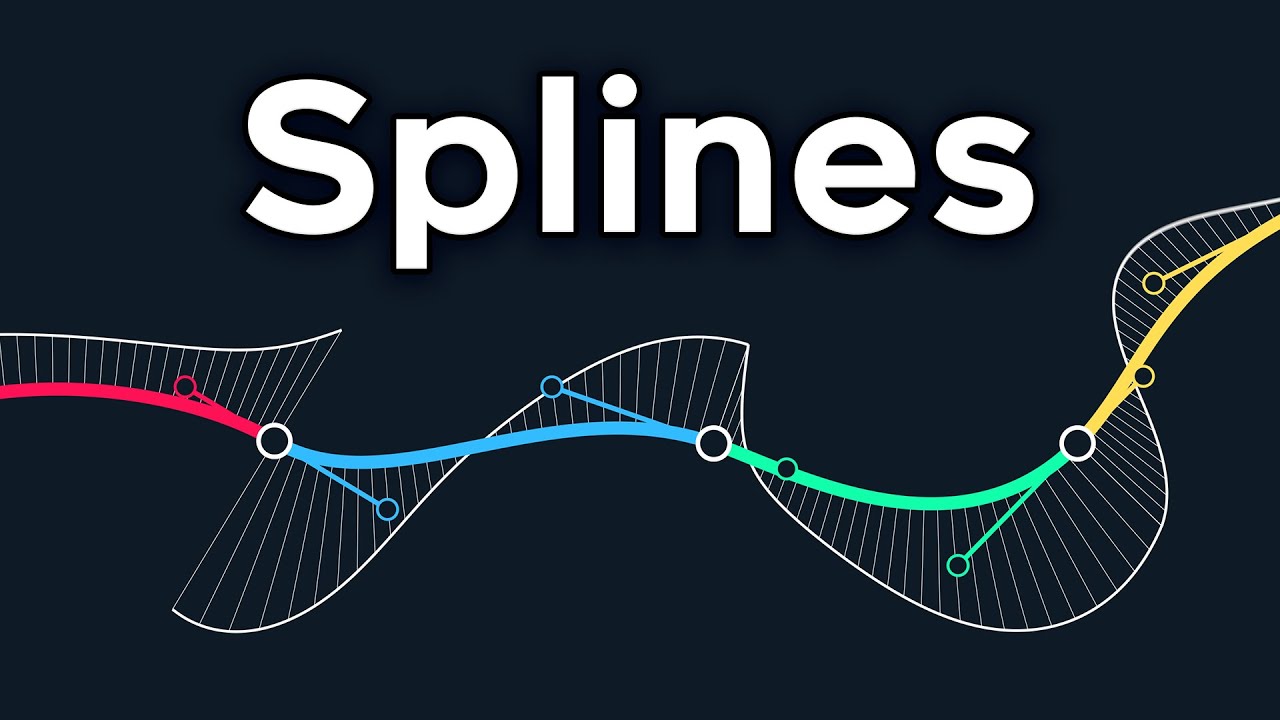
why are splines? well my god I have good news for you, here's why splines!
if you like my work, please consider supporting me 💖
https://www.patreon.com/acegikmo
This project grew much larger in scope than I had originally intended, and burnout made it impossible for me to do more with it. It was already getting incredibly unwieldy, so I apolog...
This timestamp covers Bezier => Hermite conversion
restive cliff
-_- this discussion is putting way more thought into the networking compared to networking assets sold on the store
it is a tricky subject but definitely pays off when we can't send as many networking updates
frank fjord
yeah I wish that it wasn't a small (or frankly large) semester course just to do the most basic thing (send data in a way that is usable for other systems). Beyond programming all the ACTUAL functionality that's built on top of it...
but here we areeeee
frank fjord
cold laurel
Here's a cubic bezier drawn with lerps
Is this a representation of a spline between two data points? A start and end position and velocity? Or is this a representation of a spline between more than 2 data points?
cold laurel
frank fjord
Is this a representation of a spline between two data points? A start and end po...
yes
frank fjord
both? x'D
frank fjord
Okay.
So a full interpolation of a set of, say, 4 timestamps... would be 3 of these
one from 0 to 1, one from 1 to 2, one from 2 to 3, and one from 3 to 4
cold laurel
If you draw a spline with more points you're really just pretending it's one spline.
Each segment from point to point is a separate span.
frank fjord
I should know this but it's slipping my mind, what's the math to calculate the four control points (I presume p0 to p3, since those inform the LERP functions being used)?
cold laurel
You don't have to calculate it with 6 lerps.
It's rather inefficient to do so.
You should use the matrix representation instead.
frank fjord
🤔
frank fjord
cold laurel
You should use the matrix representation instead.
My brain is not computing this, lol >.<
cold laurel
frank fjord
My brain is not computing this, lol >.<
For example

Many ways to arrive at the same answer.
frank fjord
oh NO I don't remember any matrix math lmfao
gwuhhh
found the related timestamp for this, watching
 strange crane
Question: Does OnPlayerLeft gets trigged for the player leaving or for the new owner that takes over?
frank fjord
OnPlayerLeft I believe fires on everyone, it has nothing to do with ownership
strange crane
Even the player leaving?
frank fjord
Btw, when YOU leave a world... momentarily, OnPlayerLeft fires on your client MANY times at once... for all the OTHER players
because technically, all those other players are network-disconnecting from YOUR local machine... right before you close your local copy of the world
I do not remember, but also don't believe, that it fires for you leaving ever
but also it doesn't matter because if it did, you wouldn't be able to do anything with that information before there was no world left to do it in
you don't have time to, say, send a serialization
you're already gone
strange crane
        public override void OnPlayerLeft(VRCPlayerApi player)
        {
            if (!player.IsOwner(gameObject)) return;

            string playerName = player.displayName;

            var keys = inWorldPatreons.GetKeys();

            if (keys.Count == 0) return;

            for (int i = 0; i < keys.Count; i++)
            {
                if (inWorldPatreons.TryGetValue(keys[i], out DataToken value))
                {
                    DataList list = value.DataList;

                    if (list.Contains(playerName))
                    {
                        list.Remove(playerName);
                        RequestSerialization();
                        break;
                    }
                }
            }

        }
This is what I'm doing and it should on trigger for the owner of the script.
frank fjord
So you're wondering
if the owner of this scripted object leaves, does another player assume ownership over the object before it gets called?
Or is there a problem where it runs too soon, and there is not a 'valid' owner
strange crane
It automatically transfers the object to the next player.
frank fjord
Okay.
strange crane
It maybe that fact is it called as soon as the player leaves.
And it most likely is getting trigged but since they aren't the owner or the fact it hasn't update the owner. Based on what you're saying.
frank fjord
I may be misunderstanding what your question/problem is
strange crane
strange crane
```cs
public override void OnPlayerLeft(VRCPlayerApi player)
{
...
This datalist is not getting updated.
cold laurel
strange crane
```cs
public override void OnPlayerLeft(VRCPlayerApi player)
{
...
Yeah no, this won't work.
strange crane
I am assuming Im going to have to call it back in like 4 or so seconds?
cold laurel
You're trying to run code for a player that is in the process of leaving the world.
Don't.
You should instead handle this in OnOwnershipTransfer
Let the new owner clean up.
strange crane
Doesn't that get called on Networking.SetOwner?
cold laurel
strange crane
Doesn't that get called on Networking.SetOwner?
Afaik it happens any time the ownership changes.
strange crane
Alright.
cold laurel
holdon, I might be making this up actually
But it would make the most sense to me if it's this way.
@restive cliff Do you happen to know?
frank fjord
if OnOwnershipTransfer() runs on other players when the owner leaves?
cold laurel
Yeah
cold laurel
Exactly
cold laurel
frank fjord
if it doesn't that'd be REALLY weird and unstable
Do you have time to test it rn?
frank fjord
uhhhh
I'm not at my desktop at this very moment so honestly it'd take me like a half hour, I'm not fast 😔
restive cliff
cold laurel
<@162462927335456768> Do you happen to know?
I consult the documentation every time and yes SetOwner will make everyone call OnOwnershipTransferred
cold laurel
restive cliff
I consult the documentation every time and yes `SetOwner` will make everyone cal...
Nono, we're wondering if OnOwnershipTransferred is guaranteed to fire when the owner leaves.
Like, I would hope so.
restive cliff
I can do a build and test to check
restive cliff
cold laurel
Nono, we're wondering if `OnOwnershipTransferred` is guaranteed to fire when the...
yes
cold laurel
🎉
frank fjord
cold laurel
Maybe you could try PID for smoothing along with snapshot interpolation where yo...
So I'm thinking about this implementation.
On a network update, you add the snapshot with its given time, and then also update the current extrapolation whose time is the snapshot time plus how long you estimated it took to reach you. Now, at a minimum, you have two points, which means a minimum of 1 spline. You can start an interpolation from this.
As new network updates arrive, old updates get pushed back in the snapshot list but eventually just get forgotten. Since you're probably using your current time (minus some manual latency offset) to analyze where in the interpolation between snapshots you should be, this is usually fine.
Buuuut what happens if your current point in the interpolation is between your most recent received snapshot, and your current forward prediction? You're now somewhere between time = last update and time = last update + half ping
Because the point your interpolating to (the extrapolation) is guaranteed to in some way be wrong, and is being "replaced" with a real snapshot with real information, I think... you have to add your current in-between position from the interpolation, as a new snapshot, at your current real time (no added manual latency), stick the newly received update after or before that, create a new prediction, and now...
... you may have instantaneously changed the shape of the spline you're interpolating upon. Which would cause a noticeable jerk, wouldn't it?
cold laurel
frank fjord
So I'm thinking about this implementation.
On a network update, you add the sna...
Yeah, if you predict too far into the future and the next snapshot arrives "too early" it might "rubber band". But due to the PID it will hopefully not look too harsh.
frank fjord
This happens because if you have a quadratic bezier curve, and you interpolate halfway (or some other fraction) through it and then pause and add that current new point as a new control, that changes the curve on either side...
cold laurel
it shouldn't
frank fjord
cold laurel
Yeah, if you predict too far into the future and the next snapshot arrives "too ...
Hopefully, buuuuut I did not have great luck yesterday implementing a PID controller...
It shouldn't?
cold laurel
frank fjord
It shouldn't?
Not if you do it correctly no
cold laurel
I'm not sure if this is necessary but a quick google brought me here: https://en.wikipedia.org/wiki/De_Casteljau's_algorithm
In the mathematical field of numerical analysis, De Casteljau's algorithm is a recursive method to evaluate polynomials in Bernstein form or Bézier curves, named after its inventor Paul de Casteljau. De Casteljau's algorithm can also be used to split a single Bézier curve into two Bézier curves at an arbitrary parameter value.
Although the algor...
If your extrapolated snapshot was 100% correct and you received a snapshot "too early" it wouldn't cause any jump or stutter.
Because the data you received is along the curve you were already on. And in the perfect scenario in the exact same position at the same time as your interpolated version.
frank fjord
Yeah, but the extrapolation will basically guaranteed never be 100% accurate
cold laurel
Yes
frank fjord
especially since I cannot math out the drag
especially especially if I give up trying to also send acceleration and acceleration RoC data
cold laurel
Yeah, don't even bother with 2nd and 3d derivatives
frank fjord
's just a bummer, I want the math to work out >.<
cold laurel
why are splines? well my god I have good news for you, here's why splines!
if you like my work, please consider supporting me 💖
https://www.patreon.com/acegikmo
This project grew much larger in scope than I had originally intended, and burnout made it impossible for me to do more with it. It was already getting incredibly unwieldy, so I apolog...
About C∞ continuity
frank fjord
Okay, gut check me here. Is the implication here that if I have a spline from point 0 to point 1 and I just run the interpolation past T = 1, that's a valid extrapolation from the point 1 state that implicitly takes into account continuity on all derivatives from point 0 to point 1...?
 sage trail
using UdonSharp;
using UnityEngine;
using VRC.SDKBase;
using VRC.Udon;
using UnityEngine.UI;

[UdonBehaviourSyncMode(BehaviourSyncMode.Manual)]
public class OnCollisionUpdate : UdonSharpBehaviour
{

    [UdonSynced] int playerNum = 0;
    public Text Number;

    public override void OnPlayerTriggerEnter(VRCPlayerApi player)
    {
        Debug.Log("Entering Happened");
        Networking.SetOwner(Networking.LocalPlayer, gameObject);
        playerNum++;

        Debug.Log(playerNum);
        Number.text = playerNum.ToString();
        RequestSerialization();
    }

    public override void OnPlayerTriggerExit(VRCPlayerApi player)
    {

        Debug.Log("Exteting Happneed");
        Networking.SetOwner(Networking.LocalPlayer, gameObject);
        if(playerNum <= 0)
        {
            playerNum = 0;
        }
        else
        {
            playerNum--;
        }

        Debug.Log(playerNum);
        Number.text = playerNum.ToString();
        RequestSerialization();
    }

    public override void OnDeserialization()
    {
        Debug.Log("The Deserialization");
        Number.text = playerNum.ToString();
    }

}
just a collider that should change a text UI to the current players in some collider
but there's a mistakes like higher number than the real
cold laurel
frank fjord
Okay, gut check me here. Is the implication here that if I have a spline from po...
Ye
frank fjord
Interesting.
Requires at least two elements though to make the prediction, so for the first network update I need to do other stuff, like my dumb overengineered calculus :S
cold laurel
sage trail
```
using UdonSharp;
using UnityEngine;
using VRC.SDKBase;
using VRC.Udon;
using...
This shouldn't need to be synced at all
sage trail
if someone entered the world later he 'll have the value 0
it need to be updated from a vairiable that aleady there
cold laurel
Just handle it locally like this:
https://youtu.be/fjHP80CQzZ4?t=253

Here's a tutorial on how to make a door open and close automatically, when a player gets near it
While this script is not networked, it instead locally opens the door for all players in the scene; avoiding any extra networking chatter
This was a script that I heard been talked about a bunch in the discord a while ago, and so I wanted to make a...
This video covers how to reliably count the number of players inside of a trigger collider.
Without the need for sync.
sage trail
aaam I really wonder how I'll watch it
but I'm really trying to understand the sync system and I don't get it
cold laurel
That's okay! It's a lot.
I'm just saying that your current problem doesn't require sync to solve it. And that applying sync in this case is the wrong approach.
frank fjord
@cold laurel btw - I'm not gonna work on it today because clearly I have plenty of other groundwork to do first, but - once I get to PID controllers, is that a subject I can pick your brain on? My attempt to implement one yesterday was disastrous. It "functioned" but no matter how I tuned it, even if it looked stable 99% of the time, it would eventually enter a death spiral and become unrecoverable.
strange crane
        public override void OnPlayerLeft(VRCPlayerApi player)
        {
            playersToRemove.Add(player.playerId);
        }

        public override void OnOwnershipTransferred(VRCPlayerApi _player)
        {
            if (!player.IsOwner(gameObject) || inWorldPatreons.Count == 0)
            {
                playersToRemove.Clear();
                return;
            } else if (player.IsOwner(gameObject) && inWorldPatreons.Count == 0)
            {
                playersToRemove.Clear();
            }

            var keys = inWorldPatreons.GetKeys();

            for (int i = 0; i < keys.Count; i++)
            {
                if (inWorldPatreons.TryGetValue(keys[i], out DataToken value))
                {
                    DataList members = value.DataList;

                    for (int j = 0; j < playersToRemove.Count; j++)
                    {
                        if (members.Contains(playersToRemove[j]))
                        {
                            members.Remove(playersToRemove[j]);

                            inWorldPatreons.SetValue(keys[i], value);
                            RequestSerialization();
                            UpdateInWorldPatreons();
                        }
                    }
                }
            }
        }
Since everybody calls OnPlayerLeft() I just add the player that left. Then OnOwnershipTransferred I got through the last to prevent unnecessary overhead. It seems to still not work.
cold laurel
frank fjord
<@470981561089654794> btw - I'm not gonna work on it today because clearly I hav...
Sure! I love PID controllers. Also PID tuning is an artform.
frank fjord
I see this now. But I did not think it would be so 'artful' as to spiral out of control at 99.5% of possible configurations. I actually figured worst-case scenario was a perfect oscillation, not a death spiral
cold laurel
Once you understand what each term does and in what order they should be tuned things will become way easier.
Btw. for a lot of scenarios you really don't need the integral term. A PD, or even just P controller can be fine.
In some cases you can even get away with a conditional controller
If wrong, fix it
😆
We can get away with this in games because we don't have to deal with pesky actuator latency and irl machine tolerances.
frank fjord
pallid shore
This might help understand it better. lastSnapshotTime is the time with out the...
When you run your interpolation through your snapshots, how do you quickly find the indices that match your current time target? It seems to me like that would require searching snapshotTime[] every frame for the two indices that your current time target falls between, including edge cases for overshooting the last received state etc...
pallid shore
frank fjord
When you run your interpolation through your snapshots, how do you quickly find ...
The snapshot arrays are ring buffers, if the time from the next snapshot is in the past of the current simulation time I just skip to the next
You only have to switch to the next snapshot when you are done with interpolating
frank fjord
So... if I'm thinking about this right:
If I know that my current time target falls between given snapshots 0 and 1...
My T value to interpolate on is my time target, minus the time at snapshot 1, all that divided by "time at snapshot 1" - "time at snapshot 0" (for a 0 to 1 value)
I need 4 control points:
c0 is just position at snapshot 0
c1 is position at snapshot 0 PLUS velocity at snapshot 0 ... without any scaling, right? There's no need?
c2 is position at snapshot 1, MINUS velocity at snapshot 1?
And c3 is position at snapshot 1...
And then... I can either create a new of 3-then-2-then-1 lerp functions...
... or do math that doesn't suck as much x'D
probably polynomial expansion
I do not understand matrix math
 coral ingot
frank fjord
I do not understand matrix math
coral ingot
frank fjord
I do not understand matrix math
Use chat gpt 😭
frank fjord
Okay, I made a first pass at a snapshot-interpolation based sync system. It's not great.
At high - and consistent - sync rates, the rotation is actually quite good just using the quaternion SLERP. However, if sync rate changes - for example, if I release the controls, I've programmed the sync rate to go down - obvious rubber-banding occurs when acceleration or deceleration is taking place.
Position and velocity, on the other hand, are a trainwreck. Perhaps I'm implementing the cubic bezier curve incorrectly: every interpolation significantly overshoots the target position and velocity, and significantly so, resulting in a rubber-banding effect every time the pair of snapshots being interpolated between rolls over.
My control points are all based off of snapshots of received data, which I'll just call initial and next.
P0: initial position
P1: initial position + (initial velocity * X)
P2: final position - (final velocity * X)
P3: final position
For X, I've tried various multipliers in an effort to fix this rubber-banding: namely 1, 1/3, and the difference in timestamps between the initial snapshot and the final snapshot.
CLEARLY I'm doing something wrong here... :S
@cold laurel @pallid shore
 random parrot
cold laurel
Quap is making use of something called snapshot interpolation
https://gafferonga...
random parrot
cold laurel
Quap is making use of something called snapshot interpolation
https://gafferonga...
oo, haven't seen this before.
this was very informative for me
cold laurel
random parrot
oo, haven't seen this before.
this was very informative for me
I'm glad it was of use!
random parrot
always wanted to learn more about how this sorta networking is supposed to be done, just never really got around to it
going to go read some of the other blog posts this guy has
thanks for sharing :)
cold laurel
frank fjord
So... if I'm thinking about this right:
If I know that my current time target f...
Mathf.InverseLerp();
frank fjord
cold laurel
`Mathf.InverseLerp();`
I'm not following what this is meant to imply
cold laurel
frank fjord
Okay, I made a first pass at a snapshot-interpolation based sync system. It's no...
If you're using a cubic Bezier and not a cubic Hermite spline you'll need to convert the velocity to Bezier control points.
cold laurel
frank fjord
I'm not following what this is meant to imply
Use it to find the t value from the snapshot timestamps.
frank fjord
oh, fair enough. I already mathed it out another way though
frank fjord
cold laurel
If you're using a cubic Bezier and not a cubic Hermite spline you'll need to con...
This I presume is what I'm fucking up
P1: initial position + (initial velocity * X)
P2: final position - (final velocity * X)
P3: final position

For X, I've tried various multipliers in an effort to fix this rubber-banding: namely 1, 1/3, and the difference in timestamps between the initial snapshot and the final snapshot.```This was what I tried.
cold laurel
1/3 is the correct value
Please ensure your velocity isn't 0
And that your spline is implemented correctly
frank fjord
I did try that, but it continued to produce tremendously jumpy behavior..
cold laurel
Can you try to plot the values with gizmos?
It was very helpful for me when I was figuring this stuff out.
frank fjord
cold laurel
For example
I implemented both the bernstein expression and the polynomial coefficient form, they behaved identically which leads me to believe I did in fact implement them... generally correctly
or I am just tremendously good at messing up in exactly the same way
It seemed like, at every pair of snapshots, the interpolation would begin slow and then accelerate into - and past - the target. As time rolled over and triggered a change in the snapshot pair, the initial position would be behind where the last interpolation ended, causing a snap-back
cold laurel
Can you implement the DeCasteljau form just to be sure?
cold laurel
frank fjord
It seemed like, at every pair of snapshots, the interpolation would begin slow a...
I ran into this same issue too. I had to scale my velocity values by the delta time from the previous to the next span.
Iirc
strange crane
Does anybody know If OnPlayerLeft or OnOwnershipTransferred get called multiple times?
frank fjord
cold laurel
I ran into this same issue too. I had to scale my velocity values by the delta t...
by this, do you mean scaling the velocity component for P1 and P2?
cold laurel
Yes, I think I had to multiply the hermite tangents by the time difference
frank fjord
I believe when I scaled the velocity component by delta time - JUST delta time, not even with the 1/3 factor - it caused the opposite behavior where instead of accelerating past the target, each interpolation would fall short of the target, causing each new pair of snapshots to force a jump forward
cold laurel
I can take a look at my implementation after school.
cold laurel
frank fjord
I believe when I scaled the velocity component by delta time - JUST delta time, ...
Yes, because it's the wrong value and deltaTime is generally very small.
frank fjord
cold laurel
Yes, because it's the wrong value and deltaTime is generally very small.
Aye, but you suggested you had to do that yourself?
Anyhow. I'll come back to this in the morning, it's 5am and my brain is very flat from Unity bullying me all evening. Best of luck with classes. 💤
 hoary frost
strange crane
Does anybody know If OnPlayerLeft or OnOwnershipTransferred get called multiple ...
hoary frost
strange crane
Does anybody know If OnPlayerLeft or OnOwnershipTransferred get called multiple ...
i think on ownershiptransferred might, but why onplayerleft?
strange crane
hoary frost
i think on ownershiptransferred might, but why onplayerleft?
        public void DoThing()
        {
            if (api.IsPatreon)
            {
                Networking.SetOwner(player, gameObject);

                playersToRemove.Add(player.playerId);
                Cleanup();
            }
        }

        public override void OnPlayerLeft(VRCPlayerApi _player)
        {
            if (patreonsInWorld == 0) return;

            playersToRemove.Add(_player.playerId);
        }

        #region Detecting Leave

        public override void OnOwnershipTransferred(VRCPlayerApi _player)
        {
            if (player.IsOwner(gameObject) && patreonsInWorld > 0)
            {
                Cleanup();
            }
        }
I add the player that left to a list and once the ownership gets transferred I check to see if they are in another datalist in cleanup. If they are I remove them. When I use DoThing() it works fine but when I use the other two methods its dosen't work. Maybe I am overlooking something.
frank fjord
but there are possible instances where multiple valid triggering events occur at once...
cold laurel
frank fjord
Aye, but you suggested you had to do that yourself?
Not Time.deltaTime. The difference in time from the previous snapshot to the next one. Another word for difference is delta. Sorry for the confusion.
Sleep well btw!
frank fjord
Okay, we do in fact agree there: I was multiplying by the difference between the snapshot times.
💤
cold laurel
strange crane
```cs
public void DoThing()
{
if (api.IsPatreon)
...
You're assuming that OnPlayerLeft is guaranteed to fire before the ownership transfer. This is a bit sketchy.
strange crane
Well there is no real good way I can go about this.Atleast that I thought of.
cold laurel
strange crane
Well there is no real good way I can go about this.Atleast that I thought of.
It looks like you're trying to make event driven UI.
Imo. It's not worth the headache.
Just rebuild the UI fully every time the data changes.
Make a single entry point, RefreshUI or something.
And then just fetch the current players in the world via VRCPlayerApi.GetPlayers();
And go from there
cold laurel
What issues were you having?
strange crane
It was not removing the data from the synced DataDictionary.
strange crane
cold laurel
It looks like you're trying to make event driven UI.
Imo. It's not worth the hea...
This is a prefab. I'm creating so I'm trying to keep done rebuidling much as possible cause it could have a bit more data then I have.
cold laurel
strange crane
It was not removing the data from the synced DataDictionary.
Why do you need to sync it?
Can't you just handle this locally
strange crane
One holds patreon data the other holds data of the current one in the world.
 cold laurel
Nothing about this needs to be synced
strange crane
So using Contains() would be less overhead then just checking locally and then adding to one datadictionary?
cold laurel
When a player joins the world just check if the patreon list Contains their name. If it does, add them to the list of inWorldPatreons.
Do the same when a player is leaving. But remove instead.
strange crane
Yeah I am doing that by default.
cold laurel
And then remove anything sync related.
strange crane
The only difference is I sync it so people don't have to go through each tier. Depending on how many the player give in this prefab
cold laurel
strange crane
The only difference is I sync it so people don't have to go through each tier. D...
You're trying to optimize by using sync?
strange crane
That was my thought it was better to check locally each player that joins then add them to a data dictionary for each tier.
cold laurel
Sync is really expensive and limited though?
Avoid it at all costs.
Also, what you're doing here isn't even close to expensive enough to warrant "optimization" via sync.
frank fjord
@cold laurel turns out I overlooked something.
The correct solution for the P1 and P2 points was to multiply the velocity vector component by the snapshot delta time, AND divide by 3.
From my tests, this didn't seem like it COULD possibly be the solution. Because dt is a small number, and just multiplying by dt APPEARED to cause forward-rubberbanding (undershooting the target), I couldn't imagine that further dividing that by 3 would move the system in the right direction.
Well, it did
The interpolation is now very good.
There is still a problem, which is that this implementation doesn't work great when the snapshot delta time changes.
When a player is operating a control, they send updates about the system about 6 times a second, give or take. But when the player lets go of the controls (even if the ship is still moving), I made the decision to reduce the update rate to about once a second.
The snapshot interp gets a lot rougher when in this low-refresh-rate state, sadly.
I suspect what's going on is that every time the snapshot interp goes into extrapolation (past the last known snapshot), the misses are just... very egregious, and so corrections become extremely noticeable...
cold laurel
frank fjord
<@470981561089654794> turns out I overlooked something.
The correct solution fo...
Yes that is correct. Because you're using a Bezier and not a Hermite spline.
I guess I wasn't able to convey the information clearly enough. Sorry.
frank fjord
cold laurel
Yes that is correct. Because you're using a Bezier and not a Hermite spline.
I g...
No, you did. I just initially discounted that solution because of what I observed experimentally
Today I just woke up frustrated and was like, fuck it, I'll try it anyways, make sure I have my bases covered.
frank fjord
cold laurel
Yes that is correct. Because you're using a Bezier and not a Hermite spline.
I g...
What would be the implementation of a hermite spline?
cold laurel
frank fjord
Today I just woke up frustrated and was like, fuck it, I'll try it anyways, make...
cold laurel
frank fjord
What would be the implementation of a hermite spline?
Google :3
cold laurel
Like with Bezier there are many ways ro arrive at the same answer.
frank fjord
Okay, I'll go give it a look but genuinely my attempts to even find a bezier curve implementation of what I am trying to do were fruitless
hence my endless trial and error
cold laurel
iirc Varneon had a really nice spline library in the works.
But I don't fully recall how they're doing the matricies.
Oh well
frank fjord
I feel way better about this today than I have in like a month
I could explore a PID controller on top of this as a way to maybe allow extrapolation, but even without that, the snapshot interpolation makes the replicated ship's movements very smooth. I do have to serialize the ship fairly frequently, and I don't get to take advantage of slowing down that tick when I'm not using the controls, but that's okay for the one super important vehicle.
I guess I have to seriously consider how much effort I'm willing to put into forward prediction, vs how important it is to reduce the visual delay in the ship's movements between clients...
frank fjord
cold laurel
Yes that is correct. Because you're using a Bezier and not a Hermite spline.
I g...
By the way, this comment. When you say "because you're using a bezier and not a hermite spline," what are you referring to?
Is this a commentary on how the extrapolation behaves/overshoots? Just the difference in the math implementation for the control points? Or something else?
Trying to figure out if there actually IS any reason to explore implementing snapshot interp with a hermite spline
or if such an implementation would have the same properties and behaviors, ultimately
cold laurel
frank fjord
By the way, this comment. When you say "because you're using a bezier and not a ...
You're looking for C1 continuity. And a way to achieve that is to use a Hermite spline.
You've implemented a Cubic Bezier, and are using it to calculate a Hermite spline.
frank fjord
Gotcha.
cold laurel
To represent a Hermite spline with a Bezier you need to convert the Hermite spline's control points to Bezier control points.
Which is what you're doing when you divide by 3 and flip the last tangent
If you were to use an actual Hermite spline directly you could skip that step.
frank fjord
Okay. I was pretty sure that was what was going on but we keep phrasing things slightly differently going back and forth and it casts doubt that I actually know what I'm doing lol
cold laurel
cold laurel
If you were to use an actual Hermite spline directly you could skip that step.
But you would still need to scale by the delta time between snapshots.
So the scaling is mandatory
frank fjord
aye
cold laurel
but the scaling by a third is required because of the spline you chose
frank fjord
so no, it sounds like there would not really be any behavioral differences between this implementation, and a different implementation of a hermite spline
'cuz I AM effectively implementing a hermite spline
cold laurel
yeah, in a roundabout way
cold laurel
frank fjord
I'm good at roundabout solutions 🙂
It's fun!
A little journey if you will.
I'm glad you're happier with the sync now though!
frank fjord
Me too. I feel like I've been bashing my head on this forever.
LOTS more work to be done, but this is a breakthrough for sure. Thanks for your patience btw, while I'm here being an idiot lmao
cold laurel
Heh, no worries! I've been on the other end of this at one point too y'know :P
frank fjord
Yeah, but that doesn't mean it can't be a little tiring to get grilled for answers by someone that has no idea what they're doing =u=;;;
Anyhow. For now, I've got a LOT of code cleanup and testing to do.
cold laurel
frank fjord
Yeah, but that doesn't mean it can't be a little tiring to get grilled for answe...
I've genuinely enjoyed it a lot! It was a nice break from my day to day.
frank fjord
but based on my preliminary testing I think I'm gonna try and move on from forward extrapolation until I hit a wall that necessitates it (hopefully never)
frank fjord
cold laurel
I've genuinely enjoyed it a lot! It was a nice break from my day to day.
Hah. Okay, glad to hear 🙂
Parachute emoji reminding me of how much Unity drag has traumatized me...
eughhh-
cold laurel
xD
frank fjord
I have. SO many spreadsheets
trying to model how I might be able to mathematically solve physics equations factoring in drag
it's not pretty. Or useful.
cold laurel
frank fjord
trying to model how I might be able to mathematically solve physics equations fa...
I had to do this when making the CCIP targeting for SaccFlight planes. We really wanted to be able to predict where the bombs would land after releasing them, and we wanted drag on the bombs. So down to calculus hell I went.
In the end we ended up with a pretty nice equation
(For a unity rigidbody in freefall with drag and no other forces than gravity.)
frank fjord
cold laurel
(For a unity rigidbody in freefall with drag and no other forces than gravity.)
Yeah, I did eventually derive an equation for acceleration at time T with a drag force and a user force (say, gravity). However, the equation only worked if you started at 0 velocity, I couldn't figure out how to extend the equation to work for any initial velocity.
cold laurel
The equation we arrived at supports initial position and velocity!
cold laurel
I can dig it up tomorrow afternoon.
 real timber
cold laurel
iirc Varneon had a really nice spline library in the works.
real timber
cold laurel
iirc Varneon had a really nice spline library in the works.
Had to pause the development as I have dozen other projects take priority over it, I'll just start dumping some of the files to the repo for now, I don't know how much I care about torturing myself with this before Udon 2: https://github.com/Varneon/VUdon-Splines
cold laurel
real timber
Had to pause the development as I have dozen other projects take priority over i...
Thanks!
frank fjord
real timber
Had to pause the development as I have dozen other projects take priority over i...
Udon 2, one day... 🌧️
frank fjord
Did we determine whether or not there was a consistent order of operations for OnOwnershipTransfered() and first OnDeserialization(), on a client losing ownership of something?
frank fjord
pallid shore
This might help understand it better. lastSnapshotTime is the time with out the...
How are you handling snapshot storage and snapshot timestamp storage, when ownership changes? I'm noticing some NaN problems and other things hitching momentarily and I'm sure it has something to do with the fact that the snapshots in your buffer at the moment ownership changes - and ESPECIALLY the buffer of timestamps - are really off the mark when a different player takes over ownership and starts sending data.
cold laurel
frank fjord
How are you handling snapshot storage and snapshot timestamp storage, when owner...
If you were the owner and loose ownership I fill the snapshot buffer with the current local position, rotation and velocity of the object at the current timestamp.
cold laurel
cold laurel
I can dig it up tomorrow afternoon.
It is now tomorrow afternoon.
cold laurel
private static void PredictRigidbodyPhysics(
    Vector3 startPos, Vector3 startVel, Vector3 gravity,
    float drag, float fixedDeltaTime, int stepsToPredict,
    out Vector3 endPos, out Vector3 endVel)
{
    float a = 1 - (drag * fixedDeltaTime);

    Vector3 constants = ((startVel * drag - gravity) * a + gravity * a) / drag;
    endVel = (Mathf.Pow(a, stepsToPredict - 1) * (constants * drag - gravity * a) + gravity) / drag;
    endPos = fixedDeltaTime * (Mathf.Pow(a, stepsToPredict) * (constants * drag - a * gravity) + gravity * ((a - 1) * stepsToPredict + a) - constants * drag) / ((a - 1) * drag) + startPos;
}
@frank fjord The above function is slightly wrong for some reason, it will accumulate error over time.

But it's the closest I have I think
 dense spade
Could it be due to the accumulated error over the various math calls you're doing?
It could at least be simplified a bit
cold laurel
dense spade
It could at least be simplified a bit
Yeah it can 100% be simplified
(and optimized)
cold laurel
dense spade
Could it be due to the accumulated error over the various math calls you're doin...
Honestly, might be
I'm having the same issue with a newly derived equation for the future position of a rigidbody with no drag. But my iterative solution is 100% in line with Unity's internal computation.
I'm guessing the floating point issues line up with what Unity is doing when I do it iteratively, but end up different with an analytical approach.
frank fjord
cold laurel
```cs
private static void PredictRigidbodyPhysics(
Vector3 startPos, Vector3...
Ah. Okay slight difference, I was looking for a function that predicted position at an arbitrary time T in the future, not a single frame
Wait hold on
I see what you're doing
cold laurel
frank fjord
Ah. Okay slight difference, I was looking for a function that predicted position...
This predicts an arbitrary amount of frames in the future
frank fjord
I see
I presume your test is comparing a local simulation with local math yeah? Not a networked position with local math?
frank fjord
Yeah. That's weird that there is any error
cold laurel
funny IEEE 754 floating point go brr
frank fjord
I know that different clients will have different fixed update rates and that would change the outcome
Also: hate that lmao
cold laurel
That's an entirely different headache
frank fjord
Yeah. Makes me really grump my because it means even if you never code anything in fixedupdate, you still have to reconcile that physics will sim differently on different clients
Even more so than it already would (thanks non deterministic physics)
But like. Drag with no collisions
SHOULD be mathematically consistent. But it's a stepwise function that is frame dependent.
cold laurel
right?
frank fjord
Incidentally I was watching a talk by the same person who did the continuity of splines video
About writing an alternative to lerp "smoothing" (a = lerp(a, b, ratio * deltatime) )
That isn't frame rate dependent
I wonder if that same principle could be applied to the way physx drag worked...
Since they are similar in concept
not that any of us are gonna """patch""" Unity's PhysX implementation
We'd have to take over responsibility for the drag part of the physics loop ourselves
By the way. The drag equation: NewVelocity = Velocity * (1 - Drag * FixedDeltaTime)
I'm actually not sure that's really correct...!
I did some testing in Unity and discovered some interesting things about the effect of mass, force, and drag changes, on 1) how long it took something to reach top speed, and 2) what top speed actually was
but when I compared those to "rules" to just simulating out a literal frame-by-frame acceleration due to force with a drag application afterwards...
I found that my top speed actually varied from the rules I'd experimentally observed
and not just by a little
Looking back at my simulation spreadsheet I'm not sure I didn't do something wrong so take this as a hunch and not confirmed science
I will relay though what I DID observe and write down from testing forces with real rigidbodies in Unity:
For a force of 1, mass of 1, drag of 1: initial acceleration on the first frame is 1 m/s^2, and the "estimated" top speed approaches 1 m/s (but never quite reaches it because drag is applied after forces are applied, so 1 iteration of the drag equation is removed from the real observable top speed)
Doubling force doubles top speed and initial acceleration
Doubling mass halves top speed and initial acceleration
Doubling drag halves top speed but does not interact with initial acceleration
and drag is the ONLY variable that affects the time it takes to reach top speed: doubling drag halves the time it takes to reach any given top speed ratio

(these are nice numeric estimates, NOT precise mathematic calculations)
when I say "doubling" and "halving," these are ratios that are extensible to any other ratio of change between those variables
pallid shore
frank fjord
How are you handling snapshot storage and snapshot timestamp storage, when owner...
I don't need smooth transitions for owner transfers so the first snapshot the new owner sends is flagged as a teleportation snapshot which does not interpolate. The old owner adds a new snapshot with the current position, rotation, and velocity in the buffer. If you want a smooth transition, you could flag the snapshot as first from a new owner. Then you could smoothly transition from the currents snapshot to the flagged one and discard all other snapshots that are in the buffer from before the owner change.
frank fjord
pallid shore
I don't need smooth transitions for owner transfers so the first snapshot the ne...
This flagged snapshot: is the flag being sent as a synced variable? Or is this flagging process done locally? Because it seems like there may be an inconsistency in the order that OnOwnershipTransferred() and the first OnDeserialization() from a new owner run in that frame
pallid shore
I send one byte for extra data with every snapshot
frank fjord
Okay, so the flagging is done by the new owner and sent as part of the serialization
How does that work for late joiners, though?
A late joiner initially presumes they are the owner of everything until OnOwnershipTransferred runs and they get the real owner of everything
cold laurel
late joiners will probably "see" the vehicles interpolating from 0,0,0 to the newest snapshot
frank fjord
but that would imply they do not necessarily get the single snapshot that flagged the snapshot as teleport/new-owner
cold laurel
cold laurel
late joiners will probably "see" the vehicles interpolating from 0,0,0 to the ne...
I'm guessing this happens so fast that no one notices
pallid shore
The first snapshot you receive is always handled as a teleportation snapshot
frank fjord
Gotcha
frank fjord
pallid shore
I don't need smooth transitions for owner transfers so the first snapshot the ne...
When you say the "old owner" adds a new snapshot with the current state, are you implying that they are adding a snapshot of the last state THEY knew of, in ADDITION to the state they receive from the new owner that's "flagged" as teleportation? Or are we just adding this newly received snapshot?
pallid shore
Yes, as soon as the owner transfers they add the last state they know to the buffer. The snapshot from the new owner will take time to arrive
frank fjord
Huh, will it? If you take ownership and request serialization in the same frame, it SEEMS experimentally like those always get sent at the same time, and get received in the same frame. Am I mistaken?
pallid shore
I can't say for sure, and I don't know if it's documented somewhere but as far as I know ownership transfers are prioritized so it's not guaranteed that the deserialization happens in the same frame.
frank fjord
ough
well, my main concern would be it happening in the opposite direction
if the expected flow is 1) detect ownership change (would be through OnOwnershipTransferred), make a snapshot as a tide-over, 2) get new data (would be through OnDeserialization running), run teleport snapshot...
if for some reason OnDeserialization runs first in the same frame - god forbid, but I am wondering if that's possible somehow - then the teleport snapshot is added BEFORE the local snapshot is added
pallid shore
I haven't tested it myself, but I never had problems with it. I think it would be good to test the behavior of ownership transfer and serialization/ deserialization under different network conditions.
frank fjord
Yeah, I should set up a testbed just for that honestly...
frank fjord
... o h

This... huh.
Time is unscaled-time-as-double
I'm setting a flag when either OnOwnershipTransferred runs, OR OnDeserialization runs...
and then during LateUpdate, I reset the flag if it was true. That's what "events ran this frame" is indicating
I should test this with a LOT more people than just myself, but it's pretty telling that even with 2 local clients, OnOwnershipTransferred runs at least 1 entire frame before OnDeserialization runs...
frank fjord

Ran with 3 clients: one just watching (log above) and 2 bouncing ownership back and forth
When a serialization is sent, I logged the time between requesting ownership (also requesting serialization) and PreSerialization running, and synced that value as the serialization
On the recipient clients, I logged when ownership was recorded to have changed, and calculated how long between then and OnDeserialization running
I also compared it, out of curiosity, to receiveTime-sendTime (which I call half-ping here)
It seems like ownership change network events arrive NOTABLY faster than actual network serializations
In my test above, all recorded ownership change events are arriving so fast the sending player couldn't even have sent their actual data serialization yet (delay between RequestSerialization() and PreSerialization())
That's. Wild. And kind of disturbing lmao
@cold laurel @pallid shore in case you're interested in network timing. This shocked me lmao
Also, looking at the last test on this log... The values here suggest that, barring some error in time measurements (which is likely, admittedly), the player taking ownership would have sent out the ownership request INSTANTANEOUSLY on the very frame they called the function...
None of the other tests reflect this margin, but it's still weirdly fast.
All the other tests reflect that either or both of the following are happening:
- The player requesting ownership sends out the request sometime BETWEEN Networking.SetOwner() and OnPreSerialization, and/or
- The half-ping/network delay for sending an ownership change is some amount smaller than it is for variable sync serializations.
frank fjord
Man. This delay between ownership change and sync variable deserialization is a huge unconsidered problem space for me. I'm 90% sure this is where basically all my current networking bugs are coming from lmfao.
 obtuse echo
Somewhat related question:
I know you can set ownership for somebody else, but can you also set and sync data during all of that?
So instead of setting the ownership for the local player, I want to set the ownership of somebody else while syncing some new values at the same time. I assume that's a no-no because I've been having weird behaviors.
frank fjord
Yeah that wouldn't behave well
because of above, it's likely, if not guaranteed, that everyone will receive the ownership change before the serialization, and then reject the serialization that comes a few frames later because it's coming from someone who no longer owns the object
or the person who is sending the information may just abort the operation themselves once PreSerialization occurs
because they already know they don't own the object anymore
obtuse echo
Yeah, I switched to an intermediary sync to notify the player who actually will set the ownership and it works fine now. I wish it worked similar to how when you set the ownership to the local client.
cold laurel
frank fjord
Man. This delay between ownership change and sync variable deserialization is a ...
Oh?
How would the ownership changing before the data arrives be problematic?
Isn't this what we should expect?
frank fjord
cold laurel
Isn't this what we should expect?
Specifically how much earlier it happens
cold laurel
fair
frank fjord
Anyhow. After significant fumbling, I've finally managed to get the snapshot interp working very smoothly and the only hitch during ownership change is a singular teleport frame from the current state to the new state. No jittering or temporary rubber banding or teleporting to the void...
I'm quite pleased. Just wish I'd figured out how to make it this consistent like a day ago
My friend is like "so how do you think you'll fix the one frame teleport?" And I'm like. Are you kidding? This is perfect compared to how this has been working lol.
cold laurel
💀
frank fjord
I wonder if there is a good place to do or solicit code reviews
Mine certainly could be better. It works though.
coral ingot
whats the most efficient way for me t network a players input events
frank fjord
What do you mean? That's pretty broad.
coral ingot
frank fjord
What do you mean? That's pretty broad.
im making a car and am trying to network it now. I tried to put a vrc object sync but it makes it glitch around for the remote player. I was thginking asbout networking the players inputs but if theres a better way please let me know
frank fjord
Networking something with complicated movement is, turns out, really complicated. Feel free to read all the conversation from the last week or so to see what I mean x.x
I suspect networking a player's inputs would not be a good way of going about it. Typically that networking approach is called "deterministic lockstep" and requires a pretty precise agreement on how long things take, exactly when events happen, etc. And a deterministic physics engine... which Unity does not have.
You would inevitably get drift and error, and the local and remote clients would desynchronize.
I would explore solutions where you focus on synchronizing the state of your system - things like position and rotation, maybe velocity and angular velocity - and then finding ways to smooth that out. We had a big conversation about "snapshot interpolation" the other day, which is what I wound up implementing for my project.
... It's not easy lmao. If you really want to network something with complex movement, strap in, it's not a drag-and-drop solution 😩
Gaffer On Games
Hello readers, I’m no longer posting new content on gafferongames.com
Please check out my new blog at mas-bandwidth.com! Introduction Hi, I’m Glenn Fiedler and welcome to Networked Physics.
In the previous article we networked a physics simulation using deterministic lockstep. Now, in this article we’re going to network the same simulation with ...
coral ingot
frank fjord
Networking something with complicated movement is, turns out, really complicated...
thank you
 timber ferry
coral ingot
im making a car and am trying to network it now. I tried to put a vrc object syn...
timber ferry
coral ingot
im making a car and am trying to network it now. I tried to put a vrc object syn...
have you tried MMMaleon’s Smart Object Sync? that might work better
hoary frost
I believe smart object sync is depreciated. Use lightsync from the same author instead
coral ingot
timber ferry
have you tried MMMaleon’s Smart Object Sync? that might work better
I was able to make it work with a normal one. Thank you tho
 silk arch
Newbie question, is there an easy way to know that a networked object is "ready" when a player has finished joining an instance?
 heavy spindle
silk arch
Newbie question, is there an easy way to know that a networked object is "ready"...
heavy spindle
silk arch
Newbie question, is there an easy way to know that a networked object is "ready"...
bool Networking.IsNetworkSettled
 wintry wharf
i have a gameobject which get spawned by an VRCObjectPool.
This spawned gameobject have also a pool for 2 different effects how can i enable them (they get played on awake)
and how do i change the animation?
when somebody pick it up ill do this:
    public override void OnPickup()
    {
        SetNetworkOwner(GetLocalPlayer(), gameObject); // gameObject is the spawnedObject
        SetNetworkOwner(GetLocalPlayer(), pool.gameObject);
        GetComponent<VRC_Pickup>().DisallowTheft = true;
        GetComponent<SphereCollider>().enabled = false;
        animator.Play("Launch");
        state = 1;
    }
@humble girder maybe u can help me out again 😄
 young thunder
I'm keeping track of a list of "roles" for each user in a DataDictionary. Right now, I'm thinking of having the instance master keep the one-and-only copy of this dictionary, so that I don't have to synchronize its contents.
So, when a user needs to do something that's permissioned, they'll send a networked event to the owner of an object (which will be the instance master), and then the owner will acknowledge that request and cause something to happen in the world (like teleporting the requesting player to a new place)
When the instance master leaves, does their data get inherited by the new instance master, or am I going to lose that data?
The alternative would be to synchronize the entire dictionary over the network whenever it gets changed (which will be very infrequent!)
I suppose that's not the worst idea in the world
young thunder
Does RequestSerialization not work in ClientSim? I'm not getting an OnPreSerialization event.
(including with some remote players added, and when the local player is neither instance owner nor master)
 tulip sphinx
it doesnt
young thunder
alright, thanks! I will test it out in-game instead
 teal pebble
This might be a bit of a nooby question but just so i understand how Udon and sync works, VRchat hosts the room on their own servers but just appoints ownership to whatever instance a player created ,but the game itself is NOT peer to peer where someone is assigned the role of host/owner over a given cell or world?
ergo being a traditional server-client architecture for me to think about how to design my creation?
 meager meadow
teal pebble
This might be a bit of a nooby question but just so i understand how Udon and sy...
meager meadow
teal pebble
This might be a bit of a nooby question but just so i understand how Udon and sy...
Udon works closer to peer-to-peer. VRChat hosts the files for the world of course. It takes care of synchronizing avatars. Udon synchronization works differently. Although the clients/headsets don't talk to each other directly, the VRChat servers in general just pass messages between the clients. The one case I know of where that isn't quite true is when a new user joins -- the VRChat servers send the current states of all synced variables to the new client without involving the others.
 fleet arch
teal pebble
This might be a bit of a nooby question but just so i understand how Udon and sy...
fleet arch
teal pebble
This might be a bit of a nooby question but just so i understand how Udon and sy...
p2p via photon relay
master assigned to someone in lobby
no server side owner as such
apart from reassigning host
 obsidian hill
fleet arch
apart from reassigning host
obsidian hill
fleet arch
apart from reassigning host
so whoever the host is, holds the variable sync? is there a way to track that?
also, if I were to set a script running for someone who pressed a button to start a game, and used [UdonBehaviourSyncMode(BehaviourSyncMode.Manual)] as an attribute, would the rest of the players see the game start too?
 strange gyro
If you set sync mode to manual it just means you have to call RequestSerialization on the script for any synced variable changes to be sent to other players
If your gameobject or component isn't enabled on the other clients they won't just enable automatically, you would have to either send a custom network event that turns on the script, or have another script that it already running on other clients that can receive synced variable changes to determine whether the script should be turned on
obsidian hill
strange gyro
If your gameobject or component isn't enabled on the other clients they won't ju...
alright sounds good.. Guess I'll work on it
cold laurel
obsidian hill
so whoever the host is, holds the variable sync? is there a way to track that?
That's not correct
cold laurel
obsidian hill
so whoever the host is, holds the variable sync? is there a way to track that?
The "Owner" of any particular object is the one in charge of what the value should be. But the latest synced value is cached on the server so the server can hand that to new joiners.
 hybrid kindle
im so confused. Can someone tell me where in this script its telling the toggle to be global? I want it to be local

 cedar crescent
hybrid kindle
im so confused. Can someone tell me where in this script its telling the toggle ...
cedar crescent
hybrid kindle
im so confused. Can someone tell me where in this script its telling the toggle ...
I think the problem is because OnPlayerTriggerEnter event happens for any player, not just yourself. So even though the script isn't syncing anything, it's still detecting other players.
You could take the player from the OnPlayerTriggerEnter/Exit nodes and add a branch that checks if VRCPlayerApi.isLocal is true.
hybrid kindle
cedar crescent
I think the problem is because OnPlayerTriggerEnter event happens for *any* play...
will test it later thank you
hoary frost
that is correct
obsidian hill
cold laurel
The "Owner" of any particular object is the one in charge of what the value shou...
okay i figured so cause you gotta generate the network keys
 stone badger
There was a discussion here about sync'ing of values earlier. I didn't quite see the problem as things work for me but I've now encountered a situation that (for me) demonstrates one limitation. If we want to assign a pooled object to a player I see 2 ways it can be done, "on join" and "on first use". I thought "first use" would be simpler but it turns out to have the same inherent issue. OnPlayerJoined is called before the sync'd values have been sync'd. That is a problem if an action is required that depends upon some shared data.
In my case I've written my own object pool code. It works perfectly fine and is understandable but I was getting tripped up by the first use logic. The first use was happening prior to OnPlayerJoined and prior to the sync'ing of objects. This meant that the player could not see the latest values in the pooled items. They saw the default values. This resulted in the wrong item being given to them. In actuality it means that every new player is assigned the second item in the pool because they can only see that the first one was handed out to the "master".
The pool items are used for in-world logging (not that it matters but it illustrates the issue). So as long as no attempt to log was made during the earliest starts up steps it works fine. I was logging an access to a file made via a URL however. That made first use occur well before the sync'ing of the pool objects which is exactly why it doesn't work.
I thought about not permitting use until after the initial syncs have occurred but there is no event we can tap to determine whether this has occurred or not. I'm obviously not going to use a timer so I'm looking for alternatives. Would the VRC Object Pool have the same issue do you think? Might there be addition code wrapped around it to handle this? I'm a little skeptical. I've looked at the code in CyanPlayerObjectPool and it may be handling it but I'm reluctant to switch systems to one I don't really understand. Particularly if it doesn't solve the issue.
Thinking about it if we had the RPC calls with parameters it should solve everything. Don't have that though.
meager meadow
I can't remember the exact problems I had, but I couldn't get VRCObjectPool to work reliably for giving players a unique object from the pool. It was probably related to the ownership race condition on the pool itself. That's how I ended up with CyanPlayerObjectPool. I haven't had any problems that I traced to that one yet, but I do feel like it's a bit of a crap shoot since I haven't looked closely at the code. Are the problems you are having repeatable? I am pretty familiar with CPOP at this point and if you can come up with a small test case I can try implementing it (it may take a few days before I can get around to it though). I could tell at least if it reliably fails there too.
The developer is active on github. You might try to contact him there to see if he would share insights on what he is doing internally.
stone badger
meager meadow
I can't remember the exact problems I had, but I couldn't get VRCObjectPool to w...
Hi there. I hoped you would chime in 🙂 This is my deepest dive yet into pooling. I assumed a bit too much with my implementation. And to be certain it does work in the "happy path". The problem is very much repeatable and the VRC logs explain why. It has to do with the order that world is "brought into existence" for a new player. Sync'ing of objects is done quite late, just before a VRC log entry explaining that world downloading is complete. We just don't have access to that event.
Some have suggested I assign the object in OnPlayerJoined which seemed sensible (to me as well) but as can be seen that is still too early. Logging the contents of the object pool it is plain to see that the player has not yet gotten the updated values.
So I settled on a first use scenario. Figured that if a player didn't need the object there was no real benefit to assigning it. This works fine too so long as there is attempt to use the object before all the initial syncs have completed. As I mentioned I was logging an API call and that happened quite early one. That tripped the need for the object to be assigned out of the pool and that's how everybody gets assigned the second object.
I turned off the logging in the API call and it works again. On the other hand those API calls are made at various times so it really is only this first time I can't have it log. Of course I can add some Booleans to the service to mark if the user has called it before, etc. but that's a hack. One that I may need to implement. With some thought perhaps it can be a little less hacky.
Re: CPOP. I don't doubt that it works but in my use cases it seems like overkill. I've looked the code over and it can retry, postpone and keeps track of data changes. It also seems to require double the number of objects as the player max. These are base implementation behaviors that I mostly do not need. It also syncs an array of integer values (if I recall) that corresponds to the position in the pool. I'm just sync'ing data in the objects like I would any other object. With one owner there can't really be any issues. The pool itself never syncs or needs to.
I would guess that it would fail under the same circumstances given at start up we have to rely on the VRC world startup sequence.
stone badger
@meager meadow just traded a few messages with Merlin about this. He suggested and I agree that it is probably best to make all the requests via the master player. It would know what the current status is. I'm going to try to hook this into what I've got.
meager meadow
stone badger
<@588181407889883146> just traded a few messages with Merlin about this. He sugg...
I was about to say that just leads to the problem of now knowing who the requestor is so there is no way to know who to give the item to, but then I realized in this case since you are giving an item to everyone as they enter, that should actually work! That's the answer people give for the more general case of VRCObjectPool too, but the no-RPC-with-a-parameter limitation strikes there.
stone badger
meager meadow
I was about to say that just leads to the problem of now knowing who the request...
Yes I looked around to find a way to get the Udon class associated with the master but there is no way simple way to get that. Thought about messaging but that only make the problem worse so... OnPlayerJoined the master can affect the assignment and everything should work.
Oh if we could only have RPCs with parameters (dream on).
strange gyro
Not yet
Only arrays and VRC's own flavor of Dictionary and List
Udon 2 should support more types
 warped linden
strange gyro
Udon 2 should support more types
warped linden
strange gyro
Udon 2 should support more types
Is there any workaround I can do to use it? I don’t exactly want to remake any scripts or anything.
strange gyro
Not to use those types directly, you'd probably want to write wrapper methods to abstract away implementation details so it's easier to switch over to a different type later
stone badger
meager meadow
I was about to say that just leads to the problem of now knowing who the request...
A couple more false starts and I've just hit upon something that I could use. I create an isSettled state by counting the number of calls to Update(). I wouldn't tend to use it to determine where in the startup it is (it differs slightly between master and players) but in both cases if the number of calls is > 5 then all the startup stuff is complete. This means that OnPlayerJoined has been called but more importantly that the player has been sync'd. So that is the moment I can effectively set sync'd values and know they will be processed and no overwritten during the startup cycle.
It would be very useful if the various start up sequences were exposed as events (docs might have to explain what could reliably be processed at these times) but it isn't hard to create code that will "run" but not "work" if it is called too early in the cycle. I would set sync'd attributes in order to log simple "I've done this" type messages and while I could see they got set they were immediately nullified when the pending syncs were applied. In sort I could see in my log that the player set them and then that the startup sequence ignored it as the old values in the sync'd object were logged.
The good thing is (I hope) this gives me the perfect spot (and easy to monitor) to make start up calls at the end of the process.
 hearty vale
n U#, how can I detect for a specific player ID to create buttons only my account can access?
strange gyro
The best you can get is checking the display name of a player with VRCPlayerApi.displayName:
if(Networking.LocalPlayer.displayName == "Chdata")
{
// Do something specific for your account
}
There's no persistent and unique IDs exposed for players
hearty vale
is this alone what people are building patreon and admin-command stuff off of? lol
strange gyro
Pretty much, you could implement some extra security if you have your own web server and send a secret code as a response or something based on the IP address of the incoming web request
If someone's determined enough it's all defeatable anyway
hearty vale
oh well, what I'm making does not need so much security really
I have --enable-udon-debug-logging in my vrchat launch options. But where does debug.log print to when I actually open my game not in test mode?
strange gyro
Right-Shift + ` (backtick) + 3
Should bring up a debug window in-game
Although you also need --enable-debug-gui to open the window
Otherwise it'll be in the logs under %APPDATA%\..\LocalLow\VRChat\VRChat
 mental furnace
Is there a way to verify/ensure that a RequestSerialization actually made it to other players? In this test case I basically have a variable I sync with the player's ID, and I attempt to RequestSerialization until OnPostSerialization() indicates it was sent. The logs of the other test clients and their counters both show that the serialization didn't actually even make it to them.

Also confused cause when the serialization does actually make it to other clients, not all of them even receive it? The counters are all mismatched on every client.
tulip sphinx
how often you send stuff?
mental furnace
Whenever Random.value < 0.01f in Update(), but I'm also never seeing IsClogged true or IsNetworkSettled false
Again, it's a bit of a crap test case I know, but these results are bothering and I'm just hoping I'm doing something wrong
tulip sphinx
it still wont go above few hz afaik. so add locally timer that checks if 0.2s passed since the last Request Serialization and should be way closer
my guess at least
stone badger
mental furnace
Is there a way to verify/ensure that a RequestSerialization actually made it to ...
As you might be aware it isn't a method call in the sense of it completing and having the same value available everywhere. It is part of the reason it is named "Request". First are you using the same sync'd properties for more than one player? If so there is competition for ownership.
mental furnace
stone badger
As you might be aware it isn't a method call in the sense of it completing and h...
I already set it up so that ownership is requested before it does RequestSerialization, and ownership transfers are denied if there is a pending sync until OnPostSerialization is called
stone badger
mental furnace
I already set it up so that ownership is requested before it does RequestSeriali...
I can't be of much help in such a case. I know there can be issues with sync'ing in general and the more one mucks with the pattern the more likely something could go amiss. It isn't "broken" per se but rather not behaving as we suspect it should and want it to.
stone badger
Quick question about assigning object from a pool. I've read in a number of places that it is better to have only the master player assign objects from the pool. So is there an example of that somewhere? I can do it but it is far from straightforward as there is no way to pass a parameter in the network call. The master doesn't readily know who to assign the pool object to. Sync'd variables can't be combined with the network event. Such a solution would also tie up the object used to communicate with the master player. Is anyone actually doing this?
strange gyro
That's the simplest way to minimize sync state conflicts since you don't have to worry about ownership of the "manager" gameobject changing constantly
Although they did apparently change the behaviour a bit for Quest users so it can transfer master to another player when the app is suspended so it could still happen more regularly there
Still simpler to deal with than the alternatives though
https://github.com/CyanLaser/CyanPlayerObjectPool uses a master based approach and they do some extra validation when the master changes to deal with conflicts
stone badger
On player join, master will assign this player a free object and on player leave, master will remove assignment of this object.
That isn't hard to write. I would rather it wasn't limited to on player joined.
strange gyro
You could use the ownership transfer events to notify the master who is attempting to take or release ownership then have the master set a bitflag in the manager's synced behaviour to indicate that pooled object's availability status, then when a client wants to get a pooled object they check the flags in the manager first before taking ownership of a free object
strange gyro
I don't use synced pools in my projects but a master based approach is how I'd implement one
Udon networking is pretty unreliable when you've got a bunch of players taking ownership of objects that control global state
stone badger
I had hoped to solicit replies and solutions from people who have done it and are using their system reliably. If it has limitations that can be noted and as a group perhaps we can a) test it, b) verify the conditions, c) provide ways around them.
obsidian hill
stone badger
I had hoped to solicit replies and solutions from people who have done it and ar...
I'd join that group. Probably have little to add, but I might learn something hah
 gleaming hound
hi guys, id like to ask if this is the right way to network triggers?

im trying my best to wrap around udon graphs and stuff so id really appreciate some help!
tulip sphinx
you cannot mix stuff between different flows, your api will bever be valid, its not passed
also i dont get why you trying to network it then check if player is local
also you dont check if player is local before sending network event so everyone will send one, thatd be a mess
 hardy shuttle
how do I make a timer string to syncronize?
I already made the code but for some reason it's not syncronizing to other players
or it resets once a new player joins or it doesn't syncronize at all
tulip sphinx
show what you got atm
hardy shuttle
tulip sphinx
show what you got atm
well, later I noticed that the problem wasn't the timer but it's the int value of another script that is not syncing when a new player joins, how do I sync int variables of the master to local players? (Udon graph)
tulip sphinx
either make it continuous sync or better use request serialization when owner changes the value, and apply it on ondeserialization which will happen for both current and late joiners asap
hoary frost
Im linking this here since its networking relevant #udon-general message
 lone zealot
hoary frost
Im linking this here since its networking relevant https://discord.com/channels/...
lone zealot
hoary frost
Im linking this here since its networking relevant https://discord.com/channels/...
The serializer cant handle null strings. This usually occurs when using a string[] that hasnt been intialized to empty strings.
hoary frost
lone zealot
The serializer cant handle null strings. This usually occurs when using a string...
oh thats odd, im not serializing any strings on this script
only ints and bools
hoary frost
lone zealot
The serializer cant handle null strings. This usually occurs when using a string...
update: This seems to fix itself if another player takes ownership of the script. If the original owner of the script attempts to serialize anything, it wont work
odd
hoary frost
after building and running my entire world like 20 different iterations trying to figure out whats causing it, i think i finally found whats causing it. It was this thing here that executes on start/onplayerjoin
Might report back later once ive truly understood why

BloodClone here is a gameobject im cloning/instanciating when a condition is met, so this script here check if it exists, then syncs its drycounter to all players according to the owner
seems like despite being null, it still gets past the isvalid node. hmmmmm
hoary frost
Ok seems like i needed to check if the drycounter variable existed as well via Isvalid for it to properly filter it out
coral ingot
how do i network a vrcurl?
    public MidiWebLoader webloader;
    public VRCUrlInputField urlin;
    [UdonSynced]
    public VRCUrl URLNEXT;
    public void UpdateGlobal()
    {
        webloader.SendURL(URLNEXT);
    }

    public void URlUpdate()
    {
        Networking.SetOwner(Networking.LocalPlayer, gameObject);
        URLNEXT = urlin.GetUrl();
        SendCustomEvent(nameof(UpdateGlobal));
    }
 lusty pagoda
what you mean network
lusty pagoda
what you mean network
i want to send the vrcurl inputed by one user to all users
lusty pagoda
after setting it do requestserialization() ondeserialization() and continue your code there
strange gyro
    public void URlUpdate()
    {
        Networking.SetOwner(Networking.LocalPlayer, gameObject);
        URLNEXT = urlin.GetUrl();
        UpdateGlobal();
        RequestSerialization();
    }
    public override void OnDeserialization() => UpdateGlobal();
this worked. tysm
stone badger
strange gyro
```cs
public void URlUpdate()
{
Networking.SetOwner(Networking.L...
Real quick note but as general rule I will suggest that you call RequestSerialization() first and call UpdateGlobal() second. Probably won't make a difference in many cases but consistency helps reduce hard to track bugs in your code.
strange gyro
Yep it shouldn't matter because OnPreSerialization won't happen until after everything else is done
Most important thing is making sure you have ownership before making changes
 meager quiver
Heyo, just wanna ask about some behavior things in case they're already known. On player suspend, if you try to perform an ownership transfer from the side of the player who is suspending, will the transfer complete, or is this more reliable to be handled via other clients snatching ownership away?
meager quiver
Also, if a player suspends, another player leaves, and that player unsuspends, do they get old OnPlayerLeft events?
 prisma lance
is it possible to sync positions and rotations manually instead of using an objectsync ?
tulip sphinx
@prisma lance ofc, thats just vector3+quaternion (or another vector3)
prisma lance
tulip sphinx
<@300239022545174528> ofc, thats just vector3+quaternion (or another vector3)
so there's no way around having to also update that variable every time I change the position
tulip sphinx
if its bind to player use plauer positions
prisma lance
it's 136 world objects
tulip sphinx
and?
prisma lance
it's not bound to players
I'm slightly concerned that having that many object syncs might cause issues
with multiple instances of the prefab that'd be thousands of continuously synced objects
tulip sphinx
i tried 150 pickups, not great but not clogged. try this https://github.com/MMMaellon/LightSync
GitHub
Efficiently syncs objects with UdonSharp. Contribute to MMMaellon/LightSync development by creating an account on GitHub.
nah, thousands of continuous sync is not possible. youd need smth else and slower.
prisma lance
I'll look into how lightsync works thank you
well looks like that won't work because they force a rigidbody on it
I'll just do it myself
timber ferry
prisma lance
well looks like that won't work because they force a rigidbody on it
i heard they only forced a rigidbody because it would cause a null reference error, but it should still theoretically work
so maybe you could try modifying it to not require a rigidbody
prisma lance
this is why you use null checks instead but I'd rather just write my own than have to constantly update the script
timber ferry

yeah i mean, if you think you can do it yourself go for it
i just figured i’d mention that
obsidian hill
prisma lance
I'll just do it myself
if you're gonna be networking a lot of objects, I recommend CyanTrigger. it makes your life a lot easier in a lot of ways
tulip sphinx

hearty vale
If I make an udon script with an UdonSync'd variable "IsEnabled"
And then I copy that U# script onto two gameobjects
Does this create one sync'd "IsEnabled" variable or two separately sync'd "IsEnabled" copies of the variable
And can a second U# script set FirstScript.IsEnabled and it will be sync'd if I RequestSerialization() in the second script, or do I have to call requestserialization in the first script? Can I call FirstScript.RequestSerialization() within the second script?
Or do I need to make a function in FirstScript that calls its own RequestSerialization?
I'm trying to figure out how I should sync the on/off state of one game object, between two separate buttons that can toggle it...
 strange token
hearty vale
If I make an udon script with an UdonSync'd variable "IsEnabled"
And then I cop...
strange token
hearty vale
If I make an udon script with an UdonSync'd variable "IsEnabled"
And then I cop...
Each instance of a script has its own set of variables, so two objects with their own versions of the same script would be working with their own variables, even synced versions
And for the second question yes that totally works, you can request serialization for another script exactly that way! 👌
hearty vale
🫰 🦿 🦐 🦿 
hoary frost
as shrimple as that
 fringe creek
When testing locally with two clients, does networking work as expected? I have an object with VRC Pickup and Object sync but only one of the clients can pick up and move around the objects. The other client doesn't even see the object get moved and cannot pick it up.
fringe creek
Ah, looks like my problem is that network instantiation isn't a thing: https://udonsharp.docs.vrchat.com/networking-tips-&-tricks/
- Ownership
fringe creek
Yep, using object pooling seems to have fixed the issue
hoary frost
fringe creek
Ah, looks like my problem is that network instantiation isn't a thing: https://u...
Yep, you cant instanciate anything that would use a network id
 gloomy gyro
heyyyyyyyyyyyyy itssssssssssss meeeeeeeeeeeeeeeeeeeeeeeeeeeeeeeeee (again)
I have once again tried to make network synced doors (or in this video just doors in general) and it once again just agressivlely spins, even the things rthat shouldnt be affekted (more mesh and the activiation cube, gave up with having the door itself as the handle). So uhm, does anyone have any specific idea to why my door is going mad?
thats the code on the cube thats also spinning, followed the tutorial i found

thats the door how its supposed to be (its supposed to well go down with the animation

 jaunty fjord
There doesn't seem to be anything in the code that would make the door spin at all. Does it spin if you disable the Udon Script component?
gloomy gyro
ngl I have no idea what changed but when i press play now its just stuck in the wall
the button kindof works, it disables the object, supposed to change animation states
 jaunty fjord
Is the picture showing the door going into the wall rather than covering the top of the hole?
jaunty fjord
Does it do that if the Udon Graph is disabled? Worth trying that first to see if it's a code issue or a problem from elsewhere
jaunty fjord
Are there any other things that access or modify the door? Maybe you could send a picture of what's on the door gameobject?
It's hard to say for certain what could be causing that cause I can't see what else is happening in the scene
gloomy gyro
jaunty fjord
Are there any other things that access or modify the door? Maybe you could send ...
thats it
 jaunty fjord
Could be the animator, what's happening in the animator? Maybe the animation for moving it is playing repeatedly?
gloomy gyro
its the open and close state, one one frame where its supposed to be open, one one where its closed
thing is that has worked before even with 2 flaps in the active build and works for all the other doors
but i felt smart and went uhh sync doors and broke it for the third time
but yeah its just 2 rotation and mesh collider activiation points


thats the animator, how it has worked before, nothing changed here
sorry if i sound mean, dont mean to just want to be a bit saracastic against udon
jaunty fjord
It's fine, I didn't get any mean vibes from what you said, I'm just trying to think what could be causing this problem
 shrewd widget
Hey guys. I have a script that a gameObject follows the player head but I don't know why I can't make it possible to let everyone see each other's gameObject on their head and it is always working on local even if I use the sendCustomEventNetwork
restive cliff
shrewd widget
Hey guys. I have a script that a gameObject follows the player head but I don't ...
You don't have to network the position of these but the code will be similar if you have to.
For example, to get all the players you want to have a GameObject to follow, each player will get their own GameObject.
Next, loop through the players and set the position of the GameObjects. This is the non-networked method.
For the networking I highly recommend a pooled solution, there's the native vrc pool feature and there's also CyanLaser's player object pool on github. Every player will get a networked GameObject, and you can update the position here. Beware that this method can clog up the network depending on the network rate of the followers.
fringe creek
I want to make it so that if a player's item (owned by that player) collides with a "power up" (owned by the instance owner), the power up can notify the player item to apply that power up. My first thought (since the items are owned by different instances) would've been to use a network event, but because those don't have arguments for some reason I can't determine how to avoid applying that power up to every other player as well. Any ideas?
Ah, turns out you can send custom network events directly to the owner of an object and nobody else, so I'll just use the power up to send an event to the player's item. Shame you can't use objects tho, means I need to create like a dozen custom events, one for each power up
 vapid pagoda
fringe creek
Ah, turns out you can send custom network events directly to the owner of an obj...
vapid pagoda
fringe creek
Ah, turns out you can send custom network events directly to the owner of an obj...
This may solve your problem (and future ones) https://github.com/Miner28/NetworkedEventCaller

GitHub
Contribute to Miner28/NetworkedEventCaller development by creating an account on GitHub.
fringe creek
That's super cool, thanks!
hoary frost
vapid pagoda
This may solve your problem (and future ones) https://github.com/Miner28/Network...
How is this different than regular network events? Smooth brain doesnt get it
vapid pagoda
hoary frost
How is this different than regular network events? Smooth brain doesnt get it
you can use parameters (and also limit events to specific groups of people)
hoary frost
vapid pagoda
you can use parameters (and also limit events to specific groups of people)
Aaah i see, thats very useful actually.
To limit them to specific people, cant you serialize the concerned player IDs/give those players tags, then send the event to everyone and check for those on arrival?
vapid pagoda
hoary frost
Aaah i see, thats very useful actually.
To limit them to specific people, cant y...
mhm! thats how it works
hoary frost
vapid pagoda
mhm! thats how it works
oooh is that how the package you sent works? what i was explaining is how i always did it haha
vapid pagoda
hoary frost
oooh is that how the package you sent works? what i was explaining is how i alwa...
honestly i wish udon could let us do that built in, rather than sending data to every player and having to compare if the information is useful to us locally :c
hoary frost
vapid pagoda
honestly i wish udon could let us do that built in, rather than sending data to ...
yeahh, hopefully udon 2
 harsh pebble
vapid pagoda
This may solve your problem (and future ones) https://github.com/Miner28/Network...
harsh pebble
vapid pagoda
This may solve your problem (and future ones) https://github.com/Miner28/Network...
Legit, I hate working around the fact I can't send parameters with vanilla events. This might become a favorite of mine if it supports that
strange gyro
If you only need local events I made a small mod to the U# compiler with some helper methods to support parameters with SendCustomEvent - https://gist.github.com/NGenesis/9729ad29bfff576a9638593e852073b1

Gist
Add rudimentary UdonSharp support for passing and handling custom event arguments - CustomEventArgsTest.cs
 dusky reef
I'm having a bit of trouble with a script ive made and im unsure of how to make it sync with other people. I have the script duplicate a game object and spawn it in a position on the map. How do I make it sync properly?
jaunty fjord
If you're duplicating with Instantiate, the new object does not have a network ID so can't be sync'd using VRC Object sync or anything like that
dusky reef
damn.
dusky reef
jaunty fjord
If you're duplicating with Instantiate, the new object does not have a network I...
is it possible when duplicating to add a network id to it?
(i dont know how the networking thing works btw)
meager meadow
dusky reef
(i dont know how the networking thing works btw)
No. The typical solution is to have a pool of disabled, networked objects and enable them as you need them. Look at VRCObjectPool.
strange token
The solution to support item instantiation is fairly complex and not very many devs do it, but it is somewhat possible. I gotta figure out how to benchmark when it’s worth doing, tho
Generally if you only need a few interactable items, then pooling one for each player (up to your world’s limit) means you sit at a couple hundred objects and that’s generally fine, but if you’ve got 10+ item options and plan to support 20+ players, pre-spawning that many objects might be worse for your overall world frame rate, and therefore the solution of instantiation might be worth it
The only way to get instantiation going that I’ve seen so far is:
- Set up a disabled list of one of each of your item types
- When a player spawns an item, network into an “inventory” array that references the item’s index in the array in step 1
- All other players spawn a local clone of the object index from that list, then update it with networked values received on the player object
But that requires a new synced value on your player object for every possible thing a held item needs to sync
So things tend to get very hefty very quick
All of this information could definitely be compiled into a YouTube tutorial, but it should definitely include a “when to do this” explanation that needs to be based off of how many objects (even disabled) can sit in a VRC world before it starts to break down frame rate and stuff
meager meadow
My solution in that case is somewhat different. I have object pools (currently VRCObjectPool but I plan to change that in the future due to its limitations) that contain empty gameobjects. I set up items Zerithax described in step 1 (I call them "templates"). For step 2, I pull an empty gameobject out of the pool and sync the array index she mentions. For step 3, everyone then copies the mesh/material from the template object onto their empty gameobject. The empty gameobjects must contain all the data that might need to be synchronized by any of the template objects, but this method prevents the full array from needing to be synchronized every time someone one is modified.
fleet arch
Or just use cyanpool
meager meadow
fleet arch
Or just use cyanpool
CyanPlayerObjectPool? That gives each player a specific item. Is there a more generic one?
fleet arch
Ye that's the one
meager meadow
fleet arch
Ye that's the one
Cool. I use that one a lot, but they are talking about a different problem.
 finite sierra
vapid pagoda
This may solve your problem (and future ones) https://github.com/Miner28/Network...
finite sierra
vapid pagoda
This may solve your problem (and future ones) https://github.com/Miner28/Network...
does it actually work? and how is the performance network wise?
finite sierra
Also does anyone know how many synced objects vrchat can handle?
fleet arch
finite sierra
Also does anyone know how many synced objects vrchat can handle?
It's more, how many can you update at the same time
vapid pagoda
finite sierra
does it actually work? and how is the performance network wise?
Afaik it compacts events as much as possible using bit shifting, it adds overhead on the cpu but reduces bandwidth usage, at least thats how i remember it working i could be wrong
meager meadow
finite sierra
Also does anyone know how many synced objects vrchat can handle?
To follow up on what the others have said, the limits are related to network data rates rather than number of objects: https://creators.vrchat.com/worlds/udon/networking/network-details/. There was someone on this discord testing how much overhead a single sync had, but as I recall his results were that it is not straightforward. You should be able to find his results by searching here.
Networking in Udon can be challenging! Try to keep things simple until you're more experienced.
dusky reef
I have another question about the cloning object thing. Is it possible to send a custom even through server to everyones game for it to clone itself for everyone then have a script that activily updates its position and rotation for everyone else when the object owner interacts with it?
meager meadow
dusky reef
I have another question about the cloning object thing. Is it possible to send a...
There is no built-in way to pass parameters via custom events, so unfortunately no. There is a library some people recommend that is designed to pass parameters in events, but I haven't used it and don't know anyone who has so don't know if it is reliable.
meager meadow
Yes, that's a rude awakening when you start using UdonSharp 😦
dusky reef
https://docs.unity3d.com/530/Documentation/ScriptReference/Networking.NetworkIdentity.html
Not sure if this will work with udon sharp
Unity is the ultimate game development platform. Use Unity to build high-quality 3D and 2D games, deploy them across mobile, desktop, VR/AR, consoles or the Web, and connect with loyal and enthusiastic players and customers.
it is calling unity for use soooo
if this works then yay?
meager meadow
Let us know if it does, please!
dusky reef
if it does ill make a package for cloning scripts
cuz this will make vending machines better
:>
meager meadow
I kind of doubt it will work to be honest, but would love to be proven wrong.
dusky reef
as long as i dont get nulled by udon im good
if you want you can read more into the page
meager meadow
VRChat uses Photon for communications. I don't know if that would work.
dusky reef
on another topic how do i report a user for illegal activity. Just wanna know
meager meadow
That one I don't know. Fortunately I haven't had to deal with that so far.
meager meadow
Stealing other people's work was rampant on Altspace, so I know what you mean.
meager meadow
Ah OK.
dusky reef
enough for prison time 💀
prob just gonna call the cops and submit their user from their
not saying vrc isnt gonna do anything just rather hand it right over
meager meadow
I haven't run into that, but can image it can happen if you visit a lot of worlds. There is the safety setting for URLs that should prevent you from connecting to sites that would host that.
dusky reef
they were discord links
meager meadow
My guess is VRChat would recommend just going to the authorities anyway.
dusky reef
yeah lol
i submitted the report to vrc yesterday though cuz thats when it happend
saw they got banned
meager meadow
That's good to hear.
dusky reef
i really hope they do launch an invenstigation on them tho cuz it was really grose
cuz uhh kids were exposed to this sutff 💀
not going into too much detail
meager meadow
That's plenty for me LOL. I don't need a lot of detail for that kind of thing.
dusky reef
besides i love playing and creating on vrchat but just like how some other people have said. "Some people would just like to see the world burn."
oh forgot to mention
im in class rn
lol
i cant really do the testing for the networking thing soooo
meager meadow
haha pay attention to the class!
hoary frost
meager meadow
To follow up on what the others have said, the limits are related to network dat...
Read that
To give an idea, lets say we have an n number of synced bools we want to serialize, how many of them would get to the maximum byte rate?
 queen coral
hey, quick question, i semi think this works but i just want confirmation, i want to play audio for everybody when one person interacts with an object, would this do that? I'm fine with regular coding but networking i have no clue, basically i want a doorknob to open a door and play a sound for everybody, i got the opening but im not sure about the sound
 jaunty fjord
The CustomNetworkEvent is only being sent to the Owner rather than All which would make only the world owner receive the event to play the noise
queen coral
oh, so if i were to change it to all would it work, or am i missing something else?
jaunty fjord
I think that is all you would need to change
You might also need to make the 'person who interacts' the owner of the game object but I can't remember off the top of my head if that is needed to send a network event
I would change the target to All then build your world with two clients to test it
queen coral
if i moved the block node after the setowner node here would that be the fix if it didnt work
 tulip sphinx
block is a lie
queen coral
is the block node wrong? i didnt know any other way to make 2 seperate things happen when interacting with 1 object
tulip sphinx
havent read through previous stuf but block is just a decoration
you just connect the output to the next input?
queen coral
oh 
tulip sphinx
and you do a looot of cudtom events overall, since graph doesnt like merging etc. in u# its kinda more natural to do
so dont be shy on customevents
queen coral
manual i believe
tulip sphinx
k checked your events while playing jingle should be fine, overall the main way to handle networked stuff is serialization
queen coral
nah, i kinda only want it to play a sound once, my world is like 1 player walkthrough world but with the ability for others to spectate, which is why im using networking in the first place, but the door should only have to open once
jaunty fjord
Ok that's fair then
I was going to suggest playing the sound in the OnDeserialization event but a CustomNetworkedEvent works perfectly fine for that use case
queen coral
alright, also, mostly unrelated note, i just tried to build and test on windows multiple times but its giving me an application not found error, what does that mean
tulip sphinx
so if soujd doeskt play disconnected from other stuff, weird. if its dependent on more constant stuff, then its not
queen coral
njevermind i think i found it
for some reason it wasnt pointing towards where vrc was installed, it was in some random default folder
tulip sphinx
queen coral
alright, also, mostly unrelated note, i just tried to build and test on windows ...
set vrc location in 4th tab of sdk, or judt use 0 and then launcher in vcc, way better than default stuff
queen coral
whats the launcer in vcc?
tulip sphinx
hard to miss, the only tool they have
queen coral
oh okay, i see, but i cant use that anyways cause i havent published to pc yet
queen coral
oh okay
another question, how would i make an interact go away after it being used the first time?
would/could i disable the collider, or is there an easier way
dusky reef

Currently doing heavy testing
Not sure if this will work but its worth the test
Assets/clone script testing 2/Cloning.cs(35,35): Method is not exposed to Udon: 'Networking.Instantiate(VRC_EventHandler.VrcBroadcastType.AlwaysUnbuffered,CloningPrefab.name,CloningTarget.position,CloningTarget.rotation)'
💀
Sadly using networking doesnt work for cloning
jaunty fjord
It generally doesn't as a rule of thumb, it's likely possible to achieve some level of sync but you will have to create your own system rather than using the built in Networking tools.
jaunty fjord
queen coral
would/could i disable the collider, or is there an easier way
If you want to turn off the Interact prompt and outline you can set the DisableInteractive property to true.
finite sierra
has anyone used https://github.com/Miner28/NetworkedEventCaller?tab=readme-ov-file and not being able to send a gameobject over with parameters?. i get Caller not assigned unable to send method - {0}, Invalid target unable to send method - {0}
GitHub
Contribute to Miner28/NetworkedEventCaller development by creating an account on GitHub.
finite sierra
@obsidian cedar is it something you have knowledge of?
 obsidian cedar
finite sierra
has anyone used https://github.com/Miner28/NetworkedEventCaller?tab=readme-ov-fi...
obsidian cedar
finite sierra
has anyone used https://github.com/Miner28/NetworkedEventCaller?tab=readme-ov-fi...
GameObject ? You can't send scene references over network
finite sierra
It's not a scene reference. It's an object. Created runtime wise
obsidian cedar
public enum Types
{
    Boolean,
    Byte,
    SByte,
    Int16,
    UInt16,
    Int32,
    UInt32,
    Int64,
    UInt64,
    Single,
    Double,
    String,
    Decimal,
    VRCPlayerApi,
    Color,
    Color32,
    Vector2,
    Vector2Int,
    Vector3,
    Vector3Int,
    Vector4,
    Quaternion,
    DateTime,

    //Arrays
    BooleanA,
    ByteA,
    SByteA,
    Int16A,
    UInt16A,
    Int32A,
    UInt32A,
    Int64A,
    UInt64A,
    SingleA,
    DoubleA,
    DecimalA,
    StringA,
    VRCPlayerApiA,
    ColorA,
    Color32A,
    Vector2A,
    Vector2IntA,
    Vector3A,
    Vector3IntA,
    Vector4A,
    QuaternionA,
    Null,

    //Variable Size
    Int16V = 60,
    Int16VN = 70,
    Int32V = 80,
    Int32VN = 90,
    Int64V = 100,
    Int64VN = 110,
    UInt16V = 120,
    UInt32V = 130,
    UInt64V = 140,
}
These are all the supported types
obsidian cedar
finite sierra
It's not a scene reference. It's an object. Created runtime wise
What kind of an object ? A GameObject ? GameObject is a scene reference
GameObjects, Transforms etc is not possible to sync over network
There's nothing to sync actually 
finite sierra
Ahh so that's why it would result in null.
obsidian cedar
Yep
fringe creek
vapid pagoda
This may solve your problem (and future ones) https://github.com/Miner28/Network...
I was wary to use this initially due to the risk of having UdonSharp/VRC update and break this (requiring me to come back and fix the world in the future), but honestly it feels like it's worth the risk. I can't believe that event parameters aren't a built in feature already, though maybe games aren't really the focus of VR chat?
fringe creek
@obsidian cedar thank you for the wonderful extension! Was the possibility of skipping events ever addressed or was it a dead end?
tulip sphinx
so, i had a problem with teleporting people around, i heard there was some need to offset it in time but im not sure if its appliable. its not like im syncing the destination, they get one beforehand, it just does some weird stuff when they claim to be at new destination ie seeing stuff there, but you can see them at the og point floating in space, wha, how?
obtuse echo
tulip sphinx
so, i had a problem with teleporting people around, i heard there was some need ...
You have to be careful when teleporting inside OnDeserialization. If that's what you're doing, then just use SendCustomEventFrames to call a method where you teleport the player.
I got a question about the VRCObjectSync component:
I feel like I must be doing something wrong, but it seems like it's jittering when owned by a remote player. It appears to apply gravity as it tries to fall down a little, but then immediately jumps back up. Is that supposed to happen?
Specifically, the jitter/bounce happens when the object sync is further away. I understand that the rate at which data is sent is being reduced based on the distance or something. But is it really supposed to bounce? Is there a way to remove that or something?
strange token
I kept running into issues with the teleportation basically ignoring the setting for "lerp teleport" or whatever until I delayed it by a frame
So players would just get stuck against the wall when trying to move between rooms
One frame delay on teleports (or on the method that includes the teleport logic) works to resolve it tho
obtuse echo
obtuse echo
I got a question about the `VRCObjectSync` component:
I feel like I must be doi...
Oh and this seems to only affect quest. Could this be a bug or something?
Another thing with the object sync (less important compared to the bouncing issue):
When you disable and then enable the object, it seems like data is being received on a much late frame. It makes it difficult knowing when it's actually ready to be repositioned. Am I doing something wrong here again? Or are you not supposed to disable them in the first place?
obtuse echo
obtuse echo
I got a question about the `VRCObjectSync` component:
I feel like I must be doi...
Okay, so I'm manually counteracting the downward force in the scenario where it's the most egregious. Helps at least mitigate some of the problem.
obtuse echo
Okay, so I found some relevant tickets about VRCObjectSync.
1.) SetKinematic/SetGravity is inconsistent. This happened to me too and I had to set them in multiple places as failsafes just in case.
https://feedback.vrchat.com/udon/p/vrcobjectsync-doesnt-sync-gravitykinematic-flags-reliably
2.) Disable VRCObjectSync and then enabling it again seems to cause trouble in general. When I enable the object and I want it to move to a certain position, it seems like values are being received and overwrite whatever changes you did while enabling it. It would be cool if the values set after we take ownership would take priority over what we receive later.
https://feedback.vrchat.com/udon/p/object-sync-problems
3.) This one I created for my issue because it seems different. I feel like all 3 are kinda connected though. Seems like the state handling on VRCObjectSync is off when you disable the object and then try to enable it again.
https://feedback.vrchat.com/udon/p/vrcobjectsync-bouncing-on-android-devices-when-further-away-gravity-not-disabled
 timber parcel
God I always forget that I can't send network events with parameters.
It's really makes things a lot more difficult. I can work around it, but it's going to slow me down a bunch and might lead to a sub optimal solution with more bugs.
It'd be really good to get a better version of SendCustomNetworkEvent at some stage. I can imagine this is slowing down a LOT of people.
strange gyro
Nope, only primitive types like numerics and strings, bool and some unity types like vector/quaternion and VRCUrl
timber parcel
riight
so I'll neet to sync a index and have a array somewhere of all possible prefabs?
strange gyro
Yeah
timber parcel
is start called every time a object pooled item is spawned or just at the start of the server?
strange gyro
It gets called the first time that object instance is made active in the scene, and if the pool reclaims the object and reuses it it wont be called again as far as I'm aware
timber parcel
nice
finite sierra
@obsidian cedar btw with your Netcaller thing. you state the amount should be MaxInstanceSize * 2 +2. so to be sure here that means if there capacity is 60 it should be 122?. and is there a specific reason for the double of netcallers required?
obsidian cedar
finite sierra
<@231025351051051010> btw with your Netcaller thing. you state the amount should...
That's old information for when there only used to be 1 number you could set. But these days set it to whatever the Max is +2
So eg. if your max instance is 60, set it to 62
It's because there's 2 reserved slots that can go over the cap
finite sierra
Ahh
 unique elk
I want to assign each player a box and later move these boxes around (possibly based on which player owns that box).
Should I use cyanplayerobjectpool and then loop through the items in the poolassigner?
Or is there a way to store the pool items in an array once they are enabled and deal with them there? (This seems like it would good if there is more than one item for each player)
hoary frost
unique elk
I want to assign each player a box and later move these boxes around (possibly b...
Ive been trying to find a definite solution to this as well.
Cyanplayerpool could prolly be used, but you could also code it yourself
finite sierra
unique elk
I want to assign each player a box and later move these boxes around (possibly b...
its extreamly easy. what i have done is to litterly just create a object in unity editor. and have a custom class on it that inherits from udonbehaviour. then when someone joins a world every person indivually adds this person to their own collection of available players. to get the actual players in the world all you do is to use the VRCPlayerApi.GetPlayers() that each person also needs to have
each person then locally assign a given object, id, name, etc to that player we get from the VrcPlayerAPI. and tell it to update each person cube based on their current position. this is done all locally and syncs quite well
unique elk
finite sierra
each person then locally assign a given object, id, name, etc to that player we ...
Thank you for your suggestion, I’ll try to test if this is viable for me
hoary frost
finite sierra
each person then locally assign a given object, id, name, etc to that player we ...
how would you assign the given object an id, name, ect?
It feels simple af but i cant compute it for some reason
finite sierra
hoary frost
how would you assign the given object an id, name, ect?
It feels simple af but i...
you would just get the id,name and so on from the person who joined.
hoary frost
finite sierra
you would just get the id,name and so on from the person who joined.
Well yeah but how do you assign it to the player in a way thats referencable later?
Having an array of gameobjects is cool and all, but yeah
finite sierra
thats how u assign it. and whenever u want to reference a player u just find them in your array by ID.
locally that is
since every person will have the exact same set of gameobjects
hoary frost
finite sierra
thats how u assign it. and whenever u want to reference a player u just find the...
im still confused, could you show me a short example?
obtuse echo
hoary frost
Having an array of gameobjects is cool and all, but yeah
Just FYI but DataDictionaries are very convenient for cases like these. Just map the playerId to your object.
hoary frost
that indeed seems convenient
obtuse echo
Yep, I'm as much of a fan of fiddling with arrays as the next person, but dictionaries are just more intuitive.
finite sierra
hoary frost
im still confused, could you show me a short example?
like any normal way when you want to assign any variable.
fringe creek
Why is my OnDeserialize function being called on an object with no synced variables quite a few times when the second player first loads? I would've thought that since none of the variables are synced, there'd be no reason to deserialize anything
finite sierra
fringe creek
Why is my OnDeserialize function being called on an object with no synced variab...
i am pretty sure any Serialize or DeSerialize has to run on each person in a world regardless as soon as you override it or add it to your object.
timber parcel
Grabbing a object out of a vrcobjectpool and requesting serialization for it on the same frame is having inconsistent results for me. Sometimes the second player gets the data... Sometimes they don't.
Anyone got experience with this?
timber parcel
timber parcel
Grabbing a object out of a vrcobjectpool and requesting serialization for it on ...
In the end I simply delayed the Serialization by ~0.25 seconds and that solved the issue. However it would still be good to know what's up with the object pool that sometimes the objects need a moment to initilize.
meager quiver
timber parcel
Grabbing a object out of a vrcobjectpool and requesting serialization for it on ...
This isn't an issue with the pool specifically, vrchat in general has consistency issues when dealing with sync with disabled gameobjects. Given that's what a pool does, funk is going to happen.
You can cause similar issues messing with enable/disable state with late joiners - if a user joins late with an object disabled, vrcobjectsync won't put stuff in the right position when enabled unless it's been touched at some other point between them joining and enabling the object (though even then it's kinda hit and miss)
AFAIK the data gets written, the event just doesn't get fired correctly (but it's been a while since I've checked, this specific behavior detail may have changed).
meager quiver
fringe creek
Why is my OnDeserialize function being called on an object with no synced variab...
If any component on the object has sync (including VRCObjectSync), the entire object will get the event, as serialization is done on a per-object basis rather than a per-script/per-component basis. This also means one script can cause another script to serialize without requesting, if it's on the same object.
To avoid sync here, you are best setting the sync mode to none, and making sure it isn't on an object that gets synced elsewhere.
You also won't get the event if the object hasn't serialized any data since the instance was started (i.e. there's no late joiner state to sync).
This is also why you can't mix sync modes, as the sync mode applies to the object, not the component.
timber parcel
meager quiver
This isn't an issue with the pool specifically, vrchat in general has consistenc...
Ahh, so the more reliable (but less performant) way to do a networked objectpool would be to hide the unused objects off in a corner rather than disable them?
meager quiver
timber parcel
Ahh, so the more reliable (but less performant) way to do a networked objectpool...
Generally I'd say the delay works fine, a pool does work well. This kind of issue though is why you sometimes see people making their own pool implementations, so sync and such can be micromanaged around such edge cases.
Making a pool script yourself isn't all that hard either - array of booleans (though an array of bytes used as a series of bitflags would be more efficent network-side, or just a u64 to get 64 slots without the array serialization overhead, but you lose the O(1) lookup for slots via an IndexOf no matter what) and on deserialization, check if any flags have changed, and if so toggle their enable state.
The built in pool does this + on disable it sets its position to the location it was seen for the first frame the pool itself was enabled, the latter of which doesn't sound like something you need.
If you wanna shove objects into the corner, you can, but enabling/disabling also means you don't have to worry about update overhead if you use an update loop and aren't running a custom loop for it.
If you wanted to shove into a corner and keep enabled, a decent way to optimize this is to turn off the renderer component when it's unused. You wanna keep udon enabled, same with any sync, but renderer off means the gpu can skip it.
Shoving things into a corner this way will require you to make a pool of some form anyway if you want to use a similar kind of API (get me the next unused one pls) so you might as well go full ham on it
But if not, the delay works fine. A 500ms delay works for most possible situations of high latency - and that's a fairly extreme case (like US to australia).
timber parcel
meager quiver
But if not, the delay works fine. A 500ms delay works for most possible situatio...
That's the exact situation I've been testing in, but any level of delay seems to be fine, as long as it's long enough to be sent in different network packets.
meager quiver
Then that should work!
Also just a general sanity check - make sure you're actually taking ownership here. Pools don't do that for you. I assume you've checked, but always good to flag up regardless :P
timber parcel
Even 2000 ping should be fine if there is a delay long enough that the 2000 ping player recives the network update AFTER reciving the pool enable update
timber parcel
meager quiver
Then that should work!
Also just a general sanity check - make sure you're actu...
Oh yeah of course
Perhaps too often though
meager quiver
I mean if you try to take ownership when you're already owner, nothing happens, so ay
timber parcel
Is it okay to take ownership the same frame as requestingserialisation()
meager quiver
Yep, and that's my usual pattern.
Bonus thing I learned recently too - if you request serialization when you are not owner, the moment you take ownership that pending request will be executed (well, same serialization schedule tick) - without requesting again
The state that is serialized will be whatever is there at the time of it actually going through, as usual
timber parcel
meager quiver
Bonus thing I learned recently too - if you request serialization when you are n...
... that... is dangerous
meager quiver
timber parcel
... that... is dangerous
Only for things that depend on the act of serialization to trigger events, really. Like RPC systems.
In general vrc behaves pretty well when doing that - it schedules it, it doesn't serialize anything ahead of time.
timber parcel
More that it means that I need to check ownership in a couple of cases where the owner was syncing up the position now and then be everyone was running the script
As I was just telling everyone on to requestserialization with the intent that the other players would never actually send it
meager quiver
Yeahhhhhh that may be some of the source of your issues then lmao
timber parcel
That hasn't cause any of my issues yet... but I can see how it would
meager quiver
In my case it's handy - I've used it to act as a middleware layer for VRSL pixel triggers, to allow long (20 minutes plus) animations and audio to late joiner sync
I rely on this so if the master disconnects as it triggers, things will still work as is, as all players only store when they saw it change and send it on serialization - they only actually trigger stuff when they get notice from the network.
(there's also a bunch of extra redundancy to deal with questies suspending their HMD as this transition occurs)
finite sierra
timber parcel
Grabbing a object out of a vrcobjectpool and requesting serialization for it on ...
its eaiser to make a pool yourself and use VrcPlayers. to get a person when they join
which is always in sync. also remember requesting a serialization triggers for everyone.
fringe creek
meager quiver
If any component on the object has sync (including VRCObjectSync), the entire ob...
Oh that’s interesting, maybe that’s the case, thank you!
fringe creek
meager quiver
If any component on the object has sync (including VRCObjectSync), the entire ob...
Interestingly enough, I've determined that just having a synced variable (even a new one that isn't set) is enough to cause OnDeserialization to be called twice a second. Remove the synced variables so that nothing is synced and it's fine, but add a single [UdonSynced] var even if it isn't ever set and the syncing will always occur on non-owner clients for whatever reason
meager quiver
fringe creek
Interestingly enough, I've determined that just having a synced variable (even a...
This usually only happens if you have sync mode set to continuous (which is also enforced if you have the object sync component attached) - do you have any scripts with that on? With continuous set, sync will happen on its own.
You can also use the onpre/onpost serialization to monitor when this happens - this is called even with continuous, and even on scripts that lack sync, if the gameobject itself is flagged to sync
fringe creek
Of course, that is it. I had figured that manual means that it needs a manual sync request and that continuous just meant continuous watching of the variable for changes, not constant ser/de for the object no matter what
meager quiver
The exact rules of when continuous syncs or not aren't completely clear to me either, but it does try to minimize how often this happens at least.
fringe creek
Thank you for the help, I'm finding the odd design choices of udon networking to be a real pain
meager quiver
Worth noting too, the on var changed only triggers if the heap value changed - even if it got data (at least in the case of sync specifically). This can also lead to an unintuitive understanding of how variables are synced, if you base your knowledge around that.
I'm not 100% sure if it also skips the event here in the case of one script setting it on another.
fringe creek
meager quiver
Worth noting too, the on var changed only triggers if the heap value changed - e...
No kidding? I haven't implemented any variable-specific listeners yet but that is very good to know
Okay yeah I've definitely been using the wrong type of variable syncing for my stuff, should've read the docs for that more clearly first
finite sierra
anyone noticed that the amount of data out from a world increases when vrc peak happens? and also desync is very common when vrc peak happens
also anyone noticed the inconsistency with delays? and sometimes worlds wont load properly and break?
heavy spindle
finite sierra
anyone noticed that the amount of data out from a world increases when vrc peak ...
This might be coincidental since the networking in the instance is done Peer 2 Peer with steam relays as the backend. I'd say it more has to deal with steam's traffic, but at their scale, I'd assume their relays are chilling
During VRC's peak, the only things that would be affected are avatar, world, instance, group etc info fetching speeds. I believe their avatar and world downloads are behind a cdn separate from them which I believe is google cloud but I may be mistaken on the google cloud part
fleet arch
heavy spindle
This might be coincidental since the networking in the instance is done Peer 2 P...
networking is done via photon server, not peer to peer
heavy spindle
fleet arch
networking is done via photon server, not peer to peer
I was under the assumption photon was only used for the ephemeral instance itself which was like the info and a shared known host for udp hole punching
fleet arch
heavy spindle
I was under the assumption photon was only used for the ephemeral instance itsel...
nope :3
heavy spindle
Welp. Always happy to know how it all works anyways
finite sierra
is there a way to put a inherient delay into a world to prevent multiple people clicking a button immediately?
meager meadow
finite sierra
is there a way to put a inherient delay into a world to prevent multiple people ...
Begin with the button disabled, in Start() set up SendCustomEventDelayedSeconds(), then in the callback for that enable the button. But if the problem is multiple peolpe pressing the button simultaneously, rather than just too early, that won't be a solution since people could just click the button at the same time as soon as it is enabled. There really isn't a way to prevent that; you just need to account for it in your code.
 frozen apex
you can also keep track of the time since the last button click, and only fire the code if the time exceeds X seconds or whatnot
meager meadow
frozen apex
you can also keep track of the time since the last button click, and only fire t...
That one would work for one user spamming the button, but not for multiple users simultaneously clicking the button. Network delays between users create a period of time where a button can be clicked by one user and no one else knows it happened.
 violet mist
if a synced object is destroyed locally by one player alone in an instance, then another player joins that same instance (while the other player is still there) and attempts to call SetOwner() on that object, will VRChat recognize that the object has been destroyed, and set the new owner properly?
 frozen igloo
violet mist
if a synced object is destroyed locally by one player alone in an instance, then...
frozen igloo
violet mist
if a synced object is destroyed locally by one player alone in an instance, then...
If that object has an OnOwnershipRequest function in an udonbehaviour on that object then destroying it would prevent the owner from returning true, so it's possible that could prevent it from transferring. But if not, then it should transfer with no problems
violet mist
frozen igloo
If that object has an OnOwnershipRequest function in an udonbehaviour on that ob...
okay awesome, so as long as I don't override that method in the object's behaviour, i'm fine
frozen igloo
Yep
violet mist
okay cool, tysm !
finite sierra
frozen apex
you can also keep track of the time since the last button click, and only fire t...
sadly i dont think Vrchat has a internal time for that.
tulip sphinx
as it was said, you cannot stop users from spaming a button simultaniously, you should just make what happens next to be unbreakable.
you can use smrh like GetServerTimeInMilliseconds to determine whos input should go first, tho thatd require some queue
tho its probably an overkill unless youre remaking family feud
finite sierra
yea i know. atleast i should be able to prevent to many clicks in a rapid session.
finite sierra
what events run when soemone joins a world? on vrc it says it runs OnDeserialization when that happens. but it clearly does not.
tulip sphinx
it does, for joiner. not instantly tho, onenable/start happen earlier. everyone runs onplayerjoined
stone badger
frozen apex
you can also keep track of the time since the last button click, and only fire t...
A slight variation might be more workable. I use this on my click buttons to make them "blink" and even more so on those that process API calls. Immediately upon Interacting you disable the button and on the sync callback re-enable it. In my API calls that can mean waiting 5 seconds but the time can be set on the button. It also means the network sync has already taken place so it is ready to be used again.
lone zealot
finite sierra
what events run when soemone joins a world? on vrc it says it runs OnDeserializa...
OnPlayerJoined
However be aware that for the player who just joined the event is run for every player already currently in the instance and themselves as well
Also Start runs for the local joiner
finite sierra
lone zealot
OnPlayerJoined
However be aware that for the player who just joined the event i...
uhm. it doesn't seem to run for every person currently in the world. OnDeserialization that is
lone zealot
Thatss why the first line of my message says "OnPlayerJoined"
OnDeserialization should also run if you have anything that has previously been serialized though
finite sierra
hmm. right but shouldn't it then show me in the log that OnDeserialization runs? when i have a debug in it?
lone zealot
Yeah...dont remember the specifics on that though. Its been changed a few times
finite sierra
sooo. i found several wierd things going on.
when a person joins a world and we sync our data up etc. everything works as intended. However as soon as one person leaves and rejoin everything breaks. they can still see the data i have. but i cannot see theirs and nothing in the world works for that person when they rejoin. nor does OnDeserialization fire for anyone else in the world.
However. When they then rejoin things work again for them but it then breaks for everyone else in the world. causing us to need to resync twice both of us before its working fully again.
frozen igloo
finite sierra
uhm. it doesn't seem to run for every person currently in the world. OnDeseriali...
deserialization only fires on join if that player has persistent data on that object to load. But onplayerrestored will always fire even if there is no data to be restored
Oh sorry I thought this was #world-persistence
finite sierra
frozen igloo
deserialization only fires on join if that player has persistent data on that ob...
i wish heh.
frozen igloo
finite sierra
i wish heh.
Are you just talking about standard late join sync? It's not super clear what situation you're referring to
Or are you talking about players already in the instance observing someone join?
finite sierra
frozen igloo
Are you just talking about standard late join sync? It's not super clear what si...
late join sync or if anything happend in the world before someone joins
so yea late join
tulip sphinx
not in the world but with the exact object+variables that are set up for manual sync - ondeserialization fires 100% for late joiners and this is the way late join consistency is realized overall.
finite sierra
tulip sphinx
not in the world but with the exact object+variables that are set up for manual ...
i can tell you it does not atleast i cant seem to get any debug for it.
everything i do is manually synced
tulip sphinx
it does, so if you cannot observe it, time to show some code
finite sierra
can't do. and even if i did it wouldn't show you anything. since i am just looking into why it doesn't call the onDeserialize and also does that not get called the first time an instance is created and someone goes into it anyway?
tulip sphinx
why would it get called the first time. its called on objects other people owned, changed and requested serialization already.
frozen igloo
Are the objects with ondeserialization perhaps disabled on load?
Disabling objects will prevent a lot of networking from working
finite sierra
frozen igloo
Are the objects with ondeserialization perhaps disabled on load?
they are yea. since each person a object that follows them around. and if that object is not occupied its not enabled until well a person joins. could that be the reason to it not working?
all through if i am reading it correctly on vrc docs. their object own pool which i dont use. does also allow for enable and disable of the gameobject. and it does not say that it could prevent it from working correctly.
finite sierra
after further testing. even if i locally override the state when that person joins it still behaves as if its disabled
hmm after more testing and setting the owner of the button to the person clicking it. it does seem to work. however now what happens. if the master leaves and rejoin and resync. the button breaks for the new master
frozen igloo
finite sierra
they are yea. since each person a object that follows them around. and if that o...
That's the problem, it needs to be enabled on load not just on start
frozen igloo
finite sierra
all through if i am reading it correctly on vrc docs. their object own pool whic...
Object pool handles it in a special way that is able to work before udon start, which you can't do
frozen igloo
finite sierra
after further testing. even if i locally override the state when that person joi...
Enabling it with udon later isn't guaranteed to fix it. You need it to be enabled from the very beginning, when you upload the world
finite sierra
@frozen igloo hmm that doesn't solve the wierd issue of when master is being transfered. that it completely desyncs everything
frozen igloo
finite sierra
<@84443478817255424> hmm that doesn't solve the wierd issue of when master is be...
There's lots of ways that could break, you're gonna have to share your code or describe it
finite sierra
the way i have tested it so far is to have two people join the world. then both of them syncs up to each other. by clicking a sync button. then when they have confirmed they are synced i then make the master or rather the current owner of all objects to rejoin. when this happens the sync button turns to the oppesite state of being active so inactive. and the new master cannot interact with said button.
 twilit pewter
I made this and it works. It generates a number of unique functions that I can use with SendCustomNetworkEvent(). Is there literally any alternative to this that scales in Editor mode for runtime?
This wouldn't be necessary if there was a way to pass any kind of argument, and I absolutely must keep this automated in Editor to maintain scalability for anyone to comprehensively use. I'm sure it's understandable that this isn't something that I want to condon giving to end users given the nature of generating code that needs to compile with compiled code. This is awful if there's literally no alternative. I really hope there's a better solution and I'm just ignorant of what it is.
try
{
    AssetDatabase.Refresh();
    Debug.LogWarning(AssetDatabase.FindAssets("VRCNetworkArgumentHandler.cs"));

    Debug.LogWarning("Writing " + System.IO.Path.GetExtension(path) + " file to " + path);

    //Prefix goes here.
    string fullFile = "using UdonSharp;\n" +
        "using UnityEngine;\n" +
        "\n" +
        "namespace VRCNetworkArgumentHandler\n" +
        "{\n" +
        "\t[UdonBehaviourSyncMode(BehaviourSyncMode.Manual)]\n" +
        "\tpublic class " + scriptName + " : UdonSharpBehaviour\n" +
        "\t{\n" +
        "\t\t[SerializeField] private EnemyLogic _enemyLogic = null;\n" +
        "\t\t\n" +
        "\t\tpublic void _cannonHit(int cannonID, int damageLevel)\n" +
        "\t\t{\n" +
        "\t\t\tSendCustomNetworkEvent(VRC.Udon.Common.Interfaces.NetworkEventTarget.All, \"Cannon_\" + cannonID + \"_\" + damageLevel);\n" +
        "\t\t}\n\n";

    //Function Generation goes here.
    if (cannons.arraySize > 0 && damageLevels.intValue > 0)
    {
        for (int cannonID = 1; cannonID < cannons.arraySize; cannonID++)
        {
            for (int damageLevel = 0; damageLevel < damageLevels.intValue; damageLevel++)
            {
                fullFile += "\t\tpublic void Cannon_" + cannonID + "_" + damageLevel + "() { _enemyLogic._hit(" + cannonID + "," + damageLevel + "); }\n";
            }
        }
    }

    //Suffix goes here.
    fullFile += "\t}\n" +
        "}";

    System.IO.File.WriteAllText(path, fullFile);
}
catch
{
    Debug.LogError("There is no file at path or unable to access it: " + path + ". Please create the folders and the U# file there first.");
}```what exactly is this? are you trying to create a method that does something? cause what your doing seems to be it just creates a new script. with some new value that wouldn't ever work in any application even outside vrc.
twilit pewter
finite sierra
what exactly is this? are you trying to create a method that does something? cau...
I'm generating a new script because I don't want this cursed method of generation to exist outside an easily deleted bubble since it's possible a mistake can prevent compiling.
finite sierra
huh.
twilit pewter
finite sierra
what exactly is this? are you trying to create a method that does something? cau...
The scenario is I have here is a number of unique cannons need to convey their targets with how much damage they're doing to them.
finite sierra
it generates a new script? for what purpose. u never need to create a new script. for every difference in value of in this case towers etc