#udon-general
59 messages · Page 78 of 1
 minor garden
private void TriggerEvent()
    {
        Debug.Log($"Received event ({_target}, {_component}, {_method}, {_payload})");
        var target = GameObject.Find(_target);
        Debug.Log($"targetting {target}");

        GetEventComponent(target, _component).SendCustomEvent(_method);
        _consumed = true;
    }
this works, btw
 grand temple
with the weird switch case?
minor garden
ye
grand temple
just so unnecessary lol
minor garden
yeah, I hate it... but I'm modding a game, so I can't expect to have perfect encapsulation.
grand temple
I mean.... you're the only one here that's throwing away encapsulation 😅
udon string events is like the antithesis of encapsulation
and it's really not necessary now that we have manual sync
it was useful a long long time ago when continuous sync was the only option
minor garden
There's a problem I was having last night with race conditions in Object Ownership
I modded the String Events to use Manual Sync
grand temple
there are ways to work with it that wouldn't have race conditions, if you want to ask about that
minor garden
sure... Whatcha got?
grand temple
depends, what are you trying to do that had race conditions?
minor garden
Have you seen what I posted in showoff?
grand temple
ah
minor garden
xD
grand temple
anything specific in there that gave you trouble? I did a grid based robot programming PVP game, try me
minor garden
The scenario I'm trying to code is: "A player places down a settler. The settler spawns in a city entity from a pool, assigns the city the settler's faction and location. The city claims the tile its placed on and all its adjacent tiles. The settler object is then recycled to a pool. The map then recalculates borders and redraws them."
grand temple
that should be pretty straightforward since it's turn based. The VRCObjectPool is synced already and then you can have synced variables inside the city object that define things like it's location
it could get messy if multiple people try to spawn stuff from the pool at once
but turn based makes that less of a worry
I think? Is it?
minor garden
yes. it is only expected that one person would be spawning things at once
so, if I see where you are going, basically go through and assign everything in the world to the player who's turn it is?
grand temple
don't need to assign everything, just the things that they're working with
if they don't create anything that round they don't need to take ownership of the pool
so just take ownership when you want to spawn stuff
minor garden
No way of knowing if they are going to spawn stuff until they do
grand temple
yeah, you don't need to take ownership until you spawn stuff
you can do it at the same time
the typical flow for manual synced things is take ownership > set variables > requestserialization, you can do that all at the same time
minor garden
Hmm... I was running into a thing where it would complain that the player didn't have ownership even though I had just requested it the moment before.
 minor garden
I think it was this function:
public void Claim(City c)
    {
        Networking.SetOwner(Networking.LocalPlayer, gameObject);
        this.OwnedByCityIndex = c.GetComponent<Pooled>().Index;
        RequestSerialization();
    }
    [UdonSynced, FieldChangeCallback(nameof(OwnedByCityIndex))]
    private int _ownedByCityIndex;

public int OwnedByCityIndex
    {
        get => _ownedByCityIndex;
        set
        {
            _ownedByCityIndex = value;
            _ownedByCity = value == -1 ? null : GameObject.Find("CityPool").GetComponent<ObjectPool>().Get(value).GetComponent<City>();
            Debug.Log(string.Format("Claiming {0} by city {1}", this.Position, _ownedByCity));
        }
    }
I mean, yeah, that should work. But hard to say in isolation
or without seeing the error
Though I will say that's a lot of finds and getcomponents 😩
grand temple
I handled it by having a "BoardController" which kept a jagged array of all the blocks, and then it had various helper functions so one block could ask for the block at position x,y
also used a lot of inheritance, which is available in U# 1.0, so all the blocks inherited from a base block class
grand temple
it's in merlin's discord server
 molten dune
Is there any sort of video tutorial on how to use the music player prfab in the udon essentials package?
grand temple
I haven't heard of that package but I would recommend looking for a readme file
minor garden
Upgrade appears to have worked
now my map controller can't find it's child tiles 🙃
does GetComponentsInChildren not work in 1.0?
minor garden
tilesLinear = this.GetComponentsInChildren<GameTile>();
My map controller has GameTiles as its children and on start it arranges and numbers them
grand temple
are the udonbehaviours you're trying to find actually GameTile or are they some other class that inherits from GameTile? The latter does not work
minor garden
but tilesLinear.Length = 0
minor garden
grand temple
are the udonbehaviours you're trying to find actually GameTile or are they some ...
no inheritance, yet
grand temple
are they disabled maybe?
minor garden
nope
grand temple
I'm not sure how that would be different between U# versions
maybe try without this.? I don't usually use that
minor garden
...wtf that worked????
grand temple
ah, yeah, this can get a little bit odd because it's unclear if you're referring to the udonsharpbehaviour or the udonbehaviour or the userclass
minor garden
y'know what... It's probably some cross-compile weirdness.
grand temple
yeah
minor garden
I bet this.gameObject.GetComponentsInChildren will work
grand temple
probably
 severe tree
isn't this supposed to return the gameobject the script is attached to though? I've never had issues with it not working when used with that mentality in the graph anyways
minor garden
It didn't and now I'm even more confused
grand temple
no, in regular unity it should return the instance of the class that is running the code
but in U# that's not a straightforward answer 😅
severe tree
Interesting. Might be useful if I run into problems with it myself later on as I rely on it frequently
minor garden
Now its not working again!!!! AAAAAA
grand temple
oh if you're talking about the graph it should be fine there
severe tree
I figured that this would be the same between the two. Otherwise that could get confusing
grand temple
well in graph, "this" is the gameobject, as you're talking about. In U# that's equivalent to just "gameobject"
which is perfectly reliable
minor garden
I'm gonna go take a walk or something. I've been looking at this for like 24 of the last 72 hours
severe tree
Weird. I've been wanting to move from graph to U# as I'm just more comfortable coding manually just not familiar with the syntax yet. Glad that difference got cleared up before I started transitioning though cause that would have caused me several headaches
 slate herald
Hiya! I have a question about a Udon Behavior i'm trying to do...
so I wanted to make my world with multiple sound tracks of music... and It seems like I have some sorta coding done correctly but I feel like I am missing a bit of things
so It looks like when I try to select a song all the other selections will cancel out and the music will not play at all and if I try to click on the main one that's currently playing on the world it will cancel all the other ones as well and it will not stop playing either can anyone help me out with this?
 broken bear
Is it possible to adjust the VRCMirrorReflection culling layers in realtime, through shader or udon? Intention is to adjust to HQ/LQ without a seperate game object. Animators can read everything else except culling layer changes
 dapper lion
broken bear
Is it possible to adjust the VRCMirrorReflection culling layers in realtime, thr...
dapper lion
broken bear
Is it possible to adjust the VRCMirrorReflection culling layers in realtime, thr...
jetdog made a prefab for chanign mirror layers
 night viper
slate herald
so I wanted to make my world with multiple sound tracks of music... and It seems...
night viper
slate herald
so I wanted to make my world with multiple sound tracks of music... and It seems...
Can you post pictures of your code and audio sources?
 wind wedge
I tried to Convert this Script

Into This udon Graph

I isn't working as intended, Are there any errors with my logic?
User Camera is This

 small radish
Does anyone know how to do 2 particle lines collision together? Because I am trying to make a lightsaber inspired thing. It does not have to have the glint and special effects just needs to collide.
minor garden
wind wedge
Into This udon Graph
You aren't doing anything with that one vector addition node. You need to assign that value to the transform.position of the current game object.
You may also want to look into Udon Sharp (U#) for a more Unity native-feeling VR Chat modding experience
wind wedge
Tweaked it, no worko
 severe tree
@small radish Just attach a capsule collider to the particles/handle object that's shaped so that it matches the particles and enabled whenever the lightsabers are on (if you're able to turn them off, otherwise just leave them on)
small radish
Thanks
wind wedge
Why do i get "Game object cannot be Synced" under the Variables Tab?
minor garden
What variables are you trying to sync?
I assume for a Portal camera, you wouldn't want to sync that, as each player needs a unique perspective on the portal
wind wedge
 minor garden
so, Udon only lets you sync certain data types, GameObjects are not one of those
wind wedge
true, ive run the World via the SDK and the camera is Portal camera is still local
Can I sync Transforms?
minor garden
Let me see if I can find the table
wind wedge
thank you
grand temple
if it's a reference to an object, no
minor garden
I think you can only sync Vector3s and Quaternions themselves
grand temple
only self-contained variables can be synced, like floats, ints, vector3, etc
minor garden
but at that point, you'd want to use a VRC Object Sync
wind wedge
VRC Object Sync is a node?
minor garden
No, its a component that automatically syncs the transform of a GameObject
grand temple
you would use it for things like pickups where you want everyone to see it move
wind wedge
I think I understand.
grand temple
but that doesn't mean it's syncing "the transform", it's syncing the movement of the transform
wind wedge
In the Camera to Head Graph the "UserCamera" Sync really well, is that because it was Local player Networking?
grand temple
no, that was just not syncing at all
 grand temple
and you don't want it to sync, every player sees something different
wind wedge
Alrighty
minor garden
You only need to sync if its something that all players need to know. The perspective at which you are looking at a portal is important to the local player and them alone
Also, here's the link I was looking for https://docs.vrchat.com/docs/udon-networking#requestserialization
VRChat
The three main concepts used for networking in Udon are Variables, Events and Ownership. Variables are containers for values - like a number, a set of colors or a 3D position.Events are things that happen at a moment in time.Ownership is the system that decides which user can update a variable, whic...
wind wedge
thank you !
minor garden
yw
wind wedge
I vaguely remember watching a video with the Blue skin dude (sorry don't know their name) introducing Serialization and Deserialization
minor garden
yeah, if you scroll up on that link I sent, that video is right there
 bleak echo
Code:

outpout log: (turned out this value which is declared as a constant is somehow being overridden by some black magic somewhere. I'm finding myself having to tweak the code a bit, for instance the speed loss when idle had to be reworked. This is not being plug and play at all)
 wind wedge
So the "User_Camera"s are local, I've launched Two clients and they both have different views, its just that the output camera (Camera_B) isn't Transforming to the new script. The Purpose of the second Graph is to Change rotation/Position of "Camera_B" when The "User Camera" Is updated (When User moves). But Camera B isn't Moving or rotating at all. Thanks again for the help and sorry I cant figure this out. I just want Camera B to move.
severe tree
@wind wedge looking at the graph you posted, you need to get the transform of the camera you want to move. Instead of plugging Camera B directly into the setPositionandRotation node, drag from Camera B, get transform and then plug that into the instance on the setPositionandRotation node
It's the exact same node you used here actually, you just need to use that instead of the camera itself in the position and rotation node
 wind wedge
This doesn't work either. Thank you though I really appreciate the help. I'm going to take break from it and brain storm ❤️
wind wedge
I’m just really not sure why Camera_B won’t move or rotate. I suspect that it’s either the Vectors’ and the Quaternions’ math sum up to zero which results to no movement in the Set Transform. Which is highly unlikely. Or the Graph to move Camera_B is not picking up the transform value outputs from “UserCamera”s graph, no values, no movement. That’s what I’ve brained stormed so far,
 tropic canyon
wind wedge
I’m just really not sure why Camera_B won’t move or rotate. I suspect that it’s ...
tropic canyon
wind wedge
I’m just really not sure why Camera_B won’t move or rotate. I suspect that it’s ...
try "Camera.position = Portal_B.TransformPoint(Portal_A.InverseTransformPoint(player.GetTrackingData(TrackingDataType.Head).position));", given that "camera", "portal_A" and "portal_B" are of type "Transform"
InverseTransformPoint transforms a point from world to local space of that transform, while TransformPoint transforms it from local to World Space
 wind atlas
bleak echo
outpout log: (turned out this value which is declared as a constant is somehow b...
wind atlas
bleak echo
outpout log: (turned out this value which is declared as a constant is somehow b...
That is very odd, considering it's a const.
grand temple
bleak echo
outpout log: (turned out this value which is declared as a constant is somehow b...
udon does not recognize const variables, that's an udonsharp concept only. Since it's public, I would guess that it got changed in the inspector. Setting it to private would work, but if you need it to be public, you could add [HideInInspector] before it so that it can't be changed by the inspector
wind atlas
grand temple
udon does not recognize const variables, that's an udonsharp concept only. Since...
I always thought const aren't even serialized in the inspector. But I never work with them so no idea.
At least in regular C#. U# could very well have some quirks with that.
grand temple
hmm yeah you're right
 hushed gazelle
@wind wedge Little tip from someone else who's dabbled with portals; Your "user camera" should be Player-> GetTrackedData using the Head.
 topaz jetty
is there any way to enter a URL in VRCUrlInputField on quest?
wind wedge
tropic canyon
try "Camera.position = Portal_B.TransformPoint(Portal_A.InverseTransformPoint(pl...
Thank you! I’ll try this
wind wedge
hushed gazelle
<@!172890676353171456> Little tip from someone else who's dabbled with portals; ...
Mhmm! Thank you ☺️
 fiery yoke
topaz jetty
is there any way to enter a URL in VRCUrlInputField on quest?
fiery yoke
topaz jetty
is there any way to enter a URL in VRCUrlInputField on quest?
No 🙂
By design it requires keyboard interaction afaik.
slate herald
night viper
Can you post pictures of your code and audio sources?
I will I’m just at work will send a ya a pic later
 whole bobcat
Would upgrading my graphics card make my quest less glitchy I'm running a 1050 ti and it's so choppy it's gross
 junior lava
whole bobcat
Would upgrading my graphics card make my quest less glitchy I'm running a 1050 t...
junior lava
whole bobcat
Would upgrading my graphics card make my quest less glitchy I'm running a 1050 t...
Yes. I have a laptop RTX 2060 and I have the same issues.
Question about Udon, looking at the documentation for the PlayerAPI, I see I can modify player voice in some ways, is there no way to get the user's microphone input? I'd like to write code that only runs if the user's microphone reads sound.
whole bobcat
junior lava
Yes. I have a laptop RTX 2060 and I have the same issues.
What would be a good card for it?
 honest estuary
can i make an object follow a player in udon somehow?
fiery yoke
honest estuary
can i make an object follow a player in udon somehow?
Yes you can. To move an object you can simply set its position. The position of an object is stored in its Transform. You can get the position of the player using Networking.get_LocalPlayer to first get the local player and then use VRCPlayerApi.get_position using the player you just got. Then you can set the position of the object to the position of the player. However you need to that every frame. Now you have an object that is always at the position of the player. If you want it to slowly follow the player and maybe even keep some distance, then that is quite a bit more complicated.
honest estuary
fiery yoke
Yes you can. To move an object you can simply set its position. The position of ...
oh okay thank you, i wanted a particle system to follow the player so i dont have to spawn 200000 at the same time in the entire world, in my head it kinda makes sense i dont know ^^""
i wanted a snow falling effect in the world
fiery yoke
Yeah then what I said should work perfectly fine. Just make sure the Particle Systems simulation space is set to World and not Local
slate herald
@night viper

 scarlet lake
Hello hey guys is there anybody that knows how to create a SDK 3.0 quest video player ?
And music toggles ? I have been struggling trying to find out on my own but YouTube is not the best place I think 😶
If anyone can help me please message me
 hardy night
How does one send a custom event through UI? Im trying but it doesn't work.

 grand temple
hardy night
How does one send a custom event through UI? Im trying but it doesn't work.
grand temple
hardy night
How does one send a custom event through UI? Im trying but it doesn't work.
The UI event should work, but that Transform.Rotate node is simply doing nothing. The angle is the number of degrees that you want it to rotate, so giving 0 isn't going to move it at all
hardy night
Oh! Should I keep axis the same btw?
grand temple
if you want it to rotate around the Y axis, then yeah you can leave it. But 90 in that case doesn't mean it's going to rotate 90 degrees. Because you're defining an axis, the only thing that matters is the direction, not the length. So it would make more sense to put in 0,1,0
hardy night
Okay thank you
 naive lagoon
Where do I find scripting references for U#?
night viper
slate herald
<@!297116482599518208>
Can you show the code? The graph with noodles
 young scroll
naive lagoon
Where do I find scripting references for U#?
young scroll
naive lagoon
Where do I find scripting references for U#?
everything u need for u# is on the github rly, then its just normal unity scripting beyond that
naive lagoon
young scroll
everything u need for u# is on the github rly, then its just normal unity script...
Much thanks!
young scroll
np
naive lagoon
@young scroll What's the link to it?
young scroll
young scroll
you need to define any namespace your using in C# this has nothing todo with U#
naive lagoon
ok
naive lagoon
Odd question, is there an extension for VS Code to auto correct errors?
 frank shoal
How do people mimick the static shader for quest Avis
young scroll
naive lagoon
Odd question, is there an extension for VS Code to auto correct errors?
unity will tell you if you have an error
naive lagoon
young scroll
unity will tell you if you have an error
I see the errors in Unity but not VS Code
Are they suppose to show in VS Code too?
young scroll
no
VSc is not a compiler
if you want functionally like that, install VisualStudio
 elder peak
naive lagoon
I see the errors in Unity but not VS Code
elder peak
naive lagoon
I see the errors in Unity but not VS Code
you can install the vscode unity extension, unity should have a page dedicated to that
errors will then work
naive lagoon
Is it the Unity Debugger? I'm not sure which one it is.
elder peak
naive lagoon
Thank you!
elder peak
you are welcome!
naive lagoon
Do I use the External Script Editor as VS Code or VS Studio?
elder peak
whatever you intend to use of course
elder peak
then you will have to research the error on the internet and learn, if you are stuck for a long time, consider asking here
if you cannot program code yet, then learning c# should be your focus
nonetheless you can use udongraph or cyantrigger too, depends on your experience background
naive lagoon
Ok, I don't have any experience with programming but I've Definity been interested in it.
Does U# compile errors or no?
naive lagoon
?
naive lagoon
@elder peak What do I do after I set the External Script Editor in Unity?
elder peak
read the link, it should give you all you need to know and then you can start
scarlet lake
Bro how tf do i open the udon graph its like non exsistant for me
full on my first time using this painful SDK
 indigo wagon
scarlet lake
full on my first time using this painful SDK
indigo wagon
scarlet lake
full on my first time using this painful SDK
Cyan triggers is a thing if your use to sdk2

GitHub
CyanTrigger is a new compiler for Udon with focus on in-scene editing. The interface resembles the old SDK2 VRC Trigger interface, but has more functionality. CyanTrigger has full access to all of ...
 pallid burrow
does anyone know how to create those speedpads as in like on the speedrun map cuz the method i tried makes it so if 1 player stands in the box collider the speed change applys to everyone in the world instead of JUST the local player
 grand temple
OnPlayerTriggerEnter happens when you see anyone touch it, yes. But it tells you who enters, so all you need to do is add a branch and plug in playerapi.IsLocal from the playerapi that it gives you in OnPlayerTriggerEnter
pallid burrow
so i plug in the VRCPlayerApi into "get isLocal" as you cant connect the VRCPlayerApi player into the branch
and the Get isLocal into the branch?
grand temple
yeah
 grand temple
yeah exactly
though don't forget to plug in localplayer to the setwalkspeed and setrunspeed nodes
pallid burrow
 grand temple
yep
 indigo finch
Been stuck on something rather dumb, but how to you call another function/event from an udon# script? I know how to do it easy in udon graph
 grand temple
if it's stored as an udonbehaviour, ball.SendCustomEvent
indigo finch
 grand temple
how are you defining ball?
indigo finch
 grand temple
yeah, if it's stored as the class name instead of an udonbehaviour then you can call the function directly like ball.BallHit
but only if the event is public, are you sure it is?
indigo finch
 grand temple
and that code exists on BallLogic?
indigo finch
Yup

 grand temple
if you do ball.BallHit(); what is the error it says when you hover over?
indigo finch
 indigo finch
ah.... that would be it. Fixed! thanks for the help ^^
indigo finch
I do have another question... Is there a way to notice if a variable has been changed in udon#? Is it done differently to udon graph? Here was my best guess, though I don't know where I would look next. I also don't see anything to do a 'send change' with udon#'s 'Set Program Variable'
 bleak echo
grand temple
udon does not recognize const variables, that's an udonsharp concept only. Since...
bleak echo
grand temple
udon does not recognize const variables, that's an udonsharp concept only. Since...
I didn't need it to be public, so I made it private. I searched all over the place and could not find anything in the inspector, which left me puzzled. But anyway I got it working. Thank you both @wind atlas @grand temple
 heady nimbus
I've been trying to work on a "Simple global button" that shares the state of the objects from the master's point of view, on every new player joining.
Here is my diagram, ;n; pls help if you can~ DM's open~
 grand temple
heady nimbus
I've been trying to work on a "Simple global button" that shares the state of th...
grand temple
heady nimbus
I've been trying to work on a "Simple global button" that shares the state of th...
that's so unnecessary, just use synced variables and onvariablechanged
and use manual sync
when you want to change the variable, you do Setowner > set variable > RequestSerialization
Then in OnVariableChanged, you simply apply the value to the object.
Everyone will receive that OnVariableChanged, whether they are the owner, a person in the instance at the same time, or a late joiner
heady nimbus
grand temple
that's so unnecessary, just use synced variables and onvariablechanged
Do you happen to have an example i can look at of how this would work, i work better with visual information
grand temple
something like this

to get the onvariablechanged, you hold alt while dragging the variable into the graph
heady nimbus
grand temple
something like this
Thank'ya that's really helpful, i'll try my best with the synced variables, i assume it works alright with multiple targets turning things off and on that need to be?
grand temple
as long as they're not at the exact same time then it will work, yeah
but manual sync latency is so low that it's unlikely to conflict
heady nimbus
Is their a way to stagger them then if that's the case, as in my oringal example, i want to be able to turn one main object on and then switch the state of two to indicate to others at the button that their's been a change.
grand temple
oh, I thought you meant multiple people toggling it at the same time
if it's one person toggling multiple things, that's totally fine
heady nimbus
Oh goodness, i see where you got that.
Thanks for the information, i'll try my best with this and hopefully my workflow looks better in the future for it ^^
night viper
Can you elaborate a little more? By text do you mean a UI Text (from canvas)? Or is the text attached to the Gameobject "DareNum1" and you have multiple of those objects but you only want to turn on one at a time ?
night viper
To get references to multiple variables (like gameobjects) of the same type, you will use an array. Arrays will have the symbol [ ] On them. So an array of gameobjects it will be called Gameobject[] Each Gameobject in this array is referenced by their Index number (starts at 0) So gameobject 1 is index 0, gameobject 2 is index 1 and so on. To get a random Gameobject to turn on, you will turn all of them OFF first, then turn a random one ON (Example, turn index 0-5 off, then turn Only Index 2 ON)

In this example, I am turning ON objects 2 and 4 only from an array using their corresponding index number.

 trail flare
I made this code to show and hide the video screen whenever the button is pressed, but for some reason it keeps hiding the button instead. Why is it doing this?
 night viper
trail flare
I made this code to show and hide the video screen whenever the button is presse...
night viper
trail flare
I made this code to show and hide the video screen whenever the button is presse...
You probably have no reference gameobject, so it references itself.
 trail flare
Oh yep, it does
 glass yacht
every single time i import UdonBetterAudio v0.8 i get errors no matter what. i'm using the newest SDK and Unity. my friend is literally using this in his project i cant seem to wrap my head around why it does not want to work for me ? does nayone have any idea, anything is apprechiated i've been trying to get a microphone to work on a stage and amplify the users voice across the map so we can have a DJ. thanks
 tropic canyon
Make sure you have u#
glass yacht
alright i got it to import but when i threw the prefab for the microphone in and tested it with 2 clients launched it did not seem to work ? not sure if anyone has ever messed with the Guribo PickupMicrophone
 copper mortar
How do I make gestures that work only when a toggle is active? I'm thinking through parameters but I don't know how I would even do it
 eager olive
copper mortar
How do I make gestures that work only when a toggle is active? I'm thinking thro...
eager olive
copper mortar
How do I make gestures that work only when a toggle is active? I'm thinking thro...
Hmm sorry, is this related to Udon? Sounds avatar related to me.
There's an avatar parameter that tells you the user's gesture. Check the docs for built-in parameters.
 latent meteor
how to make a plane teleport player on precice spot
when a player just fall in
because i watch a lot video "tutorial" but nothing work and that's broke my world all the time
 pallid mango
Is it possible to to call custom methods in udon
Like code re-use
And have it return
Trying to figure out the best way to encapsulate stuff after I’ve prototyped it in pseudocode
fiery yoke
@pallid mango technically yes. However in the Graph (or even god-forbid Assembly) it gets rather complicated. Hence UdonSharp.
pallid mango
I want to stick with just graph for the moment, but it is possible in graph?
fiery yoke
Yesnt.
You can define custom events that you can jump to by calling SendCustomEvent. However then you also need a return event to go back. And to pass variables and return values, you would need to manually set the variables before jumping. As I said: It gets complicated.
To make it really work you would need to set a "Return Event" so you dont have to define it everywhere, but then you also only have a depth of one, so yeah...Not really.
Its possible to a degree. But at some point it gets too complex to do it manually.
The graph is not meant for complex programs. (my opinion)
 mighty fjord
Whenever I work with graphs I do tend to split up my code so that I do have isolated groups of nodes which I can call like a method
mighty fjord
fiery yoke
Yesnt.
You can define custom events that you can jump to by calling SendCustomEv...
Why'd you need a return even to 'go back'?
Can't you just continue the event flow past the SendCustomEvent node?
fiery yoke
SendCustomEvent doesnt have a flow output, does it?
mighty fjord
It do
fiery yoke
Hmm, thats really really odd.
Since what happens when you call a SendCustomEvent in the custom event you just called
It would need some kind of Stack
Unless it only keeps one (the last) event in memory
At which point you only have one depth of nested calls
 vast sparrow
Udon sharp question
how do i get player collision detection working with trigger boxes
ive tried OnPlayerTriggerEnter but the method didnt activate when that happened in testing
so can someone explain how to do it
mighty fjord
Is the U# behaviour situated on the same GameObject as the collider?
vast sparrow
yes
all i need it to do is that when the player enters the collider they are teleported elsewhere
pallid mango
It feels like subgraphs would be a decent replacement to methods
wind atlas
vast sparrow
all i need it to do is that when the player enters the collider they are telepor...
Show us your collider setup, notable information are your layers and collider component settings.
vast sparrow
i havent done anything with layers or component settings
so all my trigger zones are at layer by default
only collider setting i changed is that it is a trigger
vast sparrow
pallid mango
It feels like subgraphs would be a decent replacement to methods
im working in udon sharp not the graph udon
wind atlas
vast sparrow
i havent done anything with layers or component settings
It should definitely work then. Have you tried Debug.Log and maybe watching the player in the scene? If it walks directly inside the collider, then you definitely should get an output.
vast sparrow
how would i do that
by output do you mean like ad a println statement to check in the log?
wind atlas
    public override void OnPlayerTriggerEnter(VRCPlayerApi player)
    {
        Debug.Log("PLAYER ENTERED");
    }
Will output it into the unity console.
vast sparrow
ok ill try that
wind atlas
vast sparrow
by output do you mean like ad a println statement to check in the log?
Are you using CyanEmu?
wind atlas
vast sparrow
is that useful?
YES, imo you practically need it to not waste time.

GitHub
CyanEmu is a VRChat client emulator in Unity. Includes a player controller with interact system. Works with SDK2 and SDK3. - GitHub - CyanLaser/CyanEmu: CyanEmu is a VRChat client emulator in Unity...
vast sparrow
ok ill try that out
wind atlas
It allows you to test inside Unity without uploading.
vast sparrow
ok yeah that will help a lot
wind atlas
It honestly deserves its own entry in the vrc documentation.
indigo finch
latent meteor
how to make a plane teleport player on precice spot
sorry, little confused on what exactly your trying to do. My best guess your after a zone that when entered, teleports you somewhere? If so, are you wanting to keep the position they are on the plane in the same spot when they exit, or if multiple people went in it, do you want them to be in the exact same spot (clipping inside each other)? feel free to mention what exactly your stuck on to
 pliant tiger
wind atlas
It allows you to test inside Unity without uploading.
pliant tiger
wind atlas
It allows you to test inside Unity without uploading.
Only thing wrong with CyanEmu I noticed was if things go wrong like a part that won't upload like water I was trying to get on my world, it shows it fine on there but not in testing or upload.
Thanks again for the idea. Didn't touch udon till this project and this is what I came up for those doors and works. Not sure if anything needs to be changed that I may have done wrong but no errors so far. Just want to share for others as it seems no one else has shown there sliding automatic door script to help others.
 glass yacht
Anyone got a working script or somthing so I can make my dj booth work the way its supposed to and amplify the users voice inside it ?
 paper plinth
pliant tiger
Thanks again for the idea. Didn't touch udon till this project and this is what ...
paper plinth
pliant tiger
Thanks again for the idea. Didn't touch udon till this project and this is what ...
only problem is when players enter the trigger zone and quit the game, that never triggers exit
glass yacht
I've tried using UdonBetterAudio, the vrc spatial audio thing and a random script my friend sent me. Either I dont understand or they are all broken lmao
 west mural
paper plinth
only problem is when players enter the trigger zone and quit the game, that neve...
west mural
paper plinth
only problem is when players enter the trigger zone and quit the game, that neve...
true. Only way i could think of to prevent that is to validate on OnPlayerLeft. But that would require testing every single player position if they are in the collider.
One way to prevent that is saving the players that are currently in the collider, but i think that's too complex for graph.
The only easy reliable way would probably be something with OnPlayerTriggerStay, but with multiple doors and players that might become quite unoptimized
although maybe not that bad
pliant tiger
paper plinth
only problem is when players enter the trigger zone and quit the game, that neve...
Yeah, I have multiple doors
paper plinth
real fake doors?
pliant tiger
Would OnPlayerTriggerStay count how many people are in the trigger?
west mural
@grand temple if multiple people are in the tiigger i would assume only one "Stay" event fires, or is it multiple ?
pliant tiger
paper plinth
real fake doors?
The doors have colliders if thats what your asking
paper plinth
pliant tiger
Would OnPlayerTriggerStay count how many people are in the trigger?
something I've done is ontriggerenter put the gameobject into a public variable and then make decisions based on the gameobject. ontriggerexit I would set it as invalid, but if the gameobject were destroyed I presume it would also no longer be valid. Similar to if a player exits the game
set it as *null
pliant tiger
Well till I can test that out, this works so far and not many would leave a room like this in the middle of a door way. I will test more code when I can later.
thanks
west mural
maybe (idk if this would work) OnPlayer left you could set count to zero and disable and enable the trigger. Maybe that would recount the players inside (idk if it would fire the OnPlayerEnter events, so you gotta test it)
grand temple
west mural
<@!84443478817255424> if multiple people are in the tiigger i would assume only ...
should be multiple
stay is very expensive
west mural
:poi_takes_notes: good to know, never use stay

 placid niche
What materials do I want to use for worlds?
minor garden
You'll want to use Random.Range, set the min to zero, the max to the length of your array
https://docs.unity3d.com/ScriptReference/Random.Range.html

 minor garden
placid niche
What materials do I want to use for worlds?
minor garden
placid niche
What materials do I want to use for worlds?
Unless you are trying to dynamicly script a material, that's probably a better question for #world-development or #world-optimization.
As far as I know, you can use whatever material you want so long as it doesn't depend on an external shader.
 compact halo
anybody know how to make a music toggle on udon? every time i do it it plays all songs at once when i enter the world
minor garden
compact halo
anybody know how to make a music toggle on udon? every time i do it it plays all...
How are you managing all the different songs you want to play?
compact halo
minor garden
How are you managing all the different songs you want to play?
wdym? i tried to do it in the past but it didnt work so i just scraped it and just played one song throughout the world
minor garden
compact halo
wdym? i tried to do it in the past but it didnt work so i just scraped it and ju...
I assumed you had a setup currently that wasn't working. It sounds like you had multiple Audio Source components all with different songs and nothing to control them, right?
compact halo
yes i put multiple songs tied with their own music button and got it working but it would activate them when i joined the world and not when i click on the button
compact halo
minor garden
I assumed you had a setup currently that wasn't working. It sounds like you had ...
i am able to toggle them off and on but i want them to be set inactive when i join until i click on the button to activate
minor garden
compact halo
i am able to toggle them off and on but i want them to be set inactive when i jo...
In the Audio Source editor, you need to uncheck Play On Awake. In your script, you'll then manually call Play on the Audio Source.
If you have multiple songs you want to play, you might want to store them in an array on your script and then set the clip on the Audio Source to the new song

And this can get a lot crazier if you want to sync the playing and switching of songs across the network
compact halo
minor garden
If you have multiple songs you want to play, you might want to store them in an ...
ok i will try that
minor garden
That all depends on the behavior you are looking for. Is this going to be triggered by a player interaction? A collider? Another component (Udon Behaviour) triggering it?
paper plinth
If it's got a collider you can put an interact on it
paper plinth
Why not strings and set text and textmeshpro and whatnot?
minor garden
It should be the first thing. The white arrow is your program control. Whatever it leads to is the next function that is going to be run. See the image I posted for kid_k1w1.
The interact event will lead into your first SetActive
 steady portal
Can u make a udon penis?
steady portal
Anyways what about the udon penis
 gusty trout
Can anyone recommend a good UdonSharp video player? I was using Wolfe's but it aint working no more
Unless someone knows a way to fix the URL input field not allowing you to type
Nevermind fixed it lmao
indigo finch
This would be something for one of the avatar channels. Either that, or the shader channel. Udon is only for logic in worlds
 undone island
Hi, im learning udon3.0 and i was able to make a toggle for pickupable object but only for one and i would like to do it on multiple at a times could you help me please
 wind atlas
undone island
Hi, im learning udon3.0 and i was able to make a toggle for pickupable object bu...
wind atlas
undone island
Hi, im learning udon3.0 and i was able to make a toggle for pickupable object bu...
How familiar are you with arrays and for loops? The alternative is that you have multiple "Set pickupable"s for every object, that can get annoying though if you have too many.
undone island
Im beginning with udon3.0 , im not familiar at all with these
but i think i get i, i need to add all items one by one in variable
and redo this multiple time
wind atlas
undone island
but i think i get i, i need to add all items one by one in variable
Maybe this will be helpful: https://www.youtube.com/watch?v=E0D9Z8-HVBI

Since mirrors are super popular but also rather intensive, it's important to have different versions for people on different hardware. I'll also be using this to show off For loops and how they can be used to iterate through arrays. This is also the first video I've done more serious editing for, as well as having scripted the intro and outro. T...
wind atlas
undone island
and redo this multiple time
Basically, you have an array with Pickups, then the for loop goes through each item and you can define an action that each item executes, like toggle pickupable.
The video is not directly related to pickups, but it teaches the concepts you need for this.
undone island
Thanks im gonna look at it
undone island
even after rewatching multiple time the video i still don't really understand, it seem like he is using an old version of udon because i don't have variable game object
wind atlas
undone island
even after rewatching multiple time the video i still don't really understand, i...
What do you mean by "variable" game object? If you are talking about creating a variable to hold multiple game objects: You did create the "Pillow" game object variable in your last example. Use the same process to create a GameObject[], the brackets mean it's an array and can hold multiple items.
undone island
Oh ok, it's just that he put variable game object to find something and i couldn't fins something similar
im just an idiot, i didn't notice he was clicking on the + of variable
scarlet lake
I want to start an animation when I enter a collider trigger box, and when I exit I start another one.

I'm definitely doing something wrong but I don't understand much.
When a player enters the trigger, the door opens and stays open.

When it comes out it must close.

and I want to do it global.
night viper
scarlet lake
I want to start an animation when I enter a collider trigger box, and when I exi...
There are many things wrong. You are trying to play from an animator but you didnt specify which animator will play (instance is empty) Also you are entering a String on a Int input. Also your Text has no reference on the public variable. Is better to use animation triggers to do this. You can watch this tutorial for what you are trying to do https://www.youtube.com/watch?v=95jRByYHE4Y

These features are currently available only on our Open Beta version - check our Discord for more information.
Learn how to make doors that automatically open and close to let players through. This tutorial will use the Udon Graph to work with Player Triggers, Haptics (aka controller vibration) and controlling Animators with Udon.
Music i...
scarlet lake
ty
 tawdry surge
Has anyone made a "Phone Game" setup/world? Like, a circle where anyone within it has reduced voice volume/falloff? Given that I've seen worlds where anyone on the stage is amplified, it's straightforward enough to take that and invert the concept, right?
dapper lion
to mute others?

Allows you to override people's voice gain and voice reach. Very handy for regularly crowded worlds such as VR clubs.
tawdry surge
Not straight up mute but maybe reduce the falloff so much that you have to say be right near their head for them to hear. Maybe reduce the volume so much that it turns into a whisper.
Oooh.
dapper lion
https://booth.pm/ja/items/3470862 or this might help

このギミックは、SDK3ワールドで使える、SDK2にあった VRC_PlayerAudioOverride を代替するものです。 通常版、支援版で内容に差はございません。
tawdry surge
Do the Public variables support < 1 values?
dapper lion
pretty sure
tawdry surge
Neato! That might work, thank you~
dapper lion
might need to make them into a float if not
tawdry surge
Honestly had no idea booth had Udon prefabs like that.
dapper lion
oh theres many. but i highly suggest looking on udoners, udonvr.com, or github before going to booth
or go to that database for prefabs that i can’t remember the name of
tawdry surge
Oh, I knew about the prefab database. Thanks for helping me largely skip that search though!
dapper lion
np
 granite cradle
Hello, I'm trying to get the Udon Jetpack Respawn Button to work. I took the udon sharp file and put it in the button I wanted to be the respawn button, From there I dragged over the jetpack i wanted linked to it and the location I wanted it to respawn, but when I go to test it, nothing happens when I interact with the button. It shows I can use it, just nothing happens
 minor garden
granite cradle
Hello, I'm trying to get the Udon Jetpack Respawn Button to work. I took the udo...
minor garden
granite cradle
Hello, I'm trying to get the Udon Jetpack Respawn Button to work. I took the udo...
It's kinda hard to speak to the internals of a 3rd party script, but I'll have a guess at it. Is a player actively wearing the jetpack when you press the button?
Also, when was this script created? Instantiating GameObjects was depricated in May 2021
https://docs.vrchat.com/docs/spawnobject
latent meteor
indigo finch
sorry, little confused on what exactly your trying to do. My best guess your aft...
Basically I do a jump platform game and when the person falls he need to go back to the start of the level
indigo finch
ah, well luckily that's pretty easy to do. first, create an empty gameobject a put it where you want the player to respawn to. then create a 'fallen out of world' object with a collider that has 'istrigger' selected. add an udonscript to it too. on the udon script create a public transform (this will be the respawn point). on the graph itself, create an 'event onPlayerTriggerEnter' node. from the onplayertrigger node, grab the playerapi and drag it into a 'networking.is local' node and grab the bool and put it into a branch node. now we will know if it's the local player that entered the box (true), or another player (false). with that, you simply need to put a 'vrcplayerapi.teleportTo' node, and plug in networking.getLocalPlayer, and a transfrom.position and transform.rotation from the public transform variable.
indigo finch
latent meteor
Basically I do a jump platform game and when the person falls he need to go back...
then all that's left is to tell the script in the inspector what gameObject that you want it to teleport to
all going well, it should look something like:

what have you go that's making it rain and so on? is it a material?, particle?, sound object? could it all be toggled of by just toggling the object/s? If your after changing a few settings on components, you may find it best to just make an animation and use udon to talk to the animator, would that be what your after?
also, are you after a gameobject in the world toggling or a ui button?
indigo finch
If it's just a particle system and sound, you could just put them on the same object, and then toggle on and off that object. Vowgan made a good tutorial a while back on toggling objects in udon seen here: https://www.youtube.com/watch?v=ibDu0dCeUE8
With the recent Udon updates, some of the basics have changed, so here's my most basic tutorial redone with the new editor, and not recorded at 2am! If I get enough requests, I'll redo my "Contextual Buttons" video as well, which will give me an excuse to just rename them "Event Buttons" which actually makes sense.
00:00 - Intro
00:20 - Udon Gr...
If that doesn't work, you probably should make an animation, and use the udon script to control an animator. I don't think I've seen a tutorial properly going over how to control and animator, but I did made a video that did use it. I used animator.setfloat, but instead you would want to use animator.setbool or animator.setTrigger https://www.youtube.com/watch?v=r-3L2h0yDkc

Here's how you can make a world darkness slider in udon! For now at least, Udon doesn't allow for you to access any of the post processing variables, so it took me a while before I learnt how you could do it via animations. That being said, using this method could totally be used for other post processing effects like bloom or vignetting, not ju...
also, if your using something like silent's glass shader (https://gitlab.com/s-ilent/fake-glass) to get the rainy window effect, you will have to either do that via an animation to change the material/ material properties, or just brute force it by toggle an object with the raining window material and one without it.

GitLab
A shader for Unity that (ab)uses some Unity features to produce glass-like glass.
wind atlas
Chain the toggle instructions for different game objects in one Udon.
If it's the same type of instruction, you could also learn for loops so you save yourself from writing repeat code.
 echo steeple
You could have everything parented to the same root object and just toggle the root object.
But yes, you can also just create an array of objects and it would toggle everything in the array at once. There's plenty of toggle scripts available already that can do this, I believe that come with UdonSharp, and there's some in JetDogs Prefabs.
wind atlas
Oh yeah, that's a nice idea, you can save yourself a lot of work by utilitizing the hierarchy correctly.
wind wedge
I Wonder, Has anyone created and Udon Item Dispensing Machine that takes Udon Credits? Ie// Toys, Plushies, Trinkets, Pillows or even a more complex item Like a remote that would control The world's LEDs and lighting (locally of course) Or even unlocking certain areas in a world . I just find the Incentives of Udon credits to play games great, but there isn't much to do with the credits
fiery yoke
wind wedge
I Wonder, Has anyone created and Udon Item Dispensing Machine that takes Udon Cr...
You cannot store which user has what amount of credits, as there is no persistence. Every time you create a new instance, all is lost.
wind wedge
I'm sure I've seen worlds where you can save a Code and re upload it each time you re-join a new instance, am I wrong?
Im just spewing ideas, I have very little experience with Udon
fiery yoke
Yes. Thats called a passphrase system generally. It used to be an old technique used in oldern games to restore your progress to certain stages in games.
The problem with that is that it can be easily tempered with (only exception there would be using Cryptography, but that gets difficult quick). Plus it requires manual input, which is impossible for Quest users, and annoying for PC users.
wind wedge
Oh I see, and its not Possible to have a trigger that would save that code within the same world cache?
fiery yoke
There currently is no world cache. No world data is saved in VRChat. The data is only being kept in a "heritage" sort of fashion. When you join an instance you receive all of the currently networked data from the master, when a master leaves the next person is declared master. So the data in a world only persists as long as there is still someone in the instance. Once the last person left, all is lost.
wind wedge
Dang, so the only real issue is saving that code is someway?
fiery yoke
Technically yes. You would also want to make it temper proof, which is a matter of Cryptography. At least for things like currencies or scores. You couldnt make it completely temper proof, but at least more resistent, so it isnt trivial to change, to the point where it becomes so pointless to do the effort to get the score, when you could just change it.
A friend of mine actually worked on a system that is able to save data using a custom avatar that you change into and out of. But its a workaround.
wind wedge
i see
wind wedge
fiery yoke
A friend of mine actually worked on a system that is able to save data using a c...
oou impressive
fiery yoke
The VRChat Team has announced plans for an official solution to this. But no word on when exactly this will come. If it does.
wind wedge
fiery yoke
A friend of mine actually worked on a system that is able to save data using a c...
So if a majority of avatars were made like this and had this cryptography as a standard it would Would be easier?
wind wedge
fiery yoke
The VRChat Team has announced plans for an official solution to this. But no wor...
i had no idea, i was just super curious
thats really good though !
fiery yoke
wind wedge
So if a majority of avatars were made like this and had this cryptography as a s...
You misunderstood. The avatar is a special avatar that you can switch into and out of again just to store and load the data. You do not need to incorporate that system into a custom avatar.
And the cryptography stuff would only need to be done in the world in Udon, not on the avatar. Also it would only need to be done for Scores and Currencies, where some "competitive" aspect exists. Otherwise it does not matter.
wind wedge
ooh okay, i get it now
I look forward to see how the VRC team solves it though
Maybe they could add an Integrated Cryptographed system that is unique to each user then have that Be call on by Udon in worlds, That way any world designer could add it to their creations and at the same time its super hard to tamper with
mighty fjord
Hello, it me
fiery yoke
For context: This is the friend I meant who is working on the avatar saving system :P
wind wedge
mighty fjord
Hello, it me
 mighty fjord
 wind wedge
mighty fjord
wind wedge
mighty fjord
awesome work with your avatar,
I think it would also work fairly well if that functionally to copy code was just a standard for avatars
mighty fjord
Wdym?
wind wedge
Helper said that you have an avatar that could Store and load the data for the Cryptograph, If most avatars had that it would be easier for people to just load intheir code for that world, if they wanted
mighty fjord
My system is set up so that the world switches you into a an avatar which acts as a data buffer, so that it can in turn store the data in the parameters and read them back at any time, so the end user doesn't need to set up any special avatar or store any keys.
wind wedge
I thought I understood but im realizing i don't 😭
So that technique can be replicated in other worlds?
mighty fjord
Yes, you can even share the data between different worlds, and I've automated alot of the setup x)
wind wedge
Thats actually really cool! Youve basically solved it
mighty fjord
But as Helpful mentioned, it's just a workaround until regular persistance comes around
mighty fjord
If you want to store some form of currency, collectibles or progress, then you could save it, but saving isn't instant
I am currently working on an update for the system though, since one of the latest versions of VRChat made a one-liner break x)
wind wedge
Ill pretend I now what "one-linear breaks" are
Still very promising though, I hope someone takes this idea and runs with it, I don't have enough knowledge to do something like this
mighty fjord
Hopefully we'll see some projects soon
mighty fjord
I know of a select few which are testing it
wind wedge
POG
Id love to be a Tester if youre all looking 😮
You should definitely showcase it when its ready
latent meteor
indigo finch
then all that's left is to tell the script in the inspector what gameObject that...
thx for awser my issue i gonna try soon
 errant spire
yoo this used to work, basically i could access multiple text objects from one main object but now it says it doesnt work, this image is an example of how it used to work, any way to make this work again?
 minor garden
errant spire
yoo this used to work, basically i could access multiple text objects from one m...
minor garden
errant spire
yoo this used to work, basically i could access multiple text objects from one m...
How many text components do you have on your object?
errant spire
I mean it's basically an object called text which houses more objects with text components, this method I used was quite handy since when I changed the value I could like hit different text components but now it doesn't work
But no worries I just manually added everything into the graph, it's kinda messy but atleast it's reliable
minor garden
That's a bit confusing. There is already a Type called Text in Unity.
errant spire
Eh, it worked but now it doesn't but now I use a different solution which also works
My project is going quite nice, I fixed the syncing issues myself now too, I'll probably come here some day if I get another issue
small radish
Does anyone know how to make it when 2 box colliders collide a particle system in the world get teleported to their position and then when they disconnect the particle goes away?
 exotic yew
why cant I hear voices?
wind wedge
exotic yew
why cant I hear voices?
Try turning your volume up 😚
 quartz meadow
ive been having a weird issue where for UI shapes, I cant click on any buttons (the laser pointer doesnt come up) unless I open my quck menu. How can I fix this?
night viper
quartz meadow
ive been having a weird issue where for UI shapes, I cant click on any buttons (...
What layer is the canvas? Could there also be a collider blocking the canvas? (the canvas being behind a wall) Colliders block raycasts to UI
quartz meadow
ive been having this issue with all my unity projects. the Layer is "UI" without a tag, there is nothing in front of the canvas, its actuall ahead of any wall by several units
like when I open my quick menu and get the laser pointer from that, it works
but the laser pointer thing doesnt come out on its own
night viper
canvas with layer on "UI" will only work with the pointer when you open the quick menu. You would need to change the layer to "default" to make it work at any time
 quartz meadow
night viper
canvas with layer on "UI" will only work with the pointer when you open the quic...
quartz meadow
night viper
canvas with layer on "UI" will only work with the pointer when you open the quic...
Thats what it was, thanks!
quartz meadow
exotic yew
doesn't work...
Hey man, this is the VRC udon (game programming) channel, another channel could probably help you better. I would recommend checking your vrchat log files tho
scarlet lake

What type of command should I enter to make the door open when a player enters the triggered box?
 marble forge
Hello, I'm trying to decrease the voice distance of players and used said property in the VRCWorldSettings Udon program where movement speed is also set but somehow it doesn't seem to change anything. I tried setting it to 0 as well but without results. Does anyone know what I could be doing wrong?
 indigo finch
marble forge
Hello, I'm trying to decrease the voice distance of players and used said proper...
indigo finch
marble forge
Hello, I'm trying to decrease the voice distance of players and used said proper...
you are setting the local player's voice, for the local player only. you would need to tell everyone else that you want your voice changed for it to do anything
an example of a mic setup: #udon-general message
But if you just wanted to change everyones settings, it would be something like this:
 indigo finch
marble forge
Hello, I'm trying to decrease the voice distance of players and used said proper...
indigo finch
marble forge
Hello, I'm trying to decrease the voice distance of players and used said proper...
you also might want to check out https://github.com/Guribo/BetterAudio. Although I've never used it, I've heard it has stuff for 'voice amplification in area' and such
marble forge
indigo finch
you are setting the local player's voice, for the local player only. you would n...
ooh I see, thanks! can I do this in the VRCWorldSettings Udon program?
marble forge
indigo finch
you also might want to check out https://github.com/Guribo/BetterAudio. Although...
sadly enough I'm not able to use UdonSharp since for some reason my unity seems to be a big mess (even making a backup of my project breaks the backup)
indigo finch
marble forge
ooh I see, thanks! can I do this in the VRCWorldSettings Udon program?
you could, but udon graph has a habit of lagging when the graph gets too big, so I would separate the scripts when you can. It is however important (at least for the second script) to do it 'on player Joined' instead of 'on start', as everyone needs to re-run the code whenever someone joins the game
indigo finch
marble forge
sadly enough I'm not able to use UdonSharp since for some reason my unity seems ...
huh... you might want to nuke it all and reinstall everything. Those slight annoyances will pile up pretty bad
marble forge
indigo finch
you could, but udon graph has a habit of lagging when the graph gets too big, so...
is there a way to have a script unassigned of an object or would i need to assign it?
marble forge
indigo finch
huh... you might want to nuke it all and reinstall everything. Those slight anno...
oh believe me I've tried a lot but I always end up with an infinite udon assets import loop, even on an other computer
indigo finch
marble forge
is there a way to have a script unassigned of an object or would i need to assig...
it would need to be a component in the world, though i would just create an empty for it
marble forge
indigo finch
it would need to be a component in the world, though i would just create an empt...
alright got it, thanks!
indigo finch
np ^^
 twilit epoch
Does anybody ever made a wall, when you walk to it and touch it, you just spawn somewhere else? Mine works. But for some reasons, sometimes all player in the room or a part of it spawn randomly to the spawn i created when you hit that wall
Idk how to fix that using nodes. I could send screenshots
fiery yoke
You need to check if the player who entered the trigger is the local player using VRCPlayerApi.isLocal
twilit epoch
Also it says under the Program Source public variables: LocalPlayer no defined editor for type of VRC SDKBase VRCplayerApi
fiery yoke
Yes that's normal
twilit epoch
Script of the Cube when im walking through it. I also could send the script for the spawn destination gameobject. But i think this one is the problem

 subtle ivy
Hello, I am a vrchat world producer, I have some trouble, I opened a new unity project and imported the latest VRCSDK3-WORLD-2021.11.24.16.19_Public SDK, after the successful import, my vrchat sdk became like this, please ask if this is normal and if I can continue with the world production?

 tawny geyser
Any ideas why I'm getting this editor error with UdonSharp? Nothing is even running, it pops up as soon as I select the Size field of an array in the inspector. https://i.imgur.com/IHF7lFr.png Only seems to happen on certain scripts but I'm having trouble finding a pattern.
 indigo finch
twilit epoch
Script of the Cube when im walking through it. I also could send the script for ...
indigo finch
twilit epoch
Script of the Cube when im walking through it. I also could send the script for ...
for that script, drag the playerapi from ontriggerenter and put it into a network.islocal node. then grab the resulting bool into a branch node. then grab the true node and put that into sendcustomevent. now it will only send the custom event if you were the one to walk through it. As for your error message, in your case, you don't want to be using a vrcplayerapi variable, instead just call the network.localplayer whenever you want the local player
twilit epoch
indigo finch
for that script, drag the playerapi from ontriggerenter and put it into a networ...
Interesting. Let me try it. But i must say i am not that experienced with Udon. Oh and the variables are set to public. Maybe this is importing too
twilit epoch
indigo finch
for that script, drag the playerapi from ontriggerenter and put it into a networ...
So drag from first node onplayertriggerenter apiplayer down and search network is local? If yes the ni couldnt find it. Only VRCPlayerApi Get is Local
paper plinth
hey folks
happy sunday

When an object enters the trigger zone, I want to move the gameobejct into that variable
and activate the particle system

while the object is in the trigger zone, look at the object
basically
using the particle system active as a gate
This is the result
on investigation, it seems like the object is entering the trigger zone again and again and again....
I don't know if that has anything to do with the bouncing
but I certainly need to fix that
any help?
indigo wagon
paper plinth
on investigation, it seems like the object is entering the trigger zone again an...
You sure your Doing on entry rather than stay
paper plinth
even if I switch it to stay it's the same behavior
it's like there's some error and it keeps multiplying
indigo wagon
Odd
paper plinth
huh
it doesn't matter if the program is running
it gets more extreme the longer the instance has been active
fixed
the rotation kept getting reset from another source, so I made that only reset when the position was changed
indigo finch
twilit epoch
So drag from first node onplayertriggerenter apiplayer down and search network i...
Yup sorry, meant playerapi.islocal
 grizzled trout
might be the wrong place to ask this but , anyone know how to figur out how to detect when serten player enter your world? like if player 123xyz enters your world?
indigo finch
grizzled trout
might be the wrong place to ask this but , anyone know how to figur out how to d...
This is player persistent, a feature they say is planned, though they haven't specified when. Something you could do is check if the name of the player that just joined matches, but that would break if they changed their name
grizzled trout
Ooh i see.
indigo finch
You would have to add the name in unity, and do a check for every person you add to the list
paper plinth
grizzled trout
what would i have to do?
maybe this idk
 grizzled trout
paper plinth
maybe this idk
grizzled trout
paper plinth
maybe this idk
thank you!
 iron vault
Might be a simple question but, I have a world with a few pickup cubes in it, and they seem to randomly de-sync when the world has been open for a little bit. I've had a few times where someone has run over and gone HEY LOOK AT THIS and they've been holding nothing, and no matter who picks up or moves the cube, it never re-sync's. Any ideas what could be causing this?
indigo finch
iron vault
Might be a simple question but, I have a world with a few pickup cubes in it, an...
is one of them on quest and the other on pc? cause that's a classic
iron vault
indigo finch
is one of them on quest and the other on pc? cause that's a classic
Nuhp, it's a PC only world, whole thing is full of shaders that are completely incompatable
indigo finch
iron vault
Nuhp, it's a PC only world, whole thing is full of shaders that are completely i...
hmmm... that's strange. don't really have anything, other than perhaps you have an udon script that's crashing causing the object sync to crash... if that's even a thing. Might help if you share more about the world, like as in how many objects, is there a pattern to the objects that de-sync, that kinda thing
iron vault
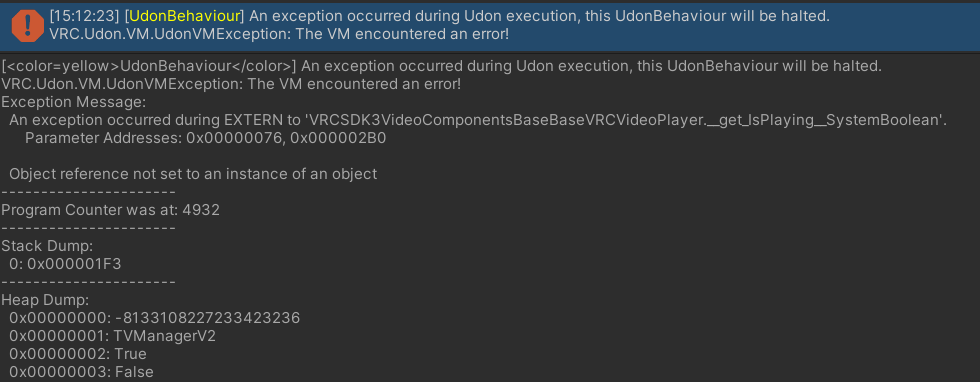
Hrm, yeah, seems like maybe the video player could be causing it?
if it errors immediately in play more, surely that would kill the udon immediately though yeah?
 brazen epoch
The docs recommends I always check if Users are Valid, but if I have to compare 2 user IDs and make sure they're valid and equal, how can I logically do that without a logical AND operator?
Nvm. My logic may have been flawed
 prisma epoch
How to get multiple gameobjects with specified tag
quartz meadow
iron vault
https://i.imgur.com/sjlUtVS.png
when udon crashes, it crashes that udon script, but others keep working.
iron vault
quartz meadow
when udon crashes, it crashes that udon script, but others keep working.
Hrm. that makes the question of why my cubes stop syncing even stranger
my world has shit all in it. a couple cyantrigger buttons for a mirror, a bunch of cubes and planes with shaders on them, and 4 pickups
quartz meadow
generally, the best method is to start with nothing and go on step by step until you catch the crash
I suggest using cyanemu to make your life easier
brazen epoch
How can I properly sync the state of something?
I might be using the wrong events, but I don't know how to properly listen for variable changes.
U# Code:
using UdonSharp;
using UnityEngine;

public class DrawerOnInteract : UdonSharpBehaviour
{
    [SerializeField] string direction;
    [SerializeField] bool positive;
    [UdonSynced] bool open = false;
    bool localyOpen = false;

    public void Start()
    {
        if (open && !localyOpen) DoTranslation();
    }

    public override void Interact()
    {
        DoTranslation();
    }

    public void DoTranslation()
    {
        float translateAmount = positive ? 0.3F : -0.3F;
        // if open and public var direction is axis, then retract, else if var direction is axis open, else do nothing
        float x = open && direction == "x" ? -translateAmount : direction == "x" ? translateAmount : 0.0F;
        float y = open && direction == "y" ? -translateAmount : direction == "y" ? translateAmount : 0.0F;
        float z = open && direction == "z" ? -translateAmount : direction == "z" ? translateAmount : 0.0F;
        this.transform.Translate(x, y, z);
        localyOpen = !open;
        open = !open;
    }
}
Screenshot of local test:
https://cdn.discordapp.com/attachments/405285983794364417/919526446148493362/unknown.png
 brazen epoch
Figured it out
 amber crow
uuuh hello i just updated the sdk and it gives me this error, never ever seen this ???
nothing to import again from the sdk...
Assets! prefabs\Udon\UdonBehaviour.cs(348,36): error CS0246: The type or namespace name 'OnAudioFilterReadProxy' could not be found (are you missing a using directive or an assembly reference?)
it's pretty urgent
:/
 tacit pasture
is that using the new vrc sdk?
amber crow
latest yes
tacit pasture
did you just update your package with it or making a new one?
tacit pasture
hmmm, i really dont like updating sdk into my packages because it normally always breaks, my advice is when you want to use a new sdk do a new package, theres so much that can break
but yeah try removing all sdk related items
amber crow
new package ?
tacit pasture
like a new unity package
amber crow
you mean project?
tacit pasture
yeah sorry lmao i just woke up
amber crow
not doing new projects every time lmao that'd take fucking ages
tacit pasture
you really dont need to update the sdk each time a new one comes out btw
amber crow
yea i do
tacit pasture
how so?
amber crow
using things that just came out, people making stuff using the new sdk, and just stability x)
tacit pasture
understandable, if your using beta branch that makes sense
tacit pasture
but yeah i get that, ive got 6 active club maps im upholding
but because its not needed to have any think new and fancy from each update i dont have to update my sdk's all that often
amber crow
nah sometimes takes me a bit to update, but most of the updates in the past few months have been absolutely vital in terms of new features so i've been taking full advantage of tthose
had plenty of problems, but never that one lol
tacit pasture
yeah understandable, anything cool in those?
amber crow
seems to be good now
tacit pasture
normally yeah deleting and re importing fixes most of it
amber crow
latest was p big perf improvement + exposing post proc to udon so yea
i just hadnt updated this one till now
amber crow
Udon
Improvements
- General performance improvements to Udon
- UdonBehaviour Interact text has been exposed to Udon via
Set InteractionTextand other methodsPostProcessVolumehas been exposed to Udon via:
GetandSet blendDistanceGetandSet priorityGetandSet isGlobalGetandSet weight
tacit pasture
yes please
tacit pasture
amber crow
seems to be good now
so everything all fixed and working again now?
amber crow
yup
amber crow
mh?
tacit pasture
party box right
amber crow
yeeee
tacit pasture
think i went there a couple times
tacit pasture
amber crow
vrc smol
honestly it is its crazy
 tacit pasture
this was a world i did for them, hadent check on it and wtf 45k visits XD

@amber crow you tried any of the new audio link stuff, its a lot of fun
amber crow
tacit pasture
<@!557638910390435860> you tried any of the new audio link stuff, its a lot of f...


I was told to add some color to my birb. /wip
// Protokseed - Frustration
CORRUPTION ONGOING. RAVE ON. https://t.co/1jhUiwMrQX
 Twitter
·
tacit pasture
amber crow
yea https://twitter.com/Reava_VR/status/1465502673319432193?s=20
Twitter
·
tacit pasture
amber crow
yea https://twitter.com/Reava_VR/status/1465502673319432193?s=20
ay nice this was what ive been doin
was so much fun making this
amber crow
i'd love to chat more but we in udon questions & i'm pretty busy atm, feel free to join my discord or add me/.
hushed gazelle
Quick sanity check; Am I doing a manual sync correctly? (Set value, request serialization, Do Things on deserialization)
 tacit pasture
amber crow
i'd love to chat more but we in udon questions & i'm pretty busy atm, feel free ...
tacit pasture
amber crow
i'd love to chat more but we in udon questions & i'm pretty busy atm, feel free ...
yeah for sure
tacit pasture
hushed gazelle
Quick sanity check; Am I doing a manual sync correctly? (Set value, request se...
from my limited graph knowledge, that looks somewhat right i think
i ususally sync with U#
 clear bridge
idk where to put it
but my yt player is broken all the time
idk how to fix it
it works on quest but not on pc
twilit epoch
indigo finch
Yup sorry, meant playerapi.islocal
So like this right? I am respawning where i want. That's good. If this script is correct, then i have to update the world and see if the bug still exist
 indigo finch
twilit epoch
So like this right? I am respawning where i want. That's good. If this script is...
indigo finch
twilit epoch
So like this right? I am respawning where i want. That's good. If this script is...
Close, but not quite...
 twilit epoch
indigo finch
Close, but not quite...
twilit epoch
indigo finch
Close, but not quite...
Okay. It still works. Here is also the gameobject spawn script. I think this one should be fine

 indigo finch
twilit epoch
Okay. It still works. Here is also the gameobject spawn script. I think this one...
indigo finch
twilit epoch
Okay. It still works. Here is also the gameobject spawn script. I think this one...
yup, everything looks good. that being said, both variables 'Door' (gameobject) and 'LocalPlayer' (VRCplayerApi) on the first script are not being used. you'll probably get a yellow message about that in the console
twilit epoch
indigo finch
yup, everything looks good. that being said, both variables 'Door' (gameobject) ...
Thank you very much for your help 🙌
 ocean turtle
Hey yall how would i go about making a global multi-object toggle?
quite new to udon
 west rover
Hi guys
sorry, this is such a noob question, but i could not figure it out and was not able to find tutorials for this on youtube
i'm trying to do some pretty simple thing : in my VRC world, i want background music to change in some rooms, that it to say, for instance, that interacting with a door and entering a new place, the background music gets changed
could anybody help me with this? I tried some stuff with udon but i'm not familiar enough with the way it works.
paper plinth
west rover
could anybody help me with this? I tried some stuff with udon but i'm not famili...
Do you know anything about how to use sound yet?
west rover
I was able to put background music with loop, etc
with and empty object
I'd just like to, for instance, put this music as a variable and add to, says, a door, and "interact -> change this"
(or any smarter way)
west rover
yes, i'm just not able to make the udon graph
i did for teleports, etc thanks to tutorials
paper plinth
lol then you can do this, where are you stuck?
west rover
I just don't really know how to call this music as a variable
for instance i'd like to put on a door something like "on interact"
and for instance setvariable to a value
paper plinth
ok I see what u do not know
there is an interact event
and it goes on anythign with a collider
west rover
yes this is what i use but then
idk how i can change in the empty "background music" objec
the music playing depending on this variable i may change with oninteract
paper plinth
Do you want the music to be local to a zone?
west rover
no i think it's safer that i just put 1 music everywhere (as i did on spanw) and change it
because i'm afraid the zones will be complicated and ill make mistakes with , says, 2 music overlapping
paper plinth
in that case you want to do something like on update, set the audio source to play a clip from an array[] of audio clips
and on the get array element, make that a public variable
west rover
i can do this on the "empty object" ?
paper plinth
and then when you have something you want to interact with and change the music, just setprogramvariable and change the number
sure
west rover
so in the empty object i make an audio source [], public
and in, says, a door, i setprogramvariable, ok, i'm going to try
what is not very clear to me is wether variables are attached to objects or the wholeproject
udon is a bit intimidating 😄
thanks
paper plinth
it's ok
if you can make a teleport you can do this
and yes that's pretty much it
here I'll write something real quick that might help you
so you start with an audio source that's the right size with the VRC spatial component and all that and you set it to play on awake and loop
you can even make a start event to set active the game object if you want

then you do something like that on it
west rover
I was also thinking of making all musics in respective objets and activating/deactivating by hand
but i cant even write an array right now, i'm so bad with this interface :/
paper plinth
making them all separate audio sources on loops that you activate and deactivate is a solution
west rover
yep but i was not even able to find how to deactivate an object
i also tried this update function but failed. I'm going to try to deactivate because this is dumb but the code, even though boring, may be manageable for my pitiful levl
 west rover
ok, ty
paper plinth
west rover
yep but i was not even able to find how to deactivate an object
POOF It's gone
 west rover
shall i add a variable "bool" and set it to the good value by hand?
if this is it i think i can handle it
paper plinth
paper plinth
POOF It's gone
well if you do this, the object you're interacting with will deactivate itself
all you have to do is replace "This" with the game object with the audio on it
west rover
yep i did
paper plinth
then you have somethign that turns off the music lol
west rover
ah ok, sorry, i mean with this i activatee an object
ah, "setactive" desactivates if it's already activated?
i was looking for "enable" in stead of "activate" so i was not able to find the function, and i cant find a "disable" or "disactivate"
paper plinth

setactive will activate or deactivate the object in question based on the value of that boolean plugged into it
west rover
ok
paper plinth
now obviously the above code would never function the way it's written because if you set an object to deactivate itself then how will it reactivate itself if it's deactivated?? so u need to plug in the gameobjects you need
not "This"
west rover
ok this makes a very complicated code
because i need to deactivate all musics and reactivate one (beside what you say)
perhaps it's more smart to play with volume then, put all musics together and on interact
siwtch volum to 0 for every track which is not the one i want.
paper plinth
so do you want one button like a radio changing stations?
Or do you want a bunch of different buttons in different palces on the map?
west rover
I just want that entering a zone, the music changes
paper plinth
u don't need any udon for that
west rover
Hitting a door, it TPs to the zone
paper plinth
just set up your audio source
west rover
yep but my zones are a bit tricky
i mean i'm afraid that setting up sound zones
my zones are not spheres so they're going to overlap, etc
wind atlas
Do you have a global audio source? Just change the audio clip whenever you go into a new zone.
west rover
that's what i trying but i'm not even good enough for such simple thing
wind atlas
It's all about knowing the data types. Create a AudioSource variable, then drag your global audio source into that in the inspector.
Using that data type, you can set the audio clip. I don't know what the node is called.
wind atlas
west rover
that's what i trying but i'm not even good enough for such simple thing
Since I was not sure if my reply was helpful, I made this to make it more clear what I mean:
You attach this script to every button that leads to another zone.
In the inspector you assign the global audio source and whatever clip you want this particular script to play.
That's it.
west rover
ok thanks a lot
i'm still stucked with always the same issues :
here, globalaudiosource is an "audiosource"
if i make an empty object playing the bg music and drag and drop it on udon, it's not here as an audiosource but as a game object
and for game objects, they cannot link with "Setclip"
Even going for "New > audio > audiosource" in unity, when dragging and drop, it becomes a "game object" and not an "audio source"
also, the "Audioclip", even though i put it into a public variable, doesnt appear in the Inspector as something i can replace
this is driving me crazy tbh, sorry.
wind atlas
west rover
if i make an empty object playing the bg music and drag and drop it on udon, it'...
When you click the plus you have to select the right type:
west rover
yes thats what i done, but audioclip
even though in public variable, it does not appear on the inspector as something i can replace
i only can replace the "globalaudiosource"

 west rover
yep, ok sorry, now it appears, and upon interact it stops the music but the new doesnt come
i tried with an "empty" audio source" and it doesnt add the new, so this is converging, trying some stuff so that it eventually accepts the new one.
perhaps it needs an event update to reload
or something.
wind atlas
west rover
i tried with an "empty" audio source" and it doesnt add the new, so this is conv...
That might be my bad. Try calling AudioSource -> Play?
After you set clip.
 paper plinth
it's a minute to learn, a lifetime to master
west rover
just added a "play" "backgroundmusic" after. I'm trying to see if it works with changes now
Yes sorry, the udon interface is certainly vary intuitive for people who master it but there are so many hidden things, i struggle a lot
ok, works perfectly, thank you so much UnopenedPArachute and Puppet ❤️
The issue here is that the setclip is only accesible for audioclips and it's really hard to guess at first if an audioclip is an object or a clip, or a variable
so dragging & dropping the object as an audio source i would not know whether it's a variable or a source or an object, i struggle so much with it, but well, thanks to you it sems to be working
grizzled trout
hi dumb question but how do you detect if a button on your controler is pressed? like in the amung us world when you tap "a" on you controler to bring up the menu.
paper plinth
like input getbuttondown or something
 wind pollen
how can i create on trigger when a player hits the object it goes away
hopefully that makes since
placid niche

How would I make my door swing open when someone walks into it?
@ me if you respond pls ty
 daring copper
any particular reason why we cant set the seated status on a station now? been getting a lot of messages about my map being busted and it turns out that the reason is because it's erroring out when i try to set the seated status.
grand temple
It was removed for security reasons. You should be able to use the mobility property to a similar effect
daring copper
👍
i actually dont really need to set the status anymore it's kind of left over code...just have to push out an update so that it doesnt break anymore haha
thanks
 slate orchid
are fast paste pvp maps do able on udon or am i going to run into network problems and limits with udon?
wind atlas
grizzled trout
hi dumb question but how do you detect if a button on your controler is pressed?...
You can use Input.GetKeyDown.
grizzled trout
wind atlas
You can use Input.GetKeyDown.
thank you!
wind atlas
slate orchid
are fast paste pvp maps do able on udon or am i going to run into network proble...
The biggest issue is delay to be honest. Networking real time games outside of udon is already very finnicky, it's even worse in VRChat. That means that things will always feel subpar. For example, if you make gun pvp, the sanest thing to do is favor the shooter. However, that also means that people will often die even though they took cover in time.
tropic canyon
It's better to create coop players versus computers stuff
slate orchid
wind atlas
The biggest issue is delay to be honest. Networking real time games outside of u...
cus steel and gold did not have that problem
fiery yoke
slate orchid
cus steel and gold did not have that problem
Thats because that world was directly made by the VRChat team :)
tropic canyon
it's mostly an issue with ping, doing hit detection on local, means that other people will see them hit you but don't actually hit and doing them remote means that you get hit by stuff that doesn't look like it should have hit you
it's an issue with 100ms+ ping
- whatever network ik adds
slate orchid
cus i'm trying to remake steel and gold type game and i know nothing about udon
grizzled trout
wind atlas
You can use Input.GetKeyDown.
sorry forgot to assk, what do use to compar what button ?
tropic canyon
give it a keycode enum value
just have a public KeyCode, in the inspector you can set it
wind atlas
grizzled trout
sorry forgot to assk, what do use to compar what button ?
If you use udon graph, there should be a dropdown with all the keys I think.
tropic canyon
in u# it would be for example Input.GetKey(Keycode.q)
and btw using shift as input has weird issues (just a heads up)
grizzled trout
wind atlas
If you use udon graph, there should be a dropdown with all the keys I think.
it dose but not sure what button is the A on a quest controler
grizzled trout
tropic canyon
in u# it would be for example Input.GetKey(Keycode.q)
useing udon nods
wind atlas
grizzled trout
it dose but not sure what button is the A on a quest controler
🤦 Oh, that A button.
tropic canyon
Oh god
grizzled trout
Yyyeah sorry heh should have been spasific
grizzled trout
i want to rig it like the amung us world , so it brings a menu
wind atlas
VRChat
You can read the input of a Player's controller in a unified way across all platforms by using Udon Input Events. These events will work correctly even when the player has remapped their controls. There are currently two types of events - Button and Axis, which include boolean and float values. Each...
This should help. These events are designed to make it easier to use controllers.
grizzled trout
ooh cool! space is jump so a is space i think?
tropic canyon
Nooo
wind atlas
grizzled trout
ooh cool! space is jump so a is space i think?
That's not how KeyCodes work. You could do GetButtonDown("Jump") though.
grizzled trout
 tropic canyon
Uh if it's jump just use the using input events


 wind atlas
Yeah, just use input events.
tropic canyon
The function gets called when the button changes states so a "on button down" would be: input jump event -> branch -> true -> your noods to run
It is much nicer imo because you don't have to check the button every frame
slate orchid
tropic canyon
+ whatever network ik adds
when i get to networking is there any guide or anything that could help me or someone i could talk to
tropic canyon
VRChat
The three main concepts used for networking in Udon are Variables, Events and Ownership. Variables are containers for values - like a number, a set of colors or a 3D position.Events are things that happen at a moment in time.Ownership is the system that decides which user can update a variable, whic...
Check the docs
And ask in #udon-networking if it's truly networking related
grizzled trout
tropic canyon
The function gets called when the button changes states so a "on button down" wo...
i will try this, thanks
hushed gazelle
Can anyone tell me why this script isn't syncing? It's on a box collider used as a trigger, to set an animator bool when it detects the toy is sitting on something and adjust the pose accordingly. It works locally, but seems to get stuck for anyone who isn't the Owner. Networking on the script is set to Manual and Sitting is a synced Bool, because it should only change when the box detects if it's entered or left another collider (ie; the toy's been picked up or put down).
 tawny geyser
For triggers you need a filter to only process for the network owner or local player otherwise it's going to fire for every person in the instance.
 calm smelt
I have thousands of unlinked mesh's from building a city is there a good way to give them all hitboxs outside of just. Clicking every single one
wind pollen
also still dont understand on how to get rid of something ontrigger
 buoyant quartz
where do people get the media players from.. for youtube video's and such.. i am sure there are prefabs for this no?
wind atlas
hushed gazelle
Can anyone tell me why this script isn't syncing? It's on a box collider used a...
RequestSerialization can only be executed by the owner. Either it doesn't do anything for non owners, or worst case it's crashing, which might be the issue. I don't remember though. Have you checked what the logs say?
hushed gazelle
I haven't done so, I'll do that next.
So in theory then, would the workaround be to check if localplayer is owner and THEN request serialization?
wind pollen
?
wind atlas
hushed gazelle
So in theory then, would the workaround be to check if localplayer is owner and ...
Yeah, sure. Although I'm realizing something. OnTriggerX methods get executed on every client, so maybe you don't even need networking here?
hushed gazelle
That's what I thought, but it doesn't seem to take when the owner picks it up. It's weird.
wind atlas
hushed gazelle
That's what I thought, but it doesn't seem to take when the owner picks it up. ...
What do you mean by "take"?
hushed gazelle
Owner sees it happen, but everyone else sees the toy still being in its sitting state despite being picked up.
wind atlas
hushed gazelle
Owner sees it happen, but everyone else sees the toy still being in its sitting ...
Your code is only about collision though, there is nothing about pickups there.
hushed gazelle
It's a collider hanging on a pickup.
wind atlas
hushed gazelle
It's a collider hanging on a pickup.
So the player picks it up, but what then? In order for OnTriggerEnter to be executed it needs to touch another collider.
Couldn't you use OnPickup instead?
hushed gazelle
Nope, because it should be able to fall on its side. This only triggers when it's set down upright on a surface.
wind atlas
hushed gazelle
Nope, because it should be able to fall on its side. This only triggers when it...
Ah, so you have a trigger below to detect the ground I guess. Yeah, it should be fine to just have OnTriggerX > Animator SetBool
I don't see why it wouldn't work. Only issue is if pickups float around trying to resync, but then the other client doesn't see the pickup properly anyway. So there is no need to sync the animation yourself imo.
wind atlas
hushed gazelle
Nope, because it should be able to fall on its side. This only triggers when it...
Yeah, try checking the logs, maybe there is something useful in there.
 scenic pewter
Is there any plans to make a function like sandbox or nft?
hushed gazelle
@wind atlas So turns out, no the toggle won't fire locally for everyone. I suspect what's happening is it works and reports to the owner, but ignores anyone else because it doesn't care about anyone but the owner.
wind atlas
hushed gazelle
<@!106513983044898816> So turns out, no the toggle won't fire locally for everyo...
Have you tried doing it without syncing and to just rely on the local collision detection?
hushed gazelle
Yup.
hushed gazelle
Does On Variable Changed work for Manual sync, or only Continuous?
wind atlas
hushed gazelle
Does On Variable Changed work for Manual sync, or only Continuous?
It does work with manual sync. It's not a networking feature, it's responsible for any variable change.
hushed gazelle
Ahh, gotcha.
wind atlas
hushed gazelle
Ahh, gotcha.
Btw, I tested it out, and this is what you want right?
hushed gazelle
Yup
wind atlas
hushed gazelle
Yup
I did it with just this:
 hushed gazelle
What sync type did you use?
wind atlas
hushed gazelle
What sync type did you use?
It doesn't matter for the way I set it up. I'll post my hierarchy.


 hushed gazelle
I know, I'm just ruling out every possibility on my end. Because it's gonna be something simple I've missed.
wind atlas
hushed gazelle
I know, I'm just ruling out every possibility on my end. Because it's gonna be ...
Yeah, exactly. That's why I posted the setup, hope it helps.
grizzled trout
hi, hopefully last question for today. is there a way to detect if an animation from an avatar is playing in a world? like a player uses there clapping emote and triggers a light in the world
hushed gazelle
Have a collider track each of the player's hands, if they touch together at higher than x velocity, you have your clap.
night viper
By "add" you mean "play" sound right?
 grizzled trout
hushed gazelle
Have a collider track each of the player's hands, if they touch together at high...
grizzled trout
hushed gazelle
Have a collider track each of the player's hands, if they touch together at high...
could you show me an example of how to do that?
night viper
Ah ok. Yes that should work. You will still need to add colliders to the objects along with at least one of them having a rigidbody and One of them having "istrigger" enabled. The AudioSource will have to have "loop" OFF, and "Play On Awake" OFF too.
hushed gazelle
@wind atlas I was right, it was something really stupid; I'd left the collider on the Default layer instead of Pickup, so while it wasn't detecting the player holding it, the trigger area was colliding with the player holding it from every OTHER player's perspective.
 lapis scarab
I am new to VR chat but have some experience with Unity. Is there anyone who has experience with VR chat in web browser like Firefox?
VR chat supports webgl platform?
scarlet lake
I've always wondered how you could attach, like a title card/logo to swivel with someones view when they join a world-
I believe its basic enough you don't need udon, but in case you do what is the process about going bout' that?
 azure pagoda
Not sure if this is the right place to post, but trying to publish my world at the moment, everything seems fine and normal but the upload button doesnt work and i get this error in the console, any ideas?

 flint kite
lapis scarab
I am new to VR chat but have some experience with Unity. Is there anyone who has...
flint kite
lapis scarab
I am new to VR chat but have some experience with Unity. Is there anyone who has...
No
indigo finch
azure pagoda
Not sure if this is the right place to post, but trying to publish my world at t...
Your trying to upload an sdk2 world. Udon is scripting for sdk3 worlds only, so you should post it in another channel. That being said, it seems like some objects/ scripts have are trying to access things that don't exist/ it can't find. I'm not at all familiar with sdk2 though. The obvious check would be to make sure you have both the lastest version of unity for vrchat, and the latest sdk. Other than that, would need to see more about the scene, and perhaps more about sdk2
azure pagoda
indigo finch
Your trying to upload an sdk2 world. Udon is scripting for sdk3 worlds only, so ...
Thank you for replying, im working in sdk3 atm and it seems like it was a prefab i brought in that was looking for an sdk2 script i have now removed the script it was asking for and seems fine now
indigo finch
azure pagoda
Thank you for replying, im working in sdk3 atm and it seems like it was a prefa...
ah... yup, that would do it ^^
vast sparrow
can anyone here help with Udon#?
i need multiple scripts to communicate but im getting a n error when i try
the error is "Object reference not set to an instance of an object"
wind atlas
vast sparrow
the error is "Object reference not set to an instance of an object"
https://docs.unity3d.com/Manual/NullReferenceException.html has a lot of information. It's a common unity problem, so you could probably google it too.
Although if you are not interested in programming concept as much, it basically means that you haven't set a variable somewhere. Most commonly in the inspector. (Although it can happen in the code, some methods can return null, you have to handle that before using their output)
vast sparrow
alright thanks ill check that out
 hoary echo
I asked this in the #world-optimization channel as well, but I figured I'd toss it here as well. With the Unity store having a sale on right now, what are the best go-to tools for world optimization?
 fierce verge
How do I make a constant URL as a value? like permanent?

 fickle sparrow
@hoary echo I recommend "Super Combiner" for easily combining/uncombining meshes, and "Magic Light Probes" for super easy light probe placement
grand temple
fierce verge
How do I make a constant URL as a value? like permanent?
create a public VRCURL variable and then change it in the inspector, not the graph
fierce verge
ahh okay thanks!
wind atlas
grand temple
create a public VRCURL variable and then change it in the inspector, not the gra...
I hope you don't mind asking you directly, but maybe you might know this.
So I've noticed that player audio management is purely local. Does that mean that people who hack the client can increase people voices and hear them from everywhere if they wanted to?
hoary echo
fickle sparrow
<@!119998570802708482> I recommend "Super Combiner" for easily combining/uncombi...
Awesome, thanks!
wind atlas
So basically, there is no real way to isolate people's voices, right?
grand temple
wind atlas
I hope you don't mind asking you directly, but maybe you might know this.
So I'v...
If you're concerned about that, then you can open the social tab and you'll see an ear icon next to everyone who is currently receiving your voice data
wind atlas
grand temple
If you're concerned about that, then you can open the social tab and you'll see ...
Not concerned, just interested. I think it's more funny than anything.
Because people create those private rooms in some worlds.
fiery yoke
I also think that the checking whether or not you can hear someone is done locally. Which is probably bad. It should probably be reversed, meaning that you check, whether someone is in range to hear you. But that wouldnt work with the way the Audio Override stuff is set up I think, and generally with the P2P-like networking architecture, as it would with a dedicated server... so yeah the only indicator would then be that icon.
wind atlas
fiery yoke
I also think that the checking whether or not you can hear someone is done local...
Even if it's P2P, it should be possible to just stop sending audio to certain people, right?
But yeah, that would be ideal if we prioritized privacy. Personally, I don't think that's an issue, but I bet some people wouldn't like it if they knew.
fiery yoke
Well someone needs to calculate who can and who cant hear you. If its done on the side of a malicious person, well then thats pointless. So the only reasonable approach is that its done for the person that would be heard. But now the problem is that the other person might have completely different settings for you. Maybe they can deliberately hear you further. So it gets complicated quickly keeping track of who can hear what. Essentially every player would need to know every other players audio override settings. Which would be doable, just not the most obvious way to implement it, hence why I believe that it is the way it is.
wind atlas
fiery yoke
Well someone needs to calculate who can and who cant hear you. If its done on th...
Yeah, to make it easier, they essentially did zero networking involved in the voice api.
Yeah, anything I think of is super awkward too lol.
grizzled trout
hi. how do you detect when two spesific objects collide? like say key a with lock a
 magic drift
Hey, where is the stats button for testing in play mode?
I wanna see how many draw cals my world has
Edit: NVM am blind it's in game not scene
 strange plaza
Hey gamers, small question; with VRCPlayerApi there's the node "SetVoiceGain" and other "SetVoice" nodes. Is there also a "GetVoiceGain" node? I can't seem to find it
 sullen jacinth
how can i convert this to a 3.0

Missed the first setup phase tutorial? Tutorial 01 can be found here: https://www.youtube.com/watch?v=uZlKTm8Uhd0
💕Download Links💕
TUTORIAL HAMMER (for adding components): http://www.mediafire.com/file/yufceii9nj92kb2/HammerHead_-_Starter_-_Weapon_Prefab.unitypackage/file
END-OF-VIDEO HAMMER: http://www.mediafire.com/file/93p1cs41chy54ka/Hamme...
 vital oyster
I need udon and C# or only udon?
vital oyster
how ;i get world creator status allowed?
 hidden turtle
does anyone have a prefab for rain or a tutorial for it?
grizzled trout
vital oyster
how ;i get world creator status allowed?
play vrchat and make friends in it
vital oyster
but i have friends ;-;
what do you mean ;-;
at least I can make a private world without that permission?
ooooh
I'm using my new recent account
how I use my steam account instead
?
quartz meadow
first off, make a vrchat account (dont just use soley steam since it may not rank up). play for a few hours, make friends, have fun. this will cause you to level up from visitor to new user (this only takes a few hours of gameplay, this is in place to stop bots spamming content). once you have that rank, you will be able to upload content
from there, download the correct version of unity editor, import the vrchat SDK and start with a smaller project first
udon is the visual programming language that is included with the sdk, and is fine for casual projects. You can also grab udonsharp, which allows you to code in C# (in the standard unity method) for vrchat
both udon and udonsharp compile to the same assembly that the udon-vm uses ingame
but take it a step at a time. you are gonna get lost if you jump from new player to making advanced scripting content overnight
indigo wagon
Is string to vrcURL a thing as I'm trying to make a In world keybord for quest people wanting to use video player
And the approach I'm thinking of is each key adds to a string then enter sends the typed URL to the player if valid
quartz meadow
nope, specifically blocked due to security concerns. there are some editor scripts (as in, run only in the editor) to make adding a list of URLs into a map less annoying
also I am not sure if quest supports video players?
or maybe only mp4 direct streams
indigo wagon
quartz meadow
also I am not sure if quest supports video players?
There are passers for things like YouTube on quest
quartz meadow
probably some service that converts a youtube video into an mp4 direct link then
unfortunantely you cannot generate new vrcURLs at runtime
this is intended
indigo wagon
quartz meadow
unfortunantely you cannot generate new vrcURLs at runtime
You can tho, there are input fields
Litraly most players have somewhere you can type a URL for it to play
Only issue is quest users don't have a keyboard to type on
quartz meadow
well, let me explain. the only way to get a new vrcurl for a user to type one in on a keyboard. you cannot generate one programmatically
they need to do it in a special field too

GitHub
An experimental compiler for compiling C# to Udon assembly - VRChat API · MerlinVR/UdonSharp Wiki
indigo wagon
Imo that's stupid
We can input arbitrary URL in editor and on pc but not in game quest
I get that the would creator could oh no, run it through a wrapper so it functions. It's not like the world creator could just bake that passer in the url
indigo wagon
quartz meadow
you cannot programatically create vrcUrls on pc either
How do vrc URL input fields work then without makeing a vrc url
quartz meadow

 indigo wagon
All that says to me is it gets a link from the input feild and passes it as a vrc url
quartz meadow
alright, I may be misunderstanding you here. what specifically is your goal?
indigo wagon
quartz meadow
alright, I may be misunderstanding you here. what specifically is your goal?
To make a video player that the user can input a URL on quest, pass that into a wrapper so it functions then play it
I'm that technique would need unknowns sources on.
Only way I see of being able to pass that URL is in world keybord and string to vrcURL directly or indirectly
I don't want to have to limit players to just pre baked video url
quartz meadow
ok, now I understand. there are text boxes which are unique that they store their information as a vrcurl, not a string. the intended use is for this vrcurl to be used directly to call a video. however, you cannot scan, read, or modify the vrcurl. whatever the user put into that box is the link the video player is going to try to grab from
so from my understanding, you are trying to get youtube playback to work by changing a inputted youtube url (for example) into one of these mp4 wrapper sites so it works there, correct?
indigo wagon
Quest users can't even input to that box tho
quartz meadow
that... may be a bug, one second lol
indigo wagon
quartz meadow
that... may be a bug, one second lol
With all the video players I've wondered past I've allways needed physical keyboard or VD keybord to type into
quartz meadow
on pc one would use a virtual keyboard
googling shows side quest users can copy and paste directly into the field, but I dont have a quest so I cant say
as far as bugs go, cant find anything related to this
indigo wagon
quartz meadow
on pc one would use a virtual keyboard
That's never appeared for me lul
quartz meadow
I always had to open mine manually tbf
I dont know of a method to have one pop up automatically
indigo wagon
quartz meadow
googling shows side quest users can copy and paste directly into the field, but ...
And how can standalone users copy paste, we don't have a Ctrl key in the browser lul
And I don't think quest even has a shared clipboard
quartz meadow
it seems to be a modification?
again, I don't know
quest does use android, so im sure there is some clipboard functionality in there
indigo wagon
Oh it uses an adb command to type
How user friendly
quartz meadow
this may be a good thing to put ina feature request for tbh, a way to paste in video links for quest
oh wait
lookie here
 indigo wagon
quartz meadow
I always had to open mine manually tbf
indigo wagon
quartz meadow
I always had to open mine manually tbf
How do you open holo keybord to type into them lul, cus if I know how may be able to do that on quest, and make a guide poster on how to do it like quest
quartz meadow
looks like they are already working on it
quartz meadow
comment was posted 2019, tracked from march 12 2021
but yes, lets say theres a reason vrchat is hiring a bunch of developers right now, they wanna catch up lol
indigo wagon
String -> URL would make this soo much easier to work around lul as people could just use their own world keybord, and only way it could be a security consurn is unknown URL and people know what that setting does anyways
 slim crow
indigo wagon
String -> URL would make this soo much easier to work around lul as people could...
slim crow
indigo wagon
String -> URL would make this soo much easier to work around lul as people could...
Does that mean you can't interact with the video player's URL attribute through udon?
indigo wagon
slim crow
Does that mean you can't interact with the video player's URL attribute through ...
All you can do is pass in allready made vrcURL or an input URLfield that you converted to vrcURL
slim crow
And there's no way to interface with the URLfields either?
indigo wagon
If you can edit URL fields then that's my indirect method, but don't think you can
slim crow
Hm, alright, thanks
indigo wagon
slim crow
Hm, alright, thanks
Only editing you can do is set it to premade vrcURL
 slim crow
What repo are you looking at?
quartz meadow
it sucks but I understand why they did this. They dont want some dumbass using vrc as a vector to send viruses to people
indigo wagon
slim crow
What repo are you looking at?
Udon sharp docs
slim crow
quartz meadow
it sucks but I understand why they did this. They dont want some dumbass using v...
Hence why they added the unknown urls setting
indigo wagon
quartz meadow
it sucks but I understand why they did this. They dont want some dumbass using v...
I repeat, unknown URL is a risk that people enable
quartz meadow
vrc uses youtube-downloader (which supports a large number of sites) to pull video. some may not be stable however, hence the checkbox
indigo wagon
And if someone wanted to embed a virus in an mp4 file good luck
quartz meadow
but if there were to a security flaw with it, well
nothing with an mp4 file, if you could redirect any url, you could just sent a .bat or something
indigo wagon
quartz meadow
but if there were to a security flaw with it, well
There's a security flaw with VRCURLInputFilds then
indigo wagon
quartz meadow
nothing with an mp4 file, if you could redirect any url, you could just sent a ....
No, it checks if it's a valid video lmfo
quartz meadow
you wouldnt be able to do anything there except locally though, and if you already have a virus link on your local clipboard, vrc aint your issue lol
indigo wagon
You can't send bat over the wave, and only risk is IP logging, but that's not really an issue
Also bat files don't auto run, windows got rid of auto run cus it was exploited to boot virus
Only way for something to auto run a bat is if you have a program on your pc allready to accept the payload form my understanding
quartz meadow
i made a quick example off the top of my head. point is they were using an external system (youtube dl) and they want to minimize attack surface
indigo wagon
quartz meadow
i made a quick example off the top of my head. point is they were using an exter...
But litraly there's no difference between malisous creator baking that nasty link and them enbeding it in their passer code
And vrcURL allready allow any URL as long as it links to a video
slim crow
Could I get a link to the page that you were looking at on the UdonSharp repo?
indigo wagon
slim crow
Could I get a link to the page that you were looking at on the UdonSharp repo?
GitHub
An experimental compiler for compiling C# to Udon assembly - VRChat API · MerlinVR/UdonSharp Wiki
Vrc URL is above it
quartz meadow
there is one major difference actually.
in the current system, all URLs must be embedded in the vrcurl object (since it cant be modified). this means when uploading a world, vrchat's servers can scan all the prefined vrcurls to see if anything malicious is there.
however, if you could parse a string to make urls, it would be very easy to obfuscate a malicious URL and turn it into a valid http link at runtime
indigo wagon
And a player could send a nasty link in a vrc input field
I get obviscation is a risk
But just do what you do with players URLs to ones initialised by scripts
quartz meadow
no they couldnt, only a user could. so theoretically, the worst case scenario is a malicious user in a public lobby could post in a bad url into a URL field, it would sync to everyone. however, if the world itself could generate urls, then just by joining a malicious world, even empty, you could be hit with it
indigo wagon
quartz meadow
no they couldnt, only a user could. so theoretically, the worst case scenario is...
Also a world like that currently won't get out of labs if they even tryed to make it public as it would be reported to oblivion
quartz meadow
I dont agree with everything the VRC team does, but after spending time to learn about this, I at least understand this current position. That being said I do want to see some more web interactivity (http requests or something). there has been talk of it but nothing concrete promised
thats still reactionary instead being proactive. Not saying we need to agree, but there are technical reasons why they made these decisions
TBH I just want my list support lmao
indigo wagon
quartz meadow
TBH I just want my list support lmao
That can be worked around tho in code
quartz meadow
99% of the time yes, but for unity UI dropdowns, they specifically only take in lists, not arrays. so if I want to make a dynamic dropdown system, I am out of luck lol