#udon-general
59 messages · Page 74 of 1
 dawn forge
 wind atlas
Yeah, as TheHelpfulHelper said, most card systems are just interact -> spawn card, because that's the actual lazy way to do it :P
Imagine handling 30 physics objects colliding with each other.
 twin hedge
Hmm, I've trying to figure out how to make a jumpscare. It's just simple. I want the player to walk through the trigger collider and the scary thing suddenly pops up for a second and disappears. I tried to use the same setup I've used on other trigger collider from last night, but it just stays on.
 grand temple
You can use sendcustomeventdelayed in order to turn it off after a moment. Or you can use an animator to do the thing and then disable itself or move it out of the way, whatever you want
You'll probably also want to set a bool "activated" to true, then whenever you receive onplayertriggerenter if it's already true don't do anything, because you don't want it to happen twice
twin hedge
right, thank you
 autumn birch
Is there a material swap node for swapping materials on an object on interact or is it only possible via animation?
grand temple
yeah, you can do that. I believe it's meshrenderer.material
autumn birch
grand temple
yeah, you can do that. I believe it's meshrenderer.material
yeah I found it but still trying to figure out how to set it up
autumn birch
I don't know how to make it target a specific material because you can't drag and drop materials into the graph
grand temple
that's what the public variable is for, yes
when you do that, it will show up in the inspector for the udonbehaviour. You can drag and drop there
autumn birch
this is going to be local and not synced so should it be a public material variable?
grand temple
public does not mean synced
those are two separate checkboxes
public just means it will show up in the inspector
autumn birch
what is "public material variable" under?
grand temple
add a new variable with the plus button
search for material
then after it is added, open the dropdown and enable public
autumn birch
oh that, my mistake
There isn't an option to select on any of the meshrender.material nodes to enable public I can find
grand temple
meshrenderer.material isn't public, that's the node you use to set the material
the variable is called material
the node is called meshrenderer set material
 fading cipher
Does anybody know who made the Luna Dash game in VRC?
 night viper
fading cipher
Does anybody know *who* made the Luna Dash game in VRC?
night viper
fading cipher
Does anybody know *who* made the Luna Dash game in VRC?
The 2D game from the jam? That would be me
fading cipher
night viper
The 2D game from the jam? That would be me
Hiya, just wanted to say my friends and I loved the game and we're super interested in what you plan to do with it moving forward...
 wanton oxide
I was actually surprised when i saw that, haven't seen anything on discord anywhere about it yet but its like super polished 👌
fading cipher
Is this just a game you've already been working on and plan to push to Steam at some point? I saw it's the demo and there are greyed out sp and mp buttons- does that mean the full version of the game will end up on VRC at some point, or is this an actual game you plan to release on other platforms in the future and figured you'd just port to VRC for the heck of it?
night viper
fading cipher
Hiya, just wanted to say my friends and I *loved* the game and we're super inter...
Thank you! This was made for vrchat specifically for the jam. I dont have experience writing codes in C#, it was all made with udon graphs. It was more of a learning project I did to learn both about udon and 2D in general. I dont have plans on making it a real game for steam, at least not right now. I did added a multiplayer feature and an extra level that will be added when the new vrc update goes live, but I think that is all for this project. IM glad you liked the game!
wanton oxide
WAT you did it in udon graph?
ok respect for that lol
i guess it proves that you can do a lot with graph
 void sandal
Im not that good with udon but how can you make a background music playlist?
 fallen chasm
Question: Does SendCustomEventDelayedSeconds send a network event, or do you need to connect it to a SendCustomNetworkEvent?

Just wondering if this is redundant^
grand temple
no, those are two completely separate things
and just connecting them together like that won't make a networking event be delayed. It will just make a delayed event and then it will make a separate networked event
anything that happens along the white flow happens instantly. A delayed event does not pause flow. Instead, it queues up an event to be called later
fallen chasm
my goal is to send the event twice, but with a five second delay
I've been having a lot of desync issues in the last few weeks...
figured this might help
grand temple
then you need to make a new custom event which will receive the delayed event, then do a networked event
right now it will just do two networking events simultaneously
fallen chasm
ok... I used to have two separate events, but it seemed like it wasn't doing any good
I'm still not clear on whether or not SendCustomEventDelayedSeconds is a network sender
 fallen chasm
😮
grand temple
you're going to create a feedback loop
fallen chasm
yes... I just realized

this is closer to my original one, but I was branching out of the custom event into the delay node instead of using a block
grand temple
putting a "SendCustomEventDelayed" node in the middle of flow does not pause the flow
fallen chasm

cleaned it up
so, this only sends the one time, and the delayed node doesn't pause anything -- Is there anything I can do to make this more desync proof?
grand temple
wait wait wait..... you want to send two network events, separated by 5 seconds, and the only reason why is because you want it to not desync?
fallen chasm
well, when you put it like that, I sound crazy XD
grand temple
just use manual sync
set the bool and requestserialization if the bool changes
you're currently doing a network event on update, that's going to flood the network
you only need to sync when something changes
fallen chasm
I'm sorry if I keep asking dumb questions -- I don't have a strong understanding of serialization in the context of udon

I set the script to manual and dropped this node in there
grand temple
network event isn't necessary if you're using manual sync
fallen chasm
does that include late joiners?
grand temple
manual sync is very simple: you take ownership, you set the variable, you requestserialization. Then when other people receive ondeserialization, they have the updated variable
however, there are some tricks you can use to make it more efficient. For example, you could use OnVariableChanged to automatically apply the changes to the animator when the variable changes for any reason
fallen chasm

~still wrapping my heard around this
so no need to send a network event... this does request serialization after the bool is set
do other people get the 'ondeserialization' automatically, or is there another node setup for that?
I'm not finding any 'OnVariableChanged' nodes via the search
jeez... my world has a handful of these continuous sync'd scripts... I wonder if I'll see a notable improvement after reworking these
grand temple
if you are the owner and you do requestserialization, they will receive ondeserialization
void sandal
void sandal
Im not that good with udon but how can you make a background music playlist?
I still have a question on hold
grand temple
onvariablechanged isn't a node you search for, you have to hold ctrl while bringing in a node
grand temple
void sandal
I still have a question on hold
Get a video player you like and set it to auto-play
grand temple
fallen chasm
so no need to send a network event... this does request serialization after the ...
You'll need to have a synced bool. Set that instead of the animator. Then in the onvariablechanged, that's where you set the animator bool to match the synced bool
fallen chasm
grand temple
Get a video player you like and set it to auto-play
I'd second that, here's the one I use: https://architechvr.booth.pm/items/2536209
ah, mean to reply to @void sandal ^

that?
seems like it's unrelated
fallen chasm
 grand temple
yep
 grand temple
If you use onvariablechanged, you don't need to use ondeserialization
fallen chasm
that's the one I'm having a hard time finding
grand temple
hold ctrl while dragging the boolean in
fallen chasm
sourcery!

not sure if that's where it goes, but I'm logicing this out...
would the update plug into this?
grand temple
no, you want animator setbool to happen when the variable changes

 grand temple
that's not an onvariablechanged
fallen chasm
I don't understand how to do that 

 grand temple
yep
fallen chasm
is that... it?
grand temple
no, you need to either take ownership or check to make sure you're not the owner
What is target1 and target2? Are those pickups?
grand temple
so then what you want to do is check who the owner of target1 is
 grand temple
you need to combine multiple things together with a boolean conditional AND node.
If you are the owner of target1
If the distance calculation is true
If the bool isn't already true
take ownership, set value, requestserialization
right now, everybody in the world will try to requestserialization, which will do nothing if they're not the owner except spam their log
and in addition, if you are the owner, it's doing it on update which is a waste of bandwidth
fallen chasm
this is getting complicated again O.o
but these noodles fill me with determination
 grand temple
no, you don't want to use the distance calculation in the onvariablechange. How else would you change it?
 grand temple
you want to check in update for whether or not the variable should change
fallen chasm
like... event update?
grand temple
yeah, same as you had before
fallen chasm
I thought we wanted to get rid of that 😮
oh... I had a mild epiphany
like... the owner has a bool set
and on update, the boolean change checks everyone else against them?
grand temple
no, the purpose isn't to compare with the other players
the purpose is to check whether or not you want to actually change it
if you do, then take ownership, set the variable, requestserialization
fallen chasm
 grand temple
when I say "set the variable" I'm talking about the udonbehaviour's bool, not the animator
you need to set the udonbehaviour bool because that's the thing that can be synced
 grand temple
yeah that's the right idea, though you need to check more before committing to changing the bool. Also you need to take ownership of this object, not target1
you only want to do this if you are already the owner of target1
fallen chasm
what if I don't set a 'target1' at all? -- I mean that'll always be the object I put the script on
grand temple
for setowner? yes, you can leave that blank it will default to itself
fallen chasm
so if the object with the script is 'self' doesn't a SetOwner negate the need to check?
grand temple
no, because update runs for everyone
but you only want the owner of target1 to do this
 grand temple
you don't need multiple branches, you can combine bools together with conditional and
fallen chasm

still pretty stringy XD
I'll have to clean it up later... still in 'make it work' mode
does anything plug into the 'instance' node on requestSerialization?
grand temple
no
just like setowner, it will self reference
that applies to udonbehaviours, gameobjects, and transforms
fallen chasm
I did plug VRCPlayerAPI into SetOwner -- should I not?
grand temple
VRCPlayerAPI does not self reference, so you need to plug in localplayer, yes
 grand temple
setowner of this object, not target1
fallen chasm
so kill that blue line
grand temple
yeah
fallen chasm
~done
grand temple
also add requestserialization after changing the variable, not in the onvariablechange. If you do it on people who are not the owner it will just cause log spam
and make sure you don't do anything in update if the bool is already true
fallen chasm
the worst kind of spam :V
grand temple
alternatively, you could check if you're the owner in onvariablechanged
fallen chasm

here's where it's at -- I'm not sure how I'd go from the onVariableChanged into isOwner
is that important?
(I'm also assuming you mean Boolean Change there?)
grand temple
yeah, I mean onvariablechanged is what the overall thing is called. It's just called Boolean change because that's your name for it
fallen chasm
yes -- so, I did a quick cyanemu test and it didn't work. lemme peek at the console before I assume anything
grand temple
you need to define what you want to set it to in the "set boolean" node
I think leaving that blank will make it false
 grand temple
no, this
 fallen chasm
aah
derp
still halting...
alright console, what secrets to do keep
null ref -- I think on the player
fallen chasm
to clarify -- is that a cyanemu setting or an udon graph thing?
grand temple
that's just everything
fallen chasm
I'm afraid I am once again at the mercy of my lack of understanding
grand temple
on start > set player to networking.localplayer
fallen chasm
still missing some context -- I don't see an onstart menu in unity, nor am I finding it in the udon search
grand temple
it's just start
fallen chasm
I'm gonna feel so dumb when I find the super obvious think you're talking about XD
grand temple
it's a node in graph
fallen chasm
oh!
event start
I was looking for onStart

not finding a set/networking/local in there
grand temple
networking get localplayer
fallen chasm

huzzah!
woof... if I can get this working, I'll have a lot of 'network events' to update
hot digity!, it worked
Phase, you're a saint -- thanks for all the help this evening
void sandal
How do I fix?
 fallen chasm
just a guess, but is error pause enabled in the console?
void sandal
no
fallen chasm
any notable new errors in the console?
void sandal
just this one
 fallen chasm
I've actually never used the audiolink adapter plugin -- can you temporarily disable or remove it from the scene and see if it starts?
(just to rule it out as the reason for the abort)
 hushed gazelle
Out of curiosity, is there an event node for highlighting an interactive object but not actually Interacting with it?
void sandal
fallen chasm
I've actually never used the audiolink adapter plugin -- can you temporarily dis...
I just removed it its fine now
fallen chasm
now I gotta figure out if I can do this same serialized bool change, but with a 20 second delay before switching it back O.o
@grand temple sorry to bug ya again, but is this a bad idea?
 grand temple
Don't use the oldvalue from boolean changed in a different flow
just use const bool
fallen chasm
👍
hmm... getting a weird issue where the button is unpushable in playback
I don't think it's the script though -- I see no console errors
oh!
need interact instead of update
void sandal
@fallen chasm How do you get the playlist working in the music player because I cant seem to get it working?
fallen chasm
void sandal
<@!252196404192215045> How do you get the playlist working in the music player b...
the autoplay or the playlist prefab?
your proTV prefab should have an autoplay url input:

the playlist should be mostly plug-and-play

just make sure you set tv manager and such
hmm...
--

I haven't seen this issue before
hushed gazelle
You put an object sync component on an object with a manually-synced udon script.
fallen chasm
yes... that serialized boolean stuff is on a pickup
perhaps I should put all of them on the static lockbox instead
or... would it be harmful to let them be continuous?
hushed gazelle
Are you trying to put this on some kind of portable device/controller?
fallen chasm
three keys, one box
each key has a script to trigger an animation param when it is close enough to the box
but the keys are also pickups
I could, potentially, put all three serialized scripts on the lockbox and make it manual
or even use an array O.o
so many possibilities
hushed gazelle
You've massively overthought this; Your key needs to be little more than a pickup. Touch key to trigger space of a collider on lockbox, check if it looks like one of the keys (just check the object ID of it), if it matches, fire a custom event reacting as such (lock opens, disable the respective key, etc)
fallen chasm
once the spaghetti drops, it's hard to untangle it
for what it's worth, the scripting in the world is waaay nicer than the initial implementation
hushed gazelle
Okay, the way I'd do this is three steps; The first is your keys; They should be pretty much just a pickup with objectsync. Object Pooling might give some better instantiation control for removing them for all players, I think? I haven't messed with that at all yet.
Second is your lockbox. If you're using separate locks for keys, they're three identical locks, that have the same script and are each paired with one of your keys. They're functionally a box collider enabled as a trigger on the Pickup layer. Anything that enters it (ie; a pickup object) gets its object ID checked against its stored Public Gameobject's (ie; its matching key). If it matches, set a respective bool in the Lockbox and fire a CustomEvent off to the lockbox to try and open it. Also do something to get rid of the key.
The lockbox itself is three bools and a single "Try to Open" CustomEvent. Any time you put a key successfully into its paired lock, it tries to open the the lockbox, the lockbox looks to see if all three bools are True. If they are, we know all three keys are found, and open it. If not, nothing happens and the player never notices.
fallen chasm
the box has a series of shape keys to show the keys inserted
which are controlled with an animator setup
hushed gazelle
So just have the respective lock fire the respective shape key when it sets true?
fallen chasm
they keys are also disabled when inserted -- but that's also via the animator
is that exposed in udon?
hmm...
I have much to learn
hushed gazelle
You can drive animator values in Udon quite easily. Assign an Animator, Set Bool/Int/Float/whatever
fallen chasm
I'll definately make use of that
dang...

after all that re-working to serialize instead of update/customnetworkevent ... it's still out of sync
hopefully this is just because I'm playing with two instances of myself
hushed gazelle
No, it should sync that way.
I know, I've had to beat my head against syncing stuff in my world several times with Build-and-test.
What you need to do is set owner to whoever slapped the last key in a lock successfully, I think. What's actually happening in your OnDeserialization event?
 lean herald
hewo im trying to get a box trigger to turn on the mirror when the "local player" enters & then disable once that player has exited. help me udon wizards : P
 eager olive
I think you need to provide more info for us to be able to help you!
Basically all you'd need is a trigger collider, and a reference to the mirror. Then use the events OnPlayerTriggerEnter and OnPlayerTriggerEnter to disable or enable the mirror.
Just check it's local player entering the trigger.
hushed gazelle
Give me two seconds and I'll show you the graph I use for that.
hushed gazelle
You can replace the animator I've used for mine with the mirror's gameobject enabled bool or whatever. For the player approaching the mirror, just used OnPlayerTriggerEnter instead with the mirror set enabled.
Also make sure your box collider trigger is on the MirrorReflection layer.

 plush stump
Did udon program call requestserilization automatically when a player left the world? One of my countdown timer just get freezed when player left in the mid of the game, I uncheck sync box of a float variable involved in the timer program and that fixed the problem. Took me a lot of time to solve it.
fallen chasm
hushed gazelle
What you need to do is set owner to whoever slapped the last key in a lock succe...
Didn't have the OnDeserialization node anywhere, but I added and plugged it into the SetBool and things seem to be working great now 🙂
wind atlas
Method UnityEngineKeyframeArray.__Get__SystemInt32__UnityEngineKeyframe is not exposed in Udon
It would be nice if this and its brothers were unshackled from their prison, so I can use them.
 grave lantern
I want to make a U# script but i don't have the option?

 fickle stirrup
grave lantern
I want to make a U# script but i don't have the option?
fickle stirrup
grave lantern
I want to make a U# script but i don't have the option?
download first https://github.com/MerlinVR/UdonSharp
grave lantern
fickle stirrup
download first https://github.com/MerlinVR/UdonSharp
cheers. I thought it ought to be in the sdk
 indigo finch
grave lantern
cheers. I thought it ought to be in the sdk
indigo finch
grave lantern
cheers. I thought it ought to be in the sdk
Udon# is a third party complier made by Merlin, thus vrchat don't include it in their sdk. That being said, udon graph is made by vrchat, and is available from the get go.
void sandal
@fallen chasm The Music player isnt playing when I test my world. Do I have to publish my world for the player to work?
 dull stream
If it doesn't work with build & test it won't work with publish
 trim parrot
are button C# methods disabled?
I have a button that is trying to run OpenInvite from another game object but im getting
Events on 'Button' were removed because one of them targeted a prohibited type 'OpenDiscordInvite', method 'OpenInvite' or object 'DiscordInvite'.
 floral dove
trim parrot
are button C# methods disabled?
I have a button that is trying to run OpenInvite...
floral dove
trim parrot
are button C# methods disabled?
I have a button that is trying to run OpenInvite...
you can't directly run custom C# scripts - you need to call Udon events through the Udon Graph or U#
trim parrot
floral dove
you can't directly run custom C# scripts - you need to call Udon events through ...
ah so then Application.openURL is not available at all then? 😢
floral dove
trim parrot
ah so then Application.openURL is not available at all then? 😢
definitely not - that's a security nightmare 😓
trim parrot
floral dove
definitely not - that's a security nightmare 😓
okie dokie ty for answering 🙂
fading cipher
Does the OR part of an if statement only get checked if the first half isn't true in UdonSharp?
 echo cedar
how do i make a pickupable object global
grand temple
fading cipher
Does the OR part of an if statement only get checked if the first half isn't tru...
if you use || then yes. That's called a conditional OR. If you use | then it will check both regardless, as that is a logical OR
 foggy meadow
im confused as to whats going on here.
 grave lantern
try to re-import udon
 narrow cloak
is there a tutorial on making poximity toggled mirrors
dull stream
Use a trigger collider
narrow cloak
yeah I gathered that from searching, but having udon graphs and stuff is no use when I dont know where to put them or how to link them
dull stream
There's a tutorial on the vrchat channel for proximity doors
Intro to networking
https://youtu.be/Mb6ZYBEhxiI

Multiplayer experiences are the heart of VRChat, so creating a world that reacts to players and synchronizes the data between them is key.
This video introduces the concepts that power our networking system.
0:00 Introduction
0:22 Overview
0:42 Ownership
1:46 Variables
2:55 Events
3:23 Late Joiners
3:58 Recap
Once you've understood the...
Proximity door
https://youtu.be/95jRByYHE4Y

These features are currently available only on our Open Beta version - check our Discord for more information.
Learn how to make doors that automatically open and close to let players through. This tutorial will use the Udon Graph to work with Player Triggers, Haptics (aka controller vibration) and controlling Animators with Udon.
Music i...
But if you want a local mirror (you probably do), you can skip the networking one
It's the same process
hushed gazelle
@narrow cloak, scroll up the channel, I showed someone else how to do this a few hours back.
narrow cloak
yeah i saw that, but like I didnt even know the trigger tickbox on a collider was a thing
hushed gazelle
So... now you do, as well as the graph, so what're you missing?
narrow cloak
now i cant find islocal because udon search is literally the worst
hushed gazelle
Oh, that's in player.
 narrow cloak
guess i should add the islocal branch thing between triggerenter and setactive?
wind atlas
narrow cloak
guess i should add the islocal branch thing between triggerenter and setactive?
You can also press TAB to open a more full (but also slow) search. So you can try that, if you can't find something.
narrow cloak
wind atlas
You can also press TAB to open a more full (but also slow) search. So you can tr...
oh nice thats much better
grave lantern
i'm finding Udon kinda difficult. All i want to do is to move 1 object between 4 positions. with 4 different buttons
Wish you could apply simpler logic
wind atlas
grave lantern
i'm finding Udon kinda difficult. All i want to do is to move 1 object between 4...
Depends on your use case. Sometimes you can actually make it simple, just need to know the right tool in Unity, or how to structure stuff. So most of the time, it's actually a Unity issue.
wind atlas
grave lantern
i'm finding Udon kinda difficult. All i want to do is to move 1 object between 4...
I think narrowing down your use case will help you find a better way to do stuff.
There are many ways to do "move"
grave lantern
wind atlas
Depends on your use case. Sometimes you can actually make it simple, just need t...
Trying to make 4 security cameras and 4 buttons to pick which camera. To simplify, i have 1 camera i want to move between the camera object positions
wind atlas
So teleport?
grave lantern
yea
wind atlas
That sounds simple, just make 4 empty game objects and assign each to a button.
grave lantern
My initial plan was to use animations
wind atlas
Those empty game objects you can place where you want your camera to teleport to.
grave lantern
how do you do that?
wind atlas
Animations work too, but that's kinda hacky...
Just make a button script with a Transform and your Camera as variables.
Then on interact, you just move the cam to the transform.
I realize I say "just" a lot... I realize it might not be as obvious if you haven't done that before.
wind atlas
grave lantern
how do you do that?
I will make an udon real quick for that.
grave lantern
yea i'm kinda new to udon.
wind atlas
grave lantern
yea i'm kinda new to udon.
Unfortunately you not only will need to know coding concepts, but also learn a bunch about how the unity api works. And then when to use which. I would definitely recommend following some tutorials.
grave lantern
Ah i catch on quick. I'm an engineer so i'm just trying to navigate these new waters

 wind atlas
Yes, it's like a place holder to snap your cam to.
Easy to move around in the editor.
wind atlas
grave lantern
camera holder i assume would be the target location?
Oh wait, nevermind. Camera Holder is the game object that holds the camera. TargetTransform is the target we want our camera to snap to!
grave lantern
ah
grave lantern
wind atlas
Oh wait, nevermind. Camera Holder is the game object that holds the camera. Targ...
Finally got it. Starting to understand this noodle mess 🙂
Thanks bro!
wind atlas
grave lantern
Finally got it. Starting to understand this noodle mess 🙂
*Thanks bro!*
I'm glad it's working out. Maybe you would be interested in udon sharp? You still have to learn the unity/vrc specific things, but at least you can actually write code, which is a lot easier for some.
 versed loom
I am working on my first world and I cannot get the vrc billiards or QvPens to work... I keep getting UdonSharp error codes on the Pens and the UI on the Pool table doesn't work with any interact.
 unborn hornet
versed loom
I am working on my first world and I cannot get the vrc billiards or QvPens to w...
unborn hornet
versed loom
I am working on my first world and I cannot get the vrc billiards or QvPens to w...
Did you import the udonsharp package?
 frail basalt
anyone know how to fix this. The overall lighting as you can see isnt light, but for some reason its making avatar emissions really over exposed.

 unique tartan
Im trying to toggle between multiple different audio scorces by using an animator with an Int param but im not really sure how to go about the Udon graph side of things. Does anyone have an example that I could reference or an easier way of doing this?
wind atlas
unique tartan
Im trying to toggle between multiple different audio scorces by using an animato...
This could help, shows how to change animations in Udon. https://www.youtube.com/watch?v=Bw4uvjrvdbU
Accessing and controlling an objects animator is incredibly easy through Udon. Here's a short tutorial on how to go about about utilizing it through the example of a basic door. Assets for this and future videos will be available for download over on my Patreon, so if you'd like to work through the assets yourself of simply want to support me an...
unique tartan
Thank you I will see if this works
 visual elm
I have a question about lighting.... is it possible if I can change lighting saturation in Udon? like for ex: a switch to turn the whole lighting dark
unique tartan
visual elm
I have a question about lighting.... is it possible if I can change lighting sat...
You can put all the lights under an empty gameobject and toggle on/off or you could use a screen shader on a cube that covers the whole world that makes the world darker (pc only). Those are the easy ways I have found.
visual elm
actually, hold on...
sorry about that, i meant about changing the skybox lighting that affects the whole world in udon, is that possible?
wind atlas
visual elm
sorry about that, i meant about changing the skybox lighting that affects the wh...
Unity is the ultimate game development platform. Use Unity to build high-quality 3D and 2D games, deploy them across mobile, desktop, VR/AR, consoles or the Web, and connect with loyal and enthusiastic players and customers.
Maybe this is better: https://docs.unity3d.com/ScriptReference/RenderSettings.html

Try finding those parameters in udon, most should work.
visual elm
alrighty
versed loom
unborn hornet
Did you import the udonsharp package?
Yes I imported UdonSharp as well.
With the pens it "requires Standard Assets" but that breaks the SDK every single time.
The billiards table. idk what to do about it.
indigo finch
frail basalt
anyone know how to fix this. The overall lighting as you can see isnt light, but...
Bit hard to tell with just that, but perhaps it has something to do with your realtime and baked in lighting. Each light in your scene is set to either realtime, mixed or baked, and perhaps you haven't bake in your scene in a while or something, so the realtime lights don't look like they are illuminating the background objects, but they are your character. If you have any non-static objects in the scene, are they also lit much more too?
frail basalt
indigo finch
Bit hard to tell with just that, but perhaps it has something to do with your re...
ok, thank you. I managed to fix it 😄
 crimson falcon
 exotic leaf
That moment you start typing out a question and explain what you want to do then just answer the question your trying to get help with... thank you to who ever read this you helped you just dont know it XD
 amber cove
So not sure what is happening however When i spawn on a 3d box object There is collision but when i spawn my character on a custom obj for example the floor I fall through. Please at me if you have a solution.
grave lantern
Anyone know how to make one or two separate microphones such as those in OpenMic?
 vernal maple
Quick question about button inputs. I'm trying to get "Down" on either controller's stick. What would I need to do to detect that input?
vernal maple
(Figured out how to do the left controller stick, it's Input.GetAxis("Vertical"), but what about the right stick? D:)
 wet pumice
vernal maple
(Figured out how to do the left controller stick, it's Input.GetAxis("Vertical")...
wet pumice
vernal maple
(Figured out how to do the left controller stick, it's Input.GetAxis("Vertical")...
Either use VRChat's input event (InputLookVertical/Horizontal) or use Unity's Input with Oculus_CrossPlatform_SecondaryThumbstickHorizontal and Oculus_CrossPlatform_SecondaryThumbstickVertical
theres useful unofficial doc for inputs :3
https://docs.google.com/spreadsheets/d/1_iF0NjJniTnQn-knCjb5nLh6rlLfW_QKM19wtSW_S9w/edit#gid=1150012376
vernal maple
Was literally just about to ask
<3
Okay so to implement it the VRChat way... Using UdonSharp what should I use as my code to get any of the listed inputs?
wet pumice
vernal maple
Okay so to implement it the VRChat way... Using UdonSharp what should I use as m...
public override void InputLookVertical(float value, VRC.Udon.Common.UdonInputEventArgs args)
which is in https://github.com/MerlinVR/UdonSharp/wiki/events
im not sure it works with VR controllers though
vernal maple
Hum
Well I guess there's the Oculus_CrossPlateform ones then
I'll try the override first though. (Silly me for not looking there first. ._.)

Override appears to work with Oculus Quest using VD and Steam VR. x3

And second shot with values from both sticks. Thank you a TON @wet pumice. Saved me hours of googling and honestly a few hairs in the process.
💜
wet pumice
<3
vernal maple
(And just as a status update, I now have a working run/walk toggle for my world because I have been granted access to a button. TIME TO ADD STEALTHY GAMEPLAY :D)
 elder peak
versed loom
Yes I imported UdonSharp as well.
With the pens it "requires Standard Assets" bu...
elder peak
versed loom
Yes I imported UdonSharp as well.
With the pens it "requires Standard Assets" bu...
use the sdk 3 variant of the pens
autumn birch
For some reason this script is teleporting every player in the room outside the area when one person leaves the room... why? And is there a fix?
 grand temple
OnPlayerTriggerEnter happens when any player touches it. But it tells you which player, so all you have to do is get playeapi.islocal and plug that into a branch. Then only do the teleport on the true side of the branch
 cold raft
You could also just connect the vrcPlayerApi from the event into the instance of the teleport
Right now this fires on all players when any player enters the trigger, and for each player it runs, it get the localplayer and teleports them, so that is indeed each player
autumn birch
thanks, testing
hushed gazelle
The better way to do it is check if they're the local player, then teleport LocalPlayer if true. That way you don't have a roomful of commands from the other players clients spamming "SEND THIS PERSON TO POINT X".
narrow cloak
Has anyone made a local resolution selection for USharpVideoPlayer? Was trying to brute force it earlier but didn't get any luck
 fiery yoke
"local resolution selection"
wat?
narrow cloak
The players default video resolution is 720p, I'd like to be able to toggle to 360p or 1070p without having 3 copy's of the prefab that arnt sync'd
fiery yoke
Ohh I dont even know if you can do that
since VRChats limits the resolution to max 720p and Im not sure if you can even go lower at all
At least thats what I've heard before
narrow cloak
Interesting, setting it to 1080 might be placebo then, guess I need to rub my face against some pixels to check
fiery yoke
Yeah Im not sure. Testing it would probably be better. But if you have questions specific to USharp and everything related to that, you should ask in Merlins Discord Server, which is linked in the USharp Github repo.
 dapper lion
the protv has a resolution option if you really want that option
 vast sparrow

 light fjord
think i found a possible bug. Physics.raycast gives me reverse directions to where it actually should land the ray, it works in unity editor. but in vrc it does not.
versed loom
elder peak
use the sdk 3 variant of the pens
That's the version I got. 3.1.2
 cursive vapor
is world size all of the assets in your scene? I am over by like 6mb
narrow cloak
I wish I knew, World size is an enigma to me, it seems very compressed from what the toolkit says
 tough finch
vrworldtoolkit allows you to see all the files in your build and how much they contribute to world size https://github.com/oneVR/VRWorldToolkit

GitHub
Unity Editor extension for making VRChat worlds. Contribute to oneVR/VRWorldToolkit development by creating an account on GitHub.
narrow cloak
I have that, and according to that my world should be 4 times the size it is
 young scroll
u would just attach an object to the player, u dont have to handle position requests or anything like that
amber cove
So not sure what is happening however When i spawn on a 3d box object There is collision but when i spawn my character on a custom obj for example the floor I fall through. Please at me if you have a solution.
wind atlas
To elaborate on that, many things are best to do client side anyway! Every single client will display their own halo. That's possible because each player is already synced on every client, so we can use that player position to place the halo above the head. No networking required! More simple code and less bandwidth usage.
If you do eventually need networking, it usually requires some extra steps like using a sync component or sending your own data.
wind atlas
amber cove
So not sure what is happening however When i spawn on a 3d box object There is c...
Hard to know your settings. Are the layers on default? Do you really have a collider on the floor? Is it set to trigger? Is the spawn point above the floor?
amber cove
wind atlas
Hard to know your settings. Are the layers on default? Do you really have a coll...
The spawn point is above the floor, the layer is set to default, I dont have a selected collission as last time i built a similiar worl I dont remember doing anything like that. even then not sure what kind collission to put in as its a complex flooring
fading cipher
Do we have access to VFX Graph in VRC? 🤔
elder peak
last time i checked, it's mostly exclusive to scriptable render pipelines, so no
autumn birch
So when someone goes into my portal it forces all other players to teleport to that area as well... what's wrong here? @grand temple
I added get playeapi.islocal. But that didn't fix the issue.

 west mural
try player equals PlayerAPI.Local player instead of the isLocal bool
 jaunty fiber
Maybe this is a better place to ask then general, i'm assuming that you're not supposed to be able to make
the local users submit a webhook when the join a custom world right?
Like, because then you could grab users IP address.
Is this a feature or a bug?
I was able to hit both an external webserver and a local one on the machine.
autumn birch
west mural
try player equals PlayerAPI.Local player instead of the isLocal bool
I don't recall seeing any "equals" nodes for player
west mural
no idea what the node is called. The one that is for "==" comparisson
autumn birch
Only thing I see is the bool for it...
grand temple
autumn birch
So when someone goes into my portal it forces all other players to teleport to t...
That graph you posted should work. I suspect that your problem is to do with how you're testing. Do you have other real people involved? Have they rejoined the world after you reuploaded? Have you ever tried local testing with multiple clients?
omg you have so many udonbehaviours on that object 😳 are you sure this is the right one? Things could be messy
autumn birch
I was testing it with another player, yes. I wouldn't be able to run into the problem without at least one other player present.
that is the only udon script that teleports the players, the other ones do other things like enable room and play sound
It's odd because I never had this issue with my other map... it just knew it should be one player at a time.. but not anymore.. I guess.
jaunty fiber
Here's a script I slapped together that works for my map.
Feel free to take it and study it, use it for yours if you need to.
Just Cntl-v this into your udon graph. 😃
application/vnd.unity.graphview.elements AM1Wy3LbNhT9FQ3WggYv4qEZLxLb7XjSJmmsaFN7OCAIetjQhIeP2IrsL+uin9RfyKVoS7KkuprETjvSAgRB4Nx7zzkXf//51xx9tkXr0fj3OcraonhrL+EBTW2V26Tw8ccyb2bH5UVe+kllyzoL1SUaojZPYRVlmReSJZimhGNhE4VtSjmOCDNaSMUSbmHxVajzJg8lGs/RDRozrkZRRAjVnJJISK2HaIbGSvORIYQwIaggkkV3Q1SG1H88OaoBHoKNVv/zIcqKcH3/7rxfOe0iqRehtB3sd8kf3jXTPr45ysu6saXzJ0doTGDzuqny8uL+NUJ3w2/57HRWN/5ydLqYHA4uaxeqIk+Gg6mvaoj5QIxI9xsODtuiaSt/UPq2qWwxHLxvkyJ3b/xsEj758iBRykYuktRw4Yk2t8c3eXMUQvV9yF6HUHhbPi+0SQVH/P9g/WSL+jtxvUQhy1ACqvMO17rEPhyeHr15bWsPo/eFnfnq1VU+iuOJL/xVqJpJiNflN4VYQsXXp35rbeOrEtDFcY9/GkCYD/JklkWEcop1loI8IxhZmSlsjElVYrjMaLpDnlqMRCdPxoginDK1kCdmZhRpYSQxXG1qM9Uio4I5zJiFkyiFk7wRWCquHPMy00rfEjhLWko0h4VSmwQLmWZYe2WwSLxm0jEnfbJY6HXCSZRKrEQGO0rYzNJUYeqZo7ClS1QGCx/7wMIX/isnWKvL6L5Ww8H65GGo/K8hbQu/IhXZl1QlEOd2foZuzuBs+OAMzZajL/3o7hmArxj1Y7HD6HoZxaZSfvZN/NCQluROnQRSpBrrhAJ/IiWwJhnDPOOMUUOosHyb3HjBbmGMpsDAThILclP+L73n+fvNC/rNXm3527iyXZxdFwQwsQuo2UPud9nYso77OMKOOoItPa4j7wsZ6ScLuQ9rtmzleUxlM3HHn33ZxCcl6M26ZpkPzQlzXDCcskhjQRwgdA5MW1KaOkpSTfyOfCg94hC30JppyqLesjXrJikxWvLF9ONsbJjnXu1iMxf/3NXe+uY6VJ8gB/d0+CU4W/SNLo53d7+VuvdoKLtYwc1OVpCnSPF0sfdu2+BSH0Jjtwi/stRldPs0t+3oJH98bVb9vZka9TTl9+vNP47y78o+bZMqv7jw1XGngGVqopSojBmFJfcECwbelUhmMSSKMCWIdW4X/Tvdq47/TDHRXVH63OCH5OgIaMGoVvIlJHB+9xU=
autumn birch
I think it might be because of the interraction type, normally I would just have "interract" I.e. click the thing to teleport but now with the OnPlayerTriggerEnter it has a playerAPI below it. Is there a "on enter" node without that?
jaunty fiber
Be sure to create an exit game object for the position.
void sandal
@fallen chasm I'm having problems with protv. It said its quest compatible but the music player isnt working on quest
autumn birch
So even with interact instead of OnPlayerTriggerEnter I have problems.. with Interact, Hiribikis swim movement sometimes persists after teleporting, only it locks players in velocity and they can't move after intial movement after teleporting.. I can't win with this teleport crap.. about to flip a table.
fallen chasm
void sandal
<@!252196404192215045> I'm having problems with protv. It said its quest compati...
quest can only play quest compatible stuff. I'm not sure what you're using, but I know youtube doesn't work.
in addition, that's not really a proTV issue -- it's more of a software/hardware limitation on the quest platform
fallen chasm
void sandal
well is there a way of using audio sources to play music in pro tv?
Sure -- here's a few quest compatible streams I use in my playlist (audio only):
https://uk5.internet-radio.com/proxy/zomp?mp=/stream
https://uk4.internet-radio.com/proxy/mof?mp=/stream
https://us2.internet-radio.com/proxy/chglobal?mp=/stream
https://uk7.internet-radio.com/proxy/movedahouse?mp=/stream
https://uk1.internet-radio.com/proxy/phever?mp=/live
I think the player needs to have untrusted urls's enabled, but I'm not 100% sure on that.
 mellow field
Hey all,
New to Udon and i have a question about pooled objects, If all GameObjects in a pool are in use and it tries to spawn another object does it create a new GameObject or does it just fail?
(Unity dev playing around in VRChat)
elder peak
the pool fails to spawn a new object
mellow field
elder peak
the pool fails to spawn a new object
thank you
wind atlas
amber cove
The spawn point is above the floor, the layer is set to default, I dont have a s...
Just to make sure: we are talking about the collide component you have to add to meshes in order for them to have collisions. For your issue, you have to attach any one of them so we know that's the problem. If it's really a complex flooring, then you probably need a mesh collider, but that's up to you and honestly not that hard to figure out the types.
 ebon light
why there are so many errors "could not use station at XX" ? outputs every frame! when someone's in station?
this happens in SDK2, too!
fiery yoke
Can you show the console or log?
ebon light
 fiery yoke
Is that in your world?
ebon light
yes
fiery yoke
Have you seen that in other worlds too?
ebon light
yes, in another SDK2 world
fiery yoke
Hmm not sure then. Could be something that only shows in special circumstances, either caused by you, or by VRChat/the client.
ebon light
does anyone have the problem too? when enabling the debug gui?
 frosty mason
Has anyone had this issue with rigidbodies?
the table just has a box collider with default settings
the cube has a default box collider and rigidbody and everything but the floor is on the pickup layer
wind atlas
frosty mason
Has anyone had this issue with rigidbodies?
Turn on gizmos, so they display the colliders. This might help see if there is any obvious issues.
frosty mason

i already looked at them with gizmos on before the video, nothing seems wrong
i tried removing the table's collider and putting a new cube with a box collider there too in case there was something weird about the table gameobject/collider
wind atlas
frosty mason
i already looked at them with gizmos on before the video, nothing seems wrong
That is odd. I don't think I can help, if I had that issue I'd just try out a bunch of stuff. Like removing the bottle or moving the objects a bit higher so they fall down. Worst case, you could make a fresh scene with nothing else in it and recreate it. Also try pressing play in Unity while having pause on, then you could step through it. Maybe you tried that already though.
dapper lion
ye. its udonsharp
 shell ingot
I've been having trouble trying to understand how to play audio by clicking a button using udon. Could someone help?
would this work?
 fading cipher
I wonder what brought the devs to double Quest world size in open beta yesterday
dapper lion
probs the more visual action they did to sdk2
i mean. unity 2019 has a lot of new stuff for mobile stuff so who knows. but this change would make vrc 5 times more open than their competitors so who knows what brought them to this
shell ingot
shell ingot
would this work?
nvm solved
frosty mason
how many synced rigidbodies can vrchat handle?
dapper lion
frosty mason
how many synced rigidbodies can vrchat handle?
currently: object sync is having a few issues but when they are eventually ironed out. you could probs have at most 500 with a 40 person instance before having to make a “predictive sync” system
when unu came out. you could have 429 move all at once and be perfectly fine
frosty mason
sounds like i don't have to worry about what i'm doing then
what are the issues with it now?
 midnight beacon
@fading cipher Who knows, i feel a little less terrified about porting my current world to Quest though
autumn birch
This works in Unity but not in VRchat. The previous area doesn't disable in VRchat. Any fix?
 dapper lion
frosty mason
what are the issues with it now?
dapper lion
frosty mason
what are the issues with it now?
ownership transfer is a little slow
 serene temple
ebon light
yes, in another SDK2 world
serene temple
ebon light
yes, in another SDK2 world
sdk2 i thought we were in sdk3
 hallow sable
does anyone know how vrcinstantiate works?
it looks like it only lets u put the object but how do u put where it spawns?
ebon light
serene temple
sdk2 i thought we were in sdk3
what i mean is this error log prints in both sdk2 and sdk3
dapper lion
hallow sable
it looks like it only lets u put the object but how do u put where it spawns?
would probs make an init or float or just equal its tranform.translate point to where it should instantiate
hallow sable
well I guess it would be better to object pool then
is there a VRCobjectPool Script?
I seem to be missing it if so
autumn birch
Everything works but the player isn't teleporting...
 grand temple
ballroomspawner is not specified
 autumn birch
grand temple
ballroomspawner is not specified
autumn birch
grand temple
ballroomspawner is not specified
heh, just saw that too, 😅
dapper lion
hallow sable
is there a VRCobjectPool Script?
theres a demograph that comes with the sdk for objectpool
hushed gazelle
Anyone else having trouble testing worlds at the moment? My build-and-test clients hang at 0.00% like this. Worked fine yesterday, nothing changed.
 grand temple
hushed gazelle
Anyone else having trouble testing worlds at the moment? My build-and-test clie...
grand temple
hushed gazelle
Anyone else having trouble testing worlds at the moment? My build-and-test clie...
known issue, will be fixed in next patch
hushed gazelle
Is there an ETA on that?
Also it it a beta-client thing and can I still test with the main-release build?
 ivory garden
can anyone help plz? i use default vrc chair and upload to my sdk3 world , but it didnt work
 tight magnet
is there a way to have a mirror that isn't the prefab?
what separates the prefab from any other flat surface?
(I ask this because I want to have my mirror for my world be a plane with sakura patterns cut out along the edges that I spent quite a bit of time making in blender)
 hybrid canyon
presumably it would just be able to apply these components to a different mesh https://i.gyazo.com/0ab5d89096503ce4d612191ca6bea05d.png
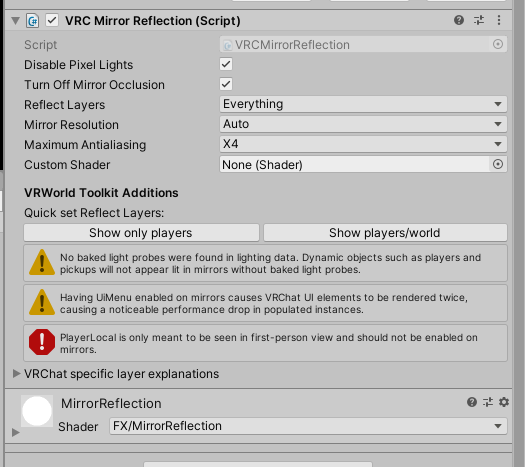
 viscid reef
You also want to make sure the mesh you're using is aligned on the xy plane with the reflective surface facing the negative z axis
autumn birch
anyone with exp using Dastmann's pouring package know what's going on here? The glasses vibrate and when falling over the side of this barrel they stick to it like a magnet.

Also worth noting, when picking a glass up all hell breaks lose.
All in unity though with Cyan so maybe it's not working properly for this reason?
autumn birch
Nope not a cyan issue hmm
frosty mason
i've seen a number of world with objects that collide with the player's feet so you can kick buttons, anyone know about that?
 calm zephyr
anyone care to take 10 min to help me learn how to use Collison system with UDon ? Please i am desperate. I need an object to delete the other object it collides with
😩
fiery yoke
calm zephyr
anyone care to take 10 min to help me learn how to use Collison system with UDon...
The event you need is OnCollisionEnter. Both objects need to have a Collider Component (MeshColliders need to be Convex) that does not have "isTrigger" set and at least one of them needs a Rigidbody that is not Kinematic.
calm zephyr
I feel like I have done exactly what your telling me but ill try again. 😦
cant i just use a Box collider ? Does it half to be a mesh ?
I did all what you said and the object is not deleting the other object when they touch
 viscid moth
how can I move on non rigid object with udon?
frosty mason
transform.setposition, transform.setrotation, transform.setpositionandrotation
fiery yoke
SetPosition and SetRotation do not exist. You have to modify the properties position and rotation directly. (Which thinking about it, is kind of weird, but thats how Unity works)
 viscid moth
I have this now, but I get an error message: Specified cast is not valid

I deleted the graph and created a new one. now I have no errors.
And what I want to move is a blade of a knive. but when I press LMB it just flicker once
calm zephyr
Still no luck getting this Object Collison to work
I need this log to no longer be active when this axe touches it


Thew Udon Script is in the axe and they both have Colliders and rig bodys
calm zephyr
I got it to delete the log but if the axe hits other objects it also deletes the log. How do i get it to only deactivate the log when only the log is hit
Still no luck Not sure if im even close to doing this right

 vale skiff
hello. I am making a vrchat world but I need help on figuring out how to add flight controls to players who join the world. Dose anyone know hot to do that or where i can get an asset for that?
elder peak
calm zephyr
I got it to delete the log but if the axe hits other objects it also deletes the...
you will have to check if you hit a log, one approach may be using a layer and adjusting the collision matrix
https://docs.unity3d.com/Manual/LayerBasedCollision.html
calm zephyr
elder peak
you will have to check if you hit a log, one approach may be using a layer and a...
The Long is getting deleted when i hit the axe with other colliders in the map. is this layer system the way to fix this ? How do i get the log to only delete when only the axe hits just the log.
elder peak
calm zephyr
The Long is getting deleted when i hit the axe with other colliders in the map. ...
if you really want this inflexible as this, you can just check if the gameobject you hit, is that log game object
calm zephyr
how do I do that ?
I just need the axe to make sure only if it hits the log nothing else
calm zephyr
elder peak
if you really want this inflexible as this, you can just check if the gameobject...
Sorry for being so complicated I really am desperate to figure this out
calm zephyr
elder peak
if you really want this inflexible as this, you can just check if the gameobject...
There must be a simple way to say in UDon if log is hit by axe then set inactive
elder peak
calm zephyr
There must be a simple way to say in UDon if log is hit by axe then set inactive
you compare whether the collision gameobject is the same as the object on the variable
calm zephyr
elder peak
you compare whether the collision gameobject is the same as the object on the va...
I dont have a clue how to do that 😦
elder peak
get the gameobject from other
use the operator for equality on variable you set and other's gameobject
calm zephyr
elder peak
get the gameobject from `other`
use the operator for equality on variable you se...
I apologize but you say it like I have used Udon for along time. I have only a month of experience in unity alone and like a week with Udon. I have been trying to get this log and axe thing working for 4 hours now and the best i got is the axe deleting the log when it hits the log or other objects 😦 im trying my best im sorry that im not following exactly.
floral dove
calm zephyr
I apologize but you say it like I have used Udon for along time. I have only a m...
since you're new to these systems, it will probably help to learn through some examples and tutorials before trying to make a very specific thing. You can check out this pinned message for how to learn the basics so you can make your own things without needing precise info at each step: #udon-general message
 errant spire
having trouble syncing udon variables (get and set), the player pressing the button will have the correct value for a second but then a second later it disappears. nothing happens to the second using. using a networked event didnt change this result
the whole game im creating in udon requires synced variables. i used to use game objects for it until i found out how to set variables, the stuff does work when there is only 1 user
tight magnet
hybrid canyon
presumably it would just be able to apply these components to a different mesh ...
I tried it, and it still doesn't work-
in fact, whenever I add a prefab mirror, the prefab mirror acts like a camera for my mirror (it's really weird)
dull stream
elder peak
get the gameobject from `other`
use the operator for equality on variable you se...
I think using a tag in this case would also be quite easy
I don't personally like it but it seems unity tutorials often suggest it
elder peak
dull stream
I think using a tag in this case would also be quite easy
you cannot use tags in vrchat
tight magnet
tight magnet
I tried it, and it still doesn't work-
in fact, whenever I add a prefab mirror, ...
nvm i got it \o/
elder peak
dull stream
I think using a tag in this case would also be quite easy
you cannot use tags in vrchat
elder peak
tags do not work with asset bundles
grave lantern
Is there a way to make an object a child of a target object?
On my securty cameras, i have one paning back and forth. But in order for it to follow the animation, i can't just move it to the target. i need it to become it's child if possible.
dull stream
you can try using constraints
dunno if you want assing it to anything at runtime tho
grave lantern
It might just be easier to make another camera and change the texture out?
grave lantern
anyone familiar with this? I can't seem to find the script
 grand temple
That's an SDK2 script
in udon, you need to have a vrcplayerapi and you can call voice modification functions on them directly
grave lantern
grand temple
in udon, you need to have a vrcplayerapi and you can call voice modification fun...
Ah thanks man!
indigo finch
grave lantern
Ah thanks man!
Here's one I wrote for a world to use as reference
 grave lantern
indigo finch
Here's one I wrote for a world to use as reference
grave lantern
indigo finch
Here's one I wrote for a world to use as reference
I realize sdk2 might be simpler. Thanks for sharing! All i wanted was to have a simple stage mic 😛
grand temple
if all you want is to set player's voices to a static pre-determined setting, you don't need to re-apply all the players in every onplayerjoined. You can just do onplayerjoined > set that player's voice and nothing else
all players will receive the onplayerjoined of all other players, so it will work
even late joiners
grave lantern
I'm going to need a mute/unmute button too :L
indigo finch
grand temple
all players will receive the onplayerjoined of all other players, so it will wor...
yea... it's an old script and had extras for redundancy as I didn't quite know what I was doing...
grave lantern
The idea is an "intercom"
grand temple
doing it dynamic is a little bit more complicated, mostly because sometimes players don't always do onplayertriggerenter and onplayertriggerexit. So instead of a region that you walk into and out of, I would recommend a pickup that you grab and hold.
Then what you need to do is have a synced bool and turn it on/off with PickupUseDown and PickupUseUp. When other players receive OnDeserialization, they can get the owner of the object and set their voice based on whether the bool is true or false
indigo finch
grand temple
doing it dynamic is a little bit more complicated, mostly because sometimes play...
or perhaps on pickup and on drop
grand temple
With this method, you'll also have to account for someone stealing the pickup so you may want to store the playerapi of the owner and if you get onownershiptransferred, you just apply the default voice settings to the previous owner (but make sure you check they're valid first in case they left)
grave lantern
Oh dear
So this is kinda my project: It's a studio designed for a talk show or podcast. It has camera control and adjustments left and right. The goal is to have a human producer switch cameras to whoever is speaking. But the producer neeeds to be able to speak to the stage and he also needs to be able to hear the stage.
The goal is to make a well produced podcast done entierly in VRChat.
 grand temple
ok, if you have a whole project instead of just a small prefab then I think it would be more valuable for you to understand the fundamentals of changing voice so that you can design your own system, rather than dumping a pre-existing design on you
What do you already know about udon and syncing?
grave lantern
I'll be brutally honest and say i've kinda shrugged off the net coding for later
I've focused on getting all animations to run properly and trying to get the paning camera work
grand temple
You can start here with the networking part https://www.youtube.com/watch?v=Mb6ZYBEhxiI&t=1s
Multiplayer experiences are the heart of VRChat, so creating a world that reacts to players and synchronizes the data between them is key.
This video introduces the concepts that power our networking system.
0:00 Introduction
0:22 Overview
0:42 Ownership
1:46 Variables
2:55 Events
3:23 Late Joiners
3:58 Recap
Once you've understood the...
grave lantern
grand temple
You can start here with the networking part https://www.youtube.com/watch?v=Mb6Z...
I'll have a look. Thanks!
grand temple
As for the voices part, the basic concept is that each player can hear other players in completely different ways, independently. So if you want the producer to hear everybody no matter what, you can have them click an interact that iterates over all the players and sets their voice high. Interact is a local event, so this will only happen on the producer's computer, and thus will only change their perception and nobody else
And likewise, if you have a button that boosts your voice like an interact, you can't just set your own voice and be done. Instead you need to communicate with the other players through syncing, either a variable or an event, and then on their computer they run some code that will set the voice
grave lantern
I see
grand temple
however, there are some events that are not local. For example onplayertriggerenter will happen for everyone because everyone will observe a player entering a trigger
And when it comes to voice itself, just be aware that if you increase voice far distance, you'll want to decrease the gain. Default setting is 25 far, 15 gain. If you go up to 50 far, you'll want about 10 gain, 100 far = 5 gain, etc
far affects the distance and gain affects the volume. So if you increase the distance without reducing the volume, it will be very loud when they are nearby
grave lantern
grand temple
And when it comes to voice itself, just be aware that if you increase voice far ...
Noted!
 broken zodiac
Hello, I'm wondering if/how I could make a timer run based on the world/instance?
Right now I have it running off of the owner of the world, but it's not really reliable if they disconnect, the timer resets with the new owner...
 dull stream
Well you can't really run it based on the instance so you have to run it based on the master
And when the current master leaves and a new one is assigned sync the values or something
I dunno if you can use the player leave event for this
Might be too late
broken zodiac
I'm still new to using Udon would it be possible to create a timer with the GetServerTimeInSeconds node?
I'm not to sure what each of these nodes do exactly, so just taking wild guesses for the most part...
indigo finch
broken zodiac
I'm not to sure what each of these nodes do exactly, so just taking wild guesses...
How is this timer being used exactly? Is it a small countdown, is it a entire world challenge timer, is it something that just tells everyone how long the instance has been up? Are there multiple timers going at the same time? The use will change what methods make sense
indigo finch
grand temple
doing it dynamic is a little bit more complicated, mostly because sometimes play...
Hope you don't mind, but this peaked my interested and I decided to whip up a prototype in udon graph (should have used sharp at this point...). It seems to work, though there is a notable amount of delay before it takes into effect. How do you tell udonGraph to manually resync a variable?

 languid vector
H
grand temple
indigo finch
Hope you don't mind, but this peaked my interested and I decided to whip up a pr...
You need to set the udonbehaviour to manual sync and then you can call RequestSerialization when you change the variable. That will sync significantly faster than continuous
However, the problem is you'd have to split this into two separate scripts because you can't have a manual synced udonbehaviour on the same object as objectsync, which you would want for the pickup
All you need is a script that takes onpickup and ondrop and forwards those events to another script on a different object
indigo finch
grand temple
All you need is a script that takes onpickup and ondrop and forwards those event...
hmmm... a simple script that fires custom event 'pickedup' or something as well as changes owner should do hopefully. just wondering if there would be a timing issue of the owner not changing fast enough
grand temple
nah, transfers are plenty fast
indigo finch
ah, cool cool
grand temple
it's continuous sync that causes delay
indigo finch
grand temple
it's continuous sync that causes delay
oh, it might be a non issue, but the script checks for the owner, but if the owner update to the other users happens after the script testing to see who needs to have their voice changed, then the wrong person would get thier voice changed
grand temple
That's why you need to keep track of the previous owner and then reset their voice when you get onownershiptransferred
broken zodiac
indigo finch
How is this timer being used exactly? Is it a small countdown, is it a entire wo...
I'm using it to run all my world events, so the idea is once the world loads a timer starts and after X amount of time, it will run a custom event for all players to see, then the timer resets and counts again...
I have an ARK world, so I was working with the idea of every 15mins a random dino animation would play or a supply crate would drop, ect.
But then I also wanna use the timer for other smaller events that happen like every 2-5mins as well, and they just all run off the world timer instead of a the owner/master, since when they leave right now, it resets and plays an event, even if one just played a moment ago...
void sandal
Is there a way to play youtube videos in video players on quest? I know you can use youtube link but I want to know if theres any way to play youtube videos
grand temple
void sandal
Is there a way to play youtube videos in video players on quest? I know you can ...
No, quest is unable to load youtube videos. The only videos they're able to load are direct links, like something that ends in .mp4
void sandal
how can I do direct links?
grand temple
typically you have to host a website
void sandal
like make a website?
indigo finch
broken zodiac
I'm using it to run all my world events, so the idea is once the world loads a t...
if there is just one or so variable running, you should be able to just do a synced float as a reference point. Then if the owner leaves, everyone has the same variable stored to continue off if they happen to be the new owner
indigo finch
grand temple
That's why you need to keep track of the previous owner and then reset their voi...
yea, I think its a non-issue and I'm just missing the obvious, but I'd still like to know what I'm missing so here goes:
script 1 tells script 2 to run 'hasPickup'. It then tells the network that script 2's gameobject's owner is player2, not player1
Script2 plays event 'hasPickup', and sees that it is a different person stealing it, so it sends the custom networked event 'Stolen'
Player3 sees gets the the call to play event 'Stolen' and sees that it is still player1 with the mic, so does it accordingly.
Player3 then gets told that the owner of script2's gameobject is now player2. but it has already done the 'stolen' event, so it doesn't change the voice settings
can this happen? or do owner transfers always come first or something?
grand temple
no, order is not guaranteed with network events and transfers
don't rely on one thing happening first
indigo finch
can you even put an artificial delay in it? is it usually a non issue?
void sandal
grand temple
typically you have to host a website
does weebly work?
grand temple
I have no idea what weebly is. If the url ends with .mp4 then there's a good chance, that's all I know
void sandal
weebly is a free web hosting service
 flat musk
I don't know where else to put this but I have been trying to slow down this for loop as it resolves the addition instantly and when using an update event it evaluates per frame when I want to slow down the for loop with some more complicated timers. This picture is the basic idea of what I a trying to accomplish, how do I make the for loop evaluate every second rather than every frame?
 grand temple
flat musk
I don't know where else to put this but I have been trying to slow down this for...
grand temple
flat musk
I don't know where else to put this but I have been trying to slow down this for...
If you know the exact fogdensity you want to start with and the exact fogdensity you want to get to, along with the time that it starts transitioning and the time that it stops transitioning, you can use update and mathf.lerp
flat musk
Ah I will have to research more into the math systems here then
because I have little to no idea what lerp means
grand temple
Lerp means that you give it two values and a time and it will give you a value in between those two
for example lerping between 5 and 10 with the time 0.5 will provide 7.5, because it's half way between 5 and 10
indigo finch
You can use the lerp function to change the fog to be closer and closer to the target fog level. using for loops is more for going through lists
 grand temple
no, it's not in seconds it has to be 0 to 1
but you can convert time in seconds into a 0-1 value
for example if you want to lerp for 4 seconds, you get the current time, subtract the time that you started the lerp, and then divide by 4
flat musk
indigo finch
You can use the lerp function to change the fog to be closer and closer to the t...
Thank you, that is gana help
flat musk
grand temple
for example if you want to lerp for 4 seconds, you get the current time, subtrac...
So that tells me I have gotten to the point I am going to have to go further in math than I did in college.
Because I would never have gotten to that conclusion without asking XD
grand temple
indigo finch
You can use the lerp function to change the fog to be closer and closer to the t...
Lerp can be used in many different ways and just blindly moving towards the target value independent of time is the easier way, so yeah just do that
flat musk
Well time for me to go to khan academy and get passed pre calc since now I have a reason to use it
grand temple
eh, game dev math is pretty independent of college math unless you're doing something super specific
I would recommend Freya Holmer instead, she teaches math that is more applicable to game dev
flat musk
Well if I am going to be a professional technical artist I would rather have all my foundations filled
but ye I get what you mean
grand temple

Freya Holmér is the co-founder of Neat Corp (Budget Cuts, Garden of the Sea), the creator of Shader Forge, an educator, streamer, and an indie game dev of her solo project, Flowstorm! Her work generally involves Unity, tech art, shaders, and C#.
About the talk
A lot of the math we use in game dev, is rarely taught in math class, and those who k...
VERY relevant to technical artists as well
shaders are much more heavy on math than game code, yeah. And Freya does plenty of shader stuff
indigo finch
flat musk
So that tells me I have gotten to the point I am going to have to go further in ...
lerps are rather simple, though a little hard to explain in text. You have two numbers, lets say 0 and 1. then you have a third number to tell you how much of each you want, lets say 0.5. The result will be half of number 1 (0) and half of number 2 (1) resulting in the final number 0.5. Then, on the next frame, number 1 is now 0.5, and number 2 is still 1, and we are still grabbing half so we get 0.75
or to make it more grid like:
0, 1, 0.5 = 0.5
0.5, 1, 0.5 = 0.75
0.75, 1, 0.5 = 0.875
indigo finch
grand temple
Lerp can be used in many different ways and just blindly moving towards the targ...
yea, missed the 'can' at the start, fixed! as for the deltatime, I find it makes a serious difference when considering the large difference in systems, though admittedly it isn't quite as simple
flat musk
Let me put it this way since it's a long story short sort of situation, I have a bad history with math because I have really bad foundations and got moved on when I wasn't ready
grand temple
yeah, that's exactly why I recommend Freya. She makes it very approachable and visual
About 10 minutes into that video is where she's talking about lerp
flat musk
Well in my case I am someone who just kind loads up on tools quickly
I had to learn all of udons netcode in like 2 days
But ye, I will watch that video, I put it in my watch latter
flat musk
indigo finch
You can use the lerp function to change the fog to be closer and closer to the t...
It worked! You have saved me a lot of stress
now I need to unary negate this fog
but not till after I rest and recover from having to learn a bunch of different c# systems
indigo finch
flat musk
It worked! You have saved me a lot of stress
something to bare in mind is that the script I wrote has nothing to stop itself. You will need to add something that makes that bool = false so it stops doing math constantly. perhaps add a float check that if the fog density is 99.9% there, it stops or something
otherwise it will continue to run until you leave the world
hushed gazelle
This is more of a general unity question but how can I get something to rotate at a fraction of a parent object? Like if I turn a dial 20 degrees the matching object will only rotate 10 degrees in the same direction because it's turning at half the rate.
flat musk
indigo finch
something to bare in mind is that the script I wrote has nothing to stop itself....
I do remember that being a thing in math
 scarlet lake
How do i use my mic
grave lantern
scarlet lake
How do i use my mic
You commonly talk to it in a fairly close proximity
scarlet lake
grave lantern
You commonly talk to it in a fairly close proximity
u mind screen sharing to help me?
autumn birch
I'm getting a really bad issue where players use a portal to another area. When teleporting to the new area it disables Hiribikis swimming prefab before teleporting but sometimes when a player teleports they get frozen in place and are unable to move. Anyone know how to fix this?
 fiery yoke
TeleportTo is very picky when it comes to inter-frame timing. Try to delegate it to the next update call by using SendCustomEventDelayedFrames with 0 frames
plush stump
IndexOutOfRangeException: Address: '512' is larger than the UdonVM's heap size of '512'.
Did this mean I put too much into one udon graph?
viscid moth
I have a knive that extends now, but on release it won't retract. Any Ideas?

 trim pilot
Where can o report somebody im dum dum
viscid moth
it finally works. can someone tell me what's different from the previous one?

In Game
grave lantern
wht "info" does this push through the noodle?
 fiery yoke
It will give you a AnimatorStateInfo struct, which contains information of the state the animator you give it, is currently in, on the layer you specify.
Its quite advanced, in most circumstances you would probably not need this, unless youre doing something very funky with Animators.
 fiery yoke
grave lantern
fiery yoke
<https://docs.unity3d.com/ScriptReference/AnimatorStateInfo.html> Here you go
fiery yoke
grave lantern
fiery yoke
<https://docs.unity3d.com/ScriptReference/AnimatorStateInfo.html> Here you go
Cheers!
 kindred pendant
anyone know how to get a button to toggle multiple things to false? i need help
grave lantern
kindred pendant
anyone know how to get a button to toggle multiple things to false? i need help
I'd recomend that you create a custom event on each of your things where you flip the boolean value
grave lantern
So this is the way i call custom events

here are the variables assigned

Make sure the eventName is exactly the same. And the Udon Behaviour variable is just the object that contains the event in question
In principle, you can call as many events as you want
kindred pendant
so what would you put in event name to set it as inactive or false?
grave lantern
Here is the called event
 kindred pendant
instance links to the object in the instance that you want to bind the event to yeah?
grave lantern
yea you just drag the object with the event you want to play to the udon behaviour variable
kindred pendant
this is so confusing, why couldnt vrc make tutorials on this
grave lantern
it's a mess
kindred pendant
ok so behaviour box is a bool?
behaviour would be telling it that i want it on or off. so what would i put there?
grave lantern
no i believe it's just calling the script
kindred pendant
uh
sdk2 was so much easier to understand
ok so
ive got event interact that leads to sendcustom event currently
grave lantern
nice that is your button
night viper
I was thinking more of using a "for loop" so they can put as many objects as they want for either turning things on or off Like this, where you put your gameobjects where the red boxes are

 sand basalt
is there a full list of all udon component with descriptions?
night viper
GameObject [] -- get Length ( not to get confused with "GetLength")
kindred pendant
im not sure how to get the toturnon, im assuming thats a custom event?
night viper
the public variable?
grave lantern
kindred pendant
im not sure how to get the toturnon, im assuming thats a custom event?
I believe it's your variable
kindred pendant
the variable being the button?
night viper
Click the arrow, search for GameObject[] Then make it public (and rename it) You will need 2 of this.

Then you drag that into the Udon editor
kindred pendant
doesnt seem to want to attach to get length
grave lantern
choose the one with the brackets []. It's an array
or it seems to be. you never know with this noodle soup
kindred pendant
ok so then how does it know, i want XXX to turn off or on?
wait
does it have to be "ToTurnON" exactly as in like it looks for that?
and the value would be 1, in the variable?
size sorry
night viper
Size is how many objects you want to plug there. If you want to turn on 100 objects ON, type 100, if you want 10, type 10. The "for loop" will do the action on all the objects at the same time, one after the other until it is done
kindred pendant
okay so how does it know i want this size to turn on/off
 gaunt jolt
soo question again
I've downloaded a few UDON prefabs which are amazing but not all of them have interfaces or even materials. is that something on my end or just the uploader?
other prefabs I've gotten are just scripts. how can I set the script into the world?
scripts like Desktop Text Chat. or something like that
kindred pendant
oh wait
kindred pendant
night viper
Size is how many objects you want to plug there. If you want to turn on 100 obje...
i get it thank you!
night viper
kindred pendant
okay so how does it know i want this size to turn on/off
This red box on my code will tell it to Set Active (true or false) to be true (on) on all the objects inside the "ToTurnOn" If you see in the red box, there is a "value" box, this means it will turn them to true (on) (checkmark)
 kindred pendant
🙏 thank you so much for your help. your a life saver
grave lantern
admittedly, it is better than my custom event solution 🙂
Depending upon how many variables that ought to be flipped
You don't happen to know an easy way to create a stage microphone in Udon like the one in open mic? xd
night viper
hm I dont know how that microphone on that world works sorry xD Also I have not experimented with voice overwrite (if that is what it uses) sorry
grave lantern
really struggeling to recreate that mic. It seems so easy in SDK2
wind atlas
grave lantern
really struggeling to recreate that mic. It seems so easy in SDK2
I don't think that problem is that easy to solve. But it all depends on what you need the mic to do.
Like, you could make it dynamic so multiple people can be close to it and it affects everyone's voice dynamically based on how far away they are.
Or you can just affect the one who is holding it, which is a lot more simple (probably since I haven't used the voice api in udon yet)
grave lantern
I need two types of amplification. One where all inside a box is amplified. And another where whoever is holding an object is amplified
wind atlas
grave lantern
I need two types of amplification. One where all inside a box is amplified. And ...
I'll try it myself real quick, sounds easy enough.
wind atlas
grave lantern
I need two types of amplification. One where all inside a box is amplified. And ...
No idea if this works:
 wind atlas
grave lantern
I need two types of amplification. One where all inside a box is amplified. And ...
wind atlas
grave lantern
I need two types of amplification. One where all inside a box is amplified. And ...
I went ahead and actually tried it. It works. Make sure to set the regular range to 25 (or whatever your default is). More here: https://docs.vrchat.com/docs/player-audio
VRChat
Players have two sources of audio: the voice coming through their microphone, and sounds attached to their Avatar. With Udon, you can change how a Player hears other players' voices and avatar sounds. For example, this graph makes it easier to hear another specific Player, boosting their audio by 5 ...
You could also increase voice gain, might make it sound more like a real mic.
grave lantern
wind atlas
I went ahead and actually tried it. It works. Make sure to set the regular range...
Awesome! i'm going to set it up my self now. i got a little busy earlier
wow i really did over complicate things
viscid moth
How do I prevent fast flying bullets to just fly threw thin objects, instead of bouncing off or impacting?
fiery yoke
viscid moth
How do I prevent fast flying bullets to just fly threw thin objects, instead of ...
Welcome to the problem of Continuous Collision Detection.
This is probably more complex than you might realize. Like here is a research paper that I found with a quick google search: https://hal.inria.fr/inria-00390356/document, just to give you an idea on the algebra that is related to this topic. Fortunately Unity already has implemented a CCD Algorithm for you. You can just change to continuous collision detection in the Rigidbody settings.
viscid moth
oh ok. found it. thx
kindred pendant
does anyone know how to delete the pedestal models? i assume theyd cost some kb, especially since i have so many in my world.
you could do it in sdk2 not sure about udon
kindred pendant
night viper
This red box on my code will tell it to Set Active (true or false) to be true (o...
how would one change the turn on to a toggle instead of just true
wind atlas
kindred pendant
how would one change the turn on to a toggle instead of just true
I don't know the context. If you want to "toggle" a bool, use UnaryNegation in udon.
kindred pendant
so basically
i want to make the button turn one thing on or off, but other objects set to false
basically. avatar pages. page 1 toggles 1st set of avatars but sets pages 1 2 3 and 4 to false

so i need turns on to be a toggle instead of just true
wind atlas
There are easier and more optimized ways to do it. But you could be lazy, just make 4 buttons each with that scripts. You have two lists, just add the buttons you want to be one and the ones you want off.
So button 1 turns off page 2, 3, 4 and turns on page 1.
So it wouldn't be a "toggle", doesn't sound like you need it though, right?
It's only important that other pages disapear.
kindred pendant
in sdk2 i do a toggle for the thing i want to turn on. then everything that shouldnt be on are all set to false
wind atlas
kindred pendant
in sdk2 i do a toggle for the thing i want to turn on. then everything that shou...
Yeah, my suggestion sounds like it would be enough. Try it out for yourself.
wind atlas
You pretty much already have what you need. Just create 4 buttons for each page with those scripts. Fill out the lists manually.
kindred pendant
ohhhhh
damn
but no wait
that wouldnt work?
i need the thing i want on to then turn off when i press it again
wind atlas
By the way, there is this cyan trigger thing that was released. It's supposed to help people work in sdk3 using sdk2 workflow. Maybe that would be more helpful to you?
wind atlas
kindred pendant
i need the thing i want on to then turn off when i press it again
I'm assuming only one page needs to be active at all times. So there is no need to turn it off unless a different page is selected.
wind atlas
That's the emulator that allows you to test vrc stuff inside unity. The same person made a package that's similar to sdk2 or something like that.
kindred pendant
the page needs to be a toggle otherwisw it would lag people
wind atlas
GitHub
CyanTrigger is a new compiler for Udon with focus on in-scene editing. The interface resembles the old SDK2 VRC Trigger interface, but has more functionality. CyanTriggers is not intended to replac...
kindred pendant
i just need to know how to swap the true to toggle
wind atlas
That would be more complicated, unfortunately.
You could use the UnaryNegation, but that would feel clunky.
With what you have right now.
kindred pendant
i could do it in sdk2
im so confused with udon
ok so how would i connect unarynegation to the graph i have?
 kindred pendant
can i connect it to block?
 wind atlas
kindred pendant
how do i connect it to a block tho?
wind atlas
kindred pendant
how do i connect it to a block tho?
I was saying replace the end. Hold on I'll make a screenshot real quick.
kindred pendant
oh your talking about the group, ok. let me try
indigo finch
wind atlas
No idea if this works:
Nice simple script! It does however require that no one can steal the mic, as then 'the person who got it stolen from's voice would never be reset. Also doesn't work for late comers or those who lag out during the event being called. That being said, great from a simplicity's sake!
@grave lantern, I played around making one from the concept that PhaseDragon mentioned. it ended up being rather large, but it should account for latecomers and mic stealers
 grand temple
Everyone receives OnOwnershipTransfer, there's no need to do a network event for "stolen"
autumn birch
So I'm trying to disable Hiribikis system within the system itself prior to teleporting to fix this loss of player control issue but for some reason the symbolName is greyed out on my graph and not Hirkibikis. Anyone know why?

 grand temple
The dropdowns being grayed out is because you're selecting the udon graph itself. You need to select the object that has the udonbehaviour so that it knows which object it's targetting
indigo finch
grand temple
Everyone receives OnOwnershipTransfer, there's no need to do a network event for...
there is an immediate check to see if you were the one that picked it up. I did this cause if the owner left the world, someone new would become the owner without them picking up the mic. would be rather strange if someone suddenly started being really loud
grand temple
indigo finch
there is an immediate check to see if you were the one that picked it up. I did ...
Right, but you still need to reset the voice of the previous owner back to default
all you need to do is onownershiptransferred > if currentMicHolder is valid > audioDefault
or for that matter, do the isvalid in audioDefault just to make sure it can't be done by accident when the player is not valid
indigo finch
grand temple
Right, but you still need to reset the voice of the previous owner back to defau...
when the scipt sees that the bool has changed (or the stolen event is called), each player checks if it is being held. if it is being held, and the owner is different, it then changes the stored owner's audio to default. it then finds the new owner, and then makes their audio amplified
grand temple
yes, but there is no guarantee that the network event will arrive before the ownership transfer
indigo finch
grand temple
yes, but there is no guarantee that the network event will arrive before the own...
hence why the script cant be called until then... is what i believe. the owner has to have seen that they have become the owner, before the network event 'stolen' will be called to everyone
grand temple
but at the same time, you're just making stolen do the same thing as OnDeserialization, which will do nothing because you already get ondeserialization when it transfers
autumn birch
grand temple
The dropdowns being grayed out is because you're selecting the udon graph itself...
I don't understand, I can't target the symbol with anything
grand temple
autumn birch
I don't understand, I can't target the symbol with anything
select the gameobject that has this graph on it and make sure that swimLoco is assigned
wind atlas
indigo finch
Nice simple script! It does however require that no one can steal the mic, as th...
Does that mean there will be no OnDrop event when someone steals it? That would suck. Ideally there would also be a OnPickup event when someone joins, but that's probably just wishful thinking.
grand temple
indigo finch
hence why the script cant be called until then... is what i believe. the owner h...
That's technically correct, but not what you need at all
I'm telling you.... on ownership transferred, set voice of current owner back to default...
indigo finch
grand temple
but at the same time, you're just making stolen do the same thing as OnDeseriali...
I didn't realize onDeserilisation was called when the owner transfers... guess it makes sense
indigo finch
grand temple
I'm telling you.... on ownership transferred, set voice of current owner back to...
so something like this?
 grand temple
yes, but make sure to do isvalid before trying to set any voice settings
indigo finch
I added the reset on owner changed, as well as made the update logic only run when the bool changes
udon graph gets rather laggy with graphs these sizes... the audio compiling is a pain...
 indigo finch
wind atlas
Does that mean there will be no OnDrop event when someone steals it? That would ...
indigo finch
wind atlas
Does that mean there will be no OnDrop event when someone steals it? That would ...
even if the onDrop was called, the owner would still be different so it would change the voice for the wrong person...
Thanks @grand temple for going over the code! Been quite eye opening how quickly you saw the flaws😅
grave lantern
don't mind me. Imma just check this prefab out 👀
autumn birch
Well I got it to work but it didn't fix the issue as I'd hoped. Player will still be either A. be locked in place or B. is forced to move in the direction they were going prior to entering the portal and cannot stop. Typically getting stuck in the ceiling corners. I thought making it disable first in the line of script would solve the issue but I was wrong..

It's completely random when the player gets stuck in place, I can't pinpoint the cause or reasoning as to why the player gets stuck sometimes but other times won't.
autumn birch
grand temple
yes, but make sure to do isvalid before trying to set any voice settings
I tried using that delay frames node too
 grand temple
that's not how delay frames works. It doesn't magically put a pause in the flow. Flow still happens instantly
When you do sendcustomeventdelayed it is exactly the same as sendcustomevent except it's put in a queue that will happen later
I'm having a hard time following your question though, the isvalid comment was about bush's thing
grave lantern
is it possible to set a bool to true at a spesific animation?
grand temple
yes, animators can use animation events to send custom events to udonbehaviours and then the udonbehaviour can set the bool
 grand temple
grave lantern
i have this mess
grand temple
grave lantern
i have this mess
That looks like something that should be either a blend tree or a normalized time animation
grave lantern
There is probably much better ways to do this. But the idea is that there are 10 different height levels for a camera.
I have two buttons that basically toggle the animation to climb up or climb down.
Bottom one is the button

But yea. Trying to get it network synced
grand temple
why control that with an animator at all? It would be much simpler to control it by script if it's just moving up and down
grand temple
I would recommend using an int instead of a bool, then you can just sync the int
if you want to stick with the animator
grave lantern
that was a good idea
need a new button program then to sycle through the numbers
possible to send a "++" on a button?
grave lantern
nice ty
grave lantern
do these handle negative numbers?
 grand temple
yes
grave lantern
is there a way to gate an integer from surpassing 10?
grand temple
sure, use mathf clamp
grave lantern
damn you're like a wiki!
grave lantern
quick question about netcode. Is it a good practice to make whoever presses the button owner?
dawn forge
grave lantern
quick question about netcode. Is it a good practice to make whoever presses the ...
Correct me if I am wrong anyone, but from my understanding is that I prefer to keep it to the instance master and reduce ownership transfer transactions much as possible.
This reduces the wait time and CPU costs of transfers. Would be nice if I could weigh people's pings and allow the fastest player to be the owner.
grand temple
grave lantern
quick question about netcode. Is it a good practice to make whoever presses the ...
only if you are syncing variables. If not, then it's unnecessary
grave lantern
that's a great idea
it's crazy. I'm finally starting to understand this noodle soup
plush stump
How to reset bunch of array to start a second round? I use array.clear but then game won't start for the second time.

I'm using something like this, but code didn't work properly when I clear my variable and start for a second game
grave lantern
Do anyone know how to make this broadcasting tool? Basically, if you put your player camera inside that sphere, it'll stich the video feed onto the camera perfectly.

 lucid geyser
So im still new to world making and I am very unfamiliar with UdonSharp and how to download it and use it. I want to add a pool table and beer pong to my world. Can someone help me with learning how to use these things?
elder peak
lucid geyser
So im still new to world making and I am very unfamiliar with UdonSharp and how ...
if you only need it as dependency
https://github.com/MerlinVR/UdonSharp/releases/tag/v0.20.3
ensure to have the latest sdk installed
broken zodiac
Is it possible/how would I have an udon script on an empty gameobject that starts with an ontriggerevent/interact event, but for a different gameobject?
Or do I NEED to have the udon script attached to the gameobject that is the trigger/interaction?
grand temple
you need to have it attached to the right gameobject
but you can have one script send the event off to another script
broken zodiac
Alrighty thanks, also is there a limit of how many scripts I can have/would having too many cause issues?
grand temple
depends on the events you use. Things like Update will happen every frame, so if you have a lot of scripts using Update it will be expensive
but if you have a ton of scripts with just interact, it's cheap
broken zodiac
Thanks again!
 broken bear
grave lantern
Do anyone know how to make this broadcasting tool? Basically, if you put your pl...
broken bear
grave lantern
Do anyone know how to make this broadcasting tool? Basically, if you put your pl...
Hirabiki has it on their booth page
grave lantern
broken bear
Hirabiki has it on their booth page
booth page?
broken bear
Online Marketplace. Booth dot pm. Search their name and the author page should show up
grave lantern
broken bear
Online Marketplace. Booth dot pm. Search their name and the author page should s...
can you find me a link? this booth place is confusing to me
broken bear

VRChatでデコレーション付きスクリーンショット(SS)を帰るやStreamCameraで録画する際に画面に貼りつくことで撮影できるようになるシェーダーです。 ワールドで生成したテクスチャ(RenderTexture)などを持ち帰るやVRカメラで写真を撮る際に使えます。 アバターへの組み込みはフレンドじゃなくても使えます。(アバターにのカメラなし) VR視点は決して視界ジャックされないので、安心使ってください。
grave lantern
my eyes are overwhelmed by these hieroglyphs xD
grave lantern
broken bear
https://hirabiki.booth.pm/items/2181334
But thanks! I really appriciate you brought this to me! Much love ❤️
grave lantern
broken bear
https://hirabiki.booth.pm/items/2181334
Oh dear. I bought the thing but i have no clue how to set it up xd
broken bear
Run the page through google translate, it has two prefabs choices, drag one into the scene and the description should say what each prefab is for
lucid geyser
elder peak
if you only need it as dependency
<https://github.com/MerlinVR/UdonSharp/releas...
https://gyazo.com/6a48a55e7c52c4b13f3941bf8fe920c3 This is what happens when I click on the link to download UdonSharp.
 elder peak
lucid geyser
https://gyazo.com/6a48a55e7c52c4b13f3941bf8fe920c3 This is what happens when I c...
elder peak
lucid geyser
https://gyazo.com/6a48a55e7c52c4b13f3941bf8fe920c3 This is what happens when I c...
click on the UdonSharp_v0.20.3.unitypackage under Assets
lucid geyser
elder peak
click on the `UdonSharp_v0.20.3.unitypackage` under Assets
So do I just add that as an asset in the unity project?
elder peak
you open it while your project is open, then it automatically will include it
lucid geyser
elder peak
you open it while your project is open, then it automatically will include it
Hmm okay. So I basically will just go to the udon prefabs that I want to include and download them? Im not too sure how this works
elder peak
lucid geyser
Hmm okay. So I basically will just go to the udon prefabs that I want to include...
have you downloaded UdonSharp_v0.20.3.unitypackage? if you click on that, a window will open in your project, you then just click import
lucid geyser
elder peak
have you downloaded `UdonSharp_v0.20.3.unitypackage`? if you click on that, a wi...
Yis, ive imported the package already, im just curious how im supposed to use this imported package, what it exactly does, and how I will use it to add the 8 ball and the beer pong to my project.
elder peak
lucid geyser
Yis, ive imported the package already, im just curious how im supposed to use th...
read the requirements on your assets, they are described on the respective website
udonsharp is often used by them, so you just need to have it reside in your project
lucid geyser
elder peak
read the requirements on your assets, they are described on the respective websi...
https://docs.google.com/spreadsheets/d/e/2PACX-1vTP-eIkYLZh7pDhpO-untxy1zbuoiqdzVP2z5-vg_9ijBW7k8ZC9VP6cVL-ct5yKrySPBPJ6V2ymlWS/pubhtml# This is the one I was reccomended
I only see one for 8 ball and its not really that great. I want an 8 ball table like the one in Just B club or the movie room.
This one looks more like a ground 8 ball
lucid geyser
elder peak
these two shown there are not the ones you want?
Oh yes! Those are nice! this also has instructions 😄
lucid geyser
elder peak
these two shown there are not the ones you want?

This is what it gave me. So is it telling me that the table has to be the child of an object to function?*
 ember vine
is there an example of sendcustomeventdelayed I can look at for udonsharp? I can't seem to make it work for my world
broken zodiac
ember vine
is there an example of sendcustomeventdelayed I can look at for udonsharp? I can...
This is how I used it simply...
 ember vine
broken zodiac
This is how I used it simply...
ember vine
broken zodiac
This is how I used it simply...
ah yeah, I don't use graphs
broken zodiac
Oh sorry, I didn't see the udonsharp part
ember vine
sall good
I managed to get it working, have to declare the event as 'public' of course
bangs head
so I managed to get it working, but I am still getting hiccups whenever the event goes off (I am trying as much as I can to run a computationally expensive thing without making the player freeze)
is there a way to do things like procedural generation calculations in the background?
i was told coroutines would be the way, but there might be an easier way
wind atlas
ember vine
i was told coroutines would be the way, but there might be an easier way
Correct me if I'm wrong but UdonSharp does not have coroutines.
I'm not sure what exactly you are trying to do, but I bet you can do it in the update loop somehow instead.
Well, more like you have to find a way to do in the update loop since there are no alternatives.
fiery yoke
ember vine
is there a way to do things like procedural generation calculations in the backg...
Udon runs synchronously on the main thread. Therefore, while Udon is processing the entire program is frozen, and frames will not be rendered.
One way to get around this is by doing calculations across multiple frames, however single-thread asynchronous behaviour can be really complicated to implement.
One example is to instead of processing an entire array every frame, processing only one of the elements inside of it, and waiting until all elements have been processed. This has the huge disadvantage that the update rate is very low, and in some cases you have to throw away all of the processed data when something changes, which could lead to never being able to fully process the data. It really depends on what the exact requirements are you have to work with.
ember vine
fiery yoke
Udon runs synchronously on the main thread. Therefore, while Udon is processing ...
that is a bit limiting, but yeah I guess I'll try doing calculations per frame. The good thing is with procedural generation is I don't need them to be that timely with it
 serene moat
coroutines in Unity run on the main thread as well so if your goal is to use them to not block the main thread, that's not going to work even in normal unity
fiery yoke
Yeah right. Essentially Unity never really supported multithreading natively until very recently with some fancy new tech called the Job System which works together with the Entity Component System (advanced Unity tech that has no relevance to VRChat yet).
To call most of the Unity functions you have to call them from the main thread iirc. Since the actual backend of Unity is written in C++ which is not managed by .NET, doing multithreading properly is not an easy task I guess.
lucid geyser
lucid geyser
https://gyazo.com/48e2f73f10f0c044c9cb0e64e42c4a17
BUMP
broken zodiac
I'm trying to get an interaction event on my continue button, so when you click it, it will check if the text from the textmeshpro equals "X", if so it will change that text, then rinse and repeat...
Was trying to make it more clean, instead of making tons of text objects that just toggle on and off...
But I'm lost on how to get it to check the text, I know the set text works if I just skip the check, but the check is needed so I only have to use one continue button that checks each time you click to see which text your on...
This was the last thing I tried...


 grand temple
no, you cannot
the way I like to do it is to have a text component hidden somewhere. The button sets the text then sends the event to the udonbehaviour. The udonbehaviour then reads the text as the argument
certainly not ideal, but it's the best option available right now
 edgy ingot
sadge
back to unity triggers i go
eager olive
Did you modify the hierarchy of your pool table at all?
grave lantern
I need a way to check if the value PlayAnim1 is true. How do i do that?
 grand temple
depends how you want to use it. You can plug a bool directly into a branch already, so you don't need any extra processing on it
a bool is true/false already so there is no purpose in doing a comparison if you want to know if it's true
grave lantern
Ah so the output will be whatever value the bool has right?
 grand temple
yeah
grave lantern
I'm too logical
grand temple
if you want to know if it's false, then you can simply invert it with boolean.unarynegation
grave lantern
So this would set it to false if it's true right?
 grand temple
yes
though you can also just use a bool const if you want to always set it to false
lucid geyser
eager olive
Did you modify the hierarchy of your pool table at all?

Where is it supposed to go?
grand temple
try just making a new gameobject and putting the whole thing inside that. Not sure why it needs that but the error seems pretty clear
lucid geyser
grand temple
try just making a new gameobject and putting the whole thing inside that. Not su...
https://gyazo.com/9188c0c70c5a5b4056375fda940e7025 I tried putting the table under just a empty game object but that didnt work but then I realized the error said "2 parents above" so i added a 2nd empty game object and placed one game object inside the other and then placed the pool table in the 2nd empty game object. After I did that, i looked and there was this error.

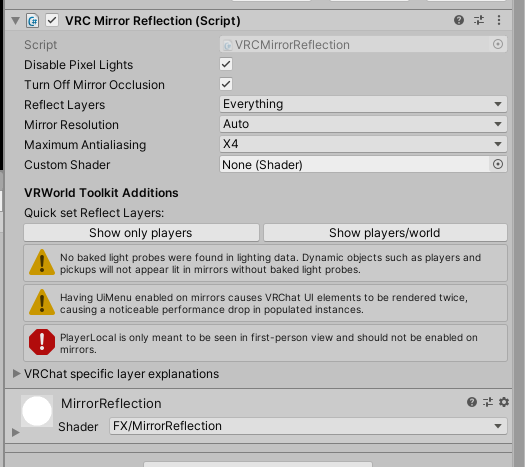 grand temple
Have you tried contacting the people who make this prefab? This channel is typically for help with creating new scripts, we can't really help with getting prefabs to work
 spark comet
grand temple
try just making a new gameobject and putting the whole thing inside that. Not su...
spark comet
grand temple
try just making a new gameobject and putting the whole thing inside that. Not su...
for reference, the issue was that it was the wrong prefab
VRCBCE (Base) is one of the nested component prefabs
grand temple
that would do it
kindred pendant
Hey guys. Does anyone know how to set like a playerapi voice bubble? So basically i have 6 sitting booths and i want it so whem you go in the booths. No one outside can hear your voice unless they are in the booth with you. So you can talk privately in the booths without worry. Does anyone know how to do this? Thanks
fiery yoke
kindred pendant
Hey guys. Does anyone know how to set like a playerapi voice bubble? So basicall...
kindred pendant
Ive seen that. But i dont know how to set it up in an udon graph
It doesnt explain how it should be set up.
fiery yoke
Ohh true
kindred pendant
Im very new to udon. So i dont understand it fully yet
fiery yoke
https://docs.vrchat.com/docs/getting-players
This explains how you get players
kindred pendant
Im trying to learn tho. I just need help by people to i can understand it more
fiery yoke
However its missing a very crucial one: Networking.get LocalPlayer
kindred pendant
So what ive tried to do is set an audio orb in each booth. I just dont know how id start to set it up in the graph.
Would it be like start> player local> player api voice radius 6 or something?
fiery yoke
Ohh. One slightly confusing thing is that the settings are local to every player.
Meaning that setting your own voice radius, would only have an effect if you could hear yourself, and your voice came from somewhere else, then where your own audio listener (ears) is.
This is typically not the case :P
So you instead have to set the settings of all other players, for everyone.
kindred pendant
Or maybe i could do a box collider that when your inside it, it changes your voice range to a certain number or block out the audio when your not in it
Huh
So you cant do if a player enters the area to radius is set lower?
fiery yoke
Yes. As I said, just remember that the settings should always be the same for a single user from everyones Point of View.
Otherwise you could end up with one user being muted for some, but not for others, which would really ruin the experience.
fiery yoke
kindred pendant
So you cant do if a player enters the area to radius is set lower?
You can. You just have to be clever about how you do that.
Since everyone observes you entering that box, they will all set the settings correctly.
kindred pendant
Okay. I just dont know how that would look on the graph or how to even begin setting it up
fiery yoke
Well for one, you would use the OnPlayerTriggerEnter and Exit event. Then you just use the playerapi you get from those events, and set the audio settings on that api.
That should already be enough to make it work for the most part.
kindred pendant
So i would start with onplayertriggerenter
Setplayerapi radius?
Or is there another node i need to put in before that?
Im assuming it wont just be those two nodes. Since it never is and that would be too easy for udon
fiery yoke
Well in this case it really is that easy.
There used to be one huge problem with respawning, that led to it not registering the trigger exit and I dont know if that has been fixed since.
So there is a few edge cases where it can fail. But overall it should just work.
kindred pendant
ok. one moment. im just trying to set one up now to see if i can
would i just do the collider as a doorway or set it as the entire booth?
im gonna do it as a doorway

this look right?

ive done a bubble so hopefully when they respawn itll see it as they exited
kindred pendant
still need this confirmed please
cold raft
i am not sure if respawning triggers on trigger exit
scarlet lake
Super power cute boops you face
 stray junco
what is AudioLink
is that a new type of AudioSource
and if yes then it can replace unity AudioSource
cold raft
no its not
AudioLink is the cool stuff the new kids use to make thier worlds & avatars respond to music played on the video source
fiery yoke
Its is a prefab/system developed by some community members
stray junco
@cold raft
aah so it's like some sort of audio visualizer
fiery yoke
Its the framework for a visualizer.
stray junco
@fiery yoke
right thanks
fiery yoke
But I think it also comes with some default ones
It also allows avatars to respond to the music played in your world, since it "connects" to them, via special textures that the special AudioLink shaders on an avatar can "grab"
kindred pendant
kindred pendant
Does this look correct?
elder peak
cold raft
i am not sure if respawning triggers on trigger exit
yes, it does
 heavy merlin
@dusk lance I have a question regarding "the sphere" world that you made. I understand that you used stations to rotate a player around, however, when I have "player mobility" set to "mobile" and the station is not completely level, my avatar freaks out and bounces around violently. I assume you somehow have to change the gravity too when rotating the station. Are you willing to share how you did that in your sphere world? I'd greatly appreciate that