#udon-general
59 messages · Page 72 of 1
 rain hearth
hmm, they dont appear in node search
 grand temple
huh?
rain hearth
okay, was looking for something like RenderSettings.skybox
the "get skybox" is not showing up either
grand temple
it's just a material, so you want set skybox anyway
then you can have some public material variables
rain hearth
hmm, well still cant do anything, Udon does give me any results even when I type in "sky"
grand temple
you have to search for rendersettings first
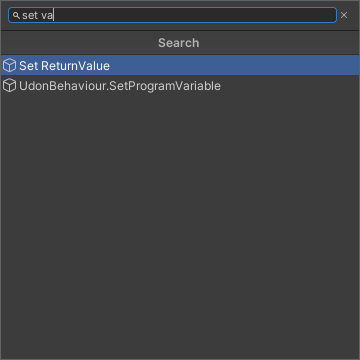
or if you're ever unsure what category something is in, you can do tab to do a full search
rain hearth
okay, starting to make sense, I see them now
rain hearth
hmm, cant I just drag and drop the material into the graph editor? Not sure what I need after get skybox
grand temple
no, use set skybox
and make a new material variable in the window on the left
drag that into the "set skybox" node
and then make that variable public so that it shows up in the inspector of the udonbehaviour, at which point you can drag it in
rain hearth
okay, this is what I got so far

i know I might be missing some logic, so it can switch back to day, and night again for each interact
grand temple
yeah, you can have separate buttons for each setting but they can be the same udon source
right now you have it named "nightmaterial" which implies that you're setting it to night, but there's no reason that you can't use the exact same source but plug in a day material
you'll want a public color variable to plug into the fogcolor so you can adjust that though
rain hearth

okay, so just make a seperate button with all the variables swapped places and it should be good?
the other game object variables are the objects that contain their own respective directional light and post-process volume
oops, gotta move the interact to the start
 plush stump
Which event should I use for a vr controller input? Like clicking A/B button send a custom event to my program.
 quaint trellis
I'm trying to have an animation increase with 1 frame whenever I press a button. If I press it now, it only goes to frame one and not further. This is my udon graph rn.

i've been able to find that the issue is in the GetInteger node. It doesn't seem to be getting the integer at all, so the addition node is constantly adding 1 and 0. is there a way to get the correct integer, or maybe avoid using the GetInteger node entirely?
quaint trellis
more testing! it seems i was wrong, and the addition node does not work as expected. even if i do 3 + 1, which is 4, it only goes to frame one. It seems like the node always returns 1. this seems to suggest that either I'm using the addition node wrong, or it is broken.
 mighty fjord
How are you using an integer to control what frame the animation is on? What's the animator controller setup like?
I'd use a float which is used as the normalized time instead
 fiery yoke
quaint trellis
more testing! it seems i was wrong, and the addition node does not work as expec...
fiery yoke
quaint trellis
more testing! it seems i was wrong, and the addition node does not work as expec...
Or it is outputting the correct result but you're using the result wrong. The Debug.Log node is your friend inthis case.
quaint trellis
fiery yoke
Or it is outputting the correct result but you're using the result wrong. The De...
i used the log, and it does ouput the correct int. so it is counting up. however, for some reason it's not setting the int "Frame" of the animation. however, if i manually set the int it needs to change to (by changing value in setinteger) it does go to the correct frame.
that's also why I can't use a float, as you can't do "float equals x", only greater/less than.
quaint trellis
mighty fjord
How are you using an integer to control what frame the animation is on? What's t...
this is my animator tab. every frame has a transition. if Frame=1, it goes to frame one etc. I know it's jank, but this was the only I was able to get it to work correctly with my limited knowledge.
 mighty fjord
By the looks of things, it's most likely getting stuck on the first state after the initial one it goes to. Try playing the scene, clicking the object with the animator on it, and then going to the animator tab to see which state it's on, and then try to change the int parameter manually in the animator.
However, I'd recommend driving the normalized time of a state using a float parameter instead
quaint trellis
mighty fjord
By the looks of things, it's most likely getting stuck on the first state after ...
how can i click on the object? when i press play, i can't interact with anything in the game window
mighty fjord
Once you press play, it prompts you into game view, but you can easily just switch back to the regular scene view or hierarchy
 viscid reef
that looks like because your initial state can only go to 1 of the subsequent state
you should be transiting from the any state node, not the default node 0 you have there
would definitely recommend what Nestorboy said and use a float with normalized time or a blend tree instead though
quaint trellis
viscid reef
you should be transiting from the any state node, not the default node 0 you hav...
thank you! it worked! i'm very new to vrchat development and unity in general, so i completely overlooked that.
quaint trellis
viscid reef
would definitely recommend what Nestorboy said and use a float with normalized t...
how would i go about doing this?
mighty fjord
If you click on an animator controller state, you can tick the 'Parameter' option and select a float parameter from the animator controller. The float will be used to sample a point in the animation, 0 is the very start of it, and 1 is the end.
So with this in mind, you can do some simple math to sample a given frame instead (frameIndex / frameCount - 1), but make sure it outputs a float so that you can use it to set the float parameter.
quaint trellis
aight, imma try that
mighty fjord
E.g: Animation with 9 frames, and I want to sample the middle frame, 4 (since the frame indexing starts at 0 and goes to 8). Now if we do the math it's 4 / 9 - 1 = 4 / 8 = 0.5, meaning the float is right between 0 and 1, in the middle.
fiery yoke
Most likely your transition logic is just wrong. Statemachines can be quite tricky.
 wind atlas
Just some shower thought, but maybe someone knows: Can you upload a collider on an avatar and then detect it in an Udon world?
I know you are supposed to use player data and stuff, but it would be fun if you can access the transform directly.
 dapper lion
wind atlas
Just some shower thought, but maybe someone knows: Can you upload a collider on ...
dapper lion
wind atlas
Just some shower thought, but maybe someone knows: Can you upload a collider on ...
yes. actually
for some reason - you can
wind atlas
Really? So I can, for example, impale people's limbs more accurately with this?
wind atlas
Damn, that's interesting. Probably not as useful for most cases, so I'll keep it in the back of my mind for now.
dapper lion
probs footsteps and collider audio. like i discovered this 5ish days ago when someone had a flight avatar and was walking on my marimba and their colliders were triggering the marimba sounds
or avatar to world prop systems
actually.... theres a lot of stuff you could do with this
wind atlas
A belt system to attach stuff directly to the avatar too. Although people need an avatar with a collider for all this to work.
dapper lion
correct. at this point, you would use bone positions
mighty fjord
The only thing avatar colliders allow for is collision events more or less, but I believe that will be patched in the future
dapper lion
mighty fjord
The only thing avatar colliders allow for is collision events more or less, but ...
physbones right?
mighty fjord
What?
I believe you're really limited to what you can actually extract from the collision though
 broken bear
Can udon read the unity version used to upload the world package? Or better, the avatar package ?
 floral dove
broken bear
Can udon read the unity version used to upload the world package? Or better, th...
floral dove
broken bear
Can udon read the unity version used to upload the world package? Or better, th...
no, Udon has no access to that info
grand temple
add an interact event
the white arrow that comes off of it is called "flow" and that determines what happens
you can plug flow into other nodes like gameobject set active
and you can chain nodes together to do multiple things in a specific order
grand temple
what do you mean by editor? Like the main udon graph window, or the inspector on the right?
 restive veldt
i added the Interact event to the udonbehavior through the Udon editor, compiled/saved, and then went back to the inspector to check and see if i had settings for interaction on the udonbehavior. But there's nothing there.
grand temple
That's correct, you don't use the inspector to determine what happens with the interact
you need to add more nodes to the udon graph and connect the flow (white lines/arrows) from interact into the nodes that you want
grand temple
If the interact isn't connected to anything, then it will not be compiled into the final script. If it's not in the final script, then it has no way of knowing that it exists, so it won't allow you to change the interact text
as soon as you make the interact do something, it will be compiled and the inspector will pick up on that and allow you to change interact text
 magic pelican
How do I get this toggle to toggle for all players instead of just the individual?
 floral dove
magic pelican
How do I get this toggle to toggle for all players instead of just the individua...
floral dove
magic pelican
How do I get this toggle to toggle for all players instead of just the individua...
you can learn how Networking works in Udon here: https://docs.vrchat.com/docs/udon-networking
For this graph, I'd recommend adding a synced bool variable, and using an OnVariableChange event to set the GameObject to active or inactive based on the newValue of that variable.
VRChat
The three main concepts used for networking in Udon are Variables, Events and Ownership. Variables are containers for values - like a number, a set of colors or a 3D position.Events are things that happen at a moment in time.Ownership is the system that decides which user can update a variable, whic...
 autumn birch
Does anyone have a basic "on collision with player", "do this" script I could have?
 hallow sable
how exactly do I use VRCInstantiate? can't find out how
autumn birch
Do I need to add something to this for it to work?

 rotund wolf

would this be the right thing to do if i wanted to press a button and have me teleport somewhere?'
grand temple
rotund wolf
would this be the right thing to do if i wanted to press a button and have me te...
No, what you want is VRCPlayerApi.teleportto. plug in networking.localplayer and some position, which you can get from a transform
 olive jay
Heyo, just trying to wrap my head around an idea. What would be the best way to detect a held object being shaken. Would it just be getting the velocity from a rigidbody component from the object? Or is there another way I could go about it?
 shell ingot
is any extra code required for this to work
 grand temple
That would work, but the block is unnecessary and the settings are definitely not what you want
if you increase voice range you want to decrease voice gain
with 100 range you'd probably want about 5 gain
shell ingot
grand temple
if you increase voice range you want to decrease voice gain
why would you decrease gain?
grand temple
because when you increase range, it gets louder
increasing gain also makes it louder
so you'd want to decrease gain to counter-act it
shell ingot
@grand temple one last thing could I also apply this to a moving object
grand temple
yes, as long as it has a rigidbody
shell ingot
such as a holable microphone
grand temple
you'll have to make the collider pretty big because the collider for other players is just a small sphere at the feet
so while holding the microphone you'd have to make sure it's big enough to reach the feet
rotund wolf
grand temple
No, what you want is VRCPlayerApi.teleportto. plug in networking.localplayer and...
is this in the udon graph cause i dont see it in the udon graph
grand temple
yes, you'll need to navigate through categories. The first is playerapi, you search for that and hit enter. Then inside that category you search for teleportto
if you're ever unsure what category something is in, you can do a full search with tab and just search for it directly, in this case teleportto
rotund wolf
grand temple
No, what you want is VRCPlayerApi.teleportto. plug in networking.localplayer and...

is that good?
grand temple
yep, now plug in whatever position you want
rotund wolf
cause when i click the button it keeps teleporitng me to spawn
rather than the place i wanna go to
grand temple
yes, because you're not defining a location
oh actually you are giving a position but it's -140 on the Y axis so it's probably causing you to respawn
grand temple
then you'll have to lower the respawn height of the scene descriptor
rotund wolf
wouldn't that lower the spawn at the start of the world tho?
cause my spawn ponit is at y=0
and the place i wanna teleport to is below the map at y=-140
grand temple
changing the respawn height doesn't change the spawn position
rotund wolf
why would i have to increase spawn height tho?
(its originally at -100 btw)
grand temple
the respawn height means that if you fall below it, you'll respawn
your respawn height is -100
the place you want to go is -140
-140 is less than -100
rotund wolf
ah i see
so if fall < -100, it'll respawn
i see

at this point it's spawning me off the map lol
grand temple
do you mean actual spawning or do you mean when you want to teleport?
rotund wolf
i meant when i want to teleport
spawn's perfectly fine
it's just that when i teleport, i end up respawning for some odd reason
grand temple
the position that you put in is probably not correct then
grand temple
add a public transform variable to the graph
drag that into the graph
then get transform.position
and plug that into the teleport location
then create a new object to be the "teleport point" and position it where you want them to teleport to
then plug the teleport point into the slot in the udonbehaviour inspector
rotund wolf
do i still need the getlocalplayer api thing?
grand temple
yes
rotund wolf

this is what i have
idk if its right
from what ive noticed
it teleported me to the exact same spot i was standing on
i think i need an end position somehow
grand temple
you're not specifying what transform you want to get the position of
which means that it will get the position of the object that this udonbehaviour is running on
rotund wolf
i plugged the transform into the teleport location
 hallow iris
mhhh when a value reaches 0 a player would be sit onto a station that is supposed to be picked up but for that i would need a colider that is enabled but for god sake idk why trough the graph the capsule collider is not getting aktivaded in any way

it wont stop ya from moving trough nor is it posible to pick it up
am i just overlooking something or does the set enable just doesnt work that well <.<
 north temple
Is there any solution how the kicking player in the world? without placing the portal.
 cold raft
no
north temple
Okay, thx
hallow iris
north temple
Okay, thx
I mean, force crashing him would be a thing
By making an event that sends a custem event to it self
Making it an endless self repeating event
Which instandly crashes
 steel remnant
I've just started poking at UdonSharp, and I keep seeing tutorials with VSCode "suggestions" for VRC functions/types, I don't have these, although I do of course have C# intellisense.
How would I go about getting these?

Hm... seems like I have bigger issues. 😅
I'll hammer this a bit, hopefully that's all.
 wind atlas
Even if you are using vscode, once you have a proper project file generated by Unity, it should you show everything.
steel remnant
wind atlas
Even if you are using vscode, once you have a proper project file generated by U...
It shows monobehaviour stuff, but no Udon.
Here's the project folders.


Got the latest U# and VRCSDK too, so shouldn't be that. 🤔
(and using Unity 2019.4.31)
wind atlas
Do you have the namespace VRC.SDKBase imported?
steel remnant
Yes.
 wind atlas
I haven't used vscode in a while, so I'm afraid I don't know the issue.
Make sure whatever extension you are using is importing all the project file.
I remember omnisharp had a log for that.
steel remnant
Omnisharp was whining about files not being loaded earlier, but the messages went away.
wind atlas
Try restarting it and see what it logs.
steel remnant
Restarting VSCode and just OmniSharp doesn't send any errors any more. 🤷♂️
I'll try making another project real quick, just to sanity check.
bah
 wind atlas
Have you read this? https://code.visualstudio.com/docs/other/unity

Visual Studio Code can replace MonoDevelop as the editor for Unity
steel remnant
Nope, I'll give it a read, thanks. 😅
wind atlas
Specifically this: https://code.visualstudio.com/docs/other/unity#_enabling-code-completion-for-recent-versions-of-unity
Visual Studio Code can replace MonoDevelop as the editor for Unity
Hope it might help a bit.
steel remnant
Hopefully, thanks for the help either way. 🙏
Yea no, didn't fix it.
It's weird, I get Unity code completion, but nothing from VRC. :/
 stable venture
Does Udon support making external http requests?
fiery yoke
stable venture
Does Udon support making external http requests?
Nope. And probably not any time soon. The only HTTP requests that are not made by the client itself directly are those coming from Video Players.
steel remnant
steel remnant
I've just started poking at UdonSharp, and I keep seeing tutorials with VSCode "...
Found what I was missing. xD
There's a prompt that shows up when you open a .cs script where you have to select the .sln, but it just looks like a search bar, and I instinctively closed it every time. 😂
I am big dumb
 scarlet lake
Anyone ever had their vrchat sdk stuck in some udonsharp compile loop that won't let them launch? I've tried recompiling manually and restarting everything, it just beeps and won't launch vrchat when I click build test.
It got hung up somewhere between testing in unity game view and trying to launch a test build through the sdk.
scarlet lake
figured it out, had recently imported a c# editor script to do some batch renaming and udonsharp didnt like it being there
 livid skiff
I'm attempting to toggle a GameObject on and off when a player enters/exits a trigger zone which is working however this is triggered for all users in the instance. How can I make this local?
I tried setting up two separate scripts, one to send a custom event on trigger enter, one on trigger exit and have the above script activated by custom event. Same result, it still is triggering for everyone.

 green schooner
Heyo, sorry if this is a stupid question but is anyone else having issues with networked events in U# after using the newest SDK and 2019.4.31f1 Unity?
 night viper
livid skiff
I'm attempting to toggle a GameObject on and off when a player enters/exits a tr...
night viper
livid skiff
I'm attempting to toggle a GameObject on and off when a player enters/exits a tr...
You will need to add a branch with Get Is Local. This will allow the flow to continue only if the local player (you) is the one entering the collider. Since OnPlayerTriggerEnter detects other´s people collider as well.
 livid skiff
night viper
You will need to add a branch with Get Is Local. This will allow the flow to con...
livid skiff
night viper
You will need to add a branch with Get Is Local. This will allow the flow to con...
Thank you very much for this, I figured it was something like this but wasn't sure how to set it up.
Edit: that works, thanks again.
scarlet lake
bruh]
😔

I made this so that when I click on the off button it will disappear and make the on button appear, along with that the mirror will be activated.
My problem right now is that WindowMirror also activates BedMirrorFront for some reason and I'm not sure how to fix this so that they are separated so they can be clicked individually
I could fix quickly this by having them all in different scripts but I want them all to be in one
Is there a way to resolve this?
fiery yoke
scarlet lake
The second if statement uses WindowMirror instead of BedMirrorFront. Pretty sure thats not intended :P
fiery yoke
Dont worry, happens to the best lul
scarlet lake
It still doesn't work for some reason 😔 I have an idea though
rotund wolf
any good tutorials on player teleportation using udon in worlds?
shell ingot
would this work to change the integer for an animation
shell ingot
 autumn birch
Is there an easier way to make these scripts? Because I can't even manage a basic script...

and my failed attempt seems to have broken my controller
and now I can't see any states whatsoever..

 verbal lance
is there any way to create a new material at runtime with udonsharp?
 dawn forge
I am wanting to pipe all data/methods to a single script called "Network Controller" which will exchange data to everyone's "Network Controller" rather than each object's scripts doing so. Is this a good design? The Network Controller would be the only continuous sync'd object.
 shut patrol
dawn forge
I am wanting to pipe all data/methods to a single script called "Network Control...
shut patrol
dawn forge
I am wanting to pipe all data/methods to a single script called "Network Control...
I already did something similar, but i came to the conclusion that there is no need to manually synchronize constantly updated data, such as the position and rotation of objects, as this can severely impact performance. But if you need reliable network messaging you can try my utility, it also includes binary serialization https://github.com/Xytabich/UNet
GitHub
Network system for VRChat UDON. Contribute to Xytabich/UNet development by creating an account on GitHub.
scarlet lake
I dont know if its within udon peramiters but I cant run and jump anymore in VRChat, Why is this?
hallow iris
scarlet lake
I dont know if its within udon peramiters but I cant run and jump anymore in VRC...
Depending on the World your in
 devout sky
Heya, the build tab for my project is blank, any ideas why that is?

I have the latest version of the SDK3
scarlet lake
hallow iris
Depending on the World your in
It's every world I am in, I do not know the reason or the demoniator I just wanna run and jump ;~;
hallow iris
Messed to much with clients eventuelly? <-<
wind atlas
@autumn birch Try to remove the spaces from the script name. It needs to look exactly like in the class name.
 tight pike
Does anybody know is it possible to make a world which remember some variables for each individual players even after the world session/instance closed?
Or are there any official statement of them planning to make that available in the future?
 west mural
tight pike
Does anybody know is it possible to make a world which remember some variables f...
west mural
tight pike
Does anybody know is it possible to make a world which remember some variables f...
no, yes
wind atlas
@tight pike There are plans, I don't remember the schedule, but eventually we are supposed to get data persistence.
@tight pike I heard it's kinda possible to do that with video players (maybe). I personally find that interesting, but it would require you to handle your own server and make some weird serialization of data or something.
But nothing that's actually intended.
verbal lance
udon/udonsharp has no support for new Material() right?
 barren crane
I’m having some trouble with my world I’m trying to build test it and it keeps saying”All #U compiler errors have to be fixed”
wind atlas
@verbal lance Doesn't look like it has. But doesn't every renderer have a material instance anyway if you want to change things?
verbal lance
wind atlas
<@!291148215099719680> Doesn't look like it has. But doesn't every renderer have...
that's what I thought but SetTexture doesn't seem to work
not that the ability to create materials at runtime shrinks my work flow that much since I can't make new Render Textures at run time either
fiery yoke
@verbal lance what exactly is your goal here?
verbal lance
fiery yoke
<@291148215099719680> what exactly is your goal here?
The ability to have a prefab that uses a screen with a render texture without having to create a new render texture and material every time i add a instance of the prefab to the scene
unless I am missing something and unity lets me do this by default
actually a editor script would work fine and I am overcomplicating things lmao I just realized
fiery yoke
Hmm I see...well having dynamically added screens is...very exotic.
verbal lance
It is just a very roundabout workflow right now
wind atlas
Yeah, if it's just about placing prefabs, then you are not limited by Udon and can do it with editor scripts.
At runtime you'd probably need to make a pool of render textures or something.
verbal lance
does GetTrackingData(VRCPlayerApi.TrackingDataType.Head).position give me the avatar head position or just head tracking data based from 0, 0 because from testing it seems to be the latter in which case how am I supposed to offset it?
fiery yoke
Tracking Data always gives you the position/rotation in world space. However you can make it relative to the player origin by using TrackingDataType.Origin. then just subtract the origin position from the head position.
verbal lance
fiery yoke
Tracking Data always gives you the position/rotation in world space. However you...
well I am trying to set something to the player's head position in world space
every example i can find just does
private void PostLateUpdate()
{
    var trackingData = playerLocal.GetTrackingData(VRCPlayerApi.TrackingDataType.Head);
    transform.SetPositionAndRotation(trackingData.position, trackingData.rotation);
}
but that puts it somewhere in the air away from the player (still following the movements)
I'll try doing the origin thing i guess
dapper lion
its been forever since ive messed with bone attachment scripting but a common issue was that people would use models that are offset as an fbx. which would translate in game
verbal lance
I am using a primitive so that can't be the case
dapper lion
also - “PostLateUpdate()”.... ive never seen any example using transforms on the postlate
verbal lance
without a parent
dapper lion
so the cube is being offset?
aw man. i wish i was at my pc cus i have sooo many bone tracking scripts you could look at
but that snippit you sent looks correct. i remember using an offset before but theres ways to not even need one
verbal lance
oooookay something is fucky holdon
 light fjord
anyone else experiences object sync delay? upwards of 3 + seconds even if all people have similar delay?
 sinful sentinel
hello everyone, just got into this yesterday (HP Reverb G2). are there any good sites or apps for browsing Worlds or interest groups?
verbal lance
dapper lion
but that snippit you sent looks correct. i remember using an offset before but t...
I am at a loss, I put the cube inside a empty object and moved that instead and it works fine lmao
dapper lion
light fjord
anyone else experiences object sync delay? upwards of 3 + seconds even if all pe...
yes. this can be helped by using a local sync using avatar position but hoping object sync will get better soon
dapper lion
verbal lance
I am at a loss, I put the cube inside a empty object and moved that instead and ...
are you doing any math for the new game object?
or a different avatar tested
verbal lance
dapper lion
are you doing any math for the new game object?
well for the cube i was touching the rotation but not the position
for the parent object i added i am only running the script i send earlier
and that works now
scarlet lake
Does anyone know why my pickups are jittering around when I hold them?
They also don't move around properly when I rotate them and such with IOPJKL
scarlet lake
I fixed it, it was due to the origin point I had set in blender
 toxic glen
I have a question. I'm trying to make a gun shoot, I've found a tutorial for shooting physical objects, but what do I do if i want it to be hitscan?
Im using Graph btw
wind atlas
@toxic glen That would be done with a Raycast. I'm pretty sure there are some unity tutorials on that or hitscan weapons in general.
This one seems good: https://www.youtube.com/watch?v=THnivyG0Mvo

Let's create a shooting gun with muzzle flash, impact effect and force.
● Sci-Fi Weapons: http://devassets.com/assets/sci-fi-weapons/
● Medieval Arena: http://devassets.com/assets/medieval-arena/
● Western Props: http://devassets.com/assets/western-props-pack/
♥ Support my videos on Patreon: http://patreon.com/brackeys/
······················...
toxic glen
Yes, i realize its done with raycast, but how would i code that in UdonGraph
 slim hound
toxic glen
Yes, i realize its done with raycast, but how would i code that in UdonGraph
slim hound
toxic glen
Yes, i realize its done with raycast, but how would i code that in UdonGraph
Everything in graph has the similar if not identical names to what is shown in the video
When in the graph you can hit tab to do a global search
slim hound
You would want physics > raycast if searching normally though
And from there you can drag and drop from the node points to bring up search windows that specifically shows what's available for any given function
As an example from the raycast hitInfo you can drag and then search for "get" to get the collider
 toxic glen
Im not entirely sure how to link it all up together. So i have my raycast seeing the camera position and forward, and thats pretty much it. Im not sure where to go from here.

(the on pickup use down goes to a block and then goes to a sound to play)
 toxic glen
So, like this? https://prnt.sc/1usgu4v
 slim hound
You don't need the RaycastHit going to the input of the raycast
And from the raycast node you want to use the output hitInfo from there
toxic glen
Ah, because the Raycast box has a hit info coming out of it, i see. i see.
Then i get collider of whatever it sees
slim hound
Yeah or any other data you want to get from the raycast
 undone moon
Is there a good way of getting the player VRcontroller inputs in udon or udonSharp?
toxic glen
Ok, so then how do i test to see if this is working? Like, make an object light up when hit?
slim hound
Similar to in that video that was posted you could make it so it logs the name of whatever is hit
toxic glen
Gotcha
wind atlas
undone moon
Is there a good way of getting the player VRcontroller inputs in udon or udonSha...
Have you seen this? https://docs.vrchat.com/docs/input-events
VRChat
You can read the input of a Player's controller in a unified way across all platforms by using Udon Input Events. These events will work correctly even when the player has remapped their controls. There are currently two types of events - Button and Axis, which include boolean and float values. Each...
toxic glen
Now lets say i want targets to shoot at that react to being hit. How do i make another object do something when hit?
undone moon
wind atlas
Have you seen this? https://docs.vrchat.com/docs/input-events
Yeah but that confused me a little. It doesn't seem Show which player triggered those events, and I though I might have to have the player grab the object, and use the object, while I want the player to be able to trigger things a lot more remotely
wind atlas
undone moon
Yeah but that confused me a little. It doesn't seem Show which player triggered ...
You cannot access inputs from other clients.
You have to send the event (whatever you are doing) to all the other clients so they can execute it on their side.
undone moon
I want to make a skateboard like thing. Were the The skate board is toggled from clicking both triggers, and is steered by grabbing at the air and moving your arms.
undone moon
wind atlas
You cannot access inputs from other clients.
So I basically use the input events locally and sync up the results afterward?
wind atlas
Basically, yes. A simple way would be to just use "SendCustomNetworkEvent" as soon as the player hits both triggers in your example.
wind atlas
toxic glen
Now lets say i want targets to shoot at that react to being hit. How do i make a...
You have to do the same thing you see in the video with the box.
Whatever you hit with the raycast, you do a GetComponent on, get the UdonBehavior, and then you call any method like "TakeDamage"(defined by you) on that box.
toxic glen
I think ill just get Udon Sharp and make it in that. Finding the right stuff off the noodles is annoying
 dull stream
What's a good way to group data? For example I want an array of rooms and references to a bunch of things for every room.
In C# you'd create a class or struct with all the relevant variables then stick an instance of that into an array.
What to do in U#?
Create a few arrays of the same length for each data type I need and have them all use the same index in each array?
Create a udonbehaviour just for storage? Would that impact performance at all, if there's no updates from it?
wind atlas
dull stream
What's a good way to group data? For example I want an array of rooms and refere...
I use the second method for the convenience. It's just management logic so it doesn't really impact much.
 uncut kettle
im curious is there a way to get avatars to have mechanics like other games such as onward with recoil and same with vests in the world?
dull stream
you're pretty limited in what you can do the player themselves
but you can simulate a bunch of stuff
people have made guns with recoil
for players tho you can teleport so move/rotate but you can't mess with the camera
Also, can we define our own layers for our worlds?
I want stuff to be invisible to players and only visible to certain cameras that I assign the layer to and the assign that as the reference camera. Is that possible?
wind atlas
dull stream
you're pretty limited in what you can do the player themselves
I haven't done it myself, but I'm confident it's possible to create new layers if you need them.
Searching I found this:
Although reference cameras don't keep your layer settings according to: #world-development message
dull stream
wind atlas
Although reference cameras don't keep your layer settings according to: https://...
That sucks
Is there any way to make something not render for the player but do render for a custom camera then?
wind atlas
dull stream
That sucks
I have never messed with that. I just know MirrorReflection behaves a bit different with rendering, maybe that will work?
Hopefully someone else knows more.
dull stream
You can do fancy stuff with shaders but I was hoping it's more simple
 inland gyro
I've been slamming my head into the wall all week with this one. Jump still isn't working.

I had it work before in all of my other worlds except for this one. I don't believe I have any scripts that's overriding the jumpImpulse.
wind atlas
inland gyro
I've been slamming my head into the wall all week with this one. Jump *still* is...
Have you tried the following?
Make a new world scene for testing. Put in that script and experiment with the numbers. Just so we know whether it's working or not.
inland gyro
wind atlas
Have you tried the following?
Make a new world scene for testing. Put in that sc...
Okay, that is weird. Did as you said; jump works fine. Maybe I do have something in my main scene somewhere overriding the impulse. I'll have to do some digging.
That makes me well-knowing it isn't an SDK 're-import it' issue.
dawn forge
Hi, I wanna take the OnClick() function of TextMeshPro Button to call a method from my parent script. I guess it doesn't look at the custom methods we implement?(This is U# btw)
I want to avoid broadcasting over the net because there will be multiple instances of this game.
 inland gyro
I might need to see the rest of the components too.
wind atlas
dawn forge
Hi, I wanna take the OnClick() function of TextMeshPro Button to call a method f...
SendCustomEvent won't broadcast it, it will just call the method locally.
I'm assuming that's what you want to do.
And yeah, your custom methods are not exposed because they are not C#.
dawn forge
Ahh gotcha, thanks for the info 👍
inland gyro
wind atlas
Have you tried the following?
Make a new world scene for testing. Put in that sc...
Problem solved. I don't know what caused it, but the solution was creating a new Empty and just pasting the VRCWorldSetting script in there and doing it over.
 radiant lava
Is everyone else Audio messed up a little bit
floral dove
radiant lava
Is everyone else Audio messed up a little bit
this channel is for Udon discussion, you can chat about general topics in #vrchat-general-1 #vrchat-general-2 or a few other places
 visual elm
i've been thinking of adding an event to display a name of a user that entered the world and/or leaves, but i have no such luck finding any available videos about it, can someone help me?
floral dove
this one is pretty close, playing a sound when a player joins: https://www.youtube.com/watch?v=r3Nu07EAlAQ

Trying out a new setup with shorter, fully scripted videos. This will absolutely not be used for longer, more complex tutorials, but I haven't quite had the time as of late to produce those. Hopefully this tutorial on a "doorbell" sound system for someone joining the instance will be found useful!
Sound Effects:
https://sfxr.me/
UdonSharp:
http...
visual elm
ok, but still, do you know the name of the event where it displays the player's name?
night viper
visual elm
ok, but still, do you know the name of the event where it displays the player's ...
There is no event for that, but you can get the name from an event that displays the VRCPlayerApi, like OnPlayerJoined by using "Get displayName" node
 visual elm
oooo, this will surely help, i'll test it
floral dove
btw @visual elm - you can find all the methods and properties of VRCPlayers here if you're ever curious about what else you can do: https://docs.vrchat.com/docs/players
VRChat
You can interact with Players in your world through the VRCPlayerApi. Each Player has a VRCPlayerApi Object, and your world fires the OnPlayerJoined / OnPlayerLeft events on any UdonBehaviours that listen for them when a player joins or leaves. This page includes info on using some general nodes. Si...
visual elm
alright, i'll look into it
 sweet star
Hey, weird thing.

I can not type in that box.
Nor can I even find the node "Event/Custom Event" in order to receive events.
What's going on?
floral dove
instead of typing in a string by hand, hook up the instance of the UdonBehaviour to which you're sending the event, and the dropdown will fill in with the possible events you can send
hallow iris
and worst case just use a string XD
sweet star
The tutorial I'm following implies you can type in that box.
floral dove
yes - you can always just use a string const node, but if you can hook up the receiving UdonBehaviour then you'll have a better time if you ever change the name of the event in the future because it will show you that you have a mismatch
sweet star
And I can't even find the "Event/CustomEvent" node to recieve events, so I'm not sure how to add them to the list
floral dove
sweet star
And I can't even find the "Event/CustomEvent" node to recieve events, so I'm not...
can you hook up the receiving UdonBehaviour to populate the list? This tutorial was made before we upgraded this functionality.
sweet star
I don't know what you mean by "the receiving UdonBehavior."
floral dove
events are sent to UdonBehaviours, so I mean the UdonBehaviour that will receive this event.
sweet star
OK, self then 😅
floral dove
ok, easy. so all you have to do is create the event and hook it up to something, then it will show up in the dropdown
sweet star
How do I create the event, then?
Again, I think I'm following an outdated tutorial, because I can't find the receive node.
floral dove
you can learn all the different ways to search for nodes here: https://docs.vrchat.com/docs/searching-for-nodes
VRChat
Quick Search Press the Spacebar to open up Quick Search, then type in the first few letters of the class you want to interact with. Full Search Press Tab to open up Full Search, then you can search for any method on any object. For GameObject.GetName, you could just search for 'getname' and see all ...
floral dove
ok - so what happens when you search for "Custom Event"?
sweet star
Oh crap, it's two words isn't it.
sweet star
(That's kinda all over the place.)
hallow iris
then its poping up
sweet star
Thank you! OK, so if I make an event in here, it'll show up in the dropdown.
floral dove
you need to make an event and hook up its flow to something. You can just hook it up to Debug.Log for an easy connection.
Udon doesn't compile events that aren't connected to anything, so that's the minimum to get it compiled into your program.
sweet star
Awesome, it's working, thanks so much!
floral dove
you're welcome!
hallow iris
welcome
sweet star
Udon is dope, honestly. Just want to say, as a Python guy not used to visual languages or some of the paradigms used here, it's pretty dang intuitive and powerful.
hallow iris
so momo dear sir cose it seems your the only one that has an actuel idea of udon XD, shouldnt this enable the collider that is connected on the game object <.<? atleast everthing to the usestation works but for idk what reason the collider is not getting aktivated
 floral dove
sweet star
Udon is dope, honestly. Just want to say, as a Python guy not used to visual lan...
floral dove
sweet star
Udon is dope, honestly. Just want to say, as a Python guy not used to visual lan...
If you're comfortable with text-based programming, you may find this community project useful: https://github.com/MerlinVR/UdonSharp
hallow iris
The Capsulecollider variable is just connected with it self
leaving it empty also didnt worked
floral dove
hallow iris
so momo dear sir cose it seems your the only one that has an actuel idea of udon...
that should trigger the 'UwU' event on the UdonBehaviour referenced in the variable "PlayerCapsuleUdon", is that the same UdonBehaviour as the one running this program?
hallow iris
floral dove
that should trigger the 'UwU' event on the UdonBehaviour referenced in the varia...
yes its all the same object
as sayed tryed it also without specifiyng everything
 sweet star
Hey, can you make an object have colliders players can stand on and move around? Doesn't seem to work for me, tried like, parenting a non-pickupable object to it, etc.
hallow iris
this object right here has no collider and follows the assigned player the whole time
as soon as Hp are depletet the assigned player gets set onto a station that is in this capsule
the capsule needs a collider so it can be picked up by a hunter
but aktivating the Collider just.. doesnt happen <-<
slim hound
sweet star
Hey, can you make an object have colliders players can stand on *and* move aroun...
You would need to have another object as a sibling instead of a child that follows using a parent constraint or something
sweet star
slim hound
You would need to have another object as a sibling instead of a child that follo...
in which direction?
the collider one has the constraint or the pickup one?
slim hound
Collider
sweet star
Still can't seem to walk up it.
slim hound
Make sure it's not on the pickup layer?
sweet star
ok now it's just prop flying.
slim hound
Make a custom layer that only collides with the PlayerLocal layer and change it to that
 pseudo parrot
So like, I have this issue. when I migrate my project to 2019
I've already followed the steps on migrating a project from importing the lastest SDK
Making a new scene
Then migrating to 2019

 lucid arrow
Just a noob here. But, how am i not able to see an open udon graph? Does this have to do with which type of version SDK or errror with unity version?
I'm using SDK V. date 2021.08.11.15.16
Unity 2019.4.31.f1

I would love to make some mirror toggles and actionable triggers for the world, but at the moment I have to leave mirrors on for users entering the world.
 raven crescent
Hello
I have small question about VRC api
VRC_PlayerAudioOverride is it only works on sdk2? it seems on script
but not quite explain in api document
pseudo parrot
Anyone know how to fix this. Like the SDK3 does not show Build.
 cold raft
look in your console, at the bottom left, press clear and look at the top errors
pseudo parrot
There's nothing much.
 cold raft
indeed, well the first one is a hard error, that could be problem but its to vague that i had no idea what wrong with it
pseudo parrot
I already replaced the SDK3 and Udon#
wind atlas
pseudo parrot
Anyone know how to fix this. Like the SDK3 does not show Build.
Make sure you can create a new fresh scene with a scene descriptor. Does it still show nothing? Then you might need to reinstall the sdk and udon.
pseudo parrot
I did
 young oasis
hello, im creating a world rn, and i could build and test , but now i keep gewtting this message

and i dont wanna start over
verbal lance
Is there a way to parent a object directly to the player's head? I am currently doing this but there is a considerable delay when the player turns their head and I need none.
private void FixedUpdate()
{
    var trackingData = playerLocal.GetTrackingData(VRCPlayerApi.TrackingDataType.Head);
    transform.SetPositionAndRotation(trackingData.position, trackingData.rotation);
}
did you try reimporting the sdk?
scarlet lake
verbal lance
Is there a way to parent a object directly to the player's head? I am currently ...
Might be because youre using FixedUpdate? I've had hud elements using LateUpdate and don't remember any delay except when moving very fast
mighty fjord
verbal lance
Is there a way to parent a object directly to the player's head? I am currently ...
There's an event called PostLateUpdate specifically for this. PostLateUpdate runs at some point after the IK, so it won't have the latency.
scarlet lake
Also does anyone know if there's a simple way to push my serialized variables to the top of the wall of text if I distribute a component as an assembly code asset?
verbal lance
mighty fjord
There's an event called PostLateUpdate specifically for this. PostLateUpdate run...
Thanks that improved it a bunch
mighty fjord
👍
 cinder glade
so it seems to be that the OnPlayerParticleCollision event detects when a particle hits the player but only if the model of said player is within the VRC Capsule. Has anyone figured a way around this?
uncut kettle
dull stream
you're pretty limited in what you can do the player themselves
ah thanks tbh im just trying to find out if i can add pocket systems depending on the vests u find and all
dull stream
uncut kettle
ah thanks tbh im just trying to find out if i can add pocket systems depending o...
You'll have to create it and teleport it to the player every frame
 summer scroll
has there been any project with a music fading into another when reaching a trigger?
uncut kettle
dull stream
You'll have to create it and teleport it to the player every frame
it sucks im new to coding lmao
verbal lance
mighty fjord
There's an event called PostLateUpdate specifically for this. PostLateUpdate run...
Actually after testing inside of VRChat it seems that PostLateUpdate never actually fires, it only works in unity with CyanEmu, any idea why?
uncut kettle
dull stream
You'll have to create it and teleport it to the player every frame
can i use C# or is udon different
dull stream
you can use U# which compiles C# to udon
but there's quirks, you can't just write C#. udon has it's own limiatations
mighty fjord
verbal lance
Actually after testing inside of VRChat it seems that PostLateUpdate never actua...
That does sound a bit strange, I've not got much experience with PostLateUpdate yet though, so I don't believe I'll be of much help. You could make sure that the script isn't crashing ingame atleast I guess.
verbal lance
hmm I don't see anything in the logs, I guess I'll add some prints
ah I assume i need to add override
ye it works now, although even with PostLateUpdate there is too much delay for my usecase
floral dove
verbal lance
ye it works now, although even with PostLateUpdate there is too much delay for m...
the issue is probably variable update time between the continuously-synced object and the Player, which are handled differently. Instead of having the player who owns the object update its position each frame, you could have each client set the position of the object each frame based on where they see the player, which would keep them in sync.
verbal lance
floral dove
the issue is probably variable update time between the continuously-synced objec...
Well I only need the updates to be client side, I am moving cameras based on the player's head tracking to create a volumetric display using render textures, it works perfectly now in VR however because VR head movements are so precise and you have a extra layer of depth every little bit of delay is noticeable in the display
the camera movements only have to be client side, no synchronization needed
floral dove
oh ok - I thought the issue was seeing it lag behind other users 😛
uncut kettle
dull stream
but there's quirks, you can't just write C#. udon has it's own limiatations
i get it
verbal lance
Hmm are PostLateUpdate calls received through the network because that would explain the minor delay.
The reason I assume that is the case is because when I set Synchronization to none it stops being called
floral dove
they are not. There are currently some issues with SyncType none, I don't recommend using it until they're fixed in the next release
verbal lance
hmm actually that wouldn't have been the reason anyway, same small delay happens with regular LateUpdate
questioning my sanity lol
I am thinking the camera itself might be delayed but i can't see the delay in non vr mode and don't know how to test what causes it
oh this must be a shader thing or something, only the right eye is visibly delayed unless i am crazy lol
dull stream
floral dove
they are not. There are currently some issues with SyncType none, I don't recomm...
Would setting it to manual and then just not doing it achieve the same thing?
floral dove
dull stream
Would setting it to manual and then just not doing it achieve the same thing?
roughly, yes
verbal lance
this is a weird ass issue actually, the delay is present when looking through through my vive and closing my right eye but when i look at my monitor (still while in vr mode) the delay is not there, or atleast i can't see it
 peak thicket
is there any way to make a video player where everything quest can also see that is a url typing one
floral dove
peak thicket
is there any way to make a video player where everything quest can also see that...
quest users can see videos with direct links - ie they end in something like ".mp4". They cannot see videos from providers like YouTube, etc.
https://docs.vrchat.com/docs/video-players#supported-video-hosts
VRChat
Using the Prefabs The easiest way to put a Video Player in your Udon world is by using one of the Prefabs, which you can find in Assets/VRChat Examples/Prefabs/VideoPlayers. Both of these prefabs will play a video of your choosing, synchronized for everyone in your world. They won't loop - the graph...
peak thicket
i could fix that if i could change the mobile to video with a whole other texture
 tacit harness
If i wanna say have a object move with the hip like a Walkman or something that you can change song or or something just as an example
How would i track the hip movement/position so the object moves with it
pls dm me or mention me in here if you can help i would greatly appreciate it
cold raft
the playerapi allows you access to bone positions such as a the hip bone
 ashen vine
They will gona do a fullbody tracking with the oculus?
cold raft
Huh? With ocolus you need an extra way of tracking your feet and hip in order to get full body, like SlimeVR
visual elm
i'm still stumped by the fact i want to add the player joined/left message in my world, i want it like "'User' has joined." "'User' has left." I'd like a formula in Udon graph to see how it looks like, if there are any... my head hurts thinking about it and i'm still a novice in Udon Graph
floral dove
visual elm
i'm still stumped by the fact i want to add the player joined/left message in my...
to do this, you can use String.Format, which will replace things in brackets. So you can write {0} has joined as the string, and the plug the PlayerApi.get displayname into the object slot on the String.Format node
pretty sure we have some examples of this in the UdonExampleScene
cinder glade
Does anyone know the Height and Width of the player view so that I can afix a Hud to the player
wind atlas
cinder glade
Does anyone know the Height and Width of the player view so that I can afix a Hu...
You have to calculate it yourself since people can have vastly different avatars.
cinder glade
wind atlas
You have to calculate it yourself since people can have vastly different avatars...
how does one calculate that
wind atlas
There should be GetTrackingData which holds position and rotation of whatever you specify.
In your case you need to get the Head.
cinder glade
Sorry I should specify. I meant the view camera Height and width
floral dove
You can check out this example project which attaches an optional HUD to a player. It doesn't size up/down but seemed to work well for most players in our tests: https://docs.vrchat.com/docs/obstacle-course
wind atlas
Oh, it sounds like you mean to resize canvas properly?
cinder glade
wind atlas
Oh, it sounds like you mean to resize canvas properly?
yeah
wind atlas
Look at the obstacle course that was linked, it probably has good examples for that.
I should probably check it out myself first. I did my own, but I had to eyeball it pretty heavily in VR because you have to use world canvas for that. @cinder glade
 vast sparrow
very basic question
how do i get a pickup object to respawn if it falls into the void
scarlet lake
vast sparrow
very basic question
how do i get a pickup object to respawn if it falls into the...
it should respawn automatically when it hits the respawn height set in your vrcworld scene descriptor
vast sparrow
alright thanks
sweet star
Quick question: trying to make a button that destroys any card GameObjects that are within the bounds of a box, how do I go about this?
 fading cipher
Give the box a script that collects a list of items that are in it, then when you press the button have it loop through the box's list and destroy each one @sweet star
sweet star
fading cipher
Give the box a script that collects a list of items that are in it, then when yo...
What node would I use for getting what object are inside of it, and can I make sure that's not a player 😄
fading cipher
You can't destroy the player, if you try to access a player in any way like that the script instantly crashes 😛
Not sure about nodes, I don't use Udon Graph 👀
But you'd give the box a collider and mark the collider as a trigger, that way anything that enters the box you can check what it is and add it to your list if it's what you expect
sweet star
Can I get the collider from the object so I can use the object as the public variable?
wind atlas
sweet star
Can I get the collider from the object so I can use the object as the public var...
Do you know about OnTriggerEnter? It gives you the collider that has entered as an output.
sweet star
See but then I have to put the script on all 200 cards instead o fjust on the box itself.
What I want is a button that deletes all the cards inside a box.
wind atlas
What you would do is, have one script that has a big collider zone that's a trigger. The cards only need one collider on each of them. No scripts on the individual cards required.
sweet star
wind atlas
What you would do is, have one script that has a big collider zone that's a trig...
Will "OnTriggerEnter" placed on the box fire when a card enters it? The collider on the cards can't be a trigger because they need to be pickupabale
sweet star
I'm trying to get this UNO thing done tonight and I'm just not sure what the best way to handle this is.
Network and event stuff is new to me.
Can I get a list of all objects that are inside a GameObject from a GameObject variable?
That's really all I need
Then I'd have Button Interact > [ GameObject deathzone > GetAllInside > For Loop {Destroy} ]
But I don't know how to GetAllInside
wind atlas
sweet star
Will "OnTriggerEnter" placed on the box fire when a card enters it? The collider...
Don't your cards already have a collider on them? Pretty sure pickups need it.
sweet star
Yes a collider, not a trigger
wind atlas
So all you have to do is make a Script with a Collider set to "IsTrigger" on a random game object.
Then in that script, you call the event OnTriggerEnter.
Any card that enters this collider will trigger that event.
sweet star
But I don't want it to happen OnTriggerEnter, I want it to happen on button push
wind atlas
Yes, we are only collecting the cards here. So in OnTriggerEnter you would add that card to a list.
The button would then call a something like "RemoveAllCards" on that script.
We can just go through that list and remove every card.
sweet star
So I can put OnTriggerEnter on the box, not each card, and that works?
 calm smelt
I think I can explain what he wants to do better
wind atlas
Sure go ahead.
calm smelt
He wants to have it where if he has a ton of objects in a certain area, he can hit a button to only delete the objects on that area
wind atlas
Yeah, but how do you want to know what's inside that area without collecting the cards first?
sweet star
I'm just not sure how to collect the cards 😄
I'm trying here.
So, does the script need to be on the box?
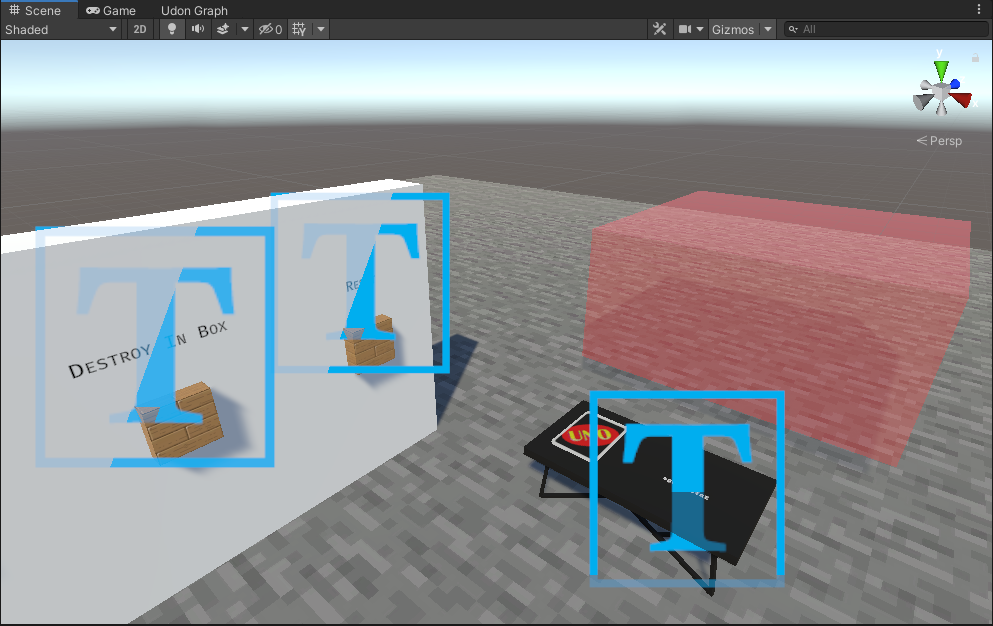 calm smelt
The players put the cards In themselves
wind atlas
Is the red box where you want the cards to disappear from once you hit the button?
sweet star
yes.
wind atlas
Then yes, that's where you attach the script.
sweet star
OK, roger.
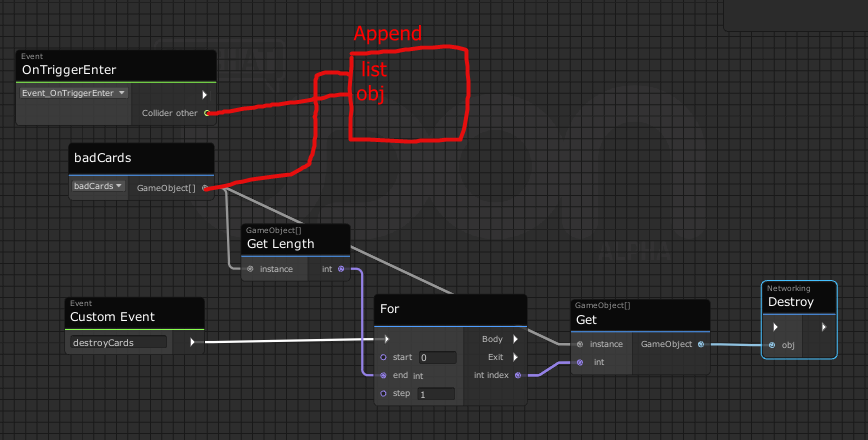
@wind atlas So I imagine something like this, just not sure how to append to the list
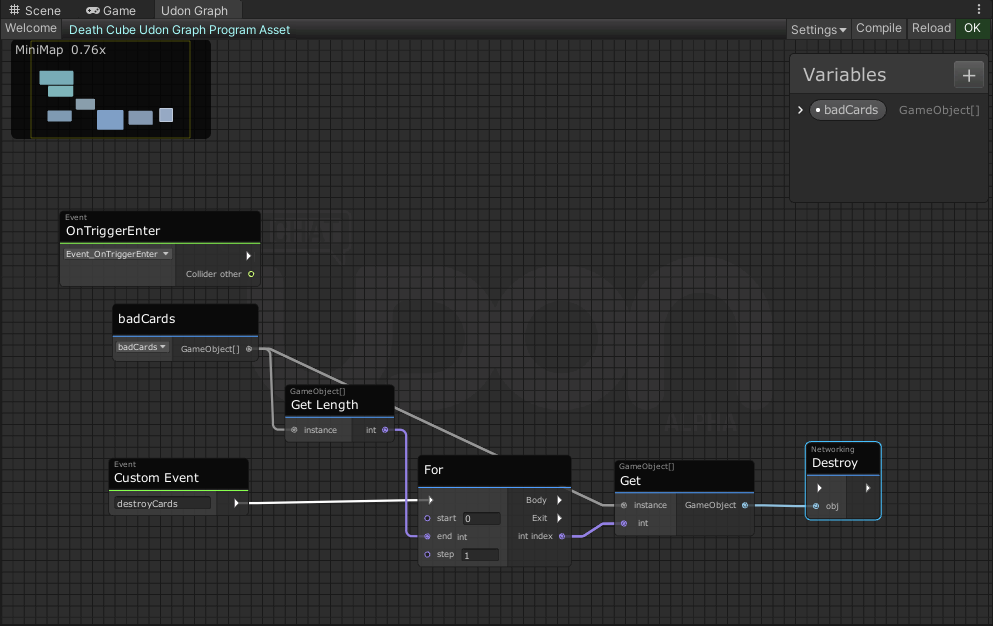 wind atlas
Give me a minute.
Yeah, I don't know how people do lists in udon, that seems annoying. I use udonsharp for that.
Maybe parenting solves it better, that would be my "lazy" approach:
 wind atlas
You might need to identify your cards better, I only check if it's a pickup right now, this will destroy ALL pickups.
wind atlas
Yeah, hierarchy is basically a list, I can just show to delete one sec.
sweet star
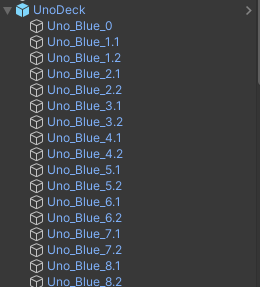 wind atlas

And on exit needs to be done too:

Honestly, I just realized lists aren't that complicated, I can do it too if you want.
wind atlas
I just realized it's easy if we define the array from the start.
sweet star
Thanks a ton for the help on this, BTW!
Again, I'm a Python guy, so types and graphs and such are out of my field 😄
wind atlas
I'm same honestly, I use U# to code it.
It helps knowing the Unity API to read those graphs.
For example, I'm not sure if this will work:

Why is that last parameter not named?
sweet star
wind atlas
I'm somewhat confused what this code does.
wind atlas
I try to initialize an array. But I found you can just chose the array size in the editor too.
In python they are dynamic, but here they need a fixed size. Makes things annoying...
Especially in graph.
I'm going to chose a lazy approach again, we will rotate the index to add stuff.
dull stream
That's how arrays work
Lists get auto resized but aren't supported by udon yet, but soon
 hoary echo
Not sure if I should put this here or in the Quest dev channel, but I've got a hell of an issue that googling gives me no help with. I've got a Unity 2019.4.31f1 project that refuses to switch build targets. When attempting to switch from Windows to Android, it locks up on a .compute file, ram goes to 100%, and it crashes.
When I manually remove all of the .compute files, the bastard locks up anyways and does the same thing. This a known issue?
wind atlas
@sweet star Okay, I'm realizing if you use an array, you have to do stuff like check if the item is already in it and stuff. This is getting way too complex for a graph. Have you tried U# yet?
 wind atlas
I wish
That's why I used the hierarchy earlier.
Honestly, the only thing you need to change is OnTriggerExit. Instead of doing parent = null you just put it back to your old parent.
sweet star
Is there not just a "get all objects in bounds X-X2, Y-Y2, Z-Z2"?
wind atlas
Good question
sweet star
I can't change the parent or it won't be in my object pool 😭
mighty fjord
How about Physics.OverlapBox?
 sweet star
Can I just plug in a Collider and assume the stuff instead of defining center, halfExtents, etc?
And if it returns a Coliider[], can I derive GameObjects from that?
mighty fjord
You could use a regular collider as a reference, yes. You might have to do some extra translations, but luckily there are some methods which help with this.
sweet star
Sorry, I'm still in my early learning stages of Udon, so I'm not sure how stuff like that works yet
(I accidentally made a semi-popular world and now feel obligated to make it like, good) 😅
sweet star
sweet star
https://i.imgur.com/QiGyB4j.png
This is what I'm working with if you didn't see it.
(That's in a test world.)
Goal is you click a button, all the cards in the red zone get destroyed (and hence are back in the object pool)
wind atlas
For the OverlapBox method you can try this: https://answers.unity.com/questions/1729111/how-can-i-get-an-overlapbox-with-the-exact-same-si.html
Unity is the ultimate game development platform. Use Unity to build high-quality 3D and 2D games, deploy them across mobile, desktop, VR/AR, consoles or the Web, and connect with loyal and enthusiastic players and customers.
Also, yes, you can get the game object the collider is attach to. Just drag it out in the graph and you should be able to type in "get gameobject"
You might also want to rethink why you need to destroy if you have a card pool. The idea behind a pool is that you don't destroy but reuse them.
For example, if all you want is something like a trashcan for cards, then you could have one OnTriggerEnter and just remove that card there already, no need to collect them all first.
sweet star
wind atlas
For example, if all you want is something like a trashcan for cards, then you co...
I'd like it to happen on a button press.
So I can't have it happen automatically.
wind atlas
Another idea, you could assign a state like a bool to each card. And just iterate over them.
sweet star
It's for UNO, so you want to "reshuffle" all the cards on the table, but not the ones in hands.
wind atlas
Wait, are the cards static? Like, there is a set amount of cards in the world?
sweet star
Yeah, it's an object pool.
wind atlas
Are you using the VRC Object Pool?
sweet star
Yes I am.
wind atlas
Are you aware of TryToSpawn and Return? I'm asking because you used Destroy earlier.
wind atlas
Yeah no problem. You have to learn a lot of C# concepts, Unity API and VRC on top of that.
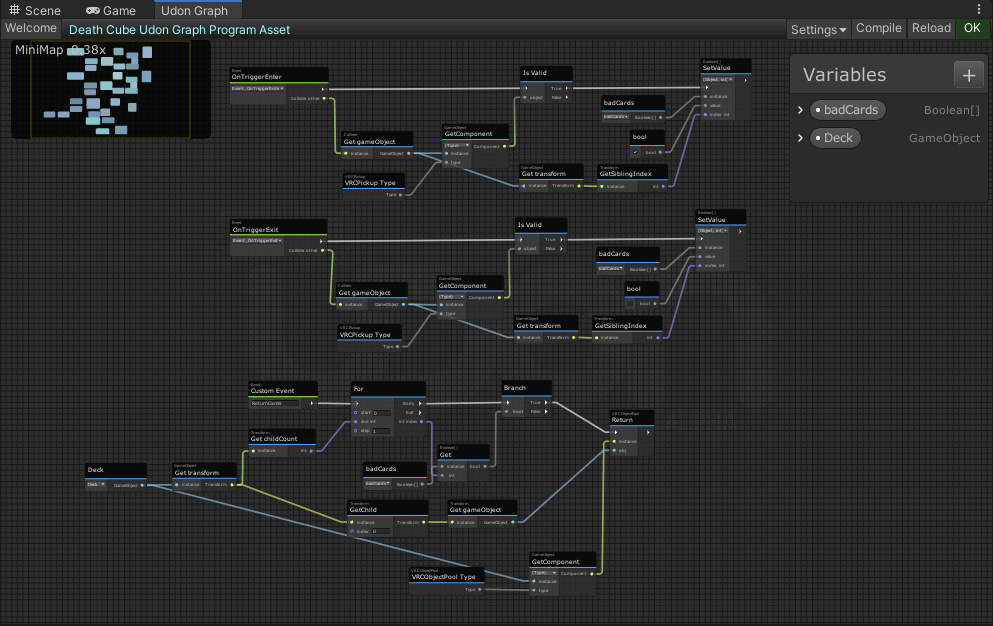
Anyway, I found a good compromise:
sweet star
OK, so this is setting a value on the card when it enters the trigger?
wind atlas
No, as you can see I create a boolean array. You set it to the number of cards you have and then just toggle the bit on or off.
 sweet star
oh so if you have 8 cards it's like [False, False, True, True, False, False, False, False] and then I suppose you'd make the button get all the cards that are True and Return them?
wind atlas
Yeah
sweet star
Do I have to duplicate the code and invert it for Exit?
 wind atlas
Because literally anything could enter that collider and we have to detect it somehow.
I just chose to see if it's a VRC Pickup.
sweet star
Ah, I see, that makes sense.
No way to test if it's from the specific ObjectPool, is there?
wind atlas
You need to loop over the pool yourself to make 100% sure it's in there.
You could do that yourself instead of the get component.
sweet star
Sounds like a lag machine, though 😄
wind atlas
True, I'm not an uber expert either, maybe there is a better way like using Tags or Layers.

Something like that should work. I also forgot to reset the whole array to False afterwards.
I hope that makes the idea clear though.
Best idea is to make it work first, then optimize.
sweet star
OK, thank you so much, I'll test this out.
scarlet lake
nothing like wasting a day troubleshooting cause I forgot to set a variable to public 🤦♂️
sweet star
wind atlas
 scarlet lake
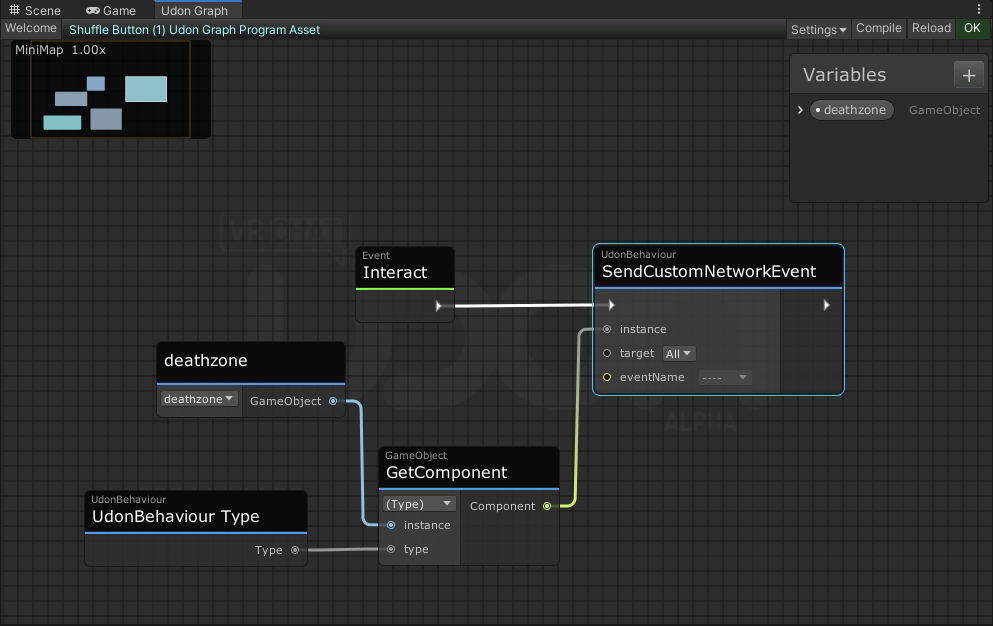
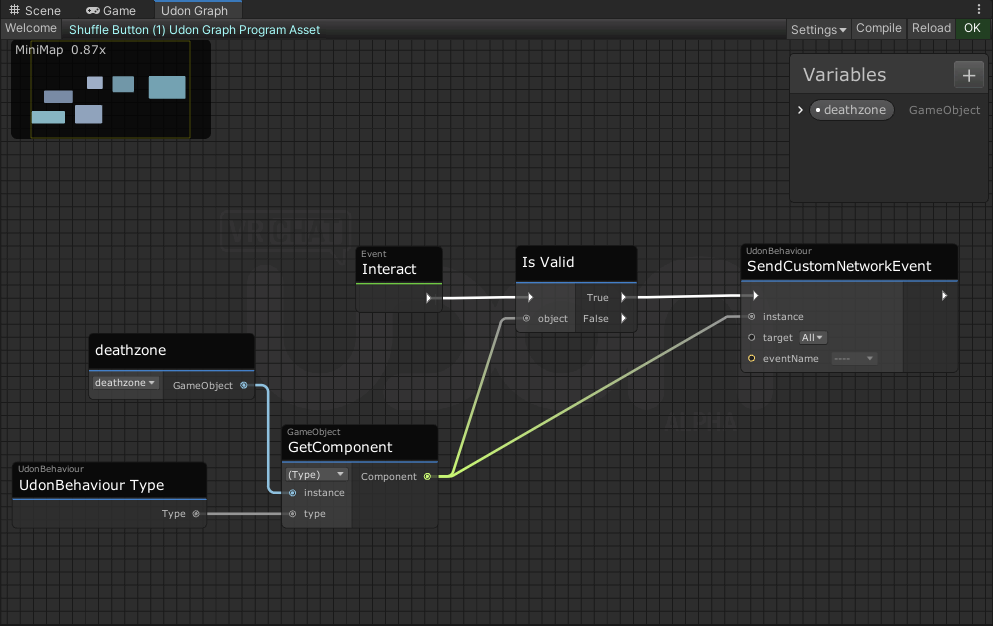
are you not setting the event name
scarlet lake
in the bottom one it looks like event name is empty
scarlet lake
i'm not really great with udon graph, I know in udonsharp it has to reference a public method in the other behaviour
sweet star
I'm kinda unsure what you mean by that.
scarlet lake
i think the target value of the event send has to also point to a reference but I could be wrong
oh wait nvm
sweet star
?
scarlet lake
I'm just not super clear on how the graph stuff translates cause I dont use it much. try clicking your deathzone variable up there and see if it lets you choose public/private?
sweet star
It's set to public, and set to the GameObject with the above large graph on it.
scarlet lake
in that case I'm not sure why it's not available
 night viper
You could create a Constant String and attach it to the EventName if the event name will always be the same on the target udon behaviour
sweet star
sure, why not 😅
ok I need to construct a debug string with replacements, is that even doable
I found LogFormat but I'm not sure what it wants from "context"
ok wait there's a version without that
ok so how to a construct a list
cause I don't see how to plug an arbitrary amount of items into a node
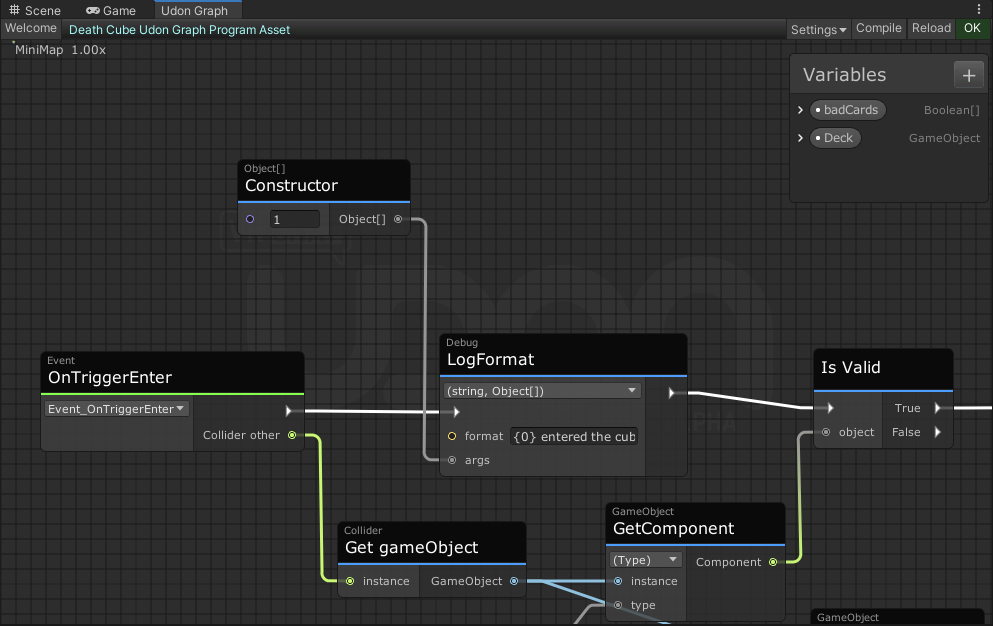 sweet star
https://i.imgur.com/nztNk64.png
This code is throwing this error:
[UdonBehaviour] An exception occurred during Udon execution, this UdonBehaviour will be halted.
VRC.Udon.VM.UdonVMException: The VM encountered an error!
Exception Message:
  An exception occurred during EXTERN to 'SystemBooleanArray.__SetValue__SystemObject_SystemInt32__SystemVoid'.
      Parameter Addresses: 0x00000006, 0x00000007, 0x00000008

  Object reference not set to an instance of an object
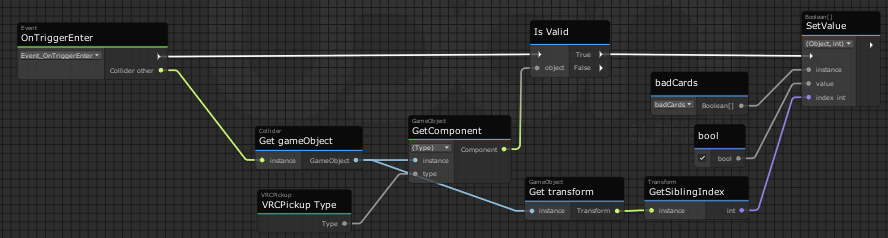
I'm so at a loss right now, I've been at this for hours 😖
floral dove
sweet star
https://i.imgur.com/nztNk64.png
This code is throwing this error:
```
[UdonBehav...
are you ever constructing the badCards array, like perhaps at Start?
sweet star
No I am not, sorry, was unaware that was required.
floral dove
yes, arrays must be created before you can use them
sweet star
how do I go about that 😄
floral dove
you can use the bool[] constructor node to create it
sweet star
(python, I tell ya, it messes with you're head.)
floral dove
oh yeah - python doesn't even require you to declare variables
sweet star
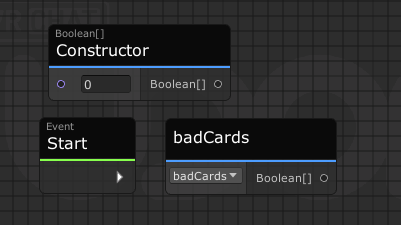
like I don't even know where to start with this lol
https://i.imgur.com/mV22uao.png
 sweet star
floral dove
oh yeah - python doesn't even require you to declare variables
sweet star
floral dove
oh yeah - python doesn't even require you to declare variables
listen, it's nice.
sweet star
sweet star
like I don't even know where to start with this lol
https://i.imgur.com/mV22uao....
there isn't even like a way to plug these in 😄
floral dove
that's because you haven't made a "Set Variable" node for badCards yet.
sweet star
so I have this
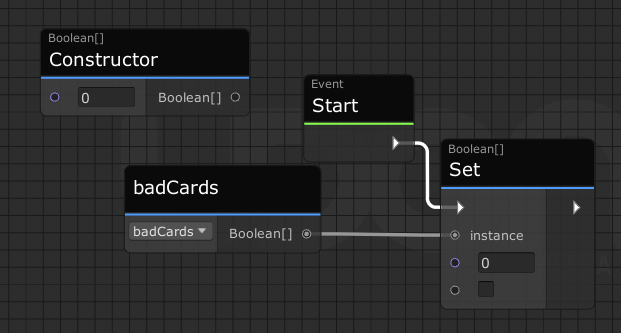
but still not sure where the constructor goes or what the number there is
I feel like I look like an idiot here 😅
floral dove
in C#, you construct an array with a particular size: https://docs.microsoft.com/en-us/dotnet/csharp/programming-guide/arrays/

Store multiple variables of the same type in an array data structure in C#. Declare an array by specifying a type or specify Object to store any type.
so you put that size as an int in the constructor
then connect the array that is made from that to the instance input on a Set badCards node, which you still need to make.
sweet star
floral dove
then connect the array that is made from that to the instance input on a Set bad...
Are you talking about a different node then the Set node that's there? Because I'm not sure which you mean.
floral dove
yes - if you want to set the value of a variable, you need to create a Set Variable node: https://docs.vrchat.com/docs/special-nodes#set-variable
sweet star
floral dove
yes - if you want to set the value of a variable, you need to create a Set Varia...
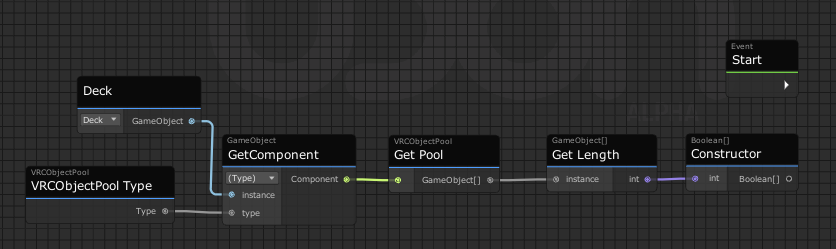
I feel so close!
 floral dove
please read through the basic docs and examples! Lots of the issues you're running into are covered 😄
sweet star
OK, to be fair, that's not made clear in-editor.
Thank you so much.
I accidentally made a semi-popular world so I'm tripping all over myself trying to improve it.
I really appreciate your guys' explanations and patience.
floral dove
if you ever forget, this is what shows up when you drag a variable from the window:

(capture doesn't show my mouse but it follows you around)
sweet star
And after all that, that wasn't the bug 😄
sweet star
floral dove
if you ever forget, this is what shows up when you drag a variable from the wind...
I don't know how I missed that, really 😬
I don't know if this is helpful, but here's my Graph Code.
I'm just at my wit's end with this, I've been at this since, like, 2PM and it's 10PM LOL
floral dove
I'm sorry that wasn't the fix for it. I'm off for the night, but I'd recommend you add some debugging as a next step: https://docs.vrchat.com/docs/debugging-udon-projects
sweet star
Will do, I appreciate everything. I'll poke at this and maybe look at it with fresh eyes tomorrow.
 severe tree
Can someone potentially explain to me why the Parameter Change event is not sent in this arrangement:

but is sent the moment the second set node is taken out of the equation like so?

Just wondering in the case of this being a bug, but if it's intended behavior or I'm just overlooking something obvious here then I don't want to bother writing up a simpler example for the report.
Nevermind, I've narrowed it down to the fact that the division of the float is attached to both sides of the branch and tested it to make sure. This is an issue in other regards with the execution pins but I didn't think that the same problem existed with regular parameter inputs as well?

 haughty hearth
I have an UdonBehaviour on a GameObject that I only want to run locally. So I set it's syncronization to "None" in the Inspector, but now the script doesn't run at all. Am I missing something?
 desert grove
Is there a reason VRCUrlInputField isnt exposed to text(set/get)? And does anyone have a brute work around?
hallow sable
is there a way in udon to see if a player is moving?
like if a player is moving do something? in udon sharp
 valid oar
Anyone have experience with JetDogs voice amplification prefab? It works in amplifying the voice of players that enter the volume but then it stays there with no apparent means of switching it back, even by entering another voice zone with Voice Gain and Voice Far set to 0.
@haughty hearth I don't know how your program is set up nor have I tried turning off synchronization but you're sure it's global if synchronization is on? Most programs should be local by default unless you use networking nodes.
 hushed gazelle
Getting an odd error when testing a vehicle, It's only syncing for other players while the vehicle's moving, and when I check the log it's full of the error;
Error - [Behaviour] Caught ArgumentNullException: Value cannot be null. Parameter name: Received a null value when encoding a Single
hushed gazelle
Fixed it; I was passing a value incorrectly between scripts.
 tropic canyon
haughty hearth
I have an UdonBehaviour on a GameObject that I only want to run locally. So I se...
tropic canyon
haughty hearth
I have an UdonBehaviour on a GameObject that I only want to run locally. So I se...
synchronization mode none is bugged at the moment, don't use it for now
tropic canyon
hallow sable
is there a way in udon to see if a player is moving?
use the Input events: InputMoveHorizontal and InputMoveVertical to get the player pressed inputs, they should be moving if it's anything besides 0
hushed gazelle
So, I think I've found an Udon bug; If you tell a script to set a synced value in another script, it'll go to all instances of that script and not just the controller you publicly assigned.
mighty fjord
Go to all instances of that script?
hushed gazelle
Like if you have several duplicated sets of Object A sending instructions to Object B. If you have Object A set a synced value in its assigned Object B, it'll go to ALL the existing copies of Object B that you own.
hallow iris
floral dove
if you ever forget, this is what shows up when you drag a variable from the wind...
Ohhhhhhhh there is the on variable change i serched
 tough finch
Is there a way to make videoplayers more stable? Since a month literally every videoplayer I tried has this issue where sometimes a youtube video plays fine but sometimes it seems to be buffering(?) throughout the whole video to constantly resync.
I looked into proTV, usharpvideo, wolfe, videotxl but they all have this exact same issue on multiple different clients/setups.
dapper lion
avpro be like that
tough finch
I'm already using the unity base because avpro was even less stable
fiery yoke
tough finch
Is there a way to make videoplayers more stable? Since a month literally every v...
There is multiple points of failure, that are completely out of the control of creators. The biggest problem is YTDL. Its a tool of sorts which is used to download a video file from stream provider like youtube. As this is not supported by youtube, it needs to regularly be updated to keep up with changes from yotubes side.
Another problem is the Video Players themselves namely the internal Unity player and the AVPro player. AVPro specifically is intended to be configured to be used with specific formats and codexs, while VRChat just uses it as a catch all.
dapper lion
protv allows you to switch to unity videoplayer easily
fiery yoke
However also the UnityPlayer has certain issues that are internal.
tough finch
fiery yoke
There is multiple points of failure, that are completely out of the control of c...
do you know if there's any ETA on when they will fix this? because I'm actually losing world users over this and its just pointless to invest time in features for a dance world if the videoplayer cant work >.<
fiery yoke
And ofcourse your computer might also have incompatible drivers and auxiliary software which might need to be updated, reconfigured or replaced.
tough finch
fiery yoke
And ofcourse your computer might also have incompatible drivers and auxiliary so...
yea its not specific to my pc, the entire community that I host is having issues
fiery yoke
That being said, its also very likely that the video player made by a creator is not programmed well and causes these issues.
I was working on a Video Plqyer myself, but a major bug from VRChats side prevented me to continue + I got busy with work
dapper lion
if its a dance world. you should def try using unity videoplayer for stability in that sence as avpro will need to be updated to a version where those issues are no longer present
tough finch
tough finch
I'm already using the unity base because avpro was even less stable
im already using the unity base 😊
dapper lion
oh right. then youre doing what you can do basically
tough finch
fiery yoke
That being said, its also very likely that the video player made by a creator is...
I see I see, but if more than 5 videoplayers have this issue then it must mainly be a VRC issue
dapper lion
theres no true way to fix it. especially if its constantly changing urls to load in
tough finch
dapper lion
theres no true way to fix it. especially if its constantly changing urls to load...
yea thats the problem, new url every 3 - 5 minutes
fiery yoke
tough finch
I see I see, but if more than 5 videoplayers have this issue then it must mainly...
If it's the exact same issue then yes...I think I also had some weird buffering issues with my player
tough finch
we have a database of 5.5k videos so self-hosting is also not an option + not legal
dapper lion
tough finch
I see I see, but if more than 5 videoplayers have this issue then it must mainly...
i would say what youre describing is the avpro buffer bug. however i would like to point out that at some point, vrc updated how they synced videoplayers and from point of view. it was scary how they did it. so it could be a by product of that even though protv has that autosync function disabled in favor for its own
so if all videoplayers have the same issue and all have avpro. its most likely avpro
tough finch
I use the unity videoplayer base 😊
dapper lion
right. so you should be fine
tough finch
and I disabled their resync function when they launched it
because it would crash entire lobbies to desktop
any specific fix for this error? or is that also internal?
 fiery yoke
Probably means the video is age restricted or unavailable in your country
tough finch
thing is, if I load a different video and then go back to that one it does work
its not age restricted and not unavailable, its one of the videos people dance to often in my world
fiery yoke
Hmm that's odd. Dunno then
tough finch
extremely frustrating
I don't see why there is not a proper videoplayer within VRC since its so central to world creation just like mirrors
I just want to create cool content, not debug a videoplayer that breaks with each update >.< (/endrant)
viscid reef
if you're having issues with youtube videos being really slow, its probably this issue https://github.com/ytdl-org/youtube-dl/issues/29326
tl;dr youtube has been rolling out changes that throttle video loading speeds if it detects videos are being downloaded via 3rd party means such as youtube-dl
GitHub
Checklist [] I'm reporting a broken site support [] I've verified that I'm running youtube-dl version 2021.06.06 [*] I've checked that all provided URLs are alive ...
tough finch
viscid reef
if you're having issues with youtube videos being really slow, its probably this...
ahhhhh I see, that makes sense, ty for sharing
hushed gazelle
I forked my own player off of AVPro, and it's turned out alright for doing both Youtube and Twitch streams in the one player despite absolutely having the stutter issue. (The trick is to not let it pull the video's length if the word "twitch" is in the URL because it'll get real angry at getting Null back).
visual elm
i'm trying to figure out how to make the floor slippery like ice, I watched some videos about it as to apply physic material on the floor, I trying put both frictions to 0.1 and applied to the floor, but when i tested it, it does nothing, so.... is this possible? i've seen a different world that you can slip around the floor like ice on a flate surface
i want it to be players slipping around on a slippery floor
wind atlas
@visual elm That's an interesting idea. I haven't used physics materials yet, but I'm guessing that you are not attaching it to a player.
But, we don't even have direct access to the player.
Which means it shouldn't be possible to use Physics Materials unless there is some unofficial way to get to VRC's player controller and attach stuff to its collider.
wind atlas
visual elm
i want it to be players slipping around on a slippery floor
To make it slippery, you could simulate it yourself using TeleportTo in an update loop, that's the only thing that I can come up with at the moment.
visual elm
i want to slip and slide around like on ice, but hmmmmm, i'll see what can be done, but... do you have the udon graph formula for it?
hushed gazelle
I'd say the better way to do it would be to put them on an invisible seat and respond to player movement by applying force to the chair.
wind atlas
visual elm
i want to slip and slide around like on ice, but hmmmmm, i'll see what can be do...
Chairs can also work. Try making a chair with the physics material so you can put them on the ice and they slide around.
You can learn about the force seating players and stuff afterwards.
slim hound
visual elm
i want to slip and slide around like on ice, but hmmmmm, i'll see what can be do...
 visual elm
this looks promising
slim hound
It mostly works but may have issues maintaining velocity during frame stutters
slim hound
It could just be an empty game object anywhere
 slim hound
You would need to enable that udon behavior when the player enters that area
visual elm
like a collider with a trigger?
slim hound
Yeah
 slim hound
You would want it as a trigger and use PlayerTriggerEnter/Exit events
slim hound
Like this and then have it setactive on the other udon behavior
 visual elm
where will branch be connected to?
slim hound
A setactive node
visual elm
gameobject, yes?
slim hound
Yes
visual elm
ok, got it, so what do i connect the setactive node to?
slim hound
You shouldn't need to connect it to anything
visual elm
but wait, just like that?
where does storedvelocity come from, creating new variable?
 blazing hedge
How do you destroy game object using button in world SDK-3 ?
 slim hound
The Enter/Exit trigger would need to be a separate udon behavior
slim hound
Looks like it is
visual elm
tested it, at spawn, i feel slippery, which should not trigger
it's suppose to trigger on the terrain i stand on
am i suppose to match the x y z on the floor object?
floral dove
blazing hedge
How do you destroy game object using button in world SDK-3 ?
I recommend you use Object Pooling instead of creating and destroying objects: https://docs.vrchat.com/docs/udon-example-scene#objectpool
visual elm
ok, so like Playertriggerenter > SetActve while Playertriggerenter > get islocal to set active to the value?
slim hound
When the player enters the area you enable and on player exit disable. get is local is just to make it so that it doesn't trigger from other players
visual elm
ok, but there's still something wrong...
when i spawned into my world, i'm slipping around, which is not suppose to do that
i have to make my way to the room where there are ice around to make that trigger to happen
slim hound
That game object with the udon behavior needs to be disabled by default
and enabled/disabled by another trigger collider/udon behavior
visual elm
that make much more sense, ok
ok, this is what i got, tell me what needs to be fixed:
 slim hound
 visual elm
nice setup, i'll use that
cold raft
Udon is a form of art

 slim hound
You could test to see if it behaves as you expect first
 slim hound
You should only have two udon behaviors
visual elm
on which ones?
Friction Trigger only has 1, and the empty object has 2 udon behaviors
and what do i put on storedvelocity?
slim hound
Probably faster to just give you a prefab for it
visual elm
ok, where do i drag the friction effect?
slim hound
Make it so that box collider is around the area where you want the effect to be
visual elm
ok, time to test it
still nothing, but wait...
am i not suppose to attach the Friction Effect on a mesh object?
 slim hound
That setup should work
visual elm
but yet it's not triggering... don't know why
do i need to add a physic material on the ice floor, or no?
visual elm
nope, nothing changed, no slippery effect whatsoever
slim hound
My only thought would be for you to open the udon graphs and press compile
slim hound
Yes as I said earlier likely to loose velocity during frame stutters
visual elm
alrighty, awesome, thank you so much
would you like me to credit you on my map? you've helped me so much
slim hound
Your choice, I don't mind either way
blazing hedge
How do you destroy game object using button in world SDK-3 ?
 rose surge
Hello world; stupid question, can you use mesh colliders instead of box colliders for 3.0 pickup objects?
blazing hedge
rose surge
Hello world; stupid question, can you use mesh colliders instead of box collider...
I think all u need to pickup an object is a collider... so YES YOU CAN!
rose surge
I'll test it & see if it works!
blazing hedge
blazing hedge
How do you destroy game object using button in world SDK-3 ?
plz send help Anyone?
floral dove
blazing hedge
How do you destroy game object using button in world SDK-3 ?
I recommend you use Object Pooling instead of creating and destroying objects: https://docs.vrchat.com/docs/udon-example-scene#objectpool
visual elm
@slim hound by the way, the movement slows down within the ice area, i can't make the character jump, or almost barely move
rose surge
@blazing hedge It doesn’t seem like you can substitute box-colliders with mesh-colliders when creating SDK3 based pick-up items. I guess I’ll just have to make due with box colliders.
slim hound
visual elm
<@!183779109296537600> by the way, the movement slows down within the ice area, ...
It is reliant on framerate so if the framerate is too low it wont work
visual elm
i see
visual elm
Is there a way to disable jumps?
floral dove
visual elm
Is there a way to disable jumps?
I recommend you read the docs (at the very least the ones pinned to the top of this channel) and check out the videos in our "Learning Udon" series: https://www.youtube.com/playlist?list=PLe9XHNvXcouQjg5GULWGLj1tMzeythnQi

YouTube
visual elm
alrighty
sweet star
Hey, kinda an important question, any reason only the master can seem to spawn cards from an ObjectPool?
Just pushed a world update that I'm now realizing has that issue.
floral dove
sweet star
Hey, kinda an important question, any reason only the master can seem to spawn c...
not the master, but the Owner - that's how it works: https://docs.vrchat.com/docs/network-components#vrc-object-pool
If you want someone else to spawn a card, you can have them:
- Send a CustomNetworkEvent to the Owner, requesting that they TryToSpawn
- Take ownership of the ObjectPool and then TryToSpawn
- Set a synced variable like
wantsToSpawnthat the Owner watches for changes, and calls TryToSpawn when it does
sweet star
Thank you!
sweet star
@floral dove Do you mean Instance Owner or is Owner something specifically different?
floral dove
sweet star
<@!98313818857275392> Do you mean Instance Owner or is Owner something specifica...
the Owner of the ObjectPool.
sweet star
Who owns the Object Pool?
floral dove
sweet star
Who owns the Object Pool?
start here to learn how Networking works in VRChat: https://docs.vrchat.com/docs/udon-networking
VRChat
The three main concepts used for networking in Udon are Variables, Events and Ownership. Variables are containers for values - like a number, a set of colors or a 3D position.Events are things that happen at a moment in time.Ownership is the system that decides which user can update a variable, whic...
sweet star
No, I'm aware of that, sorry, I mean how do I get if the current player is the owner of the object as opposed to the Instance Owner?
floral dove
If you read through the docs and the basic networked examples, you will have your answer, I promise 🙂
(and many more answers to other questions you will have!)
sweet star
I'm sorry, just panicking since I have a broken world up right now 😅
floral dove
gotta test before you publish!
 valid halo
What is udon?
fiery yoke
?whatisudon @valid halo
 hidden martenBOT
VRChat Udon is a programming language built by the VRChat Development Team for use in VRChat worlds! It enables complex behaviors and logic in VRChat worlds. Read more about Udon in our documentation: https://docs.vrchat.com/docs/what-is-udon
VRChat
What’s this Udon thing anyways? VRChat Udon is a programming language built completely in-house by the VRChat Development Team. It is designed to be secure, performant, and easy to use via the VRChat Udon Node Graph, a built-in visual programming interface that uses nodes and wires (we call them “no...
hushed gazelle
How can I get the inverse of just a single rotational angle? I want to set something to a postion and have it face the opposite horizontal rotation of that point.
 flat tendon
Hello i am looking for verneons udon vehicles for oculas quest 2
tacit harness
How would i make a canvas menu where i have a slider on the left or right and i can scroll down the menu ?(If there is a prefab i would also take that) pls dm or ping
Thanks already
wind atlas
@hushed gazelle You could use Quaternion.AngleAxis. If by horizontal you mean like turning your head, then this should work:
transform.rotation = transform.rotation * Quaternion.AngleAxis(180f, transform.up);
That did it, thanks Puppet!
I just needed it as a teleport target, but the way it had to face was opposite the parent object.
wind atlas
hushed gazelle
I just needed it as a teleport target, but the way it had to face was opposite t...
If you have the parent, can't you just set the rotation to 180 directly? Since it inherits the rotation.
hushed gazelle
Nah, mobile object. Gotta be relative to it at the current time.
It's also not actually parented TO it, just talks to it.
wind atlas
@hushed gazelle I'm glad if that works already. I'm just wonder if doing it with eulerAngles makes it even easier. Going to try something.
 brazen pier
I've got this set up to play an animation; how would I also activate the audiosource (on the left) when clicking this button?
 hushed gazelle
You need an AudioSource and just tell it to Play
brazen pier
Here is the AudioSource, how could I let it play?
 hushed gazelle
How do you make anything do something in Udon?
brazen pier
using nodes, but I was kinda asking which one to use 😅
hushed gazelle
It's literally "Play", lol.
wind atlas
hushed gazelle
It's literally "Play", lol.
I found a nice method btw:
transform.rotation = Quaternion.LookRotation(-ParentTransform.forward);
@brazen pier You need an AudioSource not GameObject for the variable.
tacit harness

how would i make it so that only stuff thats actually in the canvas is shown and for example when the right button is half outside only half of it is shown ?
wind atlas
@tacit harness https://www.youtube.com/watch?v=oDBVRcHhc0M

A crash course in setting up a ScrollRect within Unity as simply and quickly as possible.
seems promising
and only 60s!
hushed gazelle
One of the VRC Prefab starter packs has a whole scene demo'ing how to do basic udon stuff iirc, including UI elements like text sliders.
brazen pier
wind atlas
<@!494433921673461761> You need an AudioSource not GameObject for the variable.
Thanks, got it working! :)
visual elm
can Quest players see youtube video if i were to set one up for PC/Quest players?
floral dove
visual elm
can Quest players see youtube video if i were to set one up for PC/Quest players...
check the docs: https://docs.vrchat.com/docs/video-players#supported-video-hosts
vast sparrow
im having a small problem that pickup's in my world wont respawn.
ive checked the respawn height of the world and changer it just in case but it just wont respawn
players do respawn but i needs the pickups to
is there an extra setting i need to turn on or script to attach?
dawn forge
Kind of being hurried last minute for this, but I am getting NULL when trying to obtain the component of a child gameObject.

Where buttonName = "Reset" AND this refers to the object running the script "Cards UI".
 wind atlas
dawn forge
Kind of being hurried last minute for this, but I am getting NULL when trying to...
wind atlas
dawn forge
Kind of being hurried last minute for this, but I am getting NULL when trying to...
It looks like it's finding the "Text" gameobject in the scene since it's not crashing at that line and you are getting null in the debug log.
So are you sure there is a TextMeshProUGUI attached to "Text"?
dawn forge
Yes, I have to believe I am using the correct component, here is the inspector.

Re-added the component and it's now happy, but when I try to modify the "text" property it'll throw the object ref error, but I am getting the object name in debug instead of null. When I just read the "text" property, it'll return the value just fine.
wind atlas
What is your script attached to? Only that one button?
dawn forge
The Cards UI object which is the parent of the button and its child, Text.
wind atlas
And both have the TMP Text component attached?
dawn forge
Correct
wind atlas
That's odd.
Just to be confident, you could try printing the whole path you are at and which one are you accessing, there might be a mismatch.
west mural
actually, which one returns null, the gameobject or the component ?
dawn forge
The component's "text" object. I can read it, but when I try to set it, I get the object ref error.
west mural
i think textmeshpro might have a SetText function
dawn forge
Unfortunately the method is not exposed to Udon 😦
wind atlas
It works without it.
Maybe giving us the log would help. You say you have two objects with that script and the behavior seems a bit random.
Might also just do something like this:
Debug.Log("Me: " + transform.name + ", "Button: " + buttonName + ", Is Found: " + buttonGUI == null);
I reloaded TextMeshPro package and its essentials and it seems to behave just fine now
It's weird because I have the same concept on another object and it works just fine, this object that had the issue was added in my new revision after upgrading to the latest VRChat's supported Unity.
hallow sable
isn't there a way in udon to change the animator for a player? curious how to do that
 zenith echo
Hello folks! I'm trying to set up an OnEnterTrigger event, but one thing I'm really missing from SDK2 is the ability to have this only react to objects on a certain layer - I can't figure out how to do this properly in Udon, any ideas?
I've tried using Get LayerMask, but I think there's a bug here, whenever I change the layer away from "Nothing" it fails to save the value I set it to, so when I reload it goes back to Nothing, any idea what's happening there too?
 dark blade
what is the function to be able to click on an object and it send you to a connected link
grand temple
that's not exposed to the public
slim hound
zenith echo
I've tried using Get LayerMask, but I think there's a bug here, whenever I chang...
That's an issue with graph. you would need to create a public LayerMask variable and set its values in the inspector
dark blade
huh. some people who arent developers have access to it. how do they have it
 tepid salmon
is ther a problem to have 3 udon behaviours on the same object`?
dark blade
probably not
tepid salmon
ther ar all local should be ok i think
zenith echo
slim hound
That's an issue with graph. you would need to create a public LayerMask variable...
Yeah, a buddy of mine helped me come up with a workaround - from "Collider other" we did collider.getGameObject, then connected that to GameObject.GetLayer, then used an int.Equals node with the GameObject.GetLayer int value plugged into obj, then the layer number we were looking for entered into instance - one Branch node later and it worked as we needed it to!
slim hound
Yeah that works too
zenith echo
screenshot for reference
 plush stump
One of my timer in udon program stop working when a player left the room after the game began, is there a fast way to test and located where the problem is?
grand temple
are you checking that the player is valid before trying to do anything with them or get anything from them?
hushed gazelle
Depending on what you're doing in your game, maybe it's still trying to address the exited player in whatever player-management coding you have, but because they're not in it anymore it's not liking the now-null value.
plush stump
yeah I think it should be a null player causing the problem, just wonder if there is quicker way to find it out, right now I have to edit some codes, start 2 clients to test out and repeat.
will player left also trigger OnplayerTriggerExit Event?
grand temple
uhh I don't think so
plush stump
thanks
I think I'm doing a IsValid check everytime I call VRCPlayerApi except GetLocalPlayer, since Udon program is local by nature, I don't need to check IsValid when using GetLocalPlayer, right?
grand temple
local player should always be valid, yes
are you using Utilities.IsValid or playerapi.isvalid?
plush stump
is there a way to highlight all IsValid node or specific variable in the graph?
Take a lot effort to check all of them everytime
should I use playerapi.isvalid?
scarlet lake
my sdk have error
 wanton palm
can you import classes into other classes with udon?
like fe I have a class responsible for making some calculations. Can I import that into another class to make use of some of its methods?
cold raft
not sure what you mean with classes, if you mean udonSharp then yes
wanton palm

something like this
gives me error
System.Exception: Method is not exposed to Udon: Void .ctor(), Udon signature: VRCUdonCommonInterfacesIUdonEventReceiver.__ctor____SphereManager
cold raft
yeah i dont think you can do it like that, but if the other object is udonSharpBehavoir that is attached to an object, you can retreive a reference to that behavoir by using GetComponent<SphereManager>() on the object its attached to
wanton palm
yeah I thought about that but I wanted to avoid it cause I'd rather SphereManager be a singleton
I'll think of something else, thanks
cold raft
well if you put it on a single object it will be the only instance right
wanton palm
gonna have several spheres objects so I'd need to put one per each
I'll see if I can get around using .Find to get one sphere manager that exists in the hierarchy but calling it from sphere
 wraith citrus
Hey I don't know if anyone here, But here is what I want
There is a video link, it looks like this: domain.com
And I want Udon can some what "Get" the username of a player who just joined the world, and piece together the video link and the user name and make it looks like this: domain.com/playername, and send this link to a videoplayer
I read the full docs but nothing talk about the "text processing"
kinda confuse me
 indigo finch
Wouldn't you just need to add the strings together?
 plush stump
I should use IsValid from vrcplayerAPI not Unity.IsValid to check if player exist right?
wraith citrus
indigo finch
Wouldn't you just need to add the strings together?
yeah! Could it do like Variable replacement?
indigo finch
plush stump
I should use IsValid from vrcplayerAPI not Unity.IsValid to check if player exis...
playerAPI.isvalid doesn't work if there is no playerapi to check. do utilities.isvalid instead
indigo finch
wraith citrus
yeah! Could it do like Variable replacement?
yea, they are just placeholder strings. grab any strings as inputs will be fine
wraith citrus
ohhh Thanks, I finally know how to make my advanced player
indigo finch
Nice!
wraith citrus
Great. I've been thinking about how vrchat can submit user names to my server, so that players from each country can enter the same world and see videos with different contents
It can also be combined for advanced functions
@indigo finch may I add you and ask you for some little help?
plush stump
indigo finch
playerAPI.isvalid doesn't work if there is no playerapi to check. do utilities.i...
That's what I used before, just replaced it with playerAPI.IsValid
I'm bit confused...
indigo finch
plush stump
That's what I used before, just replaced it with playerAPI.IsValid
would depend on the context too. would need to see more of your code to see where it might be going wrong


