#udon-general
59 messages · Page 62 of 1
 zealous mason
 pallid mango
Perfect
zealous mason
Also, here's my attempt at short vs long hold of input, if anyone else was interested

 grand temple
for something like that, it's a lot simpler to just use Time.timeSinceLevelLoad. Messing with a datetime adds an extra cost which isn't a huge deal when it's small but it could add up.
zealous mason
level load? I'm just using it as a button really, want the button to do different things depending how long its held for
grand temple
Time.timeSinceLevelLoad is just a single float of how long you've been in the instance. It would be much simpler to compare that than a datetime because it contains many floats
grand temple
yes
zealous mason
nice
 floral dove
Udon Drives Our Nodes
 kind swallow
You know, I'm wondering right is it possible to sync (even if its local) requests to join to trigger events.
floral dove
kind swallow
You know, I'm wondering right is it possible to sync (even if its local) request...
Do you mean requests to join the world?
kind swallow
Yesh.
I was thinking it'd be interesting for somehow a bagging sound for whenever joins kek
floral dove
kind swallow
I was thinking it'd be interesting for somehow a bagging sound for whenever join...
You can use the OnPlayerJoin event to do something whenever a player actually joins, but we do not expose requests to the world.
 fading cipher
Didn't someone just make a tutorial on join sounds?
Was it a U#-only tut from vowgan?
 cunning mist
fading cipher
Didn't someone just make a tutorial on join sounds?
cunning mist
fading cipher
Didn't someone just make a tutorial on join sounds?
That was me, I did Graph and Sharp 👍
I can link it if you'd like
fading cipher
I already know of it but I bet @kind swallow would appreciate it!
cunning mist

What's this? A shorter, fully scripted tutorial? That's new...
View the full video on YouTube!
#VRChat #madewithudon
https://t.co/GcvtLru1uE https://t.co/WMrcUUqv9w

 Twitter
·
kind swallow
Twitter
·
kind swallow
I was thinking it'd be interesting for a "apartment" scene when whenever someone requests, you'd hear loud banging on the door. Similar to that old japanese parents outside the door room
pallid mango
floral dove
Udon Drives Our Nodes
It’s canon, now.
 worldly tapir
cunning mist
floral dove
Udon Drives Our Nodes
worldly tapir
cunning mist
floral dove
Udon Drives Our Nodes
Momo this is recursive this isn't allowed
 fiery yoke
cunning mist
Momo this is recursive this isn't allowed
fiery yoke
cunning mist
Momo this is recursive this isn't allowed
PHP wants to talk to you
 dawn forge
cunning mist
Momo this is recursive this isn't allowed
dawn forge
cunning mist
Momo this is recursive this isn't allowed
Wait till someone forkbombs their own world and kill Udon.
fading cipher
cunning mist
https://twitter.com/Vowgan/status/1408198650422083588?s=19
Wait a darned second vowgan where did you get that background photo
That is the exact art style I want in my world (Genshin impact basically), but if that's something YOU made I need to have a word or a paragraph or an essay with you about your world design lol
cunning mist
fading cipher
Wait a darned second vowgan where did you get that background photo
It's actually an environment I made from a nature pack on the Unity asset store. It's for 2019 however, so there was a lot of manual back-porting that I had to do to make it work with 2018. It's absolutely gorgeous however.
https://assetstore.unity.com/packages/3d/environments/pure-nature-188246

Elevate your workflow with the Pure Nature asset from BK. Find this & other Environments options on the Unity Asset Store.
fading cipher
👀 do you by chance know how much of that environment would run fine on Quest?
cunning mist
Moved to #world-development
fading cipher
Hey all, been having issues with Vive controls yet again and I would like to verify something: currently my "is vive user gripping" check checks to see if InputDrop is true (so they're pressing their grab button) and InputUse is false...
What actually is fired for Vive wands for InputUse?
I know that

But which trigger button...
floral dove
I believe that Vive wands fire both Use and Grab when using the trigger because the Grab buttons are so hard to press
fading cipher
I expect them to fire grab, but they fire use too? That might be part of the problem
Quick question on Vive stuff again...
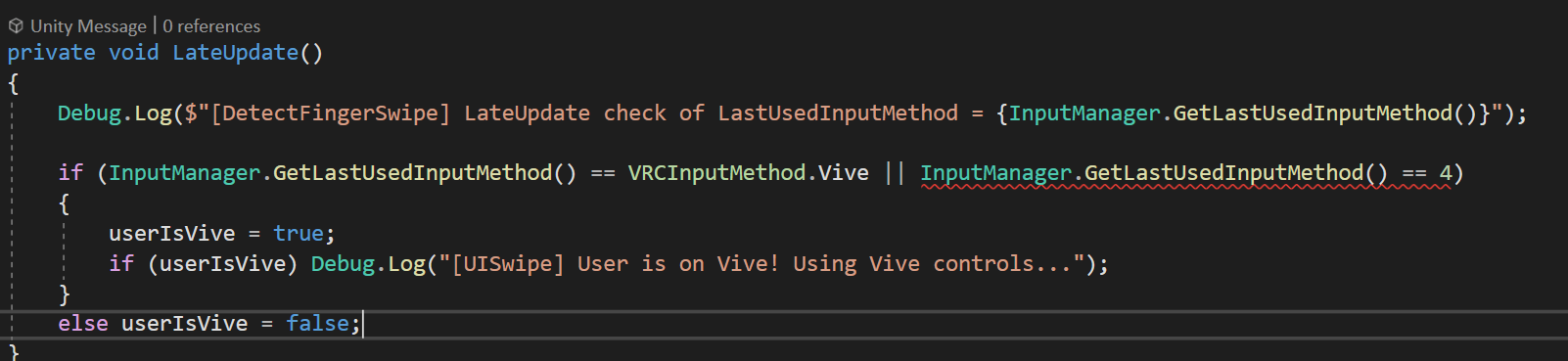
This log is spamming Keyboard and Mouse when I move/look around on Desktop mode, but when my Vive friend checks his logs the response is only ever 4 (When I'd expect Vive). Is there a way I can specifically say I want to check for the value equating 4 instead of just Vive, which I'm already doing?
Because further down the chain of methods I'm checking to see if userIsVive, debug something that should essentially be spamming the logs, but he's not getting that debug
So I feel like userIsVive is never being set, and my best guess would be that it's because it thinks that GetLastUsedInputMethod() != Vive, because it == 4, even though I do recall that is the index of the enum...
aha nope, it's the other thing
It has to be ViveAdvanced huh
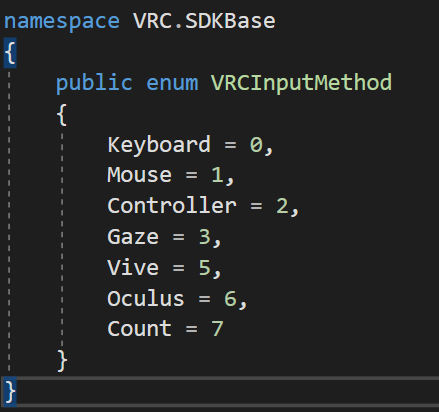
Is casting it into 4 legal? 🤔
if (InputManager.GetLastUsedInputMethod() == (VRCInputMethod)4)```I'm not getting a compile error on that so I'll hope and pray
floral dove
yes, you can cast an int to an enum, and vice versa
fading cipher
beautiful, so here's hoping that works, thanks again momo
I know you had to help me resolve this last time too all those months ago 😛
floral dove
oh - but 4 is not a valid Enum value fro VRCInputMethod
fading cipher
Isn't 4 ViveAdvanced?
I mean if it's not, why is 4 just not available to check in the enum, and why does my LateUpdate check return 4 in the debug in the above picture for my vive using friend?
floral dove
Aha! I believe you've found a bug...
The actual VRCInputManager has an InputMethod enum which lists Vive as 4 and ViveAdvanced as 5.
VRCInputManager.LastInputMethod returns a value of type VRCInputManager.InputMethod.
However, Udon accesses a proxy class called InputManager, which has an enum that doesn't quite match up.

So you can instead cast the returned value to an int and compare ints.
if you receive either 4 or 5, then your user is on Vive or ViveAdvanced.
fading cipher
Ohhh so I want to do if ((int)InputManager.GetLastUsedInputMethod() == 4 || (int)InputManager.GetLastUsedInputMethod() == 5) for vive?
floral dove
yes, that looks right to me.
fading cipher
Great, I'll give that a shot and report back once we can test it (other dev setting up vive for this now lol)
floral dove
You can save on calls to the InputManager property this way if you like, I think it reads a little more cleanly as well:
int inputMethod = (int)InputManager.GetLastUsedInputMethod();
if(inputMethod == 4 || inputMethod == 5)...
oh good idea, thanks
Funny how I'm always finding bugs and funky behavior with my attempt to support vive in my world xD
Thanks again for all the troubleshooting help!
fading cipher
It worked, thanks momo!
 alpine trellis
https://i.imgur.com/Nfu1hDd.png
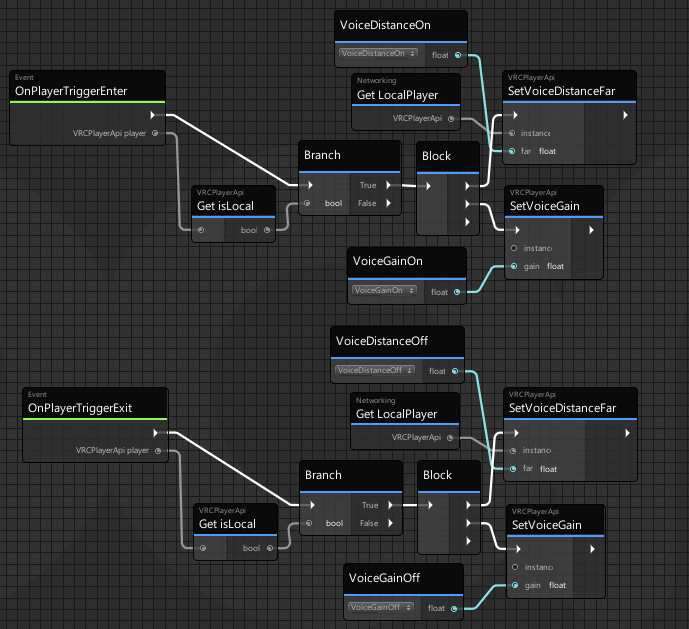
Trying to add a small area in front of a microphone increase the users volume.
 grand temple
Changing the voice settings of the local player doesn't do anything. You need to change the voice settings from another player's perspective, so don't gate it behind islocal
Also your script is crashing because you don't have anything plugged into the setvoicegain nodes
alpine trellis
I appreciate it. Some obvious stuff slips by me a lot of the time
 bleak echo
Is it possible to receive an interact event from another object?
(that other object would be in a public variable)
cunning mist
Instead of calling Interact on a different object, call "SendCustomEvent" for your target udonbehaviour variable.
bleak echo
That pointed me in the right direction, thanks.
fading cipher
alpine trellis
I appreciate it. Some obvious stuff slips by me a lot of the time
welcome to programming lol
 placid kelp
Is setowner available only to the owner of the object?
grand temple
anybody can set owner to anybody else
if someone tries to take ownership, you can add OnOwnershippRequest and returning false will deny the transfer. The current owner will have the final authority on whether or not the transfer is allowed to go through
placid kelp
If not add, does ownership transfer immediately?
grand temple
even if you do add that, it always transfers immediately. If the owner denies it, then it will revert
 grand temple
vrc pickup already transfers ownership, that's not necessary
placid kelp
An error was found. Thank you
placid kelp
maybe pickup does not transfer ownership
It works but doesn't work after remove SetOwner
 final thorn
Udon# does not support Actions/events/delagates how should I subscribe and unsubscribe to events from other scripts?
grand temple
sendcustomevent takes a string, so you can just set up your own event queue with an array of strings
 sick tangle
can someone show me how i can control a blend tree with a ui slider trying to change a value of materials on world im working on still very new to udon any help will be very appreciated
cunning mist
Have your slider call SendCustomEvent to your graph in the OnValueChanged, then have your custom event graph in your graph set the value of the animator float you're setting to be the slider's value.

 scarlet lake
Hello I need some information.
Do I need 3 Vr tracker or with 2 is enough?
(One for each foot)
sick tangle
wrong channel but you need 3
grand temple
you can use one for your hips, but there is no configuration for 2
scarlet lake
ah ok thanks
scarlet lake
what is the channel ?
grand temple
#full-body-tracking would be appropriate
scarlet lake
thanks !
 hushed gazelle
Can anyone tell if I'm missing something to get this object to sync between all players properly? (Put it in Debug mode, just in case)
 grand temple
debug mode just makes it harder to see what we're looking at
but I don't see why that wouldn't work. Does it?
hushed gazelle
It does not.
grand temple
are you instantiating it?
hushed gazelle
Nope, it's just sitting in the world ready for use.
cunning mist
Maybe there's some arguments between the Udon Behaviour and the Object sync? I don't think that's a thing, but try disabling position sync on the Udon Behaviour.
 lucid otter
does anyone have a solution for spawning a new card (playing cards) when a card is picked up? but only have that event fire once per card per reset (hope that made any sense)
- working on my first world and ive not scripted anything in my life so this is wildly confusing 😩
pallid mango
grand temple
you can use one for your hips, but there is no configuration for 2
Last I checked two you a hip and then both feet go to the bottom tracker for a mermaid type of situation
grand temple
that sounds weird. If it does work, it's certainly not a "supported" configuration
 crystal verge
Is there a way to record/playback voice with Udon?
crystal verge
Ok, what would the godawful sidechannel hack be? 🙂
cunning mist
You don't want that answer lol
fiery yoke
Actually no. You cant get the player audio at all I think. At least Im not aware of any methods that could achieve that.
crystal verge
Yeah I saw some simple reprocessing stuff in the player audio functions, but that's it.
fiery yoke
Meh actually it might be possible, but not in the way you want it :P
grand temple
the absolute most you could do is have a special avatar that made the visemes animate cubes at a specific location and then the world would detect that. Visemes have enough information to know generally what they were saying, but it's not even close to enough to actually reconstruct a sound file
fiery yoke
There is a hack with getting a second AudioListener into the scene, which you could then grab audio data from. If thats even exposed in Udon...
crystal verge
Yup, this would be for reprocessing the voice sample with different impulse responses for convolutional reverb, so visemes ain't gonna do it.
cunning mist
Just have a bot in the world that streams to a url and play that url back in world and read the audiospectrumdata off of that 👌
 obtuse agate
i made a convolutional reverb world but it only takes input from video player
 void ridge
crystal verge
Yup, this would be for reprocessing the voice sample with different impulse resp...
void ridge
crystal verge
Yup, this would be for reprocessing the voice sample with different impulse resp...
there's a canny request for this, pls upvote
 dapper lion
audio listeners and vrc are quite interesting. but im not sure what helpfulhelper is refering to
fading cipher
obtuse agate
i made a convolutional reverb world but it only takes input from video player
we want voice reverb!
 scarlet lake
Does anyone know of a way to get Spotify to play in world on pc or quest or both?
Without being played through a players mic output that is.
 stark adder
Not possible
scarlet lake
Well damn.
sick tangle
can some one guide me with what im doing wrong trying to animate a blend tree with a slider ive been trying to figure for a while now just not smart with this stuff at all

 slim hound
sick tangle
can some one guide me with what im doing wrong trying to animate a blend tree wi...
slim hound
sick tangle
can some one guide me with what im doing wrong trying to animate a blend tree wi...
You have your references mixed up
You have your slider assigned to be the animator reference and animator reference going into your get value from slider
sick tangle
so i would just need to flip the slider and animator around
slim hound
You could just click on the drop down on those variables and change them
sick tangle
yea so like this then
 slim hound
Yeah
sick tangle
ok ill give it a go and see if it works
do i have to go into a actual test build to see it work or can i just test it play mode
slim hound
It is possible but can be tedious without a tool for it
Assuming you don't have this you will want it for in editor testing https://github.com/CyanLaser/CyanEmu/releases/tag/v0.3.8
GitHub
Please make sure you have the latest VRChat SDK when using CyanEmu!
Features
938ef23 - Support for SDK3 VRC_ObjectSync.Respawn
373e63a - Support for Networking.IsInstanceOwner which was missing in...
sick tangle
ill give it a go
ok its still not working going to check and upload a version to vrc just in-case
slim hound
@sick tangle What are you trying to do though?
sick tangle
trying change the hue of a material with a slider
slim hound
And the hue is controlled by an animation?
slim hound
You can directly set the playback time of an animation with animator.play
which would probably be easier
Make one of these nodes and in the dropdown set it to string int float like this
 sick tangle
so i would make one animation for it and then put the slider on normalized time and the animator on the instance
slim hound
Yeah
sick tangle
do i need to do anything in the animator or can it just be a basic animation
slim hound
Basic animation
sick tangle
sweet ill give it a go thanks for the help
slim hound
The state name input is just the name of the animation in the animator and you will also want to set its speed to 0 so it doesn't change on its own

 slim hound
Does that work though? last time I tried Set playbackTime it didn't

 fathom oak
Hmm. Sooo, I'm using Merlin's UdonSharpVideo player.
I want it so that there's multiple screen (emission renders) by cloning the screen, which does work, but has no audio, I cloned the AVPro video speakers L and R, but there's no sound coming from those.
I have no idea what I'm doing wrong
 raven latch
I’m having a problem I on Pc I can't hear other people in the game😭
 tropic atlas
I'm trying to write my own sync object, why is this not working?

 placid peak
how do i make a toggle that toggles through multiple game objects for example Mirror on > HQ > LQ > Off
i can't find a single tutorial on it
 torn pendant
neeed help. i was hoping anybody here knows this simple function.
first room player talks -> transfers voice to another room.
like a walkie talkie function
 tawny portal
Hi ! So I'm making baby steps in udon, and my scene won't build - I get this :
ArgumentException: The Assembly UnityEditor is referenced by VRCCore-Editor ('Assets/VRCSDK/Plugins/VRCCore-Editor.dll'). But the dll is not allowed to be included or could not be found.
Would anyone have an idea of what can cause this ?
 maiden vale
placid peak
how do i make a toggle that toggles through multiple game objects for example Mi...
maiden vale
placid peak
how do i make a toggle that toggles through multiple game objects for example Mi...
vowgan has a really good mirror tutorial on youtube ->https://www.youtube.com/watch?v=E0D9Z8-HVBI

Since mirrors are super popular but also rather intensive, it's important to have different versions for people on different hardware. I'll also be using this to show off For loops and how they can be used to iterate through arrays. This is also the first video I've done more serious editing for, as well as having scripted the intro and outro. T...
 hard wraith
tawny portal
Hi ! So I'm making baby steps in udon, and my scene won't build - I get this :
hard wraith
tawny portal
Hi ! So I'm making baby steps in udon, and my scene won't build - I get this :
have u tried reimporting the sdk? and is that the only console error u have?
hard wraith
torn pendant
neeed help. i was hoping anybody here knows this simple function.
first room pla...
guribo is working on something with his better player audio coming soon that will work like this! let me link you a video from his twitter!

It wooorks (╯°□°)╯︵ ┻━┻
Not a single issue so far! This has literally never happened before when creating such a complex system.
Once released any player can be added to countless overrides, each can have a different private channel or priority.
#VRChat #MadeWithUdon https://t.co/C5eqnEp2x2
 Twitter
·
Twitter
·
believe hes releasing the new update tomorrow
tawny portal
hard wraith
have u tried reimporting the sdk? and is that the only console error u have?
I have 2 other ones, but they come after. I'll try to reimport yes
 small beacon
Can i make a animation toggle with the same sort of setup as a mirror toggle
torn pendant
hard wraith
guribo is working on something with his better player audio coming soon that wil...
this one is complex i need just a simple way to pick up the voice of players and transmit it on another room
like if there is a camera in that room it will be able to pick the voice of players
hard wraith
its done basically how that video shows, setting the players voice distance inside a zone to a value for the players in the other room
cause u cant make someones audio emit from somewhere else only increase the distance it is heard from
 potent lark
This just an Udon Script Issue?

 tardy mountain
Hi Is there a tutorial or a something I can look up about using the simple pen system prefab that comes with SDK3? I am looking to have a button that clears the pens.
dapper lion
tardy mountain
Hi Is there a tutorial or a something I can look up about using the simple pen s...
no but there are like... 2 pen prefabs on the market that might fill that need
depends if its needed or not
tardy mountain
I know there are prefabs. but I would like to use the VRchat simple pens that and have one button that clears or resets the pens.
 crystal osprey
is it possible to make a avatar quality block using the player api to stop very poor avatars from entering the world
cunning mist
crystal osprey
is it possible to make a avatar quality block using the player api to stop ve...
Udon does not have access to the player's avatar information, so no.
crystal osprey
well it was just a idea thanks for the answer
cunning mist
No, that's not how that works
fiery yoke
Yeah no in general you shouldnt block entry from a world in Udon automatically from anyone, for any reason.
crystal osprey
club worlds have alot of time problem with people not following the avatar quality req
fiery yoke
Well then you need to have better event organization regulations.
cunning mist
This isn't productive THH
fiery yoke
But its the sad truth. Either you strictly enforce good avatar requirements. Or you need to tell everyone to use their safety settings and automatically hide poor or very poor avatars.
I mean thats exactly what the performance blocking system was introduced for
why not just use that? is it not sufficient?
 pearl ledge
is there a way to attach components to the player camera?
 pastel yew
Super quick Q; Trying to add a 2D/3D positional toggle for a streaming player in a world... people like 2D audio enough to have requested it. 🤷
Tried just toggling between two different audio sources, but that breaks the audio. Is there a proper way of doing it?
cunning mist
pearl ledge
is there a way to attach components to the player camera?
If what you're after is attaching objects to it, just have an object that constantly sets it's position to the local player's TrackingData.Head
 dapper finch
So I'm making a map with lots of different udon games and I was able to get a hold of a couple of them but it seems that I don't know if I have the right scripts for them because each time I try to import different games like drinking roulette or never have I ever I get error messages and I do not know if I'm missing any script that is necessary same goes for the pool table I'm working with for some reason each time I import it it says I'm missing or having error with one of the pushable buttons... So if anyone can help me or link me to an area that would help me figure out where I need to do or do I need to go would be appreciated
dapper lion
tardy mountain
I know there are prefabs. but I would like to use the VRchat simple pens that an...
if i recall. those pens make a parent and a child per line, and you can probably delete all the children in a discovered array. but im not 100%
ive never acc seen anyone want to use those pens before
pastel yew
grand temple
spatial blend is a property on the audiosource
Yeah, it's the Udon side of that I'm having trouble with.
I know how to toggle a bool, but spatial blend is a float so can't just be flipped on-if-off, and off-if-on. 🤔
grand temple
just set it to 0 or 1
pastel yew
Mm, but then would need two buttons - one for 1, and another for 0. Ideally I'd like a single toggle button.
grand temple
so if it's 1, set it to 0. If it's 0, set it to 1
you can do that with a float equals and a branch
pastel yew
grand temple
you can do that with a float equals and a branch
Would you have an example? I'm still trying to wrap my brain around Udon~ ¦O
So far I have the individual buttons kinda working with this:
 grand temple
you have nodes for set spatial blend, add another node for get spatial blend
pastel yew
The 2D button still has the positional thing going on, I haven't worked out how to flatten that out yet.
grand temple
plug the spatial blend into a float equals node, which will give you a bool true/false
bools can be plugged into a branch, which allows you to redirect the flow (white lines) one way or another
pastel yew
Ahhh, gotcha~ I'll have a play with that tomorrow, it's past 3am already and my brain is cooked. ¦3
Thanks!
torn pendant
i got a question.
can you use set voice distance near and set voice distance far?
im trying to make player voice be heard for the entire map.
distance near has louder voice while distance far is low voice.
grand temple
Near defines the start of the curve and far defines the end of the curve. You can use both together to make the voice heard equally across the map
Just set both to 10k
And then set gain to 0 because that will make it very loud. Default gain is 15
torn pendant
i think im doing it wrong im trying to figure the proper noodle setting
 pallid remnant
how does one use VRCtriggerRelay?
 finite moss
Hello everyone, I am trying to spawn a particle system (jumping particle) to player when it jumps. VRCInstantiate is the way to spawn it but I am not sure how to get the position when player jumps.
 fickle stirrup
finite moss
Hello everyone, I am trying to spawn a particle system (jumping particle) to pla...
fickle stirrup
finite moss
Hello everyone, I am trying to spawn a particle system (jumping particle) to pla...
use InputJump override to check if player jump https://docs.vrchat.com/docs/input-events
it takes an argument value which you need to check if it's true if you want to spawn on press, or false if to spawn on release
and inside of it use Networking.LocalPlayer.GetPosition() to get player's position and apply to instantiated object's transform.position=
or Networking.LocalPlayer.GetBonePosition(... which takes an argument of HumanBodyBones.Neck / LeftHand / etc https://docs.unity3d.com/ScriptReference/HumanBodyBones.html
finite moss
fickle stirrup
use InputJump override to check if player jump https://docs.vrchat.com/docs/inpu...
Thank you so much! This solved all my problems.
 prime fossil
how do i make vrc pickups respawn in sdk3?
fickle stirrup
prime fossil
how do i make vrc pickups respawn in sdk3?
maybe. save their position at start, when you need call .transform.position= to the saved one, might also need to call pickup.Drop and not sure but maybe ownership transfer (don't know if position change will be synced for everyone without owner'ing this pickup, you can test) 
 finite cove
!HELP! My mp I am building has a Memory Leak. How do I find the source of this problem. My map is literally just PNGS with one reflection prob and a TV that reflects the light on the walls of the room
Could it be the amount of times the reflection is updating?
 sharp briar
i'm getting these errors when i try and upload, any clue how to fix?
 dapper lion
finite cove
!HELP! My mp I am building has a Memory Leak. How do I find the source of this p...
dapper lion
finite cove
!HELP! My mp I am building has a Memory Leak. How do I find the source of this p...
i mean. you should probs use a baked reflection probe. but the likely hood youre actually expeierencing a memory leak is super duper low
dapper lion
sharp briar
i'm getting these errors when i try and upload, any clue how to fix?
have you tried compiling all udonsharp scripts?
sharp briar
dapper lion
have you tried compiling all udonsharp scripts?
just tried and i got a new error, i think i might just need update some stuff i guess?
dawn forge
Looks like you're trying to set a jump impulse. You're using Visual Studio? Udon is having trouble extern to jump impulse for the player movement settings
sharp briar
is extern just an upload thing? i did a test build and it ran fine
dapper lion
i mean, if its a non-failed compiler issue. then is the script failing then?
reading closer: i dont exactly see is issue unless it is visually happening in game
sharp briar
i just cant upload
dapper lion
hmm. is that script actually being used?
it might also be needing updating if the prefab is meant for something like the UNU sdk
sharp briar
yeah i figure updating things will fix it at this point
 rough beacon
i have this weird mirror bug. mirror seem to by 90o off and the obj in right spot o.o
 hushed gazelle
@prime fossil Teleport it to somewhere under your map and let the built-in respawn code handle it.
rough beacon
can VRC_Mirror be broken?
 native estuary
Sure, if you use a mesh not properly set up for it
 solid sluice
native estuary
Sure, if you use a mesh not properly set up for it
solid sluice
native estuary
Sure, if you use a mesh not properly set up for it
it has to be with a project from view? the UV map i mean
rough beacon
i think it maybe a error in c sharp
native estuary
solid sluice
it has to be with a project from view? the UV map i mean
The UV doesn't really matter, it's more about having the normals facing the right way on the objects local space. Like for example default quad would have them right but default plane would not.
 chilly aspen
I'd like to use a font in a TMP Textbox. Using <font="Times New Roman SDF">Hello World!</font> works correctly in the editor. However, when I build and test the world, the rich text does not appear. The only font that works correctly with rich text is LiberationSans SDF.
Is there a specific folder I need to place the Times New Roman SDF font package? Unsure why one font works but not the other.
stark adder
I know someone had this problem before it was because the font it not being included in the package.. Not sure how they solved it
Wait @native estuary did I miss you being active chat mod ? Or are you newly ? 🤔
scarlet lake
what kind of modifications are allowed on vrchat?
 flint urchin
none
scarlet lake
so its just instant ban
 ashen verge
is there a way to interact with a gameobjects UIText directly using U# not graph?
ashen verge
ashen verge
is there a way to interact with a gameobjects UIText directly using U# not graph...
To set Text field of UIText within a gameobject from U#, using Object.GetComponent<Text>().text = "new text"; does work. took way to long to figure that out
native estuary
stark adder
Wait <@!165170251758174208> did I miss you being active chat mod ? Or are you ne...
Just about a month now
stark adder
native estuary
Just about a month now
nice cg!
pastel yew
Hey! Does anyone know how I would access this spatialization checkbox on the VRC Spatial Audio component in Udon graph?

I thought it was this one but apparently not. 🤔

At least, it doesn't seem to have any effect~
Basically trying to create a toggle for the directional part of an audio source.
(the 2D-3D spatial blend slider only seems to change the volume at distance element, and not the directional/direct-to-the-earballs balls)
prime fossil
scarlet lake
what kind of modifications are allowed on vrchat?
Those that only interact with stuff like the api and some that affect the cache or config for example
But nothing that directly mods the game
External tools likr steam ovr stuff or windows tools like auto starting vrc are fine too
 pure parrot
hi guys , i just wanted to ask if i should learn Udon or C# of unity to start coding , i am about to make a card game but i have no idea on what to take to start
 coarse parrot
pure parrot
hi guys , i just wanted to ask if i should learn Udon or C# of unity to start co...
coarse parrot
pure parrot
hi guys , i just wanted to ask if i should learn Udon or C# of unity to start co...
Yes you should. And also general idea about programming too.
pastel yew
Udon for VRChat, C# for a Unity game.
VRChat doesn't allow most C# scripts to be used.
fading cipher
@pure parrot if you plan on learning to program in the future for your career, there’s an extension for VRChat that allows you to write C# to make Udon programs, but it’s probably not worth the effort of learning to write in C# if it’s only for VRChat
As an aspiring Unity game dev I wouldn’t be caught dead writing in Udon Graph 🥴
pure parrot
is coding in C# that painful ?
grand temple
It's not that it's painful, it's just that udon can only utilize a portion of what c# has to offer. If you learn c# in a normal situation you'll deal with inheritance, lists, LINQ, and all kinds of other useful things. But then udon can't make use of any of that, so if your goal is to learn c# to get better at udon then that would be a waste of time
If you want to make something in udon, just start learning and don't overthink it. The graph is a good place to start and you can consider other options later
void ridge
fading cipher
As an aspiring Unity game dev I wouldn’t be caught dead writing in Udon Graph 🥴
I continue to disagree with this. Udon Graph has been a very nice stepping stone for me to learn some important fundamentals of programming.
It allows you to put syntax on hold while you learn some of the other hard stuff that's otherwise tough for new programmers to get their head around.
I've yet to see any real argument about why node-based programming isn't a good place to start learning. And all the objections I see are always from people who are already experienced comfortable and familiar with text-based programming.
 wanton oxide
idk man i would say U# is miles ahead of udon graph just because writing code and working with it is so much more efficient than working with the graph
void ridge
I'm currently transitioning from Graphs to U# and finding it delightful
wanton oxide
graph is nice to learn some of the simple concepts i guess but if you take yourself somewhat seriously you should transition at some point
yes
void ridge
wanton oxide
idk man i would say U# is miles ahead of udon graph just because writing code an...
I haven't said and won't say that U# isn't more efficient to use. I'm sure it is more efficient. But Graphs are easier to learn.
grand temple
Also graphs have improved a lot in the last few months. If you tried it a year ago and were stuck on the bugs and freezes, then you would probably be surprised at how usable it is today
wanton oxide
void ridge
I haven't said and won't say that U# isn't more _efficient_ to use. I'm sure it ...
i would disagree with even that probably
but i've been programming for years and years now
wanton oxide
grand temple
Also graphs have improved a lot in the last few months. If you tried it a year a...
oh yeah they have, i still occasionally try to see whats new and stuff
void ridge
grand temple
Also graphs have improved a lot in the last few months. If you tried it a year a...
Yeah, that's also true. Even in my short-ish time using Graphs I've seen it improve in important ways. It's ultimately pretty usable, with lots of room for improvement. I used Graphs exclusively to program most of a legit VR theater production. It was often a bumpy ride, I didn't do as good a job as maybe I should have, and if I'd known U# I probably would have used it instead. But the fact is, it got done using Graphs.
wanton oxide
and compared to when i first used it around march of 2020 its a massive improvement
wanton oxide
void ridge
Yeah, that's also true. Even in my short-ish time using Graphs I've seen it impr...
the fact that its possible doesn't surprise me, everything you can do with U# can be done with graph
its just harder to do and especially harder to maintain :P
 rich patio
I'm a U# user. There is absolutely nothing wrong with using graphs. Programming isn't about code, its about problem solving. the problem solving aspect is identical on both U# and Graph. They are pretty much identical.
void ridge
wanton oxide
its just harder to do and especially harder to maintain :P
Harder yes. Point is, not too much harder.
wanton oxide
rich patio
I'm a U# user. There is absolutely nothing wrong with using graphs. Programming ...
well thats where i disagree, idk when i use graph it takes at least 5 minutes to write something that would maybe take 20 seconds in U#
void ridge
git gud 😛
rich patio
wanton oxide
well thats where i disagree, idk when i use graph it takes at least 5 minutes to...
I never used Graph at all to see how good it is.
wanton oxide
try writing something simple in it
just to see how it works
you'll see what i mean
if you're used to writing code, its a pain lmao
grand temple
Nobody is disagreeing that in your situation it is easier to use U# because you already had coding experience. Graphs are easier to learn for people who don't have coding experience
And yes, U# has a larger ceiling for expanding into massive projects but when you're just learning you won't have a large project anyway
fiery yoke
Also nevermind the still existing graph compilation bugs and inaccuracies and in general weird behaviour
dapper lion
graph isnt that bad
fiery yoke
Not sure if it is actually still in the graph, but try doing a "Conditional And" where the first bool is evaluated from "Utilities.IsValid(gameObject)" and the second bool is evaluated from "gameObject.name == "Test" ". This will fail because of how Udon works. It takes the "Conditional And" literally as one instruction and inputs the two bools, which have to be evaluated beforehand. And when evaluating the second one, it will fail if the first one is invalid. So yeah Udon is pretty stupid in this specific situation. Which is why UdonSharp for example doesnt compile it like this, but instead does two boolean checks afaik.
 simple shell
Here's a question... is there are way to pipe text into a world? Like a Twitch chat IRC feed into a world. I'm doing a thing and would like to do as much as i can "in world" as possible.
fiery yoke
Only feasible way to do that would be Video Players. But if you mean text as in "string data", then no.
sharp briar
So I posted last night about some errors, I managed to clear most of them up but I'm still getting this error keeping me from uploading.
 fiery yoke
sharp briar
So I posted last night about some errors, I managed to clear most of them up but...
fiery yoke
sharp briar
So I posted last night about some errors, I managed to clear most of them up but...
This is not Udon related, but make sure that you have at least one object assigned as your spawn object in the Scene Descriptor Component
sharp briar
I'm posting here cause it is an udon world and i wasn't sure if there may be an issue, that being said my last picture did have some udon errors so I figured I'd follow up here
pastel yew
sharp briar
So I posted last night about some errors, I managed to clear most of them up but...
It's referencing VRCSDK2... not Udon.
If I had to guess, you've installed SDK3 on top of SDK2 and it's left over some old SDK 2 junk.
fiery yoke
Ahh good catch.
sharp briar
any way i can clear that up?
i did a test build using udon stuff and it was running fine on the test build
so im not sure how that happened
grand temple
close unity
navigate to the project and delete the VRCSDK and Udon folders
open the project
reimport vrcsdk3 world
go to file > build settings > player settings
make sure that "scripting define symbols" does not contain anything related to SDK2
pastel yew
It may work in test, but the script it's having issues with the RuntimeWorldCreation one... as the leftover SDK2 doesn't have all the correct things to run and create the world anymore, it's failing.
And the site does say this:

So... probably best to start again. Objects you've had in your SDK2 world will have scripts that reference SDK2 stuff too... so all of those would fail.
ashen verge
Alright so i've got a question. I've got a world with background audio and 88 other sources which i'm able to fire play events rapidly on. The moment i run my hands over them all the bg music will cut for a second then continue, i looked into this and it appeared to be due to the unity engines project settings for audio real voice which is defaulted to a low number but i'm pretty sure it will only affect my unity not vrchat bc vrc has the hard limit of somewhere around 32ish at once (from what i can guess based off experiences). Is there not a way to get past this? I've witnessed this exact same problem in midi keyboard world where i would play fast and the audio would just die for a while and come back catching up with previous audio clips.
grand temple
pastel yew
well, that's only if you are actually migrating from sdk2 to sdk3. If you just accidentally imported sdk2 into an sdk3 project, all you have to do is fix up the scripting define symbols
sharp briar
pastel yew
So... probably best to start again. Objects you've had in your SDK2 world will h...
i dont have anything in the world with scripts referencing sdk2 theyre all udon behaviours
pastel yew
grand temple
well, that's only if you are *actually* migrating from sdk2 to sdk3. If you just...
I mean, if its failing on an SDK2 thing... I'm guessing it WAS an SDK2 world, which has had SDK3 dumped on top... as SDK3 stuff is world. There is just SDK2 stuff left behind.
And the VRC site says you can't upgrade SDK2 to SDK3 without starting the project from fresh.
grand temple
but that's not their problem
it wasn't an sdk2 project, it just had sdk2 imported by accident at some point
pastel yew
Courtesy says it's an Udon world. So why then would it be failing on an SDK2 script?
grand temple
.....because it had sdk2 imported by accident at some point
and I am telling you
the way to fix that
is to remove sdk2 from scripting define symbols
pastel yew
Udon is working... so those are the latest files. SDK2 is failing, because SDK3 has over-written with files of the same names.
But yeah... eitherway, whichever was imported on top... you can't do that, hence the error.
It's a moot point... but that'd be the problem here. Mushed-up SDK.
grand temple
yes, and that's why I'm saying they need to wipe everything related to vrcsdk and import it fresh. Please follow the steps I posted above
pastel yew
Agree - try clearing the SDK stuff out completely as Phase said. But if it WAS originally and SDK2 world, you'll also need to look out for objects with SDK2-related components.
grand temple
they have said multiple times it was not an SDK2 world 🤦
sharp briar
just for the record, ive never made an sdk2 world in my life, i dont know how this happened
when i joined vrchat i figured itd be a waste to put any effort into sdk2 cause udon was the future
pastel yew
Aight, just trying to help here~
sharp briar
so i did what phasedragon said and a lot of things are not really functioning so im messing with stuff
the sdk was broken, prefabs were not assigning things
ive reimported some things and things are smoothing out
grand temple
the sdk will add everything it needs to the scripting define symbols so it might be best to just wipe it entirely before reimporting it
grand temple
cool!
sharp briar
nooooo clue how that happened
and i have seen "sdk2" appear on the screen at some point in my other worlds that uploaded just fine
so i dont know what even happened here
grand temple
eh, I've imported sdk2 by accident as well. They're on the same download page, it happens
 neon rain
Anyone used ToggUltima before? Whenever I import it I get a ton of U# compile errors and Unity throws a fit and won't load the VRCSDK

^ these are the errors
dapper lion
what is it supposed to do? are you using an older sdk?
neon rain
It's a set of scripts to toggle multiple objects at once. Using 3.0 version 2021.06.03.14.57
neon rain
U# was outdated. Thanks!
 lone shoal
can someone help?

 autumn cargo
your pipeline manager is with an id that does not correspond with your account
pipeline manager is in the vrcworld prefab
I've been searching but can't seem to find anything on how to get player camera width and height
any ideas?
i do know how to get its pos and rot but not get the screeen's width and height
pearl ledge
what's the commonly accepted solution for attaching unity UI prefabs to a player camera? can it be done?
can I just make a Unity canvas and use that, or will that mess things up?
slim hound
@pearl ledge An interactive one or just for visuals?
pearl ledge
not interactive by the player, I just want a basic health bar
slim hound
You can just use GetTrackingData > Head
pearl ledge
I'm just not sure how to attach unity UI stuff to whatever prefab I attach to the player's head
I've successfully gotten a cube to follow and rotate with the player's head, I'm just not sure where to go from there with the UI stuff
slim hound
UI is just an object that you would put on that object that tracks the players head
pearl ledge
I tried creating a UI object as a child of the object, but it made a canvas when I did that
slim hound
There are free UI prefabs on the asset store that you could get as a reference
pearl ledge
I'll look into that, thanks
pearl ledge
is there a way to detect key presses on the keyboard with Udon?
slim hound
pearl ledge
is there a way to detect key presses on the keyboard with Udon?
Input GetKeyDown
fading cipher
(Obj sequencing) That's interesting. Just how much more optimized would, say, 100 sequenced models be compared to 100 animated models?
pallid mango
You are only seeing one object at a time, so it’s still just 1 mesh render vs 1 skinned mesh render.
Udon code itself to do the swapping is negligible
 autumn birch
Anyone ever convert C# stuff to udonsharp for use in VRchat? Like a flock of birds script?
fiery yoke
autumn birch
Anyone ever convert C# stuff to udonsharp for use in VRchat? Like a flock of bir...
#udon-showoff message
Yes. That has been done since Udon existed. Even before UdonSharp existed I think.
dapper finch
Is anyone have unity udon games like drinking roulette the pool table never have I ever and if anyone can send me the unity packages he'll make it easier so I don't have to worry about errors or not knowing what scripts I'm missing in my project
slim hound
@scarlet lake What issue are you having?
scarlet lake
i have this problem where i have toggle button when u click it teleports to random spot but i want to where i want to but everytime i change it spawns somewhere else
 cold raft
Oke this going to be an odd question. But iv changed the udon behaviours for the vending machine prefab to use an object pool and manuelly sync an int per can for its material when it spawns. Now this sometimes crashes some players, like really crash thier vrchat. And it makes me wonder, obviously I did something wrong, but should the udon behaviour not just fail and not proceed to crash the player?
slim hound
@cold raft Are you using any custom events in your setup?
cold raft
no, unless udon sharp compiles things as events, it's an udon behaviour that calls a method on an other udon behaviour, basicly when someone presses the vending machine button, it will request the actor to become the owner of the object pool, then spawn a can. Then also set the can's owner to that same player and update the materialid variable, and on deserialisation on other clients it will update the material based on the materialid
slim hound
Calls a method?
From your description it sounds like you are using a custom event
Which is a possible cause of crashing if you create a feedback loop
cold raft
Intresting, can you define the feedback loop?
slim hound
If you activate a function and within that function it manages to activate itself again
One thing you could start with is add logging functions to parts of your setup and try reproduce the crash yourself and then check the logs to see where it failed
cold raft
Yes I was thinking something like that, not sure how I could view logs when it crashes an I am sure I cant write logs to disk, also unfortunately it never crashed for me yet only for others
slim hound
The VRChat logs are viewable even if the game crashes
cold raft
Any idea where to find them? up until now iv been using the ingame console
slim hound
!outputlog
 fleet brambleBOT
You can find your output log at C:\Users\%Username%\AppData\LocalLow\VRChat\vrchat named output_log.txt
cold raft
also FYI this is what i meant with calling methods on other behaviours i did it like this, i am not sure if udon# compiles this to events
    public GameObject VendingMachine;

    public override void Interact()
    {
        var vendingMachine = VendingMachine.GetComponent<SynchedVendingMachine>();
        var material = GetComponent<Renderer>().material;

        vendingMachine.SpawnCanWithMaterial(material);
    }
the interact is on 6 different buttons, and it uses the material on the button for the can
the SynchedVendingMachine behaviour is on the machine itzelf, it handles the spawning of new cans and also maintains an syncronized int[] of what material id should be on which can, i can dm you the code if your intrested but with 140 lines its a but to much to post here in chat
slim hound
Sure I'll take a look
scarlet lake
slim hound
Sure I'll take a look
Did you see my question?
scarlet lake
slim hound
If you could show your setup that would help
Do you mean like the code for it
For udon
slim hound
Well yeah any part of your setup could help
scarlet lake
 slim hound
And when you click the button to teleport it puts you at the wrong location?
scarlet lake
Yes
slim hound
You would want to look at the game object that you have set as your teleport location
How do you have that game object setup
scarlet lake
I have it up in the air a little so people can just drop and a little not that high and on everything right because I have another button with the same udon thing well almost but that one works just fine which I don’t get
slim hound
Does your other button target a different teleport location?
slim hound
The one that isn't working properly is likely being moved
If you drag the non working teleport location gameobject onto the one that does work I would guess that should fix it assuming its an issue with a parent object moving
Or you could have an udon behavior or rigidbody on your target location game object that is moving also which you would want to remove if you do
scarlet lake
I will give it a try
 mighty fjord
Hey @scarlet lake, could the issue be that you're getting the localPosition/Rotation from the target transform when you actually want to get the world space position/rotation?
scarlet lake
mighty fjord
Hey <@456226577798135808>, could the issue be that you're getting the localPosit...
I will try to ur idea and his idea maybe trying both out
Because it’s not local
slim hound
If you aren't using local position intentionally then that will be the cause
mighty fjord
Local positions are relative, so if the transform's parent you're targeting is not at the world origin then you'd have to do some extra stuff to translate the coordinates to world space again
scarlet lake
Well I don’t know how to do that lol 😂
mighty fjord
And that's why we can get the world position directly instead of doing localPosition, the node should just be called Position instead of localPosition
autumn cargo
hey guys
i still got a problem
so my tp works with some avatar and some doesnt work
what is causing it to not recognize the collider?
scarlet lake
fixed
mighty fjord
scarlet lake
fixed
Did it work now? What was the patch? ^^
autumn cargo
wth, my ontriggerenter only works with specific avatars
dapper lion
thats weird
pallid mango
autumn cargo
wth, my ontriggerenter only works with specific avatars
Just to be sure, you have OnPlayerTriggerEnter, right?
fickle stirrup
if not, you should make an extra trigger which will follow the local player, custom Layer for that trigger and for your onentertrigger's one, to make them collide only with each other
autumn cargo
the thing i'm doing is
when the player touch my collider i call ontriggerenter
for the ontriggerenter to only work with the player i was using the layer player
grand temple
ontriggerenter happens from avatar stations, but that's not what you want
you should use onplayertriggerenter
then you can also check if the player that touched is local
grand temple
because it hit an avatar station
autumn cargo
whaT?
grand temple
or a collider, sure. Whatever was on the avatar
 opaque loom
Hi so I'm trying to change the bloom of some of my assets using a script, but I'm getting this error:
Assets\Scrips\GlowSlider.cs(12,11): System.NotSupportedException: Udon does not support variables of type 'Bloom' yet
My code is:
using UdonSharp;
using UnityEngine;
using VRC.SDKBase;
using VRC.Udon;
using UnityEngine.UI;
using UnityEngine.Rendering.PostProcessing;

public class GlowSlider : UdonSharpBehaviour
{
    private Slider _slide;
    public Bloom bloomTarget;

    void Start()
    {
        _slide = transform.GetComponent<Slider>();
    }

    public void SlideUpdate()
    {
        bloomTarget.intensity.value = _slide.value;

    }

}
This code is in a slider and the bloom is in another object
 winter parrot
hey im getting a weird glitch with udon audio link, where only the bass will work but nothing else (treble and stuff ), ive tried different songs, audio sources, everything. and it still doesnt work :c
flint urchin
opaque loom
Hi so I'm trying to change the bloom of some of my assets using a script, but I'...
PostProcessing isn't supported in Udon (yet), so you need to use a animation proxy
 broken bear
Can you affect the speed of an animation in runtime? I want to trigger an animation by a trigger area that runs say a 5 second animation, but if a player leaves the area before the animation finishes, I want the animation to immediately reverse from its current keyframe.
Conceptually it would be making the animation state machine run the animation at speed -1 but not sure if that’s available from udon. I can pause the animation by flipping the animator to off but I can’t get it to run a “reverse” animation from the given keyframe.
I guess I could measure time from entry and expected completion, calculate it as a percentage into a float and feed that as an animation parameter for a “normalize time” and on exit of the area do delayed events to reduce the parameter till it’s back at 0, but that is a bit beyond me
opaque loom
For some reason something in my world doesn't work when I use it in VRchat but it does work when I run the unity game, does anyone know why?
My code is:
using System.Collections;
using System.Collections.Generic;
using UnityEngine;
using UnityEngine.UI;
using UnityEngine.Rendering.PostProcessing;


public class SetBLM : MonoBehaviour
{
    public PostProcessVolume volume;
    public float BloomIntensityValue;
    public Slider sliderFD;
    public float ValueOfSlider = 1f;

    void Update()
    {
        ValueOfSlider = sliderFD.value;
        ChangeBloomIntensitySettings();
        BloomIntensityValue = sliderFD.value;
    }
    public void ChangeBloomIntensitySettings()
    {
        volume = gameObject.GetComponent<PostProcessVolume>();
        Bloom bloom;
        volume.profile.TryGetSettings(out bloom);
        bloom.intensity.value = BloomIntensityValue;
    }
}
and
using UdonSharp;
using UnityEngine;
using VRC.SDKBase;
using VRC.Udon;
using UnityEngine.UI;
using UnityEngine.Rendering;

public class GlowSlider : UdonSharpBehaviour
{
    public Slider _slide;


    void Start()
    {
        _slide = transform.GetComponent<Slider>();


    }

    public void SlideUpdate()
    {


    }

}
Again, PostProcessing doesn't work with Udon graph/code at the moment.
You need an animator that does the post processing values and control the animator via udon
 solid sapphire
Does anyone know where to get a decent Udon Flying prefab to fly like a bird?
void ridge
solid sapphire
Does anyone know where to get a decent Udon Flying prefab to fly like a bird?
If you're a bird, I'm a bird
https://vrcprefabs.com/
solid sapphire
Thank you homie
 open estuary
Hello  , I'm struggling against udon graphs to make my animations toggles synced , even with late joiner, even with "Synced Toggles & Animations and Event Buttons" Tutorials from Vowgan but it's always getting unsynced or reversed....
Can someone have some times to help me ? :x
 fallen prawn
open estuary
Hello <:vrcHandWave:585749770392305665> , I'm struggling against udon graphs to ...
fallen prawn
open estuary
Hello <:vrcHandWave:585749770392305665> , I'm struggling against udon graphs to ...
That may be the OLD tutorial. Which come Before UnU (Udon networking Update.), Vowgan also mention that.
The concerning issue should be
- Do you test properly?
- How your sync variable type is, continuous or manual. You may read about this on docs.
-> If manual, did youRequestSerialization()properly? - Do you have
OnOwnerTransfer()return value properly? (Yes, you must include this to transfer the owner properly.) - Does it bug?
If you don't mind ,you may ask more about this in #udon-networking.
open estuary
fallen prawn
That may be the **OLD** tutorial. Which come Before UnU (Udon networking Update....
Hmm actualy i've found a solution after many tries, not the best and i think could be more optimised i think.
For info it's continuous and no i don't do "OnOwnerTransfer"
fiery yoke
open estuary
Hmm actualy i've found a solution after many tries, not the best and i think cou...
Whats your goal?
slim hound
broken bear
I guess I could measure time from entry and expected completion, calculate it as...
If you're using normalized time to "reverse" an animation you could likely simplify the setup by also using normalized time to play the animation forwards and then you wouldn't have to measure anything as you would just increase float value when inside the area and decrease it when outside.
 edgy ingot
im a little stumped, im making a basic mirror toggle system and the mirror can turn ON but not off
 fading cipher
Probably a dumb question, but would the VRCMirror object break if you turned its box collider into a trigger?
fading cipher
I mean, is it there for some raycast stuff done by the player, or is it there so you collide with it when walking? 🤔
fiery yoke
edgy ingot
probably not
Im getting mixed signals from that message
fading cipher
I'm not toggling it
fiery yoke
fading cipher
I mean, is it there for some raycast stuff done by the player, or is it there so...
latter. The mirrors collider is just a normal collider. You could even remove it.
fading cipher
awesome ok
edgy ingot
fiery yoke
Im getting mixed signals from that message
im not tryn to sound sarcastic, sorry if i did lol
fiery yoke
No its just your Username :^)
edgy ingot
edgy ingot
im a little stumped, im making a basic mirror toggle system and the mirror can t...
i think it has to do with the fact i did i - 1, and maybe something had an error
pallid mango
fading cipher
I mean, is it there for some raycast stuff done by the player, or is it there so...
No. It doesn’t even need a collider. Remove it and you’ll just be walk through it
fading cipher
I do need its collider, just wanted to be sure I could modify the one already on it 😛
fiery yoke
edgy ingot
i think it has to do with the fact i did i - 1, and maybe something had an error
Yes. If you start at 0 and you do i - 1 then thats -1 and you cant index an array at -1.
pallid mango
It’s not used in anything to do with it being a mirror if that’s what you’re asking
It’s exclusively for collision and if you don’t need collision or want to use it for something else go for it
fading cipher
My world technically has no limit to the number of mirrors allowed in it, so I'm trying to write a mirror limiter script so only the nearest one is enabled, wanted to know if I could mess with the collider already on it for something like that but I just realized I won't be able to anyway
edgy ingot
fiery yoke
Yes. If you start at 0 and you do i - 1 then thats -1 and you cant index an arra...
ok awesome, that was exactly it
it hit me as i was looking at it just now and i was like
"huh... oh"
fading cipher
Actually on that note
If I have a list of objects in an array, and I am checking their distance from the player every few seconds or something
Am I able to check the distance of an object from the player if that object is disabled?
pallid mango
Better to use an object pool but, yes.
pallid mango
Yes you can get any info you want from disabled objects
fiery yoke
fading cipher
Am I able to check the distance of an object from the player if that object is d...
Disabling an object in Unity simply disables all components. And disabling a component, simply removes it from Unitys core game loop. So it wont receive events like Start, Update, LateUpdate etc. Thats all there is to it.
fading cipher
woot, that's good
oh shit
I could disable the mirror component and leave the object
bruh
never even crossed my mind
pallid mango
Wait what does disabling the mirror script even do in game
fading cipher
I would presume it makes it stop being a mirror...
fiery yoke
Yeah you dont want that
fading cipher
rip, worth a shot lol
pallid mango
You would want to disable the mesh render
fading cipher
Then let me continue this for grins
fiery yoke
Its better to just disable the entire GameObject
fading cipher
If you disable a mesh renderer on a mirror object does it still have some resource drain
pallid mango
Yeah please report back in what the heck disabling the script does because I honestly have no idea what that will even do
fiery yoke
It will probably either cause the texture to freeze, or go white.
pallid mango
I’m predicting something cool like objects in the mirror stop updating, but yeah probably something less cool
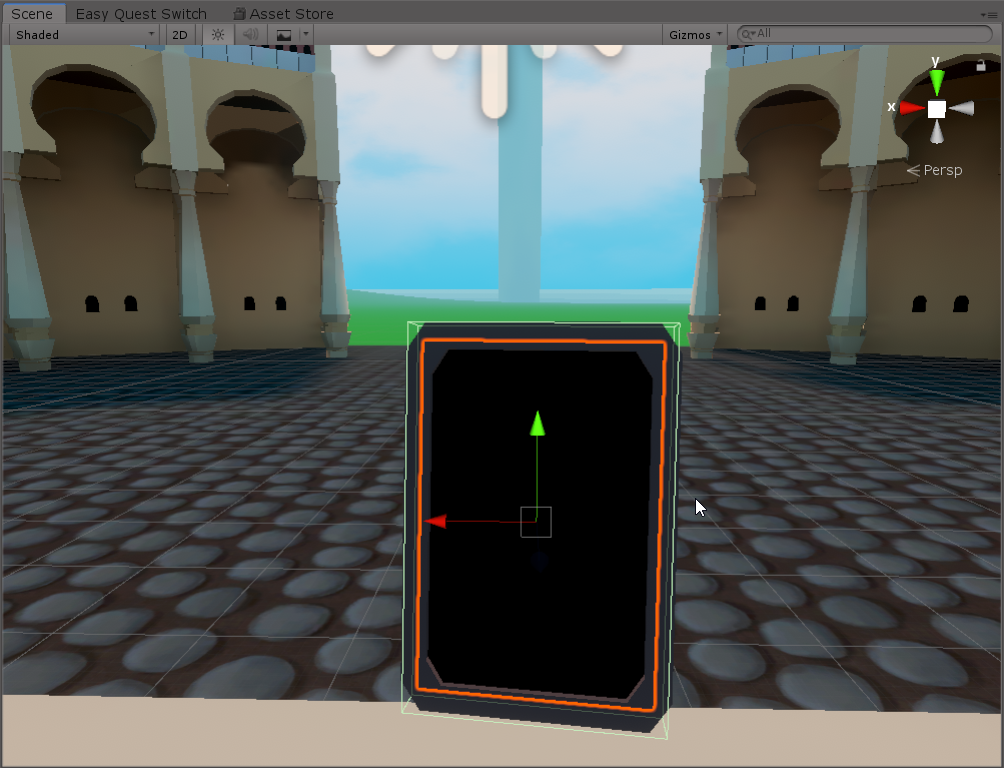 pallid mango
Well I can’t say it doesn’t make sense
fading cipher
Happens in game view too but yeah you're right, let me toggle it in the prefab and build & test

yep, white in-game

I think for now I will do just a mesh renderer toggle and in the future I can change it if questers still report lag from mirrors
That way I can keep it on the VRCmirror instead of making a new game object
Is there any real benefit to executing a delayed event something 40 frames apart instead of 20 frames or something if you're just trying to delay some distance checks so they're not running every frame?
edgy ingot
does anyone know the method name/call for play one shot in U#?
grand temple
it's the same as in normal unity, just audiosource.playoneshot
edgy ingot
tyty
 atomic sinew
Is there a way to make something auto face the player camera in udonsharp?
fiery yoke
Yes thats possible. Albeit not as simple as it may seem.
atomic sinew
I'll try doing it the normal unity way, but I think vrchat dislikes anything using the camera
fiery yoke
You first need to get the local player api (Networking.get_LocalPlayer). Then you need to get the tracking data every frame in Update (PlayerAPI.GetTrackingData) for the Head. Then you have multiple options, but the easiest way is to create a GameObject where you set the position of its transform to the position of the tracking data you can get with TrackingData.get_Position and then finally you can use a LookAt Constraint with that GameObject.
fiery yoke
atomic sinew
I'll try doing it the normal unity way, but I think vrchat dislikes anything usi...
VRChat creates its own camera. The main camera is disabled in the client.
atomic sinew
hmm I see. I was curious, I'm already using get tracking data
Do you know if it takes up any performance or a lot?
atomic sinew
FPS hitter :o.
open estuary
fiery yoke
Whats your goal?
For Resume :
- multiple toggles buttons for turn ON/OFF each of them one Parameter in my Animator
- Having them syncronised with everyone in the world + late joiners
- Having a keypad for disables only the buttons (already working)
Im actually with the version which looks like working but idk if its the best to do cause I needed to "split" in 5 the udon graph cause it was too long and froze my unity
We can talk about it in the evening (im EU) in vocal and I can show you if you have some time 🙏
scarlet lake
What’s udon
dawn forge
?whatisudon
 hidden martenBOT
VRChat Udon is a programming language built by the VRChat Development Team for use in VRChat worlds! It enables complex behaviors and logic in VRChat worlds. Read more about Udon in our documentation: https://docs.vrchat.com/docs/what-is-udon
VRChat
What’s this Udon thing anyways? VRChat Udon is a programming language built completely in-house by the VRChat Development Team. It is designed to be secure, performant, and easy to use via the VRChat Udon Node Graph, a built-in visual programming interface that uses nodes and wires (we call them “no...
tropic atlas
how do I make it so pickup doesnt fly towards the hand but just stay at it current position?
slim hound
tropic atlas
how do I make it so pickup doesnt fly towards the hand but just stay at it curre...
Haven't tried it myself but you might be able to assign a game object to the exact grip in the pickup script and move the specified grip position to the users hand position on pickup
 frank lily
Hi! I'm having a new issue in my world after updating the merlin video player and vrc billiards, for some reason the world master of the world will just have worse framerates
it seems to also transfer to the new room master when the current one leaves
between like 5 of my friends, they were reporting their individual framerates tanked hard when they were promoted to master
my world also has QVpen's newest version in it though it was not updated in the last change
vrcbilliards was updated from 1.1.3 to 1.1.7
merlins usharp video was updated from 0.3.0 to v1
nothing else in my world was changed from the last update aside from these 2 prefabs
slim hound
tropic atlas
how do I make it so pickup doesnt fly towards the hand but just stay at it curre...
Tried it myself and the easiest way to get this behavior is to set the pickup orientation to grip and have nothing set as the target transform
tropic atlas
slim hound
Tried it myself and the easiest way to get this behavior is to set the pickup or...
omg thank you, I was write the code against humanity
 narrow cloak
How do i fix this mess?
 coarse parrot
narrow cloak
How do i fix this mess?
coarse parrot
narrow cloak
How do i fix this mess?
have you imported udonsharp package?
narrow cloak
lmao, nope. Im an idiot
 burnt moth
how do you make something that enables and disables a mirror

 coarse parrot
narrow cloak
coarse parrot
narrow cloak
You haven't assigned which event to call on SendCustomEvent
narrow cloak
isnt that what the public variables target box is for? if not I dunno how to add the event there lol
coarse parrot
You had this blank

The event name is the same name as you assign in CustomEvent node in another object
narrow cloak
Still not working
getting
Program asset 'Assets/Scenes/SampleScene_UdonProgramSources/Cylinder (14) Udon C# Program Asset.asset' is missing a source C# script
UnityEngine.Debug:LogWarning(Object)
In the Console
 coarse parrot
It won't. Unless you click on the Last Build button.
burnt moth

how do I get these into my udon thing
these are from a video
and I cant find them in the create node
where do I find targetGameobject
dapper lion
thats a varible you need to add (top left)
burnt moth
dapper lion
thats a varible you need to add (top left)
I found it thanks
but this work for toggle sound right
does this*
dapper lion
if the game object is set to "play on awake" then ye
burnt moth
dapper lion
if the game object is set to "play on awake" then ye
yeah is there any quest compatibale invisble material on unity btw
dapper lion
ye?
burnt moth
like
dapper lion
i mean, if you mean "purely invisible" then dont have a material/mesh there at all
otherwise. dont stack them and you should be fine
burnt moth
dapper lion
i mean, if you mean "purely invisible" then dont have a material/mesh there at a...
but in unity they still look like something
but they'll be invisible in game?
burnt moth
will I still be able to interact wiht it
because for some reason I cant see the trigger or interact with it ingame
dapper lion
as long as it has a collider
burnt moth
It has an orange thing around it in unity
dapper lion
make sure it has a collider
burnt moth
ok
burnt moth
dapper lion
make sure it has a collider
it has collider and now I can interact with it
but it doesnt play any sound
and I have play on awake
dapper lion
where is the audio source? is it loud enough?
burnt moth
It's at max sound, I have a loud background music so I am going to try disable that and try
the audiosource is the child of the toggle button
burnt moth
dapper lion
where is the audio source? is it loud enough?
he isnt saying anything

audio^^
Toggle button down here
 dapper lion
make the min distence longer
dapper lion
what?
dapper lion
by max distence
burnt moth
dapper lion
by max distence
how big should I make it for testing
dapper lion
big as max
dapper lion
have audiosource disabled
burnt moth
dapper lion
have audiosource disabled
it is...
for some reason it activates when I etner world
or soemthing
dawn forge
Do you have a script enabling it?
burnt moth
dawn forge
Do you have a script enabling it?
its working now but I need a way to when I click on the interact on a button that plays song that all other songs playing stops playing
I am not sure what to add to my current udon script
dawn forge
Two ideas:
Broadcast your "stop" event and have the other playing scripts have a bool/checkbox to accept that event or not and stop if so.
OR
Make an audio controller gameObject and its script will be able to access your audioSource gameObjects specified in your inspector, then directly work with the component.
Edit: See my script below, it can do both 🙂
Unity/Udon pro's, I need feedback because I am still intermediate to Unity, but if a gameObject is empty/null, I realized Udon shuts down even if I check it's null, but if it's null, I want to have it still work with listening for events.
If you use UdonSharp, I can DM you my sample.
using UdonSharp;
using UnityEngine;
using VRC.Udon.Common.Interfaces;

namespace Balphagore.BehaviourControllers
{
    [AddComponentMenu("AudioController")]
    public class AudioController : UdonSharpBehaviour
    {
        [Header("Settings")]
        public GameObject audioGameObject;
        public bool allowStopEvent;
        public bool debug;

        [HideInInspector]
        private AudioSource audioSourceComponent;

        public void Start()
        {
            audioSourceComponent = audioGameObject.GetComponent<AudioSource>();

            if (!audioGameObject)
            {
                Debug.Log("Audio Game Object is missing in script, will only listen for broadcasted events \"stop\".");

            }
            else
            {
                // Do we have the audio source component in the object?
                if (!audioSourceComponent)
                {
                    Debug.Log("Audio Game Object is missing an audio source component, please be sure to add and configure an audio source component in Game Object: " + audioGameObject.name);
                    this.enabled = false;
                }
            }

        }
        /// <summary>
        /// This runs when a user interacts with the object.
        /// </summary>
        public override void Interact()
        {
            // Sends an event "StopAllMusic" to all component scripts of UdonBehaviuor.
            SendCustomNetworkEvent(NetworkEventTarget.All, "StopAllMusic");

            if (audioSourceComponent) _StopAudioSourceClip();
        }

        /// <summary>
        /// Stops the audio source from playing music - if playing.
        /// </summary>
        private void _StopAudioSourceClip()
        {
            if (audioSourceComponent.isPlaying)
            {
                audioSourceComponent.Stop();
                if (debug) { Debug.Log("Stopped Audio!"); }
            }
        }

        /// <summary>
        /// A callable event to stop the playing if allowed so.
        /// </summary>
        public void StopAllMusic()
        {
            if (debug) { Debug.Log("Stop event received!"); }

            if (allowStopEvent)
            {
                _StopAudioSourceClip();
            }
        }
    }
}
@random gull That link is not allowed.
rough beacon
Remove by Tiger
pallid mango
frank lily
(asking again cus i still need help)
Hi! I'm having a new issue in my world after updating the merlin video player and vrc billiards, for some reason the world master of the world will just have worse framerates(edited)
it seems to also transfer to the new room master when the current one leaves
between like 5 of my friends, they were reporting their individual framerates tanked hard when they were promoted to master
my world also has QVpen's newest version in it though it was not updated in the last change
vrcbilliards was updated from 1.1.3 to 1.1.7
merlins usharp video was updated from 0.3.0 to v1
nothing else in my world was changed from the last update aside from these 2 prefabs
dapper lion
most likely the videoplayer. but could also be the 8ball table. acc its most likly the table. but its normally laggy for quest users
master is supposed to transfer in the newer videoplayer btw
 feral valve
Is there a prefab I can download to make items grabbed be hats
fading cipher
Are VRCMirrors completely broken if an object is instantiated with a child object containing the mirror that is disabled?
It works fine in-editor, but when I enable the mirror child in-game nothing happens, and logging the mirror's .activeSelf after enabling it returns true
I'm aware that there's glitchiness with having an object disabled by default when you first join the world (you need to implement a self-disabling delay), but I was told that doesn't stand true for runtime instantiation
 stray junco
hi all
(udon world)
is there any technique,video tutorial example or free vrc supported unity asset
for making vehicle to follow it's animated WayPath's ?
to be more clear i'm trying to make a RollerCoaster with seats
that when it's turned on it will carry users in their seating position
to their destinations but without shaking the camera of user visual field
thanks in advance
dapper lion
i think there was at some point, its on booth for 1000jp
but im not sure if its there anymore
stray junco
right
solid sluice
Any way of applying a image where the Script is? like on the inspector i mean
If any one knows something that can work use @ or send a privet message
Thx ^^
 wanton oxide
Udon Toolkit does this iirc
GitHub
A set of purpose-built Udon Behaviours and tools to make your own - orels1/UdonToolkit
you can look at the source for that
 willow nimbus
so uh id like to replicate (at least partially) the old vrc_audiobank from sdk 2 for randomized environment audio but i have basically no programming experience.
how would i go about doing that?
dawn forge
willow nimbus
how would i go about doing that?
I don't toy with the graph, but I have a good example I can send via DM for UdonSharp script. But you'll basically want to accept an array of audio clips, and an audio source component on the same game object you'd run your script on.
Here is a snippet from my script that basically picks a random track from array and plays it. I use Random.Range starting from 0 to the total length of the audio clip files available.
Also be sure to use GetComponent to populate your audioSource variable.
                audioSource = this.GetComponent<AudioSource>();

                int randomIndex = Random.Range(0, audioClips.Length);
                _LogEvent("Random Index:" + randomIndex);

                audioSource.clip = audioClips[randomIndex];

                _LogEvent("Playing clip: " + audioSource.clip.name);

                audioSource.play();
ah that'd be great thanks, then i'll at least have a starting point even if i don't know how all of it works
solid sluice
wanton oxide
Udon Toolkit does this iirc
Where?
prime fossil
how can i detect the platform again?
i wanna give a gameobject a different material for questies
but this shit feels like normal development where youd need to build everything yourself or even worse as theres no stackoverflowe
ah nvm
#if UNITY_ANDROID private bool isQuest = true; #else private bool isQuest = false; #endif
prime fossil
https://github.com/MerlinVR/UdonSharp/wiki/vrchat-api oi i found some documentation

GitHub
An experimental compiler for compiling C# to Udon assembly - MerlinVR/UdonSharp
wanton oxide
solid sluice
Where?
go to their documentation
then to the custom attributes section
this one
custom name
 wanton oxide
well thats exactly what they're doing no?
its all there
just need to dive into their code and see how it works
solid sluice
i'm getting a weird error when i try it
 solid sluice
wanton oxide
just need to dive into their code and see how it works
solid sluice
wanton oxide
just need to dive into their code and see how it works
Do i need to import something?
i need Udon Tool Kit on the world, and the people that want to use my code need to have it to
i'm fine then
but thx
wanton oxide
if you want to use these attributes, then yes
i was telling you to look at their source so you can copy their implementation for drawing the logo
mighty fjord
You can load textures from file paths by using AssetDatabase.LoadAssetAtPath
https://docs.unity3d.com/ScriptReference/AssetDatabase.LoadAssetAtPath.html
But if you just want a header which displays some text you probably dont need to use an image
solid sluice
i'll try that one
 native fern
Is there an equivalent to isActiveAndEnabled in Udon? I noticed that it is not supported...
native fern
native fern
Is there an equivalent to `isActiveAndEnabled` in Udon? I noticed that it is not...
ignore it, made my own 😉
internal bool IsActiveAndEnabled()
{
  return Utilities.IsValid(this) && enabled && gameObject.activeInHierarchy;
}
was there an input checker prefab somewhere at some point?
grand temple
Probably this?
autumn birch
Could someone send me a screenshot of a simple enable/disable udon script used to disable a map after teleporting from it to another? I intend to click on a door which teleports me to said map and I need all other maps disabled for optimization.
https://cdn.discordapp.com/attachments/232189169525325824/863531471419736074/unknown.png
I have no idea what I'm doing 😅 . And random uploads to test this script takes a good 10min per upload >_>. So far nothing works.
 pallid mango
autumn birch
Could someone send me a screenshot of a simple enable/disable udon script used t...
pallid mango
autumn birch
Could someone send me a screenshot of a simple enable/disable udon script used t...
Udon shouldn’t be needed for this if you set up object occlusion fyi
autumn birch
pallid mango
Udon shouldn’t be needed for this if you set up object occlusion fyi
I hate Occlusion, it doesn't work very well.. rendering pops back on sometimes based on view angles...
grand temple
huh? Do you have pimax or something?
autumn birch
Also I'm trying out JetDogs package with UdonSharp and well... I get a compile error... other people it seems don't have this problem so I don't know why I am...
no, I mean in the editor it does.
grand temple
or maybe occlusion culling is just set up wrong
you need to change the settings to match your scene and set certain objects to be occluder/occludee static depending on what they are. For example a chain link fence doesn't block your view, but the occlusion would have a hard time with it so you need to set objects like that to not be occluders
occlusion culling is always good to have, it is very powerful. If you are having issues with it, manual culling shouldn't be the alternative. It just means you need to fix the occlusion culling.
That being said, yes manual culling can still have a benefit. However it can cause a lot of issues too. For example if you have pickups with gravity, you need to make sure to freeze them if they are in an area that is disabled
dapper lion
@autumn birchwhat you can do is have the teleport button and the toggle button in the same button
autumn birch
dapper lion
<@!173125010368495616>what you can do is have the teleport button and the toggle...
Yeah, I just don't know how to create the graph needed to toggle things. Or untoggle which would need to happen at the same time.
grand temple
you just need to have a public gameobject variable and then do gameobject set active
dapper lion
"get activeinhierarchy"?
https://cdn.discordapp.com/attachments/232189169525325824/863531471419736074/unknown.png they have their graph
autumn birch
well in the screenshot above you see something similar to what I think I'm supposed to do >_>
grand temple
you're almost there, but you have nothing plugged into the get activeinhierarchy mode
dapper lion
everytime i do graph toggles. i always forget what order they have to go in lol
grand temple
so it defaults to the gameobject that the udonbehaviour is on, which is probably not what you want
so instead just plug in the stairwell object
that would make that graph work, but I'm not sure that's what you want either. That just toggles it. Based on the name of the graph I assume you want to just always enable it?
autumn birch
no, I want it to be enabled when I enter the door, and disable the room I came from at the same time
autumn birch
how to set innactive?
grand temple
the gameobject setactive node has a toggle on it, just have it be false like this

and if you want it to be true, you just set it to true
 autumn birch
that option doesn't seem to be there...
autumn birch
so I don't need unarynegation?
grand temple
you would only need that if you want to toggle
autumn birch
tbh I don't know what that is
grand temple
unarynegation just flips a bool. If you input true, you get false. If you input false you get true
grand temple
you don't need it if you're always setting it to the same value
I assume that this object will always enable A and disable B, while another object will always enable B and disable A
 wispy marlin
How do I make a pickupable object that doesn't immediately just fall to the ground on play? I want it to be in the place that it's in when I submit the world until it's moved.
grand temple
set the rigidbody to iskinematic
wispy marlin
Thanks!
scarlet lake
whats udon do
grand temple
?whatisudon
hidden martenBOT
VRChat Udon is a programming language built by the VRChat Development Team for use in VRChat worlds! It enables complex behaviors and logic in VRChat worlds. Read more about Udon in our documentation: https://docs.vrchat.com/docs/what-is-udon
VRChat
What’s this Udon thing anyways? VRChat Udon is a programming language built completely in-house by the VRChat Development Team. It is designed to be secure, performant, and easy to use via the VRChat Udon Node Graph, a built-in visual programming interface that uses nodes and wires (we call them “no...
scarlet lake
People are talking in game and I cant hear anyone ?
grand temple
you may have safety settings turned on in the safety settings (try setting it to none) or you have voices turned down (it's a slider on the top right of the settings page).
autumn birch
How long till list support becomes a thing?
scarlet lake
grand temple
you may have safety settings turned on in the safety settings (try setting it to...
I might be safety
Nope still not it
 steel bronze
We have a popular world that uses audio boxes that boost the players audio by X amount when standing inside the collider. After about 60 people join the world the audio box breaks for about half the lobby. Does anyone know how to fix this and make it more reliable?
fiery yoke
steel bronze
We have a popular world that uses audio boxes that boost the players audio by X ...
https://docs.unity3d.com/Manual/class-AudioManager.html Unity has a setting for Max Virtual Voices and Max Real Voices, which make Unity limit how many Audio Source can be played at the same time. I think VRChat sets this to 60 so I would guess that this is the cause of your problem.
solid sluice
Why is this code not working?
{
public Animator animator;
public string anim;
public void override Interact()
{
    animator.Play(anim);
}
}
it's not playing the animation at all
grand temple
I would not recommend using that method to play an animator. Instead you should make a trigger variable on the animator. Then have an idle state and a running state. Then make a transition to running if the trigger variable is true. Then in your script you do animator.settrigger
solid sluice
ok then i can't make this into a prefab
i was trying to make a prefab that can run animations but ok then i'll work on my next problem
 manic yarrow
I've got a UdonSharp script that moves objects from point to point using gameobjects, but it doesn't sync at all because I don't know how to make that happen.
I tried using the regular VRC object sync, but if a player disconnects while looking at the moving objects it ruins their pathing
You know how things kinda jitter for a second when you close VRChat?
well it transmits that jitter to everyone and breaks the whole thing
grand temple
It would probably help to call object sync.flagdiscontinuity. that tells people that it should teleport instantly without being smoothed
However if that doesn't work, I think your best bet is to have a synced integer and just use that integer as the index of the positions you want to go to.
manic yarrow
hang on, I'll show you the script as-is
solid sluice
@grand temple One question any idea how to make a Local Trigger with a Box Colider?
When a player enters the Colider it runs the code for everyone
grand temple
Just add onplayertriggerenter to an udonbehaviour
solid sluice
public override void OnPlayerTriggerEnter(VRCPlayerApi playerApi)
grand temple
That will also give you the playerapi of that player so you can do things like get the display name or branch only if they're the local player
solid sluice
This is what i have and is not local
manic yarrow
using UdonSharp;
using System.Collections;
using System.Collections.Generic;
using UnityEngine;
using VRC.SDKBase;
using VRC.Udon;

public class Waypoints : UdonSharpBehaviour {

    public GameObject[] waypoints;
    int current = 0;
    public float speed;
    float WPradius = 1;

    void Update () {
        if(Vector3.Distance(waypoints[current].transform.position, transform.position) < WPradius)
        {
            if (current != waypoints.Length)
            {
                current = current + 1;
            }
            if (current >= waypoints.Length)
            {
                current = 0;
            }
            transform.LookAt(waypoints[current].transform.position);
        }
        transform.position = Vector3.MoveTowards(transform.position, waypoints[current].transform.position, Time.deltaTime * speed);

    }
}```This is the script, doesn't have any networking built into it
grand temple
Thats correct, but it gives you the playerapi. You can check if that player is local
solid sluice
and that will be Player.Local?
grand temple
Player.islocal
grand temple
manic yarrow
```
using UdonSharp;
using System.Collections;
using System.Collections.Generic;...
Oh I see, I assumed you wanted it to teleport. If not then I think vrc object sync is your best bet. I'm not entirely sure what issue you're talking about though, could you take a quick video?
solid sluice
but if i get that on a If it will be true every time because all the players are local
manic yarrow
grand temple
Oh I see, I assumed you wanted it to teleport. If not then I think vrc object sy...
Alright, give me a second to record it
grand temple
solid sluice
but if i get that on a If it will be true every time because all the players are...
No, they are not. Only one player is local, that is the player that you control and move around
grand temple
If another player enters into it, islocal will be false on your computer. On their computer, it will be true. Everyone is running this code independently
solid sluice
Like if VRCPlayerApi.Player.islocal = true or something like this
manic yarrow
You want the video with the object sync bug, right?
 sullen haven
Kőolaj
grand temple
manic yarrow
You want the video with the object sync bug, right?
Yes, I'm not sure what you're referring to
manic yarrow
grand temple
Yes, I'm not sure what you're referring to
I just need to rebuild it with the object syncs enabled, give it a moment
grand temple
Does that happen specifically when the master disconnects? Or is it anyone
solid sluice
grand temple
Player.islocal
So when i try VRCPlayerApi.Player.islocal Player is not a thing that VRCPlayerApi has
grand temple
It's just player.islocal
Player is a vrcplayerapi variable already due to the function that you are in, there is no need to specify vrcplayerapi
solid sluice
The name 'player' does not exist in the current context [Assembly-CSharp]csharp(CS0103)
grand temple
Is this inside the onplayertriggerenter event?
solid sluice
Yep
grand temple
Oh you renamed it to playerApi
Whatever variable you received from the onplayertriggerenter, that's all that matters
steel bronze
fiery yoke
<https://docs.unity3d.com/Manual/class-AudioManager.html> Unity has a setting fo...
Is there a way around this?
solid sluice
grand temple
Oh you renamed it to playerApi
i don't get it sorry
this is what i'm trying
 grand temple
solid sluice
i don't get it sorry
grand temple
solid sluice
i don't get it sorry
If udonsharp is giving your trouble, I would recommend trying udon graphs
solid sluice
i don't understand graphs
grand temple
Then watch some tutorial videos from vowgan
grand temple
Watch tutorial videos from vowgan
manic yarrow
Hmm, I can't seem to recreate it for some reason, the jitter still happens but it didn't affect it this time around
Still, I feel like it'd be a better idea to include the syncing inside the script
solid sluice
i can't use a graph because this is for a prefab and i wanna run a different code when is done, so this code is calling a different UdonBehaviour when is triggered
grand temple
Vowgan also does tutorials in udon sharp
grand temple
manic yarrow
Hmm, I can't seem to recreate it for some reason, the jitter still happens but i...
I'm guessing it might be because when it transfers from one player to another, it tries going to the wrong location. If you just sync that current integer I think it would work
manic yarrow
how do you sync specific stuff like that?
All I could find was setting a sync mode for a whole script
grand temple
add [udonsynced] before the variable
manic yarrow
before int or between int and the name?
manic yarrow
do spaces affect it or anything? Just want to make sure since c# isn't really my thing
grand temple
yeah make sure it's exactly [UdonSynced]
manic yarrow
[UdonSynced] int current = 0;
grand temple
yep
manic yarrow
Oh yeah, another thing
someone told me that teleporting every frame is broken right now, is that true?
grand temple
teleporting an object is fine, it's teleporting the player that you shouldn't do
manic yarrow
Oh, someone told me I'd need to teleport the player around
Unless there's a smarter way to make moving objects people can walk on
grand temple
the open beta fixed the biggest issue with teleporting every frame, but it's not the only issue
steel bronze
fiery yoke
<https://docs.unity3d.com/Manual/class-AudioManager.html> Unity has a setting fo...
So technically if I changed this setting then my issue would be resolved right? Or would vrc take it back to default
grand temple
and besides, keeping the player on moving objects is very complicated math, especially when the object starts to rotate. I'm not sure if I have the energy to go step by step on that big of a project
manic yarrow
By the way, just made a new build with the synced variable and it makes the objects behave weirdly
that integer is counting up through the list of waypoints that the objects have to pass through
grand temple
define weirdly?
manic yarrow
by syncing it, it makes the objects skip a bunch of waypoints in order to match the other people
grand temple
it's probably being weird because everyone is doing this code. Try doing if (!Networking.IsOwner(gameObject)) return; at the start of update. That will stop running any code if you're not the owner
manic yarrow
Let's say an object has to go around a corner with these 3 checkpoints

If the object has already passed checkpoint 2 when a person joins late, the object will go straight for 3
because the original object was on its way to 3
grand temple
yeah, but it has objectsync so it should be on the path from 2 to 3, right?
unless objectsync is not working
manic yarrow
Oh, this is in combination with objectsync?
grand temple
of course
manic yarrow
I was under the impression it was replacing it for some reason
grand temple
the reason to sync the current target is so that it can be safely handed off to someone else when the owner disconnects
manic yarrow
should I leave collision ownership transfer on?
For some reason I feel like I shouldn't
grand temple
probably don't want that
manic yarrow
Alright, seems to be working now
It's a shame that making a moving object that you move relative to is so complex though
you'd think unity would have some kind of moving platform component
dawn forge
Hey, so I am using VRC Pickup script to allow a player to manipulate an object, but I want to freeze its position only on the y-axis so they can't pick it off the table, only move on x-z, but it doesn't seem to respect the Rigidbody's freeze setting. I am looking through docs but can't find anything that may help?
dapper lion
dawn forge
Hey, so I am using VRC Pickup script to allow a player to manipulate an object, ...
try this


rigid body freezing means something elser
dawn forge
Thank you!
autumn birch
what are the nodes needed for just a simple 'play sound' when interacting with an object? I got interact ->, AudioSource Set enabled' with the audio source Door sound in the instance slot. Audiosource set to play on awake so it only plays when the world loads and not when it's on my doors >_>
cold raft
That sounds about right yes interact to set active on the audio source, and set the audio source to disabled in the editor so it wont play on world load
feral valve
Wheres the best place to learn udon and udon sharp that's not outdated?
dapper lion
 still valley
did vrc broke?
still valley
did vrc broke?
no not yet
dapper lion
feral valve
Wheres the best place to learn udon and udon sharp that's not outdated?
vowgan, most of his stuff still translates well and if somethings too old. hel repost
i think theres more udonsharp youtube channels popping up tho that might be more updated
but i avent been keeping track
feral valve
Alright ty
fading cipher
When attempting to do my item spawn pretty far away from my VRCWorld object, the logs are saying it should be spawning at what looks like the right place, but the item is nowhere to be found... https://i.imgur.com/0A1ks35.png
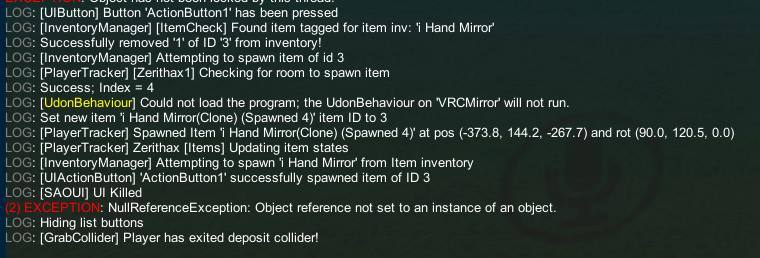
Is the VRCWorld automatically respawning it because it's so far away? Is there a place I need to up a value to fix that?
ohhhh
I know the problem
autumn birch
cold raft
That sounds about right yes interact to set active on the audio source, and set ...
not working btw
 formal leaf
how do i use udon and the animation controller stuff, i want to play an animation when i interact with a button (it's just the button moving)
slim hound
autumn birch
what are the nodes needed for just a simple 'play sound' when interacting with a...
AudioSource.PlayOneShot and you can disable Play On Awake
scarlet lake
i have a python script on my computer that gets a string from a website and i was wondering if it would be possible to display that string in a vrchat world?
its mostly just being able to manipulate a variable of that string not so much display it
cold raft
well if you have a ui text component you can just set the text to the string when its value changes
scarlet lake
but can a vrchat world read a value of a string on my personal computer
cold raft
it should not be able to do that no
scarlet lake
my plan is for a string on a website to be displayed in the vrchat world, but to get that string you need a python script
is this possible?
grand temple
best you can do is focus an inputfield and then paste it in
scarlet lake
would it be possible to send a text message from a vrchat world to my personal computer so i could run a script using that text?
or can data from vrchat worlds not leave the vrchat world
cold raft
well there are some trickly ways, for example you are able to load in extenral urls (if the user has the allow untrusted urls checkbox set)
now you could use the query string part of the url to pass data to the enternal server
scarlet lake
so a button with a url that parses text from an input box to an external server?
cold raft
yes like how the video player works, you enter a url and it tries to load a video at the endpoint, you can have no video there so the loading of the video fails but than the request is still made
you can even hide the video player and give it no audio sources so the users in your world would never know what happens in the backend
and to actually load data into a world from an external source, often video players are used, not with normal video but with just data, like colored pixels representing information, i think you can parse individual pixels in a video.
scarlet lake
is there a straightforward way to pass a string through a url without having to create a website?
hi yall i hope this is the right place to ask this, does anyone know how to add a keyboard so you can search up videos like this one on the pic?
 cold raft
scarlet lake
is there a straightforward way to pass a string through a url without having to ...
cold raft
scarlet lake
is there a straightforward way to pass a string through a url without having to ...
not that i know if
scarlet lake
i think i managed to make a temporary solution
cold raft
nice


 cold raft
You cant do getcompnent<T>
flint urchin
 boreal plaza
I cant do getcomponent in a udonscript? or am I an idiot?
boreal plaza
I cant do getcomponent in a udonscript? or am I an idiot?
You can
but not on Udon components
or VRC ones
cold raft
But getcomponent(typeof(T)) does work
flint urchin
You can do GetComponent<UdonSharpScriptClassName>().Method()
Restart Unity
You can manually install Cinemachine via the Package Manager too if the error still persists
 obtuse valley
udon like the food right?
floral dove
obtuse valley
udon like the food right?
?whatisudon
hidden martenBOT
VRChat Udon is a programming language built by the VRChat Development Team for use in VRChat worlds! It enables complex behaviors and logic in VRChat worlds. Read more about Udon in our documentation: https://docs.vrchat.com/docs/what-is-udon
VRChat
What’s this Udon thing anyways? VRChat Udon is a programming language built completely in-house by the VRChat Development Team. It is designed to be secure, performant, and easy to use via the VRChat Udon Node Graph, a built-in visual programming interface that uses nodes and wires (we call them “no...
 soft mountain
So, question: you know how Cyan's climbing prefab stashes the handholds behind the player's ears? What's the best way to go about doing that in Udon?
grand temple
all you have to do is set the position of an object to the local player's tracking data every frame while it's not being held. You would do that with the update event and with playerapi GetTrackingData
To add an offset so that it's not exactly on the player's head, you can multiply the player's head rotation (as a quaternion) by a fixed offset (vector3) to align it with the rotation of the head. This will make the offset be effectively in the local space of the player's head

 whole rain
How would someone go about comparing the size of 2 Vector3s? I have a dynamically scaling object that I want to set max/min boundaries on
I've tried comparing magnitudes (and sqrMagnitudes) but it's obvious to me that I'm dumb and that's not what magnitudes do
grand temple
depends exactly what you want, but first thing that comes to my mind is that you would split up the vector3 into it's component floats and run mathf.clamp on it against two other vector3s which have also been split up into their components
whole rain
I'm creating an AudioVisualizer but writing most of the code myself (though it's definitely based off M.O.O.N.'s tutorial video for the base of it). I have a script for changing Scale, and I want a high and low threshold. Therefore I have to check every frame if the object is above or below my max/min vectors. The more I read, I feel like magnitude should be correct (just measuring the length of the object should get the job done) but of course, that isn't happening and I'm worried I'm going about it wrong
I feel like setting 9 variables (maybe 12 actually if I combined the 3 from each vector3 object and then compared the 3 results) might work but I'm worried about performance (especially on Quest since I can't test that)
grand temple
do you have to check every frame always? Or would it work if you only check while interacting with this object?
whole rain
Each object updates its scale according to the SpectrumData it receives from the master object every frame.
whole rain
For now, every axis. I wouldn't mind adding some functionality in the future for altering specific axis, but it's much easier for now to do every axis
grand temple
well I was meaning that if you're worried about the performance cost of doing this on every axis, you could just do it on one instead. It would be simpler
actually wait no, there is a vector3 lerp function. That's probably what you want instead of a clamp anyway
since the spectrum will just give you a float, you can plug that directly into the lerp
whole rain
True, but for objects I have planned they would need to update on every axis anyway (like my 3D stars) so unfortunately it's not an option to limit all objects to one axis
I'm currently using lerps to move between the current scale and the next one, but my problem is seeing if my next scale is bigger than my max
grand temple
where are you getting the next scale from
whole rain
It's a public Vector3 variable that can be set on the object
grand temple
so then clamp it on start
though maybe I'm misunderstanding, I'm not sure why you would want to make a maximum to that at all if it's something you manually put in
whole rain
The point of the maximum and minimum vectors is to stop objects from getting too large/small. The data from the AudioSpectrum isn't predictable, especially when you don't know exactly what clip (in my use case song) will be playing.
I'm still pretty new to all of this, what exactly is clamping?
grand temple
ohh, does spectrum data provide a value that is not strictly 0 to 1?
I'm not sure what it gives, is it something random like 50?
whole rain
Tbh, I do not actually know what values specifically are in the float array the spectrum is in, but it's more than 2 options for sure
grand temple
try running a debug log to see what value spectrum data is giving you
Then you should do an inverselerp on the spectrumdata first. Once you know that, you can use inverselerp on the spectrumdata and define the minimum and maximum. For example if the spectrumdata varies somewhere between 0 and 50, you would run inverselerp(0,50,value). Then you plug that into the vector3 lerp and it will be normalized and clamped properly
whole rain
I'm not actually sure how I would implement that, because like I said every song will be different. Heck, even different areas of the spectrum will be different. I also don't know how I would use that to set limits on the scale of my objects. Should I try and give a brief explanation as to what my script is doing exactly?
grand temple
there must be some kind of standardized scale that spectrum data happens on, you need to find that out.
whole rain
The SpectrumData is just an array of floats set by Unity using GetSpectrumData. I'm not entirely sure what the math is here, but each float corresponds to frequencies in increasing order and their (I'm assuming) volume. From the debugs I just did, I saw as low as 0.00000x and as high as 6.x, but that's with my volume set lower than what others may use, and is also only on #0 corresponding to lower frequencies.
This data then gets used to alter the scale of my object, along with a mulitplier to get more usable data. I'm using UdonSharp, so that code looks like this Vector3 endScale = new Vector3((currentScale.x * SpectrumData[spectrumLocation]) / 2 * multiplier, (currentScale.y * SpectrumData[spectrumLocation]) / 2 * multiplier, (currentScale.x * SpectrumData[spectrumLocation]) / 2 * multiplier);
In order to have a hard limit on my objects size, I need to actually compare sizes and then stop the lerp that follows this from happening
grand temple
any adjustments you do to the source should be done before it ever touches the vector3. You're just doing the same code 3 times for no reason
I'm telling you, just run inverselerp on the number and then run vector3 lerp
that will give you the most amount of control and you'll be able to properly clamp it and rescale it to whatever you want
whole rain
I'm not adjusting the source, I'm creating a Vector3 using values from the source. I have to do it 3 times as each vector may be different. If my object is 2 3 2 for example, I need to scale each one individually as the results from y would be different from x and z
grand temple
that's what vector3 lerp does
the inverselerp clamps and normalizes, the lerp applies it to the vector3
whole rain
I'm really confused as to how to introduce hard caps into that solution. Every object may scale differently and have different multipliers and max/min sizes.
grand temple
when you use inverselerp, that normalizes it to a 0 to 1 range. That means when you plug it into the lerp, it will properly respect the min and max. It will never go beyond the max or below the min
the reason you're having issues right now is because you're just blindly multiplying, so your "max" isn't really a max, it's just another multiplier
whole rain
The max doesn't change, it's never used in any math. It's an arbitrary Vector3 set by me per object. All I'm trying to do is get a value out of my endScale, or what the object wants to change to, and compare it to my max and minimum Vector3s. Everything before that is irrelevant in that exchange.
Inverselerping is actually an excellent idea to help me normalize my data even further than the smoothness value already does, but it wouldn't change anything about that comparison that needs to happen after the scale my object wants to change to has been determined.
grand temple
but my point is that you don't need to worry about checking the resulting vector3 if you are already normalizing the input float. If you run that through a lerp, you can be confident that it will never be greater than the max
whole rain
I respect that, and I'm sure that is what other visualizers have done in the past, but I'm trying to set hard limits to ensure objects never get too big or small no matter what. It's the last line of defense, making sure that no matter what it is impossible for objects to be too large or too small
I just said the same thing twice...
I know inverselerping does set a cap on that, but as the person placing the object I have no control over what that cap is. If everything ends up working well, I'd also like to package and share this visualizer I've made too so that it can be used by others who may not know how or want to make one.
grand temple
yes you do have control over that cap. That's the B input
whole rain
The problem is that it's an arbitrary value that isn't easily understood. Having actual Vector3s means it's easy to see how big or small the object can actually get
grand temple
if you've seen around 6, I would guess the max value is 10
 dawn plover
Hello! I was experimenting with the VRC Object Pool for a game I want to make, but I've noticed it pulls out objects from the pool in order and I need that the object pool takes the objects outside randomly, is there a way to do that or I need to make a custom system just for that?
dawn plover
dawn plover
Hello! I was experimenting with the VRC Object Pool for a game I want to make, b...
No one can help me? I can't find enough information about this
dapper lion
im pretty sure object pool was randomized by default. but i eventually gave up using vrc object pool all together so i can have object spawn in order lol
slim hound
dawn plover
No one can help me? I can't find enough information about this
What are you trying to do exactly? if you need it to be random there is a function to shuffle the object pool
dawn plover
It's a card game, so I have all the cards inside the pool and I want them to be picked randomly from the pool
dawn plover
dapper lion
im pretty sure object pool was randomized by default. but i eventually gave up u...
I've been doing a lot of test and as far as I can see they only spawn in the same order every time, and it use the order of the VRC Object Pool
dapper lion
huh. i mustve done something wrong that you probs want lol
what is your set up current?
dawn plover
I guess so lol
For now I'm just using the prefab from VRChat Examples, I tried to see the nodes inside VRC Object Pool but there's nothing to randomise the spawn
slim hound
If you search for VRCObjectPool and in its available nodes you should be able to find it

If not you likely need to update your SDK
dawn plover
Oh, I don't have it, and yeah, I have an older SDK, I was sure it was the most recent one but I guess I was wrong lol
I'll try to update then, thank you for the help 😄
manic yarrow
I've created an override animation for a station in a world I'm working on, and while it works perfectly in 3.0 avatars, 2.0 avatars get stuck in the proxy_stand_still animation instead of the custom animation.
I copied the default chair controller to do it, which I thought would be enough
but as I said, 2.0 avatars don't sit.
pallid mango
manic yarrow
but as I said, 2.0 avatars don't sit.
Is the controller using AvatarVersion to transition to two different states depending on version?
manic yarrow
pallid mango
Is the controller using AvatarVersion to transition to two different states depe...
give me a second, accidentally started a new build 😅
manic yarrow
pallid mango
Is the controller using AvatarVersion to transition to two different states depe...
This is what it does
 obtuse agate
@whole rain That’s a good question. I don’t how GetSpectrumData implements FFT bin exactly, but my guess is, the maximum value of spectrum data is either the length of the array (for example 4096) or its square root (for example 64). However you won’t see this maximum in practice, since it can only be achieved with some artificial waveform
pallid mango
manic yarrow
This is what it does
I’d skip the seated check. If they are running the controller they are sitting
manic yarrow
pallid mango
I’d skip the seated check. If they are running the controller they are sitting
weird, that's what the default seat is doing
pallid mango
If they are getting stuck in the first state I would try toggling write defaults
I don’t know if that will help but I’ve seen some avatar controllers get stuck on the initial state in some cases with no write defaults
manic yarrow
I'll try removing the seated check first
where's the option for write defaults, in the controller or on the animation?
manic yarrow
pallid mango
I’d skip the seated check. If they are running the controller they are sitting
Hm, that causes 2.0 avatars to constantly wiggle between the seated animation and the standing animation
pallid mango
manic yarrow
Hm, that causes 2.0 avatars to constantly wiggle between the seated animation an...
Somethings not going right there
I didn’t think av2 avatars could continue to propagate through a controller anyway