#udon-general
59 messages · Page 59 of 1
 slow coyote
 dusk lance
Cant wait for per player programs so that giving every player data will be much easier.
Is the vrc object pool stable enough so that on player join, taking ownership, and trying to spawn is enough to give every player an object? Im worried about the edge cases. I’m still using Phases pool system for now as a side step but would like to have something using the pool object instead.
 floral dove
Also - keep in mind that we'll be adding support for a "Player Object" as part of the upcoming Player Persistence project this year, where each Player can be auto-assigned an object, and the variables on that object can be persisted between sessions. While we can't give you details of exactly how this works yet, if you build things with this pattern in mind, you will be able to migrate them to the persistence system later.
floral dove
dusk lance
Cant wait for per player programs so that giving every player data will be much ...
It should be! But we've yet to do a big test. I could build a simple test along those lines to try at the Community Meetup. I'll be out of town this weekend but we could do the next one.
slow coyote
Really looking forward to the persistence stuff.
dusk lance
floral dove
It should be! But we've yet to do a big test. I could build a simple test along ...
I would offer to write one as well and test at the meetup, but I showed a world at the last one so I’m also waiting a week.
Having it in graph form and super simple would help a lot of creators.
 gloomy wind
Omg persistence ! Neat !!!
 fading cipher
Persistence confirmed this year?!
 wanton oxide
floral dove
Also - keep in mind that we'll be adding support for a "Player Object" as part o...
wanton oxide
floral dove
Also - keep in mind that we'll be adding support for a "Player Object" as part o...
That is soo good
I literally already wrote a system to do just that haha
So adding persistence would be super easy
 muted sinew
hey everyone, im having some trouble with my udon script, i am trying ot make a door disapear/reappear when i click a button but instead of the door disapearing, the button itself disapears
could someone take a look at my string and let me know if there are any errors within it?
 floral dove
muted sinew
floral dove
muted sinew
what do you have set as the 'door' GameObject in the inspector?
 flint urchin
Did you remember to set the door object as the variable in the inspector?
floral dove
flint urchin
Did you remember to set the door object as the variable in the inspector?
jinx! personal lock
 chilly crater
How would I go about making a HUD UI for VR? I can't use a UI canvas
I'm trying a on object on an update loop positioned on the tracking data, but that is really jittery.
 rose mauve
anyone know about setting custom colours to vrcbilliard?
flint urchin
chilly crater
I'm trying a on object on an update loop positioned on the tracking data, but th...
If you do the position update in LateUpdate (no lerp) it shouldn’t jitter. Ofc a bit easier to tell what’s going on if you have any pictures
chilly crater
I wouldn't really call it jitter... It slides opposites to how I'm rotating and then catches up.
    {
        if (Networking.IsOwner(Networking.LocalPlayer, gameObject))
        {
            var owner = Networking.GetOwner(gameObject);
            var trackingData = owner.GetTrackingData(VRCPlayerApi.TrackingDataType.Head);

            transform.position = trackingData.position;
            transform.rotation = trackingData.rotation;
        }
    }
... late update...
derp
chilly crater
flint urchin
If you do the position update in LateUpdate (no lerp) it shouldn’t jitter. Ofc a...
There we go, thanks. Got the lateupdate and fixedupdate confused
muted sinew
floral dove
what do you have set as the 'door' GameObject in the inspector?
i had just a simple cube i made flat
floral dove
muted sinew
i had just a simple cube i made flat
this graph should work if you have the right object set as the target, ie the 'door'. Can you show a screenshot of the inspector for this UdonBehaviour?
muted sinew
floral dove
this graph should work if you have the right object set as the target, ie the 'd...
yes im fairly new so im just trying to figure out where it is
 rancid edge
So udon is like a programming language?
chilly crater
rancid edge
So udon is like a programming language?
Yes.
rancid edge
chilly crater
Yes.
Do I need any programming background to learn how to use it?
muted sinew
floral dove
this graph should work if you have the right object set as the target, ie the 'd...
 chilly crater
rancid edge
Do I need any programming background to learn how to use it?
chilly crater
rancid edge
Do I need any programming background to learn how to use it?
I would watch a few tutorials on youtube about it. It's based on C#, so you knowing syntax, a few generalities and whatnot will only help.
I'mma simp Vowgan. He explains as he goes along. What he is doing, how he is doing it, and why he is doing it.

YouTube
Environment and Interaction Developer for Social VR | Udon Tutorial Series Creator
muted sinew
it seems overwhelming but its not super bad just kinda technical
ive been watching this guy
https://youtu.be/6ZaBCVMOMWE
Create a sliding door with VRChat Udon
Next Episode https://youtu.be/YgV8X-z2OKA
Follow me on twitter (https://twitter.com/notmackintosh)
References:
Canada Themed Clothing and Other Retextures by: https://twitter.com/vicvic_VRC
VRChat Mishe model: https://booth.pm/ja/items/1256087
@floral dovei ende up redoing the whole door and this time it worked? im not sure if i just needed to restart but that was super weird
floral dove
muted sinew
hm, that looks right from here. I just built that scene and it worked for me 🤔
rancid edge
chilly crater
I would watch a few tutorials on youtube about it. It's based on C#, so you know...
Could I realistically just watch tutorials and learn how to use it? Or do I need the coding foundation because I don’t mind trying to learn C# I’ve always been interested in programming, but I just want a fun way to pick it up so I was hoping Udon would be a good outlet.
muted sinew
floral dove
hm, that looks right from here. I just built that scene and it worked for me 🤔
thanks for the help, i think its because my button was too close to the door
chilly crater
Udon Noodlegraphs is great starting out. And then you start hitting limitations (like graphs becoming more and more difficult to decipher as you go on) and then you move onto UdonSharp.
muted sinew
rancid edge
Could I realistically just watch tutorials and learn how to use it? Or do I need...
nah you dont need a foundation i have zero background and im just picking things up here and there
chilly crater
That's what happened with me.
rancid edge
Ahhh great
I’m hopping on this then after seeing someone getting a video player to work for quest I assume with udon I wanna try to do some cool stuff like that as well
muted sinew
im sure youll get the hang of it!
sorry to ask a multitude of questions but does anyone know if we need vrc world to allow jumping?
floral dove
muted sinew
sorry to ask a multitude of questions but does anyone know if we need vrc world ...
jump is 0 by default, you need to set it to something above 0 to allow jumping. If you use the VRCWorld prefab, it has a program with this already set up.
muted sinew
ah gotcha thank you
 trail shard
How do I interact with the variables in one udon script from another?
 grand temple
You would need to have a reference to that other udonbehaviour and then you can do setprogramvariable and getprogramvariable
trail shard
The udon behavior or the object that the udon behavior is on?
grand temple
the udonbehaviour itself
you can do that by just making a public udonbehaviour variable and then dropping in the other udonbehaviour into the slot in the inspector
trail shard
The udon behavior component you mean? Or the script?
grand temple
yes, the component
trail shard
so then when I get the program variable, for the symbolname should I just type the name of the variable I want to get?
grand temple
yep
trail shard
How would I edit a float variable from this?
grand temple
plug in a const float
trail shard
Into value I'm assuming
grand temple
yes
trail shard
There's clone, get sync root, and get value, those are the only 3 that come off the value node for floats
grand temple
huh? I'm not sure what you're looking at
trail shard
when i drag off the value node from the setprogramvariable there's no constant float option, only clone, get sync root, and get value

 grand temple
yeah just don't plug it in like that
make a brand new node and drag it into value instead of dragging away from value
value is a generic "object" type which means it can accept just about anything, so dragging off of it like that isn't really going to work
trail shard
Ooh ok, I figured value was the value of those variables
I stg I don't know how yall figure this shit out with no documentation or tutorials I'm floundering like a dead fish
I guess dead fishes don't flounder though. I'm floundering like a dying fish*
grand temple
setprogramvariable used to be the only way to set anything
at a certain point the thing where you drag in from the side bar was added, and that's basically just a shortcut that does the same thing as setprogramvariable
trail shard
Do I need a specific event on the other script to detect like an event of the variable changing or something?
grand temple
no, but you can send a custom event to it after setting the variable
only if you need it to react to the change
trail shard
Well i'm having it update a text object that displays the float
and the only time that happens is on start
trail shard

ok so that works now, but it only adds 0 and 5, I'm assuming I need to use the get program variable node to get the actual value of the float because the moneymanager script stores that value
grand temple
yeah exactly
you would get the moneymanager's money value and plug that into the addition
trail shard
Do I do that off of the object output of the getprogramvariable or is that something I'd just have to make another separate node for
grand temple
yes, straight off getprogramvariable
 grand temple
hm, I thought it would do the conversion automatically. Does it not let you plug the object directly into the float?
trail shard
Oh it does, the colors are tripping me out I just assumed that wouldnt work I guess lol
if I try to interact with it more than once it gives me this error

Nvm just had to recompile both scripts
Sweet everything works now awesome. So by default this should only be local right? I don't want the money value updating for everyone, obviously, everyone needs their own local money value
grand temple
Yep that's all local
trail shard
Awesome thank you so much!
 autumn sparrow
Question. How would I go about destroying an audio source once it finishes playing? I don't know if there might be a better node than using a delayed timer approach
 inner timber
you generally just want to be pooling objects and enabling/disabling them
 shy osprey
is there a way to share a variable between multiple objects? and can that variable be different for each person? (i assume this is what public variables are but i cant seem to figure those out)
 slim hound
shy osprey
is there a way to share a variable between multiple objects? and can that variab...
slim hound
shy osprey
is there a way to share a variable between multiple objects? and can that variab...
Each udon behavior will have its own independent variables but you can copy and set variable values between udon behaviors
 floral bear
Hello, I modified an Object Pool script to work on interact and have a set spawn location. I'm testing it with 2 clients, client 1 can spawn objects, client 2 can't.
There is also a garbage bin which returns objects to the pool, but if client2 throws a spawned object in the bin client1 can no longer spawn objects, or rather I can see them spawning but returning to their pool instantly.

 slim hound
floral bear
Hello, I modified an Object Pool script to work on interact and have a set spawn...
slim hound
floral bear
Hello, I modified an Object Pool script to work on interact and have a set spawn...
Only the owner of the Object pool gameobject aka the master by default will be able to call trytospawn successfully
floral bear
Is there a way around this?
slim hound
I have my own way of doing it but it could be considered somewhat jank
Easiest way is to use player on enter trigger though
floral bear
better than nothing, I suppose 😅
grand temple
just take ownership when you try to do any operation like trytospawn or returning to the pool
floral bear
I'll look up taking ownership, thanks
Transferring ownership on interact worked, however spawned objects return to the pool after about 1 second.
I disabled the script that returns them to the pool when entering that trigger but it seems that's not what's causing the issue
 chilly aspen
Does anyone know if USD or crypto payments are possible through VRChat?
 cunning mist
chilly aspen
Does anyone know if USD or crypto payments are possible through VRChat?
cunning mist
chilly aspen
Does anyone know if USD or crypto payments are possible through VRChat?
In the future, you will be able to have paid subscriptions to certain users, and from what I can tell, Udon will be able to know whether or not a user is subscribed to the world creator. I am uncertain if that payment interaction will be linked through steam or ran internally, though none of the purposed systems allow for say, pressing a button in a world and bringing you to a checkout page.
chilly aspen
Hmm, okay.
 cold raft
on vket that had those buttons that opened a browser page to a shop, but luckily thats not available to the general public
chilly aspen
Yeah, without payment rails market places aren't really possible.
chilly aspen
I have 3 Udon world ideas I was wondering if they were any good.
1) A VRChat NFT Exchange where players can mint and collect NFT art.
2) A VRChat Bazaar where players can advertise for-hire services to other players.
3) A VRChat Market where players can trade ownership of worlds.
cold raft
great idea's when the premiun subscriptions are out, you can sell advertising space to subscription holders and cash in on the moneys!
 tough hull
Uhm, is it possible to download the VRChat SDK with only the steam account?
cold raft
Uhm not through normal means no, also i dont think you can uploads or avatars without a vrc account anyway
cold raft
but the good news is, vrc accounts are free!!
tough hull
True, but inviting friends will be...
Difficult ;s
And I will have to find my avatars again ;(
cold raft
no you can migrate your steam account to a vrc one
in ingame in the settings menu you find the upgrade account option and follow the instructions
 west mural
can we ragdoll players with udon using the combat system ? if so, how ?
rose mauve
anyone know how to customise the colours on the vrcbilliards table
for each team and such
fading cipher
Is there an easy way to make it so I verify a script's Start() has run before I try to tell it to run a method?
oh wait
execute order
 fiery yoke
west mural
can we ragdoll players with udon using the combat system ? if so, how ?
fiery yoke
west mural
can we ragdoll players with udon using the combat system ? if so, how ?
The Combat System is more of a relic at this point, since you can make your own combat system.
Except for ragdolling. I made a canny about that and its "Under Review" as of May 11th
https://feedback.vrchat.com/vrchat-udon-closed-alpha-feedback/p/ability-to-ragdoll-the-player-via-api
west mural
upvoted
 grand temple
no, just pass a string and an udonbehaviour and then do sendcustomevent
gloomy wind
That's the only way to go?
grand temple
pretty much
gloomy wind
So I can really have a generic event to listen for
I can't have any observer pattern like this
I guess, I'll just put an array of Behaviors and send the custom message then
grand temple
yeah
can't do udonbehaviour arrays though, gotta do component arrays and cast to udonbehaviour
gloomy wind
And I guess, those events can't have any parameters?
What if I make an interface and I call the method of this interface?
I guess that's the same x) ?
grand temple
yeah nothing like that, that's all C# shenanigans
gloomy wind
ah ah x)
grand temple
you can use setprogramvariable though
gloomy wind
Ok I'll think about that
Yikes, I'll set my observers one by one x)

But that's completely logic :x
gloomy wind
How does SendCustomEventDelayedSeconds work?
I tried to put 5 seconds and it didn't work 😦

Nevermind SendCustomEvent doesn't work either
grand temple
I don't see why that wouldn't work 😕
gloomy wind
It doesn't work from an udon graph too
I'll investigate a bit more
cold raft
Well it should work, if had it working before
inner timber
Is there a public method with the same name on the same behaviour, and do you maybe need to be the owner?
 floral dove
it may help to add a Debug.Log at the top to see if the event is getting called and just not having the effect you expect
gloomy wind
Yeah I mean, ResetAllBricks is called and the behavior is working as expected
But it seems to work with another name now
inner timber
One way to make sure you're consistent with spelling and for renames to not break code is to use the nameof() command instead of a string
gloomy wind
Good to know!
Really strange cause I was copy pasting the name of the function. I thought it was because the method was not public but not really

(I'll probably destroy performance on Quest but meh it's fine for now x) )
 broken bear
I feel like a dummy, I've yet to do an udonbehavior and it work the first time out. This graph is suppsoed to control a menu. It starts disabled. On a click of a interactive object, it enabled the menu object, and teleports the menu to a fixed location. On a second click, it turns the menu object off. Intention is that the menu is teleported around the map on the click of different points in the area, on a fresh one it will activate and teleport to that location. Right now I click it and it does not show at all in game. In cyanemu it teleports, turns on for one second then immediately turns off. I'm at a loss.
 floral dove
broken bear
I feel like a dummy, I've yet to do an udonbehavior and it work the first time o...
floral dove
broken bear
I feel like a dummy, I've yet to do an udonbehavior and it work the first time o...
It's not a good idea to share values between different flows right now, like you are for settings MenuOn from MenuOn > UnaryNegation to both the True and False flows of the Branch node.
You could simplify that by simply setting MenuOn to its opposite before you go into the branch
but even easier would be to skip the part where you save the state of the menu in "MenuOn", and instead just check whether the GameObject is active (using .activeSelf)
broken bear
Thanks, I'll revise, and get rid of MenuOn alltogether I think with that, a symptom of just trying to get the flow of it in my head
floral dove
take a look at the example graph called "ToggleGameObject" which is included in "VRChat Examples" and used in the example MirrorSystem:

you can start with this, then get activeSelf after the SetActive call and branch on it to move the menu if it's now active. You can also use SetPositionAndRotation to simplify those two calls into one

something like this:
 broken bear
that's much cleaner, I'll try that
broken bear
Still having issues. Interact goes to SendCustomEvent (_MenuReset). Menu object is off by default. First interact should SetActive to true and both Logs should output "True". It then goes to the branch check and Log should output "BranchTrue". It is outputting True, True, BranchTrue. However it's not teleporting the object now. Maybe there's an issue of SetActive on an object and immediately setting its transform at the same time? More importantly subsequent interacts is not toggling, it's always logging True, True, BranchTrue each time. (in a live upload and not cyanemu) I'm teleporting this menu element around so I'm not having to make 9 copies of the same menu in the map, I may just do that and do a normal toggle, but really interested why this isn't working as I may use it in the future for other things
 floral dove
for that branch in the middle - maybe try setting it from a new GameObject.getActiveSelf instead of UnaryNegation. It's possible that it's negating the value after you've changed it. Did my version of the graph not work, where you check 'activeSelf'?
broken bear
it would check False first, Toggle True, then the branch check to see if it's supposed to teleport but it was reading the initial False, so I pulled in the UnaryNegation one instead
it could explain it, I put a log on the interact event after SendCustomEvent to output "InteractEvent". The log reads : True True Branch True InteractEvent. I would tihnk Interact event would be the first outputed. so maybe something in the order of what is being processed here. I'll do a new GameObject.getActiveSelf check and I may have the teleport transforms in its own CustomEvent
putting the transformation into its own group/event seems to be working, maybe it was trying to reposition an inactive object in just the order it was processing things
trail shard
Is there a node to get a script to wait a certain amount of seconds before going onto the next part of the script?
 glad flume
Hello, I am new here.
I have a question related to data collecting.
I want to do an experiment using Udon on VRchat.
and I want to know whether I can collect the interaction data ongoing VRchat world.
Thank you
trail shard
Maybe the fax analytics prefab on this page could help? I'm not sure exactly how it works but it sounds like it might be useful for you
floral dove
trail shard
Is there a node to get a script to wait a certain amount of seconds before going...
Look at the SendCustomEventDelayed events, you can use that to break up your flow.
fading cipher
Can you not VRCInstantiate things with mirrors in them 🤦♂️
Actually uhh this i sjust weird
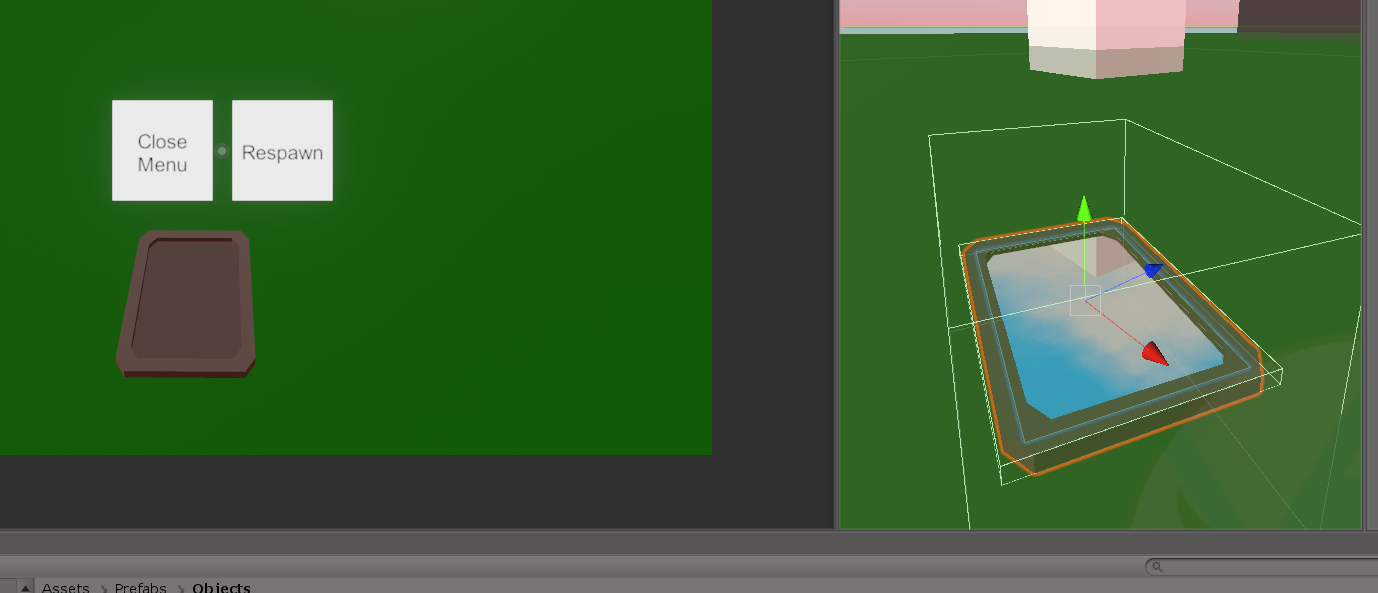
Shows up in scene but not in game?
cunning mist
Lol that's a weird one
But yeah you should almost always rely on objects that exist in your scene rather than instantiating something. If you need a large amount of something, try using an object pool.
fading cipher
Nope
We're instantiating everything, no object pooling
We have already successfully solved networked instantiating and we're partway through ownership transfer (there are some bugs)
But now I have to figure out why you can't see this mirror in the game 🤔
But I just confirmed my mirror issue isn't an instantiating problem...
eh, I must've removed mirrors from the player camera for some dumb erason
okay so... does cyanemu always default to not displaying the mirrorreflection layer?
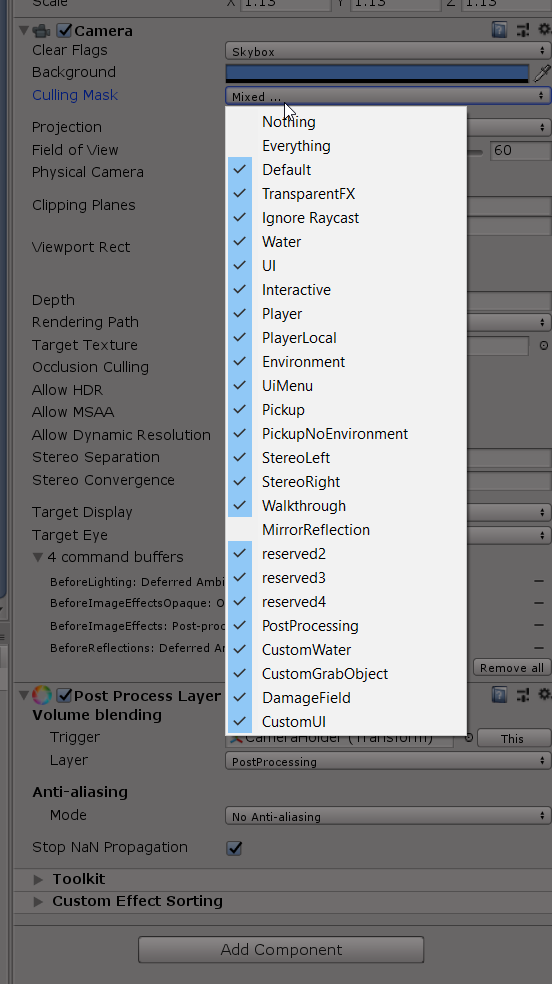
Or is it not supposed to?
Because I can only see my mirror in game view when I enable rendering of that layer in the cyan emu player camera's settings
cunning mist
Mirror Reflection is a layer that only the mirror is supposed to see, the player never sees it. Mirrors don't go on Mirror reflection.
 unborn hornet
Mirror reflection layer interfered with my pens. Had small colliders on ink joints for the eraser to collider with, but since they were on the reflection layer, they seemed to interfere with the reflected avatar somehow, causing the player to slowly sink through the floor.
Switched to walkthrough instead and it stopped sinking players.
Super freakin bizarre
grand temple
were the colliders set to istrigger?
generally if you're gonna use mirrorreflection to avoid disrupting interacts, you'll want to also have them on istrigger so they don't collide with anything. If you do that they should be 100% unnoticeable
grand temple
oh neat, I was just about to write up a description of each layer but I googled to see if anything like that already existed and there's this http://vrchat.wikidot.com/worlds:layers
Great write up, I approve
gloomy wind
Neat!
fading cipher
Unity giving like a billion nullrefs the moment I enter play mode, that's a new editor-break bug I've never seen before now apparently it somehow failed or interrupted compiling and that was just a bunch of udon script failures
 acoustic vale
Any recommendations for YouTubers who do full build series for udon? Like start to finish building a project (if that exists at all)?
cold raft
not any i know of, best help for udon scripting for me was Vowgan but he also says he wishes there where more udon tutorials creators
there is ofcourse the offical vrchat youtube channel that has some basic tutorials but its limited in scope
 fierce verge
What node do I have to use to take a URL that I can type in as a public value

instead of using an input field, so I can use a button to play a video
fierce verge
ahhhh I was thinking of the name but I couldnt get it
was on the tip of my tongue hahaha
thanks 🙂
what do I need to connect it up?

I needed a VRCURL smh
gloomy wind
I'll double check during my lunch break but check what are the functions available to create a VRCURL (maybe thanks to one string)
https://ask.vrchat.com/t/set-custom-url-with-a-string-for-the-video-player-system/3409/3 Seems there is no answer here
grand temple
there is no way to create VRCURLs at runtime by a script, that's on purpose to prevent the world from just using it as a generic web request
you can create VRCURLs in two ways: either a public variable that you add in the inspector before uploading the world, or that players can manually put in with the VRCURLInputField
grand temple
fierce verge
What node do I have to use to take a URL that I can type in as a public value
To answer the original question though, you have a URL as a string variable. That's not going to work. Instead just have a VRCURL variable and mark it as public
fierce verge
fierce verge
I needed a VRCURL smh
I just did that but thanks anyways
grand temple
ah, sorry
trail shard
How do I detect collisions with a specific object, or specific type of object?
grand temple
you can check the name of it and if it matches or contains a string
trail shard
So could I use an oncollisionenter event and a string compare?
grand temple
yep
 void ridge
trail shard
How do I detect collisions with a specific object, or specific type of object?
void ridge
trail shard
How do I detect collisions with a specific object, or specific type of object?
If you're careful, you can also use Layers for this
You can look at VRChat's physics collision matrix under Project Settings --> Physics
If two layers don't collide with each other, then collision or trigger events won't be generated
You can also use Udon to check what layer something is on and filter it that way, so you can use a combination of any of the three types of filtering
fading cipher
trail shard
So could I use an oncollisionenter event and a string compare?
If you want to optimize it further, you could use a specfic letter or character at the beginning of an object's name and if (name[0] == 'a') or something to specifically verify if it matches the letter :3
Not quite sure how much, but slightly more optimized to check a single letter than checking for an entire string of text in a name
fading cipher
Does VRCInstantiating an object automatically zero out it’s rotation even if the prefab has a rotational offset?
I guess I could just re-apply the offset by getting the original prefab’s rotation, but I want to verify that’s the problem lol
gloomy wind
@grand temple Name and layer are very limited, so I prefer to get component (especially working with UdonSharp)
grand temple
that certainly works too. Nothing wrong with either really
 fossil bison
Me and my friends do a lot of formation flying on the flight training map and we were just wondering how the radio systems are going to end up working
gloomy wind
grand temple
that certainly works too. Nothing wrong with either really
Sure
 gilded grail
question, does on Interact only fire for the person clicking a button or will it fires for everyone in the room? I want to make sure im setting ownership to an object correctly
cunning mist
Correct
fiery yoke
gilded grail
question, does on Interact only fire for the person clicking a button or will it...
Its local, so yeah the first
gilded grail
cool thanks
fossil bison
Does anyone in here have any information on how the radios will end up working in the flight training map they just added
grand temple
fossil bison
Does anyone in here have any information on how the radios will end up working i...
This channel is for general questions about udon. There is no way we could answer such a specific question about one particular world. You'll have to ask the author of that world directly. Perhaps they have a discord server or twitter
 tidal sand
Yo, how do I attach a udon graph to a player?
Basically I want each player to "own" a networked entity.
floral dove
tidal sand
Yo, how do I attach a udon graph to a player?
Basically I want each player to ...
you can learn the basics of ownership in VRChat here: https://docs.vrchat.com/docs/udon-networking#object-ownership
tidal sand
Okay, how do I spawn a gameobject with a UdonBehaviour component for each player?
I want each player to have variables. I would like to add a "Health" variable for each player.
floral dove
combine that with OnPlayerJoined (https://docs.vrchat.com/docs/event-nodes#onplayerjoined) and an Object Pool (https://docs.vrchat.com/docs/network-components#vrc-object-pool) and you'll be on your way
sure- you can add a 'health' variable to the UdonBehaviour on the Networked Object that you assign to each player.
tidal sand
Sweet, thanks!
So all I have to do is create a manager-like entity that listens to OnPlayerJoined, fetches a "PlayerVar" entity from the pool and assigns it to a player, who then takes control over that PlayerVar entity, is that correct?
floral dove
Yes, that sounds like a good approach
tidal sand
Awesome, thanks!
Another question: if I invoke a CustomNetworkEvent, can the receiver of that event know where it got called from?
floral dove
tidal sand
Another question: if I invoke a CustomNetworkEvent, can the receiver of that eve...
unfortunately not.
tidal sand
Let's say Player 1 has pushed a button which has called a CustomNetworkEvent on a, say, a door entity. Can the Door entity know which player has triggered that event?
Hmmm, so it's like calling a function with no parameter or return
floral dove
that's right - Events currently have no parameters or returns
tidal sand
all the other side knows is that the event was invoked
floral dove
however - you can have a trigger collider on the door which can trigger an event when the player enters it. This event includes a reference to the player, so you could cache the 'lastPlayer' who entered a collider.
Or have the player take 'ownership' of the door, change a 'currentPlayer' variable to themselves, and then trigger the event
BTW - it sounds like you've got a good grasp of programming concepts. I recommend you check out UdonSharp if you haven't already (check the channel pins)
tidal sand
That wouldn't work I'm afraid: i'm assembling a melee combat system. The receiver (the dummy box who's getting hit by the sword in this case) has no guaranteed proximity of the weapon striking it. Worst case scenario, the weapon hasn't even approached the dummy box on the master client's game due to latency
tidal sand
floral dove
BTW - it sounds like you've got a good grasp of programming concepts. I recommen...
Already am using it! but thanks!
floral dove
hm - for the case above you may instead be able to use a trigger or collision event on the dummy box. If it's hit by a sword, it can get the owner of that sword.
tidal sand
I'm a networking engineer and I've been developing games for a while now. VRChat is a pretty interesting opportunity to create a light RPG-esque experience. First challenge is to assemble a damage system that works for melee-based combat, hence the questions
tidal sand
floral dove
hm - for the case above you may instead be able to use a trigger or collision ev...
But then the dummy would be responsible for doing all the damage calculations, right?
As in, if the client (who is not the master client, owner of the dummy) smacks the dummy with a sword, the dummy would only call all the damage methods when it's hit by the same sword on the master client's machine
This latency might make the weapon not feel responsive enough, you feel me?
But it would make everything much easier, doing everything "serverside"...
grand temple
I was completely unconvinced that melee combat could ever be good until I tried Cyan's draw your weapon. I was very impressed
tidal sand
There's a functional melee world out there? I should take a peek to see how they've solved these issues
floral dove
Yeah, I get you. You could have the player take ownership of the door and change the health of the door if you want it to feel more instant, but that will fall apart if you have multiple players hitting the door.
tidal sand
floral dove
Yeah, I get you. You could have the player take ownership of the door and change...
Exactly. Since it's a multiplayer RPG experience, players are very likely to strike the same "NPC" all at once.
floral dove
Until we have events with parameters, this will be an issue. Even then, since only one player 'owns' the door, it's possible for the events to arrive out of order, or the player to send a 'hit' event to a destroyed door, etc.
tidal sand
i'm gonna have to do some serious code gymnastics here to sync all the info beforehand the strike actually lands. The strike can only call a single method: DealDamage(). All other info must already be sync'd to the Dummy's owner client (most likely the master client) before this happens
floral dove
You could try having people take ownership of the door before they hit it but if many ownership changes happen quickly, there may be some desync while things catch up. Never actually done this so we don't know for sure.
tidal sand
i'd like to not change ownership of the dummy/door because I also plan on running some very primitive AI logic in there and that should only happen on the master client/"server"
but I can see how that'd be useful...
This is a tricky thing.
floral dove
This sounds like a fun challenge, but be advised that you're trying to do something here that immediately runs up against some of our current networking limitations.
gloomy wind
Hey! Personally I did a brick breaker game and my ball just send a message on server and break the bricks without issue
So a sword held by any player on server could inflict damage on a target
tidal sand
Hmmm...
I mean
you're totally right: it will deal damage
the thing is, would it feel responsive?
ACTUALLY
gloomy wind
Damage are never responsive in any game
gloomy wind
Action is
tidal sand
the EFFECTS should be responsive
floral dove
you could change the values to 'damage' locally but still send the network event - that way you have the 'effect' play immediately and then everyone else will get it a little later.
gloomy wind
But prediction is something complex for VRChat
tidal sand
Yeah
All damage calc should happen "serverside", including collision detection and all
locally we just check for collisions and play effects accordingly
gloomy wind
Momo are you a dev or just a moderator that love the game 😄 ?
(Was wondering that even if that's off topic)
tidal sand
Say, if i pick an object up (VRC Pickup), am I automatically assigned as its owner? Do I gain authority over it?
or is it still owned by the master client?
grand temple
yes it will automatically set you as the owner
tidal sand
shucks
grand temple
only if it has objectsync
floral dove
gloomy wind
Momo are you a dev or just a moderator that love the game 😄 ?
I'm a VRChat dev! I mostly work on Udon and the SDK 🙂
gloomy wind
Awesome job then 😄
grand temple
if you need desynced behavior you can just not add objectsync
gloomy wind
I didn't even try to understand how my brick breaker was working. Since there was no bug but I'll dig a bit master/authority to try to help you Bonick
tidal sand
No see, that's the catch: I need this pickupobject to be sync'd. I need its transform to be replicated from the current holder but i need its vars to be handled by the master client
Cheers!
If I manage to come up with a viable melee-damage solution for this test world I'm making, I'm willing to share its code with the community
could come in handy
I'm going to try and handle everything serverside. What are the chances the master client's machine doesn't detect the collision from a melee weapon/particle?
floral dove
If you want VRChat to handle transform&rigidbody sync for you, then the ObjectSync component will do that, but it does require changing ownership of the object. If you don't want to change ownership, you'll have to roll your own sync system for that. Like have the player pick up a dummy object, and constantly update the position of the actual one from the dummy's position, etc.
tidal sand
Yeah, either that or parent it to the player's hands, somehow
floral dove
you can't 'parent' anything to the player - so you would just constantly update the position of the object based on the player's hand trackers / bones, yeah
tidal sand
But nah, I don't want to go against VRC's architecture anyhow
Yo, i thought i should ask
Any ideas as to when we're getting those RPCs with parameters?
i mean not gonna lie to ya, these would make my life much easier here!
floral dove
Yeah - so say we all! I'd expect them to release this year, but we don't have them slated for any timeframe more specific than that, sorry.
tidal sand
Aight that's fine
you guys use Photon as your networking framework, is that correct?
PUN or some form of it?
floral dove
Yes, we use Photon for some of our networking.
gloomy wind
Were you inspired by Unreal Blueprints to create the UdonGraph ^^ ? Looks similar in the node names
gloomy wind
I mean 🤣
The visual scripting part
Should we ask udon graph features in #feature-requests ?
tidal sand
Yo, is there any way to test a world with multiple clients and make sure the client that gets assigned to my HMD is just a regular client and not the master client?
gloomy wind
I think I saw something in the SDK notes
floral dove
tidal sand
Yo, is there any way to test a world with multiple clients and make sure the cli...
launch 1 client with "Build and Test" with force non-vr turned off, then launch X clients with it turned on.
clients launched with Build & Test will all go to the same instance since it's a local file
 timber knot
Who's udon?
tidal sand
is force non-vr a launch arg?
and if so, is it a launch arg for Unity or should I slap that into Steam's launch parameters?
floral dove
tidal sand
and if so, is it a launch arg for Unity or should I slap that into Steam's launc...
floral dove
it is a launch arg, too - --no-vr
but yeah, we have the built-in checkbox to make it easier. The checkbox just appends the launch arg to the internal command it generates.
gloomy wind
It's so quick to iterate, I'm so happy x) (When you work with c++ and compilation took 1 hours to do a full build Client+Server 🤣 )
tidal sand
I see. Thanks!
On another note, Unity takes a while to build my world. I take it its generating an assetbundle, right?
Is there any way to speed up the build/test process?
floral dove
tidal sand
I see. Thanks!
On another note, Unity takes a while to build my world. I take i...
That's correct. It can help to make simple worlds to just test some scripts out, but be aware that currently the mere existence of a prefab in your project necessitates a scan on that prefab. So if you have an asset pack with a lot of prefabs, it can take an egregious amount of time to build.
gloomy wind
On my machine, it's only 30 secondes to build/test.
You can also test dirtecly in editor
floral dove
When I work with big asset packs, I'll often import just the bits I currently need, or have a separate graybox project just to test functionality.
tidal sand
floral dove
That's correct. It can help to make simple worlds to just test some scripts out,...
That explains it. I did import an asset package with a crapton of prefabs.
Will remove those!
I see that there's a limit regarding data I can sync. Are those values on a per udonbehaviour basis or per gameobject basis?
 gloomy wind
Since we can't mix both, I would say it cumulates on the whole gameobject.
But it could be per behaviour 🤔
floral dove
those values are per-UdonBehaviour
tidal sand
Wew, i've removed all the extra prefabs and things are flying now.
10 seconds till VRChat launches, tops
Smooth sailing now
floral dove
nice! We have a few to-dos in place to make that easier.
tidal sand
Awesome!
Yo, another question: is there any way to check whether I have authority over a specific UdonBehaviour?
cunning mist
You could do branch for Networking.IsOwner(MePlayer, theGameObjectImLookingAt)
tidal sand
Sweet, thank you!
I can't find this in the API, what's the difference between Instance Owner and Master? Aren't those the same thing?
floral dove
tidal sand
I can't find this in the API, what's the difference between Instance Owner and M...
https://docs.vrchat.com/docs/network-components#networking-properties
Master = First player to enter the world, will be given to someone else if they leave.
InstanceOwner = Player who created the instance, false in Build&Test and Unity PlayMode.
tidal sand
Got it, so i need to use Master in my case.
But then again, it also says that Master is "old logic"
floral dove
tidal sand
But then again, it also says that Master is "old logic"
Yeah, there's very little reason to use it instead of "Owner" IMO.
cunning mist
Wait why is IsInstanceOwner recommended over IsMaster?
tidal sand
Hmmm. I just need an easy global way to check if I'm the master client or not
But InstanceOwner doesn't work in test builds
floral dove
tidal sand
Hmmm. I just need an easy global way to check if I'm the master client or not
You can check if you have ownership of whatever Object you're using for managing things.
tidal sand
ye, that'll do I suppose
if I check it against a child object of a UdonBehaviour object, will that still work?
floral dove
cunning mist
Wait why is IsInstanceOwner recommended over IsMaster?
If you want to grant 'special abilities' to someone in your instance, Master will give it to the first person - which is you if you created the instance from the menu, but it will be Random_Person_3as9 if you dropped a portal.
tidal sand
if (Networking.IsOwner(myChildObjectGoesHere))
Oh, I thought Master was assigned to the person who loaded in first. Is that instead IsInstanceOwner?
floral dove
tidal sand
if I check it against a child object of a UdonBehaviour object, will that still ...
I don't think so but I'm not 100% sure. I think only the objects with UdonBehaviour / ObjectSync are actually networked.
floral dove
cunning mist
Oh, I thought Master was assigned to the person who loaded in first. Is that ins...
You're correct - Master is the first person in.
 cunning mist
Okay, than InstanceOwner is the one that dropped the portal.
cunning mist
I would still use Master for almost all of my checks, since I largely use Master for state comparison for late joiners, though I guess that's largely unnecessary now with the Networking Update.
floral dove
I wish IsInstanceOwner worked in Build & Test but unfortunately, those instances just don't have the data.
floral dove
cunning mist
I would still use Master for almost all of my checks, since I largely use Master...
Yeah - the Master player may not 'own' a target object, and shouldn't be used for late joiner comparisons
and you shouldn't need to 'compare' against another user for late joiners - they'll get all the latest data in their synced variables, and then OnDeserialization will fire so you can handle the data.
cunning mist
Right, but say in my video on synced doors, I have the Master check what the global value of the door is and send an event for the new person to get caught up. Again, this was largely for before the Networking Update though
floral dove
cunning mist
Right, but say in my video on synced doors, I have the Master check what the glo...
Right - that's unfortunately not a way I would recommend anymore. Players should handle the data themselves in OnDeserialization.
cunning mist
Definitely. All tutorials and information is destined to be antiquated and superseded, so I decided to make that video when I did in order to summon the update.
Similar to washing your car to make it rain.
tidal sand
Good news! The melee system is working pretty well so far. All clients (master or not) can pick up the sword and deal damage to the dummy box. Its health var is replicated to all players so hooray!
Now, my dummy box script was using Udon and not udonsharp. What's the attribute for replicating simple int vars over the network with udonsharp?
I remember reading about an attribute
gloomy wind
[UdonSynced] ?
tidal sand
That might just be it!
floral dove
tidal sand
I remember reading about an attribute
FYI we don't officially support UdonSharp here so U#-specific questions are best answered via those docs or the UdonSharp Discord Server.
https://github.com/MerlinVR/UdonSharp/wiki/udonsharp#attributes
tidal sand
Oooh, my bad!
floral dove
no worries - plenty of people know about it here, but if you get into advanced stuff, you may want to drop in on their Discord. I can't link it here but it's easy to find.
tidal sand
Alrighty! I believe most of my problems might be more related to Udon itself and the API
but i'll join their server as well!
gloomy wind
Oh they have a discord 😮
floral dove
yep! Lots of advanced users over there.
gloomy wind
Thanks a lot
floral dove
don't forget about us over here tho 
gloomy wind
Eh eh 😄
I'll still be there, you're the devs so we don't forget you 😄
In any case, I want to thanks your job, as a gamedev, it's so cool to iterate on this game engine (over Unity) and have the possibility to showcase to friends and more
trail shard
What am I doing wrong here? When I use the pickup it plays the audio but it doesn't wait for the 1.5 seconds
 floral dove
Your instructions are:
- OnPickupUseDown, Check if 'canbefired' is valid.
- If it is, play Gunshotsound
- Set 'canbefired' to false
- In 1.5 seconds, fire the 'armed' event
- (1.5 seconds later) armed: set 'canbefired' to true.
FYI - you can use the 'boolean const' nodes to get easy boolean values instead of Convert.ToBoolean
trail shard
Yeah, but it doesn't wait the 1.5 seconds and I'm not sure why
Like if I spam click it doesn't have any delay
floral dove
ah, I see - you're checking if 'canbefired' is Valid, instead of using a Branch node to check if it's true.
floral dove
trail shard
Like if I spam click it doesn't have any delay
BTW - I recommend you check out the UdonExampleScene that comes with the SDK to learn some best practices from working graphs. There's some docs explaining bits of the examples here: https://docs.vrchat.com/docs/udon-example-scene
trail shard
Aaah ok, I'm still learning all the different nodes I figured this was the right one. Whoops!
gloomy wind
isValid should not accept bool IMO (any primitive in fact)
floral dove
it accepts any Object 🤷
gloomy wind
but what is an invalid bool 😦 ? int or string
trail shard
so what was making the bool pass as valid
floral dove
gloomy wind
but what is an invalid bool 😦 ? int or string
I think all value types will return as valid because they're not null.
trail shard
Ah ok
floral dove
IsValid is mostly useful for checking if a reference type is null (or has some other weird property that makes it 'invalid', like a VRCPlayerApi reference which is not null, but refers to a Player who has left the instance and should not be used)
trail shard
Works correctly now, thank you!
floral dove
it should be used wherever you would usually use if(foo != null)
gloomy wind
Yes in C++, it's mostly to test that the memory is pointing to a valid address
So same in C#, an isValid on a primitive will always be valid tho
Maybe a suggestion could be to not accept primitives/value types on the "IsValid" node (if that's easy to do). So it will be error prone for beginners.
tidal sand
Yo, what's the difference between SendCustomEvent and SendCustomNetworkedEvent? And how do I call a networked event or RPC from UdonSharp?
(I'll ask some Udonsharp-related questions in here first because this server seems to be more active than the u# one)
floral dove
SendCustomEvent calls an event on a target UdonBehaviour, defaulting to 'self'. It's the equivalent of calling a method on a MonoBehaviour in regular Unity C#.
SendCustomNetworkedEvent calls the event on either the owner of the object or on everyone. I recommend this video / doc for learning the basics of networking in VRChat: https://docs.vrchat.com/docs/udon-networking
tidal sand
Ah got it. So SendCustomEvent is a simple method being invoked while SendCustomNetworkedEvent is an RPC
floral dove
yes. The UdonSharp wiki has some examples of calling events and RPCs: https://github.com/MerlinVR/UdonSharp/wiki/examples
tidal sand
Since I'm using U# and I can just grab a reference to another UdonBehaviour then invoke one of its methods, I take it that SendCustomEvent is not really necessary in my case, is that correct?
Ah perfect, cheers!
floral dove
Right - UdonSharp hides away SendCustomEvent and lets you just call a method by its name. It generates SendCustomEvent under the hood. Same for calling methods with parameters. It actually uses SetProgramVariable to set a variable on the target and then calls that event.
tidal sand
I see.
tidal sand
Hi! Is there any code called when an object is successfully initialized over the network?
I would like to disable some objects if I'm not the owner of an entity but I'm afraid this data might not be available on Start()
Like, the master client will have full control over NPCs. Other clients should disable AI-related components accordingly
floral dove
Start() should be a safe place to check for Ownership of a given object. The only thing that I know is not ready yet in start is IsUserInVR, which I believe is available a frame or two later.
tidal sand
Oh okay then!
I suppose I can't use StartCoroutine, right? If not, what's the correct way to wait for seconds in Udon?
floral dove
SendCustomEventDelayedSeconds or SendCustomEventDelayedFrames
tidal sand
Hmmmm, thanks!
Awww
I just meant to say that I just chucked the sword on the poor sod's head and he plopped down to the ground
it LIVES
damage feedback and all
okay this is very VERY exciting.
 shut lodge
Hi, I'm trying to match location + offset to a stool (pick up) in my world so when a user picks it up. The Phantom stool will follow at an offset. I **feel **like this topic has come up before but I don't know where.So far when I run it any rotation on the stool is updating as it should but the position remains the same. Is there something else setting position? Any advice would help. Thank you!

ahh turned off physics
now it follows
tidal sand
What's the best way to calculate the velocity of a VRC Pickup object?
Like, I know it has a Rigidbody and Rb has its own .velocity var but that is not replicated over to other players. I need a local way to retrieve the overall speed of a VRC pickup object
 fallen prawn
I think the ObjectSync rigidbody property seems buggy, so maybe 2 point check?
tidal sand
That could work, but my main concern is that this is a sword
it being a sword, th oh nevermind i can just add a transform at the tip of the sword and calculate the spatial difference
ye that'll do, cheers!
chilly crater
How do you get the gameobject from ObjectPool spawns? Do you just use it like a variable like var obj = HealthArmorPool.TryToSpawn();?
fallen prawn
chilly crater
How do you get the gameobject from ObjectPool spawns? Do you just use it like a ...
Yes.
chilly crater
Thanks
How reliable is having a player return their object to the objectpool when they leave the world?
Or am I just going to have to fire a cleanup event whenever a player leaves and have the owner check their displayname against a textcomponent to return it?
grand temple
by the time you get onplayerleft, that player is gone and you can't rely on them doing anything else
wanton oxide
chilly crater
Or am I just going to have to fire a cleanup event whenever a player leaves and ...
you can use onownershiptranferred and check if the new owner is master
if yes, that (unless you are doing ownership transfers to the master manually somewhere, you'll need separate handling of that) means that the original owner left
wanton oxide
wanton oxide
you can use onownershiptranferred and check if the new owner is master
(and if yes, check if the local player is the master, then return it)
chilly crater
wanton oxide
(and if yes, check if the local player is the master, then return it)
I was going to say that that wouldn't allow graceful changes of network master. but changes of network master can be pretty bad for logic. I'll just throw everyone at spawn if that happens.
wanton oxide
it would allow for those though
if the network master changes, only the objects currently not owned by someone will change ownership to the new master
so it should still work for that situation
chilly crater
Man I'm really tired if I missed that... I need to finish this and get to bed. Thanks again and sorry for bugging you
 trim sapphire
Hello! Sorry if this is a strange problem, but I was working on a world with UdonSharp yesterday without issues. I've now loaded up the project again today to continue work, but none of my scripts are compiling; every script in the project, even ones that were compiling without issue, now fails to compile with the error:
Assets/<class>.cs(7,0): System.Exception: User type <class> could not be found
Where <class> is the class that the script creates. I've tried restarting Unity, reinstalling UdonSharp in the project, and re-compiling all scripts in the project to no avail. Is this a known bug, and is there a known solution?
Here's the error happening in the console with the example scripts provided with UdonSharp:
 wanton oxide
you should ask about this in the udonsharp discord
usually this is fixed by just reinstalling the vrc sdk, udon sharp and restarting unity tho
trim sapphire
Thanks! I'll keep the UdonSharp Discord in mind for next time.
fading cipher
Was there ever a plan to be able to pass RequestSerialization parameters of udonsynced variables so you don’t have to sync an entire object’s synced variables if there are a lot?
cold raft
You could track different variables on different behaviors
fading cipher
That’s occurred to me as a way to mitigate it, yeah
fierce verge
For some reason all objects inside my pool get set to deactive, while all i want to do is change their animator mode
 cold raft
dont see why they would be set to disabled
but for the animators on the left you dont provide an instance
cold raft
i assume animator value "mode" = 1 doesnt make them disapear right 😄 as it could be that simpel 😄
fierce verge
no theres 3 modes
0,1,2 each mode has another animation
0 is default which is still
but as soon as I join the objects are gone
void ridge
fierce verge
For some reason all objects inside my pool get set to deactive, while all i want...
Last I knew, inputting OnDeserialization into an input flow directly along with other input flows can cause the graph to not compile correctly. Try replacing all those flow noodles by sending each of those events to send a custom event--including OnDeserialization--and then receive that custom event as the only input flow of your For loop.
That should be functionally equivalent. Then see if it makes a difference
fierce verge
okay let me try
void ridge
Actually, I'm also seeing that you're using the node Animator.GetType when I'm pretty sure what you want is Type Animator
cold raft
ah yes i noticed that aswel i though both might work so i didnt complain about it 😄
fierce verge
void ridge
Actually, I'm also seeing that you're using the node `Animator.GetType` when I'm...
the one at the bottom you mean
Fixed both those things but they still dissapear
void ridge
Yeah. I'm actually not sure why most of this graph isn't crashing your program, since if any of those nodes run, they should get a Null Reference Exception since no value is put there
fierce verge
I was told that if there is no instance it uses the one from previous data
thats why I had that there
but my problem is more why it disables all items in my pool instead of just working or not working
void ridge
I'm out of ideas, sorry. I don't know enough about Animators or what you're trying to do with these.
fierce verge
I have 3 animations, and 3 buttons
when I press a button the Int value changes and all items in the pool play that animation
when I press another button the vlaue changes again and all items play the other animation
but instead all items in the pool just vanish
fading cipher
Forgetting to tick force non-vr when you build & test 
fierce verge
fading cipher
Forgetting to tick force non-vr when you build & test <:vrcSad:58574977001481831...
??
fading cipher
If you don’t get it, you haven’t done it
 inner flax
what is udon
fierce verge
fading cipher
If you don’t get it, you haven’t done it
I have it on force non VR standard but that doesnt change shit, the whole behaviour stays the same
fierce verge
inner flax
what is udon
A coding language for world and avatar development
fading cipher
Yeah I more mean that all my VR apps start opening and it’s hell to close them all if I forget to force non VR lol
fierce verge
ahhh
inner flax
fierce verge
A coding language for world and avatar development
oh okay
fading cipher
WMR opens and chugs my computer, then the game opens and chugs a bit, then SteamVR as I’m scrambling to force close everything, then all my SteamVR plugin windows loading up at once
All for a single simple unticked box 😢
fierce verge
xD
fading cipher
It’s like that meme where everybody scrambles for the TV controller when that loud-ass THX sound comes up on VHS movies
Was it THX? 🤔
fierce verge
yes
fading cipher
Awesome, I somehow still remember
gloomy wind
I guess the VRC Object sync has a limited max velocity cause my objects are synchronized weirdly with others clients.
It seems there is a linear interpolation applied but this looks so odd 😦
It's a ball moving very fast. I guess 200 Bytes per second is to low
So I could write a custom code to have a better looking throwing feel but with prediction
gloomy wind
Does the VRC Pickup automatically give ownership over the gameobject when someone grabbed it?
 scarlet lake
how to InputUse
gloomy wind
Listen for the event OnPickupUseUp I guess?
scarlet lake
gloomy wind
---
Does the VRC Pickup automatically give ownership over the gameobject when so...
ye
gloomy wind
Ok so I have a synchronized ball that is thrown and can hit bricks to destroy them.
In fact I just realized there is no server entity (server authority) So it's all client side with one owner at a time 🤔
So I'm wondering how I could destroy bricks in the most clean way (I can change Ownership each time the ball hit a brick but it sounds to be very expensive for the network 😦 ).
Omg it's even worst 😭
My brickManager needs to have ownership too
Ah ah, I'll find a way or it will be only solo or 1v1 experience I guess
scarlet lake
Why do you need to change ownership?
gloomy wind
Cause only the owner seems to be able to return object to the pool
gloomy wind
Yes
scarlet lake
If the ball is synced already
gloomy wind
No I want it to be synchronized
I can do it on both sides (Master and other clients for sure)
scarlet lake
Set the sync mode to continuous and it should be synced for everyone
scarlet lake
But then nobody will see the ball move and hit the brick
gloomy wind
I mean not the ball the brick 😄
The ball is synchronized
The brick is manually updated
But afaik, I need to set ownership on the brick each time a ball hit it
scarlet lake
Yeah so when the ball hits a brick, brick should go boom?
The ball is already synced so why do you need to sync the brick
gloomy wind
Well, The bricks are ON or OFF (for now, I didn't put health, but I planned to)
Since they are managed thanks to a pool, the pool is owned by the master
When I destroy the brick -> I return the object to the pool
scarlet lake
If you have to network the bricks then send a custom network event
When brick go boom
tell everyone about it
gloomy wind
How expensive is that?
scarlet lake
but it will be slow
Better to do it locally when ball enters brick trigger/collider
gloomy wind
Let me try something first
gloomy wind
Yes but if it's local any player that join or left will not see the game updated
Even any player that are playing
scarlet lake
Idk why you need to pool the brix
gloomy wind
Cause the state active is synchronized?
And I need to enable/disable the bricks when the game start or when they are hit by the ball
For all players (I want a coop gameplay)
gloomy wind
That's OnDeserization
gloomy wind
Yes, I'll try without the pool but in any case to do that you need ownership 🤔
Or I'll just try the network event
But that's sad, we can't specify the target
Oh wait
scarlet lake
Does the owner always have to be the master tho
It can be anyone I guess as long as its a player that joined earlier they can send the active state on or off
to late joiners
gloomy wind
if(!VRC.SDKBase.Networking.IsOwner(gameObject))
{
  SendCustomNetworkEvent(VRC.Udon.Common.Interfaces.NetworkEventTarget.Owner, "HitBrick");
}
else
{
  HitBrick();
}
I did that, I'll try it
So it's not as expensive I guess
But that's sad we can't specify the target gameobject
scarlet lake
When you send a custom network event it is always sent to the gameobject that the udonbehaviour is attached to
gloomy wind
Ok so It work but I can predict it to smooth the experience
scarlet lake
You can specify a gameobject with synced variables and GameObject[] arrays, just send the array index
Then you need to call RequestSerialization
Or do continuous sync
gloomy wind
Yeah could be better than the pool I guess
scarlet lake
ye we dont need hand holding do it ourself
vrc pool waste of time 
its gonna be forgotten like the old combat system
gloomy wind
It sounded to be a good idea ah ah ^^'
Let me rework without a pool then
I guess it's lighter to have one array of booleans than one sync variable per brick (even if I'll probably need health per brick)
scarlet lake
dont worry about networking, just do it the easy way
its not 100 gb data we are talking about
gloomy wind
In fact the "Pool" was providing me a good architecture since I could easily switch between one bricks pattern, and one another
scarlet lake
tupper pays for it np
gloomy wind
tupper pays for it?
scarlet lake
ye just send the invoice to him
gloomy wind
🤣
 dawn forge
You know what would be cool? I was thinking of making a database storage system to quickly save and retrieve information and make some mockup syntax like SQL
scarlet lake
u can use an encryptor for this maybe
and let people write down the code to save and type it in when they load
obviously make it hard to encrypt otherwise people will hax your game
dawn forge
Check this out @scarlet lake https://blog.foorack.com/sha256-hash-algorithm-in-udon-vrchat/

Foorack
This is a drag-and-drop SHA256 Prefab for VRChat worlds made in Unity 2018.14.x and SDK3 with Udon, allowing you to use SHA256 in your Udon programs. A hash algorithm is a mathematical one-way function which takes an input string and outputs unrecognizable data. This is commonly used to
scarlet lake
maybe in 2024
dawn forge
Hell yeah, I can't wait for that. I was just wanting to flex on Udon a bit and see if I can make a mock SQL system. And someday if they ever allow WebAPI, you could have it easily talk to a SQL server for very persistent data management like Leaderboards, analytics, etc.
It is evident they're either halfway or nearly complete(going through testing) on the features they showed us. A semi-working UI update, dynamics, etc. I am sure they have the code written up halfway for persistent systems to work.
gloomy wind
Candidate to work for them 🙃
gloomy wind
Sure it's not as hard but then you need to expose it for beginners 😄
That's the hardest part
scarlet lake
They could add a Load() and save(string data) methods, thats enough tbh
dawn forge
Not really memory, but the architecture. They will either store that info on the serverr and they deal with the burden of storage, or the persistent data is stored on PC. But that is a security risk.
scarlet lake
You just need to parse it yourself
dawn forge
For example, in Starcraft II mapmakers can setup variables that are persistent to help construct a leaderboard. I.e. Total playtime, total kills, etc. The SC2 team did implement a "signing" of the settings file where if it was modified outside of the game, it wouldn't work because the game has to make a new signature. Unfortunately people already found a way to fake sign the file and people are spoofing their scores/kills to literally 999999 to be on the top.
The same issue can happen to VRC too.
And all that data is just an XML file stored right in your PC.
What's worse is a map dictated if a person should have admin rights based on a boolean value in the setting file... Don't know why the creator didn't just do a name check instead, but people literally got ahold of the rights and just did random stuff in the map. The creator never fixed it lol
gloomy wind
The problem is that there is no dedicated server on VrChat
So anyone can write in the DB as soon as they are the owner / master (whatever you call it)
SOOO if they bring persistence, it will either work only through their server API so it will be a huge bottleneck or they will bring Dedicated server to the game right?
scarlet lake
They could implement a voting system
if all clients vote to write something to the db only then it should work
dawn forge
They will either have to have each person hold their persistent data via a file OR have the VRC API hold it. I don't know how they're recognizing Avatar 3.0 parameters at the moment but it will behave similar to that I believe.
scarlet lake
There is nothing stopping u from running ur own dedicated server in vrc though
just start a new instance and never leave
xd
gloomy wind
x)
You can try to start an instance on a machine (which is not headless) so you got your dedicated server 😄
scarlet lake
It would be nice to have a dedicated server in vrc with more than 40 max players, we can have our own database
gloomy wind
Ok let me try without the pool to see if it's responsive
Is it more responsive? 🤔
Oh no 😭
Got an out of sync some way 🤔
It's strange. I'll have to find why cause it should not be possible. If the state is synchronized

Ah I miss the OnDeserialization
So I guess I was only relying on the ball collision
Ok now the audio 👀
Ok I still have desynchronisation despite having used manual sync 
@scarlet lake When RequestSerialization is called, it's calling OnDeserialization on all clients right?
scarlet lake
Yeah I think so
dawn forge
@gloomy wind I really like the arcade vibes!
scarlet lake
Even the owner
gloomy wind
Thanks @dawn forge 😌
scarlet lake
Im not sure tho so try it
gloomy wind
So yeah I send network event to change the boolean "Destroyed" on the owner or directly if I'm already the owner.
And I call RequestSerialization after the boolean changed so it should work 100%
BUUT in fact, when a player joins the map the bricks are not even destroyed
The pool was working in a more relevant way
scarlet lake
Then use the pool
gloomy wind
Yeah I'll put that in a separate git stash and will investigate that tomorrow
🤣
I mean, I'll definitely investigate tomorrow since I need to understand x)
scarlet lake
Sure sure, good luck
 lofty pewter
any one know any good tutorial videos for world building?
unborn hornet
gloomy wind
<@456226577798135808> When RequestSerialization is called, it's calling OnDeseri...
OnDeserialization is not called on the owner of the object. OnPreSerialization and OnPostSerialization are called on the owner.
 unborn hornet
Right. It just depends on how you want to architect the code. If it works, it works.
gloomy wind
I want the owner to do all the important job so I call everything on it
And others just call the necessary after deserialization
lofty pewter
is this where to ask about world building?
broken bear
This is an item that when held, and then interacted, it changes materials. It works locally, but it's not synching to other players. Each of the listed variables is marked sync. The initiating event is OnPickupUseDown->CustomEvent(_Interacted). the initiating event is marked as Sync method (Cotinuous) but the receiving object has Synch method (Manual), maybe both should be manual?
 gloomy wind
Why do you sync the materials and renderer?
You could only sync the integer, that's enough
floral dove
is this the sender or the receiver? Assuming this is the receiver since it's using RequestSerialization
broken bear
Left two groups are the sender, thought I would need the receiver on the same game object but in this third group
floral dove
the sync method only really matters for the sender
start by just changing arraypositionSS - log the new value on the sender, then log what is received by the others.
once that's working, you can implement your whole material array system - and Bibni is right, only the integer should need to be synced in this case.
broken bear
ok I'll log for both, I was concerned it wasn't pushing anything to the receiver at all (using a friend to test and not 2 clients)
floral dove
much easier to test using Build & Test locally first 😓
that way you can see all your logs, etc before involving someone else
broken bear
Appreciate the help, really trying to get these fundamentals so I can move on to more complex things someday
used to program text-based MUDs in the ancient days and this is bringing back websocket netowrking memories to me
unborn hornet
There'a a certain amount of mood there...
grand temple
?whatisudon
 hidden martenBOT
VRChat Udon is a programming language built by the VRChat Development Team for use in VRChat worlds! It enables complex behaviors and logic in VRChat worlds. Read more about Udon in our documentation: https://docs.vrchat.com/docs/what-is-udon
VRChat
What’s this Udon thing anyways? VRChat Udon is a programming language built completely in-house by the VRChat Development Team. It is designed to be secure, performant, and easy to use via the VRChat Udon Node Graph, a built-in visual programming interface that uses nodes and wires (we call them “no...
 brave glade
Oh, thank you.
scarlet lake
do anyone here have experience with udon and coming up with ideas? cus honestly i suck at this but i make a few maps
I really would like to make up a team to help me out.
scarlet lake
hidden marten
VRChat Udon is a programming language built by the VRChat Development Team for u...
aka C-Sharp with Assembly code supported made in a visual manner.
 cerulean vigil
how to put music on buttons?
scarlet lake
use a toggle or switch prefab
fading cipher
People: how to do thing
Good helpers: use prefab
Me: make it all yourself
every damn time I see a question in here
my brain, why
 bleak jay
not everyone has the time, skill, or interest to make everything from scratch
fading cipher
Yeah and there's no point in reinventing the wheel lol
I completely agree, I just don't know why my brain defaults to that smh
bleak jay
i dont think thats a bad mindset either
some people just really like making stuff from scratch
 hallow pumice
I had to move some rooms around the world. As a results, I had issues with the teleporters. I fixed most of them, but the last one still doesn't work. Instead of teleporting me to the destination, it seems to be choosing another teleport destination close by and sending me there instead. I've checked to make sure everything is pointing where it should in the script. I can't figure out what's going on. Is this something that has come up before? What should I be checking?
 wild kite
umm i have a problem in vrchat atm and idk if everyone is having the same problem but when i load in and go to a world it brings me back to my home world does anyone know why its doing this??? @everyone soz
because i can't see the world and my socials thumbnails
 cold raft
Uninstall your custom clients - reinstall vrchat try again
 elder leaf

Uhhh is this normal?
Cuz the characters won't just load for some reason
Well some do but some don't
cold raft
thats the performance blocked avatar so they either violate some of your performance settings like max avatar size, or its a bug, if had happen a new time where an avatar was perf blocked while i basicly have my safety set to non existant and when i did press show avatar there was no reason for it to be performance blocked
cold raft
just select them and press show avatar
 magic kiln
hey anyone have any clue how to create a slider to control bloom in the world?
gloomy wind
Unity Ui have slider components
 hazy summit
Is there anyone aware on how to use UI buttons for avatars instead of Avatar Pedestals?
chilly crater
Does OnOwnershipTransferred fire for everybody, or just the new owner?
Nevermind. I had the wrong documentation up
floral dove
hazy summit
Is there anyone aware on how to use UI buttons for avatars instead of Avatar Ped...
Use the UI button to call a custom event on an UdonBehaviour which has a reference to a Pedestal so it can call the UseAvatar Function on that Pedestal (or whatever that's called, I'm on mobile rn)
hazy summit
floral dove
Use the UI button to call a custom event on an UdonBehaviour which has a referen...
Like this?
 floral dove
Hm - I'm not sure, you're using an add-on I'm not familiar with. The default inspector doesn't have EventName, etc. Take a look at the UdonExampleScene for many examples of using UI buttons to trigger custom events on UdonBehaviours.
floral dove
Explanations of some of the UI examples here: https://docs.vrchat.com/docs/udon-example-scene
VRChat
This scene is ready to Build & Test or Publish, and it demonstrates many common interactive items. Prefabs These objects show off some of the Prefabs included with the SDK which demonstrate default interactions with the VRChat components for Avatar Pedestals, Stations and Mirrors. AvatarPedestal...
 candid wolf
Bit out of left field but this is an odd issue I'm having
Because I can't attach things directly to bones with udon (due to not being able to attach to the parent bones)
I'm doing the next best thing, aka, getting the neck bone's position and rotation
And setting the object's position and rotation to match that bone's position and rotation
and that works...
On some avatars...
For some reason, and I'm not entirely certain why it's doing this
It's rotating the object 90 degrees
Both avatars have neck bones set up though, and I have no real clue what would be causing this...
TL.DR:
why does an object attached to a neck bone rotate 90 degrees on some avatars and not on others?
fiery yoke
candid wolf
TL.DR:
why does an object attached to a neck bone rotate 90 degrees on some avat...
Because there is no conventions on bone rotations. Humanoids in Unity are weird.
candid wolf
Any reliable way I could make the rotation relative to the head's rotation?...
fiery yoke
Sort of
candid wolf
(head bone has the same issue)
fiery yoke
If you make certain assumptions, then it will work, as long as those assumptions are not broken
candid wolf
Hmm... Actually, I think I just thought of a way to make it work...
Just spitting an idea out to see if you agree here
What if, when the object assigns itself to the bone and grabs the bone's rotation
it checks that new rotation against the rotation it had originally (which should be 0)
and just store it as an off-set
and just subtract that number
🤔
fiery yoke
Well that will work, as long as the bone rotation is at the default value at that point
kinda hard to explain
candid wolf
   public override void OnDrop()
    {
        rotationOffset = owner.GetBoneRotation(HumanBodyBones.Neck);
    }

    private void Update()
    {
        if (active)
        {
//Attach the necklace to the neckbone
            necklace.transform.position = owner.GetBonePosition(HumanBodyBones.Neck);
                                        //Get current totation                       //Subtract the offset (1 - 1 = 0)
            necklace.transform.rotation = owner.GetBoneRotation(HumanBodyBones.Neck) * Quaternion.Inverse(rotationOffset);

if the head bone is already oriented correctly, the offset should be 0
if it's 90, it'll pretty much be 90-90
(not really it's Quaternion, so 4d matrices n shit, but that's besides the point)
kinda wish there was an easy way to attach things to a player's bone though
cause that'd also help with client side/server side syncing
candid wolf
update: my theory works
hmm....
granted the player doesn't change their avatar...
is there a way to check that?
candid wolf
Answer, no there's not 😐
scarlet lake
fading cipher
my brain, why
Ppl be lazy and go the easy way
 dapper lion
candid wolf
Answer, no there's not 😐
dapper lion
candid wolf
Answer, no there's not 😐
whats not working? the nechlace should follow the same bone as the loading diamond avatar. unless this is being done globally and not locally?
 tribal meadow
I was using a bunch of modified jetdog scripts to have things synced in my world....without having to re-invent the wheel and start from scratch does anyone know what I need to modify in these scripts to get them working again? This update is causing me hours and hours of work to fix :(
fiery yoke
candid wolf
kinda wish there was an easy way to attach things to a player's bone though
fiery yoke
candid wolf
is there a way to check that?
There is workarounds, but no official event. Thats a common reoccuring theme btw that you will have to get used to :^) VRChat is a big project, so development is slow, and so QoL stuff like those events is quite low on the priority list I imagine.
candid wolf
dapper lion
whats not working? the nechlace should follow the same bone as the loading diamo...
Not all avatars have the same bone rotation, read further up. to "fix" that, I'm storing the offset of the avatars as soon as it's equipped
However, if the avatar is changed, and the new avatar has a different offset, there's no real way to check that
fiery yoke
Unity does not define a standard for bone rotations, so there exists no universal way to do what Luna is trying to do. Unity is meant for game developers, who define their own standard. So VRChat sort of creates a problem, by not defining a standard all users have to follow. Which is good because it doesnt force you to do something a certain way, but it means that attaching stuff, without knowing the default rotation of the bone is impossible, without making certain assumptions.
candid wolf
Pretty much 😄
fiery yoke
And you can kinda detect avatar changes
The distances between two bones will usually not be the exact same, when switching avatars, so thats an easy way to check for avatar change
candid wolf
Being able to attach to bones directly would "fix" that, since the unity hierarchy somehow solves that rotational issue, not to mention solve the issue of synchronizing stuff
cause you wouldn't have to update the object's position and rotation in the update loop on every frame
fiery yoke
There is a pretty clever way of synchronizing that, which is just synchronizing the offset and to which bone an object is attached. You dont need to synchronize the position and rotation at all that way.
candid wolf
@fiery yoke the issue with that approach though, is the fact that it needs to be bones that aren't used by full body IK, cause I believe the distance varies when you move them around
fiery yoke
The distance between two consecutive bones should never change
Unless you have floppy bones 😅
candid wolf
¯_(ツ)_/¯
Also on the topic of standardization, technically unity already provides a standard rig
fiery yoke
No it does not
candid wolf
the "humanoid" rig
fiery yoke
Believe me. I have looked rigorously into Unitys Humanoid system. It does not define a standard for bone rotations
It simply requires you that certain bones exist in a certain hierarchical order
fiery yoke
Ohh well yeah, but that doesnt help you at all. At least not with your problem.
candid wolf
I mean the biggest issue is just not being able to access the hierarchy
cause here's the fun part
if I just attach the thing to the avatar's neck bone in the hierarchy
it just works
(╯°□°)╯︵ ┻━┻
 fleet brambleBOT
┬──┬ ノ( ゜-゜ノ) There you go
fiery yoke
Well yeah, when you parent something in Unity, unity calculates what position the object needs to be in locally, such that the global position stays the same.
Its Matrix math, you can reproduce the same effect, without parenting.
In fact Unity has components called Constraints. One of them is the parent constraints. It makes an object act, as if it were parented to the constrained object.
candid wolf
I mean, you'd think that if a bone is pointing upwards that when you reference it's rotation, it'll be y-up
fiery yoke
But as for VRChat, the player objects such as the player armature are protected for a reason
fiery yoke
candid wolf
I mean, you'd *think* that if a bone is pointing upwards that when you reference...
Well how do you define up? :P
Unity defines up as y+ sure. But an armature can define up to be anything
Thats why Im saying that Unity does not force a standard on you. As a developer you usually decide on your own standard. But because VRChat is UGC based and does not define a standard themselves, youre kinda f'ed.
Again there is workarounds, but all of them are based on assumptions. Assumptions that are usually reasonable, but may be broken. But its usually good enough
candid wolf
VRC ".attachToBone()" when?
fiery yoke
Like for example one such assumption would be that your eyes are pointed "forward"
candid wolf
Speaking of weird things, I kinda wonder sync wise
When you pick up an object, it syncs better than when it's attached to a bone (through positional updating)
kinda wonder what's causing that
fiery yoke
Because VRChat gives that a higher priority
candid wolf
Guessing it's underwater stuff we can't define ourselves?
fiery yoke
pretty much
candid wolf
Welp, time to shelf this project as "good enough for now" and start updating my board game world to the latest version of udon
 hushed silo
I'm going to ask a dumb question here, but my friends and I are working on a more optimized sort of map, and i'm wondering, does SDK3 versus SDK2 have an impact in terms of performance, for equivalent functions (collider toggles, seat toggles)? Or is it basically the same?
Thanks in advance.
dapper lion
hushed silo
I'm going to ask a dumb question here, but my friends and I are working on a mor...
im like 90% sure they are equal, its just udon/sdk3 allows you to do more than sdk2
#world-optimization might attract people with a solider answer
hushed silo
Oh, thank you, i didn't realize that was a channel!
I'll repeat my question over there as well.
 craggy harbor
Hi guys, I have a question about player tags.
So I start with Setting the local player tag like this
Networking.Localplayer.SetPlayerTag("Role", "Cook");
Later when I was trying to access the tagValue, I used this function:
Networking.Localplayer.GetPlayerTag("Role");
And it doesn't return me the tagValue "Cook". Did I misunderstand the system?
 stark adder
Yea it works like that
Prolly doing something wrong somewhere ?
Are you sure you're setting the tag ? maybe hidden behind some if() or something ?
@craggy harbor
craggy harbor
Is this function only working for the owner of the object?
stark adder
Also obviously it only stays while player is in instance then it gets cleared and it is NOT Global
If you use Networking.LocalPlayer.SetTag("XX", "XY");
then on remote client you try remotePlayer.GetTag("XX") it will == to ""
craggy harbor
Oh that's understandable.
stark adder
I wish the tags were global but also I don't.. Cause if tehy're global hackers can mess with them for everyone
 stark adder
Unless VRChat protects it which.. Yea VRChat and protecting something against hackers ? 
craggy harbor
could this mess up with the PlayerAPI check? as technically the 2 clients are the same player account
stark adder
not sure.. I know some things do mess up when LocalTesting
Not sure if this is one of them
I know I had giant problems with VRCStations when Local Testing but when Uploaded they all work as expected
craggy harbor
👍 I see
Thank you for your information. I will do some last check, then I will upload and test it with my friend online see if the problem still exist.
 hushed gazelle
Is there a proper way to detect when a NavMeshAgent has arrived at its set destination?
craggy harbor
hushed gazelle
Is there a proper way to detect when a NavMeshAgent has arrived at its set desti...
I think agent.remainingDistance or agent.pathStatus==NavMeshPathStatus.complete can tell if the agent has arrived or not.
hushed gazelle
Ahh, cheers.
craggy harbor
About the SendCustomNetworkEvent() function, if I choose the target to be all, is there still a chance that this event will not be invoked on someone's end?
grand temple
Not that I'm aware of. It's very reliable
cold raft
i am pretty sure vrchat does not garantee dilivery of the event but it should work very reliable indeed
craggy harbor
🤔 hmmm, then it's very interesting. caz I'm testing with 2 clients and the second client just never invoke the event.

meanwhile the first client always get event triggered.
hushed gazelle
Is there a graceful way to tell a NavMeshAgent to turn to face a certain direction, or should I just force it by setting the Transform's rotation?
craggy harbor
hushed gazelle
Is there a graceful way to tell a NavMeshAgent to turn to face a certain directi...
I don't think there's such a function, so you do have manually tweak the rotation of the transform. Worse case you might also want to code a customized "LookAt" function instead of using the unity built-in "Transform.LookAt()" function, as it can only promise the forward point towards the desire location, but the other rotation parameters might just be a mess. (like imagine a tank aiming at the target perfectly but the tank is upside-down, etc)
hushed gazelle
That's fine. All I'm looking to achieve is "go here, stop, face this direction".
grand temple
craggy harbor
meanwhile the first client always get event triggered.
Is the event you're calling public?
Or is the object instantiated?
craggy harbor
grand temple
Is the event you're calling public?
The object is in the game by the scene setup, and it's a public function.
grand temple
If there's ever a case where an event may have a chance of not going through, it's going to be because of too much load on the network. But even then, I've seen it just queue up and wait until it's ready. Especially with two clients, it should still work.
So more likely is that something is just not set up correctly
grand temple
Maybe you've got logic inside that event that causes it to stop?
craggy harbor
Is the tagValue local only?
craggy harbor
like, if I set player0 some tagValue to 111, then I try to read it from player1, will I be able to read it as 111?
🤔 I seee
fading cipher
I know you need to check if inputdrop is activated for vive users, since drop is the event that is registered when a vive user presses their grip button
Is there any sort of weirdness like that for the Use button, or is it the same across devices?
grand temple
Depends entirely on what you want to get out of it
Input use will be triggered when a vive user grabs a pickup, because their trigger is what they use for pickups
fading cipher
Ah, so it's essentially inverted for vive then
grand temple
No, it's not inverted. It's combined
chilly crater
If I grab ownership to apply force to a rigidbody and return ownership immediately afterward, will that hurt me in any way?
fading cipher
craggy harbor
like, if I set player0 some tagValue to 111, then I try to read it from player1,...
in order to do something like that you'll need to set up a custom script that distributes one from a list of synced objects to each player that joins, then you can tell a player to set their synced object's variables and other people can read it from there
craggy harbor
fading cipher
in order to do something like that you'll need to set up a custom script that di...
Ya that's a good point, I just didn't know the tagValue is local. I'm working on it now.
fading cipher
We do that in our world thanks to an amazing set of scripts my friend wrote; it's the backbone for all our custom networking
grand temple
On vrcprefabs.com/browse there's a prefab called "simple object pool" that hands out a unique object to each player
chilly crater
It makes it sooo much easier.
craggy harbor
grand temple
On vrcprefabs.com/browse there's a prefab called "simple object pool" that hands...
It is a bit too late for me as I've already created the entire system that does it, but thank you for the information, I will check it out if I got stuck again and consider about redo it.
fading cipher
grand temple
No, it's not inverted. It's combined
So if I'm checking to see if a Vive player grabs an object I will check their InputUse since that's what's called when they press the grip button, and when checking to see if a vive user has used an object, I'd check for InputDrop? That's why I suggested it's inverted
Or are you saying input use is used for both "point and click" UI interactions and for grabbing an object, duh
That didn't really align in my head at first lol
grand temple
The trigger activates input use and input grab. The grip button activates inputdrop
fading cipher
oh yeah drop that's what I meant
Okay
Trigger is grab and use, but for Vive my interpretation of their drop is their grip, so their grip doesn't do what grip does for non-vive users
That's why I was confused xD I didn't want to set up a trigger based on use if it would trigger grab stuff too
grand temple
Yeah, because the grip is terrible for holding a long time so it's used to drop instead
fading cipher
But my grab for them is on drop
I'm very happy we can reliably check their system in order to verify which input event to use
grand temple
Hahahaa
Nope
Reverb g2 still reports as vive despite having an oculus-like control scheme 🙃
fading cipher
really?
omg you're right
THAT'S why my fucking controllers were vive holograms the other day
wow that sucks
I use knuckles with g2, I was very confused as to why I was seeing vive wands according to VRC lol
grand temple
Eh, the controller hologram doesn't matter I think
fading cipher
I hope not, it just confused me at first
grand temple
What matters is lastusedinputmethod. If you're using index controllers they should report correctly
fading cipher
Yeah that's what I've been doing after verifying many months ago that that only reports the correct enum if you're doing it in late update T.T
fading cipher
I had Momo working with me nearly live, I have pictures I think in this channel from when I was troubleshooting it
When I was checking for vive users, I was just getting the wrong value altogether when I checked it in regular update
grand temple
What did you get?
fading cipher
or no
I got the right values I think, but reading the value and comparing it to the enum value was returning false
grand temple
Oh yeah, enum comparisons are a bit odd. I think if you cast to int first then compare to an int that should work
fading cipher
When I logged it, it alternated between saying I was "4" and "vive", but when I compared against it in update later down the line, it always thought comparing it to either 4 or inputmethod.vive was false
I fixed it by running the actual bool setting in late update
if all it took was an int cast, that's depressing xD
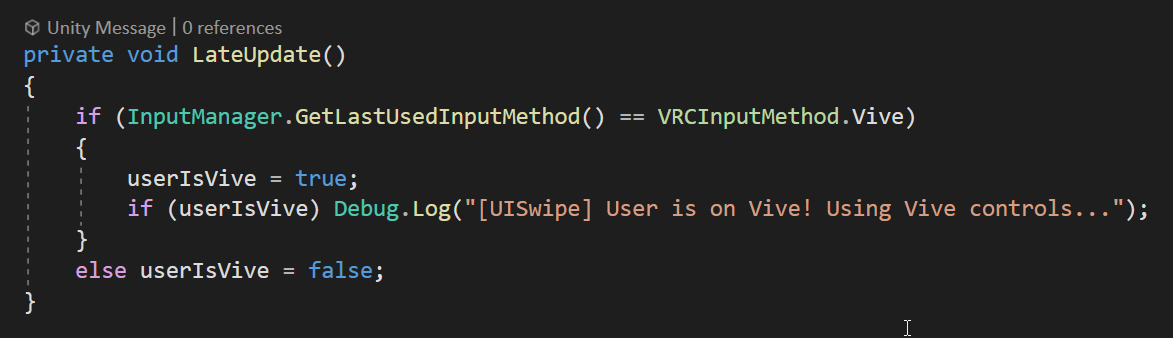 grand temple
Not sure how late update would change that, weird
grand temple
Lol I said basically the same thing as momo
fading cipher
derp
But probably a good thing for you to be aware of if you encounter an issue like that where logging the input method gives a value, but comparing against it is always false
hushed gazelle
Got another NavMeshAgent question; Is there a proper way to detect when the Agent is climbing stairs? I thought VelocityY might do it, but it's hugging the stair mesh despite a sloped box collider covering them.
chilly crater
This is in relation to bonepositioning, Avatars require headbones, right?
And if it doesn't have them, it defaults to (0,0,0), right?
fading cipher
Any bones a player doesn't have will default to the origin, that's for sure
I'm pretty sure avatars require headbones, yes
cunning mist
chilly crater
This is in relation to bonepositioning, Avatars require headbones, right?
If you're just wanting the head position, you can instead do GetTrackingData and select Head. That get's the position of the headset rather than the headbone and would likely get you what you need.
chilly crater
I'm trying to parent something to the head, and some testers complained that it was flying off at weird angles.
cunning mist
I would do GetTrackingData in that case.
Locally the head bone is scaled down to 0 anyway
chilly crater
That's what I'm doing. I'm trying to figure out if I did something wrong or if this is some FBT trickery.
Or they were ignoring the clearly visible settings panel for the parent offset
Which I should probably increase from .5 to .75 +/-
Should probably throw in a if localplayer isn't owner, not pickupable
cunning mist
If it's synced than yeah lol
chilly crater
Gave everyone their own CombatSystem armor, holster rig, and pistol. People were able to yoink guns, and that was probably messing with the lateupdate scripts.
fiery yoke
chilly crater
This is in relation to bonepositioning, Avatars require headbones, right?
VRChat still allows Generic Avatars. Generic avatars dont even need to have a humanoid rig at all. So you can never say for certain that a bone must exist
chilly crater
oof viva la headtrackingdata!
Even though you can set ownership of an item without being the actual owner, is it still good practice to have the original owner give it to you?
I have an OnOwnershipTransferred call that will have the owner of the children of the object that caused this call to transfer ownership to the new owner.
fading cipher
What's a good vertex count to aim for in a world?
I actually haven't thought once about that, and I'm watching my enviro modeling volunteer rn and I have no idea what limit to give him xD
cold raft
i think there is some number on the vrc website
oh those are numbers for quest
- We recommend that you budget approximately 50,000 triangles for your world in total.*
 vocal valley
Oh god someone pelase help, ive been trying to fix my sdk for hours now.
someone tell me what the f*ck is TMPro and why does my sdk keep saying it "couldnt be found"
im at my limit
ive uninstalled/removed udon AND vrcsdk and reinstred both new and old versions. including the .meta files and yet it gives me the same error evey danm time
...should i put this in User-Support insead?
 twin hedge
Hello. I'm new to Udon. So, I've set up the udon for the mirror and it works. Now I'm trying to figure out how to set up the udon for chairs, but it looks like I need to set up in the same network or something?

 ionic brook
how does object sync work?
the udon behavior doesnt have the option to have local and global sync options anymore
twin hedge
Just local
floral dove
ionic brook
is that no longer deprecated?
It's a new one: https://docs.vrchat.com/docs/network-components#vrc-object-sync
VRChat
This doc covers Networking Components, Properties and Events you can use in your Udon Programs.Special properties you can get from Networking: IsClogged - returns true if there is too much data trying to get out. You can use this to hold off some operations or adjust your logic. IsInstanceOwner - re...
twin hedge
I forgot to add one thing. I can't add the 'interact' thing to another network for chair collider, but I know I'm doing something wrong cuz I'm new lol
ionic brook
ugh
twin hedge
lol
ionic brook
so you're telling me i have to add vrc object sync to all of my objects now?

this is gonna ssssuuuccckkk!
each car in my world has removable parts off it
twin hedge
rip


 floral dove
You want to limit the number of synced objects for best performance. Wherever possible, sync a single object and drive the rest of them locally.
ionic brook
It sure would've been nice if VRC Object sync was automatically added to objects that had global sync checked in the udon behavior component
floral dove
You don't want to sync all those objects.
ionic brook
lmao
so you're telling me
if i apply the vrc object sync to the parent of all of those car parts
floral dove
Sync the parent object
ionic brook
i wont have to do it for each individual mart?
floral dove
Right
ionic brook
please tell me you're rught