#udon-general
59 messages · Page 45 of 1
 cunning mist
 void ridge
OK, so there's also some precedent. That makes me feel good, thanks.
void ridge
OK I don't feel good anymore. I created a new layer, set it to collide only with Pickup, and the only objects on it are intermittently pushing my player around.
Welp. I set the layer to collide with nothing at all, and it's still pushing my player around 😭
Never while grounded. Didn't I read once that when players aren't grounded they magically become a rigidbody? Am I becoming a rigidbody that likes to collide with strange new layers?
 scarlet lake
How can i make a "npc's" head follow the player in udon?
 light shard
So I'm confused with the UI system in Unity and when UDON affects it
I made a new udon project, and tried to create a slider and toggle, but it wasn't working. the ui shape raycast in vrc didn't even appear to interact with the toggle or slider
and a video showed me a node setup to make it work, like this

Interacting with modeled buttons is fine, but when you have a lot of buttons and such all in one place, you may want to integrate them with Unity's UI system. Here's how you go about doing a basic UI setup with custom events!
00:00 - Intro
00:35 - UI Canvas Setup
05:40 - U# Slider Script
10:24 - Slider in VRChat
12:30 - U# Button Script
15:27 ...
BUT i took my old SDK2 world with an existing ui menu, and imported the custom package into my new udon unity project, and those locally work fine
the only button that has anything to do with UDON is the accurate reflections toggle, because it disables and enables 1 gameobject with some udon language that turns on either performance reflections or accurate intensive reflections relative to the active state of the toggled game object
im just confused why these buttons work now in this scene, but not in a fresh one
 floral dove
light shard
So I'm confused with the UI system in Unity and when UDON affects it
floral dove
light shard
So I'm confused with the UI system in Unity and when UDON affects it
the UdonExampleScene has a few working UI setups you can look at for reference. Make sure your UI is not on the 'UI' layer. The 'default' layer should work ok.
 solid apex
how can i destroy my gameobject(Pickup item) in udon ?
floral dove
solid apex
how can i destroy my gameobject(Pickup item) in udon ?
highly recommend you set GameObjects Active/Inactive instead of Instantiating / Destroying, which is not yet Sync stable
 daring copper
anyone have issues with sdk3 video player where it rarely loads for someone? videos would load consistently for most of a group of people i was with, but for one or two of them it took quite a bit of effort to get videos to load. this spanned across different maps and different types of videos(one was a custom server one was vimeo).
cunning mist
How's their internet?
 dapper lion
@daring copper vp for desktop and basic oculus is having serious issues
youll have to either resync or input the video
quest appears to be having video issues but not as bad yet
daring copper
is it just very spotty, like some rift users will be fine while others will struggle? most people in there were using rift s and were okay
but one person with rift s was struggling, other was desktop
their internet is fine, one is gigabit and other is like...100 down or something around there
 hushed gazelle
@ruby hazel there's a couple of other bugs with spawned instances of objects too I've found. They seem to lack an ability to self-identify when it comes to executing certain nodes that need the game object to target itself like Avatar-application. I had to go around that with my Gachapon machine by just sticking pre-existing balls in the machines and populating the contents when one's drawn locally by a player.
 heady tusk
Someone has a idea how to created a Object Position Reset Button? I have a Bunch of Props that are throw able on my Map but of course at some point it is a mess and now i would like a button that resets them back where there started.
 chilly aspen
heady tusk
Someone has a idea how to created a Object Position Reset Button? I have a Bunch...
chilly aspen
heady tusk
Someone has a idea how to created a Object Position Reset Button? I have a Bunch...
yes, object pool all the game objects in a game object array. then loop through the game object array elements and set their transforms to START_POSITION upon interacting with the button (variable defined at Start() with the starting position vector).
 mighty fjord
If the objects arent local, would that script still be able to store their position properly before they get synced?
 fierce pond
Is instantiation still is local only? Is there anyway I can spawn in assets that sync to everyone in the world?
 vernal maple
A quick question, to make sure I'm understanding this correctly. OnDeserialization() is called when the synced variable is resolved for the client correct?
 fiery yoke
fierce pond
Is instantiation still is local only? Is there anyway I can spawn in assets that...
fiery yoke
fierce pond
Is instantiation still is local only? Is there anyway I can spawn in assets that...
No, but the preferred method in most cases is Object Pooling anyway.
fiery yoke
vernal maple
A quick question, to make sure I'm understanding this correctly. OnDeserializat...
OnDeserialization is called right after incoming network data has been deserialized. So yes for the most part this happens after synced variables are updated.
vernal maple
Many thanks as literally always. <3
fierce pond
Ok thank you!
 paper plinth
big shout to the guy who made vrworld toolkit, I know you're in here
I bought a gorgeous set of space station prefabs off ArtStation
and I'm doing a world off it and I think it just saved the whole project
void ridge
You talking about 1? They've got a Discord, too, DM me if you want a link.
paper plinth
except now I want a crunchwrap supreme
 mossy cobalt
Hello, so I am getting this error Assets\VRCSDK\SDK3\Runtime\UnityEventFilter.cs(14,7): error CS0246: The type or namespace name 'TMPro' could not be found (are you missing a using directive or an assembly reference?) does anyone know how to fix this
 chilly crater
How customizable are navmesh and navagents? Like if I set two agents to path to something on the other's back, would they eternally circle each other?
paper plinth
@mossy cobalt is it stopping you from building your project? (it's textmeshpro I think, you can go to the options and import the textmeshpro dependencies in window-textmeshpro)
mossy cobalt
yea its stopping me from building it
@paper plinth where would i go to import the textmeshpro?
chilly crater
Doesn't it usually ask if you want to import that when you first add it?
floral dove
mossy cobalt
Hello, so I am getting this error *Assets\VRCSDK\SDK3\Runtime\UnityEventFilter.c...
does it persist through a Unity restart? That shows sometimes before TextMeshPro is auto-imported/loaded
floral dove
when in doubt, close it out
chilly crater
Restarting is always a viable solution. Except for people. Stupid medical laws...
 somber wave
I get invited to my freinds world and the new update theres a tick for you to join but it dosent show for me
floral dove
somber wave
I get invited to my freinds world and the new update theres a tick for you to jo...
this channel is for Questions about our in-house scripting language Udon - please see #faq to learn where to ask other questions
 stark adder
WTF is happening with the new VRChat update
Come into my world.. Looked into Debug and WTF
 oak trail
stark adder
WTF is happening with the new VRChat update
oak trail
stark adder
WTF is happening with the new VRChat update
Known issue, they didn't have time to fix it before release.
stark adder
...
stark adder
.. Looking forward to the fix
void ridge
It's just that they significantly increased the amount of angry bees in their codebase.
scarlet lake
I am back with a redesign on my randomizer. This is what I've come up with so far. Its only applying one material to all the meshes instead spreading out the other 22 materials to the meshes in the array. Any suggestion to make each mesh have it's own different material without duplicates?
 lean jetty
Hello.
I have one question.
The attached image is the code currently being created,
Execute particle system when conditions are met
If you try, you will get an exception error.
The above error occurs in "particle.Stop" and "particle.Start"
But I don't know what caused it.
Thank you.
floral dove
lean jetty
Hello.
I have one question.
The attached image is the code currently being crea...
your error log should be able to tell you a little more about what's going on. Are you sure your ParticleSystem is not null? You could check for it after doing GetComponent, or declare it as a public variable so you can wire it up in the Editor.
lean jetty
floral dove
your error log should be able to tell you a little more about what's going on. A...
Thank you for your answer.
The run-time errors are:
I don't know how to check on Unity with null
I'm sorry.
floral dove
in UdonSharp, you would do particle != null. But for the best UdonSharp support, you should visit their Discord. You can find it through the wiki at https://github.com/MerlinVR/UdonSharp/wiki
lean jetty
floral dove
in UdonSharp, you would do particle != null. But for the best UdonSharp support,...
Thank you for your reply.
if (particle! = null) {
debug.log ("OK");
}
It means to look up like that.
Thank you for attaching the URL.
If there is progress
We will contact you!
floral dove
lean jetty
Thank you for your reply.
if (particle! = null) {
debug.log ("OK");
}
It means...
Good luck with your project!
 brittle stump
will this work to turn off a mirror upon exit?
floral dove
brittle stump
will this work to turn off a mirror upon exit?
that will reverse the current state of the mirror on exit, which may not be exactly what you want. Instead, disconnect all those nodes from the 'value' Port on the SetActive node, and just leave the checkbox unchecked.
then it reads "OnPlayerTriggerExit, Set the Mirror Gameobject to Inactive", very simple.
 unborn hornet
If one respawns while in a trigger, does the exit event fire?
floral dove
unborn hornet
If one respawns while in a trigger, does the exit event fire?
no, unfortunately Unity doesn't do proper physics enter/exit when teleporting, respawning.
if you want to handle that, you'll need to use OnPlayerTriggerStay to set a flag while the player is in the trigger volume and check for it not being set. But you probably don't want to check that every frame, it's up to you to decide how often.
unborn hornet
Doesnt the stay event run in the FixedUpdate phase?
hushed gazelle
@floral dove is there any chance we could ever get access to Unity's Wait command via a node?
floral dove
unborn hornet
Doesnt the stay event run in the FixedUpdate phase?
I think so, since it's part of the Physics loop: https://docs.unity3d.com/ScriptReference/Collider.OnTriggerStay.html
floral dove
 cursive heath
is there like a video series for beginners?
cursive heath
is there like a video series for beginners?
You can read through the docs here: https://docs.vrchat.com/docs/getting-started-with-udon
And check out a few official videos in this playlist: https://www.youtube.com/playlist?list=PLe9XHNvXcouQjg5GULWGLj1tMzeythnQi
floral dove
hushed gazelle
<@!98313818857275392> is there any chance we could ever get access to Unity's Wa...
Pls no pings if we're not in an active discussion.
Do you mean the WaitForSeconds method that's part of Coroutines? https://docs.unity3d.com/ScriptReference/WaitForSeconds.html
I definitely want to make it easier to have some sort of wait function. We'll likely roll something of our own, but we're tracking the request.
 fiery glen
Is it possible to enter the world with the click of a button? Not through VRCPortalMarker. and using Application.OpenURL inside VRchat?
void ridge
floral dove
fiery glen
Is it possible to enter the world with the click of a button? Not through VRCPor...
- Users must choose to walk through portals themselves, accept invites, or use the VRChat website to launch the client into a particular world.
- We do not allow Application.OpenUrl from VRChat.
floral dove
void ridge
Upvoted so hard
https://feedback.vrchat.com/vrchat-udon-closed-alpha-feedback/p/...
Yeah. You can do it by setting a variable and checking against it in a loop but I'd like to see an easier way as well.
 sage shard
Anyone know how to Sync a video player using Udon?
cursive heath
floral dove
You can read through the docs here: https://docs.vrchat.com/docs/getting-started...
thank
fiery glen
@floral dove So there is no way to select the world ID to enter through the program.
If there is no way to use the program, is there a way to change the VRCPortalMarker style?
cursive heath
I already use blender, and can impost stuff to unity so im good on modelling and stuff
floral dove
fiery glen
<@!98313818857275392> So there is no way to select the world ID to enter through...
oh sure - you can search for a world and drop a portal.
floral dove
fiery glen
<@!98313818857275392> So there is no way to select the world ID to enter through...
you can use the 'effectPrefab' slot on the VRCPortalMarker to change the way it looks
fiery glen
floral dove
oh sure - you can search for a world and drop a portal.
I don't understand how to search with the program with roomid
effectPrefab ?
 placid peak
I need some help, im making a world for someone and they want a udon asset, now the asset it self is simple and copy paste in but how the fuck do i use everything else? im trynig to make a trigger that plays an audio file once when you press it
fiery glen
@floral dove Do you have an example?
chilly crater
How would I go about implementing a... scoreboard type deal for a money balance? I'd like to be able to generate and assign a synced string/int/float to players to be able to use for betting.
scarlet lake
how do i fix this error i keep getting it everytime i go to publish my world
brittle stump
is there an ideal sync frequency for the AV(stream) video player to prevent not having video/sound upon joining the world?
brittle stump
is there anyway to make "OnPlayerTriggerExit" local to the one player? its triggering everytime someone exits. i.e. mirror will turn off for everyone when anyone exits
 grand temple
Onplayertriggerexit provides the playerapi of the player. All you have to do is check if player.islocal
 zenith pine
Hi does any udon stuff work in quest version because so far I have had a lot of glitches
brittle stump
grand temple
Onplayertriggerexit provides the playerapi of the player. All you have to do is ...
can I just put the object on the PlayerLocal layer?
grand temple
You would need to put it on a layer that doesn't collide with player, yes. I'm not sure off the top of my head if playerlocal collides with player
However if this is a collider that surrounds an area and people can be inside the collider, you'll want to put it on the mirrorreflection layer so that it doesn't interfere with ui lasers, pickups, and interacts
@zenith pine udon in general definitely works on quest, but I know at the very least, inputfields do not and will cause the script to crash
zenith pine
and the flashing etc I assume is also compatibility issues to be worked out in the future
cool thanks for answering
 dusk orbit
how do i set a bool false
scarlet lake
0
 hallow sable
idk I tried doing just
this and it only loads client side
like for the person who pushed it
hushed gazelle
@grand temple AHHHHhhhh, I've been trying to beat my head against the problem of detecting players without it blocking the lasers for ages now, thank you for that trick.
dusk orbit
have you tried it?
hallow sable
no, not yet
dusk orbit
i dunno just from looking at it
but i know that as ive used it, sendcustomnetworkevent will act like send custom event, but for every player
ive used it to synchronize button pushes and stuff
give it a shot
yo so i have a very simple q, how would i set a bool true
or false
i cant find a set function inside boolean
hallow sable
didn't work :/
dusk orbit
hm
maybe its the logic
looks like youre saying "if there is a custom event, and this is the owner, play the video. if this isnt the owner, send the custom event again"
but it doesnt actually play the video, it just keeps sending the custom event to no effect because if it isnt the owner, it will always come through the branch as false
hallow sable
send the video as owner tho
which makes the person the owner
I did that before with a custom string
works fine
hallow sable
idk I mean it works fine if I don't use custom send event
dusk orbit
wait does isowner set the player as an owner?
dusk orbit
it looks likeits a bool checking it is the owner
dusk orbit
something i noticed, custom network event target is set to owner
why not set it to all
then you dont even need to worry about whos the owner
hallow sable
how it was explained to me was
that won't work
the example I saw did it that way idk
dusk orbit
ah
its seemed to work for me but maybe im not doing it right
or maybe its different with videos
dusk orbit
right i get that
well i'd say change owner to all
best advice i can give
maybe someone else here knows more about video palyers
hallow sable
I had one admin tell me about it before but just what I did
didn't want to ping bc its been a few days
ohh I think I know what it is
dusk orbit
im losing my minddd
i cant figure this out
all i want is to be able to set a boolean true and i cant find the right node
just bool = true
thats it
how
i know how to toggle a bool but i dont want that here
i want to set a bool and have it be right forever
chilly crater
dusk orbit
i want to set a bool and have it be right forever
add a bool variable. Name it bool1. Click the arrow to the left on it and scroll down until you see default. Click the checkbox next to it.
You can do the same for bool0 (false). Just leave the box unchecked.
then you can just drag out a bool1 or bool0 whenever needed
unborn hornet
hallow sable
I don't recommend having flow logic noodles (the white arrows) merge into a single node. That has never properly worked for me. ime the resulting uasm gets incorrectly ordered. (though I do hope they are able to actually make it work at some point)
chilly crater
dusk orbit
like, set bool true on trigger enter
dusk orbit
oh so if bool1 is false that will change it to true?
dusk orbit
theres no way to set bool1 to true if its false?
dusk orbit
ok
chilly crater
You are just telling conditionalBool to "be like bool1"
dusk orbit
but like, i wanna be able to set a bool true
chilly crater
conditionalBool is what you are setting to true
You swap out conditionalBool for whatever bool you were making true.
bool1 is just there for a static true, so you don't accidentally misclick something or the code goes wrong somewhere.
hallow sable
unborn hornet
I don't recommend having flow logic noodles (the white arrows) merge into a sing...
o wait did uknow how to do custom urls
fiery glen
I uploaded it to Lab and made it public, why can't I find my world in Vrchat?
Does anyone know how to change the default portal mark model and style?
unborn hornet
hallow sable
o wait did uknow how to do custom urls
Kinda. I made my public player prefab in U#, but a similar handling of urls could be implemented in graph if you want to poke around.
hushed gazelle
@fiery glen It'll be under My Worlds in the worlds tab. You probably also need to enable Labs Worlds in the Settings Menu.
fiery glen
hushed gazelle
<@!776612947325747230> It'll be under My Worlds in the worlds tab. You probably...
There is under my worlds tab , I also set public, how to let others through the search (not invited) in the game
hushed gazelle
It's a Labs world, so they'll find it on their own if they have Labs worlds enabled.
fiery glen
@hushed gazelle
I mean, I uploaded the world to the public, how to search my world by search.
I know that you can choose on the menu, but if more and more after the world, people have to look for a long time
brittle stump
it disables everytime anyone exits but I want it to only disable for the local player exiting. how?
hallow sable
@unborn hornet well I did my custom url graph but it only plays it for the person who clicks on it :/
paper plinth
Hey guys
If I raycast down on y to return my offset distance from the ground, will it tell me my distance from the terrain? From any collider? I need the distance from the ground so I can update the position of my speeder.
fiery yoke
?whatisudon
 hidden martenBOT
VRChat Udon is a programming language built by the VRChat Development Team for use in VRChat worlds! It enables complex behaviors and logic in VRChat worlds. Read more about Udon in our documentation: https://docs.vrchat.com/docs/what-is-udon
VRChat
What’s this Udon thing anyways? VRChat Udon is a programming language built completely in-house by the VRChat Development Team. It is designed to be secure, performant, and easy to use via the VRChat Udon Node Graph, a built-in visual programming interface that uses nodes and wires (we call them “no...
scarlet lake
thx
 neon field
what is udon?
fiery yoke
... its literally one message up.
 native estuary
Everyone asking what is udon but no one asking how is udon 😔
 left elk
I recently updated my world to the latest SDK for Udon, After that my world stutters every 50 seconds, What can I look for?
dapper lion
la - errors
stark adder
native estuary
Everyone asking what is udon but no one asking how is udon 😔
Who is Udon ?
void ridge
Where is Udon?
dapper lion
if and when was udon?
void ridge
Whomst'd've will Udon have been?
dapper lion
is udon an instrument
unborn hornet
Pairs nicely with mayonaise.
dapper lion
and spaghetti
 lilac hatch
On a more serious note, if anyone is actually good with u#/c# in general, I'm having some issues i'd like to get some help with concerning videoplayers / play buttons
I got a bit of spare money to give, nothing crazy I'm just very bad at coding and super busy :(
dapper lion
@lilac hatch do you want like a video player prefab instead?
lilac hatch
Nah, it's a bit more complicated, I got the prefab and everything running fine
Thanks for the concern tho 👀
dapper lion
@lilac hatch what is not working?
lilac hatch
Let just say that I have around 2500 play buttons in my world, each of them got one URL and... The reference to the main videoplayer.
But I removed the said videoplayer yesterday to do some stuffs and it obviously removed all the 2500 references.
I can't multi object edit udon behaviour... And i'm nearly sure it's pretty much unoptimized to have it referenced in each buttons
And drag and dropping trough all of em is surely doable but will take ages
dapper lion
thats probs what youll have to do tho
lilac hatch
I'm nearly sure it would be possible to reference it one time in one script and re-use it automatically on every buttons after ? I don't really know tbf, might not be possible but that sound logical to me
I honestly don't understand much, which is why I proposed to pay a bit ;w;
Going to take a nap right now tho !
unborn hornet
@lilac hatch if you look into editor scripting, you might be able to batch that work to make it quicker.
U# has a brief on that in their wiki.
brittle stump
brittle stump
it disables everytime anyone exits but I want it to only disable for the local p...
anyone know how I have this only affect the local player? It’s disabling for everyone every time anyone exits.
void ridge
brittle stump
anyone know how I have this only affect the local player? It’s disabling for eve...
Starting to wonder if there oughta just be OnLocalPlayerTrigger... nodes that fall more in line with what people expect. Seems easy to discount the fact that other players are always synchronized, which makes OnPlayerTrigger... an implied exception to the rule that you have to explicitly make something global.
I know when I was first messing with them it took me a minute to wrap my brain around why trigger collider nodes didn't behave the same way as Interact
brittle stump
void ridge
https://discord.com/channels/189511567539306508/657394772603830360/8048043272686...
You know OnLocalPlayerTrigger might have not been coming up earlier, it must have slipped my mind I'll try that thank you!
void ridge
brittle stump
You know OnLocalPlayerTrigger might have not been coming up earlier, it must hav...
Oops, don't let me mislead you! There's no such thing as a local player trigger node. I was just pondering about whether there should be such a thing.
The only way to do what you want to do is to use a Branch node, like I explained in the post from the other day (click the link)
brittle stump
void ridge
Oops, don't let me mislead you! There's no such thing as a local player trigger ...
ah i see yes let me take a look, Thank you again so much!!! sorry to bring up a recent topic!
paper plinth
@lilac hatch do they all reference the same script and then you want the script reference back? You can multi-edit and delete the udon behavior, set one of them back up, and then copy the component from that one and paste it into the other 2499....
 hollow oak
What is udon
fiery yoke
?whatisudon
hidden martenBOT
VRChat Udon is a programming language built by the VRChat Development Team for use in VRChat worlds! It enables complex behaviors and logic in VRChat worlds. Read more about Udon in our documentation: https://docs.vrchat.com/docs/what-is-udon
VRChat
What’s this Udon thing anyways? VRChat Udon is a programming language built completely in-house by the VRChat Development Team. It is designed to be secure, performant, and easy to use via the VRChat Udon Node Graph, a built-in visual programming interface that uses nodes and wires (we call them “no...
hollow oak
So programming language
paper plinth
In my case when I deleted the object and lost all my references, I feel like when I pasted the udon behavior component with the right program reference in it, the component was set back up right with the public variables in the right place
hollow oak
Thanks
 silent gazelle
Possible to give permission for specific player to open the door?(for example)
floral dove
silent gazelle
Possible to give permission for specific player to open the door?(for example)
sure, you can check their displayName
lilac hatch
@paper plinth that would work if the url / other value was the same, sadly they are not ! :(
paper plinth
I feel like all my fields that I had before repopulated with the right entity in the public variable field tho...could have been mistaken
 glacial glacier
does anyone know how to create a local audio block toggle, i am trying to convert my world to udon and it had many music block things if u ever been to "cry room".
floral dove
glacial glacier
does anyone know how to create a local audio block toggle, i am trying to conver...
sure, should be something like this. On Interact, get the mute property of the target AudioSource, flip it to the opposite (Boolean.UnaryNegation, confusing term but that's what it does), then set mute to this flipped value.
paper plinth
heyyy
the rotation of the object is tracked to the rotation of my head real good, it's just reversed
can someone please help me with how to make it not reversed?
chilly crater
"v3PlayerStartingRotation" Wait, you can find out if the player is avatar 2.0 or 3.0?
paper plinth
I'm just marking that as a vector 3
so I don't have to read that small
I think I'm going about this wrong. if the player is facing forward in the station to start, I don't need that part where I determine his original rotation
cunning mist
If either a GameObject or Transform slot on a node is just called "Instance" and you want to reference the object the script is on, you can actually just leave that blank. That way you can get rid of your This -> Get transform nodes.
void ridge
If either a GameObject or Transform slot on a node is just called "Instance" and you want to reference the object the script is on, you can actually just leave that blank.
This keeps tripping me up for no good reason other than my absent-mindedness, but I wanted to call it out for others' sake too: this works with only those two value types, right? It doesn't work with Rigidbodies, it doesn't work with UdonBehaviours, it doesn't work with Colliders, UI Text, etc. etc.
For some reason I learned that "defaults to Self" as some kind of general rule, when it really isn't, at all, it's just a neat shortcut for only those two.
floral dove
We're going to introduce something in the UI that makes this clearer but - it works for:
- GameObject
- UdonBehaviour
- Transform
void ridge
oof, so it does work for UdonBehaviour, yeah I can't keep it straight 😅 why not also VRCPlayerApi? Seems like the general rule is trying to be "only if one of these must exist"
floral dove
void ridge
oof, so it does work for UdonBehaviour, yeah I can't keep it straight 😅 why not...
Those three objects must exist on the GameObject that holds an Udon Program (via an UdonBehaviour). A VRCPlayer is an entirely separate item that may not exist.
void ridge
OK, thanks for clearing that up some more 🙂
paper plinth
now I need to make sure the thing respects colliders
so if anyone has an example of raycast
please post it
void ridge
paper plinth
now I need to make sure the thing respects colliders
so if anyone has an example...
I'm confused about what you're doing. Is this thing attached to your head? Rotating with it?
I have my own question, unrelated. I'm billboarding a sprite, but which camera should I have the sprites follow? I got them following Main Camera in editor, but it's something different in game
tbh also confused about why particle systems seem to do billboarding natively but with a sprite renderer I have to script it. Am I taking the wrong approach?
paper plinth
You're riding it like a flying carpet
void ridge
So you're steering with head turn?
paper plinth
So I'm raycasting down and getting the distance and trying to use that to offset the position and it's had some pretty amusing results
Nah I scrapped that and went with the triggers
Index triggers
At one point over terrain I would float gradually up until I flew over something with a mesh or box collider and I would immediately smash into the ground and then oscillate wildly between the two points
In fact the last iteration of the head turn used valley girl style, so instead of looking left and right you tilted your head, which worked way better but is still backward lol
 silent mortar
Anyone having issues with the latest SDK? getting "object reference not set to an instance of an object" for like all of my udonbehaviors. Maybe it's a udonsharp issue.
Merlin says it looks like it might be a cyanemu issue @dusk lance Sorry for the ping, but does the newest vrcsdk work with cyanemu?
 dusk lance
Huh, I noticed something like that in one of my projects but ignored it since everything worked anyway (bad idea, oops).
Do all the objects that throw an error have UdonBehaviour only but no program (u# or graph)?
@silent mortar Can you give more information on the error? Click the error in the console in unity, copy it, and paste it here. (Check for sensitive information first obviously)
silent mortar
Let me check on just adding a UB without adding a program.
System.NullReferenceException: Object reference not set to an instance of an object
  at VRCPrefabs.CyanEmu.CyanEmuUdonHelper.OnInit (VRC.Udon.UdonBehaviour behaviour, VRC.Udon.Common.Interfaces.IUdonProgram program) [0x00015] in C:\Users\bob64\Desktop\vrchat\worlds\ASLUdonTestbed2018v3\Assets\CyanEmu\Scripts\VRCSDK3\CyanEmuUdonHelper.cs:25
  at VRC.Udon.UdonBehaviour.RunOnInit () [0x00012] in C:\Users\bob64\Desktop\vrchat\worlds\ASLUdonTestbed2018v3\Assets\Udon\UdonBehaviour.cs:930
UnityEngine.Debug:LogError(Object, Object)
VRC.Core.Logger:LogError(String, Int32, Object)
VRC.Udon.UdonBehaviour:RunOnInit() (at Assets/Udon/UdonBehaviour.cs:935)
VRC.Udon.UdonBehaviour:InitializeUdonContent() (at Assets/Udon/UdonBehaviour.cs:917)
VRC.Udon.UdonManager:RegisterUdonBehaviour(UdonBehaviour) (at Assets/Udon/UdonManager.cs:401)
VRC.Udon.UdonManager:Initialize() (at Assets/Udon/UdonManager.cs:80)
the above is for a u# script in my world.
I get "[<color=yellow>UdonBehaviour</color>] Could not load the program; the UdonBehaviour on 'gameobj without ub' will not run." on a gameobject with a UB that is null
dusk lance
Looking at the code... did they rename network ready to cause an error there? Hmm I need to get the latest sdk from the recent release.
floral dove
dusk lance
Looking at the code... did they rename network ready to cause an error there? Hm...
we did change some initialization stuff to fix order and delays
dusk lance
Still waiting for latest sdk to import. I assume you changed _isNetworkReady so my reflection code breaks now
That's a lot of errors.
Should be an easy fix on my end. Looks like I'll have another small release.
(Since you are here Momo, can I request that OnNetworkReady() be callable and not defined out because this isn't client code? 👀 )
floral dove
dusk lance
That's a lot of errors.
Should be an easy fix on my end. Looks like I'll have an...
I'll discuss it with the team - but I think we only want OnNetworkReady to be called when the network is actually ready. We're probably more likely to enable some sort of 'offline' or 'editor-only' mode that would bypass network checks and allow network-substitution execution paths.
silent mortar
Thanks guys.
dusk lance
floral dove
I'll discuss it with the team - but I think we only want OnNetworkReady to be ca...
Oh, I didn't mean that in terms of Udon calling the method, but more that I can call it in my helper methods directly. Current code has it surrounded in #if VRC_Client, meaning I can't use it in the sdk and am forced to use reflection to set the value. At the same time, forward and backwards compatibility require I have both methods in the code anyway, so this would just mean a third...
floral dove
dusk lance
Oh, I didn't mean that in terms of Udon calling the method, but more that I can ...
I understand - but I think we'd rather explicitly support and handle in-editor testing rather than allowing OnNetworkReady to be called when the Network isn't ready.
we've got some other things on the roadmap, like automatically routing SendCustomNetworkEvent calls to SendCustomEvent calls that would be helpful in this scenario, but we'd rather have a separate code path that can turn on _isReady and do any other substitution necessary.
dusk lance
I suppose that just means more features for creators and less code I would have to maintain.
floral dove
dusk lance
I suppose that just means more features for creators and less code I would have ...
Yes - you've blazed the trail for In-Editor network and interaction simulation before we built tooling and support for it. It's clearly extremely useful for creators, we want to support your efforts and others who may join in.
sage shard
does anyone know how to sync a video player using Udon? Im sure its simple but I can't seem to figure it out
void ridge
sage shard
does anyone know how to sync a video player using Udon? Im sure its simple but I...
I haven't done this myself and can't answer questions, but I'm pretty sure the place to get started is here
https://docs.vrchat.com/docs/video-players and then also checking out the video player that's in the Udon Example Scene which is included in the project files of the SDK
silent mortar
or check out the usharpvideo player that merlin made
dusk lance
For anyone else using the latest Udon SDK, here is the updated CyanEmu that fixes the initialization problem:
https://github.com/CyanLaser/CyanEmu/releases/tag/v0.3.3

GitHub
Features:
bec15a6 - Support for VRCPlayerAPI.Immobilize in Udon
Bug Fixes:
8fc64e5 - Fix initialization error for all Udon thanks to change introduced in VRCSDK3-2021.01.28.19.07
91c2d90 - Preve...
floral dove
dusk lance
For anyone else using the latest Udon SDK, here is the updated CyanEmu that fixe...
 ember finch
What is udon
native estuary
?whatisudon
hidden martenBOT
VRChat Udon is a programming language built by the VRChat Development Team for use in VRChat worlds! It enables complex behaviors and logic in VRChat worlds. Read more about Udon in our documentation: https://docs.vrchat.com/docs/what-is-udon
VRChat
What’s this Udon thing anyways? VRChat Udon is a programming language built completely in-house by the VRChat Development Team. It is designed to be secure, performant, and easy to use via the VRChat Udon Node Graph, a built-in visual programming interface that uses nodes and wires (we call them “no...
ember finch
Oh ok
fiery glen
VRchat Is there a way to use SceneManager.LoadScene? to switch between different worlds via U#?
cunning mist
Nope, sorry
 fringe lily
Does anyone have a link to a proper tutorial one how to make 3.0 avatars? Like with it going step by step?
fiery glen
Some people know that pc mode can use keycode event, that vive, vive cosmos controller event how to write?
unborn hornet
A good number of people use an overlay like XSOverlay or OVRToolkit that has a emulated keyboard, but there are a couple udon keyboard prefabs out there.
fiery glen
unborn hornet
A good number of people use an overlay like XSOverlay or OVRToolkit that has a e...
I am hoping that I can slide the wheel to do something, press the trigger to do something inside the U#, can I use OVRToolkit this software?
unborn hornet
If you want it for yourself personally, the overlays does fine. If you are wanting to do something in creating a world, you'd need one of the udon keyboard assets (I dont have those links on hand atm).
silent mortar
Anyone notice any bugs with toggle checkboxes with the latest udon sdk? I have unity set to disable/enable gameobjects on value changed. And ever since i've updated the sdk (and cyanemu) they don't fire ingame anymore. However they do fire play mode...
toggle inspector looks like this:
in my sdk2 world, these toggles work fine, and prior to the sdk update, they also worked.
I'm just scratching my head at the moment.
Clicking the toggles have the checkmark appear/disappear, but the action doesn't seem to be firing.
 royal dragon
Anyone know how to interact with post processing? trying to use UI to alter the weight on a post process volume and running into walls.
 fresh cave
So i put a VRC pickup script on an object. how do i make it global?
 peak lagoon
hello i am trying to mkae a world with Collision Collectables, but it seem when ever i or anyone else is the instance owner our frame rate drops but anyone else is ok
the collectables seem to works as planned but that is a downside i am fairly sure i did something wrong.
fresh cave
what are you using collision collectables for
 full wind
Hi guys, this might be a silly question, but is there an official tutorial for udon ? I could not find it anywhere
Only the first step on making udon world video posted on youtube by vrchat
paper plinth
peak lagoon
I have a rudimentary system set up to collect coins along a route using the go-kart prefab, and then increments a counter by moving a cube up a ladder in physical space to indicate how many have been collected, but you can do that any way you want in order to get the score value information out there so everyone can see it. When a coin gets collected I drop it below the terrain and increment the counter. It's basic but it works.
peak lagoon
at the time being it's just for show and not much else as i'm still learning how this all works
paper plinth
I'm not sure if that's really the "proper" way to do it...if you want to see it work I have my udon practice world
peak lagoon
i seemd to have checked Sync in the Var tables and that was mkaing it lag terribly
paper plinth
Oh right, I assume syncing an array is pretty heavy
peak lagoon
thinking that ment it's sync across users but that didnt seem to do anything diffenrt
other then lag me lmao
paper plinth
I got the impression that synchronizing the position of objects was easier than trying to pass information back and forth so I focused on that when I designed the mechanic
peak lagoon
each ring is 1 prefab
but they all seem to act differnt still
i can see people only collect about half of them
i feel like im missing an element to al this
 ionic jungle
is this wehere we can ask questions
Cuz i cant get 3rd person camera on desktop mode
fiery yoke
If they are regarding VRChat's Udon Programming Language then yes.
silent mortar
Welp. I figured out my issue. I was using .active instead .setactive. Strange that it stopped working all of a sudden.
floral dove
full wind
Hi guys, this might be a silly question, but is there an official tutorial for u...
We have a couple of official videos in this list:
https://www.youtube.com/playlist?list=PLe9XHNvXcouQjg5GULWGLj1tMzeythnQi
Once you get through those, go through the UdonExampleScene with the included Readme and try modifying it, pulling apart the programs, etc.
paper plinth
Has anyone here used raycast down to determine how far up an object is off the terrain / collider and update the object's position so it always stays that distance away?
floral dove
paper plinth
Oh right, I assume syncing an array is pretty heavy
Array Sync is not currently support but coming soon™
void ridge
I'm looking at the Example Scene and I don't understand why the UIText isn't always displaying 1 click more than the clickCount variable. On the first click, shouldn't it be setting the variable from 0 to 1, and then setting the text to 1 plus 1?  Instead it sets it to 1 and then displays 1
fiery yoke
Good question, can you show the assembly that is generated for that specific part?
void ridge
It's the "ButtonSyncAnyone" program in the Udon Example Scene. I can post the assembly code for the graph, but I'm not sure what you're asking for with "that specific part." I'm not literate in the assembly code.
fiery yoke
I dont have an SDK project open right now so I cant look it up myself (without a little work :P)
Just look in the assembly for something along the lines of ".export OnClick"
void ridge
void ridge
what did I break 😅
fiery yoke
I dont think you broke anything...I think the graph compiler is just bad
Im particularly talking about this part:
        PUSH, clickCount
        PUSH, Int32_1
        PUSH, clickCount
        EXTERN, "SystemInt32.__op_Addition__SystemInt32_SystemInt32__SystemInt32"
        PUSH, clickCount
        PUSH, clickCount
        COPY
Is this maybe related to this canny report I made the other day?
https://feedback.vrchat.com/vrchat-udon-closed-alpha-bugs/p/single-gameobjectget-activeself-node-cannot-change-its-value-during-an-execution
fiery yoke
The first 4 instructions are basically saying: "Take the variable clickCount and the integer 1 and add them together, then put the result into the variable clickCount"
That should not be the case however. The addition node should put the result in a "temporary" variable that is then used in the "Set clickCount" node.
This can cause really bad behaviour.
fiery yoke
fiery yoke
The first 4 instructions are basically saying: "Take the variable clickCount and...
@floral dove You should take a look at what I described up there. The graph compiler does something really nasty there.
@void ridge However I still havent quite understood whats going on, need to read the assembly a little few more times lel
fiery yoke
void ridge
<https://pastebin.com/MfkH9m36>
Ohh dear lord. Everything in that assembly is jumbled...
void ridge
This program behaves as it was intended to, though... OnClick increments the variable and displays its new value via Set text. So my presumption is that this graph is supposed to work that way. I just don't get why it's supposed to work that way.
fiery yoke
I will try to translate that assembly into words to the best of my ability:
    OnClick:

// Check if you are the owner of "obj_0" and put the result in "Boolean_0"
        PUSH, obj_0
        PUSH, Boolean_0
        EXTERN, "VRCSDKBaseNetworking.__IsOwner__UnityEngineGameObject__SystemBoolean"
// Jump to *somewhere* if "Boolean_0" is false.
        PUSH, Boolean_0
        JUMP_IF_FALSE, 0x000000BC
// Else
// Take clickCount, add 1 and put the result in clickCount. THIS IS BAD, the result should be put in a *temporary* variable, otherwise the Addition node has a hidden side effect (mutating the variable) which can cause really bad problems.
        PUSH, clickCount
        PUSH, Int32_1
        PUSH, clickCount
        EXTERN, "SystemInt32.__op_Addition__SystemInt32_SystemInt32__SystemInt32"
// Set clickCount to clickCount. This is where clickCount should be set to the temporary variable from the addition, otherwise it currently is simply redundant.
        PUSH, clickCount
        PUSH, clickCount
        COPY
// take "uiText" and put it into "instance_0"
        PUSH, uiText
        PUSH, instance_0
        COPY
// take "clickCount" and put it into "instance_1"..."instance_1" is seemingly never used again?!
        PUSH, clickCount
        PUSH, instance_1
        COPY
// take "clickCount", turn it into a string, and put the result into "value_0"
        PUSH, clickCount
        PUSH, value_0
        EXTERN, "SystemInt32.__ToString__SystemString"
// set the text field of "instance_0" (formerly "uiText") to "value_0" (formerly clickCount)
        PUSH, instance_0
        PUSH, value_0
        EXTERN, "UnityEngineUIText.__set_text__SystemString__SystemVoid"
// rest of the program...
        JUMP, 0x000000DC
        PUSH, instance_2
        PUSH, target_0
        PUSH, eventName_0
        EXTERN, "VRCUdonCommonInterfacesIUdonEventReceiver.__SendCustomNetworkEvent__VRCUdonCommonInterfacesNetworkEventTarget_SystemString__SystemVoid"
        JUMP, 0xFFFFFFFC
Thanks, that's really helpful for me. But you wanna just put that on pastebin and link it to me instead? 😛
fiery yoke
You can put it on pastebin yourself now :P
void ridge
Right, sure I grabbed it, I just figured we could spare the space in the chat window https://pastebin.com/AGymxvud
fiery yoke
Also technically comments in UASM are done with @'s if I remember correctly. ¯_(ツ)_/¯
Seems like the graph compiler is actually really broken to me... I have no idea how that even works at all.
@void ridge Did you copy/paste the entire assembly for that program?
void ridge
That's what I linked to you on pastebin above, yes.
fiery yoke
Then instace_4 is also allocated/defined, but never used.
Really really strange stuff going on there...
void ridge
I created a new Unity project, imported the WORLD-2021.01.28.19.07 SDK, and checked the program again. It gives the same assembly code.
fiery yoke
Have you re-compiled the program?
void ridge
Yes, I did that too.
fiery yoke
Well thats bad then...I guess the reason why it works is because the Graph is wrong, the Graph Compiler compiles the wrong Graph wrong, and coincidentally that gives the "correct" result? I dunno tbh
void ridge
Interested to see what input Momo has. Gonna focus on other stuff for now, thanks for entertaining this with me Helper 🙂
fiery yoke
Thank you for bringing this to my attention. I hope I didnt make any stupid mistakes, but as far as I know the graph compiler is simply just broken there.
floral dove
I'll take a look at this today and see if something went screwy in the compiler
fiery yoke
Yeah. And if you fix the compiler, you can also fix that graph lul, since the graph shouldnt result in the wanted behaviour.
As Joker correctly pointed out, the UI text should always display clickCount + 1
void ridge
Reposting this for visibility, seems similar in my limited understanding https://feedback.vrchat.com/vrchat-udon-closed-alpha-bugs/p/single-gameobjectget-activeself-node-cannot-change-its-value-during-an-execution
fiery yoke
Probably related to the compiler messing up big time.
ionic jungle
excuse me? i need help
How does one go into third person in vrchat
like third person "selfie mode"
dapper lion
@ionic jungle like the vowgan tutorial?
floral dove
ionic jungle
?
this Channel is for learning about VRChat's custom world creation system. See #faq to learn where to ask other questions.
ionic jungle
oh, im sorry, forgive me
paper plinth
Will GetPlayerById[0] return the player that made the instance?
dapper lion
i dont think so (but i havnt messed with player ID mapping in a good while)
paper plinth
I would like to make an object in the world match the player's rotation without the player having to do anything. I guess I could make a massive trigger LOL
fiery yoke
paper plinth
Will GetPlayerById[0] return the player that made the instance?
Every player that joins the instance gets an id, where its id is the last id + 1, starting at 0.
paper plinth
okay so the first person who joins the instance is 0
fiery yoke
Yes
paper plinth
I'm making a little compass to help me debug why my head turn locomotion glitches out my flying chair LOL
so I only need it to talk to me
I'm desperate to implement valley girl locomotion where your head tilt turns you left and right
dapper lion
still trying to recreate minecraft flying or alt space flying
paper plinth
what's minecraft flying like? I'm flying stuff right now, I need collision
you can have the graph, it's not good but you can have it if you want it
you just need to implement pitch and roll or w/e
void ridge
dapper lion
still trying to recreate minecraft flying or alt space flying
Alt Space flying, done.
paper plinth
velocity in what direction?
like...
that's just... 3, 2, 1, blastoff, huh?
can you control it?
void ridge
It's a joke
void ridge
I'm waiting for literally to come back and be mad
paper plinth
it's trivial to make the vrcchair fly around and ignore colliders
I just figure people want a little more than that
my angle is that it's fun to drive but super hard, like the speeders in star wars
the idea is that you would be leaning forward and lean left or right to turn it, therefore valley girl locomotion
paper plinth
is there a way to get block to let me add mode nodes? Sometimes it adds another node, sometimes it doesn't.
floral dove
it will add a node whenever all the available ones are full
paper plinth
it would do it when I would drag from the block to the next node, but when I dragged from the next node back to the block, it would not add another node
so I reloaded the graph lol
and it worked
dapper lion
@void ridge holy pog thats way simpler than what i was trying to get lol
void ridge
dapper lion
<@!156942003236634625> holy pog thats way simpler than what i was trying to get ...
I worry that you're missing the fact that that is very much a joke, and not any kind of real flying.
dapper lion
i was about to say, i only saw "get key down" and my brain was like "oh, up and down" lmao
void ridge
||the key combination is Alt + Space and that's why it's Alt Space flying||
dapper lion
very funny lol
yea its already weird cus 2 keys are going into conditional lol
got my hopes up thinking my method is off lol
paper plinth
big shout to the guy who put the together all the controller inputs into one prefab
dapper lion
wish there was a sheet for quest controller inputs
scarlet lake
Bye
 dire orchid
https://feedback.vrchat.com/feature-requests/p/allow-world-creators-to-change-physics-settings Is it going to be possible to change physics with udon? I want to change the settings to make a zero g game and stack dominos in a tabletop simulator-like world
void ridge
dire orchid
https://feedback.vrchat.com/feature-requests/p/allow-world-creators-to-change-ph...
You can do zero g as of now
I'm pretty sure that request is now deprecated and ought to be closed. We can control gravity, bounciness, and friction of objects.
dire orchid
I want to change the solver iterations and other settings
So things react more realistically
void ridge
Oh ok, you're not only talking about gravity then. Yeah, then that request makes sense.
 stoic mountain
heyo. I have two problems :
- I keep getting errors with Udon : "some bullshit could not be converted to other bullshit" in udonbehaviors where im not actually trying to convert aforementioned bullshit to other aforementioned bullshit
- I cant test build my map anymore because it sticks to an older version of it, despite my modifications, any idea what could prevent the build from outputing the up-to-date version of my world ?
pic for problem 1 :
floral dove
stoic mountain
heyo. I have two problems :
- I keep getting errors with Udon : "some bullshit c...
if you could share the graph asset that's creating your first issue, that would help with reproducing and solving it: https://feedback.vrchat.com/vrchat-udon-closed-alpha-bugs/p/object-of-type-systemstring-cannot-be-converted-to-type-systemint32
problem 2 may be caused by problem 1
you may be able to copy-paste all your nodes into a new graph to fix the issue (you will lose any comments and groups but retain everything else). I'm curious if that helps but I've yet to have any reproducible steps to see this issue first-hand.
stoic mountain
@floral dove heres the script :
its purpose is to be used on a generic button object
stoic mountain
ill check your suggestion of copying the content to a new script first, so you wont waste your time if it works
floral dove
even if it does, I'd love to have a copy of a broken one so I can reproduce the issue and fix it here
whatever's going on is not your fault and if copy+paste fixes it in this instance, it could pop up again.
floral dove
yes, the actual .asset file would be great
are you not allowed to drop it in this channel?
cunning mist
If not, you can use the + icon, or zip it and drag it into Discord.
stoic mountain
@floral dove is that good ?
floral dove
stoic mountain
<@!98313818857275392> is that good ?
click on the Program Source entry with your project open and it will show you where the asset is in your project
stoic mountain
@floral dove there, sorry
floral dove
excellent, thank you!
stoic mountain
(while im at it, I have an unrelated question : Im trying to make a "all sizes matter" kind of world, where installations are available in different size so most avatar sizes can easily use them - kind of Beastar-like.
Ive put some script to change the player speed depending on its size so that works quite well so far, but it seems that the avatar capsule colliders are always the same size, resulting in mice-sized avatar getting stuck by ceiling beams 1+ meter above.
Is there a way to control the avatar collider size ?)
floral dove
nope
floral dove
stoic mountain
<@!98313818857275392> there, sorry
thanks again for providing your program! If you're still having the issue, try importing this UnityPackage, it should fix it:
stoic mountain
@floral dove ill try right away
@floral dove ok so far so good :
- tried without the package first to confirm the error was still there - ok
- imported packaged, tried again : no error
- test build : good version, no problem
thank you !
floral dove
yay! thank you - I'll get this fix in the next major release.
stoic mountain
Nice, glad I could help !
stoic mountain
@floral dove just a heads up, I cant interact with my button right now, but its very probably because I set it up wrong.
floral dove
if it's a UI element, make sure you have a VRCUIShape component on the Canvas, and that the Canvas is not on the UI layer.
stoic mountain
its a physical button but I must have messed up somewhere, I dont get the highlight / interaction hint
floral dove
make sure you've got both a Collider on the object and an Interact event in the graph
stoic mountain
Default layer, Interactible layer, udonbehavior without interact, with interact (but nothing else tough), udon sharp, no luck. Tough im very tired so ill blame it on that and a dumb mistake for now. Ill try again tomorrow, thanks for your help today :)
 serene shale
does anyone have a simple approach to randomising the target locations for a simple teleport in udon? I have two gameobject positions that I want players to arrive in to a room at, which is initiated from an OnPlayerCollisionEnter event somewhere else
paper plinth
Do you want them random for real if there's only two? Or do you want each player that enters to switch destinations back and forth so half line up on one side and half on the other?
If that's the case, increment a counter by 1 and divide by 2 and check for a remainder, when there's a remainder, branch the player to one destination, and when there isn't, branch the player to the other one.
 split peak
hello, anything that is obviously wrong here? I'm trying to toggle all the box colliders that belong to a gameobject's children
 glossy hornet
is it possible to alter the mirror script with udon?
void ridge
serene shale
does anyone have a simple approach to randomising the target locations for a sim...
It sounds like you want to randomize between exactly two possible outcomes, is that right?
And if so, are you sure you don't want to alternate between the two in order to distribute players evenly?
serene shale
evenly distributing/alternating would probably make more sense for a stream of players coming in to a room from a collider teleport yes
void ridge
Hah so you're pretty much avoiding telefragging
nice
But it is two? In that case, I would honestly just use a Branch node controlled by a synced boolean value. One branch teleports to one Vector3, the other to another, and both of them set the boolean value to the other branch
serene shale
currently the design of the world is that of two symmetrical entrances
appreciate the tips
void ridge
serene shale
evenly distributing/alternating would probably make more sense for a stream of p...
I thiiiiink this is right, but I was more confident before I realized there's some actual networking involved 😅
please feel free to blame me if it doesn't work, and let me know
(ignore those first 4 variables, I just reused an old graph to sketch this out)
serene shale
haha much appreciated, far more than expected 👍
 fading cipher
I feel a lot more hyped to tinker with Udon now that I know it has individual bone-position detection
Bone-tracking was what an old VR game I used to tinker with, Altspace, used. Someone had set up an entire clothing/apparel system by attaching them to different bones of the players, which was super rad
Not to mention checking for bones being close to certain objects to register interactions and stuff :3
Anybody know if there's a specific tutorial/video out there where people show off code that checks for certain bones and stuff so I can get a clear idea of how to write code like that?
Ah, this might work actually: https://aws1.discourse-cdn.com/business5/uploads/vrchat/original/1X/6b2af0e242fc22169974a42265da31921d8d3156.png


VRChat Ask Forum
Here is what I could come up within 5 min And here is how it looks in VRC **Not entirely sure how you would target a specific body part with it, but if you allowed the player to move it around somehow that would probably solve that problem. But that would be a bit more complex than the Udon stuff I just showed
void ridge
fading cipher
I feel a lot more hyped to tinker with Udon now that I know it has individual bo...
Be warned, however, that bone locations and orientations on players' avatars is kind of prohibitively inconsistent.
fading cipher
;-;
void ridge
People flip bones around, make them move in really strange ways, sometimes bones just won't exist. You have to keep in mind that the biggest portion of creative content in VRC is avatars, and people very much do their own thing with them.
fading cipher
butbut https://youtu.be/Fdm0HQNLir4
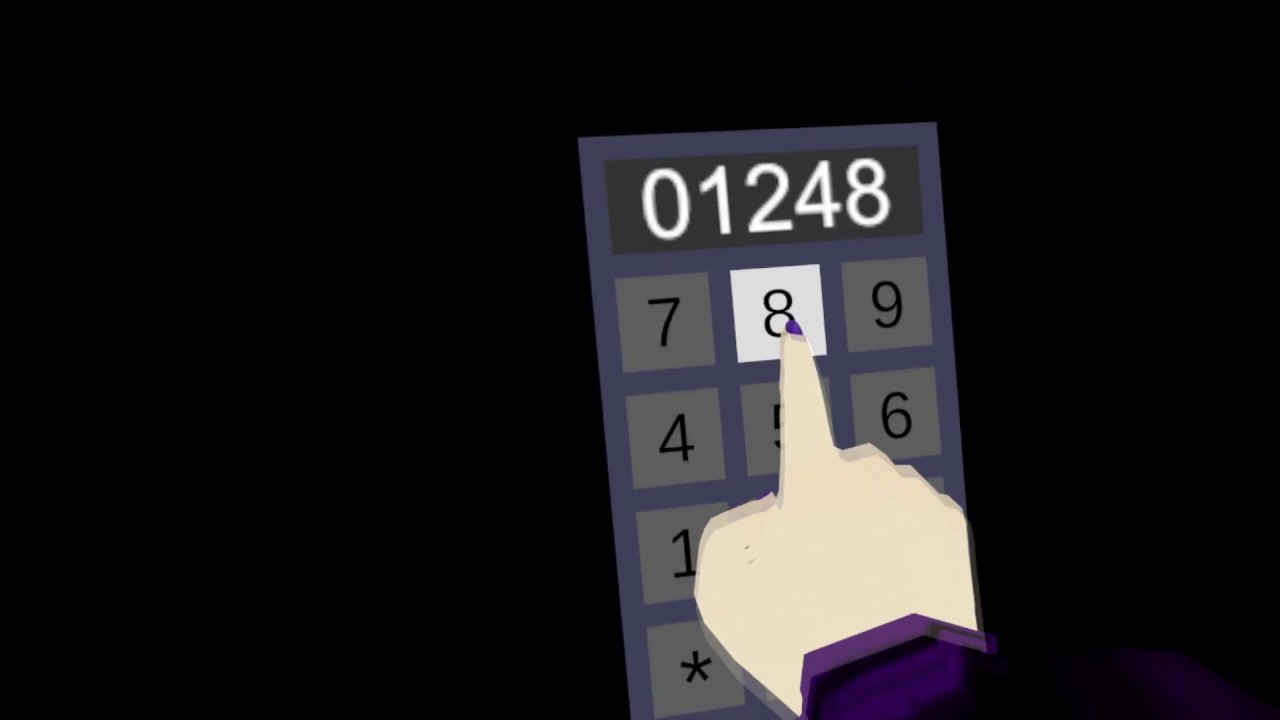
My first UdonSharp prototype of a keypad that you can operate by touching it with the physical finger of your own avatar.
My Patreon:
https://www.patreon.com/Varneon
ohhhh
void ridge
Right, some bones you can work with fairly reliably.
fading cipher
So it's more a matter of if people are too fucky with their avatars >.>
void ridge
You can do it, but use caution. Always account for the case where a player doesn't have that bone, or where it's out of position, and make design choices based on your priorities and the existence of those cases.
Does the bone being out of position make what you're doing unplayable/unusable? Then provide an alternative. Does it make it just kinda silly and weird? Does silly and weird disrupt the experience, or is it just a fun quirk? Just keep those things in mind.
I have found that foot bones are fairly consistent in their location, but not orientation. I do think most avatars will have an index finger bone. But that's the most I can say.
fading cipher
Yeah, foot location is the main thing I plan on trying to track
I'm looking into the possibility of a skateboard for fullbody-only (which even I don't have yet, so this is a kind-of long term goal lol) and afaik positional tracking should be enough
void ridge
fading cipher
I'm looking into the possibility of a skateboard for fullbody-only (which even I...
Cool. As it happens, I'm also working on a FBT-based thing right now. Here's a canny request for you to updoot
https://feedback.vrchat.com/vrchat-udon-closed-alpha-feedback/p/add-hip-leftfoot-and-rightfoot-to-trackingdatatype
Feel free to shoot me questions and keep me updated, I'm learning this as I do it and am always happy to compare notes.
fading cipher
Dooted, that's a pretty good request. Yeah, it kinda feels like a given so surprised it's not there
hip tracking means you could try to make hula hoops 🤔
void ridge
I encourage you to do some experimenting. Attach some spheres (remove their colliders or put them on Walkthrough layer) to the local player at some test bones like Feet, Leg bones, hips, spine, chest, arms, hands, head) and then watch how they move with the animation.
Or in the case of FBT, how sometimes they'll just straight up ignore the inverse kinematics and go to a default position instead.
Then swap through a handful of random avatars and see what changes.
fading cipher
I'll give it a shot, danke
 hollow valve
Is udon new?
 pastel yew
Can someone help with a graph that I could use to toggle a material on an object real quick please?
The object has two mat slots, but only needs to toggle one of them between two materials.
I thought there was a SetMaterial node... ? 🤔
void ridge
pastel yew
Can someone help with a graph that I could use to toggle a material on an object...
In the Udon Example Scene there's a script called "ChangeMaterialOnEvent," check that out. It's attached to the Cubes in the "cubes" group, or it's also in the programs folder Assets-->VRChat Examples-->UdonProgramSources
pastel yew
Found it, thank you... let's see if I can make it do the thing. ¦3
I see it has a Custom Event node... how would I set that event to be a toggle? It was OnInteract in SDK2. 🤔
cunning mist
Well well well well well... A toggle Custom Event question, how conveniently timed!
https://youtu.be/y-YSWkJtutI

- Check out https://tryuniverse.com/ and use the code VOWGAN to get $50 off when you enroll. *
Enabling and disabling large numbers of objects all at once is pretty easy, and here I do so using Colliders for a set of couches. All assets are available on my Patreon if you'd like to have access to anything I made during or before the video.
00:0...
pastel yew
OK, gonna watch that and try and brain this out. I just need a photo in a picture frame to switch between two images...
pastel yew
Hmm... does this look right?
That should toggle between the textures in the array and set them on the chosen material, right?
floral dove
this will set the texture of the material to image[0], then image[1], image[2] etc as fast as possible, you will only really see the last texture in that array applied to the material.
if you only have two textures, you could instead have a local variable like textureIndex, and swap that between 0 and 1, then use Texture[].Get(textureIndex) to get just the texture at that index.
pastel yew
It shouldn't get to image[2] because there's only 0 and 1 in the array though, right?
Hmm... it's not setting the textures when I do a build & test.
The toggle button is working...
cunning mist
If I understand correctly, you're attempting to swap to one material while active and a different one while inactive, but you only want to swap a specific material slot and not both of the materials, correct?
pastel yew
cunning mist
If I understand correctly, you're attempting to swap to one material while activ...
It's a picture frame with two mat slots. One for the frame, and the other with a photo. The photo mat slot, I would either like to swap the material - or the albedo and emission of a set single material - when the picture is interacted with.
I'm using arrays so it can have multiple textures/materials to choose, and cycle through them with each click.
cunning mist
Ohhh, you want to swap through multiple, not toggle between two?
pastel yew
Well, two would work in this case as there's only two images currently... but it'd be nice for the future to use an array for more photos.
cunning mist
Alright, so if you aren't wanting to handle this inside of lots of animations, setting a MeshRenderer's material in an array is actually a bit strange. You can only set the entire array at once, so you first need to copy that array, modify the value you want, then set that array as the MeshRenderer's materials. This, combined with a looping count can be a bit strange, so to explain this I made a quick demo that you should be able to just snag the script from and use.
@pastel yew
The graph for reference:****
pastel yew
cunning mist
Alright, so if you aren't wanting to handle this inside of lots of animations, s...
Awesome! Thank you, I'll give it a try! 😄
cunning mist
👍
Oh, in the "Set Material" node, the number there is whatever value of the array the material is that you're swapping out. I assumed it would be 1 but change that to whatever you'd like.
pastel yew
Gotcha, will do~
cunning mist
pastel yew
Gotcha, will do~
Made some fixes, the last one would generate a new material instead of using shared material which is bad
 twilit breach
Has anyone else had an issue since the recent update that causes other players to be stuck at 0,0,0 when playing online? It happens in my newest updated world as well as an older world that hasn't been changed for a few weeks. So its nothing with the SDK updates or things I've changed.
 ember spade
I have a question
How come I made a VRchat account but it doesnt let me in
It says wrong password or username
It's broken
It is right but the system is broken I put in my correct password and username it still says its wrong the system is just broken
fading cipher
lol this channel is for questions about making worlds with their visual scripting language, I don't think this is the place for that unless you can't log into your VRC account in the Unity Udon component?
oak trail
fading cipher
I couldn't remember where that channel was T.T
paper plinth
I'm trying to set a program variable bool to on when my object comes in contact with any collider. Is this how?
fading cipher
As a programmer with barely any Udon experience, that looks right 👀
It's hard to convince myself to research and figure out Udon from the tutorials because I keep creating new hobbies to look into lmfao
paper plinth
it's better to either make a playground or just start making worlds
oak trail
fading cipher
It's hard to convince myself to research and figure out Udon from the tutorials ...
Check out UdonSharp, it'll allow you to hand-code Udon scripts in C# if that's more your style.
fading cipher
the VRC getting started stuff recommends you read the existing code in the example worlds to get an idea ¯_(ツ)_/¯
fading cipher
oak trail
Check out UdonSharp, it'll allow you to hand-code Udon scripts in C# if that's m...
bruh are you fr? I've been programming in Unity for at least a year lmao that sounds amazing
paper plinth
if you already know how to handle gameobjects in unity then udon is that with nodes
you won't have any trouble
oak trail
Visual-scripting isn't for everyone, it's easier for beginners, but the workflow will throw off experienced coders.
fading cipher
Yeah I very much prefer using actual words to program lol
I speak in words, not pictograms e.e
oak trail
Only thing i use visual-scripting for is shaders, since that stuff is beyond me.
fading cipher
Is there an udon-equivalent for shaders, then?
Or wait your'e talking about like amplify or something
never mind lol, baka moment
oak trail
mighty fjord
Are there currently any good known ways to detect if a menu is open in VRC?
cunning mist
"Good" ways? No.
Really you'll need to set up a bunch of button checks.
fiery yoke
I had an idea how to do it recently.
But its pretty hacky, and not 100% reliable.
Reliable as in: It depends on the users configurations. Meaning that it can fail under certain circumstances.
twilit breach
So after a few hours of digging I discovered the built in udon combat system is now making other players stuck at 0,0,0. It throws some errors about incorrect use of quaternions, rotates other players sideways and leaves them at origin. Does anyone use the combat system to perhaps compare graphs? (as i might be using it wrong)
fiery yoke
twilit breach
So after a few hours of digging I discovered the built in udon combat system is ...
Known problem. Devs are already working on a fix afaik.
twilit breach
ah i see, I only just noticed it as I was testing stuff. When did it start occurring?
fiery yoke
Since the "Update Order" Update
twilit breach
oh I guess I haven't tested my stuff online since then
is there a way to put players in ragdoll beyond combat system? thats all i really needed it for as I could do HP and teleporting to a respawn in other ways
fiery yoke
twilit breach
is there a way to put players in ragdoll beyond combat system? thats all i reall...
floral dove
twilit breach
So after a few hours of digging I discovered the built in udon combat system is ...
next patch has a fix for this
twilit breach
alright cool, i feel better now. I'll just work on other stuff as I wait 🙂
chilly crater
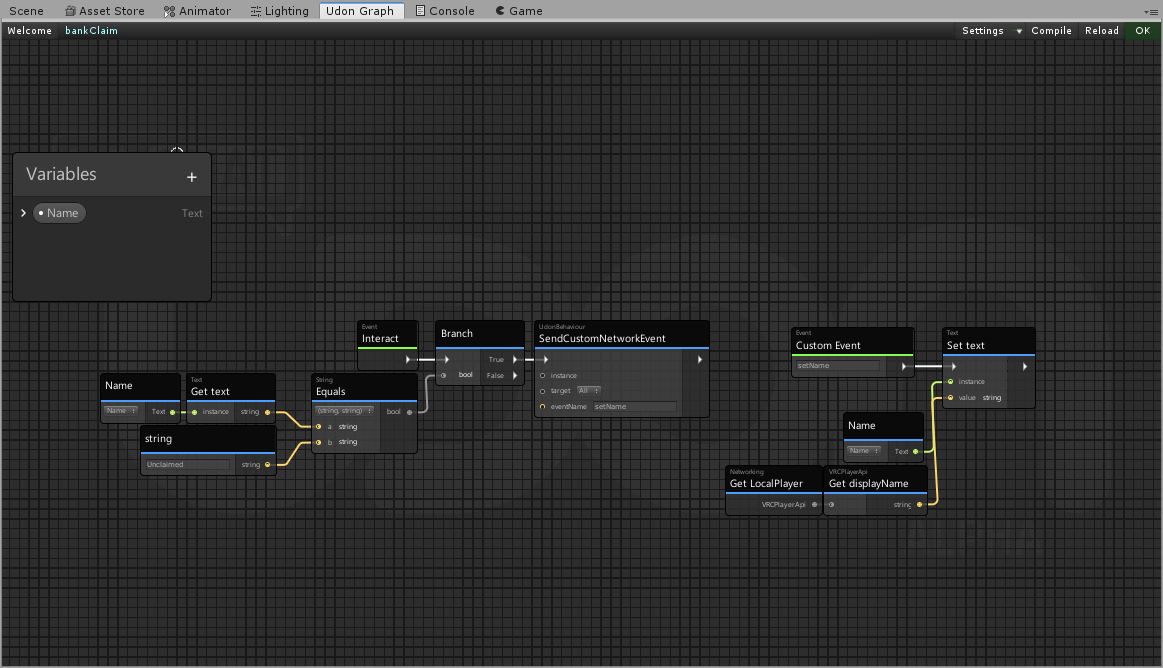
https://i.imgur.com/R0EfTxI.png
I know this won't work, as it will make everyone set their own name. Would a synced Variable work here?
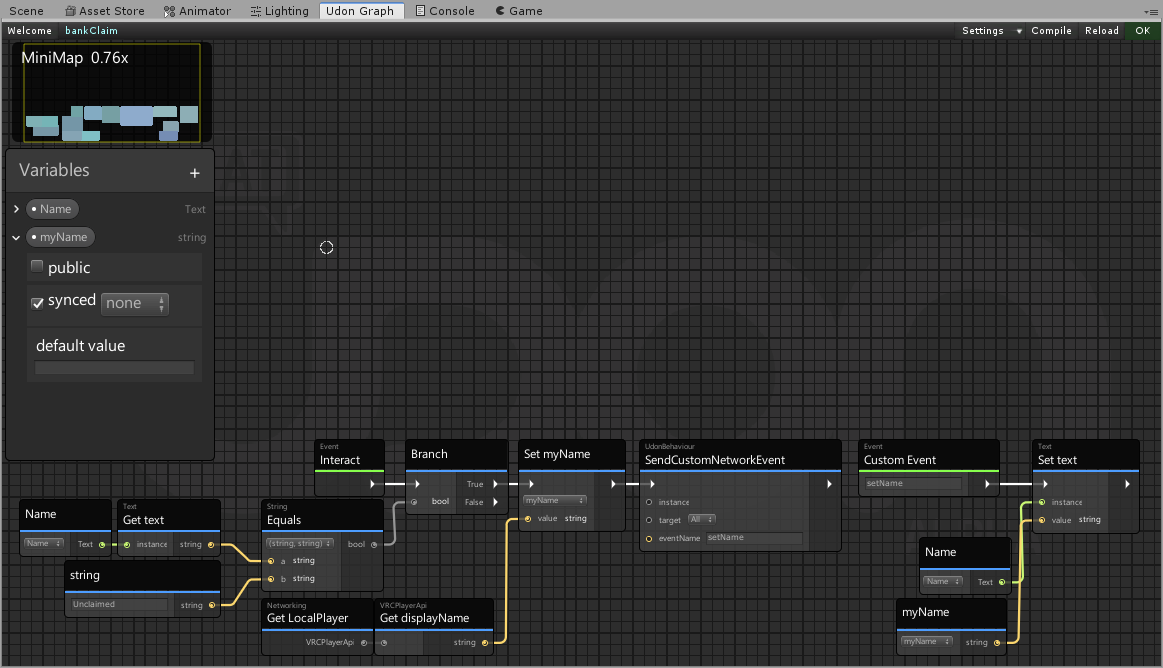
Like this? https://i.imgur.com/1X7w2Wh.png
 floral dove
not sure what you're trying to do but you could make the player the owner of the object and then set a synced string variable or have one player own all the Text boxes and loop through the players: https://docs.vrchat.com/docs/getting-players#getplayers
VRChat
These nodes are useful for getting an individual Player, a group of them, or all of them. GetPlayerCount intGets the actual number of Players in the instance when it is called. GetPlayers VRCPlayerApi[]This is how you get all the Players in your world so you can go through them in a For Loop and app...
chilly crater
Betting menu type deal. If your name isn't on the menu, you can't interact with it. It's a worldspace UI menu
On player leave, it checks the name of that player and on the menu, and if it is the same, it sets it to Unclaimed, so someone else can get it.
floral dove
ah yeah - just have the owner set the names on player join / leave
chilly crater
arrays are on the menu for me to learn. Eventually.
I got this far with bool logic. I'll hit a roadblock eventually.
dusk orbit
is it possible to have a pickup item that's connected to something? so like, some kinda lever or joy stick you can grab but only rotate it pretty much
fiery yoke
With maths anythings possible.
dusk orbit
thats extremely helpful, the helpful helper
hushed gazelle
If you mean like a dial, that's really easy to do; Update -> Set LocalRotation on your Dial to match PickupVersion (The pickup being just a collider gameobject with no mesh, basically) And on Drop set the position of the pickup object to that of the dial so it snaps back into place. So you pick it up to "hold" the dial and turn it, and on release the sneaky pickup object goes back to the physical version.
 wispy mist
I am making an automatic door for my first avatar world map and the compiler is giving me the error of "object refrence not set to an instance of an object." Any ideas to what that means?
Nevermind.
wispy mist
Ok. Door is still not opening. I've set up the udon graph the same way as the video, and still nothing. Animations appear fine, words match, and it still doesn't work.
wispy mist
Nevermind again.... Aye....
 pallid roost
Has anyone worked with multiple cameras? I have two, one rendering over the background to show up up as the background.
It works fine in Desktop mode but in VR it goes extra funky
scarlet lake
how can you make a audio visual with expanding object in udon?
 copper thicket
quick question: the event OnNetworkReady is not a thing anymore? i see now only OnPlayerJoined in udon. how do i get to know when a user has fully loaded in?
void ridge
copper thicket
quick question: the event `OnNetworkReady` is not a thing anymore? i see now onl...
I also want to know this.
fiery yoke
Udon only initializes after the network is ready, so using Start will suffice.
fiery yoke
Its what Ive been told.
void ridge
Opposite of what I've been told, unless I'm misremembering
fiery yoke
Ohh I think youre confusing network and synced variables.
Network ready simply means the the Network is ready to send and receive data.
Aka the player has fully connected to a lobby.
void ridge
Yeah, I'd really like to know that for some purpose I can't exactly remember right now..
Ah, ok. This:
#udon-general message
and this:
#udon-general message
fiery yoke
Hmm either Phase is wrong or I am then.
There is an OnNetworkReady node...or at least there was...
void ridge
Doesn't seem to exist now, at least I couldn't find it in node search. No event with "network" in the name, even.
fiery yoke
Well that would speak for my theory, but doesn necessarily have to.
void ridge
There's a Networking.Get IsNetWorkSettled node that outputs a bool... no idea what it does.
fiery yoke
Well you could test that I guess...if you want to 😅
void ridge
Whether that way or another, it's probably possible to put together some hacky way of checking for something that implies the network is ready, and on the first frame it is, send a custom event
Dangerous thing to do, though, because as networking is developed, that thing may no longer imply that it's ready.
copper thicket
fiery yoke
Udon only initializes after the network is ready, so using Start will suffice.
nah what i mean the event for users that are already there in the instance
fiery yoke
?
light shard
anyone know how to group instances so only 1 set active is used to turn multiple instances true?
like a node to plug them all into?
fiery yoke
You would use Arrays and For-Loops for that. The concept is the same as in C#.
light shard
do you know what the nodes are or what they look like?
fiery yoke
an array of gameobjects is "GameObject[]" and For-loop is just "For"
paper plinth
Does this seem like it should work? The colliders are all set up as triggers and I keep blowing up my own ship.
void ridge
light shard
anyone know how to group instances so only 1 set active is used to turn multiple...
Would it not be more practical in most situations to just parent all those things to an empty GameObject and activate/deactivate that?
cunning mist
light shard
anyone know how to group instances so only 1 set active is used to turn multiple...
If you want to swap them all, here's a tutorial on doing that for Collider[] variables. Just use GameObject[] instead and you can follow along exactly.
https://youtu.be/y-YSWkJtutI
- Check out https://tryuniverse.com/ and use the code VOWGAN to get $50 off when you enroll. *
Enabling and disabling large numbers of objects all at once is pretty easy, and here I do so using Colliders for a set of couches. All assets are available on my Patreon if you'd like to have access to anything I made during or before the video.
00:0...
fiery yoke
void ridge
Would it not be more practical in most situations to just parent all those thing...
True, but sometimes the hierarchy may not be changed for some reason.
 crimson surge
So am I correct in assuming that we don't have a way to share information between worlds? ie. Dungeon world #2 wont let you progress unless you've completed dungeon world #1? If stored on a player's account, I imagine it could get unwieldy as world builders pile crap on. And I'm assuming we can't connect to an outside database for security reasons, no?
fiery yoke
Currently not officially supported no.
crimson surge
Shame, because breaking a playable quest idea up into multiple worlds as levels would be easier on the clients than one big world.
Came to mind after thoroughly enjoying that MMO-like dungeon crawl in the spotlight.
But I do understand there are many complications with any sort of storing of vars or connections to anything
fiery yoke
Theres been several ideas by several people over the months that VRChats content creation exists. But if something is not officially supported, its usually not worth trying, since it will be patched out, broken or otherwise voided.
crimson surge
My background is with NWN (2002) persistent worlds where we stored data in a database, and even had a plugin to send character files to other worlds. So I can imagine all the reasons current or former unofficial methods would be patched out. Happy to wait for an official method if one ever comes.
grand temple
void ridge
Ah, ok. This:
https://discord.com/channels/189511567539306508/657394772603830360...
the network being ready doesn't mean that you have completely received and become up to date with all the other players. It takes time to receive synced variables
I'm pretty sure you can send a network event on start and that will work. For that purpose, yes the network is ready
fiery yoke
Yeah its ready, but its not settled
so that might be the confusion there
Would be curious to see if Networking.IsNetworkSettled actually helps us with anything there
grand temple
never tried that
fiery yoke
At least regarding players connecting etc.
Probably does not help with synced vars, but thats just my guess
pastel yew
How do you adjust the voice falloff in a world?
I was in one recently with a nice falloff that kinda dulled surrounding conversations that were further away, it was so much easier to talk in groups~
void ridge
pastel yew
How do you adjust the voice falloff in a world?
I was in one recently with a nic...
Try something like this
warning: I have screwed this up more times than I can remember. It's so incredibly simple, but somehow I keep finding ways to fumble it 😂
So if that doesn't work, don't be shocked, and tell me
The default value for voice is 25, and for avatar is 40 I think? So if you want less, pick a value (or values) that are less
void ridge
pastel yew
Awesome, I'll give it a try! :D
I should also be linking you to this
https://docs.vrchat.com/docs/player-audio#voice
25 seems like a lot, but remember that falloff starts at 0 meters, and I think it's not linear. That means by 12 meters the voice has already fallen off quite a lot.
pastel yew
Mm, OK. The place I'm intending on using it in is around 15m at the biggest point. It would certainly explain the din when it fills up. X3
What do I attach that to, VRCMAIN with the scene descriptor?
void ridge
pastel yew
What do I attach that to, VRCMAIN with the scene descriptor?
Any UdonBehaviour that always stays active, tbh. But yeah, I'd say it's wise to put it on the same object that has your Scene Descriptor.
pastel yew
Great, I'll keep all of that stuff in there then. It's where I'd look for it.
Thank you again~ ¦D
pastel yew
cunning mist
Made some fixes, the last one would generate a new material instead of using sha...
Awesome, will give this a try now. I was too burned out that day to test it. ¦3
void ridge
Networking is hard
If I take ownership of an object with an UdonBehaviour via Networking.SetOwner, can I immediately set a synced variable in the next step in the execution flow, and expect that variable to sync properly to everyone?
fiery yoke
Nope. Thats a bug afaik tho. Not sure whether or not or how that is supposed to work.
fiery yoke
Essentially there is only very few axioms that hold true in Networking. And since there is no documentation, you/we/I have no idea which is and which isnt intended behaviour.
void ridge
I guess I'll just execute what I want once with the next OnPreserialization?
Oh wait, there's an Event.OnOwnershipTransferred node.
fiery yoke
Yeah...I dont trust that either
void ridge
heck. I was thinking that.
fiery yoke
Behaviour has been changed, broken and patched, several times.
As I said many times. Networking is very wonky. Until we get some official word on what things actually do, you can just test and speculate.
mighty fjord
Might have come up with a decent menu detection solution. Should I post a video showcasing it in here or in #udon-showoff?
I'm wondering since I could still expand upon it to improve it even more.
lean jetty
Hello.
I'm sorry, I'd like an idea about the acceleration code.
I'm currently trying to adjust the attack power by pasting a script into an attack object.
I'm thinking of changing the adjustment of the attack power according to the acceleration of the attack object.
I can't get that acceleration with Udon Sharp.
Previously in Unity code
I have seen the code below.
Public class 〇〇: MonoBehaviour
{
Private Vector3 m_accel;
Private void Update ()
{{
M_acel = InPut.acceleation;
}
Private void OnGUI ()
{{
Var rect = new Rect (30,30,500,50);
GUI.skin.label.fontSize = 30;
GUI.Label (rect, string.Format ("X = {0: F2}, Y = {1: F2}, Z = {2: F2}", m_accel.x, m_accel.y, m_accel.z));
}
}
I tried to run this code,
The following error occurs.
UnityEngineInput.get_accelerationUnityEngineVector3 is not exposed in Udon
This time we are getting acceleration, so
I will calculate with the initial speed + speed at the time of measurement + time.
In order to obtain these speed information,
I think I have to get the coordinates of the objects in the world and calculate.
Do you know a function that makes it easy? .. ..
I'm sorry for being totally ignorant.
I'm sorry for the long sentence.
I look forward to working with you.
fiery yoke
RE: #udon-showoff message
So how did you do that? :D
mighty fjord
Kindof wonky but it works
Raycasts, overlaps and comparing the names of the menus against the ones I've written down pretty much
mighty fjord
Yeah, the names of the gameobjects
fiery yoke
You're saying youre able to access the menu gameobjects?!
mighty fjord
It's pretty much the only thing you can do or get from them
fiery yoke
with "the only thing" you mean the name? and with "them" you mean what?
mighty fjord
Yeah so basicly it's possible to retrieve the menus as gameobjects, and treat them as such, but most functions will yield null or crash the script
fiery yoke
except the string of their name...clever.
mighty fjord
Not sure if this might be breaking the boundaries of interaction between worlds and player objects though
But in theory I should be able to hook onto the menu aswell
brittle stump
only locals can see the pickups. How do you make this component global?
 valid basin
Any Udon pens yet?
void ridge
brittle stump
only locals can see the pickups. How do you make this component global?
I assume you're talking about how when a player picks up this object, other players don't see them picking it up or moving it? If so, the answer is that you should add an UdonBehaviour component to the object and check the "synchronize position" box
void ridge
Ah! UdonBehaviour is not the same thing as an Udon Program! 🙂
That took me a while to click
void ridge
Yeah, an UdonBehaviour has a bunch of independent functions, one of which is that it can take a program that it runs
Another function is syncing position
paper plinth
Badass
I was hoping for something like that
I'm not at that point yet
But I'm close...
void ridge
Something like what?
paper plinth
I figured there must be some fast way to share information like the positions of objects. Didn't know it was that fast.
void ridge
Oh, are you talking about trying to write an Udon program that's equivalent to syncing position?
paper plinth
Because in the end, all the people in the world need to see stuff
I didn't even think about it to be honest, I assumed it was something rudimentary. "add the component and check the box" is pretty idiot-proof.
Cause I have a scoreboard that's based on the position of objects
Although it's based on position and I may want rotation to display the score.
void ridge
I was going to experiment at some point with trying to sync a rigidbody via Udon program. I've been putting it off because I'm like, very sure that the outcome is going to be "look at how much this lags"
paper plinth
Idk how my collision stuff is going to work, I assume I'll have to rewrite all that
My whole world is based on syncing positions of objects
void ridge
But as far as I understand all that's ultimately being done is, owner serializes Position (vector3), Orientation (Quaternion), velocity (another vector3), and angular velocity (another Quaternion I think)
paper plinth
I mean
I saw a guy pick up a guitar and play it
So it's not too terrible
void ridge
But I'm guessing that VRC does a lot more fancy stuff under the hood to improve interpolation and reduce network load
And with pickups it also probably makes some things more seamless
paper plinth
It's been pretty powerful so far. As soon as I learn how to do something I can implement it. The game tends to help me more than it hinders me. You may run across the perfect way to sync a rigidbody.
I made a cool little thing where you fly around and turn glowing orbs different colors by hitting them with your front cannon
and if someone comes upon you doing this then they can change your orbs to their color and if you have a problem with that then you can shoot them
and if you hit them enough times the ship will glitch out (need to fix this)
but the way I did it was to have the weapons ride along inside the ship and when you fire the weapon all it does is set a bool high that the weapon looks for, and then it does its own behavior, so it's really easy to mod / make more and different weapons
modeled after the 1995 game Subspace by Virgin Interactive Entertainment, one of the internet's first MMOs
void ridge
Make sure to post some stuff in #udon-showoff
paper plinth
hell yeah
smashing stuff into my own collider was probably the biggest obstacle to overcome and I still used a kludge
paper plinth
so I can see what the other guy was talking about
if I set my ships as public variables on my mines, and I have hundreds of mines, and I delete the ship, it also deletes the reference in the component on the mine
I could have hundreds of mines
 eager olive
Hi folks, I'd like to get the player's local head position in SDK3. Anyone toyed around with that yet?
I've tried using GetTrackingData, but that seems to be in world space.
mighty fjord
Local head position relative to where the player is?
eager olive
Yep!
Just need to find out where the player's head position is, regardless of their position in the world.
I'd get the data from SteamVR (or some middleware), but looks like that's not available :p
mighty fjord
Would subtracting the player position from the head tracking position be what you'd want?
From what I can tell, what you want might not be very easy to recreate
eager olive
Hmmm.... That sounds about right? Thought is the player position corretly placed, relative to the head tracking position?
fiery yoke
If you say "local" you should always specify local to what. For most use cases local to Player Root will suffice. But for some uses you need local to Playspace Root.
eager olive
fiery yoke
If you say "local" you should always specify local to **what**. For most use cas...
Relative to the Player Root, you got it right 🙂
fiery yoke
Yeah then what Nestor said
eager olive
Neat! I'll try something like this and report back.
var player = Networking.LocalPlayer;
var localHeadPos = player.GetTrackingData(VRCPlayerApi.TrackingDataType.Head).position - player.getPosition();
Works like a charm, thanks @mighty fjord and @fiery yoke .
I was hoping to get the "raw" tracking data, but this will also do 😄
mighty fjord
👍
fiery yoke
Raw Tracking Data wont help you much, since VRChat does some black magic wizardry with it.
eager olive
some black magic wizardry
yep, that describes it quite well 😛
paper plinth
what
that's why my valley girl locomotion didn't work
brittle stump
How do I have a gameobject with an animation be global?
paper plinth
You mean so everyone can see it?
 raven peak
mighty fjord
Not sure if this might be breaking the boundaries of interaction between worlds ...
raven peak
mighty fjord
Not sure if this might be breaking the boundaries of interaction between worlds ...
there was a similar trick with the players capsule but it was patched out so i can see this also getting patched out at some point.
mighty fjord
Very likely
 wanton oxide
i know the playerid for a given VRCPlayerApi across an instance is going to be the same across clients
can the same be said about join order?
other then the initial bunch of OnPlayerJoined calls that is when a client join an instance that already has players in it
since then the local client will be first, then the rest
 warm harness
PLEASE does anyone know how to stream VR chat on discord please 😭
 queen panther
Bruh
paper plinth
@warm harness wrong channel, and doesn't it stream like everything else?
queen panther
Yeah just click the game window in the stream tab
paper plinth
@wanton oxide the first person to join the instance is 0
each player is the previous player's id +1
wanton oxide
yeah no lol
i've tried a number of times now
its 1
idfk why, just know that it is
anyways that doesn't really matter, can anyone confirm if i can expect the order of players to join an instance to be the same across clients if two of them join at the same time?
i'd assume they get added in order of player ids but i don't want to end up having to work out another edge case cause i just assumed shit
paper plinth
https://ask.vrchat.com/t/is-it-possible-to-retrieve-an-array-of-components-as-an-array-of-renderers/1595
I have this exact question

VRChat Ask Forum
I’ve got a conundrum. My goal is to get all the renderers that are on children of an object, and do something with each of those renderers. The issue happens I try to get anything out of the array, using (array of renderers).get, because despite setting the type in the GetComponentsInChildren node to renderer it still returns the value as a bunc...
(pasting it here to show that I searched before asking)
fiery yoke
paper plinth
https://ask.vrchat.com/t/is-it-possible-to-retrieve-an-array-of-components-as-an...
There is a Generic overload for that method, so in C# its definitely possible. In Udon the generic version might or might not work. In that case you just have to cast from Component to Renderer
paper plinth
Ok thx ^ ^
chilly aspen
mighty fjord
But in theory I should be able to hook onto the menu aswell
Interdasting.
 twilit lance
so does udon mean full release? Not Early access?
I'm sick of the game crashing on me when i world hop for like the 4th time... maybe not even 4times trash ass servers
 tall vault
Udon is only a part of VRChat's SDK
VRChat
What’s this Udon thing anyways? VRChat Udon is a programming language built completely in-house by the VRChat Development Team. It is designed to be secure, performant, and easy to use via the VRChat Udon Node Graph, a built-in visual programming interface that uses nodes and wires (we call them “no...
 zenith scaffold
can you load images from url somehow? I see some talk about a dynamic image component but don't see docs about it
paper plinth
I looked into this and there isn't one yet
There's panorama in sdk2
People are talking about getting a frame from a video and using that
brittle stump
So I have a game object with an animation that I added an Udon Behavior to Synchronize Position but when I build nothing animates. Can anyone help?
 ashen monolith
Hiya, Im still very new to all of this esp Udon so I may be making really obvious mistakes but here goes..
Im trying to create a Button to Toggle through an array of Mirror qualities. (I have made a potato, L M and H mirror game object in a holder folder.) What I have put together works...uh.. kinda, but it doesnt toggle through the order. (Off, then P L M H) It just seems to randomly flick between them all when i try to use in game. Can anyone tell me where Im going wrong?
 spring kraken
@ashen monolith right now you have a for loop that goes through the length of the array and set each to active, each time you press to toggle. I guess what you want your algorithm to do is to deactivate the current mirror, get the next mirror object in the array and activate that one. A for loop is probably not right. Sorry for not helping more, I don't know udon really. 🙂
ashen monolith
spring kraken
<@!482952368468525095> right now you have a for loop that goes through the lengt...
Thanks all help is helpful at pointing me in the right direction so ty! I'll keep at it ^.^
mighty fjord
Do you only have one button for switching the mirrors?
ashen monolith
So I was using a button for on off then one for the quality switch but after I couldn't get it to function I attempted this all on one without the understanding yet to know really what im doing. I have found this resource which im following next! https://ask.vrchat.com/t/ui-buttons-to-work-with-mirrors/4420/3

VRChat Ask Forum
Thanks WoogyT I forgot change I have one set of mirrors to I have 1,2,3,4,5 set of mirrors. The graph method works great for me with just 1 set of mirrors. I’m going to be running 3 sets of mirrors for my first world. Second world i would be using 5 sets of mirrors. The ui button setup i’m looking for is HQ button turn on or off & LQ button t...
Im absolutely brand new to this with no background in any PC stuff or coding ect so its been a learning curve XD Im an artist really so now just learning all I need to get my ideas into VR worlds 🙂
fading cipher
Hoping way off in the future VRC ends up supporting the HDRP so I can make smexy particle systems that can warp and compress into shapes using (shit I forget what it’s called)
The field thing that allows you to make particles collide with or follow a set of points in space that is basically a 3D model
void ridge
I think I finally understand what the Block node is for.
It lets you execute the separate outputs independently of each other if you need to
In cases where you have an execution flow beginning with some event other than the one that executes that Block
paper plinth
love that block node
fiery yoke
@void ridge The block node jumps between paths of flow in sequential order. When the first path is done, it will continue with the next one. However Im not sure how Udon handles flow exactly, since that is a really difficult thing to implement, and udon does not have a "proper" stack to keep track of where it is in program execution.
paper plinth
does this look right?
if there's nobody in the collider, set the intensity to 1, if there's anybody in the collider, set it to 3.
with a trigger sphere collider around a light
void ridge
fiery yoke
<@!156942003236634625> The block node jumps between paths of flow in sequential ...
My confusion about it was that it seemed redundant. Because linking the end of Path A to the beginning of Path B also executes those paths in sequential order. But I believe the difference a Block node makes is that you gain the ability to execute Path A without then executing Path B (by inputting multiple paths into the beginning of Path A's flow). I haven't tested this yet.
 serene moat
block is for organization primarily, you can do what it does by connecting all your logic in a line so in that sense yes it is redundant, but it's often easier to read when you connect a sequence of steps using a block node instead
void ridge
Is what I said about executing paths independently incorrect?
Made a note to test that eventually, but if I'm wrong I'd be glad to save the time 😅
 rancid swift
void ridge
Is what I said about executing paths independently incorrect?
rancid swift
void ridge
Is what I said about executing paths independently incorrect?
it should, if you can hook up two inputs to one node - kind of like an approximation of a function/subroutine then, which we still don't have proper as far as I understand
fiery yoke
functions require a proper stack. Udon as far as I know has an inproper stack. Meaning that flow behaves different than from C#.
A proper stack enables things like recursion, which is not really possible in Udon.
rancid swift
yeah just looked at how U# does it's [RecursiveMethod] magic
they allocate an object[] on the heap
which would indicate that the stack does in fact not work for this
fiery yoke
Yeah. Thats specifically why I call Udons stack an improper stack. And how certain flow behaviour can be unpredictable or at least different than from C#s behaviour
rancid swift
though for non-recursive functions I don't see a problem, except that it might not produce the most optimized udon assembly
since without recursion the graph should always resolve to a deterministic cycle-free order of execution?
you can just place the calls as "inline" copies
fiery yoke
You might accidentally intercept flow without recursion. Recursion is just a very specific form that can cause this issue.
Any thing that changes the program counter, without accounting for where the execution left off will deviate from normal execution flow behaviour.
rancid swift
inlining the functions would always have a unique jump return point though, just like a normal branch
fiery yoke
Well yeah but most of the time you cannot inline method calls
Only under specific circumstances which are not always given.
rancid swift
why not?
I mean, the generated assembly will be horribly bloated, especially if you start nesting calls, but why could you not inline everything?
make sure parameters and "locals" (which you wouldn't even have to implement for functions) are set up properly before every inlined copy
then you can even loop (probably?)
fiery yoke
If you have a recursive property anywhere in the chain of method calls, then you cannot inline them. With recursive property I mean that if a method can transitively lead to its own call, then you cannot guarantee that it will be inlineable.
 pallid mango
The compiler for that would seem to have solved the P(NP) problem 🤔
rancid swift
you already have the graph, no? just go back up the chain that lead to the call and see if it lands on another instance of that function at some point until you reach the graph entry point, no NP hardness required
but yeah, I'm probably missing something crucial here, not claiming to be smarter than the folk implementing the whole Udon VM, I'm sure they thought about this 😛 (or will, when they get to function support)
iteresting topic though
pallid mango
You want to loop the main execution path back into a node that was already used?
Or am I misunderstanding
rancid swift
no no, that would then become NP hard, since loop detection in graphs is if I remember my uni classes correctly
pallid mango
I revoke my comment then :p
rancid swift
but as long as that is forbidden, it is guaranteed that if you go backwards through the graph you will always reach the entry point, in linear time
I think, that's what I was trying to say anyway
 dawn gull
I'm working on setting up a button the world's master can press that will sync everyone's world state to be the same as the master's for when the states are out of sync. Is there an established efficient method for that already?
scarlet lake
What's udon
floral dove
dawn gull
I'm working on setting up a button the world's master can press that will sync e...
How do the states become out of sync? Missed Custom Events?
floral dove
scarlet lake
What's udon
?whatisudon
hidden martenBOT
VRChat Udon is a programming language built by the VRChat Development Team for use in VRChat worlds! It enables complex behaviors and logic in VRChat worlds. Read more about Udon in our documentation: https://docs.vrchat.com/docs/what-is-udon
VRChat
What’s this Udon thing anyways? VRChat Udon is a programming language built completely in-house by the VRChat Development Team. It is designed to be secure, performant, and easy to use via the VRChat Udon Node Graph, a built-in visual programming interface that uses nodes and wires (we call them “no...
scarlet lake
Oh so its a world?
floral dove
scarlet lake
Oh so its a world?
it's a programming language for making VRChat worlds.
scarlet lake
Oh ok
pallid mango
Can I trigger portal’s world change mechanic via udon or so I have to drop a portal on people
fiery yoke
Forcing people to change world can be seen as hostile.
pallid mango
I’m looking to trigger world change on interact
Darn
Not forcing so much as a different UI for it
pallid mango
But but but joining worlds by touching Myst linking books! Currently I am needing to move the portal onto people and it’s not ideal lol
fiery yoke
Well VRChat obviously does not support that idea. So I would say its a bad idea trying to work around it. Unless youre up for a challenge :P
As far as I know there is no way to transfer people to other worlds without a portal.
 ashen cedar
I'm not too experienced with Udon, just getting started, but could you possibly teleport the Player to the Portal?
floral dove
pallid mango
But but but joining worlds by touching Myst linking books! Currently I am needin...
I believe you can extend a portal's Collider to include the area including the book so them getting close enough to touch it would produce a similar effect
 lavish frigate
figured out why i couldn't work udon buttons: didn't have distal bone assigned
lilac hatch
Hm ; I'm looking for the gdoc with the shared udon assets if anyone got the link somewhere 👀
Tbf I'm looking for a queue up videoplayer / "add to playlist" kind of thing, so people can just queue up songs without destroying the one playing rn 👀
Didn't really check how to do that yet but a good exemple won't harm ;w;
cunning mist
https://vrcprefabs.com/browse
I don't know if there's a video player that can do that on the list, but here's the link anyway!
crimson surge
Not sure about the players on that list, but I have used a couple players that have a playlist mode. Can't remember the worlds right now, so don't even know if they were Udon based. If I remember, or find one of them again, I'll ping you if thats alright.
They weren't set up quite the way you mentioned, but could be looked at as a basis and tweaked **I'd imagine anyway
unborn hornet
Dang, I have that as a TODO feature for my TV, but I haven't gotten around to adding it yet.
fiery yoke
unborn hornet
Dang, I have that as a TODO feature for my TV, but I haven't gotten around to ad...
lol I just noticed that you flipped the default profile icon upside down. Nice. :D
unborn hornet
||Waiting to see if Igbar still gets butthurt about it  ||
||
dusk lance
unborn hornet
||Waiting to see if Igbar still gets butthurt about it <:vrcLaughing:58574977043...
|| Does Igbar even read this channel? ||
 candid topaz
Has anyone seen a working volleyball world? I can't seem to get bouncy balls to react or bounce at all while the player is holding a paddle to knock it back. I'd figure as long as both game objects have some sort of material physical properties set on their rigid body that it'd have an effect.
unborn hornet
dusk lance
|| Does Igbar even read this channel? ||
||(X) doubt||
floral dove
candid topaz
Has anyone seen a working volleyball world? I can't seem to get bouncy balls to ...
ensure they both have colliders and are on layers that interact with each other in the Physics matrix
candid topaz
floral dove
ensure they both have colliders and are on layers that interact with each other ...
They do indeed have colliders as the engine detects when they are hitting each other, its just the rigid body properties such as the bounciness are not taken into effect as soon as a player handling another object collides with it. They aren't on any specific layers besides the default ones right now.
void ridge
How are these objects synchronized? Are the objects in the player's hands and the ball itself both using "Synchronize Position" on the UdonBehaviour?
I'm working on something very similar to what you're doing (not volleyball) and it does work 🙂
But one pitfall I had was that I was trying to use a non-synced object to push a non-owned object around. If you're not already the owner of the ball, then a non-synced object won't take ownership of it on collision. You can do that with code or by syncing the object.
candid topaz
I didn't have an udon behavior script on, will try that now. Does anything need to be in the "Program Source"?
void ridge
No, you can leave that empty for now, for this purpose. I'm a little confused about what you described now, but go ahead and try that and let us know if it goes OK 🙂
candid topaz
Thank-you, will do
void ridge
Hrm, I'm less convinced that's gonna help. It sounded at first like you were talking about a situation with multiple players, but looking at what you said, that's probably not the issue, sorry, my mistake
candid topaz
void ridge
Hrm, I'm less convinced that's gonna help. It sounded at first like you were tal...
Yeah, that did not work =/ Whats essentially happening is imagine It's Tennis instead, and instead of the ball bouncing from the racket, it's just pushing the ball slowly away no matter what force you are using.
void ridge
I'm assuming the racket/paddle has a VRC Pickup component added? Like, since you're picking it up?
It's a valid question I promise 😛 holding stuff in your hands without a pickup is a thing
candid topaz
yes
void ridge
I probably don't have any guesses you haven't tried, then 😕 you probably didn't set the rigidbody of the paddle to Kinematic, right? (because you shouldn't) (and probably didn't)
candid topaz
it is not set to kinematic, I tried with, considering it doesn't make a whole lot of sense, but in this case I'm just trying anything 😛
void ridge
And the Physic materials are set up properly, like they're using Average, or Maximum? Not Minimum or Multiply?
candid topaz
I'm honestly not sure if unity/vrc can even handle this type of thing. When the ball hits static objects, it has no problem bouncing all around. But for whatever reason, maybe the physics of the player/object and the constant calculation is just overwhelming it. Might be something where the action needs to be forced someway through script
correct. Those values don't really seem to impact much, least not on a noticeable level.
void ridge
Nope, it works, I promise. Did it a bunch yesterday 🙂
candid topaz
or rather, if bounciness is not set to maximum, it's nowhere near as bouncy
void ridge
Here's the Physic material I'm using. Should all look pretty close?
candid topaz
yeah
candid topaz
void ridge
Here's the Physic material I'm using. Should all look pretty close?
There is one other issue I'm having, I'm just trying to get my animation of an object to auto play. It plays fine in the editor, but in game it doesn't do anything. Do I have to setup an animation graph in Udon as well? There is no interaction involved with the player, it's merely just for show.
void ridge
candid topaz
There is one other issue I'm having, I'm just trying to get my animation of an o...
Wish I could help, but I have very little experience with animation so far. Just about everybody but me uses animations a lot though, so I'm sure someone can help 🙂
dawn gull
floral dove
How do the states become out of sync? Missed Custom Events?
The most consistent way they end up out of sync is if someone joins the world after changes have been made, but it happens sometimes with other things somewhat randomly. I figured a sync world button would be a good workaround
floral dove
dawn gull
The most consistent way they end up out of sync is if someone joins the world af...
We have an upcoming update to the sync system that helps with late join issues.
unborn hornet
Mmm yes very excite much anticipate.
dawn gull
That is exciting! Any idea when that will be?
floral dove
full wind
try the UdonSharp wiki and Discord for information about this community add-on you're using: https://github.com/MerlinVR/UdonSharp/wiki
floral dove
dawn gull
That is exciting! Any idea when that will be?
I'm hoping it will be within the next few months
unborn hornet
yells at servers You'd best behave so the devs can stay focused!
 dark raft
Is there a way to get Canvas interactions (with VRCUiShape) working while inside a trigger collider? I've tried changing the trigger collider to a layer that only collides with with the layer I want to trigger, and also tried changing the layer of the Canvas, but the trigger collider still blocks the raycast laser interactions.
rancid swift
dark raft
Is there a way to get Canvas interactions (with VRCUiShape) working while inside...
Try setting the collider to the MirrorReflection layer
dark raft
rancid swift
Try setting the collider to the MirrorReflection layer
The mirrorreflextion layer does work to not block UI interaction but still collide with players, thanks. strange how that layer is treated specially by however the raycast works.
 slim flume
Does anyone know if it's possible in udon to switch to another unity scene?
or move through a sequence of scene. If not, is there an alternative to stringing
different "settings" or "shots" together into one experience?
Maybe the only solution is to set up/physically seperate out all story scenes in one unity "scene" file
paper plinth
The answer to this is always no, you can't, sadly.
Guys I have an animation that loops. I'd like to set the speed on the animator of each object that uses the animation using an udonbehavior, but when I set speed on the animator component, it breaks the animation and doesn't play at all. Anyone have an example to share? Any tips?
paper plinth
oh
just adding the udonbehavior breaks the animation
 copper ocean
scarlet lake
how can you make a audio visual with expanding object in udon?
copper ocean
scarlet lake
how can you make a audio visual with expanding object in udon?
Message me
pallid mango
candid topaz
There is one other issue I'm having, I'm just trying to get my animation of an o...
No udon needed that’s just an animator
If it plays automatically in play mode it should be playing in game
 ornate sky
Hello i have a question, can you make toggle boutons on unity to modify the treble, middle and bass of a song. like to make a DJ set into the game
dapper lion
you can using toggles, but my experiences using realtime audio editing was not fun at all using udon cus following the audio aource docs for unity and then having to follow what udon wants is very... wonky
however i think its improved since then but yes, you can def make toggles for treble, bass, echo. whatever
but im sure people/DJs would much perfer sliders
ornate sky
uh yes i ment sliders
but how do you actually make an audio edit, like what programs do you need
dapper lion
ah, sliders are a lot more harder to set up with the audio mix group stuff
ornate sky
to import variables into unity
dapper lion
so fmod used to work, but it doesnt seem to transfer into vrchat anymore, but the defaul unity audio mixer should still be functional, itll just be a bumpy ride depending on your experience
i have not seen any audio software since that could work in vrchat (sdk 3)
dapper lion
I don’t know if theres anyone else here that has messed with audio matrix for udon but if there is, theyve probs had a better time than me when i was learning unity audio lol
ornate sky
ok thanks
dapper lion
also sdk 2 and 3 are not cross compat, youll have to rewrite a lot of stuff
ornate sky
witch is better ?
 hybrid yoke
in 3 you can do much more so it is obvious
dapper lion
sdk 2 is more labeled and just easier to learn (apparrently) while sdk 3 is new and is more based on coding your own stuff
ornate sky
i see
so apparently i saw that to make frequency slidebars it will be difficult so i thing i will try to make something easyer
on c+ i need to make a slide bar to see the audio time progression
but where do i found the audio variables, like in c+ how do i know the code line to take the audio time spent and link it to the slidebar
ornate sky
like is there a library of all variable inputs ?
dapper lion
there is docs that have like a list, but its still very barren when it comes to general info
ornate sky
oh
pallid mango
Most of them are unity types and methods
So you can get more info about them from unities documentation
ornate sky
okay thanks
ornate sky
in the udon behavior i clic on new program and nothing happends, do someone had this issue inn the past
cunning mist
In your Console window, are you having any Red lines/errors?
candid topaz
pallid mango
If it plays automatically in play mode it should be playing in game
Thanks for the reply. It plays fine in editor and upon pressing the "Play" button for testing. It seems to never start or stops at a certain point by the time I get to it in the level. Wrap mode is set to Loop and "Play automatically" is checked. Anyone have any ideas?
brittle stump
I have a game object with an animation that I added an Udon Behavior to Synchronize Position but when I build nothing animates. Can anyone help?
ornate sky
@cunning mist yes thanks i found the error
cunning mist
👍
lilac hatch
@unborn hornet hit me up if you ever release the queue system for your TV ! Will be greatly appreciated ♥ and thanns Again Vowgan for the link yesterday, i'll take a look now :)
 quick basin


 fiery yoke
Mathf.Floor(dance);
Glad to help.
paper plinth
@quick basin what are you trying to do? If you want pretty flashing lights look up shaders
I have a transform
I want to translate it down
but I want to translate it in world down
this is obviously local down... what do I plug into the translation to give me -1 on world down?
pallid mango
I believe there is a second transform.translate that has an extra parameter for what space to use
paper plinth
there's a relativeto option but I can't figure out how to plug in the space
fiery yoke
Its an enum
pallid mango
You picked the node that didn’t have the parameter
paper plinth
fiery yoke
Overloads are selected through the dropdown
pallid mango
fiery yoke
Overloads are selected through the dropdown
Mind blown ... I’ve been picking them manually
fiery yoke
But yeah look up the Unity docs. It tells you which enum it is.
paper plinth
thx
pallid mango
Unity docs aren’t useful regarding this. It uses named constants and does not tell you the value lol https://docs.unity3d.com/ScriptReference/Space.World.html
 paper plinth
the unity docs want me to put in space.world but I don't see that as an option
pallid mango
I’m going to go out on a limb and say local is 0 and world is 1 that is a total random guess
void ridge
paper plinth
I can try one and then the other if I know how to construct it
pallid mango
Enum type.
fiery yoke
If the "Space" enumeration is not suported in Udon, then yeah you cant really do that.
paper plinth
oh right on
fiery yoke
According to the docs World is probably 0 and Self is probably 1
However since the graph doesnt really let you do that, Im unsure if you can just plug in an integer.
paper plinth
anyway I have plenty of other objects that would have the down on that same vector...
could I plug in another object's down? Perhaps a static object?