#udon-general
59 messages · Page 44 of 1
 raven peak
 hardy crown
In this case I'm just trying to do a simple translation, luckily there's no scaling involved
raven peak
also i would suggest keeping vrchats reference camera clear flag to skybox then the overlaying camera be depth 1 with dont clear.
hardy crown
raven peak
also i would suggest keeping vrchats reference camera clear flag to skybox then ...
I'll give that a shot right now
 floral dove
yes, that's the way to do it if you want the event to be fired for every player in the world
hardy crown
Alright, I set the reference camera clear flag to skybox, secondary camera to "don't clear" with a depth of 1, but in VRC only the main camera is rendering
raven peak
hardy crown
Alright, I set the reference camera clear flag to skybox, secondary camera to "d...
vrchat automatically disables cameras that dont have a render texture to prevent exactly what you are trying to do. you just need to enable them in game.
camera.enable = true
hardy crown
raven peak
camera.enable = true
AHA
Alright I can set that up, will report back if it works. :)
hardy crown
raven peak
vrchat automatically disables cameras that dont have a render texture to prevent...
WOW DANG that worked! I knew it was probably something simple, thank you so much!!!
raven peak
👍
hardy crown
:)
 manic yarrow
Why don't the buttons on my map work in VR?
In desktop mode they work just fine
but in VR I don't even get an outline
raven peak
manic yarrow
Why don't the buttons on my map work in VR?
do you have a collider/trigger over the button?
manic yarrow
yeah
raven peak
can the collider/trigger be changed to mirrorreflection layer?
usually that will help
 quaint onyx
Does anyone know if OnPlayerCollisionEnter get's called from the hit player, the master of the instance or from the object that has the script?
manic yarrow
This is the graph by the way, It's from that one guide on VRCat forums
raven peak
ya that should be fine. when a collider or trigger is covering the interact collider the system vrc uses to detect the interact button gets blocked by the overlapping collider.
raven peak
if you change the trigger to the mirrorreflection layer it wont interfear.
manic yarrow
where do I do that?
raven peak
select the gameobject and on the top right of inspector should be a layer option.
manic yarrow
The whole room with the buttons is surrounded by a trigger
that'll do it
Why doesn't that affect anything in desktop mode?
raven peak
im not sure how vrc handles it so cant say. just know the results.
 heady tusk
Does VRChat Worlds Support multiple Lightmaps?
raven peak
heady tusk
Does VRChat Worlds Support multiple Lightmaps?
i dont think so but ive never really tried.
haven't had a need for it.
heady tusk
Yes it does jeeez
 chilly crater
I keep getting a system argument exception. system.string cannot be converted to type vrc.sdkbase.vrcplayer.api
I'm pretty sure I'm not doing any of that.
 scarlet lake
hi how do i make a simple udon pickup graph?
chilly crater
for what?
 mighty quiver
scarlet lake
hi how do i make a simple udon pickup graph?
mighty quiver
scarlet lake
hi how do i make a simple udon pickup graph?
vrc_pickup is an extra component
sync it by adding just the udon_behaviour component and tick the sync position checkbox
mighty quiver
yup
scarlet lake
good to test?
mighty quiver
you can test anytime you want
manic yarrow
Now the buttons just don't exist @raven peak
raven peak
manic yarrow
Now the buttons just don't exist <@!177222201567608832>
dont put the button on mirror reflections. the trigger you are using to cull the rooms on mirror reflections.
 flint urchin
Make sure it got a empty udon behaviour on it
Since that field is empty
Empty, as in, a behaviour with nothing in it
Should be one already with the sdk
 rigid raft
ok so this is a continuation on a question i had in world dev. is there a way to allow a world to see a users diffrent controlers pluged in to allow user to select what controller to use for things like controlling an aircraft with a flight stick that doent read inputs from all controllers. in the past i used getinput axis but it would go heywire and accept input from vr controllers as well as all other controllers within the instance
more of a theroy question atm since i dont have acess to my pc for a little while
flint urchin
You can yeah. Though you can’t really tell what type of controller, you can get if they are in vr or not and use different inputs then
 native estuary
scarlet lake
it just float here in existence...
native estuary
scarlet lake
it just float here in existence...
Rigidbodies don't support non convex mesh colliders
rigid raft
hmm this is hard to explain. so like when i read inputs from user it uses all inputs for axis right. so when you rotate your hand in vr it gives it thoes values as well as wjen i rotate the flight stick whether or not user is in vr or desktop
@flint urchin
basicly allow user to controll things while still allowing them full controll over there hands and whatnot
huh i suck at explaining things
quaint onyx
I tried installing udon sharp, but I get an error "The type or namespace name 'Immutable' does not exist in the namespace 'System.Collections'
mighty quiver
most up to date VRCSDK3 installed?
quaint onyx
2020.12.09.04.44 is what I have installed. Also I've now noticed that the tab for publishing the world etc is not available anymore once I installed udon sharp
native estuary
That def is not the latest SDK being from the last year
Latest UdonSharp only supports the absolutely latest version of the sdk because of changes made
quaint onyx
when updating I can just drag the new unitypackage or do I have to remove the old first?
native estuary
For sdk3 generally yeah you should just drag over
https://docs.vrchat.com/docs/updating-the-sdk
Always has the up to date recommendation on how to update the sdk
VRChat
If you need to update your SDK, it is important that you follow these steps to ensure the update proceeds properly and you don't have any old/conflicting files. Version Control If you know how to use it, you may find it beneficial to use version control software like Git to manage your project. You ...
quaint onyx
Thx, it worked
chilly crater
How can I convert a console error to english?
native estuary
That kind of depends some windows errors will use the language used in your os
chilly crater
I already changed all of the string conversions to floats to floats to strings to equality.
It is still throwing that error at me
quaint onyx
can you send a screenshot of the code that this is refering to?
chilly crater
It's a graph.
quaint onyx
then of the graph this is refering to?
quaint onyx
That's weird. I don't even see anything using single as an input, and you don't seem to be trying to pass string to anything other then string.
quaint onyx
seems so. On the top under VRChat SDK>Utilities you'll find Clear Cache and PlayerPrefs
chilly crater
didn't know if that was for the SDK OR for VRChat itself.
quaint onyx
Good question, but since it's under VRChat SDK it's safe to assume it's for SDK
chilly crater
Yeah, another script is giving me a string convert to vector3?
I can't even find the script in question...
The <e131...> is a serialized script, right?
quaint onyx
that's above me, IDK XD
scarlet lake
dumb question, im comming from eu4 blueprints here, and does udon not have like a > or < node, like im just trying to check one varible agiasnt another to produce a bool but i cant seem to find anything
quaint onyx
GreaterThan
quaint onyx
first search for float, then enter and then you can find the greaterthan
it's like navigating the folders
 idle flare
bruh I find the dumbest ways to get things done. I basically just had the end of an animation toggle an empty gameobject which triggered an update and enabled the gameobject elsewhere in the hierarchy
quaint onyx
that's considering you want to compare floats. I believe it's the same for ints
scarlet lake
well im doign a vector but yeah
quaint onyx
scarlet lake
so i cant just grab it from anywhere
nope. It's not as advanced as ue4
 paper plinth
sure can
idle flare
since I cannot find another way to do it and dont know how booleans work and all that this is my simple way for now lol
paper plinth
idle flare
bruh I find the dumbest ways to get things done. I basically just had the end of...
I have a scoreboard where the position of a cube displays the score, so all I have to do is synch the position of one object
that search is hard to get used to
ue4 has it a little easier
quaint onyx
scarlet lake
so i cant just grab it from anywhere
also, quick tip if you haven't done that already, on Udon Graph Welcom screen, under settings, select the "Search on noodle Drop". It'll be more like ue4, in a sense that once you drag out a wire and drop it, it'll offer you nodes that can be used with that
scarlet lake
Thank you thats so much better
chilly crater
waitwaitwait. You can't convert ints into strings?
paper plinth
why not
chilly crater
That's what my SDK is erroring on.
I'm converting an int to a string, and then comparing it to a string in a textasset
First it was a float to string. Now it's an int system.
floral dove
are you using Int.ToString? that should work ok
 floral dove
chilly crater
https://i.imgur.com/5olhQWl.png
floral dove
chilly crater
https://i.imgur.com/5olhQWl.png
hm. can you show your nodes?
chilly crater
Beware the monstrosity
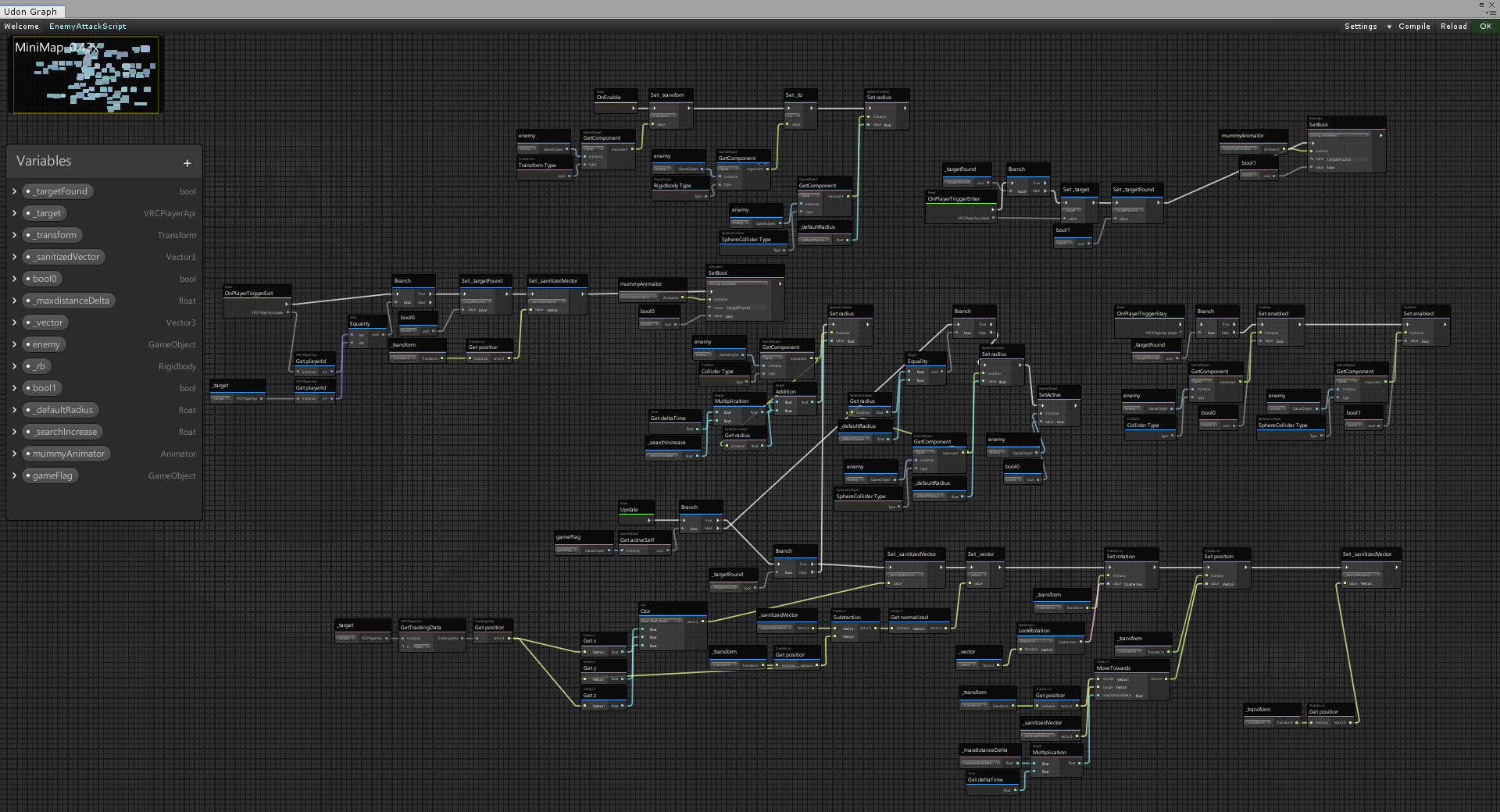
Wait, that was the wrong one...
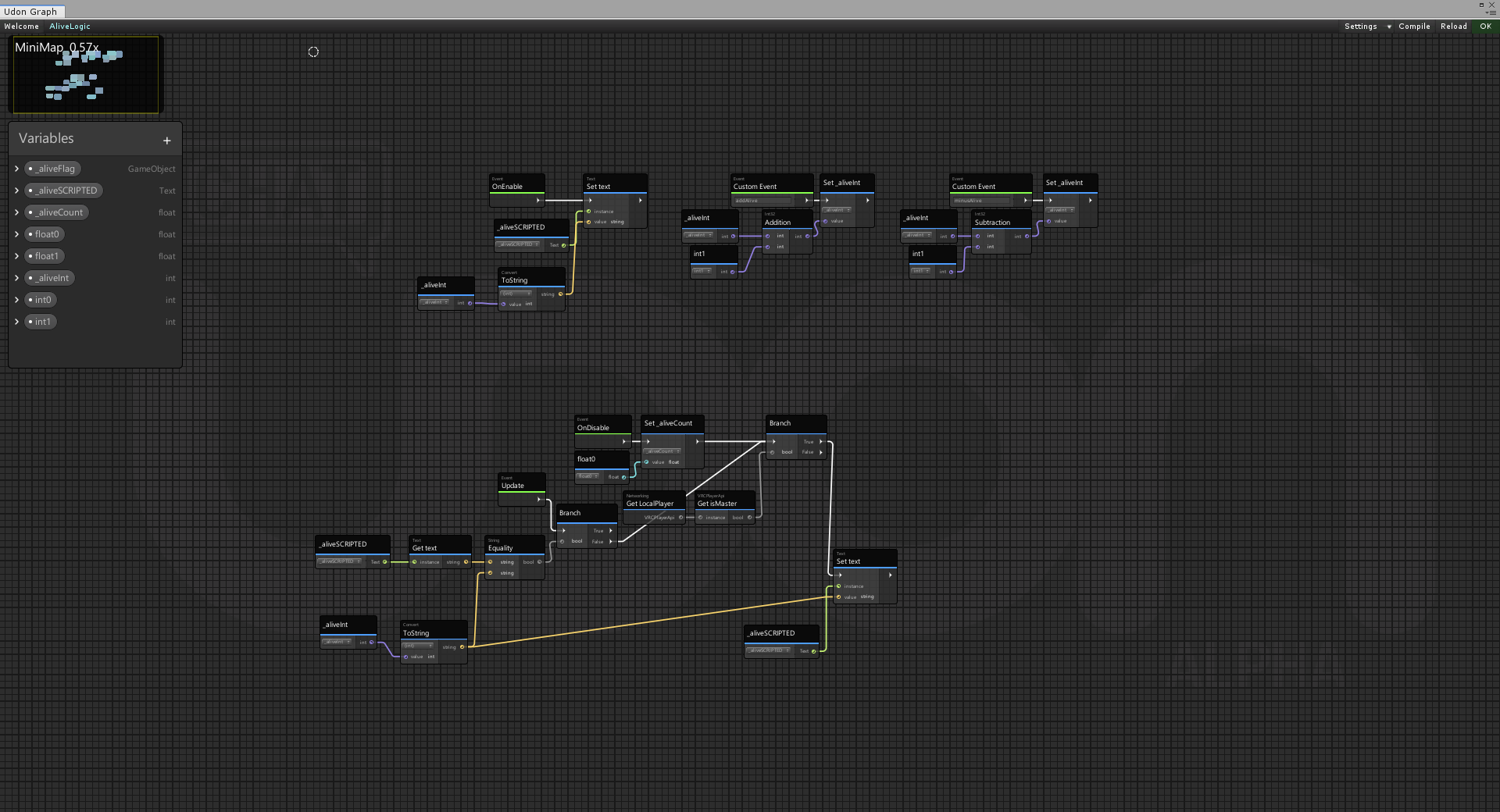
The log keeps pointing at a <e1319b7195c343e79b385cd3aa43f5dc> script that I can't find.
Then at udonfieldfactory.cs:145
chilly crater
It's throwing system argumentexceptions in my log and the scoreboard isn't working.
Yeah, but it's not in my serialized folder
I deleted a bunch of stuff. And I think it might be referencing that
[Indexoutofrangeexception]. Oooh boy.
floral dove
ah, there might be a ref to an old variable value that it's trying to restore - like a saved intValue for a variable that's now a string maybe
 hallow sable
sorry I asked earlier but I don't really understand how, can't find any examples of it. I was trying to have a button that put a custom url into video players @floral dove
don't understand what you mean before
idle flare
does anyone know how to get public nodes like these? I cant find them anywhere in search
chilly crater
Those are variables
Ye olden udon
On that rectangle on the (originally) left side is the variables. Click the plus, add whatever it is there, then go down to what you just added and click the arrow.
Then click public
idle flare
ah, i see. makes so much more sense now
chilly crater
I'm starting to think that maybe I got the wrong build of the SDK
scarlet lake
Heya! I've imported Udon Sharp into my project after already importing SDK3, and it is giving me this error. Does anyone know how I could possibly fix this, or what the source of the issue is? I couldn't find a way to fix it through the actual script.
chilly crater
The version file says 2020.04.30.18.46. The file says 1.19.07.28_Public
Gonna try reimporting.
 junior lava
[UdonSharp] Assets/Scripts/PlayerManager.cs(10,20): System.ArgumentException: Cannot resolve generic arguments on non-method expression
Does anyone know what may cause this error? I'm declaring a Dictionary in an Udon# script. Does Udon# not support generics?
Dictionary<int, PlayerInfo> players;
Dictionaries are not supported - only Arrays
floral dove
That's right - the only collection currently supported is Arrays. Every class actually has to be compiled ahead of time, so we've generated all the Array types that could be used. Lists are a possibility down the line, though it inflates the codebase to a point that we're not crazy about. Dictionaries will probably never be supported - imagine the number of combos we'd have to generate.
junior lava
Oh you're actually on the VRChat dev team! Very nice to meet you, buddy. Been really enjoying the game and started playing around with the SDK last night.
floral dove
That's right! Just finishing up my day so I'll be out but it's nice to meet you as well. Make sure to check out the docs and go through the UdonExampleScene since you're just getting started. Good luck!
https://docs.vrchat.com/docs/getting-started-with-udon
 green kindle
anyone know how to stop unity from making a sphear when i click on a object?
flint urchin
In the scene view, top right, you got a button that says Gizmos. In there you can disable light probes (if I don’t remember wrong) or just scale it down
 normal zenith
From information that I have received, it should be possible to toggle components like a script in prefab on and off. Does anyone have information on how to do that?
 fiery yoke
Some components have a ".enabled" property that you can set to true or false. But Im not sure if you should/want to do that on prefabs...especially since Udon and prefabs dont really like each other
chilly crater
That's what happened to me. I gotta scrap the whole project.
normal zenith
fiery yoke
Some components have a ".enabled" property that you can set to true or false. Bu...
I have seen worlds using the same prefabs that I am using with a toggle button. In those worlds, the scripts are functioning correctly on toggle. What may cause issues with prefab script toggling?
fiery yoke
Im mostly talking about instantiating prefabs with UdonBehaviours on them
prefabs are serialized and it somehow messes with Udon
chilly crater
Something something infinitely generating scripts taking up memory?
fiery yoke
Also messes with applying changes to UdonBehaviours on Prefabs
normal zenith
hmm, interesting. I could test this in a different world entirely to determine what may happen. Do you have info how I could try this?
fiery yoke
Still not sure what exactly youre trying to do
normal zenith
What I am wanting to do is to start and stop a script on a toggle button which is used in a prefab. I can give you a screen shot if that helps explain it a bit better
fiery yoke
You need a reference to the UdonBehaviour and then you can set the "enabled" property to true/false.
normal zenith
fiery yoke
You need a reference to the UdonBehaviour and then you can set the "enabled" pro...
sorry, a little confused on how to do that. Here is a screen shot of the udon graph toggle that I have currently. I am not sure what variable I would need to swap out from the game object to the reference.
fiery yoke
Do you want to toggle the entire object, or just the script?
normal zenith
just the script
fiery yoke
Your Target is an UdonBehaviour then.
And you want to get the enabled propertys current status, negate it, and then set it.
normal zenith
still a little confused on the properties that you are mentioning. If possible can you send me a screen shot or two on this
 valid totem
When a player interacts with a button in vr, is it still Event Interact?
some of my udon seems to work in desktop but not vr
@floral dove I thought it was build/test vs desktop because I test in desktop and then hop into vr. Now I see that I need to also test in vr lol
floral dove
Ah yeah. You gotta switch back and forth to keep it good on both.
 rare solar
anyone thats able to help me with some basic udon bottons? first time trying udon instead of sdk 2.0
fiery yoke
something specific you need help with?
rare solar
buttons
I understand this is the basic setup for a toggle button, will I have to duplicate this for every gameobject variable I add?
fiery yoke
If you have a collection of GameObjects that you all want to toggle then you use an "Array"
chilly crater
So ALL of my problems? activegetself instead of activein hierarchy...
 fiery glen
How do I tell the client to update the toggle via SendCustomNetworkEvent?
I use onchange event, toggle is on will only show a check mark on top of the clicker, but the client will not check it.
chilly crater
you sent it to sendsendcustom event. And then you add in an eventcustom with the same event name.
fiery glen
Hmm... What do you mean?
This is my code, no success
@chilly crater Do you know what the problem is?
 neon spoke
Hey is it possible to reference a public variable of a script in one object from another object?
chilly crater
uhhhh... You already went above my head. I can do noodle graphs somewhat.
fiery glen
neon spoke
Hey is it possible to reference a public variable of a script in one object from...
yes , Yes, then how do I change the code?
 mossy anvil
https://cdn.discordapp.com/attachments/789667103660703754/803866845454139392/Replay_2021.01.27-06.56.mp4 i have an issue
I'm trying to make it disable the mirror on the third click https://cdn.discordapp.com/attachments/782429239248027669/803868400278306866/unknown.png basically after LQ it should go to off state and THEN to HQ again and repeat every time i click it, but it only goes to HQ and LQ

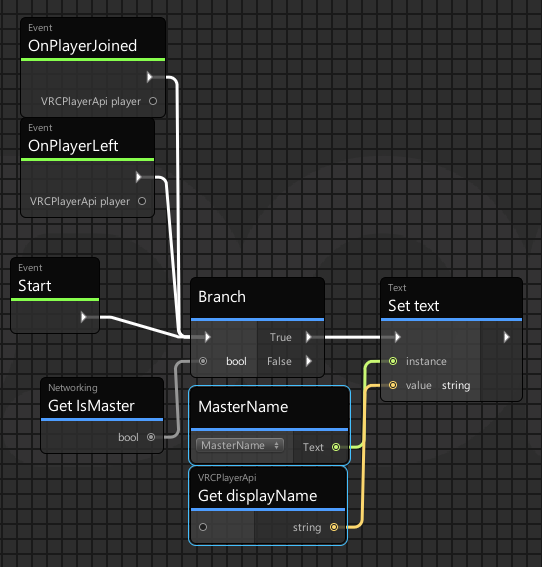 chilly crater
thanks
mossy anvil
and if true u can send some custom network event
like render 2d text above their head "instance master"
so it's global
chilly crater
I was just gonna slap their name on the master options panel.
So people can REEE at them when the difficulty is too hard.
 robust terrace
Hi All! I was wondering if I can get a bit of help? I've set up a bamboo practice sword and an object to hit with it. I want the sword to make a sound on impact with the object. My set up is not working and I can't figure out why. I have pics of the inspector settings for each object......
 chilly aspen
OnCollisionEnter event on bamboo sword that checks if collision.gameObject was a valid object, playing impact sound.
robust terrace
that sounds right......
can i post a picture of the Udon graph for the sword? would that help?
chilly aspen
yea
chilly aspen
one monent as I make a graph
robust terrace
ty! 🙂
chilly aspen
see if this does the trick
robust terrace
ty! trying now 🙂
@chilly aspen A really dumb question...how do I call up the variable OnCollisionEnter?
chilly aspen
the event should appear in search menu when creating node
from right clicking the graph
robust terrace
got it! ty again 🙂
@chilly aspen I'm going to run a test build to see if it works....may take a little bit...
chilly aspen
np
robust terrace
@chilly aspen the weird thing is, when i did a test build the practice sword had disappeared! not sure what happened there...
this is what i have set up on the sword....
chilly aspen
try removing the last 3 components and add udon behaviour component with the udon graph script
robust terrace
so remove audio source, check collision (script) and VRC Spatial Audio Source?
chilly aspen
yep
robust terrace
k...giving it a go 🙂
@chilly aspen the disappearing problem seems to be whether rigidbody is set to "is kinematic" or not....when I set it to "use gravity" the sword doesn't appear in the test build....when I set it to "is kinematic" (with gravity deselected) the sword appears in the build. However, even when it appears it is not making the noise as expected
chilly aspen
hmm let me test that
robust terrace
ty :))
fiery glen
Does anybody know how do I tell the client to update the toggleGroup in three toggles is on via SendCustomNetworkEvent?
chilly aspen
almost got it
robust terrace
@chilly aspen great! ty so much 😄
chilly aspen
a cube with the following components / scripts should make an audio noise when colliding with an object.
robust terrace
ty! I'll give this a try now....sorry to cause so much trouble
chilly aspen
all good, I wasn't sure how audio worked either until this exercise 🙂
robust terrace
Mystic....my Udon Behaviour Script looks different to yours......have I set something up wrong?
chilly aspen
the udon graph that was made needs to be dragged-and-dropped into Program Source. after that, drag and drop the cube gameObject into the audio source input.
robust terrace
sorry to bother you again, but I can't see how you set up your "bambooHiAudioSource".....is the actual audio file connected to that?
chilly aspen
for the input into the public variable?
I dragged and dropped the cube into this. what it does is pull the audio source component from the cube.
robust terrace
to be honest i am a little lost now...i set up most of the Udon graph, just can't quite work out this last bit.....I am not sure how to drag and drop the graph into the Program Source....where do I find that.....sorry to be so slow
chilly aspen
sure, to drag and drop the graph into the program source, locate the save-file of the graph in the Assets folder
chilly aspen
the name of the graph should appear in blue text on the top-left corner of the graph screen
robust terrace
oh! mine just seems to be called "Toggle" for some reason
chilly aspen
yep, the graph file will be called "Toggle" somewhere in the assets folder
robust terrace
got it
chilly aspen
fiery glen
Does anybody know how do I tell the client to update the toggleGroup in three t...
can you share a screenshot of "update the toggleGroup in three toggles"?
robust terrace
Mystic...now the bit that has me bamboozled (sorry for the pun on bamboo) is the AudioSource in your graph...how did you set that up?
chilly aspen
that looks correct
robust terrace
oh...ok....so now I have to drag "Toggle" on to which part?
chilly aspen
yep, so check the box on the "BoxCollider" component. then click "add component" and select Udon Behaviour (Script)
chilly aspen
on the graph screen click on the arrow next to bambooHitAudioSource and checkbox "public variable"
compile again, then drag the cube game object into the input slot for that variable
robust terrace
got it
so the "cube game object" will be the object that the sound is stored in or the sword object?
i.e. "Sound-Bamboo thwack" which has the sound file attached to it or the sword itself?
chilly aspen
ok, things got a lot more complicated
robust terrace
oh
chilly aspen
got a chance to screen share unity?
 vivid fjord
Cheap games with instant email delivery: https://www.instant-gaming.com/igr/helpdapoorguy/
***If you're looking for a URL or similar that I said I would include in the description, it is no longer here because I accidentally changed the description of 117 videos to only say "BOOP" to test out the YouTube Bulk Description Edi...
quaint onyx
how can I access a public array from another script on another GameObject?
Also, is there a way to add parameters to custom events?
chilly crater
So... how gamebreaking would it be to disable and then enable a trigger collider to "randomly" reacquire a new target?
chilly aspen
chilly crater
So... how gamebreaking would it be to disable and then enable a trigger collider...
If the trigger is disabled and re-enabled on the same frame, I don't think it changes the target.
If the frames are different, the trigger events may be predictable where will execute the same order of players every time when processing.
chilly crater
It does it when a the target clears.
With no target, the trigger grows. It's an enclosed space.
chilly aspen
Ah then that'll work.
chilly aspen
For an AI navigation target destination? yep, I can see that
chilly crater
Yay
scarlet lake
Is there any documentation on the udon equivalence of SDK 2 Broadcast types? In other words, player to player syncing? Most of my buttons deal with animations and I want them to sync with players.
 tall vault
SendCustomEvent is equivalent to calling ActivateCustomTrigger on a local trigger
SendCustomNetworkEvent is equivalent to calling ActivateCustomTrigger on an Unbuffered trigger.
There's no direct equivalent to Buffered triggers in Udon, but synced variables are buffered so you can still store your world state that late joiners can read from
Calling SendCustomNetworkEvent on an event will send the event to all players in the instance, but you can check different criteria to see if the event should be processed (e.g. Networking.IsMaster to check if the player is the Master, Networking.LocalPlayer.IsOwner(gameObject) to check if they're the owner of the object, etc)
scarlet lake
Do I need to setup a network or is that already created?
tall vault
It runs through VRC's networking stack so you don't have to set anything up to use it
scarlet lake
Cool cool. Thanks
scarlet lake
Does someone knows how to make a simple udon graph for picking up objects and throwing them at player's will?
 cunning mist
@scarlet lake I believe what you're looking for is the VRCPickup component.
https://docs.vrchat.com/docs/vrc_pickup
VRChat
Used to allow objects to be picked up and held Requires: RigidbodyColliderRPC's are available via the SendRPC action
scarlet lake
my world runs sdk3
cunning mist
These also exist in Udon :)
 queen panther
Reading the documentation really helps explain so much :)
I'm surprised more people don't do it
scarlet lake
yeah cus many are lazy to do it
print the documentation
uwu
So, is there a way to make objects pickup-able with Udon or is it easier to do so with SDK2-World?
 void ridge
Just add a Rigidbody and a VRC Pickup component to the object, and that's pretty much it for most cases.
Definitely recommend reading the doc Vowgan linked. Also recommend adding an Udon behaviour and checking the "Synchronize" box so that everyone in your world sees the object in the same place, but that's your decision.
 unborn hornet
If you add the VRC_Pickup directly on an object, the rigid body is added automatically.
hallow sable
so I tried using onPlayerTriggerEnter but its global, what would be the best way to trigger something with a collider locally
native estuary
You need to add a check at the start to see if the player who hit the trigger is the local player
if (!player.isLocal) return;
That would be it in udonsharp at least if you are using graphs you need to do it there ofc but the principle is the same
native estuary
Yeah just gotta add the check for the player from the trigger
void ridge
Using a Branch node.
void ridge
Almost. Gotta connect the execution flow from the trigger event to Branch. Otherwise, yeah
hallow sable
ah yep gotcha gotcha
so if I ever wanna do a local check for triggers and such that is the way?
void ridge
According with what you mean by "local check" here, yes
hallow sable
well basically it enables a object, when I tested it beforehand it would enable and disable every time a player left no matter what
so it enables a menu, the menu would turn off if 1 person left even if another was still on it. I would prefer it to be local per player it triggers
void ridge
Yeah, what you've got here does what you want it to do
scarlet lake
I am trying to change one material color of an object with multiple materials. I am able to change the color but it's changing the wrong material. How do I specify what material to change? I would like only the blue to turn red. But it's changing metal into red
scarlet lake
hey guys i have an issue with moving hands on pc and (im on steam
 surreal gazelle
nobody cares
scarlet lake
ur rude
scarlet lake
i got ur message ip 😉 : 804079582374133760
 grizzled trout
not sure if this is the right place but i am trying to make things so they can be grabbed and moved but not drop when let go like when you let go they just hang in the air . i know kinda how to do the vrc pickup script and synking but when i add Infinity to the drag it kinda just jumps around as you move it.
cunning mist
Just check "Kinematic" on your rigidbody and it will ignore gravity and momentum!
chilly crater
For udonbehavior SetProgramVariable, what sort of input do I use for value?
paper plinth
whatever the type of variable it is
in the variables panel on the left
or to connect anything you just hover over the connection and it will tell you what it wants
chilly crater
It wants an object?!
The string is the variable itself, right?
Well it isn't setting.
Or am I getting this completely wrong?
junior lava
Hey I was wondering if there's an example/sample world that demonstrates multiplayer with a scoring system? I started building a system last night but my system wasn't super reliable/extensible. I was wondering if there's a nice example world somewhere.
Something that can just keep track of say 4 players all with a different score.
scarlet lake
Does anyone know of a keyboard that might work like Jetdog's from SDK2?
unborn hornet
does the position data for "Sync Position" update separately or at the same time as regular synced data? (ie OnPreSerialization/OnDeserialization calls)
 wanton heron
is there any method out there to make a certain room invisible for everyone except people who are in it?
cunning mist
You may want to look into Occlusion Culling, this hides things that aren't being immediately rendered and helps with performance immensely.
junior lava
I only just started playing around with VRChat sdk but I've worked in Unity for several years now. Does it support changing what layers are visible to a camera?
Cause usually I'd just put the other room on a different layer that's visible to only certain cameras.
 somber void
Hello, I am new to creating things in Udon so I wanted to ask here if its possible to make a world rotate on the X and Y axis opposite of the players movement on the same axis? for example if the player moved across the positive X axis the ball they were standing on would rotate underneath them on the negative X direction.
My reasoning being, I am trying to make King Kai's Planet as a world and want to give the illusion the player is staying up side on the planet rather than them just walking off the side of the ball
wanton heron
@cunning mist would you mind if I DM you?
cunning mist
Sure, though I'll probably not respond for a bit since I'm writing a paper.
wanton heron
okay! 🙂
 dusk orbit
how would i teleport all players somewhere
is there a variable that returns an array of all players
junior lava
dusk orbit
is there a variable that returns an array of all players
VRChat
These nodes are useful for getting an individual Player, a group of them, or all of them. GetPlayerCount intGets the actual number of Players in the instance when it is called. GetPlayers VRCPlayerApi[]This is how you get all the Players in your world so you can go through them in a For Loop and app...
dusk orbit
tankya
junior lava
VRCPlayerApi.GetPlayers
 half lance
What is udon?
dusk orbit
its a coding language for vrchat worlds
so im trying to make a custom script but im having trouble
i keep getting this error
chilly crater
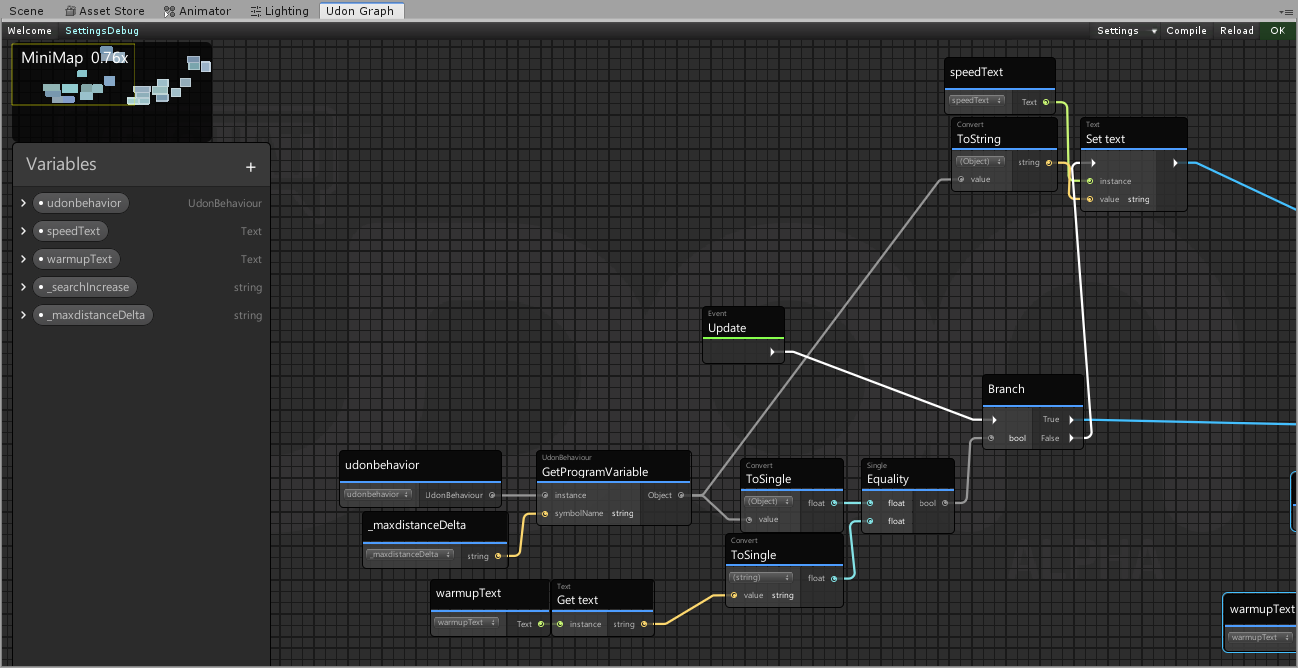
Where am I going wrong with this?
I'm trying to get the variable and output it to a textasset
and I'm getting this error:
VRC.Udon.VM.UdonVMException: The VM encountered an error!
Exception Message:
An exception occurred during EXTERN to 'SystemConvert.__ToSingle__SystemString__SystemSingle'.
Parameter Addresses: 0x00000004, 0x00000002
Input string was not in a correct forma``` dapper lion
@junior lava it does support layer culling for cameras if thats what youre asking
junior lava
dusk orbit
i keep getting this error
Can I see the script? And I asked yesterday and apparently udon doesn't support dictionaries. Only collection supported is arrays.
dusk orbit
@junior lava nvm, i think i was messing everything up cuz i tried to put code in the empty udon script
floral dove
half lance
What is udon?
?whatisudon
 hidden martenBOT
VRChat Udon is a programming language built by the VRChat Development Team for use in VRChat worlds! It enables complex behaviors and logic in VRChat worlds. Read more about Udon in our documentation: https://docs.vrchat.com/docs/what-is-udon
VRChat
What’s this Udon thing anyways? VRChat Udon is a programming language built completely in-house by the VRChat Development Team. It is designed to be secure, performant, and easy to use via the VRChat Udon Node Graph, a built-in visual programming interface that uses nodes and wires (we call them “no...
chilly crater
https://i.imgur.com/zKeJYak.png
Trying to pull a float variable from an udon behavior and apply it to a scoreboard.
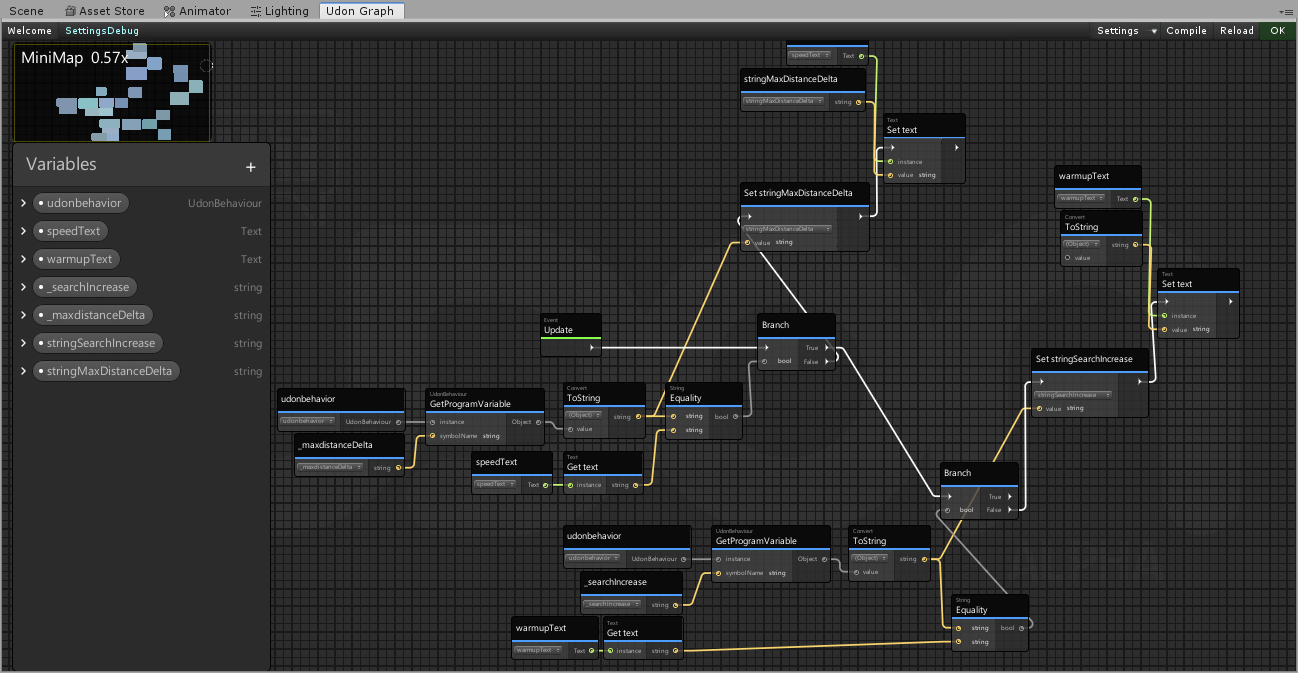
Well, a UITextAsset
It doesn't update, AND it blanks out the warmupText textbox.
Another script sets one to 2.5 and the other to 1.5, but only the 2.5 shows up
Well, at least I think it sets it...
oof, missed a noodle...
void ridge
it be like that sometimes
chilly crater
And then I forgot to add the stupid update flag to the other script...
It updates at the start, and then waits for a flag that can never turn on...
welp, time to test it out...
IT WORKS!
 vernal maple
Quick question, if I'm not mistaken you can do this. How do you get the current VR Headset in Udon?
More specifically, just need to find out if the user is in Quest or not.
chilly crater
Welp, I have an object that moves in CyanEmu, but not in the game client...
scarlet lake
@scarlet lake @old lily
native estuary
vernal maple
More specifically, just need to find out if the user is in Quest or not.
If you are using udonsharp the easy solution would be to just use
#if UNITY_ANDROID
androidcode here
#endif
But if you aren't I don't have a quick solution for you
native estuary
vernal maple
That will work perfectly
    private void Start()
    {
#if UNITY_ANDROID
        _isQuest = true;
#else
        _isQuest = false;
#endif
    }
Full example code though you could do that where ever
chilly aspen
fiery glen
Does anybody know how do I tell the client to update the toggleGroup in three t...
Solution (codebase and components at end of video): https://www.youtube.com/watch?v=R20tx71bFzQ
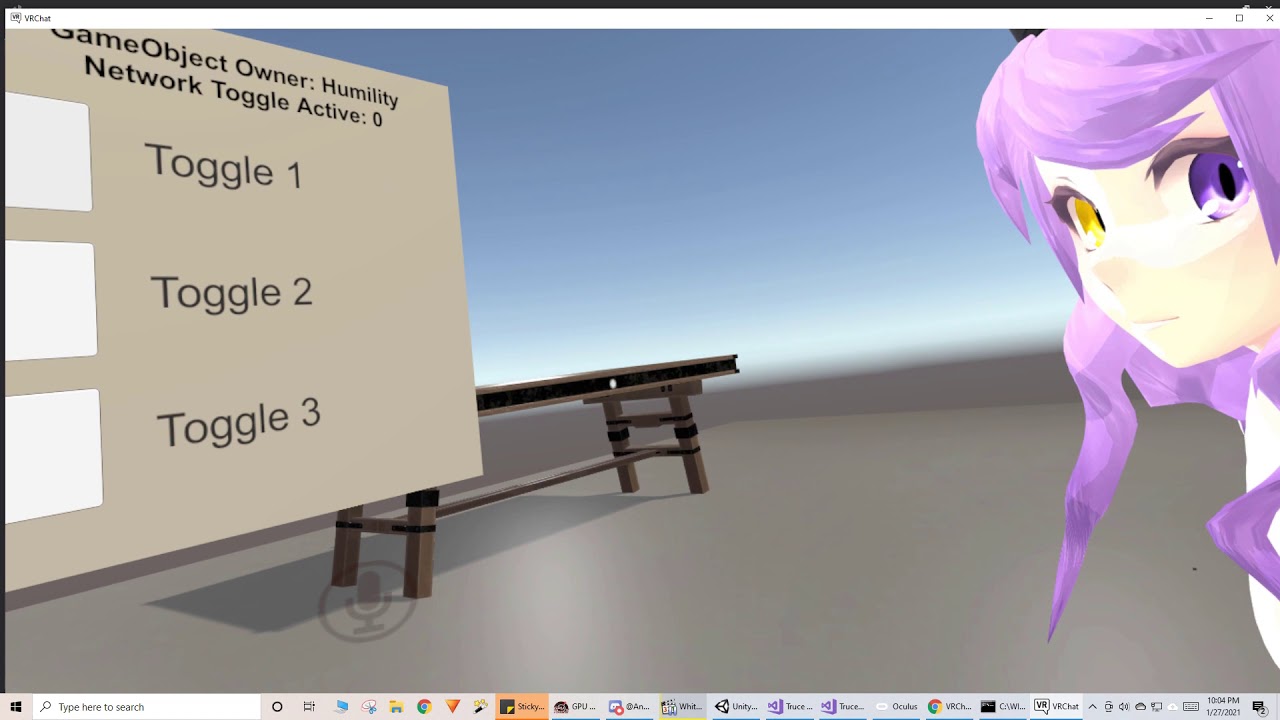
Syncing the UI of the canvas toggle component in VRChat.
chilly crater
What are the potential reasons for something working in cyanemu, but not in game?
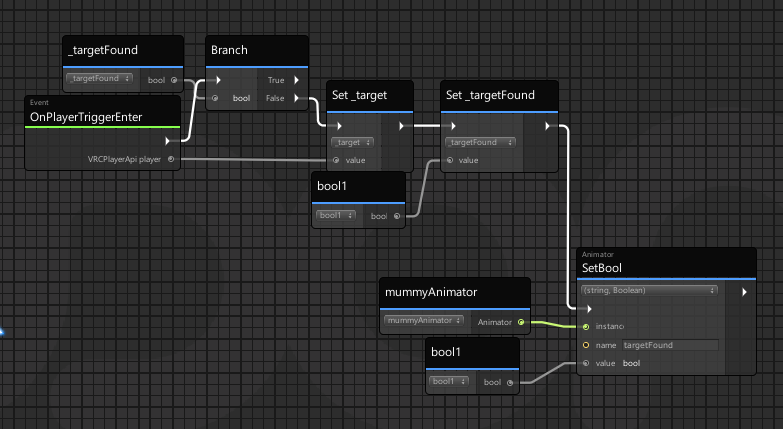
I think this is where it fails
Am I supposed to sync that target variable?
Because that VRCPlayerAPI on the Playertrigger enter exports the exact player, right?
void ridge
vernal maple
Quick question, if I'm not mistaken you can do this. How do you get the current...
Low-tech version of this, unless I'm missing something, is you just modify what you're programming to be true on the Android build and false on the Windows build 😄
chilly aspen
somber void
My reasoning being, I am trying to make King Kai's Planet as a world and want to...
This one is do-able. Will probably be a single player only instance with the player locked in position at the very top of the world. Then, rotate the world depending on the joystick inputs / WASD of the player depending on the X-Z angle they are looking towards.
somber void
Yeah thats how I would think the logistics would work, but having the rotation be local per player so that multiple people could be in it, ive been told it sadly wouldnt work by other world makers
chilly aspen
There is technically a multiplayer solution, but it requires clever programming (3+ months). I'll write it out here if interested
The world will have 10 players. Each player spawns 1-Earth unit away from each other. Players have their own local Earth they walk on. Players cannot see the Earths of other players.
All players upload the rotation of their own local Earth's onto an UdonSync variable. All players then download the UdonSync variable of the other players.
There are 9 cubes that have a camera shader painted on them (Example here: https://www.vrchat.com/home/launch?worldId=wrld_91805f98-fd56-497a-bf7e-772e434efb84).
The camera for these shaders are pointed at the models of each player in the instance. The cubes translate their position and rotation based on each player sync variable into the local player's world.
It will appear that the other players are there, correctly positioned and rotated on the local player's Earth, achieving multiplayer functionality.

VRChat lets you create, publish, and explore virtual worlds with other people from around the world.
somber void
ill definitelly have to keep this in my notes thanks I appreciate it
fiery glen
@chilly aspen I can use it in Unity, but I can't click toggle in VRchat PC version.
dusk orbit
im having trouble syncing stuff. like, i have a button that when you click on it it changes color and a number counts down, at which point it will teleport all the players out of the lobby. i cant seem to find any help online for propagating these actions across to every player, not just the one
chilly aspen
fiery glen
<@!435125827185803264>
Change the Toggle Master layer and its children to Default.
chilly crater
I think I asked this before, but does playertriggerenter fire for everybody when person blah enters it?
Or just the person entering
chilly aspen
dusk orbit
im having trouble syncing stuff. like, i have a button that when you click on it...
do you have a codebase / graph to share? @chilly crater should technically fire for everyone, since every other player locally sees the other person entering it.
chilly crater
I don't know what my problem is, it works in cyanemu... I'mma move everything around so I can screenshot it
dusk orbit
i think i figured it out kinda? like i just changed my "send custom event" nodes to a "send custom network event" node
still need to figure out a solution for some other stuff tho
like the timer
chilly crater
In cyanemu, it works fine. In game? It doesn't. Whenever I enter the trigger collider, it just doesn't start moving.
fiery glen
chilly aspen
Change the Toggle Master layer and its children to Default.
it work! Thanks
chilly aspen
blows smoke from revolver barrel no problem.
chilly aspen
chilly crater
oh lord
chilly crater
chilly aspen
oh lord
how bad is it?
chilly aspen
I'm not too good at reading / debugging graphs
chilly aspen
chilly crater
how bad is it?
is bool1 always true?
chilly crater
yerp
chilly aspen
well the syntax looks fine
try switching it from moving towards to transform.position = _vector
chilly crater
probably another script then
There might be something else at work too. it doesn't even register me in the collider
Doesn't swap to the other animation bool either
wait, do I even need to do the subtraction?
It looks like I'm trying to do math with the vector, and then have moveTowards do the same thing.
Nevermind, look rotation
chilly aspen
I'm going to create a graph that should work
is it possible it is breaking because a variable is null but is trying to be processed?
chilly crater
ugh, i'mma check it all...
I think it's the sanitizedvector
it gets called before it is set
I'll just have it on disable set it, and on enable set it. and on start while I'm at it. be thorough
chilly aspen
the udon graphs, from my perspective, is crashing whenever working with the VRCPlayerAPI variable.
chilly crater
ugh
is it the sync, or am I taking the wrong thing from it.
I'll try storing the playerID
chilly crater
What is the problem?
chilly aspen
still testing
well for starters, the problem is we're not using udon sharp lol.
okay, I figured it out. It has something to do with the default value of the variables.
chilly crater
so what, if I define them in public, I can't have them as a default value?
chilly aspen
are all of them set to false (not accidentally set to true) in both graph and editor?
chilly crater
what, the default values?
yes, besides bool1
I think it's the player API
I tried pulling the playerID from the trigger and it failed
I could PROBABLY have a boolcheck on the enter trigger. Islocal? then set localplayer's ID to a variable and broadcast it
chilly aspen
okay it works
chilly crater
!?
chilly aspen
I'll send screenshots over in a minn
chilly crater
kay
chilly aspen
chilly crater
Cool
chilly aspen
chilly crater
LOL that was my next current decision "isPlayerTarget?!"
chilly crater
I'm going to try implementing the istarget idea.
Your navmesh solution is going to be used one day
Thanks a lot for all the help
chilly aspen
blows smoke from other revolver barrel no problem.
chilly crater
huzzuh
robust terrace
Hi All! Hi Mystic! I am still having problems with a pickup object that is just not visible in the test build....I've set everything up properly I believe, but still can't solve the problem....I was wondering if anyone has experienced this before?
chilly aspen
robust terrace
Hi All! Hi Mystic! I am still having problems with a pickup object that is just ...
How did the cube and slowly adding components onto it go?
chilly crater
I never got there. I'm trying the istarget route
robust terrace
Still didn't solve the problem... I even deleted the previous swords and completely re-uploaded the sword and textures again.....still not showing....the only time it showed was when I fixed the X, Y, Z positions under rigidbody
chilly crater
Oh, that wasn't targeted at me
chilly aspen
lol
chilly crater
Sorry, took glasses off. I'm doing a test build now
chilly aspen
"fixed the X, Y, Z positions under rigidbody" meaning setting it kinematic?
robust terrace
sorry...yes....I set is kinematic
but when I unticked the X, Y, Z positions and did another test build, the sword disappeared again....sigh
chilly aspen
hmm, try creating a new unity world with only a plane, VRCWorld gameObject, and the sword with all the components and scripts attached from yesterday.
robust terrace
doing that right now 🙂
I'm worried that somehow the original project is corrupted....
yes...it's all working normally in the new project
chilly aspen
on the top left of Unity, there is a tab called Assets > Export Package
robust terrace
Yes...I see that
chilly aspen
try exporting the world (including dependencies) from the old Unity project to the new one.
robust terrace
k....i'll give it a try .... if I export package that will include all the dependencies, yes?
chilly aspen
yep, and to import it is by double clicking on the file
robust terrace
cool....here we go!
it's quite a slow process .... lol
@chilly aspen the package has finished exporting...do I close the old project now?
chilly aspen
yes and import into the new project. the scene will have to be loaded to make the world visible
chilly aspen
yep or by double clicking the exported file
robust terrace
ty! 🙂
robust terrace
@chilly aspen just letting you know.....I exported and imported and for some reason the sword is still not showing up in the test build......
I'll just have to keep doing research to find out why.....tks again Mystic....I really do appreciate your help these last two day 🙂
robust terrace
@chilly aspen Again, just to let you know, the problem seems to be with rigidbody....when I took off pickup, the test object still didn't appear.....when I took off rigidbody, there the object was in the test build......very strange!
scarlet lake
I am trying to make a version of deal or no deal where each box has a different dollar value in them. I want to be able to mix up the values before the the game so each box has it's own different, random value. This is what I've come up so far but I can't seem how to get the random in there and no duplicate materials
fiery yoke
@scarlet lake Lookup the Fisher-Yates-Shuffling Algorithm.
scarlet lake
Looks promising! Thanks
floral dove
scarlet lake
I am trying to make a version of deal or no deal where each box has a different ...
This is built for a different use-case, but it is an implementation of Fisher-Yates in the graph. In this case, I'm shuffling and setting the blueprint ids on a set of pedestals from a larger list of avatar IDs
here's the program asset for this Fisher-Yates shuffle^
scarlet lake
@floral dove Ok so I "translated" it for the meshes but does the value on set material need to be changed?
floral dove
scarlet lake
<@!98313818857275392> Ok so I "translated" it for the meshes but does the value ...
I saw after I posted this that you switched to using a simple Random.Range instead which is much easier if you only need a single random value at a time and/or you don't care about duplicates
floral dove
scarlet lake
This is what I have now
that's looking pretty good from what I can see in the screencap. The idea is that you reorder the indices array and then use that as a lookup, which is what you appear to be doing here
scarlet lake
I do get this error though
Which shouldn't matter because I'm not using string right?
floral dove
Yeah - I've been seeing that error pop up for people recently. Not sure what's causing it but I don't think it should stop anything from working.
scarlet lake
hmm ok... the materials aren't changing though
floral dove
are you firing off this event? I have it as custom event called Shuffle.
floral dove
any errors? Next step is probably to add some Debug.Log statements to see what's actually happening at each step. You can feed String.Format into Debug.Log to figure out what's happening like "Getting index {0}", then you pass in the index to the object field on the String.Format to insert it in the string.
scarlet lake
Unless these mean anything, no
floral dove
yeah, those are all errors telling you that you're trying to get objects from your array that don't exist.
scarlet lake
But those are objects and not materials/mesh so that can be worried about later right?
floral dove
no, those are likely either your materials or meshes. Have you populated your arrays on the UdonBehaviour?
in Unity, almost everything is an Object under the hood
scarlet lake
Yep.
So I have this behavior on a button that controls other objects. Does this need to be on the specific objects?
floral dove
no, it should be fine to have the behaviour on a butotn separate from any specific objects
do those errors go away if you Clear your console, or do they persist / come back?
scarlet lake
They come back
floral dove
ok - that means that there's an active issue with them.
scarlet lake
But all my arrays in the scene have objects associated with them
floral dove
Hm. You could try deleting the programs in Assets/SerializedUdonPrograms to force a refresh in case they serialized some bad references
those are all auto-generated, safe to remove them
scarlet lake
still persistant
floral dove
Hm. I can't tell anything further from here. To narrow it down, you can save a copy of your scene, then remove UdonBehaviours one by one to see when the error stops showing up, then you'd at least know which one is causing it.
floral dove
possibly - always best to figure out your errors first as they could be blocking compilation or causing other adverse effects.
scarlet lake
I've removed all my custom graphs, example graphs and errors are still showing up
floral dove
oof, sounds like a deep issue. I recommend you close unity, delete the content of your project's Library folder, then re-open the project in Unity.
scarlet lake
That fixed the errors. But still no change with the shuffler
I might take a break from this. Do you mind if I send you a DM when I return to it?
floral dove
you can post in this channel when you return and @ me in this case. I can't guarantee I'll be free then but if I am I'll take a look.
chilly crater
oooh, that's how you fix those bugs?
I've been having that string error for a while now
floral dove
chilly crater
I've been having that string error for a while now
not sure what's causing that but it's new. Just made a canny here - if you have a graph with that error - especially a simple one - please post it there:
https://feedback.vrchat.com/vrchat-udon-closed-alpha-bugs/p/object-of-type-systemstring-cannot-be-converted-to-type-systemint32
chilly crater
I'll get right on it after I change the launch settings
Is the test build option supposed to have the debug stuff enabled?
floral dove
chilly crater
Is the test build option supposed to have the debug stuff enabled?
yes, running Build & Test should pass the correct debug params to the launcher that opens VRChat
chilly crater
Let me try launching again. I don't think it's happening.
Anywho, threw up a capture of the graph and log to the canny
scarlet lake
@floral dove I went back to my original randomizer and tried this. It seems like its working with no duplicates. Will too many set materials lag the game?
chilly crater
floral dove
yes, running Build & Test should pass the correct debug params to the launcher t...
Yep, test&build isn't passing the arguments for me.
floral dove
chilly crater
Yep, test&build isn't passing the arguments for me.
you cannot bring up the debug interface?
chilly crater
No, I can not.
If I launch my own bat file it comes up.
But the SDK test&build doesn't launch with those arguments.
floral dove
ok - if you file a Canny I'll check it out. In the meantime, you can force them on by adding the flags to your Steam launch args like this
floral dove
chilly crater
But the SDK test&build doesn't launch with those arguments.
just checking- you've set the path to the correct VRChat client, right?
cunning mist
Is there a specific place various launch options are listed?
floral dove
cunning mist
Is there a specific place various launch options are listed?
VRChat
There are several launch options available for VRChat. If you are using Steam, you can set these easily in the Properties for VRChat, found by right-clicking on VRChat's entry in your game list. After clicking Properties, click on Set Launch Options, then put your desired launch options in. If you ...
cunning mist
Thank youu
chilly crater
Manually changed the location again to doublecheck. It was launching before
There we go, it's there.
floral dove
something like this:
chilly crater
Yeah, it works now
floral dove
chilly crater
Yeah, it works now
ok cool. I highly recommend you read through at least the top-level docs, this is covered with other beginner gotchas: https://docs.vrchat.com/docs/using-build-test
robust terrace
Hi all! Just checking again to see if anyone has any insights into why an object with pickup, rigidbody and box collider added is not showing up in the test build or the online build...(hope I'm not making a nuisance of myself)
chilly crater
is it falling through the floor?
robust terrace
I don't really know....a few days ago it wasn't, but something seems to have changed
void ridge
robust terrace
I don't really know....a few days ago it wasn't, but something seems to have cha...
What happens when you press Play in the Unity editor? You can watch it in Scene view and see what it does
robust terrace
@void ridge I haven't tried that.....I'll try that now
scarlet lake
Is there anyway to smoothly fade lights with udon without animation?
robust terrace
void ridge
What happens when you press Play in the Unity editor? You can watch it in Scene ...
Just tried Play...the objects aren't showing up at all
scarlet lake
how do i download an avatar
@scarlet lake this is for Udon world development not avatars. Try the category for avatars
void ridge
robust terrace
Just tried Play...the objects aren't showing up at all
click the object in your Heirarchy to highlight it, then mouse over your Scene view and press F. That will bring your frame to the object. Also, are you sure it isn't disabled via the check box on top of the inspector window?
robust terrace
void ridge
click the object in your Heirarchy to highlight it, then mouse over your Scene v...
The check box on top of inspector window is showing ticked
void ridge
Did you try framing the object with F?
robust terrace
let me try again
tried framing....still can't see the object....but strangely under Transform the Position and Rotation coordinates XYZ are changing crazily
void ridge
Yup, sounds like for whatever reason something is pushing your Rigidbody around. Try and figure out what other colliders might be interacting with it, or otherwise what might be giving it a velocity.
If it's attached (parent or child) to some other object that has its own collider, that might be doing it. I did something like that to myself by accident recently 😅 (literally, I was attaching a collider to my player and thus making myself fly at lightspeed because it was pushing the player away from it)
robust terrace
oh! when you say "player" what specifically do you mean?
void ridge
Doesn't sound like it applies in your case. ||I'm talking about players, i.e. people, in the world, which have their own rigidbody-like behavior.||
robust terrace
right....it is weird though that those coordinates are constantly changing like that
(the object is just a cube with rigid body, collider & pickup attached)
void ridge
Well, the coordinates are changing in the Inspector window because your game is playing in the Editor, and it's telling you in real time where the Transform is. Does that make sense?
robust terrace
yes
strangely, when I use freeze position under rigid body, the object appears when Playing, but is spinning jerkily
 normal yarrow
Hey folks, I need some help. I'm trying to make a button toggle to play a pre-determined video and have that be synced. However, it seems to be not synced properly, as if I play the video in a client, it doesn't play on the other client, but if I disable the video in a client, it enables it on the other client.
void ridge
robust terrace
strangely, when I use freeze position under rigid body, the object appears when ...
Could you post a screenshot of your heirarchy and your Inspector window with this object highlighted? Like this
robust terrace
void ridge
Could you post a screenshot of your heirarchy and your Inspector window with thi...
Shall do...just doing a test build at the moment to check something....will send as soon as is done
robust terrace
robust terrace
Shall do...just doing a test build at the moment to check something....will send...
robust terrace
robust terrace
normal yarrow

void ridge
robust terrace
I'm keen on Mysto's theory that it's falling through the floor. Either that, or you've programmed that Udon behaviour to give this thing velocity somehow.
robust terrace
void ridge
I'm keen on Mysto's theory that it's falling through the floor. Either that, or ...
yeah...clearly something is giving it velocity......
 abstract aurora
Anyone know of any fonts that support all valid characters found in VRChat usernames? I'm trying to display some usernames in-game but some of the characters don't show up with the default Unity UI font.
void ridge
robust terrace
yeah...clearly something is giving it velocity......
When you hit Play in the editor, is the Y value of the transform going down more than anything else? You can also hit this button to step frame by frame to see what's happening more carefully.
robust terrace
void ridge
When you hit Play in the editor, is the Y value of the transform going down more...
the item is just rotating on the spot, also slightly changing angles as it rotates, but not falling so to speak
robust terrace
robust terrace
the item is just rotating on the spot, also slightly changing angles as it rotat...
but when i just freeze Y and leave X and Z unfrozen, X and Z are constanly increaing in value
void ridge
(I have to disappear, sorry, but good luck)
robust terrace
void ridge
(I have to disappear, sorry, but good luck)
Np Joker...you've been a huge help...ty!
Following on from what Joker is punk has said, does anyone know how to remove velocity from a rigidbody object?
The weird thing is when I make the object "is Kinematic" true, the object appears in the test build and can be picked up....it's only when "is Kinematic" is false that the object shoots off into the distance
paper plinth
is the origin of the mesh you imported set to center?
and is it at 0,0,0?
not sure if that matters anymore
robust terrace
paper plinth
is the origin of the mesh you imported set to center?
I don't think it's set to 0,0,0....if you mean the Position under Transform, then the XYZ coordinates are not 0
paper plinth
I mean when you pulled the mesh out of blender, did you set the origin to center before you did it?
robust terrace
ohhhh...yes, pretty much ... i did it visually, so may not have been perfect 0,0,0
paper plinth
well I mean as long as it was close...I just know that I've had a tendency to have problems when pickups aren't at 0,0,0
robust terrace
right....i'll keep an eye on that....ty Unopened! 😄
paper plinth
np, gl, that's all I got
robust terrace
i really appreciate the help 🙂
normal yarrow
Anyone know how I can solve this?
#udon-general message
 trail hazel
i found a world that's capable of forcing the player into a t-pose for a short while when they press a button. is there some obvious mechanic in udon to do this?
actually, i've just realized it's probably just a seat with a custom animator
 strange charm
I don't understand one of the udon errors i'm generating in vrchat. I have a simple module i'm using for a custom network event. inside it i'm getting the local player and then teleporting them to a different location depending on their players id. the important snippet of udon# code looks like this:
    {
        SendCustomNetworkEvent(VRC.Udon.Common.Interfaces.NetworkEventTarget.All, "NetTeleport");
    }

    public void NetTeleport()
    {
        localPlayer = Networking.LocalPlayer;
        teleportTarget = targetArray[localPlayer.playerId-1];
        localPlayer.TeleportTo(teleportTarget.position, teleportTarget.rotation, teleportOrientation, lerpOnRemote);
    }
It works as intended (when triggered players are sorted by their id) but it generates errors in the vrchat errorlog because each client seems to be trying to teleport the non-local players too. See red error in attached pic. I'm obviously missing something, I don't understand why Client #2 is teleporting both the localplayer (Client #2 as intended) and also trying to teleport Client #1, generating an error (and vice versa). Is there a way in udon to change the broadcast type for the teleport RPC, like we could do in SDK2?
dapper lion
@trail hazel its a pose setup
hallow sable
trying to make a button that puts someones username and shows everyone that the name is on there but having a issue
I did this, it just makes the text blank
I removed the custom network event and ondeserialization and it works but I assume locally, have not checked. am I doing it wrong?
trail hazel
dapper lion
<@!122122926760656896> its a pose setup
is there a special way to invoke this?
chilly aspen
Would anyone familiar with particles understand this anomaly? Particles won't draw in front of other game objects.
dapper lion
not that I know 🤥 of, but i have seen people when using anchoring scripts that cause a pose to appear rather than an actually anchor
trail hazel
in that case... does anyone know how to properly set up the VRCChair3 animation controller?
hmm, i got it working
it seems the animation controller gets reset back to None while using it in the prefab, but if i unpack the prefab, it works
robust terrace
I have a question about how to set up a trigger for when I use one object to hit another.......
normal yarrow
Udon frustrates me so I shall take a break.
robust terrace
Can anyone point me to a tutorial on triggering audio in an object?
normal yarrow
I wish I could help ya but I'm still fairly new to Udon.
normal yarrow
For real.
I'm just trying to properly sync a video toggle and I can barely find any resources to help me get it working right.
robust terrace
there is lots of info on the old system, but so little on udon
normal yarrow
😔
unborn hornet
Hey VRCDevs (probably momo), can I get some insight into what event 210 is related to in the Network Transport? I'm getting a large handful of for a very short period of time after I join one of my udon worlds and I'd like to figure out if it's something I can take action to prevent.
For context the world has 30 cloned(prefab) assets that contain 3 synced variables each, but the object that the synced vars are on starts off in the world as disabled. Event 7 (which I assume is the sync var BPS limit thing) doesn't occur within my testing. Just the 210.
Idk if synced vars affect 210, just trying to provide some additional context.
 valid basin
In UdonSharp i have an array of game objects (they are groupings of chairs)
How do i walk through all children of each game object in the array?
I already have the code to toggle the colliders on them, which i want to apply on each child object
robust terrace
I'm not sure if it's just me, but I give up. Udon is too hard. There is too little information available and life it too short. Just wanted to make a simple trigger that would fire when one hand held object hits another fixed object and play a sound, but it seems impossible...well for me at least....sigh
normal yarrow
Yeah unfortunately it's just something that requires a lot of trial and error.
 placid niche
How can I delay code with UdonSharp?
robust terrace
placid niche
How can I delay code with UdonSharp?
ooops...wrong message
normal yarrow
I hope I can be able to understand it better some day
 noble pagoda
hello, when i have grab able objects and i put them over the edge into the void,
they are gone forever.
i saw in different worlds they got teleportet back to origin...
how i make this?
 zenith river
placid niche
How can I delay code with UdonSharp?
zenith river
placid niche
How can I delay code with UdonSharp?
no delays here FULL SPEED AHEAD!
 summer scroll
My project complained about "unsafe" code, and now it's complaining about a lot of missing scripts/references... what could have happened?
it started giving these errors today, after just opening it. It was fine yesterday
summer scroll
summer scroll
My project complained about "unsafe" code, and now it's complaining about a lot ...
(Note: I checked the "unsafe" setting, as it was asking me to enable it)
Here is the error it was giving me just now
 topaz spade
err so i just got vr chat and is fine when i am at home but when i play in worlds... iS soooooo laggggyyyy like it freezes and i can't play at all, i have to shut down the app and yeah... is there a fix to this
idk if i asked in the right channel by the way 😅
dapper lion
this is world dev for udon
dapper lion
also, was there a update on plugin usage for the servers? all videoplayers are either unable to establish an error and not play, or becomes a local videoplayer if were lucky
 keen stream
5777 if you know what I'm talkin about
queen panther
robust terrace
I'm not sure if it's just me, but I give up. Udon is too hard. There is too litt...
Try watching some basic unity tutorials. Once you understand how to code, Udon will be much easier, especially if you use U#.
And saying it's too hard so you give up is a horribly defeatist attitude that'll get you nowhere in life. There's plenty of info on Udon, plus sometimes you gotta try figuring things out for yourself.
heady tusk
i have the feeling i am missing something for my Spawning Sound. Like when a player spawnes then play a sound. So you not get scared to death when someone suddenly stands behind you xD
 stark adder
unborn hornet
Hey VRCDevs (probably momo), can I get some insight into what event 210 is relat...
stark adder
unborn hornet
Hey VRCDevs (probably momo), can I get some insight into what event 210 is relat...
By any chance.. Are you doing Ownership transfers ? I used to have similar error though I don't remember if it was 210 but was caused by too many ownership transfers 🙂
stark adder
placid niche
How can I delay code with UdonSharp?
Delaying is quite tricky in Udon..
placid niche
stark adder
Delaying is quite tricky in Udon..
How do?
void ridge
Delays are def a thing subgraphs would be nice for
stark adder
Took me second to find.. Look at this: https://ask.vrchat.com/t/delaying-event-execution/1892

VRChat Ask Forum
UdonSharp Code equivalent: float delayedTime; bool isDelayActive; void Interact() { delayedTime = Time.time + 5f; isDelayActive = true; } void Update() { if (isDelayActive && Time.time > delayedTime) { DelayedEvent(); isDelayActive = false; } } void DelayedEvent() { Debug.Log("Hello World!"); }
Not the only way but.. all other other ways from what I know are not exactly good
void ridge
It's actually not as complicated as it looks. You're just saving a timestamp and then comparing the time against that timestamp until it becomes true, then shutting off the counter and executing
stark adder
@fiery yoke silently watching 👀
void ridge
Silently helping
heady tusk
ok i might be stupid enough to make the script.. but not add it to anything.. coughs
void ridge
heady tusk
i have the feeling i am missing something for my Spawning Sound. Like when a pla...
This looks like it should more or less work. I think you actually don't need the custom network event at all, since a player joining is already something that implicitly happens globally. If the sound isn't playing, try troubleshooting the AudioSource itself. Just plug it into a plain collider and use an Interact event to make sure it plays the way you expect. Is it blended to 2D, or 3D? Is the volume too quiet? Check that stuff.
heady tusk
Yep works. Was to stupid to add it to a object xD
placid niche
If I have an UdonBehavior on a parent object and I interact with it, does it also trigger childrens' UdonBehaviors?
unborn hornet
No. Interact is based on the colliders attached to the objects that the scripts with the Interact event is on. Whichever collider is triggered is the script that gets triggered.
The interact highlight will only focus on one collider at a time.
 novel pawn
what is "udon"?
void ridge
?whatisudon
hidden martenBOT
VRChat Udon is a programming language built by the VRChat Development Team for use in VRChat worlds! It enables complex behaviors and logic in VRChat worlds. Read more about Udon in our documentation: https://docs.vrchat.com/docs/what-is-udon
VRChat
What’s this Udon thing anyways? VRChat Udon is a programming language built completely in-house by the VRChat Development Team. It is designed to be secure, performant, and easy to use via the VRChat Udon Node Graph, a built-in visual programming interface that uses nodes and wires (we call them “no...
novel pawn
ohh, thanks
scarlet lake
Udon is also Hack heaven.
paper plinth
and hack hell
queen panther
scarlet lake
Udon is also Hack heaven.
I'd disagree there, it's very limited as far as any sort of "hacking" goes
void ridge
Unless they mean it's a heaven for hacks, like me, I am a hack
unborn hornet
It's hackatory.
 edgy moss
question that i think is as elementary as it gets: I want to cull entire rooms of my map for performance when a player isn't in there. so I have 2 empty cube triggers in the hallway that toggle the room active/inactive using EventOnPlayerTriggerEnter. But this makes it so that when any player triggers it, the room also disappears for everyone else in there and they fall through the floor. I'm just asking how to make it happen only locally, like for instance, my mirror toggle button is
void ridge
edgy moss
question that i think is as elementary as it gets: I want to cull entire rooms o...
Use a Branch node to filter for local player only
edgy moss
thank you so much 😄 ❤️
queen panther
edgy moss
question that i think is as elementary as it gets: I want to cull entire rooms o...
Look into occlusion culling and occlusion portals
edgy moss
thanks! I know how that works generally. i was just not sure how to make it local, but @void ridge showed me the node i need. thank you though : ]
 fierce parrot
When I turn on the "Use audio source volume curve" I can hear sounds from super far away even though in the curve I have the max distance set to 5m. This only happens when I have that setting on. Is this a known bug or am I doing something wrong?
fierce parrot
figured it out
dusk orbit
am i not allowed to have both OnTriggerEnter and OnTriggerstay in my udon graph?
void ridge
dusk orbit
am i not allowed to have both OnTriggerEnter and OnTriggerstay in my udon graph?
Seems to be working for me. What's going wrong?
dusk orbit
hmm ok
for some reason the code wasnt running and i thought that might be it
cuz i got an error that said "you can only have one ontriggerenter in a script" and i thought it was readignthe ontriggerstay as enter?
but now that i add it it seems ok
 half rampart
help please how make button reset position ???
what i make 😦
idk how make save position on start
floral dove
create a Vector3 variable called 'startPosition' or something.
On Start, set startPosition to transform.Position
on Reset (or whatever you want to call your event) set transform.Position to startPosition
floral dove
half rampart
it ?
are you trying to set the position of many objects or just one?
floral dove
yes, and a for loop
it's a good idea to get it working with one object first, though - then you can introduce the complication of the loop and arrays
floral dove
make a Vector3 variable, drag it from the variables window to the graph while holding control to make it a "Set Variable" node, then set this value on Start from Transform.get position
floral dove
half rampart
o
that looks good, assuming that 'Object' is a public variable that points to the GameObject you want to reset. BTW - if all you're doing with these GameObjects is setting and restoring their positions, you can just store them as Transforms instead and skip the GameObject.get transform step
void ridge
Would anyone like to take a stab at explaining to me why Quaternion.ToAngleAxis needs to be executed, while Quaternion.AngleAxis doesn't? 🤔 And also what the angle/axis inputs on ToAngleAxis are for? This is largely a curiosity question. I looked at the Unity docs on both of those, but I think I'm missing something way more basic.
half rampart
idk XD
floral dove
void ridge
Would anyone like to take a stab at explaining to me why `Quaternion.ToAngleAxis...
for the first part - the difference could be because AngleAxis is static whereas ToAngleAxis is not. Or perhaps because ToAngleAxis has an out parameter, which means we need to make sure it runs before other things down the chain that might use that out variable. Most of the Udon Nodes are auto-generated from the C# source based on some internal logic we have (and some secret sauce). In the case where something doesn't work because it's lacking flow nodes, you can always let us know and we can force them on.
void ridge
Mmm secret sauce code
Thanks for the answer. That second sentence made some sense to me, but I think ultimately the real answer for me here is "learn more about C#" 😅
floral dove
not necessarily. Everything has flow in C#. The graph is a little fuzzier.
void ridge
And if you're wondering, nothing seems to be working as it shouldn't
floral dove
ok cool, that's the real question
void ridge
I don't have a reason to believe that AngleAxis needs to be executed. I was really just kind of surprised to see that ToAngleAxis had execution flow
floral dove
if ever it seems like a node really should have flow because otherwise things Don't execute in the correct order, file a Canny and we'll take a look.
scarlet lake
Transform Set Rotation keeps resetting to 0 when I type a value into it and test it. And when the action happens, it just puts it at 90. Am I missing something?
floral dove
scarlet lake
Transform Set Rotation keeps resetting to 0 when I type a value into it and test...
can you show your graph? That sounds like weird behavior.
scarlet lake
floral dove
scarlet lake
aha! Foiled by Quaternions. you want to set rotation to Quaternion.Identity (0,0,01) instead of (0,0,0,0). You can use this node to feed it in or set it by hand:
(0,0,0) aka Vector3.Zero is what is shown in the editor for the Transform, but in the SDK, you mostly set rotation using Quaternions, which have four values.
You can always make a Quaternion from Euler angles (what you see in the editor) using this node where you put in the angle and it will turn into the Quaternion for you
scarlet lake
Tried using Euler and its just setting the rotation to 90 when I input in 180
floral dove
I thought you wanted it all at 0
half rampart
oo
scarlet lake
No. I want it to be 180 but it reverts to 90 for some reason
floral dove
scarlet lake
No. I want it to be 180 but it reverts to 90 for some reason
do you have another graph that's targeting that transform?
floral dove
scarlet lake
I tried just putting in Get Identity and now it set to 270
maybe something funky in your hierarchy?
this works for me - resets the transform to (0,0,0) when I play the scene
unborn hornet
hey Momo, would having excessive posSync in the world (even if they are still/sleeping) cause a short burst of event 210s? I'm trying to figure out why I'm getting a burst of just under 1000 deferred 210 events for the NetworkTransport log shortly after joining the world (like < 1s after).
floral dove
unborn hornet
hey Momo, would having excessive posSync in the world (even if they are still/sl...
I don't know about 210 event - what is 'excessive'?
unborn hornet
unborn hornet
Hey VRCDevs (probably momo), can I get some insight into what event 210 is relat...
Original message ^
Specifically it's 30 objects with posSync on them
floral dove
that's a decent amount, but not sure if it's so many that it would exceed limits. If so, they would likely be deferred until there is bandwidth to resolve them.
scarlet lake
floral dove
maybe something funky in your hierarchy?
Yep. It was in a game object and it seems like set rotation was for the global rotation. Should I have used setLocalRotation instead?
floral dove
if you only want to affect the object's local rotation, then yes you need to do that specifically. Position and Rotation use world coordinates.
scarlet lake
@floral dove You are a blessing. Thank you
floral dove
scarlet lake
<@!98313818857275392> You are a blessing. Thank you
my pleasure! I know there's a lot to learn with Unity + Udon, keep it up!
void ridge
Networking.IsOwner is checking whether the local player is the owner of the input GameObject, right?
unborn hornet
Yes.
void ridge
Thanks. No other answer would make sense tbh 😅 but it still had the flavor of an assumption I wanted to check 🙂
 distant rain
Why can I move and turn my camera with only one controller? I want to turn my camera with the other but I don't know how to change it.
floral dove
distant rain
Why can I move and turn my camera with only one controller? I want to turn my ca...
this room is for discussion of our custom scripting system, Udon. Take a look at #faq to learn where to ask other questions.
void ridge
How do I define the space for this node?
Seems like I want Space.World or Space.Global or something like that, but output search gives me nothing
floral dove
void ridge
How do I define the space for this node?
I don't think we've exposed that enum, but if you file a Canny, it should be an easy addition
scarlet lake
How do I change all objects in an array? It seems to be just changing the first in the array
Is this close?
 steel nova
im having an issue where an interact script isnt working on desktop but works fine in VR, what could cause that?
floral dove
scarlet lake
Is this close?
Check out the For Loop example in the UdonExampleScene. You need an index to pass into your Array Get nodes instead of passing in the length.
scarlet lake
I will take a look at that thanks!
summer scroll
Could anyone help me? The other day my UDON project was fine, yesterday when I opened it, it popped all those missing reference on the console
 glossy hornet
since avatars are now able to save their preferences locally is there something semilar for udon to save word settings?
 red quail
Hello.
So have public variables ticked here
But they are not shown here for some reason
 azure moon
I try to set up a pickup with use
when you push the trigger on the controller it should start vibrate for 3seconds
one friend try to testing if it works or not, with vrset(valve index) for me because sadly i have no set. But so far every attempt was a fail.
My question is with this graph im on the right track to achieve this or not?
scarlet lake
anyone knows why my udonsharp compiler keeps flashing and saying parsing syntax trees
azure moon
azure moon
Okay this graph is working properly the question now is the duration is counted in second or millisecond and what is the max aplitude and freq? just to make it sure i not go crazy with values accidentally
 stoic mountain
how do get access to a player avatar / gameobject in Udon ?
Can you detect an avatar change event ?
void ridge
glossy hornet
since avatars are now able to save their preferences locally is there something ...
I don't think so, but something like that would be wonderful. That's something Rec Room has that creators have used to build richer experiences. It's got some pretty important drawbacks and implications, though, so don't expect it to be a trivial thing. Here's a canny request:
https://feedback.vrchat.com/feature-requests/p/sdk-persistent-world-data
stoic mountain
well im off to a great start
- create a udon behavior
- create a udon graph
- create a float variable and name it
--> System.NullReferenceException: Object reference not set to an instance of an object
wat.
 fading cipher
stoic mountain
well im off to a great start
1. create a udon behavior
2. create a udon graph
3....
fading cipher
stoic mountain
well im off to a great start
1. create a udon behavior
2. create a udon graph
3....
That error means you're trying to get a value from an object, but the object doesn't exist
So like if you say "grab the milk from the fridge" but there's no fridge
Then they're like uh, how am I supposed to find the milk if there isn't even a fridge here 🤔
stoic mountain
thank you but I should have mentioned that I understand the error, my point is more that starting from an empty Udon Graph, just adding a variable causes an error
fading cipher
I have v little udon experience but I've always wanted to tinker with it so hopefully that'll change soon (waiting on my motivation lol)
stoic mountain
doesnt seem to be preventing the graph to work tough, so idk
fading cipher
That sounds odd, maybe it's one of those rare moments where you're supposed to ignore something that thinks it's broken when it's not
Every programmer's favorite experience xD
stoic mountain
yeha, thats my plan for now
i have to say im not too confortable with VRC/Udon way of doing things tough, not as much freedom as I expected (altough maybe more than I think ?)
is it possible to force an avatar change ?
fading cipher
On a side note, I remember someone a while ago mentioned that every character model is essentially a realtime-updated mesh collider, so if you make a trigger for players to activate, then touching it with any part of their body would activate this trigger, correct? Would it be possible to write some sort of script that either says "if you hit trigger 1, then hit trigger 2, apply forward movement" or (arguably better) "if you touch this trigger then move your foot from +y to -y, apply forward movement" or something?
*Also, I don't know any other Udon things which is why I'm here asking too, I just thought you needed an explanation of that error lol
Ima probably hopefully make myself do some udon stuff today once I clean up some actual code on a project 😛
void ridge
fading cipher
On a side note, I remember someone a while ago mentioned that every character mo...
My understanding was that players in VRChat have a 2-meter tall capsule collider, always, and that's it unless you make your own collisions and logic. I could easily be wrong, but that's the assumption I've been operating under.
There are worlds that do hand collision stuff like pressing buttons with your hands, yes, but that's custom logic that uses either the world position of bones in your hand (which you can access via VRCPlayerApi.GetBonePosition) or the tracking data of your controllers.
stoic mountain
@void ridge afaik capsule height depends on how the avatar is setup, and if iirc it changes depending how wether you're standing or siting
however im not using capsule but bones positions to estimate height
void ridge
Closest thing I have to an answer:
#udon-general message
scarlet lake
Is there a way that VR users can type in UI InputFields?
stoic mountain
I suppose so
void ridge
scarlet lake
Is there a way that VR users can type in UI InputFields?
It exists, but I dunno how. The Udon Example Scene has a text input field but I haven't used that in VR, so I'm not sure if that's just for copy-pasting. If that doesn't get you started, check https://vrcprefabs.com/browse for something that would include a VR keyboard element.
FairlySadPanda made a text chat prefab, so maybe check that. I know there's a world with a pool table goign around recently that has a really slick keyboard
stoic mountain
anyone would know why when I test build, sometimes I get two hands, sometimes only one, but in all cases the right hand can not be used for movements / menu call & so on
void ridge
Would this part of a graph be expensive to do every frame? I've been told that references to GameObjects can be expensive, but I'm not clear on when or how
stoic mountain
Is it usefull to check for it everyframe ? If so use it on fixedupdate instead of update
for my height detection I just do it once per seconds to check if the player is crouched or not or if he changed avatar, thats enough for my needs
void ridge
Yeah, for my purposes I want the Owner to be executing the rest of the graph every frame, but I want to spare non-owners from running the rest of it
stoic mountain
well then if your script is executed everyframe anyways, I dont think checking for ownership must be any expensive in itself, its probably not much more than checking a boolean value
void ridge
Maybe. I don't trust that assumption enough, though.
 wintry radish
Im currently in the process of revamping a map I made a while back, and am looking to add it to SDK3 with udon-
That being said, I dont really know how to use udon.
Would anyone know of a good source to get started with coding with it? The kinds of things Im considering adding to the map arent something I can just look up, and are rather specific (A voting system, a personalized sort of notebook for players to have by reaching behind their head, and a few others).
My ideas are very ambitious for my current skillset- so I was wondering if anyone knew a good place to learn some ways to build to these ideas.
red quail
Need help asap with automatic doors with udon, i followed the vrchat udon tutorial on automatic doors, i copied what he did in the video. When i tested the world and walked into my trigger it didnt open the door.
I think might have found the problem but dont know how to fix
This is my animator
void ridge
wintry radish
Im currently in the process of revamping a map I made a while back, and am looki...
Opinions may differ from mine, but I'd start with these in order:
- https://docs.vrchat.com/docs/getting-started-with-udon
- https://ask.vrchat.com/t/spinning-cube-example-series/81 (unfortunately this is starting to get out of date, so don't hesitate to ask when the stuff you see isn't matching)
- Crack open the Udon Example Scene, which is included in the VRChat Examples folder after you import the World SDK, and find examples that are similar to what you're building; look at the Udon graphs attached to stuff and figure out how they work.
red quail
This is the devs animator, the difference is mine automatically connect my DoorOpen animation to the Entry, while connected his DoorClosed animation to the entry. I can't delete the transition between the first two nodes
So how do i fix this.
Because this would be the issue
wintry radish
@void ridge Thank you so much for the suggestions!!
I'm definitely going to give it a look, and try and figure some things out!
void ridge
wintry radish
<@!156942003236634625> Thank you so much for the suggestions!!
I'm definitely go...
Also, Vowgan's YT channel. https://www.youtube.com/channel/UCMLgCTDbjvOjMRsyLLbuuqw
For later on, the big three helpful reference sources are https://docs.vrchat.com/ and https://ask.vrchat.com/ and clicking the super handy question mark on nodes.
wintry radish
Woah- thank you!
stoic mountain
~im trying to use an asset for markers (to draw with) but it tries to use SDK2 VRC_AvatarDescriptor, which doesnt seem to exist in SDK3. Is there no equivalent there ?~
nevermind, found it in baseSDK
 strange shale
so im updating a world of mine to UDON capability... have a variety of triggers i need to get working
basically i've been working at it and im starting to get a hang of the basics
im at a point where i need to accomplish two main things... both relating to pickup objects
i need to figure out how to make an object "respawn" or reset to its original position (for purposes of resetting a chess set in my world) there used to be a function like this that you could call with sendRSPC though i cannot seem to get anything like that from the pickup component
secondly i need to destroy a spawned object
once again there was a sendRSPC called "Reap" in sdk2 for this but i once again cant find anything like that
if any of you know how i can go about any of these two problems the help would be much appreciated >__<
floral dove
strange shale
so im updating a world of mine to UDON capability... have a variety of triggers ...
Check back in this room a bit, just helped someone with this yesterday.
Basically, make a variable and save transform.position to it on start, then restore transform.position to it on a custom event.
scarlet lake
how can i make it such that the 'glow' effect when buttons are highlighted appears above canvas elements?
the glow is layered below the button's image
strange shale
floral dove
Check back in this room a bit, just helped someone with this yesterday.
Basical...
ah wonderful :3
was thinking of creating an empty game object to act as a spawn point... though that would require i manually set each game spawn point which would be bother
this solution is much more pleasant
now i just gotta figue out how to delete spawned object
fading cipher
void ridge
Closest thing I have to an answer:
https://discord.com/channels/1895115675393065...
That's actually amazing...According to the above pic then, there aren't colliders for feet are there? :< Or maybe those are only enabled if a player has full body tracking enabled?
oop actually https://i.imgur.com/iZRV9qy.png
That might answer my question, checking positions of a person's foot bones!
void ridge
Yeah, as far as I understand you need to make your own logic to handle where hands/feet are in space.
fading cipher
You can probably check relative to the player's origin or something like that though
rip me I wanna write an udon thing that requires foot tracking and I don't even have that yet lmao
scarlet lake
I'm kinda new to this. How to I make a button Global?
red quail
@paper plinth yes i did, you just gotta some stuff around.
scarlet lake
What is udon? I'm so confused 🥲
void ridge
scarlet lake
What is udon? I'm so confused 🥲
?whatisudon
hidden martenBOT
VRChat Udon is a programming language built by the VRChat Development Team for use in VRChat worlds! It enables complex behaviors and logic in VRChat worlds. Read more about Udon in our documentation: https://docs.vrchat.com/docs/what-is-udon
VRChat
What’s this Udon thing anyways? VRChat Udon is a programming language built completely in-house by the VRChat Development Team. It is designed to be secure, performant, and easy to use via the VRChat Udon Node Graph, a built-in visual programming interface that uses nodes and wires (we call them “no...
scarlet lake
Thank you!
 woeful birch
I am lost trying to use player volume prefab from jetdogs pack, for some reason its just not making anyone louder... is there something I am doing wrong?
chilly aspen
What is the best way to dirty the transform of an object? I have Synchronize Position set to true on an object but sometimes what the local player sees is not what the other players see.
I'd like to dirty the transform of the object every 1 second so the Synchronize Position event gets fired. Is there an optimized way to do this besides rotating the object left and right by 2 degrees?
fading cipher
I feel like realistically, whatever the dirty code is is probably just gonna be the same idea
 candid spire
does anybody have a simple udon graph i can pinch that basically toggles the pickups layer on and off?
dapper lion
is there a list of vrchat controller inputs and bone names?
 grand temple
@chilly aspen you definitely have the right idea that it's just not getting dirtied. But unfortunately I don't think those methods are exposed, as it only works properly when you're using them as a pickup
for anything that is position synced but not a pickup, I use synced vector3+quaternion set to smooth. Use OnPreserialization to copy the transform's position into the variable, then use update > check if not owner > set position of object to synced variable
@dapper lion yep, this sheet should have what you need for controller inputs: https://docs.google.com/spreadsheets/d/1_iF0NjJniTnQn-knCjb5nLh6rlLfW_QKM19wtSW_S9w/edit?usp=sharing
Bone names are unity humanoid standard

Google Docs
VR controller summary
This page is a combination of the other pages. These
inputs are verified to work on every known controller, and
in cases where they don't an alternative is provided.,Use this world to test:
void ridge
@grand temple seems like you just answered this for me, can you confirm? 🙂
#udon-general message
grand temple
yeah that's perfectly fine
void ridge
I'm gonna be running this on 25 objects on Event.Update
grand temple
yep
void ridge
OK, cool. For curiosity, when does referencing a GameObject actually get expensive?
grand temple
references to gameobjects are cheap, idk where you heard that from. It's networking that is expensive. But this is a read-only operation, you're not sending anything out over the network
if you tried to set owner or send a network event every frame, that would be problematic
when you're talking about something happening in update, then it is worth knowing that branches can be relatively expensive, but you can probably do something like 200 branches per frame before you'd even notice
void ridge
Sure
grand temple
if you have any qualms about it, you can always go to window > analysis > profiler to see exactly how much time each script is taking up
void ridge
What I'm thinking of involved GameObject.GetComponent specifically I guess. I've heard that that's expensive and good practice is to cache the value from that on script start. Wasn't sure if it's limited to that or involves referencing gameobjects more generally.
void ridge
grand temple
if you have any qualms about it, you can always go to window > analysis > profil...
This is good to know. I knew about the profiler but I'll have to check out how to look at certain scripts.
grand temple
oh yeah, getcomponent should be cached if you can
It's not that getcomponent is prohibitively expensive, it's just that it's a sort of low hanging fruit that's easy to optimize by caching it
void ridge
This eliminates a stickier question that I had that I still want to deal with for understanding's sake. I'll try to keep it short--
Transform.Set localRotation is being executed periodically, like once every minute. The intention is to receive an up-to-date value from the object's owner, and apply it only periodically. But both owner and non-owners are setting this variable every update (because I haven't yet filtered the top part for IsOwner, but that's the plan).
Event.Update happens way more frequently than network updates. So probability says that most often non-owners are going to be using their own more-recently-set value of syncedAngle when periodically executing Transform.set localRotation. But my testing shows that not to be true, and I have no idea why 😅
grand temple
That's because if you're not the owner, synced variables are protected and cannot be changed
void ridge
But not locally, though 😕
grand temple
If you are the owner, there's no need to set it on update. Instead you can use OnPreserialization, which fires right before synced data is sent out, roughly 5 per second
similarly, OnDeserialization happens when you receive synced data
void ridge
Right? I tested this. Non-owners won't send anything, but when they set the variable, it still takes the change locally. I tested that part.
grand temple
if you set it then immediately read from it, sure. But it should be reverted before the next frame
void ridge
OK, yes, that explains it
Actually wait, no
I tested this by incrementing an synced integer every frame and comparing it against that integer at the most recent OnDeserialization, and I found that the counter reached around ~20 frames.
grand temple
That's odd, I guess things have changed since the last time I tested it
but I would suggest not touching values when you're not the owner. That's behavior that is likely to change or break over time
void ridge
I launched 2 clients and watched the non-owner. Unless I'm mistaken, if what you said is correct then the displayed text would never exceed 1 because each frame syncedVariable would be reverted to the value set at the last deserialization. But the number got up around 20.
grand temple
there are two explanations: one, the behavior has changed some time in the last 6 months, or two: the graph is bugged and that variable is not actually synced
void ridge
haha
If the behavior changed, then I still don't have an answer for why the first graph I posted behaves as it does. It should not be ignoring the locally set value of the synced variable, but it appears that it is. (I should admit I'm not 100% sure of this, but pretty confident).
grand temple
I have no idea what the first graph is doing, it's too zoomed in
void ridge
Don't worry about it, I think. I could provide the context, but it would make it confusing and I'm not quite confident enough to spend the time unpacking the situation yet. I may or may not test this more, but if I do and it continues to behave unexpectedly, I'll come back and talk about it more 🙂
For my practical purposes now, filtering by IsOwner solves everything, so thank you again for that.
(also, if you happen to really be very curious, I'll probably be showing this world at the meetup tonight, so we can chat about it then if you're inclined)
void ridge
Does Udon have a ternary conditional operator? https://docs.microsoft.com/en-us/dotnet/csharp/language-reference/operators/conditional-operator
tall vault
U# supports it, and Udon graphs have the Branch node which is essentially the same thing
void ridge
I guess you're right, I could just use a Branch
void ridge
Oh, heck. That thing Phase said earlier just actually clicked for me. So OnPreSerialization fires only for the owner of an object, right?
It's in some sense the opposite of OnDeserialization, which fires only for non-owners, and after a network update happens--right?
 narrow burrow
What is an easy way to detect what boxcollider the player has entered? I tried it this way but this always returns false.
cunning mist
Are you asking for an object that has multiple box colliders on it?
narrow burrow
No a single box collider that toggles on multiple game objects on entry and turns them off on exit
Nvm I just realised something stupid. The OnPlayerTriggerEnter already is for a single boxcollider.
 brittle stump
Looking For: Help with Resync on MerlinVR's USharpVideo Player. Please DM Me. hundreds of people bugging me about not having a button.
 obtuse shell
Is there not a way to detect if udon is running in Unity Editor vs VRC?
Application.isEditor is not exposed
 tender temple
Hello, im making an elevator, basically im making it so a button is pressed > animation plays > teleports you to another elevator with the opposite animation so it looks seemless.
but so far when i press the button > animation plays > press button again and it does nothing > press button for the second time and it works again.
what im asking is, can i make it so every time i press the button it will play the animation, without having to press it to reset it?
 wise isle
So I have a world in which I am moving around some kinematic rigidbodies. Upon collision with the player, is there any way I can prevent the player from being flung. I basically want to increase the mass of the player, or something that will have the same effect
tall vault
@obtuse shell You could add a C# script to a game object that sets a bool variable in one of your udon behaviours, and when you're running it in the VRC client the C# script won't exist so the bool variable would be left as false
obtuse shell
ty great idea
chilly crater
How would I go about translating transform.position += transform.forward * speed * Time.deltaTime; to udon graph?
something like this? https://i.imgur.com/IVJ1kob.png
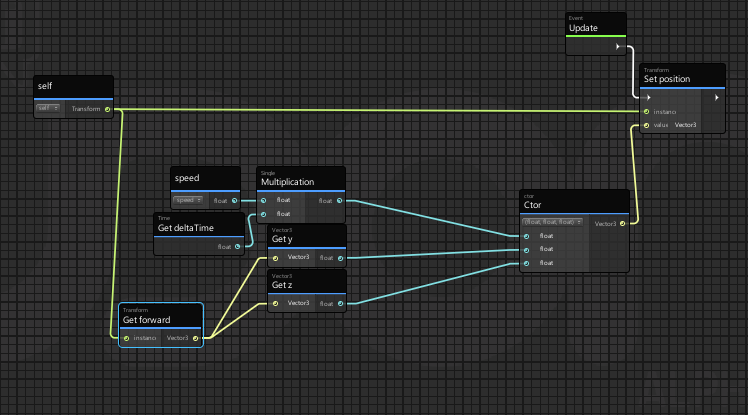 unborn hornet
Nope.
Yo don't construct a new one manually.
literally multiply the transform.forward by the result of the delta x speed.
chilly crater
slap a float into a vector3?
or get forward.
Sorry if I'm a little slow tonight, my caffeine is still kicking in.
unborn hornet
chilly crater
dfsjkhfdsfjkdshfd UGHGHGH I never checked if Vector3 could multiply....
unborn hornet
It can indeed
chilly crater
huzzuh, thanks for that.
unborn hornet
yup
 long fiber
Has anyone done NPCs?
chilly crater
Whatcha trying to do?
long fiber
following cats?😹
chilly crater
Navmesh might be the way to go
long fiber
Navigation is ok, it's just a square. But not sure where should I start from
chilly crater

Apply a navmesh to the walking area. Apply a navmesh agent to the cat.
And then you script the cat a target.
the script for the movement is easy. It's determining the target is where you'll have the most trouble.
 scarlet lake
Lets say i have two objects the same distance from a reference object and i want one of those distant objects completely culled while the other remains visible. Is there any easy way to achieve this?
chilly crater
My script has a trigger that when a player enters it, they set the isPlayerTarget to 1. They then feed their location to the navagent
long fiber
Thank you a lot!
chilly crater
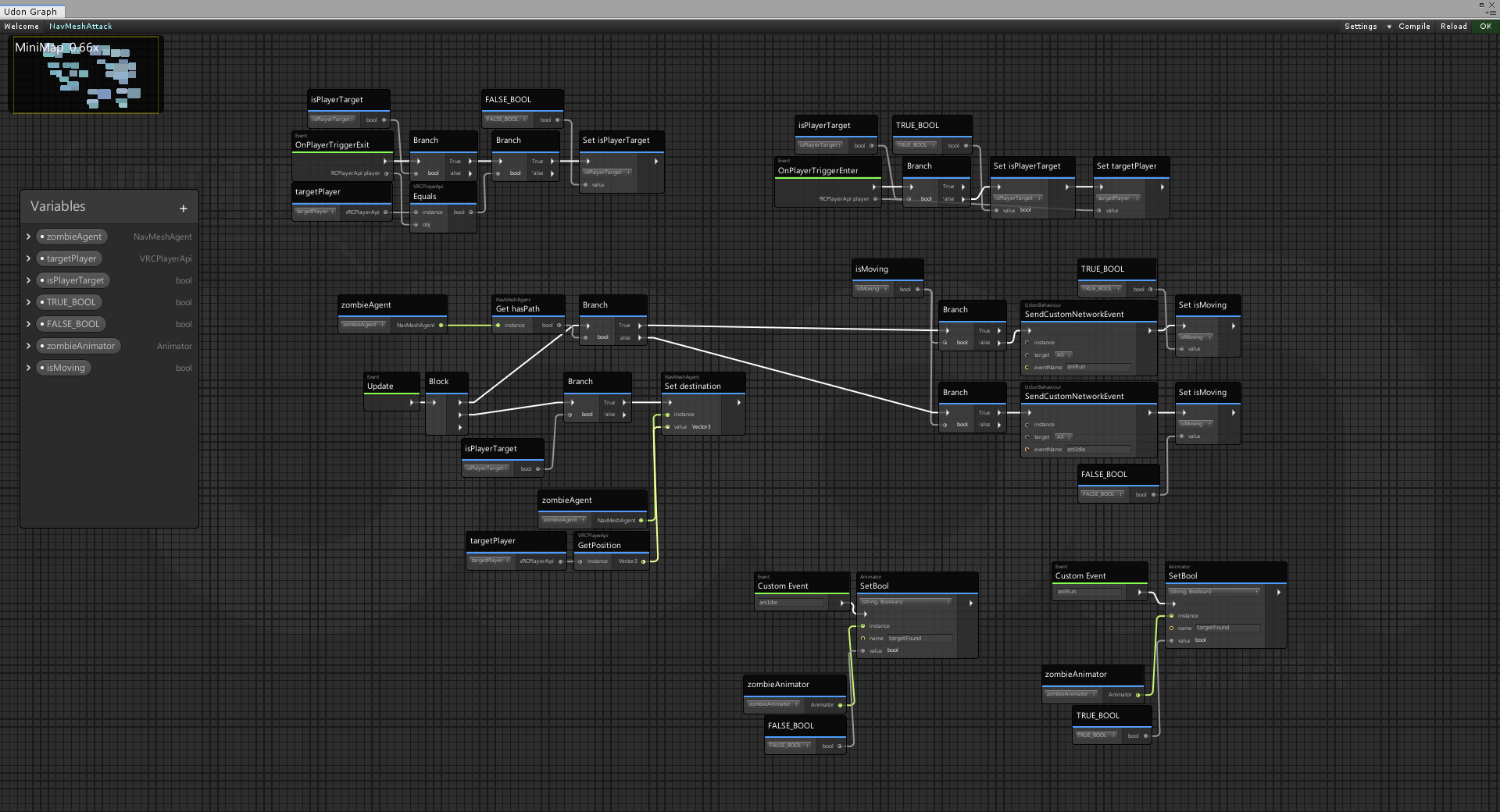


There's what I'm using.
The ismoving stuff is for animation.
If it has a navagent path, the walk animation parameter is turned on, if it doesn't, it turns off and goes to idle.
That broadcasts it to everybody.
So the animation syncs.
Thank Mystic Purple. He did that for me. I'm passing it on.
 peak geode
Hey there!
I might need some help with my Microphone settings! it keeps making weird sounds and i dont know how to fix it!
 restive dust
Try asking in #user-support-old . This channel is for Udon related questions.
scarlet lake
how do i set a blendshape value using a button on my world
cunning mist
Blendshapes should be changed via animations, so have your button connected to an animator that does the blendshape adjustments.
scarlet lake
so how would i make it so when i press the button once it would open the curtains (slowly settings blendshape to 1) and when i press it again it closed the curtains (slowly setting blendshape to 0)
i dont understand what u mean because im idiot
queen panther
One animation that goes from blendshape 0 to 100 slowly, then another that does the reverse
cunning mist
@scarlet lake Hopefully this can help you out.
https://youtu.be/Bw4uvjrvdbU
Accessing and controlling an objects animator is incredibly easy through Udon. Here's a short tutorial on how to go about about utilizing it through the example of a basic door. Assets for this and future videos will be available for download over on my Patreon, so if you'd like to work through the assets yourself of simply want to support me an...
scarlet lake
ah thanks
cunning mist
👍
brittle stump
Looking For: Help with Resync on MerlinVR's USharpVideo Player. Please DM Me.
 trail shard
Is there some kind of pool table prefab floating around? I keep seeing worlds with pool tables but I can't find the prefab they all seem to be using
 sage shard
is 0.19.2 the current version for UdonSharp? or has it been updated?
floral dove
sage shard
is 0.19.2 the current version for UdonSharp? or has it been updated?
you can find out information about UdonSharp here: https://github.com/MerlinVR/UdonSharp/wiki (it's a community project)
floral dove
brittle stump
Looking For: Help with Resync on MerlinVR's USharpVideo Player. Please DM Me.
try the UdonSharp discord, linked from the official wiki: https://github.com/MerlinVR/UdonSharp/wiki
void ridge
I've got a non-synced rigidbody owned by the local player, and when it collides with a synced rigidbody owned by someone else--this second one has an Udon Behaviour with 'allow ownership transfer' checked--I expect ownership of that synced object to transfer to the local player, but it doesn't. Are my expectations wrong?
Also I guess "owned by the local player" is redundant with "non-synced" 🙃 networking is hard
wise isle
Anyone know a prefab for a controllable ball vehicle. Like a hamster ball the player could sit in and drive around. I'd rather not write my own if it has been done already
brittle stump
floral dove
try the UdonSharp discord, linked from the official wiki: https://github.com/Mer...
Thank you greatly for your help!,but the resync button by bdunderscore is bugged I believe?
brittle stump
Hi, I was wondering if anyone had the invite link to UdonSharp discord?
cunning mist
Check the U# wiki to find the link.
void ridge
Are GameObject tags not a thing yet for Udon?
cunning mist
Nope, I do my checking based on the start of the name. Not as efficient, but it's what we've got.
void ridge
Yeah, that's what I went with. Thanks for confirming. Found the canny request here, too
https://feedback.vrchat.com/vrchat-udon-closed-alpha-feedback/p/check-tags-on-gameobjects
summer scroll
Is it possible to change the current camera position Cinemachine is showing when clicking a button?
cunning mist
Momo actually did a talk on Cinemachine for VRChat back in December during the VRCPrefabs TLX, definitely check it out!
https://tlx.dev/talks/TLX2020-12/Cinemachine and Timeline

Prefabs TLX
MomoTheMonster does a breakdown of how they put together an automatic music-video world, combining Cinemachine and a Playable DirectorTimeline to make a dynamic camera system synced with a short song
floral dove
summer scroll
Is it possible to change the current camera position Cinemachine is showing when...
you may want to change the 'priority' of a given VirtualCinemachineCamera using Udon to switch between different camera views
summer scroll
floral dove
you may want to change the 'priority' of a given VirtualCinemachineCamera using ...
That was what I was thinking of going for, but honestly I'm losing my mind trying to understand how everything works haha
void ridge
Adding layers to a VRC Unity project: bad idea? I want to put some things on a pretty independent physics collision matrix
summer scroll
cunning mist
Momo actually did a talk on Cinemachine for VRChat back in December during the V...
oh that sure is interesting, I hadn't seen that, thank you
cunning mist
Should be fine, just make sure to use the ones that aren't reserved by VRC.
void ridge
Yeah, that's what was making me hesitate. It seems like the layer setup needs to be a pretty stable thing
cunning mist
As long as you don't touch the collisions for the ones used by VRC than the SDK won't yell at you