#udon-general
59 messages · Page 36 of 1
 grizzled trout
 mighty fjord
Is it possible to turn off auto-compiling when working with the graph?
 hardy fog
Does Unity Networking have a list of players, or does Udon? It seems like such a fundamental thing that I shouldn't have to maintain my own list...
VRChat
Triggered when OnNetworkReady is called by the local player.OnNetworkReady is called when the player has fully joined the room and received all buffered events from that room.
Oh, bruh. I didn't read all the events lol. oops
 west compass
Hello,
what is the Udon best way of making players connected to a world instance communicate with an external server (e.g. receiving a counter from a website A or sending HTTP requests to that server or any alternative like WebSockets)?
Thanks
 fiery yoke
@west compass You cant. The only thing that can send a GET request is the video player and it should not be abused for that.
 wheat rover
Send video requests to your custom server. Send data back encoded in a 1 frame video
hardy fog
What does VRCPlayerAPI.GetPlayers even do? I know it sends a list of players to a target array, but where does that list come from?
 lime void
hey folks! quick question. I've been using udon for a map and I can't quite find a definitive working way on the latest SDK to make a seamless teleport- that is, a tele where when touched you automatically teleport instead of having to manually click/interact with it
I have UdonSharp as well and made a script via a youtube tut I followed, but that one isn't quite working. I'm happy to focus on diagnosing why that one is bugged out and makes me teleport to weird locations/heights, but I'm assuming there's a much easier simple way to make a seamless teleport graph or script from scratch instead?
 waxen breach
lime void
hey folks! quick question. I've been using udon for a map and I can't quite find...
waxen breach
lime void
hey folks! quick question. I've been using udon for a map and I can't quite find...
to make something like that instead of a Interact event do a OnPlayerTriggerEnter event. i can send a screenshot of my version that works pretty well.
waxen breach
lime void
hey folks! quick question. I've been using udon for a map and I can't quite find...
This is what i have. The upper part that grabs the name and sets the text is not needed and was just for testing. You would assign a object to the player destination the the way that is facing and where it is what the player will be set to. it might have to test it a few times to make sure the object is in the right direction.
hardy fog
Does an object with multiple colliders/triggers receive events from all of them?
And also, is there any way to make an object bounce off avatars?
 vital quail
So I just started messing with udon and whenever I test my world I get stuck at the spawn point and can't move anywhere
this is how I got my scene descriptor set up rn
 slim hound
@vital quail Make sure your world isn't below y-100
vital quail
nope, everything is above 0
slim hound
Any udon behaviors in your scene?
If you don't think its that you could check window > analysis > physics debugger also
vital quail
the only udon behavior I have in the scene is the world settings and that's on the same empty game object as the scene descriptor
slim hound
Are the variables for walkspeed/runspeed not 0?
slim hound
Did you not use the prefab for the world descriptor?
vital quail
I didn't know there was a prefab .-.
slim hound
Yeah search for VRCWorld in your assets and use that one
fiery yoke
Yeah for some reason they set the default values for those to 0...which is questionable if you ask me. But whatever
 ancient spindle
is there a way to make a "remote" of some sort in the udon graph? basically what i have in mind, is a player has an object they can pick up. and the button that lets them "use" it, i want to make that toggle something in my world (and sync to everyone in the instance if possible)
slim hound
Pickup object and then in the graph you can create a OnPickupUseDown event and do something from there
ancient spindle
is there a difference between OnPickupUseDown and OnPickupUseUp?
xD and how would you "use" an object in desktop mode. lol
slim hound
Down will trigger when you press and Up will trigger when you release the button press
if the pickup is set as autohold it will fire when you press your mouse 1 button
ancient spindle
oheck. thanks for the help !
 viscid reef
Has anyone had this issue with SDK3? I'm on the current latest version.
Setup a project earlier, installed some assets from the store and noticed it took a really long time to Play the scene.
After some investigation, according to the editor logs, every time Play is hit, something is performing a rehash of every unity scene and prefab in my project, even on an empty scene. After much testing, I discovered it happens on a brand new project after installing Udon SDK3.
Does anyone know if this is something from the latest sdk or has this always been the case? And if so, if there is a way to disable this behavior? Seems unintended and potentially a bug.
Only seems to be an issue if you have a lot of scenes and prefabs in your project, but still.
Fwiw, this does not happen on sdk2
viscid reef
nevermind, looks like its just doing it for prefabs with udon behaviors on them
viscid reef
Stilll, it looks like time for the editor to play a scene goes up significantly the more assets are in a project. With just the udon sdk3, it was taking me 4-6 seconds after hitting play to load into an empty scene. After importing a few model asset packages, it takes 20 seconds to play the same empty scene. This isnt the case for sdk2 projects.
fiery yoke
@viscid reef For "security reasons" the SDK has to scan every prefab in your assets I think. However I think that should only happen when building the scene. Not sure tho.
 gentle ginkgo
So I've been stumped on an issues revolving around what I believe to be object collisions. I have a projectile object that for some reason throws an excemption that never describes where it takes place, but always happens. This exception is isolated to VRChat as it works in Unity testing and with CyanEmu.
2020.12.16 06:34:10 Exception  -  NullReferenceException: Object reference not set to an instance of an object.
VRCNetworkBehaviour.DŽDžDžDŽDžDžDŽDŽDžDŽDžDžDŽDŽDŽDžDŽDŽDžDžDžDŽDŽDŽDŽDžDžDŽDžDŽDŽDžDžDžDžDŽDŽDžDžDŽDžDŽDžDžDŽDŽDž () (at <00000000000000000000000000000000>:0)
VRC.Networking.UdonSync+DŽDŽDŽDŽDžDŽDŽDžDŽDŽDŽDžDžDŽDŽDŽDŽDžDŽDŽDžDŽDŽDŽDžDžDŽDžDŽDžDžDŽDžDžDŽDžDžDžDŽDžDžDžDŽDŽDžDŽDž.MoveNext () (at <00000000000000000000000000000000>:0)
UnityEngine.SetupCoroutine.InvokeMoveNext (System.Collections.IEnumerator enumerator, System.IntPtr returnValueAddress) (at <00000000000000000000000000000000>:0)
Regardless if disabling synced objects, removing all [UdonSynced] variables in the behavior, this issue persists.
 bleak widget
Is there any way to check if an interact button is being held down without the user having to pick up the object?
 unborn hornet
For just the Interact event, probably not. You could do something like a "Is player's finger inside a trigger" kind of check using the OnPlayerCollisionStay event, but that'd really only work for VR.
Another alternative is to have a larger trigger zone directly around the interact object, and have the interact "start" the check, then use OnPlayerTriggerStay to check if the player is still near it.
Would need more details on your usecase otherwise.
bleak widget
Hmm.. yeah I dont think those would work well for my use case. I was thinking about how I would make a button that a desktop or vr user could click and hold but the only way I could think to do that was if I detected picking up instead. I suppose i could still do that but it isnt super intuitive in vr
unborn hornet
🤔 you might be able to fudge it with an invisible pickup (an object without a mesh), that when OnPickupUseUp is called, it gets dropped and moved back into the original position.
bleak widget
That works great for desktop. Ive used that method for other things. However, in vr, the controls for buttons are on triggers while pickups are on grips. So that leads some non intuitive buttons for a lot of vr users
 unreal bobcat
yoooooo im making a world and im making a button where it turms the mirror on and off but i dont see the VRC_trigger
did they change it?
im using sk3 world
so im caught up
but when i click add comp its not there
bleak widget
unreal bobcat
yoooooo im making a world and im making a button where it turms the mirror on an...
Yes, triggers were removed in SDK3 in favor of udon scripts. Check out this link to learn what udon is: https://docs.vrchat.com/docs/what-is-udon
VRChat
What’s this Udon thing anyways? VRChat Udon is a programming language built completely in-house by the VRChat Development Team. It is designed to be secure, performant, and easy to use via the VRChat Udon Node Graph, a built-in visual programming interface that uses nodes and wires (we call them “no...
unreal bobcat
i know what udon is but if they put it in udon where tf isthe trigger system
bleak widget
VRC triggers were removed in SDK3. There is no VRC trigger system like there was in SDK2
unreal bobcat
so stupid
it wont let me open the grid
all it says is copy assembly to clipboard
it dont say open udon graph anywhere
 dusk lintel
anyone know how to make a Ui menu that toggles gameobjects on and off? with graphs and where the behavior goes on the canvas or button etc?
ill show you where im at
this graph demonstrates a high mirror toggle on and a low mirror being toggled off so that if you click one or the other, the other goes off and doesnt create a clipping effect
 unreal grail
How do I get/set text for textMeshPro in udon?
bleak widget
dusk lintel
anyone know how to make a Ui menu that toggles gameobjects on and off? with grap...
I believe there is a pinned message about UI events that might be useful to you
dusk lintel
alright, thank ya 😄
 chilly crater
How would I go about giving a lifetime to instantiated objects? I have a pickup that shoots instantiated objects. Trying to keep the world from turning into a ballpit.
bleak widget
chilly crater
How would I go about giving a lifetime to instantiated objects? I have a pickup ...
I don't know if udon has this (can't check atm) but there is a unity function that does what you are looking for. I believe it it is Destroy(gameObject, lifetime)
chilly crater
completely new, do I use this as an udon sharp, or just a unity script
bleak widget
Just search in the udon graph for a destroy function that takes a gameObject and a number or something similar
Space does a quick search and tab does a full search
chilly crater
omg thanks for the search advice... I couldn't find destroy at all...
YES! It works!
bleak widget
Glad to hear it (:
 bleak widget
Move away a little bit then use the scroll wheel to zoom in. Do that a few times and it should fix your clipping plane issue
unreal bobcat
oml thank u
 scarlet lake
also u can press F to zoom & focus the camera on the selected object
which saved me a lot of time until I realized that ._.
bleak widget
^^^
Double clicking on the object in the hierarchy also brings it into view if you don't want to navigate your camera there
unreal bobcat
also
im trying to recreate the toggle mirror from the UdonExampleScene in my world. but i cant seem to sccale the label thing down and the text wont show up
scarlet lake
I don't think it works that way, but take a look at this video
https://youtu.be/ibDu0dCeUE8
With the recent Udon updates, some of the basics have changed, so here's my most basic tutorial redone with the new editor, and not recorded at 2am! If I get enough requests, I'll redo my "Contextual Buttons" video as well, which will give me an excuse to just rename them "Event Buttons" which actually makes sense.
00:00 - Intro
00:20 - Udon Gr...
unborn hornet
bleak widget
That works great for desktop. Ive used that method for other things. However, in...
Have you tried having the Interact event force a pickup? Not sure if that can be done, but might be worth trying.
bleak widget
unborn hornet
Have you tried having the Interact event force a pickup? Not sure if that can be...
I have not tried that. I don't know if forcing a pickup would be an option, but if it was, that would work perfectly
unreal bobcat
can i save, delete and try that video out and if it dont work i can restore what i origanally had?
bleak widget
You could just duplicate the object(s) and try the new changes on just one of them. If needed, you can disable the other one
unreal bobcat
@scarlet lake followed his steps and made the script
put it in the variable but it wont work
unreal grail
I cannot change/set the text of a TextMeshPro object.
Script: https://pastebin.com/MhTy5LCX
Pastebin
Pastebin.com is the number one paste tool since 2002. Pastebin is a website where you can store text online for a set period of time.
bleak widget
unreal grail
Script: https://pastebin.com/MhTy5LCX
I have not found a way to do it yet, but if you do figure it out, let me know.
unreal grail
What do you mean? There's plenty of Udon worlds with dynamic text...how do they do that
 native estuary
unreal grail
I cannot change/set the text of a TextMeshPro object.
native estuary
unreal grail
I cannot change/set the text of a TextMeshPro object.
You are using textmeshpro but are getting a unity text component?
native estuary
Well this will throw an error if you don't have a text component
Not really sure what the textmeshpro support is currently since I just use the basic text components myself
unreal grail
I added a text component instead but I don't see the text
bleak widget
Yeah, the only way I have gotten text to work is to use the normal unity text, not text mesh pro
native estuary
Watching a unity worldspace UI tutorial might be good canvases in world space are a bit annoying to scale properly
unreal grail
is that the Text component, or the Text Mesh component
bleak widget
This is the one that has been working for me
unreal grail
Ok, when I use that component I cannot see any text.
native estuary
See my message above
chilly crater
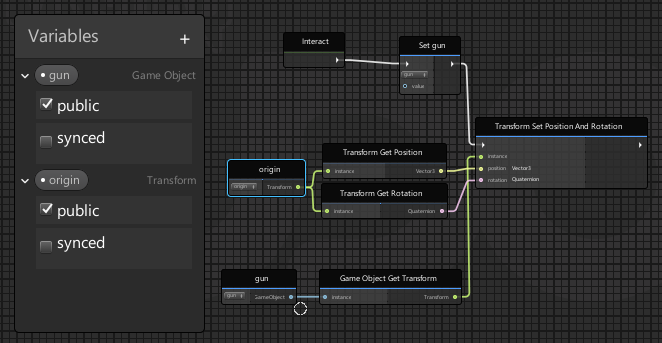
I'm trying to send an object to the location of an empty on a button press
Nevermind, I got it.
Got rid of the Set Gun
bleak widget
Yeah I was just going to mention that lol
chilly crater
I was sitting here staring at it after I put it in discord...
"Why the heck did I put that there?!"
native estuary
🔫
chilly crater
I made snowball guns.
bleak widget
How festive
hardy fog
Is there are way to make an object only pickupable by certain players?
This code doesn't do anything, so I don't understand how VRC_Pickup.pickupable works.
chilly crater
is spyOne properly defined?
unreal bobcat
okay so for a mesh object
what collider would i use
so i can walk on it and shit
and also how do i make vrc chairs transparent/invisable
 hushed gazelle
Chairs are something everyone overthinks; Turn off the mesh, keep the collider.
unreal bobcat
thanks bb girl
@hushed gazelle so anything u can walk through
u put mesh collider if u dont wanna walk throough it?
 tiny tartan
Think of it like this: a Collider is like an invisible wall while a mesh is like the walls skin (aka. its purely the visual portion)
hushed gazelle
Is there an example or prefab anywhere of how to do a synced udon player via graph rather than udonsharp? Not the basic one in the SDK, something with working examples of extras like positional sliders.
 errant pilot
@unreal bobcat So here is a nice rundown on colliders.
All colliders will prevent things from passing through. You can set it to collide with certain objects, but by default it will collide with all
The basic colliders, box, capsule, sphere, ect. will be a basic shape and are the best for performance compared to mesh colliders. If you want the collider to be used as a trigger, select 'is trigger' and it will also allow players to walk through it.
The mesh collider is a complex collider that uses the object's mesh for each point of the collider. It can be costly in some cases so be careful to use it.
Also its in the VRCWorld Udon Behavior Script
unreal bobcat
@errant pilot wait so do i a udon behav comp in VRCworld?
errant pilot
Inside the VRCWorld gameobject, yes
scarlet lake
Hello i have there a small problem i would like to make the vrc udon video player play automatically when someone joins the world but whenever I add the url in the script and upload the world the video doesnt start does anyone have a solution?
unreal bobcat
f
hardy fog
chilly crater
is spyOne properly defined?
Yeah, Networking.LocalPlayer.playerId is an integer, and so is spyOne.
 dapper lion
@scarlet lake which player, you also might need to tell it to play on awake i believe
scarlet lake
UdonSyncPlayer(Unity) (VRC Unity Video Player (script)) /Play on awake ?
dapper lion
wait that vp is designed to play stuff automatically, is the link you put in supported?
scarlet lake
its the normal yt link
dapper lion
is it blocked or a red video?
scarlet lake

• Listen on Spotify® •
https://link.tospotify.com/F2cXtwJUObb
• Discord •
https://discord.gg/7VzWbVAC6J
• Instagram •
https://bit.ly/xakarmy
• Spotify Gaming Playlists •
https://link.tospotify.com/76nN2ripFbb
• Wallpapers & More •
https://www.zedge.net/profile/xakavir
Copyright © 2021 by xakavir.
Sergio valentino,
Sergio valentino drive fo...
Where do i found out if its blocked or red ?
scarlet lake
Video URL
i tried also with chaning the texture render i thought maybe there is the problem
dapper lion
is there any other slots for url? i dont normally use the default udon player
ummmm, what did you do to the rt?
scarlet lake
i mean there is also the video player /
That unity have
But i think vrchat doesnt support that
dapper lion
the unity avpro one works
scarlet lake
Doesnt work for me :/ do i need to upload it for seeing the result or can i just press play at unity ?
dapper lion
id upload it so it actually has a server to siphon from lol
didnt kno you were doing that to test it
scarlet lake
Can we talk in dm if its ok ?
dapper lion
sure
 twilit rampart
add the image to the unity scene as a sprite
 pseudo parrot
Why is it when i import the udon sdk3, i get this error. im not even using sdk2
hushed gazelle
I think you've accidentally imported an avatar into your world.
pseudo parrot
these scripts are part of the sdk3 udon scripts
native estuary
Most all of the scripts are in every sdk it's just the scripting defines that tell unity what parts to load
Did you have sdk2 at some point in the project?
pseudo parrot
i removed them all
native estuary
So you had it at some point?
pseudo parrot
yes
native estuary
And did you also remove the sdk2 scripting define from your project settings as well?
Project Settings > Player > Other Settings > Scripting Define Symbols
Just removing the files doesn't remove all the traces
pseudo parrot
I don't see it.
 dull trail
In the udon graph, what do I use to just set a bool to true or false?
UnaryNegation isn't what I want since I'm just turning a thing off
I did it with bool and/or
unreal bobcat
how do i add jumping into my world
 frozen raptor
does anyone know why vr chat worlds are loading halfway and then resetting back to the beginning when you try to go in it again
 fading cipher
Can you use udon to sense if a player gets their VR hand close to something?
unreal bobcat
to pick up an object in ur world. is all you have to do is add pick up component to that object?
 fiery glen
does anyone know how to reset a game logic on reset button?
 thorn coral
Hey I just got into the udon graph a few weeks ago and I was wondering if there is a way to instantiate an object globally for everyone that is synced properly.
I seem to get it to work sometimes, but they don't seem to appear at the same position. I added a vrc pickup to the prefab and a vrc behaviour with sync object on, but that doesn't seem to be the solution
scarlet lake
Everyone with questions that were unanswered last night dm me and I'll help out
@thorn coral and for you syncing is a bit of a curve, you can use sendcustomnetworkevent to send a command globally
thorn coral
@scarlet lake thanks I'll try that. May I dm you later if that doesn't work or I can't figure it out?
scarlet lake
For sure and for new people who enter wont get synced right away so for every event that changes things, you gotta update it for the player who interacted with it and THEN use deserialzation and synced bool variables to keep track of everything
It took me a while studying the example scene till I understood how deserilization works
@thorn coral
It's kinda crazy how unfriendly udon is to new people
thorn coral
Oh god. Yeah it could be a bit better, but I wouldn't know how to make it more new user friendly
scarlet lake
@thorn coral
Here's an example to toggle an object on and off and then syncing to the instance
Where the locked variable is a bool that gets updated on interaction then is used to determine the objects state for the rest of the instance
True or false
scarlet lake
That example was for an empty game object with a box collider cause I was trying to block off a room
bleak widget
There is also a guild online by thehelpfulhelper on network events that helped me a lot when learning about that stuff
scarlet lake
Is there a pen package for SDK3 yet?
dapper lion
@scarlet lake what kind of pens? theres 3d ones so far, not surface painters
hardy fog
Does respawning trigger an event?
ancient spindle
hey guys, im in need of some assistance. xD so im trying to get this multiple object toggle to work, found here https://ask.vrchat.com/t/network-synched-toggle-global/778 and i cant get it to work. i interact with my object that is supposed to toggle the other ones, and nothing happens. this is what my graph looks like. i had to add this node circled just so i could connect the links. could that be effecting it?

VRChat Ask Forum
This is what i believe to be a solid solution to the toggle issue people been having, enjoy. Simple one object toggle. More advanced multiple object toggle (not much difference). Basically what is going on is that i assert the intended behaviour by the network call it self (on or off). And the synched variable is only used to help late...
chilly crater
Before I go to far into this rabbithole, can you syncronize position instantiated objects?
fiery yoke
You cannot syncronise instantiated objects
chilly crater
ooof
 floral dove
@chilly crater - you can create the objects you want to use ahead of time and turn them on and off to create the appearance of instantiation, these can be synchronized.
chilly crater
I made snowball guns.
I'll have to see if I can convert it to particles or something.
bleak widget
Synchronized positions doesn't work on instantiated objects even if they have an udon behavior on them in the prefab? What if you just wrote your own sync position behavior? Or would that not be possible?
scarlet lake
@bleak widget it is possible in two ways, sync position only effects objects you grab, to make like toggles global you gotta use a custom event
then you gotta call that custom event in a node called sendcustomnetworkevent and set it to global
the best way is with deserialization though cause then you can sync to new players as well
udon networking is kinda terrible at first
also i have this tutorial i made for the basics https://ask.vrchat.com/t/ultimate-beginners-guide-to-udon/4128

VRChat Ask Forum
What is udon? Udon is a new way to set up events and actions in your world using graphs and nodes to have a better visualization of your scripts, such as a mirror you toggle on and off. I’ll be using this as the main example throughout this thread. Nodes are like events and actions you can connect to each other with “noodles”. Most of them are...
i even went as far as to be able to sync animations kinda
the only issue with udon and syncing is if new people come into your instance, they wont see the current part of a looping animation
but like simple door animations can be perfectly synced
wheat rover
bleak widget
Synchronized positions doesn't work on instantiated objects even if they have an...
You can't sync instantiated objects IIRC. Make an object pool instead
scarlet lake
what do you mean by instantiated? @wheat rover
wheat rover
Objects created with VRCInstantiate
bleak widget
I mean if udon behaviors on an instantiated object run, then I think it would be possible to write a behavior that would sync the positions together if the built in sync system didn't work on them
chilly crater
Now I'm figuring out how to stop a particle system on interact up and start it on interact down.
wheat rover
It's a VRChat problem. There's no practical way to do that at all, since VRC won't even sync the presence of an instantiated object properly.
Again, just use an object pool.
hardy fog
chilly crater
I made snowball guns.
Can you just have like 40 snowballs for each gun hidden outside the environment, then move them in when you need them, and move the last snowballs fired back the the hidden place? This is just an efficient way to do ammo/bullets, but it would also solve your problem.
hardy fog
wheat rover
It's a VRChat problem. There's no practical way to do that at all, since VRC won...
Object poolsss
chilly crater
But is it possible to stop/play particle systems with udon on interact?
unreal bobcat
can someone tell me howtomake an animated object/ animal move in urworld?
and also isthere a way to raise my world above the grid bc im making a cave that goes down but it goes under the grid and it respawns me
scarlet lake
@unreal bobcat I can answer the second part, move everything up
native estuary
You can change the respawn height in the scene descriptor
chilly crater
Select all. grab the green arrow and move up.
unreal bobcat
how do i select all
unreal bobcat
ye dude theres a lot of shit😂
chilly crater
that works in some but not all situations.
unreal bobcat
POGU
and as for animals moving forward?
or a simple tail moving
bc every vid i find is 2 tears old
unreal bobcat
so when i wantmy pickup able object to respawn when toossed off the edge
do i add vrc scene descriptor?
to the object
chilly crater
mmmkay, object pools. Do I start with Phasedragon's simple objectpool prefab, or is there something else?
scarlet lake
@unreal bobcat no that happens already
floral dove
chilly crater
mmmkay, object pools. Do I start with Phasedragon's simple objectpool prefab, or...
There's no official implementation yet (coming soon as part of the new Networking updates early next year). I haven't used Phasedragon's objectpool prefab but I trust their work 😄
unreal bobcat
oiii
lest say i wanna put text on a sign in my world
how i do that
ALSO
day time cycle
how tf i do that
i have 2 demos of day and night
what do i do
dusk lintel
how do i make one mirror toggle but turn off another mirror via Ui, this is what we have so far...
also with a udon behavior
 sharp briar
i've been trying to figure out how to boost player audio in a world for weeks now
and I cannot figure it out at all
dusk lintel
there is a prefab in jetdogs thing if you want the link i gotchu
sharp briar
please!
fiery glen
does anyone know how to use GameObject.FindGameObjectsWithTag in udon?
I need to get all gameobject
native estuary
Afaik tags don't get uploaded in worlds
floral dove
@sharp briar - there's an example of changing Player Audio properties in the Udon Example Scene, you would just change Player Audio Gain instead of Distance.
fiery glen
native estuary
Afaik tags don't get uploaded in worlds
So... how to reset the pickup object?
native estuary
In what kind of situation?
fiery glen
my gameobject have Synchronize position
sharp briar
I just found the Udon sample scene, was trying to set it in my scene but the distance didnt seem to be working, gonna try swapping it out for gain and seeing if maybe itll work
realistically i want distance and gain
projecting voice
fiery glen
native estuary
In what kind of situation?
I have a lot of gameobjects, the properties are synchronized
I need to reset all gameobject to origin position.
unreal bobcat
yo im making a telporter and when i create a node and go into transform, i dont see the rotation or position
floral dove
sharp briar
I just found the Udon sample scene, was trying to set it in my scene but the dis...
just keep in mind that it only affects OTHER players, so you need to Build & Test with at least 2 clients to really test
sharp briar
Yeah, I think the problem mightve been a stray noodle
floral dove
unreal bobcat
yo im making a telporter and when i create a node and go into transform, i dont ...
turn on 'Search on Noodle Drop' - then drag from the output of your Transform and type 'position' to get a Get Position node from that transform. Same for rotation.
native estuary
fiery glen
I have a lot of gameobjects, the properties are synchronized
I need to reset all...
Could always just predefine the objects in an array and then use that to reset the positions back to their original position. For that example you could on start define the objects location into a vector3 then have a respawn method that teleports them back.
I'm not actually 100% sure whether or not udon has some built in respawn stuff
unreal bobcat
dude this my first time ding this so i dnot knw what any of this means😂
this is what i got
fiery glen
native estuary
Could always just predefine the objects in an array and then use that to reset t...
Ok,thank . i will try
unreal bobcat
see it only shows "get trans"
floral dove
unreal bobcat
see it only shows "get trans"
you can learn about the basics here: https://docs.vrchat.com/docs/udon-node-graph-upgrade
unreal bobcat
wheres noodle drop
floral dove
unreal bobcat
see it only shows "get trans"
this one should help too in understanding how to search for methods / properties of a certain node: https://docs.vrchat.com/docs/searching-for-nodes
floral dove
unreal bobcat
wheres noodle drop
sharp briar
So I basically copied over the example scene for mute
yeeted the avatar audio
and changed interact to "OnPlayerTriggerStay"
I doubt the avatar audio broke it
So I assume the player trigger stay did?
floral dove
that will fire for EVERY FRAME the player is intersecting with a given collider - probably not what you want
floral dove
that's probably best. You can take a look at the examples of using OnPlayerTriggerEnter for an example - you should take the VRCPlayerApi returned from that event and change its audio
keep in mind it will only make players louder, not softer: https://docs.vrchat.com/docs/player-audio
floral dove
if you're having issues with OnPlayerTriggerEnter, I'd recomend you hook that up to Debug.Log first so you make sure it's working as expected, then once you've verified that, hook it up to Player Audio nodes
sharp briar
wait, just throw the api for player enter directly into the player audio nodes?
floral dove
unreal bobcat
okay so what about a daylight cycle
I suggest get you get your teleport working first, then come back to that.
unreal bobcat
bruh this shit mad confusing
floral dove
sharp briar
wait, just throw the api for player enter directly into the player audio nodes?
yeah - when a player enters that trigger area, they will enter it for everyone in the world at that point. So if you take their player object and change a property on it, that should change for everyone in the world at that time
sharp briar
is the "at that time" part specific or will it still work for players joining
floral dove
unreal bobcat
bruh this shit mad confusing
Yeah, you gotta take little steps at first and enjoy your wins. Go through the docs starting at 'what is Udon' and do the first couple video tutorials before you strike out on your own.
sharp briar
i imagine players joining it just runs all the same stuff happening just on join
floral dove
sharp briar
is the "at that time" part specific or will it still work for players joining
it's time-specific, so it won't change for late joiners, no.
sharp briar
Then wouldn't on stay work better to keep it up to date?
floral dove
sharp briar
Then wouldn't on stay work better to keep it up to date?
well, yes. On Stay would fire continuously so it would work for late joiners. Good point!
floral dove
sharp briar
im learning
it's a good place to start. You may want to consider using a timer or something down the line to only check for it every few seconds, but just getting it working is a win 😄
sharp briar
yeah im kinda aiming to get it atleast functional like, by tonight
and then i can work on making it work elegantly later
so whats the downside to it constantly firing? is it a performance issue?
unreal bobcat
ight now that im done with that
how do u do the daylight cycle stuff
in timeline i assume?
or no
sharp briar
daylight cycle stuff feels so far beyond me
floral dove
sharp briar
so whats the downside to it constantly firing? is it a performance issue?
it could be. BUT - premature optimization can kill good / fun ideas early on. That warning from me was the programmer thinking about how it's un-optimized. Don't worry about it too much until it becomes an issue.
unreal bobcat
is it really that hard?
sharp briar
depends on what you want from a daylight cycle
floral dove
unreal bobcat
is it really that hard?
well - think about what you want to change, learn how to change that in Unity, then write Udon to change the Unity parts
sharp briar
like if you just want a sun and moon to come and go, i think itd be pretty easy
if you want lighting to change thats uh
beyond me
so i dont need to set the > to anything just the api?
oh im big dumb
i had the collider turned off
floral dove
sharp briar
so i dont need to set the > to anything just the api?
not sure what you mean by > here
floral dove
oh yeah, you'll need that to flow into the VRCPlayerApi.SetVoiceGain
sharp briar
i'm not sure what it is im doing wrong thats making this not work, i have a feeling im not building into an updated version of things
oh
maybe that
sharp briar
i had them connected through the player api noodle
ahhhh its working
oewijfoidsrjgoidjghoih
thank
goodness
and thank momo
this is prolly a really ghetto setup but i'll have all the time in the world to figure out a more elegant solution later
unreal bobcat
how do i stop this
sharp briar
getting component could not load errors but it doesnt seem to be breaking anything
unreal bobcat
nvm
 sly pollen
What would be the simplest way to show text in a vrchat world? I don't need it to be interactive so do I really have to use like a UI setup or just put a text mesh up?
scarlet lake
@sly pollen text mesh, sometimes it's easier to do something in paint or something and put a picture on an object, that's what I do cause I lazy
sly pollen
Ok tysm homie 😁
unreal bobcat
s lets talk about pens
how tf do i add them into my wrld
cant find any tutorials
 proven vessel
Is there an option in the Udon Graph to set game object false? I.E. I am setting up a two mirror system with a Low and High quality and I don't want one to be active wile the other is.
native estuary
You have the enable one setup already? Just do the opposite of that.
native estuary
proven vessel
Is there an option in the Udon Graph to set game object false? I.E. I am setting...
I don't really do udon graph but something like this should be what you want
proven vessel
Awesome! I will try it out!
proven vessel
native estuary
I don't really do udon graph but something like this should be what you want
I am having a hard time finding "targetGameObject" and "disableGameObject" in the Graph
native estuary
Oh those are variables
I highly suggest watching some basic tutorials on udon 😅
You can make variables on the top left
Then you drag them onto the graph
proven vessel
I code udon sharp but I am having issues with my code atm and wanted to learn the graph tonight. lol
native estuary
Ah fair I only do udon sharp 😄
But yeah as you do in udon sharp you define the variables and set them as public if you want to be able to edit them
proven vessel
This is what I see.
native estuary
Plus to add something
proven vessel
Hmm I still dont see it. I am using the most recent version of udon and udon sharp..
native estuary
What happens when you press the plus?
native estuary
😄
proven vessel
Thank you for all the help. Time to build and test 🙂
native estuary
Good luck
 jaunty schooner
How am I supposed to create and open a new Udon graph?
I was able to adjust gravity on the default Udon world graph because the open in graph button is there:
But I want to respawn players when they hit a collider, yet I cannot seem to figure out how to open the new graph I created:
scarlet lake
Yikes bud
jaunty schooner
As you can see there's no open button, clicking on the script itself shows nothing useful, and clicking open empty opens the empty graph I have to put on every pickup, so I don't want to edit that.
Right clicking on the script also shows no useful options to open the graph.
scarlet lake
You're inspecting the script itself
So go to a gameobject maybe one you wanna make a button idk, then create a component called udonbehavior
There you can open an already compiled graph or a new one
jaunty schooner
Look at my first screenshot again. I did that.
Err, second screenshot.
There are also no errors in my console, and I restated Unity.
scarlet lake
Something way wrong here
Try creating a udonbehavior component on a different object and send me a screenshot of that
@jaunty schooner
It's weird that the compiled file is in that directory
native estuary
From the picture it just looks like they selected assembly asset instead of udon graph asset in the creation selection
jaunty schooner
 woeful swallow
Are there any voicemod softwares that carry anime voice styles?
jaunty schooner
New object, added Udon component, create new udon clicked. That's what I get.
Wait, there's a dropdown box... IT's on assembly by default...
native estuary
But what did you have selected in the dropdown before clicking create?
Graph should be the default
jaunty schooner
Why would the dropdown default to something that doesn't let me edit it?
native estuary
You most likely changed it by accident at one point so it stayed there
You can edit assembly though if you know assembly
jaunty schooner
A new component should default to whatever the default is, shouldn't it? Not to what I may have selected the last time I created or edited a component on an object...
I'm getting the button now though, so thanks for that...
native estuary
Well usually people want to keep making the same type of udon behaviours be it either udon sharp, assembly or graph
jaunty schooner
Well in that case I might keep the button but throw an informative error that you can't open an assembly in the graph to hint at what the solution is.
native estuary
For assembly you have the text box there that is also part of udon where you can write udon code
So it's not really an error
jaunty schooner
I didn't mean it's an error, I mean the user's error. I had no way of knowing that the reason I couldn't open the graph was because I was working with the wrong kind of file.
scarlet lake
Yeah that's a hella weird thing to mess up lol
Normally it says theres no graph and to make a new one
native estuary
When you are working with assembly there is not supposed to be any graphs
scarlet lake
Screw coding in assembly lol
But I found the offical intro thread to udon assembly and they linked the intro to udon there LOL
It's like we got this guide to get started with coding, also here's the intro to udon itself with practically no info!
native estuary
The usual use case with doing assembly assets is copying someone elses assembly generated from graphs into it
jaunty schooner
Well I'm already lost. I want to teleport players back to spawn when they collide with a trigger volume. But none of this makes sense. Is "instance" the player or object I want to teleport? Is there a LocalPlayer object somewhere which I have to feed into that? How do I tell OnEnterCollision I want to know when the player collided and not something else? What the heck is "collision other"?
The teleport is also under VRCPlayerApi which ought to deal with Players not general objects since Player is in the name so perhaps that is a function specific for telporting players?
Well I guess I screwed up already because it appears there's functions specifically for detecting player collisions... https://docs.vrchat.com/docs/player-collisions
VRChat
Udon has three ways to detect when a Player and an Object Collide - Triggers, Physics, and Particles. Triggers If you want to detect when a player has entered or exited an area, your best bet will be to use the OnPlayerTrigger events. There are three of these: OnPlayerTriggerEnter is called when a ...
scarlet lake
@jaunty schooner open the example scene that comes with the sdk, it shows you how all that stuff works and theres a help pdf
jaunty schooner
And... I'm stuck again.
scarlet lake
You can read the graphs and try to figure it out
But I made a guide to try to help new fellas to the first basics of graphing
VRChat Ask Forum
What is udon? Udon is a new way to set up events and actions in your world using graphs and nodes to have a better visualization of your scripts, such as a mirror you toggle on and off. I’ll be using this as the main example throughout this thread. Nodes are like events and actions you can connect to each other with “noodles”. Most of them are...
jaunty schooner
Oh wait it was searching something other than all nodes cause I had a node selected? Ugh.
scarlet lake
Yeah it does that haha
Instance would be the player and you can get local playerapi
I should probably include on my tutorial that to set synced variables, you gotta search on noodle drop
jaunty schooner
Cool, so I can just drag my transform into the window and it makes a node...
scarlet lake
Oh my god
jaunty schooner
Aggghh it won't let me connect that output to the inputs there... Cause it's a whole transform... Can I drag pieces? 😄
Nope can't just drag position into there.
scarlet lake
Okay so for the place you want to send a person, create an empty game object at that location and use it to set up the cordinates
Idk why you're trying to use the world prefab for literally anything other than adjusting jump height and walk speed
jaunty schooner
That's what VRCWorld is. Its used as the spawn point.
scarlet lake
I think I grew a tumor
jaunty schooner
Because that's what VRC says to do in their tutorials?
If you just want one spawn point theres no need to make an extra game object.
native estuary
You should be able to get "position" from the transform and drag that into the teleport
jaunty schooner
But how...
scarlet lake
I suppose you could
I got that answer
Transform get position
From your world variable
native estuary
^^
scarlet lake
And transform get rotation etc etc
It is kinda awkward searching for what you need since things are in like categories
I always have a hard time remembering if a node is under networking or playerapi and getting types can trip me up too
native estuary
Enabling search on drop from the settings on the top right helped me find correct nodes pretty fast
scarlet lake
I find it to be more of a hassle
jaunty schooner
I understand the concept of extracting position and rotation from a transform, but I can't find the node I need to do that.
scarlet lake
So when you search you're first searching for what categories your nodes are under
So since we are looking for transforms, we first type in transform, click it and it gives us a bunch of transform options
jaunty schooner
Oh wait I can drag out a noodle and get a list of things it can connect to...
scarlet lake
That goes for searching for component, animation, animator, audio, lights, etc etc
jaunty schooner
There we go...
scarlet lake
Atta boi
jaunty schooner
Is that it?
Is that all I need to have on there, besides checking the IsTrigger box on the collider?
scarlet lake
Using yep and using the world prefab might actually be genius
jaunty schooner
Using yep?
scarlet lake
I think I had a stroke haha
jaunty schooner
Well I do have 25 years of game development experience. But I'm new to the whole Udon thing. I just need to keep playing with it to learn what does what because the docs are missing 99% of the information, but I was able to guess that the UnityTransform thing was the node I needed. Not sure what the ones with []'s do though? Some of them have a second version with that.
Hm... could those be arrays of some kind?
But what would that be a list of...
scarlet lake
Arrays
And a god send
If arrays were a dude I'd totally polish his knob
Its dope cause in the component itself, not the graph, it'll let you say how many objects and it's super easy to use
In fact I over that a bit and for loops in my tutorial
jaunty schooner
So... I wonder....
scarlet lake
Cover*
jaunty schooner
This respawner is because my world is a yeet world. And players were rocketing in to space.
scarlet lake
I cant type this morning lol
jaunty schooner
I tried just putting a big collider up there but they got stuck on it and slid along it instead...
scarlet lake
I've been thinking about using stations and animations to make like a ride or something
jaunty schooner
I assume when I respawn them their velocity will be zeroed?
jaunty schooner
Then again, I guess I can't assume anything... It would be kinda useful to be able to teleport players and retain their velocity but who know if VRChat decided to zero that or not on teleport.
scarlet lake
Itll be zeroed yes
@jaunty schooner
Velocity would be fun to play with
Make like a vr falling fred game
jaunty schooner
I've got an error...
scarlet lake
@jaunty schooner vrcworld variable needs to be public then drag the world prefab from the hierarchy into the udon component
scarlet lake
Oh my god
So the vrcworld prefab is the physical object in your scene that you get the cordinates in the skybox graph right
So how does the graph know which object is the vrcworld prefab
So on the sky object's udonbehavior there should be a list of public variables, you put the asset there @jaunty schooner
jaunty schooner
scarlet lake
So you're looking at the components of the vrcworld prefab in the last screenshot right
Theres nothing to do there since our behavior is on the sky object
You DRAG the vrcworld asset from the hierarchy to the variable place in the sky objects udonbehavior
jaunty schooner
"So the vrcworld prefab is the physical object in your scene that you get the cordinates in the skybox graph right" - Yes?
"So how does the graph know which object is the vrcworld prefab" - I dragged its transform into the graph?
"So on the sky object's udonbehavior there should be a list of public variables, you put the asset there" - I don't understand what you're getting at. The variable is set public in the graph. And if I click on the object in the heirarchy there is nothing there about making variables public.
"So you're looking at the components of the vrcworld prefab in the last screenshot right" - Yes.
"Theres nothing to do there since our behavior is on the sky object" - Correct.
"You DRAG the vrcworld asset from the hierarchy to the variable place in the sky objects udonbehavior" - Uh... I tried that and it did nothing. I'll try again.
You can't see the cursor, but it's a little NO symbol when I drag it over the variable node.
scarlet lake
I can name 1000 transform variables vrcworld but it still wont know what object were calling from
And the fact you have the inspector open for vrcworld prefab
jaunty schooner
If I drag the VRCWorld transform into the window, presumably, the pointer to the object contained in that node, will be for the object I dragged the transform from.
scarlet lake
Send me a screenshot of the inspector that has the graph with the transform
jaunty schooner
And as for having the inspector open for VRCWorld prefab, that's what happens when you click it to drag it into the Udon window. It selects it.
scarlet lake
The object
jaunty schooner
Here's the assembly code btw, maybe it will shed some light on it.
scarlet lake
Not the graph file
jaunty schooner
The object what?
jaunty schooner
You're plain typing too fast so the conversation is getting muddled.
My posting of the assembly code was not in response to a question you asked.
"You're plain out not understanding me
Of the sky object"
That sentence doesn't make sense.
scarlet lake
Okay, how does the transform variable know which object from your hierarchy its getting the transform info from
jaunty schooner
"Send me a screenshot of the inspector that has the graph with the transform"
Is this not what you want?
scarlet lake
Just cause you named it vrcworld doesnt mean its pulling info from the prefab
Okay good on the right, see how it says no public variables
jaunty schooner
"Okay, how does the transform variable know which object from your hierarchy its getting the transform info from"
I dragged the transform from the VRCWorld Prefab into the Udon window. So presumably that is a reference to that object, seeing as that's how I would have coded it and it took on the name of the object I dragged it from, and there is no input to it for an object reference so there's no place for me to drag the original object anyway.
Yes, I see how it says "no public variables" but do you see how it says on the left "public" is checked? So I don't know why it's not listed on the right.
"Just cause you named it vrcworld doesnt mean its pulling info from the prefab"
I didn't name it that. I dragged the VRCWorld transform into the Udon window. IT chose that name for it.
scarlet lake
Theres something wrong there cause you marked it public but the component says theres no public variables
jaunty schooner
That would be my assesment as well.
slim hound
You need to restart unity
jaunty schooner
That's probably a good idea, I'll do that now.
slim hound
Udon Graph breaks pretty easily
I haven't ever used the drag on drop function to set variables but trying it just now it seems like another thing that causes the entire udon graph editor to break
jaunty schooner
Well would you look at that... no more error!
scarlet lake
Winning
jaunty schooner
The public variable is where it should be now as well.
But anyway I see now what you were trying to tell me about setting the public variable and why you thought I hadn't specified it. You thought I just made a variable and never initialized it by filling out that field in the inspector. And I couldn't see the field there so I thought you wanted me to drag the object into the Variables node in the Udon window.
scarlet lake
Seems like were on the same page
Unity is hella weird sometimes, it'll crash all together in the middle of uploading if you dont turn off future proofing
slim hound
So dragging and dropping to set variables works only if you have opened the graph with the Open Udon Graph button on the udon behavior, if you tab away and tab back to the udon graph it will break your udon graph editor when trying to drag drop variables
scarlet lake
Yeah I never drag and dropped variables either
dapper lion
wait, you dont need a game object to pickup a thing. that might be confusing it i bet if you cant pick it up
id also turn off autohold
jaunty schooner
unreal bobcat
You say it doesn't show in game, so I don't know if you mean you can't see yourself pick up the object or that other people can't see you pick it up, but if other people can't see you pick it up that's because you need to add an Udon script to the object, and check sync position. Search for Empty in the assets folder, there is a special empty script to attach to things like pickups where you don't need them to do anything else.
@scarlet lake He has a mesh collider. You don't need a box collider for a pickup. My cars can be picked up and thrown:
I don't know for certain that non-convex colliders can be pickups though. I think they can be. But you could try checking convex.
scarlet lake
I must be having some weird issues then cause mesh never works for me
What's the difference between the two?
jaunty schooner
A non-convex collider is like an L shape. It's concave. If you check convex, Unity will buiild a collider mesh which is convex. In the case of an L shape, it would become a triangle.
The difference is also that Unity can't use concave colliders as triggers. I suspect the pickup script might expect convex for that reason.
But you don't need to tick the isTrigger on the collider yourself. I just am guessing the pickup script does something like that maybe.
And you shoudn't tick it or your object won't collide with the world.
scarlet lake
@jaunty schooner maybe that guy with the pickup issue needs to tick the convex option on his mesh collider
jaunty schooner
So this taxi, with convex not ticked, has a collider shaped like the taxi...
scarlet lake
I was told a while back that mesh colliders aren't really to be used
jaunty schooner
But with it ticked, it builds a convex mesh around it internally for simplified collision checks:
Mesh colliders work just fine. That world is mine and has like a hundred cars you can pick up and throw. And you can pile them all up and it won't crash. And the reason it won't crash is cause I unticked "change ownership on collision". That wasn't needed and apparently all the cars colliding with each other at once changing ownership eventually kills the networking code.
scarlet lake
Lmao yeah Idk what that's for really cause it never seems to effect my object behavior
jaunty schooner
And the framerate in my world is decent too. It's called Big City. Check it out. Unity almost certainly uses it's own internal box colliders when doing the physics calculations and only switches to the mesh when the boxes intersect.
scarlet lake
I've been working on optimizing myself, I've come along way since my first world of real time lighting
jaunty schooner
Well ownership I believe is like... if I pick up an axe, it sets a variable saying I am the owner of that axe. The last one to touch it. Now, what can you do with that info? Well, I think stuff like the combat system could have used it to say, tell whose grenade blew you up. Murder probably uses it to determine who stabbed who too.
scarlet lake
That makes sense, but would it have any effect on an interact button
jaunty schooner
Probably not. But in most cases it also probably doesn't matter since it would only be one network event. Whereas I had a hundred cars all bouncing around and transmitting hundreds of events.
scarlet lake
I do have a particular issue, oncollisionentertrigger
I had it set to toggle a mirror and it worked fine for enter and exit but if someone else came inside the collider it would turn off my mirrors even though those are supposed to be local
jaunty schooner
No idea there. I'm not an expert on VRC events, I'm pretty new to world creation. This is only my second big world with interactive stuff.
scarlet lake
Well you're doing well fella
 rose shadow
Today my vrsdk3 broke on a world I uploaded yesterday. Its not recognizing it as the original upload and is seeing it as a new upload. any thought or possible fixes or do I just have to wait a week? https://prnt.sc/w5kdnq
 floral dove
rose shadow
Today my vrsdk3 broke on a world I uploaded yesterday. Its not recognizing it as...
floral dove
rose shadow
Today my vrsdk3 broke on a world I uploaded yesterday. Its not recognizing it as...
does the world show up in your Content Manager? If so, you can copy the ID from there into your Scene Descriptor to switch it back to the right id.
floral dove
yep - detach the id and paste in the correct one
rose shadow
ill see if i can find it im looking in my vrcworld rn
found and it and it
set it*
i love you guys after restarting unity its recognizing it
thanks so much!
chilly crater
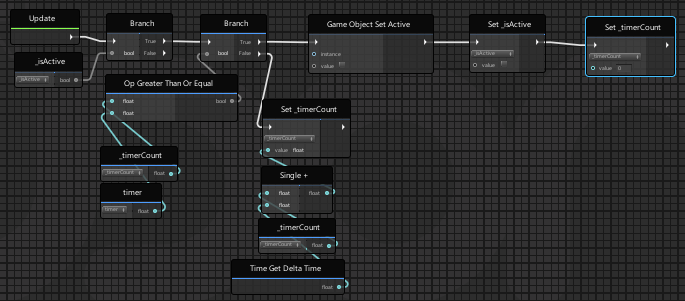
Is there an easier way to do a timer in udongraph than this? https://i.imgur.com/ZgXBWLq.png
 bleak widget
Yes. You can use time.time or time.realtimesincestartup along with some "endtime" variable and just check to see if the time has exceeded the end time. Then just reset end time up by a certain amount based on the current time. Idk if that made sense
chilly crater
I just want to disable something five seconds after going active.
Oh wait, I can throw my script onto the object. Then it will do it automagically
No need for a timer script for each projectile...
bleak widget
Yup
chilly crater
I should probably swap that timercount and the set active.
If it turns off, the timercount won't be set.
something something script stops when gameobject is inactive
chilly crater
https://i.imgur.com/8AzkoLH.png
I did something wrong here, but I can't see it.
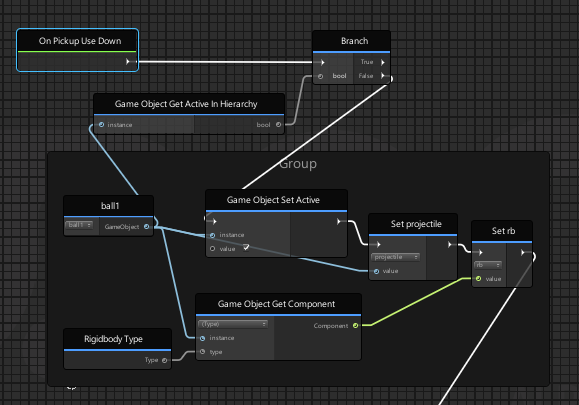
should I use .activeSelf or the in hierarchy?
chilly crater
Nevermind, it helps if I set the timer to anything but 0
chilly crater
I pooled the objects, but they still aren't showing up anywhere but local. Do I have to add other stuff to it?
I even did the sync position on the udon behavior.
chilly crater
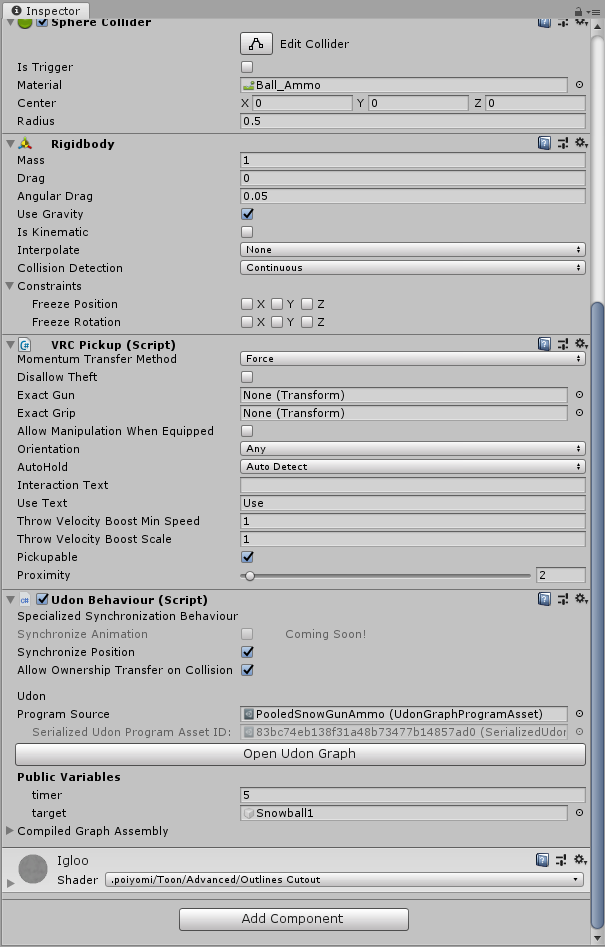
Each snowgun has six snowballs (that aren't prefabs) for ammo. each snowball is synced. But they won't render on other clients.
Should I be giving each gun script a network fire event?
bleak widget
The issue might not be that the snowballs position isn't being synced but that they are not being shown on all instances. Make sure that whatever code you have to show the snowballs, runs across all instances
 astral moon
Hi I have absolutely no knowledge of Udon or scripting beyond basics. How hard is it to learn to be a noodlemancer?
fiery yoke
@astral moon It depends on how easy it is for you to understand and learn about general programming concepts, like Objects, Fields, Flow, Loops etc. etc.
Udon is built on top of Unitys C# and ofcourse VRChat specific stuff. Its easy to get into but hard to master. Especially when it comes to networking stuff. Basic stuff is simple enough for every beginner I would say.
 fiery yoke
Optimistic.
astral moon
In all seriousness, I'm currently working on an Udon-built game.
I just need to smash my face into the basics and I think I can pick it up from there...
I broke down my needs into a handy list
- Learn how to compute math in Udon.
- Attach objects to yourself upon release of an object.
- trigger effects upon touching objects against each other.
I've already made assets to get started including a gameworld from scratch...
... In VRChat anyways.
chilly crater
This is getting maddening. I got the projectiles to show up, but now the gun itself is local only
astral moon
Something-Something Sync :(
mighty fjord
I mean, if you run into issues, don't be afraid to ask for help! :3
chilly crater
I'm giving my guns the "good enough" stamp.
active is now networked. De-active is too.
chilly crater
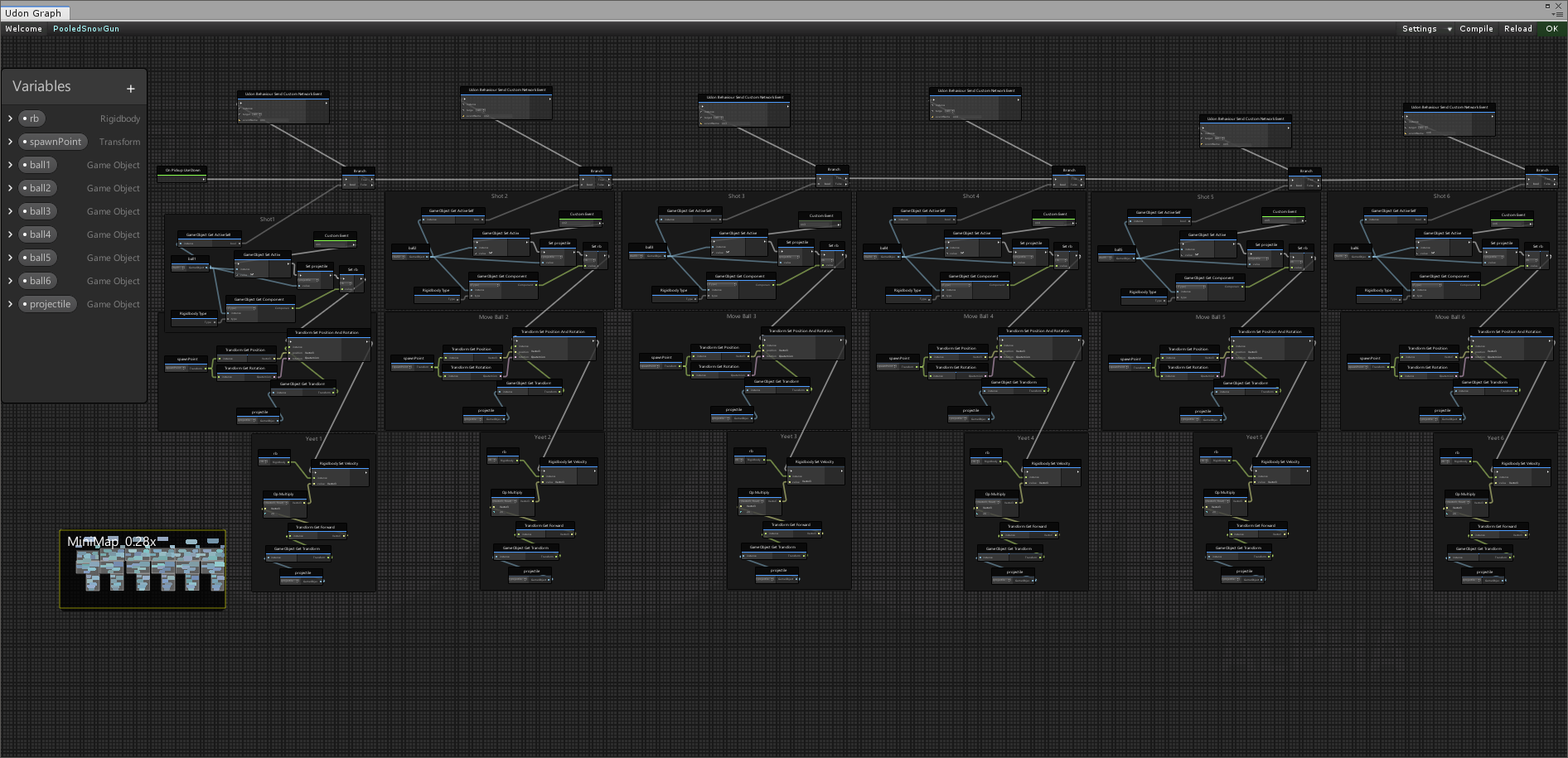
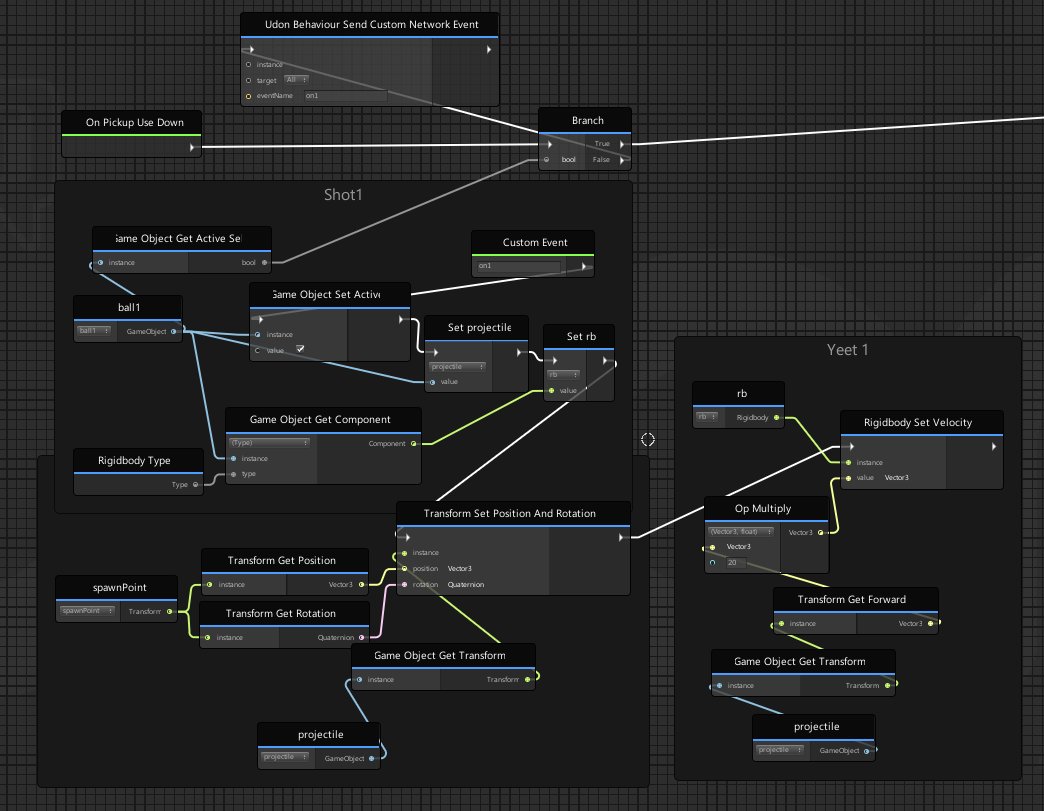
Pooled object shooter. Just spam a module for each projectile pooled and change the custom event to on<shotnumber>
slim hound
@chilly crater Just want to ask how bad that graph lags when trying to edit or detach a node from one of those groups
Groups are nice but they slow things down immensely for me
slim hound
Yeah I wish the groups were usable while making something though
sharp briar
VRCSDK2.RuntimeWorldCreation.Start () (at Assets/VRCSDK/Dependencies/VRChat/Scripts/RuntimeWorldCreation.cs:82)
anyone get this error on upload before?
native estuary
You most likely have multiple pipeline managers in your scene, you can search for them using t:pipelinemanager in the hierarchy
sharp briar
that is entirely possible
aha
thanks bunches! i know exactly how that happened
not gonna lie i thought that was part of the scene descriptor
native estuary
Well you should have one next to the scene descriptor
But if you have multiple it's gonna cause problems
 compact stirrup
Hey everyone, I was thinking about making a world, and I had questions about publishing/uploading worlds to the website; Is there a way I can make a world that has a "Friends" instance only? One where someone cannot create other instances, but myself and any of my friends can join without me having to invite them?
fiery yoke
If you dont publish your world it will pretty much work like that. Just upload it without publishing it to the labs
compact stirrup
so even if someone random person got the link to it, they'd not be able to join without being on my friends list? or would I have to make sure that wasn't shared?
An account whitelisting feature for worlds would be great, wouldn't even need to worry about this stuff, hahah
waxen breach
compact stirrup
An account whitelisting feature for worlds would be great, wouldn't even need to...
You could make a world that is public and add a door that only opens to people you add to it. I have a udon graph that i was going to make fully public soon that will check a players name and if it matches the name you put down it will execute the next stuff. if it doesn't it will do nothing (unless you add something to the false part). Ill send how i did it in about 30 min to an hour
compact stirrup
Thanks, that's an idea!
waxen breach
I use the name check in a world that has a DJ in it. To prevent abuse there is a barrier around the DJ stuff and only me and 2 other people can get inside and use the controls.
compact stirrup
That is a nice thing to have, but I'd like to be able to prevent random people from connecting to the world at all, if I could
waxen breach
I honestly dont know a way to prevent that. Not making a world public would work but i remember it being weird when trying to join someone else for a preview of a world before it became public
wheat rover
Has anyone successfully synced variables of type byte? Currently having issues with it.
Simply, any synced byte or short variables I'm using cause errors.
Ints and floats seem to work fine.
Does basic variable syncing really not work...?
unborn hornet
wheat rover
Simply, any synced byte or short variables I'm using cause errors.
Ints and floa...
Welcome to Udon Alpha. Fixes coming soon™
wheat rover
I feel like the more I use Udon the more I understand why no one does anything very cool with it.
Also, as I feared, player.playerId is different between clients...making object ownership the only real way to track players between clients.
It works but like jesus christ
I don't mean to dunk on VRC or anything but their development tools are honestly some of the absolute worst I've seen in a game with user generated content
There's so much basic stuff that should be there but just isn't
It's honestly going to kill the game once someone with a better platform comes along. Alas, servers are expensive and they have the upper hand there, but that can't last them forever...
Feh, wrong place for such a rant anyways.
...But also, object ownership is reset on leave before OnPlayerLeft. Which means there's no good, non-hacky way to actually tell who left, in a theoretical game, to clean up their stuff.
I'm losing my mind here.
 tall vault
Does it at least fire OnOwnershipTransferred when ownership gets reset? If so you should be able to keep a note of the playerid that used to own the object and do cleanup when OnPlayerLeft gets called
wheat rover
I wound up just giving up and tracking players for network purposes using ownership, while also locally tracking their playerId and using that to determine who left.
It's a bit hacky and I anticipate it to, at some point, break in extreme circumstances, but that's what you gotta deal with in VRChat I guess.
 desert swan
guys theres a bug in vrchat favorite avatars and i cant add any new avatars pls help
dapper lion
@desert swan yes
desert swan
yes what
dapper lion
just agreeing
desert swan
anyone know how to fix it
dapper lion
send report to canny
 long sentinel
this still launches the game in vr, is this intended 🙂 ?
native estuary
You need to set the client path in settings to point directly to the VRChat.exe
long sentinel
works, ty!
 jagged crow
what direction do people usually use as "north" in their worlds?
 raven peak
jagged crow
what direction do people usually use as "north" in their worlds?
raven peak
jagged crow
what direction do people usually use as "north" in their worlds?
+Z is usually seen as forwards.
jaunty schooner
I'm trying to teleport a player back to spawn when they hit a trigger, but it doesn't seem to work...
And I can't find the example scene pictured in this article. The demo scenes in the udon examples folder don't seem to have the same stuff in them... https://docs.vrchat.com/docs/player-collisions
VRChat
Udon has three ways to detect when a Player and an Object Collide - Triggers, Physics, and Particles. Triggers If you want to detect when a player has entered or exited an area, your best bet will be to use the OnPlayerTrigger events. There are three of these: OnPlayerTriggerEnter is called when a ...
Nevermind, I found it. For some reason they have example scenes both under Examples/Samples Assets/Scenes and in the root Examples folder.
Ah, I see where I went wrong. There's both an OnPlayerTriggerEnter and OnPlayerCollisionEnter. I got confused because OnPlayerCollision talks about a player entering a collider... Which I'd think should only be possible if the collider is set to trigger. Otherwise one would assume the colliders will never intersect, only touch. So I'm not exactly sure how that works. It suggests its used for bullets, because they have to interact with the environment... But unless they're passing right through players, I don't understand what the whole enter and exit thing is about with them. Do they pass through players? And if not, are OnCollisionEnter and Exit both called when the bullet bounces off you?
chilly crater
If I want an object synced with collision transfer (and it already has a script) do I have to add a new udon behavior?
chilly crater
I have the checkboxes marked and the item is still local only.
unborn hornet
Within a graph script, is there a node which directly references the script itself?
chilly crater
turns out it was a synced variable.
fiery yoke
unborn hornet
Within a graph script, is there a node which directly references the script itse...
This, I think
fiery yoke
Ahh well then I dont think there is
chilly crater
What are you trying to reference?
fiery yoke
The UdonBehaviour component
unborn hornet
The script's UdonBehavior reference.
chilly crater
Can you custom event cross-script?
fiery yoke
Yes you can
unborn hornet
So like if there is multiple udon scripts on an object, I wouldn't have to search through the gameObject components to make sure I have the correct script.
That's my concern.
fiery yoke
Ehh its unrecommended to have multiple UdonBehaviours on a GameObject
unborn hornet
There's more pros than cons to having the ability to do so in my experience.
fiery yoke
It can easily break Networking and other VRC Internal behaviour
 serene moat
does it though? I've long heard people say "don't do it it'll break things" but I've yet to hear of people running into actual issues with it
fiery yoke
Im pretty sure that the PhotonView doesnt keep track of which Behaviour is which
unborn hornet
I do it in various places in my prefabs/worlds and I have yet to have any issues beyond my own screwups
serene moat
I mean if there weren't pros, Unity wouldn't use components in the first place
fiery yoke
Well I mean you can always have a child that has the other behaviour
Ofcourse in normal Unity thats unnessecary
But Udon is not normal Unity
:P
serene moat
I mean you could do that in Unity too if they didn't have components
serene moat
Udon program assets are the separation in Udon due to how it needs to function because of how Unity works
fiery yoke
Yeah but as I said it might cause issues when "finding" the UdonBehaviour
chilly crater
"Well I mean you can always have a child that has the other behaviour" I'm sorry for the off topic, but I find this hilarious out of context.
fiery yoke
if the dispatcher is written in a way were it just sends a networked event to a GameObject and then expects it to be the first UdonBehaviour on it
then it would break if you have more than one and the first one is not used for Networking
chilly crater
TIL that synced variables are bad. It messes with position sync.
fiery yoke
More the other way round
Position Sync is lazy. Meaning that if the object doesnt move (i.e. the rigidbody is sleeping) the sync completely stops
Which also effects the synced variables
chilly crater
I made snowball guns. i figured, "hey, let's make the "spawnpoint" variable synced. It will be great!
Turns out it wasn't so great.
unborn hornet
fiery yoke
then it would break if you have more than one and the first one is not used for ...
I have multiple udon behaviors that can receive network events on a single object. They have not been receiving the wrong events.
fiery yoke
Hmm maybe it does actually not cause any problems, but you dont know if it does. Im just being careful with it. If you wanna risk it, thats up to you then ;P
unborn hornet
But anyways, regardless of the network events...
from within the graph, I would like to be able to just do something like thisScript -> SendCustomEvent 'EventThing' instead of having to search for the current script from the game object.
It could reduce the number of externs, as well as make it easier to deal with multiple graphs per object.
fiery yoke
Yeah in UdonSharp you can do that easily by actually using this. The graph apperantly doesnt let you do that.
Unless there is something I dont know of ofcourse
unborn hornet
Yea so... onto the canny it goes
fiery yoke
The easiest way I would workaround that is by just having a variable you manually fill in. But ofcourse thats tedious (and prone to error)
serene moat
this is implicit in the graph for inputs to nodes that take UdonBehaviours if the inputs are left unconnected. Null public UdonBehaviour variables also auto fill to the reference of the component if they are null
unborn hornet
serene moat
`this` is implicit in the graph for inputs to nodes that take UdonBehaviours if ...
That.... sounds like it's severely undocumented...
fiery yoke
Welcome to VRChat content development kek
scarlet lake
I thought things like "this" was basic programming understanding
serene moat
I'm pretty sure the intro to Udon tutorials note both of those. The UI on the inspector also indicates that empty references to Transform, GameObject, and UdonBehaviour will be populated with the "self" reference to the relevant type, though the UI is still broken looking on the light theme
scarlet lake
I'm pretty sure that "this" is the game object
serene moat
Not that it's super intuitive if you already have some programming background, but it is indicated
fiery yoke
Yeah but it should be super intuitive. Thats what the graph was made for.
scarlet lake
Yeah you'd think so lol
serene moat
this in C# is the behaviour, in the graph it's the game object by the looks of the node output 🤷♂️
scarlet lake
@fiery yoke did you figure out your issue? I'm getting decent with graphs
@serene moat yeah that's what I thought
fiery yoke
What issue?
scarlet lake
I tagged the wrong fella lol
fiery yoke
welp happens
unborn hornet
So if the script's "this" is implicit, this name for an empty connection is mis-leading.
Or at the very least, confusing.
fiery yoke
instance means an instance of an UdonBehaviour
So thats an object
an a component is also an object
unborn hornet
Right, but it doesn't imply an implicit reference to the current behavior
scarlet lake
I'm pretty keen with graphs now I can probably help
The terminology is hella unusual that's for sure
serene moat
yeah it'd be better for the node UI to indicate that
fiery yoke
The implicit part is that if you dont provide an instance it will default to self
unborn hornet
The implicit part needs an explicit indication
scarlet lake
Tbh I'm debating on clenching my teeth and just learning usharp
unborn hornet
that's the issue I have
fiery yoke
Which UdonBehaviours can only be sure that there exists exactly 3 things: Itself (UdonBehaviour instance) a GameObject it exists on and a Transform the GameObject must have. So it will default to those if not provided. Otherwise it will be null.
unborn hornet
fiery yoke
Which UdonBehaviours can only be sure that there exists exactly 3 things: Itself...
Which is accurate from a technical standpoint, but can be confusing for those not deep in the weeds of how udon works.
fiery yoke
It makes sense sort of.
But the implicitness of it is unintuitive, untransparent and should not be hidden in some video or on some site in a wall of text. At least not for a product thats sole purpose is to be "beginner friendly"
scarlet lake
Be cool if this kinda info had like oh idk an in depth vrchat sdk3 doc like for sdk2
unborn hornet
Ah yea, "Transparency" that's the word I was looking for.
scarlet lake
Hell I'd even go as far as suggesting like a dictionary for the terminology
fiery yoke
scarlet lake
Hell I'd even go as far as suggesting like a dictionary for the terminology
I am working on that 😉
scarlet lake
I still have no idea wtf unarynegation means just that it flips booleans
serene moat
that's pretty much what it is, it means 'not' so "false" becomes "not false" which is "true", and vice versa
more friendly name aliases would be good to have for some nodes like that
unborn hornet
In mathematics, a unary operation is an operation with only one operand, i.e. a single input.
Unary = single input
Negation = opposite
When the single input is a bool, it toggles between the two possible values.
fiery yoke
Its a highly technical name
for something pretty simple
exactly what you dont want in a beginner friendly product
chilly crater
I just call it the Uno Reverse Card.
serene moat
lol
scarlet lake
Right its stuff like that , that stump new people
chilly crater
If the ? in the corner doesn't show up, I just google it.
unborn hornet
I call it the NOU operand
scarlet lake
Funny enough, making a unarynegation toggle in minecraft is stupid hard
I think they called it a T flip or something
unborn hornet
uh, no? a torch is literally a UnaryNegation
fiery yoke
Invert a boolean.
Graph: Create a boolean variable, look for the Boolean.UnaryNegation node, get the node for getting the boolean variable, plug its output in the input of the negation node.
U#: bool Boolean; Boolean = !Boolean;
:^)
scarlet lake
Nice
unborn hornet
lmao helper what that's a comparison bruh
fiery yoke
Not a good comparison
serene moat
😅 lol
fiery yoke
No u didnt 👀
fiery yoke
meh
unborn hornet
lmao
scarlet lake
When your variable itself Is named boolean or int
fiery yoke
the only reserved term is bool. Boolean is not reserved, therefor valid :P
But yeah I just mean that the steps necessary to express an idea in the graph is exponentially higher
chilly crater
this is where naming conventions come into play.
scarlet lake
I once wrote a huge program naming all my variables like a1 a2 b1 b2
fiery yoke
Theres a reason its called a programming-language
Because you express concepts and ideas by a formal logic with the auxiliary help of natural language.
Using a graph also does that, but it basically just puts the words into boxes.
scarlet lake
It is a nice visually and super easy to read I give it that
fiery yoke
I dont think its nicer than scripted code tho. Maybe thats biased
scarlet lake
How would I get started with u#? Is it like the same syntax as like c#?
fiery yoke
U# is basically a subset of C#. Some things work exactly how you expect it, some dont.
chilly crater
One of my friends compared the graph to a rough draft. Yeah, it works, but you can refine it further.
scarlet lake
The idea of nodes is pretty new to me, I saw people making like procedural materials in blender with nodes
Seemed advanced
fiery yoke
Nodes are just visual representations of instructions
chilly crater
My experience with UdonSharp: I imported it into a project and instantly got compile errors.
chilly crater
I'll stay with my pasta thank you
scarlet lake
Also who tf was the genius to name it udon
chilly crater
Here's the github https://github.com/MerlinVR/UdonSharp

GitHub
An experimental compiler for compiling C# to Udon assembly - MerlinVR/UdonSharp
scarlet lake
I get some interesting results with googling "udon nodes" and just get pics of noodles
fiery yoke
until you realize that it kills Searchability
chilly crater
Exactly!
scarlet lake
Hilarious you'd think someone would have caught that as fast as I did "literally first search"
chilly crater
Then you try searching "VRC Udon" and get stuff from SDK2
scarlet lake
"What is udon nodes" gets a wiki for Asian noodles
unborn hornet
https://feedback.vrchat.com/vrchat-udon-closed-alpha-feedback/p/update-a-node-input-text-when-implicit-values-are-used-such-as-gameobject-transf
Let me know if this has poor wording.
scarlet lake
Oh dope so you do write it in c# and it compiles it to udon sharp?
I never actually read the github lmao
chilly crater
Yeah, it tries.
scarlet lake
The thing that keeps messing with my mind is vowgans roomba prefab like it's crazy and I still dont understand how it syncs when its moving, and i spent like a week on networking
 quartz meadow
Alright, I am trying to import a huge jagged array into u# for a project, the cs file that holds it is nearly 1 mb. When udon sharp attempts to compile it, it hangs for multiple hours. I am going to try updating u# and the sdk3 to the latest, but does anyone else have any other suggestions on what to do?
im thinking of maybe splitting it up into several files, since its a jagged array
would be a PITA to work with though, lol
scarlet lake
That sounds like a massive array
quartz meadow
it is absolutely absurd I know, its for a neural network so I can't really cut it down
I am well aware I am pushing udon way past what its meant to do here
but I think this is a u# compiler issue
serene moat
you're probably better off using the editor scripting api to make a editor script that just sets up the jagged array. U# doesn't handle your jagged arrays directly when you init them in a field initializer, it goes straight to Roslyn for the most part. You're just likely breaking a production compiler by abusing it like that. If you're doing something like initializing an array that large in Start, Udon would probably hang long enough to time out and crash the behaviour.
GitHub
An experimental compiler for compiling C# to Udon assembly - MerlinVR/UdonSharp
Also while you may be able to put the data in, you're going to run into fundamental performance issues if you want to do a neural network in Udon. You start seeing frame time take a visible hit from just iterating 40 times in update and doing nothing else
quartz meadow
I have a few ideas about that, thankfully this does not need to run in real time / per frame
and its all local, no networking to deal with here
serene moat
Yeah you can do time slicing there, but you could also just run it all in shader at that point and run it all in realtime
quartz meadow
yeah, that will be the next step. I just want to get a proof of concept first
im assuming Shaders are capable to taking in - sending out variables? I think I have seen it done before
serene moat
you can set variables on shaders from the CPU, you cannot trivially send data back from the GPU to the CPU, but you can make it work at a performance overhead via ReadPixels
 proven musk
Is there a mirror prefab in the Udon SDK? If so where is it? And if not, how can I make one? Same as SDK2?
floral dove
proven musk
Is there a mirror prefab in the Udon SDK? If so where is it? And if not, how can...
Yep - check out the UdonExampleScene
proven musk
Thanks mate
 normal yarrow
Hey everyone, I was trying to get these movie graphics to work at once in VRChat, but it seems like only one will play at a time.
(How it should look, using the Unity viewport)
https://i.gyazo.com/7772edc56591063b8afe75f6101e0d95.mp4
Any way I can fix that or get around it?
unborn hornet
Are you trying to play multiple videos at once?
normal yarrow
Yes
fiery yoke
If those videos are hosted somewhere else abd youre trying to get the with a VideoPlayer then you cant.
VideoPlayer requests are limited to one every 5 seconds (I think).
normal yarrow
Oh dang.
Yeah I had them hosted elsewhere.
I would've had the videos played locally but the VRC Unity Player doesn't want that.
unborn hornet
You could rig something up as an extension of my TV prefab. Hide the visual elements provided and attach your own screens and speakers to the player provided. It handles the sync and rate-limiting pretty well in my tests. It'd be cool to see if it is reliable enough for a usecase like yours...
@normal yarrow if it interests you for your use-case, DM me and I'll set you up with my resources.
normal yarrow
Hm.. how many videos are you able to play at once?
hardy fog
If I sync one game object, all its children follow it, right?
wheat rover
yes
grizzled trout
so kinda dumb question but i am having truble figering out how to get this working right,i want to make it so when i push a button it enables a model and it works for the most part but seems like only the preson that pushes the button can see it, not sure what i need to do to fix it
unborn hornet
@normal yarrow one video per tv prefab in scene. If multiple videos are needed, use multiple prefabs.
unborn hornet
Yea one sec lemme pull it up.
https://streamable.com/je3bxw This recording is a bit old, so the bugs you see here aren't actually present anymore. It's the only demo I made so far showing off the multi-TV support (need to remake it I know, soon™).
 quartz meadow
grizzled trout
so kinda dumb question but i am having truble figering out how to get this worki...
quartz meadow
grizzled trout
so kinda dumb question but i am having truble figering out how to get this worki...
you will have to sync it via one of the network commands
grizzled trout
can you link a guid on how to do that?
i am kinda new to it all still
i am gretful for any and all advice
quartz meadow
you using udon sharp or the udon graph?
grizzled trout
graph
quartz meadow
general guide:
https://ask.vrchat.com/t/how-to-sync-with-udon/449

VRChat Ask Forum
Udon has 4 ways to sync Sync Position using an UdonBehaviour component Used to sync the position & rotation of an object Sync Animation using an UdonBehaviour component (Coming Soon) Used to sync the animator transitions of an object Udon Synced Variables Used to sync individual Udon variables across all players Currently suppo...
also this is good
JOIN MY DISCORD! https://discord.gg/nS3x5Pr
Time to get some control over your video players! This one took a bit more time for me to figure out the simplest way to convey everything and condense it down, plus the time of moving back to college. The recording for this started at 45 minutes, so this is by far my most edited video.
All in all, th...
(this channel in general is pretty good)
grizzled trout
@quartz meadow thank you so much!
quartz meadow
no prob. network syncing variables is probably one of the most frustrating part of udon right now, but once you get good at it you will be better off
I suggest you also look at the udon example world included with the SDK, they explain a ton of stuff there
grizzled trout
Ooh hehe good to know it is tricky kinda worried i was just derping 😅
i kinda have but it feels a bit like being handed a box of tools and not told what to do with them
quartz meadow
you can use this to generally look up stuff:
GitHub
One-stop shop for people interested in developing content for VRchat - madjin/awesome-vrchat
grizzled trout
cool , i will chek it out
compact stirrup
Hey everyone, I have a question for udon/vrchat in general. Is it possible for me to have a script that instantiates an object for only a single client on a server. For example, could I make a platform that only one person could stand on, but others couldn't collide with?
in lieu of making the gameobject on the client, would be possible to instantiate a clone of a gameobject that other players could ignore the collision of, something that would only collide with one person?
 mossy anvil
if it's not udon send custom networked it should be local by default
compact stirrup
Hm, what I'd like to do is have a platform that players can stand on, and if they push a button, the person pushing the button is lifted up to the floor they push, but everyone else on the platform is unaffected. The collider would be invisible, so it's like they're floating up to the floor
currently, if too may people use it at the same time, it spawns too many colliders and people get yeeted off the platform
dapper lion
make sure the main toggle isnt sending a network custom or is specifically set to local, as that shouldnt happen
pseudo parrot
Anyone know a good strobe light asset?
Mostly just lights.
scarlet lake
@pseudo parrot I can make one
pseudo parrot
Really?
 storm whale
Just get a light and write a script to turn it on and off
But that's like a lag machine
scarlet lake
@pseudo parrot yeah you can easily animate it and I can even show you how to set a button or something to toggle it
It will be interesting cause according to Google strobes flash 12 times a second
unborn hornet
If one sets enabled=false on an udon behavior that has sync position active, and that is the only behavior with that flag set, does that stop the position sync data from being sent for that object?
 tribal meadow
I know this is a shot in the dark, and probably not possible but I figured I would throw it out there.....Theoretically, would it be possible to over-ride spatial audio for a single avatar in a world, and have their audio become 'world audio', and have that audio in stereo? (this is for a performance world I'm trying to develop) for example, have a toggle to turn it on for that avatar, and when they preform their sound comes out in two channel stereo (world music) rather than from the spot they are standing in.
floral dove
tribal meadow
I know this is a shot in the dark, and probably not possible but I figured I wou...
These are all the things you can do to Player / Avatar Audio with Udon: https://docs.vrchat.com/docs/player-audio
I don't see a way to make what you are describing with those properties. You can disable the lowpass filter for a more full range using Player Audio.
A different approach would be to have your user do a livestream with stereo audio, then have a Video Player in the world with 2D audio play it in realtime. There would be some delay, but with AVPro Low Latency and a fast re-stream it should be usable.
tribal meadow
OK thanks, I was thinking of that too, I was just curious if what I wanted to do was even possible, sounds like it's not at this point, I'll take a look at those docs though!
I realize it's kind of pushing the boundaries of what the platform was meant for :)
 wanton palm
does anyone know how to make a pickeable that can only be moved or rotated in one axis?
floral dove
wanton palm
does anyone know how to make a pickeable that can only be moved or rotated in on...
you can freeze the position and/or rotation of any axis on the Rigidbody using the Inspector.
not 100% sure what will happen when you turn those on with a VRCPickup, give it a try and report back!
wanton palm
I tried that but it didn't work, thankfully constraints seemed to do the trick
floral dove
ah ok
grizzled trout
i cant figer it out , all the info i find keeps pointing to ether out dated info or relly complex things, can someone just show me a simple screnshot of how to make it so win i togle a mesh on and off everyone in the instance sees the same thing? i been told to use the network commands but i dont relly know what to use
grizzled trout
this is the setup i have for togling, peoplse any advice or such is gretfull
grizzled trout
let me try it
grizzled trout
 fickle swift
And have a receive event
fickle swift
And have a receive event
what do you mean "receive event" i do you mean like "object set active" ?
grizzled trout
so you mean have a Custom networked event going in to a Custom networked event?
grizzled trout
fickle swift
<@355808531930284034>
RosesamToday at 5:14 PM
Send custom network event
And have a receive event
OOh wait i am sorry i am over thinking shit i know what you mean now
grizzled trout
fickle swift
No. Custom networked event
something like this?
 lament scarab
What does the Block here do? Seems like a noop?
grizzled trout
lament scarab
What does the Block here do? Seems like a noop?
from my understanding i Think it is ment to keep the video synked as in so everyone sees it play in the same way
that part is ment to stop it when it is over
i MIght be wrong i am a newbie
lament scarab
Yeah, I just mean, specifically the single Block node right at the beginning
grizzled trout
sorry i ment it cheks to see if it is getting out of sync
fickle swift
I’m trying to add water to my world. I have a water system but it only works on unity 19 and 20. So I’m trying to use the unity standard assets water. I’ve added it in set the main cam to deferred and hit play. It all loads in correct but the water doesn’t move like when I’m in the editor. Anyone have any suggestions?
hushed gazelle
wanton palm
does anyone know how to make a pickeable that can only be moved or rotated in on...
If you're trying to make something interactive (a dial you can turn, etc), there's an easier way to do it. Make a pickup object that's just the collider, and tie it to your actual interactable thing with a rotation constraint that has just the axis you want locked. Then set its position to reset to the object's on PickupDrop.
 chilly solar
Hi Im creating world and I would like to implement something similar as in AmongUs word that when you are impostor you can push menu buton twice and map show up
do anyone have clue how it works ?
for clarity only thing Im asking for is detection of pressing menu button twice
thx in advance
 steel nova
anyone else experiencing heavy lag in at-capacity or near capacity instances? is vket putting a heavy load on vrc servers right now or...?
network IK and voice lags extremely, voice quality drops bitrate heavily/stops all the way, and it seems to be worst when people are joining
 solid sluice
Can someone help me make a button with Udon?
 void ridge


 pulsar cove
Is there any docs for handling stream URLs for USharp? can't find anything and just trying to pass a string seems light a nightmare
scarlet lake
hey do i have to update my sdk?
normal yarrow
Anyone know how to get dynamic objects/avatars lit up by a Bakery baked light map?
mighty fjord
I believe what you're looking for @normal yarrow is Light Probes. It's not necessarily Udon related though, so I suggest that you hop over to #world-lighting for further advice and help.
 fierce raft
So. I tried installing UdonSharp, but after importing the unity package I get this error in the console:
Assets\UdonSharp\Scripts\UdonSharpBehaviour.cs(120,62): error CS0234: The type or namespace name 'Video' does not exist in the namespace 'VRC.SDK3.Components' (are you missing an assembly reference?)
How fix
dapper lion
is that a red sir? and did you click "all" when import?
fierce raft
Yea, it's a red.
And yea, I checked all :/
fierce raft
VRCSDK3-WORLD-2020.09.15.11.25_Public.unitypackage
is that even what i was looking for lol
dapper lion
and usharp is 18.6 or above?
fierce raft
18.8
dapper lion
im just checking for compatibility
fierce raft
I'm guessing if I just create a blank new project it will work
dapper lion
hmm, might need a new sdk for 18.8 acc, theres some manjor changes that were made
fierce raft
ok. I will try to download an older version maybe
If not, I will try creating a new blank project. That solved my problems when first trying out Post processing too
dapper lion
post processing, when you add to an old project will fight with unity default post process and you normall just have to delete the unity default one to get them to work
fierce raft
huh. the more you know 🙂
serene moat
You're using a VRCSDK version from before video player errors were added, update your VRCSDK.
unborn hornet
9.15 is about 5 months old.
compact stirrup
If I want to set a variable in my udon script programatically, do I have to use UndonBehavior.SetProgramVariable? I thought this was for setting variables in a separate udonBehavior
unborn hornet
For doing it within the same script, there are set and get nodes for the variables.