#udon-general
59 messages · Page 32 of 1
 urban pivot
It’s set to Interactable inside of Inspector correct?
urban pivot
Yeah, setting Navigation to None should fix the Keyboard Input issue, for buttons. You don’t want this on anything where you need to type a field into.
So InputField should probably remain using Nav, but everything else maybe not.
 vapid kettle
So should I change the None on the input field to automatic?
and the automatic on the button to None?
urban pivot
Yes; that will disable Keyboard Input on things that shouldn’t have it. If your scroll bar for instance is moving when you use WASD.
I also personally have the Event System outside of the Canvas Object, As it's own Object. I'm not sure if that would cause any- unwanted effects.
vapid kettle
it is outside the canvas
urban pivot
Do you have these under on your Canvas Comps?
vapid kettle
changing the navigation doesn't seem to affect anything. the scrollbar is still affected when I face it and both the navigation and button work only when I press esc (and barely)
urban pivot
Looks normal.. Do you have a Collider box that could be interfering with it. Maybe an Box Collider set to isTrigger. That could be between you and that Canvas?
vapid kettle
nope
urban pivot
Okay, well I'm not sure .-. Those are the fixes I used on my Worlds and they worked instantly.
vapid kettle
oh well 😅 I'll try some more things or I'll just remake it all from the start with a new canvas and see what's the problem
thank you for your help though 😅
urban pivot
^^
 weary jungle
So i have this graph for the new Player Voice Override addition to Udon... and i did have a working graph earlier it stopped working for some reason. I tried remaking it and it hasnt worked
this is my new graph which was somewhat close to it. Of course, it doesnt work. But can any one tell me what im doing wrong here?
it is a box collider trigger* which players enter and it sets their voice to these settings.
the gain on the start is at 10 for testing so i could hear if it works or not
urban pivot
Hi @weary jungle , most of that is not needed. If you're only trying to apply the Voice Settings when someone Enters & Leaves the area. OnTriggerStay just isn't used in this scenario. So you can completely remove the OnPlayerTriggerStay and following attributes. This can also be said for "Start" this is not needed to I believe.
weary jungle
Oh hey @urban pivot , yeah that would make sense.. i didnt need those before but i thought i would add them anyways and ask about it here.
urban pivot
I also have a working U# script of this 😄 If you want to swap to U# instead of Noodles.
weary jungle
Yeah thats fine. If your willing to share them
Id also like to know how to noodle it out along the road though
Maybe ill figure it out somehow
 trail shard
Anyone know any good text chat prefabs? @ me 🙂
 fiery yoke
@trail shard I have one on my github that should work for now.
However there will be some major networking update for Udon sometime, so at that point there might be better ways to do it.
My chat also hasnt been tested heavily so there might be some issues with a lot of people.
But all in all Im pretty confident that it should work.
 tall bone
Sorry but where is my open Udon Graph ??
This is not the one I'm trying to edit
ah nvm
i made it assembly
trail shard
@fiery yoke link to your github?
fiery yoke
Just look on my profile.
 scarlet lake
How could I make a script global/server-side
 flint urchin
You can't make global/server-side scripts.
You can sync information between clients in the instance, but other than that you got to use the video player to get info from outside the client
 smoky heron
I'm using a VRCUrl[] it contains a list of URLs, how would I go about replacing a URL with NULL or a blank entry?
I see a Set and a Set Value.
Nvm I figured it out,
scarlet lake
Is there any fix to this yet? https://feedback.vrchat.com/vrchat-udon-closed-alpha-bugs/p/udon-scans-all-assets-on-play-causing-long-play-times-even-in-blank-scene
Maybe some modification to the sdk that I can use while I test my world
Its a huge bottleneck and makes it 1000x times harder/impossible to make a big world
 dapper lion
delete any unused prefabs or really any extra assets that is not used in the scene, and press the play button twice before going into the control panal, that usually speeds it somewhat
scarlet lake
Yeah thats kinda what I've been doing so far but its still too slow
dapper lion
but it can also confuse scripts when playing without the control panal
make sure your vcscompiler isnt limited
scarlet lake
Limited how?
 edgy moss
How do I change the VRC spawn point during gameplay? Once the player reaches a certain (trigger) point in my level, I want the spawn point to change. I have tried a few things, like animating the VRC World to a new point, but the player still spawns at the place the VRC World originally was. What am I missing? Thanks ahead of time!
 ionic crest
I'm trying to make a curtain that open and closes when interacted on based on three states. Basically, the default state is opened fully, then when clicked it should go to half closed, then again it goes to fully closed, after that it loops back around
I have the transitions set up on an int parameter but i can't seem to figure out how to set those parameters in the graph
flint urchin
What do you have so far?
ionic crest
i dont even know, my idea was to just have a bunch of branchs to check what the parameter equals and if it doesn't equal the right parameter it goes to the next and if it does it sets it to the next int value
but i dont have any clue how to do that either
 crisp grotto
Having an issue where pickup objects in a world seem to be extremely laggy compared to the same sorts of objects (in this case a chess set) from an SDK world. I've got them setup with simple convex mesh colliders, rigid bodies with gravity, and VRC Pickup scripts with an empty Udon behavior with synchronize position checked. Is there anything one can do to improve performance in this regard? I've tested with a variety of users of varying bandwidth and also locally and generally see about the same laggy/floaty results. I hate to bother anyone with a vague question, but I've done some searching on the forums and discord and if this has been discussed.
ionic crest
this is what i've got so far but I get a cast compiler error
please be aware i have the coding knowledge of a peanut
urban pivot
Is Player SetVoiceGain a hard limit of 24? Or can that be surpassed
flint urchin
All that info is on the docs https://docs.vrchat.com
VRChat
 hollow juniper
Ui buttons and object trigger randomly not working for people, no clue why. anything like this happen to others
Also how can i debug this when it wont happen to me x,x
hollow juniper
Just learned that it's not anything crashing but vr users can't interact with some UI and Triggers but desktop users can
and i have 0 clue the reason
 valid basin
How does VRCInstantiate work?
It seems to be another completely undocumented feature
hollow juniper
Think it was the old system for spawning objects but might be wrong
 grand temple
it's the current system to spawn objects
but it does not fully support synced instantiation at the moment
valid basin
Assets\Udon Scripts\UdonSharp_Iching.cs(169,96): System.Exception: Method is not exposed to Udon: UnityEngine.GameObject VRCInstantiate(UnityEngine.GameObject, UnityEngine.Vector3, UnityEngine.Quaternion), Udon signature: VRCInstantiate.__Instantiate__UnityEngineGameObject_UnityEngineVector3_UnityEngineQuaternion__UnityEngineGameObject
Method is not exposed to Udon
what does this mean?
grand temple
I think that's the wrong instantiate. What's your graph or code look like?
valid basin
it's ugly i know, i'm a noob coder, planning to make it more efficient later
But for now the concern is getting VRC to instantiate prefabs
grand temple
I think it's because you're trying to pass in a position and rotation. Try just passing in a gameobject to clone, but then it will return the cloned gameobject which you can then change the position and rotation
valid basin
ohhh so thats how that works
if only sombody on the vrc team could take 2 minutes to write a documentation article about it, it's not mentioned there at all right now
this should keep me busy for a while @grand temple much apreciated
grand temple
good luck
hollow juniper
Still having issues with vr raycasting , nothing i can see blocking but some buttons require you to place your hand inside them same button moved else where and it works fine, and again moved and now no longer works
grand temple
go to window > analysis > physics debugger so you can see all the invisible colliders. If you have a collider surrounding an area, it should be on the mirrorreflection layer so that it doesn't interfere with raycasts
hollow juniper
just rememberd i have 2 large audio boosting zone over the areas that dont work
x,,,,x
valid basin
damn i think this is incidentally the answer to an issue i had recently as well, where VR users would not see this one particular realtime light that others could?
and specificly when standing in certain locations relative to it, as if it was being culled for them when they were standing there
grand temple
that's probably not the same issue
hollow juniper
think you may just have bad culling :p
grand temple
you might be running into the realtime light limit. Each mesh can only have 8 lights illuminating it at once, and unity will take it's best guess at which ones are most relevant
urban pivot
@hollow juniper I had the same issue with physical interaction within a isTrigger box collider.
valid basin
ah i see, it was just one of the 2 lights in the world, but i "fixed" it by replacing with a baked light 😄
grand temple
yeah, whatever it was, it's good to get things baked anyway
valid basin
it was definitly a unique problem for the VR users though, Quest and PC users did not experience it
grand temple
might be related to quality settings then
valid basin
@grand temple still getting these
is this because i haven't set the properties yet afterwards like your example?
grand temple
try updating your SDK. It shouldn't be like that
valid basin
interesting, thanks, hadn't thought of that at all
grand temple
this is what it should look like
valid basin
is this supposed to happen after SDK update?
All my Udon Behaviors and general VRC related things are screwed up
restarting Unity fixed it nvm
Actually it no longer points to the correct script, and i am unable to change what script it points to. What am i supposed to do here?
Turns out it was another editor bug. Second restart required to make it work again
smoky heron
So what are the limitations of VRCurl? I know it needs to be formatted correctly but is it limited to certain sites? Is there a list of sources that can be used?
flint urchin
Look at the docs. But any site can be used as long as people have untrusted url checked in the settings
valid basin
@grand temple i've struggled trying to get VRCInstantiate to work all day, but it seems i couldnt grasp it from your example
Could you perhaps give some more information about what else is going on in your code that supports whats in those 4 lines?
 flint kite
i not sure can use input on udon
flint kite
keys
valid basin
(167,89): System.Exception: Method is not exposed to Udon: UnityEngine.GameObject VRCInstantiate(UnityEngine.GameObject, UnityEngine.Vector3, UnityEngine.Quaternion), Udon
its been a whole day and i have no clue to how this VRCInstantiate works after non stop experiments
any tips are very welcome
 cunning mist
Tarot, screenshot of your setup?
flint urchin
@valid basin VRCInstantiate only accept gameObject.
Any transform update will have to be done after.
 ancient spindle
hey guys, i poked around in the server to see if this question was already answered, but it didn't seem so. my question is, is there a way to change the "use" text on a togglable button in an udon world?
and if so, how would i go about changing my graph to make that possible. lol
 unborn hornet
Check the pinned messages in this channel.
ancient spindle
o hecc, tysm!
valid basin
@cunning mist @flint urchin
added some blank rules so the tip wouldnt obscure the rest of the code, but this is what i have now and it doesn't want to jive
 limber jackal
When you call a SendCustomNetworkEvent to all, does this send the event to the local sender as well? or is the call to everybody else besides the sender?
flint urchin
@valid basin That's not what's in the original UdonSharp files.
VRCInstantiate(GameObject original)
Make sure you don't have a modified U# package.
valid basin
Is it possible to accidentally modify the U# code by clicking some of the suggested fixes/
maybe that's what happened?
flint urchin
Could be yeah
valid basin
removed
, Vector3 vector3, Quaternion quaternion
from the udon sharp definition to make it look like what you just pasted @flint urchin and the error disappeared
thanks for replying guys you really saved my ass, a long day of struggling paid off
will post a little showoff soon
valid basin
When a GameObject[] array has 3 GameObjects in it, are those considered its children?
edgy moss
How do I change the VRC spawn point during gameplay? Once the player reaches a certain (trigger) point in my level, I want the spawn point to change. I have tried a few things, like animating the VRC World to a new point, but the player still spawns at the place the VRC World originally was. What am I missing? Thanks ahead of time!
 native estuary
@edgy moss might want to try using a different gameobject as the spawn point and then moving that one the problem might be moving the scene descriptor object
edgy moss
Awesome, I'll give it a shot, thanks!
 proven vapor
Anyone good at Udon/world building have some time to talk tech with a professoinal programmer that has some stupid questions about world building in general? I was hoping someone would join me in-game for a conversation.
edgy moss
In one of @floral dove 's tutorials, he is working in an Udon graph and uses search on Noodle Drop, dragging from a game object, and when the search bar pops up, he types in "SetPosi"... and Transform Set Position pops up as a node option. But it isn't working for me. I have also tried searching for it with the space bar. I have searched "transform" "set" "position" "set position" "setposition" etc etc, but the node doesn't seem to exist. Did it get renamed?
proven vapor
Is it possible to do HTTP GET/POST calls in udon? Or can you make a custom object that allows for that?
I want to trigger a call to a web service with either GET parameters or a JSON body.
If that's possible then I will be greatly inspired to get into creating a world :).
O.o nevermind, I see code there, so I suppose you can. 🙂
cunning mist
@proven vapor For security reasons Udon does not feature access to web servers. It's unfortunate, but I understand that it would likely be a nightmare to keep IPs secure with all that going on.
proven vapor
What do you mean?
It would be access between the client and a webserver. So, I couldn't include an HTTP object in C# and use it? It wouldn't work?
Like, in the graph code, you can't include other C# libraries to instantiate objects that are not approved by VRChat?
cunning mist
Hmmm, I guess I'm not following what you are asking specifically. Though, you may find out exactly what you're looking for by looking into UdonSharp. It's a C# compiler for Udon and I highly recommend it for people who prefer traditional programming over the visual scripting system. A link to the GitHub is the top pinned message on this channel.
 glossy sky
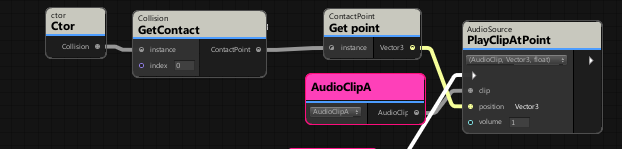
Question; how exactly do you get a clip to play at a collision point of a particle? I'm honestly at a loss.
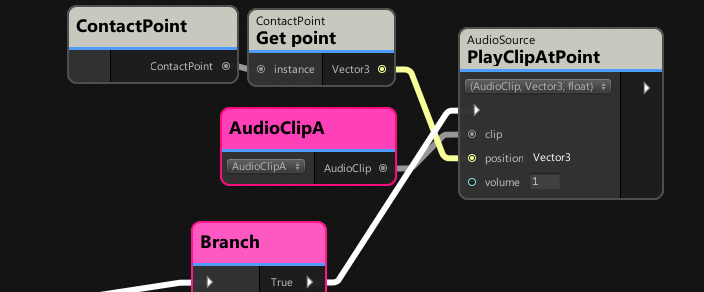
Tried searching around on Google too but I still have no luck. Tried testing around a bit to see if I can get it working where it even ended up looking like this but still no luck.
 grand temple
@glossy sky onparticlecollision doesn't give you the collision point, so you can't do it that way. You could probably accomplish something similar with raycasting though
glossy sky
Ahhhh, alright. Thank you thank you. I'll take a look into it.
fiery yoke
@glossy sky
"To retrieve detailed information about all the collisions caused by the ParticleSystem, the ParticlePhysicsExtensions.GetCollisionEvents must be used to retrieve the array of ParticleSystem.CollisionEvent."
Not sure if that is exposed in Udon. Probably not, but why not try.
grand temple
I tried looking into that a while ago and if I recall correctly, the problem is that particles get stored as a list
things may have changed in the last 6 months though, idk
 tall cairn
Has anyone had to wait a week to see their world in their "Mine" list? I uploaded an sdk3 world as a regular uploaded private world and saw it same day but it's private then I updated that world but uploaded it to Labs and that was last week.. maybe I broke it?
Also do uploaded updates to Lab worlds count towards your weekly upload limit?
flint urchin
Never had the first issue there @tall cairn
And you can update any lab worlds without it counting towards the weekly limit.
scarlet lake
I heard theres a function now to get all the current players in the world? But i can‘t seem to find it
smoky heron
@cunning mist my guess on @proven vapor 's question is that he wants to be able to open a html5 or java based program via Udon.
A decent example of that would be in Second Life, they have the ability to embed websites onto primitive shapes and screens, this uses a built in web viewer that is set in the client.
the issue with that, and what I was looking into when I started toying with the video player in vrchat, is that it opens the viewer directly to the webpage allowing for IP harvesting and tethering of real world IP addresses to avatar names
 hidden mirage
Hello there, do you guys know any good place where I can find some Udon/SDK3-World assets which I can use? I am new to world creation but I always like to be able to use pre-made assets if they exist so I don't have to waste my time making something that already exists.
smoky heron
it also allowed for the artifical increase of viewcounts on videos and advertisement counters
@hidden mirage Unity Asset Store should have a bunch of freebie assets, but that would cover the world and not UDON specifically
fiery yoke
@scarlet lake Should be VRCPlayerApi.GetPlayers or Networking.GetPlayers cant remember which one
hidden mirage
Ok will take a look into this @smoky heron, though, I am more into Udon stuff or prefabs such as Video Players etc.
smoky heron
I'm working on a video player update for "Extensive Video Player" that uses Udon, I'm following many of Vowgan's tutorials to get it working
I'll be giving that away once I am done
hidden mirage
Oh... Cool. Would you like me to test it for you?
smoky heron
sure, when I'm done. its complex and still has some weird kinks to it
hidden mirage
ok
smoky heron
but it allows you to load urls into and out of playlists
hidden mirage
That sounds great.
smoky heron
has autoplay, looping
hidden mirage
One thing I kinda miss is the quality selection
smoky heron
I'm working on the networking now with Vowgan's last livestream as a guide then getting to scrubbing
hidden mirage
If possible
smoky heron
hmmm, I could only assume that would involve changing the resolution
If that is the case I think it is possible
smoky heron
true, this would involve adjustment of the URL string most likly, which is entirely possible
hidden mirage
Would be nice for people with low-end connections
hidden mirage
SWEET
Would it be possible to input a number as well for the volume?
if the user wants to
vapid kettle
Hey guys. I was wondering if anyone knows how to make in Udon a screen which shows camera output
fiery yoke
Look for "RenderTexture" in the Unity Manual
vapid kettle
Thanks! I'll look into it 👍
 hoary echo
I'm trying to have an event trigger when an animated object moves into a trigger zone, but it doesn't seem to want to trigger. I'm using the same graph logic that I used when bringing a held object (key) to a door to unlock it, which I know for sure works, but it's not in this situation.
Any suggestions?
fiery yoke
Why not use an Animation Event if the object is animated anyway?
hoary echo
That is an excellent question
I'm not sure an animation event would work in this situation, the trigger in question is a zone on each floor that an elevator will trigger to open the outer doors
tall cairn
@flint urchin thank you for the reply 
 stark adder
Not sure if this is bug or something but..
When i teleport object using
toTeleport.transform.localPosition = teleportVector;
Some child object inside the toTeleport gameobject dont get their texture teleported.. Objects like triggers/colliders etc get teleported but textures stay on the old place..
Any ideas on what's happening here ?
fiery yoke
99% sure those objects are set to "Static" :P
stark adder
oh that might be it
Let me check 😄 😄
xD yea.. I am soo dumb 😄 I forgot that i had houses made static 😄
 ashen bolt
Would anyone know where would i start looking to animate a large blimp in the sky that moves around a city slowly?
flint urchin
Use Cinemachine looped track + dolly, slow speed 🙂
ashen bolt
Would there be a tutorial example on this already?
smoky heron
Is there maybe a site that explains in detail VRCUrls?
In particular I would like to know the limitations
fiery yoke
They are just strings. With the exception that you cant directly construct them at runtime.
smoky heron
Hmm, well lets look at a case example. In the previous iteration of video players I would be able to pull a video stream from my channel on DLive, in this new case however it doesnt seem to allow that.
So what I want to know is the limitations to those strings, what is accepted as a valid url
fiery yoke
Ohh well in that sense:
If its a direct MP4 or other supported media file link then it should just work. Otherwise it will have to be resolved through YoutubeDL (which currently is in a bit of a pickle)
smoky heron
what is a YoutubeDL?
fiery yoke
smoky heron
Direct mp4 you say... interesting
ah I know this thingy
So it would not be out of the question to say that It is possible to have a file load from my own personal server
fiery yoke
Yes thats possible. As long as users allow "untrusted URLs"
smoky heron
Doesn't this suggest that you could also possibly send data while loading the url?
fiery yoke
Yeah. That is one of the reason why VRCUrls are used instead of just strings and why allowing untrusted domains is an option you have to actively select. To make it harder to send User-specific details to a web server.
smoky heron
well here is the thing, You need to connect to a server to pull the data, VRCUrls are just string yes?
so could you not append the video path with additional data and have your server custom made to handle that data?
smoky heron
this opens up a lot of neat possibilities.
fiery yoke
And you can only send pre-defined statements
not generated/collected data
at least in theory
smoky heron
Ok pre-defined, have a reference to that?
fiery yoke
Well thats the point of the VRCUrls
You cant send the username of someone to your server, because that would require that you construct a VRCUrls with that username somewhere in your GET request.
And thats not possible. Only manually by the user themselves
fiery yoke
Yeah and how would you construct that Url at runtime? :P
I dont think you get my point at all...
smoky heron
have the webserver setup to cast aside the first 4 segments
can you not? I seem to have no problem storing strings and pulling them from arrays
I made a playlist thingy based on that
fiery yoke
Again. VRCUrl is only a string in disguise.
You can store them in an array. But every VRCUrl you put in your world will be static aka pre-defined.
You cant get the username of someone and then construct a URL because THEY CANT BE CONSTRUCTED AT RUNTIME IN YOUR SCRIPT/GRAPH
smoky heron
maybe I don't understand...
if that is the case why can you enter a url into a field and load it if it needs to be preconstructed?
fiery yoke
Input Fields are the exception. You as a user need to manually enter a URL into those fields.
The point of this security meassure is to avoid generating urls at runtime to extract/harvest data and sending it to a server from inside VRChat.
If a User manually types in a URL then its their fault if they also conveniently put their Username in the get request :P
smoky heron
Maybe if I sacrifice a goat....
Wait Wrong chat....
Ok so there is no way to alter the input field either?
I think I ran into that issue while I was trying to store data
I know it can be cleared.
fiery yoke
No idea what you mean with "alter" but no.
Video Players have mainly two security features:
- No runtime generation of URLs except for manual Input Fields.
- Users have to manually enable "untrusted domains" (currently there is a whitelist of trusted domains e.g. youtube)
smoky heron
Seems you are right
I would have to be crazy to figure out how to still send data.... but then again maybe...
fiery yoke
Again you can. Just needs to be pre-defined and all users must allow untrusted urls at the moment for it to work.
smoky heron
well I just figured it out...
kinda
You need to predefine every letter, then you create a for loop cycle through a name, B send url for B
A send URL for A
etc, this would be wholey unmanageable
fiery yoke
Yeah people have considered that, but it would be incredibly slow and require some type of Acknowledgement system so you dont have data arrive out of order
smoky heron
which would involve yet again setting up generated data\
fiery yoke
No? You would just sent one symbol. Then wait for an ACK then proceed
smoky heron
I look forward to when you can actually store data, In Second Life I have made full blown game systems inside of huds
so what are the Devs actually fearful of anyways?
fiery yoke
Storing data, means writing to hard drives. Writing to hard drives is scary security wise.
smoky heron
what kind of data can be found that isn't already available via code
fiery yoke
wat?
smoky heron
well what I mean is the data that you would be able to store is data that can already be retrieved via code
usernames and such
they don't give you access to the scary stuff like IP addresses
fiery yoke
The problem is injecting malicious or rogue data and writing it directly to your harddrive. People have found loopholes in much tighter security. Imagine a computer worm or something like that spreading through VRChat. That would be a PR disaster. So the best security measure against that is just not allowing it in any form.
hoary echo
Ain't nobody got time for that liability
fiery yoke
Admitted writing to AppData is pretty safe usually
But yeah exactly. Liability is to be avoided.
smoky heron
the issue is that is assuming that the people entering the world are the ones who are storing the information
when that wouldnt be the case, the information would be store on whatever the url is that the world creator pointed to.
fiery yoke
Well yeah thats how that works. VRChat worlds are not dedicated servers that you join.
They are simply local instances of the same scene and the connections are handled by Photon.
 oak trail
To be fair, it's not exactly easy to pack malicious data into a Unity package, since all the code that's running is (mostly) limited to Unity itself.
fiery yoke
Theoretically yeah they could have a system where all of the world data that is to be saved gets sent to some other server that you as the creator operate. But then who handles that connection? Who makes sure that its secure? etc etc.
hoary echo
I'm still fighting with this trigger system, if anybody has any tips. I can't get it to function OnTriggerEnter or OnCollisionEnter (using graphs I've used in the past), and I was able to get it functioning (sort of) IsInTransition on Update, but the timing would be difficult to get down right. Graph that I can't get working is below:
smoky heron
well if it can't be d0ne legitimately due to unwarrented concerns you can only rely on hacky methods that such but get the job done.
Helpful if it isnt insecure information it shouldnt be an issue.
If it were sensitive data like IP addresses and such then yes it is something you need to be concerned over
but we are talking about data that the SDK limits us access to to begin with
fiery yoke
If you send data to a server then the IP will always show. Unless it goes through some proxy (which VRChat definitely cant provide).
So if you as the world creator tell the user to send their Username then it will be attached with their IP. So yeah there you go.
smoky heron
last I checked you can't harvest IP addresses
fiery yoke
You can. Its not easy. And obviously you shouldnt. A. Because its ethically wrong B. Because its against ToS and probably some digital laws.
smoky heron
we have already tried that method to increase view counts on livestreams
fiery yoke
Well but thats intentional.
smoky heron
and proves that IP harvesting doesnt work
I looked into this as soon as I found out that we could connect to videos via the SDK
in the past in my SL development I used to make billboards with their web on a prim setup and Harvest IPs to get payouts via PPM
I thought it might be similar here where you could artificially increase views to videos and get added ad revenue
so I gave it a shot and found that there is something in place keeping the IP from being shared
which means that concern seems to have been spared
it does raise another question though
fiery yoke
No idea why it should, since it will directly send a HTTP GET request from you to the destination URL but ok. And yeah I wont talk about this any further because attempting any of this is against ToS.
But my point is that there is active security measures against this sort of action.
smoky heron
if the users IP address is not being shared then that means it would more likly be routed through somewhere else.... which concerns me more then a direct connect
who is actually routing those url requests?
fiery yoke
it doesnt. it never has.
As long as the destination server doesnt have any proxies it will go directly through.
smoky heron
Then the fact that it doesnt makes no sense
fiery yoke
All I can say is that you shouldnt even try.
Even tho I do agree that some sort of permanent storage per world would be sweet.
But again way too much liability to handle.
smoky heron
I have a friend who confirmed that viewers in the VRChat world did not in fact increase their view count
the whole point is that there i no data concerns here if the IP addresses are not harvestable cause the only data that can be accessed is what is allowed to begin with
it just tears down the narrative
edgy moss
In one of Momo the Monster's tutorials, he is working in an Udon graph and uses search on Noodle Drop, dragging from a game object, and when the search bar pops up, he types in "SetPosi"... and Transform Set Position pops up as a node option. But it isn't working for me. I have also tried searching for it with the space bar. I have searched "transform" "set" "position" "set position" "setposition" etc etc, but the node doesn't seem to exist. Did it get renamed?
 tall vault
@smoky heron It's probably something to do with how the web request was made and handled. For example the video player may not have followed any redirects from the web server that was handling the request, or the video player might not have sent a request at all if it didn't have a file extension that it could work with like .mp4
flint urchin
Both have a strength of 1
But changing overall gravity in the physics engine, not sure if we can. So can’t answer you on that
ancient spindle
ok, i toyed around with it more, and they both work but only when they are separate from each other. meaning i cant use these 2 graph programs in the same world for some reason. the more complicated one seems to overwrite the other one. which i cant wrap my head around. lol
flint urchin
I’ll give it a look once I get my breakfast. Shouldn’t be any issues with it being on the same graph
ancient spindle
it seems to conflict with any other graph program that manipulates the physics engine.
ashen bolt
can I move an object with Cinemmachine ?
and if so is there a guide or a starter point somewhere? a video maybe? Just in need of figuring out how to get a huge blimp to move around a city. I looked up cinemachine was only like a active camera type of thing and that isnt what im looking for. but maybe im wrong.
 runic charm
Getting FlatBufferNetworkSerializer error, don't know how to encode Gameobject. Worked fine in 1 client builds, but noped out on 2 client builds. Anybody knows a common cause for this error?
...got it, syncing GameObjects are no go
fiery yoke
What would "syncing GameObject" even mean
proven vapor
@smoky heron Well, more precisely, I want to make an async http request to a server on the internet with a JSON body. GET/POST, that's it for now :).
If I could do that, I could bring my evil plan to fruition. @smoky heron
I promise I will only use it a little bit, VRChat, I swear!
runic charm
I was passing gameobjects for pooling purposes, and I think I tried to sync gameobjects preemptively in one of my graphs lol
scarlet lake
Is there a way to change the Target in the Final IK Lookat script using Udon?
i'm guessing i can't touch them since they aren't built into unity
can't even animate it wew
can't seem to animate anything on it besides 'enabled' and 'fix transforms'
scarlet lake
i don't know if that message went through
this is the only normal udon video player component
and it only takes a URL rather than a file
 floral dove
@edgy moss - Transform.SetPosition still exists under its name. You'd need to drag from a Transform port to get it. Make sure you don't have any nodes selected when you open search and type 'Transform'.
@scarlet lake - Udon doesn't have any hooks for Final IK. Looks like I'm maybe missing a message about the video player, but we don't currently support bundling a video file with your scene if that's what you're looking to do.
scarlet lake
ty Momo
native estuary
@floral dove is there any plans to support local videos? Since it's very useful in some cases, and used to be possible with sdk2.
floral dove
@native estuary we're discussing it. Local only works with the Unity Player, and we'd need to set some max size limits, but we certainly see the utility.
native estuary
Nice 👌
 faint jewel
Going to ask here but is there any reason an animated sky box would be lagging my game in VR mode but not desktop mode.
 verbal socket
Dunno if i should ask here but is there a obj somewhere or fbx thats the exact size of a vrchat world portal ?
I kinda wanna make an ring that fits around it sorta like a stargate portal
 weary lotus
I'd like to have a gameobject match the player's location. Any ideas on how I'd achieve this? 🤔
floral dove
@weary lotus - check out VRCPlayerApi.GetPosition
set the GameObject's transform's position from this position ^
weary lotus
Brilliant, Thanks!
One more question guys: What exactly does the Update event do? Does it call every frame, or is it something different?
hoary echo
Every frame
weary lotus
perfect, thanks 👍
ashen bolt
Is there anything like that but not for getting a players location just go location to other locations and looping? Trying to get a object repeat and loop on certain positions in a world @floral dove
weary lotus
I'm trying to make a gameobject (Self) Stay in the same location as the player. Can anyone give me any suggestions on this?
hoary echo
Is this a unique object per user, or an object only the local player sees on themself?
Don't quote me too hard as I'm a bit of a noob still, too, but if it's the latter I'd just run it on update and use get localplayer
 burnt jackal
Changing what the tool tip says used to be easy in the SDK2. How would I go about changing it in Udon? I'm trying to make this say the location this button teleports you to instead of "use".
Also, how do I adjust the range you can interact with it? The higher buttons are harder in VR.
trail shard
@fiery yoke Sorry for the @, I'm testing your chat prefab and it seems to work fine, but typing in desktop and pushing control keys makes you move. is there a way to disable that?
like pressing wasd while typing
floral dove
@weary lotus - your graph says, in essence: "When a Player joins, get their ID, then use that ID to get the Player again. Get their position this one time, and do nothing with it. Then, every Update, set the position of this GameObject's transform to the position of that last Player." I really don't know what that position variable will be when Update runs.
I recommend you start by explaining what you want to happen, because I don't think it's what I've described above. Once you can explain it, we can break it down into a program
runic charm
Oh, the position of the player is only called once? I'd thought it'd be updated on every update
If they stored the playerAPI and used that var to get position, would that work?
About flat network buffer serializer... it tried to cast string into Vect3 and got an error? I was syncing a Vect3, yes, but I don't think I set it as a string... Any pointers on why?
floral dove
Well, that graph only gets the Player during the OnPlayerJoined event and doesn't store it anywhere. I'm honestly not sure the results of that, but can't help further until they can explain what they want to happen.
What are you trying to do with the serializer? It's not really meant for direct use.
runic charm
I'm not actually trying to access the serializer. I was just trying to sync a Vector3, but that popped up
(when I turned the Vector3 sync off the error went away)
floral dove
hm - sounds like you might be accidentally passing a string into the value before it syncs? Can you share your graph?
 severe tree
@burnt jackal if you haven't gotten it yet you need to switch to debug mode. Right click on the inspector window's tab and switch to debug mode, you should be able to find the text and interaction distance from there.
edgy moss
@floral dove oooooooohhhhhhhh I missed the "drag it's transform" into the graph. Thank you so much!
burnt jackal
@severe tree Okay, thanks
hoary echo
@scarlet lake I got around this issue by making the trigger box as short as possible, so it doesn't overlap any of the buttons
grand temple
Yes, the collider that surrounds the area has to be on the mirrorreflection layer
The reason is because desktop is only a raycast, while vr is both a raycast and an overlapsphere (or something equivalent)
The overlapsphere catches on the area collider while the raycast just goes right through
 lusty glade
Is there any way to invert culling on a camera in Udon? I can invert its Projection Matrix, but all culling gets inverted along with it. OnPreRender and OnPostRender Events are supported. This is what I was using for reference.
http://wiki.unity3d.com/index.php?title=InvertCamera&_ga=2.58866221.1037238211.1604974258-1510315468.1551906401
grand temple
Sounds like the #1 reason to do that is to make a mirror, is there some reason you can't use the vrchat mirror that's already provided?
 keen mist
Hi, how long do I have to play to be able to upload my avatars?
 acoustic delta
@keen mist You are able to upload avatars as soon as you go from Visitor to New User status. This is not based on playtime (so AFK:ing won't work). By playing the game normally, making friends and visiting worlds, most people generally get it within a few days.
keen mist
Thank you
fiery yoke
@trail shard
Theoretically you can disable player movement a little bit, but its kinda janky and there is no way to disable proning and crouching for example.
You can only restrict WASD movement and Jumping. Thats why I didnt initially put it in the prefab as well.
I also wanted to make a physical Keyboard to use in VR, but kinda dropped that. So yeah you would have to expand on that yourself if you want any of that.
acoustic delta
@fiery yoke Back when UIShape didn't work I made an Udon keyboard which disabled moving, and countered chrouching and proning by calibrating the different heights, and then teleporting the player up whenever the distance between head and position was reduced. The stutter is only visible for 1 frame. It is not a pretty solution, and requires per-avatar calibration, but works in practice.
(Back then we didn't have "isVR" node, so got an unpleasant surprise when logging into VR.)
fiery yoke
Yeah I still think thats jank^10. VRChat was never built to have an in-app text chat, so its reasonable that this isnt supported. But I dont fully understand why it shouldnt have a text chat, because not every wants to or is able to talk at any given moment.
weary lotus
How can I force a player to respawn?
flint urchin
Use TeleportTo
dapper lion
hello, im trying to replicate a teleport graph by vowgan rn and im not sure how to create a "get variable" node. if that is even considered that in graph?
flint urchin
For now, you can move the pickup below the world respawn height (set in the scene descriptior)
that will make it respawn back at it's initial point
Generally instant. Non-owners of the object might see it somewhere else for a few frames, but yeah
dapper lion
this is the graph I'm using to teleport players. however, it doesn't work in game. what should I do?
hoary echo
@dapper lion You have Get Position and Get Rotation... But you've got nothing that you're pulling that information from. You need to have an object or some point of reference to get those two variable from. You also don't need to set LocalPlayer.
This is my script for teleporting a player, using an empty gameobject as the target:
https://media.discordapp.net/attachments/657394772603830360/766084989623599125/unknown.png

 stable nebula
Does anyone have info on a "Mic Amplified Stage" Udon script? I know they are out there, and would like to get it for a world I am making.
Is there a Udon prefab pack I need to get?
stable nebula
Ok, shifting the question... I found out there is a graph in a update that added the ability to change player voice gain and distance, but when I look for it in the graph options, I don't see it anywhere. I do have a single CompilerExeption Error saying "***Failed to Compile, couldn't find a nodeDefinition for 'VRCSDKBaseVRCPlayerApi._SetVoiceDistanceFar_SystemSingle_SystemVoid' ***"
I tried re-importing the SDK to try and fix, but still getting the error.
I'm thinking whatever that error is, is stopping me from seeing any of the voice graphs i need.
scarlet lake
is there a way to detect a player's gestures?
i want to detect when a player is doing Thumbs Up
 digital orbit
I haven't been here in awhile - Are there any updates / changes with regards to persistent storage of data (like saving things for users in a world)? Or is it still the same as before - nonexistent?
severe tree
Still nonexistent for now
smoky heron
Has there been any updates as to when vrchat will be able to animate avatars that sit on an object again?
 floral bridge
im so confused on mirror toggle in udon... the tutorial im watching is calling for things I cant find... Does anyone know a write up on how to toggle something on/off ?
floral dove
@floral bridge - check out the ToggleGameObject example on the MirrorSystem in the UdonExampleScene that comes with the SDK
if you want to change variables within a graph, SetProgramVariable is overkill - just drag the variable from the Variables window into the graph. I recommend you take a look at the official docs and tutorials here: https://docs.vrchat.com/docs/getting-started-with-udon
 devout owl
So one of my vrchat undon graph disappeared for some odd reason and the script changed to text than what suppose to be a trigger, this the tutorial I found that worked for me https://youtu.be/A_tmJHGlR0M second I m trying set up a UI in which if person clicks a button is goes to a previous image or if the press next it goes to the next image and could use some help that to , Much appreciated. Was working on UI using this tutorial and seems to have messed up the world I m building for some odd reason https://youtu.be/FWU7ckfkUrw

Since information about this was scattered, I decided to do a quick tutorial once I figured it out. I hope this helps anyone as confused as I was!
Music is "Timetravel Dance" by Serakina.

Interacting with modeled buttons is fine, but when you have a lot of buttons and such all in one place, you may want to integrate them with Unity's UI system. Here's how you go about doing a basic UI setup with custom events!
00:35 - UI Canvas Setup
05:40 - U# Slider Script
...
 olive jay
Heyo quick question; I think I'm either confused or not understand this properly. When it comes to the new udon video player and it's target audio sources array, am I able extend that array and put in more than one audio source within it to play the same audio? Something like setting up different speaker positions throughout a hallway so it's just not global audio or whatnot.
I've tried the simple approach of just increasing the size and slapping another audio source into it -- pretty much a duplicate of the one that's already working -- but the only audio that plays is from that original audio source that was part of the system.
Am I just missing something? Or are the additional slots either not functioning or just not meant to be something like that?
Side note: It only seems to work with the first of the array and not the rest
floral bridge
is udon now the ONLY way to make buttons?
devout owl
@floral bridge don't know
grand temple
@floral bridge if you don't want to use udon you can still use sdk2. But if you use sdk3 then yes, udon is the only way. However you can also use unity ui buttons to call udon events, if that's what you mean
runic charm
Greetings developers! I'm looking into syncing, masters, and owners right now. What are the defining features of these two? If I transfer ownership via Udon network.setOwner, what would change - especially if that new owner disconnects
oak trail
You can't import something from a package if it's already in the project, unless the file was updated.
Stuff like that is why deletion-reinstalls are generally preferred for the SDK, the Avatars 3.0 SDK is the only exception to that, because you'll lose any custom state behaviors if you do that.
scarlet lake
Ah thanks
 raven peak
@runic charm vrchat is using a peer to peer connection to connect players together. The master is the one in charge of the instance you are in. Since there is no central server syncing the instance it is handled through ownership. The person who has network ownership of a object syncs its values to everyone else. By default the master has ownership of everything.
If a owner of a object leaves the instance ownership reverts back to master.
scarlet lake
Finally uploaded world, after fixing my imported SDK, but when I join the uploaded private world it sends me back to the VRC Home world
weary lotus
Not sure if this is possible or not, but I have some avatars with guns, and I'd like a world to call an event if one of them shoots the other
hollow juniper
Does anyone know how to limit range of worldspace ui ?
fiery yoke
You cant. At least not that I know of.
urban pivot
Could you do it with LOD?
fiery yoke
UI are not meshes (or at least none that you can actively control)...the only way would be to have colliders that block the raycasts.
unborn hornet
I've seen uis in worlds that kinda dissolve when you get far enough from them... Not sure if that disables them or not though... Never thought to check.
flint urchin
Use a Trigger Collider on mirrorreflection and enable/disable the raycast when they enter the range you want.
devout owl
I having two problems one is that I can not open undon graph be nice if I did not have to redo everything since I used it Udon graph to teleport avatars and this picture is the other thing and it kind of acting like undon script did not exist and there no additional assets that I could find that should be interfering with it, so much help is much appreciated.
flint urchin
Check your console for errors
devout owl
Where is the console window still trying to find so I can see for myself @flint urchin
flint urchin
Bottom, together with the Project one
Default set up that is
if not just go Window > General > Console
devout owl
Thank you but I have no errors
flint urchin
If your SDK only have Utlities, then you got errors. Restart Unity
devout owl
I’ve already done that same thing
flint urchin
Make sure all three indicators on the top right side of the console is marked
If there is absolutelly no errors, import the sdk again.
devout owl
I see none of that so let me try reimporting sdk
Nope may need to copy the project start new and import
@flint urchin
flint urchin
Probably
devout owl
I actaully deleted the the sdk in the main project then reimported back in and that seemed to work will need to redo my udon stuff but at least it works
now I cant even open the undon graph
never mind
@flint urchin I found something interesting I apparently have compiling errors with in undon
flint urchin
So there was errors then yeah. Well got you figured it out then
devout owl
ya the problem is dose not show up in the console and its impoessible for me to open the udon graph to fix anything as of right now something to do with the scripts the world is not very big either
this what I have @flint urchin
 errant pilot
So I got a problem that needs a solution. Essentially I have multiple areas in my world that has different things enabled. If the player respawns, using the menu, from a different area, then certain game objects wont be present and will cause problems. So the first attempt was to change the players respawn point at startup, but I am clueless on figuring this out as vrcplayerapi doesn't have a function to change the local players spawn location. Am I missing something or is there a different way to handle this? Thank you
I also attempted to set a collider at spawn, so instead of changing the player's local spawn point, it would instead check certain things in the world for changes and change them accordingly, however, ontriggerenter function is not working at all either so I am at a cross point. If I can change the player's spawn point, that will be the best solution
errant pilot
Nvm... crisis adverted.... Just change vrcworld position during runtime... I cannot believe i didnt think of that
ancient spindle
out of curiosity, would it be possible to make like a "voice box" in udon? like, if a player enters a room, only people in that same room can hear you sort of deal
 dusk tendon
does vrchat worlds have support for limiting avatars?
I had some ideas I wanted to do for a world but it would end up being pointless if players can just use whatever avatar they want
 dim horizon
Been asked before, general consensus was No. A few people seem to really be against that.
Its a shame because I could really see it benefitting certain worlds, and its not like every world creator would do it. Only the ones that found it necessary.
dusk tendon
so basically actual content creation to advance this into a actual game gets stalled and halted by a non sensical want. A same want that ignores proper optimization issues and is merely focused with sitting in front of a mirror 99% of the time....
errant pilot
You can force a change in someones avatar, just not keep it. Put up disclaimers in your world to warn people on using unoptimized avatars/unwanted avatars
dusk tendon
there probably is a work around but its not talked about publicly I assume. Probably in fear of it getting patched
errant pilot
I dont know of such work around
dusk tendon
its cool I just won't do my idea in vrchat is all
dim horizon
Basically yeah. The main problem that comes from this though is some people will do anything to have an advantage if its a world where you compete with someone else, so if its death match or something, some aren't gonna follow the suggestion and use tiny avatars
dusk tendon
TBH the way avatar managment started off sort of set the future off really badly
errant pilot
Yeah there is no way to enforce it unfortunately. You could make the game break when avatars are smaller/larger
dusk tendon
I miss the good ole days of pc were content creation wasn't held back honestly
Like Brandon said
if you gave support for it its not like every person would suddenly deny custom avatars
dim horizon
Exactly
dusk tendon
when 99% of worlds are chat focused only
it seems silly that people are then worried about the 1%
you can go to any other world and be that special random anime character
but like brandon said it does break certain gamemodes
not to mention certain things I would like to do couldn't be done on other avatars and would require it
meaning my whole idea just get thrown into the trash
dim horizon
Yeah its a real shame, but there's a few who REALLY don't want that so they can be special
dusk tendon
maybe I am weird but i come from garrys mod where you could just make whatever you wanted lol. The idea of limitations in a game like this seem silly.
i've coded Call of duty in garrys mod and began coding Splatoon also lol
I am real fearful of vrchat become to much like Second life
second life is so restrictive with everything its not funny
also its scripting language is GARBAGE
can't make a proper list or do proper data flow at all between entities
 mild fern
i am finally caving and can't figure out what i am doing wrong here
i can get the enable voice to work on node graph but when i leave the trigger nothing happens. at least here with udon# it's making my brick disappear when i leave the volume
grand temple
@dusk tendon if you mean limiting people to one specific avatar, super easy just keep activating a pedestal.
If you mean a pre-defined set of avatars, you can put special colliders on those avatars that gets set out to some specific location really far away and really specific. Then all you gotta do is look for a collider at that location and if it's not there, switch them back to an approved avatar.
If you mean limiting by something like the performance ranking, no
@mild fern there are a couple problems with that.
First, you have to understand that this code is running seperately on everybodys computer. When one player walks into the collider, everybody detects onplayertriggerenter. Then if you broadcast without checking anything, that means every single player is broadcasting back out to every single other player, and that's going to cause a lot of unnecessary network traffic if you have a lot of players.
Second, changing the voice settings of the local player won't do anything because you cannot hear yourself. Voice settings affect your perception of other people, it is not an absolute value that everybody agrees on. Onplayertriggerenter already tells you who entered the trigger, so all you need to do is change the voice settings of that player. The problem is that if someone joins late, they won't see the player walk into the trigger. They will only see the change after the player leaves and walks back in. There are lots of ways to fix that though
 tall pagoda
I am trying to find the VRCWorld prefab, it isnt under here or Assets -> Create? Where is it then?
grand temple
@mild fern tldr is you don't need network events , just modify voice settings of the player that enters the trigger. Mostly everyone sees the player enter, so they all change how they hear that player.
@tall pagoda it's in the normal assets. It's the window at the bottom of the screen that contains all your scripts, models, prefabs, etc. There's a search bar on the top right of the window, just type vrcworld
unborn hornet
I'm sure there could be some math calculations on the avatar bones to check for height and dis-allow a player to join a match if too small/big...
grand temple
That would totally work too. Do something out of the way like make the left pinky finger 53 meters long specifically, no more no less
 grave basalt
Hi, I have an issue where when i try to upload my world nothing happens and it says NullReferenceException: Object reference not set to an instance of an object VRCSDK2.RuntimeWorldCreation.Start ()
im also using SDK3 and have never imported SDK2
floral dove
@grave basalt - do you have a VRCWorld object in your scene, and does it have a Spawn Point set?
grave basalt
yes
floral dove
does the UdonExampleScene upload correctly?
grave basalt
i havent tried that yet
floral dove
give it a shot!
floral dove
do you have a VRCSceneDescriptor on your world object? I think that line in RuntimeWorldCreation is trying to access it.
grave basalt
i have it on VRCWorld
im very new to this so i corrupted my world and im remaking from my last save lol
 atomic shale
Heyo, I'm trying to add sounds to the default gameobject toggle graph. I'm wanting to add a 'switch on' and 'switch off' sound when it turns on and off but everything I've tried so far isn't working. Very new to Udon so I'm not sure how I should be setting this up.
atomic shale
Hm, well I did get it playing the switch on sound on each interact..
runic charm
This works to update the score display, but...
This doesn't...
Why is this so in Udon? Even though the nodes are the "same" kind
severe tree
I've come across use-cases where it would be easier to do that as well but Udon doesn't seem to like it. The other way to set it up is to put the set text into its own little custom event (UpdateText perhaps), and then call the event from the two different spots. It cleans up the graph a little nicer
cunning mist
I haven't played around much with making multiple flows go into one node, but honestly I wouldn't trust it.
On a side note, you don't need to set testValue and testValue2 to be 0 on start, as that's the default value for Ints. You can also change their default value by going through the drop-down in the Variables tab to see what's up.
 pallid mango
If you want to use a value in two different places, make it a variable
I don’t know why what you’re doing wouldn’t work though, maybe the compiler just doesn’t handle it 
I guess in the code version of this you can’t have two different integers that are just somehow the same address without making it a variable
Otherwise it would need to be some pre-processor directive
flint urchin
That's youtubes doing. Not much you can do about it atm.
That or use your own hosting option
unborn hornet
Also, be aware that Youtube is having a lot of video issues apparently. From yesterday: https://twitter.com/TeamYouTube/status/1326681978037444608?s=19
unborn hornet
That or use your own hosting option
A general reminder: https://docs.vrchat.com/docs/www-whitelist
Users need to individually enable untrusted URLS.
VRChat
The following services are on the video player whitelist. If a service is not on this list, it will not play unless "Allow Untrusted URLs" is checked in Settings. Whitelisted Services The services listed below are inherently trusted and are permitted with our default URL white...
 shut badger
Hey so just imported the world SDK 3 when I create a udon behaviour script for a button I want to make, when every tutorial has the "Open Graph button" mine has this. Irony is I don't even think I've messed anything up and followed them to the exact letter and haven't moved anything from the default places. Unity version is correct 2018.4.20f1 and it's the latest SDK (SDK3 Worlds) anyone else had this issue, I literally just imported it.
 steel nova
this script errors out, network event is working though. is this a bug?
@shut badger that's an assembly program, not a graph. Make a new Udon Graph in your assets and just drag it in
floral dove
@shut badger - make sure you have 'Graph Program' selected and not 'Assembly Program' when you make a new Program. Unity sometimes defaults the dropdown to Assembly, which is what happened in your case.
@steel nova - your console should have some more info about which UdonBehaviour caused the exception, and what it was doing
steel nova
the animator.setint behavior made the script hault
I'm attempting to change animator parameter on network event
the event is going through; its just haulting the udonbehavior when it hits the setint function
shut badger
Ok thanks! 😁
scarlet lake
How do you bring up the Debug log in VRC? I've tried all the Right Shift + ` + numbers, but none of them are correct
i got it to show up a couple days ago
i have it enabled in the launch options
but i'm launching via Unity as a test build
??
 dense nimbus
Hey guys, does New udon player work on Quest? Documentation and unity warnings about wrong shader confuses me :( ive tried to Just build and check, but player Just shownig first frame of video and thats all :/
runic charm
I haven't played around much with making multiple flows go into one node, but honestly I wouldn't trust it.
On a side note, you don't need to set testValue and testValue2 to be 0 on start, as that's the default value for Ints. You can also change their default value by going through the drop-down in the Variables tab to see what's up.
@cunning mist Interesting! Does this only apply for basic types like int, float etc? VRCPlayerAPI seems to bug out on me when I wanted to check if it was empty...
cunning mist
Correct, this only properly applies to variables native to Unity. Ints, floats, strings, they all have a default setter. However, since VRCPlayerAPI doesn't have a player to grab onto, instead of being Empty, it's Null.
scarlet lake
I reinstalled my game and deleted my game folder
launched via a .bat with all the commands in it
still no debug menu
not really sure what i can do beyond nuking the game and reinstalling
which i've tried
I tried nuking and reinstalling again, this time also deleting the VRChat folder in AppData
still no debug menu in-game
and it remembers me, so it's not getting properly nuked
but i don't know what other location should be wiped
removed the vrchat entry from the registry
still not working
floral dove
@scarlet lake - do you have the full path to your VRChat executable set in your Control Panel settings?
floral dove
hm, I see. Sounds like you've tried launching with a batch file that passes the flag --enable-debug-gui, which should bypass that issue. I've never seen this issue. I just tried launching via batch file with the latest client and found it working for me.
are you using a non-US/English keyboard layout?
ancient spindle
is there a way to lock a pickup object to a constraint in udon?
what im trying to do is make a door that opens based on where the position of a players hand is. and im locking a pickup object to a joint constraint of the door. but the door comes off the hinges and moves to the players hand and locks back into place once a player lets go.
scarlet lake
I have six warnings like this, but on the objects there's no behaviours, and there's also no way for me to find what it's referring to other than it specifies some object names, any ideas?
ashen bolt
Hi all, i was brought here after asking in #user-support-old
I have a problem that does not let me upload my world. I have the right unity version, i imported post processing v2 from both unity package and package manager but cannot upload. These are the screenshots

If your wondering what the first error says Assets\PostProcessing\Editor\PropertyDrawers\MinDrawer.cs(6,34): error CS0104: 'MinAttribute' is an ambiguous reference between 'UnityEngine.PostProcessing.MinAttribute' and 'UnityEngine.MinAttribute'
If anyone can please help. I would much appreciate it
 dense halo
@ancient spindle I'm trying to create a door that does the exact same thing, as I've definitely seen it in maps. Maybe you could put a collision cube on the handle and do a detection based upon the players hands? Then from there either manually add a rotation or partially play an animation? I'm not exactly sure though.
scarlet lake
stupid question since i haven't touched syned stuff at all in udon yet, but are playertags synced always?
fiery yoke
They are local.
scarlet lake

i'm terrified of touching synced stuff wew
is there a nice resource on udon syncing?
scarlet lake
one thing i'd like to do is have playertags persist
so you leave the instance, return, and it remembers what you did
fiery yoke
Yeah. No. Not possible. And probably wont be possible for some time if even ever.
scarlet lake
ever? we have worlds like that Noir one that you can rejoin and the world sets itself up to get you synced up
i might be lacking some crucial understanding of how it works
but i envision passing the playerlist from master to master
and if you leave and rejoin, you get the list from the master
fiery yoke
Networking is indeed a very deep rabbit hole.
And to answer that:
As long as the instance still has someone in it, there is always someone that "knows" the current status of the world. Thats why you can rejoin someone and it will sync you up with the master. I thought you were talking about leaving an instance and joining a different instance of the same world.
fiery yoke
Well you can only "pass" values via Synced Variables. So you would have to also hold them in variables, at which point there isnt really a need for them to be player tags. And that gets pretty complicated to impractically impossible.
scarlet lake
essentially, my world has an npc in it that you can bully a bunch until she stops responding, and i'd like it if, if you leave and rejoin, she's gone and replaced with another npc telling you to leave
fiery yoke
Again: Only as long as someone is in the instance to "remember" everyones status that will work. You will need individual counters for every possible player. As I said: Pretty complicated.
scarlet lake
ook
maybe i'll hunt around to see what info on syncing i can find
thank you help-sama :kannabear:
steel nova
what if you had headless clients populating an instance 24/7 🤔
steel nova
but why
it seems like a solution for people really needing it; i can't see persistent vrc networking ever coming anyway
 vagrant coral
Quick and nasty lazy question! Is there a node to detect if the player is moving? like using the thumbstick to move?
fiery yoke
Dont think so
vagrant coral
i know we got like "input nodes" but unsure how accurate for every headset those are
fiery yoke
Yeah input in VRChat is...a mess
scarlet lake
is there a way to speed up the time it takes to get into play mode?
like, is it significantly faster on an ssd?
it's not like it's taxing the system but it takes about a full minute to Play
steel nova
i have mine on an nvme and its never taken over 10s... idk 😛
scarlet lake
How do I reduce the number of shader variants it needs to compile?
also things seem quicker now on my ssd 👍
scarlet lake
How do I keep this checked? It unchecks itself every load and even just now after vrchat crashed while loading the world after a test build, it's unchecked itself
 calm ruin
Hi. Every time I try to locally test my world it boots up VR chat and takes me to my home world instead of the world I'm building. I added a VRCSceneDescriptor, and a spawn point, and added the spawn point to the descriptor object. I thought that was all I needed to do. I literally just started so I might be missing something, but online docs aren't helping so some help would be appreciated!
floral dove
@calm ruin - have you checked the settings for the path to your VRChat client?
https://docs.vrchat.com/docs/using-build-test#setting-up-your-settings
 gray cloud
Ok weird problem here
Getting errors on build and test related to something already existing ?
also when i go up to the VRC SDK tab theres no control panel option
just utilities
the error unity is giving me relating to a .asmdef file already existing doesn't make sense as when i search its name it only show one file existing
this error is seemingly preventing me from updating my build and test..?
 bronze light
Unity NavMesh question: is there a way to let the agent run off cliffs?
stark adder
Why is OnPreserialization called 4 times while OnDeserialization gets called once
calm ruin
@floral dove that worked, thanks man!
scarlet lake
does Udon support enums?
fiery yoke
Only inbuilt ones. Not custom ones.
scarlet lake
ook ty
cunning mist
@bronze light What you're likely looking to use is a NavMesh Link. Brackeys discusses them in the first half of this tutorial, though note NavMeshs changed slightly between 2017 (the one in the tutorial) and 2018 (the one VRChat uses)
https://youtu.be/blPglabGueM
Learn how to link together surfaces and how to add an animated character to our Agent.
This video is sponsored by Unity.
Watch on Unity's website: https://goo.gl/2UJZhn
● Example project: https://github.com/Brackeys/NavMesh-Tutorial
● Documentation: https://goo.gl/M68WGm
♥ S...
gray cloud
hey I need help with something weird
when selecting build and test nothing happens :(
cunning mist
Does anything appear in the console as an error?
 rotund lion
So if I use a synced variable will that make something happen globally or will it still be local? My goal is to have a button spawn an object globally but I'm not sure how syncing works.
bronze light
@cunning mist Ta I tried it out but it doesn't work ideally. Thanks anyway
 warm cave
What may be the best way to execute a a timer that runs every minute once active for a set amount of time, mostly in terms of syncing so it executes for all users at the same time
rotund lion
I have no idea how to do that... ech
scarlet lake
is there like any documentation for udon bytecode
 surreal scarab
Hey! can anyone gimme a quick bit of help? i wanna basically use a trigger like in the vrchat official door tutorial on youtube, but instead of using it on an all-player-basis, i want to do it only for the local player. im trying to hide a game object for the local player when they are inside a trigger. is that possible?
i have this so far as a quick little example, basically just setting it active when outside of the trigger, and inactive when inside of it. just wanna do this for localplayer though if possible
scarlet lake
When using primitives how do I keep the scaling of materials to be consistent rather than scaling to object size
Like tiling
As someone who has no experience with coding, what’s the best way to learn Udon? And what should I learn on the side?
@scarlet lake What would you want to do with it?
To be honest, I’m not so sure as of the moment.
I guess I just want to be able to know some basics, do some simple stuff. Then when I want to do something in a certain area, I just research into that, already equipped with the basics.
surreal scarab
@stark adder which one? I tried adding one but it was a boolean and ended up not working
Sorry kinda new to udon
stark adder
Uh gimme a sec.. I don't work with Graph editor.. I need to look at it but basically you want if (player == Networking.LocalPlayer)
I think this is what you want
Udon graph is bad.. Soo i am not 100% .. I hate graph editors
surreal scarab
Thanks! I'll give it a try in a bit
may i ask where that object equals node came from? i cant seem to find it
nvm got it
it currently works, but only if i leave the spawn (where the trigger is) and come back to it. i cant spawn in the trigger and have it work
actually i can just have it inactive on spawn, then have a condition that sets it to true when exiting the area, thanks!
severe tree
@surreal scarab You can simplify the graph that Miner made there with an isLocalPlayer node instead of checking equals against the local player object. It's technically the same thing but saves you a node.
surreal scarab
got it, thanks for the help. also, one more question. how would i go about respawning an object? previously there was a respawn script that you could send to an object through a button. like i have a movable object, and i'd like to be able to reset that object's position if it gets stuck in a wall or something with a button
i think that's the last thing i need to figure out and im good to go
oh and i have a canvas element that seems to not work in vr, but it works fine on desktop, kinda weird if anyone knows why that is hmu
there's no pointer indicator in vr*
severe tree
I'm not sure about the canvas thing but with the respawn the easiest thing you can do is take its transform and then "reset" it by moving it to its original location. I think there's supposed to be a respawn or reset node as well but I can't remember if I actually found it or not and I don't want to load up unity to check right now lmao
surreal scarab
thats fine, i can take a look for a reset transform node, thanks
and at the very least i can probably just grab the location values and just set its location on button press
i was just hoping there was a specific node for that. thanks for the help!
edgy moss
Is there anyway for the game to know if you are using in VR or Desktop? For clarity, I'll just use this simple example? Say you walk into a room and there's a big cube. Is there any automatic way that, if you walk into the room in VR, the cube would be blue, and if you walked into the room in Desktop, the cube would be red?
I have a puzzle that doesn't work in VR, but I'm trying to avoid a bunch of text midgame that breaks the immersion, so I want someone in Desktop to just automatically bypass that puzzle
severe tree
There is a node that detects if the user is in VR but I'm not sure what the thing you have to type to get to it is. I think the node itself is just IsInVR
fiery yoke
VRCPlayerAPI.IsUserInVR() its a method that returns a boolean.
You pass in Networking.LocalPlayer usually.
severe tree
^ that's what I was thinking
 jade otter
Question, is audio balancing a feature?
fiery yoke
specify audio balancing?
jade otter
tl:dr
able to limit the db volume of the input sound
not sure how hard it'd be to technically implement just wanna check if it exists before i make a feature request
basically one of the ideal uses would be for like video players
so you can decide a fixed volume
and if the video's audio balancing is shit
then the udon audio balance can fix it
sort of
 strong helm
I've triggered an animation with a button but the animation is only seen by the user who clicks the button. How can other users see the animation similar to oninteract always with SDK2?
dense nimbus
Does somebody know why VRCUrl cant be constructed via udon graph? Is this bug or why? I see constructor is public, but no acces to it from udon graph :(
fiery yoke
@dense nimbus It is intentional. Part of the security behind the URLs is that they cannot be dynamically constructed.
@strong helm That requires "SendCustomNetworkEvent". Its a little more complex unfortunately.
dense nimbus
I've triggered an animation with a button but the animation is only seen by the user who clicks the button. How can other users see the animation similar to oninteract always with SDK2?
@strong helm
I think you should make some sort of syncronizer. Like udon player example have. Or you can send network event :)
@fiery yoke but constructor is public... Why its even public tho :/
fiery yoke
VRCUrlInputFields require it to be public, since those can construct them. You just cant construct them from the Graph.
dense nimbus
I have problem and i dont know how to solve it. On Quest, there is no keyboard when interacting with VRCUrlInputField. My idea was to create VRUI Keyboard, so Quest users can type from it. But it seems its not possible for now. Is there any other ways to type text to URLInputField from Quest? (
VRCUrlInputFields require it to be public, since those can construct them. You just cant construct them from the Graph.
@fiery yoke oh, i see :/
fiery yoke
Technically yeah its possible. But I have never seen anyone type out a URL...like thats not something that makes much sense
dense nimbus
Why no sense? It could make possible whatching videos with friends from Quest :O
fiery yoke
Im pretty sure there is a better way to copy a URL instead of typing it out one by one...
dense nimbus
Yeah, copying would be much easyer. But there is no way to ctrlc ctrlv on Quest :/ or is it?
unborn hornet
If the quest user is playing throigh steamvr, some overlay program (like vrtoolkit or XSOverlay) can do that. No idea if something like that exists for native quest.
Problem is that vrchat doesnt expose an easy way to paste something into an input field outside of native keyboard input.
I personally use XSOverlay.
dense nimbus
That sucks :( Thaks for suggestions tho. Yeah, steam vr have no problem with that, im sad for native users only. I was using native only for a long time and was sad, because there was no way to even watch videos. So no karaoke or any other fun stuff. But now they released udon with New player, so many Quest users can have more fun, but there this MEH with input :) hope they give us keyboard or ability to costruct URLs in future)
Now im using desktop VRC, but still sad for Quest users :D
surreal scarab
man, i cannot figure out what the problem is. it seem like i cannot interact with UI elements in vr, but i can on pc. like a canvas for a media player. the default one included in the vrc examples doesnt even work. there's no pointer for me to click on anything, but it works fine in vr
does anybody know anything? this is getting rage inducing
it works flawlessly on desktop. the little dot appears, i can interact with it, and of course the video plays. but for the life of me i cannot get it to work in vr.
hm :/ it works in the prefab world that comes with udon... idk what i did to make it not work
ancient spindle
hey guys, i was watching Vowgan's video on UI Buttons and sliders, and im having trouble finding the udon nodes he was using in his examples. anyone willing to shed some light?
or is there a way to make sliders adjust variables (like for instance, sound volume) without the use of udon?
 humble sand
How you update the sdk on your progect?
 chilly solar
Hi Im trying to learn udon and stuff today I was trying to do stuff with nodes in udon but I got strange behavior can someone explain to me why this do work
but this dont
runic charm
Oh hey, this was a similar question to the I posted that other day. Seems like Udon Graph likes to use the earliest run of the node in that context
The solution I got was basically make a custom event for the common nodes that want to be run
surreal scarab
not quite understanding how to get this to work, this is probably very wrong but im tryna teleport an object to a specified location (teleportlocation) with a button interaction
runic charm
Is it just straight not teleporting, or is it teleporting to the wrong place?
stark adder
@surreal scarab
surreal scarab
it seems to disappear completely
stark adder
Soo probably teleporting to wrong place
surreal scarab
but i cant tell where, if its anywhere its out of the zone im in yea
stark adder
Are you sure you want to teleport it to LOCAL position ?
surreal scarab
yeah, the global position is all 0, i modified only it's local position
i believe.
let me make sure
so i have a parent object that has the position 0,0
and then this is the object under the parent
stark adder
What do you give to TeleportLocation ?
surreal scarab
an empty game object placed at the exact point where this object comes from.
i copy pasted the values from the transform to the empty game object
stark adder
And this empty game object is under the same parent right ?
surreal scarab
yessir
stark adder
hmm
stark adder
Yea that should be working
surreal scarab
i just tried writing an udonsharp script for the first time ever and that didnt turn out well either lol, this time it does nothing
excuse my horrendous variable names
stark adder
😄 U# is for people that do actual programming.. For me i can't do anything in the Udon Graph..
oh god
😄
surreal scarab
LOL
i had a much simpler setup before, but i couldnt figure out exactly what i was doing, and i saw the set function so i decided to separate the x y and z values to see if i could use set
but its not doing anything at all
im not a complete noob to programming, just never really touched c# so if you prefer explaining that way i could probably get it working through u#
like i just havent spent enough time looking through functions and stuff i can actually do with objects, like im sure there's a much easier way to just set the location of one object to the location of another along with the rotations, but i just dont know it
surreal scarab
yeah for the position and rotation i assime?
yeaaaah
that was like, what mine was like before all this
i just didnt know how to finalize it and actually do the moving
like i had the correct variables and stuff
stark adder
You want to
objectToTp.transform.localPosition = SomeKindOfVector3;
thats literally it?
are you serious
holy shit
ty vm
i'll give it a shot
what about setting rotation? same thing just with localrotation i assume?
and using a quaternion
stark adder
What i use (probably not exactly best way)
public GameObject objectToTP
public GameObject teleportTo

void Interact()
{
objectToTp.transform.localPosition = teleportTo.transform.localPostition;
objectToTp.transform.localRotation = teleportTo.transform.localRotation;
}
THERE ARE FOR SURE BETTER WAYS! But this is the easiest one i'd say
stark adder
yes
stark adder
U# is often much easier than Graph editor.. Just gotta learn which takes a while
You using RIder it seems ?
 stark adder
ok i guess not nvm
surreal scarab
what's that
stark adder
Professional IDE for C#
surreal scarab
oh, i'm using visual studio
set up as the unity default editor so i get all the fancy features
i use visual studio for other stuff so it's nice to just use the same thing again
stark adder
Yep.. That helps a ton and makes your work much much easier 🙂
surreal scarab
for sure, i'll try this out and let you know how it goes, though i assume it should work because i dont see why not
yeah of course it worked flawlessly
lol
stark adder
🙂
surreal scarab
thanks!
it's hard trying to learn udon and u# when tutorials are scattered about the internet, but i'm doing my best so i appreciate the help
stark adder
Yea there are not many good tutorials.. From my own experience.. best is if you just do something in U# and keep targeting higher goals and when you get stuck try asking.. Often someone can help you and give you some hints..
surreal scarab
👍 well, it's very late here and now that this dumb thing finally works i feel satisfied enough to sleep, thanks for the help im gonna definitely learn more when i get the chance
stark adder
👍
 ripe wave
Hey everyone, I just wanted to ask a quick question if it's possible or if anyone has figured out how to send HTTP calls to a web server from udon? such as an API or is that out of the question and not implemented for a reason?
surreal scarab
That sounds dangerous, but the best I can think of is check out an udon made video player prefab? But I don't even know if those handle http like that
something like that just sounds like it could be abused so easily, I assume it's not implemented
edgy moss
@fiery yoke @severe tree cool, thanks!!!
scarlet lake
How do I do the Udon hover text for buttons
grand temple
@ripe wave no, nothing like that is exposed. Right now the only option is the video player. You can kinda use it for interesting things, but the main limitation (which is intentional for security) is that URLs are a special class that you give to the video player, and udon itself cannot generate them at runtime. you can only create urls in the editor or through the special url input field that only players can access
@scarlet lake you're probably talking about interact. Just add the Interact event to your udon graph or public override void Interact() to a u# script
scarlet lake
Thanks!
ripe wave
@ripe wave no, nothing like that is exposed. Right now the only option is the video player. You can kinda use it for interesting things, but the main limitation (which is intentional for security) is that URLs are a special class that you give to the video player, and udon itself cannot generate them at runtime. you can only create urls in the editor or through the special url input field that only players can access
@grand temple Yeah I noticed that, I've been down the video player path before for this specific purpose, I'll have to dig deeper.
grand temple
If you explain a little bit about what you're trying to do I could give some recommendations
ripe wave
If you explain a little bit about what you're trying to do I could give some recommendations
@grand temple Welp, right now I'm not working on a specific project, I'm just trying to see if I can send some information generated at runtime, perhaps using player input if necessary and have it received by a web server, that's all.
Maybe it's just not possible, the video player was promising for a while.
grand temple
you can definitely send events to a web server by attempting to access a URL, but that's pretty much it. There's a pretty strict rate limit of how many videos you can attempt to play
The other option is you could use debug.log to send information to vrchat's output log. Then you can use a python script or something to parse it and send it to the web server. Of course you'd have to run that python script on at least one user in the instance, but that's totally doable for some situations
That's how we did this for example https://clips.twitch.tv/SnappyAliveDolphinTheThing
 ripe wave
Thanks @grand temple
scarlet lake
what's up with chairs?
seems like sometimes when i sit down in a chair in my world, the view is in totally the wrong place
and i can't get up or use the menu so i'm softlocked
and someone viewing me sees that i appear to be in the pose where i'm transitioning to being seated
but it's not consistent - one client can sit in a specific chair and get stuck, and then another client can sit in the same chair and be fine
grand temple
are you doing local testing with multiple clients?
scarlet lake
yes
grand temple
stations are not supported in that situation
you'll have to publish and then connect with two separate accounts
scarlet lake
huh, ok then ty
dapper lion
ok, so i thought i figured out pickup items, but somehow theyre only local pickups, how do i make it so everyone can see where the items is going when someone picks it up?
scarlet lake
chair positions seem fucky for some reason (didn't have this issue in SDK2) so i needed a second client to see exactly where the sitting client was positioned
@dapper lion you need to add an Empty udon graph to the object
and tick 'Synchronize position'
dapper lion
ohhhh, that makes sence lol
scarlet lake
when i say empty, there's an udonscript called 'Empty' in the UdonProgramSources folder with the SDK
dapper lion
yea thats what i did first, but it didnt seem to work, but then you said "syncronize" which didnt click in my head lol
 fallen prawn
Udon PlayerTag is private list for each player or publicly sync for all player?
grand temple
playertags are not synced
you don't necessarily need an "empty" graph, you can just leave it blank. It will send an error in the log but sync position will still work
dapper lion
ill see if it works when i have a buddy awake to test my world lol, ty
surreal scarab
can't you run 2 clients?
flint urchin
You can run multiple clients using the --profile=N (N is any number, 0-99~) and login with a different account
dapper lion
i only have 1 account
floral dove
@dapper lion - you can Build & Test with two clients using the same account: https://docs.vrchat.com/docs/using-build-test#launching-multiple-clients
scarlet lake
How hard is it to make a teleporter?
Or a door which teleports you when you click it?
scarlet lake
I'll look into it then, thanks 😄
surreal scarab
@scarlet lake i actually just made one earlier, should i send my node setup here?
scarlet lake
I watched a video already but thanks! 😄
surreal scarab
oh alright, np
if you still need any help i can send it here
i found that most teleporter videos are outdated and hard to follow
 royal slate
Hey is there any good sdk 3 tutorial that anyone knows, can’t find any
hoary echo
These are your best bet - https://www.youtube.com/channel/UCMLgCTDbjvOjMRsyLLbuuqw

YouTube
Environment and Interaction Developer for Social VR | Udon Tutorial Series Creator
cunning mist
👋
scarlet lake
Is there a guide for creating pens in sdk3?
surreal scarab
yeah vowgans tutorials are really good, I just wish some of the basics videos were more updated, the old node system is way different. For now I've switched to learning u# because that's easier, also hey there vowgan 👋
 keen imp
Anyone here know how to write shader code
I have been researching into making it possible to transmit data to and from a server
And I think I might have found a way
Encode the data into a stream of pixels and use shader code to decode it
And then add the value to a readable value in the shader which can then be read by udon
But I can't write shaders so I can't make this myself
 nova stag
Hey guys, is it possible to link a non invasive APU (like a stock market ticker) to an object in VR chat?
can it be treated like a stream?
I would love to make a live stock market world
of sorts
 restive dust
@keen imp if you haven't found any info on this yet, check out lox9973's ShaderMotion Lab world. They have made a system that does something similar to what you're trying to do. There's also details mentioned in the world about how the system works and where you can download it.
fiery yoke
@nova stag You can currently only stream Video to VRChat.
 glacial oasis
can you setup a youtube stream of the stock market ticker then play the youtube stream, big brain
fiery yoke
Yeah thats what you would have to do
You dont have to use Youtube, you can also host the stream yourself, but ultimately it just needs to be hosted somewhere.
nova stag
the problem is I dont have a spare PC to do that lol
glacial oasis
ya and it'd need to have a 100% uptime etc
nova stag
someone on another forum posted a possible work around
offscreen browser or browser from something called winform
or chromium on melon loader?
a lot of work for one object haha
 cold crest
unity error
dapper lion
thats not an error child, you need to add a scene descripter
cold crest
how do i do that?
dapper lion
oh then you need an avatardescriptor
dapper lion
yes, click on the main parent of the prefab or object in the scene
and add it accordingly
dapper lion
maam, this is the assets, what youd like to go to is the heirarchy up above
cold crest
this?
dapper lion
yes maam
cold crest
what i do now?
dapper lion
yes, click on the main parent of the prefab or object in the scene
and add it accordingly
cold crest
sorry man i dont understand because im portuguese and im not good in english
dapper lion
yes maam, click onto the "polish cow"
cold crest
yes
dapper lion
yes, now go to the right hand side and click "add component"
cold crest
yes
dapper lion
search for "vrc avatardescriptor"
dapper lion
it is? i cant read the top
cold crest
flint urchin
dapper lion
yes you can
cold crest
how?
flint urchin
just play
dapper lion
sorry, im like going back in forth from spanish to english at work
you should get to new user soon
dapper lion
how come you are using this menu? go download from the vrchat websiter
cold crest
is this version?
dapper lion
yes
cold crest
wtf
dapper lion
where on earth are you?
cold crest
?
dapper lion
did it work?
keen imp
So what can i now access in TMP?!
scarlet lake
Hello, i've got an question because im new to Vrchat. Can you move your arms for example in desktop version of Vrchat?
cold crest
what is the download to create avatars?
dapper lion
sdk3 av or sdk2?
cold crest
yes
 waxen breach
well if you want to make 3.0 avatars then go with SDK3 - Avatar. Avatar 2.0 is the SDK2 one.
cold crest
what is 3.0?
dapper lion
udon avatars
cold crest
i want to add avatars to my account
waxen breach
3.0 is a newer way of doing avatars and is where i started mainly on.
@cold crest here is a video that i used to get started on 3.0 https://youtu.be/AxnjgvWyqQI

Welcome to my first ever tutorial made for Avatars 3.0! This video goes over the simple aspects of getting your avatar up and running in SDK3, including eye look, lip sync, and view point. Hopefully this helps some of you out. I'll be posting more guides soon for the real meat...
Also for better help i would recommend asking in #avatar-help since this chat is for Udon worlds (Sdk3 - world)
 willow dove
How do I disable or destory a component in udon?
dapper lion
wdym?
dapper lion
lol
willow dove
I want to disable/destory my udon behavior after action to save some CPU load
fiery yoke
You can disable most components by their .enabled property.
But you cant destroy the component I think (maybe, never tested that)
fiery yoke
UdonBehaviour.Set_enabled
willow dove
those are all I had
floral dove
if you want to get/set a variable, drag it from the Variables window @willow dove
willow dove
So like this?
floral dove
what are you trying to do?
willow dove
Disable the udonBehaviour
floral dove
then you want this:
you can learn how to use the graph here: https://docs.vrchat.com/docs/udon-node-graph-upgrade
willow dove
Thank you
I can't find the set enable node. It might because my SDK is outdated. I'm updating it rn to if that makes a difference
keen imp
Or NuLL if you know how to code C# i recommend getting Udonsharp
The more advanced stuff is easier to do there
willow dove
Yea i use U# mainly
floral dove
@willow dove - try this in a blank part of your graph:
- press spacebar
- type 'udon'
- choose 'UdonBheaviour set enabled' from the list
willow dove
But this is a relative simple script so I wanna give node graph at lease a try
keen imp
https://github.com/MerlinVR/UdonSharp FYI But oki 🙂
willow dove
Those are all I had
keen imp
old sdk?!
floral dove
@willow dove - ah yes, then you just need to update to the latest. UdonBehaviour.enabled was added in the previous SDK update a few weeks ago
keen imp
make sure you delete the folder containing the SDKS otherwise unity sometimes just does not update the files
I had that problem
willow dove
(btw Thx finally you guys fixed the check update)
keen imp
(Now an auto updater am i right :P)
Momo is it possible to trigger an event when the owner of an object has been changed
floral dove
better updating coming when we move from .unitypackages to Unity Package Manager packages. It's in the works but will not roll out until next year
keen imp
aye
floral dove
sure, you can use the OnOwnershipTransferred event
keen imp
Odd that thing sometimes triggers but still getting the funny error while trying to set vars
Could be me doing something wrong tho
floral dove
what's the funny error?
keen imp
Where it just refuses to set the variable
Not spitting any error code just not updating it
Very likely to be a me thing or unicode not getting encoded
¯_(ツ)_/¯


 floral dove
@keen imp - please let me know if it's a reproducible thing. I'm trying to track down and fix some issues with variables that I've seen but haven't been able to reproduce. If you've found a bug, we want to fix it!
thanks @willow dove! Yeah, tried to make the titles a bit more compact.
keen imp
@floral dove Currently setting up a test to at least rule out the unicode encoding/decoding is not the problem
 edgy blaze
Is there a prefab for sdk3 for card games?
floral dove
@edgy blaze I haven't seen one. I recently wrote a graph to implement a shuffle algorithm, though - I'll post it up as an example this week.
edgy blaze
@floral dove thatd be much appreciated thanks ill look forward to it
keen imp
@edgy blaze I made some TTF files that allows you to have playing cards in text if you want i can send you those
If you want physical card objects im afraid i cant help with that
edgy blaze
I'm curious to see what thatd look like
keen imp
System.Exception: Method is not exposed to Udon: Void SetText(System.String), Udon signature: TMProTextMeshPro.__SetText__SystemString__SystemVoid ;-;
@edgy blaze
hollow juniper
For what ever reason this does not work
But this does
collider is not set to trigger for first and is for the second, lost why it wont work
cold crest
wtf i finish my avatar and click on build and test
keen imp
🤦♂️
hollow juniper
exactly what it says
keen imp
You need new user rank
I think thats plastered litterally everywhere
Link your account to a VRC account make some friends and play some worlds it wont take long to get new user