#udon-general
59 messages · Page 8 of 1
 robust snow
 fiery yoke
Yeah udons search functions is bad
robust snow
And then one more question, the string concat looks like this:
but i need it to look like somewhat this:
but still have (Object, Object)
I just need the input & output arrows
fiery yoke
There should be overides, click on the drop down
 kind mica
is there an event for when i click on a gameobject in the editor window? im wondering if i can wire this toggle button to mouse click so i dont have to launch the game to test if it works
 vast granite
Well. There is a thing that let's you cast a Ray from camera to cursor position and mby with that you could get the component and call the function on the object. Can't remember the name tho. Google is ur friend x3
 timber lion
Having trouble with Spawning a synced prefab in Udon. Does anyone know some best practices, or if it's even a thing we can do yet?
kind mica
wait is GetComponent exposed to Udon?
 tame matrix
this channel is for udon not udon sharp, you should ask those questions in the udon sharp discord
but for that you need to use
(UdonBehaviour)GetComponent(typeof(UdonBehaviour))
for getting UdonBehaviors, other components will work normally
kind mica
not sure how to put that as a method of ClickedGameObject, but ill go ask around about it in the U# discord
timber lion
(UdonBehaviour)(clickedGameObject.GetComponent(typeof(UdonBehaviour)))
kind mica
Ah, thanks
looks like raycasting from the camera via mouse position isn't possible in udon, neither the mouse position or the camera are accessible
im wondering if i could just toss it in as a regular C# script instead
 solar glen
Excuse me, what's a good way to recognize hand movement? For example, the hand moves from up to down. [Don't mind using the trigger button]
kind mica
oh weird this wasnt here before
 silent mortar
@solar glen I haven't played with udon enough, but maybe these two nodes will be useful?
 strange berry
I have question for anyone, I setup the UDON project so my avatars can jump but when I tried to add run and walk increases it negated the jump. Should I make a separate UDON project for each (are they called projects or nodes?)
silent mortar
udon doesn't work on avatars, only worlds...
strange berry
Sorry, I mean to say I set the parameters so that avatars can jump in the new world
I found that if I do not add it jumping will not be available
kind mica
yeah you have to manually set jump impulse
 untold bone
@strange berry You can set these parameters in VRCWorld
kind mica
it was like that in SDK 2 but you had to use player mods there
 glossy sky
Question. How exactly would one replicate the use function on VRC_Pickup like in Udon? Specifically, this-- https://i.imgur.com/0TZx3K4.png
I've got my controller working for these Azur Lane style rigs for player working but I can't for dear life, figure out how to replicate on the use trigger.

Oh nevermind, I think I found it.
"On Pickup Use Down" I imagine it is. xD
glossy sky
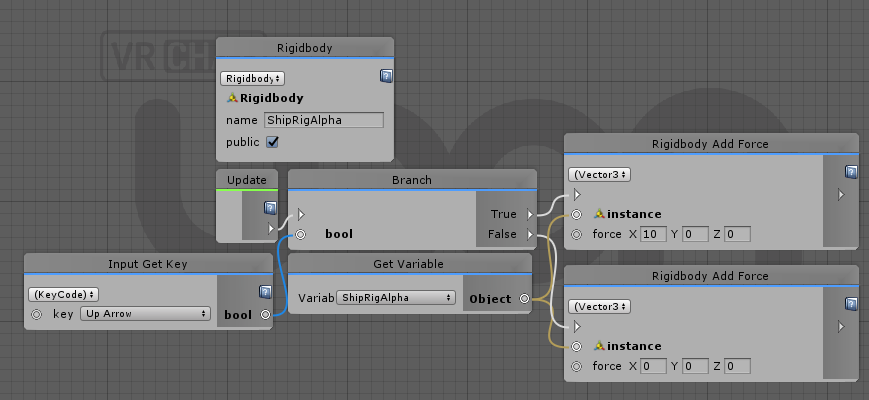
Hmm. That perplexes me then. Because this is how I have the basic controller setup for the rig vehicle I've setup.
https://i.imgur.com/K5T7Cdc.png
How would I get the use message translated into Udon? Or am I overcomplicating it?
 strange berry
I set the weapon to have the box collider only on the hilt
I can pick it up and throw it down and the axe can get buried into the ground
glossy sky
Mm. I see. I understand that part but, I'm trying to use this controller to set the forward movement.
strange berry
ok
 dark raft
Anybody aware of something that in udon or VRCPickup that would force Rigidbody.isKinematic to be false? I'm trying to toggle it on in a script, and it'll toggle inside the event code, but isKinematic immediately gets reset back to false by ... something. the rigidbody in question does have VRCPickup and an Udon script with sync position on it.
dark raft
Turns out that it's UdonBehavior's "synchronize position" implementation. It forces isKinematic to false somehow; or maybe it forces it to match what the object was originally? In any case I can't toggle it for a position-synced object, yet I can for an identical unsynced object
welp, I wonder if I can implement 'synchronize position' better with just regular synced variables
 worthy beacon
Whats the input for VR controllers? Like to tell if they hit the touch pad or triggers?
 north lintel
https://media.discordapp.net/attachments/657394772603830360/698486962306154516/unknown.png
Still wondering how to delete objects!

 oak jungle
Can anyone point me in the direction of picking up objects and using them? I.e. Pens
 grand temple
add vrc_pickup to an object
if you want to use the input when the player is holding it, put the "onpickupusedown" function in an udon script
solar glen
@solar glen I haven't played with udon enough, but maybe these two nodes will be useful?
@silent mortar Thank you
north lintel
When I name the object I want to remove in Object Destroy it names itself back to default. Is this an UDON bug?
My windows also keep removing text from the boxes when I press play.
 wide salmon
I'm new to Udon. Is this correct? I'm trying to understand it with simple things. I just want an audio to play when a player joins the world.
 acoustic delta
@wide salmon That looks correct.
wide salmon
for some reason, the sound doesn't play when I join myself. I'll test with some friend. thanks.
wide salmon
oh ok. thanks for the info. will try that as well.
wide salmon
Yup, this one works. Thank you again.
silent mortar
Trying to whip up a variable display in udon: is there a way to concat a newline special character in there so my text box is remotely formatted with linebreaks?
glossy sky
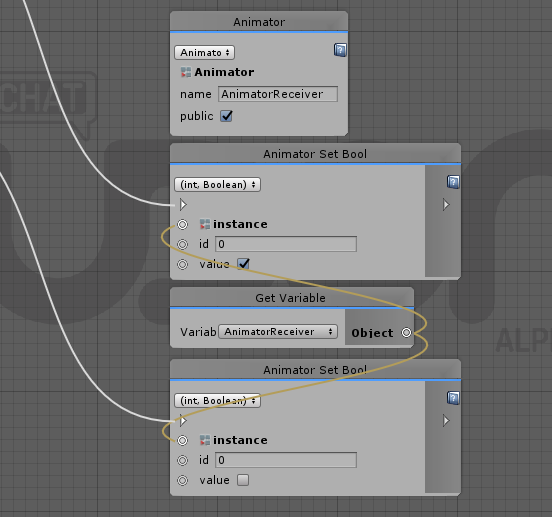
Could I get some help with Animation Bools? Not sure what I'm missing exactly to toggle the bool.
 grand temple
click the dropdown and change it to a string
glossy sky
OoOo. I assume then from there, I just add what Bool I want toggled, correct?
glossy sky
Wonderful. Thank you very much~!
 vagrant coral
quick question! can i have a block going into a block? for cleaning up the noodles puspose...
silent mortar
\n doesn't work :c
maybe i'm supposed to be adding it to the string some other way?
silent mortar
another question: Is it possible to make separate udon scripts interact with each other? Eg: I have a row of 5 buttons presumably each with an udon script on it that handles the oninteract event. I need to find out which one was last pushed so I can undo the actions the previous button performed before activating another button.
or maybe best phrased like this: can i set a variable that exist outside of a udon script?
 fair bough
can i recive player voice chat from point A and output to point B
about Broadcasting room something
fiery yoke
@silent mortar Text you type into the string boxes is considered "escaped text" meaning that it wont treat characters specially \n will just be "\n". To get a line break you could use the Convert.ToChar method using the code for the EOL (end of line) character which is U+000A so 10 as an int => Convert.ToChar(10)
 queen siren
Were video players etc broken for Udon based worlds, or was there some sort of work around?
fiery yoke
Video Players are not supported in SDK3 yet, so there shouldnt be any Udon worlds with VPs.
 flint urchin
You can use the video component, but that requires some “hacks” to get set up. It would also not support YouTube.
flint urchin
They’ll get it added at some point
queen siren
hope so ❤️
solar glen
Excuse me, 😭 how can I receive the VR controller button,What are the names of VR controller buttons,I tried to use joystick, but it didn't work
fiery yoke
@solar glen It depends what you need them for, but here:
https://docs.google.com/spreadsheets/d/1_iF0NjJniTnQn-knCjb5nLh6rlLfW_QKM19wtSW_S9w

Google Docs
VR controller summary
This page is a combination of the other pages. These
inputs are verified to work on every known controller, and
in cases where they don't an alternative is provided.,Use this world to test:
https://vrchat.com/home/world/wrld_f8d5f7e4-185c-4b82-8ecb-8a...
solar glen
@fiery yoke Thank you
fiery yoke
There is a lot of things to consider when it comes to VR inputs tho
for example Vive has two different modes, standard and advanced. In advanced you have to press the d-pad once, and then it reads the touch capacitive position for movement. In standard you have to press the d-pad into the direction you want to walk in.
So you may get different behaviour for different VR controllers, and sometimes special considerations have to be made
solar glen
Thank you
 oak marten
Hey guys, is there anything like a repository of images or scripts that show how to simulate the old trigger functions with Udon? As a non technical person, I'm finding quite a roadblock in trial and erroring nodes until I find the one I want!
fiery yoke
@oak marten https://ask.vrchat.com/t/vrc-triggers-udon/196

VRChat Udon Discussion Forum
This is the equivalents of vrchats trigger system. Triggers Custom event OnEnable OnDisable OnDestroy OnSpawn OnNetworkReady OnPlayerJoined OnPlayerLeft OnPickupUseUp OnPickupUseDown OnTimer codeAO1a224bVRT9lWqevatzv0TqQ6EFISSK1MsLqqxz2ac1uOPiC...
oak marten
You absolute beast, Happy Easter
fiery yoke
Not written by me. Was written by jetdog8808
 scarlet lake
Say if my world just has basic OnInteract triggers, am I better off using Udon for better performance? Asking since I may end up adding a lot of pick ups to the world
fiery yoke
I think for basic behaviour, Triggers are better and easier than Udon.
scarlet lake
Ok thank you for your answer
flint urchin
Wouldn’t be a bad idea to go Udon either
Just got to be aware that it is Alpha. So it will change.
scarlet lake
Yea, i may try to switch to udon regardless just incase I decide to add something more complex later
fiery yoke
Well yeah SDK2 is considered deprecated afaik, so Udon is probably the better choice in any case.
 warm goblet
Does udon support VideoSyncPlayer and the usual RPC calls to it by buttons?
 true hawk
Hello All, I am pretty new to Udon but How does one change the interact text? It says "use" but I know there is way to change it. But I do not know how in Udon.
grand temple
on the top right hamburger menu in the inspector, you can change to debug mode and change it there
worthy beacon
so im trying to get the input to work, im not sure if im doing it right. This is what i have so far https://gyazo.com/a37a22c9c50041bc7beb62b7f3b7786d

Oculus_CrossPlatform_PrimaryIndexTrigger is the name im using for the input
trying to make the left hand teleport you to 0,0,0
grand temple
so does it not work or what?
worthy beacon
nope
if that should be correct, i could try building it again several times, that fixed an issue before XD
grand temple
yeah udon graphs don't always compile. You could make sure that it does by adding a new public variable and seeing if it shows up in inspector
true hawk
@grand temple Thank you for the tip, I got it 🙂
worthy beacon
ok, and just to be sure theres nothing special i need to enable to use the controller inputs right?
grand temple
no you should be good
as long as it's typed correctly
Oculus_CrossPlatform_PrimaryIndexTrigger
worthy beacon
i copy pasted it from the document thehelpfulhelper posted
fiery yoke
@warm goblet the SyncVideoPlayer script is not even included in SDK3 yet. So no you cant do anything with it right now.
worthy beacon
the opGreaterThan is basicly x > y where x is the top value and y is the bottom value, right?
grand temple
yes
you might want to do greater than 0.5 or something though because greater than 0 will be very sensitive
just barely touching will trigger it
worthy beacon
not sure whats going on then.....doesnt seem to want to work >.< i rebuilt it 4 times and varified it compiled
warm goblet
ok @fiery yoke Thank you. Do you know if Dynamic GI ever got fixed? If I recall the only issue is VRC_CustomRenderBehavior hadnt been whitelisted which they said it should have been.
worthy beacon
well ya, so it should like almost suddenly teleport me or keep doing so
but nothing happens >.<
fiery yoke
its not in SDK3 yet either.
warm goblet
ok. it seems the script is though is why I was confused.
dang I really figured theyd get that before the public betas even
is there any way to multi-edit Udon public variabls like you can in usual unity components?
fiery yoke
No that would probably break it.
warm goblet
v_v ok
looks like I cant do any of my ideas yet. I'll come back in another few months :P
fiery yoke
If you have to edit a MASSIVE amount of objects that can be done in an automated way, then EditorScripts is your best bet
true hawk
I am not sure if the the interaction button local by default but I do not see and option to make local on Udon unless they are default.
Is it local by default?
warm goblet
hmm... is there any other way to force Dynamic GI to update? I tried animating a black directional light but thats not working
fiery yoke
@true hawk Everything in Udon is local by default.
true hawk
@fiery yoke Thank you for update! I am current recreating my spawn world, so I am making sure before replace it
worthy beacon
ya i cant seem to get that controller input to work, i tried attaching the output to a converted string so i can see the value, and its just null or breaking
silent mortar
Has anyone managed to make an editor script that makes udon sub-programs?
eg: Create a bunch of ui toggles and automatically generate an udon graph to udon to make them do stuff
worthy beacon
aaaand it just works now....with no change.....this udon stuff is gonna make me go bonkers XD
i have a theory, i should shut down the vrchat instance i just build before opening a new one
i have a feeling even with it complied, its probly loading an older instance
 fleet blade
So I have this toilet teleporter with OnTriggerEnter, but for some reason when a player goes into it, it also teleports everybody else who is in the world, how do I make it local and that it would only teleport the player who goes inside of it? 😄
flint urchin
OnTriggerEnter won't work for players (yet)
You got to create your own player detection
 obtuse agate
I made the same mistake: You need to put Cube on a layer which only collided with playerLocal layer
worthy beacon
so, i made a script where i have a game object tracking the player, and i have a cube offset by 3 from their head. I then have a teleport script on that cube such that when they click, it should teleport them to the cube. its instead flinging them forward quickly, then as soon as you let go you get flung backwards very very quickly. Do you have to change the locomotion or somthing to use teleport to?
fleet blade
So I have this lift that goes up and down and I want to sync it with everybody in the world should I use the Udon behavior Synchronize position checkmark or VRC_ Sync animation script does it matter lol?
flint urchin
you only use the Udon behaviour to sync
fleet blade
alright thanks 😄
true hawk
It is normal for the test to be behind the avatar image in Udon?
I can bare see the text since it is obscure by the avatar image
barely*
text*
 nimble thunder
wait are you trying to upload avatars in udon?
true hawk
no
world creation
with avatar pedestal
when hovering over the avatar pedestal, the text to see the name or "use" is obstructed by the avatar image.
nimble thunder
lemme check real quick
true hawk
Thank you for the helping
nimble thunder
i just tested it, the issue didn't appear for me
what does the component look like?
true hawk
I followed a tutortial on just creating an interactive button
then attacted the base VRC pedestal
nimble thunder
it does change the avatar though, right?
true hawk
yes
just the text is obscured by the iamge of the avatar
old version the text is on top
then again the old version used a capsule collider
nimble thunder
maybe try a different layer for the object? udon doesn't really give you a way to affect the actual shaders and stuff so thats my best guess
true hawk
I am chreaking again.
checking
So the text on the controller is working just fine, but the text on the pedestal is in the middle of the image so the text is hard to read.
@nimble thunder Something like this
nimble thunder
is the transform for the pedestal the same as the one it's on?
i mean the pedestal component
is the transform just set to itself?
true hawk
I did used a base "cube" but had the same issue
I reduce the size by 50%
@nimble thunder I change the local Scale to 0.5 on XYZ
nimble thunder
on the original cube?
true hawk
yes
nimble thunder
okay, see if you can make a new object with the same size, then copy the component onto it
it might be that you scaled it after you put on the pedestal that's screwing it up
true hawk
okay I will try that and will report back
nimble thunder
ok
true hawk
@nimble thunder Looks like the name is attach the cube and not placed on top of the avatar image
the cube was reduced by 0.5 on XYZ
then placed all components for the pedestal
nimble thunder
ohh, its because the cube is what you actually interact with
nimble thunder
yeah, you can probably make the cube just a small plane with a convex collider
true hawk
I did notice the old pedestal has a capsule colider
nimble thunder
yeah, that's most likely why
true hawk
okay I will play around then with the the collider and different shapes
nimble thunder
take it as a sign to get creative too, you could always make the picture appear somewhere else and you press like a sphere or a button that does the trigger thing instead
a lot of this new SDK right now is figuring out ways to work around the bugs
nimble thunder
yeah, i actually came here to try to figure out a work around for a wing cap/elytra sort of thing
the major issue right now in udon is randomly just having certain nodes make the script stop entirely
like setting variables is just sometimes broken
true hawk
wow sound complicated, I am not of a programmer but I have sene people open on VS Codes or other compliers to see the code itself
also thank you for the tip on the collider, it fixed the problem @nimble thunder
true hawk
Understood
nimble thunder
so uh anyone have any luck with getting velocity of a player and printing it?
for some reason it just does not save my changes if i try to do that
through a pickup, specifically
silent mortar
is there a way to automate the creation of hundreds of udon graphs? (i've got like 400 buttons)
flint urchin
Write a script that converts it to uasm
silent mortar
oof. this is starting to sound like factorio, except I gotta design my own transport belts and inserters.
silent mortar
fml. i'm not a wizard level programmer.
in a nutshell: unity ui menu system that drives a dictionary. Trying to replace the vrctriggers in my current editor script with udon equivilants
flint urchin
You'd probably better of creating a new system and move a lot of the logic out of the buttons then
I've seen advanced menu systems that only use a few ui buttons
An example is here: https://cdn.discordapp.com/attachments/625997680010854410/679086095446704141/unknown.png
 silent mortar
each button = different word, so it needs to activate a gameobject containing a video, set animationint on an animator, set text and so on...
flint urchin
The UI I posted has different words, changed when the list is changed, pagination
All the buttons have their own IDs
then the Udon script takes care of the logic to know where in the list/page it is
So you can pretty much move all of this over to a text file
then parse that
silent mortar
wonder if each button has its own udon graph?
flint urchin
In this one yes, because we can set the button properties.
Once we can set the properties in Udon, then those will be removed
But for now, the buttons just do Interact() on the Udon
And the Main manager gives each button their own ID at start
How is your layout of things?
silent mortar
i guess i'm struggling to see how the main manager responds to the interacts of the child buttons?
flint urchin
Button -> Button Behaviour -> Main Behaviour
silent mortar
what do u mean by layout? If you mean how the menu is laid out: language select > lesson select > word select
flint urchin
Yeah, what does it look like in game?
silent mortar
i know it looks pretty primitive lol
but that's the lesson select menu, under that there's more buttons
I have a github of the editorscript that generates all that if you feel like poking around in my noobish spaghetti code. It uses vrctriggers currently. I'm trying to learn how to use udon atm to potentially be more efficient in my triggers. (currently it has no way to determine which word was last used, so when a word is selected, it disables all gameobjects that do not belong to the word that is selected), so I guess with udon I'm hoping to have a "currently playing" variable which deactivates what it needs to when a new button is selected.
flint urchin
Yeah, looking at this, you should just have a list of buttons ready. Enable/Disable them based on length of the list.
Then have the fields be populated dynamically when you select a menu
silent mortar
so what your saying is to generate the menu during runtime instead of "baking everything" into gameobjects to be enabled/disabled?
flint urchin
Somewhat yeah
Make it dynamic. So each button don't know what they have on them
then have the Manager tell each button what to fill
silent mortar
hmm... interesting. Happen to know if udon supports a jagged multidimensional array?
flint urchin
Not yet
But what you can do is store each page in a text asset
then the asset name is the Page name, and in there you just create a good way to read and split the info into where it has to go
So example would be;
Daily_Use.txt
text|icon_name|video
Then you use that info to fill out the buttons.
silent mortar
hmm what udon node takes in text assets?
flint urchin
TextAsset
silent mortar
ah and I then just drag the text gameobject into that as a variable
flint urchin
yup
silent mortar
oof i just crashed udon/unity by attempting to stick | in a string seperator
flint urchin
You can use what ever, just got to make sure it doesn't collide with anything
glossy sky
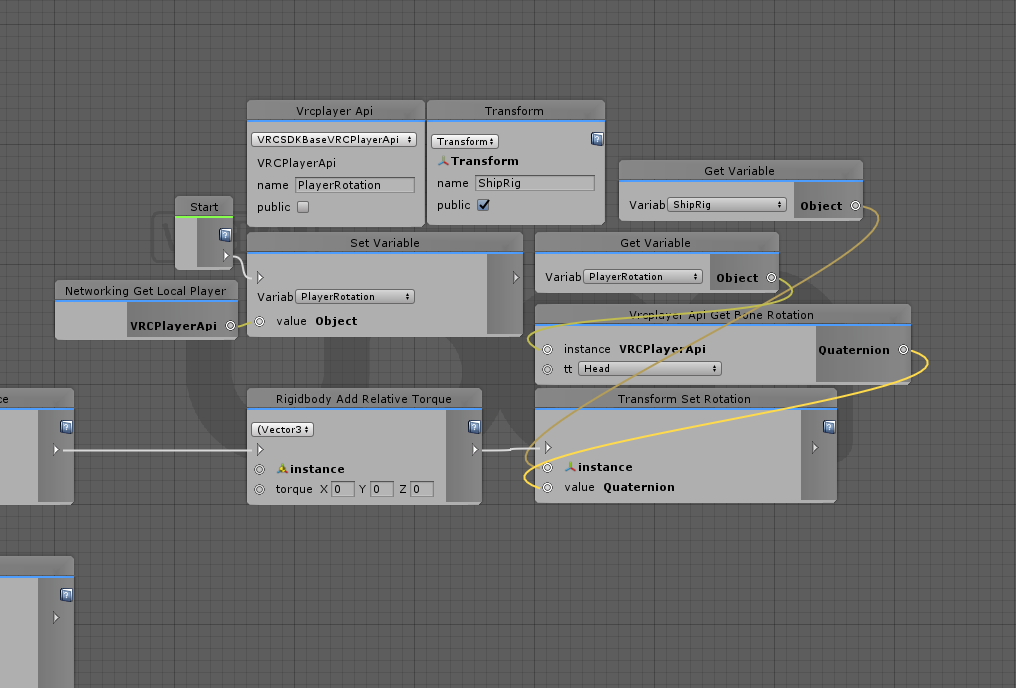
Question. How do I set an object to face the same direction as a player is? I made this controller that allows a vehicle to move on pickup_use however, I just can't get it to rotate the same direction the player is at all.
 small anvil
update?
flint urchin
Stay on 4.20f1
small anvil
ty
scarlet lake
Hello , any VRCSDK3 / udon compatibles Pens or keybords like this :
https://chiugame.booth.pm/items/1135731
or this
https://booth.pm/en/items/1555789

[English] Here are the text chat prefabs. All you need to do is add the prefab to your scene. Standard Assets is required. このパッケージはVRChatでテキストチャットができるようになるプレハブセットになります! 通常(無料)と投げイワシ(Boost用)がありますがどちらも同じ内容なのでご注意ください!

2020-04-05 追記 VRChat2020.1.1へのアップデートによってペンの同期が取れ難くなっています。一応調整を行いましたが以前よりもゆっくり書く必要があります。また今後のアップデートによって再び調整が入る可能性があります。 VRChatのワールド用の14色のペンセットです。 消しゴム機能も付いています。 完璧に同期が取れるというわけではなく、速めにペンを運ぶと同期が取れにくくなります。その場合はゆっくり書くなどしてください。 Presentation RoomなどのようなLate Joinerへの同期は取れません。
The ones i found are just compatible 2017.4.28f1 and use Standard Assets It seems to me
Is there a vrcsdk 3 / udon compatible solution or equivalent?
Or is there a way to adapt them?
It seems to me that Standard Assets no longer exists for unity 2018.4.20f1 ?
Thanks in advance
Best regards , Stephane
worthy beacon
is there a way to invert a boolean?
flint urchin
Boolean Unary
worthy beacon
thank you!
 green plinth
Ok i got a fairly advanced question, hope any of you able to help. I need to translate a objects location/rotation/scale based on the relative difference between the previous and new location of a reference object (imagine the same behaviour as if you translate a object with a child and the child moves with it). I can figure out moving X/Y/Z easy, but the rotation/scale part eludes me. Maybe matrix4x4 would work?
fiery yoke
Why not just simply have an actual child and grab the position and rotation from that object? :P
green plinth
@fiery yoke that does not allow the same flexibility and doing it with synched objects has never worked well, that and players are not in a hierarchy.
fiery yoke
If youre trying to make a player move with the ground they are standing on...thats rather complicated to get right
green plinth
currently i am just tinkering with a chessboard as example, but i am making the code for general purpose not a specific use case.
so simply what i need is to replicate the same code/behaviour into udon
fiery yoke
the same code of a chessboard?? I dont quite get what youre talking about
green plinth
nope of object and child translations
it's not rocket science, but my only current solution is to follow the only way i know and that will take 4x more code than for x/y/x translations alone
meaning it may take me 2 days to make it work
tame matrix
so from my understanding you want to "parent" something without actually parenting it in the hierarchy?
green plinth
replicate that behaviour
tame matrix
yeah you'd just need to get the transformation matrix of the parent object and then multiply that with the position of the new object
green plinth
Well that is what i believed to, but i cannot find a operation to do it with
tame matrix
it should be transform.getLocalToWorldMatrix
grand temple
Or just use the parent constraint component
green plinth
Oh so @tame matrix i get the world matrix of each to get the relative from 0, and then OP multiply matrix4x4? but will that work for relative rotations?
tame matrix
it should, you might need to do some math to get the proper offset between them though
green plinth
@tame matrix i am having a huge hurdle here, the matrix4x4 set value only accepts arrays and i cannot find a way to get a game object to become a matrix4x4 array...
 covert ingot
What's wrong with a parent constraint like Phasedragon recommend? Sounds like your trying to reinvent the wheel
tame matrix
you don't need to set any arrays, just multiply the position by the matrix (you'd need to convert position to a vector4)
green plinth
yes but i need to place the resulting matrix some place right?
tame matrix
no when you multiply a matrix and a vector you get a vector
you use then use the resulting vector as the position
green plinth
yes but i have no place to put the result i cannot find a set value to use.
tame matrix
also yeah the parent constraint component will pretty much do the same thing (not the scaling though)
you do transform.setposition after multiplying the matrix and vector
covert ingot
Since parent constraint doesn't use scale you can just use a scale constraint with it
tame matrix
it would scale differently than if you parented it with scale constraint
green plinth
cannot find a matrix4x4 get position
tame matrix
I'm pretty bad at explaining so I might've made it a bit confusing
So for the parent object you want the transformation matrix so you'd do [ParentObject].transform.localToWorldMatrix
then you want to get the transform of the object you want to do the following with which is just transform.getPosition you'd then want to make it into a vector4 to multiply with the matrix, you might need to also translate this vector to get the proper offset between the objects
then you multiply the matrix and position and with the resulting vector4 you set with transform.setPosition
green plinth
@tame matrix sorry to be a bother, but i am having a hard time getting my head working around it, this is the best i can manage right now and i feel like it all wrong.
What i am looking for is to have the start/stop as a change refferance, and then set that change into the "relocate_this" variable effectively making it so it at a relative position and angle follows the "end".
Having it work for scale would be a nice bonus.
green plinth
I am going to have to redo the entire thing from scratch as not even the variables working properly...
 fossil zenith
Is there a way to get raw controller input yet? Or at least raw joystick/touchpad data?
fossil zenith
Use Set Active
 prisma shale
is that it?
 still lark
Hello
oak marten
Hi guys, super nub question. I am trying to create a variable to use for the scale of an object. Scale is expressed in 3 separate boxes, and I am not sure which variable type to use to match this. (string, int, boolean etc) Expressing it as a string 1, 2, 2 doesn't appear to work
 regal geyser
Hello there, sorry if this question has been asked before, but I wanted to know if there is a way to get the interact function to remain active while the player is clicking on a trigger. I want to make an object rotate while a button is being pushed.
north lintel
Is rotation synced for all players?
 gusty sedge
@flint urchin i need help with your Teleport Example
flint urchin
It’s on the UdonBehaviour
north lintel
So I can just tick this box for randomizer spawns also?
I don't usually mess with the inspector because it seems buggy due to it being an alpha
flint urchin
Inspector is fine
north lintel
I'm assuming there's an alternate way to sync objects using nodes
flint urchin
You can sync if yourself yeah, but not recommended
north lintel
I'm unable to specify objects I want deleted without it reverting the name back to default
so I've just been working on other stuff
but the graph is definitely buggy, nodes will remove text when I press play
Like setting destroy to the name of the object in the Hierarchy
It almost feels like UDON# might be more efficient for world building haha
regal geyser
I can get the rotation I want with this node setup by pressing arrow keys, but I want to replace that with a clickable object in the game
 mortal star
I don't have expeirence with udon yet but what about making a global variable that is then plugged to the branch?
regal geyser
thanks, I'll try that👍
mortal star
I was wondering thought if someone have already tried to scale avatar collider with avatar size so the collider is not always the same (aiming at small avatars mostly)
 lavish yarrow
you can't access the player collider directly, or anything under the player hierarchy for that matter
for security reasons
mortal star
I see
but still I'd love to see this as a toggleable feature (in worlds) at some point
lavish yarrow
there's some tricks you could potentially try for it
you can get bone positions/rotations, so you might try getting the vector3 for the head and foot position and scaling a collider you move with the player based on the distance between them for example
fiery yoke
I was working on a custom controller for a while that had that feature, however the project is more complex than I thought. And I already knew that it was going to be very complex...here Im showing it in Desktop, but it also works with any height in VR:
https://discordapp.com/channels/189511567539306508/657394924433571870/696123918683078736
mortal star
O that thing is cool
gusty sedge
@flint urchin Where Exactly do i input the Transform Coordinates
flint urchin
If you've done exactly what I did on the example on the forum, then go to the gameobject where you got this graph, then in the Inspector window (right side) you'll see a field "Target"
gusty sedge
found it thx
@flint urchin is there Also a way to change the text it displays so it could say where it sends you to
flint urchin
You have to enable Debug mode in the Inspector to do that at the moment (hopefully that'll change)
You can do this by right clicking on the Inspector tab name and click Debug
then at the UdonBehaviour, you should see "Interact Text"
gusty sedge
Thx
glossy sky
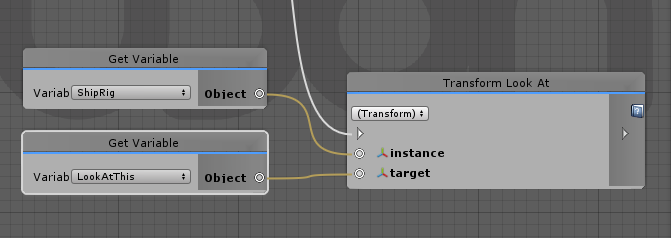
Trying to get an object to face the same direction as players on an X/Z axis.
https://i.imgur.com/mYuQPVh.png
That being said, my question-- how do you get an object to rotate on a horizontal axis that follows the players direction? So like say the player faces north, the object faces north. I've tried tons of other methods as well however, I am just completely dumb founded by how to pull this off.
 lavish yarrow
you can get player rotation from playerapi and then get the y axis out of that quaternion
and then offset the y axis for the rotation of your object
glossy sky
I keep forgetting that playerapi is a thing now. . . Lol. Thank you very much!
 charred axle
I have one gameobject which controls 16 child-objects.
I want those child objects to be clickable (onInteract)
Do they require a script each for this, or can the main script give them this functionality?
fiery yoke
They all require a UdonBehaviour.
charred axle
Will the main object get notified when they're interacted with? I'm not sure how to communicate between them
lavish yarrow
define a custom event on the parent object and then call the custom event from the child with SendCustomEvent using a reference to the parent behaviour
charred axle
I will look into doing that, thanks!
regal geyser
is there a node to compare two float values and choose an action depending on which one is bigger? basically the equivalent of 'if (float a < float b) { }'
flint urchin
Yeah, Float GreaterThan / LessThan
charred axle
Can I be lazy and make a "globalVariable" object which I just put into every other object, to have a centralized state?
flint urchin
You can be even lazier and get the parents UdonBehaviour in the start event
fiery yoke
You could, but then you have a lot of dependencies. You can design UdonBehaviours to be pretty close to C# classes. However its not quite that easy
flint urchin
Not tested, but technically how you'd do it
But of course, setting the variable in the Inspector is much better
charred axle
I'm using udonsharp, so I'm not sure how it looks in there, but thanks for the idea!
Will that give a duplicate of the parent udonbehaviour, or a reference to it?
flint urchin
Just the same really
charred axle
Nice, thanks!
flint urchin
Also, since you're working with U# I recommend joining that Discord. (Bottom of the github page)
Much easier to get help there for it
charred axle
Btw even if I make public variables using a udonsharp script, I can't seem to assign them. I have to drag them manually in the editor, this also means that I have to hardcode everything
I will btw, thanks
flint urchin
This channel is mainly meant for stuff related to official things, the graph ^^
charred axle
Fair enough, it should work somewhat the same though
flint urchin
it does
fair bough
how to build stable sync switch (and buffer for join after too)
I try to sync "state" variable..... it look too slow sync variable or something mistake
scarlet lake
Hello ,
Based on SDK3 exemples I try to toggle mirror and collider on my first world :
https://www.vrchat.com/home/launch?worldId=wrld_0825bdc6-5bba-464c-a3cc-38ca8144a2b2
But I have a problem , it does not toggle for the local player only but for all players in the room
I've been trying to find for a while but I can't find the problem
Are there any special options to check?
And I have an other problem,
for testing I try to launch 2 clients on "Local testing>Build and Test"
I can't seem to be in the same instance to test my problem
someone managed to do it ?
Thanks in advance for your help
Best regards , Stephane

Meetings for people over 35 ⁄ Rencontres pour les + de 35 ans․ Hangout relaxing cuddles puddles sleep for older gamers ⁄ seniors․ Under construction ⁄ En construction
flint urchin
@scarlet lake You need to provide a picture of your graph for us to say what's wrong
Also, build and test with two clients don't work. Got to upload and launch two clients
scarlet lake
Ok , thank you , yes that's what i'm doing right now but it's long 😋
It's in upload, as soon as it's finished I post the graph
 opaque plume
Uh is there a function to tell if player respawned?
flint urchin
No, but it's been requested https://feedback.vrchat.com/vrchat-udon-closed-alpha-feedback/p/request-playerapi-event-respawn
So might be lucky
flint urchin
What are you doing with the animator?
scarlet lake
It toggle a on / off on the ui button with up and down movement
flint urchin
If all you need to do it toggle the mirror on and off with a UI element, you don't need a UdonBehaviour
Also, the way you're doing this is very inefficient.
Take a loot at my example for toggle a object on and off https://ask.vrchat.com/t/phaxenors-examples/273/5
 scarlet lake
yes I was using your example before that, then I wanted to add the animation on the visual "on / off" button and while searching I took the graph example from the vrcsdk3 folder ToggleSync
flint urchin
It's still recommended to not do this in Update
scarlet lake
I have the same for collider and a modiifed for light dimming
flint urchin
Because right now you're toggling this every frame
opaque plume
Not related to this but at least I found a solution to my problem now. It's pretty neat, one part of my code already almost handles this naturally so this is way easier for my case.
scarlet lake
ok I will try this, otherwise this script should just be for local player?
flint urchin
Yeah
 fallen prawn
Is there any autocomplete for U#?
I can't remember VRCSDKBaseVRCPlayerAPI blah blah blah.
scarlet lake
@flint urchin Thank you .I try this and I would tell you if that solves my problem 😉
flint urchin
@fallen prawn It's just default editor intellisense
 fickle stirrup
try to use jetbrains rider / vscode with unity extension for the autocomplete, hm
fallen prawn
Which extensions @fickle stirrup
opaque plume
Yeah, although some part of jetbrains are a bit annoying and it seems to slow down the startup of my visual studio quite a bit. Takes like 10 seconds for the stuttering to stop after visual studio opens
Oh you are talking about vscode.
Could be better there?
But at the very least the unity extension is a must have
fickle stirrup
hm, not rly 🤷♀️
@fallen prawn debugger for unity (and myb unity tools) for debugger if i remember i replace unity dll with one from current unity because the one with extension is old (or not sure) and that extension is start to work if to use vs code as default editor and double the click script from unity
fallen prawn
@fickle stirrup I installed Unity debugger.
But no one still help me
 stuck mountain
Did you install c# extensions when vs code asks you to? Wait about 15 minutes for vs code to index everything? Restart vs code?
Also I found you need to open it by double clicking a c# file from unity.
So it can create a project/solution
Also does your file have the lines like using UnityEngine;
fallen prawn
I think U# generate all for me @stuck mountain
OK 😑
I forgot to put Project folder to workspace.
🤦
scarlet lake
It is what it is
fallen prawn
IDK what syntax to set run speed to localplayer
it gives me
" System.Exception: Invocation requires method expression!"
flint urchin
You’re using the wrong method
fiery yoke
Youre trying to access the static method. Use the instance method instead. For more help on UdonSharp go to the specific Discord.
scarlet lake
@flint urchin with your script and old script for animation i get it working fine in editor but in VR the toggle animation script is not executed . have you an idea what is the possible problem ?
flint urchin
You are recreating this I take it?
scarlet lake
? i don't understand your question
flint urchin
Are you using this script on a object or just creating something similar in Udon?
scarlet lake
I use this script on the toggle button
flint urchin
Yeah, that won't work
scarlet lake
It work in editor play mode but not in vr
flint urchin
Because VRChat don't allow MonoBehaviour aka custom scripts
You'll have to create this in Udon
scarlet lake
ok I have to mix your script with my old script animation part ?
flint urchin
In a way yes
scarlet lake
okay thank you very much i will look in this direction
 severe gust
does anyone know how to setup in udon graph a way to make a game object deactivate while also activating another object with the same trigger?
silent mortar
@severe gust shouldn't that be as easy as dragging the same line to the other setgameobjectactive node?
eg: from your oninteract node branching to both setgameobjectactives?
example:
severe gust
ah ok i'll give it a try
 violet storm
Anyone here build or "place" a video encoder into their world?
silent mortar
out of curiosity, what's the use case for an encoder inside a world?
violet storm
Watching movies and playing music with friends, i built a custom home world to chill in and my final touches i want to add is the video encoder
silent mortar
u mean video player?
violet storm
Yeah, but with a video player you could play the music videos as well.
silent mortar
as far as I know, There is no video player support yet in udon
violet storm
i usually go into VRchat, go into the Movies and chill world, throw on a movie and do my developing.
Yes, but i have to downgrade to SDK2
i believe someone told me they had prefabs in there already, just haven't gotten around to taking a look
silent mortar
er yeah, but anyway if you're talking about using sdk2, you're in the wrong channel 😛
silent mortar
no problem gamer
 nova parrot
Player Mobility "Immobilize for Vehicle" of VRC_Station doesn't work in VRCSDK3 ? It switch to "Immobilize" when build scene.
dark raft
Anybody run into FlatBufferNetworkSerializer: ArgumentOutOfRangeExeception: specified argument was out of the range of valid values with large synced strings? What's the upper limit?
 serene moat
dark raft
serene moat
dark raft
ah, thanks.
guess i'll try packing into multiple strings
oof, the limit is extremely short. something on the order or 64 chars
charred axle
I guess you'll need clever uses of encoding or multiple strings like you said
flint urchin
You can use SDK2, but recommend to start learning Udon
solar glen
Udon is hard to use,but it's working veryyyyyyyyy good.
 topaz sentinel
yes i love it and hate it at the same time 😅
 deep furnace
Sorry but i'm still kinda new to Udon, is there a way to turn an animation on and off in the udon graph?
and play and stop an audio
 west plover
Audio yes, that's done by having the behaviour have a reference to an audio source
Not sure personally on animation but I think it is
deep furnace
@west plover Thank you I'll give it a try
fleet blade
Is there a way to synchronize the animator animations or will I have to wait until the synchronize animation checkmark is available on the udon behavior?
I also tried using the synchronize position checkmark on the udon behavior but that just freezes the animation.
I also tried using the VRC_Sync Animation (Script) but it doesn't synchronize anything.
flint urchin
It's coming soon 🤷♂️
 sudden pecan

 floral dove
@sudden pecan - check out the 'VRChat Examples' folder, it's got a Toggle Mirror you can look at and mess with for reference.
 pallid mango
Is it possible for world objects to track something other than player head or hands, for example, lower arms?
flint urchin
Yeah, get the bone positions and use that
oak marten
How do we express x, y and z for scale in udon?
 dusk summit
What this guy doin
oak marten
Trying to figure out how to set the scale of an object with an udon control
flint urchin
@oak marten
Express, as in set it? https://docs.unity3d.com/ScriptReference/Transform-localScale.html
 oak marten
Yeah basically, as in what to put here to send a signal to an object to change scale
Do I need to put in (x, x, x)?
Because I need it to appear as
Trying to make a little puzzle where you use sliders to manipulate the dimensions of platforms. But running in to this wall!
 jagged crow
is it possible to teleport somebody from one scene to another
or does a world have to all be one scene
acoustic delta
All of your world has to be in one scene. If you want to have two locations like in the Solitude world then you can separate them by distance.
jagged crow
ahh gotcha
 thorn pilot
@oak marten you could probably try to construct a vector3 and then have each slider controll one of the variables of the vector3
if you need further info/help i could try to build the construction part of the vector3
jagged crow
does interact not fire for desktop users?
 zenith river
well, it should
 raven oracle
how do i set variables for a players hand cant find the node for it
like rotation and poition data
acoustic delta
Interact only works in-game, not in the Editor
acoustic delta
And in the above screenshot it will fire twice in-game for Desktop users, as desktop triggers both Interact and OnMouseDown
flint urchin
Interact works for Desktop too
jagged crow
o.O
that is odd...
if it fires twice for desktop users it should be immediately toggling the thing off and back on again
but it just toggles it off
acoustic delta
🤔
thorn pilot
everything in the transfom componen is a vector3 except rotation, that is a quaternion, but with that there are ways to work with that aswell
jagged crow
...huh. I stuck this in a random object and it worked
so why the heck does my toggle thing only work on mouse down
glossy sky
Are we suppose to use Delta Time for vehicles? It seems that after a certain speed, my vehicle that I made stops rotating based on the players view rotation.
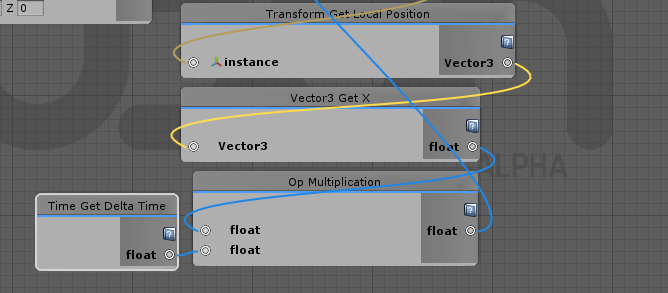
@jagged crow
On interact only fires an action once. Are you trying to like, make a toggle state for a cube to spin?
jagged crow
got a toggle on my mirror but also just trying to get interaction working in general
tried to make a teleport thing but its not working either
fiery yoke
Is there a direct way to get the master? Otherwise Ill make a canny
 twilit breach
for what purpose?
fiery yoke
Youre right I was overlooking something. Still would be neat I guess
twilit breach
yeah I thought you saw the bool output one but needed something besides a bool but sounds like your set
fiery yoke
Well Im doing some relatively complex Networking stuff and checking for master is essential there. In my specific case I can just check if the give api isMaster or not, but for example lets say you want to set the owner of an object to the master. How would you do that? :P
There is a much easier way. Have an object that never changes owner. Tada
It will automatically always be owned by the master. Then you just GetOwner() done.
But a Networking.GetMaster wouldnt hurt
twilit breach
would there be a way to transfer master status without the first master leaving?
fiery yoke
By default every object is always owned by the current master
twilit breach
I thought you wanted an object that changes master, but I see you said set object owner to master which yeah just having no owner would make it masters
green plinth
@severe gust regarding your previous question. You can serial link, pararell link and use "add node -> special -> Block" Block will add more output parameters as you fill meaning you can always add one more thing to it.
glossy sky
Anyone know what this node is called? I can't find it. ;-;
https://i.imgur.com/CgC5KcR.png
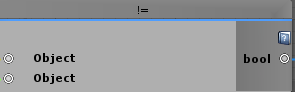 green plinth
@glossy sky inequality
glossy sky
Thank you thank you!
green plinth
Ok everyone and @tame matrix i am still working on that graph from before, i gotten to the point where i can do scale, rotation and relative position, the resulting matrix gives me the correct position but not rotation (rotation goes accumilative but i can get around that easy). But my current issue is that i cannot figure out how to get the accurate difference between the 2 objects position to use for the Translate. I tried using subtraction but it gives a higher or inverted value compared to what it should be. Anyone able to help?
green plinth
As far as i can figure, when i use subtraction it goes wrong because not all values are positive. like a mix of +- + -- messing it up.
 worn atlas
i need some help, i have no experience with udon, but i want to make it so that if a player is far enough away from an object, it's disabled, but re-enables once close enough
this is what i have so far, but i dont know how to target the asset the script is attached to
flint urchin
You’d probably be better off using a Trigger box for performance sake.
But you’ll need to do it in Update
Not start
Then get the objects transform position and check the distance between that and the player
 gaunt fern
I've decided to update one of my older worlds to use Udon, but I'm running into a problem. I'm getting 3 errors from AvatarValidation.cs. All the errors say that VRC_SpatialAudioSource could not be found. Any fixes?
green plinth
Vrc spatial does likely not exist in udon, so find the prefab/object that uses it and remove it.
as in remove the script not the object
gaunt fern
Got it. I was hesitant to do something like that because the SDK added the script itself after I fully deleted the SDK.
green plinth
nope removing the SDK does not remove object attached script refferences
@worn atlas try use "late update" event, and make a check using "float less than" (search for it).
gaunt fern
I deleted the script, but it gave a lot more errors.
green plinth
strange, did you clear the old errors?
gaunt fern
It goes from 3 errors to 46 error. The new errors are in a bunch of different scripts. The original 3 errors are gone.
green plinth
How large of a project is this world of yours?
gaunt fern
The world is 92.14mb.
green plinth
could it be that each one of the errors are individual scripts from the old trigger system?
gaunt fern
I can't think of what would be causing the errors though. When I look at the old objects, they all say that they aren't connected to any scripts.
gaunt fern
I removed everything and I'm still getting the errors. I think it's something to do with the script itself.
flint urchin
It's happening because of your project settings containing stuff from SDK2
flint urchin
Go to Project Settings -> Player -> "Scripting Define Symbols" and remove anything that isn't UDON or VRC_SDK_VRCSDK3
If Post Processing is there, keep that though
If you're unsure, post what you got here
You also got to make sure that all Trigger components are gone from the world
worn atlas
You’d probably be better off using a Trigger box for performance sake.```
ok, ill do that, then
probably easier to control, too
but now the question is how do i detect if a player is in the trigger?@flint urchin That fixed the error. Thank you.
worn atlas
also how would i make a list of objects to be affected by the trigger?
flint urchin
@worn atlas got to have your own trigger that updates with the player position. "Custom Player Collider"
@boreal plaza check the console for better info on it. This doesn't really say much
 boreal plaza
oh wait.. It launch in the latest unity version when I think I am supposed to use 2018.4.20f1?
green plinth
2018 is the new version (check for the official details/info about it)
boreal plaza
Yeah I tihnk I accidentally launch unity 2019 something
worn atlas
@roket gamer got to have your own trigger that updates with the player position. "Custom Player Collider"```
i found these things called "on collision enter" and "on collision exit", will those work?No, OnCollision is when something hits another object (they collide)
You need a capsule collider that follows the player and use that as a "trigger"
worn atlas
ok, how do i do that? i never used the events system, let alone udon
flint urchin
You need to create a "PlayerManager" that on Update, gets the player position and then updates the transform of the capsule collider
I'll have a example picture done in a min if you want to look at that
worn atlas
yes please
flint urchin
Here is a basic of it;
Then just set up two empty gameobjects like this;
PlayerManager (Udon here)
  PlayerCollider (child)
i cant find "VRCSDKBaseVRCPlayerApi" for a variable type
nvm the list was just too long, the arrow keys helped me find it
ok, did that
flint urchin
Then on the Trigger graphs you just check if the other.gameobject.name is equal to the transform name
fiery yoke
@flint urchin @worn atlas I wrote a guide on Player Collision in the Ask Forum. Its probably easier and better to do that then to have your own collider setup.
fiery yoke
Building your own system around another system has error potential which is meh. Of course this is not optimal, but it reduces that.
flint urchin
This doesn't really have any potentials for errors though. If anything, that's the authors fault.
fiery yoke
Well it does in the sense that your collider could be the wrong size or the wrong location (I dont know if there is any case where the player position would differ from the position you get in Update, but who knows). You could even accidentally delete it, but yeah thats on you then. Still.
flint urchin
The player position won't change for the world position. If it does, then VRChat made a mistake or you are doing some janky thing and should do something else that suits your system anyway.
The size of the collider is on the author. Same with what it collides with or if it collides with anything at all.
Your way is locked to player(s) only and require that layer for it to work. Mine gives you a bit more flexibility, by allowing you to check for other objects in the same graph.
It's just a matter of preference and the performance overhead for this is so small that it doesn't matter.
You can even use it as a custom collider for the world if you want to be able to crouch under something
fiery yoke
Well you cant do the last thing unless you build a more sophisticated system, because the old Player collider will still collide with the wall.
twilit breach
Can we still have UI in screen space? I can't get it to render but it's taking my raycast
oh I see, I needed that same script from SDK2 , VRC UI Shape
Out of curiosity does anyone know what that script does?
fiery yoke
Makes the event camera the player camera afaik. Maybe also some other stuff for the event system
vagrant coral
u-oh... i restarted unity and all my udon behaviours seems to have broken... the program is replaced by a long string named file placed in a folder called "SerializedUdonPrograms"
what do?
 flint urchin
Right click the graph asset and click reimport, then restart unity
vagrant coral
got the udon behaviours working again @flint urchin thanks! most of them are empty tho >.< thankfully not all of them
flint urchin
Yeah, this can happen at a very rare occasion.
Just add the graphs back and it should have the same data still there
vagrant coral
when i pout in the right program all the variables are back in as well
PHEW
better not put in the wrong one huh?
flint urchin
Yeah, probably best 😅
vagrant coral
good thing i havent been frustrated and havent given them unreasonable names.. Im ready to pay for my sins xD
ÅH! backups
i have backups
twilit breach
whats a simple way to delay flow between nodes?
flint urchin
No simple way no, unfortunately
fiery yoke
One method is to get the current time since level load (that will be in seconds, you can also get any other time whatever you think is best) add to it the amount of delay and then check every frame if the current time is bigger than that and only carry on after that is the case. There is also more sophisticated ways that are more generalized, but require more setup.
I got an idea how to make such a system.
pallid mango
What is the reason for wanting the delay between nodes? Does a timer not suffice?
That is the intended way to put space between events
fiery yoke
What timer?
pallid mango
There is an input called timer
fiery yoke
What do you mean?
pallid mango
It ticks at whatever rate you want
fiery yoke
Do you mean a custom system?
fiery yoke
I cant find it, might be because Im using an old SDK
pallid mango
It’s a custom event
fiery yoke
Pretty sure youre talking about a custom system someone built then.
I think it was CyanLaser if I remember correctly
pallid mango
Oh, I didn’t know it wasn’t part of udon proper, I thought I was just modifying a setup
twilit breach
Oh is that a thing I need to check nodes
also as far as normal unity goes google says you just use invoke but I dont think we get such a node
yeah I dont see OnTimerEvent in mine
twilit breach
Thank you!
fiery yoke
Actually now that Im thinking about it I can make it even simpler
Not by much, but at least something
@twilit breach Here's the better version. Sorry, I swear Im done now xD (This time I also included a Graph example)
God damn it, I just got an idea how to improve it again xD
Nothing crazy, just a way to support multiple UdonBehaviours on a GameObject. I will post that version on my GitHub some time then...
twilit breach
Quite the fast work flow you have ngl
fiery yoke
Nah I just get these sudden moments of realization. Unfortunately only after I think Im done with something
 steel berry
how would one check if a player is the owner of an object in udonsharp?
fiery yoke
@steel berry
steel berry
ahh was looking at the wrong area, tyty
 oblique sand
can the owner of an object ever be null or will it always default to the master? currently doing a null check, not sure if needed.
stuck mountain
Always defaults to the master
steel berry
would this work for setting the owner of a station to the player sitting in it?
worn atlas
@PhaxeNor @roket gamer I wrote a guide on Player Collision in the Ask Forum. Its probably easier and better to do that then to have your own collider setup.```
i found that and its so easy to make
now all i need to do is figure out how to make a list of objects to tie to the trigger, and enable/disable them when entering/exiting the triggerquestion:
were there any news on Instantiate fixes coming up?
 worn atlas
i tried to make a trigger culling system using TheHelpfulHelper's player collision guide, but it's not doing anything, did i do something wrong?
fiery yoke
You are trying to set a GameObject active/not active. However youre passing in an Array of GameObjects.
if you want to toggle all of the objects in the array you will have to loop through the array.
worn atlas
alright, how do i do that?
fiery yoke
using the For node. There should be examples on how to loop through an array somewhere.
worn atlas
i found a guide and did it, thanks for all your help
 tropic cypress
PLEASE! I need help. I can't get my world to upload. The upload button can pressed but it won't do anything! Does anyone know whats going on?
I'm using SDK 3 by the way
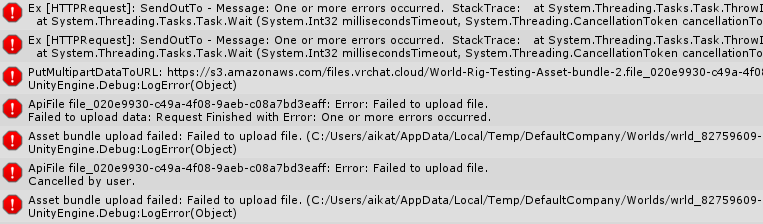 tropic cypress
I even tried using SDK2. Still the same thing.
Upload button is enabled but nothing happens when pressed.
 jade inlet
worthy beacon
jade inlet
worthy beacon
does input.getKey work for keyboard input or do you have to use input.getKeyDown?
grand temple
Both work, but getkey is true for as long as you hold the key. Getkeydown is only true for a single frame when you first press it.
Similarly getkeyup is only true for a single frame after releasing
glossy sky
Quick question, does the VRC_Pickup fire events globally? Like say I wanted a gun to shoot and trigger a particle animation/muzzle flash. Would others be able to see it or would I have to send it globally via. the network nodes?
twilit breach
That only fires locally, so yeah it would be when a local player uses a pickup in their client, fire a network event that has everyone set the particle to play. The particle position would be synced with an udon behavior with position sync box checked
This also means the particle coming out of each players gun would be in different places based on lag
glossy sky
Lovely. Thank you very much for the information~
twilit breach
are you making a pvp gun world? or just want other players to see guns shooting at static stuff?
glossy sky
PvE. I usually make bullet hell worlds and decided, I'm finally going to do my Azur Lane bullet hell raid idea. I'm aware of the combat system not working/is not utilized currently as well if that was going to be the next point~
twilit breach
combat seems mostly there, just missing the graphic for damage. I was just curious cuz I've been working on a particle gun PvP world since Udon launched
glossy sky
OoooOO. I see I see. Yeah, I've yet to delve into the combat system. I spent like, nearly 48 hours learning everything and finally got my vehicle for my raids full working. Wanted to work on it more but seems like servers are still down or something's up with it.
twilit breach
Sounds like a cool world. I think it's possible with the current SDK. I've yet to add damage to my bullets but bats and stuff kill me so I'm sure particles would work
glossy sky
Mhm! I can finally make the world I had with an moving and responding boss into a legitimate threat with Udon too now. xD At the moment though, she's currently broken as it seems animation sync stopped working. Took the living soul out of me though trying to get these vehicles to rotate based on player rotation. x_x
All the wonderful help I've been getting though from here though really really helped~ Especially since like, I know little to nothing about coding to begin with and whatnot.
twilit breach
Yeah there are a lot of helpful people in this discord, I've learned a lot from several friendly users as well(some are really smart too). When you get ready for combat you can at me
green plinth
@jade inlet you don't (devs not implemented it yet). You can maximize it tho.
charred axle
How hard is it to make a jukebox or music player in udon? I can't use the old prefabs anymore
north lintel
Can UDON calculate whether or not you're crouching, or moving slowly?
I'm sure the latter is possible, but crouching specifically
 dusk zealot
Why.......
nova parrot
How to change player's voice "talkDistance" ?
I want to change like VRC_PlayerAudioOverride voice parameters.
 severe dirge
 kind knot
Update event seems to not run at all, if im correct its supposed to run once per frame right?
flint urchin
@nova parrot It's not supported/updated to function with Udon yet.
Waiting for it too, and it's the only thing left in the progress of a event world to go live with Udon
@kind knot Yes, check that there isn't any errors
kind knot
https://pastebin.com/Ei4hyHG6 I dont see any errors
Ive actually never gotten update to work... no clue why
flint urchin
That's because you're fetching the player api from OnPlayerJoined
That won't work
Networking LocalPlayer is what you're after
That or
Set a VRCPlayerApi variable and use that
kind knot
I connected it to the wrong spot
flint urchin
You also don't have a Text variable assigned to the Set Text
kind knot
I got it fixed now
just got confused on connecting things due to it not allowing me to add multiple noodles to the update method
flint urchin
You can use a block
kind knot
Well now its being really weird, the Update event runs once or twice, but then the position of the object just locks https://pastebin.com/UG5ZHLMf

Idk whats goin on with it now O.o
Its also not setting the text ever
but the Set active disables the object after the period
Which doesnt make sense...
 north solstice
whats udon
kind knot
SO now it follows my head for a few seconds, then just stops text also wont set, and the object never disables
Im gonna take a break from this cause it just refuses to work https://pastebin.com/pCEZfXmT
 stable topaz
How would you guys go about completely disregarding the vrc character controller and applying your own controls in a world?
Some things are off limits when using the character controller (eg. flipping the character around to walk on ceilings...)
So far I've tried every possible adjustment to spawn point orientation in hopes to realign everything differently on vrcplayerapi teleport.
Adding my own controls to a station and forcing every player into their own station would work. Any best practices when it comes to custom player controls in VRC?
 boreal flower
How can I get the PlayerAPI that's currently holding the VRCPickup?
stable topaz
kind knot
https://pastebin.com/Ka38saiB Im sure im doing something simple wrong here, but what im trying to do is get the position of a bone, check if that position is inside the bounds of a collider, and do something if it is ... But its just not doing anything
kind knot
FIgured it out
vast granite
question:
what does _GetBonePosition() require as a vrcplayerapi arg?
fiery yoke
@vast granite are you using UdonSharp?
vast granite
yeah
fiery yoke
Use the instance method, instead of the static one. And ask those questions in the UdonSharp discord, this is meant for general Udon questions, or regarding the Graph/Assembly
twilit breach
@fiery yoke Finally got around to downloading Udon Sharp so I can try your fancy delay service. Trying to just do an interactable cube that sends the debug message from your example graph but no luck. Do I have to hit these compile buttons on Udon Sharp or am I just not using the right public variable I wonder
fiery yoke
Yeah you have to compile the UdonSharp scripts after "installing" them. Thats just how it is
The "Compile all UdonSharp something something" button should do
twilit breach
UdonSharp is pretty stable with graphs and stuff right? I haven't touched it till this point
fiery yoke
It just compiles C# code into UdonAssembly code
pallid mango
UdonSharp doesn’t generate graphs
twilit breach
I'm just worried I'll press the wrong thing and mess with some aspect that goofs everything
but that probably isnt even possible tho right
pallid mango
Code is code
fiery yoke
Ehh if you do something weird, you might have to restart unity
pallid mango
If you type some random letter, yes it will break
fiery yoke
UdonSharp does break occasionally, but usually only while editing things. Just having it in the project shouldnt do much harm.
twilit breach
If I just press compile all udonsharp programs in my asset folder would that do any compiling I'd need?
pallid mango
 fiery yoke
accurate.
But yeah Dinky just click that button once and you should be good.
twilit breach
On that example graph, the public variable I'm targeting is that the DS_Manager or the child DS_Handler for said graph?
fiery yoke
You dont have to put anything in there. Just have the variable in the Graph. My system does the rest automatically.
fiery yoke
Then youre set. You can now delay any event you want.
twilit breach
and now I use this handy little service to finish my dynamic destructibility and fading UI messages xD
Thank you very much 🙂
fiery yoke
I could probably do some more optimisations to make it run even better...
It loops through the array, which is bad in Udon.
I will try to make it more performant
fiery yoke
@twilit breach I actually just realized that I have a massive flaw in my code. I would recommend to get the newest verion of my delay service once I publish it.
It does work, but not as I intended it to. Sorry for the inconvenience. I will finish it someday xD
twilit breach
mmkay
 flint nacelle
alright so i just started using triggers and now im to understand they are not in udon? pretty new to unity and just built a project with sdk 3 and just now realized there are no trigger descriptors, so how do i set up something to teleport a player or where can I find this information?
kind knot
Experiencing something odd,
I have the same udon script being used in 2 spots in the world, with different variables.
Enter the world, trigger first one, it gets stuck after that first toggle, the second one works flawlessly, doesnt matter which of the 2 get triggered first, first one always breaks
Including losing track of synced variables on reconnect
kind knot
and now its working fine... odd
 novel phoenix
the magical world of programming, stuff works and then it doesn't and then it does
 naive whale
When the sdk3 allows Avatars. is that fancy for avatars will be allowed to use UDON?
pallid mango
Not necessarily
Most certainly not to the extent that it’s allowed in worlds, if at all. Least I heard, scripting will never be allowed on avatars. That was before Udon came around, but that’s all I’m going off of.
naive whale
might be a world setting and a safety setting to enable/disable udon and obviously it will be a bit less powerful, you cant just have a character designed to fly around break maps or lag people.
pallid mango
Could always make a feature request. I don’t think it’s planned.
naive whale
i dont think i will. Mainly cause that sounds like a nightmare to impliment.
albeit the possibilities would stretch endlessly.
like proper character-world interactions.
intercharacter interaction.
or even some nifty additions or gadgets to a character.
since udon is safe once the features are defined its basically impossible to abuse udon to frick people over.
pallid mango
I’d love it personally I just can’t imagine a way it could be done in a way that
1.) is constantly available in both private and public
2.) is not insanely abusable in public
naive whale
actually i shouldnt go assuming how easy it is to break vrchat. ive never used udon
the easiest route would be to disable anything you definitely wont need in a character.
and heavily limit it
pallid mango
Artificial limits never work
naive whale
but nothing really counters the whole spam the hell out of it until something breaks.
modded sdks ect exist if the devs want it or not.
personally i dont want a modded sdk
the limits exist because the servers arent like nasa pcs.
 pastel rain
yo
regal geyser
What is the best way to make it so that a given object can only be controlled by player input when that player is seated on a given vrcstation?
flint urchin
Disable and enable it is one way.
Another way is to use a bool in the update where the inputs are.
that bool would indicate if the person is seated or not
regal geyser
with OnStationEntered / Exited?
flint urchin
Yeah, just make sure it's not run for the remote clients (if the actions are the same for both local and remote in the station settings)
regal geyser
thanks👍
fiery yoke
Is the station controller thing still meant to be used or what?
flint urchin
it is yeah
flint urchin
not checked, but wouldn't really think that'd be used anymore
twilit breach
So in the old SDK/Unity version pickups collided pretty decent with walls. Now they phase through them very easily and get jittery till you drop em. Is there a setting to get them back to the nice collision?
 dawn plover
Hello! I'm trying to make a super easy script, but for some reason I can't make it working in any way. So, I have a pickup object that has isKinematic active and after you pick it up for the first time I want the isKinematic to be disabled, and after some time it will respawn with the isKinematic enabled. I've already made the respawn thing working, but for some reason I can't make the isKinematic working, I tried to set it when you drop or pickup the object, but it doesn't work in any way
This is the setup I used
floral dove
@dawn plover - your graph looks like it only ever sets isKinematic to false. You'd need a way to change the 'value' input on the Rigidbody.SetIsKinematic node
dawn plover
But that's the problem, even if it should set it to false the Kinematic is always true, I can't make it to false by dropping it. Anyway there's a part of the code when I set it back to true, I didn't show it in the screen because it doesn't fit all in one screen 😛
And I tried to change the onDrop with onMouseDown and try it in the editor, and everything is working fine
floral dove
so does isKinematic never toggle for you, or does it work with mouse controls but not on drop/pickup?
dawn plover
It never toggle in VRChat, but in the editor is working with onMouseDown; So far in VRChat I've tried with onDrop, onPickup, onInteract and it doesn't give any error in the log
Now I've tried to remove the VRC_Pickup script and use the onInteract and it's working in VRChat, so I guess it has something to do with pickup objects or the onDrop/onPickup
flint urchin
there is this one I've been meaning to test myself for isKinematic https://feedback.vrchat.com/vrchat-udon-closed-alpha-bugs/p/rigidbodyiskinematic-not-toggleable-if-udonbehaviorsynchronizeposition-true
Actually, I already have. In my test world O.o
 torn quail
hey i need some help... im trying to make a gun shoot whenever the player click left mouse while holding the gun. I got a script to disable a gameobject that contains the sound+muzzleflash.
I tried 2 different methods - one with update() and one with OnMouseDown()
update() doesnt work at all
OnMouseDown() works only once when i pick up the gun. if i drop it and pick it up again it will shoot again.
but what im trying to do is make the gun shoot while the player is holding the gun (VRC_Pickup is set to equip) whenever he clicks left mouse.
im adding the scripts. any idea how to make that work? thanks!
dawn plover
Yup, I can confirm that after disabling the synchronize Position it's working as expected, I can pick it up and when I drop it the isKinematic is disabled, so I guess I'll have to wait to synchronize my pickups lol
fiery yoke
There is another way to organize your synchronization, which is essentially outsourcing the synchronisation to the PlayerApi, and binding the GameObject to a certain bone or hand of the player. Essentially the object itself has a constant position on the Avatar, but the PlayerApi decides which Avatar its bound to. Its less flexible and only has a few actual use cases, but for a few things its actually pretty neat, when you want to avoid lagging objects. E.g. Accessories like hats, armbands etc. The positions will not match between clients, but it will always look right locally.
twilit breach
@torn quail You want to set the pickup to a gun and use the event on pickup use (which is clicking your mouse anyway)
torn quail
you mean VRC_Pickup -> Orientation -> set to Gun?
and On Pickup in the udon script instead of the Update/OnMouseDown?
fiery yoke
You dont have to set it to Gun to work. It only requires that AutoHold is true (which Gun would do, but you can also manually set it to true).
And the two events are called OnPickupUseDown and OnPickupUseUp
regal geyser
what is the command to make the player leave the vrcstation?
torn quail
@twilit breach @fiery yoke working thank you guys!
glossy sky
How exactly are we suppose to setup custom sit animations for VRChairs in Udon? Upon playing the scene, it always seems to remove the controller.
https://i.imgur.com/jZzD01y.png
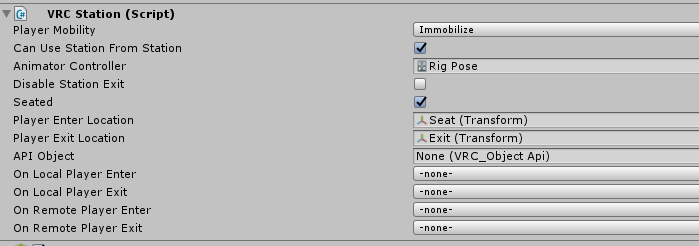


 glossy sky
Never mind, I'm a pepega. I forgot to unprefab the chair. LOL. That's why the animators kept un-assigning itself.
 jolly flower
What would be the node to attach a gameobject to the player or to detect controller inputs?
fossil zenith
Is there a way to connect to an external server to pull something like a leaderboard for scores?
fickle stirrup
@fossil zenith nope, maybe through videoplayers, but atm they are not implemented, there's also no way to save(but methods for this exist, but do nothing)
nimble thunder
anyone know how to get the local player in u#?
novel phoenix
@nimble thunder Networking.LocalPlayer
 torpid badge
At the bottom of https://ask.vrchat.com/t/vrc-triggers-udon/196/3 there is a blank space under SetComponentActive, is the version of that for Udon coming in a future release?
stable topaz
@torpid badge I think it might be slightly more difficult to disable generic components. Some components have an enabled property (like camera.enabled) and it only affects unity events like update/start and so on..
So if a component doesn't offer the enabled property by default or doesn't use any of these default unity calls it wouldn't even make a difference.
So you'll probably have to add extra bools to the components you want to enable/disable them manually if you can't resort to enabling/disabling gameobjects (which also only disables the unity default event functions)
topaz sentinel
could somebody tell me why this timer isnt working?
flint urchin
@topaz sentinel that's my fault. Forgot to add SetVariable in there (will fix 😬 )
Just add a SetVariable in the false flow and update the deltaTime
topaz sentinel
thx
pallid mango
It’s best two do both. Gun synced to the player API for visually holding the gun and tracking their movements smoothly, then a second invisible gun that is not synced to the player API for actually shooting bullets so the effects and travel trajectories are always synced regardless of players lagging behind
topaz sentinel
@flint urchin sry to say this but still not working for me D:
flint urchin
Look at your graph again, you're doing the custom event in the false statement
topaz sentinel
should it be on false?
flint urchin
It has to be on True if you want it to work
topaz sentinel
its on true
flint urchin
oh yeah, my bad, looked like it was on false
But you just got the true and false inverted then
False needs to update the deltaTime variable
while True resets it to zero
flint urchin
yeah
flint urchin
Well, they are both being deactivated, so not sure if that's the intended result
topaz sentinel
yea i want to deactivate 2 objects after 5 sec
flint urchin
Make sure it's compiling properly (manual compile)
topaz sentinel
i pressed the compile button mutlible times ut it didnt affected the result D:
flint urchin
Well, there is nothing wrong in the graph. Try add a Debug Log on the false statement (after the variable has been set) and print the float value to the editor console
If that doesn't show, then the graph is not running or not compiled properly
topaz sentinel
how can i print it to the editor console?
flint urchin
Using a Debug log node will do that when you test it in the editor
topaz sentinel
ok sry i have 3 braincells i still didnt get what i should do. i added a debug log to the false statment
topaz sentinel
and then click run in unity and activate the object or?
flint urchin
yeah
but if you got this disabled in the start when testing in game, it might not work. UdonBehaviours that aren't active from the beginning won't work properly atm
nimble thunder
any way to see errors ingame?
like, is there a way to print the error log to a piece of text or something?
 civic trail
So, is the "public" flag on for example Game Object Set Active what was referred to "local" before, kinda? Can't test it right now, but I have problems with a mirror that triggers by Event_OnTriggerEnter... it turns on and off for everyone instead of just for you and obviously screws it up then. I'm using this:
I mean... in reverse then ofc... :P I've turned it off in this screenshot
Taken from PhaxeNor's sample I believe, but replaced Interact with the other triggers
fiery yoke
Everything is local by default. However you have to remember that the position of players is synchronised. Depending on how you have it setup that can make something that seems local be actually synced/global.
civic trail
Hmm, maybe a dumb question, but how would I check that?
Cause it does definitely, without fault, turn on and off for everyone else
fiery yoke
The layer this object is on, decides what it collides with. On the default layer pretty much everything collides with it, so it will also collide with other players. To make something only trigger when the local player collides with it, you can follow my guide at: https://ask.vrchat.com/t/player-collision-in-udon/428
civic trail
So if I stand in there and another person walks in, it turns off
Oh ok
I'll check that out then
fiery yoke
Essentially you create a layer that only collides with the PlayerLocal layer
civic trail
Ahh yeah yeah, I'll create a new layer and test again later, thanks :)
 stone cave
cuz i was thinking of buying them because u get 209% back
 wicked dove
Hey I was wondering when vrchat is coming to psvr
 native estuary
Not the right place to ask and the answer is no
civic trail
@fiery yoke You think this would work with the udon script I sent above? Or does it need the Networking Get Local Player node? Cause it seems to work with the layer and everything, but I can't confirm with more people atm. I'm just not entirely sure how to work in that node in "my" script.
fiery yoke
No it should work. Youre toggling the Object locally, and youre only colliding with the local trigger.
civic trail
👌 Cheers, I'll try it like this tomorrow then. Thanks for the help
green plinth
Seems i am stuck again, i want to get a vector represented by a vector3 that shows heading from one object to the other, magnitude i can get separetely, but i cannot remember the term for it meaning i cannot find a Node to use, anyone know?
fiery yoke
You want to get the direction from one object to another?
green plinth
yup
fiery yoke
Subtract the position vector of Target from Start. So (Start - Target). Get the magnitude to know how far away it is and/or normalize it
green plinth
Well that will not work @fiery yoke , as soon as you subtract -5 - +1 you get -6 instead of -4 and if you use addition on 5+5 you get 10 instead of 0. I been stuck with this conundrum for basically a week now.
fiery yoke
I already answered this for you on the forum
green plinth
One sec
fiery yoke
Ohh yeah sorry I mixed them up. You have to subtract Start from Target. So Target - Start.
if -5 is your target and 1 is your start you get -6 so you have to move -6 from 1 to get to -5.
green plinth
Yea using delta normally does not fly in a 3D space as you need negative values.
fiery yoke
What? A delta is a difference. it has no direction. Its meant for a different purpose.
worthy beacon
is there any possibility we might get use of the playerprefs class, even if its limited use?
green plinth
Your right @fiery yoke it seems to work fine, i am going to have to start using the "debug draw line" more to troubleshoot the issue.
A seperate problem i been having tho, is that if i apply a vector3 for a "rigidbody add torque" it behaves really odd, i used this on a ball using a vector3 that gives heading, but to make it work proper i have to do this.... What is going on here is this a actual bug?
 topaz flower
When ya'll gonna fix the Udon exploits?
 errant lichen
This might be a stupid question, but what data structure does Udon use for arrays? I wondering because I want to have a player list array. If I remove a player from index 1 from an array full of players, would I have to reseat all my elements into a new array so that all the players after index 1 will move over to fill up the empty index? Or would it dynamically shrink the array without having to move everything into a new array?
Also, is there documentation on what all the nodes do? Because currently I just spawn a node and try to infer what it does by looking at the input and output. When I see "GetSDKVRCPlayerLocalAPI", I'm not too sure if this is getting a local player in the server, or if it works for multiple people, etc. Sorry if this has been repeated before or I missed some documentation I can just look at, I just started learning Udon yesterday.
flint urchin
@topaz flower have they been reported?
@errant lichen There is a list of players node there, but can't do anything with it right now.
As for documentation, there is one in the Udon folder
torn quail
hey guys i just updated my project and the seats are broken now. any way to fix it?
the sit outline is working but it wont teleport to the sit position
flint urchin
read the last post in #announcements
torn quail
oh yeah didnt see that post. thanks 👍
errant lichen
Thank you!
green plinth
@errant lichen also if you click on the small "?" on the Node it self, you will get the official unity documentation it is based on (not for all of them tho), it not perfect but it a good refference material in many cases and easy to lookup.
errant lichen
@green plinth Thank you so much, I didn't know that was a feature! That will help a lot.
green plinth
Yw
 rough delta
how do i make avatar pedestals
glossy sky
There should be an example of an avatar pedestal in Asset/VRChat Examples.
rough delta
I mean there is one but it doesn't really work proper
flint urchin
what you mean?
glossy sky
Taking a look into it right now. I imagine you'd just have to plug in the avatar ID.
rough delta
I placed them in the world and added the IDs
green plinth
Ok i am trying to use a UI slider set to call udonBehaviour.Interact but for some reason the interact event gets no calls, anyone know what is wrong?
fiery yoke
I would never do that other than for debugging. Interact is meant for interacting via clicking on an object that has a collider. Make an event and call SendCustomEvent
green plinth
@fiery yoke ok i tried that just now, nothing happens still.
fiery yoke
Well theres multiple things that you could have done wrong. Without more information its hard to help you.
green plinth
well @fiery yoke i just set the event to toggle the UI sliders game object off the slider should vanish as soon as i touch it's value, so it is clearly not Sending the custom event when "On Value Changed"
fiery yoke
There is still multiple things that you could be doing wrong. Try SendCustomEvent in the Start block
green plinth
well i placed the code in the start event, it sure toggeled the slider off so the main issue is that the event is not being called.
fiery yoke
OnValueChanged does not get called when you change the slider in the inspector.
green plinth
😢
fiery yoke
You have to actually drag it in the Game view
green plinth
I guess i am just gonna have to trust my programming skills more then and test once complete...
fiery yoke
You can just go into play mode set the camera to the slider (Shift + Ctrl + F to set it to the Scene Camera pos) and drag it.
green plinth
Oh yea
Well that works, thanks @fiery yoke sadly my code caused a 5 sec lag spike so it's no good. 😛
 crimson flame
does udon also use 2018.4.20f1?
 distant ore
So how do we detect whether an user is doing a particular hand gesture?
green plinth
That is the recomended one officially if im not wrong. @crimson flame
crimson flame
thanks
green plinth
detecting hand gestures, that a interesting one.
that could be used a lot by the deaf community.
You know what guys i am gonna use a alternative solution, so my issue can wait.
green plinth
Ok i found the issue my self so i am deleting it (me pepega lel). 😛 Used delta instead of fixed time....
Btw i found a way to synch values more accurately, mainly use a local variable and then use a synched one to check if it matches for a few sec during the network event and if wrong value during the check (timed while loop) then alter the local one to match/synch.
Damnit that exception error is back, and this time i did not even change the script....
green plinth
Ok this is likely a bug....
distant ore
I cant seem to getaxis "Oculus_CrossPlatform_PrimaryIndexTrigger"
if its included in the Udon program it would halt right there
fiery yoke
I know that instantiation isnt networked, but what about destroying? I guess you have to network it yourself. Would make sense.
 dusty galleon
Is there any ways to sync VRCInstantiate?
I'm quite trouble with this thing for days, but I can't still figure out VRCInstantiate works
Or does UDON doesn't support spawning synced instances?
serene moat
Udon doesn't yet support networked instantiation. People are using object pooling with a set of existing objects at the moment if they need objects that exist for everyone in the room.
dawn plover
Is it normal that Udon with the last update works so inconsistently? I mean, I've tested my world before changing anything with the new update and everything was working great, then I just opened a script without touching anything and now that script isn't working anymore as it should (for now it happened mostly on scripts with onTriggerEnter/onTriggerExit) and I don't understand why, maybe compiling a script made in the old version with the new version will break it?
 proud snow
What do I do for object sync now for Udon?
 worn summit
Does anybody know how to itterate over all players in a world (say to set everone's Jump Impulse to 5)? This is after they're all in there already, mind you. Not at Start.
distant ore
so in Unity I got a Trigger that detects whena PlayerLocal has collided with it. It works fine. But in game, it does not indicate any type of collision.
twilit breach
@proud snow just add Udon behavior component and check the sync position box (this only updates for prefabs if you change the attached graph/asset)
@worn summit I imagine you could add everyone who joins to a list and then grab everyone from that list to apply jump impulse on whatever trigger happens mid game
@distant ore what type of thing happens when the player collides with it?
distant ore
ah nevermind I got it working :3. for some reason i can compare a PlayerLocal layer to the int 10 just fine in Unity
but in VRC it does not
stumbled across a post that has a fix for it
https://ask.vrchat.com/t/player-collision-in-udon/428 from TheHelpfulhelper

VRChat Udon Discussion Forum
If you want to make something happen when the player collides with a trigger, e.g. runs into an area or touches some object, you will have to detect that collision. This is the setup that I use: Create a new layer and call it something like “OnlyCollideLocal” In your P...
 buoyant radish
So I got an explosion particle system working with Udon through Prefab instantiation locally, but when I upload it to the server it doesn't work. Nothing happens?
north lintel
Does an UDON-powered world come with the updated jumping? Or do you have to enable jumping, like before
twilit breach
@north lintel you have to enable it but it is easy
there is also a node called like legacy locomotion or something that I believe is the old system. haven't tried that one though
 west mural
You don't have to create that graph yourself. Vrc includes on just for that
I think it gets recommended if you search player mods or similar when adding a component
twilit breach
@buoyant radish Network instantiation doesn't work atm so you would need to make the particle system a child of the object that will be at the location you want it to emit from. And said object needs to be in the hierarchy and instead of instantiated teleported or moved with physics
buoyant radish
@twilit breach Thats painful, I think all the features on the explosion are set to trigger on instantiation. So the object should be in the empty gameobjects hierarcy disabled and then just enable it with the Udon trigger instead?
Theres probably an 'On Enabled' code that I could swap the on instantiation code out for.
twilit breach
create a dupe prefab and put it in an asset folder called "waiting for instantiation update"
then use any number of methods to play it
I personally went with udon behavior sync so all players have the same location
and a network sent custom event that plays particle system
buoyant radish
Oh so use a custom network event. That could work. I did have the Udon Sync enabled on the explosion prefab. It just wasn't instantiating to be synced. Any thoughts on when the update is coming out? It would be pretty usefull.
twilit breach
no clue, my folder is waiting though xD
how is it currently set? like just a no mesh/collider game object with a particle system that on play does the stuff you need?
north lintel
@twilit breach May as well ask since I've put the question up several times with no response, maybe due to its simplicity
How do I delete self?
twilit breach
as in destroy the object? or something else?
buoyant radish
Yeah thats all it is. It triggers sounds and stuff on instantiation and removes all traces of itself after the explosion plays through.
north lintel
I had an on Mouse Down set to destroy the cube when it's clicked
it worlds for stuff like rotate, but not destroy
twilit breach
got a screenshot?
Caz, yeah would might have a faster time just changing all the instantiation events to on enable and enabling to catch all of it
twilit breach
so my destroy node has a slot at the bottom to input a variable
and you do get variable node, dropdown set to your game object and drag that into destroy node
does mouse down event change it and auto target?
north lintel
So my Object Destroy has no obj Unity Object
I can fix it by changing Object to Object,Float and back again, is it just a bug?
twilit breach
I dunno, but you can put the variable in now?
twilit breach
on your asset folder in the bottom left go to udon and then in the bottom middle hit the txt called version