#udon-general
59 messages · Page 7 of 1
 north rivet
Have we gotten UI Menu's working yet? Havent seen much about them on the forums
 flint urchin
They've been working quite a while
north rivet
I would assume so, just using canvas's
flint urchin
I'm using it here https://ask.vrchat.com/t/ukeyboard-multi-language-support-u-wip/416

VRChat Udon Discussion Forum
uKeyboard A multi-language keyboard made with UdonSharp ( U# ) Was I need of a in-world keyboard that I could use to interact with different text screens, so created this with Udon and UdonSharp. All languages are stored in text files and Udon takes care of the formating an...
north rivet
Ahhh the showcase section, i look forward to ripping it apart when released to learn how UI's work with Udon xD
flint urchin
If you're familiar with it using SDK2, then there isn't really much different
north rivet
Im not at all, im making the attempt to learn it now, just bad timing(or great timing actually) to learn it on a new platform
Much easier than i thought, thanks for your help ❤️
 fiery yoke
Does anyone know how to set a public variable in an UdonBehaviour via EditorScript?
 floral dove
@fiery yoke targetBehaviour.publicVariables.TrySetVariableValue("variableName", value);
fiery yoke
Yeah I thought that, but it doesnt do anything to the Inspector.
Either Ive done it wrong, or that doesnt work
floral dove
Hm - I've done that in a project recently to fill an array with 100 objects, and those objects def show up in the inspector for me.
floral dove
since I'm working from an EditorWindow, I also did this first:
var targetBehaviour = GameObject.Find("MyObject").GetComponent<UdonBehaviour>();
fiery yoke
Yeah I just cant get it to work at all
Ahh okay I think I found out whats happening.
I did:
myGameObject.GetComponent<UdonBehaviour>.publicVariables....
However it doesnt seem to like that.
I now seperated the GetComponent and the TrySetVariableValue and it works now.
floral dove
weird, but glad it's working.
fiery yoke
Aaaand it broke again...I really dont understand what Im doing wrong xD
 spring forge
That's just life as a programmer
 charred axle
There's a bug where things don't work right after they're instanciated (but they do next update)
Not sure if that's related
fiery yoke
Im instantiating them in the Editor. Also Im not trying to do this right after instantiation
Found the problem: If the Value is currently set to None (aka Null) it wont let me set it to a new value.
@floral dove can you confirm this? (Pretty sure it had to do with the fact that I was using UdonSharp...UdonSharp initializes to Null instead of self for GameObjects. Gonna talk to Merlin about this, however the bug might still appear on "vanilla" Udon, dunno)
 modern jolt
how i can obtain the displayName when a player enters a trigger?
fiery yoke
Player Collision is not very straight forward in Udon right now.
Heres a guide I wrote:
https://ask.vrchat.com/t/player-collision-in-udon/428

VRChat Udon Discussion Forum
So you want to make a trigger that collides with players but dont know how to? Look no further: Create a new layer and call it something like “OnlyCollideLocal” In your Project Settings under Physics, setup the collision matrix so that the layer only collides with “Pla...
modern jolt
okey thanks! i'm trying something similar with U# but i can't get it to work
 glossy hornet
i got that wierd ticking noise in the background, i cant find the cause of it. maybe someone got an idea? https://ttprivatenew.s3.amazonaws.com/pulse/plastefuchs/attachments/13044254/TinyTake08-04-2020-02-40-20.mp4
@cunning mist maybe? 😄
 cunning mist
yo whatup
glossy hornet
nothing to special
cunning mist
Where is your audiosource? Is it on the car object?
glossy hornet
yea it is
cunning mist
While I'm not certain about how it all works, you may want to play around with the import settings for the audio clips that you're using. I'm not super familiar with it, but try following this guy's advice.
https://blog.theknightsofunity.com/wrong-import-settings-killing-unity-game-part-2/
glossy hornet
because of the cutout i load all the songs on load instead ingame but that causes those ticking noises instead of the cutouts ive got when load ingame the sounds it self are supposed to be seamless
cunning mist
Hmm, I really couldn't tell you then. Sorry :/
glossy hornet
aw 😦
 tall vault
Has anyone started working towards a VRC_Trigger to Udon editor script to simplify porting SDK2 content to SDK3? I realize not all of the equivalent functionality is in Udon yet to make a complete solution but it would be great to see something being worked towards
floral dove
Jet has made this post outlining the correlations: https://ask.vrchat.com/t/vrc-triggers-udon/196

VRChat Udon Discussion Forum
This is the equivalents of vrchats trigger system. Triggers Custom event OnEnable OnDisable OnDestroy OnSpawn OnNetworkReady OnPlayerJoined OnPlayerLeft OnPickupUseUp OnPickupUseDown OnTimer codeAO1a224bVRT9lWqevatzv0TqQ6EFISSK1MsLqqxz2ac1uOPiC...
 kind mica
anyone know of a good way to have a gameobject follow the player? or better if its possible to match the player's view position and rotation?
glossy hornet
how to setup key controller in vrchat with multiple players
i thought udon script works only for the object attached to it
 queen panther
https://sites.google.com/view/noodlebowlvrc/home @kind mica this has a player tracker
fiery yoke
@kind mica
Player view position and rotation is:
Networking.GetLocalPlayer > VRCPlayerApi.GetTrackingData(Type:Head) > TrackingData.get position/rotation
kind mica
does that work in Desktop?
fiery yoke
Yes
kind mica
cool, will test this, thanks
fiery yoke
It doesnt work in the Editor however
kind mica
well
yeah lol
what about getting keyboard input? i tried a few methods that all work in editor but dont do anything ingame
 slow rock
=,= whats the code setup for setting an array of Gameobjects to InActive or Active when interacted on =m= im only stirring it around and getting no where
 queen siren
kind mica
queen siren
kind mica
i saw there were new debug launch options like --enable-udon-debug-logging, but how do i actually view these logs?
fiery yoke
You can either view them ingame (you can open the Console using a key combination) or in the logs found in AppData\LocalLow\VRChat
kind mica
cool so it's giving me An exception occurred during EXTERN to 'UnityEngineTransform.__set_position__UnityEngineVector3__SystemVoid'.
i dont have anything that sets the position of anything
actually i have one
but i doubt this is enough to crash the Udon VM
weird, using a Vector3 to store the coords instead of a transform Just Works
 scarlet lake
so i am very new to udon/ vrc in general. can't find documentation of VRC specific nodes (like VRCSDKBaseNetworing.getOwner) links are very appreciated. I am just very lost on where to find documentation
flint urchin
It's in the Udon folder, ReferenceDocs
Looking at resetting pickups, but there is no networked methods for it so we got to deal with it on our end.
Now, I got that system working, but on remote clients it lerps to the reset position (floating across the world)
Has anyone found out how to not have it lerp when resetting the position?
 fair bough
How it's work "Variable Sync"
why it seem not work??
flint urchin
they work
fair bough
I try to check sync linear
and set that variable in local.... I think it auto sync and other will see result
...but not
why lol
oh variable is public too
my variable is public and sync linear
scarlet lake
Does anyone knows if "OnPlayerJoined" triggers also for the user who joined themselves?
@fair bough I confirm as well that the "variable sync" works. The problem must be elsewhere.
fair bough
orz
 vast granite
how to access steamVR controller inputs? (U#)
 severe dirge
@fair bough "linear" syncMode doesn't work well. and also when "Synchronize Position" is checked. Synchronization stops after about 5sec on non-owner side. https://vrchat.canny.io/vrchat-udon-closed-alpha-bugs/p/synced-variable-tweening-modes-do-not-work-well
fair bough
umm i must use None for now right? thanks
severe dirge
yeah, "none" is the possible choice for now. To be sure, you must call SetVariable as object sync owner. If not, call SetOwner before that, and wait appropriate duration to become owner.
fair bough
Thanks very much >w<
 opaque plume
Has anyone done any procedural worlds with udon? Maybe only generating a world out of premade pieces of terrain. Not really thinking of minecraft, just one layer with ex. 16m x 16m blocks but minecraft would be pretty neat too.
vast granite
didnt do it with udon but in unity c# overall yeah. and since udon = c# nothing diferent than default code. (if u're using U# ofc, nodes are too cringe for me).
but if ure fine with prefabs its easy, just 2 for loops that spawn ur pieces randomly and just scroll through area
f.e. first loop would be collumns, second rows (doesnt matter much).
each tick just offset the position of Spawn by the scale of the prefab so its matching, if the origin of prefab is in the middle then reduce the offset by 50% to compensate
 humble jacinth
I'm trying to import the udon sdk into a new project and i'm getting this error which is causing me not to be able to upload
opaque plume
I'll probably mess a bit more with udon in general and see if I am still interested in trying some procedural stuff. Some simple stuff like that would be fine but actually infinite would be more effort.
vast granite
You won't reach infinite outcomes with prefabs. There is a way to generate meshes but no clue if udon is exposed to those functions atm.
 west plover

opaque plume
The plan is to have a set amount of pieces with a fair bit of randomisation in layout and the looks as it'd be too much and too difficult for me to create anything actually enjoyable if I wanted as much procedural generation as possible. I'd also want to recycle at least some parts to reduce needing to create new meshes.
I think you could compare this to scp contaiment breach.
For now I want to at least try to make just a simple version with planes which have props on them spawn around you. The colors and locations of the props on plane and the color of plane will be randomised. When you move outside of a specific distance, any planes/props behind you will be recolored/repositioned in front of you so it looks like it is infinite.
Not sure why there is no resize function for arrays though
I guess it doesn't matter for a small test where everything is already in scene when game starts, I can just set references in inspector. Nothing is created in the beginning for now.
vast granite
Mhm. So you got a plan. That's good. Any questions regarding code?
opaque plume
I think I'll use udonsharp. Can I create functions like you normally do in c# or do you need to use custom events? Damn you brainfart, had some other question, too.
Maybe it'd be almost better to first prototype in normal unity project and then adjust the code as needed to fit in udonsharp.
kind mica
U# supports functions so long as they're not recursive IIRC
opaque plume
Oh man that'll save a lot of time. I really hope the devs focus a bit more on the udon graph ui rather sooner than later. The missing zoom, freezing during searching nodes take fair bit of time which stacks over time.
kind mica
i've noticed it also just fails to compile half the time
like i'll click on it and wait 5 seconds and there will be no errors but i'll check the assembly and it will just not have changed
opaque plume
Surprised that didnt happen to me but the usharp I had to compile first before the tutorial scripts worked.
vast granite
🤔
I'm not having any issues with U#
I'd love to be able to see udons functions tho. Like in a list or something. Because once I was looking for how to make Networked event and was trying my luck with words for autocomplete to help me. But ended up asking here for it.
 serene moat
U# has a tree view of the functions that Udon exposes and doesn't, though it needs to regenerate whenever you reload your assemblies at the moment so it's good for exploring what functions are available, but not great for reference that you keep open while stuff is compiling right now. You can open it under Window > Udon Sharp > Class Exposure Tree
flint urchin
There is reference documentation in the Udon folder too. Not very descriptive there yet though.
opaque plume
The struggles of the early adaptors
I was just going to search for how to get the player position but might as well ask
flint urchin
If you search for player position it should show
vast granite
Ah. Okay. Thanks Merlin San.
opaque plume
Was a bit tricky to find but this looks like the correct way in udonsharp VRCPlayerApi._GetPosition(Networking.LocalPlayer)
Just gotta test it now
fiery yoke
You'd want:
Networking.LocalPlayer.GetPosition()
opaque plume
Okay I see, it even says vector3 on that.
 ornate fractal
hi guys, any way to know what is synced or how to sync across network? for example gameobject toggles? do they sync for other players, is that some extra work?
flint urchin
It’s some extra work at the moment. But add a synced Boolean and check against that for new players
ornate fractal
hmm, so you mean like making an onplayerjoined and setting everything again?
that's the only way i can think to sync things
wait..no that would just cause issues. i don't think i understand at all. i can't find anything about synchronisation.
i didn't even consider newly joined players, i'm just wondering how to even sync across existing players in the session
floral dove
@ornate fractal sync is not automatic. You need to turn it on for anything you want to sync up.
Check out the Sync examples that come with Udon
ornate fractal
thanks, i'll check it out
 polar sonnet
im currently making a world with vrcsdk3, and i want to make a button that toggles a custom graphics asset i have installed. thing is, it only works if it's applied to the camera, and i don't know how to make a button add that script to a player's view camera. if it's even possible
the mod ads volumetric clouds and it's vr-friendly. here's with and without the asset enabled
 zenith river
idk how to do that, but is that script even whitelisted?
flint urchin
No it’s not
floral dove
@polar sonnet you can't add custom scripts to your scenes - that's why we made Udon! Build it or compile it into Udon Assembly and you can use it.
polar sonnet
thats what i meant. a udon script to do that
but i have no clue how it works and i learn so damn slowly aaaa
floral dove
does the custom graphics asset have a script or is just textures and shaders?
polar sonnet
its a script
if it's not whitelisted, is it possible to do so? it just makes your scenes look so much better. here's the asset store page if you want https://assetstore.unity.com/packages/vfx/shaders/fullscreen-camera-effects/massive-clouds-screen-space-volumetric-clouds-131898

Add depth to your project with Massive Clouds - Screen Space Volumetric Clouds asset from mewlist. Find this & more VFX options on the Unity Asset Store.
floral dove
I don't believe we're accepting requests for whitelisting custom scripts.
polar sonnet
aw
floral dove
we're focused on getting Udon stable, fixing bugs and adding basic UI/UX improvements.
 digital swan
u can make simular clouds using particle system
polar sonnet
well, i think people would like if it was possible for certain custom scripts to be possible. like dynamic bones
i guess i just gotta live with it lol
 light harbor
Utilizing UdonSharp, how would I invoke Set Gravity Strength? Currently doing VRCSDKBaseVRCPlayerApi.SetGravityStrength(player, strength) but getting an error of Invocation requires method expression
polar sonnet
holy fuck i found a material for the same thing i might actually pull this off lmao
flint urchin
@light harbor For Udon# support, please use the Udon# discord 🙂
 strong finch
would you be able to take xss concept and apply that to udon scripts if they take input ?

obv it would not have any use and would be totally useless but just something that crossed my mind
polar sonnet
wait is it possible to make an object follow a player?
 thorn pilot
I made script wich is a physics based follower, so yeah it is possible, tho have yet to implement that it follows a player or more precise their head
 torpid patrol
wait is it possible to make an object follow a player?
@polar sonnet yes it is possible. You just need to get the VRCPlayerAPI object
polar sonnet
noice i may actually get the graphics asset working after all :D
light harbor
Udon# aside, is there a float that will allow "negative" gravity to create world that would allow flight? as it stands -1 is just low gravity, not actual negative gravity
 green plinth
Ok i am in a bit of a pickle, i need to do a mask, what i need is to turn a float value with decimals into one that has decimals set to 0, without doing down or up rounding of the values. Anyone knows how?
floral dove
@light harbor I believe VRC applies some downward force over time to keep people from flying away forever. You'll want to find another way to do flight. Low grav is probably a good start.
@green plinth how about Mathf.floor?
green plinth
This should work for what i need thanks @floral dove
 quartz oasis
Anybody know if it's possible to detect if a Player is triggering OnEnterTrigger? Would seem that trying to access anything related to the Player's gameobject (layer, name, components, etc.) is still not allowed.
green plinth
This will make you cry @quartz oasis for regular interact triggers you use "Networking get Local Player" as it is local it only gets who triggered it, likely same apply to on enter (try it, might work).
quartz oasis
Yeah the issue is that (as far as I can tell) there's no way to make sure the thing triggering the OnTriggerEnter is the player. Since you have to compare the Collider's tag/layer/name/whatever to be sure, once you access the player's Collider it errors out.
This also causes an issue where even if you aren't trying to compare the Collider with a player, if the Player is the one that triggers it, it breaks as well.
 twilit ridge
Does anyone know how to reference the location of a child object? I'm trying to teleport a player to a box which has a parent, so the box's position is technically 0,0,0, but it's parent is 15,20,15. I keep getting it to teleport me to 0,0,0 because of that.
flint urchin
@quartz oasis you got to create your own player detection set up and check against that instead.
quartz oasis
That's what I've started to do. Anything more elegant than a trigger following the local player's position at all times?
flint urchin
Nope, just a capsule collider (2 meters) with rigidbody and update the transform to the player
quartz oasis
Thanks. Was already headed that direction but you probably saved me a lot of headache trying other solutions.
flint urchin
Once we get some better checks against to players, we might able to drop all this extra stuff
quartz oasis
I certainly hope so!
 buoyant radish
How do I do Objectsync now? The pickup script seems to be working ish, but I can't find a script for syncing it on SDK3
flint urchin
ObjectSync is part of the UdonBehaviour now
Add a behaviour and a empty graph in it, then check the Sync position boox
buoyant radish
Wow. Its that easy!
Wild.
Whats the deal with my box collider getting picked up, but the mesh of the object stays in place?
 boreal flower
does SDK3 support avatar pedestals?
floral dove
@buoyant radish check out the example in Assets/Udon/Examples/SyncUIto see how a working pickup scene + graph looks
sure does @boreal flower - take a look at the AvatarPedestals info pinned to this channel!
buoyant radish
Yeah I looked at that, but it was just too confusing
boreal flower
oh thank you
buoyant radish
Looked like it changed the color too right?
floral dove
@buoyant radish - sure. You don't need anything in your Udon Graph to just get sync working. You can use the 'Empty' example program.
buoyant radish
This works right:
Make sure it has a collider and a mesh renderer
Attach the VRC_Pickup script from add component
Add an Udon Behaviour from Add Component
Someone said you need to make a blank graph so just click new program in the udon behavior. I don’t know if that is really needed though.
Click the check box that says Synchronize Position on the Udon Behavior component (Pictured Above)
floral dove
I meant that scene would show you how you need your hierarchy set up to do basic object pickup and sync
yes - that's right. You don't need to create a new empty program, you can use the one supplied in examples.
buoyant radish
Okay, When you say I don't need a new empy program do you mean I should make an udon asset that just has a blank graph and Sync position checked to drop onto objects?
fiery yoke
You can reuse the same empty Graph that comes with the sdk that is just called "Empty".
buoyant radish
Weird not seeing any assets called empty
digital swan
is there a way to lock a axis whit udon.
like im making a rigid body that comunicates whit a block if i turn block A on Y axel i want block B to turn on Z axel
fiery yoke
You could just copy A's localRotation.y into B's localRotation.z every frame
digital swan
wait how and what do u use ?for that ? tried searching for rotation and local rotation theres nothing i can find like that
you just gave me more questions than answers xD this is how it looks.
i want Ratt to move on Y axis. then move both wheelL and wheelR axel z
quartz oasis
Anybody know if it's possible to find the UdonBehaviour of any given GameObject and send a custom event to it at runtime? Perhaps I'm being dumb but I thought I could use GetComponent to find the UdonBehaviour instance, but that doesn't seem to be the case.
 civic vale
how do you find inactive game objects?
fiery yoke
You cant. At least not with any Find methods. Could you elaborate what youre trying to do?
civic vale
Just turn an object thats inactive to active
 tame matrix
if you only need specific game objects to do that, you can make them a child of an empty game object and then iterate through that object's children to check if they're inactive
thorn pilot
there are multiple ways to do that, either with a hard coded reference, or what you are probably looking for would be the "awake" function wich gets called at the moment the script gets instanciated, tho sadly we don't have access to awake.
But what you could do is have the object activated and then get the reference with the start event and then deactivate it
so basically in the script that needs the reference it would kinda look like Start> get/find object> set object inactive
civic vale
I did this xD
putting the object inside an empty game object then had it just toggle the object with an animator xD
flint urchin
What, why? 😩
civic vale
idk I just wanna toggle it ;w;
flint urchin
GameObject SetActive
thorn pilot
ok now i am curious, what exactly are you trying to do?
thorn pilot
like under wich circumstances
thorn pilot
just to throw that in here: a simple toggle button from a friend of mine (LuminaryPie) if that is of any further help
https://cdn.discordapp.com/attachments/682014338218852376/697179783804616744/unknown.png
 civic vale
I literally did this exact thing and it wouldn't set it to active again 🤦♂️
tame matrix
well you can't interact with it if it's disabled so you can just trigger it a different way
thorn pilot
you need to put this scrip on an object other than the one you want to toggle ofc
tame matrix
ah wait nvm didn't see that it was referencing a different object
 fringe geyser
can someone help me with some thing that i can ask a question
flint urchin
You got to ask the question for us to be able to help you.
vast granite
btw bois
who's the owner of the script by default
the server? or the master of the instance
 crisp patio
First player to enter
flint urchin
Master is owner of all objects that hasn’t changed owner. It will also claim ownership over objects that belongs to players that leave
vast granite
okay, good to know
 hoary obsidian
sugoi
vast granite
if (VRCPlayerApi._IsOwner) { }
^^^ it doesnt accept it as Bool, how else do i check for ownership
vast granite
oh ya, saw that one but it also wasnt a bool so skipped it. Weird making a ref to GO in there.
but thanks
*** well it is a bool, just didnt look like 1 at first look
 acoustic delta
Weird making a ref to GO in there
You need a game object to check if you are the owner of that object
vast granite
in actual Photon (that VRC is using btw) you dont 😄
acoustic delta
If you want to check if someone is the master of an instance you do Networking.LocalPlayer.IsMaster()
I can recommend checking the Class Exposure Tree under Window > UdonSharp >.
vast granite
nono, im only checking for the owner of the script. cus dont want everyone in the goddamn instance to be sending Network calls on all scripts. was making the instance to time out
hoary obsidian
huh
polar sonnet
guys i have no clue how Udon works. can someone tell me how to make an object follow a player locally?
acoustic delta
@polar sonnet Depends on what you mean with "follow"? Do you want to to always teleport to the player?
polar sonnet
well, always follow the player locally. it's because an effect i have on my world is on a mesh, and the vrchat camera's clipping range is ridiculously short, so i can't just scale it up to fit the world. i have to make it follow the player's head for it to look okay
acoustic delta
As a starting point I would recommend checking out Tuppers Spinning Cube tutorial https://ask.vrchat.com/t/spinning-cube-example-series/81

VRChat Udon Discussion Forum
We’ve got a set of videos here for you to check out to get you started in Udon and with some basic concepts. Let’s meet the VRChat Udon version of Hello World-- the spinning cube! Video 1 - Introduction Video 2 - Input and Flow Video 3 - Public Variables Video 4 - Program ...
ornate fractal
VRC pickups are still synced without any additional udon required, right?
like their position, that is
fiery yoke
There is a checkbox on the UdonBehaviour literally saying "Synchronize Position" :P
acoustic delta
ornate fractal
i know that, which is why i am asking
acoustic delta
No future code is required other than that checkbox.
fiery yoke
Well you have to check that and it does what it says.
ornate fractal
if i was to have a vrc pickup, with no udon behaviour at all, it wouldn't be synced?
fiery yoke
Right
ornate fractal
ok, so udon is required for all sync now, got it
fiery yoke
Yep. It replaced the ObjectSync script.
ornate fractal
just trying to wrap my head around how sync now works in general and how to implement that into my graphs.
i looked at the examples and don't really get how i can apply any of it to what i'm trying to do
do we know what the Update and LateUpdate events do, or when they happen?
fiery yoke
Sync means that the owner sends their data to everyone else which they apply. That is the basic principle of sync. Position Sync just means that the data is the transform of the object itself. It could however also be strings, ints and other variables that are synced.
@ornate fractal https://docs.unity3d.com/Manual/ExecutionOrder.html
 acoustic delta
tl;dr: Update runs every frame. LateUpdate runs every frame, but after Update. But Helper's link is worth a read.
ornate fractal
hmm, i see, thanks guys
i realise that variables can be synced, but how can you sync actions like setting a gameobject state? i was going to just have it check a synced boolean and use Update to set the gameobject accordingly, but that seems excessive.
fiery yoke
Well OnDeserialisation happens when any variable gets a sync update, so you could use that. Alternatively you can check on update if the variable has changed and then do what you need to do only then.
ornate fractal
OnDeserialisation sounds perfect in that case
and do i need to set the owner of the object in order for a synced bool to be updated? i still dont quite understand what setting the owner is for
fiery yoke
The owner always wins in the battle of which state something has
so if the owners bool is true, and a non-owner client tells the owner its false, they will loose and it will be set back to true for everyone.
You either have to ask the owner to change the bool, or become owner yourself.
ornate fractal
ok, so it's best just to set it for something like a pickup toggle. great, that is super helpful, thank you!
one last thing - for setting the owner of something..is it inherited down a hierarchy? for example, a gameobject with two gameobjects as children, do i need to set the owner only for the parent, or for all three?
would be useful to know if components inherit that as well
ornate fractal
cool, i'll do some testing of it later!
 oak elm
will it be able to make a player hand tracker?
 fickle stirrup
you have access to read all humanoid bones position
boreal flower
Bone positions aren't the same as hand tracking.
You can access hand tracking through VRC PlayerAPI
here's an example of getting the local player's left hand's position and rotation
fair bough
what is key number or key name of VR (HTC Controllor) in input.getkeydown
 stuck mountain
@fair bough https://docs.google.com/spreadsheets/d/1_iF0NjJniTnQn-knCjb5nLh6rlLfW_QKM19wtSW_S9w/edit?usp=sharing

Google Docs
VR controller summary
This page is a combination of the other pages. These
inputs are verified to work on every known controller, and
in cases where they don't an alternative is provided.,Use this world to test:
https://vrchat.com/home/world/wrld_f8d5f7e4-185c-4b82-8ecb-8a...
You or a friend with a vive can visit this test world to find out: https://vrchat.com/home/world/wrld_f8d5f7e4-185c-4b82-8ecb-8ae0c7953085

Has a list of the controller inputs gettable via Input․GetButton() and Input․GetAxis() in Udon
For joysticks and vr, it is Input.GetButton not Input.GetKeyDown
flint urchin
@ornate fractal if you want to see when/how often events are fired, you can go into this world https://vrchat.com/home/launch?worldId=wrld_ff39def8-c0b9-48a3-bcf6-658931821153&instanceId=22272
It’ll give you a good idea of how the events works on VRChat side

Udon Event and Variable Test
 west mural
does anyone know the button name for oculus thumbstick touching. not thumbstick press, just touching.
stuck mountain
@west mural read the link I posted 3 posts up
ornate fractal
@flint urchin thank you very much
stuck mountain
If you have an oculus you can go to merlin's test world
west mural
i mean that document doesnt contain that exact button, but i will try merlins world
okay, merlins world also doesnt have it
google cant find it
so i give up
flint urchin
@fiery yoke for the OnDeserialisation, it actually happens twice every update, even if no variable has been updated.
fiery yoke
I thought thats what you had told me, but thanks for the headsup. Does it do it once before and once after update?
flint urchin
Before we dived more into it yeah, that was the thought about it.
It does it twice before FixedUpdate has run at least (which is at the same rate as update for me)
Well, finished running
fiery yoke
Hmm alright. So is the best/only way to detect a variable sync update really to check it against its old state on update?
flint urchin
Yeah
fiery yoke
Nice networking VRC :^)
flint urchin
¯_(ツ)_/¯
In the test world I send a network event to tell everyone there is a update
fiery yoke
Yeah but that could have a potential race condition with the sync itself
flint urchin
Then I just have a dirty update check running on a timer that check against it
It could yeah
fiery yoke
And thats bad. Like not critical. But still bad.
flint urchin
Yup
fiery yoke
They definitely need to work on their Networking API for Udon soon-ish
flint urchin
I’d think so. It’s a important aspect that everyone will use
 topaz sentinel
Hello :D
i want to have a event after a few sec of pressing a button. What do i need to add?
vast granite
The simplest but kinda crude way would be with if states and time.deltatime. You would change a boolean on with pressing the button and then with a check if its true you count down a float value with time. When below 0, execute event
But there might be a fancy function that could make it "easier"
fiery yoke
If you set yourself as the owner of a GameObject, is that immediate for you locally and the old owner will get a message to update. Or is it the other way around where you have to wait for ownership transfer?
 raven peak
there should be a slight network delay but it should be pretty quick.
fiery yoke
Well pretty quick is not same frame quick, which is what I need...
west plover
Quick in 60fps land is not network speed
You're looking at a half-second wait.
If you set ownership of the GameObject, you need to tell master you've done that
You should await claiming it before doing the operation.
 jolly karma
k
fiery yoke
That is super annoying. But alright
west plover
Async code is always hard.
spring forge
I've heard both answers from different people but is there a way to set someone's avatar with Udon?
vast granite
Doubt. Since as someone already told me player is a protected object
 twin cairn
spring forge
twin cairn
spring forge
can I make a pedestal in U#?
 rotund willow
yes
vast granite
Good thing i said "doubt" and not just "no" 😋
fiery yoke
@vast granite yes the player OBJECT is protected. Thats the whole reason for having a PlayerAPI. You can interact with the player, but only those things that VRC allows. Setting the Avatar of a user is part of those "allowed" actions
vast granite
If u ask me forcing an avatar is preety toxic in comparison to me wanting to just do a check for collider tags on my raycast 😩
fiery yoke
Objects that concern the player itself are persistent, meaning that they wont reset when you change worlds. Hence you cant touch them.
I dont know why they dont just have a single "Container" that is protected and reinstantiate the player from that container everytime you change worlds, but its probably not that easy.
Its not impossible to give us access and still have security. But its not easy.
vast granite
Just make it read only. Should do the trick
 twilit breach
umm in the update what does this mean - Udon can no longer access built-in Unity primitive meshes. If you need to access meshes directly, import your own copy as an FBX or other asset in your project
rotund willow
I guess it means that we can't access the meshes like the cube or capsule built into unity
vast granite
It means what it says: you can't use unity primitive meshes like cube
twilit breach
but like, thats my lazy go to for testing xD
vast granite
 Plame Bupper
west plover
Stop being lazy then 👁️👄👁️
twilit breach
D:
fiery yoke
You cant access the Mesh. You can still access the colliders and mesh renderer...it doenst change much at all
vast granite
Lazy people are superior. We prefer to come up with easiest solution to not waste time rather than do it "normally" x3
twilit breach
I had some set ups where I'd disable the mesh have a delay before destroy giving it time to play audio off the object before it destroyed so like idk
maybe is kaput
vast granite
Just make a random ass prefab and change ur template to use that instead of spawning primitives. Shouldn't be much different
I hope
twilit breach
hmm im reading it now and it says import a new fbx
are obj models not kosher for some aspect of scripting?
also wasn't there some bit about syncinc fbx's earlier, maybe i shouldnt be saving obj
 tepid ore
So is udon just for creators or for users to enjoy a better vrchat experience? And am I already using udon??
twilit breach
Udon is a tool used by creators to simplify programming stuff when they develop a world
acoustic delta
And not just simplify, but also vastly extend what is possible to create in VRChat. Right now I know of people building games and utilities which previously wasn't possible. It will take a bit before these things are ready for release, but will in the future result in significantly more interactive worlds for all users to enjoy. @tepid ore
tepid ore
Okay thanks guys for the info
twilit breach
when deleting/replacing the SDK folder to get the newest do we need to hit the Udon folder and meta as well?
scarlet lake
This is the setup I have for a mirror toggle. How would I modify it to make it local only? I cant find a place to put Networking Get Local Player
twilit breach
its already only local
scarlet lake
Oh
twilit breach
to make it for all players you'd add a custom network event
scarlet lake
Ok ty
 fallen shore
does this work for teleportation :thonk:
fiery yoke
Does anyone know if there is a way to check if a give UdonBehaviour actualls has a given Event?
vast granite
wut, sorry i didnt even understand what you wrote
 vagrant coral
so hey, im super paranoid about updating the sdk this time because of the noodles i made. is it just dragging in the new sdk into unity and just unpack like any other unitypack? just wanna make sure i dont scew thing up for myself.
or is it. exit unity,m delete folders and meta and then unpack?
flint urchin
SDK3 can be updated in place without deleting anything. It is recommended to take backups no matter what methods are used anyway
fallen shore
does anyone have teleport noodles from place to place
buoyant radish
Oh how? The Updating documentation doesn't say: https://docs.vrchat.com/docs/updating-the-sdk
VRChat
If you need to update your SDK, it is important that you follow these steps to ensure the update proceeds properly and you don't have any old/conflicting files. Simple Update Here's how you update your SDK. If you're just uploading avatars, you can use the following process: ...
vagrant coral
yeah i was a little confused if they talked about like updating from 2017 or just in general.
buoyant radish
@fallen shore Is this what you want? https://docs.vrchat.com/docs/updating-the-sdk
VRChat
If you need to update your SDK, it is important that you follow these steps to ensure the update proceeds properly and you don't have any old/conflicting files. Simple Update Here's how you update your SDK. If you're just uploading avatars, you can use the following process: ...
vagrant coral
oh well.. backups it is
buoyant radish
Wrong link

VRChat Udon Discussion Forum
Player Teleport Make a gameobject with a collider on it and add the graph to it. Then in the inspector set the location you want to teleport to in the public transform variable Graph CodeAM1WXU/bMBT9K5VfF1dOYsdOJR4GZRNiAraWvkwoukluUEbqVE4Cqwq/bA/7SfsLc+kH0EaoGjCh9qFx7etzzj...
buoyant radish
Yeah I sent the wrong one
buoyant radish
It definitely works great for me.
 unique star
can udon do networking to the internet?
buoyant radish
Oh @vagrant coral I think I figured out what @flint urchin was talking about.
Click VRChat SDK in in unity then click utilities/check for updates
vagrant coral
yeah that wants me to update to a sdk fropm 2019 😄
buoyant radish
oh.
unique star
like can you network udon stuff with your own servers?
is it all locked to vrchat's network?
buoyant radish
I haven't seen anything about local servers, but you can lock rooms in the app itself
unique star
do you know if its still possible to play custom videos? or does it have to be on youtube?
 real star
I know one world let you play custom videos from dropbox still.
And it worked.
If that is what you mean.
floral dove
@unique star you can play custom videos with direct links to mp4 right now, a revamped Video Player is coming.
green plinth
So guys i am looking into synching and so on, somebody mentioned that synch does not work correctly, anyone able to tell me what is wrong? Because i am thinking that all that wrong is simply a lack of queuing and semaphores being used.
ornate fractal
anyone know how to change emission on a material?
flint urchin
@unique star What Owlboy is using is a custom system, which is private to him. You can in SDK2 change the videos at any time. SDK3 soon.
unique star
@flint urchin its not so much that I want a copy, I am just trying to figure out how to make a server side script send a message to the web
it seems Owlboys script is doing that to change videos
floral dove
@green plinth there are still some sync issues to work out but many basic types work, along with Object Sync. Are you seeing a particular issue?
ornate fractal
also does "Start" event happen only when the world is created or does that happen for a late joiner too?
flint urchin
@unique star He's not sending anything to change the video. That's done via a website/editing the script.
It's made so that when someone press play, it will play the video that is there. If you stop what's playing, change the video in the script, then it Play again. It will play the new video instead.
unique star
so its like changing websites?
flint urchin
Bit more complex than that, but in a way
green plinth
Currently i am not seeing any particular issue apart from when i made a synched var it did not list in the get, so i had to restart unity for the var list to update @floral dove i was merely wondering what issues others have run into (wana look into problem solving if needed).
floral dove
@west plover - each UdonBehaviour has a checkbox to turn on sync for the object which will sync the transform's position and rotation to the other players
west plover
Ah, not GameObject itself as a sync yet
Got it
Ta 🙂
When it's in I'll be able to send event objects to people with metadata 👀
green plinth
So i tried to synch this way but for some reason it not even triggering, what i did wrong?
 kind knot
Been messing around with Udon today, cant find a way to set the "Use" text for an Interact event trigger, is it not implemented yet or am I blind XD
green plinth
Oh that @kind knot it's in debug mode, change the inspector into debug mode.
green plinth
It is but for some daft reason it's hidden. 😛
kind knot
I mean it should be a node
ornate fractal
hmm. i think i found a bug.
i added a Material Set Color node to my graph, and later deleted it because it wasn't what i needed. now none of my script works at all, and i get this in my player log:
2020.04.09 23:36:11 Error - [UdonBehaviour] An exception occurred during Udon execution, this UdonBehaviour will be halted. VRC.Udon.VM.UdonVMException: An exception occurred in an UdonVM, execution will be halted. ---> VRC.Udon.VM.UdonVMException: An exception occurred during EXTERN to 'UnityEngineMaterial.__SetColor__SystemString_UnityEngineColor__SystemVoid'. ---> System.NullReferenceException: Object reference not set to an instance of an object. at VRC.Udon.Wrapper.Modules.ExternUnityEngineMaterial.__SetColor__SystemString_UnityEngineColor__SystemVoid (VRC.Udon.Common.Interfaces.IUdonHeap heap, System.UInt32[] parameterAddresses)
anybody had anything similar to that? i think i just fixed it by restarting unity.
glossy hornet
is there some kind of input controller just for a single object? would like to make the player move an object, but not all objects just the one hes inside the seat
wanted to do it with player tags but that doesnt seem to work 😄
 jaunty schooner
"- Udon can no longer access built-in Unity primitive meshes. If you need to access meshes directly, import your own copy as an FBX or other asset in your project"
I hope this will not affect the use of Probuilder to make worlds? I don't know how it generates its primitives.
west plover
Probuilder shouldn't matter
stuck mountain
@jaunty schooner I believe this literally only affects primitive meshes. This is referring to the 10 or so meshes like Cube, Cylinder, etc. They would show as Resources/unity_builtin_extra or highlight the Assets thing when you click them
west plover
Unity UI Q
Do you need a box collider to interact with the UI
To hit buttons on the canvas
stuck mountain
generally, yes. However, the VRC UI Shape script adds a box collider if there isn't already one
stuck mountain
but it has bad defaults for the dimensions
west plover
OK, got it
green plinth
add the script to the canvas
west plover
Yeah figured that out after it didn't work the first time 🙄
Nearly have something really cool done but the darned button won't fire in-game 
floral dove
@green plinth - regarding your graph above, you can't have two flows into one node. If you compile your graph, you'll see that one of those flows disappears.
green plinth
@floral dove your right but this graph was compiled and the flow remained, and it works if i do not use event's (so your both right and wrong, as in some cases 2 flows actually work). Anyhow i tested what you suggested "no change does not work".
floral dove
@green plinth when you say "it's not even triggering" - is the bool not changing or is the Interact event not getting fired off?
west plover
I forgot to take the canvas off the UI layer
green plinth
@floral dove the send custom network event is either not sending or the custom event not receiving (i tested it down to those 2 being the only thing not working)
kind knot
What is meant by "You cant have two flows into one node" does that mean that 2 events cant trigger through the same node?
green plinth
@kind knot it's about having multiple events triggering the same exact code in graph.
kind knot
thats something that should be able to be done... why is that not a thing... explains why im having troubles too
green plinth
Yea you have to trial and error to make sure you able to use multiple
floral dove
@kind knot you just shouldn't connect two flows (white noodles) into the same one white arrow.
kind knot
Before I go tinkering too much, does a custom network event trigger for Self aswell as others or only others
floral dove
@green plinth in the case of your graph - is the newUdonBehaviourVariable set to the UdonBehaviour this graph is on?
green plinth
yes @floral dove , i even tried leaving it on default (no param/var)
fiery yoke
I just had a synced string that was different for two clients over a long period...wut?
green plinth
Different how?
fiery yoke
What do you mean different how? Just two different strings...
like "Hello" and "Goodbye"
green plinth
Could it be lag? Failure to change?
fiery yoke
Ahh Im getting a [FlatBufferNetworkSerializer] Caught ArgumentNullException: Value cannot be null
green plinth
@floral dove i checked the code, seems the get for "Toggle_Target" is being instansiated for each event as seperate variables, is this normal?
_onCollisionEnter:
PUSH, instance_0
test_name:
    PUSH, instance_2
hm, not sure. That graph you posted shouldn't compile with two flows going into one so not sure what the assembly should look like.
green plinth
@floral dove when i use both interact and collision enter the code is simply copied identically for the second event (hence why it works at all).
they even use the same instance numbers when pushing @floral dove despite being 2 seperate events
floral dove
@green plinth ok - I have SendCustomNetworkEvent working. If you have a scene with a 'Sender' object with this on it:
AM2U3W7TMBTHX6XydVw5H47dSr2hA1QhDbRuvUFVZDvHVVhqI8fpqLo+GRc8Eq9A0o8x2g1VQNEUK7KT4+Nzfsf/8/3rtxVaiLIG1P+4Qrouy0sxbxZocjW8ya0Z2vncmpHx4LRQUI3aj68XYPwVKCgW4LpZNgaTD+vK2/kl+DvrbjcGWfaMj8dG18LNwGfjZeVhPvauMLNst5rYIkcBqpt3H3EQcS/mDMex1DjROcM8FQQzoHmaQ5iLVDfGn21V+MIa1F+hL6iPE8K7JEDLdpo203WAjM3hZnRRNQkjrkCklOVYUiYar4RjCaHGKs0JjViqOId70vhtxzRAurR3u73TradJy67awKtN4Zfv5SdQfrIlukKFqbwwCkYXqN8eXm0y3P1GaB38x21bqt0t5KAzr5R1ZSGDzgRc1TAbJF3SPkFnWJe+djAwUHsnyqDzoZZlod7B8treghlIxgRVNA17cQKE9+4bl7MZOLSetqE9ukVvm9pOhCuELOFnLU+g/kQtGU33tYxZdFTLM9TnjMSohljyJMZM0QgnEEnco5zgmMSch4rHeSKPcW51NfbC+QeaYaijUKsE615McdJjFEuWE0xoQnWaaqmpfIImpdGeJiXJIc1fWZ6mvkPih8Hv78FzbeG4tTzkeBKt36o/jY5yRDtdvzB1n1Omm2b7d3G9srYEYf5tYNeuOeLlhfVGlNWfxtWKd7r+AQ==
And a receiver object with this on it:
AM2SwY7bIBCGX8XibCww2OBIOSV7WLVqK203lyqybBi7tA5UNqSNsnmyHvpIfYWSTdJ2tSvtXipVXBgNgm8+/p/ff+zRthkCoNmHPerCMLxpNrFAC2cnX9/sJg+bGz8a26MUBaNjq9BE50wCFpUuMRc5xZK3LQbNuATFKDASD39xk/HGWTTbo29ohgtRZiRFu7jlRGbkkCLrNNxeL6f4OELrFHWD+3qu16fu6sg23cMFa/zubfsJlF+diPfIRMjGKrheotnxwume9NxGJ/rshJ8mm0m5cTBtmqxgnCLZnGfkuNJkEQYfRphbCH5shjR5F9rBqFewe+8+g523QjSFKkpaMQ5EVncjKDBbGJOP0Iw6iS/0PYzosD6kDzTeHqGvbG8sLKENfVbXr11fn8WeprlUKxf1XiQLWjIpWoqhIBXmSkpcFTSWVDdlp0VHO/qEZEbIb8lV/kjyS77ujvyDr3hs5moL1teLMHm3+RMtWXHdSo0rJgvMmSpxRXOBmeJdXgqtqHoyWiW/TF0Q/ly0Xub2Pw/gX4lbH34B
And you set the receiver as the 'target' of the first event, does it work?
you should get receiver heard trigger in the console when you Build and Test
flint urchin
If you really want to see what's working, go here: https://vrchat.com/home/launch?worldId=wrld_ff39def8-c0b9-48a3-bcf6-658931821153&instanceId=89467
Got almost all events and sync variables working.
Including SendCustomNetworkEvent
floral dove
ooh nice!
flint urchin
Still adding more events, but yeah, these are all that's there noow
This board updates via SendNetwork events
green plinth
in the Unity console tab? @floral dove i tried test build and play, nothing happens.
floral dove
@green plinth not in the Unity console, the in-client console. Are you just pressing play to test, or are you using the "Build & Test" button in the VRChat SDK window to test?
green plinth
i tried both for your example, but in general i use play, but you mean in the CMD window? Nothing there @floral dove
Could it be that i have not yet updated to the SDK that came last?
floral dove
@green plinth custom events have worked for a while. Anything involving networking (or avatars, for that matter) will only work when you Build & Test FYI.
west plover
Is there a way of using InputFields without it being a bit buggy
green plinth
Ohhh, it's not supported by the play? Gotcha
west plover
I'm walking left and right whilst inputting text, etc
flint urchin
Not much you can do there other than forcing them into a station while they are typing
west plover
You can set the player's speed to zero in Udon etc
Was wondering if there was a Unity option or something, and there isn't
You know what works in the player that sends custom network events, by the way?
UdonStringEvents. Available now on Github!

green plinth
@west plover how where you thinking it was gonna work for VR users? Maybe use a mouse clicked VR keyboard that works for everyone?
west plover
It'd be nice if when you clicked on a text entry field the VRChat UI for text entry popped up
But yeah
It'll have to be a keyboard.
flint urchin
VRChat Udon Discussion Forum
uKeyboard A multi-language keyboard made with UdonSharp ( U# ) Was I need of a in-world keyboard that I could use to interact with different text screens, so created this with Udon and UdonSharp. All languages are stored in text files and Udon takes care of the formating an...
green plinth
That would be nifty
west plover
Is that functional?
flint urchin
Yup
west plover
As in, can I grab the code and nick it?
flint urchin
👀
west plover
👀
flint urchin
Code not done yet
west plover
Hmm.
flint urchin
Redesigning the layout
green plinth
I been looking for a keyboard as well, it was either that or make one my self.
flint urchin
It was broken for a little while when they pushed a update, but fixed it
west plover
neat
flint urchin
so just cleaning it up then realsing
west plover
But yeah what I'm working on is a portable UI
flint urchin
That's the idea for this really. Drag and drop anywhere
west plover
So someone logs into a world, they get a UI attached to their right hand (if in VR)
Typing with one controller will suck though 🤔
flint urchin
yes it does
west plover
So I might make it so when you attempt to type something it freezes you in place and opens the keyboard UI
green plinth
basically root you until you click enter?
west plover
Think so
This is something that I'd love to see the VRC devs iterate on though as an automatic feature
green plinth
does player speed =0 root you?
west plover
If you set your speed to zero you cannot move, yes
Your translation each frame is zero
green plinth
Yay
west plover
That's the pooooooooower of nil 
green plinth
That is wierd, i updated the SDK and now the SDK menu missing options...
Got it working now, no idea what happened but for some reason it did not update proper (maybe i messed up)
Now if only i could figure out a way to replicate the old on_player_collider/trigger hit teleport_player, basically how to make it work perfect accurate as pre-udon...
vagrant coral
what value do i use to define a layer in "game object set layer"? I tried the layers number without success.
or maybe it needs a special format in the number?
fiery yoke
LayerMask.NameToLayer(string layername)... then you can just do "Default" or whatever layer
green plinth
Layer Mask get Value? (no idea)
vagrant coral
Ill try it out Helper!
vagrant coral
That worked thanks!
fiery yoke
Is there an Event that happens locally just before the local player leaves?
kind knot
Ok so, I have a bool that is toggled on an interact event, I use this bool on playerjoin event to make sure that some game objects are set into the same state for everyone no matter when they joined
When a new user joins, if the bool is false, it sets the game objects correctly, but then inverts its state unexpectedly.
Flow of what happens:
State defaults false
first player sets state to true ->
Second player joins ->
Game objects are in expected state
First player sets state to false
now both players have inverted game object states indefiniately.
green plinth
@kind knot basically what you saying is that you got a global event that toggle and that toggle is not synched properly when a new player join?
kind knot
It syncs properly on join initially, but its like udon forgets what it is and sets it back to the default state
green plinth
can we see the Graph?
kind knot
Its a bit big for a screenshot and cant be pasted here, Ill upload a file to pastebin quick
https://pastebin.com/gyi0gsRU Way too big for screenshots
green plinth
Ok @kind knot it's a simple matter, your player joined event is not triggering the custom event.
kind knot
It doesnt need to
The joined event is just there to set everything to keep new players synced
The custom event and the playerjoined do the same thing
I mean, I can remove all the code from the join and make it just cause the custom event and see what happens
green plinth
Try have it assert a refresh event when a player join, far less code and easyer to understand @kind knot
simply have the player joined call the custom event and nothing else.
kind knot
I was just trying to avoid more network traffic than is needed - something thats stuck with me from past programming projects where network was limited
Testing now with it just calling the event on playerjoin
green plinth
I see
Well try go for code simplicity, as there is no guarantee that Udon will work properly.
 vivid nest
Is there a specific way to like save UDON scripts? I had a script to which if you pressed 'e' a ui will appear, it KINDA worked so I was debugging it and noticed that no matter what I did it didn't change, I even disconnected everything to the keydown 'e' and the ui still pops up when i press 'e'
green plinth
@vivid nest it's the compiler aborting due to a error, try fix the error, change the name of a public variable and check in the inspector if the name changed (if the name change it compiled it using the new name).
vivid nest
Alright, ty
kind knot
Ok, so its STILL negating the initial state of the bool, no matter which way its set it inverts on first interaction
Causing it to be inverted for the 2 people in the room
green plinth
Could be the synch mode, gonna check the script to make sure nothign wrong
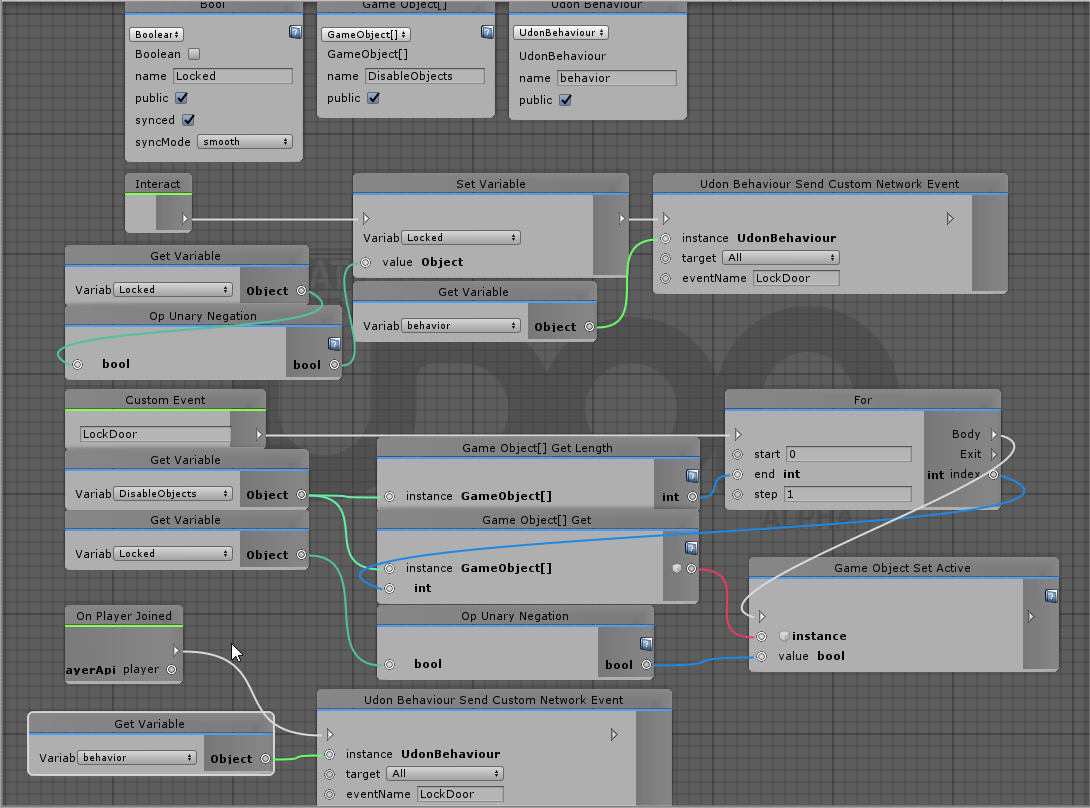 green plinth
I just noticed something wrong @kind knot your doing a local set and then a event global set of the same variable.
kind knot
hmm
green plinth
shorten the code down so the interact only calls the event.
green plinth
yes but the interact alters it twice, once locally and once globally
green plinth
exactly
kind knot
The interact runs TWICE
So theres not a single way I can have a bool switch on interact...
That makes 0 sense to me
If I make the interact ONLY run the custom event, then I no longer have the bool being toggled, which will make it so that this is entirely useless for what its supposed to do
green plinth
yea, true.
you may wana migrate the code to the event to make sure, because it does not feel cosher to me
kind knot
I just split it out to a seperate custom event
So now I have 2 custom events, 1 sets the objects and the other sets the variable
green plinth
you should be able to have the toggle in the network event
kind knot
but if I put it in the same event then the playerjoin will toggle it aswell
kind knot
Now I just have to find someone to assist me in testing for the hundredth time, cause as far as I know its impossible to test these edge cases using local testing
fiery yoke
Second account :P
green plinth
What are friends for now again? Can anyone named @kind knot remind me?
kind knot
Yeah, but Im already on a complete shit connection 😂 so cant do 2 accounts rn
and like, None of my friends are around 😂
green plinth
WTF Dude, i am right here. 😛
kind knot
well... shit get yoself in and help me 😂
green plinth
Sure i got a synch code of my own i need to test.
kind knot
lol ok
flint urchin
Just start up a third instance.
 jagged crow
is it possible to include an udon program in a prefab
 cunning idol
Can you tell me why this happens when I'm doing Vrchat for the first time?
It's a black screen.
If you know anyone, help me.
jagged crow
@cunning idol ask in #user-support-old, this is for udon-specific questions
or check #vrchat-support
cunning idol
thx
green plinth
@floral dove i still not managed to resolve the synch issue. Yes the button trigger now, but it still only local toggle.
vivid nest
canvas not disappearing, assuming it's the compile error thing, the canvas is inactive already, for some reason i becomes visible when it shouldn't? also public var name's update
 worthy beacon
is there a way to parent a gameobject to the player or vise versa?
flint urchin
You'll have to create your own player system that tracks the player api and parent it to that
worthy beacon
create your own player system?
kind knot
Basically a script with a loop that updates periodically to connect an object to the player
Making the object continuously move to the players location
worthy beacon
oh....so not parenting the object, just updating its positon to the players.....
thats super inefficient >.<. So theres no way to get like the players gameobject or transform?
flint urchin
It's a protected object so no
worthy beacon
i suppose that makes sense, there is a lot you can do to a gameobject
flint urchin
But having one object being updated to follow the player isn't really inefficient
kind knot
Im gettin annoyed the VRCPlayerApi gives a weird list that is unusable as far as I can see
flint urchin
Which one?
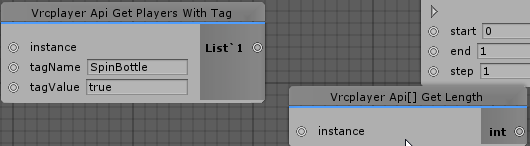 worthy beacon
its an extra line an update as aposed to only one, the comparison is a lot, tho not enough for a performance problem
kind knot
That I cant figure how to manage
flint urchin
Yeah, that's not implemented yet
kind knot
Damn that throws out my plans for the night
flint urchin
Every UdonBehaviour runs on Update anyway (afaik )
fiery yoke
it still matters if your Update is like 500 instructions or none tho
worthy beacon
they arnt event driven?
fiery yoke
Update is an event. But its one that happens every frame.
worthy beacon
ya, where fixedupdate happens more often
kind knot
aye @flint urchin You might know if this is known or not,
Me and @green plinth are both experiencing some odd behavior when setting a Synced Bool, then running a custom networked event using that bool.
My experience is its horribly inaccurate and sometimes just forgets which way its supposed to be
Im assuming its a networking issue entirely but I have no way to figure it out rn
fiery yoke
Probably a race condition
kind knot
Ahh.... so how would one delay the network event enough for variable to update
fiery yoke
Essentially the update for the variable and the update for the network event arrive at a different time
You cant reliably.
kind knot
crap..
fiery yoke
Most of the time a second will be enough
flint urchin
Eventually we'll be able to send variables with the event
That way you don't need to worry about it
We also don't have any form of Buffered events yet
kind knot
Right now im running it a little weird, one networked event sets the variable, the next networked event uses the variable
still runs into the issue but far less
I cant really do a whole lot till the player API is complete now anyways, so guess Ill just sit on what ive done for a while
vivid nest
ui not showing, i have the variable set to the ui too, and if i make the ui active in unity it shows
green plinth
And also i still cannot figure out how to access the player API collection list, it's as if accessing any of the content is not yet supported in udon, cannot find any functions for it.
kind knot
Literally just asked about it @green plinth it's not implemented
digital swan
trying to force WheelR and wheelL to move on Z axis while Ratt is on x axis.
tried several different transforms but no luck any one got a idea on how i can do this exhange off rotation axis ?
 grand temple
Are these wheels used for a vehicle? Because it won't roll properly if you change the rotation in that way
digital swan
eventuly yea.
now im just trying to get the funktion for it to work on 3 boxes 1 acting as steering and 2 as wheels
grand temple
You might want to look up tutorials on YouTube how to make a car in unity. All of the functions will be named the same, you just need to do it in noodles instead of code
jagged crow
is disabling the mesh renderer of a mirror enough or do I need to disable the mirror script too
like will it keep using resources even if the mesh is gone
digital swan
what is noodles ? 😮
worthy beacon
so i did this in an attempt to make the object fallow the player, is this not right? https://gyazo.com/d75bada6f8c3e9502c1ba98461249f0d
 digital swan
sorry for jumping in betwen messages.
i alredy made a working car in unity.
grand temple
Use networking get local player instead of onplayerjoined. Then assign it on start
worthy beacon
alrighty, ill try that
grand temple
As you have it now it would follow the most recent player that joins, not the local player
worthy beacon
well it doesnt fallow the player at all, the object doesnt move
grand temple
Oh, I bet update fires before onplayerjoined. If the playerapi is null and your try to do something with it, the script will halt.
 vivid prairie
I am a small brained nerd who can't deal with learning U# right now because I'm busy with irl shit, has anyone made a video player thingy yet so I can put good memes on a screen in a world?
grand temple
Start will always fire before update so you can use that safely
jagged crow
is there a way to test if the world is being run in vrchat proper vs just in the "game" tab of unity?
worthy beacon
so i created a public boolean, and i set it to not its default value on the object the udon script is a applied to, but it seems to not be respecting the change, is that normal?
basicly trying to use a boolean toggle to determin if the object is tracking the left or right hand https://gyazo.com/2c0e1e9fa5af258c3b8d5fd5c0089819

this is the cube im trying to put into my left hand https://gyazo.com/9401eb8c8d18deee986590b4e58fd8bf
 worthy beacon
ah ok
worthy beacon
well im gonna try an alternite path and see if i get a different result
 meager hatch
Does anyone know how to make a digital clock with the udon SDK I've looked I have no clue where to start
worthy beacon
and it suddenly just works......ok then >.<
 north lintel
Where can I find the UDON documentation?
scarlet lake
Does somebody knows what is the requirements for making an object interactable? I've attached to it a collider component and the udon behavior with the "interact" event on it. But I can't click on it, in game. It looks like it's a static object part of the scenery. Does I need to add any specific block in the program?
 fossil zenith
add vrc pickup
raven peak
It shouldn’t require a pickup for interact. @scarlet lake are you using the node graph or udonsharp.
scarlet lake
@raven peak nodes. As of not I didn't place any pickup on them, since I'm building buttons. Just the collider and the udon behaviour. Yet, I can't interact on them at all. They don't "glow". If I use the "onmousedown" in the play test mode, they work as intended. It's just the VRChat interaction that does not seems to be working.
raven peak
A couple of things i can think of. Are there any colliders or triggers covering the button. Is the layer interact able . And whats probably the issue is the graph not compiling correctly so the changes arnt showing up. I switched to udonsharp cause of that.
scarlet lake
@raven peak No colliders or anything covering the button. The layer is the default one, I haven't changed anything on that department. As for the graph, that I wouldn't know how to check whether is compiling or not. I know it's not returning me any error, mostly because it's a super-simple graph anyway. Do you know how can I be sure it's compiling?
raven peak
Usually if you duplicate the graph asset and open the new one. Click compile you can see the assembly code in the asset update if it wasn’t compiling right.
scarlet lake
@raven peak I've just tried and the assembly code is identical between the original and copy of the instance...
The only "out of the ordinary" thing that I did was updating the SDK, as per instruction yesterday
But i've followed the guide they provided to the letter
raven peak
Can you post a image of the graph
Could be causing a exception making the graph disable.
scarlet lake
....
I've fixed it
by removing the udon behaviour component and adding it back again. Same setting as before
I don't get it.
@raven peak thanks anyway, apparently it was an Unity bug or something like that 😐
raven peak
👍
vagrant coral
is there a know problem with setting layers while in game? it works in unity playmode but not in game.
nevermid... i think i just made bad noodles.
kind knot
ahh burnin the udon
scarlet lake
very new to this. been reading on U#. seems like the only sensible way to deal with non-trivial scripting. Now, we have udon interpreter inside vrchat (probably written in C#) that runs udon which in turn is compiled from C# like language. Why bother with udon in the first place then?
kind knot
Safety and security. Converting it allows them a lot more control over what CAN happen. If it was just pure c# theres much much more chance for security holes. Udon also has the "node" style editor, which makes people who have never wrote a line of code in their life able to get into it a bit.
 timber lion
Can anyone show me an example of a synced variable (for example an int) using UdonSharp?
raven peak
I have my testing world uploaded to github.

GitHub
personal experiments. Contribute to jetdog8808/Udon-playground development by creating an account on GitHub.
timber lion
Thanks!
raven peak
Here is the uploaded if you want to visit https://vrchat.com/home/world/wrld_e247a305-5e5b-4bc4-a83a-253b197b7a65

This is a world with my experiments․ WARNING˸ THIS IS A TEST WORLD․ things might break or problems might happen․
timber lion
I really should have dived through your resources by now actually
but the weekend is young
raven peak
Im still working on stuff so ive not made any releases.
timber lion
ah that would be why!
raven peak
Though i am thinking about pausing that stuff and work on a project. https://twitter.com/jetdog8808_dev/status/1248604883168702465?s=21

Looking for suggestions in making a decision. In working with udon my original goal was to recreate some of the things we had in sdk2 for #VRChat world creators who dont want to code anything with udon. But im thinking about pausing that to work on a #MadeWithUdon project.
 Twitter
timber lion
Twitter
timber lion
If I were to make some public utilities and stuff... personally I would make some really nice generic world management stuff like a player list, log, maybe a notification system. Just stuff that would be useful in hangout worlds... I guess
But that's just because I love working with canvases
raven peak
(Got those two)
timber lion
naturally lol
raven peak
Though player listing will be updated when we can access lists
timber lion
Oh I kinda made a list thing that you might find interesting. It's probably better to wait until lists to save the headache but
ornate fractal
i'm having big problems with sync, i can only get my bool to sync with another player if i spam use the item that changes it. what is the state of sync right now?
raven peak
Sync takes a sec to update for other users.
timber lion
Yeah I also have another question about sync if anyone knows, if I understand correctly an UdonSynced variable will be immediately changed for... is it the owner or the master?
timber lion
Hmm, ok, that's convenient I guess
raven peak
By default will be the master.
ornate fractal
i have this on my pickup to try and take ownership of the object, its child, and the vrcpickup component, do i need to also take ownership of the bool variables?
timber lion
in my udon draft for murder I did manage to set up a "table" of players that's just a bunch of 32 length arrays
One for VRCPlayerAPIs and others for other stuff I need
right now its to keep track of 32 ownable world objects so that I'm not instantiating and destroying stuff but... i guess you could do that for everything
but the thing is, on join a player fills the first null slot in the array and also everyone sorts the array by player id
raven peak
Instantiate i dont think is working correctly in game.
timber lion
Yeah, and besides instantiating stuff in murder 3 was annoying and buggy in SDK2 for forever so im just avoiding it from the getgo I guess
raven peak
But thats like how i handled my player list. https://github.com/jetdog8808/Udon-playground/blob/master/Assets/jetdogs-prefabs-udon/U%23 scripts/usersinworld.cs
GitHub
personal experiments. Contribute to jetdog8808/Udon-playground development by creating an account on GitHub.
timber lion
@digital grove im not sure what your hierarchy is structured like but I'm pretty sure owning a pickup means you also have ownership of its child gameobjects. Also your graph doesn't have flow to the other set owners... not sure if intentional
and yeah jetdog this is like exactly the same
raven peak
@ornate fractal synced pickups handle ownership automatically so if the bool is on that udonbehaviour you will take ownership. If its on another udonbehaviour you will need to take ownership of it and wait a frame before setting its value.
ornate fractal
ahh ok. if i set ownership of the gameobject will it also take ownership of any child gameobjects if i refer to them in the script?
also can i use the "Start" event to sync late joiners?
raven peak
I believe phasedragon said children dont automatically change ownership has to be done manually.
ornate fractal
cus i realise i have a few networking set owners there, but i feel like i might just need one
ohh ok, i'll just keep them then. but i imagine that setting ownership of the object, that has a vrcpickup component on it..that will transfer correctly right?
raven peak
If you have syncposition enabled.
ornate fractal
yeah. wait, does everything sync automatically for pickups? so i dont even need set owner on anything?
except for child objects
raven peak
I think so. Not sure why not.
ornate fractal
hmm, ok..that simplifies things a lot
now i just need a solution for late joiners and thats it
raven peak
What are you trying to make?
ornate fractal
a flashlight that just toggles on and off
very simple but i'm running into a lot of very unclear stuff lol
raven peak
Ya you should just need one graph on the pickup to sync its state.
ornate fractal
but i still need synced booleans in there right
raven peak
I would do it only for late joiners. And use network events for everyone in the instance since they are alot quicker.
ornate fractal
ok. i don't really know much about doing that. so you're saying if i just made a simple on/off local toggle, that it would actually sync for others due to it being a pickup?
i feel like im fundamentally misunderstanding so much at once all related to sync and events, and there's just no info on it lol
raven peak
Ive not gotten sleep so i dont think i can properly go through it all at the moment. Syncing is a little strange its about letting the network know who owns things and the owner then sends their information to everyone else.
ornate fractal
yeah, i know roughly how it works in VRC. i just don't know when and where it needs to be set, it seems pickups are a unique case compared to everything else.
there's a lot of..vagueness
raven peak
Somethings like pickups are handled automatically while others have to be done manually.
ornate fractal
mm. but child objects on a pickup probably arent, right?
raven peak
Yep. That seems to be a change compared to sdk2.
ornate fractal
hmm, so that's where my problem lies then, i guess i need to just take ownership of the child object and focus on trying to get that to change.
opaque plume
Has there been any explanation as to why we can't use lists, only arrays?
raven peak
@ornate fractal i should specify, ownership is for networked stuff like synced variables in a udon behavior.
ornate fractal
yeh, i gathered that much.
i just want someone to be able to pick up the object, and have full network ownership
so all child objects and variables. and i think im close, but it just doesn't work right. the other half of that problem is i don't understand the events at all, and there's no docs on it.
i got it to the point where if another player rapidly spams their use key, the state will sync
but no further yet
raven peak
You make a custom event which does whatever you want. Then later you can use a sendnetworkevent with a eventname to run. If the graph has a custom event with that name it will execute it.
The send type all will have the custom event execute for everyone. While the owner type will only have the owner of the udonbehaviour execute the event.
timber lion
Did something change with how exact grip works? My item is rotated differently in my hand when in desktop vs VR
ornate fractal
oh! i think i get it. thanks a lot jetdog, i'll go play with it a bit, i'm sure i'll figure it out. i think firing custom events was the missing link.
ornate fractal
this is what i ended up with, but it doesn't do anything unfortunately.
not locally or over network.
raven peak
You dont need to take ownership of the spotlight. Im assuming you dont have a udonbehaviour on it.
And the bool sync mode can be set to none instead of linear
You can try a sendcustom event with no networking for a test.
ornate fractal
i got it working! it was because i didn't set the instance on the send custom network event
 ornate fractal
i got it working perfectly except for the fact that the values are always flipped for the user of the object and the other players. so if i turn my flashlight on, it's off for everyone else, and vice versa. it's like the first click doesn't register across the network for each object, but then everything else after does.
which is super frustrating, because i don't see how or why that even happens
flint urchin
It’s because the sync value hasn’t updated for the remote clients yet
ornate fractal
..how slow exactly does it update?
flint urchin
After a few update. Not sure exactly yet. But was planning on checking it today
ornate fractal
because we're not exactly picking up the object and spamming it
no matter how slow or fast we do it, we can reproduce that the first click always does nothing across the network
so then it is flipped and permanently desynced
flint urchin
You’re probably better off using two custom events. One for on and one for off.
ornate fractal
that would probably work a lot better come to think of it, yeah.
flint urchin
Then in Start, of this object, you can do a send custom network event to the owner when someone new joins
And have the owner tell them the state
ornate fractal
i wouldnt really know how to pass the state information, but i can at least split the events up
flint urchin
If the network events were buffered it’s be easier
ornate fractal
also couldn't i just make it so that on Start it just sets the state based on the synced bool?
fiery yoke
Not sure if its already synced at start
flint urchin
You could, but what helpful said, not sure. Try it
fiery yoke
Remember it takes a while for the information to get over the network. And when you initialise the world for yourself, everything is at its default state.
ornate fractal
i just found it odd that the first click/use on the flashlight does nothing both clientside and for the other player. then after that, it works fine but the sync is flipped..
flint urchin
LightOn -> turn on
LightOff -> turn off
Start -> Event(Owner) -> LightStatus
LightStatus (owner) -> Get state -> Event (LightOn/LightOff)
It’s because the value is delayed. So they will update based on their current value (which was your previous one)
fiery yoke
Networking is always tedious. Especially when you have no request/response system.
ornate fractal
i think i get it yeah ok. then it gets permanently flipped because it starts relying on the network events
flint urchin
Yup
ornate fractal
i would love an easier way to debug all of this for sure ahah
flint urchin
So having 3 custom events for it is probably best for now
I’ll do some testing later with how long it takes and if the synced value is set when start runs
fiery yoke
As soon as events with payloads are a core feature, this is all gonna be easier
torpid patrol
Custom network events with variables yes?
fiery yoke
Yeah
Actually you could probably build your own request/response system, at least for actions
But without a payload that isnt really all that useful
torpid patrol
I’m certain I could but it would be very tedious and annoying
fiery yoke
One of the most annoying problems is that you dont know when you receive a synced variable update, without having to check it against its own old value every frame, since a networked event might arrive earlier than the update itself or to late if you update it too frequently.
ornate fractal
@flint urchin is this what you meant in regards to the late joiner part or is it a little more complicated?
it otherwise works perfectly btw, just no late join sync. but even if it is desynced, using the object again brings it back into sync! almost there 😄
flint urchin
The late joiner part need to send a custom event to the owner so the owner can tell everyone (again) the state of the flashlight
So just have start -> send custom network event (target = owner) spotlightStatus
ornate fractal
ohh i see! okay. that makes perfect sense. thanks so much
flint urchin
Then in spotlight status you just check if it’s on or off and run the spotlightOn/spotlightOff custom events again
ornate fractal
yeah. that sounds perfect.
 torn quail
hey i'm new to Udon. I tried to use a VRC_Chair but I can see that you need some Udon script for that. can anyone please help on how to do that?
flint urchin
Check out the example scene in the Udon folder, it’s got a chair example there
@ornate fractal just FYI; it’s not tested so a wild guess really 😛
ornate fractal
@flint urchin the logic seems sound to me, i'm already happy anyway since it's easy to re-sync even if late join sync doesn't work out 🙂
beggars cant be choosers and all that.
 languid ocean
hello all how do u add a udon program to a prefab in unity ?
torn quail
@flint urchin Works thank you!!
fallen shore
how does one set the height of the death barrier in world?
fiery yoke
You cant do it in Udon, but you set it in the VRCWorldDescriptor script
fiery yoke
Its a height
just a float
you can make a plane scale it up and set its y pos to that float
fallen shore
well quick question was there button to clear the shader history so it doesnt get updated with the world for extra size
if you know it just lemme know
topaz sentinel
OnVideoEnd is still not working or??
flint urchin
There is no video player support yet
topaz sentinel
i mean the function on Udon
flint urchin
Yeah, and that's what I am saying, it's not supported yet.
topaz sentinel
ah ok 😄
 flint urchin
yes


 flint urchin
If the object is active when you click it then yeah, that is what's supposed to happen
fallen shore
but i dont want it to
i want it to enable specific object
but not dissappear itself
 deep furnace
HI everyone, is there a way to make an instance trigger for everyone?
flint urchin
What you have @fallen shore is a toggle system. Every time you click it, it will toggle on and off.
If you just want it to turn on, remove Get Active Seelf and Unary, and just set the bool to be true.
deep furnace
This is what I have. I'm using it to rotate a door open when there is a collision on the trigger but It is only local. how can make it so it's triggered for everyone?
flint urchin
Yes spacegolem
@deep furnace you need to set up a player collider system if you want to trigger it for players
deep furnace
yhank you
flint urchin
Remove the gameObject variable, compile the graph, then add it back again. Something hasn't compiled properly.
fallen shore
manual compile?
flint urchin
yes
What you have is what is needed to the done for it to work. But something is happening at compile level.
fallen shore
should i just copy the whole thing and paste it to new?
flint urchin
You could do that. Personally, I'd just manually add them again.
fallen shore
i hate when it does that
its not the first time
when i fiddle around different stuff
it gets stuck to old code
that doesnt exist anymore
now it doesnt dissappear but it doesnt toggle the music off
its only 1 way toggle now
flint urchin
For enabling a object you need to do what you have now.
To be able to toggle it on and off you need the Get Active and Unary.
vivid nest
how do you set the position of a rect transform? everything I do doesn't work
also for the guy who wants to toggle stuff, this is how i did it, idk if it's the best way though
vivid nest
nvm i fixed my problem
glossy hornet
how to bind controls to a single seat? 😮 at the moment every player is controlling everything
flint urchin
Claim ownership, then do a check if they are the owner. (Simplest way)
 glossy sky
Question; how exactly do you keep an object permanently disabled?
To provide some context of what I'm trying to do- I'm basically trying to make a button that'll enable let's say, Box A and Box B. Upon pressing this button again however, Box A can be toggled on and off while Box B stays permanently disabled.
glossy hornet
but how to disable controlls for anything else outside the script? im using the horizontal / vertical input
fiery yoke
@glossy sky As always there is multiple solutions to this. One easy trick you can make use of is that if the parent of a GameObject is disabled the child is also disabled.
glossy sky
How exactly would I go on about to approaching it in Udon if you don't mind? Udon's a bit of a steep learning curve for me. xD
Like, I got the whole buttons to toggle mirrors and such down but the whole, keeping it disabled is beyond me.
fiery yoke
Part of the fun is figuring things out and learning :P
You could keep track of if you have pressed the button before with a bool, and then check for that bool to disable the parent of the GameObject that should be permanently disabled.
glossy sky
Mm. I see I see. In that case, would one of those "if-then" nodes work in this case?
I can't recall what it was called in Udon but I've seen it before in the numerous tutorials I've been reading and watching.
fiery yoke
Its called Branch and its an if-else
glossy sky
Ahhhh. Yes yes, that's the one.
Okay. I think I have an idea on how to get this to work now. Thank you very much! I shall report here once again if I've got it down. >D
charred axle
Do I need a script on every object I want to be able to manipulate, or can the parent object do it?
grand temple
You can have one udonbehaviour manipulate all the objects you want
tame matrix
is Quaternion.ToAxisAngle bugged? this won't even compile
fiery yoke
It has been for a while yeah
tame matrix
gives error
Data variable 'angle_0' already exists
yeah I remember one of the updates saying it was fixed or something
.data_start


    angle_0: %SystemSingle, null
    axis_0: %UnityEngineVector3, null
    message_0: %SystemObject, null
    instance_0: %UnityEngineQuaternion, null
    instance_1: %UnityEngineTransform, this
    angle_0: %SystemSingle, null
    axis_0: %UnityEngineVector3, null

.data_end

.code_start

    .export _update

    _update:

        PUSH, instance_1
        PUSH, instance_0
        EXTERN, "UnityEngineTransform.__get_rotation__UnityEngineQuaternion"
        PUSH, instance_0
        PUSH, angle_0
        PUSH, axis_0
        EXTERN, "UnityEngineQuaternion.__ToAngleAxis__SystemSingleRef_UnityEngineVector3Ref__SystemVoid"
        PUSH, instance_1
        PUSH, instance_0
        EXTERN, "UnityEngineTransform.__get_rotation__UnityEngineQuaternion"
        PUSH, instance_0
        PUSH, angle_0
        PUSH, axis_0
        EXTERN, "UnityEngineQuaternion.__ToAngleAxis__SystemSingleRef_UnityEngineVector3Ref__SystemVoid"
        PUSH, axis_0
        EXTERN, "UnityEngineDebug.__Log__SystemObject__SystemVoid"
        JUMP, 0xFFFFFFFC


.code_end
Ahh yes I had a similar bug with Collider.Raycast, where it compiles twice for some reason
so here it compiles the entire node twice, therefor also compiling the variable names twice, hence the error.
Ahh
and I see why
it uses a ref parameter
in out and ref seem to have a problem
tame matrix
I tried to use it with U# before testing with the graph it compiles but doesn't seem to give the right values
wasn't sure if it was a U# issue or udon issue
fiery yoke
Have you tested the values against a normal C# script?
tame matrix
yes regular C# works
fiery yoke
Huh and U# does give different results?
tame matrix
compiles in U# and at runtime it only gives 0 for the angle and the zero vector
 strange echo
Hello, I'm editing an avatar and finished everything. Everything was on point but when I went to finally upload it (click the publish button) it didn't work! No new window, nothing. It showed me an error named "FILENOTFOUNDEXCEPTION..etc" even when I opened the control panel there wasn't the name of the avatar showing up neither the version! pleaseeeeeee help me... :((
fiery yoke
@tame matrix Ahh so thats what I expected. RaycastHits have the same problem. Momo was working on it, Ill tell him about Quaternion.ToAngleAxis having the same problem
@strange echo This is a channel for Udon realted questions. Ask in #user-support-old or #avatars-2-general for avatar related problems
Interestingly enough Physics.Raycast didnt have this problem, while Collider.Raycast did. Is Quaternion.ToAngleAxis a static or an instance method?
tame matrix
instance
twilit breach
has anyone converted string to int with the parse node? it isn't working and based on the blue color output noodle it is converting to a bool? idk thought it would be simple but it isn't working
fiery yoke
Does it not compile at all?
twilit breach
it compiles but i get an error before my first debug after either true or false
if I'm understanding the color code right int is usually light green/teal, and bools are dark blue
so it feels off to see dark blue come out of parse
but idk if im messing something up
twilit breach
mmkay
yeah reading through the compiled bit it is outputting a bool from the parse
odd
fiery yoke
Can you try that in an empty graph just the parsing node? (And the other necessary stuff)
twilit breach
yeah good plan ill set one up right now
fiery yoke
@tame matrix out/ref parameter methods will be fixed in the next SDK update fyi
tame matrix
nice
fiery yoke
@twilit breach Parse methods use out parameters, so they have the same problem. Wait for the next SDK, or use Convert.ToInt in the meantime.
The difference between Converting and Parsing is rather specific
twilit breach
oh I see I see ty, saves me some trouble for the moment
 upbeat sparrow
is it possible to use the function Graphics.Blit() using udon, it is a function that is useful for post processing effects
 torn shoal
When the new Ik udon update came out how come when people are standing completely still you can see them guttering a bit when u go up close to a play if there standing completely still
twilit breach
is there an alternative way to get a bool similar to int greater than? i can't get it to work
stuck mountain
Are you sure the thing you input to int greater than is actually an int (int32)?
languid ocean
hello how kan u move a player from point a to point b ? what note kan u use for thad
flint urchin
You can look at the example here; https://ask.vrchat.com/t/phaxenors-examples/273/3?u=phaxenor
VRChat Udon Discussion Forum
Player Teleport Make a gameobject with a collider on it and add the graph to it. Then in the inspector set the location you want to teleport to in the public transform variable Graph CodeAM1WXU/bMBT9K5VfF1dOYsdOJR4GZRNiAraWvkwoukluUEbqVE4Cqwq/bA/7SfsLc+kH0EaoGjCh9qFx7etzzj...
languid ocean
thank u
north lintel
Trying to create a spinning heart that disappears when you click on it! The clicking works for the spin with on Down/Drag, but not for Destroy? Any help would be appreciated!
(I renamed the 'obj' to 'TestObj' and it still didn't work. I'm sure it's just doesn't know how to reference the object.)
Also changing Mouse Down to player collider, so it could say, give the local player health
 urban pivot
@flint urchin Would I need to plug anything into the Arrow yet, or should I leave that open?
flint urchin
You’ll have to plug stuff into the arrows yes
urban pivot
Update, Start ?
flint urchin
Start
urban pivot
Alright if I were to make something appear or an object teleport, or maybe even a player- is that achieved through your method / tutorial diagram of teleporting a player/object normally?
flint urchin
Parts of it yes. Just continue from the True arrow and do what you want to do
urban pivot
Okay
flint urchin
You got to mix these a bit to get what you want. Not done teleport in start, but suppose it’d work
urban pivot
Perfect
flint urchin
👌 just @ again if there is anything
urban pivot
Thankyou
flint urchin
👍 going back to sleep then 😅
vagrant coral
Is there like a "wait" function one can use? like "on enable -> wait for seconds -> event"
ive been making timers in other ways before this but something like that just seems useful?
vast granite
any1 else having issues with public variables "reseting" after u enter playmode?
topaz sentinel
If i want to make a trigger that activates when you go on a spot i need to do oncollisionenter
or?
flint urchin
You’ll also have to set up your own player collider, since players will be shown as null if you don’t
topaz sentinel
how would i do the player colliders D:?
nvm found it on the forum 😄
thx for the fast awnsers
fiery yoke
And you should just be able to type "Single[].ctor" into the search bar...
 robust snow
Can't find it
Just searching Ctor in general also doesn't find it, all i see is Vector stuff
robust snow
nope
fiery yoke
Float[].constructor?