#udon-general
59 messages · Page 2 of 1
 odd sapphire
 stuck mountain
what's the maximum possible number of indices you plan to store. is there a limit? like in your example you only need up to 15. do you ever see needing more than 64? @odd sapphire
 shut burrow
Hello, sorry if I might have missed something; I have a bit of a difficult time reading/maintaining my own graphs after a while so I tried reorganizing the graphs to make it easier for me to read it. Is there a supported way to change the title of some of the blocks, the name of their inputs and outputs, or add text comments? For now I kinda put String.equals("(input1, input2)", "output") as a twisted way to name my functions and parameters
 fiery yoke
@shut burrow You cannot change the labels afaik. However there is a canny for comment nodes you xan upvote
shut burrow
@fiery yoke Thanks for the info, found them as "Comment Nodes" and "Draw a box around a set of nodes". I'll create an account later
 fallen prawn
Is there anyway to play video using udon script right now? Also how about UseStation, SetAvatar etc ...
fallen prawn
Can anyone use slider?
I tried to slide the slider(With VRC Ui Shape) in VRChat but can't.
 flint urchin
A lot of the stuff from SDK2 isn’t feature ready for SDK3 yet
 obsidian pawn
is it possible to follow the player camera rotation? I cant find any nodes for vrcplayer to get rotation or main camera rotation references
fiery yoke
@obsidian pawn Thats what Tracking Data (Head) is for
VRCPlayerAPI.get TrackingData or something like that
flint urchin
Did the hand tracking rotation work?
obsidian pawn
@fiery yoke thank you. out of all the tracking data nodes I tried I must have completely missed that one
fiery yoke
@flint urchin according to Phase it does work. Havent tried it myself yet.
 grand temple
Yep it works. The only rotation that doesn't work is the base, because it's not tracking data it's just playerapi getposition and there is no equivalent getrotation
stuck mountain
huh, so you have to assume it's the same as Head (XZ rotation) for now---only reason that wouldn't be the case is if you're in a station or if you have your System menu open... world station you know about, so avatar stations would break it (and teleporting the player with the System menu open is weird anyway).
obsidian pawn
can someone help me with inserting new line break for strings? I cant figure out if it is supported through a node somewhere or how to do it correctly through an escape character within udon
 tardy cloak
I need to set the bool to the opposite value - to toggle. Essentially bool = !bool;. I can't wrangle my mind around what that looks like in UDON nodes.
 fast horizon
get variable -> unary negation -> set variable?
tardy cloak
Thanks! That worked!
fast horizon
Any way to apply an output against an entire varible array? Like turning off every object listed in a Game Object [] ?
flint urchin
GameObject Get Length -> For loop -> GameObject SetActive
fast horizon
Thanks :D
Do i use the entire variable[] as the instance and the length as the End Int?
fast horizon
Nvm. I got it. Had to use the For Index Int to self-reference back into the Get Value
 viscid reef
are there any unity components that would aid with drawing graphs, or am I just going to have to draw them with a line renderer or something?
 floral dove
@viscid reef UICanvas could probably help with this. It's got a grid layout component that could help with spacing/sizing, and use some simple sprites for the grid lines.
viscid reef
hm dont think uicanvas has anything for drawing the graph itself though that i can see
stuck mountain
you mean like a 2d sin(x) type graph?
viscid reef
yeah
stuck mountain
I mean if you want a perfect quality line graph, you're gonna want a shader :-p
viscid reef
looks like linerenderer doesnt have set positions method available either
stuck mountain
but line renderer could work if you go and make all the points upfront. it's an efficient way to do what you want, just tedious unless you script it
wait how are you supposed to use it without set positions
stuck mountain
line renderer looks like a lot of fun in udon actually :-p
it's like a programmable trail... you can do the same with a mesh set to LINE mode, but it saves you the work of having to make the indices array
 floral raven
How can I check debug log on VRchat local test?
 acoustic delta
@floral raven AFAIK the current version of Unity they are using requires you to manually enable debug mode, I think Tupper commented on it before. That means need to start VRChat with the --enable-debug-gui flag. Easiest way I know of to do this is with a startup script.
1. Go to the following website, and click "Download Script" on the right. <http://secondstrife.com/vrchat-vbs/>
2. Open it with Notepad++ and append the following on line 33 `args = "--enable-debug-gui " & args`.
    (This will allow you to press right-shift + \ + 3 to bring up the ingame console (or whatever your keybind is, hold left-shift continously before the game starts and you can check)).
3. Move it to your VRChat installation folder, most likely `C:\Program Files (x86)\Steam\steamapps\common\VRChat`, and change VRCSDK in Unity to start `vrchat_testbuild_launcher.vbs` *instead* of VRChat.exe.
I would recommend looking through the startup script, it is quite short, and there are some VR-related settings you might want to tinker with, like disabling askNoVR if you don't have VR.
floral raven
@acoustic delta thankyou!
 meager dove
How would one go about getting the position/rotation of a players hands? I can't find any node that can do that directly
fiery yoke
@meager dove Networking. get LocalPlayer > PlayerAPi.get TrackingData (Left/Right Hand) > TrackingData.get position/rotation
meager dove
thank you so much!!!!
obsidian pawn
before I make a feature request, anyone working with strings found a System.Environment.NewLine or equivalent solution/workaround?
acoustic delta
A workaround would possibly be to construct the newline character manually with a char operation, it's just an ascii symbol after all.
flint urchin
You’ll see a lot of these special chars problems down the road when it comes to player names too
obsidian pawn
I did try constructing it using various char[]. makes sense though as to why it would not work because im pretty sure it has to be a single char. yep that is certainly a relevant canny post. I may still do one specifically for the environment.newline as it serves another purpose as well
 torpid patrol
What does vrcplayerapi player hash use? Is it a hash on the player id? Name?
fiery yoke
How do you actually use the "While" Node??
torpid patrol
Iirc there’s a bool input and the loop will run until that becomes false
 fickle stirrup
is there any simple small sized way to get index of string inside string[], without <Equal in a For loop>?
 naive lodge
@fickle stirrup look for Array.FindIndex
fickle stirrup
@naive lodge but, arrays do not exist on current udon version, or? 
naive lodge
That's why I said look for. Collection types are missing and I wasn't sure about array utilities.
fickle stirrup
ah, currently only findindex for string exist, no more : ( by search
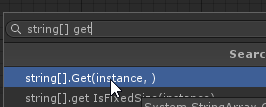 naive lodge
Findindex is the way to search a string array without exception
fickle stirrup
Findindex gives me nothing, heh
i'll try string[].Get, thanks, ah, rip
flint urchin
It's named a bit differently
naive lodge
Unless it got renamed for udon
Reading get reminds of std::map::at which would except on a non-present string
acoustic delta
"string[] Get" returns the string in a string[] by a given index, it doesn't find the index
naive lodge
So it's just a missing function then. Since it's a static method on Array and not a member of a string array object
fickle stirrup
which is an equivalent to gameobject Destroy?
flint urchin
object Destroy
fickle stirrup
thanks
 normal helm
Is there any way to zoom out udon graph
floral dove
Not yet @normal helm, it's coming early next year
 sturdy thistle
I have a question, will we ever see either local file storage or networking capabilities using Udon? Like an API for connecting to external servers, or dropping/writing to special files? (potentially stored in, say, Documents/My Games/VRChat/UdonStorage or similar)
flint urchin
We will never get Web or File access with Udon
 clever eagle
meager dove
clever eagle
meager dove
is there any way to add a component to a gameobject?
 tepid grove
Is there currently any way to view the value a noodle is passing from one node to another?
fast horizon
If you wanted to in runtime, you could borrow each out-noodle and turn it into a string to view in a uitext
 scarlet lake
Is the hole entire menu going to be changes as in the style off the pause button for vrchat where you can see worlds are your friends ext.?
scarlet lake
Lmao. You know the vrchat pause menu or whatever it is! Will it look different when the udon update is realised?
fiery yoke
Ohh yeah I think they made a few visual changes to the ui
scarlet lake
There we go Lmao the ui Lol. I wonder how much it's going to change. People will freak out because there not use to it Lol
 novel escarp
Probably not when Udon is released, but the devs have announced they have plans to overhaul the UI.
My guess is they're prioritizing Udon development and the upgrade to Unity 2018 before the UI stuff
acoustic delta
I remember they said Unity 2018 was a requirement for then to even be able to implement the new UI.
 normal jolt
is video player functionality available in udon yet?
flint urchin
Video player itself probably yes, but Udon nodes? Only some event ones, no interaction yet
tardy cloak
is there some trick to program variables i'm missing? I just need to initialize it in a start event then I can access the value with getprogramvariable node, right? Currently being given null values where I've set program variables to a float. Am I missing anything?
naive lodge
Manual compile and save the project. Sometimes it doesn't immediately setup variable renames (unless that was fixed over Xmas, but I haven't checked)
acoustic delta
No new release has been made over Xmas, last was 22nd December
naive lodge
Didn't think so. That would crazy to work over Xmas.
tardy cloak
I've manual compiled, saved the project and played at least twice to see if they loaded. Still null. I see there is an issue with copied getprogramvariable nodes: https://feedback.vrchat.com/vrchat-udon-closed-alpha-bugs/p/get-program-variable-stops-working-if-you-change-the-variable-name
I'll delete and made new nodes and see if that fixes the issue.
 hollow garden
lets just make our own settings saver
where you get an easy to input and remember code
that can save a hash of your settings
naive lodge
Then hex of a bitfield should work for that
hollow garden
yeah basically
naive lodge
Though idk about the easy to input part. I guess as long as you don't have too many options.
viscid reef
if udon gets open sound control support, you could potentially use vrchatlog files as a "save" file and use a web based parser to read it and load the save state using vrc_osc inputs
though i havent actually looked at what vrchat logs are like with udon, but i'm assuming or hoping things like debug.log would show up
I did toy with making a save system using triggers, naming conventions and a log parser to load/save with vrc_oscbuttonin
sorta works? if osc isnt broken but its pretty jank and you'd have to explicitly set up a lot of triggers a certain way etc
but would be a lot easier to do in udon, though i think they've said that persistence might be in the road map
stuck mountain
Put state in a Input field, ctrl c, ctrl v
scarlet lake
So will VRCPlayerAPI be available to us?
acoustic delta
It is already available
fallen prawn
IDK where to ask about SDK3 but I want to ask that how to create interactable slider in VRChat. I created like in SDK2 (Create canvas, put VRC ui shape, create slider) but I can't interact it in VRChat.
fiery yoke
So is it better to get get the local player using the network node and store the result in a PlayerAPI variable at start and then get that variable every frame, or get the local player using the network node directly every frame?
 native fern
Is is possible to move the local player? like the player itself or maybe via a station? I am trying to make something but I need to be able to move the player like a rigidbody with pyhsics...
fiery yoke
@native fern You can move the Player by teleporting it. However that is probably not what you want. The other way of "moving" the player is to set its velocity. However there is currently a bug, where you cannot set the players velocity if they are grounded. You have to Teleport them slightly up (by like 0.1 Units) and then set their velocity.
native fern
Yes Amplituda sent me the asset you made... Thanks for creating that! I am currently testing if it allows me to rotate the player upside down for example...
fiery yoke
You can only teleport the Player horizontally (Y-Axis)
fiery yoke
No idea. Try it out 😛
native fern
Ok 😄
no idea how to get stations to work... I simply can't interact with it... ¯_(ツ)_/¯
 covert ingot
Needs a trigger collider. You can look at the station provided by the sdk for guidance
native fern
there is none though...
 minor dome
can't do stations yet afaik, I tried I got close to getting it to work, but it's not possible yet
fickle stirrup
what's the best way to sync player Tags? for newcomers?
 strange charm
Unity Animator.SetBool accepts both int ids and string names for the parameter, why does udon animator set bool node only accept int ids?
stuck mountain
@strange charm check the overload dropdown
you want (string, bool) instead of (int, bool)
 paper storm
what is the name of node that creates new components in objects
for example i want to create new fixed joint component
stuck mountain
that is not possible by design @paper storm - the only way to create new components or objects is to use Vrchat Instantiate to instantiate a new game object
paper storm
ah
stuck mountain
you will have to design your system around creating objects and manipulating existing components
if I had to guess, you can create configurable joints and toggle settings on them to make them effectively disabled (free motion)
paper storm
seems possible
stuck mountain
or create new object with fixed joints to two existing objects to lock them together
paper storm
will try tnx
stuck mountain
you didn't wire up the type
paper storm
oh
stuck mountain
make a Type ConfigurableJoint node and drag it into the type slot on the Get Component
paper storm
👌
tardy cloak
Still having an issue with Program Variables returning as null. When I debug.log the variable value to console, it's shows null.
I made a test UDON graph to show what I'm created with nodes. For me, it returns null. Am I incorrectly setting up Program Variables? Do they only work if I BUILD, not in the editor play mode?
 severe dirge
@tardy cloak Variable definition of "Prog_Var_A" is missing. So SetProgramVariable fails silently and GetProgramVariable outputs null.
tardy cloak
@severe dirge Dude you just saved my freakin day!
I added a public variable named "Prog Var A" to the graph and it started working!
The rotation cube video series on program variables either didn't mention or I didn't catch that I needed to have a public variable with the same name, only that it had to be initialized with a variable.
severe dirge
I've got stuck same point of the video 😁 https://ask.vrchat.com/t/spinning-cube-example-series/81/6

VRChat Udon Discussion Forum
In Video 4 “Program Variables”, variable definition of “speedProgram” is missing after renaming. That noodles won’t work.
 dapper garden
Anyone know if I'm missing something simple here? Just trying to make a mirror toggle button but the button turns itself off instead of the mirror. For some reason, the mirror object is null so its been defaulting to the object the scripts on (Thats a little annoying imo) so I added a catch to keep the button from turning itself off
And just to confirm, the VRCMirror gameobject is assigned in the editor
acoustic delta
@dapper garden Can you please press "Copy Assembly to Clipboard" and pastebin?
I would also recommend restarting Unity and then press "Manual Compile" again. There is a bug where if you press ctrl+z after deleting a node your program will no longer compile.
dapper garden
I'm having gateway troubles with the pastebin, working on that shortly. I've been changing small things like the variable name to test if its compiling and it seems to be compiling, but I'll try a restart
acoustic delta
hastebin then
 serene moat
also you'd probably want to check if the gameobject itself is active rather than if it's active in the hierarchy
fiery yoke
I generally dont get what youre even doing there
youre comparing if the gameobject "VRCMirror" is equal to this or if the VRCMirror is not active in hierarchy and then set the mirrors active stat to that value?
Also you input a gameobjet into a boolean slot. that would always throw an error
dapper garden
That was a catch to keep the button from deactivating itself when it cant find the mirror, original nodes: Probably just should have pasted this
fiery yoke
Yeah that should work perfectly fine
dapper garden
.data_start
.export VRCMirrorObj

instance_0: %UnityEngineGameObject, this
value_0: %SystemBoolean, null
Boolean_0: %SystemBoolean, null
instance_2: %UnityEngineGameObject, this
instance_1: %UnityEngineGameObject, this
VRCMirrorObj: %UnityEngineGameObject, this
.data_end
.code_start
.export _interact

_interact:

    PUSH, instance_1
    PUSH, instance_0
    EXTERN, "UnityEngineGameObject.__get_gameObject__UnityEngineGameObject"
    PUSH, instance_0
    PUSH, instance_2
    COPY
    PUSH, instance_0
    PUSH, Boolean_0
    EXTERN, "UnityEngineGameObject.__get_activeSelf__SystemBoolean"
    PUSH, Boolean_0
    PUSH, value_0
    EXTERN, "SystemBoolean.__op_UnaryNegation__SystemBoolean__SystemBoolean"
    PUSH, instance_0
    PUSH, value_0
    EXTERN, "UnityEngineGameObject.__SetActive__SystemBoolean__SystemVoid"
    JUMP, 0xFFFFFF
.code_end
fiery yoke
Discord formats your code, Do it with backticks
Likes this __ so double underscores stay double
dapper garden
Lets try this
.data_start

    .export VRCMirrorObj

    instance_0: %UnityEngineGameObject, this
    value_0: %SystemBoolean, null
    Boolean_0: %SystemBoolean, null
    instance_2: %UnityEngineGameObject, this
    instance_1: %UnityEngineGameObject, this
    VRCMirrorObj: %UnityEngineGameObject, this

.data_end

.code_start

    .export _interact

    _interact:

        PUSH, instance_1
        PUSH, instance_0
        EXTERN, "UnityEngineGameObject.__get_gameObject__UnityEngineGameObject"
        PUSH, instance_0
        PUSH, instance_2
        COPY
        PUSH, instance_0
        PUSH, Boolean_0
        EXTERN, "UnityEngineGameObject.__get_activeSelf__SystemBoolean"
        PUSH, Boolean_0
        PUSH, value_0
        EXTERN, "SystemBoolean.__op_UnaryNegation__SystemBoolean__SystemBoolean"
        PUSH, instance_0
        PUSH, value_0
        EXTERN, "UnityEngineGameObject.__SetActive__SystemBoolean__SystemVoid"
        JUMP, 0xFFFFFF


.code_end
Assembly looks to match node graph, so that is not the problem.... 🤔
fickle stirrup
you better just ctrl+c nodes, or use tripple ``` before and after the text
but btw will need to create assembly code instead of graph with that lol
btw better to reajust vars by screen then unable to edit it via graphs
fiery yoke
Three backticks at the start, three backticks at the end.
You shouldnt copy nodes ever. There is a bug with the variables not being copied correclty
dapper garden
Like I said, I think the VRCMirrorObj variable is just returning null, hence when I toggle the gameobject it defaults to itself, which is the button
fiery yoke
@dapper garden simple question, but did you actually assign the Mirror object? :P
dapper garden
 acoustic delta
@fiery yoke "ever", as PhaxeNor wrote in #657394610913411084 , it's a bug, just avoid copying nodes until it is fixed. 🙂
fiery yoke
Well yeah I just like to overemphasize things
acoustic delta
For now best is to send graph .asset file
Or as in this case there is only 1 variable it should also be fine
fiery yoke
Yeah as long as you dont copy variable set/get with more than one variable
Anyway back to the problem at hand. If you have problems with something in Udon its usually best to just slap a Debug.Log after everything and see where it breaks xD
dapper garden
Will that run in the unity editor or will I have to get access to it in game somehow?
acoustic delta
Both, you can view it in Unity's Console as well as in-game.
fiery yoke
As long as nothing in your Udon code depends on VRChat stuff, it will run without problems to that point in the graph
dapper garden
It is being triggered with interact but I might be able to find something else
fiery yoke
You can use a UIButton to send a "Interact()" to the Udon Behaviour
Or ofcourse an Editor Script.
You could also replace the Interact with a OnMouseDown
fickle stirrup
if i want to instantinate an object for all users, but with changed material color and etc by the player who call this spawning process, how would i do that? custom network event? does that event local for everyone or i can locally change variable of that event behaviour before sending, and modified version would be called for others?
fiery yoke
Having networked objects is currently wip
fickle stirrup
actually, I do not need to synchronize them, just need to spawn, but with the changes that the caller made and in perfect avoiding sync strings,etc variables
dapper garden
I set it to trigger on start instead, just to keep things simple
Found the issue. The VRCMirror prefab was throwing null reference exceptions. Deleted it out of my project and now the Interect version works fine
Moving this to #open-beta-discussion
 pallid mango
Can you reparent players to a different game object?
example: moving platforms without weird leg IK
fiery yoke
@pallid mango You cannot acces the Player Object at all by itself. However Stations basically do exactly that. However Stations are not quite ironed out yet.
pallid mango
Well I wanted them to still be able to walk around in local space
fiery yoke
Then your best bet is teleporting with a complicated setup, like you can see in my Elevator example:
https://twitter.com/TheHelpfulHelp/status/1210039684304388097

 pallid mango
ah yeah, sadly it was more of a platforming type idea
fiery yoke
You can apply my concept to everything, its just quite complex
pallid mango
and observes won't see them pop out of existence?
fiery yoke
you mean lagging behind?
meager dove
hello! I'm trying to set the velocity of the particles in a particle system using the Velocity Over Lifetime module, but the console gives me an error saying " External module 'UnityEngineParticleSystemVelocityOverLifetimeModule' is not supported." Is that intended? If so, why is it in the nodes list?
acoustic delta
@meager dove That error message generally means canny time. Similar to how previously getting the players position also threw "is not supported", it's a bug.
meager dove
hmm, it seems to happen with the main module as well, I will report it then!
scarlet lake
@meager dove most of the graphics components don't have working nodes yet, the particle system module is one of them, there's a canny about it https://vrchat.canny.io/vrchat-udon-closed-alpha-feedback/p/bug-particle-system-nodes-cause-unsupported-errors
but the developers have stated that particle system and some others will be supported soon
meager dove
actually, I just updated to the newest udon, and the particle system modules seem to work now!
scarlet lake
even better
acoustic delta
@meager dove Did updating to Udon 2019.12.21 fix it? That might be worth to note on the canny, to save devs time.
meager dove
yeah, I updated to the latest udon and it's fine, so I didn't report it!
tardy cloak
i'm trying to evaluate a 0-1 value on a curve. I've done this previously by evaluating along an animation curve to return a value. I'm not seeing an animation curve node - am I missing it, or is there another curve component I can use?
fiery yoke
@meager dove @scarlet lake The Particle System suffered from the same bug as the Tracking Data. There was some problem with some nesting.
The same patch that fixed the Tracking Data also fixed the Particle System problem :P
fiery yoke
 torpid forge
how does one properly see a very large udon graph
acoustic delta
You could take screenshots and puzzle them together. Or have a very high resolution display.
Best design-wise if you are building something very big is to split up your graphs into "modules", each having 1 responsability/task, and connect them together with program variables and custom events.
torpid forge
I still need to work out the subgraph system. Right now ive been spacing out the various chunks of my programs into my "functions" that do various things
acoustic delta
I have so far avoided subgraphs, simply because I've heard they are subject to change. For example for my calculator I had a seperate graph called ALU (arithmetic logic unit). I basically pretend it is a function like in Java or python, it takes 3 inputs and returns 1 output. I then create empty game objects and assign scripts to them.
torpid forge
that's actually a pretty good idea. I'm looking forward to when udon graphs act more like unity components and become easily referenceable on the same gameobject to allow for more organized exchange of data between the graphs and a smoother design process for complicated ideas. Do we know if they will be adding the ability to use/reference scriptable objects?
acoustic delta
What do you mean with "ability to use/reference scriptable objects"?
In my opinion they already are easily referable, just define a UdonBehaviour variable.
torpid forge
https://docs.unity3d.com/Manual/class-ScriptableObject.html these bad boys

maybe im just new to the whole graph based coding system. Getting properties under complex types is a bit annoying. Instead of a few dot operators i need to make large nodes and connect them to get to the property im trying to access.
oh and is there a concept of break/continue/return in udon?
I was trying to do something where a variable may be null in a for loop and I wanted to do a check and skip it if that was the case but all paths still flowed to the same final piece of code
acoustic delta
You can check if the variable is null and then have a branch.
torpid forge
I understand the outward branch. I was hoping there was more of an inward branch/block. Two or more paths that can end up doing the same thing at the end. I guess i could use a custom event for that though.
acoustic delta
Yes would be great if two flows could go to the same node.
There is a canny for an "Exit" output on the branch node. https://feedback.vrchat.com/vrchat-udon-closed-alpha-feedback/p/exit-flow-for-branch-node
torpid forge
yessss!
that would really help out!
https://feedback.vrchat.com/vrchat-udon-closed-alpha-feedback/p/break-a-for-loop oh it also appears this has been asked for
acoustic delta
Yes, canny has been running hot!
torpid forge
Yea wow i need to keep up with it more! Good stuff on there!
stuck mountain
You can use a custom event to combine flows
@meager dove for post processing, you can just use roughly the pre-udon approach for post processing but even better: make an animation clip which sets Post Processing Volume.Weight to 0 at time 0:00 and weight 100% at time 1:00, make sure loop time is off. Then add a float parameter to the animator. Make the state with this clip use normalized time with that float parameter . Set speed to 0. Leave the animator controller enabled
Udon can set the float parameter to control post processing
fast horizon
Alright this makes no sense to me.
Any time it's true it targets the relevant ButtonNoteCheck Variable object to be repositioned, but when false it targets itself (the udon behaviour object)
I guess adding a secondary get varible set made it work... which is weird to me
fiery yoke
So whats the best way to define in what order the different Behaviours Update?
acoustic delta
From testing they execute in the order you create the Udon Behaviour Component. Or do you mean you want a more reliable way than that? 😛
@fiery yoke You could define a "TaskManager". At Start they each call the TaskManager and register themselves with a given "priority". The TaskManager then executes all registered tasks depending on the registered priority.
 shut bluff
Hello guys
I need your help
Idk if is here I need to talk but idk how can I change my keyboard settings ingamr
In-game*
Can u help me plz?
grand temple
@shut bluff hold shift when launching vrchat, this will open a menu where you can change controls
shut bluff
I just can change resolution and graphics 🤔
 gentle solar
click the second tab thats says input
 teal quiver
could boneworks or blade and sorcery esque worlds be made?
 proud snow
In what sense?
proud snow
Physics yes, dismemberment yes, having the AI block your attacks requires some effort
grand temple
We could have the player's position affects by physics, but not individual bones unfortunately. That's a big part of those games.
stuck mountain
well specifically humanoid bone
e.g. the result of Animator.getBoneTransform(x).position and Animator.getBoneTransform(x).rotation
I'd expect those will be added to udon: they previously had a getBoneTransform but it returned the game object by mistake, which is a big no-no so we just need the position and rotation
so it got removed in this version
grand temple
It would be great to know the position but I'm disappointed that we probably won't be able to change the position. That's what you'd need for boneworks type physics
torpid patrol
Looking to shove some model into a locker?
torpid patrol
When declaring strings, is what we type into the box a string literal or a string?
shucks its a string
naive lodge
Try escaping an ampersand
torpid patrol
I put in \r\n and it put 4 characters out on the log
naive lodge
Oof, I wonder how immediate strings in uasm are parsed
torpid patrol
seems to be as a string not a literal
torpid patrol
I had it output it as ints too, which really made it obvious, since those were as follows: 92, 114, 92, 110, look them up in the ascii table and feel the disappointment https://www.asciitable.com/
Ascii character table - What is ascii - Complete tables including hex, octal, html, decimal conversions
Ends up this is how to form a crlf in udon
 glacial aurora
@torpid patrol , why not just Environment.NewLine?
Should give platform-appropriate new lines
torpid patrol
I'm trying to parse files that don't necessarily have platform appropriate new lines, but thanks for telling me about this one
so what would that be under? I don't believe I've ever seen that in udon
If I search environment even it gives nothing
Even NewLine gives no results
acoustic delta
There's currently no way to properly get new line character. There's (sort of) a canny for it https://feedback.vrchat.com/vrchat-udon-closed-alpha-bugs/p/character-constvariable-nodes-do-not-allow-for-escape-characters
glacial aurora
Aw :(
Maybe it's a newer .net thing?
Nah, it's been in since .Net 1.0

Gets the newline string defined for this environment.
torpid patrol
well its just not available in udon, idk why it would be showing up for you
glacial aurora
I don't have Udon on a Unity project atm, didn't realize it wasn't available, sorry
@torpid patrol @acoustic delta , you guys are welcome to make a feature request for that Environment.NewLine prop or other stuff in the Environment namespace btw.
acoustic delta
glacial aurora
Oh, sweet
torpid patrol
I took a look at the Environment namespace, I'm not sure you'd want that to be available, for instance, UserName, MachineName, OSVersion, CurrentDirectory, should not be available.
hollow garden
awww, you should totally make OSVersion available
glacial aurora
Yeah, but Environment.NewLine would be nice
hollow garden
Finally, a world that automatically rejects Windows 7 users.
stuck mountain
@glacial aurora I strongly disagree, and believe udon or other assets should hardcode the correct line endings for the source platform the text assets were created on, not the Environment vrchat is being executed under.
The only appropriate usage of Environment.Newline is when reading and writing files from the local filesystem or interacting with console or OS APIs, and you'd better believe there's no way Udon will ever get permission to do that.
glacial aurora
Actually, what was the original want for \r\n here?
stuck mountain
Note also that unity components such as TextMesh explicitly require the use of a single '\n' to avoid platform specific differences
It was for parsing a TextAsset included in the world
torpid patrol
I actually got \r\n in order to replace it with \n with string.replace
stuck mountain
Cool
glacial aurora
Being able to input escape characters is a better solution in that case.
Also, not familiar with Unity things too much, so I didn't realize that.
torpid patrol
so this is the first part:
glacial aurora
I'd imagine Environment.NewLine on Quest would return something different as well
Since Android environment
scarlet lake
you're giving people unity c# answers to udon questions @glacial aurora
torpid patrol
and this is the second part:
stuck mountain
Exactly the problem: android is the target environment not the build platform
So text assets will have \r\n but the world would malfunction on android
torpid patrol
maybe a convert line endings node would be nice
stuck mountain
That's a tooling / import pipeline issue IMHO
You're not downloading these assets dynamically
torpid patrol
yeah
stuck mountain
If there was an API such as an http request then that would make sense
torpid patrol
for a text asset you'd have to change it upon upload
although its easier to work with \n than \r\n in code so I'd prefer that
glacial aurora
Sorry for the confusion. Udon's changed a bit since I last touched it, and I don't touch Unity stuff much.
scarlet lake
there's a lot of confusion already about what is broken or even implemented at all compared to c# scripting
fiery yoke
Well C# has a huge development team, is a product of Microsoft (One of the biggest companies in the world) and had decades to develop. Not quite comparable :P
 hazy galleon
Imagine having a text asset format where the reader doesn’t just tolerate all kinds of newline 😦
I have all sorts of mixed feelings about the which newline is correct debate
Sometimes I feel like a new system should deliberately use U+0085 for newline just to force people to deal with them correctly for each situation
If you didn’t know about U+0085 before today, you are welcome
 remote spade
How the f do i set light color with udon
i'm completely new to this and have no clue how to do anything
 ocean spire
buenarda
remote spade
yes me too thank you
oh also why does the entire node graph clear when i click play
opening the graph again or recentering it does nothing
just @ me if yall want to help
floral dove
@remote spade - here's what it looks like to set a light's color. In this case, it will change to red on start.
remote spade
aight thank you
floral dove
sure thing. It helps with Udon to think about Object.Get or Object.Set when you want to figure out how to interact with something. In this case, I typed 'light.set' in the node search, which narrows the search to all the things you can set on a light.
remote spade
I was getting stuck on getting the instance i didnt know you have to set them as variables
fiery yoke
You dont have to. But it makes it easier.
remote spade
kept getting errors when i didnt set the instance
fiery yoke
No I was saying that you dont have to get the instance by using a variable.
floral dove
oh, gotcha. Yep. You can put the udon graph on the light directly and then (I think) it will use 'this' as the instance
fiery yoke
Light is a component of a gameobject.
floral dove
I know that works for Gameobjects, not sure if you'd need to GetComponent the light first
fiery yoke
That ^
remote spade
i put it on a light but it didnt use itself like i thought it would
fiery yoke
Because thats not how that works...
remote spade
yes thank you for telling me that i totally didnt notice
what im baffled by with this entire udon thing is how they made a node editor and didnt just let you use c# scripts
because this is literally c# scripting with nodes
fiery yoke
A "light" is a component of a gameobject. Udon will reference the GameObject.
However you can use the node GameObject.GetComponent. And then use the Type "Light" as the type for that node.
Because they have a lot more control over the Udon compiler than C# :P
You wouldnt want someone access your Player object and then start messing with stuff that will carry over when you go into other worlds
Or even worse have them access the IO
remote spade
but why does it need to be nodes
floral dove
Nodes are accessible for non-programmers. There will likely be compilers from scripting > Udon
acoustic delta
Having problems duplicating objects ingame... works fine in Editor. I saw AltCentauri's canny about spawning prefabs doens't have UdonBehaviours, but this is just regular cubes.
Removed component of type NetworkMetadata found on Cube
[NetworkMetadata] Path was not unique, network events may break: /Cube(Clone)
[NetworkMetadata] Path was not unique, network events may break: /Cube(Clone)
[NetworkMetadata] Path was not unique, network events may break: /Cube(Clone)
Anyone knows what that above log means? NetworkMetada?
I'm not even trying to do anything network-related. I have no variables that are marked as sync.
obsidian pawn
Im pretty sure that is just the log letting you know that the objects have the exact same hierarchy so vrchat would have trouble or not be able to sync those gameobjects between pc and quest. probably not related to anything you are doing, just seems to be vrchat doing its checks
stuck mountain
@acoustic delta if you use VRChat Instantiate, the cubes will not be properly be synced over the network, so that message may be normal
(Clone) is the default name unity gives objects when you call Object Instantiate
and yes VRChat adds NetworkMetadata and looks for it in all sorts of places even if you want nothing to do with sync. My world gives those warnings all the time, even pre-udon, because I spawn some things without triggers....so I'm guessing it is normal
obsidian pawn
I guess eventually if we want duplicate instantiated objects to be synced correctly it should be possible to change the name to something unique with udon. something to try when we get more networking support
stuck mountain
that's not the only thing necessary... and the challenge is how to pick unique names that everyone agrees on
I think it's one of those things we'll need to wait for VRChat to add officially... Something like the SpawnObject trigger action.
It names the objects like Cube(Dynamic Clone 4fa58193) but I'm assuming it knows how to pick the names correctly to be in sync and avoid conflicts
obsidian pawn
you dont need to necessarily pick fancy unique names. just keep track of how many gameobjects have been spawned. gameobject(clone) 02 is a unique name and path in the hierarchy compared to gameobject(clone) 01. effectively gameobject.name = gameobject.name + count. As long as that count is synced across all clients the names would be the same for all players upon instantiating. I would imagine it might be more difficult to sync but thats just why I said it is something that can be tested once we actually get the ability to sync things
I do agree though, while not udon or beta specific, there does need to be a better system for syncing across platforms or for situations where the names can be the same. for example letting us assign an ID to an object we wish to be synced rather than the game trying to determine things through the name and hierarchy
stuck mountain
If you have master assign the numbers then it should be correct
You can make an int in udon that has sync checked and only increase it if you are the master
obsidian pawn
I hope its as easy as that
stuck mountain
It's not because we have no good way to broadcast events with an argument
So you can increase the number and send a custom networked event but some clients might get the number before the increase and some might be after
No documentation on how to build reliable primitives on top of the existing syncing apis / guarantees etc
obsidian pawn
might need to force a delay on any pickups. yea my concern was if the owner moves the spawned object before it gets renamed how would the syncing handle that object. looks like we may just need to canny the Instantiate node should rename the gameobject automatically as you described above for syncing purposes just to make our life easier. as you already get a reference to the object through the node it shouldnt be a concern what it is called
stuck mountain
yeah I mean VRChat already has that with the SpawnObject trigger...they just need to expose the same function to udon
 fair bough
I try to make particle attractor from convert script to Udon but it only blink and don't move orz
what wrong ; w ;
 fallow depot
@fair bough maybe use MoveTowards instead of Lerp? There’s never an accumulation of the Step value.
fair bough
thanks i will try
fair bough
something wrong..... why variable numParticle is 0.....
fallow depot
Ah I think you need to create variable ps with a ParticleSystem[]. constructor
Oh I see you have that. But it should be attached to Start event, not update
Also you are setting Particles variable with the array, but I think you use this as the size? I think you want to set ps instead
grand temple
oh nice, I didn't know that particle operations were a thing. I checked at the beginning of the alpha and they weren't there
fallow depot
Oh i see what's going on, @fair bough, ps is the ParticleSystem ParticleSystem is the array but its being used as a count in some places, let me make a new graph, I think i understand what is wrong.
fallow depot
Oh oh, looks like a bug in Udon, or missing functionality, this doesn't work:
External module 'UnityEngineParticleSystemMainModule' is not supported.
I'll add this to the canny
scarlet lake
fallow depot
Ah mines sort of a dup. But also the weird ParticleParticle class name going on
fair bough
🤔
hazy galleon
you know what would clean the graph up a bit, having the execution connectors on the top/bottom
acoustic delta
I like having my graphs left-to-right rather than top-to-bottom
torpid patrol
Are synced variables designed to sync before start is fired?
 molten cairn
Is there a way to get player's position and rotation in Udon?
I just started and don't quite get the Nodes
unless there's a document that I missed
obsidian pawn
@molten cairn this should be rotation on the left and position on the right. pretty sure I got this from @fiery yoke if they want to confirm the solution
fiery yoke
Position of the players feet position (that should generally line up with the heads x and z but not sure) and the heads rotation yes aka look direction.
molten cairn
thanks for the help!!!
also is there a document explaining all the nodes
it feels like shooting in the dark atm
floral dove
@molten cairn - there's no document yet. The nodes roughly follow the C# API, though some things are not yet available and others are not yet working. So the Unity Scripting API Docs are a good place to go if you want to poke around.
molten cairn
thanks for the tip
 tame matrix
aside from the vrchat specific app stuff the nodes have a button that link to the unity docs
acoustic delta
@zealous heath Are you getting any error messages in console? Have you started a fresh new project? Have you imported SDK3 first and then UdonSDK?
What Unity version are you on?
 zealous heath
I'm getting a .net framework 2 error in the console, i started from a fresh project with the SDK3 first, and I'm running 2018.4.12f1 as the site gave as a direct download
@acoustic delta I don't seem to be doing anything wrong, as far as I can tell
acoustic delta
@zealous heath No it sounds like you have followed the instructions, but sounds like you have an environment error. Can you please in Unity go to Edit > Project Settings > Player and screenshot your following settings:
zealous heath
Its changing the setting right now
Just a sec
@acoustic delta Your settings worked, thank you so much
Now to just figure this out :x
@acoustic delta Is there a guide on the best ways to build off Udon? I see the semblances of the old component system in it, but I can't for the life of me figure out how to connect these nodes or how to set options on them.
Like, if i wanted to make a pickupable cube with object sync, I can't seem to figure how to design that, but I see the nodes
torpid patrol
No guides yet but people are working on them
zealous heath
You got it, fam
Is this right, for a pickup/sync'd object? I'm poking around with it, with no context xP
 dusk lance
You should be able to add a pickup script on the object as with sdk2. Same with object sync.
What you have there will do nothing as you do not have any entry flow (no event nodes to start anything) and you are getting values but not setting them.
zealous heath
I'll be waiting on a guide to see how to even do that, then.
torpid forge
it appears udon graphs decide to stop functioning correctly when you place a certain number of nodes
i have what I would call an extensively large graph and some exit ports for for loop nodes are now deciding they dont want to function anymore
fickle stirrup
@torpid forge that's a known bug, you can press Play then Stop buttons and it will recompile the assembly code after that, you can also remove/put back graph asset file
some people suggest to print your code's version with Debug to be sure it's compiled (🤔) (actually you just need to Play and Stop and open graph after that)
torpid forge
so I have been printing a code version and that updates on recompile. I will try to remove and replace the asset file though!
oh how i love the 5+ min times to start when pressing play
damn
no dice
Guess Im gonna have to split the graph. I kind of enjoyed having one mega graph.
fast horizon
For a Api Teleport To, what's the solution for facing the player aligned with the teleport facing?
grand temple
Could you rephrase that? Not sure what you're asking
fast horizon
Erm, Just want to know facing, so that you control the facing a player teleports to. A straight rotation to the teleport point didn't change direction, though it seems i was able to flip the direction the player teleported to by playing with variables it didn't go the way i wanted it to face
grand temple
I forget what udon calls it, but it should have two options: one to align the teleport to the room and one to align to the player. Did you choose player?
fast horizon
Aye, there's an option for position and one for rotation. The player teleported, but rotation wasn't based on the transform provided. Though i got them to flip and face the opposite direction playing with Rotation
Unless you need to get the player's rotation itself, then set it before inputting it into the rotation value of the teleport output
grand temple
What the heck? That doesn't sound right, what node are you talking about
fast horizon
grand temple
And what type of values are you feeding in?
fast horizon
various different ones, direct get positions, and transforms, as well as playing other types of transform constructs
grand temple
Should just be a getposition and getrotation from the target transform?
fast horizon
positioning is fine, my rotation doesn't apply right
grand temple
But what rotation are you giving it
grand temple
What do you mean by not applying right? You sure you're not just teleporting by playspace?
fast horizon
Maybe i am? Could i be using the wrong instance?
The best ive had is the player facing 180 opposite direction
grand temple
No that's correct. What about the drop-down in the teleport to node?
fast horizon
dusk lance
There is a get transform node so you don't need to do get component of type transform. I didn't even know that would work.
fast horizon
Ever since needing to use a gameobject[] in lieu of a udon[] variable i've started building this habit of just having gameobjects at the base for some things
molten cairn
Can someone used Vector3 Set Y help me confirm that it works
I tried this but it wouldn't set Y of "newCamPos" to whatever value I set it to
floral dove
@molten cairn - I believe you need to connect an instance of the transform you want to move to the 'Transform Set Local Position' block
my understanding is that if you leave an 'instance' input open, it defaults to the current Gameobject, so that Transform block is trying to set the position of the Gameobject instead of the Transform.
stuck mountain
@molten cairn also do not use vector set x/y/z. I do not think those work
Get the variable Make vector ctor (vector construct) with x y and z and pass that back into set variable.
 hidden mirage
Hello folks! I would like to know if IK will be supported in the UDON update and if yes, what assets I should consider getting for this.
 peak arrow
hey guys i need some help
im useing 2017 unity and i cant uploadf
do i need the 2018 one?
flint urchin
You need 2018 for Udon
 zinc warren
Is udon only for world making or can you use it with avatars too in some way?
 nova hornet
World only.
 weak sapphire
Hey guys! :)
I'm trying to find a method for if/else conditions...any leads as to how to implement this? I can't for the life of me find it in the nodes 😭
acoustic delta
@weak sapphire There is a "Branch" node which acts as an "if"
weak sapphire
Ah, fantastic!! Thanks @acoustic delta ^-^
 runic python
Hello, I've been playing VRChat for three days now, and when I try to upload my own avatar from vrchat sdk it says world creator status not allowed yet, avatar creator status not allowed yet?
acoustic delta
@runic python There are different trust ranks in VRChat: Visitor (gray) -> New User (blue) -> User (green) -> Known User (orange) -> Trusted User (purple). A person can also be Friend (yellow).
To be able to upload avatars and worlds you need to have reached at least New User rank. This is usually achieved after a couple of days of gameplay, but rank does not correspond directly to hours played, there are other hidden factors such as friends gained etc...
flint urchin
Also, wrong channel for this type of question. Use #user-support-old for questions that don't fit it the specific categories/channels.
runic python
Thanks! @acoustic delta
 lofty scarab
hey, would it be possible to use udon to change the gravity/direction of "down" depending on location in a world? I kinda wanna make a "planet" world where players can walk around and it wraps around, kinda like mario galaxy or sonic lost world. I saw someone earlier in the "showoff" section posted something kinda like it, but it was a 3rd person character and the camera never rotated to match the new gravity, so didn't appear to be suitable for first person VR usage
serene moat
Gravity can be modified via Udon but it won't rotate you. The player controller can't be rotated so you'd either need to put the player in a station or rotate the world around them.
lofty scarab
hmm, the station thing doesn't sound like it could work too well unless you can simulate not being in one/use normal movement while still in and affected by a station, and rotating the world sounds like it would make other players appear to be floating in the void unless there's a way to offset their apparent position...
serene moat
there is a way to offset their apparent position, but it's complicated
stuck mountain
offsetting apparent position is what cyanlaser pulled off in their wall walking world. Essentially you put players in a desynced station: mobile for you and inmobilized for others.
Create a synced object for each player attached to their player root position, and on the other side, do transform math on the object sync to move the station to a position relative to where they should be given the world rotation
serene moat
you can also lock the player in the station and reimplement the player controller since Udon gives access to the input
though stations are currently broken in the beta
stuck mountain
That world was never made public but it was shown in a couple of the community meetup videos from a couple months back. It should be a lot easier to do transform math in udon
Oof, and object spawn is also broken right?
serene moat
I think so
stuck mountain
Synced objects
lofty scarab
it just occurred to me that the rotate world/offset locations of other players thing would also make it so that if you walked back to the same spot from another direction, it wouldn't actually be "the same spot" and getting the other players to still be there/interact with you/hear,etc may be very broken, and it would be even more broken if changing "gravity zones" so maybe re-implementing the player controller in udon while in a station would be the simpler option...
serene moat
as long as there is a mutual understanding of each player's position relative to eachother, voice and IK seem to work fine
having actual objects in the world that each player interacts with might be weird though
lofty scarab
I suppose I'll poke at it once stations are fixed/things are more stable and I'm done with my current project... I just wanted to know how possible it was for now
thanks guys
 pallid mango
This isn’t specifically udon but man is it cumbersome to make sure things are correct remotely
 raven peak
I usually gather a few friends to make sure networking is fine. Could also make a second account and check it that way.
 lusty rampart
Is there a way I can use math functions for multiple variables?
acoustic delta
If you see asking if you can reuse a math node then no, you have to duplicate it.
Or do to mean e.g. adding more than two variables? If so then you have to chain-link multiple nodes.
lusty rampart
adding two more variables
I don't know what node is that
usually you would just do var X= xvar * yvar * zvar
but it seems I have to do mulitple nodes just to do one simple line
acoustic delta
Yes, I average about 4-8 nodes per traditional code line.
lusty rampart
oooof
lusty rampart
is there a way to do the "new" keyword
acoustic delta
All classes have a .constructor node
lusty rampart
thanks
for some reason it isn't generating an empty mesh 🤔
just want to translate this
acoustic delta
First of all you are setting a Mesh[] to a Mesh, i.e. in text would be Mesh mesh = new Mesh[1];
lusty rampart
hmm 🤔 I guess so, there isn't a mesh.constructor
is it possible to have a list in udon?
acoustic delta
Only Arrays, Collections are not available (yet?).
lusty rampart
I would try to make a linked list but I don't think I have enough stuff for that 👀
acoustic delta
Also secondly, AFAIK the variable list on the right does not update during playtime, so you can't live-inspect variable values.
lusty rampart
huh, i see
acoustic delta
As we have traditional arrays, I don't see anything stopping someone from implementing a "List" with add/remove/push/pop/etc.... If you make a Graph called "ArrayList" then you could assign that as an Udon Behaviour to an empty Game object, and use that reference to call "functions" on it. 🤔
lusty rampart
I think we are going to need libraries for this...
lusty rampart
well 🤔 would be nice if there is an autofill, or right click add node. Stuff to speed things up
Does fixupdate work? I think i was having problems with it not working
acoustic delta
I think we are going to need libraries for this...
Haha yes, we do actually have access to .GetHashCode and .Equals, so an implementation of a HashSet would theoretically be possible... but would be very slow if we had to reimplement it all in Udon. 😛
Yes, FixedUpdate works, I have used it in previous projects. Although note update interval varies depending on platform.
lusty rampart
I guess I'll have to look at the canny
Though I have a feeling all stuff I want somebody already wrote it
just checking, are any of the vr inputs available as a node?
lusty rampart
Don't know why but I'm hitting an error here.
acoustic delta
What is the error? Can you pastebin/hastebin the exception log?
lusty rampart
oh...
I just had to push up the stack call...
thought it was just blank
[<color=yellow>UdonBehaviour</color>] VRC.Udon.VM.UdonVMException: The VM encountered an error!
Exception Message:
  An exception occurred during EXTERN to 'UnityEnginePhysics.__Raycast__UnityEngineVector3_UnityEngineVector3_UnityEngineRaycastHitRef_SystemSingle_SystemInt32__SystemBoolean'.
  Cannot retrieve heap variable of type 'Single' as type 'RaycastHit'
----------------------
Program Counter was at: 129
----------------------
Stack Dump:
----------------------
Heap Dump:
  0: (0.0, -1.0, 0.0)
  1: (0.0, -1.0, 0.0)
  2: Cube (UnityEngine.Transform)
  3: Cube (UnityEngine.Transform)
  4: (0.0, -1.0, 0.0)
  5: UnityEngine.RaycastHit
  6: False
  7: null
  8: (0.0, 0.0, 3.0)
  9: (0.0, -1.0, 0.0)
  10: 5
  11: 0
  12: Cube (UnityEngine.Transform)
  13: UnityEngineVector3.__get_down__UnityEngineVector3
  14: UnityEngineTransform.__TransformDirection__UnityEngineVector3__UnityEngineVector3
  15: UnityEngineDebug.__Log__SystemObject__SystemVoid
  16: UnityEngineTransform.__get_position__UnityEngineVector3
  17: UnityEnginePhysics.__Raycast__UnityEngineVector3_UnityEngineVector3_UnityEngineRaycastHitRef_SystemSingle_SystemInt32__SystemBoolean
couldn't fit the rest
----------------------
Inner Exception:
 ---> VRC.Udon.VM.UdonVMException: An exception occurred during EXTERN to 'UnityEnginePhysics.__Raycast__UnityEngineVector3_UnityEngineVector3_UnityEngineRaycastHitRef_SystemSingle_SystemInt32__SystemBoolean'. ---> VRC.Udon.Common.Exceptions.HeapTypeMismatchException: Cannot retrieve heap variable of type 'Single' as type 'RaycastHit'
  at VRC.Udon.Common.UdonHeap.GetHeapVariable[T] (System.UInt32 address) [0x00063] in C:\VRChatGit\UdonVM\Udon\Common\Source\Heap\UdonHeap.cs:213
  at VRC.Udon.Wrapper.Modules.ExternUnityEnginePhysics.__Raycast__UnityEngineVector3_UnityEngineVector3_UnityEngineRaycastHitRef_SystemSingle_SystemInt32__SystemBoolean (VRC.Udon.Common.Interfaces.IUdonHeap heap, System.UInt32[] parameterAddresses) [0x00013] in C:\VRChatGit\UdonVM\Udon\Wrapper\Source\Modules\UnityEngine\ExternUnityEnginePhysics.cs:1901
  at VRC.Udon.VM.UdonVM.Interpret () [0x002bf] in C:\VRChatGit\UdonVM\Udon\VM\Source\UdonVM.cs:235
   --- End of inner exception stack trace ---
  at VRC.Udon.VM.UdonVM.Interpret () [0x002db] in C:\VRChatGit\UdonVM\Udon\VM\Source\UdonVM.cs:239
   --- End of inner exception stack trace ---
  at VRC.Udon.VM.UdonVM.Interpret () [0x0038f] in C:\VRChatGit\UdonVM\Udon\VM\Source\UdonVM.cs:275
  at VRC.Udon.UdonBehaviour.RunProgram (System.UInt32 entryPoint) [0x0001b] in E:\Stuff\Unity\vrchat\2017\2018\Assets\Udon\UdonBehaviour.cs:1860
basically just trying to test raycasting
and hitting the ground
obsidian pawn
@lusty rampart there is an issue with the raycast node. if I remember correctly you cant use a raycast with maxDistance right now
lusty rampart
oh ty
fair bough
umm send custom event with network can't use?
i want send custom event to target 'all'
it not function or what i wrong
acoustic delta
@fair bough SendCustomNetworkEvent isn't working https://vrchat.canny.io/vrchat-udon-closed-alpha-bugs/p/sendcustomnetworkevent-doesnt-work
 pseudo marsh
Can i trigger an custom event on another object? (E.g. with a reset button set the value of a variable via an event in the rotating cube)
fair bough
oh thanks sorry for ask on this channel I not found that topic orz
acoustic delta
@pseudo marsh Yes, you can pass an UdonBehaviour into SendCustomEvent
pseudo marsh
So that would then would the the instance of the target i want to send the event to?
acoustic delta
Yes. If you have two* gameobjects, A and B.
A: You create a public UdonBehaviour variable, and set the value of it in the Inspector to B. You can then call SendCustomEvent and pass the variable into the node.
B: You have a custom event. This event in B will be called by A.
pseudo marsh
sounds easy enough, will try it out.
Nice, works as intended. Now i can reset the cube-timer 😄
 wide oar
hello
pseudo marsh
Is there a "proper" way to round my float value apart from doing the following procedure?
floatVal * 100 (or other suitable factor)
convert float to int
convert int to float
floatVal / 100 (or other suitable factor) => use the value (now with 2 numbers after the comma)
acoustic delta
@pseudo marsh There is a "mathf round" node.
pseudo marsh
I tried that, but i coudn't find a way to modify how many digits should be after the comma, just an input for the float
Is there a setting is missed?
acoustic delta
Mm, and we only have Mathf, not Math.Round... I think easiest would be to do Convert.toSingle(floatNum.ToString("F2"))
pseudo marsh
When connecting the variable i get this
acoustic delta
I'm on mobile right now, so can't show node example
pseudo marsh
ah, so misusing the string formatter to get 2 digits after the comma?
acoustic delta
"misusing" 
pseudo marsh
Nice, works
scarlet lake
any way to get player rank? Is that under player tags?
stuck mountain
Please let that not be a thing
scarlet lake
It's for getting players title color. I don't see why that would be bad for other uses given that rank is tied to public avatar features for many good reasons. Even hypothetically a voting system that prefers higher ranks can be a benefit given the nature of raiding or new uncooperative players. If it's an issue that's a problem with the world not the feature.
No doubt it's possible to do anyways given a render camera and visual color calculation, just more roundabout.
stuck mountain
currently there's no way for data to be read back from the GPU, so udon would not be able to use such a render texture to drive logic.
The only usecase I can think of for this is to lock certain ranks out of parts of the world, which is utterly inappropriate to be baked into world logic: this is (if anything) to be left to user moderation.
If a user creates a private instance of such a world, it would be messed up for the world to lock them from various features based on their rank. Or would private instances say everyone is trusted?
That said -- if the player name is exposed, a server-side API could theoretically lookup a player's rank given the username, and return that using existing APIs to the client. So exposing player names would be equivalent to exposing all public info about the user.
scarlet lake
Users have their own responsibility on not using worlds if they don't like game features of them. Making promises otherwise is harmful. Freedom of development is necessary to get well featured worlds. Udon by its programmic nature will allow plenty of 'evil' things, and world developers like all other software will overwhelmingly choose to do good. player game state information in this case does not rise to the level of necessary balancing of good/evil uses and restriction.
Without stations is there a way to get player input? For example triggering when vrchat menu is activaetd by Desktop or various VR.
scarlet lake
Looks like Input.GetButton sort of works? With xbox 360 controller it's mapping differently than how the game is mapping it.
using Submit, Cancel, Fire1, etc.
stuck mountain
@scarlet lake I have used two different ways of detecting vrchat menu press: One is copying the set of button IDs for oculus and steamVR (and esc button). The only working example using triggers is based on the OnKeyDown trigger event, with joystick button ids such as 0/2 or 1/3 depending on steam.
I think the Udon equivalent would therefore be Input.GetKeyDown("joystick button 0") and Input.GetKeyDown("joystick button 2") for steamVR and Input.GetKeyDown("joystick button 1") and Input.GetKeyDown("joystick button 3") for oculus left/right menu buttons.
Note: In open beta, menu and jump buttons seem to be flipped compared to Unity 2017, so this may activate on Jump. I do not know if this is a bug or a breaking unity change so I never filed a canny on this. Would be good to get some validation.
Regarding testing between SteamVR and Oculus, the correct way is XRSettings.loadedDeviceName - but Udon does not give us access to XRSettings, so you may have to use the same jank hack that ExMenu prefab uses which is testing for buttons 14 or 15 I think?? I forget
Ok... and for the second way, detecting UIMenu layer using collision. Since the collision matrix says no layers collide with UIMenu, you will have to do your own raycast test using udon... or use particles with the Trigger module enabled, set Enter to Callback, set Exit to Callback. You can use ParticleSystem.GetTriggerParticles() to get the list of particles, but udon seems to be missing that function. But you can kind of hack around it. the callback is what you need anyway.
Here's some unity docs about particle systems. Pre-udon you would have to use stop action to detect this. I have a prefab which does this. However, with udon it should be much simpler since we have access to the OnParticleTrigger event! So I wouldn't rule out particle systems as a feasible approach to detecting menu.
https://docs.unity3d.com/ScriptReference/ParticleSystem.TriggerModule-enter.html
https://docs.unity3d.com/ScriptReference/ParticleSystem.TriggerModule.html
Though more events from VRChat would be awesome. It's cool that we can implement the weird stuff we used to do more easily... but it would be better if we didn't need to do weird stuff
scarlet lake
dang that's a lot of working around it yeah XD . In vrchat's input config it looks like things like Submit have a desktop and joystick version, does that not mean anything to VR controllers?
stuck mountain
Short answer: I don't know. Those actions are kind of hardcoded and related to the UI system if it's what I'm thinking about, so I'm inclined to say no those don't help at all for what you need.
pseudo marsh
Has somebody an idea why my mirror is not working? Dragged the Mirror Prefab into the world and keep getting "NullReferenceException: Object Reference not set to an instance of an object" Do i have to specify a shader and a physics material in the settings for the mirror? It exists but is just pink
 native estuary
On that picture you have the component disabled atleast
pseudo marsh
oh. When i check it, i get this:
native estuary
That looks like there's something wrong with your sdk
pseudo marsh
hm, will try to remove & reimport
pseudo marsh
even broken after reimport, will test in a fresh project
After importing the current SDK3, i got this. That does not look good.
acoustic delta
@scarlet lake broke what?
pseudo marsh
yes, created a project, so only directional light and a cam in there, nothing else.
scarlet lake
@acoustic delta zoom in udon
pseudo marsh
Could it be i have to install certain parts when installing the engine? Currently i have Linux Support and Documentation checked, but that shouldn't be an Issue
pseudo marsh
After a complete reinstall of the engine and importing the SDK3 into it, i still get an error. And mirror is still broken. Guess i will fiel a bug report for that tomorrow
obsidian pawn
@pseudo marsh if I remember correctly its because the shader for the mirror is not there in SDK3. copy the shader from another project with SDK2 into your project with SDK3
or something was missing. unless its a new issue with the latest update
native estuary
Oh and also did they import both of the packages needed
 last steppe
That mirror shader keeps disappearing!
obsidian pawn
Is there a reason that the latest packages are marking the scene as dirty at every opportunity? It was bad enough before but now just changing scenes will mark a scene so its becoming quite annoying
pseudo marsh
@obsidian pawn Will try that, though i would have to make a project with the SDK2 first, but it should be easy to find the relevant shader and set it
scarlet lake
Does interactivity with world canvas's not work currently? In udon bugs supposedly VRCUiShape doesn't work, but even without Udon just using a canvas with VRC_UiShape and a button it doesn't work like it does in non beta vrchat.
There's no bug for it on beta bugs that I can see
pseudo marsh
At least my Canvas with a Panel and simple Text works as intended (can update via Udon etc.)
scarlet lake
I finally found a Dead Space model that I enjoy but it has foam finger emote when i point that is really annoying. Is it possible to disable hand gesture emotes?
It was in a world so I don't believe I can download it.
fiery yoke
@scarlet lake No you cant disable custom gestures. Also WRONG CHANNEL this channel is not for general vrchat questions.
 frail portal
Dumb Question but is Udon only really for worlds or can it be used for avatars aswell?
naive lodge
just worlds
pseudo marsh
Udon is for worlds only, Avatars are completely unaffected.
Imagine it as a replacement / evolution from triggers
VRChat Udon Discussion Forum
I really don’t want to have to re-learn everything all over again, just don’t have the time or patience, will I be able to continue to design avatars and worlds on the current methods?
pseudo marsh
hm, still broken even when trying to set a shader :(
Guess experimenting with mirrors isn't in for me. Won't need them at all but would be nice to play around with them
stuck mountain
What are you doing with setting shader ? Screenshot?
scarlet lake
What is the point of udon other than to make games like murder a lot better in vrchat? Why did they change triggers at all? I keep hearing, oh plenty of people wanted udon, but no one ever explains why the basic functions in the current build had to change over to udon, instead of just the new features udon brings.
fallen prawn
@scarlet lake Give more variety to VRChat content.
@scarlet lake You can still use SDK2 to create world.
scarlet lake
That's not explaining basic features already included in the current build being switched
fallen prawn
@scarlet lake what do you need? Trigger is still there in udon node, both in trigger and action. But some legacy component such as avatar pedestal, station doesn't comes yet.
scarlet lake
Why would it be in udon at all?
It kind of feels like this udon thing is taking attention away from the 2018 upgrade as a whole.
scarlet lake
Working on 3 sdk's instead of just one is harder in itself
flint urchin
There is only 2 SDKs.. Not 3
scarlet lake
udon has its own
flint urchin
Which will be part of SDK3 when its released.
scarlet lake
Why is the upgrade to 2018 taking this long?
flint urchin
Because it's not ready.
fallen prawn
Both from unity engine and VRChat
scarlet lake
There are like 14 versions of 2018 out already
fallen prawn
and you know that some upgrade comes from VRChat
scarlet lake
Are we really waiting for support for shaders that are out of development?
flint urchin
What, no? You not paying attention to Open Beta updates.
scarlet lake
What is the wait then?
flint urchin
Other fixes and improvements?
scarlet lake
What doesn't work?
flint urchin
Read the canny and you'll see.
fallen prawn
https://vrchat.canny.io/open-beta throw for ref.
Please tag your posts with the build number. Only report issues if they are different from Live. Off-topic posts will be deleted.
scarlet lake
All I see are chairs, and people wanting to hold items when they teleport
flint urchin
Others not marked as under review or in progress too that needs to be looked at.
But if we are going to continue the 2018 discussion we can do so in #open-beta-discussion
fallen prawn
[dig]
I want to know how to sync variable (such as int, float) with everyone
It have Synced checkbox but I'm not sure is that right because it comes with Linear and Smooth.
hazy galleon
Assets/Udon/UdonBehaviour.cs(163,13): error CS1514: Unexpected symbol `}', expecting `.' or `{'
oops?
initial thought was wrong unity version but (1) weird error message for that and (2) this machine hasn't given me a chance to install any old versions yet
this is on a mac though so actually the first reaction was no mac support
but after having someone say it worked for them... I dunno
"too early to be messing around" is probably the best call
well, all the errors are the same theme though.
Assets/Udon/AbstractUdonProgramSource.cs(13,68): error CS1644: Feature `tuples' cannot be used because it is not part of the C# 4.0 language specification
Assets/Udon/Serialization/Formatters/UdonProgramFormatter.cs(25,35): error CS1644: Feature `out variable declaration' cannot be used because it is not part of the C# 4.0 language specification
Assets/Udon/UdonBehaviour.cs(128,37): error CS1644: Feature `null propagating operator' cannot be used because it is not part of the C# 4.0 language specification
this should be fixable but I don't know what to do
is there a project setting somewhere for C# language level?
loooooooool
I have several questions but let's start with UNITY HOW THE FUCK
so now that's set to .NET 4.x but it still doesn't work
ah now it's the API compatibility level, right
if you're wondering what the delay was between figuring those two out it's because unity forced me to completely reopen and reimport the entire project and for a blank project that took 7 minutes 😉
ok so now it works, and scrolling on the mac version does work, even though scrolling on the windows version doesn't
excellent
 cunning mist
I'm also supposed to delete the old Udon and SDK before importing the new ones, right?
acoustic delta
Yes, and then reimport in correct order
acoustic delta
Yas
cunning mist
👍
tame matrix
I think you can just import the newer version in now from what I remember someone saying
 warm goblet
I'm probably missing something very basic, but how do I make an udon object clickable to trigger an event?
I was using "on mouse down" in the editor and that worked
flint urchin
Use the Interact event node
 slate wing
Im going to blame me being a beginner programmer but i cant seem to wrap my head around how variables work in udon. I was finally able to print one as a string to see what it is becoming, But i dont know how to set it. I also am trying to use a GameObject[] but cant set big the list is
pseudo marsh
if you open the search bar and type in "Variable", you will see the two topmost results are "Variable Get" and "Variable Set". SImply choose the set-option and it gives you an setter
slate wing
I have been. I think the issue is my knowledge of unity scripting :P. Thanks :3. (i was able to set an int)
I also cant seem to find the variable int unless i select system > int > varibale. Is it just me?
pseudo marsh
you can change the type of the variable after you created one, there is a select-box in the node where you can set the type, e.g. int, float, GameObject[] etc.
slate wing
k thanks!
slate wing
ok so my first issue i was just being a dummy, I was asking the a public game object what its layer was. I then set it to an int and was using the Input to string. to get a string and print to the debug log. Well i guess unity doesnt think an int is an input so it wouldnt work. but when i made it Mathf to string it worked. now the headache of trying to get the GameObject array to work XD
by chance do you know if we are able to get a game objects tag? its not critical so if you dont know you dont have to worry I can use layer as well
slate wing
Sorry for the question i deleted... Udon apparently doesnt always compile and spit out what you tell it to. Is it that way for everyone?
acoustic delta
Yes, that is a known bug. Sometimes Udon graphs stop compiling entirely.
slate wing
Ok thanks 😄
acoustic delta
Fix is to restart Unity. I've also been told duplicating the graph can fix it.
pseudo marsh
unless you have a really complex scene restarting should not take that long, somewhat inconvenient but works
fickle stirrup
for me compiling always fixes after pressing Play>Stop
pseudo marsh
Most of the times it happens when i did things in a subgraph, and the first round of compiling creates a compile error. But most of the time it's ok
slate wing
I havent had to reset Unity to fix it yet. I usually press play stop till it works. the last time it worked because i changed a variable in the graph to public. after that it started to compile again.
torpid patrol
Pro tip: put a debug log after start and feed it a version number and change that every time you want to compile and test, then looking at the debug console you can tell whether or not it compiled
slate wing
lol thanks :3
 tacit chasm
How some people managed to release a world made wit udon but for unity 2017 ?
 opaque sage
Functional udon in the 2017 version?
Or a map that has a normal 2017 version but also a 2018 version with udon functionallity there.
Cus the first one shouldn't technically work at all.
tacit chasm
There is a 2017 world, it is about diffuse a bomb like the game Keep talking and nobody explode
stuck mountain
Why do you think it was made with udon? That poster on the wall is probably just for atmosphere
slate wing
im having issues figuring out how to change the material of an object, Anyone know how to?
grand temple
this?
slate wing
yes. ive been trying multiple things to set it but cant figure it out
grand temple
you need to give it a mesh renderer and a material, how are you doing that? Easiest way would be to make public variables of each. Make sure you're giving it the right type, for example you can't just give it a gameobject. You have to specify the mesh renderer component
slate wing
i kept trying to tell the game object that "x" is its material now going threw the renderer. i didnt think to use mesh render.
grand temple
also you can check your logs, they're usually pretty helpful. They should say what node the error is coming from and probably would be "something something mesh renderer something something gameobject" which you can interpret as "you're trying to plug a gameobject into a mesh renderer slot, don't do that"
fiery yoke
A GameObject alone without any components has pretty much no meaning to the Unity Engine.
The Mesh Renderer Component (thats why its called Mesh Renderer :P) renders the mesh.
And since the mesh renderer needs information on how to render the mesh this information is stored in the materials.
So this is a pretty good way of thinking: If I want to change X, what component is responsible for the behaviour of X.
slate wing
well when i googled it tutorials kept sending me after the Renderer to get the material and set it that way. so i was looking the wrong way is all thanks its working now
fiery yoke
Wait shouldnt the Mesh Renderer have an array of materials?
Even if its just one, I think its still stored in an Array, not sure on that tho.
grand temple
it seems like "set material" is a bit of a shortcut if you're only dealing with one material. The alternative, "set materials" takes in something different, I would assume an array
fiery yoke
yeah but how do you determine which material you want to set with "set material"? :P
grand temple
that's why it's a shortcut. It probably defaults to the first
slate wing
Well i have a lot to learn then XD
fiery yoke
the safest way is probably to get the sharedMaterial array, save it to a variable, then modify an element in the array, and then pass that back in...
oof
grand temple
it's pretty clear, it's just the first material
fiery yoke
well sometimes Unitys manuals dont have the most reliable wording
stuck mountain
careful about material(s) instead of sharedMaterial(s)
not using the shared versionnwill duplicatd your material instances
even using get material will duplicate materials
Unity is the ultimate game development platform. Use Unity to build high-quality 3D and 2D games, deploy them across mobile, desktop, VR/AR, consoles or the Web, and connect with loyal and enthusiastic players and customers.
fair bough
hmmm..... UnityEngineParticleSystemMainModule still not support?
scarlet lake
Any ideas on doing string sending between players? Ive made a functional text chat, but haven't figured out yet how to actually get the messages between players 
flint urchin
We don't have a way to send rpc directly to a single person. (yet at least)
But in theory you can use a Int node to store the id of the user you are sending to and then a string node that has the message.
Then send a networked custom event to tell people to check.
In that check you just fetch their id and compare it to the one stored in the synced int.
If it matches, they continue and fetch the text
scarlet lake
I mean one user sends a message to everyone else, just a public chat.
I'm not sure how you would send the actual string is the problem
Because if multiple users are using the same string variable that's synced, I would imagine there would be conflicts.
stuck mountain
you'd have to send it char by char
I think we need a way to spawn an UdonBehavior per player... because you're going to have ownership issues (with multiple players, only one will own a given UdonBehavior, depending on who owns the ObjectSync it is nested inside
slate wing
My canvas and text wont show up when i start a test build.
slate wing
fixed it.. im just a dumb dumb so if someone else has the issue just tell them to make sure that the canvas render mode is set to World Space
scarlet lake
object sync? I thought that's just for actual physical objects in the world syncing between players. How is ownership determined with Udon variable sync?
stuck mountain
object sync still applies: anything with ownership on the Object Sync object, or within the Object Sync hierarchy uses the owner of the object sync
Object sync has checkboxes for syncing position. if you leave that unchecked, and don't put an animator on that object (since object sync doesn't have a checkbox for animation sync: it just kind of always does it) then it will just serve to keep track of ownership
though how do you TakeOwnership of an object sync in udon?
if you don't have an object sync, it might always be owned by instance master
scarlet lake
Udon is basically the same as using Bolt Right?
grand temple
there are a lot of shared properties but it's not identical
 stray junco
are UDON will be replacement for unity , sdk or both of it
or even like a bonus addon to unity and sdk ?
grand temple
it's a replacement for the trigger system
it's still unity, it's still the SDK that includes things like objectsync, but vrc triggers are removed and replaced with udon
triggers will still be available to use if you don't want to use udon, but you won't be able to use udon and triggers at the same time
 slim vale
ayy, just started to use UDON.
Is there a tutorial or something I can look at to understand how to use it?
I currently want to try creating an Udon Graph so that one Object looks at another Target.
like the Object should rotate into the direction where the target moves.
Mind showing me an example for this?
acoustic delta
VRChat Udon Discussion Forum
We’ve got a set of videos here for you to check out to get you started in Udon and with some basic concepts. Let’s meet the VRChat Udon version of Hello World-- the spinning cube! Video 1 - Introduction Video 2 - Input and Flow Video 3 - Public Variables Video 4 - Pro...
@slim vale Right now the spinning cube series is the best one I know of.
slim vale
Okay. we almost got it to work, but the Object has the wrong rotation (+90°?)
Mind showing me how to substract 90° from the rotation of the transform before doing the lookat?
slim vale
Cannot retrieve heap variable of type 'Transform' as type 'Vector3'
Any Idea how to fix this?
I want the object to only rotate in the y axis for lookat.
X and Z should be constrained
tame matrix
a transform is more than a vector3
https://docs.unity3d.com/ScriptReference/Transform.html
you'd need to use the transform.get nodes
slim vale
like this?
getting:
'UnityEngineTransform.__get_rotation__UnityEngineQuaternion'.
Cannot retrieve heap variable of type 'Quaternion' as type 'Transform'
acoustic delta
The next-leftmost GetVariable node has the wrong value
slim vale
oh, I see
acoustic delta
This is a Quaternion, but you are passing it into a node which expects a Transform
slim vale
well, replaced them with the Transform.
The Object still does the lookAt, but X and Z aren't constrained
slim vale
okay, found a method that works
slim vale
Does Udon support If Else cases?
acoustic delta
There is a node which is called "Branch"
slim vale
that's what I was looking for, I hope 😄
I want to compare to floats and check which one is higher
 lofty turret
Wanted to know if there a way get text from a site with udon like how u can get images with Panorama?
hollow garden
UDON doesn't have networking
If you really hate yourself, you could build a webserver that listens for network requests that you make with a video player, and then generate a video file on the fly with the response encoded into the video stream, then you use UDON to read the texture of the video player and decode it.
scarlet lake
Is playerID unique to players accounts?
and can Udon behaviors attached to a gameobject be cloned via Instantiate?
grand temple
playerIDs are unique, yes
and there is currently a bug where you can't instantiate udon behaviours so no
scarlet lake
how now make pickup item? WHY SO HARD?
before it was almost automatic
Now need to do this whole system yourself?
scarlet lake
i cant make hybrid?
 )
scarlet lake
)
scarlet lake
how can i know how to do pickup
I need to look at the algorithm of this script in sdk2?
since only developers know how VRC_Pickup worked at their SDK2
grand temple
@scarlet lake sdk3 still has normal pickups, you don't need to use udon
if you want things to happen onpickupusedown then yes, that's udon
meager dove
is there any way of toggling on and off a component?
raven peak
some, which component are you questioning.
meager dove
@raven peak udonbehaviour components!
raven peak
at the moment i dont think that's a supported feature.
meager dove
hmm, that's a shame then ;_;
pallid mango
Just have it check if a bool is true using a branch node. If it’s false, skip to the end of the flow. Same as disabling
@meager dove
meager dove
yeah, that's the way I'm doing it now, just wondering if that was possible, especially for components other than udon behaviours
pallid mango
most components have a .enabled parameter that can be addressed, it's the equivilent of the checkbox for it in the editor
meager dove
hmm, apart from the udon behaviour component, I noticed I couldn't do it for the configurable joint too
so I guess only certain components can be disabled and enabled?
raven peak
configurable joints cant be disabled even with c# there is no function for it.
meager dove
I see! I will keep that in mind! thanks!
stuck mountain
@meager dove I think you can build an object in between with two joints on it to the things you want jointed and disable that object. But I do think you should be able to set joints to free motion from udon without actually disabled
They have angular x/y/z and position x/y/z options that can be set to free and configured
Behaviours are defined as Components that can be enabled/disabled. Joints are type component, not Behaviour
 agile pond
does anyone know if variables are synced before or after the Start event?
torpid patrol
I believe they’re meant to sync before, but that remains to be tested
slate wing
Is there a way to get a players name threw the player api?
meager dove
@stuck mountain that's very good to know!!! thank you!!
flint urchin
@slate wing yeah, Player API get displayName
slate wing
ive tried that but i swear its sending null
to test it i used set and then called it and i got a string
flint urchin
You can only use it when you’ve uploaded the world and testing it there
Else it will return null
slate wing
so it needs to be uploaded, not just a test world
flint urchin
Yes, test worlds aren’t online.
slate wing
well thanks. at least i was doing it right in a sense
flint urchin
Just have a check, if null return “Local Player”
raven peak
I had it working for me on local test.
But saving player api to a variable doesn’t work.
 slim crow
How do I do debug output?
acoustic delta
@slim crow There is a node called Debug Log
slim crow
Figured it out, now I'm stuck on figuring out the equivalent to if statements
acoustic delta
They are called "Branch"
acoustic delta
Do you mean ingame?
slim crow
Yeah
acoustic delta
There is an in-game console, but there is currently a bug with beta requiring you to launch the game with a specific command line argument, which you cannot configure from within unity.
slim crow
Okay, do you know where I could find that? I assume I'll have to publish the world?
acoustic delta
A solution around that is to have a custom launch script in your VRChat folder, and tell Unity to launch that instead of the exe
slim crow
Oh, alright
acoustic delta
Do you have Notepad++?
slim crow
Yeah
acoustic delta
Open that with Notepad++ and see there is nothing strange in there. I am a stranger, you shouldn't trust me.
There is an online source where you can download that file, looking for it but can't find atm.
slim crow
I know, I was already checking it out lol
acoustic delta
After looking at it, move it to C:\Program Files (x86)\Steam\steamapps\common\VRChat and then configure Unity to launch the vbs file instead of VRChat.exe, this is possible to do from inside the VRChat SDK control panel.
Here is a trimmed-down version, easier to understand: 😃
'On some systems, current working directory points to wrong location. This uses script locale
launchPath =  left(WScript.ScriptFullName,(Len(WScript.ScriptFullName))-(len(WScript.ScriptName))) & "VRChat.exe"

args = WScript.Arguments(0)

args = "--no-vr " & args
args = "--enable-debug-gui " & args

Call CreateObject("WScript.Shell").Run ( Chr(34) & launchPath & Chr(34) + args, 1, true)```@slim crow After launching VRChat from within Unity, remember to hold SHIFT until you see a debug window, (in there you can see the keybindings to open the debug console), press Play. Once ingame, you can open an in-game terminal with RIGHT-SHIFT + \ + 3
slim crow
I think I got it working, thanks a bunch
acoustic delta
Great! It should look like this if it's working. 👍
slim crow
It doesn't seem to make it to the world when launching through the script
It loads in the loading menu, then turns black and closes
acoustic delta
@slim crow Alternatively, you can also see the debug output by going to %appdata%\..\LocalLow\VRChat\VRChat in File Explorer.
That is weird, never seen that problem before. Are you sure you have changed to open-beta in Steam? 🤔
slim crow
Yeah
acoustic delta
Interesting, does it work if you switch back to the normal VRChat.exe instead?
acoustic delta
What do you mean?
acoustic delta
Default is the VRChat.exe inside C:\Program Files (x86)\Steam\steamapps\common\VRChat
slim crow
It isn't installed in my C drive, but it with default settings works for some reason
the path is by default "\VRChat.exe"
flint urchin
Just add --enable-debug-gui to the Steam VRChat launch options, don't need complicated stuff, if that is all you are after
flint urchin
It's basically what you do with the vbs script
From Unity no, but you can make a shortcut
slim crow
Do I need to publish the world to get the debug output with that?
slim crow
Alright, thanks
acoustic delta
Yes, advantage of that run vbs is to avoid having to publish all the time just to get console log
I mean, it works, just more time consuming
slim crow
I just need basic stuff for now, so I'll deal with publishing a bunch for now, thank you all
 prime quest
Is Udon able to interact with voice chat at all? Like could a walkie talkie be made, for example?
nova hornet
AFAIK currently no.
scarlet lake
@flint urchin @slate wing I can use get player name via build and test, no upload required.
However if you're in play mode and you want to make a 'dummy player', you can use the playerAPI constructor, use setname, and then you can use getname from them
slate wing
can you show me how please?
scarlet lake
This gets the local player and prints their name.
https://gist.github.com/czaux/f5c07e184b784088a401f20ac643b082 can copy paste the code here
I use this so I can have a custom playername in playmode while still being a vrcplayer. It's not a real player and has nothing except for a name.
 sullen flume
guys i have a dumb question: on udon site it says using unity 2018, but isn't normal VRCSDK using 2017? can i still upload stuff made with udon with unity 2018?
 slim hound
@sullen flume Unity 2018.4.14f1 and in #open-beta-info there are links to the most recent Udon and SDK3
When you upload things on that version of unity you will need to go the the steam properties for VRChat and select the open beta under the betas tab to see that content in game
obsidian pawn
@acoustic delta youre doing some crazy stuff to launch with the debug menu. why are people not adding it to the launch file? start VRChat.exe --enable-debug-gui --no-vr %2 works just fine
acoustic delta
@obsidian pawn Again, Unity doesn't respect that.
The goal was to launch VRChat from within Unity with that argument, and Unity doesn't allow you to pass extra arguments, only a file path to execute.
obsidian pawn
that is what runs when you build through the sdk?
acoustic delta
It's not "crazy stuff", it's a 4 lines vbs script
obsidian pawn
and im using the existing launch file that comes with vrchat?
acoustic delta
Oh you mean the launch.bat file?
obsidian pawn
yes. I launch vrchat with the debug menu whenever I build with the sdk
strange charm
is there a way to get the height of the avatar a player is wearing with udon?
obsidian pawn
if there isnt already an api call then possibly just get the head position and raycast down to the ground when the player is grounded. wouldnt be perfect but its something that could be used
acoustic delta
You can get the tracking position of the head and the position of "player" (which will be on the ground) and take the difference. Although this will vary if they are crouched, or have VR.
sullen flume
@slim hound got it, ty!
sullen flume
hi guys, how can i zoom in/out on the udon graphic editor?
sullen flume
😂 ok
so i wanna do some very simple logic, but i can't figure out how to get player's transform from VRCPlayerApi
is there any short tutorial series of the basics? that would be super helpful
hollow garden
did you not follow the information in #udon-info
the spinning cube series should get you started
raven peak
@sullen flume you cant reference the players transform directly but you can get player position, and head/hands tracking data.
(forgot to post the image)
sullen flume
yea.... i see that. so if i wanna make something look at the player i need to instantiate another object and "copy" the player's position to the new object?
raven peak
just look in the players direction or look at their face?
sullen flume
well currently it can just look at player's body , but i guess if i can get the reference to player's model/actual headset position then i should be able to get any part of the player avatar right?
raven peak
i believe bone position will be a thing but for now we only have base of player, head, and hands. but if you want to do some math you can get the mid point between the head and base to get around the players mid section.
sullen flume
yea i dont really need that specific, but for my initial question, i do have to create a new object and put it at player's position using the position from the PlayerApi and then having the other object i want it to look at player look the new object instead?
raven peak
thats one way of doing it. there is not a correct way.
raven peak
its what ever you think is easiest for you.
sullen flume
ohhh sorry i misread ur message
i thought u said "that is not a correct way" 😂
well thanks for the tips! i'll go back to this tomorrow
raven peak
👍
sullen flume
one more question: is there anyone working on c# compiler?
serene moat
I think a few people are, not sure where they are with them though
stuck mountain
@sullen flume https://twitter.com/zz_roba/status/1218878152933462017


UdonPie Udon Compiler is released!
(Udonコンパイラ UdonPieコンパイラを公開します!)
UdonPie language is a language similar to Python.
(UdonPie言語はPythonに似た言語です。)
Download
https://t.co/7Imbh9EgBp
Github
https://t.co/coi48b5Ua2
#...
 Twitter
sullen flume
Twitter
sullen flume
yea but this is python, i donno if anyone is making something that transfer unity c# script to udon
before that i guess i'll keep learning udon
ty for the helps!
scarlet lake
^ Would be great to have a C# version that is similiar to normal C# unity code. Obviously not the same, but good enough that examples from unity C# code can mostly be used.
slate wing
Im pulling the player api from the OnPlayerJoin event. Is it not set up properly? Because I cant seem to get it to work. Im still testing some things with it to see if im just being dumb.
I guess it didn't compile as it is working now. I set up an Interact event and it all suddenly worked. Edit so i dont look like im spamming: I think my issue is that i dont know how to use custom events i shall rewatch the videos :3
sullen flume
@slate wing do u mind give me link to the videos? i wanna watch them too
slate wing
https://ask.vrchat.com/t/getting-started-with-udon/80 make sure u scroll down to the rolling cube example and select the link. they have a few pretty good videos.

VRChat Udon Discussion Forum
Please read this post entirely. We know it is a lot, but there’s a lot going on! Most basic questions are answered in this post. Hello all! If you’re reading this, welcome to VRChat Udon! We’ve been working on this for quite a while, and are super excited about getting...
 velvet wharf
anyone can test and confirm this issue please:
during runtime, camera with active udon component do not properly render to texture (render as black colour)
flint urchin
velvet wharf
a, thank you. so not just me
sullen flume
@slate wing ty!
sullen flume
@slate wing idk how i missed the video in that post 😂
slate wing
lol it happens we are all here to help each other, i know tupper is lurking
scarlet lake
OnPlayerJoin doesn't work on your own join afaik. I haven't tested with other players.
sullen flume
interesting
fiery yoke
According to my testing:
OnPlayerJoin will tell everyone that you joined AND will tell you that "everyone joined you".
So if you join an instance then everyone will get a OnPlayerJoin with your API and you will get multiple (per player) OnPlayerJoin with everyones API in the instance. (except your own, because you didnt join yourself, so yes youre right).
sullen flume
so is there any reference to the host's playerApi?
scarlet lake
Do you mean the instance owner?
sullen flume
i guess yea
fiery yoke
@sullen flume
There is no "Hosts" in VRChat as everything is pretty much P2P. The connections between clients are handled by a non-dedicated server.
Thats why an instance is only existant as long as there still is one player in the instance. (There is ofcourse time for portals and other things but this is generally true in most cases)
This means that an instance technically does not have an "owner" or host. There is a person that originially created the instance who has moderation rights, so I guess you could call that the owner.
However the more important role (and what I think you mean) is the instance master. That is the person that has been in the world the longest. (This is not neccesarily the owner since you could place a portal and someone else walks through first or you simple leave the world and come back) The master is also responsible for syncing everything that needs syncing, but isnt synced by someone else (i.e. other owners)
There is no direct reference to the master (As far as I know), but there is a boolean returning method (something along the lines of Networking.IsOwner() or similar).
So you have to either setup your own logic to update a reference, or you do a general broadcast and only let it pass when IsOwner is true. I hope that clarifies it.
sullen flume
sorry lemme make my question better: is there an event gets triggered when a player creates an instance and enters it? since OnPlayerJoin won't do that right?
fiery yoke
There is no such event. But Im pretty sure that you could build logic to make something that functions like that.
What exactly do you want?
stuck mountain
Are you asking for something like OnNetworkReady?
I mean Start should run at the beginning, the first frame after the script is first awoken
the thing I fear is that is before the network is ready, so you don't know yet who is instance master
sullen flume
oh i just wanna follow up "OnPlayerJoin doesn't work on your own join afaik. I haven't tested with other players." this, cuz sometime i may wanna have the same thing happen when any player "joins" a room, no matter if the player created the room or not
fiery yoke
In that case it would probably be easiest to just have something happen after "Start" that broadcasts to everyone.
Ofcourse that requires functioning Network Events (which currently do not function correctly) and that Start only fires after the Network is ready which as Lyuma already said might not be the case.
sullen flume
got it. so the "Start" will fire when anyone enters a room, not just when the room is created?
fiery yoke
Start is a "Unity Native" method/event. It fires when the Udon Behaviour is "initiated"
That is technical jargon for: It fires once when its ready.
Has nothing to do with joining. It just fires when the scene is loaded
sullen flume
so i guess if i put the "Start" in my world, it will only fire once when the world is "initiated" right? how can that be broadcast to everyone if other player joins later then?
stuck mountain
When a GameObject is first enables, it becomes woke, so unity calls Awake on it. The Start () function is called the first frame after the object is awoken
Subsequent object enables/disables trigger OnDisable / OnEnable but not Awake/Start
there's some confusion if OnEnable is also supposed to fire the first time an udon object is awoken
this Awake/Start flow is defined in the unity engine itself
the issue is, because it's controlled by unity, not the network. it is almost certainly going to run before you have actually connected to the server
fiery yoke
There is ofcourse a workaround for that, but it would certainly be nice to have OnNetworkReady back.
stuck mountain
what's the current approach for working around that?
the way I can see it, you can wait for the first OnPlayerJoined, and at that point you can assume network is ready.
However, the issue is: how do you know if you are alone, and the network is ready but there is nobody else in the instance with you
fiery yoke
I dont think you can send a Networked event if the network isnt ready or at least it wont reach you until the network is ready. Not sure since they dont work yet, but maybe that would be an approach.
sullen flume
is there a network thing when the instance is ready?
fiery yoke
That would be OnNetworkReady. That used to be an Event in Triggers. But AFAIK its not an Event in Udon currently.
sullen flume
got it
scarlet lake
Thing with VRChat worlds is that they're not like a 'game server' where the state is saved even if all the players leave. Most data and events is only per client. you have to think of whatever code you're writing to only be applicable per player. Syncing that data and events to other players is a different thing.
For example, the reason you have to use VRCSync component on an object is because without it the data about that object is not going to be sent to other players.
Some events in Udon I believe are already handled by vrchat 'server', like the onplayerjoin event. But ones like 'start' are local.
Effectively each player has their own 'world'.
fallen prawn
How to set instantiate on exact position?
Mine always at 0,0,0 .
flint urchin
Set the position after you've instantiated it
fallen prawn
@flint urchin Tried it, doesn't work.
flint urchin
Got to wait for the object to actually be instantiated before you can do anything to it.
Store a reference to the instantiated object and do a while check to see if the object exists in the scene or not.
Once it exists, then set the position
acoustic delta
Huh? I have instantiated objects like in the picture above and it worked for me, didn't have to wait before setting the position. Also seen people post it on the forum.
Are you sure your program is compiling? Put a debug log after setting the position and see if it prints. Do you get any exceptions in console?
fallen prawn
Worked in play mode.
And then doesn't work in game. ...
So I do something funny, and it worked 🤦♂️ .
Something more want to ask.
CombatSystem isn't ready right?
sullen flume
i think there is an alternative to grab every playerApi upon entering world including self: put a trigger at the spawn point, then grab the player OnTriggerEnter()
anyone think this should work?
fallen prawn
What is "Synced" in variable?
Also "SendCustomNetworkEvent" doesn't work with everyone right now right?
pseudo marsh
Also "SendCustomNetworkEvent" doesn't work with everyone right now right?
@fallen prawn Yes, it' sknown that it is broken: https://vrchat.canny.io/vrchat-udon-closed-alpha-bugs/p/sendcustomnetworkevent-doesnt-work
slate wing
@scarlet lake Ive had OnPlayerJoin working in my worlds for playerAPI. I even got it to make a "Welcome (displayName)!" "Your ID is (playerID)"
sullen flume
@slate wing do u mind share maybe a video and some code graph?
slate wing
graph of what?
sullen flume
well i actually didnt completely understand wut u did
r u saying after u create an instance, when another player joins the world, he will see a "Welcome ***"? or everyone can see the welcoming message?
can u also see the message when u create the instance?
fallen prawn
Have branch check that player that joined(from that node) == local player or not to check
sullen flume
hi guys, since quest players r launching vrchat from the oculus market place, they can't choose to launch the beta version which has udon right?
acoustic delta
Nope. AFAIK the open-beta branch of VRChat is only available to Steam users.
sullen flume
got it
 cinder bay
Quick question, but I am getting back into making stuff for vrchat and just recently learned about udon. Now I know it was janky before with how vehicles worked, but could ypu technically create a vehicle system from scratch with udon?
Like I know theres the basic system that uses wasd and the controllers thumbsticks, but could you possibly rig up an object, like lets say a steering wheel, and have it's rotation turn the front or rear or even all the wheels of a vehicle in a direction?
Like if you turn the steering wheel to the left could you take that data and apply it to the rotation of the wheels that steer the vehicle?
I am genuinely curious to see how possible it is because if it is, then I am going to try and create a vehicle that will spawn in with an avatar, but I have no clue if that would be possible either, so any answers would be seriously appreciated.
pseudo marsh
Mapping the Rotation of the Wheel to the axis etc. shouldn't be a problem. You can do something like the following :
1.) On the Steering wheel, change the rotation according to the user Inputs.
2.) grab the Rotation and save it to a program variable
3.) Trigger an Custom Event on the target (the axis / wheels)
4.) when receiving the event on the target, set the rotation of the axis to the value from the program variable.
 drifting sage
A simplified version that doesn't rely on Unity physics and friction would likely work better (and is how the standard asset vehicles work). You would want to emulate the animation of the wheels so it looks good, but in reality you handle acceleration and braking via addforce rather than direct mesh to mesh collision of wheels to ground
limiting the number of physics interactions and synced objects would help a lot with responsiveness and feel as well. Don't sync the rotations of wheels, as an example-- instead sync the speed variable of the vehicle and apply that to the animation. this is speaking very generally and frankly, to be clear
for controls, you definitely could do rotation of an actual steering wheel of course 🙂
grand temple
Using the position of a pickup and calculating what orientation that would mean for the steering wheel is totally doable with udon. However one problem you'd run into is that pickups are very jittery when the player is moving at high speeds, and using the position for anything would be unreliable. Really we've been able to use the position for a while pre-udon, it's just this issue made it so rotation is the only usable information at high speeds. The real game changer with udon (aside from being able to do way more with that information) is that you could ignore the pickup, instead using the direct tracking data of the player's controller. You'd get a much cleaner input with the exact update order you want.