#quest-general
1 messages · Page 107 of 1
 urban yacht
 tall remnant
same, waiting until my Q2 gets here first before spending even more money tho
 haughty coyote
same, waiting until my Q2 gets here first before spending even more money tho
@tall remnant Same but I think VD is worth it I think
tall remnant
Cant rule out the possibility of a sale tho, that’s why I wait 😀
haughty coyote
You’ll be able to see everybody :-D
And that's what I'm talking about
 delicate charm
can i ask yall a question?
haughty coyote
can i ask yall a question?
@delicate charm Sure wazzup?
haughty coyote
Well long story short it'll make your Quest run as an online monitor from your PC
haughty coyote
Youtube can give you a more in depth explanation of what I've just said haha
delicate charm
oh ok
 steep crescent
I use virtual Desktop to hangout with friends
steep crescent
PC is under requirements, but i use it only for friends with VRChat.
haughty coyote
wait is it where like they use their pc but in vr?
@delicate charm Yup
delicate charm
oh thats really cool
 naive coral
Dm if you want to play VRChat and chill
steep crescent
Why do i always get logged out on VRChat on my Quest if i play on PC?
 mellow moon
Am I he only one that can't boot up VRC? Trying to figure out if it's just my connection or an update problem :(
 slate knot
The quest 2 ships on the 13th, who else is excited? How long do you think shipping will take?
steep crescent
In Germany it would be less than 24 hours for me
 queen remnant
PLZ HELP!
mellow moon
On Quest- am I the only one that the game won't load at all?? Quest keeps freezing before I can get past the logo spinning :/
haughty coyote
Hey anyone got some lewd guy avatars for private use
 blazing sparrow
@haughty coyote unless both you and the provider want to get banned, the answer would probably be no
 proper river
is anyone else have some vrchat issues like u can t log in
i get to the loading screen all i hear is a beep like the same beep when u click cancel to log in
 past stone
 placid perch
hello
anyone knows if i use oculus link with oculus quest 2, does matter if this has 64gb/128gb storage?? ty
haughty coyote
The storage capacity doesn't affect the performance. Both versions have the same hardware
placid perch
yep, i mean when you use with oculus link, i think u use your pc hardware instead quest hardware and dont matter about storage, anyways ty for answer!
 full stratus
I am thinking about switching to the Quest 2, but I don't want to get it if its going to have the same level of compatibility as the original Quest. Is it going to be fully compatible or will we be limited to what we can access like the original?
 shell canyon
@full stratus Limited because Quest content will still need to be uploaded under the Android build. VRChat will just run better on the Quest 2
 errant iron
full stratus
errant iron
full stratus
Guess I'll stick with my WMR headset for now
placid perch
to use oculus quest 2 with oculus link is better directly use oculus rift s for pc?
 bold marlin
yes
 dusk coyote
Just wondering, is it just me that has to login every time when launching VRChat, or is it the default behavior? It gets pretty annoying over time, specially if you have a strong password or if you change it 😅
proper river
No ur not the only one I can t even get on cuz it does the beep like the same beep when u click cancel on log in when I get past the login in screen it gos Bk to the login screen every time
So wondering if it something with an update or something
🤔🤔
 quartz cargo
quest 2's a coming aaaa
 vast vigil
Is the club trancendia PC only? The event seems rlly cool, but I didn't find it on quest...
steep crescent
@dusk coyote i had this too. I just linked my Oculus account with my VRChat Account after this to skip this in the future.
placid perch
ok ty 👍
 muted matrix
Anyone wanna play VRC
 slate salmon
Hey guys, is there a Wheatley from portal 2 avatar? If there is, is it on quest and where can i find it?
 cobalt sierra
hello
i tried to play vrchat on my quest but its so laggy
is that normal? its like really low fps
blazing sparrow
@cobalt sierra Some tips to increase frame-rate on Quest:
- Make sure the avatar you are using is optimised.
- Don't show un-optimised avatars.
- Don't enter large or highly populated worlds (10 players max if possible).
If you're on your own in the default home, definitely check number 1.
 upbeat dove
@everyone VRCHAT
slate salmon
You fucking tried
slate salmon
@upbeat dove VRCHAT
 marsh frost
@slate salmon VRCHAT
slate salmon
@marsh frost roblox
slate salmon
Your name
 normal finch
So I’m getting the new Quest on the 15th or 16th- so I might need some help when that happens ;-; XD
quartz cargo
my delivery date isn't even confirmed yet 
haughty coyote
I’m gonna try to buy a quest 2 tomorrow
I hope it doesn’t sell out as soon as I get to the store
normal finch
I got it via amazon- and since it’s a two day delivery shi-bang that’s when it said it should arrive.
upbeat dove
@upbeat dove VRCHAT
@slate salmon sure!
slate salmon
I'm not getting the quest 2
normal finch
Ok-?
quartz cargo
hope Amazon updates my order soon. might have to cancel and/or see if I can snag one in person.
launch is tomorrow and delivery date pending
haughty coyote
Hmmm... odd. I just ordered it yesterday and I still got a delivery date for this month. Not sure what’s going on with your order
 mystic marlin
Will quest 2 be powerful enough for pc avatars to show?
slate knot
my delivery says Wed. im so excited
 worldly rapids
My Quest 2 said it would arrive on the 22nd this month and I just got an email saying it will be here tomorrow.
shell canyon
@mystic marlin No
haughty coyote
I cannot wait for the quest 2
normal finch
I just hope it’s as good as it says it is-
haughty coyote
.....
normal finch
........?
 leaden hamlet
mine arrives tomorrow so im like sleepless rn
haughty coyote
Can anyone post gameplay of VRC on the quest 2?
leaden hamlet
i'll be able to tomorrow when mine arrives @haughty coyote
normal finch
no?
haughty coyote
Lmfao
steep crescent
lol
quartz cargo
doubtful I'll get the headset tomorrow, but suppose I can wait 
haughty coyote
?
haughty coyote
Does anybody wanna play VRCHAT tomorrow
I’ll have the quest 2 (finally) so I’ll just play with anyone
normal finch
Ah if you wanna wait maybe until the 15-16 that’s when I should have my quest 2 as well- it would help me a lot of you could tell me how you set it up and everything assuming you’ll have it by then and all hooked up-
cobalt sierra
Is it worth using quest to play on your pc vrchat?
 quasi needle
Q : did y quest users can change to pc avatats on quest? I think no but i need to be Sure (think between rift s and quest 2)
I have strong dilemma
haughty coyote
No, quest avatars and pc avatars are still not compatible on the opposite platform without being built for cross compatibility
steep crescent
Would vrchat work the same
@cobalt sierra yes
I play VRChat via Virtual Desktop too
haughty coyote
I can’t go in vrchat on oculus quest 2 for some reason. It keeps stuttering and lagging.
Anyone knows why or how I can fix it.
 rotund ridge
thanks for telling my guy i was about to go on vrchat on the quest 2 @haughty coyote
 glad wagon
mine
 blissful robin
i just got a quest 2, vrchat works fine for me
both standalone and pc
Does someone know if they're gonna enable that hand tracking?
haughty coyote
It's a possibility
rotund ridge
OH so it does work. @haughty coyote do you have 90 hz enables
that might be the problem
haughty coyote
but now im curious lol
rotund ridge
Lucas vrchat kept crashing when he/they launched the game
haughty coyote
Oh
rotund ridge
so im asking them if it's the 90hz mode
but hand tracking would be cool on vrchat quest
quasi needle
@rotund ridge idk if hand tracking is enabled in vrchat rn.
I know hand tracking now works at least in main menu in quest.
I wanna make a some tests with quest 2 owners in vr chat someone can help me in this matter?
Only for my curiosity.
steep crescent
Hand Tracking doesn't work in VRChat
It asks you to switch to controller if you start the game
blissful robin
@quasi needle it isnt right now
quasi needle
?
blissful robin
handtracking
 oblique sonnet
so your hands don't move? or is there a new type of hand tracking thing?
cause I pre-ordered the quest 2 mostly for vrchat use
blissful robin
new type
without controllers

In this episode...
▶ Be sure to drop a LIKE if you enjoyed this video!, Comment to say hello or if there is anything you would like included in future episodes.
▶ SUBSCRIBE for more
quasi needle
on first quest there also (after some time) enable the hand tracking look thrill i think.
blissful robin
on original quest? doubt it.
oblique sonnet
Ooo, alrighty
 supple fjord
Im thinking about getting the quest 2
Whats better about virtual desktop vrchat then on the quest 2 normal?
haughty coyote
@rotund ridge
It’s working now
supple fjord
Wym
haughty coyote
I don’t know why it didn’t work earlier today
blissful robin
Virtual desktop only gives you the ability to stream wirelessly from pc to quest. Quest 2 on it's own is very limited, however with a link cable it's the same as any other PC headset.
Yeah I got one already too.
supple fjord
Yea ik that and can you show me with out the link??
Ahh
Can people with just quest 2 use virtual desktop?
 oblique lynx
im picking up my quest 2 today, would it be better to play vr chat using virtual desktop :O instead of on the quest itself
steep crescent
Yes
Otherwise you won't have access to PC only worlds and avatars which are the majority
oblique lynx
yeah yeah, i played on desktop most of the time and have some funny avatars i want to keep
do you think a link cable would work better than virtual desktop?? i dont have the best of wifi connections tbh but i dont really want to wait for shipping lol
steep crescent
Idk, never used link. Only VD.
oblique lynx
ooh mk i think i might just get VD and figure it out today
steep crescent
If you don't like the experience with VD you can just refund the App
oblique lynx
that's true, but i think i wont mind, ive never used a vr headset so a little ms of lag wont be the end of the world
 boreal hill
Apparently nobody answer my question -_-
quasi needle
for my also -_-
shell canyon
@boreal hill There's nothing different on VrChat between the Quest 1 and 2. You still can't have dynamic bones so your ears and tail can't be floppy
boreal hill
Unless connext to pc correct?@shell canyon
shell canyon
Correct
 gusty bolt
Big Al’s?
 wild reef
 orchid aspen
lucky
slate salmon
I don’t care about quest 2 tbh
orchid aspen
why?
slate salmon
It’s not worth the upgrade to me, seeing as quest will still get a ton of games, love and updated
Like I know graphics are better but I really don’t care, if it’s a good system game performance wise then I’m fine without an upgrade
gusty bolt
Way to rain on this guys parade dude.
Can’t wait to see more Quest 2 players in game. I want to hear how it compares.
 void stone
to each there own, but i heard vr chat on it is almost as smooth as the pc but yeah still only quest avitars are visable . i would get a quest two if for nothing else as a back up quest
quasi needle
@void stone i would get the 2 quest if only I could change to pcvr avatar because I used to be one of the public avatars.
void stone
makes sense
but still just a mobile processer so i doubt even a quest 3 would be able to run fully like a pc
 polar dove
It doesn't run as well as PCVR in VRChat using the link it looks stunning tho
quasi needle
@polar dove I have few questions if y are already have yours headset. Can I ask y sth?
polar dove
Sure what do you want to know
gusty bolt
@polar dove You’re talking as if it’s not also a tethered headset...It does both, right?
polar dove
Yup
 marble mist
For some reason my menu is invisible when I open it now
I can see it in the mirror but not in my hand
haughty coyote
Hm
When I’m in a world full of people
24 people* I get 40 FPS max even with maximum security
It’s still good tho
blazing sparrow
VRChat on Quest am I right?
haughty coyote
Hopefully they update it
blazing sparrow
24 audio streams decoding at once is a lot of processing power needed to decode it
haughty coyote
Does anyone know any quest avatars with cool animations
 halcyon sluice
How do you play with someone on pc version of game???
shell canyon
Plug your Quest into a PC
shell canyon
Join them in a cross platform world
halcyon sluice
how do i know which worlds are cross plat
shell canyon
They'll have both a blue PC circle and a green Quest circle when looking at them in the world menu. There's also a whole section labeled cross platform
halcyon sluice
also do i need to log in as vr chat acount or facebook acount
to play and friend my friend
halcyon sluice
i know but dont we both need to log into vr chat through a vr chat account
shell canyon
As long as both of you make it into vrchat, it doesn't matter. If you want to rank up your account then you should make a vrchat account
halcyon sluice
ok thanks
haughty coyote
er
haughty coyote
Is vrchat for q1 fixed yet
 scarlet merlin
Yo I’m looking for a quest 2 bro like me
haughty coyote
will the Oculus quest 2 be able to use PC avatars in the future
 jagged trench
unlikely as that is technologically impossible as the PC avatars are compiled for PC and the quest basically talks Android
 wraith hawk
Will we get dynamic bones on quest 2 and I heard the new poly limit is like 750k now
jagged trench
neither of those are correct they haven't announced any limit upgrades
and honestly they're probably not likely to announce that as they would rather take the more stable performance
 wise gale
750k lol
jagged trench
that's in the ballpark of the entire OverWatch match of characters for a single Avatar

540K would be the total for all the OverWatch characters and their weapons using this data list
 quartz surge
how to fix the world to load
 bold epoch
Ive noticed some quest avatars, that are over 10k. are those still able to be displayed on oculus quest?
bold epoch
I was also told that you can see pc avatars, by pressing the show avatar button when you select the person. I doubt thats real, but I would still like to know from someone whos actually had experience
normal finch
Yeah that’s what I’m curious about too cause there’s a lot of ‘yeah you can do this.’
bold epoch
Please ping me if any of the questions are answered
blazing sparrow
@bold epoch The first one is yes, you have to manually show the avatar though. As for the second one, no. Quest and PC avatars are built completely differently and aren't directly compatible with each other.
steep crescent
Ye, my main avatar on Quest has like 70k Polys lol
normal finch
That’s what I thought 👀
blazing sparrow
Ye, my main avatar on Quest has like 70k Polys lol
@steep crescent no no no no stop no fix it no pick something else seriously why
bold epoch
ah, most ones ive found are 30k atleast
steep crescent
@blazing sparrow cause i don't have anything else i really like
blazing sparrow
If you uploaded it, then Blender, if someone else made it, then you're kinda stuck.
steep crescent
I only use public ones
blazing sparrow
Welp, reduced fps.
bold epoch
I hopeing there are lots of quest user in worlds. non of my current friends use quest avatars
steep crescent
I mostly play via Virtual Desktop anyways so i can see PC avatars from my friends
 obsidian sluice
so does anyone know when avatars will be seen by standalone quest 2 players?
its very anoying
steep crescent
Only if the creator makes a Quest version
 grave rose
what up, im a new VR cha user, i only been on there for a day and i got my quest 2 yesterday
 rose patio
Unpopular opinion: I don't think they will do a quest 2 optimized update. With the game being as opened as it is, it already benefits highly from the removal of foveated rendering and extra processing head room. I don't think there's a point to doing any updates.
 hollow ivy
If there’s a update for Quest 2 will it break Quest Prime?
rose patio
Wouldn't think so
 azure mantle
all I think will happen is them unlocking 90hz when thats released for quest 2, and thats about it
everything will most likely stay the same, there IS only 2 more gigs of ram, and the quest 1 needs to still be compatible with the same content. so you cant really update content limits. but I do think they could make quest 2 see poor avatars by default instead of having to set it yourself
but then it would incite people less to make =<7500 poly avatars and they would go =<10000 poly instead, raising the performance requirement status quo on quest 1
hence why it wont ever happen, its just quest 1 vrchat, but it doesnt crash

 obsidian zealot
7500 is the most triangles you can have where Quest users will always see you no matter what
If they enable poor avatars they see up to 10000, and above that they have to manually unhide you
azure mantle
uhmm yes, thats what I said
obsidian zealot
Yeah chat updated after I said it. Discord is lovely
 frail cedar
Anyone wanna be my friend preferably 14-16 on vr chat
obsidian zealot
Stranger danger.
frail cedar
Not like that im 14 and I just want friends my age
obsidian zealot
I figured but yeah not my first thought lol
frail cedar
Haha yeah
bold epoch
On the quest, can you use all the vrchat cameras for like pictures and stuff?
obsidian zealot
On the quest, can you use all the vrchat cameras for like pictures and stuff?
@bold epoch no, not sure why. I think the quest can only save images it currently sees?
bold epoch
Damn
obsidian zealot
Maybe it’s a security thing, so apps can’t screenshot your view without permission
bold epoch
Can I screenshot just what the headsets showing?
obsidian zealot
Yes using the quest feature itself, forget where in the system menu it is
obsidian zealot
It will get saved to your internal storage which is a bit annoying to get out
bold epoch
Damn.
obsidian zealot
Shame they didn’t put an SD card slot on the quest
haughty coyote
Does anyone wanna play vrchat- I prefer ages 14-16 at least just so I don't feel like a baby lol- not to annoy anyone here either, i'm just bored.
Me
@Punko#4953
boreal hill
One of my friend is warking on the world and he ks trying to get vchat and pens to work but not working does anyonw know the link to pens and v-chat aka tezt box
normal finch
If anyone wants a friend literally just send me a dm and I’m down to hang out whenever I can.
 spiral quartz
quest 2 vrchat is good but it pains me so much because I can't find any friends I can see
haughty coyote
Most people in The Great Pug West use Quests compatable avatars, and most are Quest users in general
 undone geyser
slate knot
undone geyser
slate knot
i got my quest today and WOW was i not prepared for how huge everything is in vr
haughty coyote
anyone wanna play some vrchat with me
haughty coyote
Hi
supple fjord
How is vrchat with the quest 2?
 obtuse dome
can i have a talk with vrchat team i really need there help
please
@elder pecan can i talk to you please
 elder pecan
@obtuse dome #vrchat-support Please use the official channels
elder pecan
The sooner you email, the sooner we can get back to you
But discord is not an official channel of communication, so we're not handling anything here to begin with
obtuse dome
oki'll try to get a tickit
 rare shard
Is vrchat free on quest
worldly rapids
@rare shard Yes
steep crescent
Why? It works well enough on Quest 1.
It could be way worse
Just look at Ark on Switch. That's truly something that shouldn't exist on that platform. But VRChat works ok despite of some things.
wise gale
facebook is horrible
 summer nexus
I cant find the camera option in the menu, I'm on the Quest 2 btw
steep crescent
It doesn't exist on Quest. PC only feature.
slate knot
Noooooo 😭 the camera is so cool
 scarlet maple
once the quest is setup can you use it without an internet connection?
summer nexus
Oh it's a PC only feature? Boo.
quasi needle
Ok good to know.
That's why first you need do some research for info before y buy sth.
 calm rapids
Who wants to play vrchat with me and my friend? We're in 'The black cat'' request of me ''PinkuElla'' Pwease, we need ppl xd (She is on quest and me on pc)
steep crescent
@queen matrix no, passtrough from Headset is fine, i'm talking about the camera feature from VRChat since that is the Discord for it. Didn't know he meant the Headset itself.
obsidian zealot
once the quest is setup can you use it without an internet connection?
@scarlet maple if it’s an offline game, yes. Obviously VRChat will never work without an internet connection
 queen matrix
@steep crescent I see you meant the in game camera.
My bad.
haughty coyote
Just got the Quest 2. I tired playing VRChat without it being connected to the rig, it hated it, would it do the same if I did hook it up to the rig? I'd have to buy the cable extension.
Kinda regret buying this because it's basically facebook VR at this point
obsidian zealot
Just got the Quest 2. I tired playing VRChat without it being connected to the rig, it hated it, would it do the same if I did hook it up to the rig? I’d have to buy the cable extension.
@haughty coyote The quest version of vrchat and the PC version of vrchat are different, if you use a link cable and your pc runs the game instead of the quest, then you will be playing the PC version, the same version that index, vive, and rift play.
Yes, the built in quest version sucks. The Quest 2’s CPU can’t handle it
But don’t bother with the 80 dollar link cable. You can get the same cable for 16 bucks on amazon
haughty coyote
@obsidian zealot Excellent, got a cheap one, thanks.
 proven dagger
How can you hook the quest 2 to a pc
scarlet maple
link cable or wifi
haughty coyote
Still don't trust it though 😂
 brisk thicket
hey im new to vrchat need some friends (,:
 main saddle
But don’t bother with the 80 dollar link cable. You can get the same cable for 16 bucks on amazon
@obsidian zealot fk i wish i knew that i bought it
proven dagger
So u wouldnt need a display port or hdmi...?
obsidian zealot
Neither. USB-C
Or regular USB-A, but the battery will go dead
USB-C will keep it changed
scarlet maple
would be better if the cable had hdmi or displayport
obsidian zealot
USB-C can talk display port. digital is digital
scarlet maple
but it doesnt, it compresses the image
obsidian zealot
 uh.. I have bad news to tell you about DisplayPort
It’s just a display protocol it has nothing to do with the bandwidth or compression ratio of said video
The compression video crunching is purely due to hardware limitations. Not the connector choice
A traditional display port connector would make no difference. It would just take up more space
scarlet maple
i dont mean normal, i meant like the rift cable
obsidian zealot
I don’t think you understand that the connector type doesn’t really impact video compression whatsoever
USB-C already has sufficient bandwidth for uncompressed video
obsidian zealot
Go into oculus debug tools and up the pixel density for Link if you want . It can handle it
Yes that’s usb-C
obsidian zealot
You’ll need a 3.0 USB C to USB C cable that’s long enough to play comfortably
proven dagger
ok ok but the quest 2 comes with that right
obsidian zealot
And the laptop needs to be powerful enough to run the VR version of VRChat. Which is unlikely given it’s a laptop
proven dagger
so it should work either ways
obsidian zealot
No, the quest 2 does not come with that
proven dagger
so i have to buy it seperat
obsidian zealot
Yes it’s about $16 for a third-party one on Amazon or $80 from oculus if you want the official
haughty coyote
The joys of wireless headsets....
obsidian zealot
Or $20 if you want to install virtual desktop and play it wirelessly but you need a good router
obsidian zealot
Before you make any additional purchases I would be absolutely sure that your computer is powerful enough to run the PC version of VRChat or you’re going to have a bad time
obsidian zealot
All right in that case just grab the $16 one from Amazon or buy virtual desktop on the quest store for 20 bucks
proven dagger
it only got laggy with new maps but then it adjust and then its smooth
obsidian zealot
The cable is a bit better quality than doing it wirelessly 
proven dagger
ok
slate salmon
Ocusul qwest too!
brisk thicket
Hello! (:
haughty coyote
Sorry, I bailed out, I'm gon get a refund for the Quest 2, I'm looking more and more into this Facebook stuff..... it's VERY sus. Overall though, the headset is brilliant, great build quality and great resolution, and the hand tracking is phenomenal.
obsidian zealot
Where is snowcrash when you need it?
Hack my headset by making it see some white noise please.
haughty coyote
Been reading people are getting banned left right and center just for doing basic banter and hand gestures..... If Fakebook's snowflake community is going to get people banned over simple jokes like these then it defiantly goes.
haughty coyote
hey quest 2 users is the game being stupid for you too
haughty coyote
It's not the games for me, it's Facebook
normal finch
Tried out my Quest 2 for the first time today- and god damn does it seriously hurt your head. (No I don’t have the elite strap- and I don’t know how it could’ve helped of making it feel better.)
 brittle tangle
I need help
When I look down while using Link, my character's back raises off the ground
how can i fix this?
 clever palm
it might be an avatar problem? like the back might be linked to the neck?
brittle tangle
i thought so too but it happens with all avatars
some life their feet off the ground
haughty coyote
Tried out my Quest 2 for the first time today- and god damn does it seriously hurt your head. (No I don’t have the elite strap- and I don’t know how it could’ve helped of making it feel better.)
@normal finch Yeah it hurts like hell doesn't it.
clever palm
i genuinely dont know how to. this server is extremely inactive af
brittle tangle
ty for tryin tho
clever palm
kinda trash ngl. in the past hour the only interactions to have happened are people just shitposting
np. you'll probably have more help asking in game
brittle tangle
yeah :(
haughty coyote
hmm
 broken pebble
Quick question
How should I properly get some random smudges off? I've tried a cleaning cloth with no chemicals, but that did nothing despite being fresh from packaging.
gusty bolt
@normal finch
Pro comfort tips: wear a beanie under your headset. It stops the straps from tugging on your hair during long sessions and wicks sweat. If you have one, a heavy tape-measurer with a belt-clip works perfectly as a counterweight. Just hook it to the back strap. Get a microfibre cloth to clean your lenses and zip-tie it to your charging/link cable so that it’s always on hand. Invest in some re-chargeable AA batteries for your controllers. You’ll burn through the disposable ones way too quickly. You can drastically reduce light-leaking (under the nose) by swapping the lighting in your play space to blue/purple or red lights. The human eye doesn’t perceive these as very bright, but the cameras pick up on it perfectly fine. Hue bulbs are great, but personally, I just use my grow-lights (since I’m also a gardener).
gusty bolt
@broken pebble You could buy a lens-pen or (if you’re cheap) a moist Q-tip. I’d be really careful using cleaning products, or even water since calcium can leave deposits on your lenses.
@brittle tangle Maybe try the opposite? Set your height higher than your IRL height. Usually the real height setting is what causes this.
It could also be a problem with your play space set-up. Try resetting the floor. Just drop your controller onto it. It’s the most accurate method I’ve found so far.
boreal hill
Is there challenge channel that i can post?
 fierce palm
Why do I have to click on everyone to be able to see there skin. Even if they are quest avatars
proven dagger
So the quest 2 comes with a usb c cable
haughty coyote
Yes
Both sides are usb c cable, but if you are wanting to do desktop link you need to get a bigger cord.
 knotty mist
obsidian zealot
knotty mist
obsidian zealot
So the quest 2 comes with a usb c cable
@proven dagger to charge the headset yes. You can’t use it for oculus link to connect to a pc, if that’s what you are thinking, it’s like 2 feet long, possibly shorter.
It’s also not usb 3
scarlet maple
sidequest cant detect my headset 😦
 late vigil
Why do shaders not work on the quest?
normal finch
@gusty bolt Thanks for the help, I’ll be sure to try some of these tips ^^
obsidian zealot
Why do shaders not work on the quest?
@late vigil you can use custom shader code for worlds. For avatars, they must use shaders in the vrchat/mobile category, and not the transparent one.
 modest roost
Hey! I'm new to VRChat, but I'm hoping to find some friends to meet on the game 🙂
gusty bolt
@obsidian zealot You can use the matcap shader to BS a lot of different effects. It’s by far the most versatile, but has it’s limitations.
brittle tangle
@gusty bolt Okay so that didn't fix it
haughty coyote
for enabling 90hz on sidequest, do i need to do this every time i restart my headset?
scarlet maple
Harx i think you do until facebook add it
haughty coyote
ok, thanks
 grizzled mirage
does anyone regret buying a quest? I got it and every time im on vrchat people are sh*t talking it saying its worse than pc.
 wanton imp
i dont regret buying it tbh i like it
maybe they wish they had a quest @grizzled mirage
grizzled mirage
i dont like not seeing all the avatars...
haughty coyote
You can plug quest into a pc down the line if you get a gaming pc. Until then, quest is the best option without a pc
wanton imp
@grizzled mirage what other games have you tried?
grizzled mirage
nothing really. been looking for art programs but theres not many
wanton imp
oh well even watching YT is fun othe app because its a big screen
like the movie theaters
 ruby owl
Can you hear the emote sounds on quest? Or is there no way to enable it
 quiet vigil
Audio sources are disabled completely on avatars in VRChat Quest. D:
quiet vigil
would be nice , they did upgrade the storage..
but might be too son to further divide the community between Quest 1 and 2
haughty coyote
I was literally just dancing and flapped my arms too wide
steep crescent
Rip
haughty coyote
Anyone wanna watch anime together :/
 humble flume
Anyone else having the issue where they're like stuck walking on their tippy toes?
haughty coyote
@wanton imp sideload vrchat and play on virtual desktop. You can see pc avatars on quest wirelessly, not sure why nobody knows this
quartz cargo
I finally picked up my Quest 2 this morning, well technically yesterday.
bought virtual desktop and renting shadow pc, I wonder if latency will be acceptable
haughty coyote
Cloud gaming is usually very high latency. I’m curious to hear how it is @quartz cargo
steep crescent
Also they (Shadow Tech) don't support IPv6. Would try it too but our network wouldn't be compatible.
gusty bolt
@grizzled mirage Gravity Sketch is a seriously under-rated drawing & 3D modelling app.
Try it out.
 stark oracle
Will the quest ever be getting video player support?
quasi needle
I am looking for quest 2 users t answer me a few questions in vr chat.
haughty coyote
Yo is the game broken for quest or something
 tawny oar
@haughty coyote is it not letting you log in?
I'm not on quest but been having loading problems and when I do get in I see some stuff like avatars you can use as grey boxes
ruby owl
@quasi needle I’m on quest 2
quasi needle
Y will be available in about hour in vrc? @ruby owl
scarlet maple
has anyone been able to get rift google earth vr to work on quest2? it just keeps showing a flat desktop window for me
with VD
ah i need the steam version
 keen bear
Not rn
 round olive
If the vrchat crew doesn’t release dynamic bones for quest 2 that’s ridiculous
jagged trench
they're probably not going to add that as the quest one need to be able to see the Quest 2 users
gusty bolt
Every time they add new platform specific code to the mix, it complicates their lives.
The Dev team should just focus on optimizing everything g for now. VRChat runs fine for Quest as it is. If you want to see everyone or use dynamic bones, get a link cable. The third party ones are only like 15$.
jagged trench
yeah and they probably want to use the extra power to make the frame rate more stable
obsidian zealot
I highly doubt we will see a third performance / build target just for Quest 2. It's bad enough building for 2 performances. People aren't going to bother building for 3.
gusty bolt
Exactly...Game-dev (like every art) is a process of messy creation, followed by an extensive clean-up.
obsidian zealot
cries in re-importing assets
 neon barn
hey, i was wondering, is it possible to have an avatar on quest with those crazy emote, or is it too demanding for the headset?
normal finch
If anyone wants my input on the quest two (since I do have it-) just dm me and we can talk there or on the game itself. (Idk just saying-)
boreal hill
Thinking doing a challenge but not at the good time for 24 hour on vrchat
normal finch
Oh deer
boreal hill
What
normal finch
You plan on doing a 24 hour challenge-?
The way you worded it sounded slightly confusing-
boreal hill
Oh yea but not a good time to start
normal finch
Of course XD
boreal hill
Cus for some reason wifi router kept crashing as i used hotspot it take times to load avatars
normal finch
Ah ok.
obsidian zealot
hey, i was wondering, is it possible to have an avatar on quest with those crazy emote, or is it too demanding for the headset?
@neon barn animations work perfectly fine on quest, the only real limits are triangle count, material count, no transparency, and no audio
 pastel topaz
so i've been trying most everything i can to get my quest 2 to run vrchat but everytime i load into virtual desktop my avatar keeps spinning and I can't really find a solution for it. any tips or solutions?
if anybody could help me that'd be great because ive been trying to find a solution for this
scarlet maple
can you fast charge the Q2 with a different charger or does that risk damaging it?
quartz cargo
always worth using the official cable, but I've also used the Anker Powerline+ with the PowerCore+ to charge my headset on the go.
obsidian zealot
I would absolutely not use a different charging unit on the quest 2. Usually official chargers are graded to trickle charge to conserve the battery for as long as possible
different chargers don’t know the capacity of the quest battery
 candid gale
 karmic hedge
Anyone know if there is a DeathNote avatar world because i want a Ryuk or Light avatar and cant find one.
 dusk mist
ayyy i also got my quest 2 recently
 topaz kernel
Anyone having luck on logging into Quest 2’s VRChat without crashing/black flickering screen? This has been a problem for me for a while, and I’ve been trying to look for a fix for days. VRChat is unfortunately not playable for me on my Quest 2 for some reason.
 undone venture
 honest light
hello
 placid grotto
Hey
topaz kernel
maybe try uninstalling and reinstalling the game
@Cryptavolt#0945 I've uninstalled, reinstalled the game, enabled audio, and it actually works! Thank you so much for your tip!
 odd thunder
quartz cargo
odd thunder
quartz cargo
I really liked it
tried 90Hz, 2560x2560 resolution, and the CPU and GPU tweaks all together and it was superb, even with mirrors
haughty coyote
I’m assuming video players don’t work, something they hopefully add them in the future
 little stone
is there a looking to play in this discord?
 left kettle
Anyone know if there's a ghost hunting game in VR chat that is available for Quest users?
 gleaming hamlet
Is there any clone trooper avatars with working blasters that work on quest?
haughty coyote
Was getting a quest a mistake?
Because I’m hearing everybody say that the pc VRCHAT is excellent and all that and we missing out
haughty coyote
Vrchat on quest is limited in order to be playable, but you can still plug the quest into a gaming pc with a link cable, and use it like a normal vr headset for the full experience
 storm frost
Hello! I am interested in collaborating with VRChat players who have successfully gotten PCVR and/or Oculus Link to work with their laptop, or just generally know a lot about optimizing the game to run smoothly.
With the advent of the Quest 2, I think there may be some people who are looking into PCVR for a better experience, but may not have the resources or desire for a dedicated gaming desktop. There's very little literature available on this topic - the most I've found is on reddit, which is most of the time inapplicable, with knowledge quite scattered at best. It was difficult for me to get VRChat running smoothly on my laptop, as I didn't really know too much about computers. I had to rely on the support of others who were more knowledgeable on PCVR, the majority of whom were desktop users rather than laptop, making much of the process trial and error.
If you play VRChat on PCVR using a laptop via Oculus Link or otherwise, let's collaborate to help others do the same!
 hard yoke
It's playable, but I have a Q2 and never play the Quest version, only PC version. You can get a link cable off of Amazon for like 30USD, If you want dm me and i'll send you a link to what I have.
storm frost
I also have the Quest 2 tethered to the laptop. I would love to hear about your setup!
quartz cargo
yay did quest 2 + full body
quartz cargo
@storm frost I use a gaming laptop with my Quest 2 and Oculus Link!
scarlet maple
is the Q2 strap/battery out of stock in every country?
rotund ridge
in the uk you can get it a Argos but on amazon the normal strap it says dispatched within 1 to 2 months and the battery one is completely out of stock
obsidian zealot
Quest 1 over link had really bad voice microphone echo, is anyone having that issue on Quest 2? It’s the one deciding factor for me preventing me from buying one until I find out
 pine granite
Question for anyone able to answer i use the quest 2 plugged in to my laptop (Via oculus unlink)to play vr chat and everything works fine except the mic for vr chat ill go to setting and select the audio option and it will say oculus mic but nobody can hear me while I can hear just fine but can't talk what so ever any help is greatly appreciated and I apologize if its a simple fix im not aware of as its my first time ever with vr
obsidian zealot
I always had that issue on Q1 with the official link cable for some reason. Oddly enough a cheaper third party USB 2.0 one never had the issue
I think there’s something wrong with the mic when using 3.0 cables for whatever reason
haughty coyote
Is it still lagging
scarlet maple
meh i think i messed up, i let virtual desktop update but sidequest doesnt seem to have a patch for it yet
no way i see to roll it back
will have to wait
steep crescent
You've to wait for patches on sidequest? I just update VD and it still says always (sideloaded)
 lusty shuttle
I just tried sidequest for the first time today (new to vr)
Is that why my quest wont connect wirelessly?
storm frost
Ah, multiple questions about troubleshooting the microphone on the quest 2 via Oculus Link. I'll try them out on my system later tonight and report back.
lusty shuttle
Mic also wasn't working for me
storm frost
I didn't sign up for the Oculus Developer account required for SideQuest due to having to confirm my identity with personal details, payment information, and such.
@quartz cargo It's awesome you got full body working on the Quest 2!
 placid tide
I just bought Oculus quest 2 but without the oculus link, and buying it here would cost me around 150 USD. Is there any alternative for it? is it required to play vrchat correctly with those? can any USB-C do the trick?
haughty coyote
Anyone know how to get twitch chat on my hand?
I just bought Oculus quest 2 but without the oculus link, and buying it here would cost me around 150 USD. Is there any alternative for it? is it required to play vrchat correctly with those? can any USB-C do the trick?
@placid tide you can use the charging cable (unless the quest 2 uses a usb 1.1 charging cable)
placid tide
I've been looking about alternative cables and it seems like it's a coin tosss
hard yoke
The one I have is a good one is like 30 bucks US
quartz cargo
@storm frost thanks! I love it, just finishing up at work then I'll probably be on VRChat with the quest 2 until like 3-4am
@pine granite the first time I used the official Oculus Link cable my mic didn't work either. But strangely, it just fixed itself this morning. I don't know why. Mic was working fine with no weird problems.
steep crescent
@haughty coyote i think the people you saw doing this were using mods.
yay did quest 2 + full body
@quartz cargo how did you do this? And is this possible with the original Quest?
quartz cargo
as seen in the screenshot, I used my existing Vive equipment for it
I got my Vive + base stations for $300 CAD ($227 USD) off those sites where people sell their things in your area
combined them, edited SteamVR config file, bloop!
steep crescent
@storm frost weird i didn't had to provide any payment information
quartz cargo
but Vive trackers came on Christmas
someone's selling a Xbox one kinect for $10 in my area, tempting
steep crescent
Nice. Won't buy full body tracking rn though. Only if i get my own PC.
quartz cargo
oh, and yes it is possible with the original quest~
azure mantle
@storm frost I've run VRChat with success on nearly everything I could, even absolute potatoes. And for the past 10 years or so, I've been learning the ways of the optimization.
I've gathered a lot of tips on optimizing your PC, your GPU, CPU, RAM, VR, SteamVR, Oculus, WMR, VRChat and other things.
From disabling specific Windows services without losing system functionality to using third-party unofficial drivers for Intel HD. Some of my info comes from experimentation and some comes from cross-referencing a LOT of resources online like you've done. I've been planning to make a guide on the ultimate PC optimization for a long time, but have never gotten around to it.
I'll say, a lot of the optimization tricks have nearly insignificant gains, but when you add them up together, it's absolutely worth it.
My sister got a Quest 2 recently, and I get to use it as well, so I'll be doing tests with that as well for all the Quest userbase. So far, my belief is that, when it gets updated, ALVR will be the best option for playing VRChat on lower-end rigs. Because the Oculus compositor is very resource-hungry and you need to use it with VD and Link
I understand that not everyone has the ability to setup a good ALVR/VD connection due to their modem/router placement, so I'll be looking into as much tips and tricks I can for Link as well.
steep crescent
ALVR straight up didn't work for me while VD works perfectly
azure mantle
Oh, I got ALVR working after a lot of screwing around, hence why I said it needs some updates
(Specifically, the Electron UI is absolutely terrible, there was nothing wrong with the old WPF one)
storm frost
@pine granite @obsidian zealot
I can report that the Oculus Quest 2's Mic does not work for me through Oculus Link + Steam VR. When I was playing with others on the Quest 2 without connecting to a PC, my friend told me that they could hear some echo through the Quest 2's built-in speakers, so I think the issue may not be resolved unless volume or mic sensitivity is adjusted somehow.
I personally use a pair of headphones for both as speakers and microphone, and it also doubles to balance out the weight distribution of the Quest 2? Otherwise it's quite uncomfortable for me to wear.
@azure mantle Wow, I think your knowledge would be really helpful to a lot of people! Part of it does come from understanding one's hardware, but it's hard when you don't really understand the terminology or what it takes to run VRChat on a VR headset. With the amount of newcomers to VR using the Quest 2, having a comprehensive resource on the topic of optimization would be really useful.
I see, I would like to look into ALVR or VD as well, but there is the SideQuest/Developer Account requirement which I'm not so keen on registering for at the moment due to privacy concerns.
One of the "optimizations" that I ended up doing to run VRChat more smoothly is disabling most of the cores on the processor in order to sustain a much higher boost clock. Using those CPU/GPU monitors, I noticed it wasn't my GPU really getting used, but the CPU having issues. And I read that VRChat is preferential towards single core performance because all the dynamic bones calculations take place on that one core.
azure mantle
You're half right
Good on you for actually checking where your bottleneck was
but VRChat DOES benefit from running on multiple cores despite some intensive tasks being done on the main thread
I have an FX 8350
when I run VRChat, it takes full advantage of the 8 available "cores" (thanks AMD) and if I disable any of them to the game, I get immense amounts of lag
I know depending on the setup and CPU, forcing an app onto specific cores can help boost clocks, but this is rarely the case.
the real protip
is to disable dynamic bones entirely and shun anyone who needs them, skirts/dresses can be done via weight paints, most hair as well, short hair doesnt need it, especially on anime models, ears tails and wings can be done via animations
and to take any unimportant background apps, and move them off core 0
 slim shell
Do I wanted to ask what are some of the best assets you got if you wanted to do presentation of some kind in your world since I won’t be using the built in video player In vrchat and this one I have been looking https://assetstore.unity.com/packages/tools/animation/ui-slideshow-133545 or if you know of any that can do slides for presentation leave them in the comments below thanks I want it to be quest capabilities

Use the UI SlideShow tool from Vinsinfo Private Limited on your next project. Find this & more animation tools on the Unity Asset Store.
 dull drift
Is there no camera ability for Quest 2 users in-game?
gusty bolt
So, I’m new to avatar creation, but I’ve been working in 3D modelling for a while. I’m wondering, what kinds of avatars are in short supply? Off the top of my head, I feel like it’s really hard to find Quest optimized male anime avatars. Any other gaps in the market?
I’d like to cater to Quest users because the platform is on the up & up and they are under-served.
 last oriole
Anything that's not TDA. And we need decent male avatars
 worldly ember
There is a major lack of avatars for anyone who isn't white
I found one lightskin anime avatar and that's what I am rn even though I really hate that it has a tail
I would say in general VRChat lacks inclusive anime skins
That are original of course (not from any specific anime)
obsidian zealot
Just find one offline and change the color
Also: Most anime characters are Asian, not white. Important distinction.
They might pass as white, but they were never meant to be white.
 tawdry wyvern
You can be anything. Why stick with something you are
haughty coyote
Most people when they make avatars just upload them with minor edits. Since they usually use mmd which is japanese, often they're similar skin tones. I've been editing my personal avatars to have tan skin more like mine
tawdry wyvern
dark skin can be achieve by multiple way. But since people use anime character. by default they will be light skin
I have a few in the avatar map I upload
gusty bolt
No, but I think @worldly ember has a good point. There’s a serious lack of diversity in anime skins. I don’t think it’s intentional; just a bi-product of most of this stuff coming from Japan. I do worry what squeakers would do with black or hispanic avatars though.
obsidian zealot
Yeah we really need some white anime characters for a change.
In all seriousness Japan really doesn’t have much variation in skin tone. It’s prevalent in pretty much all media. And when they do attempt black representation it’s usually very.. uh... bad.
gusty bolt
No idea what you’re talking about...🌝
obsidian zealot
I take it you don’t watch a lot of anime lol
gusty bolt
obsidian zealot
American localization often has to whitewash black anime characters for due to looking otherwise like blackface.
gusty bolt
No, I do, I was being sarcastic...
obsidian zealot
And they usually have the same stereotypes when Japan makes a white character but people tend to be oblivious to Japan’s white steriotypes (usually, huge noses)
obsidian zealot
Yeah the frog lip thing
That’s the main thing localization tends to just make them white instead lol
jagged trench
yeah and there hasn't been a whole lot of attempts in the west as far as generalized Avatar creation software like the only one I can think of off the top of my head is https://twitter.com/getwolf3d as far as ones that let you get the source file

Virtual humans for virtual worlds. Building an identity platform for games and VR.
Tweets
1155
Followers
1902
 Twitter
tawdry wyvern
Twitter
tawdry wyvern
Look better then tafi for sure
jagged trench
yeah I honestly wouldn't mind those and they're following me on Twitter so I can make sure the poke them about having a medium or excellent quality Quest Avatar output so that folks had decent options for Avatars outside of furries painting bases
haughty coyote
Is there a way for my friend to access non-quest features of VRchat with a Quest2 + link cable?
tawdry wyvern
Yes
haughty coyote
is there a guide on how to do so?
tawdry wyvern
Youtube or blogpost probably
jagged trench

Here is my easy guide to have a better PCVR Experience with the New Oculus Quest 2 and Oculus Link!
This is going to be part of the November update bringing also 90Hz to the oculus Quest 2! So, get a little preview here :)
►Order here:
Oculus Quest 2 64GB: https://bit.ly/3...
worldly ember
This isn’t a bad representation of a black person in anime
It can be bad but there’s also good
Like for example i know it isn’t anime but pokémon is kinda the same theres representation in Pokémon games
At least when I played this one Pokémon game on the 3DS idk how it is now
But skin color makes a difference
I feel like the problem is that certain skins could potentially take advantage of having multiple versions (skin color wise)
And I found a world that does that
Its an avatar world that has these 2 male and female avatars and you can customize them through the menu
But it’s either black or white theres no inbetween which sucks for me
 heady bobcat
Does the quest 2 have the same avatar problems like the quest 1
obsidian zealot
More ambiguously brown than black, but yee
Could just as easily be Latino, Indian, Middle eastern, etc
If a change of skin tone is all you want that’s very easy texturing
tawdry wyvern
what about keeping facial feature as well
obsidian zealot
Personally I see anime characters as just ambiguously human. No actual race. The creators intent is usually for them to be Asian but I feel they pass just as easily for white. I’m not black, but change the skin tone and to me they are black. The cartoon face just looks generic.
jagged trench
being able to use it wirelessly
haughty coyote
...
That’s a shite perk if I do say so myself
Anything else?
Like not being able to see certain avatars is pretty cringe
shell canyon
People who don't have/can't afford a gaming computer can experience VR
jagged trench
yes basically it's 300 bucks versus about 1200 to 2000
shell canyon
And not everyone who bought a quest bought it exclusively for VRChat. So having some limitations in one game is the least of their concerns
@haughty coyote
steep crescent
I would've to buy my own PC first
I currently use the PC of my room mate sometimes
But it's pretty weak for VR so i only use it for VRChat to see my friends avatars. From anyone else I'll have to block avatars through safety settings otherwise the game will just crash.
And I've to play on 40% resolution (Steam VR) to get acceptable FPS
worldly ember
I bought my quest mostly for beatsaber with vrchat on the side
Would be even more cringe to drop 1k on something that’s hooked up to my pc just to play beatsaber mostly
haughty coyote
Lol
haughty coyote
kuntumky friemd chinmken
quartz cargo
quest 2 enhanced games look and run better than the PCVR games that I play on my laptop with vive, so I love the quest 2 very much.
haughty coyote
Well yeah. Vive is definitely dated
proven dagger
when using the oculus quest 2 can you see all characters or only the quest ones
haughty coyote
Only Quest avatars. However, the game runs much smoother than the original Quest
proven dagger
So do I still only see Quest avatars when I plug it into my pc for steam vr
 high crown
Does anyone know how to find a quest compatible Elmo avatar
@high crown
I dont know where else to ask...
steep crescent
So do I still only see Quest avatars when I plug it into my pc for steam vr
@proven dagger then it'll behave like any PCVR Headset. So you'll get access to everything on VRChat.
quasi needle
All nice but What about some banned accounts from facebook ? When you will be banned ex. Y create a new account only to play vr and that is against the fb policy (create a fake acounts so you get ban) so be aware of that. There is a lot of materials on the internet about that. If you get ban you lose access to oculus. Prove me wrong .
How I can be sure to my account be safe to use with quest 2?
obsidian zealot
Like not being able to see certain avatars is pretty cringe
@haughty coyote that’s only if you play the built-in version. There’s no downsides to a quest when playing the Pc version. You just can be wireless if you want
All nice but What about some banned accounts from facebook ? When you will be banned ex. Y create a new account only to play vr and that is against the fb policy (create a fake acounts so you get ban) so be aware of that. There is a lot of materials on the internet about that. If you get ban you lose access to oculus. Prove me wrong .
@quasi needle there’s nothing wrong with making a Facebook account just to use Quest. The account just needs to be under your real name, and you aren’t allowed to have multiple Facebook accounts. So you have to use your real one if you already have one.
People making a secondary Facebook account are the ones that are getting banned. Or those signing up under a fake name.
haughty coyote
0-0
jagged trench
https://i.gyazo.com/4f263393efc27f471f556c39e1aa2021.png apparently lots of Japanese users are triggering the new account ban

On Oct 19 @QuestNewspapers tweeted: "Teen beauty banned from pub for life aft.." - read what others are saying and join the conversation.
Twitter
obsidian zealot
I first learned about Facebook in 2004, and when I was told you had to use your real name, I just said, “Ew, creepy” and didn’t sign up. It was largely unknown at the time. Imagine my surprise a year later as it caught on and became the #1 website in the world. I still think it’s stupid and creepy.
This was before any talk of privacy invasion or selling information
It was just immediately sus the moment you had to provide your real name
And they never backed down on that
gleaming hamlet
Only Quest avatars. However, the game runs much smoother than the original Quest
@haughty coyote For some reason I can occasionally switch on people's avatars that are listed as PC only. I'm on Quest 2
obsidian zealot
If you can see their avatar they aren’t PC only. They just have a quest version that is over 7500 tris so it is not shown by default.
@gleaming hamlet
You’ll know because the default robot is slightly different
gleaming hamlet
I'm meaning a few times now I've pointed at a robot avatar that's has the grey quest symbol and the blue pc symbol, so PC only, and when I select Show Avatar they appear
obsidian zealot
That might be the bug where someone changes avatars while it’s still ,loading and doesn’t update. Fix for that is coming.
Trust me the quest has absolutely no way to show a Windows build of an avatar.
If they didn’t build it for android you’re not going to see it no matter what
gleaming hamlet
That's actually a good point, you're right
obsidian zealot
One point of confusion that often happens is the little PC and Quest symbols on peoples nametags. That represents which platform they are on, it has nothing to do with their avatars compatibility
gleaming hamlet
Oh shit are you serious? I thought that was avatar compatibility for sure
obsidian zealot
But those same symbols on avatar pedestals represents which platforms it supports so it’s a bit confusing
Yeah
gleaming hamlet
So pedestals and portals are compatibility, name tag is system? But if I click somebody's avatar, is the symbol in the quick menu representing compatibility?
obsidian zealot
Expecting them to get changed with the UI update. Yeah they reused the same symbols for different contexts
All of my avatars are cross compatible but you’ll only see blue on my name tag since I’m only using PC
Throw them on a pedestal and both light up
And if you use oculus link, everyone looks at your name tag and says you’re not really using a quest since it says you’re on PC
 random wigeon
orchid aspen
random wigeon
orchid aspen
hi
 spice vine
Hey
 honest locust
does anyone know of any knuckle strap accessories for Quest 2? straps for Quest 1 and Rift S seem incompatible
haughty coyote
I don’t know of any, I’ve just been using the wrist straps. Am really interested for when some knuckle straps come out tho
 indigo cloud
i know people probably ask this question a lot but whats up with safety features, why are they wacky
haughty coyote
k
obsidian zealot
i know people probably ask this question a lot but whats up with safety features, why are they wacky
@indigo cloud they seem to be working OK with me what are you seeing
indigo cloud
i mean like shield levels and all that
it doesnt work for quest and nor has it ever, i know quest is kinda ass but yea
obsidian zealot
They work fine for me on quest
indigo cloud
like you dont have to click on every individual person to have their avatars shown?
whaT
 junior star
dont u have to manually click on "show avatar"
indigo cloud
i have to
junior star
bcs thats what i have to
indigo cloud
yea
junior star
which is fine tbh, but only annoying when the world is bugged and u cant select anyone
junior star
as long as i can cuddle, hug etc. im all good 🤷♀️
indigo cloud
honestly same lmao
 junior star
welp thats what vrc is for
you can be whatever you want to be
as long as you dont hurt others mentally/emotionally im all for it
junior star
eek i dont like jojo
indigo cloud
:0
junior star
community ruined it
spice vine
?
 silver ginkgo
hi
spice vine
Hi
azure mantle
@gleaming hamlet the tag inside the social menu represents platform
 brittle onyx
haughty coyote
brittle onyx
haughty coyote
Rip
blazing sparrow
I am surprised at how much higer the cost is than I expected
 midnight niche
Anyone on vrchat wanna hang out?
quartz cargo
I suppose I don't regret not getting the elite strap with battery, and just getting a 26800mAh battery bank.
Seeing as they have been breaking all around the same spot. Stock strap is nice and I have lens protection for glasses.
obsidian zealot
Actually the situation is the default strap is insanely uncomfortable, the elite strap is much more bearable but also break super easy
I would probably just hold off with the default strap for as long as you can and hope that they do a revision of the elite straps
junior star
i have both normal and elite
im wearing the normal one more...
i genuinly like the normal one
maybe its bcs people are wearing it wrong?
bcs me having both elite strap and normal, i find myself wearing the normal one basically all the time
and the elite strap starts hurting my head after some time
maybe im wearing the elite strap wrong 🤷♀️
and i play long sessions
including beat saber and vrchat at the moment
sessions of like 5 hours
obsidian zealot
It’s breaking in the same location for like 30 or 40 people on Reddit. It’s a design flaw it’s not people wearing it wrong
junior star
nonono the normal strap
obsidian zealot
And even if it were people wearing it wrong, it would still a faulty design
obsidian zealot
Everyone has a different shaped head
junior star
elite strap dont really work out for me i might sell it
obsidian zealot
Many people report the default strap digs into the back of their ears
junior star
yeah thats when i say wearing it wrong, i wear it not back on the scoop of the head
i wear it on the crown
but idk, it varies i guess
i especially like the normal strap because i love laying in bed staring at the ceiling watching youtube
 brisk stump
So i'm trying to get my Quests mic to work in VRchat but the mic isnt making any sound when i speak, i tried changing my WIndows input and output, change steamVR settings to have its input and output to be the quest setting my mic to the VR headsets mic in game still doesnt produce any sound. also when i went into the control panel it just shows the mic making noise but its not me making noise, volume doesnt increase or decrease at all (i'm using VirtualDesktop).
obsidian zealot
It looks like Facebook never fixed the issues the quest 1 had concerning the microphone
If you use a USB 2.0 cable it will work every time
If you use a 3.0 cable (like the official link one) it randomly won’t initialize
If it doesn’t you have to disconnect from link and reconnect and hope it initialize
Sucks they didn’t fix it still
Of course the downside of using a 2.0 cable is more video compression but your mic works every time
 acoustic parrot
@brisk stump make sure you have mic passthrough enabled and that's not the right audio driver anyways
Go into virtual desktop settings on the quest and select microphone passthrough and noise cancellation on and then go to the app on pc and make sure you select auto select mic
You'll then have to go into vrchat and if it's not already set as your default mic for vrc you'll have to just search through the devices till you find virtual desktop
 barren rampart
Does anyone else have troubles with avatars and not being able to see the changes?
obsidian zealot
It's impossible to see two different versions of a blueprint at the same time, if someone else in the instance is wearing your avatar, you can't see it update
I've also had issues updating it if i myself am wearing it, but others don't seem to have that problem
slate knot
Anyone else having a lot of trouble meeting people in vrchat?
It seems like the only populated world is black cat and it crashes half the time
haughty coyote
I just join smaller worlds. There are plenty of populated ones, such as the Great Pug West, and if you go world surfing you’re bound to run into people. I’ll do that to meet new people sometimes and it’s fun
barren rampart
There is also the city rooftop map or whatever it’s called
haughty coyote
Midnight Rooftop
barren rampart
Yes that
 steep plaza
Hey guys, two questions: how do you enable auto view of other peoples avatars? Constantly doing it manually is annoying. And how do you toggle allow cloning of your avatar?
tawdry wyvern
You can allow poor avatar to be view by default in the safety section
For cloning. Its in the setting menu. Bottom middle
 frozen garden
So I haven’t played this game in a while but just wondering did they ever fix the particles cause they still seem broken to me
 verbal owl
Any quest users that would like to test my world?
I'm trying to make it Quest compatible and have pushed an update last night, just no way to test it myself
5 minutes of your time would help a lot
 clear ravine
can someone help me @everyone
shell canyon
No
gusty bolt
@clear ravine Be more specific about your problem. Maybe someone will be able to help.
obsidian zealot
can someone help me @everyone
@clear ravine Step 1: Solve the problem
Would be happy to go into more details if you provide some as well 🤣
 brave steppe
attempting to ping the entire server 😔
haughty coyote
obsidian zealot
It came in the quote and I know it doesn’t work :p
haughty coyote
Hey everyone got the quest 2 yesterday, vr chat?
 past fog
Anyone else get a glitch where your POV is in your chest and a little forward? It just happened to me last night
gusty bolt
Received my quest 2 a week ago and I’ve already scratched the lenses. 🌝 fml. Does anyone have advice for removing scratches. Some people say that polyfill works great; and others say that it will permanently ruin your lenses. Could I take it to an optometrist? They fix scratched glasses...
obsidian zealot
Received my quest 2 a week ago and I’ve already scratched the lenses. 🌝 fml. Does anyone have advice for removing scratches. Some people say that polyfill works great; and others say that it will permanently ruin your lenses. Could I take it to an optometrist? I know that they’ll fix scratched glasses...
@gusty bolt if you bought it from a physical store I would probably just return it within the warranty and say it was too small for your head or something, then buy a new one somewhere else. Not exactly nice but might as well start over and Facebook won’t miss the revenue.
gusty bolt
Hmmm, I bought it on Amazon from Best Buy. I’ll have to check out their return policy. I’d like to avoid returning it if possible. I’d hate to throw away an otherwise perfectly good headset.
haughty coyote
Anyone else on quest not able to select people or pick things up
haughty coyote
Anyone else losing avatars?
 gray sky
Every time I click on any world or try to join one my screen freezes, bugs out and my surroundings turn black
 stuck tiger
Anybody TRINNA play ?
haughty coyote
Yes bro @stuck tiger
 lament cargo
anyone know how to get full body working with quest 2 since open input emulator is broken?
quartz cargo
@lament cargo I've just used OVR Space Calibrator and OVR Advanced Settings. Changing offsets and whatnot. I think you can map the buttons to change height in the settings, haven't done it yet.
Quest 2 and Vive trackers.
 empty wing
so im looking for an avatar and i wanna know if there are any good avatars for quest that look like this.
 paper belfry
John Carmack is smartest man in the world that is alive
haughty coyote
Eh..
The official smartest person alive right now is a horse racher in california
 echo tapir
Hello new friends
paper belfry
@haughty coyote but Terry A. Davis was smartest programer that has ever lived
 stiff marlin
Hey fellow quest users
 limber totem
Hi does anyone wanna play vrchat with me :> please dont be over 16 because am only 14
haughty coyote
@lament cargo Another option if you have a PC capable of it, is to use an Xbox Kinect Sensor and a driver, and if you want wireless VR, you can use Virtual Desktop as well

In today's video we will be looking at a cheap and easy way you can get completely wireless Full Body tracking for your oculus quest. This method is so cheap you might already have everything you need for it to work. It also works really well, In my hours of testing I did not ...
 inner basin
Hey guys, is vrchat finally usable with the Quest 2?
 woeful cypress
Shouldn't it have been usable from the beginning. 🤔
inner basin
It was lagging so much that it wasn't usable most of the time
empty wing
Yes it performs really well, actually. Of course, the quality is downgraded, and if there is a very big or detailed avatar, vrchat will lag
haughty coyote
I was getting ~52 fps in a full Black Cat world on Quest 2
obsidian zealot
Yeah but what percentages of the avatars can you even see
empty wing
About 50/50 from personal experience
jagged trench
the same percentile they would have seen on a quest one as the Avatar rating system hasn't been changed it all
 gritty smelt
Yo is anybody with a quest online rn? It's getting pretty boring when literally every desktop user has custom shaders on and I can't see their avatars
all the quest worlds are empty too
haughty coyote
i sell propane and propane accessories
gritty smelt
I see
haughty coyote
Yeah @gritty smelt
gritty smelt
@haughty coyote I got of for today and I most likely wont get back on anymore but if you still wanna play some other time that would be cool too
haughty coyote
It’s ok bro thank you for answering, no one does
 sharp kraken
Anyone else having trouble logging on
 cosmic bison
Hey im down to play if anyone bored rn i have vr chat rec room and echo vr
haughty coyote
Vr chat?
cosmic bison
Ya
 amber crystal
How does anyone still play on quest
🏂I lag way to much on quest vrc
even pc vrc with virtual desktop doesn’t lag like that
gray sky
I've been lagging bad
Or it might be a bug
Sometimes when I try to click on a world my surroundings turn black
And sometimes when I'm in a world it lags super hard
 royal merlin
Does karaoke central work with quest 2?
steep crescent
It's recommended on Quest to not join worlds with more than 10 people. A lot of people in a world cause lag. At least it's that way on Quest 1. Can't say much about Quest 2 cause i don't have one.
quartz cargo
Quest 2's been pretty great performance wise.
haughty coyote
Very much so
scarlet maple
is there a way to disable the quest2 guardian? it keeps losing it every time i do pcvr
inner basin
Are there fun people on Quest VrChat? A few month ago there were just tons of kids
tawdry wyvern
have fun with kid
 nova robin
hi
haughty coyote
Hello lol
You gotta find the right quest players to vibe with there not all children there’s some dope pc players too. But majority won’t use cross compatible avatars so you see a robot but you will run into the odd few XD. Plus go to the popular maps you can literally find maps full of quest players
 north cipher
haughty coyote
north cipher
haughty coyote
Yeah man you gotta add those peeps or you may never see me again lol there’s a lot of cool peeps
haughty coyote
I mostly used Quest avatars on PC anyways, so I didn’t really lose anything besides access to a couple worlds when I got my Quest 2
 zinc niche
i have quest 2, ive not had any problems with anything apart from the controllers going crazy when i play beat saber
quartz cargo
Virtual Desktop had been a dream for VRChat and Skyrim VR. Haven't had any controller problems ever.
zinc niche
hm
gusty bolt
Virtual desktop is great. Sometimes the frame rate drop can cause motion sickness, but if you’ve got strong be legs, it’s a much better experience overall.
 leaden iron
Quick question, I'm new here and I'm going to buy the quest 2. I don't have a pc so I was wondering if I can still play vr chat with just the standalone headset.
 unkempt leaf
Yes you can play vr chat with just the headset
leaden iron
Thank you for telling me that, I'm glad to know I don't need to buy both straight away to play it even if it doesn't let me do all the things it would on pc.
gray sky
Yea I have a quest 2 and I played vrchat in standalone it's very limited
Sadly it is what it is
But I was already going to get a pc so ig it's ok
 fast pecan
Dose vrc on the q2 have ptt
fast pecan
Rip
obsidian zealot
What is PPT? @fast pecan
obsidian zealot
Oh, yes it does. Just bind it in settings
fast pecan
Oh ok
obsidian zealot
It can also be hold or toggle
fast pecan
Ok
haughty coyote
Is this update also for quest
 nimble mason
Probably but not said so it might not
elder pecan
@haughty coyote Read the first line of the update
haughty coyote
ohhhh im blind, thanks
 surreal grove
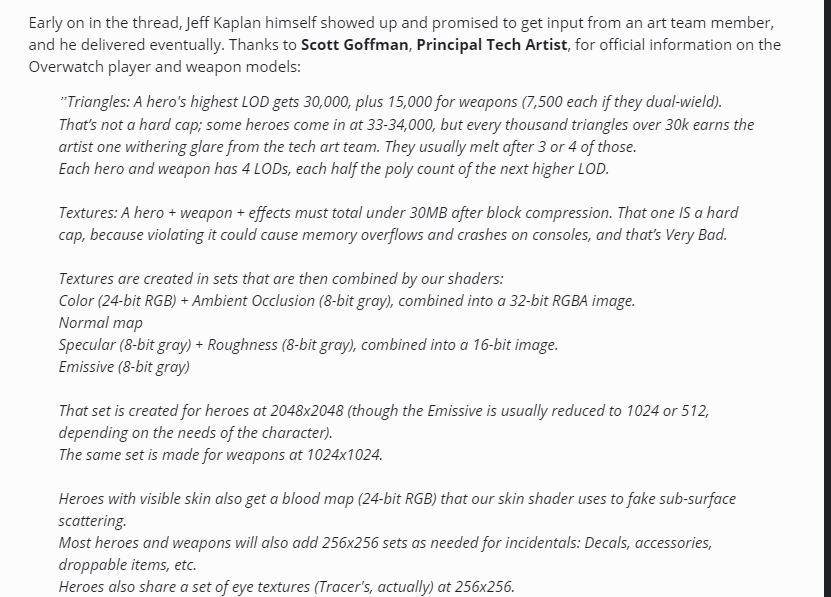
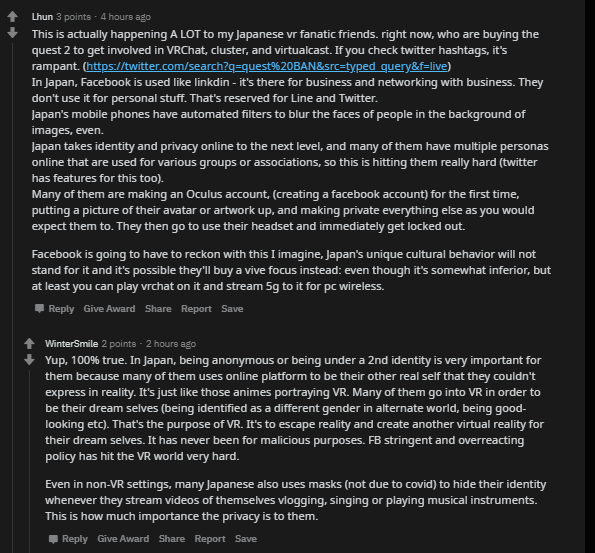
 random talon
Yo
 drifting sundial
is there anyone who got FBT tracking to work on a Quest w/ link?
a friend with link and quest got herself FBT trackers and single 1.0 base station. According to a video on youtube it's supposed to work, but it doesnt..
 vagrant musk
i just brought the rift s how do i get avatars and maps for this game?
haughty coyote
@vagrant musk Basically you will get avatars from avatar worlds, and to find worlds you just need to go to the worlds section in the menu.
vagrant musk
thanks man!
 violet verge
Hello there everyone, I'm looking for help right now. You see, I bought Oculus Quest 2 a few days ago and tried to link my steam account with my VRchat account (My steam account was a year or so older than the VRchat one). I followed the instructions in order to link accounts so I could get higher user rank but I've got banned instead for "Modified client detected". The fact is that I haven't modified anything, do you know if I've done anything wrong? I already contacted vrchat moderation via email and still waiting for an answer. I would really appreciate if someone could tell me what exactly is going on
 snow scarab
😮 Whats going on with VRChat.
- Lip Sync sometimes gone
- Smooth camera to crouch pose gone,
- Head movement with the sitting animation gone
- Avatar walk broken
obsidian zealot
People reported the smooth camera crouch as a bug so they fixed it and made it instant again
obsidian zealot
I mean it was reported by users as one. It was probably an intentional change but people didn’t like it so they reported as bug
snow scarab
Hmm okay. I thought it was normal, because it looks way much better 😄
tawdry wyvern
that local. remote use ik you its not insta
 sage lynx
@cobalt schooner Why Would U Send My User Id
 brazen yacht
I desperately need help from the VRChatTeam @thick belfry
 tulip magnet
@drifting sundial still need help with quest link and FBT?
drifting sundial
@tulip magnet hi, nope. The friend who had trouble with it managed to figure it out. Thanks though
tulip magnet
aight cool
 quick creek
Man is anyone else having like, ALOT of issues today? Every avatar I use locks in A pose if I reset, or emote it in any way, sometimes just straight up happens when I join a world
haughty coyote
Do videos work on quest?
jagged trench
unfortunately not
haughty coyote
Some worlds can actually use it, but you need to allow untrusted URLs in the Settings menu under safety and comfort, and some world video players will work. Most don’t, but there are some every now and then
haughty coyote
Does vrchat run better or crash less on Quest 2 than quest 1? Haven't been able to play it yet bcuz work an stuff
or is it still the unstable dumpster fire we all know and tolerate lmao?
It runs tons better on Quest 2. I think I’ve had it crash once because I was in too bug of a world with lots of detailed Queest avatars, but haven’t had a crash besides that. It runs much smoother as well
Ah, on Quest 1 i kid you not there was one point where I would get the out of memory notice every time i tried to join a world and my headset was constantly overheating lmao
even rebooting only fixed it for like 20 minutes lol
Yeah, Quest 2 runs SO much better than the original
epic
does it support less optimized avatars? I hated how I could only use nice looking avatars on desktop
obsidian zealot
There’s no difference in terms of avatar requirements for quest 2. Most of its increased power goes into the higher refresh rate and sharper resolution.
haughty coyote
ah that sucks
I have found a few avatars that don't break the game but still look cool, but still sucks that even with the increased ram you can't have larger avatars
obsidian zealot
I think it would cause a lot of headaches if people had three different uploads and restrictions to support for every avatar
I think at that point I would just throw up my hands and start building for PC only
Or just 2 and say tough luck to one of them
 proven sedge
i want to buy the Oculus Rift S good idea or stupid?
obsidian zealot
It’s a discontinued headset so you’ll only be buying it used I don’t recommend
Has a crappy mic as well
Original vive and rift s are in “good when they were new but bad by 2020 standards” bin
I’d wait, there’s at least two really good headsets around the corner
And if you’re going to be OK with Facebook you might as well get a quest 2
Facebook is the only bad thing about it
proven sedge
k thx
haughty coyote
Build the relativity headset
like $250 and viveport compatible
yeah, adeon, that actually is accurate about facebook, and with some legwork, that even is avoidable (some mad lads got linux to run on quest 2 lmao)
oblique sonnet
Any quest 2 users haveing trouble loading vrchat worlds?
haughty coyote
i want to buy the Oculus Rift S good idea or stupid?
As adeon said, it's older hardware so you won't have warranty or support
In its current state, I can definitely recommend it but probably not for the ~290$ it sells for right now. Low FOV, bad mic, but of all my VR friends who own the whole gamut of headsets, I've had by far the least issues all around and most consistent experience. tracking is fantastic, resolution is fine until the next generation. the index is far superior, but is far more expensive.
So again, I love my rift s but the price point even used is not quite correct. If a buddy wants to give you his for 120 bucks or something, I'd take it. Otherwise, wait, or do some research on the quest 2
 ruby sky
Adding on to that same question, I was told that Quest 2 wireless is a bit harder connection, so would Rift S be better since it's wired?
 limber narwhal
Im interested in jumping into VR (mostly because of VR chat, but i know with time i will want to play steam vr games on my vr headset). I was looking into the quest 2 because of the usb connection to the PC. My pc is stream worthy. I saw someone mention that there will be a couple new VR headsets just around the corner. would it be worth it to purchase a quest2 with new vr headsets just around the corner? Thanks!
steep crescent
It depends, if you aren't interested in standalone VR and have the extra money it probably would be better to get better Headsets as Quest 2. But Quest 2 is a good Budget Version for a Headset if you want to save money but probably won't be as good as a Index or Reverb.
haughty coyote
Reverb G2 is the best PCVR headset in terms of specs, and Quest 2 is the same for standalone VR, and can also be turned into PCVR with the right cord
obsidian zealot
Is reverb even out? The DecaGear specs look way better than reverb g2
I just want something that rivals the index fov
Once you have high fov it’s hard to go back
Came for the full body, stayed for the FoV. Don’t even use the full body
haughty coyote
DecaGear is still hard to trust imo. Same as pimax making a bunch of claims, but eventually failing to deliver quality. We'll see
Reverb G2 is taking preorders and are shipping the first batch now
haughty coyote
at this point, I honestly don't care that much about pixel density, I just want more FOV
Reverb G2 I'm still waiting to hear about, I'm mostly worried about the controller compatibility and tracking.
haughty coyote
Controller tracking is good. The button layout is fine for most games, but for vrchat the gestures will likely all be handled with the thumbstick.
The fov was tested by some reviewers and using the steamvr measuring tool, is larger than vive, but smaller than index
But the lenses are better than index apparently
 gritty cosmos
Are there any thoughts of bringing the camera to the quest 2 vrchat?
quasi needle
Are there any thoughts of bringing the camera to the quest 2 vrchat?
@gritty cosmos You dont know how to summon it ?
gritty cosmos
Nope
quasi needle
You playing on quest with link?
 median marten
Anyone know how to load the open beta on quest/quest2?
Nvm found it 🙂 seems like you need oculus link and can’t straight through quest store
 violet lodge
@median marten no open beta currently it went to live already, some open betas do have quest betas as well usually the one's lasting longer
median marten
Got it. Thanks for the info
obsidian zealot
Oh yeah I mean I wouldn’t buy a headset myself until I start getting hands on YouTube reviews from people I trust. I still am hype about DecaGear though. Valve confirmed their involvment. I’m usually sus but I have hopes for this being the quest killer
Nothing against quest ofc
Great hardware
gritty cosmos
Well it’s not really a quest killer since the quest is a stand alone and by what I’ve seen, the decagear seems to be a headset that you have to plug in
haughty coyote
Decagear will have a wirless version according to insiders
haughty coyote
I think so, I don’t know the details, but I know that they were having a PCVR headset and/or a standalone headset. It could be like Quest Link, but with it more built in. Maybe even wireless Link type propeties? I don’t really know, but it seems like it could be a cool headset if it the things are true
gusty bolt
It just seems to good to be true...