#quest-optimization
1 messages · Page 12 of 1
 flat granite
 stuck ravine
In my world, some quest users report sliding around when they stop walking, some get stuck in a specific spot in the world near spawn. Does anyone know what i can do about this?
 graceful moss
Are you using Mesh Colliders?
stuck ravine
@graceful moss i forgot this is not an option for me as that would allow people to walk through walls
walls, floors and ceilings are a single mesh in my worl
do you know of any other way ?
graceful moss
You can use multiple gameobjects and have multiple box colliders
Or add multiple box collider components to a single object
graceful moss
stuck ravine
do you know of any other way ?
.
stuck ravine
graceful moss
You can use multiple gameobjects and have multiple box colliders
i would have to add 6 box colliders to some
do you think this bug will be ever be fixed? Could it be worth it to wait for that?
it seems to happen to maybe 5% of quest users the rest dont have any trouble walking around for some reason
graceful moss
I don’t think it’s a bug I think it’s how quest does physics
Box collider’s are more efficient than mesh collider most of the time
 hardy horizon
Does anyone know anything about world lighting and avatars on Quest? Some worlds the avatar seems "reactive", but others the lighting appears static on avatars.
 radiant osprey
hardy horizon
Does anyone know anything about world lighting and avatars on Quest? Some worlds...
radiant osprey
hardy horizon
Does anyone know anything about world lighting and avatars on Quest? Some worlds...
All depends on if the creator has lighting probes in their world
It can also be dependant on the avatar
hardy horizon
How would one go about lightprobing the player?
Just adding light-probes doesn't seem to change anything.
 turbid python
@hardy horizon probably PBR shaders
hardy horizon
turbid python
<@261384026114228226> probably PBR shaders
PBR Shaders? Is that a world thing? Im a bit lost.
turbid python
No on the avatars themselves
Through normal maps etc they have a defined physically accurate surface
hardy horizon
Nonono. have a matcap lit avatar that responds to lighting on Quest in some worlds but not in others.
turbid python
Oh matcaps
hardy horizon
Im trying to figure out where probing comes in and how baked lighting works.
(Baking lights itself is a pain and there's not a lot of non-video guides).
I still haven't wrapped my head fully around Unity baked lighting.
turbid python
Aren't lights disabled by default on quest avatars?
hardy horizon
turbid python
Aren't lights disabled by default on quest avatars?
Lights on avatars are. But I'm working with world lighting.
turbid python
Hmm I wonder how it'll re bake when changing to another world with different lighting
hardy horizon
AFAIK the mobile shaders respond to realtime directional lights, but I'm not sure how to recreate a "spot" light like that. A lot of people pointed to light probes, since this actually bakes the light within space itself. But it seems adding probes alone isn't enough.
(Why on earth Unity doesn't have a beginner friendly "bake it like it looks in the editor" is beyond me.)
turbid python
Is there a specific look needed? Otherwise PBR would do fine no?
hardy horizon
turbid python
Is there a specific look needed? Otherwise PBR would do fine no?
MatCap on my avi is necessary.
And It's kinda bad form to tell anyone who enters my world "if you use MatCap, sucks to be you". — That's not solving anything, that's covering up the issue.
Trying to make the world "as compatible" as possible.
Haven't found any guides on the matter, and video tutorials grate my nerves and are hard to learn from.
Maybe it's because of my baked lights...
 sharp zinc
hardy horizon
(Why on earth Unity doesn't have a beginner friendly "bake it like it looks in t...
sharp zinc
hardy horizon
(Why on earth Unity doesn't have a beginner friendly "bake it like it looks in t...
because beginner friendly generally ends up costing advanced users
hardy horizon
I noticed that the light doesn't fall off with the point light when I bake it — I have to use a second texture with transparency to give it a false shadow.
If probes are based on the light in my world, maybe i'm doing something wrong there?
sharp zinc
and advanced users make the money
turbid python
hardy horizon
I noticed that the light **doesn't** fall off with the point light when I bake i...
Maybe the radius of the point light is too small?
hardy horizon
turbid python
Maybe the radius of the point light is too small?
It's behaving like the opposite. As if the whole room is lit by the pointlight.
If I switch it to realtime, it looks correct in the editor.
But setting the light to baked it only bakes the shadows cast by other objects.
I might be missing something though. After messing with lighting settings, and enabling "realtime global illumination (deprecated)", it's behaving closer to what I want, editor side.
radiant osprey
hardy horizon
Nonono. have a matcap lit avatar that responds to lighting on Quest in some wor...
You don't use probes on avatars. The mesh of your avatar should have a lighting setting set to "Blend Probes" (this is default). If it works in some worlds then I assume it's on. It's up the world creator themselves to add lighting probes to the scene
Nothing you can do on your end if the world creator didn't add them
hardy horizon
I'm making a world.
I'm trying to figure out how to properly probe my world.
To make my lighting as compatible as possible.
radiant osprey
Just add the probe and then bake your lighting. Probes automatically get baked in
 left holly
Even if it's matcap, the light will affect how bright it is I think
hardy horizon
I figured it out. Spotlights behave WILDLY different with baked lighting. Had to essentially set my atmosphere to black and adjust the spotlight to compensate to the different behavior.
After that probes worked.
 sand mantle
 jagged nymph
can quest avatars use normal maps?
 eternal onyx
yes
jagged nymph
eternal onyx
yes
Is it while using the bumped diffuse? and do you happen to know how many materials are allowed for a fallback quest avatar
eternal onyx
i don't. the standard lite shader is typically what you'd want to use on quest
jagged nymph
standard lite. ok. i'll use that. thank you for the info.
hardy horizon
sand mantle
http://www.csc.villanova.edu/~ekim/classes/CSC3150S17/tutorial/unity_tutorial8.p...
Eh wouldn't work for my needs, and I already got it working anyhow (apparently baked spotlights commonly need their intensity multiplied by 10, and range doubled, to mimic their realtime counterparts).
sand mantle
weird, usually other way around unless you confused it with specular being part of it but ok lol
hardy horizon
sand mantle
weird, usually other way around unless you confused it with specular being part ...
Nah, I actually ran into other forums that said the same thing when researching different issues. Spot lights (which expand from a point in a specific direction, conically) apparently are fickle to bake? I guess when baked they "fall off" based on their range, whereas realtime they only fall off towards the 'edges' of the cone.
So at a range of 10, baked, it would mean it'd be brightest at 0, and dimmest 10 units away. Whereas, at least in the editor, a realtime spotlight of 10 would be the same from 0 to 10.
It's possible that "in game" realtime behaves the same, but then that means the editor is showing an unrealistic behavior of the lights and cannot be trusted, lmao.
hardy horizon
sand mantle
weird, usually other way around unless you confused it with specular being part ...
In my case I have a spotlight shining down from a ceiling, to the floor 3 units away. with a radius that makes it extend outwards just slightly before the edges of the floor. In realtime, in editor, it behaved sorta like a "contained"/"shaped" directional light, and illuminated the floor in a circular shape, fading at the edges.
Baked, it was completely black. No light. Or, with default atmospheric lighting, it'd be completely lit. No in between.
Extending the light's range by 2 resulted in the light reaching the floor when baked.
sand mantle
hardy horizon
Nah, I actually ran into other forums that said the same thing when researching ...
right, cus bounces, i think I know 🤥 what youre saying, its just vocab weirdness tripping me up lol
 edgy kraken
real time and baked behave differently yeah, because it is possible for baked light to bounce
sand mantle
hardy horizon
In my case I have a spotlight shining down from a ceiling, to the floor 3 units ...
wait, double checking: you made your meshes static right?
hardy horizon
sand mantle
wait, double checking: you made your meshes static right?
yup
sand mantle
hardy horizon
yup
gen lightmaps/made uv2 stuff?
hardy horizon
Only thing more messed up than the light's behavior was the ambient lighting. Had to set it to a color and make it near-black to get the right appearance with baked.
hardy horizon
sand mantle
gen lightmaps/made uv2 stuff?
I did generate the lightmap. IDK what you mean about UV2 though.
sand mantle
lightmap uvs
hardy horizon
It generated them during bake if that's what you mean.
sand mantle
is it probuilder/any unity built on mesh maker or is it an imported model?
hardy horizon
The floor was a simple Unity plane.
edgy kraken
i feel like it could be possible your spotlight just isnt strong enough in baked and you have to trial and error to see where the light actually projects strong enough
hardy horizon
edgy kraken
i feel like it could be possible your spotlight just isnt strong enough in baked...
That's what it was. We're talking retroactively here.
edgy kraken
ah okay
hardy horizon
I had my light set to an intensity of around 2, I think, realtime. It's 20 baked.
And my range was .1 units past the floor, realtime.
Baked it's double the distance.
sand mantle
hmm, I guess 🤔 another thing that couldve happened was that the material was set to a high metallic level and ate up the lighting
hardy horizon
sand mantle
hmm, I guess 🤔 another thing that couldve happened was that the material was se...
It was using the VRChat mobile lightmapped shader.
Completely unlit except for the lightmap.
sand mantle
oh, then thats a weird behaviour
hardy horizon
And I tested with other shaders too.
None of them received light until I doubled the length.
edgy kraken
interesting
sand mantle
their loghtmap shader is usually pretty good at mimicing the matte lighting
hardy horizon
Granted I never tested the realtime lighting in VRC, but in the editor, if the spotlight was set to realtime, and the floor used the standard or standard lite shaders, I could have the light's range just a smidgin beyond the floor.
With the baked lighting (using Unity's built in lightmapper) it would barely reach objects half way up to the light, and never reached the floor.
I think this may be unique to spot lights though. I didn't try point lights or other lighting types.
edgy kraken
at the very least i did observe them to be completely different, i didn't measure their distance though
sand mantle
well, theres many varibles that couldve caused this
edgy kraken
i think "mixed" is kinda iffy too
sand mantle
but im here with 6 years experience who can actually bake lighting without even looking at the realtime counter part before bake
hardy horizon
It's possible I could've changed some lightmapping settings enough to get the same result, but the fact that lightmapping is not WYSIWYG to realtime lights, and the fact I'm still green to a lot of this, meant I didn't have the patience or knowhow to do it "right".
As long as my lights are baked it makes no difference.
sand mantle
so i havent really seen realtime lights be so drastically different unless some setting was meshed with or something else
fair game
hardy horizon
I did set the lightmapper to subtractive, but using the default option (shadowmask) made no difference.
sand mantle
the default is to also bake a dir lightmap, which can kind of mess with results a bit if youre not careful
sand mantle
hardy horizon
Di...rectional... map?
imagine a normal map, but its for uv2/lightmaps
hardy horizon
Oh that setting.
sand mantle
just makes lightmaps look more ”depthy”
hardy horizon
IDK why that'd effect a flat plane though.
sand mantle
me neither but anything is possible in unity
i recalled one time that the dir lightmap made the main lightmaps way darker and birghter than they should
i also recomend not using directional when youre new to light baking
just as like: a general thing
hardy horizon
I'll remember that.
I do remember seeing a post that said that too, but I noticed no difference with it off at the time, so I ignored that.
Though that was before I figured out the ambient light, so EVERYTHING was lit.
Possible that would've fixed my intensity issue after I figured the ambient situation out.
hardy horizon
sand mantle
oh, was ambient occullsion on?
No. It only lets me turn it on in the lighting settings if I also enable the "deprecated" realtime lightmaps.
If I'm understanding correctly.
sand mantle
i dont think youd need rtgi
hardy horizon
Oh wait I confused it with the AO mode.
sand mantle
AO is like excess shadows between meshes
hardy horizon
Yes it is on, though it wasn't before when I was having issues.
I turned it on after the fact.
sand mantle
i would turn that off, that could make things darker since thats one of the key things itll do
hardy horizon
sand mantle
i would turn that off, that could make things darker since thats one of the key ...
I actually liked it, currently. The contrast of the harsh shadows is nice. It made no difference off with the spotlight distance thing.
That I did check.
hardy horizon
PP?
sand mantle
post processing
hardy horizon
Oh. Isn't PP disabled on Quest.
I have 0 intentions to make PC only worlds.
Since, well, I primarily use Quest.
Oculus doesn't support VMs, even though my MacBook meets the specs to run VRC in it. (GPU thing. No AMF or NVENC).
sand mantle
ye but just as a general rule, AO for PP is just not a good idea for vr right now lol
sand mantle
hardy horizon
Oculus doesn't support VMs, even though my MacBook meets the specs to run VRC in...
what macbook you use? is that what youre using for unity?
hardy horizon
sand mantle
what macbook you use? is that what youre using for unity?
MacBook Pro Late 16/Early 17 13-Inch Fn Key model with 16GB RAM and an AM RX570S eGPU over thunderbolt 3.
I can bootcamp windows, and do have it installed, but it's a bear to switch back and forth.
And the lack of R/W APFS drivers for Windows makes it excruciating.
 oblique remnant
hardy horizon
Oh. Isn't PP disabled on Quest.
oblique remnant
hardy horizon
Oh. Isn't PP disabled on Quest.
yes, post processing is not available for quest builds
sand mantle
k, theres like a tiny commune of quest macbook unity peeps and theres not many for vrc so im just curious whay your status of it was lol
hardy horizon
hardy horizon
MacBook Pro Late 16/Early 17 13-Inch Fn Key model with 16GB RAM and an AM RX570S...
It honestly needs replaced though because it's really starting to show its age. If I had money I'd get an iMac with the M1. Would be eons better performance wise.
hardy horizon
sand mantle
k, theres like a tiny commune of quest macbook unity peeps and theres not many f...
I started off with AltSpace for practice, but when a major update completely halved my world's performance to a slideshow I gave up.
Granted I couldn't get light baking to work then either.
Baked lights just destroyed my world on the defaults, and unlike the spotlight issue recently, then I couldn't figure out how to fix it.
sand mantle
m1 lightbaking is a speed demon
sand mantle
hardy horizon
Baked lights just _destroyed_ my world on the defaults, and unlike the spotlight...
in asvr?
hardy horizon
sand mantle
in asvr?
Yeah. In AltSpace. I was practicing at the time since a friend of mine was too nervous for VRChat. I had the world working stable with realtime lights, as long as I didn't go overboard. BUT after the big update that added merged Microsoft accounts my worlds just became utterly unusable.
I tried baking my lights at the time as I knew it'd give a performance boost, but my lights were always muddy, colors were washed out, and shadows were very poorly rendered, using the defaults. The realtime had clean shadows, bright lights, and vivid colors.
sand mantle
couldve been a drawcall reset to the world
hardy horizon
TBF I probably had a lot of bad practices in the world. I always meant to improve it, but seeing my world go from useable to 2FPS slideshow killed any motivation to improve.
sand mantle
I remember asvr wpuld run pretty well woth rtlights, i cant remember why
hardy horizon
I imagine the CPU load was small.
sand mantle
id make new then, but asvr lets you have rtshadows
hardy horizon
IDK what they changed with the big update but whatever it was, it completely changed the stability of ASVR worlds.
sand mantle
thats unfun
hardy horizon
Yeah.
If it was just a slight perf. drop it'd been fine. But it went from stable FPS handling me AND a friend, to being a slideshow solo.
It's like something fundamental to how they rendered worlds changed.
Granted it could've been the RT lighting. But the fact that the performance overhead changed that much was baffling.
hardy horizon
Yes
Occlusion culling is actually pretty important too, as it reduces rendering overhead.

GitLab
A surface shader for Unity providing cel-shading. (Forward rendering only)
Learning to bake occlusion for static objects is also important, similar to baked lightmaps.
 formal grove
Use standard lite.
hardy horizon
Don't forget to bake lighting! Quest is restrictive on lights.
sharp zinc
Never used to though
 heavy vortex
not sure why but my baked lighting still doesnt show up on the quest version of my world, i always make sure to bake before uploading also

 slate ruin
Does anyone know how to optimize the hyenid for the quest?
slate ruin
What do you mean? The hyenid in the files has a quest friendly fbx- if I use that and export it to unity like a normal avatar with the SDK and all of that on an android build would that be quest compatible?
turbid python
slate ruin
What do you mean? The hyenid in the files has a quest friendly fbx- if I use tha...
Ah it has a quest version? You should use that one yeah and check if there's any specific instructions for said version
slate ruin
Ok! Thank you ^^
 glad fossil
anyone know how to swap recording eyes from right to left during streaming?
helping out a friend with this and just thought i should throw this in here
sharp zinc
Is it normal to have 30-70 fps on vrchat with quest 2? My pc spec is 3070ti, 16gb ram and i7-11700lf. If I turn on dynamic bone it even hit 10fps sometime if there more then 8 people.
 lone stone
anyone know why i cant see some peoples actual avatar? There are some people that sometimes have a default skin when they really have a different not default avatar
 humble canyon
probably because they have a very poor Avatar so it shows a fallback Avatar
there is no way to automatically show all very poor avatars because that could crash your headset as there's no limit to how much resources a very poor Avatar can use
 shell jay
Be neat if you could specifiy certain limits it'd be okay to auto show instead of just "ranks"
like what if you're comfortable with how a 45k tris 10 material avatar effects your FPS but not avatars above that so you could set it to auto show avatars with those stats and/or below
this would equally be useful for PC
 austere grove
Is it possible to edit locomotions on quest/fallback avatars? Like walking/sitting animations?
Never done much within these limits
humble canyon
yes you should be able to do that
austere grove
Thanks
 graceful vessel
Can you upload a custom avatar to quest if its performance is medium
humble canyon
yes there wouldn't be any problem with uploading a medium Quest Avatar
VRChat
The Avatar Performance Ranking System allows you to see how much a user's avatar is affecting performance via analysis of the components on that user's avatar. You can also use it on yourself to see how performant your avatar is. This system is provided to inform users what is likely the most perfor...
 graceful vessel
Ok awesome
Thank you!!
humble canyon
but I would know you would still need a computer with unity installed to upload the avatar
graceful vessel
I have unity. Ive been trying to implement an avatar for awhile now and after doing the auto fix in the SDK it said the performance was medium though wasnt sure if that was fine for Quest
I still cant implement it cause I have to fix something that cant be auto fixed but im getting there
humble canyon
I would note that the SDK tooltip about the performance rank is showing for the current platform you have active
shell jay
I'm trying to optimize a VRoid head
The only thing left that had transparency is the eye brows
So I'm attempting to use the knife tool to just manually cut the eyebrow out of the box but when I do then shapekeys completely break
How do I cut it out without breaking shapekeys??
shell jay
Hmm
fun
For people in future
I think I figured it out
make a duplicate, use knife, delete all shapekeys, then use mesh data transfer to transfer original shapekeys
humble canyon

the green shows a safe cut but the red is a bad cut as it introduces a new Vertex in the middle that it has no clue what to do with
humble canyon
cool
graceful vessel
Ok I just uploaded my first avatar though after I uploaded turns out I can only use it on pc
How do I upload it for Quest
 uneven spade
graceful vessel
Ok I just uploaded my first avatar though after I uploaded turns out I can only ...
uneven spade
graceful vessel
Ok I just uploaded my first avatar though after I uploaded turns out I can only ...
That's fortunately a question Google can answer, there's several YT guides on the subject and it's very easy.. assuming the model is optimized.
graceful vessel
Its a medium performance avatar right now
graceful vessel
Ok yeah that did not translate well at all
 opal violet
shell jay
I'm trying to optimize a VRoid head
The only thing left that had transparency is...
opal violet
shell jay
I'm trying to optimize a VRoid head
The only thing left that had transparency is...
hey i know how to do this!!
basically the picture rainwolf sent
but you can make multiple cuts

so if you cut through the blue line it works fine!!
sharp zinc
How can you improve the graphics on VRCHAT from Quest? There’s so much glitches from images and some are pink because of errors
humble canyon
there's not really anything you can do about that because that's mapmakers doing a poor job with their worlds if you're getting pink errors
sharp zinc
So I guess viewing the worlds will be better on PC
Is there any best worlds for Quest?
humble canyon
https://everythingimmersive.com/communities/vrchat-worlds/so-you-got-a-quest2-2 not that it would cover all of them but here's some nice worlds
 sharp zinc
Not much interesting worlds though
humble canyon
curiosity is there particular kind of world are you looking for?
sharp zinc
I’m looking for furry worlds as well as retro stuff worlds
shell jay
I have a list of "pretty" worlds that are Quest compatible should I try and save that in a sharable form later?
 untold night
Yes
sand mantle
shell jay
I have a list of "pretty" worlds that are Quest compatible should I try and save...
yep
humble canyon
shell jay
I have a list of "pretty" worlds that are Quest compatible should I try and save...
yes
 muted oak
I'm on quest 1 and was wondering what settings do I change to better enhance my graphics
In sidequest
radiant osprey
muted oak
I'm on quest 1 and was wondering what settings do I change to better enhance my ...
You can't change graphics quality on Quest. The only thing you can do to improve FPS it to limit avatars more harshly
shell jay
muted oak
I'm on quest 1 and was wondering what settings do I change to better enhance my ...
Up the GPU/CPU level and if you can handle it lower the texture resolution
shell jay
radiant osprey
You can't change graphics quality on Quest. The only thing you can do to improve...
Nah you can change graphics stuff
ADB commands
@sand mantle @humble canyon Hope this is good
humble canyon
cool I'll have to check some of those out
shell jay
I have only seen a few of them on Quest so the "Pretty" aspect might be uncertain..
But the ones I have seen natively on Quest from that listed looked okay
humble canyon
yeah I don't have a quest as well to check
shell jay
Not in the list because I forgot I didn't have it saved/favorited
Cozy Cave is nice
radiant osprey
shell jay
_ADB commands_
Aren't these only for Oculus itself, not VRChat?
shell jay
radiant osprey
Aren't these only for Oculus itself, not VRChat?
The ADB commands control the Quest itself yes but that directly effects VRChat
It's like changing your monitor resolution on your computer or overclocking your CPU/GPU yes that technically doesn't do anything to your software but it undeniably has a direct impact on it
Does that make sense?
radiant osprey
But sidequest is running on a quest, right?
radiant osprey
So then you could run VRChat in PC mode
 bleak ocean
I'm testing mobile shaders and I've instantly got a problem. First thing I tested was this gun, which loses its' colour with 'standard lite':


I can see why, as the usual shader lets me pick the colour.

Is there an easy way to assign colours to these? Having them grey on Quest wouldn't be a complete disaster, but it's still a step down.
I also have this bottle (and other objects) with the shader selection greyed out on some parts, like the label:
 humble canyon
bleak ocean
I also have this bottle (and other objects) with the shader selection greyed out...
humble canyon
bleak ocean
I also have this bottle (and other objects) with the shader selection greyed out...
go to the object import settings and there should be a extract materials button then the materials will be available to be edited
bleak ocean
humble canyon
go to the object import settings and there should be a extract materials button ...
Thanks! I should have known that as I've done it before! 🤦♂️
humble canyon
and something that might help out with optimization in general would be combining the textures of your non tiling materials so that you use less draw calls
https://github.com/maxartz15/MA_TextureAtlasser found this tool that can handle generating the texture atlases in unity and even handle PBR materials and it generates a new copy of the object with the texture Atlas so your stuff is left intact
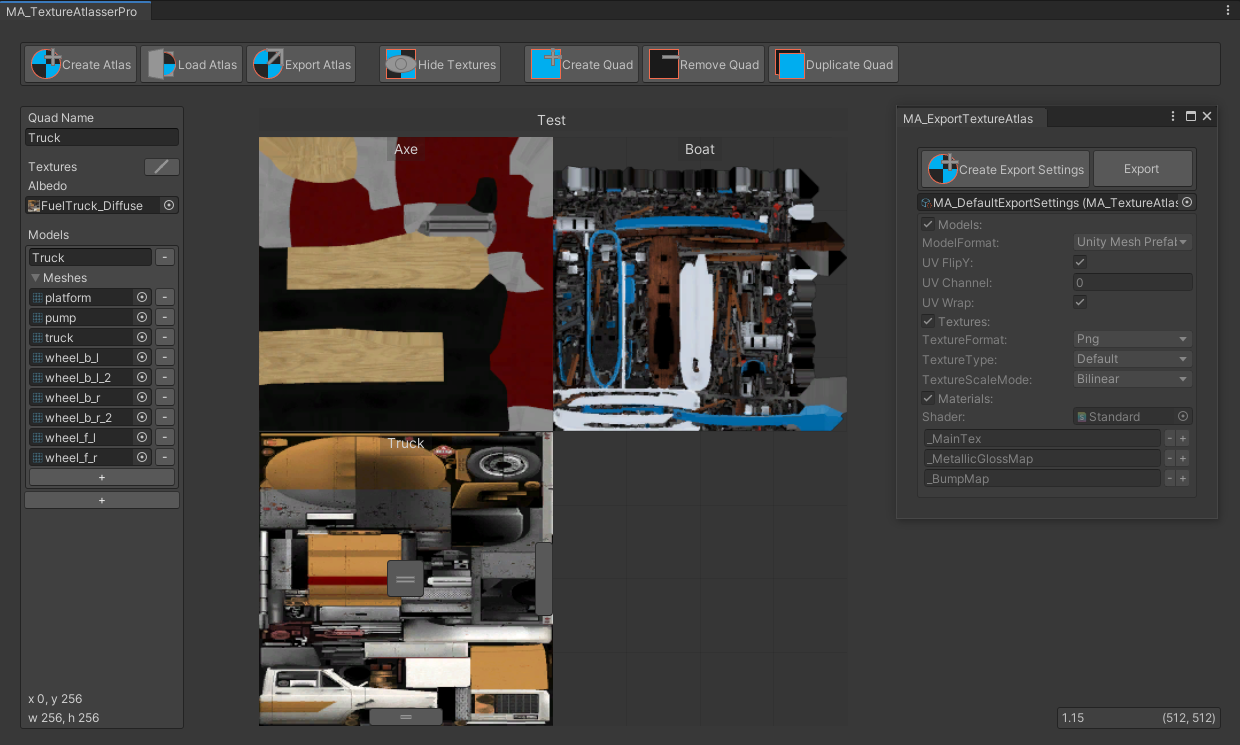
GitHub
Texture atlas creator for Unity. Contribute to maxartz15/MA_TextureAtlasser development by creating an account on GitHub.
sand mantle
shell jay
<@!657567702608642078> <@!216145046347448320> Hope this is good
ooooh i see one of mine made it in lol
 crude venture
Aah I just wanted to ask if anyone here has purchased a booth avatar before and if so how did you get those converted to quest compatibility? (if you did that is ^^;)
sand mantle
crude venture
Aah I just wanted to ask if anyone here has purchased a booth avatar before and ...
depends on booth model, sometimes they come with specially decimated models for quest, some come with cheaply auto decimated models, some dont at all. if its pc only, youll want to optimize it
crude venture
hmm okay I think I kind of understand that,, though if it is pc and you have to get it to quest how do you upload those if they say very poor performance ? :< bc most of my crossplay avatars say that
but when I try to upload one myself like that the button goes grey
sand mantle
crude venture
hmm okay I think I kind of understand that,, though if it is pc and you have to ...
set your unity project to android, then reupload the avatar (shader switches are required)
crude venture
ooh yes I did that! but she says very poor performance or smth the one like this  and due to that it doesn't allow me to uplaod her :<
I think that was it I might want to check again I had wanted to buy another model too (Rindo) but I do not know if I'll be able to as she's also a very big avatar
and I am afraid to get the same thing with very poor preformance to where I might not be able to upload her it really confuses me to how other people do upload them even despite that
hghj sorry if that was alot-
 plush jacinth
you usually have written how much polygons avatar have before buying
below 20k is good thing
materials isn't problem since you can make atlas
crude venture
https://booth.pm/en/items/3443188 Well this is the avatar I'd wanted to buy for a while and the description


オリジナル3Dモデル「竜胆」 製作者: 진권/ジンゴ このモデルはBlender 2.80.75で製作されました。 他のプログラムでの互換性は保障いたしません。
humble canyon
yikes that's a very heavy Avatar even on PC
crude venture
I do have a public version of her which is converted to quest aswell?
 crude venture
humble canyon
yikes that's a very heavy Avatar even on PC
crude venture
humble canyon
yikes that's a very heavy Avatar even on PC
yeaa I noticed I had no idea before 
humble canyon
like how the heck do you use 90 materials on a avatar
crude venture
plush jacinth
for it to work on default settings
crude venture
ooh nooo
crude venture
retopo ? :o
plush jacinth
well but that would require some skill
humble canyon
basically rebuild it from the ground up to be not so ludicrously High poly
crude venture
A-
humble canyon
but that's probably not a good beginner project
crude venture
oh my gosh
humble canyon
question is Quest your primary platform or just a consideration for Quest users
crude venture
consideration as my friends are on quest ^^
I am too but it is hooked up to my pc so I do not have any issues with that myself
plush jacinth
it could be possible to make it so quest can see it but only when someone enables it manually
maybe use some addons that optimize avatars and it could work
most important thing is materials and polygons
humble canyon
yeah but like $70 is a lot when you don't have a lot of experience with Avatar optimizing
humble canyon
like honestly I would suggest finding a free to download Anime Avatar to practice on
humble canyon
that it shouldn't be too tricky to adjust some settings in vroid and have it be in the quest budget
crude venture
https://booth.pm/en/items/3040745 I bought her

オリジナル3Dモデル「イメリス」 製作者: 진권/ジンゴ このモデルはBlender 2.80.75で製作されました。 他のプログラムでの互換性は保障いたしません。
my friend had set her up for me however! But even she had alot of trouble with it and she's very experienced
plush jacinth
she is pc focused too
crude venture
mhmm, I guess that should've been obvious since they are from the same creator :<
plush jacinth
i mean yeah with blender addons it could take even couple hours to optimize it
humble canyon
like if you just need a customized Anime Avatar to be a fall back https://hiroiheya.booth.pm/items/1381874 this Avatar is Quest compatible and has a decent amount of little pieces to customize

■■オキュラスクエストを想定した2A-7の軽量化版です■■ ――――――――――――――――――――――――――― 3Dのキャラ素材としてご使用ください。 ワールドで使ったり、シェーダーで使ったりして、それを再配布しても問題ありません。 こちらは クリエイティブ・コモンズ・ライセンス の 「CC BY 4.0」です。 (簡単に言うと原作者のクレジット記載さえあれば、何をしてもOK) ワールド作成の賑やかし、ペデスタル、メッシュの改造して再配布などVR創作活動にご利用しても問題ありません。 「CC BY 4.0」の詳細はこちらのサイト参照
crude venture
nono I really have wanted the Rindo one for quite a while bc I thought she was a really unique and pretty character but hearing this I don't kow if I would be able to actually get her
humble canyon
question have you ever Quest optimized a Avatar before
crude venture
noo T.T I really have no experience it's kind of why I came here
plush jacinth
i know there is payed unity addon that optimize avatars for quest automaticly
i heard from someone that uses it that it's pretty good
but it costs 30$
crude venture
oh my reallyy? do you think it would work on even such a big avatar as this?
crude venture
ooh that's okay ^^;
humble canyon
myself I use pre-made avatars that I modify but I tend to go with ones that are Quest compatible out of the box
crude venture
I've tried to see if there were people who took commissions to set up big avatars like this for quest but I couldn't rlly find much :<
humble canyon
plush jacinth
i know there is payed unity addon that optimize avatars for quest automaticly

Gumroad
Polytool is a tool that helps you by automatically optimizing your models right inside Unity!It turns optimizing your models into a near-zero effort job. Choose a preset and go!It was originally created to optimize VRChat avatars but works for many different optimization jobs inside Unity. Feel free to join our Discord server to participate in o...
humble canyon
crude venture
I've tried to see if there were people who took commissions to set up big avatar...
that's a bit of a problematic commission type to do because that requires both parties to have the model or you're engaging in piracy
plush jacinth
you could try with avatar you have already
crude venture
humble canyon
that's a bit of a problematic commission type to do because that requires both ...
ooh yea you're right I hadn't even really that that far ahead yet
crude venture
plush jacinth
you could try with avatar you have already
I will do that then ! ^^
humble canyon
crude venture
ooh yea you're right I hadn't even really that that far ahead yet
like that kind of works okay with furs models because there tends to be like a lot of potential customers so it's worth it for the person doing like texture edits to have one already purchased so the both parties have it already criteria is met
humble canyon
crude venture
I will do that then ! ^^
yeah definitely wouldn't hurt to try as the tool has a free trial
crude venture
yees that is true! I will try it though for now I will also hold off from buying anything too quickly then thank youu for all the help here!
turbid python
If all fails there's always retopology
crude venture
huuh what's that?
crude venture
ooh oh I had another question! is there a way to know a hairstye won't get ''back face culling'' ?
since it sometimes goes invisible with the mobile shaders
 radiant osprey
crude venture
ooh oh I had another question! is there a way to know a hairstye won't get ''bac...
radiant osprey
crude venture
ooh oh I had another question! is there a way to know a hairstye won't get ''bac...
Typically you want backface culling for performance reasons, but many popular shaders support it being turned off such as Poiyomi
crude venture
Ooh I don't exactly know how to phrase it bc my knowledge is really limited but currently when my avatar is on quest the front of her hair disappears
And I can't use poiyomi for it since that's a pc shader and won't allow me to use it for quest :<
I don't know if there's any way to fix it or know it won't happen with other hair sets 
oblique remnant
crude venture
Ooh I don't exactly know how to phrase it bc my knowledge is really limited but ...
look into geometry's normal direction in eg blender, it may be the wrong way, flipping can fix this
eternal onyx
crude venture
ooh oh I had another question! is there a way to know a hairstye won't get ''bac...
turning off backface culling in the shader can cause performance problems. the best way to get around this is by duplicating your hair geometry and then inverting the normals, so that you have two coplanar surfaces facing in opposite directions
that way you'll be able to see the hair cards from either side
crude venture
Ooh thaank you that is so incredibly helpful!! 
 slate cradle
crude venture
since it sometimes goes invisible with the mobile shaders
slate cradle
crude venture
since it sometimes goes invisible with the mobile shaders
If you open it in blender you can turn on the option “Face orientation” - Anything that turns red will go invisible in a one-sided shader
You can select those areas and run the command “flip”
So that the blue side faces outward
If you need to see both sides of something you’ll just need to duplicate it and flip the duplicate. More triangles.
shell jay
crude venture
ooh oh I had another question! is there a way to know a hairstye won't get ''bac...
If it needs to be two sided you can duplicate the faces and flip the duplicates normals but that will result in a higher poly count obviously
 tacit beacon
eternal onyx
turning off backface culling in the shader can cause performance problems. the b...
tacit beacon
eternal onyx
turning off backface culling in the shader can cause performance problems. the b...
I just use Solidify at 0
 molten brook
Anyone know how to make an pc avatar quest compatible?
eternal onyx
assuming you have the project files, switch the build target to Android, switch the materials over to VRChat's standard lite shader, and reduce the polygon count if necessary
 loud zenith
excellent rated avatar :3

the cats bake feature is so easy i didnt have to do anything
humble canyon
good
turbid python
Cats can bake?
 slow hearth
Cats get baked on catnip
 gloomy wraith
Same with Tigers but not lions
 dim bluff
turbid python
Cats can bake?
dim bluff
turbid python
Cats can bake?
I swear I need to come up with a better name for it, but I've been struggling for months and can't think of anything
- cat kiln
- kitty kiln
- chelseabake
- lodbake
- frisky fricassee
- purrcolate
- clowderbake (sounds like a kind of chowder)
- pawtisserie
- biscuit bake
- purrista
for being about cats and, potentially, loafs, you'd think it'd be easier to come up with a pun
loud zenith
dim bluff
I swear I need to come up with a better name for it, but I've been struggling fo...
its sooo good tho, it's literally fire and forget with no effort
i find it works best with furry avis tho since they dont usually have clothes
but you can always delete geometry behind clothes
but seriously, thank you for the feature in cats
sand mantle
click on material, and at the top is a drop down for shaders
 pure wind
how will i know my avatar is ready for quest? its just a reskin of a free model, it said it was quest and sdk3 compatible
humble canyon
try switching your build platform to Android and see what the like Avatar stats say
pure wind
humble canyon
try switching your build platform to Android and see what the like Avatar stats...
ok
pure wind
humble canyon
try switching your build platform to Android and see what the like Avatar stats...
this is currently what my control panel looks like

you want me to switch the target to android right?
humble canyon
yes
question does your download have a quest compatible package as those stats are suggesting it's a bit heavy for the quest
pure wind
humble canyon
question does your download have a quest compatible package as those stats are s...
just came with one package

but here it is now
humble canyon
pure wind
just came with one package
good to know
pure wind
i did get an error at the bottom stating
Switching to Android:AndroidPlayer is disabled
humble canyon
did you install the Android build of unity
pure wind
humble canyon
did you install the Android build of unity
no thats what i was just wondering
should i go do that and retry all this
humble canyon
pure wind
should i go do that and retry all this
yes you should go take care of having the Android build installed otherwise it's not going to work
pure wind
pure wind
no thats what i was just wondering
i was asking that earlier because to make sabers for modded beatsaber on quest you need android build
pure wind
humble canyon
yes you should go take care of having the Android build installed otherwise it's...
alright
the model used some thing called skinedit so i should be able to remake it quick
wait should i delete my current unity version since i wont be making pc avatars ever
humble canyon
you should upload PC versions of your avatars because there's no reason not to as it's only 2 extra minutes
as it's no good for chunks of user base being unable to see your avatar
pure wind
ohhhh
wait so when i upload an avatar for quest it isnt for pc and quest
just quest?
humble canyon
yes you have to upload for both platforms
humble canyon
because the different platforms literally get different files for handling the avatars so if you just upload to the quest you only have the quest files
pure wind
when i upload for both platforms it merges them right
humble canyon
yes if they both have the same build ID which happens when you go upload one platform swap platform upload to the other
pure wind
humble canyon
yes if they both have the same build ID which happens when you go upload one pl...
i just need the one install right though, with android build support
humble canyon
pure wind
i just need the one install right though, with android build support
yes you currently have the Windows support so you just need to install the Android build
and then resume your avatar uploading
pure wind
uhoh
i uninstalled windows
BUT
i do know from seeing earlier that it does windows and android
from downloading versions for beatsaber
it downloaded windows now its doing android
humble canyon
pure wind
i uninstalled windows
question what version of unity does the beat saber modding do as that's potentially a different Unity version than vrchat uses
pure wind
humble canyon
question what version of unity does the beat saber modding do as that's potenti...
it is different
humble canyon
VRChat
This page lists the current Unity version you should use when creating content for VRChat, as well as links to the correct version for both Unity Hub and direct downloads. Current Unity Version The current Unity version in use by VRChat is Unity 2019.4.31f1. Ensure you are using this exact version! ...
humble canyon
cool
pure wind

alright thanks for your help
im gonna retry and see if it works
i cant import the package anymore
the sdk is in still
pure wind
humble canyon
cool
do yknow why?
humble canyon
no I don't quite know why
pure wind
think i know why it could be
my stupid disk is full
yup that was why
i cleared it tho
its been full all the time and whenever i recycle like 30gb of stuff it just comes back
humble canyon
did you like completely delete this stuff or just put them in the recycling bin as stuff in the recycling bin still takes up file size
pure wind
completely delete
but i did have hundreds of things in recycling
got rid of em all
but its building now 👍
humble canyon
cool
pure wind
sort of
im switching to android first lol
uploading it for quest first just to make sure i have it for myself
also will it ask me for an avatar name and to be private or public and that stuff
humble canyon
pure wind
also will it ask me for an avatar name and to be private or public and that stuf...
yes
pure wind
just checking!
pure wind
humble canyon
yes
huge thanks again for all the help :)
humble canyon
glad to be of help
humble canyon

GitHub
Unity editor extension to support uploading VRChat avatars for Oculus Quest - GitHub - kurotu/VRCQuestTools: Unity editor extension to support uploading VRChat avatars for Oculus Quest
pure wind
?
humble canyon
pure wind
but the avatar said it was quest compatible
the triangle count listing your screenshots exceeds the the recommended amount of triangles for the quest so the Avatar is going to be very poor and would require people to manually turn on the Avatar to see it on the quest so it's not especially Quest compatible
 pure wind
humble canyon
https://github.com/kurotu/VRCQuestTools#readme
pure wind
humble canyon
https://github.com/kurotu/VRCQuestTools#readme
download this?
humble canyon
you don't need to you just need to swap the Shader to a vrchat mobile Shader I just find that tool handy for speeding it up
 humble canyon
click select on the first error message it'll take you to the material so you can swap the Shader
humble canyon
pure wind
should i set this
sure probably wouldn't hurt
sharp zinc
can someone help with converting avatar to quest
sharp zinc
humble canyon
sure probably wouldn't hurt
would you help me?
humble canyon
what part is currently giving you trouble about the quest Avatar
sharp zinc
i uploaded it already and did nothing to it
but it was a pc avatar but the package says it’s quest
do i have to manually make it quest
?
humble canyon
well yes you have to upload the quest version of the avatar
VRChat
Setting up a cross-platform world or avatar is actually quite straightforward! In short, all you have to do is use a duplicate project to build an Android version of the asset, and upload it to the same content ID as the VRChat PC asset. The client will manage which version it needs to download. If ...
sharp zinc
and do i make it quest
sharp zinc
humble canyon
https://docs.vrchat.com/docs/cross-platform-setup
oh
uhm
yea i mentally can’t learn from that
i’m a visual learner
so i like genuinely can’t read and actually do it correctly bc i’m dumb :,))
humble canyon
Part 1: https://www.youtube.com/watch?v=xjS8rreIMos
00:00 - Intro
00:19 - Importing Your Avatar: UnityPackage Import
00:42 - Importing Your Avatar: FBX Import
01:20 - Importing Your Avatar: FBX Rig Configuration
02:23 - Importing Your Avatar: FBX Material Setup
03:56 - Avatar Descriptor
04:25 - Avatar Descriptor: View Position
04:45 - Avatar De...
sharp zinc
😮
humble canyon
vrchat official tutorial that mentions Quest Avatar upload
humble canyon
I would also recommend the whole video series but it jumps straight to the quest portion with that link
sharp zinc
i just need the quest part
hopefully that helps
if it doesn’t
then i’m just stupid
sharp zinc
humble canyon
I would also recommend the whole video series but it jumps straight to the ques...
if i perhaps still can’t get it right can you walk me thru it over call.. or- if not it’s fine i could wake up my friend and have him upload it for me
humble canyon
not really in the mood to walk through as you need to pick up the skills of being able to understand from video tutorials
sharp zinc
humble canyon
not really in the mood to walk through as you need to pick up the skills of bein...
i’m
autistic-
👀
meaning i’m mentally slow
radiant osprey
sharp zinc
if i perhaps still can’t get it right can you walk me thru it over call.. or- if...
Google can get you the answers you need
 frail hill
How to omit object in quest in Unity?
eternal onyx
just disable it in the quest version of your project
frail hill
Got it
 rapid arrow
Video players linked to drop box randomly breaking? Has anyone experienced this problem before?
 royal copper
Can someone port an avatar to quest for me? I would prefer it be through decimation because it's simple
sharp zinc
i uploaded an avatar but it didnt upload bc it said error to save blueprint
flat granite
royal copper
Can someone port an avatar to quest for me? I would prefer it be through decimat...
Upload?
royal copper
no
I have a pc only avatar
and i want it on quest
can someone use decimation in blender or unity to decrease poly count, delete dynamic bones, and then upload for quest
flat granite
royal copper
can someone use decimation in blender or unity to decrease poly count, delete dy...
Vrchat automatically gets rid of dynamic bones
sharp zinc
I have an avatar that’s pc only but would like to have on quest as well, problem is I don’t know anything about avatar optimization and stuff like that
It’s a Sebastian Michaelis avatar
flat granite
sharp zinc
It’s a Sebastian Michaelis avatar
I saw ur bio u hate whoever that is and are uploading-
sharp zinc
Trust me it’s for a very good reason
Mainly just to tease my girlfriend
Which is the main reason I hate him lol
flat granite
Ah okay
sharp zinc
I just wanted to know if there was a way I can have it done
flat granite
I could do it maybe
sharp zinc
Or if someone could help me get it done
flat granite
Dms?
sharp zinc
Sure
sharp zinc
How can you add a render system for VRC worlds so that quest can run optimally
humble canyon
the quest upload and the PC upload of the map can be different
so you could use like lower resolution textures with simple shaders and less triangles on the quest build
 mild crown
How can I make my pc only avatar quest compatible?
slow hearth
The most basic thing is simply making it available
you can do that without optimization or whatever, you'll just risk it having shit performance
on the docs there is a page that goes over it
its basically: do that same thing you did for your PC avatar, but you switch the build target on the project to Android
then it'll upload for android in the vrc SDK
sharp zinc
Go easy on me, I am very new to avatar uploading.
If I hit "select" it doesn't show anything about the things mentioned in here, I already solved two out of five but am kinda stuck with these three. I know how to find shaders and change them to Toon Lit and all, but I literally can never find these three errors anywhere to fix. Anyone willing to help me sort this out?

What I'm trying to do is make an avatar that's been given to me, into an Quest-compatible avatar so that I can upload it as a private to my account.
I don't know where to find the option to change these thingies.
I am beginner when it comes to uploads.
I know now I have to use Toon Lit but where do I change these into Toon Lit? I already cjanged two to Toon Lit but cannot find where to change the other things.
Yes, I would appreciate someone to explain me where to click and how to find them stuff.
My laptop might be ultra slow tho
No that was serious, I actually appreciate it because I literally do not know where to find these things and how to change some.
I got an entire avatar pack from a friend and am allowed to do with it whatever but I am a Quest user and now have to find my way into making them Quest compatible.
Aight, will call you.
Booting up Discord on my PC rn.
Huge thanks to @sharp zinc! Problem is now solved and fixed! 🙏🏻
 prisma dagger
would anyone be able to hop in a call real quick to look at my quest world to see what would lag quest users? idk much about quest optimization and theres something lagging them but idk what it is
 worn wadi
prisma dagger
would anyone be able to hop in a call real quick to look at my quest world to se...
worn wadi
prisma dagger
would anyone be able to hop in a call real quick to look at my quest world to se...
i can in about 20-30 mins if thats okay
my oculus is charging and pc isnt set up
prisma dagger
worn wadi
i can in about 20-30 mins if thats okay
thats too late for me sorry i more mean someone look at the unity side who is would be able to look at the heirarchy and say like oh these two things would be lagging people im free for like 15-20 mins
i know where people lag and the weird nuances of them lagging i just dont know how to fix it in unity
 fluid axle
guys i have a model i export from a game its have more then 30m polygons
as i try to decrase its kill the model
any other idea how i can fix it
humble canyon
I suggest trying a different Avatar than that as that's going to be hard to optimize
humble canyon
VRChat
This page will describe various limits in place for the Oculus Quest version of VRChat. These limitations are in place in the interest of performance, user safety, and discouraging malicious behavior. Find more information about limited components on our Quest Content Optimization page. Although the...
VRChat
The Avatar Performance Ranking System allows you to see how much a user's avatar is affecting performance via analysis of the components on that user's avatar. You can also use it on yourself to see how performant your avatar is. This system is provided to inform users what is likely the most perfor...
 mint iron
Under 10 MB, no dynamic bones, only VRChat mobile shaders
humble canyon
no Cloth. Constraints. FinalIK Cameras Lights Audio Sources Physics Objects in Quest
 crimson mural
Basically all the fun gets removed? gotcha
eternal onyx
you're gonna want to use something like zbrush or blender to remove most of those polygons, or manually retopologize on top of that old model. you're looking at a maximum of like 10,000 triangles, so you have your work cut out for you
to get some of the fine details back, you can bake mesh maps from the high resolution geometry down to the low resolution. substance painter is great for this but there's other tools out there that do this. basically you're projecting the fine details onto the simple mesh, to create normal and occlusion maps
30m polygons is crazy by any standards, even for a PC avatar you'd never have even 1/100th of that
humble canyon
like that's even absurd for the cutscene quality models used in AAA games 30m
 heady wing
eternal onyx
you're gonna want to use something like zbrush or blender to remove most of thos...
heady wing
eternal onyx
you're gonna want to use something like zbrush or blender to remove most of thos...
I think you’d have to manually redo it as I don’t think most computers would have enough memory or cpu to decimate that many tris.
eternal onyx
heady wing
I think you’d _have_ to manually redo it as I don’t think most computers would h...
depends on the software and how many different meshes are adding up to that poly count. houdini could make short work of remeshing even 30m polygons in a lot of cases, but blender would choke to death for sure
comparatively short work anyways. you'd still be waiting a while.
heady wing
Blender would probably crash from just having to store undo history
sharp zinc
So I have come to needing to make an avatar quest compatible and the shaders look so bad with it and idk how to even make it look a little good with the quest shaders
Any tips?
Find a good matcap. Or if the avatar already has maps, apply them in standard lite.
sharp zinc
Why couldn’t Quest just update
 candid ore
hey can someone help me optimize my model for quest?
ive been trying for the past few days
but im getting nowhere
and yes
I would like to keep my meshes seprate for rigging and toggle resons
also my shape keys wont transfer over
 cloud pivot
Is there a outline toon shader for quest? or do i have to double the poly count just to have a outline
please @ me if you respond c:
sharp zinc
cloud pivot
Is there a outline toon shader for quest? or do i have to double the poly count ...
Maybe if you had a decent matcap that gives off the impression of such.
You can do a lot with matcaps
cloud pivot
hmm kk thank you
radiant osprey
candid ore
I would like to keep my meshes seprate for rigging and toggle resons
Not possible if you want seperate skinned meshes
https://docs.vrchat.com/docs/avatar-performance-ranking-system#quest-limits
VRChat
The Avatar Performance Ranking System allows you to see how much a user's avatar is affecting performance via analysis of the components on that user's avatar. You can also use it on yourself to see how performant your avatar is. This system is provided to inform users what is likely the most perfor...
humble canyon
because it's bad for the framerate
and one Avatar doing that might be okay but a whole room of avatars also having eight materials would be bad for the framerate
the size of the textures isn't going to affect that as it's the CPU being hit by lots of material slots
pretty much all of the why can't I do that questions could be summed up with its a cellphone power-wise The Quest 2
radiant osprey
All the performance stats for quest were made for a reason. They all have a performance cost and they're limited based on that cost
eternal onyx
keep in mind that the performance brackets weren't made for just one avatar... if you're in a room with a dozen other avatars on a mobile device like the quest, that's gonna add up fast
humble canyon
especially if there's a mirror
sand mantle
losing 2 frames is a lot imo
 compact cobalt
2 frames per avi is a lot of frames when there's 20 people.
humble canyon
like that's 40 frames
graceful moss
Each material is an extra render that is likely unneeded
The only time you should have seperate materials on the same object is if its transparency vs solid, or that a shader that can preform all the needed functions is more expensive than the extra passes
(So basically never)
Its difficult to optimize materials/shaders without tech knowledge but its possible
 green ferry
 ivory kite
good-rated quest avatars are a myth
humble canyon
actually they are doable you just need to be knowledgeable on low-poly modeling
and pick a style that can be done in the constraints
ivory kite
nope they're a conspiracy theory
I hope someday someone manages to make one, but it'll never happen
humble canyon
there's plenty of avatars floating around that are from like literal PS2/GameCube/wii/3ds games that manage good just fine
ivory kite
hmm nope pretty sure it's impossible
maybe AI will be able to do it one day, but humans can't achieve it
humble canyon
why does it benefit you to say it's impossible
sand mantle
i have an excellent avatar i use sometimes
sharp zinc
85% of my avatars are a medium or good rating on quest. But that's mainly because I stick with lower-poly models for the most part
Mobile Game Shtuffs
 ebon thorn
ivory kite
good-rated quest avatars are a myth
ebon thorn
ivory kite
good-rated quest avatars are a myth
Aren't all fallback avatars rated good?
humble canyon
ebon thorn
Aren't all fallback avatars rated good?
yes
ebon thorn
I've made a fallback compatible avatar, it was really easy IMO, I am probably less skilled in avatar making than most people who upload even just recoloured avatars
humble canyon
also I guess it would depend on what you're using as your Source material on how easy it is to make a fall back
like if you're running around with a recolored MMD model kitbash you're going to have a lot harder time
ebon thorn
My source material was my mind
humble canyon
like at these here to manage the budget if you're doing the modeling yourself
ebon thorn
I think by the end, my avatar came in at 3.5k polygons, I would have to look again
humble canyon
very nice
ivory kite
ebon thorn
I think by the end, my avatar came in at 3.5k polygons, I would have to look aga...
jokes aside, that's an insane poly budget
got a pic?
ebon thorn
Yeah, lemme just try to find it...
The blue one was the first version and then I uploaded a few different colour variations

Oop, found the fbx file, it's 4702 polygons
3603 vertices
 naive sierra
I was trying to optimise for quest in blender, I am currently at the atlas for the material combiner and it doesn't seem to work properly. I don't know if I'm doing something wrong or what but it tells me to download it but I get an error when it tries to load
 foggy bridge
0.0
 steep cobalt
hey so after i switched my avatar to the andriod build i got a pop up asking if i'd like to set my texture compression to ASTC. Do i have to do that or should i ignore the pop up
 lean hare
I mean, if it doesn't break anything then I don't see why not?
Also I'm dumbfounded as to how some people can get avatars below 5K polygons that's uh... wow
sharp zinc
lean hare
Also I'm dumbfounded as to how some people can get avatars below 5K polygons tha...
usually they arent human avatars
lean hare
True
sharp zinc
the hair takes alot of geometry
lean hare
True, it does tend to take up a lot of that
ebon thorn
I can't do hair, so with my past human avatars, I just used a hair texture
They all looked really creepy
sharp zinc
ebon thorn
I can't do hair, so with my past human avatars, I just used a hair texture
thennn make ur character wear a hat and have a PONYTAIL
league of legend charavter models seem to do blob hair so u can look at that too vallee
agree
but fr you can make hair look good and be like bulbous
its just ALL sold in the texturing
ebon thorn
sharp zinc
thennn make ur character wear a hat and have a PONYTAIL
I like to make my avatars reflect me, I don't like either of those
ebon thorn
When I get it cut, I just have it an inch all around
sharp zinc
oh bruh
ebon thorn
I don't do much with my hair
ebon thorn
I let it grow out sometimes, but then it becomes hard for me to maintain
 quick solar
Does anyone know how one could fix this? When I do the auto fix, it pretty much removes the avatar. 😦

 open forum
 twilit notch
I’m booting VRChat for the first time in 3 days and it’s taking forever to download VRChat home when it usually takes 5 seconds, what gives?
sharp zinc
There’s been an update to it as of the dynamics beta…?
 violet jewel
im on quest 1 and vr chat wont load?
it gets to the loogging in as omgseal (my username) and then it dosent load beyond that, its just stuck on a blank screen
 lavish whale
when adding any supported shader to a material for the quest version of an avatar, the eyebrows and eyelids get messed up (shader used: standard lite, this one also causes a discolouration)
 sharp zinc
lavish whale
when adding any supported shader to a material for the quest version of an avata...
sharp zinc
lavish whale
when adding any supported shader to a material for the quest version of an avata...
they rely on transparency to properly get cutout
quest shaders dont support transparency
youd need to manually knife tool out alll of the gemetry that would be where alpha is 0
twilit notch
sharp zinc
There’s been an update to it as of the dynamics beta…?
Didn’t know at the time, thanks
 gleaming depot
Post processing, it does not work in Quest worlds correct?
humble canyon
yeah you can't use post-processing on Quest
gleaming depot
Thank you 😄
left holly
You have to fake it.
 gloomy storm
Is anyone able to take a skin and make it quest compatible for me?
crimson mural
The propper way to add items to a model on quest, how does one do that exactly? I was thinking of adding another material slot (this would make it medium, no worries) to atlas all the textures of the models I need and just place them all on the mesh with bones
I'm not a blender user so if anyone knows any better ways to do it, please tell me
sharp zinc
crimson mural
The propper way to add items to a model on quest, how does one do that exactly? ...
you would want to atlas all the materials into one or 2 yea
and id actually have only one mesh and toggle the prop with a scaling bone animation
not have it as a seperate mesh and animate the mesh being disabled and enabled for a toggle
crimson mural
sharp zinc
not have it as a seperate mesh and animate the mesh being disabled and enabled f...
this is how I've been doing it for a long time now
sharp zinc
yea most people think of that first its okay
crimson mural
I'm not good with blender so I suppose I should get the basics for it first
but importing a cherub model is a pain. I guess that could be the test I would build up for
sharp zinc
yea do learn the basics
just know the bone, mesh, and material stuff will be setup in blender
unity should only be used for animating those bones or meshs or blendshapes or whatever
unity is game engine and blender is 3d moddeling software
gleaming depot
Are reflections very expensive and are there any mobile shaders which support reflections or do I have to use the standard?
I noticed another world with reflections and I think some things in the world that I am working on definitely should have it if it is not too much a drop in performance.
 twin token
Is anyone able to convert an avatar for me by any chance, I know a bit of how unity works, but not enough to do this on my own. The last person that "helped" kinda broke the package so I can't upload anything and deleted just about everything, so I have to start over with finding someone new to help (I paid for the avi package too) (pls @ or dm me)
eternal onyx
gleaming depot
Are reflections very expensive and are there any mobile shaders which support re...
baked reflections should work fine. quest doesn't support box reflection probes, but regular reflection probes will work. just gotta flag your static objects as such, place probes and bake
gleaming depot
eternal onyx
baked reflections should work fine. quest doesn't support box reflection probes,...
Thanks 😄 Ran a test on the world recently with a solid 72 so I will try some reflections in a bit. I want as much quality as I can get while maintaining framerate 😅
eternal onyx
there's a lot of ways you can tank framerate, but generally the way to avoid problems is to minimize the number of materials you're using (via atlasing / trim sheets / etc), absolutely minimize transparency, use only baked lighting / reflections, and don't use mesh colliders unless you really have to
humble canyon

Enjoy this free chapter from our FlippedNormals Exclusive - Trim Sheets for Game Artists https://flippednormals.com/downloads/trim-sheets-for-game-artists/
▶ SUBSCRIBE | http://www.youtube.com/channel/UCvd6HxqYVWvfvfaF2Ereb9Q?sub_confirmation=1
▶ MARKETPLACE | https://flippednormals.com/
▷Instagram | https://www.instagram.com/flippednormals
▷...

Free 4 Part Tutorial Series on making trim sheets:
Part 1 - https://youtu.be/DipfrjCgYW8
Part 2 - https://youtu.be/Tspveb9bjYA
Part 3 - https://youtu.be/CarefswACgs
Part 4 - https://youtu.be/VEHsZniXguY
Free UE4 lighting presets + Tutorial : https://youtu.be/_bqpw5sOwr4
Get the example texture and mesh files from this tutorial: https://gumroad....
gleaming depot
I think maybe I can atlas a few more things. I was really surprised by transparency, this is my first time converting a world to quest. I only had one transparent object in the world, a priority particle additive shader to fake stage spotlight effect. It tanked the fps from 72 to low 40's! 😅
eternal onyx
transparent particles = overdraw everywhere
humble canyon
basically it's a cellphone for the processor so it doesn't have nearly as much power as a PC to handle transparency
 vast oasis
gloomy storm
Is anyone able to take a skin and make it quest compatible for me?
vast oasis
gloomy storm
Is anyone able to take a skin and make it quest compatible for me?
Use blender + cats plugin
vast oasis
So that it's only one skin mesh renderer
If you are trying to make it a fallback then you'll need to decimate it
 elfin badge
Does anyone know where i can find a quest friendly hologram armband
sharp zinc
gloomy storm
Is anyone able to take a skin and make it quest compatible for me?
be careful with decimation as your model may turn into a triangle soup with no geometry to bend and disform on
retopo is harder to do and takes longer but is immensely better than decimation
retopoflow is a good addon that you can add into Blender for manual retopo, youtube has tutorials about it
sharp zinc
humble canyon
basically it's a cellphone for the processor so it doesn't have nearly as much p...
Why couldn’t Android have sharp graphics instead of having a downgrade feel (it feels like a PS2 lol)
humble canyon
because it literally doesn't have as much processing power as a gaming PC
sharp zinc
To be honest I like quality than quantity
humble canyon
it would run at a unusable framerate if you did that
humble canyon
yes that's basically your only option cuz vrchat cannot waive their magic wand and make it capable of rendering current-gen graphics on a mobile chipset
like the PC graphics card is literally bigger than the whole Quest motherboard

 sharp zinc
Let’s hope the next headset will be better then Quest with new hi definition graphics
humble canyon
a mobile chipset is never going to be as powerful as a gaming PC
sharp zinc

So what does cellphone graphics do best at? I’m so confused about different technology
humble canyon
like you can definitely make nice-looking Quest Maps but you're not going to have a good time chasing photorealism on a processor mobile processor having rendering at a high resolution and frame rate
sharp zinc
Okay, but what does Quest be better at? Perhaps just other games?
I’m dumb lol
😆
I’m just not good at how these things work
 twilit kettle
sharp zinc
Okay, but what does Quest be better at? Perhaps just other games?
twilit kettle
sharp zinc
Okay, but what does Quest be better at? Perhaps just other games?
it has basically 0 cables, the resolution is one of the bests for the price range etc.
sharp zinc
0 cables? I guess the cheaper you the pay, the cheaper the graphics will get huh?
humble canyon
basically if you're using it without a gaming computer it is using the on-board cellphone processor to render so it has cellphone graphics. but if you plug it into a gaming PC it's using the gaming PC to render the graphics so it has PC quality graphics
twilit kettle
sharp zinc
0 cables? I guess the cheaper you the pay, the cheaper the graphics will get hu...
hmm yea but the vr doesn't need a cable in order to work
twilit kettle
humble canyon
basically if you're using it without a gaming computer it is using the on-board...
ye, you can use the air link too

 twilit kettle
i was talking about quest 2 btw, idk about quest 1
humble canyon
 forest crescent
I dont normally use blender as I typically use vroid and go right to unity but I needed quest optimized and cats is being... weird

how did-
sharp zinc
humble canyon
https://cdn.zephyrnet.com/wp-content/uploads/2022/03/04194815/vox-machinae-graph...
It’s sad that Quest2 has downgraded graphics compared to a PC
But you get what you pay for
twilit kettle
I think that a Quest 2 with Air Link and a good PC is op imo
humble canyon
sharp zinc
It’s sad that Quest2 has downgraded graphics compared to a PC
as I've mentioned you literally cannot cram a gaming PCs amount of Graphics Hardware into something the size of a granola bar
sharp zinc
Yeah I guess you’re right, I’m not complaining or anything
I’m just confused and a bit disappointed that’s all
humble canyon
similar reasons of literally it's smaller is also why the Nintendo switch can't push out as much Graphics as a PS4
sharp zinc
I just can’t get a gaming PC to play VRCHAT
twilit kettle
I meant a gaming PC in general, you can use it for work, study etc
humble canyon
but yeah basically there's nothing you can do about the graphics quality that's not coughing up like 800 bucks for a gaming PC
sharp zinc
The only thing I have right now is a IPad and I don’t think it won’t work for VRCHAT
humble canyon
vrchat does not work for an iPad and that would still be a mobile processor so it wouldn't help your graphics at all
and something that also doesn't help for vrchat is because all the content is user-generated so a lot of folks don't have the skills required to make graphics that would look nice but would be fast enough for the quest chipset like looking like World of Warcraft would be quite achievable on the quest
sharp zinc
I guess I just can’t keep up with it
So anyways, when I can’t see peoples avatars because it’s PC only I hide there avatars and I only see is floating robots
humble canyon
any particular reason you don't want to see their fallback avatars
sharp zinc
Yeah, because it’s hard to know what there avatars look like
I don’t like the robots as well when I hide there avatars
twilit kettle
but if you don't hide avatars you see standard avatars iirc
i mean on my quest 2 it works like this (gonna play on pcvr with Air Link soon)
 floral barn
Anyone else experiencing unity problems like this?

And it saying no asset bundle found when switched to android build? 🤦♀️
Stuff be driving me batty
eternal onyx
you need to install the android libraries for unity
use unity hub to install the android module, then you'll be able to switch build targets
 azure marsh
I asked this before but are they ever gonna add avatar sound for quest
humble canyon
nope because the quest CPU doesn't have enough processing power to handle that and Avatar voices
 oblique hinge
humble canyon
a mobile chipset is never going to be as powerful as a gaming PC
oblique hinge
humble canyon
a mobile chipset is never going to be as powerful as a gaming PC
Two M2's might challenge that.
azure marsh
I see
humble canyon
oblique hinge
Two M2's might challenge that.
that would be a very expensive headset
oblique hinge
humble canyon
that would be a very expensive headset
That is exactly the rumour.
sharp zinc
oblique hinge
Two M2's might challenge that.
What’s M2?
oblique hinge
Apple's CPU for their laptops, and what looks like might be in their next phone.
sharp zinc
I wonder if Apple can make a VR headset
oblique hinge
They will, it’s in progress. They have done a lot of work in AR already.
tacit beacon
forest crescent
I dont normally use blender as I typically use vroid and go right to unity but I...
You can reassign the materials
sharp zinc
I'm really tired and I just wanna get this uploaded so I need some help with how to handle this error.

Idm the poor performance, I'm just... the component type warning is what's got me.
Nvm. Changed back to windows and then back to android and it fixed
sharp zinc
sharp zinc
Nvm. Changed back to windows and then back to android and it fixed
Yea it's an odd error, in unity console it comes up as Malformed Avatar
That would fix it, or closing and reopening the unity project
humble canyon
@lone flume don't post the same thing in every channel
crimson mural
humble canyon
nope because the quest CPU doesn't have enough processing power to handle that a...
This is a joke, right?
Is a quest That underpowered?
edgy kraken
yes, unlike graphics, handling sound when you can have like 20-40 players in the world, sound cannot be culled. Sound must be processed every frame to sound proper. That's why voice processing is so heavy and you get a performance boost simply from not hearing some people
graphics, you can skip frames
also for example, if you are not looking at a player, they can simply not be rendered, saving up graphics. But if a player plays a sound behind you, the sound must be processed no matter whether they are in your screen or not. That's why sound cannot be culled as easily as graphics
crimson mural
Everyday I wonder why they keep trying to make it work with this many restructions
restrictions*
eternal onyx
because the pcvr market is vanishingly small compared to quest
oblique hinge
Can quest users simply disable sound entirely for an optimisation?
eternal onyx
I'm not sure if there's a way to do that in a way that would actually disable audio processing.
oblique hinge
Ah, pity.
sand mantle
unity has a voice count system. there are "real voices" that are the sounds being played and can be heared. and then theres "virtual voices", which is audio that is still being processed, but is not played. you can set a limit to both of these. usually the max amount of real voices is lower than the max virtual voices. im not sure how vrchat handles the audio exactly but there are still present issues even on pc for audio. i dont dought the ability of quest handling audio but with how the cpu is handled on quest currently. its understandable. the best thing i think they could do to implement audio to quest avatars is to have a component dedicated to it on the sdk for them so that theres at least more control over it rather than letting people upload an avatar with 100 audio sources.
oblique hinge
I’d be happy with being able to just turn all the audio off.
 junior stratus
edgy kraken
yes, unlike graphics, handling sound when you can have like 20-40 players in the...
junior stratus
edgy kraken
yes, unlike graphics, handling sound when you can have like 20-40 players in the...
Yeah but it’s not like every avatar in the given world will be using sound
 dreamy gorge
so, I want to work on optimizing one of the avatars I bought, but I'm not 100% sure where to go after changing shaders and disabling dynamic bones
eternal onyx
the builder window should tell you if there's anything else you need to optimize. using a single lite shader and minimizing number of bones / skinned meshes / polycount is generally what you need
dreamy gorge
Yeah, I just...
Don't know how to reduce things like bone and poly count for the quest version lmfao
eternal onyx
you'd have to import the fbx into blender or Maya or whatever, maybe export skin weights, unbind the mesh from the skeleton, reduce the poly count with whatever tools you have (or manually), remove bones where you can get away with it, then bind the mesh back to the reduced skeleton
you could possibly import skin weights back to the modified mesh/skeleton but you'd likely have to repaint or adjust some weights to make up for the missing joints
it's not really a simple process
radiant osprey
junior stratus
Yeah but it’s not like every avatar in the given world will be using sound
When you make a game, you have to anticipate worst case. If one person can add sound to their avatar, everyone can and then your quest would die
Assuming not everyone will have sound is not a safe assumption
junior stratus
That's fair
humble canyon
which is also why the Avatar stats count any disabled objects in its totals so that it is assumed the worst case scenario of all of them are all at the same time
 sterile prism
dreamy gorge
so, I want to work on optimizing one of the avatars I bought, but I'm not 100% s...
sterile prism
dreamy gorge
so, I want to work on optimizing one of the avatars I bought, but I'm not 100% s...
What did you change your shaders to? I just realized the ones i got with the model won't work with quest
sharp zinc
Depending on what the model looks like and if it has maps, matcap lit is usually your best bet for quest shading. You can do a lot with them if you find good ones
sterile prism
Well the file names are .mat
dreamy gorge
sterile prism
What did you change your shaders to? I just realized the ones i got with the mod...
I changed mine to the vrchat mobile shaders
I'm also curious if anyone does optimization comitions
because I don't know how to use blender or maya whatsoever
sterile prism
dreamy gorge
because I don't know how to use blender or maya whatsoever
https://youtu.be/8MkgXcidxg4
I followed this video and was able to remove like 30,000 polygons with what they said in the video

Did this video help you? Consider sending me a tip on Ko-fi! https://ko-fi.com/sippbox
Making optimized Quest models is hard. But it doesn't have to be! With recently updated polygon limits and fallback avatars, it's a better time than ever to create something that represents you to Quest users! Hopefully this tutorial will help you out!
0:00 ...
humble canyon
sterile prism
https://youtu.be/8MkgXcidxg4
I followed this video and was able to remove like 3...
cool
 toxic hollow
sterile prism
https://youtu.be/8MkgXcidxg4
I followed this video and was able to remove like 3...
toxic hollow
sterile prism
https://youtu.be/8MkgXcidxg4
I followed this video and was able to remove like 3...
pog
 tranquil lantern
Ive been having an issue with trying to change a shader to mat cap lit
the problem is I cant find what its telling me to change whenever i select it it doesnt show what i needed to change

I'm still a very new avatar maker so its confusing at times!
^^'
sharp zinc
there are other meshs that have materials
and those materials have their own shader applied
just use the search all materials function in the Project tab for now and change the ones that need their shader changed
 real canyon
Anyone have a solid answer on how many meshes are allowed on a quest avatar? Currently developing a public avatar that I wanna make mostly quest compatible and it’ll have multiple props and I can’t find an exact number
sharp zinc
real canyon
Anyone have a solid answer on how many meshes are allowed on a quest avatar? Cur...
vrchat docs online have charts of exactly what # of x thing makes what performant rating
VRChat
The Avatar Performance Ranking System allows you to see how much a user's avatar is affecting performance via analysis of the components on that user's avatar. You can also use it on yourself to see how performant your avatar is. This system is provided to inform users what is likely the most perfor...
real canyon
Thank you
sharp zinc
remember that an avatar exceeding Very Poor limits will still be uploadable but please dont upload garbadge optimized content
Quest devices on default settings hide avatars of Poor and Very Poor automatically
they can change the setting to only hide Very Poor avatars and show Poor, but in now way can they show Very Poor avatars automatically
they will be forced to manually show your avatar just as any other Very Poor avatar if its Very Poor
thats not even considering the performance implications but the quest has been unexpectedly resilient
the problem seems to arise when mirrors are introduced but without them the quest can take a decent bit
MAKE IT  at least
real canyon
Yeah I’ll keep that in mind
The quest version of the avatar I’m making will probably have to be pretty simplified compared to the pc version sadly but yeah I’m definitely hoping to keep everything well within the limits
 coarse sandal
I ended up having to settle for Medium. I'm still not proficient enough to model myself, so making a retopo one for Quest Loona wasn't happening and I still think decimation lives up to it's name TOO much for 10,000. So, Medium it is. You'll always show, so long as you make it into other people's Safety Settings.
I'm debating on making one a bit more generous for private use, not a public avatar, but seeing it hit red still keeps me up at night...
radiant osprey
Good or better gang
coarse sandal
Telling ya, I've seen 10,000 loona, she's borked beyond belief. Until I learn how to retopo its just not happening, as it's a port of some else's model.
I can get good on pc though, but quest is... Well, it's a task.
Someday I hope to do so.
crimson mural
18k polys, too much for quest or is that alright? recently made a public avatar and I didn't feel like destroying it completely with decimation, for now.
I know that 15k is the limit for medium, but is 18k too much for Quest 1 users? (It's perfectly fine on all other aspects)
radiant osprey
crimson mural
I know that 15k is the limit for medium, but is 18k too much for Quest 1 users? ...
Honestly 10k is too much IMO. You can get some decent results with manual decimation to 15k at most
crimson mural
radiant osprey
Honestly 10k is too much IMO. You can get some decent results with manual decima...
1 issue, I have no idea how to use blender, Complete decimation it is then
humble canyon
Did this video help you? Consider sending me a tip on Ko-fi! https://ko-fi.com/sippbox
Making optimized Quest models is hard. But it doesn't have to be! With recently updated polygon limits and fallback avatars, it's a better time than ever to create something that represents you to Quest users! Hopefully this tutorial will help you out!
0:00 ...
radiant osprey
crimson mural
No I meant as in, I can't use blender
They you either need to learn, or deal with Poor on Quest
crimson mural
radiant osprey
They you either need to learn, or deal with Poor on Quest
That was the question...? "Is that an alright avatar on quest".
I can deal with poor, I was just making sure I'm not nuking quest 1 users
radiant osprey
Not really but if you can't do anything about it then you shouldn't even need questioning
crimson mural
...that seems a bit illogical but I'll take it
radiant osprey
It's not nearly as bad as many "quest compatible" avatars but it's not ideal
crimson mural
radiant osprey
It's not nearly as bad as many "quest compatible" avatars but it's not ideal
Yeah, mine only has 2 mesh renderers (body + face), So basically it's a pretty optimised avatar for what it is. Quest 2 can handle it just fine (tested publically) But I don't see quest 1 users super often
radiant osprey
crimson mural
Yeah, mine only has 2 mesh renderers (body + face), So basically it's a pretty o...
2 Mesh renderers isn't super performant on quest. It is on PC, but not as much on Quest
crimson mural
Well, I'll wait until someone tells me my avatar lags them out, no need for action yet
Most of the time my avi is the least laggy (... those lobbies are filled with plenty "Quest compatible" Avatars). But I am working on a fallback so there's no need to explode yet xD
radiant osprey
Nobody is going to notice your avatar lagging them, since VRC just always lags with players. But I do believe your avatar is much better than a majority of quest ones
crimson mural
Definetly, even on pc with a "medium" rating for audiosources, Been called out for having a good rank without the audio, as it's uncommon af on pc
sharp zinc
tranquil lantern
Ive been having an issue with trying to change a shader to mat cap lit
the probl...
i recommend keeping a folder with any material you use so you dont get into this situation
and if you alr do then go thru that folder and change the materials to matcap lit
sharp zinc
Do I need to switch over to the Android build in order to upload for quest or is it already ok since it says "Android support: YES"?
 crimson mural
I hope this makes some people's days, got it down to a medium

Living on the edge, going from 38k -> 15k is a big jump
sharp zinc
coarse sandal
Yes you do.
Thank you!
dim bluff
humble canyon
https://www.youtube.com/watch?time_continue=343&v=8MkgXcidxg4&feature=emb_title
I wish I had one of these to link for CATS Bake
humble canyon
yeah a video tutorial definitely be handy
 molten shard
yo, are constrains still blocked on quest? I am making one that is heavily dependant in constrains and if it would be visible on quest would be a great plus
humble canyon
yeah you still can't use constraints
molten shard
life is sad
the level of optimization it would run on a nintendo DS. yet constraints are ilegal
thanks ya
 sharp zinc
upvoted
 gaunt summit
humble canyon
https://vrchat.canny.io/open-beta/p/1181-constrains-on-quest
gaunt summit
humble canyon
https://vrchat.canny.io/open-beta/p/1181-constrains-on-quest
is there any hope this will be available?
humble canyon
post says tracked internally so they're least keeping an eye on it
 granite pecan
Can u pls add avatar moderating so that the vr won't just die
sharp zinc
It's called safety settings. Unless you mean something else
 icy hare
Does anyone know how to delete the quest build without deleting the pc one? the sdk forced me to test after publishing for quest (greyed out for testing). So I published it and it has lousy performance. Want to publish in labs but cant til I can remove the quest option.
sharp zinc
As far as I know, there is no way. But it doesn't take much to republish
 solar storm
someone help how do i fix this i have everything switched to mobile shaders but some of them wont let me switch the standard

 coarse sandal
You'll have to unpack them from the fbx. Find the fbx file your avatar uses, navigate in the inspector to the "materials" tab and click "extract materials". It will pull them out of the file and allow you to edit them.
solar storm
coarse sandal
You'll have to unpack them from the fbx. Find the fbx file your avatar uses, nav...
tysm omg
 austere slate
solar storm
someone help how do i fix this i have everything switched to mobile shaders but ...
austere slate
solar storm
someone help how do i fix this i have everything switched to mobile shaders but ...
Try this,it helped me:
https://youtu.be/ViunVb98xOk

Welcome back to another video. This VRCHAT Creative tutorial 2 will explain you how you are able to change your texture/shader from your VRChat avatar creation on Unity 3D. It's very simple to tell about it :
Grey shader : Since FBX files are compressed to the avatar, you cannot change any shaders. This video will explain how.
Pink shader : Mi...
sharp zinc
Got it below 10K and did not lose an arm or a limb (or a shapekey)

(Model base and clothes is UltimateKissMa)

Maintaining the eyes was the most painful part, and the UV caused some issues, but I resolved them with either more paint, or more time.
humble canyon
nicely done
sand mantle
wooooo youve done it
sharp zinc
I do wanna see what the quest user sees while I am full body later tonight'
We'll see who I run into at the black cat tho
humble canyon
are you going to put Avatar Dynamics on the Avatar when that's out
sharp zinc
Yeah, that is why I am maintaining the hair and ear bones
Usually I just rid of them for performance
sharp zinc
Highlighted is the optimized Quest Variant, while the other is the PC one.
 sharp zinc
This makes me happy, makes me smile a little, maybe even a little bit of a grin?
 humble canyon
sharp zinc
Highlighted is the optimized Quest Variant, while the other is the PC one.
humble canyon
sharp zinc
Highlighted is the optimized Quest Variant, while the other is the PC one.
good job
awesome that it's fall back compatible as well
sharp zinc
Yeah, took a load of trail and error, but that mesh is at its lowest
3DS renderable levels of low even
 analog saffron
sharp zinc
3DS renderable levels of low even
analog saffron
sharp zinc
3DS renderable levels of low even
quest moment
i wish i could optimize things that well
 sharp zinc
Just google my friend
sharp zinc
sharp zinc
can someone send a link for a working Texture atlas generator?

GitHub
CHANGES
New XNALara shader support
Download Material-combiner (don't use the zip from the Assets below and don't use the Blender version from the Windows Store)
There is an entire GitHub
molten brook
Ok so I commissioned someone to make me a avatar a long time ago and they uploaded it to my vr chat account on my oculus quest and they forgot to quest optimize it and now it’s just sitting in my “my avatars” tab not being used at all. I don’t have a computer and I can’t optimize it. The avatar creator doesn’t know to optimize a avatar to quest and I can’t tell them because they don’t understand English.
 sharp zinc
molten brook
sharp zinc
molten brook
Imma be real with you, without the base files, nobody can do anything about it.
And if this person is commissioning without the ability to understand how to quest optimize, then maybe they shouldn't be commissioning at all. Even if it is hard, it is possible.
And in a professional matter: anything you put out there should be the most optimized it can be.
sand mantle
they probably shouldve told you upfront that they couldnt do quest
 dawn frigate
does somebody know how to optimize avatars in an easy way im trying to use d4rks optimization program but it doesnt work for some reason
humble canyon
a video tutorial that shows how to use vrchat cats to optimize to quest https://www.youtube.com/watch?v=2mS9WlQMpfI

A (semi) brief introduction to fallback avatars for VRChat, aimed at intermediate creators.
Resources In This Video:
https://docs.vrchat.com/docs/avatar-fallback-system
https://github.com/absolute-quantum/cats-blender-plugin
My Links:
https://www.tiktok.com/@chimericcurios
https://twitter.com/ChimericCurios
https://chimericcurios.booth.pm
Mus...
dawn frigate
thank you
flat granite
molten brook
please look at dms..that the avi i had made and asked for on everything..bunbun is my name and i wanted to use it for videos i sent screenshots of proof of buying
slow hearth
wat
we're saying that it's hard to do anything if the guy doesn't give you the files
nothing about ownership
sharp zinc

 sharp ocean

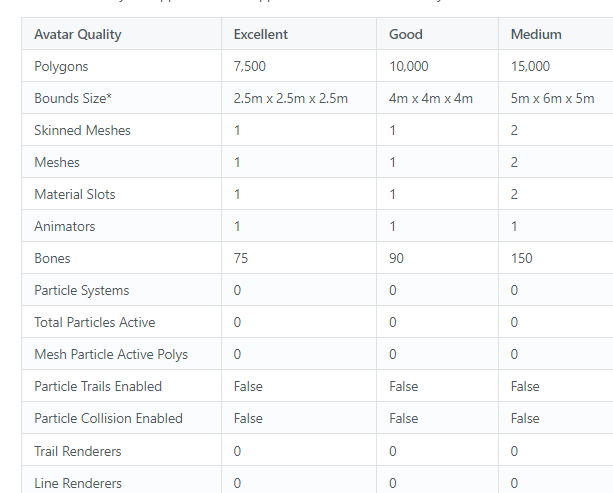
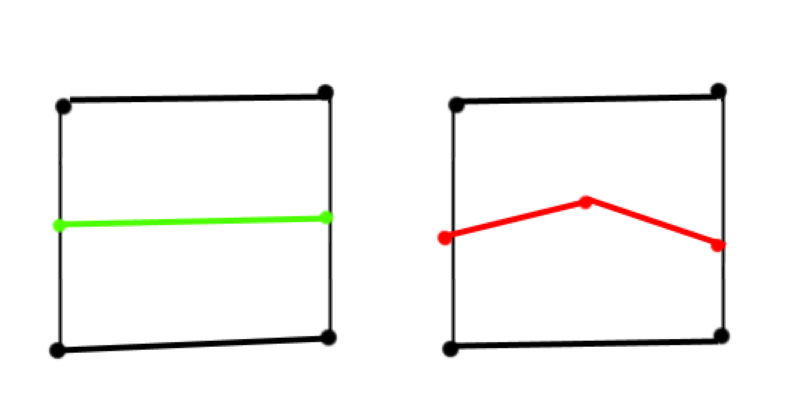


 slow hearth
sharp zinc
slow hearth
sharp zinc
our lord annd saviour matcap lit is here to stay
i've been converted by its magnanimous faux-celshaded light
sharp zinc
slow hearth
i've been converted by its magnanimous faux-celshaded light
This is the way
 flint rune
hey! is there a way to seperate quest and pc avatars, in terms of shaders and dynamic bones? i wish to make my avatar quest compatible although by doing so it seems to remove my dynamic bones for windows, too
radiant osprey
flint rune
hey! is there a way to seperate quest and pc avatars, in terms of shaders and dy...
You upload it for windows, and then switch to Android and upload your quest version. They can be separate versions
flint rune
radiant osprey
You upload it for windows, and then switch to Android and upload your quest vers...
ahhh okay, i think i understand
so, am i making a new project file just for quest uploads?
so when i change shaders and remove bones it doesnt affect the windows one when i want to, say, change a texture
radiant osprey
flint rune
so, am i making a new project file just for quest uploads?
New project or new scene. Either one works
flint rune
fantastic!! thank you so much
sorry if this seemed silly, im only like two or three days into avatar stuff 😅
radiant osprey
Everyone starts somewhere
It's the people that don't understand after they've been explained it 40 times that I have issues with
flint rune
😅 i try not to to be like that
 burnt spruce
if you know left from right youre already above half of the people in this discord
radiant osprey
Actually true
 sullen moat
burnt spruce
if you know left from right youre already above half of the people in this disco...
sullen moat
burnt spruce
if you know left from right youre already above half of the people in this disco...
So true
They are vrchat players after all
 gloomy heart
when making a fallback avatar, can I upload Windows version first, and then Quest?
sharp zinc
gloomy heart
when making a fallback avatar, can I upload Windows version first, and then Ques...
Doesn't matter which order you upload it. So long as you check the fallback box on the pc end, you'll be all set
gloomy heart
great, thanks
gloomy heart
what about face expressions dependant on hand gestures?
if I remove face-hand gestures from my fallback, will they still work when I am using my main avatar?
sharp zinc
gloomy heart
if I remove face-hand gestures from my fallback, will they still work when I am ...
Um...I guess when people see the main, they'd see the facials, and they won't with the fallback. But if the avatar in question is the same, I see no reason to remove the gesture facials. All a fallback means is that an avatar is good enough to be used as a fallback, nothing should need to be changed if it's already that good
sharp zinc
I am curious, if I don't use poi shaders on an avatar and just use the basic one, will that dramatically improve the performance of the avatar? I am new to this.
sand mantle
sharp zinc
I am curious, if I don't use poi shaders on an avatar and just use the basic one...
depends but usually yes. but you cant use poi on quest avatars
sharp zinc
sand mantle
depends but usually yes. but you cant use poi on quest avatars
Oups! I didn't realize where I was.
 civic mountain
Any help I try making the atlas for my new quest avatar and it breaks my textures
 sharp zinc
civic mountain
Any help I try making the atlas for my new quest avatar and it breaks my textur...
sharp zinc
civic mountain
Any help I try making the atlas for my new quest avatar and it breaks my textur...
It does that for some textures for some reason, I have the same problem with my Birbogen avatar. Parts of the tail are transluscent on pc, but transparent on quest. That might be comparable to the experience I had with that avatar. If you want to optimize it for quest, you should A. Use a simpler texture, or B. no texture at all and just a color. Honestly, I'm not too knowledgeable on the subject, so you may find better advice from an expert.
gaunt summit
civic mountain
Any help I try making the atlas for my new quest avatar and it breaks my textur...
Did you get this to work?
civic mountain
no
 minor comet
@civic mountain quest shaders are completely incompatible with transparency and translucency
alpha gets rendered as #000000
 jolly cedar
actually i have a question related to that. is there a way in blender (not unity!) to disable transparency and see it more like the quest shaders?
it would help me test a fallback avatar
radiant osprey
jolly cedar
actually i have a question related to that. is there a way in *blender* (not uni...
If you go to the area in Blender where the materials are, somewhere in each material is a Transparency setting that you can uncheck
 placid flax
Sidequest, modify GPU and CPU, does it do anything expect increase performance
sharp zinc
I guess...and maybe the temperature of your headset, as well
minor comet
placid flax
Sidequest, modify GPU and CPU, does it do anything expect increase performance
nope
thrill tested it and the results came back identical to stock
placid flax
What port (ex: 5555) does the quest 2 use? Like what does it listen out for? Trying to work woth beajurger because sidequest isn't working
sharp zinc
I don't understand why this is happening, i have all my shaders set to vrchat/toon lit.

This seems to break the unity project as well
flat granite
there is something in the avi that is standard
sharp zinc
Welp it broke the entire avatar
file wise
Like all the verts in blender are messed up now
 zealous shore
anyone wanna play on quest?
gaunt summit
sharp zinc
I don't understand why this is happening, i have all my shaders set to vrchat/to...
need help?
sharp zinc
i've managed to fix it, luckly had a backup save that wasn't too far back in the avatar making process.
so stuff is fixed aha
sharp zinc
POV: you thought vrchat actually cared about their quest users
What.
Vrchat does
Tf you mean
 static jolt
How do I optimize an avatar for vrchat that I only have access to the unity package
static jolt
I checked it and read through it, it didn't help due to the fact that I didn't have access to the model itself. Only just the unity package, I would use the CATS plugin on unity but I can't extract the model from unity (there's no current way that I've found that actually works). I'm out of options.
sharp zinc
Im sorry, but i havent ever made any avis before
sand mantle
static jolt
I checked it and read through it, it didn't help due to the fact that I didn't h...
ist thou no fbx given when ported?
static jolt
sand mantle
ist thou no fbx given when ported?
What
I didn't have a fbx file alongside the unity package
sand mantle
my suggesoth: import the unity pack into the unity of said usen case. then one must go to the package manager and to what to find an “fbx exporter”, this said exporter shall allow thy to export whatever model youd like to use from whince into blender
in theory
static jolt
I've tried using a fbx exporter, didn't work.
CATS plugin and blender didn't support ASCII, even when I put it as a binary fbx file it still acts the same.
I'll send a link to the model that I was trying to get working for quest
static jolt
Your Hollow Knight x OneShot 3d model in VRChat impedes view all the time. I know you are aware of this, and I know you may not even care about those models anymore, but is there any chance at all you...
It's the Hollowknight x Oneshot post, there should be a download link in there.
 real oasis
