#quest-optimization
1 messages · Page 4 of 1
 fossil canyon
 pseudo thorn
hey questies, i have a random complain about something. i put my headset down for about 3 minutes to come back to “unusual client Behavior” then I just hit “okay”, but then it would send me into this loop of not being able to join back. anyone know why?
 oak lion
pseudo thorn
hey questies, i have a random complain about something. i put my headset down fo...
oak lion
pseudo thorn
hey questies, i have a random complain about something. i put my headset down fo...
Ah, the dreaded "unusual client behavior" error! It's always a bummer when that happens. I'm not sure of the exact cause, but it could be related to your internet connection, VRChat's servers, or something else. Did you try restarting your headset, or maybe even resetting your network connection?
pseudo thorn
oak lion
Ah, the dreaded "unusual client behavior" error! It's always a bummer when that ...
its all fixed now, it was just the server (for some reason I don’t know why) but about the internet connection, my internet is really good so i don’t think that would be the problem. i restarted vrchat bout 3-5 times and it still didn’t work, but i tried joining off someone else that was in the world and it worked perfectly fine. thanks for the info tho!
oak lion
pseudo thorn
its all fixed now, it was just the server (for some reason I don’t know why) but...
You are mostly welcome friend
 willow badge
constant crashing for the past few months, ugh!!
has anyone else had an awful experience these past few months?
and i mean AWFUL. screen flickering, loading then black screen, crashing headset completely no matter what?
 acoustic rover
Update with low memory avatar stuff sucks
 waxen hornet
Y'all, I am this close to losing my absolute mind. I have combined all the meshes onto 2 separate meshes, crunched, toggled GPU instancing or whatever the heck it's called, decimated EVERYTHING on the avatar, etc. etc. etc. I have NO clue what else to freaking do except for texture atlasing, but idk how much that will actually help reduce this stupid avatar since it's at 32 MB and I need to bring it down to the dang 10 MB cap.
 green oriole
waxen hornet
Y'all, I am this close to losing my absolute mind. I have combined all the meshe...
green oriole
waxen hornet
Y'all, I am this close to losing my absolute mind. I have combined all the meshe...
I would assume blendshapes then, but check with Thry's avatar evaluator first https://github.com/Thryrallo/VRC-Avatar-Performance-Tools
It will tell you what is taking up space.
GitHub
Contribute to Thryrallo/VRC-Avatar-Performance-Tools development by creating an account on GitHub.
 proper flare
waxen hornet
Y'all, I am this close to losing my absolute mind. I have combined all the meshe...
proper flare
waxen hornet
Y'all, I am this close to losing my absolute mind. I have combined all the meshe...
How is it that high
🥶
Only avatars be having absurd amount of download is terrible terrible pc anime avatars
waxen hornet
I'm trynna figure out the same thing. 🥲 I'm texture atlasing rn to see if it'll maybe bring it down enough but idk at this point. 😭
Any ideas what this means?
 green oriole
waxen hornet
Any ideas what this means?
green oriole
waxen hornet
Any ideas what this means?
Unless you installed the developer version (that only exists in the CATS discord server), then CATS breaks on Blender versions above 3.0.
Also, Atlasing won't bring down the size, it just optimizes draw calls. (also not the easy choice if you intend to use normal maps or anything else that isn't just the standard color texture, CATS cannot atlas other texutures/maps).
Reduce resolution of the textures you have.
You should also, in addition, download VRCFury as it has a script that optimizes blendshapes, which can also take up quite a lot of MB. (add VRCFury script to the root of the avatar and in it add the blendshape optimizer, if you have MMD blendshapes then tick the setting in the advanced settings).
waxen hornet
green oriole
Unless you installed the developer version (that only exists in the CATS discord...
VRCFury was already added to the package. I've never used it before, though, so I'll have to see if they enabled the blendshape optimizer. I did try crunching the textures, reducing the image size, etc. but the avatar size is still very high. ;v; I'll join their discord server to get the latest cats. Someone had mentioned to me the developmental mode but when I asked where I could get it, they responded with, "It's just the latest one on ther GitHub," but when I went there it was the same one I have installed right now on Blender. Thanks for the tips! Especially with VRCFury's blendshape optimizer.
waxen hornet
green oriole
Unless you installed the developer version (that only exists in the CATS discord...
Where exactly would I find the vrcfury script to drag onto the avatar? I've never used VRCFury before so it's my first time, and when I look at the VRCFury folder I see this:

I clicked prefabs but it says this
 green oriole
waxen hornet
Where exactly would I find the vrcfury script to drag onto the avatar? I've neve...
green oriole
waxen hornet
Where exactly would I find the vrcfury script to drag onto the avatar? I've neve...
You add it as a component, in the inspector.
Just click the root of the avatar (in the hierarchy), where the avatar descriptor is and at the bottom of that add the VRCFury component.
waxen hornet
Okay, I added it. Is there anything else I need to do, or just leave the component in there with the blendshape optimizer selected?
green oriole
waxen hornet
Okay, I added it. Is there anything else I need to do, or just leave the compone...
It just needs to be there, you'll notice VRCFury working its stuff when you upload.
waxen hornet
green oriole
It just needs to be there, you'll notice VRCFury working its stuff when you uplo...
Okay. Also, I really hate to ask but you wouldn't happen to have the zip file for the developmental version of cats, would you? I joined their discord server but can't find it. I looked in their FAQ, checked the pins in the FAQ channel, and also checked the pins of their cats plugin help channel. ;v;
I also tried "install development version" but it gives me a python error
 green oriole
waxen hornet
Okay. Also, I really hate to ask but you wouldn't happen to have the zip file fo...
green oriole
waxen hornet
I also tried "install development version" but it gives me a python error
green oriole
waxen hornet
Okay. Also, I really hate to ask but you wouldn't happen to have the zip file fo...
green oriole
waxen hornet
I also tried "install development version" but it gives me a python error
The development version inside of CATS itself is outdated.
waxen hornet
green oriole
The development version inside of CATS itself is outdated.
Thank you! I must've totally missed that. 
waxen hornet
Hey y'all, so, I managed to get her down to 11.05MB. However, I ended up deciding to remove an occlusion map and her dl size jumped up to 11.48. This also makes no sense because I crunched a texture as well.
waxen hornet


 plucky crypt
waxen hornet
<:vrpill:339175791835480066>
plucky crypt
waxen hornet
<:vrpill:339175791835480066>
it be like that to be honest
 clear willow
Does anyone know what the best complete, no corners cut quest optimization guide is? Or has any recommendations
 paper drum
 clever imp
Do you have a second? I applied the recommendation of changing the default texture format to ASTC but just now realized it was the cause of some "glassy" grass and ground tiles. I opted to not change it this time and they look normal again. Docs seem to imply that I can set ASTC as the default and "override" individual texture settings. I don't see options on the textures that mention ASTC only Compression "normal quality" for instance. Do I set this to "high quality" do you think?
Oh I may have found it on the Android tab...
green oriole
clever imp
Oh I may have found it on the Android tab...
Everything fine then?
clever imp
green oriole
Everything fine then?
It looks like it thanks. Set the project to ASTC and overrode the textures that gave me issues...
 shut ice
The pinned message takes you to a site where the page is not found, with some white text on a white background.

Anyways, my question is, do toggleable extras like clothes have to scaled to 0.0 or 1.0? This likely means the GPU is rendering the triangles anyways and I'm pretty sure Unity is smart enough to let you actually enable or disable geometry instead of having to scale it.
green oriole
shut ice
Anyways, my question is, do toggleable extras like clothes have to scaled to 0.0...
If separate mesh then just turn it off, makes it stop rendering, but still takes up memory.
If a combined mesh, then UVDiscard (discards the verticies before they are rendered, still costs more than turning off) is the best solution followed by scaling (the mesh is still rendered).
And when scaling make it be 0,001 (in every axis), scaling to directly 0,0,0 was bad I think.
shut ice
There can only be 2 separate meshes so things must be as combined as possible.
Why exactly is scaling to 0 a bad thing? Does it have something to do with trigonometry and dividing by zero when performing certain calculations?
green oriole
shut ice
Why exactly is scaling to 0 a bad thing? Does it have something to do with trigo...
Just thing I have heard, Unity is probably, behind the scenes, clamping the value to above 0 anyway, but also seen avatars with scaling toggles only shrink the thing really small, the math gets interesting if you do it by 0.
shut ice
Ah it probably does. Triangles are designed with the assumption that they will have a non zero area so it would be better if Unity could not bother animating or rendering disabled meshes instead of forcing us to do these weird workarounds that waste performance.
shut ice
shut ice
Anyways, my question is, do toggleable extras like clothes have to scaled to 0.0...
So far, it seems you can't disable the rendering of triangles in a mesh, only by scaling and whatever UVDiscard does. I would keep them separate but Quest only grants you a maximum of 2 separate meshes.
green oriole
shut ice
So far, it seems you can't disable the rendering of triangles in a mesh, only by...
As far as I know scaling does not stop rendering, sure they might not even be big enough to even take up a pixel, but they still cost.
UVDiscard is the only way to stop a portion of vertices of a mesh to render.
shut ice
Unfortunately I'm only performing the Blender side of optimization so I don't have much control over that.
clear willow
i finally found a skinned mesh combiner inside unity that works perfectly
thank god
 heady wing
 tawny tangle
How do I fix the low memory issue
tawny tangle
How do I fix the low memory issue
You can hide other avatars, or increase your safety settings
It’s not a bug so it won’t be ever be “fixed”
(And it’s a low ram warning so they can’t really fix that aspect anyway)
tawny tangle
heady wing
You can hide other avatars, or increase your safety settings
Well time to delete some apps
 ashen crest
tawny tangle
Well time to delete some apps
ashen crest
tawny tangle
Well time to delete some apps
That's won't affect anything, memory is referring to RAM which is affected by how many avatars you have shown and their performance ranking
 dreamy geyser
How do I reduce the space of an avi on unity
green oriole
dreamy geyser
How do I reduce the space of an avi on unity
You mean MB size?
Reduce textures, bake (i.e remove, but also keep the current state of unanimated) blendshapes.
dreamy geyser
[Always] AssetBundle was not built
UnityEngine.Debug:LogError (object,UnityEngine.Object)
VRC.Core.Logger:LogError (string,VRC.Core.DebugLevel,UnityEngine.Object)
VRC.SDK3.Builder.VRCAvatarBuilder:ExportCurrentAvatarResource (UnityEngine.Object,bool,bool,string&,System.Action1<string>,System.Action1<object>)
VRC.SDK3.Builder.VRCAvatarBuilder:ExportAvatarBlueprint (UnityEngine.GameObject)
VRC.SDK3A.Editor.VRCSdkControlPanelAvatarBuilder/<Build>d__106:MoveNext () (at Packages/com.vrchat.avatars/Editor/VRCSDK/SDK3A/VRCSdkControlPanelAvatarBuilder.cs:2034)
UnityEngine.UnitySynchronizationContext:ExecuteTasks ()
fixed my other problem got dis

 shell jay
 languid island
Use this https://github.com/Thryrallo/VRC-Avatar-Performance-Tools to lower texture resolution
Matcaps can generally be really low etc
Add https://vrcfury.com to the root of your avatar and add the "Blendshape Optimizer" and "Direct Tree Optimizer"
They should help lower the download size a tad
tawny tangle
Ah
 vapid pumice
Do vive straps work without a base station for quest standalone or would I need some kind of way to run steam as well?
 lost cosmos
 nimble apex
vapid pumice
Do vive straps work without a base station for quest standalone or would I need ...
nimble apex
vapid pumice
Do vive straps work without a base station for quest standalone or would I need ...
For HTC Vive Trackers to work, you need a PC (running SteamVR) and base stations.
 sharp zinc
My vrchat has been decreasing in quality for awhile, I've tried clearing the cache, restarting my headset, and even reinstalling vrchat and it was not better at all. Everything stays at 0% for forever, then eventually loads slowly. It does that for everything like avatars and worlds. Photos take forever to load in the menu. I've asked people before and they gave me a few quick fix solutions, and those didn't help. I thought it was my wifi then, but they suggested it was just simply a vrchat issue. I don't know what to do, and it's making my time on vrchat really frustrating and not as enjoyable as it has been for over the past year that I've been on here.
 trail rose
sharp zinc
My vrchat has been decreasing in quality for awhile, I've tried clearing the cac...
trail rose
sharp zinc
My vrchat has been decreasing in quality for awhile, I've tried clearing the cac...
That happens to me. Player avatars load very slow and it happens in avatar worlds as well. I’m not quest I’m PC. It seems to not be just quest as of late.
proper flare
trail rose
That happens to me. Player avatars load very slow and it happens in avatar world...
I’m going to assume it’s your devices and or wifi
I haven’t had those issues at all
I’m actually surprised I was able to show everyone’s avatars in the black cat earlier
On stand-alone quest 2 (64gb) to let you know my quest is old
No crash, no loading issues
Surprisingly smooth
 sudden dome
i have never had this error happen while making avatars for quest. (the triangle one saying its too big) I've always used Vroid but now its too big? did VRC change something on the SDK? can i fix this in unity?
 proper flare
sudden dome
i have never had this error happen while making avatars for quest. (the triangle...
proper flare
sudden dome
i have never had this error happen while making avatars for quest. (the triangle...
Most likely a issue with your unity
If you have too many avatars still in the same project it can cause isssues
Try a new unity project and out your models in
See if that works without any issues
If the issue still happens it’s prob just how the model is made some how
Idk how it’s 15mb almost with mostly positive rating
proper flare
 dense lagoon
in the same avi
dense lagoon
in the same avi
Copy the id of the avatar and go to whatever unity project and paste the avatar id into your avatar
Also might help you out if you search up some YouTube tutorials.
sudden dome
proper flare
Most likely a issue with your unity
See I've specifically put it in its own unity file to see if that would fix it and it didn't. it's still gigantic and I don't know why
Cuz again I made them the same way I've made all my other avatars and this never happened
 pastel sandal
Maaaan can someone please explain this?!?! I've had this avi for over a year now and not only this one but almost ALL of my avis look like this now
(Before and after)


 humble canyon
What shader were you using for the avatar
pastel sandal
Ill have to ask the person who made it for me
Its quite odd though, Any Avatar i have had that had a reflective or shiny surface just looks like that now
green oriole
pastel sandal
Its quite odd though, Any Avatar i have had that had a reflective or shiny surfa...
Last week, on Friday, changes from the open beta seem to have accidentally made their way over to the live build.
Pretty sure the shader changes there were also a bit broken (they are making standard lit a lot better), but since the live build is probably missing some of the changes it might look worse in it compared to the open beta.
pastel sandal
Thanks for the response!! Makes alot more sense now i was absolutely loosing my mind wondering what happened
Ill contact the creator of my avatar and let him know but thank you for the information!!!
humble canyon
And also apparently a bunch of folks were using modified sdks they're not supposed to be using to use unsupported shaders and those seem to have broke
green oriole
Basically, quest shaders as a whole got a bit messy.
humble canyon
Like if you see any quest avatars with transparency those were using modded sdks
pastel sandal
Ahh alright
proper flare
green oriole
Last week, on Friday, changes from the open beta seem to have accidentally made ...
I don’t have any issues with mats but my clothing always point to 0,0,0
Would show it but I still am trying to understand what causes it
 silent garden
Can anybody fix this situation blue stuck bottem i try so hard to fix it doesn't work I use the cleaner machine but doesn't work what I can do to fix it????

 visual sage
silent garden
Can anybody fix this situation blue stuck bottem i try so hard to fix it doesn't...
visual sage
silent garden
Can anybody fix this situation blue stuck bottem i try so hard to fix it doesn't...
What I do is just hit the power button then it usually works if it doesn't then reset your oculus
silent garden
@visual sage i did is still dousnt work :(((
 tawny cipher
So do they plan on fixing the framerate issue on quest any time soon or...
 honest fern
tawny cipher
So do they plan on fixing the framerate issue on quest any time soon or...
honest fern
tawny cipher
So do they plan on fixing the framerate issue on quest any time soon or...
What exactly do you expect them to do with the framerate
 tardy rain
silent garden
Can anybody fix this situation blue stuck bottem i try so hard to fix it doesn't...
tardy rain
silent garden
Can anybody fix this situation blue stuck bottem i try so hard to fix it doesn't...
what a house
honest fern
The quest house
ashen crest
tawny cipher
So do they plan on fixing the framerate issue on quest any time soon or...
you can disable intensive avatars and visit less demanding worlds however optimisation of content is down to all the people who create content for the game
tawny cipher
I can't be the only one still having the issue of lagging out massively and having huge FR drops for no reason
Like when I open someone's profile and their bio is a bit long
Bang
-10 frames permanently
 topaz verge
 fathom granite
anyone using viso ?
fathom granite
anyone using viso ?
its best to join there server for viso questions! im in there and they helped me a lot! but if u do need help it depends on your phone or tablet if its standing sideways or upright
 odd basin
How would i be able to fix this? I'm new to this avatar stuff (oops wrong channel)
 humble canyon
odd basin
How would i be able to fix this? I'm new to this avatar stuff (oops wrong channe...
humble canyon
odd basin
How would i be able to fix this? I'm new to this avatar stuff (oops wrong channe...
https://www.youtube.com/watch?v=8MkgXcidxg4 this video could help just skip over the remove bones section because there's physics bones now

Did this video help you? Consider sending me a tip on Ko-fi! https://ko-fi.com/sippbox
Making optimized Quest models is hard. But it doesn't have to be! With recently updated polygon limits and fallback avatars, it's a better time than ever to create something that represents you to Quest users! Hopefully this tutorial will help you out!
0:00 ...
odd basin
I watched that, but its still not working because it wont let me convert it to android
 humble canyon
did you install the Android build when you installed Unity
 sullen wadi
humble canyon
did you install the Android build when you installed Unity
sullen wadi
humble canyon
did you install the Android build when you installed Unity
I forgot to the first time i did it
I was so confused XD
 honest wagon
my vr experience is really bad because when I play I have a lot of lagg. The tracking is slow, the performance is bad and I don't see the game even smooth. is there any way to solve that and make it work better?
honest wagon
honest fern
go to less dense worlds
it must to be a better or other option
because why other people goes well with that, nassa gave to them an special pc?
because I have a 3050Ti but it runs like shit
honest fern
dont run both oculus and steamvr at the same time
if you are using the link cable
use the oculus version of vrchat
honest wagon
I'm using air
honest fern
no wonder your tracking is slow
honest wagon
and why in the mirrors my character looks very smooth and fluent
but when I look myself it looks like without any filter of smooth or weird
honest fern
you probably dont have that good of a wifi connection for air link
honest wagon
should I use cable conection better¿
honest fern
yes
honest wagon
okey I will try it and tell you ty
odd basin
humble canyon
did you install the Android build when you installed Unity
so I installed that last night and started tinkering with it, but now it won't publish.
Im really trying to get it to work
odd basin
i got everything else to work, but it wont let me upload without figuring these two out

am I also supposed to figure out how to fix the yellow ones?
humble canyon
yellow ones you can pretty much ignore and those red ones won't stop you from uploading?
as they're just telling you it's going to be unoptimized
can you show your Unity console to see if there's any errors
honest fern
odd basin
i got everything else to work, but it wont let me upload without figuring these ...
Only the stop signs stop you from uploading
Thats just the very poor icon
 lime hawk
honest fern
dont run both oculus and steamvr at the same time
lime hawk
honest fern
dont run both oculus and steamvr at the same time
What happens if you have both, but Steam VR is running?
honest fern
lime hawk
What happens if you have both, but Steam VR is running?
you are running 2 vr systems
 gleaming mantle
honest fern
you are running 2 vr systems
gleaming mantle
honest fern
you are running 2 vr systems
Now that Steam Link exists no good reason to even use the oculus program anymore lol
 round plinth
running virutal desktop and im running into major lag on all vr games
middle section is wifi speed and left section of pc stuff on vr right? when looking at performance overlay
i have like 200 latency with 50 fps
not sure why

i have all vr turned off in this image just fyi
virtual desktop is also using a whopping 70 % of my gpu which im not sure is normal
 tough warren
So every now and then I get this bug where if I try to drop a portal, it disappears instantly and can’t go through it for some reason?? It leaves these weird things. I end up having to reset my game for me to do anything

 icy remnant
Does anyone know how to fix some of these error codes

 honest fern
poiyomi first of all doesnt work for quest at all
second of all you have multiple versions of poiyomi in the project
 digital talon
icy remnant
Does anyone know how to fix some of these error codes
digital talon
icy remnant
Does anyone know how to fix some of these error codes
Delete the _PoiyomiShaders folder and install it via the vcc
icy remnant
Ok thank you
digital talon
If you're uploading to quest, you can't use any custom shaders though
 iron pike
Hey so uh, I tried to convert my vroid creation to vrchat avatar and be quest compatible but uh - theres this weird.. well, thing that happens whenever I switch to toonlit shaders or whatev' its called
 humble canyon
iron pike
Hey so uh, I tried to convert my vroid creation to vrchat avatar and be quest co...
humble canyon
iron pike
Hey so uh, I tried to convert my vroid creation to vrchat avatar and be quest co...
transparency are not supported on Quest shaders at all
iron pike
humble canyon
transparency are not supported on Quest shaders at all
Sooo, what can I do to fix this?
Get rid of those layers in vroid itself and just colour in the eyebrows and stuff?
humble canyon
that would probably be the easiest as that doesn't involve blender
iron pike
Alright, thank you!
iron pike
Looks like I ended up with a new problem, for some reason now the iris and the pupils disappear - All I did was make the texture check 'Alpha is transparent' box and applied the toon shaders
The preview shows the eyes but they are gone when using the model
humble canyon
iron pike
Looks like I ended up with a new problem, for some reason now the iris and the p...
I think those would also be using a layer of transparency?
iron pike
Darnit
 alpine warren
hey guys sorry if this is not the right place to ask at but i have got a cable link and using it but i dont see the USB Test like this in my oculus app does that mean i havent plugged it ?

 warped sandal
alpine warren
warped sandal
alpine warren
i would ask #1138891887374237706 , you might find someone there
this channel is rarely looked at, and is related to optimizing vrchat assets for quest
(but people use it like a support channel 😺)
iron pike
Yeah that worked, it actually looks better than I expected and can now work as a decent fallback
I wont lie going through the process of optimization has really made me very interested to learn blender and how vrm models communicate with it, it was actually kinda fun
 dusky rampart
I don't know if this is exactly the correct place to ask, but if it should be somewhere else, please let me know, but does anyone else have the issue where your game has a massive lag spike literally every single second and is there a way to fix that? I have uninstalled vrchat and reinstalled it several times, but that only fixes it for maybe 10 minutes before it does it again.
sudden dome
it was 14mb (still way bigger than normal) on 2019 unity how the heck did it get to 80+mb on 2022????? is there a way to fix this in unity?

all of my quest stuff (worlds too) just got massive when i convert to quest. does anyone know why this is happening and how to fix it?
digital talon
swap to windows build target then back to android
sudden dome
digital talon
swap to windows build target then back to android
still 86MB
digital talon
try switching to windows build target, building a test copy, then loading it in to https://vsk.lox9973.com/abstat/
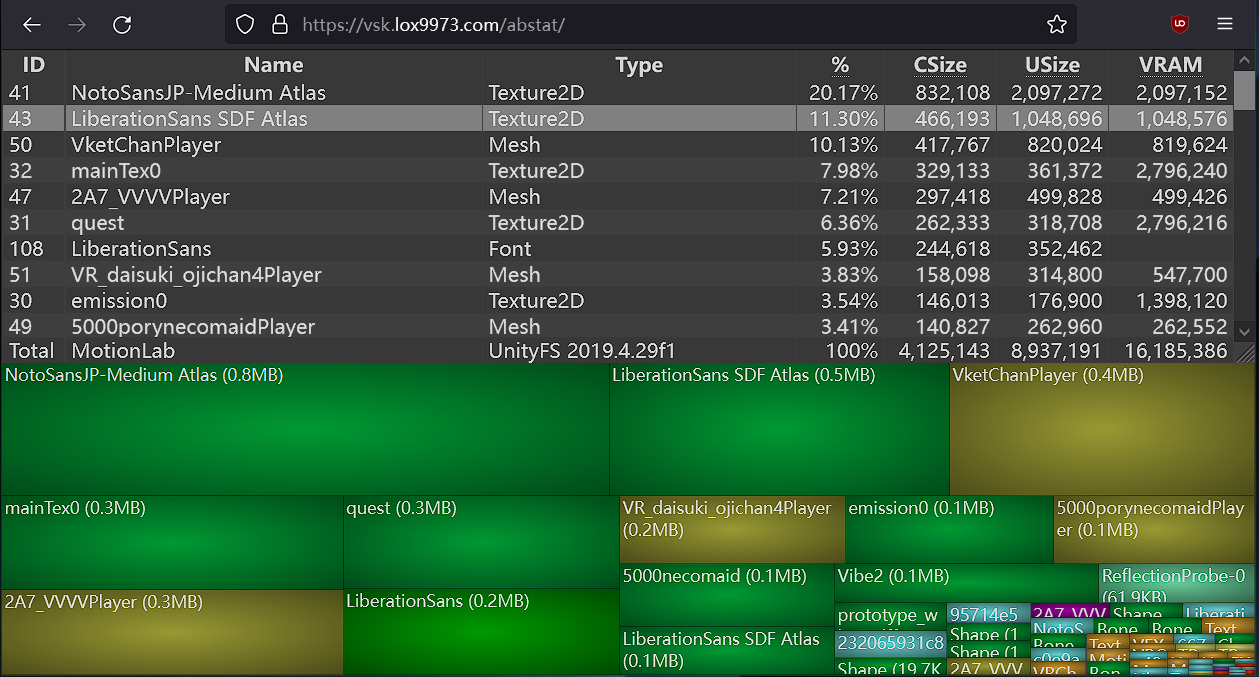
A WinDirStat-like online Unity asset bundle inspector
sudden dome
digital talon
try switching to windows build target, building a test copy, then loading it in ...
where do i find test avi files? it says on the website its under %appdata% but i don't even know where that is
sudden dome
digital talon
try switching to windows build target, building a test copy, then loading it in ...
i did it! what does all this mean?
 sudden dome
so does this mean unity is full of shit it ain't 86MB
digital talon
sudden dome
it was 14mb (still way bigger than normal) on 2019 unity how the heck did it get...
wait does it just say this in the sdk before uploading? or does it say that when you try to upload
because as the message says the most recent avatar build was too large
which means any avatar build on your account
sudden dome
i never tried uploading it i just see that warning and think "oh balls how did it get so big"
digital talon
like a pc avatar that has tons of accessories and is actually 86mb
digital talon
sudden dome
i never tried uploading it i just see that warning and think "oh balls how did i...
ooh
then just upload
sudden dome
however my worlds actually do show up as double the size when i upload them
digital talon
the warning just displays the most recent build size if it was over 10mb, regardless of avatar or platform
sudden dome
digital talon
the warning just displays the most recent build size if it was over 10mb, regard...
omg that 86MB was my home world cause thats how big it is on quest for some ungodly reason when on pc its about 44MB
digital talon
weird
digital talon
sudden dome
omg that 86MB was my home world cause thats how big it is on quest for some ungo...
oh wow i didn't know it also displays worlds lol
so just ANYTHING you upload 💀
but yeah, just hit build and publish, the avatar assetbundle is 0.6mb and should upload just fine
 tawdry bay
how do i combine skinned mesh renderers?
honest fern
blender
 jovial cypress
tawny tangle
My quest lags. HOW DO I FIX IT
jovial cypress
tawny tangle
My quest lags. HOW DO I FIX IT
dont have ur shield settings set to "none"
ik its nice to be able to see avatars, but u have to make sacrifices for performance
 ruby venture
How do i get more than 30 fps i cant stand this 
 viral sentinel
Not sure where to put this.
I'm having network connection problems with my Oculus quest 2 and I don't know how to fix it.
I've already tried restarting it and resetting it. I'm thinking of hard resetting it.
But does anyone know how to fix this problem?
I just keep getting an error of no network connection but the Wi-Fi I'm using is working fine because my parents aren't having problems on their phones or computers.
 bold zenith
Alright I have an odd one.
I'm trying to use a special material to create material swap toggles and hide partially transparent materials without having to split meshes from the desktop copy of my avatar. The material is VRChat/Mobile/Toon Lit with FORWARDBASE added to the disabled render passes and set to render queue 3000. This completely hides the material slot on desktop without needing shaders shown, and also doesn't incur any setpass calls, so it's reasonably efficient.
However it doesn't seem to work when actually uploaded to Quest, and displays as though the disabled render passes aren't set to anything. Any help figuring it out is appreciated.
Does the client do anything to reset that material setting that I'm not aware of? Does the client use different shaders internally?
Using the particle shaders on my meshes seems to make them (the material slot) disappear, but this doesn't seem like a good solution, and I'm not sure about the performance impact of it. (or if validation will allow that forever)
 violet wing
Hello, for those who convert avatar to quest how do you fix the blush option? I just convert one for the first time and I saw the blush become that red so ugly 🥹 help please 😭
Ps: I don’t know if it’s correct to ask here or general but I try both 🥹
humble canyon
violet wing
Hello, for those who convert avatar to quest how do you fix the blush option? I ...
Quest avatars do not allow transparency so you would have to modify your blushing in blender to not use any transparency
jovial cypress
humble canyon
Quest avatars do not allow transparency so you would have to modify your blushi...
or add the skin texture to the blush texture
so it's not transparent but it still blends into the face

 elfin latch
What
 digital talon
elfin latch
What
digital talon
elfin latch
What
For some reason, that specific shader is not supported
It's been like this forever, and it's probably only in that folder for some compatibility reason
 ripe delta
Anyone know how I could go about fixing the eyebrows for quest?

 honest fern
elfin latch
What
honest fern
elfin latch
What
Quest really doesnt like transparency
The particle shaders wont even render the same on quest and pc
 digital talon
proper flare
Just paint it on
digital talon
proper flare
Just paint it on
imagine it's a separate mesh
 sacred moon
ripe delta
Anyone know how I could go about fixing the eyebrows for quest?
sacred moon
ripe delta
Anyone know how I could go about fixing the eyebrows for quest?
I guess you could probably cut the eyebrow out around the eyebrow texture like make the mesh the same shape of the eyebrow texture or just get a whole eyebrow shaped mesh and weight paint it to the eyebrow rig if you have one.

 solid walrus
What’s the best settings for@quest 3 stand alone
 fresh wolf
 sage talon
my normal maps for quest look like this
sage talon
my normal maps for quest look like this
Im having the same problem did you find a fix?
sage talon
fresh wolf
Im having the same problem did you find a fix?
I just dint place a normal map for quest
fresh wolf
K seems like that would fix it lol
 formal dirge
Has anyone been having issues with quest standard shader and just not having emissions? Both on my world and avatars the emissions will just turn off in unity and vrchat they will just not stay on and idk why I've checked a dozen and two times with updates and errors and there's nothing
 digital iris
this happened after i lowered poly count
 digital talon
digital iris
this happened after i lowered poly count
digital talon
digital iris
this happened after i lowered poly count
did you unpack the avatar in the scene?
digital iris
yes
digital iris
._.
digital talon
when you unpack an fbx, it breaks the connection to the fbx file
so when you make any changes they either won't apply or break it entirely
you'll likely just have to set it up again and avoid unpacking it
digital iris
i was trying to optimize a pre made avatar
digital talon
which you can do just fine
you just can't overwrite or modify an fbx when you unpacked the avatar in the scene
digital iris
ok so what im getting rn is that i have to remove the prefab and put the fbx in the scene
digital talon
remove what prefab?
did the avatar come with a prefab that already had the fbx unpacked?
digital talon
try matching the scalings then
if you used all local to export, use fbx all instead
and vice versa
digital iris
hm?
 ruby lodge
Any reason How i cna upload quest avis now? I made my avi quest and it wont switch to android mode
Doesnt even tell me what im missing. Been making quest avis for awhile now till this new 2022 update changed it all
digital talon
ruby lodge
Any reason How i cna upload quest avis now? I made my avi quest and it wont swit...
press shift+ctrl+b, is android greyed out?
if it is, select it and install
 full lagoon
My right remotes spinning like crazy
Flies off occasionally, trackings all fucked. Any ways to fix this?
 lucid mason
bought a link cable a few days ago for my quest and set it up, it is connected to my headset but isn't displaying what my monitor sees. in my headset its blurry/low quality but on my monitor it's perfect. any fix?
 south goblet
how keep quest 3 on forever
honest fern
south goblet
how keep quest 3 on forever
plug into an outlet with the recommended brick and cable
south goblet
what is recommended
honest fern
the one that came with the headset
south goblet
thats too short, and that wont keep it alive as im playing
digital talon
lucid mason
bought a link cable a few days ago for my quest and set it up, it is connected t...
what hardware is in your pc?
lucid mason
digital talon
what hardware is in your pc?
i7 8700k and a 3080
digital talon
do you have good wifi reception? not internet speed, just local speed
lucid mason
yeah I have really good wifi
digital talon
then try downloading the steam link app on your quest and connecting it to your pc via wifi
lucid mason
digital talon
then try downloading the steam link app on your quest and connecting it to your ...
I've been doing that
digital talon
you can view wifi information in the quest's wifi settings btw, what matters is the signal strength (should be good or excellent) frequency (should be 5 GHz) and Type (should be Wi-FI 5 or newer)
 exotic crescent
Soooo how would I start making something compatible with quest
digital talon
take a look at the quest performance limits in the vrchat docs, and optimize your avatar accordingly
for example, 20k polys or below is ideal
exotic crescent
digital talon
take a look at the quest performance limits in the vrchat docs, and optimize you...
I appreciate all the help I had too many like material slots
And I don’t know how to merge them
digital talon
atlasing in blender
either via an automated tool, or manually
each material slot is its own submesh and therefore draw call, which is bad for performance
exotic crescent
digital talon
each material slot is its own submesh and therefore draw call, which is bad for ...
I’m giving up for the day but I’ll give it another shot tomorrow
 wise hearth
Does anybody know how to make a Quest spring joint?
digital talon
do you mean a phys bone?
honest fern
digital talon
do you mean a phys bone?
there is spring joints as a thing on avatars
digital talon
honest fern
there is spring joints as a thing on avatars
yeah but not on vrchat avatars
at least it's not a whitelisted component for vrchat
honest fern
GitHub
A constraint with spring behavior. Contribute to VRLabs/Spring-Constraint development by creating an account on GitHub.
there is one
for quest side however not really
digital talon

ripe delta
Anyone know a way to make a quest compatible hue loop toggle?
honest fern
Manually animate the color change
 open plinth
south goblet
thats too short, and that wont keep it alive as im playing
open plinth
south goblet
thats too short, and that wont keep it alive as im playing
Look up on Amazon a "Kuject" link cable - not a simple 1:1 cable; they have one with a little box on it that you plug your original quest power supply into, and a separate USB that runs to your PC. I've never had my battery die running it with one of these.
Unless you're just playing standalone mode, in which case I'm not sure which cable is best. I think it has to be USB C to C?
 vocal karma
I personally don’t have a USB C port on my pc and I have to use an adapter, which always is annoying or just find a USB A if I remember right.
digital talon
just try steam link first
shell jay
Hey, I made edits to some material swaps on an avi
Used VRCQuestTools to convert the avi to Quest
And with the 7 Quest specific material swap animations it's 3 mb too big to upload to Quest
If I put in the animations for PC which show up as error shader pink for Quest
it uploads fine
Why?
Presumably it has to load/upload the textures the PC side uses when I use the PC anims
The quest materials have lower res textures and less textures
What makes it larger??
 zinc tangle
Hmmm so I just added a 2nd video card to my system and I set VRchat and all my VR program to use only the 2nd one how do I optimize it more
If info is needed Ryzen 7 5700, 32GB, RTX3070 & RTX3060 (using PC link over USBC)
 muted ledge
 hidden bolt
i just got ghost pinged?
hidden bolt
i just got ghost pinged?
sorry i thought you were someone else my bad.
hidden bolt
lol, it cool
 scarlet fox
Anyone know about making a cloud shader visible for quest?
 tall laurel
when buying a link cable does it matter if it's usb c-usb c or usb c-usb a. Also looking to buy a 5m cable, is optic fiber a must have at this length or does it really not matter that much?
sharp zinc
tall laurel
when buying a link cable does it matter if it's usb c-usb c or usb c-usb a. Also...
You most likely want a usb3 there is alot on amazon ! , if you do the performance will be alot better and will have more of a transfer speed
tall laurel
okey thanks
digital talon
tall laurel
when buying a link cable does it matter if it's usb c-usb c or usb c-usb a. Also...
before you get a link cable, try steam link
if you have decent wifi (not internet speed, just local wifi), and your pc is wired via ethernet, it is a pretty solid experience
green oriole
tall laurel
What about latency?
The only extra latency you get with wireless over wired is from having to travel through the air and that latency is a few extra ms, which is not noticeable.
The reason why some people don't use wireless is either because their router isn't up to snuff (or not close enough) or they want the reliability that comes with being wired, wireless interference can cause momentary hickups.
I do all my time wireless though and I don't have any issues with it.
 untold patio
 rugged mural
anyone know how to fix the 'AndroidExternalToolsSettings' error when uploading avatars for quest?
 stuck ravine
which texture compressor formats are supported by vrchat quest?
basically i'm wondering what the best option is for compressing non-power of two textures for quest
honest fern
stuck ravine
which texture compressor formats are supported by vrchat quest?
Dxt1 for quest
Dxt5 is not really usable properly becayse quest cant use transparency
 vocal egret
stuck ravine
which texture compressor formats are supported by vrchat quest?
vocal egret
stuck ravine
which texture compressor formats are supported by vrchat quest?
ASTC 4x4 - ASTC 12x12, those are your best bet for most situations
digital talon
honest fern
Dxt1 for quest
instead of DXT1, ASTC 6x6 or 8x8 should be used
digital talon
stuck ravine
basically i'm wondering what the best option is for compressing non-power of two...
i think unity always forces it in power of 2 resolutions
stuck ravine
thanks for the ansswers guys
i found a different solution to my problem

GitHub
Power of 2 Image Resizer for Game Engine Textures. Contribute to RyanAWalters/PowerOf2ImageResizer development by creating an account on GitHub.
 nocturne relic
it's 10mb, i don't get why it won't upload.

 green oriole
nocturne relic
it's 10mb, i don't get why it won't upload.
green oriole
nocturne relic
it's 10mb, i don't get why it won't upload.
Because it rounds down and is actually above 10MB.
The avatar has to be under 10MB in size, but yours is like 10.04MB in size.
green oriole
 worthy wolf
Does anyone know if quest 3 is gnna run smoothr son?
worthy wolf
Does anyone know if quest 3 is gnna run smoothr son?
There are no Quest 3 specific optimizations they can do.
Hardware wise I think the Quest 3 just has AI cores, but those can't be used to optimize the game.
Wear less intensive avatars, go to less intensive worlds and hide avatars.
honest fern
worthy wolf
Does anyone know if quest 3 is gnna run smoothr son?
There is nothing that can actually be done since its entirely user generated content
sharp zinc
Hello everyone, I just got my new Quest 3 received today and I need a new charger for them because they are pretty slow
can someone recommend me a charger with an adapter aswell?
I don't have the stock, it came with only the headset and the controllers
 tepid kayak
The stock brick is really slow (UK)
I always use my Steam Deck charger as it's capable of up to 45W and it's actually my main usbc charger for that reason
But any charging brick capable of accepting the cable (so it needs a usbc port) and charging decently fast should do
Also, this is the wrong channel. This is specifically for avatar optimisation for standalone Quest users (it's harder because the Quest hardware is pretty weak)
sharp zinc
ohh
okay
@tepid kayak
I found a 45W that should be still good no?
cuz the one I have rn charged 7% for the past 25 minutes
tepid kayak
45W is what I use, it'll be fine
(well, I think it's 45W. IIRC it's at least capable of going that high)
worthy wolf
green oriole
There are no Quest 3 specific optimizations they can do.
Hardware wise I think t...
I just hink the 10 mb cap for avatars is too little now
stuck ravine
what compression format should i use for quest if i want to use crunch compression?
green oriole
stuck ravine
what compression format should i use for quest if i want to use crunch compressi...
Just use ASTC and use a higher block size, 12x12 being the most compressed one, it looks better than crunch compression.
Of course play around with it though, you wouldn't use 12x12, just like you wouldn't use max crunch compression, unless you needed to.
 sand urchin
I don't know how vrchat is adding more features to quest shaders like better AO support and stuff but I super struggle to get more than 5 textures on an avatar before hitting the 10mb limits. I'm having to set everything to 512x512 which then just looks like smudge. I try to aim for 1k on most textures but 🤢 its such an absolute pain. More textures = lower and lower quality to even include them.


Even if they increased the max size to 15 it would make a huge worlds of difference for avatar textures.
honest fern
dont make the textures big in the first place and you can also just try changing the filtering option
vocal egret
sand urchin
I don't know how vrchat is adding more features to quest shaders like better AO ...
make sure other stuff like mesh memory isn't eating up the filesize (remove unnessecary blendshapes & bones), use ASTC 12x12 if needed, combine metallic/smoothness + AO (you should be doing this for PC as well), I usually can get several 4096x4096 textures without hitting that 10mb limit.
stuck ravine
green oriole
Just use ASTC and use a higher block size, 12x12 being the most compressed one, ...
this is really interesting. So you say by using ASTC format at a different block size will both impact the quality and the file size?
green oriole
stuck ravine
this is really interesting. So you say by using ASTC format at a different block...
Uh, yes, that is how lossy compression works.
 modern spade
I removed twist and share bones but seems like parts of the mesh were only painted in the vertex groups of the bones that I deleted.

😂 😭
sharp zinc
yoo what’s the best way to get fbt on a quest 3?
honest fern
sharp zinc
yoo what’s the best way to get fbt on a quest 3?
on a quest standalone? for the most part you dont at all
through pc vr through link of some kind its just like any other headset except you need to space calibrate
there is stuff that can let you get fbt through osc like slimevr or viso fbt
but for pretty much everything else you require a pc
sharp zinc
is there a way to have the fbt running on like a laptop but have all the normal processing done by the headset?
so the only work the laptop has to do is just run the fbt program and the quest does the rest as normal
honest fern
the most you will get is slimevr
humble canyon
sharp zinc
so the only work the laptop has to do is just run the fbt program and the quest ...
yeah that could be done for running slimeVR or using a Xbox Kinect or a webcam to do the tracking
 eternal sky
sharp zinc
yoo what’s the best way to get fbt on a quest 3?
eternal sky
sharp zinc
yoo what’s the best way to get fbt on a quest 3?
Gor my quest standalone setup i use mocopi trackers. Tracking isnt the best and has to be reset regularly, but that can be done at the press of a button so its still okay. That being said i only use this setup for when i travel, because it allows for a very compact setup that doesnt require me to connect a bunch of trackers to a hotel wifi, so i mainly focused on aspects like portability and ease of use on different wifi networks, so depending on your specific usecase there might be better solutions
 round tapir
honest fern
there is stuff that can let you get fbt through osc like slimevr or viso fbt
round tapir
honest fern
there is stuff that can let you get fbt through osc like slimevr or viso fbt
All I ask is don’t use pinoquest, I bought the 20 dollar a year subscription and my leg tracking still doesn’t work
It was a major waste of money
If you just want hip tracking pinoquest is fun and all but if you get like the 3 dollars a month it’s a waste of your time and money if your somebody who thinks of your time as very valuable
Pinoquest is just a game you can pay for so VRchat can track your body parts through your phone
sudden dome
is it possible to put a flashlight on a quest avatar?
honest fern
sudden dome
is it possible to put a flashlight on a quest avatar?
it wont actually work but you can have the model of one
the best you would get is faking it with a particle
 dire plank

Can you guys help me with this problem?
My game just freezes in the loading screen and then shows me this…
 pallid sand
I am so frustrated that my PC ran vrchat fine on my index, but lags and crashes with the quest link for my quest 3 (via steam VR it works just ok, bad fps and bad graphics...meta crashes as soon as I open it)
Is there anything I can do to make it run smoother on steam VR via link cable ?
 crude burrow
dire plank
crude burrow
dire plank
I have a similar problem as well
shell jay
pallid sand
I am so frustrated that my PC ran vrchat fine on my index, but lags and crashes ...
Try using Steam Link or Virtual Desktop?
pallid sand
shell jay
Try using Steam Link or Virtual Desktop?
I am using steam link
 fickle grotto
pallid sand
I am using steam link
fickle grotto
pallid sand
I am using steam link
Try virtual desktop, it's the most reliable.
pallid sand
For 20 bucks I'm not sure I want to risk it not working either...
 pearl glen
pallid sand
Is there anything I can do to make it run smoother on steam VR via link cable ?
pearl glen
pallid sand
Is there anything I can do to make it run smoother on steam VR via link cable ?
You can try Oculus Dash Manager, which kills the oculus services and injects the headset directly into steamVR
GitHub
Oculus VR Dash Manager. Contribute to KrisIsBackAU/Oculus-VR-Dash-Manager development by creating an account on GitHub.
Make sure your graphics drivers are all updated, make sure your steam VR resolution isn't jacked up past 100%
If you are using link cable - you can go into oculus debug tool and change Spacewarp settings there to disabled. Usually that's the cause of many issues.
Enable Link Sharpening: Quality for free FPS boost.
I can practically guarantee you that Virtual Desktop is going to give you the best end to end experience for most games. It sort of requires a dedicated router or access point tho
pallid sand
@pearl glen thank you so much dude I'm going to give this a try and worst comes to worse I'll have to try out virtual desktop
fickle grotto
pallid sand
For 20 bucks I'm not sure I want to risk it not working either...
If you use it for less than 2 hours you can return it within two weeks like why other quest game if you don't like it
 delicate fox
Hi , I have been having so many issues with lag and my Avi being unable to use my hands then screen randomly going black , I have reinstalled everything from start to finish and factory reset my quest etc and I am at a loss how to fix it , please help me
 limber hawk
Currently trying to upload quest Novabeast to quest, it does allow me to upload but the file size is insanely large for some reason. Anyone know why? The Nova has been decimated and the file textures themself are small. Along with no physbones at all. Weird issue.

No other assets in the project folder as well.
 maiden schooner
modern spade
maiden schooner
modern spade

 sand trail
do you need minimum requirements to run pcvr?
when i use it
it works
but when i open vr chat
it kinda sucks
i could use some help\
pallid sand
sand trail
do you need minimum requirements to run pcvr?
Same


I don't know what I can really do to fix these drops..
I'm wired in, PC is wired to the router
And my PC ran the valve index fine...
Just running out of options here 😔
vocal egret
sand trail
do you need minimum requirements to run pcvr?
GTX 970/GTX 1060/RX 580, some people have gotten luck with a GTX 1050 or RX 570, though VRchat is one of the most intensive VR games on PC due to people not being capable of even basic optimization on their avatars (that tiny ass chain literally nobody will see up close doesn't need to be 50k polys on its own with 4k textures)
 somber gyro
Sorry if this is the wrong place for the question, but does anyone who uses FBT have recommendations for the best Quest-compatible trackers that work nicely with VRChat?
 haughty rapids
somber gyro
Sorry if this is the wrong place for the question, but does anyone who uses FBT ...
haughty rapids
somber gyro
Sorry if this is the wrong place for the question, but does anyone who uses FBT ...
Slime vr
somber gyro
haughty rapids
Slime vr
I've read online that they have a lot of calibration issues though, is this true?
haughty rapids
somber gyro
I've read online that they have a lot of calibration issues though, is this true...
Drift yes
Cailbration shouldnt be a issue
Only issue should be shipping
Which takes 6 months or a year now
green oriole
somber gyro
I've read online that they have a lot of calibration issues though, is this true...
As is a problem with all IMU tracking solutions, they will drift, 40 min to an hour, depending on how much you move, fixing that only takes a second though.
(and in cases of a magnetically stable room, ie no metals nearby to where you play, you can have no drift, but most people don't have a good room to do it in, so be aware.)
The calibration is the hardest step, but there is a video showing how to do it visually and that made it easy, just got to follow the instructions properly. And you only need to do it once.
However I don't think shipping, if bought now, will be that far out, probably middle of summer I'd guess, assuming no new roadblocks appear, it has been going fairly smoothly recently based on what they've shared.
somber gyro
green oriole
As is a problem with all IMU tracking solutions, they will drift, 40 min to an h...
Thank you! I didn't know how long it would take to fix potential drifting issues, but in that case it does seem like a more appealing option. On the SlimeVR website it does say that if I buy it today, it will ship in June. Sort of a long waiting time, but nothing too bad imo :)
 neon ocean
im trying to compress my avis textures to make it quest compatible, doing that by hand would take literal hours, so when i go to multi-edit, this pops up, any help?

or is there other more efficent ways of compressing?
the avi is 92mb and i need it to be 10mb max.
humble canyon
neon ocean
im trying to compress my avis textures to make it quest compatible, doing that b...
you would be just wanting to select the textures to multi-edit
 gentle lantern
Kinda funny they worry abt the avatar size limits and don't increase the compressed size limit 4 Quest, that's what happens when ur dumb
shell jay
neon ocean
im trying to compress my avis textures to make it quest compatible, doing that b...
GitHub
Contribute to Thryrallo/VRC-Avatar-Performance-Tools development by creating an account on GitHub.
 bold mantle
 karmic phoenix
@soft flame can u please unblock me… I haven’t done anything wrong that I know about
 hearty pine
Hello, I have a question. Can a fighter jet work that it can fly but it has to be optimized enuf to work? Connected to an avi
sharp zinc
I'm trying to find a 16ft+ long cord to connect my oculus to my PC but after some thorough research, it seems that the majority to cables under perform for customers often.
If someone could recommend a cord that would be great!
 shell iron
sharp zinc
I'm trying to find a 16ft+ long cord to connect my oculus to my PC but after som...
shell iron
sharp zinc
I'm trying to find a 16ft+ long cord to connect my oculus to my PC but after som...
so you need a data cable that works also as a power cable?
sharp zinc
nah just data
shell iron
keep in mind data cable won't deliver enough power to the headset so you'll still slowly lose battery over time
if you need just a data just Amazon or Walmart quest cable and find what's the cheapest
 glossy vine
Is there a way to play pcvr without a pc or at least a low end one
honest fern
no
pcvr is pretty demanding
and the standalone headsets do not have strong enough hardware for it
or well
the correct hardware
sharp zinc
is it me or is it harder to make avatars quest comp?
like i could upload an avatar before but now if i try uploading that same avi the file size is tremendously large
honest fern
well crunching and compressing is now taken into account
you cant just cheat it by crunching/compressing everything
vocal egret
glossy vine
Is there a way to play pcvr without a pc or at least a low end one
unless you plan on renting a shadow PC and are okay with a lot of latency, no...
gentle lantern
It doesn't worth making avatars 4 Quest anymore, unless it's a commission u actually getting paid
vocal egret
or you find optimization fun
 flint oriole
why do you think it is not worth making mobile headset optimised avatars?
 opaque void
Can you use the quest 2 as a PCVR if you have a decent enough computer?
Like connect via wires and use it connected to pc?
Or is it solely standalone?
humble canyon
opaque void
Can you use the quest 2 as a PCVR if you have a decent enough computer?
yes
opaque void
Does it still use quest optimization at that point or does it convert to PC optimization once connected?
opaque void
?
green oriole
opaque void
Does it still use quest optimization at that point or does it convert to PC opti...
All that matters is what is rendering the game, if the Quest is rendering the game, then Quest limitations, when the PC rendering the game, PC limitations.
Your Quest isn't doing much more than handling tracking and showing what the PC sends it.
opaque void
Oh ok cool
So if I connected a quest to a pc, would it automatically have the pc sending info to the quest or would i have to make work via the headset? I havent yet used a quest so im just trying to get a feel before I commit 😭
Shortly after I get a quest I intend on building a good pc so i can play via that and use the quest as the tracking as you said
opaque void
opaque void
Shortly after I get a quest I intend on building a good pc so i can play via tha...
(this will be a challenge and hopefully i dont break anything LOL)
sorry if im asking any stupid questions
green oriole
You have to make it work headset wise, but don't worry, there are tons of videos showing you how to do it.
While Virtual Desktop is what I definitely prefer, it has some extra setup and also costs money (you install one additional program).
Steam Link is the easiest since it just works with SteamVR, and basically doesn't require any setup aside from having SteamVR installed, which you will want to use anyway.
Airlink/Link, is the only one that can be done wired with a USB cable and does require you to install the Oculus software and eat a performance penalty if you play SteamVR games.
If you want to watch tutorials to get even more of a feel for this, search for the 3 kinds I mention here, Virtual Desktop, Steam Link and Airlink/Link (Link and Airlink are the same thing, just that Link is when wired and Airlink is when wireless).
opaque void
Omg tysmmmmm that explains a lot, I will definetly be looking up those when I get the chance and even have a decent pc for it 😁
 dark steeple
this is simply a statement of frustration.

 vagrant gulch
This has been a very frustrating change
 stiff jacinth
Most definitely
You know they might as well have removed the 10 Mb upload limit warning if they decided it cool to just throw in this stuff, You can’t even make a half good looking avatar anymore due to the Limitations of this update which is goofy in its own right 😭
honest fern
stiff jacinth
You know they might as well have removed the 10 Mb upload limit warning if they ...
the 10 mb upload limit has been there for a while
heady wing
honest fern
the 10 mb upload limit has been there for a while
A very very long while
(Like, quest 1 era)
humble canyon
the thing that's new is there's a 40 MB uncompressed memory cap now so you can't just crunch compress your way into 10 MB
honest fern
heady wing
A very *very* long while
one of the very first restrictions
stiff jacinth
humble canyon
the thing that's new is there's a 40 MB uncompressed memory cap now so you can'...
Basically this ^^
What’s the point of having a set space of 10 Mb when you can’t push past the threshold of 40 Mb of Uncompressed meshes? like seriously 💀
It doesn’t weigh out lol
humble canyon
the quest has a very low amount of vram so I'm not surprised by the new limit
heady wing
For the quest 2 it’s literally 6GB between the OS, graphics, and regular RAM.
So by the time you actually start loading avatars you’d probably only have like… 3ish gigs (just a guess)
vocal egret
heady wing
For the quest 2 it’s literally 6GB between the OS, graphics, and regular RAM.
So...
it's not that bad... it's worse
there are VR capable graphics cards with only 3gb of vram (GTX 1060 3gb), what happens when they run out of memory? just some frame instability (avatar loading/unloading causing serious stutters/freezing) and the data being moved into regular ram, and if you run out of ram it gets written to a page file which while it results in more frame instability (depending on if you're on a HDD or SSD), doesn't crash (unless you are out of disk space)... what happens when the quest runs out of memory? the whole thing just crashes (before they added the low memory avatar loading refusal to prevent that)
 raven hawk
please i don't understand what im doing wrong its just a fbx from blender im crying

how
honest fern
raven hawk
please i don't understand what im doing wrong its just a fbx from blender im cry...
read & write needs to be enabled
raven hawk
honest fern
read & write needs to be enabled
i am a new person to unity and blender and im just trying to import my character i decimated it to hell and it still thinks its very big
honest fern
raven hawk
i am a new person to unity and blender and im just trying to import my character...
enable read&write on the fbx
raven hawk
honest fern
***enable read&write on the fbx***
i don't know how
honest fern
click on the fbx then in the inspector enable it
raven hawk
 vocal egret
it's under the model tab
honest fern
model
raven hawk
oh
 wide ridge
Strip bones, oh my 😳
raven hawk
whe
wheres the vrchat sdk 😭
oh no i have to redo everything with the vr companion i can't evne open the unity project
how do i enable gpu instancing in unity the textures are locked
how do i upload it for oclulus users
wide ridge
Switch build target from the upload panel
There is a dropdown saying windows, click on it and select android

 quiet carbon
Can someone tell what the uncompressed size thing is actually effected by? ive have a 4mb quest avi be denied because of the uncompressed size limit being 45mb.
green oriole
quiet carbon
Can someone tell what the uncompressed size thing is actually effected by? ive h...
Primary thing I can think of that would affect your usual VRC avatar is crunch compression, since it just affects download size, the textures still take up the same size.
quiet carbon
green oriole
Primary thing I can think of that would affect your usual VRC avatar is crunch c...
That still doesnt explain how a 4mb avi can have a 45mb uncompressed size.
especially when it has only 6 textures XD
honest fern
quiet carbon
especially when it has only 6 textures XD
6 textures is a lot
green oriole
quiet carbon
That still doesnt explain how a 4mb avi can have a 45mb uncompressed size.
You are right that it doesn't account for it all, but with a 10MB limit and excessive and bad looking crunch compression you can get the uncompressed size to above 100MB.
Was an experiment someone tried.
vocal egret
tbh I'd use ASTC over crunch as it actually reduces the uncompressed size as well, not to mention it generally looks better
 honest shard
Is there other way to reduce uncompressed size?
It's stupid that size limit... i had enough with compressed size :c
humble canyon
basically lowering image resolution is about the only one
quiet carbon
vocal egret
tbh I'd use ASTC over crunch as it actually reduces the uncompressed size as wel...
which astc crunch?
vocal egret
quiet carbon
which astc crunch?
situational, 12x12 if high res or desperate
(12x12 is small enough i've done 8192x8192 textures on android)
quiet carbon
vocal egret
(12x12 is small enough i've done 8192x8192 textures on android)
is 4x4 large?
quiet carbon
vocal egret
8 bits per pixel, 12x12 is .89 bits per pixel
ahh i see sorry for the questions just have never thought about that side of the unity crunching
vocal egret
https://en.wikipedia.org/wiki/Adaptive_scalable_texture_compression scroll to 2D block footprints and bit rates
Adaptive scalable texture compression (ASTC) is a lossy block-based texture compression algorithm developed by Jørn Nystad et al. of ARM Ltd. and AMD.Full details of ASTC were first presented publicly at the High Performance Graphics 2012 conference, in a paper by Olson et al. entitled "Adaptive Scalable Texture Compression".ASTC was adopted as ...
honest fern
vertex colors
vrcquesttools can fix that or if you want to you can also just manually do it in blender
 ruby onyx
dark steeple
this is simply a statement of frustration.
ruby onyx
dark steeple
this is simply a statement of frustration.
By now it just feels random to get this
shell jay
honest shard
Is there other way to reduce uncompressed size?
It's stupid that size limit... ...
VRCFury can bake/yeet unused blendshapes
Which could help if your model has a lot of blendshapes
 solemn flint
 atomic osprey
How do I get full body tracking without a PC on a metaquest 2
atomic osprey
How do I get full body tracking without a PC on a metaquest 2
OSC. See SlimeVR, because I've tried that before.
 mighty galleon
solemn flint
OSC. See SlimeVR, because I've tried that before.
mighty galleon
solemn flint
OSC. See SlimeVR, because I've tried that before.
SlimeVR will take a long while to get. I bought it 2022 and still waiting lol
but also they have to know they need a dual internet unless slimevr supports 5ghz
i was told only 2.5ghz and i do not have dual its "automated"
solemn flint
i mean yeah ur right, but i was using phones for mine soo
but i do have a friend that does experience that too, he says he got it a long while ago aswell, still waiting aswell
green oriole
mighty galleon
SlimeVR will take a _long_ while to get. I bought it 2022 and still waiting lol
Most 2022 orders should already have shipped, a friend of mine ordered in early 2023 and got theirs.
And yes, 2.4Ghz only, WiFi router should be smart enough to handle such devices, that is what the vast majority of smart home devices are.
The SlimeVR discord does have a bot that, given your order number, can tell you if it shipped or not, and roughly if it is in the next batch or not.
mighty galleon
green oriole
Most 2022 orders should already have shipped, a friend of mine ordered in early ...
Wait i forgot i didnt get it in 2022
oops, actually 2023 mb
green oriole
Don't trust crowd supply with their estimate.
mighty galleon
green oriole
Most 2022 orders should already have shipped, a friend of mine ordered in early ...
It's those spectrum smart routers but like i never seen it using 2.5ghz
oh ik i check the
updates
i tried replacing it with a netgear nighthawk but it never worked and the tech guy didnt rly help me
ill figure it out eventually
green oriole
mighty galleon
It's those spectrum smart routers but like i never seen it using 2.5ghz
Most router are "smart" nowadays and combine the 2.4Ghz and 5Ghz networks, it then switches on the fly.
Personally think it is a terrible feature, especially for wireless PCVR (router can just decide to force your headset to use the 2.4Ghz network, which sucks.).
But for 2.4Ghz devices it shouldn't matter, can only connect one way, so can't attempt to switch.
mighty galleon
green oriole
Most router are "smart" nowadays and combine the 2.4Ghz and 5Ghz networks, it th...
it did that with my headset and a quick restart fixed it back to 5ghz
mighty galleon
green oriole
But for 2.4Ghz devices it shouldn't matter, can only connect one way, so can't a...
yeah it sucks man i have to replace the router
green oriole
mighty galleon
it did that with my headset and a quick restart fixed it back to 5ghz
If you can then I highly recommend just going into your routers settings and just clicking that one toggle, on TP-Link routers it is called "Smart Connect".
In general, turning off the "smart" features will probably provide a better experience.
mighty galleon
green oriole
If you can then I highly recommend just going into your routers settings and jus...
It's a spectrum brand router, it dosent have that setting and the technician said its always on theres no toggle for it the best he can do is force it on 2.5ghz but itll flick back eventually. he reccomended i switch the router
green oriole
Ah, yeah that seems like your standard ISP provided router.
mighty galleon
tried switching routers and it didnt work, got netgear setup and everything but it dosent get signal so unless theres a VERY specific way i can disconnect the spectrum router idfk
ill figure it out like i said, proly some dumb method
green oriole
mighty galleon
tried switching routers and it didnt work, got netgear setup and everything but ...
There shouldn't be any reason why you can't just plug the netgear router into the spectrum one.
mighty galleon
green oriole
There shouldn't be any reason why you can't just plug the netgear router into th...
I found out, i have to use the fucking app to disconnect the router
and add a new one
it didnt work bc i have to add a new one
green oriole
Picky ISP
 dire coral
Hey Guys, this error is happening here "Current User does not have permissions to build avatars"
humble canyon
?upload
 tiny fiberBOT
You must obtain at least "New User" Trust Rank in our Trust and Safety system in order to upload content. You can get this by just spending a few hours in VRChat, hop some worlds, and make some friends. Give it some time and you'll be able to upload content in no time.
As an aside, you must have a VRChat account to upload content. That means you can't use a Steam account, Oculus account, or Viveport account to upload content like worlds or avatars.
Source: https://docs.vrchat.com/docs/frequently-asked-questions
 edgy mauve
Anyone got any tips for getting under the 40mb uncompressed limit?
honest fern
edgy mauve
Anyone got any tips for getting under the 40mb uncompressed limit?
use smaller textures instead of just trying to compress them
honest fern
edgy mauve
Is there a way to make meshes smaller without compression?
you dont compress meshes
you either combine meshes or decimate/retopology
green oriole
edgy mauve
Is there a way to make meshes smaller without compression?
Removing blendshapes is basically the only way to do that.
VRCFury has a component that removes every unused blendshape, so you could give it a try.
 azure thorn
is there a reason why the emissions turn off whenever the shaders reload? how do i keep this from happening? (right pic is with emissions using standard lite)

 azure thorn
nvm i figured it out its just a bug with the editor and when you upload it works ok
 strong blade
Anyone know how to optimize Quest 3 to work with steamlink? I had my room hardwired this week and now have 350-650 mbps speed on my pc (that's 10 times faster than I used to get), but when I use steamlink with my Quest 3 it still lags a lot. Here is how I am logging into VRchat:
1 = open steam on pc with a super fast wired connection (500mbps+)
2 = log into steam app on Quest 3 headset
3 = launch the VRchat from the icon on the wall in my steam home
4 = automatically logs in as my VRchat and Steam accounts are connected.
NOTE: I have fast speed when I log into VRchat directly on the Quest 3 but get a lot of lag on the steamlink method
 soft pecan
Does anyone know if an I5-12700k will run VR smooth?
 upbeat heath
soft pecan
Does anyone know if an I5-12700k will run VR smooth?
upbeat heath
soft pecan
Does anyone know if an I5-12700k will run VR smooth?
Yes that would be fine, what is your GPU?
soft pecan
upbeat heath
Yes that would be fine, what is your GPU?
4060 ti
upbeat heath
soft pecan
4060 ti
yeah you're gonna have no issue whatsoever with running VRC in VR at a high resolution and frame rate
I know someone who daily drives a GTX 970
for VRC
 verbal aspen
Hi, my avi is around 22mb and I think deleting some assets won't solve the problem to get to 10mb so, is there any tool to decrease the meshes size or just to optimize the avi? I've been using darks unity package, thrys and quest tools ofc, so any other tool or thing I should do to optimize it?
green oriole
verbal aspen
Hi, my avi is around 22mb and I think deleting some assets won't solve the probl...
Decrease resolution of textures (Thry's should have a list of every texture you have and if you haven't touched the settings before you can set Android specific settings for textures, set the resolution lower for those and use the ASTC format).
For decreasing mesh size, you definitely don't want to use mess compression, instead try VRCFury's blendshape optimizer, it removes unused blenshapes, since a sizeable amount of blendshapes can take up a significant amount.
verbal aspen
green oriole
Decrease resolution of textures (Thry's should have a list of every texture you ...
Do u have any video on how to do that with vrcfury? Can't find any
I also have this issue where one of the shoes is like transparent and you can see the socks and it only happen in the left foot, any fix?
green oriole
verbal aspen
Do u have any video on how to do that with vrcfury? Can't find any
It is really simple, you just install vrcfury and then add the bendshape optimizer script to the same gameobject where the avatar descriptor is.
It does its thing while uploading so you can pretty much forget it is there.
If you have MMD blendshapes then I think you need to add a seperate component called "VRCFury" something "MMD".
green oriole
verbal aspen
I also have this issue where one of the shoes is like transparent and you can se...
Might be a normal issue, (polygons are one sided, so this part could accidentally be inverted), no way to fix that without going into Blender.)
However if it is only partially see-through then you probably need to change the shader it is using.
This stuff is hard to know without screenshots.
verbal aspen
green oriole
Might be a normal issue, (polygons are one sided, so this part could accidentall...
Do you think i can fix this by replacing that asset w a different shoe? w an Auto dresser script maybe?
 manic lintel
when you have to make an outline in blender since no quest shader supports outlines so you instead have to double your poly count!!! yay VRChat!!
 warped sandal
one person using 2 pass fur shaders and translucency on the entire avatar ruin it for the people who want a simple outline and i hate it
would be awesome to see more options for mobile shaders, it was mentioned in the sdk they may add more shaders in the future
 keen kayak
manic lintel
when you have to make an outline in blender since no quest shader supports outli...
keen kayak
manic lintel
when you have to make an outline in blender since no quest shader supports outli...
I end up using matcaps
manic lintel
keen kayak
I end up using matcaps
For an outline? How does that work
manic lintel
warped sandal
would be awesome to see more options for mobile shaders, it was mentioned in the...
Poiyomi wanted to work on a quest version of his shader for vrchat and they were not open too it.
It didn't even have to be like the heavy PC version
warped sandal
one can wish...
manic lintel
They were just straight up like nah
 dapper mauve
manic lintel
They were just straight up like nah
dapper mauve
manic lintel
They were just straight up like nah
I actually have a matcap I made to fake outlines for quest, This is what it would look like in unity (Red is just a random color then the matcap gives the outline)
It is way far from perfect but I use it for my models.


And here are the matcaps themselves! The thinner works better on bodies, you will get some weird shading depending on angle but the gimick is far worth it to me!! Hope they're useful to you!
(here's raindbow and a red version so you can hueshift as you need for your specific avi!)

 manic lintel
dapper mauve
I actually have a matcap I made to fake outlines for quest, This is what it woul...
manic lintel
dapper mauve
I actually have a matcap I made to fake outlines for quest, This is what it woul...
OMG, thank you so much. I'll try these out
dapper mauve
Of course!!!
sharp zinc
is there any chance of the devs enabling quest 3 users to have better graphics and shaders since it's like 40% more powerful than the 2?
heady wing
sharp zinc
is there any chance of the devs enabling quest 3 users to have better graphics a...
Unlikely since that extra performance is going into making the game have an actual playable framerate
 runic mural
good afternoon (and evening) everyone! Lately I've started to notice how people manage to upload avatar over 10 MB (on Android), I've even seen an avatar with a size of 32 MB.

Friends, does anyone know a way to upload an avatar over 10 MB?
warped sandal
sharp zinc
is there any chance of the devs enabling quest 3 users to have better graphics a...
theyre focusing framerate, and vrchat's current performance ranks are already a little generous in a way, so gonna be some time maybe
 hardy grotto
runic mural
good afternoon (and evening) everyone! Lately I've started to notice how people...
hardy grotto
runic mural
good afternoon (and evening) everyone! Lately I've started to notice how people...
Not sure there’s a way without breaking TOS and using a modded sdk like bloodborne
honest fern
if you find any avatars with limits higher than is supposed to be allowed then report them as they are using modded sdks
warped sandal
runic mural
good afternoon (and evening) everyone! Lately I've started to notice how people...
extremely well optimized, 90fps on quest 💪
 thorny fox
hardy grotto
Not sure there’s a way without breaking TOS and using a modded sdk like bloodbor...
thorny fox
hardy grotto
Not sure there’s a way without breaking TOS and using a modded sdk like bloodbor...
blood borne is a modded sdk?
hardy grotto
thorny fox
blood borne is a modded sdk?
Yea?
thorny fox
Bc it lets your upload with any avatar details?
I ment to delete that lol
But yea. I don’t think bloodborne does bc I get a lot of errors saying o can’t upload bc it’s even like 10.01 mb lmao

 warm quartz
umm..how do I fix this? I am trying to import a vroid model to vrchat for quest and I looked closely at my avatar to find this
 humble canyon
warm quartz
umm..how do I fix this? I am trying to import a vroid model to vrchat for quest ...
humble canyon
warm quartz
umm..how do I fix this? I am trying to import a vroid model to vrchat for quest ...
Quest avatars cannot use transparency whatsoever
 elder dirge
warm quartz
umm..how do I fix this? I am trying to import a vroid model to vrchat for quest ...
elder dirge
warm quartz
umm..how do I fix this? I am trying to import a vroid model to vrchat for quest ...
Wrong texture on the eye?
 prisma raven
Is a quest 3 better than a quest 2 performance wise?
green oriole
prisma raven
Is a quest 3 better than a quest 2 performance wise?
Yes
By a noticeable amount, but can't give specific numbers since there are so many factors.
It does make the game more playable though, Quest 2 is borderline playable.
 shy crag
tryna run vr using my laptop but its really laggy when i connect it using a cable tot he pc any fixes?
honest fern
shy crag
tryna run vr using my laptop but its really laggy when i connect it using a cabl...
dont use a laptop
 atomic sable
dapper mauve
I actually have a matcap I made to fake outlines for quest, This is what it woul...
atomic sable
dapper mauve
I actually have a matcap I made to fake outlines for quest, This is what it woul...
imagine they just randomly patch this lmfao
shy crag
honest fern
dont use a laptop
but tis a good laptop 3060
honest fern
shy crag
but tis a good laptop 3060
laptops are worse in performance than desktops
 zenith edge
I bought a PC only avatar. Can I make them quest optimized too?
humble canyon
zenith edge
I bought a PC only avatar. Can I make them quest optimized too?
you would likely have to modify the Avatar in blender to make it optimized enough for Quest
 blissful brook
Hello i bought a Quest 2 is it normal that vrchat is kinda messy on the Quest 2 like sometimes low fps and crashes
honest fern
blissful brook
Hello i bought a Quest 2 is it normal that vrchat is kinda messy on the Quest 2 ...
yea?
the quest 2 itself is the current baseline to run the game
show less avatars / more optimized avatars
go to less resource intensive/optimized worlds
 gloomy temple
Hey I need help my friend is trying to record on vrchat and everytime she hits records the vrchat mic dies and has to relogin I need help plz
 real marlin
On Quest standalone, the mic seems to only support one app at a time
I noticed this while using a discord vc in vrchat while on standalone
honest fern
Itd make sense
 analog kernel
thorny fox
blood borne is a modded sdk?
analog kernel
thorny fox
blood borne is a modded sdk?
Bloodborne isn't the official one, so yeah. You are only allowed to use the official sdk from the vrchat website. Any other version is modified, and using an sdk with any modifications, whether by someone else or yourself, is against the TOS and can get you banned
 fluid hearth
i wanna ask is there like a list of ways i can follow to optimise my quest 2? like anything i can do to help make vrchat run smoother
humble canyon
basically just don't show very poor avatars is about the only thing you can do
fluid hearth
damn ah well thx tho
 finite dove
im playing on quest 3 and game freezes some times for a second and audio goes
if i put it in sleep mode and turn it on audio is back
how can i fix this
warped sandal
fluid hearth
i wanna ask is there like a list of ways i can follow to optimise my quest 2? li...
generally, keep about <10 players within 50 meters of you, and hide Very Poor avatars. it can help a lot, but its much easier said than done in small game maps and most hangout worlds
 fickle meadow
how can i increase my battery time if possible?
 frosty light
finite dove
im playing on quest 3 and game freezes some times for a second and audio goes
if...
frosty light
finite dove
im playing on quest 3 and game freezes some times for a second and audio goes
if...
enable avatar culling and set the hide beyond to 2-3m (i personally do 2m)
if it keeps happening then either a malicious user is in the lobby or the world itself is lagging (at least thats my assumption)
if you have sideloading enabled on your quest then make sure nothing else is running in the background as that may contribute to it
honest fern
fickle meadow
how can i increase my battery time if possible?
plug in the headset?
 long venture
fickle meadow
how can i increase my battery time if possible?
long venture
fickle meadow
how can i increase my battery time if possible?
you can purchase an external battery pack/charge pack or play plugged in but using your headset while charging will degrade the battery faster over time
 spark flame
For some reason VRCSDK won't update my Quest avatar's size, even though Thry tells me I've gotten it down to 7 mb

 green oriole
spark flame
For some reason VRCSDK won't update my Quest avatar's size, even though Thry tel...
green oriole
spark flame
For some reason VRCSDK won't update my Quest avatar's size, even though Thry tel...
That warning only updates when you try uploading.
 pure cape
spark flame
For some reason VRCSDK won't update my Quest avatar's size, even though Thry tel...
pure cape
spark flame
For some reason VRCSDK won't update my Quest avatar's size, even though Thry tel...
That's just your vram, there's more than that in an avatar
sharp zinc
Hey. I know what's nice knowing you. He was a very cool person to me. I love taking with you and stuff. I think it's time to me to go for my (death) Goodbye, my friend. He was very nice to me. Just remember you are a cool person have fun in life my friend And he was very amazing to me. You was funny. And at the times But I can't take it anymore. I'm sorry It's not your fault. It's my fault for being here. I'm sorry for you having to met me. And I do. Have chronic depression. And suicide Thoughts But just to say. You was nice. And I'm going forever. Just remember (I'm always there for you.)
 upper epoch
will they add an option to turn on everyone's avatars automatically on quest no pc cause it's fucking annoying dude
warped sandal
no and probably never
avatars that are hidden automatically are either rated to have Very Poor performance or are PC-Only
VRChat is working to phase out Very Poor avatars on quest entirely, and will probably never allow them to show automatically
The Avatar Performance Ranking System allows you to see how much a user's avatar is affecting performance via analysis of the components on that user's avatar. You can also use it on yourself to see how performant your avatar is.
 waxen prism
It may remove, not definitely removing very poor avatars.
shell jay
Hey, a friend of mine pointed out an avatar in the fallback section that's medium rank
But the documentation says it has to be good or better
And when I went to upload an avatar that is medium the SDK said the same
How do I upload a Medium Mobile Avi as a fallback?
 karmic idol
can someome help me optomize my avatar so i can add clothing to my rex pls i need my stuff quest compatible if so dm me pls
long venture
shell jay
Hey, a friend of mine pointed out an avatar in the fallback section that's mediu...
which avatar was it? cause i didnt see any medium ranked ones when i was sifting through them 
long venture
karmic idol
can someome help me optomize my avatar so i can add clothing to my rex pls i nee...
i suggest removing un-used or unnecessary bones lower texture resolution or atlasing your textures and just decimating stuff carefully
warped sandal
long venture
which avatar was it? cause i didnt see any medium ranked ones when i was sifting...
found which one specifically


mururu is medium rank, but also available as fallback, hmm
shell jay
warped sandal
found which one specifically
There's one other that I found
Though the only reason it's Medium is cause of VRAM
But yeah the one that confuses me is Mururu
long venture
does mobile have stricter requirements then quest? might be why its showing as medium
humble canyon
long venture
does mobile have stricter requirements then quest? might be why its showing as m...
they have the same Avatar rankings requirements just no very poor avatars on Android
long venture
ah wasnt sure
 lost torrent
I've thought of a technique that is more of a trade-off than a straightforward optimization, leaving me asking (in the context of a quest avatar) would it be "worth" it to reduce it from 2 materials to 1, in exchange for adding 2MiB ish of texture memory? (avatar currently uses less than 5MiB of texture memory)
waxen prism
When did Quest poor performance go from 20k to 15k polygons?
green oriole
waxen prism
When did Quest poor performance go from 20k to 15k polygons?
The Avatar Performance Ranking System allows you to see how much a user's avatar is affecting performance via analysis of the components on that user's avatar. You can also use it on yourself to see how performant your avatar is.
waxen prism
Someone took pics back in February on for the mobile and shown 20k in the canny
green oriole
Well latest SDK says 20k.
 humble canyon
lost torrent
I've thought of a technique that is more of a trade-off than a straightforward o...
humble canyon
lost torrent
I've thought of a technique that is more of a trade-off than a straightforward o...
yes that would be a reasonable trade-off as that would be less draw calls
lost torrent
humble canyon
yes that would be a reasonable trade-off as that would be less draw calls
yeah, i've resigned myself to implementing this.
 frail wasp
Okay so i dunno if this is just me having an issue I convert an avi right, It uploads fine no issues nothing but on quest its a error bot
its pissing me off lowkey, i dunno if this is just a me issue
 lime kelp
So does anyone know what to do to make a glass texture on quest Transparent?
green oriole
lime kelp
So does anyone know what to do to make a glass texture on quest Transparent?
If the glass part is a separate material then you can use the particle shaders, additive and multiply, alpha blended is meant for worlds.
analog kernel
waxen prism
It may remove, not definitely removing very poor avatars.
I certainly hope they don't. Some of the restrictions for poor avatars are a little too strict for what should be allowed at all on quest. I definitely understand that they are in no way properly optimized, but people should be allowed to make the choice to show the avatars regardless. I
analog kernel
waxen prism
When did Quest poor performance go from 20k to 15k polygons?
It is and always has been 20k
It never changed to 15k
waxen prism
Someone shown their stats above 15k limit which was poor status (light red)
analog kernel
waxen prism
Someone shown their stats above 15k limit which was poor status (light red)
Yeah that's how it works
I think you're misunderstanding how the perf stats work
Medium = 15k polys
Poor = 20k polys
Thus means if you have 15k or under, it will be medium
If you have 20k or under, it will be poor
If you have over 20k it will be very poor
waxen prism
I use both mobile, Quest, and PC. Mobile has 20k polygons before it's very poor, but was confused why Quest shown 15k as it's cap
analog kernel
waxen prism
I use both mobile, Quest, and PC. Mobile has 20k polygons before it's very poor,...
Where is it shown as 15k?
waxen prism
@analog kernel When on Quest headset
analog kernel
waxen prism
<@747700311002710027> When on Quest headset
Okay but where does it show this limit?
Because I play on quest and have never experienced this
Again unless you're just misunderstanding
waxen prism
It shows the polygon limit on the avatar stats
lost torrent
waxen prism
It shows the polygon limit on the avatar stats
So far as I can tell, that's showing the limits for medium (i.e., the maximum number of polygons you can have while guaranteeing that the avatar will not be blocked because of performance ranking)
because quest/android defaults to blocking poor avatars.
honest fern
Just follow what the sdk yells at you to optimize
sharp zinc
I'm getting the wrong controller
displayed
Hello, I'm playing on the Meta Quest 3 and I have a question. Can you please explain to me why an Oculus Quest 1 controller is displayed in the game instead of the Meta Quest 3
Controller that always bothers me when I
games could please tell me why that is?
And plus I have the latest version of VR Chat installed
 uneven bramble
sharp zinc
I'm getting the wrong controller
displayed
Hello, I'm playing on the Meta Que...
uneven bramble
sharp zinc
I'm getting the wrong controller
displayed
Hello, I'm playing on the Meta Que...
its purely visual, and only visible in the loading screen and menus, so there really isnt a reason to change it. the button layout is the same and most people have a quest 1 or 2, which look almost identical. there really just isn't that much incentive to add that level of detail
sharp zinc
uneven bramble
its purely visual, and only visible in the loading screen and menus, so there re...
But something like that really annoys me, it bothers me a lot
uneven bramble
sharp zinc
But something like that really annoys me, it bothers me a lot
welp, you could make a feature request ticket, or something like that if it exists
sharp zinc
uneven bramble
welp, you could make a feature request ticket, or something like that if it exis...
Okay I'll try to do it
 narrow hill
anyone got an elite strap for the quest 3 that is comfortable to sleep in?
sharp zinc
does anyone know what i can do to fix the Quest side of my Avatar it comes up as a robot
 burnt mauve
narrow hill
anyone got an elite strap for the quest 3 that is comfortable to sleep in?
burnt mauve
narrow hill
anyone got an elite strap for the quest 3 that is comfortable to sleep in?
Kiwi elite strap without battery
Battery makes it bulkier and less comfortable when laying down
 gusty flame
sharp zinc
does anyone know what i can do to fix the Quest side of my Avatar it comes up as...
gusty flame
sharp zinc
does anyone know what i can do to fix the Quest side of my Avatar it comes up as...
is it like, very very poor?
sharp zinc
gusty flame
is it like, very very poor?
No it’s ranked good
gusty flame
sharp zinc
No it’s ranked good
oh that's weird then, usually that happens if it's bad in some way that misses the check
sharp zinc
also some reason it didn’t save in unity even tho I saved it
burnt mauve
narrow hill
tested?
I have it, its pretty comfy to sleep in
narrow hill
burnt mauve
I have it, its pretty comfy to sleep in
alright
narrow hill
burnt mauve
I have it, its pretty comfy to sleep in
can you send a link for it?
burnt mauve
narrow hill
can you send a link for it?
Sure

Perfect Fit and Comfort, KIWI design elite strap provides superior comfort and stability, keeping Quest 3 on your face, reducing facial pressure and immersing you in the VR/MR world. Enjoy your game. quest 3 head strap meta quest 3 head strap kiwi design quest 3 oculus quest 3 accessories quest 3...
 hasty spruce
i cant upload a quest avi cause uncompressed size is to large its at 44 mb
warped sandal
remove unused blendshapes with d4rk's avatar optimizer, reduce all textures to 1024 and normal quality, and don't use over 2 materials
 worthy zealot
is anyone else having trouble uploading to quest/android right now?? everytime I tried to upload my avatar for quest it always came up as an error bot for my quest testers and one of my friends tried to upload theirs to see if it's just me but theirs was an error bot too is there a way to fix it??
sharp zinc
hasty spruce
i cant upload a quest avi cause uncompressed size is to large its at 44 mb
mines doing that too from what i understood the limit was 10mb
honest fern
sharp zinc
mines doing that too from what i understood the limit was 10mb
thats download size
not uncompressed size
sharp zinc
how can i compress it?
honest fern
you dont
the whole point of the uncompressed size is what your avatar is compressed or not
you need to reduce the actual size itself and not the compression size
sharp zinc
so would i have to open it and genuinely decrease it?
honest fern
yea?
honest fern
thats the whole point of the uncompressed limit
sharp zinc
honest fern
thats the whole point of the uncompressed limit
you wouldnt happen to kow what i could do in unity to decrease its size would you?
honest fern
sharp zinc
you wouldnt happen to kow what i could do in unity to decrease its size would yo...
make the textures actually smaller instead of compressing them
sharp zinc
ahh oki would crunch compression do anything?
honest fern
thats still compression
waxen prism
@sharp zinc select each texture, and reduce the resolution, and check crunch compression
1024 x 1024 max
worthy zealot
Is anyone else getting a "Security check failed" error when uploading to quest?? Both my and my friend are getting that error but there's nothing wrong or bad with the avatars
 stable breach
I'm getting that myself on a brand new avatar from a trusted publisher on Booth (Kipfel by mukumi). The only things added were VRCFury Blendshape and Direct Tree Optimizer components
 spark rapids
warped sandal
remove unused blendshapes with d4rk's avatar optimizer, reduce all textures to 1...
spark rapids
warped sandal
remove unused blendshapes with d4rk's avatar optimizer, reduce all textures to 1...
saving this thank you
 digital timber
it'd be pretty neat if we could get more flexibility for making quest avi's.
feels like we been on the quest 1 and quest go format since day 1

even just an additional 5 mb would go a long way
spark rapids
insert thats what I’m saying gif
green oriole
digital timber
it'd be pretty neat if we could get more flexibility for making quest avi's.
fee...
VRChat was never optimized for Quest 1, it barely ran on it and with the Quest 2 they made some additions that made the platform go from a bad experience to basically unusable for Quest 1 owners.
The limits have been built around the Quest 2 for a looong time, it would need to be discontinued first before we are going to see any real changes.
A upload size increase would require more RAM, there is no way the Quest 2 could get more RAM.
 weak bough
Hi, so I'm optimizing for quest and I made all the textures more low quality for upload and it raised the avatar size?
It went up by 6 mb.
warped sandal
digital timber
it'd be pretty neat if we could get more flexibility for making quest avi's.
fee...
well at the moment, the game currently scratches for 72fps without many avatars above medium show. skipping this generation until [quest 4 whatever] comes out as to get the game running better could be a good option in my opinion
with more ram though, it would be nice to have another increase to vram (and a bump of 5000 polygons would go a long way =w=)
 digital bramble
how do i fix these exactly now for optimization ?

I have deleted everything I could possibly delete and such
gusty flame
digital bramble
how do i fix these exactly now for optimization ?
there's a pinned link, have you looked at that?
warped sandal
digital bramble
how do i fix these exactly now for optimization ?
at this point, you may want to use blender to optimize. atlasing materials, joining meshes, then dissolving edge loops+ decimation could help
sharp zinc
Why sometimes I see pixeled avatars
honest fern
sharp zinc
Why sometimes I see pixeled avatars
thats the imposter version of the avatar
replacement to fallbacks
 lofty remnant
gusty flame
there's a pinned link, have you looked at that?
lofty remnant
gusty flame
there's a pinned link, have you looked at that?
the link doesnt work
gusty flame
ah I guess we should replace it
lofty remnant
yes !!
 clever hill
is there ANY way to make poiyomi shaders quest compatible?
humble canyon
clever hill
is there ANY way to make poiyomi shaders quest compatible?
custom shaders are not allowed on Quest avatars so no
honest fern
clever hill
is there ANY way to make poiyomi shaders quest compatible?
if you are talking about worlds no
if you are talking about avatars then you cant have any shader outside of vrc/mobile ever
 proven charm
is it possible if anyone can help me compress a quest avi by 5 mbs?
 waxen spade
Yea
 balmy cargo
I need help why is my mic delayed
warped sandal
typical, quest and android may have a longer delay with networking. however, you could try picking a server closer to your location and making sure your router is close by
 lunar onyx
proven charm
is it possible if anyone can help me compress a quest avi by 5 mbs?
lunar onyx
proven charm
is it possible if anyone can help me compress a quest avi by 5 mbs?
lower your texture resolution sizes
thats be the simplest way would for that. further things u could do in blender, is remove unused UV sets (mesh attribute data in general), reduce shape keys, separate meshes that are over 40k polys that have blendshapes
gusty flame
that 40k polys thing is way less a big deal than it was with Unity 2019
green oriole
To the point that you shouldn't do it unless it is an insane amount of polys.
 thick moth
Fix your optimization!!!! I'm tired of crashing from either joining worlds or opening up the menu!!!
waxen prism
Went to vket and picked this up from a PC only world. It's Quest compatible, but Quest user said he could only see bot. Checked it out, and saw this. I notified the avatar creator on Booth. My only guest is the texture swaps contributing to higher uncompressed texture. It also had a toggable ribbon and face gestures.

Also the floor ad
warped sandal
thick moth
Fix your optimization!!!! I'm tired of crashing from either joining worlds or op...
be sure that you dont use show avatar, it can very eaily cause a crash. otherwise, try to not join extremely heavy worlds of 20+ players wherever possible
honest fern
thick moth
Fix your optimization!!!! I'm tired of crashing from either joining worlds or op...
the optimization is entirely up to what you are showing
thick moth
I have all avatars off and even if I join a world with zero people in it I still crash
honest fern
you sure it isnt just your avatar
thick moth
I use a quest only
waxen prism
What is your ping at, and are you in your home server?
Sorry for the first response. I use all the platforms, except not going to used iOs
Don't have iPhone
 oak lava
Could someone help me compress my avi for quest users, I can't seem to get my textures or glasses to convert properly
I'm available 5pm MST
Please and thank you
 gusty flame
select and delete edge loops
 somber bobcat
gusty flame
select and delete edge loops
somber bobcat
gusty flame
select and delete edge loops
gonna be kinda hard to pull off manually.
What can work is tris to quads then do a ring select, then checker deselect, then loop select then dissolve loops. This will remove every other loop. Some areas might need manual dissolving
Another trick after tris to quads is using Un-Subdivide on decimate modifier. Usually going down each other level can work pretty well but sometimes not
 cinder cipher
Hey vrchat can you guys Bring back sound for quest plz
honest fern
cinder cipher
Hey vrchat can you guys Bring back sound for quest plz
avatar sounds no because it was never allowed to begin with
waxen prism
@cinder cipher That was an error before personal mirrors were added
 spiral cargo
honest fern
avatar sounds no because it was never allowed to begin with
spiral cargo
honest fern
avatar sounds no because it was never allowed to begin with
Why wasnt it allowed?
heady wing
spiral cargo
Why wasnt it allowed?
A mix of both really bad performance and the possibility to crash the quest depending on audio format
spiral cargo
heady wing
A mix of both really bad performance and the possibility to crash the quest depe...
But If you use audiolink or whatever its called and make sure its the correct format
heady wing
spiral cargo
But If you use audiolink or whatever its called and make sure its the correct fo...
Still doesn’t help the performance
Audio is surprisingly expensive
(And the quest is already stupidly cpu limited by it)
spiral cargo
Is there any way to add boops with sound then?
spiral cargo
heady wing
Audio is surprisingly expensive
Even if you compress it?
heady wing
spiral cargo
Even if you compress it?
The decompression uses more CPU time
And the calculation in 3D space is also expensive
heady wing
spiral cargo
Is there any way to add boops with sound then?
Not on quest no
spiral cargo
heady wing
The decompression uses more CPU time
I mean compress it in other software from 192 something to 32 or somrthing
Ive heard thats how you optimize it for other apps
heady wing
It helps, but do you really think people are going to do that?
spiral cargo
heady wing
It helps, but do you *really* think people are going to do that?
Probably not
heady wing
But the quest is still significantly CPU limited, and every last bit of performance is needed
(Also why regular constrains aren’t available)
honest fern
spiral cargo
Why wasnt it allowed?
because the quest really doesnt like spatial audio on avatars to begin with and no matter the amount of compression you did to the audio didnt change the fact it crashed quests
the only reason it existed on quest at all was because of a bypass for SPECIFICALLY 2d audio
and no they arent going to add back 2d audio because vrchat really doesnt like 2d audio sources
 faint crag
is anyone going to ahctually fix the issue where we have to turn off and turn on our headsets when our audio goes out
cause that has been an issue for months
long venture
i think thats more a meta issue then a vrchat one as it happens to users on other games aswell (just not as frequently as vrchat)
 wary mesa
why does it says that (the first 2 big red ! »😭 i have no idea what to do im new to unity (its not a custom model, its the regulus model)

wait what i accidentaly deleted « VRC Descriptor » so i did « ctrl z » and now it doesnt say that anymore and i can publish it ?..
 fervent shard
guys my friend is still locked out of vrchat what does he do 😓
long venture
fervent shard
guys my friend is still locked out of vrchat what does he do 😓
wdym locked out?
fervent shard
long venture
wdym locked out?
like he can’t get into vrchat
long venture
as in the game itself or unity sdk panel?
fervent shard
game itself
long venture
fervent shard
game itself
then this isnt the chat for that so you should make a post about it in #1138891887374237706 and specify what you mean by "locked out"
 inland nymph
What is the limit for audio sources in Quest worlds?
I ask because the typically linked guide doesn't give even a number. it just says 'its limited'
green oriole
inland nymph
What is the limit for audio sources in Quest worlds?
Forget if it was 32 or 64 simultaneous sources, including player voices.
Might say in the build settings when uploading a Quest world.
 idle smelt
I found a world that is activley jam-packed with a bunch of quest-user stuff
 empty cave
show us your best VRChat settings!
 cyan wave
The black images? You have model the lashes and the eyebrows. The Quest shader can't use images with transparency.
 spice ibex
Need some help optimizing this for quest

 pale oriole
could someone possibly help me convert an avatar from vroid studio to vr chat and have it available for quest? i have the avatar made, unity and the vr companion linked, aswell as the vrm to vrchat converter added to unity
if theres a channel for this id love a redirection
ive never done this before so any help would be amazing
long venture
pale oriole
ive never done this before so any help would be amazing
if you're trying to find someone to do the work for you then you'll need to commission someone (check VRCTraders in #1204490664637890580 ) but it'll be a bit costly, other then that either you'll have to learn it yourself via asking questions in the avatar channels or using youtube as nobody will do that much work free!
pale oriole
No I just don't know how to do it myself and would like someone to help explain it a little, I've watched videos and tried step by step but I'm just missing something because it never works
Also I like ur pfp!
gusty flame
pale oriole
ive never done this before so any help would be amazing
Phia has some great tutorial videos on this on the youtube channel "The Virtual Reality Show"
This place is better for specific questions
pale oriole
Ahh thanks! I got someone to help me out
 kind quail
gotta love the sdk sayign i dont own a model i bought for vrc
 covert sundial
You have to replace the ID in your scene descriptor
kind quail
do you mean the blueprint id
covert sundial
Yep
kind quail
cause the blueprint id is blank
covert sundial
That's the only way that it would give you that error that I know of
If it's blank it should upload as a new Avatar
kind quail
i figured it out
thank you for the tip
and i was using an out dated sdk
i opened the wrong project file in unity
covert sundial
You're welcome 🙂
 plush shale
 neon jungle
so like im trying to use the wuest 2 through my pc but the controllers seem not to like it. it wont let me minimize the desktop menu so i can play vr chat and the joy sticks dont click? so i cant open the in game radel mune they work fine in the headset themselff but if i try and go through airlink it seems to mess up i dont know why at all ive tryed everything i even factory reset the headset itself
it also says theirs like no

firmware for the controller?
neon jungle
ok i got 90% of it to work the buttons now work in vr chat but still wont bring up the round menu thing
Right Thumbstick In (Press down on thumbstick) Action Menu Right this is whats not working my thumbstick works and all but it just dose not open?
long venture
this channel is for quest optimization not device support but double check your in-game controller bindings maybe, unless you mean the buttons dont work at all even outside the game in which case it'd need a driver update or repair possibly
neon jungle
It was the bindings it seems also didn't know I thought it was for like optimization and troubleshooting. I'll make sure to ask in appropriate channel next time
 fallow pagoda
I got a friend that when they log in they get this message
oculus platform error during user proof check java.net.protocolexeption:timout during fetching dsat
Anyone know what to do?
pure cape
fallow pagoda
Anyone know what to do?
General fix is restart router, also wrong channel
 tranquil mulch
Anyone having good time quest 3 just wondering
waxen prism
I did this morning with a friend who just went vr recently
long venture
you could try polytool or vrcquesttools
or if you're wanting to do it manually see what's taking up space/giving a bad ranking and fix it
like deleting un-used blendshapes, needing to atlasing textures and merging meshes, lowering texture res merging bones etc
 plush mango
Im working on a model I wana turn into a avi
Would a blockbench model be really optimised because of the low polygon count
 floral glen
Not necessarily but it may be, thats a good question
Low polygons is good, but it doesnt necessarily mean more optimized
honest fern
plush mango
Im working on a model I wana turn into a avi
Would a blockbench model be reall...
if you actually spent the effort combining each and every object created in blockbench
they are all their own independant mesh
 fresh dune
Best settings for quest 2?
pure cape
fresh dune
Best settings for quest 2?
Could you have asked a broader question?
gusty flame
I like my volume one click under the point where it warns you it's loud.
In all seriousness though - Virtual Desktop with HEVC-1 codec.
 fresh condor
Anyone having an issue when using FBT that opening the Quest’s menu causes ether your game to crash or you game will run but you cannot move, open menus, etc. Like i can wave my arms around and move my head but everything else locks up. Just looking to see how I would go about fixing this issue.
 halcyon kiln
plush mango
Im working on a model I wana turn into a avi
Would a blockbench model be reall...
halcyon kiln
plush mango
Im working on a model I wana turn into a avi
Would a blockbench model be reall...
That is interesting I didn’t even think about using block bench
 modern storm
anyone got a tutorial for optimization?
gusty flame
pinned
modern storm
the page doesnt work lmao
gusty flame
oh haha, that's annoying
humble canyon
modern storm
anyone got a tutorial for optimization?

Have you ever wondered exactly what makes an avatar end up with the dreaded "very poor" rating? Feilen—VRChat's performance team lead developer—gives you a look under the hood at precisely why what's expensive is so expensive, and what that means for optimization strategies. #furalityumbra #furality
Event Stage Manager: Lorry
Producer: Shawntr...
Looking to learn how to design a VRChat avatar with that wonderful green "Good" tag? Wishdream combines their knowledge from both the game industry and personal experience to teach you how to create VRChat avatars with optimization in mind! #furalityumbra #furality
Event Stage Manager: Demmy
Technical Director: Nero Nocturne
Stage Camera Opera...
 sinful badge
Hey fellas so I'm making this VRC world, however were worried about the usage of a texture because it needs transparency. (example above of the texture) Its all on a singular plane. However because obviously transparency is taxing on quest, im worried it might not be the best performance wise. Am I over reacting? This world could easily have up to 25 people, so I really gotta push things to the limits. I also appreciate any alternative suggestions. (we also tried converting the texture into a mesh, although apparently that didnt turn out well.)
 green oriole
sinful badge
Hey fellas so I'm making this VRC world, however were worried about the usage of...
green oriole
sinful badge
Hey fellas so I'm making this VRC world, however were worried about the usage of...
Transparency is expensive, but it only gets bad expensive if the transparency is on top of several things and especially several other sources of transparency.
Basically, if these leaves are right up against a wall then it should be fine, if it is covering up a transparent window that allows you to look into a room with many meshes and where several people would normally reside then it will be costly, for example.
sinful badge
green oriole
Transparency is expensive, but it only gets bad expensive if the transparency is...
Ah crud. The leaves are used for a big tree in the middle of the room, so I have a feeling it'd be costly. It looks like I'm gonna have to figure out some alternatives then.
green oriole
sinful badge
Ah crud. The leaves are used for a big tree in the middle of the room, so I have...
I can only imagine how this room would look, but wouldn't that mean that the leaves would be above the players and that you'd mostly see the roof through them?
sinful badge
green oriole
I can only imagine how this room would look, but wouldn't that mean that the lea...
I mean double checking now, technically it may not be as taxing as I think as its above all the players. So I'm not suuuper sure. There are a few things layered on top of it, (and technically another set of leaves.) So I'm more worried about the transparency layering over the transparency.
 green oriole
sinful badge
I mean double checking now, *technically* it may not be as taxing as I think as ...
green oriole
sinful badge
I mean double checking now, *technically* it may not be as taxing as I think as ...
Might be fine since it isn't really layering that much.
If you use the Quest world-only shader "alpha blended" then it might not matter, it is supposed to be optimized for Quest rendering.
 radiant cedar
gusty flame
radiant cedar
gusty flame
vertex colors?
cyan wave
sinful badge
I mean double checking now, *technically* it may not be as taxing as I think as ...
This is looking so nice! ❤️🔥
sinful badge
cyan wave
This is looking so nice! ❤️🔥
Thanks !! <3 sadly we ended up deciding on using a different method for the tree though :( ill probably reuse the tree for other projects tho.
cyan wave
sinful badge
Thanks !! <3 sadly we ended up deciding on using a different method for the tree...
Would it be ok for me to friend you? I would love to help and learn this stuff.
I know much about blender and optimizing characters. I've yet to work on worlds.
sinful badge
cyan wave
Would it be ok for me to friend you? I would love to help and learn this stuff. ...
Oh yeah go ahead!
im happy to help !
warped sandal
70k -> 15k poly i am so proud of myself


i was genuinely thinking i couldnt get it but going through and cutting edgeloops (and individually decimating the stubborn hair) for almost to the entire model saved my life
gusty flame
yeah edgeloop dissolving is the way to go - nice work!
 minor rapids
hey, i have a question about quest optimization. I haven't really found answers to this anywhere. But anytime i go to convert an avis materials to quest, it seems that the normals of mirrored models seemed to be flipped on some avis, Is there a solution other than blender for fixing this? or is this always going to require blender?
 gusty flame
sorry, Blender 🙂
minor rapids
dangit, now i just gotta figure out how to get avis out of blender without them becoming a ball XD

i mean this btw
gusty flame
minor rapids
dangit, now i just gotta figure out how to get avis out of blender without them ...
don't unpack your avatar prefab in unity, set "apply scaling" to "FBX All" (probably turn off leaf bones), and use these same settings every time
warped sandal
warped sandal
70k -> 15k poly i am so proud of myself
the entire 5 polygons assigned to the legs is noticable and i love it

 proper shadow
Idk if its possible to optimze this 💀

If anyone knows how let me know :>
(btw this is some how 7.something mb)
long venture
take some of the toys and add them to seperate avatars
and take the outfits and add them via blender rather then unity
the rest would be basic stuff: merge materials, atlas textures, lower bone count, delete un-used blendshapes etc
warped sandal
yeah, this seems like a blender type of thing, as theres just too much for quest
consider removing some accessories or some of the weapons you have added
topaz verge
so i got the draxx model and i would love to make it quest but with the base being 10mb already idk how to optimize it without it dying
 naive stirrup
topaz verge
so i got the draxx model and i would love to make it quest but with the base bei...
naive stirrup
topaz verge
so i got the draxx model and i would love to make it quest but with the base bei...
Decrease the texture sizes (preferable to 1024 or 512), use VRCFurys blendshape optimizer, if it's to high poly use poly tool if you have that (alternatively you could take it into blender and manually lower the face count) only do that last one as a last resort tho.
ruby onyx
So I got a texture which has parts of my avatar on it but gray in between the used spaces. If I erase the gray, would it help with vram since the png file is getting smaller?
humble canyon
ruby onyx
So I got a texture which has parts of my avatar on it but gray in between the us...
no not really because basically how much vram it's taking up is dictated by resolution and texture format not the actual contents of the picture
Tips and guidelines for optimizing texture memory (VRAM) and filesize for VRChat creation.
ruby onyx
humble canyon
no not really because basically how much vram it's taking up is dictated by reso...
Would it help with download size or uncompressed size or does that follow the same logic?
 thorn berry
what's the most ideal optimization method for quest textures?
humble canyon
thorn berry
what's the most ideal optimization method for quest textures?
what kind of thing do you mean by texture method?
thorn berry
compression
jovial cypress
ruby onyx
So I got a texture which has parts of my avatar on it but gray in between the us...
no. if anything adding transparency would make it bigger. erasing parts of an image doesn't reduce the size, transparency is just like another color in its own channel
 tropic umbra
Heya question,
i have a excellent pc and quest avatar i made and uploaded to VRchat
but the SDK says "this avatar cant be used as a fallback
anyone have thios before?
 patent jewel
This is normal. Fallbacks are not for you and your PC, fallbacks are for other people and their PCs. They're meant to be used when someone's device can't handle your avatar. If the avatar your using isn't well optimized, it can not be used as a fallback, as fallbacks must be well optimized, it's their purpose.
green oriole
tropic umbra
Heya question,
i have a excellent pc and quest avatar i made and uploaded to V...
Is the Quest avatar also good or above?
 sleek dawn
ok i have a quest 3 and it hurts my forehead like hell i have no idea what to do it was fine before but now it hurts :(
 opal venture
sleek dawn
ok i have a quest 3 and it hurts my forehead like hell i have no idea what to do...
opal venture
sleek dawn
ok i have a quest 3 and it hurts my forehead like hell i have no idea what to do...
Not sure if this is an issue with the quest 3 but you could try getting a new face pad or readjusting the straps/headset position to change pressure areas
sleek dawn
opal venture
Not sure if this is an issue with the quest 3 but you could try getting a new fa...
Its a bit better now but thanks
 ebon basalt
topaz verge
so i got the draxx model and i would love to make it quest but with the base bei...
ebon basalt
topaz verge
so i got the draxx model and i would love to make it quest but with the base bei...
the avatar limit on ques is funny, quest 2 can handle higher, ive seen 30-50mb avatars on quest 2 havent on my 3 yet, but still
humble canyon
ebon basalt
the avatar limit on ques is funny, quest 2 can handle higher, ive seen 30-50mb a...
vrchat would rather the instances have more than like two people into it
long venture
you'll get scammers asking that in here, go to VRCTraders (link in #1204490664637890580 ) and get a verified user there if they even offer that as an option
or if you've got basic unity knowledge you could look into vrcquesttools or polytool to optimize it for you possibly
ebon basalt
humble canyon
vrchat would rather the instances have more than like two people into it
make it that everything is off by default and/ or make it quest 3 only
humble canyon
ebon basalt
make it that everything is off by default and/ or make it quest 3 only
the quest 3 still doesn't have enough RAM for that to be practical
ebon basalt
humble canyon
the quest 3 still doesn't have enough RAM for that to be practical
Has double than the quest 2 I'm not sating make it unlimited just lime 20-30 mb
humble canyon
ebon basalt
Has double than the quest 2 I'm not sating make it unlimited just lime 20-30 mb
the quest 3 only has 2 GB more RAM than the Quest 2
ebon basalt
humble canyon
the quest 3 only has 2 GB more RAM than the Quest 2
Quest 2 has 4 quest 3 has 8
humble canyon
ebon basalt
Quest 2 has 4 quest 3 has 8
the quest 2 has six gigs of RAM you're thinking of the quest 1
ebon basalt
humble canyon
the quest 2 has six gigs of RAM you're thinking of the quest 1
If so the place that told it had 4 lied or didn't know
humble canyon
ebon basalt
If so the place that told it had 4 lied or didn't know
4 gigs of RAM is how much is actually usable by vrchat on Quest 2
ebon basalt
humble canyon
4 gigs of RAM is how much is actually usable by vrchat on Quest 2
?
Oh
Ye, make quest 3 6 or so, or at least the option for that
humble canyon
2 gigs of it is used up by the system OS
ebon basalt
humble canyon
2 gigs of it is used up by the system OS
Ye that leaves 2 gigs spare
humble canyon
so the Avatar limits are there for a reason
your average gaming PC running vrchat has like 16 gigs of regular RAM and 8 gigs of vram
 rustic oriole
Does the quest 3 have access to content the quest 2 doesn't on vr chat?
or is it bound by the native quest app to cater to the quest 2's lower specs
green oriole
rustic oriole
Does the quest 3 have access to content the quest 2 doesn't on vr chat?
Content is hard separated because of Unity, so no, the Quest 3 can not see PC content, it runs the Quest version of VRChat so it can only see stuff made for its platform.
The spec difference isn't large enough to warrant such separation, Quest 3 just made Quest VRChat more playable.
rustic oriole
ah
Thought it was a bigger leap than that but Ig that makes sense
I have a pc anyway, so it's not a big deal to me, just annoying because I'd like to be wireless more often than not 😅
green oriole
rustic oriole
I have a pc anyway, so it's not a big deal to me, just annoying because I'd like...
Wireless PCVR exists and is what I always use, can recommend Steam Link(free) or Virtual Desktop(paid) since they run SteamVR games better than Airlink.
rustic oriole
green oriole
Wireless PCVR exists and is what I always use, can recommend Steam Link(free) or...
I plan to do steam link and tbh the single cable will probably be less of an issue than I'm imaging it to be. I'll probably use air link sometimes but I hear that it drains the battery very quickly so I just don't imagine it'd be my main method of playing
thank you though! Think I'm just fixating on a non-issue tbh
green oriole
rustic oriole
I plan to do steam link and tbh the single cable will probably be less of an iss...
Playing PCVR over cable will ironically drain the battery faster (assuming you are charging it while doing wireless) unless you get specific cables (and even then it is a gamble)
I've flip flopped between carrying a powerbank around on my belt or hooking my Quest into the nearest wall socket, nearest socket being way closer than my PC and way more capable of actually keeping it charged.
rustic oriole
green oriole
Playing PCVR over cable will ironically drain the battery faster (assuming you a...
Omg that's actually wild, I do have a good cable ordered but I also have an outlet right in the area where I plan to play so maybe I will end up using air link with that 💀
green oriole
PC USB ports are unreliable, most motherboards just don't provide enough power, especially if you have a long cable.
rustic oriole
green oriole
PC USB ports are unreliable, most motherboards just don't provide enough power, ...
yeah I think I've started noticing that as I've used my pc usb to charge my phone forever and anytime I plug it into the wall instead it feels like magic
 vagrant sparrow
rustic oriole
Does the quest 3 have access to content the quest 2 doesn't on vr chat?
vagrant sparrow
rustic oriole
Does the quest 3 have access to content the quest 2 doesn't on vr chat?
yes, but not because of content separation. because of hardware. so a quest 2 will severely lag out and usually crash with a world like glass office. the quest 3 can handle it fine. same with furality sylva. quest 2 users get really bad fps, the quest 3 has no issues. it’s a processor/RAM limitation issue.
On PCVR they are both acting as external monitors and they are equal with exception to resolution.
heady wing
Never really thought about the performance side of things, but there was this one world I went to that was so unoptimised that I could see the individual groups of tiles on the screen rendering
Anyway summary for anyone curious:
Basically for Quest-built content that used to not run on Quest 2 (such as crashing on load, or loaded but was unplayable from low fps) due to performance, might work now.
For PC-built content, as it basically speaks a completely different language (being the chip architecture) to the Quest, no.
Using PCVR through the Quest just counts as running it on a PC.
 peak falcon
does anyone have a clue on what the best way is to drastically lower skinned mesh count and material count