#avatar-quest
1 messages · Page 34 of 1
 vestal lantern
 astral topaz
196kb
vestal lantern
@astral topaz Try and export the avatar and see what it wants to include in the package. A tiny FBX with tiny textures cannot get anywhere near 24MB, that's crazy.
 dry zealot
https://cdn.discordapp.com/attachments/594301891635314690/640085101052559360/unknown.png kind of impressive to be under 10k


 jagged sequoia
yes that's a very nice and efficient model where'd you find them from
dry zealot
Its a saint seiya chr
jagged sequoia
cool
dry zealot
Random chinise mobile game
 empty solar

 proper sparrow
Quest Avatars do not NEED to be under 10K polygons they only NEED to be under 10K if you want the avatar to be marked as a "Poor" or better
Quest has a 50MB file limit however VRChat for some reason put a 10MB file limit to avatars
so as long as the model is under 10MB its all good, some quest pals and I tested a model i made with 1 Trillion Polygons, and they are able to handle it, though they lost 2-5 fps when looking at it, but it can still could handle it UmU
vestal lantern
I'm gonna go ahead and say that I don't believe a 1 tril poly avatar didn't have any notable performance impact...
 vagrant gale
yeahh
 craggy glacier
hi. i have a quest. ive been in the same world as a 100 thousand poly avatar and that alone dropped me to like 25 fps
though it is true at least in my experience that a couple of maybe 10k-40k poly avatars dont hurt performance too badly
proper sparrow
well if you know how to optimize like i do then 1 trillion polygons on their own like in the test only toke 2-5 fps away umu
dry zealot
If you have tris where it need to be you can have very low poly count
https://cdn.discordapp.com/attachments/565256303614623767/635764256155107358/unknown.png like this thing

 abstract ether
1 trillion (1,000,000,000,000,) polygons. Honestly I don't think he is being serious.
 brazen hearth
An overexaggeration made to justify not decimating an avatar
I was curious how many tris my PC can handle (i7 7700, gtx 1060 6gb, 16gb ram) by subdividing avatar in Blender multiple times. It was super laggy (reacted to zooming in and out after about 15 seconds) with 72 milion tris and crashed after next subdivision. That was just in Blender viewport though. In game you have many more assets with cpu having to recalculate mesh position many times each second for every avatar.
jagged sequoia
72 million is definitely way above the render Target for AAA video games

polycount
Since people are always asking "how many polygons are in next gen games?" and this is a website for making art related to video games, I want to set up a thread keeping count of it all!
brazen hearth
Grumman F2F in WoWp just 15k 0.0
Highest I saw was 11 mil poly for the entire scene, that is quite a lot
jagged sequoia
so yeah 72000000 is complete overboard
vestal lantern
The highest I've ever seen was the Johnny Cage avatar I was testing from MK11 for specifically that reason and he's only ~146,000. Most are <40k.
 delicate basalt
cute
but yeah he's 100% trolling, youre not even supposed to go over 2 mil tris on PC anyway >u>
per scene*
 cloud tree
still don't understand how you pack the textures close together like that
 random badge
Manually.. ?
 tidal tundra
well actually that's not fully true polys don't hit performance that hard at all me and a few other creators got together just to run tests. our results came is as follows:
12 people 500k poly each avi and 1 mat slot no animations 10 frame drop no crashes for an hour
12 people 500k poly each avi and 5 mat slot no animations 25 frame drop some people did crash in the hour
12 people 500k poly each avi and 5 mat slot 1-2 animations 45 frame drop most everyone crashed in the hour
12 people 45k poly each avi and 10 mat slot no animations 10 frame drop no one crashed
12 people 45k poly each avi and 25 mat slot no animations 25 frame drop a few people crash in the hour
12 people 45k poly each avi and 1 mat slot 2 animations 5 frame drop no one crashed in the hour
we even tested an avatar that had 1mil poly just to see what would happen with 1 mat slot we only lost 1-5 frames.
so from what we gather it's based on mat slots and a combo or addons like particle effects and animations.
 mellow plank
🤔 Interesting.
 shadow olive
Yes, polygons have little impact on actual frames
It really is just a matter of atlasing and not being stupid and having a shit ton of particles
mellow plank
Yeah.
shadow olive
I mainly decimate just in case it had an impact, also so people can see me by default
mellow plank
Eh, i let them choose to see me.
if they do they do. if they dont they dont
i dont always use quest, buts its nice when your out and away from home , but still want to play ya know?
shadow olive
True, I like the simplicity
Its a hassle to hook everything up to virtual desktop and have my kinect on
If I'm not doing full body, I just play on quest
I also hit under 10k so that people who don't show people by default don't have to assume I'll drop their frames
mellow plank
i have higher poly avatars but i test them to make sure they wont do such things. if they do, i fix or remove them.
shadow olive
fair
also what a ton of people miss
if you wanna cut down polygons, delete the skin under the clothes
random badge
😒
shadow olive
there's so many wasted polygons there
random badge
shouldnt even be there in the first place
shadow olive
ikr
i was using a MMD avatar i found and i was able to get it to quest acceptable levels by just deleting the skin underneath
went from very poor to poor
vestal lantern
Yeah, then there's some where they seem to have an entire other body duplicated in place for some reason.
abstract ether
We still don't know whetever or not those tests were done with everyone using the same high poly avatar. It's definitelly not going to be the same as if everyone had different avatars. And did the models have shaders with gpu instancing on which reduces draw calls?
 rancid cloud
somesone know where i can find the levan polska sticks?
or how these are called
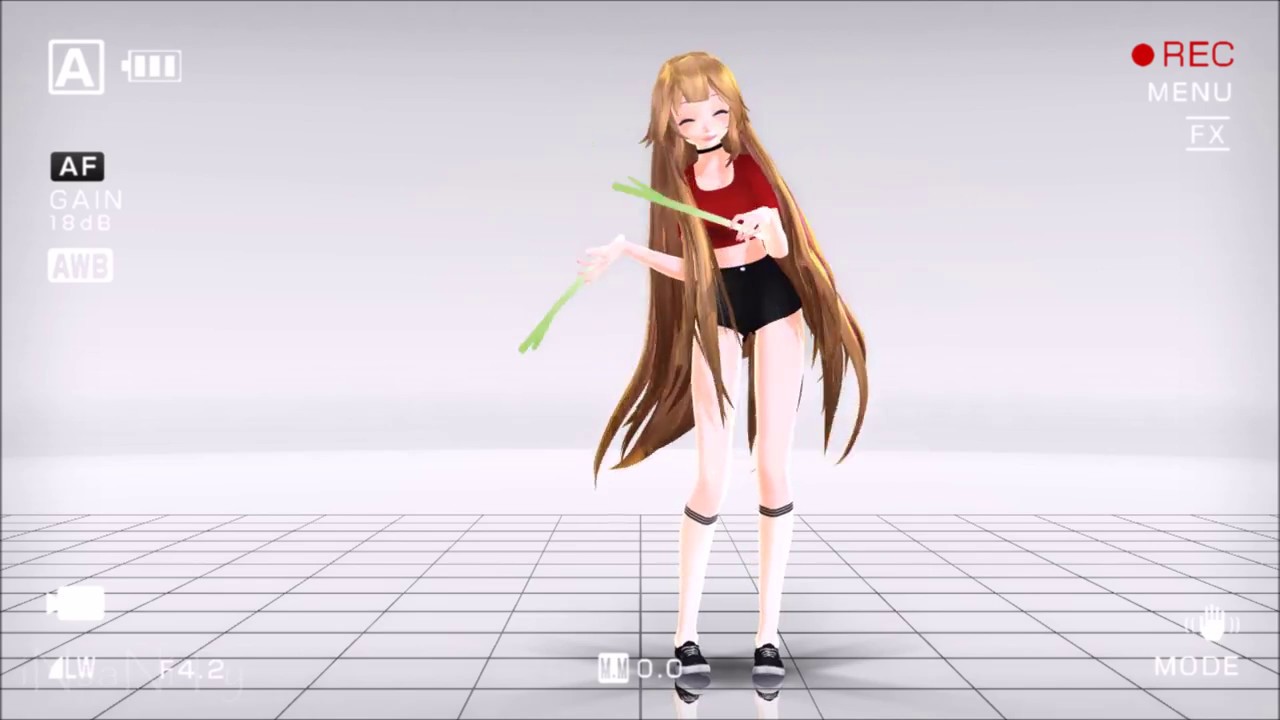
. . . . . . ||Motion|| By: http://www.nicovideo.jp/user/8578492 DL: http://www.nicovideo.jp/watch/sm18642162 ||Model|| Yuki By: SweetGirlRadioActive DL: I'm ...
 opaque mulch
 pastel storm
@rancid cloud search for leek
 rare ridge
 mossy plover
Hello, is there are faster way to share avatars and creation in VR? Let say , I don't wanna create own world and pedestal for that but to use other way to appears in VR in characters gallery.
vestal lantern
No, that's what many of the avatar worlds are, literally just a gallery. The world doesn't need anything interesting or special, literally just a rectangle for people to stand on.
 long talon
and a VRCMirror prefab, thanks.
vestal lantern
Yes, that too.
mossy plover
cool, thanks
shadow olive
how do i fix having a chair on my avatar?
It keeps saying VRC event Handler and VRC trigger will be removed
doesnt it need those to chair?
vestal lantern
The SDK examples even show those warnings, I'd ignore them
shadow olive
so im forced to do the delete redo glitch?
 loud blade
 storm summit
i remove those two scripts from my avatar chairs and they work fine?
rancid cloud
there is a way for testing avatar without upload it before?
because it alway took 20 minute to uplolad
long talon
go to sdk settings
and disable future proofing
it should take like 2 mins max to upload
rancid cloud
ok ty
another question i just create some animation with sound, it work fine, these are necessary to be also in the original body disalbed? or just in the animation avatar?
 spice schooner
@shadow olive Gonna love you for that avatar. Lol
shadow olive
'preciate it my dude
rancid cloud
@shadow olive so wahhhh
dry zealot
@rancid cloud
dry zealot
but how much tris are they
 rancid cloud
i can ask how i make these appaer if i run a certain emote?
like the polska one
i already draged these on corrrect position of hands and bone but i don't know how make them trigger
dry zealot
@ionic prairie hmm ?
 ionic prairie
ah nothing, just made a really unfunny joke about the leak model
long talon
leek*
rancid cloud
leek model
 reef kindle
dry zealot
reef kindle
dry zealot
i prefer fade
 crimson spire
Are the devs planning on implementing emissions on quest soon
 because of 2 materials
pastel storm
because of 2 materials
pastel storm
can i ask for SOMEONE to model a characther i like?
brazen hearth
on vrc traders?
long talon
odds are there may already exist a model. 3d modelling is time-consuming and kind of an art, if you're willing to pay someone, you can head over to the VRCTraders Discord listed in #community-servers-old and look into getting the model comissioned
shadow olive
or if they've ever been in a video game the model will probably be on the model resource
just like to bring that up just in case
shadow olive
Out of curiosity, what do you guys use for dynamic hair bones?
 ionic meteor
does anyone have some variations of cat avatars? like that black bag and bank cat
if yes contact me at the privator please
pastel storm
can anyone make a mecha senku avatar
or send a link to one thats already existing of any variation of senku
 light maple
any model rips of norman reedus in death stranding?
vestal lantern
Decimating that to less than 10k would be hard...
shadow olive
I don't think a model from a new game on a console that's barely been nodded will be readily available, let alone low poly enough to be somewhat quest optimized
abstract ether
I'm not even sure if it has been actually released yet, only some youtubers got it early on, I think?
vestal lantern
It's out on console.
 old socket
Do the quest version and the PC versions of my avatars need to have identical bone structures? I'm guessing yes since the IK is calculated on my end and sent over the network
vestal lantern
No, but they should be as close as you can make them. Amusingly they can be two entirely different avatars.
old socket
Ahhhh
That's actually exactly what I was wondering
Thank you
I wish there was a way to emulate quest on PC to test quest specific things without owning one
vestal lantern
Yeah, it's not ideal having to guess.
abstract ether
So what exactly does happen when the avatars have different armatures? One with generic and other with humanoid wouldn't work probably. If both have humanoid, maybe the receiver sees you from the rest pose of their platform's version?
Let's say you are using standard human armature on quest, the rest pose is t-pose before animations are applied. Everything is fine, works just like 99% of all avatars. The pc version has its own version of the avatar, still using humanoid but it is actually a dog and the rest pose is your average dog standing still and the animations are dog animations.
old socket
I don't think the rest pose of a dog with a humanoid skeleton would be on the ground given that it'll try to map the skeleton to a standing human
Well
At least the arms
In VR anyway
abstract ether
Maybe all the arm bones will snap into the air on the pc side since that's where they are on your side with your armature. Or the arms stay where they are but move how they do on your side. Since the dog is on the ground it looks like you are just putting your arms under the ground.
craggy glacier
back in the early stages of vrchat on quest my avatars quest version had a very slightly different armature and because of that quest users saw me halfway in the ground for some reason
idk if thats been fixed or not but ye, im pretty sure it will affect they way you look some way or another
dry zealot
am not sure if having 2 material just to have glasses a little opaque is wise
jagged sequoia
yeah just pop out those lenses to save a draw call
long talon
If you were big brained, you would bake a texture of the eyes open, closed and 😄 with the tint of the lenses on top, make 3 copies of the lense faces and bind them to the correct blend shapes
dry zealot
I don't know if am drunk or something but i dont get what you saying @long talon
long talon
take a picture of the eyes in each blend shape in a front orthographic view
photoshop the color of the lenses
create multiple copies of the vertices of the lenses, and only show each copy on the different blend shapes
like texture based mouths, but for eyes on glasses
vestal lantern
Parallaxing would look so weird on that though, if you're stood to the side it would make it look like their eyes are glued to the glasses lol

 fluid rapids
Anyone have any cute anime avatars
dry zealot
yes
visit kings raid quest avatar
for boys and girls
and soon Alchemia Story
1 mesh around 3.7k tris with an exelent avatr. but 2 material medium , bah . 💁 am doom ( counting camera)
 zinc root
@dry zealot why doomed?
dry zealot
not 
zinc root
@dry zealot. No texture atlas? there may be a way to combine the two mats into one
jagged sequoia
especially since textures don't need to be necessarily Square they just need to be powers of 2
 fathom spindle
So yesterday on my Desktop I was trying to clone someone's avatar and then this happened where I didn't see the button to clone. I do not know if it is the avatar itself or it if is the settings I have on currently if anyone could help me out with problem I be very happy thank you
brazen hearth
If someone has avatar cloning disabled you can't clone their avatar
vestal lantern
Yeah but the button still appears, it's just greyed out.
@fathom spindle Lagged. If you're below a certain framerate or the game lags, it doesn't select the person properly. You'll notice you're still on the main menu there, no the "Person Selected" menu.
fathom spindle
How do I get to that then?
vestal lantern
You keep trying to select them until it works.
If you're below 20fps then you can't.
fathom spindle
I see okay thanks for the help really I do like this
vestal lantern
(not sure the 20fps bug exists on Quest but I assume so)
vestal lantern
No, that's a PC user. The PC/Quest icons on the top left apply to the user, not the avatar. The circles on the clone button are for the avatar (not seen in that picture).
brazen hearth
I see
vestal lantern
Yeah, it's confusing unless someone explicitly points it out as they're all the same icons, but used in different places to mean different things.
brazen hearth
Actually it makes more sense this icon tells about what person is using and not what type the avatar is as it would be in avatar description
fathom spindle
Still it is nice to have some people help with this problem I thought there was a certain button/setting I needed to go to but now it makes sense
vestal lantern
vestal lantern
If the avatar is also Quest compatible, the Quest icon will be lit up on the "Clone Public Avatar" button on the right.
fathom spindle
Correct that’s what most my friends last night told me and I was like:” I don’t see it”
fluid rapids
Anyone make custom avatars for quest?
craggy glacier
lots of people do
zinc root
@jagged sequoia so can the texture be 1024 x 2048?
fluid rapids
@craggy glacier where do you find them?
craggy glacier
try out Sippbox's Cross Platform Avatars
jagged sequoia
1024 x 512
zinc root
I make them from scratch, I like the challenge of making them look good under 5k polys.
dry zealot
5k with a 2k texture is surprising what a model can look like
vestal lantern
Max for Quest is 4K textures (8K don't display).
Probably best not to use too many of those though, for size and performance reasons.
jagged sequoia
and 4K is probably overkill for cartoony looking avatars
especially considering you got that mirrored out the wazoo
vestal lantern
Yeah, flat colours don't need high-res. It's more for things with super-detailed textures (which help hide the low poly count).
long talon
it'd be cool to have a script that automatically compresses UVs that are the same flat color
unless that's already a thing and I'm stupid
I mean, I know UV stacking is trash, but god damn is it useful
jagged sequoia
UV stacking is still heavily used in AAA games it's called like 50% of environment art
 long talon
omg
dry zealot
I feel like I need to add a man in black stick to this one
 vestal lantern
My hopes, dashed in an instant.
dry zealot
You can akways select all the face and move the uv on the sqare manually
 bitter zenith
Bucciarati wants ur bread
abstract ether
Tfw you decimate vertices and the blend shapes work flawlessly afterwards.
long talon
tfw you call dissolve decimation, and you're surprised a technique that doesn't change vertex order doesn't break blendshapes
abstract ether
I'm confused what I was thinking
It was just deleting edge loops from a part of mesh that only is moved linearly to one direction with blend shape.
shadow olive
hey, my avatar has a big ol' seam in the middle
idk why, i merged all those vertices
and it only shows up when far away
anybody know what might be causing it?
i'm thinking it might be because his UV map only has half of his face and it just doubles, but so many other avatars do that
happens on both the original and decimated versions
jagged sequoia
perhaps try scooting the vertices of the middle seam a little more inward towards the face texture so that it's not having that color for having mip map take the outside color
dry zealot
The uv is too near the end of the face texture. Move the uv aways from the side or paint some skin further away
 surreal canopy
You may try setting the wrap mode to “clamp” in texture import settings
random badge
^ @dry zealot
vestal lantern
Does clamp infer any performance benefits given that it doesn't have to try and calculate wrapping coordinates?
jagged sequoia
probably not any you're going to particularly notice
as that's probably such a small-potatoes calculation compared to additional draw calls or dynamic bones
random badge
something at the 12th decimal place
dry zealot
Why the ping . Im so confuse. So brain cant let it go @random badge
dry zealot
depend how your texture is place. for example I got a line in the middle of the body but since another texture was beside it clamp wont work. IO would have to move that part on the side of the texture
since there was not complicate pattern I simply move the vertex of the of the uv a little to the left and you cant see a difference
random badge
Just incase you didnt see it sorry
dry zealot
Of my past experience the face is on the border all the time when mirroed. So those companie use clamp a lots for char opti
So when atlasing tecture keep that in mind. Try to have mirroed part on the edge of you texture
I never really have issue like that. So I didnt been carefull. You can rotate the texture and rotate the uv if the side is already use with another one
 frozen sedge
boob
 modern creek
dry zealot
dry zealot
modern creek
dry zealot
dry zealot
 visual kiln
Anybody got any good avatar worlds to check out. Plug the world 😂
craggy glacier
Sippbox's Cross-Platform Avatars
random badge
BlueASIS' Avatars
dry zealot
Kings raid quest avatar
 winged matrix
where the heck does that really well made Jotaro with the well animated Ora ora come from?
i've seen alot of peeps with it including visitors so i assume it must be on a world somewhere
to clarify its the stone ocean version of Jotaro
vestal lantern
On Quest? Quest avatars can't have sound so I'd not imagine that's right.
winged matrix
no i dont mean with sound
i mean one of its hand gestures sends out star platinum
i know its quest cause i've seen it multiple times and it shows cross-compatible symbol
anyone seen what im talking about?
spice schooner
I have seen it but I really don't know where it came from. About to play now, if I see it I'll note the world for you.
winged matrix
as a secondary question, anyone know good worlds to get robot avatars on
..excluding MW, thicc robot grills aint really my cup of oil
if anyone figures out where that jojo came from please @ me or just Pm me, eithers fine i just really wanna find it
shadow olive
Hey, so i'm trying to merge 2 meshes together that use the same exact materials
they both use the same texture, but they're separate meshes
i'm trying to merge them and make them the same mesh
before i merge them, they're fine
after i merge them, they get messed up
going over the the UV editing section, all the verts for these are a single point
i can move it around, but i can't grow or shrink it
i could unwrap it, but it is extremely tedious to re-UV wrap it
i don't know what's going on
 fringe otter
Haven'thad a lot of fun with Chyna she was the best friend I ever gad
People say we r bf gf but we don't care as long we have funn
shadow olive
fuck it i redid it
spice schooner
That happens to me when the UV maps are named differently
winged matrix
hey so um... did anyone happen to find if its on a world?
spice schooner
I sadly didn't see the avatar my last few sessions.
pastel storm
Question, how to upload a avatar quest and PC players can see?
vestal lantern
You have to create two separate projects, one for Windows, one for Android in Unity and upload the avatar (with the same blueprint) to both.
long talon
You don't have to do that, I don't get why people make separate projects
Enable the cache server, and just switch platform
quick'n'easy
vestal lantern
Does that not break/change anything else in the process? I thought it changed over and recompiled a load of things?
long talon
Never had issues
old socket
So there's absolutely no Quest compatible cutout shaders?
dry zealot
Cut the mesh !
delicate basalt
id fuckin make a separate project anyway just because its easier and quicker, especially on shittier PCs
random badge
I use the same project it’s bad practice to make a separate one especially if you switch to doing worlds after
spice schooner
All my models are a different project. I'm in for a rude awakening. Lol
dry zealot
you can make a scene for each model
random badge
all models fine, but seperating quest version is unecessary
esp if you do worlds, it can cause problems
vestal lantern
How do you handle worlds needing different shaders for almost everything on Quest?
 hardy kestrel
I have a question.How do I make an avatar and what do I need?I would be very happy to recieve an answer.
dry zealot
put some polygon together. Put a skeleton and attach the polygon to it. Paint the result and voila what you do in blender.
shadow olive
you making an avatar from scratch, finding a rigged model online and importing it, or taking a pre-existing model, rigging it up and importing?
random badge
Make two materials for each object (the less the better 😉 ), swap them out when you upload @vestal lantern
vestal lantern
@random badge Huh, never thought about that. Would be a nightmare to do by hand with hundreds of objects though.
random badge
Thats why you only have a couple, and share materials :-)
vestal lantern
But I want interesting worlds, not barren, texture devoid worlds. I guess that doesn't play well to the Quest though for both size and performance reasons.
random badge
have you checked out my junkyard.. its one material..
dry zealot
I use the same shader for both 💁
random badge
it is a desert but i wouldnt call it barren :-(
shadow olive
my Wario's goldmine import is all 1 material
i just used bumped diffuse and it honestly looks pretty good
runs like butter on the quest too
vestal lantern
@random badge True, but that's easier to do when everything is basically made of the same material IRL, e.g. corrugated metal. I can't make worlds without clear visual variety. I didn't realise the climby world was yours though, spent a while there the other day, it's pretty cool.
shadow olive
you could probably do some metallic and specular map trickery in that case?
you can use the standard shader on quest, so there's a lot you can do with different maps
you could probably even do tesselation
random badge
Sure, isnt tesselation expensive though
vestal lantern
Super expensive, which is why it's rarely used. What even was the point of it? Wasn't it designed as a cheap way of rounding things out, but ended up so expensive that nothing ever used it anyway?
random badge
I think so
spice schooner
I love your world, BlueASIS. I told you on game, but thought I'd do it here too. Lol Also very original avatars.
random badge
Yea we met in game, thanks again! ❤️
long talon
Friend got into VRChat, wanted me to get them an avatar ingame, so I accidentally went the extra mile https://raytracing-benchmarks.are-really.cool/8Yat8ru.png

For the record, I'm aware of the model uploader asking to not use it in VRC. This was also the only way to get said friend into VRChat
 arctic furnace
Ah, they wanted a specific avatar, huh. Kasumi kai ni at that.
vestal lantern
It's fine, the model uploader probably didn't even make it themselves in the first place. Deviantart people love to add a laundry list of demands to "their" models that normally they have no rights to in the first place.
 distant epoch
is that cultural appropriation? 🙂
pastel storm
yes
kancolle is more like kanker sores now Azur lane is more relevant
and not as cluttered with menus
old socket
dumb question probably but if I upload an avatar only to the android build, it won't show up for PC right?
long talon
nop
but you can just switch it to PC, then upload it again
preferably switching the shader to like poiyomi or noe because PC gets to use those and it looks better under the weird lighting conditions of realtime lighting in some worlds
pastel storm
does anyone have a guide for making your own mouth shape visemes?
like the Ah Oh Ch kinda stuff
i guess i could just copy what mmd models do
long talon
ah is usually largest mouth open, oh is well, o. and ch is the mouth barely open, generally with teeth showing
pastel storm
thanks! i downloaded a random miku model and copied the mouth shape
these are looking GREAT
pastel storm
say AHHHH
long talon
no u dyno. I was making stupid meme response
pastel storm
im lost
long talon
like this
 clever quail
hi, I am stuck with unity shaders of an avatar I downloaded. It is set to standard and I can not change it.
vestal lantern
That means you're missing the materials. Go into the FBX, go to the last tab and export the materials. That or create new materials and assign them to the respective body parts.
clever quail
Actually there are materials and I could added some vrchat shaders already but the model itself I cant change. Can we send screenshots here anywhere?
vestal lantern
Yes
clever quail
oh wait I got what you meant, thank you cheers. I am very amateur and it is a big help that any answers you provide!
I am sure I will ask more lol
clever quail
It says there are too many materials. However this is a downloaded model and materials are separately for arms, legs, face etc. How do I combine them or what should I do?
shadow olive
Open up your model in blender
under the optimization tab in CATS, use the material combiner
select all materials and click atlas
now your materials are all 1 big texture
@clever quail
clever quail
oh god really? I will try that now. Thanks a lot.
dry zealot
If they use all the same texture. Merge all the mesh, delete all the materials beside one.
clever quail
I will definitely try that too. Good night from Japan. Going to sleep now
pastel storm
Who here is great with quest avatars? I need some pointers
dry zealot
🤔
distant epoch
lol
abstract ether
Instead of being unhelpful, we could actually point them in right direction, ask what exactly they want and most importantly tell them how they can better ask questions next time to get help easier, you know?
Not sure if you are looking for someone to make avatar for you or how to do it yourself? To find someone else go to #community-servers-old and join vrctraders discord. Otherwise if you want to make it yourself, you should atleast know how to make an avatar for pc before trying to optimize for quest. Just google vrchat make avatar or something similar.
 sullen kayak
But that is common sense. Most people just ask and expect people to essentially do it for them because they are too lazy to learn them selves.
They never try figuring anything out for themselves for more than 10 seconds before going straight to this discord instead of googling it
People are just lazy
pastel storm
I have the basics of a PC avatar down I was wondering mainly of there were any differences between them, someone already gave me a link to something for PC to quest port
 cunning imp
It's exactly the same process minus like 1 thing and the optimization limits
 short nimbus
 glad carbon
sullen kayak
glad carbon
sullen kayak
What do you mean? Also why are you in the quest channel
sullen kayak

 rocky orbit
can I get a vr chat skin
craggy glacier
sure
rocky orbit
thanks
dry zealot
So I try to make a e boy/subcom looking avatar. what can be add or change ?
dry zealot

pastel storm
 No wolf ears or tail, no red colors, no tattoos, no emission
vestal lantern
But then it wouldn't be an eboy wolf avatar...
 heavy wharf
Tatoos that glow in the dark
pastel storm
ohhh yIKES. making from scratch avatar. made all my shapekeys.... with mirror modifier on
anddd you can't apply that with shapekeys
what should i do?
removing the mirror modifier and duplicating and mirroring manually works, but the shapekey data isnt mirrored as well
so when i mirror to the left side, and try a shapekey, the entire left side goes to the right side
pastel storm
ooOOO update i did it
winged matrix
avatar related question here
has anyone considered trying to bring some Javelins into Quest? Anthem might have sucked but at the very least we shouldnt let good exos go to waste
cunning imp
Those models were very high poly when I acquired them from the game. Getting them into the quest would take a lot of work
vestal lantern
Good luck decimating from 100k to less than 10.
brazen hearth
You would have to pretty much make your own version of such model and get rid of some details
I just "finished" retopologizing model that was 20k poly that was already been decimated and had to give up a few things and I am still at 8.5k (7.5k is my target poly count)
pastel storm
is there a world with Quest Neko´s?
beacause i want to add some Quest Avatars to my fav. im gonna use the quest soon, thats why i ask
pastel storm
kk 😄
 quasi nacelle
 agile dragon
anyone have a mccree avatar?
 river ferry
nope
also, is anyone here experienced at all with making custom avatars? i currently have a model that has everything i need in blender, though it currently has no skeleton and i have no idea how to get it into VRChat
river ferry
heavy wharf
Your best bet would be to start with something like mixamo, to give it a simple rig. But if you have very little experience, it's gonna be pretty hard to get it all together, as the results are kinda bad, and usually need weight painting fixed after. I suggest getting the CATS tool for blender, and then get the VRChat sdk and right unity version on the VRChat website to get started.
You could also just go look for a pre-rigged sans model, and work from there
river ferry
well, this was pre-rigged, though the skeleton was pretty terrible and probably needs a fresh skeleton
heavy wharf
Well if you don't know how to make your own rig, that's gonna take some time to do
river ferry
well shucks
heavy wharf
It would probably be easier to use the skeleton that came with it, and fix any weight paint issues that look bad on it
Keep in mind, this is #avatar-quest too, so I assume you are making this as a quest avatar?
You'd have to do a few other steps too, like combining all meshes together, and reducing poly count, along with atlasing
You might have better luck asking in #avatar-rigging
 proper sage
Is there an avatar for jacket from hotline miami
 golden kettle
im trying to port my avatar to quest, the sdk is saying that there is two materials and that one of them is using standard, however only one material is in my scene?
is it possible to have a model not have a material?
vestal lantern
Yes. But make sure the model does have a meshed model somewhere on itself
golden kettle
theres a single tri on it
in unity it still has one, and its called no name, the sdk still says theres two
im just trying to have a base armature with no mesh, that i can drag props onto in seperate projects, so i dont have to create models for each one, but the sdk wont stop saying that the armature has a material
is there anyway of fixing this?
long talon
I would give the armature it's own mesh to control, but make the mesh entirely out of vertices and edges, no faces, then it wont render.
pastel storm
hey i'm new to vrchat and i wanted to convert my avatar to quest, i get this error, please how can i solv it ? : )
brazen hearth
It pretty much says it will remove audio and dynamic bones from your Quest avatar since these aren't supported @pastel storm
What texture sizes are usually used for Quest avatars? Would single 2k texture be ok or is it too much?
pastel storm
i fix it thank you for reading ^^
vestal lantern
Unfortunately auto-fix doesn't work and you need to do it yourself.
@brazen hearth Max is 4096.
brazen hearth
Ok, I think I will use 2k texture then. You say 4k is an option too but I feel like it would be an overkill and Substance will lag working with 4k anyway. Thanks
 sacred matrix
unless ur texture is 4k it wont make a difference anyways
vestal lantern
Well that's assumed.
 proven loom
Anyone know where I can get a thanos quest avatar? All the ones I’ve found are pc only
dry zealot
dry zealot
dry zealot
is this to sexy ?
craggy glacier
ive seen worse
vestal lantern
It looks like a harpy without the feathers, for some reason.
vagrant gale
that's a little much imo
jagged sequoia
especially given the proportions makes me think their teenager
 urban grove
question for every one I guess, how and what do you use to set up a vr avatars? like to make one and set it up? can you do it from the head set or do you still need to use a computer to set up everything.
vestal lantern
You do it with 3D modelling software and then Unity.
vestal lantern
Yes, you'll need to use a Windows (or Linux) PC.
urban grove
thank you!
dry zealot
harpy. I try to do something thanks for the idea
cunning imp
I would think the bird legs would go higher up but looks good non the less
dry zealot
its a rough. Placing stuff around. detail and texture goes after
heavy wharf
Yeah, you'd probably want some sort of blur/transition
Or hide it with other stuff (small feathers maybe?)
 patent onyx
hantai
vagrant gale
i think it would look cooler with like one of those bomber jackets, idk why just a random thought
dry zealot
I still struggle with proportion. If I keep the original leg are too long for fbt. but If a calibrate all the body something look off
 cold ermine
Hey guys I’m new to Vrchat
How do I get into making custom avatars
And is there anyone I can go to for custom avatars?
cunning imp
Not really 'anyone', if you want to make it yourself then check youtube videos like kareeda's ones.
No one is going to sit down and teach you everything
Keep in mind quest avatars have very low limits as stated in the documentation
pastel storm
I have a question regarding the poly limit
If an avatar goes beyond the 5k limit, it automatically gets hidden for everyone, or the 5k limit is just a reccomendation?
jagged sequoia
7500 triangles is the nobody can see a limit
pastel storm
Thank you ^^
 gilded surge
Can someone please make me an avatar with this style of clothes. Please DM me and we can talk about it
 worn isle
Can someone make me a. Avatar
 vale stump
can someone help me how to publish?
i click on build and publish and its not in my personal
 hardy wolf
189511567539306508
 crimson storm
I heard we need the android Support for quest avatars
But my is curropted or something, can anyone help me out
Wait
Oh, i was downloading the wrong File lmao
 honest fjord
Im completely new to porting avatars to quest so, does anyone know where i can find a diffuse standard shader with transparency settings?
vestal lantern
@honest fjord No transparency on Quest. Too intensive for the hardware.
@vale stump That almost always means it's the wrong version of Unity you're using.
pastel storm
How do I upload quest and PC useable avatars? One project in android other in windows? With the Same blueprint id?
vestal lantern
Yes. Apparently switching between PC and Androind in the same project is safe when it comes to avatars, so you could try that too.
Quest shaders all work on PC, so if Quest is your priority, simply do everything for the Android version first, switch to PC then upload again there without changing anything (as it'll all "just work" on PC so it's quicker and less effort).
cunning imp
Depending on project size it's best to keep them separate as it takes time to convert everything vs dragging a unity prefab around.
vestal lantern
If you enable the local cache, the switch time should be only a few seconds at most.
(it's off by default)
craggy glacier
how do you enable that
vestal lantern
Edit > Preferences > Cache Server > (local)
crimson storm
It took me an day to make my avatar
Its done
I uploaded it
And its not there
Well, hours wastwd
vestal lantern
Well it's not really "wasted" is it, the avatar hasn't disappeared. You just need to fix whatever is causing it to not show up, which, 99% of the time is "you're using the wrong Unity version"
crimson storm
Firdt i had to download this unity, now i need an old 1
Gimme a break already
Ibused unity 2018.4.13f1
pastel storm
Thank you Enverex
crimson storm
Wich was said in #open-beta-announcements
vestal lantern
Are you uploading for the open beta? If not, why are you taking advice from the open beta channel?
brazen hearth
I converted my avatar project to android to upload quest version of the avatar, custom shader breaks it so it is supposidly for Quest but when I try to publish it it gets rated as excellent despite being 7500* poly when it should be medium, it also says "Supports: Windows" in Builder information. Is it some glitch and it will upload as Quest avatar or am I going to overwrite PC version?

 upper tapir
So I want to get into VRChat and also have a (relatively?) custom avatar. I ordered a Oculus Quest for Christmas but wanted to try to find an avatar early.
I was a little worried at first, but it looked like some fairly decent anime models were made for the Oculus Quest despite the low limitations. I am having a really hard time finding any though to download that are not extremely niche. I just want a nice and bland anime boy that can fit the poly requirements (or close to it) and look normal.
Example: I saw a model called Masao on sketchfab (Link here: https://sketchfab.com/3d-models/masao-6efadfe864e54b6397fc1f335cc7383b) and while this is definitely more detailed than a quest can handle it is kind of what I was looking for in regards to blandness, no cat ears/tails/horns, no fancy clothes, etc.
I prefer darker colors but beggers can't can be choosers. Can anyone point me in the direction of any quest compatible avatars similar to the Asethethic I am looking for? Or can any avatar creators get in contact with me and maybe see about developing something if there is nothing actually out there? I may be willing to pay a bit if there really is no other options.
This is an example of what I saw is possible with the Oculus Quest, but even this level of detail isn't required if you get what I mean?
The quality is good, but the accessories I mean
I don't need anything with flowers, hats, etc. If I wanted to look at these though, I don't even know where you would find these 🤔
vestal lantern
Those, and pretty much most Quest avatars you've seen are actually all by one guy, lol (although most of them are ripped from a commercial game).
@upper tapir Poke @dry zealot as they may already have something like what you wanted
upper tapir
@vestal lantern Thank you~! @dry zealot I would be interested in your help~
gilded surge
What is a PC and how do I drive it
sullen kayak
Yes
cold ermine
Mmhmm
 vernal tide
Who here plays TF2?
upper tapir
Would anyone be willing to help me make an existing avatar Oculus Quest compatible?
It doesn't seem like it is that complicated of an avatar, I just don't have knowledge or knowhow with Unity to convert it, and since this is literally the only avatar I ever want to use, I don't want to learn everything just for this one avatar. I would be willing to pay a bit in return.
craggy glacier
whats the avatar?
sullen kayak
@upper tapir I can try. Bo promisses though since I have never done quest avatars. But I can make the model reach the requarements
upper tapir
@craggy glacier @sullen kayak
This was the model
I tried to ask for help on VRC Traders and said I would pay, but got a quote wayyy out of my price range :/
So I kind of gave up hope there
sullen kayak
Honestly id do it for free
upper tapir
Even the original creator said the price isn't worth it
@sullen kayak I would greatly appreciate if you could.
sullen kayak
It doesnt have any physics needed parts so shouldnt be hard
random badge
You underestimate how unoptimised mmd bases are
sullen kayak
I dont
I wont with them offten
the model doesnt look complex
I will delete the body inside and any left over useless meshes and decimate it a bit
random badge
I had the displeasure of working with an mmd base once and I’ll never do it again
I had to get it sub 5k tho because this was when we didn’t have concrete quest numbers
So bonus points if you go sub 5k
sullen kayak
what are the concrete numbers? because the vrc wiki is outdated and theres pretty much no info on it
random badge
10k before your avatar is auto hidden
sullen kayak
cool I can do that
random badge
10k will also make it poor or very poor I think
random badge
Keep me updated too please
If you are doing manual decimation I’m interested in how it turns out
brazen hearth
@sullen kayak Aim for 7500 poly or slightly below that, your avatar will be rated medium
sullen kayak
how big can the texture be?
brazen hearth
4k
sullen kayak
NICE
brazen hearth
Yes 4k is a nice fat texture 😄
brazen hearth
also file size must be 10mb or below
I think a set of uncompressed 4k pbr textures wouldn't fit but a single albedo texture should
sullen kayak
yeah I was aware of that
well its an anime avatar so its not like I need a pbr texture lol
sullen kayak
20k verts to 2k with literally 0 quality loss
IDK who made this but the original creator left just tiny clusters of polys in the model that are literally invisible without using edit mode and they are around 18k polys inside of them
whats the point of that?
brazen hearth
Those could be some scaled down accessories. When scaled up they may be blushes, different eyes, glasses, additional clothing, weapons etc
sullen kayak
oh no
brazen hearth
Just a guess though but I doubt they would just place a 18k blob
sullen kayak
I tested all shapekeys
theres stuff for in there but those never make an appearance
well I got rid of them and its 6k polys now in total
so pretty good
brazen hearth
Just the face is 4k so rest of the body is 2k?
sullen kayak
The face is 2k and the rest is 4k
I could do some aditional decimation on the face to get it to like 1k maybe?
brazen hearth
You could but shapekeys would be lost
random badge
The eye details are far too high poly
Those white bits could be like half of what they are
sullen kayak
Yeah I noticed the glind it very high poly for just a dot
Also some of the shapekeys like >< eyes are just sprites and they have like 100 polys each
long talon
I did a full MMD model under 5K...
and it looks great
it's all about patience and black magic
random badge
Yeah i did one, i hated every second of it
i basically said fuck it and just retopoed it
because it was so fucked
brazen hearth
10k before it is blocked by default @little burrow
 little burrow
ohhh okay thank u x3
long talon
well, 7.5k for visitors who haven't passed the "oh, youre a quest user, do this this and that for a slightly less garbage experience" ritual. 10k for those who did.
zinc root
Coming soon! 😁
craggy glacier
nice work :o
jagged sequoia
that's a very nice and efficient pug
dry zealot
Think its overkill to do this ? https://gyazo.com/8c6e68f15830348ffb23bab1a592c778
 shut orchid
Nah, always do that myself, so satisfying when the eyes work just right 
long talon
^
shadow olive
any tips on making these glasses any less terrible?
they're supposed to be mostly opaque, so that isn't an issue
but even using a white metallic map, it just kind of looks like a solid white disk
shadow olive
still doesn't really gleam, thanks though
dry zealot
on quest use the particle additive shader it do the job and is lit all the time
I think the proportion are about right now. idk
dry zealot
pastel storm
can anyone teach me how to attach clothes to an avatar on blender/unity? willing to call and show my screen
 obtuse prawn
Hey, are there any quest shaders that allow alpha cutout?
Tryin' to make this nerd compatible but as you can see, the buckles and addons kinda suck without alpha cutouts
craggy glacier
cutout isnt available for quest because it's expensive on the cpu
best you could do is cut the mesh in blender
 olive fiber
a Frey avatar? nice
 empty zephyr
Hello, I seem to be having a problem with uploading the Clone Trooper avatar from VRCM*ds into the quest version of VRChat
Why does VRCM*ds automatically get deleted lol
cunning imp
The site hosts stolen content, so the vrc devs dont want to endorse it or send people to it
empty zephyr
Ah, I see. I’ll be staying away from it from here on.
cunning imp
What was your problem with the model?
empty zephyr
Anyways, it appears fine on PC, but on Quest the model appears to be completely black
This happens with every compatible shader that I use, although I do typically use MatCap lit and Standard Lite the most
cunning imp
Quest has specific shaders you need to use, I dont have much experience with using those quest shaders as I dont make anything for the quest sorry
empty zephyr
I understand that completely, I actually think it’s more likely a problem with the textures themselves
I use Quest shaders on PC and it was working completely fine. It’s very peculiar to me if I’m being completely honest.
This also occurred with a Ryuji MMD model I attempted to upload to VRChat
As of right now I haven’t seen any specific solutions to this, so my question is just if anyone has any idea of what to do
 shrewd kettle
Try changing the texture format to something different, I can’t remember what format it is, but one of them causes them to appear all black to quest users. Change it to .png or something, see if that works.
shadow olive
i know i've asked this before, but it was a while ago and my brain is made out of oatmeal
I'm trying to make an emote that equips something
and another emote takes it off
it's attached to a bone
then a shape key has to play
for example:
Before:
then helmet which is on a bone
then hair shrink shape key
i have no clue how to go about doing this if anybody knows
im terrible with animation
 dry zealot
 vestal lantern
@empty zephyr They aren't 8192 textures are they?
dry zealot
For my part i use a 2k texture. And crompress it. They end up around 450kb instead of 12 mb
 warm cipher
do i have to care for setting the view position if im creating a private avatar that is primarily being used on desktop, with the quest support primary for showing up for quest users?
aka no quest user is using my avatar should i care for view position
empty zephyr
I don't believe so
they actually look painfully compressed, if that's what you mean
like it's BAD

Clone Trooper - Download Free 3D model by asifsaj (@asifsaj) [e66d472]
here's an external link to the model that I was trying to upload
 reef temple
on the right is an older pc version avatar i made, i reworked it and made it quest compatible, i thought it wouldn't look good without the old ice textures but i'm really happy with the stylization change
warm cipher
somehow i got my thing from around 7000 polygons to 3999
granted i lost things like eye movement and mouth movement but the avatar never had those to begin with; i just added them
 long talon
you mean be able to zoom on the avatar without the camera breaking?
double-click it in the hierarchy, that sets the camera onto it, and you can zoom much closer and precisely without it clipping, because unlike blender's viewport, Unity's scene camera's clipping distance gets set by the active object
pastel storm
Deku Avatars?
random badge
@reef temple That looks way better! is the map in the bg yours? Ive had that map in my favorites for awhile
empty zephyr
@pastel storm look up PineNeedles
 hardy tangle
is there anyway to remove an xray effect without having to use a poiyomi shader?
random badge
What do you mean "remove an xray effect"
hardy tangle
im trying to get an avatar work for quest
random badge
What do you mean "remove an xray effect"
hardy tangle
random badge
oh lol
delicate basalt
that loooks like cool
random badge
Its flipped normals
you need to go into blender and select the "xray effect" faces and flip their normals.
You dont need to use poiyomi for that - like at all
hardy tangle
oh thank god
delicate basalt
plus if you wanted to, poiyomi would be easier than flipping normals
actually, now that i think about it, i dont know
in any case youd be better off flipping normals anyway
random badge
@delicate basalt #avatar-quest
random badge
No shader on mobile will solve this, you have to fix this manually (if you want a quest version)
So enable backface culling in blender, select the broken faces and then hit space and type flip normals and they will be fixed.
hardy tangle
how do i enable backface culling?
delicate basalt
i love that sceenshot*
hardy tangle
uhh im on 2.79
hardy tangle
i dont, 2.8 feels so confusing
random badge
its the opposite :-)
random badge
Oh damn, i didnt even think about googling it haha
reef temple
yeah, i haven’t updated the map in quite some time though
random badge
darn, i still visit there sometimes - cool map 😄
reef temple
thanks my dude, might make it Christmas themed if i’m not too lazy
random badge
i feel that
im focusing on making quest avatars to submit to the second run of the list, so my maps arent going xmas it seems
hardy tangle
dont you hate it when you export as an fbx and then when you import it into unity you forgot to remove the camera and lamp
so its just
there?
random badge
Delete them in unity
hardy tangle
i know lmao
reef temple
i've developed muscle memory to immediately delete the lamp and camera when i start something new in blender, sometimes i don't realize i've done it until after it happens
dry zealot
Delete the lamp and camera then. and save the scene as startup @hardy tangle
hardy tangle
i know lmao
dry zealot
So you dont have to worry about those
hardy tangle
i just googled
cunning imp
Honestly forgot about the starter set up in blender since I deleted it so long ago
long talon
delete the default cube then spawn in a new one
random badge
same
 dusty osprey
You click your image texture that that material is usin and then in the inspector, in the box named default, u up the max image size of ur texture
@fallen ingot
idk if u can up it as high as that for quest but if u can some it should help make the texture clearer!
 hot gulch
Does anyone know where I can find a baby yoda avatar on the quest?
 fallen ingot
@dusty osprey Thankuwu senpai have a gud day :D
 autumn dove
I thought I was playing a game ???
 verbal hazel
hi can you help me how to up in my vr chat

Could you Follow new work here. https://www.artstation.com/artwork/3oLez2
I Move on ArtStation.
Original Picture >>>>
http://www.crunchyroll.com/anime-news/2014/09/24-1/video-latest-pv-for-sora-no-method-tv-anime-introduces-oped-songs
Noel From Sora No Method.
I want to mak...
i love it
vestal lantern
Are you familiar with Blender, Unity and have at least "New User" rank in VRChat?
verbal hazel
i am a new user
verbal hazel

16 - Download Free 3D model by YU (@pein) [2ed9b30]
ye i dow and how new bro:3
vestal lantern
Is that model actually rigged?
verbal hazel
oh
long talon
- Most of those models are not rigged.
- They're so high poly and detailed, I wouldn't even wanna use them on PC VRChat, let alone VRChat for Nintendo 3DS.
- You're never going to get any of these to a reasonable level for playing in your lifetime. It would be easier to learn all of Blender yourself and remaking the model from scratch.
- Don't look on Sketchfab for VRChat avatars. Sketchfab is for 3D MODELS, NOT RESOURCES.
Sorry, this was my quick sketchfab rant, please go back to whatever you were talking about right before
verbal hazel
thank bro
long talon
Bowlroll, DeviantArt, Nico3D, VRoid Hub for MMDs/other compatible models
Sketchfab has a few, but you really gotta make sure they're both, downloadable, and rigged
OpenGameArt has some stuff I believe, the Unity asset store also has free stuff you can work with.
vestal lantern
Rigging Sketchfab ones yourself would be easy enough if they don't have elaborate clothes as Mixamo can do a good job of humanoid avatars.
long talon
yeah true that
shadow olive
Model resource is a great place, has most game avatars
but many of them need to be rigged manually
mixamo in that scenario does help though, given you can fix any mistakes it makes
i dont get why some people hate on mixamo, it's given me some pretty solid rigs that barely need any fixing
dry zealot
still have 675 tris to spare. What to add ?
jagged sequoia
I honestly think you're good as I can't really think of anything to add
random badge
more edgeloops on the torso if you really want to add more tris
or fingers since its a vr model after all
dry zealot
I can always add some edge loop in some place yeah
random badge
better hands means more immersion
random badge
i dont usually push tris into a model but if you really want to just shove them in hands, cant go wrong making hands look nice
or add buttons or pins or something to the shirt 🤷♂️
cunning imp
Hands are always something you're looking at so having them low poly sqaures is kinda bad imo
dry zealot
The flat shading with a smooth texture make them look good enough i would say
He is down to 4,133 tris now I delete some part under the hair and hips that we didnt see. Forgot that I let the bald head under. I keep the full head in case i need to see more skin. But delete the plane that is cover by the hair used at the moment
craggy glacier
franada be saving the oculus quest version of vrchat one avatar at a time
cunning imp
Yeah the low poly count is impressive. I'm working on getting some down from 130k to 70k I can't imagine going as low as 5k
 stuck mauve
Ok so I got a question about the shader
So the sdk is saying that the shader is unsupported
jagged sequoia
so you would need to change to a Shader that is supported
stuck mauve
and i do have the mobile shader
jagged sequoia
do you potentially have more than one material on the object
stuck mauve
so now we down to one material slot?
jagged sequoia
yes I was just checking to make sure you didn't accidentally have a PC material still attached
stuck mauve
well if i use the quest texture it's breaks
jagged sequoia
mind if I see a screenshot to see how it breaks
jagged sequoia
well that's because you're not using the quest shaders and your avatar needs more optimizations as it's currently very poor
jagged sequoia
yeah you should combine those so that those are one texture
also what's the triangle count
hardy tangle
I have an avatar with swords, but when I try to join a world with the avatar the sword turns completely black, how can I fix this?
dry zealot
the world don't have light so metal turn black
vestal lantern
@stuck mauve In Blender
@hardy tangle Contact the world author and ask them to set up proper lighting.
empty zephyr
We need more veggietales avatars
My next project will be Reggie Fils-Aime in veggie form
shut orchid
My... God!
Its. Perfect..
 midnight pawn
alrighty then
time to convert ALL OF THESE
for quest
they're gonna be public too, im making a world for them :)))
dry zealot
Nano? @midnight pawn
midnight pawn
I could ^^
long talon
If you're able to, if you do add fingers, also make the arms a bit longer
having used NanoRin in VR, the arms are insanely short
vestal lantern
Or rather the head is too big and the legs are too long.
 vivid cloak
Ooo! Link me a way to the world when it's done!
jagged sequoia
that works well as a generic Fox
 tidal ridge
☺️
jagged sequoia
I might also suggest uploading some texture variance for like wolves & pointy eared dogs
hot gulch
Anyone know where I can find the baby yoda avatar?
 brave citrus
how dare you not call him Veggie Fils-Aime
 fresh river
omg that is the most cutest thing ive ever seen, please let me know if you find it @hot gulch  but i have found the baby yoda avatar, just not with the crib uwu
 granite vine
Hi all! I'm enabling a quest pen package with an avatar, but its directions read "to turn the pen on, you will need to enable a gesture to enable the questpen object". The readme for this pack doesn't state how to create a gesture. Does anyone know how to do this? @bleak jackal
vagrant gale
@granite vine A gesture is like when you have the buttons down
a hand sign
like fists or pointing
granite vine
So it's the animation controller and I drag the animation there? Ohhhh
vagrant gale
idk I'm not an avatar maker
granite vine
Is it this?
vagrant gale
that looks like it though
delicate basalt
@granite vine yep! Id explain more but im in class rn, youve got the correct t idea ^ ^
empty zephyr
Yo @fresh river where’d you find the baby yoda?
empty zephyr
HOLD UP
I found a baby yoda that works y'all




download this FREE fucking dope textured / rigged model from @pixelurge for any use!!!!!! https://t.co/MJXiFbWsyz and go show that homie some love!!! ❤️🙏❤️
(CINEMA4D-OCTANE / BLENDER 2.81 / FBX)
#cinema4d #blender #BabyYoda https://t.co/dNqAtVwHMR
Retweets
282
Likes
1696
 Twitter
You're welcome
 scenic mortar
Anyone know how to make emotes in unity act as a toggle? I'm trying to get the particles of this avatar to be turned on and off by emotes, but the moment the emote ends, it just turns the particles back on, and vice versa
Either that, or make the particles invisible to mirrors, which idk how to do that either. For whatever reason the particles look bugged in mirrors only for the player
tidal ridge
The mirror bug for animation-triggered changes should be fixed when the next big patch is out for Unity 2018, if you have a PC you can test the beta through Steam 🙂
vestal lantern
@empty zephyr Keep in mind that avatar is not going to work on Quest without serious work. It's above the top limit for PC, nevermind Quest. It's over 80,000 tris.
It also has no shape keys so no blinking, no visimes for mouth movement, etc.
scenic mortar
@tidal ridge It's not really just the animation triggers, the particles just don't appear fully transparent in the mirror. In game and to everyone else, they're fine, but in mirrors it shows the black box around the particles which is part of the texture they're using. Idk how to make it not appear like that in mirrors, or just make them invisible in mirrors outright
fresh river
@empty zephyr found it ingame lol
 brisk nexus
when you upload an avatar for quest and it works fine then you upload the same avatar but different colors and its just like no file to big
pastel storm
is there a way to have the doomslayer as an avatar cause i cant find it ?
i wanna quest id
tidal ridge
I uploaded some Quest compatible foxes to my world, Zab's Avatar Lab! If anyone wants to try them out feel free! :3
Lots of emotes and gesture expressions too!
delicate basalt
@tidal ridge god's work my guy, they look really professional ^ ^
tidal ridge
😊
dry zealot
Nicy
pastel storm
Baby yoda?
dry zealot
little knight
vestal lantern
Hmm, more quest users reuploading existing avatars onto their own accounts as quest only
some of them are yours @dry zealot
pastel storm
why would an avatar be quest only?
vestal lantern
Because they didnt bother uploading under the pc platform too
pastel storm
oh lol
dry zealot
if its the kings raid one its normal
vestal lantern
That people are uploading copies themselves?
dry zealot
I hare my ggdrive in my yt video
 indigo anvil
Dose anyone take requests for avitars
vestal lantern
@dry zealot Ah I see. Well the downside is people (with no idea what they are doing) are just unnecessarily reuploading avatars that already exist in-world and not even bothering to make them main platform compatible.
 humble tundra
Does enyone know someone that can make Christmas boy avatar? Or a world that has Christmas boy avatar.
spice schooner
Christmas boy? Is that a reference or are you looking for a boy who likes Christmas?
long talon
think they just want a boy with a christmas outfit
 split stream
I added facial animation overrides to my hand gestures and for some reason whenever I do the hand gestures my hands slowly drift back to the default position after I let go of the trigger. Help!!!!
 snow kernel
i have this problem with avatars that its almost always "very poor "performance(so i cant see them) and in my safety setting i have already chosen poor
does someone know how i can maybe fix it?
vestal lantern
Very Poor avatars can never be shown by default on Quest as they'll quickly stack up and crash you out.
You have to manually show them via the menu for each person.
pastel storm
Can anyone teach me how to make an avatar? I just wanna make a floating oculus quest headset with controllers
vestal lantern
Probably already exists to be honest. If you mean from scratch though, prepare to watch like 10 hours of Blender videos first and then spend another 20 hours or so making it.
pastel storm
If it exists then I’ll probably try to find it for like 20+ hours
spice schooner
It does exist, had a friend on Quest using it. I won't be able to tell you where he got it though, as I don't know.
hot gulch
What about a krampus avatar? Anyone know where I can find that?
spice schooner
Haven't seen that one, not even on PC
spice schooner
Friend was a strong word, they friended me but I accept all invites so I don't know their name.
pastel storm
Alright, that’s fine
spice schooner
If I spot it I'll let you know.
pastel storm
Alright thanks
 modest obsidian
So basically I cant find the VRC avatar descriptor file, was it updated to use a different file? or did I some how screw this up and its still there somewhere
@ me if you have the solution
spice schooner
@modest obsidian it's a component you add to the Avatar in Unity
modest obsidian
ok so it still exists once you add the SDK file to unity
because when I go to add the VRC avatar descriptor to the moddel it cant find the file
spice schooner
Yes
modest obsidian
so is it named something else now?
spice schooner
Load the sdk then add the component
Just type Avatar and click the Avatar descriptor
modest obsidian
yeah it just isnt there, Im going to redownload it
spice schooner
Strange, but I'm glad you got it working
modest obsidian
and one last question
what shader do I set it to to fix that
I dont remember
spice schooner
If it's a Quest avatar I'm not aware of a double sided shader for it. When that happens to me for Quest avatars I bring the model into blender and flip UV
modest obsidian
yeah when that happened a friend told me a shader to hit and it fixed it
just what one it was I cant remember
spice schooner
Double sided shaders work on PC, maybe one exists for Quest I'm not aware of.
modest obsidian
yeah im almost positive I can ignore it but idk
spice schooner
I mean, your avatar would look like that in game if you don't change something
modest obsidian
ok that's what I thought first but then I figured I've never seen someone purposely use a character like that so maybe its just unity but I guess not...
spice schooner
As someone who has done that my first time making an avatar they would look like that in game. lol
Send me the model and I can flip the UVs and see if that works for ya
If you want that, of course.
modest obsidian
yeah sure
you want the OG or the one I tampered with
thats the one I havent touched
spice schooner
Just the one model file you have in your Unity so it's already rigged and all that. Send that to me in a private message, I don't know if we can share files here.
modest obsidian
oh yeah I got u
spice schooner
Also, I would delete the link if it will let you.
long talon
There are no double-sided shaders available for Quest avatars
Open your FBX in Blender, select the mesh, press TAB to go into edit mode, and press Ctrl-Shift-N to recalculate normals.
Then go to File > Export > Export FBX
spice schooner
I did that for him, should be good now.
long talon
ah, the ol spoonfeed
spice schooner
I don't mind every once in a while. lol
long talon
I end up spoonfeeding entire avatars sometimes
spice schooner
I've done that one before. Spent way too much time and for free. lol
 warped cave
Can I not use the VRChat/Mobile/Lightmapped shader for quest avatars?
vestal lantern
Everything in VRChat/Mobile should work...
warped cave
It just give me an error in the Build tab when I'm gonna upload
 spring halo
Lightmapped is for worlds only
warped cave
It looks so much better than Toon lit 😔
brazen hearth
@warped cave I also wanted to use it but it didn't let me, looks the best of available Quest shaders imo
warped cave
The unlit gives it a redish tint, and the lightmapped keeps it a chill color fsr
random badge
Unlit doesnt give any tint, thats objectively not how it works
Unlit shows the material exactly how it is with no influence
sullen kayak
a.k.a not a good idea to use unless you want to be brighter than discord light theme
granite vine
@random badge Hi! Are you going to make your new boat map Quest friendly?
I don't want to make a boat map when you already did a nice one.
delicate basalt
BOAT MAP? holy shit i need to see this later
random badge
That map is super old - i dont have the unity file for it.
granite vine
Aw damn
random badge
I have all the loose files and i may try to re-do it but i dont see why it wouldnt be quest compat
granite vine
Thank you for considering it! I love boats.
random badge
We'll see when the next vrchat update hits - im holding off on most things right now because of that 😅
granite vine
Yeah same.
delicate basalt
blue
random badge
yees
random badge
Learn it?
delicate basalt
make the boat moveable
random badge
Udon is great but, i dont understand it at all
I barely understood the old setup for triggers and stuff
i can model, texture - but thats about as far as it goes in my brain 😔
delicate basalt
looks like scratch.edu in vrchaat to me
random badge
still to complex for me
delicate basalt
youll probabnly pick it up eventually
if mot get a friendo who will uwu
it is nodegraph scripting so
random badge
ill prob just collab with more brainier people than me
so i can take their load off doing art? idk
delicate basalt
superior plan
hardy tangle
i cant do any animations even though theyre on the animation override. plus if i go to my avatar menu, the avatar shows as a tpose
is there a fix to that?
spice schooner
In Unity you set the rig as humanoid?
hardy tangle
yes
spice schooner
And the override is placed on the avatar?
hardy tangle
yes
spice schooner
Hmm, not too sure. Does the rig have the needed bones to function? Most of the time if the rig is set to humanoid and has an override attached to it, it shouldn't tpose
hardy tangle
it only tposes on the avatar menu screen