#avatar-quest
1 messages · Page 10 of 1
 rose yew
 random comet
you could try doing the flip normals trick to fake transparency
rose yew
It would just be completely invisible at the point though
 hot nymph
One more thing, I'm having trouble with substance painter, normally when I export my textures, they look something like this, which is good.

But I just tried exporting textures from another model, and they look like this.

When I apply the maskmap to the occlusion slot and metallic slot, it just looks scuffed.
But it looks fine in substance.
 cyan apex
Use the same output template on the second one that you used on the first one
 calm wagon
I'm trying to upload an avatar and it keeps saying application error. What can I do?
cyan apex
Detach your blueprint id
 river crescent
hot nymph
One more thing, I'm having trouble with substance painter, normally when I expor...
river crescent
hot nymph
One more thing, I'm having trouble with substance painter, normally when I expor...
Is that a bracken?
 warm whale
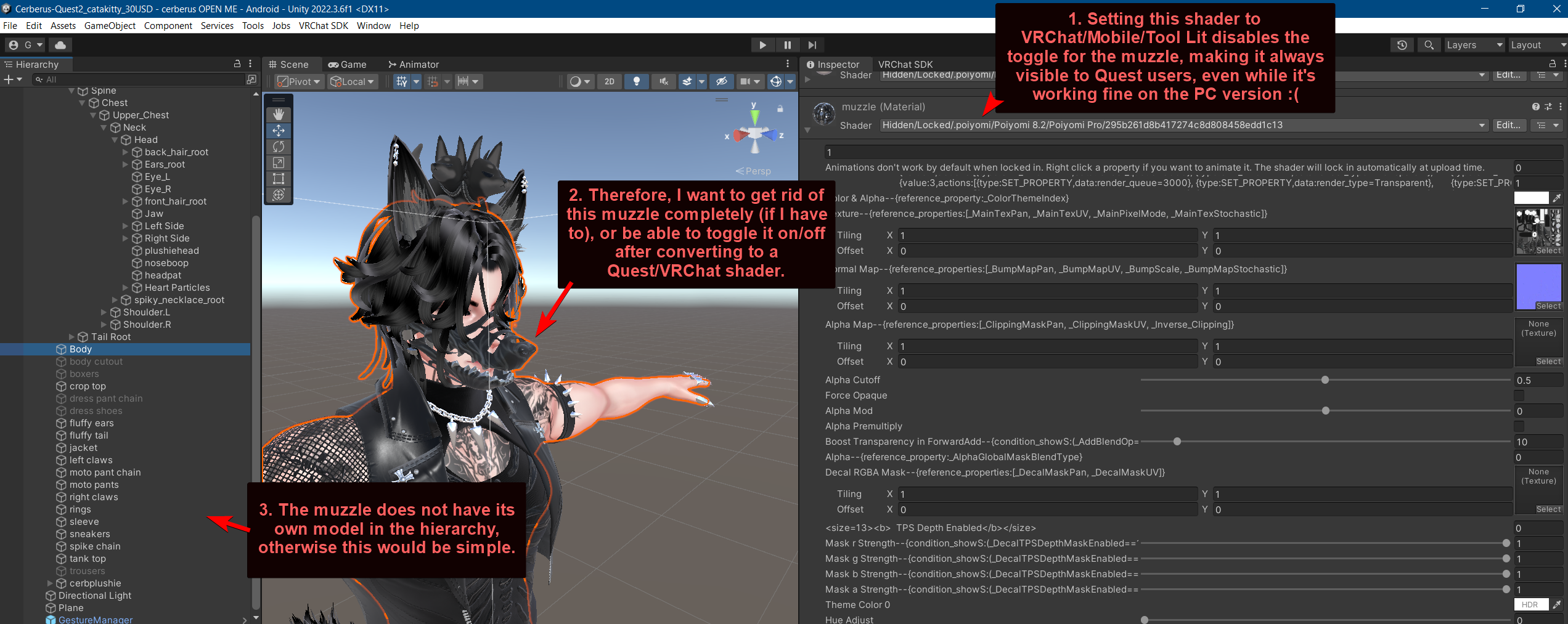
Any ideas? https://i.imgur.com/4d84XJI.png
 magic slate
warm whale
Any ideas? https://i.imgur.com/4d84XJI.png
magic slate
warm whale
Any ideas? https://i.imgur.com/4d84XJI.png
You'll need to either split the muzzle into its own object or make a blendshape to hide it. probably it had been setup with the hide action handled via a shader you can't use on Quest.
warm whale
magic slate
You'll need to either split the muzzle into its own object or make a blendshape ...
Is that stuff I need Blender for? Or can I get rid of it somehow here in Unity?
magic slate
You can't do it in Unity
warm whale
magic slate
You can't do it in Unity
Alright. So there's no way to choose the nuclear option and just remove/disable/make it invisible here in Unity?
magic slate
I don't know of one.
warm whale
magic slate
I don't know of one.
Okie dokie. Thank you.
 indigo rain
good evening for all, i have a problem with avatar, im too hight for it, and in VR his legs bend and curve. First time I encountered this problem and do not understand how to solve it, so far the only thing that comes to mind is that when importing the avatar is not flat on the floor, and hangs higher.


 ivory marlin
If I remember correctly, there is a part in settings where you can set the avatar to match your irl height which should stop the bent legs
indigo rain
oh ye?
fck...
maybe you know 1 more thing. i want to have glasses on my model, they looks good on PC, but for oculus basic shaders ruine everything

maybe you know which shaders will look the same on oculesa ?

 wide heart
That's transparency. Quest shaders dont have transparency. You'll have to either see the fully opaque lens, or remove the lens completely
 twin crater
hello
cyan apex
hi
 somber nimbus
I want to know how do some people make avatar texture glowing in dark but quest compatible, or which shader do they use to make that?
 finite lava
somber nimbus
I want to know how do some people make avatar texture glowing in dark but quest ...
finite lava
somber nimbus
I want to know how do some people make avatar texture glowing in dark but quest ...
just the default quest shaders should have emission
toon lit? i think
 flint forge
somber nimbus
I want to know how do some people make avatar texture glowing in dark but quest ...
flint forge
somber nimbus
I want to know how do some people make avatar texture glowing in dark but quest ...
Standard lit is the only Quest shader with emissions.
The others that accept textures are not entirely unlit.
 quaint mica
Are poor/very poor avis are locked on Quest?!
 steady idol
quaint mica
Are poor/very poor avis are locked on Quest?!
steady idol
quaint mica
Are poor/very poor avis are locked on Quest?!
very poor is hidden by default and cant be changed
you can manually show people's avatars
 spare oak
So I uploaded both my avi to pc and quest (had to do the classic pc to quest transport thing which worked out well), but even though both have been successfully published, it only appears on PC and doesn’t have the check mark option next to quest even though it says its compatible for both platforms. What do I do?
steady idol
spare oak
So I uploaded both my avi to pc and quest (had to do the classic pc to quest tra...
Sometimes it doesnt update visually but is infact uploaded
flint forge
spare oak
So I uploaded both my avi to pc and quest (had to do the classic pc to quest tra...
Check the website, it should always be up to date there.
spare oak
Nope. I even tested it for quest and it appeared as the small robot fella when it’s PC only.
 flint forge
spare oak
So I uploaded both my avi to pc and quest (had to do the classic pc to quest tra...
flint forge
spare oak
So I uploaded both my avi to pc and quest (had to do the classic pc to quest tra...
What is the "classic pc to quest transport"?
Just, mat swaps?
spare oak
Ah, it’s a thing I downloaded from watching a video. Basically allows you to convert your avi to quest (android) and changing up a few things to make it compatible
Which usually works ofc
Now the avi I uploaded was required to use unity 2022 (which I did), and I of course downloaded it, though took a while, and of course had to redownload the android platform for it as well. So I might try saving and exiting out and then going back to upload it to quest
And if that doesn’t work then I don’t know
🥲
Maybe might redo it and hopefully it goes correctly
 unborn warren
is there any way to make the matcap lit additive instead of multiplicative
I want it to look like this, I figured using a matcap like this would make it work but in unity it is looking like this


the other way I could do it is to double the amout of geometry which I DONT want to do
 late silo
unborn warren
is there any way to make the matcap lit additive instead of multiplicative
late silo
unborn warren
is there any way to make the matcap lit additive instead of multiplicative
not for quest
 tropic mauve
is there a way to make a gesture toggle only available after a toggle has been used? prefferably with vrc fury
steady idol
tropic mauve
is there a way to make a gesture toggle only available after a toggle has been u...
You really shouldnt spam the same question in every channel and keep it in one of them
tropic mauve
steady idol
You really shouldnt spam the same question in every channel and keep it in one o...
its not spamming if its in 3 channels MEANT FOR THAT
tropic mauve
steady idol
Its also the same copy and paste message
fuck sake your a nerd
steady idol
tropic mauve
fuck sake your a nerd
Im just saying
You tend to not want the same convo in multiple places
 grand lantern
can someone help me figure out what this means?
(I'm playing a video in the background sorry abt that)
magic slate
tropic mauve
is there a way to make a gesture toggle only available after a toggle has been u...
if you specifically want to do this with vrc fury, you might get more response by asking in their discord
 pastel storm
really stupid thing, but all my shaders are vrchat/moblie yet the issue is still coming up saying the avatar uses a standard shader. Everything is on vrchat/moblie/toonlit, or the diffuse setting in the same category.
 elder drum
Anyone here know how to auto convert unsupported shaders (like MToon) to Quest supported Mobile shaders?
elder drum
Cuz when I manually change it...


I get this.


wtf is happening and how do I prevent this
elder drum
https://www.reddit.com/r/VRchat/comments/11xy9ny/please_help_trying_to_make_vroid_avatar_quest/ I have the same issue as this guy, but I have vrcquesttools

Reddit
Explore this post and more from the VRchat community
late silo
elder drum
Cuz when I manually change it...
There is no way to auto convert you'll have to fix it in blender
elder drum
late silo
There is no way to auto convert you'll have to fix it in blender
that's so weird cuz I never had this issue before until like, yesterday?
late silo
elder drum
that's so weird cuz I never had this issue before until like, yesterday?
the problem is the cutout textures mobile has none so you'll have to manually either cut it out or texture the stuff to the face layer
elder drum
late silo
the problem is the cutout textures mobile has none so you'll have to manually ei...
texture it to the face layer?
late silo
elder drum
texture it to the face layer?
yeah like paint the eyebrows and lashes to the face texture but that probably the worst looking option
elder drum
ughhhhh
late silo
yeah
 broken shadow
spare oak
Nope. I even tested it for quest and it appeared as the small robot fella when i...
broken shadow
spare oak
Nope. I even tested it for quest and it appeared as the small robot fella when i...
did you switch the build to android in unity before doing the quest version 
 magic slate
haha
 warped mirage
so I'm trying to make things glow using vrchat mobile standard lit for quest side on an avatar. Ever since I updated to the new version of unity it refuses to upload with the glowing though. everytime I safe for load something else to add to the avatar it reverts back as if it wasnt set with emissions on and only goes back to normal when I click on the material? Does anyone know how to fix this?
steady idol
warped mirage
so I'm trying to make things glow using vrchat mobile standard lit for quest sid...
Emissions are currently broken
rose yew
 wise ocean
No one really makes that stuff for free, it takes tons of work and time, better to learn how to make stuff yourself, it's very rewarding though 🙂
steady idol
wise ocean
For free? Never will ever happen
Also in this server? Against the rules and all you get scammers
wise ocean
Ok
steady idol
Grab a spiderman model base which the only good not stolen one is one you pay for and make it yourself
 lean tundra
steady idol
Emissions are currently broken
lean tundra
steady idol
Emissions are currently broken
when will this get fixed?
cuz i added emission to one of my older but it doesn't show up in-game
steady idol
lean tundra
when will this get fixed?
Im not a vrchat dev
 austere lodge
wise ocean
For free
austere lodge
wise ocean
For free
no
 novel barn
Is it possible to use face tracking on quest standalone?
steady idol
novel barn
Is it possible to use face tracking on quest standalone?
quest pro eye tracking yes
flint forge
novel barn
Is it possible to use face tracking on quest standalone?
No, that build was deprecated because of performance reasons and because almost literally no one was using it, so the VRC devs didn't think it was worth keeping up to date.
But since there are conflicting answers, maybe there is some janky way using a second app running?
novel barn
so not even eye tracking?
flint forge
To my knowledge no.
flint forge
steady idol
quest pro eye tracking yes
The Quest Pro specific build was deprecated, are you thinking of another way?
 random knot
wise ocean
For free
random knot
wise ocean
For free
I highly doubt it
 sterile lotus
I need thick avatar creators before I go crazy
 sterile lotus
wise ocean
sterile lotus
wise ocean
WHAT
 tough atlasBOT
@sterile lotus You don't need to yell. Chill with the all-caps.
sterile lotus
stfu dunk
steady idol
down bad
wise ocean
 errant phoenix
HEE HEE
 rapid abyss
does anyone know how to fix toggles
steady idol
rapid abyss
does anyone know how to fix toggles
specify the issue
rapid abyss
i made a bool and i know that works but when i toggle it on the animation doesn't play
steady idol
then it probably doesnt work
rapid abyss
i used the debug menu to check the bool though and it says it turns true when i activate it
steady idol
yes but does the transition actually work
a bool toggling isnt much since the menu grabs directly from the param asset
rapid abyss
i made one toggle that works and i have been trying to copy what worked to the other ones
steady idol
exactly same spelling and capitalization and spaces between the layer and param
same param type
layer weight of 1
setting up the transition so it actually transitions
its the correct animation layer in the descriptor
rapid abyss
@steady idol can i call you and show you
magic slate
you probably don't want a toggle as your base layer
 tired zephyr
Alright so I uploaded an avatar for quest. I want to test it quickly in PC desktop mode only to see "not supported on this platform". Is it really impossible to use a quest compatible avatar but on PC?
Or would I have done something wrong?
flint forge
tired zephyr
Alright so I uploaded an avatar for quest. I want to test it quickly in PC deskt...
Yup, it is a Unity limitation.
Asset bundles aren't suited for a case like this.
sterile lotus
please I need a thickie avatar 😭😭
 soft hedge
sterile lotus
please I need a thickie avatar 😭😭
soft hedge
sterile lotus
please I need a thickie avatar 😭😭
miing on gumroad makes thick avatars ?
ah wait this is the quest channel nvm i dont think she makes them for quest.
 nimble prairie
sterile lotus
please I need a thickie avatar 😭😭
nimble prairie
sterile lotus
please I need a thickie avatar 😭😭
This isn’t the place to ask. Use #1138520828556890214
I’m really hoping that I’m not actually seeing ||nipples|| on that avi. If it is that then delete that photo, that’s a good way to get banned.
 serene edge
nimble prairie
I’m really hoping that I’m not actually seeing ||nipples|| on that avi. If it is...
serene edge
nimble prairie
I’m really hoping that I’m not actually seeing ||nipples|| on that avi. If it is...
Opps sorry! Guess this is the wrong place to share to.
Deleted
nimble prairie
Mhm.
 brave hatch
Can someone upload a quest Avi for me?
rose yew
brave hatch
Can someone upload a quest Avi for me?
Against TOS to upload an avi for someone 😦
brave hatch
rose yew
Against TOS to upload an avi for someone 😦
Ohs I didn't know that
rose yew
brave hatch
Ohs I didn't know that
I wouldn't trust anyone either cause what if they get banned, your account is linked to them and you'd be banned too D=
Got some shady ppl on the internet too you know >_>
brave hatch
Fair enough
brave hatch
rose yew
Got some shady ppl on the internet too you know >_>
Already aware but it's sad
rose yew
brave hatch
Already aware but it's sad
It really is 😦 What happened to kind strangers
 scarlet copper
So, i made an avatar and made it quest compatiable, but suddenly, the people who plays on quest sees the avatar materials purple, but there is no error in the unity editor ( even when i switch to android and i made the materials vrchat mobile standart lite), there is no errors in unity so i cant find any fix about it
 shadow pasture
make sure there is no vertex painting on the model
grand lantern
what does this mean 😭

 kind panther
Hi all,
I recently saw a vrchat player, it was showing his fallback due to my restrictions but I guess the avatar was excellent so it was still showing, anyways. it was a simple ghost avatar holding a wood sign that says "Please turn on my avatar". Does anyone know where to get this one or was it custom made?
I spend money on nice PC and Quest avatars, but people can't see them unless they turn on my avatar.. but this dude a fall back which was telling people to turn on the avatar it was awesome..
I don't have a picture but it was a simple small blanket ghost, holding a sign saying "Please turn on my avatar" I'm looking to buy this one to set as a default fallback.
If anyone has seen this, please let me know.
steady idol
kind panther
Hi all,
I recently saw a vrchat player, it was showing his fallback due to my r...
Thats easy to remake
You just make an avatar with the sign that is at least good
But if its a fallback then its likely a private
magic slate
I hope that if you do that, your normal avatar isn't some VeryPoor monstrosity 🙂
finite lava
kind panther
Hi all,
I recently saw a vrchat player, it was showing his fallback due to my r...
that specific one is on booth iirc
kind panther
finite lava
that specific one is on booth iirc
do you have a link I did try searching
finite lava
i do not
pastel storm
rose yew
Against TOS to upload an avi for someone 😦
Is it? I mean I haven't read something like that in the TOS and if you share your account to get some help with world or avis where its breaking TOS?
rose yew
pastel storm
Is it? I mean I haven't read something like that in the TOS and if you share you...
Yeah that's why they added the code system too
pastel storm
That is for preventing accounts stealing. Not sure about sharing your account with a friend
rose yew
It's code for uploading and still against TOS to share 😦
pastel storm
I guess its the same as NSFW tos that no one followed 🤣
Cuz I actually see that situation everyday on many discord help servers where people who struggle to work with Unity just ask a trusted friend to do it for them
tired zephyr
Hi. I need to limit the rotation of bones to only work on one axis, but quest does not allow for rotation constraints. Is there a way to do this using physbones at all?
Head rotation just left and right, not up and down or tilt.
 flint forge
tired zephyr
Hi. I need to limit the rotation of bones to only work on one axis, but quest do...
flint forge
tired zephyr
Hi. I need to limit the rotation of bones to only work on one axis, but quest do...
Not dabbled with doing stuff like this, but you can make a physbone be drawn towards a collider, if you made the avatar's head be on a physbone, that sticks out the front, then you could have the collider attached to the head bone.
If that doesn't work then you can do the same, except the physbone is attached to nothing, and read the angle of the physbone to animate rotating the head.
tired zephyr
How do you make it be drawn/constrained like that?
flint forge
tired zephyr
How do you make it be drawn/constrained like that?
As said, not done it, just know it is possible.
Should be a setting in the collider to invert it.
tired zephyr
ah ok

 finite flower
somber nimbus
how do I make it glowing in dark like this
finite flower
somber nimbus
how do I make it glowing in dark like this
Emissions
 median surge
somber nimbus
how do I make it glowing in dark like this
median surge
somber nimbus
how do I make it glowing in dark like this
Standard Lite + Emissions
 humble dirge
Hi there, a friend of mine is trying to upload an avi for quest and she downloaded the unity android sdk that it recommends when going to build settings but it doesn't seem to detect it for her. It's been awhile since I did mine so I don't remember if there's an additional step or something like that to get it to detect
 simple minnow
🗿
 unique socket
Me and my friends were finding avis but i found one named "I hate quiggers" I think it was a crasher. I can't get back into vr chat without crashing. What do I do?
 heavy portal
Are you still set to that avatar? @unique socket
If you're still set to that avatar you need to go the website, log into your account and switch off that avatar.
unique socket
heavy portal
Are you still set to that avatar? <@1084518521020612639>
hey, thanks but someone else helped me. But thank you for wanting too.
 clever trench
Got a slight issue with Standard Lite shader while converting a model for Quest. When I save my project or do anything to prompt some kind of load, the emissions turn off on my model. Clicking on the material or loading the materials UI seems to make it remember that the emission needs to be on, but again any kind of load prompt disables them again. Uploading the model like that keeps the emissions off. Is this a known issue?

This was never an issue with the old SDK on Unity 2019, I am aware Quest Shaders received some UI changes and updates when we upgraded to 2022. But I'm not sure if this is a problem with the shader itself, my project, or maybe my Unity install
late silo
clever trench
Got a slight issue with Standard Lite shader while converting a model for Quest....
yeah its been a problem for everyone since the switch
clever trench
late silo
yeah its been a problem for everyone since the switch
Anyone found any workarounds?
steady idol
clever trench
Anyone found any workarounds?
Emissions just dont work at all rn
clever trench
Great...
Thank you anyway
I noticed that materials placed on the avatar with an animation will keep their emissions, but thats it
 hexed knot
humble dirge
Hi there, a friend of mine is trying to upload an avi for quest and she download...
hexed knot
humble dirge
Hi there, a friend of mine is trying to upload an avi for quest and she download...
She gotta use the creator component. The old ones won't work well most cases
lean tundra
i need help, i'm trying to add toggles via the expressions menu, i've done it before and it has worked but now the toggles don't work and idk what is causing it
nvm i forgot to add the FX layer, me big dumb dumb 
somber nimbus
median surge
Standard Lite + Emissions
thanks
 winter sluice
For some reason in Unity when i press choose platform android doesnt work why?
 frozen urchin

 grizzled siren
I need some help with optimizing avatars for quest. or better yet how to make the most out of custom impostors. it could really help if I could make an impostor for quest/android users instead of making a butchered model.
grizzled siren
grizzled siren
I need some help with optimizing avatars for quest. or better yet how to make th...
update: it was way easier than expected. screw "both" compatibility. Like I would rather make an impostor than making it compatible for quest.
grizzled siren
grizzled siren
I need some help with optimizing avatars for quest. or better yet how to make th...
Though now I can't really revert the quest model of it lol
steady idol
 mental herald
Oh thank you
steady idol
go to vrctraders
dont ask for commissions here
 fathom gazelle
steady idol
go to vrctraders
dont ask for commissions here
fathom gazelle
steady idol
go to vrctraders
dont ask for commissions here
Ok mb
 deep matrix
litteraly the reason why I hate Quest people 
 steady idol
deep matrix
litteraly the reason why I hate Quest people <:vrcCatWat:784721345341685770>
steady idol
deep matrix
litteraly the reason why I hate Quest people <:vrcCatWat:784721345341685770>
normally you dont just aim for the bare minimum just to upload?
deep matrix
steady idol
normally you dont just aim for the bare minimum just to upload?
I've optimized the texture, but that's sad :')
it was 10,14 mb :')
 wanton scarab
Tf??
finite flower
deep matrix
litteraly the reason why I hate Quest people <:vrcCatWat:784721345341685770>
I need 10 of that picture stat
grizzled siren
deep matrix
litteraly the reason why I hate Quest people <:vrcCatWat:784721345341685770>
Time for impostors then lol
 solemn creek
Oh shoot, I was just possibly informed that my Rantichi will have to be Quest Medium performance or better for this one meetup I plan to attend. Should I just Imposter it? I know it won't look great, but I'm worried it'll be my only option.
 golden estuary
Do y'all know anyone that could make me a avatar
magic slate
golden estuary
Do y'all know anyone that could make me a avatar
for money? Check out the vrc traders discord, listed in #1204490664637890580
 proven veldt
Hey does anyone know why the material is missing on the Quest Platform? It looks and uploads fine in Unity but then does this on Quest side.

Here is the validation list as well
 proven veldt
Okay so after just trying everything I did find a spaghetti fix for this. weirdly enough adding another material slot and adding the same texture fixed the issue
steady idol
the pink is because a missing shader
you probably had an animation that was trying to swap the material
 crimson horizon
i have purchased an avatar but i cant upload the quest version even though the pc version works just fine am i doing anything wrong?
 manic hornet
so, I'm running into an odd problem. I'm trying to upload an avatar using the VRChat/Mobile shader "Lightmapped". The VRC SDK will not let me upload it because it says that this shader is not supported, and yet it is one of the shaders it says must be used.
Is this a bug?
(Note, no other shader can be used. They all break the head texturing, turning it completely black.)
Also, the world editor allows me to upload objects using this shader just fine, with no error notifications that I've noticed.
manic hornet
 magic slate
manic hornet
so, I'm running into an odd problem. I'm trying to upload an avatar using the VR...
magic slate
manic hornet
so, I'm running into an odd problem. I'm trying to upload an avatar using the VR...
Lightmapped is a world shader, you can't use it on an avatar.
manic hornet
magic slate
Lightmapped is a world shader, you can't use it on an avatar.
Thank you
 jovial plume
deep matrix
litteraly the reason why I hate Quest people <:vrcCatWat:784721345341685770>
jovial plume
deep matrix
litteraly the reason why I hate Quest people <:vrcCatWat:784721345341685770>
Same issue!!!

 robust whale
proven veldt
Hey does anyone know why the material is missing on the Quest Platform? It looks...
robust whale
proven veldt
Hey does anyone know why the material is missing on the Quest Platform? It looks...
what does it look like when you use gesture manager?
robust whale
jovial plume
Same issue!!!
make smaller file size avatars lol
lower res textures
pls
🙏
so our headsets don't explode
 pliant summit
When its right at 10
 vapid glacier
manic hornet
vapid glacier
manic hornet
How can you login in your VR Chat SDK
steady idol
vapid glacier
How can you login in your VR Chat SDK
You log in with a vrchat account
 quartz portal
vapid glacier
How can you login in your VR Chat SDK
quartz portal
vapid glacier
How can you login in your VR Chat SDK
Log in to your vrchat account, Go under your Downloads and you will find your SDK right there, then Hit download
 elder rivet
vapid glacier
elder rivet
vapid glacier
Okay I got VRchat download on steam right
pastel storm
So I'm having this normal map issue on the quest version of my avi. The normals appear to work properly in unity, but in-game it's completely borked. When showing the imported normal map, it seems to change to this blue color (first image), however if I open the same image in my file explorer, it shows the normal as it's supposed to be, that blueish-purple color (second image). My maps are most definitely set as normal maps in unity as well.


I believe this has to do with the color channels and how their data is stored, but idk how to go about fixing it :/
magic slate
Do you have the texture set as a normal map in Unity? Is it properly an OpenGL normal map?
pastel storm
magic slate
Do you have the texture set as a normal map in Unity? Is it properly an OpenGL ...
I figured the last part of my message would've covered that, but yeah. And I exported them from Substance painter as an OpenGL normal.
magic slate
pastel storm
I figured the last part of my message would've covered that, but yeah. And I exp...
Just checking the obvious things first!
(.. and I missed that line)
 true frigate
So, is our options for particles on quest really just making a mesh in the shape of the particle? I've learned now that they disable transparency even on the particle shaders on a particle system
late silo
true frigate
So, is our options for particles on quest really just making a mesh in the shape...
pretty much
true frigate
pastel storm
So I'm having this normal map issue on the quest version of my avi. The normals ...
can you show me the import settings on the texture? maybe a swizzle is set wrong somehow and it's breaking the color channels?
pastel storm
true frigate
can you show me the import settings on the texture? maybe a swizzle is set wrong...
I can when I get on my pc next. But I also noticed that any time an image is switched from default to normal map, it causes that blue hue. All of the normal maps that are present in poiyomi by default are also blue.
pastel storm
true frigate
can you show me the import settings on the texture? maybe a swizzle is set wrong...
sorry for the significant delay, but here it is

 deep mesa
I appear to be stuck at the same file size for my avatar no matter how compressed the quality of the textures are.

and also every time I delete something from the avatar, the file size increases
true frigate
pastel storm
sorry for the significant delay, but here it is
Huh that is weird, nothing looks significantly different in settings to me, try right-click > reimport, or try assigning it to the actual material and see if anything bad happens? I found one post saying it's possibly fine or you may need to change it back to a normal texture, assign it to a normal map, and then change it to a normal map on import settings? Sorry I can't offer much help, does the texture show any significant problems on the model itself?
true frigate
deep mesa
I appear to be stuck at the same file size for my avatar no matter how compresse...
that's strange indeed, if you, just for the sake of testing, change all your material's textures to nothing, does this affect the size? it's possible you have something somewhere that's causing this, but it's complicated and my best debugging advice is start removing entire pieces / textures / ect and see if something changes on the size value, to debug what might be causing it.
deep mesa
true frigate
that's strange indeed, if you, just for the sake of testing, change all your mat...
yeah.. even with no textures it is still 17MB. I wanted to update my avatar's appearance, but I guess I can't ;-;
I even deleted some clothing from my avatar
true frigate
deep mesa
yeah.. even with no textures it is still 17MB. I wanted to update my avatar's ap...
that's really weird, do you have any automatic tools on them or something that could be causing it?
deep mesa
not that I know of
I have gogo loco on it, but deleting it just makes the avatar one megabyte bigger
right now I'm trying to see if deleting unused expressions will help minimize the size a bit
(edit) did not work...
 ocean whale
i wonder if parenting my armature to a physbone object would make a playspace mover that works on quest...
trying now
nope
too many physbone transforms
pastel storm
deep mesa
I appear to be stuck at the same file size for my avatar no matter how compresse...
ooo pretty avi :3
true frigate
ocean whale
i wonder if parenting my armature to a physbone object would make a playspace mo...
interesting theory but that would only move your avatar, not your viewpoint I believe, also I think you can set it to "ignore" all the other bones so you are only moving the hips with the physbones
true frigate
deep mesa
I have gogo loco on it, but deleting it just makes the avatar one megabyte bigge...
you may need to just re-start your avatar making process, and try to upload it as literally just a base rigged model with base everything, see if that's already a problem? Either that or your vrchat sdk is corrupted.
deep mesa
maybe...
true frigate
Has anyone else had a problem where their normal maps severely degrade in quality when swapping to quest? In the editor I lose a lot of small detail that the normal map overpowers for no reason. Yes I've adjusted all the possible import settings I can with my texture settings, nothing fixes it on android.
Adnroid, and then PC, you can see I lose out on the blue fine lines, but they are the same resolution (the inspector is selecting the normal map)

 true frigate
My current fix is to just color hue overlay the normal map texture with 75% strength of the neutral normal map color, which "lessens" the strength of the normal maps, because even if I set the normal map strength on the material to 0, the normal map was still discoloring some areas, so had to do it manually, it's annoying but that's the current fix; recolor your normal maps to be closer to the neutral color
true frigate
Edit edit: I used a feature on my photo editing software dedicated to normal maps and it did something with the blue channel of my photo, and now it looks similar on both platforms
magic slate
That texture reminds me of a certain bottle of tequila
 shell dune
How do you make an avatar???
magic slate
shell dune
How do you make an avatar???
uh... from scratch? start by making a 3D model 🙂
shell dune
steady idol
<#730948028608938035>
Yeah. I know. I'm just phishing for scammers.
magic slate
haha, I bet that works
 peak oar
excuse me how can ı roughness texture for quest
random comet
peak oar
excuse me how can ı roughness texture for quest
You'd use the VRChat/Mobile/Standard Lite shader
 golden sparrow
The SDK is saying that VRChat/Mobile/Particles/Alpha Blended isn't supported for my avatar. Is this a bug or intentional and if intentional, what do I do?
random comet
it's intentional. That shader is for worlds
Alpha based effects aren't supported on avatars
golden sparrow
Okay, so what do I use for a substitute
random comet
explain what you're trying to do
peak oar
random comet
You'd use the ``VRChat/Mobile/Standard Lite`` shader
roughness does not appear
random comet
peak oar
roughness does not appear
It's the metallic map slot, the alpha channel is a "Smoothness" map which is just a roughness map inverted

 random comet
is there a metallic map with this asset too?
random comet
could you send that as well
I can pack this texture myself for right now
but in the future, you'll need to make a packed texture yourself. You could use ThryEditor's Texture Packer for this
magic slate
hmm magick convert -channel rgb metallic.png -channel a smoothnes.png output.png or something similar.
Yeah, Thry's editor is good, if you've got it installed
peak oar
Is there a tutorial video for this?
magic slate
I wouldn't expect you'd find something like, avatar-specific, since it's really an image editing technique
 meager tundra
is it possible to add lights to a quest avatar? like a flashlight without using a spot light
steady idol
You cant have any lights on quest avatars
 violet steeple
hello, how to update quest avatar after first upload? ive never had this issue before
magic slate
exactly the same as the first upload. Did something go wrong?
meager tundra
does anyone have experience using taggyns quest compatible particles? im having issues making the shotgun work for quest but i set the particles up the same way i did for the pc particles can anyone help?
meager tundra
nvm i got it fixed
violet steeple
magic slate
exactly the same as the first upload. Did something go wrong?
it keeps saying i dont own the files but whenever i switch over to pc. it like behaves
only changes i do is literally shader swaps
magic slate
violet steeple
it keeps saying i dont own the files but whenever i switch over to pc. it like b...
paste the error messages here?
 sterile estuary
I have really cool ideas for avis that I want made, just I don't have the capabilities at the moment.
 magic slate
Amazing.
 copper bison
After all these updates in the past year, does Quest still don't have Transparency?
 kindred fractal
copper bison
After all these updates in the past year, does Quest still don't have Transparen...
kindred fractal
copper bison
After all these updates in the past year, does Quest still don't have Transparen...
Nope. Don’t think it ever will
copper bison
kindred fractal
Nope. Don’t think it ever will
Sad but great at the same time, cuz I'm making the Quest version of my Avi and I can get rid of the eyelashes and save some polycount. xD
magic slate
nope, we'll have new hardware first
kindred fractal
If you wanna dumb down stuff for quest that isnt transparent you usually needa bring the model into blender
Or yeh just get rid of em LMAO
copper bison
kindred fractal
If you wanna dumb down stuff for quest that isnt transparent you usually needa b...
thats where I am right now
kindred fractal
Noice noice
robust whale
meager tundra
is it possible to add lights to a quest avatar? like a flashlight without using ...
You can't have lights, but you can have emissions. The best thing I think you could probably have is a flashlight with a cone mesh coming off of it, and make the cone mesh+flashlight light white and with emissions. Flip the normals on the cone mesh so you can see things inside of it. It won't be transparent though, so you can't see things that are behind it, just in front and inside
pastel storm
I can’t find “turn on optimized avatars” in my security settings can someone help me?😓
I got an avatar from someone and the creator said to turn it on but I don’t know where the setting is for it
robust whale
pastel storm
I can’t find “turn on optimized avatars” in my security settings can someone hel...
What do you mean??
Just how to make it so you can see the avatar??
It's in your quick menu, if you select someone there will be user interactions, click the eye button
pastel storm
robust whale
Just how to make it so you can see the avatar??
My avatar
robust whale
pastel storm
My avatar
You can't see your avatar?
robust whale
pastel storm
Yea
What does it look like?
 robust whale
pastel storm
Wdym
robust whale
pastel storm
Wdym
Well if you can't see the avatar then what are you seeing instead?
pastel storm
robust whale
Well if you can't see the avatar then what are you seeing instead?
A robot with a yellow circle in the middle that says error
robust whale
pastel storm
A robot with a yellow circle in the middle that says error
Is your avatar quest compatible?
pastel storm
They said it was
random comet
did you upload it on the Android build target?
robust whale
pastel storm
They said it was
What I mean is did you upload it for quest?
pastel storm
I didn’t upload it
😭😭😭
The creator did and he send me the link to click to get the model and when I put it on it was a robot with a circle in the middle that was yellow that said error
robust whale
pastel storm
The creator did and he send me the link to click to get the model and when I put...
Does it say PC and Quest on it?
Try resetting your avatar
pastel storm
robust whale
Try resetting your avatar
How
robust whale
pastel storm
How
Open your expressions menu then go to the gear icon (I forgot what the name is sorry) and click reset avatar
It's in the same menu where you change your avatar height
Right next to it
pastel storm
I’m stupid sorry
 high lion
How big should be the atlas texture where every texture of the avatar fits in so the avatar only have this single mat?
is 4096x4096 ok?
flint forge
high lion
How big should be the atlas texture where every texture of the avatar fits in so...
4k is the max it should be, you very rarely need a 8k atlas and "need" is a strong word even then.
high lion
flint forge
4k is the max it should be, you very rarely need a 8k atlas and "need" is a stro...
I used atlas in blender and turned 13 materials to 1 material.
flint forge
high lion
I used atlas in blender and turned 13 materials to 1 material.
Unless the atlas is dense and doesn't have any large holes then baking would be outright better.
But since CATS doesn't work anymore on newer blender versions then I am going to suggest https://github.com/feilen/tuxedo-blender-plugin made by someone I am pretty sure is a vrc dev.

GitHub
A Blender plug-in to facilitate producing game models, namely by baking everything into one atlassed model with Blender's own rendering engine! - feilen/tuxedo-blender-plugin
It can change the uv map to be denser.
high lion
the latest blender version I use for cats blender plugin is 2.93
flint forge
The latest with the dev version is 3.6
high lion
flint forge
The latest with the dev version is 3.6
where do you got those cats blender plugins?
I remember the link I used caused python errors on higher versions than 2.93
flint forge
It is linked in the cats discord in their faq channel, which links to the github, just a bit annoying to find it there, think it was a branch.
Is also a unofficial continuation of CATS that should work on even 4.0 https://github.com/Yusarina/Cats-Blender-Plugin-Unofficial-

GitHub
A tool designed to shorten steps needed to import and optimize models into VRChat. Compatible models are: MMD, XNALara, Mixamo, DAZ/Poser, Blender Rigify, Sims 2, Motion Builder, 3DS Max and potent...
Official CATS is basically a dead project.
magic slate
high lion
where do you got those cats blender plugins?
I remember the link I used caused p...
Tuxedo is great though, if those are the features you need.
 warped arch
I think this right place but i am having a problem with the vrc sdk the only opinion i have on it is "Reload Vrc sdk" and it does nothing if i press it and i tryed unstalling and restalling it how can i fix that
violet steeple
so dynamic bones dont auto convert themselves in game to vrchats thing? or am i doing something wrong cus i remember theres like a limit or something but idk if the "sdk" is equipt to know what that limit is?
flint forge
violet steeple
so dynamic bones dont auto convert themselves in game to vrchats thing? or am i ...
Dynamic bones are auto converted in game by default, you can turn that off but it only changes for you, everyone else will see the converted bones unless they also turn off the conversion.
 fervent jungle

How do i put the android module for unity 2022? when i click open download page, it gives me an error
cyan apex
What error
 honest bane
surely vrchat, you don't need that extra 10 kb.
 steady idol
honest bane
surely vrchat, you don't need that extra 10 kb.
steady idol
honest bane
surely vrchat, you don't need that extra 10 kb.
it doesnt need it thats why its yelling at you
 novel pebble
I love Unity

 pseudo bobcat
novel pebble
I love Unity
pseudo bobcat
novel pebble
I love Unity
Literally uploading the avi you made me right now and I got that same error
I did add a few mats I wanted to test out so it's on me
magic slate
novel pebble
I love Unity
Technically that's a vrchat bug, I believe they fixed it in SDK 3.5.1
novel pebble
magic slate
Technically that's a vrchat bug, I believe they fixed it in SDK 3.5.1
Right, but Unity's been giving me issues on other projects unrelated to vrchat, so lumping it in
magic slate
novel pebble
Right, but Unity's been giving me issues on other projects unrelated to vrchat, ...
oh absolutely!
honest bane
novel pebble
I love Unity
Straight way the exact same thing i had. we need to be able to see size down to the KB.
 violet steeple
flint forge
Dynamic bones are auto converted in game by default, you can turn that off but i...
violet steeple
flint forge
Dynamic bones are auto converted in game by default, you can turn that off but i...
how?
flint forge
violet steeple
how?
In game, but I understand now that I might not have answered your question, in Unity no conversion happens unless you run a script (they exist but I don't have an example, just search "dynamic bones to physbones").
Since Quest doesn't allow dynamic bones and never have they cannot be uploaded even if they technically would be converted at runtime.
cyan apex
flint forge
In game, but I understand now that I might not have answered your question, in U...
the vrchat sdk includes a utility to convert db to pb
violet steeple
ok, so when you use a vrcstation on a quest avatar, does it automatically add a box collider so people can click on it? and if so, how to control the clicking distance and size of the box?
 hallow siren
does anyone know how to fix the lashes and brows? or at least prevent this from happening?

 mint tinsel
E
flint forge
violet steeple
ok, so when you use a vrcstation on a quest avatar, does it automatically add a ...
It does automatically add one and to my knowledge you can't change any of those settings.
VRC_Stations are just weird.
violet steeple
flint forge
It does automatically add one and to my knowledge you can't change any of those ...
agreed and thanks!
ig a secondary question is what arrow does which orientation? im currently assuming that the blue arrow direction or Z is front facing but idk which arrow is "up"
magic slate
flint forge
It does automatically add one and to my knowledge you can't change any of those ...
it seems you can change the size and position, it's how GoGo Loco makes a flight collider. Though those are apparently a bit broken right now
magic slate
Get Unity as normal, and since there's no VCC, you can use the VPM command-line as we do in Linux: https://vcc.docs.vrchat.com/vpm/cli
The VRChat Package Manager is available as a Command Line Interface application, for advanced users and automation.
kindred fractal
hallow siren
does anyone know how to fix the lashes and brows? or at least prevent this from ...
The avi might have shapekeys to take that stuff off. Or you need to screw with it in blender
 potent lantern
the gray shirt is meant to be white like all of the other parts. It has the same material, but it is still dark. How do i fix it? i don't have this issue with poyomi materials, just the quest ones
 steady idol
potent lantern
the gray shirt is meant to be white like all of the other parts. It has the same...
steady idol
potent lantern
the gray shirt is meant to be white like all of the other parts. It has the same...
vertex colors
 polar thicket
Hello, I have a question, how much do you have to play for me to let you upload an avatar? thank you
polar thicket
terrible because I lost my previous account :c
 grave orchid
Alright, I've had this happen many times with some models, the one on the right is what it's supposed to look like, the one on the left is what happens when you switch to android shaders and build mode, is there any way of fixing this?

 violet steeple
hello! i have uploaded a new avatar for quest side but for some reason, the cloths go into some sort of RGB color scheme rather than white during vrchAT RUNtime and im very confused because theyre not animated or anything. please send help
 kind wigeon
Does anybody knows why emissions doesn't work on quest with Stansart Lite Shader? They kinda switching off when I'm trying to upload quest version of avatar
grave orchid
nvm I figured it out, if anybody else gets this issue, the way to fix it is putting the model in blender, using vertex paint, and paint the whole thing white, it fixes the weird colors
magic slate
kind wigeon
Does anybody knows why emissions doesn't work on quest with Stansart Lite Shader...
you can only use the vrchat shaders on quest avatars...
steady idol
magic slate
you can only use the vrchat shaders on quest avatars...
standard lite is a vrchat shader
magic slate
oh I misread 'Stanstart', thought maybe it was something I'd not heard of
steady idol
kind wigeon
Does anybody knows why emissions doesn't work on quest with Stansart Lite Shader...
its currently broken
the only solution Ive seen people try is having an animation constantly turn it on
 dense rivet
@kind wigeon Are you sure you're on the latest Avatar SDK?
 grizzled saddle
dense rivet
<@544211328139788289> Are you sure you're on the latest Avatar SDK?
grizzled saddle
dense rivet
<@544211328139788289> Are you sure you're on the latest Avatar SDK?
I'm having the same issue, on the latest avatar SDK emissions shut off when you upload. Occurs only on Standard Lite when uploading to PC, not sure if it does the same on Quest
dense rivet
hmmmmm
violet steeple
dense rivet
hmmmmm
this is a known issue somewhere, dw
i just dk when attention to it will happen
kind wigeon
dense rivet
<@544211328139788289> Are you sure you're on the latest Avatar SDK?
Yeah I'm pretty sure it's latest SDK
And it's also effects the avatar on quest it is dark
grizzled saddle
This is very frustrating considering emissions are a very important part of my avatars, I've seen people bring it up in other channels before but nobody has answered those people.
A video of the bug occuring. Happens when saving a prefab, saving the scene, etc.
dense rivet
grizzled saddle
A video of the bug occuring. Happens when saving a prefab, saving the scene, etc...
I thought we fixed, like, explicitly that. Perhaps the latest version of the SDK hasn't gone out yet
grizzled saddle
Hoping that’ll be out soon
cyan apex
dense rivet
I thought we fixed, like, explicitly that. Perhaps the latest version of the SDK...
I didn't see anything about it in the patch notes for 3.5.1
polar thicket
If I pay for vrchat plus and the account is new, would you let me upload an avatar?
late silo
grave orchid
Alright, I've had this happen many times with some models, the one on the right ...
Remove vertex colors in blender
kindred fractal
polar thicket
If I pay for vrchat plus and the account is new, would you let me upload an avat...
Possibly. Someones when vrc+ is bought it makes the account user rank. You just need user rank to upload.
or it boosts rank in general
polar thicket
kindred fractal
Possibly. Someones when vrc+ is bought it makes the account user rank. You just ...
Thanks
grizzled saddle
grizzled saddle
A video of the bug occuring. Happens when saving a prefab, saving the scene, etc...
For anyone experiencing this issue here, you can edit the ".mat" file of your material and set "EnableEmission" to 1 to fix it.
 pastel storm
Hey i have some avatars i wanna turn into a quest avatar is there a essay way to do that or do i need to fix it myself? Like with the phy bones and material
 dusty phoenix
anyone know what this means and how do i fix it?

 proud comet
grizzled saddle
Hoping that’ll be out soon
proud comet
grizzled saddle
Hoping that’ll be out soon
(Also hiii I’m sorry I love red vs blue)
 fluid plaza

 pale night
caan some one help me the avatar im making is missing scripts and i dont know how to fix it
magic slate
pale night
caan some one help me the avatar im making is missing scripts and i dont know ho...
install the scripts - see which requirements the creator says you have to have, install those if you haven't
 flat wasp
is it possible to add sounds to quest avatars?
even just one
cyan apex
no
 atomic charm
can somebody upload a avatar for me, i somehow cant download unity
 lethal delta
Hey is there a way to make particles work on quest?
late silo
lethal delta
Hey is there a way to make particles work on quest?
Yes
A lot of meshes and pain
late silo
pale night
caan some one help me the avatar im making is missing scripts and i dont know ho...
it's usually old dynamic bone scripts or something of the like just go through every bone in the inspector and look for and delete them
lethal delta
late silo
Yes
Meshes?
late silo
mesh particles let you get around the non transparency issue and use any shader, but you'll have to stick with sprite particles, and cut them out of the image as a mesh in blender
lethal delta
Oh I get it now
late silo
its a pain in the butt
 late silo
yeah its nowhere near as good as shader particles but its what you gotta deal with on quest
 azure hamlet

 muted pumice
dense rivet
I thought we fixed, like, explicitly that. Perhaps the latest version of the SDK...
muted pumice
dense rivet
I thought we fixed, like, explicitly that. Perhaps the latest version of the SDK...
You did, emission is just broken in the editor window, not the actual built avatar now.
Ever since my initial Open Beta canny post about Quest emission breaking, it’s been breaking in the editor too. However even after it was fixed in game, the emission will turn off in editor sometimes until you view the material asset in your inspector window.
This is purely cosmetic though, as it will still upload to VRChat as if emission was always on.
dense rivet
I think there's an editor fix ready too, I'm just surprised it's not out yet
 desert bough
 random comet
only "fix" is to duplicate those faces and invert them
at the cost of doubling the polygons for that part of the mesh
desert bough
Damn, is that something I can do in unity or need to do it in blender? Im inept with ble@random cometnder
random comet
it would be something to do in Blender
desert bough
Sheeeeet
 spice harbor
when making a quest version would i just place the quest compatible model in and upload it and itll just upload under the same avatar?
random comet
spice harbor
when making a quest version would i just place the quest compatible model in and...
You need to set it to the same avatar id as the pc version in the pipeline manager of the quest version, you can copy the ID from the content manager tab of the SDK
 mellow granite
I did vrchatquesttools on my avatar, everything came out right but the hair in the back became transparent. I found a way to fix it from YouTube but is VERY VERY confusing to put it back on the avatar since anytime I do it breaks everything in my package.
violet steeple
i have question: is standard lite supposed to have a 2ndary detail albedo?
 jagged sequoia
yes it recently added detail Maps
 nocturne sundial
cannot figure out why when i set just this certain mesh to quest shader it turns black, never had this issue before
random comet
nocturne sundial
cannot figure out why when i set just this certain mesh to quest shader it turns...
Remove the vertex colors from the mesh, you can do this in blender or in Unity with VRCQuestTools
winter sluice
Hey i recently learnes how to do a silly/high pitched voice but dont have a good avatar im looking to clone someones avatar that looks chibi-ish to match my voice id like it to be a furry dm if u can help me out^^ also i want it to be pc and quest compatible ||and no anyone that will ask me to pay will get instantly blocked||
steady idol
winter sluice
Hey i recently learnes how to do a silly/high pitched voice but dont have a good...
winter sluice
steady idol
<#1138520828556890214>
Already made one that was before i knew that existed
Xd
random knot
aaaa
 steady idol
guess you gotta optimize even more
 alpine bolt
avatars dont move arms or legs because of the update
violet steeple
ive returned! anyone know how to actually get chairs/stations to work on avatars? is there a limit or like, what to do?
flint forge
violet steeple
ive returned! anyone know how to actually get chairs/stations to work on avatars...
Isn't that complicated, just need the vrc station script on something, it is the tweaking that will be the hard part. And how to deal with the default collider since you cannot setup your own on Quest.
And you can have a max of 5 if I remember correctly.
violet steeple
flint forge
Isn't that complicated, just need the vrc station script on something, it is the...
i cant use colliders, if thats what youre refering to
flint forge
violet steeple
i cant use colliders, if thats what youre refering to
The station creates its own collider that works on Quest, you just can't tweak any of its settings.
violet steeple
ok but like, how do i ensure that it does make a collider?
violet steeple
im currently under the impression that it doesnt because the chairs will work on pc but not on quest, do they need to be enabled onstart or something oddly specific?
flint forge
violet steeple
im currently under the impression that it doesnt because the chairs will work on...
Yes, I think so, need to be on at start.
You also can't/shouldn't disable the station, on PC you would turn off the collider, on Quest the best idea I have heard is moving the station faaaar away from you.
violet steeple
wait what
this is the stuff no one talks about, so it is supposed to just be enabled gameobject wise?
flint forge
Stations are the arcane knowledge of vrchat with how edge casey and undocumented they are.
And yes, while it was a while ago that I had to deal with stations, I am quite sure it needs to be enabled.
As said, the stations can't/shouldn't be disabled, only the way to access them, which just happens to be annoying on Quest, since no collider to disable.
flint forge
Have fun
 civic mist
Yo may i have some asistance? im trying to get my mamagen on quest but vrchat isnt letting me publish due to materials that i cant find being detected that arent supported, and everytime i click select it brings me nowhere
i've been trying for a few days to find the materials that it keeps detecting and i cant find them.

and pressing select doesnt do anything. ||like every other asset it gives the same thing||
wrong channel?-
anyways- i would apreciate some help once someone can
 tropic notch
this is usually where you'd have to go in your shaders for the material of the avatar you're trying to port, go into the vrchat folder, click mobile, then select a shader there
i'll get a screenshot of where you need to go in a sec or two, hold on
civic mist
Ill remain here waitin
tropic notch
didn't see this as soon as i'd like to since no ping- but booting things up now
tropic notch
civic mist
Ill remain here waitin
This is how your materials should look, in some form of folder with an orb form

click on one, and you'll see shader
 civic mist
yeah thats how they are, but the ones in the picture i sent dont appear, i cannot find them anywhere on the assets folders
tropic notch
since what i ported was an anime styled avatar, toon lit is usually want you'd want for those forms of characters, but there are other shaders that can be noted
aha, then i know your problem
click your model in your assets folder
and make sure your materials folder is setup like this

it should automatically create a seperate material folder, and you can adjust your shaders from there!
civic mist
okay let me see.
tropic notch
(at least, thease are the settings that work consistently for me, so :p)
civic mist
look thats not the issue im having, the materials listed dont appear on anywhere of the assets. i dont know what these materials could be and looking through the assets through the meshes doesnt show anything, everytime i go to the vrc controll panel and press any of the select options, nothing appears
tropic notch
unsure, then
maybe a restart may suffice? other then that, this is an issue i've never had
albeit looking at things, are you trying to put text in on a model?
if so, that may not work on quest, sadly
civic mist
no im not- i dont remember adding text to my mamagen
tropic notch
hm, dunno then
civic mist
honestly this wouldnt be a issue if it indicated the direction of the thing its trying to tell me to fix, this is why i didnt work on avatars for a long time due to stress. :/
civic mist
Yo i know i asked before but if someone else knows how to help with my issue it would be highly apreciated, i really want my mamagen working on quest and i've tried my best at making it as optimized as possible
 patent narwhal
civic mist
Yo i know i asked before but if someone else knows how to help with my issue it ...
patent narwhal
civic mist
Yo i know i asked before but if someone else knows how to help with my issue it ...
whats the issue?
civic mist
civic mist
i've been trying for a few days to find the materials that it keeps detecting an...
these 4 materials appeared when trying to make my mamagen quest compatible and it keeps me from publishing.
patent narwhal
hm
did you download custom shaders by any chance?
theres a way you can filter out your search results so that you can look for materials
if you have it, you can go here to browse all of your shaders
 patent narwhal
civic mist
these 4 materials appeared when trying to make my mamagen quest compatible and i...
patent narwhal
civic mist
these 4 materials appeared when trying to make my mamagen quest compatible and i...
delete the ones that you know you dont need, and see where that leaves you
civic mist
actually i havent, tho i only have poiyomi and the default vrchat shaders installed.
patent narwhal
so poiyomi is obviously not for quest
civic mist
yeah oviously, i know what to do about that -w-
patent narwhal
patent narwhal
if you have it, you can go here to browse all of your shaders
but yea, just look throught all your materials here
civic mist
well then, ill try once home.
patent narwhal
alr
 alpine ingot
I've been looking for a very specific avatar and I think the best way to get it would be doing the rigging stuff on mobile, has anyone done that before?
I think I've seen mobile versions of unity and blender but I don't wanna try it and then realize its impossible
cyan apex
i don't think the unity editor runs on any mobile hardware
besides, it wouldn't be nearly fast enough to compile/import assets and such
patent narwhal
yea basically
steady idol
you can compile a project to run on mobile but you cant just run unity on mobile
 sharp olive
can i have list of all fancy shader looking effects working on quest
steady idol
sharp olive
can i have list of all fancy shader looking effects working on quest
vrchat/mobile
thats it
you cant have custom shaders on quest
 white sorrel
is transparency still possible on quest or are the vrc mobile particles still broken?
steady idol
white sorrel
is transparency still possible on quest or are the vrc mobile particles still br...
transparency was never a thing on quest
or more specifically never was supposed to be
white sorrel
I know that it was never a thing, im wondering if they fixed the vrchat mobile particle shaders that vrchat supplies? back in 2019 they never worked
steady idol
they dont render at all on quest if they arent on a particle
steady idol
they werent broken
white sorrel
so they were disigned to make the mats invisible?
steady idol
not entirely because they just dont render at all
white sorrel
oh
steady idol
iirc they only actually render on actual particle systems
 astral moon
Guys, my ready player me avatar has bugs
alpine ingot
cyan apex
besides, it wouldn't be nearly fast enough to compile/import assets and such
Ah alr
That makes sense yeah
sharp olive
steady idol
vrchat/mobile
there clearly some effects avaiable
like outer parts of mesh shining on other color
steady idol
sharp olive
there clearly some effects avaiable
no the only shaders allowed on quest are the vrchat mobile shaders
late silo
sharp olive
there clearly some effects avaiable
I mean other than fancy matcaps you cant do much on quest
 main wigeon
Hi
 wet wren
Hi, I wanted to know if hue shift is possible on quest avatars
robust whale
sharp olive
can i have list of all fancy shader looking effects working on quest
there isn't really a list, but here's all the things you could probably use to make interesting effects:
Emissions (Standard Lite)
Matcap texture (Matcap Lit)
Animated Color/Emissions Hue Shift (Standard Lite)
Animated Texture offset (Works with all shaders)
Normal Maps (Standard Lite)
Custom Normals (Standard Lite + Matcap Lit, This one also is something done in blender)
Material Swaps (Works with all shaders, is done through animating the materials used)
Blendshapes (Works with all shaders, is done through blender)
Particle Effects
These aren't effects in their own right, just tools that are available to you that you may be able to use for interesting shader/texture effects
Blendshapes also affect the model itself, and are called "Shape Keys" in Blender
Here are a few things you could potentially do with these (all of which can be animated, so you can control them with whatever you'd like):
Scrolling textures
Counters
Shiny Objects
Image/object that always faces towards you
Hue Shifts
Glowing Objects
Objects/images that stay in place in the world
Cel Shading
Animated 2D textures
there's much more you can do, you just have to understand the tools and get creative
When it comes to making interesting things on quest, you definitely have to get creative
One other thing, this isn't a shader effect or anything like it, but for Quest, if you want to make interesting things, try utilizing Physbones. They can create some pretty interesting things as well. Here are some things I've made with physbones:
Items you can place in the world and move around
Follower pets (like an among us crewmate that follows you)
Props that you can grab off of someone
Interactable clothing (Zippers you can zip, Swords you can unsheath, Sleeves you can roll up, Masks you can pull up/down, etc)
Avatar fidgets (I've made a yoyo, boomerang, etc)
Makeshift rotation constraints (doesn't work in all circumstances, but they can be used sometimes to help with skirts, shawls, etc)
Oh and also make use of contacts!
I've used contacts for plenty of things, like:
Swords that spark when touched (it can detect where on the sword you touched it)
Menus/interactable buttons
Avatars that have unique interactions with each other (touch bracelets that glow, facial expressions that change when you hold hands/kiss, etc)
Grabable props (only by the user of the avatar though)
you can combine lots of these for interesting interactions also
a combination of physbones, emissions, and contacts, is what I used to create touch bracelets for me and my partner. They only work with our avatars, and when one person touches theirs, the other person's glows. They also work anywhere in the world (they just have to be calibrated first by standing next to each other and pressing a button in the menu)
oh and also make use of the default parameters!
This document is written with the assumption that you know a bit about Unity Animators.
there are some pretty interesting things you can detect. I sent a link to the documentation on it, but here's some ones of interest:
-IsLocal (Detects if you are the person wearing the avatar, can be used to show stuff only to yourself, or only to other people. Also useful occasionally for syncing parameter drivers)
-Viseme (what shape your mouth is making)
-Voice (How loud your mic is)
-Upright (how "Upright" you are)
-Grounded (If you are touching the ground)
-TrackingType (How many trackers you have)
-VRMode (If you're on Desktop or VR)
-MuteSelf (If you're muted or not)
-IsOnFriendsList (If someone is on your friends list or not, this runs locally and returns false for yourself)
-EyeHeightAsMeters (Self explanatory, and there are multiple other scale-related parameters)
There are a few other parameters you can use as well, I'd recommend checking out the documentation.
Also you can use physbone parameters to detect things relating to the physbone:
How stretched it is
How squished it is
If it's grabbed
If it's posed
What Angle it's at
and one more thing! I'd recommend checking out state behaviors for more complex effects. The most useful one is probably parameter drivers, as they can be used to:
Set parameters to a given value
Add/subtract from a parameter by a given value (subtracting would just be adding by a negative number)
Copy a value from one parameter to another (and change the min/max range)
Randomize a given parameter
But tracking control is also very useful for certain toggles/animations
 vernal torrent
Anybody know the name of the models in this picture? Trying to find em

 astral hinge
vernal torrent
Anybody know the name of the models in this picture? Trying to find em
astral hinge
vernal torrent
Anybody know the name of the models in this picture? Trying to find em
Try reverse image search
 ivory axle
You can make RGB HSV work on quest? WHAT !?

I'm hoping it actually carries through to the game and isn't just a unity thing
This is genuinely kinda crazy

this is my setup if anyone wants to replicate
 robust whale
ivory axle
You can make RGB HSV work on quest? WHAT !?
robust whale
ivory axle
You can make RGB HSV work on quest? WHAT !?
i'm curious how you added saturation and brightness? Aren't the R, G, and B values the only ones you can animate? I would just think animating "brightness" or "saturation" would require overwriting the RGB values. Even if they're blended with a blendtree, wouldn't the brightness slider for example dull the colors?
ivory axle
robust whale
i'm curious how you added saturation and brightness? Aren't the R, G, and B valu...
if you change the RGB 1-0 to HSV you can just animate sliding them in the pop up window and it mixes alongside RGB
 robust whale
ivory axle
if you change the RGB 1-0 to HSV you can just animate sliding them in the pop up...
robust whale
ivory axle
if you change the RGB 1-0 to HSV you can just animate sliding them in the pop up...
every time i've tried that the actual properties being animated are just the RGB values
ivory axle
Value would be brightness, so it just gets darker or lighter
ivory axle
robust whale
every time i've tried that the actual properties being animated are just the RGB...
yep ! they dont show seperate but on a blend tree they do infact function
I tried it before and thought the same
robust whale
ivory axle
yep ! they dont show seperate but on a blend tree they do infact function
interesting.. i must have set it up wrong
it's probably fine with just RGB though since you can still get every color that way lol
ivory axle
my setup was a bit scuffed though but this is only a test avatar I'm working on to try some things out
pastel storm
hey does anyone know how to make seats on Quest? I can't find a good tutorial mainly because they all use Box Colliders which the Control Panel just removes on upload. Please ping me if you have an answer.
flint forge
pastel storm
hey does anyone know how to make seats on Quest? I can't find a good tutorial ma...
It is the same, but you can't use a box collider, the seat component automatically creates a box collider when there is no box collider provided, you just can't change any of its settings, which also makes it harder to enable and disable the seat, the easiest way is to move the object with the seat on it faaaar away from the avatar when "disabled".
pastel storm
would this work?

 flint forge
Should work
pastel storm
well I have it where it toggles the main object so instead I just move it far away?
flint forge
Yes, just disabling the seat doesn't work, forget the exact thing it does, but it does break things.
pastel storm
hmm, well ill try moving it far away. another thing uhm how far can it be? cuz I held 9 for like 5 seconds then let go and it gave me NaN
uhm but its not here so?
does that work?
flint forge
Uh, I'd just move it 1000 down.
pastel storm
okay
pastel storm
? okay
flint forge
There are the rare worlds that do take up that much space.
pastel storm
hmm. Also, should I just upload it the same on PC as well or do I add the Collider?
 serene ore
is there a way to make phycbones disabled just for quest? I mean in a way that lets pc users see the full amount of them but quest users just the 64 which was the limitation to upload for quest
kindred fractal
serene ore
is there a way to make phycbones disabled just for quest? I mean in a way that l...
Yeah. Just delete it down to 8 phys
You can use vrcquesttools to select and delete them easier
serene ore
kindred fractal
Yeah. Just delete it down to 8 phys
but the deletion won't affect pc players?
serene ore
oh that's good to hear
kindred fractal
The quest avi is a separate avi from pc
serene ore
so I'll have to clone the avi before doing any of changes?
kindred fractal
Hm? :o
I mean I suppose. I usually do my quest stuff in a seperate project from pc
serene ore
oki, just to make sure, I can be playing on the pc avi but it'll just show the quest version to quest users or do you mean just having completely separate 'cause that's not what I'm looking for
I mean I've used some public avis that are with more functions and stuff when using on pc but when viewed through standalone they just have less stuff(sry for bad wording, dunno what's correct terminology here?)
serene ore
Ooh I see now that I watched this one video, there's avatar ID so it'll link the seperate project as same avatar
wanton scarab
Hi so I'm trying to upload my first ever quest avatar and I'm new to unity. However I'm not able to upload the avatar until I have removed some physbone transforms. I've looked everywhere and I can't seem to find where I can remove some. Can somebody please tell me how it's possible to do this? thanks
 random comet
wanton scarab
Hi so I'm trying to upload my first ever quest avatar and I'm new to unity. Howe...
random comet
wanton scarab
Hi so I'm trying to upload my first ever quest avatar and I'm new to unity. Howe...
PhysBone transforms are the total chain of bones a physbone component controls, either exclude bones or remove physbone components entirely.
wanton scarab
random comet
PhysBone transforms are the total chain of bones a physbone component controls, ...
How would I go about excluding bones?
 karmic python
Hello, I literally cannot install the android module to be able to upload to quest users on my unity, I've gone through the installation so many times but it just stays greyed out. helb
random comet
what stays greyed out
random comet
did you reopen the project after installing the module?
 random comet
this is a standalone installation of unity, did you point the android module installer to the correct folder where Unity is
karmic python
however I did not install this version of unity "2022.3.6f1" through the hub, I had to do it manually because it wouldn't allow me through the hub for whatever reason
I'll double check now
random comet
Installing previous Unity versions through Unity Hub requires using protocol links, either from the release page of the specific version or the unity archive site.
karmic python
should the android module be installed in the "editor" folder where the unity.exe is?
beacuse by default it's just program files\unity 2022.3.6f1
random comet
did you install Unity into a custom folder
 random comet
you'll need to point the android module installer to that folder then
just the root folder
karmic python
yeah that's what it has been doing by default so I'm still confused

I restart unity and it's just not installed
maybe I'll try reinstalling 2022.3.6f1 through unity hub again
random comet
You can do so through this page, https://creators.vrchat.com/sdk/upgrade/current-unity-version
It'll prompt your Unity Hub to install the correct version.
 karmic python
oh nice
random comet
the only module you need is the base android build module, not any of the submodules
karmic python
ah yeah nice now it's installing in the hub and I could check the android module
crossing my fingers now
thank you, works
 dim cove
does anyone know if particles are possible on quest, and if so, how?
i tried uploading particles on quest once, and people said they couldn't see it (although that seems to be an issue on pc too, that might be another problem of itself, idk)
robust whale
dim cove
does anyone know if particles are possible on quest, and if so, how?
i tried upl...
Yes, particles are possible on quest, but the mobile particle shaders (additive and multiply) don't really work. Unfortunately you'll have to use an opaque shader (standard lite, toon lit, or matcap lit)
I think they might be fixing this in a future update, but I'm not 100% sure
dim cove
robust whale
Yes, particles are possible on quest, but the mobile particle shaders (additive ...
ah, thank you!
pastel storm

If anyone down to take a 50$ commission for a vrchat avatar dm me! I am looking for a creator !!
nimble prairie
pastel storm
<a:neonAnimeNightmare:941820581937037354>
If anyone down to take a 50$ commissi...
Don’t ask for coms here
robust whale
pastel storm
<a:neonAnimeNightmare:941820581937037354>
If anyone down to take a 50$ commissi...
if you want to commission someone, go to the VRCTraders discord server and make a post there.
pastel storm
I heard y’all  I found what I wanted thx tho
 trim patrol
what can i use to make an pc avatar to a quest avatar ?
robust whale
trim patrol
what can i use to make an pc avatar to a quest avatar ?
blender and unity
if it's quest compatible already, you can upload it to quest
trim patrol
i mean what tool
robust whale
if it's not then you can use blender to reduce polygons, material count, etc
you can use material combiner to make atlases
and in unity you can use easy quest switcher (i think that's the name) to easily remove PC only components
trim patrol
ok
trim patrol
How can i make my avatar less than 10mb my avatar is currently at 10.52
random comet
lower resolutions of textures the avatar uses through Unity primarily
trim patrol
random comet
lower resolutions of textures the avatar uses through Unity primarily
how
 sour vault
click on texture, look at right, see compression stuff? Lower from 2k to 1k if you haven't already. If it looks ok, try even lower. Use crunch compression, etc
mess around with the settings
try this on textures that aren't as visible / are small in size on your avi already
trim patrol
i changed like 5/10 textures from 2k to 1k and there is no size differences
 plain lodge
hELP
magic slate
plain lodge
hELP
obviously you'll need to explain
plain lodge
I fixed it
 tiny remnant
can i pay for coustom avatars for stand alone quest no pc and use them?
late silo
tiny remnant
can i pay for coustom avatars for stand alone quest no pc and use them?
I mean yeah
late silo
tiny remnant
can i pay for coustom avatars for stand alone quest no pc and use them?
but someone would have to upload it for you
tiny remnant
okay thx u
pastel storm
Quest only avatars is crazy
robust whale
pastel storm
Quest only avatars is crazy
i'm not 100% sure that's what they mean. They could either mean that they want a quest only avatar, or that they don't have a PC. Or maybe they don't understand the way crossplatform avatars work entirely
potent lantern
I'm trying to make a quest conversion for an avatar, and when I build it on PC it reads as 9.7 mb, but when i build it on quest it is 10.4. it is saying that the FBX is 17 (uncompressed) mb and it isn't. what could be causing this? (first pic is pc build second pic is quest build)

 random comet
potent lantern
I'm trying to make a quest conversion for an avatar, and when I build it on PC i...
random comet
potent lantern
I'm trying to make a quest conversion for an avatar, and when I build it on PC i...
Have you already tried removing unused blendshapes
potent lantern
random comet
Have you already tried removing unused blendshapes
no i'll try that. i still wonder why the same avi has different build sizes tho.
 wispy oar
How would I change the hair color on an avatar to make it darker on quest
robust whale
wispy oar
How would I change the hair color on an avatar to make it darker on quest
A toggle to make it darker or just permanently?
wispy oar
robust whale
A toggle to make it darker or just permanently?
Permanent
robust whale
wispy oar
Permanent
Just change the texture file in an image editor or drawing program
wispy oar
Whaa ok
robust whale
wispy oar
Whaa ok
for example, here is an image of spongebob

i put him in my drawing program
and change the brightness

now he's darker
wispy oar
It's just I want to change my avatars hair color to a darker green
robust whale
wispy oar
It's just I want to change my avatars hair color to a darker green
send the texture file
wispy oar
It's this avatar on quest It's pretty light

Its the quickest way to get photo
And I kinda can't
Don't have computer
And I want to learn
robust whale
wispy oar
Don't have computer
well then how do you plan on uploading the avatar?
wispy oar
When I go back to my laptop
robust whale
wispy oar
When I go back to my laptop
ohh i thought you meant you don't have one
wispy oar
It's at my father's house
wispy oar
Yea
robust whale
just take your file into a drawing program or image editor
there are some free online ones and free downloadable ones
personally I use firealpaca
robust whale
If you want a private avatar your options are:
Make one yourself
Buy one (gumroad, booth, payhip)
Commission one (best place is vrctraders)
 livid rover
robust whale
If you want a private avatar your options are:
Make one yourself
Buy one (gumro...
livid rover
robust whale
If you want a private avatar your options are:
Make one yourself
Buy one (gumro...
Thank you
nimble prairie
livid rover
Thank you
To add on to what they said make sure to not ask for people to make personal Avis here cuz you’ll just get messages by scammers
 tiny narwhal
^
tiny narwhal
robust whale
If you want a private avatar your options are:
Make one yourself
Buy one (gumro...
best place is learn to make one as well.
 inland cypress
wispy oar
It's this avatar on quest It's pretty light
inland cypress
wispy oar
It's this avatar on quest It's pretty light
that's a "funny" avatar website you've got there ^^"
wispy oar
inland cypress
that's a "funny" avatar website you've got there ^^"
I don't take avatars from there I just look a them
That's how I make my avi wishlist
pastel storm
explain me this why i cant make it into a fallback

 random comet
is it good performance on both android and windows builds?

 rancid cloud
hi, i have a weird issue with a particular avatar, when using the standard material for emulate metal, it become red

when clicking the material it become normal
oh fixed, it was the emission thing, i have to enable and disable
 serene ravine
im uploading an originally pc avi for quest and i was wondering if i needed to still input poyomi shaders for the avatar to work even though im going to be using vrchats toonlit
sour vault
Quest can't use Poiyomi shaders
serene ravine
so it wouldnt be nessicary to
sour vault
No. Just input the textures into the quest-compatible VRChat shader you plan on using
serene ravine
so much to go through 😭
but thank you, ill get there eventually
is there a fast way to put mobile shaders on everythign?
sour vault
Click faster lmao
sour vault
It's an Autodesk file format that is a package of your 3D model, basically.
serene ravine
ah ok, and i did all the same stuff as last time in a new unity project just without the shaders and it seems that every toggle is appearing at once now instead of how it looked on the other model
i just got done with all the shaders
why would all the toggles be showing now?
sour vault
I honestly have no idea
What do you mean by the toggles are appearing?
Send a picture please
serene ravine

like every toggle from the face to the body is turned on

this was what it looked like in the previous build normally
sour vault
Ooh they might not be compatible with Android. Notice the text near them? "This is an Android project!"
I'm unsure though. That's not my expertise
serene ravine
it is technically put out as a pc only avatar so it could make sense
sour vault
That would be my best guess
serene ravine
i turned them off manually and it looks more normal
but thats just the face
all the other suits seem to be still on
i might just hide them for now and see if they still work as toggles in game
because the sword is hidden in the unity project but it shows up by default in game
jagged sequoia
were you able to figure out what's taking up file size @serene ravine
serene ravine
yes and no

gotta get that build size down another 5mb

all of it looks like this
jagged sequoia
oh dear sounds like you need to do some optimising in blender if it's having 45 megabytes of mesh data
sour vault
The mesh is kind of big
jagged sequoia
and some of those pictures look like they're Pitch Black
serene ravine
ive killed this avi pretty hard
and yeah the mesh is huge
but i dont knwo how to use blender
jagged sequoia
have you tried deleting the excess meshes in unity?
jagged sequoia
serene ravine
curiosity how is the texture memory on your avatar now for the PC build
jagged sequoia
probably could be optimized further but glad you're able to get it to not be very poor from texture memory
serene ravine
its just for pc so im not going to mess with it anymore especially since im new to it
jagged sequoia
https://x.com/ZexisZexc/status/1766690163957076102?s=20 a Twitter post going about some optimization that requires like no work on your part because the unity tool handles it at upload time
🧵Wanna optimize things with little effort?
Wanna have a tool that makes you medium FOR YOU?
Well, use D4rk Avatar Optimizer
https://t.co/KoN4fSj2ZR
People ask me how I get my model down to medium with so much stuff on it; a great portion of the work is ONE tool.
🧵(1/?)
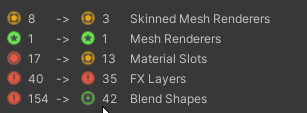
 Twitter
·
serene ravine
Twitter
·
serene ravine
oooh i will try this
jagged sequoia
and it works non-destructive so you don't have to worry about the Avatar breaking
serene ravine
it seems to work on the upload that i just did, testing it with a friend
i couldnt be botherd to mess with it more rn but ill make a new one tmmr and use that to see what i can do
jagged sequoia
hopefully it helps out
 dry orchid
Hey, can someone help me? Uploading an avatar for quest but it appears invisible. I know I obviously need to provide more information so let me know what information you need to hopefully help me with this problem, thanks!
sour vault
dry orchid
Hey, can someone help me? Uploading an avatar for quest but it appears invisible...
Send a picture of your entire screen
dry orchid
sour vault
Send a picture of your entire screen
Unity or vrc?
sour vault
dry orchid
Unity or vrc?
unity
dry orchid
sour vault
unity
 sour vault
And you're saying the avatar is completely invisible in VRC?
dry orchid
Yes
sour vault
Have you tested it with other people to make sure it's not client side?
dry orchid
Yeah
Though I just uploaded it so I don’t know if thats a problem that commonly occurs with freshly uploaded avatars
sour vault
It doesn't. Does the avatar have any animations applied to it?
Also, can you press play in Unity to see if the avatar disappears in play mode?
dry orchid
It’s gone on play mode, and I don’t know about animations. Kind of new to this
sour vault
Honestly I'd recommend a youtube tutorial about animations
it would be difficult to explain, but i'm not even sure what's happening with your avatar
 hexed moss
dry orchid
hexed moss
dry orchid
it might help you to get the gesturemanager plugin for unity through vcc. Gesturemanager allows you to test the avatar in unity, and see parameters, animations and transitions change in real time. this might help you see what exactly the problem is without needing to load into vrc.
otherwise, you have a console warning at hte bottom of that screenshot that ive never really seen before, are you using vrc mobile shaders for the avatar? the shaders might be causing some issues.
 livid galleon
why can't I switch to android build
sour vault
You mean Android?
kindred fractal
livid galleon
why can't I switch to android build
You need to download it in unity hub
Its under the instillations tab
Then you click the 3 dots for whatever unity version
And check “android build” then wait for it to download
livid galleon
Ok
serene ravine
im trying to take apart the clothing into seperate pieces for quest toggles in blender and i was wondering if all i had to do was put these in different things?

 toxic crest
Hey i could use help. I trying to add a Flower to a avatar, and I am aware alot of things are limited for quest, Is there any way to Get rid of the box around the pedals?
 late silo
toxic crest
Hey i could use help. I trying to add a Flower to a avatar, and I am aware alot ...
late silo
toxic crest
Hey i could use help. I trying to add a Flower to a avatar, and I am aware alot ...
cut it out in blender
 pearl thicket
serene ravine
pearl thicket
serene ravine
where can you find this in unity ?
serene ravine
Vrcworld tool kit
pearl thicket
do you have any idea why this FBX its 30Mbit, here it said 10mbit


cant upload it cant because of this
serene ravine
Poorly optimized
You need to put it into blender and turn down some stuff
Download the fbx and import to.blender and look up a video for it. That's what I did
pearl thicket
like material, polygon and etc ?
serene ravine
Use the dissolve tool is my recommendation
I don't know much at all about blender tbh, I can send the video I watched

This time we're looking into some simple tips on how to optimize your VRChat avatar in Blender.
Rainhet's Tutorial Playlist:
https://youtube.com/playlist?list=PL2EEbgwoJzdt5kFVDyY2lliNqf7cWJeD3
#Blender #VRChat #Tutorial #Optimization
If you found this helpful and entertaining, please consider coming a Patron.
https://www.patreon.com/Aggrota...
Very helpful
pearl thicket
oh ya i know how to use blender, just i dont really want to take time for that xD and was curious why the size of the FBX change between my folder and VRC importantion
still gonna watch the video, probably gonna learn some tips, thx :p
serene ravine
pearl thicket
oh ya i know how to use blender, just i dont really want to take time for that ...
It takes like 2 seconds trust me, it will save you a lot of work
dim cove
how come whenever i add "ignore transforms" or "immobilize" on physbones for quest, they no longer render?? like, the physbones get removed completely. despite these methods being used to "optimize" physbones...
random comet
pearl thicket
oh ya i know how to use blender, just i dont really want to take time for that ...
Removing unused blendshapes is usually the first thing to go to if you haven't done that already
pearl thicket
blendhape ? dindt know that was that eheavy
random comet
if you have a bunch of them, yeah
there's Unity tools to automatically remove unused ones non destructively (VRCFury, or D4rk's Avatar Optimizer)
 tired pawn
I uploaded an avatar to quest but it still won’t show up. I uploaded pc first and attached the blueprint if and it says it uploaded the question version but only oc is checked off. Anyone know why?
jagged sequoia
if it's only turning black using the vrchat mobile shaders it's probably vertex colors and those would be need to remove from the avatar
jagged sequoia
this tool has a Vertex color removing option https://github.com/kurotu/VRCQuestTools

GitHub
Unity editor extension to support uploading VRChat avatars for Oculus Quest - kurotu/VRCQuestTools
 slow creek
okay i download it an set up a copy of the avatar I want to put into quest now what do it do
 frigid talon
What's the best workflow for quest support; I get how it's done, but what's the most efficient way to do it?
Duplicating the project, or doing it right from the same project and just switching platforms?
random comet
Unity's Asset pipeline v2 basically caches the other platform, so you only import assets for that specific platform once
frigid talon
random comet
Unity's Asset pipeline v2 basically caches the other platform, so you only impor...
No need for an Accelerator?
random comet
Unity 2022's asset importing improvements help as well
frigid talon
Working on 2022 due to the way superior import times btw
So the best way would be doing it in the same project, right?
random comet
yes, just minimize the assets you have in your project and import times won't be abysmal
frigid talon
Bet, tysm!
 abstract gulch
 livid galleon
kindred fractal
Then you click the 3 dots for whatever unity version
livid galleon
kindred fractal
Then you click the 3 dots for whatever unity version
where is that
kindred fractal
Unity hub under the installations tab, like I said
livid galleon
kindred fractal
Unity hub under the installations tab, like I said
where here???
 kindred fractal
Installs
livid galleon
kindred fractal
Installs
then???
 kindred fractal
Gear icon
Then check “Android build” and wait for it to download
And you’re done
livid galleon
kindred fractal
And you’re done
Thank you
tired pawn
It says I’m missing a prefab? I can’t even see the avi on the quest version
 tired pawn
Hello?
 visual fox
frigid talon
visual fox
frigid talon
Anyone know why this suddenly appeared in the eyes of my avatar when I used a mobile shader on the eyes?

it is not there normally

 lean fox
Hey everybody I have a problem when I upload an avatar it tells me this:
Warning! Using more than 1 pixel lights on a mobile device may decrease performance severely. You can change the mobile quality settings in 'Project Settings -> Quality Settings
I changed it to 1 or 0 but the problem persists
robust whale
frigid talon
Anyone know why this suddenly appeared in the eyes of my avatar when I used a mo...
try clearing vertex colors in blender
robust whale
lean fox
Hey everybody I have a problem when I upload an avatar it tells me this:
Warnin...
does it cause any errors in vrchat or stop you from uploading?
lean fox
robust whale
does it cause any errors in vrchat or stop you from uploading?
It stops me the upload but it's ok it was some mistake hidden behind
Thank youu
 glass jackal
did vr chat just updated the mb from 10 to 40? cuz it messed up on some of my avatars and i cant upload them to quest
even though they were not going over the limit before
How do i fix it
Do I need to downgrade on my vcc to get it to work again
jagged sequoia
glass jackal
did vr chat just updated the mb from 10 to 40? cuz it messed up on some of my av...
no the 40 megabytes is referring to how much memory it takes up when uncompressed not the download size
glass jackal
So I have to compress the texture to be able to upload it on quest.
jagged sequoia
you'd probably want to lower the maximum resolution as well as all the textures have to fit in that 40 megabytes
 hot basin
glass jackal
did vr chat just updated the mb from 10 to 40? cuz it messed up on some of my av...
hot basin
glass jackal
did vr chat just updated the mb from 10 to 40? cuz it messed up on some of my av...
they made it IMPOSSIBLE to upload quset avatars now!
i couldnt update my avi anymore, i even removed EVERYTHING and just kept a blank base model Avali, and with the textures lowered a lot, it was STILL 12MB OVER
when it WASNT before!
nimble prairie
hot basin
they made it IMPOSSIBLE to upload quset avatars now!
It really isn’t impossible, my friends have had no issue.
hot basin
before this Update, i was able to upload this entire avi to quest, with textures lowered

was sittingat 9.50mb or so.
now i cant even post this, without it being at 12mb
 nimble prairie
There’s gotta be some sort of issues I have Avis with some good textures, lots of toggles, assets and what not
 oak robin
Hey question, when uploading my avatar to quest with standard lite for some reason when normal maps are applied, only in game it looks jumbled and diseased, anyone know why? Im really tired and have been trying to figure this out for hours
dim cove
oak robin
Hey question, when uploading my avatar to quest with standard lite for some reas...
it could be some sort of compression?
glass jackal
hot basin
they made it IMPOSSIBLE to upload quset avatars now!
Well they better fix that
so i downgrade the sdk until then
oak robin
dim cove
it could be some sort of compression?
Only used crunch compression to lower the mb count
dim cove
oak robin
Only used crunch compression to lower the mb count
then that could be why
oak robin
do you know why it does that?
 soft latch
How do you turn on auto show avatars for quest 2
steady idol
soft latch
How do you turn on auto show avatars for quest 2
you dont
soft latch
Mhm ive learned
cyan apex
oak robin
Only used crunch compression to lower the mb count
crunch is pretty bad, i recommend not using it
the avatar gets compressed when the assetbundle is built anyway
crunch does very little, reduces quality and causes lag when loading in
steady idol
cyan apex
crunch does very little, reduces quality and causes lag when loading in
Also likely crashes you depending on how much is crunched
 hushed ibex
particles additive is finally working as it was supposed to? on android
late silo
hushed ibex
particles additive is finally working as it was supposed to? on android
Wait what?
hell yeah just tested it
hushed ibex
some questies friends dm me to thank for updating their avi, they said they can see blush and other particles now. But i never updated their avi
late silo
hushed ibex
some questies friends dm me to thank for updating their avi, they said they can ...
I just tested it
hell yeah
cyan apex
steady idol
Also likely crashes you depending on how much is crunched
awesome lol
finite lava
quest transparency? NOWAYING
kindred fractal
WHAT
Oops caps
Is it just for particles n stuff?
Or can you use it on everything
late silo
kindred fractal
Or can you use it on everything
thats a good question let me find out
kindred fractal
Ouu. Keep me posted
This is w/ the newest SDK for 2022?
Bcs if its everything I’ll take advantage of it like an absolute mf
late silo
pretty sure its just particles since i didn't see a new shader, but we shall see
kindred fractal
That’d make it possible for Questies to have fishnets and ripped pants n stuff wahh
Heck ye
late silo
kindred fractal
That’d make it possible for Questies to have fishnets and ripped pants n stuff w...
so while there's no new shader it now lets you use the particle shaders on avatars so if you play around could still get neat effects
kindred fractal
Kk coolio
 little kettle
Can someone please tell me how to do this?
Can I delete only the Quest version of my avatar that I have uploaded?
 random comet
only way currently is to delete the entire avatar and reupload the PC version on another ID
(yet another thing worlds have but avatars don't)
steady idol
its stupid yes
 rigid scarab
For some reason on the quest version of my model, the backpack UV map is super zoomed in for some reason, and makes my backpack model one solid color for no reason, can anyone help me with this?

it works fine on the non quest model when using poiyomi and a setting called uv set to "uv2"
pls help :C
steady idol
tiling and offset doesnt work on quest side
rigid scarab
i noticed
the shader standard lite has a UV setting like poiyomi
but there's only 1 option
which dosen't change anything :c
i found out what the problem is!
blender UV maps
i am big silly.
cyan apex
steady idol
tiling and offset doesnt work on quest side
i thought it did?
cyan apex
rigid scarab
it works fine on the non quest model when using poiyomi and a setting called uv ...
i think the quest shaders always use UV0
steady idol
cyan apex
i thought it did?
very finnicky
it doesnt exactly work normally
similar to emissions rn
dim cove
cyan apex
i think the quest shaders always use UV0
you are able to use uv1 if you use standard lite
but unfortunately uv2 or uv3 will not work
 jaunty walrus
is there any way to use a Smoothness map with the standard lite shader for quest? all of the other maps have options but I haven't found a way to do smoothness mapping
jagged sequoia
jaunty walrus
is there any way to use a Smoothness map with the standard lite shader for quest...
smoothness would be Channel packed in the alpha channel of the Albedo texture or alpha channel of the Metallic
muted pumice
steady idol
tiling and offset doesnt work on quest side
It absolutely does work
I’ve used it on 4 or 5 Quest avatars
You just need to set up your UVs correctly and know what you’re doing
 frosty saddle
my first ever avatar: "the geck"
 robust whale
steady idol
tiling and offset doesnt work on quest side
robust whale
steady idol
tiling and offset doesnt work on quest side
yes it does
i used it for my avatars recently and everything worked as expected
jaunty walrus
jagged sequoia
smoothness would be Channel packed in the alpha channel of the Albedo texture or...
this doesn't appear to work, packing the roughness value into the alpha channel of the albedo texture does nothing
alright, I figured it out - in order to do smoothness mapping you have to use specifically the alpha channel of the metallic map, NOT the albedo map (and you have to invert the alpha before importing it, because Unity uses smoothness and the entire rest of the 3D industry uses roughness)
 high dew


 lucid plume
Does anyone know how to find out where upload size is coming from?
Avatar is a modified Chimera Hue to get it under the 10k poly limit and 1 material, but no matter what i do it just stays at 10.04mb. Only have 1 1024 texture on it and have removed all the playable layers
random comet
lucid plume
Does anyone know how to find out where upload size is coming from?
Avatar is a ...
You can use VRWorldToolkit to view your last built assetbundle size and what's the largest assets
lucid plume
random comet
You can use VRWorldToolkit to view your last built assetbundle size and what's t...
Is it for worlds or avatars too? Bc it looks like its meant for worlds
random comet
the build report tab can be used on any type of project
 zealous flame
Hey! I found a problem in my avatar.... I made a Quest avatar with a few color shifting radial toggles and built and publish it to Android, then in the I just switched to Windows in the SDK Builder and uploaded the exact same avatar without any modifications and went to test it in Quest and moved the toggles and stuff people on PC only see default avatar. What is usually the cause? This is what the expressions parameter look like:
 lucid plume
Is it for worlds or avatars too? Bc it looks like its meant for worlds
lucid plume
lucid plume
Is it for worlds or avatars too? Bc it looks like its meant for worlds
also figured this out - the SDK wasn't reporting it accurately before first build
cyan apex
jaunty walrus
alright, I figured it out - in order to do smoothness mapping you have to use _s...
ah, in the normal non-lite standard shader, you can select which alpha it uses
 jaunty walrus
yeah standard lite has some weirdly specific requirements
zealous flame
zealous flame
Hey! I found a problem in my avatar.... I made a Quest avatar with a few color s...
Solved! Nevermind