#world-quest
1 messages · Page 8 of 1
 teal valley
 potent patrol
This is also important for anything controlled by an animation btw
 dusk cypress
any quest-friendly skyboxes on the unity asset store anyone knows about?
 patent bear
Honestly if you process the skybox texture correctly I'd think any would be fine.
 vital lance
tip for skyboxes and high res textures on quest: go to your texture import settings and click android override: https://i.gyazo.com/8cb0a9aefe7aa6e69d817b6a8abfa472.png

then pick format RGB Compressed ASTC 4x4 ... it looks much better than the default import settings
the block size is a quality slider, 12x12 is worst, 4x4 is best ... it takes up a little more space this way but it will have way less banding and artifacts
(this works for avatar atlassed textures just the same)
 dusk saddle
wait the quest is android
vital lance
yeah, pretty much a beefy phone in an oculus inside-out tracking headset
deep down it runs android os and on top of that oculus software
 zealous epoch
is it okay if my world is 43 or 44 mb
 untold tulip
@zealous epoch Has to be 20mb or less
zealous epoch
@untold tulip okay thanks just one problem every time i download a asset and a simple only one it will trun to 50 or 100 mb idk why i have restart my unity and still dont worry
 solid grove
@dusk cypress I liked this one. I recommend converting them into a single texture. Not hard to do that imho

Get all the 10 Skyboxes ready to use for your scene. Very recommended for scenes that involves the day/night beautiful scenery like mountains and high skies atmosphere.
Skybox that used in the unity is exported .png at 1024px with an artwork source (as a .blend file) so yo...
zealous epoch
Okay i am mad at unity every single time i would try to make something it would first tell me that it is 22 MB okay good but after few gets it would turn to 70 MB every time i add one single simple thing
Can someone help me with that problem
 restive turtle
to publish a world to be quest ready, its the same procedure as with avatars?
 harsh seal
yes
 past shell
made some change. look better like this I think
 potent brook
:+1:
restive turtle
this already looks low poly, just use a mesh collider
just dont use mesh collider on high poly models, generate a convex for them
past shell
The scene is 25k vs my custom collider 200
 crimson canopy
Wouldn't primitive colliders be better than a mesh collider?
Mesh colliders can be quite CPU intensive, primitives like boxes are recommended. In particular, the floor here can be covered with just one box collider, and you can use several box colliders for the walls. The pillars can be covered by capsule colliders.
past shell
So using multiple collider component instead of a mesh collider on a low poly is better you say
 nocturne hare
always use primitive colliders where possible.
mesh colliders should only be used if you want accurate physics on a rigidbody
crimson canopy
Low poly mesh colliders are actually sometimes used for level geometry, because in some cases (such as terrain), primitives simply aren't feasible
But in your case definitely do primitive colliders. It's cheaper, even though there are technically more colliders.
Mesh colliders are also most efficient when they're marked "convex" but this isn't always an option either
past shell
Those small detail really impact that much? I dont think most of the world go that way.
crimson canopy
Well in your case the mesh collider is quite low poly so it probably wouldn't be a very large issue. But at least for the floor and those walls, I would recommend a box collider
Also if each pillar is its own mesh collider (instead of part of one big mesh collider), you can make it convex which is also better for performance yet again.
Of course at that rate, a primitive is probably even better
past shell
At the end. Everything will be one mesh and one texture when I place everything
And put bone on all the object if I want to move them later
potent patrol
@past shell avoid using a skinned mesh renderer if you don't need it. Skinning consumes CPU, and the quest doesn't have much to spare.
Also you need to separate static objects out anyway for lightmapping
past shell
What lightmap. Everything is lit and dont receive or give shadow
The texture already have fake shadow. I can always paint fake under the object that I add if I want
 queen pike
unlit?
past shell
Ah. The mobile toon shader
crimson canopy
Don't use realtime lights, you don't have to pre-shade the textures though
But you could for a world. Still need baked lights and a light probe group for avatars.
queen pike
also, don't make skinned meshes if you can avoid it
past shell
All this information. I start to be confuse. I have one mesh one material one texture box collider. Everything regardless shadow is off. What more
vital lance
i think you're good my dude
crimson canopy
Make sure you don't have any lights set to "Realtime"
Set them to baked instead and add a light probe group or avatars will be too dark
past shell
Yeah. Always the light that I was not sure how to set
 lone flare
Anyone know where to find funny quest avatars
Big als is good but looking for the funny ones
crimson canopy
Yeah but that doesn't really work
For avatars and dynamic objects
You should bake your lights for at least the light probes and/or the ambient light, so that avatars will have the right lighting.
Otherwise avatars will look very out of place unless they're unlit
past shell
look alright at the moment. up in my world to see by yourself idk. all the avatar dont have shadow. Its an avatar world anyways
kinds raid
potent patrol
@past shell are you testing on a quest or in the editor?
harsh seal
I will tomorrow !!
 harsh seal
wowww it is amazing and fancy!!!! better than the pug tbh!!
 celest spear
hey
 primal bobcat
isn't it required that quest worlds are below 50mb? Because blackcat isn't exactly below that limit lol
primal bobcat
so it's just the owners way to exploit their world in cross platform even though it isn't
vital lance
is it below 50 mb on quest
because you see the pc stats on pc.
many quest users go to the black cat so i know they can enter it without issues
past shell
They might see something really different
primal bobcat
i'm not really sure how it works on quest worlds, so are you basically uploading your world twice? one for pc and then another version for quest where quest users can interact with pc users still?
past shell
Yes
But you can add object, collider on a plateform and not the other
Like only quest zone
But thats not cool
vital lance
Does anybody know how to get to the black cat 56900
nocturne hare
on PC its a bit easier to immisce yourself into a friends+ provided you have an invite link from someone, on Quest, if it's not listed in public instances or isnt joinable from one of your friends, youre screwed.
 reef slate
Is there a way to deactivate the quest part of your cross compatible world?
my cafe isn't working at all no matter how much I remove, so I want to try to make a new one just for quest and then flip it to PC. But I want to remove the quest part of my current world
potent patrol
@reef slate parent everything under a root object. Stick an animator on that object, and use it to enable the quest objects (/disable PC ones). Then disable or enable the animator component as needed
Or have root objects for the quest specific and PC specific parts and enable/disable them as desired
reef slate
hm? I'm a little confused by that
I have two seperate projects one for quest one for pc. Although both are on the same world ID, but I don't see an option to disable the oculus quest part
potent patrol
Oh, I see what you mean. No, you can't unpublish the quest part, sorry. You could upload a "sorry, the quest version is unavailable" world though
reef slate
my world is in a constant initialing error for quest users, and I have no way to test or fix anything . . . cause I don't have a quest
 empty nexus
Could not load type 'PropertyType'.
reef slate
Hum, I released another quest world, in an attempt to see if people could join it. I have it super optimized, but Fionna still informs me it's a no go.
OneShot Quest is my lab world, can someone halp me?
 silk hemlock
Stuck at Initializing World phase. Did not load
reef slate
sigh
I have no way to know what the problem is, this is ridiculous
Literally a smol world and still no one can join, I've optimized everything to hecka smol tri rates and such as suggested in oculus quest documentation (aka below 50000 tris). Is standard shaders not to be used in worlds? I mean I have updated most things to be on the Mobile Shader but wtf. . . . Nothing is working and this is frustrating
silk hemlock
Start with updating Unity to 2017.4.28f1 and reimporting latest VRChat SDK.
reef slate
I already did
I made it in the old version and they updated it right as I was going to post it
silk hemlock
Standard shaders work in worlds. At least Unity Standard works
reef slate
so I redownloaded everything
silk hemlock
Can you load into a world on PC?
reef slate
yes
same for my Cafe . . . although I know that isn't optimized at all quest wise, but since there is no way to remove quest from cross compatible worlds it's stuck being broken. I spent alot of time making a new one specifically with quest on mind and it's still broken internal reeeeeing
 tropic mulch
Kinda complex but using adb LogCat you should be able to read the output console while playing with Quest, just keeping it connected via USB
There's a preview package in Unity to use that directly from Unity, but I can't remember if Package Manager was already in the 2017 version?
Otherwise you should install the Android Dev Tools and find LogCat there, if I remember correctly (not very probable actually)
reef slate
I just wish this was much easier
I'm banging my head on the wall because of it
It gets to the point of why am I even trying >~<
On one hand you have PC which is incredibly easy to setup and publish, but then you have Quest in the other that is super super tough towards Creators . . . which was explained why it was in the documentations.
I don't even have a quest
tropic mulch
Hard to debug without a Quest... But in cases like these sometimes the error might just be a very simple oversight, it happens a lot
Kinda like, enable a checkmark and now it works
reef slate
if only this checkmark wasn't in a haystack of needles
tropic mulch
I can almost feel that
vital lance
ah @reef slate try this:
instead of clicking "last build" when you swap to the android build and try to upload, use "New build"
i had an issue after i tried to upload my world's pc version with "last build" (the last one being android)
i couldnt join it
reef slate
I always use new build
vital lance
then i dunno
reef slate
exactly
vital lance
your world ruined my caravan of 8 quest users exploring though 😦
reef slate
;n;
vital lance
thats right im gonna bully you
reef slate
nyaaoooo
anything but that!
I dun know why the quest build is fighting me
I have no way to fight back, and the Oculus quest build is just telling me "No U"
vital lance
wouldve been a nice world too
reef slate
I mean I wish the cafe could work, but that an alot of tri's and would probably be bad for quest
but at the same time it's doing the same issue
this new one I optimized and I still have the same issue
gonna reupload it again if you wanna try again @vital lance
although gib me a few
vital lance
i dont have a quest either
reef slate
ree
reef slate
I reeeeeuploaded if anyone wants to try OneShot Quest again
doubt it's gonna work ;n;
silk hemlock
@reef slate It did not reupload. Can tell because world download indicator was 100% full instantly. Make sure that you don't have red errors in Unity Console tab. Try pressing Play in editor and check if world will run in the editor.
reef slate
ok try again
silk hemlock
Still not loading. World did not redownload.
reef slate
reeee 😿
how many times do I need to upload for it to actually upload
in the console it seems to be updating the 2017.4.15f1 version yet I've uploaded on 2017.4.28f1
Error?:
2017․4․15f1_3_standalonewindows_Release: upload complete, has existing or pending version, latest version not queued
;n;
why is this fighting me?
vital lance
did you grab the new sdk too
reef slate
it's bad enough I have no way to remove versions, unless maybe I ask nicely. Also yes I did although I uploaded on the previous one . . . and then they released an update >~<
I'm on version 16, if that implies how many attempts I've taken to publish this
now version 17
silk hemlock
Looks like vrchat SDK/API fault now
reef slate
Ok . . . I went to my desktop and have reuploaded . . . . so I'm gonna go out on a limb and say it's not gonna work
 turbid elbow
what do you need?
reef slate
my quest version seems to fail . . . I've been reuploading countless times . . . that's the gist of it
but . . . I don't have a quest, and have ta ask others >~<
turbid elbow
does it have a name i can search?
reef slate
OneShot Quest
turbid elbow
let me have a look
first answer: https://www.vrchat.net/home/search/"OneShot Quest"

VRChat lets you create, publish, and explore virtual worlds with other people from around the world.
shows up there
let me inQuest
reef slate
what . . .
so uploading it 16 times on my laptop doesn't work but I upload it once on my desktop . . . and poof!?!
(╯°□°)╯︵ ┻━┻
 mighty condorBOT
┬──┬ ノ( ゜-゜ノ) There you go
turbid elbow
no idea. please send 200 quatloos for tech support 😄
reef slate
ack, that is a relief tho.
40 - 70 frames all around
An Quest peeps can visit wooooo!
turbid elbow
whee
 mossy sonnet
I've been working to my limits as well as the quests limits to bring 2 Horrors to Quest. One is ready and the other is not quite yet.
mossy sonnet
Uh can anyone help? The other world I've been fixing and trying to remove bits but it stays stagnant at 66.76 MB. no matter if its deleted... Its a PC world being reworked for Quest.
 crude lintel
set the dynamic materials in your vrc world to zero and let it repopulate, might be some extra useless ones in there
 raven dagger
40fps without more than one user in it is rather low for Quest.
reef slate
I mean there was 5 other people, and the limit is 8
at this rate, I don't really care, quest is so bothersome and aggravating VRChat wise for world makers, took me 17 attempts to even get someone in it. Not to mention no way to destroy cross compatibility. Once you've uploaded, thats it, no take backsey's, unless someone can inform me since when I asked a few days ago or so no one gave me a clear answer or didn't know.
 opal orchid
It’s true, without your own hardware it’s nearly impossible, and even with the hardware without logs it’s hard to figure out issues. And you need two people to test PC/Quest sync issues. As time goes on hopefully more people will get Quest and we will have better workflows.
reef slate
My unity is being a pain too which isn't helpful, just spent 5 hours fighting it to reupload another map that might now be quest compatible, OneShot Cafe is the place. Although I fear it's might be broken, since the original and quest version is different in certain places
turbid elbow
whee
reef slate
has anyone gone to see if the OneShot Cafe is still broke?
I figured since I can't reverse cross compatibility that I might as well try making it actually work
 forest forge
что за хуйня
 slim ravine
Same
reef slate
?
 sand otter
Anyone know of any quest MMD dance rooms, like the ones you can pick a song from a list, stand on a spot, then get teleported to a dance floor and your avatar dances? I found some for PC users but are there none for Quest users?
reef slate
ha, that will probably never be a thing
those worlds are ginormous in space and the quest isn't allowed to go up that high
each of those worlds are 200 - 400 MB
sand otter
Tks MrCreepers. Guess I'll have to wait for technology to advance enough to support it, like maybe in 10 years or so haha
reef slate
yea that is unfortunate I love those worlds but in the documentation it says this:
You should be aiming for a maximum of 30-40 MB. You cannot upload or access worlds that exceed 50MB in size after build-time compression for VRChat Quest.
vital lance
it's an arbitrary restriction, not a technology issue. limiting world download size just typically means a less laggy world. it's still set arbitrary though
sand otter
That would explain all those stripped down worlds I've been visiting. Ugh.
reef slate
yep
I've stripped down my cafe in an attempt to make it quest worthy, not even sure it works
atleast I know my latest one I tried works
although if you do it right, you could make a very low poly room that contains abunch of stuff
sand otter
I'll leave that up to the creators (like yourself), I'm a simple player who enjoyed the dance worlds. I'll just keep streaming Steam from my computer to my headset until the day comes when the headset is powerful enough to support more dynamic/complicated worlds (but I'm not going to hold my breath in the meantime).
reef slate
o, doing one of those things? Didn't they just try to remove that?
sand otter
Yeah but you can still sideload Virtual Desktop via some app I installed
reef slate
not sure why oculus had to throw such a fit over it, I mean goodness
sand otter
Still works the same as before they ripped it out, you just have to install the "fixed" version through your computer, not on the Oculus Store thingie
Plus there is ALVR (I think that is what its called). That one works still, albeit I found it a bit slower (i.e. laggy) then Virtual Desktop
I didn't agree with how Oculus handled Virtual Desktop and Steam streaming. Mind you I'm not a business man so am more impressed by the functionality they had, not the money they may be losing on Rift S sales or from Steam
reef slate
probably not
🤷
I mean steam could easy just rip out oculus support but I'm pretty sure they just updated it to show oculus controllers instead of the default. Not to mention that oculus allowed ReVive to be a thing after they tried fighting for not to be
sand otter
Ah, the program is called SideQuest. Install that and it'll allow you to install the "original" VR Desktop program where you can stream Steam (and whatever else is on your desktop) directly to your Oculus Quest
It all sounds like money grabbing to me, everyone wants to stuff their pockets
reef slate
it's facebook . . . so probs
sand otter
$$ yep!
reef slate
here's a comparison from PC to Quest for my map
sand otter
Wow, I don't know how you do that stuff - so many layers to deal with. What is the name of the world?
reef slate
OneShot Cafe . . . not guaranteed to work, as it wasn't before. But I just reuploaded it and maybe now it is? 🤷
I've been having problems with uploads and Quest, I also don't have a quest
sand otter
D'oh, that'll make it challenging to verify if things are working! I'll check it out when I get home and let you know if it was working
I normally don't do just OneShot though ...
sand otter
True true true
reef slate
I atleast know I got one working, but there is no way to disable or remove it once it's up without taking down the entire world, to my knowledge
sand otter
Sounds like a pain. Guess that's why its still an Early Access Game
 harsh mural
hey any quest user that need water shaders .. i am looking to make a quest version of my water shader but need a tester .. please feel free to DM me if your interested
vital lance
you can't make shaders for quest
you're required to use the quest compatible shaders provided by vrchat
it's a very short list
well, for avatars anyway. idk how it works for worlds. i may be dumb
vital lance
for now we're allowed to upload android compatible shaders in worlds
I just mentioned some rules about it in #shaders if you want to know the differences
 coarse grail
yay so we might have halfway decent water
harsh mural
not really that great as so many limitations
coarse grail
would Wind Waker water work under the quest requirements
harsh mural
i just posted a simple water shader in #shaders you could try with quest, i have no way to test it for you but should work
coarse grail
don't have a quest myself just interested in knowing what I can use for cross compatibility
past shell
On my world I turn off all shadow and light. So opti like ever
 midnight kernel
what would i need to do to make a world quest compatiable, (what assets can i use ????)
coarse grail
Creating content for VRChat Quest is a challenge-- you have to create attractive, compelling content all the while keeping the content optimized for a mobile device. These are the same challenges that game developers must deal with while building for mobile. Here, we'll giv...
meet the guidelines in this document and you should be good to go
coarse grail
I'm not sure but I found that I can make that go away by Breaking prefab instancing on the chairs
 stuck river
You probably need to use the VRChat/mobile shaders instead.
stuck river
So open the material that it is complaining about, then there is a drop down for the shader the material is using.
stuck river
materials would be the ones with the model, or separate materials files that have *.mat . If you dont have one, or have one integrated with the model, you will have to create a new version of the same material
midnight kernel
i have litteraly no idea what you are trying to tell me
this shit makes me so fucking mad
its so complicated
stuck river
Ok, so from the very top. In the Project View, with the prefabs, you usually set a material for a mesh. By default when you bring a model in, you have a default material set to it.
materials by default look like this in the Project
midnight kernel
i know nothing at all
i dont know what a prefeb or a mesh is
i dont understand what i saod
said
u said*
why cant i just change the shader here ?
stuck river
Terrains work a bit differently than models.
I need to look it up, so few minutes
Ok, so Under the Material Selector, Select Custom, then it will allow you to set a custom material. for the base terrain
stuck river
Then press on the Custom Material slot and create a new material
err, in the Project view, right click, create new material, then bind the material to that slot
midnight kernel
neither right or left click is doing anything
stuck river
in the Project view?
midnight kernel
well, what is that ?
stuck river
you can also do it from Assets > Create > Material
Project View is the section of the window that reads "Project"
stuck river
Yes
midnight kernel
omg thanks
stuck river
VRChat/Mobile and any under that
For future reference Project (View) is the panel below the Hierarchy and the 3d view
it lists all the prefabs, scripts, and assets you have
for the project.
midnight kernel
there are 2 chairs the trrian and a mirrir
stuck river
you might need to check the materials on the chairs and the mirror too
stuck river
not sure if t he sample objects actually have the right materials
since they are, mostly for pc by default
stuck river
that should be ok
its teh chairs
the materials on them are the Legacy Shader / Diffuse
midnight kernel
i dont find the material on the chair
stuck river
Its teh cubes inside the chair prefab
you can swap them by drag and dropping a material onto them
midnight kernel
okay and how do i find these in already existing chairs
ahh found it
cant edit them tho
stuck river
Yeah its the default diffuse that are on the cubes, you can swap them out tho
so you can, forexample, from the project view, drag and drop the material onto the mesh it self
midnight kernel
i still dont know what a project view or a mesh is
it actually worked
ahh finally its gone
thanks
stuck river
Ok, i do suggest familiarizing your self with the panels in your window
midnight kernel
yeaa
stuck river
if you have something closed, you can open it through Window
reef slate
LoudO you can keep standard or other shaders in worlds
@midnight kernel it's just avatars that it's restrictive on
stuck river
Ah good to know when I start looking into it.
reef slate
it's just warning that don't quite mean anything atm, from what I've seen and been told by Tupper.
Also you might want to find the sibling object, it just means there is an object with-in an object that has the same name
Although I would highly suggest not making a quest world as your first attempt, let alone with 0 experience your just asking for a headache
reef slate
you really shouldn't be trying, and just enjoy other maps.
I mean you gotta know something to get something
And Quest world making is built for advanced builders that have to make sure it's optimized, enjoyable, and even joinable
midnight kernel
where’s the fun, I was User rank after like a week or so, I played so much. And now I’m getting into content creation. Because why not and it can’t be that advanced if I managed to create a world that has variety and a few elements like seats and mirrors. Don’t tell people to stop, rather motivate them
vital lance
i mean, someone held your hand the whole way through all the way from downloading unity
reef slate
I mean props to you. But seriously this takes years or months to do and master. Not everyone is made for map making. And if you don't follow the strict code that VRChat enforces to even get the map public then it's not worth it or even joinable
vital lance
which isn't necessarily a bad thing but it does mean that mrcreepers is right
i've seen near empty boxes that perform worse than beautiful big worlds
there's a lot of nuance to building an optimized (aka quest!) world
reef slate
PC is the better in many regards
you can't just declare in one day that your going to be content making . . . it just doesn't work like that. Do you even know what programs or how to even make 3D content? Let alone Unity isn't just a program you can go in blindly, in hope to make a map for VRChat. Not to mention you need to have some artistic degree of making stuff in a 3D environment. I mean come-on, from the sounds of it you played VRChat for a good few days and now your ready for advanced content!? Get like 150 hours in, then try to make stuff. Enjoy what is available then you get the right to make stuff
past shell
I try to make my avatar world more interesting then a simple flat plane. But I still want it to be more appealing. Dont really know what add
reef slate
I mean you could add some low poly buildings or background things
texture atlasing is your friend
you could make a complicated item with lots of materials and then when your content there is tools in blender to reduce poly count @past shell
if you want an example of how complex you can get there is probably some good worlds in vrchat's quest worlds.
I have one that has miniature worlds and quest users are still doing ok frame rate wise or a giant place that still does ok
midnight kernel
What if I can’t fucking afford a pc. And if I’ll never start how should I get better. This is so stupid, rather start now then not doing it because you tell me to
 livid ivy
@reef slate please stop pushing people to not make worlds. How else would you expect people to learn? Back when I got started with VRChat 4 years ago I had never touched Unity or knew what a polygon was or anything like that. I learned everything from just playing around in Unity and asking the community. It's one thing if @midnight kernel said they wanted to make an MMO in VRChat or something crazy, then you could advise them of starting with something simpler, but with a target of just making a world telling them to stop is just ridiculous, you're telling me you shouldn't even try making things until you have 150 hours of experience in VRChat? Why would that be required to play around in Unity? The best way of learning is doing it for many people.
@midnight kernel just go for it, I highly advise asking around when you have questions and Quest world creation isn't really harder than PC content creation, making optimized and public ready content is harder though but just making private worlds that you can test things in and invite friends to isn't harder than PC really.
What really made me learn a lot in a short time when I got started was finding a few other people in the community who also were beginners in learning to create VRChat content and all of us getting together every now and then and teaching each other what we had learned. Teaching someone else what you've learned helps a lot in making you understand what you've learned and helps a lot. By far the thing that made me learn the quickest in the beginning. Good luck!
midnight kernel
:3, yea i am super into mmo's. Idont want to specifically make some crazy stuff in vrchat but its a good way to start the 3d modeling
 lime moss
@reef slate what, you can totally just "declare you want to make worlds" i started out with 0 unity or blender skills. Vrchat alone taught me everything I know about that stuff. That's a really silly way to think and makes no sense
midnight kernel
ive spend 2 days and know how to upload avatars and worlds for quest
i am making good progress in my opinion
livid ivy
Yeah, that's the biggest hurdle that people fall on so just getting something uploaded and having it in VRChat is a huge step imo :P
When you say 3D modeling do you mean that you want to learn to model things yourself? Or do you mean you want to create things in VRChat in 3D by using existing models?
midnight kernel
well, i want to make my own game soo. im going to a technic school focosed on games design and i wanna start with 3d modeling in vrchat cause its fun for me.
livid ivy
Ah, yeah dabbling in all different parts of game creation is definitely a good idea then, knowing the basics of all is super helpful even if you decide to focus fully on one thing later.
reef slate
I mean goodness, it's just advice. It's always good to start somewhere, but it's not really a good place to start in the complex quest making
The quest aspect of world making is still a work in progress, it's more frustrating then helpful when even trying to make one. Considering it has just been introduced and still lacking in alot of departments, it's not really worth delving into unless you know your stuff.
Also don't get pissed off at me for giving out actual advice, I've been doing this for a year now. I may know a thing or too. What is this preschool and your gonna dissect everything I say to a super personal level like I'm attacking you? I even told him to go for it, but on the other hand it's not really a good place to start
slim ravine
I may know a thing or too.
reef slate
please stop, why does need to continue, just stop
slim ravine
just found it funny thats all, because you said you knew things and then used the wrong two/to/too
midnight kernel
Yea it was funny
reef slate
¯_(ツ)_/¯
past shell
Might add object that you can grab. Props etc
 plucky turret
@past shell I love that you have audio from SAO in your avatar world. Caught me off guard at first, and then I smiled.
 teal whale
sorry if this was answered before but is there any other hard limit for quest worlds other then 50mb size and 50K tri
livid ivy
🎉
plucky turret
Is the VRChat Home Kit updated for Quest?
nocturne hare
I'd love to make my own ver of the crossplatform home
plucky turret
The tutorial page still shows the old home, so I'm guessing it hasn't been released yet.
plucky turret
@reef slate I tried OneShot again and I fell through the floor. But it did load!
reef slate
that's odd, VRFerret did just fine
turbid elbow
i'm elite
untold tulip
<@&397642795457970181> hes posted this in like 4 diff chats and its huge spam
 naive zenith
bye
untold tulip
Tyty
 fast delta

plucky turret
Just made my first world last night, but I want to port it to Quest as well. I think all I need to do is bake the lighting, anyone have a reference on how to do that? I'm new to Unity, but learning my way around. 😃
vital lance
set each light to baked instead of realtime and make sure you generate lighting UVs in the mesh importer: https://docs.unity3d.com/2018.4/Documentation/Manual/Lightmapping.html

some more info there

VRCat: Community-Run VRChat Forums
Greetings! Over my course of playing VRChat I've noticed that most worlds, mainly the ones that have baked lighting, are done poorly, or in an...
plucky turret
Thank you!
vital lance
it's all pretty time consuming to set up and wait for baking, but it's very worth it
plucky turret
Yep, even on my beast of a machine rendering takes awhile. Learned quite a bit last night just kitbashing and testing.
vital lance
if you're looking for a better alternative than the built in lightmappers, there's also Bakery, it will still bring your machine to it's knees but it's using your GPU to speed some things up and it's a little more advanced

Bakery is a high-end, production-ready, hassle-free GPU lightmapper, designed as an alternative to Enlighten and Progressive.
NOTE: Requires modern Nvidia GPU (6xx or newer) and 64-bit Windows (7 or higher).
Doesn't support AMD cards for baking.
Tested on everything ...
opal orchid
I thought I’d share this idea for discussion: for Quest, it may better when you have repeated smaller elements in similar lighting situations to not bake them, but to use GPU instancing and set them to the same lightprobe anchor point. Real-time lights in scenery should be baked, and those elements merged and atlased. But batching can save a lot of drawcalls if you don’t plan to atlas.
past shell
little avatar collection
potent brook
Well that's a bit more than what you showed me last week
nocturne hare
can you add a toggleable staircase with a platform for smol avatars?
or is the scale smaller than it looks?
past shell
you can click them far away anyway. i dont know why people have trouble
go see yourself its not that high. I dont really want to put it plat with the floor @nocturne hare
for a platform I would need to check what model I have instead of putting wooded box
past shell
If you dificulty to aim. Open your menu so you see the lazer
past shell
6 of the 8 of first bottom row are normal size. Do I really need to thing aint size avatar at this point too
 warped dagger
@opal orchid That's a neat concept It would probably work well to use a style that leans on vertex colors for lighting. There's an asset that bakes ambient occlusion into vertext colors. To get good results you'd need to add a bit more edgeloops near the borders, but the extra geo would be worth a cheaper lighting model

VertexDirt is a Unity plugin for baking ambient occlusion to vertex colors.
It not uses lightmaps, no need of unwrapped uv coordinates. Good for mobile game development.
VertexDirt is compatible with both versions of Unity.
This package contains:
- Ambient occlusion ba...
opal orchid
Sadly the GPU instancing requires each mesh to be under 900 vertex properties and vertex colors double it. But for very low poly models maybe. For the Not Bad Cars I did a lot of fiddling and reducing properties to get the instancing to work, because of the a la carte nature of them.
warped dagger
Ah. Yes. Depending on the style. I did a GearVR project that needed a giant beetle swarm a few years ago. I think we had to get the very count down to 128 because of the attributes needed in the shader. That one effect was pretty much our entire render budget
vital lance
I like the name vertexdirt
 serene lintel
@opal orchid The 900 total vertex attributes limit is Dynamic Batching not instancing.
serene lintel
Instanced batches break with any global illumination
or different real-time lights
Until 2018.1
opal orchid
the only way we could get the drawcalls manageable in NotBadCars was to use the same light probe anchor. It would only work for a fairly uniformly lit and baked world.
serene lintel
Yeah, although did you try a light probe proxy volume?
You might be able to use the same proxy volume on all instances
opal orchid
Not sure if we tried that. The anchor that was the center of a single probe group worked
serene lintel
The LPPV should just generate a single 3D texture that all instances could interpolate from even with different anchors.
opal orchid
but volumes would allow for batching in different lights
serene lintel
Yeah
opal orchid
But the main point is--if you have a bunch of repeated elements and just lightbake them all, you will get more batches
serene lintel
Yeah
With 2018.1 and above instanced meshes support light maps, light probes, reflection probes, and occlusion probes.
opal orchid
and thats what people are being told to do because figuring out how to make things batch is hard
that will be nice
serene lintel
They made all of the GI shader properties instanced properties.
turbid elbow
@opal orchid same Fionna as the Rapunzel Climb?
opal orchid
yeah thats me
turbid elbow
sweet. i enjoyed it very much. thank you.
opal orchid
thanks!! I'm updating it again today, it had one or two little bugs
and cyan is updating the climbing system still
turbid elbow
took me a little bit to figure that out
like, how to equip 😄
i couldn't load an ifruit avatar though
opal orchid
The other climbing worlds have a "tutorial bot" but I figured the Equip lines next to your head would make it obvious fast enough
turbid elbow
reportedly Rapunzel smacks some people, not others
opal orchid
yeah that was one of the bugs. Target wasn't set to local
she smacks you if you have less than 25 fruits
turbid elbow
hah
once i could get up high, getting the rest was just a matter of gliding i guess
tried to glide to the final island, hit the invisible wall, and climbed and climbed 😄 glided home.
opal orchid
yeah you are enclosed in a big invisible box
opal orchid
I knew ahead of time that this was going to be a quest world, so I made all the assets modular and atlased and very very low poly
turbid elbow
noice
i look forward to play with that soon (new computer coming)
also the Chameleon was great
opal orchid
but then the lightbake pretty much takes away all the benefits of repeated elements--the vines and hairs though got batched
i am so glad I got the chameleon in. It was very last minute
turbid elbow
it's still quite good from my POV
opal orchid
thanks!
turbid elbow
i love the should equip hack in general - i should have caught on faster what with the monocycle racing world
going to enjoy learning about models and so on.
opal orchid
make sure to check out Climbing Trials - The Depths...although wait a couple days, he wants to update it with an ending
vital lance
guys, someone have working custom url video panel?
i have but i cant put links to work ...
but it loaded with my default set video for vrc
vital lance
my own.... chill playground
opal orchid
Look at the prefab database pinned messages in #world-development . Jetdog and Tsuna’s prefabs have video panels. However make sure you don’t try to sync them in a Quest world, it doesn’t work.
past shell
So its 50k max poly for a world ?
vital lance
guys can i rename place when i uplaoded already with sonething but i wanna change it ?
silk hemlock
50k is recommended visible polygons, not max. You can have more with Occlusion Culling and LODs
past shell
Oh great. I have 3 rooms at the moment so I can hide 2 of them
past shell
occlusion culling is apply by default ?
opal orchid
@turbid elbow Climbing Trials — The Depths is updated, not Quest ready yet tho
turbid elbow
okay!
thanks for letting me know.
i am battling the vrchat docs on how to install unity sdks and things
 queen bramble
anyone knows where i can find some free and good looking house assets
coarse grail

itch.io
Structural and prop models for creating house interiors
queen bramble
oh yea i totally forgot about itch io
opal orchid
Do you mean post processing stack? Some worlds have this. Quest worlds should not.
crimson canopy
They might not be aware, or they don't care. I can see why a PC world wouldn't be made Quest compatible, but I don't see a good reason to keep any world Quest-only.
dusk cypress
i can understand it somewhat, at least in those worlds they wouldnt be seeing a million people with default grey robot avatars
 fleet viper

slim ravine
Best you can do is reach out to the individual creators as they are likely unaware
 rose osprey
nocturne hare
rose osprey
nocturne hare
can confirm everyone I've met who had quest-only avatars just didn't know how to upload for PC
vital lance
Lol quest exclusive worlds wtf lol
@nocturne hare its the same for both avatars and worlds right
Technically i can duplicate a model swtch it to android and change it to a cube
And hit upload
Put a photo of my pc model as the cube quest version lol
turbid elbow
what's interesting are the PC only worlds, where the choice was to keep quest users out
 sturdy bloom
*complete noob question so have mercy!!
My wife and purchased two Quests and love how easy it is to get in and out of Vrchat together.
I built a house in Unity and am able to test it using my PC rig (rift). But when she's on her Quest, I can't invite her info the Test build.
Why?
vital lance
@sturdy bloom to make a cross platform world you have to build a pc version and an android version and upload both the same world blueprint ID
you can change the build settings of your project to android and upload https://docs.unity3d.com/uploads/Main/BuildSettings.png

a quest can't open a world bundle built for pc and vice versa, so vrchat needs both
if you're using local test build, you can't invite quest users
you'd have to upload a private world for both platforms so you can invite others
sturdy bloom
Wow thank you!
Am I able to upload for testing even tho I'm to early for public approval?
vital lance
yeah, it will be private but you can visit it from your menu and invite others to test it
nocturne hare
and you can open Friends+ instances even
turbid elbow
cool
vital lance
@sturdy bloom oh hold on, you mean you're not approved to upload stuff yet?
sturdy bloom
Im brand new like 3 days
sturdy bloom
:(
vital lance
in the mean time you can test locally on the rift 😐 hope that helps
sturdy bloom
Wow yeah thanks so much. For the info.
We are steamers and want to invite our 800+ vr members to a huge event we want to host in vrchat.
vital lance
that's a lot of people to fit in the same house but I like big planned events, you'll probably get an email about being able to upload your own content in a couple of days and you can check the info here for quest specific guidelines and tips
sturdy bloom
We built a huge club facility. Do other instances open up?
vital lance
yeah, pc limit is about 30 maybe 40 people per instance, and quest around 15 (I think)
but if you have a public world the system will allow you to open up as many instances as you need
nocturne hare
thats in a well optimized world
assuming everyone has well optimized avatars
and in the case of PC, everyone isnt running on a toaster
vital lance
yes, that's almost an empty world with very good avatars
it's very vague numbers, it really depends on the world load on the system and rendering all the avatars and doodads they have
sturdy bloom
My wife and I have crashed servers in second life and even there.com back in the day.
We are hoping that vrchat can handle some at least 100+ over several instances.
We have already started promoting about vr chat and an upcoming event to our league's of VR sports players. Very little of which have ever tried vrchat. We hope it will be lots of fun! :)
nocturne hare
yeah nah
and its not even that vrchat is an unoptimized hunk of shit, its that nobody even if everyone was using 1k poly avatars and had no Ik calculations, the resolution was halved and noone was talking, could actually run the game. it would still kill even the most powerful of PCs because its just too much from a computational standpoint
grab the rift, go into a great pug with 22 players
and watch your framerate dip from a 5th of what youre expecting to get in a world
past shell
Almost 10k dam https://cdn.discordapp.com/attachments/452951259738013697/594760032055459843/Screenshot_20190630-003115_Chrome.jpg
 past shell
I update the map soon with 3 room. I still need to figure out how to connect them
 leaden karma
2 questions. Why has the webplayer prefab been screwed again. And why have the "natural" shaders gone transparent?
patent bear
Working with quest mapping; where can I find the limitation information?
slim ravine
Google Docs
Early Release Document: Some details will change for launch version on Quest Oculus Quest Quick-Start Guide Create, Share, Play.
patent bear
Thank-you @slim ravine
@past shell Excellent work on that map! I notice a lot of polish on atmosphere.
past shell
I need to create multiple empty game object to rotate box collider. In what way its more optimize ^
past shell
Rip the 2 people that load in my update world with no floor collider
slim ravine
This is why you have a test version ;)
past shell
Naaa. Happy accident
untold tulip
Omg theyll never get out
 brave river
 nocturne hare
@brave river You don't need to say hello twice. Posting GIFs like that will eventually make mods remove image permissions from these channels, and so far they've been incredibly useful to us, and according to your message in #quest-development you are from Brazil. So if you wanna chat with other brazilians you can go to #portuguese
If you need help with something related to developing content for VRChat Quest, just ask.
patent bear
Hello, hello.
 umbral wind
That was the longest response to a hello I have ever seen
harsh seal
When uploadinf quest world is it as same as doing it in pc version
I would hate to start over on this world i made 😩
harsh seal
Ping meee
potent patrol
@harsh seal you will generally need to make adjustments such as selecting mobile shaders, merging meshes, etc to meet the quest's performance limitations
If you want to avoid double work, you could upload the same, optimized thing for both though
harsh seal
ahhh.. okayy
turbid elbow
there's going to be a complain from pc users that "all these quest only worlds" ... which seems weird as a pc should be able to see anything
then it will change to "well, all these worlds, but they're the same for quest and pc, and they are boring"
oh well
harsh seal
Because they feel like oh since i have vive and fullbody im gonna talk shit on qust users
turbid elbow
at a part when i brought the quest, demonstrating yard scale vr, with practically no setup time... and the various nifty games (no vrchat) people were sold
being able to casually drop in and out of vrchat though, for me, what a super win
 brave crane
lol
vital lance
is there a place where quest users usually hang out?
past shell
Pug west
harsh seal
the black cat
turbid elbow
there's a lot of cozy worlds
 bright adder
Here I am hoping the office world get ported to Quest

 blissful furnace
I try to upload my map but I get this message, is the updated sdk and unity to the version that you decided to use, how can I fix it?
nocturne hare
you clicked new build and not last build?
 wind jetty

What time is it? Adventure Time(line)! Despite it's colorful exterior, Adventure Time has deep and intricate stories spanning many years. We here at Channel ...
 past fox
Hello, I’m having trouble uploading a test version of my world for quest. I’ve uploaded a world successfully before and everything is the same in player settings as that other world in my new one. There shouldn’t be an issue but unity keeps telling me that the color space in non compatible. I changed the minimum API level from 4.1 to 4.3 bc it told me to even though my other successful world was at 4.1. I was able to click build for android but now it’s asking me to select a Android SDK folder? Not sure if I have it or where it would be?
 ember gyro
Hi, how's the post procesing effects toggled?
nocturne hare
You can't use post processing effects on Quest
turbid elbow
inconceivable 😄
 still turtle
Hello. I am wondering how to upload my avatar from unity. Nothing is clear.
past shell
youtube video are very clear
harsh seal
What need help with? Quest avatar limts are 5-10k but can still import higher polygons just I wouldnt go crazy with it, but what do you guys not understamd?
still turtle
It says I still need approval in order to upload my character and that I need to play VR Chat for a while to do it. Well, I have been playing it for hours and still no approval. Why?
slim ravine
How many hours
slim ravine
It takes around 20 hours to be able to upload on average
still turtle
Oh my god... well thank you very much. I better get too it.
slim ravine
20 to 40 *
slim ravine
Just have fun with the game for now
still turtle
Okay. And you are saying all this from experience?
slim ravine
I never worried about uploading any content untill i was well into 400+ hours 😅
still turtle
...
slim ravine
So you know, just have fun and it will fly by
Idling wont help either, you have to actually be playing and making friends
still turtle
Okay... Thank you. Do you get an email saying when you can upload characters?
slim ravine
No
I think it happens when you reach a specific rank, im not sure which one it is though
I think when you hit "user" the green rank
slim ravine
Oh for real?
harsh seal
Yeah I did
still turtle
Oh! Really?
slim ravine
i had no idea, well that makes it easier
still turtle
THANK GOD!
slim ravine
There ya go, wasnt certain myself
harsh seal
User is for when you constant upload. Then trusted user is having alot of friends or being around public , then known user is for being around / playing for a long time.
slim ravine
Not quite
still turtle
Okay.
slim ravine
The rank just goes up the more time / trustable friends / content / some secret sauce, you have
still turtle
True
harsh seal
I spend my time making avatars more than actually being on the game haha
still turtle
Okay. Well thank you guys again.
slim ravine
No prob, have fun with da game
you might find that come the time you get the rank you dont even want to play, which is likely why they have this system in place
harsh seal
@hoary vine. Yesss
 hoary vine
Yay a person who watches outfoxed
harsh seal
Haha 😄
 hollow stag
❤ the sideloading feature to stream from the PC SteamVR ;o)
nocturne hare
From what I've understood, video players work on Quest, but changing URLs at runtime and YouTube don't
Is this right?
I just wanna setup a Twitch player with a fixed stream
 timber plover
from my tests: videos on quest didn't work at all
 sleek edge
Português?
slim ravine
@sleek edge #portuguese
sleek edge
Sim @slim ravine
slim ravine
 vernal warren
harsh seal
vernal warren
harsh seal
Im about to make an quest world, how to make it uploadable?
or what are requirements before i starttt
And gonna make it PC wise too
coarse grail
Creating content for VRChat Quest is a challenge-- you have to create attractive, compelling content all the while keeping the content optimized for a mobile device. These are the same challenges that game developers must deal with while building for mobile. Here, we'll giv...
harsh seal
omgg teach meee @vital lance
vital lance
$50/ hour for extensive 1 on 1 blender unity photoshop lessons for avatars and worlds.. other options available
😇
@harsh seal
vital lance
From basic stuff to extensive keyframing and State systems and everything in between
😂
harsh seal
Nevermind but that is an amazing world qwq
harsh seal
Ahh it still really cool
vital lance
Also the scaling/roomsize/shape is pretty close to my irl playspace/room
Feelsbad
My tripods and base stations are missing
😬
And the art supplies all over the place are also missing
😬
And random amazon boxes 😂
harsh seal
That is like not enough space at all lmao
dusk cypress
would someone on quest be able to take a look at my world and see if it loads properly for them? made it cross platform forever ago but never had quest users test it.

Chill on top of the classic Nintendo console of 2001․ Now Quest Compatibleǃ
 nocturne latch
https://media.discordapp.net/attachments/337679085599850499/600299539248709682/520.png?width=782&height=481 where i can get that avatar

 harsh seal
duunnnooo
 umbral merlin
i know from where to get a maus
 graceful canopy
hey queation, is there an open mic for the quest?
nocturne hare
@dusk cypress is that from mario kart double dash?
dusk cypress
pretty sure yeah lol
 vocal plume
Bruh how y’all take photos like that
plucky turret
There’s a screenshot function on the Quest. It’s a little clunky, but if I remember correctly you hit the menu button, go to Sharing on the strip, and click Screenshot then go back in game and it’ll take a screenshot on a timer and save to the Quest.
turbid elbow
yup
harsh seal
how to add lighting for quest worlds please
vital lance
As far as i am aware - just working on my own first Quest world - you can't use any of unity's real time lights. So what i do is paint light information into vertex colors of my models. Not sure if that is an option for you, depends on your experience with 3d modelling i guess...
You can also use unity's lightmapping system to bake light, but frankly that is ass unless you use uncompressed lightmaps that eat up to much storage... i guess you can try and see how you like the results though
@harsh seal
harsh seal
Ohh alright, I just checked my world and it looks fine, hopefully theyll come up with something though, thanks you!
opal orchid
You can use real-time lights but like any platform, it will cost you.
Turn off shadows and use only directional, one light at a time. Many overlapping lights in any map will kill performance.
I disagree on the lightmaps. Baking is absolutely necessary but you also have to merge and atlas to not take a draw call hit.
You can also compress lightmaps. Don’t use the default compression, use the...starts with A? Ends with 4x4 block
What I ended up doing in some maps is using a shared lightprobe for repeated elements to batch them. It’s not as nice looking as baked, but it reduces drawcalls. If you are good with Blender and Photoshop/gimp, you can bake AO into the textures to make them look more real.
 wispy vortex
hello im trying to use avatar pedestal but cant get it to work is thare a tutorial that explanse it?
solid grove
What problems are you running into?
turbid elbow
good intel thankx
wispy vortex
@solid grove i can only see this but none of the other padestoles thay become invisible
wispy vortex
yes
solid grove
I’m very unsure what to do. But you should create a material, I recommend giving it the unity mobile or vrchat mobile diffuse shader and apply that material to that pink part
wispy vortex
ok i will try that tomorrow than
past shell
If it dont have an avatar id it wouls appear like that. For the cylender its a missig texture
solid grove
If it was missing a texture it would appear white (it would appear pink in blender though). The prefabs don’t have a material assigned to them so they are using the default material. Last project I set up unity was using the legacy diffuse shader and not standard like it normally does.
past shell
if you use a none supported shader it would appear purple on quest
wispy vortex
@past shell but it has a avatar id to it
wispy vortex
yeey fixt it thanks for all the help
 sacred grail
Do you have to switch the build to android to make a world compatible for quest? Also can I only use quest shaders in the world?
past shell
Yes
solid grove
For shaders you are allowed to use whatever you want, but it’s not a good idea too. I would recommended using unity mobile bumped diffuse in place of standard.
vital lance
quest can only use shaders that use shader model 3.5 and under
and grabpass doesn't work at all
 lusty vault
Recommended amount of materials per world?
And if I put the same material on two different models is it still one material or do I need to fuse the models in blender
solid grove
Hard to say because it’s draw calls you need to be conscious of. As little as possible. I have a quest world with 16 materials and about 35 draw calls on average. Hope that helps.
lusty vault
Cool. I can atlas the world to use the same material for most everything, the hard part comes in that I tend block out rooms in unity cubes
Low poly but I worried about draw calls
past shell
You dont want to have one material and one texture if the world is large . I read that
vital lance
So I was told I had to fill out a form to be able to upload an avatar world I can't find it anywhere can somebody help me
lusty vault
I don’t believe that is the case anymore. It’s all done via labs now.
You do have to make note that it is an avatar world in the upload dialog
vital lance
ok ty
 woven briar
I’ve been having a hard time finding quest only worlds
Anything I can do the filter out the worlds
slim ravine
99.99% of maps are made by creators on PC, so if they bother to do quest maps, they are usually cross compatible.
I dont know if there are many if any quest only worlds
 humble cove
is the usage of custom shaders allowed for quest worlds or do the same rules apply as with avatars?
i need to do some texture tiling based on world scale and the mobile shaders provided by VRC can't do that
slim ravine
You can use any shader provided it compiles for mobile
Just be warned it can impact perf
 maiden flower
As in it takes more work to optimize and crunch down a world to be compatible with quest. If a world has made a quest world, it is a few clicks away to publish it for PC
So it's unimaginable to have a quest only world unless the world creator wants exclusivity.
harsh mural
you would think a "quest only" world would be just fine to open on any PC same same just that it would be very low poly and all shaders would be in 3.0 or 3.5 .. i could not see a way to make it exclusive to quest users only
maiden flower
You have to upload a pc version and an android version. If you want it exclusive, just upload the android version only
Sometimes it would be nice to have a place where you know you would meet fellow quest users
harsh mural
well as blue indicated before 99.99% of creators are on PC so i would think it will be a long time for that .. unless quest users start building worlds themselves
before when i try to make some assets just for quest users i had no way to test them and when i did put a few items out i never got any feed back from the quest community.. i can not see myself making quest only assets any time soon and with the poor communication from quest users i would think other creators may feel the same way
community based quest asset testing is a issue .. most people buy quest for the budget reason and not many budget buyers have systems strong enough to render lighting and build maps that are optimized for quest
so you could have a lag machine marked by VRchat as good performance.. nice
nocturne hare
If you wanna meet quest users just go to designated worlds such as Pug West or Black Cat. As a PC user, I still WANT to meet Quest users. because it's a surefire way of finding NEW, VR, users, and getting their first impressions is great.
slim ravine
I'm with triping, I was in the fortunate position to have one of my worlds visited alot by quest users and I would always ask about performance etc
So when you can get feedback that's good
Otherwise I see where you're coming from
 velvet dune
Well, I can definitelly help with quest world testing sometime if someone happens to need help with that.
past shell
I put 12 slots but we get like 14 people in an instance
maiden flower
Friends and invites can join. The number you set is the soft cap. The hard cap is twice that amount.
 quasi holly
Ok I'm new to this server and vrchat in general but can someone tell the dev team to make open mic night available for quest?
Just cuzz all the good stuff happens there lol
raven dagger
Sadly, I think a 20 person cap is too high for Quest.
quasi holly
Aww crap
 hexed jewel
Any news on Open Mic Night for Quest?
 clever hamlet
Any news on the akiharbara and shibuya maps for the quest
 brave abyss
So ya the new update.... I updated the SDK and uploaded the world after changing all the audio sources to the new Spatial source. Now it just kicks me back to homeworld on load. Also reuploaded on new ID still does it. This map is really important should I just try to go back to the other SDK 😦
solid grove
It seems a lot of people have been having that issue
solid grove
No it is not good
brave abyss
cause this is the Ascension RP map.... which now is fucked
solid grove
This has been before the update too
past shell
I update the sdk but did not change a thing with the sound. So i dont have that problem i guess
vital lance
Hi
 warm estuary
@hexed jewel there is an open mic night that quest can go on. It’s called ‘open mic night hd ‘ I think.
 pallid flicker
Pardon me asking, but does anyone know of a quest world that has splatoon avatars?
 ruby jacinth
Unfortunately no,
coarse grail
probably going to be a bit as someone will need to optimize the Splatoon characters down to 7500 triangles or lower
wispy vortex
hey i got a problem whit uploading my new world the vrchat cam does not capture my world any one a idea?
 shut prism
Mine whites out like that too, but also make sure the far clip plane on the vrc cam is bigger
teal valley
Syncing between pc and quest is not working at all with my world. I have animation objects syncing to wrong animation objects and pickups between pc and quest seems to just not work at all. does anyone know how to fix this or know a resource to help me learn? Do both versions of the world need to be in the same unity project?
slim ravine
Them being the same project would probably help, but should work without it
wispy vortex
@shut prism did you fix it?
 astral pewter
@teal valley that seems to be really common in a lot of worlds. I spend the majority of my time with a quest user and we notice it often. Did you try uploading an updated version to android first, immediately change build targets, and without touching anything upload to pc again?
because that has worked for me, and it seems to make sense
astral pewter
that'll change the indexing order of things
and that makes a lot of sense
I had wondered how that was happening to people. It's not like pickups didn't work, they were just... different pickups. The waterslide world that got updated recently was funny that way, what was a drink to me was a flagpole with fish to her
and I think that happens with your goose often in the black cat
that's mostly speculation but I surmise it could be simply the order in which the assets get in the scene bundle starting to differ between projects.
different .meta files, you know?
teal valley
i always thought it was based on naming, but your saying its order? LIke non static items are just linking to where ever non static item is next in line?
or everything is linking to whatever is in order but static objects are always going to stay where they were placed
astral pewter
that's the only thing that makes sense to me, it has to index them somehow when unity bundles the scene's prefabs and that's getting thrown off.
I could be wrong but I don't think it happens if you publish from the same project right away without making any other changes
and I believe you have to do it android->pc
I've made it a habit to build for android first since it's the lowest common denominator. Anything there will be extremely great on pc to the point of negligible load, and it inspired my current discord icon, too, lol.
astral pewter
I figured this out @teal valley
does anyone know who in the vrchat team is responsible for cross platform stuff, or some of it?
I have a recommendation
teal valley
Omg really
teal valley
If you’ve got a recommendation, maybe posting a canny would be useful
astral pewter
The GUID is Globally Unique Identifier for an asset. So, Scenes, Prefabs, and other Unity files reference to Asset GUIDs to uniquely identify files within a single project and between different projects. you can also use it to have things across scenes
yeah, I'm gonna do that too
teal valley
How does one access the guid
astral pewter
the reason i'm putting it here is because I have a workaround right now
get notepad++, and open the .meta file
(sorry i'm half on a call, sec)
almost done
okay
sorry about htat, so with notepad++ you can edit the .meta guid tag, (guid: 8c9c1e4a88e724a60a9ac0b0bb6a52c3) for example
Normally conditions, you do not need to change Unity GUID. This is necessary when you are working with several projects and the files in these projects are being overlapped, which is extremely relivent for VRChat cross platform.
For some reason, the same file in different projects can have different GUIDs. In this situation, these are considered different files for Unity. When these same files (along with related files) with different GUIDs occur in the same (or new) project, there may be problems. In this case, you need to bring the same files to a single GUID. This is of course relevant when you are dealing with quest worlds
I did find an app to do this on github

Gist
Unity asset GUIDs regenerator. GitHub Gist: instantly share code, notes, and snippets.
so I think what is happening is that the VRC_Pickup is seeing different guids for the project. There's some EXTREMELY weird behavior in avatar testing for example
standing next to a quest user and picking up the doll with the "I love you" heart causing a stick and other objects to switch out and float around randomly.
visually for them
astral pewter
please toss any other information you find relevant in there, I'm making some assumptions not knowing exactly how vrc bundles those things
this might be a big issue for udon in the future
raven dagger
Wait, so this is misleading?
I did not duplicate my project. And AFAIK The Great Pug - West has no such sync issues between objects.
I'm not sure if that makes sense though. 🤔 I also may not have added any new pickups after duplicating the scene.
As far as I was told, it was all done via GameObject paths. That is part of why the SDK checks for duplicate paths now.
astral pewter
see you didn't duplicate your project, you uploaded from the same project after changing platforms right?
(which is what I do)
raven dagger
How does the GUID propagate to a point of the client using it for sync logic?
astral pewter
so that falls into my suspicion that duplicated projects can have multiple GUIDs which is how unity references game objects
raven dagger
🤔
astral pewter
GUID is generated by Unity app automatically when you:
import a new file into Unity Project with or without the help of Unity app;
duplicate the file (new GUID for the duplicated file).
raven dagger
If that is true then it is terrible advise to duplicate your project. But also, if you wanna make two separate things that are build from scratch to be the same thing in one project. (One is for PC one is for Quest) then you can never sync them
astral pewter
ahh! but here is where unity cache server comes in!
it can make switching platforms faster
raven dagger
that is a totally separate topic.
astral pewter
not always, but sometimes
you're correct there though
I think some objects do work just fine, as long as the pickup guids remain the same for things that exist in both versions
raven dagger
I mean this I want a pickup that has the following properties:
- PC - SHOW MY CUBE MODEL
- QUEST - SHOW MY SPHERE MODEL
astral pewter
right
I think if you used the same guid, or, used an empty
to "host" the differing file it might be fine
raven dagger
I make the Cube Pickup from scratch and the Sphere from scratch. They never matched.
If what you are saying is true then the documentation would teach us how to assign GUIDs
astral pewter
well, a good way to test would be to run two projects (one as a copy) and manually change the guid of something completely different to match
I think the guids can get changed when you duplicate the project. I can see why, on the surface, it makes sense to suggest it because the time it takes to migrate platforms is PAINFUL
but for example, JAR's Egypt maze map syncs just fine.
raven dagger
I think the GUID stuff is a wild goose chase.
astral pewter
this is a well documented problem: https://makaka.org/unity-tutorials/guid

Unity GUID is a Globally Unique Identifier for the asset. What Unity GUID is, and why it can be useful to you in developing games or assets for Asset Store.
just one cursory link
even prefabs you make yourself get a guid
raven dagger
You don't need to make prefabs to make an ObjectSynced object.
astral pewter
yes, but what happens cross platform? it may be unrelated but my gut says it's not- it's reproducible on avatar testing right now
 pale wyvern
Anyone know why my world was set back to community lab after being published for 2 months?
slim ravine
Bug
 fossil temple
Known bug. You make change, it goes back to the Labs again yo, this whole rhapsody
past shell
I just realize that I should use the same trigger object that teleport the player to disable and enable stuff instead of using another trigger by interring the room... oh boy
but if people respawn that cause a problem
astral pewter
make multiple spawn points
the first spawn on load, then a few others for when people reload
@past shell
solves that issue unless they reload more than x times
past shell
So if I put true its only going to enable compair to toggle that turn on and off?
 plucky tartan
Does anyone know how to make worlds on VR Chat or is good at it?
slim ravine
What do you need to know ?
plucky tartan
First I want to learn how to make the world
And second, possibly avatars
@slim ravine DM me
coarse grail
just to warn you that's a lot of skills you're going to have to learn to make good worlds @plucky tartan even if you do glue everything together from premade assets
plucky tartan
That’s why we’re here to learn, right?
And learn from the people who know best.
So anyone who is willing to take time to help with me to make a world, that would be great! If not, I completely understand.
coarse grail
Requirements We're going to need a couple things before we can get started. - Unity 2017.4.28f1 - Scroll down to find LTS Release 2017.4.28f1 If you have Unity Hub installed, you...
start with getting Unity installed and all that
also have a look around the pins messages of Worlds and World optimization
 mint egret
If you get the SDK
coarse grail
you can upload avatars with unity you can't actually model them with it
you would need blender to do the actual model-making / manipulation
 light egret
So i have a problem with world upload! can someone can help?
plucky tartan
@coarse grail what program do I use to make the avatars?
coarse grail
blender
plucky tartan
Ok thanks 👍🏻
astral pewter
@glossy agatelesss#3562 sure, what's up
 urban idol
just uploaded my first world. Its cross platform.
solid grove
Congrats
urban idol
k now i tweaked it, should be more optimized
 daring loom
Oooh very nice!
urban idol
testing successful! i think i have it completely optimized for everyone. we had 20+ people in the world and no lag.
any quest users here. I would love if you post some screenshots of how it looks on the quest side. I do not have quest myself Im only guessing.
 verbal field
so I'm really confused on how to make my world Cross Compatible with Quest
I already have my world loaded in regularly
I know you gotta copy the project, and I have. Just don't know where to go from here lol
warm estuary
Oh wow @urban idol will test the world with the gang tonight 😃
slim ravine
You dont have to copy the project, you can just hide stuff that you dont want/need on quest, and (preferably) switch the shaders to mobile ones @verbal field
 covert bear
hi
astral pewter
@verbal field in unity, click on file, build settings, click on "android" and click switch platform. Wait
optional: Select all your materials in the materials folder and change the shader in one shot to vrchat mobile standard
but I recommend it. Standard shader works fine too.
unlike avartars you can have pretty much everything except streaming panels in a quest compatable world
astral pewter
( but you shouldn't! )
yep!
New workflow, build for quest. Then upload to pc heh
I just stick myself in that cage for now, it's fine. You can always go upwards, going back is much harder.
slim ravine
My stuff is usually simple enough that it's identical on both
verbal field
@astral pewter do I need to it in the same project that I uploaded onto the PC build? or the copied one?
verbal field
so it won't override my current PC build?
verbal field
I also need some sort of Android SDK I read somewhere?
verbal field
gotcha, awesome!
if I push the Quest Cross-Compatible update, and I go back and change my world, will it update for the Quest and PC/VR user? or will I have to upload twice for both builds?
once for Mobile once for PC/Mac/Lin
or just once for both mobile and pc?
astral pewter
you have to publish to the same blueprint ID in build target pc and android

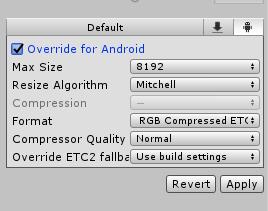


 urban idol
@slim ravine im learning a lot about geo culling
slim ravine
Very nice
 floral locust
@urban idol I'd love to try your world I have a quest I'd love to point out any bugs or issues for you if you'd like
urban idol
@floral locust yes please do! im already aware of the collider on the house issue. I do want to see pictures to see what it looks like via the quest.
floral locust
@urban idol please DM me I have screenshots for you
urban idol
I can't get my avatar pedestal to work with quest users....
astral pewter
did you upload it with the same blueprint id?
I would go back to it on the android build version, remove the id, and just pop it back in.
astral pewter
humm. are you using two seperate project files? sometimes it helps to just build it on one and switch platforms in unity
if that would take too long, you can try re-adding the script to the gameobject
sometimes running two sets of files seems to scramble the interact ids.
urban idol
k
vital lance
Had fun playing on your world! Got to make new friends and all that
vital lance
hey all, I have swapped my project to android and my baked lighting has turned to poo poo. Anyone know why this might be?
player settings rendering tab
lightmap settings
slim ravine
On android build change all of your textures and lightmaps to the compression setting that ends in 4x4 @vital lance
past shell
@urban idol i f you have an enter trigger that enveloppe the pedestal trigger you might have issue to click on it in vr
vital lance
@slim ravine thank you!!!
I hope someone pins that, it is very hard to find information about it quickly online
slim ravine
Im not sure if someone has made a comprehensive Quest guide yet
nocturne hare
How many particle emitters can I put in a Quest world?
urban idol
@past shell found the issue. The colder waa not set to "trigger"
opal orchid
@nocturne hare depends on the particle. If you visit Sky Islands Fireworks there are tons of particles and emitters, at times thousands of particles. But those are all billboard particles with small textures. Mesh particles and large overlapping transparent ones will kill performance quick.
 worn turtle
I uploaded a world just now but it did not show in VRChat... Anyone have the same issue as i do?
slim ravine
Are you using the right SDK version
worn turtle
i download it from vrchat.net tho
slim ravine
That does not answer my question.
worn turtle
opal orchid
@worn turtle if you uploaded just Quest and not PC, it won’t show if you look on PC version I believe. Does it show on the website?
 wheat granite
Hey i have a quest world that i is also a pc world .
can i remove the quest world from it whitout removing the pc veriton ??
silk hemlock
No, not possible atm
wheat granite
that is bad my unity wont let me go back to io and update it and it is atm broken.
urban idol
question
is the Unity window representative how your scene will look on the quest if my scene is set to Android? i don't have a quest to test it. I do hit play and things look vastly different.
warm estuary
I had a quick look at your world on quest last night. Tomorrow I’ll record a video for you to show you how it looks if you would like?
warm estuary
Awesome! Is there any particular spot you want me to look at for you?
opal orchid
@wheat granite email vrchat about it and they may be able to help. Try hello@
urban idol
@warm estuary im looking for pictures of the place. I want to see if the lighting and everything match. Trying to balance between a PC render and features and quest render and features is very difficult.
for example: PC users can make the dog bed inside the house fluffly with a fur shader. A feature that is not allowed on quest. So i don't have those buttons in the quest upload.
silk hemlock
@urban idol I recorded video from your world on my Quest but can't sent you direct message. You have DM disabled.
Also noticed some color banding in the house, make sure that you set texture compression to ASTC in File/Build Settings... window.
urban idol
@silk hemlock friend request sent
past shell
I dont know if you are aware of this @urban idol You dogo in your map have some disconnected vertex when you do gesture around the ears.
urban idol
@past shell quest side or PC side. on the Quest the ears verts arn't actually welded to the head verts. I did this to keep poly count under 5,000