#quest-development
1 messages · Page 7 of 1
 pseudo gust
 slow girder
Yep. It's not possible yet, but we're working on it!
 grizzled gyro
Wonder if possible to add a link to connect your discord to a button on one of the quest controllers so that your not having to remove your headset to do discord constantly.
 lusty gyro
lol
@grizzled gyro the quest would open the browser in VR, as the quest isnt connected to the pc
grizzled gyro
I'm referring to the potential of doing like a similar stream, but ok
Oe something close where, like you have vrc menu in your hand, you can pull up your discord in your hand as well.
 spare sage
OpenVR and overlays just aren't a thing on Quest
you'd need to patch something in on a per-game basis
it would take multiple months of coding even just to figure out a really basic back of wrist 10 inch screen with an android webview showing a discord page, let alone having it clckable.
now, the built-in browser from the Oculus runtime isn't even accessible while in a game because you'd run out of RAM
Quest only has 4gb, and about only half of that is allocated to games.
 gusty cobalt
Will Quest/VRCHAT have the selfie camera someday too?
 sand venture
they mentioned they were looking into it - the main problem being how to get the pictures off the device once you take them
gusty cobalt
u can plug the quest into ur pc
 fresh arch
no u cant
gusty cobalt
if u buy achord yes u can
sand venture
there are some experimental ways to tether the quest - eg ALVR for a free one. I haven't tried them myself (I plan to the weekend) but from what I hear initial progress is very promising
 spark thistle
If you plug the Quest to pc you can browse it like a normal Android phone
Both on Windows and OSX
On OSX you need Android File Transfer to do that but it’a a free official Android app, super quick
ALVR is for playing pcvr games using Quet, quite a different thing than file transfer
 radiant ruin
If they could use the same API used for screenshots to save to the Oculus Gallery it'd work just fine. I have several videos and screenshots I've published that way.
spark thistle
You don't even need a specific API actually, you can easily save textures on disk using System.IO namespace in Unity
I've done that before on mobile, there's plenty of options to save different file formats
Unless Quest has some weird way to handle that, but it runs on Android, it should be identical
I should try that next time I compile something
 quiet crescent
Btw how do i unmute my oculus quest mic
I accidentally muted it and idk how to Unmute it because there is no button I think
 quiet nymph
On vrchat you click the mic icon
 sacred moth
I have a question, will we as quest users finally be able to see pc skins? Like as an automatic poly limiter on pc skins to at least have an idea of where the person is? I hate having to guess if the player is small or ridiculously huge
It would be highly appreciated so I can actually look at the person and have that “American respect factor”
 wraith jewel
they have to be compiled for android and use specific shaders
so that will never happen, people just need to actually upload quest versions of their avatar
radiant ruin
They did put the avatar’s photo on the default robot skin. It’s not perfect, but it’s better than nothing.
 boreal shuttle
hello
 civic rock
gusty cobalt
civic rock
gusty cobalt
There's lots of decent quest avatars that are like pc avatars
 somber oak
anyone have a map of gestures for quest controllers?
 prime oriole
https://docs.vrchat.com/docs/touch here you go
Using a Hand Pose will enable the Gesture Override (if any) on the avatar.
 digital pine
prime oriole
digital pine
prime oriole
It seems like your trust rank isnt high enough. You need to be atleast Trust rank "User" (green) to upload avatars and worlds.
if you're user, known user or trusted user and you see this message then check if youre logged in with the right account in the vrchat sdk
@digital pine
 fiery minnow
@digital pine i would try reading the window first
quiet nymph
So I put chair in my world. but they use legacy shader/diffuse. So the sdk give me and error and I cant change the material of the prefab, but I can still upload. they should change it by the mobile difuse maybe
spare sage
you cant select the meshes inside the prefab and use external materials?
quiet nymph
No material are show inside the chair prebab
 ebon star
when i play vrchat on my quest i keep getting pulled from the world im in and placed back at home
 mossy kiln
Same here; with an error about world size if I recall
It's occasional. - Hadn't thought to mention it, assuming an update would come to fix it since it's likely not only happening for me.
mossy kiln
This is a limit for the world itself?
Surely it has a limit to even quality as a quest world, so it something pushing the size up in specific instances or are specific quest-uploaded worlds unloadable at this time?
fresh arch
the limit is 20mb @mossy kiln
quiet nymph
20 or 50 mb is alots
 lethal junco
50mb for worlds, 10 for avs
 gritty dove
@prime oriole Thats interessting, because i could upload avatars and worlds right of the bat as visitor 🤔
ebon star
I was in world's less than that and even at the VR home when it happened
fresh arch
Oh the docs said 20 my bad
Appearntly I was checkinv uploadvrs docs on it which say 20mb but the actual vrc docs say 50 ive been mislead pf
 digital viper
why we still can't play videos on quest
mossy kiln
May be related to YouTube-dl; I don't know any specifics.
wraith jewel
vrchat dev team probably can't pull the github repository for youtube-dl and build for android :^) (obviously it takes more than just that)
 golden lynx
Just out of curiosity, what's the performance difference between standard and standard lite? I'm making a world and I'm having some lighting issues which aren't an issue with the standard shader.
quiet nymph
in game or in unity
golden lynx
In-game
 open salmon
Hi, I don't understand something folks. Will it be possible on oculus to see 10K polygon avatars when you choose it into settings with the next update ? 
(I am into creation and I wonder about compatibility)
 glacial crane
Anyone here have any idea why my PC would blue screen when trying to build and publish a Quest Avatar?
glacial crane
If anyone can help with this please shoot me a DM. I went so far as to reinstall Unity and reimport my model, etc just to have it BSOD at the same place
spare sage
gpu drivers?
forcing the editor to launch in different graphical compatibility modes?
 golden bone
Would disabling objects lower the triangle count a quest user would see?
I've been optimizing a world for quest usage, but one object I would like to display is past the limit of 50000 tris, which is the suggested amount to budget for in the quest documentation, but no matter how much I decimate I can't get it go any lower without destroying it completely.
wraith jewel
what object?
golden bone
wraith jewel
how large is this?
golden bone
kinda more of a world . . . but I want to display a miniature version. Are you meaning size wise or file size wise? It's just a bunch of squares
wraith jewel
you want to show them a mini version?
so that's basically the world they're already in?
golden bone
no, I've made a smaller place since my OneShot cafe doesn't allow anyone in. I mean I could use that but I'm wanting to have other things then just a wip thing I've made
wraith jewel
see all those poly dense dark spots?
golden bone
Without this I'm currently up to 17277 tris
wraith jewel
you could probably decimate those significantly. decimating the whole thing is breaking those flat, useful areas.
you may also want to triangulate
select entire mesh-> space-> triangulate
golden bone
I mean most of is complicated figures at this point since I've dissolved all faces
wraith jewel
triangulate
golden bone
that only kicked the amount by 3
wraith jewel
the point is you can see triangles now
each of those long diagonal strips could be like 4 tris
golden bone
wraith jewel
yeah see how they're split up into individual triangles very inefficiently there?
golden bone
I mean, that's literally how I made it
taking it out only lessen's the count by 10k but still leave 40k >~<
wraith jewel
well you've got all that distant stuff that could be represented with a texture instead of tris
golden bone
it's all mapped to an atlas texture already
wraith jewel
starting over is something you'll do constantly
when making quest stuff as you try different things to get things down in polycount or whatever else
https://i.gyazo.com/e50a66debe5591ab3079e0faf2624214.png example of what i meant earlier to cut poly count for those diagonal areas

one tri opposite of this one would fill in the other side and give the same effect as all the tiny tris you have now
also, decimating tends to give better results than dissolving, at least for me
so try decimating first before dissolving, if dissolving at all
removing doubles may help too a little in the sense that decimating won't crease seams all over, at least not as many
golden bone
~<
wraith jewel
also if you have double sided stuff, remove what's not visible
not just enable occlusion culling, like, you can cut the total tri count in half if everything you did was double sided
golden bone
it's all planes
glacial crane
Can anyone suggest why Unity is blue screening during build and publish for Quest?
It gets to the second progress bar and crashes in the same spot.
sand venture
@wraith jewel couldn't you replace all those tris with some diagonal quads (leave some space between them, z fighting is terrible on quest hardware)
@golden bone rather
That's how you'd build something like that in the real world anyway
wraith jewel
well yeah 2 tris would make a diagonal quad, right?
sand venture
I mean, one quad per diagonal line, instead of having a bunch of tris for each intersection
golden bone
I mean I originally asked if making the object deactive, and using a trigger would activate other parts and deactivate the other two, would help lessen that count. Does Tri count rely on active items or everything active or not?
is this a thing or not >~<
 sonic harbor
It will count all objects on your avatar, no matter active or not
golden bone
I'm doing this for a world >~<
sonic harbor
Oh, for world then disabled objects don't matter
golden bone
yea?
sonic harbor
They are disabled so don't have any cost to render etc
golden bone
cool!
 strong jackal
 pearl jetty
Question how do I get my character to teleport into my world every time I tried to go to my world goes back to the hub
 rigid spruce
then the world is bugged
 nocturne dawn
Hi! I'm new here. I'm trying to upload a world to VRChat using the Unity SDK, but for some reason it seems like my new version is never being added. Every time I try to enter my world in VRChat the old version is what loads. What's interesting is that the name and image changes, but nothing else does.
 wraith atlas
Go to options, advanced options, clear cache. Dont clear player data only cache.
Then this will force you to download the new one
@nocturne dawn
wraith atlas
Even using the new clear cache feature?
 regal spruce
oh right. i'm going to need SideQuest
nocturne dawn
Hey guys so I did what both of you suggested and neither worked 😂
Feels bad
Also I have Unity terrain in my scene and it renders super dark in game
Is it possible that things aren't spawning due to a large poly count?
 limber echo
Unity terrain does not support lightmaps in game without changing the material. And details cannot be baked.
 viscid scarab
hello brasil guys?
 drifting cypress
@limber echo hi what do you mean by cannot bake details ?
yes VRchat has a issue that they can not correctly render the "default" terrain shader .. the fix is very simple to change the shader out in the terrain material settings
limber echo
Yes, but you can't bake grass .
the only decent workaround i've seen for grass is to duplicate the terrain, set it to a layer that the realtime light affects only.
turn off the rest of the terrain visual, only have the details
drifting cypress
ah the grass is a shader issue related to VRchat does not render material property block pipe line that is commonly used in such shaders so if you change to shader that does not use, it should work
limber echo
You can only bake the details if you make them meshes, not terrain details. If you manage to get that working let us know. XD
drifting cypress
example speed tree /nature uses property blocks in the wind data of its shaders
ya never use them as terrain details that's a horrible idea in that it would be packed in the same light map as the terrain
just add the grass with a prefab spawner
note if you add them as terrain detail they are the same as mesh just you cant see them in the hierarchy ..
 late reef
Uhh, thinking about this you could possibly use unity fbx exporter @limber echo
once you have the scene set up. Then you could retopologize.
drifting cypress
yes but don't export the export the entire field of grass as one single mesh
you should consider how occlusion culling works and select smaller areas divided by buildings hills or large structures
you gain many advantages to using a prefab painter tool over using the standard Unity terrain object painter
i can not think any small performance gains to use the Unity object painter that is not crushed in a scale by its disadvantages
basically you can use two types of grass mesh
-
modeled using simple planes and a cutout alpha or masked texture shader (No LOD groups only use occlusion culling) I personal don't recommend this type as they are not very good to look at in game and hard to deal with wind settings as they look twitchy
-
modeled using a heavy mesh , its typical to find a high quality large clump of grass could have from 200-400 tris.. some could be higher but only use them in special places not large fields
-- Use LODs!! recommend you look at using amplify impostors, If LODs used take care to plan ahead for any exporting into groups using the FBX exporter
-- Baked lighting and LODs, Only bake LOD0 and use light probes for LOD1+ , we do this as LODs in Unity can not share lightmaps... If you baked LOD1+ then you would generate a lot of lightmaps and have high memory
-- Baked lighting and LOD Shadows, Only use soft shadows on LOD0 for performance reasons.. for LOD1+ turn the cast and receive shadows off as they will be far away and the baked shadow from LOD0 will work fine in most cases
quiet nymph
Dam a lots of good information .should be pin if all true
mossy kiln
Agree; useful
nocturne dawn
Hey guys, so it looks like there may be a bug in the unity engine. I update my worlds in engine and then upload them to VRChat. However, when I open it on my PC and play it on the Vive the room doesn't update at all. Additionally, the room seems to update when I play it on the quest. It just doesn't work when I play on the PC.
 meager needle
Did you upload a pc build?
 lavish copper
Any word on when or if The Office map be ported to Quest?
regal spruce
the what?
fresh arch
@lavish copper maybe never. depends if the creator wants to put the work into doing it
 livid sierra
Is there any news at all if Udon will be programmable on the Quest from inside VR?
sand venture
highly unlikely
building an editor from scratch that can be used in VR is hard. doing it in realtime, on an underpowered device, when you can't bake any lightmaps, occlusion, etc (which you need since the device is so underpowered), makes it pretty darn near impossible
doing that well would be a multi-year project on its own
even if it was only targeting PC that would be a multi-year project for that matter
 hardy parrot
@sand venture https://www.reddit.com/r/VRchat/comments/ben0ry/news_udon_secure_custom_scripting_for_vrchat_will/

reddit
12 votes and 4 comments so far on Reddit
they said Udon will have Oculus Quest support right out of the box
 fair tinsel
which means the Udon scripts run on the quest not that you can make stuff in the quest
livid sierra
I've heard that the devs talk positively about other Social VR games like Anyland which let you script in-game
and the name 'Udon' makes me think of these thick wires that you can manipulate, like the wires in Rec Room or PS4 Dreams
I can't imagine why the wires would be an important idea if its just a desktop Unity SDK addon, they are just lines... I think the VRChat devs could pull this off just like Rec Room
Its weird to me there isn't any description anywhere of what 'Udon' actually is or would look like
nevermind I think bd_ is probably right
sand venture
an editor for udon scripts, and udon scripts only, might be possible on quest, but there's not much point if you can't design the map/etc too, and that's the part that's going to be very hard, both from a UX design/engineering standpoint, and especially from a performance standpoint on such a limited device.
also typing in VR is awful
 eager needle
Hope they won't limit udon to make it compatible with quest though
late reef
I think something like udon will be on quest, I can't see something that is logic based cause any issues with performance
you still have the same world limitations, this is just a back end describing actions and scripting them. I'm sure if you scripted something that could cause performance issues like spawning objects excessively or whatever it might cause problems, but I can't see something like that causing issues if you can have quest compatible worlds like cross platform racers working fine with all it's scripting
livid sierra
If it doesn't work like that, it would be fun to see if we could program our own Udon system inside Udon that Quest users could program with
literally the hardest part of programming a logic Udon system like that is making the noodles that connect the logic look tasty
late reef
I would agree with that, building an api/sdk from scratch with a lot of functionality is daunting
but again, the main platform limitations of the quest is the types of calculations that stress cpus and gpus - and all that comes down to unity. If you're talking about doing scripting INSIDE the game from your avatar in a "matrix construct" type way, then sure, maybe.
livid sierra
I just mean basic stuff like programming AND and OR gates in a map that people can use. I assume Udon uses variables. You could do a lot of fun stuff in a map just by exposing really simple obvious parts of Udon for players to manipulate.
 lusty ravine
Supp
 lone vector
Hello can vrchat devs develop pls some easy one click plugin to do the maps quest-able?for now it’s like many steps and can’t it be done with like the fix for video dll.exe that u just install and gg?pls?
spare sage
If it was possible to create a one-click tool to create good looking versions of PC worlds for Quest, it would already exist. game development is a very manual process. and because of it, whenever devs see something that could be automated, they'll automate it.
TLDR: Optimizing an entire Unity scene for mobile graphics with framerate in mind isn't something robots can do just yet sadly.
 scenic lagoon
there are probably tools to swap mobile and desktop shaders automatically but otherwise a lot would have to be done manually
 zealous gyro
Also it'll take some time regardless to reimport it all for the right platform
 timber jackal
i have an idea for the quest development.
make it so that the quest works exactly how a oculus rift or HTC vive would run VRchat. either that or just allow the quest to use and see normal avatars, as well as join normal worlds not meant for the quest.
 autumn grotto
If it was possible it would have already been done
Pc content is built for the pc platform meaning there can be issues converting pc content to android content in real-time
Same applies for the other way android to pc
zealous gyro
Also there is no way the Quest can run most PC content
Even something as basic as Cutout rendering modes will kill any mobile GPU.
autumn grotto
I use cutout on the Junkyard map on quest and it works fine, but thats only 2 materials
gusty cobalt
Dont doubt the quest so quick.
autumn grotto
I mean, i probably shouldnt use it to be fair
fresh arch
@timber jackal thats not possible
fair tinsel

Quest triangle count limit
so you could fit about 2 PC avatars before you go over the quest budget
which is why the limit is 10K on quest avatars and a 50k World limit
autumn grotto
Not anytime soon
 spark spoke
not unless maybe you did like a low FPS update to reduce requirements
 glossy lagoon
im new to pc need help
 plucky plank
Press the power button
wraith jewel
I'm working on my quest world right now. I saw there'Sa 20 MB limit so i got a question. I want to play a mixtape that is will be much larger i guess - maybe i play with compression but let's face it... 50MB for that alone probably. Does anyone know if i could stream that from my webspace. Can i use custom scripts i write in my world? Would be sweet to change the mixtape with seasons and holidays and such...
autumn grotto
You can compress the audio, use .ogg files too @wraith jewel
How long is the track?
wraith jewel
do you reckon that would make a significant difference for a 30-60 minutes long mix tape kinda track?
autumn grotto
30 to 60 is a broad range haha, you should be able to crush it down if thats its raw size without any edits
wraith jewel
I do have some decent experience developing (Unity since Version2.7) - i'm more curious about the VRChat sdk limits (custom scripts). I guess in the worst case i just cut it down to 2-3 songs ~10minutes... but you know would be sweet to have long songs streamed fom the web...
autumn grotto
No scripts allowed.
You can stream audio, but im not entirely sure how that works ive never looked into it
wraith jewel
I see, balls ... then it is crunching all into 20MB i reckon. I know that unity allows for streaming from storage as supposed to uncompressing on load - but i do not think that canges anything about the VRChat SDK World limit. Not sure though... Thanks a lot for the pointers!
wraith jewel
streaming from storage is a heavy load on a quest since it will have to decode the stream while playing, playing from uncompressed memory is a lot more performant
wraith jewel
@wraith jewel yeah i know, i was not planning to stream from storage, just mentioning that i know about it. I planned to test streaming from a web url, so that the music would not eat up any of the 20MB World limit. A 30+ minutes mixtape would not fit anyways. Additionally it could be changed externally for ocasions/seasons/holidays... seems i can't use custom written scripts anyhow so i might just request that feature and see wht happens...
yeah, on pc you can abuse the videosyncplayer script to stream music but that doesn't work on quest right now, having a streaming music player would be amazing and leave the world downloads smaller
wraith jewel
So, i'm pondering my sound design and thought i ask here before i spend a lot of time testing.
The limit for quest worlds is 3 Audio Sources i read. Does that mean 3 are played at any given time if i have more, or does it mean i can't publish if i have more in my world.
Lets say i have 5 sources but spaces in a way that ever only 3 are audible/in range. Does that work?
spare sage
I think if you were to set zones that had animations disabling and enabling sources as necessary when you walk in/out of them. That would work.
wraith jewel
Thanks! I played with that idea. But unity picks the sources with the lowest priority anyways - So basically doing that better. I was just wondering if the VRChat SDK would stop me from uploading because more sources being there. If it just kills the audio farthest away (lowest priority) that is no (big) problem... just need to plan forthat then.
I haven't checked yet because i'm working on the model atm - just thought i probe if anyone has experience with that - i guess i will be noisy once i tested that later. So y'all know too.
 little jackal
hi guys
wraith jewel
With being on the quest for VRchat hearing the news really upset a lot of people because they are limiting people for more stuff and it doesn’t make sense people are fine with crashing on the quest but a lot isn’t but that doesn’t mean limit them more.
If it seems I’m angry about this I’m really not but I’m trying to help a lot of my quest friends stay the same and not get more stuff put on them that will make them hate VRchat because it’s a great game because the community
radiant ruin
I don’t really get all the complaints. It works fine.
autumn grotto
What news?
gusty cobalt
LF> Camera selfie for quesst
limber echo
Here's the official doc on how to get set up for Quest development. https://docs.vrchat.com/docs/creating-content-for-the-oculus-quest
Want to get started making some content for VRChat on the Oculus Quest? You've come to the right place! This page will consist of navigation to various other pages concerning content creation for Quest, cross-platform setup, and other related guides. Our documentation on cre...
 full condor
 hasty mango
 heady gulch
@Aev#0001 Hi, im developer. Im trying sort out cross platform development for steamvr-quest. When i switch to android, OpenVR in XR Settings become "OpenVR (missing from build)". How to deal with it?
iv tried 2019.1.9 and 2018.4.6. last steamvr and oculus sdk. Please help.
quiet nymph
So when the fatal quest update will be out?
That will thanos snap all very poor model
 earnest plinth
the option to look at a avatar that has not been optimised for the quest in my avatar menu to unfavorate or check the stats since i play the same account on quest and desktop instead of getting that message saying i can't look at it since it isn't optimised
 tired jacinth
Would there be a way for the people on Quest to see the size of pc avatars because the blocked pc players stay the same height and when you talk to them it’s awkward because they’ll tell you to look up because your not looking directly at them!
 short hill
devs said on the last livestream that they are working on making pc avatars represent them better on quest, so I imagine that will be a part of it for sure 🙂
autumn grotto
2D cardboard cutouts of pc users 🙂
 errant pilot
still the utility avatars should be scaled (down) to the actual avatar's size
 storm cargo
🕳
tired jacinth
Ok that will be an update to look forward to
late reef
I think a great way to handle that would be to create two double sided quads per bone and paste a literal picture of the avatar in tpose on it from the front back, top bottom, and use a cutout shader. 😛
scale to position of view-ball.
should be pretty close
not perfect, of course, but it would work
 stiff wedge
hello
autumn grotto
👋
 raw kelp
что делять
wraith jewel
Hey guys, quick question. Is there anything special you have to do to make a Quest avatar besides meet the requirements on specs?
 summer orchid
You gotta use the shaders provided to you by VRChat
fair tinsel
which means basically no transparency so you have to keep that in mind if you use cutout shaders for objects
 daring valley
Hey, somebody here who knows to make a pickup-able to a firing gun?
 tall river
you can use shaders that are not what VRChat gives you and test to see what Shaders works like i do
Quest can not See TGA or DDS Textures so you know ❤ I do alot of testing
tall river
Yes why?
 rain pecan
my friend is trying to creat an avatar and has a problem where the avatar turns all completely black
 last lake
texture issue try reloading your textures in to unity
if that dosen`t work reload unity 3d
wraith jewel
I'm fine not seeing PC avatars. What I'm not fine with is looking up into a tall robot's eyes when the persons avatar is the size of a lego minifigure.
hardy parrot
@wraith jewel The VRChat dev team is working on a way for Quest users to see PC only avatars.
errant pilot
this isn't limited to pc only ava->quest, all of those avatars should be sized to match the original avatar height
errant pilot
when i changed it in the menu and changed it back the cloning option turned off for them
 delicate moat
I have an idea, for friends we should be able to open a private voice chat even if we're not in the same world. That way if we can't get into a world we're accepted or invited in they will know.
 acoustic ibex
does anyone knows what will happen if I upload 2 complete different worlds with same blueprint ID (one in android, one with windows ver)?
wraith jewel
it will work but it will mess up when people with different platforms are in the same instance
for it to work normally the worlds have to have the same floors and colliders etc so everybody can walk on the same structures
wraith jewel
Hello, I would like to have the possibility to upload a skin on VR Chat, how can I do that? :D
acoustic ibex
oh thx
late reef
@wraith jewel there's lots of tutorials , here's mine: https://www.youtube.com/watch?time_continue=1&v=SRRt2gZOg_Q

I'm going to be making more like this, so subscribe if you want to see more! Keeping with the tradition of making things as easy and straightforward as human...
wraith jewel
ty
 brazen swallow
I hope to see that one day us quest users will be able to access everything pc users can.
late reef
there's some fundamental limitations (mostly with the way unity compiles and shaders and such for android hardware/arm gpu/etc) but there's ways you can get pretty close
personally I no longer upload anything pc only anymore, and most creators are attempting to do both as far as I've seen. Worlds are far less limited than avatars, but as per the last dev stream they're working on ways to auto-magically show a better representation of pc avatars to quest users
 astral mango
does anyone know how much time you have to spend in vrchat before you can upload content? ive spent at least ten hours in the game searching through worlds and trying games and whatnot. i havnt seen many people because im on a quest and the worlds arent very poplulated. but id like to start building worlds and seeing what can really be done and dont know why i havnt unlocked the privilege upload yet.
 calm trout
@astral mango you need several hours and friends, for me it was 10 friends but idk the hour count, a world that i use to meet lots of new people on quest is the great pug west
earnest plinth
you know how when you load vrchat and it has that blue screen bit. when it loads to initalize the world if you turn your head the screen won't turn with with you
(might of worded it a little wrong)
it would be nice if it didn't do that and just followed the headset like beat saber and rec room
another improvement would be to bring the tips during loading a bit closer to where you stand
late reef
I believe they're designed to be in the "forward" position, to indicate where you've configured your room-scale "forward" position, which would be the direction you are facing when "seated/standing" mode is active. If that's pretty far away from where you are in your playspace, maybe that's it. I believe it does change to be "in front of you" when you go through a portal, whichever way you happen to be facing. Might be different on quest.
look at me responding to 4 day old things posted in the wrong channel.. 😓
 bronze rune
Why is the vrchat/mobile/lightmapped shader not supported? I thought everything under vrchat/mobile/ was designed for quest
hardy parrot
@bronze rune Are you using it on your world? Or your avatar?
bronze rune
Avatar. I alleviated the issue by realising standard lite has emission options
It's ranked very poor, but I was able to convert one of my old avatars to show for quest users, if they allow it
Mostly just a test to see if I could actually do it, but at least now I have some personal representation of myself if there's quest users around
hardy parrot
@bronze rune The lightmapped shader is for worlds only.
bronze rune
Fair fair, never developed for quest before so was mostly a learning experience
 mellow patio
What have the developers said about vrchat for quest?
scenic lagoon
it exists
 haughty viper
Woah
 bitter herald
hola
autumn grotto
👋
eager needle
Hey
bitter herald
hola
wraith jewel
make camera for quest
 opaque nymph
@wraith jewel it could be possible I guess even on a basic way. But, for example, the camera on some worlds acts weird. Besides the obvious performance hit, it seems to hide certain parts. When I use the camera on Avatar Testing world may avatar clothes disappears and gets literally naked. Also the normals of the head seems to get flipped lol.
late reef
@deep anchor actually uses the quest screenshot then posts privately to facebook, then takes those screenshots and sends them
@opaque nymph @wraith jewel . She would like a proper camera, though.
opaque nymph
@late reef me too. I am just referring that if in world cameras have issues, we may guess that one for ourself would present the same issues as well. So I bet this has to be fixed first before even considering having a personal one.
late reef
uhhh.. only sorta. VRC mirror works, and the output of that could be put on a billboard texture on a camera layer that the player can't see then a screenshot could be taken.
one downside is that all quest output is fixed foviated
 deep anchor
Hey don't tell my secret @late reef
I think my posting screenshots from Quest to a Facebook folder that's private and only viewable by me and whoever I choose is clever.. I upload them and then open Facebook and it's on my timeline so I can only see it, I save it to my phone and that's how I have a copy. I hope Oculus fixes it for us Questies so we get a regular camera like the other VR headsets. Cause having to go out of VRchat and click take a picture and go back in and have to quickly time it and make sure your headset isn't tilted is a pain.
 rocky grail
That's clever indeed even though it is going to facebook, privately. There is some app to access your cloud drives that you can get on sidequest, if I remember right. That's another way or connect to pc to copy the images which takes some effort even after getting sidequest installed.
 nocturne trench
Do mirrors work on Quest?
wraith jewel
yes, they halve your fps in most cases but they work fine
nocturne trench
Thanks a lot.
wraith jewel
turn off pixel lights in the mirror options and try to keep the layers you reflect to an absolute minimum and they're not too bad
wraith jewel
The experience for me isn't that fun since I can't see pc avatars, they just all joke and laugh around and I feel like an isolated outlier. It makes it kinda boring
 wraith jewel
What do you mean?
haughty viper
There are some pc avatars that are meant to not be seen
wraith jewel
Will they ever make it where everyone can be seen?
wraith jewel
if u didnt like the quest in the first place then u never shouldve got it @wraith jewel
wraith jewel
No cause pc wouldn't make sense for me to get it and I love the quest but the vr chat experience needs work. @wraith jewel
Pc vr requires a. Space b. Pricey PC. and c. A headset some of us don't have a $900+ pc
 scenic basin
Well you are playing on a phone Sooo
wraith jewel
@wraith jewel that true, but you have to realize the quest is still kind of new and vrchat cant just make updates right away like that for quest. i still enjoy it a lot, so idk.
haughty viper
Same
 haughty sedge
It will improve in positive it will. Yes I’ve come across toxic pc players but there’s some awesome ones out there that will welcome you to there community. 🙂
 robust nimbus
Oculus should make the next headset with cameras either on opposite sides of the eyes or in between the eyes so that you could see who/what is in front of you irl
 gentle lava
Can I see pc avatars please VRCHAT team
scenic basin
upgrade your phone 
 silver basalt
It's impossible for you to see PC avatars on a Quest for lots and lots of different reasons
fair tinsel
off the top of my head you would blow the polygon budget, your computer and the Android OS use completely different CPU architectures the GPU on the quest might not even support the shaders you're trying to use
 sweet onyx
While that may be true, there are ways to show approximations of PC avatars. Showing the picture of the PC avatar on the "head" actually is a great help already and it's already improved my ability to communicate with PC users and get a feeling for which avatar as well as recognize people based on their avatar choice
and the VRChat team has promised to look into an even better representation in the livestream, perhaps some sort of impostor. Something else?
hardy parrot
@gentle lava The dev team is working on a way for Quest users to see PC avatars.
haughty viper
Sometimes it’s ok to not see PC avatars 
 gaunt haven
You could always stream vrchat to your quest using ALVR. That allows quest owners such as myself to use and see pc avatars, as well as visit pc worlds.
 gusty bone
@gaunt haven how stable is ALVR for you? I got a solid 5Ghz infrastructure so it should work if the program works. Right now just not possible because of my old PC.
sweet onyx
Alvr is great! compression artifacts are at times noticeable (compared to the 60GHz vive wireless that feels lossless) and maybe a bit lower framerate
But that's the only thing noticeable: I was able to play multiple VR games with it recently and was able to enjoy it without issue
gaunt haven
@gusty bone Yh i use 5GHz internet connection to my pc and its very stable. I still get about 60-70 fps, which is obviously not the optimal 90 for VR, but I honestly dont notice it.
What are the specs of your pc?
sweet onyx
I was using this on my i5-2500k with gtx 980
so not the best specs. in fact quite amazing it worked as well as it does. pretty cool
gusty bone
@gaunt haven my PC is 9 years old so let's not talk about it. Full Upgrade is planned.
gaunt haven
@gusty bone aaah I see... Fair enough
 worldly nest
VirtualDesktop works fantastically for me. Although I did buy a wireless access point explicitly for it (which is wired to the PC doing the broadcasting) which lives next to the PC on the floor below.
But compression artifacts are still noticable, especially in red and dark areas.
rocky grail
Btw Gtx 1660 and better and the rtx 2000 series have better encoder/decoder hardware btw. In general the newer generation, the better performance/quality. It is not a huge difference in latest generation but it is something.
It is still kinda weird how gtx 1650 does not have new encoder/decoder and 1660/2000+ all have the newest one
worldly nest
I'm surprised how noticable the artifacting is on a supposed 866Mb connection really...
wraith jewel
I have an old laptop I need a new one..
gentle lava
How do I have stream camera on quest?
sweet onyx
You can't have any camera
You have to either use the official oculus app to stream or if you enable developer mode/adb, you can capture video with ddms.
late reef
@gentle lava the oculus quest streaming app doesn't slow you down which is nice, so I recommend streaming to facebook privately and saving the video
it'll always be first person though. However, there are ways around that, you could make an emote that moves your player view behind or in front of your avatar.
 fringe quiver
sweet onyx
fringe quiver
sweet onyx
It's possible. I mean you'd probably be in the same room as the quest user so you can record their voice another way.
And yea there are options to add a camera to the avatar but lack of custom avatar shaders (even on your own avatar) makes things stupid. You'd have to use a particle shader or something for the camera overlay :-p
late reef
you can also just move the player view using a transform, like if you've ever done a dance emote with a lot of movement you'll see htat your player can be in front of your view ball
so, you can do things like "puppet" yourself when you want to stream from facing you in the meantime. Also you can stream to a cell phone or desktop pc to share qhat you're doing on quest, and in turn, throw that into obs
the obs app for android does an excellent job of taking the oculus quest stream as an overlay and you can then broadcast to anything
sweet onyx
There's a technique of using not normalized weight paints to add 100% weight to a bone with scale 0, as a way to offset the mesh without affecting skeleton weighting or IK like might happen with other methods of offset. The problem is the first person view on oculus will be identical to what is recorded, so your own view is then also offset and it may be less immersive
tired jacinth
So I have a question for the Devs finger tracking just got announced for the quest and I would like to know would this be able to work with VRchat because that would be so cool!
autumn grotto
hard to say off the bat, its been like 30 mins since its announced
If they can solve how to make a player move without buttons, probably?
tired jacinth
Oh wait I didn’t think about that at all 😂
I can’t believe that isn’t the first thing that came to mind
worldly nest
It's why the leap motion was useless for VRC.
autumn grotto
my first idea was Maybe have it like a ddr mat, stepping forwards makes you walk forwards, with some kind of visual indication on the floor
Not perfect but atleast it would work?
worldly nest
It would, but it would be a nightmare for precision
autumn grotto
Unless you can do a mixed control option, where you use a hand and one controller
a single ambidextrous controller that you can swap between hands whenever would be ideal
 fluid coral
I see a lot of people getting excited for finger tracking but remember this is a lot of marketing fluff. Keep your expectations low.
I expect something like being able to turn it on and then putting your controllers down. But once you need to move and use a menu, you'll need your controllers again. Also don't expect finger tracking for anything not directly in front of the HMD.
Then you got issues when one hand is in front of the other.
quiet nymph
we could use a hand gesture to enable thumb movement fo the other one
 worldly bobcat
One hand with a controller and the other using finger tracking would be fine I think. Being able to toggle them on and off quickly would be awesome, so if you plan on standing still for a while, you could just switch to fingers and waggle for a bit
worldly nest
Or have a gesture to make a virtual controller appear in VR space...
 upper pecan
I feel like compared to leap motion, this will be more adopted, since most people will actually have access to it
In terms of locomotion, all i can think of is either a virtual joystick thing, doing a walking motion, or pointing to activate the teleport mode.
I think the 3rd one is the most likely, and what most games using this will implement
fair tinsel
yeah most of those videos they showed off hand tracking for looks like only one room room scale or teleporting
gentle lava
When oculus link come out does that mean I will be recognized as a pc user?
And have the abilities of pc?
fluid coral
Yes.
worldly nest
IF your Quest is connected to a PC while you're using it and that PC is capable of running those PC games.
 sonic comet
I wonder if the oculus link would work with a low end pc
fair tinsel
no not really as that doesn't fundamentally change the rendering requirements
is it still going to have to render a game twice at 72 fps
worldly nest
At double 1440×1600 too
fair tinsel
so basically there's a reason why it has to be a gaming PC
worldly nest
Yup. It's why when people compare PCVR and Quest native stuff, I can't believe how they think they're even remotely in the same ballpark.
fair tinsel
yeah you're not going to be pushing the most realistic graphics on the quest
worldly nest
Even on stylised games that do look good (e.g. that police shootout one) the lack of anti-aliasing is still a bit painful.
fair tinsel
like robot recall just kinda looks kind of lame on the quest as it kind of looks like they just turned off the PBR materials not not rework them into something that looks good by itself
worldly nest
Yeah, I saw the video. Everyone was saying about how good it looked and it felt like I was watching a different video, lol.
fair tinsel
yeah most of the other Quest conversions I've seen doesn't look like so terrible compared to that but it helps that a lot of games have a more stylized visual aesthetic
wraith jewel
If you come from go it looks great, depending where you came from will dictate espectations..
 jaunty beacon
I would love if there was a camera for quest in the game! Like the other vr users
sweet onyx
I've seen people take "proper" screenshots on quest. how are they doing that
and you can use DDMS to take screenshots but you have to go through the the simple developer mode thing with oculus account, and have it plugged into a computer with android SDK installed
worldly nest
Lounge Menu > Sharing > Take Picture
spare sage
"lounge menu" never seen it called that
worldly nest
Wasn't sure what else to call it. Oculus main menu maybe?
spare sage
oculus home menu
wraith jewel
@sweet onyx you go to the oculus dash, share, and screenshot, then hop back in vrchat and you get a 5 sec countdown and it will take a screenshot
oh lol that's the 'lounge menu' mentioned 😄 I'm slow
sweet onyx
woah that's absurdly complicated lol
wraith jewel
it's a hacky way to solve quest dash freezing apps, it's not too bad
 glad void
So been play with unity and try to make resident evil world I have seen this package its got play maker and Dynamic Bone few other tools what do you all think is worth getting this stuff for VrChat to help with unity and such? https://www.humblebundle.com/software/unity-2019-bundle?partner=gamefromscratch

Humble Bundle
Pay what you want for a bundle of software and support charity!
All in all its like £20 for load of tools but not sure if they help me with making a world for Vrchat?
sweet onyx
@glad void comes with some good assets for just $15. Also if you don't own a copy of Dynamic Bones it comes with that too...
UMotion is a animation editor that's really nice and MTree can generate nice looking tree assets which should be compatible with VRChat.
Just 2 days left! Get it while you can
not all of them work obviously... the rest of the good stuff is mostly art assets
glad void
👍 Okay yeah I don't Own Dynamic Bones keep see you need it for some avatars and such. I remember a long time a go the dev's talk about playmaker support but when I looked into was very pricey seen here was like Oooo maybe ill get into it now for Vrchat. just grabbed it now seems like good deal that can learn and use with.
sweet onyx
Playmaker will never be used for Vrchat, since they are nearing completion on their own inhouse solution Udon 🍜 but the other assets are likely to find themselves useful
worldly nest
That package is worth it for Dynamic Bones alone, although that's not much use for Quest users.
rocky grail
Yeah, oftem the prices are so low that as long as there is one item you want in a bundle, it is instantly worth it.
 little knot
worldly nest
little knot
worldly nest
You're currently "Visitor" rank, you need to play more and eventually you'll level up, at that point you can upload avatars (and worlds).
rocky grail
Omg I had unity open in background and literally thought unity was bugging out and showing that message for no reason for me.
Even clicked on ok lmao
 hazy trail
👼
 sinful sapphire
maybe they were complaining about that last comma which should have been a period (screenshot above)
I still haven't figured out how to get real screenshots on quest. or even on rift S, technically
have even tweeted at Carmack about the latter
spare sage
Rift S, open Oculus Dash, on the right, in the tray there's a screenshot icon
Quest, while in a game, go to Oculus Home, click the sharing tab, then Take Photo, it'll get back in the game, do a 3 second countdown then take a screenshot
 trim zinc
i forget when is oculus li nk coming. also when it comes if i use it with vrchat will it show pc avatars
worldly nest
The way it works is that it basically becomes a PCVR headset when connected with that cable. so you won''t be playing Quest games anymore, you'll be playing on PC
spare sage
that also means you need the PC to run VRChat in VR
worldly nest
and a good PC at that
 random wigeon
Hey everyone AiSeko is a heart break she broke my friends heart thru text and they been together for like four weeks and she said I never loved you from the beginning(For fuck sakes, I never loved you to begin with to be honest with you because you kept forcing it on me, so I had no choice BUT TO SAY I LOVE YOU. You kept rushing things and I can't do it anymore okay! I am not dealing with this same situation again, I can't..) so to everyone be careful
worldly nest
... is that a copy pasta?
 pseudo pebble
Maybe they are trying to start some stupid drama
Either way @random wigeon this is not what these channels are meant for so stop spamming it
 trail briar
Quick questions about world building for quest:
- is 50k polygons a recommendation, or a hard set rule?
- They say not to have too many physics objects, but how many is too many? 10? 100? 500?
- if a player is teleported while holding objects do those objects stay in the players hands?
autumn grotto
-reccomendation
-50 drawcalls is reccomended, but you can go higher. (each phys object would be a drawcall)
-yes
Really it depends on what you are doing with the world, you can have more of X if you have less of Y, etc. @trail briar
sweet onyx
@trail briar @autumn grotto just making a note that objects can be batched or instanced (instancing probably better depending on what it is). It is possible to have a thousand objects and be fine if they can be instanced
autumn grotto
Lyuma is smarter than i so yes what lyuma said
spare sage
yeah, a thousand cubes instanced will still only be one draw call
sweet onyx
Always tick that "Enable GPU Instancing" box on your materials 😉 I still have no clue why that is off by default. Stupid unitu
spare sage
It's off by default because it would break older/current projects if they were to change it now
 trail briar
Thanks heaps guys!! How do I check my current number of drawcell?
 young escarp
Can't really check the exact number iirc but you can run the profiler and do math based on the shaders youre using, the amount of materials, and the amount of lights/shadows
Since it's quest I would assume every material would end up being one drawcall so just counting them would probably be good enough
spare sage
https://docs.unity3d.com/Manual/RenderingStatistics.html can be pretty useful
fair tinsel
so I take it to eat nothing but fish given that there's no Farms
and It think it might need some decorative clutter as it's currently a little bearing on decorations
spare sage
also, what is up with the water?
fair tinsel
maybe looks better in motion but at the moment it looks not great in the screenshot as the tiling is really freaking noticeable
actually there's probably a lot of the texturing I might want to see if there might be better textures as like the tiling on the buildings is quite noticeable
fair tinsel
also you might want to add a dirt texture to put under the trees
to be honest probably worse but it is a good the first attempt
my first week playing with unity was trying to get avatars to upload
autumn grotto
first week in unity looked something like this
https://cdn.discordapp.com/attachments/215224264826028033/549650425851281415/unknown.png
https://cdn.discordapp.com/attachments/215224264826028033/550339519216353295/unknown.png

 autumn grotto
I mean this channel is for discussion of development, what else do you expect from posting the images?
spare sage
Wait, did that guy get banned?
fair tinsel
okay that's freaking bizarre
young escarp
rest in peace
eager needle
Love the art style
young escarp
If you don't have friends on the quest there's no point making cross platform avatars
worldly nest
Are you making avatars?
gentle lava
If hand tracking came out and vrchat became hand tracking available how are we gonna move?
young escarp
Finger guns, bang bang move left
worldly nest
You're not, which is why hand tracking probably won't be a thing. It already exists, but was deemed just... not usable.
 untold notch
just walk in real life, easy.
trail briar
Not banned, just not good at conflict with neurotypicals
autumn grotto
😬
regal spruce
some people might find this handy

Polygonal Mind
Learn to adapt your VRChat avatar for Quest by reducing textures and polycount, along other tricks like rigging, materials and face expressions.
wraith jewel
hey ppl
wondering if anyone can help me with the vrc shaders to make my model quest compatable i cant seem to edit
@wraith jewel make it to vrchat > mobile > toonlit
worldly nest
Or Diffuse if it doesn't need toon shading
prime oriole
quick question. Is the "Particles" shader gonna work on quest? Because even with the standard shader the material is somehow glitched and wont cover all parts of the avatar and will leave some areas invisible
quiet nymph
if some area are invisible its your model that have normal in the wrong direction
prime oriole
That issue only happened after I switched to android in unity. In windows,linux,mac it works normally
spare sage
Also, Quest avatar shaders have backface-culling
which means that if your model employs low-poly methods of using a single face for paper-thin doublesided objects, you'll have to double and flip them
regal spruce
i read somewhere you could set them to 0 instead of nothing and that did something useful
 crystal forge
@prime oriole Particles work on Quest. The VRC SDK has two particle shaders to pick from with that. They render without issue on Quest.
Additive or Multiply particles
worldly nest
You're only allowed a tiny amount on PC before you get rated Very Poor so it's likely even less on Quest, just something to keep an eye out for.
autumn grotto
Mostly because of the transparency i think
late reef
correct!
I'm pushing for Unity Chan Toon Shader 2.0 mobile to be added to Quest, made a canny
if the performance is good enough. One can hope.
worldly nest
I mean, they don't allow any other shaders. Is there anything specifically special about that one?
late reef
yes, it's developed by someone who works for unity japan
it has a vrchat recommended settings button, already has mobile shaders for optimization and strips unused shader keywords
plus it looks godlike, and has a user manual. https://github.com/unity3d-jp/UnityChanToonShaderVer2_Project/blob/master/Manual/UTS2_Manual_en.md

GitHub
UnityChanToonShaderVer2 Project / v.2.0.7 Release. Contribute to unity3d-jp/UnityChanToonShaderVer2_Project development by creating an account on GitHub.
vrchat has a long relationship with unity-chan generally speaking, she's been part of the default avatar row for a long time. Japan's vr community loves vrchat - and anything to make quest avatars less restrictive and encourage cross platform is good. I would say many people don't publish them cross platform because they don't like or don't know how to shade them properly or they look "broken"
worldly nest
Ahh, I just assumed that was someone's name where they take a common thing and use it as their own name. That's curious then. I should try it out, see how performance is.
late reef
I was pretty shocked to find out htat most people were still using cubed's to be honest
it's not a bad shader, but vrchat toon covers all those bases for just a basic one, and it works on quest
worldly nest
Yeah, I've been trying to ween people off it but always get the "Yeeeeaaaahhhh but it works for me soooo...." response. Well, I guess they won't be laughing next month when all their avatars turn pink.
late reef
same
young escarp
Was no point in changing when the former worked. All toons practically look the same barring small optimizations or shading differences. Was a simple shader that got the job done where every other toon shader had so much baggage on top.
Now there is a point, I'm just waiting for the guaranteed 2018 version to start looking for a new shader
late reef
UTS actually supports light source directionals though. 😉
so does vrchat toon. Most toon shaders do not, and that's a problem. Better even to use diffuse with a slight emission if that's all you want, at least you'll be lit properly
young escarp
Being lit properly isn't always a good thing. Toon shading can hide bad topology or lack of textures. If I want to be lit properly I'll go through the PBR pipeline. Anyways I'm fine with changing up the shader on my models I just hope they don't release the update without some warning first so I don't get people yelling at me to fix their stuff
rocky grail
I just like messing around with the matcap shader. The things you can do with a texture lightmap. You can even put a literal image like a fireball and black edges around it, then put it on a "magic" ball for example. Different densities of polygons might mess up images tho.
(or put a gnome as the lightmap)
young escarp
Yeah other shaders one up cubed usually but cubed was great for a simple toon shade without all the baggage. A lot of people shy away from shaders that are hard to get right ( like standard)
rocky grail
Even the lightmap is confusing for new people probably. I was a bit confused with it first but it soon made sense and I found more cool stuff you can do with different shapes of textures, some can have round edges just by having round corners or a subtle skin shading lightmaps which I found included in neitri's shader if I remember right.
late reef
we're talking about quest here
there's also a ezbutton for vrchat for UTS2, it also has a manual.
but with that vrchat button, it makes 90% of toon shaded models (let's be honest, the majority of models by a mile) look great, and work properly with every vrchat world's lightmap.
trail briar
Encountering a weird issue where sometimes players spawn in and their avatar doesn't move. They'll be running around the world but to everyone else their avatar is running on the spot at the spawn. Anyone know how to fix this?
worldly nest
Happens to everyone randomly, no fix other than to rejoin the world.
 long moat
Not sure where to post this but I get this message when set to Android
I've looked at all objects and prefabs in use, nothing is using it that I can find. Is this a bug or something I'm missing here?
I have everything set to VRchat/Mobile/Standard Lite or VRchat/Mobile/Diffuse
quiet nymph
no big deal you can still upload
worldly nest
@long moat Grab "Resource Checker". It lets you see all your materials at a glance and what shader they're set to, so it makes fixing things like this easy. It's probably a sub-object on another object.
Like so...
worldly nest
@long moat Ping
long moat
this looks fancy, thanks
worldly nest
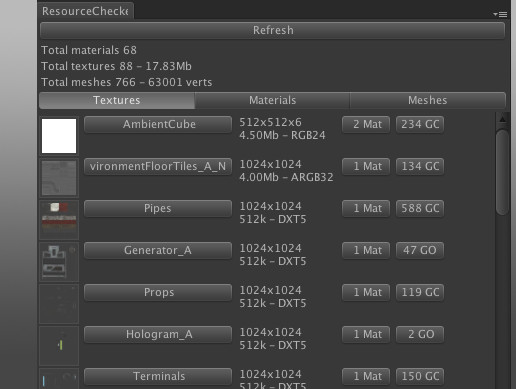
Now updated to be Unity 5.0 compatible, and works with multi-scene, Unity UI and others thanks to contributors!
Public domain, do with whatever you like, commercial or not. This comes with no warranty, use at your own risk!
Resource checker is designed to help bring vis...
long moat
I had no idea this existed
@worldly nest I encountered something. Description of the asset describes its unity 5.0 compatible, maybe it doesn't work with 2017 and above?
can't use it in the window tab
worldly nest
Weird, let me grab my copy for you, maybe I have a special newer one.
Just stick this in your Editor folder under Assets.
Still dated 2015 so I'd assume it's the same version, but maybe not.
worldly nest
Odd, but yeah, very useful. Especially for mass changing textures.
long moat
interesting, its the world portal
worldly nest
Hah
long moat
I thought there wasn't any 'shader' on that on my end
worldly nest
Everything has to have a shader to exist visibly, basically. But yeah, it looks like a legacy part or just something not even used anymore.
worldly nest
Just make a new material with the Mobile standard shader on it, no texture and stick that on it.
long moat
No more warnings, everything is in order. 
worldly nest
Nice
 undone dawn
Oh i had no idea resource checker exit. @worldly nest env thank you for useful tool
fair tinsel
hello but this isn't the channel for General chitter-chatter
 heavy drum
Hello,
Do you know how long it will take before I will be allowed to upload on Unity with VRC SDK ? 🙂
wraith jewel
It's not time based. It's different for everyone. More based on your activity when playing vrchat
heavy drum
Ok, so what do I have to do to have it quickly ?
I just want to develop an app with oculus quest for an internship and the VRC mirror is the only working mirror that I found.
But I am not able to test my app on Oculus quest because I can't buid without the ability to upload !
wraith jewel
It's mostly unknown. The devs try to keep it hard to exploit or farm. The best way it seems is to visit worlds with other players and chat/make friends.
 rocky rune
Jamie y u helping and not sleeping?
heavy drum
Okay, but if I play it 1hour a day, will it take more than a week ?
Because I only have 3 weeks to deliver my project and i want to know if I'm choosing the good option
rocky rune
It is hard to say, usually you get ability to upload after 20 hours or so (actively playing, chatting with people)
1 hour a week is insufficient in your case
There are exceptions and some people got New User rank after few hours but I wouldn't count on it
You can build your app however in test build mode and use it just fine by yourself even with visitor rank, new user rank allows you to upload your world so if you don't need many ppl to use the world you could just play in test build
heavy drum
thanks
 unique carbon
autumn grotto
unique carbon
autumn grotto
Hi
 quartz jacinth
Why vr180 video in quest is normal, but vr360 is very large? people look like gaints.
sweet onyx
@quartz jacinth please do not spam multiple channels with the same message! Answered in #quest-general
quartz jacinth
ok
 pure oar
will you guys implement full have tracking in vr chat when it comes out?
worldly nest
That question's been asked a million times and "probably not because it's not really usable in reality"
regal spruce
How about toe tracking? I really need that 😛
young escarp
You can have psuedo toe tracking with rigid body rotation copying if you're that much of a degenerate
worldly nest
I've definitely seen that before
young escarp
🤢
regal spruce
some avatars, like the impim have grabby feet, combined with basic foot tracking, are quite handy
 visual vine
Hi, I have a question, will you say that unreal engine 4 has compatibility for the creation of maps? or has not raised the idea?
Thank you for your attention
pseudo pebble
Well the whole game is made in unity so probably not
visual vine
oky, ty
wraith jewel
wait if i wanna publish a world for both quest AND pc, how do i do that
spare sage
same way you upload crossplat avatars, you have the quest version and the pc version, and you just switch the platform
everyone says to make 2 projects for each platform, I say this breaks worlds when uploading
worldly nest
Not to mention you'd probably want different LODs, different shaders, different texture qualities, some objects not there at all, etc.
wraith jewel
yikes....
wait so, you just... upload the two versions with the same blueprint Id?
and then it's cross platform?
quiet nymph
Yes
wraith jewel
wait so are avatars only uploaded with Android build only wearable on quest?
quiet nymph
Pc will see the robot
spare sage
its basically inverse of pc only on quest, and quest avatars are automatically optimized enough for PC, so its jarring to see quest-only avatars unless its part of the joke
worldly nest
Yeah, it's pure laziness in that regard as all you have to do is hit upload, no changes to the avatar itself even needed.
spare sage
If using Mobile ToonLit, would recommend throwing on Poiyomi or Arktoon on PC tho, as they'll look exponentially better than ToonLit
the shadows and the lighting ramps on quest toonlit are completely ridiculous
avatars get insanely bright
 clear galleon
Lighting is hard
spare sage
Im convinced you have a highlight by now
clear galleon
When you make your own game you have control over lighting strength and shaders but in vrchat everyone does lighting differently
It's really hard to deal with
spare sage
yeah but like, theres some sort of brightness limiter or whatever on your shader, right?
young escarp
Well just in general avatar makers have to just hope world makers know what their doing, even if you have a shader that fakes reflection probes as an example won't look as good if the map had em
spare sage
well, the vrchat hub itself is terrible with lighting
if your avatar is short, you look dark and have a blue-ish tint, if your avatar is a normal height, you get full lighting, and if you go any higher, a bunch of avatars just become completely overblown
 strange swan
Yo, if I make an avatar for quest, can it use the standard (specular) shader from unity, or would I have to drop my speculars? Also, can I have an avatar that looks fine for PC users and then has a slightly lower polycount version for quest peeps?
Nevermind, I discovered how to scroll up and found my answers 8)
 marsh zealot
any quick way to add mobile tools to unity without reinstalling it?
most of the models i have are optimized enough that they'd most likely be considered safe for quest, so i should compile them for it
spare sage
when you go to switch platform to android, it should give you a link to download the standalone tools installer
 swift gull
hmm is there any chance we will get the error avatar shown in the same height like the original avatar for the pc version? The Quest without QuestLink feels so strange.(more than 80% of the player are using non compatible avatar for the quest)
spare sage
currently, avatars are uploaded without any height metadata
the only current data we have has to be inferred after actually loading the avatar from the asset bundle, which cant be done for pc bundles on android, and then you can either use the bounding box, or the view position
or a mix of both to figure out scale, but you still need to load the avatar first to know anything about it
unless the devs find a magic way so that the PC client sends you that metadata on the fly when it loads the avatar, there arent really any ways I could see this happening
lusty gyro
Is quest hand tracking support coming?
 atomic ermine
Hey, I’m new to VR and I was wondering if full body tracking is on quest.
 woeful elk
It is not on the Quest
spare sage
if you use Oculus Link to a PC, then you can. But the Quest itself is most likely never going to get any form of full body
atomic ermine
good thing i have a pc
pseudo pebble
@atomic ermine do you also have 600€ to spare?
spare sage
then no base stations and trackers for u
you can always use kinect, nolo or psmove for much much less.
pseudo pebble
And a much much worse experience
 pseudo pebble
Well I tried the other methods before I had vive tracking and id rather use desktop than kinect fbt
pseudo pebble
I set it up according to kinect2vr guide
spare sage
k2vr guide misses a LOT of things
 jovial spire
\
 onyx basin
.
 dark igloo
Will the quest Atleast have dynamic bones in the near future?
worldly nest
Unlikelym not powerful enough
meager needle
Dynamic bones are already taxing on pc cpus. They would grind the game to a halt on a mobile cpu.
 steady sierra
Can someone help me?
How I can make this avatar for both plateforms?
worldly nest
You need to upload it using the Android SDK in Unity (and the Windows version in Unity as well)
steady sierra
thx,u late
 zinc bridge
Can anybody answer whether vrchat will support oculus link so the quest can see and do what pc can?
worldly nest
VRChat doesn't need to support it, the headset works as a standard PCVR headset when you're using the Link setup.
autumn grotto
AKA: yes it already "supports" it
spare sage
keep in mind, Link in it's current state does not pass the Quest's microphone to the PC.
Which means you'll need to provide your own mic solution.
worldly nest
Virtual Desktop is probably the best solution right now, if you have a good wireless setup.
Plus you maintain the wireless ability (and can still charge while playing if you need to)
spare sage
It actually has mic streaming to the PC.
And doesn't cause insane lag for absolutely no reason in a bunch of titles
worldly nest
Very little on decent wifi
upper pecan
Definitely has significant audio and mic delay though, even when I'm right next to my 5ghz router with my wired pc close by
spare sage
ok, yall gotta be kidding. lag != latency
I meant that something about how Oculus is doing Link on PC, randomly causes games to run as if your GPU was 40x slower
wraith jewel
but I haz all my wifi bars!
 safe cargo
This is probably the wrong channel to talk about this, but will hand tracking come to VRChat on Quest?
spare sage
no
search hand-tracking in any of the quest channels
and bask in the glory of facts and logic for a couple mins
 frigid crag
Do y’all think we’ll ever get quest exclusive worlds so we can see every avatar for once
spare sage
There are plenty of Quest-only worlds
While on Quest VRChat, just search "quest" in the worlds tab and look for worlds without a blue badge
 magic bear
do you think hand tracking will make it into vrchat? (even though you wouldnt be able to move)
spare sage
Do I think it'll ever be implemented? no. Could it? surely. Is hand-tracking in it's current state on Quest kinda trash? also yes.
 glossy flint
Um.. Is it normal for an avatar with just one atlas, one material, one model to be Windows-only compatible. My poly count is 2k..
And it doesn't utilize anything, but the SDK is not letting me build for Quest..
fair tinsel
you should be able to upload it as that error message is a it's a little cranky not no you can't do it
glossy flint
Yup, looks like a visual bug
sweet onyx
@glossy flint Yes that actually means you haven't finished building it for quest.
In addition to meeting the quest performance requirements, you must upload it from a project on the Android build platform (File -> Build Settings...). Before you do that make sure you install unity with android support. You'll have to go to Unity Hub and add android if you don't have it.
If your project has tons of stuff in it, I recommend making a slimmed down project with just your quest avatars as switching can be slow...
What I do is (this is very weird and uncommon but works well IMHO), you can duplicate your project and set the duplicate to Android, then upload from the duplicated project. Every time you want to upload the quest version, delete the Assets folder in the duplicate and copy over Assets from your main project.
Finally, if you do decide to switch a big project back and forth between Android and Standalone PC/Windows, I highly recommend going to the Unity Preferences and setting Cache Server Mode to Local:
https://docs.unity3d.com/2018.1/Documentation/Manual/CacheServer.html
That will speed up the second time you switch back and forth from Windows to Android and save you a lot of time. Lots of people switch all the time and swear by the cache server method
glossy flint
@sweet onyx Problem: I did switch it to Android, and I'm green but it's displaying PC.
sweet onyx
Did you build and publish while it is set to Android
The supports shows what was already uploaded not what you are about to upload
Make sure no red errors in consile
 livid ermine
Is there any way to run self made programs on the quest without publishing it or using oculus link?
spare sage
so, building an APK, and pushing it to Quest with ADB, optionally over Wi-Fi? yes, totally doable, often preferred method for a lot of developers.
sweet onyx
Sorry, you would need something that can open the apk in the package installer... and it would require user interaction. it's unclear if this is even possible on quest.
Other than that, you would probably need to use ADB.
Now, there is a technique to run ADB over wifi using tcp... But I don't know if quest supports it. You would need to start the adb port via USB cable anyway, probably each time the device starts:
https://stackoverflow.com/questions/42364380/how-can-i-use-adb-over-wifi

Stack Overflow
I am debugging USB devices connected to my Android phone, this means I cannot use ADB over a USB connection. How can I connect to adb over WiFi?
Note: Similar question here refers to adb over tcp,
no guarantee this will work on quest. Honestly you should just work over the USB-C connection...it's better tested
livid ermine
I’ll try the WiFi one and if it doesn’t work I’ll just use a usb-c. Can I use the one given or do I need an active one or whatever it is for link?
sweet onyx
yea the one given works. Had luck with just about any usb-c cable, except maybe the weird power-only ones that came with vive wireless
livid ermine
Ok that’s amazing, thank you 😄
sweet onyx
the only thing that needs a special cable is the Quest Link (video streaming/using it as a rift)...
Everyday usage like charging, copying files and adb works with just about any usb-c cable
livid ermine
Ok that makes sense
 shut island
If it hasn't been resolved, you can basicly use any USB type c cable that supports data transfer to connect to the pc. And you can also install apps to the quest using a program called sidequest on the pc. Very easy to set up.
livid ermine
ok so im trying to get hands in unity and they just do not want to follow the controllers, any ideas why?
spare sage
how about you go int the vr-dev channel ion the virtualreality discord
this is for vrchat-related development
livid ermine
i didnt know that existed, can i have a link?
spare sage
Press Ctrl-Shift-N, click "join a server" then type in virtualreality
Lots of devs old and new in that channel
 dull steppe
i know a way to make videos work on Quest, need to talk with a unity coder mod
pseudo pebble
unity coder mod?
sweet onyx
@dull steppe you referring to using the builtin VideoPlayer component with a android compatible mp4?
pseudo pebble
never heard of those lol
dull steppe
No, im talking about the system vrchat uses
AVPro, i have worked with Oculus GO and 360 and 2D videos and Photon
@sweet onyx im a unity developer too and i have that module in github, can share it so the devs can try it, i would really love to help out on this one. it can make a HUGE difference.
i can show in private what i did, its a VR metaverse for a client, over DM
pseudo pebble
might be worth shooting an email to the devs
sweet onyx
Sounds really interesting- yes
dull steppe
did it but they didnt reply
if i could talk by a call for only 10 minute
i will explain all and they will implement it in a whizz
sweet onyx
I'd be interested to see
pseudo pebble
well it wont be implemented untill the 2018 update comes out
sweet onyx
Btw speaking of AVPro, has anyone ever attempted an audio only icecast stream on quest?
dull steppe
its already implemented in AVPro
pseudo pebble
but that should really change anything
dull steppe
RTSP streams are allowed
sweet onyx
Yeah devs are busy with a 3 month overdue unity upgrade
dull steppe
i would love to colaborate for free, anyway thats something to talk to with the devs, maybe in a future they will contact me
pseudo pebble
@crimson moon Afaik youre like the only one the vrc allows to @ them so maybe this is worth their time
sweet onyx
It's hard to organize a collab like that
pseudo pebble
it just takes one dev to hear him/her out
sweet onyx
If you're interested, first step is post code sample on github, make sure it is MIT, BSD license or similar; make a canny and point to your code sample and say what you want
Not exactly: the vrc team has to prioritize, and they use cannys for that
pseudo pebble
I am sure they have 10 minutes out of their day to spare
sweet onyx
We've had things before where you say why didn't this get added and sometimes the answer is simply because there's no canny for it
The issue is everything, even free stuff, comes at a price: it has to be at a minimum integrated into the codebase and tested.
Sorry I'm not here to defend the vrc team: I'm trying to explain the best way to interact with them: start with code and canny, and then go and speak with them when they don't have their hands full
What would be good for someone to test is if MP3 streams work on quest: if yes, that means AVPro is properly integrated and it's just a matter of upgrading the support
pseudo pebble
would be good if there was a way to figure out if they are busy or not
sweet onyx
Anyway this is for @dull steppe but he stopped replying and I don't know if he had a github link
I meant specifically after this 3 month overdue update is out
I'd suspect right now the whole team if focused on 2018 upgrade
pseudo pebble
I have heard that the update is done but they are waiting on the unity dev team to fix some issues with the 2018 version
I am not sure how true this is though
dull steppe
@sweet onyx sorry for not replying, i was busy atm. I expressed myself too fast without explaining,.
I wanted to say that i managed to fix streaming 360 HQ stereoscopic video with AVPro, and if they wanted to, i would love to help them and invest my time in development, if one is interested i will show my greatest work as an example. i really want to help somehow
@sweet onyx would you like to watch the trailer of the game?
spare sage
ah, the daily "is hand tracking coming to vrchat quest" post
 polar pumice
can someone make a copypasta to reply to these posts with?
spare sage
your daily answer is "no"
fair tinsel
Maybe we should try to get the explanation for why no pinned
pseudo pebble
You really think they will look at pins when they cant even google it?
pseudo pebble
@past tusk took me 10 seconds to find, was the first link on google
https://www.reddit.com/r/VRchat/comments/e8s7th/discussion_will_vrchat_implement_hand_tracking/

reddit
Posted in r/VRchat by u/Mrbeeznz • 14 points and 24 comments
what do you mean?
pseudo pebble
no
we dont know
but the chances of them implementing it are very small because its just not practical in any way
the effort it would take is not worth it because people will use it once, realize its not that great and never use it again
 sudden pagoda
thats sound is good. but im sorry about my english. maybe need more time to be understand. bcs i think u make an android application that can be connected to a pc or virtual reality tools then from that application can be a substitute for equipment on the movers hand. so you can minimize the price of virtual reality users later. I think it will also increase the demand for virtual reality. that's what is in my imagination when only briefly read the information from you. but when I read it again I think my imagination is different from what you mean @dull steppe
sudden pagoda
and I'm sorry about what I did. because what I did immediately replied without saying excuse me. im so sorry
 hearty tree
why everytime im trying to join the vrhub it puts me back in my house
autumn grotto
Quest doesn’t have a tether so you should be able to leave your house
woeful elk
That gave me a stupid smile, thank you.
 crystal sky
hi guys, since quest players r launching vrchat from the oculus market place, they can't choose to launch the beta version which has udon right?
sweet onyx
Answered in #udon-general - Correct, there is no way to test beta or udon from platforms other than SteamVR
crystal sky
yea i got the answer, ty!
 vagrant kindle

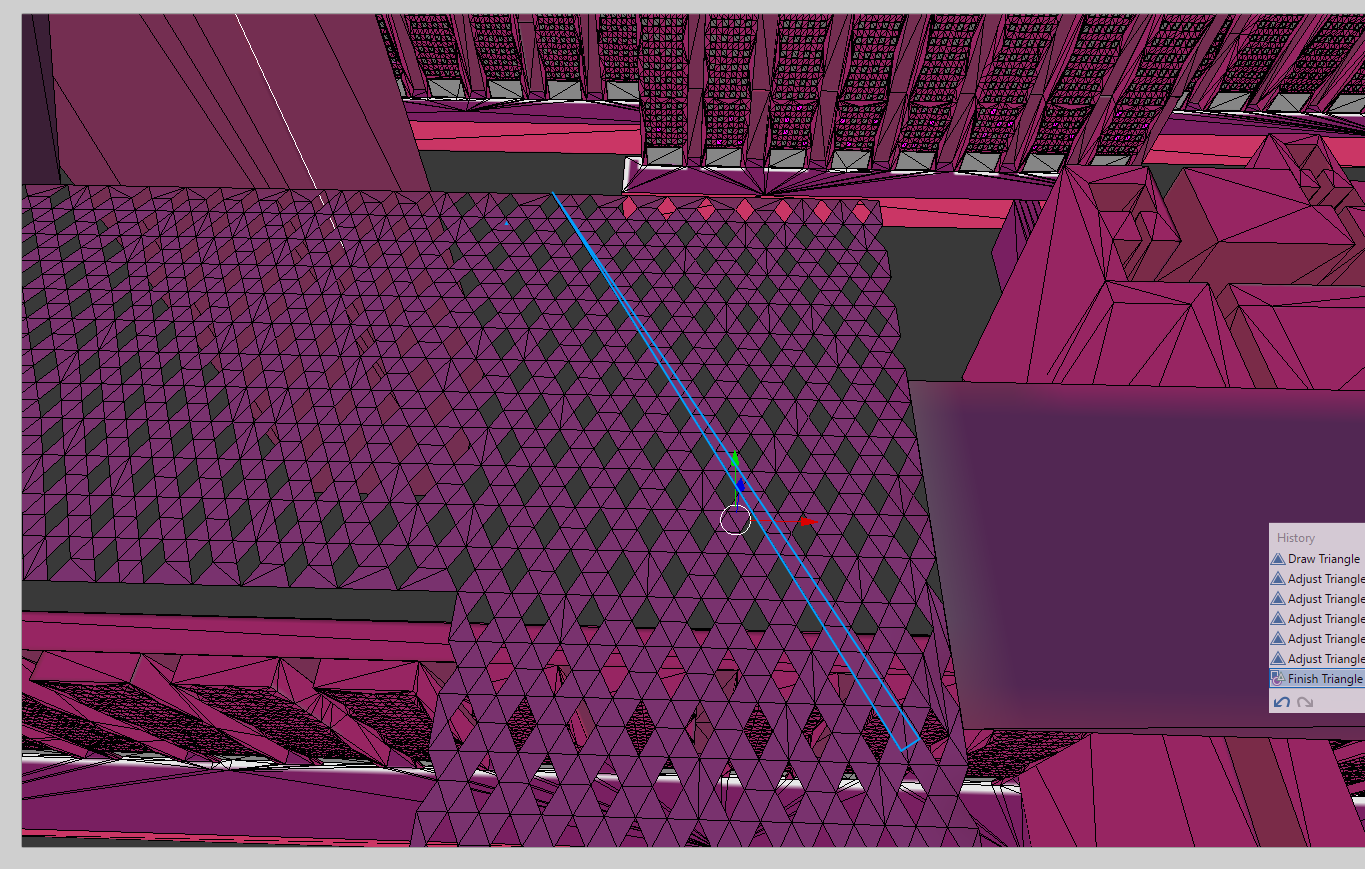
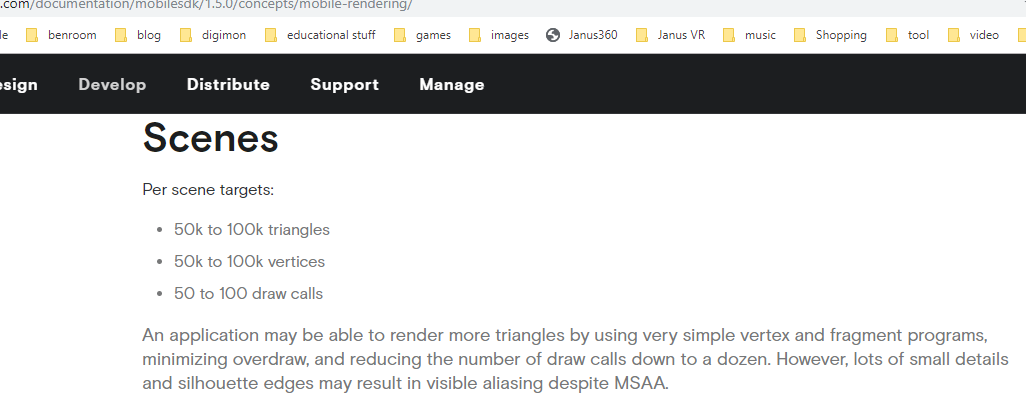

 spare sage
@vagrant kindle hi new, please head to #shameless-self-promotion and delete your post from here, thanks!
 ember willow
 wet galleon
hello! does anyone know if there is a way to create a link (preferrably one that I can host on a website that I will create) that a quest user can use to launch a specific world? My hope is to point a person to my website in the quest browser, and allow them to click a link there and launch VRChat into a specific instance of a world.
woeful elk
@ember willow I made it 16 seconds in, you owe me.
 viral cobalt
So I'm having a bit of an issue, my world tends to lag because of pick_up objects, someone suggested I make the objects static to prevent lag, but the problem is when I pick the objects up after applying static, I can only pick up the collider and the mesh stays where it is and isn't picked up, any advice on how I can fix this issue?
@solid mortar Sincere apologize for the tag, but could you help me with the issue above? ^
spare sage
static objects can't be moved because they're baked into the scene
if you have that many pickups, you can't do much computationally, assuming they're already culled when looking away
spare sage
the main world geometry, anything that doesn't move
Also, what shaders are you using for the world's materials?
it also helps if you separate the world into little chunks, so that culling means only smaller meshes of the world have to be rendered when you're looking at them
fair tinsel

 spare sage
damn thats a nice gif
 sweet tundra
The second one looks optimised
fair tinsel
yep that's why you want to set up your occlusion culling
 sonic fossil
@everyone hi
hardy parrot
@sonic fossil Rule #10, Do not mass-mention large numbers of users
spare sage
that doesnt mention anyone
that rule refers to people doing atTJStudioYT atPeridot atRainwolf atDogeGamer9000...
pseudo pebble
@spare sage hes still trying to mention everyone but failed miserably
wraith jewel
my avatars aren't appearing in game but on the site they are
spare sage
throw the quest out the window, go buy another one reinstall vrchat
 hardy folio
guys they are crasher for werewolf his name is ZEPHORIAH
 fair kernel
Can someone make me a custom quest avatar, i can pay if need be
spare sage
Look for the VRCTraders Discord in #community-servers-old for avatar commissions.
 mental sluice
Hey I have a bit of a question. How do you make a mirror stop rendering avatars when it gets a certain distance from it like in The Great Pug - West on the Quest
 zinc harness
Vrchat says audio sources for quest will be removed. Any work around for this, trying to add sounds effects to avatar ..
pseudo pebble
You cant have audio sources on quest avatars
wraith jewel
That explains why some of my Quest avatars have sound on their animations when playing on Desktop compared to playing on the Quest.
autumn grotto
Yes 😔 they even pulled out the old logo at the bottom to let you know that you're super gullible
 velvet bramble

 gritty crescent
sorry i just wanna know so :3
eager needle
Because who would go on the internet just to spread lies and misinformation, people would do that?
pseudo pebble
Youre righ. Thats illegal and illegal things dont happen
eager needle
 eeexactly
spare sage
That poster is hilariously fake, lmao
wraith jewel
Yeah, I am a bit suspicious of the grammar and the random capitalization for the word 'amazing' when it is not a proper noun or the first word in a new thought.
 rugged compass
If it's real then they would've said it in announcements by now
spare sage
- it's crusty af
- the old logo
- the graphic at the bottom is stretched
 whole atlas
and why 27th out of all numbers
spare sage
- the 27th of march ends up on a friday! you never do anything major on fridays because employees are going out for the weekend.
 late prairie
@wraith jewel #feature-requests 
 narrow python
I want to understand how Mr.Spook's new world has dynamic bone animations on the 3 avatars. Would anyone like to explain how this is possible and if it will be able to put this on an actual player's avatar?
upper pecan
Positive it isn't clever weight painting? Dynamic bones physically don't work on quest, even if you glitch the sdk to upload it.
narrow python
Even if it were clever weight painting, how would it be possible in general and if there were a tutorial on it. Because the animations look very debatable on if it's really weight paint or dynamic bones
sweet tundra
It has the be painting, dynamic bones won't work at all.
zinc harness
I just realized this last night, quest vrchat doesn't have a camera tool. was this ever announced to be in announced in the future or is it just impossible due to limitations?
screenshot is a thing but i'm kinda looking for selfie shots
 warped bone
Take a screenshot in front of a mirror
 cinder hornet
any one using link?
 desert carbon
is anyone else repulsed by the lack of ability to force the game to show all avatars regardless of consequence?
 glad root
i mean
if the game had a magical way to show all avatars including ones compiled only for PC, it probably wouldnt even load
desert carbon
The avatars have to be compiled? It's not just a live model file interpreter? I would rather play with horrible performance than not be able to take advantage of the main fun feature.....
glad root
Well they need to either be built and published on PC or Android platform in unity is what i meant*
desert carbon
ohhh. ok. I just miss my favorite game. I can't afford to upgrade my pc or buy link. It's gonna be a long ways out for me, I guess.
glad root
ah, yeah you will have to wait then. VRC on quest is more of a nice bonus for new vr users, and a shame for anyone who's even played desktop in the past
horrible percormance is an understatement, by the way, if you want me to elaborate
desert carbon
worse than 25 frames or so? I've played some tech demos that run around 30fps and I don't normally have any issues with motion sickness. From what I hear, I must have a strong stomach lol
glad root
uhh
worse than 5. my pc is kinda shit for VR. Even in an empty room with myself its better for me to run 45fps and reproject to 90, under a fairly large load (20 visible PC avatars) in a room is when i start dropping to 20-30, and for the big events with 40 people or more i can go down to 15 and might even start desyncing
desert carbon
Geeze. That's crazy.
glad root
but, while i havent tested this in the unity profiler yet since im not working on worlds tet, IF i we're to go off of some Oculus numbers from their official devblog from around 2 years ago, my PC is still around or more than 20 times as powerful as the quest
desert carbon
I wish they would implement a convex hull parser so they could generate lower poly versions on the fly. It could also allow for adaptive loading. Load a generated lower poly/res version until the full model is sent over the network. Might also be a good way to implement more diverse performance control for all platforms
glad root
on top of that, while PC GPUs dont get a lot of attention in VRChat because of how CPU-heavy the game is, the mobile GPU inside of the quest is so stripped down that it becomes more than a genuine concern. If you werent trying to crash anyone on PC, you can basically use whatever the fuck shader you want. On quest, mobile shaders dont even let you use transparency
they might be doing that. It was mentioned that they wanted to make some PC content visible on quest automatically around last year. How they plan on doing this is beyond me since its more of the player's responsibility, but if it's actually being worked on then i guess it might be interesting
desert carbon
That's very interesting. I know that the chipset itself should support everything up to a level close to being right between the xbox360 and xbone. In theory, the hardware should be good enough for most things. Another bottleneck of OS and software, as always. It would be really cool if Oculus release a Quest with current gen ARM hardware alongside a cheaper model like how the quest went with 3 year old hardware instead of brand new. I would definitely save up for, or sign a contract for, a mobile vr headset with something like a snapdragon 865 or even the 8cx
The real potential is there, we just need to get all the parts right. I'm a software dev and a bit of an overhyped enthusiast with no money, so I am always so frustrated to see how often software bottlenecks hardware potential.
glad root
there was actually some light controversy about that last year on both the vrc discord and the VR community discord! Apparently oculus drivers or software is underutilizing the hardware. Allegedly the explanation was given that a large part of both CPU and GPU real estate had to be given up to inside-out tracking which i can believe. Furthermore, i think there would be some painful thermal issues with going for a higher-power processor, especially one that will be under heavy load almost all of the time
unless you wanted to add heavier cooling
desert carbon
They really should've gone the route that Magic Leap had, they could have the display in the head mounted part and then have a belt-strapped unit with a retention cable that is the cpu/gpu etc. They could've had a larger batter, better hardware, cheaper construction.... Not to mention, that would probably form the lightest headset on the market.
glad root
Thats how magic leap worked? Huh
desert carbon
Minus the retention cable part. I'm talking about the Magic Leap's ar kit that they developed but I don't think ever fully got to release because they are kinda going under at this point
But for a system like the Quest, the design might've been a perfect fit
glad root
i guess it all depends. I think their target audience, the average person, would prefer the lack of friction that comes with just putting on the headset and grabbing the controllers and turning it on. i would kind of lead towards a belt-mounted solution, but there is plenty of merit in how the quest is designed now
actually, belts were in my mind qhen quest was first announced, but not to hold the power. Instead i suggested that it could be a ghetto solutuon for inside-out full body tracking, where a downward camera could track hip position around a belt, and that belt would have its own array of downward sensors to look at feet trackers
Also rip magic leap
time for apple to take on the AR market! heh. Hah. huhauh.
desert carbon
Oh god lmao
I mean, at this point everyone is putting cameras from FB in their homes, so I'm not sure if it can get scarier than that from a security standpoint
In history, and seemingly today as well, incredible technology is lost because of lack of understanding, lack of power, or just because it's slightly harder to make. It's the reason the world is covered in electric wires and towers instead of spread out coils. I'm referencing Mr. Tesla's tesla coils.
just realized you were probably right about compiling avatars. Shaders are always compiled in gaming engines
eager needle
Tesla towers don't really work like that 
 soft bridge
What's up everyone!, can anyone direct me to some documentation on vrc_npc? I can't find anything on it.
 civic grotto
Idk if this is the right place to put it but I really badly want this in the game instead of having to download a client, I would love to be able to touch peoples dynamic bones, meaning: moving someone else’s ears, hair, tail anything with colliders on them and of course I would love there to be an option to allow that. I would love for the game to also add portals to drop to friends instances instead of having to leave and invite them.
fair tinsel
this is definitely the wrong place as the quest doesn't allow Dynamic bones at all
eager needle
Not the right place, and it ain't happening, shoo shoo
fair tinsel
Yes as it's a third-party component so that's entirely dependent on the dynamic bones makers
worldly nest
@narrow python It's because they're world models/objects, not actually avatars. Dynamic bones technically can work on Quest, it's just disabled on avatars due to performance reasons.
(worlds have a lot more leniency in terms of what they can do)
@upper pecan That's for your info too /\
worldly nest
@desert carbon You can't show all avatars (regardless of consequence) because they have to be compiled explicitly for the platform they're being uploaded to. For this reason, PC users can't see "Quest Only" avatars (where they've only uploaded for Quest and not PC).
@upper pecan Read what I said then remember the last thing you said.
upper pecan
How I said dynamic bones don't work on quest?
I meant like they don't work because they're disabled
I just meant it was on a game level, even if you modify or glitch the sdk
worldly nest
It was more in the context of why they work in that world, but not on avatars.
upper pecan
Ah
desert carbon
@worldly nest I guess I just don’t understand the logic of compiling models vs writing or using a library to render them from files. Does compiling the avatars yield a significant performance improvement over just using an interpreter for the models? Isn’t the game built on Unity, which (I’m pretty sure) has great support for building model and shader interpreters for rendering? Actually, can’t the engine just render models and shaders directly from loaded files without any major amount of custom code?
spare sage
The avatars aren't "compiled"
desert carbon
That’s what I thought, but everyone keeps using “compile” to describe the process.
I don’t think compiling 3D models is really a thing. Shaders on the other hand makes sense
spare sage
They ARE rendered from files, Unity asset bundles are platform-specific
Because there are parts that do needs to be compiled
any components on an avatar contains scripts, and those are pre-compiled, because C# which Unity uses isn't an interpreted language
Anyway, there is no point in trying to argue about speed, if you somehow made a web worker that could recompile any standalonewindows asset bundle for android, the Quest would melt in seconds.
desert carbon
I guess I am just fully not understanding why it’s beneficial to do such things. What do the scripts get used for that you can’t do with a model/material/animation key frame groups?
Oh wait, so Unity itself doesn’t provide on-the-fly asset loading by default?
desert carbon
Oh, interesting.
spare sage
the avatar descriptors and others
animators, mesh renderers with their settings, those components need to be compiled on an avatar
desert carbon
Very interesting. Sounds like Unity needs some better low level optimization. I figured they would have better solutions to these kinds of things, given the focus on the ability to deploy to a wide range of platforms.
Maybe the push for native Vulcan support will cause some of that code to get looked at again.
spare sage
You sound like a car noob trying to complain about the technical aspects of Kia's V6 engines from 2011 to 2015
Switching to Vulkan, especially on PC would break most shaders
desert carbon
Oh yeah. I’m more of just disappointed constantly by the state of the software industry. I’m a developer and I’m constantly in awe of how completely horrible some people’s code is.
spare sage
Don't forget, development is all about context, if you write some tool for yourself to do some task 3000 times overnight, vs a tool that's supposed to process millions of user requests every second, the mindset is different.
desert carbon
Well, ok.... no shit it would. It’s a different system all together. I understand that. I’m saying that Unity going back to working on renderer code might have some related code also get looked over and maybe newer features to get looked at.
spare sage
In the context of VRChat, none of it's gonna matter for multiple years
desert carbon
Yeah, I get that. I’m writing a tool like that at work right now. The one we just finished is disappointing because of my coworkers my lack of knowledge of newer features in the systems we use.
I apologize for being rash about everything. I get really fired up about software that seems weird to me. Mainly because I’ve worked with a lot of devs and I tutored some people at my college that make me very worried for anyone they work for. But they got the degree and the job. Data breaches, feature deprecation, etc will ensue I’m sure of it.
 glad shadow
Yeah looking a bit up compiling is definitely the wrong wording since the asset bundles get build not compiled for the specific platform
desert carbon
It’s kind of a side-step term for compiling though.
Close but not exactly the same. But people really like the word “compile”
glad shadow
In unity context compiling is a completely different thing though
desert carbon
I agree
glad shadow
Unity compiles all the scripts in editor before a build is done
desert carbon
Loose terms... There’s a reason I switched my degree from Networking to CS the instant I completed the first class.
The whole first networking class was like living in a hell where every atom has a separate acronym with 1 letter changed. Sometimes no letters changed 😱
glad shadow
Yeah that's how it be sometimes 😅
desert carbon
Yeh. Really glad to have dropped out. I got an internship that turned into a job and then dropped out, now I’ve got 4 years of experience 😁
soft bridge
What would be the best way of making a object chase you when you walk infront of it using a vrc script?
 brazen shoal
Is this a chat for glitches on vrchat or no?
sweet onyx
No... this chat is for help with developing and programming content in unity.
For glitches, you will want to discuss vrchat issues on PC in #vrchat-general-2 ; and oculus quest mobile headset related issues in #quest-general
 sinful palm
hey i got a issue with shaders in unity and its the only thing keeping me from uploading it
i need to switch the only shader i got from standard to some random mobile shader but the dropdown bar for switching it is grayed out and unclickable
how do i fix this?
quiet nymph
Right click the shader under ou fbx and extract from prefab
sinful palm
@quiet nymph where is that located?
quiet nymph
Click the arrow beside your model
sinful palm
ok ill try that
 safe rain
Hi, I'm not sure if this is the right place to ask this, but I can't seem to find where to start to make worlds. I've read up on the guides, but I can't seem to wrap my head around it.
sweet onyx
@safe rain have you started with CyanLaser's tutorial series. Still extremely relevant:
https://www.youtube.com/watch?v=xPdlNJ9rUNQ&list=PLIoLQ-8wanr9jQWDUIs_2zshaDD_Lg-9R
First in a series of tutorials on creating trigger based worlds for VRChat. This tutorial goes over creating a basic world to upload to VRChat, includes spawns, jumping, and a pickup object.
Unity Download:
https://unity3d.com/unity/qa/patch-releases/5.6.3p1
VRChat sdk:
http...
safe rain
I'll look through it, thanks!
 sweet kayak
I have a question, when uploading an avatar instead of using public or private we noticed a third option "Developer" does anyone know what the developer option does
spare sage
that shouldnt be showing up
 lilac ether
Wanted to ask if anybody knows how to animate a mask somehow, like some actual lipsync
Or just anyway to change a mask images when i talk, i've got images to sync with vocals or my voice and i don't know how to do it
sweet onyx
the common way is to have a polygon for each facial expression in the face and push them in and out of the face.
 pliant frost
hi do you like scary stories join my chat called scary stories
pliant frost
no
wraith jewel
What new features have been added in the Unity 2018 SDK version?
Has at least some artificial intelligence system been added yet?
🤔
sweet tundra
Unity has ai.
wraith jewel
@sweet tundra
I am aware that it has its own Artificial Intelligence, which already makes it very easy, only that the SDK for VR chat is not very accepting scripts anyway.
😦
If not, I would have done it a long time ago if it were for an independent game without VR chat
This is for an independent game that is not for easy VR chat in less than half an hour
lol
All I really need is the scripts that are acceptable for the SDK to work in VR chat too. I just need the enemy to look at the player and chase him.
Xd.
sweet tundra
That’s just a nav-mesh
Set the nav-mesh target as the player.
And if it’s multiplayer, find the closest player and set the target to that.
 silk pond
POOP
 grand badge
are people allowed to publish avitars for other people?
autumn grotto
yes thats called a public avatar
wraith jewel
@sweet tundra
Tinkering with the nav-mesh I even know and I know how this business of designating My Destiny works, but it's making it work in VR chat because if I did it for an independent game other than for VR chat, I would be able to do it because with my scripts would work.
lol
 plain hinge
May I please suggest something!
plain hinge
Jekauebw
sweet tundra
also. it wouldn't really work
plain hinge
Why not? Recroom has something similar
sweet tundra
Because of technical issues.
wraith jewel
Could someone tell me how to put an object to activate through an emote instead of a hand gesture?
In DM preferably so I can just go straight to it
sweet onyx
@wraith jewel https://github.com/Xiexe/VRCInventorySystem

GitHub
An Inventory system that is easy to set up for your avatars, using emotes. - Xiexe/VRCInventorySystem
 final pelican
I have a lot of quest problems :/
1: my game will sometimes become a black screen. This happens sometimes when switching servers. I can hear everyone in the game I’m in but can’t see. This forces me to close vrchat
-
Sometimes my mic will stop working and I have to close vrchat
-
Sometimes I also lose all sound of people and have to close vrchat and reopen.
-
I get kicked from games a lot though this may be my connection :/
spare sage
Sometimes, a game that runs like trash on powerful gaming PCs has some hiccups on the Qualcomm Snapdragon 835 SoC that was outdated by 2 generations when the Quest released...
thats like asking why the trees randomly pop in 2 meters in front of you in gta v on the xbox 360.
 glossy bramble
Is there a way to actually make an object teleport to another object?
 little zodiac
hey so
I'm trying to use avatars I made and imported
but in the avatar menu,
there's no option to use my own
it appears for like half a second ("Your works" or something) then goes away
fix?
 solemn wharf
I’m crashing waaaaay more than usual since this update
 gusty cave
Can we see our own avatars again on quest, it's like having personal space on for your own avatar
 keen crystal
i just cant play on quest. as soon as i join after the update my quest just shows a flashing screen which goes to vrchat for 1 second and then to black for 3 seconds and just keeps happening. it shows the loading thing for quest when the black screen apears
sweet tundra
@gusty cave you are probably using a  avatar, which are now permanently blocked on quest.
gusty cave
Yeah but that means I can only use the default public ones and they still disappear if you get near yourself
brazen shoal
I think I fixed personal space glitch. I went to the room of sleep and the glitch went away for me and my 2 friends do try joining that
Btw sorry if this might be wrong chat is not sure
gusty cave
@brazen shoal it seemed to fix for me depending on the world I was in if the world was empty of items avatar worked more items in the world the bigger the personal space seemed to be
 brittle remnant
i feel like the team doesn't care anymore on this Game the trust ranks are useless the updates are useless and public worlds are getting more bored because people are toxic or lame sorry vrchat team but im pretty much
disappointed your game it used to be so much better.........
 patent sparrow
Will you be working to be compatible with pc users? There’s so many worlds and avatars I can’t see/use because of it being pc only and pc users have taken up to harassing some quest users and it’s getting really annoying when I see an avatar that I want but it’s not for quest.
brazen swallow
Please fix your game. Ever since the update it glitches out quests a lot!
 cunning thunder
@patent sparrow quest cant see certain avatars because the quest itself is limited the quest is still new idk if oculus is working on making it better if they are you will have to wait but if you have a good pc you can get the link for the quest
i hope that makes sense
rugged compass
@brazen shoal tell me that world in dms that fix it it's kinda bugging me alot
 young shoal
Idk if this is the right place to ask but i cant get the sdk to work for unity on the android version on unity..everytime when i try and switch the platform to android the sdk crashes unity
 upper pilot
You probably heard this enough but the update really messed us up, you should probably reset what you did to us and start again
 marble fractal
@upper pilot i honestly agree. ive gotten headaches from lag. i crash maybe every 10 mins and its not a fun time. me and my friends cant even play the town of salem game since the update completely broke it. I loke the new shaders for quest but more testing needs to be done and more important things need to be fixed (crashing) before stuff like this is added
wraith jewel
Wait very poor avatars are bloacked now?
 neon dome
from what I can gather is that the new SDK has a 10k poly limit, but previously made avatars or avatars made in the old SDK still work but it is unclear whether they will be blocking all very poor rated avatars
correct me if I am wrong though I don't think I fully understand either
 zinc nova
If they do that will suck, sense most good avatars for quest are very poor performance
And if it's for the crashing issue that their doing it, it probably won't help anyway because of the fact crashing has gotten worse since the update
wraith jewel
10k poly is too dang low. Quest users are fine and should suck it up with performance honestly. We don’t need a downgrade we need the crasher avatars actually taken care of and especially quest targeted insta crashers like black boi trevor. I just want to see more pc avatars. We have a hide option floor a reason. Ridiculous
zinc nova
At this point if they don't want quest crashing just not make it compatible for quest. (Obviously I do not want this cause I'm a quest player and I like vrchat) But it was fine the way it was before and I'm personally not a fan where their going with this update
neon dome
yeah honestly it wouldn't be the end of the world for me if quest didn't change much performance wise from the previous updates
I got used to having some performance issues but the new update is pretty wack
im sure it will be fixed sooner or later though
to an extent at least :P
wraith jewel
Its just these 2 year olds complaining about how they dont want to lag and crap and blame it on avatars. Its your internet. Deal with it. Limiting polygons is stupid. Id like to see semi-dynamic bones and especially music and crap. And animations would be dope
neon dome
I doubt its internet related
it almost definitely is related to avatars, and dynamic bones and stuff would only make it worse. Personally I just want it to be where if you want performance, keep it on the default safety settings of medium. If you want to see more avatars, expect performance dips like how it is now
its a tradeoff sort of thing