#world-lighting
4 messages · Page 30 of 1
 next owl
 mental charm
13 min bake now
 mint cipher
oh?
ok
so you reset the settings and disabled at same time right?
if thats the case try toggling them back on and check time again
mental charm
yup
mint cipher
and check each object 1 at a time
first try all
if you get long bake time then disable all but 1
and keep going through each one
mental charm
it was 100% the grass carpet

 mint cipher
well that is certainly an itneresting one
next owl
it's not the shader on the grass that's the culprit, it's the geometry
it's a bazillion instances of grass chunks scattered about, and then the lightmapper has to bounce a bunch of rays around them
that's a recipe for pain
mental charm
nope not even the grass
its the bushes i have the in the world
'
im gonna bake without and see how they look unbaked, if it looks weird ill just get rid of them
i can always replace them with something else
16 mins bake time no
Now
mint cipher
thats better
@next owl any idea why some of my objects are just black and not having light on it?
it is static
next owl
mint cipher
<@240260948374454272> any idea why some of my objects are just black and not hav...
do the objects have lightmap UVs?
mint cipher
they should but ill double check
but what about matierals?
i made the walls black material
but they are having problems
next owl
how black? lightmapping won't really work if your materials are outside the PBR safe albedo range
 next owl
you can't bounce light off of pitch black
mint cipher
this isnt supposed to be pitch black'
next owl
i mean, how black is your black material in textures
mint cipher
i just increased it to lighter
next owl
have you tried viewing through the Validate Albedo mode
mint cipher
so it should work better
but idk why my disco ball is black now
i even deleted and reset it
mint cipher
i ammm confused why is it black now
next owl
i mean, i tried asking diagnostic questions.
you need to check if the ball has lightmap UVs, if it is static, and if the albedo or other textures are within reasonable limits
if the lightmap UVs were modified recently you may need to rebake. if the material is reflective you will need to make sure at least one reflection probe contains it within its volume.
you also need to make sure that the object itself is set to contribute to GI in the mesh renderer settings
mint cipher
next owl
have you tried viewing through the Validate Albedo mode
i actualy missed this
mint cipher
next owl
i mean, i tried asking diagnostic questions.
you need to check if the ball has l...
it is static, it has lightmaps and ill check its texture again

 next owl
okay. from here it looks like that object is almost entirely metallic
mint cipher
 next owl
have you baked reflection probes? on the mesh renderer for that object, are any reflection probes listed?


 next owl
that's not necessarily a fatal error
are you seeing textures on your probes? do they look correct?
mint cipher
when lights are off i see it but it doesnt look right
for some reason
now it seems to look right
even though
it failed
?
next owl
i have no idea what you're saying
 next owl
the errors you're seeing there sometimes happen during bakery operations and they're typically not fatal
mint cipher
the textures looked somewhat right when i turned off lights
then i turned it on after trying to bake probes
now it looks right
next owl
¯\_(ツ)_/¯
next owl
if you're using bakery, you need to bake reflections after baking lighting
for whatever reason bakery will erase your reflection probes after baking lights, and so any metallic objects will appear completely black (because metallic objects don't reflect diffuse light in PBR)
mint cipher
thank you for telling me
 lyric heart
For some reason when I bake AO to Vertex Colors
this effect happens

I think
I'd prefer it if it was more like this

which it sometimes is
Why is it sometimes one way and sometimes another?
next owl
your vertex normals might be completely hard on the incorrect ones? or vertices not fused
lyric heart
next owl
your vertex normals might be completely hard on the incorrect ones? or vertices ...
I've checked in edit mode by moving faces and using "merge vertices by distance" the vertices should be fused
lyric heart
next owl
your vertex normals might be completely hard on the incorrect ones? or vertices ...
as far as being hard goes, you can see the blue edges marked as sharp here
 next owl
are there interior polygon faces in there? like between two of those cubes sandwiched together, are there faces in between them?
lyric heart
Maybe let me check
if there are that's gonna be a massive pain to remove manually
Seems no?

 lean whale
lyric heart
Maybe let me check
_if there are that's gonna be a massive pain to remove manual...
lean whale
lyric heart
Maybe let me check
_if there are that's gonna be a massive pain to remove manual...
Not sure I can help with you're issue but I'm just curious, are you baking ao to vertex colors in blender? Is that using an addon?
lyric heart
lean whale
Not sure I can help with you're issue but I'm just curious, are you baking ao to...
Yes baking AO to Vertex Colors in Blender not using an addon
I'm just using Blender 2.93.8 just a feature afaik
lean whale
Oooo I had no idea, I'm gonna try this
lean whale
Welp mine looks nothing like yours haha
 lyric heart
lean whale
Oooo I had no idea, I'm gonna try this
lyric heart
lean whale
Oooo I had no idea, I'm gonna try this
What'd you do?
I need every "block" to have it's own quad I can't use planar decimation if that's what you did

 lyric heart
So nothing different?
lean whale
Different from what? From your setup?
Idk how you did it
But mine doesn't seem right either, like Idk why these areas aren't shaded
 lyric heart
lean whale
Different from what? From your setup?
lyric heart
lean whale
Different from what? From your setup?
Yeah
unless you're using GPU instead of CPU?
 outer nacelle
anyone know what to do about this when rendering reflection probes

 modest vapor
I think this error can be ignored ?
outer nacelle
It doesn't give reflections like a working reflection probe does however, like the material with a metal and smoothness of 1 looks flat and cant see light reflections in it, also when clicking on render reflection probe it kinda interrupts the progress bar right away and spits out this error
but your right , i just checked my other world and it gives this error but everything looks how i would expect it too....
 errant anchor
how do I fix this, using Bakery


 tepid chasm
Hmm.. well.. my avatar doesn't really get any darker when moving between areas.. though moving an object between the areas does cause the object to get darker (at least in my scene)

Using bakery + light probes, any certain settings or way to set up the probes to better lighten/darken my avatar when I move between those areas? (such as the dark area in the back, my avatar still seems fully bright back there)
 glossy meteor
what's your avatar's shader?
tepid chasm
poiyomi, though I've seen him get darker in other worlds so it's not like he's full on emission :o
and before I added the light probes, he was almost impossible to see.
Maybe I just need to do some more light probes, guess I'll test that out.
tepid chasm
Yeah, adding more light probes helped, actually.
Now the avatar does get noticeably darker if I go behind that wall.
I'm assuming when you have a wall (or anything that separates light), you probably want to have light probes close to each side of the wall
 formal spindle
would edge kissing cause lighting issues later in unity?

 lost imp
Trying to add Post Processing, but there's no layer available for it.

 sharp robin
lost imp
Trying to add Post Processing, but there's no layer available for it.
sharp robin
lost imp
Trying to add Post Processing, but there's no layer available for it.
Unity/VRChat doesn't have a designated post processing layers you would have to create your own
Or you could use existing layers that are mostly unused such as TransparentFX or Water
lost imp
Yeah, the intention is for water, so maybe I could just do that :P
modest vapor
formal spindle
would edge kissing cause lighting issues later in unity?
Yes, merge your vertices
 opaque garnet
any ideas why my lighting looks fine in Unity, but in-game all the interior floors have no lighting at all?
 tepid chasm
using real time lighting? or baking?
also, sheesh... looks like Bakery's lightmaps can really increase the size of a world by a lot.
my crappy little world at 225 Texels per unity is like 100mb.. but at 100 Texels it's down to 44mb..
opaque garnet
Baking; I think it may have been the shader on that material i was using. seems to be resolved for now
modest vapor
tepid chasm
my crappy little world at 225 Texels per unity is like 100mb.. but at 100 Texels...
225 texels is insanely high, so is 100
Indoor should be ~40, outside 10~20
tepid chasm
modest vapor
225 texels is insanely high, so is 100
ohh, thanks. was kinda wondering what was a good number. saw someone in a video saying 200 was good. lol
modest vapor

tepid chasm
😄
that said, I am enjoying messing around with bakery and light probes
except when I go into desktop in vrc after using unity.. and notice I'm still holding down right click when I move...
So at the moment, my world is basically just one big test so I can figure out lighting and what not. Most of my walls are sort of their own pro builder mesh. Kinda wondering if I'd save more file size by making all the walls into a single mesh
glossy meteor
don't just combine everything
usually you combine in reasonable chunks to have occlusion culling do the work
if everything is a single mesh, there is nothing to cull
tepid chasm
good point, I'm not totally sure on how occlusion and occlusion culling work
 fallow lark

GitLab
A surface shader for Unity providing cel-shading. (Forward rendering only)
tepid chasm
So if a room is mostly square, would it be better to have all the walls as their own mesh, or combine like two walls, opposite corners?
oh that's interesting
so does that basically make it so when you're not looking at certain things you get better performance?
fallow lark

basically it stops rendering objects that are hidden behind a wall or another objects
tepid chasm
nice
 pale heart
and idea on how to fix this? everytime i bake my light the uv-maps overlap
 modest vapor
Did you do what the warning said ?
pale heart
I tried but i couldnt figure out where
modest vapor
On the gameobject settings, in the inspector
outer nacelle
tepid chasm
my crappy little world at 225 Texels per unity is like 100mb.. but at 100 Texels...
another tip is to crunch compress your lightmaps if you are baking them higher than 1080
 calm iron
meow
pale heart
Suddenly my baking went wrong, i dont know how to fix it, any ideas? in game it looks horrible
 pale heart
this is how horrendous it looks in game

 past vault
I'm following a tutorial to do this:

I followed exactly everything but i dont get why i have this

I made my room with probuilder, someone know if that could be the problem?
 supple harness
past vault
I made my room with probuilder, someone know if that could be the problem?
supple harness
past vault
I made my room with probuilder, someone know if that could be the problem?
And what's the problem? Customizing reflection and lighting behavior on objects .Set everything to static, make baking.
past vault
Yea, now i made everything work except the postprocessing stack 2, i set it correctly but still effects of the post processing wont work
supple harness
past vault
Yea, now i made everything work except the postprocessing stack 2, i set it corr...
GitLab
A surface shader for Unity providing cel-shading. (Forward rendering only)
past vault
Ok i made everthing work for the second time xD now i just need to figure out how i can make the light be on the player, like, there are no player shadow and the player dont get the light reflection in his body, why?
 supple harness
past vault
Ok i made everthing work for the second time xD now i just need to figure out ho...
supple harness
past vault
Ok i made everthing work for the second time xD now i just need to figure out ho...

 green vault
baked lighting will not have shadows. but as for lighting your avatar. follow mureiks thing
if youre wanting shadows. best uou can do is mixed lighting. or you can try the projector method
past vault
green vault
baked lighting will not have shadows. but as for lighting your avatar. follow mu...
You mean the light probes?
green vault
si
past vault
I tried with reflection probe and seems the light now bounce on avatar correctly, is it a solution or light probes are better?
(still the shadow of the avatar doesnt show up , maybe i can use a directional light for that?)
past vault
green vault
light probes and reflection probes contribute to better lighting practices
For the light probe i should make the box large as the room where the light its emitted , right?
green vault
youll want probes near lighting
outer nacelle
pale heart
this is how horrendous it looks in game
I had this issue happen to me too, I had to export all my assets into a new project with no prior lighting in it, and then re open my scene, re bake lights and then it worked, I know it’s a long solution but I haven’t found a better one tbh
pale heart
outer nacelle
I had this issue happen to me too, I had to export all my assets into a new proj...
Thank you! is it easier to bake when im done with all my assets u think?
outer nacelle
Yeah probably easiest to set up everything how you want then do the export, if need help with exporting it too just lmk
pale heart
outer nacelle
Yeah probably easiest to set up everything how you want then do the export, if n...
Thanks a lot, ill try this!
 tawdry bridge
yall i lost my inspector 
 tight marten
anyone have any recommendations on lighting a forest with moving leaves? My initial thoughts are to bake the trunks' shadows and then light the leaves in real time/have their shadows in real time, but I wasn't sure if anyone had any good ideas on the best way to do this for optimization.
also has moving grass/foliage as well.
 sly forge
anyone have any recommendations on lighting a forest with moving leaves? My initial thoughts are to bake the trunks' shadows and then light the leaves in real time/have their shadows in real time, but I wasn't sure if anyone had any good ideas on the best way to do this for optimization.

fallow lark
not sure if it would be the best solution but here's how Skyward Sword does it basically wiggling a transparent quad with the Shadow baked onto it https://i.gyazo.com/123b3b475207159f4c46c5f13cc4b538.mp4
 spring elk
ok so im using bakery and everything was working fine and made a few adjustments to some lights and now nothing is baking anymore is there a quick fix to this or is there some rookie mistake im doing to cause this issue because i ran into this multiple times in the past an its getting really frustrating.
modest vapor
Clear unity's lighting, clear your GI cache, clear bakery's bake data, save, restart unity and try again
mint cipher
my lighting looks good in the editor but not in testing (the first picture is testing and the second is editor)


nevermind, I had 2 lights that I didn't realize I had
mint cipher
i got a bakery problem
anytime i use more than 20 texels the bake just gets stuck

for example 30 or 40
fails
anything above 20
and baking at 20 makes the lights look terrible
it just gets stuck at exporting scene
next owl
you might be running out of VRAM if your scene is pretty complicated. you could try using bakery sectors to slice up the problem into smaller chunks
mint cipher
next owl
you might be running out of VRAM if your scene is pretty complicated. you could ...
how do i make sectors?
modest vapor
Add the bakery sector script onto an object, place part of your scene below that object, and place that sector object above the bake button in bakery
(I should make a tutorial  )
)
next owl
...or just read the manual
mint cipher
some people have different learning styles
some are better at words. some need video, some need audio
manual could be confusing without visual aid imo
next owl
yeah, but like, have you actually looked at the manual? it's not very long
next owl
i don't mind helping to answer questions but this stuff is all out there for you to see
mint cipher
i might have looked at the wrong place then
because what i looked at had text only and wasnt very informative xD
i probably should've used the link on the store and not some random guide
mint cipher
giving it a look
mint cipher
i understand it now


 fallow lark
cool wall pattern
spring elk
i need to fix up the corners a bit just trying to perfect the lighting before going any further
lean whale
Groovy
outer nacelle
really not sure what to do here, that black wall has the same material as the other concrete wall but just comes out black after a bake, yes its static and there are lightprobes in the scene
 next owl
is that black wall a separate FBX? does it have lightmap UVs?
outer nacelle
same fbx, yes lightmap uvs
let me restart unity maybe
restarrting and rebaking seemed to fix it, should have tried that sooner probably
 swift garnet
Anyone know if theres a way to use https://github.com/MerlinVR/VRC-Bakery-Adapter with shaders other than Bakery Standard? I've baked some SH lightmaps and want to be able to use Mochie's standard, or even my own shaders in Amplify with SH support
GitHub
A script that handles converting Bakery RNM and SH directional lightmap bindings into a format that VRChat can process - GitHub - MerlinVR/VRC-Bakery-Adapter: A script that handles converting Baker...
fallow lark
they are shaders that support the Bakery stuff https://gitlab.com/s-ilent/filamented

GitLab
A transposal of the shaders from Google's Filament renderer over the framework of Unity's Standard shader to allow for higher quality rendering in Unity.

New update!
I've released version 1.1 of Filamented on Booth! This version features support for Bakery!
It also includes improvements to specular, dynamic objects, and the material settings inspector!
https://t.co/NPsmD9uOzx
https://t.co/nBHvcP6yTK
#vrchat #unity
Likes
113

 Twitter
·
Twitter
·

 swift garnet
That's what I'm asking, I already have shaders that support Bakery lightmap modes
It seems like Merlin's tool to make SH and RNM lightmap modes compatible with vrchat only work with Bakery Standard
fallow lark
do not know myself as I haven't tried the SH and RNM lightmap modes
swift garnet
silent suggested a different adapter in the replies of that tweet, i'll try that
fallow lark
cool
swift garnet
fallow lark
do not know myself as I haven't tried the SH and RNM lightmap modes
your tweet link led me to the right answer, so thanks lmao
fallow lark
cool
 wooden raven
When I set my own skybox, disable the Directional Light and my Point Light (the only two light sources besides the skybox itself) and then bake the lightmap, it doesn't bake correctly and I'm not sure why. Then, when I undo the change I made and bake it again, it still bakes incorrectly. I'm at a loss. (Feel free to tag me when you reply)
wooden raven
wooden raven
When I set my own skybox, disable the Directional Light and my Point Light (the ...
Found out it was due to overlapping UV's, but I'm not sure how to fix this.
spring elk
got the lighting done to the way i like it finally started putting stuff in the room
 spring elk
dose anyone know why my lightmap is breaking when i upload my word to vrc

 versed herald
in my lighting settings. I know its best to have all lights baked, or most. But should they be rectangle or circle
also for some reason my lights are not baking.
They are set to: Point. Mode-Baked.
Then should reflection probes be baked or realtime, or custom
 graceful tartan
spring elk
dose anyone know why my lightmap is breaking when i upload my word to vrc
graceful tartan
spring elk
dose anyone know why my lightmap is breaking when i upload my word to vrc
I see you have bakery. What directional mode did you use when baking?
If you used anything other than none or baked normals there are extra steps you need to take for VRC to support it.
outer nacelle
versed herald
Then should reflection probes be baked or realtime, or custom
reflection probe should be baked if your baking lights, also how do you mean its not baking, is the progress bar stuck, is the world black?
versed herald
outer nacelle
reflection probe should be baked if your baking lights, also how do you mean its...
no, it finishes, but it still looks like realtime. and i cant find the textures for the bake
spring elk
@graceful tartan its just basic settings pretty much besides the samples and resolution
outer nacelle
versed herald
no, it finishes, but it still looks like realtime. and i cant find the textures ...
do you have any emmsive materials in the scene that are on realtime?
versed herald
outer nacelle
do you have any emmsive materials in the scene that are on realtime?
not that i know of
graceful tartan
spring elk
<@277663731390087169> its just basic settings pretty much besides the samples an...
My default thing to try is clear the baked data and rebake and test that. 🤔
outer nacelle
versed herald
not that i know of
can you send a pic of the finished world after baking?
versed herald
outer nacelle
can you send a pic of the finished world after baking?
yeah just a minute. building and testing
spring elk
ok if that dose not work ill just reset my bakery stuff and give it another go
versed herald
spring elk
ok if that dose not work ill just reset my bakery stuff and give it another go
 outer nacelle
and if you search for lightmaps in your assets nothing comes up?
versed herald
just noticed i sent the msg ot the wrong person
versed herald
outer nacelle
and if you search for lightmaps in your assets nothing comes up?
yeah i found things called "Lightmap" . it just dont look like its baked for some reason. i guess im used to more pixelly looks
outer nacelle
yeah if you have thoes then your light should have been baked good
versed herald
outer nacelle
yeah if you have thoes then your light should have been baked good
ok. and reflection probes are set to custom-box? HDR?
versed herald
what is hdr
outer nacelle
hdr just means high dynamic range, i know for a camera it means it just combines several different exposures and combines them, im not 100% but it should be the same for reflection probes becuase they "act" like cameras
heres a comparison https://forum.unity.com/threads/hdr-rendering-and-texture-benefits.903377/
tepid chasm
was nice and smooth.. but once I baked it with bakery... (40 Textels), got these ultra jaggy edges..

Anyway to avoid that without cranking up the textels skyhigh?
as a comparison, when I don't set it to static:
 graceful tartan
tepid chasm
graceful tartan
tepid chasm
Take a screenshot of your bake settings?

 tepid chasm
graceful tartan
Take a screenshot of your bake settings?
tepid chasm
graceful tartan
Take a screenshot of your bake settings?
that's the settings I used.

 outer nacelle
I thibk texels is the biggest factor in time for bakes
mental charm
texels?
outer nacelle
Light map res or texels per unit
mental charm
oh
outer nacelle
Also you can bake light maps at 4k and crunch compress them to 1080 to save some mb
mental charm
How would i compress em
currently this is what my time is looking at after lowering the texels to 20

 pure widget
turn your samples down tf
pure widget
half the 500s at least
outer nacelle
mental charm
How would i compress em
When the light maps are finished, click on them then in inspector choose 1080 and slide the slider to 100 and choose best quality and then click apply
mental charm
Alrighty
Bake time is 30 mins now, which is better than 2 hours lmao (Edit: Its back down to 30 now lol still somewhat rising though; edit again, its going up and down back to back now lmao)
wait its goin up ;-;
Could another possibility be that i have too many point lights, i feel light i do lmao
outer nacelle
How many lights you got?

 outer nacelle
Bruh
mental charm
KEKW
mental charm
how close each lights are close to each other?
outer nacelle
Yeah that wording works better
mental charm


I have six seperate "private rooms" aswell with 4 lights each aswell
100% could keep one light on each of these

 outer nacelle
Ah makes sense, yeah i would say that would help reducing time, could try baking but just turning 1/2 of thoes off and try
mental charm
Yeah, ill just redo those and see how it turns out
mental charm
Alright so light probes look ridiculous lmao

Alright, got rid of a pretty damn good amount, gonna go through and double check then rebake and see how she looks
 oak breach
Heya i have really weird thing happening with Bakery, any idea what may cause it and how to fix it? From what i noticed it may be connected to how many stuff light is casted on and maybe their size in lightmap
 mental charm
Starting bake now, gonna see how long it takes
oak breach
oak breach
Heya i have really weird thing happening with Bakery, any idea what may cause it...
For clarity, everything is mesh, no terrains nor trees, everything is static, everything has generate lightmap uv
lean whale
mental charm
Starting bake now, gonna see how long it takes
Use Progressive GPU instead of CPU
mental charm
Baking finished
outer nacelle
mental charm
Baking finished
How long?
lean whale
Have you tried using Progressive GPU lightmapper @mental charm ? That should be way faster
mental charm
Naw i havent
lean whale
It's like 10x for me 😊
 verbal cape
The default Unity lightmapper has nothing for memory management which eliminated GPU lightmapping for many basic VRC users trying to get into dev. 4GB ram, and a mediocre GPU wont cut it for a lot of content. The simpler the scene the more likely it is to bake but still. For the majority, our savior is Bakery which is way faster. Sure you need an NVIDIA to use it but brand obsession is not the direction you choose when picking a GPU 😉
tepid chasm
tepid chasm
that's the settings I used.
Figured out my own issue. When I made the pillows, I didn't actually create a seam and unwrap the UVs...
tepid chasm
So if you ever got some weird ass lighting on your object.. it might not be properly unwrapped UV wise... (figured that out by clicking the "Show Checkered" part.. and was like, wait... is that because of the UVs?)
mint cipher
why is it doing this? all of the lights are marked as important, but it keeps doing this
pure widget
bake your lights
lean whale
mint cipher
why is it doing this? all of the lights are marked as important, but it keeps do...
I think you can increase pixel light count in project settings > quality. But note that this will only work in the editor, VRCSDK will force it back to 8 if you build or change the scene etc
To actually use more than 8 lights yeah you need to bake em (and should be baking as much of your light as possible anyway)
 twilit lily
lean whale
I think you can increase pixel light count in project settings > quality. But no...
twilit lily
lean whale
I think you can increase pixel light count in project settings > quality. But no...
please dont do that, no matter what. there is almost never a reason to use real time lights
pure widget
did you read their whole message
modest vapor
twilit lily
please dont do that, no matter what. there is almost never a reason to use real ...
There's plenty of reasons to use realtime lights though 
 vagrant briar
Speaking of realtime lights, Im trying to add some on top of my baked light. Am running into an issue where toon lit shaders just appear dark / environment lit and don't get affected by the light in some areas 😦 a sky light sun source would fix this but I am more concerned about why toon lit shaders just ignore most of my lights. In this spot his head isnt getting lit

If I were to move him and the light just a little bit farther right on the image, his whole body would be unlit and just going off environment light like his head is in that pic
tepid chasm
vagrant briar
If I were to move him and the light just a little bit farther right on the image...
They appear dark even with light probes?
Otherwise, if you're just trying to use realtime lights, I think you're limited to 8, haven't really used them enough to be sure
vagrant briar
tepid chasm
They appear dark even with light probes?
You know what I havent set up light probes yet only the reflection probes so that might fix it if toon lit takes those into account
tepid chasm
Dunno for sure, worth trying. All my poiyomi based avatars I've tried in my world with only baked lighting + light probes have been lit up properly
That said, not all avatars are built the same, and might not have their extra accessories and what not anchored to their hip for lighting.
vagrant briar
tepid chasm
Dunno for sure, worth trying. All my poiyomi based avatars I've tried in my wor...
After some testing can confirm light probes will fix my issue. Any tips for setting them up properly?
tepid chasm
vagrant briar
After some testing can confirm light probes will fix my issue. Any tips for sett...
I'd watch some videos. I'd mostly place them around places where the light will change a good bit. Don't be afraid of putting quite a few down, as they don't eat up much resources.
 winter mantle
For such a long time now I've been going absolutely crazy trying to figure out this issue. Some things are super bright and some are pretty much pitch black after a bake.
It all looks great in the editor, and after a bake it looks kind of good but then I run a test and the lighting gets all messed up and not until then it looks messed up even in the editor after the test. Does anyone know anything that might cause this? (Switched from Bakery to the Built in one, same issues)
Left is before bake, right is after light bake and test run
Looks horrendous
next owl
- make sure all geometry you want to bake illumination onto has lightmap UVs
- make sure all geometry you want to bake illumination onto is lightmap static in inspector / contribute GI in mesh settings
- check validate albedo render mode and make sure your textures aren't too dark
- bake reflection probes after baking illumination. this will be especially evident on metallic surfaces
@winter mantle
winter mantle
next owl
* make sure all geometry you want to bake illumination onto has lightmap UVs
* m...
Thank you! Going through your list rn. What do you mean with "Albedo render mode" and where can I find this?
next owl

 wraith wyvern
Hi, how do I get a drawing and a chat?

unity I want to make in the world add a drawing and chat
 lyric heart
How do I bake the shadows from the directional light?
when I bake it in unity it makes everything darker and doesn't bake the shadows right

I want it to look like this
 graceful tartan
lyric heart
graceful tartan
lyric heart
Make sure that all your lights are static, and the objects that you want to be lightmapped are static also
this is a good little intro to baking https://www.youtube.com/watch?v=VnG2gOKV9dw
In this video we’ll learn a bunch about lighting and use it to light a simple scene using the Progressive Lightmapper.
● Get a discount on The Complete Unity 3D Game Development Course: https://www.udemy.com/unity-developer-course/?couponCode=YTBRACKEYS999
● Download Room + Monkey: https://goo.gl/6EZjQL
● LMHPoly's youtube channel: https://goo....
lyric heart
graceful tartan
Make sure that all your lights are static, and the objects that you want to be l...
I just want to bake the light from one directional light
lyric heart
lyric heart
I just want to bake the light from **one** directional light
Thank you though
I apparently forgot to mark the light as static
thought I did, as I marked it as bake/mixed and assumed it would mark as static too
lyric heart
lyric heart
Thank you though
I apparently forgot to mark the light as static
_thought I did,...
Didn't get the shadowssss
graceful tartan
lyric heart
Didn't get the shadowssss
Where all the objects static too?
lyric heart
graceful tartan
Where all the objects static too?
Yes, Static everything
It seems to just bake the ambient/environment lighting
didn't change when I set that to skybox (with the sun source as the directional light)
graceful tartan
lyric heart
It seems to just bake the ambient/environment lighting
didn't change when I set ...
is the sky light set to have shadows?

and the mode set to mixed or baked?
lyric heart
Yes soft shadows
graceful tartan
baked would be better
graceful tartan
You rotate the light so it points at s different angle
lyric heart
graceful tartan
You rotate the light so it points at s different angle
Yeah I got that but I mean the setting specificallly "Baked Shadow Angle"
What is it relative to!?
when I change it I see nothing change
there's no icon/gizmo I see that tells me where that's pointing
lyric heart
graceful tartan
You rotate the light so it points at s different angle
Also again when I bake the directional shadow goes away and idk why
I greatly appreciate you trying to help btw incase I come across differently
graceful tartan
I haven't seen that setting before so I'm not sure.
I use bakery so I'm not suuiiper familiar with the unity settings. Alright they're all mostly the same.
If you mouse over it hopefully it'd give a tooltip for what it's for
graceful tartan
lyric heart
Also _again_ when I bake the directional shadow goes away and idk why
_I greatl...
No worries. Glad to help if I can.
I'm heading to bed now though so hopefully ya can figure it out.
lyric heart
graceful tartan
No worries. Glad to help if I can.
I'm heading to bed now though so hopefully ya...
Rest well
 coarse moth
lyric heart
Rest well
coarse moth
lyric heart
Rest well
Check if your models have Cast Shadows and Receive Shadows on
Also setting your light to static doesn't do anything to baking process. All it needs to be is either set to Mixed or Baked
next owl
lyric heart
Yeah I got that but I mean the setting specificallly "Baked Shadow Angle"
What i...
baked shadow angle on directional lights is basically softening the shadow so you get a wider penumbra, like on a hazy day
with area lights, the bigger the light source relative to the reflecting surface, the softer the shadow. but directional lights are infinitely small, so that slider is there as a workaround
lean whale
lyric heart
Rest well
Do your static objects have lightmap uvs?
lyric heart
coarse moth
Check if your models have Cast Shadows and Receive Shadows on
They do
lyric heart
lean whale
Do your static objects have lightmap uvs?
They should, in import settings I checked "Generate lightmap uvs"
lyric heart
Do I need to use a different shader?
I'm using Liltoon for everything in my world
lyric heart
I've tried I hate standard
graceful tartan
Generally speaking toon shaders don't get much lighting from the world very much. That's what makes it toon looking
lyric heart
What can I use that'll look like this?
needs to be Quest compatible, cutout/transparent support, and maybe emissions too
 graceful tartan
It might not even be a lightmapped shader
lyric heart
graceful tartan
Generally speaking toon shaders don't get much lighting from the world very much...
Well this one does how I have it setup
Edit: Also just what?
That may be true for default lighting settings for toon stuff but generally every toon shader I have used works fine with shadows for avatars
graceful tartan
lyric heart
Well this one does how I have it setup
Edit: Also just what?
That may be true fo...
But I thought the issue was that it wasn't getting baked lighting?
lyric heart
graceful tartan
But I thought the issue was that it wasn't getting baked lighting?
Yes this is a screenshot of realtime lighting
Sorry that I didn't make that clear
graceful tartan
I'd check that your shader supports lightmapping, because it might not
lyric heart
graceful tartan
I'd check that your shader supports lightmapping, because it might not
I'm guessing it doesn't support it
That's why I asked what I could use that does
graceful tartan
I mean, not to say it again but I'm pretty sure I could get standard to look like that.
lyric heart
graceful tartan
I mean, not to say it again but I'm pretty sure I could get standard to look lik...
Perhaps.
I'll try fiddling with the settings of it again
graceful tartan
You'd just have to play with the ambient light level a bit so the shadows don't get too dark
lyric heart
?
graceful tartan
lyric heart
?
Because one direct light will have pretty harsh shadows. So you might need to maybe turn the emission on the texture up a little so they aren't too dark on corners.or maybe add a second light source from the opposite direction set to not cast shadows to add some ambient light
 slender pebble
Hello! I've been having an issue for some time now that's been driving me insane, and I was wondering if some one here might be able to point me in the right direction. I have a project with a few different scenes in it, and lately I've been having an issue wherein if I bake the lightmaps for one scene, it glitches out the other unrelated scenes and some texture maps have huge black splotches all over them. I'm using Bakery, for reference.
I can't for the life of me figure out what is causing it, however, but it's incredibly taxing to have to re-bake lighting every single time I swap between scenes.
 lyric heart
slender pebble
Hello! I've been having an issue for some time now that's been driving me insane...
lyric heart
slender pebble
Hello! I've been having an issue for some time now that's been driving me insane...
I think there's a setting to output the lightmap to scene specific folders
Try that
slender pebble
lyric heart
I think there's a setting to output the lightmap to scene specific folders
Try t...
Hrm. Gave that a shot, still having the same issue.
lyric heart
graceful tartan
Because one direct light will have pretty harsh shadows. So you might need to ma...
Seems I already did
Is there a standard shader with backface culling off?
glossy meteor
a shader like filamented can
graceful tartan
lyric heart
Seems I already did
Is there a standard shader with backface culling off?
filamented or Mochies can

GitHub
Contribute to MochiesCode/Mochies-Unity-Shaders development by creating an account on GitHub.

An improved version of Unity's Standard! Provides higher quality using features from Google's open source renderer, Filament. It also supports features useful for worlds such as exposure-based occlusion, lightmap-derived specular, bicubic filtering for lightmaps, and better looking reflective
They're both great shaders
coarse moth
Definitely recommend Filamented. Its very optimized and makes the lighting look better.
 outer aurora
ORL Standard is also worth looking at c:
graceful tartan
coarse moth
Definitely recommend Filamented. Its very optimized and makes the lighting look ...
It's also very preformant on quest too so you don't even need to swap it out most of the time.
fallow lark
graceful tartan
It's also very preformant on quest too so you don't even need to swap it out mos...
that's good to know as I don't have a quest so I wouldn't be able to test that so it would like be okay to have all the materials on the map Be filament on a quest
 half herald
Jetstreamsans
graceful tartan
fallow lark
that's good to know as I don't have a quest so I wouldn't be able to test that ...
Yup. Out of habit I remove all the heightmaps though since Im told that heightmaps don't preform well on quest.
But I also don't have a quest to test that XD
half herald
I do
fallow lark
wish there was a easier way to Ballpark Quest performance if you don't have one but that would be very difficult given the architecture differences
graceful tartan
Yea, even emulation I don't think would give a great idea of the preformance
fallow lark
which is quite frustrating as I want to try my hand at cross-compatible development as I have Quest Standalone friends
green vault
someone had like a specific list for settings in unity projects that would simulate the performance of what a quest 2 on stock would give. i think they set the resolution of the camera in unity to the same as a quest 2 and somewhere in the profiler, you could custom set it to use the same specs instead of using the editor window and your pcs direct resources
graceful tartan
Might be a good start, but wouldn't be exactly comparable since the graphics logic on the mobile chip in it just works differently to a PC one.
green vault
itd also look different, but that list i was talking about had like everything you could do to replicate what a quest saw, without one plugged in
verbal cape
as long as you are baking, and using a supported shader, and no post processing it should look close enough. I have no Quest, fk that paper weight. Yet 3/4 of my clients are Quest users that love the product they receive. Unless you are building something complex with UI and interactions that are not universal it should never be a huge problem. Filamented is a nice shader for Quest support. Not too good with reflections but it's my go to shader.
and I build PCVR and Quest identical. Maybe include PP in PC but rarely
outer nacelle
I think it would be cool to have a tool like websites and chrome dev tools have to emulate mobile performance vs desktop but for vr, would definitely be a good help 🤷🏼♂️
lean whale
Yea that would be amazing. I'm sure lots of people have tried though, and if anybody made something decent it would be a very popular tool
fallow lark
very hard to make a cool like that because you couldn't emulate the the graphics performance of The Quest from a PC because the quest renders differently than a pc gpu
outer nacelle
of course, just a cool idea
 vocal grove
Does anyone know if there is a possibility to exclude a single baked light source from adding their data to a light probe group?
verbal cape
vocal grove
Does anyone know if there is a possibility to exclude a single baked light sourc...
what? Light probes are meant to provide lighting data to dynamic objects. The data they gather can only come from a lightmap. No lightmap, no data, no light on the dynamic object. Solution: dont place a light probe around that spot.
lean whale
verbal cape
what? Light probes are meant to provide lighting data to dynamic objects. The da...
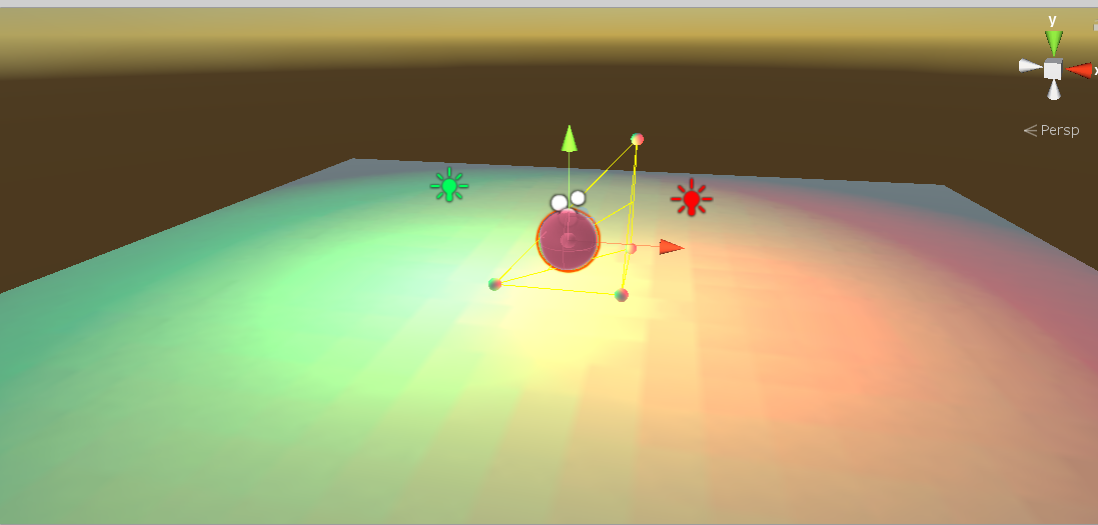
I'm not sure you are understanding the question here. Just as an example, say you have a room with a bunch of red and green lights. Assume (for whatever reason) that the creator wants to bake all of the lights into the lightmaps, however they do not want the green lights to be baked into the light probes- so dynamic objects passing through should only be hit by the red lights, despite them seeing green lighting in the environment. Changing the probe placement will not accomplish this
I know reflection probes have culling layers... kinda surprised light probes do not
modest vapor
Why would probe placement not work ?
lean whale
vocal grove
Does anyone know if there is a possibility to exclude a single baked light sourc...
I think as a hacky workaround maybe you could make a copy of the scene, delete the light sources you want to exclude, bake the lighting and probes, then use copy the probes back into the original scene? Lol
lean whale
modest vapor
Why would probe placement not work ?
Because probes still need to be in correct places to account for other lights
modest vapor
Ah, in your example I was under the impression that you only had green and red lights
lean whale
Well yes that's what I mean. How could you move probes to only get rid of the green lighting? For the sake of this issue let's pretend they are right next to the red ones
verbal cape
^ if you only want light from the red light place the probes in the red light area 🙂
you wont get green spill off
lean whale
Again for the sake of this issue let's pretend they are right next to the red ones
modest vapor
Unless they literally intersect, you can place your probes correctly
lean whale
But then the probes would have both red and green light embedded in them... right?
verbal cape
if they are intersecting and you fail to place the probe in the correct spot yes, it will have both datas
but given you can see the lighting, failure to place the probe correctly can only be if you are using automated software
which you really shouldn't do unless you have a MASSIVE world or cant be bothered to care
lean whale
Huh. I'm wondering if I'm not understanding probes correctly then
verbal cape
normally you place probes where light transitions and at a source. this will result in a realtime like effect for dynamics. but they gather light based on the baked data so if a probe is placed in an area that is red it will only use the red data
the green and red only bleed together when overlapped and even then unless they share the same place there is a point that will only be one color
lean whale
Ok I'm tryin to get to the bottom of this lol. So I just baked this scene real quick- everything is static and baked except the sphere. With your solution, where would be the correct place to put the probes so that the sphere only gets the red lighting?
 verbal cape
in the darkest red area
lean whale
But every bit of this plane is being hit by both lights? And anyway if the sphere is directly under the red light, won't it still be dark?
verbal cape
or directly inside the red light but that will give a really red dynamic light
lean whale
Yeah that would provide incorrect dynamic lighting, and not in the way we want
verbal cape
its already incorrect lighting to want to exclude a light source
lean whale
That's a very different result on dynamic objects than if the green light wasn't there
That doesn't mean that making it more incorrect is acceptable though
Depends on what is wanted, in this case it's just the exclusion of a source and not also incorrect lighting from the active sources
verbal cape
... its either right or its wrong. What you are requesting is wrong. Perhaps if you gave a reason why the light needs excluded, what scenario could you possibly have?
lean whale
I'm sure there are reasons, but that's besides the point. Like what reasons do people need culling layers on reflection probes for? Idk exactly but they are there for a reason and people definitely use them
verbal cape
we arnt talking about reflections, we are talking about lighting, its just not realistic and difficult to compute lol. Best solution: Use a single real time light set to ignore the player layer for the light you want to not effect the player.
one rtl wont drop you but 1-5 fps at best
fallow lark
and honestly that would probably look weird on avatars using realistic shading having it be red when it's standing in between the two lights like that
 verbal cape
Its definitely an odd request Jason. Try my idea and see if it fits your needs.
lean whale
I mean this is just a scratch scene to illustrate the problem. In an alternate version of this problem there might be 100 green lights and realtime wouldn't be an option. I'm sure there are good reasons out there for doing something like this, none that come to mind immediately, but like, gamedev is full of weird hacky tricks that aren't "realistic" but achieve a particular stylized look by defying certain physics and things. I don't think light probes with a layer culling mask is such an odd thing to conceive
And it's not my problem in this case, just one that I'm curious about and want to help with
fallow lark
honestly if you were to do that trick I would think your map was broken lighting wise
verbal cape
^ so would everyone else. cant wait to see what magic they pull tho
lean whale
Well I'd assume it wouldn't be applied in such a simple way that looks very obviously wrong. But yeah Idk the particular use case here
fallow lark
personally I can't think of any scenario that would be suitable with vrchat
lean whale
vocal grove
Does anyone know if there is a possibility to exclude a single baked light sourc...
Just curious, what is your use case? Why do you want to exclude a light source from the probes?
fallow lark
because you have to accommodate a wide variety of avatars so you need your lighting to look good to a realistic Avatar
verbal cape
well as much as you got involved, you should message the OP and offer to assist 😛 make it a collab
^ with respect of course, you put in a lot of effort to clarify
lean whale
Well, I don't have all day to work on other people's problems but I do like to dig into the nitty gritty on weird things like this 😅
vocal grove
lean whale
Just curious, what is your use case? Why do you want to exclude a light source f...
I have a scene where a light source from a campfire would shine light, the intensity is enough for the dynamic objects (avatars), but not enough for the leaves of a tree a bit higher in the air (not accurate, but it looks better when they are receiving a bit more light). So I added a extra light with the same colour that only is able to light up the leaves and set it to a slightly higher intensity, only problem being, that this light also adds more light to the probes

 remote prawn
why is there a shadow here? It shouldn't be casting/receiving shadows at all

also the light shadow type is no shadows
remote prawn
Ok so I fixed it in Blender by using the "Clear Custom Split Normals Data" option
next owl
 rotund ibex
How can I bake translucency?
rotund ibex
How can I bake translucency?
double sided GI. you might need to put a light or an emissive element inside the housing
 glad rock
So my world in android is getting crazy lag when I look in certain directions, I believe I may have narrowed it down to lighting. All my lights Ive placed are baked, is there any world light settings I can change to help optimize it? Theres no windows or anything so I’m using default skybox
verbal cape
glad rock
So my world in android is getting crazy lag when I look in certain directions, I...
you can set the tag on the lights to editor only. This will ensure that if your bake failed that they dont make it into the build. Lightmaps wont be causing your issue. Not having occlusion culling will. having real time lights will, the list goes on. Using the profiler will help sort out your low fps.
 tardy rivet
Is there a way to get Bakery RT Preview to look more like the actual render?
RT:

Render:

It's super different
tardy rivet
So after separating the walls into separate meshes and the desks as well, it seems to work better - though it's still a bit stretched. is there a better workflow for doing this? Like is there a better way to get from the preview to a full bake?
 fallow lark
you pretty much have to do all your lighting setup in unity

 green vault
rotund ibex
How can I get this lighting into unity?
green vault
rotund ibex
How can I get this lighting into unity?
if you want a sand traced bake like that. youd basically disable all denoising the lightmapper does
green vault
tardy rivet
Any idea why these weird distorted lines are happening here???
overlapping uvs are cross talking over each other. light
map padding may fix issue
lean whale
Yea it doesn't look like overlapping uvs to me, or else the checkerboard pattern wouldn't be consistent across that plane. Idk what it is tho
green vault
tardy rivet
Why would the UVs overlap?
uneven uvs
so like. imagine having a pixel shared accross 2 different surfaces
tardy rivet
but shouldnt the UVs been consistent with the geometry??
tardy rivet
graceful tartan
Do you have a heightmap on the texture?
there is a normal
graceful tartan
tardy rivet
there is a normal
Does it have a seam that runs along that part? Just looks like a dark crack between some boards to me. Unless it's something else in the pic your talking about
vagrant briar
rotund ibex
If this is a blender file then unity can just import your lights as well automatically
tardy rivet
graceful tartan
Does it have a seam that runs along that part? Just looks like a dark crack betw...
There's one seam in the direct middle, but not as many seams as light glitches
graceful tartan
tardy rivet
There's one seam in the direct middle, but not as many seams as light glitches
Have you got the "generate uv light maps" check in the import settings for that model?
 next monolith
First is my editor, second is in-game. What is goin' on here?

 graceful tartan
next monolith
First is my editor, second is in-game. What is goin' on here?
graceful tartan
next monolith
First is my editor, second is in-game. What is goin' on here?
Have you got ligbting enabled in editor? These the little light bulb kn the top bar
next monolith
The editor view is the one that is correct.
It's the ingame view that is the problem
graceful tartan
But the game is the final result, so you gotta ask why the editor doesn't look the same
Hence my question
next monolith
Yes. The lighting is on
graceful tartan
next monolith
Yes. The lighting is on
Just to confirm, we're looking at the fact it's darker in-game right?
Are your lights baked or dynamic?
next monolith
Purely baked
And yes. Namely that big, black wall
I changed the material of that building to a mobile shader and it did fix it, but I want to understand the why rather than just accepting it
graceful tartan
Hmm. If you test it in editor with cyanemu does it look too dark then too?
lean whale
next monolith
First is my editor, second is in-game. What is goin' on here?
What shader were you using on the wall? And what kinda lightmap directional mode?
next monolith
Directional. I'm using a UVFree shader
 mortal loom
Hey, I've been having some bakery issues. I figured I would get a better lightmapper since the progressive lightmapper has some serious noise issues at lower light levels. Also, the GPU features break half the time.
However, there are some new problems (as expected):
1: I get fireflies. Bakery's documentation suggests to use a stamp tool to remove the sun from an EXR/HDRI. However, how? I have been searching around for a guide on how to use photoshop to remove the sun, but it's all photo-related. Also, for such files, there is not a 1:1 for pixel brightness to HDRI brightness. I cannot see how I can interpret what the appropriate amount of brightness should be when using a stamp tool.
2: I get seam errors. Even "fix bright seams" doesn't seem to fix anything. In fact, it seems to introduce other issues:

The progressive lightmapper works far better than bakery, so far. This is at odds with everything everyone else has said about bakery, so I can only assume that I simply need to continue tweaking my settings. However, it is not clear what the right numbers are for this.
look at this mess, like wtf. It's literally the inverse of what a lightmapper should be showing.
 fallow lark
GitLab
A surface shader for Unity providing cel-shading. (Forward rendering only)
if it helps a text guide for Bakery
mortal loom
Thanks. I don't see anything in there, however, that is in greater detail than bakery's official documentation: https://geom.io/bakery/wiki/index.php?title=Manual
fallow lark
I might suggest making like a test that's just like a cube and a plane to make sure you don't have like your install somehow messed up or something
or weird shaders
mortal loom
It's all using the standard shader
fallow lark
okie dokie just thinking of ways to eliminate variables
mortal loom
yeah thanks for the help and such
I'm tweaking things and just baking over and over to see what happens. I think a big issue is indeed the HDRI that is being used. I didn't realize that bakery freaks out if an HDRI has sunlight in it
However, bakery just says "google it" when it comes to how to remove spots from an EXR file
Like, my original bakes from bakery only had small problems (fireflies, brightness at seams) and now it's just horrendously broken.
fallow lark
maybe you could use a different Sky Box for the baking?
mortal loom
mortal loom
look at this mess, like wtf. It's literally the inverse of what a lightmapper sh...
That won't really solve the "shadows are white, bright areas are black, blue stripes in random areas" problem, unfortunately. Here's what the default lightmapper looks like. It's so much better than Bakery. It feels like money wasted.

If bakery freaks out at a simple HDRI then different color values in the same format shouldn't drastically break things, unless the lightmapper is fundamentally flawed, but I don't think that's the case.
fallow lark
yeah I'm wondering what is up as like Bakery works fine for everybody else who tries it
can you try like a baked with the default Skybox
mortal loom
If only those people could come out of the woodwork
What I have right now is the HDRI inserted into an empty with a "bakery sky light" component, and I have the skybox disabled for unity's built-in lightmapper.
Yeah. every attempt I make to bake using bakery just produces literal inverted lightmaps. it's absurd
It worked at first. Now, it doesn't, even with default settings.
literally inverted
 fallow lark
question maybe try making a new project with only Bakery in it
to make sure you don't have like some scripts somehow interacting badly?
mortal loom
zero scripts in there right now. nothing but mesh data for now
(except for a VRC Mirror script which is untouched)
I've kept all custom scripts and materials in a separate project. But yes, I'm going to have to make a new project to see what's up. It could be that unity just doesn't handle Bakery correctly in this version.
fallow lark
I don't think it would be that one because literally everybody is using the same Unity version
mortal loom
I would hope so
For some reason, I am gloriously subverting expectations. I hate being the odd one out lmao
(experimenting with fresh project)
lean whale
mortal loom
For some reason, I am gloriously subverting expectations. I hate being the odd o...
Does it look correct if you just use a different hdri or disable the sky light and then bake?
Op sorry
mortal loom
lean whale
Does it look correct if you just use a different hdri or disable the sky light a...
standby. computer processing
mortal loom
lean whale
Does it look correct if you just use a different hdri or disable the sky light a...
I'm removing the HDRI, putting in just a solid color, with a single directional light with the bakery direct light component on it. I'll see how this goes
no skybox, directional mode off, render "full lighting" and bam, inverted shadows. I'll try this in an empty project to see what happens.

just using simple settings
everything identical in the new scene. now it works. RIP

I have no idea what went wrong
I wish there was some sort of "reset everything" button in bakery. or maybe I can just uninstall the whole thing
Ah ha. OK. now I'm back to where I started. It looks like bakery was freaking out over its own lightmaps. Once I told bakery to delete the data, it got back to the original set of symptoms I'm dealing with, which is better tbh. However, I am still getting fireflies, even without an HDRI


 next owl
what is your bakery light source component and how bright is it?
mortal loom
next owl
what is your bakery light source component and how bright is it?
good question. I'll check once my computer is done
next owl
getting fireflies when sampling an HDRI with very bright hotspots (like the sun) is a common problem; often the way to get around it is to clamp your maximum ray brightness
mortal loom
next owl
getting fireflies when sampling an HDRI with very bright hotspots (like the sun)...
oooh. Now this is interesting. Where would this setting be? This sounds like it could be exactly what I'm looking for 🤔
next owl
you'd have to do it in an image editing program. literally you'd just be throwing away exposure values above whatever arbitrary threshold you pick
mortal loom
Ahh yeah, that's what Bakery's manual recommended. Unfortunately, I haven't found a good guide on how to do that :/
Normally I'd just stamp it out in photoshop, but since pixel brightness isn't 1:1 with HDRI's, I feel like there's a better way
next owl
photoshop kinda sucks at HDRIs
you could probably do it in the free version of fusion that comes with da vinci resolve
mortal loom
this is weird. it just reversed my lightmaps once more hahhaa, even when I had it clear out the original lightmaps first
 next owl
never seen anything like that in bakery. i wonder if it's some weird NaN shit from your HDRI
mortal loom
Maybe, but this is without using the HDRI at all
but it does look to me like it's doing some kinda weird overflow thing where all the values are getting inverted
next owl
bakery could have already stored what you had as the environment map, try deleting all bakery data from the menu
mortal loom
so I selected "clear all baked data" before rendering the above picture
WAIT. scratch that. there's a third menu option.
I didn't select the third option. Trying after this now.

OK. better. tighter fireflies. To answer your question @next owl I have one directional light with an intensity of 1.84, in realtime mode. I'm going to set it to mixed. Should I maybe reduce the brightness to something like 1?
 next owl
the bakery light component is the only thing that's going to determine the brightness of the GI solution
graceful tartan
Yea, If you haven't already you need to add a bakery light component to your directional light and it should give you a match settings button.
mortal loom
next owl
try starting at 1.0
Giving this a go. I set the bakery direct light to 1.0
(with no HDRI for now)
This is with an intensity of 1.0. Hmmmmmm


I'm going to try again with "dominant direction" maybe?
next owl
are you passing the light through a lot of small shadow casters? trees or something like that?
mortal loom
no trees or anything like that
empty environment except for this one house

so far, unity's progressive lightmapper is whipping bakery rather thoroughly. So I can only assume that I still have the wrong settings
yeah. bakery juuuust isn't doing well, hah

 graceful tartan
Might be a dumb question but just to be sure, you have generate lightmaps checked on the model right?
mortal loom
Yeah, I have "generate lightmap UV's" checked for the fbx import settings
graceful tartan
How many samples are you baking at?
I've never baked with an hdri myself. Generally just put a directional light where the sun is in the skybox and call it a day
mortal loom
I'm doing all these bakes without an HDRI. I'm using 5 bounces and 16 samples right now
graceful tartan
Oh ok. hmmm.
mortal loom
Also, I forget: "texels per unit" which direction is more or less? What does a "unit" mean?
graceful tartan
I believe it's one unity of distance in unity. Idk if there's a direct unity it converts to
fallow lark
basically like how many pixels across like a meter would be on the light map
graceful tartan
What is your texel density?
mortal loom
Ohhh I see. so texels per unit is texel density then huh? I was doing 20 per meter
Maybe I can overshoot and then compress the lightmaps
Though, unity's progressive lightmapper seems to entirely lack this issue
graceful tartan
I normally go for 30 texels but I know people who do 5. It depends on what your going for I guess.
fallow lark
mortal loom
Ohhh I see. so texels per unit is texel density then huh? I was doing 20 per met...
like 20 should be fine for like an indoor map
mortal loom
It's a fairly "small" house at around 300 square meters, scaled by 1.1
graceful tartan
If you select your directional light try turning the samples up maybe?
Oh and what denoiser are you using?
mortal loom
I have 16 shadow samples right now. Using Optix 7 for a denoiser (I am using a 3090)
graceful tartan
Hmmm ok idk about optix..I generally uaenopen image denoiser.
mortal loom
I might do that then 🤔 I'll give that a go
mortal loom
I know that Mr. F was strongly advocating for optix AI denoiser and stuff
graceful tartan
Ahk
mortal loom
like, right now, my assumption is that I'm mucking it up pretty badly and I just need to work out the kinks. Because from what I've read and seen, it's not good enough to say that Mr. F understands baked lighting hahaha
next owl
for a complex interior you want a pretty high texel density
graceful tartan
I feel like I had more issues with optix 5 that I liked so I used open image
next owl
i guarantee you that bakery is an improvement over the built-in lightmapper
dude knows what he's doing
mortal loom
I'm assuming "Tile size" has to do with the size of the array fed to the GPU?
graceful tartan
Yeh something like that
mortal loom
OK! I maxed that bad boy out then
I'm gonna justify the money I don't have anymore somehow
mortal loom
thanks for the help again btw. you guys are asking stuff I didn't think about
next owl
tile size will not affect quality, it's an optimization for speed
graceful tartan
Bakery is indeed great. It's not without it's issues sometimes which can be annoying though.
But when it works it ✨ works✨
mortal loom
100 texels per unit, optix 7. I'm going to stick to 100 and change to open image denoiser
 fallow lark
like when you get to really big Maps the speed difference is tremendously beneficial
mortal loom
I'm also using Xatlas as a packer and unwrapper. Maybe I should not do that?
graceful tartan
Yea I feel like that might be an optix issue. I feel like it used to give me random bright spots. 🤔
fallow lark
mortal loom
I'm also using Xatlas as a packer and unwrapper. Maybe I should not do that?
that shouldn't have a big effect on it
graceful tartan
Xatlas is normally good.
Sometimes it has given me issues with uvs bleeding where the default unwrapper doesn't.
But I normally use xatlas until something starts annoying it
Probably issues you could fix with fixing thrbuv unwrap settings for things but I'm lazy
mortal loom
I switched to "indirect" instead of full lighting. not sure if it'll make a difference or not
this is same settings as before, set to "indirect" looks like it had no effect. maybe more samples for the directional light I guess. I'll try that
 graceful tartan
mortal loom
this is same settings as before, set to "indirect" looks like it had no effect. ...
graceful tartan
mortal loom
this is same settings as before, set to "indirect" looks like it had no effect. ...
That's on open image?
mortal loom
I think it was? :S actually I'm not sure, because bakery keeps resetting the window and all my settings each time
I'll try that first
open image denoise. same deal X_X

doubling the GI samples in the bakery settings and trying again.
mortal loom
so all the child objects are scaled at 1
the parent object they're all under is scaled to 1.1
bounces and samples maxed out, 100 texels per unit
 next owl
ok. what are all your light sources atm? just the single directional? do you have a bakery skylight as well?
sharp robin
@mortal loom Does your map use any emissive materials?
mortal loom
next owl
ok. what are all your light sources atm? just the single directional? do you hav...
Oh crap, I do have a bakery sky light as well. maybe that's causing the problem.
@sharp robin no emissive materials for now
next owl
if you're using a sky texture in the bakery sky light, and the texture has a sun in it, that is your problem
mortal loom
next owl
if you're using a sky texture in the bakery sky light, and the texture has a sun...
yyyyep. I think you are exactly correct. I disabled the skylight and now things look sane. It looks like, indeed, I will have to go into an EXR editor and clamp the brightness somehow
 fallow lark
glad we were able to finally sorted out
mortal loom
I have noooo idea how to do that.
Also: How do I exclude objects from being lightmapped in bakery? for instance, what if I want them to contribute to global illumination but only receive lighting from light probes? It lightmaps every object right now.
next owl
just clone stamp man
photoshop can easily read a 32 bit HDR or EXR file. clone stamp the sun out, that's it
mortal loom
Is there a way to adjust brightness settings so I can see the full range of pixel brightness?
as in, without compressing it all down to the brightness depth of the monitor
next owl
use an exposure adjustment layer
next owl
you aren't going to be able to see the whole exposure range at once
mortal loom
yeah definitely not
next owl
use the exposure layer to stop down so you can see the sun, paint it out, then delete the layer and save
mortal loom
goooood call. I'll see how well that works. I suppose I could just add an adjustment layer to clamp the brightest values. or is it more an issue of it being that the sun is a bright POINT light source? like it's way too concentrated or something
thanks for the tips guys 👀 I'll report back if I get this working!
fallow lark
glad to be of help and your screenshot without the Skylight looks a lot better so progress is definitely being made and I might suggest putting the density back at like 20 so it doesn't take like too long to render your light Maps while you're testing
next owl
mortal loom
goooood call. I'll see how well that works. I suppose I could just add an adjust...
this issue is common to all CGI rendering. when you have a SUPER BRIGHT pixel next to something much darker, and you have a limited number of rays to shoot around, you're going to get sampling errors that will manifest as either fireflies or aliasing in the final image
graceful tartan
Well that was an adventure
Glad we got it figured out.
All the help homies I see helping often joined in 🤣
mortal loom
next owl
this issue is common to all CGI rendering. when you have a SUPER BRIGHT pixel ne...
@fallow lark @next owl @graceful tartan whoooaaa. yeah. that skybox thing solved everything. I just clone stamped out the issues in photoshop. I'm aboard with this fully now


 graceful tartan
mortal loom
<@216145046347448320> <@240260948374454272> <@277663731390087169> whoooaaa. y...
graceful tartan
mortal loom
<@216145046347448320> <@240260948374454272> <@277663731390087169> whoooaaa. y...
That looks really nice!
I've not done any bright daylight scenes like that but it looks really good.
You can probably turn you texel density back down after that too, unless you want it to take forever to bake and then turn the res down at the end or somethin.
mortal loom
yeah probably. I cranked it to 200 hahaha
I might just compress the lightmaps in photoshop or something
I like how photoshop handles aliasing
fallow lark
mortal loom
<@216145046347448320> <@240260948374454272> <@277663731390087169> whoooaaa. y...
awesome
mortal loom
What's interesting to me is how it not only fixed fireflies, but how fireflies + (lots of other weird things I saw) were linked to having those few overly-intense pixels
so oddly darkened areas, weirdly blocky bits
graceful tartan
I guess it would be taking that one super bright pixel as the brightest allowed point, which would scale all the other bright parts way down in comparison.
mortal loom
Oh hey, I have another question: How do I exclude objects from being lightmapped? For instance, if I wish to use light probes + a proxy volume for some of the smaller dynamic objects, and I do not want a lightmap on them. In Unity's progressive GPU renderer, I can simply declare that I wish it to be light probed instead of lightmapped
graceful tartan
mortal loom
Oh hey, I have another question: How do I exclude objects from being lightmapped...
You could just not set them static.
Or in the settings set the 'scale in lightmap' on the objects renderer to zero if you still want it to be casting shadows but not lightmapped.
mortal loom
graceful tartan
You could just not set them static.
Or in the settings set the 'scale in lightma...
Ahhh yeah. OK. I could just adjust my lightmap scale that way 👀 I'm glad to hear that the built-in lightmap size settings carry over to bakery
mortal loom
Also: is there a way that I can set a reflection probe to only reflect the skybox and nothing else? Like in the case of an interior with its own set of probes, surrounded by an exterior which would just have a skybox reflection. Right now, what I've got unfortunately reflects everything.
Got it! I had to set the "culling mask" in the outdoor probe to be lowest priority and only set to the "environment" layer. that way, it doesn't reflect the things within. I'd imagine this applies to any custom layer too.
 simple sinew
Anyone know what could be causing these strange dark spots?

 sullen solar
anyone experience random lights appearing and baking? there's only 1 light source in the scene (top left)
 graceful tartan
simple sinew
Anyone know what could be causing these strange dark spots?
graceful tartan
simple sinew
Anyone know what could be causing these strange dark spots?
Feels like a lightmap uv issue?
 round moon
is there any emissive texture on the atlas?
or i mean, is it setup to be emissive soon but you don't have the emissive parts showing yet
as for the corners check to see if you got some inverted normals that you can't see but are blocking the light from hitting the outward facing normals
mortal loom
simple sinew
Anyone know what could be causing these strange dark spots?
when you load up the FBX, do you select "generate lightmap UV's"?
 ionic kernel
mortal loom
<@216145046347448320> <@240260948374454272> <@277663731390087169> whoooaaa. y...
ionic kernel
mortal loom
<@216145046347448320> <@240260948374454272> <@277663731390087169> whoooaaa. y...
last shot reminds me of one of those minecraft raytracing showcases
really nice lighting
simple sinew
mortal loom
when you load up the FBX, do you select "generate lightmap UV's"?
Usually yes
mortal loom
simple sinew
Usually yes
What I usually do in that case is investigate the individual polygon on the lightmap and see what it's mapping to. if it's just oddly pitch black, another guess I may have is that it may have to do with how the vertices are connected. I had some weird lightmap issues in the past and it was because I had identical faces filling the same set of vertices. It was something blender couldn't pick up, and I just had to manually delete them. I'm wondering about the vertex connectedness you have because there's that seam on the lower left of my crop of your screenshot. I'm guessing that the vertex in that corner isn't attached to the one continuing the crossbeam above

er not lower left. upper left, but lower left of that vertex/corner
 unreal halo
Is there a way to apply a directional light only to the players in a world? :)
graceful tartan
unreal halo
Is there a way to apply a directional light only to the players in a world? :)
Yes, you can set which layers the light affects in the culling setting on the light itself. Just set that to the player layer.
Just be careful with dynamic lights on players, using it alaringly as it can be rewource intensive if you use too many
round moon
again just to be sure (some people are unaware of this setting in blender) have you checked the face normals with this? :

 hearty wren
well

 sturdy ether
Does LTCGI only affect supported shaders / lightmaps which means using a real time reflection probe to affect players or can it affect light probes as well?
 patent heath
light probes cannot be modified since these are baked, reflection probes can tho, but it can be very heavy depending on the resolution, and ye i think it can only affect its own shaders
Light probes and lightmaps are static
sturdy ether
That's what I was guessing after visiting other LTCGI worlds where it was also affecting my model. Thank you.
Thought maybe it was also baked as enlightened realtime gi.
patent heath
nah
if it was affecting your model it might be realtime lights, reflections or that your shader supported it
sturdy ether
Currently there's only one realtime reflection probe around the main viewing area at the default 128 res. Going to assume that's fine, if not I'll just lower it.
patent heath
depens on the update mode, i don't know how are these named but one updates side by side each frame, another probe by probe and another just updates everything for every frame, this changes a lot on the performance
sturdy ether
I'll do some testing, if it's not performant enough I'll omit the RT probe.
patent heath
i think realtime vertex lights will work well
but the world shader should omit them since these work better on meshes with a higher polygon density like avatars or props
green vault
sturdy ether
Does LTCGI only affect supported shaders / lightmaps which means using a real ti...
so ltcgi method to effect players is via the global illumination method, which is basically editing a single light probe that effects the whole world. but as someone who uses their own custom lighting methods, i think light probes or linear space projectors would do a better job at looking “realistic”
a more intense method would be to use a realtime light, but set it to only render on player layer to be as optimized as possible and basically summarize the color of the rendertexture used
patent heath
also set it as not important
 earnest mantle
Hello, does anyone know why whenever I build and run the game in vrchat the baked light from an emissive material disappears?
Before:

After:
 lean whale
earnest mantle
Hello, does anyone know why whenever I build and run the game in vrchat the bake...
lean whale
earnest mantle
Hello, does anyone know why whenever I build and run the game in vrchat the bake...
Not sure, what shader are you using? And it looks like the other light in the top left corner is also not appearing- is this just happening with the emissive material or with all of the lighting?
earnest mantle
All shader's I've used are Unity's standard one
I may have just realised, it seems that the light isn't retained on only the single mesh* that is the building.

You can see on the right the other materials objects are being lit fine

This is what it's like normally before pressing build&test
lean whale
Huh I'm confused sorry. Do you mean that it disappears from your scene view after building too?
earnest mantle
Yeah, it's like it's deleting the lightmap
lean whale
Ahh ok. Are there any errors when that happens? Does it also disappear if you switch scenes and then switch back?
lean whale
I'm no expert on this, but I might try clearing the baked data for the scene and even manually deleting lightmaps/lightingdata assets that it is using, then rebake everything
I feel like I've had similar issues when I've renamed and duplicated scenes and they're referencing stuff in another scene's folder or something
earnest mantle
ah ok I'll give that a shot
I've cleaned a bunch of stuff up and now the lightmap stays when I swap between scenes so that's a good sign
🤞 this works
It's works!
lean whale
Great 😄
earnest mantle
Thank you so much
lean whale
No prob I'm glad it worked
Idk for sure but my guess it that this reference was created from another scene or something like that
 earnest mantle
Ah you're right
lean whale
I got into some rabbit hole recently where I was purposely trying to use the data from another scene, and it kept resetting. So maybe that asset can be attached to one scene only or something
earnest mantle
Just glad that the answer wasn't "Vrchat doesn't support x amount of lights" or something like that haha
lean whale
Maybe someone more knowledgeable can chime in. But yea, glad it's workin!
earnest mantle
👍
lean whale
earnest mantle
Just glad that the answer wasn't "Vrchat doesn't support x amount of lights" or ...
Hah well that is true for realtime lights- I think the number is 8, but otherwise you can use as many as you can bake
earnest mantle
Sweet
mortal loom
Hey guys. I'm using "Bakery" is there a reason why my objects are not casting a shadow? I have a directional light in the scene

I have "cast shadows" enabled. I'm using SH lighting
lean whale
mortal loom
Hey guys. I'm using "Bakery" is there a reason why my objects are not casting a ...
Do you mean realtime shadow for a non-static sphere?
mortal loom
@lean whale yeah
I baked "Full lighting" but I'm thinking maybe I needed to bake indirect or shadowmask?
lean whale
I believe that's what shadow mask is for, not totally sure though
But make sure the building material is set to receive shadows and that the light is set to cast shadows too
mortal loom
I'll do SH mode with shadowmask. I'll see how that works for low resolution
lean whale
The bakery docs have some good info on this- the image on the right here illustrates the difference which I believe is what you're going for https://geom.io/bakery/wiki/index.php?title=Manual#Shadowmask
 mortal loom
@lean whale thanks for that link. it looks like there might be different versions of bakery going on. I do not have the same options in my bakery light scripts. For instance. I'm looking at "bakery direct light" and there's apparently an option for "baked contribution" and no such option exists for me
so It'll unfortunately remain a mystery for me
That seems to be the biggest issue I have right now. None of my bakery light components have a "contribution" option
but all the manuals suggest that this option exists
yeah still nothing
 lean whale
Have you changed the render mode to shadowmask in the lighting/bakery menus? Or are you just looking at the light components
mortal loom
yep, changed it to shadowmask
lean whale
And is the unity light component set to mixed?
mortal loom
it was. I changed it to realtime to see if that would make any difference. I couldn't get shadows to show up for either mode

that's 100% of my "direct light" script

missing any options for contribution
lean whale
What if you put another sphere between that one and the wall, does it get shadows? Maybe then you can narrow down whether it's the light or the environment
And what does your unity light component look like?
mortal loom
 mortal loom
lean whale
What if you put another sphere between that one and the wall, does it get shadow...
mortal loom
lean whale
What if you put another sphere between that one and the wall, does it get shadow...
like, duplicate the same object? that will not get shadows, since it would be the same object
lean whale
Yeah, like see if one sphere will cast shadows on another sphere
lean whale
Instead of the building
Cause then you'll at least know if shadows are being cast at all
mortal loom
when I prepare the bake, I get a brief instant of this, where it appears like all the shadows are working. very confusing

that only shows up for a few seconds
I am using a special bakery-specific shader that take into account for SH lightmap baking
lean whale
Is that what it looks like if you clear all the baked data too? I'm guessing that's just what it looks like with all realtime
mortal loom
oh yeah. half the time I get this as an error. I have to spam the "clear bake" a few times over and over and, like a rain dance, it sort of stops happening
 lean whale
Lol shit
mortal loom
lean whale
Is that what it looks like if you clear all the baked data too? I'm guessing tha...
it doesn't look that way post-clear
this is how it looks when I clear data
 lean whale
Are you clearing just the bakery data or clearing it from the unity lighting panel?


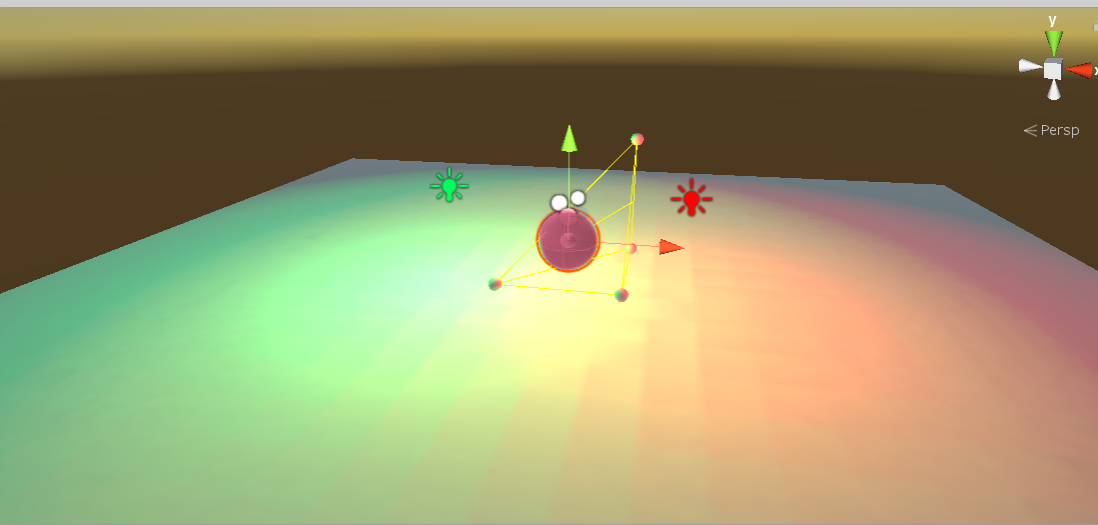 lean whale
Sorry if I'm not helping much, Idk what the deal is but trying to poke around and see where the prob is coming from
mortal loom
nah you're asking good questions that I didn't consider
like I clear the lightmap data from unity itself and all my shadows work again 🤷♂️

ok I guess I pasted too quickly damn
lean whale
Yeah I think when you do that it makes all the lights go back to realtime
Until they get baked again
mortal loom
 lean whale
That's before the bake yeah?
mortal loom
yeah
still nothing :/ I'm gonna try a few other ideas

changing render mode to "dominant direction"
OK, that didn't work. changing the shaders back to standard
ok. still didn't work. seriously I'm very confused. I've never had this problem before

This must be a critical limitation in Bakery. Maybe Bakery just cannot do realtime shadows. Sure, the manual shows that there's a "contribution" option in the bakery components, but the reality is that that does not exist
 stray bay
Is it posible to use vertex lighting on my models rather than haveing to bake to a texture?
IIRC vertex lighting is way cheaper (hence why it was done in the PS2 days) and it means I don't need to use 12, 2K textures in order to get a meh quality bake
well I found vertex lit shader, did not expect it to have no shadows but it is there
 lunar narwhal
setting your light sources to not important sets them as vertex lights
mortal loom
stray bay
Is it posible to use vertex lighting on my models rather than haveing to bake to...
I believe you can use light probe proximity (??) volumes wrapped around your object and that'll do a sort of vertex lighting. not sure what the cost of that ends up being though
stray bay
lunar narwhal
setting your light sources to not important sets them as vertex lights
how do I modify the importance?
cus RN im useing Mobile/VertexLit
But that has no shadows
a shader that is vertex lit, with a texture, that allows shadows.
perfect for my use case.
at the moment I have a shader that has vertex shadows but is a solid colour or the built in one with no shadows
I may just have no shadows and deal with that.
patent heath
mortal loom
ok. still didn't work. seriously I'm very confused. I've never had this problem ...
Is the object marked as static?
patent heath
stray bay
Is it posible to use vertex lighting on my models rather than haveing to bake to...
What do you want specifically?
I mean do you want to bake vertex colors as a lightmap on world objects or to make avatars use only vertex lights
By the way vertex lights can't cast shadows
stray bay
patent heath
I mean do you want to bake vertex colors as a lightmap on world objects or to ma...
My Ideal end goal is to bake lighting to vertex colours rather than a texture, that way I don't need to deal with the pain of haveing so many high res textures that still loose detail.
patent heath
aight
well i don't know if you can do that on unity cuz i do my lightmaps on blender
but on blender you can
just put a vertex color slot on the object and on the bake options change the output to vertex colors
also before that the color management has to be on standard
one problem is that i think vertex colors are clamped to 0-1 so it won't work well for intense lights as an exr texture would
stray bay
oh I never go over intencity 1 anyways.
so I just need to put my light in in blender and bake there?
patent heath
ye
well blender has different baking than unity
blender fully raytraces and stuff
btw idk it it might happen to you but it's possible that the project crashes whenever you bake vertex colors with any device other than the main gpu
stray bay
noted, bake with GPU
patent heath
ueah that too, but i mean that on user preferences>system blender might creash when baking vertex colors if there's a device other than the main gpu checked, like a secondary gpu or the cpu (for some reason)
but for image texture bakes you can put all the devicces if you want
mortal loom
Any idea why I cannot get realtime shadows to work from directional light sources when I use Bakery? Or where I can ask for support on using Bakery?
patent heath
you mean after baking?
baking lightmaps converts all the lighting and shadows into exr textures so it cannot be updated realtime
the realtime method uses the light as a camera that renders the depth of every object that casts shadows and then does a fton of stuff to calculate from that texture where should the shadows be present and where not (performance heavy things), all of this for each frame and for each light source with shadows
so i recommend baking it anyways even if it cannot project realtime shadows
mortal loom
patent heath
baking lightmaps converts all the lighting and shadows into exr textures so it c...
I'm not sure I understand this response, sorry. I understand how lightmap baking works, and I understand how EXR files work. I make them regularly to bake height maps, and I edit them as environmental light sources. Lightmap baking precomputes the lighting. But we both know this.
In unity's lightmap baker, there is a "mixed" option, whereby some of the lighting is precomputed, and the rest is allowed to continue to exist as realtime shadows. Thus, you are able to explore a world with baked lightmaps, while still having realtime shadows from directional and point light sources.
In Bakery, a third party extension which is usually much better than anything Unity can provide, I am completely unable to get realtime shadows of any sort to work.
patent heath
Ah ok didn't take in mind mixed lighting exists, my bad
ionic kernel
Any input from you guys?

 vagrant briar
Just a bakery appreciation post

 tidal spoke
Unity Left, VRChat Right
Does anyone know why the Post-Processing Bloom effect is showing in Unity but not in-game?
 patent heath
Do you have a postprocessing layer on the main camera, the main camera assigned to the vrcworld prefab and the postprocessing volume set to a layer other than "all" or "default?
tidal spoke
I think indeed it was the cam not being assigned to the vrcworld prefab 👍
patent heath
Cool
modest vapor
vagrant briar
Just a bakery appreciation post
Bloom enjoyer I see
 rancid tulip
I'm having a brain fart when it comes to light positioning. Is there any way to have a baked light have a "near clip"? The reason being, the mesh of the bulb itself appears to be blocking the light propagation itself.
e.g.
 graceful tartan
rancid tulip
I'm having a brain fart when it comes to light positioning. Is there any way to ...
graceful tartan
rancid tulip
I'm having a brain fart when it comes to light positioning. Is there any way to ...
If you seperate the light material part from the lamp post as a hole, you could set it to not cast shadows(while still maintaining shadows from the post) then it won't get in the way of the light.
 graceful jetty
I've started work on a new world, and for some reason I can't bake a reflection probe without unity trying to bake the lighting in the whole world
The lighting isn't set to be baked anywhere so I don't know why it's trying to
 barren crater
graceful jetty
The lighting isn't set to be baked anywhere so I don't know why it's trying to
barren crater
graceful jetty
The lighting isn't set to be baked anywhere so I don't know why it's trying to
In the bake button on the lighting tab, there's an arrow on the right side you can click and it'll give you the option to just bake all reflection probes. The same thing applies for each reflection probes' bake button
 manic rampart
Hi. Are realtime shadows not compatible with quest?
supple harness
manic rampart
Hi. Are realtime shadows not compatible with quest?
Realtime light is supported by the quest, but comes with a huge performance hit.
manic rampart
supple harness
Realtime light is supported by the quest, but comes with a huge performance hit.
yes, but when I have the realtime lights, there are still no realtime shadows
Are the realtime shadows supported by quest?
supple harness
manic rampart
Are the realtime shadows supported by quest?
I already answered that it supports, you can turn on the shadows. quality settings (> Project Settings... > Quality)
manic rampart
supple harness
I already answered that it supports, you can turn on the shadows. quality settin...
you answered regarding realtime lighting, not realtime shadows
and okay! Thank you!
manic rampart
supple harness
I already answered that it supports, you can turn on the shadows. quality settin...
hi. So I enabled shadows, but when I uploaded it, it disabled it again. What do I do?
I think it's not saving the changes I made to the graphics setting
how do I get it to save it?
oh silly me! I just use control-S lol
Nevermind. It's still not saving it, even though I used control-S
I think that vr chat overrides our quality settings and sets it to what it originally was for vr chat
Can anyone verify whether this is true?
Because it would be great if I could get these clouds to work on quest
but I think it's not working because the depth buffer isn't working because vr chat automatically disables realtime shadows for quest
fallow lark
manic rampart
I think that vr chat overrides our quality settings and sets it to what it origi...
yeah I think that's the case
manic rampart
fallow lark
yeah I think that's the case
okay! thank you!
fallow lark
so yeah you might have to use a different design for your clouds on Quest
vagrant briar
modest vapor
Bloom enjoyer I see
Caught me in 4k
glad rock
So Everything in my map was nice and dark and after I baked my lights it came out looking like someone was shining headlights through my window? Any idea why everything is now lit up?

To

It somehow even took out the plants?
 hushed jetty
Training with Bakery
glossy meteor
switch your project to linear mode
 atomic hamlet
Hey, when baking, the lighting looks good. after the baking ends the lights on different surfaces are pixelated and the world overall is more brighter.
The first image shows the final look after everything is done.
the second image is how I want it to look like. And thats how it look during "finalizing baking".

 atomic hamlet
my current settings

nvm. I had the build set for android. changed it back to windows and its fixed
 torn rock
I just bought Bakery Lightmapper cuz I've heard a lot about it being great. But I'm struggling to make a good baked lightmap with it.
Some objects and areas are very dark. They are set to static. They have UV lightmaps enabled.
Third pic is without baked lightmap.
What am i doing wrong?


 lean whale
torn rock
I just bought Bakery Lightmapper cuz I've heard a lot about it being great. But ...
lean whale
torn rock
I just bought Bakery Lightmapper cuz I've heard a lot about it being great. But ...
Where is the bright light supposed to be coming from? Like do you have light objects in your scene that are supposed to be lighting those walls or is it a lot of skybox/ ambient lighting etc?
torn rock
lean whale
Where is the bright light supposed to be coming from? Like do you have light obj...
There are some point lights. Some other lights are spot lights. No directional light.
lunar narwhal
are you actually using the bakery light components? because it doesn't really look baked to me
lean whale
^
And it's supposed to look like 3rd pic?
Or that's close to what it looks like in full realtime?
torn rock
lunar narwhal
are you actually using the bakery light components? because it doesn't really lo...
Yes.. maybe. I’m not sure. This is my first time with Bakery.
lunar narwhal
bakery bakes with bakery light components, and doesn't use the unity lights at all. You can keep them in your scene as a reference, but you should leave them disabled
its also not entirely a 1 to 1 match so you'll have to play around with the settings to get it to look the way you want
I'd give the manual a read https://geom.io/bakery/wiki/index.php?title=Manual#Quickstart
lunar narwhal
yeah
torn rock
Huh interesting
lunar narwhal
if you place the bakery light component on the same object as your unity light, bakery has a button to match settings
but you should always leave unity lights disabled as they will just act as real time
torn rock
So, basically, I remove the Unity lights. Put the Bakery lights in their places?
lunar narwhal
basically
torn rock
Oh I see. Weird but thank you for your help.
lean whale
You shouldn't need to remove or disable the unity ones. I just add a bakery component to mine (which also has a nifty button to match it's settings to the unity light)
And I like the convenience of being able to clear baked data and quickly look at the scene with realtime light
torn rock
Ah ok. Thank you
hushed jetty
Another map with Bakery
earnest mantle
Does bakery produce better lighting or is it just faster than any of the built in lightmappers? I've heard a lot of conflicting stuff online
hushed jetty
earnest mantle
Does bakery produce better lighting or is it just faster than any of the built i...
Both. much better quality with great precision and use the RTX ability of you're gpu to product them and baked them. here it's some tests i have made at a map with basic geometric form to learn it
earnest mantle
Oh wow, cheers for the examples. Was hoping for a better alternative to the default one which usually comes down to spending ages tweaking settings for a semi-decent outcome that isn't blotchy.
hushed jetty
for the confict yes i don't know yet how to made a classic mixed directional lights and have the rest of the lights with bakery. but yes bakery is pretty simple to use very optimise and very powerful
here it's a prefab map include with bakery and when all lights is baked the result is impressive in rtx mode and the denoiser optix 7
earnest mantle
Wow, getting close to unreal engine level of baked lighting
hushed jetty
unity is the best rival of unreal 4. and that little map asset include with bakery is perfect to training and test. PS: the shader Filament Master by Silent is perfect with bakery
And unity is prepare itself to face unreal 5 https://www.youtube.com/watch?v=Ri8U2COIPTQ
After lets see for optimisation

Découvrez la démo technique "Enemies" du moteur Unity.
Détails complets : https://www.xboxygen.com/News/40125-Unity-devoile-une-demo-technique-de-son-moteur-bluffante-de-realisme
💚 Xboxygen est le premier média en Europe dédié à Xbox.
Xbox 24/7, Communauté, Tests, Bons plans, Dossiers, Jeux, Podcasts et catalogue Xbox Game Pass complet à veni...
and yes the women is a 3D model here
earnest mantle
Oh damn
simple sinew
Anyone know what could be causing these weird lighting issues? It's not emission or GI static
 earnest mantle
Do they have lightmaps?
simple sinew
No, but I somehow managed to make half of them cooperate
hushed jetty
simple sinew
No, but I somehow managed to make half of them cooperate
did you doing that ?
simple sinew
Yup, has nothing to do with the static
hushed jetty
hmmm maybe the shader on them try that one it's filament master by silent https://drive.google.com/drive/folders/1isI39rcKnGX5LZgDqK6jaPZDw1AoNvBg?usp=sharing
you just have to put the folder at you're unity project
simple sinew
Aight cool, I'll check it out when I get home
 dire crater
What's up with my baked lighting looking so strange

Everything else is fine, except for these trees
earnest mantle
I had something very similar and it was caused by overlapping uvs
dire crater
This happens all the time for me. I usually end up using realtime lights for the broken objects
torn rock
Ok, so the lighting is much better and just looks like what I wanted after baking with Bakery. However, I noticed that the world's download size has increased by 12 MB. How do I compress the lightmap if there's no option on the setting?
never mind. figured it out
torn rock
wait, it didn't work. Ok, how do you reduce the size of the lightmap?
torn rock
Ok
 earnest pagoda
in bakery advanced, use bigger textures. minmal 512
simple will use even small 16x16 which can makes many textures
torn rock
i see
lean whale
You can also select the actual lightmap file(s) that gets produced and change its import settings. If you're concerned about download size I would set it to use crunch compression, and if the size is still not small enough then you can also lower the res there in the import settings
torn rock
ok. I'm curious. What about Gi VRAM optimization?
torn rock
earnest pagoda
Reduce the value
also, you meant like texels?
lean whale
torn rock
ok. I'm curious. What about Gi VRAM optimization?
I think that just affects the way your pc handles the baking process, not the lightmap that it produces or runtime performance
earnest pagoda
How can i bake lighting with LOD objects? What is best way to deal with it?
 latent latch
How do I toggle the skybox material?

Like if I want a button on the map that toggles the Skybox Material to something different
glad rock
So if I’m making a club and want flashing lights, can baked lights be programmed to turn on and off or would not be possible
earnest mantle
Nah, baked is a texture applied over an object, so you'd have to bake the lighting every frame if you wanted that.
Which would probably give you 0.000005fps at best
fallow lark
GitHub
A collection of HLSL shaders, UdonSharp scripts, 3D models, prefabs, and assets designed to emulate the real control, quality, and complexity of professional stage lighting into VRChat in as many w...
rancid tulip
Does anyone know why objects, when set to 0 size in the lightmap, still appear to stay mapped in the lightmap, even after rebaking, with garbage being applied as their lightmap?

It explicitly states that this shouldn't happen, just that they will contribute light, but not be mapped.
lean whale
rancid tulip
It explicitly states that this shouldn't happen, just that they will contribute ...
Hm that is odd. Did you clear the baked data before rebaking? If you're using bakery did you clear the data through the Bakery menu and not the Unity menu?
rancid tulip
No. Because I'm baking like a dozen different zones so I don't want to clear all baked data as that would wipe all the Bakery sectors, not just this one.
lean whale
Ah, well what if you at least delete the lightmap that it is associated with and then rebake? Does it just generate the same one again?
I don't know much about using sectors either, I wonder if it's a limitation of that specific component of bakery or the way you have that set up
rancid tulip
It just generates it again. The interesting thing and what implies it's a bug is it's garbage from a lightmap that isn't in this Bakery sector that is being applied to those areas.