#world-lighting
4 messages · Page 25 of 1
 buoyant current
So I have to select every model in the scene separately to generate a new lightmap for it?
 warm jungle
You must look for the FBX file in your folders and check on every fbx file Generate Lightmaps UVs on and also look in the Lightning Tab if your settings are not to low otherwise it will not bake or the results a very scary
buoyant current
The FBX files all have Generate Lightmaps UVs checked, all static, lighting is all set to baked, but every time i generate lighting nothing happens.
warm jungle
Can you send me an screenshot of your lightning settings
 verbal cape
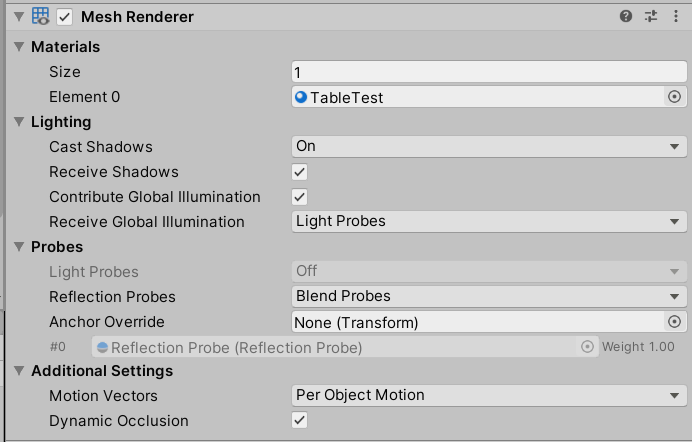
Contribute to GI must be checked in the meshrenderer to bake. If you hover the option it will confirm this. Make sure that is checked as well.
 rotund ibex
I need some ideas for physical lights for this scene.

Anyone have any references I could model for a small skyline apartment?
verbal cape
modern would be recessed ceiling lights, could use spotlight or point light for those. If you want modern+hip then you are looking at emission bars (led strips). Also that city view is physical isnt it?
if so consider turning it into a skybox https://www.youtube.com/watch?v=g38f-xxvEQ8

This video covers 3 methods of making custom skyboxes in Unity3D.
Link mentioned in the video for generating space skyboxes: https://wwwtyro.github.io/space-3d/
The first method is to create or generate 6 images for a cube, and apply those 6 square images to a skybox material.
The second method is to create a procedural skybox material, and ...
rotund ibex
That is the issue, honestly, I get tired of the HDRIs that everyone uses.
I've optimized the textures to look good while being tiny file sizes
The HDRI shit that I see is really annoying because I see a really pretty world with.... a nobody outside
verbal cape
The video is about making your own so its not just an typical hdri, but yeah, whatever works 🙂
rotund ibex
This keeps the file size down considering my HDRIs I do use are paid and honestly amazing

Though I don't understand smoothness vs Roughness

I make textures alot and these fuckin' smoothness values are going to make me shoot something I swear
But, trying to experiment with lighting styles.
verbal cape
without mapping the reflectiveness the smoothness is just that, how much light you want reflected off the surface (shine), to utilize it appropriately the shaders needs checked for reflective and you need reflection probes.
Ied dim the ceiling lights and maybe substitute the lighting with smaller light sources like table lights, standing lights, I also like to add lights behind pictures. Almost all my home worlds use those. Just looks so crisp and gallery like to have back portrait lighting.
You can also make portraits emit their self making it look like the frame has a lightbar
 verbal cape
texture would be the metallic part. like a matcap
rotund ibex
 rotund ibex
When I use a roughness it looks like its overwritten by the slider
The outside thing paid off really well.

 mystic escarp
All of my models in the world have that but i still get blockness
 mint cipher
any good tips on how to get good lighting within unity for per say, a cozy night time vibe bedroom??
 twilit lily
different colored lights, fancy reflections, PBR materials and bake it
also some calm music in the background helps a lot
 fallow lark
look at pictures of cozy night time bedrooms and see how they do the lighting visually
 white fog
I wanna make a night mode for my world while also still having baked lighting. Are there any tutorials I could be pointed to?
 modest vapor
You'd still have to use realtime lights for day time, unless you plan on teleporting all users in a copy of your world
 glossy meteor
sometimes using post processing may suffice to fake night mode, it's not perfect but it surely can work
 thorny forge
really cool map so far!
modest vapor
buoyant current
The FBX files all have Generate Lightmaps UVs checked, all static, lighting is a...
You will have to convert temperature to RGB values with this script
Under gameobject at the top, you'll see an option to convert
 keen gorge
im not sure whats causing this issue, everytime i go to bake lighting it halts on preparing bake and wont move. my console has no errors.
 modest vapor
How much geometry is there in your world ?
 rapid burrow
how do I unconnect these from the others?
 glossy meteor
unity will draw gizmo lines between all light probes to show how they will sample the colours (mixed between 3 probes)
you will have to do different probe groups and disable the others, if you want a cleaner view
rapid burrow
So would this be impossible then? Since if I disable the others and bake it will break the other side 😦
glossy meteor
you will enable all for baking, my suggestion was solely to provide a cleaner visual workflow
rapid burrow
glossy meteor
you will enable all for baking, my suggestion was solely to provide a cleaner vi...
what will happen if I bake like thiat? will lighting get really messed up?
glossy meteor
if you bake without a lightprobe group enabled, they won't be baked
rapid burrow
glossy meteor
if you bake without a lightprobe group enabled, they won't be baked
im going to make a group on that separate place but idk if the stretched parts will bake anything else wrong
 modern matrix


everything's static, everything's baked, I got light probes and reflection probes
I feel stupid
this mirror doesn't reflect any lighting
modest vapor
Did you enter playmode ?
modern matrix
no..
should I add a camera again to look at the game view

all the materials are metallic so idk if that affects stuff
there is one texture that is unlit that's the only thing reflecting in the mirror
modest vapor
 Should have worked, have you tried doing a test build through the sdk ?
modest vapor
None of that should affect the mirror
unless you somehow set the mirror to not reflect any layer
modest vapor

modern matrix
idk how
modest vapor
ez fix at least
modest vapor
The mirror ? I would hope not
modern matrix
I rebaked nothing changed im sad now
 modest vapor
Is your reflection probe set to baked ?
modern matrix
yes
modest vapor
both ?
modest vapor
i don't think so
modern matrix
also another thing is even tho the lights are set to baked when i go in vrchat i can clearly see real time lighting even tho i have it disabled so idk maybe i did something wrong with bakery
modest vapor
what are your lights components ?
also can you scroll down to the mirror reflection component in the screenshot above

 modest vapor
yeah none of those have the bakery component
modern matrix
aaa
modest vapor
so they're just realtime lights
make sure to read the bakery documentation, it explains the basic setup
modern matrix
I set one to default the other is water
I'll try to fix the baking setup first
cuz I guess I haven't actually baked anything yet
modest vapor
it doesn't need to be to be in the mirror
modern matrix
aaa
 modest vapor
you should probably revert those two

 sleek sentinel
I need help, I am in the process of making a world and using a lot of Audio link lighting for spots and moving heads for a disco and my mixed point lighting for the room will glitch dramatically when the Audio link pluses a light. Changing the PixelLightCount fixes the issue in unity and it looks amazing. However when I upload it, it resets it back to 8 and the glitching keeps happening. Any way I can either keep the PixelLightCount as I set it or is there another way?
I've already tried changing render mode from important, auto, and not important and nothing helps.
modest vapor
What is your graphic setting set to in vrchat ?
sleek sentinel
Ultra which maxes PixelLightCount to 8
rapid burrow
modern matrix
the mirror is set to water for some reason
shouldve set it to sand before you baked. 😏
modest vapor
Are there any other enabled realtime lights enabled in the scene ?
sleek sentinel
nope everything is either baked or mixed, only the audio link lights use realtime.
modest vapor
mixed is realtime
sleek sentinel
then yes
modest vapor
ok, that probably prevents you from reaching 8 with the audiolink lights
Either bake all the non audiolink lights, or disable them once you want to start using the audiolink specific ones
sleek sentinel
Is there no way around the cap, as I will be having about 20+ lighting with moving heads, strobes, and RGB washes? or will I just have to limit lights with audio link....
modest vapor
Nope  , 8 is the unity level limit vrchat has at the ultra graphic setting
Other solution would be to use fake lights like silent's, noriben, etc
but that might not look the way you want
sleek sentinel
Okay thank you anyway ♥️
 wise hollow
When using raytracing do polygons matter? Because ray tracing unlike rasterization doesn’t proccesses vertexes. It’s all bounces.
glossy meteor
raytracing? for baking with bakery?
wise hollow
Nah real-time. This isn’t just VRchat related. More just the future of the technology
I’m wondering for the future
 glossy sluice
VRChat + Unreal Engine 5 + Quantum Computer = RayTracing
fallow lark
wise hollow
When using raytracing do polygons matter? Because ray tracing unlike rasterizati...
ray-tracing doesn't eliminate polygon currently
wise hollow
Path Tracing, in like 5-10 years. Im saying so like will raytracing have a benefit beyond stupid lighting reflections and shadows which I hardly notice if its decent?
Id prefer wayyyy more detail
fallow lark
wise hollow
Path Tracing, in like 5-10 years. Im saying so like will raytracing have a benef...
no not really as the point of it is to make the lighting pretty not somehow make your graphics card able to handle way more triangle counts or Texture memory
wise hollow
lame
fallow lark
you would probably want to be looking at like Unreal Engine nanite if you're looking for stupidly big triangle counts
but even that doesn't currently work on avatars
 mystic orchid
trying to do something similar to this, but for point lights. Replicating what's shown here doesn't get the effect I'm looking for- what's another method to stop lights from going where I don't want them to?
verbal cape
enabling shadows is what allows light to stop at solids
modern matrix

this confuses me so much
my yellow light isn't working at all but the blue light is
and I did bake everything and it is all static
I give up for now
modest vapor
increase its intensity by a lot and tryagain
modern matrix
alright
modern matrix
Oh yea I have a question about reflection probes
Does it have to be in the center of the room
I think I figured out what happened lol
I'm stupid
 for some reason I thought the box determined it but no..
This solves all my problems lol
modest vapor
probe is where the reflection is captured from, bounds is the extent of the capture
modern matrix

I think the light is broken somehow ..
I'ma just
remake some of the lights
Even simply duplicating the yellow light fixed it
shrug 
shenanigans
modern matrix
I have no idea why the yellow and red lights don't bake..
modern matrix
Well my thing is I never actually used these with my baked lights usually anyway I usually have an emissive mesh so I'ma go with that
I appreciate all the tips I was given it did help me a lot
modern matrix
I'ma do it this way uwu
 modest vapor
Don't forget to reenable lighting in your scene
modern matrix
I knu I had to see what i was doing first
 outer aurora
MagicLightProbes tool is pretty dope

 royal swift
I just noticed the bloom option in my world no longer renders for players when enabled, but still shows in camera screenshots. (My world hasn't been updated since May)

 lucid onyx
Light only visible at a specific angle. Really Strange guys. How could i fix this?
modest vapor
how many realtime/mixed lights do you have enabled at the same time ?
lucid onyx
It was a lot. I've change everything to baked. It looks better now, but still a little bit buggy. Thank you
modest vapor
changing to baked doesn't do anything until you actually bake them FYI
 sullen solar
Can someone help me out with the lighting in my world?
I want the lighting to be smoother like this but im not sure how im supposed to configure the lights

Am i doing lighting all wrong?
 modest vapor
14 intensity is a lot, your light is also not placed correctly physically, so you end up raising the intensity to make up for the distance
you're also casting no shadow
you can increase the indirect multiplier a bit if you want more diffuse lighting
@sullen solar ^
sullen solar
thank you, ill try this out 😄
 sullen solar
when i did things like this, the ceiling was pitch black
is there any way to make sure the ceiling is also lit somewhat?
fallow lark
use Point lights
as the spots lights are only going to provide lighting in the light cone
sullen solar
ok, so when I changed the position of the light and intensity, they suddenly become too dark

for example here
 fallow lark
I suppose increase the intensity and might suggest trying a point light
as with the spotlight all of the walls are going to be quite dark as they're outside of the cone
sullen solar
now it's kind of looking good


id say the lighting was fixed
thanks @fallow lark 🙂
fallow lark
glad to be of help
 vast pebble
How can I light the whole room without having bright spots anywhere?
sullen solar
i think if you use a directional light it just does that
fallow lark
directional lights are only for the Sun
verbal cape
vast pebble
How can I light the whole room without having bright spots anywhere?
If your looking for a equal lighting your best bet is gradient. You can apply hot spots where needed like at actual light sources or by using emissions. But spots are realistic as long as its not a hard stop. A point light will always have a concentration if it is close to a surface.
 hardy terrace
My light probes solve through geometry - causing dynamic items placed on static table to be dark. Anyone know if that is intended behavior and I need to adjust probe placement? Or is there an occlusion setting I am missing? Would appreciate any thoughts anyone has

 lunar narwhal
You need to adjust probe placement. Probes sample light from where they are, so if its inside under the table, its going to be dark.
outer aurora
hardy terrace
My light probes solve through geometry - causing dynamic items placed on static...
Place another probe on top of the table :)
hardy terrace
will give placement some tweaks and see how it goes, thank you ^^
(added a ring of light probes to the surface of each table, works perfectly, thanks for the sanity check)
sullen solar
Can someone help me with Overlapping UVs? I'm not sure why my bed is baking like this

 teal star
Hey all, I just generated light probes over our city and for some reason when I bake the light probes it greys out and disables light probes on all our objects with light probes enabled, any idea what's wrong?
I've rebaked lightmaps twice to figure out if it's an issue with the order of doing things but it's still disabled for everything :/
modest vapor
nothing in the console after baking probes ?
teal star
Let me bake probes again and watch the console...
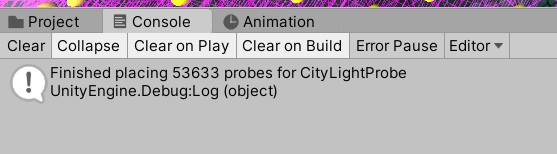
Just says it's finished
Everything that's set to use light probes just disables it https://streamable.com/rg0n4e
 modest vapor
53k probes
teal star
This is our first time working with probes, we haven't even had the chance to test if that's bad or not xD
But we already have this issue lol
modest vapor
baking with bakery or unity lightmapper ?
teal star
Bakery
Our probe mode is L1
I guess I could always try rebaking on probe mode Legacy and see what happens
modest vapor
might want to ask in the bakery discord server, i've never heard of that issue before
teal star
do you have a join link for that? 🤔
I've tried googling for it before but end up just getting a unity discord link
modest vapor
teal star
I ended up figuring out that those instances of the prefabs were corrupt and literally I could just copy/paste them and delete the old ones and the new ones would work with probes

My new issue is now that for some reason objects that align with the terrain aren’t catching light probes very well for some reason 🤔
modest vapor
it really depends where your lightprobes are
teal star

And I re-baked and everything went to broken light probe mode again
Are you supposed to disable light probe objects every time you bake??
glossy meteor
bakery ignores receive GI, you will have to disable contribute GI or set light map scale to 0, for objects to properly receive probes only
lucid onyx
Can light drop your fps? For some reason at some places the fps drop like from 90 to 70. Never had that problem before
glossy meteor
lucid onyx
Can light drop your fps? For some reason at some places the fps drop like from 9...
light indeed has a performance cost
realtime lights with shadows will have a high cost and they can decimate your frames, especially if you play with unoptimised avatars (high material count for one)
baked lightings is the optimised way to do lighting, the performance cost is very small
 rustic cypress
Please tell me its possible to setup volumetric lighting in a VRChat world
teal star
Alright so... how do I force-delete light probes if rebaking them doesn't delete the old ones?
 mint heart
so when using bakery, the world debugger tool for unity says that the lights are unbaked after baking via Bakery. Can I ignore this or will it actually make them realtime lights like the tool says?
glossy meteor
teal star
Alright so... how do I force-delete light probes if rebaking them doesn't delete...
i assume you use bakery based on the bakery discord. L1 mode updates them while baking, legacy requires you to manually bake them via the light probe bake button
teal star
hmmm, okay
Seems like we did this wrong every possible way we could xD
Thank you so much cake, you're a huge help
glossy meteor
teal star
Thank you so much cake, you're a huge help
glad to hear!
mint heart
Its weird, seems like baking reflection probes is baking the directional light despite my having deactivated it in the inspector, its adding a tint to everything that is in direct light
glossy meteor
the reflection probe will add a reflective flavour to all objects in its proximity, which is the reflection, especially visible on metallic materials
 mystic gust
Anyone know why I'm getting extremely low resolution renders with bakery?

my probe setup is fairly dense
 mystic gust
modest vapor
what are your bakery settings ?
mystic gust
modest vapor
what are your bakery settings ?
dang sorry im extremely late to this one, heres a screencap
 modest vapor
GI samples should be 64, and your lights should also have samples increased
how big is your lightmap texture size ?
mystic gust
idk how to check besides the unity lighting menu, its set to 4096
 modest vapor
you can check in the lighting tab at the top, or in your bakery lightmap folder
 modest vapor
Depending on the size of your world you can increase texels on the main bakery settings window, but your issue almost looks like the wrong file type
Should be compressed BC7
Can override those settings in the texture settings
mystic gust
got it. i'll try all of this, thanks
mystic gust
that seems to have worked, thanks!
modest vapor

teal star
Does VRC support L1 Light Probes from Bakery, or should I be using Legacy?
modest vapor
they're both supported
verbal cape
modest vapor
they're both supported
any idea if we will ever get a render pipeline? 😛 none works, but better is better lol
modest vapor
we are using the built in render pipeline
verbal cape
yeah you know what i mean 😛 volumetrics would sure be nice 😉
twilit lily
hdrp vrchat would fry everyone
modest vapor
I would be happy with volumetrics as well 
We had them at some point with volumetric fog and mist, that is whitelisted, but broke a while ago without a chance for us to fix it properly since it's too heavy, but fingers crossed we'll have time to add a solution for prettier things in the future
 simple fox
Few ways volumetrics can be faked with good performance too
twilit lily
vrchats own volumetric light/fog when? :3
 random talon
i got some lighting flickering in my world depending on the angle u look at it, i fixed most of it by putting render mode for every light i had from important to auto

 modest vapor
Bake your lights
random talon
tho it is still a thing a bit, tho its not as trippy flickering anymore is rather like, disappearing on distance, i guess / assume this is because of the range of the light ? i am not too sure, maybe i should learn a proper way of making lights ? no clue, i feel they working pretty alright like, they give the light where i want it and not on everything tho these small things like flicker and what not would be nice to know how to fix
- i see so baking the lights will solve that, i will note it thanks a bunch ❤️
 modest vapor
They need to actually be baked
random talon
i see i appreciate once again, i will look further on that subject thx for quick response 😄
modest vapor

You can support me on my pateron
https://www.patreon.com/mcphersonsound
This is a longer tutorial than normal and there is a lot to cover so here are time stamps for your convivence.
00:00 what is baked lighting
00:35 setting up lights
1:23 preparing meshes to bake
2:30 generate lightmap UV
3:28 light probes
5:10 reflection probes
6:00 emissive ...
random talon
oo, thanks alot<3
 cold marsh
So my avatar is too bright and I figured out it was because of my world specifically. It's way too bright and it's just an outside world. How do I fix it from being so bright bad making my avatar blinding.
modest vapor
Any picture ?
cold marsh
The world is wip and I have no mirror. I can show the world but I can't show how the lighting appears on the avatar currently.
I guess I have two questions.
- Any settings I should enable to make the world more optimized? (For both PC & Quest)
- Any settings to adjust the lighting so it doesn't make my avatar appear so bright?
modest vapor
You're using realtime lighting ?
modest vapor
Alright if you don't know how to tell then your lighting is definitely realtime
It's probably the source of your performance and visual issues
refer to the tutorial above to fix both
cold marsh
So even though realtime global illumination is off in still using it?
modest vapor
yeah that's a completely different thing
cold marsh
Is it mixed lighting?
modest vapor
Do you have objects marked as static ?
cold marsh
How do I do that? I'm not sure, maybe.
modest vapor
If you're not sure then likely not, which means you're not making use of mixed lighting
just realtime
cold marsh
But the baked global illumination under mixed lighting is on.
modest vapor
But you never baked it
cold marsh
So how do I fix this?
modest vapor
By following the tutorial i linked above
cold marsh
I don't see one.
modest vapor
cold marsh
Thank you.
mint heart
Well that helps lol. I was wondering why my world was 100mb. Saw Bakery was set to 4k lightmaps. Set it to 2048 and the size dropped by 40mb. I gotta say Bakery is amazing compared to the base unity lightmappers.
And it looks pretty much the same
It used to take 14hrs to bake my lighting, now its done in 5 minutes AND it looks better
 vernal schooner
I'm working on a map, and have a basic, 2D plane with a transparent texture on it. Despite the edges having a alpha value of 0, and the shader being a standard, transparent shader with no shadows, reflections, or specular highlights the transparent area is darker than the space around it. It seems to be something to do with real-time lighting, since baked lighting vs no baked lighting has no effect. Any idea how to fix this? For reference:

Changing the standard shader's render mode to cutout fixes this, but removes transparency, so maybe its something to do with how the standard shader handles transparency? Am I likely to have to write a custom shader for this?
modest vapor
Did you set your texture settings to alpha is transparency ?
vernal schooner
I didn't. Enabling it seems to break it more, and causes artifacting in the transparent areas if emission is enabled. That said, even if I disable emission and turn on alpha is transparency, it doesn't fix or otherwise affect it.
mint cipher
how do you make the lights in a scene of unity not effect the avatar cause the avatar is so bright in testing?
verbal cape
mint cipher
how do you make the lights in a scene of unity not effect the avatar cause the a...
By organizing your scene, and baking. Realtime lights are fast and easy but rarely ever used AAA or in VRC, they are shit. A light by default has its culling mask set to everything. Change/remove the player layers from the culling mask. My lights only effect the layer that needs effected such as environment, baked or not.
mint heart
Anyone know how to fix this? I assume its because that is a skinned mesh, but it breaks if I take of the skinned mesh renderer
 lunar narwhal
you can't bake lighting onto skinned mesh renderers
if there's no reason's for it to exist as a skinned mesh, you should remove the rig/blendshapes
otherwise you'll have to settle with light probes
mint heart
lunar narwhal
if there's no reason's for it to exist as a skinned mesh, you should remove the ...
I got around it by exporting the FBX from blender with the armature disabled, so luckily the exported mesh retained the positions from the animation.
So now its not longer a skinned mesh in Unity but still maintains the animation position.
mint heart
So it would appear that baking at 4096x4096 with bakery and then resizing the lightmap tga to 2k looks much better than just baking in 2048x2048, and results in the same size lighting data
I wonder if I could reduce it even further to 1024x1024 without any major noticeable artefacts or loss of quality
glossy meteor
bakery has a setting to scale the light map after baking, no need to resize it yourself
Scale per map type
 wet lava
for some reason the area light doesnt havy any brightness, ive baked it and theres still nothing

 ruby narwhal
how do you do efficient baked lighting in large worlds?
or do u just not, and fine tune realtime lighting settings?
verbal cape
lowering the resolution of your bakes, or using bakery so you can bake in 4k without taking a week. Realtime lighting is very situational and should never be used to light an entire environment but when you are new to lighting it is the easiest at the cost of high performance.
you can also specify the lightmap settings per object, so a large terrain can have a lower setting and your objects can bake at a higher resolution
ruby narwhal
verbal cape
lowering the resolution of your bakes, or using bakery so you can bake in 4k wit...
well... what if i can't get past generating lightmap uv's because of the complexity of the mesh lol-
and for this instance making lightmap uv's in blender isn't an option-
fallow lark
then you probably need to go back to the drawing board on your props if it's that complicated
like that object probably has way too high of a polygon polygon count if it's breaking the unity unwrapper
verbal cape
you can fix many light map UV's by using probuilder. Probuilderize the object, click flip normals twice, and typically all is good. You can also edit UV, set planar, then set auto and world. < this last part only really works well with single material UV map fixes.
ruby narwhal
fallow lark
then you probably need to go back to the drawing board on your props if it's tha...
it has, 536k tri's, 312k verts
fallow lark
yeah that is way overkill for a prop
like that's more than the entire render Budget on the quest
ruby narwhal
@w@
fallow lark
what kind of prop is it to see if there's a easy substitute that's more low-poly
ruby narwhal
it's the output of a minecraft exporter
it's not rlly a "prop" it's just one big chunk of terrain
fallow lark
that makes more sense then
I thought you were talking about a 536k tri's potted plant
fallow lark
well I've seen people do that on their Maps accidentally
fallow lark
unfortunately some folks can be like that with their avatars
ruby narwhal
lull
well, i have a 960 and an i5 4690k so im forced to optimize (which is rlly good imo)
verbal cape
Everyone starts somewhere. Fortunately when you start here and are worried about compatibility you are forced into optimization.
fallow lark
but as far as your Minecraft chunk maybe make it into multiple smaller chunks so your modeling software doesn't freak out
and maybe see if there's anything to do with your Minecraft export settings to not export faces you don't need
fallow lark
how big did you do as a test as far as like the size of the map
ruby narwhal
well it's 1,336,928 minecraft blocks total
fallow lark
yeah that's a little Overkill to start
verbal cape
x y and z? or just surface blocks?
verbal cape
😛
fallow lark
I'm not sure you need the entire Minecraft chunk to show off a cool house or a town
ruby narwhal
i just wanted to see if there was a "quick fix" before i dig in for real
ruby narwhal
fallow lark
I'm not sure you need the entire Minecraft chunk to show off a cool house or a ...
well it's not one chunk it's a big piece
fallow lark
could you show up wireframe of your Minecraft map
 fallow lark
mostly just wondering so I can check if you used a inefficient export setting or it's just so gosh darn big
fallow lark
like one thing to note about it being one giant object is it has to render all of it constantly instead of not rendering stuff it doesn't need
ruby narwhal
if i break it up into say, 4 pieces
fallow lark
ruby narwhal
the exporter is not too good
then maybe go see if you can get a different one?
ruby narwhal
can i then like, uhhh i forgot what the word is, when u hide certain parts of the world when the player is in one spot
culling
verbal cape
occlusion culling, and not effectively with only 4 pieces
ruby narwhal
yeeeh
ruby narwhal
verbal cape
occlusion culling, and not effectively with only 4 pieces
well i can split it up more
verbal cape
The more parts, the easier it will be to cull
fallow lark
like honestly you'd probably want more closer to something like the size of Minecraft chunks with it also sliced Up height-wise so you're not rendering all the caves when you're above ground
ruby narwhal
also i kinda bugged the thing when i attempted to generate lightmap uv's so imma re-export one sec
ruby narwhal
fallow lark
like honestly you'd probably want more closer to something like the size of Mi...
yep yep
ruby narwhal
fallow lark
mostly just wondering so I can check if you used a inefficient export setting or...
this?
 fallow lark
thanks
okay so it's not worst-case scenario where it's having triangles for blocks that are covered up
ruby narwhal
verbal cape
you can fix many light map UV's by using probuilder. Probuilderize the object, c...
stack overflow
i got the reference noww tho, i think that's kinda cool

 coarse hill
is there anyway to fix this i have only one spot light and its making the emissions on my carpet flicker on and off https://gyazo.com/df5d74f33c069ddb0e3a2d9b18a60a25
 modest vapor
only one light in your world ?
coarse hill
yea only one
modest vapor
can you enable gizmos and show where that light is in your world ?
coarse hill

 burnt cypress
coarse hill
burnt cypress
coarse hill
thats cool
coarse hill
burnt cypress
thats cool
Thanks that’s why I’m trying to fix it lol
glossy meteor
have you baked this light?
it looks like the light is somehow occluded, so i assume it is real time
coarse hill
glossy meteor
it looks like the light is somehow occluded, so i assume it is real time
It was originally real-time but I switched it to baked and it didn’t emit any light at all even after baking
glossy meteor
coarse hill
It was originally real-time but I switched it to baked and it didn’t emit any li...
then that means you may not have a scene with objects marked to contribute GI (see static checkbox and dropdown)
coarse hill
glossy meteor
then that means you may not have a scene with objects marked to contribute GI (s...
It's checked but the light still doesn't show
 glossy meteor
coarse hill
It's checked but the light still doesn't show
glossy meteor
coarse hill
It's checked but the light still doesn't show
the meshes/geometry game objects must be checked
coarse hill
glossy meteor
the meshes/geometry game objects must be checked
Where's that 😅 sorry this is my second world and the first one that I've put lighting into I'm really new at all of this
glossy meteor
coarse hill
Where's that 😅 sorry this is my second world and the first one that I've put l...
this is a useful video: https://www.youtube.com/watch?v=dKgUJccjWRU
You can support me on my pateron
https://www.patreon.com/mcphersonsound
This is a longer tutorial than normal and there is a lot to cover so here are time stamps for your convivence.
00:00 what is baked lighting
00:35 setting up lights
1:23 preparing meshes to bake
2:30 generate lightmap UV
3:28 light probes
5:10 reflection probes
6:00 emissive ...
coarse hill
glossy meteor
this is a useful video: https://www.youtube.com/watch?v=dKgUJccjWRU
Thank you!
burnt cypress
coarse hill
Thanks that’s why I’m trying to fix it lol
how do u make it cuz im using unity for the first time
glossy meteor
watch the video to get started with performant lighting in vrchat/unity
 languid fable
Silly and awfully specific question. Any advice on baking realtime GI from a video player using Bakery? I'm approaching the phase in my project where I'll need to do that, and I just can't wrap my head around how I'm going to make it work.
mint cipher
so im light baking and all the other textures are coming out fine exept the couch and chair and idea how to make this not happen https://gyazo.com/61698066faa270cf1d4a4c6d245825fa
 modest vapor
Do they have lightmap UVs ?
modest vapor
You probably wanna watch this https://www.youtube.com/watch?v=dKgUJccjWRU
You can support me on my pateron
https://www.patreon.com/mcphersonsound
This is a longer tutorial than normal and there is a lot to cover so here are time stamps for your convivence.
00:00 what is baked lighting
00:35 setting up lights
1:23 preparing meshes to bake
2:30 generate lightmap UV
3:28 light probes
5:10 reflection probes
6:00 emissive ...
mint cipher
ok
 toxic viper
I can't bake using gpu

this is a brand new project
i have already cleared the GI cache
oh wait nevermind. I closed unity and open it again and it works. weird.
 steep lodge
i have generate ligth a lot of time but this thing style being black why ?
 fallow lark
do you have any light probes on your map
steep lodge
a lot

 fallow lark
You can support me on my pateron
https://www.patreon.com/mcphersonsound
This is a longer tutorial than normal and there is a lot to cover so here are time stamps for your convivence.
00:00 what is baked lighting
00:35 setting up lights
1:23 preparing meshes to bake
2:30 generate lightmap UV
3:28 light probes
5:10 reflection probes
6:00 emissive ...
video tutorial that shows how to light probes
 tame crater
Ugh, I give up trying to use baked lighting with terrains... VRChat apparently doesn't support distance shadowmasks, but that seems to be the only way to get my terrain trees to be properly lit with baked lighting.
With it disabled, ,my trees are either brightly lit, or if I disable light transmission, have ugly specular highlights on the parts facing away from the light.
And you can't bake lighting into terrain trees, and manually placing every tree would be too time consuming. Not to mention trying to lightmap every tree would be insane and take forever and make the world size huge.
This is unfortunate because with realtime lights, the poly count for my scene is 4M, while with baked lighting, it's 1M, and with distance shadowmask it's 2M. I don't know why VRChat would default to a setting which makes it harder for world authors to create maps with good performance. As far as I know Distance Shadow Masking should only improve performance over regular Shadow Masking. But there's no way to use it if the quality settings in the player forbid it.
tame crater
This is what it's supposed to look like...

And here's what it looks like as soon as I go to upload and VRChat disables the distance shadowmask setting I'd enabled in Bakery:

It also looks like that if I attempt to use regular shadowmask mode and re-bake the lighting for that.
If I lower the light transmission on the tree shader, I can kinda get the trees dark again, but the specular highlights remain which looks even worse, and I lose all the nice definition from the light coming in around the edges of the foliage as in the top image.
Plus even if regular shadow masking worked, I'd lose all the moving shadows from the trees, which are blowing in the wind, which also kinda sucks and makes the world feel lifeless. So I wanted the nice shadows up close, and the static shadows in the distance, but without distance shadowmasking, I can't do that. It's all or nothing.
steep lodge
fallow lark
video tutorial that shows how to light probes
thansk now its perfect !
 prisma radish
tame crater
Plus even if regular shadow masking worked, I'd lose all the moving shadows from...
prisma radish
tame crater
Plus even if regular shadow masking worked, I'd lose all the moving shadows from...
Be sure to interact with https://feedback.vrchat.com on that topic. There may be a report you can add your feedback to.

Give feedback to the VRChat team so we can make more informed product decisions. Powered by Canny.
 worthy crater
is it possible to have real time reflections off of the vrc sdk prefab video player in unity?
steep lodge
i have set Ligth prob group and directional ligth and other but this thing still dark why ?
 glossy meteor
steep lodge
i have set Ligth prob group and directional ligth and other but this thing still...
glossy meteor
steep lodge
i have set Ligth prob group and directional ligth and other but this thing still...
bake reflection probes
and show the inspector tab of the gameobject in question
steep lodge
glossy meteor
bake reflection probes
and show the inspector tab of the gameobject in question
 glossy meteor
steep lodge
glossy meteor
steep lodge
time to learn light baking: https://www.youtube.com/watch?v=dKgUJccjWRU
objects not marked as Contribute GI won't bake
steep lodge
glossy meteor
time to learn light baking: <https://www.youtube.com/watch?v=dKgUJccjWRU>
objec...
because its pickable
glossy meteor
yup, watch the video to learn how light probes work
steep lodge
i like watch this video 3 time i dont understand like what moment i must see or what i am doing wrong
the "reflection probes" moment ?
glossy meteor
the light probe segment, since i said light probe
steep lodge
i did the ligth prob group
glossy meteor
show me your light probe group
steep lodge
 glossy meteor
watch the video segment again, akalink explains how to place them properly
they sample from the light map, you placed them out of bounds, they will sample darkness, therefore placing more probes to represent the change in light will help your scene
steep lodge
so i set it like in every corner ?

 glossy meteor
glad it works now!
mint cipher
steep lodge
a lot
You know that you can make the size of your gizmos (icons for things like light sources) smaller, so they don't overwhelm ur scene view right?
drop this down and there is a slider that changes gizmo size
 worthy crater
mint cipher
drop this down and there is a slider that changes gizmo size
worthy crater
mint cipher
drop this down and there is a slider that changes gizmo size
you're the best
mint cipher
no problem lol
steep lodge
mint cipher
You know that you can make the size of your gizmos (icons for things like light ...
Yeah i Know but that help me to place it and all
 barren marlin
does someone know how i can exclude avatars from baked world lighting? if i got a baked point light for example, avatars become very bright and i don't want them to be affected by that. i tried removing the player and player local layer from the point light but it didn't do anything
modest vapor
Toon shaders can often give you the option to have your own lighting
but you can't chose to not affect players
at least not specifically avatars
If you want players to be less bright, you'll have to move your lightprobes further away from your lights to reduce the intensity
barren marlin
ok thanks 🙂
vast pebble
How do i make certain lights togglable? I need to put a mirror light on a switch.
vast pebble
I just tried to brute force my way through. I really need help.
verbal cape
Realtime light can be toggled. Baked lights can but not in vrchat.
to toggle a light just use any gameobject toggle graph or script. If you want to be neat about it you toggle the Light component Light.enabled=false;
vast pebble
verbal cape
to toggle a light just use any gameobject toggle graph or script. If you want to...
Here's the thing, I have no experience in coding. I was hoping I wouldn't have to.
verbal cape
might be able to find a button prefab here. No coding is needed to build a world. The moment you decide to go beyond a box of various designs and add functionality, that changes. https://docs.google.com/spreadsheets/d/e/2PACX-1vTP-eIkYLZh7pDhpO-untxy1zbuoiqdzVP2z5-vg_9ijBW7k8ZC9VP6cVL-ct5yKrySPBPJ6V2ymlWS/pubhtml#
 drowsy pendant
That looks clean
 supple burrow
how do i make these strips glow ?
 verbal cape
supple burrow
how do i make these strips glow ?
verbal cape
supple burrow
how do i make these strips glow ?
Without Bakery? Post Processing's Bloom. With Bakery, applying a mesh light and the adjusting the emission strength + more samples.
glossy meteor
even with bakery, you can simply use emission and set it to baked, then increase intensity as needed
 snow tartan
Good shader for christmas lights? I want something that blinks

I’m not gonna use Poi, I need something else
snow tartan
Could someone help me with this
snow tartan
fallow lark
https://www.patreon.com/posts/xmas-lights-32030551
Does this have shader?
fallow lark
yes
fallow lark
glad to be of help
 fervent mirage
Any way to brighten this?


 twilit lily
fervent mirage
Any way to brighten this?
twilit lily
fervent mirage
Any way to brighten this?
increase either emmission strengh or intensity of the lights (whatever is used for the main lighting)
fervent mirage
Thank you!!
verbal cape
fervent mirage
Any way to brighten this?
you can also set your screens material shader to emit their own image which will look more realistic and add a small surface light or point light with a slight blue tint at maybe .5 intensity. Not a hard blue, very soft (most people use an unnoticeable blue tint dark mode ).
 toxic sedge
Can anyone explain this with the lighting? I keep getting light leaks in strange spots and everything is the way it should be (Connected mesh, normals are correct why, etc.). The lighting has also been changed and seems to happen no matter what type (Baked/Realtime)
 modest vapor
Wdym by "connected" ? If it's just snapped then it'll leak
 verbal cape
What did you build the room with?
toxic sedge
Blender
verbal cape
double check your edges, use a shaded wireframe view and make sure your verts/edges are actually merged there.
toxic sedge
they are and why I am saying connected
as well as showed that I just moved the one face and the other face moves
plus the lighting does not match anything I see that would be like what shows
 verbal cape
Did you verify your UV map is mapped correctly at those folds?
toxic sedge
yes, they are
verbal cape
🤷♂️ yeah if your verts are merged which they are, and your uv map is correct then the issue does not make sense. sry
toxic sedge
yeah I know. Made other worlds and seems like this is the first time this happened
modest vapor
No errors in console after lightbaking ?
verbal cape
worth a shot: install probuilder, select the model, open the toolbar and select probuilderize then retry. just duplicate the model you already have so you dont lose anything.
This method works for me most of the time
modest vapor
oh god, don't bring in probuilder into this lmao
toxic sedge
lol
verbal cape
hater lol.
toxic sedge
Also, I have checked the model with lighting in Blender, it shows everything in there fine so what ever it is, its Unity side and can't figure that out. I even deleted anything baked, changed the lighting, the works
 empty pecan
any good ways of making neon lights/strips without doing post processing?
fallow lark
I suppose you could do a particle for the the glow surrounding the neon
empty pecan
how can i make a light that matches a neon light? do i just do a bunch of point lights in a row?
fallow lark
have a bright emissive material or a arealight?
empty pecan
alright ill try it out thank you, do you also know how I could temp disable lights/all of them at once so I can add stuff without much lag? sorry for so many questions lol
empty pecan
thanks
 tranquil scaffold
Anyone know what caused this? Only happens when i look in that direction.
 toxic sedge
modest vapor
No errors in console after lightbaking ?
toxic sedge
modest vapor
No errors in console after lightbaking ?
@verbal cape So the only way I was able to fix that lighting issues after everything being ok was to turn on two sided for cast shadows. Still not sure why it was needed but it worked. I also noticed an other part of the light leak and there was nothing going in the direction to even make that light so I am still confused on where that was coming from. But I guess this is a work around for now.
 verbal cape
toxic sedge
<@!101043607124860928> So the only way I was able to fix that lighting issues af...
verbal cape
toxic sedge
<@!101043607124860928> So the only way I was able to fix that lighting issues af...
That is an odd fix but as long as it works 🙂 And you are already baking so the double sided is just going to increase your lightmaps, you can probably set the *fix added lightmaps to a super low resolution if they get in the way.
modern matrix

Is there some kind of setting I can do to make the baked lighting better cuz I keep getting things like this
I have like 20 emissive objects in the map, no point lights or anything
modest vapor
You can support me on my pateron
https://www.patreon.com/mcphersonsound
This is a longer tutorial than normal and there is a lot to cover so here are time stamps for your convivence.
00:00 what is baked lighting
00:35 setting up lights
1:23 preparing meshes to bake
2:30 generate lightmap UV
3:28 light probes
5:10 reflection probes
6:00 emissive ...
modern matrix
well im still having issues but it's better I think I'll try using bakery again
but I generally already know how to bake

I have no clue why this happens
but I'll switch to bakery
 lyric jay
Can anyone tell what I'm doing wrong here?

Everything looks pretty good except that plane, & the reflections seem to double up in some areas, but I can live with that.
I watched that video that was just linked.
I bought this build as a prefab but messed up the lighting as I added things to it & edited colors, so I'm trying to go back & fix it
empty pecan
how do i fix this? light is different in different surfaces? same thing is happening in some other spots of the map, im new to lighting so any pointers would help too

 gaunt harbor

 timber obsidian
does Bakery have No Shadows for Point Lights?

i don't see it anywhere?

shadow spread to 0 also didn't help already resolved Solution: change samples in bakery light to 0
empty pecan
lotta issues with my lighting, i have no clue why some surfaces are wacky while others are fine,
tranquil scaffold
Did occlusion culling and this happens.. anyone how to fix this?
After deleting oc, its still here..
 modest vapor
I don't think that's related to occlusion culling, probably too many realtime lights
modest vapor
Have they actually been baked or just set to baked?
tranquil scaffold
Well that might be it, just set to baked. I never baked lights, need to look it up how to do that x)
I moved the light somewhere else, reduced it too - its better and not really noticable
modest vapor
You can support me on my pateron
https://www.patreon.com/mcphersonsound
This is a longer tutorial than normal and there is a lot to cover so here are time stamps for your convivence.
00:00 what is baked lighting
00:35 setting up lights
1:23 preparing meshes to bake
2:30 generate lightmap UV
3:28 light probes
5:10 reflection probes
6:00 emissive ...
tranquil scaffold
Thank you, i'll watch that


 pallid flint
are those lines black or are they the same color as the skybox?
empty pecan
black/grey, kind of like a weird shadow, My skybox is navy blueish
pallid flint
so it's definetly not the skybox shining through?
empty pecan
i dont think it is no, it might be due to the clipping into the wall slightly but im not sure
lyric jay
Should post processing be turned off when baking? Or does it matter?
glossy meteor
lyric jay
Should post processing be turned off when baking? Or does it matter?
it does not matter, it's applied after the camera has drawn the scene but before it is rendered to the screen, that's why it is called post processing
steep lodge
why does this props glow like that ?
 glossy meteor
steep lodge
why does this props glow like that ?
glossy meteor
steep lodge
why does this props glow like that ?
check its material, it may be emissive

 glossy meteor
steep lodge
this ?
glossy meteor
steep lodge
this ?
yes, and you can see that it has the emission enabled, make a new material without emission
steep lodge
Okay thank !
lyric jay
I spent all of last night just trying different settings, trying to fix my issue. I added more lights, more light probes, changed around resolutions & settings in the reflection probes.. It looks a lot better on the top half but I still have no clue what's causing problems on the lower half. Everywhere else in the build looks pretty good.
Any ideas what could be wrong?
 glossy meteor
maybe bad light maps
tranquil scaffold
modest vapor
https://www.youtube.com/watch?v=dKgUJccjWRU
Baked the lights, got it fixed :)
modest vapor

Get the Bakery - GPU Lightmapper package from Mr F and speed up your game development process. Find this & other Level Design options on the Unity Asset Store.
Bakery is on sale !
 fierce hawk
Heey could anyone recommend a light weight material that mimics a light very well? Like as emissive as possible without actually being a light
I've used Poiyomi and the standard and neither are emissive enough
or... should I just move to lights
10 fps, but it's really not bright enough
 modest vapor
Should just be white emission tbh
fervent mirage
Odd thing- when I bake my lights they all vanish
modest vapor
You can support me on my pateron
https://www.patreon.com/mcphersonsound
This is a longer tutorial than normal and there is a lot to cover so here are time stamps for your convivence.
00:00 what is baked lighting
00:35 setting up lights
1:23 preparing meshes to bake
2:30 generate lightmap UV
3:28 light probes
5:10 reflection probes
6:00 emissive ...
mint cipher
Could someone link me a guide for migrating from unity lighting to bakery lighting? Decided to get bakery with the recent sale because I don't like waiting for years when baking lights lol
For example, when I get closer to the wall the lights suddenly change. https://cdn.discordapp.com/attachments/906273675966300172/914127229615734874/y3n4uEmpScmsQd9jmet46tYkHTgucX.gif (see the bit above the video player that gets brighter when I get closer in the editor)
glossy meteor
mint cipher
For example, when I get closer to the wall the lights suddenly change. https://c...
are those all real time lights?
the bakery wiki is a good source: https://geom.io/bakery/wiki/index.php?title=Manual#Quickstart
mint cipher
Yeah I still had realtime lights in my scene, swapped them all over to bakery lights and baked them, looks better now 😄


 jade aurora
Hi, after a while of not using Unity I have noticed in a world project I had, everything is transparanet basicially in the scene but in the Game scene it looks normal. Its just an feature I don't like in scene, is there any way to fix it?
 modest vapor
 uncut hollow
Any idea why this specific part of my map is being lit like this?
uncut hollow
Any idea why this specific part of my map is being lit like this?
Wdym by "like this"
mint cipher
Anyone ever ran into issues like these with Bakery? It's been stuck at 46 for a long time now.

These are my bakery settings.

 uncut hollow
Lighting was being wacky in my case cuz the interior lighting was using emission
I fixed
mint cipher
modest vapor
what is your world ?
small indoor/outdoor home-like world
I assume 200 is too high? 😛
modest vapor
like 5x too high
especially with 2 bounces
it should be 5 always
aslo enable hole filling
and don't set the min resolution lightmap to 16, more like 1024
 jade aurora
 eternal rose
just @ me if someone knows
eternal rose
just @ me if someone knows
Either the wall isnt straight or you have to rotate/move the light source (Directional light) To make a better shadow 🙂 @eternal rose
eternal rose
jade aurora
Either the wall isnt straight or you have to rotate/move the light source (Direc...
thank u
eternal rose
ohh okay ill take a look into that ty
 tribal linden
My lighting won't bake no matter what I do, its been stuck like this for about an hour and a half. I only have four lights in my scene and a reflection probe set to a resolution of 128.

everything is default
except for the things I made static
I haven't even added the descriptor or any colliders yet
fervent mirage
Do I have to bake lighting everytime I add a new object? As any new object I add has super dark shadows and almost looks black (static is checked)
fallow lark
fervent mirage
Do I have to bake lighting everytime I add a new object? As any new object I add...
yes
fervent mirage
Ah okay, thank you!! Only downside is it takes 30min to bake xD
mint cipher
Get bakery it's 50% off on the unity store
fallow lark
oh yeah that one works a heck of a lot nicer and a lot faster
mint cipher
It's worth every cent if you build worlds often
The realtime preview addon is nice as well
fervent mirage
Oh I definitely would! Tho I'm completely broke ATM lol
My PC definitely isn't made for processing this kinda stuff. It can, it's just slow with either one
verbal cape
no worries, it goes on sale many times a year 🙂
modest vapor
Well that's tough if you're using a toon shader
But generally, bake lighting and then lightprobes
 elder merlin
uhh <@&397642795457970181>
 fallow gull
bruh
 limber jungle
oi what in the fuck was that
fallow gull
ayo mods
 dusky pier
discord bots
 vivid lodge
bruhh
 tulip topaz
What the dog doing
 valid veldt
god damn
dusky pier
ban these people
 coral ermine
Ah one of these mfs
 boreal remnant
 vernal rock
.....
 latent reef
pineapple
valid veldt
waste of my time bruh
 graceful gazelle
Nice
 mental inlet
im trying to block as much of them as i can XD
 past ingot
valid veldt
past ingot
valid veldt
omfg
vivid lodge
im gonna commit cri
past ingot
same
 tepid minnow
cool then
valid veldt
same
coral ermine
tepid minnow
i sure do love being pinged
 raven estuary

valid veldt
tepid minnow
i sure do love being pinged
yea especially for like no reason lol
tepid minnow
hello fellas welcome to the world lighting channel
I was only pinged personally in this channel
so here i am
 plain wharf
🗿🗿🗿🗿🗿
 sturdy garnet
i have been summoned ....
plain wharf
so have hundreds of others
past ingot
ok ima go
sturdy garnet
past ingot
ok ima go
same
 arctic latch
<@&397642795457970181> in here please
 steep osprey
I was pinged?
arctic latch
Yep
 spiral dove
Whomst'd've pinged
 tranquil bough
ping where
 sonic marsh
modest vapor
Well that's tough if you're using a toon shader
sonic marsh
modest vapor
Well that's tough if you're using a toon shader
Please don't say that
 atomic path
there was a riad
 open geyser
Epic
modest vapor
sonic marsh
Please don't say that
Why not ?
sonic marsh
It's... incorrect? 👀
 random talon
whomst've pinged
random talon
elder merlin
bot wave
oh
sonic marsh
modest vapor
Why not ?
It rubs me the wrong way because it only makes sense if you ignore shaders like mine that work with baked lighting, when I think it's pretty common for cel/toon shaders to handle world lighting in the current age
modest vapor
They all seem to look pretty different though still
And i'll never assume someone is using your shader since the extreme majority now is poiyomi, XSToon or even cubed
sonic marsh
Well, last I checked Poiyomi uses a simple version of what my shader does, XSToon does something similar that also reflects ambient light, and Cubed... people still use that?
Clearly the solution is to just recommend my shader to everyone--
modest vapor
If you can get poiyomi and xiexe to agree, then i shall !
sonic marsh
I know XSToon is almost always accurate to Standard
 autumn plinth
dang, here i thought that there was a new update
 weak glade
Never used silent shaders, but i remember using Poiyomi toon for my world and the baked lighting was... non existant.
timber obsidian
poiyomi is not supported for worlds
also is there a way to tell if reflection probes are working in your world at first glance? or looking at the scene?
verbal cape
timber obsidian
poiyomi is not supported for worlds
Don't know what the readme says but poiyomi works fine in worlds. A lot of people use it especially for metal surfaces. Probably not the most efficient shader for world use but I'm no expert.
You can tell reflection probes are working when you can see a reflection on high shine surfaces. Also after you bake a probe a preview of the baked probe material is shown at the bottom of the probe in the inspector.
 simple fox
timber obsidian
poiyomi is not supported for worlds
simple fox
timber obsidian
poiyomi is not supported for worlds
This isn't true. Poi works perfectly fine for worlds and is widely used. Even some Quest worlds use it to a limited extent without issue.
 wary sonnet


i've tried everything i could, my modeller buddy looked at the model too and its optimized
any idea what i can do to fix this?
i'm using bakery
verbal cape
you should be seeing overlapping uv warning when baking. Thats a gorgeous concrete texture btw.
wary sonnet
verbal cape
you should be seeing overlapping uv warning when baking. Thats a gorgeous concre...
thanks 😄
i don't see any such warnings though
verbal cape
What do your bakery settings look like?

 verbal cape
hmm, not seeing anything wrong with your settings, I have to use opti 5 because im on a 1650 super but other than that, unless im missing something, settings look good. So not sure. That clearly looks like a uv issue but if you arnt getting warnings... idk
wary sonnet
i tried to probuilderize the object just to see what would happen
holes appeared in the top edge of the windows
and some polies became black
im no expert on models and so on but do you think its possible that certain polygons or something are inverted?
https://cdn.discordapp.com/attachments/794733834591535115/915187109688651776/unknown.png
https://cdn.discordapp.com/attachments/794733834591535115/915187360285720606/unknown.png
https://cdn.discordapp.com/attachments/794733834591535115/915187620445814814/unknown.png


heres some pics after probuilderizing
verbal cape
If you probuilderized it and had those results then verts are distorted beyond their capabilities. In blender you see this with warping of the textures sometimes, in probuilder you see it with black poly. Holes can be fixed by selecting two edges or verts and clicking fill hoels.
wary sonnet
i tried filling holes, didn't work
verbal cape
Ok so whatever format it is now, is giving uv issues without warnings of uv issues. You did generate uv. Probuilder breaks it. Try using another format. If you did fbx, try obj. If Temp has a better idea go with what they say first 😛
wary sonnet
cool, will try thx
lunar narwhal
was just gonna ask if those normals might have been flipped
wary sonnet
how do i verify that ?
lunar narwhal
if you're not using a shader with backface culling disabled then its probably not that
verbal cape
wary sonnet
just unity standard shader
side note, not related to your issue at all just an visual improvement. weathered concrete doesnt have a shine (maybe a tiny tiny bit) look into normal maps and ambient occlusion maps. they can quickly be generated in gimp or photoshop if you dont have them included 🙂 sorry for the detour.
wary sonnet
it's actually marble 😄
but it looks a bit scuffed up-close
but thanks for the suggestion, i do need to learn more about materials
here's a screenshot from unity 2018 when the walls were still behaving well 😛
 verbal cape
that looks pretty
timber obsidian
simple fox
This isn't true. Poi works perfectly fine for worlds and is widely used. Even so...
hm...alright i'll keep that in mind then
fierce hawk
Hey everyone, I have a lighting question about shadows
I have a world with a room that has recessed lighting in the ceiling, but it creates these really weird shadows and I'm wondering if anything comes to mind for what is happening here
 sonic marsh
simple fox
This isn't true. Poi works perfectly fine for worlds and is widely used. Even so...
sonic marsh
simple fox
This isn't true. Poi works perfectly fine for worlds and is widely used. Even so...
This is total misinformation, stop spreading it. Last I checked it didn't support directional lightmaps or normal lightmaps. Combined with the large increase to the world filesize due to needing a seperate copy of the shader for each material, it really really shouldn't be used for worlds
fallow lark
so dumb question what kind of visual effect would you be going for that you would want to even use a toon Shader on worlds
sonic marsh
If it's for a visual effect or something then that's different, I use my simple Magic Particles for all kinds of semitransparent visual effects, but if you're making a world with semi-realistic materials, anything that can use reflections or whatever, then the only real choices are things that work with the lightmap data
simple fox
Dunno. Looks fine when baked using bakery to me and I have a world with almost 200 poi materials that is only like 40mb and only about 2% of that is shaders despite so many poi materials  just my own experience ig, looks good when I've used it and doesn't balloon filesize when I've used it so whatevz, I mean each locked shader is like 1-200kb, that's not really gunna balloon anything, I stand by what I said because it's based on my own personal experience and years of using it across many worlds.
fallow lark
out of curiosity what are you trying to do with your world that requires Poi
simple fox
Lots of various effects
There's simply no alternative that I've been able to find for what I do aside from writing my own shaders. So I just use what works, and poi works for me just fine. Only other shader that comes close to having the features I need is Mochi's Uber shader, but it's far too limited for most things. I've used poi for two worlds I've done that are entirely baked as well without any issue and they look nice and perform well so idk. Again. Just my own experience but works just fine for worlds and I know I'm not the only one using it. Having so many possible effects and lighting settings, is very useful. It's come a long way since Master.
simple fox
Also if it didn't support lightmapping, it's kinda odd that there's a section for it, and that it works when baked using my lightmaps. Like in this shot, Entirely baked scene using Poi 8 set to standard shading.
 fallow lark
I don't see anything in that screenshot that that suggests it would need Poi
simple fox
fallow lark
I don't see anything in that screenshot that that suggests it would need Poi
That's not what I was showing..... Besides. There's not many shaders that allow such fine control over your lighting settings and lightmaps so that alone can be useful. But the point was to show it works. The point of that screenshot was to show there's an entire section dedicated to lightmapping and that it works when baked.
simple fox
fallow lark
I don't see anything in that screenshot that that suggests it would need Poi
I'd love to know what shader I could use that supports audiolink, Radial uv distortion with audiolink, blacklight masking, Iridescence, panoshpheres, multiple emission layers, texture panning, masking, etc. that performs better and is smaller in file size than the 200kb that a poi material might take pre compression.
 fallow lark
okay that's some helpful context what you're doing with the shaders
because honestly screenshot 1 could be using the vrchat mobile lightmap Shader
simple fox
Sure, It may look normal, but standard wouldn't give you the fine control over the actual look of the end product that poi offers me, like being able to go in and slightly lower the strength of shadows in the lightmap after baking or change how lighting will affect a specific material pre bake is useful.
 cosmic torrent
Got a baking question; My snow's coming out blue because of the skybox, and I'm not entirely sure where I'd tweak it so it doesn't take the Skybox coloration.
 simple fox
cosmic torrent
Got a baking question; My snow's coming out blue because of the skybox, and I'm...
simple fox
cosmic torrent
Got a baking question; My snow's coming out blue because of the skybox, and I'm...
you'd either have to edit the shader, or change your world Environment lighting in the lighting tab to either color or gradient so you can control the color of the scene rather than the skybox.
cosmic torrent
Found it, cheers!
 small garden
Greetings! trying to set up my scene for baking lights, but im not seeing the option to mark things as "lightmap static"

model on import has "generate lightmap UVs"
am i missing something?
verbal cape
Contribute GI @small garden
small garden
okay....... i guess i baked lightmaps last time only in 2018...
highly intuitive rename, 5/7 would spend hours in despair in unity manuals again
small garden
verbal cape
Contribute GI <@!101683620665638912>
Thanks, KevBal!


 floral aspen
anyone else experience area lights creating dark spots instead of light ones?
I recently updated bakery on a new project but kept the old lights
idk what's recommended but thought I'd ask if there's a simple solution I'm missing

 paper gust
Hey so i use bakery to bake my light it all worked great but i apparently change a setting or so but now it dosent work properly anymore

this is how it looks now which is the broken version
Before the black part on the left also got light
ill send how it looked in just a sec

this is how it should look and did look before i changed whatever setting i really cant remember
please if anyone knows what i did please dm me i really need help i cant figure it out
I have already tried re-importing bakery no change i reset everything that i know of and i really dont know anymore
 wet void
I’m trying to get the lighting correct in this scene. How would I go about doing this, and how would I make the tunnel not receive any lights?
 paper gust
I have already tried re-importing bakery no change i reset everything that i kno...
paper gust
paper gust
I have already tried re-importing bakery no change i reset everything that i kno...
Correction even the normal light map generation is broken
weak glade
wet void
I’m trying to get the lighting correct in this scene. How would I go about doing...
Turn off lightmap static. It will not bake lighting.
weak glade
paper gust
Hey so i use bakery to bake my light it all worked great but i apparently change...
You might need to remove the shadows from certain gameobjects that might be covering the lightsource
wet void
Found a solution
Just use an unlit shader
I found a UVScroll shader and luckily it’s unlit based
 steady plaza
Hi! im making a world and the particles are not being reflected in the mirror! im very new to world creation so this may be a easy thing so sorry :p
 weak rampart
How do I prevent full bright happening in the mirror, the main issue with it is that it makes some other avatars glow in the mirror and only the mirror
 weak rampart
(Fixed - Issue was caused by Reserved Layers 2, 3 and 4 still being turned on)
 woeful nexus
The lighting on pretty much everything in my world constantly flickers. i tried setting all of my light sources to "baked", but that doesn't seem to have changed anything.
glossy meteor
woeful nexus
The lighting on pretty much everything in my world constantly flickers. i tried ...
have you generated/baked light maps though?
woeful nexus
Nope, how do I do that?
modest vapor
You can support me on my pateron
https://www.patreon.com/mcphersonsound
This is a longer tutorial than normal and there is a lot to cover so here are time stamps for your convivence.
00:00 what is baked lighting
00:35 setting up lights
1:23 preparing meshes to bake
2:30 generate lightmap UV
3:28 light probes
5:10 reflection probes
6:00 emissive ...
 lyric tulip
is there a way to change the skybox exposure with a slider on a vrchat level?
lyric tulip
 modest vapor
lyric tulip
is there a way to change the skybox exposure with a slider on a vrchat level?
modest vapor
lyric tulip
is there a way to change the skybox exposure with a slider on a vrchat level?
It might be exposed in Udon, but you'd have to look it up
 modest vapor
in that case there isn't a way sorry
lyric tulip
:CCCC
verbal cape
lyric tulip
Not that type of exposure, you need to script it and reference the script, where it asks for a function you pick your udon behavior that you scripted and type the Event that you are going to write. keyword for changing exposure in a default skybox is "_Exposure" unless you use a custom skybox shader, then you might have to look it up.
lyric tulip
i was hoping it would be a little more simpler, scripting isnt really my area of expertise
ill look into it
verbal cape
kk, you want to read up on unity RenderSettings and then simply google changing skybox exposure with script. As long as generics arnt used it will directly translate to UdonSharp.
mint cipher
any1 that have a good advice on how to make an object glow? (and have the reflection on the wall/floor? (btw its a long object)
verbal cape
Unless you are using a shader that doesnt support emissions, the material on your object should have an emission toggle. Adjust that until it is the correct color and brightness for you. When you bake your lighting and bake your reflection probe the light will be cast. It is important to not forget the reflection probe part.
You can also use Bloom through Post Processing effects. Post Processing is not rendered on Quest however.
 undone nova
I love tweaking lighting.
 mint cipher
I would need help to improve the illumination of my world.

currently creates a lot of annoyance, creating latency in the world.
 torn rock
Unsure if this is the right place. But I'm curious. How do you make the neon sign? I know about bloom, but I mean like how you make a neon sign?
Perfect example

 slim ridge
It's most likely an emissive material https://docs.unity3d.com/2019.4/Documentation/Manual/lighting-emissive-materials.html

 humble condor
small garden
aahhhhh the glory of a GPU instead of a CPU 2h long baking
humble condor
small garden
aahhhhh the glory of a GPU instead of a CPU 2h long baking
Wait GPU works?
When I try to bake with GPU Unity crashes
maybe it's just my GTX 660 being itself tho
teal star
Hey y'all, somehow somebody on our dev team screwed up the lighting settings in our world and our lightmaps are incredibly miscolored and distorted
This is the Terrain lightmap:

Does anybody know at a glance what could be wrong here? We use Bakery for our Lightmaps.
glossy meteor
teal star
Hey y'all, somehow somebody on our dev team screwed up the lighting settings in ...
try to apply the latest bakery patches from the github
 pine trench
teal star
This is the Terrain lightmap:
pine trench
teal star
This is the Terrain lightmap:
Looks like some kind of virus lol
weak glade
teal star
This is the Terrain lightmap:
Last time i had something like this in bakery, i just had to disable denoise. For some reason, denoising makes it noisy.
teal star
That’s so weird. I’ll try skipping denoising on a bake
glossy meteor
if you need to skip denoise, applying bakery patches and updating gpu drivers should resolve it
teal star
yeah skipping denoise didn't do it xD

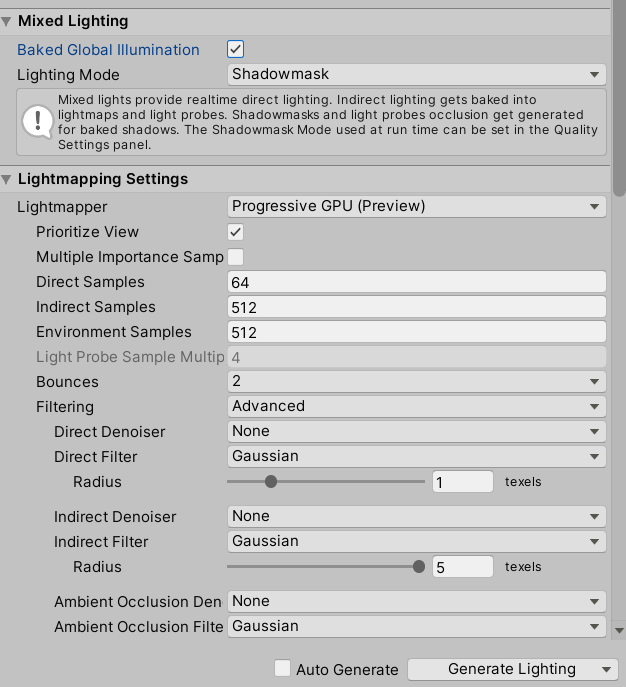
I feel like that's not supposed to be set to shadowmask
I'm going to see what happens if I rebake with it set to Baked Indirect
teal star
oh my god
that was it
okay so like
note to everyeone
your world is red?
turn off shadowmasks
teal star
nope
so I'm back after reverting everything and re-running through the various changes I made and now I think Optix 7 denoising is broken
Originally I think we used to bake on Optix 5
And I just disabled denoising and it worked like a charm
So I'm going to re-enable and set it back to 5 and pray to all that is unholy that this works
glossy meteor
you need update drivers and bakery if optix 6 and 7 are broken, there was a bug with those
 timber wagon
probably was asked million times already, but, after baking light with bakery everything looks alright except that most of players avatars (depending on shader/material mostly) look really dark or pitch black
how do people make baked light work with avatars?
alright I learned what light probes are thanks to the video above

humble condor
I'm still a noob with light probes
teal star
Are planar reflections not supported even for PC?
glossy meteor
timber wagon
probably was asked million times already, but, after baking light with bakery ev...
light probes
 haughty zenith
Need help, most of the textures in my new world are completely black for some reason. They look fine in unity. I have never had this happen before so I am wicked confused.
Pretty sure its the lighting
 tulip sonnet
haughty zenith
Pretty sure its the lighting
tulip sonnet
haughty zenith
Pretty sure its the lighting
did you mess around with the skybox?
unity will use skybox's color as default light source, but you can change that manually, did you somehow change the setting?
try add a light source in your map, test it see if it work, if it works then its the problem with skybox
humble condor
Anyone else have Unity crash if you try to bake lighting using GPU?
CPU is fine for me
haughty zenith
tulip sonnet
did you mess around with the skybox?
I figured it out, apparently the texture images I had were corrupted and wouldn’t work. I just used different images to replace them
 proper crystal
i made a world for the first time yesterday and its all great but my avatar is way too bright for some reason : (

not sure how to fix it without changing too much of the world lighting since i really like how it turned out

 next owl
it means your character's albedo+emissive value is likely above 1.0, or at least it's bright enough to be higher than your bloom threshold in the post-processing layer
next owl
you should try a couple other toon-like avatars to see if it's your avatar that's balanced wrong, or the window brightness
proper crystal
next owl
you should try a couple other toon-like avatars to see if it's your avatar that'...
yeah toon avatars are still bright af even with bloom turned off
not sure what value to tinker with to get it to a normal level
whether that be the skybox intensity or the directional light intensity
next owl
well in PBR, you generally have a "safe" range of albedo values that will work under normal lighting. typically this maxes out around 0.90 or so for very, very bright colors. it would be very unusual to see any reflective material with a value near or at 1.0.
emissive shaders, though, those can get much brighter, including shaders that are transmitting or refracting a skybox.
your bloom's threshold should probably be above 1.0. if your windows are too dim, you probably need to crank the brightness on that shader (or the skybox depending on how you have it set up)
proper crystal
ooooooh alright tysm i appriciate it
 versed herald
Can anyone tell me how to make my lighting super detailed and such? Like I got basic lighting. But I see some worlds with super fancy lighting that reflects and special lighting effects.
Dm me please. I’d like to learn as much as I can
 hushed coral
My bake keeps coming out dark, darker than how it looks with realtime lighting. Looks weird.
 ancient wharf
Any good tips for baked auto light generation? I am currently waiting 3 hours :(. Guess I play more vrchat while I wait. 
modest vapor
You can support me on my pateron
https://www.patreon.com/mcphersonsound
This is a longer tutorial than normal and there is a lot to cover so here are time stamps for your convivence.
00:00 what is baked lighting
00:35 setting up lights
1:23 preparing meshes to bake
2:30 generate lightmap UV
3:28 light probes
5:10 reflection probes
6:00 emissive ...
modest vapor
hushed coral
My bake keeps coming out dark, darker than how it looks with realtime lighting. ...
What are your settings ?
ancient wharf
I left everything at defualt each index size is 1024X1024
modest vapor
Can you screenshot your unity window with the actual baked lighting settings included ?
ancient wharf
it went down to 20 minuets
I closed out of amazon music 
That Vrchat baked Lighting tutorial is very helpful though
hushed coral
modest vapor
What are your settings ?
lighting settings?
modest vapor
yep
versed herald
In my scene the lighting looks good. but when running it it gets darker. Making seeing your avatar more difficult. why
modest vapor
Start with this to make sure you got the basics down https://www.youtube.com/watch?v=dKgUJccjWRU
You can support me on my pateron
https://www.patreon.com/mcphersonsound
This is a longer tutorial than normal and there is a lot to cover so here are time stamps for your convivence.
00:00 what is baked lighting
00:35 setting up lights
1:23 preparing meshes to bake
2:30 generate lightmap UV
3:28 light probes
5:10 reflection probes
6:00 emissive ...
versed herald
modest vapor
Start with this to make sure you got the basics down https://www.youtube.com/wat...
yeah. got that down.
i think.
versed herald
modest vapor
Start with this to make sure you got the basics down https://www.youtube.com/wat...
could you also help me with post processing if possible?
modest vapor
Can you be more specific about your issue ?
versed herald
modest vapor
Can you be more specific about your issue ?
i fixed my post processing issue. sorry.
but my other issue.
Is there a way to fix the lighting so i dont have to add more lighting close to the mirrors? when in the scene the lighting looks good. But when loading / testing avatars seam to get dark
 modest vapor
Did you bake lightprobes ?
versed herald
modest vapor
Did you bake lightprobes ?
yes
modest vapor
Are you sure
versed herald
yep
modest vapor
Can you show them ?
versed herald
 modest vapor
doesn't meant they're baked, you need an object in your scene
versed herald
thre are lots of objects in the scene? and i used generate lighting. 5.3MB for light
versed herald
... ?
modest vapor
You just need to have a non static object affected by lightprobes you can move in your scene to visualize the probes
You can support me on my pateron
https://www.patreon.com/mcphersonsound
This is a longer tutorial than normal and there is a lot to cover so here are time stamps for your convivence.
00:00 what is baked lighting
00:35 setting up lights
1:23 preparing meshes to bake
2:30 generate lightmap UV
3:28 light probes
5:10 reflection probes
6:00 emissive ...
versed herald
yeah i got that. my things are baked and i have an object. like i said, the object seams to be dark in the front. is there a way to rid of the darkness without adding more lights
 modest vapor
nope
versed herald
so your saying to add more lights... ;-;
modest vapor
You need lights where you need brightness yes
versed herald
rip. alright
versed herald
modest vapor
You need lights where you need brightness yes
are you able to assist with this lame post processing?
for some reason my camera wont pick it up. i folloed this video exactly and still nothintg https://www.youtube.com/watch?v=gUsIOKSOXBU
Silents intro to post processing:
https://gitlab.com/s-ilent/SCSS/-/wikis/Other/Post-Processing
Support me on Patreon: https://www.patreon.com/spookyghostboo
Join my discord: https://discord.gg/AF2m2uh
modest vapor
You can't see it in unity ?
versed herald
in unity i see it. but the camera doesnt show it. nor does it show it in vrc
 modest vapor
And your camera is set as the reference camera ?
versed herald
yes
 modest vapor
I'd suggest going through the steps of silent's guide then just in case https://gitlab.com/s-ilent/SCSS/-/wikis/Other/Post-Processing#setting-it-up

GitLab
A surface shader for Unity providing cel-shading. (Forward rendering only)
versed herald
modest vapor
I'd suggest going through the steps of silent's guide then just in case https://...
still doesnt work
modest vapor
No clue then sorry, setup is fairly straight forward
versed herald
modest vapor
No clue then sorry, setup is fairly straight forward
I made a new world. followed several examples exactly. and it still does not work. should i try uninstalling and reinstalling unity?
modest vapor
vrworld toolkit has a one button click setup for it as well, if that doesn't work yes you might want to try reinstalling
 barren crater
What layer is Local Player on for lighting? I have a realtime light for player avatar lighting, but it only lights Remote Players. I have only Player and PlayerLocal selected for the layers
hushed coral
my bake using bakery has turned out pitch black, is it because i am missing light probes?
fallow lark
Bakery uses its own light components so if you haven't added those to the lights Bakery wouldn't know there's any lighting
hushed coral
oohhh riight, i forgot lol
hushed coral
well I added the bakery light components and it still came out pitch black
versed herald
modest vapor
vrworld toolkit has a one button click setup for it as well, if that doesn't wor...
Ihave reinstalled unity and unity hub. I folloed the process exactly. still nothing. ;-;
modest vapor
I'm out of guesses sorry 
next owl
@versed herald do you actually have an object defined as the post-process volume? the camera needs to have the post-process layer component as you have it, but then you actually need a gameobject with the post-process volume component on it set to "Is Global"
versed herald
next owl
<@!269668407211851776> do you actually have an object defined as the post-proces...
yeah i got it to work.
turns out the preview camera isnt picking up the post processing but when i load the scene using cyanemmu it works
versed herald
modest vapor
I'm out of guesses sorry <:tohrushrug:668316421377228800>
is there a reason my project settings for quality, light count and such dont keep? Like after a load they all reset
modest vapor
Those are enforced by the client so iirc there's no point messing with them
versed herald
enforced by client? darn. alright
 silent coral
Why cant I change my reflection probe size?
 sly cloud
Heyo, wondering if anyone knows a good way to implement fake volumetric lighting / godrays at a window?
Any pointers in the right direction would be appreciated c:
 tough rivet
i generated the lighting in my world and now its really bright when i test it in game. it seems to be cming from outside lighting because it only is extremely bright where the "daylight" would be and the shadows are fine.. how do i fix this
hushed coral
fallow lark
https://geom.io/bakery/wiki/index.php?title=Manual
i followed all of that, i dont know why it isnt working, it will bake the skylight but not the point lights, its as if they were disabled
originally using the default unity lighting/lightmapper the bakes were coming out way darker than before baking, then i decided to give bakery a try and now the bakes are coming out with no lighting despite following multiple guides
silent coral
as soon as I try to edit a light probe group my arrows dissapear and it drives me nuts
why does that happen????
I had reset my UI
wtf
silent coral
why does my light bake through certain objects??
 silent coral
nvm it was an emission material which messed it up
modern matrix
silent coral
nvm it was an emission material which messed it up
just curious could you elaborate
versed herald
Is there a way to make it so some objects are not baked or effected by light? So they stay bright / are uneffected?
 small lynx
sly cloud
Heyo, wondering if anyone knows a good way to implement fake volumetric lighting...
small lynx
sly cloud
Heyo, wondering if anyone knows a good way to implement fake volumetric lighting...
I'm curious about this too. I know you can do godrays by simply using a transparent mesh. How to fake volumetric fog, I'm not sure about. I made a thing that's kinda ugly by using the particle system with a shader that makes intersections transparent, if that makes sense.
I wonder if there are better solutions for that though.
 worn vessel
sly cloud
Heyo, wondering if anyone knows a good way to implement fake volumetric lighting...
worn vessel
sly cloud
Heyo, wondering if anyone knows a good way to implement fake volumetric lighting...
an easy way is to use particles
you can give it that light "flickering" effect by having it slightly change colors
 lethal mortar
do unity shaders like this work on vrchat world
 ancient wharf
This is a question about fog in the unity lighting setting. I know technicality lighting but is part of the lighting setting. But I was wondering if there was a way to disable it inside buildings and only have it outside? I am currently getting a foggy haze inside buildings.
modest vapor
In SDK3 you can disable/enable it at runtime
ancient wharf
So I would have to create a script?
modest vapor
An udon behavior program yes
 ionic torrent
very recently just invested in bakery and notice these issues on the walls now, any tips?

much worse around some other objects

the object is a regular mesh
the wall is pro-builder if that means much
i know they can bake differently
twilit lily
you could edit em out afterwards manually somehow afaik, but i didnt get rid of em either. they do seem to only appear when 2 seperate meshes cast shadows on each other (like a Box on a table)
modest vapor
ionic torrent
i know they can bake differently
What are your bakery settings
hushed coral

I have this lamp that I want a bakery light to emit from but if I put the light centered in it, the bake will not work

I can place it above and it will work but it shouldn't look like that
modest vapor
Your light mesh shouldn't be static
modest vapor
yeah, the light shouldn't be
hushed coral
oh I thought it had to be in order for the baking to work properly
you are saying that if I make the light non-static and place it in the center of the lamp it will emit light through it?
modest vapor
correct
hushed coral
I will try it
 modest vapor
Are you sure those two are different meshes
hushed coral
Those two? if you are referring to the lamp and the ship that it is attached to, no, they are not separate
modest vapor
Well that's the problem
hushed coral
So then my only option is to put the light outside of the lamp?
modest vapor
If you're unable to separate those two meshes, then yes
hushed coral
Okay thank you
 short relic
can anyone guide me to the most optimal reflection probe setup?
next owl
silent has a solid guide
GitLab
A surface shader for Unity providing cel-shading. (Forward rendering only)
short relic
thank you ! 😄
 golden stone
Can we set a reflection probe for environmental reflections during runtime?
I know we can swap skybox with udon but trying to swap the environmental reflection too (to something different than the skybox)
next owl
that same guide i just posted explains how to create a default reflection map to set as env reflections
golden stone
Yhea, I want to swap them real time if possible, I know skybox has to be done through udon but not sure if we can separately swap the environment reflection too
small lynx
golden stone
Yhea, I want to swap them real time if possible, I know skybox has to be done th...
Is this what you are looking for? https://docs.unity3d.com/ScriptReference/RenderSettings-customReflection.html
golden stone
Ah should be thanks
small lynx
golden stone
Ah should be thanks
It looks like it compiles, so probably should work too.
versed herald
is poiyomi shaders quest compatable? and usable for worlds?
golden stone
I don’t believe poiyomi compiles for quest in worlds, it’s not available for avatars
sullen solar
Anyone know why post processing causes this?

 flint path
sullen solar
Anyone know why post processing causes this?
flint path
sullen solar
Anyone know why post processing causes this?
Your Bloom settings need to be adjusted. For more info:
https://gitlab.com/s-ilent/SCSS/-/wikis/Other/Post-Processing
GitLab
A surface shader for Unity providing cel-shading. (Forward rendering only)
sullen solar
thank you
i think i fixed the post processing up but i dont want my character to be fully illuminated

or is vrc just like that
flint path
sullen solar
i think i fixed the post processing up but i dont want my character to be fully ...
If you've baked lighting in your environment, you'll want to set up Light Probes in order to set what lighting should be used for dynamic objects such as players and pickups.
 strange schooner
Hey does anyone know if the post processing for bloom is only applied to all objects? I want to have different shapes glow different colors but they all change color at once??
next owl
strange schooner
Hey does anyone know if the post processing for bloom is only applied to all obj...
bloom is entirely dependent on the source material. if the total reflected + emitted color is higher than the bloom threshold, it will glow


