#world-lighting
4 messages · Page 13 of 1
 modest vapor
 proven locust
hey any vrc devs, do bakery RNM maps not work in vrchat at all? unity previews and whats actually in the game are vastly different
 supple loom

GitHub
A script that handles converting Bakery RNM and SH directional lightmap bindings into a format that VRChat can process - MerlinVR/VRC-Bakery-Adapter
You need to use this
proven locust
you are an incredible human being and i love you
 weak glade
So question, does anyone know why my lightmaps are not properly baking from point lights, but only bakes from the skybox light? I would send a screenshot but i am at work. Just curious if anyone has an idea of what can be causing this.
My light probes bake fine and anything thats not static is properly lit
 remote loom
I'm having kind of the same issue
i have around 8 lights in the scene and only one is shown in game
I followed Xerxies tutorial on lighting to make sure i had things setup correctly
yet only one light is enabled and all of my textures disappear in game
weak glade
I will show you in a few hours once i get off
weak glade
So.... I may have found the problem.... Could it be that there is no reflection probes in my scene?
weak glade
So the black wall is what is being baked when using Lightmap Static. The surrounding walls are not set to static and use the light probes as a reference of light.
This is the inspector for the object
And my light settings
supple loom
If you press the open preview how does it actually look like on the lightmap?
weak glade
This is what it shows in the preview. Id presume the yellow boxes is what the object is UV mapped to
supple loom
Oh wait I just noticed
Is there a reason you are using poiyomi as an shader for that wall?
weak glade
I used it from my old version and never changed it. You think that could be the issue?
supple loom
Shaders need to support lightmapping to actually display the lightmaps. With poiyomi it only supports lightmaps if you set the lighting to standardish. But unless you have an actual reason for using poiyomi you should be using standard.
weak glade
Got it ill switch it over and see if it changes something. I figured from previous talks about shaders causing similar issues but I figured id ask
weak glade
Yep everything seems to look better now with the lighting as well as work properly. Just have to reinstall Bakery so i dont spend a few hours staring at a loading bar
weak glade
So this is what lighting looks like done right..... Thank you again @supple loom for your help. This just makes everything looks muuuch nicer
 slim crescent
Need some guidance with Lighting and Poiyomi Materials, seems like Unity Lights dont illuminate/cast shadows on those materials
Anyone got experience with that? DM please 🙂
 dark sapphire
which one looks better? The first one is without post, the second is with post. I want to know if it is necessary to implement.
modest vapor
@slim crescent Try not using an avatar shader for a world ?
@dark sapphire What kind of post processing ?
dark sapphire
The unity one. Does it have a massive effect on performance as well?
supple loom
@slim crescent if you actually need lightmapping on poiyomi it needs to be set to standardish lighting otherwise it doesn't use lightmaps. But if you don't have a reason to using poiyomi for world materials use standard.
slim crescent
@supple loom im trynna get the Fur shader going, is there maybe another fur shader which supports that?
modest vapor
@dark sapphire I meant what effects of post processing
dark sapphire
Ambient Occlusion
Vignette
Bloom
supple loom
@slim crescent I wonder how you got that fur shader without being in poi's discord 🤔 but I wouldn't really use a fur shader in a world tbf so not sure which would support lightmapping
dark sapphire
Im using both the bakes AO and the post AO. The post AO gives the golf balls a shadow.
modest vapor
Yeah but that's an awful idea
You can just add a quad with a simple particle texture under the ball root instead
dark sapphire
Hmm, Ill look into that.
modest vapor
Or use a realtime light just for the layer on the golf balls
weak glade
@slim crescent If you look a bit up, 1 helped me with using that shader. Switching to the standard shader made everything look much better.
 dense elbow
Is there a good video for adding a slider or something to adjust light brightness or is there any easier way of doing so
i want to add the option before i put it into community labs
 hybrid rapids
Can i import custom light bakes?
I'd like to avoid unity light baking...
i would like to use my own rendering engine (in my instance - blender cycles) to create lightbakes
But for that to work i'd need a second set of UVs
that way i avoid using 4k textures, but can utilize tiled 512x512 textures & a low res shadow map
or do i have to write a custom shader for that?
modest vapor
Custom shader but yeah that's doable
hybrid rapids
👍
supple loom
https://assetstore.unity.com/packages/tools/level-design/bakery-real-time-preview-164462
For anyone using bakery but doesn't have rtpreview yet it's currently 50% off

Get the Bakery Real-Time Preview package from Mr F and speed up your game development process. Find this & other Level Design options on the Unity Asset Store.
Don't buy it though if you don't have the base bakery package
modest vapor
supple loom
https://assetstore.unity.com/packages/tools/level-design/bakery-real-time-previe...
 acoustic loom
Hello friends, how might one go about removing seams like this in a lightmap? I'm assuming it's because I have a seam in my mesh in that spot - is there any way to set a flag or something that tells unity/blender this is not in fact a hard angle for shadows?
modest vapor
Seams shouldn't be causing those issues, unless there's two edges
acoustic loom
That is very likely - i'm assuming the way to get rid of it is to remove the double edge?
modest vapor
ye
 round bobcat
This is more of a avatar lighting question, but does anyone know how I could fake volumetric lighting?
 meager ferry
unity post processing nullreferenceexception object reference not set to an instance of an object
any one know this error ?
post processing dosnt work cus of that ?
 mint cipher
how would i have one light source effect the entire map
 graceful isle
Any reason why my reflection probe isn't active once the world is uploaded?
is there a common reason why this happens?
mint cipher
is it baked @graceful isle
graceful isle
This was just a real time test for a small world for personal use. I didn't bake it, but that never made a different in past worlds
difference*
mint cipher
thats why bake it then try it
graceful isle
Why would baking change it?
mint cipher
unity 2018 has diffrent lighting then 2017 did
graceful isle
oof
mint cipher
try it and post here if worked
graceful isle
one more thing,
its fine even in play mode until it loaded into vrc
its only after I enter the world in game the probe is gone
 gleaming mica
is it still recommended to use the enlighten engine for lighting?
 quasi hedge
gleaming mica
quasi hedge
gleaming mica
Bakery? is that actually something because enlighten in a little buggy
quasi hedge
Yeah, Bakery is the best - but it costs money and doesn't work on AMD cards (might be on sale rn tho because the asset store has a bunch of sales).
gleaming mica
damn I have an amd card
 rugged harness
Since I'm basically stalking Bakery to get it while it's on sale to save a penny or two, I can tell you it's not currently on sale. However, its previewer is if you check the pinned messages
gleaming mica
well hopefully I will be getting a 2000 series card
because nvidia destroyed their own competition with the new 3000 series
mates selling his 2080 Ti for 200$
modest vapor
that's a steal
gleaming mica
also I just installed the post processing stack and I have been getting these errors
modest vapor
make sure your camera in your scene is its own object
gleaming mica
fixed it, camera was being a sped and decided to whine about PP layer settings
gleaming mica
should show up in game
supple loom
Just setting it to baked without baking lights again just has it acting as a real time light
supple loom
Don't need to
If you baked it you baked it
https://github.com/oneVR/VRWorldToolkit/releases
You can import my world tools the world debugger in it has a handy little detection for non baked baked lights
But basically every light has saved whether it's baked or not and if it's not it's just gonna emit realtime light
 urban light
Super simple - setting a light to;
- Dynamic: Is a real time light. Non-static world objects and avatars will receive its light and cast shadows.
- Baked: Static objects will have the light and shadow from it hard baked into a lightmap texture. Non-static objects and avatars will not receive any light or cast shadows.
- Mixed: A mixture of the above. Static objects will have light information baked into a texture map. Non-static and avatars will also receive light and cast shadows.
If you're creating an environmental light like a spotlight pointing up at the ceiling that you don't expect anyone to walk through - set it to baked and bake it.
If you expect things to move around through the light, set it to mixed and also bake it.
Best way: Set all lights to baked, bake them. Also set up light and reflection probes so that non-static things receive baked and reflected light. This has the lowest GPU hit - everything is mostly precalculated and doesn't need to calculate light every frame.
There's no reason to set a light to baked and then not bake it though.
This is my understanding on lights anyway. I haven't been using Unity very long, but have successfully used all of these methods in worlds.
supple loom
A lot of people who are just starting out don't know you actually need to bake lights to have them not act as realtime even if set to baked
urban light
I would have thought lights set to baked and not baked wouldn't do anything. 🤔
Like... they wouldn't produce light in world at all.
Dunno though, I've never tried.
supple loom
That was the main point of the previous conversation that unbaked baked lights act as real time 😅
urban light
Yeah, was just kinda confused by why anywould would set lights to baked and not bake them.
Like, if you're learning from tutorials, they should have told you why you're doing that and the rest of the process. 😄
modest vapor
Because the mode is called baked
There should be a warning on the component the same way there is in 1's tool
 thorny zenith
what bakery component should i choose for light projectors and Spot lights?
modest vapor
bakery spotlights
thorny zenith
there is no such option
only points, directional, light mesh...etc
but no spot light
but no spot light
quasi hedge
Bakery spotlights are point lights with a spotlight cookie (should be called ftUnitySpotTexture)
If you make a normal Unity spotlight, add a Bakery point light component. and then click the button to match it - it should automatically set that up for you too
thorny zenith
what about light and shadow projectors?
quasi hedge
I don't believe you can do any projection in Bakery besides making your own projection masks like cookies or using IES
thorny zenith
oh, ok, thank u
quasi hedge
I suppose you could try projecting a cubemap from Bakery depending on what you're going for, but I haven't tried!
 zenith cedar
uh hello, i have a problem, i was messing around trying to get baked lighting to work and stuff, but kinda sucked ass at it, so after that i went to a previous scene i had that i didnt do any baked lighting in but for somereason the light just completely doesnt work anymore
 left wyvern
Hey folks! I've got a big and really annoying issue with the map I'm putting together right now - I've got quite a few mixed lights and it seems sometimes they don't appear correctly from certain angles or up close, but then appear correctly at a distance or from other angles - any idea what's up here?
zenith cedar
Basically theres a limit on how many realtime lights can be on, so thats why you gotta use baked lights
theres alot of tutorials on how to bake and such, i cant help you much since you see the problem above : ^)
@left wyvern
left wyvern
Truuue, I suppose I've made my own bed there, mixed lights are still realtime lights to a certain extent
 coarse moth
Mixed lights is only casting shadows while the textures are baked
gleaming mica
what settings do people use for the bakery gpu lightmapper
modest vapor
kinda depends on your world and what the filesize should be
modest vapor
yep
gleaming mica
awesome
gleaming mica
what directional mode should I use?
modest vapor
None
gleaming mica
sweet as
gleaming mica
how to fix this issue?
nvm I think it's something with samples in the GI being to high
nvm it was the lightmap res being too high
I tried rendering it at 40 Texels but I think I don't have enough cuda cores for that
gleaming mica
lightmap seems a bit noisy, any recommendations on how to fix?
 gleaming mica
if I do anything above 20 texels it gives me this error https://cdn.discordapp.com/attachments/534472776841691137/755315183177695283/unknown.png
 gleaming mica
my reflection probes don't seem to be applying to objects?
 mystic gust
Anyone know why the shadow for the bed is hard scuffed here?
everything else in the scene looks fine
acoustic loom
Are there any comparisons of bakery vs progressive out there I can peep? Debating building a second rig with an nvidia card to use bakery
modest vapor
In terms of time it takes or just how it looks ?
I'd do a comparison but unity crashes when trying progressive
acoustic loom
visual comparison really
Bake times certainly suck but I can always let it run over night
I'm curious if bakery alleviates any of the artificating that I get on progressive occasionally
modest vapor
bakery has multiple layers of denoising, fixing bright spots, and its unwrapping with xatlas creates a lot less artifacts
there's no reason to not use bakery unless you don't have the necessary hardware
acoustic loom
And the problem for me is I don't 🤣 I'm lucky enough to be able to grab the secondary hardware without much thought but I'm curious if the investment is remotely worth it
modest vapor
If you value your time, yes most likely
supple loom
This is my GPU Progressive vs Bakery comparison
acoustic loom
My knowledge is still pretty sub-par, would bakery help alleviate some of the shadow and filtering issues i'm seeing here?
supple loom
That is with just emission right?
acoustic loom
yup
supple loom
I can at least manage nice light cubes with bakery
Though I don't use denoiser and instead pump up samples way high because denoiser can cause issues with stuff like these
acoustic loom
yeah i've been tempted to run a ridiculously high sample without denoiser to see if it helps tbh
that's @ 2k right now with it set to auto and it takes a couple hours to go through
so the time factor really does come into play 🤣
supple loom
My main bake takes 3 hours with Bakery and I don't even want to think how long CPU Progressive would take
acoustic loom
interesting, how many samples does that take for three hours? Even on cpu @ 2k mine is only taking a couple
and I have a boatload of emissives
supple loom
And the world is 1.5kmx1.5kmx1.5km
If I wasn't stuck on gtx 1080 it would most likely be much faster
acoustic loom
welp for giggles i'm going to try this tonight http://prntscr.com/uhy93o
 supple loom
😄
Bakery also gives you the advantage of doing any amount of bounces you want instead of 4
acoustic loom
almost allll my lighting is emissive though so those bounces are important
my only light source is barely at .05
supple loom
Same this world is just emissive light
I don't even have that 😄
Except for couple indoor rooms

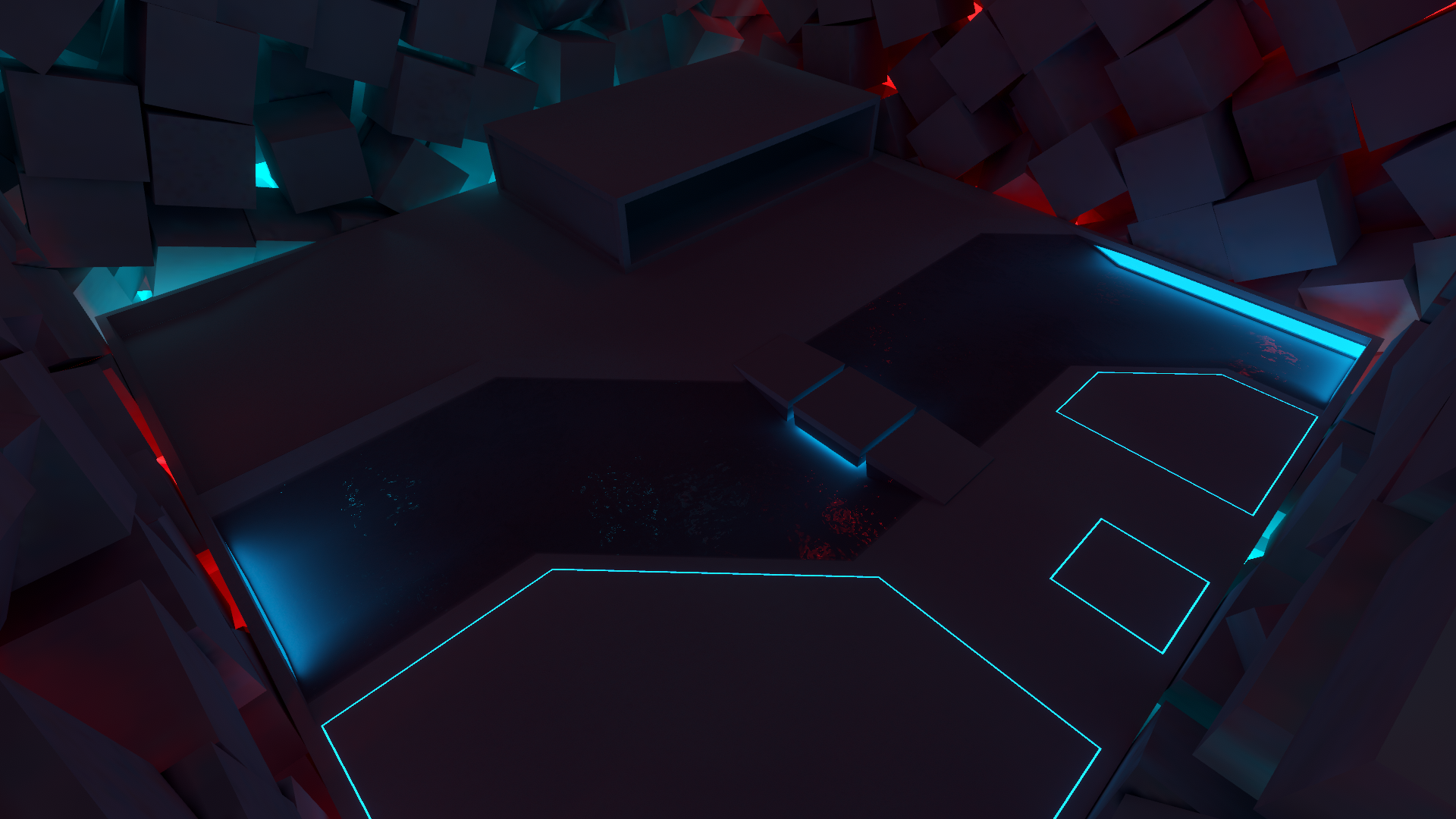
Here's a preview of a new #VRChat world I've been working on. I think I got the general layout down just gotta plan out the smaller details and any possible interior areas.
Lighting done using Bakery by @guycalledfrank. Without it I would just give up on most of my scenes.
 Twitter

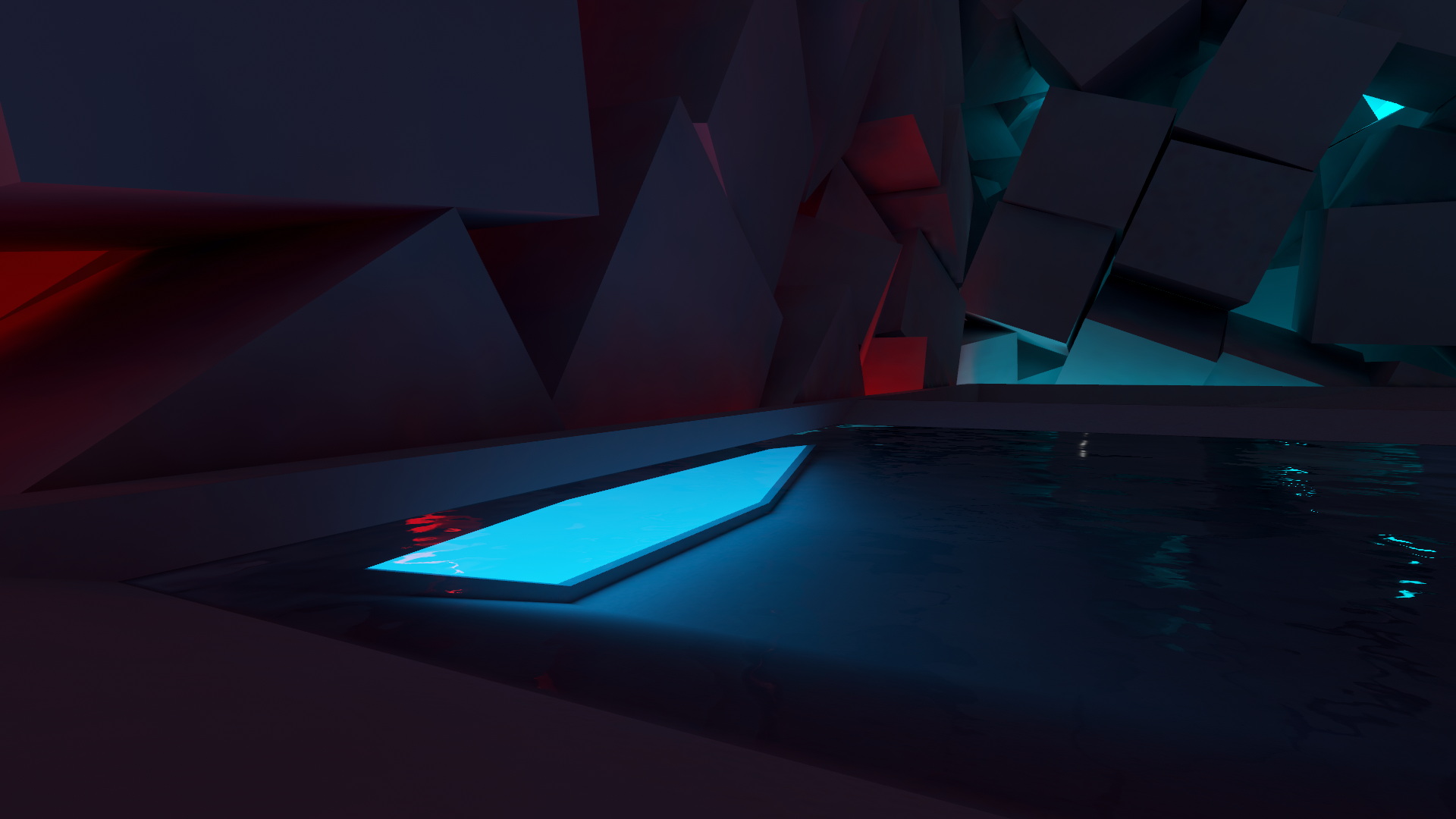

This world also wouldn't be possible without bakery
modest vapor
Half of good looking lit worlds in vrc ^
acoustic loom
ack see that to me just has an indescribable bit of refinement to it
supple loom
Gonna be a good opportunity to get in on Nvidia with the new cards coming as well
You can get that RTX Bakery experience
acoustic loom
yeah that's sort of what I was thinking tbh just snag a 3080 and throw it in a baking rig
assuming I even have the luck to get one before they're sold out
supple loom
Yeah 😅
gleaming mica
Hey @supple loom is that silents clear water shader?
supple loom
That is silents water yes
modest vapor
are they set to reflection static ?
gleaming mica
yeah
modest vapor
what's the material like ?
gleaming mica
gleaming mica
this use to work with the progressive cpu lightmapper
modest vapor
What changed in your process then ?
modest vapor
Did you bake your reflection probes ?
gleaming mica
yes
modest vapor
how ?
gleaming mica
render reflection probes button in bakery
modest vapor
Can you check how they look ?
gleaming mica
yes
lighting broke in the scene that's fine I can render it again
wait
I just needed to turn up the probes weight past 1
now I can see them
ffs xD
gleaming mica
alright next issue, skybox doesn't reflect onto water
 steel oasis
is this possible with baked lighting
when i bake my spots they just dont look nearly as good
any help is appreciated
modest vapor
You'd a need specific baking mode
steel oasis
can you elaborate?
modest vapor
The Unity Manual helps you learn and use the Unity engine. With the Unity engine you can create 2D and 3D games, apps and experiences.
steel oasis
thanks another question, in my lighting tab it says 144mb for a lightmap, does that add 144 mb to the world size? ;-;
supple loom
It's gonna be compressed for the download but that will still be a bunch
steel oasis
okay
ill have a play around thanks homies
wait, if i generate lighting on mixed lights will it bake them?
modest vapor
Yes, but do you need realtime too ?
modest vapor
then just baked
 fast cypress
can anyone tell me how to make screen space reflections work in worlds? i know that you can activate it via post process stack v2, but once you start vrchat it doesn't work anymore. meanwhile i have seen a few worlds where it is possible. hope someone can help me here <3
 hexed portal
Pretty sure it's not a good idea in vr
proven locust
does anyone have any good solutions for volumetric lighting?
https://forum.unity.com/threads/volumetric-light-beam-volumetric-lighting-solution-compatible-with-mobile-vr-and-webgl.499367/ something like this
Unity Forum
[ATTACH]
Get it on the Asset Store
WebGL Demo
Android, PC and Mac OSX Demos
Documentation
The simple and efficient volumetric lighting...
i just havent seen any really impressive stuff in vrc before in terms of volumetrics, is it because traditional methods arent compatible with vr?
modest vapor
real volumetrics are expensive as fuck
you can fake it though
look at xsvolumetrics
proven locust
yeayeyea thats what i was lookin for!! its tough bc ive got a scene that has a spotlight shining down an alleyway, and proper volumetrics would just be the greatest, problem i see with a lot of these methods is they really look horrid when you get into the center of the spotlight or whatever
steel oasis
any ideas why an object is pitch black ingame when it looks fine in unity
modest vapor
Did you make sure it baked ? Check which lightmap the object is on
steel oasis
yeah it baked, i hid the lights and it baked
steel oasis
is that the blue and black thing
modest vapor

steel oasis
brain go brr
this is what im seeing
wait
i think i did a small brain
yeah i think i know what ive done imma try something
steel oasis
modest vapor
You baked realtime GI ?
steel oasis
i did?
i did
now it says i have no lightmaps
i hade like 150 before
what confuses me is why in game it fucks ;-; because it looks fine in the scene
mint cipher
Can I use external lightmaps? If so, how?It's just a simple room, it shouldn't be long. But cooking lightmaps inside Unity is really bad, I feel like I have no control over what I'm doing. The lightmap is dark and of poor quality no matter what settings I use. While the V-ray lightmap looks perfect in 3 clicks. I would like to know if I can cook using V-ray and import into Unity, and if that is possible, how do I do it? because I looked at the software and found nowhere to drag an external lightmap.
steel oasis
anyone able to help with that stuff?
weak glade
I think your uvs are overlapping
modest vapor
@steel oasis Try rebaking ?
@earnest pine Generate lightmap UVs ?
Then it's a physical edge that you'd need to fix
modest vapor
Did you generate lightmap UVs ?
mint cipher
yes
For over a year I have been trying to make worlds for VRchat. I have improved over time but have never been successful. I think there is nothing in this world that I hate more than Unity. It's a simple world, I just want to make a cozy room to watch movies. But the lighting is so hard to bake. 🤬
This is how my room looks in Vray
mint cipher
modest vapor
16 samples is looow
mint cipher
It is more than the tutorial I followed, and the result achieved there was better lol
supple loom
How much did the tutorial have? 😅
modest vapor
Still looks way too low
mint cipher
I'm not sure now but i think it was 12
modest vapor
Should be in the hundreds
supple loom
^
mint cipher
I set the direct samples at 2048 and indirect in 4096. The noise has decreased but the room is still extremely dark.
modest vapor
Increase intensity of emission ?
supple loom
Also disable realtime global illumination unless you are using it
mint cipher
Do you mean the slider, next to the color in the material?I've seen it in videos but it never appeared to me on unity. I don't know why I don't have this.
modest vapor
mint cipher
I'm talking about the intensity of emission
mint cipher
Oh, so that's where the intensity is hidden. Thank you very much.
steel oasis
i have rebaked like 12 times @modest vapor ;-;
different settings each time
same result, if not in that spot than in another, tempted to do it all again
modest vapor
Oh i noticed something
your lightmap size is set to 64
set that to 4096
and disable realtime GI
steel oasis
okay, ill do that
modest vapor
and reduce texel to 20 for testing
modest vapor
Maybe, but at least it'll work and enable lightmap compression
steel oasis
true, i think if this doesnt work imma try to redo the lighting entirely
steel oasis
thanks, its fixed it for the most part, still a couple things breaking
modest vapor
Make sure the items that are not moving are set to static !
your ground doesn't have any shadows or AO from other objects it seems
 thorn cape
could someone point me in the right direction of how I should approach lighting in my world? I've never done this before.
rugged harness
Check pins and find Xiexe's baked lighting tutorial. Great pointers.
thorn cape
I read the whole thing and probably will have to try to walk through that myself. The thing is my world is a whole building (on some terrain) so I was wondering how one would apply that tutorial to that. You'd go room by room I suppose. What about outdoor?
rugged harness
Ah. Outdoors easiest thing is to use a directional light pointed in the direction you want the light to be facing. It should light up everything outside as if it was lit from the sun-ish. You'll still want to bake it though for performance reasons.
thorn cape
ok. thanks.
thorn cape
when I click on Generate (the lighting) does it normally show some kind of a progress or something? I just see 'Cancel' button and that's it.
thorn cape
I'll wait and see what happens then...
thorn cape
is there anything I can do in Unity with those...um..'lines' on the walls?
modest vapor
Did you generate lightmap UVs for your meshes ?
it's sadly one of the steps overlooked in xiexe's tutorial
also 5 texels is very low
check ambient occlusion too
thorn cape
no. I didn't...hm.
modest vapor
and disable realtime global illumination
thorn cape
I have no idea what good values are. currently just wanted to see if it would have any kind of effect. could I ask about the placement of the probes? what is something that one is supposed to actually achieve with the placement?
I have no idea for the reflection probes. and for the light probes I suppose where there is more light there should be a more condensed grid. I'd place more points around the actually lights and less where it should be dark?
thorn cape
how does this look to you? any feedback? I'd be happy for any kind of help. What to look for, what to fix...
modest vapor
Looks like some meshes aren't correctly unwrapped, also make sure you don't use smoothness on your walls/floors
The shadows also look very blobby
i'd need to see your light settings
thorn cape
these settings or some other stuff as well.
modest vapor
You can try progressive GPU
thorn cape
I turned down the smoothness to zero for walls and floors.
modest vapor
and 4k lightmap size
thorn cape
I suppose all the lights and probes should be set to static?
modest vapor
Yep
supple loom
Setting lights and light probes to static doesn't really do anything
Except ofc if you have some components on the same gameobject that do have use when set to static but that isn't really a good idea
modest vapor
I thought that was necessary for lights with Unity's lightmapper
supple loom
Lightmap static is only for receiving GI
thorn cape
thanks. I have another question...
how come that these two lights that have the very same settings show up differently?
when the other one shows some glow the other just stops emitting light. I'm quite puzzled about this...
thorn cape
1 as far as I know.
thorn cape
seems I was wrong. they are set to mixed.
and I had realtime GI checked. I supposed that's not what I should use. 😕
it somehow looks fine in vrchat though. ok, honestly I don't understand this. anyway...should I set all lights to baked? or just not having the realtime GI checked is something that does the job?
supple loom
You shouldn't have realtime GI checked unless you are actually using it which doesn't seem to be the case
And you should just set the light to baked
I mean how would that light the wall when it seems to be completely aimed away from it 😄
Yeah it does
thorn cape
so far I'm glad that there are some lights. but I would need someone to tell me what to do with all the lights everywhere. if by a chance someone would be willing to criticize my world I'd be happy to hear that.
it is a test world pretty much. I'm trying to figure out how to do things and how do they work. but obviously I have paid much attention to how lighting actually works in real world.
quasi hedge
It's in the package manager now (Window>Package Manager)
I think it's just that Package Manager is more integrated so it allows different packages to be updated / fixed easier
proven locust
are there any guides on how to use precomputed realms GI?
like the realtime emissive gamma texture
shader sorry
modest vapor
@real arrow Alpha source to none ?
check the alpha of your texture then maybe ?
someone suggested "Click on the material, go to Alpha Source and change to - From Grayscale"
and "I don't know of this helps anyone, but I just came on with the same question. If you click on the terrain gear icon and click on "Material" and set it to "custom" that took away the glossy shine for me."
light angle shouldn't matter tbh
it's just that you can't notice it
mint cipher
I need tips to get rid of lightmap bleeding. Preferably a tip not saying that I should remodel the entire room since I just did that.😥
gleaming mica
I would recommend checking if the uv's are overlapping
proven locust
use bakery lol
mint cipher
i think i found the problem but i don't know how to fix this
That isn't my UV2 or UV1
mint cipher
Creating a world for vrchat is very frustrating, I'm about to give up
modest vapor
If those aren't your UV2, what are they ?
 waxen moon
modest vapor
waxen moon
modest vapor
There aren't any
quasi hedge
Unity sometimes refers to UV1 and UV2 as UV0 and UV1 respectively - just in case you're seeing something like that and it's causing confusion.
But if that's your lightmap, it's either going to be using your main UV or the secondary UV if you created one (manually or by auto generating lightmap UVs in Unity)
gleaming mica
If you are using probuilder I would recommend changing the pack margin to 40 in the preferances and have the lightmap texel resolution above 16 to avoid light leaking
Seems like your uv's aren't overlapping so that's all good
If you aren't using probuilder it's all good
It's free, you can download it from the package manager in the window tab at the top
And convert your objects to probuilder objects
I can explain better later but I'm on my phone during a seminar at college
 crimson verge
so i'm trying to make my world light similar to that of the Avatar Testing! world, what i mean is the world will have an area that is pitch black for emmission testing, and an outside area where the avatar brightness is neutral (well lit, no shadows)
i've been trying to accomplish this using directional lights but i cant get some avatars to work right, poiyomi shader doesnt get dark in the dark room, xiexe shader does get dark but has shadows on it. But in the avatar testing world none of that happens. Can someone walk me through what i should be doing here? after about 2 or 3 hours of testing different lights and positions and mixed and baked and realtime combos, i cant get it right at all
i'm just trying to figure out how the avatar testing world got their lights to work so perfectly really
mint cipher
Are there any restrictions for objects with faces occupying the same place? Will this cause a lighting problem? do I need to move my objects away by 1 millimeter or something?
modest vapor
@mint cipher yes, move them very slighting away from each other
@crimson verge You mean in the closed room below the igloo ?
crimson verge
Yeah that one
How it's able to make your avatar blacked out and the room itself is dark too, I can't replicate that
@modest vapor
More specifically I can't replicate it while keeping the outside area well lit
crimson verge
From the one directional light I was using, I tested it with baked setting and it didn't give me the result I wanted
modest vapor
All lighting is baked in avatar testing afaik, which gives a lot more control
crimson verge
I was told by another friend to use baked lighting too but it still didn't let some shaders get dark in that area, only one that worked was xiexes shader
modest vapor
You'd need to bake lightprobes too
crimson verge
Oh hecc what exactly is that 0-0
modest vapor
But using toon lit shaders is probably an issue on its own
lightprobe is what a mesh takes baked lighting information from
crimson verge
Well that's the thing I just don't understand how it's an issue if it works just fine in the avatar testingg world and so many others xD
modest vapor
 crimson verge
What sort of wizardry
modest vapor
then you were missing those
crimson verge
So then that basically tells the game to turn an avatars mesh darker in a specified area?
Like fake lighting?
modest vapor
not really, baking lights is half of the work
but the lighting info is on lightmaps for static meshes
but nowhere for non static objects
thats where lightprobes come in
crimson verge
Ok I don't really understand half of that but what I'm getting is that if I place some lightprobes and have them set up to make avatars darker in an area that has baked shadows in it, then I should get an effect like walking into a dark room?
 crude verge
This is my world lighting settings which I suspect is causing my mirror to be all black.
2nd half.
supple loom
Did you add light probes?
crude verge
Oh lol.
supple loom
Proper baked lighting needs light probes
crimson verge
Well I guess I'll look into some of that then
crude verge
I only used emission materials for lighting.
crimson verge
Oh god
modest vapor
if you use simple light probe placer, please delete it once you're done using the addon
crimson verge
Wait what rubrick? Like delete from the project or scene?
crimson verge
alright i'll try and see if i can do this
expect me to be back shortly
oh quick question
i do have a small spot light in the black room, meant to test shadow with spot lights, would that be affected by this light probe thing?, like if that area is going to make everyones avatar black appropriately, will that spot light be able to light them back up?
modest vapor
if you bake light probes there, yes
crude verge
I added probe light and the mirror is still black.
supple loom
Can you show some pictures so we can actually see what's going on?
modest vapor
clear the previous one too
crude verge
Clear?
modest vapor
button right next to it
crude verge
I did that still same issue. I noticed a file called reflection probe. Is part of the issue.
crimson verge
ok so on my end after baking, is a 85mb file normal?
and will that account for world download size as well?
modest vapor
Depends on the world
Are they compressed ?
@crude verge Did you bake the reflection probe ? A screenshot of your scene would be good
crimson verge
how do i check that?
crude verge
Yup.
modest vapor
@crimson verge part of the lightmapping settings
crude verge
It loads really fast but I only have one mirror so I guess it's supposed to be fast.
crimson verge
i placed poiyomi on this cube to the right and its still not getting dark appropriately ;-;
one on left is standard
modest vapor
what are the shader settings
supple loom
Where are your light probes?
crimson verge
default like most everyone else will have it to
the probes are there they're hidden when i'm not selecting an object
modest vapor
yeah but default poiyomi might be set lit
crimson verge
only one light in the scene atm, directional lighting set to mixed for the baked lighting and light probe
modest vapor
it's a toon shader so
 calm forge
because it's shadowed
it's not getting shadows cast on it
the vast majority of users hated having shadows cast by default
so it's off
modest vapor
mixed = realtime btw
calm forge
under lighting you can set receive casted shadows on
unity's shadows are super chunky most of the time and the majority of worlds are baked
so it's just off by default to avoid one million people complaining to me about bad low res unity shadows
crimson verge
ok but if its off by default then what i'm trying to figure out is how the whole avatar overall can still be affected by light and dark areas like in the avatar testing world
crimson verge
when i go there with a poiyomi shader i get dark in the dark area even if shadows arent casted
crimson verge
that's what i'm trying to set up here i thought?
modest vapor
Not with your current settings
crimson verge
then how do ;-;
modest vapor
poiyomi literally just told you how
calm forge
you need to learn how to bake lighting
crimson verge
i had just watched a video on how to do it, it looked simple, did exactly what it told me, got this result that works perfectly with literally everything else
these two object are blending into the darkness just fine, they're light outside, but smooth transition into dark inside just like they're supposed to
 tame crater
Anyone have any idea why the leaves on the ground and the leaves on the stump don't match in brightness? I'm sure it could be a dozen different things, but maybe its a common problem with a known solution. My current guesses are either the normals on the terrain and the normals on the stump don't match, or maybe the materials are different somehow, or this part of the terrain is being blended with another texture that's brighter.
Hm, unfortunately the leaves on the stump are being applied with some kinda "snow" shader to add them over the grass that's normally there, so perhaps that's why they're so much darker.
Hm again... Trying to change those materials has no effect on the terrain, suggesting its using a different material and shader somewhere.
Ah it seems these are the actual materials for the terrain:
So that seems to be the regular Unity terrain shader, but changing smoothness has no effect on reducing this "glare" I'm getting, and the two textures being blended there are fairly dark leaves and dirt.
tame crater
This is how it looks after I set the alpha channel of the diffuse texture to 0 for the two layers affecting that region:
Which looks a whole lot to me like the smoothness was turned down, but the smoothness slider of course, does nothing.

I think perhaps the issue here is the documentation and shader were updated to support HDRP but fail to mention that with the standard pipeline (URP?) the smoothness is taken from the diffuse texture.
Hm, the old docs do mention gloss on the alpha for the diffuse... But they also mention terrain material. I need to go find that and see what material my terrain is using. https://docs.unity3d.com/2017.4/Documentation/Manual/terrain-Textures.html
Hm... I wonder if these settings will have any effect.
Oh damn...
Either diffuse or specular gives the desired result. Though this may be because I set the alpha channel to 0 and diffuse may be the one I want.
Do you mean smoothness using the alpha channel? You should be able to use the legacy specular for that. I just set all the alpha to 0 so it doesn't show up now but I'm gonna reset that and see what changes.
So in my screenshot above, I set both of the ground textures at that location to be the same, because the blend just looked bad and I wanted to make sure the leaves themselves were blending right. But in those test images the leaves texture now has the alpha channel back to normal which is about 50% gray with some variation, and you can see the diffuse and specular both look good and different, but the new standard shader just looks bad. I'm not sure if that might have something to do with reflection probes in the scene however, since that shader made all those probes appear below the shader selection.
"if you set it to specular setup it disregards textures that shouldn't have specularity" --- I don't know what you mean here.
That's not the case though. The leaves in my scene don't look shiny with specular on.
Correct.
That is because no alpha channel = 1.0 alpha.
So the fix is to give it an alpha channel with 0 in it.
Normally, yes. But not on terrains.
Not neccesarily.
Exporting alpha in Photoshop is finicky.
There's like three or four ways to have alpha and only one gets exported right.
Well, still, I can't say for sure your PNG actually has an alpha channel that is set up right.
The path looks pretty matte to me. Same as right side.
Anyway, with TGA in photoshop at least, which is what these assets use, an alpha CHANNEL works. Though with PNG export... it might have to be the channel mask which has the alpha? I forget.
Just for anyone else who comes along and uses photoshop.
steel oasis
world lighting or shader issue? (the shirt)
 latent loom
maybe increase the lightmap resolution
im not too sure
also incrae the size
from 1024
to somethign higher
i see al these posts about light probes
tf is a lightprobe
rugged harness
More than likely it's that Lightmap Resolution. 20 Texels is pretty low. That's moreso if you're still trying to block out the light and not giving it a proper, final bake
tame crater
@latent loom A light probe is a point you place within your world. A single probe looks like a yellow sphere in the editor. A world will have many such probes, often laid out in a grid, though it is best to have them at sharp transitions of light and dark, like where the edges of shadows are. Unity samples the lighting surrounding each probe, and when it comes time to light players and objects as they move through the world, Unity interpolates the nearest probes to determine how bright or dark and what color the light is that is hitting your avatar from every direction. This is much faster than trying to calculate all the light that might be hitting the player by doing everything that's done when the probe is initially baked. There's also something called a reflection probe, which is basically the same concept, except these take spherical panoramas as each point and these are interpolated between to make your metallics reflect the world. If you have ever had something metal look black in a VRChat world, its probably because they didn't bake any reflection probes.
latent loom
Ah, I see. I've used reflection probes before, but never lightprobes. I heard about it once and never looked into it, just stuck to using baked lights and real time lights sparingly for specularity and dynamic objects. I see the pins have some good links . I might give them a read and switch over some of the lighting in my world to probes.
tame crater
Will trees on terrains bake with the built in lightmapper, or will I have to use something like bakery to get the job done there? I have bakery, I just wanted to do a quick test without setting that up to see what my framerate is with baked lightmaps vs one directional light casting shadows.
modest vapor

If you want to skip to the gist of it, just skip to the end.
Note: I forgot to mention that you will want to bake occlusion whenever using terrain. Open up the occlusion tab, adjust your settings (5 is too big) and bake occlusion.
I'm going to show you how to bake the can h...
 thick cloud
That shape looks awfully familiar...
tame crater
Can anyone show me what settings I need to use to bake shadows from trees onto my terrain? Nothing I do is working. I need to know what settings should be applied to the meshes in the prefab, what settings need to be set on the directional light, and what settings need to be set in the lightmapper. For now I only want baked lighting, no realtime lights. I would like to use shadowmasks eventually, but first I'm just trying to bake shadows because nothing I do aside from using a single directional real time light seems to work with my terrain.
 thick adder
Could someone please help me make Baked Lighting look like Realtime Lighting?
modest vapor
Show all your settings
supple loom
I would guess that the fireplace having a really emissive material doubling with the light itself when baked has a lot to do with it
proven locust
@tame crater set your trees as lightmap static
 round moon
@earnest pine can we see what it looks like from an angle? Is that a 3d shape or 2d?
round moon
Mary is the whole rear hexagon emissive, or just the face?
If the whole thing is emissive I'm stumped, maybe the sides are too thin to shine enough light laterally to be visible.
round moon
If just the face is emissive then you need to add the emissive material to the sides as the wall is behind the face so it won't receive any light
round moon
Double check that the wall is static? (the #1 lighting culprit) 😋
Well try making it thicker, if that works then it's the thinness, which maybe hopefully can be fixed by increasing the lighting cluster resolution on the wall ( copypaste on where to find:" called "lightmap Parameters" and you can find it here: Object -> Mesh Renderer -> Lightmap Settings (Right below "Prioritize Illumination"). "
tame crater
So it turns out the reason I wasn't getting any lightmapping on my terrain was because I'd failed to do the most obvious thing, which is check "Lightmap Static" within the terrain settings. In my defense, this is only the second environment I've lightmapped, and the last was a year ago, and it didn't have terrains, so I didn't even realize that option even existed for terrains.
Any suggestions on how to best deal with this?
How it looks:
How it's supposed to look:
I suspect it has something to do with the light probes, but I'm not sure why it would get so bright, even if a probe were underground, unless perhaps it's seeing the sky under there...
Hm, no obviously underground light probes in that region. But I suppose it would be outside the light probe volume if that close to the ground...
Not sure why it wouldn't be using the nearest light probe in that case however.
The only option I see on the probe blending is use proxy volume. Maybe outside the light probe group it blends with the skybox probe that I think exists? Or maybe that's a reflection probe. Disabling reflection probes has no effect as I haven't calculated them.
 little crescent
yo i just didnt give a crap about lighting
is there a way to make this look better that doesnt require rocket science
tame crater
Simply reducing the amount of ambient light would help a lot. You have almost no contrast between light and shadow. You don't need fancy baked lighting to make your lighting look good. In fact real time lighting can look better, but it's less performant.
tame crater
So in regards to my issue with the leaves above, one way of dealing with the issue I've found is not to use proxy volumes... Those are intended for big objects that cross multiple probes, but instead to use the "Anchor Override" on the mesh component, and create an empty game object above the leaves which they then reference for light. But there's gotta be a way to fix these light probes without trying to manually position them all nearly flush with the ground. I just gotta find it.
tame crater
I think I found the cause of my lighting issue... Turns out you can visualize which probes are affecting a given object... And when it's up off the ground and dark as it should be:
But if I move it down a bit...
And then when it's resting fully on the ground...
I'm not sure if that sphere on the object itself represents another probe that's moving with it, or what. Also, since this is a static object, you'd think there would be a way to give it its own probe to maximize the quality of the placement, and I'd swear I saw something about doing just that somewhere for trees automatically, but this is not a terrain object.
 sour sentinel
So... I'm working on my first world and I'm habing a lot of problems with lighting. I turned the enviroment light to black to make it more moody and it also turns all the avatars black. Any way to have a world that isn't SUPER bright without making the avatars turn black?
modest vapor
Is it baked lighting ?
sour sentinel
I'll be honest, no clue. I don't think I put that in yet
crimson verge
quick little thing about baked lighting, after baking the lighting in a world, does anything happen if i turn the directional light it came from off? i'm just curious and will probably just leave it on
rugged harness
When you bake the lighting the lights themselves become irrelevant until you bake the lighting again. So disabling it after you've baked it will not change the appearance of the lighting.
crimson verge
ah that makes sense
also, when i bake my lights, all the platforms are smooth shadows but for some reason the one at the bottom there is the only one that seems super rough?
i think it has something to do with how this right here is a different block? same material though
oh hecc now my world in vrc makes the floor solid black huh
might it have something to do with the material? it uses legacy/ parallax specular
i'll convert to standard instead since i took off the specular anyway
crimson verge
Ok that fixed it
 random oxide
@crimson verge Yeah the lighting is probably because it's a different block that is scaled differently and has therefore different lightmap resolution.
You can switch to Baked Lightmap view in the Scene Viewport to verify that. It shows the lightmap together with a checkerboard texture which gives you an idea how the resolution of the lightmap is.
It can probably be fixed/tweaked by adjusting the "Scale in Lightmap" Property of the Mesh Renderer.
 drowsy violet
How does global illumination with video players work (I am using hangout player)?
I have everything set up, the player and the world.
sour sentinel
Guys. How do I make my world darker? Like, at default unity is quite bright. Is there no way to do that without changing ambient light? If so, is there any way to make light also light up characters?
tame crater
@rugged harness "When you bake the lighting the lights themselves become irrelevant until you bake the lighting again."
That's not entirely true. If you have mixed lighting enabled so you can have real time shadows cast from moving objects like your players, while the rest of the light is baked, you still need that directional light enabled.
@sour sentinel Your question doesn't make a lot of sense. If your world is bright it's because your lights, be them your directional light, or your ambient light, are bright. If you want to darken your world without changing the contrast between light and shadow, you can reduce the intensity of both. Will your players get darker as well? Sure. That's how light is supposed to work. If your players turn completely black when you remove all ambient light however, that means they're not being lit. Which means either you have no realtime lights enabled, or you have baked or mixed lighting, and no light probes.
Another option, if you don't want to change the brightness of all your lights for some reason, is to use post processing. Post processing can adjust the exposure.
@sour sentinel Here's some helpful links explaining how to light your world:
https://www.youtube.com/watch?v=VnG2gOKV9dw
https://gitlab.com/s-ilent/SCSS/-/wikis/Other/Post-Processing
https://vrcat.club/threads/xiexes-lighting-tutorial-how-to-get-good-at-baked-lighting-101.2081/
In this video we’ll learn a bunch about lighting and use it to light a simple scene using the Progressive Lightmapper.
● Get a discount on The Complete Unity 3D Game Development Course: https://www.udemy.com/unity-developer-course/?couponCode=YTBRACKEYS999
● Download Room + M...

GitLab
A surface shader for Unity providing cel-shading. (Forward rendering only)

VRCat: Community-Run VRChat Forums
Greetings! Over my course of playing VRChat I've noticed that most worlds, mainly the ones that have baked lighting, are done poorly, or in an...
@drowsy violet https://thegreatpug.com/vrchat-making-a-theater/

An overview of how the VRChat theater The Vantage works.
VRChat
This script is used to apply custom renderer behaviours to an object. Currently, the only supported custom renderer behaviour is "Update GI Materials". This enables the object's GI attribution to be updated in real time. This is useful if you have objects that change their emi...
drowsy violet
giant white emissive plane right in front of the object for testing realtime global illumination, but still not working
lighting is also baked
rugged harness
@tame crater thats true, im just used to using entirely baked lighting for performance reasons. I forget theres multiple ways to set it up
tame crater
@drowsy violet What's the material settings for the car itself?
supple loom
Mirrors have real time lighting disabled by default because of how expensive it is
You need to enable pixel lights on them if you want to see it on them
 cold crystal
so every time i bake this one material just doesn’t have proper lighting at all.. it’s just a plain white material nothing special, tried with or without tbe normal map, i have no idea what could be going wrong
modest vapor
You need to generate lightmap UVs
rugged harness
For the object. It's under the import settings.
On a similar note, does anyone know why generating lightmap UV's is giving me these super weird artifacts (big black pointy shape in the map)
 spare aurora
Not sure if this is the right channel for this, but I'm trying to get fog to apply globally. Currently it's only affecting some object, but not terrain/world/most objects. Any tip/trick to get it to work? Running SDK3 + 2018.4.20f1
modest vapor
@spare aurora What are the shaders on these objects ?
spare aurora
Looks like a mix. Legacy Shaders/Bumped Diffuse all seems to apply, while object with Standard (Specular) does not
modest vapor
legacy = not supported
spare aurora
Weird, those are the ones that are working, there must be something I missed to make it so fog isn't being applied to the standard shaders
modest vapor
if it's unity's fog then it should work by default
modest vapor
i'd need to see your entire scene
spare aurora
I'm very new, let me poke around some more, try with a brand new scene, all that. Thanks!
little crescent
does anyone know how to have many lights without them acting improperly?
modest vapor
you need to bake them
modest vapor
there is a tutorial pinned in this channel
@little crescent also https://youtu.be/dKgUJccjWRU

You can support me on my pateron
https://www.patreon.com/mcphersonsound
This is a longer tutorial than normal and there is a lot to cover so here are time stamps for your convivence.
00:00 what is baked lighting
00:35 setting up lights
1:23 preparing meshes to bake
2:30 genera...
little crescent
thanks for the video but it seems no matter what I do my lights never behave correctly
little crescent
especially because its such a massive map that testing such operations tends to take agonizingly long amounts of time
little crescent
i also get a result along the lines of this
modest vapor
buy Bakery gpu lightmapper 
little crescent
i mean this pain could probably be fine if I went through the trouble of neatly grouping the meshes of the city
but i just went with separating by material
modest vapor
it wouldn't make any difference
little crescent
I thought lightmaps depend on the uvs, and since they are overlapping wouldnt it be screwing it up?
is there a free version of gpu lightmapper
modest vapor
ah then unity lightmapper it is
reduce texels
and reduce scale on lightmap of mesh renderers
little crescent
will this significantly increase map loading times?
modest vapor
it will reduce lightmap size and number so yes
but enable lightmap compression @little crescent
modest vapor
not sure what that means
little crescent
does bakery bake super fast and with higher quality
Honestly Im not sure exactly what this does because although the description is pretty straightforward, unity has proven to be much more unpredictable than ue4 in my experience
I followed the basic wiki instructions and im expecting to see a baked as frick result
modest vapor
Yes, it bakes dozens of times faster and looks much better
little crescent
well fric
just waited an hour and a half for a barely lit scene
also theres still these weird incorrectly lit gaps
maaan
should have known a modern lighting plugin wouldnt work on a map for a completely different engine
now im super bummed out
modest vapor
It works the same way, you generate lightmap UVs, and then you change the settings of the bake, what did you chose ?
supple loom
You sure those unity lights aren't running on real time now since you baked with bakery?
Could explain random light leaks easily if that's the case
modest vapor
also wew that's a lot of lights, why do you need brown lights for ?
little crescent
im pretty sure the brown light was the directional light, when it rendered it appeared as a warmish color
modest vapor
 weak jewel
So, do vrchat worlds only support forward rendering?
The reference camera is set to deferred, but it doesn't seem to keep that way ingame, at least in desktop mode.
tame crater
Is it possible to change the distance out to which dynamic shadows render, or is that out of our hands because we can't change the Unity Player settings?
modest vapor
@weak jewel nope
weak jewel
Aw... really sucks for my reflection probes lol
thanks for the response~
Now I know my limitations better
 haughty wagon
@little crescent, I am not sure if you fixed this issue yet, but I have an advice for you.
Go to your Directional Light, set mode to Mixed, make objects that are supposed to stand in place static, decrease Shadow Strength on your Directional Light properties and use Enlighten baking if your map is big itself or uses high-scaled objects.
If you won't use Directional Light, you will keep ending up with such shadows.
cold crystal
so with bakery my light maps are huuuuge, is there a good way to compress them so i don’t take up such a crazy amount of space ?
crunching seemed to do nothing
modest vapor
How many 4K lightmaps ?
Do you reduce scale on lightmaps on your mesh renderers ?
How many texels
cold crystal
i wouldn’t know how many 4k, but each one is taking up maybe 15 mb. prob less now that i reduces texels in this past bake, this last one used 150 texels, i do not reduce scale but now that i know that’s a thing i will
i’d lyk how many 4k if i wasn’t away from the pc
modest vapor
That's one for sure
cold crystal
def looks pretty tho
drowsy violet
I'm trying to get Global Realtime Illumination (Realtime GI) to work, have the scene with baked lighting set up and a video plane with RealtimeEmissive Shading on the plane but it wont work no matter how bright i set it. Objects that should be lit are entirely set to static and have UV maps generated in import settings. Also the video plane is not set to be static, so they are considered dynamic.
supple loom
https://docs.vrchat.com/docs/vrc_realtimegiupdate
Are you using this component?
VRChat
This script is used to apply custom renderer behaviours to an object. Currently, the only supported custom renderer behaviour is "Update GI Materials". This enables the object's GI attribution to be updated in real time. This is useful if you have objects that change their emi...
drowsy violet
I do
First picture is a static object that should receive Realtime GI, second picture is the video plane that is behind the actual video plane (that is set to not cast shadows)
Also these are the import settings for the main object that contains the body_plastic object shown above
supple loom
"This script needs to be attached to the GameObject that has the Renderer component which you want to apply effects to."
I haven't really used the component myself before but this sounds like you have it the other way around
drowsy violet
doing it the other way around doesnt seem to have an effect
the script was attached to the video player by default in the prefab, so the creator of the video player (hangout player) did it before, so it seems to be the right way
supple loom
Yeah that's true not sure then sadly I don't use realtime gi much
drowsy violet
i see
tame crater
@drowsy violet I see an error there: "Object's size in lightmap has reached max atlas size." I believe this error means that it can't generate a lightmap for that object, which you say is the object that should be receiving the light.
In your lighting settings, or in Bakery, there's a "lightmap resolution" or "texels per unit" setting, which specifies how many texels per meter you have on your objects, and a "lightmap size" or "max resolution" setting which defines the largest lightmap you can have, which is 4096. If the texels per unit and the size of the object combine to make a lightmap larger than your resolution, then you've got a problem. For example, a 512x512 terrain with a texels per unit of 8 would try to generate a lightmap which is 4096x4096 but if your max lightmap size is 2048, it won't fit.
So if the first image with the error is the object that is supposed to receive the lighting, and you do not want to lower your "texels per unit" for everything in the world by changing it in the lightmapping settings, you can try one of two things. Either make sure your max resolution for the lightmaps is 4096 and see if your object's lightmaps fit in that, OR, you can adjust "scale in lightmap" downward to reduce the number of texels per unit for that particular object, proportionally. Once that error is gone, try re-baking your lighting (for that one object if you can, I don't know if that's possible), and see if it now picks up the light like its supposed to. It could be the object is currently being mapped with older lightmapping you had before the error. Or maybe something else is going on.
drowsy violet
@tame crater first of all - i didnt notice that errors so thx xD
for me scaling down the lightmap helps to get rid of that error however it doesnt change the situation
i knew about the scaling feature but that isnt the issue
theres a car and the video plane, the cars lightmap scaling is now for every part set to be very low, the video emissive is super close and huge to see if it will do something (changing the size and closeness of the video emissive didnt help either yet)
(its also ultra bright)
tame crater
Okay. Well, that's the limit of my knowledge regarding this. Hopefully someone knows what's going on. Perhaps @prisma radish might have a clue?
@drowsy violet Uh... have you tried setting the car's body to something other than black?
drowsy violet
yes
the only time it actually seems to be taking effect is whenever i put for example another white object next to it and use an actual realtime light source somewhere
tame crater
Okay, well I'd set it to like 50% gray if you're not sure if black or white will show the lighting if you get it working.
tame crater
No I mean in the material. The albedo is black.
tame crater
Okay, but it could be dark enough that you don't see the effect if it's subtle for some reason. 🙂
drowsy violet
i tried
placing down a realtime light source reveals that it would be working in general, its just more about the realtime emissive surface of the video screen not affecting it, using the standard materials for the video screen doesnt work either
 frigid ibex
Does anyone know why my brightness in worlds is much brighter in destop than in Vr? When I test my world in desktop, it looks just like how it does in unity. But when in vr, the brightness is much higher. Is this something I need to fix in Unity or is it a setting within the game/my headset?
modest vapor
any screenshot of the difference ?
frigid ibex
Well here's the odd thing. In game it looks bright but when I take a screenshot it looks "normal" as in its no longer brighter than it should
I tried to test this out and they looks the same
If I edit the brightness on the picture, this is what I see in Vr compared to the others
spare aurora
Are you using fog? I fog looks 100% in editor, but once you're in VR it only applies to objects using the legacy shader (so, not much)
frigid ibex
No, I dont use fog. I do have post processing though
 normal idol
Is there a quick way to fix my lights getting lighter or darker when avatars turn their head? I swear it's like a light show in some areas controlled by my neck.
rugged harness
Are you using Udon or sdk2. If you're using Udon you could check if the user is in VR and just adjust the post processing's exposure down a little. If you're using sdk2 then you're kinda stuck with what you have. The displays in headsets are much more vivid than your typical monitors so there will usually be differences.
frigid ibex
hmm, ok. This world is sdk2
Im not sure if its just me because a friend if mine said it was dark (like its supposed to be) but I dont see it as such
rugged harness
rip. What headset does you and your friend have? I used to have a CV1 and when I was testing out my dark af world I could see just fine because the headset handled darks very well thanks to the OLEDs
frigid ibex
I have a Cv1 and he has an index
rugged harness
Now with a Rift S it's a bit darker but it's still brighter than on my monitor.
frigid ibex
So it might be the headset
Yeah thats weird. I think it may have to be caused by the headset display. Cuz its fine on desktop
rugged harness
Yeah that's just a difference in displays you may have to overlook. That or you can try darkening the world even further or using something like eye adaption/auto exposure to bring a nice balance in.
frigid ibex
I did try darkening it, but the changes werent that visable in VR and on desktop is was way too dark lol
Guess it will just stay as it is
rugged harness
Shame, looks pretty when it's dark
normal idol
Is there something I should be looking for to deal with the lighting changing based on the rotation of the player or is that just a quirk of VRChat? It doesn't really show up in well-lit areas but it tends to happen in darker spots.
modest vapor
@frigid ibex Which post processing effects are you using ?
@normal idol light baking
frigid ibex
Im updating the world rn so I will post a screenshot when its done
normal idol
So should I enable Baked Global Illumination? The tutorial I was looking at seemed to say to disable it but that looked old. I baked a reflection probe but there seems to be a lot of different contexts for baking so is there a resource that covers all of the things that need to be baked?
Hitting the generate lighting button gave me a light map but now the world is dark so I don't know if that is progress.
frigid ibex
@modest vapor Here is what I have
modest vapor
GitLab
A surface shader for Unity providing cel-shading. (Forward rendering only)
Make sure to follow some of the guidelines
frigid ibex
okay
proven locust
@frigid ibex Do you have a Rift? OLED displays make darks much clearer; a nightmare for making good universal post profiles
frigid ibex
Yes. I have the original rift, Cv1
proven locust
thats just the nature of it then, you can make different world post profiles based on which headset people have with udon, otherwise its hard to be satisfied with overbrightened dark areas 😛
tame crater
How come in this view of lightmap indices, one of my detail objects, the grass, is visible? There's lots of other grass and flowers on the terrain which do not show up in this view which makes me think these are being lightmapped but they don't seem to be set that way.
 graceful tartan
Anyone know what i need to change to make my world lighting less blotchy?
modest vapor
@graceful tartan use auto filtering, 4k lightmap size, compress, more bounces
also why do you need 10 padding ?
graceful tartan
I dont know if i do. i was just changing stuff around to see if anything would fix it.
tame crater
I'm really confused about lighting here...
So I have these rocks on my terrain. I want them to cast shadows on the terrain's lightmap, but not be lightmapped themsevles.
If I hover over the Lightmap Static checkbox it says with it checked the object "will be present in lightmapping calculations". And I want it to be present... For the purposes of casting shadows, but not for the purposes of being lit. In addition, there is a Cast Shadows checkbox. And there is a Scale in lightmap parameter when I check Lightmap Static.
So am I understanding things right, that for it to cast shadows on the terrain, BOTH cast shadows AND lightmap static have to be checked?
Futhermore, to prevent it from being lightmapped, do I just set the lightmap scale to 0?
Finally, if all that is true, what is the purpose of Lightmap Static under the static checkbox up top in the inspector?
graceful tartan
@modest vapor that lightmap size 4k has help, thanks!
normal idol
What might be causing this effect with my lightmap? My walls are made up of a bunch of panels that fit together cleanly but the vertices aren't welded, is that what is leading to all this weird noise? The floor and outer walls look fine.
The panels are mapped and materials tile cleanly but the lightmap UVs are a mess.
normal idol
Changing the scale in lightmap helped but the seams still end up pretty obvious.
 edgy forum
@normal idol Looks like overlapping lightmap UVs to me
normal idol
Thanks, welding the vertices seems to have fixed it. Now it gives me an error for overlapping UVs (presumably because all of my panel UVs got merged when I joined the models and merged vertices) but it looks fine and seems to have resolved the lightmap issue so I guess I won't question it.
New problem: The walls look perfectly fine inside of Unity but are completely black inside of VRChat. Any thoughts on that one?
Even the walls that didn't have the UV issues are black. I assume I should be able to disable my lights after the bake? That seems to work fine in Unity, anyway.
tame crater
@normal idol When you import a model there is a checkbox to generate lightmap UV's. You may want to check that even if it seems like your fix worked. I don't know what's causing the lights not to work at all in the game though.
normal idol
I have generate lightmap UVs enabled for all my statics. Is it possible that VRChat doesn't support some of the settings I have enabled like the global illumination?
normal idol
Now when I went to open up Unity after changing nothing with a bake that looked fine (at least in Unity) and my scene is pure white where most of my lights are. I guess I'll clear the bake and try again.
Might it have something to do with reflection probes? I baked one of those but I didn't really know what I was doing there.
 midnight ruin
How should I go about adding light probes to an open-air map? I don't particularly care about how the environment looks, but I want dynamic objects and players to look right.
normal idol
I would just make a grid but that's probably not the optimal solution.
So with some help, I finally managed to get the lightmapping looking good in my world but now I'd really like to be able to turn off the lights. Is there any way to accomplish this on Quest? I was thinking about just using post-processing but that isn't supported and I don't know if the other techniques I've seen are either.
normal idol
I got it done by using two different versions of the world stacked on top of each other with a script to toggle visibility. Now everything looks great except avatars tend to go pure black in the darker areas, even though they're still far from being in complete darkness. Any tips for setting up my light probe group or whatever else might fix this? Do avatars just tend to go matte black whenever the light levels go below a certain level?
midnight ruin
and now my mirror is completely borked, how should I fix this? in game it just does the stacking thing like there's nothing to display there.
i seem to have so many problems with this world...
 astral pawn
So i'm trying to do these area lights to span these red bars
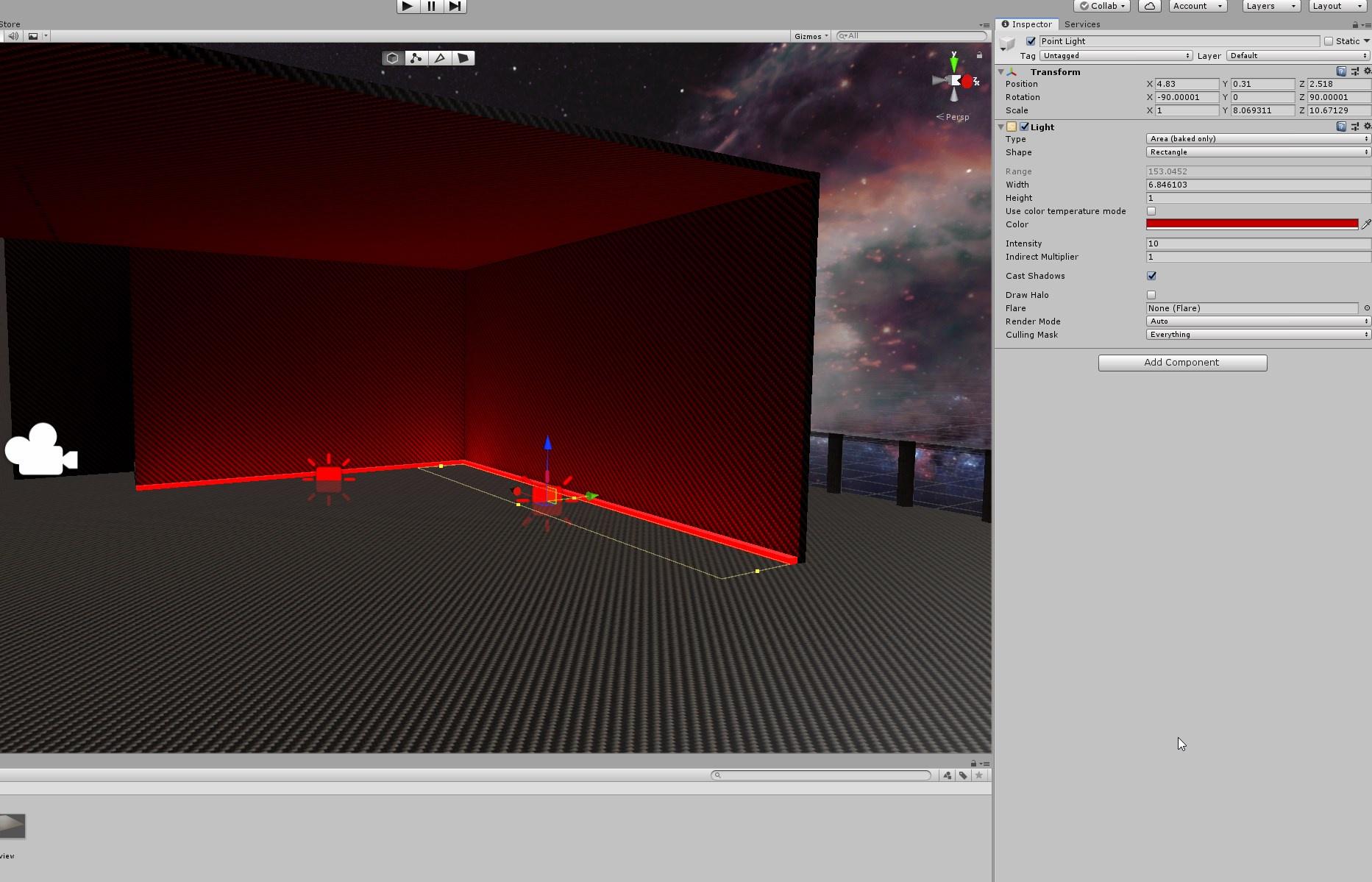
But when I build and test, this is all that happens
😕
Tips?
rugged harness
Are you baking the lighting? Area lights aren't realtime if I remember correctly. So if you didn't bake them then they wouldn't show up at all.
astral pawn
Yeah these are Baked only
rugged harness
Oh well I guess they wouldn't show up at all even in the viewport if you didn't bake them. Do you have any console errors?
astral pawn
Nope
The lights are showing up when I hit play if thats what you mean by viewport though
rugged harness
Sorta. But if you hit play and they're still there then it should be working. Try saving the project and reopening Unity if you haven't already, then building and testing again.
If that doesn't do anything then manually clearing your cache may force it to apply the update.
modest vapor
@astral pawn what do your lightmaps look like
astral pawn
the settings?
modest vapor
the actual lightmaps
astral pawn
modest vapor
Do you use realtime GI ?
supple loom
It's enabled by default usually
astral pawn
ahh yes its enabled
modest vapor
Unity defaults 
astral pawn
Disable it then and see what happens?
supple loom
@midnight ruin if that mirror is a custom mesh it needs to be setup in a specific way otherwise it won't render properly easier to just use a default quad
You could though not sure if it'll make a difference
midnight ruin
It's just a generic unity plane, i'll try a quad
supple loom
Plane should work as well though quad is much better
supple loom
Hmm I thought plane would work as well interesting and good to know
midnight ruin
It clips the bottom half and freaks out
midnight ruin
that makes sense
supple loom
The same issue as I mentioned above with custom meshes
@astral pawn can you show the gameobject of the mesh that goes black
astral pawn
Its not exactly going black, there's just no lighting hitting it which makes it dark, but yeah
supple loom
What if you try using CPU Lightmapper?
astral pawn
Currently using GPU but i can swtich
supple loom
Yeah that's why I was asking
modest vapor
supple loom
Oh
Yeah that doesn't support lightmapping from what I remember
Good catch Ruuubick
modest vapor
that's usually my third question after settings and console errors
supple loom
I had that problem when I was baking my lights for first time ever 😅
astral pawn
So I should change that tooooo
supple loom
To Standard
supple loom
It's a move to the correct direction though
astral pawn
👍 hm
supple loom
Unless you have a specific use case for using a legacy shader you should just use standard or the one's that vrchat offers with the sdk
modest vapor
Is there really nothing in the unity console ?
astral pawn
ayee it fixed it
There was
did something inbetween that make a ton of errors
yall are G's
❤️
 shadow trail
what layer are the white tracker balls under?
Their not affected by my avatar brightness slider
 karmic marten
I really need help understanding what I am doing wrong with lighting. I wanted to use Bakery so I got it, but the world I want to use it in isn't working. No light is showing anywhere. I'm pretty smart at understanding how things work and I am completely lost here. I have even made test scenes and got the lighting to work beautify. I just need someone with understanding to help me figure out why I can't get it working in my original scene
modest vapor
You've got an nvidia GPU right ?
karmic marten
Yes GTX 1080
modest vapor
ok, post a few screenshots of your scene, bakery settings and console
karmic marten
Okay I think I got all of that posted, it is still so weird that I got it working on a random scene I built just to test light settings
modest vapor
the first error is most likely due to having two pipeline managers
fix that so you can upload
karmic marten
Okay!
modest vapor
Also switch Bakery to experimental
Use Xatlas for UV unwrapper
turn down texels to 40, min resolution to 1024, 5 bounces, 64 samples, turn on AO since it's pretty nice
and you can disable terrain optimization and increase tile size to max
karmic marten
Okay I set that. ^-^
Testing now, Does it matter that I I have custom shaders like Poiyomi? I was wondering this and the first thing I tried was changing main ground to the standard shader
modest vapor
uh yes, don't use avatar shaders
karmic marten
Ahhh, didn't run into any issues using normal unity lighting. But I switched the shader back to test, also I'm trying to enter objects into the other working scene. Unfortunately after a long render the map was still dark.
modest vapor
render time should not be that long
Can you show the results ?
you can reduce texels to 10 and bounces to 1 for now, and change it back when we know it works
karmic marten
Hmm, I might of found the issue. The shader may have changed but I might of had a slight light emission on some objects that might be causing the issue. Testing now with the shader set correctly on everything.
karmic marten
Awesome! Progress thank you!
normal idol
What might be causing my avatars to turn into black silhouettes in certain areas? These areas tend to have lower light but they aren't exceptionally dark and my light probe grid is pretty dense in these areas. I thought it might be the avatar material because some avatars light up under any conditions (I assume they have some sort of emission) but while switching from the diffuse shader to standard light with some smoothness does cause their contours to be visible, they appear grey like their albedo has been completely washed out.
modest vapor
You can check individual probes in areas by creating a new cube and moving it around
normal idol
So it might be too many probes in the wrong areas that's causing it? I sort of assumed the more points I was giving it, the better.
normal idol
Would a screenshot of the room where I'm having the trouble suffice?
modest vapor
Sure
normal idol
There's a spot near the wall with the mirror where they're lit and then they quickly transition to pure black outside of that area.
Not immediately but over the course of maybe 3 feet
modest vapor
what do the light probes in the area look like ?
You can see them all by going all the way down in lighting menu > debug settings and enable all cells
normal idol
modest vapor
don't select the light probe group though
otherwise it doesn't show their light information
normal idol
I assume the fact that they're pretty much all black is not good.
modest vapor
correct
normal idol
So just move them around until they aren't like that?
modest vapor
well, check the console in case there's something about it
otherwise yeah you can move them closer inside the room to see if it helps
if not they might be occluded by something
normal idol
So it's not possible to see their light information while editing them? You have to leave that view to update the lighting info?
modest vapor
well i don't know it works with progressive but i'm pretty sure it's all done at the end of the bake regardless
with bakery they could be baked on their own though
normal idol
Oh, okay, so I would have to bake and then check. That's tedious but good to know. Thanks!
modest vapor
You can bake at a much lower quality to speed it up a lot, then check if there's any difference
normal idol
I think I see the issue. I've been baking 2 different lightmaps by parenting the entire world to 2 different empties and then moving them to different points in space for the bake. It seems like I have another version of light probes at the position I do the bake that has the correct data but I can't seem to select those probes or find them in the hierarchy.
And they don't seem to inherit the position of the empty even though they're parented to it.
modest vapor
Can't move the light probe group either ?
normal idol
Can't even select it. It doesn't seem to exist according to the hierarchy.
Is there any way to make them truly separate? I have 3 different groups but they all seem connected. I don't know if that actually affects anything. I can remake the light probes, I just don't understand this problem.
modest vapor
Why do you need to move the pieces away ?
I'd get it if they had to be far away, but then you're reconnecting them after so I'm confused
normal idol
I need two bakes, one bright light and one low light so if I baked them both at the same position, then the one bake would overwrite the other. Also that's what I took from the tutorial I was using. I guess it might work if I disabled the visibility of one of my variants while doing the bake so long as I could also turn off the visibility of the associated light probes. Should I try that?
modest vapor
I'm not sure what you mean by two bakes
The light intensity is determined by your lights in the scene
normal idol
So I need low light and bright lights. If I set the lights to be bright and bake, that will bake in bright lights. If I then turn off those bright lights and bake with low lights, then the low lights will be baked in. I don't know how to simultaneously bake two sets of lighting on two different models at the same position in the same bake. Maybe I should explain my approach, basically I'm simulating a lighting change by swapping out the visibility of a duplicate world baked under different lights. Sorry if I didn't make that clear initially, my understanding is that's how you handle this problem.
So what I've done is duplicate the model with the different lighting conditions, put a cube between them so the bakes won't interfere and then put them back in the same position so they can be toggled with a button
modest vapor
Oh, I see, I that case it'd be better to teleport the player rather than the world
Just have a duplicate of the entire world somewhere else that you enable and disable at will when you teleport
Less headache inducing
normal idol
But how can I ensure the player is teleported to exactly the right point in space relative to where they started? Just having a trigger that would send them to some point in the other world wouldn't really be very seamless. It actually works quite well aside from the light probe issue.
modest vapor
There's systems for seamless teleporting, and I'm certain there's a way in SDK to keep track of the player and copy it at another spot, but I'm not aware of how. I just think that light probes can't be moved at runtime at least
But I've never seen anyone attempt what you're doing before
So there's not really any precedent
normal idol
Well I'm not moving them at runtime, I'm parenting them to the duplicate version of my world that has been moved, baking, and then trying to move them back, but it seems as though they may not be able to be moved after baking. Worst case scenario I guess I can use an emissive avatar that would ignore the light probe data but that would be unfortunate for a horror experience.
It's kind of surprising that no one has attempted this, dropping the lights is pretty important in a lot of horror experiences.
And it works pretty well, minus the avatars. One option might just be to put some dim lights in the area that I'll be swapping out when I do the bake at the origin, then bake the other world down below and just let it use the light probes from the other bake that I didn't move. Not sure if that makes sense, it's late and I've been working on this too long but it makes sense in my head. I'll try it and report back.
normal idol
That more or less worked, basically just used the light probes from the bake with all the lights on and used the statics from the version with the lights off when a button is pressed. The one major trade off is now the avatars are too bright when it transitions from light to dark but they don't spend long in that area and that's preferable to the avatars being completely black when it gets dark. This strategy wouldn't work so well in open worlds but this is a linear theatrical experience I'm working on.
 stiff holly
So im trying to bake the lighting in my world but its ending up like this, can anyone help with this?
 safe ridge
Perhaps the wall divided into squares that overlap on the UV so when light is baked it looks like it repeats? Did you tick "Generate Lightmap UVs" in model import settings @stiff holly ?
proven locust
this ^
mint cipher
can somebody help me with a vrc world very quick simple question: When i wanted to upload it i pressed the automatic ligh thingy but i dont want it where do i turn it off or like where are the options for it? 
i mean lighting settings
@ me
stiff holly
@safe ridge I just exported it strait from blender into the assets file of the project, were would I find this to make sure if its checked or not?
safe ridge
@stiff holly In Unity->Asset folder->select asset->Inspector(on the right of the screen by default I believe)->model->Generate Lightmap UVs
stiff holly
@safe ridge I checked and it is not checked, will try turning it on
safe ridge
Checking it on will make Unity generate different UV map. You shouldn't have any overlapping parts in it but you may need to change some settings to make lightmap look good like changing texels per unit, light bounces or changing scale of individual objects they will be taking on the lightmap for best results
stiff holly
Ah thank you very much! it did help out a lot just need to mess with some of the settings but again thank you so much!
 steel hatch
ugh i still need baking help
suppose to look like this first pic.. second pic is before i bake


what it looks like after i bake
proven locust
increase lightmap resolution
steel hatch
i need the walls to actually be white and not grey
proven locust
i can see each texel rn, you have like 30x30 pixels of lightmap in that screenshot lol