#world-lighting
4 messages · Page 12 of 1
 stone agate
 modest vapor
ye
stone agate
I'll try to remember that
 delicate sand
50 dollars ouch !
stone agate
If you do a lot of world building, editor assets are among the most useful things you can buy
But you can also just do it manually
modest vapor
@delicate sand magic light probe might also be good
 pine trench
Just looking for opinions on this, would this be too dark for vr users? Someone told me my older screenshots looked way too dark so I brightened it up a little.
modest vapor
That would be fine
pine trench
Awesome thanks 👍
delicate sand
modify the build a lot but when i try local build it build the last build not the new ??
Can i reset or delete something i have reset the gi cache !
delicate sand
no error
modest vapor
mmh, any warnings ?
modest vapor
Have you restarted unity ?
delicate sand
yes
modest vapor
i'm not too sure then, worth trying an actual upload to be certain
delicate sand
ok will try that
delicate sand
Actual upload did load but not work, but return error so i delete the faulty script, now i can continue Thank ! For the discrepancy in the light i don't know why i build a floor it was ok copy it over the other and have light problem, put them side by side and no problem, so be it !
 mint cipher
hey so im having a problem were whenever i go to bake my world
my unity crashes
any idea on how i could fix it?
its a big map but i have never had this issue before
i restarted my pc, and tried using progressive gpu when baking
modest vapor
Have you cleared your GI cache recently ? @mint cipher
mint cipher
Yes I cleared all my baked data
As well as trying to only bake the reflection probes
But I keep crashing and my gpu and CPU spike to a hundred each time before I crash (depending if I have it on progressive GPU or Progressive CPU)
@modest vapor
modest vapor
Also if you have an ndivia gpu, we'll always recommend spending a bit of money to get the Bakery asset, it makes lightmapping much much faster and look much better
mint cipher
Ok cool I’ll look into that
Also by clearing my gi cache will it possibly mess anything up in my scene?
My cache is 9 gigs
modest vapor
nah, it's just old data cached
restart unity after that and try again
also post your settings here just in case
and screenshot of what you're trying to bake
mint cipher
modest vapor
oh
Lightmap size should be at 4k
also are you still using realtime lights in your scene ?
mint cipher
ye i put it at 64 because i have such a huge map i was thinking that maybe the lightmap size needed to be smaller
and no im only using a few realtime lights...and those r the spotlights
my bf managed to get it work on enlighten setting but i dont like the way it turned out
mint cipher
hahahaha yes i know
but my entire map is mostly made of reflective mats
like the flooring and walls
modest vapor
Does it look bad with a single reflection probe with box projection encompassing the room ?
mint cipher
ye when i did that there were places that looked completely off
but tbh this is my first world
so i prob could do something better
idk im not a pro at lighting XD
mint cipher
ye im def gonna get that and try it out for this map
question real quick
im about to delete my cache
will that delete the current lighting?
modest vapor
I believe it will yes
it's every bake you've made basically
including your latest
hence the 9gb
mint cipher
ahh i see ok ok
damn
it keeps crashing
i put it back to progressive gpu
and increased the size to 512
modest vapor
So when you said either cpu or gpu spikes, it's running out of both ?
mint cipher
no its running out either or
depending on wether or not i choose gpu or cpu in lighting settings
but it works when i bake using enlighten...just takes forever
and tbh i dont like the results
modest vapor
You should try 4k lightmap though
 elfin bay
Hey.. whats up... somebody know how i can fix my light flickering? Thhxxxxx
modest vapor
Have less lights or bake them @elfin bay
elfin bay
I bake now every light.. and everything work fine. Thx
 proven locust
pre bake
and post bake
why does it look so horrid?? ;_;
here are lighting settings
 ancient ravine
@proven locust Try just 20 on Lightmap Res Tex per Unity and 4K res
Baking at 4k allows more room for lightmaps
proven locust
rgr
ancient ravine
Also you could try using bakery. if you have that GPU lightmapper
proven locust
it looks great but covid killed my wallet ;_;
ye 20res @ 4k
no dice
is it a problem with my meshes?
ancient ravine
Did u make sure the fbx has Generate Lightmap UVs checked under MODEL tab
proven locust
yea
ancient ravine
whats your point light settigns
proven locust
ancient ravine
huh
ancient ravine
On your meshes.
Trying increasing the lightmap scale just a bit
like to 1.5 or 2
Under mesh renderer
ancient ravine
strange
modest vapor
You should merge all those items in blender and generate lightmap UVs over there
proven locust
yea think im gonna, cheers for the help
mint cipher
Yo, my post processing ambient occlusion is visible through my vrc_mirror, tried moving it around the layers but it doesnt seem to fix itself. none of the other post effects seem to be effecting it.
modest vapor
post processing AO is terrible in vr, highly suggest not using it
mint cipher
Alright i try bake it in, Thanks dude
 autumn cove
Having trouble getting the player, player local layers for light. All I see if the normal layers for lighting before the sdk was imported.
I have imported the sdk before anything else,when i copied over the project to a new one all i copied was the assets
I am just confused.
 supple loom
You need to setup the layers from the sdk builder tab
autumn cove
ah my bad
 viral ruin
Hello 🙂 I seem to be having issues with getting my post processing to work in Vrchat. I want it to look like this but when i upload my map onto Vrchat it seems to have no bloom or anything at all.
Does it have to do if i switch off the sun icon it looks like this as it looks like this as well in Vrchat?
modest vapor
Which tutorial did you follow
 dim ether
where can i find a kirito avatar with the swords?
viral ruin
sadly i can't remember since i worked on this months ago was loads of tutorial videos and was really frustrated when i was unable to figure it out and came back to it again today. I did read this one today and tried it though https://gitlab.com/s-ilent/SCSS/-/wikis/Other/Post-Processing

GitLab
A surface shader for Unity providing cel-shading. (Forward rendering only)
dim ether
=>= is anyone going to answer my question?
modest vapor
@viral ruin Yeah, follow all the steps and it'll work
@dim ether This is a channel for world lighting, no one is going to answer your question
 fluid mirage
so whenever I try to generate or bake anything to do with lighting, be it generating lighting or baking reflection probes, etc, sometimes, for seemingly no reason, it just gets stuck. it will say preparing to bake, but then it will stay on "Baking..." forever with no real progress at all
what can cause this?
modest vapor
Having too much in a scene, or errors on specific meshes
fluid mirage
I think i found it's issue
Maybe
one light was set to an "interactive" layer accidentally, as soon as i changed that it started working
oops
viral ruin
So i tried following through the guide again but i still have it where when i go to upload my world it looks like this on the upload screen. I am not sure if i am using the wrong Post Processing version or if i have not checked something? I am not sure /:
But there seems to be no bloom at all
 sonic marsh
You've got the reference camera set correctly?
modest vapor
@viral ruin Are you still using the default layer ?
viral ruin
Oh! Yes i am o.o
I switched it and now it does not show up at all o.o Is there something i have to do to have it focus on that layer?
It says to make it the Water Layer so i made it that
supple loom
You can try the world debugger in my world tools it should identify the wrong setting
https://github.com/oneVR/VRWorldToolkit/releases
Though make sure you are on the sdk that was released last week as it is dependent on that if you choose to give it a go
viral ruin
Shall do! Thank you so much and i apologize for so many questions. I just have been stuck on this for a long time. I really am grateful
for the help!
viral ruin
Ah! It showed me right away what it was! Thank you! 🙂
supple loom
👌
 fallow lark
that definitely looks like a helpful tool
fluid mirage
https://media.discordapp.net/attachments/676922803781500938/735581225674080336/Untitled.png
what am i doing wrong here? Left is realtime, right is baked. I have my reflection probes and my light probes, I've followed Xiexe's tutorial for doing lights
but when i bake lights, it looks like that.
 fallow lark
did you generate lightmap uvs for your objects and set them to static
fluid mirage
I set the object to static, i did not generate lightmap UVs on the mesh no
i'd read that was a thing but... the last time i tried my Unity just sits at a 0% loading bar once I hit apply, with no real indication that it's actually moving forward, so I tried to go without it
fallow lark
yeah that's probably your problem as light baking requires light Map UVs
 real sluice
Hello! so i have a lighting problem in my world, my world is a relatively dark world in a forest, The Moon (Sun) is casting its light onto the trees and then the trees make their shadow, but when the trees are not in view distance of the player the tree dissapears to prevent lag, But it also gets rid of its shadow data, How do i prevent the shadow from going away?
 gilded niche
@real sluice Do you have your light baked to the scene? That should permanently stick your shadows to the world.
I'm getting some weird noise in my light baking. I'm thinking it's probably just because the light map isn't detailed enough in the parts with more complex geometry. How can I allocate more of the map to the details and less to the big empty walls?
modest vapor
Did you make the lightmap yourself ?
gilded niche
I modeled/UV mapped it in Blender and generated the lightmap in Unity.
modest vapor
you should generate your lightmap in blender too
gilded niche
I tried shrinking UVs of the walls in Blender, but Unity seems to have ignored my effort and scaled each of them back to the size of of individual objects. I guess they need to be combined into a single object?
And I discovered 'Lightmap Pack' within the unwrapping options, but having the machine do it all it seems to have generally made everything worse.
@modest vapor Are you suggesting I should bake lights within Blender, or is it possible/advisable to make a UV(light)map separate from the UV(diffuse)map within blender and then import that into Unity for baking?
modest vapor

Uvmap and uv lightmap are two completely different use cases
they're their own separate entity
If you want to bake in blender into a diffuse, that works, if you want to bake in unity onto a lightmap, that also works
But that's not how a lightmap should look like for such an object imo
not surprised you have artifacts
fluid mirage
ok so ive done all the stuff relating to baking my lights, I followed Xiexe's tutorial even- and it looks good. but the moment I enter play mode, or build the scene, (such as hitting build and test) it breaks all the lighting as if it isnt saving it, or something
why is this?
modest vapor
Any console errors ?
fluid mirage
there's a few relating to VRC chairs not being initialized on time, and a few others but there doesnt seem to be anything that relates to lighting or anything like that
is there any steps im supposed to maybe take after all is baked? like anything to turn off or anything like that maybe?
modest vapor
Are you baking with Unity's lightmapper ?
fluid mirage
im using unity, no bakery or anything like that
modest vapor
You set lights to baked, all meshes have generated lightmap uvs and they're static ?
fluid mirage
anything that is static for the purposes of baking is static and has UV's
I wonder though.
I do still maintain a single directional light.
Basically the way i have it set up is the interior of the place is baked for the purposes of point lights and such, the exterior has a single directional light set to realtime
again it all works fine until i build, at which point all the baked goods go poof
modest vapor
That kind of kills the point of light baking, but i guess sometimes there's no alternative
What do your lightmaps look like ?
fluid mirage
looking at it now, they become black when hitting play mode...
I had a nicely done lightmap
but this seems to be the issue. lightmap goes black when I build scene
modest vapor
Do you have auto generate on ?
modest vapor
You should go to the preferences tab and clear your GI cache
clear baked data in lighting window, restart unity and post screenshot of your settings/scene
fluid mirage
fluid mirage
ok, so, i think i solved it.
turns out I did still have some bakery stuff in the project, so despite trying to not use it, it was still getting in the way, as things like lightmaps were getting placed in bakery's folders
after fully removing it it no longer has that issue
thank you though
probably wouldn't have figured that out
modest vapor
my next questions was going to be in which folders the lightmaps were  Good that you fixed it !
 vestal hedge
Hey, does anyone have any idea why this weird shadow issue occurs on some object?
supple loom
Looks like missing lightmap uv's you can enable their generation in the model import settings
My world tools can also help find them automatically with the world debugger included
https://github.com/oneVR/VRWorldToolkit/releases
vestal hedge
I see, will try. Thank you
I have quite few UVs missing warnings in the log, but it does not tell me which model. double click just asks for external software
those vrworldtools look great. unfortunately latest SDK3 does not work me, build window just disapears
supple loom
You are on a older sdk3?
supple loom
I can help you fix what's causing that as well
vestal hedge
oh
supple loom
Would just need to have a look at your console
vestal hedge
these are errors. there is a lot of warnings tho
The type or namespace name 'UdonGraphProgramAsset' could not be found (are you missing a using directive or an assembly reference?)
supple loom
Did you delete the udon folder before importing the new version in?
vestal hedge
no, I can try
supple loom
VRChat
If you need to update your SDK, it is important that you follow these steps to ensure the update proceeds properly and you don't have any old/conflicting files. Simple Update Here's how you update your SDK. If you're just uploading avatars, you can use the following process: ...
Important parts
vestal hedge
oh yes, now sdk and world debugger world. thank you very much
vestal hedge
yup, just going trough it. this is super useful 👍
supple loom
If any of my tools give you trouble don't be afraid of bothering me 👌
vestal hedge
it even shows build size. I was so missing that info
vestal hedge
I'm still getting this error Mesh doesn't have albedo UVs. Consider creating them in your modelling package.
not sure if it will cause issues. baking lights takes forever now for some reason
supple loom
Albedo UVs? 🤔
vestal hedge
yeah, I have a bunch of those errors
supple loom
That would sound like there's no uvs at all on those models
Can you show more what the console shows?
vestal hedge
oh, thats a full message, except time stamp
supple loom
Does double clicking help reveal the object
supple loom
Can you dm me the fbx
 keen delta
please help
fluid mirage
select the asset in your assets folder and under "model" check "generate lightmap UVs" and hit apply
@keen delta
keen delta
thank you
fluid mirage
Now I have a question too-
question, when i bake my directional light, it doesnt seem to keep the tint I put on it
anyone know why?
It's a nighttime deal so I have a slight blue/cold tinge to the light, but when baked, doesnt seem to be there
modest vapor
I think that's a 2018 bug with color
fluid mirage
based
modest vapor
 nova lynx
I need help with my world, only some of my lights (all point) they like, flicker. Like when you step away, they like turn off, was wondering if there is any fix to this, if it makes it easier I can always screen share in a dm call if needed, just @ me
 cunning mirage
Could be janky occlusion culling
nova lynx
I dont have any occlusion baked though
 proven fractal
ye Unity can't run much more than a few real-time lightsources, baking is the only option to have as much lighting as you want.
 compact flume
anybody got a good guide for lightning an outdoor/indoor world?
nova lynx
@supple loom @proven fractal Noted, thanks! If you two have any tutorials as well or can give me your bake light settings if possible that would be much help
proven fractal
Check pinned messages
 bold slate
So my day night toggle is looking really good, but only one problem. The water in the scene (outdoor pool) reflects the start skybox (day) and not the switched skybox material (night). So at night, you still see the day skybox reflected. Am using the "Silent/Clear water 2" shader. What would be the best way to get around this? custom reflection probe for that area?
modest vapor
Yes, very low quality realtime if replacing doesn't work
bold slate
reflection probe and a box around the pool with the texture I want reflected
like a miniskybox
modest vapor
I'm not sure why your water wouldn't reflect the correct one though, ho are you changing the skybox ? Is that a material ?
bold slate
yes
button that changes skybox mat.
and the main directional light
I think the reflection on the water is baked
oh duh its the environmental reflections, I could set a different cubemap for that
nova lynx
So question what setting would I adjust to make my ceiling light up a bit more? I'm using area lights but they only light up the room not the ceiling
That black part is the ceiling I'm trying to have more lighting on it
 rapid isle
emission coming from the light can also be used put a white texture on it the em slot and put it to w/e brightness you want
nova lynx
I did and just baked them and it didn't work
 lucid onyx
Guys, how do i block light? I got a extra Room very very far away from my main World/Light source and it looks like a bright star in the sky haha.
nova lynx
Potentially you could just put a sphere over both rooms, and just invert it and make the sphere the skybox. But I bet there's definitely a better way that's just the way I thought could work. @lucid onyx
proven fractal
could it be that indirect lighting is not being baked?
there should be some bounce lighting from the floor at least unless everything is of a dark color
nova lynx
Would it be the indirect intensity in the lighting settings?
Yeah it is, I did it and it light up the ceiling
proven fractal
gg
Bounce light is more important than direct light IMO.
So take advantage of it
modest vapor
Careful not to overdo it, can easily look unrealistic
nova lynx
where is bounce light in the lighting settings, is it environment?
 jovial tundra
so i made a world thats pretty dark so i added a point light i think and made it pretty big so it lights up everything but the problem is that when i walk around it flickers and its really annoying. anybody know a fix to this?
modest vapor
Bake it
jovial tundra
so i put the baked area light and it only lights up the world but not my avatar. how do i fix that?
modest vapor
light probes
 tame acorn
This is the tutorial I used for learning about lighting: https://www.youtube.com/watch?v=DM8QfRzxZpY

WARNING: the light probe placer doesn't work in 2018.4.20, do lightprobes manually for now. Will be posting a tutorial with sombie's updated script soon.
How to quickly and efficiently add baked lights to your world in VRChat. Info is also useful for anyone just getting into...
 gentle hawk
Why make it real. Be surreal
 unique trout
Hey all,
I am wondering if there is a way to have the VRC mirror reflect the unity fog?
 sacred jewel
So i've found an issue where my lighting looks almost "cloudy" on the surface of everything, any ideas why this may be?
supple loom
32 isn't that many direct samples
sacred jewel
ill bump it up and give that a go
when i was looking up lighting issues there was lots of talk around the indirect but not much attention to the direct so i had left it alone
supple loom
I would do more bounces as well
sacred jewel
Nothing changed from changing any values, i noticed its only inside 2 rooms, not any outside lights or even the downstairs room
supple loom
How does the lightmap itself look like on the ceiling?
supple loom
What about the settings on the lights themselves?
sacred jewel
there are like 3 types, all set for baked light with various intensities and indirect multipliers, they all use soft shadows as well
the lights in these rooms are the same as the ones in the unaffected rooms
supple loom
Hmm
Also disable realtime global illumination if you aren't using it
I've been using bakery so long I'm trying to remember the normal lighting settings
sacred jewel
Bakery?
supple loom

Get the Bakery - GPU Lightmapper package from Mr F and speed up your game development process. Find this & other Level Design options on the Unity Asset Store.
Much better than the built in unity lightmappers as long as you have a nvidia card
sacred jewel
I do but i do not have the funds for that currently, but ill bookmark this for later, thank you
sacred jewel
yea i have it set to that currently
supple loom
And oh the ceiling does have lightmap uv's?
sacred jewel
Seems so, im using an asset and it was baked fine until i baked it again
supple loom
Does it have generate lightmap uvs ticked in it's import settings
sacred jewel
Not on the import settings it seems
supple loom
Ticking it should help
If it's not ticked and the model doesn't have a uv2 the albedo uv get's used for lightmaps which can be overlapping a lot of times causing problems
sacred jewel
im baking with the change, if it works for the ceiling ill tick if for the other meshes acting up
supple loom
https://github.com/oneVR/VRWorldToolkit/releases
You can import my world tools, the world debugger included shows all meshes that would cause that problem so you can fix it all with one click
sacred jewel
I'll give it a look, thank you
 stoic valve
are light probes in unity toggleable? i've got torches in my world that are using baked lighting and lighting probes that I intend to have available to turn off.
supple loom
Nope
stoic valve
do you know of any workarounds?
supple loom
Could try non important realtime lights
But not all avatar shaders support those fully
stoic valve
Hmm.. I like your thinking.
supple loom
Non important makes them into vertex lights which basically have no performance overhead
stoic valve
that's all i need. there are just a few moving parts in my world that need the light to hit them so I was using light probes to do so
 wooden bronze
Trying to set up lighting in a world right now, and the lights aren't affecting avatars. The player and playerlocal layers are selected, and I do have light probes set up. Am I missing something?
wooden bronze
Update: Got the lighting to illuminate avatars, but now avatars aren't casting or receiving shadows.
modest vapor
You baked lights ?
proven fractal
Assuming baked lights since you have the probes set up, baked lights won't cast shadows on dynamic objects and characters beyond what the light probes offer. You'll need a dynamic light for proper shadows.
bold slate
is it still reccomended to use enlighten as the lightmapper ? is there any kind of perf difference between that and progressive cpu or only a difference in how it looks? tired searching the discord and didnt see much
supple loom
Enlighten was discontinued by the company that made it and is now just kind of dying slowly. Progressive CPU should technically be faster and all around better.
bold slate
will do a test bake to see I guess 🙂
supple loom
Bakery is even better though 😄
 alpine current
Ok, Having this weird problem where the lighting looks good in unity but when uploaded to vrchat it goes to crap, Any ideas on how to fix that?
 plush jewel
how do i get mirrors to reflect my avatar lights and to properly show the world objects lit by them
 native dome
any real time lights will not show unless you have Disable Pixel Lights unchecked.
supple loom
Ideally you should add light probes though and bake your lighting
And for avatars vertex lights are much better and practically free performance wise
And will also show in every mirror
Just need to set the light to be unimportant
Not all avatar shaders support vertex lights fully though latest versions of poiyomi do but not sure about others
 royal dirge
Does anyone know why my floor would look like this while baking? It was totally fine before, I didn't change the mesh, and suddenly its ugly like this.
It seems like the lightmap UVs are separating every single triangle, but I dont know why its doing it suddenly.
I found out, I had accidentally separated all the vertices on the mesh. Maybe with a shortcut or something/
alpine current
I'm still having this issue with my lighting where the lighting looks good in unity but when uploaded to vrchat it goes to crap, Any ideas on how to fix that?
modest vapor
How are you doing your lighting
alpine current
baked
I will try to show you an example
https://i.imgur.com/9ix2gp9.png < this is the unity one https://i.imgur.com/Q0UO68u.jpg < this is vrchat
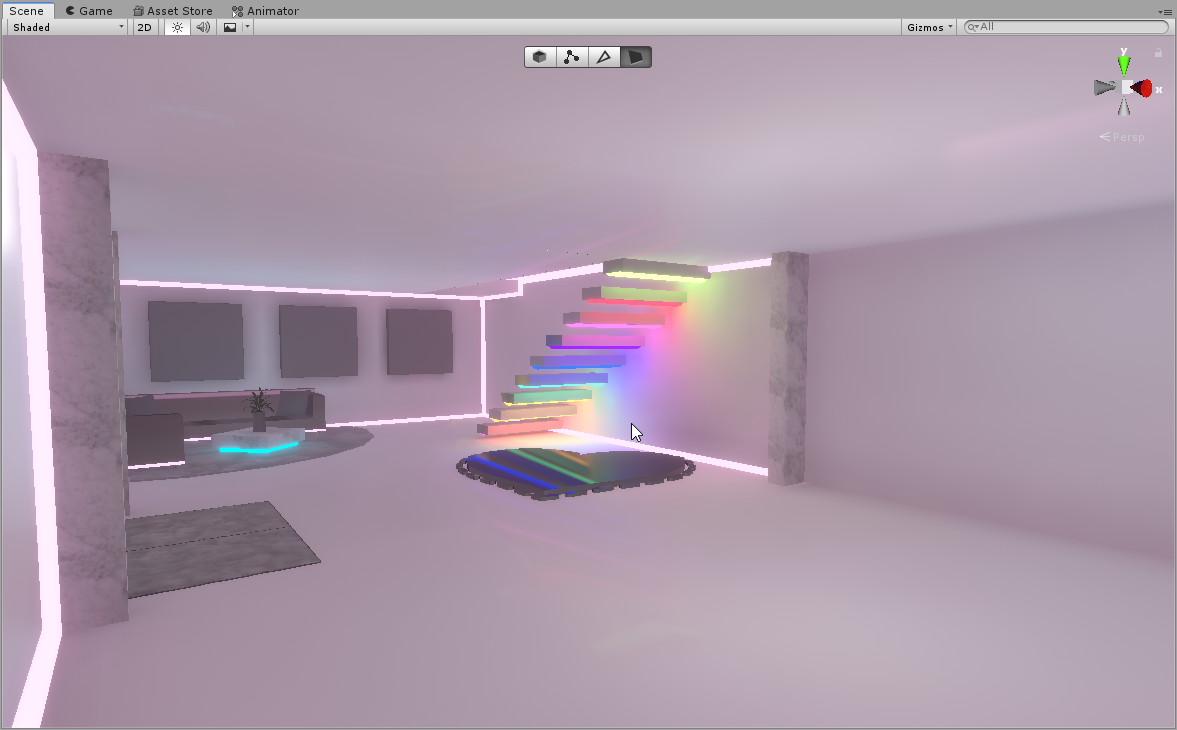

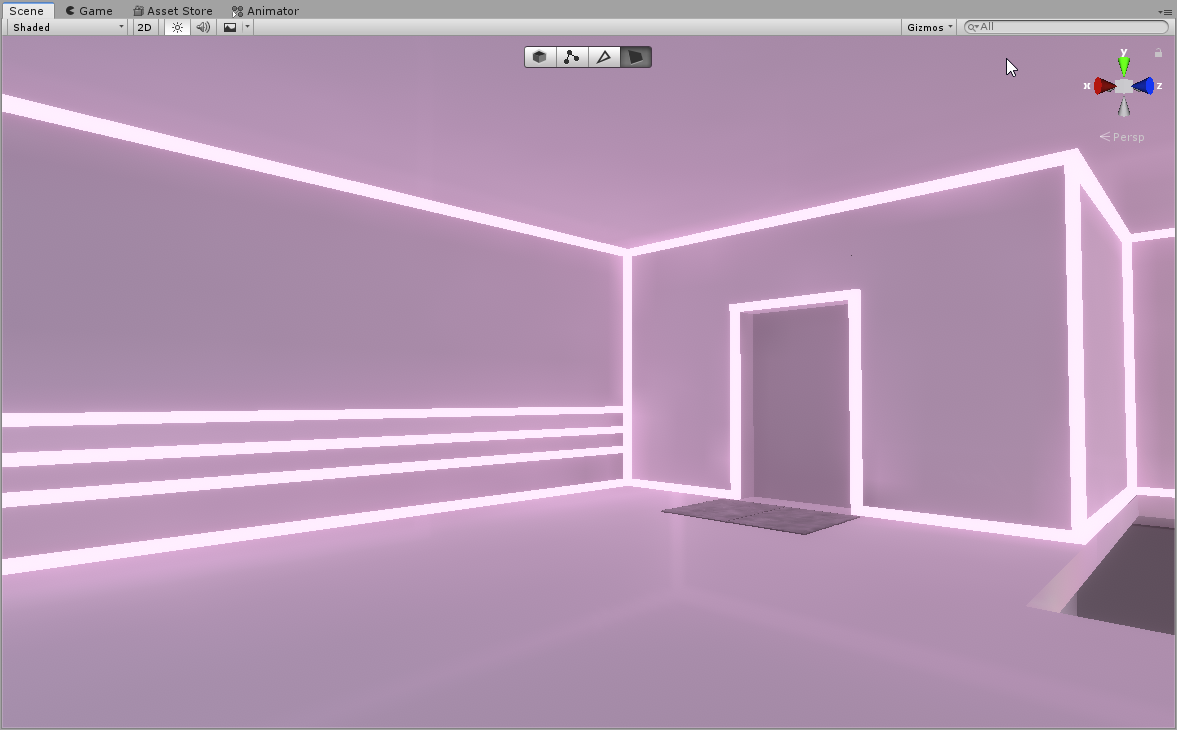
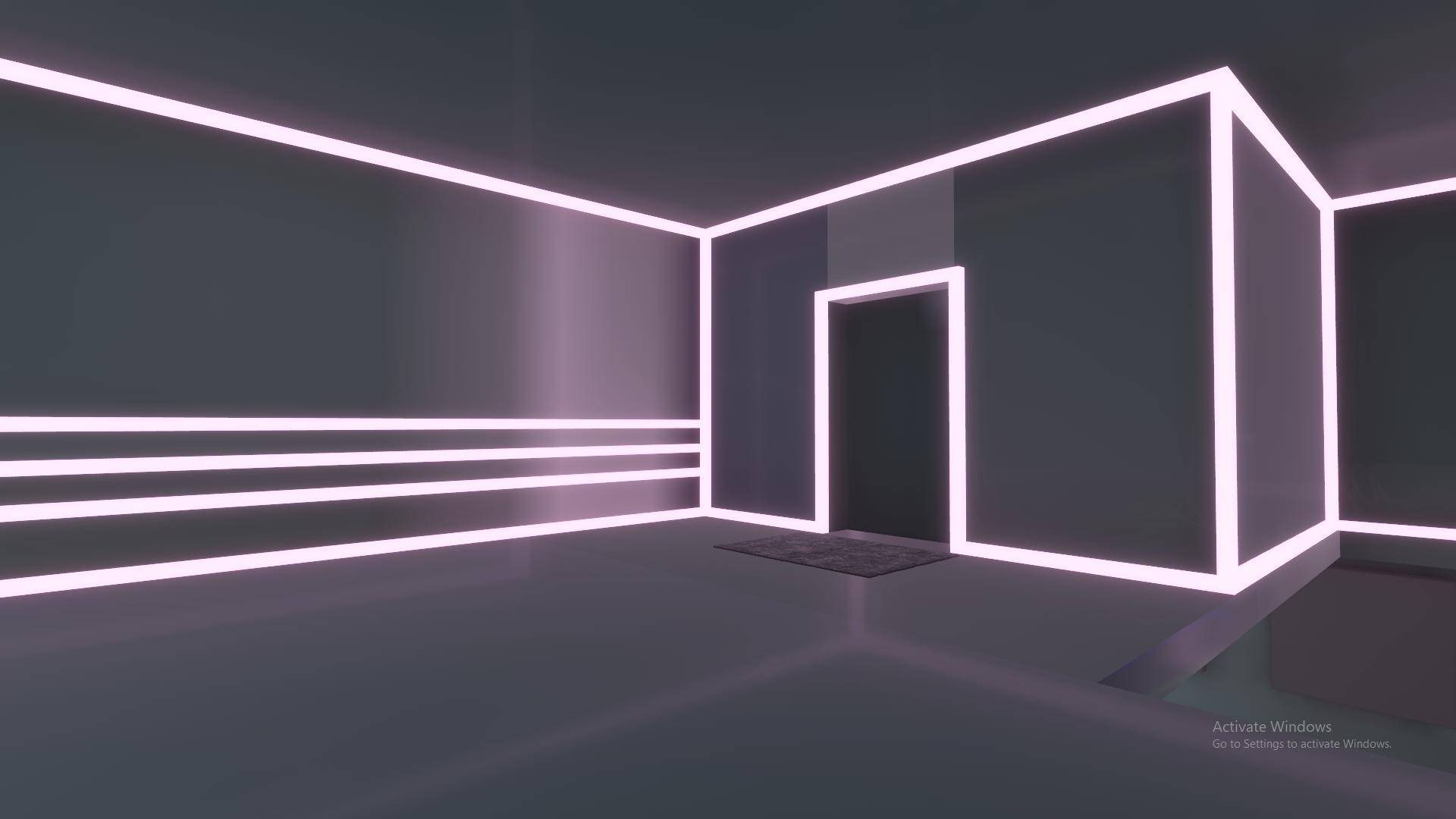
the map only has like 3 point lights that are baked, and im using emissions to brighten the area using realtime global illumination
modest vapor
Is the color or intensity of the emission being changed in the world ?
alpine current
Not that I think so, But whenever I set a value to an emission it always changes
so like maybe it isnt static?
modest vapor
Set a value where ? In unity ?
alpine current
for example i set an HDR emission to like 1.5 next thing you know its like 1.5593 or something
modest vapor
Do you let people turn it off or change at all in your world ?
modest vapor
So why the need of realtime GI
alpine current
Oh so I don't need that to get the lighting effect with emissions?
I'll try turning that off then
modest vapor
realtime GI if for illumination that changes position or intensity
emission*
Also are all your walls/floors reflective ?
alpine current
Yes the entire foundation is reflective
modest vapor
Ouch
alpine current
yikes
modest vapor
Do you have reflection probes on top of it ?
alpine current
Yea it has reflection probes
modest vapor
Make sure they're box projection and correct size btw
But regular baking for emission should work better
alpine current
Alright lighting is fixed now, but is there anyway to make the quality look better?
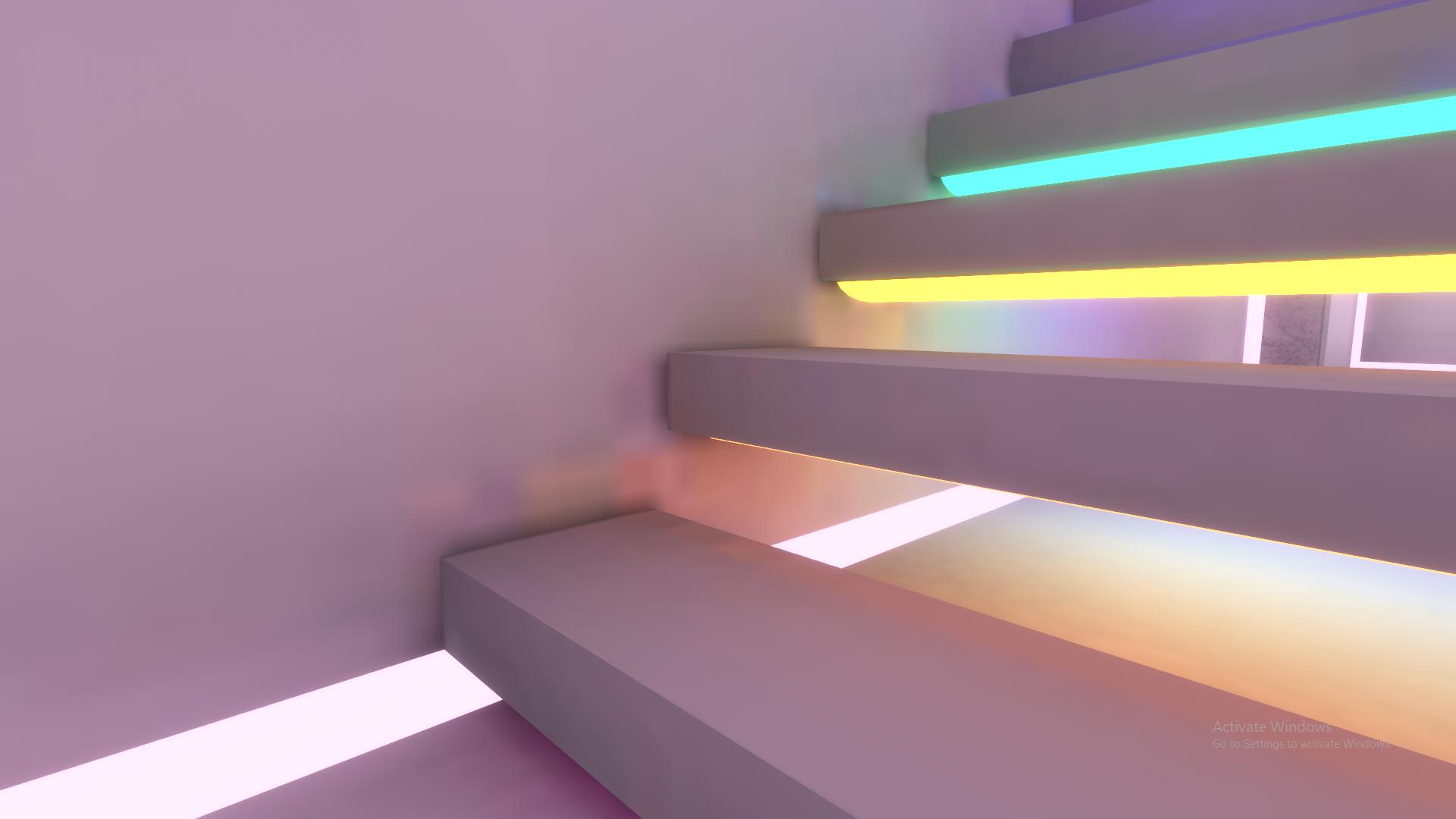
 modest vapor
Sure, what are you current lighting settings ?
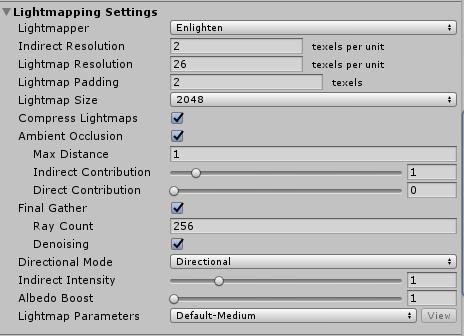
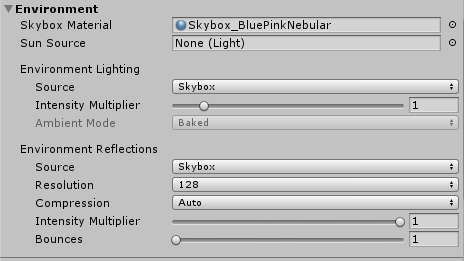


 modest vapor
You generated lightmap UVs on everything right ?
You can set the direct lightmap size to 4k and lightmap resolution texel at 40
alpine current
oo laright
supple loom
With bakery you can make stuff look even better esp emissions 😉
 alpine laurel
after generating lighting i get this
when i clear baked data its fine ...
what should i do
 charred steeple
Create another light but with 0.00001 intensity and soft shadows
A directionnal one ofc
gentle hawk
Real time or bake?
alpine laurel
i will try
bake
@charred steeple it worked with a second one after clearing bake and regenerating lightning
ty !
supple loom
@alpine laurel change these settings as well to minimize the performance impact
gentle hawk
I was told to still have a direction light even if everything is bake. What's the deal with that.
supple loom
Yeah if you need a depth pass you need a depth pass
Baked light can't really provide that
gentle hawk
I don't think I need on android. Just on PC I suppose
 hardy yew
can someone help me with lighting?
For some reason baked lighting has this weird graphical thing with my meshes
it like causes artifacts of the Lightmaps
 past lintel
I am trying to figure out what I did to make red sim water shader that requires realtime shadows work in a world with all the lights baked
supple loom
Just setting a light to baked doesn't necessarily mean the light is baked
And in that case it would be acting like a normal real time light
past lintel
supple loom
That setting might not do what you think it does 😅
past lintel
Well yeah that's why i am trying to figure this out
So what could it be then?
Real time lights add more draw calls as far as i know, but i don't see that here
supple loom
https://github.com/oneVR/VRWorldToolkit/releases
You can import my world tools the included world debugger would tell you whether the light is actually baked or not
past lintel
Seems that i am getting errors, i need to import post processing?
past lintel
I just imported it from the package manager, but there are more errors now
supple loom
Those errors look like you had post processing and bakery both at one point imported in your project?
past lintel
I will make a new project then
past lintel
Yes i had both imported before
supple loom
If you go to your Project Settings > Player > Other Settings > Scripting Defines
You can just remove bakery from there
Since my world tools has integration stuff for bakery and post processing it uses those scripting defines that they add to your project automatically to enable those functions
past lintel
Yeah i found and removed now it works
This tool is actually great, i've been planning to try it out before, seems that i overlooked some stuff and this fixed it, but anyways here is what the lightning tab says
supple loom
Interesting according to that all that is set to baked would be properly baked currently 🤔
I wonder if red sims water halfway functions even without the depthpass
supple loom
Do you have your scene camera set to deferred?
past lintel
I didn't change any settings on the camera its just the default ones
The way I was able to make this in a another project was by exporting the water plane as a prefab and just importing it
I couldn't replicate it again
supple loom
🤔
past lintel
This is not a visual glitch tho, it works every time i generate lights and it works in vrchat too, the mirror also reflects the water properly
It doesn't work before generating lightning
supple loom
What if you add the depth prefab into the scene does it change the water?
past lintel
It looks exactly the same
supple loom
Huh honestly not sure exactly why it works
But I also haven't used red sims water that much
past lintel
I don't really know what the depth buffer is but does it show in frame debug window?
I will have to try with silent's water shader and see if i can replicate this
past lintel
You are right, that shader partially works without real time shadows which to me is enough it still looks great. It's nothing I did within the scene, It is just the shader code at least with the red sim v.1.4.2 version. The latest one and the silent's shader don't work without real time shadows @supple loom
supple loom
Yeah if you are happy with how it looks then all is good
past lintel
Thanks for the help, and thanks for the world tools you made, its really useful
supple loom
Glad to hear it, I'm constantly working on improving it ^^
 split condor
hello friends!
I am boggled by how to make a rectangular light in Unity
because I can't figure out how to make a rectangular area light work
modest vapor
They can only be baked i think
split condor
I know but I should still be able to preview them, right?
I even built the world and zoned into it to see what was happening with the area light and even with illumination jacked up to 10000 it doesn't seem to do anything
google seems to say it's a unity problem and I'm hoping someone has a workaround
supple loom
Can't really preview a light that only works baked
split condor
I can't hit generate lighting?
I can see it updating
when I move the light around, when I have auto-generate ticked
supple loom
So it's working?
split condor
the only thing it doesn't seem to do is illuminate anything, it's like it's not even there
supple loom
Is you scene set up for baked lighting?
supple loom
Your objects in the scene that you want baked lighting on would need to be set to lightmap static and have a shader that supports lightmapping like the standard shader
split condor
okay yup, there's the lightmap settings I didn't configure when I imported, thanks!
supple loom
There's a bunch of good unity lightmapping tutorials on youtube ^^
Like the one from brackeys
split condor
I reimported my massive base asset and I forgot to check lightmaps 👀
I'll check it out thanks ^ ^
mint cipher
Which is better performance, realtime lights with shadows off, or , baked lighting?
supple loom
Baked lighting
split condor
I use realtime lights with no shadows because they look better when I use imported normals from sketchup
Baked lighting I think is always better performance
mint cipher
Right, thank you.
 edgy peak
actually mixed light with shadows off is the best "realtime" light
as it is a mix of realtime and baked ambient lighting
baked lights are allways the most optimal lights as they are just textures and if you utilize light probes you can add some dynamic qualities back to those backed lights
the most optimal realtime light is mixed/no shadow/ set to unimportant
this makes it a vertex light that changes the coloring of vertexes on the shader of your avatar/environment but at the cost of realism
again it depends on what you are trying to do: static-go with baked lights
movable? Mixed/no shadow/ unimportant
@mint cipher
mint cipher
Just whatever is best for performance. Baked lights seem to be the one as i freed up 40fps. I have some realtime lights but they are moving.
edgy peak
ya baked is your best bet for the majority of the lights in your world
shadows are the biggest performance hit so make sure you reduce shadow quality/ setting them to soft shadows to hide the lower res, and pick and choose where you need realtime shadows
 civic valve
hello, can someone help me ? i have a weird problem on my world, in the editor nothing wrong but when i go in play mode, i have this weird shadow effect who appear and disappear depend from where i watch, its evetime on the face in front of the directional light. i don't know how to fix it...
modest vapor
How many realtimes lights do you have ?
modest vapor
As in, set mode to Baked or did you go through the lighting baking process ?
Because i doubt this is baked
civic valve
i just set them like this one, not sure if its the good option but there have all the baked
modest vapor
yeah that's not light baking
it behaves as realtime until you properly bake them
I think the problem may be on your rock
Which shader are you using ?
civic valve
the "standard" shader
modest vapor
Did you place that rock manually ? I assume that's just a random object you found online
civic valve
its a rock i found on the unity assets store and yeah i placed them manually
modest vapor
I guess i'd suggest rotating the light away from these rocks, or moving the rocks, since light baking isn't really an option here
civic valve
well its not only the rock, its the floor and the trees and i already try to move the directional light and it did nothing different
civic valve
this ?
civic valve
this ? (and yes there are many trees mainly)
modest vapor
try disabling specular highlight and reflections at the bottom
civic valve
still doing it
modest vapor
I'm not sure in that case, working with random assets makes it difficult to find the cause
civic valve
ok, thanks for the help anyway
rapid isle
cant seem to get video emission to work i have the video player all setup with the right stuff world has baked lights but nothing from video emitting light. (this will probly go unanswered like always) (fixed it main screen wasn't on Video/RealtimeEmission gamma)
 thin fern
Okay so I just put a skybox in my world but it's completelly dark everywhere anyone know how I fix that?
 coarse moth
@thin fern Do you have the sun source? (Directional Light)
thin fern
Yes
 thick cloud
Is it possible to use prebaked lightmap textures from outside of Unity without losing light probe functionality?
edgy peak
Outside baked light maps generally are apart of the diffuses texture if that happens then it won't work with outside light maps.
Also why are you trying to avoid baking with unity lightmaps?
Or does the mesh come with them?
@thick cloud
 acoustic loom
Has anyone run into an issue where occasionally realtime GI will bug out when re-baking a lightmap? I've noticed sometimes after a re-bake it won't work unless the resolution is modified (and then baked again)
 maiden ore
I was messing with lighting, now the world is not lit at all, how do i fix?
nvm, skybox error
thick cloud
Is there any way to prevent light from illuminating objects through backfaces?
At least, any way other than slapping hundreds of flat planes around to cover those spots...
Nvm, there is a double-sided option for shadow casting in the mesh renderer settings. Completely fixes the problem.
coarse moth
@maiden ore You press on the light icon to see the lighting
It's above your scene window
maiden ore
@coarse moth It wasn't that, i deleted all light sources
coarse moth
You sent a picture where you have turned off the lighting so I assumed you didn't know about that
This is where you have to press when you want to see realtime/baked lighting
maiden ore
ik
modest vapor
generate lighmap UVs on your meshes
mint cipher
Oh probuilder didn't have that enabled thanks
 small garden
Speaking of lightmaps, is there any reason why baked lightmaps dissappear (room goes back to being pitch black) as soon as I click play?
Or you can clearly see an object has lightmaps in inspector, but in the scene and game its pitch black
modest vapor
Which folders are your lightmaps in ? @small garden
modest vapor
It's in the lighting tab, lightmaps at the top
small garden
is asset, scene forlder
(my scene is called "Moria", so its in Assets -> Moria scene)
modest vapor
Check your console in that case
small garden
thing is that i have multiple locations in the world im making, and all of them seem to be working fine, except that one room.
I have all the things set as lightmap static, lights are baked
but for some reason, no matter what i try, this bastard still appears pitch black
real time light makes it look just fine
modest vapor
It's fully metallic ?
That causes issues with baking
Also it tells you it reached the max size on lightmap
small garden
oh, yeah, its metallic
i guess ill give it a try with different material, thanks
Also it tells you it reached the max size on lightmap
@modest vapor could that be why the room lightmaps disappear when im uploading this? i guess ill try lower resolution..
modest vapor
I don't think it would, but it's still an issue
Also you have an error and warnings in your console
small garden
material does not have a texture property 'plane' - thats an error, but its a thing im experimenting
and a few self intersecting polygons on meshes im working on
well, thanks anyway!
ill try tweaking arround more, ill see what i can do
mint cipher
hey does anyone know how i could get a mirror to ignore the world lighting so its full bright (im bad at explaining)
because avatars are super dark on mirrors
supple loom
Ideally you would light up avatars with light probes in mirrors
mint cipher
where would i put the light probes im kinda new to this lol
thick cloud
Is there a way to make a Directional Light only affect certain meshes without using all my custom layer slots? Never mind, that won't work for my situation anyways. Time for Spot Light's.
thick cloud
Actually, this still has the same problem... Basically, my world is a series of interconnected "rooms", each is supposed to have it's own lighting, but some of the "sun" light is reaching into rooms it's not supposed to, is it possible to just cull specific mesh renderers in a lights settings instead of using custom layers?
Pretty sure i don't have enough custom layer slots for the amount of rooms there are going to be...
modest vapor
Can't you surround the rooms with a mesh to block the sun light ?
thick cloud
Hold on, i think i might be able to make due with this now that i think about it... I don't need a custom layer for EVERY room, only the ones that noticeably have the problem.
Yep, i can fix the problem with just a handful of layers instead of a lot. Problem solved.
I really need to use my brain a bit more before asking for help...
proven locust
i always put planes on walls that are culled; is it efficient as it could be? no. does it work? yes, and that is beond more than what i ask for from unitys lightmapper
modest vapor
wdym you put planes on walls that are culled ?
 fading schooner
Does anyone know how to get rid of these Artefacts? Im baking my world with "Bakery"
NVM fixed it, fogot to generate the Lightmap UVs
 astral badge
hey, whenever I start my lightbaking unity just closes. anyone know what could be the cause of this?
modest vapor
Check your unity console
If nothing happens it might mean nothing in your scene is static
mint cipher
How would I fix these terrible lightmap UVs from probuilder
I'm guessing it's these settings
I'm using bakery for lighting btw
now it's down to looking like this
modest vapor
Can you generate lightmap uvs for probuilder ?
mint cipher
I generate them from bakery and probuilder gives you lightmap uv options
I mean I could export the room with probuilder and check if that works
modest vapor
Probuilder sucks so yeah that might be better
 dapper hatch
hi guys question, is there a reason why my avatars look completely black when i test my world?
I have four point lights in the corners of the room
dapper hatch
nevermind, adding a directional light seemed to fix it
 brave crest
don't forget light probes
supple loom
Yeah adding the directional light isn't really a solution if you are doing baked lighting
Light probes are the actual solution
unique trout
Quick question. Is there a way to have particles not be affected by outside world lighting?
brave crest
Oh yeah, is there a way to just rebake the light probes by themselves?
supple loom
With bakery yeah otherwise not really
 desert oyster
any idea how to prevent precomputed realtime GI from doing this?
random black splotches of death
 clear pier
@dapper hatch where did you get your lights that are hanging up? those are nice!
clear pier
😮 WHAAAT, omg i would love it!!! @dapper hatch
dapper hatch
@clear pier
clear pier
thank you so much !! @dapper hatch
dapper hatch
no problem!! you might have to add your own textures i think it's not textured @clear pier
clear pier
thats alright 🙂 Ive been trying to find a model but im also stil learning and trying to figure out what all i need to do @dapper hatch
dapper hatch
@clear pier I've been getting pretty good at world building, ive only been working on worlds for about two weeks though if you need any help be sure to ask!
clear pier
I would appreciate it ! 😮 @dapper hatch Mind if I send you so pics on what im working on now ?
dapper hatch
@clear pier heck yeah! I'd love to see it!
clear pier
i msg you @dapper hatch
ancient ravine
Any idea why I'm getting artifacts in this specific spot
Using Bakery btw
I tried messing with the Texel count and increasing scale in lightmap
I'm not really worried too much about since this is a small avatar world but it would be nice to fix it.
modest vapor
@ancient ravine You need to generate lightmap UVs
modest vapor
I have no clue then, that's the only way i've seen those square issues
check your console i guess
 blazing stream
do you have any back faces near there?
not sure how bakery handles them but unity's progressive absolutely hates them and can ruin entire rooms
 ruby pelican
i have issues where some light source dont light up
and the light doesnt refectt what is seen
it shows when i get close
supple loom
Sounds like real time lighting
ruby pelican
They're all baked
supple loom
Just setting light to baked doesn't actually bake it
You sure you baked them?
That cube is already enough with the emissions you don't even really need a light source on it
ruby pelican
theres no light sunlight
supple loom
What?
supple loom
Still did you actually bake the lights or did you just them to baked?
And I would honestly just remove those lights and use the emission from the cubes
Though if you aren't used bakery it might not look that good
supple loom
You can't really have anything without a shader that would just be pink
Might wanna check out the pinned guide on baked lighting honestly
charred steeple
hello everyone, i actually have a problem with bakery and i still dont know what is causing this:
Is there anyone willing to help please?
 jolly dawn
So basically I'm creating my own world, and as I noticed when all the lights are on, my avatar's hands and body are getting some weird, not natural shadows. And when I turn the lights off, my body and face just turns black except for the eyes. Is there any way to repair it? I turned off shadows for all the lights
modest vapor
Don't turn off shadows ?
jolly dawn
i tried also with hard and soft shadows, baked everything, but didn't work for me for some reason, it was still the same
modest vapor
I don't think you baked anything in that casew setting lights to baked mode doesn't do anything
modest vapor
I don't think anything is receiving or casting shadows
 hushed coral
It's when I use post processing
hushed coral
Yes
hushed coral
Weird
modest vapor
If you want good looking AO, bake your lights
modest vapor
it's still unity terrain 
hushed coral
true lol
Also do you know how to make it so the grass is rendered beyond a little circle?
modest vapor
I think that's unity dependent settings for the grass, maybe LODs, but it's for performance, if you turn that off your frames will tank hard
modest vapor
grass is tough for sure
hushed coral
I will find other ways to make it look decent I guess
 buoyant siren
https://vrcat.club/threads/xiexes-lighting-tutorial-how-to-get-good-at-baked-lighting-101.2081/
I was following this tutorial and I just finished making a area light but I can't see it even after I clicked "Generate Lighting".
Sorry, but are you talking to me?
modest vapor
@buoyant siren Did you generate lightmap UVs for your meshes ?
buoyant siren
Sorry, I had to make sure that the structure (my walls, ceiling, and floor) was set to static. Dynamic objects are not affected by baked lighting.
modest vapor
Ah yes that's the main step 
proven locust
anyone used magic light probes (unity store asset) with bakery? want to buy it but curious about incompatibilities
modest vapor
I think it currently prevents worlds from uploading ?
Personally i've used autoprobe forever and it's great
proven locust
this is exactly why i ask, thank u!! also i saw @prisma radish in a forum involving this, do you use this still?
 prisma radish
I have not deployed anything with Magic Probe yet. But I have used Autoprobe in the past. They use different approaches to generating probes.
 left wyvern
Hey everyone! I've got a bit of an issue where certain lights in my world seem to turn off if I look at them from a certain angle (or they seem to cull themselves for some reason when they shouldn't), some places in my map it's bearable, others it looks awful, any idea what's going on there?
proven locust
gotcha cheers
 hallow hound
you got realtime light or baked ones?
left wyvern
Mostly mixed, Baked doesn't seem to work at all, baked lights don't seem to show up or appear dark
I've just set the mesh of the area to static too to no avail
hallow hound
i am not so exp about that but i know if you use alot realtime light the unity close alot i think ther i a minimum options but i am not sure if what i say is 100% true sorry that i cant help ya
left wyvern
Hehe no problem!
modest vapor
@left wyvern They're not baked, just set to baked
baked mode needs to be baked still, otherwise it behaves as realtime
and only a few realtime lights can affect an object at once, and that's why they cull themselves
hallow hound
good to know about realtime ones
 celest sedge
what version of post processing should I get? 2.1.1?
supple loom
The version from the package manager
sonic marsh
I wrote a Twitter thread with some tips for world lighting. I'll be doing these periodically!
https://twitter.com/Silent0264/status/1298147738471686144
celest sedge
does anyone know if unity project settings will affect the world upload?
wanted to lower the lod bias which is in project settings but not sure if it's gonna apply in game
celest sedge
lod bias 2 in high quality settings
well no wonder it runs like shit in game lol
I have so many trees in my scene
guess at least it has v sync count off
anyway thanks
sonic marsh
For trees, I recommend looking into the "impostor" technique. There is a free system on Github, and also a paid solution, Amplify Impostors, on the asset store
sonic marsh
I've written a guide on using reflection probes! Please take a look and share it with your friends!
https://twitter.com/Silent0264/status/1298236137446629378
https://gitlab.com/s-ilent/SCSS/-/wikis/Other/Reflection-Probes
GitLab
A surface shader for Unity providing cel-shading. (Forward rendering only)
buoyant siren
Please for the love of everything, someone help I have no idea what I am doing. I effing hate baked lights so I tried to switch all my lights to Realtime but now the entire world (except a few objects) are black.
And yes I am already aware that baked lights are better for performance, I just wanted to see the world with dynamic lights.
supple loom
Unity can't really handle that many real time light properly to begin with
What shader are you using on those?
buoyant siren
I have no idea, I just switched it back to baked lighting.
My biggest problem with baked lights though is that if I have a door in a door frame and build the lighting with the door closed, then even if a player opens the door then the lighting won't change.
coarse moth
You can make your door non static so it will not have any baked lighting
You can leave the door frame static because that's not moving
 hexed portal
Little question, does baking light probes remove the ability to use dynamic shadow casting lights?
I'd like to make a pretty dark map with flashlights you can pick up, is there any point to setting up light probes?
 edgy forum
Light probes provide ambient light, they can be combined with direct light from realtime lights.
hexed portal
ok, great, thanks!
 cloud mango
Is there a way to change the lighting of a mirror so it doesn't use the directional light that the world uses?
Because my world light is dark and so it's really dark in the mirror
hexed portal
turn on a light when the mirror is on?
 nova silo
can anybody explain to me why The Great Pug's blend probes are only affecting some of my avatar meshes and not all of them, when im using the exact same shader and settings, with the same bounding box on the mesh
doesnt happen on any other world. half of my meshes are super orange/yellow like the great pugs lighting, and half are just unaffected. very annoying
nova silo
i found the issue. the probe lighting is much more intense on meshes that have normal maps applied, for some bizarre reason.
in fact - i dont think its a case of it being more intense, it's more like "doesnt exist at all" vs. "does exist"
nevermind, that's not it.
if i spawn in with the meshes disabled and then enable them later on, thats what it is.
hushed coral
My post processing works in Unity but when I play the world in VRChat it does not.
supple loom
Make sure you actually set the reference camera in your scene descriptor
supple loom
Yeah that would do it 😄
 topaz bobcat
Hey I'm trying to light up this map but when i use baked lighting it makes this prop have black lines all over it.... what am i doing wrong (i checked my UV's in blender and nothing is wrong with them)
supple loom
What about lightmap uvs? If your albedo uvs are overlapping that's gonna happen. You can enable generation of lightmap uvs in the models import settings.
topaz bobcat
thats from other areas this is the whole map
supple loom
How does the albedo uvs look like then?
supple loom
Just the uv for that object in blender
topaz bobcat
oh here it is (it was converted from hammer)
supple loom
Well yeah that's why you should enable the lightmap uv generation in unity
topaz bobcat
i did
still causes problems
this is the light map for the prop thats causing problems as well
and here it is in unity
supple loom
And on that specific object you enabled this checkbox right?
supple loom
Okay good was just making sure we were on the same page
Oh looking back
Your lightmaps are all 128x128
With a lot of stuff on all of them
That would easily cause stuff to bleed over like that
topaz bobcat
i tryed putting everything together in blender with the unwrap option but that stretched the textures
supple loom
What are your lighting settings set at
supple loom
Well first of all turn your lightmap size to 2k or 4k
supple loom
Maybe up your lightmap resolution to around 20 as well
supple loom
Select the problem mesh and show it's location on the baked lightmap
topaz bobcat
i think this is it
supple loom
🤔
topaz bobcat
i dont know if i can post the obj file into discord
supple loom
You can dm it to me if you want
modest vapor
Have a mesh around it that blocks the light
 deft moat
is there a tutorial on how to make bloom lighting in your world?
deft moat
thank you~
hexed portal
Ok I'm not sure if this is possible but I have a point light I'm using to fake bounced light for a flashlight. Thing is, even with a very low intensity, it still creates some kind of specular highlight on reflective surfaces, which I don't wand and would like to get rid of if possible... Any ideas? (all the lights mentioned here are realtime)
 dark rain
How can I ensure that my lighting is not baked in to my world, because I want to have players equip candles
proven locust
u can bake lighting and parent realtime point lights to a candle @dark rain
dont have no lighting, thats just gay
dark rain
It won't bake point lights in?
or I have to set them to realtime
nvm, they are already set that way\
proven locust
yea
https://vrcat.club/threads/xiexes-lighting-tutorial-how-to-get-good-at-baked-lighting-101.2081/ read this to get an idea of how baking works

VRCat: Community-Run VRChat Forums
Greetings! Over my course of playing VRChat I've noticed that most worlds, mainly the ones that have baked lighting, are done poorly, or in an...
and do it, realtime lights in excess kills frames and makes me sad
my little gpu requests it 
dark rain
The world is going to be pretty optimized otherwise but it's going to have several candles so, alot of realtime lighting
modest vapor
lots of realtime lights = not optimized
dark rain
Well, about how many candles/spot lights can I put in without seeing much/any lag
The first time I made the world, it had a candle spawner on it and people spawned like 50 candles and it seemed to work fine
This time round I want a set limit to how many can exist at once
 rugged harness
Whether or not they cast shadows and what kind will affect their performance. Ultimately it'll depend on the world and what you do with them. I wouldn't push 15 though tbh.
modest vapor
@dark rain Why can't you bake the candles ?
dark rain
@modest vapor I want players to be able to walk around with them
sorry I probably should not have @
modest vapor
nah it's fine
well if all players see all other candles that's pretty bad
Unless the rest of the world is extremely well optimized
dark rain
I'll probably want all players to see all candles, as many as 5 might be enough, it's a small world
modest vapor
press play and show the stats menu
dark rain
modest vapor
yeah that's a lot
dark rain
damn
modest vapor
If you can't reach above 60FPS in desktop then you can guess what it can be like in VR
dark rain
It's been super fast in vr for me
Unless I turn on the high def mirror
but I should probably optimize that more, I just don't know what I should do to it
modest vapor
Do you have static realtime lights ?
modest vapor
lights that aren't moving in the scene
dark rain
currently the candles do not move, because I haven't looked into how to make moveable objects in udon but I fully intend to do that, otherwise The directional light is baked (I think?)
modest vapor
Set to baked or did you go through the whole process of light baking ?
dark rain
set it
modest vapor
yeah so it's not baked
dark rain
ok so I need to look into how to bake lighting
so can a world be effected by both baked and realtime lighting?
modest vapor
Yes
dark rain
I have a gate that opens upon joining the world, should that not be baked?
modest vapor
if it's moving usually it shouldn't be baked with the rest of the environment
dark rain
What layer are point lights on? Is there a way to make the lighting in my Low quality mirror work while keeping it more optimized? because the level of normal lighting in the world just makes the mirror dark as heck
modest vapor
everything is on default layer by default
dark rain
should I move them to another layer and then show that layer
supple loom
Sounds like some missing light probes
If you are doing baked lighting like ideally you should
dark rain
I don;t know anything about light probes
supple loom
Are you doing baked lighting?
dark rain
my world will have both baked and realtime lighting
supple loom
Baked lighting can't cast light onto dynamic objects without having light probes
supple loom
There's a guide to baked lighting pinned in this channel
dark rain
I've watched several guides
supple loom
https://github.com/oneVR/VRWorldToolkit/releases
You can also import my world tools to get pointers on stuff you might be missing doing wrong
VRWorld Toolkit > World Debugger after importing it
dark rain
Thanks!
I'll use this and read/watch all the pinned before I ask anymore questions
"your lighting data asset takes up 30.16 MB of your worlds size" Last build size: 35.16
supple loom
Do you have realtime gi on or something?
dark rain
lol idk
dark rain
If I have player moveable point lights (candles) do I need it on
supple loom
Nope that's not realtime gi
Most cases if you need to ask what it is you don't need it on 😄
Since it needs a proper setup to be used
 terse hazel
so im having an issue with my lighting
i've been migrating a world from sdk2 to sdk3 in order to use UDON
but basically despite everything being identical to the project i migrated from my mixed lighting will not work
i can have either all baked lights or all realtime but not mixed as its supposed to
has anyone bumped into this issue before?
because i cannot find any similar cases on google
either way im stuck and would seriously appreciate any help i can get
astral badge
so my scene is baked, but it isnt showing the lightmaps in the mesh renderer. is this a bug?
astral badge
they were, for some reason one of my objects I had disabled before baking caused it
 peak mirage
Why is my lighting like this? I've tried several variations, and this is at least better but I cant get the build to match the editor in Unity even remotely really
Currently just a directional light atm
Post settings
modest vapor
@peak mirage Fog disabled ?
supple loom
@peak mirage can you show the settings on your main camera?
peak mirage
supple loom
Do you have the editor running in deferred?
peak mirage
Uhh, is that an explicit setting? Im not sure where you'd do that
Im going to assume, no
thick cloud
I thought the editor is forced into Forward rendering cause the SDK package sets the editor to VR mode.
supple loom
It doesn't stop you from running deferred stuff if you really want to there's even some people using it for world mechanics
Not just that usable for normal cases
I was just thinking since that would be one thing that could explain that difference
I gott hop out though hope you figure it out
modest vapor
@peak mirage I think the realtime light is being reflected off of your surfaces somehow, do you have specific materials ?
peak mirage
Specific mats in what way?
I mean literally everything in the scene has a material applied to it of some kind. Nothing uses the standard one
Ie. the terrain:
modest vapor
smoothness power to 0 ?
peak mirage
I guess I can try that, seems odd but Im pulling straws at this point as it is
Should I rebake that?
Im assuming yes, for brevity, running that
Well now the editor looks weird af:
nerp
modest vapor
Do you really need such a complex shader ? Can you try with the standard shader with the textures you can use and look at the difference ?
If you're using the A channel of your RGA textures, then i can see why it'd look odd
 slim crescent
https://images-ext-2.discordapp.net/external/nAI47tauqkHuqSZIDpivJbDb2WLsJkpqdPt6Q-cb6jc/https/i.gyazo.com/5329d6af589f5ececd07c2a910568ae0.gif
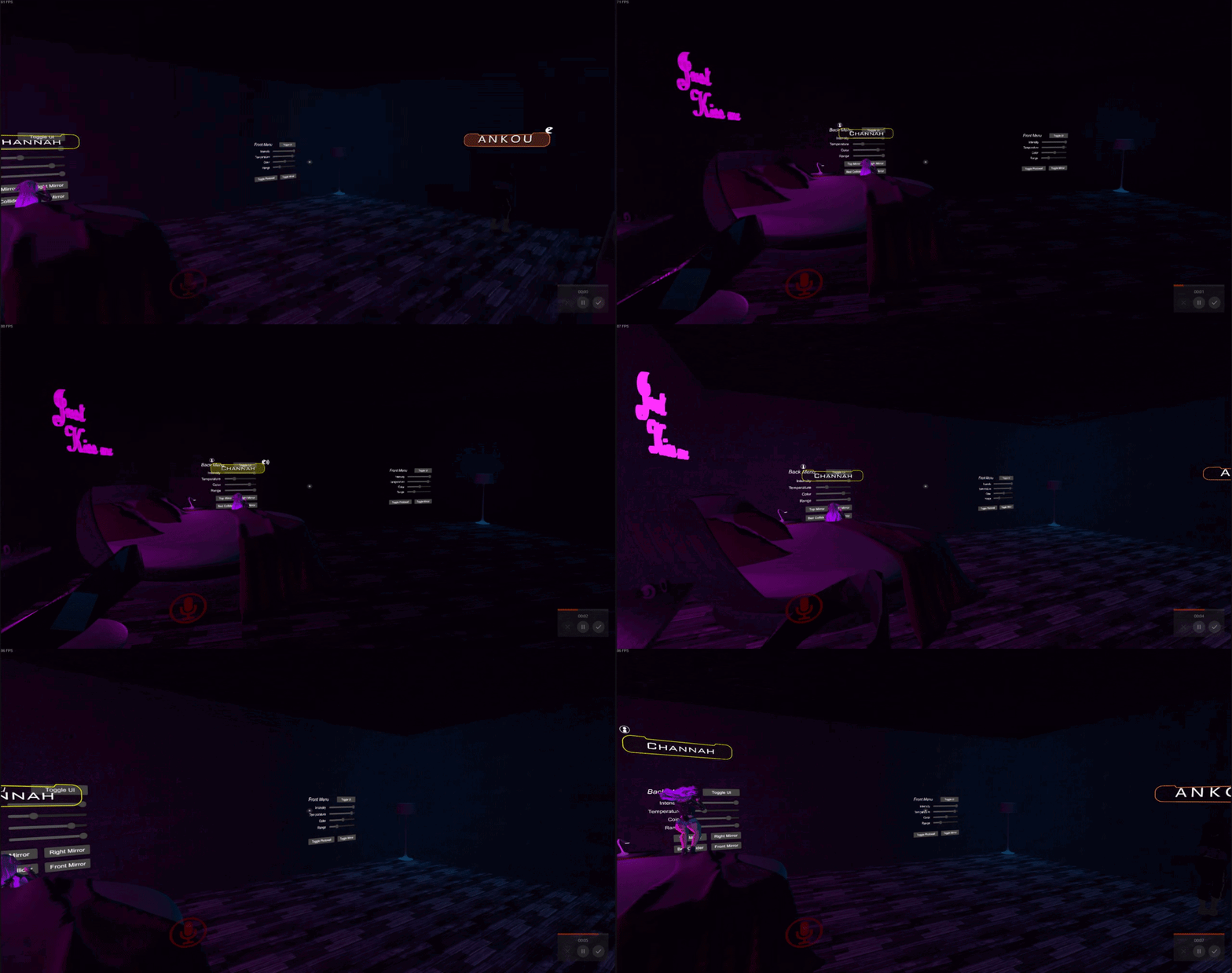
anyone ever had this issue before? when multiple people are in my world the lights start to flick on and off (or rather the intensity of it scales up and back to the actual value) depending on the view angle and position.
i am using 4 realtime lights and controlling their properties via a script
feel free to DM
 peak mirage
I can try a diff shader, its w/e already came with the asset pack. Its certainly possible it uses the A channel.
Actually, that wouldnt make sense now that i think about it because the demo for the pack I was able to build & test and it looks fine. Only difference is that it's using realtime lighting instead of baked lights
peak mirage
Must be something wonky with that scene, I moved everything to a new one and with realtime lighting it looks the same. Altho it seems that postprocessing isnt working??
modest vapor
@slim crescent Unity culls lights when too many realtime are affecting the same object
slim crescent
Never happens when im alone, so Shaders/Materials from Avatars of other people must be affecting it too which makes it very hard to test/stresstest.
Is there any general fix for this?
modest vapor
I doubt people's shaders are doing this, unless you're running out of shader keywords and it's somehow causing those issues but I don't think that's the case
Looks like Unity's culling to me
slim crescent
So is the only way to avoid this culling by removing the lights until im left with only one?
I tested it for over 8hours and tried realtime and mixed lights
rugged harness
You can bake the lighting and use light probes. The lights won't cast shadows then but if you have them not casting shadows then it won't matter anyways. It's generally less "realistic" than using realtime lights but then you save a lot of performance overhead as well.
If you really want realtime lights, you can duplicate the lights, make those realtime, disable them and then use a switch or something to toggle them on locally for yourself.
modest vapor
@slim crescent Use one at a time if you need to, but if those lights are static they should really just be baked
slim crescent
yeah thats the thing, im offering the users a UI to change light color, temperature, intensity etc. so changing to baked is not an option sadly
 sterile arrow
My world seating targetable area changes after I bake lighting into the world.. any idea why? If I make the chairs and don't render the lighting, when you target the chair it correctly outlines just the chair. After I bake lighting the target area becomes a large cube around the chair... Examples below. 1st image no light rendering, 2nd is an example of the cube target area that would show up around each chair after baking lighting.
so that tiny stool would have the large cube around it post rendering/baking light
ancient ravine
@sterile arrow put a box collider set as trigger(so players dont collide with it but can interact) and edit the bound sizes on the main root of the vrc chair prefab
It'll outline to what size you set
 dense elbow
how do you make it so lighting shows in mirrows
modest vapor
you have pixel lights setting on your mirror ?
dense elbow
lemme check
no i dont do i need that enabled
oh snice
thx
now i just need to figure out the mirror toggle thing
 crisp marlin
Sooo, it's been well over a year since Bakery dev informed me VRChat devs contacted him regarding including Bakery scripts in the game to enable use of RNS and SH lightmaps without the use of Merlin's VRC Bakery adapter. Still no word on that from VRC devs, though? Really would like to know when Bakery integration will make it to VRChat to make world creators' lives easier.
modest vapor
Nothing planned for now, but you can use SH with Merlin's tool
crisp marlin
Good to know, thanks.
dense elbow
so is there a way to bake my lightd easily with out spending 55$ on a asset im only gonna use a handful of times
modest vapor
Sure, set it up correctly, press generate lighting and wait for hours
 weak glade
Baking lights can take hours... i am glad bakey exists lol
dense elbow
any good tutorials of how to do it
modest vapor
yes it's pinned
dense elbow

 hearty fulcrum
has anyone ever done like a multiple UV sets thingy in unity? im like trying to get my masks to work with my first uv set and then texel density with my second UV set and I like want my lightmaps to be generated in like the 3rd UV channel but I dont see anything that would let me tell unity to generate lightmaps uvs from my first channel and then place them in the 3rd channel

 rare umbra
someone know how to change baking device on the gpu lightmapper? the device its using is not the preferred one and i want it to use my gtx 1060
also is lightmapping with gpu even ideal for vrchat worlds? 2018.4.20f1 in general?
edgy forum
@rare umbra The builtin GPU lightmapper in 2018.4.20 is broken, sadly. Lightmaps have weird artifacting on them.
rare umbra
sadddd
 rustic fern
Hiii, i'd like to know how to fix this, i want a uniform lighting, i tried baking the lights but my unity just keeps crashing every time, so i want to know if there's another way to do it because some avatars look really bad like this one
acoustic loom
Is there a way to make realtime GI materials effect avatars via light probes and not just geometry?
 odd anchor
I'm baking my lights and my pots are shaded weirdly, any hints/tips where this can come from ?
 glad fox
i have that same problem with my world so if anyone knows how to fix it that would be amazing
acoustic loom
From what I understand that is due to a hard seam in your lightmap
Frankly my understanding of lightmapping and uvmapping is still terrible, but what I gather is that unity sees that as a hard 'edge' where a shadow would be cast
I'm sure this can be solved by proper lightmapping which someone else might be able to elaborate on, but clicking "stitch seams" on that object in unity might help you
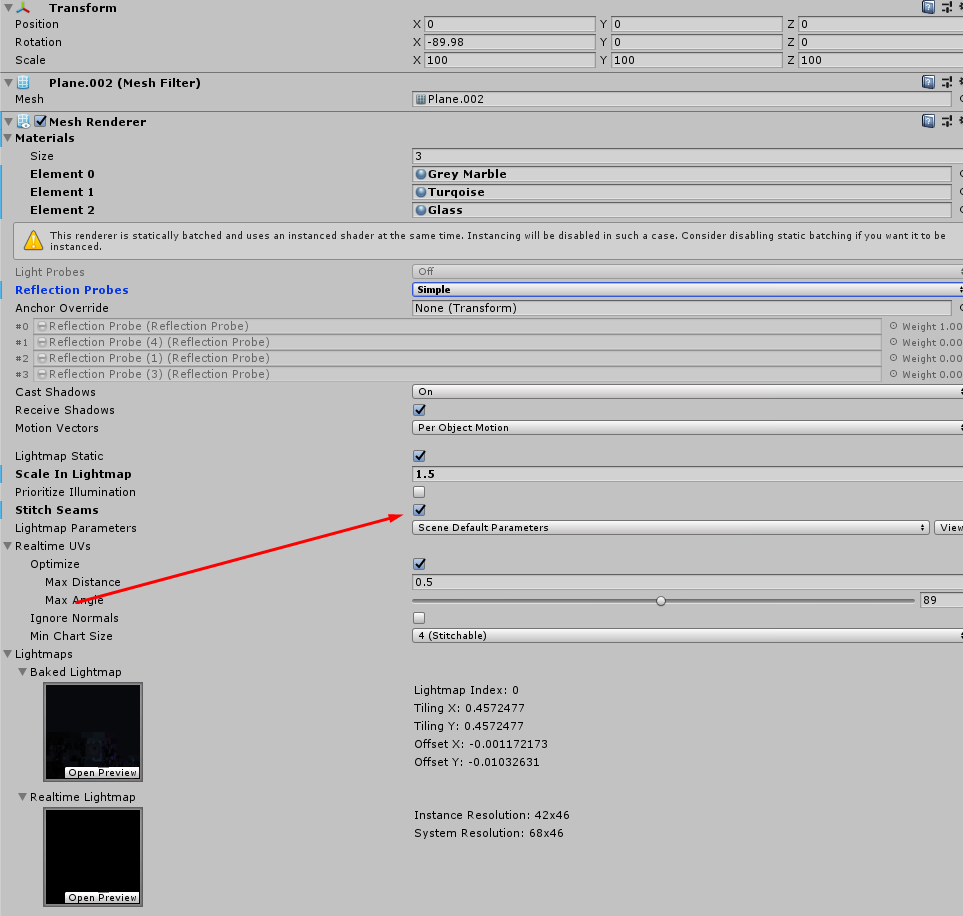
I believe you'll have to re-bake after toggling that option to see the result
dense elbow
sorry for music but i need help fixing what ever is causing this and none of my friends know what could be causing it and the glass isnt reflecting correctly either
modest vapor
There's a limit to how many realtime lights can affect something in Unity before they get culled
mint cipher
There's a setting in quality settings that increases the pixel light count if that's what it is. Or you can just try not to overlap too many realtime lights.
supple loom
Changing the setting yourself won't help when it's a setting set by vrchat
cloud mango
I hit generate lighting in my world so I could bake it but now the lights are just pitch black. any help?
modest vapor
Can you show any of your setting/components ?
cloud mango
yes one second
I have 2 directional lights with a toggle but only one works
and my point/spotlights dont work
@modest vapor
mint cipher
If to many real-time lights they can get culled
cloud mango
They're all baked
and they worked before
but then I clicked generate lighting
and it just went crazy
mint cipher
Had this bug a while ago don’t remember how I fixed but wish you luck
mint cipher
Hold up
cloud mango
I think t's because I don't have auto generate on so I have to
clear and rebake them
mint cipher
The sun source is it directional
cloud mango
yes it is
mint cipher
Can we see the light component
cloud mango
yep one second
mint cipher
K
cloud mango
mint cipher
The color is very darkish
mint cipher
Does this only happen with this one
cloud mango
yeah and my point lights aren't working either
mint cipher
Does the day work fine
cloud mango
the day one does work
mint cipher
That makes sense
Hm
I know you can
How about post prossing to increase brightness
It’s not a fix but could work
mint cipher
Post ev is what would recommend
Click windows packages manger then type post and install
mint cipher
I can help you in 10 min via screen share we just got back from camping
mint cipher
Ya no problem dude