#world-lighting
4 messages · Page 4 of 1
 rapid isle
 dire moat
@quasi hedge IES lights in Bakery are rotated 90 degrees on one axis. I usually put the IES light under another object and rotate just the light
 quasi hedge
O shit, thanks for the heads up/tip! I was thinking I had to start authoring modified IES files to be pointing the right direction or something (edit: + thanks for the SH adapter 😉 )
rapid isle
wish i could use Bakery but you know fuck AMD card users
 hushed isle
ya forget you
quasi hedge
Does the Unity GPU lightmapper support AMD?
quasi hedge
For real? That's messed up
rapid isle
unless its something else your talking about

Bakery is a high-end, production-ready, hassle-free GPU lightmapper, designed as an alternative to Enlighten and Progressive.
NOTE: Requires modern Nvidia GPU (6xx or newer) and 64-bit Windows (7 or higher).
Doesn't support AMD cards for baking.
Tested on everything ...
says doesnt support AMD cards
quasi hedge
Oh no, yeah Bakery doesn't which is unfortunate but Unity has been working on their own GPU lightmapper
I think when we update to 2018 LTS everyone will get access to it
It's a lot buggier and I don't think at the same level as Bakery, but it's definite progress compared to like Enlighten
It says Unity's gpu lightmapper supports OpenCL so I believe that means it'll support AMD
rapid isle
kind of waiting for that 2018 upgrade on vrc for better lighting also
hushed isle
its funny that in the Unity spotlight demo they don't use the new GPU progressive they use bakery .. if that tells you anything about the current status of the Unity version
but its still newe give it time
quasi hedge
I saw that COD: Mobile is actually using Bakery too, it's at least a testament to how production-ready it is
hushed isle
bakery needed almost 9 years to get to the current level
quasi hedge
I have absolutely no idea how Unity has not just folded, and bought Bakery out -- but I imagine it not using OpenCL has something to do with it
hushed isle
but its only one guy
quasi hedge
Yeah, what that dude pulled off is absolutely insane. He'll probably make bank off licensing the solution into other engines as well
hushed isle
i am happy frank finally issued the new version .. now we can pester him to issue a shader node to build custom bakery shaders
quasi hedge
I think you can rn (sort of) with amplify because it's really just modifying how a shader uses lightmaps at the end of the day, right?
I'm not fully sure - shader stuff is way out of my know-how haha
hushed isle
its something i been struggling building my new shaders so they can take advantage of the bakery scripts also .. its not a common case so hard to push him on the subject
quasi hedge
I think he was in talks with the VRChat devs not too long ago, but pretty much said it was in their hands at this point.
hushed isle
ya amplify has nodes for reading light maps but we still need to build a new shader node custom to enable write inputs
ya that was me i think
merlin posted the fix for it and i posted the canny reports
but canny report was never replied.. he tell me that some DEV did ask if they could use the script and he gave them permission but we have no follow up from VRC dev ever
i see Canny reports from over 1 year with no reply its a home of lost dreams
its a sort of trick i think .. you ask a question they tell you to post in Canny .. then never follow up with reply .. when if you ask again they tell you go away its in canny and they cant do any thing .. lost dreams cheap tricks to shut up you up
quasi hedge
Yeah, I was curious what them talking exactly meant. I know Merlin worked on an adapter for SH and RNM, but what kind of native support could VRChat add through white-listing? Does Bakery use scripts to set property blocks that could be white-listed?
dire moat
The adapter is only needed if you want to use the custom directional lightmap modes that Bakery allows
if you're just doing directional lightmaps like how Unity handles them with dominant direction, you don't need the adapter
If VRC whitelisted the Bakery scripts you wouldn't need to go through the extra steps of using the adapter for the RNM and SH directional lightmap modes
rapid isle
imo vrc has to many blacklisted stuff that would help with world makers
hushed isle
i would not call it black list just neglected
rapid isle
probly
quasi hedge
Ah, so maybe that's what it was about! I'm confused as to why the VRC devs would reach out for that, though. I feel like world creators using RNM and SH are like fringe cases (not that I wouldn't love to see more worlds using SH)
dire moat
not too active on discord a lot of the time : p
especially the VRC discord
SH is great if you have very detailed normal maps for stuff
I have comparisons on the adapter page
with dominant direction:
https://camo.githubusercontent.com/b70caa5ac91e9a4674095ba8b179eec9d2580f03/68747470733a2f2f692e696d6775722e636f6d2f6f55357771457a2e6a7067
 hushed isle
ya i try to call you before i needed some help .. was going to make a custom imposter baker that can work with custom lighting nodes but needs a updated script .. hit me up in DM at some point
dire moat
 quasi hedge
Maybe if we start advertising SH as the system that Frostbite uses then we'll get some more people to bite, haha
hushed isle
i did some hacky work around for now
rapid isle
rip
quasi hedge
Did I just get yelled at for using too many caps
rapid isle
yea
hushed isle
@rapid isle for the day night cycle are you ok with adding animations for ectra stuff like turning lights on off and light shafts ... or should i add slots for you
quasi hedge
But no, the still I posted earlier actually uses SH (and Merlin's adapter) 🌞
hushed isle
also do you use bakery ?
rapid isle
i have buttons for lights on/off
quasi hedge
I think he said he can't bcs AMD
rapid isle
yup bakery doesnt support AMD
if the day/night shader you have only works using bakery then sry for wasting your time
hushed isle
no this is different its fully driven in the shader by the rotation of the sun Directional Light source so you only need a animation to rotate the Directional Light .. i will set up a simple prefab demo
rapid isle
ok
hushed isle
currently my demo has some bakery lights in it so i just need to remove them for you lost ADM people
rapid isle
i would be on nvidia if their cards were not so damn expensive
hushed isle
the price of moving forward
rapid isle
ill stick with my rx480 till it melts
quasi hedge
If it helps, I don't vilify AMD. I think their recent GPUs are great, it's just that NVIDIA is sitting on tons of widely-implemented proprietary tech (like OptiX...which runs Bakery)
 drowsy olive
Anyone have this issue with Rero Standard where when you're close to a point light the model turns into opaque white?
quasi hedge
@lofty jungle might have some info on that
hushed isle
is Rero Standard a shader ?
 lofty jungle
Yes
hushed isle
ah
lofty jungle
It's an altered Standard that's far better suited to VRChat
hushed isle
oh what's special about it .. any github ?
lofty jungle
It can do specular highlights in baked-only environments
I can't link it because the website isn't allowed here
hushed isle
interesting i would think that's not special just not standard
 sonic marsh
That's incorrect
It has a fallback system for worlds where reflection probes aren't setup properly
drowsy olive
Is there a way to bake a cubemap onto a custom shader for my avatar?
lofty jungle
Well Rero Standard has more than just the fallback system
You can change the skybox and see the specular highlights being changed too, even in baked light environments
 smoky oyster
@delicate bluff
 delicate bluff
???
 wraith ruin
how do i bake area lights?
 untold helm
click the bake button in your lighting tab
hushed isle
does VRchat have any issues rendering player settings in linear color space ? what are the defaults in VRchat .. hope its not gamma as that would suck
perhaps i should ask this in shader room
quasi hedge
It's linear
hushed isle
ggod
quasi hedge
Actually, I take that back -- it looks like it could be gamma space for the base game, and I'm not sure if it respects (or is able to respect) a change in color space we'd make in our own settings when building worlds.
We'd have to have a dev confirm whether or not it respects what we set in our settings per world. It'd be a missed opportunity at having more physically-accurate spaces if Linear isn't being utilized (not sure about Linear space compatibility with Quest tho)
hushed isle
ya i was just setting up a shader using Linear and if it does not respect the build settings it would not even come close to look correct .. if i know before i could re build the shader .. using gamma is actually a lot more expensive for this
hushed isle
If you care anything about quality of lighting, using Linear mode is highly recommended !!
The importance of color space in 3D rendering
https://www.youtube.com/watch?time_continue=168&v=2IITte79Tic
History of Gamma correction and Linear workflow
https://www.youtube.com/watch?v=BgzOSHtTxiQ
to switch your project Color Space from Gamma to Linear:
https://www.youtube.com/watch?v=X08v7B__gyg


Thanks for watching this video, please share it and leave a comment below! Remember to subscribe to this channel for more Visual Effects, Computer Graphics, ...

Help future proof your Unity project by switching your color space from Gamma to Linear. Doesn't work for older mobile hardware, FYI
quasi hedge
It's important to note that a switch to Linear space would still be gamma-corrected + transformed to sRGB space for viewing, regardless. The switch would only affect lighting and color maths that happen before the transform to sRGB near the end of the pipeline...but it'd make that lighting + color maths a bit more physically-accurate.
- for consideration: Linear space is compatible with OpenGL ES 3.0 and above - so on paper it's fine for PC AND Quest. But in practice: ¯_(ツ)_/¯
dire moat
The VRCSDK switches your project to linear when it gets imported.
Not sure if VRC will respect the setting if you switch it to gamma in your project for some reason, but in game everything will usually be linear
 sly cloud
Is realtime GI not supported? It gets unticked when I go to upload the world
dire moat
Realtime GI is supported, not sure why it'd be getting unticked
sly cloud
Not sure what is causing it to be unticked once it builds after I click "new build"
I'll try submitting this as a bug
dire moat
Do you have Bakery in the project? That will disable realtime GI
I just did a build and it didn't disable the realtime GI with the latest SDK so there might be something up with your project
sly cloud
I do have bakery but this time I used Unity's lightmapper for the realtime GI
yikesssss
dire moat
if you are using Bakery with Unity's realtime GI, you need to go into the advanced settings on it and check this
then bake through Bakery and it will automatically bake Unity's realtime GI as well
if you're just using Unity's baking for static and realtime GI checking that will also keep Bakery from turning realtime GI off
sly cloud
will try ticking that now for using Unity's lightmapper
amazing, ticking it even when using Unity's lightmapper will keep it ticked after building
 scenic elbow
so is there a way to make part of my world "day time" and part of my world "night time" depending on which part you go into?
 mint cipher
You could turn on and off a fake skybox, that is, a sphere which has it's normals reversed. There's one in the VRChat prefabs i think.
hushed isle
Humm if some way to link the prayer position in the map to a game object it could be possible to use that to drive the transition in the shader .. currently i am working on a day night cycle that is driven by the directional light rotation .. same concept could be adapted but how would i tell the players actual position in the map without script ?
it may be cheaper just to use two skydomes and drive the players thru a gate way with some sort of walls
 main anchor
@hushed isle I bet you could do something clever with a combination of a player tracker (local object) and some combination of configurable joint / FinalIK aim-at / dynamic bone / autocam such that the directional light rotates to aim at an object that roughly follows the player... then the skybox shader uses directional light to determine how it looks
@hushed isle This is an in-progress unity skybox based cloudy effect I was working on for floating islands.
While the cloudy effect isn't really meant for your usecase, one of the tricks I did you might find interesting is I add an up vector to the normalized position/skybox direction and renormalize. This actually creates an appearance of curvature in the unity skybox to make it seem planet-like. I know it's probably not physically correct etc.
hushed isle
@main anchor thank you i can now put this out for testing in VRchat
Dawie Shader Skybox v2.2
https://mega.nz/#!LXxSSC5J!EYlR_99D8Cy0NExhPmnOIOC8IarExjGI4MEZBqS0C30
see read me files . i included a moon shader as extra , in the next big update i will remove the moon and replace with a mesh based planet system that is controlled within the skybox so it fades away in daytime eliminating the need for its control in animation .. this method could also be applied perhaps to a custom map that has split terrain perhaps but it could get expensive e,g half day half night may be better in a new shader as static
also in version 2.2 above key word count is 22, i will work to reduce this in the future also when i can get closer to what is and is not needed
Note for baking maps with this it will pull the first cubmap in the array for daytime any matching settings you set up should follow this for correct lighting
also anyone using Gamma lighting for your player settings will be sent home and i will not support Gamma lighting ... this setup should use Linear color space , thank you

MEGA provides free cloud storage with convenient and powerful always-on privacy. Claim your free 50GB now
main anchor
Cool, 122MB from not that many cubemaps. Wow they add up quickly
Do you plan to make a github at some point for your skybox shaders?
hushed isle
well it still has some more work and dial in the defaults
ya the cube maps for demo are baked in with 2048 resolution 32mb each you can cut that down to 8mb by lowering the resolution x1024 , any lower you may start to see artifacts.. i have lots of cubemaps if you need different ones
Roadmap
- add mesh based planet system TBD
- add UI panel controls for animator speed and other settings TBD
- look at improving clouds to scatter a bit more in the center, possible close and far cloud system
- possible may separate the controls for sun glow from the horizon glow . currently they are set up this way to match settings internally , not certain yet if performance cost will benefit the change
- analyze lighting modes .. looking into adding a .cginc and editor for change custom lighting modes .. need to work with some other DEVs for this part of the project
I also am starting water shader but it has a few more weeks in beta, very nice stuff working thru the bugs now .. looking at adding a custom blob projector for the ocean floor and may attempt to add a system for beach wave wetness TBD
i am not certain yet how to put it out as it has proprietary code that i only have limited distribution with .. i may look for a few nice developers and limit it only for that reason .. i could put out a light version for others and just remove that part of the code
 abstract drift
can having too many lightprobes be laggy?
 modest vapor
how many ?
abstract drift
what's the downside to lightprobe placement?
modest vapor
I don't think there's a downside
 modest vapor
yeah, you only need lightprobes if there's changes in lighting intensity
abstract drift
there's varying degrees of lightprobes
i mean lighting
but can it add to world size?
modest vapor
So you only need maybe one near the ground, and one near your head height, each separated from maybe a meter
I don't think so, but it's calculations, so if you have that many, could be bad
modest vapor
Example of mine, which i think works well
I don't remember how they work though, i think it uses the two or three closest, and that determines the intensity on your model
 mortal marsh
Instancing can break if the objects aren't affected by the same lightprobes, so having too many will be a problem if you're using Instancing
lofty jungle
Lots of things break instancing
I'm almost positive that instancing already breaks with light probes anyway, if they don't have their anchor overrides in the same spot.
Even if affected by the same light probes, an object can be lit differently based on its distance to each probe, therefore it stands to reason that two different objects with different anchor overrides will not instance properly with light probes present.
You may need proxy volumes for instancing to work correctly?
The docs are not very clear on this
hushed isle
@abstract drift
Light Probe Populator
https://github.com/alexismorin/Light-Probe-Populator

GitHub
Automatic Unity Light Probe Generation. Contribute to alexismorin/Light-Probe-Populator development by creating an account on GitHub.
abstract drift
thanks, I do have one, but is there an advantage to using this one?
 stuck furnace
Light probes sample from the 3 closest.
You can make them as dense as you want, but it will increase file size. Other than that there's no downside afaik to having a lot, since it's all baked data.
sonic marsh
You might light incorrectly from smaller details due to probe lighting being interpolated from the closest tetrahedron to your origin if there are too many probes
 graceful jetty
So I just baked a lightmap and everything looks okay, but there's a weird pattern on one of the surfaces. Any ideas?
mortal marsh
yeah looks like you don't have lightmap UVs made for that mesh
go the import settings of that mesh and enable Generate Lightmap UVs and then bake it again
graceful jetty
Thanks, that seemed to work. If it's not obvious with my shadow issues from yesterday, I'm not exactly used to baked lighting.
mortal marsh
it's not really that common knowledge, I don't think you'd ever find that solution online at least, even on the unity forums
sonic marsh
You should read through the Unity manual very carefully, that's mentioned in there
graceful jetty
Now I'm just confused, since I've baked the lightmap but it's still using realtime lighting. Looking in the scene settings, I can't see anything that would keep realtime lighting enabled.
hushed isle
use mixed
lofty jungle
@graceful jetty you need to set all your lights to Baked
You might still have a directional light set to Realtime
In which case baking will work, but the directional light won't be included in the bake and you're pretty much just baking ambient light.
graceful jetty
it seems to be okay now, but now there's a line where 2 meshes meet in the same place. I found something online about stitching seams, but I don't have the option.
hushed isle
if you have the FBX you can fix that in blender
if your looking for it the term used in blender is called merge mesh
 pale spruce
Seam stitching would not work in this case anyway. And I think it was a global setting for enlighten and per object in progressive mode.
 prisma radish
There is a global setting for seam stitching for Enlighten? Where does that hide? @pale spruce
 stoic valve
can i get some help on this? my lighting it a bit jenked in tis corner and was wondering if there were any fixes. it doesn't seem to be any particular lights in the scene either.
it's not in the texture either.
sonic marsh
Does that wall have lightmap UVs? Are the vertex normals okay?
mint cipher
Did you clear and rebake lighting after upgrade?
hushed isle
i would suggest start checking with the checker preview for UVs and wire frame for any overlapped or the mesh behind distance / padding
perhaps you are gaining a shadow from the edge of the wall from the light switch on it ? try moving the light source see if it changes .. clear all the GI and catch before re baking to verify
mint cipher
Can i crunch lightmap files called "lightmap-0 comp light.exr". That is, can i change it from "RGB HDR compressed BC6H" to "RGBA crunched DXT5"?
 edgy forum
You can, but you may lose lightmap quality. BC6H is one of the BCn formats that supports HDR and can be compressed.
mint cipher
@edgy forum TY
pale spruce
@prisma radish right now I swap the 4770 with a 9900k so i cant check it. A quick google search was without any result but I know I have seen it once. In 2017 in some settings menu. But maybe it was just a global toggle for the progressive mode. As soon as my pc is ready I'll investigate a little more.
graceful jetty
I don't know if this is a lighting issue per se, but the lighting on certain parts of my project changes depending on the platform. It's not a huge issue, but it means I can't tell what a quest user will see in my world.
This is when the platform is PC
This is when the platform is set to Android
hushed isle
when you are switching platforms do you also verify you are in the same build for correct color space gamma or linear
the water on top photo looks like its has more smoothness or specular drawing .. see if that water shader is changing the forward render options when building perhaps
hushed isle
@graceful jetty
the other day we had a short discussion about how to build a world and also support Quest users ... i found they have a lot of limitations in that shaders must be built in mode 3.0 or 3.5 and have no grabpass or geometry.. i am not aware at this point they have any limitations regarding baked lights or lighting ....
is the water the only issue you found ?
i posted a water shader yesterday in #shaders that may help but again like you i have no way to test for quest and we don't have a clear list of Quest build requirements
@modest vapor
hello sir please could VRchat put out a sort guide for world creators who don't use Quest themselves, what are the base requirements such as shader modes and or other limitations they have
does VRchat even have a lot of Quest users at this point to even consider moving forward to build assets to support them..
mint cipher
I explained all this yesterday
hushed isle
yes for shaders
- must be in mode 3.0 or 3.5
- no grab pass
- no geometry
when i looked over the VRchats official page for Quest optimization they do not provide any of this critical technical info .. i wonder at this point what other requirements are they missing ..
mint cipher
it's all in the unity android docs and oculus quest docs
hushed isle
ok so does VR chat require world creators build to support this now or is it optional.. i am sorry i raised the subject .. i don't own quest and for now will not be planning to downgrade worlds and or any assets without some sort of good reason .. how does VRchat expect creators who don't use Quest to care about digging thru unity documents if they don't even make a effort to point out basic level technical requirements ..
End subject
mint cipher
it's hard to find technical info, the quest just came out, I understand that, but there's a lot of info on unity and android development, the recommendations the vrchat team has given for making quest worlds has been pretty thorough so far, it's difficult testing it without hardware but it should be doable
some personal tips for making quest worlds:
- Keep world bundle under 50 mb or VRChat Quest client will reject it
- Right now videosyncplayer breaks everything so remove it
- Post Processing will not work or be uploaded
- Use Android texture import override settings ASTC 4x4 for textures that need detail
- Keep under 50 drawcalls ('batches' in unity stats window) .. Aim for 25 or less
- Use mobile shaders or make mobile shaders (up to shader model 3.0 and 3.5)
- Use baked lighting, don't use realtime lights except for one directional light without shadows
- Cross Platform worlds need the same objects with the same name in the same hierarchy or network sync will not work
- Even more crucial than in PC worlds: use culling masks for mirrors, lights, cameras, you name it, so you're really minimizing overhead
hushed isle
very good list sorry for my little rant before
just a question are you planning to support this your self ? how do you justify the extra effort
mint cipher
oh no worries, yeah I plan on having some worlds cross platform in the future too, people (including me) will get better at developing stuff for quest and more people will share their findings
shader performance and best practices are still being figured out for the most part, even by the devs
I can help if you have questions, and I can tell you what I found out so far
hushed isle
needs a lot more study .. if you find some one for testing i would be very interested to know if amplify imposters is supported.. not creation what version they use in default but i will check next Monday when the staff is back in the office
mint cipher
not sure about impostors, I think they are, just like in the pc version
 trim crow
How do you rotate a reflection probe? it's not facing the right way fr me to scale it to fit my world
rapid isle
cant really do that just need to edit the box bounds
click the 3 dots to edit the bound size for the probe
trim crow
https://gyazo.com/5a5d7dd4ffc4d46b5f3fa15a8274551a How would I make this work if it cant rotate? @rapid isle
 rapid isle
the box will just cover the whole world or the parts you want reflections on
rapid isle
as you can see i set the probes size to fit my login world the probe will reflect everything that is static when you bake it the yellow on the roof is the area that wont get reflections on it only my walls,floor will get it. @trim crow
trim crow
so i dont have to fit it correctly?
rapid isle
right
you can also turn off reflections on the objects material if need (if it has the option on the shader)
trim crow
i sized it but idk how to bake lights
rapid isle
in unity go to windows > lighting > settings
that will give you all the settings you need along with the button to generate lighting
hushed isle
VRchat Xiexes lighting tutorial how to get good at baked lighting:

VRCat: Community-Run VRChat Forums
Greetings! Over my course of playing VRChat I've noticed that most worlds, mainly the ones that have baked lighting, are done poorly, or in an...
rapid isle
yea use that to
hushed isle
Quality of Lighting:
VRchat Xiexes lighting tutorial how to get good at baked lighting:
- https://vrcat.club/threads/xiexes-lighting-tutorial-how-to-get-good-at-baked-lighting-101.2081/
Unity Spotlight Team Best Practices: Making believable visuals in Unity - https://blogs.unity3d.com/2018/03/09/spotlight-team-best-practices-making-believable-visuals-in-unity/
Unity Spotlight Team Best Practices: Setting up the Lighting Pipeline - https://blogs.unity3d.com/2018/08/28/spotlight-team-best-practices-setting-up-the-lighting-pipeline/
- https://drive.google.com/drive/folders/10mms98ARgIkOSZcAxdJKaK90SDAOwUsM
Unity Spotlight Team Best Practices: Making believable visuals in Unity - https://blogs.unity3d.com/2018/03/09/spotlight-team-best-practices-making-believable-visuals-in-unity/
Unity Spotlight Team Best Practices: Guides - https://docs.unity3d.com/2018.2/Documentation/Manual/BestPracticeGuides.html
UV Mapping and Quality of Lighting:
20 Tips to Speed Up UV Mapping in Blender:
Color Space and Quality of Lighting:
Linear mode is highly recommended !!
The importance of color space in 3D rendering
- https://www.youtube.com/watch?time_continue=168&v=2IITte79Tic
History of Gamma correction and Linear workflow - https://www.youtube.com/watch?v=BgzOSHtTxiQ
How to switch your project color space from Gamma to Linear: - https://www.youtube.com/watch?v=X08v7B__gyg
Textures and Quality of Lighting:
High-dynamic-range imaging:
- https://en.wikipedia.org/wiki/High-dynamic-range_imaging
Comparison of graphics file formats: - https://en.wikipedia.org/wiki/Comparison_of_graphics_file_formats
trim crow
a lot of reading
hushed isle
😋
trim crow
did you just post all the pins lol
hushed isle
no you may find some new ones in that
hushed isle
start off with Color Space and Quality of Lighting
it will have the biggest effect and change any other settings you do after
trim crow
im looking more to help me remove MB
hushed isle
ah ok
rapid isle
compress textures
hushed isle
one step at a time
well after light mapping you can compress the light maps ... that will help a lot
depending of the level of compression u may lose some quality so just start off a little and keep checking results as you add more compression
trim crow
what is light mapping
hushed isle
baked lights "Light Mapping"
baking lights makes maps of the lighting in textures
they get saved in a file with the same name as your project title
they will show up after you bake the map for lighting
trim crow
ive tried baking lights but the room just got dark
hushed isle
for all the objects that will have lighting you should check the box "Static"
also on every FBX file you will need to check the box "Generate Lightmap UVs"
trim crow
i dont see the fbx options
hushed isle
this is a FBX file they are blue .. click on it and look in the inspector window
 austere timber
what are some reasons for lighting disappearing after a bake?
hushed isle
disappearing ?
do they turn black or is it just missing
 dapper matrix
how can i bake my world with speedtrees in it?
hushed isle
recommend use light probes for any speed tree as a lot of the base models have bad UVs or overlapping .. if you bake them they will just not look correct and only give you trouble if you try .. no bake settings can correct for bad modeling practices they use in speed tree
if your looking for good trees you are far better off with any other than speed tree..
quasi hedge
I think you could pack your own lightmap UVs / UV2s for 'em manually + just let their shoddy UVs exist on the primary UV channel - if you're set on using them. Seems like a lot of people have issues with 'em
hushed isle
ya however speed tree uses the data from UVs in material property blocks for its wind data and i never found a way to correctly update that in the spm speed =tree formats ... the UVs are so massively out of bounds just to generate a second UV will not do it
it almost criminal they sell the models for so much and don't take care in basic modeling best practice .. al lot of popular DEVs have been quietly dropping support for speed tree products over this issue .. a deeper dive looking it to this i believe its hard to overcome as its flawed in the software it uses for building generating the trees
dapper matrix
Damn well its gonna be hard to find nit speedtree trees but ill try to do it its my only option i guess
hushed isle
well if your not going to use wind i could send you a few trees
dapper matrix
I would appreciate that since wind is useless to me
 livid forum
nvm I didn't check lightmap uv's
stoic valve
I want to be able to swap between a few post proccessing profiles using switches. i know how to use VRC_triggers and just learned how to use post proccess stack. how would i go about toggling on and off things like bloom and toggling on things like color correction?
mortal marsh
I don't believe you can switch on and off specific values from the post processing, you'd have to setup multiple profiles and use triggers to disable all but one at a time
stoic valve
alright, do i need to just disable the component on the camera?
mortal marsh
not the camera component, disable the post processing volume object
stoic valve
excuse my lack of knowledge, where would i find that?
i litterally just started to figure out post processing. haha.
mortal marsh
are you using v1 or v2?
stoic valve
v1.
mortal marsh
well that's your first problem, v2 is superior and actually lets you change things at runtime. It's a bit more complicated to setup, give this guide a read https://gitlab.com/s-ilent/SCSS/wikis/Other/Post-Processing

GitLab
A surface shader for Unity providing cel-shading. (Forward rendering only)
stoic valve
i can't afford v2, sadly :/ are there any workarounds?
hushed isle
its on github
stoic valve
oh, so it's not the %15 one on the asset store?
mortal marsh

GitHub
Post Processing Stack. Contribute to Unity-Technologies/PostProcessing development by creating an account on GitHub.
hushed isle
no
rapid isle
if you do use PP-v2 delete the test folder thats in it or wont work in vrchat
stoic valve
ok
stoic valve
thanks so much for the help! got it working flawlessly.
mint cipher
Can anyone here help me out? My lights are fine in the editor but in game they look like crap. Help?
sonic marsh
Did you bake them?
mint cipher
Pretty sure, they auto-bake
lofty jungle
Turn off auto generate and then manually hit the generate button
Also are you using Unity terrain?
Make sure the lights are set to Baked and not Realtime as well
mint cipher
TL;DR it looks like crap in-game
any ideas?
I'm rebaking the lighting atm, not sure what else I can provide
sonic marsh
Make sure they're set to Baked and not Mixed or Realtime
That looks like you're hitting the realtime light limit for individual surfaces
mint cipher
They're mixed, and the room is isolated (about 1000 on the y axis away from spawn)
sonic marsh
Isolation doesn't really matter if there are lights in the other connected rooms
For now, set them to Baked
When lights are Mixed, they still have a realtime component
lofty jungle
Mixed should be used sparingly, in this case it doesn't seem like mixed would be necessary at all
sonic marsh
Unity will juggle them around because each mixed/realtime light is an additional rendering pass per surface, so the maximum allowance active is fairly low, and you should rarely if ever use realtime/mixed lights in a scene.
mint cipher
Hmmm 🤔
sonic marsh
Bake everything!
sonic marsh
Depends on how you want to make it brighter.
mint cipher
Global illumination brighter
sonic marsh
You can add more lights, or you can make the lights you already have brighter...
mint cipher
My scene has interior and exterior locations, but not sure how to implement those both since I don't want to create another world just for a different room...
sonic marsh
Which part is too dark?
mint cipher
by exterior I simply mean having windows with directional (sun)lights coming through them
sonic marsh
Is the exterior area baked?
mint cipher
Yep, has baked lights
sonic marsh
Okay! Try making the skybox extra bright when you bake.
mint cipher
Will that help? 
sonic marsh
It'll make your area with a view of the outside receive more ambient light 👀
mint cipher
Can I DM you?
sonic marsh
Yeah!
mint cipher
Great ^^
 flat tangle
Nice! Looks like I didn't have to ask for you
flat tangle
...
mint cipher
I know, I'm bad
livid forum
Is there a way to block out the lens flare on an object? culling mask?
It's showing through my object
I don't want it disabled completely
lofty jungle
@livid forum I think lens flares are blocked by colliders for some reason
Put a primitive collider on the drone like a sphere or something
hushed isle
@sonic marsh ? hitting the realtime light limit for individual surfaces
are you talking about the overlaps qty
livid forum
Okay, will do
thank you
Also, is there a way to detach animations from an object?
Like with materials
mint cipher
Is there a way to make fog so that it sort of 'rolls off' into the distance and hides the edge of the terrain from the skybox?
I want to make the edges blend so it doesn't look so unrealistic
mortal marsh
skybox is unaffected by fog as far as I know
mint cipher
Mission Impossible
hushed isle
ya using Unity fog you may not find many options for this
you can take a look at my skybox cycle shader for day/night and check out how i did the horizon sharpness in the shader
#world-lighting Dawie Shader Skybox v2.2
@mint cipher
mint cipher
Thank you
@mint cipher using unity fog will work too, just use the color picker to pick a fog color from the skybox that hides the edge of the drawdistance well
That's what I'm doing currently, however some edges are harder to hide than others
mint cipher
The rest of the scene looks fine, it's just the lighting here for the most part is messed up
hushed isle
take a look ate the mesh and UVs
do you get a console warnings or errors
mint cipher
No
hushed isle
thats very odd
mint cipher
I only got errors previously for completely unrelated meshes that had bad UV mapping apparently
mint cipher
skybox is unaffected by fog? Wonder what would happen if you put a translucent reversed sphere around the world? The fog would hit the sphere i guess...
 severe tulip
Any idea why my light probes are this big?
quasi hedge
@severe tulip https://i.imgur.com/jhCeczK.png Try dragging that slider down in your gizmos
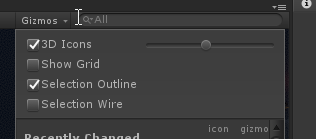
 tranquil jungle
severe tulip
tranquil jungle
severe tulip
Thanks, that's exactly what it was
mint cipher
Is anyone here good at baked Unity lighting stuff?
I tried Bakery lights but as I think I showed before, they produce weird spire-like artifacts on the walls and ceilings. Tried again with baked lights and this is happening. Any idea why? Help?
hushed isle
looks like you have too many point lights that overlap
Unity can not support over 4 lights overlapping as unity engine only supports 4 masks in runtime you can only fit 4 masks in 4 channels of a single texture RGBA
You should either:
- Use less lights
- Limit light radius to reduce overlaps.
- Make less important lights fully baked (no shadowmask).
- Use the bakery bitmask/LMGroups to filter lights per-group (i.e. even if lights overlap but belong to different rooms, it can be fine)
@mint cipher
mint cipher
Thanks, but they are baked lights, oddly enough
hushed isle
if you like to send me the FBX for the walls i could look into it
hushed isle
ya you have a lot of overlap and out of bound UVs
in this one FBX you had over 75 vert doubles
i suggest you need to remap the UVs and remove doubles
UV Mapping and Quality of Lighting:
20 Tips to Speed Up UV Mapping in Blender:
⇨ Free Blender hotkey PDF: https://zachariasreinhardt.com/free-resources/ In this video you will learn (at least) 20 tips to speed up the creation of UV maps...
quasi hedge
Not to be too meticulous, but there are many cases where you actually want to overlap UVs to maximize texel density by having islands share the same UV space. A hallway like that could be one of those cases
Unity will use a secondary UV channel for lightmaps but if there's no dedicated UV2 - it'll just use your primary UVs which is no bueno for lightmaps in the case of overlapping UVs. Basically, you can pretty much do whatever you want in your main UV as long as you create a secondary UV where things don't overlap for lightmaps (easiest way is to use Unity's 'Generate Lightmap UVs' setting)
mint cipher
@quasi hedge thanks. the ironic thing is I am using Unity's Generate Lightmap UVs currently. I'm not sure what the issue is, I've just been thinking that I should go in blender and remove the collision material and see if that fixes it, as it might be considering the invisible collision mat as part of the UV map or something, as you can see by the weird wall stuff, but idk.
quasi hedge
yeah! Sometimes Unity's auto-generate can be a bit weird. You could try packing manually in Blender in a secondary channel too! I dunno if that's the issue here, though. Can you elaborate on what you mean by collision material? Do you mean you created a collision mesh in Blender in that FBX for use in Unity?
mint cipher
@quasi hedge no, actually, I mean that basically the mesh has an actual collision 'material' that is fused with part of the mesh. I usually just turn it off by setting the 'Materials' size down from 3 to 2 (the 3rd material is the collision mesh) so it doesn't show up in Unity.
here's an example of what I mean.
quasi hedge
Hmm, that seems a bit odd. You def wanna keep materials low for optimization-sake! but for your lighting issues, I'm curious if that mesh has dedicated geo just for collision which could be messing your bakes up.
If there are faces that are close together (especially if the backfaces are facing each other) you can get issues like you're seeing during baking where some texels are read as valid when they shouldn't be (and vice versa)
I know nobody wants to hear "you might have to rethink/mess with your geo to fix this", but it might be one of those cases : /
mint cipher
Hmmm...
hushed isle
so basically each wall and floor you have are made with 2 planes , but they are so close together the backside of the the wall on the other side it popping thru the front side
mint cipher
Oh oof
hushed isle
out of the 9 models you sent me i see almost 300 spots this happens
mint cipher
yeah those are defo part of the collision setup, most likely
hushed isle
what program did u use to make the mesh ?
mint cipher
3DS Max
hushed isle
the models look very simple i suggest you just remake the walls
perhaps use probuilder in unity would be very fast
mint cipher
Hmmm
hushed isle
or just fix each one in blender
quasi hedge
Yeah, sorry I def convoluted the explanation! Thanks Dawie for explaining it better 🤝 . In the case of your hallways, you're gonna wanna use Unity's box colliders anyway. It's less pretty than using your current mesh-based collision setup, and you'll end up with tons of box collider components in the end; but it'll be much more efficient + you'll be able to tweak collision a lot easier
(and of course, it should fix your lighting issues 😉 )
mint cipher
Oh yeah? ^^
quasi hedge
Yeah, the primitive colliders in Unity are more performant than mesh colliders! If you fix up the geo and set up primitive colliders, you'll get to kill a few birds with one stone 🌞
 bright agate
Fun fact, sphere is the best performing.
 devout scarab
Hi, I need some help with Bakery Gpu Lightmapper to use the Lightmaps in VRC. What i should tweak in the settings to get it looking good. Also, getting a bug where can I see shadows thru every Object. Rly appreciate any help, almost trying lightmapping for about a month and the normal unity lightmapping takes 4 hours and gives me 200 MB Lightmaps on 520 resolution
quasi hedge
As far as getting things to look good, there's a lot of great info in the Bakery documentation/wiki! There's really nothing special you have to do to get things working in VRChat (unless you plan on using SH or RNM directional modes which is usually niche here). I'm not sure about the seeing shadows through objects thing, though. Do you have a screenshot of that we can look at?
devout scarab
@quasi hedge Yeah sure gonna send it after the baking is done 😃
devout scarab
Hey, anyone got aftifacts using Bakery to bake the lightmaps? Even with a 100 texels I get bad artifacts. https://imgur.com/a/0sBqaLo
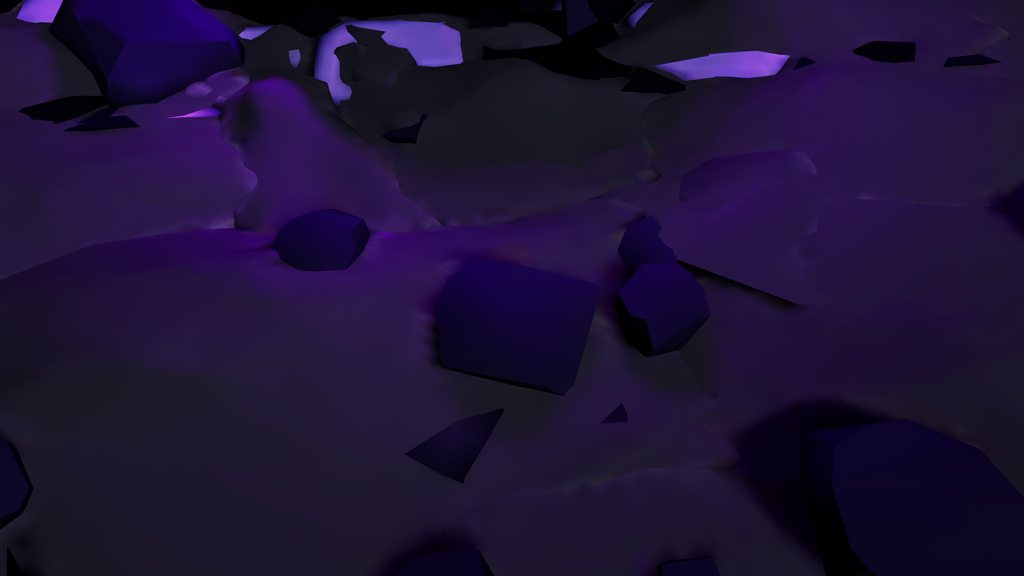 livid forum
How do you change the weighting of reflection probes on an object?
hushed isle
@livid forum weighting ?
the application of a probe to a object is selected in the mesh render tab .. if set to blend probe mode it will collect any all baked probe data that it connects with .. or if you like you can use the override to apply only one probe
the resolution of the probe is applied when you bake the probes
the strength of reflection is controlled in the object's shaders you apply
mint cipher
@devout scarab Do you have any other meshes in the model? Even if they're not visible, they'll still be baked as if they exist and are opaque
things like invisible collision meshes can cause this
rapid isle
how do i get area lights to not be so damn dark near the edges of rooms?
hushed isle
screen shot ?
 spark pelican
would this be a correct setup for light probes?
modest vapor
That's probably way too many, you only need some where the light intensity changes
spark pelican
would that be ex. in courners, behind sofas etc?
modest vapor
If it's drastic yeah
there's space between them, but also always one or two in shadowed areas, to make up the difference
spark pelican
ah okay. I'm re-baking all lights now with some setting adjustments hoping this will boost the fps a fair amount.
modest vapor
Have one realtime light is usually enough to drop your fps by a lot
spark pelican
I tried setting it to mixed. It said so in the tutorial which is pinned in #world-optimization
modest vapor
mixed is still realtime afaik, do you need one for player shadows ?
spark pelican
yes
spark pelican
thanks, should I leave default off then?
modest vapor
Since all your stuff is static, yep
spark pelican
alright, cheers. I'll let it bake itself like a cake & hopefully the world is ready for launch :D
modest vapor
good luck !
hushed isle
@spark pelican @modest vapor
you may like to take a look at this
Light Probe Populator
https://github.com/alexismorin/Light-Probe-Populator
GitHub
Automatic Unity Light Probe Generation. Contribute to alexismorin/Light-Probe-Populator development by creating an account on GitHub.
modest vapor
I've been using one I bought on the asset store, not sure if there's a big difference
hushed isle
ah ok
this one is very nice for free grade A
has 3 settings for light medium and heavy
spark pelican
does it do everything automatic?
hushed isle
yes it load all your light probes into the scene
the only draw back is if you need just to do a small area then this may not be the tool for it
spark pelican
ah, I've been baking light for a long time now. It seems like it is stuck at 7/11 light transport
hushed isle
ya it always does this
it could be a few issues if really stuck
in most cases its related to you running out of available memory
spark pelican
google told me to put indirect resolution to 0.1 so that I tried xD
hushed isle
ya thats just telling you that so it would use less memory and take less time
go to the edit tab / select preferences / check GI catch
also take a look at Catch server
spark pelican
I cleared the cache for it aswell
hushed isle
well you should clear the GI catch unless you have a issue ... i stores light map data and every time its cleared you are starting over
spark pelican
cache server mode is disabled currently
hushed isle
it would be a good idea to set up a local cache server on a drive not the same one as your OS
spark pelican
unity just crashed oof xD
hushed isle
ya thats what its does when it runs out of memory
note when you are baking it uses a massive amount of temp memory you may have no idea
example Unity -
So a 1k x 1k terrain baked at a resolution of .3 will probably generate close to 512 x 512 pixels of light map. So this comes to (512 * 512)^2 * 4 bytes = 27Gb.
that's just terrain
spark pelican
ye. my map is very small xD
rapid isle
if your always stuck at 7/11 it normally means the object is to big for the light res so you need to turn it down
turn down this number till it doesnt say anything under it
 native dome
that tip saved me 4 megabits on my lightmap
mint cipher
How can I increase...idk what to call it, the global illumination of my map? I want it to be overall brighter, and the shadows to not be pitch black, how can that be done? Thanks
lofty jungle
@mint cipher go to the lighting window and increase the multiplier for the ambient light
If you're using a skybox you need to use a cubemap for this to work
If you're using a 6-sided texture, you have to set the ambient color to be from a Gradient or from a single Color, then you can just make the colors brighter.
Also make sure your lights are baked, that will help quite a bit
 open gate
So I'm having problems with my world. All avatars show up super dark, almost blacker than Mr. Popo. How do I fix that?
I have a few of these spread out through my world
mortal marsh
you need setup light probes to light up dynamic objects if you baked the lighting
hushed isle
@open gate
Light Probe Populator
https://github.com/alexismorin/Light-Probe-Populator
VRchat Xiexes lighting tutorial how to get good at baked lighting:
GitHub
Automatic Unity Light Probe Generation. Contribute to alexismorin/Light-Probe-Populator development by creating an account on GitHub.
VRCat: Community-Run VRChat Forums
Greetings! Over my course of playing VRChat I've noticed that most worlds, mainly the ones that have baked lighting, are done poorly, or in an...
sonic marsh
Does that populator actually work well?
hushed isle
its does ok 90% of the time , still need to do small custom modifications after but saves time getting he grid started
its logic does work in most cases its acceptable but it can drop .01% below the terrain mesh collision so look for that and just adjust select up when and if it happens
indoors its good
open gate
@hushed isle thank you
sonic marsh
I never had any issues with
https://github.com/laurenth-unity/LightingTools.LightProbesVolumes
Just delete the asmdef

GitHub
Light probes volumes. Contribute to laurenth-unity/LightingTools.LightProbesVolumes development by creating an account on GitHub.
livid forum
Hi, I'm having an issue with my lightmaps not being shown in-game
It looks normal in unity, but in VRChat it isn't shown properly
livid forum
All good, it's weird because it looked like the top image when I first uploaded it
I'm not sure what caused it to change
hushed isle
it that a window with mesh or just open
livid forum
it's a cube mesh
it used to be a plane
it's set to transparent fx
The window
Oh wait
I fixed it
I set it to non-static
hushed isle
ya but does that explain the changed lighting on the floor
lofty jungle
That basically means it's not being lightmapped
livid forum
Ah I see
hushed isle
interesting shader what does it do Rain ?
livid forum
I got it as a prefab from someone else, yeah it adds a rain droplet on glass effect
It looks really nice
hushed isle
ya make certain the floor is checked as static also
and look at all the original FBX mesh files check the generate lightmap UV
do this on every thing that is going to be baked
 rapid isle
no clue
mortal marsh
did you Generate Lightmap UVs on that mesh? If you didn't, try going to the import settings of that mesh, enabling that, and then rebaking
devout scarab
@mortal marsh I did yeah generate lightmaps on these. Calculate, unweighted Legacy,
mint cipher
hey whenever i import cartain things that have lights in ti my unity gives me an error that the posteffects base is missing shouldnt that be included in teh normal vrcsdk?
or do I need to download it somewhere?
mint cipher
oke
sonic marsh
@mint cipher Postprocessing is a seperate script, take a look at my guide for setting it up
GitLab
A surface shader for Unity providing cel-shading. (Forward rendering only)
livid forum
It used to look like the one in the editor when I kept the building as a non-static object. I know it should be set to static, but the shadows gets messed up and ends up looking like the top picture. Is there a way to keep it static, but have it still look like the bottom picture?
livid forum
I've made sure 'Generate lightmap UVs' was checked prior to baking too
hushed isle
@livid forum place this shader on the model and screenshot it please
livid forum
Okay
Could it be something to do with the reflection probe weighting?
@hushed isle
hushed isle
if its only in game only its more likely the shader used
livid forum
How come it works when it's set to non-static though?
hushed isle
what shader did u use
livid forum
hushed isle
non static would have used realtime
hushed isle
can you change it to standard and try again
hushed isle
nice
mint cipher
@sonic marsh oh i have post processing already improted in my project as i have added bloom to my world
so im confused
;w;
sonic marsh
Screenshot of the error, please
hushed isle
..
 dense grail
@hushed isle what does that shader show that allows you to do troubleshooting, i think this is the second time ive seen you recommend applying it and screenshotting it. it seems like an interesting tool i want to know more about.
hushed isle
Simple shader that visualizes UV1 with overlaps
it was developed by MrF the DEV for Bakery
dense grail
interesting. thank you
hushed isle
dense grail
cool i will check that out later.
rapid isle
the white on the photo frame? or the shadow? @livid forum
hushed isle
humm are you using AO or something
Try setting AO = 0 see if that changes
if that is the shadow we are talking about even ?
livid forum
I thought the shadow looked a bit weird, not sure if it's normal or not. I don't have AO turned on
hushed isle
bicubic interpolation
 blazing stream
anyone happen to know a workaround for this? i think it's being caused by intersecting geometry but im not sure.
id use enlighten but it doesn't support transparency
hushed isle
what's the objective
hushed isle
@blazing stream
i suspect you are talking about the artifacts and odd shadows
i have a few suggestions to help you debug
first verify that you don't have some trouble in the UVs , you can do a small test with this debug shader that will show you UV1 and its padding
if it doesn't look correct with margin spacing it could be a long road to correct every thing .. basically export the FBX into blender and optimize every thing ..
UV Mapping and Quality of Lighting:
20 Tips to Speed Up UV Mapping in Blender:
tip #15 Average Island Scale could also be important perhaps for your case as we can see the tiles in some areas are very compressed ..
⇨ Free Blender hotkey PDF: https://zachariasreinhardt.com/free-resources/ In this video you will learn (at least) 20 tips to speed up the creation of UV maps...
prisma radish
@hushed isle Do you happen to have a screenshot that shows what an error looks like with that shader? I'm curious and not in a position to test myself at work right now. Seems useful!
No worries if you don't!
hushed isle
@prisma radish It should look nice and neat with no overlaps
this test is basically looking for overlaps that could be causing light artifacts and odd shadows
blazing stream
i think it might just be unity 2017's version of progressive. i did a test in the latest 2019 and its almost perfect
same mesh with generated light map uvs
it also took 10 minuets to bake
 hazy flint
That’s gorgeous, is that a map from Halo Reach?
hushed isle
well ya it looks a lot better than it was
@blazing stream
is that 2019 GPU driven light mapper
if your looking for a = or better in 2017 Unity take a look at Bakery GPU light mapper
rapid isle
only if you have an Nvidia GPU tho
hushed isle
^^
blazing stream
@hazy flint yes, its reflection from the campaign level New Alexandria
@hushed isle also yes its 2019's gpu light mapper. as for bakery i have an amd gpu so im out of luck in that regard
blazing stream
real shame you cant back port lightmaps from 2019
quasi hedge
I imagine it should be possible. Don't think you could export to a prefab or anything like that, though -- which is unfortunate because that'd probably be the easier workflow. I think you'd need to assign the lightmaps to the objects manually
I'm surprised no one has got frustrated enough to come up with an easy method to do that just to avoid CPU-bound baking (like Merlin's adapter for the niche directional modes in Bakery)
 crude lake
why is this one room so blocky in the bake. everything else is detailed
hmmm, did select > "non-manifold" in blender and found some offenders. would that do it?
crude lake
I have generate lightmap uvs ticked. should I just create a second set of identical uvs in blender?
I guess unity if having trouble making its own
crude lake
thanks, that and a combination of doing a projection based map fixed a lot of things
blazing stream
@hushed isle @quasi hedge while the lightmaps them selves are fine its the "LightingData" file that's not recognized by 2017
i did try 2018.4.4 LTS's gpu lightmapper, but it has the same problem as 2017's cpu lightmapper and it was somehow even worse
hushed isle
@blazing stream
at this point perhaps you need to analyze for the root cause
did you try re unwrapping the models yet in blender
fixing the bad topology and UVs will go a long way
also it could be a opportunity to merge similar mesh and optimize at the same time
with the amount of time your spending on trying other light mappers you could have finished
blazing stream
@hushed isle i would attempt to import it into blender but unfortunately i'd end up well over 500 duplicate materials due to the same materials being used for different objects multiple times
blazing stream
and i have no idea how to stop blender from doing that
 paper rampart
Hey I have a question for anyone who has the answer, how do you make it to where you can alter the lighting of the world in game via slider?
Like how sleep worlds have sliders and or buttons to change the lighting conditions.
hushed isle
in many cases it would be a skybox shader linked to a simple UI panel
perhaps some one will post a working prefab
@steel cipher
paper rampart
Thank you for the assistance.
@hushed isle @steel cipher
 quasi hedge
HDRI Skybox, alpha cutout the windows (just for the bake) + bake. Might have to tweak the environment lighting intensity multiplier to find your ground truth + may need a higher texel resolution than you might think, but you have a pretty straight forward lighting setup there! It's all lit directly and indirectly from the environment, and not much else.
Could cheat it by turning the windows into a light mesh probably too, but being more physically accurate will help when you do your reflection probes
hushed isle
that looks like it used a lightmass portal
its on my todo list
https://docs.unrealengine.com/en-US/Engine/Rendering/LightingAndShadows/LightmassPortals/index.html

Help increase the quality of baked interior lighting.
hushed isle
possible work around for Unity
use a light mesh in the window and set the room to its own lightmap group .. use bitmask property to make the light mesh only effect the room
i know of one other way but cant get into the details till later
quasi hedge
I think the reference image is an offline render tbh. In the case of arch viz, they'll usually use HDRIs for IBL which gives easy + accurate lighting that holds up across exposure stops. The method I suggested would be approximating that same accurate workflow (but would be baked, obviously!).
hushed isle
archviz uses the bakery unlit shader set on transparent FX layer baked
they turned the mesh render off after baking
the glass in the window was also set to transparent FX layer but had the main outdoor HDRI (skybox) reflection probe set on override for that layer .. yes he also increased the skybox resolution up very high
looking at the shader i did not see anything special about it
quasi hedge
I meant the field of arch viz where they (used to?) do their renders offline with like V-Ray or Octane, etc. - not any particular asset developer! But I imagine an asset setup for real-time arch viz would be using a similar workflow with baked IBL
hushed isle
hey now
i have a small question regarding light probe groups and optimization
I have always been told to break the probes up into groups .. however i like to understand beyond just organization some more detail .. best practice fact or fiction
- i have a building with several large rooms separated by walls / doors for culling.. do light probes have some sort of culling system and should i also break the probe groups up into the the individual building rooms or do they read faster in transitions and i should just to keep each building into one group ?
@quasi hedge
i contacted the DEV about window portal cards to try and figure it out some more technical details..
i made a first attempt at doing a custom shader with mesh light and fetch light map code along with a vertex offset for portal card size .. i discovered a few issues with using the light mesh and some unexpected results in the light mesh behavior .. hopefully in the near future a door / window portal card will be integrated by frank more smoothly into bakery also ..
quasi hedge
Light probes are negligibly cheap iirc! I don't think the workflow matters for perf too much. Only thing I'd watch out for is static objects that are probe-lit (not marked as lightmap static), because batching breaks when you have a static object that's being interpolated between light probe weights
I wondered about light probe perf too, and found this old GDC presentation by Unity that clarified a bit (if you wanna go down the rabbit hole 🐇) https://twvideo01.ubm-us.net/o1/vault/gdc2012/slides/Programming Track/Cupisz_Robert_Light_Probe_Interpolation.pdf
 still bobcat
I have a spot at the top of the room that shines down, how come the mesh shows the light coming from below up?
mint cipher
I’m not sure what type of light you’re using.. is that a point light?
still bobcat
oh sorry, a spotlight
mint cipher
Real-time?
still bobcat
there is a spotlight from the ceiling down, and a small point light (intensity .5) about 5 feet away to the right
mint cipher
Okay so let’s make it a real-time light so adjusting it is much easier to see the results of, we can change it back later
Then afterwards let’s start by moving it down a bit from the actual mesh that the spotlight is shooting from. A lot of the time problems with lights showing up properly are due to clipping of the mesh the light is coming from.
Afterwards let’s take the time to look into the current range and angle the spotlight is shooting at, adjusting it to potentially see any improvements, if none then it’s a possibility that you need to rebake your lighting (I’d recommend deleting baking data prior to doing anything by the way. You’ll have a harder time telling if your spotlight is working correctly if you don’t.)
Next, if we find that the light isn’t changing much, then it’s a possibility that another light is bleeding onto the area you’re having trouble with, giving us a wrong idea of what’s going on, so look at other lights and make sure their range and radius aren’t actually intersecting with the area we’re working on at the moment.
Next, if the issue is still not fixed, ensure that you lightmap UVs setup properly (if you didn’t make any in 3D modeling, unity has a handy button for generating them in the Meshes import settings so you can make one there.
That’s about all I can think of now, so give those a go and hopefully it works out!
 steel hatch
someone who is rlly good with lighting... will you please message me
steel hatch

k well first off can someone tell me why its all black like this? im guessing the apartment walls are blocking the light but idk why its so dark
native dome
the light is going in the opposite direction so they are shadowed
hushed isle
can you show the material shader settings
still bobcat
For the late update, it was the shader causing the issue
also I am having trouble with light probes, basically, I really dont see a difference with them on and not???
this is the map with baked generated lighting with no light probes (baked lighting was cleared before doing this)
and this is what it is enabled, then baked
I see no difference, am I doing them wrong?
 cobalt spindle
did you bake them? baked probes should appear in the scene like so if they've been baked
once they're baked, if you select a renderer that is probe lit, you should see a yellow line showing you which probes it is sampling
still bobcat
In the lighting menu? all i see is generate lighting, bake reflection probes, and clear baked data?
cobalt spindle
yep if you hit generate lighting it should bake your scene lighting on to the probes
still bobcat
I did do that in the example, i didnt notice a difference tho
cobalt spindle
hm well probe lit objects are only going to look "different" compared to lightmapped or otherwise illuminated objects, so you might be good. if you just want to double check that they're working, you can select a renderer and it should show you yellow connections like this to the probes being sampled
still curious that you wouldn't see the baked probes in your viewport though, unless you turned them off in gizmo drop down 🤔
still bobcat
gizmo drop down?
cobalt spindle
top of scene window there is a gizmos drop down that lets you control the size of icons and turn off stuff
cobalt spindle
hm definitely still something weird going on there. probes probably shouldn't be that dark
cobalt spindle
darn unity crashed 😧
i'm not sure if there's anything in there that would be a gotcha for probes, except maybe changing Ambient from Realtime to Baked
hushed isle
@still bobcat
hello sir i didn't follow your progress but as i understand your having a issue getting some objects to be effected by the lighting ? If correct i see your screen shot of all the point lights in the room focused down ..
to me it looks like you have too many lights overlapped.. try to limit any overlapped lights to be less that 4 .. we do this as you can only fit 4 masks in 4 channels (RGBA) of a single texture at one time .. so if you have more that 4 lights overlapping they will not be called into the texture ..
still bobcat
Yes i do have a lot of lights, okay ill try toning it down and seeing what happens, thanks 😃
rapid isle
use an area light may help also you only need 1 light probe source not 2
still bobcat
What do you mean? Would it be better to duplicated the light probe group or simply hit the add probe button?
hushed isle
Yes you can have one light probe group component and add probes to that
- use the gizmos 3D icon to increased the size a bit not to large just large enough to easily click on each probe
_ select each probe by clicking the edit light probes on the component in the inspector - now you should see a few yellow balls they are the probes
you can move them around and or use Hotkey Ctrl+D to duplicate create more of them .. on the component inspector you will have more options like select all .... - you should try to set the probes in the corners first close as you can to the material but not going into them
you can use a sort of grid pattern to lay them out
the important locations are spots were the light will be changing such as shadow lines / transitions .. you objects not set as static or objects with LODs may use the probes for lighting rather than light maps .. you can make a new light probe group for each area to keep it better organized but no need to have two in the same room .. best to spilt them up into organized groups based on transitions like inside / outside / tree groups / ....
the map above has not been baked yet lol
mint cipher
Please post reflection probe settings.
hushed isle
@mint cipher
start with this
VRchat Xiexes lighting tutorial how to get good at baked lighting:
VRCat: Community-Run VRChat Forums
Greetings! Over my course of playing VRChat I've noticed that most worlds, mainly the ones that have baked lighting, are done poorly, or in an...
Quality of Lighting:
VRchat Xiexes lighting tutorial how to get good at baked lighting:
- https://vrcat.club/threads/xiexes-lighting-tutorial-how-to-get-good-at-baked-lighting-101.2081/
Unity Spotlight Team Best Practices: Making believable visuals in Unity - https://blogs.unity3d.com/2018/03/09/spotlight-team-best-practices-making-believable-visuals-in-unity/
Unity Spotlight Team Best Practices: Setting up the Lighting Pipeline - https://blogs.unity3d.com/2018/08/28/spotlight-team-best-practices-setting-up-the-lighting-pipeline/
- https://drive.google.com/drive/folders/10mms98ARgIkOSZcAxdJKaK90SDAOwUsM
Unity Spotlight Team Best Practices: Making believable visuals in Unity - https://blogs.unity3d.com/2018/03/09/spotlight-team-best-practices-making-believable-visuals-in-unity/
Unity Spotlight Team Best Practices: Guides - https://docs.unity3d.com/2018.2/Documentation/Manual/BestPracticeGuides.html
Color Space and Quality of Lighting:
Linear mode is highly recommended !!
The importance of color space in 3D rendering
- https://www.youtube.com/watch?time_continue=168&v=2IITte79Tic
History of Gamma correction and Linear workflow - https://www.youtube.com/watch?v=BgzOSHtTxiQ
How to switch your project color space from Gamma to Linear: - https://www.youtube.com/watch?v=X08v7B__gyg
VRCat: Community-Run VRChat Forums
Greetings! Over my course of playing VRChat I've noticed that most worlds, mainly the ones that have baked lighting, are done poorly, or in an...

Unity Technologies Blog
Being part of the Spotlight Team, I am fortunate to be involved in some very interesting projects. The Spotlight Team at Unity works on games together with...

Unity Technologies Blog
Unity offers several rendering pipelines, two Global Illumination systems, four Lighting Modes, three Light Modes, two Shadowmask Modes, etc. This tremendo...
 mint cipher
I was just trying to solve Jorror's problem with light probes.
mint cipher
hi my lighting is broken apparently no shadows at all no lighting ether and my saftey is on off
hushed isle
Safety ? are you talking about a world
still bobcat
@mint cipher appreciate it, but I got it fixed
still bobcat
The lighting on my map appears strange on players and non static objects
(a regular, non-decimated y-bot from maximo)
the shadows sort of flicker over the body
this is the probe setup for the map
it's three probes tall, one on the floor, one in the middle, one on the ceiling
is there something wrong with the light probe placement?
Also i want to note, this isnt just my avatar, a lot of my friend's avatars have weird shadows
 heady sky
I just tried light probes for the first time and after baking them in Bakery (bake light probes button) all of my trees and some of my grass has turned pink or purple or red or blue... does anyone know what might be happening and how I can fix it? I don't really know anything about light probes I just wanted to try them out and see what happened. I tried to clear the bakery lightmaps data and hide the lightprobes but neither has made the colors go away
prisma radish
@still bobcat Those appear to be shadows from real time light(s)
I don't think its your probes. If it is your probes, then its something I have not seen before.
still bobcat
Yeah some of my lights were left on realtime on accident, ill try rebaking
Okay, all unity did was crash
Fantastic.
hushed isle
@still bobcat
did you fix it yet ?
what shader is used on the bot ?
do you have PP bloom ?
are you using Quest ?
@heady sky
do you have LODs on them ?
what shader do you use on LOD1+ and its settings
@heady sky
if your using Impostors you should get the wiki update v0.9.6.001
still bobcat
- about to test it
- standard
- yes i do have pp bloom
- no, i was using WMR Lenovo exploerer and my friends who also saw it use vive
@hushed isle
heady sky
@hushed isle I do have LODs, it turned out to be some sort of bug, I was able to fix it by rebaking in Unity rather than Bakery
still bobcat
I'm still getting the problem
quasi hedge
@still bobcat Forgive me if you've already answered this bcs I probably missed a shit ton of context far up the chat, but are your lights mixed? Flickering lights like that raise a red flag towards some type of real-time light or shadow casting going on.
Sometimes I get weird aliased flickering / shadow acne like that if I have a shadow that's casting at a really low resolution or has "bad" bias + normal bias settings. I've also had similarly weird light issues if I had too many (real-time) lights enabled at once to the point where it crosses the maximum number of pixel lights
still bobcat
How should I have?
Theyre all baked, I have three lights, one area, two point, all baked
not including emission textures
quasi hedge
Nothing else? (You can double-check by going into Window > Lighting > Light Explorer). That's really strange otherwise. no realtime GI or anything, right?
quasi hedge
What do your light settings look like? @still bobcat
still bobcat
do you want me to post my area light?
quasi hedge
And your points!
quasi hedge
That's really strange, I've never seen that type of shadow acne / artifacting without a real-time something. Does it happen to pickups / non-static probe-lit world objects or just avatars? Is it possible that your avatar (and/or your friends avatars) had some form of light on them?
still bobcat
Objects are fine. I'll try maaybe deleteing old baking data and rebaking, otherwise, ill just let it stay
sonic marsh
I've no doubt that that aliasing is from a real time shadow
hushed isle
@heady sky
what shader is on the LODs ?
@sonic marsh @quasi hedge
the other day i found a bug that is only in Unity 2017.4.28f1
we found that there's a hole in macro definitions that has been fixed/changed in more recent versions of unity 2018 howver they did not fix it in LTS ...
Unity macro for declaring and using lights and shadows have been changing, one of those was the macro "UNITY_LIGHTING_COORDS" which he had to include to support recent unity versions, it's equivalent for older unity does exist in the name of "LIGHTING_COORDS" however this one is not declared in the exact same way and because of that it falls into a hole where _ShadowCoord is not declared when "!defined(HANDLE_SHADOWS_BLENDING_IN_GI) && ! (defined(SHADOWS_SCREEN) && !defined(LIGHTMAP_ON) && !defined(UNITY_NO_SCREENSPACE_SHADOWS))".
So in certain conditions while using lightmaps it would fail to fetch the variable.
if you are debugging for failed shaders (its turning pink and Red) after lightmapping it could be this issue .. to fix they would need to update the shader with the specific macro changes only found in Unity version 2017.4.28f1
sonic marsh
I don't fully understand, could you share the content of this fix?
hushed isle
@sonic marsh I will contact you later as i am chatting with Paulo about it .. currently the amplify DEVs have fixed the issue and i tested the beta but its has not been issued in the official updates on asset store yet .. i asked Paulo for the content of the fix he used so you can look for this in your shaders also
hushed isle
@sonic marsh
There's only two changes,
To: UNITY_SHADOW_COORDS(2)```

(The numbers 2 and 3 correspond to the pass interpolators, it could be different in yours)

and

```Change: TRANSFER_VERTEX_TO_FRAGMENT(o);
To: UNITY_TRANSFER_SHADOW(o, v.texcoord1.xy);```

( v.texcoord1.xy is where the lightmap UVs resize in my struct, it could be different in yours )

This is only for 2017.4 and below.

They aren't exactly equivalent since the first is supposed to do both light and shadows and the second only does shadows but it doesn't matter anyway because it's being taken care of somewhere else, that's why the second has more parameters.wanted to know if im doing something wrong in regards to baking lighting because for some reason after I bake my lighting and try to test the build sometimes it just resets to default light settings, back to before I baked the lighting
mint cipher
this is after im done baking the lighting
and this is when I go to test the map in vrchat after the baking process, am I forgetting a step?
rapid isle
got light probes? cuz it looks like you dont have them
mint cipher
What's the reason for this?
quasi hedge
Is it all one mesh with an emissive map or is the top light a separate mesh? I had a similar issue at one point that was caused by the fact that I needed to have the light be a separate mesh
mint cipher
It's all in one mesh
quasi hedge
- it has an emissive map for just the light section? bakery or native lightmapper?
mint cipher
yeah has an emissive for the light section and using bakery
quasi hedge
Hmm, how hard are you driving the emissive intensity? You might have to cut the light section out as a separate mesh and use Bakery's light mesh script on it because Bakery pretty much hates emissives with high intensities (especially if it's small like that).
mint cipher
I have It on 5. It started acting up recently though as it worked fine earlier. Don't really have to have it that intense though so will lower it and see how it ends up.
quasi hedge
Bakery is based around ground truth lighting so it's always begging you to increase intensities so it can cast how shit does IRL, but then ya run into issues like that sometimes. Do you have lightmap UVs for that object? It could be that too!
hushed isle
@mint cipher
could you click the light gizmo in the window on unity
in VRchat its like your light maps are not rendering
i also like to see a top down view of your map showing the light overlaps
do you have any lights overlapping more that qty.4 in any one location ?
mint cipher
when I hit test build they just revert back to being not rendered also here's a top view/side view
on the first floor there is about 6
I also want to add that this happens with any of the lights. Area, Spotlight, Point and Directional
@hushed isle
hushed isle
what bake setting ? Mixed / shadowmask
mint cipher
it is right now set to shadowmask
hushed isle
ok shadow mask for the lights you can have as many as you like just don't overlap more that 3 in a single group
check for overlaps please
each light will use a single channel into one of the 4 channels in a texture
using shadowmaks the Directional light is global so it will use of the 4 channels leaving 3 for your other lights .. if you have more than the 3 lights overlapping they ma not render correct
something to look for
mint cipher
would switching from shadow masked to baked indirect help in anyway?
hushed isle
no not really,, this is a unity limitation you would still have overlap issues with other settings also .. if you must overlap you could do some more complex fix but i suggest just keep it below 3 overlaps so you can test and see if this is related to your issue
a few other things to check
- did you mark every thing as static?
- did you import the UV settings in the FBX files ?
- do your FBX models have good UVs ?
please drop this shader on one of the models not lighting correct and take a screen shot of the window
mint cipher
hushed isle
ok it does have UVs but they overlap a lot... that should still be baked regardless
mint cipher
what should I do to decrease the overlap
hushed isle
that would need work in blender .. but i don't think its your problem with darkness .. that issue would only make it poor quality
what shaders are you using on the dark objects ?
hushed isle
well I'm bit puzzled by it
are your light maps black also ?
with shadow mask each one will make two maps .. one darker and one reddish
quasi hedge
Can you post a screenshot of one of your light's settings
hushed isle
ok thats normal for shadow mask
but some is light
can you post you lighting setting
mint cipher
hushed isle
on the line for sun source drag you directional light on to it
set you directional light to mixed
quasi hedge
Seeing it different in editor vs runtime is a bit weird, I've never seen that (besides on grass + terrain bcs shader stripping). Unless Dawie has another idea, the only thing I could suggest trying is clearing the baked data, clearing your GI cache + rebaking to see if it's just a hiccup.
hushed isle
i am thinking a bug
quasi hedge
Maybe it's a bug with the Progressive lightmapper (it is in preview in our version)
hushed isle
no a bug in the shaders
quasi hedge
They said everything was set to standard, I thought!
mint cipher
yes it is set to standard
hushed isle
@mint cipher you say your using standard shader
that is the one from Unity nit the one from VRchat correct ?
mint cipher
unity
hushed isle
ok
mint cipher
the only standard that vrchat has is standard lite
hushed isle
ya at this point i am still puzzled
could you clear all the baked data in Catch also and re bake .. i don't have much more to say .. i will be very unhappy with VRchat if they break shadowmask
the only other check would say bake in non shadow mask and see if that is working in VRchat .. if yes we could open a ticket
mint cipher
So I cleared the light mapping data and tried shadow mark again and it seems to have the same issue and when I cleared light mapping again and used something other then shadowmark seems to have the same issue where the lighting disappears after baking the lighting and testing it in vrchat
mint cipher
Yes I currently am using that version of unity
hushed isle
can you change shaders
mint cipher
Sure I’ll try that, though Idk if there will be an issue with shadows
hushed isle
ya at this point just getting standard to work is crazy
mint cipher
It’s funny though cuz standard was working for me last week on my personal map
hushed isle
ya what changed
mint cipher
Idk cuz these are 2 different maps both using the same settings and shaders, one has light the other does not
hushed isle
@mint cipher full blackness is not likely due to overlaps as shown in your first pic above i suggest use the checker preview first see if its getting baked at all as in does it have proper UVs
also check thru your console for specific errors if any related to the subject model regarding UVs out of bounds perhaps
 uncut vapor
Would anyone here have any tips for speeding up lightmap baking? Got a farely sizeable world and light transports are fairly slow.
modest vapor
Do you have a NVIDIA gpu ?
modest vapor
get yourself bakery on the unity asset store
uncut vapor
I got no money.
modest vapor
time is money
If you want to save yourself tens of hours waiting for a lightbake, it's worth 20 bucks
uncut vapor
How much quicker would it speed up lightmapping?
modest vapor
goes on sale super often
uncut vapor
Ah
modest vapor
in the meantime you can maybe change the scale of objects on your lightmap ?
uncut vapor
I'll see if there's anything else I can do to speed up baking in the meantime
I've tried but it makes things super noisy.
modest vapor
you can also not bake your ground
yeah it's often the tradeoff
worse quality but faster
uncut vapor
I'll see what I can do
modest vapor
i bake at high quality in Bakery but it still takes 10 minutes with RTX accelerated mode
uncut vapor
I got one of the rooms baked at normal quality and it looked godly so I'll see if I can retain that quality
Gotcha
What size worlds do you bake?

That's a bit that I was able to bake yesterday
I'll grab a newer pic lol

There's that too
In the topic of lights, is there any way to make the lights bloomy/blurry?
hushed isle
Bloom is generally add thru post process however you have other options also such as adding light flare/light Cookie/ Light IES profiles derrectly to the light instaed of global .. a nice flare glow for them should make it look a lot better
you have a lot of lights on the ceiling they are just emission textures correct ?
@uncut vapor
hushed isle
yup time to drop th2 $20
uncut vapor
Does anyone here have any idea why some parts of my world that have emissions light up, but others don't (even though they have emissions)?
I'm really confused, as some places are hella bright and others are hella dark.
quasi hedge
@uncut vapor Use the light explorer in Window > Lighting > Light Explorer to make sure all your static emissives are set to baked rather than realtime
uncut vapor
Oh.
They're all realtime.
Whenever I tried baked emissives, there were horrible artifacts and noise.

an example
edgy forum
Looks like bad lightmap UVs
uncut vapor
I'd have no idea.
That's the reason I never use lightmaps in the first place usually
edgy forum
You can have unity auto-generate them in the import settings
uncut vapor
I see.
I'll give that a shot, thanks.
@quasi hedge Question, why would realtime lightmaps not light up some areas but baked would?
Is it some bug with realtime emissives or?
quasi hedge
I'm actually not sure why that was happening, but it generally shouldn't (I switched to Bakery a bit ago and forget a lot of the old Unity lightmapper quirks!) Are you using Progressive or Enlighten?
uncut vapor
The version the VRChat SDK currently uses doesn't support Progressive afaik.
Progressive has long ass baking times for me anyways lol
quasi hedge
I'd def follow Gallium's advice, and have Unity generate lightmap UVs just because if you didn't manually author unique UV2s for those meshes then they probably don't have em!
are you using emissives as your key lights?
uncut vapor
Yup
Emissives are the only lights in the level, considering that's how it was all lit in Halo CE.
I'm pretty much attempting to recreate CE's first level as accurately as possible, down to the lighting lol
I also decided to fish out the $55 for Bakery, however it seemed to go even slower lol
I'll probably just keep it for smaller worlds
quasi hedge
So emissives weren't necessarily made for being large (and having high intensities) like an area light or a light mesh (at least in Unity's implementation), it's useful for like neon signs, glowing trim, alarm clocks that glow, etc. but you may have to look into an alternative for your key lights!
uncut vapor
Perhaps.
Tried baked, same result i'm afraid
It was literally working perfectly fine hours ago, I'm not sure what I touched that broke it all
quasi hedge
You can get artifacting with emissives even in Bakery if you drive em too hot, etc.
uncut vapor
Ah
quasi hedge
You audited to make sure all the emissives were baked?
quasi hedge
are all the meshes that use that material set to lightmap static?
Bakery def shouldn't be slower (it might be baking at a way higher texel density/res than the enlighten - you'll have to adjust the settings around for your iterative bakes but bakery literally has a wiki for it's docs so its ez to figure out)
uncut vapor
Every single one is.
Ah
But yeah, all lightmaps are static
This corridor, for example


Mesh renderer settings:
quasi hedge
Hmm, this bake is after you had unity generate lightmap uvs?
uncut vapor
That's for that particular cluster
And yes.
No more artifacting with lightmap uvs, but there's still problems with areas not lit up.
quasi hedge
What if you set one of those problem corridors up with an area light where the emissives are just to try it out
uncut vapor
Seems to me some of the emissives produce no light at all
I would, but it takes ages to bake the maps lol
I'm lazy as hell
quasi hedge
Disable everything else besides one of the problem corridors!
uncut vapor
Hold up, I'll give it a shot
That means I'll lose all the lighting for the scene though
quasi hedge
What I'd probably do here is use the emissives for bloom/cosmetics by setting all of them to realtime, then use an area light to bake because an area light will do approximately the same thing as those lights -- emit light from a surface but it's much more forgiving than emissives.
uncut vapor
The problem is though, everything would pretty much be lit up and it'd take way longer to bake.
quasi hedge
Bakery also has a feature called light mesh that lets your emit light from a mesh which there might be cases where that's applicable too, both that and the area lights are 100x more reliable than emissive
What do you mean by everything?
Are you thinking point light?
uncut vapor
The entire level. Areas that can't be reached by the lights normally
There'd be no shadows pretty much
AKA; I'm not trying to light up the entire level, but fix the areas where emissives aren't producing any light at all. The level's meant to be dark-ish and pretty shadowed, but the problem is some areas are not lit up at all despite being chock full of emissives lol
And I tried your suggestion, no luck:
quasi hedge
No luck with the area light?
quasi hedge
The area light should basically be identical to the emissive but hold up better at higher intensities - the only cost is that you have to manually place the area lights over the area where the emissives are (and set the emissives to realtime)
uncut vapor
Uh, yeah
That's gonna be a problem.
This world has over 200 rooms.
I could try figure out a script that creates area lights based off emissive positions, but that'd probably take a bit of time.
quasi hedge
hahaha - well....you get to simulate how it prob felt to be a Bungie dev back then at least! Otherwise, I have no idea why emissives are doing this to ya. It usually creates artifacts rather than fails to bake, so there might be something else going on
uncut vapor
Lmao yeah
I'd have no idea, especially considering it was working 100% fine hours ago and then I must have done something
These are my lighting settings if it helps at all lol
Maybe I should get one of the Bungie devs to help me out 😂
quasi hedge
I remember having to clear my GI baked data quite a bit with Enlighten because I'd get weird fickle issues like that. I'm pretty certain I almost always cleared and rebaked when I made a change, it sucked
uncut vapor
That's what I did
I had to clear my GI cache because it corrupted when the power went out in the middle of baking lightmaps
quasi hedge
Have you tried doing Baked Indirect over Shadowmask as a spitball? I think you'll have to read into the Bakery docs so you can iterate faster
uncut vapor
How much different is Baked Indirect V.S Shadowmask?
Shadowmask always seemed to bake a little faster for me over indirect but I never really noticed differences with the two otherwise
Aaand...Reached the worst part lmao
quasi hedge
I'm just suggesting to see if we can debug vs quality! It might not be what you want lighting-wise, but if it helps you get closer to whats goin on
uncut vapor
I'll take a look once this is done
Curious.
I just noticed.
The emissives in the bridge here bake fine...
quasi hedge
I'm curious if it's a shadow being cast, a lightmap UV issue, or some Unity voodoo
quasi hedge
Click that in the drop down where it says shaded
it'll let you check you what's goin on a bit better
uncut vapor
This is one of the problem hallways.
No light at all.
Compared to here, which fares a little better.
That's weird.
Why is this creating light?
The sources should be from the emissives, yet there's light coming from the top of this pillar here.
quasi hedge
Yeah, that is a bit odd. Are you certain that your lightmap uvs are being generated on all of these meshes in the mesh import settings?
uncut vapor
Every single one.
Maintenance hallways share the same issue.
There's that again.
Light's coming from random places and not from the emissives themselves.
This is getting confusing.
quasi hedge
I wonder if it's an issue of how these meshes were designed and the lightmapper is having an issue with these specific ones where it's considering certain texels invalid
uncut vapor
I have no idea.
quasi hedge
you can get that when you have environment geo that has backfaces
uncut vapor
They're not backfaced, far as I can tell.
quasi hedge
Bakery might be something you have to dive into (docs wise) because it's more resilient to this type of shit (although...it certainly can still happen)
uncut vapor
More light on the left than the right.
Maybe it could be Unity limitations?
It can't handle all the emissives.
quasi hedge
If you're trying to go 1:1 with how they used to do lighting in the OG Halo though, you probably will have to tweak a bit of settings because Bakery likes to make things physically accurate and I'm pretty certain back then they'd fake GI/ambient light with point lights and shit hahaha
uncut vapor
Lol
quasi hedge
Yeah, it seems like it's a unity lightmapper quirk
uncut vapor
Not 1:1 but get it close as I can
I'll give Bakery one more try.
You have any recommended settings?
I'm gonna add normal maps as well; just noticed all the textures are missing them for some reason.
quasi hedge
what are the defaults?
quasi hedge
max out GPU priority (assuming you're not working on anything else) + bake. if you have any other lights, you'll have to add a bakery equiv script to them. you might need to use the bakery shader on your objects for it to bake emission but I don't remember
Merlin made a bakery adapter that has a utility that auto-converts your existing materials to use the bakery shader, i'll find it!
https://github.com/Merlin-san/VRC-Bakery-Adapter You don't need to worry about SH, etc for this - just use this for the utility to auto-convert your materials over

GitHub
A script that handles converting Bakery RNM and SH directional lightmap bindings into a format that VRChat can process - Merlin-san/VRC-Bakery-Adapter
quasi hedge
It generally won't matter much, should just save in texture bandwidth. Bakery will bake as many lightmaps a needed to hit the target texel density (texels per unit). With a lower max res, you get more lightmaps at a lower res. With a higher max res, you get less lightmaps at a higher res
Click render, i mean!
quasi hedge
It's fast! It helps that you also have no other lights, it'll stall at GI probably (but will still be much faster than Enlighten)
quasi hedge
Ping me when it's done - i'm curious if it magically solves it! i'm gonna head back into some work 🌞
uncut vapor
Lmao
It's been at that particular one for 10 mins
Oh, I found out why.
@quasi hedge
This happened last time I tried to bake it as well.
No idea where to find that.....and ohmygodwhyiseverythingred
quasi hedge
should be in Editor/x64/Bakery - but if you're running into issues with bakery - it 's looking more like a geo issue than anything
uncut vapor
Seems I just ran out of memory while baking it because the scene is massive.
I've closed down everything I've got open now to try help ease it up
30% now
hushed isle
@uncut vapor
go into preferences and set up a local catch servers on a separate disk other that the one running your OS and Unity