#shaders
2 messages · Page 15 of 1
 terse charm
 steep swift
the inspector UI by default comes from the _Properties block in the shader and espdcially the type and name in () and the extra types in []
so all the stuff at the top up until SubShader
finally the bottom of the shader can specify a CustomEditor line usually at the bottom

I usually use the autogenerated properties one TBH
@terse charm
terse charm
@steep swift So this is the only path to creating custom shaders?
I'm still very unfamiliar with Unity, only really started looking around yesterday
Fundamentally all I'm looking for is somewhere I can write glsl, if there's no higher abstraction
steep swift
there are multiple ways to create shaders. Writing in HLSL (used in unity...very very similar to glsl) is one way
I've seen many well written shaders made in Amplify Shader Editor. This is a paid asset for $50 but well worth it if you're new to writing shaders and not so familiar with code
if you know GLSL already though, you should find yourself at home with HLSL
it's really similar, just stuff like float4x4 instead of mat4, float3 instead of vec3, frac instead of fract
terse charm
Yeah never actually written hlsl but I think the syntax is pretty similar
steep swift
float4 frag(v2f in) : SV_Target {
instead of
void main() {
I'd start with some example code, and you can practice converting some Shadertoys
terse charm
Oh alright, interesting, that's pretty straightforward
steep swift
you can right click in Assets -> New Shader -> Unlit
terse charm
Yeah I wanted to see if I could port some of my shadertoys over actually
steep swift
the unlit template is a pretty good way to get yourself going
terse charm
I see, thank you very much 😄
steep swift
sure, feel free to ask around if you run into anything
terse charm
Will do 😊
 marble tapir
anyone know a good more realistic shader?
 static ibex
Standard.
Rero's standard gives you more options and flexibility with it
marble tapir
yep i found that one. its real good for what i need
 lusty fern
can anyone help me? My shadows from the noe noe overlay shader move down when my avatar blinks
you can see it on the arm guards the best but it happens all over the avatar
steep swift
PSA: Please ALWAYS tick Legacy Blend Shape Normals in import settings. https://cdn.discordapp.com/attachments/429349528156504064/696540377242664970/legacyblendshape.png
Not only does it cause shading to go crazy over your whole model while talking, but apparently it can take a 3MB avatar and make it 90MB !!!

@lusty fern this may be your problem ^
 remote bloom
Does anyone know if there is a shader that can do Transparent Cutout and Culling? i tried poiyomi and xiexe, both don't have it.
lusty fern
@steep swift thank you!
 velvet sorrel
Try my shader!
http://s-ilent.gitlab.io
 median gate
terse charm
median gate
terse charm
@velvet sorrel Thanks for sharing 😄 haven't checked them out yet but I'm interested in the clear water one, might use it to make good looking coffee in my hat cup ☕
Btw anyone knows if I need to add anything to make transparent cutout work? Tags { "RenderType"="TransparentCutout" } and returning a 0 alpha still shows my material opaque 🤔
steep swift
@terse charm What you're looking for is a combination of two things:
"Queue"="AlphaTest" <-- For cutout, this is merely a slight optimization. It's more important with proper blending to use "Transparent"
A modification to the fragment shader to use if (tex.a < 0.5) { discard; } or clip(tex.a - 0.5); statements
terse charm
Oooh for cutout you discard the fragment!
steep swift
There are further fun things you can do that a lot of shaders do regarding transparent cutout. One is you can apply a dither based on the alpha channel. The other common thing is a feature called "Alpha To Coverage". This is enabled by adding
AlphaToMask On
in the SubShader
If you use alpha to coverage, be aware that it depends on the graphics settings of the user: For example, DesktopLow disables MSAA and that breaks alpha to coverage. So you will still want to have a discard / clip statement for low alpha values
terse charm
Ah yeah thanks! Definitely want to use alpha to coverage
@steep swift So in general do I always want to use the AlphaTest render queue with any shader that's a bit heavy?
steep swift
I think that's the idea, yes: because you can take advantage of early z test to discard pixels occluded by objects
However... some raymarched effects will want to write to the depth buffer
float4 frag (v2f i, out float depth : SV_Depth) {
And for those, you can't benefit from the early z test, so those will need to render before the default Geometry queue, for example "Queue"="Background"
They explain some of the archaic queue names and their corresponding queue numbers and purpose here:
https://docs.unity3d.com/ScriptReference/Rendering.RenderQueue.html
You can also do something like Geometry-1 or Geometry+1 to force a queue before or after geometry
marble tapir
anyone know good shaders that arent Cartoony?
trying to find something to replicate the look of BONEWORKS
standard doesnt work too well, but im almost sure they used there own shader but there may be something similar
marble tapir
nvm found on that works pretty well
 lethal rock
You’re typically going to find more toon shaders than pbr shaders in here since the built in standard shader is good enough for most things
remote bloom
@velvet sorrel thank you! i like it~, but is there a way to make it so the emission is brighter? i'll mess around some more again
velvet sorrel
Change the intensity in the colour setting
remote bloom
 oo okies
lusty fern
Noe Noe shaders are not showing up in game for me
They show in unity
But in game they only show on the torso
 harsh ember


 lofty dragon
I'm having some trouble with the VRChat mobile particle shaders, for some reason they render behind players. Any ideas?
Specifically, the additive shader.
steep swift
That may be a bug due to the avatar previews in the avatar menu: if your own avatar is loaded, all of its material render queues are permanently changed to be on top of the system menu, which breaks transparency sorting.
@lofty dragon fix is restart vrchat if you change avatar if you want transparency sorting, or don't worry about it for now. The bug only affects you seeing your own avatar... everyone else probably sees it fine
lofty dragon
Wait, really? I've had that issue on my main non-quest avatar for years now!
Glad to know it's not my fault at least.
 sonic shore
is XSToon whitelisted on safety?
 near flax
no
 light plank
anyone know where i can find that holographic flame shader?
 hollow plover
Hello!! im lookin for the shader that do this, i found one that moves all the geomatry at the same time, does anyone knows of one that can move the triangles in random order, or where i can found the code to move then in random along the normals?
 silver plover
ah yes, more lag for my game :P
near flax
looks like a basic geometry shader
lusty fern
Noe Noe shaders are not showing up in game for me
They show in unity
But in game they only show on the torso

 hollow plover
looks like a basic geometry shader
@near flax yea but it doesnt have controls only time speed and thats it, is there a good geometry shader that you cna link me?
near flax
@hollow plover i don't know of one off the top of my head
 gentle turtle
Hi hi! Was wondering if is possible to make shader only show for you and no one else? (Has been setting up EHUD thingy and when peoples come close enough to face the hud shows for them too, but woulds like that not to happen :3 )
 sharp pike
I don't know about doing this with shaders, but I did this with something that I wanted only myself to see by making it a mesh particle and disabling inheriting scale from the parent game object. I then parented its parent to my head bone and moved it 1000m away from the head. When you're in-game in first person, your head bone is scaled to 0 so that 1000m away becomes 0m away for only you and the mesh particle is set to ignore inheritance so doesn't get scaled down to nothing.
gentle turtle
Thank yous! Will haves a look and see if I can dos ^-^
 frozen tusk
how do i fix whatever is going on here? i'm limited to the mobile shaders since i'm making the avatar for quest compatibility
steep swift
@frozen tusk You cannot have partially transparent features, such as a blush, on VRChat quest avatars. You will have to bake the blush onto the skin texture, or remove it entirely
 scarlet meadow
so I have a shader but it does not render in front of the room? how do I do that
it's outside the room instead
steep swift
is it an overlay type effect? By default, shaders respect the depth buffer (Z Buffer)--determined by ZTest and also write to Z--determined by ZWrite Off or ZWrite On
So regardless of which queue / when you render an object, it will behave the same regarding depth test
steep swift
If you turn ZWrite Off or change to ZTest Always, it will no longer use the depth buffer properly, and the render order will matter
scarlet meadow
ah ok
steep swift
is it transparent? does it grabpass to blend with a copy of the framebuffer?
steep swift
And what Queue do you have the shader on
scarlet meadow
oh one sec
 tropic lava
I found a problem with the custom surface shaders in vrchat:
when I just create new Standard Surface Shader with no changes in it's code,
it works totally fine in the editor, but after uploading my world with it - objects using it doesn't cast shadows
also I can see other objects shadows through my objects using this shader 🤨
I was able to fix that by changing the line
Fallback "Diffuse" to
Fallback "Standard"
So is that Unity 2018 issue or it's vrchat issue? 🙁
near flax
sounds like a vrchat issue?
maybe vrchat is missing the diffuse shader or something weird like that
steep swift
Good to know. I'll be keeping my eye out for this type of issue
I also saw multiple people saying that VertexLit doesn't work ingame since 2018... I wonder if all the legacy shaders (diffuse, vertexlit) have this type of issue
 sly cape
Can I speed up preview of scrolling poiyomi shader in unity? It's really slow in there, while in VRC it's normal speed.
6700 / 1070 / 16GB
 tribal flame
Does anyone know a shader that makes mirrors have a lower clipping plane?
steep swift
@sly cape try this button
 fringe flower
Anyone have any great metalFX shaders?
 warm adder
waht do you mean shaders?
 marsh cypress
Sorry if this has been asked before, but is there a good alternative to cubedparadox's flat lit toon shader?
Apparently that one has performance issues these days and I don't want to affect other players preformance negatively.
steep swift
@marsh cypress Use this version by Silent: https://github.com/s-ilent/Cubeds-Unity-Shaders
GitHub
A compilation of custom shaders for Unity3D. Contribute to s-ilent/Cubeds-Unity-Shaders development by creating an account on GitHub.
It should be a drop in replacement
marsh cypress
@steep swift That sounds perfect, thank you very much!
 astral basalt
 past pewter
Someone might have come across this problem here, so i'll shoot a quick question. I am having an issue with a Blender-modified model that when the visemes are applied the reflections on the entire model shift. None of the textures or shadows are affected, only reflections such as specularity and metallics. For quick information I am using the Poiyomi advanced shader and simple blender lip sync/blinking visemes.
 main cairn
past pewter
main cairn
past pewter
Wow I would have never found that. You are awesome, thank you.
main cairn
Its an issue with Unity 2018 so everyone's been having the same problem 😅
 shadow river
Is there any possibility where I can get water to fade smoothly on the edges like this
without a realtime directional light?
this is the same shader (Silent's Clear Water)


hmm, well actually switching the camera mode to deferred fixes the problem without the need for a realtime light
but i've had multiple encounters of people saying not to use deferred
hollow plover
i finally found a reference avatar of the shader i was asking about
right now my shader move everything at the same time, is there a way to add the random noise texture that controls it? also it would be very handy for a random dissolve shader evolution
near flax
@shadow river don't use deferred. vrchat uses forward rendering and there's no way to change it to deferred ingame.
the realtime light with shadows is necessary to enable the camera depth texture, but you can set it to really minimal settings like this https://github.com/netri/Neitri-Unity-Shaders#types
GitHub
Collection of shaders for Unity3D and VRChat. Contribute to netri/Neitri-Unity-Shaders development by creating an account on GitHub.
shadow river
ahh i forgot about being able to mess with lightsettings to have minimal impact
appreciated
also
are these shaders still good for 2018?
some of them look good for implementation
 hoary cape
is it possible to change shader value depending on emote? or some kind of activation
 rich lake
You can change material parameters via animation, however if multiple materials share the same shader the animation will affect all of them.
hoary cape
ya however that will increase material count so im trying to do via shader
 brittle plinth
The values that you change are materials parameters, not shader values. And #animation may be a better place to go for help with this.
 gloomy reef
What's a good pixel shader to use on PS1 era models so the texture doesn't blur like an N64 model?
Hang on, I might've found one actually.
 light urchin
Just change the import settings so it doesn't blur shouldn't need a shader 🤔
gloomy reef
Found that out by changing the texture's filter mode to point.
 brisk bronze
@gloomy reef I was literally just looking for the same thing
Mind sharing what you found?
I would also like to get the old "ps1" style effect using a shader.
annnnd nevermind I actually found one myself LOL
 pearl lily
Any transparencies that looks fine with shaders turned off/safety settings on?
steep swift
@gloomy reef @brisk bronze Point filter won't look as good as a proper pixel shader.
For better quality, set your textures back to bilinear and please use a shader with proper pixel sampling, such as the Sharp Sampling Mode setting in Silent's Cel Shading Shader.

GitLab
A surface shader for Unity providing cel-shading. (Forward rendering only)
Basically, point will produce jagged aliased lines between all pixels, from any angle. This looks really noticeable in VR because of low headset resolutions. VR apps like vrchat use MSAA, antialiases polygon edges but not shading such as point sampling.
This is why it is up to the shader to correct for this. Silent's Sharp sampling will show individual pixels but smooth/antialiased, which makes things look good in MSAA
@pearl lily no way to use a depth prepass with the default transparency. please find ways to use transparency on specific parts of your model instead of the whole thing. You will want to split to two materials: one for overlapping and opaque stuff and one for transparency.
Or, opt for cutout instead
 gilded shale
What would be a nice unlit shader that you can still add emissions to?
brittle plinth
Unlit and emission are the same thing
gilded shale
Oh-
Well, is there any way to add emissions to toon shader? I put something in the emission map but it doesn't glow-
brittle plinth
It depends on the shader, but make sure the emission strength is turned up.
gilded shale
Oh wait, how do I turn up emission strength on Toon Shader?
steep swift
Which toon shader are you using? Please try one like silent, acls, poiyomi, synergiance, xstoon etc
gilded shale
i think i'm using cubedparadox
i downloaded poiyomi but none of the shaders work for me
steep swift
@gilded shale cubed paradox is no longer supported in unity 2018
@gilded shale can you make sure you have the latest poiyomi toon from here: https://github.com/poiyomi/PoiyomiToonShader/releases/tag/V5.4
Make sure to delete any older versions from your project first!!

GitHub
A feature rich toon shader for unity and VR Chat. Contribute to poiyomi/PoiyomiToonShader development by creating an account on GitHub.
You may have problems because of an older version of poiyomi
If you still have problems, clear the console, right click the shader reimport and show all red errors in your console
You can also try other toon shaders. I listed 5 different ones and there are many more
gilded shale
Well, It works and stuff, I just don't know which one to use tbh.
Something about advanced simple and extras
nevermind found out how to do it
past pewter
It is what it is
brisk bronze
https://github.com/keijiro/Retro3D @steep swift this is the shader that I found, which works just as well for what I was looking for and is much, much simpler to set up.
GitHub
A shader that imitates low grade 3D graphics. Contribute to keijiro/Retro3D development by creating an account on GitHub.
thank you for the other link though
steep swift
Cool, yeah keijiro makes good stuff!
 finite obsidian
does VRC support amplify shaders?
brittle plinth
It does
 neon herald
i can someone need help i use hub shader . but in game won't show up.
 somber bolt
How do I get goggles on my avatar to have a reflection in-game?
rich lake
Use a shader like standard with high smoothness/metallic
somber bolt
ty
 fiery field
shader might not work for vr
velvet sorrel
?
 remote horizon
This is how it looks in Unity
Anddd...ingame. Any ideas why its going through my whole head?
past pewter
it has to do with the render queue
lusty fern
Anyone know any toon shaders that weren’t completely broken in the last update?
Noe Noe’s dont work on half of my materials
velvet sorrel
Try my shader!
https://gitlab.com/s-ilent/SCSS
GitLab
A surface shader for Unity providing cel-shading. (Forward rendering only)
lusty fern
Ok thanks!
lusty fern
@velvet sorrel the shaders look great and I love the subsurface scattering
velvet sorrel
Yay, I'm glad you like them
lusty fern
is there an overlay shader in the bunch?
velvet sorrel
What kind of overlay?
velvet sorrel
Oh, like in screen space?
lusty fern
I think
velvet sorrel
It doesn't, but I think you're the first person to ask for that
 solid grail
don't add anything obnoxious to your shader it doesn't need 👍
 dense burrow
what shader makes the end of her hair glow?
steep swift
it's an emission texture
dense burrow
how would i do something like that?
static ibex
@dense burrow
Lotta shaders have support for emission! i know offhand that poiyomi, xiexe, silent's, and synergy have emission (and also can get you a toony look if ur goin anime)
Usually standard procedure is u make a duplicate of the texture u want to have emission. U make a second version where the parts u dont want to glow are black, and the parts u do want to glow are white.
Part of kareeda's video goes into that! https://www.youtube.com/watch?v=pt0ez7RAnNQ

This tutorial will teach the basics of adding a tattoo (Or anything really) to your avatar by editing the texture and changing the UV map to avoid mirroring.
https://www.twitch.tv/kareeda
https://www.patreon.com/Kareeda
https://twitter.com/TheKareeda
Join My Community Discor...
steep swift
I googled their name and found this: https://github.com/HarukaKajita/StarrySkybox_LT/tree/master/Assets/Kajita/StarrySky/Shader
GitHub
しなもく会 vol.5 の内容. Contribute to HarukaKajita/StarrySkybox_LT development by creating an account on GitHub.
not sure, you'll have to look around. Do you want it as a skybox? or you want it more like glitter?
past pewter
Thank you <3
also idk, i'll have a look around ❤️
past pewter
It is not StarrySkybox 😦
steep swift
@past pewter it is called StarrySky_SkyBox.shader - what is wrong?
 tawdry sinew
anyone know what that shader is called thats shiny like these nails?
velvet sorrel
Try metallic maps
 sly gyro
Can I recreate a shader in Amplify that was originally done in Unity Node Graph?
sly gyro
I guess my question is, how similar are they?
 quaint dagger
Does anyone know where i can get a download for pre 2.0 xiexe's toon shader?
light urchin
Why do you want an old version 
quaint dagger
None of you bussiness
Jk
Its becuase it has this very specific setting that xiexe removed becuase it broke stuff
And i had to update to work on a comission but i forgot that i had that shader on some avatars of mine
So it ended up breaking those avatars
Then i went back to that version but it didnt look quite the same and this one specific settings were missing regardless of older version
Which is the transparency dither
light urchin
Poiyomi toon has transparency dither 😄
But if you really want an old version of xiexe just check the release history on github
https://github.com/Xiexe/Xiexes-Unity-Shaders/releases

GitHub
A re-write and restructure of XSToon. . Contribute to Xiexe/Xiexes-Unity-Shaders development by creating an account on GitHub.
light urchin
Oh true I don't use xiexe so I didn't bother how long back the history goes
quaint dagger
Yup
light urchin
You could just join his server and ask there
quaint dagger
I wanted to contact xiexe thru discord but I feel it would be kinda intrusive
So i took this method
If i end up giving up ill just do that
light urchin
Just join his server 😅
quaint dagger
Give me an invite to his server
light urchin
I'll need to dm it since you can't post server invites just a sec
quaint dagger
The Ambient/mixed/ramp shadow ramp setting thing
It letted you pick between how you wanted the ramp to work i guess?
@steep swift
steep swift
You can get ambient by making the ramp a solid color
If you want a shader with lots of ramp customization features, you can try out ACLS by ACiiL https://github.com/ACIIL/ACLS-Shader
GitHub
Unity HLSL VR ready "Toony/PBR hybrid" avatar shader for VRCHAT and similar platforms. Built with game industry standard toony appearances and adaptive to vrchat render constraint...
It's a freaking lot of lighting options. He has a discord if you get stuck
quaint dagger
Hm
Its not about ramps
I literally want no ramps
Shadeless
But not shadeless at the same time
(Not unlit but it picks up light probes too)
but ye will give it a shot
 junior moat
is there any glow in the dark shader for Quest
steep swift
yes, Standard Lite supports Emission
junior moat
okay now how do I do this if you don't mind
steep swift
do you know what an emission map is?
In GIMP or another image editor, Open your main texture (albedo or diffuse) and paint just the areas you want to glow in the dark. make the rest of the texture black. Save this and call it emission.
On your avatar, set your shader to VRChat -> Mobile -> Standard Lite.
Put the emission texture into the Emission slot
steep swift
ok, can you send a screenshot of your material settings with Standard Lite shader
junior moat
i do not see Standard Lite shader
 astral plover
Do you have the vrchat SDK installed in the unity project?
junior moat
yes
astral plover
If you do, it'll be under "VRChat" in the shader drop-down box
astral plover
It's not in the asset browser
As far as I know
You have to look in the shader selector on the material itself
junior moat
yes I know that it's just to demonstrate that it's not even in the scene
steep swift
Do you have the latest SDK2 installed?
It comes with the sdk
And I'd go through the menu in the material
What shows up when you open the vrchat -> mobile menu
 delicate urchin
Do anyone know where I can get a shader that fade any object on distance? (I want this to show map limits without breaking inmersion)..
 faint gulch
So I'm playing around with the reflection probe and I'm not quite sure what to do. What I want is to create a reflection probe and somehow map its properies onto the eyeballs of the character so the eye reflections look nice I want to experiment with that. Does anyone have any advice for this kind of thing It's a first for me
Should I be testing this in some kind of environment also? because the default unity environment might be kind of hard to judge the quality of the reflection dont know. Any good environmental suggestion packages would be helpful also
 tawny brook
ive been modifying a shader but as soon as the sdk gets imported it breaks it. is there anyway i can figure out how to fix that part of it
steep swift
clear console, right click the shader, do Reimport. Then check the Console window and look for any red errors
you can also click the shader and look at the inspector if there's a little box with errors that sometimes shows up
tawny brook
@steep swift i tried that but it just breaks as soona s the sdk is put in. like the specular just breaks compleetly
i just dont know what in the sdk is causing it but something is messing with it and breaking it and it isnt really clear as of why since no red errors appear
before sdk
after
steep swift
@tawny brook why are you doing anything before importing VRC SDK
And yes, that is expected and normal, because Unity defaults are awful and VRCSDK fixes them
So basically unity can default to gamma colorspace, and VRChat (as do most modern apps) use Linear
you should be running post processing in your world, and using an HDR camera if you want to have good looking colors
you should also make sure all textures are imported with sRGB (this is the default, but if you uncheck it, they could look too dark or bright, I forget)
but yeah start with VRCSDK and go from there. I always import VRCSDK first thing before doing any work
tawny brook
this is for an avatar not a world so how would i go about fixing that if its for an avatar
 dim summit
I've got a strange problem. Trying to change a shader on my avatar, works fine in the standard or pc shaders, but if I change the shader to any of the vrchat mobile shaders, it tints it red
before
after:
I have no idea where it's getting the red color from.
steep swift
@dim summit VRChat Mobile shaders support vertex colors. For some inconsistent reason, vertex colors are not used for coloring vertices in Standard and other shaders
Some models use vertex colors for different things, for example indicating the size of the outline
Anyway, if you don't want the vertex colors, I'd just go into blender and delete the vertex color channels usually called Col
I'm assuming you ate building this avatar for quest because why else do you mention the mobile shaders
dim summit
ok thanks, i'll look into it
and yeah, it's sorta for quest in that it's going to be in a world
 spare sequoia
is there any information tutorial or know anyone i could ask about GPU particles? i love playing with particles for fun but i really want to optimise them more and gpu particles seem to be the way but i cant find anything on them
 granite jolt
how do i make a png pop up on peoples screen with a animation?
steep swift
Sounds obnoxious
 cosmic fable
Any shaders that support displacement maps? trying to make an avatar that has one to save polygon count
steep swift
Standard has support
oh wait you want like tesselation based displacement? standard has parallax height maps
cosmic fable
parallax doesn't seem to do it quite right, is there any way to get visible geometry with a height map besides normals?
steep swift
A tessellation shader to do that should be easy to make with amplify. I know people have made them but not sure if any are public or listed in the prefabs db
Clearly there will be performance overhead to tessellation, likely in excess of if you made the geometry yourself
cosmic fable
Maybe there's a better way to go about this, I have the shading working perfectly in blender but unity works a lot more differently than I though
would it even be possible to port over this node setup and not be a performance killer?
steep swift
Since you're already in blender, I'd definitely suggest the knife tool in blender to cut along a texture and then extrude as needed
You can actually bake displacement directly in blender
It will likely be way more performant than using tessellation
Everything there should mostly work out of the box in Standard. Only exception is unity doesn't use roughness maps, but rather either specular or metallic with alpha
cosmic fable
I'm trying to bake the displacement map, but it's coming out wonky with extra pixels and cutting off on the sides. I would knife cut them in, but there's too many to do.
the sides should have textures and the displacement texture is nowhere near as grainy
fixed the sides issue, but the grain stays
brittle plinth
Try increasing samples? Not sure it'll make any difference with a normal map, but it's worth a try
cosmic fable
I just converted the disp map to a normal map and combined it with the existing normal map, it should be fine for now. Now I just have to figure out how to translate these spec/reflection maps to the standard spec shader
Thanks for the help so far though!
velvet sorrel
Note that Blender shaders and Unity shaders aren't equivalent. A shader in Blender is designed for their rendering pipeline which uses slower, more advanced techniques than Unity does.
cosmic fable
I do wish it was easier to translate pbr shading, but I probably just need to learn more about shading.
light urchin
First make sure you are on the latest version, if the issue persists feel to free to join our server from #community-servers-old for more poiyomi help
past pewter
does anyone have post processing i can use for thumbnails?
near flax
you could try using my screenspace shader as post processing
GitHub
Cancerous screenspace shader for VRChat. Please use responsibly. :^) - AkaiMage/VRC-Cancerspace
past pewter
does it have stuff like bloom? @near flax
near flax
no, you'd have to use Unity's Post Processing stuff if you want bloom
you can find that in the package manager in unity 2018
past pewter
got it
velvet sorrel
I've released the new version of my shader, v1.6!
Release notes: https://gitlab.com/s-ilent/SCSS/tags
Download: https://gitlab.com/s-ilent/SCSS/-/archive/master/SCSS-master.zip
GitLab
A surface shader for Unity providing cel-shading. (Forward rendering only)
 gaunt citrus
is there a place where i can advertise my shaders? or even if anyone requests a shader?
steep swift
What do you mean? Is it something you actually developed or....
This group is more for sharing knowledge.
but there is some discussion about community made avatar toon shaders as that is a common subject that comes up here.
 solemn canopy
it says hidden/internal error
and i get pink
do i replace those hidde/error with a standard shader?
||it changes to this with standard shader||
 zealous lintel
how do u activate back faces ? or tinted outlines in Poiomi toon shader?
My clothes are visible from the front but see through from the inside out
 neat crag
there's a culling option in the shader, iirc its in the rendering section but i dont have it infront of me rn
brittle plinth
@solemn canopy when it says “Hidden/InternalErrorShader” like that, it usually means that you don’t have the shader it’s trying to use in your Unity project
solemn canopy
so do i just do standard and move on with my life
brittle plinth
I believe there’s a way to check the name of the shader that’s missing
It’s possible that some stuff may not appear as intended if you use standard
 modest tide
Does anyone know how the blind avatar effect is achieved? I'm trying to develop a shader that simulates echolocation and wanted to look at how the blind shaders work to get some ideas
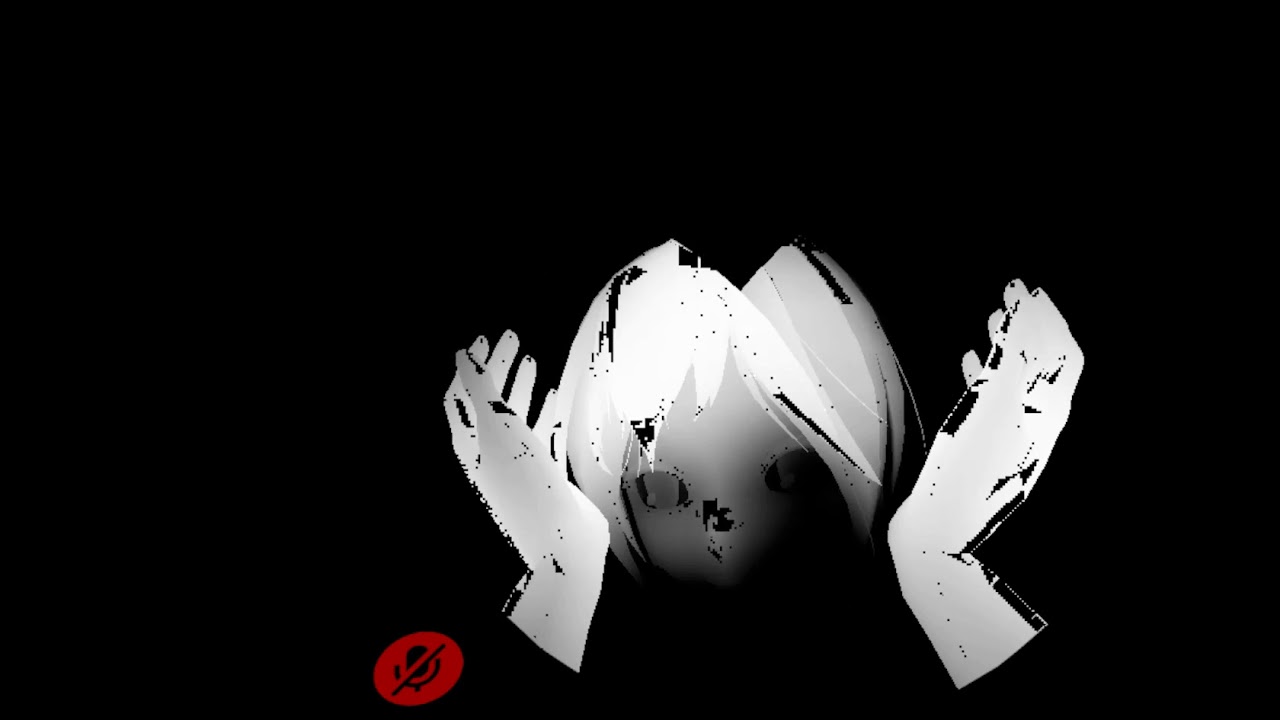
Inspired by Unknown Squid's blind girl avatar in Gearbell's Running Blind world, I made my own blind avatar, the Maiden In Black from Demon's Souls. The bottom half of the cane has "sight" just like her hands, but the tip has a bigger radius.
Like this
brittle plinth
It could definitely be done like that video by using lighting tricks, but I’d imagine that’s the worst way
modest tide
I was thinking maybe this is swapping out all the shaders to be the same one and the shader tracks the controllers, and when the controllers are close it lights up? and how much it lights up is based on distance?
brittle plinth
I’m not sure you can do that with just shaders though
modest tide
Isnt C# scripting banned form VRC though? I thought it had to be done with only shaders
brittle plinth
It’s banned for avatars, yeah
So unless you can do it using only shaders and animations, you’ll need a different method
It would be possible by using a shader override sphere that only the person using the avatar sees, by making everything flat white but not lit up and then sticking a light on the end of the staff/on the hands, but sticking lights on an avatar is generally not something you want to do.
modest tide
That's an interesting idea. I need to find out how those awful spam avatars are made. Somehow they make other avatars see things like a HUD or make their world trippy, or zoom in on something. There has to be useful methods involved in that
brittle plinth
Of course, for that you’d have to make it either completely override the shader on objects or apply an extra pass that overwrites the results of previous passes.
And again, lights on avatars is discouraged
past pewter
Depends on the shader if they have a slider for emission.
Just start recording the animation and move the slider around and it should keyframe it.
brittle plinth
If you’re making a custom shader, you can do it by feeding time into a cosine and multiplying the emission texture by that
steep swift
@silver parrot You can use this, but you have to follow the directions:
- First, set it up with Standard to have emission set up as you want it looking in the brightest point of the pulsing. Make sure Emission is checked.
- Then, switch to StandardPulsing. Adjust the Alpha channel of the Emission color to control how brightly it pulses.
- Adjust the Pulse Speed to control the amount of time between pulses.
Do it in this order because StandardPulsing doesn't have a shader inspector, so if you use it first, it won't set the keywords correctly to enable emission.
I will say - you can do the same with an animation clip - it is possible to make a animation track where you smoothly transition between two different emission colors
 light wedge
.
 lilac locust
Anyone know what shaders are still visible when safety settings are turned on?
Is it only the VRchat shaders found in the SDK?
light urchin
VRChat
This page serves as a description of the Shader Blocking System, how it operates, and how shader authors can work with it so that their shader falls back gracefully when a user has Shaders blocked on an avatar using a given shader. When a shader is blocked by the Safety System...
Here's all the info about the shader blocking system
lilac locust
Thank you!
 gusty geyser
What website can I find some good free shaders
 graceful iris
does anyone know where i can find a shader that puts a picture on someones screen?
I am trying to use shaders to attach a GUI to my screen (in the avatar)
sonic shore
is cubed shaders still supported?
past pewter
It's considered depreciated and may stop working after any update
sonic shore
hmmm i see
steep swift
@sonic shore Silent has offered to maintain an updated version of cubed's shaders: https://github.com/s-ilent/Cubeds-Unity-Shaders
That said..., you should consider trying out other shaders. there are tons of good ones
GitHub
A compilation of custom shaders for Unity3D. Contribute to s-ilent/Cubeds-Unity-Shaders development by creating an account on GitHub.
including silent's own toon shader: https://gitlab.com/s-ilent/SCSS/
GitLab
A surface shader for Unity providing cel-shading. (Forward rendering only)
sonic shore
Thank you for you help @steep swift
 warm valve
what shader would you guys recommend for doa models? standard doesn't look too good
steep swift
@warm valve take a look at this: https://gitlab.com/s-ilent/standard-subsurface-scattering it's designed for a more realistic look in models, which I think would fit the DOA style

GitLab
A simple subsurface scattering shader for Unity/VRchat that implements an approximation of a subsurface scattering effect.
warm valve
ohh perfect I'll try it out now thanks lyuma
was actually wondering what shader silent used on their models
cause saw them sometimes and thought it does fit these kinds of models
steep swift
Well on many models, that would be Silent's cel shading shader. They also have a anisotropic hair shader
https://gitlab.com/s-ilent/SCSS is the usual one, but it's not a good fit for something that's really going for a realistic look
GitLab
A surface shader for Unity providing cel-shading. (Forward rendering only)
warm valve
yeah usually I use uts2-ac for anime looking models but it wouldn't quite fit this model and standard sorta makes the skin look like a potato
steep swift
ACLS can get closer to a realistic look that ACiiL's previous shader, but it's still a toon shader. Some things do need more of a standard PBR look
Yeah that potato skin is what silent's subsurface scattering shader is supposed to fix. Otherwise it should light similarly to standard
@velvet sorrel in case you have suggestions
velvet sorrel
Yeah, my SSS shader is made for realistic-y models
Make sure you have either a thickness mask or select "Invert Thickness", and enable Skin Scattering for the best effect
warm valve
that looks better thanks @velvet sorrel
anything you'd recommend for the eyes?
guess setting the smoothness high works
velvet sorrel
Yeah, just setting the smoothness to ~1 will work
warm valve
sss doesn't have transparency right? do you just use standard instead for the hair?
warm valve
oh right I forgot lyuma mentioned it
https://gitlab.com/s-ilent/hair-with-anisotropy this one right
thanks
hollow plover
helloo, im intrested in rendering Eyebrows infron o f the geometrey, i have separated them already, but i dont know what sahder to use o how to set it up, to render them in fron in unity, any suggestions? or is it even possible in vchat?
@cyan gale check this out!
https://www.youtube.com/watch?v=8QUG2OYroO8
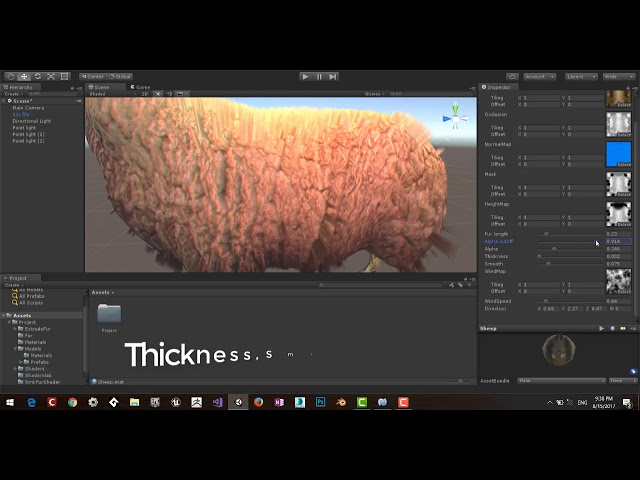
Created By Seyed Mortaza Kamaly
you can download it from my github:
https://github.com/smkplus/FurShader
no problem feeel free to msg me if you need any help!
velvet sorrel
@cyan gale https://xiexe.booth.pm/items/1084711

VRとパフォーマンスを主にした本格的獣シェーダー ほかの似たようなシェーダーはレンダリングパス数が多いため、ラグなどを起こしやすいのが多いです。 私のは、すべてワンパス。 毛と肌のレーヤー別々に、カスタムのRampテクスチャなど可能。色合い, テクスチャで毛の長さの調整,コーミング,排出度,重力度、すべて可能 This is a fur shader, specifically made with VR and performance in mind! Most fur shaders will have upwards of 20 passes ...
 frosty oar
I was playing with Xiexe's fur shader earlier and it just...didn't look good. I dunno what settings I have wrong, but the example materials imported broken :\
sorta looks like fur, but just looked overally blurry instead
steep swift
@frosty oar use game view in unity editor
Scene view doesn't support MSAA without some dlls and hacks
Thanks Unity 2018
frosty oar
hm, now it's just magenta. throwing a shader script error. something to do with the shadows
maybe that's because I'm baking lights atm which is taking foreeeeever. dunno what I changed but it's like two hours to bake now :E
steep swift
You're using fur in a world? I don't think it would affect light baking - not sure
If you are building for Quest, or if you are developing on Mac, the fur shader might be pink. Only other thing is maybe it doesn't support lightmaps since it was designed for avatars and not to be baked
frosty oar
wasn't really planning on it but it could make for a nice rug texture so I may use it. What's weird is it worked the first time I played around with it, but not now...
Shader error in 'Xiexe/XSFur': invalid subscript '_ShadowCoord' at Assets/Shaders/XSFur/Shader/XSFGeometry.cginc(69) (on d3d11)
I must've messed with the lighting in some way
steep swift
Ah, classic unity.
Yeah do you have any realtime lights or shadows enabled?
Might be good to join Xiexe's discord and ask there honestly
frosty oar
lights are static except for sun which is mixed and shadows are on for most objects, I haven't specifically touched shadows
I let the baking run overnight and it didn't finish, so I think it hung up somewhere
 frosty igloo
Has anybody seen the animated rainbow outline shader? I have it on a lot of my avatars, but I made them on my old computer and I've lost the shader.
 tired halo
anyone have an aura shader? i want to experiment with shaders for some models (mainly dragon ball atm but im always happy to experiment) i cant seem to find anything with how google has waaaaayyyy too many search results that lead to absolutely nothing
 lethal nacelle
@tired halo define aura shader
because depending on what you want you can probably make do with either particles, really finely tuned scrolling emissions, or both
some vrc toon shaders like poiyomi come with too many tools in the base ass shader to do wacky shit with so
steep swift
@tired halo you can try this shell-based approach: at adding a bloom-like glow https://hhotatea.booth.pm/items/1382159
It's a little unperformant for high poly models. I'd suggest editing the shader in a text editor and reduce the "#define roop" value to be way way less. I'd try 6 or maybe 8.

Unity上で使用可能のオブジェクト単位でBloomのような表現を実装できるシェーダーです。 Mobile端末など負荷の都合でBloomが実装できない環境や、VRChatのアバターのような自分でBloomを実装できない環境で使用してください。 ~規約 ・著作権は製作者に帰属します。 ・本製品を使って発生した問題に対しては製作者は一切の責任を負いません。 許可事項 ・改変・解析 ・二次配布(連絡あったらうれしい)(クレジットは"ほたて@HHOTATEA_VRC") 禁止事項 ・迷惑行為等 ~連絡先 Twitter : HHOTATEA_VRC Dis...
 dawn vapor
Hey guys, I'm using poiyomi for my shaders atm and I'm not too experienced with matcaps and such. But as an example, let's say I have a pair of boots that are made out of leather, and there's metal spikes on the boots. How would I go about adding a matcap to the leathery part and a separate matcap to the metal?
Seems like I'd need to separate the leather and metal into two separate materials and just apply different matcaps, but this also seems like extra work and materials I don't need, is there a good way to do it?
Or as another example, what if I wanted a matcap applied to only the metal and no matcaps on the rest of the boots
lethal rock
Typically you need to have atlasing features in the shader for that, if they cannot be found you have to split the material
light urchin
Use the two matcaps and mask each to where you want them
dawn vapor
Oh so the "mask" is essentially where you want the matcap to apply to?
because I was messing with it on another model and couldn't seem to get it right
light urchin
Yes white is where it applies and black is where it doesn't
dawn vapor
Ah ok cool, so the same way you normally exclude textures for emissions
I'll have to give it a go 😄
light urchin
👌
dawn vapor
Thanks~
 shadow sundial
could anyone help me on fixxing this?
brittle plinth
You'll need to share what the issue is for anyone to know whether they can help
past pewter
With your visemes?
steep swift
Yes: you'd do the classic approach where you go to edit mode in blender, select all, shift-D to duplicate the faces, spacebar, flip normals, Alt-S to extrude along normals, and go by a really small amount so it's a few pixels thick
I'd recommend not selecting the face
If you have access to shaders, but you don't want to use a geometry stage or extra outline pass, you would also take this type of approach, but you would mark the duplicate faces slide the UVs over, or if you want to get really fancy, calculate the correct direction for the outline to go (along normals is not always correct on sharp edges) , and then change the vertex shader to extrude a precise number of pixels in the direction of the normal (or of the vertex color if you do the complex method)
@sonic shore
If you pull out Octuplex's default avatar in VRChat, I believe he bakes normals the first way I suggested
past pewter
Does anyone know how to fix a shader issue I am having? I am using poiyomi toon with both rim lighting and matcap. What happens is my avatar will blink or talk and the lighting and matcap move, making it appear as though the mesh is. I thought it was just the sdk so I switched back to the last one I got but the shader is still broken.
steep swift
@past pewter Please ALWAYS tick Legacy Blend Shape Normals in import settings. https://cdn.discordapp.com/attachments/429349528156504064/696540377242664970/legacyblendshape.png
Not only does it cause shading to go crazy over your whole model while talking, but apparently it can take a 3MB avatar and make it 90MB !!!
It's not a shader issue at all. Rather, it's a unity thing
past pewter
I wondered why my avatars were taking so long to load. I had atlassed my avatars down to 3 material slots and was so confused. Thank you so much @steep swift !
steep swift
Yeah the default import settings are such that unity computes bad normals for every vertex and then stores the difference between the vertex normal and the badly computed normals, even if the blend shape doesn't affect that vertex!
So the 100MB is actually the mesh data, not the textures
past pewter
That is so stupid.
 lilac osprey
Does anyone know the shader which anyone but friends can see?
 cold latch
Question, let's say I have a hollow dome and I want to put things inside of it. Is there a way to make it so I can't see the stuff from the outside of it (make it show the skybox or something)
cold latch
I got a similar result applying a "mirror" without reflections on the dome, but I don't think it is a good solution
remote bloom
no, thats exactly what you should do
 cunning aspen
Hey, I was wondering if anyone knew how to get this working? https://assetstore.unity.com/packages/vfx/shaders/fullscreen-camera-effects/realistic-rain-drop-121600 I swear I have seen a thousand people use this shader before. I did install lwr. Do I need to apply it to project settings/graphics to work, or can I apply it to one material only? Also, are the scripts supposed to go in overrides? I'm afraid I am really confused/don't know much about Unity.

Add depth to your project with Realistic Rain Drop asset from Jim. Find this & more VFX options on the Unity Asset Store.
rich lake
Well if it comes with scripts you cant use them, which might make the shaders not work
cunning aspen
Hm. Okay. I am pretty sure I have seen this same asset quite a few times, but perhaps I am in error.
brittle plinth
You may have seen a different raindrop shader
cunning aspen
It is quite possible; it is usually the same one---it seems to be quite popular. This one looks exact to a t, but it may be the wrong one for all I know. Does anyone have any recommendations for rain on windows, then? Also, thank you for the responses.
cold latch
I discovered how to make a "Tardis effect"
Get your shader and set it to "Geometry -1" (1999) on Queue. GG.
cold latch
Oooor... not. It gave me the Doom Out of Bounds effect
cold latch
I don't think it is working ;w;
if I use a mirror it will "break" the skybox once I get to the northern part of the dome
frosty oar
My water shader has gone invisible after switching to baked lighting (with bakery). I've been playing with settings trying to get it to appear again and I noticed that if I change my camera to "deferred" instead of "forward" that the water appears again. It doesn't look right, and the trees lookweird, but at least it's not invisible. Any ideas? :\
steep swift
yo, what'cha need help with
 cloud plover
Awesome
So I accidentally switched the texture to another for my eyes
How do I switch the texture back
steep swift
do you know where the original texture is?
cloud plover
Yes
steep swift
select the mesh, find the material used for the eyes, and drag the original texture back into the "Albedo" or "Diffuse" or "Main texture" slot
cloud plover
It happened because I had a preset for my hair in poiyomi and I thought If I used the same preset, I’d get the same effect for my eyes
I just want to add the poiyomi glitter haha
steep swift
ah, I see... you might need a different UV scale for the glitter
it might be too small to see if the eyes are scaled to a whole texture
past pewter
Use snipping tool or gyazo to take screenshots.
If the material is greyed out, that means you have to extract the material from the prefab
 lucid spindle
I'm almost certain I've done something wrong here but is there any reason that uv2s scale value would be so drastically different from in and out of play mode. not in play mode
in play mode
I've encountered a difference with vertex displacement and that was an easy fix, but this i have no idea
tribal flame
Does someone have a shader for transparent mirrors?
lucid spindle
its a world, ive found a temp fix that involves multiplying the tiling by 115. i haven't tried disabling batching yet though
steep swift
@tribal flame what do you want exactly? Can you explain more what you want it to look like?
Glass? Or the avatars are opaque but the rest is see through
tribal flame
@steep swift default mirror you can show different layers in its component, but the difference would be that you can change it to have transparancy like glass
steep swift
You can try this:
https://cdn.discordapp.com/attachments/700439610827866152/701061595861614702/MirrorTransparent.shader
Unless you customize the skybox shader to be transparent in mirror, set it as follows:
Use mirror alpha to 0
Color: set the alpha really low
SrcFactor to One, DstFactor to OneMinusSrcAlpha
@tribal flame
tribal flame
@steep swift thank you. should I be able to see the mirror reflection in unity or does it only work inside vrchat?
steep swift
You must set it on the Shader slot of the VRC Mirror Reflection script in addition to putting it on the material
It's kind of a special thing with mirrors that there's a slot specifically for the shader
If you do that and turn on the mirror in the unity editor, you should be able to see it... put a cube in front
tribal flame
ah alright. very good! :D
 tired token
@lucid spindle Does it happen in play mode?
wait me dumb
chances are it's a funky shader or batching
I'd try and use a different shader or disabling batching
brittle plinth
Do any of the shaders that the blocking system can fall back to allow both specular and metalness?
steep swift
If you name the shader one of these names, it will fall back correctly to metallic or specular:
"Standard",
"Standard (Specular setup)",
VRChat
This page serves as a description of the Shader Blocking System, how it operates, and how shader authors can work with it so that their shader falls back gracefully when a user has Shaders blocked on an avatar using a given shader. When a shader is blocked by the Safety System...
brittle plinth
I understand that, but I have both metalness and specular. That only allows one or the other.
steep swift
I mean, if it's not possible to achieve your effect with one of the unity builtin shaders or with an off the shelf toon shader, then it won't be possible to make it show up the way you want in the shader fallback system
brittle plinth
That's frustrating
brittle plinth
If I wanted to make a shader that implements both specular and metalness, would I add the specular lighting on top of the metallic?
frosty oar
Looking for a water shader, preferably one with foam at the boundaries. The one I bought isn't playing nice with bakery and neither is Silent's which I tried earlier today
 blazing plover
is there a tutorial for using silent's anywhere? when i try importing, it just makes any material turn pink and claims it "failed to compile"? it doesn't have a package file either, so it's not like i forgot to import that
velvet sorrel
Hmm, are you on OSX?
blazing plover
nope
velvet sorrel
If you have an error like that, try
- right-clicking the folder in Unity and selecting Reimport
blazing plover
no, i was trying to drag in the shader because i didnt see a package file, aha
velvet sorrel
Oh no, I think the install instructions went missing last time I updated the page. To install it, drop the contents of the Assets folder into your Assets folder. Don't just drop the .shader file in!
blazing plover
yeah, i just now figured that out ^^;;
cubed was the only thing i used back in '18, and it was a simple .package
im learning!
velvet sorrel
@frosty oar You've baked lighting for the entire world? If you have baked lighting, then Unity will disable the depth buffer, which contains the depth information used to render the foam.
To work around this, follow the instructions Xiexe's provided on his page, and then water shaders and other depth effects will work on your world.
https://github.com/Xiexe/XSVolumetrics
tribal flame
I'm having trouble finding a good glass shader for unity 2018 that is working. Anyone have one?
frosty oar
@velvet sorrel I'll try that later, thanks. I wonder if that's what was causing issues with the other water shader as well, as whatever mechanic that determined how the foam caps would render broke and rendered foam across the entire surface. My baked lighting in general is kinda wonky for unknown reasons. Probably baking in the wrong mode :\
steep swift
@tribal flame Try this one and see if it works: https://gitlab.com/s-ilent/fake-glass
GitLab
A shader for Unity that (ab)uses some Unity features to produce glass-like glass.
 quasi lion
Does anyone have any shaders that mimic glass but in a cel-shaded kinda way
tribal flame
@steep swift
I can see It would look nice but it splits RGB somehow into something weird
velvet sorrel
Change the settings a bit
 sullen sable
since the cubed shaders don't really work anymore, which shaders are common nowdays for skin and clothes?
past pewter
I think the really big names are Poiyomi's, Silent's and NoeNoe's
past pewter
There's differences between them and each other them have shaders for different situations

 lunar silo
i have another question, what are these textures usually used for?
steep swift
@lunar silo those are ramp textures commonly found on MMD models. Most toon shaders have slots for them, depending on what style you are looking for. If you're looking to replicate the MMD look, I'd suggest trying Synergiance's Shader
lunar silo
thx!
tribal flame
@velvet sorrel I tried, but that didnt do much about that problem
 vapid inlet
anyone know of a shader that can do something like this
like when you look through an object with this shader you can see whats behind it with an outline or solid
i want an effect like this
steep swift
Commonly done with an extra camera with only Player layer selected, so it filters out world geometry
You can do tricks to show transparent meshes behind other things, for example nameplates
But likely opaque geometry, including avatars, will generally be occluded by world geometry
velvet sorrel
@tribal flame The power slider at the bottom, setting it to zero disables the effect
cloud plover
Hey guys do you know why poiyomi takes eons on my computer
 arctic ruin
Does anyone know if there's any public shaders that can be used to trigger a "fadein" and "fadeout" effect with animation
 unique plume
does anyone know a shader to make avatars only visible in a mirror?
 halcyon dove
@unique plume Poiyomi shaders has this
unique plume
thx a ton tho how do you get to that screen?
 livid hamlet
@halcyon dove My shader options look completely different... do I have an older version?
light urchin
@livid hamlet yes you have an old version that absolutely should not be used anymore you can get the latest version here
https://github.com/poiyomi/PoiyomiToonShader/releases
GitHub
A feature rich toon shader for unity and VR Chat. Contribute to poiyomi/PoiyomiToonShader development by creating an account on GitHub.
livid hamlet
@light urchin But this is exactly the version I'm using right now... 5.4.14 D:
livid hamlet
Let me check...
light urchin
You can click the shader selector and switch the shader on materials
Anything Poiyomi Master should not be used
 light urchin
Switch to the one's under Toon
light urchin
Yeah
livid hamlet
Alright, there we go! Thank you so much!
light urchin
No worries
neon herald
so look for inside and outside invisible.
 lucid fog
Anyone know where I can find a rain drop shader
sonic shore
How much fps do shaders take?
Not talking about the obvious ones that lag
But how much vs standard or mobile ones
remote bloom
from experiences, maybe 1-3 fps drop, but barely noticeable
sonic shore
@remote bloom hmmm so me making outlines on my model in blender made her jump to 98k from 32k to avoid using cubed shaders ended up costing fps for people xD @remote bloom
remote bloom
sonic shore
The outlines without shaders
steep swift
@sonic shore Probably you're paying more for skinning overhead than you saved with a simplified shader
sonic shore
Yea sadly
steep swift
You may be able to split the face to avoid blendshape overhead
sonic shore
The only advantage is she looks the same regardless of shaders safety
steep swift
having the face in a separate mesh can improve performance, but VRChat's performance rank system may punish you for it
and even then -- you're still paying for skinning overhead, even though skinning is done on the GPU
I think if your mesh were low poly, it might be a performance gain. but 32k is already a lot...
on the other hand, it's the only way to have outlines on quest... :-p
actually, I believe VRChat's safety system allows outlines to work
Your shader must contain the word "Outline"
sonic shore
Yea she were on the heavy side
It's sad that she is very poor now I hate that I don't know if possibley she can be the same without going over 70k
The shaders cubed it was outline I remember I tested it removes it in safety and it's gone on quest completely.
steep swift
did your shader have outline in the name
also cubed shaders have not been supported for a while. I don't think that version of cubed said outline in the name as it was last edited before the shader blocking system even existed
sonic shore
I don't remember exactly
I know
Hmmm
What shaders support outlines so I can make sure if it's true Damm all that work on her was unnecessary xD
sonic shore
its called outline mode
and yea indeed outline is in the toon lit for fallback
but it was affected by safety for cubed
past pewter
Oddly I'm getting this issue with the VRChat mobile toon lit shader and I'm not sure what's going on
Autofix says to remove the keywords but I don't know if that's a good idea
remote bloom
up to you if you wanna optimize it
light urchin
None of those keywords are used by toon lit you should absolutely remove them if that's the shader you are using
past pewter
I see, I'll keep that in mind, it only happened to me with the new SDK so perhaps something is weird there. Going back didn't give me an issue
light urchin
The keywords are most likely leftovers from some other shaders you've had on the material
It's really bad practice to leave unused keywords on materials especially if they are non standard which the sdk will warn you about
past pewter
Hm, interesting, the only other shader I had on that before switching to a fresh project was standard and poiyomi's.
light urchin
Was it poiyomi master shader? 
sonic shore
most of the time there should be 0 diffrance unless you using some weird stuff make a backup before removing the keywords tho
past pewter
It was poiyomi toon opaque
light urchin
If it's a new version of poiyomi and standard none of those should be on the material
But in any case you should and you can remove them
This video by poiyomi explains the keyword issue in general if you wanna learn more
https://youtu.be/2KE8MkVP6z8
past pewter
Fun Fact: Poiyomi is pretty cool but he can be a hyperactive little shit sometimes lol
Huh I see
 blazing inlet
how so?
also that's a cool fun fact, but nobody really asked
The dude is an overall nice guy and is working pretty hard to make really nice shaders for us.
And, at that, his shaders are some of the most optimized ones around 🤷♂️
(still don't get the people who say otherwise)
velvet sorrel
It's no real secret that it has performance problems. That's simply the burden you carry from supporting so many different random effects.
But, in practise, the overall cost of shaders in VRC is low. And in reality, people aren't going to flip every switch and turn up every option to the maximum while using it.
blazing inlet
yeah and while people do that sort of shit with poiyomi, people will blame the shader rather than the player themselves
because people are dumb
velvet sorrel
Well, from my perspective, you can just limit people to using stuff that isn't bad for other people.
blazing inlet
I'd still say it's on the user rather than the shader creator themselves. Poiyomi is merely adding onto his shader, people who don't know shit about optimization will continue to blame him rather than the people who overload their models with his features. Very flawed and blind logic, in my opinion. People give Poiyomi a ton of shit for it being 'unoptimized', when it was proven to be one of the better ones out there even with the amount of shit it has.
hate the player not the shader B)
also this is random, but I've been called retarded for using poiyomi once. People like that are great.
velvet sorrel
That's why I'm picky about releasing only things that are lightweight. I don't think it's really bold to say that releasing unoptimised things for wide use is bad.
blazing inlet
It's so-so, I guess
but what exactly can you do
The dude wants to add more to his shit, it's not exactly his fault that people like to use.. literally everything onto one model
velvet sorrel
In practise, he adds new things because it drives people to pay him to add more things. Though, I'm not saying that is a bad thing for him to do, but it fits well into the mould of a perverse incentive.
blazing inlet
I wouldn't necessarily say that he only adds onto his shader for money. Although I don't know him on a personal level, that's just left up in the air really. But not a bad thing either, gotta make money for what you do somehow.
I'd still blame the players no matter what. People have to understand how to optimize their shit at some point, otherwise it's never going to get any better for anyone.
velvet sorrel
From an author's perspective, I think optimising material settings is a very different problem to general optimisation of models...
blazing inlet
How so?
velvet sorrel
When someone optimises a model, they're working at a low level. They see it has X vertices, Y materials, Z meshes. They might not understand where the costs of each of these come in exactly. But they have a metrix for the performance.
And if I say, like, "you should have your face with shape keys on a seperate mesh, and your body with no shapekeys, because shapekeys make each vertex more expensive to skin", that's not hard to grasp
But when you're changing settings on a material, you're at a higher level.
(If you don't understand the high/low level thing, think about it like "distance off the ground from a construction site".)
blazing inlet
Oh no I understand.
velvet sorrel
You don't exactly know how expensive changes are to implement, because you don't see the code unless you go down there yourself to check it out.
And people don't have a good way to gauge how expensive something is to render without getting into graphics programming.
"Oh, let's just blur this glass!"
"Oh, let's just warp the refraction!"
blazing inlet
Exactly, and I get that. But I feel as if people should actually take feedback from others when somebody comments on their models being laggy, or overall just unoptimized. Most people claim that their PC is at fault, or that it's the world, or even refute it and claim that their base model is optimized. Because it's in the green, even though in reality it's most likely their materials at fault. At some point people have to come to realize that materials also drop performance drastically, and with any shader at that.
I don't think it's hard to understand that having a ton of effects and different settings on a shader would lag somebody out like that, or just make your model generally less optimized than it should be.
velvet sorrel
But you can also give people lots of parameters and still run fast.
blazing inlet
Your point?
velvet sorrel
Conversely, you can give people lots of easy to use parameters that let you quickly dash out an effect in a totally unoptimised way...
If you force people to sit down and think, there's a good chance they will.
But when the incentive's to let them hack it out however they like, then it becomes kind of a problem.
It doesn't matter how many warnings you throw at them, because people don't have the right level of understanding to even begin to care.
That's just how it goes.
blazing inlet
And exactly how is it the authors fault at that point?
Doesn't that further prove my point??
People don't care. It's as simple as that.
blazing inlet
People care how they look, but they don't care about how it runs.
Alot of people possess that mindset in this game.
velvet sorrel
So you limit their options and force them to find a better solution of getting the same effect. Or wait for someone to propose something that's actually impossible within the liimitations.
blazing inlet
And yet I still disagree, because at the end of the day it's the player at fault for cranking everything up on their shader. An author shouldn't have to cripple themselves for the sake of people who're unaware of the very simple fact that more shit means less optimization.
velvet sorrel
How is it the player's fault, really, if they don't know the costs of their actions?
blazing inlet
I really don't think you understand my point at all.
velvet sorrel
Nah, it kind of shoots over my head because I don't associate good performance and a conservative feature set with being crippled.
blazing inlet
Then I don't exactly know what to tell you, because I've already stated my opinion on the matter above. I don't feel the need to repeat myself either because I don't think I've minced my words.
We'll leave it at a agree-to-disagree.
velvet sorrel
In subjective, limited experience, I've never seen anything impressive done with poiyomi's shader
People might be so desperate to stand out that they tick every box, but the end result looks the same as any other flat-lit MMD model with glowing hair...
blazing inlet
I'm sorry but you should probably look into more creations with poiyomi shader.
velvet sorrel
You're welcome to send me your favourites.
blazing inlet
Sure, I'll pluck a few out when I have time
 hasty raven
hello guys!
I don't know if you remember me Silent, but we used to talk a lot in here
solid grail
There's something overtly creepy about the way you chose to say that.
can't put my finger on it
hasty raven
I didn't mean it to be that way.
I'm actually that Infinite guy who came in here a lot about shaders and what not
I apologize
I've been out of this server for 3 months, so I apologize if you don't remember me
steep swift
i've already asnwered the question: the fallback depends on the name of the shader. if you edit the name to say Outline somewhere and maybe also Toon, it will fallback to outline
if you don't want to edit the first Shader "" line of the shader, try xstoon or poiyomi: i think those follow the naming rule
lethal nacelle
@velvet sorrel sorry for the ping but im still proud of my simple ass avatar that runs poiyomi https://media.discordapp.net/attachments/639259173712035850/657303845025611776/unknown-26-1.png https://media.discordapp.net/attachments/639259173712035850/657303844564500520/yr4sr0f-1.png


i plan on opening my shader horizons again after im done making an actual scratch-made avatar, so i wont be doing kitbashes again
i uh
im trying to go for a toonish-style that's flat but also kinda like tf2 shading so 0 0
i think when it comes to encouraging a culture of people optimizing more, it's a mutual effort on both sides. people need to care, and creators need to force people to care
me personally, i was talking about this earlier, but sinc ei plan on making a lot of public avatars, ii also plan on shilling them a lot
call me cheap but i rlly like the aesthetic of eboy and egirl avatars when they arent shit
so i wanna make the best ones so people start using them a lot
i think exercising the most quality control on public avatars would have the greatest difference in overall in-game performance
velvet sorrel
That looks pretty simple, honestly
velvet sorrel
Simple is good
lethal nacelle
i rarely see avatars like that often. or maybe im not looking in the right spots
avatars that are brave enough to not be flat-lit
i do wanna try more complex shading styles tho
especially more realistic ones
velvet sorrel
I'll be smug and say, I know lots of people who use my shader, and they all go for nice, simple lighting styles
lethal nacelle
mm 0u0
velvet sorrel
Without being flat lit
lethal nacelle
one thing i rlly like doing is messing around with eye stuffs
shit like this
i try to make as many parts of my avatar's lighting as dynamic as possible
no baked-in or painted-in highlights or shadows
its also why i dont like using normal anime outlines, i guess
velvet sorrel
Tell me more about this eye stuff
lethal nacelle
well so far most of my ideas have just been throwing shit at the wall and seeing what sticks
i noticed that apparently poiyomi patreon shaders have cool eye shit and i was like
"thats cool but fuck you i can already do it with the ten billion features that i dont use"
what i like doing is starting witha flat ass texture
like a simple gradient that makes my eyes look scary
then i add in base reflection colors with one matcap
heart details with another that's usually a color "one octave higher" than the last (red>pink)
i've been practicing toon specular and so far its really only worth it to do solid white highlights
anything else just looks like spoiled milk, or worse (ive tried tinted blue or red)
sometimes ill just use the same map for the heart details, sometimes a completely different highlight map
its a mess but like it works
velvet sorrel
That sounds like pretty normal stuff to me
lethal nacelle
and im still learning
yeah well i am a shader noob lol
afaik all of this shit is alien
its fun
velvet sorrel
But, all essentially stuff I already support
 velvet sorrel
Yeah, and those are for different matcaps, I take it
lethal nacelle

mhm, and this is the base texture
for the eye matcaps ive just been using a stock map that came with...some. asset. in my project somewhere. shrug
which is literally just a circle with an assortment of other brighter circles in it
cuz anything else just looks bad
velvet sorrel
There's a lot of neat stuff you can do with matcaps
lethal nacelle
i personally have only used them exclusively for hair and eye details
velvet sorrel
Since I added them to my shader I use them a lot
lethal nacelle
i kno theres a special kind of specular reflection you can use for toon hair but i personally like matcaps better for what i do to my hair
velvet sorrel
And I have an optimised matcap system so I can use them with an atlas and get a lot out of single materials
lethal nacelle
mm. ill be sure to check it out
the only hting that has concerned me about poiyomi is that, as said earlier, that it is definitely on the heavier side of things
and my avatars really aren't that complex, tho squeezing 4 materials into 1 is nice
but like. apparently some people look at me and instantly lose frames which is really fucking bad > <
velvet sorrel
Ooh, that's bad 👀
lethal nacelle
like one of my friends had to ask me why i drop them down to 50 or so when they look at me and i had a heart attack
its definitely not a common thing but still
ive been using vket avatars lately to compensate
and also because theyre cute
velvet sorrel
Vket avatars are cheaper to render than Poiyomi?
lethal nacelle
i think so. i think most of them are just running arktoon (lol) or less complex versions of poiyomi
velvet sorrel
Actually, every Vket avatar I've seen has used Unity-chan Toon Shader or Arktoon
I don't think I've seen any that use poiyomi except for one
lethal nacelle
i wanted to try uts2 but i didnt get it
it looks really neat but i dont see why i cant get similar effects with something else
and it definitely needs special treatment to work in most vrc lighting scenarios that i have no idea how to do right
velvet sorrel
UTS2 has some big problems with VRC because it doesn't use baked light unless there's no other light in the map
velvet sorrel
I'm making a new variant of my shader that'll handle the UTS2 settings and the really neat features but work in baked light
And I also want to add some other neat features too, like some features only Arktoon has
So, knowing why people use other shaders is super helpful to me
lethal nacelle
what does arktoon have anyway? i know its been like. deprecated for a while. is there a community branch thats still being updated?
velvet sorrel
Arktoon still works fine in 2018
It was updated when VRC was, and then the author announced they were finished with it
lethal nacelle
huh, nice
velvet sorrel
I think the main things it has are
- lighting controls like UCTS
- matcaps that affect lighting
- in-depth rimlight controls
- parallax emission
 last nexus
I’m using arktoon because the settings look simple
velvet sorrel
Is my shader really that scary? 👀
lethal nacelle
really? i couldnt get into arktoon because the settings spooked me
maybe its just because i use a lot of cibbi's and poiyomi which has dropdown UI cuz stuffs
i havent even touched unity in so long oh gosh
last nexus
I’m a shader writer so I know all techniques but I don’t know how to make an avatar look good. Your shader has options which I’m not sure how to use from an artistic perspective @velvet sorrel
lethal nacelle
i mean what i did was show my friend my avatars and tricked her into bullying some basic color theory into me
velvet sorrel
Aww. I try to design the options to be easy to understand and hard to shoot yourself with, but I guess that means I've failed?
lethal nacelle
everything from there has been intuition based. i dont even know how to begin studying 3d art properly. what i can say is that for the most part i only need normal maps, matcaps, rimlighting and emissions to get what i want, and pretty much all vrc toon shaders have that
 faint fulcrum
< used poiyomis dissolve to replicate tint mask behavior on top of multiple other stuff masked
yeah, not always the name of feature can say how it can be used
last nexus
It’s helpful to include examples in the manual and explain how your choice of parameters improves the visual quality @velvet sorrel
solid grail
I don't even use my own shader :v)
velvet sorrel
I'm not really sure what kind of examples I need to add
solid grail
I use cibbis shader for everything
only thing it doesn't have is my outlines which is understandable cause mine are wayyy more expensive comparatively.
in practice it's not bad at all unless someone makes them huge which looks bad anyway so I've never seen anyone do it
but the possibility is there 🤷♀️
last nexus
@velvet sorrel Maybe the ones you posted in showcase channel
velvet sorrel
Maybe I should add some demo scenes to the package, too...
solid grail
demo material presets
last nexus
Sure but I still want to see the explanation of parameter choice, unless you just tune it until it looks good
tired token
if settings spook you, you should check out UTS2!
velvet sorrel
Umm, I guess the problem with that is that a lot of the explanations of "this works this way" is literally correct, but I know that might not be super helpful
tired token
main texture is well, your main texture!
solid grail
I don't use most people's features anyway so I've never felt the need to use anything too complex
if I have an effect I want to make I'll make it myself in a away I can control
tired token
Emission was the last thing I added to my shader xd
lethal nacelle
ur outlines are pretty tho, theyre just not my thing rnnnnn > <
sonic shore
@lethal nacelle people got different tastes
I don't like shadows on my model you do this is what's nice in the game variety
But that red looks nice with cloths
That's headpats material
👍
lethal nacelle
u< thx
hasty raven
I actually wanted to try out new shader in the latest unity, but since I'm not going back to VRChat, I'm not going to upload anything
sonic shore
@hasty raven what's wrong something made you not like the game anymore?
hasty raven
Nah, it's a personal matter I've decided to do since most of the time ,and this is just me being honest, the majority of what I do isn't good for a guy my age
That's kinda why I left and decided to stay here in the vrchat community to better myself on how shaders work so I can get back
To playing VRChat when I go to my apartment
Because I'm not allowed to play vrchat in my home anymore
I hope that makes sense
I like the community, but I'd rather not play the game, that's about it
@sonic shore just so you know
hasty raven
also, I've got a pretty good knowledge about it
I want to keep using shaders here to improve on my designs for the near future
 brisk junco
Does anyone know how screenspace shaders are supposed to work in vrc without calling them via c# code
 stiff berry
you use a grab pass and calculate screen coordinates on an object that covers your entire screen
sonic shore
@hasty raven I see
Good luck
hasty raven
thanks Saadhero
brisk junco
Ohh
So if i want to e.g. separate the rgb of just a cutout of where my model is on the screen
I can just do a grab pass on my model?
Or do i have to sort of cut out a larger version of my model, like a stencil buffer
Since i want different colours to go slightly outside of where my model's edges are
Or avatar-induced bloom or things like that
near flax
if you want to draw outside your model, you'll have to render a bigger model
i.e. duplicate it with geometry shader, or add another pass
(this is how people usually do outlines or fur)
steep swift
GrabPass takes a snapshot of the whole screen, no matter what you do with it. That's also why it's slow, and why you should always use named grabpasses, such as GrabPass { "_GrabTexture" }
so what RedMage said above makes sense - you will be making a slightly bigger area around your avatar by doing essentially what outlines do, and that will sample data from the GrabPass
brisk junco
Didnt even kno unity had geometry shaders
I'm coming from opengl so just kinda getting used to everything sry
Is there any more efficient way to grab the area around an avatar object with multiple meshes in it or do i just have to put a new geometry shader pass on all of them
E.g. can i write to the stencil buffer in one pass and then just use the stencil buffer in the screen grab
near flax
can i write to the stencil buffer in one pass and then just use the stencil buffer in the screen grab
i don't see any reason why you wouldn't be able to
brisk junco
Does the stencil buffer retain its state between shaders on the same frame tho
Between passes maybe
But shaders might be pushing it
near flax
definitely between passes, and... probably between shaders?
wait yeah definitely between shaders
brisk junco
Oh ok sweet
As long as i dont use any other shaders with an outline i guess ehhehe
How do i tell what order materials are processed in
Are they all processed in parallel, with their grab stage going last?
Or at least is that a good way to think about it
near flax
they go in order of render queue, with some questionable rules about things that are in the same render queue
if you're doing a named grab pass, then iirc the first pass to write to it in the frame will be the only one to do so
if it's unnamed, it should do a grab every time it does a grab pass... so don't leave it unnamed
brisk junco
Hmm alright
Also i want a way to live edit either a UV map or a texture with a custom written unity shader running while i do
Is blender or substance painter a good bet, or maybe theres some way to edit stuff like that in unity
E.g. can i somehow compile the shader for blender
might just install roadkill and constantly go back and forth to unity to see how it's working
unless theres a better way
near flax
if you overwrite the FBX in your unity project by just exporting from blender to there, it should update
same with editing a texture
that's the best i know of
near flax
should be per mesh
brisk junco
ok perfect
near flax
you can actually put even more UVs if you use editor scripts to edit the model asset in unity, but that's more useful for encoding data than actually using them as UVs
8 channels
brisk junco
my mesh only has 1 UV right now so i'm trying to use the second uv for some weird shit
thanks for all the help btw this makes things much easier
near flax
👍
there's a lot of stuff to unity shaders and the documentation's pretty bad, so feel free to ask stuff
brisk junco
so for an file format external to the model that gives you 4 numbers of data per fragment you can just use a texture
but is there anything like that for vertices, like a UV map that's external to the model entirely
in unity
 stuck crystal
https://youtu.be/o7nYhIzcRys
How to make shader influence by object collider?
solid grail
probably just a camera directly overhead reading the depth and using it to offset the verts of the bread
steep swift
@brisk junco models in unity can have 8 uvs with 4 channels each, but you'll need to combine the uv channels with an editor script. The c# function you can call is SetUVs(0 through 7, List<Vector4>)
past pewter
What would be a good shader for a realistic model? I'm currently using Unlit since the standard one seems to make the textures have a fuzzy/low-res look to them.
steep swift
Standard is the correct answer to the above question
if you're seeing issues with standard, then that indicates a problem with normals, tangents or something else related to your lighting setup
the Unity default scene includes really crappy looking shadows on the directional light. I've seen that make stuff look awful from some angles. maybe try clicking the directional light and changing Shadows to No Shadows
Basically - Make sure to check Legacy Blend Shape Normals in the model import settings and consider setting Tangents to Import
@past pewter if you have a screenshot of how it looks bad that might also help
steep swift
Unity will downscale textures to 2048x2048 by default
find that texture and click it and change the import settings
past pewter
Well, using the Unlit shader makes it looks the same as it does in Blender.
So I don't think downscaling is the issue here.
And most of the textures are far below 2048
steep swift
can you show a screenshot of unlit shader in unity
comparing blender to unity is a bit hard
past pewter
Yeah, sure, just give me a minute.
steep swift
can you give the exact texture dimensions of the texture in blende
and double check that unity is the same
if I had to guess, it's an aliasing artifact due to Unity's default setting of "Non-Power of 2 -> ToNearest"
in the texture import
textures should be a power of two to look good
past pewter
solid grail
your light is pointing like
straight down
past pewter
First is standard shader, second is unlit shader.
solid grail
I know, the light in your scene is pointing straight down
or close to it
so everything is in shadow
past pewter
Moving the light source around doesn't seem to change anything with regular shader.
The weird haziness seems to go away or at least be less noticeable if I use spotlight as opposed to directional.
steep swift
@past pewter unlit and standard look the same to me
but they did look worse than blender in that first picture
so I'd suggest checking the import settings, and check if the texture is a power of two or not (what are the width and height of the actual texture file)
I mean sure they have different brightness levels. Unlit is generally going to look brighter than a lit shader, because unlit means assume lighting is 1.0 everywhere, and often things are darker than that
that model does look to have some detail and lighting baked into the textures, while standard is meant for a proper PBR setup
past pewter
Yeah, most of the textures are from 2010 and only some of them had specs maps.
steep swift
did you check if it's a power of two
past pewter
Some of them are.
It's mainly the small ones which aren't so not sure if that'd even have an impact.
steep swift
well it very well could
imagine, you have a texture that is 195x90 -> ToNearest will convert that thing to 256x64 and cause weird stretching and aliasing artifacts that are even more noticeable at low resolutions
@past pewter I'd suggest maybe turning off Generate Mip Maps and turning off power of two, or expand the texture canvas (without scaling anything), and then adjust the UVs in blender so they are still pixel perfect to the
 topaz juniper
Hi, I hope this is the right place to ask but I'm trying to make a video player on VRChat using the new SDK3, on the VRChat Docs it says to add a shader under Video/EmissiveGamma but I can't find this shader. Was this removed? Thanks ❤️
steep swift
I'd download a copy of the SDK2 and copy the shader from it
shaders are uploaded as part of the world, so you're free to use shaders from anywhere. if it was removed it's probably not intentional.
Do note... #announcements - VideoPlayer is currently turned off in SDK3
you will need to use SDK2 for videos
SDK3 / Udon is still in alpha, and there are many features not completed or production ready yet, so you need to be patient and just play with what is currently available
topaz juniper
Okay, thank you so much! 🙂
 restive badge
Is there a grass or general plant shader which works with VRChat that players or other objects can interact with? I'm thinking along the lines of moving through grass, and having the grass part and perhaps stay down for a bit and then spring back up. I've seen a snow shader in VRChat which allows you to make trails through it. Ideally, said shader could also be made to interact with objects in the world, so things moving through the grass other than players would also affect it. I've seen some cool shader hacks for grass done in Unity in the past using textures in clever ways, though I can't recall what any of those were called nor do I know if they'd work within VRChat.
 cloud locust
Got a question for peeps smarter than I am! How would one go about making their avatar "fullbright" like in the example pictures here: https://twitter.com/Roure117/status/1245958732711956485

A mystical fogs in the woods... here's Cai in VRchat modeled by .@beastpunks !
#furryart
#vrchat
#cai
Likes
264

 Twitter


 tired token
Please don't, it'll hurt everyone's eyes when you go into a dark area
 vital rivet


 tired token
that's not shadows, that's light & shadows.
 novel radish
Oops
near flax
@cloud locust just use the Unlit shader
cloud locust
Gotcha. Thanks for the tips and advice, @tired token @vital rivet and @near flax !
 stray badger
Working on a custom shader. How would I invert smoothness that is grabbed from a texture so it is applied as roughness?
stiff berry
roughness = 1 - smoothness
stray badger
So I got it to work, but at the effect of making everything that isn't meant to be smooth/rough shiny.
The shader I am working on uses a texture which contains roughness and metallic, as well as a blue channel (which I'm not sure of how it's used yet)
Green = smooth, red = metalness
stiff berry
float4 texCol = tex2D(_textureName, uv);
texCol.g = 1- texCol.g;
that wll only invert green
stray badger
@stiff berry no idea how I should be applying it.
UV2': undeclared identifier '_textureName' at line 49 (on d3d11)
stiff berry
that part of the code was just an example of what you should be looking for in your code. Somewhere you're sampling the texure with tex2D. Find that, and after that line do texCol.g = 1 - texCol.g; but don't use the name texCol if that's not the name it has
stray badger
Ah, gotcha
stiff berry
for example maybe you have
float4 c = tex2D(_MainTex, i.uv);
you add c.g = 1-c.g;
stray badger
stiff berry
yea so mg.g = 1- mg.g;
stray badger
So that should produce the result I'm looking for? There's still gloss in areas there shouldn't be.
stiff berry
assuming it's a roughness map, yes it should be correct
i have no clue if the map is actually storing roughness or not though
stray badger
Yup, green serves as roughness, with inverse for gloss.
It does.
That's how it can appear for example. A fair bit of smoothness on the face where there shouldn't be.
hmmm, if I do this
o.Smoothness = _Roughness * mg.g;
that should let me control it with the _Roughness slider I am using, correct?
stiff berry
yea
stray badger
Gotcha
It definitely adds seemingly more gloss/smoothness than it is meant to, odd.
Is there any chance the Blue channel could be interfering?
stiff berry
no i don't think so
stray badger
yeah, there's a fair bit of green in the blue/mask channel
Unfortunately I'd have no idea how to handle that stuff lol
stiff berry
but when you do mg.g it doesn't matter what's in red or blue channel. You're only taking the green channel there
stray badger
Yeah
A pixel off the blue channel has RGB 0,135,249
So there's green in it lol
So I just gotta lower it w/ the slider for now I guess
stiff berry
(0,135,249).g = 135
you could have any other numbers you want in red or blue it won't matter
stray badger
hmm