#shaders
2 messages · Page 13 of 1
 faint gulch
 weak wren
@faint gulch
Silent's subsurface scattering is nice on the skin/face
You can use Rero standard on the clothes and hair(cutout)
But make sure to use all the maps like normals, ambient occlusion
 past pewter
does anybody have a double sided shader that can disable backface culling?
 subtle timber
Hi, does anyone know a good way to get the soft glow effect on the moon on this picture?:
I liked the effect that "Draw Halo" had when I was using a Point Light inside of it, but I wasn't sure if that would carry over with baking.
 lethal nacelle
@subtle timber if its a world, just add some bloom
if its an avatar
eh
shrug
usually id just rely on post processing
subtle timber
@lethal nacelle Figured out how to add bloom, thank you!
 vestal solar
wait so, how come shaders are dimmed out?
 steep swift
@vestal solar go to the fbx model and click Extract Materials. Then you will be able to edit them.
lethal nacelle
fuck wrong person if youre reading this i accidentally pinged you
@subtle timber yoyoyo, are you putting the tracks from hawaii part ii in your world?
lethal nacelle
remember to compress your audio or i am comong to your house at 3am and ensuring that you will not be living forever tonight
lol
lethal nacelle
memory leaks are a big issue in this game and they can be migitated bit by bit by compressing as much as you can without losing quality
what is the world going to be called when it is finished?
lethal nacelle
fuck yeah duud
subtle timber
Message me on here so I'll remember to grab you when it's finished!
lethal nacelle
alriGht
 hexed ether
i guess this is a shader thing, does anybody know why when i delete every value and texture from this object it retains this weird speckled look? is it maybe the outdated baked lighting (haven't rebaked) or something? i'm not familiar enough with unity to know how to tell
considering it does this when i check non-linear light probe sh i'm going to assume yes
so i guess i'll just keep working and check how it looks after i bake again
might be more of a #world-development thing, sorry lol
 buoyant cargo
answered in #world-lighting 🌞
 pallid trench
shader that zooms in on things?
 opaque terrace
Does anyone happen to know a free (or at least cheap) deferred decal shader i can use on particles that's VR ready
 brittle plinth
"Deferred" and "VR ready" don't really go together. Is there a reason it can't be forward?
opaque terrace
I just need something that projects decals onto meshes inside a shader sphere
brittle plinth
Ah
opaque terrace
Whether its deferred or forward dosent really matter too much to me
brittle plinth
You'll want to use forward then, since deferred can't do transparency.
opaque terrace
👌 happen to know one?
brittle plinth
Sadly, no, but it shouldn't be too hard to make with a shader editor
Actually, you could probably use the standard particle shader
opaque terrace
Really? i didn't know it had a function that worked like how i need
brittle plinth
I might be misunderstanding what you're looking for. Do you have some sort of example?
opaque terrace
Yah hold on leme grab a screen cap of an avatar that has prety much what i need
steep swift
I'm pretty sure there's one in the database. What type of texture do you want? For example Neitri has a triplanar decal shader on their github
Deferred techniques use the depth texture
brittle plinth
Forward uses depth too
opaque terrace
Im trying to achieve a similar effect as this
Just in stead of ice ill be using it on a lightsaber for a melted trail when it colides with walls
brittle plinth
Hmm
opaque terrace
Hmm indeed, i cant remember for the life of me what shader the creator of the avatar said he used
steep swift
That looks like the triplanar mapped shader
https://github.com/netri/Neitri-Unity-Shaders/blob/master/World Triplanar Mapped.shader @opaque terrace

GitHub
Collection of shaders for Unity3D and VRChat. Contribute to netri/Neitri-Unity-Shaders development by creating an account on GitHub.
Read the setup instructions here: https://github.com/netri/Neitri-Unity-Shaders?files=1 especially the directional light settings
GitHub
Collection of shaders for Unity3D and VRChat. Contribute to netri/Neitri-Unity-Shaders development by creating an account on GitHub.
opaque terrace
Oh neitri has updated their github
steep swift
Quite a few times. They are quite active
opaque terrace
Wow there is a LOT more from the last time i looked
 stray badger
anyone know any way of quickly generating metallic and roughness textures?
 uneven loom
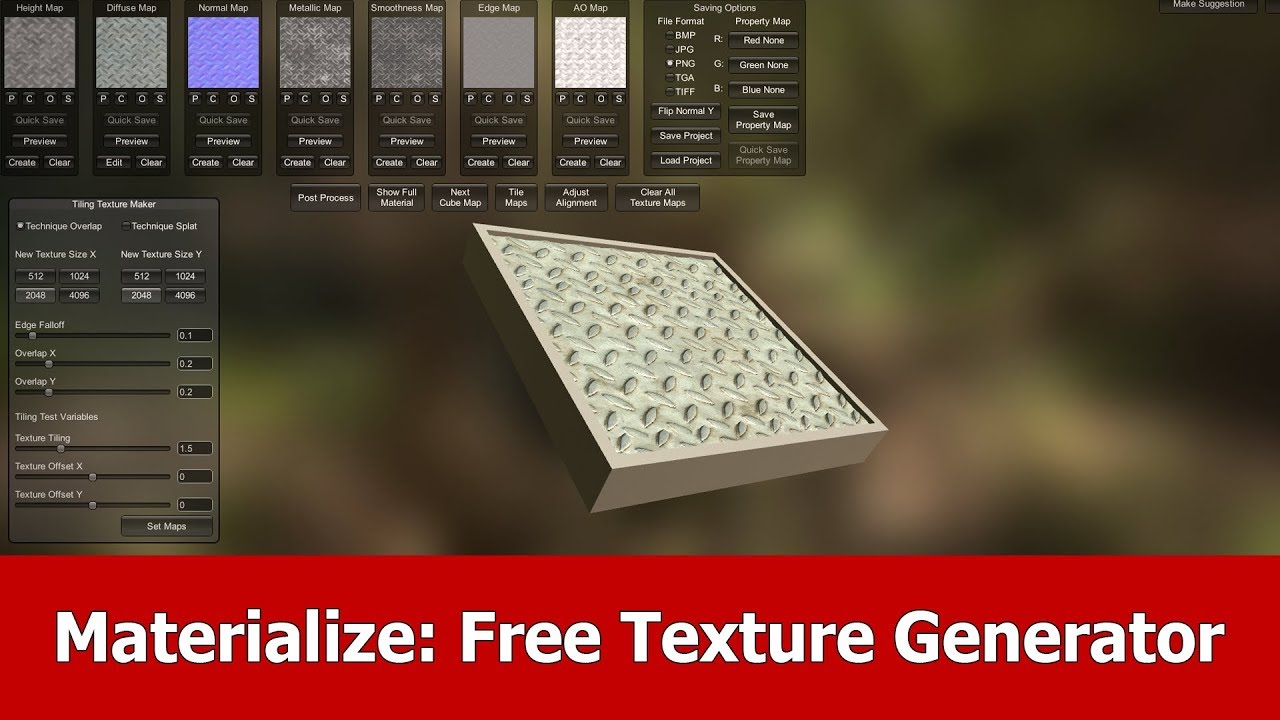
In this video I show you a new and free texture maps generating tool called Materialize.
The tool is created with Unity, it is for free and you can download it from this webpage:
http://boundingboxsoftware.com/materialize/
For demonstration I downloaded metal textures from ...
 fresh grove
Materialize is one of my favorite programs. It has stuck with me since minecraft resource packs and skyrim mods all the way to vrchat
 vale hemlock
There we go! My slime shader has been successfully upgraded! Now to redo all my animations to use the new features...
 tulip gull
Question
Can I make a shader in 2018.1 and then import that shader into Unity 2017.4.28f1
Since 2018 has the Shader Graph
 solid grail
No.
tulip gull
Is there a way to get Shader Graph on Unity 2017
Or transfer a shader to 2017 from 2018?
steep swift
@tulip gull Shader Graph (the unity feature) is not available for Legacy render pipeline, and definitely not available before unity 2018.
However, Amplify is possibly the best graph/node based shader editor you can get, and it does support Legacy pipeline as well as all unity versions from the past few years
tulip gull
I'm new to this so what is what
steep swift
The issue isn't transferring from 2017 and 2018, because the legacy pipeline in both unity versions is almost identical.
The issue is transferring a shader made on the new rendering pipeline to be used in Legacy
Unity starting in 2018, deprecated the Legacy render pipeline (which VRChat uses currently), and added two new scriptable pipelines: HDRP and URP (also known as LWRP)
However, the scriptable render pipelines are not VR ready yet, even as of unity 2018
Even in 2019, it's just starting to be stabilized...so there is no way to use content made for them, indefinitely.
tulip gull
I just want to install Shader Graph because I can see how to actually work.
steep swift
that's cool. You are free to play around with it on your own outside VRChat and get used to node based shading
So it's a decent tool for learning... but the shaders will not be usable in VRChat
steep swift
If you have money, I'd recommend spending it on Amplify. If not, you can try learning to write code yourself that does the same things as the nodes, or you can try Shader Forge, but you're going to have to hack around a bunch of bugs in it because it's super old and unmaintained
Shader Graph will not work in VRChat, as rero said
tulip gull
Will they ever update the shaders or the system itself to run on a better engine?
solid grail
They're upgrading unity versions next update but still before sg
otherwise they'd be forced to use lwrp or hdrp
or is lwrp called something else now
iunno
amplify is your best bet if you buy it and shaderforge is technically discontinued but free
tulip gull
Hmmm
Will shader graph ever be implemented into VRC or will it just be awhile
Now lets say I do a shader
Upload and optimize (I'll ask how later) and go into The Box for example
I do the shader and now let's say I either Crash, Lag, or loose Frames
If the Engine gets updates
To the next avillible engine on VR
Does this mean the game can handle a heavier shader?
steep swift
@tulip gull performance comes down to raw numbers. Unity isn't going to help you optimize your code.
What is your "heavier shader" doing that you expect would cause lag?
steep swift
The types of things that newer unity versions will help with are things like batching, instancing etc in more situations.
tulip gull
What are those?
steep swift
those are when you have multiple non-skinned meshes and want to combine them into a single draw call... but basde on your description it sounds like you are interested in making avatar shaders, so those types of optimizations won't help in your case
tulip gull
So what engine is the VRC currently on?
steep swift
... what are you trying to ask
when you make a draw call, Unity sends your shader program, a vertex buffer and index buffer to the GPU and asks the GPU to draw it. That's going to be the same on Unity 5.3 and Unity 2019
if your shader program is doing something slow, it's going to be slow on Unreal, Unity or any other engine
tulip gull
So if it's done in the unity that we make our avatars in
Will that mean it will be slow?
steep swift
The only way to answer "If I make something, will it be slow?" is "depends"
past pewter
What shader gives off the best TF2 vibe 🤔
tulip gull
Oh god TF2
lethal nacelle
@past pewter pick any shader that has ramps
which is pretty much all vrc toon / other shaders
TF2's whole style is mostly ramp shading
 thick galleon
where can I find some nice screen shaders?
thick galleon
dont what. ol?
I want some effect like this

#VR챗 #VRchat #VRchat하이라이트
디스코드 채널 : discord.gg/McdSA6p
트위치 생방 : https://www.twitch.tv/greatmoonaroma
VR매니악 카페 : https://cafe.naver.com/vrmaniac
😨외국인들에게 싸대기 날렸다가 참교육 당한 한국 스트리머...
 fierce vine
Anybody know of any decent and VRChat friendly skybox shaders with features like stars and clouds? Doesn't have to be free, but the cheaper the better. Been looking for a while and not having luck; most I find require extra scripts or just don't do anything more than sky color and sun.
 steep swift
I had some bits of starry shaders and cloudy skys based off the unity skybox... but I've seen better ones done even by Silent and others for day night cycles
I just can't recall which if any have been released publicly in the prefabs database (pinned in #world-development) - you can check out the list over there
 queen oriole
Have anybody stumbled upon this shader? Kaj's Flat Lit Toon MMD Extension
If so I would like to know how does it actualy work
past pewter
hmm does anyone know of a shader that would be capable of weird, flashy veins like in this gif? https://media2.giphy.com/media/NV7hWZJZolaY7Phs9W/giphy.gif
 lethal nacelle
poi
yo
mi
@past pewter
emission mask, scroll emission, maybe glitter for that extra touch
you cna do the same thing for the lightning if you wanna get complex and make a full blown midoriya
past pewter
hoo boye!! you makin me excited I've made my own little lightning particles for that! So would I make.. kinda my own texture for it perhaps with transparency and then mess around with those settings with poi yo mi? o: coz i havent worked with transparency very well in the past and im not sure if im doing it right xD
past pewter
alrighty!
 pliant wagon
by any chance do you know what shaders people use mostly for outer glow on outlines? I tried using rantis ones and they're nice but I think others' looks much better
lethal nacelle
youre probably thinking of rim lighting @pliant wagon
@past pewter check your DMs later
fierce vine
@thick galleon Thanks, but I'm looking for shaders, not static skybox images. I've seen ERA-7's stuff before, as well. Very nice. 🙂
 jovial moss
anyone know what FOV value is used for the eye cameras when using index? I have a screen-based effect that I need to adjust based on FOV to make it consistent across platforms, I am on index so if I can find what FOV the game uses for me I can do what I need to.
jovial moss
nvm I just made a shader to display fov, I will soon find out
steep swift
@jovial moss that shader doesn't seem well designed if it is dependent on the FOV. I would suggest trying to come up with a different way to do this effect
What is your shader trying to do?
jovial moss
may not make sense, but I am creating an outline using the depth texture
narrower fov's can cause the outline to become thinner looking due to objects being larger on the screen, and this is based on a few offsets
a screen offset of (0.1, 0) will cover less distance on my model the narrower the fov
was going to test it out and see results, may not even keep it
steep swift
Ah, now I understand... the aspect ratio can be computed with _ScreenParams.x/_ScreenParams.y
 fair prawn
https://www.youtube.com/watch?v=2KE8MkVP6z8 in case poi hasn't posted it here yet
 steep swift
I'm guessing the fov code might work, or you may need to scale by it. You should also test in unity scene view scaling it to weird sizes and see what happens
jovial moss
yee I'm already taking aspect ratio into account
since the depth texture is split in half, it ends up being half as thick vertically if you don't do an extra adjustment for vr, as well
I have a setup that ensures equal x and y thickness no matter the screen size
subtle timber
I have this shape and I'd like to apply a shader that makes it transparent, but adds a colored outline that still shows despite the transparency. Can anyone recommend a shader or settings?
lethal nacelle
@subtle timber stElla ocTanguLa~ anything with an emissive outline
poiyomi should work
i did the same thing for this bitch:
animated outline
subtle timber
Yoo what type of poiyomi? So many options
lethal nacelle
latest version
not master shader cuz master shader has basically been merged into the toon shader and is now defunct and wont be supported again
5.0 just came out
subtle timber
@lethal nacelle Every time I make it invisible/transparent the outline disappears with it 😢
Got it working with Trosty's sketch shader!
 harsh carbon
does poiyomi have a heightmap option?
just decided to use the latest toon shader. a bit overwhelming
there's a youtube video showing it in 3.8 so it should be there in 5.0 but i cant find it
 ripe idol
It has parallax height but it doesn't work very well on avatars
@harsh carbon Feel free to join the server in #community-servers-old if you need assistance
 vapid narwhal
Are actual visible portals a possible thing?
IE, seeing a different part of the world thru a door frame?
Ah, just proved that yes.
 latent steeple
Uploaded a model into unity, and the clothing has a weird transparency quality and I can't find the shaders tab shown in the tutorial i was watching, and I don't know how to get to shaders at this point to try and fix it.
and after applying import settings, it's turned from green to pink??
help
subtle timber
@latent steeple is it hot pink or does it have a slight pink tint?
latent steeple
It was -- then the same "unapplied import settings" tab popped up and reverted it back to normal. Transparency is still there though. I think I managed to find where to try and fix the shaders after mapping the rig, but the whole panel is greyed out.@subtle timber
subtle timber
@latent steeple hmm, send a pic of what you're seeing re: greyed out panel?
latent steeple
@subtle timber https://gyazo.com/674e921dbf445314410da8e50d76306f
 brittle plinth
That's a material slot you're looking at, not the actual material
latent steeple
here's a pic of the issue as well https://gyazo.com/1faf66e1ae3928975ea0728583735d62
 subtle timber
i'm gonna throw this one to bios, i've honestly never seen a greyed out materials panel like that before
brittle plinth
When you put materials on a model in a different program (i.e. Blender) and import it into Unity, it generates a material slot on the model, which you can map a material in your Unity project to.
When you go into import setting and select one of the materials on the asset, you're not selecting a real material, you're selecting the slot.
subtle timber
OH. that makes sense
latent steeple
Makes sense. Though, the tutorial I was following said a materials folder would appear after dragging the tex/model folder into the program, which didn't happen. Could that be the problem?
subtle timber
yeah, limeade you're essentially looking at an uneditable material. you need to make your own
I've heard this in tutorials too, I've always had to create my own materials folder though.
latent steeple
I tried doing that, but I had to delete it in order to get to the bones part.
brittle plinth
The materials folder is only generated if you set it to import materials in import settings
And if the material on the asset isn't supported by Unity, it'll import it as a blank material using the Standard shader
latent steeple
I'm not sure what to do then. I still have all the original 2D images of the textures in the program. Should I undo everything, change the setting and try again?
brittle plinth
No need to undo anything. Just change the setting and it should generate the materials folder and all of the materials.
latent steeple
Mind giving me a hint where that is? Google is giving me a hard time :/
latent steeple
Thanks a ton 🥺
brittle plinth
Alright, click on the asset you're working with in the assets folder
Go to the Materials tab in the inspector, and the first option should be a checkbox that says "Import Materials"
latent steeple
It was already checked. Extract textures is greyed out but extract materials isn't.
brittle plinth
Then click Extract Materials
latent steeple
FIxed! I think I've got it from here. Thanks!
brittle plinth
No problem
 dreamy sandal
whats the file route to the assets folder in unity?
nvm
but what do I do if its downloaded as a zip file and not an Unity Package?
 dry void
brittle plinth
dry void
brittle plinth
Of course
It would kind of suck to not get help because you posted in the wrong channel
brittle plinth
If it you downloaded a .zip, you need to extract it before you can do anything with it
 harsh cave
Hi ☺️ Is there any other common/popular shaders that people use other than poiyomi and cubed?
I found some in the pinned messages too. I'm sort of just exploring, is there any other than that as well?
steep swift
Here are two off-hand.
Cibbi's Toony Standard: https://github.com/Cibbi/Toony-standard
Synergiance shader: https://github.com/synergiance/Synergiance-Shaders-For-Unity

GitHub
A toon shader with standard elements for vrchat. Contribute to Cibbi/Toony-standard development by creating an account on GitHub.
GitHub
A shader for Unity that mimicks the look and feel of Miku Miku Dance - synergiance/Synergiance-Shaders-For-Unity
I do want to stress Silent's shader: Silent also has a direct replacement for Cubed that they are actively maintaining: https://github.com/s-ilent/Cubeds-Unity-Shaders
And off course their cel shaded shader but it's also become more powerful:
https://gitlab.com/s-ilent/SCSS
GitHub
A compilation of custom shaders for Unity3D. Contribute to s-ilent/Cubeds-Unity-Shaders development by creating an account on GitHub.

GitLab
A surface shader for Unity providing cel-shading. (Forward rendering only)
and the last one, I cannot stress enough:
If you do not want a cartoon look, you should not overlook Standard as it is extremely powerful with well done PBR textures. (and if it's not enough, reroStandard: https://github.com/RetroGEO/reroStandard if you need more features)

GitHub
A Unity Standard Shader hack centered around VRChat compatibility. - RetroGEO/reroStandard
harsh cave
Thank you @steep swift ❤️
 sleek locust
So I uses poiyomi for this material. I enabled the emission options on it and the material has an emission map. it works in Unity but when I uploaded onto VRC, the emission does not show. it shows on the avatar preview though. When I use other shaders for emission with\ the same texture and emission map, they work fine. Any ideas?
ripe idol
@sleek locust need pictures
Also feel free to join the official poiyomi discord in #community-servers-old
lots of help there
subtle timber
@harsh cave NoeNoe is also popular and I love it! I am not sure if it is ready for the 2018 update though
 echo bloom
What kinda shader should I use if I want something to look more realistic?
 velvet sorrel
Unity's Standard
echo bloom
Ok
velvet sorrel
GitLab
A surface shader for Unity providing cel-shading. (Forward rendering only)
I've written a guide to using Standard under my shader's wiki
past pewter
I'm planning on using that shader for my battlefront 2 darth maul
 timid lark
I recommend Rero's it works fantastic and gives the look I like. The only thing I did was edit to what extent the smoothness of the light to shadow gradient could be to make it a tad smoother than 1 gave it
 final cairn
Hey, anyone know of a good free alpha window material shader (not camera) for objects moving through rain like a car or plane? Looking for drops and streaks on the glass.
 hollow escarp
Is there a good glow shader?
subtle timber
@hollow escarp Any shader with an Emissive property (ex. Cubed's, NoeNoe, Poiyomi) will glow; however, you will really only appear to be glowing in worlds where the creator has turned on the bloom setting. In bloom disabled worlds, the glowing part of your avatar will instead just appear brighter than usual.
hollow escarp
Thank you so much!
subtle timber
You're welcome! I personally like NoeNoe's the best! 🙂
 fluid hamlet
@final cairn https://gumroad.com/l/SflQ this maybe

Gumroad
Promo Video: https://www.youtube.com/watch?v=SFBfr6Xd24U. What's Included. - Fully Animated Realistic Raindrop Image Sequence (Drips + Static Raindrops). - Fully Animated Realistic Raindrop Image Sequence (Just The Drips). - Dirty Roughness Map (Single Texture). - 479 Frames....
 lethal rock
Any of the above mentioned shaders will bloom in such worlds
final cairn
@fluid hamlet I'm literally that cheap 😛 Ended up basically making one with tutorials and a 1/2 finished one I found. Kinda working. Just need to play with UV to get the water moving the right direction.
 round inlet
I have a volumetric clouds shader that renders fine in desktop mode but then fails to render correctly in VR mode. any idea what the possible causes could be?
i uh.. i paid money for this asset so if there's no way to fix this up i'm gonna be really disappointed :/
solid grail
who made it?
round inlet
Volumetric clouds on the unity asset store by Eideren

Volumetric Clouds is a fullscreen shader which uses raymarching through a texture to render fully 3D clouds on screen.
This package contains the following :
-A shader and a cginc file
-A C# script to attach to a camera and another one to fire events linked to clouds
...
solid grail
Doesn't say anything about being vr compatible
round inlet
sorta a mistake on my end, yeah. this was the only thing i could find that was what i was looking for, i swear i've seen it in VR worlds a few times before.
solid grail
Yeah but it's not that exact asset.
Chances are it's a custom raymarching shader made by whoever the world maker is or commissioned.
There might be one available specifically for vrchat but others here would know more about that since I don't really buy stuff myself.
round inlet
maybe i'll try and get in touch with some of the creators of those worlds and ask what they did.
solid grail
round inlet
do you know if that skybox is controllable via switches?
solid grail
RED_SIM#1337
final cairn
@fluid hamlet
round inlet
apparently there is a workaround to make the volumetric clouds that i purchased VR compatible
thing is, i don't know a bit of code lol
steep swift
What's the workaround? Maybe we can point you to the right place in the code
 storm ice
Hey so I'm having an issue with my gun particle effects only showing in certain areas, I think its shader related. But shader should I use for muzzle flash? Right now I'm using Particles/Additive
fluid hamlet
just a small question ..what shader is it that makes the 3d model look like a 2d texture(seen it around a few times this week)
steep swift
It's probably me you saw... you can read about it here: https://vrcat.club/threads/lyumas-2d-shader-generator-flatten-your-favorite-shaders.1900/
Basically an editor script that applies a #define UnityObjectToClipPos to any shader to move the vertex around in the vertex shader before converting to a screen (clip) position.
A more technical explanation: Most shaders have two elements: a vertex shader, and a fragment shader.
The vertex shader takes the vertex 3d position and mesh data (UV, normal, tangent) and computes which pixel on the screen that 3d position corresponds to, distance (depth buffer), and other data per-vertex.
The rasterizer on the GPU takes all the data calculated per-vertex and draws a bunch of triangles connecting the computed pixel positions. The fragment shader is then run for each pixel ("fragment") given interpolated values as input.

VRCat: Community-Run VRChat Forums
Have you ever wanted to have a 2D waifu? In VR? If so, this script may be for you.
MAJOR UPDATE!!! October 11, 2018! I have released an all new system...
So the 2d shader script changes basically the computation of which 2d pixel is used given the input 3d vertex position, leaving the rest of the shader intact
@fluid hamlet
fluid hamlet
alright ..thanks
sadly it breaks poiyomi's for me ||Shader error in '.poiyomi/Toon/Advanced/Cutout_2d': 'waifu_projectVertexWorldPos': cannot implicitly convert from 'const float3' to 'float4' at Assets/_PoiyomiShaders/Shaders/Includes/PoiShadowVert.cginc(18) (on d3d11)
Compiling Vertex program
Platform defines: UNITY_ENABLE_REFLECTION_BUFFERS UNITY_USE_DITHER_MASK_FOR_ALPHABLENDED_SHADOWS UNITY_PBS_USE_BRDF1 UNITY_SPECCUBE_BOX_PROJECTION UNITY_SPECCUBE_BLENDING UNITY_ENABLE_DETAIL_NORMALMAP SHADER_API_DESKTOP UNITY_LIGHT_PROBE_PROXY_VOLUME UNITY_LIGHTMAP_FULL_HDR||
same with silent's cell shader
brittle plinth
Oh, that’s just an issue with the implicit cast
If you go in, find the line, and change it to equal float4(whateverWasThere,1);
That should fix it
fluid hamlet
no lines with float4 exists in the shader
steep swift
@fluid hamlet Apologies, I forgot to push the fix for that.
Download again
 fluid hamlet
ok...got it
storm ice
Anyone know why my particle effects would only show when I'm holding the parent object ertain ways in VR
like its always in the correct place, but it seems like it doesn't render the effects half the time
Its not animation or position related
its somehow texture or shader related
steep swift
@storm ice sounds like a culling issue. If you set your particle system to world space, I think those won't cull in the same way that local particles.
Alternatively you might need to make mesh particles with a large bounding box possibly (enlarge the mesh you use)
round inlet
I have a shader that doesn't work in VR that i'd like to make work in VR. rumor has it there's a pretty easy workaround to fix it but i don't know coding in the slightest. anyone wanna take a look at the shader code and help me out a bit if it's not too much of their time? i'd really appreciate it!
fresh grove
@round inlet instead of repeating that over and over you should read peoples replys
They already offered you help bud
final cairn
Hey, so I have a window shader with a rain texture on it. I also have an ocean shader I want to see through the window. I set the render queue manually to 3000 on the window. The water will only render if I set the render queue of the water (VRWater2 shader) to less than 2450. Then it renders in Unity but does not render in VRChat. I have a second water shader (not as nice) that works in VR chat when set to 2450. Any idea how to correct this?
steep swift
do not set render queue manually
you must edit the shader and change the tag like "Queue"="Transparent" right after the SubShader { line
However, also beware: the skybox renders after queue 2500. If you put something before 2500, the skybox will not render, and you will have that noclip smearing effect if you've ever walked outside the walls of games, that often includes flickering etc
final cairn
I did try setting the water to transparent and the window to transparent+1 but no go.
steep swift
what you probably want is use "Transparent-1" for water or "Transparent+1" for the glass. Either way, one will render in the wrong order: it's the classic transparency sorting problem
again did you edit the shader?
final cairn
If I set the water to background it rendered but was low res
steep swift
All materials are have their Render Queue reset to "From Shader" on upload
so make sure you are testing in unity with everything at From Shader
final cairn
let me check
steep swift
and edit the shaders
final cairn
Window is : Tags { "RenderType"="Opaque" "Queue" = "Transparent"}
water is: Tags {"IgnoreProjector"="True" "Queue"="Transparent" "RenderType"="Transparent"}
The one that works does not have a tag section in the shader
@steep swift Tried adding +1 to the window shader but it did not help. It did change to 3001 in Unity though
past pewter

 prime cape
do you need shaders for water
steep swift
@past pewter you have a script that is missing some files, or you have two copies of something like poiyomi toon shader in your project.
If you do not use the AutoAvatarDescriptor asset, you can delete it from _PoiyomiToonShader/ThryUI/thry_modules folder.
Try a reimport of poiyomi toon shader.
And lastly, if reimport doesn't fix, maybe contact poiyomi because they are very active: in their own public discord ( #community-servers-old ) or ping them
 paper trellis
@fluid meadow The newest version of the poiyomi shader does something like that.
You mean a cube only shows in the mirror?
Oh, uh...
thinking
 tired token
uhh
paper trellis
I think the only thing you can really do there is just use a render texture.
 late latch
VRC_MirrorCamera?
paper trellis
@late latch I don't think that works.
late latch
Yeah I thought so after I posted lol
paper trellis
Actually.
@fluid meadow I have one idea.
Try making the mirror only reflect default layers.
This only reflects the world.
@fluid meadow Do you know how to change the reflect layers?
Mhm.
You got it.
That only reflects objects in the world.
That's it.
Yes, but it's a bit complicated. (At least the idea I thought of.)
Copy the previous area you want to show in the mirror, and move it to where you want the mirror to reflect it.
Give that area a custom layer name, and have the mirror only reflect that layer.
That way it ignores everything but the custom layer you made.
And therefore, will only render that layer.
late latch
What about people in original location?
 jovial mesa
the VRC reference camera renders every layer except MirrorReflection and you can't change that
so the normal camera would see that area too
paper trellis
@late latch Well that's a bit more complicated then if they want to render people who are somewhere else.
past pewter
the pinnacle of combat dante is here, but I don't see vergil anywhere
past pewter
also, when I was looking for a dmc dante avatar, I expected him to be high quality in textures, but from what I've got, it didn't benefit anything in that sort sadly
 humble helm
hi.. i'm having a slight shader issue. I have a Holographic shader i found but it makes my model completely see through and even tho i darkened it it still seems off to me. can anyone recommend a holographic shader for a cortana type avatar?
this is what i am currently working with
fluid hamlet
Seems it is missing the scanline texture
past pewter
Thank you @steep swift all fixed 👍
does anyone have any great shader packs? just looking for like a basic galaxy.. or colorful? that sort of thing :3
 waxen pagoda
Did the PolyWave shader break?
The shader that changes color and fades between using white and the faces of the mesh?
it only shows up ingame as pink yet my older models work fine
fluid hamlet
Not sure ... but you could try https://github.com/theepicsnail/Shaders/tree/master/PolyColorWave @waxen pagoda
GitHub
The dumping ground for various shaders I decide to upload! - theepicsnail/Shaders
Is a bit newer then the one on [redacted 😎]
steep swift
@waxen pagoda you need a patch to fix snail's shader
Remove the UsePass "Legacy Shaders/VertexLit/SHADOWCASTER" line or UsePass "Legacy Shaders/Diffuse/SHADOWCASTER" line three lines from the end.
Add a Fallback "Diffuse" line at the very end before the last closing brace }
Basically, UsePass is broken when used with a unity builtin shader. You can use Fallback to do the same thing but it has slightly different syntax and must be put one brace further, outside the SubShader
waxen pagoda
Thank you soooo much 😄
prime cape
I love the magic of shaders
past pewter
a friend of mine is having a shader issue for vrchat


as you can see in the top, he's been trying to go to material shader to regular shader
he's going through different material stages and for some reason, it doesn't work
he said this to me, btw
"help me... please... something is horribly wrong with my glitchtrap... im doing the only method i know how for him to change between different shader/material stages. he looks completely fine in unity, but in the game he is invisible with the exception of shadows reveling him and things behind him glitchout and repeat. the only material thats working properly is the glitch shader. but i have the other two materials set to standard cutout. what the hell is happening?"
I haven't been able to help him yet, but if anybody has a shader, please send it here.
fresh grove
sounds like a render queue issue
past pewter
if you can help my friend out, that'd be great redotix99
or you can get somebody to help him out with some shaders at my disposal
 tidal mauve
How do i shade my avatars?
 static ibex
@tidal mauve right click in your assets in unity, go to create, then material
u put ur texture in the alpha slot and then u drag and drop ur material onto the model
 haughty field
how do i get an outline using poiyomi shader v5.0
 light urchin
You need the select the outline version of the shader from the menu
haughty field
oh alright, ty
storm ice
So in VR my model is wierd, like you see it in a different place in each eye. Is this shader related?
steep swift
@storm ice right click the shaders your model uses and Reimport
if you're not sure or that's not fixing it and your project isn't too big, you can do Reimport All and it will reimport your whole project
after doing a reimport of the shaders, it should work on the next upload
The cause is shaders imported before the VRChat SDK was installed, which switches the project into a single pass stereo VR mode
storm ice
It was probably because I had to reinstall the SDK because a pack broke it. Happened before and I changed the shader to fix it, but thanks for the info, now I know the actual cause and a proper fix @steep swift
jovial moss
Not sure if this is necessarily the right place to ask this, but I don't know where else to. I have been working on a shader to use for assets from a certain game, and in their textures they often use the alpha channel as a specular mask. However, when telling unity to input the alpha channel the entire texture becomes darker for some reason, I don't want to have to make a separate mask texture, I'd rather use the textures as they were originally intended. Is there something I can do to fix this? I have not encountered this issue before now
Well, not the entire texture, just the parts of the alpha channel that are below 1
it's very strange, almost as if it is multiplying the RGB channels by the alpha channel
Ah nvm, I found out I was unintentionally multiplying rgb by alpha in my shader, whoopsie lol
 amber dew
Does anyone here know how to make single text overlay shaders?
past pewter
I don't know how to do that m8
 waxen prism
making a horror map, anyone know how to make an item cast a shadow but be transparent to players?
figured it out, "Shadows only" in mesh renderer
 weak carbon
Hi people, I would like to ask for help with a shader I got from official site that renders a billboard texture when the material is applied to a cube, I also found a variation of that shader that supports transparency
But to have more control, I added 4 variables "Width Scale", "Height Scale", "X Offset" and "Y Offset"
The first 2, work fine, but problem comes with the offsets, they kind of work, but the offset is based on World Space
I would like the Offsets to be based on camera or screen space
but I am kind of stuck here
This is the piece of code where the variables go:
Any help is well appreciated
weak carbon
@amber dew try changing the render queue to 4000+
 brave vault
lethal nacelle
brave vault
lethal nacelle
any transluscent/alpha/not 100% opaque shader with matcap and specular settings
 last nexus
@weak carbon
mul(UNITY_MATRIX_P, mul(UNITY_MATRIX_MV, float4(0,0,0,1)) +
float4(v.vertex.x * _XScale + _XOffset, v.vertex.y * _YScale + _YOffset, 0, 0))
Bro
@last nexus You are a life saver
Thank you so much!
Shader
Who ever wants to use it there it is
hollow escarp
Anyone have a fire shader by chance?
past pewter
hey guys?
I'm doing a Dragon Ball Z Kakarot avatar test for vrchat.
does anybody have the right kind of shader?
past pewter
I want to get a shader that supports specular and roughness maps.
does anybody have those?
steep swift
Dude you always ask the same type of questions and the answer is always the same: Standard
past pewter
I'm starting to think you don't know what I'm talking about
steep swift
If you're looking for something different you need to explain why Standard is not sufficient
Standard has a specular setup option
past pewter
standard isn't sufficient because
- it doesn't include the different shaders like it does in game
- there's backface culling and in my personal opinion doesn't make the model look good at all
- and i'm going to be blunt about this one, it doesn't support textures like I want them to
I respect your opinion nonetheless, but the standard shader pisses me off
lethal nacelle
dude if standard is apparently not working out for you (???) use rero's standard if its that bad
past pewter
look I have it as one of my downloads
lethal nacelle
like literally for anything thats not toon i dont see why you wouldnt use standard
past pewter
it should be enough
steep swift
- Do you have more detail on this one?
- This is an easy patch by duplicating the chosen shader and adding a line Cull Off
- You need a tool to remap texture channels to what Standard wants. XSToon comes with a tool for this
past pewter
to answer those questions,
- yes I do
- I don't want to duplicate the mesh because I want to keep it as original as possible since duplication means more polygons
- I'm very aware about what I'm doing. again, I respect your decision, but I'm just telling you my honest opinion
maybe if you saw things a bit my way, then you'll be able to understand my position
steep swift
Duplicating the shader not the mesh
past pewter
I still don't know how to do that my dude
well, yes I know how to, but what difference does it make?
steep swift
- Download builtin shaders zip from unity's download page dropdown menu for your unity version , next to bittorrent
- Find Standard-Specular.shader and copy it into your project
- Edit the shader, change the Shader line and add something within the "" to indicate your version. Then find the SubShader { line, go to the next line and add
Cull Off
The best way to add double sided to any builtin shader
The shaders are in DefaultResourcesExtra
steep swift
Still didn't explain what else you need
 vocal wadi
I'm looking to create functions which maps specific inputs to specific outputs. If I do it mathematically, it will run much faster than if I used if-statements.
Do anyone know what these functions are called? Maybe I can find something to generate them for me...
For example, rgb.a = (nearClipPlane-0.1)*1000 is 1 (fully invisible) if the near clip is bigger than 0.1, and 0 (fully visible) if the near clip is smaller than 0.1.
That one is binary, but I want to create more complex functions, say trinary
 lilac quest
greetings everyone i have a bit of a problem with my avatar editor on Unity...can anyone help?
 solemn junco
@steep swift can you reccomend me a shader that is realistic and allows roughness maps

steep swift
lol
@solemn junco cubeds shaders https://github.com/s-ilent/Cubeds-Unity-Shaders
GitHub
A compilation of custom shaders for Unity3D. Contribute to s-ilent/Cubeds-Unity-Shaders development by creating an account on GitHub.
solemn junco

lilac quest
anyone know how to fix this? i have the current vrcsdk and everything....and before you throw YouTube in my face they don't help me at all
solemn junco
Looks like your missing either the shader or material intended to be on the model @lilac quest
lilac quest
i downloaded a Unity ready package from VRMods...it has all shaders and other assets...idk what to do anymore...
solemn junco
Look at the model in the inspector, so if the skin mesh renderer has any material slots under the body object
lilac quest
applied the model's materials and still lookin pink
solemn junco
If you put the material onto a sphere is it pink @lilac quest
solemn junco
In your scene, select the models "body" object and screenshot the inspector window
solemn junco
Open up the dropdown arrow on the left of the models name in the scene hierarchy and select the body object
lilac quest
this is what i see
solemn junco
Ok can you click the materials dropdown arrow in the inspector window now?
lilac quest
yes
solemn junco
Alright so in there drag the working materials into the slots that appeared that have the same name
solemn junco
Hrmmm can you replace one with a standard material just to see if its even changing it?
solemn junco
Select the model down in your browser window and there should be three options over In the inspector, I think it'll be like animation, rig, and import or something, select the import option and show that
lilac quest
is that what you're talking about?
solemn junco
Wait I just noticed, your on a super old version of unity
lilac quest
where can i snag a newer version?
solemn junco
Unity site would be the quickest, vrchat site might have a direct link though, you need 2017.4.28f1 iirc
lilac quest
im downloading a new Unity....once its done ill screenshot to see if its correct
fresh grove
Shaders are not version compatible and we already told you that youre using the wrong version. Vrc wiki states what version to use and that tutorial the dude linked most likely states it too.
lilac quest
buzz off Dogger....you wanted to be a jerk leave me alone
@solemn junco this is what i get after downloading the the new Unity
fresh grove
Youre still using your old unity lol
past pewter
U can use unity hub to launch and redo the project for the current unity version
Because as redot said you're on the old version still. (The project opens with the version you have selected which is where unity hub can help)
lilac quest
@past pewter im currently booting up 2017.4.28f1. is that the right ver?
lilac quest
ok so i just checked the model page and it said i needed Cubed....which version is the best one that you peoples recommend? i googled the shader name and found like 3 different types
lethal nacelle
no x 30
dunno what model page you are checking but that is 🤡 advice
cubed's shader is deprecated and has not been maintained since...some time in 2018
you can get cubed-like shading with any other toon shader that is being updated like poiyomi, silent cel, xs toon, cibbi toony standard, etc.
lilac quest
the model page is on VRMods just search Cayde-6
lethal nacelle
dont use that website either
its uhh
stolen content
actual viruses
etc.
stolen content supported by the website creators, btw!
lilac quest
ah any websites that are good ones that you recommend?
lethal nacelle
deviantart and booth for vrc-specific model assets, github for vrc tools (there are many prefabs and blender addons)
and shaders
cgtrader, sketchfab (disgusting) for more general 3d assets
lilac quest
ok ill have to look around thnx!
 safe jolt
I’m having trouble with the texture mat here as you can see, is there a way to flip it on the y axis?
safe jolt
Just in blender, I’ve been doing it in gimp rn but If there’s a faster way lmk please
 near flax
not a shader question
but put the cursor in the corner with shift+c, set transformations to be relative to the cursor, multiply uv y by -1, add 1 to uv y, profit
in the uv editor
past pewter
Seems like it'd be easier to just rotate the UV's.
You should be able to rotate or flip the image in any competent image editing program. Especially since you're working in gimp
steep swift
How to follow RedMage's instructions with blender hotkeys. Manipulating uvs is useful to know
a (select all)
Shift-S [2d cursor to origin]
. (Period key) [use 2d cursor]
s y -1 enter
g y 1 enter
@safe jolt the other common thing I do is scale uvs by .5, grab/move upward by .5 - This is useful for atlasing materials: period key then s x .5 g x .5 or s y .5 g y .5
safe jolt

jovial moss
Hey I am looking for a good method of detecting whether a directional light is being used or not (for switching to a fake light direction in baked lighting situations). I am currently checking for a light direction of 0,0,0 but obviously that's kind of workaround-y. What would be the proper way to do this?
and while I am thinking about it... does anyone know how depth works in mirrors? It is really strange and I am not sure how to account for it totally.
tired token
jovial moss
Thanks 👍
past pewter
is there a way to make a custom shader that has properties to Star Wars Battlefront 2?
the 2017 version?
 autumn egret
ok
anyone have a shader that with a particle will put
a texture on near by objects
like this
past pewter
tbh, I don't know how to help you out
autumn egret
ok well
onto something else
something that covers ur screen with a specific picture
i just want to have a hud on my screen
i have seen it b4 in vrchat
steep swift
@autumn egret https://vrcat.club/threads/errors-hud-shader.2210/

VRCat: Community-Run VRChat Forums
%--------------------------------------------------------------------------
%
% Error's Heads Up Display (EHUD) Shader Version 1.01
% 2018-08-05...
past pewter
Has Anyone Gotten Vertexmotion?
I Gotten it to use for VRC but i cant get it to work on the basic capsule in unity & nothing will move or jiggle
@past pewter to Ping Me Please & Thanks
steep swift
@past pewter do you have a link to this asset?
Does the asset use a script?
If it's for detecting vertices touching things, often those depend on _CameraDepthTexture. You need a directional light with specific settings for depth texture effects to work
past pewter
This is the Asset im using
https://assetstore.unity.com/packages/tools/animation/vertexmotion-23930

VertExmotion is a shader based softbody system coupled with a procedural animation system.
You can easily animate parts of your mesh like hair, cloths... within Unity editor!
No need to add bones for everything!
Very fast & easy to use!
- Add a single component....
brittle plinth
Ah, it generates geometry shaders
This may be a stupid question, but did you hit the "play" button up at the top?
 quick flare
past pewter
quick flare
past pewter
@brittle plinth Yeah I Did and nothing both with the scene tab & the game tab nothing
autumn egret
ok guys
turns out
ehud is not what i want
i need a shader
that covers ur screen with an image
but like
a transparent one
its like grab pass or something
i found it
 shadow river
what's the best shader for quest but unlit?
past pewter
unity unlit texture is super cheap
shadow river
Heard @past pewter
past pewter
the vrc unlit one probably too
 surreal umbra
past pewter
surreal umbra
past pewter
is there a subsurface scattering shader I can use that is not the master one? I've heard that master ones aren't good for performances
past pewter
This is the best place to ask this I suppose, how do I apply textures? I converted a model for SFM and brought it to Blender but I have no idea to apply them to the model.
brittle plinth
Textures applied in Blender won't carry over to Unity
But if you're rendering in Blender, they can be applied through the "Shaders" tab of the inspector.
past pewter
How are they applied via Unity then?
brittle plinth
Place a material on the object, then click on the material and set the texture in the inspector
I'm not sure if that really explains it well enough. It's a pretty basic piece of modeling in Unity, so a tutorial will probably explain it better than I can.
past pewter
That's what I'm looking for haha.
solid grail
@autumn egret you can probably use cancerspace for that
GitHub
Cancerous screenspace shader for VRChat. Please use responsibly. :^) - AkaiMage/VRC-Cancerspace
 normal bone

so im trying to texture this truck and i have the texture in blender but no matter what ive tried i cant seem to be able to see the texture
nvm
im silly
 signal reef
glad to see you are taking a break from the ghost character LaiLai.
fresh grove
becomes a pedo van
signal reef
It's probably the Mystery Machine.
 solid cobalt
anyone have this shader?
signal reef
looks like one of the music shaders
fresh grove
Looks like that vrcm fire shader
 lime horizon
Hello, i saw someone that had a shader that "Chained" two Avatars together. I belive i found the shader, and it works if i used it on only one avatar, but if i try to make it work between to different avatars the chain will only work in unity but not in vrc. Anyone have any pointers?
steep swift
Which shader are you working with? Is it using GrabPass or lights to communicate?
lime horizon
not sure as i do not write shaders myself. It is called Corpse Connecting Loop Shader, but think that is just a translation as VRC Himo is the original shader
@steep swift
steep swift
It looks like you got the pirated version. The shader is sold for 1000 Yen (about $10) and is available here: https://hhotatea.booth.pm/items/1360575

VRChatでの使用を想定した、縄跳びなどができるロープやひものシェーダーです。 同じキーを共有していれば、別人のアバター同士でひもを伸ばすことができます。 【規約】 ・VRCの仕様変更により本パッケ...
lime horizon
Thats nice, do you think the version i found is broken and will be fixed with the original?
steep swift
I have no idea but possibly... I can help debug it if you have the official version
lime horizon
give me a minute, as it will take some time to replace the shader
ok i did buy it, and google translated some instructions. i will now debug with this version. i will come back to you with my findings 😉
steep swift
ok, I'll be around later. have to go for a bit
lime horizon
ok, thanks for now
lime horizon
Got it to work, kinda. it is a little buggy, but i will work on it. the instructions that followed the original version did all the difference. i will take it form here, thanks for all help @steep swift
steep swift
Cool! One thing I noticed is the use of the named _GrabTexture which could have issues if an unnamed grabpass is used on an earlier render queue: it will take the first one with a given name
Also, I suspect it requires HDR on the main camera... if so, it will not work in worlds without HDR enabled (for example vrchat home, vrchat hub or presentation room), and some worlds with no reference camera set will have HDR turned off unless you were previously in one with it on.
lime horizon
hmm, i will keep that in mind, tnx
past pewter
....I know this gets asked "every week" but is there a way to have a tf2 shader?
past pewter
I saw the tutorial of it on blender
lethal nacelle
if you read the tf2 art paper you would know that you can do tf2 shading with anything that has shadow ramps
so....most toon shaders
Its literally
environment reflections
AO
rimlighting
and a shadow ramp
thats all it is
past pewter
sounds easy enough
 stiff salmon
what a banger tip xD
 spice dawn
hi, where can i find wet glass shader? for the rain effect
past pewter
I'd wish I could help you out, but I'm rather busy
fluid hamlet
@spice dawn https://youtu.be/9JkG-orTQO8 this might help

If you liked this tutorial and want to see more, and also have a say on what comes next, maybe you should subscribe.
In this week's tutorial we're going back to rain again, only this time it's water drops running down the surface of an object, pretty cool effect for windows,...
 tribal flame
hey, I need a transparent mirror for a big glass plane, how do I achieve this?
brittle plinth
As in, a transparent object that reflects stuff around it?
tribal flame
@brittle plinth a flat surface that has a glossiness shader, but is still very transparent (like 80% transparency)
brittle plinth
Yeah, that’s rather easy to do. I’m not at home right now, but when I get back I can get that set up.
past pewter
how do I make shaderforge work?
 sour cypress
When did the PoiyomiToonShader die?
light urchin
It isn't dead? 🤔
lethal nacelle
@sour cypress not dead
poiyomi master is dead and has basically become one with the toon shader
there is an entire video on this by poi himself
and why you shouldnt be using it
you can join the poiyomi discord for more information
past pewter
I need help with shaderforge for a sec, please
I removed the metallic ramp and the spec ramp
how do I add them back in?
oh wait....nvm
brittle plinth
@tribal flame
tribal flame
thank u very much! @brittle plinth
past pewter
is shaderforge accepted by vrchat?
brittle plinth
Does it generate .shader files? If so, the answer is probably yes
past pewter
It just might, but it went transparent the first time I tried it out
got any ideas anybody?
past pewter
that I'm not sure of, at least not yet
wait....nvm I figured it out
I figured out how to work with the shader
although, I have a problem
why does it look glossy??
 open latch
Did you not have a light on in the demo scene in shaderforge?
open latch
Someone more experienced will hopefully help you, but it sounds like the demo scene and the unity scene have different conditions.
past pewter
I'm aware
I have started to make it once
....it honestly looks like plastic or water in my opinion
What do you think Aria?
open latch
I don't know much about SF. All I've worked with are vulkan shaders, and pretty basic ones at that.
past pewter
Can you show me please?
open latch
Huh? Vulkan shaders are a form of GLSL. One that isn't even compatible with opengl/vrchat.
Shaderforge is totally different animal to glsl
past pewter
Ah, I see.
open latch
FYI, I'm a total noob. I only understand how to handle basic lighting conditions. I don't understand the glossiness, reflections, and/or sub surface stuff that could be causing your issue. If those are even it
lethal nacelle
it honestly looks like your smoothness is fucked
as well as how tolerant it is of light direction
old moldy fnaf metal is. Old modly rusty metal
i can make out the environment and colors of the scene too much in the reflections
past pewter
it's just how the model came out to be for some reason
the textures are from the game.
now this is awesome
what about this?
oh wait.....nvm
starting again
lethal nacelle
i mean you are using edited shaders with shaderforge so
also consider that springtrap is commonly viewed in low light or thru cameras that look like proper AIDS
so while his reflections are tweaked perfectly for a dark ass room, they wont look the same under, say, the bright lights of the pug
i think he actually looks pretty accurate for the stuff he's made out of
reminds me of the shiny plastic / ceramic stuff used to build Disney facades
at worst he looks a little moist if you stare really hard for too long
past pewter
is that so? I always thought he'd be made out of fur with decayed patches on the suit
brittle plinth
It could also be that the texture is a roughness map, not smoothness
Try inverting it and seeing how that looks
brittle plinth
That works too
past pewter
how does this look?
I think this might be it, but I'm not sure.
Springtrap's head looks like leather
Does anyone know how to save edits on texture paint?
If I leave the texture paint mode it is erased and saving the .blend doesn't seem to help.
uh.....wrong server Roblox
Old joke FNAF kid.
moving on
also, it wasn't a joke
and I'm in my 20's for crying out loud
And you like FNAF? I Stopped liking it when I was 13, I really wanted to like it but the gameplay aspect of it made me want to die.
FNAF 4 was the shit though, off-topic though sorry.
that's alright
I forgive you
I spelt so many things wrong in that sentence it scares me...
it's spelt, but fair enough
Bite me grammar Nazi.
quite
as I was saying, I'm trying to figure out how to do different channels on a single texture, specifically the fnaf AR Springtrap eye texture
past pewter
what do you guys think about this?
open latch
shaderforge should be able to output regular shader code somewhere
past pewter
in the textures, yes, but the details? not so much
open latch
There should be a .shader file output by shaderforge. That's what unity recognizes and uses when you set a material to use that shader
open latch
the mirror controls has a realtime light button on it. Try it with that
open latch
Lightless vrc rooms creating muted avatars is just something to get used to
past pewter
I don't think it's just that
open latch
They have a perf impact, so they often aren't on by default
open latch
Hit the light button in the unity viewport to see how your shader looks lightless in there too
past pewter
that's what I did, actually
 frank isle
Tbh I think it looks pretty good in that screenshot. Gives the body the look of the foam latex that real animatronics are made of. Might not be the look you're going for though.
past pewter
I'm trying to go for game accurate mats
frank isle
Ah gotcha
past pewter
wait......I think I see the problem
oh wait.....I don't
I'm starting again
nvm, I see the problem; the majority of the vrchat shaders include different variable types with specular shading/glossy reflections
which is why it appears shiny
past pewter
I think I should stick to basic shader for the time being
past pewter
okay, I need some help with the shaderforge shader
the shader doesn't have any specular reflections
 sharp pike
ShaderForge shaders are fine, the NoeNoe overlay shader of old was all done in ShaderForge originally and I still use some ShaderForge shaders on my avatars today.
The problem is that baked-light light-probe support is pretty much nonexistent in it and a lot of the more optimised worlds only have baked light in them.
sharp pike
Standard shader doesn't even have specular reflections with only baked light
past pewter
oh......so all I have to do is disable both of them or include them?
sharp pike
I'm saying that without significant changes and using blocks of code in your ShaderForge shader, it's not going to be lit properly in most worlds.
past pewter
should I add codes to it then?
sharp pike
Personally, I would use one of the existing shaders that have been created with vrc in mind, such as Xiexe's, Silent's or Poiyomi's. You can also try Toony Standard or Rero Standard.
The first 3 are typically set up for a more toon look, but they have plenty of features to allow you to adjust that to be more like standard
past pewter
understood
but here's the problem; the cavity isn't included with the channel packer
and yet I want it in there
sharp pike
Cavity sounds pretty similar to ambient occlusion
past pewter
which is why I want it as a part of my avatar
I'd pin cibbi, but he might not want to be disturbed
sharp pike
Other shaders have support for occlusion maps
past pewter
what about Metallic, Roughness, Ambient Occlusion, and Cavity all together?
sharp pike
I don't think any of the shaders are going to support ambient occlusion and cavity at the same time tbh
past pewter
crapbaskets
sharp pike
What's stopping you from combining the AO and cavity maps into a single AO map?
sharp pike
from looking it up, cavity maps seem like AO, but for finer details
past pewter
true, it's not that hard
wait....gimme a minute
okay, so it turns out I can do it after all
past pewter
also, Double-sided shader isn't that effective
and I've moved on from springtrap too. It's starting to get annoying
velvet sorrel
ShaderForge shaders aren't great
They don't implement Standard lighting properly
I would have expected someone to fix it by now, seeing as it's open source, but perhaps anyone capable of doing that would rather just write the shaders themselves
solemn junco
@velvet sorrel how dare you 😭
velvet sorrel
solemn junco
Shaderforge is a great shader interface provided you dont use it and code instead 
brittle plinth
Same with Amplify
Really, any node-based editor is great until it crashes Unity, deletes all of the ShaderLab code from the shader file, and leaves only the node positions and connections
brittle plinth
Does the texture have a mask or transparency component?
If so, you can just put that into the alpha of the shader output and turn on alpha blending
past pewter
Anyone know This Shader for My Tail?
I'd love to Use it But idk the Name
Pwease Send Me a Link Thankies ❤️
fluid hamlet
@past pewter https://xiexe.booth.pm/items/1084711?utm_source=share&utm_medium=ios_app&utm_name=iossmf
this one most likely

VRとパフォーマンスを主にした本格的獣シェーダー ほかの似たようなシェーダーはレンダリングパス数が多いため、ラグなどを起こしやすいのが多いです。 私のは、すべてワンパス。 毛と肌のレーヤー別...
past pewter
Thanks ^~^ I'll Take a Look
 sly schooner
Is there a standardish shader that works with particles? As in one that is affected by properties like Color over lifetime and such.
 astral plover
Anybody have a working stereogscopic VR Screen Overlay shader that supports two input textures, one for each eye?
tired token
@sly schooner Have you tried the particle standard un/lit?
steep swift
@sly schooner @tired token Note that the particle standard shader is broken (uses Geometry queue) in VRChat in 2017 unless you duplicate the shader to have the correct render queue, as in the attached version
last nexus
If you are making a world, you can also set material render queue in a UI button to avoid duplicating shader
 lofty saddle
does anyone know any shaders that can allow particles to appear in front of objects
like i want the particles to appear infront of my avatar
steep swift
@lofty saddle That's how particles are supposed to work by default. Are you seeing the issue in editor?
If you're having issues, try turning off soft particles: that depends on a directional light and may not work in mirrors.
Another possible mistake is using the Unity Standard Lit or Unlit particle shader with a non opaque setting, because it uses an incorrect render queue. This can be worked around by making a new material with the shader attached 3 posts above ⤴️
lofty saddle
I finally found a stencil for it
thick galleon
is there have some kind must have shader list for it?
velvet sorrel
For VRC?
fresh grove
Not really
If you want toon look than use pois or silents or noe. Those are the two most popular afaik (correct me if I am wrong) other than that the standard shader works pretty well for anything else and is very optimized
 torpid river
I highly recommend downloading a handful of popular shaders, and seeing which ones you like. Poiomi, silent, xiexe, noenoe, arktoon, etc.
past pewter
does anybody have the official release shader of Rero?
Rero's Standard shader?
https://github.com/RetroGEO/reroStandard
Isn't this it?
GitHub
A Unity Standard Shader hack centered around VRChat compatibility. - RetroGEO/reroStandard
thank you
although I'm looking for the release version of it, not the master
but it's fine
past pewter
@past pewter https://github.com/RetroGEO/reroStandard/releases
lol.
GitHub
A Unity Standard Shader hack centered around VRChat compatibility. - RetroGEO/reroStandard
always check the releases section on github
past pewter
thanks Genesis!
autumn egret
i have this model
i want it to render over something
so u cant see clipping issues cause its impossible to fix the clipping issues
steep swift
what clipping issues?
steep swift
ok, so you're asking to make an illusion, clothing smaller than the mesh it is on? While this type of thing can be done by tweaking clip depth (z output of vertex shader), but that is likely to malfunction and make the panties for example render over the clothing, which you do not want.... however,
Stenciling is often more reliable way to make such effects, with the caveat that you depend on nobody having written weird stencil values before you. (You can solve this with a prepass if necessary, but it will double your face count)
autumn egret
is this on poiyomis?
steep swift
The approach would look something like this:
Render Panties with stencil Ref Value 33 / Comp Always / Pass Replace
Render body with stencil Ref Value 33 / Comp NotEqual / Pass Keep
Render clothes with no stencil settings
All shaders support stencil, it need not be poiyomi's. However, Poiyomi, Xiexe and some others provide a nice material inspector to make this easier
Now, you might be wondering, how do you define what order things render in
While you can accomplish this by using Render Queue, I'd highly recommend doing this by keeping everything with stencil values on the same render queue, and instead using Blender or another program to reorder the materials so they come in the right order
if the materials share the same render queue, Unity will actually draw them exactly in the order they are listed
so the issue is you don't want skin peeking through if you have panties, the order would be "draw panties", "draw skin where panties were not drawn"...
steep swift
Doing it the other way around isn't as straightforward and would require messing with Z Test because you would be like draw skin, then whoops overwrite the skin with panties, but then draw panties where there's no skin without special Z Test settings
cool
autumn egret
did u see what i sent
past pewter
Any recommendations on shaders?
fresh grove
Standard
past pewter
okay; here's my honest opinion. I don't like standard shaders because they have backface culling on default. I get it that it's used in vrchat, but here's the problem, I'm trying to keep my mesh as one piece without backface culling being an interferance on my models
torpid river
Doesn't rero standard shader have backface culling options?
fresh grove
@past pewter rewrite the shader than.
tired token
Just duplicate the mesh then flip the face
past pewter
but wouldn't that increase the polygon count?
fresh grove
it really would
turning off backface culling for double sided meshes is a much better idea than having twice the poly count
 grave hatch
backface culling is generally on for performance since you're not going to be drawing every backface, but it's not really enough to make a difference on modern GPUs unless the shader is doing something crazy
torpid river
its definitely a it depends scenario. If its a small amount of area then duplicate the mesh and flip the faces. If it brings you over the poly limit (as into very poor) or is a huge area of the mesh then just turn off backface culling.
its really annoying to be in full body, which will have the viewpoint move around a lot, and then not able to see because the view point went into the upper chest and backface culling was off.
past pewter
so that's why people who use vr think that a 3d model looks like a 2d model, am I right?
torpid river
2D model?
past pewter
well, you see, long story short; I was bringing in an ennard model from fnaf VR help wanted, and when one of my friends was looking at me from his point of view, he saw me as a 2d image and not a 3d model
it's complicated
past pewter
how do I rewrite the shader?
more importantly, how do I turn the culling off in the shader manual?
 light pond
Is there a shader that can change color depending on the angle you're looking at it?
fresh grove
I think mochis shader can do that
 grizzled salmon
hello! for my avatar (anime-ish avatar) I use Silent's Cel Shading Shader, however, I've heard some people suggesting Poiyomi instead of Silent's (because Silent tends to have lighting issues with some maps?)
Which one is recommended?
(or perhaps I'm not using the correct settings in Silent's Shaders... most likely)
torpid river
both a lighting issues, silent's properly reflects a worlds lighting (so badly lit worlds will make it look bad), poiyomi's clamps lighting so the avatar stop reflecting world lighting at a certain point in exchange for not matching the look of the scene.
grizzled salmon
I see
torpid river
its a matter of opinion at this point. If you want a much closer reflection of the lighting of the world at all times choose silent's. If you want your avatar to consistently look a certain way in all lighting good or bad choose poiyomi.
Be aware than even with the light clamping poiyomi's shader isn't immune to terrible world lighting.
there are some lighting setups that are just that terrible.
grizzled salmon
The default world (and the other world in the picture) really do have bad lighting, however I've noticed that other worlds show great lighting working with Silent's
however i don't like it that crappy lighting makes my character look like a white blob on the screen
torpid river
yes, silent's shader is amazing. I use it on my main avatar. I'm not too upset about my avatar looking bad in bad lighting when it happens.
grizzled salmon
I could just upload a variant of my avatar that has Poiyomi's on it ¯_(ツ)_/¯
thanks for the information though
torpid river
yeah np
 acoustic aspen
Hello. Trying to create my first model. Is it possible to use shaders with no backface culling? Like this. When I'm trying to see how it will look in Unity, it looks horrible.
acoustic aspen
PBR better for reflection?
 rich lake
Yeah
 sweet root
Anyone know what happened to alpha's in the latest update? I am getting all sorts of artefacting / glitching that did not use to happen
Seems like it's any shader that has an alpha. Especially noticeable on particles and such
fluid hamlet
Someone know how to fix this on a hand drawn shader i use
https://gyazo.com/b78cba77a17771ee9fdddfa9149b7c78
Looks like the skybox of maps causes the shader to not render (is it a rendering queue issue?( 2100 is default and Transparent (3000) does the same)
@ or DM me

 runic forum
Been a while since I've asked around the VRChat community Discord about shaders, particles effects and modeling advice, but I am here for one thing and only one thing only. And that is for a Hud UI or a shader advice. Been trying to look for some answers on how to make and create these for a while. If anyone does or knows how to do these Hud's, that be great. But if not, then I will understand. Thanks 👍
steep swift
The skybox renders after queue 2500, so rendering something not opaque before that queue but writing to depth will prevent the skybox from drawing leading to smearing the last frame
@fluid hamlet
velvet sorrel
If you run into a world with blasted out lighting, I would really appreciate it if you sent the name over so I can check it out and try to contact the author to fix it. There's not really much more I can do about bad lighting (because trying to cover over it just breaks something else) but the world creator can always fix it with a few tweaks on their end. @grizzled salmon
steep swift
@fluid hamlet VRChat always replaces your material render queue with From Shader on upload. Using a transparent setting on a shader without using the shader with "transparent" in its name will have this issue, and generally unsupported
fluid hamlet
@steep swift anything i can edit in the shader to fix it?
grizzled salmon
@velvet sorrel The world is "Campamento Spanish 2.0 - Club" by HyperNutts.
However, it was an older build of the world (February 2019) while the newest build was waiting for approval so it could be updated.
World was updated once more today though, just to fix the lighting issue.
works fine now
I believe it was caused because - aside from the sky light, there was an extra light inside the spawn room, which did not behave well with the shader
If I find any more worlds with the lighting issue though, I'll let you know
fluid hamlet
most likely worlds that have not been updated in a long time (abandoned ones)
velvet sorrel
Okay, great!
steep swift
@fluid hamlet you must edit the first Tags line (right after SubShader) and add a "Queue" tag set to "Transparent", for example when you are done it may look something like:
...
SubShader {
    Tags { "Queue"="Transparent" }
    Pass {
...
If you set a queue in the Tags line inside a Pass block, it will get ignored. It must be in SubShader.
fluid hamlet
okay
 void juniper
I’m having some trouble with shaders, when I put the toon lit shader on it looks fine on PC, but on quest it looks totally black. Could anyone help me
steep swift
does your mesh have vertex colors assigned?
steep swift
open your project window. you can click on the mesh slot in your Body Skinned Mesh Renderer and select the mesh that get highlighted
void juniper
Ok
steep swift
in the bottom panel of the inspector it will say x vertices, x faces / uv, skin, normals
and if it has colors it will also say colors there
void juniper
Can you send an example of what it looks like
If it’s too much trouble you don’t have too
steep swift
does it say uv,skin or something more
this is what shows if you click the Body asset inside your fbx in the Project Assets panel (the one that gets highlighted when clicking the mesh slot
steep swift
might also be worth asking in #avatar-quest to see people who have more experience specifically with quest. just kind of guessing. I know people have been surprised before because Quest shaders support Vertex Colors while many popular PC shaders do not
void juniper
Ok
steep swift
no idea what else could cause it not to be lit properly.
Honestly I didn't like the look of the Toon Lit shader, and I prefer some of the other options.
steep swift
in blender, you can do "vertex paint" and add vertex colors
void juniper
Oh
steep swift
but no need to do this if you don't actually want it
void juniper
I just want the shader to be lit and not just black
steep swift
Wait you said you tried other shaders. are other shaders working? or everything is black
steep swift
huh... I have no idea
void juniper
It’s ok
steep swift
vertex colors, completely broken normals, or you're only testing in broken worlds... try hub or home
steep swift
try the recompute normals checkbox to rule out broken vertex normals?
void juniper
I’ll try that thank you
steep swift
you can actually do that with animations. It's called _MainTex_ST and it's the Z and W values of that vector that controls the texture offset. Set the curve to linear so it scrolls smoothly during the whole animation.
If animations don't work for your use case, and you want scrolling UVs done in a shader, it's a really easy shader to make yourself if you want to go that route - you can basically take any shader, find the v.uv line in the vert function, and add + _Time.y * float2(0.2, 0.5) with different numbers of course: The 0.2, 0.5 determines both the speed it scrolls and the direction it scrolls in.
For reference, _Time.y is a builtin variable with the time in seconds... you can write math expressions on that to make things vary over time. A common thing I like to use is sin(_Time.y * 3.14159) * 0.5 + 0.5 which will make something pulse between 0 and 1 once per second.
jovial moss
I've noticed that when taking pictures with the camera, it doesn't have its own depth texture I think? Looks like the depth texture from both eyes plastered on top. Any way to get around this?
fluid hamlet
use the panorama camera instead
 sour peak
i cant upload my shaders
fluid hamlet
with the transparent tag set i get this https://gyazo.com/b00b27a51ee45dca4d34c8c9880c0649

 sour peak
steep swift
sour peak
steep swift
what is this *** @sour peak like you zipped up a bunch of random shaders, mostly missing the .cginc files. The majority of those shaders are from post processing, so those aren't really useful outside of the context they are meant to be used.
Can you please use words to explain your problem? That could help.
sour peak
go in file explorer find your unity and put the shaders in there
fluid hamlet
We all have those shaders..if we imported postprocessing v3
steep swift
can you start over @sour peak . what are you trying to do? You also posted a question in worlds so are you trying to make a world?
Have you tried using Standard? Standard is a go-to shader for just about anything and it will look great if you bake lighting and use physical materials.
If you want to use a custom shader for something, you should have a reason
sour peak
go in file explorer and find your unity project put the shaders in where you want the shaders to be done
steep swift
@sour peak you're repeating oyurself. Please start over.
Let me ask the first question. Are you trying to upload an avatar or a world to VRChat?
@fluid hamlet so the issue you're having there sounds related to depth sorting... Most transparent shaders do not write to the depth buffer ("ZWrite Off") so polygons may render in the wrong order
sour peak
it was a question because i want to upload the shaders i find for vrchat but it saying cant upload
steep swift
You cannot upload shaders to VRChat. You can upload Avatars and Worlds. Both Avatars and Worlds may have materials with shaders on them
but you need to first start with an avatar, and then decide to make a material with some shader on it
fluid hamlet
So i need to add ZWrite ON somewhere in the shader?
steep swift
also, copying a shader effect for applying some internal tonemapping to the post processing stack, isn't going to work on an avatar. Starting with someone else's shader and saying "how do I use this" isn't productive. Instead you should say "I have an avatar and want X effect on it. how do I do that" and then find a shader that does what you need.
@fluid hamlet it's a bit complicated. Usually you will actually do a depth prepass
otherwise, depending on the order polygons render, you might see some overlapping stuff
this is sort of the classic graphics problem: you can have depth, you can have transparency but you can't have both... at least not without compromise.
There is a solution that almost feels perfect: You can use dithering / AlphaToMask On - it seems magical but only works if MSAA is on (the user must not be on DesktopLow) and can have banding. however, if combined with a cutout test, it can look good enough even with MSAA off. You can test this in the editor by unchecking Allow MSAA on the main camera
fluid hamlet
maybe you can take a look @steep swift
steep swift
ah, it might be intended to be used on avatars that have only one material
if it has multiple material, use it on the last one on the list
basically it has multiple Pass blocks, so it will render each pass in order, for each material
oh wait wait I missed something. it has Blend Zero One lol not One Zero
and ZWrite On is the default... so it already does that. In fact it needs that for the effect to work at all.
basically, it's painting the mesh to the depth buffer, then painting the outline around it... 4 times (like a fur shader)
how are your materials laid out
I'm assuming the body (skin) is not using this shader, because I was able to see it in your screenshots. this just makes an outline
fluid hamlet
 steep swift
ok, so the issue is your body has to be drawn after the "GemStone"
now your material order is perfect for this
however, the render queue takes priority, and the cutout shaders will be on AlphaTest (2450) instead of Transparent (3000)
so you might want to meet somewhere in the middle. The only absolute must in my book is you have to be on queue 2501 or higher. This is important because Queue 2500 or less will render before the skybox and cause last frame not to be cleared and bad stuff etc
You will have to edit all shaders you use on the avatar to use the same queue
You can use "Queue"="Transparent" as in the hand drawn shader, or you could opt to render before other transparent things, which will have the effect of not seeing transparent things through your body. so it's kind of a stylistic choice.
To render before transparent, you use syntax like "Queue"="Transparent-450" for example. Just don't do Transparent-500 or higher because you will have that skybox issue.
 fluid hamlet
perfect
 velvet hazel
does anyone use the XSfur shader? I'm trying to figure out how not to have emissions on the skin. theres no texture selected and it still remains
past pewter
How Do I Make a Custom Mirror? I Tried Adding the Shader & Component to an object & it bugs out.
Also Tried Making a Separate Material to Add but Doesn't work either
Please @past pewter to Ping or Message Me Thanks ^~^
jovial moss
Is there really no way to get the photo/stream camera's depth texture? If that is the case is there a way to detect if the shader is in the camera so I can switch off depth effects?
 idle bay
howdy, i need help with starnest shader, I'd love to use it as "panosphere" (i think thats how its called)
don't know how to setup that
steep swift
@idle bay This shader should work if I understand what you're looking for -- in effects like raymarching you want the ray to start at the world camera position and move in the world space direction of the pixel marching towards: https://github.com/lyuma/LyumaShader/blob/master/LyumaShader/StarNestAvatar.shader
 idle bay
thanks^^
past pewter
wait........you never told me you had a shader Lyuma
well, I can't wait to try it out!
void juniper
Ping me if you can help
 winged thunder
https://gyazo.com/c542c1a37f08398f3cc959dc26e950f0 huge fan of this glitch shader i purchased off of Booth. For only 3 dollars it has a ton of settings


 steep swift
@past pewter it's not a full toon shader. Just a bunch of editor scripts and simple effect type shaders. The scripts in question aren't even shader related, just tools for combining/editing meshes within unity
past pewter
another good reason to try it out
past pewter
@steep swift in shader MainTex - Tiling XY not working
steep swift
what do you mean
did you use Mesh Renderer -> Material._MainTex_ST
use Z and W for scroll offset
X and Y are scale, I believe (so those will stretch or repeat the texture, not offset it)
@past pewter
 gilded bough
is that a space fur 🤔
past pewter
tex for test :p
past pewter
the position of the texture does not change
 foggy roost
Does anyone know a shader to see colliders of worlds/avatars? similar to the flashlights in Avatar Testing where you can see the wireframes of an avatar
autumn egret
anyone know what a BDE texture is, I found it was its purpose is but i dont know how to use it on a shader
its supposed to highlight a specific part of the model from what i found out
fluid hamlet
so a light map basically
autumn egret
yeah