#shaders
2 messages · Page 12 of 1
 steep swift
normally, people duplicate their shaders and make another one with "Queue"="Transparent+2" or +3" etc in the tags
but you can't do this if you are relying on fallback
 hexed ether
is render queue always ignored? doesn't that ruin stencils anyway? huh
steep swift
the custom value in the material is always changed to "From Shader" on upload
so you have to edit the shader to set it
However, it doesn't ruin stencils inherently, you just have to use tricks to make sure things render in the right order
the best way is put everything onto one mesh and order the materials correctly
materials are always rendered in order, as long as all shaders on your mesh also all use the same render queue
so make sure to combine your meshes 🙂
I have an editor script (make sure to always save editor scripts in the Editor directory) that can help with combining meshes, but it's a little confusing/challenging to use. I'll drop it anyway--I'm always happy to answer questions if you want to use it: https://raw.githubusercontent.com/lyuma/LyumaShader/master/LyumaShader/Editor/LyumaMeshTools.cs
hexed ether
oh, noted, thank you. now i just...have to remember how to reorder materials. can unity do that? i've mostly worked with blender but i guess i could just run it through there
steep swift
blender can do that. My editor script actually cannot reorder materials. If you force it by removing materials and adding it back, it will leave unused vertices which causes lag. I really need to fix it/add that functionality
I would probably go to blender if you're building something with this technique--it will give you way more flexibility
 tired token
@steep swift Fallbacks only work if the damn material settings were copied over...
hexed ether
ahh ok, looks like it was already in the right order, good
steep swift
@tired token I thought it works if it's an internally whitelisted shader:
If an internal shader is matched, the fallback is a new shader of the same type, but using the internally compiled shader. All the parameters are copied. New versions or variants not included will not work, since they will be replaced.
"All parameters are copied"
tired token
Hmm, I'm gonna go doubt here
steep swift
so UI/Default should keep stencil settings
don't know why I never tested this before
hexed ether
well UI/Default doesn't seem perfect for it considering the visible grid, but ye
steep swift
the problem is when it's not matching exactly the name of an internally whitelisted shader, then you go through the rube goldberg machine of shader fallback
tired token
I mean damn STANDARD doesn't fall back correctly
steep swift
well they special cased standard, so it's got its own set of rules
I dunno---super confusing system
@hexed ether can you use that just for the stenciling and set a ColorMask so it doesn't draw?
hexed ether
i have been doing any 3d art at all for a literal week
steep swift
ah it's got zwrite off though...you would need a shader that supports stencil with zwrite on
hexed ether
i have no idea, but in my desperation (i spent so long trying to figure that out) that i'd like to go back to poiyomi's
yeah, it's acting like a skybox or something
well, no, that's wrong, ignore me
regardless
steep swift
heh yeah it's not intended for how you're using it :-p
hexed ether
yeah i figured it wasn't, the only reason i was considering weird shaders is b/c i mean, my avatar's mostly a silhouette
steep swift
it's an interesting idea though--I've never seen anyone pull off stencil effects with shader fallback
hexed ether
but with poiyomi i can have unlit body, emission eyes, and proper stenciling, so
yee, might work depending on what it is you're making
steep swift
the challenge is getting the 300-600 or so hours of playtime to become trusted user 😕
I still hate that
if your avatar looks broken enough and it's important you can sometimes convince friends to show your avatar
hexed ether
yeah, i'm just hoping the fallbacks only ruin my stencil and not my unlit/emission
if they do well i'll figure it out
worst case i just live without the stencil, even if her bangs would obscure her eyes sometimes
but since her only expressions are her eyes moving, i'm trying to keep them fully visible otherwise
unless they're like half-lidded or something
tired token
@steep swift Seems like the docs are true, but still untested.
hexed ether
i could always move her bangs totally out of the way of her eyes, but since her details are only ever seen in profile, i like how her bangs look from the side
but yea
 rich lake
I usually never block shaders since it can make people look so bad, main proponents of crashing are animations, lights, and particles. Not shaders from what I've experienced
 left orbit
Hi all! o/
I’ve heard VRChat is working on moving to 2018?
Does anyone know if by chance they’ll be using/supporting 2018’s newer render pipelines: HDRP or LWRP?
steep swift
Those pipelines are still in beta in unity 2018. VRChat will not be switching to any sort of scriptable render pipeline until Unity 2019 at the earliest
So business as usual for the 2018 update. Please visit #open-beta-info and click the labs emoji one message back for access to the most up to date channel and beta specific discussion
left orbit
Ah yeah I found their nov 8th article saying the same thing, thanks for the quick answer o/
 short nebula
anyone know what shader this is? its been bugging me
 solid grail
tbh that looks like it's the texture
 lethal nacelle
@short nebula what rero said, that literally just looks like the texture + no shadows
short nebula
guess i must go on an adventure
lethal nacelle
if you're wondering how that's done, its probably like AO + normal map or something like that
short nebula
ive seen a ton of MMD models, that dont look that crisp, if i can find a world with those models
solid grail
high resolution texture
possibly needlessly so
That's not AO I don't think. I think it's just baked into the diffuse texture.
It's got a bit more color in it than most AO I've seen.
Since a normal map just affects lighting I don't see why one would be necessary at all.
 past pewter
eye shader
solid grail
shadertoy :v)
solid grail
Texture array or spritesheet
solid grail
Now that you mention it I see the upscaling. That looks good from a reasonable distance though ^^
How many cells?
past pewter
what do you mean ?
past pewter
oh ok
tired token
lol
 sharp pike
Yeah, that picture from earlier is textbook ao baked into diffuse. I find it makes people look like 3d printed miniatures for some reason. I want to have a go at baking ao into vertex colours and using that in a shader since some models overlap uvs for separate parts.
solid grail
Can always make more UVs
 fresh grove
@ripe idol Sorry to bother you directly like this, but I have been looking for a fur shader that can achieve a look like this:
is your fur shader capable of this? I would invest in it because this looks absolutely amazing. The 2 fur shader I have make the fur look kind of like what I am looking for but they still use standard shading so the shadows are too strong
fresh grove
can someone help me turning a shader in to a toon like look? (I have a fur shader that I want to use toon lighting)
I want this lighting to roughly match the rest of the body. Weather its adding the lighting to the fur shader or adding the fur shader code to the shader I use for the rest of my model I dont mind. I do feel lost trying to merge them together
fresh grove
I feel like giving up at this point
I only have a single fur shader that I found for free and its lighting does not match any toon shader
fuck everything
 lethal rock
What’s the fur shader you’re using?
fresh grove
@lethal rock FurFX 1.0
if you know of any other
that I dont have to buy, because I just cant afford that at the moment
I would love to look at it
steep swift
Fur shaders tend to go for somewhere around $10, not too expensive given how complicated they are
fresh grove
I am aware
lethal rock
good ones that is
fresh grove
but even thats out of my budget right now
I plan on buying poiyomis shader
but right now I dont have a budget at all
 ripe idol
I plan on reworking the fur shader in the near future anyway
past pewter
Does anyone know what pbr materials are?
I'm trying to learn how they affect the mats of the characters I've been trying to make
Anyone got any ideas?
solid grail
 timid lark
Physically Based Rendering (PBR) mats are just materials that take lighting and mimic how things get shaded irl. But Googling that would give you a faster answer ^
 glacial fjord
someone know how to fix this error?
past pewter
anyone here knows how to make the sphere that negates all particle effects and animations in a small bubble around you?
steep swift
@glacial fjord two problems:
- you have another copy of FurShader in your project
- FurScript.cs is not in a folder called Editor. This means you may have trouble uploading. Please move it to an
Editorfolder
fresh grove
can someone help me change the ambient lighting of this fur shader?
I only get some progress by editing
fixed3 ambient = UNITY_LIGHTMODEL_AMBIENT.xyz * albedo;
to
fixed3 ambient = _LightColor0.rgb * albedo;
while that makes the light more toony the darkness doesnt follow colors that well
tired token
You actually want ShadeSH9(float4(0,0,0,1));
past pewter
what was the game engine for devil may cry 3?
I'd be guessing that it could be unreal engine
solid grail
Haven't they literally always used whatever resident evil engine was used at the time
fresh grove
@tired token I dont know if I am doing something wrong but that didnt do anything at all
past pewter
sounds simple enough
if anything more, I'm just making the original DMC3 Dante look like the reboot
with the textures I have for him
okay I have a problem
check over in the avatar optimization place and meet me there
nvm
I just figured out
it looks like a nightmare on full body tracking though...
but he does look nice!
does anyone have the updated version of him though?
short nebula
From the remaster? Cause I don’t think anyone has bothered ripping from those
past pewter
I'm thinking about doing that
actually
I'm checking everything in DA at the moment to see if I could find him
if that doesn't work, I'll just find another model that is similar
the MVCI version should be quite the improvement
solid grail
oof infinite has a horrible playdough look though.
solid grail
That's one ugly game ^^"
past pewter
let's just be honest here, he looks like garbage
past pewter
I'm going to make him look as canon and realistic as possible in unity
but I don't think it's possible in Unity
past pewter
dmc3 dante imo is probably better in detail graphics
but is lacking realism
what's your opinion?
past pewter
isn't dmc3 from the playstation 2 game?
 fluid hamlet
yes
the game really used unreal engine’s love for high contrast to hide graphical ugliness
past pewter
Ah, makes sense
past pewter
out of all the models anyone has seen in video games, which one in your opinion is the worst?
steep swift
Can we keep this on topic please. Let's move discussion of game assets to #general-media
fluid hamlet
So a while back i saw a part in a vrchat video in which someone could look inside an avatar and the would see the interior of the vrchat home ... can someone maybe explain me how they did that?
i want to add something similar to the coffin on my avatars back
steep swift
Check out the panosphere shader. VoxelKei has some really cool avatars and worlds that can let you capture 360 panos as photos and later put them in a panosphere. There are some even more advanced tricks with depth you can do
fluid hamlet
so basically i need to put a sphere with that shader inside the coffin?
steep swift
doesn't have to be a sphere. you could duplicate the coffin, flip normals so that it's just the inside faces of the coffin (or if you already have inside faces, make those use a different material)
and then put panosphere on the inside material of the coffin
 latent elk
Does anyone how to use the natio/ghosty Shader right? My avatar is invisible even of i get the camera close to it
steep swift
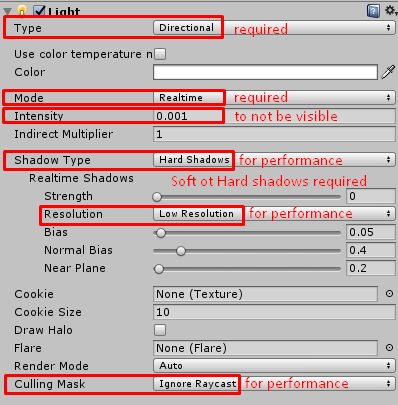
@latent elk if I understand, those types of effects require camera depth texture to be enabled:
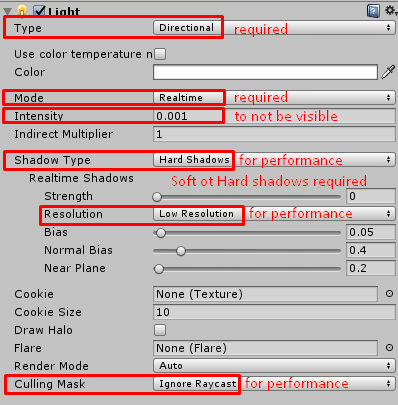
I don't actually know the shader in question, but is it the one used in loli_explorer.exe's ghost avatar?
 molten oar
Hello! Learner here, is there a way I can apply shadows to my shader without using
UsePass "Legacy Shaders/VertexLit/SHADOWCASTER"
It seems to be breaking my avatar. The texture shows when I delete it, but then it's transparent...
 viral sun
is there any way to do cutout on the quest toon shader? or what do i do to the texture to make it work right?
steep swift
@molten oar Yes! Use the Fallback statement instead
Note that Fallback must occur outside of the SubShader { } block
so usually you will change
UsePass "Legacy Shaders/VertexLit/SHADOWCASTER"
}
CustomEditor "SomeEditor"
}
to
}
Fallback "VertexLit"
CustomEditor "SomeEditor"
}
if the CustomEditor isn't there it might look like:
UsePass "Legacy Shaders/VertexLit/SHADOWCASTER"
}
}
so you will change it to
}
Fallback "VertexLit"
}
ahh alright, yeah I have
        }

        UsePass "Legacy Shaders/VertexLit/SHADOWCASTER"
    }
}
Note you can also do Fallback "Legacy Shaders/VertexLit" - I'm not sure what the difference is between including Legacy Shaders/ or not
some builtin unity shaders do one, some do the other
same with Fallback "Diffuse"
anyway anything with Fallback will work and will include the shadowcaster
UsePass seems to be broken when you reference a builtin unity shader
in 2018
molten oar
So to check, since I have no clue myself... I want this?
        }

        UsePass "Legacy Shaders/VertexLit/SHADOWCASTER"
    }

    Fallback "Diffuse"
}
@viral sun No, cutout seems to be intentionally not on the palette of available quest shaders. It has similar performance cost in terms of overhead as alpha blending, so best to avoid it. The recommendations are to instead add more vertices and polygons to physically cut out any such areas from your mesh geometry
like in blender there's a hotkey that lets you draw a line and it will cut all the polygons your line goes through in half
so you would basically need to keep doing that
and then select the faces in the sections you want cut and hit x and Delete Faces
sorry... and yeah there are a lot of great low poly avatars that didn't get ported to quest for exactly this reason
the painful part is the cost of cutout appears to be just related to how many pixels get cut, so for eyes or something it should be fine to use on quest
but vrchat doesn't allow custom shaders, so you have to do the hard work if you want it quest compatible
viral sun
that sounds complicated... is there a stepbystep tutorial anywhere?
steep swift
knife tool is k
so you go to edit mode and halve at it
I don't know of any tutorial. maybe ask around in #avatar-quest
this is like one of the most common problems I've heard people complain about with making quest avatars
viral sun
thanks a lot for the information
latent elk
@steep swift thank you! Ill try that
 stray hazel
is there a shader that will show the world's current skybox?
past pewter
you can't show the skybox, but you can show the reflection probe (in a lot of cases that is the skybox, but sometimes it's a proper reflection probe of a room)
if you use unity standard and turn up metallic and smoothness to 1 you will see the reflection probe in that world (some worlds don't have one so it will be black)
if you want to read the value in a shader yourself use float4 reflectionProbeColor = UNITY_SAMPLE_TEXCUBE_LOD(unity_SpecCube0, reflect(viewDirection,-normal), 1.);
 hollow crescent
is there a shader I can use for mesh particles that allow for fading in using color over lifetime?
the default alpha blended shader for particles make my mesh particles flip their normals or just messy in general
past pewter
I'm trying to have a shader for sly cooper from the game Sly Cooper Thieves in Time
anybody have a shader I can use?
 split scroll
@hollow crescent what you're looking for is a shader that uses the mesh vertex colors, that's what particle color does.
hollow crescent
I kind of understand that, but I don't know how to look for that in a shader
I'm hoping someone already know a shader that works with mesh particles and color over lifetime
there's like two years of creative juices flowing into vrchat, someone has to have it
solid grail
No idea what I'm supposed to be looking at if I'm honest.
lethal nacelle
looks like its working as intended?
 light urchin
Yeah that's pretty much impossible to say what's wrong without knowing how it's supposed to look
lethal nacelle
im guessing either gold or blue
which even then doesnt help because @past pewter we dont know your shader nor how you have it set up, what youre trying to do
looks like your reflections qre working fine but you havent said what reflections those are
past pewter
it's actually the reflection probe that causes the problem
I actually realized it when I saw it
past pewter
where can I find a reflection probe?
also, what's a fallback cubemap and where do I get it?
lethal nacelle
ohhh!
havent even began messing around with probe reflections and what not, thst sounds cool. cant really help in this instance > < i mainly stick to a really toonish look even with metals so
past pewter
I'm going to do my best to make it as realistic as possible
past pewter
for an avatar to look good with reflection probes the author of the world needs to have added a reflection probe to his scene, otherwise you will reflect only black color
not all worlds have it (or have it set up so it's active everywhere in the world)
 velvet sorrel
You should contact the author and ask them to add one
Though in some cases the author adds one but it doesn't work properly
steep swift
what's super confusing is the default unity skybox has some built-in reflection probe... and if you put in a HDRI skybox it will also automatically be set as reflection probe
I was wondering for the longest time why the default unity skybox is "special" and why custom skyboxes don't work... (I didn't realize you had to bake lighting)
past pewter
my textures that I got would do
besides, it's fine the way it is
I've learned to do it myself
 brittle plinth
How can I add shadows to a shader? Everything I've found either says to use a fallback (which isn't working) or use the shadow caster pass from the Legacy/VertexLit shader, which gives really low-quality shadows
In case it makes a difference, I'm making a vertex/fragment shader, not a surface shader
steep swift
@brittle plinth the fallback line does work supposedly
Can you list what fallback you used
Another user told me that Fallback "VertexLit" doesn't work but
Fallback "Legacy Shaders/VertexLit"
Does work
UsePass seems to break the shader in 2018 if it's
Referencing a unity builtin shader
brittle plinth
I found a way to do it. CatLikeCoding apparently has a tutorial on making a shadow caster pass
steep swift
yeah that's cool, that's the best way if you have enough expertise to modify shaders
Otherwise, what I hear is having
Fallback "Legacy Shaders/VertexLit"
before the last } in the file, and removing all UsePass lines with builtin unity shaders should work
viral sun
trying to make an avatar compatible with quest, the shirt is supposed to be pink as seen on the left, but when i switch to any of the vrchat mobile shaders it turns green like on the right
its all been atlas'd into one material, so its weird it only does it to the shirt
anything i can do about this?
steep swift
You see that in unity?
viral sun
yes this is in unity, and its like that in game too
steep swift
Are you using any special texture maps other than albedo?
Any color set on the maintex?
Can you try setting the color to white and delete everything except diffuse and albedo from the good version (the pink)
viral sun
thats how it is with the nonmobile standard shader, where it shows the pink correctly
then switching to the vrc mobile version, is where it goes green
steep swift
Do the vrchat mobile shaders not support vertex colors?
tired token
No, they do support it, which might be the issue
steep swift
Wait... Standard doesn't support vertex colors?!
tired token
It doesn't!
viral sun
yeah the rest of her is white
tired token
There you go.
In blender you can clear the vertex colours
It's under where blendshapes are
steep swift

viral sun
yaaaay, thanks a lot both of you 😄
tired token
Happy to help, enjoy!
hollow crescent
what particle shader can I use that converts the black background to transparent while maintaining the gradient on the edges of the lightning texture? or is there an image editing method I can use to convert the black background to transparent?
bucket with 0 alpha doesn't remove the shades of black on the gradient edges of the lightning
steep swift
You could try playing with blend modes SrcAlpha One, SrcColor OneMinusSrcColor, or One One, or One OneMinusSrcColor
Or go into an image editor, make it grayscale and copy that into the alpha channel (in gimp you can split channels into layers and then back).
past pewter
use additive
(blend one one) and the black will be the alpha
I mean leave the picture like this but use particle additive shader in unity
past pewter
hey guys?
I want to do a fire effect for Grim Foxy from Fnaf VR HW Halloween DLC
what particle system should I set up?
 dull mason
Is there something I'm doing wrong if the standard transparent shader ends up looking like this?
tired token
Yeah, you're using it on everything
rich lake
Yeah transparent materials have to been on their own material. You should split up what should be transparent (probably something like blush) and what isnt (everything else)
dull mason
ok
 wary junco
I have some eyebrows under hair and I want them to be drawn on top. how can I do this without making them drawn on top of EVERYTHING in in the world as well?
steep swift
Most common option: add a stencil in addition to ZTest Always. Caveat: it will be drawn on top of other copies of your avatar. (or anybody who also uses a stencil)
Other option: Use a z adjust of like 0.05 meters or however far apart the hair and eyebrows are. I think I've seen some shaders that do this. I usually edit the shader to do this math
the z adjust method will only make it draw in front of stuff within that distance, since it pretends to be closer to the camera than it really is
 cunning escarp
Does anyone know where I could find a copy of, or a guide to make the shader that makes your parts of your avatar only visible in mirrors? I have been looking around online, but I can't find anything.
 near flax
i think poiyomi has an option for that in his shader
ripe idol
@cunning escarp
cunning escarp
Thankyou.
past pewter
im looking for a simple scrolling shader so i can have scrolling text, anywhere i can get such a thing?
solid grail
Just animate the offset
 undone halo
Does vrchat work with other post processing scripts other than the default stack v2?
 midnight dirge
Yes. v1. :^)
But AFAIK no.
undone halo
Darn, there are some really good post processing effects that work with VR on the asset store. Too bad.
tired token
Which ones?
past pewter
Anyone know the name of this shader?
lethal nacelle
@past pewter that just looks like a texture. if its animated a gif or video would be helpful, or some sort of description of how it functions*
past pewter
I would have to find the avatar again, Don't remember if I saved it or not. will ping later
lethal nacelle
if i had to guess just by looking at it is either really clever matcap or something similar
near flax
it probably is just using that vaporwave image as a matcap
 true kernel
so im trying to make a helmet, and around the eye area there is supposed to be a black visor with a moving display on it, all i want to to is just have a wide texture with some text travel from left to right in a loop, would there be some kind of shader for that?
actually, seems like ive found one.
past pewter
anyone know of a working TF2 shader?
solid grail
how does this get asked every week
lethal nacelle
you can just. Use and abuse an existing toon shader. No?
obv a lot of work was put into tf2 char shading but im pretty sure most of it was silhouettes and lines (aka just really heavy normal and topology editing,) but the actual shadows and lighting are probably not too hard to reproduce with a toon shader that isnt cubed's
 glossy mortar
someone who knows how to make animated/moving shaders can u dm me pls
 austere lagoon
how do i attach shaders to my avatars clothes?
i found a couple shaders that would look good on my eevee girl chan
steep swift
If you're interested in taking a shader someone else made, if you import one into your project, it should show up in the shader dropdown in your material
If you're unsure how to do that, Might be a bit of a question for the #avatars-2-general channel
austere lagoon
kay thanks
past pewter
@lethal nacelle tf2 uses a ramp shader
i downloaded one
from a mod site
(bot keeps censoring me for some reason)
and it made my avatar look like a human disco ball
lethal nacelle
change the ramp then
toon shaders also let you change the ramp, and poiyomi lets you make the ramp in the shader itself

Blender Artists Community
Hello BGEheads 😃 Team Fortress 2 had reputation for using stylistic character render. I tried to recreate the shader. Here’s the result. For see it in action here’s the video. Well, actually this is modified version of Team Fortress 2 shader. I’m using just dif...

theres a shitload of documentation on how the shading in tf2 was done
both fanmade and official
@past pewter also if its from where im thinking theres a good reason why that website is being censored
but yeah you can either write your own shader or use exisying toon or whatever shaders that support shadow ramps to get the same effect
solid grail
cibbis also has a gradient editor in the editor and a channel packer 😉
velvet sorrel
Mine also has a ramp editor
@past pewter Don't download from that mod site, it's full of viruses and stolen contents
 carmine crest
anybody know of a shader which behaves differently for the left eye than the right eye? I just want to know if its possible so if you've even just seen something lmk
solid grail
That sounds nauseating
carmine crest
if you make one eye slightly darker and one eye slightly lighter, it supposedly increases contrast
because you are, in fact, seeing a greater range of color
brittle plinth
I don't believe that's possible in VRChat
near flax
that's completely possible in vrchat
brittle plinth
ShaderLab has no support (afaik) for determining which camera is rendering, so you'd need to use a script that tells the shader which one it is
How would you do it?
near flax
unity_StereoEyeIndex tells you which eye is being rendered
0 if left eye, 1 if right eye
brittle plinth
Is there a certain cginc needed for that?
near flax
i think just doing "UnityCG.cginc" will end up including it
velvet sorrel
That paper is bullshit
near flax
i forget which cginc it's actually defined in, but it should get included with that one
brittle plinth
Wdym it's bs
solid grail
Yeah red it's unitycg
brittle plinth
Huh
solid grail
That includes a whole bunch of stuff
velvet sorrel
Looking at those examples shows obvious flickering
brittle plinth
Must not be in the Unity docs then
solid grail
BTW there's documentation on stereo rendering already
brittle plinth
Or at least the unitycg variables page of the Unity docs
near flax
ah, check in UnityShaderVariables.cginc for a bunch of the stereo variables
 near flax
sure
brittle plinth
Ok, good
I'm trying to make a shader that mimics the Frostbite engine's lighting system, and they use a lot of functions that are cluttering up my main file
solid grail
Unitys standard shader uses a lot of stuff from frostbite already
"porting frostbite to PBR" is a doc directly referenced in the comments in standards code
A lot
brittle plinth
Haha you mean this one? https://seblagarde.files.wordpress.com/2015/07/course_notes_moving_frostbite_to_pbr_v32.pdf
brittle plinth
It's actually a bit more than just the Frostbite lighting
solid grail
I chose to mimic Disneys brdf variant what's referenced in standard for my edit
brittle plinth
The shader is meant for assets from Destiny 2, which uses a special texture setup that's really annoying to work with
And Destiny 2 uses the same lighting system as Frostbite, so...
solid grail
Does that engine have a name or is it just "used to be reach engine: Engine"
brittle plinth
But they've changed it so much since the version used in Halo that it really should be considered a completely different engine
solid grail
Ah like what they did to source for tf and apex
brittle plinth
I don't know the exact details of that, so I can't say for certain, but probably
brittle plinth
It can't be that hard to replace a game's render engine
past pewter
@velvet sorrel lol people take their "content" too seriously. Just because you managed to rip a MMD model and add a color swapped pallet does NOT make it yours. Why people are overprotective of their dime a dozen anime avatars is beyond me. I cant help but be reminded of the autism that inhabits the sonic OC fandom at deviant art.
velvet sorrel
🙄
No, it's not "ripped MMD models" that are "colour swapped" that are the issue. Doesn't really matter what you think anyway. It's forbidden and full of garbage.
solid grail
Stolen shaders =/= mmd models
velvet sorrel
And going all, "anime avatars are a dime a dozen", makes you sound like one of those screeching morons that make bad artwork and then wonder why nobody wants it. If you don't understand it, then don't talk crap about it. Open your mind or shut your mouth.
solid grail
I mean it's not like that stuff doesn't exist
There are like entire discords that only do really basic swaps and get super defensive about it. But I don't think the moniker of anime Avatar is really covered by just that.
After all anime is a very broad style ^^
fresh grove
I especially hate elitists that think making an mmd model doesnt take time and effort(especially if youre new and still learning you have all right to be proud of it and try to protect it) just because they have a model nade from scratch.
solid grail
The sale of real simple edits made from already made parts is the only thing I kinda wince at.
Cause uh.. the original model maker gets nothing
Or, in most cases, model makers
fresh grove
Thats true. Selling that stuff is kinda ehh
At max charge for the work you put inbto it but dont charge for what the original creator did
solid grail
Your still selling someone else's assets 😅
That they aren't getting anything for and comparatively spent longer on
😅
fresh grove
Well they dont want anything for them if they are available for free
solid grail
Well they don't want you selling it either usually
fresh grove
Usually
And if they dont than I respect it
But if they dont say anything about it I consider it fine
solid grail
Yeah there's a reason so many people take down what used to be public downloads. They're sharing their assets for intended use for animations in mmd or similar. It's a really complicated issue and the legality of certain things can be a bit.. Gray?
Anyway, not shader talk. Sorry ^^`
past pewter
I need some help on a shader that can help out on darth maul since he's got a lot of detail
and a lot of textures
past pewter
I want a shader that has fur, anyone got any for a sonic the hedgehog?
hollow crescent
I'm working on texture emissions and decided to make them have gradient opacity/alpha
do shaders with emission components support emission albedos with gradient opacity/alpha?
fluid hamlet
someone knows if this : http://kylehalladay.com/blog/tutorial/2017/02/21/Pencil-Sketch-Effect.html
works with the current unity versions (as it was made for unity 5.5)
I build shaders, renderers, games, and other stuff that's fun to stare at.
 frank isle
Are there any fur shaders that don't murder performance?
steep swift
There are some paid options: XSFur is a popular one. There is another really nice fur in development but I'm not sure there's anything public yet
frank isle
Mmkay, I have XSFur but I may just have it set improperly. I'll play with the settings a bit. People tell me that when I get too close to them their frames start to drop
steep swift
That's a staple of fur shaders. XSFur is actually better than most other fur shaders because it uses AlphaToCoverage and dithering to take advantage of depth testing.
But regardless of which fur you use, you are going to suffer from overdraw. When your face is entirely buried in the fur, you're going to draw overlapping triangles over the whole screen, for each layer of fur. That overdraw, or layers rendered over top of each other, is a staple of fur shaders
frank isle
ah ok thanks for the explanation
past pewter
There use to be a glitch where cubed shaders did not work on users with a AMD graphics card, the main reason I stopped playing. Anyone know if it has been fixed?
 main marlin
Cubed will stop getting updates as soon as unity 2018 runs out afaik
 viral stratus
@past pewter That issue was fixed by an AMD driver update quite a while ago. Also Cubed's shader isn't as ubiquitous as it was back then.
There are a lot more options for toon shaders
steep swift
silent highly recommend
great way tomget your feet wet after cubed

GitLab
A surface shader for Unity providing cel-shading. (Forward rendering only)
@past pewter
past pewter
anyone got any ideas on how I can do double sided global illumination?
past pewter
any free fur shaders I can use besides the one I have?
 granite idol
I just importet an Avatar in unity 2018.2.16f1, but it's Pink. from the looks of it, it looks like its missing its textures. anyone know any solution?
past pewter
I might be of some assistance, but you'll have to show me
granite idol
steep swift
@granite idol wtf are you trying to do with unity 2018.2?? The current release version of VRChat is on 2017.4.28f1
granite idol
oh damn ok thanks that explains why it's not working 😄
past pewter
Jump Force was made in unity, right?
cuz I feel like doing a Deku avatar
are there any shaders that support metallic and specular textures?
or is there no such thing that should exist?
steep swift
Standard has both the default metallic version and a specular setup
past pewter
I know that, but I'm asking for both of them to be in one shader
how do I do it?
wait....nvm
I just realized the spec on deku was the blood roughness
 unreal tundra
hey guys i'm having some issues with poiyomi's toon shader, the custom UI won't show
UnityEngine.GUIUtility:ProcessEvent(Int32, IntPtr)
keep getting this error
unreal tundra
got it fixed by making a new unity project
past pewter
whenever i try to make a unity project, it says it is unable to make a project folder. Anyone got help?
 thick galleon
how can I import or use .fx file to unity?
steep swift
You will have to port them yourself: it's not one to one but most things should be possible. Is it from mmd or something else? What does it do? @thick galleon
glossy mortar
does anyone know of a shader with like broken hearts or something
thick galleon
@steep swift it is shader from deviantart and yes its from mmd I think.
steep swift
you're going to be on your own a bit--it's not super easy to port. if you say what it does, maybe someone will have an idea of an equivalent or might think it's cool enough to take on the porting project
steep swift
what do you want your shaders to do
there are shaders everywhere you look, many things hosted on places like github. from realistic toon shaders to flat lighting, to effects, to video games that are literally entirely coded in a shader
is this for an avatar? effect? particle? something else?
thick galleon
for avatar mostly
not so specifically I want but growing eye, metallic cloth
reflecting something like that
steep swift
If you're looking for MMD style lighting, take a look at Synergiance's shaders: https://github.com/synergiance/Synergiance-Shaders-For-Unity
If you're looking for an all around shader that's easy to get into, I'd suggest starting with silent's cel shaded shader: https://gitlab.com/s-ilent/SCSS

GitHub
A shader for Unity that mimicks the look and feel of Miku Miku Dance - synergiance/Synergiance-Shaders-For-Unity
GitLab
A surface shader for Unity providing cel-shading. (Forward rendering only)
steep swift
I'd start with silent's. I think it can get all of those effects you are going for and might be easy to get into
thick galleon
I don't know where to start. that is the problem...
steep swift
do you have an avatar imported into unity? Go download that SCSS shader from the Files page, and import to your project. Then you can go to your materials and set them to use Silent's Cel Shaded Shader. Have you got that far?
thick galleon
yea I imported my avatar and applied basic vr chat/mobile/toon lit
steep swift
unless you are building for quest, I would not recommend that shader
I would import silent's SCSS shader from the link I pasted above
it will have a lot more options
if you are building for quest but want basic reflections or emission, you should be using Standard Lite.
thick galleon
ok.
do I must create Atlas for combine all the meterials in avatar? or is ok to have 10~12 meterials.
lethal nacelle
@thick galleon it is not ikay to have 10-12 materials
for the most part you never need more than 4 but it sounds like youre just getting started, so use material combiner in CAT's blender tools to make a texture atlas and bring your avatar down to one material
brittle plinth
Does anyone have a good sample deferred shader?
Also, how would I make a shader default to deferred rendering but fallback to forward for transparency and other things the deferred path can't render?
 faint fulcrum
This article explains how deferred works and how to make a forward rendering shader support deferred path. https://catlikecoding.com/unity/tutorials/rendering/part-13/
But you're in the wrong direction if you want that for VRChat - only forward rendering is used here
A Unity Rendering tutorial about adding support for deferred shading. Part 13 of 20.
brittle plinth
VRChat is where this shader is going to get the most use, but I want to have the option for deferred path in case it gets used elsewhere
near flax
@solid grail
 weak wren
inb4, yes I deleted the shader and assets. then restarted unity then reimport the recent unitypackage on retro's github
and ty red mage, didn't think about @ing retro
solid grail
2017?
solid grail
So weird, another friend of mine is also having this issue..
I'll try importing what's on the gh into a new project myself
weak wren
@solid grail
 fringe sand
I am curious, is there a shader that can mimic the MMD raycast look for models?
fringe sand
I'm not quite on that to be honest. I mainly like how it looks on the models.
solid grail
looks like standard :v)
fringe sand
I was thinking that it looked a bit too fancy to be something similar to standard.
velvet sorrel
On the contrary, that's what Standard is for
Cel shaded lighting is not fancy
Physically based rendering is
My shader supports fancy PBR too, so try it
past pewter
is there any shader with transparency sliders?
steep swift
Most shaders let you change the alpha (A) value for diffuse or albedo. Just make sure you are using a transparent shader (or transparent setting for standard)
past pewter
bless you
 peak heart
if you're porting Source Engine content, you'll want to use some specially designed shaders and not merge your materials without double-checking your VMTs
 slate vigil
hello i trying to learn a shader editor im following the tutorial making the steps but at one point they ask me to create a new shader and i got this error its is not the first time it occured can someone help me ?
steep swift
that's caused by poiyomiToonShader as shown in the file names. You may need to reimport poiyomi. maybe ask in their discord
ripe idol
fixed ✅
weak wren
@solid grail Were you able to figure out what's happening with your shader
solid grail
Can't seem to replicate it on my end. You're not the only one with this issue but it's also not everyone having this issue either..
brittle plinth
Does it have something to do with the mixed line endings warning?
solid grail
Shouldn't?
weak wren
I don't remember importing anything else. Don't think something would be interfering/conflicting with the shader to cause it to do that.
brittle plinth
What's the code on that line?
Actually, and the lines immediately before and after
weak wren
Weird if I reimport the shaders on a new scene. everything is fine. Just when I go to a scene for one of my worlds it breaks
The scene for my avatars using rero, nothing breaks?? wth
Hmm
past pewter
I am gay
and I need other help with stuff like this
anybody got any ideas for shaders that can benefit this?
maybe I should explain it in a different way
do you guys have shaders that can support different color channels?
like red,green,blue?
and alpha?
past pewter
I'm going to make this as clear as possible even though some of you may know, I still need this to be an open discussion
here's the idea I was trying to go for:
the red channel will have a gradient texture where you can customize the eye options with different colors like pink or white for instance
green will be the same thing, but will have more of a white tone to add realism
blue is the same thing, but it'll be darker. the rest of the ramps will then lead up to the alpha channel which will be the emissive
and each channel can be custom made with ramps showing the intensity of the colors
you can toggle between the textures and what should get the most value
does that make sense?
I hope that covers everything
past pewter
forget I said any of that now, actually
I found out it's easier to do masks of the texture instead
 winged shell
any know a good shader to put a sprite sheet on a model, im prob just gunna put a plane that renders it under the hat
it needs alpha or cutout, preferably alpha
fresh grove
poiyomi has a flipbook feature
I do have an edit of a basic spritesheet shader too if you want
winged shell
i think ill try ur sprite sheet thing first. last time i installed poiyomi on my project i got a bunch of errors because of his extension to organize it
fresh grove
well poiyomis has way more options. you do need each frame of the animation as its own texture
but lemme get it real quick
winged shell
oh, it does not do an actual sprite sheet?
fresh grove
@ripe idol
ripe idol
@winged shell just join the official server and follow the drawing.dll 4 steps in the faq channel
I'm not home so I can't help directly
ripe idol
Kk
winged shell
@fresh grove is there a proper way of testing the speed without going into vrchat? im in playmode rn
winged shell
@fresh grove so is there something about ur speed and time i can't figure out? i been setting them at random values but nothing shows in play mode
winged shell
ah
fresh grove
its been a while since I used it
but for one I can tell you that you have to animate it manually
so you'll want to animate your Mesh Renderer.Material _AnimationTime to go up at a rate of 1 every 20 seconds to match the original
and for animation speed I am not too sure
but I think its divided by 3s. so 15fps is 0.05
winged shell

GitHub
Surface shaders with flipbook / spritesheet animation functionality - thnewlands/unity-surfaceshader-flipbook
i found this one that does it
 jagged trellis
Anyone having issues with rerostandard breaking in unity :l
i get an underclared identifier error "i" in console???
steep swift
@jagged trellis what unity version you on?
CAn you verify there aren't two copies of Rero standard in your project? Then delete (backup a unity package if you want) it and import the latest version from https://github.com/RetroGEO/reroStandard/releases - if you still get an error, can you paste the while error include filename and line number please?

GitHub
A Unity Standard Shader hack centered around VRChat compatibility. - RetroGEO/reroStandard
past pewter
I need some help on how to make dante's hair look realistic
anybody got any ideas on how to do this? I've been trying to use this texture for more realistic effects
steep swift
@past pewter https://gitlab.com/s-ilent/hair-with-anisotropy this is a pretty good hair shader... though silent's cel shaded shader should do most of this built in so you can just try that

 weak wren
@steep swift i had that issue too
And i have the recent rero shader package
It has something to do with unity apply fog
Heres one example
Someone told me a solution but im not good with visual studio so idk wth im doing
The undeclared identifier happens to all rerostandard shader files in the unity package
But it only happens when i open up a world in my unity that has rero shader in it. Which is weird.
Deleteing the files then restarting unity then reimporting it temp fixes it
past pewter
Good thing I got both
steep swift
@weak wren thanks for pointing out the error. That's clearly a copy and paste error in rero standard line 395 @solid grail
Replace both i. With IN. on that line
https://github.com/RetroGEO/reroStandard/blob/master/ReroShaders/ReroStandard/Shaders/ReroStandard.shader shows the same use of i.
GitHub
A Unity Standard Shader hack centered around VRChat compatibility. - RetroGEO/reroStandard
The reason it doesn't show up for most people is most projects do not have fog turned on for avatars or worlds.
But in 2018, fog is forced on by the SDK so avatars will finally properly support fog. But this means some code that wasn't being compiled before is now getting hit, and this is one of them
solid grail
Ah my bad then, I'll update that part myself so the updater should take care of it for others when I do.
past pewter
if anything more really, the shader is probably just second best, try cibbi's
weak wren
Link?
past pewter
one moment

GitHub
A toon shader with standard elements for vrchat. Contribute to Cibbi/Toony-standard development by creating an account on GitHub.
make sure that you update it as well too
and go to beta
trust me
it's worth it
it'll have everything you need. I've done everything to make this


What do you think?
weak wren
@solid grail
This appears with fog enabled
disabling fog then reimporting the shader clears it tho
steep swift
@weak wren I recommend two: changes after line 346 (in the geom2 function):
-
replace
g2f OUT;withg2f OUT = (g2f)0; -
before every line saying
tristream.Append, add the following line:
UNITY_TRANSFER_FOG(OUT, OUT.pos);
BTW I understand now the confusion: The error is caused by using both outline and fog at the same time. I actually like outlines not being affected by fog - it can look neat too... if you want that, the = (g2f)0 bit should be enough to make that happen.
@solid grail - I guess this is a related bug with fog support in the outline pass.
solid grail
Sounds like I've just got to remove that part
steep swift
Well I can see the argument for having outlines affected by fog
Even unlit shaders are supposed to apply fog, so to have outlines not could look weird in worlds with dense fog and low clipping worlds, or reveal your position in game worlds. Not sure the right answer
past pewter
wasn't raiden from Metal Gear Rising created in unity? or was it unreal engine?
solid grail
I need to revise the outline code a fair bit tbh
It's built from some experimentation that got a pass as soon as it worked
and I didn't do anything to it passed that cause it seemed to work fine
Also no @past pewter MGR is in the Platinum Engine just like most of Platinum Game's work
past pewter
I see
thanks rero
he still looks like he came from unity tho
that could just be me since his armor looks cool in unity
solid grail
Unity doesn't really have a "look" beyond it's physics jank :v)
with shaders it can be made to basically replicate any style.
solid grail
The standard look is more or less an amalgamation of rendering techniques from elsewhere like frostbite and disney's renderers with a sprinkle of Unity voodoo math
There's a lot of Frostbite
past pewter
I'd say we're getting closer to realism like blender 2.8
especially with the decals and what not
solid grail
There are some very impressive looking Unity games and Unity itself is getting pretty heavy duty with stuff like their stacked lit shader
But that's HDRP only.
solid grail
Both Unity and Unreal are very impressive in that way
past pewter
true
especially with Cibbi's shader
his is probably the closest by far to the realism test
I'm in your server vc if you want to chat rero
solid grail
I'm good rn. I've got other stuff to work on
past pewter
fair
brittle plinth
Which built-in variable has the range of the current point/spot light? _LightPositionRange.a isn't working.
fresh grove
why is there no documentation on how to do anything with .cginc files?
brittle plinth
Because nothing was documented properly when it was made and they haven't gotten around to documenting the shader stuff yet
fresh grove
I am so confused
I need to get toon lighting trough a .cginc file
and I literally have no idea what to do
solid grail
A cginc file is just code that gets included in another script/shader
steep swift
Good reference code: https://github.com/Xiexe/Unity-Lit-Shader-Templates/blob/master/XSShaderTemplates/Templates/Shared/LightingBRDF.cginc
You will see the use of the UNITY_LIGHT_ATTENUATION macro. This is defined in AutoLight.cginc in CGIncludes in the unity sources

GitHub
Templates for shaders with lighting, built for Unity. - Xiexe/Unity-Lit-Shader-Templates
solid grail
It doesn't need to be in one but it helps with organization especially if you need to use the same code across multiple shaders
fresh grove
it has a very different structure to a shader so nothing I google help
solid grail
Not really? It's literally still shader code
fresh grove
its a fur shader. so its using the same code for each layer of the fur
steep swift
I highly recommend having a copy of builtin_shaders on hand. It can be downloaded on the official unity editor download page, there's a little dropdown with different types of ways to download the editor, and one is just "Builtin shaders" and it's a zip file
fresh grove
but this just looks so much different than any shader I edited before
solid grail
Looks like a shader to me 🤷♀️
fresh grove
can you help me than please? I have been trying to do this for months with 0 progress
 haughty field
do you think the fixed_furshading thing has anything to do with it? i know nothing about shaders but i know you want the shading to be toon-like
steep swift
I don't have time to help you, but I can point you at places to learn. If it's taken months to work on this shader, you need to go and work on a simpler project and build up from there.
https://github.com/Xiexe/Unity-Lit-Shader-Templateshttps://github.com/Xiexe/Unity-Lit-Shader-Templates is a great place to get some reference code for lighting
And if you're looking for general shader tutorials, this is basically the best place to learn unity shaders:
A collection of tutorials for people who want to learn C# and shader programming in Unity. Useful to both novice and experienced developers.
 stiff berry
To clear up some of the confusion, A .cginc file is just something that is copy pasted whenever you see #include "FurHelper.cginc" in the shader source code
it could just as easily be one single .shader file, but it's easier to manage as two, so they use a cginc
fresh grove
all I want to do is make the fur shader have toon lighting. I looked at countless tutorials for beginner toon shader but the structure of every one of them is so different I dont know what to get rid of and what to edit / add
brittle plinth
Figured out how to get light range: unity_WorldToLight[0][0]
It's actually 1/range, but that's pretty much what I needed, so it works
steep swift
you sure about [0][0]? - I mean that's getting the x coordinate of that 4x4 matrix. it might behave differntly if you rotate the light or move it around in world sapce
I think the "correct" answer is you'd have to look at what UNITY_LIGHT_ATTENUATION does in AutoLight.cginc - it looks like it's doing mul(unity_WorldToLight, unityShadowCoord4(worldPos, 1)) to convert the point into light space
my guess is the light's "scale" is based on its range, and scale is uniform in all axes, but it sounds like length(unity_WorldToLight._11_21_31) should suffice even if the light is rotated
I wonder if point lights actually still store their rotation in unity_WorldToLight
but then lights seem to also have an "attenuation texture" which stores the function of how it fades away over distance: tex2D(_LightTextureB0, dot(lightCoord, lightCoord).rr).UNITY_ATTEN_CHANNEL
This is actually explained here...might be worth a look @brittle plinth : https://catlikecoding.com/unity/tutorials/rendering/part-15/
brittle plinth
That's for deferred path. I'm currently using forward, and [0][0] contains the range. It doesn't change if the light is moved or rotated (why would it?).
 lucid spindle
anyone happen to know any good methods of preventing color mask aliasing?
steep swift
@brittle plinth oops yea that tutorial link is wrong. Go to part 5 and click the header "What does UNITY_LIGHT_ATTENUATION look like?" I think that part of my answer is still the same. I was double checking with the official code in AutoLight.cginc
velvet sorrel
Maybe read the mask in a different colour space?
past pewter
does anybody have a shader where I can use multiple things at once
I'm making bendy from bendy and the ink machine for the last time in 2019 before Bendy and the Dark Revival
coming in 2020
brittle plinth
Define “things”
past pewter
here we go;
- I need some material slots for where a texture moves
- I'm expecting there to be animations on there as well as glossy reflections
- finally, I need an option for some skin
brittle plinth
If you need to do this all as one material, you’d probably have better luck building your own shader with Amplify or some other node graph, than trying to find one that already exists.
past pewter
understood
I'm going to test out shader forge this time
the problem is this; how do I open it?
 spare sequoia
need a good water shader i can use for the dome of this helmet needs to be able to be seen through in vrchat so i can see my animated whale
 jovial moss
Does anyone know why sometimes when I open my menu (specifically the avatar tab), some aspects of my shader break until I join a new instance?
It usually effects transparency and depth related effects
steep swift
@jovial moss yes that's a known issue. The technical explanation is the menu changes the render queue of all materials on your avatar to the same value, and one that is above 2500 (transparent) so it renders in the wrong order relative to each other and breaks shadows because unity disables receiving shadows if your render queue is higher than 2500 by definition
I filed a canny about this. Can't find it right now
To workaround, never open your avatar menu unless you desire to change avatars. If you do by mistake, change out and change back
jovial moss
ah okay
what a shame
my avatar ends up becoming washed out and somewhat seethrough, since I am using the depth texture to make an outline
guess we just wait then
steep swift
Yep depth texture is parr of shadow casting so it breaks when your render queue breaks
jovial moss
ye
steep swift
The issue is local so it only affects you
jovial moss
makes sense
steep swift
Oh right I forgot: you can change safety settings to reload all avatars including your own.
jovial moss
ah nice, at least there are a couple options
well thank you for that info
at least I know it isn't my fault
steep swift
Yea it's super confusing. Never open your avatar menu. I learned to avoid that button
jovial moss
yep gonna have to break that habit lol
 heady lintel
Looking for the liquid shader like the one used in the pug, where it's affected by gravity.
Anyone know where I can find it?
past pewter
I need help on getting Chibbi's shader
earlier today, his shader wouldn't work correctly because the pbr textures won't show
past pewter
anybody got any pbr materials they'd like to share?
take as much time as you need guys. I'll be waiting
solid grail
You're completely missing the editor what did you do
The editor is where pretty much everything is in cibbis shader
past pewter
I've been using one program
to make three avatars for myself, and then it started to show up differently
it was showing in rows than drop down options
solid grail
Did you move files or something
past pewter
I don't remember
solid grail
Cause yeah you're literally not loading the editor
past pewter
but I did move the options in the tabs up and down
solid grail
Just reimport the shader unity package
past pewter
I did that already before, but I deleted everything to start over
solid grail
That's fine
past pewter
solid grail
Don't move stuff out from where it gets imported unless told you can when it comes to scripts
solid grail
Yeah that's common practice for reimporting assets is to delete whatever was left over beforehand
Just to prevent things not getting overwritten
past pewter
which is a good thing to do
imo
I'd only wish that there was a way for the world to be reflected around the model when it becomes glossy for next year tho
solid grail
I mean plenty of people have made realtime reflection shaders
past pewter
where can I find those?
steep swift
That's way overkill, imho. Just turn metallic up and let the reflection probe do its job. That will reflect the world quite nicely
past pewter
thanks for the feedback Lyuma
so I should add a reflection probe to my avatar?
or to the world?
or both?
steep swift
Worlds will have reflection probe already baked so you don't need to change anything. You are uploading an avatar right?
steep swift
In the unity default scene it should reflect the amazing looking unity skybox with blue and grey. If you see that, then you did it right
past pewter
but what about surrounding the world?
steep swift
Hmm?
past pewter
remember how things reflect off of the surface during realtime like metal?
steep swift
the hair looks reflective to me. Again it's ultimately up to the world they are in how they want their reflection probe / skybox to look
Some worlds do support realtime reflection probes. But otherwise not much you can do and still be performant. And yes like rero said screen space reflections are possible.
The few people I know who have implemented such techniques for avatars haven't released them, and they do have a performance cost... so you'd have to spend at least a month learning the math involved and building it yourself if you want it. And screenspace techniques aren't magic: they only show you what you already can see
past pewter
thanks for the advice m8
 sleek laurel
Having fun with raymarching stuff
 red fern
Is there a link to that rain on glass shader?
past pewter
I've got just the thing Nemelis
past pewter
does anyone have the MilkuToonv2 gif shader maybe? :)
solid grail
one of those words is supremely cursed
past pewter
what do you mean cursed?
 foggy scaffold
Anybody know how to make avatars invisible with a gesture
solid grail
Turn off the mesh renderers
 round inlet
anyone in here familliar with a sort of dynamic or procedural clouds shader that i can put over the skies of my world?
past pewter
here's the unfinished cloud shader me and silent did a while ago https://cdn.discordapp.com/attachments/521089076552794134/526923072427786260/Clouds_v4.zip
@round inlet
 round inlet
this looks very promising... thank you so much!
past pewter
it takes a bit of tweaking to look good and keep the noise iterations around or below 8 or it gets slower but it's flexible to do a lot of different time of day and weather stuff
round inlet
quick question- can it's values / a skybox be changed via VRC_trigger?
past pewter
you can animate the shader properties and then control the animation with vrc triggers
round inlet
hmm... i'll figure something out. i need to make my skybox interchangeable between three different times of day somehow.
past pewter
OR make two different materials, day and night, and use setmaterial on a vrc trigger for example sorry not for skyboxes, my mistake
steep swift
@round inlet I do want to mention for skybox, one common method is to animate the rotation of a realtime direction light (it's ok if you don't use a directional light. uncheck it and put it in the Sun Source in Lighting settings!
round inlet
got that part down- thank you!
steep swift
there's a skybox that sets the cubemap based on sun direction in this way in prefabs databases

Gist
Skybox picks one of two cubemaps based on the light direction - SkyboxCubemapDual.shader
round inlet
sudden. just need to make the skybox interchangeable through toggle.
steep swift
dot(float3(0,1,0), normalize(_WorldSpaceLightPos0.xyz + float3(0,0.01,0)))
round inlet
i'ma take this into #world-development to not upset anyone lol
steep swift
it's ok here - esp since you will have to edit your shader to include that logic
past pewter
it's probably easier to set up 3 animations and put them in a state machine animator
than editing shaders
steep swift
@past pewter you are talking about using an inverted sphere correct?
past pewter
nope, having my shader on the skybox
steep swift
I'm unaware of any way to target the unity skybox material with an animator
to edit properties or material references
aside from directional light or other global properties
past pewter
oh that's right, well shucks
steep swift
so you have to choose: inverted sphere and animators (very easy to set up and flexible, but possible z buffer issues); or add an if statement to the shader
if you send me the shader you are using, I could mod it pretty easily for you...
but I'd consider the inverted sphere first maybe
so you have better control
 narrow sleet
Anyone have any heart shaders?
narrow sleet
Just a heart shader yhat moves.
steep swift
like for a texture?
narrow sleet
Mhm! I wanna put it onto my nails.
And just have it slowly move, a cute one please.
lethal rock
@steep swift render texture could be brought in, when we get udon on live you can target materials with it which are outside the scene hierarchy
 fiery field
So I use poiyomi as a shader but people see thru the model if the shader is block. is there a setting I can change to at least look opaque or nothing can really be done
ripe idol
switch to standard shader and make it not transparent then switch back to poiyomi
In patch 5.0 it doesn't fallback to standard anymore
soon.jpg
fiery field
but if I use a preset can it mess up thing ?
spare sequoia
i asked a couple days ago but again
does anyone know of any good water shaders that can be used for avatars and look good. i have found some but they do not work properly in game as they are made for game developement and or maps. and need features that are not available on an avatar
unless there is a way to fix this
thats with lighting off
lighting on
past pewter
is there a texture packer I can use?
past pewter
eh, forget it
spare sequoia
hey guys does anyone know what that blurry underwater fog shader people are using in there worlds is called?
steep swift
that might be a depth of field effect included in PostProcessing v2
you can use a PostProcessingVolume to enable a post processing profile only while inside some volume (e.g. underwater)
 buoyant cargo
Do we have a community-made PBR shader that "fakes" approximate specularity from directional lightmaps?
Unity had baked directional specular pre-5.6 but deprecated it + were like "just use realtime lights and reflections for specularity" laughs in forward rendering
velvet sorrel
To be fair, in most cases a reflection probe is sufficient
Like, you shouldn't have invisible light sources
buoyant cargo
Yeah, all the static lights combined per LM texel seemed to make it very approximate + I'm sure there's more at play than I have any expertise in too. It looks really off on surfaces that have higher smoothness values, but there's definitely some visual wins on other surfaces.
here's an example, you get added detail / high frequency information out of the specularity on the buildings but the windows end up looking like that 😔
 frank pollen
hi guys, i'm making a world and i'm gonna block some areas with colliders, i want to do something like fighting games usually do, when you get closer to the invisible wall, the texture appears, i already have the textures and meshes i want to use, but i have no idea about what shader should i use to make it only appear when you get closer to it. pd: the texture is alpha transparent
light urchin
Feel free to try poiyomi toon it has a option to do that
fiery field
@ripe idol i use opaque and standard is opaque and we still see transparent.
lucid spindle
@buoyant cargo you could try the brute force method of baking with emissive spheres only visible to reflection probes, though unfortunately you'd have to do a bit of mesh separation thanks to the way the probes work in forward
also as far as I'm aware, Bakery still has a baked directional specular system that works fairly well from what I've seen
past pewter
@spare sequoia the water shader you are using needs the depth buffer to be enabled to do the depth coloring ... the depth buffer in vrchat enables when there is a light using shadows
if you have it on an avatar some worlds will not have this enabled because it doesn't use realtime shadows, a hacky workaround is to put a dummy light on your avatar that doesn't light anything and enables the depth buffer no matter where you are without really lagging people with unneeded extra light calculations, like this https://raw.githubusercontent.com/netri/Neitri-Unity-Shaders/master/.Images/Light_to_force_CameraDepthTexture.png
a dummy light like this is also handy if you are making a world without realtime lighting and want to use shaders like the water that need the depth buffer too be enabled in vrchat
another thing about the hack is that people might have lights and particles turned off for your user rank, so you see the depth effect but others might not because they block your lights
jovial moss
I may have asked this a long time ago but if I did I have forgotten, how would I detect whether or not someone is in vr within a shader? The effect I am doing behaves a lot differently in vr so I need to switch between versions.
steep swift
can you maybe describe what is different or wrong about your effect in VR? that might be a sign of a different problem.
It is rarely the case that detecting VR is the correct way to fix a shader issue
jovial moss
I am using the depth texture to make an outline, using different offsets, but the outline becomes much thicker in vr
I need to make it so that it is equal thickness in both vr and desktop
not really sure why it happens, though
it's just screen uv offsets
past pewter
    // USING_STEREO_MATRICES
    #if UNITY_SINGLE_PASS_STEREO
        return true;
    #else
        return false;
    #endif
}```Though...That sounds like an issue of screen resolution/pixel density as much as a vr thing
Also make sure you access the depth texture correctly in VR
If you followed examples you should be fine, like using the correct screenPos computation that accounts for the fact that each eye is placed side by side in the depth texture
jovial moss
hmm I am using amplify, so I would be using that code in a custom expression node if I need to, maybe there is another node I need to be using in conjunction with the Grab Screen Position node
that sounds like it could be the issue though
though, the effect still works as intended
it's just much thicker for some reason
past pewter
i.uvgrab.xy = TransformStereoScreenSpaceTex(i.uvgrab.xy, i.uvgrab.w);
#endif ```not sure how to do that in amplify but that's how the unity helper works
adjusting uv coordinates for you
jovial moss
thanks, I'll see what I can do
buoyant cargo
@lucid spindle late response, but that's an absolute mad lad brute force idea + i love it, hahaha. I'm using Bakery's solution rn + it works decently well!
How keyword dependent is the Bakery shader though? It seemed to be using many, but I'm not sure if they still count toward the limit even if they're not active.
lucid spindle
i wouldn't know for sure, i have an amd gpu so i cant really use bakery. though i think so long as the unused keywords aren't added to the material you should be good.
 sweet root
I am looking for a glass shader with a refractiony / wavy kind of effect, anyone have any ideas?
 sonic shore
Anyone know a shader to have a clone of me repeating my movement in vr
 rain notch
...
past pewter
can anyone describe this?
what's a curve texture? and what setting should I use in the toony cibbi shader?
lucid spindle
it's a texture used in cases where a shader (or texturing program) needs to know the "curvature" of a given mesh, hence the name. an example would be for dynamic edge wear or cavity dirt
lucid spindle
edge and cavity. 0 being cavity, 1 being an edge and 0.5 being flat
past pewter
I suppose the thickness is the detail mask as well, am I right?
cuz the last time I checked, it should be imo.
does it look like that to you?
or not so much?
brittle plinth
Isn’t that basically a bump map?
past pewter
that I'm not too sure about
probably a secondary bump map or something?
maybe this might show a bit more
brittle plinth
Wait, which texture are you working with right now?
past pewter
I'm working with the thickness texture with the curve texture, see which ones look more realistic and all
past pewter
I'm aware
brittle plinth
I’m guessing the curve map is either used alongside it somehow, or is acting as a bump map
Or it could actually just be a bump map
past pewter
true
past pewter
I still think there should be a shader that can support curved shaders
sonic shore
what shader supports having a mirrored you beside you that repeat your movement
past pewter
what do you mean by that?
steep swift
@sonic shore fairly easy to add to any shader: make an empty game object where you want it mirrored. Set that object in the root bone slot of your SkinnedMeshRenderer. Duplicate your shader and edit the vertex function to do v.vertex.z = -v.vertex.z; at the beginning. Change or add a cull line Cull Front instead of Cull Back. Now either add this as a new Pass in the original shader or add another material slot in the mesh renderer with a duplicate material that has the mirrored shader selected
 languid elm
so i make props for film and i use PBR texture sets (normal map, metalness, roughness, etc)
and im working on making my first VR character, but i dont know what textures are supported in VRchat (and any other games like beatsaber)
If it helps i do my texturing in Substance Painter
brittle plinth
VRChat supports any texture, as long as you have a shader that accepts it
languid elm
oh nice, ive never used Unity before but i was sorta familiar with what it accepts
i didnt know if it was any different for VRchat, also im guessing i should not have TOO many textures
brittle plinth
Correct. But it takes a lot of textures to cause issues.
As long as you don't go crazy and add dozens of textures to your avatar, you'll be fine
 uneven loom
but it's probably Overkill if using like 10 textures for a character
brittle plinth
It's overkill to even need that many
uneven loom
yeah you're not going to stick your nose nearly as close as you can in a movie
languid elm
im working on a house right now for a short film that uses 45 textures  (mayber closer to 60-80)
uneven loom
@languid elm out of curiosity what are using to paint your PBR textures
brittle plinth
How many of them are greyscale?
languid elm
Substance Painter and Substance Designer
uneven loom
and I take it that's because it's uniquely unwrapped at high resolution
brittle plinth
Greyscale textures can be channel packed. 4 textures > 1 image file, one texture in each channel.
languid elm
all the opacity, metalness, and roughness maps should be greyscale and yeah
the house is psread apart to 24 different UDIM textures
oh nice
uneven loom
yeah you would probably not one of uniquely unwrap a house in vrchat
a lot more tiling Textures in video game land
if you're dealing with big objects
if you're dealing with a chair all you really need to do is make sure everything fits in one UDIM
languid elm
im just working with 2-3 textures for my character 
uneven loom
then you should be relatively okay then
languid elm
nice to see that it supports any textures tho, i can get a bit more creative
uneven loom
substance painter has a default profile for Unity for export that will work straight for vrchat
languid elm
ive used that profile once for a Gamejam that i did artwork for, thats about all the experience i have, i didnt even touch unity for that i just shipped the textures it to the programmers
uneven loom
so what kind of stuff would you like to make in vrchat
brittle plinth
Apparently, it's possible to pack seven textures into a single image
languid elm
oh dang
uneven loom
yep it's just not done by default as it's not the most user-friendly
actually that's done all the time as roughness Maps and metallic maps are combined together in unity
languid elm
right now im making a character for VR in general, and im UVing them right now and i wanted to know the textures that it supports before i start that process
i dont actually use VRChat too often but i wanted a character so might as well
uneven loom
if you're painting in substance painter you don't really need to think about it other than setting it to the Unity presets for export
brittle plinth
For Destiny 2, Bungie managed to pack AO, glossiness, transparency, emission, metalness, a color mask, and a wear mask all into one image
uneven loom
honestly the more relevant question would be do you have a reasonable polygon count
languid elm
its gonna be under 20k for sure
uneven loom
then you're good sweetie
see if you can make a second version that's under 7.5k for the quest
languid elm
ive also never handpainted textures in a long long time (ive always made that realistic gritty looking material)
so this is gonna be a challenge for me because im trying to sorta emulate those textures you see in WOW or similar games
uneven loom

ArtStation
You can download the pdf here: https://gum.co/texeldensity
This time I wanted to explain another crucial topic for environment artists: Texel Density!!
I got few people to read through and they like it. hope you will like it as well.
Cheers guys, feel free to contact me if t...
hope that goes well and this might be a handy article to read as far as how to handle Textures in video games compare to movies
languid elm
most of the stuff i make is relatively small (1-2 textures) and in school the first thing they taught us was how to make game assets so im pretty familar, but thank you for the resources!
uneven loom
a very useful Wiki for grabbing tutorials on 3D modeling and particularly game modeling
languid elm
Polycount is a nice location
uneven loom
yup
figured the Texel density tutorial might be handy so that you're setting your textures the right sizes so you're not trying to paint in details you would only see in a movie but not in a game
and if you were trying to get around to making a house for vrchat there's some good stuff on the polycount wiki that would cover how you build a house in a video game
@languid elm good luck in the world of real-time video game rendering
languid elm
thanks!, i think the hard part for me is just going to be all the handpainting ill have to do because of what i have in mind
uneven loom

Tim Paauwe recreated an Elves Sword from Warhammer and shared production details: hard-surface modeling, UVs, texturing, and more.
languid elm
anyways thanks for all the help, ill be sure to put some photos of the finished character when im done
uneven loom
mind if I p.m. so that I remember to keep an eye out so I see the finished models
languid elm
i dont mind
 tame eagle
Any way to make it so my whole model isn't full bright when using Poiyomi? Not looking to feel like a spectral being. lol
fluid hamlet
set the color darker (lower emission) @tame eagle
tame eagle
I'll try that, thank you!
tame eagle
Looks better that I'm not as vivid but I'm still glow in the dark. Like, I would like to be able to go into a dark place and not be seen but that is not the case even with the colors set to darker. I'm sure their is a way but I'm really not sure how.
fluid hamlet
@tame eagle in the light and shadows part you can do some changes on how light affects you... maybe mess around in there if you do not want to use a different shader
lethal nacelle
oh
my gosh
@tame eagle go into poiyomi, make sure all emission settings are unchecked, set to black, strength 0, make sure lighting is enabled
light urchin
Feel free to join poiyomis server as well from community servers for more specific help
Most times problems like that is that the lighting is disabled make sure you have it ticked on
tame eagle
I'll check that out, I'm new to shaders in general. The amount of options was quite overwhelming.
light urchin
There's a simple version releasing soonish for people who want to try poiyomis shaders but feel like the options are overwhelming
tame eagle
That would be cool, but I got it now. It was as simple as what @lethal nacelle said, I just enabled lighting. Thanks for the help. 👍 🙂
 elder mason
hello
 grizzled salmon
This is a pretty simple question which still confuses me, but it seems that for the upcoming Unity version that we'll use for VRC (2018.4.13f1) CubedParadox's Toon Shaders are no longer recommended (mostly because the dev ended support for it). However, I was wondering if Silent's variation of those Toon Shaders were fine?
I don't want to end up asking Silent themselves lol
lethal nacelle
trying to use cubed's unity shaders in 2020
no idea
is this an updated version of cubed's being pushed by Silent or just a branch that they made a long time ago?
brittle plinth
Just update them yourself if needed
lethal nacelle
"if needed"
brittle plinth
Well, they're not recommended because support for them ended, right?
lethal nacelle
im sorry for being a little bit unhelpful but cubed's unity shaders has been abandoned since 2018, and with stuff like poiyomi's simple shader and literally every other toon shader that exists right now offering the exact same functionality (allow me to shill Cibbi's Toony Standard shader for a moment) you really should be using an updated shader @grizzled salmon
hell, Silent has their own toon shader that is also really good
@brittle plinth mhm, this has been news since....2018 >u>
brittle plinth
I don't really follow... any news, actually
lethal nacelle
there was a time where cubed's shader was basically the only relevant toon shader
for like
three seconds
grizzled salmon
@lethal nacelle Wait, nvm. It's Silent's Cel Shading Shader, just an old version. Gonna update it https://vrcat.club/threads/silents-cel-shading-shader.84/

VRCat: Community-Run VRChat Forums
Hi everyone! Presenting...
[IMG]
(Sorry, couldn't resist.)
This is an almost totally rewritten version of Cubed's Flat Lit Toon shader, allowing more...
grizzled salmon
This is an almost totally rewritten version of Cubed's Flat Lit Toon shader
brittle plinth
Shading Shader
grizzled salmon
¯_(ツ)_/¯
lethal nacelle
sounds good to me
velvet sorrel
I don't mind being asked things, as long as the person asking is prepared to wait for me to see it